
iShowU Instant Advanced 1.3.1

Download iShowU Instant Advanced 1.3.1

Welcome to realtime screen recording like you’ve never seen before! iShowU Instant is the fastest, most feature filled realtime screen capture tool from shinywhitebox yet. It takes key features from both “Classic” and HD Pro, and merges them into a single product, making ‘Instant’ the only app you’ll ever need to create recordings quickly.

All of the features you would expect are here, and probably some you don’t! Record from any screen, enhance your microphone audio through the use of a dynamics processor, compressor and/or equaliser*, add text and/or an overlay, enhance your recording with mouse and click visualization, trim front/back after recording, create time-lapse recordings, share to a wide range of online services, and more.

Features

A User Interface meant for you

Use an interface that you’re comfortable with. Want something simple? Use Basic mode. Want more power? Advanced mode gives access to all the options!

Customise your settings

Easily create presets for common editing tasks, or for different types of output. Give them custom names so you can easily recognize them.

Super Sharing

Share to YouTube, Vimeo and all other enabled OS X services. We’ve even included an animated GIF generator!

Clean and Simple

No need to tidy your desktop, we’ll do it for you. Instant can hide your desktop icons, and change your desktop picture to a solid color or other image.

Flexible Output

Produce Quicktime or MP4 at up to 60fps. Want to create a timelapse? You can set the frame rate as low as 1 frame per minute!

Better Camera Capture

Camera capture has been enhanced with the ability to show the camera either as a classic picture-in-picture, full screen, or completely hide it. Not only that, the transitions are animated in real time as you’re recording.

A time for everything

Start and stop recording when you want, using either durations or fixed absolute times.

Realtime Preview

Easily see what effect your settings are having with the built in (and detachable!) preview. Want to reposition the camera? Move the text around? Easy!

Advanced Features

Audio Dynamics, Compressor and EQ
Get crisp and clean audio using the built in dynamics, compressor and equaliser. No need to clean audio afterwards. Got a 32 channel outboard device as input? No problem!

Text & Image Watermarks

Watermark your recordings with either text or an image (or both!), with control over opacity, size, position, rotation, borders, and reflection.

Prores built in

Retain maximum quality with a choice of either 422 or 4444 formats.

Full Visualization Control

More control over mouse & keypress visualization. Customize colors, enable single keypress visuals, modifier keypresses and click descriptions.

Record iOS devices

Create awesome looking demo videos from any iOS device.

Built-in Editing Essentials

Trim unwanted parts from the start & end and insert annotations or other graphic elements. Editing mode brings commonly used editing tools directly to iShowU.

iShowU Instant + Advanced Features

  • Realtime capture
  • Live preview
  • Customizable recording presets
  • Detailed output format options
  • Output as ProRes 4444/422
  • Animated GIF generation
  • Pattern-based output filename generation
  • Multichannel audio support
  • Audio filters (dynamics, compressor, EQ)
  • Scheduled recordings
  • User editable capture area
  • iOS device recording
  • Trim video before publication
  • Record microphone audio
  • Record system audio
  • Record camera
  • Record mouse movement and click
  • Record keystrokes
  • Edit after recording
  • Embed watermarks
  • Add shape objects (lines, arrows, etc.)
  • Add custom text objects
  • Share/export directly to iPod/iPad compatible formats
  • Upload to YouTube
  • Upload to Vimeo

Information

Compatibility
OS X 10.10 or later 64-bit
Languages
English

What’s New in iShowU Instant Advanced 1.3.1

  • Added an option to allow turning on/off the small preview that is shown when selecting an area.

Screenshots

Name iShowU Instant Advanced 1.3.1 [TNT] mac-torrents.net.zip
Size 31.76 MB
Created on 2019-11-08 02:16:22
Hash 20c2a9f039d58bab2a069dd46f2afa4cafc4b180
Files iShowU Instant Advanced 1.3.1 [TNT] mac-torrents.net.zip (31.76 MB)

GarageSale 8.0.3

Download GarageSale 8.0.3

GarageSale 7 is re-engineered from the ground up using newest macOS technologies and comes with support for the latest eBay options. We re-designed the whole interface to provide you with a new, improved user experience and better performance.

Upgrade to GarageSale 7 to benefit from many new features and improvements, including a new database engine, which deals better with large amounts of data and allows us to adapt to eBay changes more quickly.

Features:

Listing Creator

GarageSale’s main goal is to provide you with everything that you need to create and start attractive eBay listings – with ease.

Tracking

GarageSale tracks the state of your listings and orders. It shows all information about your listing, like current bid, watchers, sold item, listing fees and everything else.

Orders

GarageSale’s Orders sections keeps tracks of incoming orders. It shows information about the order status, purchased items and provides you with all buyer details that you need to process the order and to ship your items.

150 Mobile-Friendly Designs

Our free listing designs offer an easy way to make your listings vastly more attractive. GarageSale comes with 150 customizable listing designs for you to choose from.

Revise, Relist, Auto-Restart

If you need to modify a listing after starting it, you can do this easily from within GarageSale.

Image Editing

Easily add images to your listings and refine them directly in GarageSale.

Free Picture Hosting

The quality and number of your images is crucial for the success of your listing. Store up to twenty images per listings with a size of up to 1200px(!) free of charge on our servers.

FTP and WebDAV Image Serving

Let GarageSale upload as many images as you like to your web server via FTP or WebDAV without paying image hosting fees to eBay.

Instant Error Reporting

Whenever GarageSale detects a problem or receives an error from the eBay system, the affected option will be marked in GarageSale’s Inspector and Preview mode.

Inventory

You can define inventory products and assign them title, pricing information, images, quantity, SKU and barcode (EAN/UPC).

Reports

It’s crucial to your business success to keep track of your eBay income and expenses. Use the Report Generator to stay in control of your business.

Account Overview

All your important account information at a glance. In addition you can contact buyers using eBay’s messaging system and keep track of your PayPal transactions.

Scheduled Starts

GarageSale supports eBay’s own (paid) scheduler option but also offers its own graphical scheduler.

eBay Stores

GarageSale fully supports eBay stores. Just download your store categories in the “Accounts” preferences panel and you’re ready to go.

Variations

GarageSale supports eBay’s variation feature. You can list several variations of your items, for instance shoes in different sizes or t-shirts in different colors, in a single listing.

Batch Editing

Controls in Inspector apply to all selected items: Changing any control in GarageSale’s inspector changes that value (e.g. duration, starting price, shipping info) for all selected listings, making batch changes to your lsitings a lot easier.

Information

Compatibility
OS X 10.12 or later
Languages
English

What’s New in GarageSale 8.0.3

  • Release notes not available at the time of this post.

Screenshots

Name GarageSale 8.0.3 Shark mac-torrents.net.zip
Size 38.24 MB
Created on 2019-11-07 21:35:01
Hash 7369ce6c2cf108b2116f946e1f50738b811b9b2f
Files GarageSale 8.0.3 Shark mac-torrents.net.zip (38.24 MB)

4K Stogram 2.8.0

Download 4K Stogram 2.8.0

4K Stogram is an Instagram downloader which allows you to download and backup Instagram photos and videos, even from private accounts. mac-torrents.net Download Instagram photos by hashtags or favorite locations!

Features

  • Grab photos of few account simultaneously and save it in JPEG on your desktop. mactorrentdownload.net
  • Follow your favourite photographers and get their latest photos automatically.
  • Login with your Instagram credentials and download photos of private friends accounts. mactorrentdownload.net
  • Access to your viewer directly from the application.
  • Download Instagram video in MP4 format.
  • Enjoy the minimalistic interface of application.
  • Use 4K Stogram on your PC, Mac or Ubuntu for free.

Information

Compatibility
OS X 10.12 or later 64-bit
Languages
English

What’s New in 4K Stogram 2.8.0

  • Release notes not available at the time of this post.

Screenshots

Name 4K Stogram 2.8.0 [TNT] mac-torrents.net.zip
Size 32.76 MB
Created on 2019-11-07 20:23:22
Hash 1a075121f24470b7763d140b4ae3a069367ffac6
Files 4K Stogram 2.8.0 [TNT] mac-torrents.net.zip (32.76 MB)

Adobe Zii 2020 5.0.3 Universal Patcher

Download Adobe Zii 2020 5.0.3 Universal Patcher

Adobe Zii is a small and great utility which helps you forget about all issues with the registration of all Adobe existing products.

Supported Products:

  • Adobe Audition 2020 13.0
  • Adobe Illustrator 2020 v24.0
  • Adobe Media Encoder 2020 v14.0
  • Adobe Photoshop 2020 v21.0
  • Adobe Premiere Pro 2020 v14.0
  • Adobe Photoshop Elements 2020 v18.0
  • Adobe Premiere Elements 2020 v18.0

Information

Compatibility
OS X 10.11 or later 64-bit
Languages
English
Web Site
Adobe Website
Note:

Adobe Zii 2020 Patcher is work for Adobe CC 2020 products only. For Adobe CC 2019, use Adobe Zii 4.5.0 CC2019 Patcher.

What’s New in Adobe Zii 2020 5.0.3

Added:

  • Adobe Audition 2020 13.0
  • Adobe Illustrator 2020 v24.0

Screenshots

Name Adobe Zii 2020 5.0.3 mac-torrents.net.zip
Size 17.34 MB
Created on 2019-11-07 18:59:08
Hash c3c1f94eccceb82aac7cc3cb84e67cb4c8116da5
Files Adobe Zii 2020 5.0.3 mac-torrents.net.zip (17.34 MB)

Adobe Premiere Pro 2020 v14.0.0.572

Download Adobe Premiere Pro 2020 v14.0.0.572

Adobe Premiere Pro 2020 is a professional program for non-linear video editing. The application provides high-quality editing of video resolution 4K and higher, with 32-bit color, both in RGB and YUV color space. Editing audio samples, support for VST audio plug-ins (plug-in) and audio tracks 5.1 surround.

The main advantages of Adobe Premiere CC 2020:

  • Working with multiple projects simultaneously
  • General projects with the lock function
  • Adaptive design Time
  • Adaptive design Position
  • Animated graphics templates available in Adobe Stock
  • Realistic editing of VR
  • Realistic sound processing for 360 / VR
  • immersive
  • Transitions immersive
  • Subtitles and graphics for video with immersive
  • Rotation VR sphere
  • Improved process of “Basic Graphic Elements”
  • Support for new formats
  • Regional subtitle standards
  • Support Updates “group projects as Adobe”
  • Improved conditions beginning work for beginners
  • Optimized support for builtin camera in the shooting settings Lumetri
  • working with templates After Effects motion graphics without installing the After
  • Effects application
  • And much more …

Installation

For macOS 10.12+

When you run the installer writes “The installation cannot continue as the installer file may be damaged. Download the installer file again”.

Code:
sudo spctl --master-disable

Install using patch:

Attention! Before installing, disconnect from the Internet

  1. Copy Folder “Extra” to Desktop
  2. Launch terminal and insert the command
    chmod x ~/Desktop/Extra/Install.app/Contents/MacOS/Install
  3. Press enter

Run the Install installer and follow the instructions

  1. After installation, do not run the program in trial mode (close the application forcibly if it starts up on its own)
  2. From the desktop, launch the Adobe Zii patch and press the PATCH or drag the icon of the installed Adobe Premiere Pro CC 2019 into the open patch window

Patcher by TNT

Who has the Illustrator or another installed – be careful with the patch.

Install the program and use the patch that is in the distribution – drag the program icon to the open patch window, and do not use the automatic function (here, all installed Adobe applications will be patched automatically, and with such actions errors may occur)

Information

Compatibility
macOS 10.12 or later 64 bit
Includes
Adobe Zii

What’s New in Adobe Premiere Pro 2020 v14.0.0.572

Auto Reframe

Powered by Adobe Sensei, Auto Reframe applies intelligent reframing to your footage, keeping the action inside the frame for different aspect ratios such as square, vertical, and 16:9 video.

Graphics and text enhancements

The Essential Graphics panel in Premiere Pro has a number of text and graphics enhancements to make your titling and graphic workflows smoother.

Audio enhancements

Audio improvements in Premiere Pro include more streamlined workflows for multi-channel effects and increased range for audio gain.

Time remapping to 20,000 percent

Do more creatively with re-timing shots without requiring nested sequences for bigger speed changes.

Improved native format support

Premiere Pro provides robust native support and improved performance for widely used formats, like H264, HEVC, and ProRes – including ProRes HDR – on both macOS and Windows.

Export HDR content with HDR10 metadata

Apply metadata to HDR10 exports to ensure optimal display quality on HDR10-enabled devices

More drivers audited in System Compatibility report

The System Compatibility report now checks for more drivers to make sure your system is primed for editing with Premiere Pro.

Other enhancements

Learn more about other improvements in the new release, such as faster scrolling in the Media Browser, easier Media Cache management, and more.

Screenshots

Name Adobe Premiere Pro 2020 v14 [TNT] mac-torrents.net .rar
Size 2.11 GB
Created on 2019-11-07 17:56:45
Hash 65fa9e735faef7658f33e53260ee497512c94d79
Files Adobe Premiere Pro 2020 v14 [TNT] mac-torrents.net .rar (2.11 GB)

Adobe Media Encoder 2020 v14.0.0.556

Download Adobe Media Encoder 2020 v14.0.0.556

Adobe Media Encoder 2020 software automates the process of creating multiple encoded versions of source files, Adobe Premiere Pro sequences, and Adobe After Effects compositions. An intuitive interface, background encoding, and convenient presets help you quickly output to virtually any screen.

Features:
  • Destination Post in Adobe Stock Contributor
  • Support team projects.
  • Support color profiles sources After Effects
  • Link automatically active when importing a sequence.
  • Option to keep playback in Premiere Pro while rendering in AME
  • Optimized depth and alpha channel configuration (single Quicktime) bits
  • Export Support for Ambisonic (h.264 only) audio
  • Support for HLG (Hybrid LOG Gamma)
  • Support for HDR exporter of HEVC (H.265)
  • export support for Panasonic AVCLongGOP OP1B
  • ingest and transcoding functionality.
  • Media Browser Panel
  • Destination Post on Twitter
  • Support for Adobe Audition CC
  • Support for Character Animator CC (preview)
  • Improvements in quality and performance.
  • Destination posted on Behance
  • Stitching multiple clips intake.
  • Direct publishing on Facebook.
  • Expand the 4K format support
  • Improved workflow image sequence.
  • Automatic correction of loudness.
  • Refinements usability.
  • Channeling MXF
  • Support extended DNxHD
  • Compliance with IRT
  • HDR conversion filter to SDR
  • Setting time interpolation.

Installation

For macOS 10.12+

When you run the installer writes “The installation cannot continue as the installer file may be damaged. Download the installer file again”.

Code:
sudo spctl --master-disable

Install using patch:

Attention! Before installing, disconnect from the Internet

  1. Copy Folder “Extra” to Desktop
  2. Launch terminal and insert the command
    chmod x ~/Desktop/Extra/Install.app/Contents/MacOS/Install
  3. Press enter

Run the Install installer and follow the instructions

  1. After installation, do not run the program in trial mode (close the application forcibly if it starts up on its own)
  2. From the desktop, launch the Adobe Zii patch and press the PATCH or drag the icon of the installed Adobe Media Encoder CC 2019 into the open patch window

Patcher by TNT

Who has the Illustrator or another installed – be careful with the patch.

Install the program and use the patch that is in the distribution – drag the program icon to the open patch window, and do not use the automatic function (here, all installed Adobe applications will be patched automatically, and with such actions errors may occur)

Information

Compatibility
macOS 10.13 or later 64 bit
Includes
Adobe Zii

What’s New in Adobe Media Encoder 2020 v14.0.0.556

  • Release notes not available at the time of this post.

Screenshots

Name Adobe Media Encoder 2020 v14.0 [TNT] mac-torrents.net .rar
Size 1.39 GB
Created on 2019-11-07 17:56:00
Hash 24ba997b41533a5cde4ec3509c8d5d8109ed3d06
Files Adobe Media Encoder 2020 v14.0 [TNT] mac-torrents.net .rar (1.39 GB)

FonePaw iPhone Data Recovery 5.1.0

Name FonePaw iPhone Data Recovery 5.1.0.90427 [TNT] mac-torrents.net.zip
Size 58.05 MB
Created on 2019-11-07 18:11:58
Hash 3b13e9a50557fc3c3c21219f1acae08f896bb533
Files FonePaw iPhone Data Recovery 5.1.0.90427 [TNT] mac-torrents.net.zip (58.05 MB)

Download FonePaw iPhone Data Recovery 5.1.0

FonePaw iPhone Data Recovery is made for those unexpected incidents which can result in data loss on an iPhone, such as iPhone damaged/lost/stolen, reset, accident deletion, virus attack, jailbreak or even error operation. The lost data can be recovered using several free or paid, but how to choose the best iPhone Data Recovery software for your Mac? Here is a review of FonePaw iPhone Data Recovery. Read and know the features and how to recover deleted files from iPhone using FonePaw program. FonePaw iPhone Data Recovery

Features

  • Directly recover deleted files from iPhone without backup No backup is needed. Just connect your iPhone to the Mac and run this program, you can get back all your deleted, lost data.
  • Recover data from iTunes backup & iCloud backup This practical program can also extract data from unreadable iTunes backup files, which is very helpful when iPhone is stolen/lost.
  • Selectively recovery This tool enables you to preview before recovery and selectively retrieve data, rather than the whole from iTunes backup.
  • Outstanding user experience After launching the program, you can see a well-designed and easy-to-navigate interface. And you can recover what you want with super fast data scan and recovery speed.
  • FonePaw iPhone Data Recovery Usage Connect iPhone to the Mac and Launch FonePaw iPhone Data Recovery Hit “Start Scan” Preview the scan result Click “Recover” and you can recover the files in different formats depending on your selection

Information

Compatibility
OS X 10.9 or later
Languages
English

What’s New in FonePaw iPhone Data Recovery 5.1.0

  • Release notes not available at the time of this post.

Screenshots

FonePaw Android Data Recovery 2.6.0

Download FonePaw Android Data Recovery 2.6.0

Recover deleted & lost photos, videos, audios, WhatsApp, text messages, contacts, call logs and documents from your Android devices and SD card easily. For Android users, FonePaw Android Data Recovery with a user-friendly interface is trouble-free and pleasing to navigate in recovering the existing and deleted data from smartphones running Android OS between 2.1 and 8.0.

Information

Compatibility
OS X 10.9 or later
Languages
English

What’s New in FonePaw Android Data Recovery 2.6.0

  • Release notes not available at the time of this post.

Screenshots

Name FonePaw Android Data Recovery 2.6.0.90305 [TNT] mac-torrents.net.zip
Size 45.75 MB
Created on 2019-11-07 18:11:45
Hash 80ab7e2f5e954794185603ccd8c22657d694b7c8
Files FonePaw Android Data Recovery 2.6.0.90305 [TNT] mac-torrents.net.zip (45.75 MB)

Unclutter 2.1.19d

Download Unclutter 2.1.19d

Unclutter is a new handy place on your desktop for storing notes, files and pasteboard clips. To open the pocket, simply move your mouse to the very top of screen and scroll down. Drag items from other applications to the top of screen to store them in Unclutter.

Being just one easy gesture away, Unclutter becomes a surprisingly helpful and convenient tool–in fact, 3 tools in 1–which will make you feel more comfortable and powerful on your Mac.

Features

  • Instant, configurable access even in full screen mode.
  • File Storage, to keep your Desktop clean from temporary files.
  • Notes, to write down something quickly.
  • Clipboard manager, to track what you copy and paste, browse clipboard history.
  • Draggable cards that can stick on top of other windows.
  • Files and notes autosync across all your Macs via Dropbox.
  • Full multidisplay support.
  • Retina display support.
  • Universal Clipboard support.
  • Light/Dark theme to match system appearance.

Information

Compatibility
OS X 10.10 or later 64 bit
Languages
English

What’s New in Unclutter 2.1.19d

  • Release notes not available at the time of this post.

Screenshots

Name Unclutter 2.1.19d [TNT] mac-torrents.net.zip
Size 19.08 MB
Created on 2019-11-07 17:08:36
Hash f522b9eec92393a7a2ec2a5906286c6009b61834
Files Unclutter 2.1.19d [TNT] mac-torrents.net.zip (19.08 MB)

Adobe Illustrator 2020 v24.0.0.332

Download Adobe Illustrator 2020 v24.0.0.332

The industry-standard vector graphics software lets you create logos, icons, drawings, typography, and illustrations for print, web, video, and mobile. Millions of designers and artists use Illustrator to create everything from web icons and product packaging to book illustrations and billboards.

Features

Iconic work at any size.

Get all the drawing tools you need to turn simple shapes and colors into sophisticated logos, icons, and graphics. Illustrator artwork is vector-based, so it can scale down for mobile screens and up to billboard size — and always look crisp and beautiful.

Gorgeous typography that says it all.

Incorporate a company name into a logo, create a flyer, or mock up a website design with the best type tools out there. Add effects, manage styles, and edit individual characters to create typographic designs that perfectly express your messages.

Draw attention everywhere.

Create freehand drawings, or trace and re-color imported photos to turn them into works of art. Use your illustrations anywhere, including printed pieces, presentations, websites, blogs, and social media.

Fast asset export for screens

Select assets from your artboards and export them to multiple sizes, resolutions, and formats with one click.

Puppet Warp

Modify a graphic naturally, without having to adjust individual paths or anchor points.

SVG Color Fonts

Design with SVG OpenType fonts that include multiple colors, gradients, and transparencies.

Artboard enhancements

Create up to a thousand artboards on your canvas, and select multiple artboards at one time to move, resize, and more.

Information

Compatibility
macOS 10.12 or later 64 bit
Includes
Adobe Zii
Install using patch:

Attention! Before installing, disconnect from the Internet

  1. Mount the image
  2. Run the Install installer and follow the instructions (located in the Extra folder)
  3. After installation, do not run the program in trial mode (close the application forcibly if it starts up on its own)
  4. From the desktop, launch the Adobe Zii patch and press the PATCH or drag the icon of the installed Adobe Illustrator CC 2019 into the open patch window

Who has the Illustrator or another installed – be careful with the patch.

Install the program and use the patch that is in the distribution – drag the program icon to the open patch window, and do not use the automatic function (here, all installed Adobe applications will be patched automatically, and with such actions errors may occur)

What’s New in Adobe Illustrator 2020 v24.0.0.332

Path simplification:
  • Easy and quick editing of complex paths by reducing the number of anchor points.

Auto spell-check:
  • All spelling errors highlighted right in the document as soon as you type the text.

Background save and export:
  • Quick save and export of files. Now, you don’t need to wait to resume work on other tasks.

Screenshots

Name Adobe Illustrator 2020 v24 [TNT] mac-torrents.net .rar
Size 2.61 GB
Created on 2019-11-07 16:50:25
Hash 1a84060e0e61e4454007e0826c1f8411bbd168b1
Files Adobe Illustrator 2020 v24 [TNT] mac-torrents.net .rar (2.61 GB)

Adobe Audition 2020 v13.0.0.519

Download Adobe Audition 2020 v13.0.0.519

Adobe Audition 2020 A professional audio workstation. Create, mix, and design sound effects with the industry’s best digital audio editing software. Audition 2020 is a comprehensive toolset that includes multitrack, waveform, and spectral display for creating, mixing, editing, and restoring audio content. This powerful audio workstation is designed to accelerate video production workflows and audio finishing — and deliver a polished mix with pristine sound.

Adobe, Music    By mactorrent

Name Adobe Audition 2020 v13.0 [TNT] mac-torrents.net .rar
Size 623.8 MB
Created on 2019-11-07 16:32:25
Hash c23b6968848a5f394a8db03d90e9b49390450a8e
Files Adobe Audition 2020 v13.0 [TNT] mac-torrents.net .rar (623.8 MB)

Antares Auto-Tune 7

Download Antares Auto-Tune 7 MacOS-MORiA

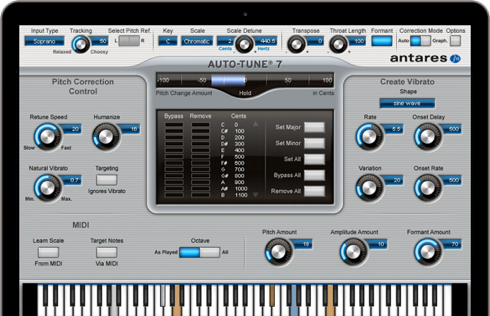
Hailed at its introduction as a “holy grail of recording,” by Recording magazine (and adopted worldwide as the largest-selling audio plug-in of all time), Auto-Tune corrects intonation and timing problems in vocals or solo instruments, without distortion or artifacts, while preserving all of the expressive nuance of the original performance – with audio quality so pristine that the only difference between what goes in and what comes out is the intonation and timing. All with a user-interface that is a model of clarity, speed and ease-of-use.

Auto-Tune is used daily by thousands of audio professionals around the world. Whether to save studio and editing time, ease the frustration of endless retakes, or save that otherwise once-in-a-lifetime performance, Auto-Tune is the overwhelming tool of choice.

Work Your Way

Whether you want to quickly touch up a few questionable notes or meticulously polish every element of a performance using Pro Tools legacy systems, Auto-Tune 7 TDM/RTAS is the perfect solution.
Auto-Tune 7 TDM/RTAS works in two modes: Automatic Mode, designed to be intuitive for users of all abilities and a more technical Graphical Mode for advanced refining.

For most common pitch problems, Automatic Mode detects input pitch and instantaneously adjusts it to the closest pitch in a user-specified scale (including major, minor, chromatic and 26 historical and microtonal scales). The Retune Speed control lets you match the retune rate to virtually any performance style as well as create the iconic Auto-Tune Vocal Effect.

For meticulous pitch and time editing, Graphical Mode displays the performance’s detected pitch envelope and allows you to modify pitch and timing with a variety of easy-to-use graphics tools. This mode gives complete control over the correction or modification of the most elaborate pitch and rhythmic gestures.

Integrated Time Correction and Manipulation

Auto-Tune 7 TDM/RTAS time control capabilities combine an extremely high-quality time shifting algorithm with an exceedingly intuitive user interface designed to make it quick and easy to correct timing errors or exercise your creative imagination. Its time manipulation functions include the ability to move a point in time within a selected range as well as move a range in time within a larger range. The time functions have their own Undo/Redo controls independent of the pitch correction controls and an Enable button that allows you to instantly switch between your original audio and your time shifted audio.

Evo Voice Processing Technology

In 2008, Auto-Tune EVO introduced Antares’ seriously evolved EVO Voice Processing Technology, setting a new standard in pitch detection, pitch shifting, and formant processing performance. In the intervening years, EVO Voice Processing Technology has been integrated into Antares’ full line of vocal processing tools. With Auto-Tune 7 TDM/RTAS, we are introducing the second generation of EVO Voice Processing Technology, offering even more natural (if you want it to be) pitch shifting and throat modeling over a wider transposition range.

Installation

AU – For Logic Pro X

Been creating an installer for MacOS Catalina 10.15
Hope you like it!

  1. Double click
  2. Click Next
  3. Type in pass
  4. Auto reboot
  5. Done

Developer Website

What’s new in Antares Auto-Tune 7

  • Release notes not available at the time of this post.

Screenshots

Name Antares Auto-Tune 7 mac-torrents.net.zip
Size 14.23 MB
Created on 2019-11-07 10:41:05
Hash 0a8be63b59c82bd9c37a155a81a659454d7181ac
Files Antares Auto-Tune 7 mac-torrents.net.zip (14.23 MB)

TotalSpaces 2.8.6

Download TotalSpaces 2.8.6

TotalSpaces is a desktop manager that brings back grid Spaces to OS X and more!

TotalSpaces2 provides a grid of spaces on your Mac. An easy to use 2D grid of desktops. Navigate using the cursor keys (by default together with SHIFT-ALT), choose your transitions, and quickly access a birds eye view of your grid of spaces where you can manage your application windows. You can even give your spaces names.

One of the most useful features of TotalSpaces2 is that it allows you to assign certain applications to particular Spaces. This means that if you have a 3×3 grid, you can ensure that your Twitter client is always in the top left space and that your email client is always in the middle right.

Switching between applications using Command Tab, by default, displays the applications in the order they have been most recently used. this means that your email client may require a different number of Tab presses each time you switch to it. By using TotalSpaces2 to assign it to a specific position in a grid, you can rapidly and reliably switch to it at will.

TotalSpaces2 is especially useful on smaller screened devices, such as the MacBook Air line. On larger screens it is possible to display two programs side by side, however, on 13″ and smaller screens, things become very cramped if you try this.

TotalSpaces2:

  • Manage your desktops: Display an overview of desktops and drag windows between them.
  • Define your grid: Navigate left, right, up and down between your desktops.
  • Choose your transitions: Fully customizable transitions and hotkeys.
  • Swipe between desktops: Moving around your grid has never been easier.
  • Hotcorners: Trigger the overview grid just by moving your mouse.
  • App assignments: Keep your apps where you want them. Assign apps to desktops.

Information

Compatibility
Mac PlatformIntel, 64-bit processor OS X 10.9 or later
Languages
English

What’s New in TotalSpaces 2.8.6

  • Release notes not available at the time of this post.

Screenshots

Name TotalSpaces 2.8.6 HCiSO mac-torrents.net.zip
Size 14.97 MB
Created on 2019-11-07 07:38:47
Hash 4218244322680278d83af110145f360454c27cc5
Files TotalSpaces 2.8.6 HCiSO mac-torrents.net.zip (14.97 MB)

Ableton Live Suite 10.1.4

Download Ableton Live Suite 10.1.4

Create bolder sounds with Live’s new devices. Stay in the flow with a multitude of workflow improvements. Do even more away from the computer with Push. Build your sound with a curated library. And get the unlimited potential of Max for Live, seamlessly built in.

Features

Create with new devices

Meet Wavetable, Echo, Drum Buss and Pedal: new devices that mean colorful new sounds are possible with Live’s instruments and effects.

Wavetable

Immediately playable, infinitely capable, Wavetable is a new synthesizer built by Ableton. Shape, stretch and morph sounds using wavetables derived from analog synths, and a range of other instruments and sounds. Start sculpting sounds right away—even without a deep knowledge of synthesis—or explore its rich palette and potential through an intuitive interface.

Echo

Echo brings together the sound of classic analog and digital hardware delays in a single device—your new go-to delay. Drive and shape sounds with its analog-modeled filters, turn up the noise and wobble for vintage imperfections, or add modulation and reverb to create diffuse soundscapes, wailing feedback and more.

Drum Buss

Drum Buss is a one-stop workstation for drums, capable of adding subtle character or bending and breaking drums to your will. Add warmth and distortion with drive and crunch, take control of dynamics with compression and transient shaping, dial in and tune boom and control bass decay with the dedicated low end section.

Pedal

With separate circuit-level models of overdrive, distortion and fuzz guitar pedals, Pedal brings the character of analog stomp boxes to Live. The effect goes all the way from subtle to reckless—it excels at warming up vocals and other instruments, driving synth sounds or completely smashing drums. And of course, it sounds great with guitars.

What’s New in Ableton Live Suite 10:

Create with new devices

Meet Wavetable, Echo, Drum Buss and Pedal: new devices that mean colorful new sounds are possible with Live’s instruments and effects.

Stay in the flow

You’ll find improvements to Live that help you stay in the flow at every stage of your creative process, whether you’re getting ideas down, organizing your setup or editing the details of your music.

Do even more from Push

Live 10 brings new functionality and new high-res visualizations to Push. Now you’ll spend even less time with the computer—whether you’re composing ideas, editing MIDI or shaping and mixing sounds.

New library of sound

With new collections of Packs, Live 10 has more sounds that are ready for finished music, right out of the box. They’re set up for tweaking to your needs or taking in different directions. Plus the library has been reorganized to make it easier to find what you’re looking for.

Max for Live – no limits, built in

Max technology is now fully integrated into Live 10 Suite. No additional download or set up is required to create with and customize Max For Live devices. They just work. Plus new devices and capabilities bring more possibilities for musicians and device developers.

Live now supports macOS Catalina (10.15).

Information

Compatibility
  • OS X 10.11.6 or later
  • Intel Core2 Duo processor. Intel Core i5 processor or faster recommended.
  • 4 GB RAM (8 GB or more recommended)
Languages
English
Includes
Patched by HCiSO

What’s New in Ableton Live Suite 10.1.4

  • Release notes not available at the time of this post.

Screenshots

Name Ableton Live 10 Suite 10.1.4 HCiSO mac-torrents.net.rar
Size 1.88 GB
Created on 2019-11-07 06:22:31
Hash 2ec0430937fe12a64475a3941881d365931704f7
Files Ableton Live 10 Suite 10.1.4 HCiSO mac-torrents.net.rar (1.88 GB)

NeoFinder 7.5

Download NeoFinder 7.5

NeoFinder rapidly organizes your data, either on external or internal disks, or any other volumes. It catalogs all your data, so you stay in control of your data archive or disk library. With extensive metadata support, you can find your files quickly.

Features

  • Catalog: any hard disk, data folder, CD-ROM, DVD-ROM, BlueRay, HD-DVD, iPod, Server Volume, Audio-CD, USB-Stick, FTP-Server, and more
  • Power: Handle really large amounts of data
  • Photo Previews: Create beautiful thumbnails for many photo and image formats, such as JPG, TIFF, EPS, RAW, PDF, PSD, BMP, GIF, PNG, TGA, IFF (Maya)
  • Audio Meta Data: MP3, AAC (iTunes), FLAC (Lossless), ALAC (Apple Lossless), and AIFF meta data: author, album, title, composer, lyrics, cover art, track number, duration, bit rate, genre, year, comment. Even catalogs whole Audio-CDs, and Apple iPhone ringtone files!
  • Photo Meta Data: XMP (used by Adobe Bridge), EXIF and IPTC meta data (including GPS geotags), and JPG, TIFF, PICT and BMP photo details
  • Movie metadata: get thumbnails, the dimension, duration, codec and frame rate out of movie files, supporting AVI, MOV, MP4, FLV, MPG, MKV, M4V, and others
  • Geotagging GPS support: NeoFinder catalogs and displays GPS EXIF tags of photos, and has direct links to Google Earth, Flickr, Panoramio, Google Maps and MapQuest. NeoFinder can even search for photos that were taken near any location (GeoFinder), and export GPS data to KMZ files
  • Networkable: Share your NeoFinder database in your entire workgroup (requires a Business License)
  • Cross-platform: with abeMeda (was CDWinder), you can use one database for both worlds!
  • Workflow Integration: Automatically catalog all discs burned by Roxio Toast; Drag any image directly from NeoFinder into applications like Adobe InDesign, Quark XPress, Apple Pages, Microsoft Office; integrate NeoFinder into FileMaker Pro databases, and much more
  • Find it! Best Find functions, and of course offline browsing of all your volumes – even in multiple windows, if you want to
  • Spotlight Integration: Search your local disks with Spotlight and as well as your catalogs from inside NeoFinder
  • Import catalogs: These twelve formats are supported: Disk Recall, DiskWizard, Iomega FindIt, Portents DiskTracker (both 1.x and 2.x!), Catalogue, CatFinder, “Neometric” Catalog, DiskLibrary, Broken Cross Disk Manager (Windows), and Advanced Disk Catalog (ADC for Windows) catalog or export files, and iView MediaPro and Microsoft Expression Media XML files
  • Fast and really easy to use, see screenshots
  • Export and print catalog data
  • Insight: Look inside archive files: ZIP, TAR, .rar, StuffIt (.sit and even .sitx), and others, including Disk Image contents
  • International: English, German, French, Italian, Swedish, Spanish and Dutch user interface, all in one application
  • Unicode compatible: Use NeoFinder to catalog file names of any language
  • AppleScript: Integrate NeoFinder with FileMaker Pro or any other application, or extend the abilities of NeoFinder
  • Extend your NeoFinder catalog database by using five custom fields for any content you need
  • FileCheck: Only NeoFinder can generate an industrial strength MD5 checksum for every file being cataloged
  • AutoMount: NeoFinder automatically mounts every server volume you have cataloged or updated for you, if needed! And you can of course also ask NeoFinder to mount the volume for you at any time, using the context menu
  • QuickLook: Open a QuickLook window for any selected online file(s) right from inside NeoFinder!
  • Cross-Grade: you already bought a different disk cataloger or media asset manager application, ask us for a good offer!
  • Free email support
  • Languages: User Interface in eight languages, all in one application: English, German, Japanese, French, Italian, Swedish, Spanish and Dutch

Information

Compatibility
OS X 10.7 or later
Languages
Multilingual

What’s New in NeoFinder 7.5

New features and enhancements:

  • Catalog, display, edit, create and export custom metadata or annotation fields for photos and videos
  • The iView Importer can read these custom annotations as well
  • Find Faces will find all thumbnails in a catalog containing a face, and display a green rectangle in the Inspector as well (can be turned off in the Inspector Settings)
  • AutoUpdater has been massively expanded. It can run schedules on specific weekdays, or when a volume is mounted, or when NeoFinder is launched
  • NeoFinder 7.5 is certified to run in macOS 10.15. We still very highly recommend to wait with the update to macOS 10.15 at least until 10.15.5 is released next year
  • NeoFinder is “notarized”, which Apple promises is supposed increase the security. Or so
  • Icon View can display up to 3 lines of metadata or annotations, and you can chose what you want to see
  • Photo Contact Sheet also uses up to 3 freely selectable metadata lines
  • NeoFinder can use Aliases in the Database Folder pointing to other folders (Business License only)
  • Edit EXIF dates in photos, to adjust time offsets, and more
  • Play a selected video in Gallery View by pressing the Space key, directly inside the NeoFinder window!
  • Navigate to the next or previous item in the Inspector with a menu or keyboard command for much faster metadata editing
  • Inspector: Select which sections should be displayed
  • Sort the Icon View by Duration
  • The Display Filter remembers your settings for the first menu. Keep that in mind if you wonder why NeoFinder may not show all expected items…
  • Find Editor can search for file kind “Email”
  • Find Editor can search for “codec is NOT”
  • “Export Photos as…” is a separate menu command in the Item menu, with Shift-Command-E as a hotkey
  • Photo Export can apply XMP Metadata Presets to the exported file
  • Copy->Path will copy the full macOS style path of a file if it is online
  • Catalog the text content of “.md” (markdown) files
  • Visual adjustments in the main window. The slider is now at the right edge underneath the content, and the text with the number of items always in the center as well
  • NeoFinder can catalog the boot volume in macOS 10.15 properly
  • Photo Export handles rotated photos better
  • Cataloging: Phase One EIP files is much faster, and supports all file variations
  • Export Photos can export to PDF and HEIC format
  • Added more items to the Info.plist to describe the use of the new Folder Cages introduced by Apple in 10.15
  • Copy and Paste of a GPS Geotag will use the view direction, too
  • Compiled using the “hardened runtime”, which should make things safer, Apple claims
  • Improved cataloging of certain Person metadata inside of NEF files
  • Improved behaviour changing the ratings or labels when multiple items were selected for QuickLook
  • New progress window when pasting metadata into more than 10 items
  • Massive speed improvements when Updating catalogs with items whose thumbnails were generated by QuickLook
  • Improved Spotlight search for Paths
  • Improved behaviour when searching for video codecs in the Find Editor
  • Improved handling of selecting multiple items in the Icon View
  • Fixes a problem with the incorrect menu commands for Person tokens in the Inspector for offline items
  • Many small fixes and improvements

Screenshots

Name NeoFinder 7.5 HCiSO mac-torrents.net.zip
Size 23.78 MB
Created on 2019-11-07 04:14:32
Hash 91506fa066685bb5ba2b6c8d8b80203f751ffb6b
Files NeoFinder 7.5 HCiSO mac-torrents.net.zip (23.78 MB)

ExactScan Pro 19.11.6

Download ExactScan Pro 19.11.6

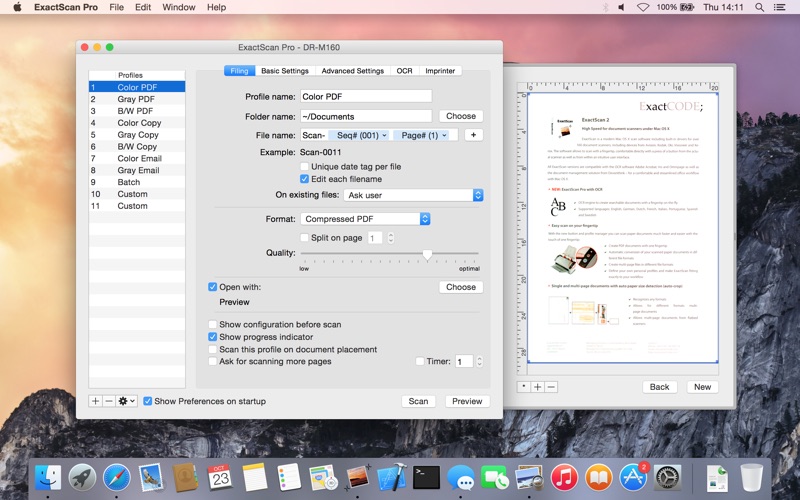
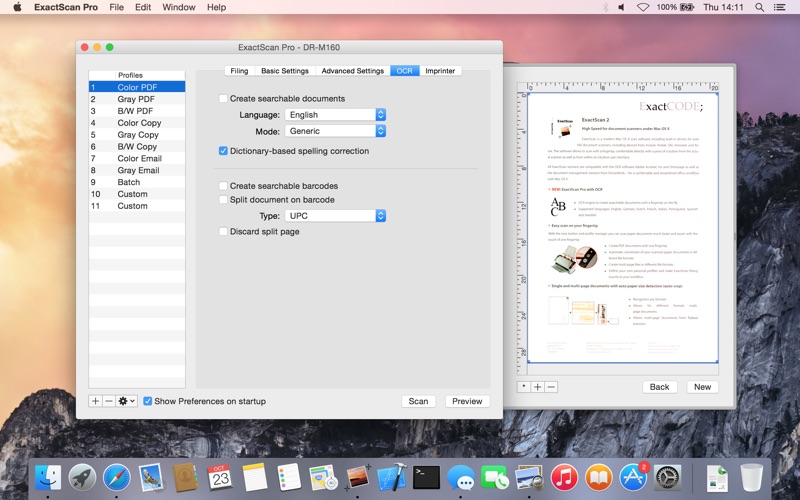
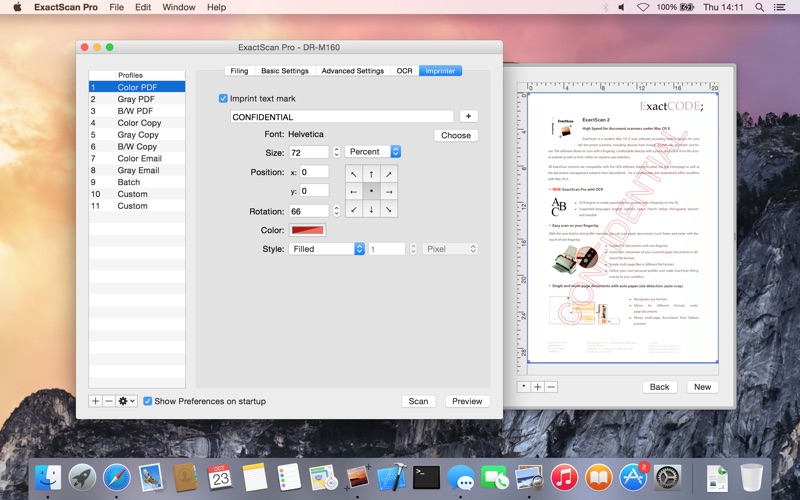
ExactScan Pro is the professional scan suit for a paperless office on the Mac. Get organized and save time and money. ExactScan comes with over 400 drivers for professional document scanners from Avision, Canon DR-series, Fujitsu fi-series, Kodak, Oki, Panasonic, Visioneer and Xerox, which otherwise do not come with a Mac driver. Additionally it allows to use any other scanner with TWAIN or ImageCapture driver.

Scan all your documents for fast retrieval, and get rid of dusty paper archives. Find searchable PDF everywhere with Spotlight in a snap.

Features:

  • Over 400 native built-in drivers for professional document scanners from Avision, Canon, Fujitsu, HP, Kodak, Oki, Panasonic, Visioneer and Xerox
  • Support for a variety of third party scanners via ImageCapture and TWAIN drivers
  • Save to PDF, TIFF, JPEG, JPEG 2000, PNG, BMP, PNM
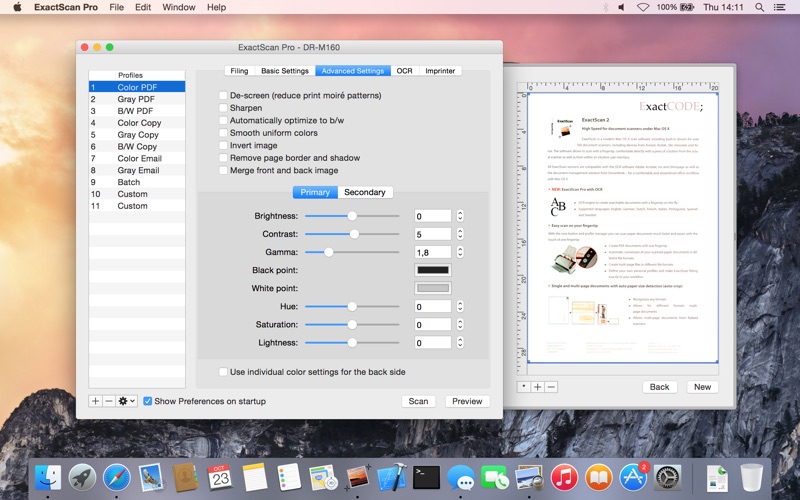
  • Advanced and intelligent image processing algorithms
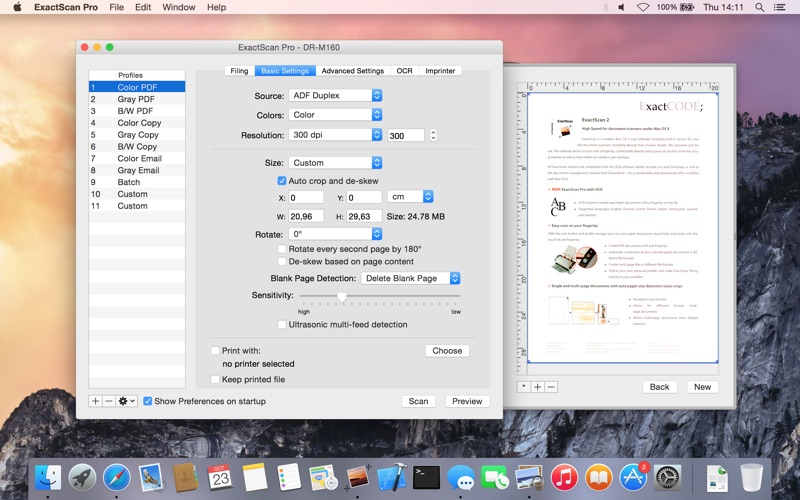
  • Auto-crop & de-skew
  • Blank page removal
  • Direct scan to print
  • Profiles to configure scan workflow
  • AppleScript support for professionals

ExactScan Pro additionally includes:

  • OCR to directly create searchable PDF files
  • Content based page de-skew
  • Automatic rotation, color- and source detection
  • Imprinter to print flexible text into the scanned image
  • Barcode recognition to file stacks by barcodes
  • Batch processing of existing image files

The following languages are supported by the OCR:

Bulgarian, Croatian, Czech, Danish, Dutch, English, Estonian, French, German, Hungarian, Italian, Latvian, Lithuanian, Polish, Portuguese, Rumanian, Russian, Serbian, Slovenian, Spanish, Swedish, Turkish, Ukrainian, and Norwegian.

Information

Compatibility
OS X 10.6.6 or later, 64-bit processor
Languages
Multilingual

What’s New in ExactScan Pro 19.11.6

  • Release notes not available at the time of this post.

Screenshots

Name ExactScan Pro 19.11.6 [TNT] mac-torrents.net.zip
Size 27.90 MB
Created on 2019-11-07 04:14:40
Hash 0418e49ddd77665cddaa4c058cc60a412f968a63
Files ExactScan Pro 19.11.6 [TNT] mac-torrents.net.zip (27.90 MB)

NoiseAsh Palmary Collection v1.1.0

Download NoiseAsh Palmary Collection v1.1.0

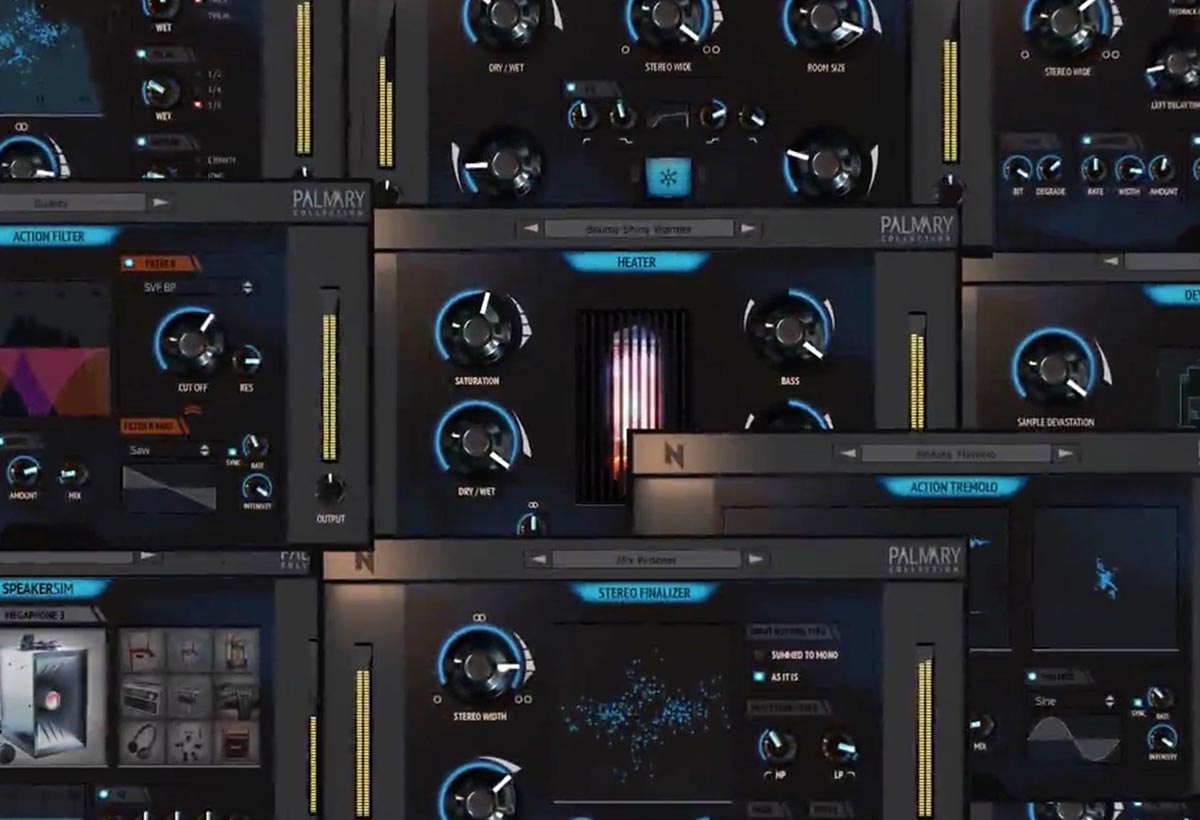
Palmary Collection is an elite production tool series for producers / musicians / mixing & mastering engineers. There are lots of great and useful plugins in this bundle set. Effortless professional mixing and mastering with having fun, is so easy now!

ADVANCED TOOLS FOR MUSIC PRODUCTION

With the latest DSP technology, there are endless possibilities to get the highest sound quality. You will find lots of true high quality, intelligent, fast and analog reality solutions in this serries.

INCLUDES

VOCAL FINALIZER

Vocal Finalizer is designed for holding “Vintage & Modern Characters – Simplicity – Wide Usability Range – Time Saving” properties together. Carefully crafted peaces are used in this combination to give everything you need to reach a final ready to mix vocal sound from a raw vocal track.

ACTION DELAY

Don’t be fooled by the name. It’s not an only delay unit. It’s a Delay – Chorus – Reverb – LoFi processor combination. As you can see, totally 4 in 1… We’ve simplified controls. Every parameter designed carefully to give the shortest and the most varied result. So you won’t get drowned in dozens of parameters. There are tons of ultra high quality possibilitiess for Action Delay but can be achieved with less effort.

STEREO FINALIZER

Stereo Finalizer is a mixture of the Haas, Multi-Band Frequency Splitting & Panning, Dimension, Delay modulation and Mid-Side stereo enhancing types. It’s ideal for stereo tracks too, as much as mono tracks. Simplified controls, lot’s of creative possibilities. Ears will be magnetized with Stereo Finalizer’s effective fast engine.

SPEAKERSIM

SpeakerSim is a realistic emulation of different types of speakers with their own acoustics and environments. There are 18 speaker emulations of three bullhorn / megaphone types, computer, cellphone, vintage phone, jukebox, answering machine, headphone, radio, car, toy, mini guitar cabinet, wireless walkie talkie, turn table and some room sounds are all in one plugin.

ACTION FILTER

Action Filter is designed to be flexible enough to fulfil your needs whenever you reach for any type of filter. It has two filters with 13 popular filter models for each one, advanced modulation options, sound engine with convincing analog character. You can blend this two filters with your modulation design and analog saturation to create classic or modern filter sound effects. There are three modulation sources: a custom shape envelope follower, the LFO with 5 waveforms, a 32-step sequencer and each modulation sources can be assigned in-sync or free-sync modes.

FROZENVERB

FrozenVerb is a versatile, huge, hyper stereo algorithmic reverb unit that delivers quick results with easy access to mission critical controls. It has an extra-ordinary “Freeze” buton that creates infinitively-continuous sustain reverb effect. Freeze button feature makes it very inspiring and slightly different from other reverb units. So, you can create unique, random, endless reverb effects in your mix with just an only button.

DEVASTATOR

It’s not a straight forward bit crusher. As the name says; it’s a total sound Devastator. It gives all of the commonly used Lo-Fi distortion / audio resolution degradation features for adding very bad shapes to your sound (in a good way of course ???? ) It allows you to create low resolution audio and bit crushed sound through a variety of controls with different sonic characteristics. With tweaking just one knob, you will see the significant difference and tone degradation on your tracks.

HEATER

Heater is a high-quality digital simulation of one of the most powerful EQ based analog-style saturation tone shaper. It heats the signal with giving fat, colored, gritty, dirty or crystal clear tones to your tracks. Simplified controls allows you to reach the result that you’ve ever looking for very quickly. With Stereo Widener, LP-HP filter and Dry/Wet settings, the total control will be in your hands.

ACTION PHASER

Action Phaser is a stereo phase modulation effect processor with an advanced modulation system that pushes your limit to highest possibility levels. It has also extra features like pan modulation, tape saturation and filter-EQ’ing that are uncommon for a phaser. You can combine all of this features and apply what’s on your mind to the tracks very quickly. Now, from classic to modern; every kind of Phasing effect is available in your DAW as a one plugin.

ACTION TREMOLO

Action Tremolo is an advanced pan and volume modulation unit. There are three modulation sources individually in pan and volume controls: a custom shape envelope follower, the LFO with 5 waveforms, a 32-step sequencer and each modulation sources can be assigned in-sync or free-sync modes.

Information

CompatibilityOS X 10.9.5 or later
LanguagesEnglish

What’s new in NoiseAsh Palmary Collection v1.1.0

  • Release notes not available at the time of this post.

Screenshots NoiseAsh Palmary Collection v1.1.0 :

Name NoiseAsh Palmary Collection v1.1.0 mac-torrents.net.zip
Size 186.4 MB
Created on 2019-11-07 04:14:24
Hash 18b254ed1ef6fbdbc2af7fbfafb8de30326b57aa
Files NoiseAsh Palmary Collection v1.1.0 mac-torrents.net.zip (186.4 MB)

NoiseAsh Rule Tec All Collection v1.4.2

Download NoiseAsh Rule Tec All Collection v1.4.2

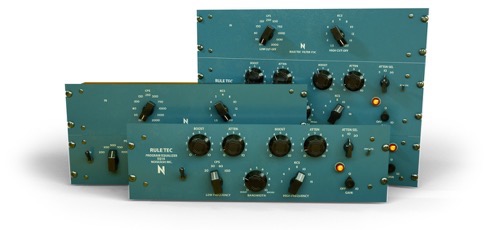
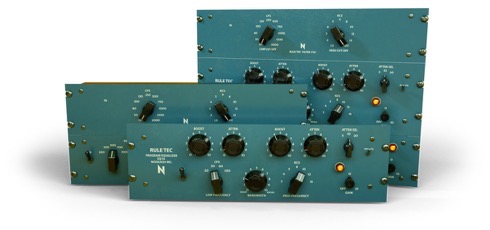
Legendary passive equalizers have long been a top choice of leading recording and mastering engineers since it was released in 1951. With tons of research and hard work; we are proud to present extremely accurate models of these legendary equalizer units, Rule Tec® Collection. Legendary tone is here with all of the legendary signature features including “Pultec EQ trick”. Rule Tec Heritage Pro, EQ1A and EQ5M plugins are included in this Rule Tec All Collection pack.

EQ1A

Classic mixing and mastering equalizer.

EQ5M

EQ5M is a classic mid-range mixing and mastering equalizer. On top of the EQ5M, F3C model was added in order to complete the purpose with unique taming sharp high pass – low pass filters.

HERITAGE PRO

FC3C + EQ1A + EQ5M… All three models in one single plugin. Very powerful unit which combines All of The Rule Tec Models.

Information

Compatibility
OS X 10.9.5 or later
Languages
English

What’s new in NoiseAsh Rule Tec All Collection v1.4.2

  • Release notes not available at the time of this post.

Screenshots

Name NoiseAsh Rule Tec All Collection v1.4.2 mac-torrents.net.rar
Size 942.5 MB
Created on 2019-11-07 04:37:14
Hash 2102afd6e529459dab14718b13212f76672daf1f
Files NoiseAsh Rule Tec All Collection v1.4.2 mac-torrents.net.rar (942.5 MB)

NoiseAsh Need 31102 Console EQ v1.2.6

Download NoiseAsh Need 31102 Console EQ v1.2.6

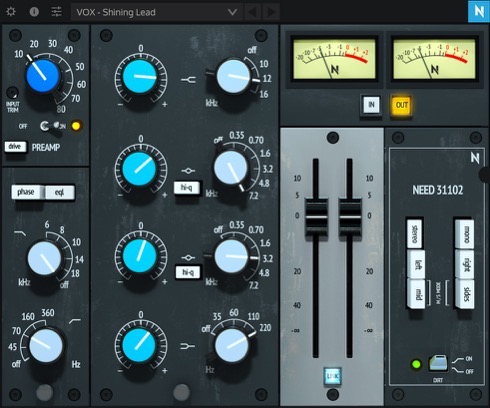
The iconic 31102 preamp/eq (featured in the Neve 8068 consoles) has been used to mix many hit records for years. Guns N’ Roses, Bruce Springsteen, AC/DC, Red Hot Chili Peppers, Nirvana, Metallica… etc. We’re proud to present the true analog emulation for one of the best-sounding class A mic pre/EQ modules ever produced. Need 31102 Console Eq, with same character and enhanced with a great modern workflow! The Need 31102 is holding each small detail and true vintage tone of the original unit. Iconic console tone has been reborn!

PRODUCT SPECIFICATIONS

  • Truly accurate circuit reproduction of the famous classic console eq / preamp unit
  • Second mid band enhancement
  • Original Mic Pre-Amp model with Drive Mode in 30 dB range (From –20 dB to 10 dB)
  • Complex signature interaction between filters with legendary smooth and musical curves
  • Anti-Aliasing Engine with Oversampling option
  • Mid / Side, Stereo, Mono-Sum, Left and Right channel procesing matrix
  • Friend of CPU
  • Built-in Tutorials
  • Effective Resizable GUI workflow

Information

Compatibility
OS X 10.9.5 or later
Languages
English

What’s new in NoiseAsh Need 31102 Console EQ v1.2.6

  • Release notes not available at the time of this post.

Screenshots

Name NoiseAsh Need 31102 Console EQ v1.2.6 mac-torrents.net.zip
Size 1.99 GB
Created on 2019-11-07 04:17:40
Hash 7ceff8304dcb5603ffb944fed1d77fc569214060
Files NoiseAsh Need 31102 Console EQ v1.2.6 mac-torrents.net.zip (1.99 GB)

Folx Pro 5.12 (13890)

Download Folx Pro 5.12 (13890)

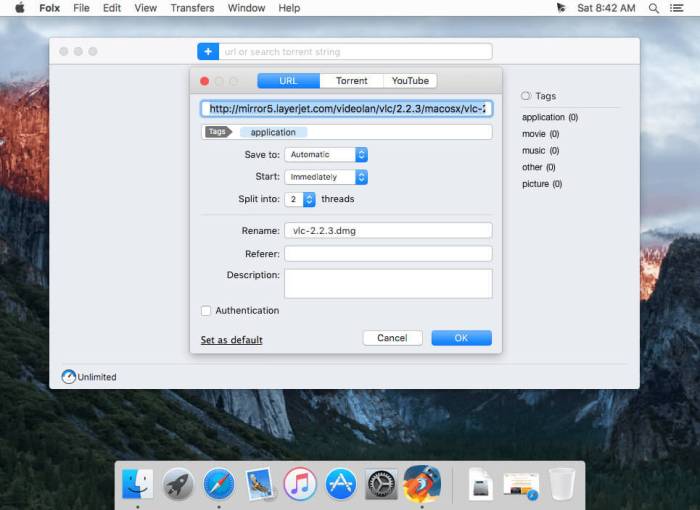
Folx is download manager for Mac OS X with a true Mac-style interface. It offers convenient downloads managing, flexible settings, etc. Folx has a unique system of sorting and keeping the downloaded content.

PRO version of Folx enables torrents search directly from the application. With Folx PRO you don’t need to browse through multiple torrent trackers to find what you need. Enter a keyword in Folx, and it will search for it in its extensive list of torrent trackers and display a list of relevant results.

Folx Downloader Features

Fast downloading PRO

Folx PRO can split the downloads in up to twenty threads, which can dramatically increase the download speed.

Speed control PRO

Gain full control over the downloading speed by either adjusting it manually or allowing Folx to do that automatically for optimal traffic allocation.

Scheduling of downloads PRO

You can choose the most suitable time for starting the download and set up how Folx will behave upon finishing the download: shut down the system, switch to sleeping mode, or simply quit Folx.

iTunes integration PRO

All music and videos downloaded with Folx can automatically go to iTunes playlists with the names as the tags assigned to downloads.

Remember login and password PRO

When starting new downloads from websites requiring authentication, you can ask Folx to remember login and password. Next time Folx is downloading from this website, you won’t need to enter login and password. You can also keep passwords for FTP and HTTP websites in Folx. Free version of Folx lets you save two entries. Websites requiring web authentication are also supported.

Download videos from Internet PRO

Download videos from the web with Folx with the possibility to set the format for the downloaded video. You can also download age-restricted and private videos. When you don’t actually need the video and only want to have a soundtrack from it, Folx is of great help! Downloads can be performed manually, immediately upon the video discovery or at a certain schedule.

Information

Compatibility
OS X 10.9 or later 64 bit
Languages
English

What’s New in Folx Pro 5.12 (13890)

  • Release notes not available at the time of this post.

Screenshots

Name Folx Pro 5.12 13890 [TNT] mac-torrents.net.zip
Size 45.34 MB
Created on 2019-11-06 21:11:06
Hash 18099bb7755094bd40ab8b5b478567c850a135e6
Files Folx Pro 5.12 13890 [TNT] mac-torrents.net.zip (45.34 MB)

Battery Health 3 v1.0.19

Download Battery Health 3 v1.0.19

Battery Health is a professional battery monitoring utility for viewing vital statistics about your MacBook’s and iOS device’s battery, such as power level, heath, capacity, temperature, charge cycles and more.

It is an award-winning app that is used by over 1 million Mac users worldwide.

iPhone & iPad Support

You can use Battery Health to connect to your iPhone or iPad over WiFi Sync or USB cable to retrieve useful iOS battery data.

These important statistics can help you determine if your device’s poor battery life is due to a deteriorated battery capacity.

Energy Hogs & Time Remaining

The energy hogs feature allows you to prolong battery life by closing down apps that are detected as consistently using a high amount of energy.

Also, you can choose to display your MacBook’s ‘battery time remaining’ figure in your menubar, which Apple recently removed from their standard OS functionality.

Customizable Notifications

Control exactly when you get notified about battery level events on your Mac; choose between regular intervals and predefined values.

In addition, you can optionally configure the menubar text to turn red once your charge level drops below 10%. This acts as an added reminder to start charging your MacBook soon.

Advanced Power History Stats

Battery Health allows you to analyse your battery performance with three different charts that display power, charge and health history. Use this data to develop charging and usage habits that help to maintain a high battery life.

Information

Compatibility
OS X 10.10 or later 64-bit
Languages
English

What’s New in Battery Health 3 v1.0.19

  • Release notes not available at the time of this post.

Screenshots

Name Battery Health 3 1.0.19 [TNT] mac-torrents.net.zip
Size 21.82 MB
Created on 2019-11-06 18:44:04
Hash 852dd49a3686f559dd7b711d0068673d9ed24c83
Files Battery Health 3 1.0.19 [TNT] mac-torrents.net.zip (21.82 MB)

Memory Clean 3 v1.0.13

Download Memory Clean 3 v1.0.13

Memory Clean 3 is app for optimizing your Mac’s memory. The app replicates the feeling of a fresh system restart and helps to keep your Mac running smoothly.

The app works by purging your Mac’s inactive memory and is best used when you close a memory hogging app that you won’t be using again soon. By freeing up unneeded memory, you can make available more memory for other apps to take advantage of.

FEATURES:

Speed Up Your Mac

Memory Clean 3 is an absolutely gorgeous, extremely powerful and super slick app for optimizing your Mac’s memory.

The app replicates the feeling of a fresh system restart and helps to keep your Mac running smooth and fast.

How It Works

The app works by purging your Mac’s inactive memory and is best used after you close a memory hogging app that you won’t be using again soon. By freeing up unneeded memory, you can make available more memory for other apps to take advantage of.

Discover Memory Hogs

Memory Clean 3 lets you know which apps are using up the most memory on your Mac and can automatically recover memory when you close them.

Inactive App Notifications

You can enable Memory Clean 3 to notify you of opened apps that have not been used for a period of time. You can close these inactive apps to reduce memory usage.

Interface Themes

You can customise your Memory Clean 3 interface with a beautiful light and dark theme.

Also, you can pick between a detailed or compact interface design.

Lastly, many veteran users will be glad to know that docked mode is back!

Information

Compatibility
OS X 10.8 or later 64-bit
Languages
English

What’s New in Memory Clean 3 v1.0.13

  • Release notes not available at the time of this post.

Screenshots

Name Memory Clean 3 1.0.13 [TNT] mac-torrents.net.zip
Size 19.57 MB
Created on 2019-11-06 18:44:44
Hash c6bc0add2624d15ffd2a1a12f36864bc292e1ad2
Files Memory Clean 3 1.0.13 [TNT] mac-torrents.net.zip (19.57 MB)

Winclone Pro 8.0.1

Download Winclone Pro 8.0.1

Winclone 8 Pro can create a package installer creates the Boot Camp partition and restores a Winclone image to the new partition. Winclone packages can be deployed using any client management system that can deploy macOS packages. If you can install a package, you can deploy a Boot Camp partition.

Winclone Packages can deploy fully setup and configured Windows images, base images that configure on first run, or a WinPE environment to image and configure using standard Microsoft tools.

What’s New In Winclone 8 Pro

Installer Package Signing

With increased focus on security, signed installer packages can be required in some environments. Using a certificate issued by Apple, Winclone 8 can sign Winclone packages for easy deployments.

Beautiful in both Light and Dark Mode

The Winclone interface has been updated to look great with modern macOS. Run in either light or dark mode and it will look amazing. When you add the Winclone icon in your Dock, it will fit right it.

Security

Winclone 8 works great with new security features of Catalina. Any images stored in protected areas (Desktop, Documents, External Volumes) can be used to restore to a Boot Camp partition.

Features

  • Imaging and restoring Boot Camp
  • Supports macOS 10.14 Mojave and 10.15 Catalina
  • Enhanced security compatibility with macOS Catalina
  • Scheduled background updates of Winclone images
  • Supports restoring images created with prior versions of Winclone (Windows 7 and above)
  • Supports restoring images to DOS-FAT32, ExFAT and NTFS formatted volumes
  • Supports restoring images to attached volumes (bootable depending on hardware and Windows version)
  • Supports saving to external or network storage
  • Fast incremental imaging
  • Support for APFS and core storage volumes
  • Detection and reporting of inconsistent GPT and MBR boot records
  • Supports local disk-to-disk migration
  • Shrink/expand Boot Camp file system
  • Options for “make legacy bootable” and “make EFI bootable” (Windows 7 and above)
  • Progress bar estimate and percentage complete
  • Alert sound for success or fail operation
  • In-app links to related support resources
  • Updated user interface
  • Notarized for enhanced security and compatibility with macOS Catalina

Information

Compatibility
macOS 10.14 or later 64-bit
Languages
English

What’s New in Winclone Pro 8.0.1

Fixed:

  • “Already have license” button not working
  • Crash for some users when clicking Save Image

Improved:

  • Error reporting in Winclone Menu

Screenshots

Name Winclone 8.0.1 [TNT] mac-torrents.net.zip
Size 30.00 MB
Created on 2019-11-06 21:11:25
Hash 1d8c96cacf6317a1beeec7c9ae5dd3702ff3ce9e
Files Winclone 8.0.1 [TNT] mac-torrents.net.zip (30.00 MB)

MovieMator Video Editor Pro 2.9.2

Download MovieMator Video Editor Pro 2.9.2

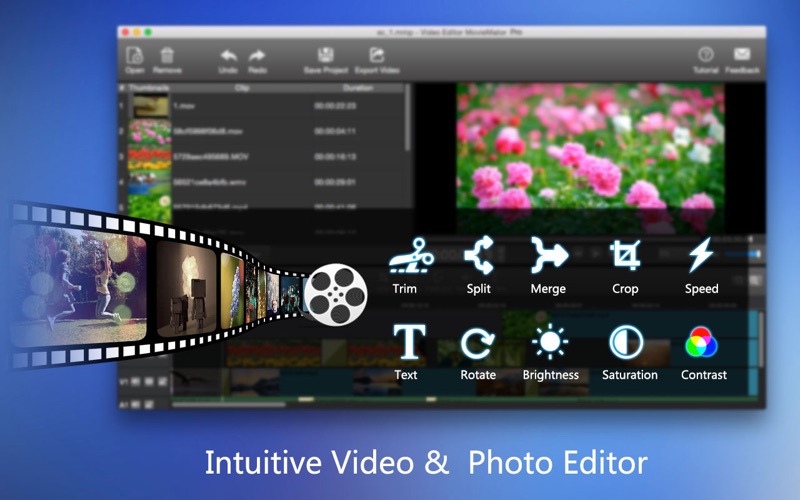
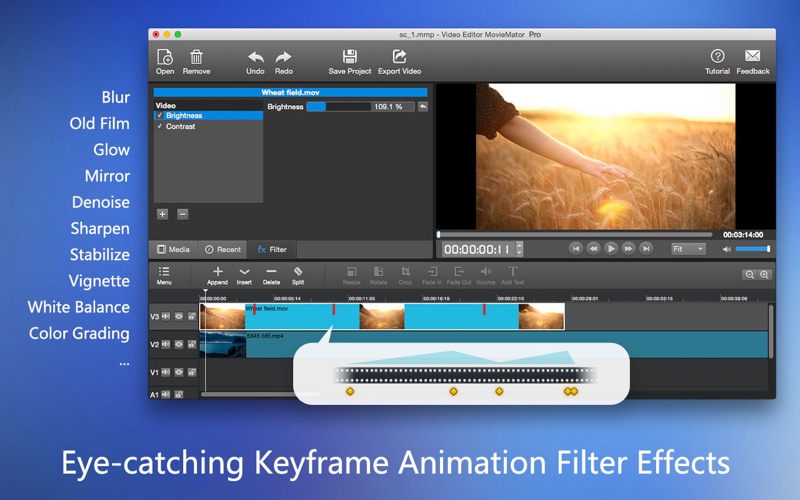
– With a streamlined design and professional editing features, Video Editor MovieMator Pro easily edit any type of video and audio clips in its native format to create fantastic family movies and high quality photo slideshows at the speed of thought. Besides providing the basic editing features like trimming, cropping, splitting, rotating and more, it brings to the table exceptionally advanced editing functionalities like video overlay (PIP), stabilization, etc. With 40+ built-in fixed filter effects and perfect support for keyframe technology, Video Editor Pro will create a variety of eye-catching animation effects.

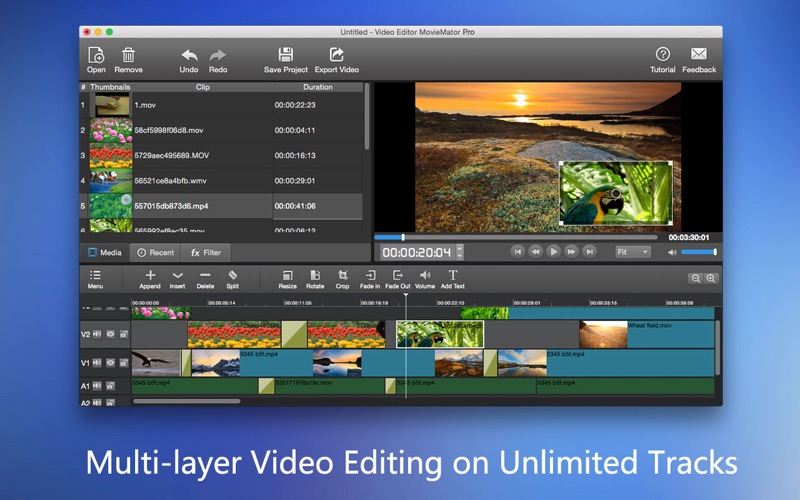
Video Editor MovieMator Pro provides unlimited video and audio tracks for editing large projects. Moreover, it fully supports all media formats like 4K UltraHD, H.265, MP3, OGG, JPG, SVG, etc. and is optimized for the decoding of different formats, which significantly improved the decoding speed and quality.

Features

Create Fantastic Animation Effects with Keyframe Animation Technology

  • Text animation: display different text at different times of the clip.
  • Rotate animation: set different rotation angles at different times of the video clip.
  • Wave animation: show different wave effects at different times of the clip.
  • Stabilization animation: show different stabilization effects at different times of the clip.
  • Gradient brightness, saturation, contrast, white balance and other effects.
  • Download the software NOW to experience more animation effects.

Easily Edit Videos/Audios/Images

  • Unlimited video tracks and audio tracks help users handle all projects.
  • Basic editing features: merging, splitting, rotating, cropping, trimming, etc.
  • Seamlessly assemble clips and adjust them frame by frame in the Timeline .
  • Separate the audio track from a video file with ease.
  • Create colorful slideshows with photos, music and fades.

Make Personalized Home Movies with Creativity

  • 40+ fixed filter effects: Blur, Old Film, Sharpen, Stabilize, Vignette, White Balance…
  • Create fantastic animation effects with keyframe animation technology.
  • Play multiple videos in the same time with PictureinPicture effect.
  • Stabilize your shaky Action Camera footage in one click.
  • Create Fast/Slowmotion video by adjusting the playing speed as you like.
  • Support volume adjustment and various audio filters to create perfect sound effect.
  • Set fade in/out time for videos and audios with freedom.
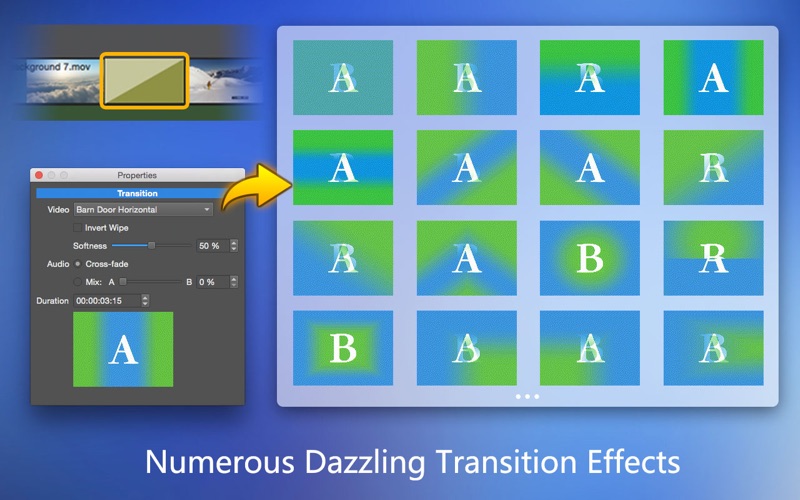
  • Enhance your movie by adding personalized subtitles and dazzling transitions.
  • 20+ dazzling transitions: Dissolve, Iris Circle, Clock Top, Cut, Bar Vertical…

Fully Support Media Files of Any Type

  • Import all videos/photos shot by iPhone 6s, GoPro, camcorder or other devices.
  • Support videos/images downloaded from Facebook, Instagram, Flickr and more sites.
  • Support videos with voiceover that recorded by any screen recording software.
  • Support all popular video/audio/image formats: MP4, AVI, MPEG, WMV, MKV, MPG, RMVB, M4V, 3GP, FLV, TS, M4V, VOB, F4V, MP3, WAV, MKA, OGG, FLAC, AAC, JPG, PNG, TIF, BMP, SVG…
  • Work natively with a broad range of formats including ProRes, RED, XAVC, AVCHD, H.264 from DSLR and more.

Extremely Intuitive and Friendly Interactive Operation

  • The interface of MovieMator is intuitive and Realtime preview feature ensures what you see is what you get.
  • Arrange and Trim all elements on the timeline by dragging and dropping.
  • Easytouse cut, copy, and paste operations.
  • Hide, mute, and lock the video /audio track with oneclick.

Powerful Project Preservation and Video Output Capability

  • Incredibly fast export of HD videos in 200+ media formats for playback on all devices.
  • Customize output parameters like resolution, frame rate, aspect ratio, encoding and etc.
  • Save the file as a project for direct editing next time.
  • Auto save the project when the window is closed unexpectedly.

Information

Compatibility
OS X 10.8 or later, 64-bit processor
Languages
English, Simplified Chinese

What’s New in MovieMator Video Editor Pro 2.9.2

  • Newly add audio waveform function.
  • Added more text templates.
  • The rotation filter bug was fixed.

Screenshots

Name MovieMator Video Editor Pro 2.9.2 MAS [TNT] mac-torrents.net.zip
Size 100.9 MB
Created on 2019-11-06 18:44:54
Hash 2ba14ae565a212824c90a6da058cebd54c8285b1
Files MovieMator Video Editor Pro 2.9.2 MAS [TNT] mac-torrents.net.zip (100.9 MB)

Translate Tab 2.0.7

Download Translate Tab 2.0.7

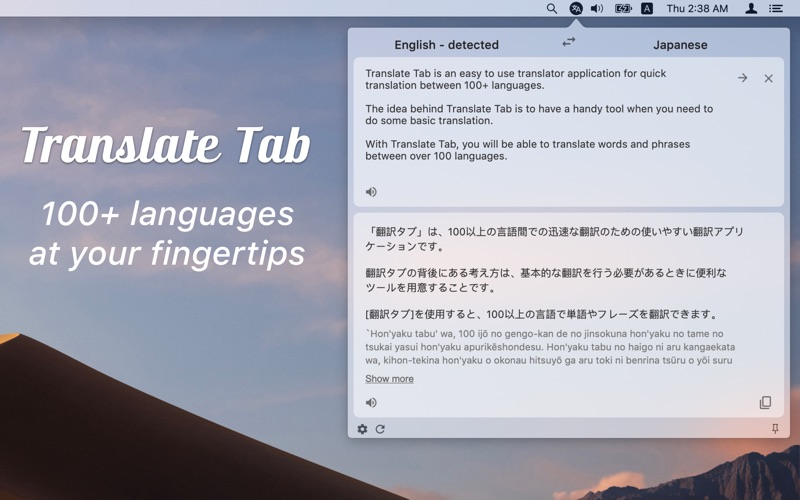
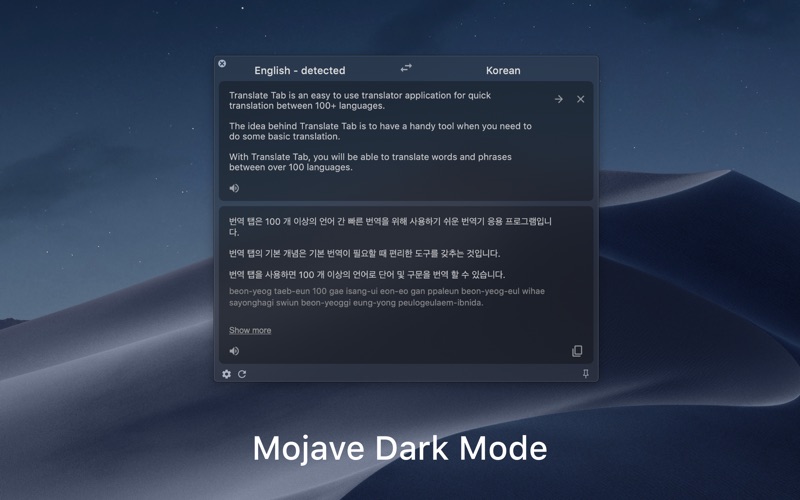
Translate Tab is an easy-to-use tool for quick translation. The idea behind Translate Tab is to have a tool handy when you need to do some basic translation. With Translate Tab, you will be able to translate words and phrases among more than 100 languages.

Key Features:

  • Translates into 104 languages
  • Detects source language automatically
  • Translates text instantly
  • Inputs text phonetically
  • Enables to read and listen to your translation
  • Translates entire web pages
  • Checks spelling
  • Sends to instant translation through shortcut
  • And more features are coming soon…

Supported Languages:

  • Afrikaans Albanian Armenian Azerbaijani
  • Arabic Basque Belarusian Bulgarian Catalan
  • Chinese (Simplified) Chinese (Traditional) Croatian Czech
  • Danish Dutch English Estonian Filipino Finnish French
  • Galician Georgian German Greek Haitian Creole
  • Hebrew Hindi Hungarian Icelandic Indonesian Italian Irish Japanese
  • Korean Latvian Lithuanian Macedonian Malay Maltese
  • Norwegian Persian Polish Portuguese Romanian Russian
  • Serbian Slovak Slovenian Spanish Swahili Swedish Thai
  • Turkish Ukrainian Urdu Vietnamese Welsh Yiddish
Notes:

You need an Internet connection to access the Translation Tab

Information

Compatibility
OS X 10.10 or later, 64-bit processor
Languages
English

What’s New in Translate Tab 2.0.7

  • Fixed “Start automatically” on system startup
  • Added translate.google.cn endpoint for users from China

Screenshots

Name Translate Tab 2.0.7 MAS [TNT] mac-torrents.net.zip
Size 22.86 MB
Created on 2019-11-06 21:11:15
Hash d64aa94c6326f15f1c792e5f9c9acd9ba0e82f59
Files Translate Tab 2.0.7 MAS [TNT] mac-torrents.net.zip (22.86 MB)

Download Shuttle Pro 1.6

Download Download Shuttle Pro 1.6

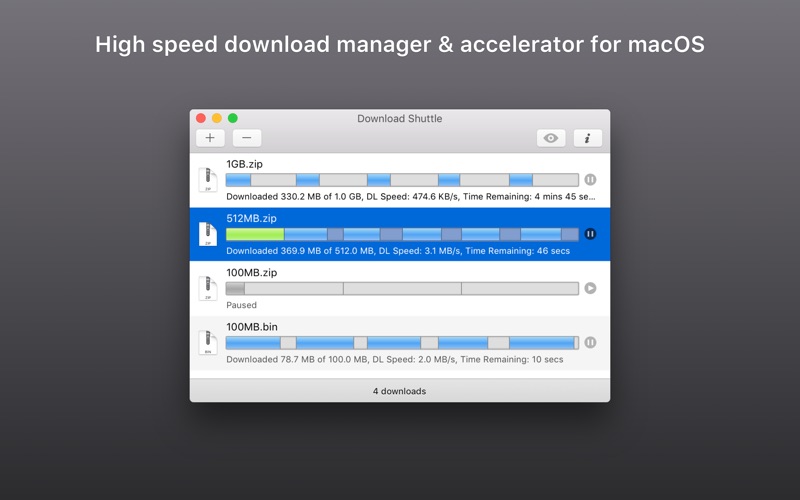
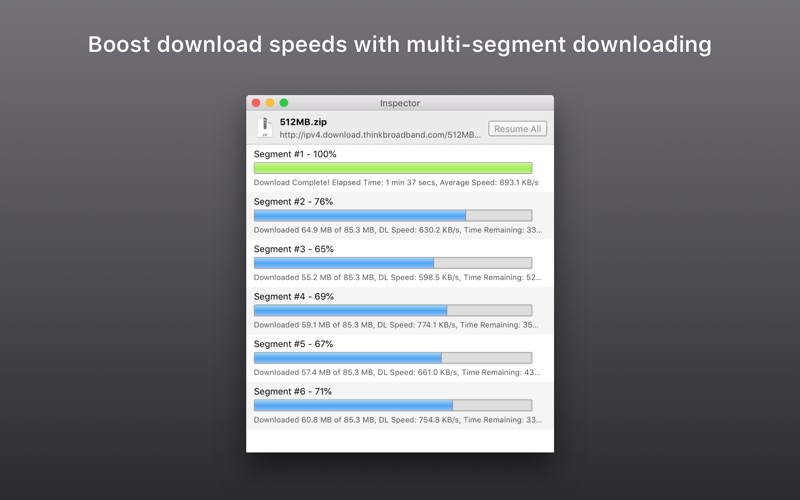
Download Shuttle is a blisteringly fast download accelerator and manager, and it’s free! All downloads made via Download Shuttle are multi-segmented, i.e., each file is split into many smaller parts that are simultaneously being downloaded. This ensures that the speeds you experience are a lot faster as your bandwidth is maximized.

Key Features:

  • Faster speeds with multisegmented downloads
  • Download management tool that allows unlimited simultaneous multiple downloads
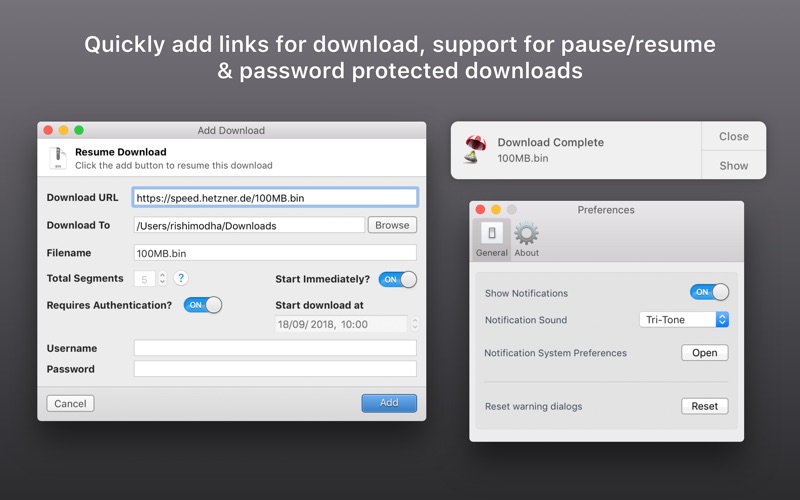
  • Support for URLs that require authentication
  • Pause and resume support for URLs that support it
  • Drag and drop support for download links
  • Support for http/https
  • OS X Service to send a URL to be downloaded directly by Download Shuttle
  • Quick Look support
  • Slick and incredibly easy to use interface.

We’ve spent a great deal of time thinking about the details and after using this app for a few days, you’ll begin to notice our small yet creative touches. We plan on a very active development cycle, so please spread the word and keep sending us your feedback!

Information

Compatibility
OS X 10.8 or later, 64-bit processor
Languages
English

What’s New in Download Shuttle Pro 1.6

  • Release notes not available at the time of this post.

Screenshots

Name Download Shuttle Pro 1.6 [TNT] mac-torrents.net.zip
Size 22.92 MB
Created on 2019-11-06 18:44:22
Hash d712d26468368d20f4940cb21eb4cbf9380d1b47
Files Download Shuttle Pro 1.6 [TNT] mac-torrents.net.zip (22.92 MB)

Handy Note 1.0.9

Download Handy Note 1.0.9

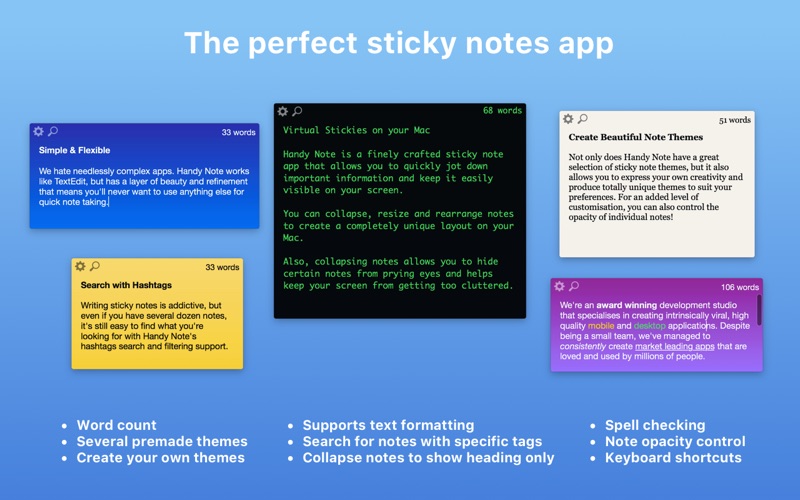
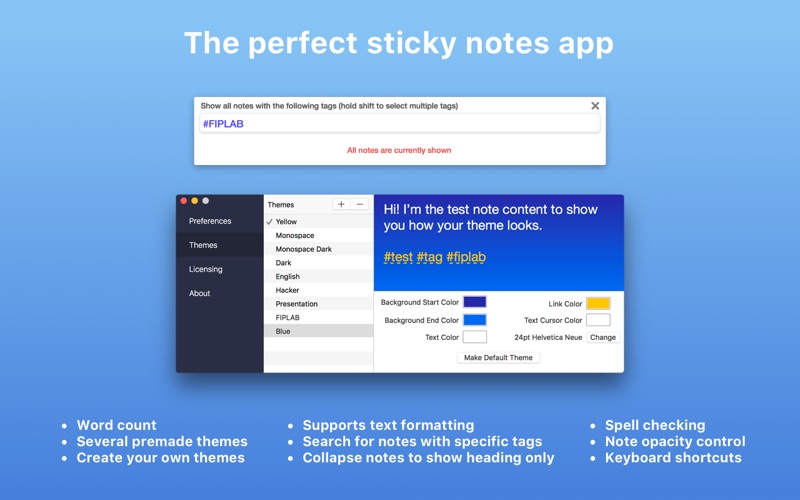
Handy Note is a finely crafted sticky note app that allows you to quickly jot down important information and keep it easily visible on your screen.

Features

Search with Hashtags

Writing sticky notes is addictive, but even if you have several dozen notes, it’s still easy to find what you’re looking for with Handy Note’s hashtags search and filtering support.

Simple & Flexible

We hate needlessly complex apps. Handy Note works like TextEdit, but has a layer of beauty and refinement that means you’ll never want to use anything else for quick note taking.

Ultimate Control

You can collapse, resize and rearrange notes to create a completely unique layout on your Mac. Also, collapsing notes allows you to hide certain notes from prying eyes and helps keep your screen from getting too cluttered.

Create Beautiful Note Themes

Not only does Handy Note have a great selection of sticky note themes, but it also allows you to express your own creativity and produce totally unique themes to suit your preferences. For an added level of customisation, you can also control the opacity of individual notes!

Information

Compatibility
OS X 10.10 or later, 64-bit processor
Languages
English

What’s New in Handy Note 1.0.9

  • Release notes not available at the time of this post.

Screenshots

Name Handy Note 1.0.9 [TNT] mac-torrents.net.zip
Size 20.64 MB
Created on 2019-11-06 18:44:33
Hash 1487ce6c526e98a8d81ba630bae5ceb9af820dae
Files Handy Note 1.0.9 [TNT] mac-torrents.net.zip (20.64 MB)

Space Drop 1.7.9

Download Space Drop 1.7.9

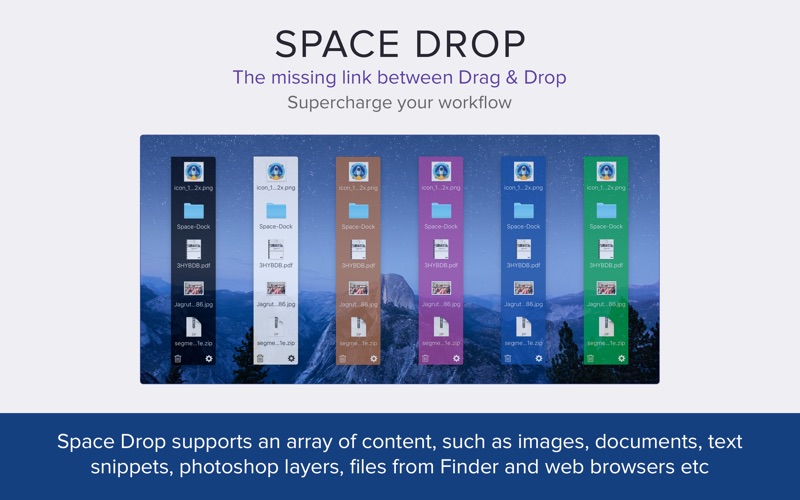
Space Drop is an essential utility for Mac users who want to seriously speed up their workflow. Featured by Apple in ‘New Apps we Love’!

By using our extensive experience in building a range of Mac utility apps and listening to suggestions from our users over the years, we have built Space Drop. We consider it to be the missing link when it comes to dragging and dropping items on your Mac.

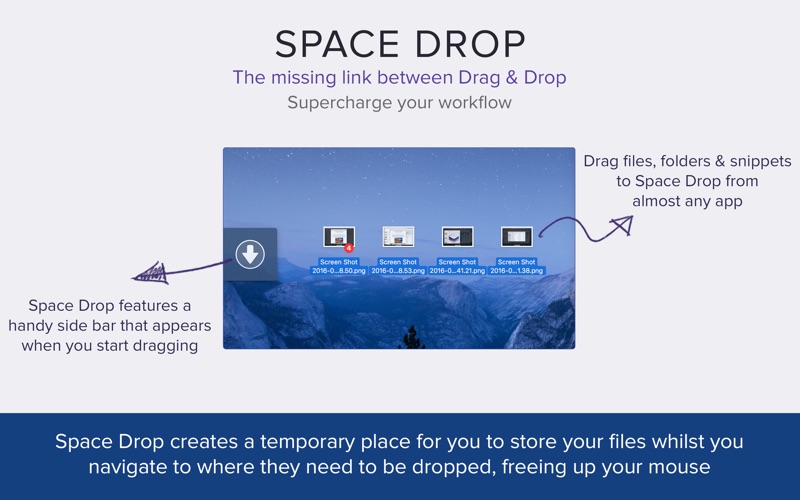
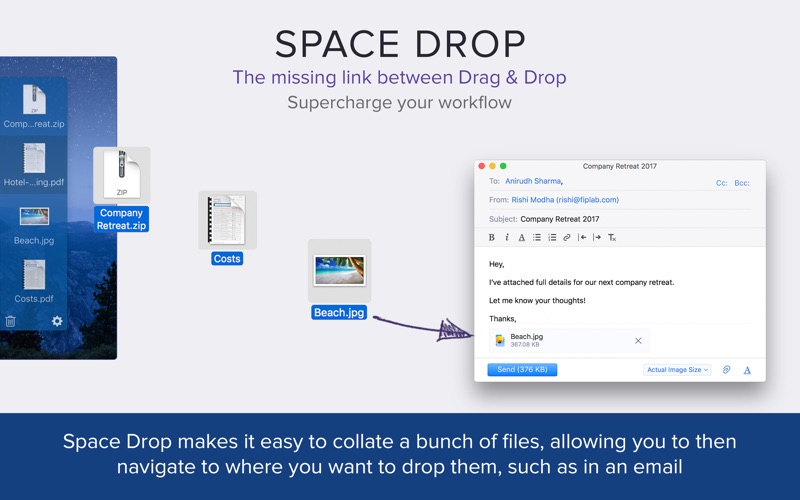
This app makes dragging and dropping files much easier with a handy dock that instantly appears whenever you start dragging a file. It creates a temporary place for you to store your files whilst you navigate to where they need to be dropped. This frees up your mouse and makes the process much more pleasant.

KEY FEATURES:

  • Add single or multiple files into Space Drop in one go, if you drag in multiple files together, it’ll create a stack group of those files combined.
  • Allows you to create a temporary storage space for files and folders you need quick access to or need to collate before dragging them to another app or location.
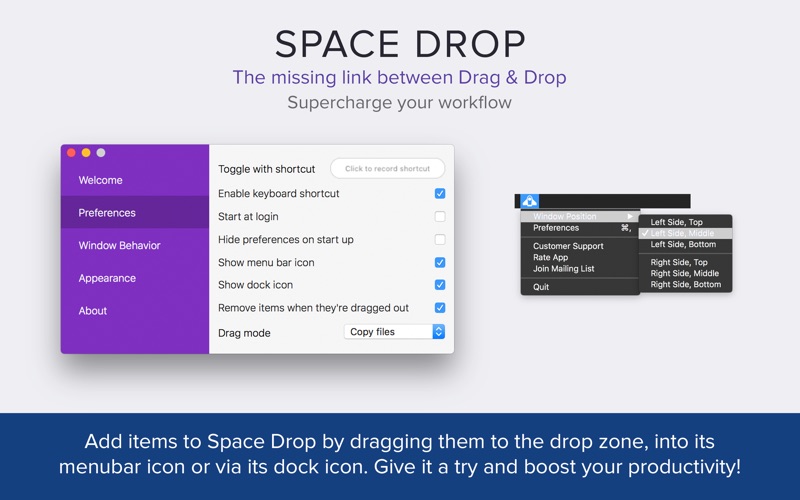
  • Add files and folders to Space Drop by dragging them to the drop window, menubar icon and/or dock icon.
  • Choose to copy files to their destination or physically move them when dragged out of Space Drop.
  • Supports multiple monitor set ups and spaces.
  • Supports almost every file type and cocoa application, including Photos app and Outlook.
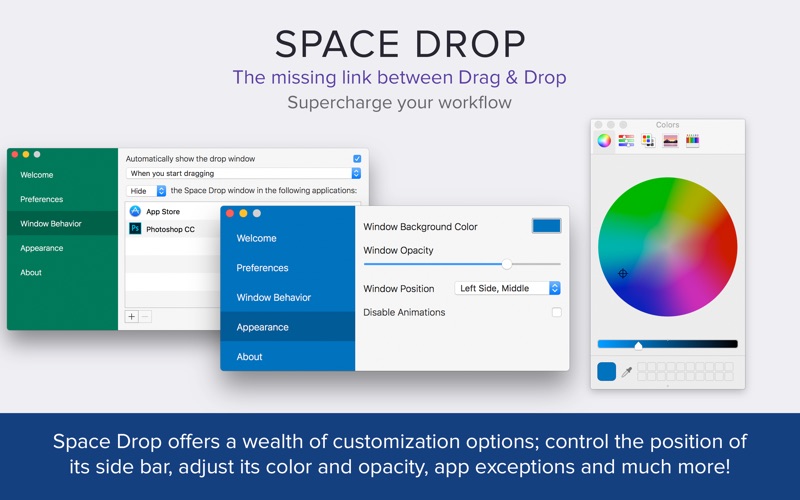
  • Control which apps Space Drop will detect dragging on.
  • Customize color, opacity, window position and much more.
  • Works with full screen apps.
  • Supports QuickLook to preview files within your Space Drop.
  • Configure the app to launch when you login to your Mac.
  • Toggle the Space Drop window using a hotkey if set.
  • Right click on files and select delete to remove them or press the trash can icon to remove all files.

Information

Compatibility
OS X 10.10 or later, 64-bit processor
Languages
English

What’s New in Space Drop 1.7.9

  • Release notes not available at the time of this post.

Screenshots

Name Space Drop 1.7.9 [TNT] mac-torrents.net.zip
Size 20.82 MB
Created on 2019-11-06 18:45:03
Hash 3720273df34429ca208563f1cf5301296451b24a
Files Space Drop 1.7.9 [TNT] mac-torrents.net.zip (20.82 MB)

Weather Guru 2.3.6

Download Weather Guru 2.3.6

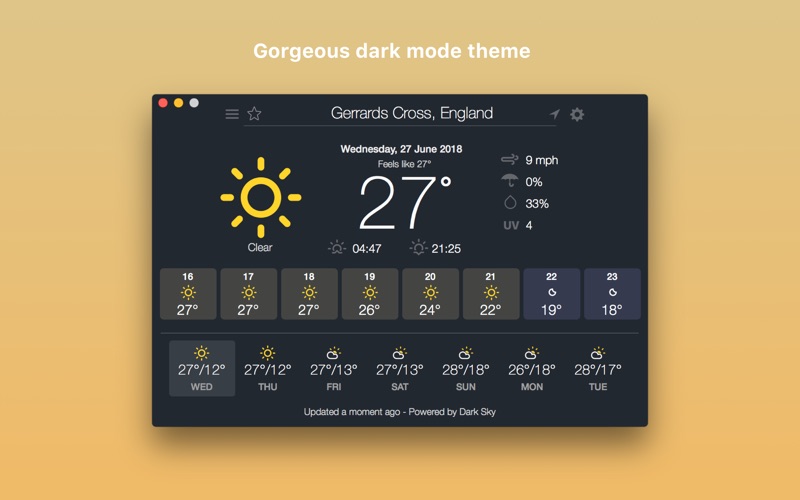
Weather Guru is a beautiful and highly accurate weather app for your Mac. With its gorgeous and easy to use interface, the app provides live weather forecasts, helpful notifications and always keeps you updated with hourly data for 7 days ahead.

KEY FEATURES:

  • Get live weather updates at any location (day/date/time all displayed clearly)
  • Track weather simultaneously on up to 5 favorite locations (click the star icon to add a location to your favorites list, then access favorites via the 3 horizontal lines button)
  • Get summarized daily weather forecast notification alerts
  • Toggle between Fahrenheit and Celsius
  • Get the temperature highs/lows for the full week ahead
  • Get the feels like temperature
  • Get a pictorial representation of the weather around you (eg. Sun image on a sunny day)
  • Get wind speed information in miles per hour
  • Get percentage chance of rain data
  • Get humidity percentage levels
  • Get alerted if it is likely to rain in the next hour
  • Scroll across the temperature and weather information bar to see the change in weather at different times of the day
  • Current temperature and forecast displayed in your menubar
  • Hit Cmd+R to have an instant live refresh of the weather data

BENEFITS:

  • The most beautiful Weather forecast information app for your Mac
  • Lightning fast and incredibly easy to use
  • Keep up to date with the latest weather information using the app window as well as on screen notifications
  • Pleasant user interface with clearly laid out information and graphics
  • Incredibly accurate live weather data for your location/any location of your choice
  • Regular free updates

Weather data is powered by the Dark Sky API.

We’ve worked hard to make Weather Guru as simple and efficient as possible for you to use. We would love to hear your thoughts via email and make any improvements to future versions of this app. We intend to have an active development cycle powered by your feedback, love and support!

Information

Compatibility
OS X 10.8 or later, 64-bit processor
Languages
English

What’s New in Weather Guru 2.3.6

  • Minor bug fix

Screenshots

Name Weather Guru 2.3.6 [TNT] mac-torrents.net.zip
Size 22.06 MB
Created on 2019-11-06 18:45:10
Hash a414f22502fec1b41101250cb764d4215cbd5b79
Files Weather Guru 2.3.6 [TNT] mac-torrents.net.zip (22.06 MB)

CopyClip 2.9.95

Download CopyClip 2.9.95

CopyClip 2 is the slickest and most efficient premium clipboard manager for your Mac. Running discreetly from your menu bar, the app stores all text that you have copied or cut in the past, allowing you to quickly find that snippet of text you’ve been looking for.

KEY FEATURES:

  • Ability to store up to 9999 clippings
  • Option to paste clippings with the original formatting if desired
  • Ability to search through clippings using the embedded search bar
  • Keyboard shortcuts to paste clippings
  • Rightclick option to ‘pin’ chosen clippings to the top of the list
  • You can exclude apps you wish not to copy clippings from
  • Option to edit and delete individual clippings, as well as delete all clippings at once
  • Toggle between Dark/Light user interface themes
  • Works on both the menubar and the Dock

BENEFITS OF COPYCLIP 2:

  • Improves your overall productivity, speed and efficiency
  • Saves you time on the mundane task of cutting/copying/pasting
  • All your recent copied items are stored on the app’s clipboard = less worries!
  • Pinning items to the top of the list keeps those important clippings within easy reach
  • The search bar helps to ensure anything you may have previously copied, is easy to find again

We’ve worked hard to make CopyClip 2 as simple and efficient as possible for you to use. We would love to hear your thoughts via email and make any improvements to future versions of this app. We intend to have an active development cycle powered by your feedback, love and support!

Information

Compatibility
10.8 or later, 64-bit processor
Languages
English

What’s New in CopyClip 2.9.95

  • Release notes not available at the time of this post.

Screenshots

Name CopyClip 2 2.9.95 [TNT] mac-torrents.net.zip
Size 18.38 MB
Created on 2019-11-06 18:44:13
Hash 147e29b43b8203efa09b90b6e9534ddef3b158fb
Files CopyClip 2 2.9.95 [TNT] mac-torrents.net.zip (18.38 MB)

Things 3.10.1

Download Things 3.10.1

Meet the all-new Things! A complete rethinking of the original, award-winning task manager – with a perfect balance between simplicity and power, incredible new features, delightful interactions, and a timeless new design.

Features:

  • Collect Your Thoughts – Get things off your mind quickly: no matter what app you’re in, a keyboard shortcut instantly reveals Quick Entry. Type your thoughts and save them to the Inbox. Or just talk to Siri on any device (“Remind me to…”) and import from Reminders.
  • Get Organized – Create a project for each of your goals, then add the steps to reach them. For clarity, add structure with headings. Then group your projects by areas of responsibility, such as “Family”, “Work”, or “Health”. Review these regularly to stay on top of things.
  • Plan Your Time – See your calendar events alongside your to-dos and plan your time effectively. Create repeating to-dos for things you do every few days, weeks, or months – Things will remind you on the right day.
  • Make the Most of Your Day – Every morning, grab a coffee and prepare your list for “Today”: review previously planned to-dos and make quick decisions on what to tackle. Pick some more steps from your projects and then get going. The Today list is the only place you’ll need to look for the rest of the day.
  • Customize Your Workflow – Use tags to categorize your to-dos or add context. For example, tag places like “Office” or “Home”, or tag all your “Errands”, or everything you’re working on with “Kate”. You can easily find everything you’ve tagged via filtering or search.

Information

Compatibility
10.11.0 or later 64-bit processor
Languages
Multilangual

What’s New in Things 3.10.1

  • Changed the format that notes are stored in (as a result, you may notice a change to the way URLs and file links are presented visually).
  • Unified the logic for ordering search results in Quick Find across all devices.
  • Changed the behavior for “Open New Window”: it will now open the default list, rather than the list that is currently open.
  • Already-delivered reminder notifications are now removed for a to-do if its parent project gets trashed.
  • Fixed an issue where a reminder notification wouldn’t be cleared when the reminder time is rescheduled via another device.
  • Fixed an issue where Today’s badge count wasn’t updated after completing/canceling items if logging was set to daily or manually.
  • Fixed an issue where duplicate copies of the default tags would be created after a fresh install.
  • Fixed an issue where the visible-or-not state of the sidebar would be lost when the app was restarted.
  • Fixed an issue where Things URLs for showing a Contact list wouldn’t work.
  • Fixed an issue where the incorrect color was shown for tag glyphs in Quick Find results.
  • Fixed an issue where the Reminders Inbox feature would erroneously add a reminder time of midnight for tasks with a date but no time set.
  • Fixed an issue where, if Quick Entry was dismissed via hotkey while a popover menu was open, mouse interactions could break for the entire app.

Screenshots

Name Things3 3.10.1 MAS [TNT] mac-torrents.net.zip
Size 27.50 MB
Created on 2019-11-06 13:55:21
Hash 29cd5dd5e18d9391529621d4d239a7fcc1764afa
Files Things3 3.10.1 MAS [TNT] mac-torrents.net.zip (27.50 MB)

Geekbench 5.0.4

Download Geekbench 5.0.4

Geekbench 5 is a cross-platform benchmark that measures your system’s performance with the press of a button. How will your mobile device or desktop computer perform when push comes to crunch? How will it compare to the newest devices on the market? Find out today with Geekbench 5.

Features:

nCPU Benchmark

Geekbench 5 measures your processor’s single-core and multi-core power, for everything from checking your email to taking a picture to playing music, or all of it at once. Geekbench 5’s CPU benchmark measures performance in new application areas including Augmented Reality and Machine Learning, so you’ll know how close your system is to the cutting-edge.

Compute Benchmark

Test your system’s potential for gaming, image processing, or video editing with the Compute Benchmark. Test your GPU’s power with support for the OpenCL, CUDA, and Metal APIs. New to Geekbench 5 is support for Vulkan, the next-generation cross-platform graphics and compute API.

Cross-Platform

Compare apples and oranges. Or Apples and Samsungs. Designed from the ground-up for cross-platform comparisons, Geekbench 5 allows you to compare system performance across devices, operating systems, and processor architectures. Geekbench 5 supports Android, iOS, macOS, Windows, and Linux.

Geekbench Browser

Upload your results to the Geekbench Browser to share them with others, or to let the world know how fast (or slow) your devices can go! You can track all your results in one place by creating an account, and find them easily from any of your devices.

Information

Compatibility
macOS 10.13 or later 64-bit
Languages
English

What’s New in Geekbench 5.0.4

  • Release notes not available at the time of this post.

Screenshots

Name Geekbench 5 5.0.4 [TNT] mac-torrents.net.zip
Size 128.6 MB
Created on 2019-11-06 13:55:12
Hash 589906234d067add75ad376983591a443d9bcbc1
Files Geekbench 5 5.0.4 [TNT] mac-torrents.net.zip (128.6 MB)

Enolsoft PDF Converter with OCR 6.8.0

Download Enolsoft PDF Converter with OCR 6.8.0

Enolsoft PDF Converter with OCR for Mac can help you easily convert native and scanned PDF to Word, Excel, PPT, Keynote, Pages, HTML, EPUB, Text, Rtfd, Images and etc. No matter you want to analyze data, report work to your boss, or have a meeting with your colleague, it can be your great partner.

With PDF converter OCR for Mac, you can batch add and convert PDFs to the format you want without quality loss, then you can copy the information freely. Put simply, PDF Converter OCR for Mac helps you work better, smarter, and faster.

Enolsoft PDF Converter OCR for Mac makes your edit be much easier. It can help to remove the PDFs’ restriction password automatically before converting, convert scanned PDFs or images to the editable formats with OCR technology.

Information

Compatibility
OS X 10.10 or later 64-bit
Languages
English

What’s New in Enolsoft PDF Converter with OCR 6.8.0

  • Release notes not available at the time of this post.

Screenshots

Name Enolsoft PDF Converter with OCR 6.8.0 [TNT] mac-torrents.net.zip
Size 333.9 MB
Created on 2019-11-06 07:14:09
Hash 9162671d8f8c2267255c550b1ed0c0aaa4954728
Files Enolsoft PDF Converter with OCR 6.8.0 [TNT] mac-torrents.net.zip (333.9 MB)

PopClip 2019.10

Download PopClip 2019.10

PopClip puts Cut, Copy and Paste (and more!) at your fingertips, with a popover menu which appears when you select text.. PopClip is a minimalist and unobtrusive status bar menu application designed to provide quick access to basic yet very useful text processing capabilities.

How to use:

  1. Use your mouse pointer to select some text
  2. PopClip appears!

Features

  • Beautifully rendered user interface looks great on your display
  • Instantly search the web for the text you select
  • Open web links with one click
  • Get dictionary definitions and spelling corrections.
  • Adjust the size of the popover, from small to very large
  • Small, fast and convenient, PopClip is a great way to work with text.

Information

Compatibility
OS X 10.12.6 or later, 64-bit processor
Languages
English, Dutch, French, German, Italian, Japanese, Korean, Portuguese, Russian, Simplified Chinese, Spanish

What’s New in PopClip 2019.10

  • Avoid duplicate actions sometimes appearing in the PopClip bar.
  • Avoid unintentional “auto copy” where PopClip could fail to restore the original clipboard contents after selecting text.
  • PopClip will now better avoid appearing in non-text situations (such as graphics editing and games).
  • A freezing bug that could happen when activating the Search action, or using extensions in a browser.
  • Exclude PopClip from apps running under Parallels Desktop, VMware Fusion and Crossover.
  • In text editors, avoid incorrect text being pasted when the user presses Command-V immediately after selecting text.

Screenshots

Name PopClip 2019.10 HCiSO mac-torrents.net.zip
Size 10.69 MB
Created on 2019-11-06 04:25:36
Hash 8c673ebb2ea8dd8cfccc705a5514555d8eb9e200
Files PopClip 2019.10 HCiSO mac-torrents.net.zip (10.69 MB)

Reeder 4.2.1

Download Reeder 4.2.1

– A news reader for the Mac with support for various sync services.

Reeder 4 adds new features like…

  • The new Bionic Reading mode
  • An in-app Read Later service which syncs with iCloud
  • Image previews in the articles list (finally)
  • An image viewer
  • Much improved article viewer
  • More layout options, including automatic layout depending on window size
  • Improved reader view

Navigate the app using gestures for a great reading experience. Customize shortcuts and gestures to fine-tune the app to your needs.

Supported sync services:

  • Feedbin
  • Feedly
  • Feed Wrangler
  • FeedHQ
  • NewsBlur
  • The Old Reader
  • Inoreader
  • BazQux Reader
  • Instapaper
  • Pocket

If you want to use a self-hosted service, Reeder should work with services which use the Fever or the Google Reader API. Or just standalone RSS (without syncing) if you don’t want to use any service.

Reeder 4 is also available for iOS.

Information

Compatibility
OS X 10.14 or later, 64-bit processor
Languages
English

What’s New in Reeder 4.2.1

IMPROVED

  • URL autocompletion when adding a FreshRSS account
  • Reader View

FIXED

  • Missing favicons in Read Later account
  • Various Read Later syncing issues

Screenshots

Name Reeder 4.2.1 mac-torrents.net.zip
Size 18.90 MB
Created on 2019-11-06 01:16:09
Hash 3cec3580fc0bfb4c181107fca6a4ecc8e7df71e7
Files Reeder 4.2.1 mac-torrents.net.zip (18.90 MB)

Bartender 3.1.12

Download Bartender 3.1.12

lets you organize your menu bar icons, by hiding them, rearranging them, show hidden items with a click or keyboard shortcut and have icons show when they update.

There are many ways to configure Bartender as you wish.
Give it a go and find out.

New! in Bartender 3

macOS Mojave Ready

Bartender 3 fully supports macOS Sierra, High Sierra and Mojave.

Updated UI for modern macOS

The Bartender Bar now displays in the menu bar, making it look like part of macOS.

Keyboard navigate menu items

With Bartender 3 you can keyboard navigate menu items simply use the hotkey to activate then arrow through them and press return to select.

Search all menu items

You can now search all menu items, allowing you quick access to a menu item without looking for it. Simply use the hotkey to activate or control click the Bartender menu item and start typing.

Completely rewritten for modern macOS

Bartender 3 has been rewritten for modern macOS. Using the latest technologies and best practices Bartender 3 is more reliable, capable and lays the foundation for future innovations.

Bartender 3 Features

Take control of your menu bar icons

With Bartender you can choose which apps stay in the menu bar, are displayed in the Bartender Bar or are hidden completely.

Hidden menu bar icons

Hidden items can be shown whenever you want, by clicking on the Bartender Icon or via a hot key.

Show menu bar icons in the menu bar when they update

Set up apps to display their menu bar icons in the menu bar for a period of time when they update. Allowing you to see whats happening, or take important action.

Autohide

Bartender can automatically hide menu bar icons again when you click on another app

Works with Dark mode

Bartender works great in light or dark mode

Keyboard Navigate your menu bar icons

Keyboard navigate menu icons; simply use the hotkey to activate then arrow through them and press return to select.

Search menu bar icons

You can search the all menu icons, allowing you quick access to a menu icons without looking for it. Simply use the hotkey or control click the Bartender menu icon to activate search and start typing.

Order your menu bar icons

With Bartender you can set the order of the menu bar items, both in the menu bar and the hidden items, simply by ⌘+dragging the items. So your menu bar items are always in the order you want.

Minimalism

If you want a really clean look and privacy, Bartender can also be hidden.

Information

CompatibilitymacOS 10.12 or later 64-bit
LanguagesEnglish

What’s New in Bartender 3.1.12

  • Release notes not available at the time of this post.
  • new bartender 3.1.4
  • new bartender 3.1.1.1
  • new bartender 3.1.2

Screenshots

Name Bartender 3.1.12 HCiSO mac-torrents.net.zip
Size 17.81 MB
Created on 2019-11-05 23:35:18
Hash c6fec988cb51556e7314e2f9bb8eeac5df337e69
Files Bartender 3.1.12 HCiSO mac-torrents.net.zip (17.81 MB)

WiFiSpoof 3.4.6

Download WiFiSpoof 3.4.6

WiFiSpoof is the ultimate system network tool giving a quick overview of the current state of your Mac’s network devices.

Quickly inspect your current network setup including:

  • Easily see all available network interfaces
  • Current MAC Address
  • System hardware MAC Address
  • Current WiFi connection BSSID, SSID, Security, Channel, RSSI, Noise, Tx Rate and MCS Index
  • Current WiFi card vendor data
  • MAC Address spoofing
  • Advanced rule support for WiFi connection changes
  • Reverse OUI lookup (easily update the inbuilt database in preferences)

WiFiSpoof is a necessary app in any system network administrators toolbox.

*Note – a helper app may need to be installed to enable some advanced features

Information

Compatibility
OS X 10.11 or later, 64-bit processor
Languages
English, French, German

What’s New in WiFiSpoof 3.4.6

  • vendor selection is now correctly remembered for each device
  • fix for randomize by vendor
  • updated Sparkle

Screenshots

Name WiFiSpoof 3.4.6 [TNT] mac-torrents.net.zip
Size 17.72 MB
Created on 2019-11-05 22:42:06
Hash da4f6676a2665c8c3529ad9f190d9f3421f729a5
Files WiFiSpoof 3.4.6 [TNT] mac-torrents.net.zip (17.72 MB)

Wondershare Filmora 9.2.9.32

Download Wondershare Filmora 9.2.9.32

Wondershare Filmora is an easy-to-use yet powerful video-editing app to edit and retouch videos with rich video and photo editing functions like trimming, cropping, rotating, adding stylish titles, applying filter effects, inserting transition and motion effects, etc.
Furthermore, you can export videos to various popular video formats and portable devices for wider sharing and enjoyment or directly upload them to YouTube for sharing with family and friends. It also enables you to burn videos to DVD discs for better video preservation.

Features:

Create Without Limits

Discover infinite ways to express yourself. Achieve a refined look with endless effects.

100 Media Layers

Create complex stories easily.

Beyond the Basic

Craft new worlds by layering clips and using simple green screen effects.

Never Miss a Beat

Perfect your sound with keyframing, background noise removal, and more.

Details Matter

Filmora9 ensures every frame of your creation is as crisp as reality with full 4K Support.

Ready For Anything

Get more done

Fast processing, proxy files, and adjustable preview quality help you be more productive.

Fine tune your adventures

Fix common action cam problems like fisheye and camera shake, and add effects like slow motion and reverse.

Perfect your aesthetic

Change the aesthetic of your video with one click. Filmora9 has both creative filters and professional 3D LUTs.

Other Features:
  • Support importing all popular videos, audios and photos for editing.
  • Trim, crop, and rotate videos freely & add voiceover and background music.
  • Retouch videos and photos with rich filters, titles, transitions and motions.
  • Save videos to local or portable devices or directly share to YouTube.
  • Burn the edited videos to DVD for better video preservation.

Information

Compatibility
OS X 10.11.0 or later
Languages
Multilingual

What’s New in Wondershare Filmora 9.2.9.32

  • Release notes not available at the time of this post.

Screenshots

Name Wondershare Filmora9 9.2.9.32 [TNT] mac-torrents.net.zip
Size 271.1 MB
Created on 2019-11-05 22:42:21
Hash 55ba94428db487106a1c739f67344b52cf55a177
Files Wondershare Filmora9 9.2.9.32 [TNT] mac-torrents.net.zip (271.1 MB)

Path Finder 9.0.2

Download Path Finder 9.0.2

Path Finder makes you a master of file management. Take full control over your file system.

Save your time:

Compare and synchronize folders, view hidden files, use Dual Pane and full keyboard navigation to browse your file system.

Work how you want:

Extreme customization allows you to access most tools in many different ways to suit your workflow.

Work seamlessly with other platforms:

Don’t leave any hidden .DS_Store files on non-Mac volumes, delete files securely and completely with the powerful delete feature from any volume type, search any network volume.

Features

  • View and manipulate hidden files
  • Dual Pane View
  • Full keyboard navigation
  • Folder comparison and synchronization
  • Folder merging
  • Batch renaming
  • Powerful file filtering
  • One-click dual-pane copy
  • Bookmarks and Tab Presets
  • ACL editor
  • File tagging
  • Editable Path Navigator
  • Powerful low-level search
  • Smart sorting
  • Advanced selection
  • Integrated terminal
  • Integrated text and image editors

Information

Compatibility
OS X 10.11 or later 64bit
Languages
Multilingual

What’s New in Path Finder 9.0.2

  • Release notes not available at the time of this post.

Screenshots

Name Path Finder 9.0.2 [TNT] mac-torrents.net.zip
Size 27.84 MB
Created on 2019-11-05 22:41:58
Hash a18b5d84c121a51655120e3cfacfb6a92a128fd8
Files Path Finder 9.0.2 [TNT] mac-torrents.net.zip (27.84 MB)

PowerPhotos 1.7.4

Download PowerPhotos 1.7.4

Provides you with all the necessary tools to better organize your Photos libraries as well as to find and remove duplicated files within them

is a very useful macOS utility that makes it possible for you to efficiently organize your pictures using the native Photos app introduced by Apple with the launch of OS X 10.10.3.

Effortlessly manage and better organize your Photos libraries

Despite the fact that Photos does a fairly good job of keeping your photos organized, under one roof, and easily accessible, the application is somewhat limited in some respects and doesn’t bundle advanced photo organizing features.

This is the part where PowerPhotos comes into play, with a streamlined and user-friendly interface it makes it possible for you to easily create multiple Photos libraries, thus, it will provide you with more power over your libraries and it will also speed up the Photos app which will load even faster because of this.

What’s more, you can easily use PowerPhotos image browser and search for a particular photo in a single or all your Photos libraries, as well as view detailed metadata summaries for your photos.

Keep your Photos libraries in tip-top shape by removing duplicates with just a few clicks

Not only this, but you will certainly find PowerPhoto’s duplicate removal tool very useful, as it enables you to find dupes in more than one library and compare them side by side, as well as either separate them in different albums or delete them altogether from the libraries.

Additionally, PowerPhotos can also guide you through the somewhat lengthy and annoying process of migrating your iPhoto or Aperture libraries to the Photos app.

Note that, if you have photo libraries created using iPhoto 7 or earlier, you will have to download the iPhoto Library Upgrader, so that the libraries can be upgraded to a newer format that is compatible with more modern versions of iPhoto. This way, you will be able to migrate the upgraded photo libraries within the Photos app.

A must-have application for users who feel that Photos doesn’t offer enough in terms of organizing features

All in all, if you find yourself using Apple’s Photos app on a daily basis and you want to organize your photos using multiple libraries, to remove photo duplicates, or to view detailed metadata information, then there’s really no way around the fact that PowerPhotos will definitely make your user experience better and save you a lot of time simultaneously.

Information

Compatibility
macOS 10.12 or later 64-bit
Languages
English

What’s New in PowerPhotos 1.7.4

  • Update version recognition for libraries on 10.15.1
  • Dates with custom time zones now have those time zones preserved when copying between libraries on 10.15
  • Fixed a bug where HDR Live Photos would not have their videos copied
  • You can now drag a Photos library onto the PowerPhotos app icon to add it to the library list
  • Control-clicking a photo in grid view now shows the same contextual menu as right clicking
  • Improved progress display when submitting logs in the Contact Support window

Screenshots

Name PowerPhotos 1.7.4 [TNT] mac-torrents.net.zip
Size 33.70 MB
Created on 2019-11-05 22:41:49
Hash 633d4aabd1d6bd5c87c69587fc0cf0f9d470eda0
Files PowerPhotos 1.7.4 [TNT] mac-torrents.net.zip (33.70 MB)

RSS Menu 2.7.3

Download RSS Menu 2.7.3

RSS Menu is a systemwide menu that allows you to read and organize your favourite RSS or Atom feeds.

The articles are automatically updated and you will get a notification when new articles are available or when some other event occurs. In addition to visual notification, you can also enable speech notification and choose one of the many built in voices.

Key features include:

  • background application (doesn’t get in your way and is accessible from anywhere)
  • very fast parsing engine
  • auto detects if a url has one or more feeds
  • importing and exporting of OPML files
  • many options to customize the menu
  • support for saving articles for offline reading
  • support for grouping feeds in submenus and adding separators
  • support for favourite icons (aka page icons)
  • supports RSS, Atom and JSON feeds

Information

Compatibility
OS X 10.13 or later, 64-bit processor
Languages
English

What’s new in RSS Menu 2.7.3

  • fixed an issue with some feeds to allowing to open the article

Screenshots

Name RSS Menu 2.7.3 HCISO mac-torrents.net.zip
Size 13.41 MB
Created on 2019-11-05 22:42:30
Hash 34f2a2421ff3c2c6d57c447bd4ed4672a726a7c1
Files RSS Menu 2.7.3 HCISO mac-torrents.net.zip (13.41 MB)

WinX DVD Ripper for Mac 6.5.0 (20191023)

Download WinX DVD Ripper for Mac 6.5.0 (20191023)

Easily manage your DVDs’ content: back them up on your Mac’s hard drive and tip them to view them on any of your multimedia players

WinX DVD Ripper for Mac is an all-in-one DVD ripper designed to make perfect 1:1 DVD copy to hard drive and rip your DVD movies on Mac OS to iTunes, MOV, MP4, FLV, etc that playable on iPad, iPod, iPhone, Apple-TV, PSP and much more.

WinX DVD Ripper for Mac also supports extracting music from the DVD files and saving as MP3 format.

With this Mac DVD ripper, Mac users could backup DVD collections to Mac or portable devices without any quality loss.

WinX DVD Ripper for Mac is also able to can rip DVDs of new generation DVD copy protection technology, such as The Princess and the Frog, Alice in Wonderland, Transformers 2, Star Trek, etc.

Information

Compatibility
OS X 10.8 or later
Languages
Multilangual

What’s New in WinX DVD Ripper for Mac 6.5.0 (20191023)

  • Release notes not available at the time of this post.

Screenshots

Name WinX DVD Ripper for Mac 6.5.0 20191023 [TNT] mac-torrents.net.zip
Size 64.38 MB
Created on 2019-11-05 23:01:47
Hash 7b303a44075a7f2b961f84e1f10e8a7f740d7f2e
Files WinX DVD Ripper for Mac 6.5.0 20191023 [TNT] mac-torrents.net.zip (64.38 MB)

A Better Finder Rename 11.04

Name A Better Finder Rename 11 11.04 [TNT] mac-torrents.net.zip
Size 22.28 MB
Created on 2019-11-05 22:41:40
Hash 01217224b5b31199698fb33859e57943fd06e267
Files A Better Finder Rename 11 11.04 [TNT] mac-torrents.net.zip (22.28 MB)

Download A Better Finder Rename 11.04

A Better Finder Rename is the most complete renaming solution available on the market today. That’s why, since 1996, tens of thousands of hobbyists, professionals and businesses depend on A Better Finder Rename to organize and maintain files.

The Instant Preview feature eliminates guesswork and costly errors and helps you find the right settings quickly and accurately by providing as-you-type feedback.

FEATURES:

Simple. Complete. Powerful

DRAG & DROP TO ADD

Adding files is as simple as dragging them in from the Finder.

INSTANT PREVIEW

Changes are previewed as you type, eliminating guess work and preventing costly mistakes.

DRAG & DROP ORDERING

By default, items are organized alphabetically or by some other criteria such as creation or capture date, but you are also free to just re-arrange items via drag & drop.

Comprehensive Coverage

MARKET LEADING FEATURE SET.

A Better Finder Rename’s huge array of renaming options is organized into 15 intuitive categories that cover all the text, character, position, conversion and truncation features that you would expect from a great file renamer.

On top of this, A Better Finder Rename provides more advanced features that answer the prayers of many professionals and hobbyists alike.

Digital Photography

YOU’RE GOING TO LOVE THIS.

Digital Photographers in particular will find the advanced sequence number and date & time features a joy to behold.

A Better Finder Rename knows how to extract EXIF shooting date and time information from your digital camera images and exploit them in creating sequence numbers or adding time and date information to the file name.

Support for all major RAW formats (including JPEG, HEIC, HEIF, ARW, CRW, CR2, THM, NEF, TIFF, RAF, ORF , MRW, DNG, PEF, SRF, etc.) extends this to professional photographers.

A Better Finder Rename also deals gracefully with multiple shots captured in the same second and gives access to camera and lens meta-data through its tag-based renaming feature.

Digital Music

NEVER MISS A BEAT.

Music lovers will be delighted by our MP3/AAC renaming feature that allows you to exploit the ID3 meta-data embedded in most music files to create naming schemes of your own for your music collection.

Meta-data information from MP3, AAC, FLAC, OGG, APE, M4V and iTunes music store files are supported.

Instant Preview & Change Highlighting

ELIMINATING GUESSWORK & AVOIDING COSTLY MISTAKES

Our instant preview feature displays all changes as you type, making it easy to dial in the right settings and preventing you from making costly mistakes.

Version 10’s change highlighting feature takes this to the next level by visually marking individual changes.

Tag-Based Renaming

PURE META-DATA SAVVY.

Today’s media files come with an abundance of additional information that cannot be glanced from the often meaningless file names themselves.

A Better Finder Rename allows you to leverage this meta-data to create more meaningful file names using its tag-based renaming feature.

Our renaming engine can read an extensive array of photo, image, music, movie, camera, lens and location meta-data and you can combine this information to implement any naming scheme you can imagine.

Multi-Step Rename

WHEN ONE ACTION IS NOT ENOUGH.

We don’t believe in making simple things unnecessarily complicated. That’s why most users will find a single action that does exactly what they want.

Sometimes, however, a single action simply isn’t enough and that is where our multi-step renaming features comes in. It lets you combine multiple simple actions to create a lean mean renaming machine.

Our intuitive multi-step interface, in conjunction with our instant preview, makes it easy to keep track of what’s happening.

File Content & Meta-Data Preview Pane

X-RAY VISION

A Better Finder Rename 10’s new Preview Pane allows you to peek inside your files and delve into its meta-data, making it much easier to work with meta-data tags and providing additional confidence in your settings.

Droplets & Presets

GETTING ON TOP OF REPETITIVE TASKS

For recurring tasks, A Better Finder Rename allows you to save common settings to droplet mini-applications and apply them automatically to all files dropped upon them.

Furthermore, you can save and restore presets to facilitate the creation of your own renaming library.

Power Users

AS SIMPLE AS POSSIBLE, AS COMPLEX AS NECESSARY.

System administrators, web masters and other power users will appreciate the presence of advanced features, such as regular expression support, conversion to Windows NTFS/SMB compatible names, the ability to import file names from a database, a spreadsheet or any other source that can produce plain or tab-delimited text files. Finally, it allows you to save a record of the current and new file names to facilitate tracking your files.

Beautiful Inside & Out

WE SWEAT THE DETAILS, SO YOU DON’T HAVE TO

A Better Finder Rename takes file renaming to a new level of sophistication by introducing an advanced 64-bit multi-threaded renaming engine that solves many problems that other file renamers simply leave unaddressed.

The database-backed renaming engine automatically resolves file name conflicts (when several files would share the same name) using a range of configurable parameters. The sequence in which files are renamed is optimized to avoid deadlocks which could occur when the order in which the files are renamed becomes significant.

Information

Compatibility
OS X 10.10 or later, 64-bit processor
Languages
English, French, German

What’s New in A Better Finder Rename 11.04

  • Allows droplets to be updated to the latest 64-bit code base
  • Allows Better Rename 8 and Better Rename 9 presets to be imported
  • Adds a safety feature that prevents users from mistakenly renaming files with a leading dot

Screenshots

Adobe Zii 5.0.1 CC2020

Download Adobe Zii 5.0.0 CC2020 Universal Patcher

Adobe Zii is a small and great utility which helps you forget about all issues with the registration of all Adobe existing products.

Supported Products:

Information

CompatibilityOS X 10.11 or later 64-bit
LanguagesEnglish
Note:

Adobe Zii CC2020 Patcher is only for Adobe CC 2020. For Adobe CC 2019, use Adobe Zii 4.5.0 CC2019 Patcher.

What’s New in Adobe Zii 5.0.1 CC2020

Added:

Screenshots

Name Adobe Zii 2020 5.0.1 [TNT] mac-torrents.net.zip
Size 17.64 MB
Created on 2019-11-05 11:21:24
Hash 88e0c6ef075412f5d6cfe6c419bd309245ed3001
Files Adobe Zii 2020 5.0.1 [TNT] mac-torrents.net.zip (17.64 MB)

Adobe Photoshop 2020 v21.0.0.37

Download Adobe Photoshop 2020 v21.0.0.37

Adobe Photoshop 2020, the industry standard for digital image processing and editing, delivers a comprehensive package of professional retouching tools, and is packed with powerful editing features designed to inspire. If you can think it, you can make it with Photoshop, the world’s best imaging and graphic design software.

Designed for anyone to design anything.

From posters to packaging, basic banners to beautiful websites, unforgettable logos to eye-catching icons, Photoshop keeps the creative world moving. With intuitive tools and easy-to-use templates, even beginners can make something amazing.

Not just photo taking. Breathtaking.

Whether you’re looking for everyday edits or total transformations, our graphic design software offers a complete set of professional photography tools to turn your snapshots into works of art. Adjust, crop, remove objects, retouch, and repair old photos. Play with color, effects, and more to turn the ordinary into something extraordinary.

Power to the paintbrush.

Draw and paint whatever you dream up with tools designed especially for illustrators. Paint in perfectly symmetrical patterns. Get polished looks with stroke smoothing. And create with pencils, pens, markers, and brushes that feel real — including more than 1,000 from celebrated illustrator Kyle T. Webster.

Installation

For macOS 10.12+

When you run the installer writes “The installation cannot continue as the installer file may be damaged. Download the installer file again”.

Code:
sudo spctl --master-disable

Install using patch:

Attention! Before installing, disconnect from the Internet

  1. Mount the Adobe Photoshop CC 2020 xxxx.dmg
  2. Run the Install installer and follow the instructions (located in the Extra folder)
  3. After installation, do not run the program in trial mode (close the application forcibly if it starts up on its own)
  4. From the desktop, launch the Adobe Zii patch and press the PATCH or drag the icon of the installed Adobe Photoshop CC 2019 into the open patch window

Patcher by TNT

Who has the Illustrator or another installed – be careful with the patch.

Install the program and use the patch that is in the distribution – drag the program icon to the open patch window, and do not use the automatic function (here, all installed Adobe applications will be patched automatically, and with such actions errors may occur)

Information

Compatibility
macOS 10.12 or later 64 bit
Includes
Adobe Zii
Languages
Multilangual

What’s New in Adobe Photoshop 2020 v21.0.0.37

  • Release notes not available at the time of this post.

Screenshots

Name Adobe Photoshop 2020 v21.0 [TNT] mac-torrents.net .rar
Size 2.04 GB
Created on 2019-11-05 11:01:04
Hash 54b230bb93e6699e40210df2157d951011330a73
Files Adobe Photoshop 2020 v21.0 [TNT] mac-torrents.net .rar (2.04 GB)

Screens 4.7

Download Screens 4.7

Screens lets you connect back to your Mac, Windows, Linux PC or Raspberry Pi and control it from the comfort of your living room, the corner coffee shop or anywhere in the world. Work on that spreadsheet you left at home, perform software updates on your server ten thousand miles away, help your dad configure his computer in your hometown.

Screens Features

  • iCloud Synchronize all your stored screens on all your iOS devices, including your Mac.
  • OS X 10.7 Lionready: use Screens in fullscreen mode to make it feel your remote computer is right there in front of you.
  • Easy to Use: Screens is an easy, userfriendly VNC client for Mac.
  • Secure: Screens can connect to your computer through an SSH tunnel so your session is encrypted and safe.
  • MultiTouch: Screens supports many of the multitouch featuressuch as pinch and navigationyou’re already used to on your trackpad.
  • Screens Connect: Make your computer available from anywhere with this optional helper app. Easy as flicking a switch. No messy router setup.
  • Versatile: Screens can connect to Macs with OS X 10.4 or later, Linux, Windows PCs, and most VNC servers.
  • Works Anywhere: Through WiFi or a 3G network.

Information

Compatibility
OS X 10.12 or later, 64-bit processor
Languages
English, Dutch, French, German, Italian, Japanese, Portuguese, Russian, Simplified Chinese, Spanish, Swedish

What’s New in Screens 4.7

  • Adds support for macOS 10.15 Catalina
  • Fixed issue with CTRL-click not working with PCs
  • Stability and performance improvements

Screenshots

Name Screens 4 4.7 [TNT] mac-torrents.net.zip
Size 31.27 MB
Created on 2019-11-05 07:36:44
Hash cd2bc3f759d7ec666dd3b0284ef40be1d4f4529e
Files Screens 4 4.7 [TNT] mac-torrents.net.zip (31.27 MB)

SmallImage 2.4

Download SmallImage 2.4

Smart PNG and JPEG compression
Optimize your images with a perfect balance in quality and file size.

Uses smart lossy compression techniques to reduce the file size of your PNG files. By selectively decreasing the number of colors in the image, fewer bytes are required to store the data. The effect is nearly invisible but it makes a very large difference in file size!

Information

Compatibility
OS X 10.10 or later, 64-bit processor
Languages
English

What’s New in SmallImage 2.4

  • Fix User Issues.

Screenshots

Name SmallImage 2.4 MAS HCiSO mac-torrents.net.zip
Size 17.49 MB
Created on 2019-11-05 05:43:26
Hash 9436f029cb42fd7029f821f36989d54bd5027596
Files SmallImage 2.4 MAS HCiSO mac-torrents.net.zip (17.49 MB)

iMazing 2.10.5 (11536)

Name iMazing 2.10.5.11536 [TNT] mac-torrents.net.zip
Size 139.8 MB
Created on 2019-11-05 05:17:41
Hash ccf1ce4c57e22a91bb4eb145fa8542d8afe59d05
Files iMazing 2.10.5.11536 [TNT] mac-torrents.net.zip (139.8 MB)

Download iMazing 2.10.5 (11536)

Get a trusted software to transfer and save your music, messages, files and data. Safely back up any iPhone, iPad or iPod touch. Powerful and user-friendly, iMazing is simply the best iOS device manager for Mac and PC.

iMazing (was DiskAid) is the ultimate iOS device manager with capabilities far beyond what iTunes offers. iMazing is simply the best iPhone, iPad and iPod manager for Mac and PC

With iMazing and your iOS device (iPhone, iPad, or iPod), you can:

  • Copy music to and from any iOS device (even from one iOS device to another!), regardless of what Mac or PC the device is already synced to. Music transfer done right, without limitations or restrictions.
  • Backup & restore individual iOS apps along with your custom saved data, perfect for freeing up space on your iOS device without losing your files, great for installing apps including your data on another iOS device you own.
  • Transfer files to and from an iOS device, and browse the iOS file system.
  • Use your iOS device like a USB key.
  • Browse and save messages (SMS, MMS, iMessage), voicemails, and call logs, none of which iTunes can do.
  • Browse, save, and add contacts to your iPhone, without automatically adding them to your iCloud account.
  • Browse and manage multiple backups of the same iOS device. Chose which data sets you want to restore.
  • And other amazing things you never thought possible!

Information

Compatibility
OS X 10.9 or later 64-bit
Languages
English

What’s New in iMazing 2.10.5 (11536)

  • Support for new iOS 13.2 emojis
  • Other minor improvements

Screenshots

Torrents Download Apple,Mac Osx,Apps ,Software

Exit mobile version