Tag Archives: RSS

Leaf – RSS News Reader 5.2.4

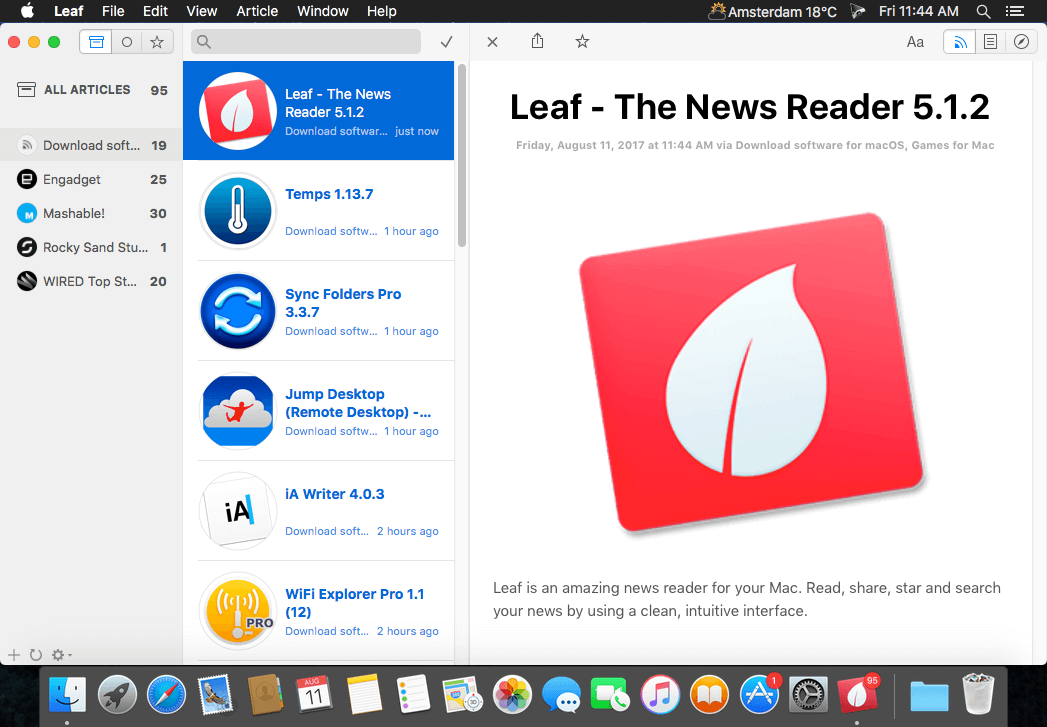
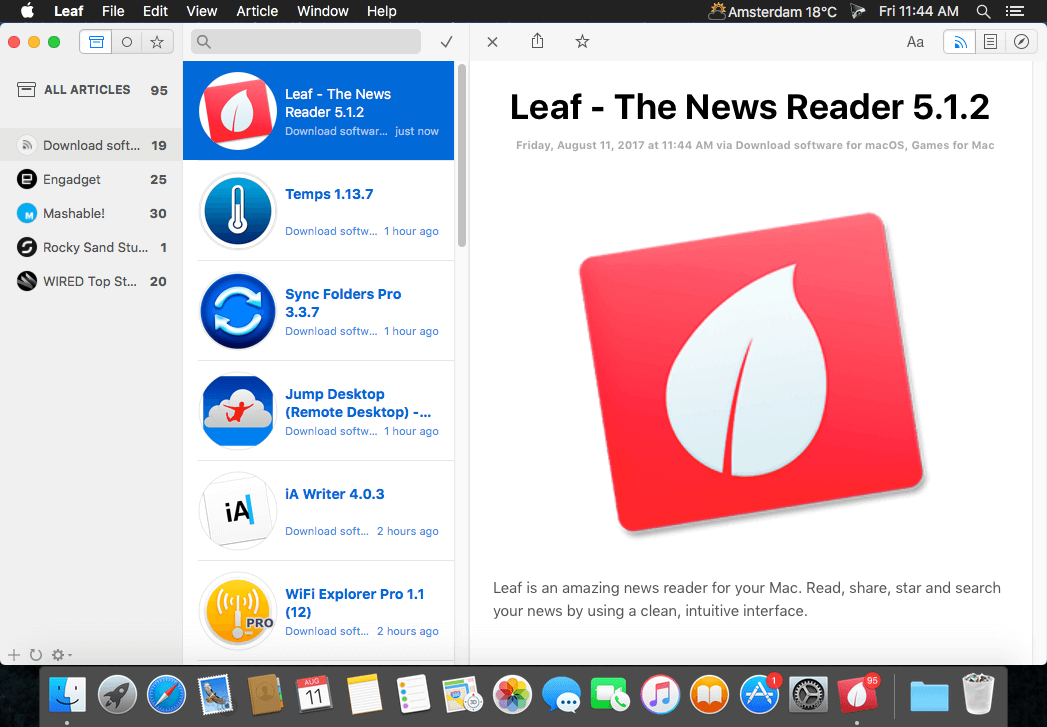
Leaf is an amazing news reader for your Mac. Read, share, star and search your news by using a clean, intuitive interface.

Highlighted features

  • Enhanced for Retina display
  • Quick and clean article preview with a sharing button
  • Hide articles and notifications for subscriptions
  • Synchronized read and starring with Google Reader
  • Alerts/banners for new articles and access to past alerts in Notification Center
  • Fast search for articles by title, source and content
  • Swipe to mark articles read/unread
  • Secure and convenient OAuth2 authorization
  • Custom refresh interval + pull-to-refresh
  • Default RSS Reader capability

Compatibility: macOS 10.11 or later
Homepage https://geo.itunes.apple.com/app/id576338668

Screenshots

Name: Leaf_5.2.4_Mactorrents.Me.dmg
Size: 10 MB
Files Leaf_5.2.4_Mactorrents.Me.dmg[10 MB]


   Download Torrent

Leaf – RSS News Reader 5.2.3

Name: Leaf_5.2.3_Mactorrents.biz.dmg
Size: 10 MB
Files Leaf_5.2.3_Mactorrents.biz.dmg[10 MB]

   Download Torrent
   Link Download

Leaf is an amazing news reader for your Mac. Read, share, star and search your news by using a clean, intuitive interface.

Highlighted features

  • Enhanced for Retina display
  • Quick and clean article preview with a sharing button
  • Hide articles and notifications for subscriptions
  • Synchronized read and starring with Google Reader
  • Alerts/banners for new articles and access to past alerts in Notification Center
  • Fast search for articles by title, source and content
  • Swipe to mark articles read/unread
  • Secure and convenient OAuth2 authorization
  • Custom refresh interval + pull-to-refresh
  • Default RSS Reader capability

Compatibility: macOS 10.11 or later
Homepage https://geo.itunes.apple.com/app/id576338668

Screenshots


RSS Menu 3.3

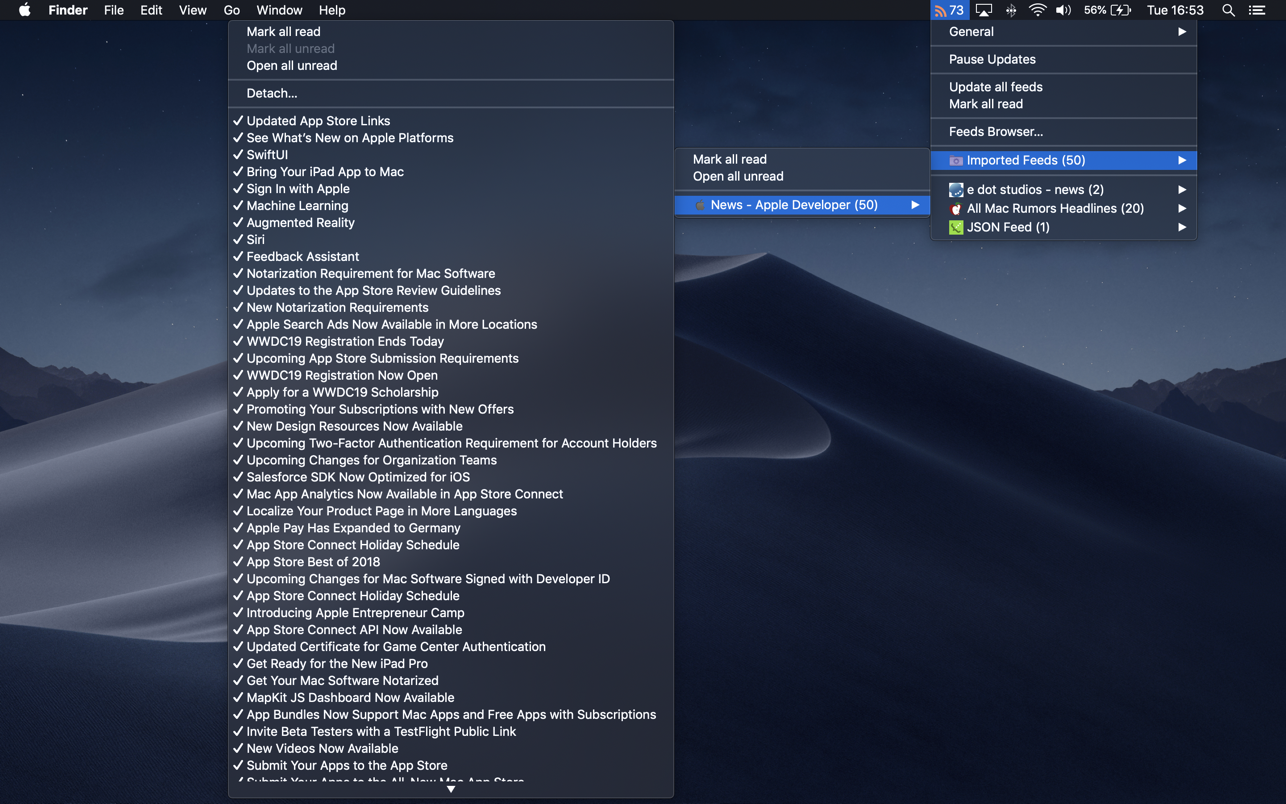
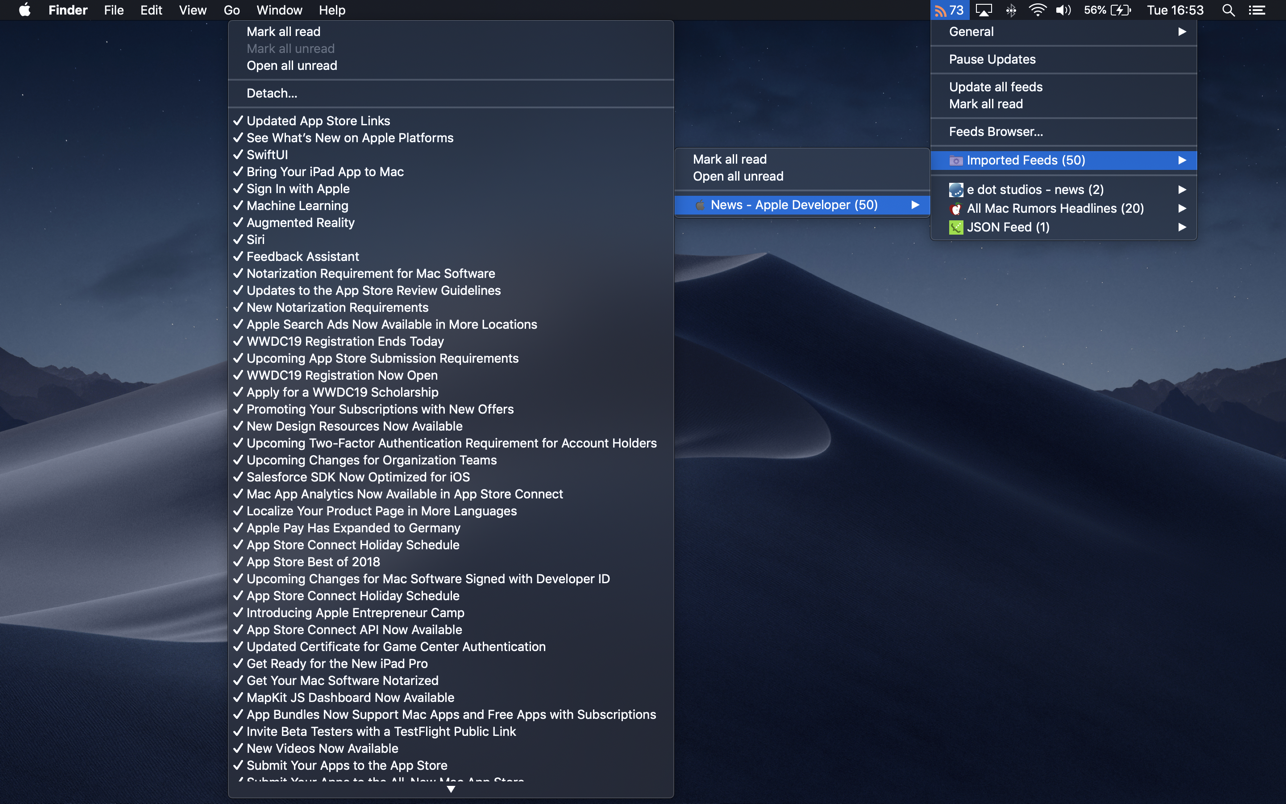
RSS Menu is a systemwide menu that allows you to read and organize your favourite RSS or Atom feeds.

The articles are automatically updated and you will get a notification when new articles are available or when some other event occurs. In addition to visual notification, you can also enable speech notification and choose one of the many built in voices.

Key features include:

  • background application (doesn’t get in your way and is accessible from anywhere)
  • very fast parsing engine
  • auto detects if a url has one or more feeds
  • importing and exporting of OPML files
  • many options to customize the menu
  • support for saving articles for offline reading
  • support for grouping feeds in submenus and adding separators
  • support for favourite icons (aka page icons)
  • supports RSS, Atom and JSON feeds

What’s New:

Version 3.3

This a maintenance update:

  • fixed a bug when detecting a feed from a URL
  • fixed a bug when selecting one of the legacy menu icons
  • fixed a bug that would fail to load certain feeds
  • updated parser engine to be more efficient
  • general performance updates

Compatibility: OS X 10.14 or later, 64 bit
Homepage https://apps.apple.com/us/app/rss-menu/id423069534

Screenshots

Name: RSS Menu 3.3 MAS [HCiSO]_Mactorrents.is.dmg
Size: 10.84 MB
Files RSS Menu 3.3 MAS [HCiSO]_ Mactorrents.is.dmg[10.84 MB]

   Download

RSS Menu 3.1.3

RSS Menu is a systemwide menu that allows you to read and organize your favourite RSS or Atom feeds.

The articles are automatically updated and you will get a notification when new articles are available or when some other event occurs. In addition to visual notification, you can also enable speech notification and choose one of the many built in voices.

Key features include:

  • background application (doesn’t get in your way and is accessible from anywhere)
  • very fast parsing engine
  • auto detects if a url has one or more feeds
  • importing and exporting of OPML files
  • many options to customize the menu
  • support for saving articles for offline reading
  • support for grouping feeds in submenus and adding separators
  • support for favourite icons (aka page icons)
  • supports RSS, Atom and JSON feeds

Compatibility: OS X 10.14 or later, 64 bit
Homepage https://apps.apple.com/us/app/rss-menu/id423069534

Screenshots


Name: RSS_Menu_3.1.3_MAS__TNT_Mactorrents.io.dmg
Size: 12 MB
Files RSS_Menu_3.1.3_MAS__TNT_Mactorrents.io.dmg[12 MB]

   Download

RSS Button for Safari 1.5.3

Discover and subscribe to RSS, Atom or JSON feeds in your preferred desktop or web based news reader from Safari.

To install:

1) Open RSS Button for Safari from Applications;

2) Choose your preferred news reader

3) Enable the extension from Safari Preferences under the extensions tab

4) If the toolbar button does not appear in Safari go to View / Customize Toolbar and drag the RSS Button to your toolbar.

RSS Button for Safari requires either a desktop news reader supporting RSS, Atom or JSON feeds or an account with an online news reader such as Feedbin, Feedly, FeedHQ, Inoreader, NewsBlur, The Old Reader, Minimal Reader or BazQuz Reader.

Desktop news readers verified working include:

– Cappuccino
– Feedy
– Leaf
– News Explorer
– NetNewsWire
– ReadKit
– Reeder 4.1.5+
– Stripes

Languages: English
Compatibility: macOS 10.12 or later, 64-bit processor
Homepage https://apps.apple.com/us/app/rss-button-for-safari/id1437501942

Screenshots

Name: RSS_Button_for_Safari_1.5.3_MAS__HCiSO_Mactorrents.io.dmg
Size: 5.7 MB
Files RSS_Button_for_Safari_1.5.3_MAS__HCiSO_Mactorrents.io.dmg[5.7 MB]

   Download

RSS Button for Safari 1.5

RSS Button for Safari 1.5 macOS

Discover and subscribe to RSS, Atom or JSON feeds in your preferred desktop or web based news reader from Safari.

To install:

1) Open RSS Button for Safari from Applications;

2) Choose your preferred news reader

3) Enable the extension from Safari Preferences under the extensions tab

4) If the toolbar button does not appear in Safari go to View / Customize Toolbar and drag the RSS Button to your toolbar.

RSS Button for Safari requires either a desktop news reader supporting RSS, Atom or JSON feeds or an account with an online news reader such as Feedbin, Feedly, FeedHQ, Inoreader, NewsBlur, The Old Reader, Minimal Reader or BazQuz Reader.

Desktop news readers verified working include:

– Cappuccino
– Feedy
– Leaf
– News Explorer
– NetNewsWire
– ReadKit
– Reeder 4.1.5+
– Stripes

Languages: English
Compatibility: macOS 10.12 or later, 64-bit processor
Homepage https://apps.apple.com/us/app/rss-button-for-safari/id1437501942

Screenshots

Name: RSS_Button_for_Safari_1.5_MAS__HCiSO_Mactorrents.io.dmg
Size: 5.7 MB
Files RSS_Button_for_Safari_1.5_MAS__HCiSO_Mactorrents.io.dmg[5.7 MB]

   Download

RSS Button for Safari 1.4

RSS Button for Safari 1.4

Discover and subscribe to RSS, Atom or JSON feeds in your preferred desktop or web based news reader from Safari.

To install:

1) Open RSS Button for Safari from Applications;

2) Choose your preferred news reader

3) Enable the extension from Safari Preferences under the extensions tab

4) If the toolbar button does not appear in Safari go to View / Customize Toolbar and drag the RSS Button to your toolbar.

RSS Button for Safari requires either a desktop news reader supporting RSS, Atom or JSON feeds or an account with an online news reader such as Feedbin, Feedly, FeedHQ, Inoreader, NewsBlur, The Old Reader, Minimal Reader or BazQuz Reader.

Desktop news readers verified working include:

– Cappuccino
– Feedy
– Leaf
– News Explorer
– NetNewsWire
– ReadKit
– Reeder 4.1.5+
– Stripes

What’s New
Version 1.4
– Added option to copy to clipboard

Languages: English
Compatibility: macOS 10.12 or later, 64-bit processor
Homepage https://apps.apple.com/us/app/rss-button-for-safari/id1437501942

Screenshots

Name: RSS_Button_for_Safari_1.4_MAS__HCiSO_Mactorrents.io.dmg
Size: 5.7 MB
Files RSS_Button_for_Safari_1.4_MAS__HCiSO_Mactorrents.io.dmg[5.7 MB]

   Download

RSS Menu 2.7.4

RSS Menu 2.7.4

RSS Menu is a systemwide menu that allows you to read and organize your favourite RSS or Atom feeds.

The articles are automatically updated and you will get a notification when new articles are available or when some other event occurs. In addition to visual notification, you can also enable speech notification and choose one of the many built in voices.

Key features include:

  • background application (doesn’t get in your way and is accessible from anywhere)
  • very fast parsing engine
  • auto detects if a url has one or more feeds
  • importing and exporting of OPML files
  • many options to customize the menu
  • support for saving articles for offline reading
  • support for grouping feeds in submenus and adding separators
  • support for favourite icons (aka page icons)
  • supports RSS, Atom and JSON feeds

What’s New:

Version 2.7.4

  • added “Launch on login” preference

Compatibility: macOS 10.13.0 or later
Homepage https://apps.apple.com/us/app/rss-menu/id423069534

Screenshots

Name: RSS_Menu_2.7.4_MAS__HCiSO_Mactorrents.io.dmg
Size: 9.67 MB
Files RSS_Menu_2.7.4_MAS__HCiSO_Mactorrents.io.dmg[9.67 MB]

   Download

RSS Menu 2.7.3

Download RSS Menu 2.7.3

RSS Menu is a systemwide menu that allows you to read and organize your favourite RSS or Atom feeds.

The articles are automatically updated and you will get a notification when new articles are available or when some other event occurs. In addition to visual notification, you can also enable speech notification and choose one of the many built in voices.

Key features include:

  • background application (doesn’t get in your way and is accessible from anywhere)
  • very fast parsing engine
  • auto detects if a url has one or more feeds
  • importing and exporting of OPML files
  • many options to customize the menu
  • support for saving articles for offline reading
  • support for grouping feeds in submenus and adding separators
  • support for favourite icons (aka page icons)
  • supports RSS, Atom and JSON feeds

Information

Compatibility
OS X 10.13 or later, 64-bit processor
Languages
English

What’s new in RSS Menu 2.7.3

  • fixed an issue with some feeds to allowing to open the article

Screenshots

Name RSS Menu 2.7.3 HCISO mac-torrents.net.zip
Size 13.41 MB
Created on 2019-11-05 22:42:30
Hash 34f2a2421ff3c2c6d57c447bd4ed4672a726a7c1
Files RSS Menu 2.7.3 HCISO mac-torrents.net.zip (13.41 MB)

Leaf – RSS News Reader 5.0.7

Name Leaf v5.0.7 MAS [ked] [mac-torrents.net].zip
Size 5.39 MB
Created on 2018-01-22 05:38:53
Hash c98a251190f329ef5ebd5368856e69afed9d2b66
Files Leaf v5.0.7 MAS [ked] [mac-torrents.net].zip (5.39 MB)

Descriptions for Descriptions for Leaf – RSS News Reader 5.0.7

Name: Leaf – RSS News Reader
Version: 5.0.7
Language: English
Developer: Rocky Sand Studio Ltd.
MAS Rating: 4+
Mac Platform: Intel
OS Version: OS X 10.10 or later
Processor type(s) & speed: 64-bit processor

Includes: Pre-K’ed

Web Site: http://www.rockysandstudio.com/appstore_redirect/
Mac App Store: https://itunes.apple.com/app/leaf-rss-news-reader/id576338668?mt=12

Overview

***** Featured by Apple in “Our favourite Mac Apps” *****

Leaf is an amazing news reader for your Mac. Read, share, star and search your news by using a clean and intuitive interface.

“The best looking news reader on the App Store”- by GenieBurger
“Excellent, clean interface, nice design”- by dfs83

– lifehacker.com- “The app walks the line between being minimal, offering you only the essential features, and making sure the features it does offer are useful…”

Highlighted features:

– Beautiful themes (including night mode) and customizable news reader appearance
– Syncs with Feedly, NewsBlur, Feedbin and Feed Wrangler
– Standalone RSS engine
– Save articles to Buffer, Evernote, Pocket, Readability, Instapaper, Facebook, Twitter, LinkedIn
– RSS, RDF, ATOM support
– Gestures and keyboard shortcuts
– New article notifications and access to past articles in Notification Center

We’d like to know how to improve our apps, contact us at Rocky Sand Studio http://www.rockysandstudio.com

What’s New in Leaf – RSS News Reader 5.0.7

  • Release notes not available at the time of this post.

Screenshots