Category Archives: Live

Ableton Live 10 Suite v10.1.30

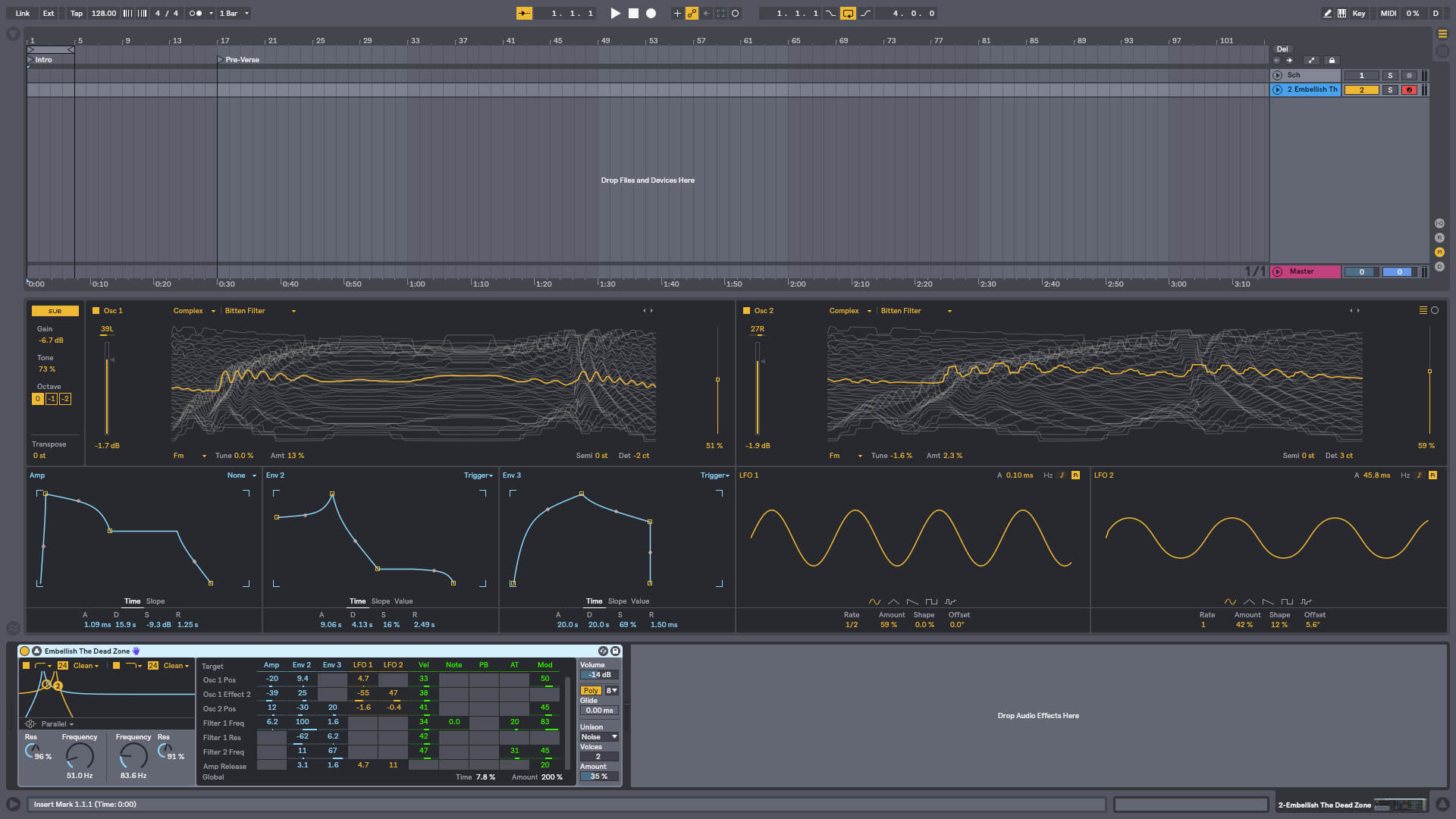
Create bolder sounds with Live’s new devices. Stay in the flow with a multitude of workflow improvements. Do even more away from the computer with Push. Build your sound with a curated library. And get the unlimited potential of Max for Live, seamlessly built in.

Create with new devices
Meet Wavetable, Echo, Drum Buss and Pedal: new devices that mean colorful new sounds are possible with Live’s instruments and effects.

Wavetable
Immediately playable, infinitely capable, Wavetable is a new synthesizer built by Ableton. Shape, stretch and morph sounds using wavetables derived from analog synths, and a range of other instruments and sounds. Start sculpting sounds right away—even without a deep knowledge of synthesis—or explore its rich palette and potential through an intuitive interface.

Echo
Echo brings together the sound of classic analog and digital hardware delays in a single device—your new go-to delay. Drive and shape sounds with its analog-modeled filters, turn up the noise and wobble for vintage imperfections, or add modulation and reverb to create diffuse soundscapes, wailing feedback and more.

Drum Buss
Drum Buss is a one-stop workstation for drums, capable of adding subtle character or bending and breaking drums to your will. Add warmth and distortion with drive and crunch, take control of dynamics with compression and transient shaping, dial in and tune boom and control bass decay with the dedicated low end section.

Pedal
With separate circuit-level models of overdrive, distortion and fuzz guitar pedals, Pedal brings the character of analog stomp boxes to Live. The effect goes all the way from subtle to reckless—it excels at warming up vocals and other instruments, driving synth sounds or completely smashing drums. And of course, it sounds great with guitars.

10.1.30 Release Notes
New features and improvements:
Updated some info texts and translations.
When the Vestax VCM-600 is detected by Live, its control surface script will now be automatically selected and set up.

Updated the bundled Max build to version 8.1.7.
For a complete Max 8.1.7 changelog, visit: http://cycling74.s3.amazonaws.com/support/version_8_1_7.html

Bugfixes:
Fixed a crash that could occur when dragging a clip with automation to another track with the same devices, under certain circumstances.
The Device View Selector no longer wiggles when switching between Detail Views.
Shift-key functionality once again works as expected in the Clip View’s Sample Display.
Previously, Packs would change icons upon being assigned a color in the browser.
The Max device error view description text now follows Live’s selected theme.
Previously, MIDI note type values would only display the octave number on Push.

Fixed some bugs:
– Certain VST3 plug-ins that are not defined as instruments (e.g. Vocoders) were not receiving MIDI CCs.
– MIDI Learn would not work with certain VST3 audio effects.
Previously, cropping an unwarped clip could produce a clip whose loop markers were outside the sample. When saving a Set for the first time, self-containing the Set or creating a Pack using Live’s File Manager, Live would incorrectly enable the Warp switch for such clips.
Fixed a crash that could occur when using certain VST3 plug-ins.
Previously, the placeholder %%USERNAME%% in the Library.cfg and Options.txt did not work on macOS 10.15.
Previously, when attempting to create new Cache defaults, removing User/Library/Caches/Ableton on macOS would instead reset AU plug-in settings.
Previously, when cropping an unlooped MIDI clip whose loop was outside the audible region, Live would hang when enabling the cropped clip’s loop. For MIDI clips and warped/unwarped audio clips), the loop brace is now always inside the clip after cropping.
A memory leak and subsequent crash on macOS has been fixed when Live’s window is
not being interacted with for a prolonged period of time.

Homepage https://www.ableton.com/en/live/

Screenshots

Name: Ableton.Live.10.Suite.v10.1.30-MacOS_Mactorrents.io.rar
Size: 2.46 GB
Files Ableton.Live.10.Suite.v10.1.30-MacOS_Mactorrents.io.rar[2.46 GB]

   Download

Live Home 3D Pro Edition 3.8.3

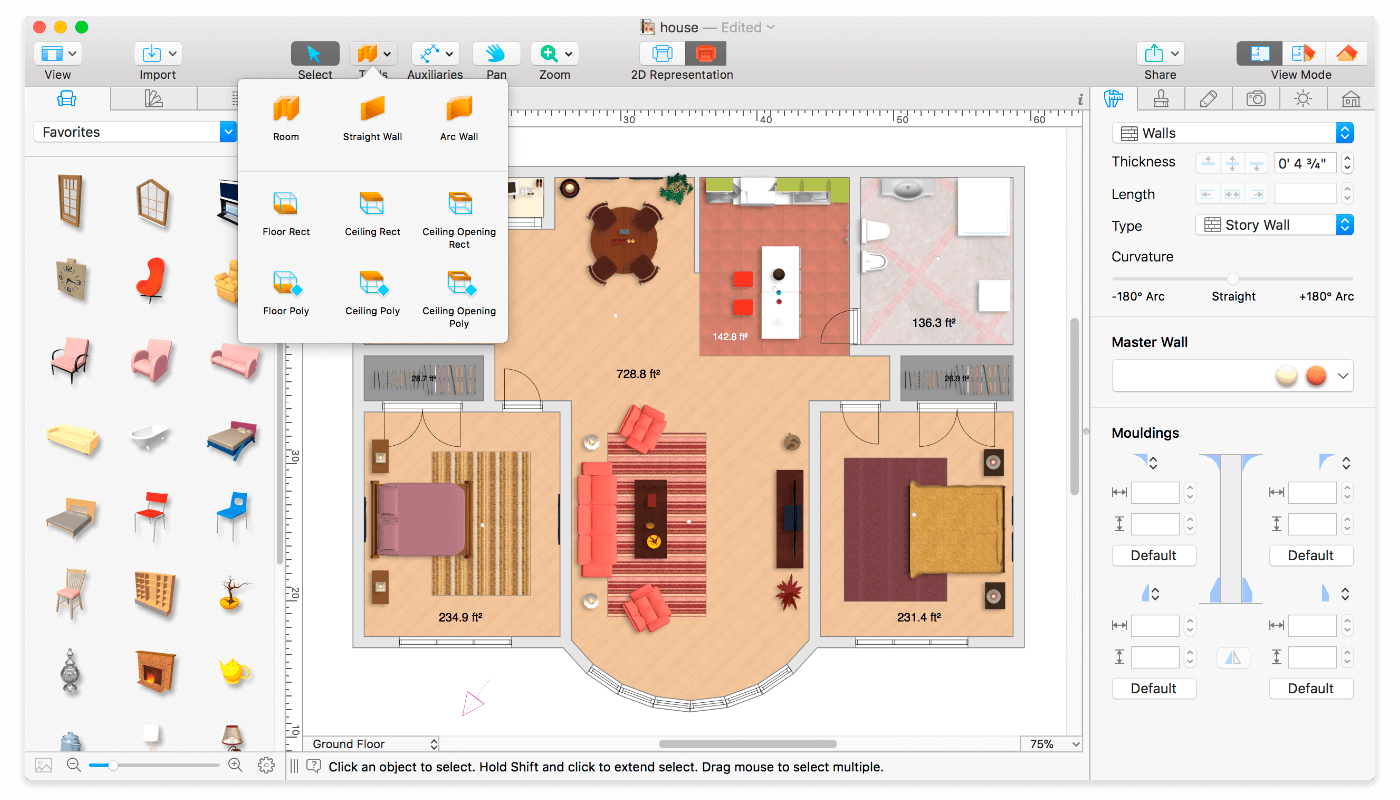
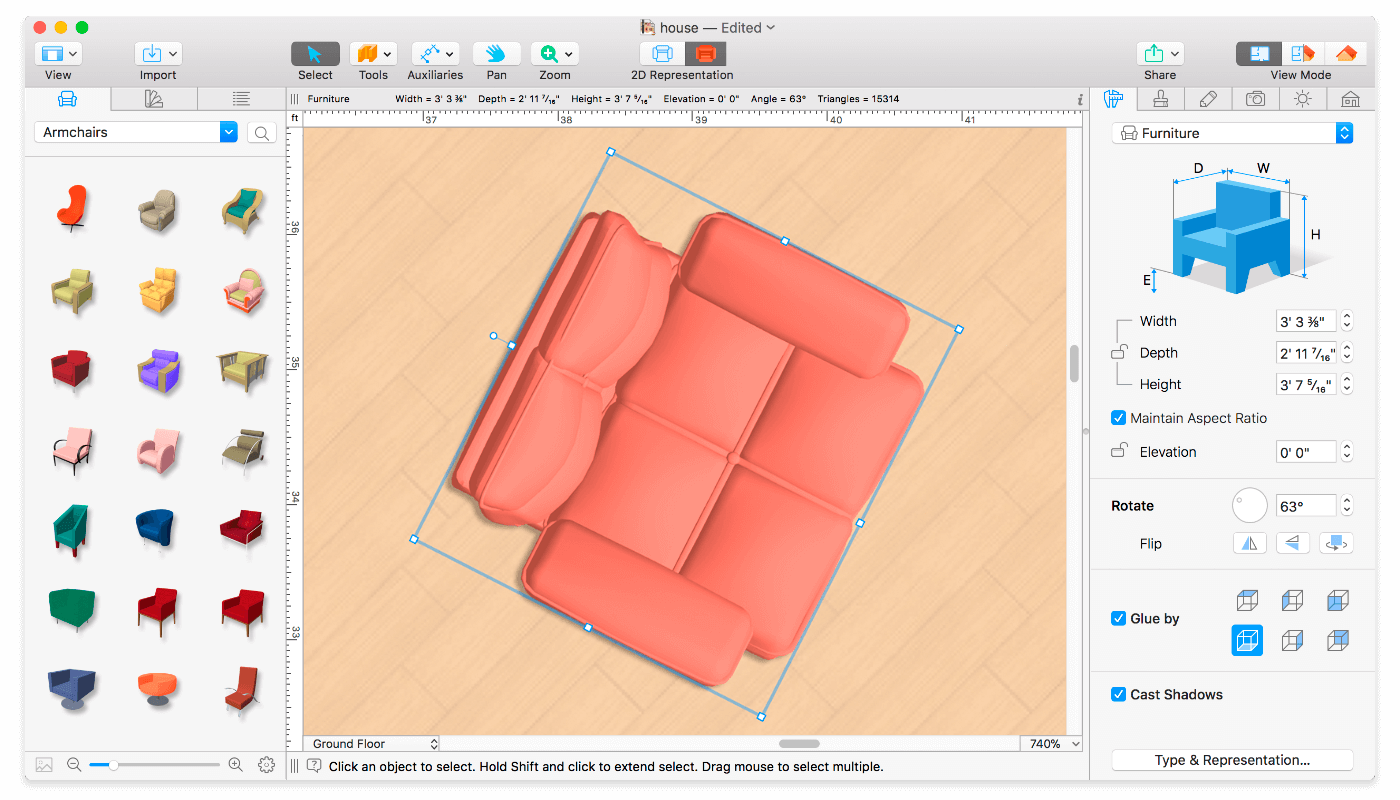
Live Home 3D Pro is the most intuitive and feature packed home design app suitable for homeowners and professional designers, a successor of Live Interior 3D. Besides offering advanced home design tools, Pro edition provides superior export quality and Elevation View mode.

General

  • Create detailed 2D floor plans.
  • Beautiful real-time 3D rendering.
  • Unlimited floor levels. (Pro edition only)
  • A collection of in-depth video tutorials.
  • Built-in Help Assistant and free, quick tech support service.
  • Project Gallery with house projects and sample rooms.
  • Native Support for Live Interior 3D Projects.

Floor Plan Tools

  • Draw complete rooms using Room tool.
  • Use Arc and Straight Wall tools for drawing walls.
  • Elevation view. (Pro edition only)
  • ‘Auto outline’ vector-based 2D representation for furniture.
  • View real-time measurements for walls, ceilings, and floors when drawing in 2D Plan view.
  • Select the necessary measurement units (inches, feet, meters, etc).
  • Use smart Dimension tool to set the distance between underlying objects or walls.
  • Precise positioning thanks to smart guides and object snapping.

Real-Time 3D Environment

  • Adjust the lighting, add and move objects, apply materials, and more right in 3D.
  • All changes, made in 3D or 2D, are rendered in 3D in real time.
  • Walk through your 3D interior.
  • FOV (field of view) and parallel camera projection. (Pro edition only)
  • Set multiple cameras to see the house from different point of views.
  • Achieve natural lighting by setting up true Geo position, daytime and overcast.
  • Adjust light fixtures throughout your project to get realistic lighting scene.
  • Light editor helps to add a light source to an imported objects. (Pro edition only)
  • Create corner windows and complex openings using the program advanced technology.
  • Level of details tool allows to optimize 3D object and speed up the project.
  • Professional Shadow Map technique makes shadows look soft and natural.

3D Models and Materials

  • 2,000+ furniture and other models.
  • Import models seamlessly from Trimble 3D Warehouse™ (previously Google 3D Warehouse™).
  • Edit furniture in SketchUp. (Pro edition only)
  • 2,100+ supplied materials.
  • Drag and drop any image from the Finder to apply it to any surface as custom material.
  • Advanced material editor. (Pro edition only)
  • Set the exact size of a material tile to know how much of the material is needed for your house renovation project.
  • Import objects in SketchUp, COLLADA, KMZ, FBX, OBJ or 3DS formats by simply dragging and dropping them into your project.
  • Polygonal-based Block tool for drawing balconies, porches, and more. (Pro edition only)

Roofs and Dormers

  • Roof Assistant with 12 customizable roof templates.
  • Custom shaped roofs. (Pro edition only)
  • Add custom segments to fully customize your roof.
  • 16 customizable dormers.

Export and Share the Result

  • Share the result to Facebook, Twitter, Vimeo or YouTube.
  • Export 3D views to JPEG, TIFF, PNG, and BMP (up to 16000 x 16000).
  • Share 360° Panorama JPEG images (up to Ultra HD) to Facebook.
  • Render a realistic video walkthrough (up to Ultra HD).
  • Create Stereo 3D Video, 360° Video and even Stereo 3D 360° Video.
  • Quickly send a copy of your project via Mail, Messages or AirDrop.
  • Export the entire project or selected objects to COLLADA, Trimble SketchUp™, VRML Version 2.0 or X3D format.
  • Export to 3DS, FBX, USDZ and OBJ formats. (Pro edition only)

What’s New:

Version 3.8.3:

  • Added support for macOS Big Sur.
  • Bug fixes and stability improvements.

Compatibility: macOS 10.12 or later, 64-bit processor
Homepage https://www.livehome3d.com/

Screenshots


Name: Live_Home_3D_Pro_3.8.3__TNT_Mactorrents.io.dmg
Size: 306.19 MB
Files Live_Home_3D_Pro_3.8.3__TNT_Mactorrents.io.dmg[306.19 MB]

   Download

Ableton Live Suite 10.1.25

Live is fast, fluid and flexible software for music creation and performance. It comes with effects, instruments, sounds and all kinds of creative features—everything you need to make any kind of music. Create in a traditional linear arrangement, or improvise without the constraints of a timeline in Live’s Session View. Move freely between musical elements and play with ideas, without stopping the music and without breaking your flow.

What’s New:

What’s New in Ableton Live Suite 10:
Create with new devices
Meet Wavetable, Echo, Drum Buss and Pedal: new devices that mean colorful new sounds are possible with Live’s instruments and effects.

Stay in the flow
You’ll find improvements to Live that help you stay in the flow at every stage of your creative process, whether you’re getting ideas down, organizing your setup or editing the details of your music.

Do even more from Push
Live 10 brings new functionality and new high-res visualizations to Push. Now you’ll spend even less time with the computer—whether you’re composing ideas, editing MIDI or shaping and mixing sounds.

New library of sound
With new collections of Packs, Live 10 has more sounds that are ready for finished music, right out of the box. They’re set up for tweaking to your needs or taking in different directions. Plus the library has been reorganized to make it easier to find what you’re looking for.

Max for Live – no limits, built in
Max technology is now fully integrated into Live 10 Suite. No additional download or set up is required to create with and customize Max For Live devices. They just work. Plus new devices and capabilities bring more possibilities for musicians and device developers.

Homepage https://www.ableton.com

Screenshots


Name: Ableton.Live.10.Suite.10.1.25.HCiSO_Mactorrents.io.zip
Size: 2.2 GB
Files Ableton.Live.10.Suite.10.1.25.HCiSO_Mactorrents.io.dmg[2.2 GB]

   Download

Ableton Live Suite 10.1.17

Live is fast, fluid and flexible software for music creation and performance. It comes with effects, instruments, sounds and all kinds of creative features—everything you need to make any kind of music. Create in a traditional linear arrangement, or improvise without the constraints of a timeline in Live’s Session View. Move freely between musical elements and play with ideas, without stopping the music and without breaking your flow.

What’s New:

What’s New in Ableton Live Suite 10:
Create with new devices
Meet Wavetable, Echo, Drum Buss and Pedal: new devices that mean colorful new sounds are possible with Live’s instruments and effects.

Stay in the flow
You’ll find improvements to Live that help you stay in the flow at every stage of your creative process, whether you’re getting ideas down, organizing your setup or editing the details of your music.

Do even more from Push
Live 10 brings new functionality and new high-res visualizations to Push. Now you’ll spend even less time with the computer—whether you’re composing ideas, editing MIDI or shaping and mixing sounds.

New library of sound
With new collections of Packs, Live 10 has more sounds that are ready for finished music, right out of the box. They’re set up for tweaking to your needs or taking in different directions. Plus the library has been reorganized to make it easier to find what you’re looking for.

Max for Live – no limits, built in
Max technology is now fully integrated into Live 10 Suite. No additional download or set up is required to create with and customize Max For Live devices. They just work. Plus new devices and capabilities bring more possibilities for musicians and device developers.

Homepage https://www.ableton.com

Screenshots


Name: Ableton.Live.10.Suite.10.1.17._HCiSO__Mactorrents.io.zip
Size: 1.7 GB
Files Ableton.Live.10.Suite.10.1.17._HCiSO__Mactorrents.io.dmg[1.7 GB]

   Download

Live Home 3D Pro Edition 3.8.2

Live Home 3D Pro is the most intuitive and feature packed home design app suitable for homeowners and professional designers, a successor of Live Interior 3D. Besides offering advanced home design tools, Pro edition provides superior export quality and Elevation View mode.

General

  • Create detailed 2D floor plans.
  • Beautiful real-time 3D rendering.
  • Unlimited floor levels. (Pro edition only)
  • A collection of in-depth video tutorials.
  • Built-in Help Assistant and free, quick tech support service.
  • Project Gallery with house projects and sample rooms.
  • Native Support for Live Interior 3D Projects.

Floor Plan Tools

  • Draw complete rooms using Room tool.
  • Use Arc and Straight Wall tools for drawing walls.
  • Elevation view. (Pro edition only)
  • ‘Auto outline’ vector-based 2D representation for furniture.
  • View real-time measurements for walls, ceilings, and floors when drawing in 2D Plan view.
  • Select the necessary measurement units (inches, feet, meters, etc).
  • Use smart Dimension tool to set the distance between underlying objects or walls.
  • Precise positioning thanks to smart guides and object snapping.

Real-Time 3D Environment

  • Adjust the lighting, add and move objects, apply materials, and more right in 3D.
  • All changes, made in 3D or 2D, are rendered in 3D in real time.
  • Walk through your 3D interior.
  • FOV (field of view) and parallel camera projection. (Pro edition only)
  • Set multiple cameras to see the house from different point of views.
  • Achieve natural lighting by setting up true Geo position, daytime and overcast.
  • Adjust light fixtures throughout your project to get realistic lighting scene.
  • Light editor helps to add a light source to an imported objects. (Pro edition only)
  • Create corner windows and complex openings using the program advanced technology.
  • Level of details tool allows to optimize 3D object and speed up the project.
  • Professional Shadow Map technique makes shadows look soft and natural.

3D Models and Materials

  • 2,000+ furniture and other models.
  • Import models seamlessly from Trimble 3D Warehouse™ (previously Google 3D Warehouse™).
  • Edit furniture in SketchUp. (Pro edition only)
  • 2,100+ supplied materials.
  • Drag and drop any image from the Finder to apply it to any surface as custom material.
  • Advanced material editor. (Pro edition only)
  • Set the exact size of a material tile to know how much of the material is needed for your house renovation project.
  • Import objects in SketchUp, COLLADA, KMZ, FBX, OBJ or 3DS formats by simply dragging and dropping them into your project.
  • Polygonal-based Block tool for drawing balconies, porches, and more. (Pro edition only)

Roofs and Dormers

  • Roof Assistant with 12 customizable roof templates.
  • Custom shaped roofs. (Pro edition only)
  • Add custom segments to fully customize your roof.
  • 16 customizable dormers.

Export and Share the Result

  • Share the result to Facebook, Twitter, Vimeo or YouTube.
  • Export 3D views to JPEG, TIFF, PNG, and BMP (up to 16000 x 16000).
  • Share 360° Panorama JPEG images (up to Ultra HD) to Facebook.
  • Render a realistic video walkthrough (up to Ultra HD).
  • Create Stereo 3D Video, 360° Video and even Stereo 3D 360° Video.
  • Quickly send a copy of your project via Mail, Messages or AirDrop.
  • Export the entire project or selected objects to COLLADA, Trimble SketchUp™, VRML Version 2.0 or X3D format.
  • Export to 3DS, FBX, USDZ and OBJ formats. (Pro edition only)

Compatibility: macOS 10.12 or later, 64-bit processor
Homepage https://www.livehome3d.com/

Screenshots


Name: Live_Home_3D_Pro_3.8.2__TNT_Mactorrents.io.dmg
Size: 314 MB
Files Live_Home_3D_Pro_3.8.2__TNT_Mactorrents.io.dmg[314 MB]

   Download

Live Home 3D Pro Edition 3.8.1

Live Home 3D Pro is the most intuitive and feature packed home design app suitable for homeowners and professional designers, a successor of Live Interior 3D. Besides offering advanced home design tools, Pro edition provides superior export quality and Elevation View mode.

General

  • Create detailed 2D floor plans.
  • Beautiful real-time 3D rendering.
  • Unlimited floor levels. (Pro edition only)
  • A collection of in-depth video tutorials.
  • Built-in Help Assistant and free, quick tech support service.
  • Project Gallery with house projects and sample rooms.
  • Native Support for Live Interior 3D Projects.

Floor Plan Tools

  • Draw complete rooms using Room tool.
  • Use Arc and Straight Wall tools for drawing walls.
  • Elevation view. (Pro edition only)
  • ‘Auto outline’ vector-based 2D representation for furniture.
  • View real-time measurements for walls, ceilings, and floors when drawing in 2D Plan view.
  • Select the necessary measurement units (inches, feet, meters, etc).
  • Use smart Dimension tool to set the distance between underlying objects or walls.
  • Precise positioning thanks to smart guides and object snapping.

Real-Time 3D Environment

  • Adjust the lighting, add and move objects, apply materials, and more right in 3D.
  • All changes, made in 3D or 2D, are rendered in 3D in real time.
  • Walk through your 3D interior.
  • FOV (field of view) and parallel camera projection. (Pro edition only)
  • Set multiple cameras to see the house from different point of views.
  • Achieve natural lighting by setting up true Geo position, daytime and overcast.
  • Adjust light fixtures throughout your project to get realistic lighting scene.
  • Light editor helps to add a light source to an imported objects. (Pro edition only)
  • Create corner windows and complex openings using the program advanced technology.
  • Level of details tool allows to optimize 3D object and speed up the project.
  • Professional Shadow Map technique makes shadows look soft and natural.

3D Models and Materials

  • 2,000+ furniture and other models.
  • Import models seamlessly from Trimble 3D Warehouse™ (previously Google 3D Warehouse™).
  • Edit furniture in SketchUp. (Pro edition only)
  • 2,100+ supplied materials.
  • Drag and drop any image from the Finder to apply it to any surface as custom material.
  • Advanced material editor. (Pro edition only)
  • Set the exact size of a material tile to know how much of the material is needed for your house renovation project.
  • Import objects in SketchUp, COLLADA, KMZ, FBX, OBJ or 3DS formats by simply dragging and dropping them into your project.
  • Polygonal-based Block tool for drawing balconies, porches, and more. (Pro edition only)

Roofs and Dormers

  • Roof Assistant with 12 customizable roof templates.
  • Custom shaped roofs. (Pro edition only)
  • Add custom segments to fully customize your roof.
  • 16 customizable dormers.

Export and Share the Result

  • Share the result to Facebook, Twitter, Vimeo or YouTube.
  • Export 3D views to JPEG, TIFF, PNG, and BMP (up to 16000 x 16000).
  • Share 360° Panorama JPEG images (up to Ultra HD) to Facebook.
  • Render a realistic video walkthrough (up to Ultra HD).
  • Create Stereo 3D Video, 360° Video and even Stereo 3D 360° Video.
  • Quickly send a copy of your project via Mail, Messages or AirDrop.
  • Export the entire project or selected objects to COLLADA, Trimble SketchUp™, VRML Version 2.0 or X3D format.
  • Export to 3DS, FBX, USDZ and OBJ formats. (Pro edition only)

What’s New:

Version 3.8.1:

  • Bug fixes and stability improvements.

Compatibility: macOS 10.12 or later, 64-bit processor
Homepage https://www.livehome3d.com/

Screenshots


Name: Live_Home_3D_Pro_3.8.1__TNT_Mactorrents.io.dmg
Size: 312.33 MB
Files Live_Home_3D_Pro_3.8.1__TNT_Mactorrents.io.dmg[312.33 MB]

   Download

Ableton Live Suite 10.1.15

Live is fast, fluid and flexible software for music creation and performance. It comes with effects, instruments, sounds and all kinds of creative features—everything you need to make any kind of music. Create in a traditional linear arrangement, or improvise without the constraints of a timeline in Live’s Session View. Move freely between musical elements and play with ideas, without stopping the music and without breaking your flow.

What’s New:

What’s New in Ableton Live Suite 10:
Create with new devices
Meet Wavetable, Echo, Drum Buss and Pedal: new devices that mean colorful new sounds are possible with Live’s instruments and effects.

Stay in the flow
You’ll find improvements to Live that help you stay in the flow at every stage of your creative process, whether you’re getting ideas down, organizing your setup or editing the details of your music.

Do even more from Push
Live 10 brings new functionality and new high-res visualizations to Push. Now you’ll spend even less time with the computer—whether you’re composing ideas, editing MIDI or shaping and mixing sounds.

New library of sound
With new collections of Packs, Live 10 has more sounds that are ready for finished music, right out of the box. They’re set up for tweaking to your needs or taking in different directions. Plus the library has been reorganized to make it easier to find what you’re looking for.

Max for Live – no limits, built in
Max technology is now fully integrated into Live 10 Suite. No additional download or set up is required to create with and customize Max For Live devices. They just work. Plus new devices and capabilities bring more possibilities for musicians and device developers.

Homepage https://www.ableton.com

Screenshots


Name: Ableton.Live.10.Suite.10.1.15.HCiSO_Mactorrents.io.dmg
Size: 2.18 GB
Files Ableton.Live.10.Suite.10.1.15.HCiSO_Mactorrents.io.dmg[2.18 GB]

   Download

Ableton Live Suite 10.1.14

Live is fast, fluid and flexible software for music creation and performance. It comes with effects, instruments, sounds and all kinds of creative features—everything you need to make any kind of music. Create in a traditional linear arrangement, or improvise without the constraints of a timeline in Live’s Session View. Move freely between musical elements and play with ideas, without stopping the music and without breaking your flow.

What’s New:

What’s New in Ableton Live Suite 10:
Create with new devices
Meet Wavetable, Echo, Drum Buss and Pedal: new devices that mean colorful new sounds are possible with Live’s instruments and effects.

Stay in the flow
You’ll find improvements to Live that help you stay in the flow at every stage of your creative process, whether you’re getting ideas down, organizing your setup or editing the details of your music.

Do even more from Push
Live 10 brings new functionality and new high-res visualizations to Push. Now you’ll spend even less time with the computer—whether you’re composing ideas, editing MIDI or shaping and mixing sounds.

New library of sound
With new collections of Packs, Live 10 has more sounds that are ready for finished music, right out of the box. They’re set up for tweaking to your needs or taking in different directions. Plus the library has been reorganized to make it easier to find what you’re looking for.

Max for Live – no limits, built in
Max technology is now fully integrated into Live 10 Suite. No additional download or set up is required to create with and customize Max For Live devices. They just work. Plus new devices and capabilities bring more possibilities for musicians and device developers.
What’s New

    • Bugfixes:
    • Live will no longer crash when using the Axiom 49 61 Classic script.

Homepage https://www.ableton.com

Screenshots


Name: Ableton.Live.10.Suite.10.1.14._HCiSO_Mactorrents.io.rar
Size: 2.1 GB
Files Ableton.Live.10.Suite.10.1.14._HCiSO_Mactorrents.io.rar[2.1 GB]

   Download

Ableton Live Suite 10.1.13

Live is fast, fluid and flexible software for music creation and performance. It comes with effects, instruments, sounds and all kinds of creative features—everything you need to make any kind of music. Create in a traditional linear arrangement, or improvise without the constraints of a timeline in Live’s Session View. Move freely between musical elements and play with ideas, without stopping the music and without breaking your flow.

What’s New:

What’s New in Ableton Live Suite 10:
Create with new devices
Meet Wavetable, Echo, Drum Buss and Pedal: new devices that mean colorful new sounds are possible with Live’s instruments and effects.

Stay in the flow
You’ll find improvements to Live that help you stay in the flow at every stage of your creative process, whether you’re getting ideas down, organizing your setup or editing the details of your music.

Do even more from Push
Live 10 brings new functionality and new high-res visualizations to Push. Now you’ll spend even less time with the computer—whether you’re composing ideas, editing MIDI or shaping and mixing sounds.

New library of sound
With new collections of Packs, Live 10 has more sounds that are ready for finished music, right out of the box. They’re set up for tweaking to your needs or taking in different directions. Plus the library has been reorganized to make it easier to find what you’re looking for.

Max for Live – no limits, built in
Max technology is now fully integrated into Live 10 Suite. No additional download or set up is required to create with and customize Max For Live devices. They just work. Plus new devices and capabilities bring more possibilities for musicians and device developers.

Homepage https://www.ableton.com

Screenshots


Name: Ableton_Live_10_Suite_10.1.13__HCiSO_Mactorrents.io.dmg
Size: 2.1 GB
Files Ableton_Live_10_Suite_10.1.13__HCiSO_Mactorrents.io.dmg[2.1 GB]

   Download

Live Home 3D Pro 3.8

Live Home 3D Pro is the most intuitive and feature packed home design app suitable for homeowners and professional designers, a successor of Live Interior 3D. Besides offering advanced home design tools, Pro edition provides superior export quality and Elevation View mode.

General

  • Create detailed 2D floor plans.
  • Beautiful real-time 3D rendering.
  • Unlimited floor levels. (Pro edition only)
  • A collection of in-depth video tutorials.
  • Built-in Help Assistant and free, quick tech support service.
  • Project Gallery with house projects and sample rooms.
  • Native Support for Live Interior 3D Projects.

Floor Plan Tools

  • Draw complete rooms using Room tool.
  • Use Arc and Straight Wall tools for drawing walls.
  • Elevation view. (Pro edition only)
  • ‘Auto outline’ vector-based 2D representation for furniture.
  • View real-time measurements for walls, ceilings, and floors when drawing in 2D Plan view.
  • Select the necessary measurement units (inches, feet, meters, etc).
  • Use smart Dimension tool to set the distance between underlying objects or walls.
  • Precise positioning thanks to smart guides and object snapping.

Real-Time 3D Environment

  • Adjust the lighting, add and move objects, apply materials, and more right in 3D.
  • All changes, made in 3D or 2D, are rendered in 3D in real time.
  • Walk through your 3D interior.
  • FOV (field of view) and parallel camera projection. (Pro edition only)
  • Set multiple cameras to see the house from different point of views.
  • Achieve natural lighting by setting up true Geo position, daytime and overcast.
  • Adjust light fixtures throughout your project to get realistic lighting scene.
  • Light editor helps to add a light source to an imported objects. (Pro edition only)
  • Create corner windows and complex openings using the program advanced technology.
  • Level of details tool allows to optimize 3D object and speed up the project.
  • Professional Shadow Map technique makes shadows look soft and natural.

3D Models and Materials

  • 2,000+ furniture and other models.
  • Import models seamlessly from Trimble 3D Warehouse™ (previously Google 3D Warehouse™).
  • Edit furniture in SketchUp. (Pro edition only)
  • 2,100+ supplied materials.
  • Drag and drop any image from the Finder to apply it to any surface as custom material.
  • Advanced material editor. (Pro edition only)
  • Set the exact size of a material tile to know how much of the material is needed for your house renovation project.
  • Import objects in SketchUp, COLLADA, KMZ, FBX, OBJ or 3DS formats by simply dragging and dropping them into your project.
  • Polygonal-based Block tool for drawing balconies, porches, and more. (Pro edition only)

Roofs and Dormers

  • Roof Assistant with 12 customizable roof templates.
  • Custom shaped roofs. (Pro edition only)
  • Add custom segments to fully customize your roof.
  • 16 customizable dormers.

Export and Share the Result

  • Share the result to Facebook, Twitter, Vimeo or YouTube.
  • Export 3D views to JPEG, TIFF, PNG, and BMP (up to 16000 x 16000).
  • Share 360° Panorama JPEG images (up to Ultra HD) to Facebook.
  • Render a realistic video walkthrough (up to Ultra HD).
  • Create Stereo 3D Video, 360° Video and even Stereo 3D 360° Video.
  • Quickly send a copy of your project via Mail, Messages or AirDrop.
  • Export the entire project or selected objects to COLLADA, Trimble SketchUp™, VRML Version 2.0 or X3D format.
  • Export to 3DS, FBX, USDZ and OBJ formats. (Pro edition only)

What’s New:

Version 3.8:

  • Added a new collection of objects for exterior design (available with in-app purchase).
  • Bug fixes and stability improvements.

Compatibility: macOS 10.12 or later, 64-bit processor
Homepage https://www.livehome3d.com/

Screenshots


Name: Live_Home_3D_Pro_3.8__TNT__Mactorrents.io.dmg
Size: 311.2 MB
Files Live_Home_3D_Pro_3.8__TNT__Mactorrents.io.dmg[311.2 MB]

   Download

Ableton Live 10 Suite v10.1.9

Create bolder sounds with Live’s new devices. Stay in the flow with a multitude of workflow improvements. Do even more away from the computer with Push. Build your sound with a curated library. And get the unlimited potential of Max for Live, seamlessly built in.

Create with new devices
Meet Wavetable, Echo, Drum Buss and Pedal: new devices that mean colorful new sounds are possible with Live’s instruments and effects.

Wavetable
Immediately playable, infinitely capable, Wavetable is a new synthesizer built by Ableton. Shape, stretch and morph sounds using wavetables derived from analog synths, and a range of other instruments and sounds. Start sculpting sounds right away—even without a deep knowledge of synthesis—or explore its rich palette and potential through an intuitive interface.

Echo
Echo brings together the sound of classic analog and digital hardware delays in a single device—your new go-to delay. Drive and shape sounds with its analog-modeled filters, turn up the noise and wobble for vintage imperfections, or add modulation and reverb to create diffuse soundscapes, wailing feedback and more.

Drum Buss
Drum Buss is a one-stop workstation for drums, capable of adding subtle character or bending and breaking drums to your will. Add warmth and distortion with drive and crunch, take control of dynamics with compression and transient shaping, dial in and tune boom and control bass decay with the dedicated low end section.

Pedal
With separate circuit-level models of overdrive, distortion and fuzz guitar pedals, Pedal brings the character of analog stomp boxes to Live. The effect goes all the way from subtle to reckless—it excels at warming up vocals and other instruments, driving synth sounds or completely smashing drums. And of course, it sounds great with guitars.

Homepage https://www.ableton.com

Screenshots


Name: Ableton_Live_10_Suite_v10.1.9_Mactorrents.io.zip
Size: 2.05 GB
Files Ableton_Live_10_Suite_v10.1.9_Mactorrents.io.dmg[ 2.05 GB]

   Download

Live Home 3D Pro 3.7.3

Live Home 3D Pro is the most intuitive and feature packed home design app suitable for homeowners and professional designers, a successor of Live Interior 3D. Besides offering advanced home design tools, Pro edition provides superior export quality and Elevation View mode.

General

  • Create detailed 2D floor plans.
  • Beautiful real-time 3D rendering.
  • Unlimited floor levels. (Pro edition only)
  • A collection of in-depth video tutorials.
  • Built-in Help Assistant and free, quick tech support service.
  • Project Gallery with house projects and sample rooms.
  • Native Support for Live Interior 3D Projects.

Floor Plan Tools

  • Draw complete rooms using Room tool.
  • Use Arc and Straight Wall tools for drawing walls.
  • Elevation view. (Pro edition only)
  • ‘Auto outline’ vector-based 2D representation for furniture.
  • View real-time measurements for walls, ceilings, and floors when drawing in 2D Plan view.
  • Select the necessary measurement units (inches, feet, meters, etc).
  • Use smart Dimension tool to set the distance between underlying objects or walls.
  • Precise positioning thanks to smart guides and object snapping.

Real-Time 3D Environment

  • Adjust the lighting, add and move objects, apply materials, and more right in 3D.
  • All changes, made in 3D or 2D, are rendered in 3D in real time.
  • Walk through your 3D interior.
  • FOV (field of view) and parallel camera projection. (Pro edition only)
  • Set multiple cameras to see the house from different point of views.
  • Achieve natural lighting by setting up true Geo position, daytime and overcast.
  • Adjust light fixtures throughout your project to get realistic lighting scene.
  • Light editor helps to add a light source to an imported objects. (Pro edition only)
  • Create corner windows and complex openings using the program advanced technology.
  • Level of details tool allows to optimize 3D object and speed up the project.
  • Professional Shadow Map technique makes shadows look soft and natural.

3D Models and Materials

  • 2,000+ furniture and other models.
  • Import models seamlessly from Trimble 3D Warehouse™ (previously Google 3D Warehouse™).
  • Edit furniture in SketchUp. (Pro edition only)
  • 2,100+ supplied materials.
  • Drag and drop any image from the Finder to apply it to any surface as custom material.
  • Advanced material editor. (Pro edition only)
  • Set the exact size of a material tile to know how much of the material is needed for your house renovation project.
  • Import objects in SketchUp, COLLADA, KMZ, FBX, OBJ or 3DS formats by simply dragging and dropping them into your project.
  • Polygonal-based Block tool for drawing balconies, porches, and more. (Pro edition only)

Roofs and Dormers

  • Roof Assistant with 12 customizable roof templates.
  • Custom shaped roofs. (Pro edition only)
  • Add custom segments to fully customize your roof.
  • 16 customizable dormers.

Export and Share the Result

  • Share the result to Facebook, Twitter, Vimeo or YouTube.
  • Export 3D views to JPEG, TIFF, PNG, and BMP (up to 16000 x 16000).
  • Share 360° Panorama JPEG images (up to Ultra HD) to Facebook.
  • Render a realistic video walkthrough (up to Ultra HD).
  • Create Stereo 3D Video, 360° Video and even Stereo 3D 360° Video.
  • Quickly send a copy of your project via Mail, Messages or AirDrop.
  • Export the entire project or selected objects to COLLADA, Trimble SketchUp™, VRML Version 2.0 or X3D format.
  • Export to 3DS, FBX, USDZ and OBJ formats. (Pro edition only)

What’s New:

Version 3.7:
Added:

  • Compatibility with the projects created on iOS 13
  • 50+ models to the Object Library
  • New video tutorials

Other:

  • Improved Backup / Restore speed
  • Bug fixes and stability improvements
  • Revised and improved 3D objects

Compatibility: macOS 10.12 or later, 64-bit processor
Homepage https://www.livehome3d.com/

Screenshots


Name: Live_Home_3D_Pro_3.7.3__TNT_Mactorrents.io.dmg
Size: 310.33 MB
Files Live_Home_3D_Pro_3.7.3__TNT_Mactorrents.io.dmg[310.33 MB]

   Download

Ableton Live Suite 10.1.4

Download Ableton Live Suite 10.1.4

Create bolder sounds with Live’s new devices. Stay in the flow with a multitude of workflow improvements. Do even more away from the computer with Push. Build your sound with a curated library. And get the unlimited potential of Max for Live, seamlessly built in.

Features

Create with new devices

Meet Wavetable, Echo, Drum Buss and Pedal: new devices that mean colorful new sounds are possible with Live’s instruments and effects.

Wavetable

Immediately playable, infinitely capable, Wavetable is a new synthesizer built by Ableton. Shape, stretch and morph sounds using wavetables derived from analog synths, and a range of other instruments and sounds. Start sculpting sounds right away—even without a deep knowledge of synthesis—or explore its rich palette and potential through an intuitive interface.

Echo

Echo brings together the sound of classic analog and digital hardware delays in a single device—your new go-to delay. Drive and shape sounds with its analog-modeled filters, turn up the noise and wobble for vintage imperfections, or add modulation and reverb to create diffuse soundscapes, wailing feedback and more.

Drum Buss

Drum Buss is a one-stop workstation for drums, capable of adding subtle character or bending and breaking drums to your will. Add warmth and distortion with drive and crunch, take control of dynamics with compression and transient shaping, dial in and tune boom and control bass decay with the dedicated low end section.

Pedal

With separate circuit-level models of overdrive, distortion and fuzz guitar pedals, Pedal brings the character of analog stomp boxes to Live. The effect goes all the way from subtle to reckless—it excels at warming up vocals and other instruments, driving synth sounds or completely smashing drums. And of course, it sounds great with guitars.

What’s New in Ableton Live Suite 10:

Create with new devices

Meet Wavetable, Echo, Drum Buss and Pedal: new devices that mean colorful new sounds are possible with Live’s instruments and effects.

Stay in the flow

You’ll find improvements to Live that help you stay in the flow at every stage of your creative process, whether you’re getting ideas down, organizing your setup or editing the details of your music.

Do even more from Push

Live 10 brings new functionality and new high-res visualizations to Push. Now you’ll spend even less time with the computer—whether you’re composing ideas, editing MIDI or shaping and mixing sounds.

New library of sound

With new collections of Packs, Live 10 has more sounds that are ready for finished music, right out of the box. They’re set up for tweaking to your needs or taking in different directions. Plus the library has been reorganized to make it easier to find what you’re looking for.

Max for Live – no limits, built in

Max technology is now fully integrated into Live 10 Suite. No additional download or set up is required to create with and customize Max For Live devices. They just work. Plus new devices and capabilities bring more possibilities for musicians and device developers.

Live now supports macOS Catalina (10.15).

Information

Compatibility
  • OS X 10.11.6 or later
  • Intel Core2 Duo processor. Intel Core i5 processor or faster recommended.
  • 4 GB RAM (8 GB or more recommended)
Languages
English
Includes
Patched by HCiSO

What’s New in Ableton Live Suite 10.1.4

  • Release notes not available at the time of this post.

Screenshots

Name Ableton Live 10 Suite 10.1.4 HCiSO mac-torrents.net.rar
Size 1.88 GB
Created on 2019-11-07 06:22:31
Hash 2ec0430937fe12a64475a3941881d365931704f7
Files Ableton Live 10 Suite 10.1.4 HCiSO mac-torrents.net.rar (1.88 GB)

Live Home 3D Pro 3.7.2

Download Live Home 3D Pro 3.7.2

Live Home 3D Pro is the most intuitive and feature packed home design app suitable for homeowners and professional designers, a successor of Live Interior 3D. Besides offering advanced home design tools, Pro edition provides superior export quality and Elevation View mode.

Features:

General

  • Create detailed 2D floor plans.
  • Beautiful realtime 3D rendering.
  • Unlimited floor levels. (Pro edition only)
  • A collection of indepth video tutorials.
  • Builtin Help Assistant and free, quick tech support service.
  • Project Gallery with house projects and sample rooms.
  • Native Support for Live Interior 3D Projects.

Floor Plan Tools

  • Draw complete rooms using Room tool.
  • Use Arc and Straight Wall tools for drawing walls.
  • Elevation view. (Pro edition only)
  • ‘Auto outline’ vectorbased 2D representation for furniture.
  • View realtime measurements for walls, ceilings, and floors when drawing in 2D Plan view.
  • Select the necessary measurement units (inches, feet, meters, etc).
  • Use smart Dimension tool to set the distance between underlying objects or walls.
  • Precise positioning thanks to smart guides and object snapping.

Real-Time 3D Environment

  • Adjust the lighting, add and move objects, apply materials, and more right in 3D.
  • All changes, made in 3D or 2D, are rendered in 3D in real time.
  • Walk through your 3D interior.
  • FOV (field of view) and parallel camera projection. (Pro edition only)
  • Set multiple cameras to see the house from different point of views.
  • Achieve natural lighting by setting up true Geo position, daytime and overcast.
  • Adjust light fixtures throughout your project to get realistic lighting scene.
  • Light editor helps to add a light source to an imported objects. (Pro edition only)
  • Create corner windows and complex openings using the program advanced technology.
  • Level of details tool allows to optimize 3D object and speed up the project.
  • Professional Shadow Map technique makes shadows look soft and natural.

3D Models and Materials

  • 2,000+ furniture and other models.
  • Import models seamlessly from Trimble 3D Warehouse™ (previously Google 3D Warehouse™).
  • Edit furniture in SketchUp. (Pro edition only)
  • 2,100+ supplied materials.
  • Drag and drop any image from the Finder to apply it to any surface as custom material.
  • Advanced material editor. (Pro edition only)
  • Set the exact size of a material tile to know how much of the material is needed for your house renovation project.
  • Import objects in SketchUp, COLLADA, KMZ, FBX, OBJ or 3DS formats by simply dragging and dropping them into your project.
  • Polygonalbased Block tool for drawing balconies, porches, and more. (Pro edition only)

Roofs and Dormers

  • Roof Assistant with 12 customizable roof templates.
  • Custom shaped roofs. (Pro edition only)
  • Add custom segments to fully customize your roof.
  • 16 customizable dormers.

Export and Share the Result

  • Share the result to Facebook, Twitter, Vimeo or YouTube.
  • Export 3D views to JPEG, TIFF, PNG, and BMP (up to 16000 x 16000).
  • Share 360° Panorama JPEG images (up to Ultra HD) to Facebook.
  • Render a realistic video walkthrough (up to Ultra HD).
  • Create Stereo 3D Video, 360° Video and even Stereo 3D 360° Video.
  • Quickly send a copy of your project via Mail, Messages or AirDrop.
  • Export the entire project or selected objects to COLLADA, Trimble SketchUp™, VRML Version 2.0 or X3D format.
  • Export to 3DS, FBX, USDZ and OBJ formats. (Pro edition only)
  • iCloud support.

Information

CompatibilityOS X 10.12 or later, 64-bit processor
LanguagesEnglish, French, German, Italian, Japanese, Russian, Simplified Chinese, Spanish, Ukrainian

What’s New in Live Home 3D Pro 3.7.2

  • Bug fixes and stability improvements.

Screenshots

Name Live Home 3D Pro 3.7.2 [TNT] mac-torrents.net.zip
Size 327.0 MB
Created on 2019-11-02 12:12:43
Hash 7407e5be4a51e2931327ced88dec4ab44c691dc4
Files Live Home 3D Pro 3.7.2 [TNT] mac-torrents.net.zip (327.0 MB)

Ableton Live Suite 10.1.3

Download Ableton Live Suite 10.1.3

Create bolder sounds with Live’s new devices. Stay in the flow with a multitude of workflow improvements. Do even more away from the computer with Push. Build your sound with a curated library. And get the unlimited potential of Max for Live, seamlessly built in.

Features

Create with new devices

Meet Wavetable, Echo, Drum Buss and Pedal: new devices that mean colorful new sounds are possible with Live’s instruments and effects.

Wavetable

Immediately playable, infinitely capable, Wavetable is a new synthesizer built by Ableton. Shape, stretch and morph sounds using wavetables derived from analog synths, and a range of other instruments and sounds. Start sculpting sounds right away—even without a deep knowledge of synthesis—or explore its rich palette and potential through an intuitive interface.

Echo

Echo brings together the sound of classic analog and digital hardware delays in a single device—your new go-to delay. Drive and shape sounds with its analog-modeled filters, turn up the noise and wobble for vintage imperfections, or add modulation and reverb to create diffuse soundscapes, wailing feedback and more.

Drum Buss

Drum Buss is a one-stop workstation for drums, capable of adding subtle character or bending and breaking drums to your will. Add warmth and distortion with drive and crunch, take control of dynamics with compression and transient shaping, dial in and tune boom and control bass decay with the dedicated low end section.

Pedal

With separate circuit-level models of overdrive, distortion and fuzz guitar pedals, Pedal brings the character of analog stomp boxes to Live. The effect goes all the way from subtle to reckless—it excels at warming up vocals and other instruments, driving synth sounds or completely smashing drums. And of course, it sounds great with guitars.

Information

Compatibility
  • OS X 10.11.6 or later
  • Intel Core2 Duo processor. Intel Core i5 processor or faster recommended.
  • 4 GB RAM (8 GB or more recommended)
Languages
English
Includes
Patched by HCiSO

What’s New in Ableton Live Suite 10.1.3

  • New features and improvements
  • Added support for the Novation Launchpad X & Launchpad Mini [MK3] control surfaces

Screenshots

Name Ableton Live 10 Suite 10.1.3 HCiSO mac-torrents.net.rar
Size 1.88 GB
Created on 2019-10-18 17:23:44
Hash feeb22ac0ff54fbc6c8a1733aed924913d2cdbaa
Files Ableton Live 10 Suite 10.1.3 HCiSO mac-torrents.net.rar (1.88 GB)

Download

Live Home 3D Pro Edition 3.7.1

Download Live Home 3D Pro Edition 3.7.1

Live Home 3D Pro is the most intuitive and feature packed home design app suitable for homeowners and professional designers, a successor of Live Interior 3D. Besides offering advanced home design tools, Pro edition provides superior export quality and Elevation View mode.

Features:

General

  • Create detailed 2D floor plans.
  • Beautiful realtime 3D rendering.
  • Unlimited floor levels. (Pro edition only)
  • A collection of indepth video tutorials.
  • Builtin Help Assistant and free, quick tech support service.
  • Project Gallery with house projects and sample rooms.
  • Native Support for Live Interior 3D Projects.

Floor Plan Tools

  • Draw complete rooms using Room tool.
  • Use Arc and Straight Wall tools for drawing walls.
  • Elevation view. (Pro edition only)
  • ‘Auto outline’ vectorbased 2D representation for furniture.
  • View realtime measurements for walls, ceilings, and floors when drawing in 2D Plan view.
  • Select the necessary measurement units (inches, feet, meters, etc).
  • Use smart Dimension tool to set the distance between underlying objects or walls.
  • Precise positioning thanks to smart guides and object snapping.

Real-Time 3D Environment

  • Adjust the lighting, add and move objects, apply materials, and more right in 3D.
  • All changes, made in 3D or 2D, are rendered in 3D in real time.
  • Walk through your 3D interior.
  • FOV (field of view) and parallel camera projection. (Pro edition only)
  • Set multiple cameras to see the house from different point of views.
  • Achieve natural lighting by setting up true Geo position, daytime and overcast.
  • Adjust light fixtures throughout your project to get realistic lighting scene.
  • Light editor helps to add a light source to an imported objects. (Pro edition only)
  • Create corner windows and complex openings using the program advanced technology.
  • Level of details tool allows to optimize 3D object and speed up the project.
  • Professional Shadow Map technique makes shadows look soft and natural.

3D Models and Materials

  • 2,000+ furniture and other models.
  • Import models seamlessly from Trimble 3D Warehouse™ (previously Google 3D Warehouse™).
  • Edit furniture in SketchUp. (Pro edition only)
  • 2,100+ supplied materials.
  • Drag and drop any image from the Finder to apply it to any surface as custom material.
  • Advanced material editor. (Pro edition only)
  • Set the exact size of a material tile to know how much of the material is needed for your house renovation project.
  • Import objects in SketchUp, COLLADA, KMZ, FBX, OBJ or 3DS formats by simply dragging and dropping them into your project.
  • Polygonalbased Block tool for drawing balconies, porches, and more. (Pro edition only)

Roofs and Dormers

  • Roof Assistant with 12 customizable roof templates.
  • Custom shaped roofs. (Pro edition only)
  • Add custom segments to fully customize your roof.
  • 16 customizable dormers.

Export and Share the Result

  • Share the result to Facebook, Twitter, Vimeo or YouTube.
  • Export 3D views to JPEG, TIFF, PNG, and BMP (up to 16000 x 16000).
  • Share 360° Panorama JPEG images (up to Ultra HD) to Facebook.
  • Render a realistic video walkthrough (up to Ultra HD).
  • Create Stereo 3D Video, 360° Video and even Stereo 3D 360° Video.
  • Quickly send a copy of your project via Mail, Messages or AirDrop.
  • Export the entire project or selected objects to COLLADA, Trimble SketchUp™, VRML Version 2.0 or X3D format.
  • Export to 3DS, FBX, USDZ and OBJ formats. (Pro edition only)
  • iCloud support.

Information

CompatibilityOS X 10.12 or later, 64-bit processor
LanguagesEnglish, French, German, Italian, Japanese, Russian, Simplified Chinese, Spanish, Ukrainian

What’s New in Live Home 3D Pro Edition 3.7.1

  • Improved compatibility with macOS Catalina.
  • Added new collection of furniture in Scandinavian style (available with in-app purchase).
  • Bug fixes and stability improvements.

Screenshots

Name Live Home 3D Pro 3.7.1 [TNT] mac-torrents.net.zip
Size 330.4 MB
Created on 2019-10-10 19:32:55
Hash cb3a4ff2d7b5fa11ac7a3bfbfa8901753e9322c0
Files Live Home 3D Pro 3.7.1 [TNT] mac-torrents.net.zip (330.4 MB)

Download

Ableton Live Suite 10.1.2

Download Ableton Live Suite 10.1.2

Create bolder sounds with Live’s new devices. Stay in the flow with a multitude of workflow improvements. Do even more away from the computer with Push. Build your sound with a curated library. And get the unlimited potential of Max for Live, seamlessly built in.

Create with new devices

Meet Wavetable, Echo, Drum Buss and Pedal: new devices that mean colorful new sounds are possible with Live’s instruments and effects.

Wavetable

Immediately playable, infinitely capable, Wavetable is a new synthesizer built by Ableton. Shape, stretch and morph sounds using wavetables derived from analog synths, and a range of other instruments and sounds. Start sculpting sounds right away—even without a deep knowledge of synthesis—or explore its rich palette and potential through an intuitive interface.

Echo

Echo brings together the sound of classic analog and digital hardware delays in a single device—your new go-to delay. Drive and shape sounds with its analog-modeled filters, turn up the noise and wobble for vintage imperfections, or add modulation and reverb to create diffuse soundscapes, wailing feedback and more.

Drum Buss

Drum Buss is a one-stop workstation for drums, capable of adding subtle character or bending and breaking drums to your will. Add warmth and distortion with drive and crunch, take control of dynamics with compression and transient shaping, dial in and tune boom and control bass decay with the dedicated low end section.

Pedal

With separate circuit-level models of overdrive, distortion and fuzz guitar pedals, Pedal brings the character of analog stomp boxes to Live. The effect goes all the way from subtle to reckless—it excels at warming up vocals and other instruments, driving synth sounds or completely smashing drums. And of course, it sounds great with guitars.

Information

Compatibility
  • OS X 10.11.6 or later
  • Intel Core2 Duo processor. Intel Core i5 processor or faster recommended.
  • 4 GB RAM (8 GB or more recommended)
LanguagesEnglish
IncludesPatched by HCiSO

What’s New in Ableton Live Suite 10.1.2

10.1.2 Release Notes: https://www.ableton.com/en/release-notes/live-10/

Screenshots

Name Ableton Live 10 Suite 10.1.2 HCiSO mac-torrents.net.zip
Size 1.98 GB
Created on 2019-10-08 19:32:13
Hash b39d70e4e811ef2ead823ee6f72d4098121cdb9f
Files Ableton Live 10 Suite 10.1.2 HCiSO mac-torrents.net.zip (1.98 GB)

Download