
Boom 3D 1.3.2


Download Boom 3D 1.3.2

: The Best System-wide Volume Booster with 3D Surround Sound

Boom 3D is a system-wide volume booster and equalizer for Mac that delivers an unbelievably realistic and immersive listening experience with its magical 3D Surround Sound and futuristic technology.

It automagically boosts all audio and creates the perfect sound profile for your Mac. With a sleek and intuitive interface, an extensive assortment of presets, an option to control the volumes of individual applications centrally and a wireless control (Boom Remote), Boom 3D gives you full control over the audio coming out of your Mac.

Features

3D Surround Sound-

The app comes with a patent-pending 3D Surround Sound technology that offers a mind-blowing and immersive virtual surround sound that can be experienced on ANY headphones! You will be transported into your story while the audio will flow all around you with incredible realism. It adds an extraordinary sense of depth to even the feeble notes making them BOOM with 3D!

Volume booster-

Boom 3D acts as a volume booster for Mac that takes audio levels up to deliver an enhanced audio experience. This works system-wide so that your entire Mac OS X machine produces louder, better and enhanced volume all the time!

Advanced Audio Player-

Knowing the desires of Audiophiles, Boom 3D comes with a full-fledged audio player that allows you to organize your favorite tracks into playlists and enjoy the sensational studio quality sound, right on your Mac.

Equalizer Presets-

The app has been outfitted with the most advanced Equalizers that allow you to modulate your audio with just the slide of your finger. A vast array of presets has been carefully crafted to match the different genres of music so that you can simply dial into the audio to suit your moods.

20,000+ Radio Stations-

Boom 3D comes with Radio that gives you free access to more than 20,000 local and international Radio stations across 120 countries!

Apps Volume Controller-

Do you want some apps to be mute and other with a high volume? Boom 3D has an intelligent approach when it comes to controlling individual application volumes. The app has been fortified with an Application Level Volume Control that lets you control your volume centrally without the need of opening individual applications.

Controlled Boost-

Don’t worry about cranking up the volume high on your system speakers as Boom 3D comes with Controlled Boost feature that helps you adjust the boost while keeping it in the perfect range.

Intensity Slider-

It offers full control over the audio output and allows you to adjust the Bass and Treble. Shove it up or bring it down until you spot your optimum level.

Audio Effects-

To yield a complete listening experience, Boom 3D brings in amazing audio effects that that can radically transform any kind of audio by adding an intense, unique effect and a completely new perspective.

Wireless Control-

Access Boom 3D features from anywhere within your house or at work with the ‘Boom Remote’ installed on your iPhone and iPad. Control Boom 3D, your Mac’s default volume level, and the playback controls of Spotify, VLC, QuickTime, and iTunes!

If you want to convert your Mac into an entertainment powerhouse for videos, music, movies or games, Boom 3D is a must-have!

Note: Boom 3D may not work when AirPlay and FaceTime are enabled or running on your Mac.

Information

CompatibilityOS X 10.10.3 or later, 64-bit processor
LanguagesEnglish, Dutch, French, German, Italian, Japanese, Korean, Portuguese, Russian, Simplified Chinese, Spanish, Traditional Chinese

What’s New in Boom 3D 1.3.2

  • Defect fixes.

Screenshots


Name Boom 3D 1.3.2 MAS [TNT] mac-torrents.net.zip
Size 56.97 MB
Created on 2019-10-20 11:41:01
Hash 012d97bd838bfb28aeb94145126b72cd135efba6
Files Boom 3D 1.3.2 MAS [TNT] mac-torrents.net.zip (56.97 MB)

Download

DaVinci Resolve Studio 16.1.0


Download DaVinci Resolve Studio 16.1.0

is the world’s only solution that combines professional 8K editing, color correction, visual effects and audio post production all in one software tool! You can instantly move between editing, color, effects, and audio with a single click. DaVinci Resolve Studio is also the only solution designed for multi user collaboration so editors, assistants, colorists, VFX artists and sound designers can all work live on the same project at the same time! Whether you’re an individual artist, or part of a large collaborative team, it’s easy to see why DaVinci Resolve is the standard for high end post production and finishing on more Hollywood feature films, television shows and commercials than any other software.

Features:

Introducing the Cut Page!

Designed specifically for editors working on high end fast turn around work such as television commercials and even news cutting, the cut page is all about speed. It’s an alternate edit page with a streamlined interface and revolutionary new tools that will help you work faster than ever. The cut page lets you import, edit, trim, add transitions, titles, automatically match color, mix audio and more. Whether you’re delivering for broadcast or for YouTube, the cut page has everything you need to get the job done, all in one place. Plus, the regular edit page is still available so you can switch between edit and cut pages to change editing style right in the middle of a job.

New Editing Features in DaVinci Resolve 16:

DaVinci Resolve includes everything professional editors need to cut blockbuster films, television shows, and commercials. It’s perfect for both offline and online editing. The high performance playback engine makes editing and trimming incredibly fast, even for processor intensive formats such as H.264 and RAW.

New Fusion VFX Features in DaVinci Resolve 16:

With over 250 built in tools, Fusion VFX’s advanced 3D compositing engine and node based workflow let you quickly connect effects and tools together in a flow chart style, making it easy to create cinematic feature film quality visual effects and broadcast motion graphics right inside of DaVinci Resolve!

New Color Features in DaVinci Resolve 16:

DaVinci Resolve’s legendary color tools let you manipulate color in breathtaking ways to get results that are simply impossible on other systems. That’s why DaVinci Resolve has been used on more feature films and television shows than any other grading system! You get powerful primary and secondary tools, curves, tracking, stabilization and more!

New Fairlight Features in DaVinci Resolve 16:

With Fairlight in DaVinci Resolve, audio is no longer an afterthought in post production! You get a completely integrated and powerful digital audio workstation with full mixer, EQ and dynamics processing, sample level audio editing, ADR tools, sound library support, FairlightFX audio plugins and more!

New Collaboration Features in DaVinci Resolve 16:

Featuring a universal timeline, powerful database driven design, bin and clip locking, built in chat, timeline comparison tools and more, DaVinci Resolve Studio is the world’s only post production solution that lets different artists all work together on the same project at the same time!

DaVinci Resolve Studio

Upgrade to DaVinci Resolve Studio for even more creative tools and options! You get a huge set of indispensable ResolveFX and FairlightFX plugins, along with support for 4K, 8K and higher resolution projects at frame rates up to 120 frames per second. You also get the new DaVinci Neural Engine which enables features such as facial recognition, speed warp retiming, automatic color balancing and automatic color matching. DaVinci Resolve Studio also adds film grain tools, advanced noise reduction, blur and mist effects, HDR grading, 10bit H.264 support, 3D immersive audio, stereoscopic 3D support, multi user collaboration tools and more!

DaVinci Neural Engine

The new DaVinci Neural Engine uses state of the art deep neural networks and learning, along with artificial intelligence to power new features such as speed warp motion estimation for retiming, super scale for up-scaling footage, auto color and color matching, facial recognition and more! The DaVinci Neural Engine is entirely cross-platform and uses the latest GPU innovations for AI and deep learning to provide unparalleled performance and quality. The DaVinci Neural Engine provides simple tools to solve complex, repetitive and time consuming problems. For example, it enables facial recognition to automatically sort and organize clips into bins based on people in the shot!

New and Improved ResolveFX

DaVinci Resolve Studio 16 features major improvements to existing ResolveFX, along with several new plugins that editors and colorists will love! You get new ResolveFX plugins for adding vignettes, drop shadows, removing objects, adding analog noise and damage, chromatic aberration, stylizing video and more! There are also improvements to the scanline, beauty, face refinement, blanking fill, warper, dead pixel fixer and colorspace transformation plugins. Plus, you can now view and edit ResolveFX keyframes from the timeline curve editor on the Edit page or from the keyframe panel on the Color page!

Legendary DaVinci Quality

DaVinci Resolve’s Emmy™ award-winning image processing technology features deep 32-bit float processing combined with unique, patented YRGB color science that processes luminance independent of color. This allows you to adjust the luminance of video without rebalancing the color of your highlights, midtones, or shadows! The massive internal color space is perfect for the latest HDR and wide color gamut workflows.

Blackmagic RAW

Blackmagic RAW is a new and modern codec that gives you stunning image quality and blazing fast performance in an intelligent new file format. Featuring advanced de-mosaic technology and a revolutionary intelligent design, Blackmagic RAW gives you both the quality and benefits of RAW with the speed, ease of use and file sizes of traditional video formats.

Hardware Control Panels

When you have a client looking over your shoulder you need to work fast. DaVinci Resolve control panels are designed to give you fluid, hands-on control over multiple parameters at the same time, allowing you to create looks that are simply impossible with a standard mouse! All controls are logically placed near your natural hand positions and are made out of the highest quality materials. You get smooth, high resolution weighted trackballs, along with precision engineered knobs and dials that feature the perfect amount of resistance so you can accurately adjust any setting. DaVinci Resolve control panels let you instinctively touch every part of the image!

Fairlight Professional Consoles

Fairlight mixing consoles provide high quality controls for nearly every parameter and feature in the software. Unique user interfaces and dynamic configuration changes provide fast to use buttons and controls that are optimized for the task at hand allowing you to work faster with Fairlight audio than any other tool in the world. With the modular design you can start with a larger console frame than you need and add more modules to meet the growing needs of your facility.

Information

Compatibility
  • Intel, 64-bit processor
  • OS X 10.13.6 or later
  • A minimum of 4GB of graphics memory and a fast hard disk for video
  • 16GB of system memory
  • At least a 1440 x 900 resolution display
LanguagesMultilingual

What’s New in DaVinci Resolve Studio 16.1.0

General:

  • Sync Bin view which shows synced clip cutaways for the current shot on the timeline in a live multi-view for up to 9 cameras
  • Sync Clip window to perform timecode based, audio waveform based and in or out point based syncing for clips
  • Live overwrite from the Sync Bin multi-view where the desired camera number can be pressed on the keyboard and the cut away length can be adjusted live with the scroll dial
  • Close Up is now powered by the DaVinci Neural Engine to automatically identify multiple faces in the clip and reframe and zoom in on the subjects
  • Ability to extend the timeline from the Sync Bin view to easily find the next edit for your timeline
  • Smart Indicators on the timeline which show where the closest edit points are based on the playhead position
  • Boring detector with timeline indicators to detect edits which are running too long
  • Jump cut detector with timeline indicators for flash frames and jump cuts
  • General performance and stability improvements

Added support for:

  • Automatically grouping shots from one camera by analyzing timecode and camera number metadata
  • A new transition dialog to quickly find and apply the desired transition to the closest edit point using the scroll dial on the DaVinci Resolve Editor Keyboard
  • A new picture in picture mode to quickly apply a picture in picture edit by easily selecting the image quadrant using the scroll dial in the DaVinci Resolve Editor Keyboard
  • A new blended scroll mode in the DaVinci Resolve Editor Keyboard that dynamically toggles between scroll and jog transport
  • Using embedded timecode for clip based formats when the project setting is set to use frame count timecode
  • Viewing flags applied on the current clip on the video monitoring output
  • Limiting viewer overlays in HDR mode to 100 nits
  • Stereoscopic controls in the Blackmagic DaVinci Resolve Mini panel
  • OpenFX controls in the Blackmagic DaVinci Resolve Mini panel
  • Switching between clip and edit point selections on the timeline
  • Temporarily toggling between selection and trim edit mode during an edit action
  • Track name and track number burn-in and render tags
  • Previewing audio when dynamic trimming at greater than 1x speeds
  • Dragging adjustment clips to the media pool
  • Renaming adjustment clips in the inspector
  • 96 KHz and 192 KHz sample rates at a project level for DaVinci Resolve Studio
  • Clipping indicator for main buses on the Fairlight mixer
  • Additional flag and marker colors
  • Ability to copy and paste transitions across multiple edit points in the timeline

ResolveFX Stop Motion:

  • ResolveFX and OpenFX plugins can now process and modify the alpha channel

Improved:

  • CIE scopes with a 1976 u’v’ view and the ability to show an additional reference gamut
  • Color match processing powered by the DaVinci Neural Engine

Screenshots


Name Blackmagic Design DaVinci Resolve Studio 16.1.0 mac-torrents.net.rar
Size 1.52 GB
Created on 2019-10-20 11:45:35
Hash 8b7f14b30a210c11fff47f1053312627a80a37af
Files Blackmagic Design DaVinci Resolve Studio 16.1.0 mac-torrents.net.rar (1.52 GB)

Download

Fusion Studio 16.1.0

Download Fusion Studio 16.1.0

Fusion is the world’s most advanced compositing software for visual effects artists, broadcast and motion graphic designers, and 3D animators. Over the last 30 years, Fusion has been used on thousands of Hollywood blockbuster movies and television shows. Fusion features a powerful node based interface that lets you quickly and easily create sophisticated effects by connecting different types of image processing tools together! You get a massive range of tools, incredible VR and 3D support, GPU accelerated performance, unlimited network rendering and more! Fusion gives you everything you need to create exciting broadcast graphics, dramatic titles, and even major feature film visual effects!

Fusion Studio Features:

What’s New in Fusion 16:

Fusion Studio 16 is a major upgrade that brings all of the improvements made to Fusion inside of DaVinci Resolve to the stand alone version of Fusion. You get an updated and more modern user interface, along with dramatically faster performance. All 3D operations are GPU accelerated, making Fusion much more responsive and interactive. In addition, there are dozens of GPU accelerated tools such as time effects, dissolves, stereo tools, vector motion, corner pinning, color tools and more! B-spline and bitmap mask operations are accelerated, as are the planar and camera trackers. Improved memory management makes large compositions with high tool counts more reliable, making Fusion 16 dramatically faster and more stable than ever before!

Hollywood’s Biggest Blockbusters

Thousands of Hollywood’s biggest blockbusters and hit television shows use Fusion to create their groundbreaking visual effects. Fusion has been used on feature films like The Hunger Games, Dr Strange and Guardians of the Galaxy, as well as hit television shows like Empire, NCIS and American Horror Story. Fusion also plays a major role in the development of cinematics for major video games such as Dawn of War III, Halo 5 and more!

Nodes are a Much Faster Way to Work!

Nodes are incredibly easy to use, especially as scenes become more complex. Fusion’s nodes are small icons that represent effects, filters and other image processing operations. Nodes can be easily connected together to build larger and more complex visual effects. Tools, images, and objects can be combined in any order to create unlimited visual effects. Simply click on a node to quickly adjust any single part of your project. That’s much faster than a timeline based tool because you don’t need to hunt through nested stacks of confusing layers and filters!

Get the most Powerful VFX Software Available!

Whether you need to pull a key, track objects, retouch images, animate titles, or create amazing particle effects, Fusion has a massive toolset that lets you tackle the most demanding jobs. You get a true 3D workspace along with tools for compositing, keying, painting, animation, virtual reality, stereoscopic 3D and more. Fusion combines effects and motion graphics, along with 3D modeling and rendering into a single toolset. That means you can import and render 3D models and scenes with the rest of your composite in Fusion. You don’t have to pre‑render assets or transfer between multiple applications!

GPU Accelerated Workflow

Fusion is extremely fast and responsive enough to be used in high pressure, client driven sessions. With its Metal, CUDA and OpenCL GPU acceleration, you get instant feedback while you work so you can see exactly what you’re doing. Fusion 16 features more GPU optimisation than ever so whether you’re working alone or with a client, you get the real time control you need. That means you’ll be able to spend more time being creative and less time waiting! Fusion is so fast that you can even work in VR while wearing a headset and still get over 90 frames per second of interactivity!

Unlimited Render Power

Fusion has the world’s fastest production quality render engine! You can even distribute your render jobs across an unlimited number of networked computers for incredible performance, at no additional cost! There’s no “per node” render license fees. Simply install it on as many render nodes as you need! That means you can render complex scenes incredibly fast to meet the intense deadlines of production, without having to sacrifice creativity or quality.

Collaborate with Large Teams

When you’re working with a large creative team, Fusion Studio also includes the new Studio Player application. Studio Player features a single layer timeline with basic shot trimming, storyboard tools, versioning and annotation notes. Fusion Studio also features a bin server to let everyone share and see common assets that are needed for the job. That means you don’t have to copy and track multiple elements on different computers.

Information Fusion Studio 16 free :

CompatibilitymacOS 10.13.6 or later
LanguagesEnglish

What’s New in Fusion Studio 16.1.0

  • Release notes not available at the time of this post.

Screenshots fusion studio 16 download

Name Blackmagic Design Fusion Studio 16.1.0 mac-torrents.net.rar
Size 886.7 MB Fusion Studio 16 free
Created on 2019-10-20 11:48:01
Hash 874849928e166886a510df095ea3c959aa3488b4
Files Blackmagic Design Fusion Studio 16.1.0 mac-torrents.net.rar (886.7 MB)

Download

AudioSwitcher 2.99.3

Name AudioSwitcher 2.99.3 MAS [TNT] mac-torrents.net.zip
Size 14.87 MB
Created on 2019-10-20 11:40:53
Hash 9468c35d60c266b364fb6a65bb00d44f0fb01724
Files AudioSwitcher 2.99.3 MAS [TNT] mac-torrents.net.zip (14.87 MB)

Download


Download AudioSwitcher 2.99.3

AudioSwitcher is a menu bar that allows you to switch quickly between all available input and output devices. In addition you can change the volume of any device without having to change your current input / output.

You can quickly change the sample rate or output to multiple devices at the same time.

Using the preferences screen you can choose to ignore certain devices, set a default start-up input or output device as well as it’s volume.

AudioSwitcher supports any device available to the system: USB, HDMI, Thunderbolt, Bluetooth etc.

AudioSwitcher is ideal if you have multiple sound devices attached to your Mac and want to be able to switch between them without having to use System Preferences.

Features

  • In addition you can change the volume of any device without having to change your current input / output.
  • You can output to multiple devices at the same time.
  • You can quickly change the sample rate from the main screen
  • Using the preferences screen you can choose to ignore certain devices, set a default start-up input or output device as well as its volume.
  • AudioSwitcher supports any device available to the system: AirPlay, USB, HDMI, Thunderbolt, Bluetooth, etc.
  • AudioSwitcher is ideal if you have multiple sound devices attached to your Mac and want to be able to switch between them without having to use System Preferences.
  • It’s great for a home theatre set-up allowing selection of default devices (and their volumes) on start-up as well as allowing you to quickly route output to AirPlay devices in one click.

Note: Volume control is only supported if the hardware device provides a volume control; HDMI, notably, does not.

Information

CompatibilityOS X 10.10 or later, 64-bit processor
LanguagesEnglish

What’s New in AudioSwitcher 2.99.3

  • Various Bug Fixes
  • Fixed issues with startup devices
  • Startup devices now persist when devices are no longer attached to the system

Screenshots

QLab Pro 4.5.2


Download QLab Pro 4.5.2

Everything you need to put on a great show.
QLab 4 combines powerful audio, video, and lighting control in one elegant package. With an all-new Light cue, a major upgrade to QLab Remote for iOS, and over 40 new features, this is the best version of QLab we’ve ever made.

Features:

Light Cues

We’re happy to announce: QLab does lights now.
Whether you’re a seasoned lighting professional or completely new to lights, we’ve worked hard to make designing your lights simple, powerful, and fun.

Cue Carts

You can now build cue carts and cue lists side-by-side, from a single button to a grid of 64. Any basic cue can be added to a cart, making it a friendly control surface for anything you can build in QLab.

Record Cue Sequences

Teach QLab by example.
In QLab 4 you can run through your cues manually, and let QLab record the timing of the triggers.

Fancy Paste

Like copy-and-paste, but way cooler.
Save hours of time with Fancy Paste! Selectively paste properties from one or more cues onto other cues in your workspace.

Additionally, you can now batch-edit the Basic, Trigger, and Light Level properties directly in the inspector.

Cue Templates

Customize exactly how new cues are created.
Plus, the new ability to pick a default workspace template on launch means it’s easy to jump straight into designing any new project.

New Trigger Options

In addition to QLab’s traditional array of powerful cue triggers, QLab 4 offers the option to:

  • Fade and stop other cues when a cue starts. (You can set a customizable fade time, and choose whether this affects just the cue’s peers, the cue list, or all other cues in every cue list.)
  • Duck or boost the volume of other cues while a cue is running.
  • Set “Second Trigger” actions, performed when a running cue is triggered a second time.
  • Perform “Trigger on Release” when releasing hotkeys, MIDI keys, or cue cart buttons.

New Workflow Tools

  • Import your Go Button shows into QLab.
  • Highlight “related” cues in the cue list (i.e. all cues related to the same target).
  • New negative post-wait times, to trigger the next cue “this many seconds before the current one ends”.
  • New red flash around the GO button if double-go protection is invoked.
  • New status window to show broken cues, warnings, Art-Net nodes, and logs for cue triggers, MIDI input, OSC input, & OSC replies.
  • New option to trigger a cue on workspace close, in addition to workspace open.
  • Enhanced input/output global overrides.
  • Up to 64 channels of audio output (up from 48).
  • New parametric fade curves, including support for equal power audio fades.
  • New editable durations for still image video cues and text cues.
  • New options to customize which workspace is opened on launch.
  • Fade your OSC messages over time, in 1D or 2D.
  • Inject live values from your workspace into outgoing OSC messages.
  • Customizable OSC reply format.
  • New OSC and AppleScript hooks all over the place.

Information

CompatibilityOS X 10.10 or later 64-bit
LanguagesEnglish

What’s New in QLab Pro 4.5.2

Added:

  • Performance improvements when playing back H.264 encoded video files on some hardware configurations

Fixed:

  • A bug that could cause QLab to quit unexpectedly when logging in to manage licenses
  • A bug that could cause QLab to quit unexpectedly when stopping a cue (or reaching the end of a cue) on which audio effects were being faded
  • Changing the number of a Light cue used as a submaster will no longer break any MIDI controls assigned to that submaster in the light settings
  • Light cues set to collate previous light commands will now work properly when submasters are active
  • An issue in the Network cue inspector where the content of the text editor could be cleared when switching focus between windows

Screenshots


Name QLab Pro 4.5.2 [TNT] mac-torrents.net.zip
Size 24.22 MB
Created on 2019-10-20 11:41:11
Hash 7c21a52aea2b8f54a26e261ade2472545f8ed3dc
Files QLab Pro 4.5.2 [TNT] mac-torrents.net.zip (24.22 MB)

Download

The Foundry Nuke Studio 12.0v2


Download The Foundry Nuke Studio 12.0v2

Nuke, NukeX and Nuke Studio offer cutting-edge toolkits for node-based compositing, editorial and review. The Nuke family’s unparalleled flexibility and collaborative workflows help you get the highest quality results-fast.

Compositing and much more

All the tools you need to get the job done, no matter how you’re working. From advanced node-based compositing, to 3D tracking and model building, to editorial and conform, the Nuke range can scale to suit your needs.

Highest quality results

Used by many of the best VFX houses in the industry, the Nuke family’s state-of-the-art tools make producing pixel perfect, film-grade results both painless and creatively satisfying.

Power and performance

Built to meet the needs of modern production work, the Nuke family offers unparalleled levels of power and performance, whether you’re a team with a deadline or tackling a solo project.

Collaborative workflow

Efficient, collaborative workflows lie at the heart of the Nuke range. Easily communicate, share and work together with others, whether you’re sitting side by side or across the globe.

Speed and efficiency

Work fast and interactively with Nuke’s cutting-edge toolkits, GPU acceleration and fluid workflows. Everything you need to complete your project on time is built in and ready to go.

The perfect fit for your pipeline

Open and customizable, Nuke fits perfectly into your pipeline, with major operating system support, low hardware requirements, support for industry standards like OCIO and Alembic, and a Python API and Pyside included.

2D compositing and visual effects

Nuke’s industry-leading nodel toolset making compositing and review faster and easier than ever before

With over 200 creative nodes, Nuke delivers everything you need to tackle the diverse challenges of digital compositing. This includes industry-standard keyers, rotoscope, vector paint tools, color correction and so much more.

Nodal toolset

With over 200 creative nodes, Nuke delivers everything you need to tackle the diverse challenges of digital compositing. This includes industry-standard keyers, rotoscope, vector paint tools, color correction and so much more.

Information

CompatibilitymacOS 10.13 or later
LanguagesEnglish

What’s New in The Foundry Nuke Studio 12.0v2

Bug Fixes

  • ID 397668/404902 – Windows only: Reconnecting media referencing .exr clips caused Nuke Studio/Hiero to become unresponsive.
  • ID 404248 – Windows only: Command line silent installs using /D=”” /ACCEPT-FOUNDRY-EULA did not work as expected.
  • ID 404501 – OCIO: Certain exports failed with incorrect Colorspace errors, despite being valid.
  • ID 406520/407640 – Documentation: The Properties panel ? button did not open the Nuke help as expected.
  • ID 407044 – Monitor Output: Disabling monitor output in –safe mode caused Nuke Studio to crash.
  • ID 407144 – macOS only: Nuke Non-Commercial did not work as expected.
  • ID 407670 – Preferences: The foundry host path to the documentation was incorrect.
  • ID 407994 – macOS only: Opening more than one instance of Nuke did not work as expected.
  • ID 408047 – Non-Commercial: Nuke Studio Non-Commercial incorrectly required a full Nuke Studio license to run.
  • ID 408354 – macOS only: Certain scripts containing Convolve and ZDefocus nodes caused Nuke to crash.
  • ID 408772 – Linux only: Changing the OS locale to a numeric system that uses , (comma) for decimal points displayed an unexpected ‘.’ in “5.2000” error message.

Screenshots


Name The Foundry Nuke Studio 12.0v2 XFORCE mac-torrents.net.rar
Size 1.27 GB
Created on 2019-10-20 10:29:12
Hash e0f1e88ecf346a2233e40b8e0a443b2859b28708
Files The Foundry Nuke Studio 12.0v2 XFORCE mac-torrents.net.rar (1.27 GB)

Download

Cisdem PDF to Word Converter 7.0.0


Download Cisdem PDF to Word Converter 7.0.0

Convert PDF to Editable Word With Best PDF to Word Converter for Mac. Wanna reuse or edit non-original PDF files? Cisdem PDF to Word converter for Mac helps boost productivity by converting PDF to Docx or Rtfd in batch, keeping original layout. Its friendly interface makes you convert PDF to Word on Mac be simple and enjoyable!

Convert PDF to Word Mac that helps you save much time on the busywork! The best PDF to Word converter makes thing become easier.

Features

Convert PDF to Word. Editing is Easy.

Convert PDF to editable Word that you can use right away. After it, you can edit large areas of text, change the flow between pages, font sizes, and styles, extract and reuse images, etc.

Keep Original Format. No Reformatting.

The best PDF to Word converter preserves everything that the original PDFs contain, including images, graphs, columns, sheets, table, hyperlinks, and special characters – what you see in your PDFs is what you get in Word.

Support Encrypted PDFs. Fully-Compatible.

The Cisdem PDF to Word converter for Mac could decrypt and convert PDFs what have password-protected from editing, printing and copying to Word; For those protected by open password, just click on the lock icon and enter into your password to continue. It supports PDF version 1.0 to 1.7 and files created using any application.

Information

CompatibilityOS X 10.10 or later 64-bit
LanguagesEnglish

What’s New in Cisdem PDF to Word Converter 7.0.0

  • Release notes not available at the time of this post.

Screenshots


Name Cisdem PDF to Word Converter 7.0.0 [TNT] mac-torrents.net.zip
Size 23.13 MB
Created on 2019-10-20 07:50:39
Hash fe4e941009b697159372d47fd6739939ed0f7f83
Files Cisdem PDF to Word Converter 7.0.0 [TNT] mac-torrents.net.zip (23.13 MB)

Download

iMac Cleaner 2.7


Download iMac Cleaner 2.7

iMac Cleaner offers Disk Cleaning, App Removal, Memory Optimization, Duplicate Finder, File Shredder, Manage Login Items, Extension, Extract RAR and Winmail.Dat to keep your mac best performance. Fully compatible with macOS High Sierra on your Mac.

Features:

  • Smart Clean: clean application junk files, app caches, logs, system caches, system logs, mail attachments, iTunes junk files, localized languages, browser cookies and history, etc.
  • Duplicate Finder: Scan duplicates anywhere, whether they are one or more folders of internal and external hard drives, also supporting scanning duplicates in Photos or iTunes.
  • Unarchiver: Extract most common formats of your mac, include RAR, Zip, 7Z, Bzip, Cab, Swf, Lzma, etc. Besides, extract image files within PDF files.
  • App Uninstaller: Quickly and full scan all Apps on your Mac and its related junk files, incl. leftover, logs, caches, preference, crash reports, etc.
  • Large File Cleaner: Scan & Delete large files from single or multiple folders on internal and external hard drives, but also large files in Photos or iTunes. Extension Manager: Manage & Delete extensions, preferences, Plugins and addons in a efficient way to keep your Mac security.
  • Memory Manager: show the usage of disk space and memory of your Mac, and release memory with one click.
  • PDF Compressor: Efficiently shrink PDF file size, and support compress encrypted PDF files. You can easily send PDF as attachment directly after compression.
  • Winmail.dat Opener: Quickly open & save Winmail.dat files sent from Microsoft Outlook. You can easily send each item within Winmail.dat files as attachment directly.
  • Startup Optimization: Efficiently manage your startup items to optimize your Mac Boot speed.
  • File shredder: Erase files and make them unrecoverable, ensure your files could be securely erased.

Information

CompatibilityOS X 10.9 or later 64 bit
LanguagesEnglish

What’s New in iMac Cleaner 2.7

  • Fixed some minor bugs

Screenshots


Name iMacCleaner 2.7 [TNT] mac-torrents.net.zip
Size 18.49 MB
Created on 2019-10-20 07:50:51
Hash f761036ebe14f5445c0e872946cfd9277cc45e26
Files iMacCleaner 2.7 [TNT] mac-torrents.net.zip (18.49 MB)

Download

PrimoMusic Pro 1.7.0

Download PrimoMusic Pro 1.7.0

PrimoMusic makes it super-easy to manage your music, movies, and all media content on your iPhone, iPad, and iPod. Copying music to/from any Apple device is now accomplished faster, in fewer steps, and even without the bother of opening iTunes.

A Life Saver for Saving Your iPhone iPod Music

Just got recovered from a system failure, or switched to a new computer, and would like to rebuild your music collection? PrimoMusic lets you rescue your music, movies, podcasts, and much more, in a way that is both simple and flexible. Instantly copy from iPhone, iPad, or your iPod to your computer. Connect an Apple device to your computer; start PrimoMusic; find and choose the content you’d like to export by song, by playlist, or by album; give one more tap; and you’ll be set free to recover your lost content, right from your iPhone, iPad, and iPod.

Put Music on Your iPhone iPod without iTunes

Do you have your favorite songs saved on multiple computers, but your iPod, or iPhone can only be synced with one of them? PrimoMusic helps to transfer your music, movies, TV shows, podcasts, iTunes U, audiobooks, and more right onto your Apple devices without the bother of iTunes. This way, you won’t worry about your original media content being overwritten on your iPhone, iPad, or iPod.

Information

Compatibility
OS X 10.8 or later
Languages
English

What’s New in PrimoMusic Pro 1.7.0

  • Release notes not available at the time of this post.

Screenshots

Name PrimoMusic 1.7 [TNT] mac-torrents.net.zip
Size 37.05 MB
Created on 2019-10-20 07:51:05
Hash 8bfcc703faca6035220e3e2d5eac6685bb3d85ce
Files PrimoMusic 1.7 [TNT] mac-torrents.net.zip (37.05 MB)

Download

ProFind 1.7.0

Name ProFind 1.7.0 [TNT] mac-torrents.net.zip
Size 24.13 MB
Created on 2019-10-20 07:51:17
Hash 3c37bfe34ac78f6ba6b61a574eb316d892ec056f
Files ProFind 1.7.0 [TNT] mac-torrents.net.zip (24.13 MB)

Download

Download ProFind 1.7.0

ProFind is advanced file search app for macOS.
With powerful features and great performance, ProFind delivers advanced file search for macOS. And with support for natural language queries, application launching, hidden location searches, scripting and more.

Search inside invisible folders and packages. Searches any disk type.
Uses kernel based searching (searchfs) when available. Uses metadata indexes (as used by Spotlight) when available to improve performance. Autocompletion for application names. Large icon view for one or two search results.

Under it’s elegant user interface, ProFind combines the power of macOS’s different search capabilities to make sure it finds all the files your looking for. And it’s been carefully tuned for performance and responsiveness.

Information

Compatibility
macOS 10.12 or later 64-bit
Languages
English

What’s New in ProFind 1.7.0

  • Now searches Microsoft Word documents (doc, docx, wordml) for text content.
  • Minor bug fixes.

Screenshots

Appriority 1.2.1

Download Appriority 1.2.1

Appriority is an easy-to-use tool for OS X that simply makes the app you’re working in go faster by allowing you to optimize the CPU load on your computer. Once fully configured, Appriority works by suspending and resuming applications as you switch among them. Inactive applications can be set for suspension which will eliminate their CPU usage until you switch back to them. The benefits of this are improved performance in the application you currently have active, less battery power used while mobile, and less heat produced by your computer.

The Free Market edition of Appriority also uses the renice command to put the highest priority on the active application you are currently working in. Open applications that are inactive will automatically be reniced to a lower priority. Renicing is done automatically as you switch among your open applications. (This feature is not available in the Mac App Store edition).

Appriority tells you what applications are using the most CPU resources and makes it easy to bring their usage to a halt. It reports your average CPU load and more.

Appriority is designed to be easy to use and makes no permanent changes to your system. Simply launch it to turn it on, and quit it to return all of your applications to normal.

Features:

  • Reports the top 10 CPU users
  • Reports CPU load
  • Reports idle time
  • Reports currently suspended apps
  • Automatically suspend inactive applications as you switch between apps
  • Automatically shift CPU priority of open applications
  • Manually suspend apps if desired
  • Manually resume apps if desired
  • Universal Binary for PPC or Intel Macs (Free Market edition only)

Information

Compatibility
OS X 10.7.0 or later
Languages
English

What’s new in Appriority 1.2.1

  • Fixes reported issue with application’s Dock menu
  • Updated for macOS 10.14
  • Now 64 bit
  • Minor optimizations and improvements

Screenshots

Name Appriority v1.2.1 mac-torrents.net.zip
Size 22.26 MB
Created on 2019-10-19 19:25:54
Hash dcb4d8c03421b7f9481d1d86a6489f26eb313bc6
Files Appriority v1.2.1 mac-torrents.net.zip (22.26 MB)

Download

Carbon Copy Cloner 5.1.13 (5846)

Download Carbon Copy Cloner 5.1.13 (5846)

Introducing : The smarter, easier CCC. The first bootable backup solution for the Mac is better than ever. When disaster strikes your hard disk, you can boot from your backup and keep working. Troubleshoot the problem disk when you have time to spare.

All Features:

Bootable Backups

When disaster strikes your hard disk, you can boot from your backup and keep working. Troubleshoot the problem disk when you have time to spare.

Smart Updates

Update only the files that have been added or modified.

Backups Anywhere

Create a backup on your external drive, or back up your files to another Macintosh.

New in Carbon Copy Cloner 5

Snapshot Support [NEW]

Bring back files that you thought you’d lost forever! CCC can capture all your files exactly as they are in a moment in time. Restore files you accidentally deleted, or turn back the clock on your whole computer. CCC is the only bootable backup solution that has full support for snapshots on Apple’s new APFS filesystem.

Task Grouping and Sorting [NEW]

Collect your tasks into groups to visually organize them. Run a group of tasks with a single click, or schedule a group all at once. Tasks can also be sorted by name, exit status, last run date, next run date, or manually.

Task Scheduling [Update]

CCC can back up your data hourly, daily, weekly, monthly, or whenever you connect to your backup drive. You can tell CCC to back up only on weekdays, weekends, or only during certain times of day. You can also craft a more sophisticated backup strategy with task chaining and scheduled task groups.

Smarter Safety Net [Update]

Create a bootable clone of your hard drive, but also keep copies of your recently deleted and changed files — just in case. SafetyNet is smarter than ever: if you run out of space during a backup, CCC can free up space automatically and resume your backup.

Menu Bar App [Update]

Keep tabs on currently running backup tasks, create a new task, or run a scheduled task.

Guided Setup and Restore [NEW]

If you boot your Mac from a CCC backup, CCC will open and offer to help you with a guided restore. In the guided restore, CCC will create a new restore task, select the startup disk as the source, then present coaching tips that guide you through selecting the destination and (optionally) excluding items from the restore task.

Tips [NEW]

Need help getting yourself oriented? Can’t remember where to find something? Handy interface tips are a click away!

Cloning Coach [NEW]

We’re backup experts and we want to help you craft a reliable and functional backup strategy. We’ve built over 15 years of experience into CCC’s Cloning Coach, which proactively alerts you to configuration concerns about your tasks and offers helpful advice on how to address those concerns. Even better, our professional support team is just a click away in the Cloning Coach window if you have questions or concerns about what to do.

Task Outlook [NEW]

CCC 5’s task groups makes coordinating the schedules of multiple tasks easy with an upcoming tasks outlook chart. Grouped tasks can be scheduled individually, or you can run all of the tasks sequentially by scheduling the group.

Advanced Features

Advanced File Filtering [NEW]

Excluding a folder or two from a backup task has always been trivial with CCC, and now it’s even easier to precisely define what should and should not be backed up. You can also now visualize the effects of custom filter rules, and now CCC will report how much data is going to be backed up. A QuickLook panel shows you a preview of your files, and you can sort your file list based on name, size, or modification date.

Simplified Remote Mac Setup [Update]

The setup procedure for backing up to a remote Macintosh has been greatly simplified. SafetyNet pruning is now available for remote Mac destinations, and CCC can now show you the content of a remote Mac source. Remote Mac backups have never been simpler!

Task History Trends [NEW]

Our new trend chart shows how your tasks are performing over time, and how many files/how much data gets copied each time your task runs.

Backup Health Check [Update]

Have you ever worried that your backup might fail when you need it? CCC has you covered. CCC can run a special monthly or weekly corruption check to identify damaged files in your backup – and automatically replace them.

Other Goodies [NEW]

The bundled ccc command line application allows pros to incorporate CCC backup tasks into larger and more complex workflows. Pre- and post flight scripts bring that same level of customisation into existing CCC task workflows. Task and individual task filters can be imported and exported, allowing you to manage exclusion lists across tasks and to duplicate tasks to other Macs. A visual disk usage indicator shows you the space remaining on your destination volume, and CCC’s menubar application can now check for updates without CCC being open.

Information

CompatibilityYosemite (10.10), El Capitan (10.11), Sierra (10.12), or High Sierra (10.13).
LanguagesEnglish, German, French, Dutch, Italian, Japanese, Spanish

What’s New in Carbon Copy Cloner 5.1.13 (5846)

  • Made an adjustment to how CCC copies the contents of the System volume when that volume is getting updated to avoid removing any content from the destination System volume that doesn’t belong there. While it is inappropriate to ever have content on the destination System volume (CCC, for example, would not allow you to configure a task in that manner), Finder allows the modification of that volume, so conceivably someone could copy content to that volume without realizing the error. In general, you should avoid storing anything on your macOS backup volume that is unrelated to the source volume. If you want to store other content on your backup disk, create a dedicated volume for that content.
  • CCC detects a couple more error conditions that are commonly encountered during APFS conversion on macOS Catalina and either works around them to make the conversion succeed or presents them with more accurate advice.

Screenshots

Old version:


Name Carbon Copy Cloner 5.1.13.5846 Shark mac-torrents.net.zip
Size 33.88 MB
Created on 2019-10-19 19:13:19
Hash d860802862e54b884139f6eec27285c89626cdb0
Files Carbon Copy Cloner 5.1.13.5846 Shark mac-torrents.net.zip (33.88 MB)

Download

Fenetre 0.7.2

Download Fenetre 0.7.2

Keep a window open, always on top of everything else.
The picture in picture mode now available on your mac.
Fenêtre lets you visualize a video, a picture, a flat file or a website.

Feel free to watch the latest episode while working on your paper.
Keep an eye on some documentation while working on your latest library.
Have a reference design open while working on your amazing website.

The window will stay on top of the rest.
Amazing features will keep you focused on your main activity without getting in the way.

Features included in the pro version:

  • Amazing See Through mask following your mouse.
  • Lets you Click Through the window when needed.
  • Interact with your clipboard.
  • [Lite too] Get the browser extension (Chrome or Firefox) to open a link or the current url directly while browsing.
  • Control the opacity of your window.
  • [Lite too] Get an amazing refined experience on specific websites (Youtube, Twitch, GitHub, …).
  • Preview markdown files.
  • Collapse the window to keep it completely out of the way.
  • Customize your experience with settings and hotkeys.
  • Keep an history of what you’ve opened.
  • Open as many windows as you’d like.

And more to come.

Information

Compatibility
OS X 10.10.0 or later, 64-bit processor
Languages
English, French

What’s New in Fenetre 0.7.2

Bug Fixes

  • fix: loading error handling
  • fix: safer globalShortcut access
  • fix: shortcut register with error handling

Screenshots

Name Fenetre 0.7.2 MAS [TNT] mac-torrents.net.zip
Size 99.97 MB
Created on 2019-10-19 19:02:18
Hash 86e5f7f7c4671ae377a5d3508e57e6e32d813a3a
Files Fenetre 0.7.2 MAS [TNT] mac-torrents.net.zip (99.97 MB)

Download

EdgeView 2.825


Download EdgeView 2.825

EdgeView is a cutting-edge image viewer. You can open various image files, and can open archive files such as ZIP and RAR in its built-in file browser without extraction. You can also connect to FTP and open files directly. EdgeView is an excellent choice when viewing and managing image or cartoon files such as archives.

Features

  • Image viewer:
    • Supporting image files such as JPG, GIF, BMP, PSD, TIFF and PDF
    • Supporting major archive formats such as ZIP, RAR, CBZ, CBR, 7-zip, ALZ, etc
    • Can extract encrypted archive file
    • Can read archive file in archive file in archive… as they are
    • Advanced pre-read cache for fast loading
    • High quality image rendering
    • Provide suitable function for comic reading – Two-page spread, reading from right to left, etc
    • Powerful navigation function – Move previous/next, skip, move only one page(shift previous/next), etc.; you can move while checking thumbnails with progress bar and thumbnail bar
    • Support for trackpad gestures – Moving pages with swipe gesture, scaling with pinch gesture
    • Built-in loupe function to make it easier to see small character
    • Can zoom in/out image freely
    • Various special effects can be applied in real time – Insert shadow in spread pages, auto level correction, blur, sharpen, unsharpen mask, grayscale, colorize, etc.; detailed setting is possible from the effects HUD
    • Can roate, flip horizontal, flip vertical image
    • Support for Animated GIF – Pause/play, move to previous/next frame, and can change frame rates from animated GIF HUD
    • Support for Slideshow
    • You can adjust transparency for each window
  • File browser:
    • Built-in file browser display files as lists or icon
    • Can be arranged by file name, rates, writer, category, etc
    • Easily add and modify additional information such as rates, writer, category
    • Provide search functions such as spotlight search, file name search
    • Can connect to FTP server in a file browser
    • FTP file search is also supported
    • Image files, archive files in FTP can also be opened directly (The archive file will be downloaded and opened in a temporary folder; the files in the temporary folder are deleted automatically afterwards)
    • Save opened folders, archive files, PDF files as history
    • The last opened page, file position, special effects, display settings are saved and restored as it is at the last state when reopening
    • Can remote control in comicShare app in iOS device (http://comicshare.yu-nagi.com)
  • Other:
    • Automatically create thumbnails of archive files containing images with the built-in QuickLook plug-in
    • Archive files without images display the included file list on the QuickLook panel

Information

CompatibilityOS X 10.11 or later, 64-bit processor
LanguagesEnglish, Japanese, Korean, Simplified Chinese

What’s New in EdgeView 2.825

  • Fix a bug of File Browser in fullscreen mode.

Screenshots


Name EdgeView 2 2.825 MAS [TNT] mac-torrents.net.zip
Size 24.39 MB
Created on 2019-10-19 19:02:26
Hash d592d2cefe12c620b2bbef252c5d504a482a5363
Files EdgeView 2 2.825 MAS [TNT] mac-torrents.net.zip (24.39 MB)

Download

Easy New File 4.7


Download Easy New File 4.7

Easy New File is a finder extension which adds some functions in right click menu in the Finder

Features

  1. Quick new file
  2. Copy file path
  3. Support all common file extension, such as text file ,word document ,excel,keynote,richText document ,shell,Python Script, Swift…
  4. Quick open Terminal.
  5. Add custom file template by yourself.
  6. Support External Disk Create New File.

Q: How to enable ?
A: Go to System Preferences->Extensions->Enable Easy New File

Information

CompatibilityOS X 10.10 or later, 64-bit processor
LanguagesEnglish, French, German, Hindi, Italian, Japanese, Korean, Polish, Russian, Simplified Chinese, Spanish, Traditional Chinese

What’s New in Easy New File 4.7

  • Fix File Name .
  • Keep Main Window .

Screenshots


Name Easy New File 4.7 MAS [TNT] mac-torrents.net.zip
Size 21.41 MB
Created on 2019-10-19 19:02:35
Hash ed82ce46402da554030bd5cc2041e2a076e8c1f4
Files Easy New File 4.7 MAS [TNT] mac-torrents.net.zip (21.41 MB)

Download

Sync Checker 3.3


Download Sync Checker 3.3

Sync Checker is a diagnostic application which can check if two folders or disks are perfectly synchronized, i.e. if they have exactly the same contents. When creating backup copies of valuable files, or when making sure that two computers or mobile devices work on the same set of data, the status of being “in perfect sync” can be very important. In order to be safe and to prevent loss of data, you can let Sync Checker verify whether a pair of file collections are matching exactly or not.

In other situations, it might be interesting to find differences between file sets. For example, you might like to know which files have changed on your computer, comparing a Time Machine backup of last Friday with one of last Tuesday.

After performing a sync check, Sync Checker will either confirm that all files are identical, or it will present all detected mismatches. You can browse through the differing items, analyzing exactly where a mismatch occurred, and if the differences are critical or negligible. Filter tools help you to navigate through large sets of mismatching objects. You can also create a textual report of the results which can be printed or exported.

The software is distributed electronically. You can download the product and test it before you decide to purchase a license for unrestricted usage.

Information

CompatibilitymacOS 10.12 or later
LanguagesEnglish

What’s New in Sync Checker 3.3

  • Release notes not available at the time of this post.

Screenshots


Name Sync Checker 3.3 Shark mac-torrents.net.zip
Size 15.42 MB
Created on 2019-10-19 19:13:26
Hash 87d20fd067562815fc0681ce2b06b9ea70784c7c
Files Sync Checker 3.3 Shark mac-torrents.net.zip (15.42 MB)

Download

Triune Color LUTs Library Vol. 1


Download Triune Color : LUTs Library Vol. 1

LUTs Library: Vol. 1 combines our first five unique LUT packs into one incredible Library!

Triune Color LUTs Library Vol. 1 includes:

  • Cinematic LUTs V.1
  • Cinematic LUTs V.2
  • Horror LUTs
  • Film Stock LUTs
  • Western LUTs

Information

CompatibilityAdobe Photoshop (CS6 and up), Adobe After Effects (CS4 and up), Adobe Premiere Pro (CS5 and up), Adobe SpeedGrade, Avid Media Composer (7 and up), The Foundry NUKE, DaVinci Resolve, CineForm GoPro Studio Premium, CyberLink ColorDirector 4, Final Cut Pro X, Sony Vegas, Affinity Photo, HitFilm 4 Pro and more
LanguagesEnglish

Triune Color LUTs Library Vol. 1 Vidio Preview

WHAT IS A LUT (LOOK UP TABLE)?

Name Triune Color LUTs Library Vol 1 mac-torrents.net.rar
Size 651.7 MB
Created on 2019-10-19 15:46:27
Hash 464ed3b44e742ea6fd13c9e72f108bd625222f47
Files Triune Color LUTs Library Vol 1 mac-torrents.net.rar (651.7 MB)

Download

Metasequoia 4.7.0a


Download Metasequoia 4.7.0a

Three-dimensional model design, especially the creation of human or animal-like characters, requires some knowledge in this area and, most importantly, a set of suitable tools for the job. For those who made some 3D creations using various specialized software solutions and need to work on them without having to install each program again, a utility like Metasequoia can be the right choice. This application manages to provide a strong set of features and make them available from a really friendly interface. There are several modes to operate Metasequoia, namely Beginner, Modeling (string), Modeling (icon) and Mapping.

Each of these styles comes with its commands for editing the loaded model, setting the appropriate lighting and more. There is a wide variety of objects that you can select and insert in the design, as well as some tools that are meant for modifying the model you are working on.

The editing function that Metasequoia is equipped with are rather basic, but, nonetheless, cover all the necessary actions for handling objects, material faces and vertices. Each selected portion of the design can be fixed, stored or restored when needed, as well as fit to view or set as center of rotation.

There are many customizations that can be made to the application from the ‘Configuration’ area, so you can assign, for instance, various actions to mouse buttons and key combinations. Texture rendering imperfections and some glitches that may occur can be avoided by adjusting the Direct3D and OpenGL preview options.

All things considered, Metasequoia seems to be a worthy alternative to more complex utilities of its kind, especially thanks to the ease of use coupled with a good support for a variety of formats this software is able to work with.

Features

Powerful modeling functions

Metasequoia has basic polygon editing functions. And it also has functions to assist in the finer processing.

The following features have been added and improved, in ver.4.0 or later.

  • Fill up a hole – It automatically fill in the holes on the surface.
  • Bridge – It creates a pipe-shaped polygon in between holes.
  • Bevel – creating a fillet surface (a rounded corner) is added
  • …etc.

N-gon (5 or more points in a face)

You can make a polygon with 5 or more points. And you can easily add edges (divide a face) or erase edges (merge faces).

Armature

By [Armature], you can create an object shape along the center line. You can create an object by specifying only the center line and the line width. This feature will reduce the time to create the object. And you can edit the generated object in more detail by modeling capabilities.

Bone and Morph

Setting the [Bone], the object can be linked to the deformation of bones. And [Morph] is a function to slide the vertex. You can create such as facial expressions. Bone and Morph settings can be exported to the corresponding file format, FBX or PMD.

Measure (Metasequoia 4 EX only)

You can measure the size of the object. This function is for business use or 3D printer output.

View Unit

You can display units such as millimeters or inches on the screen. And, it is possible to make the input of numerical value with the unit.

Measure a length, an angle and a thickness

You can measure the distance, angle, thickness of any position. Changes in the numerical values associated with the movement or deformation of the object are displayed immediately.

UV Edit

[UV edit] function is greatly improved. New features; automatic unwrapping, and splitting or stitching, etc. are added. UV editing is more efficient.

OpenSubdiv

OpenSubdiv; a Pixar’s subdivision surface; is now supported. By setting the weights to the vertex or line, the edges of the object are generated. And, you get the texture whose distortion of UV is less. If you export OpenSubdiv object to FBX file, you can transfer the shape data between compatible software.

Ambient occlusion (Metasequoia 4 EX only)

Ambient occlusion makes dark in the secluded part, and bright in the opening part. This results are exported to the vertex colors, and you can check the objects from any direction.

Supporting RenderMan

You can get high-quality rendering image by RenderMan with Metasequoia 4.

Import / Export

Metasequoia supports several file formats of third-party 3DCG software. You can pass files to each other with most of 3DCG software.

When you import or export, Metasequoia will support the conversion of the coordinate axes, and reversing the surface direction, and specifying the magnification factor. It will resolve the differences of each software.

Import
  • SUF (DoGA CGA)
  • DXF (AutoCAD)
  • LWO (LightWave3D)
  • 3DS (3D Studio)
  • COB (trueSpace)
  • ROK (Rokkaku-Daioh)
  • OBJ (Wavefront)
  • FBX (Autodesk FBX) (EX Only)
  • DAE (COLLADA 1.4/1.5) (EX Only)
  • STL (Stereolithography)
  • PLY (Stanford Polygon Library) (EX Only)
  • SVG (Scalable Vector Graphics) (EX Only)
  • PMD (MikuMikuDance format)
Export
  • SUF (DoGA CGA)
  • DXF (AutoCAD)
  • LWO (LightWave3D)
  • 3DS (3D Studio)
  • COB (trueSpace)
  • WRL (VRML 1.0)
  • X (Direct3D)
  • OBJ (Wavefront)
  • POV (POV-Ray)
  • FBX (Autodesk FBX) (EX Only)
  • DAE (COLLADA 1.4)
  • STL (Stereolithography)
  • PLY (Stanford Polygon Library) (EX Only)
  • JS (three.js JSON Model Format)
  • AMF (Additive Manufacturing File) (EX Only)
  • PMD (MikuMikuDance format)

Information

CompatibilityOS X 10.9 or later
LanguagesEnglish

What’s New in Metasequoia 4.7.0a

  • Release notes not available at the time of this post.

Screenshots


Name Metasequoia 4.7.0a mac-torrents.net.zip
Size 88.88 MB
Created on 2019-10-19 18:06:55
Hash 907e04aa8b041c8687396125926d49d61b108c94
Files Metasequoia 4.7.0a mac-torrents.net.zip (88.88 MB)

Download

PrefEdit 4.3

Download PrefEdit 4.3

PrefEdit is a utility that allows you to inspect and edit all preference settings for OS X applications. The settings are displayed in a browser and can be edited by simple point-and-click operations. You can also do a full-text search on all settings, or clean up unused entries of applications that have been uninstalled.

PrefEdit can access all preference settings of “well-behaved” Carbon and Cocoa applications. Older Mac applications running in the Classic environment used a totally different system for storing preference settings. The settings of such programs do not appear in PrefEdit.

Warning: If you edit, add, or delete preference values of application programs or the OS X operating system, you should know what you are doing. Inappropriate values can cause serious malfunctions in the system, which could destroy important data or create other unexpected effects.

Information

CompatibilityOS X 10.9 or later
LanguagesEnglish

What’s New in PrefEdit 4.3

  • Release notes not available at the time of this post.

Screenshots

Name PrefEdit 4.3 Shark mac-torrents.net.zip
Size 12.67 MB
Created on 2019-10-19 16:16:06
Hash c9efb25414c80b383f29c2f5350697fa5e3db1c4
Files PrefEdit 4.3 Shark mac-torrents.net.zip (12.67 MB)

Download

BitPerfect 3.2.0


Download BitPerfect 3.2.0

BitPerfect is a simple, easy to use, audiophile grade music player that works in conjunction with iTunes to deliver the highest possible sound quality.

Localization included in Japanese, French, Dutch, Danish, and Russian only

Requires OS X 10.8 or higher.
Requires 64-Bit CPU.

Unobtrusive, minimal UI.
“Bit Perfect” output.
Exclusive (“hog”) mode.
Gen-IV 64-bit playback engine.
Plays native DSD files in “Hybrid-DSD” format with DSD-compatible DACs [Companion product “DSD Master” required to generate “Hybrid-DSD” files.]
Gapless playback.
Full memory playback with triple-buffering to ensure continuous playback of large files.
Automatic sample rate switching.
Choice of sample rate converters for up- and down-sampling.
Dithered bit depth reduction and volume control.
Support for iTunes “sound check”.
Integer Mode playback- on supported DACs and supported versions of OS X (requires OS X 10.9 and above).
Support for AirPlay (requires OS X 10.8 and above).
Playback from networked drives.

Icon design by Doug Stewart (designbyadmiral.com).

Information

CompatibilityOS X 10.8 or later, 64-bit processor
LanguagesEnglish, Danish, Dutch, French, Japanese, Russian

What’s New in BitPerfect 3.2.0

  • Support for MacOS Catalina.
  • Further optimizations.

Screenshots


Name BitPerfect 3.2.0 mac-torrents.net.zip
Size 8.67 MB
Created on 2019-10-19 16:15:58
Hash 8ed1c4c114c73f7605564bfbfb8835b612d7d6db
Files BitPerfect 3.2.0 mac-torrents.net.zip (8.67 MB)

Download

Habitify Habit Tracker 6.0


Download Habitify Habit Tracker 6.0

Over the last 2 years, we have helped over 250.000 global customers form more than 1.2 million new habits. We talked to them, listened to their stories and witnessed many lives changing for the better.

We believe that having a good life starts with being a better person each day. Being a better person each day starts with good habits. And good habits? Well, they start with Habitify.

With Habitify, you can:

1. Stay clear, stay focused: Habitify groups your habits by times of day. You can only see what’s due next in Morning, Afternoon or Evening.

2. Perform better each day: Habitify shows how well you are doing and where you need to improve with insightful charts and numbers.

3. Form habits everywhere: No matter where you go, Habitify goes with you. It can remind you from your wrist (Apple Watch), your desk (Mac), your pocket (iPhone) and also your bag (iPad). Your data will be synced seamlessly across all devices.

That’s not all! Habitify provides you all the tools you need to save more time and “dress up” your habit-forming games:

1. Notes: You can write anything about a habit, why you start it, what motivates you, what did you learn…

2. Today Widget: View what’s due next right on the lock screen so you can switch to another habit in no time. Also, you’ll be motivated every day with inspiring quotes!

3. Dark Mode: Easy your eyes at night and add a touch of mystery to the app.

4. Privacy Lock: Have sensitive data? Keep them away from curious eyes with Touch ID or Face ID!

To keep up with our users, we also have to improve ourselves every day. We at Habitify welcome all your ideas, feedback and suggestions relating to the app. Who knows you have the same ideas as many others and they can help hundreds and thousands more than that?

[NOTICE]

This version is charged separately from Habitify on iOS. If your daily routines involve a lot of moving around, you may want to purchase the Premium version of Habitify on iOS, too.

Information

CompatibilityOS X 10.11 or later, 64-bit processor
LanguagesEnglish, Dutch, French, German, Italian, Japanese, Korean, Portuguese, Russian, Simplified Chinese, Spanish, Swedish, Traditional Chinese, Vietnamese

What’s New in Habitify Habit Tracker 6.0

The new logo marks a new milestone for Habitify: The release of 6.0 and the Web version. Big credit to Michael Flarup (@flarup) – the talent behind this incredible logo!

  • 3 years. 50 versions of Habitify.
  • We’re slowing but steadily reaching 1 million members around the world. Looking back, it’s so emotional to think that there was a time all we hoped for is the first 100 users. It took us months to get there.
  • We cannot get to where we are without your whole-hearted feedback, 5 stars and hours of calls.
  • We want to send a big special thanks to all the translators that enable us to be present in over 23 countries. Please go to Settings > Acknowledgements > Habitify Translators and we’re sure your name has a place there ?
  • In this version, we have fixed the sign-in/sign-up and notification bugs and improved the overall performance.

Screenshots


Name Habitify v6.0 mac-torrents.net.zip
Size 22.32 MB
Created on 2019-10-19 16:28:24
Hash 3c05eeca8494627a918a7f00a63abf35e9508c02
Files Habitify v6.0 mac-torrents.net.zip (22.32 MB)

Download

Clover EFI bootloader v2.5 r5097

clover bootloader 5097

Download Clover EFI bootloader v2.5 r5097

Clover EFI bootloader – Bootloader for macOS, Windows and Linux in UEFI and in legacy mode

The Clover EFI software comes with its own installer package, which means that the entire process is reduced to simply following the on-screen instructions. Naturally, you will have to provide the credentials for your computer’s admin account.

Noteworthy is that you have the option to personalize the bootloader’s installation: you can choose to install Clover EFI for UEFI booting only, you can install Clover EFI in the ESP, you can apply a custom theme, decide which drives or scripts should be deployed, and so on.

Powerful software solution for booting a custom macOS installation, and improving its performance

Furthermore, Clover EFI also allows you to integrate a custom preference pane in your System Preferences window. As a result, you will be able to effortlessly update the bootloader, to change the Clover theme, or to adjust the number of log files and backups Clover EFI should keep.

Clover EFI is a great tool to have around if you are running macOS on a non-Apple computer that integrates a UEFI motherboard: the installer replaces the default bootloader, integrates powerful drivers, and allows you to customize both the macOS behavior and appearance.

Main features:

  • Boot into macOS 10.xx, Windows EFI and Linux EFI;
  • It’s EFI bootloader provides RuntimeServices for OS that impossible for Legacy Bootloaders;
  • Mostly Clover do automatic detection of hardware and set all properties by default. But user can change them by editing config.plist;
  • With Clover you may restart into other OS from Startup Disk pane in System preferences;
  • UUID written into config.plist will be the same as in OS;
  • SMBIOS will be corrected to standard 2.6;
  • ACPI will be corrected to standard 4.0;
  • Custom DSDT will be loaded from booted partition or from EFI folder;
  • DSDT patching on the fly by fixes and by patterns;
  • Customizable RestartFix and Sleep/Wake fixes and PCIRootUID value;
  • Graphics Properties Injector for ATI, NVidia and Intel for wide range of supported cards. Also customizable;
  • USB fix (LegacyOff, Ownership, Builtin, clock-id) up to USB 3.0;
  • HDA injector and Ethernet builtin injector;
  • CPU turbo and P- and C-states generator;
  • ACPI tables loading (SSDT-xx, APIC, BOOT, SLIC, SLIT, SRAT, UEFI…);
  • Extra kernel extensions loading;
  • Kernel and kext patching on the fly;
  • Set NVRAM variables for different purpose;
  • Default boot after timeout, customizable GUI, saving screenshots from GUI typing F10;
  • Saving boot.log in OS and preboot.log from GUI by typing F2.

Clover since version r3251 turns off SIP like this:

<key>RtVariables</key>
<dict>
<key>CsrActiveConfig</key>
<string>0x67</string>
</dict>

Information

CompatibilityOS X 10.5 or later
LanguagesMultilangual

What’s new in Clover EFI bootloader v2.5 r5095

  • Fixed bugs

Screenshots clover bootloader mojave :

Name Clover EFI bootloader v2.5 r5097 mac-torrents.net.zip
Size 18.34 MB
Created on 2019-10-19 14:44:29
Hash 535d0df06703d579d7e8644e904534fc668813da
Files Clover EFI bootloader v2.5 r5097 mac-torrents.net.zip (18.34 MB)

Download

Clover Configurator 5.6.2.0

clover configurator 5.6.2.0

Download Clover Configurator 5.6.2.0

Clover Configurator designed to help you create custom configuration files for the Clover EFI bootloader via a streamlined graphical interface.

Clover Configurator easy to install for generating Clover EFI configuration files

Upon launch, Clover Configurator will check to see if there are already available configuration files, and enables you to view their content. In addition, Clover Configurator can check for the latest Clover EFI revision, and helps you download and install the bootloader.

The Clover Configurator app is organized around two major functionalities: you can use the available tools to perform certain tasks, or you can customize certain parameters associated with the Clover EFI configuration file.

Effortlessly modify the parameters of your Clover EFI configuration file

This utility keeps the Clover EFI parameters organized into various sections: you can start by modifying the ACPI parameters, you can personalize the boot mode, adjust the CPU performance, disable certain drivers, and so on.

The utility also streamlines certain tasks: you can mount the EFI drive, you can view and save the boot.log file, you can preview and change the Clover theme, or you can install 32bit, 64bit, or 64bit UEFI drivers.

When you are satisfied with your settings, navigate to the built in generator to create a config file that will provide an almost complete configuration file for your Clover EFI bootloader.

Create your own Clover EFI config files via a streamlined and well organized graphical user interface

Thanks to its intuitive design, finding your way around the Clover Configurator application is quite easy: simply navigate to the available sections and adjust specific parameters.

As a result, Clover Configurator is a great tool to have around if you want to have a better control over your Clover EFI bootloader, without having to deal with complex commands and workflows.

Information

CompatibilityOS X 10.9.0 or later
LanguagesEnglish

What’s New in Clover Configurator 5.6.2.0

  • Updated to latest platformdata in SMBIOS section, Install/Update Clover tool
  • Fixes and Improvements

Screenshots

clover configurator 5.6.2.0
Name Clover Configurator 5.6.2.0 mac-torrents.net.zip
Size 12.40 MB
Created on 2019-10-19 14:44:40
Hash 57decb441028bac0209178f99866928440f9961a
Files Clover Configurator 5.6.2.0 mac-torrents.net.zip (12.40 MB)

Download

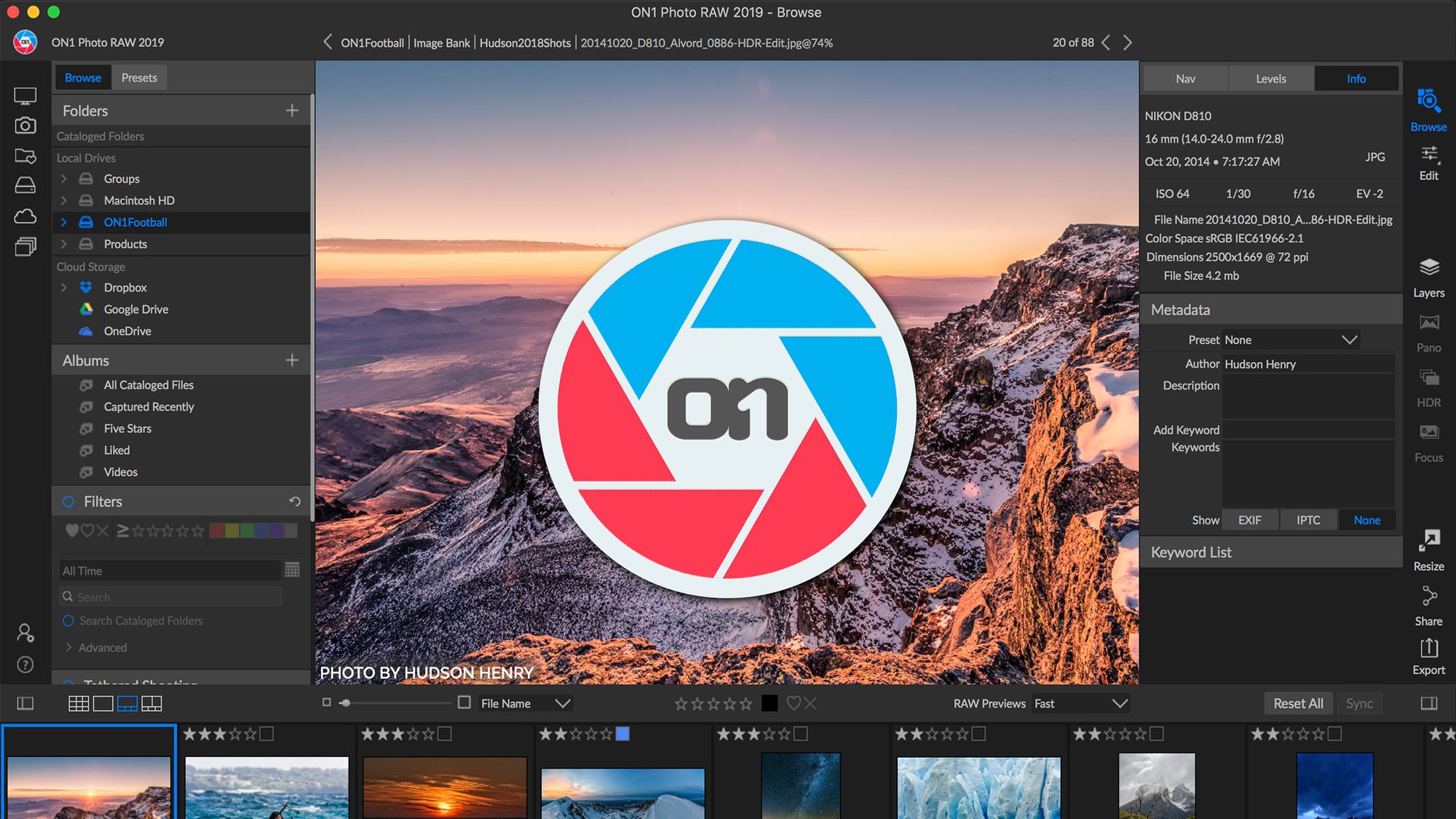
ON1 Photo RAW 2020 14.0.0.7955

Download ON1 Photo RAW 2020 14.0.0.7955

This professional-grade photo organizer, raw processor, layered editor, and effects app, includes everything you need in one photography application. The newest features include AI-powered features AI Match and AI Auto, four filters in Effects (Weather, Sun Flare, Color Balance, Channel Mixer), improved decoding of raw files (especially for Fujifilm), custom camera profiles with X-Rite, SmugMug integration, improved noise reduction, a map view, a Print Module, speed/performance enhancements, and much more!

ON1 Photo RAW 2020 puts the primary photo editing needs for every photographer regardless of what they shoot – without having to bounce between multiple pieces of software. Get the professional photo editing tools you need for the professional results you need while keeping your workflow efficient, powerful, and simple.

We’ve curated hundreds of the most popular looks and styles seen throughout the industry. Our team of experts overhauled the preset library to give you the trendiest looks with these amazing new one-click presets.

Fast Browsing, Organizing, & Batch Processing

Quickly browse, organize, manage and catalog photos in your photo editing workflow. The ultra-fast photo browser and organizer is perfect for rapidly viewing and culling through photos without having to wait on previews to generate or an import process.

New Layers Workflow

Layers integration sits at the heart of ON1 Photo RAW 2019 allowing for raw processing on multiple raw photos, keeping all the non-destructive settings for each photo, and have it done within one workflow.

RAW Processing & Non-Destructive Editing

A state-of-the-art processing engine providing a fast, smooth, comfortable, and fun photo editing experience while producing the highest quality results for your photos.

Effortless Retouching

The tools for retouching portraits, photo restoration, and enhancing photos are available in ON1 Photo RAW 2019.

Masking, Blending, and Brushing

ON1 Photo RAW 2019 includes the best set of masking tools for beginners and advanced users. Whether replacing backgrounds, skies or selectively applying an adjustment with a mask or selection.

Photo Effects, Filters, Presets, LUTs

Includes hundreds of fast, non-destructive, stackable, re-editable, and customizable photo effects and filters providing endless creative possibilities.

HDR Merge

Tone mapping and merging exposure brackets has never been faster or easier.

Panorama Stitching

Stitch together multiple photos into a single panorama or matrix photo. Automatically aligns photos blends them together seamlessly.

Image Resizing & Printing

ON1 Photo RAW 2019 includes everything you need to resize, export, and print your photos.

What’s New in ON1 Photo RAW 2019:

A New & Faster Editing Workflow

We’ve combined all of the modules to create a single place to do your editing. The different editing modules are now available as tabs to allow you to work in each seamlessly at once.

A New Workflow for Layers

Layers will no longer be a separate module. Instead, the power of layers will be accessible within the non-destructive workflow inside of Develop and Effects.

Lightroom Photo Settings Migration

New AI-powered algorithms will give customers the ability to transfer Lightroom-edited photos, keep the non-destructive settings, and move them into ON1 Photo RAW 2019.

Text Tool

Perfect for creating posters, adding your byline or adding editing annotations. Easily control font size, color, position, and more, then save to a preset to add the same text overlay to a batch of photos quickly.

Master Keyword List

Now you can see every keyword that you use in a single, searchable list. You can quickly apply, clear, edit, or delete keywords.

Layered HDR Workflow

With the powerful new non-destructive layers you can combine other photos, text, or alternate exposures with your HDR photos. You can even use the powerful masking tools to combine multiple HDR renditions.

Portrait Tools

The new Portrait tools will automatically detect faces in your photo and will retouch to smooth skin, brighten and sharpen eyes, and whiten teeth.

User Interface

Overall contrast has been reduced to make photos stand out along with a new font to help increase readability. New icons, tabs, and sliders will also take up less visual space.

Focus Stacking

Blend multiple photos at different focus distances to increase depth-of-field.

Auto-Align Layers

Easily combine mulitple photos as layers, then automatically align them based on image content.

Improved Local Adjustments

Local adjustments will be updated to use the raw processing data. This allows for more highlight and shadow details with more tonal range.

Filter Options in Effects

We have added dedicated film grain, curves, and color adjustment filters to Effects. There’s also a new way to select and browse filters.

Support for Over 800+ Cameras Also supports JPEG, TIF, PSD, PSB, PNG, and DNG

Optional:

Photoshop CS6 and above Photoshop Elements 14 and above Photoshop Lightroom Classic 6 and above Apple Photos

Information

CompatibilityOS X 10.12 or later 64-bit
LanguagesEnglish

What’s New in ON1 Photo RAW 2020 14.0.0.7955

  • Release notes not available at the time of this post.

Screenshots

Name ON1 Photo RAW 2020 v14.0.0.7955 [TNT] mac-torrents.net.rar
Size 1.68 GB
Created on 2019-10-19 01:13:16
Hash 8ceeec9c268204f4d56df3ad6f208534be86223f
Files ON1 Photo RAW 2020 v14.0.0.7955 [TNT] mac-torrents.net.rar (1.68 GB)

Download

Geekbench 5.0.3

Download Geekbench 5.0.3

Geekbench 5 is a cross-platform benchmark that measures your system’s performance with the press of a button. How will your mobile device or desktop computer perform when push comes to crunch? How will it compare to the newest devices on the market? Find out today with Geekbench 5.

Features:

nCPU Benchmark

Geekbench 5 measures your processor’s single-core and multi-core power, for everything from checking your email to taking a picture to playing music, or all of it at once. Geekbench 5’s CPU benchmark measures performance in new application areas including Augmented Reality and Machine Learning, so you’ll know how close your system is to the cutting-edge.

Compute Benchmark

Test your system’s potential for gaming, image processing, or video editing with the Compute Benchmark. Test your GPU’s power with support for the OpenCL, CUDA, and Metal APIs. New to Geekbench 5 is support for Vulkan, the next-generation cross-platform graphics and compute API.

Cross-Platform

Compare apples and oranges. Or Apples and Samsungs. Designed from the ground-up for cross-platform comparisons, Geekbench 5 allows you to compare system performance across devices, operating systems, and processor architectures. Geekbench 5 supports Android, iOS, macOS, Windows, and Linux.

Geekbench Browser

Upload your results to the Geekbench Browser to share them with others, or to let the world know how fast (or slow) your devices can go! You can track all your results in one place by creating an account, and find them easily from any of your devices.

Information

CompatibilitymacOS 10.13 or later 64-bit
LanguagesEnglish

What’s New in Geekbench 5.0.3

  • Release notes not available at the time of this post.

Screenshots

Name Geekbench 5 5.0.3 [TNT] mac-torrents.net.zip
Size 128.7 MB
Created on 2019-10-18 23:49:45
Hash fe761b36b60f8f023bf19d5af62ccad4e75b3e92
Files Geekbench 5 5.0.3 [TNT] mac-torrents.net.zip (128.7 MB)

Download

PowerPhotos 1.7.3


Download PowerPhotos 1.7.3

Provides you with all the necessary tools to better organize your Photos libraries as well as to find and remove duplicated files within them

is a very useful macOS utility that makes it possible for you to efficiently organize your pictures using the native Photos app introduced by Apple with the launch of OS X 10.10.3.

Effortlessly manage and better organize your Photos libraries

Despite the fact that Photos does a fairly good job of keeping your photos organized, under one roof, and easily accessible, the application is somewhat limited in some respects and doesn’t bundle advanced photo organizing features.

This is the part where PowerPhotos comes into play, with a streamlined and user-friendly interface it makes it possible for you to easily create multiple Photos libraries, thus, it will provide you with more power over your libraries and it will also speed up the Photos app which will load even faster because of this.

What’s more, you can easily use PowerPhotos image browser and search for a particular photo in a single or all your Photos libraries, as well as view detailed metadata summaries for your photos.

Keep your Photos libraries in tip-top shape by removing duplicates with just a few clicks

Not only this, but you will certainly find PowerPhoto’s duplicate removal tool very useful, as it enables you to find dupes in more than one library and compare them side by side, as well as either separate them in different albums or delete them altogether from the libraries.

Additionally, PowerPhotos can also guide you through the somewhat lengthy and annoying process of migrating your iPhoto or Aperture libraries to the Photos app.

Note that, if you have photo libraries created using iPhoto 7 or earlier, you will have to download the iPhoto Library Upgrader, so that the libraries can be upgraded to a newer format that is compatible with more modern versions of iPhoto. This way, you will be able to migrate the upgraded photo libraries within the Photos app.

A must-have application for users who feel that Photos doesn’t offer enough in terms of organizing features

All in all, if you find yourself using Apple’s Photos app on a daily basis and you want to organize your photos using multiple libraries, to remove photo duplicates, or to view detailed metadata information, then there’s really no way around the fact that PowerPhotos will definitely make your user experience better and save you a lot of time simultaneously.

Information

CompatibilitymacOS 10.12 or later 64-bit
LanguagesEnglish

What’s New in PowerPhotos 1.7.3

  • Release notes not available at the time of this post.

Screenshots


Name PowerPhotos.1.7.3.mac-torrents.net.zip
Size 31.97 MB
Created on 2019-10-18 23:49:33
Hash 695836e2ebfc62cd077078ba16d20358a6b2b245
Files PowerPhotos.1.7.3.mac-torrents.net.zip (31.97 MB)

Download

Skylum Software Bundle 2019 (Update 18.10)

Download Skylum Software Bundle 2019 (Update 18.10)

The Skylum team is passionate about photography. We develop software that inspires photographers of all levels to create the most stunning pictures ever. Skylum is most known for its photo editing software Aurora HDR, Luminar 3, Photolemur, AirMagic and Luminar Flex. Millions of people on Mac and PC already use our software to effortlessly enhance their images.

Aurora HDR 2019

The best-selling HDR photo editor for Mac. Created in cooperation with Trey Ratcliff – the world’s most famous HDR photographer.

Luminar 3

The most intuitive professional photo editor packed full of innovations. You’ll create incredible photos in less time.

Luminar Flex

A new addition for most photo editing tools that works as a plugin, extension, or external editor. Luminar Flex means that if you choose to stick with your current workflow, you can still use Luminar’s AI tech and creative image editing tools.

Photolemur 3

Automatic ! Photo Enhancer will edit all your photos in one click, with the help of artificial intelligence.

AirMagic

Boost Your Drone Photography. Automatically. Powered by AI and advanced algorithms, AirMagic improves your aerial photos automatically. Simply drag & drop all your pictures to the app, and let technology do the work.

Information

CompatibilityOS X 10.11 or later 64-bit
LanguagesEnglish

What’s Included in Skylum Software Bundle 2019 (Update 18.10)

Screenshots

Name Skylum Software Bundle 2019.10.18 mac-torrents.net.rar
Size 1.01 GB
Created on 2019-10-18 20:52:23
Hash abb9dc9d617beca8135f5a5fde4595cd77af2895
Files Skylum Software Bundle 2019.10.18 mac-torrents.net.rar (1.01 GB)

Download

MeldaProduction MCompleteBundle 13.06


Download MeldaProduction MCompleteBundle v13.06

Turn your computer into a professional production, mixing and mastering studio!
MeldaProduction MCompleteBundle is the ultimate collection of effects and instruments, and it currently contains 114 of them, including MDrummer, MPowerSynth, dynamics processors, equalizers, modulation effects including chorus and phasers, reverbs, stereo tools and analyzers.

Everything you need

MCompleteBundle contains all of our effects covering all the tasks involved in music production: composing, mixing and mastering. It also contains all of our instruments. With our included free for life updates, any new plugin we release moving forward will be free for you! And it takes just a few clicks using our update system…

Subscribe and get everything for a budget price

MCompleteBundle is the only product from MeldaProduction available via subscription rent-to-buy licence system. That means, you will be paying every month or year a rather small amount and have access to the whole bundle. And after your payments sum to the full price of the bundle, you’ll get a permanent licence automatically. Check more information about subscriptions.

Unique super-modern technologies

The bundle contains traditional plugins as well as our revolutionary technologies, which give you the power to make your recordings sound incredible even if you haven’t spent the last 50 years as an audio engineer. High speed, simplicity, flexibility when you need it, crystal clear sound and minimal noise level are all standard in MeldaProduction.

Information

CompatibilityMac OS X (10.7 – 10.14, 32-bit or 64-bit)
VST / VST3 / AU / AAX compatible host (32-bit or 64-bit)
LanguagesEnglish

What’s new in MeldaProduction MCompleteBundle 13.06

Backwards compatibility change: MIDI note controllers and MCharacter were mapping notes to frequencies one octave above the MIDI standard. As a part of the standardization we fixed this. To fix your projects, please move all notes down one octave if using this feature. Sorry for the inconvenience.

  • Added MTurboDelayMB as part of MTurboDelay product.
  • Added SampleAndHold module to MXXX.
  • Added 16 “Main controllers” to MIDI settings, which users can map to any MIDI controller to simplify access and switching between MIDI controllers.
  • Added Banks to all modules in modular environments such as MSoundFactory or MXXX. This lets you store multiple settings for that module and switch between them using a multiparameter for example.
  • Added Random colors to MMultiAnalyzer.
  • Added MIDI controller reordering and reset features to MIDI settings.
  • MXXX devices can now show a banner on top / left assuming it is named identically to device file with extension PNG/JPG.
  • MIDI octave numbers have been standardized across the plugins for the MIDI standard defining A4 = 440Hz.
  • Added Panel no title, Control no title, Display no title and Edit no title multiparameter panel types.
  • Minor GUI improvements.
  • VST2 plugins now exclude preset path when sending preset name to the host to mitigate VST2 limitations.
  • Default editor size setting has been removed, please use default settings instead.
  • Added Normalize switch to MMultiAnalyzer’s Oscilloscope tab.
  • Improved MTurboReverb devices – mitigating glitches when changing models.
  • Frequency axes in equalizers and various graphs changed to more standard logarithmic scale. It can be reverted to the previous view at any time if customer base would like to.
  • Analyzers can now export current analysis to CSV by Ctrl clicking the Copy button.
  • Plugins no longer show error message that a folder is inaccessible when opening a file dialog and previous folder no longer exists.
  • Added a fully featured parametric equalizer to MNoiseGenerator (including MXXX).
  • Multiparameters in the parameter list also display group now both in the DAW for automation and internally.
  • Fix: Delimiter multiparameters with name displayed the name even if the Show name was disabled.
  • Fix: MXXX Order module editor sometimes behaved oddly and in some cases analyzers inside it didn’t refresh themselves.
  • Fix: MultiParameter Clear & Learn didn’t store undo point.
  • Fix: Double clicking a button and leaving with mouse before releasing the button could leave the button in pressed state.
  • Fix: AU cache (mainly Logic) should be now updated after installation to avoid need to restart on OSX High sierra and newer.
  • Fix: MWobbler MIDI follow was inaccessible.
  • Fix: Win/Cmd right click (or ctrl click on OSX) was defaulting parameters, which was a collision with ProTools automation management.
  • Fix: LimiterMB in MXXX didn’t correctly provide band saturation parameter.
  • Fix: MIDI (note) controller related parameters were not sorted properly in the parameter tree.
  • Fix: Switching logarithmic averaging option in analysis could cause incorrect results for infinite maximum analysis.
  • Fix: Expired subscription didn’t explicitly warn the user about that.

Screenshots


Name MeldaProduction MCompleteBundle v13.06 mac-torrents.net.zip
Size 338.5 MB
Created on 2019-10-18 18:59:02
Hash 910fdd9bf76781d6c57b6a482a0aac27b7ca76e7
Files MeldaProduction MCompleteBundle v13.06 mac-torrents.net.zip (338.5 MB)

Download

Downie 3.8.7


Download Downie 3.8.7

Downie – Ever wished you could save a video from the Internet? Search no more, Downie is what you’re looking for. Easily download videos from thousands of different sites. Supports many sites – currently supports over 1,000 different sites (including YouTube, Vimeo, etc.) and the number is rapidly growing. 4K video YouTube support – unlike many other YouTube downloaders, Downie supports HD video on YouTube, up to 4K.

Key Features

  • Supports many sites – currently supports over 1,000 different sites (including YouTube, Youku, Bilibili, Vimeo, etc.) and the number is rapidly growing.
  • 4K video YouTube support – unlike many other YouTube downloaders, Downie supports HD video on YouTube, up to 4K.
  • Postprocessing – need your video in MP4 for iTunes? Or want just the audio track? No problem, Downie can handle this for you automatically!
  • Quick support – I respond to emails usually within 24 hours and often add support for requested sites in the next update.
  • Frequent updates – Don‘t wait weeks for new sites to be supported, or bugs to be fixed! Downie is updated about once a week with new features, sites supported, etc.
  • International – not only that Downie supports country-specific sites, it is localized into various languages. If your language is missing, contact us – we can offer you a free license in exchange for a translation.

New in Downie 3

  • UI Redesign – the UI has been redesigned from the ground up. It’s faster, more fluent and visually pleasing.
  • Menu Bar Icon – control the downloads from the menu bar – without the need to switch away from your current work.
  • Improved HLS Support – HLS streams download up to 4 times faster.
  • DASH Support – DASH streams are now supported.
  • Major Postprocessing Improvements – postprocessing of some downloads can take only a few seconds instead of minutes thanks to Downie analyzing the video prior to the conversion!
  • Simple Mode – if your preference is to keep the UI as simple as possible, there’s a simple mode for you!
  • File Grouping by Site and Playlist – all downloads can now be sorted into folders based on where you downloaded them from or from which playlist are they.
  • Delayed Queue Start – schedule your downloads for the middle of the night so that you’re not hogging the bandwidth for the rest of the family!
  • Popup Window Support in User-Guided Extraction – the User-Guided Extraction now optionally supports popup windows so that you can sign into sites that open login in a separate window.

Tips for using Downie

  • To start, you can drag a link from any browser either on Downie‘s window, or the icon in the Dock.
  • If you have more links, or links within some text, just drop the whole thing onto Downie – it will scan the text for links.
  • You can use copy and paste as well – just press Command-O in Downie and you can insert all the links in the world!

Information

CompatibilityOS X 10.11 or later 64-bit
LanguagesEnglish

What’s New in Downie 3.8.7

  • New: vidoza.net.
  • Improved: discovery.com, facebook.com.

Screenshots


Name Downie 3 3.8.7 [TNT] mac-torrents.net.zip
Size 51.68 MB
Created on 2019-10-18 18:22:35
Hash fde6f840ce025d8cbd9727854468327cae1b410c
Files Downie 3 3.8.7 [TNT] mac-torrents.net.zip (51.68 MB)

Download

Analog Obsession Full Bundle 10.2019


Download Analog Obsession Full Bundle 10.2019

Analog Obsession is hardware and plugin developer. Started with building custom studio equipment for studios. AO started plugin development instead of hardware after 4 years. My purpose is implementing analog studio equipments into digital world. Electronic knowledge is the most important thing to do that. And AO developing plugin with this knowledge now. AO knows what musicians and engineers need. Then focused mostly unbuilt plugins of hardwares. Our processors can be used in the most popular host applications such as Steinberg Cubase, Apple Logic, Ableton Live, Avid ProTools(soon) and many others.

Developer Website

What’s New in Analog Obsession Full Bundle 10.2019

9 New / Updated (+ 4 plugins from current products line) plugins in one pack!


Name Analog Obsession Full Bundle 10.2019 mac-torrents.net.zip
Size 223.2 MB
Created on 2019-10-18 18:08:52
Hash f93c67db881e60d9f13bb3ded251d53b1b31f4a2
Files Analog Obsession Full Bundle 10.2019 mac-torrents.net.zip (223.2 MB)

Download

Master of Typing 3.8.7 (15.8.7)

Download Master of Typing 3.8.7 (15.8.7)

Download movies on Mac with VideoDuke! It supports all popular video websites and will save your videos in various file formats. You can also download streaming videos on Mac at a pleasantly fast speed and with great quality.

You can download any video you like in a click! Simply paste the link to the video and VideoDuke will do the rest.
In Simple mode you are getting quick access to music videos, movies, TV shows, cartoons available from Vimeo, YouTube, and Dailymotion. Files can be saved as 3GP, MP4, M4V, FLV and in a preferred resolution: 360p, HD 720p, HD 1080p or other.

Download Full YouTube Playlists and Channels

With VideoDuke you’ll be able to save complete channels and playlists off YouTube. Just as with separate videos, you can select quality for each video: 1440p, 1080p, 720p, 480p, 360p, 240p, or 180p.

MP3 Downloader

VideoDuke will also download YouTube videos as audio files. No conversion needed – you will simply get a soundtrack instead of the original YouTube clip. The app keeps the audio track title and album art and can save files as WebM, MP3 or other available formats.

Friendly Mac video downloader

Using VideoDuke is easy and intuitive – just type your search words in the app to find the videos you’ll download from the web. You can also search for videos in the web browser – VideoDuke supports all popular video websites, such as YouTube, Dailymotion, Vimeo with quick access buttons.

Download all files related to a video

In an advanced mode of VideoDuke you get more profound options when downloading content. For example, you can see all resources fetched from the web page, including video, audio, Flash animation, images, etc. Switch to a needed tab to see exactly the types of files you need to download.

Information

Compatibility
OS X 10.10 or later, 64-bit processor
Languages
English, French, German, Italian, Japanese, Korean, Portuguese, Russian, Simplified Chinese, Spanish

What’s New in Master of Typing 3.8.7 (15.8.7)

With that update, the app calculates faster, visualize smoother and makes everything better! And all due to improved performance and fixed minor bugs!

Screenshots

Name Master of Typing 3.8.7 15.8.7 MAS In-App [TNT] mac-torrents.net.zip
Size 74.95 MB
Created on 2019-10-18 18:08:40
Hash 8b7e5f72cfd526d2d3b13c701c9bd3700bc495fe
Files Master of Typing 3.8.7 15.8.7 MAS In-App [TNT] mac-torrents.net.zip (74.95 MB)

Download

Adobe Acrobat Pro DC 2019.021.20048

Download Adobe Acrobat Pro DC 2019.021.20048

is the leading PDF converter and much more. Adobe Acrobat Pro DC software lets you deliver professional PDF communications. It’s packed with smart tools that give you even more power to communicate. Create and edit PDF files with rich media included, share information more securely, and gather feedback more efficiently.

Adobe Acrobat Pro DC software is the advanced way for business professionals to create, combine, control, and deliver more secure, high-quality Adobe PDF documents for easy, more secure distribution, collaboration, and data collection.

Assemble electronic or paper files into reliable PDF documents that are easy to share with others using free Adobe Reader. You can assemble even Web sites, engineering drawings, and e-mail.

With Adobe Acrobat Pro DC you can manage document reviews, synthesizing feedback from multiple reviewers while preserving document format and integrity. Extend commenting capabilities to anyone using Adobe Reader. Windows users can design intelligent Adobe PDF forms that include business logic, such as calculations and data validations, to help increase the accuracy of data collection while reducing the costs of manual data entry.

Use Adobe Acrobat Pro DC to create high-impact PDF communications, collaborate more easily, and streamline reviews. Adobe Acrobat Dynamic PDF helps you get more done – easier, faster, better.

Features:

Edit PDF files

With Adobe Acrobat Pro DC, you can make minor edits to text and images right in your PDF file without requiring the original document or graphic. Edit text in a PDF. Fix a typo, change a font, or add a paragraph to your PDF as easily as you do in other applications using a new point-and-click interface. Edit images in a PDF. Resize, replace, and adjust images in your PDF with no need to track down the original file or graphic.

Export from PDF files

Reduce the time you spend retyping information stuck in PDF files. Convert PDF files to editable Microsoft Office documents. And save fonts, formatting, and effort.

Convert PDF files to Word. Save your PDF as a Microsoft Word document and take your fonts, formatting, and layouts with you. Convert PDF files to Excel. Turn your PDF or just part of it into an editable Excel spreadsheet you can use for data analysis right away. Convert PDF files to PowerPoint. Get a head start on new projects by saving a PDF file as a fully editable PowerPoint presentation.

Create PDF files

Stop worrying about whether the files you send will look right on other people’s screens. Turn documents into PDF files anyone can reliably view with free Adobe Reader.

Convert Word, Excel, or PowerPoint to PDF. Right from your Office application in Windows, you can create PDFs, start a shared review, restrict PDF edits, and more. Print to PDF. Convert files to PDF from virtually any application that prints simply by selecting Adobe PDF as your printer. Scan to PDF. When you need to turn a paper document or form into a digital file, just scan it to create a searchable PDF file you can edit. Convert HTML pages to PDF. Save web pages as PDF files to archive web content, review the pages offline, or print them more reliably.

Create and analyze forms

Cut the time you spend creating forms, rekeying data, and correcting errors. Distribute forms online, and then collect responses and analyze results in real time.

Create new PDF and web forms. Customize professional templates or design from scratch with the Adobe FormsCentral desktop app included in Adobe Acrobat Pro DC. Collect form responses with FormsCentral. Easily collect responses by moving your PDF or web forms online with the Adobe FormsCentral online service. Convert existing forms to fillable PDFs. Type less, gather more. Quickly convert your paper, Word, or Excel forms to fillable PDF forms. Collect form responses using Adobe Acrobat tools. Compile returned forms into one PDF, or host forms using a network folder or Microsoft SharePoint server.

Information

Compatibility
macOS 10.12.0 or later
Languages
English

What’s New in Adobe Acrobat Pro DC 2019.021.20048

  • Release notes not available at the time of this post.

Screenshots

Name Adobe Acrobat Pro DC 2019.021.20048 mac-torrents.net.rar
Size 947.6 MB
Created on 2019-10-18 17:25:56
Hash ddb02450c6eed0d6de791f94a99273d1d6ac44fc
Files Adobe Acrobat Pro DC 2019.021.20048 mac-torrents.net.rar (947.6 MB)

Download

Ableton Live Suite 10.1.3

Download Ableton Live Suite 10.1.3

Create bolder sounds with Live’s new devices. Stay in the flow with a multitude of workflow improvements. Do even more away from the computer with Push. Build your sound with a curated library. And get the unlimited potential of Max for Live, seamlessly built in.

Features

Create with new devices

Meet Wavetable, Echo, Drum Buss and Pedal: new devices that mean colorful new sounds are possible with Live’s instruments and effects.

Wavetable

Immediately playable, infinitely capable, Wavetable is a new synthesizer built by Ableton. Shape, stretch and morph sounds using wavetables derived from analog synths, and a range of other instruments and sounds. Start sculpting sounds right away—even without a deep knowledge of synthesis—or explore its rich palette and potential through an intuitive interface.

Echo

Echo brings together the sound of classic analog and digital hardware delays in a single device—your new go-to delay. Drive and shape sounds with its analog-modeled filters, turn up the noise and wobble for vintage imperfections, or add modulation and reverb to create diffuse soundscapes, wailing feedback and more.

Drum Buss

Drum Buss is a one-stop workstation for drums, capable of adding subtle character or bending and breaking drums to your will. Add warmth and distortion with drive and crunch, take control of dynamics with compression and transient shaping, dial in and tune boom and control bass decay with the dedicated low end section.

Pedal

With separate circuit-level models of overdrive, distortion and fuzz guitar pedals, Pedal brings the character of analog stomp boxes to Live. The effect goes all the way from subtle to reckless—it excels at warming up vocals and other instruments, driving synth sounds or completely smashing drums. And of course, it sounds great with guitars.

Information

Compatibility
  • OS X 10.11.6 or later
  • Intel Core2 Duo processor. Intel Core i5 processor or faster recommended.
  • 4 GB RAM (8 GB or more recommended)
Languages
English
Includes
Patched by HCiSO

What’s New in Ableton Live Suite 10.1.3

  • New features and improvements
  • Added support for the Novation Launchpad X & Launchpad Mini [MK3] control surfaces

Screenshots

Name Ableton Live 10 Suite 10.1.3 HCiSO mac-torrents.net.rar
Size 1.88 GB
Created on 2019-10-18 17:23:44
Hash feeb22ac0ff54fbc6c8a1733aed924913d2cdbaa
Files Ableton Live 10 Suite 10.1.3 HCiSO mac-torrents.net.rar (1.88 GB)

Download

Retrobatch 1.3

Download Retrobatch 1.3

Flexible, super charged, batch image processing for your Mac. … A node based batch image processor means you can mix, match, and combine different operations together to make the perfect workflow. … Convert PSD files to HEIC, JPEG, PDF, PNG, or TIFF.

Features

Flexible

A node based batch image processor means you can mix, match, and combine different operations together to make the perfect workflow.

Super Charged

A node for every operation, from changing DPI to rotation to Machine Learning to custom behaviors with AppleScript. Optimize your images for fast delivery over the Internet.

Batch

Process one image or thousands of images, with support for reading and writing common file formats, creating multiple inputs and multiple outputs.

Information

Compatibility
macOS 10.12 or later
Languages
English

What’s New in Retrobatch 1.3

  • Release notes not available at the time of this post.

Screenshots

Name Retrobatch 1.3 mac-torrents.net.zip
Size 37.83 MB
Created on 2019-10-18 17:26:06
Hash 8271fafc5eb8f8fc1aef4f377cc4176af8a8d1e3
Files Retrobatch 1.3 mac-torrents.net.zip (37.83 MB)

Download

Luminar 3.1.4

Download Luminar 3.1.4

Luminar 2018 is the new full-featured image editor that adapts to the way you edit photos. Over 300 essential tools to fix, edit, and enhance your photos with comfort. The future of photo editing is here.

Features

  • Adaptive Interface Inspires You Do to More – While other photo editors make you adapt to their interface, Luminar adapts to your skill level. There is no need to face dozens of sliders if you simply want to remove an object from an image or apply a preset. But if you do need to perform some serious tasks, you can easily access all the advanced features.
  • Powerful Tools Allow You to Do More – Luminar lets you remove unwanted objects, color casts and digital noise. It helps you retouch skin and reveals the hidden details in your photos. It features layers with blend modes, texture overlays and powerful image masking. Easily edit upper and lower sections of the image without having to make any selections. And so much more!
  • State-of-the-Art Darkroom You Design Yourself – The workspaces in Luminar reveal only the most essential photo filters for a specific type of photo. Enjoy default workspaces and effects for landscape, portrait, street and B-and-W images. Or create your own, based on your preferences.
  • New Approach to Pro Photo Editing – Luminar combines all kinds of pro-level photo effects and tools in one package. It brings layers, luminosity masks, radial and gradient masking, histogram, blend modes, brushes for selective editing, color mixer, split toning and a lot more.
    • Fast Raw file support
    • Dozens of photo filters
    • Presets for instant results
    • Layers
    • Blend modes
    • Custom textures
    • Workspaces
    • Adaptive UI
    • History menu
    • B-and-W photo tools
    • Noise reduction
    • Object removal
    • Face retouching
    • Foliage enhancer
    • Grain engine
    • Polarize filter
    • Crop and Transform
    • Editing brush
    • Luminosity masking
    • Toning
    • Structure
    • Sharpening
    • Bi-Color
    • Fog
    • Gradient and Radial masking
    • Clarity, Detail, Structure
    • Soft Glow and Focus
    • Orton effect
    • Vignette
    • Social sharing
    • And much more

Information

Compatibility
OS X 10.11 or later, 64-bit processor
Languages
English, French, German, Italian, Japanese, Korean, Portuguese, Russian, Simplified Chinese, Spanish, Traditional Chinese

What’s New in Luminar 3.1.4

  • macOS Catalina supported
  • Photos extension fixed

Screenshots

Name Luminar 3 v3 1 4 5108 [TNT] mac-torrents.net.zip
Size 218.9 MB
Created on 2019-10-18 09:00:10
Hash b9ede6e7371799db241597846286e36216af7d77
Files Luminar 3 v3 1 4 5108 [TNT] mac-torrents.net.zip (218.9 MB)

Download

UninstallPKG 1.1.7


Download UninstallPKG 1.1.7

UninstallPKG is an application that allows you to completely remove so called “packages” (file-extension .pkg) and all their installed contents from your Mac. UninstallPKG can be used to reclaim precious disk-space by removing unwanted functionality like unused printer drivers or completely remove applications you no longer use. UninstallPKG can also keep your Mac clean by removing left-over files from applications that you have already partially removed manually.

UninstallPKG can remove all 37290 files of Office 2011 at once or completely remove things like Java or the Flash plugin. UninstallPKG is also able to clean-up after uninstalling an application by removing it from the Dock and LoginItems and erasing the files it has generated (preferences etc).

Information

CompatibilityOS X 10.10 or later 64-bit
LanguagesEnglish

What’s New in UninstallPKG 1.1.7

  • Provide initial compatibility with ‘Catalina’
  • Improved security through notarization, hardened runtime and helper-tool authentication
  • Fixed erroneous reporting about deleted generated files
  • Context-menu to reveal in Finder also works in Uninstall view now
  • Fixed display issues related to package size and preferences

Screenshots


Name UninstallPKG 1.1.7 [TNT] mac-torrents.net.zip
Size 18.89 MB
Created on 2019-10-18 08:59:59
Hash 2ab1fbf6a23771d23d32fb8c7651787827b27dcd
Files UninstallPKG 1.1.7 [TNT] mac-torrents.net.zip (18.89 MB)

Download

AnyTrans for iOS 8.2.0.20191017

Download AnyTrans for iOS 8.2.0.20191017

lets you converge your entire Apple products and consolidate every access to all your content in one place, including music, videos, photos, messages, books, Safari history, voice memo, and more. No matter the content is from your iPhone, iTunes, even from iCloud. It gives efficient and minimalist control and absolute freedom over all your iOS data and files.

Features

  • Manage iOS Data & Files

    • Freely Transfer Music Across All Devices
    • Manage iPhone Photos Conveniently
    • Keep Personal Info Safe and Organized
    • Take Good Care of Your Favorite Apps [New]
    • Transfer & Back Up WhatsApp Data
  • Migrate Between Devices

    • Move Data Across iDevices As You Wish
    • Switch from Android to iOS Smoothly
  • Make & Restore Backups

    • Make Complete Backup Easily and Safely
    • Restore Backups Quickly and Flexibly
  • Gadgets You’ll Like

    • Download Online Videos to iOS Devices
    • Create Custom Ringtones for iPhone
    • Mirror/Record/Capture iPhone Screen [New]
  • Master iCloud & iTunes

    • Manage iCloud Content Easily & Securely
    • Enjoy A Simpler and Unlimited iTunes

Information

Compatibility
  • Mac OS: macOS Catalina beta, macOS Mojave, macOS High Sierra, macOS Sierra, OS X 10.11, 10.10, 10.9, 10.8
  • iOS: iOS 13 beta, 12, 11, 10, 9, 8, 7, 6, 5
  • Android Version: Android 4.0 and above
  • Resolution: 1024×768 display or above
  • CPU: Pentium IV 2.4 GHz or above
  • RAM: 512MB system memory
  • Display Card: Accelerated 3D graphics – 64MB RAM
  • Sound Card: Windows-compatible sound card
  • Hard Disk: 100 MB hard drive space
  • Others (iOS): iTunes 9.0 or above; iTunesMobileDevice driver installed
  • Others (Android): USB Driver and ADB Device Driver
  • old version anytrans for ios 8.1.0 supported
LanguagesEnglish

What’s New in AnyTrans for iOS 8.2.0.20191017

  • Release notes not available at the time of this post.

Screenshots next Anytrans ios 8.3

Name AnyTrans for iOS 8.2.0.20191017 [TNT] mac-torrents.net.zip
Size 103.3 MB Anytrans ios 8.3
Created on 2019-10-18 09:00:27
Hash 8293a3bdaa5c1757208efa0fc35c4166d00d4c1b
Files AnyTrans for iOS 8.2.0.20191017 [TNT] mac-torrents.net.zip (103.3 MB)

Download

Acorn 6.5.2


Download Acorn 6.5.2

The Image Editor for Humans. Everyone needs to edit photos at some point, but not everyone has the time to learn complicated super pricey photo editing software. This is why we created Acorn. Add text and shapes to your digital pictures. Combine images together to create a photo collage. Work with layers to touch up your favorite photos or make something entirely new from scratch. Do all this and more with Acorn!

Acorn Features

Latest Features Highlights

  • Text on a path. Create a path with any of Acorn’s shape tools, then add text!
  • Enhanced clone tool to clone across layers, images, and even clone group or shape layers.
  • Updated web export window includes the ability to zoom, pan, scale, convert color profile, and retain or remove image metadata
  • Smart layer export, Acorn’s alternative to slicing, has a new configurable palette to export your layers from 1x5x.

What can Acorn do? Here’s a glimpse at a handful of Acorn’s capabilities:

  • Remove image backgrounds using the magic wand selection tool or instant alpha eraser tools
  • Combine images together to create collages or photo layouts
  • Create logos and other vector designs using the path text tool or circle text
  • Correct blemishes or image imperfections using the clone tool
  • Easily adjust the contrast, highlights, shadows, and midtones in your images using levels and curves
  • Lighten or darken images using blending modes, filters, or touchup tools

Powerful Image and Layer Capabilities

  • Over 25 different nondestructive blending mode options
  • Unlimited layers and group layers
  • Layer masks for nondestructive editing
  • Transform, rotate, move, lock, merge, delete, and duplicate your layers
  • Snap to grid, guides, selections, shapes, layers, and the canvas
  • Supports image depth of 8, 16, and 32 bits per channel

Filters, Layer Styles, and Effects

  • Unlimited combinations of layer styles and nondestructive filters possible
  • Save and modify your filters later
  • Create filter presets
  • Tilt shift, vignette, drop shadow, distortions, & blurs
  • Over one hundred additional effects
  • Nondestructive curves and levels to adjust individual color channels

The Tools You Need

  • Customizable clone, stamp, dodge, burn, blur, eraser, and smudge brushes
  • Builtin brush designer for control of softness, spacing, and dozens of other brush refinements
  • Drag and drop to import photoshop brushes
  • Multistop live gradients
  • Rectangle, elliptical, freehand, polygonal, and magic wand selection tools for making precise selections
  • Convert selection to shape
  • Quickmask mode to paint on a selection
  • Custom color picker

Vector Prowess

  • Stars, arrows, bézier curves, circles, lines, and rectangles
  • Shape processor to move, tweak, generate, and adjust shapes in a stackable nondestructive interface
  • Boolean shape operations include union, intersect, difference and exclude.
  • Convert text to bézier paths for finer control of your text
  • Snap shapes to pixel boundaries for precise alignment

Sharing & File Support

  • Photos extension to edit your images from Photos
  • Share images to Photos, Facebook, Twitter, and more
  • Import JPEG, JPEG 2000, PNG, TIFF, GIF, PDF, PSD, BMP, PSD, RAW, PICT, SVG, TGA, ICO, and AI (with PDF compatibility turned on)
  • Export JPEG, JPEG 2000, PNG, TIFF, GIF, PDF, PSD, BMP, SVG, TGA, & ICO
  • Export TIFF and JPEG with CMYK color profile

Professional Features

  • RAW image import of 32, 64, & 128 bit images
  • Create layered screenshots of every window you have open on your computer
  • Web export with wide gamut detection
  • Automatable + scriptable.
  • Perform batch image editing using Automator, AppleScript, and JS
  • Editable image metadata
  • Touch bar support

Information

CompatibilityOS X 10.11.4 or later, 64-bit processor
LanguagesEnglish, German, Polish

What’s New in Acorn 6.5.2

  • Fixed an issue where the tool inspector would sometimes draw multiple inspectors at the same time.
  • Deep color compatibility fixes for MacOS 10.15 Catalina.
  • Fixed an issue where palettes wouldn’t show up correctly on MacOS 10.15 Catalina if you had multiple displays connected.

Screenshots


Name Acorn 6.5.2 [TNT] mac-torrents.net.zip
Size 25.44 MB
Created on 2019-10-18 09:00:38
Hash 05e643de6409b07dc8915e3ce86c8414bc3f1072
Files Acorn 6.5.2 [TNT] mac-torrents.net.zip (25.44 MB)

Download

DupeZap 4.1.0


Download DupeZap 4.1.0

DupeZap (was DupeZap Plus) is a modern duplicate finder with a stylish interface, is easy to use, and is powerful. It is extremely fast, and scans your computer accurately.

Features

  • Search for any file:
    • Scan for Photos and iTunes duplicate files
    • Find any duplicate file type (PDFs, images, movies, etc…)
    • Search for duplicate folders
  • Scan anywhere:
    • Search in your hard drive
    • Scan any mounted disk (external hard drives, USB keys, etc…)
    • Search in multiple locations at the same time, and enable additional features that help you in the cleaning of duplicates
  • Easily select duplicate files:
    • Result organized based on file types
    • Result organized based on path of files (if search was performed in multiple locations)
    • Automatic marking for a fast remotion
    • Several marking options (mark oldest, newest, etc…) available for single locations or for all found duplicates
    • Multiple files preview
  • Safely delete or move marked duplicates:
    • Delete the marked duplicates
    • Move them to a folder instead of deleting them
    • Replace the removed files with hard links, if desired
    • Restore the removed (or moved) items if a mistake was made
  • Additional features:
    • iTunes “Dead” track report
    • Empty folders report
    • Save the result to continue the cleaning job later
    • Export the result to consult it in a spreadsheet app
  • And much more

Information

CompatibilityOS X 10.11 or later 64 bit
LanguagesEnglish

What’s New in DupeZap 4.1.0

  • Added the compatibility to macOS Catalina (10.15)
  • Bug fixes

Screenshots


Name DupeZap 4.1.0 [TNT] mac-torrents.net.zip
Size 26.26 MB
Created on 2019-10-18 09:00:18
Hash dda3ba91a0c627a9dc694cce96f293bfb1653b55
Files DupeZap 4.1.0 [TNT] mac-torrents.net.zip (26.26 MB)

Download

Mate Translate 6.1.3


Download Mate Translate 6.1.3

Stop tabbing to translation websites and start using ! Select text in any app and translate it. Join the other 550,000 users worldwide that are already using Mate.

Mate can understand 103 languages! Easily and quickly translate words & text by selecting them in any other app. Create your own personal Phrasebook and keep a dictionary of other countries’ words handy whenever you need it!

  • Right-click on selected text in almost any app to translate it.
  • Press AltShiftT to translate your clipboard.
  • Press AltShiftT to open Mate above all opened apps, too.

Stop using tons of different language apps to help you translate and just use Mate!

MATE TRANSLATE FEATURES:

TRANSLATE DIFFERENT LANGUAGES

  • Mate understands 103 languages and also teaches you how to pronounce words correctly.
  • Get translations for Spanish, French, Japanese, Italian and more!
  • See the phonetic transcription and transliteration of words and text.
  • Mate can speak out words and texts with correct accents to help you learn faster.

CREATE A CUSTOM PHRASEBOOK

  • Language learners and travelers! Create custom word lists each language and keep them handy whenever you need.
  • Mate Phrasebook Easily create and curate word lists which are available even offline.

USE MATE ANYWHERE

  • Don’t navigate to translation websites anymore when you’re reading an article in Safari or editing a document in Pages. Just use Mate everywhere you go!
  • Select any text in any app and get a translation by hitting the “Translate with Mate“ button in the context menu.

SYNC TRANSLATIONS ACROSS ALL DEVICES

  • Keep all of your translation and dictionary data synchronized across all your devices.
  • Automatically synchronize your data between all your iPhones, browsers and Macs.

No matter what you need translated, a word, a book or a friends’ message, no compromise! Now “Mate it,” will mean, “Come on man, just use this awesome app and forget about using translation websites.” Use Mate for all your translation needs!

Download Mate today to get your ultimate translation helper!

Information

CompatibilityOS X 10.10 or later, 64-bit processor
LanguagesEnglish, French, German, Indonesian, Italian, Japanese, Korean, Portuguese, Russian, Simplified Chinese, Spanish, Ukrainian

What’s New in Mate Translate 6.1.3

We spent 4 full days searching for the occasional crash reason, and we found it! Now it’s fixed.

Screenshots


Name Mate Translate 6.1.3 MAS [TNT] mac-torrents.net.zip
Size 28.52 MB
Created on 2019-10-17 23:24:04
Hash eac2b8364867160505962f1e1eabc61fc8335f42
Files Mate Translate 6.1.3 MAS [TNT] mac-torrents.net.zip (28.52 MB)

Download

Banktivity 7.3.2


Download Banktivity 7.3.2

Banktivity (was iBank) is a new standard for Mac money management. With its intuitive user interface and a full set of money-management features, Banktivity is the most complete software available for Mac personal finance. It lets you enter and edit your transactions with ease, pay bills online and on time, download your online account data, reconcile your statements, and track your investments with versatile and robust tools.

In Banktivity, it’s simple to split, schedule or categorize transactions. With a couple of clicks, you’ll be able to create powerful, dynamic reports using Banktivity’s flexible templates (Income and Expense, Net Worth, Forecast, and more). And Banktivity’s new envelope budgeting feature helps tailor your spending while building savings.

Information

CompatibilityOS X 10.13 or later, 64-bit processor
LanguagesEnglish

What’s New in Banktivity 7.3.2

Hello and thanks for reading these notes! This is a small update that improves compatibility with macOS Catalina. Specifically, it addresses a crasher that could happen when downloading files using the built-in browser.

Screenshots


Name Banktivity 7.3.2 [TNT] mac-torrents.net.zip
Size 36.15 MB
Created on 2019-10-17 22:42:08
Hash bfb2c56673e30245500f577ed92f4b047d209aca
Files Banktivity 7.3.2 [TNT] mac-torrents.net.zip (36.15 MB)

Download

Triune Color Western LUTs (Win/Mac)

Download Triune Color Western LUTs (Win/Mac)

Western LUTs comes with:

  • 11 western inspired LUTs
  • Alexa, REDLog, C-Log, S-Log2, S-Log3, V-Log, BDMFilm Generic LOG and .rec709 versions of each LUT
  • VLT versions of each LUT
  • 55 Utility LUTs

Full LUT List

  • 3:10 to Yuma
  • Back to the Future III
  • Butch Cassidy and the Sundance Kid
  • Django Unchained
  • No Country for Old Men
  • Once Upon A Time in the West
  • The Assassination of Jesse James
  • The Good the Bad and the Ugly
  • The Hateful Eight
  • True Grit
  • Westworld

Information

CompatibilityAdobe Photoshop (CS6 and up), Adobe After Effects (CS4 and up), Adobe Premiere Pro (CS5 and up), Adobe SpeedGrade, Avid Media Composer (7 and up), The Foundry NUKE, DaVinci Resolve, CineForm GoPro Studio Premium, CyberLink ColorDirector 4, Final Cut Pro X, Sony Vegas, Affinity Photo, HitFilm 4 Pro and more
LanguagesEnglish

Triune Color Western LUTs Preview Video

Name Triune Color Western LUTs Win Mac mac-torrents.net.rar
Size 58.29 MB
Created on 2019-10-17 17:24:03
Hash d428d047b4240656f7194414aa370b782367c7bb
Files Triune Color Western LUTs Win Mac mac-torrents.net.rar (58.29 MB)

Download

Professional set of 50 LUTs for Photographers by Alexey Kuzmichev + Tutorial (Win/Mac)

v

Download Professional set of 50 LUTs for Photographers by Alexey Kuzmichev + Tutorial (Win/Mac)

More recently, LUT-toning technologies were available only in the cinema. Now, thanks to the latest updates, you can use them in Photoshop and Lightroom to process your pictures. In the set you are waiting for 50 professional LUT-profiles, which are compiled in accordance with popular color schemes and automatically bring the colors in the photo to harmonious combinations.

Professional set of 50 LUTs for Photographers Screenshots

Name Professional set of 50 LUTs for Photographers by Alexey Kuzmichev and Tutorial Win Mac mac-torrents.net.rar
Size 33.79 MB
Created on 2019-10-17 20:06:38
Hash 6f2acc68d258901895abeb59423505d7e0fa5ec3
Files Professional set of 50 LUTs for Photographers by Alexey Kuzmichev and Tutorial Win Mac mac-torrents.net.rar (33.79 MB)

Download

Adguard 2.1.5 (626)

Download Adguard 2.1.5 (626)

Adguard can make your online experience safer because, though Macs and Apple laptops are quite safe to use, when it comes to ad blockers, Macs experience real problems. Already-existing solutions do not consider the specifics of OS X. That greatly influences the stability of work in Safari, and these ad-blocking extensions fail to do their work properly, especially when video ads are an issue.

New Adguard lets you fully enjoy web surfing without any distractions. Watch those videos you want to watch, and not video ads, on YouTube, Twitch, or any other website. Look at photos of your friends and not at endless banners on Facebook and other social networks. Adguard gives you freedom of choice and saves your nerves. It works perfectly with all browsers, as it was developed specially for use on OS X.

Features

  • Ad Blocker. Subtle filtering of all incoming traffic, and what is more, ads are blocked before they load to the page.
  • Browsing Security. Adguard checks every page for any malicious content using our databases, and blocks requests from potentially dangerous ones.
  • Privacy Protection. Any counters and tracking instruments will be blocked by powerful Spyware filter. With Adguard you can stop worrying for the privacy of your actions on the Internet.
  • Adguard works in all browsers. Safari, Chrome – you name it. No exceptions.
  • Easy to install. A couple of clicks, and your Mac is protected from ads. You don’t have to struggle with overcomplicated settings – just surf the net and Adguard will do all the work.
  • Blocking video ads. Any video ad, on any site – Adguard will block it.
  • Application filtering. Adguard is more than just an addon for browser. It can help you to get rid of ads in any app on your Mac.
  • Is supported in all OS X versions from 10.7 64-bit and higher.
  • Adguard has intuitive and simple UI with such additional features like Adguard Assistant and filtering log.
  • Daily ad filters and phishing databases updates.

Information

CompatibilityOS X 10.10 or later 64-bit
LanguagesEnglish

What’s New in Adguard 2.1.5 (626)

  • Release notes not available at the time of this post.

Screenshots

Name AdGuard 2.1.5.626 [TNT] mac-torrents.net.zip
Size 73.93 MB
Created on 2019-10-17 20:40:09
Hash 1b3fc19b09a7344820dc4db683e4b5f44bd4c65a
Files AdGuard 2.1.5.626 [TNT] mac-torrents.net.zip (73.93 MB)

Download

NetWorker Pro 6.1.0

Download NetWorker Pro 6.1.0

NetWorker shows network information conveniently in the menu bar. It also features a window that shows additional information about the currently active network adapter.

NetWorker features:

  • Fully customizable view – you can choose which information is shown and select many different, pre-defined widgets.
  • The currently active network adapter is detected automatically.
  • Optional overlay window that always stays on top – useful for fullscreen apps or games.
  • Adjustable refresh interval.
  • Check your external IP address.
  • Choose between a byte- or bit-mode.
  • Support for auto start.
  • Traffic Overview: Use this feature if you are on a volume limited plan.
  • Dark Mode

More information can be found on the NetWorker website: http://www.networker-macos.com

Find other great apps on my homepage: https://www.sascha-simon.com

If you have any suggestions or trouble using the app, please contact me: http://support.sascha-simon.com

Information

CompatibilityOS X 10.14 or later, 64-bit processor
LanguagesEnglish, German, Russian, Simplified Chinese

What’s New in NetWorker Pro 6.1.0

  • The app will now show text when using the “Auto” theme of macOS.
  • The overlay window can now be dragged by clicking anywhere in the window.

Screenshots

Name NetWorker Pro 6.1.0 MAS [TNT] mac-torrents.net.zip
Size 27.48 MB
Created on 2019-10-17 20:32:34
Hash 2911c1a2f6635b6a74a67273541c375c82855be4
Files NetWorker Pro 6.1.0 MAS [TNT] mac-torrents.net.zip (27.48 MB)

Download

SecuritySpy 5.1.0

Download SecuritySpy 5.1.0

SecuritySpy is a multi-camera video surveillance app. With features such as motion detection, real-time compression and network video streaming, SecuritySpy has everything required for demanding video surveillance applications. Combined with OS X, the rock-solid operating system from Apple, SecuritySpy offers unsurpassed speed, stability, and ease-of-use.

SecuritySpy’s flexibility and comprehensive list of features allows users to set up a system tailored to their individual needs. Whether it is a system with a single camera or many dozens, in a domestic or business environment, SecuritySpy is ideal.

Features

  • Displays and captures live video from multiple cameras simultaneously
  • Supports Mac-compatible video and audio input devices
  • Supports network video devices (Axis, JVC, Panasonic, Pixord, D-Link, etc.)
  • Motion detection and timelapse capture features, with audio
  • Built-in Web server for remote viewing and administration
  • Pan/Tilt/Zoom (PTZ) support for many network cameras
  • Powerful real-time compression for efficient storage of captured footage
  • FTP upload feature for off-site storage of captured footage
  • Motion-triggered email notifications
  • Pre-capture buffer to capture video before the time of motion
  • Browser feature for playback of captured footage, with synchronised multi-camera playback

Information

CompatibilitymacOS 10.13 or later, 64-bit processor
LanguagesEnglish

What’s New in SecuritySpy 5.1.0

  • Notarized for full compatibility with macOS 10.15 Catalina
  • Video display using Apple’s Metal framework for improved efficiency and performance
  • Mac Screen Control via the web interface
  • Improved Browser export functionality
  • Support for recording in ProRes 422 HQ video format
  • New Action to wake screen and dismiss screensaver on motion trigger
  • More information passed to AppleScripts actions
  • Fixed problems with automatic file deletion
  • Fixed problems with window positions not being remembered
  • Fixed problems obtaining “Let’s Encrypt” SSL certificates
  • Other bug fixes

Screenshots

Name SecuritySpy 5.1.0 mac-torrents.net.zip
Size 24.16 MB
Created on 2019-10-17 19:05:21
Hash 7e762195a02c904f9e249b7390027ec178f3fc9a
Files SecuritySpy 5.1.0 mac-torrents.net.zip (24.16 MB)

Download

Catalina Cache Cleaner 15.0

catalina cache cleaner

Download Catalina Cache Cleaner 15.0

Catalina Cache Cleaner is an award-winning general-purpose tool for macOS X. CCC makes system maintenance simple with an easy point-and-click interface to many macOS X functions. Novice and expert users alike will appreciate the powerful toolset CCC provides. Catalina Cache Cleaner is one of the world’s leading maintenance tools, with millions of downloads around the globe.

Maintenance

Catalina Cache Cleaner is a one stop solution for all of your macOS X maintenance needs. Intel or PPC, Tiger or Catalina, CCC has the tools to keep your system running at its best. CCC Documents and the CCC Engine maintain system health by providing full automation of common maintenance chores including virus scanning of internet downloads. The CCC Engine can even repair permissions automatically after software installations. With the CCC Engine, powerful system maintenance and antivirus can be completely transparent or as close as your menu bar.

Optimization

Catalina Cache Cleaner can improve system performance by tuning internet and file cache settings, implementing ram disks, and cleaning out various cached and stale data. CCC includes tools to help optimize files and memory. CCC can recover wasted disk space by eliminating language localization files and slimming Universal Binaries.

Customization

Catalina Cache Cleaner lets you control your macOS X experience. Turn off Spotlight or Dashboard, or turn on a Login Items Folder. CCC can tweak many macOS X features to suit your tastes. All without permanently altering or harming your system.

Disaster Planning

Catalina Cache Cleaner lets you create a bootable Installer USB drive from your Catalina download that will boot and install Catalina on any supported machine. Catalina Cache Cleaner lets you create bootable Emergency Disks that include system repair utilities and CCC’s powerful cache cleaning functions. If disaster strikes, the power of Catalina Cache Cleaner is available at the command prompt in Single User Mode. Registered users of CCC can install a portable version on a flash drive or iPod. Catalina Cache Cleaner Portable runs on any supported Mac and is a great tool for testing hard drives, screen pixels, batteries, ram, and more before buying a machine.

Antivirus

Catalina Cache Cleaner helps protect your system from malware. CCC adds three additional layers of malware protection to Catalina, and ships with the powerful ClamAV antivirus built in. CCC can scan your downloads on the fly providing industrial strength virus protection from Mac and Windows threats.

Catalina Cache Cleaner Features

  • Maintenance. Catalina Cache Cleaner is a one-stop solution for all of your macOS X maintenance needs. Intel or PPC, Tiger or Catalina, CCC has the tools to keep your system running at its best.
  • Optimization. Catalina Cache Cleaner can improve system performance by tuning Internet and file cache settings, implementing RAM disks, and cleaning out various cached and stale data.
  • Customization. Catalina Cache Cleaner lets you control your macOS X experience. Turn off Spotlight or Dashboard, or turn on a Login Items folder.
  • Disaster Planning. Catalina Cache Cleaner lets you create a bootable installer USB drive from your Catalina download that will boot and install Catalina on any supported machine.
  • Antivirus. Catalina Cache Cleaner helps protect your system from malware. CCC adds three additional layers of malware protection to Catalina, and ships with the powerful ClamAV antivirus built in.
  • Powerful macOS X system cache cleaning options.
  • Powerful integrated antivirus protection via ClamAV.
  • Flexible Finder cleaning options.
  • Clean Desktop folder.
  • Clean Downloads folder.
  • Clean unneeded code from Universal Binaries.
  • Clean “.DS_Store” window settings files.
  • Clean damaged preference files.
  • Clean and rebuild Spotlight metadata.
  • Clean Internet browser caches.
  • Clean archived system logs.
  • Clean Login Items removing duplicate or orphaned items.
  • Clean Virtual Memory swapfiles.
  • Clean rootkits with chkrootkit.
  • Clean malware by Using ClamAV to automatically scan downloads.
  • Repair disk permissions.
  • Repair OS 9 permissions.
  • Repair Software Update Permissions.
  • Repair root directory macOS X symbolic links.
  • Repair Energy Saver settings.
  • Repair key system preference files automatically.
  • Rebuild OS 9 Desktop alias.
  • Rebuild the Services Menu.
  • Rebuild application library prebindings.
  • Rebuild LaunchServices database.
  • Execute macOS X maintenance scripts.
  • Test Disks SMART status for damage.
  • Test LCD sceen for bad pixels.
  • Test RAM for problems.
  • Test laptop batteries.
  • Test integrity of /Volumes directory.
  • Optimize Internet settings and renew DHCP lease.
  • Optimize, flush, and restart the lookupd daemon.
  • Optimize Safari.
  • Optimize file cache.
  • Optimize free memory and inactive memory.
  • Optimize files.
  • Optimize performance by creating and using RAM disks.
  • Optimize performance by automatically prioritizing applications.
  • Customize hidden macOS X settings.
  • Customize hidden Safari settings.
  • Customize File System Journaling.
  • Customize crashreporter daemon.
  • Customize Safari web and icon caches.
  • Customize Login Items and activate Login Items Folder.
  • Customize Energy Saver by temporarily disabling sleep.
  • Open applications with root privileges.
  • Open the Finder with root privileges.
  • Easy to use Spotlight manager.
  • Easy to use process manager.
  • Easy to use Installer Receipt Viewer.
  • Automatically update Finder windows.
  • Preserve clipboard across boot cycles.
  • Simple man page viewer.
  • Restart system daemons.
  • Kill or restart the Finder.
  • Kill or restart the Dock.
  • Kill or restart Dashboard.
  • Force delete files and folders.
  • Force empty trash.
  • CCC Documents for one step access to maintenance chores.
  • CCC Engine for fully automatic maintenance.
  • Use in any user account.
  • Use in Single User mode.
  • Use on portable disk drives.
  • Use on bootable emergency disks.
  • Easy to use graphical interface – no Terminal required.
  • Illustrated documentation.
  • Universal Binary for PPC or Intel Macs.
  • Much, much more!

Information

CompatibilityOS X 10.10.0 or later
LanguagesEnglish

What’s new in Catalina Cache Cleaner 15.0

  • Updated for Catalina

Screenshots

catalina cache cleaner
Name Catalina Cache Cleaner 15.0 mac-torrents.net.zip
Size 106.5 MB
Created on 2019-10-17 18:14:55
Hash 1e7a18f4f5a506fd35b77c0e854d2d4373020301
Files Catalina Cache Cleaner 15.0 mac-torrents.net.zip (106.5 MB)

Download

Torrents Download Apple,Mac Osx,Apps ,Software

Exit mobile version