Category Archives: Carbon Copy Cloner

Carbon Copy Cloner 5.1.14 (5870)

Carbon copy cloner 5 icon

Download Carbon Copy Cloner 5.1.14 (5870)

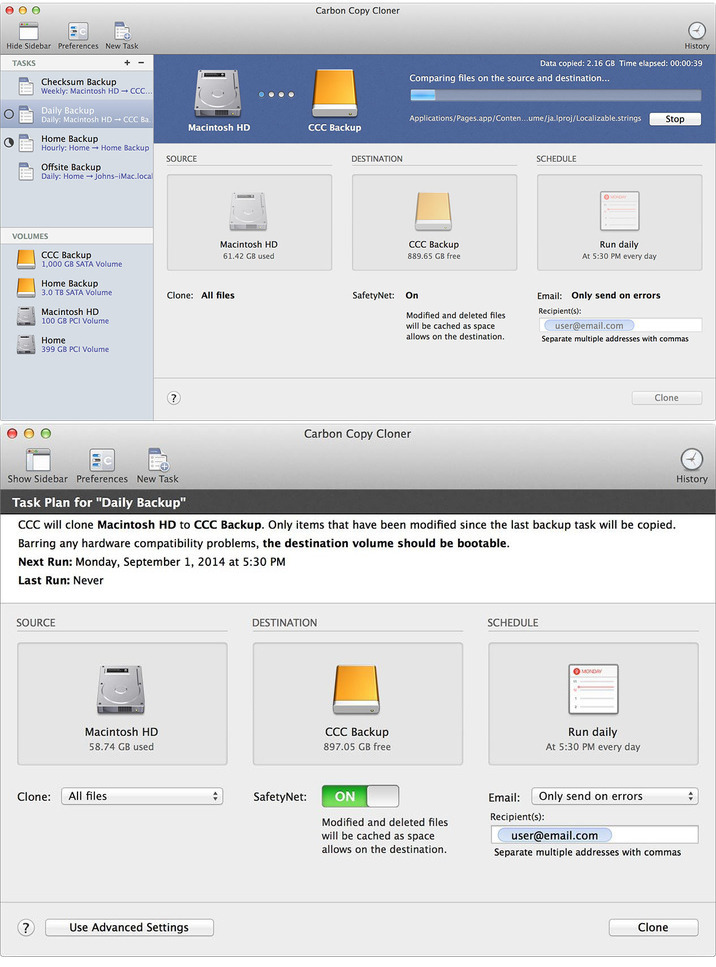
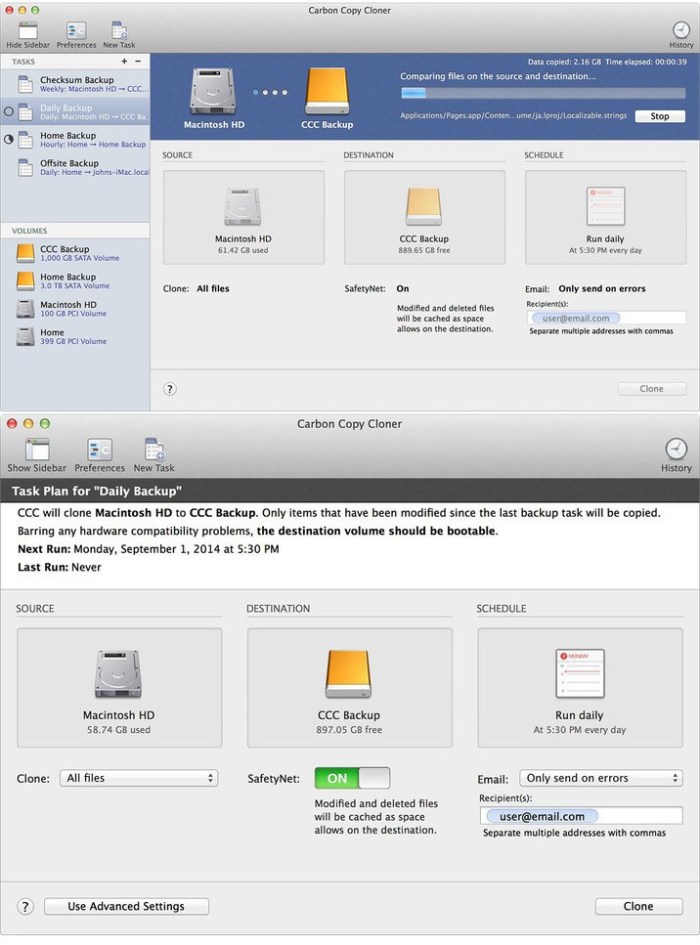
Introducing : The smarter, easier CCC. The first bootable backup solution for the Mac is better than ever. When disaster strikes your hard disk, you can boot from your backup and keep working. Troubleshoot the problem disk when you have time to spare.

All Features:

Bootable Backups

When disaster strikes your hard disk, you can boot from your backup and keep working. Troubleshoot the problem disk when you have time to spare.

Smart Updates

Update only the files that have been added or modified.

Backups Anywhere

Create a backup on your external drive, or back up your files to another Macintosh.

New in Carbon Copy Cloner 5

Snapshot Support [NEW]

Bring back files that you thought you’d lost forever! CCC can capture all your files exactly as they are in a moment in time. Restore files you accidentally deleted, or turn back the clock on your whole computer. CCC is the only bootable backup solution that has full support for snapshots on Apple’s new APFS filesystem.

Task Grouping and Sorting [NEW]

Collect your tasks into groups to visually organize them. Run a group of tasks with a single click, or schedule a group all at once. Tasks can also be sorted by name, exit status, last run date, next run date, or manually.

Task Scheduling [Update]

CCC can back up your data hourly, daily, weekly, monthly, or whenever you connect to your backup drive. You can tell CCC to back up only on weekdays, weekends, or only during certain times of day. You can also craft a more sophisticated backup strategy with task chaining and scheduled task groups.

Smarter Safety Net [Update]

Create a bootable clone of your hard drive, but also keep copies of your recently deleted and changed files — just in case. SafetyNet is smarter than ever: if you run out of space during a backup, CCC can free up space automatically and resume your backup.

Menu Bar App [Update]

Keep tabs on currently running backup tasks, create a new task, or run a scheduled task.

Guided Setup and Restore [NEW]

If you boot your Mac from a CCC backup, CCC will open and offer to help you with a guided restore. In the guided restore, CCC will create a new restore task, select the startup disk as the source, then present coaching tips that guide you through selecting the destination and (optionally) excluding items from the restore task.

Tips [NEW]

Need help getting yourself oriented? Can’t remember where to find something? Handy interface tips are a click away!

Cloning Coach [NEW]

We’re backup experts and we want to help you craft a reliable and functional backup strategy. We’ve built over 15 years of experience into CCC’s Cloning Coach, which proactively alerts you to configuration concerns about your tasks and offers helpful advice on how to address those concerns. Even better, our professional support team is just a click away in the Cloning Coach window if you have questions or concerns about what to do.

Task Outlook [NEW]

CCC 5’s task groups makes coordinating the schedules of multiple tasks easy with an upcoming tasks outlook chart. Grouped tasks can be scheduled individually, or you can run all of the tasks sequentially by scheduling the group.

Advanced Features

Advanced File Filtering [NEW]

Excluding a folder or two from a backup task has always been trivial with CCC, and now it’s even easier to precisely define what should and should not be backed up. You can also now visualize the effects of custom filter rules, and now CCC will report how much data is going to be backed up. A QuickLook panel shows you a preview of your files, and you can sort your file list based on name, size, or modification date.

Simplified Remote Mac Setup [Update]

The setup procedure for backing up to a remote Macintosh has been greatly simplified. SafetyNet pruning is now available for remote Mac destinations, and CCC can now show you the content of a remote Mac source. Remote Mac backups have never been simpler!

Task History Trends [NEW]

Our new trend chart shows how your tasks are performing over time, and how many files/how much data gets copied each time your task runs.

Backup Health Check [Update]

Have you ever worried that your backup might fail when you need it? CCC has you covered. CCC can run a special monthly or weekly corruption check to identify damaged files in your backup – and automatically replace them.

Other Goodies [NEW]

The bundled ccc command line application allows pros to incorporate CCC backup tasks into larger and more complex workflows. Pre- and postflight scripts bring that same level of customization into existing CCC task workflows. Task and individual task filters can be imported and exported, allowing you to manage exclusion lists across tasks and to duplicate tasks to other Macs. A visual disk usage indicator shows you the space remaining on your destination volume, and CCC’s menubar application can now check for updates without CCC being open.

Information

Compatibility
Yosemite (10.10), El Capitan (10.11), Sierra (10.12), or High Sierra (10.13).
Languages
English, German, French, Dutch, Italian, Japanese, Spanish

What’s New in Carbon Copy Cloner 5.1.14 (5870)

  • Authentication errors that occur when failing to mount the destination Data volume are now handled correctly (i.e. you’ll get a “Reset Password” prompt instead of a generic error).
  • CCC no longer avoids rebuilding the dynamic linker shared cache on Macs with less than 4GB of RAM. We found that this resolved system performance issues in the past, but now it only exacerbates system performance issues on these anemic systems when running macOS Catalina.
  • CCC will now disallow the conversion of an HFS formatted Drobo volume to APFS because Drobo does not currently support APFS. This does not prevent you from reformatting a Drobo volume yourself and selecting it as a destination for a Catalina bootable backup, but CCC is no longer going to perform the task that places the Drobo volume in an unsupported configuration. If you want to use your Drobo device as a bootable backup, you should share that feedback with Drobo.
  • Added a “Reveal Data Volume” button to the source and destination selector when the applicable volume is a mounted System volume.
  • Catalina: CCC’s Cloning Coach now warns that a FireWire-attached destination is not bootable on Catalina (Apple no longer supports this configuration).
  • Catalina: Errors encountered during the System volume backup will no longer cause the Data volume backup to fail, and the errors are now presented with more helpful advice.
  • High Sierra: Fixed an issue that resulted in non-bootable clones when specifying a volume other than the current startup disk as the source.
  • The task selection in CCC’s sidebar is retained more reliably.
  • Fixed a logic issue that caused CCC’s restart or shutdown requests to fail when no user is logged in.
  • Catalina: Addressed a issue where an “On reconnect” task would fail to run when the destination volume was reconnected in cases where the source is the startup disk and the System volume had been replaced entirely during a system software update.
  • CCC now works around volume unmount interference caused by CleanMyDrive. That product can still cause trouble for Disk Utility, however, so consider disabling that software if you’re having trouble with an HFS-to-APFS conversion, for example.
  • Addressed an issue in which the source and destination selections might not be cleared out in Simple Mode.
  • Fixed an issue in which CCC would report that it was unable to collect the details about the underlying volume when selecting a folder on a volume within a volume group, and when that underlying volume’s name had a non-ASCII character (e.g. “CCC Backup – Données”).

Screenshots

Carbon copy cloner 5 icon
Name Carbon Copy Cloner 5.1.14 5870 Shark mac-torrents.net.zip
Size 34.14 MB
Created on 2019-11-19 23:57:22
Hash 7b2c451ff12163ccbbecaa44076b73f614873ac8
Files Carbon Copy Cloner 5.1.14 5870 Shark mac-torrents.net.zip (34.14 MB)

Download

Carbon Copy Cloner 5.1.14 (5863)

Download Carbon Copy Cloner 5.1.14 (5863)

Introducing : The smarter, easier CCC. The first bootable backup solution for the Mac is better than ever. When disaster strikes your hard disk, you can boot from your backup and keep working. Troubleshoot the problem disk when you have time to spare.

All Features:

Bootable Backups

When disaster strikes your hard disk, you can boot from your backup and keep working. Troubleshoot the problem disk when you have time to spare.

Smart Updates

Update only the files that have been added or modified.

Backups Anywhere

Create a backup on your external drive, or back up your files to another Macintosh.

New in Carbon Copy Cloner 5

Snapshot Support [NEW]

Bring back files that you thought you’d lost forever! CCC can capture all your files exactly as they are in a moment in time. Restore files you accidentally deleted, or turn back the clock on your whole computer. CCC is the only bootable backup solution that has full support for snapshots on Apple’s new APFS filesystem.

Task Grouping and Sorting [NEW]

Collect your tasks into groups to visually organize them. Run a group of tasks with a single click, or schedule a group all at once. Tasks can also be sorted by name, exit status, last run date, next run date, or manually.

Task Scheduling [Update]

CCC can back up your data hourly, daily, weekly, monthly, or whenever you connect to your backup drive. You can tell CCC to back up only on weekdays, weekends, or only during certain times of day. You can also craft a more sophisticated backup strategy with task chaining and scheduled task groups.

Smarter Safety Net [Update]

Create a bootable clone of your hard drive, but also keep copies of your recently deleted and changed files — just in case. SafetyNet is smarter than ever: if you run out of space during a backup, CCC can free up space automatically and resume your backup.

Menu Bar App [Update]

Keep tabs on currently running backup tasks, create a new task, or run a scheduled task.

Guided Setup and Restore [NEW]

If you boot your Mac from a CCC backup, CCC will open and offer to help you with a guided restore. In the guided restore, CCC will create a new restore task, select the startup disk as the source, then present coaching tips that guide you through selecting the destination and (optionally) excluding items from the restore task.

Tips [NEW]

Need help getting yourself oriented? Can’t remember where to find something? Handy interface tips are a click away!

Cloning Coach [NEW]

We’re backup experts and we want to help you craft a reliable and functional backup strategy. We’ve built over 15 years of experience into CCC’s Cloning Coach, which proactively alerts you to configuration concerns about your tasks and offers helpful advice on how to address those concerns. Even better, our professional support team is just a click away in the Cloning Coach window if you have questions or concerns about what to do.

Task Outlook [NEW]

CCC 5’s task groups makes coordinating the schedules of multiple tasks easy with an upcoming tasks outlook chart. Grouped tasks can be scheduled individually, or you can run all of the tasks sequentially by scheduling the group.

Advanced Features

Advanced File Filtering [NEW]

Excluding a folder or two from a backup task has always been trivial with CCC, and now it’s even easier to precisely define what should and should not be backed up. You can also now visualize the effects of custom filter rules, and now CCC will report how much data is going to be backed up. A QuickLook panel shows you a preview of your files, and you can sort your file list based on name, size, or modification date.

Simplified Remote Mac Setup [Update]

The setup procedure for backing up to a remote Macintosh has been greatly simplified. SafetyNet pruning is now available for remote Mac destinations, and CCC can now show you the content of a remote Mac source. Remote Mac backups have never been simpler!

Task History Trends [NEW]

Our new trend chart shows how your tasks are performing over time, and how many files/how much data gets copied each time your task runs.

Backup Health Check [Update]

Have you ever worried that your backup might fail when you need it? CCC has you covered. CCC can run a special monthly or weekly corruption check to identify damaged files in your backup – and automatically replace them.

Other Goodies [NEW]

The bundled ccc command line application allows pros to incorporate CCC backup tasks into larger and more complex workflows. Pre- and postflight scripts bring that same level of customization into existing CCC task workflows. Task and individual task filters can be imported and exported, allowing you to manage exclusion lists across tasks and to duplicate tasks to other Macs. A visual disk usage indicator shows you the space remaining on your destination volume, and CCC’s menubar application can now check for updates without CCC being open.

Information

CompatibilityYosemite (10.10), El Capitan (10.11), Sierra (10.12), or High Sierra (10.13).
LanguagesEnglish, German, French, Dutch, Italian, Japanese, Spanish

What’s New in Carbon Copy Cloner 5.1.14 (5863)

  • Authentication errors that occur when failing to mount the destination Data volume are now handled correctly (i.e. you’ll get a “Reset Password” prompt instead of a generic error).
  • CCC no longer avoids rebuilding the dynamic linker shared cache on Macs with less than 4GB of RAM. We found that this resolved system performance issues in the past, but now it only exacerbates system performance issues on these anemic systems when running macOS Catalina.
  • CCC will now disallow the conversion of an HFS formatted Drobo volume to APFS because Drobo does not currently support APFS. This does not prevent you from reformatting a Drobo volume yourself and selecting it as a destination for a Catalina bootable backup, but CCC is no longer going to perform the task that places the Drobo volume in an unsupported configuration. If you want to use your Drobo device as a bootable backup, you should share that feedback with Drobo.
  • Added a “Reveal Data Volume” button to the source and destination selector when the applicable volume is a mounted System volume.
  • Catalina: CCC’s Cloning Coach now warns that a FireWire-attached destination is not bootable on Catalina (Apple no longer supports this configuration).
  • Catalina: Errors encountered during the System volume backup will no longer cause the Data volume backup to fail, and the errors are now presented with more helpful advice.
  • High Sierra: Fixed an issue that resulted in non-bootable clones when specifying a volume other than the current startup disk as the source.
  • The task selection in CCC’s sidebar is retained more reliably.
  • Fixed a logic issue that caused CCC’s restart or shutdown requests to fail when no user is logged in.
  • Catalina: Addressed a issue where an “On reconnect” task would fail to run when the destination volume was reconnected in cases where the source is the startup disk and the System volume had been replaced entirely during a system software update.
  • CCC now works around volume unmount interference caused by CleanMyDrive. That product can still cause trouble for Disk Utility, however, so consider disabling that software if you’re having trouble with an HFS-to-APFS conversion, for example.
  • Addressed an issue in which the source and destination selections might not be cleared out in Simple Mode.
  • Fixed an issue in which CCC would report that it was unable to collect the details about the underlying volume when selecting a folder on a volume within a volume group, and when that underlying volume’s name had a non-ASCII character (e.g. “CCC Backup – Données”).

Screenshots

Name Carbon Copy Cloner 5.1.14.5863 HCiSO mac-torrents.net.zip
Size 23.83 MB
Created on 2019-11-15 07:52:05
Hash c12b9b01331f6660dfa1b0c78b8a77434da3298f
Files Carbon Copy Cloner 5.1.14.5863 HCiSO mac-torrents.net.zip (23.83 MB)

Carbon Copy Cloner 5.1.14 b1

Download Carbon Copy Cloner 5.1.14 b1

Introducing : The smarter, easier CCC. The first bootable backup solution for the Mac is better than ever. When disaster strikes your hard disk, you can boot from your backup and keep working. Troubleshoot the problem disk when you have time to spare.

All Features:

Bootable Backups

When disaster strikes your hard disk, you can boot from your backup and keep working. Troubleshoot the problem disk when you have time to spare.

Smart Updates

Update only the files that have been added or modified.

Backups Anywhere

Create a backup on your external drive, or back up your files to another Macintosh.

New in Carbon Copy Cloner 5

Snapshot Support [NEW]

Bring back files that you thought you’d lost forever! CCC can capture all your files exactly as they are in a moment in time. Restore files you accidentally deleted, or turn back the clock on your whole computer. CCC is the only bootable backup solution that has full support for snapshots on Apple’s new APFS filesystem.

Task Grouping and Sorting [NEW]

Collect your tasks into groups to visually organize them. Run a group of tasks with a single click, or schedule a group all at once. Tasks can also be sorted by name, exit status, last run date, next run date, or manually.

Task Scheduling [Update]

CCC can back up your data hourly, daily, weekly, monthly, or whenever you connect to your backup drive. You can tell CCC to back up only on weekdays, weekends, or only during certain times of day. You can also craft a more sophisticated backup strategy with task chaining and scheduled task groups.

Smarter Safety Net [Update]

Create a bootable clone of your hard drive, but also keep copies of your recently deleted and changed files — just in case. SafetyNet is smarter than ever: if you run out of space during a backup, CCC can free up space automatically and resume your backup.

Menu Bar App [Update]

Keep tabs on currently running backup tasks, create a new task, or run a scheduled task.

Guided Setup and Restore [NEW]

If you boot your Mac from a CCC backup, CCC will open and offer to help you with a guided restore. In the guided restore, CCC will create a new restore task, select the startup disk as the source, then present coaching tips that guide you through selecting the destination and (optionally) excluding items from the restore task.

Tips [NEW]

Need help getting yourself oriented? Can’t remember where to find something? Handy interface tips are a click away!

Cloning Coach [NEW]

We’re backup experts and we want to help you craft a reliable and functional backup strategy. We’ve built over 15 years of experience into CCC’s Cloning Coach, which proactively alerts you to configuration concerns about your tasks and offers helpful advice on how to address those concerns. Even better, our professional support team is just a click away in the Cloning Coach window if you have questions or concerns about what to do.

Task Outlook [NEW]

CCC 5’s task groups makes coordinating the schedules of multiple tasks easy with an upcoming tasks outlook chart. Grouped tasks can be scheduled individually, or you can run all of the tasks sequentially by scheduling the group.

Advanced Features

Advanced File Filtering [NEW]

Excluding a folder or two from a backup task has always been trivial with CCC, and now it’s even easier to precisely define what should and should not be backed up. You can also now visualize the effects of custom filter rules, and now CCC will report how much data is going to be backed up. A QuickLook panel shows you a preview of your files, and you can sort your file list based on name, size, or modification date.

Simplified Remote Mac Setup [Update]

The setup procedure for backing up to a remote Macintosh has been greatly simplified. SafetyNet pruning is now available for remote Mac destinations, and CCC can now show you the content of a remote Mac source. Remote Mac backups have never been simpler!

Task History Trends [NEW]

Our new trend chart shows how your tasks are performing over time, and how many files/how much data gets copied each time your task runs.

Backup Health Check [Update]

Have you ever worried that your backup might fail when you need it? CCC has you covered. CCC can run a special monthly or weekly corruption check to identify damaged files in your backup – and automatically replace them.

Other Goodies [NEW]

The bundled ccc command line application allows pros to incorporate CCC backup tasks into larger and more complex workflows. Pre- and postflight scripts bring that same level of customization into existing CCC task workflows. Task and individual task filters can be imported and exported, allowing you to manage exclusion lists across tasks and to duplicate tasks to other Macs. A visual disk usage indicator shows you the space remaining on your destination volume, and CCC’s menubar application can now check for updates without CCC being open.

Information

CompatibilityYosemite (10.10), El Capitan (10.11), Sierra (10.12), or High Sierra (10.13).
LanguagesEnglish, German, French, Dutch, Italian, Japanese, Spanish

What’s New in Carbon Copy Cloner 5.1.14 b1

  • Release notes not available at the time of this post.

Screenshots carbon copy cloner mac bootable :

Name Carbon Copy Cloner 5.1.14 b1 5850 HCISO.zip
Size 24.06 MB
Created on 2019-11-05 00:40:24
Hash 690ddffbb38264d42e7c914370dc5da1eddff821
Files Carbon Copy Cloner 5.1.14 b1 5850 HCISO.zip (24.06 MB)

Carbon Copy Cloner 5.1.13 (5846)

Download Carbon Copy Cloner 5.1.13 (5846)

Introducing : The smarter, easier CCC. The first bootable backup solution for the Mac is better than ever. When disaster strikes your hard disk, you can boot from your backup and keep working. Troubleshoot the problem disk when you have time to spare.

All Features:

Bootable Backups

When disaster strikes your hard disk, you can boot from your backup and keep working. Troubleshoot the problem disk when you have time to spare.

Smart Updates

Update only the files that have been added or modified.

Backups Anywhere

Create a backup on your external drive, or back up your files to another Macintosh.

New in Carbon Copy Cloner 5

Snapshot Support [NEW]

Bring back files that you thought you’d lost forever! CCC can capture all your files exactly as they are in a moment in time. Restore files you accidentally deleted, or turn back the clock on your whole computer. CCC is the only bootable backup solution that has full support for snapshots on Apple’s new APFS filesystem.

Task Grouping and Sorting [NEW]

Collect your tasks into groups to visually organize them. Run a group of tasks with a single click, or schedule a group all at once. Tasks can also be sorted by name, exit status, last run date, next run date, or manually.

Task Scheduling [Update]

CCC can back up your data hourly, daily, weekly, monthly, or whenever you connect to your backup drive. You can tell CCC to back up only on weekdays, weekends, or only during certain times of day. You can also craft a more sophisticated backup strategy with task chaining and scheduled task groups.

Smarter Safety Net [Update]

Create a bootable clone of your hard drive, but also keep copies of your recently deleted and changed files — just in case. SafetyNet is smarter than ever: if you run out of space during a backup, CCC can free up space automatically and resume your backup.

Menu Bar App [Update]

Keep tabs on currently running backup tasks, create a new task, or run a scheduled task.

Guided Setup and Restore [NEW]

If you boot your Mac from a CCC backup, CCC will open and offer to help you with a guided restore. In the guided restore, CCC will create a new restore task, select the startup disk as the source, then present coaching tips that guide you through selecting the destination and (optionally) excluding items from the restore task.

Tips [NEW]

Need help getting yourself oriented? Can’t remember where to find something? Handy interface tips are a click away!

Cloning Coach [NEW]

We’re backup experts and we want to help you craft a reliable and functional backup strategy. We’ve built over 15 years of experience into CCC’s Cloning Coach, which proactively alerts you to configuration concerns about your tasks and offers helpful advice on how to address those concerns. Even better, our professional support team is just a click away in the Cloning Coach window if you have questions or concerns about what to do.

Task Outlook [NEW]

CCC 5’s task groups makes coordinating the schedules of multiple tasks easy with an upcoming tasks outlook chart. Grouped tasks can be scheduled individually, or you can run all of the tasks sequentially by scheduling the group.

Advanced Features

Advanced File Filtering [NEW]

Excluding a folder or two from a backup task has always been trivial with CCC, and now it’s even easier to precisely define what should and should not be backed up. You can also now visualize the effects of custom filter rules, and now CCC will report how much data is going to be backed up. A QuickLook panel shows you a preview of your files, and you can sort your file list based on name, size, or modification date.

Simplified Remote Mac Setup [Update]

The setup procedure for backing up to a remote Macintosh has been greatly simplified. SafetyNet pruning is now available for remote Mac destinations, and CCC can now show you the content of a remote Mac source. Remote Mac backups have never been simpler!

Task History Trends [NEW]

Our new trend chart shows how your tasks are performing over time, and how many files/how much data gets copied each time your task runs.

Backup Health Check [Update]

Have you ever worried that your backup might fail when you need it? CCC has you covered. CCC can run a special monthly or weekly corruption check to identify damaged files in your backup – and automatically replace them.

Other Goodies [NEW]

The bundled ccc command line application allows pros to incorporate CCC backup tasks into larger and more complex workflows. Pre- and post flight scripts bring that same level of customisation into existing CCC task workflows. Task and individual task filters can be imported and exported, allowing you to manage exclusion lists across tasks and to duplicate tasks to other Macs. A visual disk usage indicator shows you the space remaining on your destination volume, and CCC’s menubar application can now check for updates without CCC being open.

Information

CompatibilityYosemite (10.10), El Capitan (10.11), Sierra (10.12), or High Sierra (10.13).
LanguagesEnglish, German, French, Dutch, Italian, Japanese, Spanish

What’s New in Carbon Copy Cloner 5.1.13 (5846)

  • Made an adjustment to how CCC copies the contents of the System volume when that volume is getting updated to avoid removing any content from the destination System volume that doesn’t belong there. While it is inappropriate to ever have content on the destination System volume (CCC, for example, would not allow you to configure a task in that manner), Finder allows the modification of that volume, so conceivably someone could copy content to that volume without realizing the error. In general, you should avoid storing anything on your macOS backup volume that is unrelated to the source volume. If you want to store other content on your backup disk, create a dedicated volume for that content.
  • CCC detects a couple more error conditions that are commonly encountered during APFS conversion on macOS Catalina and either works around them to make the conversion succeed or presents them with more accurate advice.

Screenshots

Old version:


Name Carbon Copy Cloner 5.1.13.5846 Shark mac-torrents.net.zip
Size 33.88 MB
Created on 2019-10-19 19:13:19
Hash d860802862e54b884139f6eec27285c89626cdb0
Files Carbon Copy Cloner 5.1.13.5846 Shark mac-torrents.net.zip (33.88 MB)

Download

Carbon Copy Cloner 5.1.12 (5835)

Download Carbon Copy Cloner 5.1.12 (5835)

Introducing : The smarter, easier CCC. The first bootable backup solution for the Mac is better than ever. When disaster strikes your hard disk, you can boot from your backup and keep working. Troubleshoot the problem disk when you have time to spare.

All Features:

Bootable Backups

When disaster strikes your hard disk, you can boot from your backup and keep working. Troubleshoot the problem disk when you have time to spare.

Smart Updates

Update only the files that have been added or modified.

Backups Anywhere

Create a backup on your external drive, or back up your files to another Macintosh.

New in Carbon Copy Cloner 5

Snapshot Support [NEW]

Bring back files that you thought you’d lost forever! CCC can capture all your files exactly as they are in a moment in time. Restore files you accidentally deleted, or turn back the clock on your whole computer. CCC is the only bootable backup solution that has full support for snapshots on Apple’s new APFS filesystem.

Task Grouping and Sorting [NEW]

Collect your tasks into groups to visually organize them. Run a group of tasks with a single click, or schedule a group all at once. Tasks can also be sorted by name, exit status, last run date, next run date, or manually.

Task Scheduling [Update]

CCC can back up your data hourly, daily, weekly, monthly, or whenever you connect to your backup drive. You can tell CCC to back up only on weekdays, weekends, or only during certain times of day. You can also craft a more sophisticated backup strategy with task chaining and scheduled task groups.

Smarter Safety Net [Update]

Create a bootable clone of your hard drive, but also keep copies of your recently deleted and changed files — just in case. SafetyNet is smarter than ever: if you run out of space during a backup, CCC can free up space automatically and resume your backup.

Menu Bar App [Update]

Keep tabs on currently running backup tasks, create a new task, or run a scheduled task.

Guided Setup and Restore [NEW]

If you boot your Mac from a CCC backup, CCC will open and offer to help you with a guided restore. In the guided restore, CCC will create a new restore task, select the startup disk as the source, then present coaching tips that guide you through selecting the destination and (optionally) excluding items from the restore task.

Tips [NEW]

Need help getting yourself oriented? Can’t remember where to find something? Handy interface tips are a click away!

Cloning Coach [NEW]

We’re backup experts and we want to help you craft a reliable and functional backup strategy. We’ve built over 15 years of experience into CCC’s Cloning Coach, which proactively alerts you to configuration concerns about your tasks and offers helpful advice on how to address those concerns. Even better, our professional support team is just a click away in the Cloning Coach window if you have questions or concerns about what to do.

Task Outlook [NEW]

CCC 5’s task groups makes coordinating the schedules of multiple tasks easy with an upcoming tasks outlook chart. Grouped tasks can be scheduled individually, or you can run all of the tasks sequentially by scheduling the group.

Advanced Features

Advanced File Filtering [NEW]

Excluding a folder or two from a backup task has always been trivial with CCC, and now it’s even easier to precisely define what should and should not be backed up. You can also now visualize the effects of custom filter rules, and now CCC will report how much data is going to be backed up. A QuickLook panel shows you a preview of your files, and you can sort your file list based on name, size, or modification date.

Simplified Remote Mac Setup [Update]

The setup procedure for backing up to a remote Macintosh has been greatly simplified. SafetyNet pruning is now available for remote Mac destinations, and CCC can now show you the content of a remote Mac source. Remote Mac backups have never been simpler!

Task History Trends [NEW]

Our new trend chart shows how your tasks are performing over time, and how many files/how much data gets copied each time your task runs.

Backup Health Check [Update]

Have you ever worried that your backup might fail when you need it? CCC has you covered. CCC can run a special monthly or weekly corruption check to identify damaged files in your backup – and automatically replace them.

Other Goodies [NEW]

The bundled ccc command line application allows pros to incorporate CCC backup tasks into larger and more complex workflows. Pre- and postflight scripts bring that same level of customization into existing CCC task workflows. Task and individual task filters can be imported and exported, allowing you to manage exclusion lists across tasks and to duplicate tasks to other Macs. A visual disk usage indicator shows you the space remaining on your destination volume, and CCC’s menubar application can now check for updates without CCC being open.

Information

CompatibilityYosemite (10.10), El Capitan (10.11), Sierra (10.12), or High Sierra (10.13).
LanguagesEnglish, German, French, Dutch, Italian, Japanese, Spanish

What’s New in Carbon Copy Cloner 5.1.12 (5835)

  • Release notes not available at the time of this post.

Screenshots

Name Carbon Copy Cloner 5.1.12 5835 Shark mac-torrents.net.zip
Size 33.95 MB
Created on 2019-10-12 18:21:15
Hash d418a9c22b292a6f27bf4895a9b7969b4b46628f
Files Carbon Copy Cloner 5.1.12 5835 Shark mac-torrents.net.zip (33.95 MB)

Download

Carbon Copy Cloner 5.1.12

Download Carbon Copy Cloner 5.1.12

Introducing : The smarter, easier CCC. The first bootable backup solution for the Mac is better than ever. When disaster strikes your hard disk, you can boot from your backup and keep working. Troubleshoot the problem disk when you have time to spare.

All Features:

Bootable Backups

When disaster strikes your hard disk, you can boot from your backup and keep working. Troubleshoot the problem disk when you have time to spare.

Smart Updates

Update only the files that have been added or modified.

Backups Anywhere

Create a backup on your external drive, or back up your files to another Macintosh.

New in Carbon Copy Cloner 5

Snapshot Support [NEW]

Bring back files that you thought you’d lost forever! CCC can capture all your files exactly as they are in a moment in time. Restore files you accidentally deleted, or turn back the clock on your whole computer. CCC is the only bootable backup solution that has full support for snapshots on Apple’s new APFS filesystem.

Task Grouping and Sorting [NEW]

Collect your tasks into groups to visually organize them. Run a group of tasks with a single click, or schedule a group all at once. Tasks can also be sorted by name, exit status, last run date, next run date, or manually.

Task Scheduling [Update]

CCC can back up your data hourly, daily, weekly, monthly, or whenever you connect to your backup drive. You can tell CCC to back up only on weekdays, weekends, or only during certain times of day. You can also craft a more sophisticated backup strategy with task chaining and scheduled task groups.

Smarter Safety Net [Update]

Create a bootable clone of your hard drive, but also keep copies of your recently deleted and changed files — just in case. SafetyNet is smarter than ever: if you run out of space during a backup, CCC can free up space automatically and resume your backup.

Menu Bar App [Update]

Keep tabs on currently running backup tasks, create a new task, or run a scheduled task.

Guided Setup and Restore [NEW]

If you boot your Mac from a CCC backup, CCC will open and offer to help you with a guided restore. In the guided restore, CCC will create a new restore task, select the startup disk as the source, then present coaching tips that guide you through selecting the destination and (optionally) excluding items from the restore task.

Tips [NEW]

Need help getting yourself oriented? Can’t remember where to find something? Handy interface tips are a click away!

Cloning Coach [NEW]

We’re backup experts and we want to help you craft a reliable and functional backup strategy. We’ve built over 15 years of experience into CCC’s Cloning Coach, which proactively alerts you to configuration concerns about your tasks and offers helpful advice on how to address those concerns. Even better, our professional support team is just a click away in the Cloning Coach window if you have questions or concerns about what to do.

Task Outlook [NEW]

CCC 5’s task groups makes coordinating the schedules of multiple tasks easy with an upcoming tasks outlook chart. Grouped tasks can be scheduled individually, or you can run all of the tasks sequentially by scheduling the group.

Advanced Features

Advanced File Filtering [NEW]

Excluding a folder or two from a backup task has always been trivial with CCC, and now it’s even easier to precisely define what should and should not be backed up. You can also now visualize the effects of custom filter rules, and now CCC will report how much data is going to be backed up. A QuickLook panel shows you a preview of your files, and you can sort your file list based on name, size, or modification date.

Simplified Remote Mac Setup [Update]

The setup procedure for backing up to a remote Macintosh has been greatly simplified. SafetyNet pruning is now available for remote Mac destinations, and CCC can now show you the content of a remote Mac source. Remote Mac backups have never been simpler!

Task History Trends [NEW]

Our new trend chart shows how your tasks are performing over time, and how many files/how much data gets copied each time your task runs.

Backup Health Check [Update]

Have you ever worried that your backup might fail when you need it? CCC has you covered. CCC can run a special monthly or weekly corruption check to identify damaged files in your backup – and automatically replace them.

Other Goodies [NEW]

The bundled ccc command line application allows pros to incorporate CCC backup tasks into larger and more complex workflows. Pre- and postflight scripts bring that same level of customization into existing CCC task workflows. Task and individual task filters can be imported and exported, allowing you to manage exclusion lists across tasks and to duplicate tasks to other Macs. A visual disk usage indicator shows you the space remaining on your destination volume, and CCC’s menubar application can now check for updates without CCC being open.

Information

CompatibilityYosemite (10.10), El Capitan (10.11), Sierra (10.12), or High Sierra (10.13).
LanguagesEnglish, German, French, Dutch, Italian, Japanese, Spanish

What’s New in Carbon Copy Cloner 5.1.12

  • Fixed an issue in which folders in the Task Filter window were missing a disclosure triangle, making it difficult to exclude subfolders.
  • Improved OneDrive and Dropbox placeholder file detection.
  • If you’ve deleted a Catalina System volume from a destination volume group, CCC now allows the selection of the orphaned Data volume as a destination, and will recreate the volume group as necessary.
  • Made a couple small adjustments that should make HFS+-to-APFS conversions more reliable, particularly for slower destination devices.
  • CCC 5.1.10 addressed an issue in which a remote Mac could go to sleep between CCC’s archive management and file copying requests, but we found that change to be inadequate. This update improves upon that fix.
  • Fixed a race condition in which the sort criteria popup menu in the Task History window wasn’t getting populated if the task history window was opened very soon after launching CCC.
  • Added “files copied” to the history output of the CCC command-line tool.
  • When backing up to a disk image on a network volume, postflight unmounting of the network volume is now a little more reliable in cases where the diskimages-helper service is being stubborn.
  • When CCC creates a System volume on the destination, the new System volume is now formatted as case-sensitive if the sibling Data volume is formatted as case-sensitive.

Screenshots

Name Carbon Copy Cloner 5.1.12 mac-torrents.net.zip
Size 23.51 MB
Created on 2019-10-11 11:07:14
Hash 314aa712618509f387c19fd1f0c4e3d524457843
Files Carbon Copy Cloner 5.1.12 mac-torrents.net.zip (23.51 MB)

Download

Carbon Copy Cloner 5.1.11 (5795)

carbon copy cloner torrent

Name Carbon_Copy_Cloner_5.1.11_5795.dmg
Size 34.19 MB
Created on 2019-09-06 00:03:42
Hash 6d76860d92e9d0faf1ee13f5d0a5aa9963f7864f
Files Carbon_Copy_Cloner_5.1.11_5795.dmg (34.19 MB)

Download


Descriptions for Carbon Copy Cloner 5.1.11 (5795)

Introducing Carbon Copy Cloner 5: The smarter, easier CCC. The first bootable backup solution for the Mac is better than ever. When disaster strikes your hard disk, you can boot from your backup and keep working. Troubleshoot the problem disk when you have time to spare.

Bootable Backups

When disaster strikes your hard disk, you can boot from your backup and keep working. Troubleshoot the problem disk when you have time to spare.

Smart Updates

Update only the files that have been added or modified.

Guided Setup

CCC can walk you through the setup process.

Backups Anywhere

Create a backup on your external drive, or back up your files to a networked drive.

Carbon Copy Cloner 5 Features:

  • Bootable backups
  • Run backups automatically on a schedule even if you’re not logged in
  • Clone Recovery HD
  • Guided setup
  • Guided restore
  • Smart updates back up only new or changed files
  • Menubar application
  • SafetyNet archive of changed and deleted items
  • Back up to locally attached volumes, network volumes, or another Mac
  • Backup notifications via Notification Center or email
  • Cloning coach with timely troubleshooting advice
  • Task sorting by name, last status, last run, next run or manually
  • Import and export tasks
  • Backup task collision detection
  • Restrict backup tasks to weekdays or weekends, or when connected to a power source
  • Onetime task scheduling schedule tasks to run once in the future
  • Hourly runtime limits restrict backup tasks to certain times of day
  • Chain individual backup tasks
  • Organize backup tasks into groups
  • Schedule and run task groups
  • Task outlook for task groups
  • Task history
  • Task history trend charts task performance and amount of data copied
  • Custom task filters control exactly what is included in your backup
  • Expanded and improved task filter interface
  • Import and export task filters
  • Preview total data to be copied
  • Automatic update checking without launching CCC application
  • Pre and postflight scripts
  • Command line application
  • Compatible with Mountain Lion (10.8) and Mavericks (10.9)
  • Qualified for Yosemite (10.10) through High Sierra (10.13)
  • Designed for APFS and High Sierra (10.13)

Compatibility: Yosemite (10.10), El Capitan (10.11), Sierra (10.12), or High Sierra (10.13).

Web Site: http://www.bombich.com/

What’s New in Carbon Copy Cloner 5.1.11 (5795)

Fixed:

  • An issue in which you’d be prevented from backing up to a new disk image stored on the startup disk.
  • The “Open Disk Utility” and “Open Terminal” menu items in the Utilities menu for Catalina users.
  • Fixed some quirky behavior of the email password text field in the Preferences window.

Addressed:

  • An edge case in which CCC would errantly report that it was unable to bless the destination because it’s in the same APFS container as the current startup disk.
  • A couple errant Cloning Coach messages.
  • A race condition that could cause the CCC User Agent to lost its connection to CCC’s privileged helper tool after applying an update to CCC. This would lead to an empty task list in the CCC menubar, a lack of task started/finished notifications, and a failure to present the mini task progress window.
  • An issue in which CCC would not create the APFS helper partitions on an APFS destination when restoring from an HFS volume, resulting in a non-bootable volume.
  • Other:
  • Relaxed the restriction related to cloning a newer OS than what the Mac is currently booted from. CCC issues a warning, indicates clearly that the destination may not be bootable, but now you’re welcome to proceed in this scenario if you have a particular need to create a non-bootable backup of the source system.

Screenshots

carbon copy cloner torrent

Carbon Copy Cloner 5.1.10

Download

Carbon Copy Cloner 5.1.10

Introducing : The smarter, easier CCC. The first bootable backup solution for the Mac is better than ever. When disaster strikes your hard disk, you can boot from your backup and keep working. Troubleshoot the problem disk when you have time to spare.

Bootable Backups

When disaster strikes your hard disk, you can boot from your backup and keep working. Troubleshoot the problem disk when you have time to spare.

Smart Updates

Update only the files that have been added or modified.

Guided Setup

CCC can walk you through the setup process.

Backups Anywhere

Create a backup on your external drive, or back up your files to a networked drive.

Carbon Copy Cloner 5 Features:

  • Bootable backups
  • Run backups automatically on a schedule even if you’re not logged in
  • Clone Recovery HD
  • Guided setup
  • Guided restore
  • Smart updates back up only new or changed files
  • Menubar application
  • SafetyNet archive of changed and deleted items
  • Back up to locally attached volumes, network volumes, or another Mac
  • Backup notifications via Notification Center or email
  • Cloning coach with timely troubleshooting advice
  • Task sorting by name, last status, last run, next run or manually
  • Import and export tasks
  • Backup task collision detection
  • Restrict backup tasks to weekdays or weekends, or when connected to a power source
  • Onetime task scheduling schedule tasks to run once in the future
  • Hourly runtime limits restrict backup tasks to certain times of day
  • Chain individual backup tasks
  • Organize backup tasks into groups
  • Schedule and run task groups
  • Task outlook for task groups
  • Task history
  • Task history trend charts task performance and amount of data copied
  • Custom task filters control exactly what is included in your backup
  • Expanded and improved task filter interface
  • Import and export task filters
  • Preview total data to be copied
  • Automatic update checking without launching CCC application
  • Pre and postflight scripts
  • Command line application
  • Compatible with Mountain Lion (10.8) and Mavericks (10.9)
  • Qualified for Yosemite (10.10) through High Sierra (10.13)
  • Designed for APFS and High Sierra (10.13)

Compatibility: Yosemite (10.10), El Capitan (10.11), Sierra (10.12), or High Sierra (10.13).

Web Site: http://www.bombich.com/

What’s New in Carbon Copy Cloner 5.1.10

Changes not specific to macOS Catalina:
  • Addressed an issue introduced in 10.14.6 that prevents the removal of snapshots via CCC’s Disk Center (it does not affect the automated removal of snapshots that occurs when backup tasks run).
  • Corrected the read/write rate calculation for non-APFS-Fusion volumes.
  • Added a button to reveal the password that you’re typing into the Email Settings password panel.
  • Changed the encoding of postflight emails that are sent by CCC to “quoted printable” (from UTF-8) to address an obscure edge case on some systems.
  • CCC no longer automatically enables snapshot support on APFS-formatted volumes unless CCC can positively determine that the underlying device is an SSD. We have been underwhelmed by the performance of APFS on rotational devices, particularly with snapshot-related activities. Users are still welcome to manually enable snapshot support on any volume – simply click on the volume in CCC’s sidebar and flip the switch to “on”.
  • CCC offers more helpful advice in cases where snapshot creation fails due to the destination being a slow, rotational device and also in cases where encryption conversion is preventing the creation of snapshots.
  • CCC’s privileged helper tool now proactively verifies the code signature of any client that attempts to connect to the helper. This resolves a potential vulnerability in which an application masquerading as CCC could make requests to CCC’s helper tool.
  • Modification of the name of a source or destination is detected and presented as a review item to the user. Previously we were simply marking the task dirty, and many users found that behavior disconcerting.
  • CCC now proactively warns against cloning a volume whose operating system is newer than what the Mac is currently booted from.
  • Addressed an issue in which a remote Mac could go to sleep between CCC’s archive management and file copying requests.
  • Failure to mount an encrypted volume attached to a remote Mac is now handled with a password request and the task’s destination specification is updated accordingly.
  • Addressed some minor accessibility annoyances in the CCC License window. Added a proper accessibility label to the task status icon in the Task History window.
Catalina-specific changes:
  • CCC will make bootable backups of macOS Catalina startup volumes. For most people, that’s all you need to know, and you don’t have to make any changes to your current tasks to accommodate the upgrade. The logistics of booting macOS are a bit more complicated in macOS Catalina, but we’ve risen to the challenge, CCC supports it 100%, and nearly all of these complications are dealt with automatically.
  • macOS Catalina requires APFS, it cannot be backed up to a volume formatted with Apple’s legacy HFS format. When cloning a macOS Catalina system volume, CCC will inform you of this requirement and request your permission to allow conversion of an HFS formatted destination to APFS. When you proceed with the task, CCC will automatically convert the destination to APFS (when possible).
  • When you upgrade to macOS Catalina, any existing backup tasks that reference your startup disk and a non-APFS destination volume will be disabled and flagged for review. If any scheduled tasks are disabled in this manner, CCC will be opened automatically on startup and these concerns will be raised to your attention.
  • CCC will automatically create System and Data volumes on the destination as required to support APFS volume groups.
  • When selecting an APFS volume group member as a source (i.e. your current startup disk), CCC will automatically copy the contents of both the System and Data volumes to the corresponding System and Data volumes on the destination. No special configuration is required for this, you will simply choose a single source and destination as you have in the past.
  • CCC’s task filter automatically accommodates source volumes that have a System/Data bifurcation.
  • CCC fully supports encrypted source and destination APFS volume groups. If you have enabled FileVault on your bootable backup, CCC can automatically unlock and mount both members of the destination volume group as required for your scheduled backups. Please take note, however, of a kernel panic issue that we have reported to Apple that can occur when mounting encrypted volume groups.
  • When mounting and unmounting a volume that is a member of a volume group (either by clicking on the volume in CCC’s Source/Destination selectors, or by right-clicking on the volume in CCC’s sidebar), CCC will automatically apply that action to both members of the volume group.
  • Tasks configured to unmount the destination at the end of the task will automatically unmount both members of a destination volume group.
  • When backing up an APFS volume group to a disk image, CCC automatically creates System and Data volumes as required on the destination disk image, and copies the source volume group members accordingly.
  • CCC has special handling of snapshot retention policies for APFS volume groups. The snapshot retention policy for both group members will be configured via the Data volume member.
  • CCC will never create snapshots on source System volumes. These volumes are already read-only so a snapshot is not required. Considering that software updates may delete the snapshots or the System volume altogether, creating snapshots on the source System is futile.
  • CCC will only create snapshots on a destination System volume when changes have been made to the source (i.e. when you apply system updates). As such, time-based retention of System volume snapshots is not very applicable. Instead, CCC will retain every snapshot of System volumes and will only remove System snapshots when the free space limit of the retention policy is exceeded.
  • CCC lists the OS version and now also the build number associated with both System and Data volumes in the snapshots table.
  • CCC offers great flexibility for restoring from System and Data volume snapshots. For example, you can restore from a newer Data volume snapshot and an older System volume snapshot, allowing you to downgrade the System without losing newer data. However, care should be taken when restoring System and Data volume snapshots that are associated with different OS versions, we don’t yet know the implications of mixing these.
  • Added a “Reveal in Finder” contextual menu item to the Volumes table so that users can reveal the Data volume in the Finder. That’s key if you wanted to access something at the root level of that volume, e.g. the _CCC SafetyNet folder.
  • CCC no longer limits its requests for full disk access to times that you’re saving a task that references the current startup disk. On macOS Catalina, we need full disk access to have access to external volumes and network volumes, so we pretty much need it any time you want to make a backup.
  • When selecting a macOS Catalina System volume as the source, CCC’s Source selector shows the cumulative disk usage of the System and Data volumes (because that’s the value that reflects what will be copied). To see the individual disk usage of each volume separately, you can click on those volumes in CCC’s sidebar.
New unsupported configurations in macOS Catalina:
  • Copying macOS Catalina system volumes to or from a Remote Macintosh is not a supported configuration, nor will CCC copy the contents of a System volume to a subfolder on a locally-attached volume. The logistics of producing a bootable copy of the bifurcated system are too complex to manage on or from a remote Mac, so we’re only going to support making bootable backups of macOS at the root-level of locally-attached volumes.
  • Selecting the startup disk of a remote Macintosh as a destination is no longer supported. This rarely works in the way you’d hope it will, typically it just produces lots of errors. You may still select a subfolder on the remote Mac’s startup disk as long as it is a writable folder.

Screenshots

Name Carbon Copy Cloner 5.1.10 macOS.zip
Size 38.25 MB
Created on 2019-08-22 22:41:00
Hash 8984860dceb625d3e4dfcbdb08c081046934fa5e
Files Carbon Copy Cloner 5.1.10 macOS.zip (38.25 MB)

Download

Carbon Copy Cloner 5.1.9 (5737)

 Carbon Copy Cloner 5.1.9 (5737) free download for mac torrent and mac Os

Carbon Copy Cloner 5.1.9 (5737) macOS

Introducing Carbon Copy Cloner 5: The smarter, easier CCC. The first bootable backup solution for the Mac is better than ever. When disaster strikes your hard disk, you can boot from your backup and keep working. Troubleshoot the problem disk when you have time to spare.

Bootable Backups

When disaster strikes your hard disk, you can boot from your backup and keep working. Troubleshoot the problem disk when you have time to spare.

Smart Updates

Update only the files that have been added or modified.

Guided Setup

CCC can walk you through the setup process.

Backups Anywhere

Create a backup on your external drive, or back up your files to a networked drive.

Carbon Copy Cloner 5 Features:

  • Bootable backups
  • Run backups automatically on a schedule even if you’re not logged in
  • Clone Recovery HD
  • Guided setup
  • Guided restore
  • Smart updates back up only new or changed files
  • Menubar application
  • SafetyNet archive of changed and deleted items
  • Back up to locally attached volumes, network volumes, or another Mac
  • Backup notifications via Notification Center or email
  • Cloning coach with timely troubleshooting advice
  • Task sorting by name, last status, last run, next run or manually
  • Import and export tasks
  • Backup task collision detection
  • Restrict backup tasks to weekdays or weekends, or when connected to a power source
  • Onetime task scheduling schedule tasks to run once in the future
  • Hourly runtime limits restrict backup tasks to certain times of day
  • Chain individual backup tasks
  • Organize backup tasks into groups
  • Schedule and run task groups
  • Task outlook for task groups
  • Task history
  • Task history trend charts task performance and amount of data copied
  • Custom task filters control exactly what is included in your backup
  • Expanded and improved task filter interface
  • Import and export task filters
  • Preview total data to be copied
  • Automatic update checking without launching CCC application
  • Pre and postflight scripts
  • Command line application
  • Compatible with Mountain Lion (10.8) and Mavericks (10.9)
  • Qualified for Yosemite (10.10) through High Sierra (10.13)
  • Designed for APFS and High Sierra (10.13)

Requirements: Yosemite (10.10), El Capitan (10.11), Sierra (10.12), or High Sierra (10.13).

Web Site: http://www.bombich.com/

What’s New in Carbon Copy Cloner 5.1.9 (5737)

  • Release notes not available at the time of this post.

Screenshots

you can download from other site :
Carbon Copy Cloner 5.1.9 (5737)

Carbon Copy Cloner 5.1.8 (5702)

 Carbon Copy Cloner 5.1.8 (5702) free download for mac torrent and mac Os

Utilities

Name Carbon Copy Cloner 5 1 8 5702.zip
Size 33.43 MB
Created on 2019-05-06 09:55:12
Hash 378845eb14a935d1dc3c9efc2843579612d47351
Files Carbon Copy Cloner 5 1 8 5702.zip (33.43 MB)

Download

Carbon Copy Cloner 5.1.8 (5702) macOS

Introducing Carbon Copy Cloner 5: The smarter, easier CCC. The first bootable backup solution for the Mac is better than ever. When disaster strikes your hard disk, you can boot from your backup and keep working. Troubleshoot the problem disk when you have time to spare.

Bootable Backups

When disaster strikes your hard disk, you can boot from your backup and keep working. Troubleshoot the problem disk when you have time to spare.

Smart Updates

Update only the files that have been added or modified.

Guided Setup

CCC can walk you through the setup process.

Backups Anywhere

Create a backup on your external drive, or back up your files to a networked drive.

Carbon Copy Cloner 5 Features:

  • Bootable backups
  • Run backups automatically on a schedule even if you’re not logged in
  • Clone Recovery HD
  • Guided setup
  • Guided restore
  • Smart updates back up only new or changed files
  • Menubar application
  • SafetyNet archive of changed and deleted items
  • Back up to locally attached volumes, network volumes, or another Mac
  • Backup notifications via Notification Center or email
  • Cloning coach with timely troubleshooting advice
  • Task sorting by name, last status, last run, next run or manually
  • Import and export tasks
  • Backup task collision detection
  • Restrict backup tasks to weekdays or weekends, or when connected to a power source
  • Onetime task scheduling schedule tasks to run once in the future
  • Hourly runtime limits restrict backup tasks to certain times of day
  • Chain individual backup tasks
  • Organize backup tasks into groups
  • Schedule and run task groups
  • Task outlook for task groups
  • Task history
  • Task history trend charts task performance and amount of data copied
  • Custom task filters control exactly what is included in your backup
  • Expanded and improved task filter interface
  • Import and export task filters
  • Preview total data to be copied
  • Automatic update checking without launching CCC application
  • Pre and postflight scripts
  • Command line application
  • Compatible with Mountain Lion (10.8) and Mavericks (10.9)
  • Qualified for Yosemite (10.10) through High Sierra (10.13)
  • Designed for APFS and High Sierra (10.13)

Requirements: Yosemite (10.10), El Capitan (10.11), Sierra (10.12), or High Sierra (10.13).

Web Site: http://www.bombich.com/

What’s New in Carbon Copy Cloner 5.1.8 (5702)

  • When creating a new disk image on a Mojave system, CCC will now create APFSformatted disk images if the source volume is APFSformatted. All snapshot functionality afforded to APFSformatted volumes will apply to APFSformatted disk images as well.
  • Hard drives from a popular vendor ship with a rogue “is a bundle” flag set on the root folder. When cloning this volume to a folder, the rogue flag is preserved on the destination folder, which causes the Finder to treat it like a file, making it awkward to see the items that were copied. CCC now strips this rogue flag from the root folder of the selected destination to avoid the annoying result.
  • Adjusted the handling of 0byte “placeholder” files (e.g. Dropbox, GoogleDrive, OneDrive “online only” files) to avoid lengthy delays. These delays were particularly notable when working through Dropbox folders.
  • Total snapshot disk usage is presented more prominently in the Disk Center.
  • When cloning to an ExFAT or FAT32 volume, custom volume icons are now preserved at the destination.
  • Resolved an error that can occur when creating readonly disk images on SMB network volumes. Due to a bug in macOS Mojave, sparseimage disk images cannot be created on SMB NAS volumes. Rather than creating a sparseimage intermediate disk image, CCC will now create aa sparsebundle intermediate disk image.
  • CCC’s “trust but verify” casesensitivity check is now applied to “ufsd_ExtFS” volumes as well, after getting confirmation from a user that these volumes incorrectly report themselves as caseinsensitive, when in fact they are casesensitive.
  • To protect against unauthorized modifications, CCC now requires that pre and postflight scripts are owned and writable only by the system administrator, and that all parent folders of the scripts are owned and writable only by the system administrator. A new “Secure CCC’s Scripts folder” option is available in the Utilities menu to help meet these new requirements.
  • Fixed some UI issues around the visibility of the pre/postflight script interface elements.
  • Fixed an issue in which other tasks within a group would start to run after the following events: a) start task group, b) stop task group before all tasks complete, c) manually run one of the tasks within the group.
  • Fixed an issue in which CCC would errantly report that a destination lacked support for files larger than 4GB.
  • Hourly run time limits that have a start or end time at midnight will be applied a little more gracefully, e.g. a task that starts a few seconds prior to midnight will be allowed to run with a midnight start time limit.
  • Fixed a password decoding issue that could cause problems while configuring a task with the Remote Macintosh option if the administrator’s password on the remote Mac contained 3byte characters (e.g. €).
  • Tasks that failed due to the source or destination being missing will no longer get a “failed” badge in the Tasks table if the task is also configured to not send error notifications when the source or destination is missing. Likewise, the Task Plan will now indicate this condition specifically, rather than offering a generic “Errors occurred during the last run” message.

Screenshots

you can download from other site :
Carbon Copy Cloner 5.1.8 (5702)

Carbon Copy Cloner 5.1.2 Build 5426

Carbon Copy Cloner 5.1.2 Build 5426 macOS

Carbon Copy Cloner backups are better than ordinary backups. Suppose the unthinkable happens while you’re under deadline to finish a project – your Mac is unresponsive and all you hear is an ominous, repetitive clicking noise coming from its hard drive. With ordinary backups, you’ll spend your day rushing out to a store to buy a new hard drive and then sit in front of your computer reinstalling the operating system and restoring data.

Feature:
  • Compatible with OS X Yosemite and El Capitan
  • Redesigned, onewindow interface
  • Edit scheduled tasks
  • Menubar application
  • Task history
  • Simple view mode
  • Chain tasks together
  • Run tasks only on weekdays or weekends
  • Task collision detection (prevent two tasks from writing to the same destination simultaneously)
  • Choose to run backups only when connected to a power source
  • Administrators authenticate only once, ever
  • Customizable email notifications
  • Command line application
  • Visual quickstart guides
  • Bootable backups
  • Smart updates
  • Run backups on a schedule
  • Back up to locally attached volumes
  • Back up to network volumes
  • Clone a Recovery HD
  • Household license
  • Disk Center
  • Archive changed and deleted items
  • Tasks run automatically, even if you are not logged in
  • Back up to another Mac
  • Pre and postflight scripts
  • Custom filters
  • Cloning coach with timely troubleshooting advice
  • Available in English, German, French, Dutch, Italian, Japanese
  • Available in Spanish
  • Prompt, professional support via our help desk support team

What’s New in V5:

New
  • Added options to the CCC commandline utility to enable and disable tasks
  • Added a “single space” item to the main window’s toolbar customization pallete; added “single space” and “flexible space” items to the Preferences window toolbar customization pallete
Changed
  • If the source or destination volume has been converted to an encrypted format since originally specifying that volume as the source or destination to a CCC task, CCC now handles the change more gracefully; upon selecting the affected task, CCC will now recognize that the volume is encrypted and will prompt for a password
  • Guided restore is no longer offered if the relevant task that has a CCC backup volume is titled “Restore from {source name}”; this avoids a potentially confusing situation in which CCC offers a guided restore immediately after rebooting your Mac from a restored volume
Fixed
  • Fixed an minor UI anomalies in the task filter window and in the main window
  • Fixed a crash that could occur when renaming a task resulted in a change in its sort order
  • Fixed a UI glitch that affects Yosemite users in which the mini task progress window’s progress indicator would disappear when resizing the window
  • Fixed an issue in which CCC presented the wrong error message when the user provided the wrong password for the admin account on a remote Mac
  • Addressed a crash that could occur when opening the task filter window with a remote Macintosh source volume

System Requirements: OS X 10.8 or later
Language: English, German, French, Dutch, Italian, Japanese, Spanish

Web Site: http://www.bombich.com/

What’s new in Carbon Copy Cloner 5.1.2.5426

May 22nd, 2018

  • Addressed a couple more minor, edge case issues related to unmounting a source snapshot at the end of the backup task.
  • Fixed an error that occurred when selecting a folder on a remote Macintosh as a source or destination if that folder’s name started with a space character.
  • Fixed an issue that caused support request submissions to fail (i.e. via the “Ask a question about CCC” menu item in CCC’s Help menu).
  • Fixed a date math error that occurred when trying to adjust the initial fire date after a time zone change occurred.
  • Fixed a drawing anomaly that occurred when selecting multiple rows in the Snapshots or Related Tasks tables.

Screenshots

Name Carbon Copy Cloner 5 1 2 5426 [shark].zip
Size 19.88 MB
Created on 2018-05-23 00:07:09
Hash 5e7a72e8afde608cc7fa4d519e0b981d9de56304
Files Carbon Copy Cloner 5 1 2 5426 [shark].zip (19.88 MB)