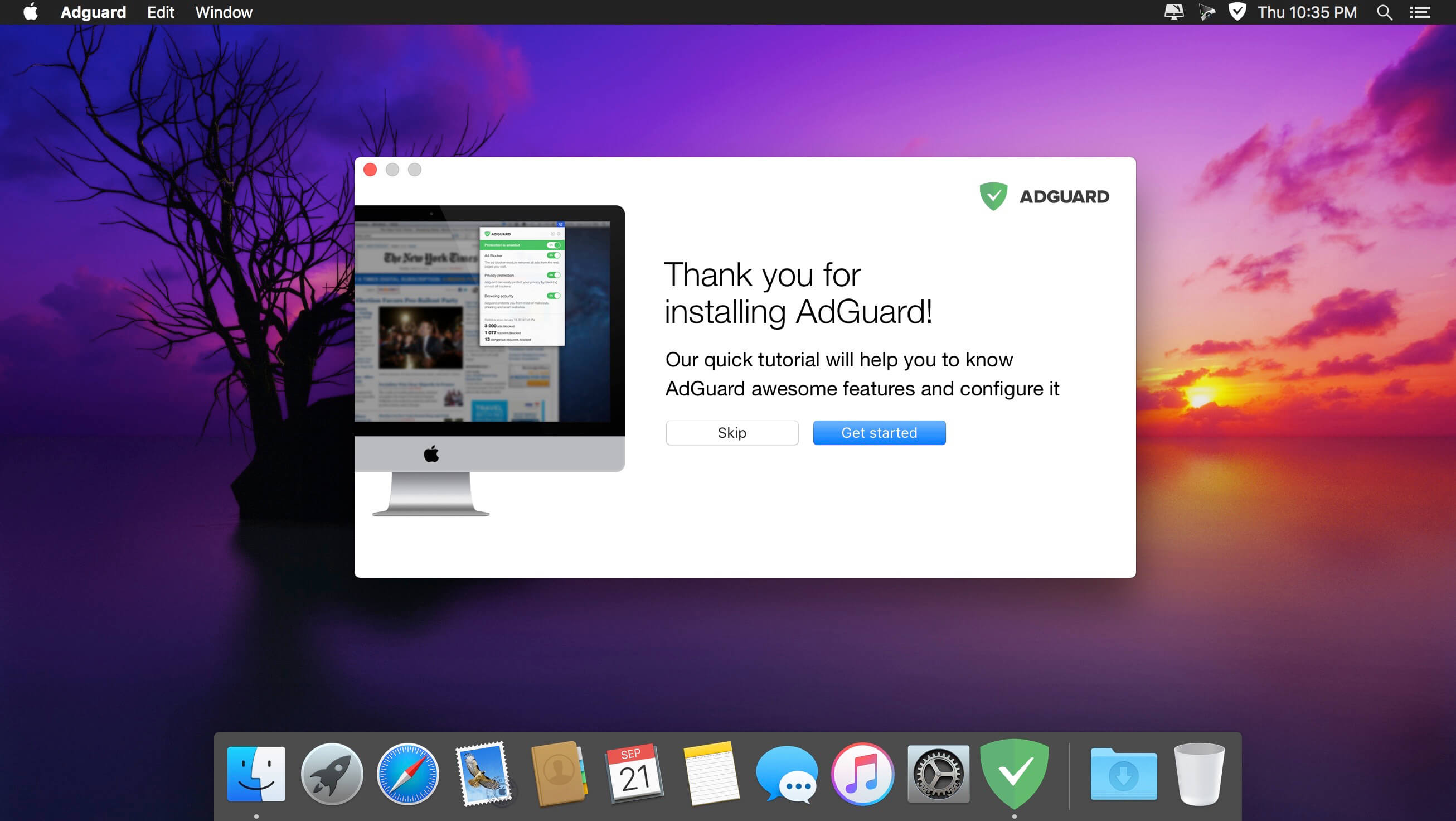
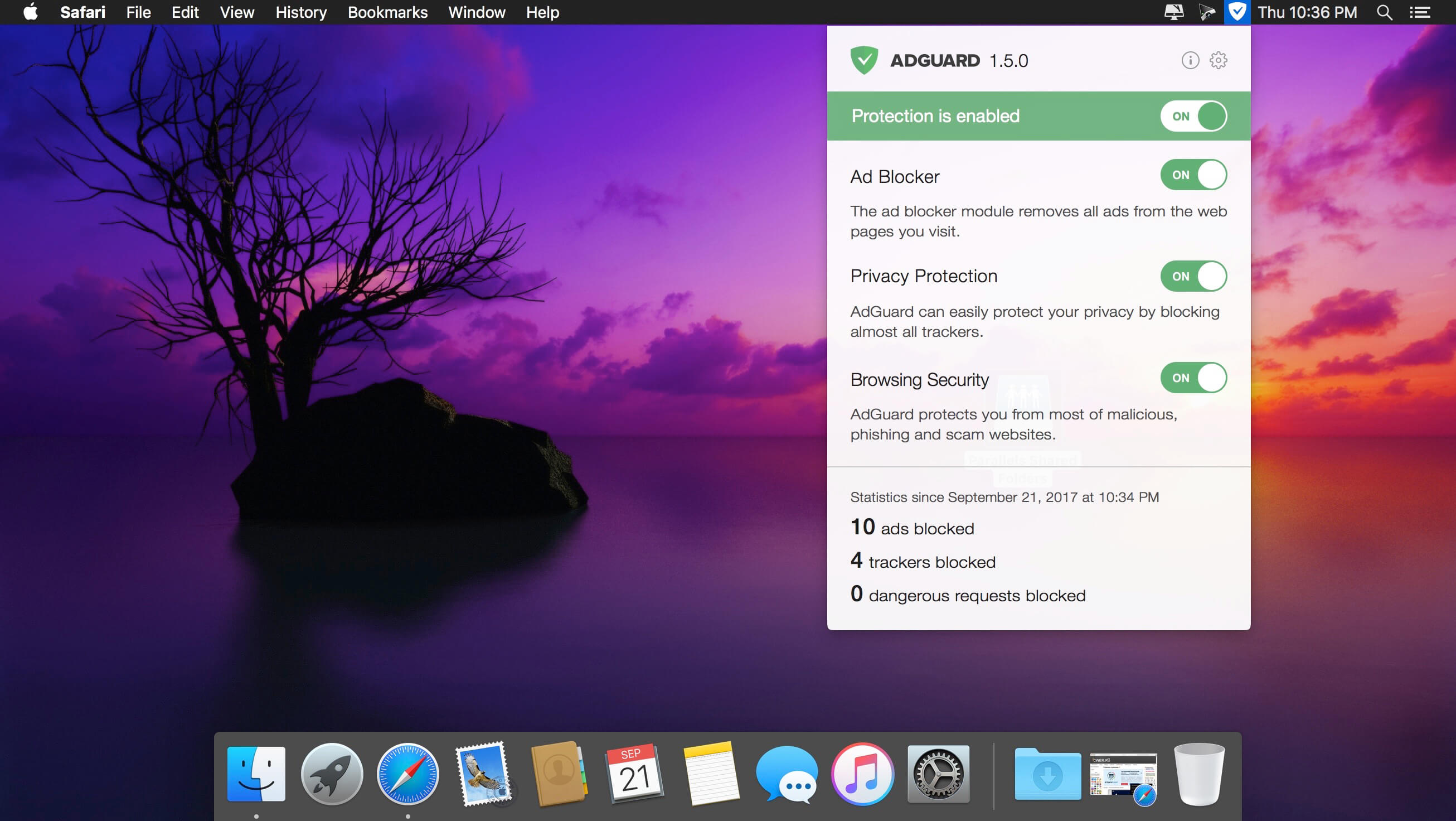
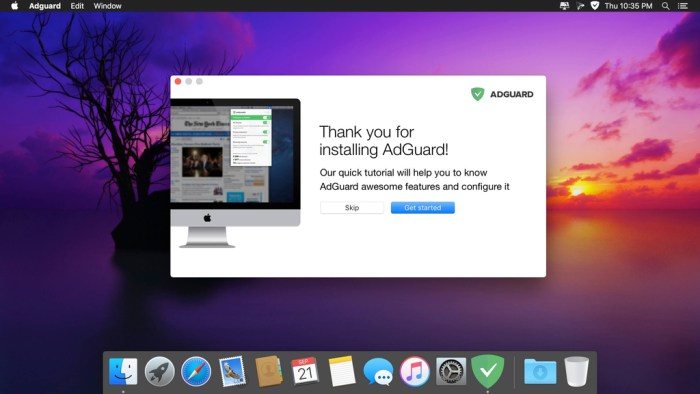
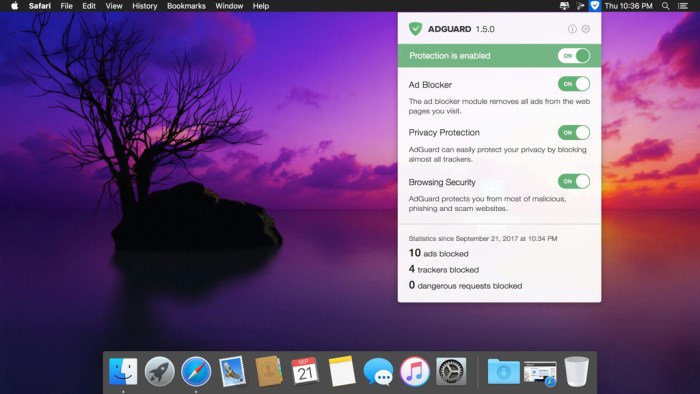
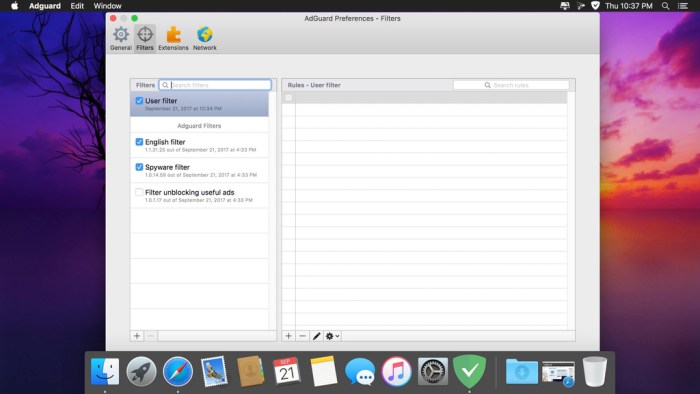
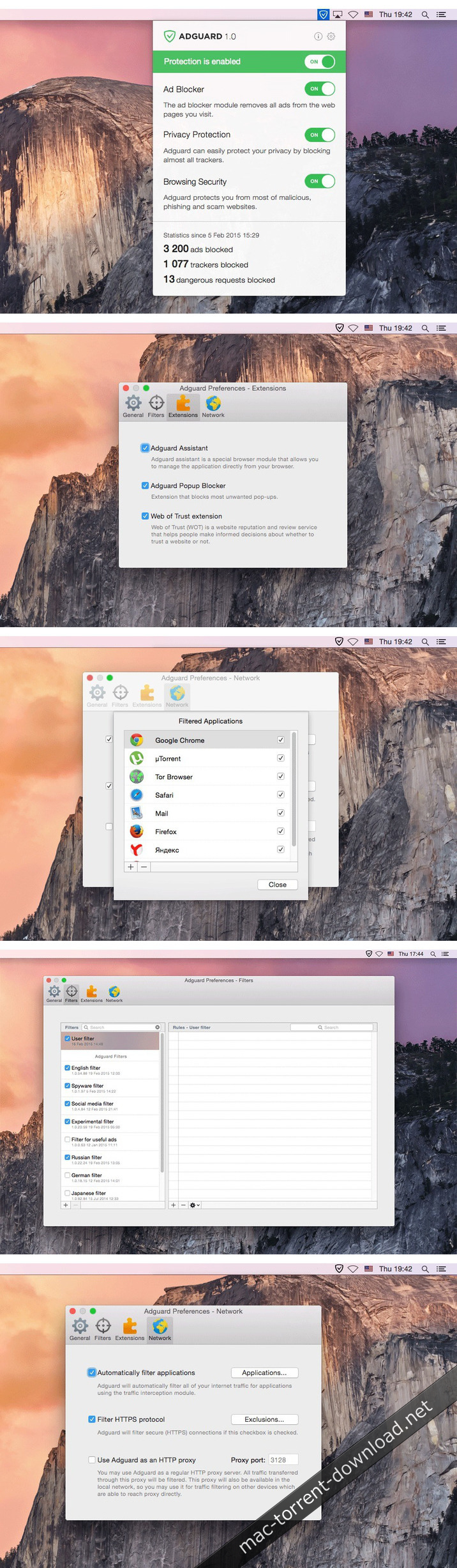
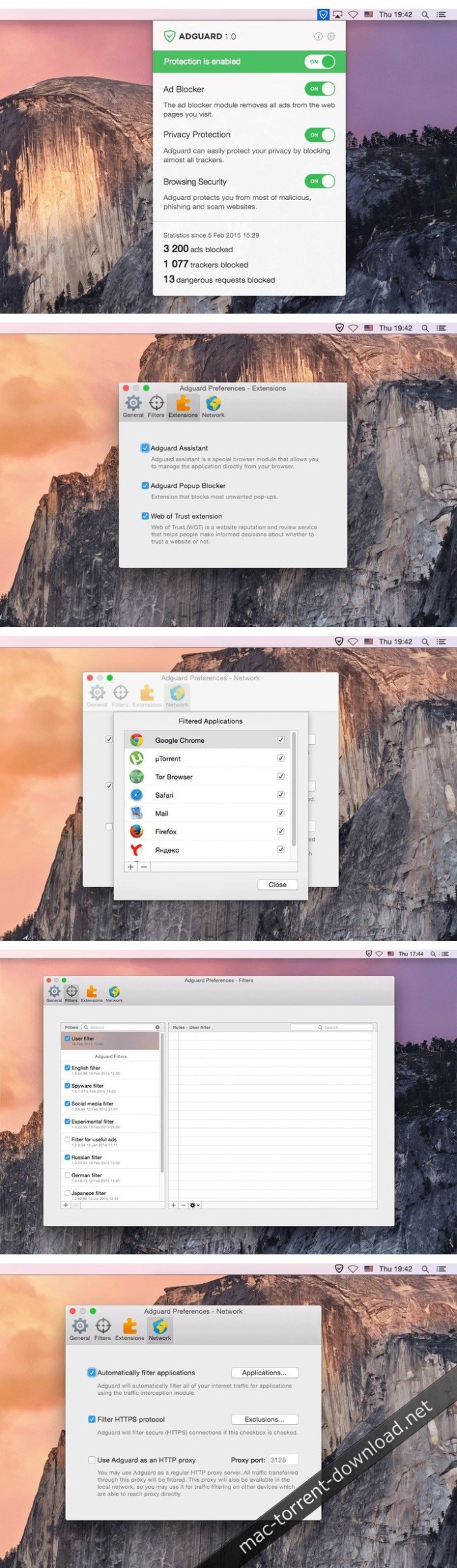
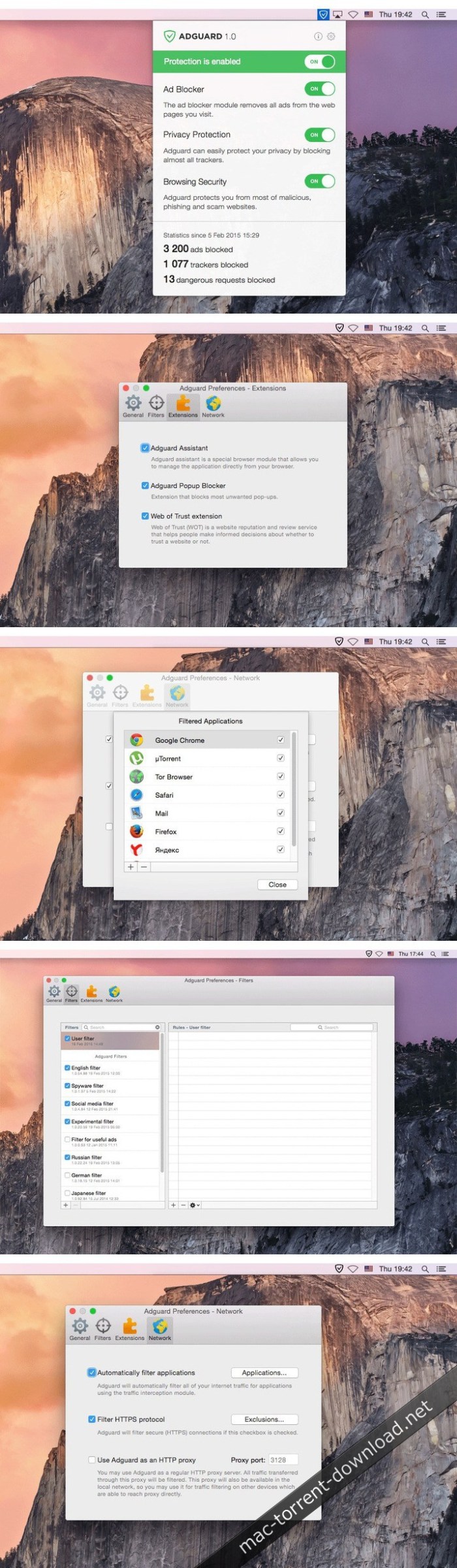
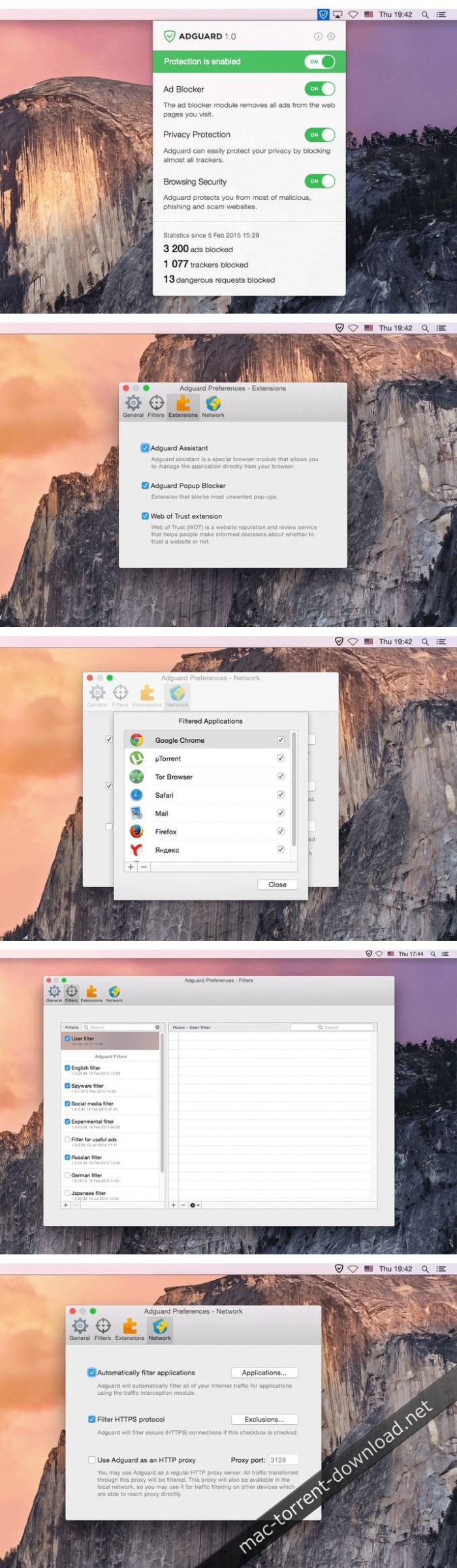
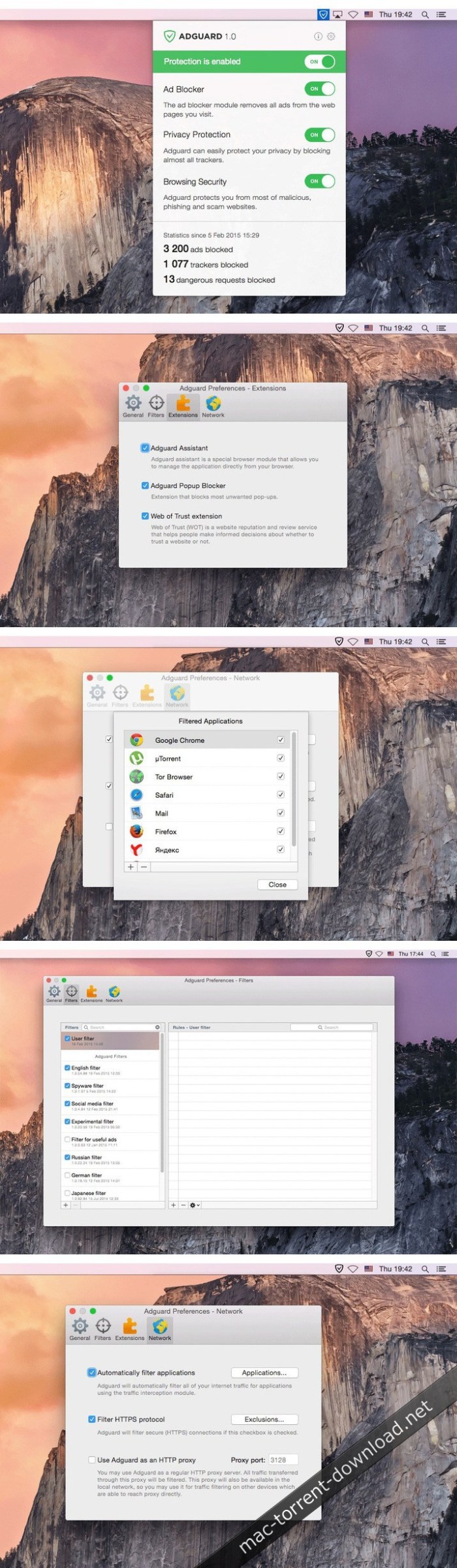
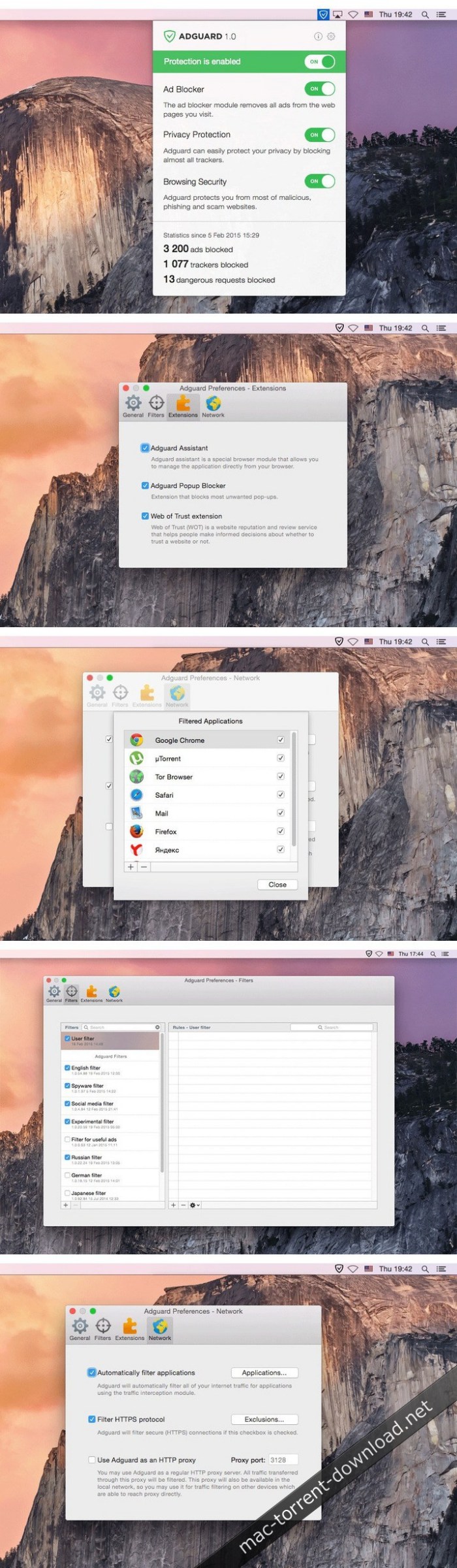
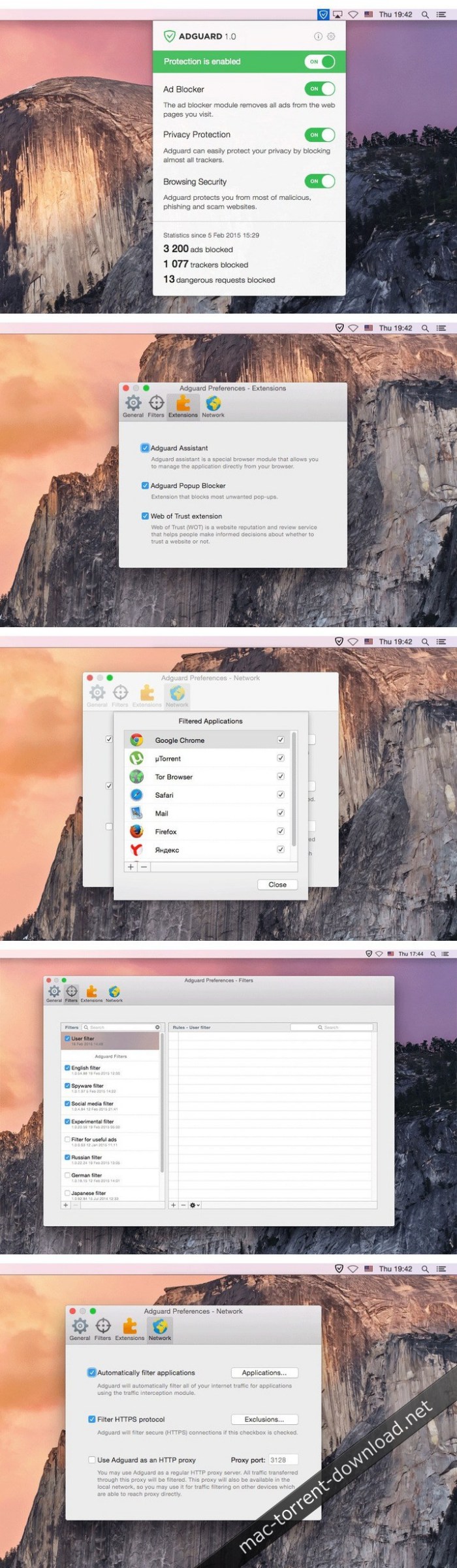
Adguard can make your online experience safer because, though Macs and Apple laptops are quite safe to use, when it comes to ad blockers, Macs experience real problems. Already-existing solutions do not consider the specifics of OS X. That greatly influences the stability of work in Safari, and these ad-blocking extensions fail to do their work properly, especially when video ads are an issue.
INFO Release
AdGuard isn’t compatible with Little Snitch 5
https://kb.adguard.com/en/macos/solving-problems/big-sur-issues#little-snitch
Solution: https://kb.adguard.com/en/macos/solving-problems/big-sur-issues#automatic-proxy
Using “Automatic proxy” filtering mode
If you face problems in Big Sur or Monterey which can’t be resolved by any of the methods above, you can try switching AdGuard to Automatic proxy mode.
1) Open AdGuard’s menu.
2) Select Preferences….
3) Switch to the Network tab.
4) Click the Select Mode… button.
5) Select Automatic Proxy.
Adguard can make your online experience safer because, though Macs and Apple laptops are quite safe to use, when it comes to ad blockers, Macs experience real problems. Already-existing solutions do not consider the specifics of OS X. That greatly influences the stability of work in Safari, and these ad-blocking extensions fail to do their work properly, especially when video ads are an issue.
New Adguard lets you fully enjoy web surfing without any distractions. Watch those videos you want to watch, and not video ads, on YouTube, Twitch, or any other website. Look at photos of your friends and not at endless banners on Facebook and other social networks. Adguard gives you freedom of choice and saves your nerves. It works perfectly with all browsers, as it was developed specially for use on OS X.
Ad Blocker. Subtle filtering of all incoming traffic, and what is more, ads are blocked before they load to the page.
Browsing Security. Adguard checks every page for any malicious content using our databases, and blocks requests from potentially dangerous ones.
Privacy Protection. Any counters and tracking instruments will be blocked by powerful Spyware filter. With Adguard you can stop worrying for the privacy of your actions on the Internet.
Adguard works in all browsers. Safari, Chrome – you name it. No exceptions.
Easy to install. A couple of clicks, and your Mac is protected from ads. You don’t have to struggle with overcomplicated settings – just surf the net and Adguard will do all the work.
Blocking video ads. Any video ad, on any site – Adguard will block it.
Application filtering. Adguard is more than just an addon for browser. It can help you to get rid of ads in any app on your Mac.
Is supported in all OS X versions from 10.10 64-bit and higher.
Adguard has intuitive and simple UI with such additional features like Adguard Assistant and filtering log.
Adguard can make your online experience safer because, though Macs and Apple laptops are quite safe to use, when it comes to ad blockers, Macs experience real problems. Already-existing solutions do not consider the specifics of OS X. That greatly influences the stability of work in Safari, and these ad-blocking extensions fail to do their work properly, especially when video ads are an issue.
New Adguard lets you fully enjoy web surfing without any distractions. Watch those videos you want to watch, and not video ads, on YouTube, Twitch, or any other website. Look at photos of your friends and not at endless banners on Facebook and other social networks. Adguard gives you freedom of choice and saves your nerves. It works perfectly with all browsers, as it was developed specially for use on OS X.
Ad Blocker. Subtle filtering of all incoming traffic, and what is more, ads are blocked before they load to the page.
Browsing Security. Adguard checks every page for any malicious content using our databases, and blocks requests from potentially dangerous ones.
Privacy Protection. Any counters and tracking instruments will be blocked by powerful Spyware filter. With Adguard you can stop worrying for the privacy of your actions on the Internet.
Adguard works in all browsers. Safari, Chrome – you name it. No exceptions.
Easy to install. A couple of clicks, and your Mac is protected from ads. You don’t have to struggle with overcomplicated settings – just surf the net and Adguard will do all the work.
Blocking video ads. Any video ad, on any site – Adguard will block it.
Application filtering. Adguard is more than just an addon for browser. It can help you to get rid of ads in any app on your Mac.
Is supported in all OS X versions from 10.10 64-bit and higher.
Adguard has intuitive and simple UI with such additional features like Adguard Assistant and filtering log.
Adguard can make your online experience safer because, though Macs and Apple laptops are quite safe to use, when it comes to ad blockers, Macs experience real problems. Already-existing solutions do not consider the specifics of OS X. That greatly influences the stability of work in Safari, and these ad-blocking extensions fail to do their work properly, especially when video ads are an issue.
New Adguard lets you fully enjoy web surfing without any distractions. Watch those videos you want to watch, and not video ads, on YouTube, Twitch, or any other website. Look at photos of your friends and not at endless banners on Facebook and other social networks. Adguard gives you freedom of choice and saves your nerves. It works perfectly with all browsers, as it was developed specially for use on OS X.
Ad Blocker. Subtle filtering of all incoming traffic, and what is more, ads are blocked before they load to the page.
Browsing Security. Adguard checks every page for any malicious content using our databases, and blocks requests from potentially dangerous ones.
Privacy Protection. Any counters and tracking instruments will be blocked by powerful Spyware filter. With Adguard you can stop worrying for the privacy of your actions on the Internet.
Adguard works in all browsers. Safari, Chrome – you name it. No exceptions.
Easy to install. A couple of clicks, and your Mac is protected from ads. You don’t have to struggle with overcomplicated settings – just surf the net and Adguard will do all the work.
Blocking video ads. Any video ad, on any site – Adguard will block it.
Application filtering. Adguard is more than just an addon for browser. It can help you to get rid of ads in any app on your Mac.
Is supported in all OS X versions from 10.10 64-bit and higher.
Adguard has intuitive and simple UI with such additional features like Adguard Assistant and filtering log.
Adguard can make your online experience safer because, though Macs and Apple laptops are quite safe to use, when it comes to ad blockers, Macs experience real problems. Already-existing solutions do not consider the specifics of OS X. That greatly influences the stability of work in Safari, and these ad-blocking extensions fail to do their work properly, especially when video ads are an issue.
New Adguard lets you fully enjoy web surfing without any distractions. Watch those videos you want to watch, and not video ads, on YouTube, Twitch, or any other website. Look at photos of your friends and not at endless banners on Facebook and other social networks. Adguard gives you freedom of choice and saves your nerves. It works perfectly with all browsers, as it was developed specially for use on OS X.
Ad Blocker. Subtle filtering of all incoming traffic, and what is more, ads are blocked before they load to the page.
Browsing Security. Adguard checks every page for any malicious content using our databases, and blocks requests from potentially dangerous ones.
Privacy Protection. Any counters and tracking instruments will be blocked by powerful Spyware filter. With Adguard you can stop worrying for the privacy of your actions on the Internet.
Adguard works in all browsers. Safari, Chrome – you name it. No exceptions.
Easy to install. A couple of clicks, and your Mac is protected from ads. You don’t have to struggle with overcomplicated settings – just surf the net and Adguard will do all the work.
Blocking video ads. Any video ad, on any site – Adguard will block it.
Application filtering. Adguard is more than just an addon for browser. It can help you to get rid of ads in any app on your Mac.
Is supported in all OS X versions from 10.10 64-bit and higher.
Adguard has intuitive and simple UI with such additional features like Adguard Assistant and filtering log.
Daily ad filters and phishing databases updates.
What’s New:
Version 2.5.0.902: New:
The biggest thing about AdGuard v2.5 for Mac is better compatibility with Big Sur. Thanks to adoption of System Extensions, AdGuard will work better on the newest macOS iteration.
Enhancement:
System Extensions support in Big Sur
Add $ping content type
Trusted-types CSP does not break the content script
Indicate libraries versions
Fixed:
AdGuard icon hidden from menu bar
The protection is automatically deactivated when the system goes into sleep mode
AdGuard doesn’t filter Brave Browser on Big Sur
Enable/disable protection in main menu is available when the app starts
Parameters stripped by Stealth Mode are not visible in filtering log
Incorrect behavior of EV-certs filtering feature
Switching between logging modes is not working with kext
Trackers counter doesn’t work
AGFDVSocket doesn’t return the original peer address in case of outbound proxy set
AdGuard doesn’t filter domains when HTTPS filtering is disabled
Exclusion with $elemhide,jsinject,extension disable HTML filtering rules
Filtering log doesn’t show information about cookies
Problematic userscripts
Regexp rule doesn’t match URL
Foreign requests get into filtering log with enabled DNS module
Path combining helper adds an extra slash
The filter ID of the triggered rule for a blocked request is not defined correctly
Issue with hkclubs.samsung.com
Other:
Upstream Proxy added for AdGuard
Added “How to enable Network extension” screen
New app icons for Big Sur
Localizations updated
Upgraded CoreLibs to v1.7.119
Encoding errors
Partial HTML processing issues
local.adguard.org certificate is not re-issued when it expire
Adguard can make your online experience safer because, though Macs and Apple laptops are quite safe to use, when it comes to ad blockers, Macs experience real problems. Already-existing solutions do not consider the specifics of OS X. That greatly influences the stability of work in Safari, and these ad-blocking extensions fail to do their work properly, especially when video ads are an issue.
New Adguard lets you fully enjoy web surfing without any distractions. Watch those videos you want to watch, and not video ads, on YouTube, Twitch, or any other website. Look at photos of your friends and not at endless banners on Facebook and other social networks. Adguard gives you freedom of choice and saves your nerves. It works perfectly with all browsers, as it was developed specially for use on OS X.
Ad Blocker. Subtle filtering of all incoming traffic, and what is more, ads are blocked before they load to the page.
Browsing Security. Adguard checks every page for any malicious content using our databases, and blocks requests from potentially dangerous ones.
Privacy Protection. Any counters and tracking instruments will be blocked by powerful Spyware filter. With Adguard you can stop worrying for the privacy of your actions on the Internet.
Adguard works in all browsers. Safari, Chrome – you name it. No exceptions.
Easy to install. A couple of clicks, and your Mac is protected from ads. You don’t have to struggle with overcomplicated settings – just surf the net and Adguard will do all the work.
Blocking video ads. Any video ad, on any site – Adguard will block it.
Application filtering. Adguard is more than just an addon for browser. It can help you to get rid of ads in any app on your Mac.
Is supported in all OS X versions from 10.10 64-bit and higher.
Adguard has intuitive and simple UI with such additional features like Adguard Assistant and filtering log.
Daily ad filters and phishing databases updates.
What’s New:
Version 2.5.0.902: New:
The biggest thing about AdGuard v2.5 for Mac is better compatibility with Big Sur. Thanks to adoption of System Extensions, AdGuard will work better on the newest macOS iteration.
Enhancement:
System Extensions support in Big Sur
Add $ping content type
Trusted-types CSP does not break the content script
Indicate libraries versions
Fixed:
AdGuard icon hidden from menu bar
The protection is automatically deactivated when the system goes into sleep mode
AdGuard doesn’t filter Brave Browser on Big Sur
Enable/disable protection in main menu is available when the app starts
Parameters stripped by Stealth Mode are not visible in filtering log
Incorrect behavior of EV-certs filtering feature
Switching between logging modes is not working with kext
Trackers counter doesn’t work
AGFDVSocket doesn’t return the original peer address in case of outbound proxy set
AdGuard doesn’t filter domains when HTTPS filtering is disabled
Exclusion with $elemhide,jsinject,extension disable HTML filtering rules
Filtering log doesn’t show information about cookies
Problematic userscripts
Regexp rule doesn’t match URL
Foreign requests get into filtering log with enabled DNS module
Path combining helper adds an extra slash
The filter ID of the triggered rule for a blocked request is not defined correctly
Issue with hkclubs.samsung.com
Other:
Upstream Proxy added for AdGuard
Added “How to enable Network extension” screen
New app icons for Big Sur
Localizations updated
Upgraded CoreLibs to v1.7.119
Encoding errors
Partial HTML processing issues
local.adguard.org certificate is not re-issued when it expire
Adguard can make your online experience safer because, though Macs and Apple laptops are quite safe to use, when it comes to ad blockers, Macs experience real problems. Already-existing solutions do not consider the specifics of OS X. That greatly influences the stability of work in Safari, and these ad-blocking extensions fail to do their work properly, especially when video ads are an issue.
New Adguard lets you fully enjoy web surfing without any distractions. Watch those videos you want to watch, and not video ads, on YouTube, Twitch, or any other website. Look at photos of your friends and not at endless banners on Facebook and other social networks. Adguard gives you freedom of choice and saves your nerves. It works perfectly with all browsers, as it was developed specially for use on OS X.
Ad Blocker. Subtle filtering of all incoming traffic, and what is more, ads are blocked before they load to the page.
Browsing Security. Adguard checks every page for any malicious content using our databases, and blocks requests from potentially dangerous ones.
Privacy Protection. Any counters and tracking instruments will be blocked by powerful Spyware filter. With Adguard you can stop worrying for the privacy of your actions on the Internet.
Adguard works in all browsers. Safari, Chrome – you name it. No exceptions.
Easy to install. A couple of clicks, and your Mac is protected from ads. You don’t have to struggle with overcomplicated settings – just surf the net and Adguard will do all the work.
Blocking video ads. Any video ad, on any site – Adguard will block it.
Application filtering. Adguard is more than just an addon for browser. It can help you to get rid of ads in any app on your Mac.
Is supported in all OS X versions from 10.10 64-bit and higher.
Adguard has intuitive and simple UI with such additional features like Adguard Assistant and filtering log.
Adguard can make your online experience safer because, though Macs and Apple laptops are quite safe to use, when it comes to ad blockers, Macs experience real problems. Already-existing solutions do not consider the specifics of OS X. That greatly influences the stability of work in Safari, and these ad-blocking extensions fail to do their work properly, especially when video ads are an issue.
New Adguard lets you fully enjoy web surfing without any distractions. Watch those videos you want to watch, and not video ads, on YouTube, Twitch, or any other website. Look at photos of your friends and not at endless banners on Facebook and other social networks. Adguard gives you freedom of choice and saves your nerves. It works perfectly with all browsers, as it was developed specially for use on OS X.
Ad Blocker. Subtle filtering of all incoming traffic, and what is more, ads are blocked before they load to the page.
Browsing Security. Adguard checks every page for any malicious content using our databases, and blocks requests from potentially dangerous ones.
Privacy Protection. Any counters and tracking instruments will be blocked by powerful Spyware filter. With Adguard you can stop worrying for the privacy of your actions on the Internet.
Adguard works in all browsers. Safari, Chrome – you name it. No exceptions.
Easy to install. A couple of clicks, and your Mac is protected from ads. You don’t have to struggle with overcomplicated settings – just surf the net and Adguard will do all the work.
Blocking video ads. Any video ad, on any site – Adguard will block it.
Application filtering. Adguard is more than just an addon for browser. It can help you to get rid of ads in any app on your Mac.
Is supported in all OS X versions from 10.10 64-bit and higher.
Adguard has intuitive and simple UI with such additional features like Adguard Assistant and filtering log.
Daily ad filters and phishing databases updates.
What’s New:
Version 2.5.0 (902): AdGuard v2.5 for Mac: Big Sur compatibility Hey, Mac users! Missed us? We are coming back with a great update! Please, meet AdGuard v2.5 for Mac. A small intro first. Privacy is in high demand Following a worldwide modern trend towards privacy protection, Apple announced its new macOS Big Sur with 3 cornerstone features: refined design, increased efficiency and ‘even more transparency around your privacy’. So privacy protection is a big deal now and is widely acknowledged by the market’s leaders, such as Apple.
Our AdGuard v2.5 for Mac version is specifically designed to cooperate seamlessly with the new macOS 11 (Big Sur). We have resolved many compatibility problems and added new gorgeous app icons that suit new OS style.
System Extensions will replace Kernel in Big Sur First of all, what are System Extensions? It all started in 2019 when Apple decided to minimize the amount of operations executed in Kernel. The old framework — Kernel Extensions — would no longer be of use. As an alternative, Apple offered System Extensions, and specifically Network Extensions as a framework to run apps that filter traffic.
Network Extensions MacOS 11 (Big Sur) will no longer support the old Kernel Extensions (for the most part), so we added support for the new framework. If you’re already on Big Sur preview, please make sure your AdGuard works in Network Extensions mode: open AdGuard’s menu -> Select Preferences… -> Network -> Select Mode…. “Kernel Extension” mode should be grayed out, and “Network Extension” mode should be selected.
Unfortunately, Network Extensions is a relatively new feature, which means it is only to be further bugfixed and updated. It was shortly introduced as a replacement for Kernel Extensions (first appeared in this role in macOS 10.15) and now Apple is actively developing and improving it. However, there are still many issues in different branches associated with Network Extensions.
Adguard can make your online experience safer because, though Macs and Apple laptops are quite safe to use, when it comes to ad blockers, Macs experience real problems. Already-existing solutions do not consider the specifics of OS X. That greatly influences the stability of work in Safari, and these ad-blocking extensions fail to do their work properly, especially when video ads are an issue.
New Adguard lets you fully enjoy web surfing without any distractions. Watch those videos you want to watch, and not video ads, on YouTube, Twitch, or any other website. Look at photos of your friends and not at endless banners on Facebook and other social networks. Adguard gives you freedom of choice and saves your nerves. It works perfectly with all browsers, as it was developed specially for use on OS X.
Ad Blocker. Subtle filtering of all incoming traffic, and what is more, ads are blocked before they load to the page.
Browsing Security. Adguard checks every page for any malicious content using our databases, and blocks requests from potentially dangerous ones.
Privacy Protection. Any counters and tracking instruments will be blocked by powerful Spyware filter. With Adguard you can stop worrying for the privacy of your actions on the Internet.
Adguard works in all browsers. Safari, Chrome – you name it. No exceptions.
Easy to install. A couple of clicks, and your Mac is protected from ads. You don’t have to struggle with overcomplicated settings – just surf the net and Adguard will do all the work.
Blocking video ads. Any video ad, on any site – Adguard will block it.
Application filtering. Adguard is more than just an addon for browser. It can help you to get rid of ads in any app on your Mac.
Is supported in all OS X versions from 10.10 64-bit and higher.
Adguard has intuitive and simple UI with such additional features like Adguard Assistant and filtering log.
Daily ad filters and phishing databases updates.
What’s New:
Version 2.4.8: Fixed:
Incorrect information about QUIC connections is displayed in the filtering log
Filtering in Microsoft Edge Beta doesn’t turn off when removing the browser from filtered applications
AdGuard does not preserve the Whitelist
Fast user switching might corrupt certificate database
AdGuard doesn’t work in Brave Beta 1.7.64
Incorrect extended CSS rule causes problems with JS rules’ work *
Rules with :style() are converted incorrectly
Issue with LINE extension
Rules with restricted domains do not match requests without referer
Stealth mode error
Cosmetic rules can be used as CSS rules
Basic rules with wilcard in top level domains are not working
Enhancement:
Different build configurations for beta/release/nightly
“What’s new” screen now shows up after major app updates
“Proceed anyway” option doesn’t work correctly if a website is blocked by a rule with $all modifier
New rule selection algorithm for the cases when HTTPS filtering is disabled
Other:
New localizations: Croatian, Persian, Romanian, Thai
Adguard can make your online experience safer because, though Macs and Apple laptops are quite safe to use, when it comes to ad blockers, Macs experience real problems. Already-existing solutions do not consider the specifics of OS X. That greatly influences the stability of work in Safari, and these ad-blocking extensions fail to do their work properly, especially when video ads are an issue.
New Adguard lets you fully enjoy web surfing without any distractions. Watch those videos you want to watch, and not video ads, on YouTube, Twitch, or any other website. Look at photos of your friends and not at endless banners on Facebook and other social networks. Adguard gives you freedom of choice and saves your nerves. It works perfectly with all browsers, as it was developed specially for use on OS X.
Ad Blocker. Subtle filtering of all incoming traffic, and what is more, ads are blocked before they load to the page.
Browsing Security. Adguard checks every page for any malicious content using our databases, and blocks requests from potentially dangerous ones.
Privacy Protection. Any counters and tracking instruments will be blocked by powerful Spyware filter. With Adguard you can stop worrying for the privacy of your actions on the Internet.
Adguard works in all browsers. Safari, Chrome – you name it. No exceptions.
Easy to install. A couple of clicks, and your Mac is protected from ads. You don’t have to struggle with overcomplicated settings – just surf the net and Adguard will do all the work.
Blocking video ads. Any video ad, on any site – Adguard will block it.
Application filtering. Adguard is more than just an addon for browser. It can help you to get rid of ads in any app on your Mac.
Is supported in all OS X versions from 10.10 64-bit and higher.
Adguard has intuitive and simple UI with such additional features like Adguard Assistant and filtering log.
Daily ad filters and phishing databases updates.
What’s New:
Version 2.4.8: Fixed:
Incorrect information about QUIC connections is displayed in the filtering log
Filtering in Microsoft Edge Beta doesn’t turn off when removing the browser from filtered applications
AdGuard does not preserve the Whitelist
Fast user switching might corrupt certificate database
AdGuard doesn’t work in Brave Beta 1.7.64
Incorrect extended CSS rule causes problems with JS rules’ work *
Rules with :style() are converted incorrectly
Issue with LINE extension
Rules with restricted domains do not match requests without referer
Stealth mode error
Cosmetic rules can be used as CSS rules
Basic rules with wilcard in top level domains are not working
Enhancement:
Different build configurations for beta/release/nightly
“What’s new” screen now shows up after major app updates
“Proceed anyway” option doesn’t work correctly if a website is blocked by a rule with $all modifier
New rule selection algorithm for the cases when HTTPS filtering is disabled
Other:
New localizations: Croatian, Persian, Romanian, Thai
Adguard can make your online experience safer because, though Macs and Apple laptops are quite safe to use, when it comes to ad blockers, Macs experience real problems. Already-existing solutions do not consider the specifics of OS X. That greatly influences the stability of work in Safari, and these ad-blocking extensions fail to do their work properly, especially when video ads are an issue.
New Adguard lets you fully enjoy web surfing without any distractions. Watch those videos you want to watch, and not video ads, on YouTube, Twitch, or any other website. Look at photos of your friends and not at endless banners on Facebook and other social networks. Adguard gives you freedom of choice and saves your nerves. It works perfectly with all browsers, as it was developed specially for use on OS X.
Ad Blocker. Subtle filtering of all incoming traffic, and what is more, ads are blocked before they load to the page.
Browsing Security. Adguard checks every page for any malicious content using our databases, and blocks requests from potentially dangerous ones.
Privacy Protection. Any counters and tracking instruments will be blocked by powerful Spyware filter. With Adguard you can stop worrying for the privacy of your actions on the Internet.
Adguard works in all browsers. Safari, Chrome – you name it. No exceptions.
Easy to install. A couple of clicks, and your Mac is protected from ads. You don’t have to struggle with overcomplicated settings – just surf the net and Adguard will do all the work.
Blocking video ads. Any video ad, on any site – Adguard will block it.
Application filtering. Adguard is more than just an addon for browser. It can help you to get rid of ads in any app on your Mac.
Is supported in all OS X versions from 10.10 64-bit and higher.
Adguard has intuitive and simple UI with such additional features like Adguard Assistant and filtering log.
Daily ad filters and phishing databases updates.
What’s New:
Version 2.4.8: Fixed:
Incorrect information about QUIC connections is displayed in the filtering log
Filtering in Microsoft Edge Beta doesn’t turn off when removing the browser from filtered applications
AdGuard does not preserve the Whitelist
Fast user switching might corrupt certificate database
AdGuard doesn’t work in Brave Beta 1.7.64
Incorrect extended CSS rule causes problems with JS rules’ work *
Rules with :style() are converted incorrectly
Issue with LINE extension
Rules with restricted domains do not match requests without referer
Stealth mode error
Cosmetic rules can be used as CSS rules
Basic rules with wilcard in top level domains are not working
Enhancement:
Different build configurations for beta/release/nightly
“What’s new” screen now shows up after major app updates
“Proceed anyway” option doesn’t work correctly if a website is blocked by a rule with $all modifier
New rule selection algorithm for the cases when HTTPS filtering is disabled
Other:
New localizations: Croatian, Persian, Romanian, Thai
Adguard can make your online experience safer because, though Macs and Apple laptops are quite safe to use, when it comes to ad blockers, Macs experience real problems. Already-existing solutions do not consider the specifics of OS X. That greatly influences the stability of work in Safari, and these ad-blocking extensions fail to do their work properly, especially when video ads are an issue.
New Adguard lets you fully enjoy web surfing without any distractions. Watch those videos you want to watch, and not video ads, on YouTube, Twitch, or any other website. Look at photos of your friends and not at endless banners on Facebook and other social networks. Adguard gives you freedom of choice and saves your nerves. It works perfectly with all browsers, as it was developed specially for use on OS X.
Ad Blocker. Subtle filtering of all incoming traffic, and what is more, ads are blocked before they load to the page.
Browsing Security. Adguard checks every page for any malicious content using our databases, and blocks requests from potentially dangerous ones.
Privacy Protection. Any counters and tracking instruments will be blocked by powerful Spyware filter. With Adguard you can stop worrying for the privacy of your actions on the Internet.
Adguard works in all browsers. Safari, Chrome – you name it. No exceptions.
Easy to install. A couple of clicks, and your Mac is protected from ads. You don’t have to struggle with overcomplicated settings – just surf the net and Adguard will do all the work.
Blocking video ads. Any video ad, on any site – Adguard will block it.
Application filtering. Adguard is more than just an addon for browser. It can help you to get rid of ads in any app on your Mac.
Is supported in all OS X versions from 10.10 64-bit and higher.
Adguard has intuitive and simple UI with such additional features like Adguard Assistant and filtering log.
Daily ad filters and phishing databases updates.
What’s New:
Version 2.4.8: Fixed:
Incorrect information about QUIC connections is displayed in the filtering log
Filtering in Microsoft Edge Beta doesn’t turn off when removing the browser from filtered applications
AdGuard does not preserve the Whitelist
Fast user switching might corrupt certificate database
AdGuard doesn’t work in Brave Beta 1.7.64
Incorrect extended CSS rule causes problems with JS rules’ work *
Rules with :style() are converted incorrectly
Issue with LINE extension
Rules with restricted domains do not match requests without referer
Stealth mode error
Cosmetic rules can be used as CSS rules
Basic rules with wilcard in top level domains are not working
Enhancement:
Different build configurations for beta/release/nightly
“What’s new” screen now shows up after major app updates
“Proceed anyway” option doesn’t work correctly if a website is blocked by a rule with $all modifier
New rule selection algorithm for the cases when HTTPS filtering is disabled
Other:
New localizations: Croatian, Persian, Romanian, Thai
Adguard can make your online experience safer because, though Macs and Apple laptops are quite safe to use, when it comes to ad blockers, Macs experience real problems. Already-existing solutions do not consider the specifics of OS X. That greatly influences the stability of work in Safari, and these ad-blocking extensions fail to do their work properly, especially when video ads are an issue.
New Adguard lets you fully enjoy web surfing without any distractions. Watch those videos you want to watch, and not video ads, on YouTube, Twitch, or any other website. Look at photos of your friends and not at endless banners on Facebook and other social networks. Adguard gives you freedom of choice and saves your nerves. It works perfectly with all browsers, as it was developed specially for use on OS X.
Ad Blocker. Subtle filtering of all incoming traffic, and what is more, ads are blocked before they load to the page.
Browsing Security. Adguard checks every page for any malicious content using our databases, and blocks requests from potentially dangerous ones.
Privacy Protection. Any counters and tracking instruments will be blocked by powerful Spyware filter. With Adguard you can stop worrying for the privacy of your actions on the Internet.
Adguard works in all browsers. Safari, Chrome – you name it. No exceptions.
Easy to install. A couple of clicks, and your Mac is protected from ads. You don’t have to struggle with overcomplicated settings – just surf the net and Adguard will do all the work.
Blocking video ads. Any video ad, on any site – Adguard will block it.
Application filtering. Adguard is more than just an addon for browser. It can help you to get rid of ads in any app on your Mac.
Is supported in all OS X versions from 10.10 64-bit and higher.
Adguard has intuitive and simple UI with such additional features like Adguard Assistant and filtering log.
Adguard can make your online experience safer because, though Macs and Apple laptops are quite safe to use, when it comes to ad blockers, Macs experience real problems. Already-existing solutions do not consider the specifics of OS X. That greatly influences the stability of work in Safari, and these ad-blocking extensions fail to do their work properly, especially when video ads are an issue.
New Adguard lets you fully enjoy web surfing without any distractions. Watch those videos you want to watch, and not video ads, on YouTube, Twitch, or any other website. Look at photos of your friends and not at endless banners on Facebook and other social networks. Adguard gives you freedom of choice and saves your nerves. It works perfectly with all browsers, as it was developed specially for use on OS X.
Ad Blocker. Subtle filtering of all incoming traffic, and what is more, ads are blocked before they load to the page.
Browsing Security. Adguard checks every page for any malicious content using our databases, and blocks requests from potentially dangerous ones.
Privacy Protection. Any counters and tracking instruments will be blocked by powerful Spyware filter. With Adguard you can stop worrying for the privacy of your actions on the Internet.
Adguard works in all browsers. Safari, Chrome – you name it. No exceptions.
Easy to install. A couple of clicks, and your Mac is protected from ads. You don’t have to struggle with overcomplicated settings – just surf the net and Adguard will do all the work.
Blocking video ads. Any video ad, on any site – Adguard will block it.
Application filtering. Adguard is more than just an addon for browser. It can help you to get rid of ads in any app on your Mac.
Is supported in all OS X versions from 10.10 64-bit and higher.
Adguard has intuitive and simple UI with such additional features like Adguard Assistant and filtering log.
Daily ad filters and phishing databases updates.
What’s New:
Version 2.4.8: Fixed:
Incorrect information about QUIC connections is displayed in the filtering log
Filtering in Microsoft Edge Beta doesn’t turn off when removing the browser from filtered applications
AdGuard does not preserve the Whitelist
Fast user switching might corrupt certificate database
AdGuard doesn’t work in Brave Beta 1.7.64
Incorrect extended CSS rule causes problems with JS rules’ work *
Rules with :style() are converted incorrectly
Issue with LINE extension
Rules with restricted domains do not match requests without referer
Stealth mode error
Cosmetic rules can be used as CSS rules
Basic rules with wilcard in top level domains are not working
Enhancement:
Different build configurations for beta/release/nightly
“What’s new” screen now shows up after major app updates
“Proceed anyway” option doesn’t work correctly if a website is blocked by a rule with $all modifier
New rule selection algorithm for the cases when HTTPS filtering is disabled
Other:
New localizations: Croatian, Persian, Romanian, Thai
Adguard can make your online experience safer because, though Macs and Apple laptops are quite safe to use, when it comes to ad blockers, Macs experience real problems. Already-existing solutions do not consider the specifics of OS X. That greatly influences the stability of work in Safari, and these ad-blocking extensions fail to do their work properly, especially when video ads are an issue.
New Adguard lets you fully enjoy web surfing without any distractions. Watch those videos you want to watch, and not video ads, on YouTube, Twitch, or any other website. Look at photos of your friends and not at endless banners on Facebook and other social networks. Adguard gives you freedom of choice and saves your nerves. It works perfectly with all browsers, as it was developed specially for use on OS X.
Ad Blocker. Subtle filtering of all incoming traffic, and what is more, ads are blocked before they load to the page.
Browsing Security. Adguard checks every page for any malicious content using our databases, and blocks requests from potentially dangerous ones.
Privacy Protection. Any counters and tracking instruments will be blocked by powerful Spyware filter. With Adguard you can stop worrying for the privacy of your actions on the Internet.
Adguard works in all browsers. Safari, Chrome – you name it. No exceptions.
Easy to install. A couple of clicks, and your Mac is protected from ads. You don’t have to struggle with overcomplicated settings – just surf the net and Adguard will do all the work.
Blocking video ads. Any video ad, on any site – Adguard will block it.
Application filtering. Adguard is more than just an addon for browser. It can help you to get rid of ads in any app on your Mac.
Is supported in all OS X versions from 10.10 64-bit and higher.
Adguard has intuitive and simple UI with such additional features like Adguard Assistant and filtering log.
Daily ad filters and phishing databases updates.
What’s New:
Version 2.4.8: Fixed:
Incorrect information about QUIC connections is displayed in the filtering log
Filtering in Microsoft Edge Beta doesn’t turn off when removing the browser from filtered applications
AdGuard does not preserve the Whitelist
Fast user switching might corrupt certificate database
AdGuard doesn’t work in Brave Beta 1.7.64
Incorrect extended CSS rule causes problems with JS rules’ work *
Rules with :style() are converted incorrectly
Issue with LINE extension
Rules with restricted domains do not match requests without referer
Stealth mode error
Cosmetic rules can be used as CSS rules
Basic rules with wilcard in top level domains are not working
Enhancement:
Different build configurations for beta/release/nightly
“What’s new” screen now shows up after major app updates
“Proceed anyway” option doesn’t work correctly if a website is blocked by a rule with $all modifier
New rule selection algorithm for the cases when HTTPS filtering is disabled
Other:
New localizations: Croatian, Persian, Romanian, Thai
Adguard can make your online experience safer because, though Macs and Apple laptops are quite safe to use, when it comes to ad blockers, Macs experience real problems. Already-existing solutions do not consider the specifics of OS X. That greatly influences the stability of work in Safari, and these ad-blocking extensions fail to do their work properly, especially when video ads are an issue.
New Adguard lets you fully enjoy web surfing without any distractions. Watch those videos you want to watch, and not video ads, on YouTube, Twitch, or any other website. Look at photos of your friends and not at endless banners on Facebook and other social networks. Adguard gives you freedom of choice and saves your nerves. It works perfectly with all browsers, as it was developed specially for use on OS X.
Ad Blocker. Subtle filtering of all incoming traffic, and what is more, ads are blocked before they load to the page.
Browsing Security. Adguard checks every page for any malicious content using our databases, and blocks requests from potentially dangerous ones.
Privacy Protection. Any counters and tracking instruments will be blocked by powerful Spyware filter. With Adguard you can stop worrying for the privacy of your actions on the Internet.
Adguard works in all browsers. Safari, Chrome – you name it. No exceptions.
Easy to install. A couple of clicks, and your Mac is protected from ads. You don’t have to struggle with overcomplicated settings – just surf the net and Adguard will do all the work.
Blocking video ads. Any video ad, on any site – Adguard will block it.
Application filtering. Adguard is more than just an addon for browser. It can help you to get rid of ads in any app on your Mac.
Is supported in all OS X versions from 10.10 64-bit and higher.
Adguard has intuitive and simple UI with such additional features like Adguard Assistant and filtering log.
Daily ad filters and phishing databases updates.
What’s New:
Version 2.4.8: Fixed:
Incorrect information about QUIC connections is displayed in the filtering log
Filtering in Microsoft Edge Beta doesn’t turn off when removing the browser from filtered applications
AdGuard does not preserve the Whitelist
Fast user switching might corrupt certificate database
AdGuard doesn’t work in Brave Beta 1.7.64
Incorrect extended CSS rule causes problems with JS rules’ work *
Rules with :style() are converted incorrectly
Issue with LINE extension
Rules with restricted domains do not match requests without referer
Stealth mode error
Cosmetic rules can be used as CSS rules
Basic rules with wilcard in top level domains are not working
Enhancement:
Different build configurations for beta/release/nightly
“What’s new” screen now shows up after major app updates
“Proceed anyway” option doesn’t work correctly if a website is blocked by a rule with $all modifier
New rule selection algorithm for the cases when HTTPS filtering is disabled
Other:
New localizations: Croatian, Persian, Romanian, Thai
Adguard can make your online experience safer because, though Macs and Apple laptops are quite safe to use, when it comes to ad blockers, Macs experience real problems. Already-existing solutions do not consider the specifics of OS X. That greatly influences the stability of work in Safari, and these ad-blocking extensions fail to do their work properly, especially when video ads are an issue.
New Adguard lets you fully enjoy web surfing without any distractions. Watch those videos you want to watch, and not video ads, on YouTube, Twitch, or any other website. Look at photos of your friends and not at endless banners on Facebook and other social networks. Adguard gives you freedom of choice and saves your nerves. It works perfectly with all browsers, as it was developed specially for use on OS X.
Ad Blocker. Subtle filtering of all incoming traffic, and what is more, ads are blocked before they load to the page.
Browsing Security. Adguard checks every page for any malicious content using our databases, and blocks requests from potentially dangerous ones.
Privacy Protection. Any counters and tracking instruments will be blocked by powerful Spyware filter. With Adguard you can stop worrying for the privacy of your actions on the Internet.
Adguard works in all browsers. Safari, Chrome – you name it. No exceptions.
Easy to install. A couple of clicks, and your Mac is protected from ads. You don’t have to struggle with overcomplicated settings – just surf the net and Adguard will do all the work.
Blocking video ads. Any video ad, on any site – Adguard will block it.
Application filtering. Adguard is more than just an addon for browser. It can help you to get rid of ads in any app on your Mac.
Is supported in all OS X versions from 10.10 64-bit and higher.
Adguard has intuitive and simple UI with such additional features like Adguard Assistant and filtering log.
Daily ad filters and phishing databases updates.
What’s New:
Version 2.4.8: Fixed:
Incorrect information about QUIC connections is displayed in the filtering log
Filtering in Microsoft Edge Beta doesn’t turn off when removing the browser from filtered applications
AdGuard does not preserve the Whitelist
Fast user switching might corrupt certificate database
AdGuard doesn’t work in Brave Beta 1.7.64
Incorrect extended CSS rule causes problems with JS rules’ work *
Rules with :style() are converted incorrectly
Issue with LINE extension
Rules with restricted domains do not match requests without referer
Stealth mode error
Cosmetic rules can be used as CSS rules
Basic rules with wilcard in top level domains are not working
Enhancement:
Different build configurations for beta/release/nightly
“What’s new” screen now shows up after major app updates
“Proceed anyway” option doesn’t work correctly if a website is blocked by a rule with $all modifier
New rule selection algorithm for the cases when HTTPS filtering is disabled
Other:
New localizations: Croatian, Persian, Romanian, Thai
Adguard can make your online experience safer because, though Macs and Apple laptops are quite safe to use, when it comes to ad blockers, Macs experience real problems. Already-existing solutions do not consider the specifics of OS X. That greatly influences the stability of work in Safari, and these ad-blocking extensions fail to do their work properly, especially when video ads are an issue.
New Adguard lets you fully enjoy web surfing without any distractions. Watch those videos you want to watch, and not video ads, on YouTube, Twitch, or any other website. Look at photos of your friends and not at endless banners on Facebook and other social networks. Adguard gives you freedom of choice and saves your nerves. It works perfectly with all browsers, as it was developed specially for use on OS X.
Ad Blocker. Subtle filtering of all incoming traffic, and what is more, ads are blocked before they load to the page.
Browsing Security. Adguard checks every page for any malicious content using our databases, and blocks requests from potentially dangerous ones.
Privacy Protection. Any counters and tracking instruments will be blocked by powerful Spyware filter. With Adguard you can stop worrying for the privacy of your actions on the Internet.
Adguard works in all browsers. Safari, Chrome – you name it. No exceptions.
Easy to install. A couple of clicks, and your Mac is protected from ads. You don’t have to struggle with overcomplicated settings – just surf the net and Adguard will do all the work.
Blocking video ads. Any video ad, on any site – Adguard will block it.
Application filtering. Adguard is more than just an addon for browser. It can help you to get rid of ads in any app on your Mac.
Is supported in all OS X versions from 10.10 64-bit and higher.
Adguard has intuitive and simple UI with such additional features like Adguard Assistant and filtering log.
Daily ad filters and phishing databases updates.
What’s New:
Version 2.4.8: Fixed:
Incorrect information about QUIC connections is displayed in the filtering log
Filtering in Microsoft Edge Beta doesn’t turn off when removing the browser from filtered applications
AdGuard does not preserve the Whitelist
Fast user switching might corrupt certificate database
AdGuard doesn’t work in Brave Beta 1.7.64
Incorrect extended CSS rule causes problems with JS rules’ work *
Rules with :style() are converted incorrectly
Issue with LINE extension
Rules with restricted domains do not match requests without referer
Stealth mode error
Cosmetic rules can be used as CSS rules
Basic rules with wilcard in top level domains are not working
Enhancement:
Different build configurations for beta/release/nightly
“What’s new” screen now shows up after major app updates
“Proceed anyway” option doesn’t work correctly if a website is blocked by a rule with $all modifier
New rule selection algorithm for the cases when HTTPS filtering is disabled
Other:
New localizations: Croatian, Persian, Romanian, Thai
Adguard can make your online experience safer because, though Macs and Apple laptops are quite safe to use, when it comes to ad blockers, Macs experience real problems. Already-existing solutions do not consider the specifics of OS X. That greatly influences the stability of work in Safari, and these ad-blocking extensions fail to do their work properly, especially when video ads are an issue.
New Adguard lets you fully enjoy web surfing without any distractions. Watch those videos you want to watch, and not video ads, on YouTube, Twitch, or any other website. Look at photos of your friends and not at endless banners on Facebook and other social networks. Adguard gives you freedom of choice and saves your nerves. It works perfectly with all browsers, as it was developed specially for use on OS X.
Ad Blocker. Subtle filtering of all incoming traffic, and what is more, ads are blocked before they load to the page.
Browsing Security. Adguard checks every page for any malicious content using our databases, and blocks requests from potentially dangerous ones.
Privacy Protection. Any counters and tracking instruments will be blocked by powerful Spyware filter. With Adguard you can stop worrying for the privacy of your actions on the Internet.
Adguard works in all browsers. Safari, Chrome – you name it. No exceptions.
Easy to install. A couple of clicks, and your Mac is protected from ads. You don’t have to struggle with overcomplicated settings – just surf the net and Adguard will do all the work.
Blocking video ads. Any video ad, on any site – Adguard will block it.
Application filtering. Adguard is more than just an addon for browser. It can help you to get rid of ads in any app on your Mac.
Is supported in all OS X versions from 10.10 64-bit and higher.
Adguard has intuitive and simple UI with such additional features like Adguard Assistant and filtering log.
Daily ad filters and phishing databases updates.
What’s New:
Version 2.4.8: Fixed:
Incorrect information about QUIC connections is displayed in the filtering log
Filtering in Microsoft Edge Beta doesn’t turn off when removing the browser from filtered applications
AdGuard does not preserve the Whitelist
Fast user switching might corrupt certificate database
AdGuard doesn’t work in Brave Beta 1.7.64
Incorrect extended CSS rule causes problems with JS rules’ work *
Rules with :style() are converted incorrectly
Issue with LINE extension
Rules with restricted domains do not match requests without referer
Stealth mode error
Cosmetic rules can be used as CSS rules
Basic rules with wilcard in top level domains are not working
Enhancement:
Different build configurations for beta/release/nightly
“What’s new” screen now shows up after major app updates
“Proceed anyway” option doesn’t work correctly if a website is blocked by a rule with $all modifier
New rule selection algorithm for the cases when HTTPS filtering is disabled
Other:
New localizations: Croatian, Persian, Romanian, Thai
Adguard can make your online experience safer because, though Macs and Apple laptops are quite safe to use, when it comes to ad blockers, Macs experience real problems. Already-existing solutions do not consider the specifics of OS X. That greatly influences the stability of work in Safari, and these ad-blocking extensions fail to do their work properly, especially when video ads are an issue.
New Adguard lets you fully enjoy web surfing without any distractions. Watch those videos you want to watch, and not video ads, on YouTube, Twitch, or any other website. Look at photos of your friends and not at endless banners on Facebook and other social networks. Adguard gives you freedom of choice and saves your nerves. It works perfectly with all browsers, as it was developed specially for use on OS X.
Ad Blocker. Subtle filtering of all incoming traffic, and what is more, ads are blocked before they load to the page.
Browsing Security. Adguard checks every page for any malicious content using our databases, and blocks requests from potentially dangerous ones.
Privacy Protection. Any counters and tracking instruments will be blocked by powerful Spyware filter. With Adguard you can stop worrying for the privacy of your actions on the Internet.
Adguard works in all browsers. Safari, Chrome – you name it. No exceptions.
Easy to install. A couple of clicks, and your Mac is protected from ads. You don’t have to struggle with overcomplicated settings – just surf the net and Adguard will do all the work.
Blocking video ads. Any video ad, on any site – Adguard will block it.
Application filtering. Adguard is more than just an addon for browser. It can help you to get rid of ads in any app on your Mac.
Is supported in all OS X versions from 10.10 64-bit and higher.
Adguard has intuitive and simple UI with such additional features like Adguard Assistant and filtering log.
Adguard can make your online experience safer because, though Macs and Apple laptops are quite safe to use, when it comes to ad blockers, Macs experience real problems. Already-existing solutions do not consider the specifics of OS X. That greatly influences the stability of work in Safari, and these ad-blocking extensions fail to do their work properly, especially when video ads are an issue.
New Adguard lets you fully enjoy web surfing without any distractions. Watch those videos you want to watch, and not video ads, on YouTube, Twitch, or any other website. Look at photos of your friends and not at endless banners on Facebook and other social networks. Adguard gives you freedom of choice and saves your nerves. It works perfectly with all browsers, as it was developed specially for use on OS X.
Ad Blocker. Subtle filtering of all incoming traffic, and what is more, ads are blocked before they load to the page.
Browsing Security. Adguard checks every page for any malicious content using our databases, and blocks requests from potentially dangerous ones.
Privacy Protection. Any counters and tracking instruments will be blocked by powerful Spyware filter. With Adguard you can stop worrying for the privacy of your actions on the Internet.
Adguard works in all browsers. Safari, Chrome – you name it. No exceptions.
Easy to install. A couple of clicks, and your Mac is protected from ads. You don’t have to struggle with overcomplicated settings – just surf the net and Adguard will do all the work.
Blocking video ads. Any video ad, on any site – Adguard will block it.
Application filtering. Adguard is more than just an addon for browser. It can help you to get rid of ads in any app on your Mac.
Is supported in all OS X versions from 10.10 64-bit and higher.
Adguard has intuitive and simple UI with such additional features like Adguard Assistant and filtering log.
Adguard can make your online experience safer because, though Macs and Apple laptops are quite safe to use, when it comes to ad blockers, Macs experience real problems. Already-existing solutions do not consider the specifics of OS X. That greatly influences the stability of work in Safari, and these ad-blocking extensions fail to do their work properly, especially when video ads are an issue.
New Adguard lets you fully enjoy web surfing without any distractions. Watch those videos you want to watch, and not video ads, on YouTube, Twitch, or any other website. Look at photos of your friends and not at endless banners on Facebook and other social networks. Adguard gives you freedom of choice and saves your nerves. It works perfectly with all browsers, as it was developed specially for use on OS X.
Ad Blocker. Subtle filtering of all incoming traffic, and what is more, ads are blocked before they load to the page.
Browsing Security. Adguard checks every page for any malicious content using our databases, and blocks requests from potentially dangerous ones.
Privacy Protection. Any counters and tracking instruments will be blocked by powerful Spyware filter. With Adguard you can stop worrying for the privacy of your actions on the Internet.
Adguard works in all browsers. Safari, Chrome – you name it. No exceptions.
Easy to install. A couple of clicks, and your Mac is protected from ads. You don’t have to struggle with overcomplicated settings – just surf the net and Adguard will do all the work.
Blocking video ads. Any video ad, on any site – Adguard will block it.
Application filtering. Adguard is more than just an addon for browser. It can help you to get rid of ads in any app on your Mac.
Is supported in all OS X versions from 10.10 64-bit and higher.
Adguard has intuitive and simple UI with such additional features like Adguard Assistant and filtering log.
Daily ad filters and phishing databases updates.
What’s New:
Version 2.4.8: Fixed:
Incorrect information about QUIC connections is displayed in the filtering log
Filtering in Microsoft Edge Beta doesn’t turn off when removing the browser from filtered applications
AdGuard does not preserve the Whitelist
Fast user switching might corrupt certificate database
AdGuard doesn’t work in Brave Beta 1.7.64
Incorrect extended CSS rule causes problems with JS rules’ work *
Rules with :style() are converted incorrectly
Issue with LINE extension
Rules with restricted domains do not match requests without referer
Stealth mode error
Cosmetic rules can be used as CSS rules
Basic rules with wilcard in top level domains are not working
Enhancement:
Different build configurations for beta/release/nightly
“What’s new” screen now shows up after major app updates
“Proceed anyway” option doesn’t work correctly if a website is blocked by a rule with $all modifier
New rule selection algorithm for the cases when HTTPS filtering is disabled
Other:
New localizations: Croatian, Persian, Romanian, Thai
Adguard can make your online experience safer because, though Macs and Apple laptops are quite safe to use, when it comes to ad blockers, Macs experience real problems. Already-existing solutions do not consider the specifics of OS X. That greatly influences the stability of work in Safari, and these ad-blocking extensions fail to do their work properly, especially when video ads are an issue.
New Adguard lets you fully enjoy web surfing without any distractions. Watch those videos you want to watch, and not video ads, on YouTube, Twitch, or any other website. Look at photos of your friends and not at endless banners on Facebook and other social networks. Adguard gives you freedom of choice and saves your nerves. It works perfectly with all browsers, as it was developed specially for use on OS X.
Ad Blocker. Subtle filtering of all incoming traffic, and what is more, ads are blocked before they load to the page.
Browsing Security. Adguard checks every page for any malicious content using our databases, and blocks requests from potentially dangerous ones.
Privacy Protection. Any counters and tracking instruments will be blocked by powerful Spyware filter. With Adguard you can stop worrying for the privacy of your actions on the Internet.
Adguard works in all browsers. Safari, Chrome – you name it. No exceptions.
Easy to install. A couple of clicks, and your Mac is protected from ads. You don’t have to struggle with overcomplicated settings – just surf the net and Adguard will do all the work.
Blocking video ads. Any video ad, on any site – Adguard will block it.
Application filtering. Adguard is more than just an addon for browser. It can help you to get rid of ads in any app on your Mac.
Is supported in all OS X versions from 10.10 64-bit and higher.
Adguard has intuitive and simple UI with such additional features like Adguard Assistant and filtering log.
Daily ad filters and phishing databases updates.
What’s New:
Version 2.3.2: Added:
“Block Java” option to Stealth Mode
HTTPS filtering step to the initial wizard
Changed:
Discord, Steam and Outlook added to the list of apps filtered by default
Fixed:
Several minor UI issues in Filters window
The text for onboarding tips is truncated in some localizations
Onboarding screen turns black
Menubar icon becomes semi-transparent
AdGuard is irresponsive after pressing “Ignore” button during settings reset
“Next” button unavailable during extension reinstall
Improved:
After adding a custom filter the focus is switched to that filter
Adguard can make your online experience safer because, though Macs and Apple laptops are quite safe to use, when it comes to ad blockers, Macs experience real problems. Already-existing solutions do not consider the specifics of OS X. That greatly influences the stability of work in Safari, and these ad-blocking extensions fail to do their work properly, especially when video ads are an issue.
New Adguard lets you fully enjoy web surfing without any distractions. Watch those videos you want to watch, and not video ads, on YouTube, Twitch, or any other website. Look at photos of your friends and not at endless banners on Facebook and other social networks. Adguard gives you freedom of choice and saves your nerves. It works perfectly with all browsers, as it was developed specially for use on OS X.
Ad Blocker. Subtle filtering of all incoming traffic, and what is more, ads are blocked before they load to the page.
Browsing Security. Adguard checks every page for any malicious content using our databases, and blocks requests from potentially dangerous ones.
Privacy Protection. Any counters and tracking instruments will be blocked by powerful Spyware filter. With Adguard you can stop worrying for the privacy of your actions on the Internet.
Adguard works in all browsers. Safari, Chrome – you name it. No exceptions.
Easy to install. A couple of clicks, and your Mac is protected from ads. You don’t have to struggle with overcomplicated settings – just surf the net and Adguard will do all the work.
Blocking video ads. Any video ad, on any site – Adguard will block it.
Application filtering. Adguard is more than just an addon for browser. It can help you to get rid of ads in any app on your Mac.
Is supported in all OS X versions from 10.10 64-bit and higher.
Adguard has intuitive and simple UI with such additional features like Adguard Assistant and filtering log.
Adguard can make your online experience safer because, though Macs and Apple laptops are quite safe to use, when it comes to ad blockers, Macs experience real problems. Already-existing solutions do not consider the specifics of OS X. That greatly influences the stability of work in Safari, and these ad-blocking extensions fail to do their work properly, especially when video ads are an issue.
New Adguard lets you fully enjoy web surfing without any distractions. Watch those videos you want to watch, and not video ads, on YouTube, Twitch, or any other website. Look at photos of your friends and not at endless banners on Facebook and other social networks. Adguard gives you freedom of choice and saves your nerves. It works perfectly with all browsers, as it was developed specially for use on OS X.
Ad Blocker. Subtle filtering of all incoming traffic, and what is more, ads are blocked before they load to the page.
Browsing Security. Adguard checks every page for any malicious content using our databases, and blocks requests from potentially dangerous ones.
Privacy Protection. Any counters and tracking instruments will be blocked by powerful Spyware filter. With Adguard you can stop worrying for the privacy of your actions on the Internet.
Adguard works in all browsers. Safari, Chrome – you name it. No exceptions.
Easy to install. A couple of clicks, and your Mac is protected from ads. You don’t have to struggle with overcomplicated settings – just surf the net and Adguard will do all the work.
Blocking video ads. Any video ad, on any site – Adguard will block it.
Application filtering. Adguard is more than just an addon for browser. It can help you to get rid of ads in any app on your Mac.
Is supported in all OS X versions from 10.10 64-bit and higher.
Adguard has intuitive and simple UI with such additional features like Adguard Assistant and filtering log.
Daily ad filters and phishing databases updates.
What’s New:
Version 2.3.2: Added:
“Block Java” option to Stealth Mode
HTTPS filtering step to the initial wizard
Changed:
Discord, Steam and Outlook added to the list of apps filtered by default
Fixed:
Several minor UI issues in Filters window
The text for onboarding tips is truncated in some localizations
Onboarding screen turns black
Menubar icon becomes semi-transparent
AdGuard is irresponsive after pressing “Ignore” button during settings reset
“Next” button unavailable during extension reinstall
Improved:
After adding a custom filter the focus is switched to that filter
Adguard can make your online experience safer because, though Macs and Apple laptops are quite safe to use, when it comes to ad blockers, Macs experience real problems. Already-existing solutions do not consider the specifics of OS X. That greatly influences the stability of work in Safari, and these ad-blocking extensions fail to do their work properly, especially when video ads are an issue.
New Adguard lets you fully enjoy web surfing without any distractions. Watch those videos you want to watch, and not video ads, on YouTube, Twitch, or any other website. Look at photos of your friends and not at endless banners on Facebook and other social networks. Adguard gives you freedom of choice and saves your nerves. It works perfectly with all browsers, as it was developed specially for use on OS X.
Ad Blocker. Subtle filtering of all incoming traffic, and what is more, ads are blocked before they load to the page.
Browsing Security. Adguard checks every page for any malicious content using our databases, and blocks requests from potentially dangerous ones.
Privacy Protection. Any counters and tracking instruments will be blocked by powerful Spyware filter. With Adguard you can stop worrying for the privacy of your actions on the Internet.
Adguard works in all browsers. Safari, Chrome – you name it. No exceptions.
Easy to install. A couple of clicks, and your Mac is protected from ads. You don’t have to struggle with overcomplicated settings – just surf the net and Adguard will do all the work.
Blocking video ads. Any video ad, on any site – Adguard will block it.
Application filtering. Adguard is more than just an addon for browser. It can help you to get rid of ads in any app on your Mac.
Is supported in all OS X versions from 10.10 64-bit and higher.
Adguard has intuitive and simple UI with such additional features like Adguard Assistant and filtering log.
Adguard can make your online experience safer because, though Macs and Apple laptops are quite safe to use, when it comes to ad blockers, Macs experience real problems. Already-existing solutions do not consider the specifics of OS X. That greatly influences the stability of work in Safari, and these ad-blocking extensions fail to do their work properly, especially when video ads are an issue.
New Adguard lets you fully enjoy web surfing without any distractions. Watch those videos you want to watch, and not video ads, on YouTube, Twitch, or any other website. Look at photos of your friends and not at endless banners on Facebook and other social networks. Adguard gives you freedom of choice and saves your nerves. It works perfectly with all browsers, as it was developed specially for use on OS X.
Ad Blocker. Subtle filtering of all incoming traffic, and what is more, ads are blocked before they load to the page.
Browsing Security. Adguard checks every page for any malicious content using our databases, and blocks requests from potentially dangerous ones.
Privacy Protection. Any counters and tracking instruments will be blocked by powerful Spyware filter. With Adguard you can stop worrying for the privacy of your actions on the Internet.
Adguard works in all browsers. Safari, Chrome – you name it. No exceptions.
Easy to install. A couple of clicks, and your Mac is protected from ads. You don’t have to struggle with overcomplicated settings – just surf the net and Adguard will do all the work.
Blocking video ads. Any video ad, on any site – Adguard will block it.
Application filtering. Adguard is more than just an addon for browser. It can help you to get rid of ads in any app on your Mac.
Is supported in all OS X versions from 10.10 64-bit and higher.
Adguard has intuitive and simple UI with such additional features like Adguard Assistant and filtering log.
Adguard can make your online experience safer because, though Macs and Apple laptops are quite safe to use, when it comes to ad blockers, Macs experience real problems. Already-existing solutions do not consider the specifics of OS X. That greatly influences the stability of work in Safari, and these ad-blocking extensions fail to do their work properly, especially when video ads are an issue.
New Adguard lets you fully enjoy web surfing without any distractions. Watch those videos you want to watch, and not video ads, on YouTube, Twitch, or any other website. Look at photos of your friends and not at endless banners on Facebook and other social networks. Adguard gives you freedom of choice and saves your nerves. It works perfectly with all browsers, as it was developed specially for use on OS X.
Ad Blocker. Subtle filtering of all incoming traffic, and what is more, ads are blocked before they load to the page.
Browsing Security. Adguard checks every page for any malicious content using our databases, and blocks requests from potentially dangerous ones.
Privacy Protection. Any counters and tracking instruments will be blocked by powerful Spyware filter. With Adguard you can stop worrying for the privacy of your actions on the Internet.
Adguard works in all browsers. Safari, Chrome – you name it. No exceptions.
Easy to install. A couple of clicks, and your Mac is protected from ads. You don’t have to struggle with overcomplicated settings – just surf the net and Adguard will do all the work.
Blocking video ads. Any video ad, on any site – Adguard will block it.
Application filtering. Adguard is more than just an addon for browser. It can help you to get rid of ads in any app on your Mac.
Is supported in all OS X versions from 10.10 64-bit and higher.
Adguard has intuitive and simple UI with such additional features like Adguard Assistant and filtering log.
Daily ad filters and phishing databases updates.
What’s New:
Version 2.3.2: Added:
“Block Java” option to Stealth Mode
HTTPS filtering step to the initial wizard
Changed:
Discord, Steam and Outlook added to the list of apps filtered by default
Fixed:
Several minor UI issues in Filters window
The text for onboarding tips is truncated in some localizations
Onboarding screen turns black
Menubar icon becomes semi-transparent
AdGuard is irresponsive after pressing “Ignore” button during settings reset
“Next” button unavailable during extension reinstall
Improved:
After adding a custom filter the focus is switched to that filter
Adguard can make your online experience safer because, though Macs and Apple laptops are quite safe to use, when it comes to ad blockers, Macs experience real problems. Already-existing solutions do not consider the specifics of OS X. That greatly influences the stability of work in Safari, and these ad-blocking extensions fail to do their work properly, especially when video ads are an issue.
New Adguard lets you fully enjoy web surfing without any distractions. Watch those videos you want to watch, and not video ads, on YouTube, Twitch, or any other website. Look at photos of your friends and not at endless banners on Facebook and other social networks. Adguard gives you freedom of choice and saves your nerves. It works perfectly with all browsers, as it was developed specially for use on OS X.
Ad Blocker. Subtle filtering of all incoming traffic, and what is more, ads are blocked before they load to the page.
Browsing Security. Adguard checks every page for any malicious content using our databases, and blocks requests from potentially dangerous ones.
Privacy Protection. Any counters and tracking instruments will be blocked by powerful Spyware filter. With Adguard you can stop worrying for the privacy of your actions on the Internet.
Adguard works in all browsers. Safari, Chrome – you name it. No exceptions.
Easy to install. A couple of clicks, and your Mac is protected from ads. You don’t have to struggle with overcomplicated settings – just surf the net and Adguard will do all the work.
Blocking video ads. Any video ad, on any site – Adguard will block it.
Application filtering. Adguard is more than just an addon for browser. It can help you to get rid of ads in any app on your Mac.
Is supported in all OS X versions from 10.10 64-bit and higher.
Adguard has intuitive and simple UI with such additional features like Adguard Assistant and filtering log.
Daily ad filters and phishing databases updates.
What’s New:
Version 2.3.2: Added:
“Block Java” option to Stealth Mode
HTTPS filtering step to the initial wizard
Changed:
Discord, Steam and Outlook added to the list of apps filtered by default
Fixed:
Several minor UI issues in Filters window
The text for onboarding tips is truncated in some localizations
Onboarding screen turns black
Menubar icon becomes semi-transparent
AdGuard is irresponsive after pressing “Ignore” button during settings reset
“Next” button unavailable during extension reinstall
Improved:
After adding a custom filter the focus is switched to that filter
Adguard can make your online experience safer because, though Macs and Apple laptops are quite safe to use, when it comes to ad blockers, Macs experience real problems. Already-existing solutions do not consider the specifics of OS X. That greatly influences the stability of work in Safari, and these ad-blocking extensions fail to do their work properly, especially when video ads are an issue.
New Adguard lets you fully enjoy web surfing without any distractions. Watch those videos you want to watch, and not video ads, on YouTube, Twitch, or any other website. Look at photos of your friends and not at endless banners on Facebook and other social networks. Adguard gives you freedom of choice and saves your nerves. It works perfectly with all browsers, as it was developed specially for use on OS X.
Ad Blocker. Subtle filtering of all incoming traffic, and what is more, ads are blocked before they load to the page.
Browsing Security. Adguard checks every page for any malicious content using our databases, and blocks requests from potentially dangerous ones.
Privacy Protection. Any counters and tracking instruments will be blocked by powerful Spyware filter. With Adguard you can stop worrying for the privacy of your actions on the Internet.
Adguard works in all browsers. Safari, Chrome – you name it. No exceptions.
Easy to install. A couple of clicks, and your Mac is protected from ads. You don’t have to struggle with overcomplicated settings – just surf the net and Adguard will do all the work.
Blocking video ads. Any video ad, on any site – Adguard will block it.
Application filtering. Adguard is more than just an addon for browser. It can help you to get rid of ads in any app on your Mac.
Is supported in all OS X versions from 10.10 64-bit and higher.
Adguard has intuitive and simple UI with such additional features like Adguard Assistant and filtering log.
Adguard can make your online experience safer because, though Macs and Apple laptops are quite safe to use, when it comes to ad blockers, Macs experience real problems. Already-existing solutions do not consider the specifics of OS X. That greatly influences the stability of work in Safari, and these ad-blocking extensions fail to do their work properly, especially when video ads are an issue.
New Adguard lets you fully enjoy web surfing without any distractions. Watch those videos you want to watch, and not video ads, on YouTube, Twitch, or any other website. Look at photos of your friends and not at endless banners on Facebook and other social networks. Adguard gives you freedom of choice and saves your nerves. It works perfectly with all browsers, as it was developed specially for use on OS X.
Ad Blocker. Subtle filtering of all incoming traffic, and what is more, ads are blocked before they load to the page.
Browsing Security. Adguard checks every page for any malicious content using our databases, and blocks requests from potentially dangerous ones.
Privacy Protection. Any counters and tracking instruments will be blocked by powerful Spyware filter. With Adguard you can stop worrying for the privacy of your actions on the Internet.
Adguard works in all browsers. Safari, Chrome – you name it. No exceptions.
Easy to install. A couple of clicks, and your Mac is protected from ads. You don’t have to struggle with overcomplicated settings – just surf the net and Adguard will do all the work.
Blocking video ads. Any video ad, on any site – Adguard will block it.
Application filtering. Adguard is more than just an addon for browser. It can help you to get rid of ads in any app on your Mac.
Is supported in all OS X versions from 10.10 64-bit and higher.
Adguard has intuitive and simple UI with such additional features like Adguard Assistant and filtering log.
Adguard can make your online experience safer because, though Macs and Apple laptops are quite safe to use, when it comes to ad blockers, Macs experience real problems. Already-existing solutions do not consider the specifics of OS X. That greatly influences the stability of work in Safari, and these ad-blocking extensions fail to do their work properly, especially when video ads are an issue.
Adguard can make your online experience safer because, though Macs and Apple laptops are quite safe to use, when it comes to ad blockers, Macs experience real problems. Already-existing solutions do not consider the specifics of OS X. That greatly influences the stability of work in Safari, and these ad-blocking extensions fail to do their work properly, especially when video ads are an issue.
New Adguard lets you fully enjoy web surfing without any distractions. Watch those videos you want to watch, and not video ads, on YouTube, Twitch, or any other website. Look at photos of your friends and not at endless banners on Facebook and other social networks. Adguard gives you freedom of choice and saves your nerves. It works perfectly with all browsers, as it was developed specially for use on OS X.
Ad Blocker. Subtle filtering of all incoming traffic, and what is more, ads are blocked before they load to the page.
Browsing Security. Adguard checks every page for any malicious content using our databases, and blocks requests from potentially dangerous ones.
Privacy Protection. Any counters and tracking instruments will be blocked by powerful Spyware filter. With Adguard you can stop worrying for the privacy of your actions on the Internet.
Adguard works in all browsers. Safari, Chrome – you name it. No exceptions.
Easy to install. A couple of clicks, and your Mac is protected from ads. You don’t have to struggle with overcomplicated settings – just surf the net and Adguard will do all the work.
Blocking video ads. Any video ad, on any site – Adguard will block it.
Application filtering. Adguard is more than just an addon for browser. It can help you to get rid of ads in any app on your Mac.
Is supported in all OS X versions from 10.10 64-bit and higher.
Adguard has intuitive and simple UI with such additional features like Adguard Assistant and filtering log.
Daily ad filters and phishing databases updates.
What’s New:
Version 2.2.3.661: Added:
Custom userscripts support
Option to activate AdGuard by logging into your personal account
Scriptlets support
$redirect and $rewrite modifiers support
“Trusted” flag for custom filters
Changed:
Edge icons have been updated
Opera Beta and Opera Dev added to the list of apps filtered by default
Fixed:
“Untrusted CA certificate” issue
Extra copies of “AdGuard Extra” userscript
Editing user rules doesn’t work when search box is not empty
AdGuard icon is invisible
Remotix compatibility issues
Custom userscripts can’t resolve URLs with non-English symbols
Improved:
Installer icon updated to match the app’s icons
Voiceover accessibility
CoreLibs has been updated to v1.5.130
AdGuard now can parse Last modified parameter of custom filters
Adguard can make your online experience safer because, though Macs and Apple laptops are quite safe to use, when it comes to ad blockers, Macs experience real problems. Already-existing solutions do not consider the specifics of OS X. That greatly influences the stability of work in Safari, and these ad-blocking extensions fail to do their work properly, especially when video ads are an issue.
New Adguard lets you fully enjoy web surfing without any distractions. Watch those videos you want to watch, and not video ads, on YouTube, Twitch, or any other website. Look at photos of your friends and not at endless banners on Facebook and other social networks. Adguard gives you freedom of choice and saves your nerves. It works perfectly with all browsers, as it was developed specially for use on OS X.
Features
Ad Blocker. Subtle filtering of all incoming traffic, and what is more, ads are blocked before they load to the page.
Browsing Security. Adguard checks every page for any malicious content using our databases, and blocks requests from potentially dangerous ones.
Privacy Protection. Any counters and tracking instruments will be blocked by powerful Spyware filter. With Adguard you can stop worrying for the privacy of your actions on the Internet.
Adguard works in all browsers. Safari, Chrome – you name it. No exceptions.
Easy to install. A couple of clicks, and your Mac is protected from ads. You don’t have to struggle with overcomplicated settings – just surf the net and Adguard will do all the work.
Blocking video ads. Any video ad, on any site – Adguard will block it.
Application filtering. Adguard is more than just an addon for browser. It can help you to get rid of ads in any app on your Mac.
Is supported in all OS X versions from 10.7 64-bit and higher.
Adguard has intuitive and simple UI with such additional features like Adguard Assistant and filtering log.
Adguard can make your online experience safer because, though Macs and Apple laptops are quite safe to use, when it comes to ad blockers, Macs experience real problems. Already-existing solutions do not consider the specifics of OS X. That greatly influences the stability of work in Safari, and these ad-blocking extensions fail to do their work properly, especially when video ads are an issue.
New Adguard lets you fully enjoy web surfing without any distractions. Watch those videos you want to watch, and not video ads, on YouTube, Twitch, or any other website. Look at photos of your friends and not at endless banners on Facebook and other social networks. Adguard gives you freedom of choice and saves your nerves. It works perfectly with all browsers, as it was developed specially for use on OS X.
Features
Ad Blocker. Subtle filtering of all incoming traffic, and what is more, ads are blocked before they load to the page.
Browsing Security. Adguard checks every page for any malicious content using our databases, and blocks requests from potentially dangerous ones.
Privacy Protection. Any counters and tracking instruments will be blocked by powerful Spyware filter. With Adguard you can stop worrying for the privacy of your actions on the Internet.
Adguard works in all browsers. Safari, Chrome – you name it. No exceptions.
Easy to install. A couple of clicks, and your Mac is protected from ads. You don’t have to struggle with overcomplicated settings – just surf the net and Adguard will do all the work.
Blocking video ads. Any video ad, on any site – Adguard will block it.
Application filtering. Adguard is more than just an addon for browser. It can help you to get rid of ads in any app on your Mac.
Is supported in all OS X versions from 10.7 64-bit and higher.
Adguard has intuitive and simple UI with such additional features like Adguard Assistant and filtering log.
Adguard can make your online experience safer because, though Macs and Apple laptops are quite safe to use, when it comes to ad blockers, Macs experience real problems. Already-existing solutions do not consider the specifics of OS X. That greatly influences the stability of work in Safari, and these ad-blocking extensions fail to do their work properly, especially when video ads are an issue.
New Adguard lets you fully enjoy web surfing without any distractions. Watch those videos you want to watch, and not video ads, on YouTube, Twitch, or any other website. Look at photos of your friends and not at endless banners on Facebook and other social networks. Adguard gives you freedom of choice and saves your nerves. It works perfectly with all browsers, as it was developed specially for use on OS X.
Features
Ad Blocker. Subtle filtering of all incoming traffic, and what is more, ads are blocked before they load to the page.
Browsing Security. Adguard checks every page for any malicious content using our databases, and blocks requests from potentially dangerous ones.
Privacy Protection. Any counters and tracking instruments will be blocked by powerful Spyware filter. With Adguard you can stop worrying for the privacy of your actions on the Internet.
Adguard works in all browsers. Safari, Chrome – you name it. No exceptions.
Easy to install. A couple of clicks, and your Mac is protected from ads. You don’t have to struggle with overcomplicated settings – just surf the net and Adguard will do all the work.
Blocking video ads. Any video ad, on any site – Adguard will block it.
Application filtering. Adguard is more than just an addon for browser. It can help you to get rid of ads in any app on your Mac.
Is supported in all OS X versions from 10.7 64-bit and higher.
Adguard has intuitive and simple UI with such additional features like Adguard Assistant and filtering log.
Adguard can make your online experience safer because, though Macs and Apple laptops are quite safe to use, when it comes to ad blockers, Macs experience real problems. Already-existing solutions do not consider the specifics of OS X. That greatly influences the stability of work in Safari, and these ad-blocking extensions fail to do their work properly, especially when video ads are an issue.
New Adguard lets you fully enjoy web surfing without any distractions. Watch those videos you want to watch, and not video ads, on YouTube, Twitch, or any other website. Look at photos of your friends and not at endless banners on Facebook and other social networks. Adguard gives you freedom of choice and saves your nerves. It works perfectly with all browsers, as it was developed specially for use on OS X.
Features
Ad Blocker. Subtle filtering of all incoming traffic, and what is more, ads are blocked before they load to the page.
Browsing Security. Adguard checks every page for any malicious content using our databases, and blocks requests from potentially dangerous ones.
Privacy Protection. Any counters and tracking instruments will be blocked by powerful Spyware filter. With Adguard you can stop worrying for the privacy of your actions on the Internet.
Adguard works in all browsers. Safari, Chrome – you name it. No exceptions.
Easy to install. A couple of clicks, and your Mac is protected from ads. You don’t have to struggle with overcomplicated settings – just surf the net and Adguard will do all the work.
Blocking video ads. Any video ad, on any site – Adguard will block it.
Application filtering. Adguard is more than just an addon for browser. It can help you to get rid of ads in any app on your Mac.
Is supported in all OS X versions from 10.7 64-bit and higher.
Adguard has intuitive and simple UI with such additional features like Adguard Assistant and filtering log.
Adguard can make your online experience safer because, though Macs and Apple laptops are quite safe to use, when it comes to ad blockers, Macs experience real problems. Already-existing solutions do not consider the specifics of OS X. That greatly influences the stability of work in Safari, and these ad-blocking extensions fail to do their work properly, especially when video ads are an issue.
New Adguard lets you fully enjoy web surfing without any distractions. Watch those videos you want to watch, and not video ads, on YouTube, Twitch, or any other website. Look at photos of your friends and not at endless banners on Facebook and other social networks. Adguard gives you freedom of choice and saves your nerves. It works perfectly with all browsers, as it was developed specially for use on OS X.
Features
Ad Blocker. Subtle filtering of all incoming traffic, and what is more, ads are blocked before they load to the page.
Browsing Security. Adguard checks every page for any malicious content using our databases, and blocks requests from potentially dangerous ones.
Privacy Protection. Any counters and tracking instruments will be blocked by powerful Spyware filter. With Adguard you can stop worrying for the privacy of your actions on the Internet.
Adguard works in all browsers. Safari, Chrome – you name it. No exceptions.
Easy to install. A couple of clicks, and your Mac is protected from ads. You don’t have to struggle with overcomplicated settings – just surf the net and Adguard will do all the work.
Blocking video ads. Any video ad, on any site – Adguard will block it.
Application filtering. Adguard is more than just an addon for browser. It can help you to get rid of ads in any app on your Mac.
Is supported in all OS X versions from 10.7 64-bit and higher.
Adguard has intuitive and simple UI with such additional features like Adguard Assistant and filtering log.
Recently, many Chrome-based browsers have rolled out their respective updates. Due to some technical peculiarities behind these updates, AdGuard for Mac became unable to filter these browsers’ traffic. Obviously, we couldn’t sit on our hands till the next scheduled release and came up with an urgent hotfix
Adguard can make your online experience safer because, though Macs and Apple laptops are quite safe to use, when it comes to ad blockers, Macs experience real problems. Already-existing solutions do not consider the specifics of OS X. That greatly influences the stability of work in Safari, and these ad-blocking extensions fail to do their work properly, especially when video ads are an issue.
New Adguard lets you fully enjoy web surfing without any distractions. Watch those videos you want to watch, and not video ads, on YouTube, Twitch, or any other website. Look at photos of your friends and not at endless banners on Facebook and other social networks. Adguard gives you freedom of choice and saves your nerves. It works perfectly with all browsers, as it was developed specially for use on OS X.
Features
Ad Blocker. Subtle filtering of all incoming traffic, and what is more, ads are blocked before they load to the page.
Browsing Security. Adguard checks every page for any malicious content using our databases, and blocks requests from potentially dangerous ones.
Privacy Protection. Any counters and tracking instruments will be blocked by powerful Spyware filter. With Adguard you can stop worrying for the privacy of your actions on the Internet.
Adguard works in all browsers. Safari, Chrome – you name it. No exceptions.
Easy to install. A couple of clicks, and your Mac is protected from ads. You don’t have to struggle with overcomplicated settings – just surf the net and Adguard will do all the work.
Blocking video ads. Any video ad, on any site – Adguard will block it.
Application filtering. Adguard is more than just an addon for browser. It can help you to get rid of ads in any app on your Mac.
Is supported in all OS X versions from 10.7 64-bit and higher.
Adguard has intuitive and simple UI with such additional features like Adguard Assistant and filtering log.
Adguard can make your online experience safer because, though Macs and Apple laptops are quite safe to use, when it comes to ad blockers, Macs experience real problems. Already-existing solutions do not consider the specifics of OS X. That greatly influences the stability of work in Safari, and these ad-blocking extensions fail to do their work properly, especially when video ads are an issue.
New Adguard lets you fully enjoy web surfing without any distractions. Watch those videos you want to watch, and not video ads, on YouTube, Twitch, or any other website. Look at photos of your friends and not at endless banners on Facebook and other social networks. Adguard gives you freedom of choice and saves your nerves. It works perfectly with all browsers, as it was developed specially for use on OS X.
Features
Ad Blocker. Subtle filtering of all incoming traffic, and what is more, ads are blocked before they load to the page.
Browsing Security. Adguard checks every page for any malicious content using our databases, and blocks requests from potentially dangerous ones.
Privacy Protection. Any counters and tracking instruments will be blocked by powerful Spyware filter. With Adguard you can stop worrying for the privacy of your actions on the Internet.
Adguard works in all browsers. Safari, Chrome – you name it. No exceptions.
Easy to install. A couple of clicks, and your Mac is protected from ads. You don’t have to struggle with overcomplicated settings – just surf the net and Adguard will do all the work.
Blocking video ads. Any video ad, on any site – Adguard will block it.
Application filtering. Adguard is more than just an addon for browser. It can help you to get rid of ads in any app on your Mac.
Is supported in all OS X versions from 10.7 64-bit and higher.
Adguard has intuitive and simple UI with such additional features like Adguard Assistant and filtering log.
Adguard can make your online experience safer because, though Macs and Apple laptops are quite safe to use, when it comes to ad blockers, Macs experience real problems. Already-existing solutions do not consider the specifics of OS X. That greatly influences the stability of work in Safari, and these ad-blocking extensions fail to do their work properly, especially when video ads are an issue.
New Adguard lets you fully enjoy web surfing without any distractions. Watch those videos you want to watch, and not video ads, on YouTube, Twitch, or any other website. Look at photos of your friends and not at endless banners on Facebook and other social networks. Adguard gives you freedom of choice and saves your nerves. It works perfectly with all browsers, as it was developed specially for use on OS X.
Features
Ad Blocker. Subtle filtering of all incoming traffic, and what is more, ads are blocked before they load to the page.
Browsing Security. Adguard checks every page for any malicious content using our databases, and blocks requests from potentially dangerous ones.
Privacy Protection. Any counters and tracking instruments will be blocked by powerful Spyware filter. With Adguard you can stop worrying for the privacy of your actions on the Internet.
Adguard works in all browsers. Safari, Chrome – you name it. No exceptions.
Easy to install. A couple of clicks, and your Mac is protected from ads. You don’t have to struggle with overcomplicated settings – just surf the net and Adguard will do all the work.
Blocking video ads. Any video ad, on any site – Adguard will block it.
Application filtering. Adguard is more than just an addon for browser. It can help you to get rid of ads in any app on your Mac.
Is supported in all OS X versions from 10.7 64-bit and higher.
Adguard has intuitive and simple UI with such additional features like Adguard Assistant and filtering log.
Adguard can make your online experience safer because, though Macs and Apple laptops are quite safe to use, when it comes to ad blockers, Macs experience real problems. Already-existing solutions do not consider the specifics of OS X. That greatly influences the stability of work in Safari, and these ad-blocking extensions fail to do their work properly, especially when video ads are an issue.
New Adguard lets you fully enjoy web surfing without any distractions. Watch those videos you want to watch, and not video ads, on YouTube, Twitch, or any other website. Look at photos of your friends and not at endless banners on Facebook and other social networks. Adguard gives you freedom of choice and saves your nerves. It works perfectly with all browsers, as it was developed specially for use on OS X.
Features
Ad Blocker. Subtle filtering of all incoming traffic, and what is more, ads are blocked before they load to the page.
Browsing Security. Adguard checks every page for any malicious content using our databases, and blocks requests from potentially dangerous ones.
Privacy Protection. Any counters and tracking instruments will be blocked by powerful Spyware filter. With Adguard you can stop worrying for the privacy of your actions on the Internet.
Adguard works in all browsers. Safari, Chrome – you name it. No exceptions.
Easy to install. A couple of clicks, and your Mac is protected from ads. You don’t have to struggle with overcomplicated settings – just surf the net and Adguard will do all the work.
Blocking video ads. Any video ad, on any site – Adguard will block it.
Application filtering. Adguard is more than just an addon for browser. It can help you to get rid of ads in any app on your Mac.
Is supported in all OS X versions from 10.7 64-bit and higher.
Adguard has intuitive and simple UI with such additional features like Adguard Assistant and filtering log.
Adguard can make your online experience safer because, though Macs and Apple laptops are quite safe to use, when it comes to ad blockers, Macs experience real problems. Already-existing solutions do not consider the specifics of OS X. That greatly influences the stability of work in Safari, and these ad-blocking extensions fail to do their work properly, especially when video ads are an issue.
New Adguard lets you fully enjoy web surfing without any distractions. Watch those videos you want to watch, and not video ads, on YouTube, Twitch, or any other website. Look at photos of your friends and not at endless banners on Facebook and other social networks. Adguard gives you freedom of choice and saves your nerves. It works perfectly with all browsers, as it was developed specially for use on OS X.
Features
Ad Blocker. Subtle filtering of all incoming traffic, and what is more, ads are blocked before they load to the page.
Browsing Security. Adguard checks every page for any malicious content using our databases, and blocks requests from potentially dangerous ones.
Privacy Protection. Any counters and tracking instruments will be blocked by powerful Spyware filter. With Adguard you can stop worrying for the privacy of your actions on the Internet.
Adguard works in all browsers. Safari, Chrome – you name it. No exceptions.
Easy to install. A couple of clicks, and your Mac is protected from ads. You don’t have to struggle with overcomplicated settings – just surf the net and Adguard will do all the work.
Blocking video ads. Any video ad, on any site – Adguard will block it.
Application filtering. Adguard is more than just an addon for browser. It can help you to get rid of ads in any app on your Mac.
Is supported in all OS X versions from 10.7 64-bit and higher.
Adguard has intuitive and simple UI with such additional features like Adguard Assistant and filtering log.
Adguard can make your online experience safer because, though Macs and Apple laptops are quite safe to use, when it comes to ad blockers, Macs experience real problems. Already-existing solutions do not consider the specifics of OS X. That greatly influences the stability of work in Safari, and these ad-blocking extensions fail to do their work properly, especially when video ads are an issue.
New Adguard lets you fully enjoy web surfing without any distractions. Watch those videos you want to watch, and not video ads, on YouTube, Twitch, or any other website. Look at photos of your friends and not at endless banners on Facebook and other social networks. Adguard gives you freedom of choice and saves your nerves. It works perfectly with all browsers, as it was developed specially for use on OS X.
Ad Blocker. Subtle filtering of all incoming traffic, and what is more, ads are blocked before they load to the page.
Browsing Security. Adguard checks every page for any malicious content using our databases, and blocks requests from potentially dangerous ones.
Privacy Protection. Any counters and tracking instruments will be blocked by powerful Spyware filter. With Adguard you can stop worrying for the privacy of your actions on the Internet.
Adguard works in all browsers. Safari, Chrome – you name it. No exceptions.
Easy to install. A couple of clicks, and your Mac is protected from ads. You don’t have to struggle with overcomplicated settings – just surf the net and Adguard will do all the work.
Blocking video ads. Any video ad, on any site – Adguard will block it.
Application filtering. Adguard is more than just an addon for browser. It can help you to get rid of ads in any app on your Mac.
Is supported in all OS X versions from 10.7 64-bit and higher.
Adguard has intuitive and simple UI with such additional features like Adguard Assistant and filtering log.
Adguard can make your online experience safer because, though Macs and Apple laptops are quite safe to use, when it comes to ad blockers, Macs experience real problems. Already-existing solutions do not consider the specifics of OS X. That greatly influences the stability of work in Safari, and these ad-blocking extensions fail to do their work properly, especially when video ads are an issue.
New Adguard lets you fully enjoy web surfing without any distractions. Watch those videos you want to watch, and not video ads, on YouTube, Twitch, or any other website. Look at photos of your friends and not at endless banners on Facebook and other social networks. Adguard gives you freedom of choice and saves your nerves. It works perfectly with all browsers, as it was developed specially for use on OS X.
Ad Blocker. Subtle filtering of all incoming traffic, and what is more, ads are blocked before they load to the page.
Browsing Security. Adguard checks every page for any malicious content using our databases, and blocks requests from potentially dangerous ones.
Privacy Protection. Any counters and tracking instruments will be blocked by powerful Spyware filter. With Adguard you can stop worrying for the privacy of your actions on the Internet.
Adguard works in all browsers. Safari, Chrome – you name it. No exceptions.
Easy to install. A couple of clicks, and your Mac is protected from ads. You don’t have to struggle with overcomplicated settings – just surf the net and Adguard will do all the work.
Blocking video ads. Any video ad, on any site – Adguard will block it.
Application filtering. Adguard is more than just an addon for browser. It can help you to get rid of ads in any app on your Mac.
Is supported in all OS X versions from 10.7 64-bit and higher.
Adguard has intuitive and simple UI with such additional features like Adguard Assistant and filtering log.
Adguard can make your online experience safer because, though Macs and Apple laptops are quite safe to use, when it comes to ad blockers, Macs experience real problems. Already-existing solutions do not consider the specifics of OS X. That greatly influences the stability of work in Safari, and these ad-blocking extensions fail to do their work properly, especially when video ads are an issue.
New Adguard lets you fully enjoy web surfing without any distractions. Watch those videos you want to watch, and not video ads, on YouTube, Twitch, or any other website. Look at photos of your friends and not at endless banners on Facebook and other social networks. Adguard gives you freedom of choice and saves your nerves. It works perfectly with all browsers, as it was developed specially for use on OS X.
Ad Blocker. Subtle filtering of all incoming traffic, and what is more, ads are blocked before they load to the page.
Browsing Security. Adguard checks every page for any malicious content using our databases, and blocks requests from potentially dangerous ones.
Privacy Protection. Any counters and tracking instruments will be blocked by powerful Spyware filter. With Adguard you can stop worrying for the privacy of your actions on the Internet.
Adguard works in all browsers. Safari, Chrome – you name it. No exceptions.
Easy to install. A couple of clicks, and your Mac is protected from ads. You don’t have to struggle with overcomplicated settings – just surf the net and Adguard will do all the work.
Blocking video ads. Any video ad, on any site – Adguard will block it.
Application filtering. Adguard is more than just an addon for browser. It can help you to get rid of ads in any app on your Mac.
Is supported in all OS X versions from 10.7 64-bit and higher.
Adguard has intuitive and simple UI with such additional features like Adguard Assistant and filtering log.
Adguard can make your online experience safer because, though Macs and Apple laptops are quite safe to use, when it comes to ad blockers, Macs experience real problems. Already-existing solutions do not consider the specifics of OS X. That greatly influences the stability of work in Safari, and these ad-blocking extensions fail to do their work properly, especially when video ads are an issue.
New Adguard lets you fully enjoy web surfing without any distractions. Watch those videos you want to watch, and not video ads, on YouTube, Twitch, or any other website. Look at photos of your friends and not at endless banners on Facebook and other social networks. Adguard gives you freedom of choice and saves your nerves. It works perfectly with all browsers, as it was developed specially for use on OS X.
Ad Blocker. Subtle filtering of all incoming traffic, and what is more, ads are blocked before they load to the page.
Browsing Security. Adguard checks every page for any malicious content using our databases, and blocks requests from potentially dangerous ones.
Privacy Protection. Any counters and tracking instruments will be blocked by powerful Spyware filter. With Adguard you can stop worrying for the privacy of your actions on the Internet.
Adguard works in all browsers. Safari, Chrome – you name it. No exceptions.
Easy to install. A couple of clicks, and your Mac is protected from ads. You don’t have to struggle with overcomplicated settings – just surf the net and Adguard will do all the work.
Blocking video ads. Any video ad, on any site – Adguard will block it.
Application filtering. Adguard is more than just an addon for browser. It can help you to get rid of ads in any app on your Mac.
Is supported in all OS X versions from 10.7 64-bit and higher.
Adguard has intuitive and simple UI with such additional features like Adguard Assistant and filtering log.
Adguard can make your online experience safer because, though Macs and Apple laptops are quite safe to use, when it comes to ad blockers, Macs experience real problems. Already-existing solutions do not consider the specifics of OS X. That greatly influences the stability of work in Safari, and these ad-blocking extensions fail to do their work properly, especially when video ads are an issue.
New Adguard lets you fully enjoy web surfing without any distractions. Watch those videos you want to watch, and not video ads, on YouTube, Twitch, or any other website. Look at photos of your friends and not at endless banners on Facebook and other social networks. Adguard gives you freedom of choice and saves your nerves. It works perfectly with all browsers, as it was developed specially for use on OS X.
Ad Blocker. Subtle filtering of all incoming traffic, and what is more, ads are blocked before they load to the page.
Browsing Security. Adguard checks every page for any malicious content using our databases, and blocks requests from potentially dangerous ones.
Privacy Protection. Any counters and tracking instruments will be blocked by powerful Spyware filter. With Adguard you can stop worrying for the privacy of your actions on the Internet.
Adguard works in all browsers. Safari, Chrome – you name it. No exceptions.
Easy to install. A couple of clicks, and your Mac is protected from ads. You don’t have to struggle with overcomplicated settings – just surf the net and Adguard will do all the work.
Blocking video ads. Any video ad, on any site – Adguard will block it.
Application filtering. Adguard is more than just an addon for browser. It can help you to get rid of ads in any app on your Mac.
Is supported in all OS X versions from 10.7 64-bit and higher.
Adguard has intuitive and simple UI with such additional features like Adguard Assistant and filtering log.