Tag Archives: set

Professional set of 50 LUTs for Photographers by Alexey Kuzmichev + Tutorial (Win/Mac)

Résultat de recherche d'images pour "Professional set of 50 LUTs"v

Download Professional set of 50 LUTs for Photographers by Alexey Kuzmichev + Tutorial (Win/Mac)

More recently, LUT-toning technologies were available only in the cinema. Now, thanks to the latest updates, you can use them in Photoshop and Lightroom to process your pictures. In the set you are waiting for 50 professional LUT-profiles, which are compiled in accordance with popular color schemes and automatically bring the colors in the photo to harmonious combinations.

Professional set of 50 LUTs for Photographers Screenshots

Name Professional set of 50 LUTs for Photographers by Alexey Kuzmichev and Tutorial Win Mac mac-torrents.net.rar
Size 33.79 MB
Created on 2019-10-17 20:06:38
Hash 6f2acc68d258901895abeb59423505d7e0fa5ec3
Files Professional set of 50 LUTs for Photographers by Alexey Kuzmichev and Tutorial Win Mac mac-torrents.net.rar (33.79 MB)

Download

Adobe mini set 2017 05 01

Description

Includes:
 ● Adobe After Effects CC 2017.2 (14.2) [Multi/Ru]
 ● Adobe Media Encoder CC 2017.1 (11.1) [Multi/Ru]
 ● Adobe Prelude CC 2017.1 (6.1) [Multi/Ru]
 ● Adobe Dreamweaver CC 2017.1 (17.1) [Multi/Ru]
 ● Adobe Photoshop Lightroom CC (2015.9) v6.9 [Multi+Ru]
 ● Adobe Photoshop CC 2017.1 (18.1) [Multi/Ru]

Adobe After Effects CC 2017.2 (14.2) [Multi/Ru]

The release took place: April 30, 2017
Supported OS: macOS 10.10+
Interface language: Russian, English, German etc.
Treatment: complete

Type of medicine: patch

System requirements:
 - Multicore Intel processor with 64-bit computing
 - Mac OS X version 10.10, 10.11 or 10.12
 - 8 GB RAM (16 GB recommended)
 - 8 GB of free hard disk space for installation; during installation requires additional free space (cannot install on a drive that uses the case-sensitive file system and on removable flash memory device)
 - Display with a resolution of 1280x800
 - Optional: Adobe recommended graphics card for GPU acceleration


Description:
After Effects CC is industry-leading software for creating and linking an animated graphic 
used by many developers visual effects and animated graphics. It offers excellent control 
functions, a wide range of creative tools, and the ability to integrate with other applications 
for video post-processing.


Make the impossible possible with the new, more versatile program After Effects® CC. Rate 
powerful new features such as Live 3D Pipeline, which allow the use of CINEMA 4D scenes in 
as layers — without intermediate rendering. Share your works directly through the app and 
have access to new features the moment they're released. Gather all your work together.


Installing with the patch:
Software INSTALLATION:

Attention! Before installation, disconnect from the Internet or use Little Snitch to block all 
outgoing connections!

1. Run the installer and follow the Install instructions

2. After installation, do not run the program in trial mode

Before applying the patch make a copy of the original file:

3. Click the right mouse button on the application - Show package contents. Open the folder 
Contents — the folder Frameworks.

4. Make a copy the original amtlib.framework / or rename the files and leave the original package

5. From the desktop, run the patch Adobe Zii 2.2.1 for Adobe CC15 CC17 PATCH and click or drag selected/a specific application in the open window of the patch

ATTENTION: 
- the program should be installed by default

- if you have installed other programs from the package SS 2015-СС2017, in those applications 
where it is required, will be automatically replaced/patched the original amtlib.framework , 
that this did not happen - drag the application window of the running patch.

- before applying the patch make a copy of the original files

Before updating software, it is advisable to return the original amtlib.framework, to apply 
the updates again and apply the patch
block outgoing connections do not need (if you are using a patch to treat)

Adobe Zii 2.2.1 for Adobe CC15 CC17 - also enables programs downloaded from Adobe Creative Cloud

Adobe Media Encoder CC 2017.1 (11.1) [Multi/Ru]

The release took place: April 2017
Supported OS: macOS 10.10 +
Interface language: Russian, English, German, Spanish, etc.

Type of medicine: patch

System requirements:
 - Multicore Intel processor with 64-bit applications
 - Mac OS X 10.10 or newer
 - 4 GB of RAM (8 GB recommended)
 - 4 GB of free hard disk space for installation. During installation requires additional free space (install on removable flash memory device or volume with the file system which is case sensitive, can not)
 - Requires additional disk space for work files (10 GB recommended)
 - Screen 1024x768 (recommended 1280x800)
 - Hard disk with rotation speed of not less than 7200 Rev/min (recommended to use some fast hard drives)
 - QuickTime features require installation QuickTime 7.6.6
 - Optional: Adobe-certified graphics card for hardware acceleration


Description:
Media Encoder CC. Universal app to handle any media content.

Insertion, transcoding, proxy generation versions and output in any desired format. This powerful tool managing media content provides the same functions for working with multimedia files in different applications.

Through tight integration with Adobe Premiere Pro CC, After Effects CC, and other apps is simplified and accelerated processing of media content.


Installing with the patch:
Software INSTALLATION:

Attention! Before installation, disconnect from the Internet or use Little Snitch to block all outgoing connections!

1. Run the installer and follow the instructions (the interface language can be changed in menu of the program)

2. After installation, do not run the program in trial mode (complete force if it is run independently)


Before applying the patch make a copy of the original:
3. Click the right mouse button on the application - Show package contents. Open the folder Contents — the folder Frameworks.

4. Make a copy the original amtlib.framework / library or rename and leave it in the package (leave original in place)

5. From the desktop, run the patch Adobe Zii 2.2.1 for Adobe CC15 CC17 PATCH and click or drag selected/a specific application in the open window of the patch


ATTENTION:
- the program should be installed by default

- if you have installed other programs from the package SS 2015-СС2017, in those applications where it is required, will be automatically replaced/patched the original amtlib.framework, that this did not happen - drag the application window of the running patch.

- before applying the patch make a copy of the original files


Before updating software, it is advisable to return the original amtlib.framework, to apply the updates again and apply the patch
block outgoing connections do not need (if you are using a patch to treat)

Adobe Zii 2.2.1 for Adobe CC15 CC17 - also enables programs downloaded from Adobe Creative Cloud

The distribution utility included with Adobe Creative Cloud (CC) Cleaner Tool

Adobe Creative Cloud (CC) Cleaner Tool can clean from installation and problem installed the beta version of software, Adobe Creative Cloud, Adobe Creative Suite 6, Adobe Creative Suite 5 - 5.5, Adobe Creative Suite 4 and Adobe Creative Suite 3, etc.

Adobe (CC) Cleaner Tool is not a full-fledged program for uninstalling any software, it is a console application that works in coordination with You. Ie You do not delete anything extra besides what you have chosen. You decide yourself coordinating your actions with your needs to remove.

Adobe Prelude CC 2017.1 (6.1) [Multi/Ru]

The release took place: April 2017
Supported OS: OS X 10.10 +
Interface language: Russian, English, German etc.

Type of medicine: patch

System requirements:
 - Multicore Intel processor with 64-bit support functions
 - Mac OS X 10.10, 10.11 or 10.12
 - 4 GB of RAM (8 GB recommended)
 - 4 GB of free hard disk space for installation; during installation requires additional free space (cannot install on a drive that uses a file system where case-insensitive, and also on removable flash memory device)
 - Additional disk space for work files (10 GB recommended)
 - Display with a resolution of 1024x768 (recommended 1280x800)
 - Hard disk with at least 7200 Rev/min (recommended several high-speed hard drives)
 - Software QuickTime 7.6.6 for QuickTime features
 - Optional: Adobe-certified card GPU for GPU acceleration


Description:
Prelude CC. Adding metadata, marking and pre-Assembly.

Prelude is a tool for intuitive and efficient preparation and labeling of videos, organize content, and add metadata.

With this tool you will be able to quickly tag and transcode video files and easy to create preliminary versions of the videos. Prelude allows you to easily continue work on the materials in Adobe Premiere Pro that provides easy interaction and streamline the process of video production.


Installing with the patch:
Software INSTALLATION:
Attention! Before installation, disconnect from the Internet or use Little Snitch to block all outgoing connections!

1. Run the installer and follow the instructions (the interface language can be changed in menu of the program)

2. After installation, do not run the program in trial mode (complete force if it is run independently)

Before applying the patch make a copy of the original:
3. Click the right mouse button on the application - Show package contents. Open the folder Contents — the folder Frameworks.

4. Make a copy the original amtlib.framework / library or rename and leave it in the package (leave original in place)

5. From the desktop, run the patch Adobe Zii 2.2.1 for Adobe CC15 CC17 PATCH and click or drag selected/a specific application in the open window of the patch


ATTENTION:
- the program should be installed by default

- if you have installed other programs from the package SS 2015-СС2017, in those applications where it is required, will be automatically replaced/patched the original amtlib.framework, that this did not happen - drag the application window of the running patch.

- before applying the patch make a copy of the original files

Before updating software, it is advisable to return the original amtlib.framework, to apply the updates again and apply the patch

block outgoing connections do not need (if you are using a patch to treat)

Adobe Zii 2.2.1 for Adobe CC15 CC17 - also enables programs downloaded from Adobe Creative Cloud


The distribution utility included with Adobe Creative Cloud (CC) Cleaner Tool

Adobe Creative Cloud (CC) Cleaner Tool can clean from installation and problem installed the beta version of software, Adobe Creative Cloud, Adobe Creative Suite 6, Adobe Creative Suite 5 - 5.5, Adobe Creative Suite 4 and Adobe Creative Suite 3, etc.

Adobe (CC) Cleaner Tool is not a full-fledged program for uninstalling any software, it is a console application that works in coordination with You. Ie You do not delete anything extra besides what you have chosen. You decide yourself coordinating your actions with your needs to remove.

Adobe Dreamweaver CC 2017.1 (17.1) [Multi/Ru]

The release took place: April 2017
Supported OS: macOS 10.10 +
Interface language: Russian, English, German, French, etc.

Type of medicine: patch

System requirements:
 - Multicore Intel processor
 - Operating system Mac OS X 10.10 or newer
 - 1 GB of RAM
 - 1 GB of free hard disk space for installation; additional free space required for installation (not installed on a disk using the file system is case-sensitive, or on removable storage devices flash)
 - Monitor resolution of 1280 x 1024 with 16-bit video card
 - Java Runtime Environment 1.6
 - Software QuickTime 7.6.6, required for HTML5 playback of media content
 - Connect to the Internet and registration are necessary for required software activation, 
 - confirmation of participation in the program and access to online services*.


Description:
To create interactive web sites is faster and easier.

Software for web design Adobe Dreamweaver CC contains an intuitive visual interface that allows you to create and edit web sites and mobile applications. Use the "rubber layouts" (Fluid Grid Layouts) with cross-platform support for creating web pages. Before publishing preview created layouts in panel a multi-screen viewing.


Watch the design changes with new features interactive viewing. Make changes to the visual presentation of HTML elements and test your changes on web site in live view without switching between display modes or constant updates to the screen.

Create codes that correspond to web standards, with the help of visual editing tools. Apply CSS properties like gradients, box shadows and borders. If the changes you don't like, just cancel them. Integration of Edge Animate and Dreamweaver makes it possible to use interactive HTML5 content on mobile devices and for publishing on the Internet.


Installing with the patch:
Software INSTALLATION:
Attention! Before installation, disconnect from the Internet

1. Run the installer and follow the Install instructions

2. After installation, do not run the program in trial mode (force close the app if it automatically starts)

Before applying the patch make a copy of the original file: (optional)

3. Click the right mouse button on the application - Show package contents. Open the folder Contents — the folder Frameworks.

4. Make a copy the original amtlib.framework / library or rename and leave it in the package (leave the original in place)

5. From the desktop, run the patch Adobe Zii 2.2.1 for Adobe CC15 CC17 PATCH and click or DRAG or drag selected/a specific application in the open window of the patch


ATTENTION:
- the program should be installed by default

- if you have installed other programs from the package SS 2015-СС2017, in those applications where it is required, will be automatically replaced/patched the original amtlib.framework , that this did not happen - drag the application window of the running patch.

- before applying the patch make a copy of the original files

Before updating software, it is advisable to return the original amtlib.framework, to apply the updates again and apply the patch

block outgoing connections do not need (if you are using a patch to treat)

Adobe Zii 2.2.1 for Adobe CC15 CC17 - also enables programs downloaded from Adobe Creative Cloud


The distribution utility included with Adobe Creative Cloud (CC) Cleaner Tool

Adobe Creative Cloud (CC) Cleaner Tool can clean from installation and problem installed the beta version of software, Adobe Creative Cloud, Adobe Creative Suite 6, Adobe Creative Suite 5 - 5.5, Adobe Creative Suite 4 and Adobe Creative Suite 3, etc.

Adobe (CC) Cleaner Tool is not a full-fledged program for uninstalling any software, it is a console application that works in coordination with You. Ie You do not delete anything extra besides what you have chosen. You decide yourself coordinating your actions with your needs to remove.

Adobe Photoshop Lightroom CC (2015.9) v6.9 [Multi+Ru]

Supported OS: OS X 10.8 +
Language: English, German and. Russian (crack)
Type of medicine: patch

System requirements:
 - Multicore Intel processor with 64-bit support
 - Mac OS X 10.8 or later(Note that LR CC/6 can run on Mac 10.8, but without GPU accelaration)
 - OpenGL 3.3–capable graphics card for GPU related functionality or later, which includes most cards from about 2010/2011 onwards.
 - 2GB of RAM (4GB recommended)
 - 2GB of available hard-disk space
 - Dual-core processor recommended for HD or AVCHD video functionality


Description:
Application Photoshop Lightroom is designed for professional photographers and enthusiasts, and allows you to quickly import and process images, and manage photo library. 

Features such as Smart Preview and Advanced Healing Brush extend the capabilities of the full version of Photoshop in the field of fine photo editing. Tool Advanced Healing Brush allows you to literally hand to correct part of the image, instead of to impose any filters to the whole picture. Smart Preview allows you to edit photos, even in moments of unavailability of the main archive RAW. With the availability of the archive, the program itself will take all the changes made.

Adobe Photoshop Lightroom CC is part of Creative Cloud. So it is available to users all the latest updates, and access to new versions available from the date of their issue. Publishing capabilities in the cloud allow organize your files on multiple computers.

Lightroom combines all necessary tools for working with digital photography in one fast and intuitive application.

Adobe Photoshop CC 2017.1 (18.1) [Multi/Ru]

The release took place: April 06, 2017
Supported OS: macOS 10.10 +
Interface language: Russian, English, etc.
Type of medicine: patch

System requirements:
 - Multicore Intel processor with 64-bit support functions
 - macOS 10.10 (Yosemite), 10.11 (El Capitan), 10.12 (Sierra); the 64-bit version
 - 2 GB of RAM (8 GB recommended)
 - 4 GB of free hard disk space for installation; during installation requires additional free space (cannot install on a disk that uses a file system with case-sensitive symbols)
 - Monitor resolution 1024x768 (recommended 1280x800), support for 16-bit color and 512MB of dedicated video memory; 2 GB recommended
 - The system supports OpenGL 2.0


Description:
Adobe Photoshop CC — a program for processing raster graphics. Supports various graphic formats.

Adobe Photoshop allows both create new images and edit them. Photoshop used to create photorealistic images to work with color scanned images, retouching, color correction, collage, transformation of graphs, color separation, etc Adobe Photoshop has all the methods of work with point images, and has the ability to work with layers and uses the contours.

The program is the undisputed leader among professional graphic editors due to its widest possibilities, high efficiency and speed. Adobe Photoshop provides all the necessary tools for correcting, editing, preparing images for printing and high quality output.


Installing with the patch:
Software INSTALLATION:
Attention! Before installation, disconnect from the Internet

1. Run the installer and follow the Install instructions

2. After installation, do not run the program in trial mode (force close the app if it automatically starts)

Before applying the patch make a copy of the original file:

3. Click the right mouse button on the application - Show package contents. Open the folder Contents — the folder Frameworks.

4. Make a copy the original amtlib.framework / library or rename and leave it in the package (leave the original in place)

5. From the desktop, run the patch Adobe Zii 2.2.1 for Adobe CC15 CC17 PATCH and click or drag selected/a specific application in the open window of the patch


ATTENTION:
- the program should be installed by default

- if you have installed other programs from the package SS 2015-СС2017, in those applications where it is required, will be automatically replaced/patched the original amtlib.framework , that this did not happen - drag the application window of the running patch.

- before applying the patch make a copy of the original files

Before updating software, it is advisable to return the original amtlib.framework, to apply the updates again and apply the patch

block outgoing connections do not need (if you are using a patch to treat)

Adobe Zii 2.2.1 for Adobe CC15 CC17 - also enables programs downloaded from Adobe Creative Cloud

The distribution utility included with Adobe Creative Cloud (CC) Cleaner Tool

Adobe Creative Cloud (CC) Cleaner Tool can clean from installation and problem installed the beta version of software, Adobe Creative Cloud, Adobe Creative Suite 6, Adobe Creative Suite 5 - 5.5, Adobe Creative Suite 4 and Adobe Creative Suite 3, etc.

Adobe (CC) Cleaner Tool is not a full-fledged program for uninstalling any software, it is a console application that works in coordination with You. Ie You do not delete anything extra besides what you have chosen. You decide yourself coordinating your actions with your needs to remove.

Files

ADOBE mini set 2017 05 01
│── ADOBE mini set 2017 05 01.rtf (54.74 MB)
│── ADOBE mini set 2017 05 01.txt (40.27 kB)
│── Adguard.release.dmg (49.79 MB)
│── Adobe After Effects CC 2017.2 (14.2)
│   │── Adobe Zii 2.2.1  for Adobe CC15 CC17.dmg (9.08 MB)
│   │── AdobeAfterEffects14.2-mul.dmg (1.95 GB)
│   └─ AdobeCreativeCloudCleanerTool.dmg (1.46 MB)
│── Adobe Dreamweaver CC 2017.1 (17.1)
│   │── Adobe Zii 2.2.1  for Adobe CC15 CC17.dmg (9.08 MB)
│   │── AdobeCreativeCloudCleanerTool.dmg (1.46 MB)
│   └─ AdobeDreamweaver17.1-mul.dmg (727.1 MB)
│── Adobe Media Encoder CC 2017.1 (11.1)_
│   │── Adobe Zii 2.2.1  for Adobe CC15 CC17.dmg (9.08 MB)
│   │── AdobeCreativeCloudCleanerTool.dmg (1.46 MB)
│   └─ AdobeMediaEncoder11.1-mul.dmg (1.08 GB)
│── Adobe Photoshop CC 2017.1 (18.1)
│   │── Adobe Zii 2.2.1  for Adobe CC15 CC17.dmg (9.08 MB)
│   │── AdobeCreativeCloudCleanerTool.dmg (1.46 MB)
│   └─ AdobePhotoshop18.1-mul.dmg (1.50 GB)
│── Adobe Prelude CC 2017.1 (6.1)_
│   │── Adobe Zii 2.2.1  for Adobe CC15 CC17.dmg (9.08 MB)
│   │── AdobeCreativeCloudCleanerTool.dmg (1.46 MB)
│   └─ AdobePrelude6.1-mul.dmg (790.0 MB)
└─ Lightroom CC (2015.9) v6.9
    │── Adobe Zii 2.2.1  for Adobe CC15 CC17.dmg (9.08 MB)
    │── AdobeCreativeCloudCleanerTool.dmg (1.46 MB)
    └─ Lightroom CC (2015.9) v6.9.dmg (1.63 GB)


Name ADOBE mini set 2017 05 01
Size 7.86 GB
Created on 2017-05-04 05:39:47
Hash b80a1d2c44ec97c2d1515a60275984f2a5e026cd
Files ※ See Files

Adobe mini set 2017 04 12 (Photoshop, Illustrator, InDesign, Dreamweaver, Muse)

Description

Includes:
 - Adobe Photoshop CC 2017.1 (18.1) [Multi]
 - Adobe Illustrator CC 2017.1 (21.1) [Multi]
 - Adobe InDesign CC 2017.1 (12.1) [Multi]
 - Adobe Dreamweaver CC 2017 (17.0.2) [Multi]
 - Adobe Muse CC 2017.0.2 [Multi]

Adobe Photoshop CC 2017.1 (18.1) [Multi]

Supported OS: macOS 10.10 +
Interface language: English, etc.
Treatment: complete
Type of medicine: patch

System requirements:
Multicore Intel processor with 64-bit support functions
macOS 10.10 (Yosemite), 10.11 (El Capitan), 10.12 (Sierra); the 64-bit version
2 GB of RAM (8 GB recommended)
4 GB of free hard disk space for installation; during installation requires additional free space 
(cannot install on a disk that uses a file system with case-sensitive symbols)
Monitor resolution 1024x768 (recommended 1280x800), support for 16-bit color and 512MB of dedicated video memory; 2 GB recommended*
The system supports OpenGL 2.0


Description:
Adobe Photoshop CC — a program for processing raster graphics. Supports various graphic formats. 
Adobe Photoshop allows both create new images and edit them. Photoshop used to create photorealistic images to work with color scanned images,
retouching, color correction, collage, transformation of graphs, color separation, etc Adobe Photoshop has all the methods of work with point images, 
and has the ability to work with layers and uses the contours.
The program is the undisputed leader among professional graphic editors due to its widest possibilities, high efficiency and speed. 
Adobe Photoshop provides all the necessary tools for correcting, editing, preparing images for printing and high quality output.


Installing with the patch:
Software INSTALLATION:
Attention! Before installation, disconnect from the Internet
1. Run the installer and follow the Install instructions
2. After installation, do not run the program in trial mode (force close the app if it automatically starts)

Before applying the patch make a copy of the original file:
3. Click the right mouse button on the application - Show package contents. Open the folder Contents — the folder Frameworks.
4. Make a copy the original amtlib.framework / library or rename and leave it in the package (leave the original in place)
5. From the desktop, run the patch Adobe Zii 2.2.1 for Adobe CC15 CC17 PATCH and click or drag selected/a specific application in the open window of the patch

ATTENTION: 
- the program should be installed by default
- if you have installed other programs from the package SS 2015-СС2017, in those applications where it is required, 
will be automatically replaced/patched the original amtlib.framework , that this did not happen - drag the application window of the running patch.
- before applying the patch make a copy of the original files

Before updating software, it is advisable to return the original amtlib.framework, to apply the updates again and apply the patch
block outgoing connections do not need (if you are using a patch to treat)
Adobe Zii 2.2.1 for Adobe CC15 CC17 - also enables programs downloaded from Adobe Creative Cloud


The distribution utility included with Adobe Creative Cloud (CC) Cleaner Tool
Adobe Creative Cloud (CC) Cleaner Tool can clean from installation and problem installed the beta version of software,
Adobe Creative Cloud, Adobe Creative Suite 6, Adobe Creative Suite 5 - 5.5, Adobe Creative Suite 4 and Adobe Creative Suite 3, etc.
Adobe (CC) Cleaner Tool is not a full-fledged program for uninstalling any software, it is a console application that works in coordination with You. 
Ie You do not delete anything extra besides what you have chosen. You decide yourself

Adobe Illustrator CC2017.1 (21.1) [Multi]

Supported OS: macOS 10.10+
Interface language: English, German etc.
Treatment: complete
Type of medicine: patch

System requirements:
Multicore Intel processor with 64-bit computing
Mac OS X version 10.10 or newer
2 GB of RAM (8 GB recommended)
2 GB of free hard disk space for installation; additional free space required for installation (not installed on a disk using the file system
is case-sensitive, or on removable flash storage device)
Monitor resolution 1024x768 (recommended 1280x800)
Optional: to use GPU performance to a computer running Mac OS should have at least 512 MB RAM (2 GB recommended), as well as to support OpenGL 4.0 or higher


Description:
Illustrator CC – is adopted as an industry standard software for vector graphics, widely used by designers in different areas – digital graphics,
illustrations and printing – when you develop any types of multimedia resources: printed materials, online content, interactive media,
video and mobile applications.

Introducing the most powerful and user-friendly version Illustrator®. New tool "Change text" contains advanced management functions typing,

including translation, scale, and rotate individual characters with the ability to change the font or copy at any time. 
Illustrator CC allows to provide access to the results of the work directly from the application and synchronize color with Adobe® Kuler®.
Gather all your work together.


Installing with the patch:
Software INSTALLATION:
Attention! Before installation, disconnect from the Internet
1. Run the installer and follow the Install instructions
2. After installation, do not run the program in trial mode (force close the app if it automatically starts)

Before applying the patch make a copy of the original file:
3. Click the right mouse button on the application - Show package contents. Open the folder Contents — the folder Frameworks.
4. Make a copy the original amtlib.framework / library or rename and leave it in the package (leave the original in place)
5. From the desktop, run the patch Adobe Zii 2.2.1 for Adobe CC15 CC17 PATCH and click or drag selected/a specific application in the open window of the patch

ATTENTION: 
- the program should be installed by default
- if you have installed other programs from the package SS 2015-СС2017, in those applications where it is required,
will be automatically replaced/patched the original amtlib.framework , that this did not happen - drag the application window of the running patch.
- before applying the patch make a copy of the original files

Before updating software, it is advisable to return the original amtlib.framework, to apply the updates again and apply the patch
block outgoing connections do not need (if you are using a patch to treat)
Adobe Zii 2.2.1 for Adobe CC15 CC17 - also enables programs downloaded from Adobe Creative Cloud


The distribution utility included with Adobe Creative Cloud (CC) Cleaner Tool
Adobe Creative Cloud (CC) Cleaner Tool can clean from installation and problem installed the beta version of software,
Adobe Creative Cloud, Adobe Creative Suite 6, Adobe Creative Suite 5 - 5.5, Adobe Creative Suite 4 and Adobe Creative Suite 3, etc.
Adobe (CC) Cleaner Tool is not a full-fledged program for uninstalling any software,
it is a console application that works in coordination with You. Ie You do not delete anything extra besides what you have chosen.
You decide yourself coordinating your actions with your needs to remove.

Adobe InDesign CC 2017.1 (12.1) [Multi]

Supported OS: macOS 10.10 +
Interface language: English, German, French, etc.
Treatment: complete
Type of medicine: patch

System requirements:
Multicore Intel processor with 64-bit computing
Operating system Mac OS X version 10.10 or newer
1 GB of RAM
3.2 GB of free hard disk space for installation; additional free space required for installation 
(not installed on a disk using the file system is case-sensitive, or on removable storage devices flash memory)
Monitor with a resolution of 1024 x 768 (recommended 1280 x 800), video card that supports OpenGL 2.0, 16-bit color, 512 MB RAM (1 GB recommended)


Description:
Adobe InDesign CC — professional product design to design any print or Internet publications. 
Adobe InDesign CC has all the progressive features and tools of machine layout, 
with which you can quickly and efficiently design the pages of any complexity. The program supports the import of drawings and text from a variety of formats,
including PDF and XML files, offers a set of tools for editing imported materials which includes work with layers, cascading styles, tables and templates.

Adobe InDesign CC is a universal app for publishing content, which provides precise control over design and typography at the pixel level.
Comfortable adapting layouts to different page sizes, orientations and devices while maintaining high image quality.


Installing with the patch:
Software INSTALLATION:
Attention! Before installation, disconnect from the Internet
1. Run the installer and follow the Install instructions
2. After installation, do not run the program in trial mode (force close the app if it automatically starts)

Before applying the patch make a copy of the original file:
3. Click the right mouse button on the application - Show package contents. Open the folder Contents — the folder Frameworks.
4. Make a copy the original amtlib.framework / library or rename and leave it in the package (leave the original in place)
5. From the desktop, run the patch Adobe Zii 2.2.1 for Adobe CC15 CC17 PATCH and click or drag selected/a specific application in the open window of the patch


ATTENTION: 
- the program should be installed by default
- if you have installed other programs from the package SS 2015-СС2017, in those applications where it is required,
will be automatically replaced/patched the original amtlib.framework , that this did not happen - drag the application window of the running patch.
- before applying the patch make a copy of the original files

Before updating software, it is advisable to return the original amtlib.framework, to apply the updates again and apply the patch
block outgoing connections do not need (if you are using a patch to treat)
Adobe Zii 2.2.1 for Adobe CC15 CC17 - also enables programs downloaded from Adobe Creative Cloud


The distribution utility included with Adobe Creative Cloud (CC) Cleaner Tool
Adobe Creative Cloud (CC) Cleaner Tool can clean from installation and problem installed the beta version of software,
Adobe Creative Cloud, Adobe Creative Suite 6, Adobe Creative Suite 5 - 5.5, Adobe Creative Suite 4 and Adobe Creative Suite 3, etc.
Adobe (CC) Cleaner Tool is not a full-fledged program for uninstalling any software, it is a console application that works in coordination with You.
Ie You do not delete anything extra besides what you have chosen. You decide yourself coordinating your actions with your needs to remove.

Adobe Dreamweaver CC 2017 (17.0.2) [Multi]

Supported OS: macOS 10.10 +
Interface language: English, German, French, etc.
Treatment: complete
Type of medicine: patch

System requirements:
Multicore Intel processor
Operating system Mac OS X 10.10 or newer
1 GB of RAM
1 GB of free hard disk space for installation; additional free space required for installation (not 
installed on a disk using the file system is case-sensitive, or on removable storage devices flash)

Monitor resolution of 1280 x 1024 with 16-bit video card

Java Runtime Environment 1.6
Software QuickTime 7.6.6, required for HTML5 playback of media content
Connect to the Internet and registration are necessary for required software activation, 
confirmation of participation in the program and access to online services*.


Description:
To create interactive web sites is faster and easier.
Software for web design Adobe Dreamweaver CC contains an intuitive visual interface that allows you to create and edit web sites and mobile applications.
Use the "rubber layouts" (Fluid Grid Layouts) with cross-platform support for creating web pages.
Before publishing preview created layouts in panel a multi-screen viewing.

Watch the design changes with new features interactive viewing.
Make changes to the visual presentation of HTML elements and test your changes on web site in live view without switching
between display modes or constant updates to the screen. Create codes that correspond to web standards, with the help of visual editing tools.
Apply CSS properties like gradients, box shadows and borders. If the changes you don't like, just cancel them.
Integration of Edge Animate and Dreamweaver makes it possible to use interactive HTML5 content on mobile devices and for publishing on the Internet.


Installing with the patch:
Software INSTALLATION:
Attention! Before installation, disconnect from the Internet

1. Run the installer and follow the Install instructions
2. After installation, do not run the program in trial mode (force close the app if it automatically starts)

Before applying the patch make a copy of the original file:
3. Click the right mouse button on the application - Show package contents. Open the folder Contents — the folder Frameworks.
4. Make a copy the original amtlib.framework / library or rename and leave it in the package (leave the original in place)
5. From the desktop, run the patch Adobe Zii 2.2.1 for Adobe CC15 CC17 PATCH and click or drag selected/a specific application in the open window of the patch

ATTENTION: 
- the program should be installed by default
- if you have installed other programs from the package SS 2015-СС2017, in those applications where it is required, 
will be automatically replaced/patched the original amtlib.framework , that this did not happen - drag the application window of the running patch.
- before applying the patch make a copy of the original files


Before updating software, it is advisable to return the original amtlib.framework, to apply the updates again and apply the patch
block outgoing connections do not need (if you are using a patch to treat)
Adobe Zii 2.2.1 for Adobe CC15 CC17 - also enables programs downloaded from Adobe Creative Cloud


The distribution utility included with Adobe Creative Cloud (CC) Cleaner Tool
Adobe Creative Cloud (CC) Cleaner Tool can clean from installation and problem installed the beta version of software, Adobe Creative Cloud, 
Adobe Creative Suite 6, Adobe Creative Suite 5 - 5.5, Adobe Creative Suite 4 and Adobe Creative Suite 3, etc.
Adobe (CC) Cleaner Tool is not a full-fledged program for uninstalling any software, it is a console application that works in coordination with You.
Ie You do not delete anything extra besides what you have chosen. You decide yourself coordinating your actions with your needs to remove.

Adobe Muse CC 2017.0.2 [Multi]

Supported OS: macOS 10.10 +
Interface language: English, Spanish, etc.
Treatment: complete
Type of medicine: patch

System requirements:
Multicore Intel processor with 64-bit computing
macOS version of OS X 10.12 or 10.11 (64-bit) or version 10.10 (64-bit)
2 GB OF RAM
1.1 GB free hard disk space for installation; during installation requires additional free space of about 1.5 GB
(not installed on a disk that uses a case-sensitive file system or on removable flash-memory)
For software activation, validation of subscriptions, and access to online services require an Internet connection and registration


Description:
Adobe Muse CC - create stunning websites without writing code.
If you are already familiar with Adobe InDesign, we recommend you to get acquainted with Adobe Muse, 
a popular graphic design application for creating web sites. Don't waste time writing code and quickly create unique websites using familiar tools and shortcuts,
as well as integrate third party features like blogs and shopping cart.

SS Adobe Muse – a visual site Builder, operating on the principle of "mapping the changes in real time." 
Thus, the developer is not required to access the HTML code of the site - edit panel allows you to work with web page as an image. Obviously,
this approach is focused on creating a development environment available to the user without special education.


Installing with the patch:
Software INSTALLATION:
Attention! Before installation, disconnect from the Internet

1. Run the installer and follow the Install instructions
2. After installation, do not run the program in trial mode (force close the app if it automatically starts)

Before applying the patch make a copy of the original file:
3. Click the right mouse button on the application - Show package contents. Open the folder Contents — the folder Frameworks.
4. Make a copy the original amtlib.framework / library or rename and leave it in the package (leave the original in place)
5. From the desktop, run the patch Adobe Zii 2.2.1 for Adobe CC15 CC17 PATCH and click or drag selected/a specific application in the open window of the patch

ATTENTION: 
- the program should be installed by default
- if you have installed other programs from the package SS 2015-СС2017, in those applications where it is required,
will be automatically replaced/patched the original amtlib.framework , that this did not happen - drag the application window of the running patch.
- before applying the patch make a copy of the original files

Before updating software, it is advisable to return the original amtlib.framework, to apply the updates again and apply the patch
block outgoing connections do not need (if you are using a patch to treat)
Adobe Zii 2.2.1 for Adobe CC15 CC17 - also enables programs downloaded from Adobe Creative Cloud


The distribution utility included with Adobe Creative Cloud (CC) Cleaner Tool
Adobe Creative Cloud (CC) Cleaner Tool can clean from installation and problem installed the beta version of software, Adobe Creative Cloud, 
Adobe Creative Suite 6, Adobe Creative Suite 5 - 5.5, Adobe Creative Suite 4 and Adobe Creative Suite 3, etc.
Adobe (CC) Cleaner Tool is not a full-fledged program for uninstalling any software, it is a console application that works in coordination with You.
Ie You do not delete anything extra besides what you have chosen. You decide yourself coordinating your actions with your needs to remove.

Files

ADOBE mini set 2017 04 12
│── ADOBE mini set 2017 04 12.rtf (36.51 MB)
│── ADOBE mini set 2017 04 12.txt (36.84 kB)
│── Adguard.release.dmg (49.79 MB)
│── Adobe Dreamweaver CC 2017 (17.0.2)
│   │── Adobe Zii 2.2.1  for Adobe CC15 CC17.dmg (9.08 MB)
│   │── AdobeCreativeCloudCleanerTool.dmg (1.46 MB)
│   └─ AdobeDreamweaver17.0.2-mul.dmg (673.2 MB)
│── Adobe Illustrator CC 2017.1 (21.1)
│   │── Adobe Zii 2.2.1  for Adobe CC15 CC17.dmg (9.08 MB)
│   │── AdobeCreativeCloudCleanerTool.dmg (1.46 MB)
│   └─ AdobeIllustrator21.1-mul.dmg (2.13 GB)
│── Adobe InDesign CC 2017.1 (12.1)
│   │── Adobe Zii 2.2.1  for Adobe CC15 CC17.dmg (9.08 MB)
│   │── AdobeCreativeCloudCleanerTool.dmg (1.46 MB)
│   └─ AdobeInDesign12.1-mul.dmg (835.0 MB)
│── Adobe Muse CC 2017 (2017.0.2.60)
│   │── Adobe Zii 2.2.1  for Adobe CC15 CC17.dmg (9.08 MB)
│   │── AdobeCreativeCloudCleanerTool.dmg (1.46 MB)
│   └─ AdobeMuse2017.0.2-mul.dmg (692.9 MB)
│── Adobe Photoshop CC 2017.1 (18.1)
│   │── Adobe Zii 2.2.1  for Adobe CC15 CC17.dmg (9.08 MB)
│   │── AdobeCreativeCloudCleanerTool.dmg (1.46 MB)
│   └─ AdobePhotoshop18.1-mul.dmg (1.50 GB)
└─ Torrent downloaded from Demonoid.txt (0.04 kB)

Name ADOBE mini set 2017 04 12
Size 5.97 GB
Created on 2017-04-13 08:39:51
Hash 448e12caeb4eabad8911aaee333d483b4a777ca0
Files ※ See Files

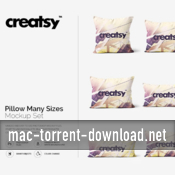
Creative Market – Pillow Many Sizes Mockup Set 1259676

Name Creative Market Pillow Many Sizes Mockup Set 1259676.zip
Size 1.57 GB
Created on 2017-02-27 03:48:39
Hash 2b4439de24be31133ed33c96d94e17206de6d507
Files Creative_Market_Pillow_Many_Sizes_Mockup_Set_1259676.zip (1.57 GB)
Descriptions for Description

Name: Pillow Many Sizes Mockup Set
File Types:
File Size: 0.22 KB
Layered: Yes

Web Site: https://creativemarket.com/creatsy/1259676-Pillow-Many-Sizes-Mockup-Set

Overview
Pillow Many Sizes Mockup Set

…………………………………………………………………………………………

● files works only in Photoshop (min. PS C4);
● pack includes 9 .psd file, file specs: 5000×3333 px 300dpi;
● 9 sizes: square, 20×54 body pillow, 20×36 king pillow, 20×30 queen pillow, 20×26 standard pillow, 16×20 small lumbar pillow, 14×36 large lumbar pillow, 12×16 boudoir pillow, 10×20 neck pillow;
● changeable colors, gradients (full range) and design (via smart objects);
● backgrounds: natural bright (with white brick), natural dark (with wooden floor), neutral and white (check preview);
● Amazon ready: white background is always included;
● well organized layers as in all of other Creatsy mockups.

Screenshots

Deluts LUTs Set 1, 2, and 3 + LUT Utility

Name Deluts LUTs Set 1 2 3 LUT Utility.zip
Size 24.09 MB
Created on 2017-02-13 22:07:16
Hash ce03bef14dc57469b77c94d83cf56ae675cefeac
Files Deluts_LUTs_Set_1_2_3_LUT_Utility.zip (24.09 MB)

Descriptions for Description

Name: Deluts LUTs Set 1, 2, and 3 + LUT Utility
Mac Platform: Intel
OS Version: OS X 10.7 or later

Requirements:
 ● DaVinci Resolve
 ● Adobe SpeedGrade
 ● Adobe After Effects
 ● Adobe Premiere Pro CC
 ● Apple FCP X and Apple Motion 5


Web Site: http://deluts.businesscatalyst.com/deluts-set-1.html


Overview
3D Luts is a set of high-precision film emulations for Davinci Resolve, Premiere Pro, Final Cut Pro X, Motion and After Effects.

3D Luts in .cube and .3dl – for use in most applications that support 3dluts.
FCPX need or LUT LUT loader utility. Adobe Premiere need lumetri, which is embedded in the current CC Premiere. In Photoshop CC you can download by LUT adjustments / Colour Lookup panel.

Screenshots

Graphicriver Watercolor Feather Wedding Invitation Set 12783475

Name graphicriver_12783475_watercolor_feather_wedding_invitation_set_photoshop_project_files_fluck3r
Size 397.6 MB
Created on 2015-09-16 00:31:52
Hash ed1875e072f5cf9dbe1645e2d0fbfc7710169e8b
Files [Graphicriver][12783475] Watercolor Feather Wedding Invitation Set – Photoshop Project Files [Fluck3r]/Message Card.zip (65.21 MB)
[Graphicriver][12783475] Watercolor Feather Wedding Invitation Set – Photoshop Project Files [Fluck3r]/RSVP.zip (63.70 MB)
[Graphicriver][12783475] Watercolor Feather Wedding Invitation Set – Photoshop Project Files [Fluck3r]/Save the Date.zip (89.80 MB)
[Graphicriver][12783475] Watercolor Feather Wedding Invitation Set – Photoshop Project Files [Fluck3r]/Thank You Card.zip (77.65 MB)
[Graphicriver][12783475] Watercolor Feather Wedding Invitation Set – Photoshop Project Files [Fluck3r]/Wedding Invitation.zip (101.2 MB)

Descriptions for Description

Name: Watercolor Feather Wedding Invitation Set
Created: 10 September 15
Last Update: 10 September 15
Layered: Yes
Graphics Files Included: Photoshop PSD
Minimum Adobe CS Version: CS3
Print Dimensions: 5x7


Create a memorable wedding with this well crafter watercolor feather wedding invitation set. The set comes with invitation (front & back design), save the date, thank you card, message card, and RSVP; one full pack to create a wonderful themed wedding.

You can easily edit & customize each of the design because every layer such as text, image, and shape are well ordered and highlighted. There is also a tutorial file to guide through the editing process.


Watercolor Feather Wedding Invitation Features:

- Req. Adobe Photoshop min. CS3

- Front & Back Design with bleed 0.25 inch

- Invitation 5×7 inch

- Save the Date 3.5×5 inch

- RSVP 3×5 inch

- Thank You Card 3×3 inch

- Message Card 5×3 inch

- Handcrafted watercolor design

- CMYK, 300dpi

- Guidelines & Safe Lines

- Editable Layers

- Help Me File


Fonts Used:

Link to the used fonts are included in the tutorial file. Just contact me if you have problems downloading them or need the fonts for free.


More information: http://graphicriver.net/item/watercolor-feather-wedding-invitation-set/12783475

Screenshots

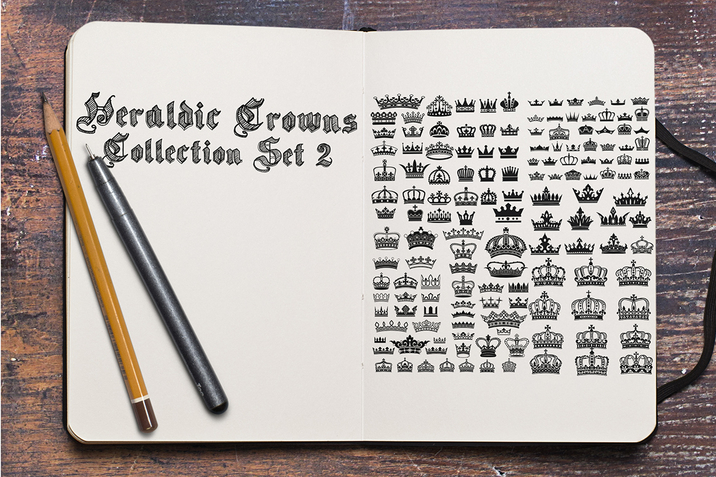
Creativemarket Heraldic Crowns Collection Set 2 105087

Name Creativemarket Heraldic Crowns Collection Set 2 105087
Size 10.45 MB
Created on 2015-01-20 19:59:31
Hash 80612798344f9f63da89738881eaec0206839849
Files Creativemarket Heraldic Crowns Collection Set 2 105087/Creativemarket Heraldic Crowns Collection Set 2 105087.tgz (10.44 MB)
Creativemarket Heraldic Crowns Collection Set 2 105087/Torrent Downloaded From ExtraTorrent.cc.txt (0.35 kB)
Creativemarket Heraldic Crowns Collection Set 2 105087/Torrent downloaded from AhaShare.com.txt (0.06 kB)
Creativemarket Heraldic Crowns Collection Set 2 105087/Torrent downloaded from demonoid.ph.txt (0.05 kB)

Descriptions for Description

Name : Heraldic Crowns Collection Set 2
Files : AI, EPS
File Size : 9.93 MB
Requirements : Adobe CS1+
Layered : Yes
DPI : 300 DPI
Vector : Yes

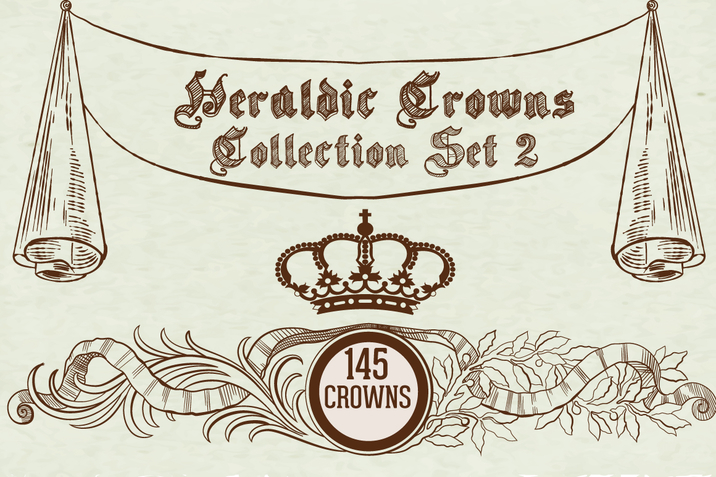
Heraldic Crowns Collection Set 2

Set of 145 crowns on the white background.
Can be used in logos or advertising in general , it gives a royal touch and elegance to any design.

Features:
100% Vector
1x EPS Files
1x AI Files
1x EPS (Illustrator 10) Files 
1x AI (Illustrator 10) Files 
Hi-res PNG File (4800x4800 px )
300DPI Resolution
Very easy to customize


Link for more information: https://creativemarket.com/Exub/105087-Heraldic-Crowns-Collection-Set-2

Screenshots

Set for iWork 3.2

Name Set for iWork 3.2 Size 267.8 MB Created on 2015-06-05 00:14:34 Tracker http://109.235.50.166:2710/announce Hash 69fe54ad96c1c0c335cdf89f52d328b8dbb15c92 Files Set for iWork 2.3/Set for iWork 2.3.dmg (267.8 MB) Download Download Description Name: Set for iWork Version: 3.2 Mac Platform: Intel Includes: Pre-K’ed OS version: 10.8 or higher 64 bit Whats new: New 80 pages templates. The ideal tool for users of iWork, Set for iWork provides you with over 1300 unique designs for Pages documents, 155 spreadsheet templates for Numbers, 110 first-class slideshow themes for Keynote, and 1733 images for illustrating your content. All templates are available in the US and international …

Copyright © 2019 Mac Torrent Download All Rights Reserved.