
Live Home 3D Pro Edition 3.7.1

Download Live Home 3D Pro Edition 3.7.1

Live Home 3D Pro is the most intuitive and feature packed home design app suitable for homeowners and professional designers, a successor of Live Interior 3D. Besides offering advanced home design tools, Pro edition provides superior export quality and Elevation View mode.

Features:

General

  • Create detailed 2D floor plans.
  • Beautiful realtime 3D rendering.
  • Unlimited floor levels. (Pro edition only)
  • A collection of indepth video tutorials.
  • Builtin Help Assistant and free, quick tech support service.
  • Project Gallery with house projects and sample rooms.
  • Native Support for Live Interior 3D Projects.

Floor Plan Tools

  • Draw complete rooms using Room tool.
  • Use Arc and Straight Wall tools for drawing walls.
  • Elevation view. (Pro edition only)
  • ‘Auto outline’ vectorbased 2D representation for furniture.
  • View realtime measurements for walls, ceilings, and floors when drawing in 2D Plan view.
  • Select the necessary measurement units (inches, feet, meters, etc).
  • Use smart Dimension tool to set the distance between underlying objects or walls.
  • Precise positioning thanks to smart guides and object snapping.

Real-Time 3D Environment

  • Adjust the lighting, add and move objects, apply materials, and more right in 3D.
  • All changes, made in 3D or 2D, are rendered in 3D in real time.
  • Walk through your 3D interior.
  • FOV (field of view) and parallel camera projection. (Pro edition only)
  • Set multiple cameras to see the house from different point of views.
  • Achieve natural lighting by setting up true Geo position, daytime and overcast.
  • Adjust light fixtures throughout your project to get realistic lighting scene.
  • Light editor helps to add a light source to an imported objects. (Pro edition only)
  • Create corner windows and complex openings using the program advanced technology.
  • Level of details tool allows to optimize 3D object and speed up the project.
  • Professional Shadow Map technique makes shadows look soft and natural.

3D Models and Materials

  • 2,000+ furniture and other models.
  • Import models seamlessly from Trimble 3D Warehouse™ (previously Google 3D Warehouse™).
  • Edit furniture in SketchUp. (Pro edition only)
  • 2,100+ supplied materials.
  • Drag and drop any image from the Finder to apply it to any surface as custom material.
  • Advanced material editor. (Pro edition only)
  • Set the exact size of a material tile to know how much of the material is needed for your house renovation project.
  • Import objects in SketchUp, COLLADA, KMZ, FBX, OBJ or 3DS formats by simply dragging and dropping them into your project.
  • Polygonalbased Block tool for drawing balconies, porches, and more. (Pro edition only)

Roofs and Dormers

  • Roof Assistant with 12 customizable roof templates.
  • Custom shaped roofs. (Pro edition only)
  • Add custom segments to fully customize your roof.
  • 16 customizable dormers.

Export and Share the Result

  • Share the result to Facebook, Twitter, Vimeo or YouTube.
  • Export 3D views to JPEG, TIFF, PNG, and BMP (up to 16000 x 16000).
  • Share 360° Panorama JPEG images (up to Ultra HD) to Facebook.
  • Render a realistic video walkthrough (up to Ultra HD).
  • Create Stereo 3D Video, 360° Video and even Stereo 3D 360° Video.
  • Quickly send a copy of your project via Mail, Messages or AirDrop.
  • Export the entire project or selected objects to COLLADA, Trimble SketchUp™, VRML Version 2.0 or X3D format.
  • Export to 3DS, FBX, USDZ and OBJ formats. (Pro edition only)
  • iCloud support.

Information

CompatibilityOS X 10.12 or later, 64-bit processor
LanguagesEnglish, French, German, Italian, Japanese, Russian, Simplified Chinese, Spanish, Ukrainian

What’s New in Live Home 3D Pro Edition 3.7.1

  • Improved compatibility with macOS Catalina.
  • Added new collection of furniture in Scandinavian style (available with in-app purchase).
  • Bug fixes and stability improvements.

Screenshots

Name Live Home 3D Pro 3.7.1 [TNT] mac-torrents.net.zip
Size 330.4 MB
Created on 2019-10-10 19:32:55
Hash cb3a4ff2d7b5fa11ac7a3bfbfa8901753e9322c0
Files Live Home 3D Pro 3.7.1 [TNT] mac-torrents.net.zip (330.4 MB)

Download

iSubtitle 3.3

Download iSubtitle 3.3

Inject subtitle tracks, chapter markers and metadata into your movies and TV-shows. The perfect companion app for your iTunes library and all your Apple devices, like the iPhone, iPad, iPod, Apple TV and Mac.

iSubtitle takes full advantage of Apple’s soft subtitle technology. The subtitle tracks are resolution independent and rendered in real-time as you watch the movie. Subtitles are always displayed at the best quality your device can perform. There are support for multiple languages in the same movie file and you can even switch language on the fly as you watch. The export and metadata tagging is fully automated so you don’t need to tweak a lot of parameters to get your movie into iTunes with beautiful tagging and artwork.

Main Features

  • Add soft, nondestructive subtitle tracks, that won’t change or alter the original movie.
  • Subtitles can be turned on/off using the interface of the device or application.
  • Complete support for multiple languages in the same file.
  • Perfect integration with your iTunes library.
  • Supports all Apple devices like the iPod, iPhone, iPad, Apple TV and Mac.
  • Supports encoding in AVC, aka H.264 and HEVC, aka H.265 (for iOS 11, tvOS 11 and macOS High Sierra).
  • Supports pass through for H.264 and H.265 video tracks and AC3 and AAC audio tracks, ie no encoding needed = fast!
  • Supports all major subtitle file formats like SubRip (.srt), SubViewer 1 & 2 (.sub), SubStation Alpha (.ssa/.ass), Spruce (.stl), iTunes Timed Text (.itt) and WebVTT (.vtt).
  • Matroska subtitles, like ssa/ass and srt, are automatically converted to soft subtitle tracks on import.
  • Sync individual subtitle tracks in realtime using the time offset stepper.
  • Automatic and manual metadata tagging.
  • Create chapter markers automatically or manually.
  • Batch reencode movies within the application to support your target device or application.
  • Smart export will only reencode your movie if really needed for it to play on your device.
  • Save inline directly to the source file if it’s already in a compatible mp4/m4v format.
  • Watch subtitled movies in fullscreen without leaving the application.
  • Works like a charm with High Sierra, Sierra, El Capitan and Yosemite.

NOTE! iSubtitle cannot add subtitles to movies or tv-shows purchased or rented in the iTunes store due to DRM protection.
NOTE! iSubtitle is not a subtitle file authoring application.

Information

CompatibilityOS X 10.12 or later, 64-bit processor
LanguagesEnglish, Dutch, French, German, Greek, Polish, Portuguese, Simplified Chinese, Spanish, Swedish, Turkish

What’s New in iSubtitle 3.3

  • Support for macOS Catalina and the new TV app replacing iTunes.
  • Automatically add the exported file to the TV app on finished export instead of iTunes.
  • Poster images on macOS Catalina are in landscape instead of portrait to fit the look of the new TV app.

Screenshots

Name iSubtitle 3.3 [TNT] mac-torrents.net.zip
Size 37.93 MB
Created on 2019-10-10 19:31:39
Hash 656cc1f042a85e69c5ccc4946b2773339a2466a3
Files iSubtitle 3.3 [TNT] mac-torrents.net.zip (37.93 MB)

Download

DropDMG 3.5.8

Download DropDMG 3.5.8

DropDMG is the easiest way to create macOS disk images, as well as cross-platform archives. Just drag and drop a folder or file and you’re done. Or, you can drag an existing disk image or archive onto DropDMG to convert it to any of the other supported formats or to burn it to CD or DVD.

Disk images pack entire folders or disks into a single compressed file, either for transport across the Internet or simply for backup. They are the only archive format whose contents you can directly access in the Finder, without the potentially slow and disk-consuming step of expanding the files into a folder.

DropDMG supports advanced options such as encrypted and segmented disk images, Retina-optimized background pictures and custom volume icons, and rich-text license agreements in multiple languages. There are many time-saving features such as configurations to keep track of your favorite combinations of settings. It can also be automated via AppleScript, the command-line, and Automator.

  • Create and convert disk images and archives with a simple drag and drop. There are also many other convenient ways to invoke DropDMG.
  • DropDMG supports all the major formats, including compressed .dmg files, .sparsebundle files, .zip and .tar.gz archives, and hybrid disk images.
  • Create .dmg disk images that are signed for Gatekeeper and macOS 10.12.

Backups, Archival, and Cloning:

  • Save disk space and network transfer time by compressing your files. Choose faster or more efficient compression.
  • Split large files or folders into multiple segments to burn them to optical discs or easily transfer them over a network.
  • Verify the integrity of your backups and archives to ensure that the media is still intact and that you’ll be able to restore them if needed.
  • Create a device image that records the exact contents of a data CD or DVD. You can then burn bootable backup copies of the disc, or doubleclick the disk image to access its contents as though the disc were still in your optical drive.
  • In one step, create a device image clone of an entire hard drive, optimized for restoring using Apple Software Restore or Disk Utility.

Encryption:

  • Encrypt files that you want to keep private. DropDMG’s encrypted, writable disk images are faster and safer than Apple’s FileVault, but just as secure and searchable via Spotlight.
  • Create encrypted, compressed disk images to securely transfer files via email, Dropbox, or FTP or to store backups safely offsite.
  • Choose from 128bit and 256bit AES encryption, approved by the U.S. National Security Agency.
  • Optionally store your passphrases in the macOS keychain, so that you can quickly create and access encrypted disk images, without the hassle of doubletyping or the risk of typos.
  • Mount disk images at specific locations in the filesystem, so that your applications can keep their support files encrypted.
  • Mount encrypted, segmented disk images without having to enter the passphrase separately for each segment.

Advanced:

  • Runs multiple operations simultaneously, so you that you can keep working while DropDMG processes in the background.
  • Takes advantage of multiple processor cores for faster compression and encryption.
  • Keeps a detailed log of all the successful operations as well as any errors, including statistics such as the throughput and how much space was saved using compression. New log entries are also reported via Growl.
  • Get detailed information about your disk images: their formats, partitions, compression ratios, checksums, etc.
  • Easily queue up bulk operations for creating, converting, mounting, verifying, getting info, burning, joining, etc. If multiple encrypted disk images share a passphrase, you only need to enter it once.
  • Process the names of the output files to add the current date or make the filename serverfriendly.

Information

CompatibilityOS X 10.7 or later, 64-bit processor
LanguagesEnglish, Danish, Dutch, French, German, Italian, Japanese, Portuguese, Simplified Chinese, Spanish

What’s New in DropDMG 3.5.8

  • The Create macOS Install Disk command works around some issues with the macOS 10.15 Catalina installer that could cause errors or the creation of incomplete installation disks.
  • Create macOS Install Disk automatically shows you the volumes list when it’s time to select the destination volume, saving you a step.
  • Updated the Create macOS Install Disk and Signing sections of the manual.
  • When calculating the size of the source folder or app, DropDMG now counts the sizes of any extended attributes. This fixes a problem where some apps (e.g. those made using the Qt framework) that include large numbers of small code-signed files wouldn’t fit on the disk image.
  • Work around a series of bugs in macOS 10.15 that sometimes caused a “Resource temporarily unavailable (-54)” error when creating a disk image with a license agreement.
  • Worked around an issue with macOS 10.14 where the log detail drawer might be slightly too short to fit all of its contents without scrolling.
  • If you have a disk image with a pre-existing license agreement and convert it with None as selected license, on macOS 10.15 the license is kept rather than deleted. This is due to a pair of bugs in Catalina (FB7362946, FB7362950).
  • Fixed a crash that could occur if there was an error creating a macOS install disk.
  • Fixed a bug that could cause a crash when a Software Update error occurred.
  • Fixed a bug with the crash reporter window and Dark Mode.

Screenshots

Name DropDMG 3.5.8 mac-torrents.net.zip
Size 24.34 MB
Created on 2019-10-10 18:25:12
Hash a6eadc049e21c4fb80c0c7f26f9249fb6e8a9aaa
Files DropDMG 3.5.8 mac-torrents.net.zip (24.34 MB)

Download

Beyond Compare 4.3.0.24364

Download Beyond Compare 4.3.0.24364

Beyond Compare allows you to quickly and easily compare your files and folders. By using simple, powerful commands you can focus on the differences you’re interested in and ignore the rest.

You can then merge the changes, synchronize your files, and generate reports for your records. You can compare entire drives and folders at high speed, checking just sizes and modified times, or thoroughly verify every file with byte-by-byte comparisons. Once you’ve found specific files you’re interested in, Beyond Compare can intelligently pick the best way to compare and display them. Text files can be viewed and edited with syntax highlighting and comparison rules tweaked specifically for documents, source code, and HTML. The text contents of Microsoft Word .doc and Adobe .pdf files can also be compared but not edited. Data files, executables, binary data, and images all have dedicated viewers as well, so you always have a clear view of the changes.

Capabilities

  • Comparison of entire folders and drives
  • Comparison of text and binary files
  • Synchronize FTPsites in just one click
  • Merging changes in text files
  • Syntax highlighting for various languages
  • Integration of the original controls
  • Convenient tabbed interface
  • Improved support for FTP protocol
  • Integrated support for secure FTP protocols
  • Adjusting the settings folder comparison
  • Multiple modes of comparison (comparison of folders, text, HEX, mp3, pictures, etc.)
  • Comparison of text files
  • Comparison of folders, zip archives, ftp sites
  • Updating websites
  • Merge code changes
  • Combining text of 3 sources
  • Comparison of independent changes to the main source for the creation of a new collaborative content
  • Integration of the original controls
  • Add commands to check the files in the SCCcompliant version control systems
  • Builtin SFTP
  • Integrated support for secure FTP protocols (SFTP and FTP over SSL)
  • Replace Text
  • Adjusting the settings folder comparison. For example, you can compare the .gif files in the same folder as the .png file to another folder with the same name
  • And much more

Information

CompatibilityRequirementOS X 10.11 or later
LanguagesEnglish

What’s New in Beyond Compare 4.3.0.24364

Notable Changes

  • macOS: Upgraded to 64-bit and re-implemented interface in Cocoa. Supported versions are now macOS 10.11 through 10.15.
  • macOS: Added support for Microsoft OneDrive.
  • macOS: Text editor enhanced with macOS-specific behavior and improved performance.
  • macOS: Added support for Full Screen mode.
  • Fixed Patience Diff alignment never completing if the last line of the comparison is an orphan.

Cloud Services

  • macOS: Added support for Microsoft OneDrive.

File Formats

  • Fixed “Description” field for new file formats including text from most recently used file format.

Misc

  • macOS: Added support for autocompletion in path edits.
  • macOS: “Check for Updates” now uses HTTPS connections.
  • macOS: Fixed ‘Reveal in Finder’ so it doesn’t ask the user for permission to automate Finder before it works.
  • macOS: Added support for per-monitor high-DPI images.
  • macOS: App bundle is now notarized by Apple.

Registry Compare

  • Windows: Fixed undo/redo handling of swapped sides.

Text Views

  • macOS: Added support for custom keybindings in ~/Library/Keybindings/DefaultKeyBinding.dict.
  • macOS: Added support for long-pressing a letter to select an accented variant.
  • macOS: Added support for system pop-up dictionary (CtrlCmdD).
  • macOS: Added support for deleting accents on characters and segments in multi-segment glyphs (CtrlBkSp).
  • macOS: Added support for Killing (CtrlK) and Yanking (CtrlY)
  • macOS: Added support for setMark:, selectToMark:, deleteToMark:, swapWithMark: keybinding commands.
  • macOS: Improved editing performance.

Text Compare

  • Fixed Patience Diff alignment never completing if the last line of the comparison is an orphan.

Crashes

  • Fixed crash when sorting Folder Compare/Sync by CRC.
  • Windows: Fixed crash on exit when overriding the locale in the registry.
  • Linux/macOS: Fixed crash when moving symbolic links across filesystems.

Screenshots

Name BCompare 4.3.0.24364 mac-torrents.net.zip
Size 34.64 MB
Created on 2019-10-10 18:07:14
Hash a4fd244411055c98ea9bc45eb35301409074f961
Files BCompare 4.3.0.24364 mac-torrents.net.zip (34.64 MB)

Download

Script Debugger 7.0.9


Download Script Debugger 7.0.9

AppleScript authoring environment that enables you to review and run the source code in order to test the applications and detect possible errors

Script Debugger provides everything you need to quickly and easily author AppleScripts that work. No other scripting tool can match Script Debugger’s capabilities for creating, editing and debugging AppleScripts.

Its sophisticated Dictionary browser provides far more information than any other tool can and eliminates guesswork and needless experimentation. Simply put, Script Debugger makes AppleScript easy.

Script Debugger lets you use its AppleScript debugger in other OSA scripting environments such as Mac OS Folder Actions, Apple Data Detectors and CGI scripting.

Script Debugger builds on our established tradition of offering the most productive environment for building AppleScript solutions of any complexity.

Its AppleScript debugger is groundbreaking in its ability to show you exactly what your script is doing at any given point. Script Debugger adds new debugging facilities to make scripting even more productive.

Information

CompatibilityMac OS X 10.10 (Yosemite) or later.
LanguagesEnglish

What’s New in Script Debugger 7.0.9

 
  • Release notes not available at the time of this post.

Screenshots


Name Script Debugger 7.0.9 [TNT] mac-torrents.net.zip
Size 59.36 MB
Created on 2019-10-10 18:59:21
Hash c60d773a69e0da6637d175d806665cf9fce37b6d
Files Script Debugger 7.0.9 [TNT] mac-torrents.net.zip (59.36 MB)

Download

Studies 1.7.2

Download Studies 1.7.2 macOS

Studies (was Mental Case) is a flashcard app for the serious student, with editions for Mac, iPhone and iPad. It’s a tool to extend your knowledge, and it doesn’t matter what it is you want to learn – medicine, law, history, driving, aviation, fine art, music, or martial arts – from simple day-to-day tidbits, to knowledge of life changing importance. Studies is an app to help you achieve your learning goals.

Features

  • Study Notes – Studies allows you to turn the information you need to learn into study notes, similar to traditional flashcards, but much more powerful. Notes can include as many sides as you like, each of which can contain text, images, audio, and even video. You can create your own, or download shared sets from Quizlet.com.
  • Due for Study – Studies includes scientifically-based learning schedules designed to make the time you spend studying as efficient as possible. Set a schedule based on your goals, from long-term learning to cramming for an exam, and Studies will automatically make notes due for study each day.
  • Study Sessions – Once you have a set of notes prepared, you can study them in beautifully presented study sessions, which make studying less of a chore. Grade yourself as you go, and studies will ensure the ones you don’t know very well will reappear more often in future sessions.
  • Statistics – Everything you study is tracked by Studies. This information is used to schedule notes for future study, but also to provide statistics and predictions on how well you know the material. You can not only see how many notes you graded right or wrong, but you also have access to estimates of how long you will remember what you are studying.
  • Selective Sync with iCloud – Many of us now carry multiple Apple devices, and having your data silo-ed on one device is a drag. Studies includes iCloud sync using the latest CloudKit technology from Apple. Add notes on your desktop Mac, and they will appear on your iPhone or iPad when you come to study them later. Even your study sessions are synced, so you can start on one device, and finish on another. You can even choose what you want to sync.
  • Sharing – Studies has a multitude of different file formats to share your study notes with others. You can export an archive that can be imported into Studies (or Mental Case) on another device. You can also import and export standard text formats like CSV and TSV, which are supported by many flashcard web sites.
  • Mental Case Migration – Studies is the next generation of the app Mental Case. If you have been using Mental Case on your Mac or iOS device, you can migrate all of your data, including the study history and scheduling, to Studies when you first launch. You should even find your data takes up much less space in Studies than it did in Mental Case.

Information

Compatibility
OS X 10.11 or later 64-bit
Languages
English

What’s New in Studies 1.7.2 macOS

  • Fixed sync issue between macOS 15/iOS 13 and earlier OSes

Screenshots

Name Studies 1.7.2 mac-torrents.net.zip
Size 32.50 MB
Created on 2019-10-10 18:07:22
Hash 6f3799fdb9379d0d81bea751eb772d37918bae79
Files Studies 1.7.2 mac-torrents.net.zip (32.50 MB)

Download

Overloud TH-U Complete v1.1.2

Download Overloud TH-U Complete v1.1.2

TH-U is able to load rig models created from real setups. The Overloud proprietary technology allows our engineers to sample and capture the response of an entire rig, including the nonlinear and dynamic response of the amplifier, the cabinet, the microphones, the mic preamplifier and the room sound. Rig To Model technology allows you to capture both analog and digital setups. The Rig Player, integrated into TH-U, allows you to reproduce any nuance of the sampled rigs.

FEATURES:

AMP TWEAK

Thanks to its innovative dsp technology, TH-U features a new panel which allows you to change the pre and power tubes models, as well as to simulate the action of a variac. This allows you to mod any amplifier model with an almost limitless combination of tubes and opens the product to new sound capabilities.

3D CABINET SIMULATION

TH-U offers a matrix of 4 microphones which can be placed anywhere in the 3D space in front and even behind the cabinet. Just drag a microphone and place it where you want.

Change the relative distance between microphones to obtain creative phasing effects, just like you would do in a real cabinet room.

6 different room types can be selected.
The ReSPiRe 2 technology allows you to choose between the real response of the cabinet and a processed version optimized to fit into a mix and avoid frequency overlap with the other instruments.

On the bass cabinets you have a separate control over the woofer and the tweeter levels.

THE NEW FRONTIER OF GUITAR AMP & FX

  • 239 models, the world’s largest collection into a single software, including:
  • 89 guitar amplifiers and 4 bass amplifiers
  • 50 guitar cabinets and 2 bass cabinets
  • 77 pedal and rack effects
  • 18 microphone models, with up to four mics on each cabinet
  • More than 1000 presets covering all musical styles
  • Randall速, DVmark速, Brunetti速 and THD速 authorized models approved by the original manufacturers
  • Amp Tweak technology, allows you to mod the amplifiers by changing the preamp and poweramp tube models, as well as simulating the action of a variac
  • Rig Player (with 20 factory rigs), allows you to reproduce rig models created by capturing real setups
  • One entire preset bank dedicated to bass.
  • 4th generation analog emulation technology, with proprietary nonlinear processing algorithm
  • 3D, gap-less positioning of microphones and room simulation
  • Advanced cabinet emulations with ReSPiRe 2 technology
  • Built-in convolver to load external guitar cab IRs
  • Flexible sound chain with split point for parallel processing
  • Fully customizable MIDI control for live usage
  • BREVERB and SpringAge based reverb effects
  • Full compatibility with TH3 user presets

Compatibility:

APPLE SYSTEM COMPATIBILITY

  • TH-U Full is available as AudioUnit, VST, AAX32 (ProTools 10.3.5 and above), AAX64 (ProTools 11 and 12) plugins, as well as a standalone application.
  • Both 32bit and 64bit are natively supported.
  • You can authorize TH-U Full on up to three computers that you own and one USB stick with a simple one-click software procedure (no hardware key needed).
APPLE SYSTEM REQUIREMENTS
  • Macintosh速 Intel Core i3 1.4GHz with 4Gb of RAM, 1280×800 video.
  • Mac OS X 10.7 Lion and above are supported.
SUPPORTED DAW ON macOS
  • ProTools 8 and above
  • Logic Pro 9 and above
  • Cubase 6 and above
  • Ableton Live 6 and above
  • Digital Performer 7 and above
  • Nuendo 5 and above
  • MainStage 2 and above
  • Garage Band 10 and above
  • Final Cut Pro X 10 and above
  • Studio One
  • REAPER

WINDOWS SYSTEM COMPATIBILITY

  • TH-U Full is available as VST, AAX32 (ProTools 10.3.5 and above), AAX64 (ProTools 11 and 12) plugins, as well as a standalone application.
  • 32bit and 64bit are natively supported.
  • You can authorize TH-U Full on up to three computers that you own and one USB stick with a simple one-click software procedure (no hardware key needed).
WINDOWS SYTEM REQUIREMENTS
  • Core i3 1.4GHz with 4Gb of RAM, 1280×800 video.
  • Windows Vista, Windows 7, Windows 8 and Windows速 10 are supported.
SUPPORTED DAW ON WINDOWS
  • ProTools 8 and above
  • Cubase 6 and above
  • Ableton Live 6 and above
  • SONAR X3 and Platinum
  • Digital Performer 7 and above
  • Nuendo 5 and above
  • Studio One
  • REAPER

Information

IncludesAll single modules and IRs are included.
Enjoy this true RSA3072 keygen!
LanguagesEnglish

What’s New in Overloud TH-U Complete v1.1.2

  • Release notes not available at the time of this post.

Screenshots

Name Overloud.TH-U.Complete.v1.1.2.MacOSX.Incl.Keygen-R2R.zip
Size 399.9 MB
Created on 2019-10-10 16:34:40
Hash 7e92cac5a6f408852353a07d5638908c74639104
Files Overloud.TH-U.Complete.v1.1.2.MacOSX.Incl.Keygen-R2R.zip (399.9 MB)

Download

Paragon extFS for Mac 11.2.16


Download Paragon extFS for Mac 11.2.16

extFS is one of the primary file systems of Linux. If you work on a Mac computer and need to read or write files from HDD, SSD or flash drive formatted under Linux, you need extFS for Mac by Paragon Software.

Write, edit, copy, move and delete files on ext2, ext3, ext4 Linux drives connected directly to your Mac!

Fast, seamless and easy to use. Mount, unmount, check, repair, and format any of your Linux-formatted volumes.

Write files to Linux drives on your Mac

Can’t copy, write, edit or delete files on Linux-formatted drives on your Mac? It’s simply because macOS doesn’t support Linux drives at all, not even in the read-only mode. extFS for Mac by Paragon Software provides fast and unlimited read/write access to ext2, ext3 and ext4 formatted drives intended for Linux systems!

Blazing Fast

  • Unprecedented performance!
  • As fast as the native macOS file system!

Fully Compatible

  • Supports macOS High Sierra
  • and older macOS

Powerful Features

  • Safe data transfer, hasslefree work, easy to use, seamless user experience

All operations just a click away!

If you need more than just a blazing fast and reliable extFS driver, our lightweight menu bar and full-featured extFS for Mac by Paragon Software apps are always at your service.

Access all your Linux ext2, ext3 or ext4 drives and perform the most common volume operations like mount, unmount, verify, and repair.

The menu bar app is designed to perform smoothly and look great in both light or dark macOS modes.

Seamless User Experience

Through Outstanding Design

If you are familiar with Apple’s Disk Utility, you already know how to use extFS for Mac by Paragon Software. If you aren’t, it will take just a moment to get up to speed.

extFS for Mac by Paragon Software inherits the best of Apple’s Disk Utility, taking it to the next level by augmenting Linux ext2, ext3 or ext4 volume operations and advanced mount options.

Mounting is under your control with advanced options

Enable Spotlight Indexing – select this option if you want instant Spotlight search, and if you want to view detailed info about how much space is being used on the selected volume for applications, music, videos, photos, etc.

Mount in Read-only – select this option if you need to access sensitive data without modifying any files.

Do not mount automatically – select this option if you want to manually control access to a volume.

Information

Compatibility
  • macOS Mojave
  • macOS High Sierra
  • macOS Sierra
  • Mac OS X El Capitan
  • Mac OS X Yosemite
Supported File Systems
  • ext2
  • ext3
  • ext4
Write AccessWhen a volume is mounted in write mode, you can do everything with the files and folders it contains: read, edit, delete, rename, create new.
AutomountEnglish
Volume ManagementEnglish
InternationalizationEnglish
Read/write support for LVM
(Logical Volume Management)With extFS for Mac by Paragon Software, your Linux’s logical volume manager won’t lose any of its functions. It will be able to perform open, close, read and write operations and, in general, operate as usual.
Compatible with
3rd party softwareextFS for Mac by Paragon Software is compatible with popular virtualization and encryption applications including VMware Fusion and Workstation, Parallels Desktop, TrueCrypt and its forks.
Support for latest
extFS featuresThe majority of ext4, the latest file system format of Linux, features are now supported: 64bit, dir_index, extent, extra_isize, ext_attr, flex_bg, has_journal etc.
Please, note that extFS for Mac by Paragon Software currently does not support bigalloc, journal_dev, meta_bg features, metadata_csum, inline_data.

What’s New in Paragon extFS for Mac 11.2.16

  • Release notes not available at the time of this post.

Screenshots


Name Paragon extFS for Mac 11.2.16 mac-torrents.net.zip
Size 37.25 MB
Created on 2019-10-10 13:28:14
Hash fc25cd32358616a7c4d21fea8098b291c708a305
Files Paragon extFS for Mac 11.2.16 mac-torrents.net.zip (37.25 MB)

Download

Maxon CINEMA 4D Studio R21.026

Download Maxon CINEMA 4D Studio R21.026

Cinema 4D is the professional 3D package for your needs. If you want to create advanced 3D graphics and need a helping hand to ensure you create jaw-dropping graphics quickly and easily, then Cinema 4D is the choice for you. It comes in four different flavours for everyone’s taste.

EASE OF USE

Getting started in the world of 3D is a blast when you can quickly create great-looking results! Cinema 4D’s intuitive and easy to understand operation and logically arranged interface makes it easy for beginners to jump right in and take control. And it never ceases to amaze professional users just how easy Cinema 4D is to use. Countless tutorials and a global, highly-skilled community play an important role in bringing beginners to a professional level of use.

INTUITIVE INTERFACE

Cinema 4D is a pillar in our users’ everyday workflow. This is why we make sure from the start that new functions work intuitively and are exactly where users will expect to find them. The Cinema 4D layout can also be easily customized to precisely fit a user’s needs and saved for later use.

STABILITY

Cinema 4D’s stability is renowned throughout the 3D community and beyond. All new features and functions are thoroughly put through their paces by our QA and beta testers before being released. Our free service packs, which are released on a regular basis, further optimize Cinema 4D and let us rapidly respond to changes in operating systems and drivers!

POWERFUL HELP SYSTEM

Any questions about a specific function can be quickly answered by right-clicking on it and jumping straight to the integrated software documentation.

Information

CompatibilityOS X 10.12.6 or later, 64-bit
LanguagesEnglish

What’s New in Maxon CINEMA 4D Studio R21.026

  • Welcome to the Deep End Cinema 4D Release 20 marks a huge leap in technology, introducing massive new frameworks that put tremendous power in your creative hands. The possibilities are endless, your creativity is unleashed – it’s time to jump in the deep end.
  • Node-Based Materials From simple references to complex shaders, you can build extraordinary materials in a node-based overview. Complex effects created via nodes can be wrapped as assets and delivered as simple materials, with just the necessary parameters exposed. Release 20’s node-based materials have the power to change the way you work, whether you directly create amazing shaders through nodes or simply make.
  • MoGraph Fields Use more than just simple shapes to control effectors, deformers, weights and more. Fields will revolutionize the MoGraph feature set, making it easy to create complex effects by combining falloffs. You’ll never use Cinema 4D the same way again.
  • CAD Data Import Say goodbye to conversion woes – most popular CAD formats can be imported with a simple drag-and-drop. Get the models you need, with the quality you want thanks to the robust and flexible import of STEP, Solidworks, JT, Catia and IGES files.
  • Volume Modeling Better Booleans are only the beginning – create models by combining shapes, splines, particles and noises. It’s all thanks the power of voxels and OpenVDB. Import and export VDB and even use volumes to control MoGraph effects.
  • ProRender Enhancements The next generation of native GPU rendering is here – and it’s packed with production-level features to help you get the job done. Render sub-surface scattering, motion blur and multi-passes on your super-charged Nvidia PC or your state-of-the-art iMac.
  • CORE TECHNOLOGY Release 20 continues a push towards modern core technology, with substantial API changes and further development on a new modeling framework.
  • MULTI-INSTANCES Manage millions of objects in Cinema 4D’s view by simply switching the Cloner to Multi-Instance mode.
  • MOTION TRACKER The power of the Motion Tracker is tamed through key workflow enhancements.

Screenshots

Name Maxon CINEMA 4D Studio R21.026 mac-torrents.net.zip
Size 289.1 MB
Created on 2019-10-10 15:31:47
Hash d8f10e0a81e536178f32a01fa85fd313642057f9
Files Maxon CINEMA 4D Studio R21.026 mac-torrents.net.zip (289.1 MB)

Download

Reeder 4.1.6

Download Reeder 4.1.6

– A news reader for the Mac with support for various sync services.

Reeder 4 adds new features like…

  • The new Bionic Reading mode
  • An in-app Read Later service which syncs with iCloud
  • Image previews in the articles list (finally)
  • An image viewer
  • Much improved article viewer
  • More layout options, including automatic layout depending on window size
  • Improved reader view

Navigate the app using gestures for a great reading experience. Customize shortcuts and gestures to fine-tune the app to your needs.

Supported sync services:

  • Feedbin
  • Feedly
  • Feed Wrangler
  • FeedHQ
  • NewsBlur
  • The Old Reader
  • Inoreader
  • BazQux Reader
  • Instapaper
  • Pocket

If you want to use a self-hosted service, Reeder should work with services which use the Fever or the Google Reader API. Or just standalone RSS (without syncing) if you don’t want to use any service.

Reeder 4 is also available for iOS.

Information

CompatibilityOS X 10.14 or later, 64-bit processor
LanguagesEnglish

What’s New in Reeder 4.1.6

  • This update addresses a potential issue when importing local RSS accounts from Reeder 3.

Screenshots

Name Reeder v4.1.6 MAS mac-torrents.net.zip
Size 17.18 MB
Created on 2019-10-10 16:06:06
Hash 5092e92b056967e53a019df4e3da72ee810832e6
Files Reeder v4.1.6 MAS mac-torrents.net.zip (17.18 MB)

Download

Audiolounge Urs Wiesendanger Rhodes Affair 2 Preset Player AU VST

                                                                                                                                                     Download Audiolounge Urs                    Wiesendanger Rhodes Affair 2 Preset Player AU VST

With the well received instrument “Rhodes Affair” we decided to follow up on the same concept and expanded the “Affair family” with much more options to increase the sound flexibility and playing pleasure. With the second generation “Rhodes Affair 2” we included 3 different plug-ins: Rhodes Affair 2 (Preset player), Rhodes Affair 2 (Premium) and Affair Drums.

Rhodes Affair 2 – Expandable Preset Player

  • 7 Instruments
  • 1. Sweet 90s
  • 2. MB s Sweet 80s
  • 3. Audiolounge Affair
  • 4. LA 85
  • 5. Trough the Fire
  • 6. Fozlove
  • 7. Better Days

Information

CompatibilityAU/VST OSX/WIN 32/64bit
LanguagesEnglish

What’s new in Audiolounge Urs Wiesendanger Rhodes Affair 2 Preset Player

  • Release notes not available at the time of this post.

Screenshots

Name Audiolounge Urs Wiesendanger Rhodes Affair 2 Preset Player Awz mac-torrents.net.zip
Size 1.94 GB
Created on 2019-10-10 13:28:01
Hash a91a17eb39d42c7eb4994e26df3af19b2df5eb9b
Files Audiolounge Urs Wiesendanger Rhodes Affair 2 Preset Player Awz mac-torrents.net.zip (1.94 GB)

Download

Movavi Video Editor 15 Business 15.5.0

Download Movavi Video Editor 15 Business 15.5.0

With Movavi Video Editor Business for Mac, you can easily create high-quality videos for your business: tutorials, marketing videos, software presentations, video blog content, and much more. Grab your clients’ and prospects’ attention and increase your income with custom videos. Promote your company through branded footage, complete with your logo and contact information. Market your product or service by uploading the video to YouTube directly from the program. Save time with the intuitive interface and fast export.

Information

CompatibilityOS X 10.7 or later 64-bit
LanguagesEnglish

What’s New in Movavi Video Editor 15 Business 15.5.0

  • Release notes not available at the time of this post.

Screenshots

Name Movavi Video Editor 15 Business 15.5.0 [TNT] mac-torrents.net.zip
Size 171.4 MB
Created on 2019-10-10 11:48:09
Hash e07bc2f09dd906a9b50ada97238269758f8c6e3b
Files Movavi Video Editor 15 Business 15.5.0 [TNT] mac-torrents.net.zip (171.4 MB)

Download

iVI 4.650


Download iVI 4.650

iVI is the best way to get your video into iTunes or Plex and the prior version was one of highest rated video converters in the App Store with 1700 five star ratings (US) since its introduction.

iVI will automatically identify TV Shows and Movies and add poster artwork, film plot or episode details, cast lists and more. iVI will format the video for all Apple platforms automatically including Mac, AppleTV, iPad, iPhone and iPod. iVI supports HD video (including 4k, 1080p and 720p), surround sound, multiple audio tracks (for various languages) and subtitles too.

Supported video formats include h.265, AVI, MKV, MTS, M2TS, FLV, AVCHD, MOD, TOD, MTS, M2TS, 3GP, MP4, MPG and most other popular formats.

Features include

  • Converts all video to play on all Apple devices including iTunes, Apple TV and iPhone
  • Convert to h265/HEVC for iOS 11 and High Sierra
  • Movie and TV Show information is automatically and added to your shows before they are placed in iTunes
  • iVI will convert multiple audio channels from the file including various languages and surround sound and these are accessible from iTunes, Quicktime, Apple TV, iPhone etc.
  • Hardware accelerated super fast video conversion
  • iVI supports SRT, VobSub, PGS, SSA/ASS subtitles from the source file or external files and these are accessible from iTunes, Quicktime, Apple TV, iPhone etc.
  • Subtitles can be downloaded and added automatically from Internet sources like OpenSubtitles and SubDB
  • iVI can scan your folders at regular intervals and automatically convert files it finds and insert the video into iTunes
  • iVI allows you to update your existing video files with information (metadata) such as show descriptions, cast lists, poster art all for display in iTunes or from the desktop without the need to reconvert
  • iVI provides a selection of poster art to choose
  • Add you own devices as you purchase them
  • PLEASE NOTE : iVI will not convert files protected with DRM or import DVDs. Please ensure you own the files you convert with iVI

Information

CompatibilityOS X 10.11 or later, 64-bit processor
LanguagesEnglish, French, German

What’s New in iVI 4.650

  • iVI now supports hardware acceleration for HEVC/h.265 conversions
  • Added ability to output subtitles as a separate file rather than embedded into video for media players like Plex
  • Added iPad Pro 3rd Gen and iPhone XS to devices
  • Improved French Translation
  • Other fixes

Screenshots


Name iVI 4 4.650 MAS [TNT] mac-torrents.net.zip
Size 101.5 MB
Created on 2019-10-10 11:47:58
Hash d93e3f449b260592fdeaf0e1585090b86fb6fc1b
Files iVI 4 4.650 MAS [TNT] mac-torrents.net.zip (101.5 MB)

Download

Audiolounge Urs Wiesendanger Rhodes Affair Drums AU VST


Download Audiolounge Urs Wiesendanger Rhodes Affair Drums AU VST

With the well received instrument “Rhodes Affair” we decided to follow up on the same concept and expanded the “Affair family” with much more options to increase the sound flexibility and playing pleasure. With the second generation “Rhodes Affair 2” we included 3 different plug-ins: Rhodes Affair 2 (Preset player), Rhodes Affair 2 (Premium) and Affair Drums.

Affair Drums – Expandable Drum Preset Player

  • 31 High End Quality Drum and Percussion Sounds
  • Playable via MIDI Keyboard or MIDI Controller
  • Multi Outputs BD/SD can be selected
  • Mixer Integrated: Pan and Volume
  • Master Reverb adjustable
  • Dynamic Range Adjust

Information

CompatibilityAU/VST OSX 32/64bit
LanguagesEnglish

What’s new in Audiolounge Urs Wiesendanger Rhodes Affair Drums

  • Release notes not available at the time of this post.

Screenshots

Name Audiolounge Urs Wiesendanger Rhodes Affair Drums AU VST Awz mac-torrents.net.zip
Size 27.31 MB
Created on 2019-10-10 11:32:59
Hash 9a7511b85c1720c60b36a411d5f7be5333745a11
Files Audiolounge Urs Wiesendanger Rhodes Affair Drums AU VST Awz mac-torrents.net.zip (27.31 MB)

Download

Accusonus Rhythmiq v1.0.3


Download Accusonus Rhythmiq v1.0.3

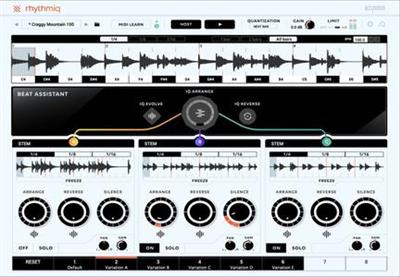
Rhythmiq uses A.I. to help you turn your tracks into a performance in a way that was previously thought impossible. Rhythmiq is fundamentally different from anything else you’ve seen. It allows you to re-shape your loops in real time and safely improvise with them while performing live. It’s your new ‘bandmate’ who learns from you. Ιt will boost your inspiration and it will help you create unique live-evolving compositions.

Rhythmiq analyzes and understands your beats and instantly allows you to create new arrangements. You get unlimited, musically structured and fun rhythms, by turning a simple knob. Generate and save pattern variations, for instantly playable breaks, fills and build-ups. Enable the A.I. Beat Assistant and let it perform your loops in real-time. The Beat Assistant injects your beats with everything from nuanced micro-variations to musical, evolving changes. Although Rhythmiq uses ground-breaking A.I. technology, it is still controlled by you. Launch it while you are playing live or jamming in the studio, tell it how much variability you want and you will experience a new way to jam with your beats and find inspiration.

With Rhythmiq, you’ll be able to:

  • Use A.I. to jam with your beats and finish your tracks.
  • Generate infinite breaks, fills and build-ups from the same beat or layered stems.
  • Perform your beats live, no finger drumming required.
  • Enable your A.I. Beat Assistant and let it create endless variations of loops in real-time.
  • Create musical rhythmiq variations just by turning a simple knob.
  • Use simple knobs to control rhythmiq’s decision making in real-time.
  • Turn off your screen and experience the future of real-time beat manipulation.

Features

Instantly jam with your stems

Jam with your beats like never before. Get unlimited beat variations with the turn of a single knob. Generate and save new Rhythmiq patterns and create breaks and build-ups. Enable your A.I. Beat Assistant and let Rhythmiq perform your beats in real-time, like you were jamming with a human band-mate.

Meet your Beat Assistant

Your new “virtual electronic drummer” analyzes your beats and introduces nuanced micro-variations or musical, evolving changes. This will allow to focus on other parts of your music while your beat is organically evolving.

Fine-tune Rhythmiq’s A.I. in real-time

Although it uses ground-breaking A.I. technology, Rhythmiq is still controlled by you. Decide how much density, space and variation you need. Experience the new way to perform your beats and find inspiration.

Save and Launch beat variations, always in sync

Generate breaks, fills and build-ups from your beats or layered stems and save them without stopping the music. Stay-in-the flow while you transform your beats into a performance. Use your hardware controller to shape your sequences and manipulate your beats. Use Rhythmiq’s arrange, reverse and silence functions to perform your stems live or to jam in the studio.

Information

Compatibility10.10 or later (64-bit)
LanguagesEnglish

What’s new in Accusonus Rhythmiq v1.0.3

  • Release notes not available at the time of this post.

Screenshots

Name Accusonus Rhythmiq v1.0.3 R2R mac-torrents.net.zip
Size 304.6 MB
Created on 2019-10-10 11:16:29
Hash a7fcc88dbb3168a2b9871832e2df222943323ae6
Files Accusonus Rhythmiq v1.0.3 R2R mac-torrents.net.zip (304.6 MB)

Download

Delta-V Audio SpaceCraft v1.0.33


Download Delta-V Audio SpaceCraft v1.0.33

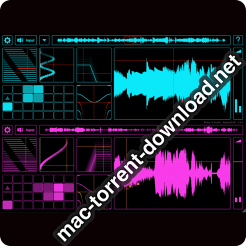
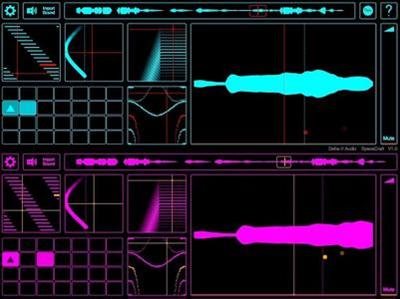
The hugely popular iOS app by Delta-V Audio has come to the desktop! SpaceCraft Granular Synth is well known for providing instant gratification and inspiring creative flow. Two parallel granular engines provide grain frequency/length control, sample position LFO, stereo reverb/filter and pitch/ring-modulation. The innovative grain pitch sequencer, MIDI / MPE and live sampling capability open up further depths of performance and expression.

Innovative Granular Engine

Grain pitch is controlled by a unique, arpeggiated note/grain sequencer grid which is capable of a wide range of styles spanning classical granular effects, lush sample layering and organic rhythmic effects. Over 24 scales provides a wealth of melodic possibilities. With the grain control XY pad you can seamlessly morph from granular chords and drones to arpeggiated rhythmic sequences.

Elegant Single Page GUI

The focused GUI encourages a creative, interactive experience. With carefully chosen components presented in a single page layout, the user can quickly dive into sound design without the need for time-consuming configuration of parameters and mappings, it’s all there in front of you. Reactive visualisation with a choice of fifteen colour themes provides an engaging audiovisual experience.

MIDI and MPE

Any sample loaded or recorded into SpaceCraft instantly becomes a playable MIDI or MPE instrument with no need to configure mappings. Plug in an MPE device, SpaceCraft becomes a tactile, exploratory experience allowing for expressive pads, and singing melodies: 16 note polyphony provides per-note pressure control, pitch-bend (Glide) and grain position modulation (Slide). Modulating the grain position over the sample (via Slide) allows for expression of timbre, driven by the timbral changes in the sample itself.

SPECIFICATIONS

The desktop version of SpaceCraft unlocks the enhanced capabilities:

  • Multitouch compatible interface
  • Drag and drop samples directly into GUI
  • Enhanced, higher fidelity granular engine DSP
  • Up to x8 the number of grains (CPU dependent)
  • Up to 16 minutes sample duration (RAM dependent)

Information

CompatibilitymacOS 10.11 or later, 64-bit
LanguagesEnglish

What’s new in Delta-V Audio SpaceCraft v1.0.33

  • Release notes not available at the time of this post.

Screenshots

Name Delta-V Audio SpaceCraft v1.0.33 Patched and Keygen-R2R mac-torrents.net.zip
Size 25.53 MB
Created on 2019-10-10 11:01:32
Hash af780a13a77af42751dce032603a84173828cdd2
Files Delta-V Audio SpaceCraft v1.0.33 Patched and Keygen-R2R mac-torrents.net.zip (25.53 MB)

Download

Mok Waverazor v2.0.9


Download Mok Waverazor v2.0.9

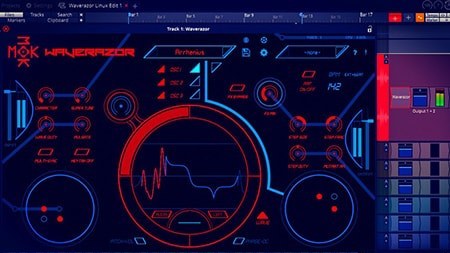
Unleash your dark side with Waverazor — a futuristic synth that gives you the power to splice waveforms into aggressive new sounds. The patent-pending oscillator design utilizes a new form of synthesis to produce biting leads, glitched-out basses, cinematic pads and everything in between.

Futuristic Virtual Synth

Twist and torture every parameter of sound using a central oscilloscope for precise waveform creation. Morph multiple parameters at once using an array of performance controllers. The collection of included presets provides a launchpad into endless sonic exploration.

Waverazor features:

  • Patent-pending oscillator design dynamically slices and recombines waveforms
  • Up to three oscillators and three filters per voice
  • Built-in oscilloscope enables precise waveform creation
  • Two X/Y performance controllers and one X/Y wave segment control
  • Nine performance knobs and three performance buttons
  • Compatible with AU/VST/AAX on Mac, PC, and Linux
  • Support for 21 languages

Information

CompatibilitymacOS 10.8 or later
LanguagesEnglish

What’s new in Mok Waverazor v2.0.9

  • Release notes not available at the time of this post.

Screenshots

Name Mok Waverazor v2.0.9 Kg-R2R mac-torrents.net.zip
Size 92.68 MB
Created on 2019-10-10 10:49:44
Hash 13669359a26cad45b69d39c16879c0598d2fd289
Files Mok Waverazor v2.0.9 Kg-R2R mac-torrents.net.zip (92.68 MB)

Download

WiFi Scanner 2.9.2

Download WiFi Scanner 2.9.2

Using WiFi Scanner you’ll see nearby wireless access points and their details, including channels, signal levels (RSSI), noise, channel width, and MAC address, signal quality, maximum data rate, encryption, and much more. Also includes upload and download speed testing to quickly measure and analyze WiFi Internet performance problems.

Simple, fast wireless network discovery of 802.11 a/b/g/n/ac access points. WiFi Scanner is great for determining the best position for an access point at home or in the office. After selecting the best position, the optimal channel to use can be determined by selecting the least used channel resulting in improved WiFi speeds.

Key Features

  • Simple, fast wireless network discovery of 802.11 a/b/g/n/ac access points.
  • Connect to detected networks using join button
  • Full support for both 2.4 and 5 GHz networks
  • Support for all channel bandwidths (20, 40, 80, and 160 MHz)
  • Display detailed wireless network parameters: network name (SSID), signal level (RSSI), MAC address (BSSID), signal quality, channel, maximum data rate, encryption, etc.
  • Display changes in signal level over time in graphical form.
  • Filter list of detected wireless networks by specified parameters (SSID/network name, channel, channel band, signal strength)
  • Display wireless connection statistics in the form of graphs and tables.
  • Give each access point a custom label
  • Export results to comma separated value (CSV) files
  • Generate summary reports in HTML format

WiFi Speed Testing

  • Upload and download WiFi speed testing
  • Use speed testing feature to troubleshoot WiFi networks
  • Auto run speed test when client roams to different access point
  • Auto repeat speed test with wait time between tests

“Who’s On My Network” (IP Scanner)

  • Fast IP scanner that detects unknown devices connected to your WiFi network.
  • Detects hostnames, determines the MAC address, and in some cases can autodetect device type (phone, laptop, router, etc).
  • Configured icon for discovered devices is saved for future scans.
  • Scanning results can be saved to CSV file via menu export option.
  • Great for finding WiFi “Piggybackers”.

Advanced Features (supported by some access points)

  • Display access point name if configured by network administrator
  • Display number of devices connected to each access point
  • Display channel utilization
  • Display if 802.11r is enabled and type
  • Display if WiFi protection mechanisms are enabled

WiFi Scanner is the most feature rich and complete WiFi scanning app on the app store and is a great tool for personal use and for IT professionals. All features available on 10.7 and later (Lion, Mountain Lion, Mavericks, and Yosemite, El Capitan, Sierra. Use WiFi scanner to find WiFi dead zones and select the best configuration for your WiFi access point / router to prevent video buffering.

Information

CompatibilityOS X 10.9 or later, 64-bit processor
LanguagesEnglish

What’s New in WiFi Scanner 2.9.2

  • bug fixes and improved performance

Screenshots

Name WiFi Scanner 2.9.2 MAS [TNT] mac-torrents.net.zip
Size 25.66 MB
Created on 2019-10-10 09:40:16
Hash 20203e9869cd2e377910be9ef76dfa151588fff1
Files WiFi Scanner 2.9.2 MAS [TNT] mac-torrents.net.zip (25.66 MB)

Download

Easy New File 4.6

Download Easy New File 4.6

Easy New File is a finder extension which adds some functions in right click menu in the Finder

Features

  1. Quick new file
  2. Copy file path
  3. Support all common file extension, such as text file ,word document ,excel,keynote,richText document ,shell,Python Script, Swift…
  4. Quick open Terminal.
  5. Add custom file template by yourself.
  6. Support External Disk Create New File.

Q: How to enable ?
A: Go to System Preferences->Extensions->Enable Easy New File

Information

CompatibilityOS X 10.10 or later, 64-bit processor
LanguagesEnglish, French, German, Hindi, Italian, Japanese, Korean, Polish, Russian, Simplified Chinese, Spanish, Traditional Chinese

What’s New in Easy New File 4.6

  • Fix Display Issues.

Screenshots

Name Easy New File 4.6 MAS [TNT] mac-torrents.net.zip
Size 21.42 MB
Created on 2019-10-10 09:40:36
Hash f6e30bb18c229857dc0ddd7928084e9f54316363
Files Easy New File 4.6 MAS [TNT] mac-torrents.net.zip (21.42 MB)

Download

ZOC Terminal 7.24.3

Download ZOC Terminal 7.24.3

ZOC Terminal is a Telnet/SSH/SSH2 client and terminal emulator. Featuring tabbed sessions, typed command history, scrollback, and multi-window support, ZOC Terminal’s implemented emulations have made it the preferred tool for anyone who needs to access Unix shell accounts from a Windows or OS X platform.

Features

User Interface

  • Tabbed sessions with overview screen to show thumbnails of all open sessions
  • Session tabs can be moved between windows
  • “Colorful tabs” feature to tint user interface elements with different colors depending on which host is connected
  • Full keyboard remapping (e.g. to send text, perform functions, execute programs, etc.)
  • Host directory with folders and full option set for each entry and automatic login sequences
  • User button bar to map texts, scripts, phone book entries, external protocols and shell commands to buttons (incl. subfolders in the button bar)
  • FMacro keys for texts, scripts, phone book entries, external shell commands, etc.
  • Local typing (entry field with history e.g. to type commands)
  • Various logging and scroll back functions
  • Keyboard mode for bbs door programs (doorway mode)
  • Compatible with current Windows 10 and macOS Sierra operating systems (more details below)

Emulation

  • Full Xterm emulation with 256 colors and mouse support (e.g. for use with Midnight Commander)
  • Linux consolelike (including UTF8, colors, full keyboard)
  • VT52, VT100, VT102, VT220 (complete implementation incl. print through, keyboard and ANSI colors)
  • TN3270 (models 3278 and 3279/E with line graphics, colors and full keyboard mapping)
  • TN5250 for IBM iSeries access
  • ANSIBBS, ANSISCO, Avatar
  • SunCDE
  • Wyse WY30, WY50, WY60
  • TVI 9xx (TVI 920, TVI 925, TVI 950)
  • QNX V4
  • ATT4410
  • TTY
  • All emulations support line graphics with any font

Communication

  • Modern Secure Shell (currently based on OpenSSH 7.0) with public/private key authentication, smartcard support (pkcs#11) and port forwarding (tunneling)
  • Telnet (RFCTelnet, pure TCP sockets), SSLTelnet (with TLS 1.2 support)
  • IPv6 support for SSH and Telnet
  • Modem via serial port and TAPI (Windows modem)
  • Direct serial console connections via local serial port or USB/serial adaptors with FTDI chipset or Keyspan or PL2303
  • Supports BreakSignal for serial Connections (e.g. for CISCO devices)

Rlogin

  • ISDN via CAPI V2.0 (including X.25 and X.31 support)
  • File transfer via Ascii, Xmodem, Ymodem, Zmodem, Kermit, SCP, IND$FILE
  • Translation of inbound/outbound characters

SSH (Secure Shell) Features

  • Based on industry reference implementation OpenSSH
  • Client supports latest encryptions like ED25519 SHA256, SHA2 or AES256ctr
  • SSH public/private key, key certificate, keyboard interactive or password authentication
  • Dynamic port forwarding (client as a SOCKS proxy)
  • X11 forwarding (lets you run XWindows applications in the remote session)
  • Static port forwarding (tunneling of connections to predefined destinations)
  • Proxy support (client connects to server through proxy or jumpserver/jumpdrive)
  • SSH Agent forwarding between client and server
  • support for PuttyAgent (Windows) and sshagent (macOS)
  • Client side SSH key generator
  • SCP file transfer through terminal emulation session
  • SSH client protocol versions 1 and 2
  • SSH KeepAlive

Logging

  • Scroll back in three variantes (in window, in separate Window and data view in separate window)
  • Auto Highlight (text on screen can be monitored and special phrases can be highlighted automatically)
  • Raw data trace to file (text and binary mode)
  • Hex debug mode on screen
  • Filelog of all incoming data including optional time stamps
  • Printer log of all incoming data
  • AutoHighlight (automatic color highlighting of predefined words or phrases)
  • Print screen and screen to clipboard functions

Automation

  • AutoLogin (recorded login procedures from the host directory)
  • REXX language for scripting (fully featured programming language with over 75 extensions to control the terminal emulator)
  • DDE support allows ZOC to act as a communication server (Windows)
  • AppleScript support with access to all internal script commands (macOS)
  • Auto Macros (text/functions invoked by typing certain text)
  • Auto Replies (text/functions invoked by receiving certain text)
  • Functions and special escape sequences to automatically exeute local applications (NetTerm compatible)

Information

CompatibilityIntel OS X 10.6 or later
LanguagesEnglish

What’s New in ZOC Terminal 7.24.3

Changed:

  • Transfer>Send-Text-File function now remembers file type choice (text files, all files, Windows only)

Fixed:

  • Reordering host directory sections sometimes resulted in incorrect order of sections (macOS only)
  • Disconnecting an ssh session during an in-terminal password prompt stalled the connection
  • Incorrect default G1/G2/G3 character sets in xterm emulation

Screenshots

Name ZOC Terminal 7.24.3 mac-torrents.net.zip
Size 13.03 MB
Created on 2019-10-09 22:08:29
Hash 87f662f6812b52312e115140a3001cfd9f87d532
Files ZOC Terminal 7.24.3 mac-torrents.net.zip (13.03 MB)

Download

Viscosity 1.8.1

Download Viscosity 1.8.1

Viscosity is an OpenVPN client for Mac, providing a rich Cocoa user interface for creating, editing, and controlling VPN connections. Viscosity provides a complete OpenVPN solution for OS X 10.5 Leopard, and does not require any additional downloads or software.

With Viscosity and OpenVPN you can securely connect to your home or company network from a remote location, protect your network traffic when using public or wireless networks, access websites with country restrictions, and tunnel through restrictive firewalls and proxy servers to give your computer full Internet access. Viscosity can connect to any VPN server running OpenVPN, including most popular free and commercial VPN providers. Viscosity allows connections to be completely configured through a GUI, without any need to know how to use the command-line or OpenVPN’s configuration file syntax. Advanced users still have full manual control over configuration options if desired.

Features

  • Cocoa GUI
  • Connection and traffic statistics
  • Multiple simultaneous connections
  • Robust DNS Support
  • Keychain integration
  • System proxy integration
  • Deployment features designed for enterprise
  • Easy connection importing
  • Growl integration

Information

CompatibilityOS X 10.9 or later
LanguagesMultilanguage

What’s New in Viscosity 1.8.1

Added:

  • Improved support for deploying Viscosity in managed environments

Improved:

  • Ignores unnecessary pushed route-delay commands

Fixed:

  • Workaround to allow loading the PKCS#11 driver for SafeNet tokens
  • Various bug fixes and enhancements

Screenshots

Name Viscosity 1.8.1 mac-torrents.net.zip
Size 23.93 MB
Created on 2019-10-09 22:16:20
Hash 4253d82f079d851529f4718be589ac78cd725565
Files Viscosity 1.8.1 mac-torrents.net.zip (23.93 MB)

Download

Sonarworks Reference 4 Studio Edition v4.4.0


Download Sonarworks Reference 4 Studio Edition v4.4.0

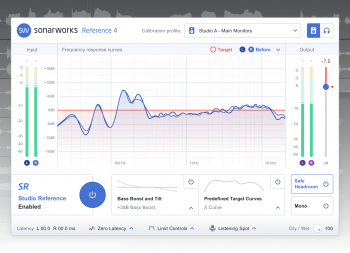
Reference Systemwide upgrade calibrates all of your outgoing audio. Finally a dependable sound standard is now available outside of DAW for seamless production and referencing. No more dragging files into your DAW project just to have a listen or figuring out how to check if your kick blasts as hard as the best of them on Soundcloud.

Features

Response Curve view

Add or remove various frequency response curve visualizations to your frequency graph. See your room sound before and after the correction, look at your left and right driver response individually or follow your overall phase alignment while using different filter modes.

Reference Curve Presets

Enhance your mixing and listening experience by choosing between our predefined reference curves and speaker simulations. Reference, guide and choose between several popular speaker simulations by tilting, adding or decreasing some bottom end.

Reference sound everywhere

Reference 4 Systemwide allows using calibrated sound for critical listening from any playback source. No more dragging files into your DAW project just to have a listen or figuring out how to check if your kick blasts as hard as the best of them on Soundcloud.

Mono Monitoring

Mono never left! There is a handy option to switch your mix to mono, but still maintaining a stereo correction, giving you an easy way to check if your mix will sound good in mono as well.

Avoid clipping

Our Audio Calibration Engine boosts some frequencies to fill in the frequency response dips, and to make your speakers sound precise. By flipping the “avoid clipping” switch you will ensure that your audio output does not get become distorted when calibrated.

Dry/Wet control

This is not a conventional Dry/Wet knob that is used to mix the effect in parallel! The correction curve is actually being smoothed out when you raise or lower this knob to gradually reduce or increase the effect of a calibration.

Developer Website

What’s new in Sonarworks Reference 4 Studio Edition v4.4.0

Systemwide

  • New Presets sidebar allows easier management of user output devices and calibration profiles. More info regarding this can be found here.
  • [Win] Users can now launch Systemwide in ASIO mode if their output device does not support WASAPI. You can find the option to do so in Settings – Audio.
  • Starting from this release onwards Systemwide will detect if a new version is released and notify the user. User can also manually check for updates from Systemwide GUI. Disable the notifications from Settings – Notifications.
  • [macOS] Support for macOS 10.15 Catalina added
  • Output channels can be selected separately, as opposed to having them in pairs. Useful for switching the Left/Right channels or configuring more complex setups.
  • Retry button now available if license activation fails due to network issues.
  • Systemwide starts in Dark Theme for new users if their operating system is set to dark mode too.
  • User has the option to disable the GPU process, which can decrease energy consumption but might introduce visual artifacts. Find the option in Settings – General.
  • Setup guide flow slightly improved to provide more clarity for new users.
  • [macOS] Fixed a bug that caused multiple notifications to appear at the same time.
  • [Win] Fixed a bug that prompted users to calibrate unsupported devices, crashing the playback engine.
  • [Win] Fixed an issue with a white border for the title bar in the Dark Theme.
  • [Win] Added the missing title for Systemwide in the taskbar.
  • Added the version and build numbers to the license information view.
  • Minor design and performance updates.

Plugin

  • Starting from this release onwards Reference Plugin will detect if a new version is released and notify the user. User can also manually check for updates from the Plugin.

Screenshots

Name Sonarworks Reference 4 Studio Edition v4.4.0 Patched and Keygen-R2R mac-torrents.net.zip
Size 293.3 MB
Created on 2019-10-09 18:56:34
Hash b447d429951072c34e05c091abc1de02b6b03751
Files Sonarworks Reference 4 Studio Edition v4.4.0 Patched and Keygen-R2R mac-torrents.net.zip (293.3 MB)

Download

iExplorer 4.3.6

Download iExplorer 4.3.6

iExplorer is the ultimate iPhone manager. It transfers music, messages, photos, files and everything else from any iPhone, iPod, iPad or iTunes backup to any Mac or PC computer. It’s lightweight, quick to install, free to try, and up to 70x faster and more resource efficient than the competition.

Features:

  • All the best technology from Phone to Mac, Phone Disk, and iExplorer 3, and then some
  • One-click recovery of music and videos straight to iTunes
  • Explore and export photos and videos (even from older iPods)
  • Mount any folder or category, including playlists and photo albums, then browse in Finder and open with other apps
  • Browse any iTunes backups (encrypted too). Export: Messages (including attachments), notes, voicemail, call history, contacts, calendars…
  • Works with all types of iPhones, iPads, iPod Touch, and regular iPod

Intelligently Transfer Music to iTunes

iExplorer lets you easily transfer music from any iPhone, iPod or iPad to a Mac or PC computer and iTunes. You can search for and preview particular songs then copy them to iTunes with the touch of a button or with drag and drop. Looking to transfer more than just a few tracks? With one click, iExplorer lets you instantly rebuild entire playlists or use the Auto Transfer feature and copy everything from your device to iTunes.

Export iPhone Text Messages

Call them what you want, in the last few years we’ve seen texting (SMSs, iMessages, text messages, etc.) rocket in popularity. These messages are replacing phone calls, voicemails and even emails. We understand that your SMSs and iMessages can be priceless to you and that’s why we’ve spent so much time developing the best tool to help you view, export and archive your messages and attachments. The iExplorer SMS client looks great and even works with group messages, images, and other message attachments too!

Mount iPhone & iPad to Mac’s Finder & Windows Explorer

iExplorer’s disk mounting features allow you to use your iPhone, iPod or iPad like a USB flash drive. You can view your iPhone’s photos directly in Finder or Windows Explorer like you would from any other digital camera. You’re also able to get file system access to data contained within the apps or other directories on your device.

Want to back up or move your games’ high scores from one device to another? How about saving files directly to or from your favorite file manager such as iExplorer’s iOS App iExplorer Mobile? iExplorer can do all of that and more.

Export Voicemails, Address Book Contacts, Calendar Events, Reminders, Notes & More…

We’ve crafted seven magnificent utilities into iExplorer that allow you to browse, preview, save, and export the most important information in the databases of your iPhone or iPad.

View your appointments, calendar events, and your call history. Listen to your iPhone’s voicemail messages and export them to a folder on your computer. Everything is always just a couple of clicks away. Be in charge of your content.

Access Photos, Files & Everything Else

With iExplorer, you can access more files and folders without modifying (jailbreaking) your device than ever before. Need to access photos on your iPhone or iPod? Can do. Want to access the files and folders of your device’s apps? Done. How about browsing through your iTunes backups? Check. What about the media folders containing your iTunes purchases? We’ve got that too. What about files in apps that are synced to iCloud? Yes, even that.

iExplorer also works great if your iPhone is Jailbroken. With AFC2 access, the app can read and write to the iOS device’s real root (For advanced users only!). iCloud access is for Mac only.

Information

CompatibilityOS X 10.10 or later 64-bit
LanguagesEnglish

What’s New in iExplorer 4.3.6

  • Release notes not available at the time of this post.

Screenshots

Name iExplorer 4.3.6 [TNT] mac-torrents.net.zip
Size 39.78 MB
Created on 2019-10-09 20:57:19
Hash fcfb746cb8181578cacbd5888359aec285c88077
Files iExplorer 4.3.6 [TNT] mac-torrents.net.zip (39.78 MB)

Download

Adguard 2.1.4 (619)

Download Adguard 2.1.4 (619)

Adguard can make your online experience safer because, though Macs and Apple laptops are quite safe to use, when it comes to ad blockers, Macs experience real problems. Already-existing solutions do not consider the specifics of OS X. That greatly influences the stability of work in Safari, and these ad-blocking extensions fail to do their work properly, especially when video ads are an issue.

New Adguard lets you fully enjoy web surfing without any distractions. Watch those videos you want to watch, and not video ads, on YouTube, Twitch, or any other website. Look at photos of your friends and not at endless banners on Facebook and other social networks. Adguard gives you freedom of choice and saves your nerves. It works perfectly with all browsers, as it was developed specially for use on OS X.

Features

  • Ad Blocker. Subtle filtering of all incoming traffic, and what is more, ads are blocked before they load to the page.
  • Browsing Security. Adguard checks every page for any malicious content using our databases, and blocks requests from potentially dangerous ones.
  • Privacy Protection. Any counters and tracking instruments will be blocked by powerful Spyware filter. With Adguard you can stop worrying for the privacy of your actions on the Internet.
  • Adguard works in all browsers. Safari, Chrome – you name it. No exceptions.
  • Easy to install. A couple of clicks, and your Mac is protected from ads. You don’t have to struggle with overcomplicated settings – just surf the net and Adguard will do all the work.
  • Blocking video ads. Any video ad, on any site – Adguard will block it.
  • Application filtering. Adguard is more than just an addon for browser. It can help you to get rid of ads in any app on your Mac.
  • Is supported in all OS X versions from 10.7 64-bit and higher.
  • Adguard has intuitive and simple UI with such additional features like Adguard Assistant and filtering log.
  • Daily ad filters and phishing databases updates.

Information

CompatibilityOS X 10.10 or later 64-bit
LanguagesEnglish

What’s New in Adguard 2.1.4 (619)

  • Release notes not available at the time of this post.

Screenshots

Name AdGuard 2.1.4.619 [TNT] mac-torrents.net.zip
Size 73.58 MB
Created on 2019-10-09 19:54:01
Hash 5565de7dcf889ebcdcc0cbeb3a3d6c63991c5c4c
Files AdGuard 2.1.4.619 [TNT] mac-torrents.net.zip (73.58 MB)

Download

Keka 1.1.20

Download Keka 1.1.20 mac-torrents.net.zip

Keka is a full featured file archiver, as easy as it can be.

With Keka you can compress as many files as you want in a bunch of formats. Divide files and protect them with a password is now a kids game. Just drop the files you want to compress to the Keka icon in the Dock or the main window.

Also Keka can extract lots of compressed files, from ZIP and 7Z to RAR archives, even parted ones. Just double click on those files and they will be extracted using Keka, or drop them to the icon in the Dock or the main window.

FEATURES:

So simple, so strong

You do not even need to open Keka to compress a file, keep it in your dock and use it from there.
Just drag and drop your files and folders to the Dock icon or the Keka window to create a slimmer version of them.

Privacy is very important

Share safely just setting a password and creating highly encrypted files.
Using AES-256 encryption specification for your 7z files and Zip 2.0 legacy encryption specification for your Zip files.

Still too big…

If the files are really huge and they do not fit your mail or server, just split them into pieces.

Don’t worry, they will still expand to produce your original file ?

Keka can create files in these formats:

7Z ZIP TAR GZIP BZIP2 XZ LZIP DMG ISO

And extract all of these formats:

7Z ZIP ZIPX RAR TAR GZIP BZIP2 XZ LZIP DMG ISO LZMA EXE CAB WIM PAX JAR WAR IPA APK APPX XPI CPGZ CPIO

Information

Compatibility10.9 or later, 64-bit processor
LanguagesMultilangual

What’s New in Keka 1.1.20

  • Updated UNRAR from 5.70 to 5.71 (Thanks to rarlab)
  • Added Vietnamese translation (Thanks to @1234hdpa) #449

Screenshots

Name Keka 1.1.20 mac-torrents.net.zip
Size 28.14 MB
Created on 2019-10-09 16:02:19
Hash 1e35cf6c86ef5a198a4d32a2328b27faa5ef5992
Files Keka 1.1.20 mac-torrents.net.zip (28.14 MB)

Download

Folx Pro 5.11.13873

Download Folx Pro 5.11.13873

Folx is download manager for Mac OS X with a true Mac-style interface. It offers convenient downloads managing, flexible settings, etc. Folx has a unique system of sorting and keeping the downloaded content.

PRO version of Folx enables torrents search directly from the application. With Folx PRO you don’t need to browse through multiple torrent trackers to find what you need. Enter a keyword in Folx, and it will search for it in its extensive list of torrent trackers and display a list of relevant results.

Folx Downloader Features

Fast downloading PRO

Folx PRO can split the downloads in up to twenty threads, which can dramatically increase the download speed.

Speed control PRO

Gain full control over the downloading speed by either adjusting it manually or allowing Folx to do that automatically for optimal traffic allocation.

Scheduling of downloads PRO

You can choose the most suitable time for starting the download and set up how Folx will behave upon finishing the download: shut down the system, switch to sleeping mode, or simply quit Folx.

iTunes integration PRO

All music and videos downloaded with Folx can automatically go to iTunes playlists with the names as the tags assigned to downloads.

Remember login and password PRO

When starting new downloads from websites requiring authentication, you can ask Folx to remember login and password. Next time Folx is downloading from this website, you won’t need to enter login and password. You can also keep passwords for FTP and HTTP websites in Folx. Free version of Folx lets you save two entries. Websites requiring web authentication are also supported.

Download videos from Internet PRO

Download videos from the web with Folx with the possibility to set the format for the downloaded video. You can also download age-restricted and private videos. When you don’t actually need the video and only want to have a soundtrack from it, Folx is of great help! Downloads can be performed manually, immediately upon the video discovery or at a certain schedule.

Information

CompatibilityOS X 10.9 or later 64 bit
LanguagesEnglish

What’s New in Folx Pro 5.11.13873

  • Added: compatibility with macOS 10.15 Catalina.
  • Improved: password manager got some tuning.
  • Lots of other minor fixes and improvements

Screenshots

Name Folx Pro 5.11 13873 [TNT] mac-torrents.net.zip
Size 45.33 MB
Created on 2019-10-09 16:27:52
Hash 0864404c0eeb0665bb2c70c560375abed521b918
Files Folx Pro 5.11 13873 [TNT] mac-torrents.net.zip (45.33 MB)

Download

Clover EFI bootloader v2.5 r5095

Download Clover EFI bootloader v2.5 r5095

Clover EFI bootloader – Bootloader for macOS, Windows and Linux in UEFI and in legacy mode

The Clover EFI software comes with its own installer package, which means that the entire process is reduced to simply following the on-screen instructions. Naturally, you will have to provide the credentials for your computer’s admin account.

Noteworthy is that you have the option to personalize the bootloader’s installation: you can choose to install Clover EFI for UEFI booting only, you can install Clover EFI in the ESP, you can apply a custom theme, decide which drives or scripts should be deployed, and so on.

Powerful software solution for booting a custom macOS installation, and improving its performance

Furthermore, Clover EFI also allows you to integrate a custom preference pane in your System Preferences window. As a result, you will be able to effortlessly update the bootloader, to change the Clover theme, or to adjust the number of log files and backups Clover EFI should keep.

Clover EFI is a great tool to have around if you are running macOS on a non-Apple computer that integrates a UEFI motherboard: the installer replaces the default bootloader, integrates powerful drivers, and allows you to customize both the macOS behavior and appearance.

Main features:

  • Boot into macOS 10.xx, Windows EFI and Linux EFI;
  • It’s EFI bootloader provides RuntimeServices for OS that impossible for Legacy Bootloaders;
  • Mostly Clover do automatic detection of hardware and set all properties by default. But user can change them by editing config.plist;
  • With Clover you may restart into other OS from Startup Disk pane in System preferences;
  • UUID written into config.plist will be the same as in OS;
  • SMBIOS will be corrected to standard 2.6;
  • ACPI will be corrected to standard 4.0;
  • Custom DSDT will be loaded from booted partition or from EFI folder;
  • DSDT patching on the fly by fixes and by patterns;
  • Customizable RestartFix and Sleep/Wake fixes and PCIRootUID value;
  • Graphics Properties Injector for ATI, NVidia and Intel for wide range of supported cards. Also customizable;
  • USB fix (LegacyOff, Ownership, Builtin, clock-id) up to USB 3.0;
  • HDA injector and Ethernet builtin injector;
  • CPU turbo and P- and C-states generator;
  • ACPI tables loading (SSDT-xx, APIC, BOOT, SLIC, SLIT, SRAT, UEFI…);
  • Extra kernel extensions loading;
  • Kernel and kext patching on the fly;
  • Set NVRAM variables for different purpose;
  • Default boot after timeout, customizable GUI, saving screenshots from GUI typing F10;
  • Saving boot.log in OS and preboot.log from GUI by typing F2.

Clover since version r3251 turns off SIP like this:

<key>RtVariables</key>
<dict>
<key>CsrActiveConfig</key>
<string>0x67</string>
</dict>

Information

CompatibilityOS X 10.5 or later
LanguagesMultilangual

What’s new in Clover EFI bootloader v2.5 r5095

See: https://github.com/CloverHackyColor/CloverBootloader/commits/master

Screenshots

Name Clover EFI bootloader v2.5 r5095 mac-torrents.net.zip
Size 16.76 MB
Created on 2019-10-09 15:48:55
Hash 865a2c5f3998a81bb3e6703f93d872453d3575e8
Files Clover EFI bootloader v2.5 r5095 mac-torrents.net.zip (16.76 MB)

Download

Clover Configurator 5.6.1.0

Name Clover Configurator 5.6.1.0 mac-torrents.net.zip Size 12.04 MB Created on 2019-10-09 15:49:04 Hash 12a88c4a1d3848a6df09ce9d8625b772bc305794 Files Clover Configurator 5.6.1.0 mac-torrents.net.zip (12.04 MB) Download Clover Configurator 5.6.1.0 Clover Configurator designed to help you create custom configuration files for the Clover EFI bootloader via a streamlined graphical interface. Clover Configurator easy to install for generating Clover EFI configuration files Upon launch, Clover Configurator will check to see if there are already available configuration files, and enables you to view their content. In addition, Clover Configurator can check for the latest Clover EFI revision, and helps you download and install the bootloader. The Clover …

Copyright © 2019 Mac Torrent Download All Rights Reserved.

Navicat Premium 12.1.26

Download Navicat Premium 12.1.26

Navicat Premium is an all-in-one database admin and migration tool for MySQL, SQL Server, Oracle and PostgreSQL.

Navicat Premium combines all Navicat versions in an ultimate version and can connect MySQL, Oracle and PostgreSQL. Navicat Premium allows user to drag and drop tables and data from Oracle to MySQL, PostgreSQL to MySQL, Oracle to PostgreSQL and vice versa within a single client. Also, batch jobs for different databases such as print report in MySQL, backup data in Oracle and synchronize data in PostgreSQL can also be scheduled and automated to run at a specific time. All in all, Navicat Premium can help database users to save lots of time to manage multiple databases and perform cross database data migration at their fingertips.

This Database Client tool runs on Mac OS X and features an intuitive interface. Other advanced features including Backup/ Restore, Data Import/ Export, Data Synchronization, Reporting and Remote Connection to MySQL, PostgreSQL and Oracle server, etc. This database migration tool provides a friendly step-by-step Wizard-GUI. All you want to do is: select a data source and a target output format, then submit migration!

Features

Seamless Data Migration

Data Transfer, Data Synchronization and Structure Synchronization help you migrate your data easier and faster for less overhead. Deliver detailed, step-by-step guidelines for transferring data across various DBMS. Compare and synchronize databases with Data and Structure Synchronization. Set up and deploy the comparisons in seconds, and get the detailed script to specify the changes you want to execute.

Diversified Manipulation Tool

Use Import Wizard to transfer data into a database from diverse formats, or from ODBC after setting up a data source connection. Export data from tables/collections, views, or query results to formats such as Excel, Access, CSV and more. Add, modify, and delete records with our built-in editors, you can facilitate your edits in Tree View, JSON View, and the classic spreadsheet-like Grid View. Navicat gives you the tools you need to manage your data efficiently and ensure a smooth process.

Easy SQL/Query Editing

Visual SQL/Query Builder will help you create, edit and run SQL statements/queries without having to worry about syntax and proper usage of commands. Code fast with Code Completion and customizable Code Snippet by getting suggestions for keywords and stripping the repetition from coding. Quickly locate and correct PL/SQL and PL/PGSQL coding errors using our debugging component such as setting breakpoints, stepping through the program, viewing and modifying variable values, and examining the call stack.

Intelligent Database Designer

Create, modify and manage all database objects using our professional object designers. Convert your databases into graphical representations using a sophisticated database design and modeling tool so you can model, create, and understand complex databases with ease.

Increase Your Productivity

Our powerful local backup/restore solution and intuitive GUI for MongoDump, Oracle Data Pump and SQL Server Backup Utility guides you through the backup process and reduces the potential for errors. Set an automation for repeatable deployment process like database backup, MapReduce job and script execution at a specific time or day. No matter where you are, you can always get the job done.

Smart Schema Analyzer

Discover and explore your MongoDB schema with our built-in schema visualization tool. Analyze your documents and displays rich structures within your collections, so you can understand your data’s schema, find schema anomalies, and inspect outliers easily.

Make Collaboration Easy

Synchronize your connection settings, models, queries and virtual groups to our Navicat Cloud service so you can get real-time access to them, and share them with your coworkers anytime and anywhere. With Navicat Cloud, you can leverage every minute of your day to maximize your productivity. Learn more >

Advanced Secure Connection

Establish secure connections through SSH Tunneling and SSL ensure every connection is secure, stable, and reliable. Support different authentication methods of database servers such as PAM authentication for MySQL and MariaDB, Kerberos and X.509 authentication for MongoDB, and GSSAPI authentication for PostgreSQL. Navicat 12 provides more authentication mechanisms and high-performance environments so you never have to worry about connecting over an insecure network.

Information

CompatibilityOS X 10.10 or later 64-bit
LanguagesEnglish

What’s New in Navicat Premium 12.1.26

  • Release notes not available at the time of this post.

Screenshots

Name Navicat Premium 12.1.26 [TNT] mac-torrents.net.zip
Size 147.0 MB
Created on 2019-10-09 15:27:46
Hash fcafff336ca2aad6bf3c322036171339592422f0
Files Navicat Premium 12.1.26 [TNT] mac-torrents.net.zip (147.0 MB)

Download

MacBooster 7.2.6

Download MacBooster 7.2.6

MacBooster provides a full arsenal of system-maintenance tools to make your Mac run faster. Your one-stop Mac maintenance tool to clean up 20 types of junk files and remove Mac malware and virus to protect your Mac, Besides, MacBooster 7 also can optimize Mac hard disk, fix disk permission issues and clean Mac memory which will help boost your Mac to the peak performance.

Features

Free up disk space. More space for the necessary files.

The hard drive of your Mac quickly clogged with unnecessary files, such as binary files, event logs, caches, etc. This is especially true if you have a SSD-drive small size. MacBooster can find and delete these files to free up disk space. You will have more space for the files you need.

Faster – better!

When using multiple programs, your computer may slow down due to lack of RAM. Sometimes the system simply hangs, ceasing to respond to your commands! MacBooster comprises means for optimizing memory, which solves this problem. Freeing up unused memory, it increases the responsiveness of the system. MacBooster can also speed up loading of OS X, streamlining the download list. Your personal data are protected.

The main thing – safety!

macOS operating system is well protected. However, this does not mean that you are 100% protected against all kinds of threats, including the leakage of personal data. In addition to viruses, your personal details and banking information claimed hackers and phishing sites. MacBooster virus protection for Mac OS, phishing attacks, spyware, malware and other online threats.

Do not hold unnecessary applications

MacBooster help cope with existing applications. Even on macOS can sometimes be unwittingly set some unwanted application. Moreover, after uninstalling applications often remain “tails.” MacBooster help solve these problems! Now you will have full control over all applications.

The disc is not rubber!

The hard disk can hide not only unnecessary system files, but also large files such as movies, disk images (.dmg). MacBooster can find and remove these files, freeing up disk space. In the end, Mac faylopomoyki not. Keep your computer only what you need. And do not worry, MacBooster not delete useful files.

A single backup

Many users are unaware of the existence of duplicate files, which OS X can be done. However, the accumulation of duplicates is less and less space for essential files. MacBooster detects duplicate files and offers to delete them to free up disk space.MacBooster help customize and speed up OS X. This software is able to release memory and optimize the download list and the system as a whole. MacBooster also removes unnecessary files to free up space on your hard drive. Try the program in the case, to learn about all of its features!

Other Features

  • System Status: The revamped System Status makes the UI more concise and the operation more consistent.
  • Virus & Malware Scan: Quickly and deeply analyze the security status of your Mac. Safely remove the threats to make your Mac stay safe.
  • Turbo Boost: Can optimize your Mac disk more comprehensively by cleaning the non-compliant third-party app cache files.
  • Privacy Clean: Explore the status of your Mac by running a full scan.
  • System Junk:Can clear out system junk files more thoroughly by clearing more areas, like MacOS localization files.
  • Uninstaller: Help get rid of unwanted apps or leftover files.
  • Large Files Cleaner: Find and remove the large files you no longer need to free up more space.
  • Memory Clean: Memory Clean displays memory usage more intuitively and supports closing the app that occupies high memory for better Mac performance.
  • Startup Optimization: Monitors startup items in real-time to prevent silent installation and startup item modification, as well as helps you to manage startup items on the basis of data analysis.
  • Defragment: New feature to optimize and fix your disks with 1-click.
  • Duplicates Finder: Locate and remove the duplicated files on your Mac quickly.
  • Photo Sweeper: Effectively and quickly find similar or duplicated photos. Keep the most beautiful ones.
  • Crafted New Mini: In MacBooster 7 can monitor firewall in real-time to protect it from being modified by malicious apps.

Information

CompatibilityOS X 10.7 or later 64-bit
LanguagesEnglish

What’s New in MacBooster 7.2.6

  • Release notes not available at the time of this post.

Screenshots

Name MacBooster 7 7 2 6 30480 [TNT] mac-torrents.net.zip
Size 41.99 MB
Created on 2019-10-09 14:48:58
Hash 63f1e0c2aff7a5a8fb9d52f634fe0ad38b2f3431
Files MacBooster 7 7 2 6 30480 [TNT] mac-torrents.net.zip (41.99 MB)

Download

Sidify Apple Music Converter 1.4.8

Download Sidify Apple Music Converter 1.4.8

Wanna save Apple music to local computer or play it on your music player? Neither Apple music has such option for you, but with Sidify music converter, you could make it come true. Sidify Apple music converter removes DRM from Apple music for your free enjoyment.

Features

Professional Apple Music to MP3 Converter

  • Convert Apple Music songs to plain MP3 and AAC.
  • Record Apple Music streams with 100% lossless quality.
  • 20X faster conversion speed. Keep ID tags and all metadata.
  • Convert M4A/M4B/AA/AAX audiobooks and M4P music to MP3/AAC.
  • Highly compatible with OS X EI Capitan & the latest version of iTunes.

Convert Apple Music M4P Songs to MP3/AAC

Sidify Apple Music Converter enables Mac users to remove DRM from Apple Music songs thus to convert these downloaded M4P songs to plain MP3 or AAC for playing on your iPod, iPhone, Zune, PSP, MP3 player and more offline. Besides, with this converter, you can keep Apple Music songs forever even you have canceled subscription of Apple Music.

Record Apple Music Songs with Zero Loss Quality

Sidify Apple Music Converter makes it easier than ever to record Apple Music songs in MP3 or AAC with 100% original quality, providing maximum listening pleasure. With simple 3 steps – Add Apple Music songs, set output format and click to convert, you can get a batch of lossless DRM-free MP3 or AAC audios at a time.

20X conversion speed; Keep ID tags and Metadata

An innovative DRM decrypting technology is encoded in Sidify Apple Music Converter, which greatly accelerates converting speed. Maximum 20X conversion speed is available to choose while converting. What’s more, you are able to convert Apple Music songs with all ID tags and metadata kept.

Convert iTunes/Audible Audiobooks and M4P Music

The Sidify Apple Music Converter is an all-in-one and powerful iTunes Audio Converter which can convert not only Apple Music files, but also all music that can be played in iTunes, including iTunes M4A/M4B, Audible AA/AAX audiobooks and iTunes M4P music.

Information

CompatibilityOS X 10.9 or later 64-bit
LanguagesEnglish

What’s New in Sidify Apple Music Converter 1.4.8

  • Release notes not available at the time of this post.

Screenshots

Name Sidify Apple Music Converter 1 4 8 [TNT] mac-torrents.net.zip
Size 46.81 MB
Created on 2019-10-09 14:53:03
Hash 9a691f7d229378b93feb1b223725fc03f5242fac
Files Sidify Apple Music Converter 1 4 8 [TNT] mac-torrents.net.zip (46.81 MB)

Download

Sidify Music Converter 1.3.8

Download Sidify Music Converter 1.3.8

Sidify Music Converter for Spotify (was Sidify Music Converter) is a well-designed audio converter for Spotify. It can convert Spotify music to MP3, AAC, FLAC, or WAV format, according to your needs.

Before conversion, there are flexible settings for you to choose from. With an innovative recording technique, Sidify Music Converter can convert at 5X faster speed when converting Spotify music. After conversion, you can get the original quality of Spotify music with ID tags preserved. This program can convert any audio which can be played in Spotify. Batch conversion is supported as well.

With a simple and concise interface, it’s easy and convenient to convert Spotify music and Spotify playlist. What’s more, there is no need for extra hardware or virtual drive.

Features:

  • Download Spotify music with 100% original quality kept.
  • Convert Spotify songs, playlist, podcast to MP3, AAC, FLAC or WAV.
  • Preserve ID3 Tags for organizing the music library after conversion.
  • 5X conversion speed; Easy to use with intuitive interface.
  • Fully support macOS 10.14 Mojave.

Record Spotify Songs with 100% Original Sound Quality Kept

Listening is enjoying! Sidify’s Spotify music converter for Mac could record Spotify songs/podcasts and outputs 100% original quality audio file for you. This Spotify audio converter downloads songs, playlist and podcast from Spotify streaming music and offers different settings to define the output audio quality (up to 320kbps) to meet your needs on Mac.

Rip Spotify Song/Playlist/Podcast to MP3/WAV/AAC/FLAC

Spotify music converter helps you to download and save Spotify music or podacst in common MP3, AAC, FLAC and WAV format, so that you could play the Spotify songs with your music player more freely. Have a lot of songs that need to convert? Don’t worry, Sidify allows you to drag single songs as well as playlist to the program for converting at a time.

Preserve ID3 Tags and Metadata for Organizing the Music Library

Time is precious. Sidify is a fast music converter for Spotify that would never let you lose your temper. Encoded with innovative recording technology (1:1 input to output recording), Spotify music converter is able to convert Spotify audio at 5X fast conversion speed, and keep original ID3 tags in the output file after conversion that helps you organizing the music library effortlessly.

Extremely Easy to Use with Intuitive and Clean User Interface

Once you open Sidify, you will know how to act immediately. Thanks to the concise interface, any users can operate Sidify’s Spotify music converter handily. Just drag the songs or playlist you’d like to convert from Spotify to Sidify, all you need to do is click “Convert” button and find the output audio files in the destination folder in few minutes.

Information

CompatibilityOS X 10.9 or later 64-bit
LanguagesEnglish

What’s New in Sidify Music Converter 1.3.8

  • Release notes not available at the time of this post.

Screenshots

Name Sidify Music Converter 1.3.8 [TNT] mac-torrents.net.zip
Size 17.96 MB
Created on 2019-10-09 14:48:50
Hash 615ac4369bf45db7fcc5be7dcccedbbde7005f4a
Files Sidify Music Converter 1.3.8 [TNT] mac-torrents.net.zip (17.96 MB)

Download

WireframeSketcher 6.2.0

Download WireframeSketcher 6.2.0

WireframeSketcher is a wireframing tool that helps designers, developers and product managers quickly create wireframes, mockups and prototypes for desktop, web and mobile applications. It’s a desktop app and a plug-in for any Eclipse IDE.

Wireframing Tool for Professionals

  • Create wireframes in minutes
  • Get quality feedback fast
  • Build better software
  • Involve your entire team!

Mockup anything

Mockup your website, desktop and mobile applications. Get Android, iPhone, iPad and Windows Phone stencils from Mockups Gallery. Create your own templates, widgets and icons. Everything is vector and looks great at any resolution.

Get results fast

Get results fast and with great effect using wireframe and mockup tool with streamlined, native ui. Focus on what’s important with sketchy look. Take advantage of multiple monitors. Position objects quickly with grid snapping and smart guides.

Collaborate effortlessly

Use version control to work with your team. Manage large prototypes with projects. Present your work in full-screen viewer. Email click-through PDFs to your clients, or upload and share wireframes online on our servers. Use same tool on Mac, Windows and Linux.

Information

CompatibilityOS X Mavericks 10.9 or later
LanguagesEnglish

What’s New in WireframeSketcher 6.2.0

  • Release notes not available at the time of this post.

Screenshots

Name WireframeSketcher 6.2.0 mac-torrents.net.zip
Size 124.3 MB
Created on 2019-10-09 12:51:02
Hash d6c197f53527c1781dc287f63c2cc436632ace44
Files WireframeSketcher 6.2.0 mac-torrents.net.zip (124.3 MB)

Download

WiFi Explorer Pro 2.2.2

Download WiFi Explorer Pro 2.2.2

WiFi Explorer Pro takes the code base of WiFi Explorer and adds a set of features that makes it the right tool for WLAN and IT professionals. You can use WiFi Explorer Pro for preliminary assessments, to help design and validate wireless networks installations, as well as to identify channel conflicts, overlapping, poor signal quality and other issues that may be affecting the connectivity or performance of your home, office or enterprise wireless network.

WiFi Explorer Pro Features:

  • Scan Modes, Active, Passive & Directed
  • Information Element Decoding
  • Annotations & Custom Colors
  • Hidden Networks Support
  • Network Grouping
  • Enhanced Filtering
  • Remote Sensor Support
  • Spectrum Analysis Integration
  • Comprehensive Help
  • Theme Light & Dark
  • External WiFi Adapter Support

Simple, intuitive user interface

WiFi Explorer gathers configuration and capability information about all the networks it discovers and presents it on an easy-to-use, intuitive user interface. Information includes network name (SSID), BSSID, vendor, country code, channel, band, security configuration, supported data rates, number of streams, and much more.

Resolve Wi-Fi Issues

With WiFi Explorer, you can find the best channel for your network or determine a better placement for your access point. You can also identify channel conflicts, overlapping or configuration issues that may be affecting the connectivity and performance of your home, office or enterprise wireless networks.

Designed for WLAN and IT professionals

WiFi Explorer has been developed with the support and feedback of the WLAN community. Ease of use and advanced features, such as the ability to decode information elements, AP name discovery or enhanced filtering, give professionals a full insight into the capabilities and configuration details of wireless networks.

Do more than finding wireless networks

WiFi Explorer Pro’s spectrum analysis integration lets you visualize RF information and correlate it with Wi-Fi data to identify non-802.11 energy sources and better understand the effects of interference and channel utilization on your wireless network. Compatible spectrum analyzers:

  • MetaGeek’s WiSpy 2.4x & WiSpy DBx
  • Ekahau Spectrum Analyzer
  • RF Explorer WiFi Combo
  • Ubertooth One
  • HackRF One (Experimental)

Information

CompatibilityRequirementsOS X 10.10 or later.
LanguagesEnglish

What’s New in WiFi Explorer Pro 2.2.2

  • Added support for 802.11ax Draft 4.3.
  • Fixed privacy issue in macOS Catalina 10.15 where the system would prompt the user permission for the app to receive keystrokes. WiFi Explorer Pro does not track your keystrokes. The permission was being requested because of the the app was unintentionally registering to monitor all HID devices, including input devices such as keyboards, when it should have been only registering to monitor certain HID devices (e.g. spectrum analyzers).
  • Fixed issue when switching between system appearances in macOS Catalina 10.15.
  • Other bug fixes and UI tweaks.

Screenshots

Name WiFi Explorer Pro 2.2.2 [TNT] mac-torrents.net.zip
Size 28.73 MB
Created on 2019-10-09 12:20:11
Hash 6145619b96a9e702c03292999cb38f9ece2c0c35
Files WiFi Explorer Pro 2.2.2 [TNT] mac-torrents.net.zip (28.73 MB)

Download

BlueHarvest 7.2.0

Download BlueHarvest 7.2.0

BlueHarvest keeps your storage devices free of macOS metadata such as ._ files, .DS_Store files, .AppleDouble folders, .Trashes and many many more. It also supports removing Windows metadata including Thumbs.db, Desktop.ini and $RECYCLE.BIN.

BlueHarvest automatically cleans these devices as you work without you needing to do a lift a finger.

Features:

  • Per device configurations.
  • Scheduled cleaning.
  • Custom file backlists (with wildcards) for deleting any file or folder you wish.
  • The ability to retain metadata if the metadata is required for aliases, labels, custom icons, security data or Finder tags.
  • “Examine” feature for viewing metadata available for deletion.
  • Removal of macOS extended attributes from files on Mac disks (non automated).
  • Built-in support for deleting: .DS_Store, ._AppleDouble, .apdisk, .AppleDouble (folders via smb), .com.apple.timemachine.donotpresent, .fseventsd, .Spotlight-V100, .TemporaryItems, .VolumeIcon.icns, $Recycle.bin, Desktop.ini, Icon?, Thumbs.db.
  • Built in log viewer.

Information

CompatibilityOS X 10.10 or later, 64-bit processor
LanguagesEnglish, Dutch, French, German, Italian, Japanese, Portuguese, Russian, Simplified Chinese, Spanish

What’s New in BlueHarvest 7.2.0

  • New Option: Keep custom icons and resources.
  • Updated for latest macOS 10.15 Catalina security requirements

Screenshots

Name BlueHarvest 7.2.0 [TNT] mac-torrents.net.zip
Size 21.25 MB
Created on 2019-10-09 11:37:34
Hash 62adb2561c6e038f213c912d3c4836f8a4fcf635
Files BlueHarvest 7.2.0 [TNT] mac-torrents.net.zip (21.25 MB)

Download

Sync Folders Pro 3.5.0

Download Sync Folders Pro 3.5.0

Sync Folders Pro is an easy-to-use app for beginners, has the ability to fine-tune synchronization settings for the most exacting professionals.

Features

Sync Folders Pro is perfect for backups to external storage devices including:

USB, memory cards, disks on remote computers within your network, folders on Cloud services (Dropbox, etc.) With each re-backup, the app finds and copies only new files and new file versions, thereby reducing backup time and extending the life of your storage devices.

Update to Pro+ (website version) and create a bootable clone of your hard drive and you can use it if your main drive is crashed.

The app can synchronize multiple pairs of folders at the same time “on the fly” using our “REAL TIME SYNC” technology, on a schedule or manually. The Sync Folders Pro also provides robust tools to filter files and folders so that you sync exactly what you want.

Do you have terabytes (TB) of data to sync? No problem! Sync Folders Pro has been optimized to work with extremely large number of files. Sit back and relax, your data is being automatically synced!

The app supports bidirectional synchronization!

Read the App Store reviews from 22 countries on our website! Customers are excited about the application, and we pride the customer support service. Please, contact us with any questions, we are very happy to provide quick answers and make the app better for you.

Install another our great product, VPN Server Configurator, and you can synchronize folders on a remote Mac from anywhere in the world!

Learn more at www.greenworldsoft.com.

Do you have questions? Please watch our helpful video tutorial on our website.

FOR BEGINNERS

  • Select 2 folders to synchronize.
  • Select the synchronization mode, or use the default mode. You do not need to worry about other settings, they are set to the recommended.
  • Click the “Sync current task” button and your folders will be synchronized!

FOR BUSINESS

  • Set up an instant synchronization of documents between employees of your organization using the “Real Time Sync” mode.
  • Employees will always have the latest version of the documents for work.
  • This mode allows you to instantly sync documents in folders with a large number of files.
  • It works for 10.8 and later.

FOR PROFESSIONALS

  • 9 modes of synchronization.
  • 4 file comparison modes allow to synchronize files on the storage devices with different file systems (OS X, FAT32, etc.)
  • Ability to select what package types synchronize as files, and which as folders.
  • You can transform the app to the convenient file manager using powerful filters for files and folders and writing your own copy script.
  • Synchronization over the network. The ability to automatically connect network folders before synchronization.
  • The ability to disconnect network folders after synchronization automatically.
  • Protection for unauthorized disconnect storage devices (folders) during synchronization.
  • Saving the last/all versions of files to be deleted. Using this mode, you can always restore deleted files, even if folders have synchronized several times.
  • Quick view the latest changes in synchronized folders.
  • Ability to log events. You can filter events by type, task, status. Ability to export the event log to an external file.
  • Ability to send event log by e-mail in case of synchronization errors.
  • Synchronization of subfolder attributes.
  • Writing your own copy scripts, for example:
  • Copy all non-synced files to selected folder before copying.
  • Copying files using Unix commands: cp, rsync …

Information

CompatibilityOS X 10.7 or later, 64-bit processor
LanguagesMultilangual

What’s New in Sync Folders Pro 3.5.0

  • Added Turkish localization.
  • Minor improvements.
Name Sync Folders Pro 3 5 0 MAS [TNT] mac-torrents.net.zip
Size 15.88 MB
Created on 2019-10-09 10:47:06
Hash 1b31c5e9e0a7daa736d11114b6266868abbe6314
Files Sync Folders Pro 3 5 0 MAS [TNT] mac-torrents.net.zip (15.88 MB)

Download

Clearview 2 3 2

Download Clearview 2 3 2

Clearview is an easy-to-use tabbed style ebook reader, equipped with library shelf, supports popular ebook formats as PDF, EPUB (DRM free), CHM, MOBI, FB2 and comic books(CBR, CBZ). You can make annotations, insert bookmarks, and do searching freely, and access your notes, bookmarks and book collections across multiple devices.

Clearview Features

Easy and intuitive books management.

Just drag the folders containing e-book files from finder and drop on the Clearview shelf, all the files information will be imported to the library quickly, then you can browse, search and read the books from shelf easily. With book folders and book collections cooperating together, you will find that books organization is such an easy thing.

  • Cover flow preview of books.
  • Drag and drop from library or finder to construct book collections.
  • Capability to edit book meta info and change book cover.

Other features:

  • Popular book formats support, PDF, EPUB, CHM and MOBI, with almost the same excellent reading experiences.
  • Cover flow preview of books.
  • Drag and drop from library or finder to construct reading list.
  • Thumbnails display of book pages.
  • Book page color themes (Normal, Sepia, Night time).
  • Text fonts adjustment (Size and font family).
  • Printing support for all book formats.
  • Each of 4 book formats can be presented in four reading layouts. Page flip or continuous scrolling, single page or two columns.
  • Yes, you can read a EPUB, MOBI or CHM book like a PDF book in a continuous mode, by scrolling pages quickly, you do not have to flip page and a page, and no need to pause to click the next chapter.
  • Annotations and bookmarks support on all 4 book formats.
  • Revisions will be saved in library database automatically, not on the original book files, so “save changes” prompt dialog won’t appear in your smooth reading.
  • Line, arrow, rectangle, ellipse, highlight, strike, underline, free text, comments – for PDF annotations;
  • Note/Comment, highlight, strike, underline – for EPUB, MOBI, CHM annotations;
  • Customizable annotation colors and line width;
  • Export PDF with annotations;
  • Customizable shelf background (Linen, Wood, Color)
  • Syncing annotations, bookmarks, book collections and meta informations with iCloud

IMPORTANT: No support for DRM protected ebooks! (Such as many of the books sold on iTunes or other book stores)

Information

CompatibilityOS X 10.9 or later, 64-bit processor
LanguagesEnglish, Simplified Chinese

What’s New in Clearview 2 3 2

  • fix pdf

Screenshots

Name Clearview 2 3 2 MAS [TNT] mac-torrents.net.zip
Size 18.02 MB
Created on 2019-10-09 10:47:14
Hash b89df9d0577abeccde33902d8b1f7a63c074c8ca
Files Clearview 2 3 2 MAS [TNT] mac-torrents.net.zip (18.02 MB)

Download

iExplorer 4.3.4

Download iExplorer 4.3.4

iExplorer is the ultimate iPhone manager. It transfers music, messages, photos, files and everything else from any iPhone, iPod, iPad or iTunes backup to any Mac or PC computer. It’s lightweight, quick to install, free to try, and up to 70x faster and more resource efficient than the competition.

Features:

  • All the best technology from Phone to Mac, Phone Disk, and iExplorer 3, and then some
  • One-click recovery of music and videos straight to iTunes
  • Explore and export photos and videos (even from older iPods)
  • Mount any folder or category, including playlists and photo albums, then browse in Finder and open with other apps
  • Browse any iTunes backups (encrypted too). Export: Messages (including attachments), notes, voicemail, call history, contacts, calendars…
  • Works with all types of iPhones, iPads, iPod Touch, and regular iPod

Intelligently Transfer Music to iTunes

iExplorer lets you easily transfer music from any iPhone, iPod or iPad to a Mac or PC computer and iTunes. You can search for and preview particular songs then copy them to iTunes with the touch of a button or with drag and drop. Looking to transfer more than just a few tracks? With one click, iExplorer lets you instantly rebuild entire playlists or use the Auto Transfer feature and copy everything from your device to iTunes.

Export iPhone Text Messages

Call them what you want, in the last few years we’ve seen texting (SMSs, iMessages, text messages, etc.) rocket in popularity. These messages are replacing phone calls, voicemails and even emails. We understand that your SMSs and iMessages can be priceless to you and that’s why we’ve spent so much time developing the best tool to help you view, export and archive your messages and attachments. The iExplorer SMS client looks great and even works with group messages, images, and other message attachments too!

Mount iPhone & iPad to Mac’s Finder & Windows Explorer

iExplorer’s disk mounting features allow you to use your iPhone, iPod or iPad like a USB flash drive. You can view your iPhone’s photos directly in Finder or Windows Explorer like you would from any other digital camera. You’re also able to get file system access to data contained within the apps or other directories on your device.

Want to back up or move your games’ high scores from one device to another? How about saving files directly to or from your favorite file manager such as iExplorer’s iOS App iExplorer Mobile? iExplorer can do all of that and more.

Export Voicemails, Address Book Contacts, Calendar Events, Reminders, Notes & More…

We’ve crafted seven magnificent utilities into iExplorer that allow you to browse, preview, save, and export the most important information in the databases of your iPhone or iPad.

View your appointments, calendar events, and your call history. Listen to your iPhone’s voicemail messages and export them to a folder on your computer. Everything is always just a couple of clicks away. Be in charge of your content.

Access Photos, Files & Everything Else

With iExplorer, you can access more files and folders without modifying (jailbreaking) your device than ever before. Need to access photos on your iPhone or iPod? Can do. Want to access the files and folders of your device’s apps? Done. How about browsing through your iTunes backups? Check. What about the media folders containing your iTunes purchases? We’ve got that too. What about files in apps that are synced to iCloud? Yes, even that.

iExplorer also works great if your iPhone is Jailbroken. With AFC2 access, the app can read and write to the iOS device’s real root (For advanced users only!). iCloud access is for Mac only.

Information

CompatibilityOS X 10.10 or later 64-bit
LanguagesEnglish

What’s New in iExplorer 4.3.4

  • Release notes not available at the time of this post.

Screenshots

Name iExplorer 4.3.4 [TNT] mac-torrents.net.zip
Size 39.68 MB
Created on 2019-10-09 05:57:55
Hash 11a3dfe40e894d0c28cb6e712f89169d717fe6ab
Files iExplorer 4.3.4 [TNT] mac-torrents.net.zip (39.68 MB)

Download

Things 3.10

Name Things3 3.10 MAS [TNT] mac-torrents.net.zip Size 27.54 MB Created on 2019-10-09 05:57:39 Hash ceca8139a368ed4fc9d92ffabe00b766168b7d50 Files Things3 3.10 MAS [TNT] mac-torrents.net.zip (27.54 MB) Download Things 3.10 Meet the all-new Things! A complete rethinking of the original, award-winning task manager – with a perfect balance between simplicity and power, incredible new features, delightful interactions, and a timeless new design. Features: Collect Your Thoughts – Get things off your mind quickly: no matter what app you’re in, a keyboard shortcut instantly reveals Quick Entry. Type your thoughts and save them to the Inbox. Or just talk to Siri on any device (“Remind …

Copyright © 2019 Mac Torrent Download All Rights Reserved.

The Clock 4.1

Download The Clock 4.1

Completely redesigned, The Clock 4 Bigger than ever.

The Clock

  • Keep track, easily and efficiently of your contacts in different time zones.
  • Have a quick view on a Calendar, which can be integrated with the macOS Calendar
  • Easily setup meetings with the Meeting Planner.
  • Have a highlight on the Business Hours and Holidays of your subcontractors, customers, …
  • Highly customizable.
  • Be reminded when to Take a Break and relax.
  • Full Trackpad integration, swipe to travel trough time.
  • Touch Bar and Notification Center Widget ready for your convenience.
  • Window resizing and the responsive design to adapt to your need.
  • HandOff with The Clock on your iPhone/iPad.

The World Clocks

  • AM/PM or 24Hours.
  • Analog or Digital Clock view.
  • Choose among a wide range of complications
  • Business Hours.
  • Time offset.
  • Sunrise/Sunset.
  • Country.
  • Time Zone offset (PDT, CDT, UTC…).
  • Yesterday, Today, Tomorrow.
  • AM/PM, 24H.
  • Drag&Drop the world clocks to order them.
  • Beautiful clock face displaying day and night.
  • Personalize the world clock time format per cities.
  • Change the city name.
  • PDT, CDT, MDT, GMT… and more automatically adapting during daylight saving period.

Meeting Planner

  • Meeting Planner Slider to travel through time.
  • Business Hours led to check if your contact is in the working hours time frame.
  • Select a date in the calendar for an accurate Daylight Saving adjustment.
  • With the Calendar.app integration into The Clock have a quick look on your schedule
  • With the Calendar Complication, automatically know if you are busy while planning a meeting.
  • Export easily your schedule information by a simple copy/paste or share menu or Drag & Drop.
  • Slider automatically round the time to 15/30 min.

Calendar

  • Navigate the months with buttons, keyboard shortcuts, trackpad.
  • Show/Hide the Calendar.
  • Toggle week/month view.
  • Show/Hide the weeks number.
  • Select your referenced calendar for the week number. (Regional settings, or ISO 8601).
  • Select a day in Meeting Planner for an accurate Daylight Saving adjustment.
  • Highlight days off per city.
  • Follow the macOS setting for calendar first day of the week or set your own…
  • Choose to integrate or not with the macOS Calendar.
  • Have a quick view on your calendar events.
  • Calendar complication to immediately see what is coming next on your schedule.

Accessibility

  • Voice Over.
  • Dynamic Type for font size to adapt to your need.
  • Color blind friendly.
  • Haptic feedback (for Mac supporting it).

Other

  • Choose between 4 beautiful themes (White/Dark/Daisy Blue/Deep Dark) with transparency or not.
  • Select clock faces.
  • Have the theme follow automatically the color of your appearance.
  • Rearrange The Clock menu bar items by (shift) drag and drop.
  • Keyboard Shortcuts for most common actions.
  • Display the moon phase, and get all the moon phase informations.
  • Backup/Restore your settings easily (Local, Dropbox, iCloud).
  • Keep or not The Clock window floating above your desktop.
  • Choose to access The Clock from the menu bar or from the Dock.
  • Enjoy the Take a Break feature, and relax.
  • Amazing Take a Break screen saver, displaying quotes among ~100 quotes in 8 genres or World Clock Map.
  • Or the Take a Break screen saver, with your own text.
  • And more …
  • And with a real user manual to go deeper in the discovery of all the features.

Information

CompatibilityOS X 10.12 or later, 64-bit processor
LanguagesEnglish, Arabic, Danish, Dutch, French, German, Greek, Hebrew, Hindi, Italian, Japanese, Korean, Polish, Portuguese, Russian, Simplified Chinese, Spanish, Thai

What’s New in The Clock 4.1

  • Ready for macOS Catalina
  • Some bugs fixed and improvement

Screenshots

Name The Clock 4.1 MAS [TNT] mac-torrents.net.zip
Size 20.36 MB
Created on 2019-10-09 05:57:47
Hash 5bc1fe9c1637bad59f263092679cd4a99f611272
Files The Clock 4.1 MAS [TNT] mac-torrents.net.zip (20.36 MB)

Download

Paragon Mac Toolbox 8.10.2019


Download Paragon Mac Toolbox 8.10.2019 macOS

Paragon Mac Toolbox is the ultimate Paragon Software toolkit for users facing cross-platform limitations and incompatibilities when switching between Mac and Windows OS.

Paragon NTFS for Mac

Paragon NTFS for Mac 15 is fully compatible with Apple’s new security policy ensuring fast, hassle-free and safe access to NTFS partitions from macOS 10.14 Mojave. Once the program is installed, the user can get started right away: conveniently navigate contents and read, edit, copy or create files and folders. The driver guarantees advanced support of NTFS file systems and provides fast and transparent read/write access to any NTFS partition under macOS 10.14.

Paragon APFS-HFS+ Converter

Facing limitations of APFS such as incompatibility with Time Machine for backups, incompatibility with FileVault 2 for drive encryption, inability to format Fusion drives, and more? APFS to HFS+ Converter by Paragon Software easily reverts to the old good HFS+ for your specific scenarios. Create recovery media to boot up your Mac and then convert the system volume.

Paragon CampTune

CampTune makes your Boot Camp Windows partition freely resizable. You may need to adjust the size of your Windows partition when, for example, you run out of disk space or want to install an application with particularly high storage requirements. CampTune provides a simple slider to redistribute storage space between Macintosh HD and Boot Camp Windows partitions. The resize operation is safe, fast and easy.

Supported OS:

  • macOS Mojave
  • macOS High Sierra
  • masOS Sierra
  • macOS El Capitan
  • macOS Yosemite

Developer Website

Screenshots

Name Paragon Mac Toolbox 8.10.2019 mac-torrents.net.zip
Size 67.30 MB
Created on 2019-10-08 20:48:07
Hash f8cfcad650cb6e09e308a3b67f7e33a2fa78a3d8
Files Paragon Mac Toolbox 8.10.2019 mac-torrents.net.zip (67.30 MB)

Download

iexplorer 4 registration code

Download Winclone Pro 8.0 Build 46086

Winclone 8 Pro can create a package installer creates the Boot Camp partition and restores a Winclone image to the new partition. Winclone packages can be deployed using any client management system that can deploy macOS packages. If you can install a package, you can deploy a Boot Camp partition.

Winclone Packages can deploy fully setup and configured Windows images, base images that configure on first run, or a WinPE environment to image and configure using standard Microsoft tools.

What’s New In Winclone 8 Pro

Installer Package Signing

With increased focus on security, signed installer packages can be required in some environments. Using a certificate issued by Apple, Winclone 8 can sign Winclone packages for easy deployments.

Beautiful in both Light and Dark Mode

The Winclone interface has been updated to look great with modern macOS. Run in either light or dark mode and it will look amazing. When you add the Winclone icon in your Dock, it will fit right it.

Security

Winclone 8 works great with new security features of Catalina. Any images stored in protected areas (Desktop, Documents, External Volumes) can be used to restore to a Boot Camp partition.

Features

  • Imaging and restoring Boot Camp
  • Supports macOS 10.14 Mojave and 10.15 Catalina
  • Enhanced security compatibility with macOS Catalina
  • Scheduled background updates of Winclone images
  • Supports restoring images created with prior versions of Winclone (Windows 7 and above)
  • Supports restoring images to DOS-FAT32, ExFAT and NTFS formatted volumes
  • Supports restoring images to attached volumes (bootable depending on hardware and Windows version)
  • Supports saving to external or network storage
  • Fast incremental imaging
  • Support for APFS and core storage volumes
  • Detection and reporting of inconsistent GPT and MBR boot records
  • Supports local disk-to-disk migration
  • Shrink/expand Boot Camp file system
  • Options for “make legacy bootable” and “make EFI bootable” (Windows 7 and above)
  • Progress bar estimate and percentage complete
  • Alert sound for success or fail operation
  • In-app links to related support resources
  • Updated user interface
  • Notarized for enhanced security and compatibility with macOS Catalina

Information

CompatibilitymacOS 10.14 or later 64-bit
LanguagesEnglish

What’s new in Winclone Pro 8.0 Build 46086

  1. More Scheduling Options for Incremental Clones
  2. Support for Catalina Privacy Controls
  3. Security Enhancements
  4. New Logging Window
  5. Package Signing
  6. Updated Icon and Refreshed Interface

Screenshots

Name Winclone Pro 8.0.46086 [TNT] mac-torrents.net.zip
Size 30.47 MB
Created on 2019-10-08 20:20:22
Hash 8e08266f19b15ad340363ce239d669a847d1f7b9
Files Winclone Pro 8.0.46086 [TNT] mac-torrents.net.zip (30.47 MB)

Download

PowerPhotos 1.7.1

Download PowerPhotos 1.7.1

Provides you with all the necessary tools to better organize your Photos libraries as well as to find and remove duplicated files within them

is a very useful macOS utility that makes it possible for you to efficiently organize your pictures using the native Photos app introduced by Apple with the launch of OS X 10.10.3.

Effortlessly manage and better organize your Photos libraries

Despite the fact that Photos does a fairly good job of keeping your photos organized, under one roof, and easily accessible, the application is somewhat limited in some respects and doesn’t bundle advanced photo organizing features.

This is the part where PowerPhotos comes into play, with a streamlined and user-friendly interface it makes it possible for you to easily create multiple Photos libraries, thus, it will provide you with more power over your libraries and it will also speed up the Photos app which will load even faster because of this.

What’s more, you can easily use PowerPhotos image browser and search for a particular photo in a single or all your Photos libraries, as well as view detailed metadata summaries for your photos.

Keep your Photos libraries in tip-top shape by removing duplicates with just a few clicks

Not only this, but you will certainly find PowerPhoto’s duplicate removal tool very useful, as it enables you to find dupes in more than one library and compare them side by side, as well as either separate them in different albums or delete them altogether from the libraries.

Additionally, PowerPhotos can also guide you through the somewhat lengthy and annoying process of migrating your iPhoto or Aperture libraries to the Photos app.

Note that, if you have photo libraries created using iPhoto 7 or earlier, you will have to download the iPhoto Library Upgrader, so that the libraries can be upgraded to a newer format that is compatible with more modern versions of iPhoto. This way, you will be able to migrate the upgraded photo libraries within the Photos app.

A must-have application for users who feel that Photos doesn’t offer enough in terms of organizing features

All in all, if you find yourself using Apple’s Photos app on a daily basis and you want to organize your photos using multiple libraries, to remove photo duplicates, or to view detailed metadata information, then there’s really no way around the fact that PowerPhotos will definitely make your user experience better and save you a lot of time simultaneously.

Information

CompatibilitymacOS 10.12 or later 64-bit
LanguagesEnglish

What’s New in PowerPhotos 1.7.1

  • Fixed a bug that would cause PowerPhotos not to launch on Mojave for some users

Screenshots

Name PowerPhotos 1.7.1 [TNT] mac-torrents.net.zip
Size 34.40 MB
Created on 2019-10-08 19:48:22
Hash 5f61500e11298badaa2270697bf27710e943e2c8
Files PowerPhotos 1.7.1 [TNT] mac-torrents.net.zip (34.40 MB)

Download

Ableton Live Suite 10.1.2

Download Ableton Live Suite 10.1.2

Create bolder sounds with Live’s new devices. Stay in the flow with a multitude of workflow improvements. Do even more away from the computer with Push. Build your sound with a curated library. And get the unlimited potential of Max for Live, seamlessly built in.

Create with new devices

Meet Wavetable, Echo, Drum Buss and Pedal: new devices that mean colorful new sounds are possible with Live’s instruments and effects.

Wavetable

Immediately playable, infinitely capable, Wavetable is a new synthesizer built by Ableton. Shape, stretch and morph sounds using wavetables derived from analog synths, and a range of other instruments and sounds. Start sculpting sounds right away—even without a deep knowledge of synthesis—or explore its rich palette and potential through an intuitive interface.

Echo

Echo brings together the sound of classic analog and digital hardware delays in a single device—your new go-to delay. Drive and shape sounds with its analog-modeled filters, turn up the noise and wobble for vintage imperfections, or add modulation and reverb to create diffuse soundscapes, wailing feedback and more.

Drum Buss

Drum Buss is a one-stop workstation for drums, capable of adding subtle character or bending and breaking drums to your will. Add warmth and distortion with drive and crunch, take control of dynamics with compression and transient shaping, dial in and tune boom and control bass decay with the dedicated low end section.

Pedal

With separate circuit-level models of overdrive, distortion and fuzz guitar pedals, Pedal brings the character of analog stomp boxes to Live. The effect goes all the way from subtle to reckless—it excels at warming up vocals and other instruments, driving synth sounds or completely smashing drums. And of course, it sounds great with guitars.

Information

Compatibility
  • OS X 10.11.6 or later
  • Intel Core2 Duo processor. Intel Core i5 processor or faster recommended.
  • 4 GB RAM (8 GB or more recommended)
LanguagesEnglish
IncludesPatched by HCiSO

What’s New in Ableton Live Suite 10.1.2

10.1.2 Release Notes: https://www.ableton.com/en/release-notes/live-10/

Screenshots

Name Ableton Live 10 Suite 10.1.2 HCiSO mac-torrents.net.zip
Size 1.98 GB
Created on 2019-10-08 19:32:13
Hash b39d70e4e811ef2ead823ee6f72d4098121cdb9f
Files Ableton Live 10 Suite 10.1.2 HCiSO mac-torrents.net.zip (1.98 GB)

Download

VueScan Pro 9.7.03

Download VueScan Pro 9.7.03 macOS

, the world’s most popular scanner software, is used extensively by photographers, home users, scanning services and corporations. VueScan is a scanning program that works with most high-quality flatbed and film scanners to produce scans that have excellent color fidelity and color balance. It is very easy to use, and also has advanced features for restoring faded colors, batch scanning and other features used by professional photographers.

VueScan changes nothing on your system, installs nothing in your operating system and all other scanner software will continue to function. VueScan increases your productivity and saves you money. VueScan has advanced scanning options, powerful features, and greatly improves your scans with superior color accuracy and better color balance. VueScan supports more than 700 scanners and 209 digital camera raw files and takes about 5 minutes to download and install.

Features:

  • Works with 1200 flatbed and film scanners
  • Runs on Mac OS X, Windows and Linux
  • Improves your productivity and quality of scans
  • Has been downloaded more than 5 million times
  • Create raw scan files
  • ICC profiles and color spaces
  • IT8 color calibration

Information

CompatibilityOS X 10.5 or later
LanguagesEnglish

What’s New in VueScan Pro 9.7.03 macOS

  • Release notes not available at the time of this post.

Screenshots

Name VueScan Pro 9.7.03 mac-torrents.net.zip
Size 23.98 MB
Created on 2019-10-08 17:26:27
Hash a62fe6ba37a318901cdc34fd191b1f8fa4e25a3d
Files VueScan Pro 9.7.03 mac-torrents.net.zip (23.98 MB)

Download

Noise Machine 1.16

Download Noise Machine 1.16

Noise Machine is a white-noise and soundscape generator designed to help you block out workplace noise and create a more productive work environment to suit your mood. It can be very hard and tiring to try to concentrate in a noisy work environment. The chatter of co-workers can be especially hard to block out. Conversely, excessively quiet environments can lack energy and can feel very isolated.

Noise Machine generates white, brown, and pink noise, whose special properties are often used to mask out other environmental sounds, and favor concentration and task focus. It also features a range of natural and artificial soundscapes to suit your mood, ranging from relaxing to energizing.

Designed to be as unobtrusive and simple to use as possible, Noise Machine’s icon “lives” in the menu bar and is accessible at any time via a simple click. The menu bar item allows you to choose between a range of sounds, adjust the volume and change the sound output device.

Information

CompatibilityRequires OS X 10.9 or later
LanguagesEnglish

What’s New in Noise Machine 1.16

  • The new version delivers full compatibility with macOS 10.15 Catalina

Screenshots

Name Noise Machine 1.16 [TNT] mac-torrents.net.zip
Size 68.32 MB
Created on 2019-10-08 16:42:26
Hash 1b555e1418c7894e721e0983522565c45e168627
Files Noise Machine 1.16 [TNT] mac-torrents.net.zip (68.32 MB)

Download

Wondershare UniConverter for Mac 11.5.0

Download Wondershare UniConverter for Mac 11.5.0

The Most Powerful Video Converter Ever. Use this complete all-in-one video toolbox to convert, edit, enhance, download, burn, organize, capture, and play any videos on your Mac.

Features

Full Quality, High Speed Video Conversion to Any Format

Wondershare UniConverter Ultimate accomplishes your conversion tasks with handy features.

  • Convert Any Video to Over 1,000 Formats
  • Convert Videos for All Kinds of Devices
  • 30X Faster Video Conversion Speed
  • Add Videos from Different Sources

Easy-to-Use Video Editor, Makes Your Video Stand Out

You can customize home movies through advanced editing features and get professional-looking works in minutes.

A Flawless DVD Experience Anywhere

Powerful DVD toolkit of Video Converter Ultimate helps you to create and edit DVD files in an easy way.

  • Burn Videos to DVD
  • Convert Any Format to DVD
  • Provide Free DVD Templates
  • Edit DVD Files with Builtin Editor

Save Videos From Over 10,000 Sites With One Click

Download or record your favorite 4K/HD videos from video sharing sites like YouTube, Dailymotion, and more for enjoyment without Internet connection; Or convert them to compatible formats for playback on TV, smartphone or other devices.

  • Download Videos from YouTube and Other UGC Sites.
  • Download YouTube to MP3 in One Click.
  • Download Entire YouTube Playlist at One Go.
  • Record Videos from Streaming Sites.

Transfer Videos to Devices & External Hard Drives

With just one click, you can download or record your favourite 4K/HD videos from many popular online sites like YouTube, Dailymotion and enjoy them anytime – without an Internet connection.

All-Purpose Video Toolbox

Wondershare Video Converter Ultimate also offers a full set of optimized video tools which will come in handy sometime.

Fix Video Metadata

Fix metadata info for videos.

VR Converter

Convert any video to VR format.

DVD Copy (Only for Mac)

Copy DVD to ISO or DVD folder directly.

GIF Maker

Convert a video or photos to a GIF picture.

Cast Video to TV

Cast videos to TV as a media server.

Screen Recorder

Record all desktop activities with voice.

Information

CompatibilitymacOS 10.7 or later
LanguagesMultilangual

What’s New in Wondershare UniConverter for Mac 11.5.0

  • Release notes not available at the time of this post.

Screenshots

Name Wondershare UniConverter for Mac 11.5.0.zip
Size 107.3 MB
Created on 2019-10-08 15:27:55
Hash 2832bae477dfc6f5c31b3f9725eb302d925b9810
Files Wondershare UniConverter for Mac 11.5.0.zip (107.3 MB)

Download

Apple Remote Desktop 3.9.3

Download Apple Remote Desktop 3.9.3

Apple Remote Desktop is the best way to manage the Mac computers on your network. Distribute software, provide real-time online help to end-users, create detailed software and hardware reports, and automate routine management tasks — all from your own Mac.

Features

Software Distribution

  • Easily copy and install software on remote Mac systems.
  • Encrypt network data when copying packages and files.
  • Configure a Task Server to assist with package installations on offline computers.

Remote Assistance

  • Observe and control your Mac computers.
  • Transfer files between Mac computers using Drag and Drop.
  • Copy and paste information between any two computers.
  • Prevent end-users from viewing the screen while you control their systems with Curtain Mode.
  • Control Virtual Network Computing (VNC)–enabled computers including Windows, Linux and UNIX systems.

Remote Administration

  • Perform over a dozen commands securely on remote Mac systems.
  • Remotely lock screens, sleep, wake, restart and shutdown of Mac systems.
  • Execute UNIX shell scripts or commands on your client systems.

Asset Management and Reporting

  • Perform lightning-fast searches with Remote Spotlight search.
  • Gather reports on more than 200 Mac hardware attributes.
  • See reports on user logins and application use.
  • Use a Task Server to assemble inventory reports, even from mobile systems not connected to the network.

Automation

  • Automate routine management tasks using Automator in OS X.
  • Get started immediately with over 40 actions.
  • Chain actions together to create powerful system administration workflows.
  • Combine actions with other application actions to create end-to-end solutions.
  • Save workflows as plug-ins to provide simple, customised interfaces to Apple Remote Desktop features.

Information

CompatibilityOS X 10.14.6 or later, 64-bit processor
LanguagesEnglish, Dutch, French, German, Italian, Japanese, Korean, Simplified Chinese, Spanish, Traditional Chinese

What’s new in Apple Remote Desktop 3.9.3

  • Bug fixes and performance improvements
  • Support for Dark Mode

Screenshots

Name Remote Desktop 3.9.3 MAS [TNT] mac-torrents.net.zip
Size 23.37 MB
Created on 2019-10-08 14:12:36
Hash 7ce9e3adeaa6ff0fb79d57246e939b9f758bdb67
Files Remote Desktop 3.9.3 MAS [TNT] mac-torrents.net.zip (23.37 MB)

Download

Torrents Download Apple,Mac Osx,Apps ,Software

Exit mobile version