Mac Torrents – Torrents for Mac Free Apps, Games & Plugins. Apple Final Cut Pro & Logic Pro X, Adobe Photoshop, Microsoft Office, Pixel Film Studios Torrent Mac
Inspired by the adventure and imagination that we love from classic science-fiction, No Man’s Sky presents you with a galaxy to explore, filled with unique planets and lifeforms, and constant danger and action.
In No Man’s Sky, every star is the light of a distant sun, each orbited by planets filled with life, and you can go to any of them you choose. Fly smoothly from deep space to planetary surfaces, with no loading screens, and no limits. In this infinite procedurally generated universe, you’ll discover places and creatures that no other players have seen before – and perhaps never will again.
Now including…
Play with all major updates since launch: Foundation, Pathfinder, Atlas Rises, NEXT, The Abyss, Visions, the 2.0 BEYOND update, Synthesis, Living Ship, Exo Mech, Desolation and the 3.0 update, ORIGINS, Next Generation, Companions, Expeditions, Prisms, Frontiers, Sentinel, Outlaws, Endurance, Waypoint (4.0), Fractal, Interceptor and Echoes.
An epic voyage to the centre of a shared universe awaits, allowing you to explore, trade, fight and survive alone or with friends.
Embark on an epic voyage
At the centre of the galaxy lies a irresistible pulse which draws you on a journey towards it to learn the true nature of the cosmos. But, facing hostile creatures and fierce pirates, you’ll know that death comes at a cost, and survival will be down to the choices you make over how you upgrade your ship, your weapon and suit.
Find your own destiny
Your voyage through No Man’s Sky is up to you. Will you be a fighter, preying on the weak and taking their riches, or taking out pirates for their bounties? Power is yours if you upgrade your ship for speed and weaponry.
Or a trader? Find rich resources on forgotten worlds and exploit them for the highest prices. Invest in more cargo space and you’ll reap huge rewards.
Or perhaps an explorer? Go beyond the known frontier and discover places and things that no one has ever seen before. Upgrade your engines to jump ever farther, and strengthen your suit for survival in toxic environments that would kill the unwary.
Share your journey
The galaxy is a living, breathing place. Trade convoys travel between stars, factions vie for territory, pirates hunt the unwary, and the police are ever watching. Every other player lives in the same galaxy, and you can choose to share your discoveries with them on a map that spans known space. Perhaps you will see the results of their actions as well as your own…
The long-awaited Online Matches are finally here! Get your swing on and have some fun with friends and players from around the world in Easy Come Easy Golf!
Team members tag off each round in Easy Come Easy Golf’s groundbreaking new golf gaming system!
Game Features:
Make your very own team with even more characters to choose from. Switch characters every hole!
Prefer to play alone? We’ve got you covered! The game comes fully equipped with a traditional solo golf mode.
Strategic golf courses modeled after the most beautiful places in the world.
Game controller support.
How to Swing:
1. Swipe down to set power
2. Find the perfect angle and flick up!
With a little practice, you’ll soon master all kinds of shots!
Game Modes:
World Tournament
Compete with players all over the world in a weekly tournament with special rules!
Play as many times as you like during the event period. Aim for the top score in the rankings!
Tour Mode
Win first prize on the global green as you play through beautiful courses set all over the world. Earn new characters by winning in Match Play!
Enjoy an expansive range of match styles, including Drive Battles, KP Battles, and more!
Score Attack Mode
Traditional solo golf, with scores recorded by course and character. Strengthen your characters and beat your own Best Score! Character levels are shared with other modes.
Bring a Club Mode
Play together with friends and family! With intuitive controls and casual, low-pressure gameplay, anyone can join in the fun!
Stroke play supports up to 4 players, while Multiplayer can be played with 2 players.
Pass a Club Mode
Play with those around you on one device! No need for connecting over the internet!
Survival Mode
See how many challenges you can clear! Stages are randomly generated, awarding you new thrills with every attempt!
See how you match up on the Survival Score Leaderboard against other players from all over the world! WHAT’S NEW
Version 1.9.11:
A modern tactical RPG with some of our favorite elements: gridless movement, environmental cover, specialized overwatch, initiative manipulation and more. Independent enemy unit AI opens up a world of creative stealth options; pick them off one by one, stage diversions, or use advanced tech to sneak right by them.
Combat is challenging and in-depth. Powerful abilities, tricked out weapons, and smart coordination can give you an edge, but once you go loud expect things to escalate. Move fast and avoid getting pinned down to accomplish your objectives and get out alive.
The ecosystem has collapsed. Only 112 cities remain, sheltering under massive domes or inside of mountains. Artificial consciousness has been created, killed, and outlawed at a global level. Megacorporations, nanotech and quantum computing have radically altered the world… and your character is one of the few equipped to handle it.
Choose your jobs to build your rep without taking on too much heat. Work your network of underworld contacts to trade favors, pay bribes, and gain advantages before taking on a heist. Plan your path through multi-stage missions, and commit your crew to legwork that could reveal new opportunities or threats.
Balance factions, favors, reputation and more. Rivals, fixers, arms dealers and corporate big shots… who you work for, who you fail or betray, all of it can open and close opportunities for you. Watch your heat, and try to make sure more people owe you than the other way around.
Extensive talent trees, more than 40 multiclass combinations, weapon modding, safehouse upgrades, evolving character traits and more combine to give players endless ways to build a crew that can take on any job. Rich visual customization (hair, outfits, faces, eyes, tattoos, facial hair, accessories, color options for everything, and more) & naming lets you personalize any of your characters.
Your squad members evolve as you play, shaped by your choices, their injuries, interactions, even their presence on some missions. Inspired by years of tabletop RPGs, our custom-built Casting Director story engine uses all this information to choose and place squad members and NPCs into world events and storylines it selects for you on each playthrough. Who will end up a betrayer, a friend in need, or the villain this time? Create new squads, discover new stories, and watch how your choices make it all fit together.
Trese Brothers Games makes deep, highly-replayable strategy games & RPGs. Cyber Knights: Flashpoint is our 9th and best yet, made possible by our dedicated fans and player support from our previous games. We’re long-time fans of cyberpunk and are thrilled to bring together both a fresh take and so many of the genre’s classic themes around some of our favorite gameplay.
Our Save Game Policy and Updates
First, since you’re going to be seeing a lot of updates around here, we want to share our saved game policy up front so everyone understands our commitment to your games. No saved game will ever be invalidated by an update. All new content and features will be added immediately to all saved games (with the reasonable exception of New Game options). You never have to restart if you don’t want to. This is a studio commitment that we have made and kept for over 15 years across all of our games. We stand by it. So do not stress about the deluge of updates that is coming your way – heist on my good heisters.
Sound like your kind of game?
Grab it now and enjoy!
Fusion is the world’s most advanced compositing software for visual effects artists, broadcast and motion graphic designers, and 3D animators. Over the last 30 years, Fusion has been used on thousands of Hollywood blockbuster movies and television shows. Fusion features a powerful node based interface that lets you quickly and easily create sophisticated effects by connecting different types of image processing tools together! You get a massive range of tools, incredible VR and 3D support, GPU accelerated performance, unlimited network rendering and more! Fusion gives you everything you need to create exciting broadcast graphics, dramatic titles, and even major feature film visual effects!
Hollywood’s Biggest Blockbusters
Thousands of Hollywood’s biggest blockbusters and hit television shows use Fusion to create their groundbreaking visual effects. Fusion has been used on feature films like The Hunger Games, Dr Strange and Guardians of the Galaxy, as well as hit television shows like Empire, NCIS and American Horror Story. Fusion also plays a major role in the development of cinematics for major video games such as Dawn of War III, Halo 5 and more!
Nodes are a Much Faster Way to Work!
Nodes are incredibly easy to use, especially as scenes become more complex. Fusion’s nodes are small icons that represent effects, filters and other image processing operations. Nodes can be easily connected together to build larger and more complex visual effects. Tools, images, and objects can be combined in any order to create unlimited visual effects. Simply click on a node to quickly adjust any single part of your project. That’s much faster than a timeline based tool because you don’t need to hunt through nested stacks of confusing layers and filters!
Get the most Powerful VFX Software Available!
Whether you need to pull a key, track objects, retouch images, animate titles, or create amazing particle effects, Fusion has a massive toolset that lets you tackle the most demanding jobs. You get a true 3D workspace along with tools for compositing, keying, painting, animation, virtual reality, stereoscopic 3D and more. Fusion combines effects and motion graphics, along with 3D modeling and rendering into a single toolset. That means you can import and render 3D models and scenes with the rest of your composite in Fusion. You don’t have to pre‑render assets or transfer between multiple applications!
GPU Accelerated Workflow
Fusion is extremely fast and responsive enough to be used in high pressure, client driven sessions. With its Metal, CUDA and OpenCL GPU acceleration, you get instant feedback while you work so you can see exactly what you’re doing. Fusion 16 features more GPU optimisation than ever so whether you’re working alone or with a client, you get the real time control you need. That means you’ll be able to spend more time being creative and less time waiting! Fusion is so fast that you can even work in VR while wearing a headset and still get over 90 frames per second of interactivity!
Unlimited Render Power
Fusion has the world’s fastest production quality render engine! You can even distribute your render jobs across an unlimited number of networked computers for incredible performance, at no additional cost! There’s no “per node” render license fees. Simply install it on as many render nodes as you need! That means you can render complex scenes incredibly fast to meet the intense deadlines of production, without having to sacrifice creativity or quality.
Collaborate with Large Teams
When you’re working with a large creative team, Fusion Studio also includes the new Studio Player application. Studio Player features a single layer timeline with basic shot trimming, storyboard tools, versioning and annotation notes. Fusion Studio also features a bin server to let everyone share and see common assets that are needed for the job. That means you don’t have to copy and track multiple elements on different computers.
What’s New:
Version 20.3:
Release notes were unavailable when this listing was updated.
DaVinci Resolve Studio is the world’s only solution that combines professional 8K editing, color correction, visual effects and audio post production all in one software tool! You can instantly move between editing, color, effects, and audio with a single click. DaVinci Resolve Studio is also the only solution designed for multi user collaboration so editors, assistants, colorists, VFX artists and sound designers can all work live on the same project at the same time! Whether you’re an individual artist, or part of a large collaborative team, it’s easy to see why DaVinci Resolve is the standard for high end post production and finishing on more Hollywood feature films, television shows and commercials than any other software.
Introducing the Cut Page!
Designed specifically for editors working on high end fast turn around work such as television commercials and even news cutting, the cut page is all about speed. It’s an alternate edit page with a streamlined interface and revolutionary new tools that will help you work faster than ever. The cut page lets you import, edit, trim, add transitions, titles, automatically match color, mix audio and more. Whether you’re delivering for broadcast or for YouTube, the cut page has everything you need to get the job done, all in one place. Plus, the regular edit page is still available so you can switch between edit and cut pages to change editing style right in the middle of a job.
New Editing Features in DaVinci Resolve Studio:
DaVinci Resolve includes everything professional editors need to cut blockbuster films, television shows, and commercials. It’s perfect for both offline and online editing. The high performance playback engine makes editing and trimming incredibly fast, even for processor intensive formats such as H.264 and RAW.
New Fusion VFX Features in DaVinci Resolve Studio:
With over 250 built in tools, Fusion VFX’s advanced 3D compositing engine and node based workflow let you quickly connect effects and tools together in a flow chart style, making it easy to create cinematic feature film quality visual effects and broadcast motion graphics right inside of DaVinci Resolve!
New Color Features in DaVinci Resolve:
DaVinci Resolve’s legendary color tools let you manipulate color in breathtaking ways to get results that are simply impossible on other systems. That’s why DaVinci Resolve has been used on more feature films and television shows than any other grading system! You get powerful primary and secondary tools, curves, tracking, stabilization and more!
New Fairlight Features in DaVinci Resolve:
With Fairlight in DaVinci Resolve, audio is no longer an afterthought in post production! You get a completely integrated and powerful digital audio workstation with full mixer, EQ and dynamics processing, sample level audio editing, ADR tools, sound library support, FairlightFX audio plugins and more!
New Collaboration Features in DaVinci Resolve:
Featuring a universal timeline, powerful database driven design, bin and clip locking, built in chat, timeline comparison tools and more, DaVinci Resolve Studio is the world’s only post production solution that lets different artists all work together on the same project at the same time!
DaVinci Resolve Studio
Upgrade to DaVinci Resolve Studio for even more creative tools and options! You get a huge set of indispensable ResolveFX and FairlightFX plugins, along with support for 4K, 8K and higher resolution projects at frame rates up to 120 frames per second. You also get the new DaVinci Neural Engine which enables features such as facial recognition, speed warp retiming, automatic color balancing and automatic color matching. DaVinci Resolve Studio also adds film grain tools, advanced noise reduction, blur and mist effects, HDR grading, 10bit H.264 support, 3D immersive audio, stereoscopic 3D support, multi user collaboration tools and more!
DaVinci Neural Engine
The new DaVinci Neural Engine uses state of the art deep neural networks and learning, along with artificial intelligence to power new features such as speed warp motion estimation for retiming, super scale for up-scaling footage, auto color and color matching, facial recognition and more! The DaVinci Neural Engine is entirely cross-platform and uses the latest GPU innovations for AI and deep learning to provide unparalleled performance and quality. The DaVinci Neural Engine provides simple tools to solve complex, repetitive and time consuming problems. For example, it enables facial recognition to automatically sort and organize clips into bins based on people in the shot!
New and Improved ResolveFX
DaVinci Resolve Studio 16 features major improvements to existing ResolveFX, along with several new plugins that editors and colorists will love! You get new ResolveFX plugins for adding vignettes, drop shadows, removing objects, adding analog noise and damage, chromatic aberration, stylizing video and more! There are also improvements to the scanline, beauty, face refinement, blanking fill, warper, dead pixel fixer and colorspace transformation plugins. Plus, you can now view and edit ResolveFX keyframes from the timeline curve editor on the Edit page or from the keyframe panel on the Color page!
Legendary DaVinci Quality
DaVinci Resolve’s Emmy™ award-winning image processing technology features deep 32-bit float processing combined with unique, patented YRGB color science that processes luminance independent of color. This allows you to adjust the luminance of video without rebalancing the color of your highlights, midtones, or shadows! The massive internal color space is perfect for the latest HDR and wide color gamut workflows.
Blackmagic RAW
Blackmagic RAW is a new and modern codec that gives you stunning image quality and blazing fast performance in an intelligent new file format. Featuring advanced de-mosaic technology and a revolutionary intelligent design, Blackmagic RAW gives you both the quality and benefits of RAW with the speed, ease of use and file sizes of traditional video formats.
Hardware Control Panels
When you have a client looking over your shoulder you need to work fast. DaVinci Resolve control panels are designed to give you fluid, hands-on control over multiple parameters at the same time, allowing you to create looks that are simply impossible with a standard mouse! All controls are logically placed near your natural hand positions and are made out of the highest quality materials. You get smooth, high resolution weighted trackballs, along with precision engineered knobs and dials that feature the perfect amount of resistance so you can accurately adjust any setting. DaVinci Resolve control panels let you instinctively touch every part of the image!
Fairlight Professional Consoles
Fairlight mixing consoles provide high quality controls for nearly every parameter and feature in the software. Unique user interfaces and dynamic configuration changes provide fast to use buttons and controls that are optimized for the task at hand allowing you to work faster with Fairlight audio than any other tool in the world. With the modular design you can start with a larger console frame than you need and add more modules to meet the growing needs of your facility.
What’s New:
What’s new in DaVinci Resolve 20.3
Release notes were unavailable when this listing was updated.
Languages Supported: English, Português, Français, Español, 中文, 日本語, Русский
Structured & focused writing. Use Bike to think, write, organize. Make lists, take notes, create documents. . Bike’s an unusually fast writing app designed for your Mac. Bike’s fast. It can handle big projects that break other outliners. Bike’s also fast at the basics–opening files, scrolling views, and resizing windows. Bike won’t slow your Mac down.
Bike is a better place to think and write.
Bike’s nimble. Use it as the main app for a big project or as a supporting app for notes and ideas. Standard file formats, shortcuts support, and scripting allow Bike to integrate with your existing workflows.
Bike’s innovative. Your ideas flow smoothly across the screen. You get the power of outlining without the feeling of constraint. Bike is a powerful tool that’s also enjoyable to use.Bike’s innovative. Your ideas flow smoothly across the screen. You get the power of outlining without the feeling of constraint. Bike is a powerful tool that’s also enjoyable to use.
We capture our precious moments in the form of images and always want to share them with our family and friends. But a lot many times, we are unable to do so due to large image sizes. A perfect solution to this problem is Image Resizer.
It is a useful and effective tool to resize single and multiple images, without compromising with image resolution and its quality. Using this tool, you can select photos from Photos Library, Photos or from any folder on your machine.
Get the all new Image Resizer app and be assured that you have the best tool to resize, crop, rotate, flip any image to any direction or convert it to any other format.
Awesome tool for photo resizing.
Key functions
• Resize single or batch of photos
• High quality results and great speed
• Easy image compression
• Predefined settings option
• Easily convert pictures into different formats
• Resize and convert
• User friendly UI
• Easy selection of output resolution, rename files or compress, choose a specific destination to save resized images.
• Rotate image to 90 degrees clockwise, anti-clockwise, rotate 180 degrees, Flip Horizontal and Vertical.
• Custom size can be chosen and photo can be resized percentage wise
• Resized images do not lose quality
Money Pro is the one place for bill planning, budgeting and keeping track of your accounts. Easy sync with iPhone/iPad versions. Money Pro works great for home budgeting and even for business use.
Calendar
Mark days on the big calendar when your bills are due.
Schedule recurring bills with custom periodicity.
Filter transactions by selecting dates on the calendar.
Today view
Take a quick glance at bills due.
When you actually have a transaction, approve it quickly.
Money Pro predicts transactions for the day that may not have been scheduled manually.
Bills due notifications
A whole system of reminders will alert you of upcoming bills.
Quick rescheduling option will help you deal with bills due (tomorrow, in 3 days, next week).
Budgets
Create budgeted entries, both for your income and expenses, and indicate budget limits for each entry.
You can set different budget limits for every period, which is useful if you plan to reduce your spending gradually month by month.
Start adding every transaction you have, and see progress of each category and the overall progress.
Monitor visual indicators for budget overspending.
Select the category you want to analyze and examine a budget trend chart generated on the fly.
Budget rollover
You can set budgets to transfer the leftover of the current period to the next budget period.
Budget rollover limits your spending automatically if you overspent in previous periods.
Checkbook register
Unlimited number of accounts in one place (checking, savings, credit card, etc).
Setting transactions as recurring or as one-time only.
Balance change history.
Additional fields for organizing your records including payee, description, check #, class (personal/business travel expenses).
Attachment of receipt photos.
Account reconciliation
You can record transactions and clear them later on (reconcile).
Automatically calculated available balance and cleared balance.
Path Finder 10 makes you a master of file management. Take full control over your file system. Save your time: compare and synchronize folders, view hidden files, use Dual Pane and full keyboard navigation to browse your file system.
Work how you want: extreme customization allows you to access most tools in many different ways to suit your workflow. Work seamlessly with other platforms: don’t leave any hidden .DS_Store files on non-Mac volumes, delete files securely and completely with the powerful delete feature from any volume type, search any network volume.
Features
View and manipulate hidden files
Dual Pane View
Full keyboard navigation
Folder comparison and synchronization
Folder merging
Batch renaming
Powerful file filtering
One-click dual-pane copy
Bookmarks and Tab Presets
ACL editor
File tagging
Editable Path Navigator
Powerful low-level search
Smart sorting
Advanced selection
Integrated terminal
Integrated text and image editors
Language: Multilingual Compatibility: macOS 10.12 or later Homepagehttps://cocoatech.com/
WiFiSpoof is the ultimate system network tool giving a quick overview of the current state of your Mac’s network devices.
Quickly inspect your current network setup including:
Easily see all available network interfaces
Current MAC Address
System hardware MAC Address
Current Wi-Fi connection BSSID, SSID, Security, Channel, RSSI, Noise, Tx Rate and MCS Index
Current Wi-Fi card vendor data
MAC Address spoofing*
Advanced rule support for Wi-Fi connection changes*
Reverse OUI lookup (easily update the inbuilt database in preferences)
WiFiSpoof is a necessary app in any system network administrators toolbox. *Note – a helper app may need to be installed to enable some advanced features
*** You need to disable the System Integrity Protection (SIP) to perform the selected Application.
Video editing that’s always a cut above. Premiere Pro is the leading video editing software for film, TV, and the web. Creative tools, integration with other Adobe apps and services, and the power of Adobe Sensei help you craft footage into polished films and videos in one seamless workflow. And Premiere Rush, our new app, is included with your subscription so you can capture footage and start editing on all your devices, anywhere.
Smart tools. Better storytelling.
Premiere Pro is used by Hollywood filmmakers, TV editors, YouTubers, videographers — anyone with a story to tell, including you.
Stay in your creative flow.
Premiere Pro is the industry leader for editing everything from fast-turn TV series to feature films. Integrated, efficient workflows let you polish your work without leaving your timeline. And automated tools powered by Adobe Sensei speed up time-consuming tasks, so you can focus on your story.
Any camera. Any format. Any platform.
Edit footage in any modern format, from 8K to virtual reality. Broad native file support and simple proxy workflows make it easy to work with your media, even on mobile workstations. Delivering content that’s optimized for any screen or platform is faster than ever.
Everything you need. Right where you need it.
Along with tools for color, audio, and graphics, Premiere Pro works seamlessly with other apps and services, including After Effects, Adobe Audition, and Adobe Stock. Open a Motion Graphics template from After Effects or download one from Adobe Stock and customize it — all without leaving the app. And Premiere Pro integrates with hundreds of partner technologies.
Precise and simple color grading
Take the guesswork out of curve adjustments with innovative Lumetri Color tools. Each curve has two axes with paired values, making selective color grading easy and accurate.
Improve audio instantly
New sliders in the Essential Sound panel let you dial down or remove background noise and reverb for incredible results.
Infographics with Motion Graphics templates
Drag and drop spreadsheets into new infographics Motion Graphics templates to quickly generate visualizations of your data. Any updates to your spreadsheets are automatically updated in your infographic.
Adobe Audition. A professional audio workstation. Create, mix, and design sound effects with the industry’s best digital audio editing software. Audition is a comprehensive toolset that includes multitrack, waveform, and spectral display for creating, mixing, editing, and restoring audio content. This powerful audio workstation is designed to accelerate video production workflows and audio finishing – and deliver a polished mix with pristine sound.
Edit, mix, record, and restore audio.
Audition is a comprehensive toolset that includes multitrack, waveform, and spectral display for creating, mixing, editing, and restoring audio content. This powerful audio workstation is designed to accelerate video production workflows and audio finishing – and deliver a polished mix with pristine sound.
What is Audition?
Meet the industry’s best audio cleanup, restoration, and precision editing tool for video, podcasting, and sound effect design.
Record, edit, and integrate music clips.
Record, edit, and integrate music clips.
This step-by-step tutorial guides you through the robust audio toolkit that is Adobe Audition, including its seamless workflow with Adobe Premiere Pro.
New interactive tutorials, right in app.
Add oomph to your audio. Use the Essential Sound panel to achieve professional-quality audio – even if you’re not a professional.
Create a podcast
Learn the basic steps to record, mix, and export audio content for a podcast – or any other audio project..
Remix to fit.
Easily and automatically rearrange any song to fit any duration with Remix in Audition.
Repair and restore
Get best practices for fixing audio, including how to use the spectral frequency display, Diagnostics panel, effects, and more.
Language versions available for Audition:
– French, German, Japanese, Italian, Spanish, Portuguese, Simplified Chinese, Korean
Language: Multilangual
<Compatibility: macOS 10.15 or later, Apple Silicon or Intel Core processor Homepagehttps://www.adobe.com/
Adobe Media Encoder is an encoding program that allows you to encode audio and video files into various distribution formats for various applications and audiences. Such video and audio formats are characterized by a high degree of compression. Using this program, you can export videos to formats supported by various devices, from DVD players and websites to mobile phones, portable media players, and standard and high definition TVs.
Key Features
Support for 8K H.264 export
Export XAVC QFHD Long GOP 4:2:2 formats
Hardware-accelerated HEVC encoding on Windows 10 with 7th Generation (or later) Intel® Core™ processors and Intel Graphics enabled
Improved RED camera format decoding
Improved Sony RAW/X-OCN camera format decoding
Hardware-accelerated H.264 encoding on Windows 10 with 6th Generation (or later) Intel® Core™ processors and Intel Graphics enabled
Hardware-accelerated H.264 and HEVC encoding on Mac OS 10.13 systems with supported hardware
Support for importing Canon C200 camera formats
Support for importing Sony Venice camera formats
RED camera Image Processing Pipeline[IPP2] support
Destination Publishing support for new Twitter 280-character limit
Channel selection when publishing to YouTube and Vimeo
Playlist selection when publishing to YouTube
Page selection when publishing to Facebook
Add custom titles when publishing to YouTube, Facebook, or Vimeo
Add custom video thumbnails when publishing to YouTube
Notification for missing items in queue before encoding
H.264 adaptive bitrate presets automatically choose best output bitrate based on source frame size and frame rate
Animated GIF export on macOS and Windows
Time Tuner effect improvements
Newly optimized list of H.264 presets
Format support for RF64 WAV Decode/Encode, decode for Sony X-OCN, and QuickTime DNx Smart Rendering
Warning when importing non-native QuickTime sources
Timecode modification for 720p 59.94 media
Destination Publishing to Adobe Stock Contributor
Adobe Team Projects support
Support for Color Profiles from After Effects sources
Automatically relinked assets when importing a sequence
Option to maintain playback in Premiere Pro while rendering in Media Encoder
Streamlined bit depth and alpha channel settings (QuickTime only)
Export support for ambisonic audio (H.264 only)
Support for Hybrid LOG Gamma (HLG)
Support for HDR in HEVC (H.265) export Export support for Panasonic AVC-Long GOP Op1b
MEET YOUR NEW DRUMMER
Drum production software tailored for songwriters.
★ Fully resizable and scalable interface
★ Onboard grid editor, step sequencer and more
★ Find grooves using the Bandmate or Tap2Find
★ Seven (7) kits as well as additional snares, kicks and cymbals
★ Approx. 15 GB of drums, cymbals and percussion
★ Mix-ready presets for a wide range of styles and sounds
★ Comprehensive MIDI library of grooves and fills
IT ALL STARTS WITH AN IDEA.
A solid groove is the heartbeat of any great song. EZdrummer 3 has a wide range of features designed to help you effortlessly get just the right groove going – for your track.
Release notes for EZdrummer 3.1.2 2025-11-11
CHANGES
General
* On Mac, the standalone icon and the project icon have been updated to macOS Tahoe style.
* Internal improvements needed for Infinity Grid EZX.
BUG FIXES
Song Track
* Hi-hat pedal and other CC did not work properly during recording on the song track (since version 3.1.0) – it could sound really strange.
EZmix 3
Mix, master and create – all in one powerful plug-in.
Want to spend less time tweaking and more time on writing and creating? Then, EZmix 3 is for you. With an extensive set of new and improved features, the revamped generation of the program continues to build on and further enhance this core value.
* Mix, master and create – easier than ever before
* New GUI – scalable, resizable and responsive
* Advanced search and browsing features
* New core preset content, amp models and more
* Enhanced user control of presets
* VST3-compatible
Release notes for EZmix 3.2.1 2025-11-18
CHANGES
General
* “50%” has been added to the available GUI scales.
* On Mac, the standalone icon and the project icon have been updated to macOS Tahoe style.
Effect Controls
* The value tooltip for many Pan controls now goes from “100% Left” to “100% Right” instead of from “-50” to “50.”
Standalone
* The Audio/MIDI settings dialog has a new look. It should no longer interfere with certain ASIO setup dialogs.
BUG FIXES
General
* On Mac, opening the plug-in window in certain hosts could cause a crash if the window size had previously been set very, very large.
* In Pro Tools, trying to switch to a larger GUI scale could in some cases cause a crash.
Effects
* The Bias parameter in the “Valve Distortion Box” effect was not correctly applied when a preset/project with that effect was loaded.
* In some of the compressors, Attack and Release parameters were not correctly applied when a preset/project was loaded at sample rates other than 44.1 kHz.
* Toggle buttons that turn certain effects on/off in presets should no longer sometimes cause loud audio bumps.
SimpleMind Desktop is a mind-mapping tool that turns your Mac into a brainstorming, idea-collecting, and thought-structuring device. It connects to the similar SimpleMind for iPhone/iPad app.
Features
Easy to use drag, arrange, and edit directly on the Mind Map page.
Tap or drag Node Well to add new Topics.
A
Full Undo/Redo in the editor.
Visual styles change colors, borders and lines for maximum presentation impact.
Pick colors from style palette or custom colors.
Cut/Copy/Paste – move or duplicate topics between Mind Maps.
Create new MindMap from selection or clipboard
Reconnect topics using drag-and-drop, aided by topic auto-layout.
File Cabinet Pro is the file manager for the macOS menu bar. Quickly navigate to files without cluttering your desktop. Open, move, rename, compress, tag, trash, copy and paste files, all from the menu bar. You can open many file types natively in File Cabinet Pro or open files by launching other applications. It’s easy to click into directories in icon view, drill through directories in list view, or navigate the file tree in column view.
File Cabinet Pro is also a document-based application that ships with a built-in text editor, image viewer, pdf viewer, and media player. Some of the file types File Cabinet Pro can open for editing/viewing include:
TEXT DOCUMENTS:
Plain text files (txt)
Rich Text Format (rtf)
Rich Text Format Directory (rtfd)
Portable Document Format (pdf)
IMAGE DOCUMENTS:
Portable Network Graphics (png)
Joint Photographic Experts Group (jpeg)
Tagged Image File Format (tiff, tif)
Bitmap image file (bmp)
Photoshop File Format (psd) Import only
Scalable Vector Graphics (svg) Import only
VIDEO/AUDIO:
mov
mp4
m4a
m4v
avi
mp3
wav
caf
aif
With File Cabinet Pro you can:
Create subdirectories.
Click into subdirectories and open documents.
Set a “Primary” and “Secondary” directory button for the bottom bar to get an innovative drag and drop experience; drag files to these buttons in the bottom bar to bring up a popover window.
Tag files easily. Select files in File Cabinet Pro, right click, and then simply add or remove file tags from the control in the context menu.
Show selected files in Finder.
Rename files.
Copy and paste files.
Compress files.
Trash files.
View items as icons, in a list, or in columns.
Launch the application at login. You can have File Cabinet Pro automatically launch when you login to your Mac (optional feature, disabled by default).
Create a list of all your favorite directories in the sidebar.
Create and edit txt, rtf, and rtfd files using the built in lightweight text editor.
Rotate images, crop images, and apply filters to images using the built in lightweight image editor.
Watch video and play audio files using the built in media player.
View pdf files using the built in pdf viewer.
Revert document versions for supported editable document types.
Set a Global Hotkey for showing and closing the File Cabinet Pro window (optional feature, disabled by default).
Preview selected files in Quicklook by pressing the spacebar.
Share files in apps that support Sharing extensions like Mail and Messages.
Wondershare Recoverit is a comprehensive data recovery suite to recover Mac data lost due to accidental deleting, formatting, virus infection, improper operation, unexpected power failure, and other unknown reasons.
It can recover Mac data from lost, deleted, logical corrupted and formatted Mac hard drive, iPod, USB drive, SD card, digital camera, mobile phone, MP3, and MP4 player. Compatible with HFS+, FAT16/32, and NTFS file system volumes, this non-destructive Mac file recovery software ensures safe Mac file recovery without modifying the original data saved on your Mac machine or any other storage media. Versatile preview lets you enjoy Mac data recovery in advance.
Features
Safety First:
Read-only and risk-free Mac data recovery program. No any writing operation to your original data.
Versatile Preview Ability:
For images, real-time and direct scan results is displayed during the scan process to let users stop scanning once the target images are found.
For other Mac files such as videos, audio files, archives and documents, they are displayed as a text in a Hex mode for preview to let users enjoy file recovery on Mac in advance.
Precise File Recovery for Mac:
Before data recovery on Mac, you can choose the target file types to scan, which saves you much time especially when there are tons of files on your Mac machine.
Restore deleted files for Mac with original file names, shooting date, and storage paths.
Support file names search for scanning results to provide you precise Mac file recovery.
Easy-to-use and Clean Interface:
Complete wizard and easy-to-use interface let you perform Mac data recovery in a breeze.
A super decompression tool, supports the decompression of RAR, 7Z, ZIP, TAR, GZIP and other more than 100 formats of files, as long as the compressed package, there is nothing OmniZip can not decompress.
Features
Double-click the compressed file to preview it or decompress it. You can customize the configuration.
Compressed package Select a file and then compress it.
Supports drag and unzip files directly.
Supports batch decompression.
Supports decompression of the decompressed volume package, ensuring that the compressed file of the volume is in the same directory.
Supports compression formats zip and 7z.
Supports encryption compression and volume separation compression.
Supports user-defined compression and decompression of filter files.
Supports recording previewed compressed files for next operation.
Progressive Downloader is a powerful and flexible download manager.
Key features:
HTTP(S), FTP, FTPS and SFTP(SSH) protocols support.
Auto-resume downloads. Any interrupted download will be automatically resumed when your system wakes up or the application relaunches.
Multi-thread downloads. Application downloads different parts of the file at the same time to make the downloading process faster.
Queue manager. Control the order of your downloads by changing download priority.
Mirror search. Automatic search for different locations of the same file to take the fastest one.
Smart drag and drop. Drag and drop a part of text with hyperlinks on the application badge to download them. You can also do a similar operation with any text or html file.
FTP, FTPS and SFTP browser. Browse and download files with double click or using drag and drop
What’s New:
Version 8.5.1
Synchronize the user agent string with the currently bound browser.
A fix for an issue when it’s impossible to download from one popular video sharing platform.
A fix for an issue that it’s impossible to open the preferences window for a second time on macOS 12.
A fix for an issue when the app doesn’t return control to a shell after starting a download.
It is the year 5000, and the greatest achievements in human history are forgotten. The pyramids, the Mona Lisa, The Fresh Prince of Bel Air – forgotten.
Forgotten by everyone except Henry Dijon and his ragtag team of archaeologists. They left Mars to dig up lost treasures on the wild and inhospitable Planet Earth. Life is sweet, until Henry’s professor is kidnapped, and thing start to get… weird.
Join Henry on a freewheeling adventure through the ruins of our civilization. Ask questions like, “Who was this Sony Walkman? And where did he walk?” Unearth extraordinary relics, rescue Professor Totel, and be the first to enter the legendary city of Mutropolis.
One more thing – the gods of ancient Egypt are real and they’re trying to destroy humanity. – Have fun!
Features
50+ hand-drawn scenes, crammed with cute, weird characters.
Full voice over in English, text localizations in Spanish, German, French, Italian, Portuguese, Russian, Chinese, Korean and Japanese.
Archaeological puzzles with a sci-fi twist.
TONS OF LOVE!
WHAT’S NEW
Version 2.0.0:
Release notes were unavailable when this listing was updated.
Revhead is a car racing simulation game, where you have to build your own race car.
You have a friend Charlie, who is busy with building race cars. He would need some help from you and he invites you to Australia. You start your journey somewhere in a small town in Australia, where the only way to get recognised if you are able to build the fastest and best racing car around. You have Charlie, his expertise and his garage. The rest is up to you!
You have to think as a real Revhead! You can buy or sell cars and components, fix and tweak your car to make it the fastest around. However, a good race car is not always about the fastest or strongest, but the one which matching with it’s driver. Set your car the way it fits for your driving skills and racing conditions.
Revhead is about to build and race with your dream car and while all of your racing skills will be required to beat others on a track, you also have to master mechanical skills to be able to fix, maintain or re-build your car.
A real car is built up from thousands of components. Each connected to each-others and they are working together as a car. In this game, every car is built up from dozens of individual components, connected to each-other the same way as in reality. Each component can be removed, replaced and swapped between other cars. This way, you can not only customise your paint work and outlook, but the handling and performance of the car as well.
Understand your car!
Watch your car when driving, how is it handling, how smoky is it or what noise coming from the hood. All these can help you to identify the real problem.
You need a 4×4 but you don’t have the budget? Buy a wreck cheap car and transfer it to a 4×4 supercharged racing beast, using wrecked cars and used components from the newspaper.
You engine is strong, but your car don’t reach the speed you need? Make sure your gears and differential also matching with your goals!
Racing and what is behind it
In the reality, racing is about 80% mechanical work, 19% testing and 1% racing. In this game, we try to get closer to this, while we still wanted to keep the fun. If you like cars, if you do understand that a car is not only about 4 wheels, 1 motor and a steering wheel, if you don’t afraid of mistakes, if you dare to challenge others, even when you are with your most loved car, then Welcome in Noordu, the land of Revheads!
Travel across Europe as king of the road, a trucker who delivers important cargo across impressive distances! With dozens of cities to explore from the UK, Belgium, Germany, Italy, the Netherlands, Poland, and many more, your endurance, skill and speed will all be pushed to their limits. If you’ve got what it takes to be part of an elite trucking force, get behind the wheel and prove it!
Key Features:
Transport a vast variety of cargo across more than 60 European cities.
Run your own business which continues to grow even as you complete your freight deliveries.
Build your own fleet of trucks, buy garages, hire drivers, manage your company for maximum profits.
A varied amount of truck tuning that range from performance to cosmetic changes.
Customize your vehicles with optional lights, bars, horns, beacons, smoke exhausts, and more.
Thousands of miles of real road networks with hundreds of famous landmarks and structures.
World of Trucks
Take advantage of additional features of Euro Truck Simulator 2 by joining our online community on World of Trucks, our center for virtual truckers all around the world interested in Euro Truck Simulator 2 and future SCS Software’s truck simulators.
Use in-game Photo Mode to capture the best moments and share them with thousands of people who love trucks.
Favorite the images you like the most and return to them anytime in the future.
Discuss the screenshots with everyone using World of Trucks.
See the best images hand-picked by the game creators in Editor’s Pick updated almost every day. Try to get your own screenshot on this list!
Upload and use your custom avatar and license plate in the game.
More features coming soon!
Beyond the Baltic Sea DLC brings to Euro Truck Simulator 2 the countries of Lithuania, Latvia and Estonia, parts of western Russia, and the south of Finland.
Dozens of new cities, towns, ports and villages, new industries, thousands of kilometers of roads await. You’ll drive through vast swathes of low lying, verdant landscape, dotted with relics of past ages, as well as stark reminders of the great upheaval of the last century. For the first time you will drive into Russia and visit the great northern metropolis of Saint Petersburg. Going further, you will enter populous and industrially rich regions of Finland, where you can enjoy the unique experience of driving efficient High Capacity Transports.
You’ll meander your way around lakes and rivers, and forests of pine and birch will often close upon you as you journey through these countries of quiet, subdued beauty. Welcome to the lands beyond the Baltic Sea!
Key Features
Over 13 thousand kilometers of new in-game roads
Lithuania, Latvia, and Estonia to explore
Southern Finland containing major cities and industry
Russian territory including Saint Petersburg and Kaliningrad
24 new major cities and many smaller towns
Characteristic Baltic architecture
Famous landmarks and recognizable places
Brand new unique 3D-assets
Lush climate accordant vegetation
Local AI trains, trams, and traffic cars
Over 30 new local company docks and industries
Finland-only High Capacity Transport (a tractor and two long trailers)
Explore a vast galaxy full of wonder! Paradox Development Studio, makers of the Crusader Kings and Europa Universalis series presents Stellaris, an evolution of the grand strategy genre with space exploration at its core.
Featuring deep strategic gameplay, a rich and enormously diverse selection of alien races and emergent storytelling, Stellaris has engaging challenging gameplay that rewards interstellar exploration as you traverse, discover, interact and learn more about the multitude of species you will encounter during your travels.
Etch your name across the cosmos by forging a galactic empire; colonizing remote planets and integrating alien civilizations. Will you expand through war alone or walk the path of diplomacy to achieve your goals?
MAIN FEATURES
Deep and Varied Exploration.
Enormous procedural galaxies, containing thousands of planets.
Explore Anomalies with your heroic Scientist leaders.
Infinitely varied races through customization and procedural generation.
Advanced Diplomacy system worthy of a Grand Strategy Game.
Ship Designer based on a vast array of technologies.
inZOI is a life simulation game where players step into the role of creators, shaping the world as they envision and witnessing the various stories that unfold.
Through this immersive experience, we aim to inspire players to appreciate life as the profound gift it is—a journey that is filled with meaning at every turn.
Step into diverse lives, brought to life with realistic graphics!
inZOI features a fully functional community simulation experience where characters, known as Zois, live their lives with their own free will.
Zois perform actions and build relationships based on their personalities and life experiences, leading to unexpected developments such as rumors, trends, and disease.
Take control of cities inspired by real-world locations and shape them into the perfect backdrop for your own stories by modifying factors such as weather, properties, and streets. All of this comes to life with stunning, realistic graphics powered by Unreal Engine 5.
Bring your imagination to life with endless customizations!
inZOI offers advanced customization tools, empowering creators to freely design their characters and bring their imagination to reality.
Choose from over 250 customization options to create your own unique Zoi, adjusting everything from hair, skin, and physique to outfits, accessories, nail art, and more.
Mix and match architectural elements like walls, roofs, stairs, fences, platforms, and gates to create unique buildings. Decorate spaces with a variety of objects, and customize your furniture to make every detail your own.
Bring your characters to life using inZOI’s facial and motion capture capabilities, and create stunning videos set in your world of choice.
Experience the joy of unbridled creativity!
inZOI uses on-device generative AI technology to provide creators with additional customization options for an intuitive creative experience.
Enter text prompts to generate custom patterns and images to customize outfits, props, and furniture to your liking. Transform 2D images into in-game 3D objects or create character motions by uploading your video files.
Bring your imagination to life with these powerful tools! With limitless creative freedom, the possibilities are endless!
Share your creations and connect with other creators!
Easily share your creations and interact with other creators using Canvas, our in-game sharing platform.
Showcase your characters, homes, and stories, or find inspiration from other creators.
Join creators around the world on Canvas for a more connected inZOI experience!
Arctic Awakening is a first-person narrative adventure set in the mysterious Arctic North where you and your robotic companion, Alfie, must search for your co-pilot and uncover the mysteries waiting around every turn.
It was supposed to be routine. A supply drop to an Alaskan town, auto-pilot on, guard down. You and Donovan were already planning post mission drinks when it happened.
The storm.
Half the plane disappeared in a flash. Donovan was gone, lost to the howling tempest. Waking from the crash, you find yourself alone, trapped in a frozen wilderness, your only companions a court-mandated therapy bot and temperatures that can cut a man to shreds. Hope for survival lies in finding your friend and maybe a way home.
You are Kai, a pilot without a plane, lost in the wilderness of the far north. You’ll need your wits about you to brave the elements, find your co-pilot and get the hell out of Dodge. Along the way, you might just discover what it was that cut your plane clean in two… and what it is making those noises after dark.
Hard Won Friendships
Arctic Awakening is a narrative adventure where your choices affect the decisions of those around you. Your actions will change your relationship with your companions and perhaps your story itself.
Lost… And Found
Exploring vast landscapes and their hidden sci-fi structures is key to unraveling the secrets that surround you. Uncover the mystery of your missing co-pilot, the source of the catastrophe that left you stranded, and maybe, just maybe, find a way home.
You Are Not Alone
The environment itself is a character, one not always on your side. You’ll journey through an ever-changing world of dynamic weather, gorgeously realized vistas and unusual structures that create an atmosphere of discovery, potential and unease. But are you really as alone out here as you think?
Features:
First-person narrative adventure where facing the elements may just be the least of your worries.
Breathtaking Arctic vistas and expansive sci-fi facilities to explore.
Story-centric choices that shape the narrative, relationships and world around you.
An edge of your seat mystery with many secrets to uncover.
World-class voice acting brings the thrilling tale and each captivating character to life.
Released as a collection of five 2-hour chapters to play at your own pace
Years before Europe went to war, Japan’s imperial ambitions targeted the divided Chinese Republic. Crippled by political paralysis and centuries of fitful development, China is still not a pushover. With vast reserves of manpower and resources, not to mention a giant landmass, the Republic of China and its temporary ally, the Communists under Mao, can withstand another aggressor. There have been, after all, very many.
From the convoy attacks in the Battle of the Atlantic to the fierce carrier battles on the Pacific front, the Second World War saw naval innovation in both tactics and technology. The war at sea takes center stage in Hearts of Iron IV: Man the Guns, a new expansion to Paradox Development Studio’s popular strategy wargame.
Design your own ships and refit older models. Alter your convoy routes to avoid hungry wolf packs. Embrace or circumvent naval treaties and deal with the diplomatic consequences.
Man the Guns also introduces new alternate history paths for the major democracies of the war and gives the freedom loving nations of the world more freedom to act before the war forces their hand.
Old World is a historical strategy game where you lead your empire through multiple generations, building a grand legacy to last beyond your own years. This is an era of great leaders, from the revered to the feared. Which will you be?
Marry for politics, raise your heirs, and manage your relationship with the families of your kingdom. In the fast and furious world of kings and queens, family matters.
Each of the 7 kingdoms has four noble families that provide various benefits when put in charge of your cities.
Manage family ties through events, actions, and marriages to keep them happy and reap additional benefits. Upset them, or make them too powerful, and you risk their ire.
Maintain a strong family unit, or distract yourself with more illicit adventures.
The world is full of great characters with distinct personalities, strengths, and weaknesses. Use them to forge your kingdom, defend your borders, and build ties with other leaders.
Seek out and recruit famed warriors, philosophers, builders, and more. Have them tutor your children, lead your armies, and further your reign.
Different personality archetypes allow your court members to perform different tasks in similar roles. Find the right combinations to take full advantage of governors, diplomats, spymasters, and even your spouse.
Characters develop new personalities and traits over time, growing old, gaining experience, and finally falling ill and passing away, leaving room for the next generation.
Unsettled tribes, barbarian marauders, and remnants of previous cultures are all waiting in the vast unexplored wilderness.
Discover artifacts and great heroes of the past at ruins scattered across the map.
Experience over 3,000 unique events inspired by history and mythology.
Contact with foreign dignitaries triggers event chains, stories, and courtroom drama.
Pursue ambitions and legacies related to conquest, development, faith, and more.
Historically inspired scenarios, weekly challenge games, and a choice between randomly generated and handcrafted maps to explore. Lead Carthage to victory as Hannibal in the Punic Wars, hold your own against Barbarian Hordes, or compete against other players in tackling fictional scenarios.
Why do things the way they’ve always been done? Old World brings a new take to key elements of the 4X strategy genre:
Go beyond the traditional resources. Buildings are made of wood and stone, not “industry.” Population doesn’t grow off “food” alone.
Orders are a resource shared across your realm. Instead of moving every unit once per turn, each unit can be moved multiple times until fatigued or Orders are depleted.
Technological advancement is not predetermined. Randomization helps keep technology trees feeling fresh with each new playthrough.
Quality of life improvements, such as the ability to undo mistaken commands and nested tooltips, ensure you’re always making informed decisions.
Play with friends in countless multiplayer modes – from hotseat, to asynchronous, to cloud play.
Mods further open up infinite options for new worlds, empires, and dynasties – inspired by our real world, and by works of fiction as well.
Your bank balance is tiny, but your ambitions are big.
With a little help from your uncle, you get an apartment and your first job. But then it’s up to you to achieve success and take over New York City any way you like.
Slowly build multiple small businesses, grow them into huge corporations, or carve your own unique path – the possibilities are limitless in this vast business sandbox. You’ve never played anything like this!
Go from a small apartment and public transport to luxury suites, fast cars and designer furniture. Put your money into investment funds and real estate. Succeed, fail, rebuild. But remember to take care of yourself, sleep and stay happy on your rise to the top.
Do you have what it takes to build your own empire?
Go from nothing to the most prominent tycoon in New York. Start a business, work smart, make it thrive and enjoy your life. How do you want to be successful? How far can you push it? How long can you make it last?
Start your own gift shop, supermarket, coffee shop, law firm, clothing store, liquor store, florist, and more. You decide what success is – whether it’s a single shop, a chain of fast-food restaurants, a huge corporation, or making millions developing websites.
Take out a loan, rent a building, design the logo, renovate the store, get stock, manage your money, hire staff, and build your infrastructure. Soon, you may have to start importing products from the harbour and distributing them through a network of warehouses.
A bigger business means managers. Hire HR Managers, Logistics Managers, and Purchasing Agents. They all need desks and computers, so you’ll need a fancy headquarters.
Need a delivery truck? Travel to a dealer and buy one. Need food? Go to a supermarket, but make sure you have a refrigerator at home. Big Ambitions is a life sim where your character has to physically interact with the world to survive and succeed.
Enter any building in New York and buy it. Go from a small apartment to a dream penthouse in midtown, a luxurious townhouse in Hell’s Kitchen, or a series of skyscrapers. Fill each with furniture that suits your style and standing. Invest your hard-earned cash in real estate to grow your empire. Take over the city piece by piece.
Spend your wealth however you wish. Buy a big SUV, a speedy sports car, or the new luxurious Mersaidi S500. Maybe risk it all at the casinos or put your money into investment funds and reap the rewards.
As you progress, you always need to ensure you get enough sleep and stay healthy and happy. Enjoy the journey, for as you grow older, you’ll discover that money can’t buy you time… or can it?
Big Ambitions takes what you love about the viral sensation ‘Startup Company’ to even greater heights.
Handy tool for manage your OpenSSH ssh client configuration file. You can add or edit identity files, port forwardings (with graphical preview) and any other ssh config option.
Features:
Add/change identity files by choosing them in file dialog
Add/edit port forwarding options with graphical help
Add/edit any supported ssh option with help
RSA key pair generation
Separators for grouping host configurations
Ability to disable each single config option
Action to generate command for ssh copy id
Open connection to server (from editor or menu bar icon)
PhotoMill helps you convert a bulk of images into the most popular image formats, give your files meaningful names, watermark with text and image, adjust photos (brightness/saturation/exposure/grayscale/etc.), fit geometry (scale/crop/trim/etc.), remove private metadata, add your own copyrights etc. Also, PhotoMill is a great batch metadata editor, renamer and photo browser.
Features Convert
Conversion to: BMP, GIF, JPEG, JPEG 2000, PDF, PNG, TIFF
Color models: RGB, Gray, CMYK Color depth: 8/16/32 bits; with or without alpha channel
Metadata editor
Correct EXIF/IPTC metadata tags in your photos: place GPS coordinates, remove private information from your photos, correct or set capture dates, add your own copyright, keywords or rating.
Photo browser
The app has a bunch of features for comfortable browsing and multi-criteria search of photos in the Browser. The Browser has 3 panels: Image Info – displays detailed information about a selected photo; Groups – splits photos into groups/subgroups based on a chosen criteria, for instance, by capture dates; Search – gives you an opportunity to search photos by different criteria.
Rename
You can give meaningful names to converted photos constructing file names in the “pro” way – using text and tags: index, capture date, original name, image width, “find & replace” etc. Also, you can rename photos without any conversion.
Resize
Fit image size with a bunch of geometry actions: scale, crop, add border, trim, trim color, rotate & flip, auto rotate (by EXIF orientation), change resolution.
Watermark
Text – you can use photo metadata information – tags: capture date, keywords, camera maker etc., as well as entered text. Font size can be either fixed or relative to an image width, height, long or short edge. Multiline text, stroke, shadow, rotation, tiling and other features.
Image – image size can be either fixed or relative to main image size. Image tiling is also available.
Rectangle – background for text; square or rounded. Fill and stroke color can be half-transparent.
Adjust colors
Available filters: auto contrast, auto white balance, gamma, contrast, exposure, sharpness, grayscale, sepia, colorize, temperature, HSL channels (Hue/Saturation/Lightness), HSV channels (Hue/Saturation/Value,Brightness), RGB channels, curves.
Working with transparency: alpha mask, color to alpha, alpha to color. Color matching: assign profile, convert to profile, proof with profile.
What’s New:
Version 3.1.3:
Release notes were unavailable when this listing was updated.
Dato gives you a local clock, date, and multiple world clocks in the menu bar. When you click Dato in the menu bar, you get a menu with a calendar, calendar events, and world clocks. All of this is highly customizable. Dato also comes with some macOS 11 widgets.
One-time purchase with free upgrades forever. Dato will never be subscription-based.
Dato supports all the locales and languages that macOS supports for the menu bar text, dates, times, and the calendar, but the menus and preferences are English-only.
Note to Chinese users: 该应用程序仅以英语提供,它将永远不支持农历。
On macOS 11, it’s no longer possible to completely hide the system menu bar clock. So Dato can only replace the date or you can make the system clock just be an analog clock icon.
Note: Some of the features in the screenshots are macOS 11-only features.
Features Your upcoming events at a glance
Customize how many events to show and for how many days
Supports HTML formatted notes
Quickly reveal the event in your default calendar app
Calendar
Week numbers
Event indicators
Highlighting specific days of the week
World clocks
Shown in either the Dato menu or the menu bar
Custom names
Search 15k cities offline
And a lot more!
Supports all calendar services that macOS supports (iCloud, Google, Outlook, etc)
Custom format for the date & time in the menu bar
Zoom, Google Meet, and Microsoft Teams integration (shows an icon on events and button to quickly join)
Many menu bar icons to choose from (for example, date in calendar like Itsycal)
Show seconds in the menu bar clock or in the menu
Global keyboard shortcut to open/close the app
Lots of in-app keyboard shortcuts for power users
Open calendar events from Google Calendar directly in Google Calendar on the web
Large text mode
Fully customizable
macOS 11-only features
Show the upcoming event in the menu bar (like Fantastical, Meeter, and MeetingBar)
Create events (even with a global keyboard shortcut)
Widgets: Date & time and calendar
Join the next meeting (Zoom/Meet/Teams) with a customizable global keyboard shortcut
macOS 10.15-only features
Today widget in the Notification Center for time zones
Custom color for the date & time menu bar item (macOS 11 broke this)
Perfectly Clear Workbench is an application that uses Athentech’s Perfectly Clear image correction libraries and is made available to demonstrate the capabilities of the Perfectly Clear processing libraries, face detection library and to allow a quick export of the processing settings for use.
One of the key features in Workbench is the ability to “export to API” when saving a Preset. This allows you to make image corrections in Workbench and tune the settings to match your style and correction needs. Then, you can quickly export these settings to a text file – ready to be copy / pasted into your source code with our image correction SDK.
What’s New in Perfectly Clear WorkBench 4
1. Beautiful new interface
2. New image correction tools
a. Preprocessing section for Input Looks and “Image Ambulance” for manual exposure corrections
b. “Face Aware” exposure for more accurate auto-exposure corrections in portraits and group photos
c. Black Point tool to deepen blacks
d. New Color Vibrancy tool to complement our previous “Vibrancy” control (now renamed to Color Restoration)
e. Sky and Foliage enhancements
3. Existing tools have been improved
a. Added strength sliders to Light Diffusion and Vibrancy for better control
b. Better ‘color pickers’ for Skin Tone and Blush adjustments
4. Manually identify faces that are not detected automatically
5. One-click to zoom to individual faces
6. Modify facial regions to provide the best corrections
7. Histogram
8. Much improved preset management
Supported Image Formats
Perfectly Clear requires RGB-formatted images in either 8 or 16-bit color depth. Any image file that Photoshop or Lightroom can open and convert to this format may be used in Perfectly Clear. Monochrome and CMYK images must be converted to RGB before using Perfectly Clear. RAW files must be opened through Adobe Camera RAW and loaded into Photoshop to be accessible to Perfectly Clear.
What’s New:
Version 4.7.8
Release notes were unavailable when this listing was updated.
Fast and friendly git client. Fork is getting better and better day after day and we are happy to share our results with you. Commit List – Working Directory Changes – Side by Side Diff – Repository Manager Summary and Statistics
Basic features: Fetch, pull, push | Commit, amend | Create and delete branches and tags | Create and delete remote repos | Checkout branch or revision | Cherry-pick, revert | Merge, rebase | Stashes | Submodules
Work with repository: Create, clone or add existing repos | Open recent repository quickly
Standout layouts. Only with InDesign. InDesign is the industry-leading layout and page design software for print and digital media. Create beautiful graphic designs with typography from the world?s top foundries and imagery from Adobe Stock. Quickly share content and feedback in PDF. Easily manage production with Adobe Experience Manager. InDesign has everything you need to create and publish books, digital magazines, eBooks, posters, interactive PDFs, and more.
Make an impression in print.
Design everything from stationery, flyers, and posters to brochures, annual reports, magazines, and books. With professional layout and typesetting tools, you can create multicolumn pages that feature stylish typography and rich graphics, images, and tables.
Digital publications. Dazzling interactions.
Create digital magazines, eBooks, and interactive online documents that draw people in with audio, video, slideshows, and animations. InDesign makes it easy to manage your design elements and quickly deliver immersive experiences in any format.
Keep your team on the same page.
Design faster and smarter with tools built for collaboration. Make changes quickly with Paragraph, Character, or Object Styles. Share feedback and edits from PDFs. InDesign integrates with Creative Cloud and Adobe Experience Manager, so you can share content, fonts, and graphics across all your projects.
See what new can do.
InDesign is always getting better, with new features rolling out regularly. And with your Creative Cloud membership, you get them as soon as we release them. Here are some of the latest updates.
Peak performance
Our latest upgrades include faster launch times and performance improvements.
Adobe Experience Manager integration
Keep your content up to date and share assets across all your projects using Adobe Experience Manager.
SVG import
Import SVG files into your InDesign projects to create interactive graphics and animations.
Variable fonts
Design with variable fonts . customizable typefaces that compact multiple fonts into a single file.
Bloom is an advanced file management tool designed to improve your search and navigation in macOS, offering a more intuitive and feature-rich alternative to Finder. With Bloom, you can instantly navigate to any location on the system using the keyboard shortcut ⌘⇧⏎, making file access seamless and efficient.
Some features of the application:
Advanced search capabilities: Bloom lets you search for files by keyword in predefined locations, scanning tens of thousands of files in seconds for lightning-fast results. You can also search directly in any folder using ⌘F and refresh results using ⌘R.
– Portal mode: A compact window without a sidebar or preview, Portal retains core functionality and can be docked on top of other windows or minimized to the edge of the screen for convenience.
– Archive Preview: View the contents of compressed files without extracting and view text, images or PDF files smaller than 10MB by pressing the spacebar or double-clicking.
-Enhanced file management: Features such as automatic column resizing, advanced renaming with regular expression support, workspace customization, iCloud Drive integration, and tag management enhance your file browsing experience.
-Multimedia and productivity tools: Convert and optimize images, easily create different file types, insert images from the web, and organize files by type or date. Bloom also records every operation for easy recall and supports launching the terminal directly from a folder.
-Disk analysis and task management: Use folder scanning to visualize disk usage with a tree map and manage file operations with the task scheduler to track progress.
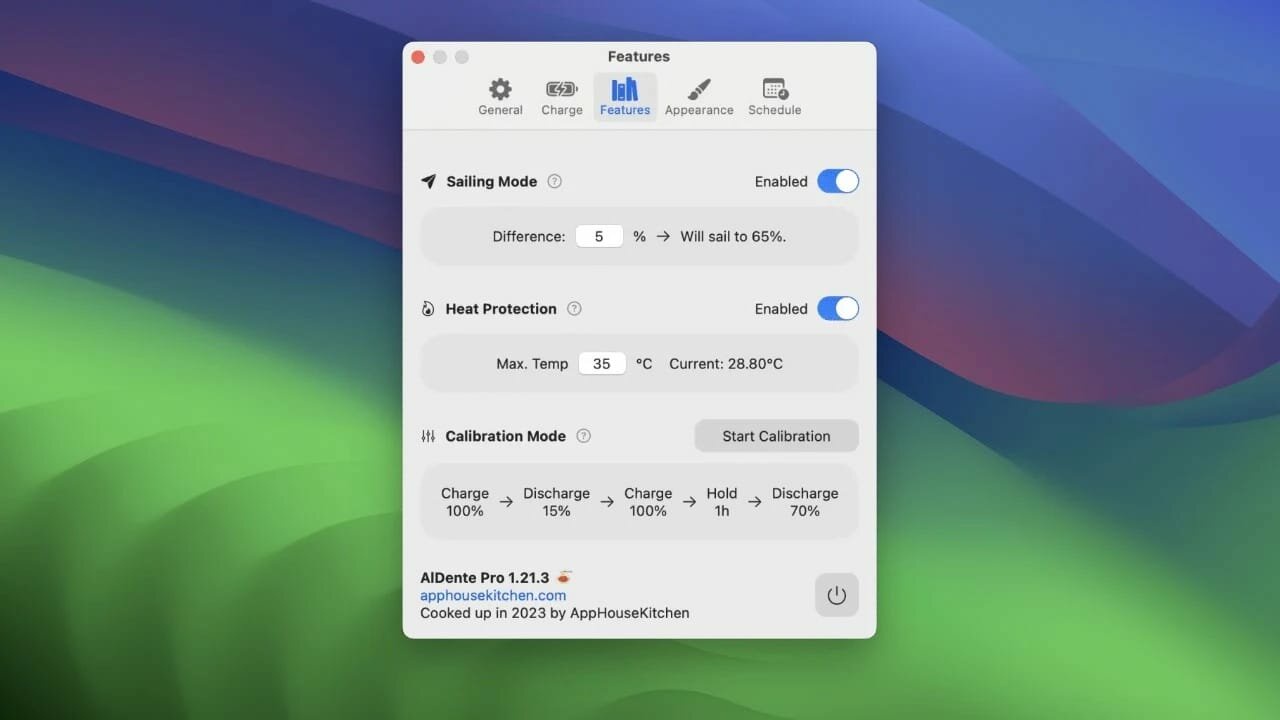
AlDente allows you to limit your MacBook from charging above a certain percentage. This will not only decrease Battery wear but also increase longevity of your Battery.
Features:
Charge Limiter allows you to set your maximum charging percentage between 20 and 100 percent. You can either set it by using the slide bar or by typing in the desired percentage in the field above and pressing enter afterwards.
Discharge – This feature allows your MacBook to run completely on Battery even if it is plugged in. Therefore, you can actively discharge your MacBook to a more healthy percentage. Unfortunately, while Discharge is activated, clamshell mode is not supported due to technical limitations.
What’s New
Version 1.36.1:
All
Fixed a bug that caused the menubar icons to not appear correctly on macOS 13 and older.
Fixed a bug that caused the dashboard to only appear after a long delay on macOS 11.
Pro
Improved the license verification experience.
Introduced a limit to the schedule history for improved performance and crash prevention.
Ulysses is your one-stop writing environment for Mac, iPhone and iPad. Its pleasant, focused writing experience, combined with effective document management, seamless sync, and flexible export, make Ulysses the first choice for writers of all kinds.
A Text Production Powerhouse
Ulysses’ markup-based, distraction-free editor lets you focus on your most important task: Write, edit, and write some more. Formatting is kept for later, so you can completely immerse yourself in the text. Ulysses’ uniquely streamlined toolset covers the entire writing process, and its clean and simple interface will boost your productivity. From first to final draft, from prologue to closing chapter – Ulysses keeps you in the flow, so you can get stuff done.
All Your Texts, All the Time
Everything you’ll ever write is stored in Ulysses’ unified library. You can manage projects of all kinds and sizes, be it novels, diaries or study notes – they are always saved, and automatically in sync. And since Ulysses offers feature parity across macOS and iOS, it doesn’t matter where you are or when inspiration hits: All its tools, and all your texts, are always at your fingertips.
Create eBooks, DOCX, PDFs and HTML
Ulysses’ export is flexible enough to cover any writer’s needs: Transform your text into beautiful PDFs, Word documents or eBooks. Or export HTML code, ready to be used anywhere on the web. You can even choose between a variety of pre-made formatting styles for all kinds of purposes, or create your own and share it with other users.
Publish to WordPress, Ghost & Medium
Do you blog? Ulysses’ offers best-in-class publishing to WordPress, Ghost, and Medium. You can post to WordPress and Ghost from right within the app – complete with images, tags, categories etc. Publishing to Medium works just as easy, and all three offer a built-in preview to proof-read before submission.
What’s New
Version 39.1:
Release notes were unavailable when this listing was updated.
XMind is the best mind mapping software (also called mind maps or mind maps). This is a great brainstorming tool that saves your company time and energy. Powerful software usually provides many tools that are difficult for new users to understand. For years, the developers of XMind have focused on creating a professional, powerful yet easy-to-use mind mapping software. With XMind for capturing, organizing, and planning, you’ll be more productive, while brainstorming and visualization tools will boost your creativity. To get started, you need to select the style of the scheme, you can add the required number of points with this problem, as it were, then you can start adding tasks and each of them can then be edited. Due to the fact that the sketch will be displayed in a tree view, you can very quickly configure all the necessary parameters. In order to highlight the desired task, XMind has a set of all sorts of asterisks, symbols, flags, emoticons and numbers.
XMind is an advanced, yet easy to use mind mapping utility that offers visual support to your ideas, so that you can organize tasks easier or with a team in brainstorming sessions.
XMind Cloud
XMind Cloud automatically synchronizes files across Mac/PCs. It’s fast, secure, and easy-to-use. You can even view and edit your mind maps online.
Fresher Look
XMind 8 has a fresher look and feel. When editing, you can quickly open, close and switch views with just one click. This feature increases your work efficiency and improves your mind mapping experience enormously.
Slide-based Presentation
With our new slide-based presentation, creating, presenting and sharing presentation become easier than ever. Mind mapping and presenting are harmoniously integrated in one software now. The Walk Through mode is still available.
Brainstorming
With XMind, you can start the individual brainstorming easily and quickly. The Idea Factory records and collects inspirations further and faster. A timer enables you to control the brainstorming session time. You can switch between day mode and night mode.
Gantt View
In XMind, you can add, modify and show task info directly in Gantt Chart view, including start/end date, assignee, priority, progress, milestone and task dependency.
Working with Office/PDF
Want to capture the sparkles of your mind and organize them in a structured way when preparing for a meeting or report? Luckily, with XMind, all these can be done easily by simple clicks. You can then export your fruit of work to Office/PDF instantly to facilitate your meeting/report.
What’s New:
Version 26.01
Important Updates:
Gantt Chart – Plan with timelines. Drag bars to update progress and link tasks to create dependencies.
AI-Generated Mind Maps – Automatically turn any text, links, or documents into mind maps, or break them into tasks and to-dos.
Better Markdown Parsing – More reliable import and export with improved handling of tables, text styles, lists, and more.
Improvements:
Task now support adding assignees and dependencies.
Task date formats automatically adapt to the app language.
Optimized date selection interaction for tasks.
Supported exporting tasks to CSV and Calendar (ICS) formats.
Exported branch now supports more formats.
Supported automatic parsing when pasting Markdown text.
Fixed an issue where collaborative files couldn’t filter tasks.
Fixed an issue where exporting specific files to Word failed.
Fixed other known issues.
Language: English, French, German, Indonesian, Italian, Japanese, Korean, Portuguese, Russian, Simplified Chinese, Spanish, Thai, Traditional Chinese Compatibility: macOS 10.13 or later Homepagehttps://xmind.com/
SpectraLayers is a new approach to audio editing, with new concepts to transform the way you work. For the first time you can directly edit spectral data, opening advanced sonic worlds, and use innovative enhancements to traditional techniques. Visualize audio in astonishing new ways, including 3D. Work with mixes like they were tracks. Integrate these abilities into your DAW and other tools. And all in a familiar interface that you didn’t realize you already knew.
Major features: Your new AI partner
Just as audio engineers focus on separating increasingly fine details in sound, the new AI in SpectraLayers Pro 7 uses algorithms to learn from the data flowing through its built-in neural network. In the same way that these algorithms can now accurately determine how to apply color to a black and white photograph, the AI in SpectraLayers Pro can sense discrete events in a sound field and isolate them on independent, colorful layers for processing. AI is changing faster than its history can be written — be at the leading edge with SpectraLayers Pro 7.
Unmix – Tracks to stems
This AI-assisted process in SpectraLayers Pro scans the finished file of a song, allowing you to “unmix” it and extract the different instruments to separate layers, with default settings for vocals, piano, bass, drums, and more. (SpectraLayers Elements allows extraction of vocals only.)
Unmix – Components
Unmix stems into tone, noise and transient component layers. Reconstruct missing noise hidden by tones and transients. Comprehensive learning algorithms clear the path to clean extraction.
Pattern finder
Significant advances in pattern recognition are a hallmark of today’s rapidly evolving AI technology. SpectraLayers Pro 7 allows you to select a target sound and then trigger a search to automatically locate and select every other similar sound in the spectrum.
Voice Denoiser
Perfect for cleaning up location interview recordings, the Voice Denoiser algorithm is trained to recognize and isolate the human voice. You can automatically attenuate everything but the voice for maximum intelligibility.
De-esser
Spectral de-essing is the most precise and least invasive way to tame and shape vocal sibilants. Manual de-essing in SpectraLayers Pro has always been quick and easy. Now, the new automatic de-essing feature makes it even easier. Manual or automatic — either approach is far more accurate than typical waveform-based plug-in processing.
Although, usually, installing and uninstalling apps on a Mac is reduced to simple drag and drop actions (to the Applications folder or to the Trash, respectively), there still are things that happen in the background.
Moreover, most apps will place additional files and folders which are required for them to work properly in the Library directory, but also in other locations on your Mac.
Unfortunately, these items are left behind when you remove the app: since there are no longer used, they unnecessarily take up space, and even slow down you Mac’s performance.
CleanMyMac X is an user friendly Mac app that comes with a stylish design and helps you detect the junk files, but also user and system cache / log files, broken preferences or login items, apps that have universal binaries (you can remove the executable that is not suitable for your architecture), language files (you can keep only the one you actually employ).
CleanMyMac X can find large and old files that you have not used in a long time, various extensions installed on your Mac, and can help you clean up your iPhoto Library.
The CleanMyMac X Uninstaller function detects all the applications installed on your Mac, but also the files associated with a certain installation. As a result, if you delete and app using CleanMyMac X, you can make sure that no junk files are left behind.
Last but not least, CleanMyMac X is able to identify all the plug-ins, widgets, and Preferences panes installed on your Mac. The items are organized by type (Contacts, Dictionaries, iTunes, Login items, QuickLook plug-ins, and more) and you can easily choose to remove the ones that you do not need.
In addition to removing unnecessary files from your system, the app can also find and eliminate potentially dangerous ones. It can scan for malware and remove it, as well as keep your Mac safe in the future.
Moreover, the application enables you to ensure your private information does not fall into the wrong hands. It can remove browsing traces from all popular browsers, as well as clear chat data from apps like Skype and Messages.
Finding your way around the CleanMyMac X user interface is not too hard due to its streamlined interface that provides access to all functions via the main window.
However, note that all the files that will be removed must be selected by the user: make sure that you actually want to delete them because, if you send essential items to the Trash, you might render your Mac unusable.
What’s New:
Version 5.2.10:
Fixed
A number of minor issues and known crashes to ensure CleanMyMac’s stable performanc
If prompted: “The application “CleanMyMac” can’t be opened.”
PhotoSweeper helps quickly and efficiently eliminate similar or duplicate photos. It works with photos from iPhoto, Aperture and Adobe Lightroom libraries as well as photos from your Mac.
PhotoSweeper will help you if:
You take a series of shots of the same scene trying to get the perfect one.
You edit photos with applications, such PhotoShop, Pixelmator, etc., and make backups just in case.
You have photos scattered on external hard drives and local disks, in iPhoto, Aperture or Lightroom libraries.
You have a mess in your photo collection or just want to free disk space by removing junk photos.
Features Easy to find photos
Just drag and drop folders to allow PhotoSweeper to find all photos inside. Add more photos from your iPhoto, Aperture or Lightroom library via the Media window.
Flexible comparison settings
Use 6 different methods to find similar or duplicate photos, even those edited in external programs such Photoshop, regardless of image size or format.
Fast
PhotoSweeper was developed to be extremely fast at comparing large number of photos. Using efficient caches allows you to make the next comparison much faster. You have an opportunity to regroup the results on-the-fly by changing a matching level of similarity.
Easy to manage photos
Review results in “Face-to-Face” or “Groups” mode. Put photos into a virtual container, “Box”. Delete, move, or copy photos from the Box. Bulk rename photos while copying or moving.
Great photo browsing
PhotoSweeper provides an up-to-date photo browser with such features as: fast loading of thumbnails, Quick Look preview, drag and drop support, showing paths, ratings, labels, etc. The “Image Info” panel shows more detailed information, including histogram and image metadata (EXIF, IPTC, etc.).
A comprehensive user manual is available in the Help menu.
PDFelement – The easiest way to create, edit, convert, and sign PDF documents. We’re now introducing the all-new PDFelement 8, which includes a redesigned UI, more advanced writing tools, improved team collaboration features, more powerful conversion tools, a user management console, and more.
PDFelement Pro OCR (Exclusive in Pro version)
OCR (Optical Character Recognition)enables you to edit and convert characters in scanned PDF files or pictures
Supports recognition of 29 languages
Create & Sign Forms (Exclusive in Pro version)
Create fillable PDF Forms from interactive field objects, such as buttons, check boxes, radio buttons, list boxes, and drop-down lists
Support adding digital signatures to forms
Merge PDF (Exclusive in Pro version)
Combine different format files into a new PDF
Convert PDF (Exclusive in Pro version)
Supports converting PDF file to a greater number of output formats like EPUB, HTML, Text, RTF
PDF/A (Exclusive in Pro version)
Support PDF/A as an available output format with ISO Standard for long term archiving
Batch Processing of PDF Files (Exclusive in Pro version)
Process PDFs in batches
Add backgrounds, watermarks, headers and footers in batches
Bates Numbering (Exclusive in Pro version)
Apply Bates Numbering with advanced formatting
Redact PDF (Exclusive in Pro version)
Redact sensitive text and images in PDFs
What’s New:
Version 12.1.1 (OCR):
Release notes were unavailable when this listing was updated.
Prepare yourself for a cinematic thrill-ride only Call of Duty can deliver. Modern Warfare 3 follows the series’ protagonists Captains John “Soap” MacTavish and John Price on the run, while the United States is under siege from Russian forces. Accompanied by the informant Nikolai, they must flee to safety in order to lick their wounds and plan their next move. With locations spanning the globe from New York, London, Europe and the Middle East, the stage is set for another fantastic FPS blockbuster.
Features: ADAPT OR DIE IN A FIGHT AGAINST THE ULTIMATE THREAT
Combat means making choices – different loadouts, different paths through the mission. In addition to the signature, cinematic Call of Duty campaign missions, Modern Warfare III introduces open combat missions that provide more player choice.
IT’S TIME TO SETTLE OLD SCORES AND START NEW ONES
Lock and load for the ultimate Multiplayer Experience with Modern Warfare III, featuring remastered and modernized Modern Warfare 2 (2009) maps, new modes, new weapons, and a return to classic gameplay mechanics as well as the all-new aftermarket parts customization system.
IT’S TIME TO SETTLE OLD SCORES AND START NEW ONES
Lock and load for the ultimate Multiplayer Experience with Modern Warfare III, featuring remastered and modernized Modern Warfare 2 (2009) maps, new modes, new weapons, and a return to classic gameplay mechanics as well as the all-new aftermarket parts customization system.
ALL NEW OPEN WORLD ZOMBIES
For the first time, team up with other squads to survive and fight massive hordes of the undead in the largest Call of Duty Zombies map ever. Modern Warfare Zombies (MWZ) tells a new Treyarch Zombies story with missions, core Zombies features, and secrets to discover. Ready up for an open world PvE survival experience against some of the biggest enemies in Call of Duty history.
Minimum System Requirements:
CPU Processor: Intel i3 2.2 GHz CPU Speed
Memory: 4 GB RAM
Video Card: (ATI): Radeon HD 4850 | (NVidia): GeForce GTX 640M | 512 GB VRam | (Intel): Iris
Don’t Starve is an uncompromising wilderness survival game full of science and magic.
You play as Wilson, an intrepid Gentleman Scientist who has been trapped by a demon and transported to a mysterious wilderness world. Wilson must learn to exploit his environment and its inhabitants if he ever hopes to escape and find his way back home.
Enter a strange and unexplored world full of strange creatures, dangers, and surprises. Gather resources to craft items and structures that match your survival style. Play your way as you unravel the mysteries of this strange land.
Key Features:
Uncompromising Survival & World Exploration:
No instructions. No help. No hand holding. Start with nothing and craft, hunt, research, farm and fight to survive.
Dark and Whimsical Visuals:
2D characters and odd creatures inhabiting a unique 3D world.
Randomly Generated New Worlds:
Want a new map? No problem! At any time you can generate a new living and breathing world that hates you and wants you to die.
Crusader Kings III is the heir to a long legacy of historical grand strategy experiences and arrives with a host of new ways to ensure the success of your royal house.
History
Choose a royal or noble house from a number of realms on a map that stretches from Iceland to India, from the Arctic Circle to Central Africa.
Guide a dynasty through the centuries, ensuring the security and power of each new generation. Gather new lands and titles to cement your legacy.
Be a pious king to bring the religious powers to your side, or strike out on your own, designing your own splinter religion and earning everlasting fame or eternal damnation.
Knights, peasant revolts, pilgrimages, Viking raiders… experience the drama and pageantry of the Middle Ages.
Character
Adopt one of five different lifestyles, perfecting your skills in military strategy or kingdom management.
Acquire character traits that will guide your actions, but beware if you act against your nature! The stress from denying your truest self could bring a new host of troubles!
Choose appropriate guardians for your heirs, or train them yourself. But what do you do if the legal heir is not quite up to the job?
Violent characters may develop a fearsome reputation, cowering your timid subjects into obedience with the dread you inspire.
Warfare
Recruit men-at-arms units and powerful knights to supplement your royal levies.
Research new technologies to increase the wealth and military might of your realm.
Hire mercenaries and Holy Orders for your major wars.
Supplement your income with ransomed prisoners or raiding parties on neighboring realms.
Intrigue
Use your spymaster to discover plots against your dynasty and your rule.
Recruit agents to assist your schemes to undermine or murder anyone who stands between you and power.
Seduce other characters for love or political power.
Gather information for blackmailing purposes or call in favors whenever your plans need an extra bit of influence.
Your bank balance is tiny, but your ambitions are big.
With a little help from your uncle, you get an apartment and your first job. But then it’s up to you to achieve success and take over New York City any way you like.
Slowly build multiple small businesses, grow them into huge corporations, or carve your own unique path – the possibilities are limitless in this vast business sandbox. You’ve never played anything like this!
Go from a small apartment and public transport to luxury suites, fast cars and designer furniture. Put your money into investment funds and real estate. Succeed, fail, rebuild. But remember to take care of yourself, sleep and stay happy on your rise to the top.
Do you have what it takes to build your own empire?
Go from nothing to the most prominent tycoon in New York. Start a business, work smart, make it thrive and enjoy your life. How do you want to be successful? How far can you push it? How long can you make it last?
Start your own gift shop, supermarket, coffee shop, law firm, clothing store, liquor store, florist, and more. You decide what success is – whether it’s a single shop, a chain of fast-food restaurants, a huge corporation, or making millions developing websites.
Take out a loan, rent a building, design the logo, renovate the store, get stock, manage your money, hire staff, and build your infrastructure. Soon, you may have to start importing products from the harbour and distributing them through a network of warehouses.
A bigger business means managers. Hire HR Managers, Logistics Managers, and Purchasing Agents. They all need desks and computers, so you’ll need a fancy headquarters.
Need a delivery truck? Travel to a dealer and buy one. Need food? Go to a supermarket, but make sure you have a refrigerator at home. Big Ambitions is a life sim where your character has to physically interact with the world to survive and succeed.
Enter any building in New York and buy it. Go from a small apartment to a dream penthouse in midtown, a luxurious townhouse in Hell’s Kitchen, or a series of skyscrapers. Fill each with furniture that suits your style and standing. Invest your hard-earned cash in real estate to grow your empire. Take over the city piece by piece.
Spend your wealth however you wish. Buy a big SUV, a speedy sports car, or the new luxurious Mersaidi S500. Maybe risk it all at the casinos or put your money into investment funds and reap the rewards.
As you progress, you always need to ensure you get enough sleep and stay healthy and happy. Enjoy the journey, for as you grow older, you’ll discover that money can’t buy you time… or can it?
Big Ambitions takes what you love about the viral sensation ‘Startup Company’ to even greater heights.