Tag Archives: macOS

Print Artist Gold 25 v4.0.0.8 macOS

Print Artist® Gold 25 is unlike any print software you’ve ever used – its unparalleled quality combined with unprecedented ease of use lets you produce amazing print projects for your home, school or business. The Fast, Easy and Fun Way to Create Spectacular Print Projects.

Print Artist® 25 Gold
– 16,700+ Professionally-Designed Templates
– 277,000+ Sensational Graphics
– 700+ Premium Fonts
– NEW User Interface! Now Even Easier to use
– Easily Upload Projects to Facebook & YouTube
– Photo Card Projects & Photo Clip Art
– Digital Photo Editor Makes Your Pictures Shine

Impress friends, family and clients with the creative edge that only Print Artist Gold can offer – 16,700+ professionally-designed templates, 277,000+ sensational graphics, 700+ premium fonts and more! With its powerful, yet easy-to-use design, text and drawing customization tools, advanced photo editor, special text effects gallery and more, you’ll be creating expert, eye-popping print projects with a professional, custom look that truly raises the bar!

Dream It. Create It. Print It!
Print Artist is ideal for creating sensational print projects for virtually any occasion. You’ll love the unique selection of professionally-designed templates and limitless creative tools from the #1 publisher of home graphics software.

Homepage https://www.novadevelopment.com

Name: Print.Artist.Gold.25.v4.0.0.8_Mactorrents.Me.zip
Size: 585 MB
Files Print.Artist.Gold.25.v4.0.0.8_Mactorrents.Me.dmg[585 MB]


   Download Torrent


   Download Link

RarLab RAR 6.24 for macOS

Name: RarLab_RAR_6.24_for_macOS__HCiSO_Mactorrents.biz.dmg
Size: 6.68 MB
Files RarLab_RAR_6.24_for_macOS__HCiSO_Mactorrents.biz.dmg[6.68 MB]

   Download Torrent

RAR for macOS is a x64/ARM version of WinRAR Archiver for Windows. It can backup your data and reduce the size of email attachments, decompresses RAR, ZIP and other files downloaded from Internet and create new archives in RAR and ZIP file format.

RAR for macOS’s main features are very strong general and multimedia compression, solid compression, archive protection from damage, processing of ZIP and other non-RAR archives, scanning archives for viruses, programmable self-extracting archives(SFX), authenticity verification, NTFS and Unicode support, strong AES encryption, support of multivolume archives, command line and graphical interface, drag-and-drop facility, wizard interface, theme support, folder tree panel, multithread support and Windows x64 shell integration.

RAR for macOS provides complete support for RAR and ZIP archives and is able to unpack and convert CAB, ARJ, LZH, TAR, GZ, ACE, UUE, BZ2, JAR, ISO, Z, 7-Zip archives. The app is available in over 50 languages.

RAR Features:
• RAR is a powerful compression tool with many integrated additional functions to help you organize your compressed archives.
• RAR puts you ahead of the crowd when it comes to compression. By consistently creating smaller archives, WinRAR is often faster than the competition. This will save you disk space, transmission costs AND valuable working time as well.
• RAR supports all popular compression formats (RAR, ZIP, CAB, ARJ, LZH, TAR, GZip, UUE, ISO, BZIP2, Z and 7-Zip).
• RAR is ideal for multimedia files. WinRAR automatically recognizes and selects the best compression method. The special compression algorithm compresses multimedia files, executables and object libraries particularly well.
• RAR allows you to split archives into separate volumes easily, making it possible to save them on several disks for example.
• RAR is also ideal, if you are sending data through the web. Its 256 bit password encryption and its authenticated signature technology will give you the peace of mind you have been looking for.
• RAR is a trial product, meaning you have the chance to thoroughly test it. The program can be used absolutely free of charge for 40 days!
• RAR licenses are valid for all available language and platform versions. If you have purchased several licenses, you can even mix versions to meet your own personal needs.

RAR archiver:
• RAR introduces an original compression algorithm. It provides high compression ratios on executable files, object libraries, large text files, etc.
• RAR provides functionality for creating a ‘solid’ archive, which can raise the compression ratio by 10% – 50% over more common methods, particularly when packing large numbers of small files.
• RAR offers the ability to create and change SFX archives using default and external SFX modules.
• RAR offers the ability to create a multi-volume archive as SFX.
• RAR offers a number of service functions, such as encrypting files, adding archive comments and repairing physically damaged archives.

Note: WinRAR for macOS is a command-line only application. If you want a more intuitive GUI client for your compression/decompression needs we suggest you try The Unarchiver or unRarX.

Compatibility: OS X 10.8 or later • Apple Silicon or Intel Core processor
Homepage https://www.rarlab.com/

OnyX 4.3.4 for macOS Ventura 13.0

Tweaking applications for macOS come in various shapes and prices, and you are free to pick the one that meets your needs, be it focused on finding and fixing as many system errors and problems as possible or on boosting your Mac’s overall performance.

All-in-one system maintenance, tweak and cleaning tool
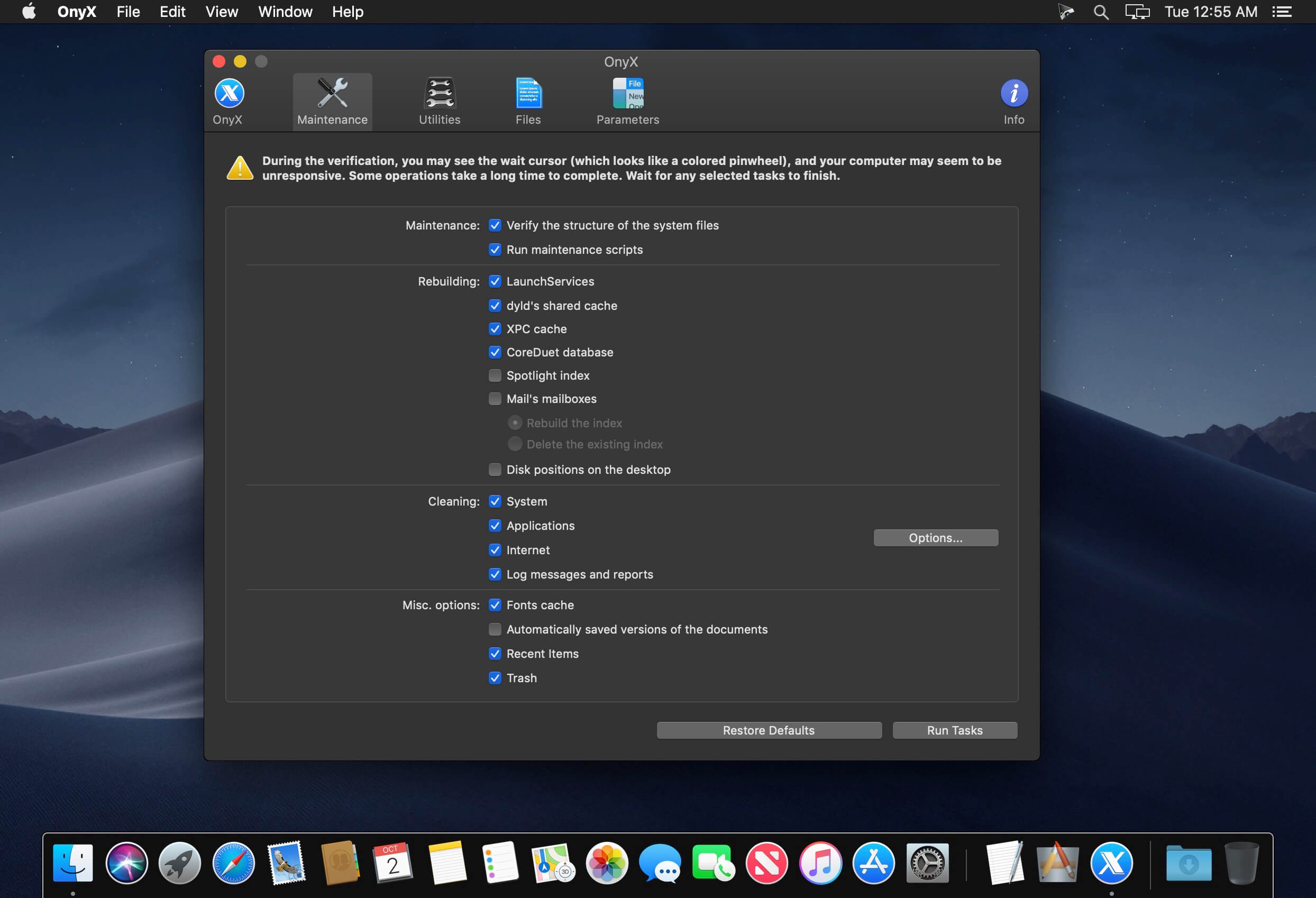
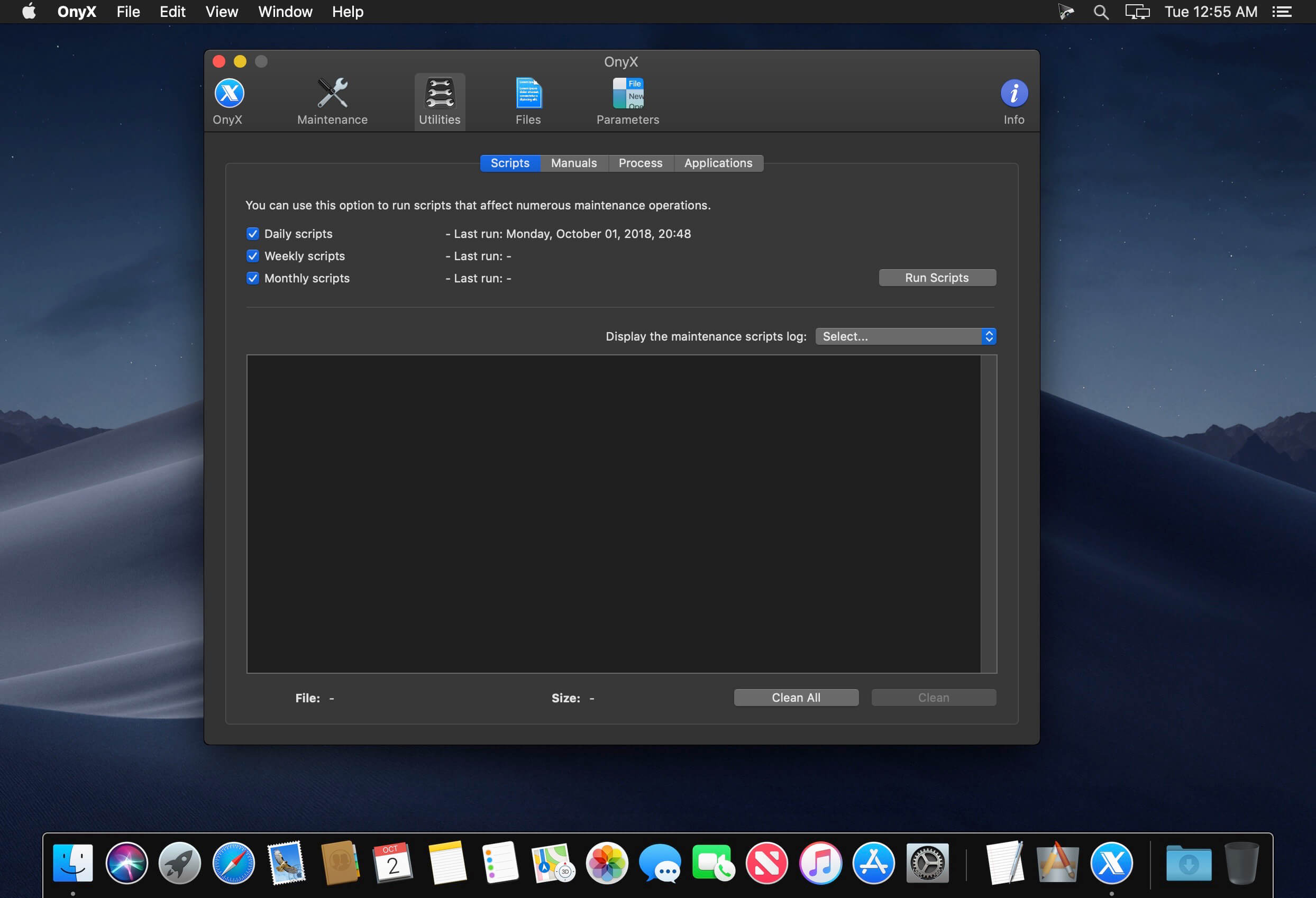
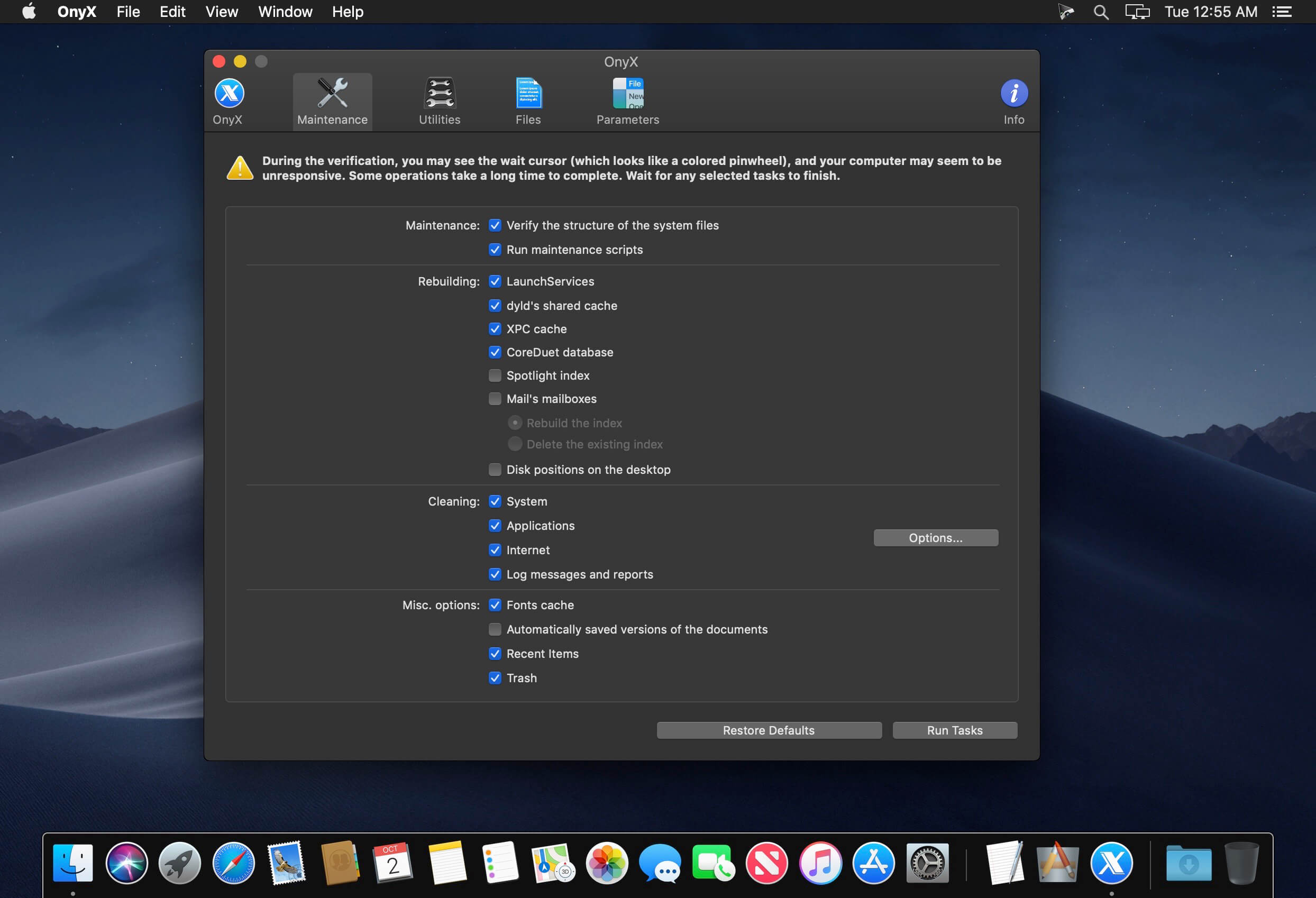
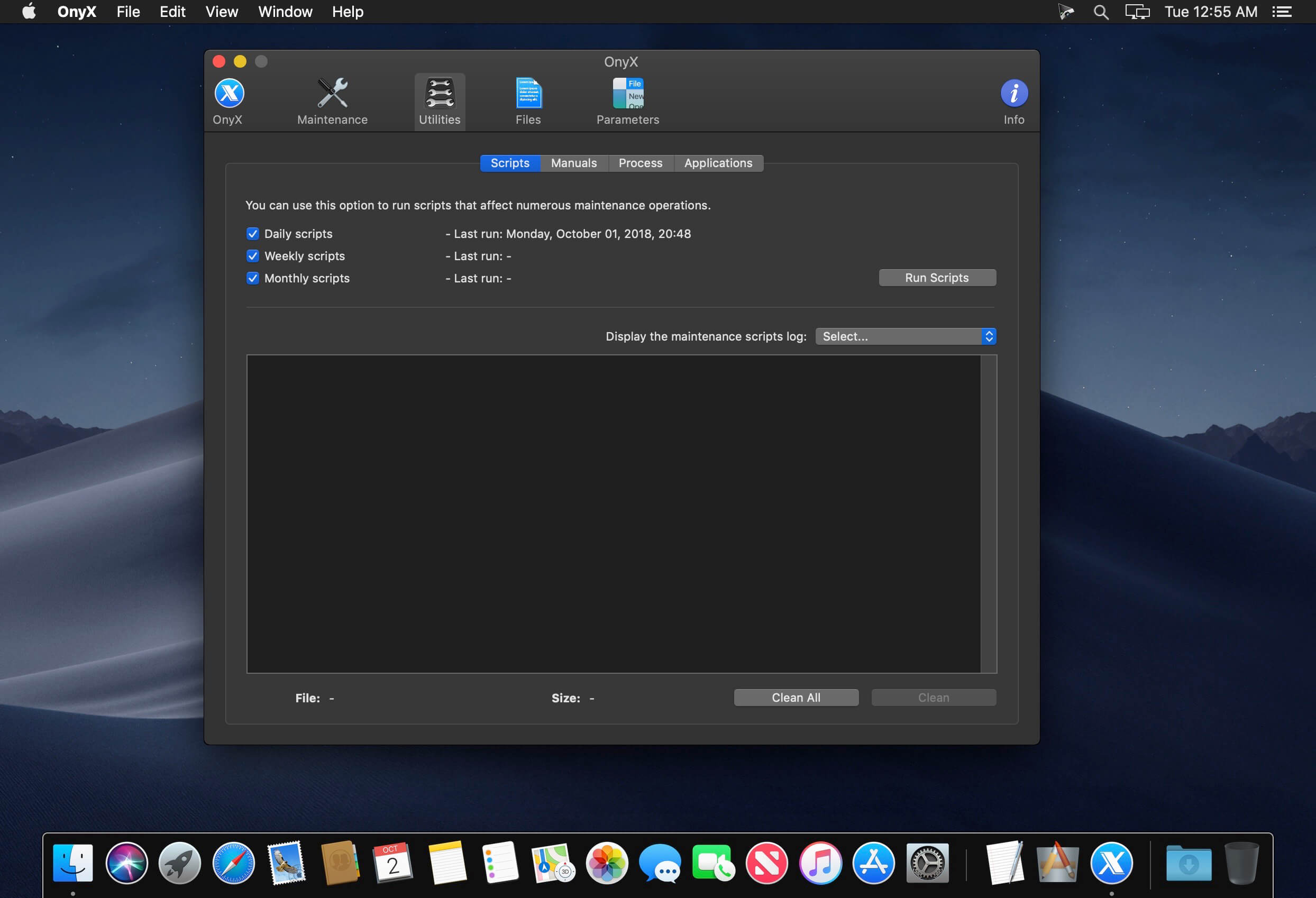
The OnyX utility has been designed as multi-functional app to help you check your Mac’s start-up disk and system files, to run various system maintenance tasks, to tweak the settings for various apps and system components, and to find and remove app caches and various types of files that, in time, will occupy unnecessary space on your hard drive.

As said before, Onyx comes with a user-friendly graphical interface which organizes all the available tools using tabs, to make it easy for you to find the exact setting or utility you need, as rapidly as possible.

Run automated maintenance scripts and fix permissions
Via the “Verify” tab, Onyx provides you with the tools you need to run a SMART status diagnostic that will help you prevent a hard disk failure.

The next tab, “Maintenance”, will help you to launch a system files permissions check and repair, to execute macOS’ daily, weekly and monthly maintenance scripts, and to rebuild various services and indexes.

Clean your Mac’s hard drive with a couple of mouse clicks
Additionally, Onyx can be used to quickly clean system, user, fonts and internet caches, to remove obsolete and unneeded log files, and to securely empty the contents of the Trash folder, all of these for freeing up space on your Mac’s hard drive and to take make your applications more responsive and quicker to launch.

On top of that, you can also use Onyx to run multiple maintenance, cleaning and rebuilding tasks via the Automation tab. Thus, you can check which tasks you want to perform at a time and, by clicking the “Execute” button, they will all be started one after the other, to help you effortlessly automate the process of optimizing and maintaining your system.

Intuitive and streamlined macOS optimizer
On the whole, Onyx is more than your average junk file remover or system optimizing tool because it can do almost anything that’s needed to keep a macOS system in perfect shape, with little to no intervention on your part.

Compatibility: macOS 13.0 or later, Apple Silicon or Intel Core processor
Homepage https://www.titanium-software.fr/en/onyx.html

Screenshots


Name: OnyX 4.3.4_Mactorrents.is.dmg
Size: 4.12 MB
Files OnyX 4.3.4_ Mactorrents.is.dmg[4.12 MB]

   Download

OnyX 4.3.2 for macOS Ventura 13.0

Tweaking applications for macOS come in various shapes and prices, and you are free to pick the one that meets your needs, be it focused on finding and fixing as many system errors and problems as possible or on boosting your Mac’s overall performance.

All-in-one system maintenance, tweak and cleaning tool
The OnyX utility has been designed as multi-functional app to help you check your Mac’s start-up disk and system files, to run various system maintenance tasks, to tweak the settings for various apps and system components, and to find and remove app caches and various types of files that, in time, will occupy unnecessary space on your hard drive.

As said before, Onyx comes with a user-friendly graphical interface which organizes all the available tools using tabs, to make it easy for you to find the exact setting or utility you need, as rapidly as possible.

Run automated maintenance scripts and fix permissions
Via the “Verify” tab, Onyx provides you with the tools you need to run a SMART status diagnostic that will help you prevent a hard disk failure.

The next tab, “Maintenance”, will help you to launch a system files permissions check and repair, to execute macOS’ daily, weekly and monthly maintenance scripts, and to rebuild various services and indexes.

Clean your Mac’s hard drive with a couple of mouse clicks
Additionally, Onyx can be used to quickly clean system, user, fonts and internet caches, to remove obsolete and unneeded log files, and to securely empty the contents of the Trash folder, all of these for freeing up space on your Mac’s hard drive and to take make your applications more responsive and quicker to launch.

On top of that, you can also use Onyx to run multiple maintenance, cleaning and rebuilding tasks via the Automation tab. Thus, you can check which tasks you want to perform at a time and, by clicking the “Execute” button, they will all be started one after the other, to help you effortlessly automate the process of optimizing and maintaining your system.

Intuitive and streamlined macOS optimizer
On the whole, Onyx is more than your average junk file remover or system optimizing tool because it can do almost anything that’s needed to keep a macOS system in perfect shape, with little to no intervention on your part.

Compatibility: macOS 13.0 or later, Apple Silicon or Intel Core processor
Homepage https://www.titanium-software.fr/en/onyx.html

Screenshots


Name: OnyX.._Mactorrents.is.dmg
Size: 4.31 MB
Files OnyX.._ Mactorrents.is.dmg[4.31 MB]

   Download

OnyX 4.3.1 for macOS Ventura 13.0

Tweaking applications for macOS come in various shapes and prices, and you are free to pick the one that meets your needs, be it focused on finding and fixing as many system errors and problems as possible or on boosting your Mac’s overall performance.

All-in-one system maintenance, tweak and cleaning tool
The OnyX utility has been designed as multi-functional app to help you check your Mac’s start-up disk and system files, to run various system maintenance tasks, to tweak the settings for various apps and system components, and to find and remove app caches and various types of files that, in time, will occupy unnecessary space on your hard drive.

As said before, Onyx comes with a user-friendly graphical interface which organizes all the available tools using tabs, to make it easy for you to find the exact setting or utility you need, as rapidly as possible.

Run automated maintenance scripts and fix permissions
Via the “Verify” tab, Onyx provides you with the tools you need to run a SMART status diagnostic that will help you prevent a hard disk failure.

The next tab, “Maintenance”, will help you to launch a system files permissions check and repair, to execute macOS’ daily, weekly and monthly maintenance scripts, and to rebuild various services and indexes.

Clean your Mac’s hard drive with a couple of mouse clicks
Additionally, Onyx can be used to quickly clean system, user, fonts and internet caches, to remove obsolete and unneeded log files, and to securely empty the contents of the Trash folder, all of these for freeing up space on your Mac’s hard drive and to take make your applications more responsive and quicker to launch.

On top of that, you can also use Onyx to run multiple maintenance, cleaning and rebuilding tasks via the Automation tab. Thus, you can check which tasks you want to perform at a time and, by clicking the “Execute” button, they will all be started one after the other, to help you effortlessly automate the process of optimizing and maintaining your system.

Intuitive and streamlined macOS optimizer
On the whole, Onyx is more than your average junk file remover or system optimizing tool because it can do almost anything that’s needed to keep a macOS system in perfect shape, with little to no intervention on your part.

Compatibility: macOS 13.0 or later, Apple Silicon or Intel Core processor
Homepage https://www.titanium-software.fr/en/onyx.html

Screenshots


Name: OnyX 4.3.1_Mactorrents.is.dmg
Size: 4.21 MB
Files OnyX 4.3.1_ Mactorrents.is.dmg[4.21 MB]

   Download

OnyX 4.3.0 for macOS Ventura 13.0

Tweaking applications for macOS come in various shapes and prices, and you are free to pick the one that meets your needs, be it focused on finding and fixing as many system errors and problems as possible or on boosting your Mac’s overall performance.

All-in-one system maintenance, tweak and cleaning tool
The OnyX utility has been designed as multi-functional app to help you check your Mac’s start-up disk and system files, to run various system maintenance tasks, to tweak the settings for various apps and system components, and to find and remove app caches and various types of files that, in time, will occupy unnecessary space on your hard drive.

As said before, Onyx comes with a user-friendly graphical interface which organizes all the available tools using tabs, to make it easy for you to find the exact setting or utility you need, as rapidly as possible.

Run automated maintenance scripts and fix permissions
Via the “Verify” tab, Onyx provides you with the tools you need to run a SMART status diagnostic that will help you prevent a hard disk failure.

The next tab, “Maintenance”, will help you to launch a system files permissions check and repair, to execute macOS’ daily, weekly and monthly maintenance scripts, and to rebuild various services and indexes.

Clean your Mac’s hard drive with a couple of mouse clicks
Additionally, Onyx can be used to quickly clean system, user, fonts and internet caches, to remove obsolete and unneeded log files, and to securely empty the contents of the Trash folder, all of these for freeing up space on your Mac’s hard drive and to take make your applications more responsive and quicker to launch.

On top of that, you can also use Onyx to run multiple maintenance, cleaning and rebuilding tasks via the Automation tab. Thus, you can check which tasks you want to perform at a time and, by clicking the “Execute” button, they will all be started one after the other, to help you effortlessly automate the process of optimizing and maintaining your system.

Intuitive and streamlined macOS optimizer
On the whole, Onyx is more than your average junk file remover or system optimizing tool because it can do almost anything that’s needed to keep a macOS system in perfect shape, with little to no intervention on your part.

What’s New:

Version 4.2.4:

  • Issue corrected that sometimes prevented downloading an update
  • Deleting the system archived logs improved
  • Deleting the diagnostic reports improved
  • Added option in the Maintenance pane to delete the iOS and iPadOS device backups
  • Added option in the Maintenance pane to delete the .DS_Store files
  • Added option in the Parameters > Misc pane to turn off the creation of .DS_Store files on network volumes
  • Added new find pane in the Find toolbar item
  • The locate pane in the Find toolbar item has been improved
  • Info pane improved
  • Added option to choose the save path for profiles
  • Miscellaneous corrections and improvements made
  • Return of the Easter Egg. Try to find it!
  • User Guide improved

Compatibility: macOS 13.0 or later, Apple Silicon or Intel Core processor
Homepage https://www.titanium-software.fr/en/onyx.html

Screenshots


Name: OnyX 4.3.0 for macOS Ventura 13.0_Mactorrents.is.dmg
Size: 4.22 MB
Files OnyX 4.3.0 for macOS Ventura 13.0_ Mactorrents.is.dmg[4.22 MB]

   Download

macOS Catalina 10.15.4 (19E266)

Download macOS Catalina 10.15.4 (19E266)

gives you more of everything you love about Mac. Experience three all-new media apps: Apple Music, Apple TV, and Apple Podcasts. Locate a missing Mac with the new Find My app. And now coming to Mac, your favorite iPad apps. You can even extend your desktop using iPad as a second display. Now you can take everything you do above and beyond.

Features

Apple Music

  • Stream and download over 50 million songs with an Apple Music subscription.
  • Access the iTunes Store to purchase songs or albums.
  • Find all the music you’ve purchased, downloaded, or imported from CDs organized in the improved library.

Apple TV

  • Buy or rent the latest movie releases.
  • Subscribe to Apple TV channels to watch popular shows on demand and ad-free, online or off.
  • Start watching on one device and pick up where you left off on any of your other devices, including Apple TV, iPhone, iPad, and compatible smart TVs.

Apple Podcasts

  • Find podcasts by title, topic, guest, host, and content.
  • Subscribe to your favorite podcasts to receive the latest episodes automatically.
  • Begin listening to an episode on your Mac, then seamlessly resume on your iPhone, iPad, or Apple Watch when you’re on the go.

Syncing and backup

  • Sync content and back up, update, and restore software from the Finder when you connect your iPhone or iPad to your Mac.

App Store with Apple Arcade

  • Play 100 groundbreaking new games with one subscription — no ads or additional purchases.
  • Browse the latest games, personalized recommendations, and exclusive editorial content in the all-new Arcade tab on the App Store.
  • Enjoy games across iPhone, iPod touch, iPad, Mac, and Apple TV.

Mac Catalyst

  • Enjoy a new class of Mac apps built from your favorite iPad titles.

Sidecar

  • Expand your Mac workspace by using your iPad as a second display.
  • Place one app on each screen, or put your main canvas on your Mac and your tools and palettes on your iPad.
  • Use Apple Pencil for tablet input when using your favorite creative pro Mac apps.

Continuity Sketch and Markup

  • Create a sketch on your iPad or iPhone and insert it into any document on your Mac.
  • Use your iPad or iPhone to sign a PDF or mark up a screenshot on your Mac.

Accessibility

  • Control your Mac entirely with your voice using Voice Control.
  • Enable Hover Text to display large, high-resolution text in a dedicated window.
  • Zoom in closely on one screen when using two displays for improved legibility with Zoom Display.

Security

  • Feel secure knowing that the apps you use have been checked by Apple for known malware.
  • Authorize access to data when apps request it using new data protections.

Find My

  • Keep track of your devices and find friends and family with an easy-to-use new app.
  • Help locate devices even if they’re not connected to Wi-Fi or cellular.
  • Use Activation Lock to protect Mac models with the Apple T2 Security Chip.

Photos

  • Enjoy a new immersive, dynamic experience that showcases your best photos and memories.
  • View Memory Movies and edit their duration, mood, and title.

Safari

  • Browse using an updated start page that surfaces sites from your history, bookmarks, reading list, iCloud Tabs, and even links sent to you in Messages.
  • Help secure your accounts using strong passwords suggested by Safari.

Notes

  • View notes as visual thumbnails in gallery view.
  • Enjoy a more powerful search that recognizes text in items you’ve scanned and objects within images.
  • Share an entire folder of notes using shared folders.

Reminders

  • Use new edit buttons to add dates, locations, flags, attachments, and more to reminders.

Mail

  • Take control of your inbox by muting a thread, blocking a sender, or unsubscribing from a mailing list.

Screen Time

  • Gain insight into time spent using apps and websites and set usage limits.
  • Set up Family Sharing to use Screen Time with your family’s devices.

Installation Notes

Enabling the installation of third-party applications.

sudo spctl --master-disable

Creating a bootable flash drive

Where USB is your USB flash drive, in Mac OS Extended (Magazine) format of at least 8 Gb.

sudo /Applications/Install macOS 10.15 Beta.app/Contents/Resources/createinstallmedia --volume /Volumes/USB

Information

CompatibilityOS X 10.9 or later, 64-bit processor

Supports models

  • MacBook: Early 2015 or later
  • MacBook Air: Mid 2012 or later
  • MacBook Pro: Mid 2012 or later
  • Mac Mini: Late 2012 or later
  • iMac: Late 2012 or later
  • iMac Pro: 2017 and later (all models)
  • Mac Pro: Late 2013 or later
LanguagesMultilangual

What’s New in macOS Catalina 10.15.4 (19E266)

macOS Catalina 10.15.4 introduces iCloud Drive folder sharing, Screen Time communications limits, Apple Music time-synced lyrics view, and more. The update also improves the stability, reliability, and security of your Mac.

Finder

  • iCloud Drive folder sharing from Finder
  • Controls to limit access only to people you explicitly invite, or to grant access to anyone with the folder link
  • Permissions to choose who can make changes and upload files and who can only view and download files

Screen Time

  • Communication limits for controlling who your children can communicate with and be contacted by throughout the day and during downtime
  • Playback control of music videos for your children

Music

  • Time-synced lyrics view for Apple Music, including the ability to jump to your favorite part of a song by clicking a line in lyrics view

Safari

  • Option to import Chrome passwords into your iCloud Keychain for easy AutoFill of your passwords in Safari and across all your devices
  • Controls for duplicating a tab and for closing all tabs to the right of the current tab
  • HDR playback support on compatible computers for Netflix content

App Store with Apple Arcade

  • Universal Purchase support enables the use of a singular purchase of a participating app across iPhone, iPod touch, iPad, Mac, and Apple TV
  • Recently played Arcade games appear in the Arcade tab so you can continue playing on iPhone, iPod touch, iPad, Mac, and Apple TV

Pro Display XDR

  • Customized reference modes that you can tailor to specific workflow needs by selecting from several color gamut, white point, luminance, and transfer function options

Accessibility

  • Head pointer preference for moving a cursor on the screen based on the precise movements of your head

This update also includes bug fixes and other improvements.

  • High Dynamic Range output to HDR10-compatible third-party displays and TVs connected with DisplayPort or HDMI
  • OAuth authentication support with Outlook.com accounts for improved security
  • CalDav migration support when upgrading to iCloud reminders on a secondary device
  • Resolves an issue where text copied between apps may appear invisible when Dark Mode is active
  • Fixes an issue in Safari where a CAPTCHA tile may display incorrectly
  • Resolves an issue where Reminders may send notifications for completed reminders
  • Fixes an issue with screen brightness for the LG UltraFine 5K display after waking from sleep

Screenshots


Name macOS Catalina 10.15.4 19E266 UpdCombo mac-torrents.net.dmg
Size 4.74 GB
Created on 2020-03-25 22:53:10
Hash 443fd9ac5eda44e2e0d7edd30d13980b9cb9764e
Files macOS Catalina 10.15.4 19E266 UpdCombo mac-torrents.net.dmg (4.74 GB)

macOS Server 5.11


macOS Server 5.11 MAS Multilingual macOS

Designed for macOS and iOS devices, macOS Server makes it easy to share files, schedule meetings, synchronize contacts, develop software, host your own website, publish wikis, configure Mac, iPhone, and iPad devices, remotely access your network, and more.

macOS Server is an application you can add to macOS right from the Mac App Store. Anyone can quickly and easily turn a Mac into a server that’s perfect for home offices, businesses, schools, developers, and hobbyists alike.

Here’s what you’ll get with macOS Server:

  • File Sharing
  • File sharing for Mac, PC, iPhone and iPad
  • Standards-based SMB, AFP, and WebDAV file services
  • Flexible file permissions
  • Spotlight searching

Profile Manager

  • Mobile device management for Mac and iOS devices
  • Simplified management and deployment of iOS and macOS.
  • Distribution of institution licensed apps and books purchased from the Volume Purchase Program to users or devices
  • Install Software Updates on devices running iOS 10 and mac OS 10.12.
  • Device Enrollment Program integration
  • Web-based administration console
  • Self-service user portal for clearing passcodes, remote lock, and remote wipe

Caching Server

  • Speed up the download of software distributed by Apple
  • Locally cache apps, books, iTunes U, software updates, and macOS Recovery images
  • Accelerate the download of iCloud data, including documents in iCloud Drive and photos.
  • Fault-tolerant design with multiserver cache replication and load balancing
  • No client configuration required

Xcode Server

  • Use Xcode to create continuous integration bots that build, analyze, and test on any Mac running macOS Server
  • Configure bots to integrate at a specific time, or continually as code is committed to the repository
  • Automate testing of macOS and iOS apps, executing on multiple connected iOS devices
  • Host your own Git repositories on macOS Server or connect to remote Git or Subversion hosts
  • Remotely access detailed integration summaries and nightly builds using the Web interface

Time Machine

  • Provide a backup destination for Mac computers on your network
  • Monitor which computers have backed up, when they last backed up, and size of backup
  • Set limits on the amount of Time Machine storage a user can use

Calendar Server

  • Share calendars, schedule meetings and events, and book conference rooms
  • Standards-based CalDAV server for access from Mac, iPad, iPhone, and PC
  • View availability with free/busy lookups
  • Email invitations and push notifications

Contacts Server

  • Synchronize contacts with Mac, iPad, and iPhone
  • Allow multiple users to access and update contacts
  • Standards-based CardDAV server

Wiki Server

  • Point-and-click page edit to change formatting and insert images, movies, and attachments
  • Access controls
  • Tags and comments
  • Revision history
  • Document sharing
  • Quick Look previews

Mail Server

  • Standards-based SMTP, IMAP, and POP server
  • Push notifications
  • SSL encryption
  • Adaptive junk mail filtering
  • Virus detection and quarantine

Virtual Private Network

  • Remote access for your network services
  • Encrypted VPN connections for Mac, iPad, iPhone, and PC

Xsan

  • Block-level SAN file sharing with concurrent read/write access
  • Xsan volume hosting and configuration
  • Volume management, storage pooling, stripping, and volume mapping
  • Real-time monitoring, graphs, and event notifications
  • Metadata controller failover and file system journaling

Server App

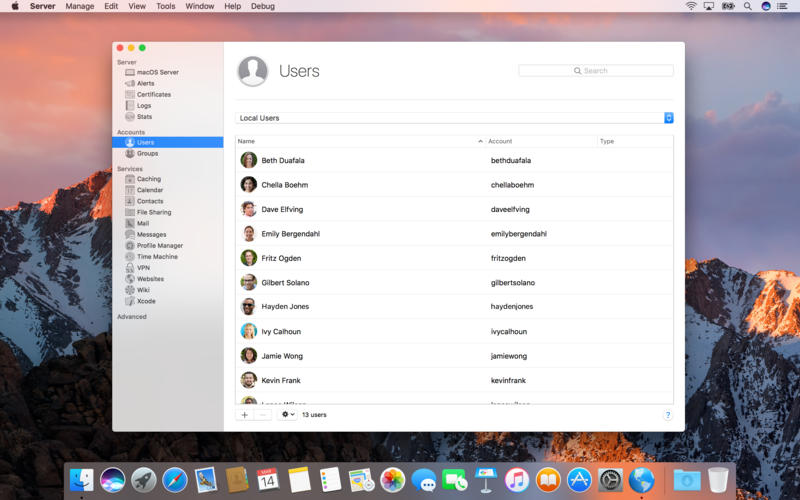
  • Local and remote management
  • Users and group settings
  • View real-time graphs of server usage
  • Receive alerts on network changes, certificate expiration, storage usage, and more

Language: English, Dutch, French, German, Italian, Japanese, Korean, Simplified Chinese, Spanish, Traditional Chinese
Compatibility: macOS 10.16 or later, 64bit
Homepage https://apps.apple.com/us/app/os-x-server/id883878097

Name: Server_5.11_MAS__TNT_.dmg
Size: 83 MB
Files Server_5.11_MAS__TNT.dmg [83 MB]

   Download

macOS Catalina v10.15.5 (19F96)


macOS Catalina gives you more of everything you love about Mac. Experience three all-new media apps: Apple Music, Apple TV, and Apple Podcasts. Locate a missing Mac with the new Find My app. And now coming to Mac, your favorite iPad apps. You can even extend your desktop using iPad as a second display. Now you can take everything you do above and beyond.

Features

Apple Music

  • Stream and download over 50 million songs with an Apple Music subscription.
  • Access the iTunes Store to purchase songs or albums.
  • Find all the music you’ve purchased, downloaded, or imported from CDs organized in the improved library.

Apple TV

  • Buy or rent the latest movie releases.
  • Subscribe to Apple TV channels to watch popular shows on demand and ad-free, online or off.
  • Start watching on one device and pick up where you left off on any of your other devices, including Apple TV, iPhone, iPad, and compatible smart TVs.

Apple Podcasts

  • Find podcasts by title, topic, guest, host, and content.
  • Subscribe to your favorite podcasts to receive the latest episodes automatically.
  • Begin listening to an episode on your Mac, then seamlessly resume on your iPhone, iPad, or Apple Watch when you’re on the go.

Syncing and backup

  • Sync content and back up, update, and restore software from the Finder when you connect your iPhone or iPad to your Mac.

App Store with Apple Arcade

  • Play 100 groundbreaking new games with one subscription — no ads or additional purchases.
  • Browse the latest games, personalized recommendations, and exclusive editorial content in the all-new Arcade tab on the App Store.
  • Enjoy games across iPhone, iPod touch, iPad, Mac, and Apple TV.

Mac Catalyst

  • Enjoy a new class of Mac apps built from your favorite iPad titles.

Sidecar

  • Expand your Mac workspace by using your iPad as a second display.
  • Place one app on each screen, or put your main canvas on your Mac and your tools and palettes on your iPad.
  • Use Apple Pencil for tablet input when using your favorite creative pro Mac apps.

Continuity Sketch and Markup

  • Create a sketch on your iPad or iPhone and insert it into any document on your Mac.
  • Use your iPad or iPhone to sign a PDF or mark up a screenshot on your Mac.

Accessibility

  • Control your Mac entirely with your voice using Voice Control.
  • Enable Hover Text to display large, high-resolution text in a dedicated window.
  • Zoom in closely on one screen when using two displays for improved legibility with Zoom Display.

Security

  • Feel secure knowing that the apps you use have been checked by Apple for known malware.
  • Authorize access to data when apps request it using new data protections.

Find My

  • Keep track of your devices and find friends and family with an easy-to-use new app.
  • Help locate devices even if they’re not connected to Wi-Fi or cellular.
  • Use Activation Lock to protect Mac models with the Apple T2 Security Chip.

Photos

  • Enjoy a new immersive, dynamic experience that showcases your best photos and memories.
  • View Memory Movies and edit their duration, mood, and title.

Safari

  • Browse using an updated start page that surfaces sites from your history, bookmarks, reading list, iCloud Tabs, and even links sent to you in Messages.
  • Help secure your accounts using strong passwords suggested by Safari.

Notes

  • View notes as visual thumbnails in gallery view.
  • Enjoy a more powerful search that recognizes text in items you’ve scanned and objects within images.
  • Share an entire folder of notes using shared folders.

Reminders

  • Use new edit buttons to add dates, locations, flags, attachments, and more to reminders.

Mail

  • Take control of your inbox by muting a thread, blocking a sender, or unsubscribing from a mailing list.

Screen Time

  • Gain insight into time spent using apps and websites and set usage limits.
  • Set up Family Sharing to use Screen Time with your family’s devices.

What’s New in macOS Catalina 10.15.5 (19F96)

macOS Catalina 10.15.5 introduces battery health management in the Energy Saver settings for notebooks, an option to control automatic prominence of video tiles on Group FaceTime calls, and controls to fine-tune the built-in calibration of
your Pro Display XDR. The update also improves the stability, reliability, and security of your Mac.

Battery Health Management

  • Battery health management to help maximize battery lifespan for Mac notebooks
  • Energy Saver preference pane now displays battery condition and recommends if the battery needs to be serviced
  • Option to disable battery health management
  • For more information, please visit support.apple.com

FaceTime Prominence Preference

Option to control automatic prominence on Group FaceTime calls so video tiles do not change size when a participant speaks

Calibration Fine-Tuning for Pro Display XDR

Controls to fine-tune the built-in calibration of your Pro Display XDR by adjusting the white point and luminance for a precise match to your own display calibration target

This update also includes bug fixes and other improvements.

  • Fixes an issue that may prevent Reminders from sending notifications for recurring reminders
  • Addresses an issue that may prevent password entry on the login screen
  • Fixes an issue where System Preferences would continue to show a notification badge even after installing an update
  • Resolves an issue where the built-in camera may not be detected when trying to use it after using a video conferencing app
  • Addresses an issue for Mac computers with the Apple T2 Security Chip where internal speakers may not appear as a sound output device in Sound preferences
  • Fixes a stability issue with uploading and downloading media files from iCloud Photo Library while your Mac is asleep
  • Resolves a stability issue when transferring large amounts of data to RAID volumes
  • Fixes an issue where the Reduced Motion Accessibility preference did not reduce the speed of animations in a FaceTime group call

Compatibility
OS X 10.9 or later, 64-bit processor
Supports models
-MacBook: Early 2015 or later
-MacBook Air: Mid 2012 or later
-MacBook Pro: Mid 2012 or later
-Mac Mini: Late 2012 or later
-iMac: Late 2012 or later
-iMac Pro: 2017 and later (all models)
-Mac Pro: Late 2013 or later

Homepage https://www.apple.com/


Name: macOS.Catalina.v10.15.5.19F96.macOS_Mactorrents.io.rar
Size: 7.68 GB
Files macOS.Catalina.v10.15.5.19F96.macOS_Mactorrents.io.rar[7.68 GB]

   Download

Aescripts EaseCopy 1.7 for After Effects MacOS

EaseCopy lets you copy/paste your eases without overwriting your values and copy/paste your values without overwriting your eases.

If you’re like me, you find that After Effects’ standard Ease in, Ease out, Easy ease options get pretty stale to look at. If you like to manually adjust your eases with the graph editor, this tool is for you!

Use EaseCopy to copy those carefully-adjusted eases to your other keyframes. Get started right away with a very quick and simple UI. It’s super compact so you can have it docked at all times, since you’ll find yourself tapping those buttons quite frequently.

Homepage https://aescripts.com/easecopy/

Name: EaseCopy_v1.7_Mactorrents.io.zip
Size: 19.8 MB
Files EaseCopy_v1.7_Mactorrents.io.dmg[19.8 MB]

   Download

macOS Catalina 10.15.3 (19D76)

macOS Catalina 10.15.3 (19D76) Multilingual

macOS Catalina gives you more of everything you love about Mac. Experience three all-new media apps: Apple Music, Apple TV, and Apple Podcasts. Locate a missing Mac with the new Find My app. And now coming to Mac, your favorite iPad apps. You can even extend your desktop using iPad as a second display. Now you can take everything you do above and beyond.

Apple Music
-Stream and download over 50 million songs with an Apple Music subscription.
-Access the iTunes Store to purchase songs or albums.
-Find all the music you’ve purchased, downloaded, or imported from CDs organized in the improved library.

Apple TV
-Buy or rent the latest movie releases.
-Subscribe to Apple TV channels to watch popular shows on demand and ad-free, online or off.
-Start watching on one device and pick up where you left off on any of your other devices, including Apple TV, iPhone, iPad, and compatible smart TVs.

Apple Podcasts
-Find podcasts by title, topic, guest, host, and content.
-Subscribe to your favorite podcasts to receive the latest episodes automatically.
-Begin listening to an episode on your Mac, then seamlessly resume on your iPhone, iPad, or Apple Watch when you’re on the go.

Syncing and backup
-Sync content and back up, update, and restore software from the Finder when you connect your iPhone or iPad to your Mac.

App Store with Apple Arcade
-Play 100+ groundbreaking new games with one subscription — no ads or additional purchases.
-Browse the latest games, personalized recommendations, and exclusive editorial content in the all-new Arcade tab on the App Store.
-Enjoy games across iPhone, iPod touch, iPad, Mac, and Apple TV.

Mac Catalyst
-Enjoy a new class of Mac apps built from your favorite iPad titles.

Sidecar
-Expand your Mac workspace by using your iPad as a second display.
-Place one app on each screen, or put your main canvas on your Mac and your tools and palettes on your iPad.
-Use Apple Pencil for tablet input when using your favorite creative pro Mac apps.

Continuity Sketch and Markup
-Create a sketch on your iPad or iPhone and insert it into any document on your Mac.
-Use your iPad or iPhone to sign a PDF or mark up a screenshot on your Mac.

Accessibility
-Control your Mac entirely with your voice using Voice Control.
-Enable Hover Text to display large, high-resolution text in a dedicated window.
-Zoom in closely on one screen when using two displays for improved legibility with Zoom Display.

Security
-Feel secure knowing that the apps you use have been checked by Apple for known malware.
-Authorize access to data when apps request it using new data protections.

Find My
-Keep track of your devices and find friends and family with an easy-to-use new app.
-Help locate devices even if they’re not connected to Wi-Fi or cellular.
-Use Activation Lock to protect Mac models with the Apple T2 Security Chip.

Photos
-Enjoy a new immersive, dynamic experience that showcases your best photos and memories.
-View Memory Movies and edit their duration, mood, and title.

Notes
-View notes as visual thumbnails in gallery view.
-Enjoy a more powerful search that recognizes text in items you’ve scanned and objects within images.
-Share an entire folder of notes using shared folders.

Reminders
-Use new edit buttons to add dates, locations, flags, attachments, and more to reminders.

Mail
-Take control of your inbox by muting a thread, blocking a sender, or unsubscribing from a mailing list.

Screen Time
-Gain insight into time spent using apps and websites and set usage limits.
-Set up Family Sharing to use Screen Time with your family’s devices.

Dark Mode
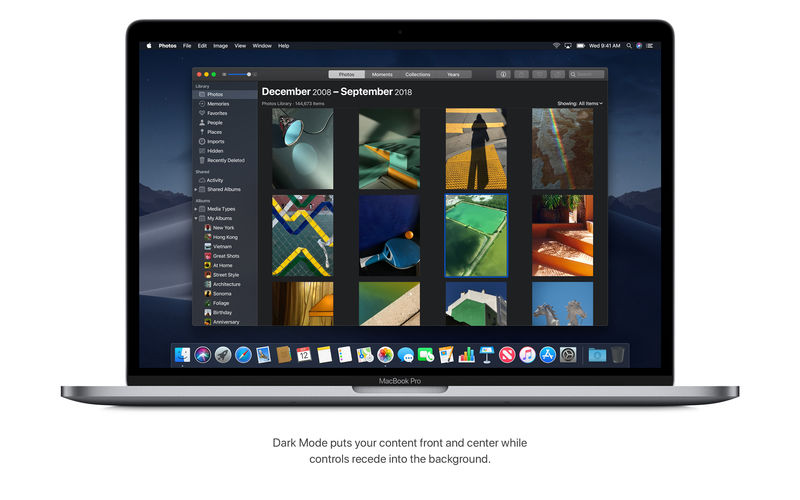
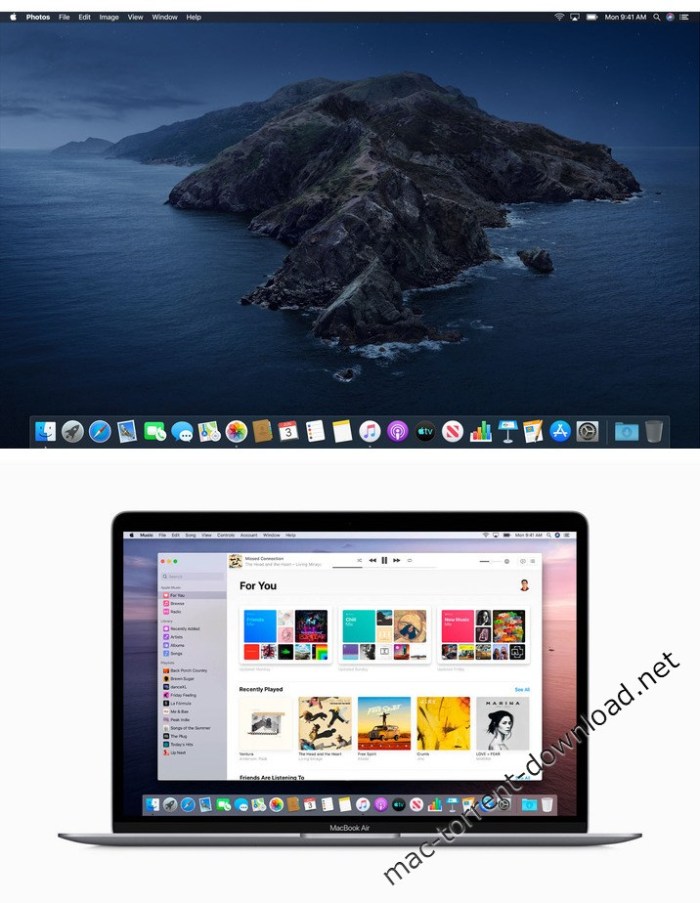
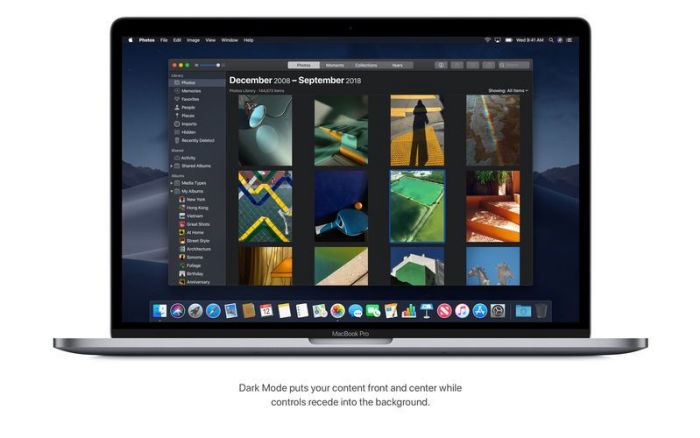
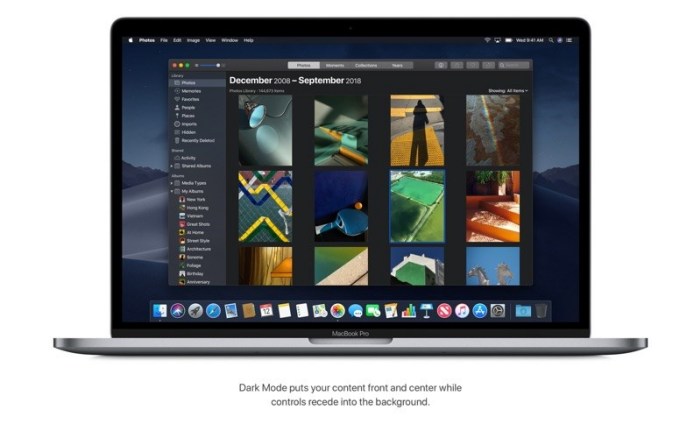
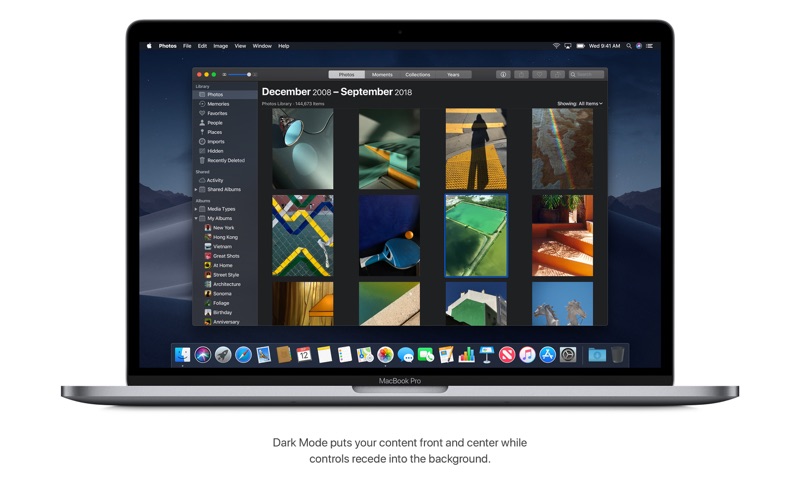
-Experience a dramatic new look for your Mac that puts your content front and center while controls recede into the background.
-Enjoy new app designs that are easier on your eyes in dark environments.

Desktop
-View an ever-changing desktop picture with Dynamic Desktop.
-Automatically organize your desktop files by kind, date, or tag using Stacks.
-Capture stills and video of your screen using the new Screenshot utility.

Finder
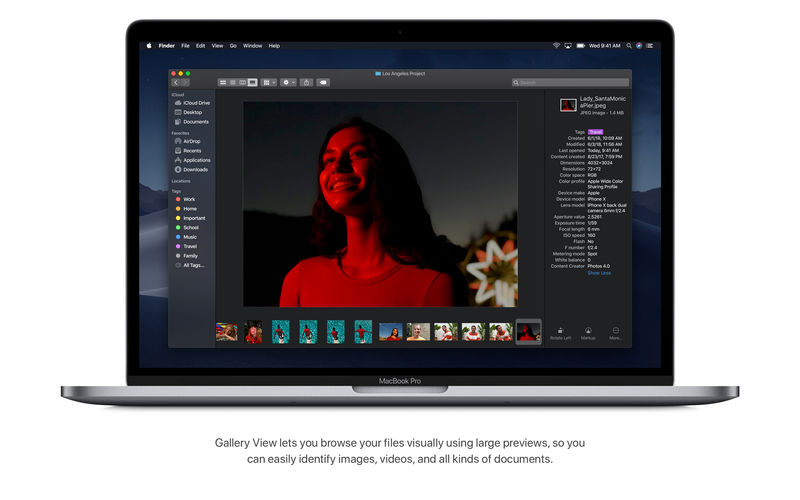
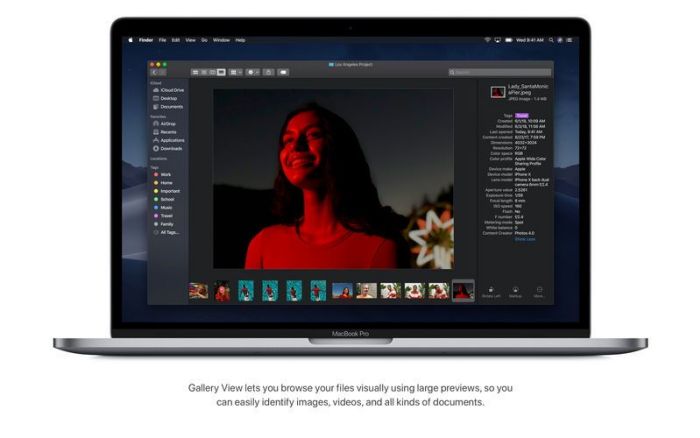
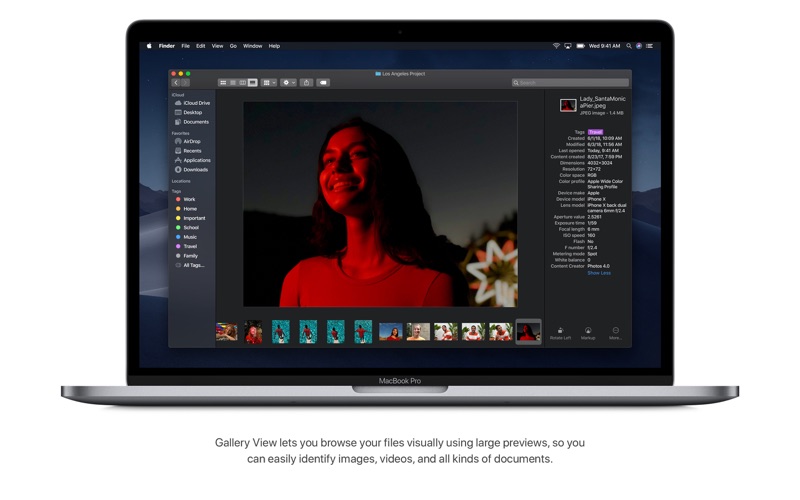
-Find your files visually using large previews in Gallery View.
-See full metadata for all file types in the Preview pane.
-Rotate an image, create a PDF, and more – right in the Finder using Quick Actions.
-Mark up and sign PDFs, crop images, and trim audio and video files using Quick Look.

Continuity Camera
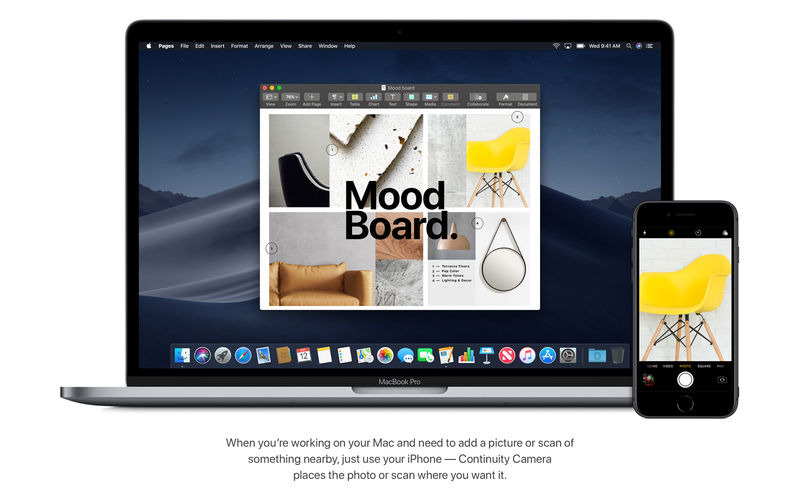
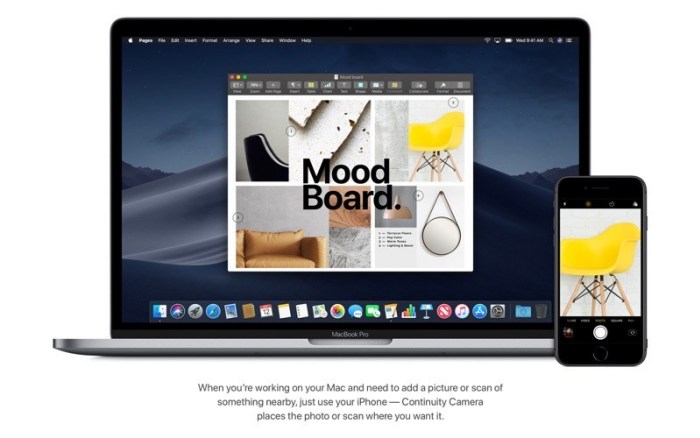
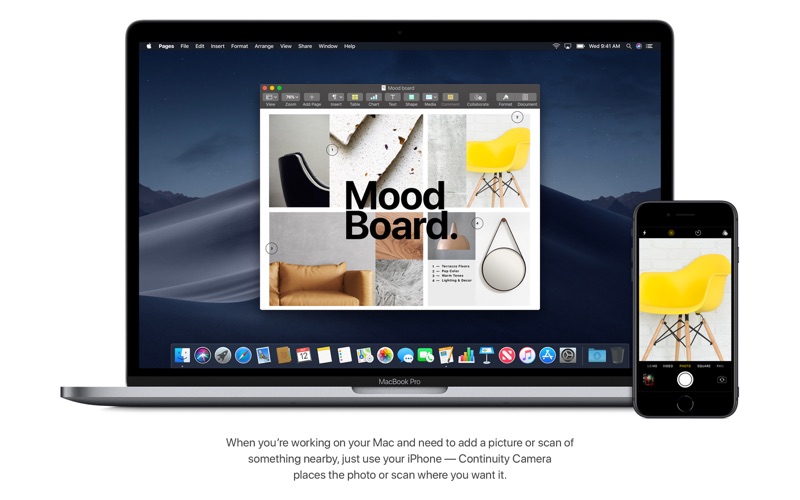
-Photograph an object or scan a document nearby using your iPhone, and it automatically appears on your Mac.

Mac App Store
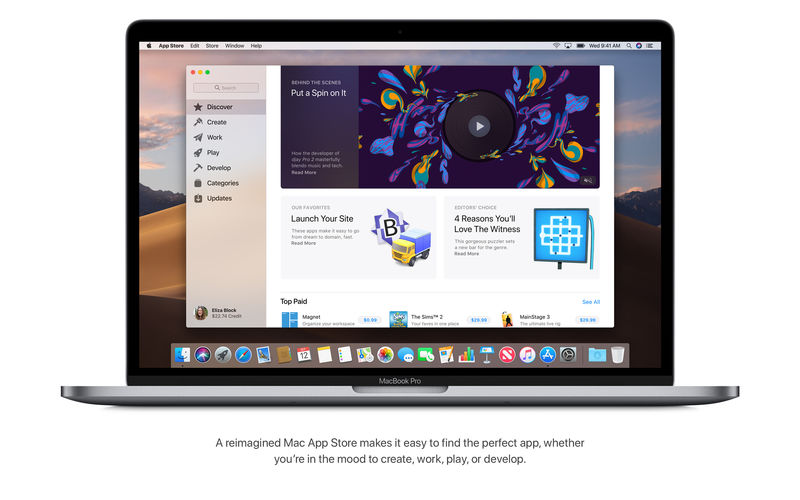
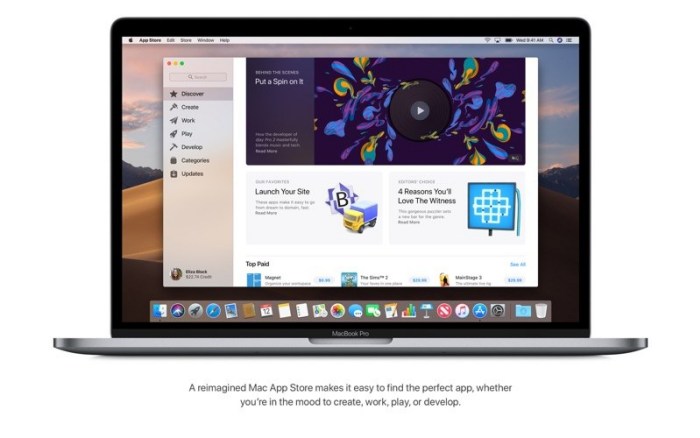
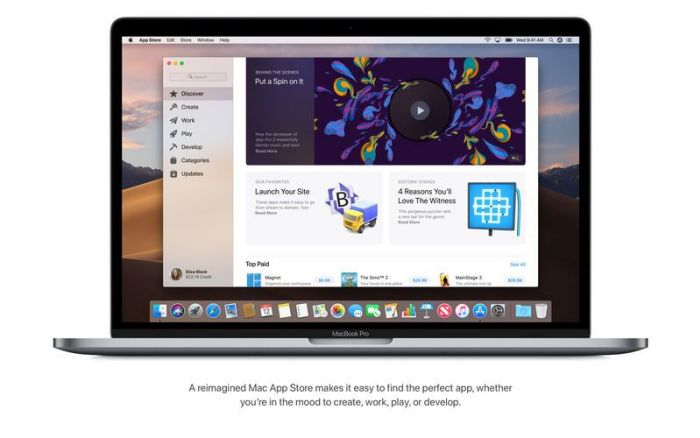
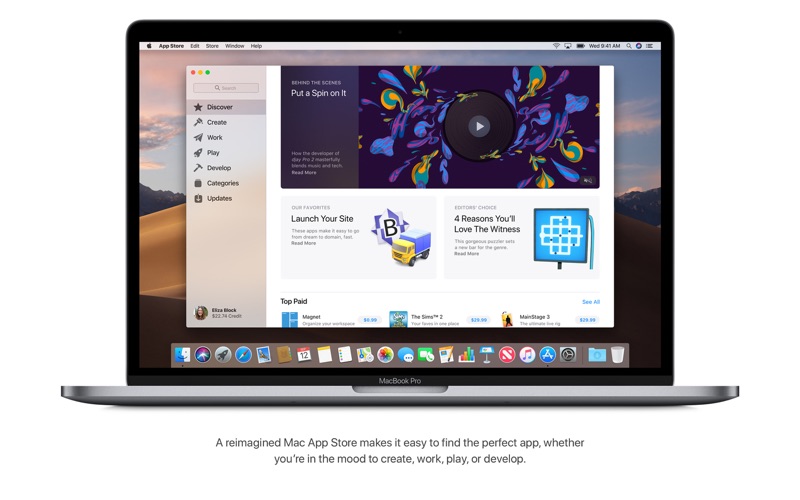
-Browse handpicked apps in the new Discover, Create, Work, and Play tabs.
-Discover the perfect app and make the most of those you have with stories, curated collections, and videos.

iTunes
-Search with lyrics to find a song using a few of the words you remember.
-Start a personalized station of any artist’s music from the enhanced artist pages.
-Enjoy the new Friends Mix, a playlist of songs your friends are listening to.

Safari
-Block Share and Like buttons, comment widgets, and embedded content from tracking you without your permission with enhanced Intelligent Tracking Prevention.
-Prevent websites from tracking your Mac using a simplified system profile that makes you more anonymous online.

Apple News
-Read Top Stories selected by Apple News editors, trending stories popular with readers, and a customized feed created just for you.
-Keep your favorite topics, channels, and saved stories up to date on your Mac and iOS devices.

Stocks
-Create a customized watchlist and view interactive charts that sync across your Mac and iOS devices.
-Browse business news driving the markets curated by Apple News editors.

Voice Memos
-Make audio recordings, listen to them as you work with other apps, or use them in a podcast, song, or video.
-Access audio clips from your iPhone on your Mac using iCloud.

Home
-Organize and control all of your HomeKit accessories from your desktop.
-Receive real-time notifications from your home devices while you work.

Languages:English, Arabic, Catalan, Chinese (Hong Kong), Croatian, Czech, Danish, Dutch, Finnish,
French, German, Greek, Hebrew, Hindi, Hungarian, Indonesian, Italian, Japanese, Korean, Malay,
Norwegian, Polish, Portuguese, Romanian, Russian, Simplified Chinese, Slovak, Spanish,
Swedish, Thai, Traditional Chinese, Turkish, Ukrainian, Vietnamese

List of supported models:
-MacBook (early 2015 or newer)
-MacBook Air (mid 2012 or newer)
-MacBook Pro (mid 2012 or newer)
-Mac mini (end 2012 or later)
-iMac (end of 2012 or newer)
-iMac Pro (2017)
-Mac Pro (end of 2013, mid-2010, mid-2012, graphics processor supporting Metal API is recommended)

Homepage https://www.apple.com/


Name: macOS.Catalina.10.15.3.19D76_Mactorrents.io.rar
Size: 7.63 GB
Files macOS.Catalina.10.15.3.19D76_Mactorrents.io.rar[7.63 GB]

   Download

Native Instruments KOMPLETE 12 Ultimate MacOS

Native Instruments KOMPLETE 12 Ultimate MacOS

AwZ | Online install + Patch | Standalone AU VST | Jan 30 2020
Artist, producers, sound designers – it’s time to expand your sonic horizons. Our biggest update ever supercharges your library with KONTAKT 6, THRILL, SESSION GUITARIST – ELECTRIC SUNBURST, 20 Expansions, and a host of other new instruments and effects. So no matter your genre or production task, you’ll always find exactly what you’re looking for.

Install Notes:
1. Select the installation you need (Do not select products from the “Patch for Applications” subsection if you have not installed it.).
2. Install the product from the installer.
3. Open Native Access.
4. Install the product online in Native Access by selecting «Repair» – «Reinstal» (If there is no choice to «Reinstall» – reboot Native Access.)
5. Install the patch on the installed product.

Homepage https://www.native-instruments.com/en/products/komplete/bundles/komplete-12-ultimate/

Name: Native_Instruments_KOMPLETE_12_Ultimate_MacOS_Mactorrents.io.zip
Size: 1.8 GB
Files Native_Instruments_KOMPLETE_12_Ultimate_MacOS_Mactorrents.io.dmg[1.8 GB]

   Download

Native Instruments Creator Tools v1.2.0 MacOS

Native Instruments Creator Tools v1.2.0 MacOS

MORiA | 31 January 2020 | STANDALONE | (R52) | MacOS
HIGH PERFORMANCE SAMPLER
KONTAKT is the industry standard sampled instrument platform, chosen by top instrument developers the world over.
Its powerful feature set offers unmatched creativity for developers, with cutting-edge sampling tools and effects modules, modular architecture, and advanced scripting, allowing everything from super accurate recreations of real-world instruments, to original standalone instruments, complete with features like built-in sequencing.
KONTAKT 6 introduces a wavetable sound engine, allowing all new hybrid instruments that combine synthesis with sampling to create never-before-heard sonic textures.

EFFECTS
KONTAKT includes a huge selection of pro effects. Harnessing NI’s extensive DSP expertise, they allow any kind of sound shaping – from subtle sonic tailoring to elaborate effect chains.
KONTAKT features 92 effect modules in all, including reverbs, delays, dynamics, distortions, guitar amps and cabinets, modulation, equalizers, bitcrushers, filters, and more.

SAMPLE PLAYBACK
KONTAKT enables fast, simple real-time audio manipulation.
Using NI’s own DSP tech, and that of partners – such as zplane’s élastique Pro – KONTAKT offers advanced high-quality time-stretching and pitch-shifting, granular technology, emulations of vintage digital samplers, flexible looping and slicing, and more.

UNBEATABLE EFFICIENCY
KONTAKT’s unbeatable performance enables complex and highly-realistic sampled instruments.
Efficient, direct-from-disk audio streaming, smart memory management, and careful scheduling of background tasks means KONTAKT loads tens of thousands of samples in seconds and plays hundreds of voices simultaneously, for the ultimate in expressive sonic realism.

ROUTING
KONTAKT features a flexible routing architecture that allows highly complex instrument configurations.
With it, developers can emulate multi-mic studio recording setups, scoring professionals can work in the latest multi-channel audio formats, and sound designers are free to create elaborate effect chains, and even apply separate processing per voice.

MODULATION
KONTAKT has a comprehensive set of musical modulation modules, delivering anything from highly realistic vibrato to animated, otherworldly synth textures. This collection of envelopes, LFOs, and step sequencers can modulate almost any effects parameter or aspect of sample playback. Modulation can also be introduced from external signals such as incoming MIDI, for infinite possibilities.

ADVANCED SCRIPTING
KONTAKT’s advanced scripting language, KSP, powers countless pro instruments. It allows euclidean sequencers, percussion instruments that reproduce minute drum skin variations, complex orchestral clusters, and more. It also allows powerful custom GUIs for instruments that look as good as they sound.

CREATOR TOOLS
KONTAKT 6 ships with a standalone application suite – Creator Tools – to aid the instrument creation processes. It consists of three elements: A Debugger, for identifying and fixing problems in KONTAKT script; an Instrument Editor, which can load and run Lua scripts to automap samples, duplicate and batch rename groups, and copy settings from one part of an instrument to another; and a GUI Designer, which allows creators to assemble, customize, and reuse KONTAKT performance views and controls without the need to write code.

Homepage https://www.native-instruments.com/en/products/komplete/samplers/kontakt-6/building-in-konta

Name: Native_Instruments_Creator_Tools_v1.2.0_MacOS_Mactorrents.io.zip
Size: 85.8 MB
Files Native_Instruments_Creator_Tools_v1.2.0_MacOS_Mactorrents.io.dmg[85.8 MB]

   Download

Spitfire Audio Hans Zimmer Strings MacOS FiXED

Spitfire Audio Hans Zimmer Strings MacOS FiXED

MORiA | 31 January 2020 | LONG Section
To create the greatest film scores in the world, you need to think outside the box. Hans Zimmer, the Godfather of Orchestral Sampling, came to Spitfire to produce this spectacular innovation; 344 players, AIR Studios… Only technology can allow you to play an ensemble this big. From thundering basslines to glass-like high strings, this is symphonic strings maximised.

With the help of design and user experience agency UsTwo (Monument Valley, DICE), Hans Zimmer Strings is available as a plugin developed primarily for composers, by composers. Take the dynamic of your scores to levels you’d never imagined with our most ambitious library yet.

Been creating an installer for MacOS and Building HZS for Kontakt Only LONG SECTION
This is not an original Hans Zimmer Strings Plugin, This is for Kontakt 6.2
Hans Zimmer Strings doesn’t exist for Kontakt!

Multis
– LONG SECTION_13.nkm

Instruments
– Hans Zimmer – Strings (SOFT) LONG SECTION HIGH.nki
– Hans Zimmer – Strings (SOFT) LONG SECTION LOW.nki

REQ: Kontakt 6.2 MacOS 10.12 Sierra or Higher

UPD: 31 Jan, 2020 (So no you can use it from browser)
Tune – Works
Pan – Works
Modwheel – Works

Homepage https://www.spitfireaudio.com/shop/a-z/hans-zimmer-strings

Name: Spitfire_Audio_Hans_Zimmer_Strings_MacOS_FiXED_Mactorrents.io.zip
Size: 460.4 MB
Files Spitfire_Audio_Hans_Zimmer_Strings_MacOS_FiXED_Mactorrents.io.dmg[460.4 MB]

   Download

UJAM Finisher Neo MacOS

UJAM Finisher Neo MacOS

MORiA | 30 January 2020 | AAX | VST |AU
Infinite Instant InspirationBoldly going where no audio effect has gone before.
Inspiration & Creative Control
Finisher is a new concept of audio plug-ins, designed to deliver the power and flexibility of a full rack of audio processors and effects with the instant gratification and not a steep learning curve that UJAM products are famous for.

What’s in There?
Pro-grade audio effect plug-in
27 algorithms from granular pitch to multi-band distortion
50 Modes – complex multi-effect chains made by pro sound designers
Uber – easy operation via macro controls
Futuristic FX
NEO stands for forward-thinking and bold exploration of new frontiers, that’s exactly what this plug-in is about. It’s the first of its kind in the world, and a sheer endless source of inspiration for modern, epic, action-packed and thrilling audio effects.
Features at a Glance
Finisher NEO comes with 50 carefully sound-designed effect configurations built from 27 different algorithms – from Grain Pitch to Multiband Distortion, from simple Stereo Delays to Convolution. Three macro knobs give you full control without the hassle. Tweak or automate the Effect knob for musically stunning sonic shifts, and adjust Variation and Ambience to make every effect your own.
Variation 1
The Variation knob lets you adjust musically useful changes to the current Mode – switch delay times, set EQ characteristics, change distortion curves and much more, often at the same time.
Variation 2
Most Finisher NEO effects come with a matching ambience, and this knob lets you change its mix, length, character – whatever puts your track where it belongs in the mix.

REQ: MacOS X 10.11 or later
2 GB RAM
0.2 GB Disk Space
1280x768px Display,
Internet Connection

Homepage https://www.ujam.com/product/finisher-neo/

Name: UJAM-Finisher-MORiA_Mactorrents.io.zip
Size: 103.9 MB
Files UJAM-Finisher-MORiA_Mactorrents.io.dmg[103.9 MB]

   Download

Adobe CC Collection 2020 (Updated 19.12.2019) MacOS

Adobe CC Collection 2020 (Updated 19.12.2019) MacOS

The all-new Adobe 2020 Release is now available.

What includes?

– Adobe Photoshop 2020 21.0.2
– Adobe Photoshop Lightroom Classic CC 2020 9.1
– Adobe Illustrator 2020 v24.0.1
– Adobe Audition 2020 v13.0.1
– Adobe Media Encoder 2020 v14.0
– Adobe InDesign CC 2020 v15.0.1
– Adobe InCopy 2020 15.0.1
– Adobe Animate 2020 v20.0.1
– Adobe Dreamweaver CC 2020 v20
– Adobe Character Animator 2020 3.1
– Adobe After Effects 2020 17.0.1
– Adobe Premiere Pro 2020 14.0
– Adobe Photoshop Elements 2020
– Adobe Premiere Elements 2020
– Adobe Dimension 2020 3.1
– Adobe Acrobat Pro DC 2019.021.20058
– Adobe XD 2020 24.4.22

Compatibility: macOS 10.12 or later 64 bit
Homepage: http://www.adobe.com/

RAR Password : www.torrentmac.net
Name: Adobe_CC_Collection_2020_(19.12.2019)_Mactorrents.io.rar
Size: 25.7 GB
Files Adobe_CC_Collection_2020_(19.12.2019)_Mactorrents.io.rar[25.7 GB]

   Download

macOS Catalina 10.15.2 (19C57) Update Combo Only

macOS Catalina 10.15.2 (19C57) Update Combo Only

macOS Catalina gives you more of everything you love about Mac. Experience three all-new media apps: Apple Music, Apple TV, and Apple Podcasts. Locate a missing Mac with the new Find My app. And now coming to Mac, your favorite iPad apps. You can even extend your desktop using iPad as a second display. Now you can take everything you do above and beyond.

Apple Music
-Stream and download over 50 million songs with an Apple Music subscription.
-Access the iTunes Store to purchase songs or albums.
-Find all the music you’ve purchased, downloaded, or imported from CDs organized in the improved library.

Apple TV
-Buy or rent the latest movie releases.
-Subscribe to Apple TV channels to watch popular shows on demand and ad-free, online or off.
-Start watching on one device and pick up where you left off on any of your other devices, including Apple TV, iPhone, iPad, and compatible smart TVs.

Apple Podcasts
-Find podcasts by title, topic, guest, host, and content.
-Subscribe to your favorite podcasts to receive the latest episodes automatically.
-Begin listening to an episode on your Mac, then seamlessly resume on your iPhone, iPad, or Apple Watch when you’re on the go.

Syncing and backup
-Sync content and back up, update, and restore software from the Finder when you connect your iPhone or iPad to your Mac.

App Store with Apple Arcade
-Play 100+ groundbreaking new games with one subscription — no ads or additional purchases.
-Browse the latest games, personalized recommendations, and exclusive editorial content in the all-new Arcade tab on the App Store.
-Enjoy games across iPhone, iPod touch, iPad, Mac, and Apple TV.

Mac Catalyst
-Enjoy a new class of Mac apps built from your favorite iPad titles.

Sidecar
-Expand your Mac workspace by using your iPad as a second display.
-Place one app on each screen, or put your main canvas on your Mac and your tools and palettes on your iPad.
-Use Apple Pencil for tablet input when using your favorite creative pro Mac apps.

Continuity Sketch and Markup
-Create a sketch on your iPad or iPhone and insert it into any document on your Mac.
-Use your iPad or iPhone to sign a PDF or mark up a screenshot on your Mac.


Accessibility
-Control your Mac entirely with your voice using Voice Control.
-Enable Hover Text to display large, high-resolution text in a dedicated window.
-Zoom in closely on one screen when using two displays for improved legibility with Zoom Display.

Security
-Feel secure knowing that the apps you use have been checked by Apple for known malware.
-Authorize access to data when apps request it using new data protections.

Find My
-Keep track of your devices and find friends and family with an easy-to-use new app.
-Help locate devices even if they’re not connected to Wi-Fi or cellular.
-Use Activation Lock to protect Mac models with the Apple T2 Security Chip.

Photos
-Enjoy a new immersive, dynamic experience that showcases your best photos and memories.
-View Memory Movies and edit their duration, mood, and title.

Notes
-View notes as visual thumbnails in gallery view.
-Enjoy a more powerful search that recognizes text in items you’ve scanned and objects within images.
-Share an entire folder of notes using shared folders.

Reminders
-Use new edit buttons to add dates, locations, flags, attachments, and more to reminders.

Mail
-Take control of your inbox by muting a thread, blocking a sender, or unsubscribing from a mailing list.

Screen Time
-Gain insight into time spent using apps and websites and set usage limits.
-Set up Family Sharing to use Screen Time with your family’s devices.

Dark Mode
-Experience a dramatic new look for your Mac that puts your content front and center while controls recede into the background.
-Enjoy new app designs that are easier on your eyes in dark environments.


Desktop
-View an ever-changing desktop picture with Dynamic Desktop.
-Automatically organize your desktop files by kind, date, or tag using Stacks.
-Capture stills and video of your screen using the new Screenshot utility.


Finder
-Find your files visually using large previews in Gallery View.
-See full metadata for all file types in the Preview pane.
-Rotate an image, create a PDF, and more – right in the Finder using Quick Actions.
-Mark up and sign PDFs, crop images, and trim audio and video files using Quick Look.


Continuity Camera
-Photograph an object or scan a document nearby using your iPhone, and it automatically appears on your Mac. 


Mac App Store
-Browse handpicked apps in the new Discover, Create, Work, and Play tabs.
-Discover the perfect app and make the most of those you have with stories, curated collections, and videos.


iTunes
-Search with lyrics to find a song using a few of the words you remember.
-Start a personalized station of any artist’s music from the enhanced artist pages.
-Enjoy the new Friends Mix, a playlist of songs your friends are listening to.


Safari
-Block Share and Like buttons, comment widgets, and embedded content from tracking you without your permission with enhanced Intelligent Tracking Prevention.
-Prevent websites from tracking your Mac using a simplified system profile that makes you more anonymous online.


Apple News
-Read Top Stories selected by Apple News editors, trending stories popular with readers, and a customized feed created just for you.
-Keep your favorite topics, channels, and saved stories up to date on your Mac and iOS devices. 


Stocks
-Create a customized watchlist and view interactive charts that sync across your Mac and iOS devices.
-Browse business news driving the markets curated by Apple News editors.


Voice Memos
-Make audio recordings, listen to them as you work with other apps, or use them in a podcast, song, or video.
-Access audio clips from your iPhone on your Mac using iCloud. 


Home
-Organize and control all of your HomeKit accessories from your desktop.
-Receive real-time notifications from your home devices while you work.

Languages:English, Arabic, Catalan, Chinese (Hong Kong), Croatian, Czech, Danish, Dutch, Finnish,
French, German, Greek, Hebrew, Hindi, Hungarian, Indonesian, Italian, Japanese, Korean, Malay,
Norwegian, Polish, Portuguese, Romanian, Russian, Simplified Chinese, Slovak, Spanish,
Swedish, Thai, Traditional Chinese, Turkish, Ukrainian, Vietnamese

List of supported models:
-MacBook (early 2015 or newer)
-MacBook Air (mid 2012 or newer)
-MacBook Pro (mid 2012 or newer)
-Mac mini (end 2012 or later)
-iMac (end of 2012 or newer)
-iMac Pro (2017)
-Mac Pro (end of 2013, mid-2010, mid-2012, graphics processor supporting Metal API is recommended)

Homepage https://www.apple.com/

RAR Password :   www.torrentmac.net

Name: macOSUpdCombo10.15.2_Mactorrents.io.rar
Size: 4.26 GB
Files macOSUpdCombo10.15.2_Mactorrents.io.rar[4.26 GB]

   Download

Eventide H3000 Factory for macOS 10.15 Catalina

Name Eventide H3000 Factory for macOS 10.15 Catalina mac-torrents.net.zip
Size 17.61 MB
Created on 2019-11-28 15:36:12
Hash 2bd868e73912fbf01f0714852e47269a02c46103
Files Eventide H3000 Factory for macOS 10.15 Catalina mac-torrents.net.zip (17.61 MB)

Download Eventide H3000 Factory

The H3000 Factory is a re-creation of several key algorithms from the H3000 Harmonizer® effects processor. The plug-in provides a convenient modular interface to combine up to 18 effects blocks together in a practically limitless number of configurations. It offers pairs of sweepable delays, pitch shifters, filters, mixers, amplitude modulators (or VCAs), and an assortment of modulation sources including two low frequency oscillators, envelope generators and more. Each of your custom effects can be easily manipulated in real time or synchronized to a session. All of this flexibility, with the sought-after sound of the H3000, brings you a great-sounding plug-in that’s as versatile as the original that inspired it.

Features

  • Over 450 presets including over 100 new artist presets and over 100 original presets from the H3000.
  • Available effects blocks include delays, amplitude modulators, envelope followers, pitch shifters, filters and low frequency oscillators.
  • The Function Generator features nineteen waveshapes, a white noise generator, MIDI control and a sidechain input.
  • All delays and LFOs can be locked to system tempo. Each delay can be looped and offers a low pass filter.
  • The filters are selectable band pass, high pass, and low pass with variable Q, and can be swept and modulated without audible artifacts.

Been creating an installer for MacOS Catalina 10.15
Hope you like it!

You might say “Why?”
MacOS Catalina has new REQ with permission

Information

CompatibilitymacOS 10.15 Catalina or later
LanguagesEnglish

Eventide H3000 Factory Screenshots

Download

iZotope RX 7 Advanced v7.0.1 for macOS Catalina

Name iZotope RX 7 Advanced v7.0.1.rar
Size 1.35 GB
Created on 2019-11-24 23:40:45
Hash 16b9b8f0b8bfb0f73d4772ba5319e90d35e241f5
Files iZotope RX 7 Advanced v7.0.1.rar (1.35 GB)

Download iZotope RX 7 Advanced v7.0.1 [MORiA]

GIVE YOUR POST PRODUCTION GAME A BOOST
As the industry leader in audio repair, RX 7 introduces Repair Assistant and Music Rebalance, plus tools for any audio post production job.

Designed specifically for the demanding needs of post production professionals, RX 7 Advanced introduces brand new processing powered by machine learning, powerful AudioSuite tools, and multichannel support up to 7.1.2.

Restore the intended performance

With the new Dialogue Contour module, you can reshape the intonation of dialogue to rescue or improve a performance in post production. Dialogue Contour features pitch correction processing that is tailored to speech and designed to adjust the inflection of words within a phrase of dialogue that may not match or flow correctly with the rest of the dialogue in the clip. Easily splice together natural-sounding sentences or turn statements into questions!

New plug-ins, new workflows

Time is everything, and we’ve added even more AudioSuite plug-ins to RX 7 Advanced to help you get more of it back. User-favorites Dialog Isolate and De-rustle are now also available in Pro Tools AudioSuite, giving you even more flexibility in your audio repair workflow. Plus, RX 7 Advanced now lets you repair multichannel audio up to 7.1.2 Dolby Atmos.

Why RX 7?

Easy vocal reshaping

Quickly reshape your performer’s intonation with Dialogue Contour, allowing you to save or improve a performance in post.

Crystal clear dialogue

Tools like Dialogue Isolate and Dialogue De-reverb ensure that your audience catches every word with perfect clarity.

Professional surround support

With support through Atmos 7.1.2, RX 7 is ready to take on post production jobs in almost any professional multichannel format.

iZotope RX 7 Standard is loaded with powerful restoration tools:

  • Repair Assistant uses machine learning to solve common audio issues faster than ever.
  • Music Rebalance grants you independent gain adjustment of the elements of a mix — after it’s already mixed.
  • Variable Time adjusts the time stretch amount of an audio selection without altering its pitch.
  • Variable Pitch adjusts the pitch of an audio selection while preserving its time and length.
  • De-bleed eliminates headphone bleed from acoustic guitar tracks, removes click track bleed from vocal takes, and solves other signal bleed problems.
  • De-ess tames overly aggressive sibilance. The new Spectral De-ess mode transparently attenuates sibilance with iZotope’s spectral shaping technology.
  • Mouth De-click gets rid of distracting mouth noises.
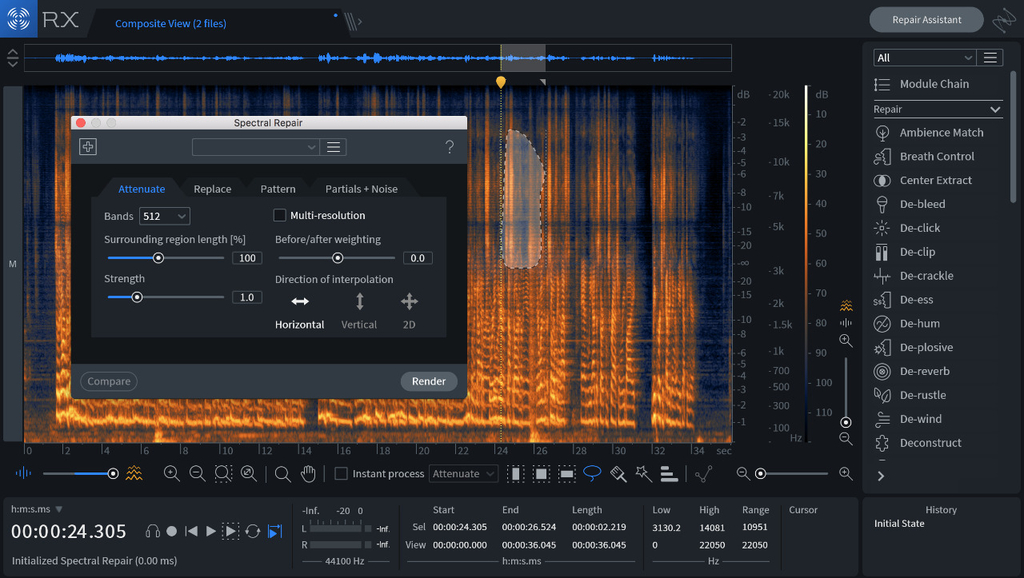
  • Spectral Repair visually paints away audio problems like ringing cell phones, birds, and squeaky bass drum pedals.
  • Voice De-noise is fine-tuned for vocals, reducing unwanted steady-state or changing background noise like air conditioning, refrigerator hum, and amp hiss.
  • De-plosive repairs unwanted plosives with a single click.
  • Spectral De-noise reduces amp buzz, tape hiss, and other unwanted steady-state background noise.
  • De-click cleans up vinyl clicks, softens up clicky bass guitars, and more. A new low-latency algorithm enables you to use De-click directly within your DAW or NLE without introducing sync issues.
  • De-clip patches up digital and analog clipping artifacts to restore distorted audio.
  • De-hum removes ground loop hum and line noise.
  • Composite View removes unwanted sounds captured with multiple microphones by editing multiple files at once.

Repair Assistant makes audio restoration easier than ever

The engineers here at Sweetwater will tell you — audio restoration is a time-intensive endeavor. But not anymore! RX Standard’s Repair Assistant makes short work of clipping, clicks, and more without the usual tedious trial-and-error workflow. All you need to do is select the type of material, be it music, dialogue, or other, and let RX Standard analyze the audio. It then gives you processing suggestions to point you in the right direction, along with three different intensities for each. You then review and audition the different suggestions, hit render, and you’re good to go.

Music Rebalance gives new meaning to “fix it in the mix”

Mastering a badly mixed song is an uphill battle. Now, thanks to RX 7 Standard, that’s no longer the case. Its Music Rebalance tool allows for independent gain adjustment of vocals, bass, percussion, and other elements of a mix — after the project has been mixed. Drums too loud? Vocals not loud enough? Music Rebalance allows you to fix these problems, and more, without requesting the original tracks or stems. Beyond that, it’s great for creating karaoke tracks. Music Rebalance is also available as an AudioSuite plug-in.

iZotope RX 7 Standard Features:

  • NEW Repair Assistant uses machine learning to solve common audio issues quickly and easily
  • NEW Music Rebalance supplies independent gain adjustment of the elements of a mix after it’s already mixed
  • NEW Variable time and pitch adjustment
  • Music-optimized tools remove mic bleed, sibilance, mouth clicks, breaths, and other common irritants
  • Composite View for repairing multiple files at once
  • Straightforward interface makes operation intuitive
  • Task-based modules focus on specific audio issues

Installation

  1. Mount “iZotope_RX_7_Audio_Editor_Advanced_7_01.dmg”
  2. Double click Install iZotope RX 7 Audio Editor Advanced
  3. Click Next
  4. Choose – Standalone, – AU, or – VST, or – VST3, or – AAX, or – RTAS&DPM
  5. Type in pass
  6. Click Next
  7. Reboot
  8. Done

Information

CompatibilitymacOS 10.15 Catalina
LanguagesEnglish

What’s New in iZotope RX 7 Advanced v7.0.1

  • New “Prevent Clipping” export option: Predicts and prevents clipping when exporting to OGG & MP3 file formats in the RX Audio Editor.
  • Mouth De-click Processing Improvements: Improved Mouth De-click results for Japanese dialogue.
  • Improved processing time when using RX Connect for Direct Offline Processing in Nuendo.
  • Fixed file length discrepancies that could occur when encoding or decoding mp3 files.
  • Fixed erroneous clipping detection in the Repair Assistant module.
  • Improved offline processing time of the Spectral De-noise module.
  • Improved performance when processing multiple file tabs with Mouth De-click in the RX Audio Editor.
  • Improved processing quality in the Dialogue Isolate module.
  • Various bug fixes.

Screenshots

Download

iZotope Ozone Advanced 9 for macOS Catalina


Download iZotope Ozone Advanced 9 for macOS Catalina

Building on a 17 year legacy, Ozone 9 brings balance to your music with the latest advances in machine learning for mastering audio.

Why Ozone 9?

AI powered mastering

Master Assistant can add modern or vintage vibes and help you get the right loudness for streaming

Match to your reference

The new Match EQ module can give you a custom EQ curve taken from your favorite reference tracks.

Find your (tonal) balance

Tonal Balance Control helps keep frequencies in line, letting you talk to iZotope plug-ins to fix issues accross your session.

Ozone 9 Features:

Master with machine learning

Ozone 9 helps make mastering easier with AI powered assistive tools that give you an instant starting point. New source separation technology in Master Rebalance lets you correct instrument levels before starting your master, or add excitement to key sections. Have the final say in any mix, with complete control of your sound.

Control lows, mids, and highs

Tame harshness harshness in high end and bring out your low end instruments with industry first tools like the Spectral Shaper and Low End Focus modules. Use intuitive, fluid controls to target specific regions to easily smooth out issues or create unique effects.

Match your reference track

Load your favorite reference tracks into Ozone 9, loop any section, and compare your master with a single button press. Take a snapshot of your reference with the new Match EQ module, and save your favorite profiles as presets for other songs. Or, use Master Assistant to set up a custom chain based on your reference.

Tonal Balance Control

Finalize and fine tune your master in any listening environment using target curves for different genres. Quickly fix issues where you see them by calling up Ozone’s EQ against your target. Use Tonal Balance Control in your mix session and adjust gain and EQ for Nectar, Neutron, and Relay plug-ins to keep frequencies in line.

NKS Support

NKS support puts the power of Ozone into your creative process, letting you master while making music with Maschine or Komplete Kontrol. Open Ozone on the fly and easily add professional polish while making music on your hardware, using hundreds of different presets and accessible parameters mapped to your hardware controls. Add loudness, width, and EQ without touching your DAW and keep the creative juices flowing.

Ozone for Streaming

Get your music ready for primetime in today’s world of streaming audio. Set intelligent loudness targets to prevent your music from being turned down by a streaming platform with Master Assistant and Maximizer. Use CODEC Preview mode in Ozone 9 Advanced to hear your music translated to MP3 or AAC. Upload a reference track to Tonal Balance Control, Master Assistant, or EQ Match, and ensure your music stacks up against the competition. Create with confidence knowing your music will sound great in any format!

Master Rebalance

  • Adjust volume on drums, bass, or vocals in ANY audio track, even a bounced mix.
  • Master Rebalance works in real time…no need to render or bounce your tracks
  • Use DAW automation to add excitement in song sections with small gain changes
  • Twin spectrum meters let you see rebalanced source against the rest of your track
  • Master Rebalance is is available in Ozone 9 Advanced only.

Low End Focus

Get clear and punchy low frequencies and avoid artifacts from EQ and compression. “Punchy” and “Smooth” modes let you find the right setting for percussive or sustained low end issues
Set a Boundary region to add or remove contrast anywhere in your low end
Use the Listen button to hear what’s being removed and avoid over-processing
Low End Focus is available in Ozone 9 Advanced only.

Imager

Add natural stereo width to narrow mixes with an upgraded “Stereoize” mode
NEW! Two modes for stereoize give you new flavors for widening your track
Sculpt your image in stereo with per-band widening and narrowing
Monitor stereo width and phase new fluid metering
Imager is available in all editions of Ozone 9

Equalizer

  • Control the finest details of your sound with fluid metering and new HUD controls
  • Emulate classic analog EQs or modern digital models depending on your style
  • Use Mid/Side mode to correct frequencies in the sides of your audio
  • NEW! Enjoy smooth, fluid metering and a resizable window that lets you see more of your sound
  • Equalizer is available in all editions of Ozone 9

Track Referencing

  • Seamlessly compare your mix with a reference track at the touch of a button
  • Loop specific regions of your references and load up to 16 at once into Ozone
  • See your reference displayed in Ozone’s meters for easy visual comparison
  • Use Master Assistant to automatically match the tone of your loaded reference tracks

Maximizer

  • Make mixes LOUD while preserving dynamics with Ozone’s intelligent limiter
  • Intelligent Release Control (IRC) modes react to your sound to reduce distortion and pumping
  • Threshold Learn mode intelligently sets loudness to a target LUFS level
  • True Peak detection ensures your audio doesn’t clip after export
  • Maximizer is available in all editions of Ozone 9

– AU, – VST, – VST3, -AAUX
MacOS Catalina ONLY
Been creating an installer for MacOS Catalina 10.15
Also fixed issue with Ableton Live Suite 10.1.4 50/50 %
Hope you like it!

You might say “Why?”
MacOS Catalina has new REQ with permission

Installation

  1. Double click
  2. Click Next
  3. Choose – AU, or – VST, or – VST3, or -AAUX
  4. Type in pass
  5. Reboot
  6. Done

Information

CompatibilitymacOS 10.15 (Catalina)
Plug-in FormatsAll plug-in formats are 64-bit only.
  • AudioUnit
  • AAX
  • VST 2
  • VST 3
  • NKS
Supported HostsLogic Pro X, Ableton Live 9–10, Pro Tools 12.8-2019, FL Studio 20, Cubase 9–10, Nuendo 10, Wavelab 9, Sound Forge Pro 13, Sound Forge Mac 3, REAPER 5, Reason 10, Audition CC 2019, Premiere Pro CC 2019, MASCHINE 2, Komplete Kontrol, Bitwig Studio 3, Final Cut Pro X.
LanguagesEnglish

What’s New in iZotope Ozone Advanced 9 for macOS Catalina

  • Release notes not available at the time of this post.

Screenshots

Name iZotope Ozone Advanced 9 for macOS Catalina.zip
Size 1.19 GB
Created on 2019-11-08 16:08:39
Hash 80b7d90d9fec8f91b56c98a396cbf0579652ea34
Files iZotope Ozone Advanced 9 for macOS Catalina.zip (1.19 GB)

macOS Server 5.9

Download macOS Server 5.9

Designed for macOS and iOS devices, macOS Server makes it easy to share files, schedule meetings, synchronize contacts, develop software, host your own website, publish wikis, configure Mac, iPhone, and iPad devices, remotely access your network, and more.

macOS Server is an application you can add to macOS right from the Mac App Store. Anyone can quickly and easily turn a Mac into a server that’s perfect for home offices, businesses, schools, developers, and hobbyists alike.

Here’s what you’ll get with macOS Server:

Profile Manager

  • Mobile device management for Mac and iOS devices
  • Simplified management and deployment of iOS and macOS.
  • Distribution of institution licensed apps and books purchased from the Volume Purchase Program to users or devices
  • Install Software Updates on devices running iOS 10 and mac OS 10.12.
  • Device Enrollment Program integration
  • Webbased administration console
  • Selfservice user portal for clearing passcodes, remote lock, and remote wipe

Calendar Server

  • Share calendars, schedule meetings and events, and book conference rooms
  • Standardsbased CalDAV server for access from Mac, iPad, iPhone, and PC
  • View availability with free/busy lookups
  • Email invitations and push notifications

Contacts Server

  • Synchronize contacts with Mac, iPad, and iPhone
  • Allow multiple users to access and update contacts
  • Standardsbased CardDAV server

Wiki Server

  • Pointandclick page edit to change formatting and insert images, movies, and attachments
  • Access controls
  • Tags and comments
  • Revision history
  • Document sharing
  • Quick Look previews

Mail Server

  • Standardsbased SMTP, IMAP, and POP server
  • Push notifications
  • SSL encryption
  • Adaptive junk mail filtering
  • Virus detection and quarantine

Virtual Private Network

  • Remote access for your network services
  • Encrypted VPN connections for Mac, iPad, iPhone, and PC

Xsan

  • Blocklevel SAN file sharing with concurrent read/write access
  • Xsan volume hosting and configuration
  • Volume management, storage pooling, stripping, and volume mapping
  • Realtime monitoring, graphs, and event notifications
  • Metadata controller failover and file system journaling

Server App

  • Local and remote management
  • Users and group settings
  • View realtime graphs of server usage
  • Receive alerts on network changes, certificate expiration, storage usage, and more

Some features require an Apple ID and/or compatible Internet access; additional fees and terms apply. Some features require program enrollment. Some features are not available in all countries.

Information

Compatibility
OS X 10.15 or later, 64-bit processor
Languages
English, Dutch, French, German, Italian, Japanese, Korean, Simplified Chinese, Spanish, Traditional Chinese

What’s New in macOS Server 5.9

Profile Manager

iOS, macOS, tvOS

  • WiFi: Configure WPA3 Personal security type

iOS and macOS

  • Add consent text to manually downloadable and enrollment profiles
  • Configure extensible single sign-on payload

iOS

  • Skip Dark Mode and Welcome panes in Setup Assistant
  • Configure new supervised only restrictions for allowing external drive access in Files app, continuous path keyboards, and force Wi-Fi to on
  • Exchange ActiveSync: Enable Mail, Calendar, Contacts, and Reminders individually for managed accounts
  • Single App Mode: Configure Voice Control
  • Refresh enterprise eSIM cellular plans

macOS

  • Support Web-based authentication for Device Enrollment Program
  • Skip Screen Time and TouchID panes in Setup Assistant
  • Configure new account configuration options for DEP enrollment
  • Display Secure Boot and External Boot levels in Device Information
  • Support Bootstrap Token to enable mobile accounts to sign in on FileVault Macs
  • Manage Activation Lock: Enable Activation Lock, Clear Activation Lock, automatically fetch Activation Lock Bypass Code on Catalina enrolled Macs
  • Configure automatic macOS updates and app updates
  • Dock: Configure double click, recents, and tab settings
  • Configure Associated Web Domains payload
  • Configure Content Caching as infrastructure

tvOS

  • Configure whether device will sleep

Screenshots

macOS Catalina 10.15.1 (19B88)

macOS Catalina 10.15.1 (19B88)

Download macOS Catalina 10.15.1 (19B88) Update Only

gives you more of everything you love about Mac. Experience three all-new media apps: Apple Music, Apple TV, and Apple Podcasts. Locate a missing Mac with the new Find My app. And now coming to Mac, your favorite iPad apps. You can even extend your desktop using iPad as a second display. Now you can take everything you do above and beyond.

Features

Apple Music

  • Stream and download over 50 million songs with an Apple Music subscription.
  • Access the iTunes Store to purchase songs or albums.
  • Find all the music you’ve purchased, downloaded, or imported from CDs organized in the improved library.

Apple TV

  • Buy or rent the latest movie releases.
  • Subscribe to Apple TV channels to watch popular shows on demand and ad-free, online or off.
  • Start watching on one device and pick up where you left off on any of your other devices, including Apple TV, iPhone, iPad, and compatible smart TVs.

Apple Podcasts

  • Find podcasts by title, topic, guest, host, and content.
  • Subscribe to your favorite podcasts to receive the latest episodes automatically.
  • Begin listening to an episode on your Mac, then seamlessly resume on your iPhone, iPad, or Apple Watch when you’re on the go.

Syncing and backup

  • Sync content and back up, update, and restore software from the Finder when you connect your iPhone or iPad to your Mac.

App Store with Apple Arcade

  • Play 100 groundbreaking new games with one subscription — no ads or additional purchases.
  • Browse the latest games, personalized recommendations, and exclusive editorial content in the all-new Arcade tab on the App Store.
  • Enjoy games across iPhone, iPod touch, iPad, Mac, and Apple TV.

Mac Catalyst

  • Enjoy a new class of Mac apps built from your favorite iPad titles.

Sidecar

  • Expand your Mac workspace by using your iPad as a second display.
  • Place one app on each screen, or put your main canvas on your Mac and your tools and palettes on your iPad.
  • Use Apple Pencil for tablet input when using your favorite creative pro Mac apps.

Continuity Sketch and Markup

  • Create a sketch on your iPad or iPhone and insert it into any document on your Mac.
  • Use your iPad or iPhone to sign a PDF or mark up a screenshot on your Mac.

Accessibility

  • Control your Mac entirely with your voice using Voice Control.
  • Enable Hover Text to display large, high-resolution text in a dedicated window.
  • Zoom in closely on one screen when using two displays for improved legibility with Zoom Display.

Security

  • Feel secure knowing that the apps you use have been checked by Apple for known malware.
  • Authorize access to data when apps request it using new data protections.

Find My

  • Keep track of your devices and find friends and family with an easy-to-use new app.
  • Help locate devices even if they’re not connected to Wi-Fi or cellular.
  • Use Activation Lock to protect Mac models with the Apple T2 Security Chip.

Photos

  • Enjoy a new immersive, dynamic experience that showcases your best photos and memories.
  • View Memory Movies and edit their duration, mood, and title.

Safari

  • Browse using an updated start page that surfaces sites from your history, bookmarks, reading list, iCloud Tabs, and even links sent to you in Messages.
  • Help secure your accounts using strong passwords suggested by Safari.

Notes

  • View notes as visual thumbnails in gallery view.
  • Enjoy a more powerful search that recognizes text in items you’ve scanned and objects within images.
  • Share an entire folder of notes using shared folders.

Reminders

  • Use new edit buttons to add dates, locations, flags, attachments, and more to reminders.

Mail

  • Take control of your inbox by muting a thread, blocking a sender, or unsubscribing from a mailing list.

Screen Time

  • Gain insight into time spent using apps and websites and set usage limits.
  • Set up Family Sharing to use Screen Time with your family’s devices.

Installation Notes

Enabling the installation of third-party applications.

sudo spctl --master-disable

Creating a bootable flash drive

Where USB is your USB flash drive, in Mac OS Extended (Magazine) format of at least 8 Gb.

sudo /Applications/Install macOS 10.15 Beta.app/Contents/Resources/createinstallmedia --volume /Volumes/USB

Information

CompatibilityOS X 10.9 or later, 64-bit processor
Supports models
  • MacBook: Early 2015 or later
  • MacBook Air: Mid 2012 or later
  • MacBook Pro: Mid 2012 or later
  • Mac Mini: Late 2012 or later
  • iMac: Late 2012 or later
  • iMac Pro: 2017 and later (all models)
  • Mac Pro: Late 2013 or later
LanguagesMultilangual

What’s New in macOS Catalina 10.15.1 (19B88)

The macOS Catalina 10.15.1 update includes updated and additional emoji, support for AirPods Pro, HomeKit Secure Video, HomeKit enabled routers, and new Siri privacy settings, as well as bug fixes and improvements.

Emoji

  • Over 70 new or updated emoji, including animals, food, activities, new accessibility emoji, gender neutral emoji, and skin tones selection for couple emoji

AirPods

  • Introduces support for AirPods Pro

Home app for macos catalina 10.15_19B88.dmg

  • HomeKit Secure Video enables you to privately capture, store, and view encrypted video from your security cameras and features people, animal, and vehicle detection
  • HomeKit enabled routers let you control how your HomeKit accessories communicate over the internet or in your home
  • Adds support for AirPlay 2-enabled speakers in scenes and automations

Siri

  • Privacy settings to control whether or not to help improve Siri and Dictation by allowing Apple to store audio of your Siri and Dictation interactions
  • Option to delete your Siri and Dictation history from Siri Settings
  • This update also includes the following bug fixes and improvements:
  • Restores the ability to view file names in the All Photos view in Photos
  • Restores the ability to filter by favorites, photos, videos, edited, and keywords in Days view in Photos
  • Fixes an issue where Messages would only send a single notification when the option to repeat alerts was enabled
  • Resolves an issue that caused Contacts to launch to the previously opened contact instead of the contact list
  • Adds a two-finger swipe gesture for back navigation in Apple News
  • Resolves issues that may occur in the Music app when displaying playlists inside folders and newly added songs in the Songs list
  • Improves reliability of migrating iTunes library databases into the Music, Podcasts, and TV apps
  • Fixes an issue where downloaded titles were not visible in the Downloads folder in the TV app

Screenshots macOS Catalina 10.15.1 (19B88)

Name macOS Catalina 10.15.1 19B88 Update mac-torrents.net.rar
Size 4.51 GB
Created on 2019-10-30 14:36:03
Hash c8676d7544baf5afbc29b5f805941e0f26390a2c
Files macOS Catalina 10.15.1 19B88 Update mac-torrents.net.rar (4.51 GB)

OnyX 3.7.0 for macOS Catalina

Download OnyX 3.7.0 for macOS Catalina

is a multifunction utility that you can use to verify the startup disk and the structure of its system files, to run miscellaneous maintenance and cleaning tasks, to configure parameters in the Finder, Dock, Safari, and some of Apple’s applications, to delete caches, to remove certain problematic folders and files, to rebuild various databases and indexes, and more.

Tweaking applications for macOS come in various shapes and prices, and you are free to pick the one that meets your needs, be it focused on finding and fixing as many system errors and problems as possible or on boosting your Mac’s overall performance.

It has a version for each macOS release, so download the version for your operating system!

FEATURES:

All-in-one system maintenance, tweak and cleaning tool

The OnyX utility has been designed as multi-functional app to help you check your Mac’s start-up disk and system files, to run various system maintenance tasks, to tweak the settings for various apps and system components, and to find and remove app caches and various types of files that, in time, will occupy unnecessary space on your hard drive.

As said before, Onyx comes with a user-friendly graphical interface which organizes all the available tools using tabs, to make it easy for you to find the exact setting or utility you need, as rapidly as possible.

Run automated maintenance scripts and fix permissions

Via the “Verify” tab, Onyx provides you with the tools you need to run a SMART status diagnostic that will help you prevent a hard disk failure.

The next tab, “Maintenance”, will help you to launch a system files permissions check and repair, to execute macOS’ daily, weekly and monthly maintenance scripts, and to rebuild various services and indexes.

Clean your Mac’s hard drive with a couple of mouse clicks

Additionally, Onyx can be used to quickly clean system, user, fonts and internet caches, to remove obsolete and unneeded log files, and to securely empty the contents of the Trash folder, all of these for freeing up space on your Mac’s hard drive and to take make your applications more responsive and quicker to launch.

On top of that, you can also use Onyx to run multiple maintenance, cleaning and rebuilding tasks via the Automation tab. Thus, you can check which tasks you want to perform at a time and, by clicking the “Execute” button, they will all be started one after the other, to help you effortlessly automate the process of optimizing and maintaining your system.

Intuitive and streamlined macOS optimizer

On the whole, Onyx is more than your average junk file remover or system optimizing tool because it can do almost anything that’s needed to keep a macOS system in perfect shape, with little to no intervention on your part.

Information

CompatibilityOS X 10.15 or later
LanguagesEnglish

What’s New in OnyX 3.7.0 for macOS Catalina

  • New version for macOS Catalina only

Screenshots

Name OnyX 3.7.0 for macOS Catalina mac-torrents.net.zip
Size 12.67 MB
Created on 2019-10-24 23:07:08
Hash 1e9949f3cd7f4cf0d05e40447b443d1e53a1098f
Files OnyX 3.7.0 for macOS Catalina mac-torrents.net.zip (12.67 MB)

Download

macOS Catalina 10.15 (19A583)

macos catalina torrent

Download macOS Catalina 10.15 (19A583)

gives you more of everything you love about Mac. Experience three all-new media apps: Apple Music, Apple TV, and Apple Podcasts. Locate a missing Mac with the new Find My app. And now coming to Mac, your favorite iPad apps. You can even extend your desktop using iPad as a second display. Now you can take everything you do above and beyond.

Features

Apple Music

  • Stream and download over 50 million songs with an Apple Music subscription.
  • Access the iTunes Store to purchase songs or albums.
  • Find all the music you’ve purchased, downloaded, or imported from CDs organized in the improved library.

Apple TV

  • Buy or rent the latest movie releases.
  • Subscribe to Apple TV channels to watch popular shows on demand and ad-free, online or off.
  • Start watching on one device and pick up where you left off on any of your other devices, including Apple TV, iPhone, iPad, and compatible smart TVs.

Apple Podcasts

  • Find podcasts by title, topic, guest, host, and content.
  • Subscribe to your favorite podcasts to receive the latest episodes automatically.
  • Begin listening to an episode on your Mac, then seamlessly resume on your iPhone, iPad, or Apple Watch when you’re on the go.

Syncing and backup

  • Sync content and back up, update, and restore software from the Finder when you connect your iPhone or iPad to your Mac.

App Store with Apple Arcade

  • Play 100 groundbreaking new games with one subscription — no ads or additional purchases.
  • Browse the latest games, personalized recommendations, and exclusive editorial content in the all-new Arcade tab on the App Store.
  • Enjoy games across iPhone, iPod touch, iPad, Mac, and Apple TV.

Mac Catalyst

  • Enjoy a new class of Mac apps built from your favorite iPad titles.

Sidecar

  • Expand your Mac workspace by using your iPad as a second display.
  • Place one app on each screen, or put your main canvas on your Mac and your tools and palettes on your iPad.
  • Use Apple Pencil for tablet input when using your favorite creative pro Mac apps.

Continuity Sketch and Markup

  • Create a sketch on your iPad or iPhone and insert it into any document on your Mac.
  • Use your iPad or iPhone to sign a PDF or mark up a screenshot on your Mac.

Accessibility

  • Control your Mac entirely with your voice using Voice Control.
  • Enable Hover Text to display large, high-resolution text in a dedicated window.
  • Zoom in closely on one screen when using two displays for improved legibility with Zoom Display.

Security

  • Feel secure knowing that the apps you use have been checked by Apple for known malware.
  • Authorize access to data when apps request it using new data protections.

Find My

  • Keep track of your devices and find friends and family with an easy-to-use new app.
  • Help locate devices even if they’re not connected to Wi-Fi or cellular.
  • Use Activation Lock to protect Mac models with the Apple T2 Security Chip.

Photos

  • Enjoy a new immersive, dynamic experience that showcases your best photos and memories.
  • View Memory Movies and edit their duration, mood, and title.

Safari

  • Browse using an updated start page that surfaces sites from your history, bookmarks, reading list, iCloud Tabs, and even links sent to you in Messages.
  • Help secure your accounts using strong passwords suggested by Safari.

Notes

  • View notes as visual thumbnails in gallery view.
  • Enjoy a more powerful search that recognizes text in items you’ve scanned and objects within images.
  • Share an entire folder of notes using shared folders.

Reminders

  • Use new edit buttons to add dates, locations, flags, attachments, and more to reminders.

Mail

  • Take control of your inbox by muting a thread, blocking a sender, or unsubscribing from a mailing list.

Screen Time

  • Gain insight into time spent using apps and websites and set usage limits.
  • Set up Family Sharing to use Screen Time with your family’s devices.

Installation Notes

Enabling the installation of third-party applications.

sudo spctl --master-disable

Creating a bootable flash drive

Where USB is your USB flash drive, in Mac OS Extended (Magazine) format of at least 8 Gb.

sudo /Applications/Install macOS 10.15 Beta.app/Contents/Resources/createinstallmedia --volume /Volumes/USB

Information

CompatibilityOS X 10.9 or later, 64-bit processor

Supports models

  • MacBook: Early 2015 or later
  • MacBook Air: Mid 2012 or later
  • MacBook Pro: Mid 2012 or later
  • Mac Mini: Late 2012 or later
  • iMac: Late 2012 or later
  • iMac Pro: 2017 and later (all models)
  • Mac Pro: Late 2013 or later
LanguagesMultilangual

What’s new in macOS Catalina 10.15 (19A583)

  • Release notes not available at the time of this post.

Screenshots macos catalina torrent:

macos catalina torrent

Name macOS Catalina 10.15 [19A583] mac-torrents.net.rar
Size 8.05 GB
Created on 2019-10-08 02:17:17
Hash 671fbc74957578ec043603c4ec5cc686ad0764e1
Files macOS Catalina 10.15 [19A583] mac-torrents.net.rar (8.05 GB)

Download

macOS Catalina 10.15.b11 (19A582a) (MAS)

Download macOS_Catalina_10.15.b11 (19A582a) (MAS)

gives you more of everything you love about Mac. Experience music, TV, and podcasts in three all-new Mac apps. Enjoy your favorite iPad apps now on your Mac. Extend your workspace and expand your creativity with iPad and Apple Pencil. And discover smart new features in the apps you use every day. Now you can take everything you do above and beyond.

Apple Music, Apple Podcasts and Apple TV Apps

macOS Catalina replaces iTunes with three all-new apps that greatly simplify and improve the way Mac users discover and enjoy their favorite music, TV shows, movies and podcasts.

The new Music app for Mac is lightning fast, fun and easy to use. Apple Music will help users discover great new music with over 50 million songs, playlists and music videos. And users will have access to their entire music library, whether they downloaded the songs, purchased them or ripped them from a CD. For those who like to own their music, the iTunes Music Store is just a click away.

The all-new Apple TV app brings together different ways to find and watch movies and TV shows into one powerful app. The Apple TV app features Apple TV channels, personalized recommendations and over 100,000 iTunes movies and TV shows to browse, buy or rent — so users can enjoy 4K HDR and Dolby Atmos-supported movies.1 The Watch Now section features Up Next, where viewers can keep track of what they are currently watching and resume on any screen. This fall, Apple TV+, Apple’s original video subscription service, will be available in the Apple TV app.

Sidecar

With Sidecar, iPad can be used as an extended display for Mac and a high-precision drawing tablet across supported Mac apps. For users on the go, Sidecar makes it easy to bring an extended display with them so they can spread their work out over two displays wherever they happen to be. When paired with an Apple Pencil, they can use their iPad to draw, sketch or write in any Mac app that supports stylus input. Sidecar is a great tool for editing video with Final Cut Pro X, drawing with Adobe Illustrator or marking up iWork documents. And like all Continuity features, Sidecar can run on a wireless connection, so users can work with greater mobility.

Accessibility

Apple believes technology is most powerful when it empowers everyone. With macOS Catalina, Apple is introducing new assistive technologies to help every user get the most out of their Mac. Voice Control is a transformative technology that enables users who can’t operate traditional input devices to control their Mac entirely with their voice using on-device Siri speech recognition technology, which also ensures personal data is kept private. New labels and grids let users interact with virtually any app using comprehensive navigation tools, with audio processing happening on-device. Voice Control is now also available on iOS and iPadOS, so users can control their device entirely with their voice, even gestures like tapping, swiping and scrolling.

Security

With macOS Catalina, Gatekeeper now checks all apps for known security issues, while new data protections require all apps to get permission before accessing user documents. Approve with Apple Watch lets users approve many security prompts by simply tapping the side button on their Apple Watch. Now all Macs with the T2 Security Chip support Activation Lock to make them less attractive to thieves. And with the new Find My app, the location of a lost or stolen Mac can be securely and anonymously relayed back to its owner by other Apple devices, even when it is offline.

Screen Time

Screen Time on the Mac gives users insight into how they spend time in apps and on websites, and the tools to help decide how to spend their time. Screen Time is designed for the way people use their Mac, including a new “One more minute” feature that gives users more time to save their work or log out of a game. Users can schedule time away from their Mac and determine how much time they want to spend within apps, websites or categories of apps. With iCloud, users can sync Screen Time settings and combine their usage across iPhone, iPad and Mac privately through end-to-end encryption. And Family Sharing gives parents new tools to better manage their children’s device usage, including the ability to choose who their children can communicate with and when.

Additional App Enhancements

  • Photos features a beautiful new browsing experience that intelligently showcases the user’s best pictures.
  • Safari has an updated start page that uses Siri Suggestions to elevate frequently visited sites, bookmarks, iCloud tabs, Reading List selections and links sent in Messages.
  • Mail in macOS Catalina adds the ability to block email from a specified sender, mute an overly active thread and unsubscribe from commercial mailing lists.
  • Notes now has a brand new Gallery View, more powerful search tools and additional collaboration options.
  • Reminders has been redesigned with an all-new user interface that makes it easier to create, organize and track reminders.

Installation Notes

Enabling the installation of third-party applications.

sudo spctl --master-disable

Creating a bootable flash drive

Where USB is your USB flash drive, in Mac OS Extended (Magazine) format of at least 8 Gb.

sudo /Applications/Install macOS 10.15 Beta.app/Contents/Resources/createinstallmedia --volume /Volumes/USB

Information

CompatibilityOS X 10.8 or later, 64-bit processor

Supports models

  • MacBook: Early 2015 or Newer
  • MacBook Air: Mid 2012 or Newer
  • MacBook Pro: Mid 2012 or Newer
  • Mac Mini: Late 2012 or newer
  • iMac: Late 2012 or newer
  • iMac Pro
  • Mac Pro: Late 2013 or later

Information

CompatibilityOS X 10.9 or later, 64-bit processor
LanguagesMultilangual

What’s New in macOS Catalina 10.15.b11 (19A582a)

  • Release notes not available at the time of this post.

Screenshots

Name macOS_Catalina_10.15.b11[19A582a][MAS]
Size 8.11 GB
Created on 2019-10-07 15:32:26
Hash 75dbdc14ec2671c6d84c0b1e8afc27b1ff211c3f
Files macOS_Catalina_10.15.b11[19A582a][MAS] (8.11 GB)

Download

macOS Catalina 10.15.b8 (19A558d)

Download

macOS Catalina gives you more of everything you love about Mac. Experience music, TV, and podcasts in three all-new Mac apps. Enjoy your favorite iPad apps now on your Mac. Extend your workspace and expand your creativity with iPad and Apple Pencil. And discover smart new features in the apps you use every day. Now you can take everything you do above and beyond.

Apple Music, Apple Podcasts and Apple TV Apps

macOS Catalina replaces iTunes with three all-new apps that greatly simplify and improve the way Mac users discover and enjoy their favorite music, TV shows, movies and podcasts.

The new Music app for Mac is lightning fast, fun and easy to use. Apple Music will help users discover great new music with over 50 million songs, playlists and music videos. And users will have access to their entire music library, whether they downloaded the songs, purchased them or ripped them from a CD. For those who like to own their music, the iTunes Music Store is just a click away.

The all-new Apple TV app brings together different ways to find and watch movies and TV shows into one powerful app. The Apple TV app features Apple TV channels, personalized recommendations and over 100,000 iTunes movies and TV shows to browse, buy or rent — so users can enjoy 4K HDR and Dolby Atmos-supported movies.1 The Watch Now section features Up Next, where viewers can keep track of what they are currently watching and resume on any screen. This fall, Apple TV+, Apple’s original video subscription service, will be available in the Apple TV app.

Sidecar

With Sidecar, iPad can be used as an extended display for Mac and a high-precision drawing tablet across supported Mac apps. For users on the go, Sidecar makes it easy to bring an extended display with them so they can spread their work out over two displays wherever they happen to be. When paired with an Apple Pencil, they can use their iPad to draw, sketch or write in any Mac app that supports stylus input. Sidecar is a great tool for editing video with Final Cut Pro X, drawing with Adobe Illustrator or marking up iWork documents. And like all Continuity features, Sidecar can run on a wireless connection, so users can work with greater mobility.

Accessibility

Apple believes technology is most powerful when it empowers everyone. With macOS Catalina, Apple is introducing new assistive technologies to help every user get the most out of their Mac. Voice Control is a transformative technology that enables users who can’t operate traditional input devices to control their Mac entirely with their voice using on-device Siri speech recognition technology, which also ensures personal data is kept private. New labels and grids let users interact with virtually any app using comprehensive navigation tools, with audio processing happening on-device. Voice Control is now also available on iOS and iPadOS, so users can control their device entirely with their voice, even gestures like tapping, swiping and scrolling.

Security

With macOS Catalina, Gatekeeper now checks all apps for known security issues, while new data protections require all apps to get permission before accessing user documents. Approve with Apple Watch lets users approve many security prompts by simply tapping the side button on their Apple Watch. Now all Macs with the T2 Security Chip support Activation Lock to make them less attractive to thieves. And with the new Find My app, the location of a lost or stolen Mac can be securely and anonymously relayed back to its owner by other Apple devices, even when it is offline.

Screen Time

Screen Time on the Mac gives users insight into how they spend time in apps and on websites, and the tools to help decide how to spend their time. Screen Time is designed for the way people use their Mac, including a new “One more minute” feature that gives users more time to save their work or log out of a game. Users can schedule time away from their Mac and determine how much time they want to spend within apps, websites or categories of apps. With iCloud, users can sync Screen Time settings and combine their usage across iPhone, iPad and Mac privately through end-to-end encryption. And Family Sharing gives parents new tools to better manage their children’s device usage, including the ability to choose who their children can communicate with and when.

macOS 10.15 Catalina supports the following models:

  • MacBook: Early 2015 or Newer
  • MacBook Air: Mid 2012 or Newer
  • MacBook Pro: Mid 2012 or Newer
  • Mac Mini: Late 2012 or newer
  • iMac: Late 2012 or newer
  • iMac Pro
  • Mac Pro: Late 2013 or later

Installation Notes

Enabling the installation of third-party applications.

sudo spctl --master-disable

Creating a bootable flash drive. Where USB is your USB flash drive, in Mac OS Extended (Magazine) format of at least 8 Gb.

sudo /Applications/Install macOS 10.15 Beta.app/Contents/Resources/createinstallmedia --volume /Volumes/USB

Compatibility: OS X 10.8 or later, 64-bit processor

What’s New in macOS Catalina 10.15.b8 (19A558d)

  • Release notes not available at the time of this post.

Screenshots

Name macOS Catalina 10.15.b8 (19A558d) mac-torrents.net.dmg
Size 8.10 GB
Created on 2019-09-12 22:38:41
Hash 4f0b7ff5ac3006e5bf04b6fa6311ba076d8643db
Files macOS Catalina 10.15.b8 (19A558d) mac-torrents.net.dmg (8.10 GB)

Download

macOS Catalina v10.15.B6 (19A536g)

Name macOS Catalina v10.15.b6 (19A536g).dmg
Size 6.84 GB
Created on 2019-08-28 16:55:32
Hash a7967588d590b70d16d27061a51412c00f412037
Files macOS Catalina v10.15.b6 (19A536g).dmg (6.84 GB)

Download


Descriptions for macOS Catalina v10.15.b6 (19A536g)

macOS Catalina gives you more of everything you love about Mac. Experience music, TV, and podcasts in three all-new Mac apps. Enjoy your favorite iPad apps now on your Mac. Extend your workspace and expand your creativity with iPad and Apple Pencil. And discover smart new features in the apps you use every day. Now you can take everything you do above and beyond.

Apple Music, Apple Podcasts and Apple TV Apps

macOS Catalina replaces iTunes with three all-new apps that greatly simplify and improve the way Mac users discover and enjoy their favorite music, TV shows, movies and podcasts.

The new Music app for Mac is lightning fast, fun and easy to use. Apple Music will help users discover great new music with over 50 million songs, playlists and music videos. And users will have access to their entire music library, whether they downloaded the songs, purchased them or ripped them from a CD. For those who like to own their music, the iTunes Music Store is just a click away.

The all-new Apple TV app brings together different ways to find and watch movies and TV shows into one powerful app. The Apple TV app features Apple TV channels, personalized recommendations and over 100,000 iTunes movies and TV shows to browse, buy or rent — so users can enjoy 4K HDR and Dolby Atmos-supported movies.1 The Watch Now section features Up Next, where viewers can keep track of what they are currently watching and resume on any screen. This fall, Apple TV+, Apple’s original video subscription service, will be available in the Apple TV app.

Sidecar

With Sidecar, iPad can be used as an extended display for Mac and a high-precision drawing tablet across supported Mac apps. For users on the go, Sidecar makes it easy to bring an extended display with them so they can spread their work out over two displays wherever they happen to be. When paired with an Apple Pencil, they can use their iPad to draw, sketch or write in any Mac app that supports stylus input. Sidecar is a great tool for editing video with Final Cut Pro X, drawing with Adobe Illustrator or marking up iWork documents. And like all Continuity features, Sidecar can run on a wireless connection, so users can work with greater mobility.

Accessibility

Apple believes technology is most powerful when it empowers everyone. With macOS Catalina, Apple is introducing new assistive technologies to help every user get the most out of their Mac. Voice Control is a transformative technology that enables users who can’t operate traditional input devices to control their Mac entirely with their voice using on-device Siri speech recognition technology, which also ensures personal data is kept private. New labels and grids let users interact with virtually any app using comprehensive navigation tools, with audio processing happening on-device. Voice Control is now also available on iOS and iPadOS, so users can control their device entirely with their voice, even gestures like tapping, swiping and scrolling.

Security

With macOS Catalina, Gatekeeper now checks all apps for known security issues, while new data protections require all apps to get permission before accessing user documents. Approve with Apple Watch lets users approve many security prompts by simply tapping the side button on their Apple Watch. Now all Macs with the T2 Security Chip support Activation Lock to make them less attractive to thieves. And with the new Find My app, the location of a lost or stolen Mac can be securely and anonymously relayed back to its owner by other Apple devices, even when it is offline.

Screen Time

Screen Time on the Mac gives users insight into how they spend time in apps and on websites, and the tools to help decide how to spend their time. Screen Time is designed for the way people use their Mac, including a new “One more minute” feature that gives users more time to save their work or log out of a game. Users can schedule time away from their Mac and determine how much time they want to spend within apps, websites or categories of apps. With iCloud, users can sync Screen Time settings and combine their usage across iPhone, iPad and Mac privately through end-to-end encryption. And Family Sharing gives parents new tools to better manage their children’s device usage, including the ability to choose who their children can communicate with and when.

macOS 10.15.b1 Catalina supports the following models:

  • MacBook: Early 2015 or Newer
  • MacBook Air: Mid 2012 or Newer
  • MacBook Pro: Mid 2012 or Newer
  • Mac Mini: Late 2012 or newer
  • iMac: Late 2012 or newer
  • iMac Pro
  • Mac Pro: Late 2013 or later

Installation Notes

Enabling the installation of third-party applications.

sudo spctl --master-disable

Creating a bootable flash drive. Where USB is your USB flash drive, in Mac OS Extended (Magazine) format of at least 8 Gb.

sudo /Applications/Install macOS 10.15 Beta.app/Contents/Resources/createinstallmedia --volume /Volumes/USB

Compatibility: OS X 10.8 or later, 64-bit processor

What’s New in macOS Catalina v10.15.b6 (19A536g)

  • Release notes not available at the time of this post.

Screenshots

macOS Mojave v10.14.6 (18G95)

Name macOS Mojave v10.14.6 (18G95).dmg
Size 6.06 GB
Created on 2019-08-28 17:14:04
Hash dae342e14c59f7146d491f65d6bca590d65ebfa9
Files macOS Mojave v10.14.6 (18G95).dmg (6.06 GB)

Download


Descriptions for macOS Mojave v10.14.6 (18G95)

MacOS Mojave delivers new features inspired by its most powerful users, but designed for everyone. Stay focused on your work using Dark Mode. Organize your desktop using Stacks. Experience four new built-in apps. And discover new apps in the reimagined Mac App Store.

Dark Mode

  • Experience a dramatic new look for your Mac that puts your content front and center while controls recede into the background.
  • Enjoy new app designs that are easier on your eyes in dark environments.

Desktop

  • View an everchanging desktop picture with Dynamic Desktop.
  • Automatically organize your desktop files by kind, date, or tag using Stacks.
  • Capture stills and video of your screen using the new Screenshot utility.

Finder

  • Find your files visually using large previews in Gallery View.
  • See full metadata for all file types in the Preview pane.
  • Rotate an image, create a PDF, and more — right in the Finder using Quick Actions.
  • Mark up and sign PDFs, crop images, and trim audio and video files using Quick Look.

Continuity Camera

  • Photograph an object or scan a document nearby using your iPhone, and it automatically appears on your Mac.

Mac App Store

  • Browse handpicked apps in the new Discover, Create, Work, and Play tabs.
  • Discover the perfect app and make the most of those you have with stories, curated collections, and videos.

iTunes

  • Search with lyrics to find a song using a few of the words you remember.
  • Start a personalized station of any artist’s music from the enhanced artist pages.
  • Enjoy the new Friends Mix, a playlist of songs your friends are listening to.

Safari

  • Block Share and Like buttons, comment widgets, and embedded content from tracking you without your permission with enhanced Intelligent Tracking Prevention.
  • Prevent websites from tracking your Mac using a simplified system profile that makes you more anonymous online.

Apple News

  • Read Top Stories selected by Apple News editors, trending stories popular with readers, and a customized feed created just for you.
  • Keep your favorite topics, channels, and saved stories up to date on your Mac and iOS devices.

Stocks

  • Create a customized watchlist and view interactive charts that sync across your Mac and iOS devices.
  • Browse business news driving the markets curated by Apple News editors.

Voice Memos

  • Make audio recordings, listen to them as you work with other apps, or use them in a podcast, song, or video.
  • Access audio clips from your iPhone on your Mac using iCloud.

Home

  • Organize and control all of your HomeKit accessories from your desktop.
  • Receive realtime notifications from your home devices while you work.

Compatibility: OS X 10.8 or later

Developer Website

Mac App Store

What’s New in macOS Mojave v10.14.6 (18G95)

  • Release notes not available at the time of this post.

Screenshots

macOS Catalina 10.15.B5 (19A526h)


Download


macOS Catalina 10.15.B5 (19A526h) [MAS]

macOS Catalina gives you more of everything you love about Mac. Experience music, TV, and podcasts in three all-new Mac apps. Enjoy your favorite iPad apps now on your Mac. Extend your workspace and expand your creativity with iPad and Apple Pencil. And discover smart new features in the apps you use every day. Now you can take everything you do above and beyond.

Apple Music, Apple Podcasts and Apple TV Apps

macOS Catalina replaces iTunes with three all-new apps that greatly simplify and improve the way Mac users discover and enjoy their favorite music, TV shows, movies and podcasts.

The new Music app for Mac is lightning fast, fun and easy to use. Apple Music will help users discover great new music with over 50 million songs, playlists and music videos. And users will have access to their entire music library, whether they downloaded the songs, purchased them or ripped them from a CD. For those who like to own their music, the iTunes Music Store is just a click away.

The all-new Apple TV app brings together different ways to find and watch movies and TV shows into one powerful app. The Apple TV app features Apple TV channels, personalized recommendations and over 100,000 iTunes movies and TV shows to browse, buy or rent — so users can enjoy 4K HDR and Dolby Atmos-supported movies.1 The Watch Now section features Up Next, where viewers can keep track of what they are currently watching and resume on any screen. This fall, Apple TV+, Apple’s original video subscription service, will be available in the Apple TV app.

Sidecar

With Sidecar, iPad can be used as an extended display for Mac and a high-precision drawing tablet across supported Mac apps. For users on the go, Sidecar makes it easy to bring an extended display with them so they can spread their work out over two displays wherever they happen to be. When paired with an Apple Pencil, they can use their iPad to draw, sketch or write in any Mac app that supports stylus input. Sidecar is a great tool for editing video with Final Cut Pro X, drawing with Adobe Illustrator or marking up iWork documents. And like all Continuity features, Sidecar can run on a wireless connection, so users can work with greater mobility.

Accessibility

Apple believes technology is most powerful when it empowers everyone. With macOS Catalina, Apple is introducing new assistive technologies to help every user get the most out of their Mac. Voice Control is a transformative technology that enables users who can’t operate traditional input devices to control their Mac entirely with their voice using on-device Siri speech recognition technology, which also ensures personal data is kept private. New labels and grids let users interact with virtually any app using comprehensive navigation tools, with audio processing happening on-device. Voice Control is now also available on iOS and iPadOS, so users can control their device entirely with their voice, even gestures like tapping, swiping and scrolling.

Security

With macOS Catalina, Gatekeeper now checks all apps for known security issues, while new data protections require all apps to get permission before accessing user documents. Approve with Apple Watch lets users approve many security prompts by simply tapping the side button on their Apple Watch. Now all Macs with the T2 Security Chip support Activation Lock to make them less attractive to thieves. And with the new Find My app, the location of a lost or stolen Mac can be securely and anonymously relayed back to its owner by other Apple devices, even when it is offline.

Screen Time

Screen Time on the Mac gives users insight into how they spend time in apps and on websites, and the tools to help decide how to spend their time. Screen Time is designed for the way people use their Mac, including a new “One more minute” feature that gives users more time to save their work or log out of a game. Users can schedule time away from their Mac and determine how much time they want to spend within apps, websites or categories of apps. With iCloud, users can sync Screen Time settings and combine their usage across iPhone, iPad and Mac privately through end-to-end encryption. And Family Sharing gives parents new tools to better manage their children’s device usage, including the ability to choose who their children can communicate with and when.

macOS 10.15.b1 Catalina supports the following models:
  • MacBook: Early 2015 or Newer
  • MacBook Air: Mid 2012 or Newer
  • MacBook Pro: Mid 2012 or Newer
  • Mac Mini: Late 2012 or newer
  • iMac: Late 2012 or newer
  • iMac Pro
  • Mac Pro: Late 2013 or later

Installation Notes

Enabling the installation of third-party applications.

sudo spctl --master-disable

Creating a bootable flash drive. Where USB is your USB flash drive, in Mac OS Extended (Magazine) format of at least 8 Gb.

sudo /Applications/Install macOS 10.15 Beta.app/Contents/Resources/createinstallmedia --volume /Volumes/USB

Compatibility: OS X 10.8 or later, 64-bit processor

Screenshots


Name macOS_Catalina_DP5[19A526h][MAS]
Size 6.83 GB
Created on 2019-08-06 03:52:19
Hash dc7370b88aff3f0fbc27e88a2c4b5dc01495f46b
Files ※ See Files

Download

macOS Mojave 10.14.6 (18G84)

Download

macOS Mojave 10.14.6 (18G84)

MacOS Mojave delivers new features inspired by its most powerful users, but designed for everyone. Stay focused on your work using Dark Mode. Organize your desktop using Stacks. Experience four new built-in apps. And discover new apps in the reimagined Mac App Store.

Dark Mode

  • Experience a dramatic new look for your Mac that puts your content front and center while controls recede into the background.
  • Enjoy new app designs that are easier on your eyes in dark environments.

Desktop

  • View an everchanging desktop picture with Dynamic Desktop.
  • Automatically organize your desktop files by kind, date, or tag using Stacks.
  • Capture stills and video of your screen using the new Screenshot utility.

Finder

  • Find your files visually using large previews in Gallery View.
  • See full metadata for all file types in the Preview pane.
  • Rotate an image, create a PDF, and more — right in the Finder using Quick Actions.
  • Mark up and sign PDFs, crop images, and trim audio and video files using Quick Look.

Continuity Camera

  • Photograph an object or scan a document nearby using your iPhone, and it automatically appears on your Mac.

Mac App Store

  • Browse handpicked apps in the new Discover, Create, Work, and Play tabs.
  • Discover the perfect app and make the most of those you have with stories, curated collections, and videos.

iTunes

  • Search with lyrics to find a song using a few of the words you remember.
  • Start a personalized station of any artist’s music from the enhanced artist pages.
  • Enjoy the new Friends Mix, a playlist of songs your friends are listening to.

Safari

  • Block Share and Like buttons, comment widgets, and embedded content from tracking you without your permission with enhanced Intelligent Tracking Prevention.
  • Prevent websites from tracking your Mac using a simplified system profile that makes you more anonymous online.

Apple News

  • Read Top Stories selected by Apple News editors, trending stories popular with readers, and a customized feed created just for you.
  • Keep your favorite topics, channels, and saved stories up to date on your Mac and iOS devices.

Stocks

  • Create a customized watchlist and view interactive charts that sync across your Mac and iOS devices.
  • Browse business news driving the markets curated by Apple News editors.

Voice Memos

  • Make audio recordings, listen to them as you work with other apps, or use them in a podcast, song, or video.
  • Access audio clips from your iPhone on your Mac using iCloud.

Home

  • Organize and control all of your HomeKit accessories from your desktop.
  • Receive realtime notifications from your home devices while you work.

Compatibility: OS X 10.8 or later

Web Site: https://www.apple.com/macos/mojave/

Mac App Store: https://apps.apple.com/app/macos-mojave/id1398502828

What’s New in macOS Mojave 10.14.6 (18G84)

The macOS Mojave 10.14.6 update improves the stability and reliability of your Mac.

This update:
  • Makes downloaded issues available in the My Magazines section of Apple News, both online and offline
  • Adds all publications in Apple News, including newspapers, to the catalog at the top of the News feed
  • Adds the ability to clear downloaded magazine issues in Apple News by selecting History > Clear > Clear All
  • Addresses an issue which prevents creation of a new Boot Camp partition on iMac and Mac mini with Fusion Drive
  • Resolves an issue that may cause a hang during a restart
  • Resolves a graphics issue that may occur when waking from sleep
  • Fixes an issue that may cause fullscreen video to appear black on Mac mini
  • Improves file sharing reliability over SMB

Screenshots

Name macOS Mojave 10.14.6 18G84.zip
Size 6.00 GB
Created on 2019-07-27 21:22:21
Hash 87be0a50dd35e573aa8c1d8bfd9e35bbea7666f1
Files macOS Mojave 10.14.6 18G84.zip (6.00 GB)

Download

macOS Mojave 10.14.1 (18B75)

Name macOS Mojave 10.14.1 (18B75).zip
Size 6.00 GB
Created on 2018-11-01 03:23:57
Hash b32a446a4b353658549abbb4d0e34a5b023cb044
Files macOS Mojave 10.14.1 (18B75).zip (6.00 GB)

Descriptions for macOS Mojave 10.14.1 (18B75) Multilingual [Mac App Store]

MacOS Mojave delivers new features inspired by its most powerful users, but designed for everyone. Stay focused on your work using Dark Mode. Organize your desktop using Stacks. Experience four new built-in apps. And discover new apps in the reimagined Mac App Store.

Dark Mode

  • Experience a dramatic new look for your Mac that puts your content front and center while controls recede into the background.
  • Enjoy new app designs that are easier on your eyes in dark environments.

Desktop

  • View an everchanging desktop picture with Dynamic Desktop.
  • Automatically organize your desktop files by kind, date, or tag using Stacks.
  • Capture stills and video of your screen using the new Screenshot utility.

Finder

  • Find your files visually using large previews in Gallery View.
  • See full metadata for all file types in the Preview pane.
  • Rotate an image, create a PDF, and more — right in the Finder using Quick Actions.
  • Mark up and sign PDFs, crop images, and trim audio and video files using Quick Look.

Continuity Camera

  • Photograph an object or scan a document nearby using your iPhone, and it automatically appears on your Mac.

Mac App Store

  • Browse handpicked apps in the new Discover, Create, Work, and Play tabs.
  • Discover the perfect app and make the most of those you have with stories, curated collections, and videos.

iTunes

  • Search with lyrics to find a song using a few of the words you remember.
  • Start a personalized station of any artist’s music from the enhanced artist pages.
  • Enjoy the new Friends Mix, a playlist of songs your friends are listening to.

Safari

  • Block Share and Like buttons, comment widgets, and embedded content from tracking you without your permission with enhanced Intelligent Tracking Prevention.
  • Prevent websites from tracking your Mac using a simplified system profile that makes you more anonymous online.

Apple News

  • Read Top Stories selected by Apple News editors, trending stories popular with readers, and a customized feed created just for you.
  • Keep your favorite topics, channels, and saved stories up to date on your Mac and iOS devices.

Stocks

  • Create a customized watchlist and view interactive charts that sync across your Mac and iOS devices.
  • Browse business news driving the markets curated by Apple News editors.

Voice Memos

  • Make audio recordings, listen to them as you work with other apps, or use them in a podcast, song, or video.
  • Access audio clips from your iPhone on your Mac using iCloud.

Home

  • Organize and control all of your HomeKit accessories from your desktop.
  • Receive realtime notifications from your home devices while you work.

Compatibility: OS X 10.8 or later

Web Site: https://www.apple.com/macos/mojave/
Mac App Store: https://itunes.apple.com/app/macos-mojave/id1398502828?mt=12

What’s New in macOS Mojave 10.14.1 (18B75)

The macOS Mojave 10.14.1 update improves the stability, compatibility and security of your Mac.

This update:
  • Adds support for Group FaceTime video and audio calls, which support up to 32 participants simultaneously, are encrypted endtoend for privacy, and can be initiated from a group Messages conversation, or joined at any time during an active call.
  • Adds over 70 new emoji characters, including new characters with red hair, gray hair and curly hair, new emoji for bald people, more emotive smiley faces and additional emoji representing animals, sports and food.

Screenshots

macOS Mojave 10.14 (Installer) + Utilities Bundle

Name macOS Mojave 10.14 (Installer)+AdPhotoshop+MSOffice+Utilities
Size 10.29 GB
Created on 2018-10-02 13:39:29
Hash 339a6d54f29d4367655b07a589200d30145a95b1
Files ※ See Files

Descriptions for macOS Mojave 10.14 (Installer) + Utilities

macOS Mojave 10.14 (Installer) + Utilities Includes:

  • macOS Mojave 10.14 (Installer)
  • Adobe Photoshop CC 2018.1.6 v19.1.6
  • Microsoft Office Standard 2019 v16.17
  • CleanMyMac X 4.0.3
  • MacClean 3 v3.4.0
  • System Toolkit 2.2.1
  • VMware Fusion Pro 11.0.0 with VMware Tools for all operating systems (Full Installation)

macOS Mojave 10.14 18A391(Installer)

The release took place: 24.09.2018
Build number: 18A391
Interface language: English and others

Treatment: not required

System requirements:

Installing macOS Mojave possible on the following models:
MacBook (early 2015 or later)
MacBook Air (mid-2012 or later)
MacBook Pro (mid-2012 or later)
Mac mini (late 2012 or later)
iMac (end of 2012 or later)
iMac Pro (2017).)
Mac Pro (late 2013), mid 2010- and the middle of 2012-
Recommended support Metal API graphics processor,
including video cards such as MSI Gaming Radeon RX 560
and Sapphire Radeon PULSE RX 580

Description:

macOS Mojave (version 10.14) is an operating system for personal computers and servers developed by Apple. This is the fifteenth version of macOS. MacOS Mojave adds new features inspired by advanced users and useful to everyone. Dark mode helps you focus on your work. Function “Stacks” – to restore order on the desktop. Three new built-in apps are also waiting for you, and even more interesting in the updated Mac App Store.

Installation procedure:

Copy the “Install mac OS Mojave” image.dmg” to the desktop.
Unzip ” dmg “and move” Install macOS Mojave.app “to the” Programs ” folder.
Run the installer. Enjoy.
To install on ” VM ” just change the ending ( dmg to iso ).

Adobe Photoshop CC 2018.1.6 v19.1.6

Supported OS: macOS 10.11 +
Interface language: English, etc.
Treatment: included
Type of medicine: patch

System requirements:

* Intel multi-core processor with 64-bit support
* macOS 10.11 (El Capitan) or later; 64-bit
• 2 GB of RAM (8 GB recommended)
• 4 GB of free hard disk space for installation; additional free space required during
installation (not installed on a drive that uses a case sensitive file system)
* 1024 x 768 monitor (1280×800 recommended) with 16-bit color and 512 MB of dedicated
video memory; 2 GB recommended*
* System with OpenGL 2.0 support

Description:

Adobe Photoshop CC – program for processing raster graphics. Many graphic formats are supported. Adobe Photoshop allows you to both create new images and edit them.
Photoshop is used to create photorealistic images, to work with color scanned images, for retouching, color correction, collage, graphics transformation, color separation, etc.

Adobe Photoshop has all the methods of working with point images, while it has the ability to work with layers and uses contours. The program is the undisputed leader among professional graphic editors due to its broadest capabilities, high efficiency and speed.
Adobe Photoshop provides all the necessary tools for correcting, editing, preparing images for printing and high quality output.

Software installation:

Attention! Before installation, disconnect from the Internet.

0. Mountable image Adobe Photoshop 2018.1.6 (19.1.6).dmg
1. Run the Install installer and follow the instructions

2. After installation, do not run the program in trial mode (force close the application if it starts on its own)

Before applying the patch, make a copy of the original file (optional!!!):
3. Right-click on the installed program-Show package contents. Open the Contents folder-the Frameworks folder.
4. Make a copy of the original amtlib.framework / archive or rename and leave in the package (leave the original in its place)
5. From the desktop run the patch (Adobe_Zii_for_Adobe_CC15_-_CC18_3.0.4_[TNT].dmg – > Adobe Zii) and click “save” PATCH OR drag chosen / a certain an application in open window patch

ATTENTION:
– the program must be installed by default
– if other programs from the 2015-CC2018 package are installed, the original amtlib will be automatically replaced/patched in those applications where it is required.framework, to prevent this from happening – drag the selected application to the window of the running patch.
– before applying the patch, make copies of the original files

* It is advisable to return the original amtlib before updating the software.framework, apply
updates, and apply the patch again
* blocking outgoing connections is not necessary (if you use a patch to treat)
* Adobe Zii-also activates programs downloaded from Adobe Creative Cloud
*** as an alternative to the image with the program included a script to install patched amtlib.
framework via terminal (see Crack folder + English manual)
* Adobe Creative Cloud (CC) Cleaner Tool included in distribution
Adobe Creative Cloud (CC) Cleaner Tool can clean up the installation and problematic installed beta software, Adobe Creative Cloud, Adobe Creative Suite 6, Adobe Creative Suite 5-5.5, Adobe Creative Suite 4 and Adobe Creative Suite 3, etc.

Adobe (CC) Cleaner Tool – not a complete program to uninstall any software, it is a console application that works in consultation with you. That Is, you do not remove anything superfluous, except that you have chosen. You decide and coordinate all actions with your removal needs.

Microsoft Office Standard 2019 v16.17

Supported OS: macOS 10.12 +
Interface language: English, German etc.
Treatment: included
Drug type: VL Serializer

System requirements:

• Mac computer with an Intel, 64bit
* Mac OS version 10.12 or later
• Recommended: 1 GB of RAM
• 6.45 GB of free hard disk space
* HFS+ formatted hard drive (also known as Mac OS Extended or HFS Plus)
• A monitor with 1280×800 resolution or higher
* Safari 7 Recommended

Description:

Office for your Mac
Office for Mac is the Office Suite designed for Mac, including Retina display support. Work most efficiently-anywhere, anytime, with anyone. Microsoft Office for Mac includes new, modern versions of Word, Excel, PowerPoint, Outlook, and OneNote that have been carefully designed for the Mac platform.

Word, Excel, PowerPoint, and OneNote let you create great looking documents and do more work. In addition, the recent files roaming feature allows the user to continue with what he has finished on any device. The Office for Mac package uses an upgraded ribbon menu for the same organization of functions in Windows and on the iPad, making it easier and faster to find the information you need. A new taskbar allows you to instantly perform even complex tasks, such as formatting images in Word, creating animations in PowerPoint and using formulas in Excel..

Installation

• To run the installer Microsoft_Office_16.17.18090901_Installer.pkg and follow the instruction. (administrator rights required)
* After installing Microsoft Office, run Microsoft_Office_2019_VL_Serializer.pkg (SW2019.ISO mounts as standard DMG) and wait for the “license” installation to finish”

CleanMyMac X 4.0.3

The release took place: 25.09.2018
Supported OS: OS x 10.10 or higher
Interface language: English and others
Treatment: not required (the installer has already been treated)

System requirements:

Mac OS x 10.10 or higher,
64-bit processor

Description:

The program has everything you knew about Mac care, but X times better!
CleanMyMac scans every corner of your system, removes gigabytes of junk in two clicks and helps you keep your Mac in good condition. CleanMyMac has a beautiful interface that will not leave anyone indifferent. Everything is made in the standard form of Mac OS: beautiful, convenient and affordable. Cleaning, protection and speed are the basis of the new version.
Thus, CleanMyMac becomes a comprehensive solution not only for cleaning and maintenance, but also for such an important task as protecting your Mac from the threats of the modern world

MacClean 3 v3.4.0

The release took place: 27.09.2018
Supported OS: macOS 10.7 +
Interface language: English, German etc.
Treatment: not required (the installer has already been treated)

System requirements:

OS x 10.7 or later
Intel, 64-bit processor

Description:

The developers of PhoneClean, a popular tool for cleaning iOS devices, presented an updated solution for Mac computers. MacClean 3 is positioned as an effective tool with a set of special modules, with which you can save OS X from unnecessary files.

MacClean 3 contains a number of new features to clean up your Mac from unused files – memory dumps, cache, log files, error reports. At the user’s disposal there is an option to identify old and large files that can be deleted without consequences. The program successfully searches for duplicates and allows you to securely delete content without the possibility of recovery by any means available today.

System Toolkit 2.2.1

The release took place: 28.09.2018
Supported OS: macOS and 10.12 +
Interface language: English, German, Simplified Chinese
Treatment: not required (the installer has already been treated)

System requirements:

OS x 10.12 or later
Intel, 64-bit processor

Description:

The Toolkit system is an all-in-one application for information prevention and monitoring developed for the macOS operating system.

Information:
System information
– Keep track of all system downloads. This includes CPU utilization, memory usage, traffic,
network connections. All information can be displayed both in the menu bar and in the
overlay window. Use the toolbar to view the most important options.

Hardware sensors
– Keep track of all hardware sensor data. Includes temperature, power, voltage, components
such as: CPU, memory, battery and motherboard.

– System Toolkit displays the battery levels of Bluetooth-enabled devices. The following
devices are supported: Apple Magic mouse, Apple Magic mouse 2, Apple magic trackpad 2,
Apple wireless keyboard, Apple wireless trackpad

And much more.

VMware Fusion Pro 11.0.0 with VMware Tools for all operating systems (Full Installation)

Supported OS: macOS 10.12 +
Release date: 2018
Interface language: English, French, German, etc.
Treatment: included
Type of medicine: keygen

System requirements:

Intel, 64-bit processor
Mac OS 10.12 or later
Minimum 4 GB of RAM
750 MB of free disk space for VMware Fusion and at least 5 GB for each virtual machine
Operating system installation media (disk or disk image) for a virtual machine
Related Links

Description:

VMware Fusion: a convenient and powerful virtual machine for Mac
With VMware Fusion, Mac users can run Windows and hundreds of other operating systems at the same time as Mac applications without having to restart. Fusion combines the convenience of home users with the power of it professionals, developers, and organizations.

Running Windows on a Mac is just the beginning. With VMware Fusion, you can choose from hundreds of supported operating systems, from little-known Linux distributions to the latest release of Windows 10. With Fusion, you can easily test almost any OS and application on your Mac. The solution enables you to create and test applications in an isolated environment, allowing you to share local source files and folders securely.

Installation procedure:

• Mount image
* Run the installer (double click on the program icon) and follow the instructions on the request number copy run keygen and get the number to activate the program (keygen runs in the terminal), insert the number in a special field of the program and continue the installation

macOS Mojave 10.14 Build 18A391

Name macOS_Mojave_10.14[18A391][MAS]
Size 6.05 GB
Created on 2018-09-25 05:30:01
Hash a30c18012f539153510ad970c3f82c2e7a49b28c
Files ※ See Files

Descriptions for macOS Mojave 10.14 Build 18A391

Using a Mac has always inspired a great job. Now macOS Mojave brings new features inspired by its most powerful users, but designed for everyone. Stay focused on your work in the dark mode. Automatically organize files using Stacks. Take more kinds of screenshots with less effort. Try four new useful integrated applications and discover new and excellent in the redesigned Mac App Store. Now you can get more from each click.

Compatible models:
  • MacBook (Early 2015 or newer)
  • MacBook Air (Mid 2012 or newer)
  • MacBook Pro (Mid 2012 or newer)
  • Mac mini (Late 2012 or newer)
  • iMac (Late 2012 or newer )
  • iMac Pro (2017)
  • Mac Pro (late 2013, more mid2010 and mid2012 models with GPU compatible with Metal recommended)

it is preliminary and is not offered for massive installation.
Install it at your own risk. Designed for developers.
It is strongly recommended before updating to create a backup in Time Machine recommended.

Web Site: https://www.apple.com/macos/mojave-preview/

Screenshots

macOS Mojave 10.14.b9 (18A377a) (DMG Image) APFS

Name Mojave_HD_APFS_10.14.b9[18A377a][MAS]
Size 6.88 GB
Created on 2018-09-24 06:38:42
Hash 5f1fdb08259339a8901ac77407f523c74cfb7d68
Files ※ See Files

Descriptions for macOS Mojave 10.14.b9 (18A377a)[MAS]

Using a Mac has always inspired a great job. Now macOS Mojave brings new features inspired by its most powerful users, but designed for everyone. Stay focused on your work in the dark mode. Automatically organize files using Stacks. Take more kinds of screenshots with less effort. Try four new useful integrated applications and discover new and excellent in the redesigned Mac App Store. Now you can get more from each click.

Compatible models:
  • MacBook (Early 2015 or newer)
  • MacBook Air (Mid 2012 or newer)
  • MacBook Pro (Mid 2012 or newer)
  • Mac mini (Late 2012 or newer)
  • iMac (Late 2012 or newer )
  • iMac Pro (2017)
  • Mac Pro (late 2013, more mid2010 and mid2012 models with GPU compatible with Metal recommended)

it is preliminary and is not offered for massive installation.
Install it at your own risk. Designed for developers.
It is strongly recommended before updating to create a backup in Time Machine recommended.

Web Site: https://www.apple.com/macos/mojave-preview/

Screenshots

macOS Mojave 10.14.b11 (18A389)

Name macOS_Mojave_10.14.b11[18A389][MAS]
Size 6.05 GB
Created on 2018-09-14 13:20:34
Hash 239951fce26b85ec03132adec9303505fe10c8a5
Files macOS_Mojave_10.14.b11[18A389][MAS].dmg (6.05 GB)

Descriptions for macOS Mojave 10.14.b11 (18A389) [MAS]

Using a Mac has always inspired a great job. Now macOS Mojave brings new features inspired by its most powerful users, but designed for everyone. Stay focused on your work in the dark mode. Automatically organize files using Stacks. Take more kinds of screenshots with less effort. Try four new useful integrated applications and discover new and excellent in the redesigned Mac App Store. Now you can get more from each click.

Compatible models:
  • MacBook (Early 2015 or newer)
  • MacBook Air (Mid 2012 or newer)
  • MacBook Pro (Mid 2012 or newer)
  • Mac mini (Late 2012 or newer)
  • iMac (Late 2012 or newer )
  • iMac Pro (2017)
  • Mac Pro (late 2013, more mid2010 and mid2012 models with GPU compatible with Metal recommended)

it is preliminary and is not offered for massive installation.
Install it at your own risk. Designed for developers.
It is strongly recommended before updating to create a backup in Time Machine recommended.

Web Site: https://www.apple.com/macos/mojave-preview/

Screenshots

macOS Mojave 10.14.b9 (18A377a) DMG Image HFS+

Name macOS_Mojave_10.14.b9[18A377a][DMG_Image]
Size 10.11 GB
Created on 2018-09-01 16:41:06
Hash 172932883b5c0b7aa5accca4d9b70252475e6c19
Files ※ See Files

Descriptions for Temp Monitor 1.1.5

Using a Mac has always inspired a great job. Now macOS Mojave brings new features inspired by its most powerful users, but designed for everyone. Stay focused on your work in the dark mode. Automatically organize files using Stacks. Take more kinds of screenshots with less effort. Try four new useful integrated applications and discover new and excellent in the redesigned Mac App Store. Now you can get more from each click.

Compatible models:
  • MacBook (Early 2015 or newer)
  • MacBook Air (Mid 2012 or newer)
  • MacBook Pro (Mid 2012 or newer)
  • Mac mini (Late 2012 or newer)
  • iMac (Late 2012 or newer )
  • iMac Pro (2017)
  • Mac Pro (late 2013, more mid2010 and mid2012 models with GPU compatible with Metal recommended)

it is preliminary and is not offered for massive installation.
Install it at your own risk. Designed for developers.
It is strongly recommended before updating to create a backup in Time Machine recommended.

Web Site: https://www.apple.com/macos/mojave-preview/

Screenshots

macOS Mojave 10.14.b9 (18A377a)

Name macOS_Mojave_10.14.b9[18A377a][MAS]
Size 6.02 GB
Created on 2018-08-31 23:55:34
Hash 77c0fbc1ea49b629aa4cbcd34fc1e98131e525b9
Files ※ See Files

Descriptions for macOS Mojave 10.14.b9 (18A377a) MAS

macOS Mojave. Simply powerful.

Using a Mac has always inspired a great job. Now macOS Mojave brings new features inspired by its most powerful users, but designed for everyone. Stay focused on your work in the dark mode. Automatically organize files using Stacks. Take more kinds of screenshots with less effort. Try four new useful integrated applications and discover new and excellent in the redesigned Mac App Store. Now you can get more from each click.

Compatible models:
  • MacBook (Early 2015 or newer)
  • MacBook Air (Mid 2012 or newer)
  • MacBook Pro (Mid 2012 or newer)
  • Mac mini (Late 2012 or newer)
  • iMac (Late 2012 or newer )
  • iMac Pro (2017)
  • Mac Pro (late 2013, more mid2010 and mid2012 models with GPU compatible with Metal recommended)

it is preliminary and is not offered for massive installation.
Install it at your own risk. Designed for developers.
It is strongly recommended before updating to create a backup in Time Machine recommended.

Web Site: https://www.apple.com/macos/mojave-preview/

Screenshots

macOS High Sierra 10.13.6 Build 17G2208 (15P6703)

Name MacOS_High_Sierra_10.13.6[17G2208-15P6703][MAS].rar
Size 5.31 GB
Created on 2018-08-19 00:16:27
Hash a2d331089685a931881be0f40d906d985c3caa8f
Files MacOS_High_Sierra_10.13.6[17G2208-15P6703][MAS].rar (5.31 GB)

Descriptions for macOS High Sierra 10.13.6 Build 17G2208 (15P6703) [MAS]

New technologies at the heart of the system make your Mac more reliable, capable, and responsive — and lay the foundation for future innovations. macOS High Sierra also refines the features and apps you use every day. It’s macOS at its highest level yet.

Easily organize, edit and view your photos in Photos.
  • Make short videos from your Live Photos using new Loop and Bounce effects.
  • Easily locate and organize your content with the new sidebar.
  • Conveniently access all of your editing tools in the redesigned Edit View.
  • Finetune color and contrast in your photos with new Curves and Selective Color tools.
  • Access thirdparty apps directly from Photos and save the edited images back to your Photos library.
  • Rediscover images from your library with new Memories themes including pets, weddings, outdoor activities, and more.
  • Create printed photo products and more using new thirdparty project extensions.
Improve your browsing experience with Safari.
  • Stop web video with audio from playing automatically.
  • Prevent websites and ad networks from tracking your browsing with Intelligent Tracking Prevention.
  • Customize your browsing experience with new persite settings for Reader, page zoom, content blockers, and more.
Enjoy refinements in Mail.
  • Instantly find the messages most relevant to your search using Top Hits.
  • Use Split View when composing new email in full screen.
  • Save space on your Mac with compressed messages.
Look up flight information in Spotlight.
  • Check the status of a flight by typing the airline and flight number in the Spotlight search field.
Collect your thoughts with Notes.
  • Organize your information using configurable tables.
  • Pin your favorite notes so they’re always at the top of the list.
Capture a moment in FaceTime.
  • Take a Live Photo during a video call to any supported Mac, iPhone, or iPad.
Get music suggestions from a more natural-sounding Siri.
  • Hear more variations in intonation, emphasis, and tempo when Siri responds to you.
  • Enjoy personalized music recommendations from Siri when you listen to Apple Music.
Copy and paste files from one Mac to another with Universal Clipboard.
  • Copy and paste files between your Macs using standard copy and paste commands.
Safely store your family data in iCloud.
  • Share a single iCloud storage plan with your family and keep everyone’s data backed up and safely stored.
  • Set up your family with a few clicks and add capabilities when needed.
Work together with iCloud Drive.
  • Share and work on any file in iCloud Drive with other people so it is always be up to date with the latest edits.
Upgrade the performance, reliability, and security of your Mac with the new Apple File System.
  • Update to a new file system architecture designed for allflash Macs.
  • Experience greater responsiveness when performing common tasks like duplicating a file and finding the size of a folder.
  • Enjoy faster and more reliable backups.
  • Protect your entire drive with builtin native encryption for greater security.
Step up to the new standard for 4K video: HEVC.
  • Create and watch highresolution video with High Efficiency Video Coding (HEVC), which uses up to 40 percent less space without sacrificing quality.
Enjoy next-generation graphics and computation with Metal 2.
  • Get the most out of the graphics capabilities of your Mac with the new and improved version of Metal.
  • Discover immersive tools for content creation with support for virtual reality.
  • Build stateoftheart apps with features that accelerate common machine learning functions.

Some features may not be available in all regions or all languages. Some features require an iCloud storage plan. Some features have hardware requirements. Apple File System requires all-flash internal storage.

Compatibility: OS X 10.8 or later

Mac App Store: https://itunes.apple.com/us/app/macos-high-sierra/id1246284741?mt=12

What’s New in macOS High Sierra 10.13.6 Build 17G2208

The macOS High Sierra 10.13.6 update adds AirPlay 2 multi-room audio support for iTunes and improves the stability and security of your Mac.

AirPlay 2 for iTunes
  • Control your home audio system and AirPlay 2enabled speakers throughout your house
  • Play music at the same time on multiple AirPlay 2enabled speakers in your house, all in sync
Other improvements and fixes
  • Fixes an issue that may prevent Photos from recognizing AVCHD media from some cameras
  • Fixes an issue that may prevent Mail users from moving a message from Gmail to another account

Screenshots

macOS High Sierra 10.13.6 Build 17G65

Name macOS High Sierra 10.13.6 17G65.zip
Size 5.22 GB
Created on 2018-07-14 22:02:46
Hash 976651795504a58da1c8285a9ae0572a8e8a2517
Files macOS High Sierra 10.13.6 17G65.zip (5.22 GB)


Descriptions for macOS High Sierra 10.13.6 Build 17G65

New technologies at the heart of the system make your Mac more reliable, capable, and responsive — and lay the foundation for future innovations. macOS High Sierra also refines the features and apps you use every day. It’s macOS at its highest level yet.

Easily organize, edit and view your photos in Photos.
  • Make short videos from your Live Photos using new Loop and Bounce effects.
  • Easily locate and organize your content with the new sidebar.
  • Conveniently access all of your editing tools in the redesigned Edit View.
  • Finetune color and contrast in your photos with new Curves and Selective Color tools.
  • Access thirdparty apps directly from Photos and save the edited images back to your Photos library.
  • Rediscover images from your library with new Memories themes including pets, weddings, outdoor activities, and more.
  • Create printed photo products and more using new thirdparty project extensions.
Improve your browsing experience with Safari.
  • Stop web video with audio from playing automatically.
  • Prevent websites and ad networks from tracking your browsing with Intelligent Tracking Prevention.
  • Customize your browsing experience with new persite settings for Reader, page zoom, content blockers, and more.
Enjoy refinements in Mail.
  • Instantly find the messages most relevant to your search using Top Hits.
  • Use Split View when composing new email in full screen.
  • Save space on your Mac with compressed messages.
Look up flight information in Spotlight.
  • Check the status of a flight by typing the airline and flight number in the Spotlight search field.
Collect your thoughts with Notes.
  • Organize your information using configurable tables.
  • Pin your favorite notes so they’re always at the top of the list.
Capture a moment in FaceTime.
  • Take a Live Photo during a video call to any supported Mac, iPhone, or iPad.
Get music suggestions from a more natural-sounding Siri.
  • Hear more variations in intonation, emphasis, and tempo when Siri responds to you.
  • Enjoy personalized music recommendations from Siri when you listen to Apple Music.
Copy and paste files from one Mac to another with Universal Clipboard.
  • Copy and paste files between your Macs using standard copy and paste commands.
Safely store your family data in iCloud.
  • Share a single iCloud storage plan with your family and keep everyone’s data backed up and safely stored.
  • Set up your family with a few clicks and add capabilities when needed.
Work together with iCloud Drive.
  • Share and work on any file in iCloud Drive with other people so it is always be up to date with the latest edits.
Upgrade the performance, reliability, and security of your Mac with the new Apple File System.
  • Update to a new file system architecture designed for allflash Macs.
  • Experience greater responsiveness when performing common tasks like duplicating a file and finding the size of a folder.
  • Enjoy faster and more reliable backups.
  • Protect your entire drive with builtin native encryption for greater security.
Step up to the new standard for 4K video: HEVC.
  • Create and watch highresolution video with High Efficiency Video Coding (HEVC), which uses up to 40 percent less space without sacrificing quality.
Enjoy next-generation graphics and computation with Metal 2.
  • Get the most out of the graphics capabilities of your Mac with the new and improved version of Metal.
  • Discover immersive tools for content creation with support for virtual reality.
  • Build stateoftheart apps with features that accelerate common machine learning functions.

Some features may not be available in all regions or all languages. Some features require an iCloud storage plan. Some features have hardware requirements. Apple File System requires all-flash internal storage.

What’s New in macOS High Sierra 10.13.6 Build 17G65

The macOS High Sierra 10.13.6 update adds AirPlay 2 multi-room audio support for iTunes and improves the stability and security of your Mac.

AirPlay 2 for iTunes
  • Control your home audio system and AirPlay 2enabled speakers throughout your house
  • Play music at the same time on multiple AirPlay 2enabled speakers in your house, all in sync
Other improvements and fixes
  • Fixes an issue that may prevent Photos from recognizing AVCHD media from some cameras
  • Fixes an issue that may prevent Mail users from moving a message from Gmail to another account

Screenshots

macOS Mojave 10.14 Beta 1 + Microsoft Office + Adobe Photoshop

Name macOS Mojave 10.14 Beta 1 [cutl]
Size 11.82 GB
Created on 2018-06-11 20:36:22
Hash 6984ea826a1a393cd7cd1b4280efe5f4c14d7d36
Files ※ See Files

Descriptions for macOS Mojave 10.14 Beta 1 + Microsoft Office + Adobe Photoshop

macOS Mojave 10.14 Beta 1 + Microsoft Office + Adobe Photoshop Includes:
  • macOS Mojave 10.14 Beta 1
  • Microsoft Office for Mac Standard 2016 v16.13.1 (64bit)
  • Adobe Photoshop CC 2018 v19.1.4 Final Mac OS

macOS Mojave 10.14 Beta 1

Year of issue: 2018
Release: Jun 5, 2018
Version: 10.14 Beta 1
Platform: Intel only
Language: Russian + English
The program does not require data entry/enter any data.

System requirements:

* 64-bit Intel processor
* minimum 4 GB memory
* 8 GB of free disk space
* Some features require an Apple ID and are subject to terms and conditions.
• Some features require a compatible Internet service provider;
fees may apply.
* Requires compatible Bluetooth LE (4.0) to use the Continuity (Handoff and AirDrop)
features)

MacBook: early-2015 or newer
MacBook Pro: mid-2012 or newer
MacBook Air: mid-2012 or newer
Mac Mini: late-2012 or newer
iMac: late-2012 or newer
iMac Pro: 2017 or newer
Mac Pro: late-2013 or newer, plus mid-2010 and mid-2012 models with recommended Metal-capable GPU

Apple this week introduced the latest version of the operating system that runs on the Mac, macOS. macOS Mojave is Apple’s first deviation from mountain-based naming in four years, and the update, with its new name, brings some major changes to the Mac lineup.

We went hands-on with macOS Mojave to check out all of the new features, which range from changes to the desktop and Finder to a systemwide dark mode.

According to Apple, macOS Mojave’s new dark mode was inspired by the desert at night.

An extension of the dark theme introduced in earlier version of macOS, the new dark mode is systemwide and changes the color of the dock, menu bar, applications, and more.

Native apps like Mail, Calendar, iTunes, and Xcode, all change when dark mode is enabled.

Desktop Stacks, a new feature designed to organize files left on the desktop, puts all of your files into neat, easily browsable piles that can be sorted by name, type, date, and other parameters. Dynamic desktop wallpapers are also available, with the design changing over the course of the day.

There’s a new Gallery View in Finder for previewing files, and a new Sidebar provides detailed information for files, such as metadata for images. Quick Actions let you do more with your files without ever leaving Finder, while markup integration in Quick Look makes it easier to implement quick edits to a single file.

Screenshots got an iOS-style upgrade with markup integration and new options for recording video, while Continuity Camera lets you take a photo on the iPhone and automatically port it to the Mac.

Several iOS apps are coming to the Mac as part of a new Apple initiative to make it easier to port iOS apps to the Mac, with Apple introducing News, Stocks, Voice Memos, and Home for macOS.

Security and privacy improvements allow apps to access less of your sensitive data, while Safari is gaining new tools that will make you even harder to track across the web.

Finally, macOS Mojave brings an entirely redesigned Mac App Store that will make finding apps on the Mac a simpler experience. The new Mac App Store features editorial content like the iOS App Store, along with new function-specific tabs, video ratings, and more informative product pages.

macOS Mojave is currently available to developers for beta testing, and later this summer, Apple will make a public beta available for its public beta testers. The new software will see an official release in the fall.

macOS Mojave drops support for some older Macs and will run on 2015 and newer MacBooks, 2012 and newer MacBook Air, MacBook Pro, Mac mini, and iMac models, the 2017 iMac Pro, and Mac Pro models from late 2013 and mid-2010 and mid-2012 models with Metal-capable GPUs.

INSTALLATION

* Mount The Drive
* Drag and drop the installation file to the Program folder
• Double-click on it
!!! It is IMPORTANT@@

The dmg file is created on APFS. If you do not open on El Capitan or Sierra— you need High Sierra !!!!

Microsoft Office for Mac Standard 2016 v16.13.1 (64-bit)

Installation procedure

1. Update
• For those who have installed the version c VL license installed on top of selected service packs
• The license is saved

2. Installation
• Installed first corporate license Microsoft_Office_2016_VL_Serializer.pkg If the window POPs
up that ” could not check the developer then go to System settings/Security and temporarily
mark the item App Store and from the installed developers.
* Next, the packages themselves, who needs what
• Use.

Note:
• Included in the distribution Microsoft_AutoUpdate_4.0.18051301_Updater.pkg (if suddenly there is no “Update” item in the application menu”)

Adobe Photoshop CC 2018 v19.1.4 Final Mac OS

Installation using the patch:

software installation:

Attention!
Before installation, disconnect from the Internet
0. Mountable image Adobe_Photoshop_CC_2018_v19.1.4.dmg
1. Run the installer Adobe_Photoshop_CC_2018_v19.1.4_Install.pkg (/Adobe_Photoshop_CC_2018_v19.1.4/Build / Adobe_Photoshop_CC_2018_v19.1.4_Install.pkg) and follow the instructions

2. After installation, do not run the program in trial mode (force the application to close if it starts itself)

Before applying the patch, make a copy of the original file:
3. Right-click on the installed program-Show the contents of the package. Open the Contents folder-the Frameworks folder.
4. Make a copy of the original amtlib.framework / archive or rename and leave in the package (leave the original in its place)
5. From the desktop run the patch (Adobe_Zii_for_Adobe_CC15_-_CC18_3.0.4_[TNT].dmg – > Adobe Zii) and click on PATCH or drag the selected / specific application into the open patch window

ATTENTION:
– the program must be installed by default
– if other programs from the 2015-SS2018 package are installed, the original amtlib will be automatically replaced/patched in those applications where it is required.framework, to avoid this – drag the selected application to the window of the launched patch.
– make copies of the original files before applying the patch
* It is advisable to return the original amtlib before updating the software.framework, apply updates and apply the patch again
* blocking of outgoing connections is not necessary (if you use a patch for treatment)
* Adobe Zii-also activates programs downloaded from Adobe Creative Cloud

* Adobe Creative Cloud (CC) Cleaner Tool is included in the distribution Adobe Creative Cloud (CC) Cleaner Tool can clean up the installation and problematic beta software installed, Adobe Creative Cloud, Adobe Creative Suite 6, Adobe Creative Suite 5.5, Adobe Creative Suite 4 and Adobe Creative Suite 3, etc.

Adobe (CC) Cleaner Tool – not a full program to uninstall any software, it is a console application that works in agreement with you. Ie You do not delete anything extra besides what you have chosen. You decide and coordinate all actions with your own needs for removal.

macOS Mojave 10.14.b1 (18A293u)

Name MacOS_Mojave_10.14.b[18A293u][MAS].rar
Size 5.71 GB
Created on 2018-06-09 23:33:43
Hash 94cd163e145bfffedfe980de0201a62f628b2587
Files MacOS_Mojave_10.14.b[18A293u][MAS].rar (5.71 GB)

Descriptions for Ample Sound AME2 v2.5.5 macOS

macOS Mojave. Simply powerful.

Using a Mac has always inspired a great job. Now macOS Mojave brings new features inspired by its most powerful users, but designed for everyone. Stay focused on your work in the dark mode. Automatically organize files using Stacks. Take more kinds of screenshots with less effort. Try four new useful integrated applications and discover new and excellent in the redesigned Mac App Store. Now you can get more from each click.

Compatible models:
  • MacBook (Early 2015 or newer)
  • MacBook Air (Mid 2012 or newer)
  • MacBook Pro (Mid 2012 or newer)
  • Mac mini (Late 2012 or newer)
  • iMac (Late 2012 or newer )
  • iMac Pro (2017)
  • Mac Pro (late 2013, more mid2010 and mid2012 models with GPU compatible with Metal recommended)

it is preliminary and is not offered for massive installation.
Install it at your own risk. Designed for developers.
It is strongly recommended before updating to create a backup in Time Machine recommended.

Web Site: https://www.apple.com/macos/mojave-preview/

Screenshots

macOS High Sierra 10.13.4 [17E199] (Flash drive for installation) Legacy, UEFI, GPT

Descriptions for MacOS High Sierra 10.13.4 [17E199] (Flash drive for installation) Legacy, UEFI, GPT

Name: macOS High Sierra
Version: 10.13.4 Build 17E199
Developer: Apple
Mac Platform: Intel
OS Version: OS X 10.8 or later

Web Site: https://www.apple.com/macos/high-sierra/
Mac App Store: https://itunes.apple.com/app/macos-high-sierra/id1246284741?mt=12

Overview

New technologies at the heart of the system make your Mac more reliable, capable, and responsive — and lay the foundation for future innovations. macOS High Sierra also refines the features and apps you use every day. It’s macOS at its highest level yet.

Easily organize, edit and view your photos in Photos.
  • Make short videos from your Live Photos using new Loop and Bounce effects.
  • Easily locate and organize your content with the new sidebar.
  • Conveniently access all of your editing tools in the redesigned Edit View.
  • Finetune color and contrast in your photos with new Curves and Selective Color tools.
  • Access thirdparty apps directly from Photos and save the edited images back to your Photos library.
  • Rediscover images from your library with new Memories themes including pets, weddings, outdoor activities, and more.
  • Create printed photo products and more using new thirdparty project extensions.
Improve your browsing experience with Safari.
  • Stop web video with audio from playing automatically.
  • Prevent websites and ad networks from tracking your browsing with Intelligent Tracking Prevention.
  • Customize your browsing experience with new persite settings for Reader, page zoom, content blockers, and more.
Enjoy refinements in Mail.
  • Instantly find the messages most relevant to your search using Top Hits.
  • Use Split View when composing new email in full screen.
  • Save space on your Mac with compressed messages.
Look up flight information in Spotlight.
  • Check the status of a flight by typing the airline and flight number in the Spotlight search field.
Collect your thoughts with Notes.
  • Organize your information using configurable tables.
  • Pin your favorite notes so they’re always at the top of the list.
Capture a moment in FaceTime.
  • Take a Live Photo during a video call to any supported Mac, iPhone, or iPad.
Get music suggestions from a more natural-sounding Siri.
  • Hear more variations in intonation, emphasis, and tempo when Siri responds to you.
  • Enjoy personalized music recommendations from Siri when you listen to Apple Music.
Copy and paste files from one Mac to another with Universal Clipboard.
  • Copy and paste files between your Macs using standard copy and paste commands.
Safely store your family data in iCloud.
  • Share a single iCloud storage plan with your family and keep everyone’s data backed up and safely stored.
  • Set up your family with a few clicks and add capabilities when needed.
Work together with iCloud Drive.
  • Share and work on any file in iCloud Drive with other people so it is always be up to date with the latest edits.
Upgrade the performance, reliability, and security of your Mac with the new Apple File System.
  • Update to a new file system architecture designed for allflash Macs.
  • Experience greater responsiveness when performing common tasks like duplicating a file and finding the size of a folder.
  • Enjoy faster and more reliable backups.
  • Protect your entire drive with builtin native encryption for greater security.
Step up to the new standard for 4K video: HEVC.
  • Create and watch highresolution video with High Efficiency Video Coding (HEVC), which uses up to 40 percent less space without sacrificing quality.
Enjoy next-generation graphics and computation with Metal 2.
  • Get the most out of the graphics capabilities of your Mac with the new and improved version of Metal.
  • Discover immersive tools for content creation with support for virtual reality.
  • Build stateoftheart apps with features that accelerate common machine learning functions.

Some features may not be available in all regions or all languages. Some features require an iCloud storage plan. Some features have hardware requirements. Apple File System requires all-flash internal storage.

Screenshots

Name macOS.High.Sierra.10.13.4.17E199.usb.zip
Size 5.35 GB
Created on 2018-04-04 07:47:20
Hash 79317afaae01cf020039906fc4e0733de1e16438
Files macOS.High.Sierra.10.13.4.17E199.usb.zip (5.35 GB)

macOS Server 5.6 beta 4

Name macOS_Server_5.6[beta4].rar
Size 187.7 MB
Created on 2018-03-24 18:18:02
Hash c0bd3677c592ad82f6c83ceb6d27142eb5f2992d
Files macOS_Server_5.6[beta4].rar (187.7 MB)

Descriptions for Descriptions for macOS Server 5.6 beta 4

Name: macOS Server
Version: 5.6 beta 4

Languages: English, Dutch, French, German, Italian, Japanese, Korean, Simplified Chinese, Spanish, Traditional Chinese

Developer: Apple
Mac Platform: Intel
OS Version: OS X 10.12.4 or later

Web Site: http://www.apple.com/osx/server/
Mac App Store: https://itunes.apple.com/app/macos-server/id883878097?mt=12

macOS Server 5.6 beta 4 Overview

Designed for macOS and iOS devices, macOS Server makes it easy to share files, schedule meetings, synchronize contacts, develop software, host your own website, publish wikis, configure Mac, iPhone, and iPad devices, remotely access your network, and more.

macOS Server is an application you can add to macOS right from the Mac App Store. Anyone can quickly and easily turn a Mac into a server that’s perfect for home offices, businesses, schools, developers, and hobbyists alike.

Here’s what you’ll get with macOS Server:

File Sharing
  • File sharing for Mac, PC, iPhone and iPad
  • Standardsbased SMB, AFP, and WebDAV file services
  • Flexible file permissions
  • Spotlight searching
Profile Manager
  • Mobile device management for Mac and iOS devices
  • Simplified management and deployment of iOS and macOS.
  • Distribution of institution licensed apps and books purchased from the Volume Purchase Program to users or devices
  • Install Software Updates on devices running iOS 10 and mac OS 10.12.
  • Device Enrollment Program integration
  • Webbased administration console
  • Selfservice user portal for clearing passcodes, remote lock, and remote wipe
Caching Server
  • Speed up the download of software distributed by Apple
  • Locally cache apps, books, iTunes U, software updates, and macOS Recovery images
  • Accelerate the download of iCloud data, including documents in iCloud Drive and photos.
  • Faulttolerant design with multiserver cache replication and load balancing
  • No client configuration required
Xcode Server
  • Use Xcode to create continuous integration bots that build, analyze, and test on any Mac running macOS Server
  • Configure bots to integrate at a specific time, or continually as code is committed to the repository
  • Automate testing of macOS and iOS apps, executing on multiple connected iOS devices
  • Host your own Git repositories on macOS Server or connect to remote Git or Subversion hosts
  • Remotely access detailed integration summaries and nightly builds using the Web interface
Time Machine
  • Provide a backup destination for Mac computers on your network
  • Monitor which computers have backed up, when they last backed up, and size of backup
  • Set limits on the amount of Time Machine storage a user can use
Calendar Server
  • Share calendars, schedule meetings and events, and book conference rooms
  • Standardsbased CalDAV server for access from Mac, iPad, iPhone, and PC
  • View availability with free/busy lookups
  • Email invitations and push notifications
Contacts Server
  • Synchronize contacts with Mac, iPad, and iPhone
  • Allow multiple users to access and update contacts
  • Standardsbased CardDAV server
Wiki Server
  • Pointandclick page edit to change formatting and insert images, movies, and attachments
  • Access controls
  • Tags and comments
  • Revision history
  • Document sharing
  • Quick Look previews
Mail Server
  • Standardsbased SMTP, IMAP, and POP server
  • Push notifications
  • SSL encryption
  • Adaptive junk mail filtering
  • Virus detection and quarantine
Virtual Private Network
  • Remote access for your network services
  • Encrypted VPN connections for Mac, iPad, iPhone, and PC
Xsan
  • Blocklevel SAN file sharing with concurrent read/write access
  • Xsan volume hosting and configuration
  • Volume management, storage pooling, stripping, and volume mapping
  • Realtime monitoring, graphs, and event notifications
  • Metadata controller failover and file system journaling
Server App
  • Local and remote management
  • Users and group settings
  • View realtime graphs of server usage
  • Receive alerts on network changes, certificate expiration, storage usage, and more

Screenshots

macOS High Sierra 10.13.3 Build 17D47

Name macOS High Sierra 10.13.3 Build 17D47.zip
Size 1.99 GB
Created on 2018-01-24 11:47:06
Hash 741e705371fc8521e2ce8f603105fa316217c7ed
Files macOS High Sierra 10.13.3 Build 17D47.zip (1.99 GB)

Descriptions for Descriptions for macOS High Sierra 10.13.3 Build 17D47

Name: macOS High Sierra
Version: 10.13.3
Release Date: January 24, 2018
Developer: Apple
MAS Rating: 4+
Mac Platform: Intel
OS Version: OS X 10.8 or later

Web Site: https://www.apple.com/macos/high-sierra/
Mac App Store: https://itunes.apple.com/app/macos-high-sierra/id1246284741?mt=12

Overview

New technologies at the heart of the system make your Mac more reliable, capable, and responsive — and lay the foundation for future innovations. macOS High Sierra also refines the features and apps you use every day. It’s macOS at its highest level yet.

Easily organize, edit and view your photos in Photos.

• Make short videos from your Live Photos using new Loop and Bounce effects.
• Easily locate and organize your content with the new sidebar.
• Conveniently access all of your editing tools in the redesigned Edit View.
• Fine-tune color and contrast in your photos with new Curves and Selective Color tools.
• Access third-party apps directly from Photos and save the edited images back to your Photos library.
• Rediscover images from your library with new Memories themes including pets, weddings, outdoor activities, and more.
• Create printed photo products and more using new third-party project extensions.

Improve your browsing experience with Safari.

• Stop web video with audio from playing automatically.
• Prevent websites and ad networks from tracking your browsing with Intelligent Tracking Prevention.
• Customize your browsing experience with new per-site settings for Reader, page zoom, content blockers, and more.

Enjoy refinements in Mail.

• Instantly find the messages most relevant to your search using Top Hits.
• Use Split View when composing new email in full screen.
• Save space on your Mac with compressed messages.

Look up flight information in Spotlight.

• Check the status of a flight by typing the airline and flight number in the Spotlight search field.

Collect your thoughts with Notes.

• Organize your information using configurable tables.
• Pin your favorite notes so they’re always at the top of the list.

Capture a moment in FaceTime.

• Take a Live Photo during a video call to any supported Mac, iPhone, or iPad.

Get music suggestions from a more natural-sounding Siri.

• Hear more variations in intonation, emphasis, and tempo when Siri responds to you.
• Enjoy personalized music recommendations from Siri when you listen to Apple Music.

Copy and paste files from one Mac to another with Universal Clipboard.

• Copy and paste files between your Macs using standard copy and paste commands.

Safely store your family data in iCloud.

• Share a single iCloud storage plan with your family and keep everyone’s data backed up and safely stored.
• Set up your family with a few clicks and add capabilities when needed.

Work together with iCloud Drive.

• Share and work on any file in iCloud Drive with other people so it is always be up to date with the latest edits.

Upgrade the performance, reliability, and security of your Mac with the new Apple File System.

• Update to a new file system architecture designed for all-flash Macs.
• Experience greater responsiveness when performing common tasks like duplicating a file and finding the size of a folder.
• Enjoy faster and more reliable backups.
• Protect your entire drive with built-in native encryption for greater security.

Step up to the new standard for 4K video: HEVC.

• Create and watch high-resolution video with High Efficiency Video Coding (HEVC), which uses up to 40 percent less space without sacrificing quality.

Enjoy next-generation graphics and computation with Metal 2.

• Get the most out of the graphics capabilities of your Mac with the new and improved version of Metal.
• Discover immersive tools for content creation with support for virtual reality.
• Build state-of-the-art apps with features that accelerate common machine learning functions.

Some features may not be available in all regions or all languages. Some features require an iCloud storage plan. Some features have hardware requirements. Apple File System requires all-flash internal storage.

What’s New in macOS High Sierra 10.13.3 Build 17D47

The macOS High Sierra 10.13.3 update improves the security and stability of your Mac.

This update:

• Addresses an issue that could cause Messages conversations to temporarily be listed out of order

Screenshots

macOS High Sierra 10.13.1 (17B48) and compatible Utilities

Name macOS High Sierra 10.13.1 (17B48) and compatible Utilities [cutl]
Size 5.71 GB
Created on 2017-11-10 02:56:13
Hash bdf035476f53536d7b83d6a4ebfc5a7c04095616
Files macOS High Sierra 10.13.1 (17B48) and compatible Utilities (5.71 GB)

Descriptions for Descriptions for macOS High Sierra 10.13.1 (17B48) and compatible Utilities

Includes:
  1. macOS High Sierra 10.13.1 (17B48)
  2. Clean MyMac 3.9.1
  3. UninstallPKG 1.0.29
  4. 1Password 6.8.4 [Multi/Ru]
  5. App Uninstaller 4.6 [En]
  6. Find Any File 1.9.0 [En]
  7. Geekbench 4.2.0 [En]
  8. iExplorer 4.1.6 [En]
  9. Malwarebytes for Mac Premium 3.1.1.505 [En]
  10. Path Finder 7.6.2 (1729) [Multi/Ru]
  11. PDF Squeezer 3.8 [Multi/Ru]
  12. Sierra Cache Cleaner 11.1.1 [En]
  13. zCommander 3.4 [En]

macOS High Sierra 10.13.1 (17B48)

New technologies used in the operating system, making the Mac more reliable, functional and fast. And lay the Foundation for future innovation. In addition, macOS High Sierra improved features and apps you use every day. MacOS system to a new level.

year: 2017, Oct 31
Version: 10.13.1 Build 17B48
Platform: Intel only
Interface language: Multilingual
System requirements:
64-bit Intel CPU
OS X 10.7 Lion or higher
a minimum of 2 GB of memory
8 GB of free disk space
Some features require Apple ID; requires compliance with.
Some features require a compatible Internet service provider;
you may be charged.
To use the functions Continuity (Handoff and AirDrop) requires a compatible Bluetooth L (4.0)

Supported models:

iMac (mid 2009 or newer)
MacBook Air (late 2010 or newer)
MacBook model (late 2009 or newer)
Mac mini (early 2010 or newer)
MacBook Pro (early 2010 or newer)
Mac Pro (early 2010 or newer)

How to install.

Update
1. Mount the disk image
2. Copy the “Install macOS High Sierra” in the folder “Programs”
3. Run the copied app

Disable transition on APFS.

One of the key changes macOS High Sierra was the transition to new file system APFS. But

some Mac users prefer to stay on existing FS HFS+. Pass the change in APFS can perform in “Terminal” in just one team.

To install macOS High Sierra and skip the conversion to HFS+ in APFS need to perform the

Following steps:

— Move the installer “Install macOS High Sierra.app” to the applications folder (Applications);

— Open “Terminal” and enter the following command:

/Applications/Install macOS High Sierra.app/Contents/Resources/startosinstall —

converttoapfs NO

— Press “Enter” to start the installation process of macOS High Sierra.

CleanMyMac 3.9.1

Year of release: 26 Oct 2017
Version: 3.9.1
Platform: Intel only
Language: multilingual Russian present
Tablet: Not required

System requirements:

Intel, 64-bit processor
OS X 10.9 or newer

Description:

CleanMyMac allows you to get rid of various garbage on your Mac: caches programs, log files, unnecessary localization programs, extra code, etc. All data is visually sorted into different categories, which gives the opportunity to clearly evaluate where you can win a couple of hundred megabytes and make the appropriate treatment. Other possibilities CleanMyMac should be noted: remove programs with all their service files, secure file deletion, search and remove widgets, optimization of the system.

CleanMyMac has a beautiful interface that will not leave anyone indifferent.

All done in a standard macOS: beautiful, convenient and affordable.

What’s new in version 3.9.1:

Added a Temporary Halloween theme.
Fixed CleanMyMac not found on the album “Files to delete” in the Photos app after changing
system language.
Fixed All known crashes and exceptions.

The installation procedure.

-Mount image
– Drag the application icon to the folder “Programs” (“Applications”)
The program does not update
– Please, when you delete something, wait for messages from the program about installing a
helper’……otherwise, You will receive error messages

– helper installed be sure to

UninstallPKG 1.0.29

year: 2017
Version: 1.0.29
Platform: Intel only
Language: English
Tablet: Program treated (does not require data entry/enter any data)
System requirements: Mac OS X 10.10 or later

Description:

UninstallPKG – an application which allows You to completely uninstall the packages (file-extension .pkg) and all their installed contents from Your Mac.

The program can be used to clean free space on disk , for example to remove unused drivers or completely remove applications You no longer use.

UninstallPKG helps keep Your Mac clean, removing the remains of applications that You have already partially removed manually.

1Password 6.8.4 [Multi/Ru]

The release took place: November 03, 2017
Supported OS: macOS 10.10 +
Interface language: Russian, English, etc.
Type of medicine: the license file

System requirements:

OS X 10.10 or later
Intel, 64-bit processor

Description:

1Password– password Manager and other important data. The program can store credit card information, passwords, secret texts, is able to automatically fill Webform and integrate into a large number of browsers.

The program automatically saves all passwords that you enter in the browser when visiting various services (each time, of course, asking your permission to do this). When you visit this resource you will not need to enter login and password again – just click on the button c is drawn with the key that appears in all your browsers when you install 1Password (supported browsers Safari, Firefox, Chrome and Opera). In the same way 1Password can automatically fill in for you any form. For example, once completing the field name, last name, city, phone, you no longer need to fill their sites with registration.

What’s new in version:

6.8.4 (build #684001) – released 2017-11-03
Good day, all! We have a small but important update to 1Password today that fixes a crash
that could occur during setup for some customers.

Installation procedure:

Before installation, make sure that you are not running the last version of 1Password
(close/quit the application completely)

Mount image, run the installer and follow the instructions (Yes, now pkg )

Double click on the license file – the program will be automatically activated

!!!! If something goes wrong, go to Users > (your name) > Library > Containers Group, delete
the folder “2BUA8C4S2C.com.agilebits” and start again. Or restart the Mac.

App Uninstaller 4.6 [En]

The release took place: November 06, 2017
Supported OS: macOS 10.9 +
Language: English
Treatment: not required (the installer is already treated)

System requirements:

OS X 10.9 or newer
Intel, 64-bit processor

Description:

App Uninstaller is an excellent and probably the best application Uninstaller!

App Uninstaller is the best way to remove applications on Mac OS X! A complete and safecleaning.

This program enables you to correctly, completely and safely remove unwanted apps with all their “tails” from your computer! These “unwanted” programs normally leave some unnecessary files like Log, Cache, Preferences, Sevice, Crash report and other related.

These files accumulate over a long period of time, which occupy a lot hard disk space and slow down the speed of Your system.

App Uninstaller helps to remove all traces of previously uninstalled apps freeing up space on your hard drive. Allows you to delete system files and to run any application again as the first time!

Installation procedure:

Mount the image and see Readme.txt why so …
Further to the selection, installation as you normally would or by using the Open Gatekeeper
friendly

Find Any File 1.9.0 [En]

The release took place: 04.11.2017
Supported OS: OS X 10.9 or higher
Language: English

System requirements:

OS X 10.9 or higher
Intel 64-bit CPU

Description:

Find Any File – utility to search any file on your Mac

Find Any File does not contain any submenus with settings, to quickly cope with the task and comfortable to use. All you have to do is write the key word (or words) in the search box, without the prior menu settings. But if you need to complicate the search, then Find Any File has a lot of submenu makes this process convenient.

Unlike Spotlight, FAF does not use indexierung database. Instead, the program birches assistant driver of the file system to perform operations for searching (when possible). This gives you the ability to search files by name, creation date, size, etc., except the content of the file.

Installation procedure:

Mount image and drag the application icon to the applications folder
To register – select File menu -> Purchase

Geekbench 4.2.0 [En]

The release took place: 03.11.2017
Supported OS: macOS 10.10.5 or higher
Language: English
Treatment: not required

System requirements:

10.10.5 macOS or higher
Intel 64-bit CPU

Description:

4 Geekbench – benchmark to measure the performance of real tasks

When we buy a Mac or when we want to be sure that all the components of our systems are working well, we usually use programs to run the tests.

Geekbench 4 offers a revamped interface and several new benchmarks that are designed to measure the performance of devices in real-world situations that require high intensity of the processor. The tests cover a range of different tasks, including signal computations, work with images, encryption, and physics simulation. In addition, in the benchmark there are several completely rewritten the tests from the previous version of the program, which are also expected to become more attached to the real calculations, not the abstract measurements. One of the main features of this program is that you will be able to conduct all the tests in one click. Finally, Geekbench allows you to share test results with other users to compare them and know exactly how does your system properly.

Re-introduce Battery Benchmark

Fix issues that could cause Geekbench to underreport Metal performance on discrete GPUs such as the NVIDIA GeForce GTX 1080 or the AMD Radeon RX 580.

Fix an issue that prevented Geekbench for Android from sharing results via Gmail, GoogleDrive.

Installation procedure:

Mount image and drag the application icon to the applications folder

iExplorer 4.1.6 [En]

The release took place: November 03, 2017
Supported OS: OS X 10.10 +
Language: English
Treatment: not required (the installer is already treated)

System requirements:

Intel, 64-bit processor
OS X 10.10 or newer
iTunes 12 or later
iPhone 7 & iOS 11 Ready
(And Still Supports All iPhones, iPads & iPods)

Description:

The situation when it is vital to download any information from PC to external drive, is familiar to all. This is especially true when such a drive with him. But most importantly, at hand were favorite i-device because, in this case, the solution to this problem already exists – the app iExplorer.

iExplorer is a utility to view and work with files that are stored in the memory of iOS devices.

Thanks to iExplorer you can simple drag and drop to quickly copy files and folders between your computer and iPhone or iTouch.

Features:

– edit files and folders
– use iPhone as removable media
– support for all iOS devices
– view photos and images
– export sms and imessage chats
– and much more

Installation procedure:

Mount the image and see Readme.txt why so …
Further to the selection, installation as you normally would or by using the Open Gatekeeper friendly

Malwarebytes for Mac Premium 3.1.1.505 [En]

The release took place: 01.11.2017
Supported OS: macOS10.10 or above
Language: English
Type of medicine: ready keygen

System requirements:

macOS 10.10 or higher
Intel CPU 64 bit

Description:

A powerful application for finding and removing malicious software (rootkits, Trojans, spyware, adware, phishing, etc.). While Malwarebytes finds and eliminates those malicious programs which are impossible to identify even well-known comprehensive antivirus products.

Malwarebytes proven technology to effectively confronts the growing threat for Mac computers from malware. Now You are protected and Your computer will work flawlessly.

The algorithms of cyber security has finally risen to the level of Mac computers.

Installation procedure:

– Mount the DMG image
– Start ustianowski and follow the instructions
– To register data from a text file

Path Finder 7.6.2 (1729) [Multi/Ru]

The release took place: 06.11.2017
Supported OS: macOS 10.7 or higher
Interface language: Russian, English, German etc.
Treatment: not required

System requirements:

macOS 10.7 or higher
Intel, 64-bit processor

Description:

Path Finder is one of the best file managers, attention to detail interface: tabbed browsing, previewing a document or audio/video files, management processes, work with archives, install/uninstall apps, the ability to change hotkeys in the system to convert the images of CD/DVD/BlueRay-ROM drive, dwuhvalentnoe and much, much more.

PathFinder – replacement for the standard Finder’u, offers its users features such as full navigation with keyboard, built-in FTP client, work with tabs, customization of folder views, convenient search, flexible file selection.

Installation procedure:

Mount image and drag the application icon to the applications folder

PDF Squeezer 3.8 [Multi/Ru]

The release took place: 07.10.2017
Supported OS: macOS 10.9.5 or higher
Interface language: Russian, English, German etc.
Treatment: not required

System requirements:

macOS 10.9.5 or higher
Intel 64-bit CPU

Description:

PDF squeezer reduces the file size of large PDF documents.

The application allows you to compress the size of large PDF documents by compressing images and removing irrelevant information. This will allow you to obtain a good compromise between the parameters of the broadband network, transmission times of files across the network and cost of storing digital content.

Program features:

-simply drag and drop your PDF file in the window or on the icon of the application
-choose from pre-made filters or create your
-simultaneous compression of multiple files
-support password protected PDF files
-automatic compression and save with ‘one click’ with compression

Installation procedure:

Mount image and drag the application icon to the applications folder

Sierra Cache Cleaner 11.1.1 [En]

The release took place: 31.10.2017
Supported OS: OS X 10.7 or later
Language: English
Type of medicine: keygen+sn

System requirements:

OS X 10.7 or later
Intel 64-bit processor

Description:

Sierra Cache Cleaner, offering the user a wide range of tools to customize Mac OS X. Sierra Cache Cleaner allows you to perform settings for more comfortable work in macOS with a simple and convenient interface, increase system performance by optimizing the network connections and customization file caching.

Despite the fact that the title contains the name of the latest Apple system, app Cache Cleaner Sierra has a quite long history of existence. Just the developers regularly update their app and use the name of the current macOS. Along with the name change is complemented and expanded the functionality of the application.

Installation procedure:

Mount image and start the installer application
To register the data from the attached files

zCommander 3.4 [En]

The release took place: 27.09.2017
Supported OS: OS X 10.7 or above
Language: English
Treatment: not required

System requirements:

Intel, 64-bit processor
OS X 10.7 or later

Description:

zCommander is a powerful, fast, functional, convenient and nice interface, the file Manager, which will make the procedure of file management on your Mac easy and convenient, especially for those users who recently switched to the macOS platform.

Installation procedure:

Mount image and drag the application icon to the applications folder

macOS Sierra 10.12.6 & software

Description

Includes:
 - macOS Sierra 10.12.6 (16G29) (Installer)
 - Adobe Photoshop CC 2017.1.1 (18.1.1) 
 - Ms Office 2016 v15.30.0
 - Apple iWork Keynote 7.1, Numbers 4.1 & Pages 6.1
 - CleanMyMac 3.7.1
 - CleanMyDrive 2 v2.1.3
 - Disk Cleaner - Free Your Hard Drive Space 1.2
 - macOS Server 5.3
 - App Cleaner Pro 4.1
 - 1Password 6.6.4

macOS Sierra 10.12.6 (16G29) [Multi/Ru] (Installer)

The release took place: July 19, 2017
Build number: 10.12.6 Build 16G29
Interface language: Russian, English, and other

Treatment: not required

System requirements:
 - 64-bit, Intel-based Mac.
 - OS X 10.7 or higher
 - A minimum of 2 GB of memory
 - 8 GB of free disk space
 - Some features require Apple ID; requires compliance with.
 -  Some features require a compatible Internet service provider; fees may apply.
 -  To use the functions Continuity (Handoff and AirDrop) requires a compatible Bluetooth LE (4.0)

Supported Models:
iMac: late 2009 or later.
MacBook: late 2009 and later.
MacBook Air: late 2010 or later.
MacBook Pro: mid 2010 or later.
Mac Mini: mid 2010 and newer.
Mac Pro: mid 2010 or later.


Description:

Sierra macOS (version 10.12) — an operating system for personal computers developed by Apple; thirteenth version of macOS.

Welcome to Mac — Siri voice assistant with a range of new unique features for desktop computers. Mac now interacts with iCloud and your Apple devices in a completely new way and much more efficient. To process the photos, listen to music and access messages became more interesting. Whatever the task in front of you or standing, you can always talk to Siri — your intelligent assistant on your Mac.


What's new in version 10.12.6.
Updating macOS Sierra 10.12.6 improves security, stability and compatibility of your Mac.

In this update:
 • Fixed a bug that could cause intermittent audio playback when using USB headphones.
 • Extended support for future software updates in the Mac App Store.
 • Added support for Windows 10 installation Creators Update without carriers using Boot 
 • Camp.


Installation procedure:
Update:
Mount the downloaded image on your Desktop.

Rewrite Install macOS Sierra.app to the applications folder and run the installer (double click on the file "Install macOS Sierra")

Installing on a separate partition on the hard drive:
To install macOS Sierra 10.12.6 we need to partition the drive the computer into multiple partitions. To do this go into disk utility, select your hard drive, then the tab "Section" and add a new one by clicking on the plus. We recommend that you allocate under macOS at least 12 GB or better 15 GB.

Mount the image and move the setup application in the directory "Program" and it immediately launched.

A menu will appear that will prompt you to choose which hard drive partition to install macOS Sierra 10.12.6. Click on macOS Sierra, and then the program will do everything for you. Upon completion of the installation the system reboots and starts already with macOS Sierra.


* How to switch between two installed on the computer operating systems? It is enough to 
restart the Mac before booting the system hold the Option (alt), and then you will be able to 
choose system to boot.

Adobe Photoshop CC 2017.1.1 (18.1.1) [Multi/Ru]

The release took place: may 2017
Publication type: macOS Software
Supported OS: macOS 10.10 +

Interface language: Russian, English, etc.

Type of medicine: patch

System requirements:
• Multicore Intel processor with 64-bit support functions
• macOS 10.10 (Yosemite), 10.11 (El Capitan), 10.12 (Sierra); the 64-bit version
• 2 GB of RAM (8 GB recommended)
• 4 GB of free hard disk space for installation; during installation requires additional free 
space (cannot install on a disk that uses a file system with case-sensitive symbols)
• Monitor resolution 1024x768 (recommended 1280x800), support for 16-bit color and 512MB 
of dedicated video memory; 2 GB recommended*
• The system supports OpenGL 2.0
 

Description:
Adobe Photoshop CC — a program for processing raster graphics. Supports various graphic formats. Adobe Photoshop allows both create new images and edit them. Photoshop used to create photorealistic images to work with color scanned images, retouching, color correction, collage, transformation of graphs, color separation, etc Adobe Photoshop has all the methods of work with point images, and has the ability to work with layers and uses the contours. The program is the undisputed leader among professional graphic editors due to its widest possibilities, high efficiency and speed. Adobe Photoshop provides all the necessary tools for correcting, editing, preparing images for printing and high quality output.


Fixed customer issues:
Issues fixed in Photoshop CC (May 2017)
- Scratch Disk size error
- Nik Dfine 2 freezes on macOS Sierra
- Error: Can't save changes to the Adobe Photoshop document before quitting
- The last-used grouped tool is forgotten after using the Move tool (V)
- AppleScript: Open options error while launching Photoshop
- Patches for some vulnerabilities and various other bug fixes 


Installing with the patch:
Software INSTALLATION:

Attention! Before installation, disconnect from the Internet

1. Run the installer and follow the Install instructions

2. After installation, do not run the program in trial mode (force close the app if it automatically starts)


Before applying the patch make a copy of the original file:
3. Click the right mouse button on the application - Show package contents. Open the folder Contents — the folder Frameworks.

4. Make a copy the original amtlib.framework / library or rename and leave it in the package (leave the original in place)

5. From the desktop, run the patch Adobe Zii 2.2.1 for Adobe CC15 CC17 PATCH and click or drag selected/a specific application in the open window of the patch


ATTENTION:
- the program should be installed by default
- if you have installed other programs from the package SS 2015-СС2017, in those applications where it is required, will be automatically replaced/patched the original amtlib.framework , that this did not happen - drag the application window of the running patch.

- before applying the patch make a copy of the original files

• Before updating software, it is advisable to return the original amtlib.framework, to apply the 

updates again and apply the patch

• block outgoing connections do not need (if you are using a patch to treat)

• Adobe Zii 2.2.1 for Adobe CC15 CC17 - also enables programs downloaded from Adobe Creative Cloud

• The distribution utility included with Adobe Creative Cloud (CC) Cleaner Tool

Adobe Creative Cloud (CC) Cleaner Tool can clean from installation and problem installed the beta version of software, Adobe Creative Cloud, Adobe Creative Suite 6, Adobe Creative Suite 5 - 5.5, Adobe Creative Suite 4 and Adobe Creative Suite 3, etc.

Adobe (CC) Cleaner Tool is not a full-fledged program for uninstalling any software, it is a console application that works in coordination with You. Ie You do not delete anything extra besides what you have chosen. You decide yourself coordinating your actions with your needs to remove.

Microsoft Office for Mac 2016 v15.30.0 VL

Publication type: macOS Software

The release took place: 11.01.2017
Supported OS: Mac OS 10.10+
Interface language:  English, and other

System requirements:
 - Mac computer with an Intel processor
 - Mac OS X version 10.10
 - Recommended: 1 GB of RAM
 - 6.45 GB of free hard disk space
 - Hard disk formatting type HFS+ (also known as Mac OS Extended or HFS Plus)
 - A monitor with 1280x800 resolution or higher
 - Recommended Safari 7 


Description:
Quickly get to work with modern versions of Word, Excel, PowerPoint,OneNote, Outlook, combining the familiar Office interface and unique capabilities of the Mac, who managed to catch the fancy of you. Support full screen mode-optimized for Retina displays enjoyable and relevant innovation.

Additional information:

Word
- Create professional looking documents, edit them and make them shared

- Advanced tools for authoring and reviewing in Word make it easy to create polished documents. A new field "details" allows you to view contextual information from the web directly in Word. 

- The layout tab allows you to control the layout, colors, and fonts throughout the document. 

- Boost productivity by working together using built-in tools to share documents and their review. Several people can work simultaneously on one document and use threaded comments for discussions directly next to the relevant text.

Excel
- New intuitive ways to analyze and visualize numerical data

- The new Excel for Mac allows you to turn numbers into valuable information. Familiar keyboard shortcuts and improved input data such as formula Builder and autocomplete will help you to immediately raise productivity.

- Excel also helps to visualize your data by suggesting the most appropriate chart and allowing to preview the result of applying different parameters. New PivotTable slicers allow you to identify patterns in large volumes of data.


PowerPoint
- Create a multimedia presentation and present your ideas with confidence

- Take the presentation with full confidence in their capabilities. In the new presenter view in PowerPoint on your Mac displays the current and next slide, speaker notes and a timer, and on the big screen, the audience sees only the contents of the presentation.

With the new animation pane you can create and customize animation effects, and improved 
slide transitions will help bring your presentation to perfection.


Outlook
- Keep your Affairs in order with the app for email and calendars with a stylish interface and high performance

- To manage email, calendars, contacts and tasks has never been easier. The new Outlook for Mac supports the operational delivery of mail, so your Inbox will always be relevant. 

- Improved conversation view contents of the Inbox automatically sorts by the threaded conversations, so you no longer have to spend time searching for related messages. Thanks to the new preview function under the subject of the message gives you the first sentence, so you can quickly decide if you want to read it now or later.


Installation procedure:
Microsoft_Office_2016_VL_Serializer.pkg

IS in the ZIP folder in the images of "dmg".(installer and update).

To disable the distribution to the torrent client and copy - you need the "dmg"on your desktop.

Open the "dmg" and (RMB=arrange FILES by name in the image folder.)

To open the image. On your desktop copy the Installer.pkg.

Pack or update for your programs.

To disconnect from the network [Internet]
Run the installer and follow the instructions. (requires administrator rights)

Don't forget in settings of the installer to select the desired program.


Note!!!
Office is installed on the default language of the operating system
(the choice of language of the interface as a point in principle)


Treatment procedure:

If you have problems with licenziatari Microsoft_Office_2016_VL_Serializer.pkg

Is used several times.

Apple iWork: Keynote 7.1, Numbers 4.1 & Pages 6.1 (upd 27.03.2017) [Multi/Ru]

Publication type: macOS Software
The release took place: March 27, 2017
Supported OS: macOS 10.12 +
Interface language: Russian, English, Dutch, Spanish, etc.

Treatment: not required (the installer is already treated)

System requirements:
macOS 10.12 or later


Description:
iWork is the easiest way to create stunning documents, spreadsheets and presentations. In 
Pages is very easy to type texts and create page layouts. Numbers gives you simple ways to work with data. A new animations, transitions and movie-quality effects in Keynote will delight your audience. In addition, the package iWork works with Microsoft Office, so sharing files becomes even easier.


Pages - a new word in the text! You will feel easy and natural to create great documents in Pages with the first letter. Draw a verbal picture. And add images, shapes and interactive tables.
All the necessary tools always at hand at the right time.


Numbers - table with a maximum amount of advantages! Numbers make your spreadsheets more informative and beautiful. Drag the data to one of the templates Apple. Or start with a clean slate. Add the necessary calculations. And imagine the result on a magnificent interactive diagram.


Keynote - Presentations for show! Start in one of the stylish themes developed Apple. Add video with pictures and edit them using powerful tools. And emphasize key points using animated diagrams. And then add effects and transitions cinematic level. It's all available in a simple and intuitive interface.


Installation procedure:
Mount image and drag the application icon in the applications folder

macOS Server 5.3 [Multi]

The release took place: March 27, 2017
Supported OS: macOS 10.12.4 +
Language: English, Dutch, Spanish, etc.

Treatment: not required

System requirements:
To install OS X Server 5.3, you need one of these computers:
 - iMac (Mid 2007 or newer)
 - MacBook (Late 2008 Aluminum, or Early 2009 or newer)
 - MacBook Pro (Mid/Late 2007 or newer)
 - MacBook Air (Late 2008 or newer)
 - Mac mini (Early 2009 or newer)
 - Mac Pro (Early 2008 or newer)
 - Xserve (Early 2009)

Your Mac needs:
 - 10.12.4 macOS or later
 - At least 2 GB of RAM
 - At least 10 GB of available disk space (50 GB if you wish to use Caching Server) 

 
Description:
macOS Server for macOS and iOS devices makes it easy to share files, schedule meetings, synchronize contacts, develop applications, maintain your own website, publish wiki-projects, compatible with Mac, iPhone and iPad, go to the network remotely and much more.

macOS Server is an application which can be added to macOS directly from the Mac App Store. Anyone can quickly and easily turn a Mac running macOS in a server that's perfect for home offices, businesses, schools, developers and hobbyists.


Installation procedure:
Mount the image and see Readme.txt why so ...

Further to the selection, installation as you normally would or by using the Open Gatekeeper friendly

App Cleaner Pro 4.1 [En]

The release took place: March 25, 2017
Supported OS: OS X 10.9 +
Language: English

Treatment: not required (the installer is already treated)

System requirements:
 - Intel, 64bit
 - OS X 10.9 or later,


Description:
View installed applications and remove the package files for complete removal.

App Cleaner is the Best application to remove the application file service on Mac OS X uninstalling applications.

Some applications cannot be removed, since they require administrator rights.
In this case, switch to the Finder and delete the application file in the usual manner.
Remove service files application. Make sure they don't eat up precious space on your Mac with this useful app that does the legwork for you.


Installation procedure:
Mount the image and see Readme.txt why so ...

Further to the selection, installation as you normally would or by using the Open Gatekeeper friendly

1Password 6.6.4 [Multi/Ru]

The release took place: March 23, 2017
Supported OS: macOS 10.10 +
Interface language: Russian, English, etc.

Treatment: complete
Type of medicine: the license file

System requirements:
OS X 10.10 or later
Intel, 64-bit processor


Description:
1Password– password Manager and other important data. The program can store credit card information, passwords, secret texts, is able to automatically fill Webform and integrate into a large number of browsers.

The program automatically saves all passwords that you enter in the browser when visiting various services (each time, of course, asking your permission to do this). When you visit this resource you will not need to enter login and password again – just click on the button c is drawn with the key that appears in all your browsers when you install 1Password (supported browsers Safari, Firefox, Chrome and Opera). In the same way 1Password can automatically fill in for you any form. For example, once completing the field name, last name, city, phone, you no longer need to fill their sites with registration.

6.6.4 (build #664001)

Today's update brings with it an important fix to remedy some confusion around the License 1Password window thanking you for purchasing 1Password before you purchased it. Once you install this update you should be all set. Our apologies for the confusion.

If you're looking to chat with us directly be sure to drop us a line at @1Password on Twitter or on Facebook at facebook.com/1Password. If you have questions or need support just pop on over to support.1password.com and we'll point you in the right direction.

IMPROVEMENTS
Updated our translations with the latest from our incredible translators on Crowdin.

FIXED
Corrected some inaccurate wording in the "trial expired" message.
Repaired a regression that caused the user to receive a device added email during sign-up. {OPM-4950} 


Installation procedure:
 - Before installation, make sure that you are not running the last version of 1Password (close/quit the application completely)
 - Mount image, run the installer and follow the instructions (Yes, now pkg )
 - Double click on the license file - the program will be automatically activated

If something goes wrong, go to Users > (your name) > Library > Containers Group, delete the folder "2BUA8C4S2C.com.agilebits" and start again. Or restart the Mac.


CleanMyMac 3.7.1

Publication type: macOS Software
The release took place: December 30, 2016
Supported OS: macOS 10.8 +
Interface language:  English, etc

Treatment: not required (the installer is already treated)

System requirements
 - Intel, 64-bit processor
 - Mac OS X 10.8 or newer 


Description:
CleanMyMac - the best app for cleaning Mac.

CleanMyMac 3 scans every corner of your system, removes gigabytes of junk in just two clicks and helps you keep your Mac in good condition.

CleanMyMac can get rid of various garbage on your Mac: caches programs, log files, unnecessary localization programs, extra code, etc. All data is visually sorted into different categories, which gives the opportunity to clearly evaluate where you can win a couple of hundred megabytes and make the appropriate treatment. Other possibilities CleanMyMac should be noted: remove programs with all their service files, secure file deletion, search and remove widgets, optimization of the system.

CleanMyMac has a beautiful interface that will not leave anyone indifferent. 

All done in a standard Mac OS: beautiful, convenient and affordable.

CleanMyDrive 2 v2.1.4

Publication type: OS X Software
The release took place: October 22, 2016
Supported OS: OS X 10.10 +
Interface language:  English, etc.

Treatment: not required (the installer is already treated)

System requirements:
 - Intel, 64-bit processor
 - OS X 10.10 or newer


Description:
CleanMyDrive 2 is a lightweight, Manager of external and internal disks. It provides quick access to any drive, displays detailed information about its use and also cleans external drives from hidden debris. The program is fast, easy to use and has a user-friendly interface, accessible from the main menu OS x, CleanMyDrive 2 is a new and improved version of CleanMyDrive with a brand new look and a whole set of new features.


With CleanMyDrive 2 you will be able to:

To avoid problems with external drives after using them on other operating systems.

Safely remove drives, even on a closed MacBook and removing them before that from the 
system.

Easily manage disk space, knowing the categories of files on the disks occupied by them place.

Quickly copy files to any disc drag-and-drop them to the program.

To save time, removing all of the drives with one click or using global keyboard shortcuts.

To choose a terrific individual icon for each disk.

What rubbish CleanMyDrive removes 2?

1. Service files OS X .DS_Store .Spotlight-V100 .TemporaryItems, .fseventsd

2. Service Windows files: Thumbs.db, RECYCLED, RECYCLER, $RECYCLE.BIN

3. Branch resources: eg ._MyPhoto.jpeg

4. The contents of crude baskets.


Why do I need to delete these files?

Created OS X and Windows service files can upset the disc's compatibility with other devices. For example, your camera may slow down, if the SD card is hidden system files. They will spoil you the experience, will spam the main folders on the disks.

When using a USB stick in your TV or radio you will see the resource forks previously recorded files. These devices will not be able to read them, but will still display them. As a result, you have to flip through them before you get to the right things.

Finally, the contents of the baskets simply takes place on your disks. And who doesn't want some free space?


Installation procedure:
Mount the image and see Help.txt why so ...

Further to the selection, installation as you normally would or by using the Open Gatekeeper 
friendly

Disk Cleaner - Free Your Hard Drive Space 1.2

Publication type: OS X Software
The release took place: January 14, 2017
Supported OS: OS X 10.8 +
Language: English

Treatment: not required (the installer is already treated)

System requirements
 - Intel, 64-bit processor
 - OS X 10.8 or newer


Description:
Disk Cleaner does all the work for you!

Optimization of the most effective places for a quick scan and delete all the rubbish occupying your valuable disk space. Stop wasting disk space on unnecessary files, remnants of uninstalled apps, temporary Internet files, old email attachments, as well as other what you do not know. 
Let Disk Cleaner to free your hard disk space!

Disk Cleaner fully customizable! Not only that, it scans the temporary and unnecessary files, but can also do deep scan for all the large files over 100MB (configurable to any size). You can easily view and remove large files that you could forget. Edit and optimize search settings to exclude certain file extensions (e.g. zip, psd, jpg, etc.).


Installation procedure:
Mount the image and see Readme.txt why so ...

Further to the selection, installation as you normally would or by using the Open Gatekeeper 
friendly

Files

macOS Sierra 10.12.6 & software
│── Adobe Photoshop CC 2017.1.1 (18.1.1) [cutl]
│   │── Adobe Zii 2.2.1  for Adobe CC15 CC17[cutl] .dmg (9.08 MB)
│   │── AdobeCreativeCloudCleanerTool[cutl].dmg (1.46 MB)
│   └─ AdobePhotoshop18.1.1-mul[cutl].dmg (1.51 GB)
│── Apple iWork_ Keynote 7.1_Numbers 4.1_Pages 6.1 (upd 27.03.2017) [cutl]
│   │── Keynote 7.1[cutl] .dmg (478.0 MB)
│   │── Numbers 4.1[cutl].dmg (182.2 MB)
│   └─ Pages 6.1[cutl].dmg (240.0 MB)
│── OFISE_For_Mac_15_30_2017 [cutl]
│   │── Microsoft_Office_2016_15.30.17010700_Installer[cutl].dmg (1.62 GB)
│   └─ Microsoft_Office_2016_15.30.17010700_Update[cutl].dmg (4.08 GB)
│── Torrent downloaded from Demonoid.pw.txt (0.04 kB)
│── Utilities [cutl]
│   │── 1Password-6.6.4[cutl].dmg (49.99 MB)
│   │── Adguard.release.dmg (42.50 MB)
│   │── App Cleaner Pro 4.1[cutl].dmg (13.55 MB)
│   │── CleanMyDrive_2-v2.3.1[cutl].dmg (29.01 MB)
│   │── CleanMyMac 3.7.1[cutl].dmg (43.61 MB)
│   │── Disk Cleaner 1.2 [cutl].dmg (4.66 MB)
│   └─ macOS Server 5.3[cutl].dmg (177.1 MB)
│── macOS Sierra 10.12.6 & software [cutl].rtf (105.3 MB)
│── macOS Sierra 10.12.6 & software.txt (49.51 kB)
└─ macOS.Sierra.10.12.6[cutl].dmg (5.03 GB)

Name macOS Sierra 10.12.6 & software
Size 13.62 GB
Created on 2017-07-26 08:09:41
Hash f3ff1c0e77bf36f1c95c21d5df72f609e9a25e19
Files ※ See Files

macOS 10.13 High Sierra Beta 2 (17A291j) (Installer)

Description

Name: macOS 10.13 High Sierra
Version: Beta 2 Build 17A291j (Developer Preview 2)

Requirements:
 • OS X 10.8 or later
 • MacBook or iMac: Late 2009 or newer
 • MacBook Air, MacBook Pro, Mac mini, or Mac Pro: 2010 or newer


Web Site: https://www.apple.com/macos/high-sierra-preview/


InstallESD.dmg can be found within the .app structure if needed.
Install macOS High Sierra Beta.app/Contents/SharedSupport/InstallESD.dmg

USB Installer Creation Command:
sudo /Applications/Install macOS High Sierra Beta.app/Contents/Resources/createinstallmedia -volume /Volumes/[Path to Install Volume] -applicationpath /Applications/Install macOS High Sierra Beta.app


Overview
Apple unveiled iOS 11 and macOS High Sierra 10.13 at WWDC, and while the final versions will not be available until the fall, users who are enrolled in the developer beta testing program can download the first beta releases now.

The first beta builds give developers an early look at some of the new features announced for the upcoming system software versions for Mac, iPhone, iPad, Apple TV, and Apple Watch.

Currently macOS High Sierra is only available to paying Apple developers, with a public beta coming in July. However for those of you who want to get their hands on it right now, you can do just that. You don’t need to be a paying to developer to install and use macOS High Sierra developer preview 1. All you need is the install file and a Mac to install it on.


I would however not recommend installing this as your default operating system.

It is best to install it within a virtual machine or on an external drive, due to the inevitable bugs you will run into.

Screenshots

Name macOS_10.13_Beta_(17A291j).dmg
Size 5.20 GB
Created on 2017-06-25 03:28:13
Hash 0631492c412e17650aacfa979cc0a489079f3e06
Files macOS_10.13_Beta_(17A291j).dmg (5.20 GB)

macOS Sierra 10.12.3 (16D32) + Ms Office 2016 15.30.0 +necessary utilities

Description

Includes:
 • macOS Sierra 10.12.3
 • Ms Office  2016 v15.30.0
 • CleanMyMac 3.7.1
 • CleanMyDrive 2 v2.1.3
 • Disk Cleaner - Free Your Hard Drive Space 1.2

macOS Sierra 10.12.3

Name: macOS Sierra
Version: 10.12.3
Release Date: January 24, 2017

Languages: English, Arabic, Catalan, Croatian, Czech, Danish, Dutch, Finnish, French, German, Greek, Hebrew, Hungarian, Indonesian, Italian, Japanese, Korean, Malay, Norwegian, Polish, Portuguese, Romanian, Russian, Simplified Chinese, Slovak, Spanish, Swedish, Thai, Traditional Chinese, Turkish, Ukrainian, Vietnamese

Developer: Apple
MAS Rating: 4+
Mac Platform: Intel
OS Version: OS X 10.7 or later


DESCRIPTION
Siri makes its debut on Mac, with new features designed just for the desktop. Your Mac works with iCloud and your Apple devices in smart new ways, and intelligent capabilities make your photos, music, and messaging even more enjoyable.


Get things done by asking Siri, the intelligent assistant now on your Mac. 
 • Enjoy your favorite features from iOS as well as new ones optimized for Mac.
 • Send messages, create reminders, search the web, and more while you work.
 • Drag and drop or copy and paste Siri results into your documents. 
 • Pin Siri results in Notification Center and reference them later.
 • Find files, adjust settings, and get system information just by asking Siri.


Copy and paste between your devices with Universal Clipboard.
 • Copy a quote, image, or video from an app on one device and paste it into an app on another device.

Automatically log in with Auto Unlock.
 • Log in to your Mac automatically when you wear your Apple Watch — no need to type your password.

Enjoy the convenience and security of Apple Pay when you shop on the web. 
 • Use Apple Pay to make easy, secure payments when shopping in Safari on your Mac.
 • Complete your purchase with Touch ID on your iPhone or with your Apple Watch.

Access files on your Mac desktop from your iPhone with iCloud Desktop and Documents.
 • Automatically store all the files on your desktop and in your Documents folder in iCloud, and access them from all your devices.
 • Keep the same desktop and Documents folder on your other Mac.
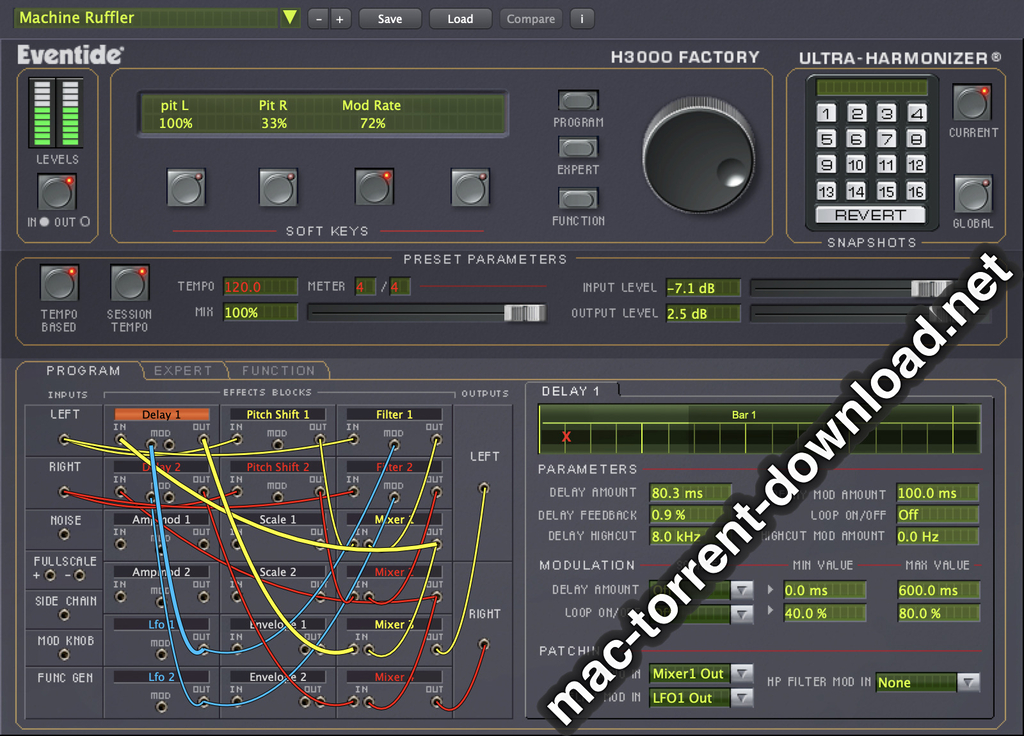
Easily free up space on your Mac with Optimized Storage.
 • Automatically store seldom-used files in iCloud, where they’ll be available on demand. 
 • Additional tools help you remove files you don’t need, to save even more space.

Get control of your desktop with tabs in apps. 
 • Use tabs to manage multiple windows in Maps, Pages, Keynote, Numbers, and more.
 • Work with tabs in your favorite third-party apps — no developer adoption required.

Keep an eye on the big game or your favorite video with Picture in Picture.
 • Float a video window from Safari or iTunes over your desktop as you work.
 • Place the Picture in Picture window in any corner, and it stays put when you switch spaces or work in full screen.

Rediscover the most meaningful moments in your Photos library. 
 • Enjoy favorite and forgotten occasions from your photo library with Memories.
 • View your images by who’s in them. Photos uses advanced face recognition technology to automatically group photos of the same person together. 
 • Search your photos by what’s in them, such as beaches, dogs, or concerts, thanks to intelligent search that can recognize objects and scenes.
 • Track your photo expeditions across an interactive world map.


Enjoy an all-new Apple Music experience in iTunes.
 • Easily navigate your library with the redesigned Apple Music.
 • Discover great new music thanks to expert curation and advanced machine learning that give you the best recommendations. 

Liven up your Messages conversations.
 • See web content previews and watch web videos right in a conversation.
 • Respond to messages with quick, handy Tapbacks.    
 • Express yourself with 3x larger emoji. 
 • View the stickers, Digital Touch, invisible ink, and handwritten messages that friends send from their iOS devices.


Some features may not be available in all regions or all languages. Some features have hardware requirements. Some features require an iCloud storage plan.

Ms Office 2016 v15.30.0

Name: Microsoft Office 2016 - Popular productivity suite
Version: 15.30
Mac Platform: Intel
OS Version: OS X 10.10 or later


Web Site: https://products.office.com/en-us/mac/microsoft-office-for-mac


DESCRIPTION:
Microsoft Office 2016 - Unmistakably Office, designed for Mac.

The new versions of Word, Excel, PowerPoint, Outlook and OneNote provide the best of both worlds for Mac users - the familiar Office experience paired with the best of Mac. If you already use Office on a PC or iPad, you will find yourself right at home in Office 2016 for Mac. It works the way you expect, with the familiar ribbon interface and powerful task panes. Mac users will appreciate the modernized Office experience and the integration of Mac capabA3F96ilities like Full Screen view and Multi-TouchTM gestures. With full Retina display support, your Office documents look sharper and more vibrant than ever.

Office for Mac is cloud-connected, so you can quickly get to the documents you've recently used on other devices and pick up where you left off. New, built-in document sharing tools make it easy to invite teammates to work on a document together. When sharing documents, you won't have to worry about losing content or formatting, as Office for Mac offers unparalleled compatibility with Office on PCs, tablets, phones and online.

CleanMyMac 3.7.1

Name: CleanMyMac for Mac
Version: 3.7.1
Release Date: 30 Dec 2016
Mac Platform: Intel
OS version:OS X 10.8 or later 
Processor type(s) & speed: 64-bit

Web Site: http://macpaw.com/cleanmymac


DESCRIPTION:
CleanMyMac makes space for the things you love. Sporting a range of ingenious new features, CleanMyMac lets you safely and intelligently scan and clean your entire system, delete large, unused files, reduce the size of your iPhoto library, uninstall unneeded apps or fix the ones that started to work improperly, manage all your extensions from one place and do much more - all from one newly designed and beautifully simple interface.

CleanMyDrive 2 2.1.3

Name: CleanMyDrive 2: Manage and Clean External Drives
Version: 2.1.3
Release Date: September 22, 2016

Languages: English, Dutch, French, German, Italian, Japanese, Polish, Portuguese, Russian, Simplified Chinese, Spanish, Ukrainian

Developer: MacPaw Inc.
MAS Rating: 4+
Mac Platform: Intel
OS Version: OS X 10.10 or later
Processor type(s) & speed: 64-bit processor


Web Site: http://macpaw.com/cleanmydrive
Mac App Store: https://itunes.apple.com/app/cleanmydrive-2-manage-clean/id523620159?mt=12


DESCRIPTION:
CleanMyDrive 2 is a lightweight disk manager for external and internal drives. It provides quick access to any drive with detailed information on space usage, and cleans hidden junk from external disks. It’s lightning fast and easy to use, with a convenient interface that opens right from the OS X menu bar. CleanMyDrive 2 is the new, improved version of CleanMyDrive, with a beautiful makeover and a whole set of new features.

“...A cute little companion to ease up your workflow.” – MacStories
"...A nifty utility for people who want an easier way to manage drives." – MacWorld
"...Just let it run in the background and keep your drives from accumulating junk." – LifeHacker
“I can’t see any reason for you to not install it.” – AppShopper 
“The app is super simplistic.” – Cult of Mac 
“It makes storage-related chores a breeze.” – Softpedia 

With CleanMyDrive 2, you’ll be able to:

Prevent issues with external drives after using them on other operating systems.
Keep your external drives safe, even when you close your Macbook and unplug them without ejecting in advance.
Easily manage storage by knowing the types of files on your drives and how much space they take up.
Quickly copy files to any drive by dragging them right into the app.
Save time by ejecting all drives with one click or using a global shortcut.
Choose a hand-crafted icon for each drive to make it look amazing.

What kind of junk does CleanMyDrive 2 get rid of?

1. OS X Service files: .DS_Store, .Spotlight-V100, .TemporaryItems, .fseventsd
2. Windows Service files: Thumbs.db, RECYCLED, RECYCLER, $RECYCLE.BIN
3. Resource forks: files like ._MyPhoto.jpeg
4. Trash, such as files in trash bins that haven’t been emptied.

Why should these files be removed?

Service files created by OS X and Windows could corrupt your external drive’s compatibility with other devices. For instance, your camera slows down if the SD card has hidden system files. And, they spoil your experience by cluttering the main folder of your disks. 

You see resource forks when you’ve stored files on your USB stick and want to use them on other devices, such as your TV or car audio system. These devices can’t actually read them, but display them in the folder all the same. You have to scroll through them before you get to the files you actually need. 

Finally, trash from the bins simply takes space on your drives. And who doesn’t need a little extra disk space?

Disk Cleaner – Free Your Hard Drive Space 1.2
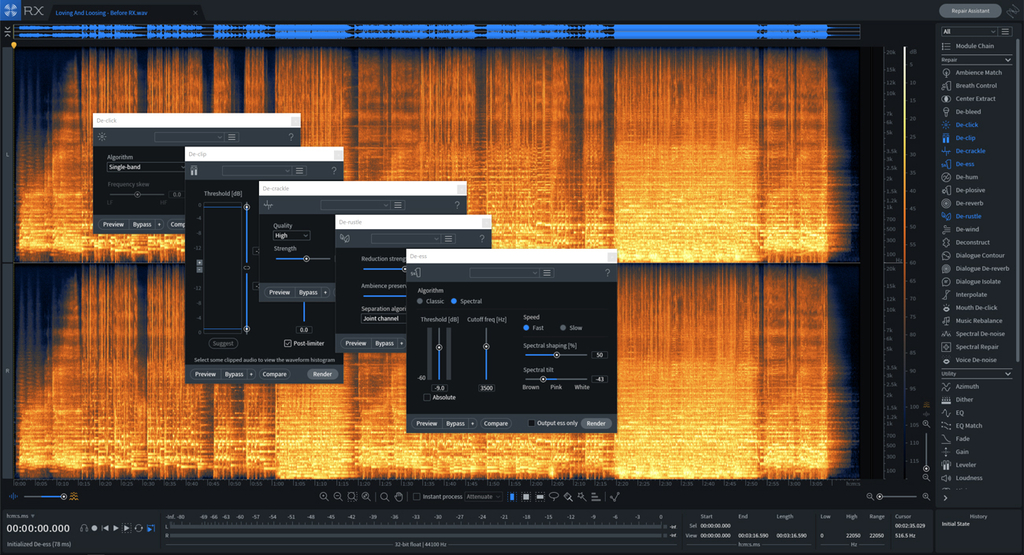
Name: Disk Cleaner - Free Your Hard Drive Space
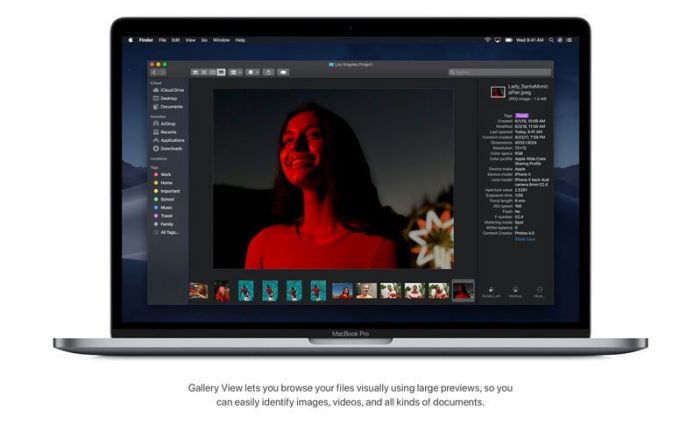
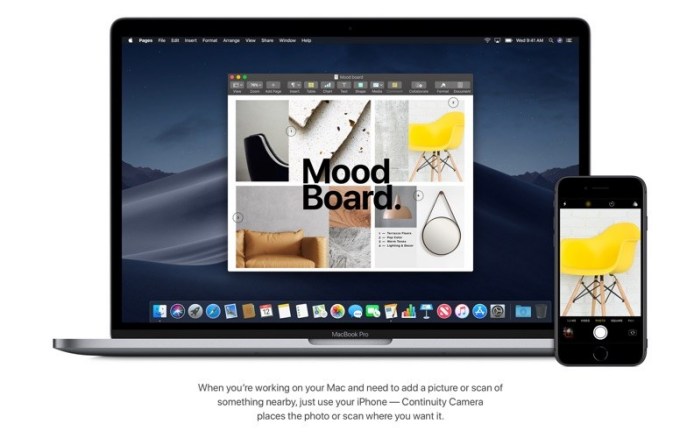
Version: 1.2
Release Date: January 14, 2017
Language: English
Developer: Pocket Bits LLC
MAS Rating: 4+
Mac Platform: Intel
OS Version: OS X 10.8 or later
Processor type(s) & speed: 64-bit processor


Web Site: http://support.pocketbitsllc.com
Mac App Store: https://itunes.apple.com/app/disk-cleaner-free-your-hard/id970246631?mt=12


DESCRIPTION:
■ #1 Customizable disk cleaner on Mac App Store
■ The only fully optimized and customizable disk cleaner
■ Featured on EatAppleNews, Brothersoft, and many more!

“It took me 5 seconds to clean up 5GB.”

“The most productive 2 minutes of my day!”

Disk Cleaner does all the work for you! We’ve optimized the most efficient locations to quickly scan and remove all the junk taking up your valuable disk space. Stop wasting disk space on unneeded files leftover from uninstalled apps, temporary internet files, old mail attachments, and others you didn’t know about. Let Disk Cleaner free up your hard drive space!

≈ 1-Click to Clean ≈
◎ Application Caches
◎ Application Logs
◎ Browser Data
◎ Mail Downloads
◎ Downloads
◎ Trash
◎ iTunes Downloads
◎ Large Files > 100 MB (customizable!)

Disk Cleaner is fully customizable! Not only does it scan for temporary and unneeded files, but it can do a deep scan for all large files over 100MB (customizable to any size). You can easily view and remove large files you might have forgotten about and no longer need. Edit and optimize your search preferences to exclude certain file extensions (e.g. zip, psd, jpg, etc). 

*Compare to competing disk cleaners that only scan for 7 of our 8 features and haven’t been updated since 2013! We’re optimized for the newest macOS to deep clean your hard disk and free up your valuable space.

≈ Other award winning apps in our family ≈
◉ BitMedic AntiVirus- http://bit.ly/bitmedicapp
◉ Adware Cleaner- http://bit.ly/adwareclean
◉ Sleep Alarm Clock- http://bit.ly/sleepalarmclock

For any questions, suggestions, or bugs, please email us at support@pocketbitsllc.com. We cannot respond directly to user reviews, so we encourage you to email us directly for the fastest response. We want to hear your thoughts and make improvements to future versions of this app to keep you happy. We plan to make active updates powered by your love and support! Every bit helps! :)

Files

macOS Sierra 10.12.3 +Ms Office  2016 v15.30.0+necessary utilities
│── Adguard.release.dmg (49.79 MB)
│── CleanMyDrive_2-v2.3.1-MAS.dmg (29.01 MB)
│── CleanMyMac 3.7.1.dmg (43.61 MB)
│── Disk Cleaner 1.2 MAS [TNT].dmg (4.66 MB)
│── OFISE_For_Mac_15_30_2017
│   │── Microsoft_Office_2016_15.30.17010700_Installer.dmg (1.62 GB)
│   └─ Microsoft_Office_2016_15.30.17010700_Update.dmg (4.08 GB)
│── PBmacOS Sierra 10.12.3 +Ms Office  2016 v15.30.0+necessary utilities.txt (24.79 kB)
│── Torrent downloaded from Demonoid.pw.txt (0.04 kB)
│── macOS Sierra 10.12.3 +Ms Office  2016 v15.30.0+necessary utilities.rtf (26.86 MB)
└─ macOS302240Sierra 10.12.3 (16D32).dmg (4.98 GB)

Name macOS Sierra 10.12.3 +Ms Office 2016 v15.30.0+necessary utilities
Size 10.84 GB
Created on 2017-03-11 02:04:05
Hash 2460747ac3b5ae1d50203d0d8812d782641daa5a
Files ※ See Description