Tag Archives: UTILITIES

Smart Disk Image Utilities 3.1.0

Smart Disk Image Utilities is a powerful disk image tool,contains creating disk image, converting disk image, burning disk image, erasing disc, Builds Universal Disc Format.

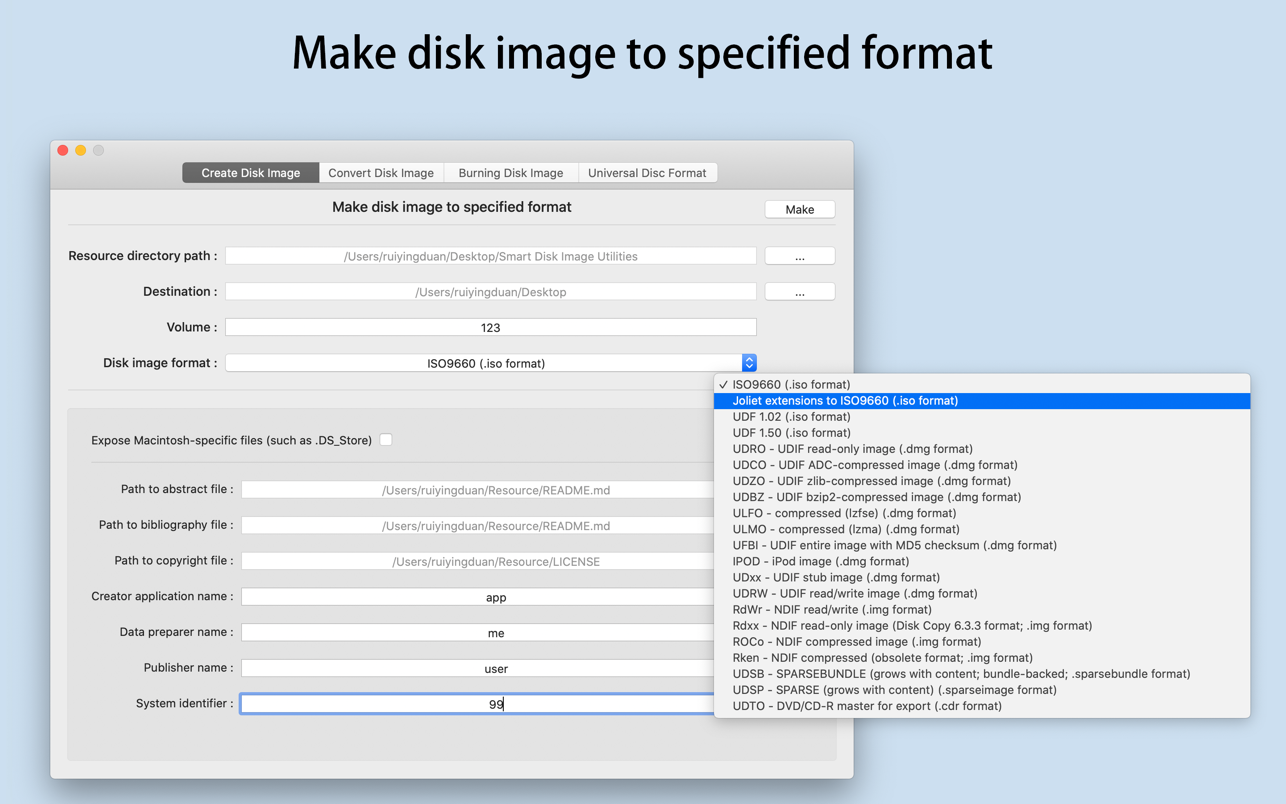
Create Disk Image

  • [1] Supported disk image format(Resource files containing .vob are not supported):
  • iso,dmg,img,sparsebundle,sparseimage,cdr
  • [2] The types of iso support include:
  • ISO9660,Joliet extensions to ISO9660,UDF 1.02,UDF 1.50
  • [3] The types of dmg support include:
  • UDRO – UDIF read-only image
  • UDCO – UDIF ADC-compressed image
  • UDZO – UDIF zlib-compressed image
  • UDBZ – UDIF bzip2-compressed image
  • ULFO – compressed (lzfse)
  • ULMO – compressed (lzma)
  • UFBI – UDIF entire image with MD5 checksum
  • IPOD – iPod image
  • UDxx – UDIF stub image
  • UDRW – UDIF read/write image
  • [4] The types of img support include:
  • RdWr – NDIF read/write
  • Rdxx – NDIF read-only image
  • ROCo – NDIF compressed image
  • Rken – NDIF compressed
  • [5] The types of sparsebundle support include:
  • UDSB – SPARSEBUNDLE (grows with content; bundle-backed; .sparsebundle format)
  • [6] The types of sparseimage support include:
  • UDSP – SPARSE (grows with content) (.sparseimage format)
  • [7] The types of cdr support include:
  • UDTO – DVD/CD-R master for export

Convert Disk Image

  • [1] Convert Disk Image(iso,dmg,img,sparsebundle,sparseimage,cdr) to specified format(iso,dmg,img,sparsebundle,sparseimage,cdr);
  • [2] Such as convert ISO to DMG, or convert DMG to ISO and so on.

Burn Disk Image

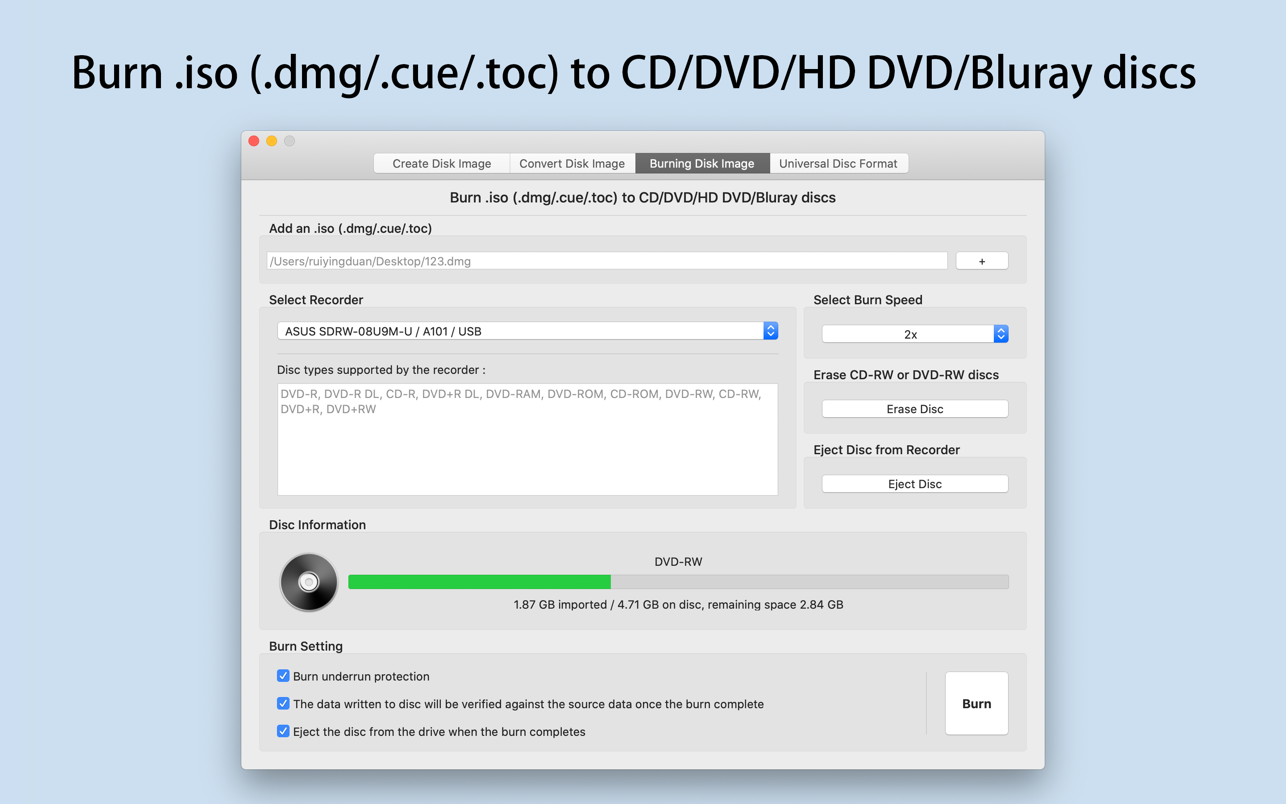
  • [1] Burn .iso(.dmg/.cue/.doc) to CD/DVD/HD-DVD/Blu-ray discs;
  • [2] Erase CD-RW and DVD-RW discs;
  • [3] The following disc types are supported:
  • CD-ROM
  • CD-R
  • CD-RW
  • DVD-ROM
  • DVD-R
  • DVD-R DL
  • DVD-R Double Layer
  • DVD-RW
  • DVD-RW DL
  • DVD-RAM
  • DVD R
  • DVD R DL
  • DVD R Double Layer
  • DVD RW
  • DVD RW DL
  • HD DVD-ROM
  • HD DVD-R
  • HD DVD-R DL
  • HD DVD-RAM
  • HD DVD-RW
  • HD DVD-RW DL
  • BD-ROM
  • BD-R
  • BD-RE
  • BD-R DL

Builds Universal Disc Format

  • [1] Support UDF1.02、UDF1.50、UDF2.00、UDF2.01、UDF2.50、UDF2.60;
  • [2] Support the type of the media include:
  • blk (block device)
  • var-packet (varible size packet writing)
  • fix-packet (fixed size packet writing)
  • pow (pseudo overwrite)
  • [3] Support the access type of the partition:
  • OW (overwrite)
  • WO (writeonce)
  • POW (pseudo overwrite)

What’s New:

Version 3.1.0

  • Based on user feedback, compatible with more models of recorders.

Compatibility: macOS 10.12 or later
Homepage https://apps.apple.com/app/smart-disk-image-utilities/id897562120

Screenshots


Name: Smart Disk Image Utilities 3.1.0 MAS [HCiSO]_Mactorrents.is.dmg
Size: 8.02 MB
Files Smart Disk Image Utilities 3.1.0 MAS [HCiSO]_ Mactorrents.is.dmg[8.02 MB]

   Download

MAC OS latest UTILITIES Dec 01 2019

Download MAC OS latest UTILITIES Dec 01 2019

What’s Included in MAC OS latest UTILITIES Dec 01 2019

  1. 1Password 7 v7.4.1
  2. Affinity Publisher Beta 1.8.0.502
  3. Antivirus Cyber Byte Pro 3.7.1
  4. CleanMyMac X 4.5.1
  5. CrossOver 19.0.0.32154 b1
  6. DxO FilmPack 5 ELITE Edition 5.5.25 Build 601
  7. DxO PhotoLab 3 ELITE Edition 3.0.2.24
  8. SketchUp Pro 2019 v19.3.252 Multi
  9. Telestream Switch Pro 4.5.6

Do not update these Apps !

CleanMyMac X 4.5.1

  • Supported OS: OS X 10.10 or later
  • Language: Multilangual

System requirements:

  • OS X 10.10 or later
  • 64-bit processor

Description:

The program has everything you knew about Mac care, but X times better!

CleanMyMac scans every corner of your system, removes gigabytes of junk in two clicks and helps you keep your Mac in good condition. CleanMyMac has a beautiful interface that will not leave anyone indifferent. Everything is done in the standard form of Mac OS: beautiful, convenient and affordable. Cleaning, protection and speed are the basis of the new version.

Thus, CleanMyMac becomes a comprehensive solution not only for cleaning and maintenance, but also for such an important task as protecting your Mac from the threats of the modern world

1Password 7 v7.4.1

  • The release took place: 11.11.2019
  • Supported OS: macOS 10.12.6
  • Interface language: Multilangual

System requirements:

  • macOS 10.12.6 or higher
  • Intel 64-bit CPU

Description:

1Password-Manager of passwords and other important data. The program can store credit card data, passwords, secret texts, can automatically fill out web forms and integrate into a large number of browsers.

The program automatically saves all passwords that you enter in the browser when visiting different services (each time, of course, asking you permission to do so). When you re-visit this resource, you will not need to enter your login and password again – just click on the button with the drawn key, which appears in all your browsers when you install 1Password (Safari, Firefox, Chrome and Opera browsers are supported). Just 1Password can automatically fill in any form for you. For example, once you fill in the fields name, surname, city, phone, you will no longer need to fill them on the sites when registering.

Affinity Publisher Beta 1.8.0.502

  • Supported OS: macOS 10.9
  • Interface language: Multilangual

System requirements:

  • lMac Pro, iMac, iMac Pro, MacBook, MacBook Pro, MacBook Air, Mac Mini
  • Intel 64 bit Core 2 Duo or higher performance (after 2007).
  • Minimum 4GB of RAM
  • 1.04 GB of free disk space; more when installed
  • Display size 1280 x 768 or above.
  • Support for standard and Retina displays, as well as DCI-P3 displays with extended color spectrum.

Description:

Realize your vision with Affinity Publisher, the state-of-the-art professional publishing software from the developers of the award-winning Affinity Designer and Affinity Photo apps.

This incredibly smooth, intuitive app gives you the ability to combine images, graphics and text to make beautiful layouts ready for publication. Affinity Publisher has everything you need to create the perfect layout, from magazines, books, brochures, posters, reports and stationery to other works.

The next-generation software, which is also capable of completely changing the integration with other Affinity applications, will completely revolutionize the work of publishing professionals.

Antivirus Cyber Byte Pro 3.7.1

  • Supported OS: macOS 10.10
  • Language: English

System requirements:

  • macOS 10.10 or higher
  • Intel 64-bit CPU

Description:

Macs are generally considered safe and reliable, and there are a number of reasons why Macs are considered more secure than PCs, but there are many risks that Macs have not been able to completely avoid.
We at CyberByte, in addition to our security consulting experience, are studying the evolution of malware, and we’ve seen Mac malware increase by 120%.

It is for this reason that we have developed CyberByte ™ antivirus and Internet Security, an antivirus for Mac. The main purpose of this product is to help all users to protect their device, even if they do not have extensive computer knowledge.

  • Incredible value for money
  • Protects you from all kinds of threats
  • CyberByte has its own malware detection mechanism
  • Fastest scan time on the market
  • Active live protection in the background
  • Certified threat detector from OPSWAT

Athentech Perfectly Clear Complete 3 v3.9.0.1696

  • Supported OS: macOS 10.10
  • Language: English

System requirements:

  • macOS 10.10 or higher
  • Intel 64-bit CPU

Description:

Perfectly Clear is a powerful plug-in for Adobe Lightroom and Adobe photoshop from the company Athentech Imaging from the series “make me fast and beautiful”, allowing just a couple of mouse clicks to adjust photos to the perfect look in automatic mode, as well as correct them in manual mode.

In digital cameras, there are limitations that lead to such distortions of photos: illumination, lack of saturation and depth of color, underexposure, darkening, blurring, poor skin tone, “red eyes”, noise, etc. the Plugin Perfectly Clear will correct these defects automatically or manually using its own proprietary technology, which embodied 10 years of research and more than 10 patented adjustments.

CrossOver 19.0 beta 1 (build 32154)

  • Supported OS: mac OS 10.10 or above
  • Interface language: English

System requirements:

  • mac OS 10.10 or higher
  • Intel 64-bit CPU

Description:

The CrossOver package is based on the Wine code and is a wrapper for running programs under Windows on the macOS platform. In addition, it allows you to run games, which for many users is a decisive factor when choosing an operating system.

Note that the aforementioned Wine is a software layer that allows you to run Windows applications on macOS. At the same time, Wine is not an emulator in its pure form, although some programs recognize it as such, since it is technically a variant of a virtual machine that integrates into the main system.

DxO FilmPack 5 ELITE Edition 5.5.25 (build 601)

  • Supported OS: OS X 10.11 or later 64-bit
  • Interface language: English

Description:

DxO Film Pack lets you rediscover the magic of analog film. Give your digital photos greater emotional impact with this creative image-processing software.

Rediscover the style, the colors, and the grain of more than 80 legendary analog films, faithfully reconstituted thanks to DxO’s exclusive calibration process. Combine many original renderings with filter, vignetting, blur, texture, frame, or light-leak effects to give your photos a unique look. It even allows you to preserve the quality of your digital images thanks to support for RAW format, benefitting from DxO’s unsurpassed powerful processing.

DxO PhotoLab 3 ELITE Edition 3.0.2 (build 24)

  • The release took place: 14.11.2019
  • Supported OS: macOS 10.13
  • Interface language: English

System requirements:

  • Intel Core i5 or higher
  • 4 GB of RAM (6 GB recommended)
  • 2 GB available disk space (6 GB recommended)
  • OS X 10.13 (High Sierra), 10.14 (Mojave), 10.15 (Catalina)
  • Graphics card with 512 MB of video memory for handling GPU acceleration

Description:

Process RAW and JPEG images in the best possible quality without difficulty: DxO PhotoLab provides a complete set of smart corrections That you can adjust manually at any time. Take control of your photos: effectively remove noise, correct lighting, restore color details, correct optical distortions and improve detail.

Give your photos special touches using corrections only for the necessary areas of the image thanks to the exclusive technology DxO Local Adjustment Tools, which includes: control points (technology U Point), gradient filters, manual and automatic brushes, automatic recovery and more.

SketchUp Pro 2019 v19.3.252

  • Supported OS: OS X 10.10
  • Interface language: Multilangual

System requirements:

  • Mac OS 10.10 or newer
  • 2.1 GHz Intel processor.
  • 8 GB OF RAM.
  • 500 MB of available hard-disk space.
  • 3D class Video Card with 1GB MB of memory or higher. Please ensure that the video card driver supports OpenGL version 2.0 or higher and up to date.
  • 3 button, scroll-wheel mouse.
  • Some SketchUp features require an active internet connection.
Minimum hardware
  • 2.1 GHz Intel processor
  • 4 GB OF RAM.
  • 300 MB of available hard-disk space.
  • 3D class Video Card with 512 MB of memory or higher. Please ensure that the video card driver supports OpenGL version 2.0 or higher and up to date.
  • 3 button, scroll-wheel mouse.
  • Safari.

Description:

SketchUP Pro-is a professional version of the application that allows you to create 3D models, demonstrate them as a presentation, share them. The program will be useful wherever there is a need to use 3D models, whether it is designing an extension for the house, teaching geometry to schoolchildren or creating a model for Google Earth. Many simple tools and the use of an intelligent drawing system make it easy to create and edit models, export them, create a video or print the results. Instead of entering coordinate values, you can use a multifunctional system to control the location of the object using labels, text prompts, lines of different colors. The use of tools is as close to real life as possible, because it is much easier to learn and, most importantly, remember how to use them.

Switch 4 Pro 4.5.6

  • Supported OS: macOS 10.10
  • Interface language: Multilangual

System requirements:

  • macOS 10.10 or higher
  • Intel 64-bit CPU

Description:

Switch is a professional tool for media playback, quality control and conversion

Switch allows you to play a variety of Web and professional video formats, analyze and adjust file properties and export to a new file. The built-in analyzer displays media properties: audio channels, aspect ratio, bitrate and encoding formats. Users will be able to make corrections to the media, including scaling and cropping, changing the aspect ratio, rearranging audio tracks, and even changing the codec and format. All this in one professional application based on proven Telestream technologies.

Name MAC OS latest UTILITIES Dec 01 2019 mac-torrents.net.rar
Size 2.19 GB
Created on 2019-12-01 21:42:17
Hash 9345671d54f195278431892e0e3cc27a28f6a3e0
Files MAC OS latest UTILITIES Dec 01 2019 mac-torrents.net.rar (2.19 GB)

Download

MAC OS latest UTILITIES September 12 2019

Download

What’s Included in latest UTILITIES September 12 2019

  1. Native Instruments Reaktor 6.3.1
  2. Native Instruments Kontakt 6.1.1
  3. Artlantis 2019 Media 8.0.2.16195
  4. Architect 3D Professional 2017 Mac 19.0.8
  5. Autodesk Maya 2014 for Mac
  6. Allegorithmic Substance Painter 2019.1.1.3066
  7. Allegorithmic Substance Designer 2019.1.0 (2273)
  8. CorelCAD 2019.5 (build 19.1.1.2035)
  9. JetBrains IntelliJ IDEA Ultimate 2018.3.4
  10. Live Home 3D Pro Edition 3.6.2
  11. Live Home 3D: Standard Edition 3.6.3

Native Instruments Reaktor 6 v6.3.1

The main difference between version 6 of the modular virtual tool Reaktor from previous versions is the use of a new technology Reaktor Core Technology, which allows the visual creation of their own modules.

NI REAKTOR 6 has many new features and improvements. 23 brand new REAKTOR instruments allow you to create countless different fashionable sounds, rhythms and effects. The new technology of the core system makes the sound of instruments even better and allows you to design your own modules.

NI REAKTOR 6 combines all audio applications into one versatile and extremely powerful tool. Musicians, producers, sound engineers will be satisfied with the large number of instruments and sounds supplied with REAKTOR 6. And thanks to the open architecture, any musician will be able to create their own unique instruments…

Reaktor is also better integrated with a universal sound platform, KORE Native Instruments, resulting in a higher download speed voices KORE-based instruments and effects Reaktor.

Information

  • Supported OS: macOS 10.12
  • Developer: Native Instruments
  • Official website: link
  • Interface language: English, German and Japanese
  • Treatment: not required
System requirements:
  • macOS 10.12, 10.13 or 10.14 (latest update)
  • Intel Core 2 Duo
  • 4 GB RAM

Developer Website

Installation procedure:

  1. Mount image
  2. Unpack the distribution “Reactor 6 v6.0.0 Installer.pkg
  3. To upgrade to 6.3.1 double click on “Reactor 6 v6.3.1 Update.pkg

Native Instruments Kontakt 6 v6.1.1

Kontakt is the standard in the world of samplers. Native instruments Kontakt 6 provides a set of high-quality filters ranging from classic analog circuits and variable-state models to modern format filters. Some of the 37 new filters using a new concept of Adaptive Resonance, which automatically manages the filter characteristics to prevent unpleasant sonic artifacts from excessive resonance peaks. The fifth version of the Sampler also adds time scratching TimeMachine Pro, which provides the best sound quality for harmonic solo instruments.

Information

  • Supported OS: macOS 10.11
  • Interface language: English, German, French and Japanese
  • Treatment: not required
System requirements
  • OS X 10.11 or later
  • Intel 64bit processor

Developer Website

Installation procedure:

  1. Unpack the distribution “Kontakt v6.0.3 Installer.pkg”, follow the installer.
  2. To update the application to version v6.1.1 unpack the track. distribution “Kontakt v6.1.1 Update.pkg

Artlantis 2019 + Media v 8.0.2.16195

Abvent Artlantis Media is a set of tools for creating photo-quality image on the basis of 3D-models of various simulation programs: ArchiCAD, AutoCAD etc. this program provides a convenient and intuitive tools for changing textures, editing its properties, working with color and light sources. As a result, the user can build high-quality photos, videos and presentation materials in the shortest possible time.

The program allows you to create realistic images, assign and modify the optical properties of finishing materials, set perspective and sources of natural and artificial light, create virtual reality scenes and edit motion paths for animated videos. Advanced methods enrich Artlantis image transparency effects, texture bump, reflection and refraction of light rays, atmospheric effects. Excellent quality at high speed, compactness and simplicity made Artlantis Render the most popular application among ArchiCAD users, creating professional presentations, engaged in design and decoration of premises.

Information

  • Supported OS: Mac OS X 10.11
  • Interface language: Russian, English and others
  • Treatment: complete
  • Type of medicine: replacing files
System requirements:
  • Intel i3 4Core 2GHz
  • RAM: 8 GB
  • System: Mac OS X 10.11 and higher
  • Graphic Card: 1 GB, OpenGL and higher
  • Display: 1280 x 800 pixels
  • Internet access

Developer Website

Installation procedure:

  1. Temporarily disconnect the Internet
  2. Launch Artlantis2019.2.16195.dmg
  3. Install Artlantis 2019.2.16195.pkg
  4. Install Artlantis Media 2019.1.3.pkg

Treatment procedure:

  • Run Up7 Artlantis 2019K.dmg
  • Go to the directory “applications” and open the folder Artlantis 2019
  • Rightclick on the artlantis file and select “Show package contents”, then in the open folder Contents / MacOS/ you will find the file “Artlantis” replace it from the open window Up7K
  • Perform the same operation for: Artlantis Batch Artlantis License Manager Artlantis Media Converter Artlantis License Manager, the Render Manager.

Architect 3D Professional 2017 Mac 19.0.8

Architect 3D-a program that provides you with a wide range of professional tools for 3D design, equipment and decoration of your home and garden, and realistic rendering will allow you to view the results of the design.

The program contains a large library of various interior elements, thanks to which you can also design the interior of your rooms. Avanquest Architecte 3D is also compatible with the most popular 3D design software (AutoCAD, 3ds Studio Max and others).

Information

  • Supported OS: mac OS 10.9
  • Interface language: English
  • Treatment: not required (the installer has already been treated)
System requirements:
  • OS X 10.9 or later
  • Intel 64bit processor

Developer Website

Installation procedure:

  • Mount the image, drag the application icon to the “Programs” folder

Autodesk Maya 2014 for Mac

Autodesk Maya 2014-more creativity in the creative process of the artist. Autodesk Maya 2014 helps artists and developers create content that meets the growing expectations of today’s audience. The new 2014 version of the product includes an expanded set of integrated modeling features.

The new version of Autodesk Maya, contains many large and small changes and innovations.

  • Animation (Grease Pencil, Joint centering and symmetry);
  • 3D modeling (Accelerated modeling workflow)
  • 3D visualization and imaging (Nextgen viewport display and shading (Enhanced) Paint
  • Effects surface and volume attributes, Enhanced Node Editor, updated mental ray renderer
  • tools)
  • Improved and expanded the production of pipeline tools (Scene Assembly tools for
  • smarter data, Enhanced file path handling)
  • And more…

Information

  • Interface language: English, Japanese, Chinese
  • Type of medicine: patch/keygen/more
System requirements:
  • Mac OS X 10.7.x or 10.8.x
  • 64bit Intel processor
  • 4 GB of RAM minimum (8 GB recommended)
  • 2 GB of free disk space for installation
  • Safari web browser
  • 3button mouse

Developer Website

Installation and treatment procedure:

Installation
  1. Disable int and install the trial version of the program.
  2. Mountable image Autodesk_Maya_2014_English_Japanese_simplifiedchinese_mac_osx.dmg and run the installer.
  3. On the License note, select “I want to Maya for 30 days” and continue the installation “Continue”
Activation
  1. Run the program
  2. Agree to the “license agreement” and click “Activate” in the next window”
  3. In the field “Serial Number” is entered on the selection 66669696969, 66798989898, 40045454545 06666666666
  4. In the field “Product Key” enter the appropriate program code, select your product from the list in the text file 2014 product keys.txt (text file is in the image AUTODESK 2014 Products universal keygen MacOSX XFORCE.dmg) (we are interested in xxxF1 , where xxx is the number ) and click Next
  5. In the next window, select “Request an activation code using an offline method” and click Next
  6. Next, copy / rewrite manually received “Request code”, click” Close ” and run the keygen (present in the image of AUTODESK 2014 Products universal keygen MacOSX XFORCE.dmg folder CrackOSX mount xfadsk64.dmg)
  7. In the appropriate keygen field, insert the received code and press Generate”, and then MemPatch” and copy the received ” Activation code” ,
  8. Return to a running window to activate the program insert derived from keygen and click “Close”.

Turn on the network in-t and use the program

Allegorithmic Substance Painter 2019.1.1.3066

Substance Painter is a completely new 3D drawing solution with unprecedented capabilities and optimized workflow, allowing you to create textures easier than ever. Substance Painter is recognized as the most innovative application for 3D drawing.

Information

  • Supported OS: macOS 10.9
  • Interface language: English, Chinese and Japanese
  • Treatment: not required (the installer has already been treated)
System requirements:
  • Minimum
    • MacOS: 10.7
    • RAM: 4 GB
    • Disk: 150 MB of free disk space
    • As well: It is not recommended to run on systems with builtin graphics adapters
  • Recommended
    • mass: 10.9 or 10.11
    • RAM: 8 GB
    • Disk: 500 MB of free disk space
    • As well: It is not recommended to run on systems with builtin graphics adapters
    • Graphics cards not supported: AMD FirePro

Developer Website

Installation procedure:

  • Mount the image and familiarize yourself with the Readme.txt why …
  • Further to the selection, installation as you normally would or by using the Open Gatekeeper friendly

Allegorithmic Substance Designer 2019.1.0 (2273)

Substance Designer is a powerful program that is designed to create, edit, and process complex textures. The program allows you to mix and manipulate bitmaps, vector images and procedural elements. Textures created with Substance Designer are dynamic, meaning they can be freely modified at any stage of creation. The user automatically receives output different cards — diffuse, normal, spekulâr etc. program Developers have built into it a large number of templates and filters, which greatly simplify the work of the designer. There are, for example, such filters “in Bitpim material”, “Dynamic shadows”, “Cover rust”, etc Package “Substance Designer” also includes the application “Substance Player” to view your created texture, as well as included in the package of training textures. Substance Designer supports importing textures from such programs as Photoshop, 3ds Max, Autodesk Maya , Unity 3.4 (and higher). The program allows you to make changes and apply effects in real time. In addition, Substance Designer supports vector image format and can work with layers.

Information

  • Supported OS: macOS 10.9
  • Interface language: English
  • Treatment: not required (the installer has already been treated)
System requirements
  • OS: Mac OSX 10.9 and higher
  • RAM: 2GB minimum 4GB recommended
  • Video Memory: 512MB minimum 1GB recommended

Developer Website

Installation procedure:

  • Mount the image, unpack the distribution, and follow the installer’s commands.

CorelCAD 2019.5 (build 19.1.1.2035)

CorelCAD 2019-an intuitive interface and a complete set of customizable CAD tools working in an interactive environment make CorelCAD 2019 the most versatile and cost-effective solution for computer-aided design.

Professional tools provide excellent results when performing accurate design work in two-and three-dimensional modes. CorelCAD uses 2019 .DWG as a native file format than provides compatibility with all major CAD programs and provides users with the ability to work in a familiar environment. The full version of the program runs on Windows and Mac platforms with the same high speed and performance.

CorelCAD Mobile provides support for Android devices. Both current customers and new users of CorelCAD 2018 will appreciate the add-ins and plug-ins that harmonize with the dynamics of a variety of workflows

Information

  • Supported OS: macOS 10.10
  • Interface language: Multilingual, including Russian
  • Treatment: complete
  • Type of medicine: replacing files
System requirements:
  • macOS Sierra (10.12) or higher (incl. macOS Mojave (10.14))
  • Intel Core 2 Duo processor (or better)
  • 2 GB RAM (8 GB recommended)
  • 500 MB hard disk space
  • 3D Graphics accelerator card with OpenGL version 1.4 (the OpenGL version of 3.2 or better recommended)
  • 1280 x 768 display (1920 x 1080 (Full HD) recommended)
  • Mouse or tablet
  • Optional DVD drive (for box installation)
  • Internet connection for product activation and access to the plugin store

Developer Website

Installation procedure:

  • Mount the image, drag the application icon to the “Programs” folder
  • Run the application once and complete.
  • To move, with the replacement binary file CorelCAD 2019 on the way
    • Code: /Applications/CorelCAD 2019.app/Contents/MacOS

JetBrains IntelliJ IDEA Ultimate 2018.3.4

IntelliJ IDEA is the smartest development environment for Java and other languages, including support for all the latest technologies and frameworks, ideal for creating commercial, web and mobile applications.

  • Smart autocomplete, code quality analysis tools, easy navigation, advanced refactoring and formatting for Java, Groovy, Scala, HTML, CSS, JavaScript, CoffeeScript, ActionScript, LESS, XML and many other languages.
  • Support for all popular frameworks and platforms including Java EE, Spring Framework, Grails, Play Framework, GWT, Struts, Node.js, AngularJS, Android, Flex, AIR Mobile, and many others.
  • Integration with application servers including Tomcat, TomEE, GlassFish, JBoss, WebLogic, WebSphere, Geronimo, Resin, Jetty and Virgo.
  • Tools for working with databases and SQL files, including a convenient client and editor for database schema.
  • Integration with commercial version control systems, Perforce, Team Foundation Server, ClearCase, Visual SourceSafe.
  • Tools for running tests and analyzing code coverage, including support for all popular testing frameworks.
  • Support for multiple plugins

Information

  • Supported OS: macOS 10.7 and above
  • Interface language: English
System requirements:
  • macOS 10.7 and above.
  • Intel 32/64bit CPU

Developer Website

Installation procedure:

  1. Install the application from the DMG distribution and drag the IntelliJ IDEA file to the Applications folder
  2. Open IntelliJ IDEA.app >Show package contents >Contents/Bin
  3. Copy file JetbrainsIdesCrack4.2release.jar on the path specified in paragraph 2
  4. Open the idea file in any text editor.vmoptions and add the following text to the end of the file
    • Code: javaagent:JetbrainsIdesCrack4.2release.jar
  5. Launch the application and select license registration
  6. Paste the following text into the license field

    • ThisCrackLicenseId-{
      "licenseId":"ThisCrackLicenseId",
      "licenseeName":"MyIdea",
      "assigneeName":"",
      "assigneeEmail":"core@iname.com",
      "licenseRestriction":"For MyIdea Crack, Only Test! Please support genuine!!!",
      "checkConcurrentUse":false,
      "products":[
      {"code":"II","paidUpTo":"2099-12-31"},
      {"code":"DM","paidUpTo":"2099-12-31"},
      {"code":"AC","paidUpTo":"2099-12-31"},
      {"code":"RS0","paidUpTo":"2099-12-31"},
      {"code":"WS","paidUpTo":"2099-12-31"},
      {"code":"DPN","paidUpTo":"2099-12-31"},
      {"code":"RC","paidUpTo":"2099-12-31"},
      {"code":"PS","paidUpTo":"2099-12-31"},
      {"code":"DC","paidUpTo":"2099-12-31"},
      {"code":"RM","paidUpTo":"2099-12-31"},
      {"code":"CL","paidUpTo":"2099-12-31"},
      {"code":"PC","paidUpTo":"2099-12-31"}
      ],
      "hash":"2911276/0",
      "gracePeriodDays":7,
      "autoProlongated":false}

Live Home 3D Pro Edition 3.6.0

Live Home 3D, the successor to Live Interior 3D, is a powerful yet intuitive home design software that allows you to build your dream home right on your Mac.

It doesn’t matter if You plan to just make improvements in your home or, as a professional designer, want to have a tool to visualize your ideas. Live Home 3D will help you in both cases.

Live Home 3D Pro – more tools, more elements in libraries, more functionality. Functional enough to design a skyscraper and intuitive enough to create a barn project!

Information

  • Supported OS: macOS 10.12
  • Developer: Belight Software, Ltd.
  • Interface language: Multilingual, including Russian
  • Treatment: not required (the installer has already been treated)
System requirements:
  • OS X 10.10 or later
  • Intel 64bit processor

Developer Website

Installation procedure:

  • Mount the image and familiarize yourself with the Readme.txt why …
  • Further to the selection, installation as you normally would or by using the Open Gatekeeper friendly

Live Home 3D: Standard Edition 3.6

Live Home 3D, the successor to Live Interior 3D, is a powerful yet intuitive home design software that allows you to build your dream home right on your Mac.

It doesn’t matter if You plan to just make improvements in your home or, as a professional designer, want to have a tool to visualize your ideas. Live Home 3D will help you in both cases.

Live Home 3D Pro – more tools, more elements in libraries, more functionality. Functional enough to design a skyscraper and intuitive enough to create a barn project!

Information

  • Supported OS: macOS 10.12
  • Interface language: Multilingual, including Russian
  • Treatment: not required (the installer has already been treated)
System requirements:
  • OS X 10.10 or later
  • Intel 64bit processor

Developer Website

Installation procedure:

  1. Mount the image and familiarize yourself with the Readme.txt why …
  2. Further to the selection, installation as you normally would or by using the Open Gatekeeper friendly

Name MAC OS latest UTILITIES September 12 2019 mac-torrents.net.rar
Size 12.45 GB
Created on 2019-09-12 16:23:58
Hash aa43ab000bc70eddf188bebc69e1e4f64eeikzebln
Files MAC OS latest UTILITIES September 12 2019 mac-torrents.net.rar (12.45 GB)

Download

MAC OS latest UTILITIES August 23 2019

Download


MAC OS latest UTILITIES August 23 2019

Whats’s Included in MAC OS latest UTILITIES August 23 2019

  1. Adobe Photoshop CC 2019 v20.0.6 [TNT] inc Adobe Zii
  2. Microsoft Office for Mac Standard 2019 16.28.0 VL
  3. CleanMyMac X 4.4.6 [TNT]
  4. Folx Pro 5.10 (13853) [TNT]
  5. macOS Server 5.8 [TNT]
  6. MacFamilyTree v9.0.2 [TNT]
  7. Sketch 56 [TNT]
  8. Suite for MS Office :
  • Templates for MS Word by GN 5.0.5 [TNT]
  • Templates for MS Excel by GN 5.0.5 [TNT]
  • Themes for MS PowerPoint by GN 4.0.7 [TNT]

Adobe Photoshop CC 2019 v20.0.6

  • Year of issue: 08.2019
  • Version: 20.0.6
  • Platform: Intel only
  • Language: Russian English
  • Tablet: Adobe Zii Patch
System requirements:
  • Intel, 64bit processor
  • macOS 10.12 or later
  • 2 GB RAM (8 GB recommended)
  • 4 GB of available harddisk space for installation; additional free space required during installation (cannot install on a volume that uses a casesensitive file system or on removable flash storage devices)
  • 1024×768 display (1280×800 recommended) with 16bit color and 512MB of VRAM (1GB VRAM required for 3D features)
  • OpenGL 2.0capable system
  • Internet connection

Developer Website

Description:

– the world’s best SOFTWARE for graphic design and image processing, which will translate into reality any of your ideas. Create and enhance photos, illustrations, and 3D graphics. Design websites and mobile apps. Edit videos, model live pictures, etc. Now you have everything you need to implement any ideas.

Installation

For macOS 10.12+

When you run the installer writes “The installation cannot continue as the installer file may be damaged. Download the installer file again”.

Code:
sudo spctl --master-disable

Install using patch:

Attention! Before installing, disconnect from the Internet

  • Mount the image.
  • Run the Install installer and follow the instructions (located in the Extra folder)
  • After installation, do not run the program in trial mode (close the application forcibly if it starts up on its own)
  • From the desktop, launch the Adobe Zii patch and press the PATCH or drag the icon of the installed Adobe Photoshop CC 2019 into the open patch window

Patcher by TNT

Who has the Illustrator or another installed – be careful with the patch.

Install the program and use the patch that is in the distribution – drag the program icon to the open patch window, and do not use the automatic function (here, all installed Adobe applications will be patched automatically, and with such actions errors may occur)

Microsoft Office 2019 for Mac 16.28

  • Release date: August 14, 2019
  • Supported OS: mac OS 10.12 and later
  • Interface language: Russian, English, German etc.
System requirements:
  • Mac computer with Intel 64 bit processor
  • mac OS version 10.12
  • 4 GB of RAM recommended
  • About 10 GB of free hard disk space (the entire software package)
  • Hard drive in HFS format (also known as mac OS Extended or APFC)
  • A monitor with 1280×800 resolution or higher

Developer Website

Description:

Easily recognizable Office designed for Mac

Quickly get to work with modern versions of Word, Excel, PowerPoint, Outlook and OneNote combines the familiar Office interface and unique capabilities of the Mac, who managed to catch the fancy of you.

Installation procedure:

All the original files from the Microsoft server

  1. Installed first corporate license VL_Serializer.pkg by double click. If the window POPs up that “could Not check the developer” then go to System settings/Security and temporarily mark the item App Store and installed developers.
  2. Next Microsoft_Office_16.28.19081202_Installer.pkg.
    Caution when installing, you can select the components.
  3. Go to your Microsoft account.
  4. Use.

The license is official, the software can be updated.

Clean My Mac X 4.4.6

  • The release took place: 15.08.2009
  • Supported OS: OS X 10.10
  • Language: Russian, English, Deutsch, etc.
  • Treatment: not required (the installer has already been treated)
  • clean my mac new
System requirements:
  • Intel, 64bit processor
  • Mac OS X 10.10 or newer

Developer Website

Description:

is a universal kit that will make your Mac a candy. The program will clean up megatons of garbage and make the computer run faster. Work the same way he worked on his first day.

CleanMyMac X to replace dozens of tools for optimizations. It will do everything: clean macOS, monitor performance, remove malware, and what’s there to help out when verything is bad.

CleanMyMac X will sweep trash from every corner of your macOS. The program deletes unnecessary files – such as outdated cache, broken downloads and useless language files.

You can remove tons of hidden in iTunes, Mail, Photo trash, and find gigabytes of hidden files. Utilities in CleanMyMac X will cut the extra size in seconds.

You have all the tools for the cases when Mac suddenly slow the progress: cleanup of memory RAM, service scenarios, managing login items, launch agents and unresponsive programs. They will help reduce the load on your Mac and adjust it to maximum performance.

Are there viruses on Mac? Not on yours, if you choose to clean with CleanMyMac X, which will protect against malware and adware, ransomware and other MacOS-specific vermin.

The program removes the detected threats immediately. We regularly update the malware database, and the protection module in CleanMyMac X always protects the perimeter.

Beautiful duet modules Uninstaller and Updates will make life uporyadochenie. The first module will remove unnecessary, and the second will immediately update all programs. Bad programs will be completely removed and new ones will always be updated on time. This will help to fix program conflicts and keep your Mac forever young.

Cleanmymac X is worth thousands of hours of work, and it will save you time when you use it. For example, Smart Scan performs 3 tasks in one click: cleans, protects and speeds up your Mac. If you feel that your Mac could run faster, try CleanMyMac X. Then you’ll wonder how you managed without it.

Installation procedure:

  1. Run the downloaded image and drag the application to the shortcut of the program folder (Applications).
  2. Once the copying is complete, the application can be launched via Launchpad.

Folx Pro 5.10 (13853)

  • The release took place: 16.08.2009
  • Supported OS: OS X 10.9
  • Interface language: Russian, English, etc.
  • Treatment: not required (the installer has already been treated)
System requirements:
  • OS X 10.9 or later
  • Intel 64bit processor

Developer Website

Description:

– download Manager for Mac

Folx is a free download Manager with a user-friendly MacOS-style interface. Download Manager offers a convenient download management system, flexible settings, etc

The app offers unique system of sorting and storing the downloaded files, restore interrupted downloads, it breaks the download into multiple threads, adjust speed, etc.

Modern interface in the style of macOS with resolution support for Retina displays. Unique system of sorting and storage of downloaded files with the possibility of preview.

Installation procedure:

  1. Mount the image and copy to Applications
  2. The app does not update!

macOS Server 5.8

  • Supported OS: macOS 10.14.4
  • Interface language: English, Dutch, etc.
  • Treatment: not required (the installer has already been treated)
System requirements:
  • macOS 10.14.4 or later

Developer Website

Mac App Store

Description:

for macOS and iOS devices makes it easy to share files, schedule meetings, sync contacts, develop apps, maintain your own website, publish wiki projects, manage your Mac, iPhone and iPad settings, log in remotely, and more.

Additionally

macOS Server is an application that you can add to macOS directly from the Mac App Store.

Any user can quickly and easily turn a Mac with macOS into a server, perfect for home offices, companies, educational institutions, developers and hobbyists.

Profile Manager
  • Mobile device management for Mac and iOS devices
  • Simplified management and deployment of iOS and macOS.
  • Distribution of institution licensed apps and books purchased from the Volume Purchase Program to users or devices
  • Install Software Updates on devices running iOS 10 and mac OS 10.12.
  • Device Enrollment Program integration
  • Webbased administration console
  • Selfservice user portal for clearing passcodes, remote lock, and remote wipe
Calendar Server
  • Share calendars, schedule meetings and events, and book conference rooms
  • Standardsbased CalDAV server for access from Mac, iPad, iPhone, and PC
  • View availability with free/busy lookups
  • Email invitations and push notifications
Contacts Server
  • Synchronize contacts with Mac, iPad, and iPhone
  • Allow multiple users to access and update contacts
  • Standardsbased CardDAV server
Wiki Server
  • Pointandclick page edit to change formatting and insert images, movies, and attachments
  • Access controls
  • Tags and comments
  • Revision history
  • Document sharing
  • Quick Look previews
Mail Server
  • Standardsbased SMTP, IMAP, and POP server
  • Push notifications
  • SSL encryption
  • Adaptive junk mail filtering
  • Virus detection and quarantine
Virtual Private Network
  • Remote access for your network services
  • Encrypted VPN connections for Mac, iPad, iPhone, and PC
Xsan
  • Blocklevel SAN file sharing with concurrent read/write access
  • Xsan volume hosting and configuration
  • Volume management, storage pooling, stripping, and volume mapping
  • Realtime monitoring, graphs, and event notifications
  • Metadata controller failover and file system journaling
Server App
  • Local and remote management
  • Users and group settings
  • View realtime graphs of server usage
  • Receive alerts on network changes, certificate expiration, storage usage, and more

Some features require an Apple ID and/or compatible Internet access; additional fees and terms apply. Some features require program enrollment. Some features are not available in all countries.

Installation procedure:

Mount the image and drag the application icon to the program folder

MacFamilyTree v9.0.2

  • Year of release: 07 Aug 2019
  • Version: 9.0.2
  • Developer: Synium Software GmbH
  • platform: PPC / Intel
  • interface Language: Multilingual (Russian is present)
System requirements:
  • OS X 10.13 or later.
  • Any 64bit Intel’ Mac.

Developer Website

Mac App Store

Description:

gives genealogy a facelift: modern, interactive, convenient and fast. Explore your family tree and your family history in a way generations of chroniclers before you would have loved. MacFamilyTree helps you capture your family history, and turns data and facts into conclusive reports and visually impressive charts.

MacFamilyTree offers numerous options for you to capture and visualize your family history. Now matter how you want to illustrate your family relationships – MacFamilyTree 8 has the right solution for you, offering different types of reports, charts or the innovative Virtual Tree 3D view. The possibilities are nearly endless – optionally synchronize your data via iCloud, access a huge genealogical online archive to assist your research, create websites and family books or do your research on the go with MobileFamilyTree 8, available separately for iPhone, iPad, and iPod touch.

Installation procedure:

  1. Mount the image and see Help.txt why that is so..
  2. Next to choose, install as usual (drag the application icon to the “Programs/Applications” folder) or using Open Gatekeeper friendly
  3. Do not update the program!

Sketch 56

  • Supported OS: macOS High Sierra 10.13.4 or later
  • Language: English
  • Treatment: not required (the installer has already been treated)
System requirements:
  • Intel 64bit processor
  • macOS High Sierra 10.13.4 or later

Developer Website

Description:

is a paid vector graphics editor produced by the Dutch company Bohemian Coding exclusively for devices based on the macOS operating system. Sketch — in fact, one of the main tools of graphic design and virtually no alternative for Apple users on a set of features.
The program was awarded a special Apple Design Award in 2012. Distributed via a subscription model.

The main competitor for Sketch are traditional Adobe products and increased in popularity of Figma and Framer.

Unlike Photoshop, Sketch doesn’t use its own tools to display the content you create — it’s a function of the built-in macOS tools: QuickTime, Quartz Extreme, Core Image, Core Animation, OpenGL, and ColorSync.

In their work and creation of products Sketch actively use companies such as Apple, Facebook, Google. Sketch has great integration capabilities with other SOFTWARE and web services Jira, Zeplin and Avocode. The Bohemian Coding team strives to promote Sketch by supporting the development of one of the largest graphic design communities around the product

Installation procedure:

  1. Mount the image and see Help.txt why that is so..
  2. Next to choose, install as usual (drag the application icon to the “Programs/Applications” folder) or using Open Gatekeeper friendly
  3. Do not update the program!

Suite for MS Office v2.0 – Templates for Microsoft Word, PowerPoint and Excel

  • Version: 2.0
  • Intel platform
  • Interface language: multilingual
  • Tablet: the Program is treated (does not require data entry/enter any data)
  • ms torrent 
System requirements:
  • OS X 10.11 or later, 64bit processor Microsoft Office 2011
Description:

Suite for Microsoft Office is a collection of premium quality design templates for Microsoft Word, PowerPoint and Excel. Attractive templates for your Word documents.
Moving and static templates for your PowerPoint presentations. Excellent templates for Excel. All in one app.

provide you with a professional quality design with new categories and unique layouts. Discover new templates with unique page layouts in 16 categories.

Moving will allow you to create professional quality presentations with outstanding video background that will really impress your audience.
Moving backgrounds won’t stop all the time during your presentation and viewers will love it! Static templates for MS PowerPoint will provide you with amazing backgrounds, unique layouts and professional-quality elements that will allow you to create captivating presentations effortlessly.

Pre-designed are ready-made solutions for spreadsheet design. They will turn your ordinary workbooks into bright and lively.
All MS Word and Excel templates are available in A4 and standard American letter sizes, so you can find the perfect template for any type of document and table. MS PowerPoint templates are of high quality and can be used in a standard (4:3) and scaled ratio (16:9, 16:10), therefore, everyone will find a suitable size for any display or projector.


Name MAC OS latest UTILITIES August 23 2019 mac-torrents.net.zip
Size 3.95 GB
Created on 2019-08-24 01:51:02
Hash d3cdd93a452da98914e33e52898c67e943801055
Files MAC OS latest UTILITIES August 23 2019 mac-torrents.net.zip (3.95 GB)

Download

MAC OS latest UTILITIES July 29 2019

Download

MAC OS latest UTILITIES July 29 2019

MAC OS latest UTILITIES July 29 2019 Includes:

  1. Microsoft Office 2019 for Mac 16.27
  2. Logic Pro X 10.4.6
  3. Adobe Premiere Pro CC 2019 v13.1.3.42
  4. AirMail 3 v3.6.71 (551)
  5. CleanMyMac X 4.4.5
  6. Commander One PRO Pack 2.1 (3037)
  7. iMazing 2.9.13
  8. MetaImage 1.5.2
  9. WinZip Pro 7.0.4521
  10. 1Password 7.3.1 CR2

Adobe – Premiere Pro CC 2019 v13.1.3.42

  • Supported OS: macOS X v10.12 and above
  • Interface language: Russian, English and others
  • Treatment: included
System requirements:
  • Intel 6 generation or later macOS X v10.12 or newer (version v10.13 or newer is
  • required to provide hardware acceleration) RAM 16 GB (recommended 32 GB)
  • 4GB GPU video memory Fast internal SSD drive (recommended) for application installation
  • and cache, and temporary storage space
  • Display resolution 1920 x 1080 or higher 32bit video card
Description:

Video editing at the highest level.

Premiere Pro CC is the best video editing software for movies, TV shows and videos on the Internet. Creative tools, integration with other Adobe applications and services, and state-of-the-art Adobe Sensei technologies help you turn your footage into flawless movies and videos without having to go from one workflow to another. In addition, the new Premiere Rush app, included in the subscription, will allow you to shoot video and edit it on any device — wherever you are.

Installation procedure:

  • Delete the previous version.
  • Before installation, turn off the Internet!
  • After installation, close the program, run Adobe Zii and click on Patch.
  • Attention! If you have other Adobe products installed, use a different patch method. Launch it and simply drag the icon of the installed program directly onto it.

AirMail 3 v3.6.71 (551)

  • Supported OS: macOS 10.10
  • Language: Multilingual, including Russian
  • Treatment: not required (the installer has already been treated)
System requirements:
  • OS X 10.10 or later
  • Intel 64bit processor
Description:

Airmail is an email client for Mac OS X Operating system that supports Gmail, Google Apps, iCloud, Yahoo!, AOL, and IMAP.

According to the authors of the program, its interface is “very light, made in a minimalist style.” When creating a design Airmail developers were inspired by the official Twitter client for Mac. Programmers did not go on about stereotypes and put simplicity and convenience at the forefront. “Airmail was designed to provide an equally good way to interact with one or more accounts and offers users a modern and user-friendly interface. We’ve taken usability and functionality to the next level, giving the app support for all major email services such as Gmail, Yahoo and others. Easily switch between accounts and reply to messages with one click.”

Installation procedure:

Mount the image and read the Readme.txt why exactly …
Further to the selection, installation as you normally would or by using the Open Gatekeeper friendly
do not update program

CleanMyMac X 4.4.5

  • Supported OS: OS X 10.10
  • Interface language: Russian, English, German etc.
  • Treatment: not required (the installer has already been treated)
System requirements:
  • Intel 64bit processor
  • OS X 10.10 or newer
Description:

CleanMyMac can get rid of various garbage on your Mac: caches programs, log files, unnecessary localization programs, extra code, etc. All data is visually sorted into different categories, which makes it possible to visually assess where you can win a hundred or two megabytes and make the appropriate cleaning. Other features of CleanMyMac should be noted: removal of programs with all their service files, safe file deletion, search and removal of widgets, system optimization.

Installation procedure:

Mount the image and see Help.txt why exactly …
Further to the selection, installation as you normally would or by using the Open Gatekeeper friendly

The app does not update!

Commander One PRO Pack 2.1 (3037)

  • Supported OS: OS X 10.10 or later
  • Interface language: Russian, English and others
  • Treatment: not required (the installer has already been treated)
System requirements:
  • OS X 10.10 or later,
  • 64bit processor
Description:

Commander One PRO – FTP/SFTP client, RAR, 7zip and Tar archiver

Commander One is a versatile tool for easily managing a large number of files and folders on your Mac. Professional two-panel file Manager Commander One is written in Swift and has everything you need to work effectively with files and folders on your Mac:

  • Create, delete, open, move, and rename files and folders;
  • Using regular expressions to search for files;
  • Choosing the most convenient view mode;
  • Unlimited number of tabs;
  • File operation queue;
  • Configure hotkeys;
  • History, favorites, and much more.

Installation procedure:

Mount the image and see Help.txt why exactly …
Further to the selection, installation as you normally would or by using the Open Gatekeeper friendly

iMazing 2.9.13

  • Supported OS: macOS 10.9
  • Interface language: Russian, English, German etc.
  • Treatment: not required (the installer has already been treated)
System requirements:
  • Intel, 64bit processor
  • OS X 10.9 or later
  • iTunes 12.2.0 or later
  • iOS 4.0 or later
Description:

iMazing: a great alternative to iTunes

Agree, iTunes is a great tool for working with idevices and media files, but it lacks something. To understand what exactly, decided the developers of software iMazing, which not only can be a great replacement for the “Apple” service, but also an essential tool for the full functioning of your iPhone or iPad.

Installation procedure:

Mount image. Installation as usual.

Logic Pro X 10.4.6

  • Supported OS: macOS 10.12 or higher
  • Interface language: English, German, French, etc.
  • Treatment: not required (the installer has already been treated)
System requirements:
  • 4 GB of RAM.
  • Screen with a resolution of 1280 x 768 pixels or higher.
  • macOS 10.12 or later.
  • Requires 64bit Audio Units plugins.
  • 6 GB of free disk space for minimum installation / 35 GB for full installation library of
  • sounds Sound Library.
Description:

Logic Pro X is the most advanced version of Logic. Powerful tools for professional music creation, audio processing and mixing are built into a modern interface for quick, high-quality results and ease of use — wherever You are. Logic Pro X includes a huge collection of musical instruments, effects and loops — everything you need to create great songs.

Installation procedure:

Mount the image and drag the application icon to the program folder

MetaImage 1.5.2

  • Supported OS: macOS 10.13
  • Interface language: English, German, Italian, French, etc.
  • Treatment: not required (the installer has already been treated)
System requirements:
  • OS X 10.13 or later
  • Intel 64bit processor
Description:

MetaImage is an ideal tool for reading, writing and editing image metadata. This is the first editor that allows you to edit EXIF, IPTC and XMP tags as well as MakerNotes in a beautiful and familiar interface.

Installation procedure:

Mount the image and read the Readme.txt why exactly …
Further to the selection, installation as you normally would or by using the Open Gatekeeper friendly

The app does not update!

Microsoft Office 2019 for Mac 16.27

  • Supported OS: mac OS 10.12 and later
  • Interface language: Russian, English, German, Spanish, etc.
  • Type of medicine: the license file VL Serializer
System requirements:
  • Mac computer with Intel 64 bit processor
  • mac OS version 10.12
  • 4 GB of RAM recommended
  • About 10 GB of free hard disk space (the entire software package)
  • Hard drive in HFS format (also known as mac OS Extended or APFC)
  • A monitor with 1280×800 resolution or higher
Description:

Easily recognizable Office designed for Mac

Q

uickly get to work with modern versions of Word, Excel, PowerPoint, Outlook and OneNote combines the familiar Office interface and unique capabilities of the Mac, who managed to catch the fancy of you.

Installation procedure:

All the original files from the Microsoft server

  • Installed first corporate license VL_Serializer.pkg by double click. If the window POPs up that “could Not check the developer” then go to System settings/Security and temporarily mark the item App Store and installed developers.
  • Next Microsoft_Office_16.27.19071500.pkg, attention when installing there is a possibility to select components.
  • Go to your Microsoft account.
  • Use.

The license is official, the software can be updated.

WinZip Pro 7.0.4521

  • Supported OS: macOS 10.10 and above
  • Developer: WinZip
  • Official website: link
  • Language: English
  • Treatment: included
  • Type of medicine: ready keygen
System requirements:
  • Mac OS X 10.10 or higher
  • Intel 64bit processor
  • Supports Apple Retina Displays
Description:

WinZip is a powerful archiver that will help you easily and conveniently compress and encrypt any files, saving disk space and optimizing email attachments. Archiving files not only reduces the space occupied by files, but also allows you to send archives with sets of documents by e-mail.

Installation procedure:

  • Mount the image and drag the application icon to the program folder
  • Register data from a text file

1Password 7.3.1 CR2

  • Supported OS: macOS 10.12.6
  • Language: Multilingual, including Russian
  • Treatment: not required (the installer has already been treated)
System requirements:
  • OS X 10.12.6 or later
  • Intel 64bit processor
Description:

1Password– password Manager and other important data. The program can store credit card data, passwords, secret texts, can automatically fill in web forms and integrate into a large number of browsers.

Installation procedure:
  1. Before installing, make sure that the previous version of 1Password is not running (close/exit the application completely)
  2. Mount the image, run the installer, and follow the instructions (Yes, now pkg )

* If something goes wrong, go to Users > (your name) > Library > Group Containers, delete the folder “2BUA8C4S2C.com.agilebits” and start again. Or restart your Mac.
The app does not update!

Name MAC OS latest UTILITIES July 29 2019.zip
Size 5.49 GB
Created on 2019-07-29 15:46:47
Hash bd8d93d5c0f614e434dbffb67979229f9150cc3f
Files MAC OS latest UTILITIES July 29 2019.zip (5.49 GB)

Download

MAC OS latest UTILITIES October 14, 2018 (Graphics)

Name MAC OS latest UTILITIES October 14, 2018 (Graphics)
Size 1.30 GB
Created on 2018-10-14 03:25:40
Hash 36c8e1c0f77608598d9ac5aeddf8053f28bc5dd4
Files ※ See Files

Descriptions for MAC OS latest UTILITIES October 14, 2018 (Graphics)

MAC OS latest UTILITIES October 14, 2018 (Graphics) Includes:

  • Acorn 6.2.2
  • Aurora HDR 2019 v1.0.0 (5825)
  • Boxy SVG 3.22.0
  • Comic Life 3 v3.5.10
  • Icon Plus Icon & Logo Design 1.2
  • Pixellu SmartAlbums 2 v2.1.9
  • TurboCollage 7 v7.0.4
  • Vectoraster 7 v7.3.3
  • Vertus Fluid Mask 3.3.18
  • Watercolor Studio Pro 1.4.0
Treatment:

Not required (the installer has already been treated)

Installation procedure:

Mount the image and familiarize yourself with the Readme.txt why exactly …
Further to the selection, installation as you normally would or by using the Open Gatekeeper friendly.

Acorn 6.2.2

Release date: October 6th, 2018
Supported OS: macOS 10.11
Interface language: English

System requirements:
  • macOS 10.11 and later
Description:

Everyone needs to edit images at a certain point, but not everyone has the time. That is why you need the program Acorn which will save your time for high-quality photo editing. With Acorn You can add text or shape to a photo, merge images with another photo, work with layers, etc.

Acorn entry-level editor: basic drawing and processing tools, working with layers. To the level of “photoshop” Acorn is still far away, but with Pixelmator can already compete. The main tools and their associated parameters are in the same panel; layers are also displayed here. Additional functionality migrated to the menu-it filters, work with levels and color, change the size of the canvas and image, etc.

Aurora HDR 2019 v1.0.0 (5825)

Supported OS: OS x 10.10 +
Interface language: English, French, Spanish, etc.

System requirements:
  • Mac OS 10.10 and above
  • iMac/MacBook Pro/ MacBook Air/Mac Pro/Mac Mini late 2009 or later
  • 4GB RAM and more
  • 512 MB Graphic RAM and more
  • is integrated as plugin with Lightroom 4,5,6 and CC; Photoshop Elements 1014 (App Store
  • version is not supported due to Apple Sandboxing); Apple Aperture 3.2 or later; Adobe
  • Photoshop CC 2015 or later.
  • Photos extensions support for 10.11 +
Description:

Aurora HDR, ideal for photographers of all levels, provides a complete set of the most advanced tools for HDR photography. It is one of the most complete and powerful HDR applications in the world. A joint project of Macphun and Trey Ratcliff, one of the world’s foremost in the field of HDR photography with over 30 million fans. Aurora HDR can help photographers of all levels create amazing images. More than 100 tools and features designed specifically for HDR photography. Aurora HDR includes best-in-class toning, split toning, color filter and neutral density tools to help you easily achieve fantastic results!

Boxy SVG 3.22.0

Supported OS: macOS 10.9.0 +
Interface language: English

System requirements:
  • OS x 10.9.0 or later
  • Intel, 64bit processor
Description:

The goal of the Boxy SVG project is to create an SVG editor for ordinary users, as well as for professional designers and developers.

Comic Life 3 v3.5.10

The release took place: 03.10.2018
Supported OS: macOS 10.6.5 +
Interface language: English, German, French, Italian, etc.

System requirements:
  • Mac OS x 10.6.5 or later
  • 1 GHz+ Intel Mac
  • 1024 MB RAM (2 GB rec.)
  • 384 MB of video RAM
  • 300 MB of available disk space
  • Minimum 1024×768 display
Description:

Comic Life is a great application with which you can create comics and stories using your personal photos or drawings.
Take a fresh look at your photos from different journeys – Comic Life app will help you create and beautifully decorate your own story with comic effects. Surprise your friends with non-standard design. It is worth noting a nice interface, after starting you need to choose a template, which, incidentally, a lot, after you add photos, inscriptions and other jokes, looks quite cool. Understand Comic Life is quite simple, even without knowledge of English problems should not arise.

Icon Plus – Icon & Logo Design 1.2

The release took place: 18.10.2018
Supported OS: macOS 10.10 +
Interface language: English

System requirements:
  • OS x 10.10 or later
  • Intel, 64bit processor
Description:

Add any photo on your Mac to a beautiful icon, combine images and text to create a stunning logo. Edit existing icons to achieve a perfect user interface. All these features make Icon Plus a very useful tool for both app developers and graphic designers.

Pixellu SmartAlbums 2 v2.1.9

The release took place: 10.10.2018
Supported OS: macOS 10.8 +
Interface language: English

System requirements:
  • OS x 10.8 or later
  • Intel, 64bit processor
Description:

SmartAlbums is a revolutionary software that will allow you to create photo albums quickly and have fun! Easy to install, saving time and creativity! Experiment with design, mix and place photos. Use ready-made templates or use the opportunity to create your own. SmartAlbums is created by photographers and graphic designers using innovative technology that is very easy to use.

TurboCollage 7 v7.0.4

Release date: October 2018
Supported OS: macOS 10.9 +
Interface language: English

System requirements:
  • OS x 10.9 or later
  • Intel, 64bit processor
Description:

Create gorgeous image collages on your Mac. Set up a collage with the relief center of the picture, arrange photos in a regular grid or create a random picture. Associate pleasant memories together in a magnificent mosaic of images. With its intuitive interface, TurboCollage gives you full control over your collage design. TurboCollage comes with an intelligent algorithm to organize photos into a mosaic so that cropping of photos is minimized.

Professional designers, photographers, bloggers and photo enthusiasts around the world use TurboCollage to create photo collages, contact sheets, greeting cards, promotional images, posters, CD covers, photo books and invitation cards.

Vectoraster 7 v7.3.3

The release took place: 10.10.2018
Supported OS: macOS 10.11 +
Interface language: English

System requirements:
  • OS x 10.10 or later
  • Intel, 64bit processor
Description:

Vectoraster is a program to create vector graphics-based raster patterns and halftones from bitmap images. You can configure bitmaps and dot patterns in every way to create different image styles.

Rasters can be easily exported as vectors to EPS or PDF files like images, JPEG, PNG or TIFF, or simply copied and pasted into most graphics programs. Batch processing is available and you can apply rasters directly to all images in a folder or to QuickTime Movie frames.

Vertus Fluid Mask 3.3.18

Supported OS: OS x Tiger 10.4.11 +and newer
Interface language: English, German , Italian, etc.

System requirements:
  • XGA (1024×768) 24bit (millions of colors) display
  • 512MiB RAM (1GiB recommended)
  • 250MB of available harddisk space
Mac
  • PowerPC G4/G5 or Intel processor
  • Mac OS x Tiger v10.4.11, Leopard v10.5.8, Snow Leopard v10.6.2, or later
Fluid Mask 3 as a Photoshop plug-in:
  • Adobe Photoshop Elements, CS2, CS3, CS4 or CS5.
  • Adobe Photoshop CC 2017, CC 2015, CC 2014, CC & CS6 including x86 and x64
Description:

Vertus Fluid Mask is a very powerful program, as well as an easy – to-use photoshop plug-in (available for all graphics editors that support the format .8bf). The essence of the functioning of the product lies in the simulation process of our bodies of view and thinking through automatic analysis of raster images.

After the graphic file is loaded on the Fluid Mask desktop, the intelligent mechanism carefully examines the contents of the image and, guided by the data on the color palette, gradients and textures of the edited image, divides it into conditional zones. In particular, areas for deletion and saving (key objects, background, areas with complex boundaries and transitions) are automatically or manually identified. Based on them, a complex mask is generated and included in the service layer with IIL (Image information Layer) metadata, which displays both saved and deleted pixels and the boundaries of these zones.

Watercolor Studio Pro 1.4.0

The release took place: 09.10.2018
Supported OS: macOS 10.7 +
Interface language: English

System requirements:
  • OS x 10.7 or later
  • Intel, 64bit processor
Description:

Watercolor Studio is an amazing application that can simulate watercolor and create unusual works that will look as natural as possible. Developers with the help of the rendering system were able to achieve unprecedented results, reflecting the almost real component of watercolors and even smudges it will leave behind as on canvas.

MAC OS latest UTILITIES October 5, 2018

Name MAC OS latest UTILITIES October 5, 2018
Size 7.18 GB
Created on 2018-10-04 20:00:43
Hash 8d0393c86903611f95751456dc8cf73c04730df4
Files ※ See Files

Descriptions for MAC OS latest UTILITIES October 5, 2018

MAC OS latest UTILITIES October 5, 2018 Installation:

  • Apple MainStage 3.4.0
  • Canvas Draw 5 v5.0.1
  • iSkysoft PDF Editor 6 Pro 6.7.5
  • Live Home 3D: Standard Edition 3.4.1
  • Logic Pro X 10.4.2
  • Navicat Premium 12.1.9
  • Parallels Desktop for Mac Business Edition 14.0.1
  • PVF Mojave 091 “Final Cut Pro X 10.4.3” “Compressor 4.4.1” “Motion 5.4.1”
  • Templates Lab for MS Office 3.4
  • Rhinoceros 5 v5.5.1
  • Watercolor Studio Pro 1.3.9
Treatment:

Not required (the installer has already been treated)

Installation procedure:

Mount the image and familiarize yourself with the Readme.txt why exactly …
Further to the selection, installation as you normally would or by using the Open Gatekeeper friendly.

Apple MainStage 3.4.0

The release took place: 27.09.2018
Supported OS: OS x 10.12 or higher
Interface language: English, Spanish, Chinese, etc.

System requirements:

Minimum system requirements
• 4 GB of RAM.
* Screen with a resolution of 1280 x 768 pixels or higher.
* OS x 10.12 or later.
• Requires 64-bit Audio Units plug-ins.
• 6 GB of free disk space for minimum installation / 35 GB for full installation library of sounds
Sound Library.

Description:

MainStage 3 will allow you to take your Mac with you to the stage. A full-screen interface optimized for live performances, full hardware control and an extensive collection of plug-ins and sounds fully compatible with Logic Pro X.

Canvas Draw 5 v5.0.1

The release took place: 02.10.2018
Supported OS: macOS 10.10+
Interface language: English

System requirements:

OS x 10.10 or later
Intel, 64-bit processor

Description:

The new Canvas Draw 5 for Mac is powerful software and has been specifically designed to make it possible for designers, illustrators and advertising professionals to communicate with confidence.

Canvas Draw 2 comes with tools and techniques that make it easy to create marketing materials as well as creative content, printed drawings and shared PDFs. With Canvas Draw 2, you can work on brochure design, collages, business cards, school projects, handouts, print ads, reports, graphics, web content, logos, large-scale drawings, architectural projects, and other drawings, and with the ability to combine text, images, and objects.

Canvas Draw 2 will be useful for both business professionals and creative people, as it contains an impressive and complete set of vector illustration objects and advanced raster image editing tools, together with its unique and integrated design environment.
– Visualize your workflow with a diverse content creation tool able to combine adaptable text, image, object, and effect elements in a single document
– Canvas Draw 5 services the creation of mechanical documentation, including assembly, maintenance, and repair instructions

iSkysoft PDF Editor 6 Pro 6.7.5

The release took place: 01.10.2018
Supported OS: macOS 10.6 +
Interface language: Russian, English, German etc.
System requirements:
OS x 10.6 or later
Intel, 64-bit processor

Description:

iSkysoft PDF Editor 6 Pro is a program for General editing of PDF documents, a tool from the all-in-one series. The edit function includes support for changing text and font. Implemented support for OCR ( optical character recognition ), there is a mode of converting the document into different other formats (Supports Microsoft Word, Microsoft Excel, Microsoft PowerPoint, HTML, EPUB and text documents), there is support for adding your pictures in the document, you can number pages to quickly move in the future.

Live Home 3D: Standard Edition 3.4.1

The release took place: 01.10.2018
Supported OS: macOS 10.12.6 +
Interface language: Russian, English, German, French, etc.
System requirements:
OS x 10.12.6 or later
Intel, 64-bit processor

Description:

Live Home 3D, the successor to Live Interior 3D, is a powerful yet intuitive home design software that allows you to build your dream home right on your Mac.
It doesn’t matter if you plan to just make improvements in your home or, as a professional designer, want to have a tool to visualize your ideas. Live Home 3D will help you in both cases.

Logic Pro X 10.4.2

The release took place: 27.09.2018
Supported OS: macOS 10.12 or higher
Interface language: English, German, French, etc.

System requirements:

Minimum system requirements
• 4 GB of RAM.
* Screen with a resolution of 1280 x 768 pixels or higher.
* macOS 10.12 or later.
• Requires 64-bit Audio Units plug-ins.
• 6 GB of free disk space for minimum installation / 35 GB for full installation library of sounds
Sound Library.

Description:

Logic Pro X is the most advanced version of Logic. Powerful tools for professional music creation, audio processing and mixing are built into a modern interface for quick, high — quality results and easy operation-wherever you are. Logic Pro X includes a huge collection of musical instruments, effects and loops — everything you need to create great songs.

Navicat Premium 12.1.9

The release took place: 01.10.2018
Supported OS: mac OS 10.10 +
Interface language: English, Simplified Chinese, German, etc.
System requirements:
OS x 10.10 or later
Intel, 64-bit processor

Description:

Navicat Premium is a very powerful database administration tool that allows you to connect to MySQL, SQLite, Oracle and PostgreSQL databases simultaneously in one application, making the administration of several types of databases very simple and convenient.

Parallels Desktop for Mac Business Edition 14.0.1

The release took place: 01.10.2018
Supported OS: macOS 10.10.5 or higher
Interface language: Russian, English, German etc.

System requirements:

* Mac computer with Intel Core 2 Duo, Core I3, Core i5, Core i7, Core i9, Intel Core M or Xeon processor.
• At least 4 GB of RAM (8 GB recommended).
• Minimum 600 MB of free space on the boot volume (with macOS) to install
Parallels Desktop.
* Enough disk space for each virtual machine and its applications (at least 16 GB for each
installed copy of Windows).
* macOS Mojave 10.14, macOS High Sierra 10.13.6 or later, macOS Sierra 10.12.6 or later, OS x
El Capitan 10.11.6 or later.

Description:

Parallels Desktop for Mac Business Edition is the most convenient and feature-rich solution to run Windows on Mac computers for professionals, teams, and enterprise users. Thanks to its high performance, you can run any Windows application, such as Microsoft Office, without any damage to performance.

PVF Mojave 091# “Final Cut Pro X 10.4.3” “Compressor 4.4.1” “Motion 5.4.1”

The release took place: 1.10.2018
Supported OS: 10.14
Interface language: English, and others

System requirements:

mac OS Mojave.

Description:

PVF is a Professional video format.
Software update image; “Final Cut Pro x 10.4.3” “Compressor 4.4.1” “Motion 5.4.1”.
Current as of 1.10.2018.

Installation procedure:

Disable distribution in the Torrent client, copy the image to the desktop.
Open the image and install the “pkg”you need.
The image can be written to ” DVD ” because it has the “hybrid image” extension (HFS+ /ISO /UDF)”
You need to change the name “dmg” to ” iso ” and burn the DVD.

Templates Lab for MS Office 3.4

The release took place: 26.09.2018
Supported OS: macOS 10.11 +
Interface language: Russian, English, German, French, etc.

System requirements:

OS x 10.11 or later
Intel, 64-bit processor

Description:

Templates Lab for MS Office by Jumsoft is an extensive collection of templates that allow you to overload your work in Microsoft Office for Mac for any occasion! It contains thousands of templates, from casual and business templates for Word, themes and layouts for Keynote, to complex spreadsheets for Excel – you name it, we have it!

Templates inside Templates Lab for MS Office are the best on the market-developed from scratch by a team of talented designers from Jumsoft. Explore a huge number of items inside and find out how fast and easy working with Microsoft Office for Mac can be!

* Requires Microsoft Office for Mac 2011 or later
• macOS Mojave support;
• macOS Mojave Dark Mode integration;
• New, beautiful banners for all content categories;
• Content management improvements to speed up new content downloads.

Rhinoceros 5 v5.5.1

The release took place: 25.09.2018
Supported OS: mac OS 10.8.5 +
Interface language: English, German, Spanish, etc.

System requirements:

OS x 10.8.5 or later
Intel, 64-bit processor

Description:

To be an effective designer today means to use high-tech tools. It is important to quickly develop your projects and deliver them to everyone, from product research, development, marketing to production or construction process.

Whether you’re starting with a sketch, drawing, physical model, scanned data, or just an idea – Rhino provides tools to accurately model and document samples ready for visualization, animation, development, design, analysis, and production or construction.

Watercolor Studio Pro 1.3.9

The release took place: 17.09.2018
Supported OS: mac OS 10.7 +
Interface language: English

System requirements:

OS x 10.7 or later
Intel, 64-bit processor

Description:

Watercolor Studio is an amazing application that can simulate watercolor and create unusual works that will look as natural as possible. Developers with the help of the rendering system were able to achieve unprecedented results, reflecting the almost real component of watercolors and even smudges it will leave behind as on canvas.

macOS Mojave 10.14 (Installer) + Utilities Bundle

Name macOS Mojave 10.14 (Installer)+AdPhotoshop+MSOffice+Utilities
Size 10.29 GB
Created on 2018-10-02 13:39:29
Hash 339a6d54f29d4367655b07a589200d30145a95b1
Files ※ See Files

Descriptions for macOS Mojave 10.14 (Installer) + Utilities

macOS Mojave 10.14 (Installer) + Utilities Includes:

  • macOS Mojave 10.14 (Installer)
  • Adobe Photoshop CC 2018.1.6 v19.1.6
  • Microsoft Office Standard 2019 v16.17
  • CleanMyMac X 4.0.3
  • MacClean 3 v3.4.0
  • System Toolkit 2.2.1
  • VMware Fusion Pro 11.0.0 with VMware Tools for all operating systems (Full Installation)

macOS Mojave 10.14 18A391(Installer)

The release took place: 24.09.2018
Build number: 18A391
Interface language: English and others

Treatment: not required

System requirements:

Installing macOS Mojave possible on the following models:
MacBook (early 2015 or later)
MacBook Air (mid-2012 or later)
MacBook Pro (mid-2012 or later)
Mac mini (late 2012 or later)
iMac (end of 2012 or later)
iMac Pro (2017).)
Mac Pro (late 2013), mid 2010- and the middle of 2012-
Recommended support Metal API graphics processor,
including video cards such as MSI Gaming Radeon RX 560
and Sapphire Radeon PULSE RX 580

Description:

macOS Mojave (version 10.14) is an operating system for personal computers and servers developed by Apple. This is the fifteenth version of macOS. MacOS Mojave adds new features inspired by advanced users and useful to everyone. Dark mode helps you focus on your work. Function “Stacks” – to restore order on the desktop. Three new built-in apps are also waiting for you, and even more interesting in the updated Mac App Store.

Installation procedure:

Copy the “Install mac OS Mojave” image.dmg” to the desktop.
Unzip ” dmg “and move” Install macOS Mojave.app “to the” Programs ” folder.
Run the installer. Enjoy.
To install on ” VM ” just change the ending ( dmg to iso ).

Adobe Photoshop CC 2018.1.6 v19.1.6

Supported OS: macOS 10.11 +
Interface language: English, etc.
Treatment: included
Type of medicine: patch

System requirements:

* Intel multi-core processor with 64-bit support
* macOS 10.11 (El Capitan) or later; 64-bit
• 2 GB of RAM (8 GB recommended)
• 4 GB of free hard disk space for installation; additional free space required during
installation (not installed on a drive that uses a case sensitive file system)
* 1024 x 768 monitor (1280×800 recommended) with 16-bit color and 512 MB of dedicated
video memory; 2 GB recommended*
* System with OpenGL 2.0 support

Description:

Adobe Photoshop CC – program for processing raster graphics. Many graphic formats are supported. Adobe Photoshop allows you to both create new images and edit them.
Photoshop is used to create photorealistic images, to work with color scanned images, for retouching, color correction, collage, graphics transformation, color separation, etc.

Adobe Photoshop has all the methods of working with point images, while it has the ability to work with layers and uses contours. The program is the undisputed leader among professional graphic editors due to its broadest capabilities, high efficiency and speed.
Adobe Photoshop provides all the necessary tools for correcting, editing, preparing images for printing and high quality output.

Software installation:

Attention! Before installation, disconnect from the Internet.

0. Mountable image Adobe Photoshop 2018.1.6 (19.1.6).dmg
1. Run the Install installer and follow the instructions

2. After installation, do not run the program in trial mode (force close the application if it starts on its own)

Before applying the patch, make a copy of the original file (optional!!!):
3. Right-click on the installed program-Show package contents. Open the Contents folder-the Frameworks folder.
4. Make a copy of the original amtlib.framework / archive or rename and leave in the package (leave the original in its place)
5. From the desktop run the patch (Adobe_Zii_for_Adobe_CC15_-_CC18_3.0.4_[TNT].dmg – > Adobe Zii) and click “save” PATCH OR drag chosen / a certain an application in open window patch

ATTENTION:
– the program must be installed by default
– if other programs from the 2015-CC2018 package are installed, the original amtlib will be automatically replaced/patched in those applications where it is required.framework, to prevent this from happening – drag the selected application to the window of the running patch.
– before applying the patch, make copies of the original files

* It is advisable to return the original amtlib before updating the software.framework, apply
updates, and apply the patch again
* blocking outgoing connections is not necessary (if you use a patch to treat)
* Adobe Zii-also activates programs downloaded from Adobe Creative Cloud
*** as an alternative to the image with the program included a script to install patched amtlib.
framework via terminal (see Crack folder + English manual)
* Adobe Creative Cloud (CC) Cleaner Tool included in distribution
Adobe Creative Cloud (CC) Cleaner Tool can clean up the installation and problematic installed beta software, Adobe Creative Cloud, Adobe Creative Suite 6, Adobe Creative Suite 5-5.5, Adobe Creative Suite 4 and Adobe Creative Suite 3, etc.

Adobe (CC) Cleaner Tool – not a complete program to uninstall any software, it is a console application that works in consultation with you. That Is, you do not remove anything superfluous, except that you have chosen. You decide and coordinate all actions with your removal needs.

Microsoft Office Standard 2019 v16.17

Supported OS: macOS 10.12 +
Interface language: English, German etc.
Treatment: included
Drug type: VL Serializer

System requirements:

• Mac computer with an Intel, 64bit
* Mac OS version 10.12 or later
• Recommended: 1 GB of RAM
• 6.45 GB of free hard disk space
* HFS+ formatted hard drive (also known as Mac OS Extended or HFS Plus)
• A monitor with 1280×800 resolution or higher
* Safari 7 Recommended

Description:

Office for your Mac
Office for Mac is the Office Suite designed for Mac, including Retina display support. Work most efficiently-anywhere, anytime, with anyone. Microsoft Office for Mac includes new, modern versions of Word, Excel, PowerPoint, Outlook, and OneNote that have been carefully designed for the Mac platform.

Word, Excel, PowerPoint, and OneNote let you create great looking documents and do more work. In addition, the recent files roaming feature allows the user to continue with what he has finished on any device. The Office for Mac package uses an upgraded ribbon menu for the same organization of functions in Windows and on the iPad, making it easier and faster to find the information you need. A new taskbar allows you to instantly perform even complex tasks, such as formatting images in Word, creating animations in PowerPoint and using formulas in Excel..

Installation

• To run the installer Microsoft_Office_16.17.18090901_Installer.pkg and follow the instruction. (administrator rights required)
* After installing Microsoft Office, run Microsoft_Office_2019_VL_Serializer.pkg (SW2019.ISO mounts as standard DMG) and wait for the “license” installation to finish”

CleanMyMac X 4.0.3

The release took place: 25.09.2018
Supported OS: OS x 10.10 or higher
Interface language: English and others
Treatment: not required (the installer has already been treated)

System requirements:

Mac OS x 10.10 or higher,
64-bit processor

Description:

The program has everything you knew about Mac care, but X times better!
CleanMyMac scans every corner of your system, removes gigabytes of junk in two clicks and helps you keep your Mac in good condition. CleanMyMac has a beautiful interface that will not leave anyone indifferent. Everything is made in the standard form of Mac OS: beautiful, convenient and affordable. Cleaning, protection and speed are the basis of the new version.
Thus, CleanMyMac becomes a comprehensive solution not only for cleaning and maintenance, but also for such an important task as protecting your Mac from the threats of the modern world

MacClean 3 v3.4.0

The release took place: 27.09.2018
Supported OS: macOS 10.7 +
Interface language: English, German etc.
Treatment: not required (the installer has already been treated)

System requirements:

OS x 10.7 or later
Intel, 64-bit processor

Description:

The developers of PhoneClean, a popular tool for cleaning iOS devices, presented an updated solution for Mac computers. MacClean 3 is positioned as an effective tool with a set of special modules, with which you can save OS X from unnecessary files.

MacClean 3 contains a number of new features to clean up your Mac from unused files – memory dumps, cache, log files, error reports. At the user’s disposal there is an option to identify old and large files that can be deleted without consequences. The program successfully searches for duplicates and allows you to securely delete content without the possibility of recovery by any means available today.

System Toolkit 2.2.1

The release took place: 28.09.2018
Supported OS: macOS and 10.12 +
Interface language: English, German, Simplified Chinese
Treatment: not required (the installer has already been treated)

System requirements:

OS x 10.12 or later
Intel, 64-bit processor

Description:

The Toolkit system is an all-in-one application for information prevention and monitoring developed for the macOS operating system.

Information:
System information
– Keep track of all system downloads. This includes CPU utilization, memory usage, traffic,
network connections. All information can be displayed both in the menu bar and in the
overlay window. Use the toolbar to view the most important options.

Hardware sensors
– Keep track of all hardware sensor data. Includes temperature, power, voltage, components
such as: CPU, memory, battery and motherboard.

– System Toolkit displays the battery levels of Bluetooth-enabled devices. The following
devices are supported: Apple Magic mouse, Apple Magic mouse 2, Apple magic trackpad 2,
Apple wireless keyboard, Apple wireless trackpad

And much more.

VMware Fusion Pro 11.0.0 with VMware Tools for all operating systems (Full Installation)

Supported OS: macOS 10.12 +
Release date: 2018
Interface language: English, French, German, etc.
Treatment: included
Type of medicine: keygen

System requirements:

Intel, 64-bit processor
Mac OS 10.12 or later
Minimum 4 GB of RAM
750 MB of free disk space for VMware Fusion and at least 5 GB for each virtual machine
Operating system installation media (disk or disk image) for a virtual machine
Related Links

Description:

VMware Fusion: a convenient and powerful virtual machine for Mac
With VMware Fusion, Mac users can run Windows and hundreds of other operating systems at the same time as Mac applications without having to restart. Fusion combines the convenience of home users with the power of it professionals, developers, and organizations.

Running Windows on a Mac is just the beginning. With VMware Fusion, you can choose from hundreds of supported operating systems, from little-known Linux distributions to the latest release of Windows 10. With Fusion, you can easily test almost any OS and application on your Mac. The solution enables you to create and test applications in an isolated environment, allowing you to share local source files and folders securely.

Installation procedure:

• Mount image
* Run the installer (double click on the program icon) and follow the instructions on the request number copy run keygen and get the number to activate the program (keygen runs in the terminal), insert the number in a special field of the program and continue the installation

MAC OS latest UTILITIES sep 5 Best of summer 2018

MAC OS latest UTILITIES sep 5– best of summer 2018

  • AnyTrans for iOS 6.3.6 (20180823)
  • BitMedic AntiVirus & Malware Security 2.6 [En]
  • ChronoSync 4.8.7 & ChronoAgent 1.8.2 [Multi]
  • CleanMyMac X 4.0.0b3 [Multi/Ru]
  • Fenêtre 0.6.0
  • iMazing 2.6.4 (9302) [Multi/Ru]
  • iStatistica 4.4.2 [Multi/Ru]
  • Navicat Premium 12.1.7 [En]
  • 1Password 7.1.1

AnyTrans for iOS 6.3.6 (20180823) [Multi]

The release took place: 26.08.2018
Supported OS: macOS 10.8 +
Interface language: English, German, French, etc.
Treatment: not required (the installer has already been treated)

System requirements
  • macOS High Sierra, Sierra macOS, OS X 10.8 10.11.
  • iOS: iOS 11/ 10/ 9 / 8 / 7 / 6 / 5
  • Resolution: 1024×768 display or above
  • RAM: 512MB system memory
  • Display Card: Accelerated 3D graphics 64MB RAM
  • Hard Disk: 100 MB hard drive space
  • Others: iTunes 9.0 or above; iTunesMobileDevice driver installed

Description:

AnyTrans is designed to transfer files quickly and easily from your computer to your iPhone/iPad and Vice versa. Music, photos, videos, apps, books, contacts, sms and other data can be added to your iOS device in no time and just pull them out.

AnyTrans, unlike iTunes, is simple and intuitive. Each device is displayed in a separate tab, which shows detailed information about the gadget, occupied and free disk space.

Separately, the iTunes library tab is displayed, where you can transfer the content you are interested in to the device without running “monster”. The app fully supports iOS and macOS 11 Sierra.

Installation procedure:

Mount the image and familiarize yourself with the Readme.txt why exactly …
Further to the selection, installation as you normally would or by using the Open Gatekeeper friendly

BitMedic AntiVirus & Malware Security 2.6 [En]

The release took place: 09.05.2018
Supported OS: Mac OS X 10.8 and above
Interface language: English
Treatment: not required (the installer has already been treated)

System requirements:

Mac OS X 10.8 and above

Description:

Bytmedic AntiVirus & Malware Security was designed specifically for Mac and offers a complete set of protection. BitMedic gives you simple protection in 3 steps to give you maximum security and keep your Mac safe from attacks.

Protect your Mac and protect your sensitive information. The new threats aren’t just about your Mac security, they’re also about your personal information and identity.

Installation procedure:

Mount the image and drag the application icon to the Program folder

ChronoSync 4.8.7 & ChronoAgent 1.8.2 [Multi]

The release took place: 2018
Supported OS: OS x 10.10 +
Interface language: English, French, German, etc.
Treatment: not required (the installer has already been treated)

System requirements:
  • Intel, 64bit processor
  • OS x 10.10 or newer
Description:

ChronoSync-synchronize files and folders
ChronoSync is an application for Mac that can be used to synchronize or backup files and folders. Allows you to backup your entire system also by creating a bootable backup.

With ChronoSync can sync or do a backup for most devices and directories, and everything that can connect to your Mac, including folders on your Mac, other Macs, PCs or external drives.

Installation procedure:

You will need administrator rights to mount the image and run the installer (Install)

CleanMyMac X 4.0.0b3 [Multi/Ru]

The release took place: 23.08.2018
Supported OS: MacOS 10.10+
Interface language: Russian, English, Spanish, French, etc.
Treatment: not required (the installer has already been treated)

System requirements:
  • Intel 64bit Processor
  • macOS 10.10 and above
Description:

CleanMyMac – Program to clean Mac
CleanMyMac scans every corner of your system, removes gigabytes of junk in just two clicks and helps you keep your Mac in good condition. CleanMyMac has a beautiful interface that will not leave anyone indifferent. Everything is made in the standard form of Mac OS: beautiful, convenient and affordable.

CleanMyMac can get rid of various garbage on your Mac: caches programs, log files, unnecessary localization programs, extra code, etc. All data is visually sorted into different categories, which makes it possible to visually assess where you can win a hundred or another megabytes and make the appropriate cleaning. Other features of CleanMyMac should be noted: removal of programs with all their service files, safe removal of files, search and removal of widgets, system optimization.

Installation procedure:

Mount the image and drag the application icon to the Program folder

Fenetre 0.6.0 [En]

The release took place: 30.08.2018
Supported OS: macOS 10.9 +
Interface language: English, French
Treatment: not required (the installer has already been treated)

System requirements:
  • OS x 10.9 or later
  • Intel, 64bit processor
Description:

Fenêtre-Keep the window open, always on top of everything else. The program allows you to use picture-in-picture mode on your Mac. Fenêtre allows you to visualize a video, image or website.

The program window will remain open on top of the others. The functionality of the program will help you to focus on your core business.

Installation procedure:

Mount the image and familiarize yourself with the Readme.txt why exactly …
Further to the selection, installation as you normally would or by using the Open Gatekeeper friendly

iMazing 2.6.4 (9302) [Multi/Ru]

The release took place: 2018
Supported OS: macOS 10.9 +
Interface language: Russian, English, German etc.
Treatment: not required (the installer has already been treated)

System requirements:
  • Intel, 64bit processor
  • OS x 10.9 or later
  • iTunes 12.2.0 or later
  • iOS 4.0 or later
Description:

iMazing: a great alternative to iTunes
Agree, iTunes is a great tool for working with idevices and media files, but it lacks something.
To understand what exactly, the developers of iMazing softina decided, which not only can become a smart replacement for the “Apple” service, but also an integral tool for the full functioning of your iPhone or iPad.

iMazing allows the user to work with files of any format, including entire applications with saved data-programs can really be absolutely safe to copy. Sync gadget iMazing does not require, unlike iTunes.

Installation procedure:

Mount the image and familiarize yourself with the Readme.txt why exactly …
Further to the selection, installation as you normally would or by using the Open Gatekeeper friendly

iStatistica 4.4.2 [Multi/Ru]

The release took place: time loan-to 03.09.2018
Supported OS: macOS 10.10
Interface language: Russian, English, German, French, etc.
Treatment: not required (the installer has already been treated)

System requirements:
  • OS x 10.10 or later
  • Intel, 64bit processor
Description:

iStatistica is a detailed system resource monitor for OS X. the program includes a widget for Notification Center and statistics menu in the clock area. Simply open the Notification Center to see detailed statistics on memory, CPU, disk usage, or to see a network map and data rates.

Installation procedure:

Mount the image and familiarize yourself with the Readme.txt why exactly …
Further to the selection, installation as you normally would or by using the Open Gatekeeper friendly

Navicat Premium 12.1.7 [En]

The release took place: 29.08.2018
Supported OS: macOS 10.10 +
Interface language: English
Treatment: not required (the installer has already been treated)

System requirements:
  • OS x 10.10 or later
  • Intel, 64bit processor
Description:

Navicat Premium is a very powerful tool for database administration, which allows you to connect to MySQL, SQLite, Oracle and PostgreSQL databases simultaneously within a single application, which makes the administration of several types of databases is very simple and easy.

Installation procedure:

Mount the image and familiarize yourself with the Readme.txt why exactly …
Further to the selection, installation as you normally would or by using the Open Gatekeeper friendly

1Password 7.1.1

The release took place: 2018
Supported OS: macOS 10.12 +
Interface language: Russian, English, etc.
Treatment: not required (the installer has already been treated)

System requirements:
  • macOS 10.12 or later,
  • Intel, 64bit processor
Description:

1Password is a password and other important data Manager. The program can store credit card data, passwords, secret texts, can automatically fill in web forms and integrate into a large number of browsers.

The program automatically saves all the passwords that you enter in the browser when you visit different services (each time, of course, asking your permission to do so). When you visit this resource again, you will not need to enter your login and password again – just click on the button with the drawn key that appears in all your browsers when you install 1Password (Safari, Firefox, Chrome and Opera browsers are supported).

Just 1Password can automatically fill out any form for you. For example, once you fill in the fields first name, last name, city, phone, you will no longer need to fill them on the sites when registering.

Installation procedure:

Mount the image and familiarize yourself with the Readme.txt why exactly …
Further to the selection, installation as you normally would or by using the Open Gatekeeper friendly

Name MAC OS latest UTILITIES sep 5– best of summer 2018
Size 975.0 MB
Created on 2018-09-04 22:59:11
Hash 4805d636968fb639fa2bf7c1f6c089a834687bef
Files ※ See Files

MAC OS latest UTILITIES 14 JUNE 2018

MAC OS latest UTILITIES 14 JUNE 2018

MAC OS latest UTILITIES 14 JUNE 2018 Includes:
  • App Uninstaller 5.0 [En]
  • CleanMyMac X 4.0.0b1 [En]
  • CrossOver 17.5 [Multi]
  • iMazing 2.6.1 [Multi]
  • Mac Bluray Player Pro 3.2.26 [En]
  • MAGIX SOUND FORGE Pro Mac v3.0.0 (100) CE [En]
  • MediaHuman YouTube Downloader 3.9.8.25 [Multi]
  • Nik Complete Collection by DxO 1.2.12 [Multi]
  • Path Finder 8.0.2 [Multi]
  • Principle 3.9 [En]
Installation procedure:

Mount the image and see Help.txt …(Readme.txt ).

Further to the selection, installation as usual (set manually) or using the Open Gatekeeper friendly.

CleanMyMac X 4.0.0b1 [En]

Supported OS: macOS 10.10 +
Interface language: English
Treatment: not required (the installer has already been treated)

System requirements:
* Intel, 64-bit processor
* Mac OS x 10.10 or newer

Description:

CleanMyMac-Mac cleaning Software

CleanMyMac scans every corner of your system, removes gigabytes of junk in two clicks, and helps you keep your Mac in good condition. CleanMyMac has a beautiful interface that will not leave anyone indifferent. Everything is made in the standard form of Mac OS: beautiful, convenient and affordable.

CleanMyMac can get rid of various garbage on your Mac: caches programs, log files, unnecessary localization programs, extra code, etc. All data is visually sorted into different categories, which makes it possible to visually assess where you can win a hundred or another megabytes and make the appropriate cleaning. Other features of CleanMyMac should be noted: removal of programs with all their service files, safe file deletion, search and removal of widgets, system optimization.

App Uninstaller 5.0 [En]

Supported OS: macOS 10.10 +
Interface language: English
Treatment: not required (the installer has already been treated)

System requirements:
* OS x 10.10 or newer
* Intel, 64-bit processor

Description:

App Uninstaller is an excellent and possibly the best app Uninstaller!

App Uninstaller is the best way to uninstall apps on Mac OS x! Complete and safe cleaning.

This program allows you to properly, completely and safely remove unwanted applications with all their “tails” from your computer! These “unwanted” programs usually leave some unnecessary files like Log, Cache, Preferences, Sevice, Crash report and others associated with them. These files accumulate for a long time, which take up a lot of hard disk space and slow down the speed of Your system.

App Uninstaller helps you remove all the remnants of previously deleted apps by freeing up space on your hard drive. Allows you to delete system files and run any applications again like the first time!

CrossOver 17.5 [Multi/Ru]

Supported OS: OS x 10.10 +
Interface language: Russian, English, German etc.
Treatment: not required (the installer has already been treated)

System requirements:
• An Intel Macintosh (CrossOver does not work on PowerPC systems)
* Mac OS x 10.10 or higher
* 200MB of available disk space

Description:

CrossOver-run any Windows programs on Mac OS. CrossOver focuses on the performance of 3D graphics in games. Crossover, based on the code Wine and designed to run programs and games written for the Windows platform.

CrossOver will allow you to run many Windows applications on your Mac. Applications are integrated into the operating system: run them as normal Mac programs. Does not require any reboot or start the virtual machine, no license Windows. Starting from the 11th version, CrossOver ceases to be divided into Games, Pro, etc. Now there is a single version of the program.

iMazing 2.6.1 [Multi/Ru]

Supported OS: macOS 10.9 +
Interface language: Russian, English, German etc.

Treatment: not required (the installer has already been treated)

System requirements:
Intel, 64-bit processor
OS x 10.9 or later
iTunes 12.2.0 or later
iOS 4.0 or later

Description:

iMazing: a great alternative to iTunes
Agree, iTunes-a great tool for working with idevices and media files, but it lacks something. To understand what exactly, the developers of the software iMazing, which not only can be a great replacement for the “Apple” service, but also an essential tool for the full functioning of your iPhone or iPad.

Mac Blu-ray Player Pro 3.2.26 [En]

Supported OS: Mac OS x 10.8 +
Interface language: English

Treatment: not required (the installer has already been treated)

System requirements
* Mac OS x 10.8 or newer
* Intel Core2 Duo 2.4 GHz processor or higher recommended
• 512 MB RAM or higher recommended
* 250 MB of free disk space.

Description:

Mac Bluray Player-HD Blu-ray disc Player, excellent quality video and audio playback with Dolby DTS support, support Blu-ray, DVD, Video CD, MOV, MKV, AVI, FLV, WMV, MP4, MPEG, RMVB, MP3, WMA, AAC, AC3 and other formats, bypass the protections of AACS, BD+ and others, has a number of standard features removable skins, graphics playback, labeling and bookmarks, effects and room settings, equalizer, and more Oh? High speed. High quality result. Nice design, intuitive interface and supports hardware acceleration, which increases productivity with moderate consumption of computer resources.

MediaHuman YouTube Downloader 3.9.8.25 [Multi]

Supported OS: Mac OS x 10.8 +
Interface language: Russian, English, Italian, etc.

Treatment: not required (the installer has already been treated)

System requirements:
* * Mac OS x 10.8 or newer
* * Intel, 64 bit
* About 70 MB of free disk space

Description:

YouTube Downloader is a Convenient download program for those who want to download their favorite video, music video or trailer of a new movie from YouTube or similar services.
Upload multiple files at the same time
Save the entire video or just the audio track
Download whole playlists and channels
YouTube, Vimeo, Dailymotion, Soundcloud
ITunes support
Downloading in original quality and convert
▪ fixed download issue after waking from sleep (Failed to query info)
▪ fixed auto download feature for playlists
▪ several minor bugs fixed
▪ added some interface tweaks

Nik Complete Collection by DxO 1.2.12

Supported OS: macOS 10.12 +
Interface language: Russian, English, German etc.

Treatment: not required

System requirements:
Intel Core™ i5 or higher
4 GB of RAM (6 GB recommended)
2 GB or more of available hard-disk space
OS x 10.12 (macOS Sierra), 10.13 (macOS High Sierra)
Graphics card with 512 MB of video memory to handle GPU acceleration
Adobe Photoshop CS5 (64-bit) through CC 2018
Adobe Photoshop Elements 9 through 2018 (apart from HDR Efex Pro 2, which is not
compatible with Photoshop Elements)
Adobe Photoshop Lightroom 3 through 6/CC 2018

Graphics processor:
NVIDIA GeForce 8 Series, GeForce 9 Series, GeForce 100 Series, GeForce 200 Series, GeForce
300 Series, GeForce 400 Series, GeForce 500 Series, ATI Radeon HD2000 Series, Radeon HD3000
Series, Radeon HD4000 Series, Radeon HD5000 Series, Radeon HD6000 Series.If no compatible
card is available, GPU acceleration will be disabled and the CPU will be used.

Description:

Spectacular photos easily and quickly. Discover all the features of Google’s Nik Collection.
Professional retouching techniques. Seven plug-ins for Photoshop®, Lightroom® or Aperture will help you achieve amazing results. Point editing. U Point ® technology allows you to edit only those areas of the image that require improvement without the use of selection and masks.

Path Finder 8.0.2 [Multi/Ru]

Supported OS: OS x 10.11 +

Interface language: Russian, English, etc.

Treatment: not required (the installer has already been treated)

System requirements:
* OS x 10.11 or later,
* 64-bit processor

Description:

Path Finder is one of the best file managers, with a well-thought-out interface: tabs, preview of a document or audio/video files, process management, working with archives, installation/removal of applications, the ability to change hot keys in the system, convert CD/DVD/BlueRay disk images, dual-panel and much, much more.

Principle 3.9 [En]

Supported OS: mac OS 10.11 +

Interface language: English

Treatment: not required (the installer has already been treated)

System requirements:
* Intel 64-bit processor
* OS x 10.11 or later

Description:

Principle: a tool for prototyping

Principle is an application for Mac OS that allows you to create animation of user interface elements and generate its interactive prototype in no time. Whether it’s a multi-screen application or just a control you’ve invented, no service has ever been able to do it so quickly and easily.

MAGIX SOUND FORGE Pro Mac v3.0.0 (100) CE [En]

Supported OS: OS x 10.9 +
Interface language: English

Treatment: not required (the installer has already been treated)

System requirements:
Mac OS x 10.9 (Mavericks) +
Processor: Intel Core 2 Duo, Core i3, Core i5, Core i7, Xeon-Processor
RAM: 2 GB
Hard drive space: 200 MB for program installation

Description:

Based on the impeccable reputation of OS x, the MAGIX SOUND FORGE Pro Mac software provides a modern software environment ideal for recording, editing, processing and rendering basic Studio quality audio files. The highest speed and user-friendly interface in the style of Mac. At the specialized panels view displays only those functions that are necessary for comfortable work and traditional instruments such as the installation on the basis of events and significantly updated plugin Chainer, provide a familiar working Wednesday to users SOUND FORGE MAGIX. MAGIX SOUND FORGE Pro Mac — a new approach to sound installation. This program includes a complete set of instantly applied tools for mastering, restoration and restoration.

Name MAC OS latest UTILITIES 14 JUNE 2018
Size 1.32 GB
Created on 2018-06-24 01:36:14
Hash 5c9c2a8cb93638ee6d67a85bacc6e719343da0d7
Files ※ See Files

MAC OS latest UTILITIES 24 Apr 2018 (various)

Name MAC OS latest UTILITIES 24 Apr 2018 (various)
Size 1.01 GB
Created on 2018-04-25 14:16:53
Hash fa18ad8b9e8a3e4c900a2ae148de3056f7f08a6e
Files MAC OS latest UTILITIES 24 Apr 2018 (various) (1.01 GB)

Descriptions for MAC OS latest UTILITIES 24 Apr 2018 (various)

What’s Includes MAC OS latest UTILITIES 24 Apr 2018 (various):
  1. App Uninstaller 4.9.3 [En]
  2. Antivirus Zap 3.1.0 [En]
  3. CleanMyMac 3.9.5 [Multi/Ru]
  4. Default Folder X 5.2.3 [Multi]
  5. iMazing 2.5.4 (8448) [Multi/Ru]
  6. macOS Server 5.6 [En]
  7. Paste 2.3.3 [Multi/Ru]
  8. Parallels Desktop for Mac Business Edition 13.3.0 (43321) [Multi/Ru]
  9. Transmit 5.1.1 [En]

MAC OS latest UTILITIES 21 Feb 2018 (various)

Descriptions for MAC OS latest UTILITIES 21 Feb 2018 (various)

MAC OS latest UTILITIES 21 Feb 2018 (various) Includes:
  1. CrossOver 17.1 [Multi/Ru]
  2. ChronoSync 4.8.4 & ChronoAgent 1.8 [Multi]
  3. CleanMyMac 3.9.4 [Multi/Ru]
  4. Disk Drill Enterprise 3.5.882 [Multi/Ru]
  5. ExpanDrive 6.1.11 [En]
  6. Geekbench 4.2.1 [En]
  7. iExplorer 4.1.14 [En]
  8. iMazing 2.5.4 (8418) [Multi/Ru]
  9. Synalyze It! Pro 1.22 [En]
  10. VirusKiller Antivirus 4.1.7 [En]

Includes: Pre-K’ed (the installer is already K’ed)

CrossOver 17.1 [Multi/Ru]

Supported OS: OS X 10.10 or higher
Interface language: Russian, English, German, etc.
Treatment: not required (the installer is already treated)

System requirements:
OS X 10.10 or higher
Intel 64-bit CPU

Overview

Package CrossOver is based on Wine code program code and a shell to run programs for Windows on the macOS platform. In addition, it allows you to run games, which for many users is a decisive factor in choosing the operating system.

Note that the above Wine is a software layer that allows you to run Windows-based applications on macOS. At the same time, Wine is not an emulator in its pure form, although some programs recognize it as such, because it is technically a variant of a virtual machine that integrates into the main system.

ChronoSync 4.8.4 & ChronoAgent 1.8 [Multi]

Supported OS: OS X 10.8 +
System requirements:
– Intel 64-bit processor
-OS X 10.8 or later

Overview

ChronoSync-synchronize files and folders
ChronoSync is an application for Mac that can be used to synchronize or backup files and folders. Allows you to back up the entire system also by creating a bootable backup.

With ChronoSync can sync or do a backup for most devices and directories, and everything that can connect to your Mac, including folders on your Mac, other Macs, PCs or external drives.

Installation procedure:

Mount the image and run the installer (Install) .
you will need administrator rights

CleanMyMac 3.9.4 [Multi/Ru]

Supported OS: macOS 10.9 +
Interface language: Russian, English, etc
Treatment: not required (the installer is already treated)
System requirements:
* Intel 64-bit processor
* Mac OS X 10.9 or later

Overview

CleanMyMac 3 Program for cleaning a Mac
CleanMyMac 3 scans every corner of your system, removes gigabytes of garbage in two clicks and helps you keep the Mac in good condition. CleanMyMac has a beautiful interface that will not leave anyone indifferent. Everything is done in the standard form of Mac OS: beautiful, convenient and affordable.

CleanMyMac allows you to get rid of a variety of garbage on your Mac: program caches, log files, unnecessary localization of programs, unnecessary code, etc. All data is visually sorted into different categories, which makes it possible to visually assess where you can win a hundred or other megabytes and make the appropriate cleaning. Of the other features CleanMyMac should be noted: uninstall programs with all their service files, safely delete files, search and delete widgets, system optimization.

Installation procedure:

Mount the image and become familiar with Help.txt why so …

Further to the selection, installation as you normally would or by using the Open

Gatekeeper friendly

Disk Drill Enterprise 3.5.882 [Multi/Ru]

Supported OS: OS X 10.8.5 +
Interface language: Russian, English, Polish, etc.

Treatment: not required (the installer is already treated)

System requirements:
* Mac OS X 10.8.5 or later
* Intel 64-bit processor

Overview

Disk Drill-restore information without the help of specialists
Disk Drill – a program designed for recovering deleted files from the hard drive of Your Mac computer, external HDD, USB flash drives, memory cards and other storage media. One of the most important features of the program – support for all file systems, namely: HFS / HFS+, FAT16 / FAT32, NTFS, EXT3, EXT4 and others.

Moreover, data recovery can be performed even if the data disk has been formatted.

If you accidentally delete or have damaged your hard drive with your favorite photos, music, videos or other information, Disk Drill will recover your lost information.

Information can be recovered from media such as camera, camera, flash drive, hard drives, etc.

Installation procedure:

Mount the image and become familiar with Help.txt why so …

Further to the selection, installation as you normally would or by using the Open

Gatekeeper friendly

* The program does not update!

* The program is removed from the settings menu

ExpanDrive 6.1.11 [En]

Supported OS: OS X 10.9 or higher
Interface language: English
Treatment: not required (the installer is already treated)
System requirements:
OS X 10.9 or higher
Intel 64-bit CPU

Overview

Working with remote data is increasingly common in our lives. Home LAN, Dropbox. All of these things for many long become accustomed. Software developers are pleased to offer us a variety of programs that should help lead to the General appearance of all these media and cloud services.

This program allows you to mount remote information stores (FTP, WebDAV, Dropbox, Google Drive, Amazon S3, etc.) as a familiar drive that will appear in the Finder along with other drives.

Geekbench 4.2.1 [En]

Supported OS: macOS 10.10.5 or higher
Interface language: English
Treatment: not required (the installer is already treated)
System requirements:
macOS 10.10.5 or higher
Intel 64-bit CPU

Overview

Geekbench 4-benchmark for measuring performance in real-world tasks When we buy a Mac or when we want to be sure that all the components of our system work well, we usually use programs to run tests.

Geekbench 4 offers an updated interface and a number of new benchmarks that are designed specifically to measure the performance of devices in real-world situations that require high CPU intensity. Tests cover a number of different tasks, including signal computing, image processing, encryption, and physics simulation. In addition, there are several completely rewritten tests in the benchmark from the previous version of the program, which are also designed to become more tied to real calculations, rather than abstract measurements. One of the main features of this program is that you will be able to conduct all tests in one click. Finally, Geekbench allows you to share test results with other users to compare them and know exactly whether your system is working properly.

Fixed an issue where the wrong name was displayed in Compute Benchmark comparison chartsImproved system information support for iMac Pro

iExplorer 4.1.14 [En]

Supported OS: OS X 10.10 +
Interface language: English
Treatment: not required (the installer is already treated)
System requirements:
* * Intel 64-bit processor
* OS X 10.10 or later
* iTunes 12 or later
* iPhone 7 & iOS 11 Ready
(And Still Supports All iPhones, iPads & iPods)

Overview

The situation where it is vital to download any information from your computer to an external drive, familiar to all. This is especially true just when such a drive for some reason not. But the main thing is to have a favorite device on hand, because, in this case, there is already a solution to this problem – this application iExplorer.

iExplorer is a utility to view and work with files that are stored in the memory of iOS devices.
Thanks to iExplorer, you can easily drag and drop files and folders between your computer and your iPhone or iTouch.

iMazing 2.5.4 (8418) [Multi/Ru]

Supported OS: mac OS 10.9 +
Interface language: Russian, English, German, etc.
Treatment: not required (the installer is already treated)

System requirements:
Intel 64-bit processor
OS X 10.9 or later
iTunes 12.2.0 or later
iOS 4.0 or later

Overview

iMazing: a great alternative to iTunes

Agree, iTunes is a great tool to work with device and media files, but it lacks something. To understand what exactly, the developers of amazing software decided, which not only can become a chic replacement for the “Apple” service, but also an integral tool for the full functioning of your iPhone or iPad.

iMazing allows the user to work with files of any absolute format, which include entire applications with saved data – programs can really be completely safe to copy. Sync amazing gadget does not require, unlike iTunes.

Synalyze It! Pro 1.22 [En]

Supported OS: OS X 10.7 +
Interface language: English and German
Treatment: not required (the installer is already treated)
System requirements:
* * Intel 64-bit processor,
• OS X 10.7 or later,
• Runs on OS X 10.11

Overview

Synalyze It! Pro is a handy Hex editor
Synalyze It! Pro is an innovative application that will allow you to easily edit and analyze binary files of any size.

Feature Synalyze It! it is an enhanced support for a large number of character encodings, allowing you to interactively define grammars for different file formats. The Pro version differs from the free more advanced code analysis, search and replacement system.

VirusKiller Antivirus 4.1.7 [En]

Supported OS: OS X 10.10 or higher
Interface language: English
Treatment: not required (the installer is already treated)
System requirements:
OS X 10.10 or higher
Intel 64-bit CPU

Overview

The application thoroughly scans all the files and folders in your system. The unique scanning engine has passed all EICAR test files and detects more than 4 million pests. Daily update of the database signatures Adware & Malware, always allows you to maintain the health of your system up to date.

Name MAC OS latest UTILITIES 21 Feb 2018 (various)
Size 975.2 MB
Created on 2018-02-23 02:18:25
Hash f3b20810681dfbb72ed271f5939ce8b24d39672e
Files MAC OS latest UTILITIES 21 Feb 2018 (various) (975.2 MB)

MAC OS latest UTILITIES 20 Feb 2018 (Graphics)

Descriptions for MAC OS latest UTILITIES 20 Feb 2018 (Graphics)

MAC OS latest UTILITIES 20 Feb 2018 (Graphics) Includes:
  1. Adobe Photoshop CC 2018 v19.1.1 [Multi/Ru]
  2. Adobe Photoshop Lightroom Classic CC 2018 v7.2.0 [Multi]
  3. Templates for Photoshop by GN 1.5 [En]
  4. LensFlare Studio 6.3 [En]
  5. Pixelmator Pro 1.0.8 [Multi/Ru]
  6. Templates for Pixelmator by GN 1.4 [En]
  7. ACDSee Photo Studio 4.1.674 [En]
  8. TechSmith Snagit 2018.1.0 [Multi/Ru]
  9. LRTimelapse Pro 5.0.0 [En]
  10. DxO FilmPack 5 Elite 5.5.15 [En]

Adobe Photoshop CC 2018 v19.1.1

Supported OS: macOS 10.11 +
Interface language: Russian, English, etc.
Type of medicine: patch

System requirements:
! Intel multi-core processor with 64-bit support
-10.11 macOS (Yosemite) or newer; 64-bit version
-2 GB of RAM (8 GB recommended)
-4 GB of free hard disk space for installation; during installation requires additional free space
(cannot install on a drive that uses a filesystem with case-sensitivity of symbols)
-Monitor resolution 1024×768 (recommended 1280×800), support for 16-bit color and 512MB of dedicated video memory;
2 GB recommended*
-The system supports OpenGL 2.0

Overview

Adobe Photoshop CC — a program for processing raster graphics. Many graphic formats are supported. Adobe Photoshop allows you to create new images and edit them. Photoshop used to create photorealistic images to work with color scanned images, retouching, color correction, collage, transformation of graphs, color separation, etc.

Adobe Photoshop has all the methods for working with point images, with the ability to work with layers and uses contours. The program is the undisputed leader among professional graphic editors due to its widest possibilities, high efficiency and speed. Adobe Photoshop provides all the necessary tools for correcting, editing, preparing images for printing and high quality output.

Installation using the patch:

software installation:

Attention! Before installing, disconnect from the Internet!

0. Mountable image AdobePhotoshop19.1.1-mul.dmg
1. Run the Install installer and follow the instructions
2. After installation, do not run the program in trial mode (force close the application if it starts
on its own)

Before applying the patch, make a copy of the original file:
3. Click the right mouse button on the application – Show package contents. Open the folder Contents – folder Frameworks.
4. Make a copy of the original amtlib.framework / archive or rename and leave in the package
(leave the original in its place)
5. From the desktop, run the patch (Adobe_Zii_for_Adobe_CC15_-_CC18_3.0.4_[TNT].dmg -> Adobe Zii ) and click PATCH or drag selected/a specific application in the open window of the patch

ATTENTION:
– the program must be installed by default
– if other programs from the CC 2015-CC2018 package are installed, the original amtlib will be automatically replaced/patched in those applications where it is required.framework , that this did not happen – drag the application window of the running patch.
– make copies of the original files before applying the patch

-It is advisable to return the original amtlib before updating the software.framework, to apply the updates again and apply the patch
-block outgoing connections do not need (if you are using a patch to treat)
– Adobe Zii-also activates programs downloaded from Adobe Creative Cloud

-Adobe Creative Cloud (CC) Cleaner Tool is included in the distribution
Adobe Creative Cloud (CC) Cleaner Tool can clean from installation and problematic installed beta version of software, Adobe Creative Cloud, Adobe Creative Suite 6, Adobe Creative Suite 5-5.5, Adobe Creative Suite 4 and Adobe Creative Suite 3, etc.
Adobe (CC) Cleaner Tool is not a full – fledged program for uninstalling any software, it is a console application that works in consultation with you. Ie You do not delete anything extra besides what you have chosen. You decide and coordinate all actions with your own removal needs.

Adobe Photoshop Lightroom Classic CC 2018 v7.2.0

Supported OS: OS X 10.11 +
Interface language: English, German, etc
Type of medicine: patch

System requirements:
-Multicore Intel processor with 64-bit support*
-Mac OS X 10.11 or later(Note that LR CC/6 can run on Mac 10.8, but without GPU acceleration)
-OpenGL 3.3-capable graphics card for GPU related functionality or later, which includes most
cards from about 2010/2011 onwards.
-2GB of RAM (4GB recommended)
-2GB of available hard-disk space
-Dual-core processor recommended for HD or AVCHD video functionality

Overview

Application Photoshop Lightroom is designed for professional photographers and enthusiasts, and allows you to quickly import and process images, and manage photo library. Features such as Smart Preview and Advanced Healing Brush enhance the full-featured version of Photoshop in the field of fine-grained photo editing. The Advanced Healing Brush tool allows you to literally adjust parts of the image with your hands, instead of applying some filters to the entire image. Smart Preview allows you to edit photos, even in moments of unavailability of the main archive RAW. If the archive is available, the program will transfer all the changes.

Adobe Photoshop Lightroom CC is part of Creative Cloud. So it is available to users all the latest updates, and access to new versions available from the date of their issue. Publishing capabilities in the cloud allow organize your files on multiple computers.

Lightroom brings together all the tools you need to work with digital photography in one quick and intuitive application.

File replacement installation:

software installation:

Attention! Before installing, disconnect from the Internet

0. Mountable image Adobe Photoshop Lightroom Classic CC 2018 v7.2.0.dmg
1. Run the Adobe Photoshop Lightroom Classic CC 2018 V7 installer.2.0_Install.pkg (Adobe Photoshop Lightroom Classic CC 2018 v7.2.0/Build) and follow the instructions
2. After installation, do not run the program in trial mode (force close the application if it starts
on its own)

Before applying the patch, make a copy of the original file:

3. Click the right mouse button on the application – Show package contents. Open the folder Contents – folder Frameworks.
4. Make a copy of the original amtlib.framework / archive or rename and leave in the package (leave the original in its place)
5. From the desktop, run the patch Adobe for Adobe Zii CC15 – CC18 3.0.4 PATCH and click or drag selected/a specific application in the open window of the patch

ATTENTION:
– the program must be installed by default
– if other programs from the CC 2015-CC2018 package are installed, the original amtlib will be automatically replaced/patched in those applications where it is required.framework , that this did not happen – drag the application window of the running patch.
– make copies of the original files before applying the patch

-It is advisable to return the original amtlib before updating the software.framework, to apply the updates again and apply the patch
– block outgoing connections do not need (if you are using a patch to treat)
– Zii Adobe for Adobe CC15 – CC18 3.0.4 – also enables programs downloaded from Adobe Creative Cloud
-Adobe Creative Cloud (CC) Cleaner Tool is included in the distributionAdobe Creative Cloud (CC) Cleaner Tool can clean from installation and problematic installed beta version of software, Adobe Creative Cloud, Adobe Creative Suite 6, Adobe Creative Suite 5-5.5, Adobe Creative Suite 4 and Adobe Creative Suite 3, etc.
Adobe (CC) Cleaner Tool is not a full – fledged program for uninstalling any software, it is a console application that works in consultation with you. Ie You do not delete anything extra besides what you have chosen. You decide and coordinate all actions with your own removal needs.

Templates for Photoshop by GN 1.5 [En]

Supported OS: OS X 10.10 or higher
Interface language: English
Treatment: not required
System requirements:
OS X 10.10 or higher
Intel 64-bit CPU

Overview

Templates for Photoshop by GN is a perfect tool for users of Photoshop to create high quality Banners, Headers, Infographics, and so on. The set includes more than 400 templates and textures.

“Focus on your content – we’ll take care of the design,” the developers say. Create beautiful and professional designs in just a few minutes!

Templates for Photoshop by GN offers high-quality designs, with the continued support of the Graphic Node design team, so you’ll always have access to the most modern, stylish, trendy and high-functional designs.

Installation procedure:

Mount the image and drag the application icon to the Program folder

LensFlare Studio 6.3 [En]

The release took place: 15.02.2010
Supported OS: OS X 10.9 or higher
Interface language: English
Treatment: not required (the installer is already treated)
System requirements:
OS X 10.9 or higher
Intel 64-bit CPU

Overview

Lens Flare Studio is a great tool for photographers, with which you can easily add beautiful flashes and light effects to your photos. In the app library, with over 100 effects, you can choose from a variety of highlights, stripes, glow, bokeh, and many more. Lens Flare Studio is a tool that any photographer or designer should have.

Installation procedure:

Mount the image and drag the application icon to the Program folder

Pixelmator Pro 1.0.8 [Multi/Ru]

Supported OS: macOS 10.13 +
Interface language: Russian, English, etc.
Treatment: not required (the installer is already treated)

System requirements:
– macOS 10.13 or later,
-64-bit processor

Overview

Pixelmator Pro is an incredibly powerful, beautiful and easy-to-use image editor designed
exclusively for Mac.

Pixelmator Pro offers a wide range of professional tools to edit images without distortion, allowing you to create the best in your photos, create awesome compositions and illustrations, paint, draw, apply effects, create beautiful texts and edit images almost any way you can imagine. With its intuitive and affordable design, Pixelmator Pro is delightfully easy to use-whether you’re starting out with image editing or you’re an experienced professional.

Installation procedure:

Mount the image and become familiar with Help.txt why so …
Further to the selection, installation as you normally would or by using the Open Gatekeeper friendly

Templates for Pixelmator by GN 1.4 [En]

Supported OS: OS X 10.10 or higher
Interface language: English
Treatment: not required

System requirements:
OS X 10.10 or higher
Intel 64-bit CPU

Overview

Templates for Pixelmator by GN is a perfect tool for users of Pixelmator to create high quality Banners, Headers, Infographics, and so on. The set includes more than 400 templates and textures.

“Focus on your content – we’ll take care of the design,” the developers say. Create beautiful and professional designs in just a few minutes!

Templates for Pixelmator by GN offers high-quality designs, with the continued support of the Graphic Node design team, so you’ll always have access to the most modern, stylish, trendy and high-functional designs.

Installation procedure:

Mount the image and drag the application icon to the Program folder

ACDSee Photo Studio 4.1.674 [En]

Supported OS: mac OS 10.12 or later
Interface language: English
Type of medicine: keygen

System requirements:
Mac computer with an Intel® processor
4GB RAM (6GB recommended)

Overview

ACDSee Photo Studio 4 is one of the best solutions for working with graphic images in a Mac environment. High — quality photo processing, optimization of all aspects of the workflow, saving time, effort and financial users-all this provides ACDSee Photo Studio 4.

The interface of the program allows you to carry out a convenient setup. Its focus on the key stages of managing, viewing and processing images in Mac OS simplifies navigation among folders and files, facilitates the selection of necessary shots, assists in the management of metadata and work with RAW.

Installation procedure:

– Mount the image and drag the application icon to the Program folder
– Start the application and select offline registration (link – ” Offline registration”)
– Start kg, select “Photo Studio v4″ from the drop-down list and generate license key (Generate)
– Copy the code from the Request field of the application in the Request kg field of the utility and click ” Unlock”
– The received code to unlock the app
– or read the Readme file carefully.txt

TechSmith Snagit 2018.1.0 [Multi/Ru]

Supported OS: macOS 10.10 or higher
Interface language: English
Type of medicine: keygen

System requirements:
macOS 10.10 or higher
Intel 64-bit CPU

Overview

TechSmith Snagit makes it easy to capture images from the screen with the ability to use special profiles capture targeted for a specific purpose. The product includes capture profiles associated with the corresponding key combinations. Profiles provide the ability to capture the screen as a whole and its individual parts – the text from the text editor window, page content, including the scroll zone located outside the screen, images, web page, etc. Users are not limited to provide a set of profiles. The product allows you to create your own profiles, focusing them on an unlimited number of different tasks to capture images. It is also possible to configure key shortcuts, add various visual effects such as shadow, etc.

Installation procedure:

-Mount the image and drag the application icon to the Program folder
-Launch kg, select “Snagit v4” from the drop-down menu, generate a key and register the application

LRTimelapse Pro 5.0.0 [En]

Supported OS: OS X 10.8 +
Interface language: English
Type of medicine: replacing files

System requirements:
* OS X 10.8 or later
* Intel, 64 bit
• It supports Lightroom 6 + as well as Adobe Camera Raw, Bridge and After Effects

Overview

LRTimelapse-the program is intended exclusively for professionals and experienced Amateur photographers. Its functions consist in processing interval shots (timelapse, time-lapse shooting). The main feature of the program is the automatic setting of parameters: exposure, contrast, etc., for each file, photo-image, several key frames.

Timelapse – timelapse pictures of time itself. Events that typically take weeks, months, or even years are compressed to a few minutes and turn into “concentrated” videos. You have certainly caught the eye of clips showing the accelerated pace of urban life, the movement of water and clouds, the changing of the seasons or the life cycle of a plant. The mesmerizing beauty of these videos is directly proportional to the effort and patience required for interval shooting. The basic principle is that images sequentially captured by the camera at specified time intervals are “stitched” into the video. A great way to visualize changes that occur to a selected object over a long period of time.

Installation procedure:

Mount the image and run the installer, follow the instructions
After installation, replace the original file with the LRTimelapse file.jar on the next path:
/Applications/LRTimelapse 5.app/Contents/Java

DxO FilmPack 5 Elite 5.5.15 [En]

Supported OS: Mac OS X 10.8 or higher
Interface language: English, French, German and Japanese
Treatment: not required
System requirements:
Intel Core™ i5 or higher
2 GB of RAM (6 GB recommended)
400 MB of available disk space
OS X 10.8 (Mountain Lion), 10.9 (Mavericks), 10.10 (Yosemite), 10.11 (El Capitan)
1024×768 or higher screen resolution

DxO OpticsPro 10 or higher
Adobe ® Photoshop® CS3, CS4, CS5, CS6, CC, CC 2014, CC 2015
Adobe ® Photoshop® Elements® 9, 10, 11, 12, 13, 14
Adobe ® Photoshop® Lightroom® 3, 4, 5, 6, CC 2015
Apple Aperture® 3

Overview

DxO FilmPack is a plug-in for Adobe Photoshop, Adobe Lightroom, Apple Aperture, and DxO Optics Pro. Also available as a standalone app. DxO FilmPack gives digital images the style’s most famous films: the colors – and the grain!, including Kodachrome, Tri-X, Velvia, have been analyzed and reproduced so that they can be applied to all your shots with one click. DxO FilmPack simulates energetic, vibrant colors Kodachrome 64, the soft grain of Tri-X, delicate skin tones Astia.

Installation procedure:

– Mount the image and run the installer
– Follow the installer’s prompts

Name MAC OS latest UTILITIES 20 Feb 2018 (Graphics)
Size 4.92 GB
Created on 2018-02-23 01:30:22
Hash dd1bedd5ccb23016174037b88dba037b80d10c5d
Files MAC OS latest UTILITIES 20 Feb 2018 (Graphics) (4.92 GB)

macOS High Sierra 10.13.1 (17B48) and compatible Utilities

Name macOS High Sierra 10.13.1 (17B48) and compatible Utilities [cutl]
Size 5.71 GB
Created on 2017-11-10 02:56:13
Hash bdf035476f53536d7b83d6a4ebfc5a7c04095616
Files macOS High Sierra 10.13.1 (17B48) and compatible Utilities (5.71 GB)

Descriptions for Descriptions for macOS High Sierra 10.13.1 (17B48) and compatible Utilities

Includes:
  1. macOS High Sierra 10.13.1 (17B48)
  2. Clean MyMac 3.9.1
  3. UninstallPKG 1.0.29
  4. 1Password 6.8.4 [Multi/Ru]
  5. App Uninstaller 4.6 [En]
  6. Find Any File 1.9.0 [En]
  7. Geekbench 4.2.0 [En]
  8. iExplorer 4.1.6 [En]
  9. Malwarebytes for Mac Premium 3.1.1.505 [En]
  10. Path Finder 7.6.2 (1729) [Multi/Ru]
  11. PDF Squeezer 3.8 [Multi/Ru]
  12. Sierra Cache Cleaner 11.1.1 [En]
  13. zCommander 3.4 [En]

macOS High Sierra 10.13.1 (17B48)

New technologies used in the operating system, making the Mac more reliable, functional and fast. And lay the Foundation for future innovation. In addition, macOS High Sierra improved features and apps you use every day. MacOS system to a new level.

year: 2017, Oct 31
Version: 10.13.1 Build 17B48
Platform: Intel only
Interface language: Multilingual
System requirements:
64-bit Intel CPU
OS X 10.7 Lion or higher
a minimum of 2 GB of memory
8 GB of free disk space
Some features require Apple ID; requires compliance with.
Some features require a compatible Internet service provider;
you may be charged.
To use the functions Continuity (Handoff and AirDrop) requires a compatible Bluetooth L (4.0)

Supported models:

iMac (mid 2009 or newer)
MacBook Air (late 2010 or newer)
MacBook model (late 2009 or newer)
Mac mini (early 2010 or newer)
MacBook Pro (early 2010 or newer)
Mac Pro (early 2010 or newer)

How to install.

Update
1. Mount the disk image
2. Copy the “Install macOS High Sierra” in the folder “Programs”
3. Run the copied app

Disable transition on APFS.

One of the key changes macOS High Sierra was the transition to new file system APFS. But

some Mac users prefer to stay on existing FS HFS+. Pass the change in APFS can perform in “Terminal” in just one team.

To install macOS High Sierra and skip the conversion to HFS+ in APFS need to perform the

Following steps:

— Move the installer “Install macOS High Sierra.app” to the applications folder (Applications);

— Open “Terminal” and enter the following command:

/Applications/Install macOS High Sierra.app/Contents/Resources/startosinstall —

converttoapfs NO

— Press “Enter” to start the installation process of macOS High Sierra.

CleanMyMac 3.9.1

Year of release: 26 Oct 2017
Version: 3.9.1
Platform: Intel only
Language: multilingual Russian present
Tablet: Not required

System requirements:

Intel, 64-bit processor
OS X 10.9 or newer

Description:

CleanMyMac allows you to get rid of various garbage on your Mac: caches programs, log files, unnecessary localization programs, extra code, etc. All data is visually sorted into different categories, which gives the opportunity to clearly evaluate where you can win a couple of hundred megabytes and make the appropriate treatment. Other possibilities CleanMyMac should be noted: remove programs with all their service files, secure file deletion, search and remove widgets, optimization of the system.

CleanMyMac has a beautiful interface that will not leave anyone indifferent.

All done in a standard macOS: beautiful, convenient and affordable.

What’s new in version 3.9.1:

Added a Temporary Halloween theme.
Fixed CleanMyMac not found on the album “Files to delete” in the Photos app after changing
system language.
Fixed All known crashes and exceptions.

The installation procedure.

-Mount image
– Drag the application icon to the folder “Programs” (“Applications”)
The program does not update
– Please, when you delete something, wait for messages from the program about installing a
helper’……otherwise, You will receive error messages

– helper installed be sure to

UninstallPKG 1.0.29

year: 2017
Version: 1.0.29
Platform: Intel only
Language: English
Tablet: Program treated (does not require data entry/enter any data)
System requirements: Mac OS X 10.10 or later

Description:

UninstallPKG – an application which allows You to completely uninstall the packages (file-extension .pkg) and all their installed contents from Your Mac.

The program can be used to clean free space on disk , for example to remove unused drivers or completely remove applications You no longer use.

UninstallPKG helps keep Your Mac clean, removing the remains of applications that You have already partially removed manually.

1Password 6.8.4 [Multi/Ru]

The release took place: November 03, 2017
Supported OS: macOS 10.10 +
Interface language: Russian, English, etc.
Type of medicine: the license file

System requirements:

OS X 10.10 or later
Intel, 64-bit processor

Description:

1Password– password Manager and other important data. The program can store credit card information, passwords, secret texts, is able to automatically fill Webform and integrate into a large number of browsers.

The program automatically saves all passwords that you enter in the browser when visiting various services (each time, of course, asking your permission to do this). When you visit this resource you will not need to enter login and password again – just click on the button c is drawn with the key that appears in all your browsers when you install 1Password (supported browsers Safari, Firefox, Chrome and Opera). In the same way 1Password can automatically fill in for you any form. For example, once completing the field name, last name, city, phone, you no longer need to fill their sites with registration.

What’s new in version:

6.8.4 (build #684001) – released 2017-11-03
Good day, all! We have a small but important update to 1Password today that fixes a crash
that could occur during setup for some customers.

Installation procedure:

Before installation, make sure that you are not running the last version of 1Password
(close/quit the application completely)

Mount image, run the installer and follow the instructions (Yes, now pkg )

Double click on the license file – the program will be automatically activated

!!!! If something goes wrong, go to Users > (your name) > Library > Containers Group, delete
the folder “2BUA8C4S2C.com.agilebits” and start again. Or restart the Mac.

App Uninstaller 4.6 [En]

The release took place: November 06, 2017
Supported OS: macOS 10.9 +
Language: English
Treatment: not required (the installer is already treated)

System requirements:

OS X 10.9 or newer
Intel, 64-bit processor

Description:

App Uninstaller is an excellent and probably the best application Uninstaller!

App Uninstaller is the best way to remove applications on Mac OS X! A complete and safecleaning.

This program enables you to correctly, completely and safely remove unwanted apps with all their “tails” from your computer! These “unwanted” programs normally leave some unnecessary files like Log, Cache, Preferences, Sevice, Crash report and other related.

These files accumulate over a long period of time, which occupy a lot hard disk space and slow down the speed of Your system.

App Uninstaller helps to remove all traces of previously uninstalled apps freeing up space on your hard drive. Allows you to delete system files and to run any application again as the first time!

Installation procedure:

Mount the image and see Readme.txt why so …
Further to the selection, installation as you normally would or by using the Open Gatekeeper
friendly

Find Any File 1.9.0 [En]

The release took place: 04.11.2017
Supported OS: OS X 10.9 or higher
Language: English

System requirements:

OS X 10.9 or higher
Intel 64-bit CPU

Description:

Find Any File – utility to search any file on your Mac

Find Any File does not contain any submenus with settings, to quickly cope with the task and comfortable to use. All you have to do is write the key word (or words) in the search box, without the prior menu settings. But if you need to complicate the search, then Find Any File has a lot of submenu makes this process convenient.

Unlike Spotlight, FAF does not use indexierung database. Instead, the program birches assistant driver of the file system to perform operations for searching (when possible). This gives you the ability to search files by name, creation date, size, etc., except the content of the file.

Installation procedure:

Mount image and drag the application icon to the applications folder
To register – select File menu -> Purchase

Geekbench 4.2.0 [En]

The release took place: 03.11.2017
Supported OS: macOS 10.10.5 or higher
Language: English
Treatment: not required

System requirements:

10.10.5 macOS or higher
Intel 64-bit CPU

Description:

4 Geekbench – benchmark to measure the performance of real tasks

When we buy a Mac or when we want to be sure that all the components of our systems are working well, we usually use programs to run the tests.

Geekbench 4 offers a revamped interface and several new benchmarks that are designed to measure the performance of devices in real-world situations that require high intensity of the processor. The tests cover a range of different tasks, including signal computations, work with images, encryption, and physics simulation. In addition, in the benchmark there are several completely rewritten the tests from the previous version of the program, which are also expected to become more attached to the real calculations, not the abstract measurements. One of the main features of this program is that you will be able to conduct all the tests in one click. Finally, Geekbench allows you to share test results with other users to compare them and know exactly how does your system properly.

Re-introduce Battery Benchmark

Fix issues that could cause Geekbench to underreport Metal performance on discrete GPUs such as the NVIDIA GeForce GTX 1080 or the AMD Radeon RX 580.

Fix an issue that prevented Geekbench for Android from sharing results via Gmail, GoogleDrive.

Installation procedure:

Mount image and drag the application icon to the applications folder

iExplorer 4.1.6 [En]

The release took place: November 03, 2017
Supported OS: OS X 10.10 +
Language: English
Treatment: not required (the installer is already treated)

System requirements:

Intel, 64-bit processor
OS X 10.10 or newer
iTunes 12 or later
iPhone 7 & iOS 11 Ready
(And Still Supports All iPhones, iPads & iPods)

Description:

The situation when it is vital to download any information from PC to external drive, is familiar to all. This is especially true when such a drive with him. But most importantly, at hand were favorite i-device because, in this case, the solution to this problem already exists – the app iExplorer.

iExplorer is a utility to view and work with files that are stored in the memory of iOS devices.

Thanks to iExplorer you can simple drag and drop to quickly copy files and folders between your computer and iPhone or iTouch.

Features:

– edit files and folders
– use iPhone as removable media
– support for all iOS devices
– view photos and images
– export sms and imessage chats
– and much more

Installation procedure:

Mount the image and see Readme.txt why so …
Further to the selection, installation as you normally would or by using the Open Gatekeeper friendly

Malwarebytes for Mac Premium 3.1.1.505 [En]

The release took place: 01.11.2017
Supported OS: macOS10.10 or above
Language: English
Type of medicine: ready keygen

System requirements:

macOS 10.10 or higher
Intel CPU 64 bit

Description:

A powerful application for finding and removing malicious software (rootkits, Trojans, spyware, adware, phishing, etc.). While Malwarebytes finds and eliminates those malicious programs which are impossible to identify even well-known comprehensive antivirus products.

Malwarebytes proven technology to effectively confronts the growing threat for Mac computers from malware. Now You are protected and Your computer will work flawlessly.

The algorithms of cyber security has finally risen to the level of Mac computers.

Installation procedure:

– Mount the DMG image
– Start ustianowski and follow the instructions
– To register data from a text file

Path Finder 7.6.2 (1729) [Multi/Ru]

The release took place: 06.11.2017
Supported OS: macOS 10.7 or higher
Interface language: Russian, English, German etc.
Treatment: not required

System requirements:

macOS 10.7 or higher
Intel, 64-bit processor

Description:

Path Finder is one of the best file managers, attention to detail interface: tabbed browsing, previewing a document or audio/video files, management processes, work with archives, install/uninstall apps, the ability to change hotkeys in the system to convert the images of CD/DVD/BlueRay-ROM drive, dwuhvalentnoe and much, much more.

PathFinder – replacement for the standard Finder’u, offers its users features such as full navigation with keyboard, built-in FTP client, work with tabs, customization of folder views, convenient search, flexible file selection.

Installation procedure:

Mount image and drag the application icon to the applications folder

PDF Squeezer 3.8 [Multi/Ru]

The release took place: 07.10.2017
Supported OS: macOS 10.9.5 or higher
Interface language: Russian, English, German etc.
Treatment: not required

System requirements:

macOS 10.9.5 or higher
Intel 64-bit CPU

Description:

PDF squeezer reduces the file size of large PDF documents.

The application allows you to compress the size of large PDF documents by compressing images and removing irrelevant information. This will allow you to obtain a good compromise between the parameters of the broadband network, transmission times of files across the network and cost of storing digital content.

Program features:

-simply drag and drop your PDF file in the window or on the icon of the application
-choose from pre-made filters or create your
-simultaneous compression of multiple files
-support password protected PDF files
-automatic compression and save with ‘one click’ with compression

Installation procedure:

Mount image and drag the application icon to the applications folder

Sierra Cache Cleaner 11.1.1 [En]

The release took place: 31.10.2017
Supported OS: OS X 10.7 or later
Language: English
Type of medicine: keygen+sn

System requirements:

OS X 10.7 or later
Intel 64-bit processor

Description:

Sierra Cache Cleaner, offering the user a wide range of tools to customize Mac OS X. Sierra Cache Cleaner allows you to perform settings for more comfortable work in macOS with a simple and convenient interface, increase system performance by optimizing the network connections and customization file caching.

Despite the fact that the title contains the name of the latest Apple system, app Cache Cleaner Sierra has a quite long history of existence. Just the developers regularly update their app and use the name of the current macOS. Along with the name change is complemented and expanded the functionality of the application.

Installation procedure:

Mount image and start the installer application
To register the data from the attached files

zCommander 3.4 [En]

The release took place: 27.09.2017
Supported OS: OS X 10.7 or above
Language: English
Treatment: not required

System requirements:

Intel, 64-bit processor
OS X 10.7 or later

Description:

zCommander is a powerful, fast, functional, convenient and nice interface, the file Manager, which will make the procedure of file management on your Mac easy and convenient, especially for those users who recently switched to the macOS platform.

Installation procedure:

Mount image and drag the application icon to the applications folder

OS X Cracked Utilities 2017 05 24 (Audio and video editors)

Description

OS X Cracked  Utilities 2017 05 24 (Audio and video editors)


Includes:
1. Adobe Audition CC 2017.1.1 (10.1.1)
2. Adobe Prelude CC 2017.1.1 (6.1.1) [Multi/Ru]
3. Adobe Premiere Pro CC 2017.1.1 (11.1.1) [Multi/Ru]
4. beaTunes 4.6.15 [En]
5. Camtasia 3.0.6 [En]
6. Jaksta Deluxe 2.0.0 [En]
7. Wirecast Pro 7.6 [Multi]
8. Wondershare Filmora 8.2.2 [Multi/Ru]

Adobe Audition CC 2017.1.1 (10.1.1) [Multi]

The release took place: may 2017
Publication type: macOS Software
Supported OS: macOS 10.10 +
Language: English, German, Spanish, etc.
Type of medicine: patch

System requirements:
• Multicore Intel processor
• Mac OS X 10.10 or newer
• 4 GB OF RAM
• 4 GB of free hard disk space for installation. During installation requires additional free space 
(install on removable flash memory device or volume with the file system, which has a value case-sensitive, can not)
• 1920x1080 screen
• The system supports OpenGL 2.0; additional GPU to improve performance of video playback
• To support external management may require the USB interface and/or MIDI (see the device specification from manufacturer)
• Optional: optical drive for CD-ROM drive (SuperDrive recommended)


Description:
Program for working with audio data Adobe Audition is a professional tool for professionals who work in the field of audio processing and video, offering almost unlimited possibilities. Ease of use is perfectly combined with the flexibility of work by allowing you to create the master copy of the highest class, edit, mix, process, to impose a variety of sound effects. In fact the user gets on your computer full powerful recording Studio with easy to use and at the same time, enough professional tools

Record, edit, and create audio content Adobe Audition with a powerful set of processing tools waveform, spectral display, and numerous tracks. This powerful audio editor allows you to accelerate the process of processing audio and video, while providing the highest quality of sound.

Version 10.1.1:
- Severe error and/or crash when using Noise Reduction effect
- Clip volume keyframes lost when using Convert to Unique Copy
- Severe error when using Automatic Speech Alignment with clips of drastically different 
durations.
- Support for Panasonic GH file decoding
- Remix now correctly supports clips referencing channels of a multichannel file
- Potential crash on macOS when home folder located outside of /Users/
- Additional stability and performance fixes 


Installing with the patch:
Software INSTALLATION:
Attention! Before installation, disconnect from the Internet or use Little Snitch to block all outgoing connections!

1. Run the installer and follow the instructions (the interface language can be changed in menu of the program)

2. After installation, do not run the program in trial mode (if the program starts automatically, close it by force)

Before applying the patch make a copy of the original: (optional)

3. Click the right mouse button on the application - Show package contents. Open the folder Contents — the folder Frameworks.

4. Make a copy the original amtlib.framework / library or rename and leave it in the package (leave original in place)

5. From the desktop, run the patch Adobe Zii 2.2.1 for Adobe CC15 CC17 PATCH and click or DRAG or drag selected/a specific application in the open window of the patch

ATTENTION:
- the program should be installed by default.
- if you have installed other programs from the package SS 2015-СС2017, in those applications where it is required, will be automatically replaced/patched the original amtlib.framework , that this did not happen - drag the application window of the running patch.

- before applying the patch make a copy of the original files.
• Before updating software, it is advisable to return the original amtlib.framework, to apply the updates again and apply the patch.
• block outgoing connections do not need (if you are using a patch to treat)
• Adobe Zii 2.2.1 for Adobe CC15 CC17 - also enables programs downloaded from Adobe Creative Cloud
• The distribution utility included with Adobe Creative Cloud (CC) Cleaner Tool

Adobe Creative Cloud (CC) Cleaner Tool can clean from installation and problem installed the beta version of software, Adobe Creative Cloud, Adobe Creative Suite 6, Adobe Creative 

Suite 5 - 5.5, Adobe Creative Suite 4 and Adobe Creative Suite 3, etc.

Adobe (CC) Cleaner Tool is not a full-fledged program for uninstalling any software, it is a console application that works in coordination with You. Ie You do not delete anything extra besides what you have chosen. You decide yourself coordinating your actions with your needs to remove.

Adobe Prelude CC 2017.1.1 (6.1.1) [Multi/Ru]

The release took place: may 2017
Publication type: OS X Software
Supported OS: OS X 10.10 +
Interface language: Russian, English, German etc.
Type of medicine: patch

System requirements:
• Multicore Intel processor with 64-bit support functions
• Mac OS X 10.10, 10.11 or 10.12
• 4 GB of RAM (8 GB recommended)
• 4 GB of free hard disk space for installation; during installation requires additional free space 
(cannot install on a drive that uses a file system where case-insensitive, and also on removable flash memory device)

• Additional disk space for work files (10 GB recommended)
• Display with a resolution of 1024x768 (recommended 1280x800)
• Hard disk with at least 7200 Rev/min (recommended several high-speed hard drives)
• Software QuickTime 7.6.6 for QuickTime features
• Optional: Adobe-certified card GPU for GPU acceleration


Description:
Prelude CC. Adding metadata, marking and pre-Assembly.
Prelude is a tool for intuitive and efficient preparation and labeling of videos, organize content, and add metadata.
With this tool you will be able to quickly tag and transcode video files and easy to create preliminary versions of the videos. Prelude allows you to easily continue work on the materials in Adobe Premiere Pro that provides easy interaction and streamline the process of video production.


Installing with the patch:
Software INSTALLATION:
Attention! Before installation, disconnect from the Internet or use Little Snitch to block all outgoing connections!

1. Run the installer and follow the instructions (the interface language can be changed in menu of the program)
2. After installation, do not run the program in trial mode (complete force if it is run independently)

Before applying the patch make a copy of the original:
3. Click the right mouse button on the application - Show package contents. Open the folder Contents — the folder Frameworks.

4. Make a copy the original amtlib.framework / library or rename and leave it in the package (leave original in place)

5. From the desktop, run the patch Adobe Zii 2.2.1 for Adobe CC15 CC17 PATCH and click or drag selected/a specific application in the open window of the patch

ATTENTION:
- the program should be installed by default
- if you have installed other programs from the package SS 2015-СС2017, in those applications where it is required, will be automatically replaced/patched the original amtlib.framework , that this did not happen - drag the application window of the running patch.

- before applying the patch make a copy of the original files
• Before updating software, it is advisable to return the original amtlib.framework, to apply the updates again and apply the patch
• block outgoing connections do not need (if you are using a patch to treat)
• Adobe Zii 2.2.1 for Adobe CC15 CC17 - also enables programs downloaded from Adobe Creative Cloud
• The distribution utility included with Adobe Creative Cloud (CC) Cleaner Tool
Adobe Creative Cloud (CC) Cleaner Tool can clean from installation and problem installed the beta version of software, Adobe Creative Cloud, Adobe Creative Suite 6, Adobe Creative Suite 5 - 5.5, Adobe Creative Suite 4 and Adobe Creative Suite 3, etc.

Adobe (CC) Cleaner Tool is not a full-fledged program for uninstalling any software, it is a console application that works in coordination with You. Ie You do not delete anything extra besides what you have chosen. You decide yourself coordinating your actions with your needs to remove.

Adobe Premiere Pro CC 2017.1.1 (11.1.1) [Multi/Ru]

Publication type: macOS Software
The release took place: may 2017
Supported OS: macOS 10.10+
Interface language: Russian, English, German etc.
Type of medicine: patch

System requirements:
• Multicore Intel processor with 64-bit computing
• Mac OS X version 10.10, 10.11 or 10.12
• 8 GB RAM (16 GB recommended)
• 8 GB of free hard disk space for installation; during installation requires additional free space (cannot install on a drive that uses the case-sensitive file system and on removable flash memory device)

• Display with a resolution of 1280x800

**Optional: Adobe recommended graphics card for GPU acceleration


Description:
Create compelling videos wherever you are. The industry's best set of tools for the production of video materials helps to work faster and easier, bringing together the desktop and mobile app with resources for design.

Adobe Premiere Pro is a powerful, customizable editor for nonlinear editing, with which you can mount the video exactly as you want it. Import and free Association of any video from the clip, shot on a phone to raw 5K, followed by installation that does not need to perform transcoding.

Edit video faster and more fluidly with Adobe Premiere Pro CC - ideal tools for professional editors. Now available many new features including a built-in mechanism for color correction with Adobe SpeedGrade CC, expanded support of the original formats, improved installation material from multiple cameras, etc.

Note: Now requires OS X 10.10 or later
- New audio effects and improved integration with Adobe Audition - Send audio effects and keyframes used in Premiere Pro to Audition without any rendering
- Ambisonic audio output for VR-enabled platforms such as YouTube and Facebook
- Support for Apple MacBook Pro Touch bar and Microsoft Surface Dial
- Support for new formats
- Enhanced support for Team Projects Dynamic Link
- Motion graphics Enhanced 4K 60p performance
- Improved support for Apple Metal
- Video preview of Stock footage within the Libraries panel 


Installing with the patch:
Software INSTALLATION:
Attention! Before installation, disconnect from the Internet or use Little Snitch to block all outgoing connections!

1. Run the installer and follow the Install instructions

2. After installation, do not run the program in trial mode (close involuntarily, if the program itself is started)

Before applying the patch make a copy of the original file:

3. Click the right mouse button on the application - Show package contents. Open the folder Contents — the folder Frameworks.

4. Make a copy the original amtlib.framework / library or rename and leave it in the package
(leave original in place)

5. From the desktop, run the patch Adobe Zii 2.2.1 for Adobe CC15 CC17 PATCH and click or DRAG or drag selected/a specific application in the open window of the patch


ATTENTION:
- the program should be installed by default
- if you have installed other programs from the package SS 2015-СС2017, in those applications where it is required, will be automatically replaced/patched the original amtlib.framework , that this did not happen - drag the application window of the running patch.

- before applying the patch make a copy of the original files
• Before updating software, it is advisable to return the original amtlib.framework, to apply the updates again and apply the patch
• block outgoing connections do not need (if you are using a patch to treat)
• Adobe Zii 2.2.1 for Adobe CC15 CC17 - also enables programs downloaded from Adobe Creative Cloud
• The distribution utility included with Adobe Creative Cloud (CC) Cleaner Tool

Adobe Creative Cloud (CC) Cleaner Tool can clean from installation and problem installed the beta version of software, Adobe Creative Cloud, Adobe Creative Suite 6, Adobe Creative Suite 5 - 5.5, Adobe Creative Suite 4 and Adobe Creative Suite 3, etc.
Adobe (CC) Cleaner Tool is not a full-fledged program for uninstalling any software, it is a console application that works in coordination with You. Ie You do not delete anything extra besides what you have chosen. You decide yourself coordinating your actions with your needs to remove.

beaTunes 4.6.15 [En]

 The release took place: 15.05.2017
Supported OS: OS X 10.7.3 +
Language: English
Type of medicine: keygen
System requirements:
Intel, 64-bit processor
OS X 10.7.3 or later 


Description:
BeaTunes is a great tool for maintaining your collection in good shape, if the number of albums in your collection more than a few dozen.
beaTunes analyzes your music, defining their pace and style. With it you can automatically create new playlists based on the received information.

Unfortunately, the program can not handle music tracks, are protected by means of protection of digital copyright (DRM). With all the other files (eg copied from a CD-ROM) beaTunes allows you to produce such action: automatically detect the tempo of the composition and store information about it in iTunes; sort the available playlists, ensuring the most euphonious transitions between songs, create playlists based on one or several compositions; browse your music library to find files that are compatible with the selected composition; automatically determine the start and end times of songs based on volume.


Installation procedure:
- Mount image and drag the application icon to the applications folder
- To register the data obtained keygen

Camtasia 3.0.6 [En]

The release took place: may 22, 2017
Supported OS: Mac OS X 10.10 +
Language: English and German
Type of medicine: keygen

System requirements:
• Intel, 64-bit processor
• OS X 10.10 or newer
 

Description:
Camtasia — screencasting.

Camtasia for Mac is an effective application to create a variety of videos: from visual presentations to video tutorial and demo slides for presentations. Camtasia makes the process of video creation and editing faster and more convenient. With a new user-friendly software tools time on the rollers is reduced, and the video itself is of higher quality.

Camtasia will help to prepare your materials and professionally to implement the ideas. Your video projects created with Camtasia, perfectly fit into the design of the web page or blog, they can be burned to a CD or any portable device. Once the application screencast may upload to YouTube or Screencast.com available export to iTunes, including the format optimized for iPhone or to the website by means of FTP and HTML and Flash.


Installation procedure:
- Mount image and drag the application icon to the applications folder
- To register the data obtained keygen.

Jaksta Deluxe 2.0.0 [En]

Supported OS: OS X 10.8 +
Language: English
Type of medicine: patch

System requirements:
• OS X 10.8 or later,
• 64-bit processor


Description:
All 4 app from Jaksta Deluxe.

Jaksta - it is one of the easiest ways to download and convert audio/video from the network Airconditioner

Jaksta also works with some programs for watching TV on the Internet. If the movie is large and is downloaded for a long time, you can even close the page or even the browser completely-Jaksta will continue the downloading of the file is completely standalone! Noticed the lack of is converted, with its help, the files in AVI format do not work on home players!

According to the developers Jaksta supports downloading videos/audio with more than 1000 000 websites.

The package:
Jaksta Media Recorder for Mac
Rip videos and music from over 100,000 sites!
Video Downloader
Music Downloader
ITunes Friendly
Automatic conversion
The rapid increase up to 10 times compared to the playback
Easy - exciting, when you watch or listen to

Jaksta Music Recorder for Mac
Download with streaming music sites!
YouTube, Pandora, Grooveshark and more ..
Automatically tags songs
Convert music videos to MP3
ITunes Friendly
The rapid increase up to 10 times compared to the playback
Easy - exciting, when you watch or listen to

Jaksta Converter for Mac
Fast convertion of Video and Music files!
Supports 100 file formats
Smart - only converts what is needed
ITunes Friendly
Fast - high quality conversion
Simple drag and drop, drag and drop

Jaksta Screen Recorder for Mac
Quick conversion of video and music files!
Jaksta Screen Recorder for Mac Box
ANY video
Recording from Hulu, Neflix, etc.
Records full-screen demonstration
Fully automated screen and video.
ITunes Friendly
 

Jaksta Media Recorder 2.0.0
More than just an ordinary video and music downloader, Jaksta Media Recorder makes it incredibly easy to save and convert videos and music from thousands of web sites directly to your mac.


THE BEST YOUTUBE DOWNLOADER
Jaksta Media Recorder can download YouTube videos. Use Jaksta Media Recorder for your YouTube downloads as it is the best YouTube downloader for (Mac OSX).


HIGH SPEED, HIGH QUALITY RECORDING
How does it work? As you play video or audio, Jaksta Media Recorder copies the file directly from the originating server. This downloading technique means that the quality of the recorded files are perfect digital copies of the original, and media is captured up to 10x faster than playback time. This makes Jaksta Media Recorder the best Mac video downloader in it’s class.


CAPTURE ALL COMMON STREAM FORMATS AND PROTOCOLS
Jaksta Media Recorder will download video and audio from any web site using these common formats or protocols:
FLV
HTTP
RTMP
ICECAST
WMV
ASF
MP3
MP4
SWF
and more …

AUTOMATICALLY CONVERTS TO ALL POPULAR FORMATS
Select from one of the conversion options on the main screen, and downloaded video or audio files are automatically converted. You can also choose to have files imported into iTunes.


Mac/Quicktime
iPod
iPhone
iPad
Apple TV
PSP
PS3
Android
MP3
MOV
MPEG-4
AVI
and more …

Release Notes 2.0.0
• URL Bar downloader.
• Support for macOS Sierra.
• Support for recent changes to Vimeo.
• Support for recent changes to Dailymotion.
• Support for recent changes to BBC iPlayer.
• Misc updates and bug fixes.

Jaksta Music Recorder 2.0.0 
More than just a music downloader, Jaksta Music Recorder also includes song fingerprinting technology, which identifies the artist, album and title of the song and saves it with the downloaded file. Simply awesome.

ITS SIMPLE TO USE
Here's how:
Play a song or YouTube video
Watch it appear in Jaksta Music Recorder, with artist and title information
Hover over the song, click the iTunes icon, and it's copied to your iTunes library as a fully tagged MP3 file

THE BEST YOUTUBE MUSIC DOWNLOADER
Jaksta Music Recorder can download YouTube music videos to MP3 files. Use Jaksta Music Recorder for your YouTube music video downloads as it is the best YouTube music video downloader for Mac.

THE BEST PANDORA MUSIC DOWNLOADER
Jaksta Music Recorder can download Pandora music to MP3 files. Use Jaksta Music Recorder for your Pandora music downloads as it is the best Pandora music downloader for Mac.

HIGH SPEED, HIGH QUALITY RECORDING
Jaksta Music Recorder downloads perfect digital copies of the songs you hear, at up to 10x times the playback speed. Even videos are converted into MP3s automatically at the highest possible quality.

IDENTIFIES 3,000,000+ SONGS
Jaksta Music Recorder recognizes over three million songs, using an ever-growing database and advanced song fingerprinting technology. So whatever song you download, you'll know the artist, title, album and genre of the song. No more "mystery" downloads

Version 2.0.0
• URL Bar downloader.
• Audio capture mode.
• Support for macOS Sierra.
• Support for recent changes to Vimeo.
• Support for recent changes to Dailymotion.
• Support for recent changes to BBC iPlayer.
• Misc updates and bug fixes.


Jaksta Video and Music Converter 2.1.0 
Jaksta Converter for Mac is perfect for quickly converting large video and music files to the highest possible quality playback on popular devices.

ITS SIMPLE TO USE
You don't need to know anything about video formats. Just select the target device, and Jaksta Converter for Mac does the rest.

HIGH SPEED, HIGH QUALITY CONVERSIONS
Our unique technology converts more efficiently - locating just the parts of a file that need conversion. The result is faster speed and higher quality.

SMART CONVERSIONS
Unique to Jaksta Converter for Mac are smart conversions. By intelligently matching the format of the source video and target device, Jaksta Converter for Mac chooses the best possible conversion path. In many cases, a one hour video can be converted in two minutes or less, compared to 60 minutes or more with other converters.

CONVERTS TO ALL POPULAR FORMATS AND DEVICES
Select from one of the conversion options on the main screen. You can also choose to have files

imported into iTunes.
• iPhone/iPod
• Android Tablet/ Phone
• Quicktime
• PSP
• Playstation 3
• Sony Bravia TV
• XBox 360
• AAC Audio
• MP3 Audio
• WAV Audio
• Google TV
• DivX

COMMON CONVERSION TASKS THAT JAKSTA CONVERTER CAN PERFORM
• Convert AVI to Apple TV, iPad, iPhone
• Convert xVid to to Apple TV, iPad, iPhone
• Convert Windows Media (WMV, ASF) to Apple TV, iPad, iPhone
• Convert Flash Video (FLV) to Apple TV, iPad, iPhone
• Convert AVCHD to Apple TV, iPad, iPhone
• Convert Videos to MP3 files

Version 2.10
• unrestricted version.

Version 2.0.9
• Fixed user interface glitches on macOS Sierra.


Jaksta Screen Recorder 2.0.0 
More than just an ordinary screen recorder, Jaksta Screen Recorder makes it incredibly easy to record videos from thousands of web sites directly to your mac.

THE BEST MAC SCREEN RECORDER
Using our unique technology, all you need to do is select the window that video will be played in. Jaksta Screen Recorder does the rest, including detecting the start of the video, auto-selecting the area the video is playing in and even stopping the recording once the video has finished playing.

SMART MODE
Auto detection of video start, stop and playback area.

CLICK N SNAP MODE
Auto detection of the playing video area in the window you select.

REGION MODE
You decide exactly what part of the screen is recorded.

WINDOW MODE
Record the whole selected window.

FULL SCREEN MODE
Record the entire screen.

Version 2.0.0
• Misc updates and bug fixes. 


Installation procedure:
- Mount image, run the installer and follow the Install instructions (requires administrator password)
- Start And Krack it and wait for the end of the activation

* program does not update

Wirecast Pro 7.6 [Multi]

The release took place: may 02, 2017
Supported OS: OS X 10.11 +
Language: English, French, German etc.

Treatment: not required (the installer is already treated)

System requirements:
Supported Operating Systems
Mac OS X Yosemite, macOS Sierra

Internet connectivity

Requires internet connectivity with HTTP/HTTPS port 80 and RTMP port 1935 open for 
streaming, Remote Desktop Presenter requires opening port 7272.
An internet connection is recommended for Wirecast 7.0 license activation.
For lowest quality (240p) streaming an upload rate of at least 650Kbps is required.
720p streaming requires an upload rate of at least 2500 Kbps.
1080p streaming requires an upload rate of at least 4500 Kbps.
Wirecast Cam requires iOS 8 or later.

Recommended Hardware Specifications
Intel Core i3 CPU @ 1.7 Ghz or higher recommended for streaming with x264 540p @ 30 fps.
Intel Core i5 CPU @ 2.5 Ghz or higher recommended for 720p streaming with x264 @ 30 fps.
Intel Core i7 CPU @ 3.0 Ghz or higher recommended for 1080p streaming with x264 @ 30fps.
Note: 60 FPS streaming will result in increased CPU usage and a high bit rate (4Mbps or higher) for good quality.
Intel HD, NVIDIA GeForce, or AMD Radeon class graphics adapter that are both DirectX 9 and DirectX 10 capable.
4GB RAM Minimum, 2GB free hard disk space. Additional hard disk space required for recording to disk.


Description:
Wirecast — is a software for online video broadcasts.

Wirecast offers an affordable software as an alternative to expensive hardware solutions, the organization of video broadcasts on the Internet. Wirecast Pro has a version with integrated support for Blackmagic capture cards. In addition, the software supports video formats high-quality Main Concept H. 264 and On2 VP6 Flash. "To produce and broadcast a show, you don't need to be a TV and have a corresponding budget."

Version 7.6.0:
Note: Now requires OS X 10.11 or later
• [New] Capture NewTek NDITM sources
• Fixed RSS feeds not working properly in the Text widget
• Fixed a crash occurring as a result of using a large number of CEF sources (i.e., Titles)
• Fixed an issue where Toggle Broadcast for Periscope was grayed out
• Changed Periscope API for "Should Tweet" to "Should Not Tweet"
• Fixed a crash that could occur when a YouTube event ended by closing an unsaved document
• Fixed an issue where a Facebook stream would restart after Stream Delay time has elapsed
• Fixed an issue where the cursor exits the Places field after each key stroke in the Facebook 

destination
• Added a better error message if Facebook prevents creating a stream due to broadcasting copyrighted material
• Added more encoder presets for Facebook destination
• Display settings for previously scheduled Facebook events
• Fixed an issue where deleting an encoder from Periscope’s dashboard would break authentication until restarting Wirecast
• Fixed issues when performing smooth transition via keyboard shortcuts set to Shots 


Installation procedure:
Mount the image and see Readme.txt why so ...
Further to the selection, installation as you normally would or by using the Open Gatekeeper friendly

Wondershare Filmora 8.2.2 [Multi/Ru]

The release took place: may 02, 2017
Supported OS: macOS 10.9 +
Interface language: Russian, English, German etc.
Treatment: not required (the installer is already treated)

System requirements:
• OS X 10.9 or newer
• 64-bit processor
 

Description:
Wondershare Filmora program for video editing.

At your disposal all the necessary tools to create a movie using your desired titles, plus you can add a large number of built-in filters and transitions, it is possible to work with sound tracks, on the whole, as in the rest of the editors.

Once your video is ready, Wondershare Filmora will allow you to upload it directly to YouTube, and can be saved in one of supported formats and enjoy them on your computer or any portable devices. Wondershare Filmora can work with HD video, you can add video cameras and other devices. If you want to add music or some sounds, then this won't have a problem, plus the format support is extensive. Of course import your photos is also possible, for that experience is not necessary. When you edit a video you can change its scale, size, crop and rotate in the right direction. To apply all sorts of labels or copyrights is also not difficult.

Key Features:
 Support Formats
• Support video formats editing: MP4, FLV, MOV, AVI, MKV, FLV, WMV, TS, MTS, etc. 
Make it possible for homemade and downloaded SD/HD videos for editing.

• Audio: MP3, WMA, WAV, M4A, AAC, AC3, OGG, etc., as background music of the 
videos.

• Photo: BMP, JPG, PNG, GIF, etc. and create home movies combining photos.


 Basic Editing
• Trim, crop and rotate videos
• Remove unwanted black edges or other unwanted parts
• Change audio pitch, adjust volume, and get rid of video noise


 Professional Effects
• 80+ professional filters and artistic effects including particle effects, fire effects, face-off effect, tilt-s**t effect, mosaic and more.
• 50+ transition and motion effects.
• Touch up your photo with perfect brightness, contrast, or saturation, and turn your photos into an animated slideshow. 

Resolved an issue that may cause preview lags between two clips on the Timeline.
Added 25 new royalty-free music tracks.
Added 4K preset for sharing to YouTube,Vimeo &Facebook.
Optimized the trial watermark logo.
Optimized audio fade in &fade out algorithm.
Able to search in effect library and media library.
Added a text input box in text editor window.
Made it possible to disable or enable tracks on timeline. 


Installation procedure:
Mount the image and see Readme.txt why so ...
Further to the selection, installation as you normally would or by using the Open Gatekeeper friendly

Files

OS X Cracked  Utilities 2017 05 24 [cutl](Audio and video editors)
│── Adguard.release.dmg (42.50 MB)
│── Adobe Audition CC 2017.1 (10.1.1)[cutl]
│   │── Adobe Zii 2.2.1  for Adobe CC15 CC17.dmg (9.08 MB)
│   │── AdobeAudition10.1.1-mul[cutl].dmg (720.4 MB)
│   └─ AdobeCreativeCloudCleanerTool.dmg (1.46 MB)
│── Adobe Prelude CC 2017.1.1 (6.1.1)[cutl]
│   │── Adobe Zii 2.2.1  for Adobe CC15 CC17.dmg (9.08 MB)
│   │── AdobeCreativeCloudCleanerTool.dmg (1.46 MB)
│   └─ AdobePrelude6.1.1-mul[cutl].dmg (790.1 MB)
│── Adobe Premiere Pro CC 2017.1 (11.1.1)[cutl]
│   │── Adobe Zii 2.2.1  for Adobe CC15 CC17.dmg (9.08 MB)
│   │── AdobeCreativeCloudCleanerTool.dmg (1.46 MB)
│   │── AdobePremierePro11.1.1-mul[cutl].dmg (1.46 GB)
│   └─ Torrent downloaded from Demonoid.pw.txt (0.04 kB)
│── BeaTunes 4.6.15[cutl].dmg (205.6 MB)
│── Camtasia 3.0.6[cutl].dmg (113.5 MB)
│── Jaksta Deluxe 2.0.0[cutl].dmg (175.7 MB)
│── OS X Cracked  Utilities 2017 05 24(Audio and video editors)[cutl].rtf (70.62 MB)
│── OS X Cracked  Utilities 2017 05 24(Audio and video editors)[cutl].txt (59.94 kB)
│── Wirecast Pro 7.6.0[cutl].dmg (133.8 MB)
└─ Wondershare Filmora 8.2.2 [cutl].dmg (193.7 MB)

Name OS X Cracked Utilities 2017 05 24 [cutl](Audio and video editors)
Size 3.94 GB
Created on 2017-05-24 05:37:34
Hash f74bed5f9147643b628100c2bebbc1e497c30489
Files ※ See Files

macOS Sierra 10.12.3 (16D32) + Ms Office 2016 15.30.0 +necessary utilities

Description

Includes:
 • macOS Sierra 10.12.3
 • Ms Office  2016 v15.30.0
 • CleanMyMac 3.7.1
 • CleanMyDrive 2 v2.1.3
 • Disk Cleaner - Free Your Hard Drive Space 1.2

macOS Sierra 10.12.3

Name: macOS Sierra
Version: 10.12.3
Release Date: January 24, 2017

Languages: English, Arabic, Catalan, Croatian, Czech, Danish, Dutch, Finnish, French, German, Greek, Hebrew, Hungarian, Indonesian, Italian, Japanese, Korean, Malay, Norwegian, Polish, Portuguese, Romanian, Russian, Simplified Chinese, Slovak, Spanish, Swedish, Thai, Traditional Chinese, Turkish, Ukrainian, Vietnamese

Developer: Apple
MAS Rating: 4+
Mac Platform: Intel
OS Version: OS X 10.7 or later


DESCRIPTION
Siri makes its debut on Mac, with new features designed just for the desktop. Your Mac works with iCloud and your Apple devices in smart new ways, and intelligent capabilities make your photos, music, and messaging even more enjoyable.


Get things done by asking Siri, the intelligent assistant now on your Mac. 
 • Enjoy your favorite features from iOS as well as new ones optimized for Mac.
 • Send messages, create reminders, search the web, and more while you work.
 • Drag and drop or copy and paste Siri results into your documents. 
 • Pin Siri results in Notification Center and reference them later.
 • Find files, adjust settings, and get system information just by asking Siri.


Copy and paste between your devices with Universal Clipboard.
 • Copy a quote, image, or video from an app on one device and paste it into an app on another device.

Automatically log in with Auto Unlock.
 • Log in to your Mac automatically when you wear your Apple Watch — no need to type your password.

Enjoy the convenience and security of Apple Pay when you shop on the web. 
 • Use Apple Pay to make easy, secure payments when shopping in Safari on your Mac.
 • Complete your purchase with Touch ID on your iPhone or with your Apple Watch.

Access files on your Mac desktop from your iPhone with iCloud Desktop and Documents.
 • Automatically store all the files on your desktop and in your Documents folder in iCloud, and access them from all your devices.
 • Keep the same desktop and Documents folder on your other Mac.

Easily free up space on your Mac with Optimized Storage.
 • Automatically store seldom-used files in iCloud, where they’ll be available on demand. 
 • Additional tools help you remove files you don’t need, to save even more space.

Get control of your desktop with tabs in apps. 
 • Use tabs to manage multiple windows in Maps, Pages, Keynote, Numbers, and more.
 • Work with tabs in your favorite third-party apps — no developer adoption required.

Keep an eye on the big game or your favorite video with Picture in Picture.
 • Float a video window from Safari or iTunes over your desktop as you work.
 • Place the Picture in Picture window in any corner, and it stays put when you switch spaces or work in full screen.

Rediscover the most meaningful moments in your Photos library. 
 • Enjoy favorite and forgotten occasions from your photo library with Memories.
 • View your images by who’s in them. Photos uses advanced face recognition technology to automatically group photos of the same person together. 
 • Search your photos by what’s in them, such as beaches, dogs, or concerts, thanks to intelligent search that can recognize objects and scenes.
 • Track your photo expeditions across an interactive world map.


Enjoy an all-new Apple Music experience in iTunes.
 • Easily navigate your library with the redesigned Apple Music.
 • Discover great new music thanks to expert curation and advanced machine learning that give you the best recommendations. 

Liven up your Messages conversations.
 • See web content previews and watch web videos right in a conversation.
 • Respond to messages with quick, handy Tapbacks.    
 • Express yourself with 3x larger emoji. 
 • View the stickers, Digital Touch, invisible ink, and handwritten messages that friends send from their iOS devices.


Some features may not be available in all regions or all languages. Some features have hardware requirements. Some features require an iCloud storage plan.

Ms Office 2016 v15.30.0

Name: Microsoft Office 2016 - Popular productivity suite
Version: 15.30
Mac Platform: Intel
OS Version: OS X 10.10 or later


Web Site: https://products.office.com/en-us/mac/microsoft-office-for-mac


DESCRIPTION:
Microsoft Office 2016 - Unmistakably Office, designed for Mac.

The new versions of Word, Excel, PowerPoint, Outlook and OneNote provide the best of both worlds for Mac users - the familiar Office experience paired with the best of Mac. If you already use Office on a PC or iPad, you will find yourself right at home in Office 2016 for Mac. It works the way you expect, with the familiar ribbon interface and powerful task panes. Mac users will appreciate the modernized Office experience and the integration of Mac capabA3F96ilities like Full Screen view and Multi-TouchTM gestures. With full Retina display support, your Office documents look sharper and more vibrant than ever.

Office for Mac is cloud-connected, so you can quickly get to the documents you've recently used on other devices and pick up where you left off. New, built-in document sharing tools make it easy to invite teammates to work on a document together. When sharing documents, you won't have to worry about losing content or formatting, as Office for Mac offers unparalleled compatibility with Office on PCs, tablets, phones and online.

CleanMyMac 3.7.1

Name: CleanMyMac for Mac
Version: 3.7.1
Release Date: 30 Dec 2016
Mac Platform: Intel
OS version:OS X 10.8 or later 
Processor type(s) & speed: 64-bit

Web Site: http://macpaw.com/cleanmymac


DESCRIPTION:
CleanMyMac makes space for the things you love. Sporting a range of ingenious new features, CleanMyMac lets you safely and intelligently scan and clean your entire system, delete large, unused files, reduce the size of your iPhoto library, uninstall unneeded apps or fix the ones that started to work improperly, manage all your extensions from one place and do much more - all from one newly designed and beautifully simple interface.

CleanMyDrive 2 2.1.3

Name: CleanMyDrive 2: Manage and Clean External Drives
Version: 2.1.3
Release Date: September 22, 2016

Languages: English, Dutch, French, German, Italian, Japanese, Polish, Portuguese, Russian, Simplified Chinese, Spanish, Ukrainian

Developer: MacPaw Inc.
MAS Rating: 4+
Mac Platform: Intel
OS Version: OS X 10.10 or later
Processor type(s) & speed: 64-bit processor


Web Site: http://macpaw.com/cleanmydrive
Mac App Store: https://itunes.apple.com/app/cleanmydrive-2-manage-clean/id523620159?mt=12


DESCRIPTION:
CleanMyDrive 2 is a lightweight disk manager for external and internal drives. It provides quick access to any drive with detailed information on space usage, and cleans hidden junk from external disks. It’s lightning fast and easy to use, with a convenient interface that opens right from the OS X menu bar. CleanMyDrive 2 is the new, improved version of CleanMyDrive, with a beautiful makeover and a whole set of new features.

“...A cute little companion to ease up your workflow.” – MacStories
"...A nifty utility for people who want an easier way to manage drives." – MacWorld
"...Just let it run in the background and keep your drives from accumulating junk." – LifeHacker
“I can’t see any reason for you to not install it.” – AppShopper 
“The app is super simplistic.” – Cult of Mac 
“It makes storage-related chores a breeze.” – Softpedia 

With CleanMyDrive 2, you’ll be able to:

Prevent issues with external drives after using them on other operating systems.
Keep your external drives safe, even when you close your Macbook and unplug them without ejecting in advance.
Easily manage storage by knowing the types of files on your drives and how much space they take up.
Quickly copy files to any drive by dragging them right into the app.
Save time by ejecting all drives with one click or using a global shortcut.
Choose a hand-crafted icon for each drive to make it look amazing.

What kind of junk does CleanMyDrive 2 get rid of?

1. OS X Service files: .DS_Store, .Spotlight-V100, .TemporaryItems, .fseventsd
2. Windows Service files: Thumbs.db, RECYCLED, RECYCLER, $RECYCLE.BIN
3. Resource forks: files like ._MyPhoto.jpeg
4. Trash, such as files in trash bins that haven’t been emptied.

Why should these files be removed?

Service files created by OS X and Windows could corrupt your external drive’s compatibility with other devices. For instance, your camera slows down if the SD card has hidden system files. And, they spoil your experience by cluttering the main folder of your disks. 

You see resource forks when you’ve stored files on your USB stick and want to use them on other devices, such as your TV or car audio system. These devices can’t actually read them, but display them in the folder all the same. You have to scroll through them before you get to the files you actually need. 

Finally, trash from the bins simply takes space on your drives. And who doesn’t need a little extra disk space?

Disk Cleaner – Free Your Hard Drive Space 1.2

Name: Disk Cleaner - Free Your Hard Drive Space
Version: 1.2
Release Date: January 14, 2017
Language: English
Developer: Pocket Bits LLC
MAS Rating: 4+
Mac Platform: Intel
OS Version: OS X 10.8 or later
Processor type(s) & speed: 64-bit processor


Web Site: http://support.pocketbitsllc.com
Mac App Store: https://itunes.apple.com/app/disk-cleaner-free-your-hard/id970246631?mt=12


DESCRIPTION:
■ #1 Customizable disk cleaner on Mac App Store
■ The only fully optimized and customizable disk cleaner
■ Featured on EatAppleNews, Brothersoft, and many more!

“It took me 5 seconds to clean up 5GB.”

“The most productive 2 minutes of my day!”

Disk Cleaner does all the work for you! We’ve optimized the most efficient locations to quickly scan and remove all the junk taking up your valuable disk space. Stop wasting disk space on unneeded files leftover from uninstalled apps, temporary internet files, old mail attachments, and others you didn’t know about. Let Disk Cleaner free up your hard drive space!

≈ 1-Click to Clean ≈
◎ Application Caches
◎ Application Logs
◎ Browser Data
◎ Mail Downloads
◎ Downloads
◎ Trash
◎ iTunes Downloads
◎ Large Files > 100 MB (customizable!)

Disk Cleaner is fully customizable! Not only does it scan for temporary and unneeded files, but it can do a deep scan for all large files over 100MB (customizable to any size). You can easily view and remove large files you might have forgotten about and no longer need. Edit and optimize your search preferences to exclude certain file extensions (e.g. zip, psd, jpg, etc). 

*Compare to competing disk cleaners that only scan for 7 of our 8 features and haven’t been updated since 2013! We’re optimized for the newest macOS to deep clean your hard disk and free up your valuable space.

≈ Other award winning apps in our family ≈
◉ BitMedic AntiVirus- http://bit.ly/bitmedicapp
◉ Adware Cleaner- http://bit.ly/adwareclean
◉ Sleep Alarm Clock- http://bit.ly/sleepalarmclock

For any questions, suggestions, or bugs, please email us at support@pocketbitsllc.com. We cannot respond directly to user reviews, so we encourage you to email us directly for the fastest response. We want to hear your thoughts and make improvements to future versions of this app to keep you happy. We plan to make active updates powered by your love and support! Every bit helps! :)

Files

macOS Sierra 10.12.3 +Ms Office  2016 v15.30.0+necessary utilities
│── Adguard.release.dmg (49.79 MB)
│── CleanMyDrive_2-v2.3.1-MAS.dmg (29.01 MB)
│── CleanMyMac 3.7.1.dmg (43.61 MB)
│── Disk Cleaner 1.2 MAS [TNT].dmg (4.66 MB)
│── OFISE_For_Mac_15_30_2017
│   │── Microsoft_Office_2016_15.30.17010700_Installer.dmg (1.62 GB)
│   └─ Microsoft_Office_2016_15.30.17010700_Update.dmg (4.08 GB)
│── PBmacOS Sierra 10.12.3 +Ms Office  2016 v15.30.0+necessary utilities.txt (24.79 kB)
│── Torrent downloaded from Demonoid.pw.txt (0.04 kB)
│── macOS Sierra 10.12.3 +Ms Office  2016 v15.30.0+necessary utilities.rtf (26.86 MB)
└─ macOS302240Sierra 10.12.3 (16D32).dmg (4.98 GB)

Name macOS Sierra 10.12.3 +Ms Office 2016 v15.30.0+necessary utilities
Size 10.84 GB
Created on 2017-03-11 02:04:05
Hash 2460747ac3b5ae1d50203d0d8812d782641daa5a
Files ※ See Description

macOS Sierra 10.12.2 (Installer) and necessary Office utilities

Description

Includes:
 • macOS Sierra 10.12.2 (16C67) (Installer)
 • Adobe Photoshop CC 2017.0.1 (18.0.1) 
 • Templates Bundle for iWork 4.0 Themes for Keynote, Templates for Pages and Numbers 4.0
 • Themes for Keynote 5.1.1 
 • Infographics for Pages 3.1.2 
 • Corporate Templates - Business Stationery 3.1.1 
 • Graphics for iWork 3.1 
 • Letter Templates for Pages 4.1 

macOS Sierra 10.12.2 (16C67) (Installer)

The release took place: 12.12.2016
Build number: 16C67
Interface language: English, and other

System requirements:
 • 64-bit, Intel-based Mac
 • OS X 10.6.8 Snow Leopard or higher
 • A minimum of 2 GB of memory
 • 8 GB of free disk space
 • Some features require Apple ID; requires compliance with.
 • Some features require a compatible Internet service provider; fees may apply.
 • To use the functions Continuity (Handoff and AirDrop) requires a compatible Bluetooth LE (4.0) 


Description:

The main feature of the new macOS is support voice control using Siri, 
migrated to the big screen with the Junior system Apple — iOS. It is on the audio input emphasized Craig Federighi,
because most of the time he talked about all the features of the "big" Siri.

The voice assistant is able to send messages, search for photos,
music and even learned how to find and play the video in a small window.
This was the second feature of the system that you proudly called Picture in Picture.
The ability to play video over other apps were previously only available on the iPad, 
but now it will be able to use a Mac — works even in full screen mode.


- Improves setup and reliability of Auto Unlock
- Allows addition of a Chinese Trackpad Handwriting button to the Touch Bar Control Strip
- Adds support for taking screenshots of the Touch Bar using the Grab app or Cmd-Shift-6 shortcut
- Fixes an issue that caused the Touch Bar emoji picker to appear on the display
- Resolves graphics issues on MacBook Pro (October 2016) computers
- Fixes an issue where System Integrity Protection was disabled on some MacBook Pro (October 2016) computers
- Improves setup and opt-out experience for iCloud Desktop and Documents
- Fixes an issue with the delivery of Optimized Storage alerts
- Improves audio quality when using Siri and FaceTime with Bluetooth headphones
- Improves the stability of Photos when creating and ordering books
- Fixes an issue where incoming Mail messages did not appear when using a Microsoft Exchange account
- Fixes an issue that prevented installation of Safari Extensions downloaded outside the Safari Extensions Gallery
- Adds support for new installations of Windows 8 and Windows 7 using Boot Camp on supported Macs 


Installation procedure:
Update:
Mount the downloaded image on your Desktop.
Rewrite Install macOS Sierra.app to the applications folder and run the installer 
(double click on the file "Install macOS Sierra")


Installing on a separate partition on the hard drive:
To install macOS Sierra 10.12.2 we will need to partition the drive the computer into multiple partitions.
To do this go into disk utility, select your hard drive, then the tab "Section" and add a new one by clicking on the plus.
We recommend that you allocate under macOS at least 12 GB or better 15 GB.

Mount the image and move the setup application in the directory "Program" and it immediately launched.

A menu will appear that will prompt you to choose which hard drive partition to install macOS Sierra 10.12.2. 
Click on macOS Sierra, and then the program will do everything for you. 
Upon completion of the installation the system reboots and starts already with macOS Sierra.


How to switch between two installed on the computer operating systems?
It is enough to restart the Mac before booting the system hold the Option (alt), 
and then you will be able to choose system to boot.

Adobe Photoshop CC 2017.0.1 (18.0.1)

The release took place: 12 December 2016
Supported OS: macOS 10.10 +
Interface language: English, German etc.

Type of medicine: patch

System requirements:
Multicore Intel processor with 64-bit support functions
macOS 10.10 (Yosemite), 10.11 (El Capitan), 10.12 (Sierra); the 64-bit version
2 GB of RAM (8 GB recommended)
4 GB of free hard disk space for installation; during installation requires additional free space 
(cannot install on a disk that uses a file system with case-sensitive symbols)
Monitor resolution 1024x768 (recommended 1280x800), support for 16-bit color and 512MB of dedicated video memory;
2 GB recommended*
The system supports OpenGL 2.0


Description:

Adobe Photoshop CC — a program for processing raster graphics. Supports various graphic formats.
Adobe Photoshop allows both create new images and edit them. 
Photoshop used to create photorealistic images to work with color scanned images, retouching, color correction, 
collage, transformation of graphs, color separation, etc Adobe Photoshop has all the methods of work with point images,
and has the ability to work with layers and uses the contours.
The program is the undisputed leader among professional graphic editors due to its widest possibilities,
high efficiency and speed. Adobe Photoshop provides all the necessary tools for correcting, editing,
preparing images for printing and high quality output.


Installation procedure and treatment
Adobe stripped-user offline installers
Distribution is made on the basis of the original file downloaded from Adobe official website.

Installer machine picks up the default language of the OS.
If you need other language interface before installing you need to change the OS language to correspond.
After installation you can change back.


Installing with the patch:

Software INSTALLATION:

Attention!
Before installation, disconnect from the Internet or use Little Snitch to block all outgoing connections!

1. Run the installer and follow the instructions (the interface language can be changed in menu of the program)

2. After installation, do not run the program in trial mode

Before applying the patch make a copy of the original file:

3. Click the right mouse button on the application - Show package contents. Open the folder Contents — the folder Frameworks.

4. Make a copy the original amtlib.framework / library or rename and leave it in the package

5. From the desktop, run the patch Adobe Zii (Zii 2.2.1 Adobe for Adobe CC15 CC17) 
and click PATCH or drag selected/a specific application in the open window of the patch


ATTENTION: 
- the program should be installed by default
- if you have installed other programs from the package SS 2015-??2017, in those applications where it is required, 
will be automatically replaced/patched the original amtlib.framework , 
that this did not happen - drag the application window of the running patch.
- before applying the patch make a copy of the original files

Before updating software, it is advisable to return the original amtlib.framework,
to apply the updates again and apply the patch
block outgoing connections do not need (if you are using a patch to treat)
Adobe Zii 2.2.1 for Adobe CC15 CC17 - also enables programs downloaded from Adobe Creative Cloud

Templates Bundle for iWork 4.0 [En]

Themes for Keynote, Templates for Pages and Numbers 4.0
- New 80 templates for Pages 

Installation procedure:
Mount image and drag the application icon to the applications folder

Themes for Keynote 5.1.1 [Multi/Ru]

Fixed a rare issue causing unusually long opening times;
General bug fixes and performance improvements. 


Installation procedure:
Mount the image and see Help.txt why so ...
Further to the selection, installation as you normally would or by using the Open Gatekeeper friendly

Infographics for Pages 3.1.2

Fixed a rare issue causing unusually long opening times;
General bug fixes and performance improvements.


Installation procedure:
Mount the image and see Help.txt why so ...
Further to the selection, installation as you normally would or by using the Open Gatekeeper friendly

Corporate Templates – Business Stationery 3.1.1

Fixed a rare issue causing unusually long opening times;
General bug fixes and performance improvements.


Installation procedure:
Mount the image and see Help.txt why so ...
Further to the selection, installation as you normally would or by using the Open Gatekeeper friendly
Graphics for iWork 3.1

Graphic Styles becomes Graphics for iWork!

Added new localizations:
Chinese (Simplified)
French
German
Italian
Japanese
Korean
Russian
Spanish

General bug fixes and performance improvements. 


Installation procedure:
Mount the image and see Help.txt why so ...
Further to the selection, installation as you normally would or by using the Open Gatekeeper friendly

Letter Templates for Pages 4.1

Additional information:
Each object in the set Stationery Set can be easily changed, moved or removed, and colors can be easily changed.
Type or paste your own text add and remove text boxes and change the font.
Drag your photos or pictures to documents to replace stock images.
You can even copy and paste an entire layout from one template to drugovi using the thumbnail view.
Unleash your creativity with the amazing application that is Pages!


Installation procedure:
Mount the image and see Help.txt why so ...
Further to the selection, installation as you normally would or by using the Open Gatekeeper friendly

Adguard for Mac 1.4(v.001)

Adguard is the world’s first standalone ad blocker for Mac 
Enjoy clean and safe internet with Adguard! 
2017 EDITION. 60 days trial !!! 

The release took place: dec 16, 2016
Supported OS: OS X 10.7 +
Interface language: Russian, English and other
Treatment: not required 60 days

System requirements:
Intel, 64-bit processor
OS X 10.7 or newer

Files

macOS Sierra 10.12.2 (Installer)
│── 14Adguard.release.dmg (49.69 MB)
│── Adobe Photoshop CC2017 (18.0.1)
│   │── Adobe Zii 2.2.1  for Adobe CC15 CC17.dmg (9.08 MB)
│   │── AdobeCreativeCloudCleanerTool.dmg (1.46 MB)
│   └─ AdobePhotoshop18.0.1-mul.dmg (1.41 GB)
│── Corporate Templates - Business Stationery 3.1.1 .dmg (2.11 GB)
│── Graphics for iWork 3.1].dmg (1.70 GB)
│── Infographics for Pages 3.1.2 .dmg (988.2 MB)
│── Letter Templates for Pages 4.1.dmg (477.2 MB)
│── Templates Bundle for iWork - Alungu Designs 4.0.dmg (2.08 GB)
│── Themes for Keynote 5.1.1 .dmg (805.7 MB)
│── Torrent downloaded from Demonoid.pw.txt (0.05 kB)
│── macOS Sierra 10.12.2 (Installer).rtf (51.67 MB)
│── macOS Sierra 10.12.2 (Installer).txt (21.07 kB)
└─ macOS_Sierra_10.12.2_(16C67).dmg (4.98 GB)

Name macOS Sierra 10.12.2 (Installer)
Size 14.66 GB
Created on 2016-12-19 17:26:52
Hash a591481850c808c7d0ffa68ee6cabb38339b1890
Files ※ See Files

Graphics Cracked Utilities 2016 12

Description

Includes:
 • Affinity Designer 1.5.4 [Multi]
 • Capture One Pro 10.0.0.193 [Multi/Ru]
 • Imagenomic Plug-in for Photoshop, Aperture 3 and Lightroom (update 19.11.2016) [En]
 • Pixelmator 3.6 [Multi]
 • Priime Styles 1.2 [En]
 • Luminar 1.0.1 [Multi]
 • Sketches Pro 2.0 [Multi/Ru]
 • Sketch 41.2 [En]
 • Polarr Photo Editor 3.3 [Multi/Ru]


Installation procedure:
Mount the image and see Readme.txt why so ...
Further to the selection, installation as you normally would or by using the Open Gatekeeper friendly

or

Mount image and drag the application icon in the applications folder

Affinity Designer 1.5.4 [Multi]

The release took place: November 24, 2016
Supported OS: macOS 10.7 +
Language: English, Spanish, German, French
Treatment: not required (the installer is already treated)

System requirements:
• OS X 10.7 or later,
• 64-bit processor


Description:

Affinity Designer is a vector editor

Affinity Designer is the fastest, most smooth, most precise vector graphic editor.
Whether you're working on graphics for marketing materials, websites, icons, UI design or just like creating concept art,
Affinity Designer will make a revolution in Your work.


Affinity Designer takes full advantage of OS X technologies such as OpenGL, Grand Central Manager, 
Core Graphics and is fully optimized for 64-bit and multi-core processors. Along with support for PSD, PDF, SVG, 
AI (PDF Stream), Freehand and EPS files you get all the necessary flexibility as soon as You switch to Affinity Designer.
Affinity Designer is a serious tool for creative professionals.


Added support for the new MacBook Pro's Touch Bar
Introduced 32bit document format and OCIO support
Miscellaneous improvements and fixes


Other recently added features and improvements:

- Symbols. Create multiple instances of an object and edit any of them in realtime with changes reflected in all instances
- Text Styles
- Assets Panel. Store commonly used design elements and drag them onto your documents
- Constraints. Specify how your design elements should interact and construct mockups which change size dynamically
- Colour Picker Tool
- Improved Export Persona
- Improved Snapping with automatic gap & span snapping and geometry snapping
- Measurement tool
- Improved PSD/PDF/SVG compatibility
- Automatically generate a palette from an image 

Capture One Pro 10.0.0.193 [Multi/Ru]

The release took place: 01 Dec 2016
Supported OS: macOS 10.11.6 +
Interface language: Russian, English, German etc.
the program interface language depends on the default language of the operating system
Treatment: not required (the installer is already treated)

System requirements:
Minimum requirements
 • CPU with 2 cores
 • 8 GB of RAM
 • 10 GB of free hard disk space
 • Calibrated color monitor with 1280x800, 24-bit resolution at 96dpi
 • 10.11.6 10.12 or macOS.x

Recommended system requirements
 • If working with high-resolution images and doing calculation heavy adjustments we recommend the following:
 • CPU with 4+ cores
 • 16+ GB of RAM
 • Solid State Disk (SSD)
 • A fast Graphics card from NVIDIA or AMD with 2GB+ RAM (4+ GB for 4k or multiple
 • monitors)


Description:

Capture One Pro is one of the most powerful professional converters digital photos in RAW format with support
for a wide model range of modern cameras. The program allows for single and batch mode to convert "on the fly" 
file in full-size TIFF (RGB / CMYK) and JPG format, adjust white balance, effectively handle "overexposed"
and "nedovedeniya" snapshots, fine-tune the sharpness of the image and eliminate color noise.

Capture One allows you to use several options corrections of the same image. As a template used the original RAW,
and not the result of previous adjustments. The workspace is divided into several areas.
Their number equals the number of options for processing the original digital negative.
White balance is performed by using regulators color temperature and tint. In addition,
there is a choice of scene modes, for many traditional cameras. You can also use the eyedropper. 
On the photograph indicates a neutral gray point from which builds and white balance.


For people interested, here is the full list of the new and enhanced features:
- Three-phase sharpening tools
- Output proofing
- New default and intuitive workspace
- Camera focus tool module for tethered cameras
- Tangent panel: full integration
- New filter option: search by orientation of images
- Optimization of JPEG output for size/quality
- Move folders in catalogs
- Auto masking extended to any editable file type (including Xtrans)
- Improved compressed raw and Fuji support
- Hardware acceleration - OpenCL is now enabled by default
- Stripe reduction LCC for 100MP
- Optimized LCC creation
- Apple script - new properties (Mac only)
- New camera support for the Olympus E-M1 ll, Sony RX100 V, Sony a6500 and Sony a99 II.
- New lens profile for the Sony FE 70-200mm f/4 G OSS, Sony 70-200mm f/2.8 G, and Sony E 18-200mm f/3.5-6.3 OSS 

Imagenomic Plug-in for Photoshop, Aperture 3 and Lightroom (update 19.11.2016) [En]

The release took place: November 2016
Supported OS: macOS 10.9.x +
Language: English
Type of medicine: the crack/sn ready

System requirements:
• Mac OS X 10.9.x/10.10.x/10.11/10.12.x
• 1GB of free RAM
• 100MB of free hard disk space
• 1280x800 screen resolution

Host Applications:
• Adobe Photoshop CS5/CS6/CC/CC2014/??2015/??2015.5/CC2017
• Adobe Photoshop Elements 11/12/13/14/15
• Photoshop Lightroom 2/3/4/5/6/CC
• Aperture 3 (64 bit only)


Description:

A set of plug-ins from the company Imagenomic ...
Portraiture - irreplaceable filter that will turn your photo into a glamorous picture, 
will allow to avoid time-consuming procedure per-pixel image retouching to remove image defects.
Thanks implemented in the application technology of intellectual dithering, 
Amateurs will be able to completely remove the defects without affecting the smallest detail,
including the texture of the skin, hair, eyebrows, eyelashes etc.


Noiseware - one of the best plug-ins designed to eliminate noise in digital photographs. 
Noiseware allows you to quickly and effectively clean the images of artifacts that often 
arise when shooting at high ISO values and low light conditions.


RealGrain - plug-in helps to stylize a digital image of a classic photograph by simulating film grain,ie. 
convert the digital image so as if it was taken on one of the professional films.


Professional Plugin Suite for Adobe Photoshop CC 2015.5/CC 2017 and Photoshop Elements 14/15 build 1414u7 NEW
Mac OS X 10.10.x (Yosemite)/10.11.x (El Capitan)/10.12.x (Sierra), 1GB RAM, 100MB HDD, 1280x800 min resolution


Professional Plugin Suite for Adobe Photoshop CS5/CS6/CC/CC 2014/CC 2015 and Photoshop Elements 11/12/1build 1414
Mac OS X 10.9.x/10.10.x/10.11.x, 1GB RAM, 100MB HDD, 1280x800 min resolution,


Professional Plugin Suite for Apple Aperture build 1409
Mac OS X 10.7.x/10.8.x/10.9.x/10.10.x, 2GB RAM, 100MB HDD, 1280x800 min resolution, Aperture 3 (64bit only)


Portraiture Plugin for Adobe Photoshop CC 2015.5/CC 2017 and Photoshop Elements 14/15 v.2.3.5 build 2352u7 NEW
Mac OS X 10.10.x (Yosemite)/10.11.x (El Capitan)/10.12.x (Sierra), 1GB RAM, 100MB HDD, 1280x800 min resolution


Portraiture Plugin for Adobe Photoshop CS5/CS6/CC/CC 2014/CC 2015 and Photoshop Elements 11/12/13 v.2.3.5 build 2352
Mac OS X 10.7.x/10.8.x/10.9.x/10.10.x, 1GB RAM, 100MB HDD, 1280x800 min resolution,
Photoshop CS5/CS6/CC/CC 2014/CC 2015 or Elements 11/12/13


Portraiture Plugin for Adobe Photoshop CS4 and Photoshop Elements 8/9/10 v.2.3 build 2309u1
Mac OS X 10.6.x/10.7.x/10.8.x, 1GB RAM, 100MB HDD, 1280x800 min resolution, Photoshop CS4 or Elements 8/9/10


Portraiture Plugin for Adobe Photoshop Lightroom v.2.3.4 build 2342
Mac OS X 10.6.x/10.7.x/10.8.x/10.9.x/10.10.x/10.12.x, 1GB RAM, 100MB HDD, 1280x800 min resolution,
Adobe Photoshop Lightroom 5/6/CC/CC2015


Portraiture Plugin for Apple Aperture v.2.3.4 build 2341
Mac OS X 10.6.x/10.7.x/10.8.x/10.9.x/10.10.x, 2GB RAM, 100MB HDD, 1280x800 min resolution, Aperture 3 (64bit only)


Noiseware Plugin for Adobe Photoshop CC 2015.5/CC 2017 and Photoshop Elements 14/15 v.5.0.3 build 5033u7 NEW
Mac OS X 10.10.x (Yosemite)/10.11.x (El Capitan)/10.12.x (Sierra), 1GB RAM, 100MB HDD, 1280x800 min resolution


Noiseware Plugin for Adobe Photoshop CS4 and Photoshop Elements 8/9/10 v.5.0 build 5007
Mac OS X 10.6.x/10.7.x/10.8.x, 1GB RAM, 100MB HDD, 1280x800 min resolution, Photoshop CS4 or Elements 8/9/10


Noiseware Plugin for Apple Aperture v.5.0.3 build 5031
Mac OS X 10.6.x/10.7.x/10.8.x/10.9.x/10.10.x, 2GB RAM, 100MB HDD, 1280x800 min resolution, Aperture 3 (64 bit only)


Realgrain Plugin for Adobe Photoshop CC 2015.5/CC 2017 and Photoshop Elements 14/15 v.2.0.1 build 2013u7 NEW
Mac OS X 10.10.x (Yosemite)/10.11.x (El Capitan)/10.12.x (Sierra), 256MB RAM, 10MB HDD, 1024x768 min resolution


Realgrain Plugin for Adobe Photoshop CS4 and Photoshop Elements 8/9/10 v.1.1 build 1103u3
Mac OS X 10.6.x/10.7.x/10.8.x, 256MB RAM, 10MB HDD, 1024x768 min resolution, Photoshop CS4 or Elements 8/9/10


Realgrain Plugin for Apple Aperture v.2.0.1 build 2011
Mac OS X 10.7.x/10.8.x/10.9.x/10.10.x, 2GB RAM, 100MB HDD, 1280x800 min resolution, Aperture 3 (64 bit only) 


Installation procedure:
Mount image, select the desired plugin
Run the installer and follow the instructions

Register data from the keygen:
Name - any
e-mail - any
serial number - of keygen
or, use ready sn from a text file

Pixelmator 3.6 [Multi]

The release took place: November 15, 2016
Supported OS: macOS 10.10 +
Language: English, German, French, etc.
Treatment: not required (the installer is already treated)

System requirements:
• OS X 10.10 or later
• 64-bit processor


Description:

Pixelmator is a powerful tool for editing pictures, actively using the computing power of the graphics card.
It offers selection tools, painting, hatch, navigation, and color correction, supports layered images,
processing images on GPU, color management, automation, has a stylish "transparent" interface.
The main innovation Pixelmator steel 3 layer styles. A variety of effects, strokes, fills, 
shadows or reflection will allow you to transform the layer at its own discretion with just a few clicks.
Moreover, the function does not affect the image itself, leaving the original data intact,
which greatly facilitates the process. The style can be copied to the clipboard, duplicating if necessary.
For convenience, the modified layer is a little FX icon. To access the functions through the updated toolbar.

The application can work with more than a hundred different graphics file formats,
includes more than 15 color correction tools and 50 filters on the basis of Core Image, tools, convert, strokes,
gradients, QuickMask mode, full-screen editing, opening and saving images in these file formats:
PSD, TIFF, JPEG, PNG, PDF, and many other popular formats. Supports Automator, ColorSync, Spotlight and many more.

Pixelmator 3.6 Cordillera brings full support for macOS Sierra and the all-new MacBook Pro Touch Bar, adds Tabs,
includes a content-aware Smart Refine feature, Deep Images support, and more.


Pixelmator is now fully compatible with macOS Sierra.
The Touch Bar keeps your favorite Pixelmator tools and the most useful options always at hand.
Use Tabs to easily manage your Pixelmator windows.
The new Smart Refine feature lets you instantly improve selections with stunning accuracy and speed.
Support for Deep Images makes colors in 16-bit images more vibrant and true-to-life on Wide Color displays.


Touch Bar:
Set the most useful tool options for your selected tool right in the Touch Bar.
The Touch Bar is customizable, so you can choose exactly which tools you'd like to keep in it.
Use the Touch Bar to change color, alignment, and other text properties.
When previewing effects or adjustments, a Show Original button lets you take a peek at the original image.
Use Rotate and Scale sliders to transform layers.
And do a lot more!


Tabs:
Quickly drag and drop layers between documents in different tabs.
Merge all your Pixelmator windows into a single one by choosing Window > Merge All Windows.
Close all tabs except the current one by Option-clicking the Close button of the tab you're in.
New images open in a new tab according to your preferences in System Preferences > Dock - either Always,
In Full Screen Only, or Manually.
If your tab preferences are set to In Full Screen Only or Manually, hold down the Option key when opening 
or creating new documents to open them in a new tab.


New features and other gems in macOS Sierra:
With support for the Universal Clipboard, you can now seamlessly copy images and text between Pixelmator 
on your Mac and iOS devices.
Precisely align windows and palettes by moving them close to each other.
Double-click the edge of a window to automatically expand that edge.


Smart Refine and Refine Selection:
Using an advanced edge-detection algorithm, Smart Refine precisely snaps your existing selection to object edges 
in your image.
Customize just how edge-sensitive Smart Refine is using the Edge Detection slider in the Refine Selection dialog.
You can now edit your selection while the Refine Selection dialog is open - paint to subtract from your selection,
hold down the Option key and paint to add to your selection.
Use the [ and ] keys to change the size of the selection brush.


Deep Images:
With support for P3 color and Wide Color displays, all 16-bit images on the new MacBook Pro,
iMac with Retina 4K display, and iMac with Retina 5K display look more vibrant and true to life.
16-bit images also look better on standard displays, as dithering is applied to subtly smooth gradients 
and remove visible banding.
Dithering is also applied when reducing the color depth of an image from 16 bits to 8 bits.


Quick Selection improvements:
The Quick Selection Tool now has a live preview.
It's also much faster, thanks to a faster algorithm.
And it's more accurate, too - especially with black and white images. 

Priime Styles 1.2 [En]

The release took place: 01 Dec 2016
Supported OS: macOS 10.11 +
Language: English
Treatment: not required (the installer is already treated)

System requirements:
• OS X 10.11 or later,
• 64-bit processor


Description:

To use presets created and used by the world's best contemporary photographers.
Priime has more than 100 photographic styles (also known as presets or filters) 
that are created in collaboration with leading photographers in the world in the form of their photographic styles.
Works without requiring any other programs to add style to one or more photos at once. 
Elegant integration into the Photos.app, and full integration with photo catalogs in Lightroom.


We've improved Priime Styles compatibility with macOS Sierra, and made it even easier to add styles to favorites:
modify favorites through the keyboard shortcut (F), by double-clicking a style, by right-clicking a style, or from the Style menu. 


Supported photo formats:
TIFF
JPG
PNG
ARW - Sony
CRW - Canon
CR2 - Canon
NEF - Nikon RAW
ORF - Olympus RAW
RAF - Fuji RAW
MRW - Minolta RAW
DCR - Kodak RAW
DNG - Adobe / Leica RAW
MOS, KDC, FPX/FPIX, EXR, PSD, QTI/QTIF, HDR, SGI, SRF, TARGA/TGA, CUR, XBM, PTNG, PNT, MAC, and more 

Luminar 1.0.1 [Multi]

The release took place: November 17, 2016
Supported OS: OS X 10.10.5 +
Language: English, etc.
Treatment: not required (the installer is already treated)

System requirements:
• OS X 10.10.5 or later,
• 64-bit processor


Description:

Luminar is the world's first photo editor that adapts to your style and skill level.
Luminar makes complex editing simple and enjoyable. Luminar is based on the latest technology of photo processing,
Macphun team with more than 10 years of experience developing award-winning and loved by millions.

Adaptive interface that inspires you to do more - while other photo editors offer you to adapt to their interface,
Luminar adapts to your skill level. There is no need to deal with dozens of sliders, 
if you just want to remove an object from an image or apply a preset. But if you need to perform some serious tasks,
you can easily get access to all the advanced functions. Enjoy, using only the necessary tools,
effects and functions that you actually use for your photos.

We are busy working on making your Luminar experience even better.
- This update brings performance improvements for: Erasing Tool, Noise Reduction, Clone & Stamp, Crop & Transform Tool.
- Luminar speed and stability have been improved.
- Plus UI/UX improvements across the software.
- More great features are coming soon 

Sketches Pro 2.0 [Multi/Ru]

The release took place: November 24, 2016
Supported OS: macOS 10.10 +
Interface language: Russian, English, German, French, etc.
Treatment: not required (the installer is already treated)

System requirements:
• OS X 10.10 or later
• 64-bit processor


Description:

Great tools — the key to excellent images, so we created Sketches with a wider set of realistic tools.
With an amazing set of tools and a modern user interface Sketches is the most versatile and handy application 
for creating drawings.


Over 20 ultra-realistic instruments
- Incredibly realistic brushes for watercolor in the wet
- The brush editor
The eyedropper color
- Export and the ability to share in the Pro version
- Import photos 


Additionally:
Layers
- Use up to 12 layers in one picture
- Export layers as separate PNG files on transparent background

List of tools

Pero
- Rotring

Pen
- Brush-pen
- Oil pastels
Dry and wet watercolour brushes
- Acrylic brush

Spray gun
- The tool "Area and filling"

Templates
- Text (iPad only)
- Shapes (iPad only)
- Eraser
- Carver
- Smudge Tool
- Line

Sketch 41.2 [En]

DO NOT UPDATE
The release took place: November 28, 2016
Supported OS: macOS 10.10 +
Language: English
Treatment: not required (the installer is already treated)

System requirements:
• OS X 10.10 or later
• Intel, 64-bit processor


Description:

DO NOT UPDATE!!!
Sketch from Bohemian Coding — one of the best vector editors for Mac OS X!
The modern software development is inconceivable without the work of the designer, and the designer to work, 
you need the appropriate software. Mainly for design use Adobe Illustrator, Photoshop and other professional image editors,
but there are specialized solutions. Recently released the third version of the vector editor Sketch,
centred on the creation of graphics for your programs.

Sketch - a real vector editor containing a great variety of really powerful tools allow all sorts of manipulation 
with vector graphics.

Removes the align dialog asking if you want to align layers precisely.

When aligning, the bottom-most layer is no longer treated as the key object.

Fixes a bug where copying and pasting Symbols with a nested override to a new document would not copy 
over the nested Symbols.

Polarr Photo Editor 3.3 [Multi/Ru]

The release took place: 01 Dec 2016
Supported OS: macOS 10.10 +
Interface language: Russian, English, etc.
Treatment: not required (the installer is already treated)

System requirements:
• OS X 10.10 or later
• 64-bit processor


Description:

Polarr is an advanced, intuitive and multi-image editor with a range of features "must-have".
Make high-level edits with this powerful and elegant tool for advanced photo enthusiasts. 
Explore new ways of processing Your photos, or open the tools You already know and love.

- Polarr is the smallest and most efficient photo editor for Mac.
- Exceptional memory/CPU and low power consumption, using WebKit.
- Supports JPEG and most RAW images to 42MP.
- Supports transparent PNG and exporting transparent images in PNG format

Introducing text tools. Our new text tools let you add text and shapes to photos. 
With features like letter and line spacing, alignment, and wrapping, 
you have full control your text. We've even included advanced features like dynamic vector scaling
and a unique blending adjustment. 

Files

Graphics  Cracked  Utilities   2016 12 04
│── Adguard.release.dmg (49.79 MB)
│── Affinity Designer 1.5.4 .dmg (238.2 MB)
│── Capture One Pro 10 v10.0.0.193.dmg (295.9 MB)
│── Graphics  Cracked  Utilities   2016 12 04.rtf (82.81 MB)
│── Graphics  Cracked  Utilities   2016 12 04.txt (48.95 kB)
│── Imagenomic Plug-in for PS, Aperture 3 & LR (upd 19.11.2016).dmg (85.46 MB)
│── Luminar 1.0.1 .dmg (109.4 MB)
│── Pixelmator 3.6 .dmg (56.36 MB)
│── Polarr Photo Editor 3.3.0.dmg (52.55 MB)
│── Priime Styles 1.2 .dmg (104.7 MB)
│── Sketch 41.2.dmg (21.85 MB)
└─ Tayasui Sketches Pro v2.0.dmg (33.49 MB)

Name Graphics Cracked Utilities 2016 12 04
Size 1.13 GB
Created on 2016-12-03 22:51:55
Hash 087e82cd8d8fb8789fb8fc21e63ac5e9399a38e3
Files ※ See Files

OS X Cracked Utilities 2016 11 18

Description

Installation procedure:
Mount image and drag the application icon to the applications folder.

or

Mount the image and see Readme.txt why so ...
Further to the selection, installation as you normally would or by using the Open Gatekeeper friendly.

1. Office Cracked Utilities 2016 11 18

SSH Shell 16.09 [En]
Web Site: http://codinn.com/products/ssh-shell/


PaintCode 3.0.4 [En]
Web Site: http://www.paintcodeapp.com


Kiwi for Gmail 2.0.1 [En]
Web Site: http://www.kiwiforgmail.com


Wondershare PDFelement with OCR 5.6.0 [Multi/Ru]
Web Site: https://pdf.wondershare.com


Chrono Plus - Time Tracker & Timesheet with Billing 1.3 [En]
Web Site: http://xwavesoft.com/chrono-plus-for-iphone-ipad-mac-os-x.html


Day One 2 Journal + Notes 2.1.2 [Multi/Ru]
Web Site: http://dayoneapp.com


Fake 1.9.1 [En]
Web Site: http://fakeapp.com


Vipor Plus CRM 2.0.3 [En]
Web Site: http://viporbit.com


Jumsoft Themes for Keynote 5.0.6 [En]
Web Site: http://www.jumsoft.com/toolbox-for-keynote/


Flinto 2.0.6 [En]
Web Site: https://www.flinto.com


Grids for Instagram 3.2.4 [Multi/Ru]
Web Site: http://thegridsapp.com

2. Graphics Cracked Utilities 2016 11 18

PhotoMarks 3.0 [Multi]
Web Site: http://www.photomarksapp.com/index.html


Super Vectorizer 2.0.2 [Multi/Ru]
Web Site: http://www.effectmatrix.com/mac-appstore/Super-Vectorizer.htm


Pro Paint 3.5.1 [En]
Web Site: http://www.effectmatrix.com/mac-appstore/pro-paint-for-mac-tool.htm


Affinity Designer 1.5.3 [En]
Web Site: https://affinity.serif.com


Vectoraster 7.0.2 [En]
Web Site: http://www.lostminds.com/content/show_product.php?id=vectoraster6


Hot Door CADtools 10 for Adobe Illustrator 10.2 [En]
Web Site: https://www.hotdoor.com/cadtools/overview


Sketch 41 [En]
Web Site: http://www.bohemiancoding.com/sketch/


Photo Size Optimizer (was IMAGEmini) 1.71 [En]
Web Site: http://www.effectmatrix.com/index.htm


Lyn 1.8.2 [Multi/Ru]
Web Site: http://www.lynapp.com


LilyView 1.2.1 [En]
Web Site: http://lilyviewapp.com


Photo Mechanic 5.0 (17719) [En]
Web Site: http://www.camerabits.com/products/

3. Various Cracked Utilities 2016 11 18

Mountain 1.6.4 [En]
Web Site: http://appgineers.de/mountain/


ChronoSync 4.7.1 & ChronoAgent 1.6.1 [Multi]
Web Site: http://www.econtechnologies.com/chronosync/overview.html


iMazing 2.1.0 [Multi/Ru]
Web Site: https://imazing.com 


Timing 1.8 [En]
Web Site: http://timingapp.com


Delineato Pro 1.2.7 [En]
Web Site: https://nullrefer.com/?Web Site: http://www.delineato.com


Temps 1.13.4 [Multi/Ru]
Web Site: http://tempsapp.com/en/


Nice Clipboard - a cloud synced clipboard manager 1.3.7 [En]
Web Site: http://www.getniceapps.com/nice-clipboard


Parallels Desktop for Mac Business Edition 12.1.0 [Multi/Ru]
Web Site: http://www.parallels.com/ru/products/desktop/


Geekbench 4.0.3 [En]
Web Site: http://www.primatelabs.com/geekbench/


Gestimer 1.1.6 [Multi/Ru]
Web Site: http://maddin.io/gestimer/


App Uninstaller 3.2 [En]
Web Site: https://nektony.com/mac-app-uninstaller

Files

|--OS X Cracked  Utilities  2016 11 18
| |--Graphics  Cracked  Utilities  2016 11 18
| | |--Adguard.release.dmg (49.79 MB)
| | |--Affinity Designer 1.5.3.dmg (237.3 MB)
| | |--Hot Door CADtools 10.2.dmg (72.54 MB)
| | |--LilyView 1.2.1.dmg (6.88 MB)
| | |--Lyn 1.8.2.dmg (15.56 MB)
| | |--Photo Mechanic 5 build 17719.dmg (27.42 MB)
| | |--Photo Size Optimizer 1.71.dmg (5.24 MB)
| | |--PhotoMarks 3.0 .dmg (27.49 MB)
| | |--ProPaint 3.5.1.dmg (17.26 MB)
| | |--Sketch v41.dmg (21.81 MB)
| | |--Super Vectorizer 2 v2.0.2 .dmg (5.52 MB)
| | |--Vectoraster 7.0.2.dmg (14.22 MB)
| |--Graphics Cracked  Utilities  2016 11 18.rtf (113.0 MB)
| |--Graphics Cracked  Utilities  2016 11 18.txt (5.95 kB)
| |--Torrent downloaded from Demonoid.pw.txt (0.05 kB)
| |--office  Cracked  Utilities  2016 11 18
| |--office  Cracked  Utilities  2016 11 18.rtf (105.9 MB)
| |--office  Cracked  Utilities  2016 11 18.txt (5.63 kB)
| | |--Adguard.release.dmg (49.79 MB)
| | |--Chrono Plus 1.3 .dmg (3.25 MB)
| | |--Day One  v2.1.2.dmg (32.22 MB)
| | |--Fake 1.9.1 .dmg (6.51 MB)
| | |--Flinto v2.0.6.dmg (9.08 MB)
| | |--Grids for Instagram 3.2.4 CR2 .dmg (23.02 MB)
| | |--Jumsoft Themes for Keynote 5.0.6.dmg (804.8 MB)
| | |--Kiwi for Gmail 2.0.1.dmg (55.64 MB)
| | |--PDFelement 5.6.0 .dmg (432.8 MB)
| | |--PaintCode v3.0.4.dmg (6.97 MB)
| | |--SSH Shell 16.09 .dmg (6.46 MB)
| | |--Vipor Plus CRM 2.0.3 .dmg (4.75 MB)
| |--various Cracked  Utilities  2016 11 18
| |--various Cracked  Utilities  2016 11 18.rtf (109.2 MB)
| |--various Cracked  Utilities  2016 11 18.txt (5.90 kB)
| | |--Adguard.release.dmg (49.79 MB)
| | |--App Uninstaller 3.2.dmg (9.85 MB)
| | |--ChronoSync 4.7.1.dmg (69.85 MB)
| | |--Delineato Pro 1.2.7 .dmg (66.15 MB)
| | |--Geekbench 4 v4.0.3 .dmg (101.1 MB)
| | |--Gestimer 1.1.6 .dmg (9.00 MB)
| | |--Mountain 1.6.4 .dmg (6.73 MB)
| | |--Nice Clipboard 1.3.7 .dmg (5.79 MB)
| | |--ParallelsDesktop-12.1.0-41489.dmg (344.0 MB)
| | |--Temps 1.13.4.dmg (5.24 MB)
| | |--Timing 1.8.dmg (12.33 MB)
| | |--iMazing 2.1.0 .dmg (53.62 MB)

Name OS X Cracked Utilities 2016 11 18
Size 3.00 GB
Created on 2016-11-19 00:35:12
Hash 31069e933c4879ade6f33701702bdda40c715bea
Files ※ See Files

OS X Cracked Utilities 2016 11 07 (adobe) (Adobe Photoshop,Premiere Pro,Audition,Bridge,Dreamweaver,InDesign,Illustrator,Muse)

Description

Includes:
 ・Adobe Photoshop CC 2017 (2017.0.0) [Multi/Ru]
 ・Adobe Audition CC 2017 (10.0) [Multi]
 ・Adobe Bridge CC 2017 (7.0.0.93) [Multi/Ru]
 ・Adobe Dreamweaver CC 2017 (17.0) [Multi/Ru]
 ・Adobe InDesign CC 2017 (12.0.0.81)
 ・Adobe Illustrator CC 2017 (21.0) [Multi/Ru]
 ・Adobe Premiere Pro CC 2017 (11.0.0) [Multi/Ru]
 ・Adobe Muse CC 2017.0.0.149 [Multi/Ru]

Adobe Photoshop CC 2017 (2017.0.0) [Multi/Ru]

Supported OS: macOS 10.9 +
Interface language: Russian, English, German etc.

English, Dansk, Deutsch, Espaol, Franais, Franais*, Hebrew*, Hungarian, Italiano, Nederlands, Norwegian, Polish,
Portugus (Brasil), Suomi, Svenska, Turkish, Ukrainian, etina,

Type of medicine: patch

System requirements:
Multicore Intel processor with 64-bit computing
Mac OS X 10.9 or newer
1 GB of RAM
3.2 GB of free hard disk space for installation; additional free space required for installation 
(not installed on a disk using the file system is case-sensitive, or on removable storage devices flash memory)
Monitor with a resolution of 1024 x 768 (recommended 1280 x 800), video card that supports OpenGL 2.0, 16-bit color,
512 MB RAM (1 GB recommended)*


Description:

Adobe Photoshop CC - a program for processing raster graphics. Supports various graphic formats. 
Adobe Photoshop allows both create new images and edit them. Photoshop used to create photorealistic images to work with color scanned images,
retouching, color correction, collage, transformation of graphs, color separation, etc
Adobe Photoshop has all the methods of work with point images, and has the ability to work with layers and uses the contours.
The program is the undisputed leader among professional graphic editors due to its widest possibilities, high efficiency and speed.
Adobe Photoshop provides all the necessary tools for correcting, editing, preparing images for printing and high quality output.


Installation procedure and treatment
Adobe stripped-user offline installers
Distribution is made on the basis of the original file downloaded from Adobe official website.

Installer machine picks up the default language of the OS.
If you need other language interface before installing you need to change the OS language to correspond.
After installation you can change back.

Installing with the patch:

Software INSTALLATION:

Attention! Before installation, disconnect from the Internet or use Little Snitch to block all outgoing connections!
1. Run the installer and follow the instructions (the interface language can be changed in menu of the program)
2. After installation, do not run the program in trial mode

Before applying the patch make a copy of the original file:
3. Click the right mouse button on the application - Show package contents. Open the folder Contents - the folder Frameworks.
4. Make a copy the original amtlib.framework / library or rename and leave it in the package
5. From the desktop, run the patch Adobe Zii 2.2.1 for Adobe CC15 CC17 PATCH and click or drag selected/a specific application
in the open window of the patch

ATTENTION: 
- the program should be installed by default
- if you have installed other programs from the package SS 2015-??2017, in those applications where it is required, 
will be automatically replaced/patched the original amtlib.framework , that this did not happen - 
drag the application window of the running patch.
- before applying the patch make a copy of the original files

Before updating software, it is advisable to return the original amtlib.framework, to apply the updates again and apply the patch
block outgoing connections do not need (if you are using a patch to treat)
Adobe Zii 2.2.1 for Adobe CC15 CC17 - also enables programs downloaded from Adobe Creative Cloud

amtemu.v0.8.0.mac-painter - allows the program to be updated in a standard way, via the update Manager 
( in hand now for the future, as updates have not yet been and later I will write how to use it)

Adobe Audition CC 2017 (10.0) [Multi]

The release took place: November 2016
Publication type: macOS Software
Supported OS: macOS 10.9 +
Language: English, German, Spanish, etc.
Type of medicine: patch

System requirements:
Multicore Intel processor
Mac OS X 10.9 or newer
4 GB OF RAM
4 GB of free hard disk space for installation. During installation requires additional free space
(install on removable flash memory device or volume with the file system, which has a value case-sensitive, can not)
1920x1080 screen
The system supports OpenGL 2.0; additional GPU to improve performance of video playback
To support external management may require the USB interface and/or MIDI (see the device specification from manufacturer)
Optional: optical drive for CD-ROM drive (SuperDrive recommended)


Description:

Program for working with audio data Adobe Audition is a professional tool for professionals who work in the field of audio processing and video,
offering almost unlimited possibilities. Ease of use is perfectly combined with the flexibility of work by allowing you 
to create the master copy of the highest class, edit, mix, process, to impose a variety of sound effects. 
In fact the user gets on your computer full powerful recording Studio with easy to use and at the same time, enough professional tools
Record, edit, and create audio content Adobe Audition with a powerful set of processing tools waveform, spectral display,
and numerous tracks. This powerful audio editor allows you to accelerate the process of processing audio and video, 
while providing the highest quality of sound.


Installation procedure and treatment
Adobe stripped-user offline installers
Distribution is made on the basis of the original file downloaded from Adobe official website.

Installer machine picks up the default language of the OS.
If you need other language interface before installing you need to change the OS language to correspond.
After installation you can change back.

Installing with the patch:

Software INSTALLATION:

Attention! Before installation, disconnect from the Internet or use Little Snitch to block all outgoing connections!
1. Run the installer and follow the instructions (the interface language can be changed in menu of the program)
2. After installation, do not run the program in trial mode

Before applying the patch make a copy of the original file:
3. Click the right mouse button on the application - Show package contents. Open the folder Contents - the folder Frameworks.
4. Make a copy the original amtlib.framework / library or rename and leave it in the package
5. From the desktop, run the patch Adobe Zii 2.2.1 for Adobe CC15 CC17 PATCH and click or drag selected/a specific application in the 
open window of the patch

ATTENTION: 

- the program should be installed by default
- if you have installed other programs from the package SS 2015-??2017, in those applications where it is required, 
will be automatically replaced/patched the original amtlib.framework , that this did not happen - 
drag the application window of the running patch.
- before applying the patch make a copy of the original files

Before updating software, it is advisable to return the original amtlib.framework, to apply the updates again and apply the patch
block outgoing connections do not need (if you are using a patch to treat)
Adobe Zii 2.2.1 for Adobe CC15 CC17 - also enables programs downloaded from Adobe Creative Cloud

amtemu.v0.8.0.mac-painter - allows the program to be updated in a standard way, via the update Manager
( in hand now for the future, as updates have not yet been and later I will write how to use it)

Adobe Bridge CC 2017 (7.0.0.93) [Multi/Ru]

The release took place: November 2016
Supported OS: macOS 10.9+
Interface language: Russian, English, Ukrainian, etc.
Treatment: not required / patch

System requirements:
Multicore Intel processor with 64-bit support
Mac OS X v10.9 or newer
2GB of RAM (8GB recommended)
2GB of available hard-disk space for installation; additional free space required during installation 
(cannot install on a volume that uses a case-sensitive file system or on removable flash storage devices)
1024x768 display (1280x800 recommended) display with 16-bit color and 512MB of VRAM (1 GB recommended)
OpenGL 2.0–capable system


Description:

Adobe Bridge - a program for all who are faced in their activities with the need to work with image files in large quantities.

Adobe Bridge CC gives you centralized access to all multimedia resources necessary for creative projects. 
You can easily edit components in batch mode, add watermarks and even centrally set color options - 
Bridge will simplify your work and help maintain order.


Installation procedure:
Information release:
Adobe stripped-user offline installers
Distribution is made on the basis of the original file downloaded from Adobe official website.

Installer machine picks up the default language of the OS.
If you need English language of the interface before installing you need to change the OS language to correspond.
After installation you can change back.

At the time of installation disable network int-t
Mount the image and run the installer.
Follow the instructions in the installer.
Language of the interface depends on the default language of the operating system

With regards to the patch
Patch will be needed if You are working with RAW ...
Installer machine picks up the default language of the OS.
If you need other language interface before installing you need to change the OS language to correspond.
After installation you can change back.

Installing with the patch:

Software INSTALLATION:

Attention!
Before installation, disconnect from the Internet or use Little Snitch to block all outgoing connections!
1. Run the installer and follow the instructions (the interface language can be changed in menu of the program)
2. After installation, do not have to run the program in trial mode

Before applying the patch make a copy of the original file:
3. Click the right mouse button on the application - Show package contents. Open the folder Contents - the folder Frameworks.
4. Make a copy the original amtlib.framework / library or rename and leave it in the package
5. Run the patch and click PATCH or drag selected/a specific application 2014-2015 CC in the open window of the patch

ATTENTION:

- the program should be installed by default
- if you have installed other programs from the package SS 2014 - 2015, in those applications where it is required,
will be automatically replaced/patched the original amtlib.framework , that this did not happen - 
drag the application window of the running patch.
- before applying the patch make a copy of the original files

Before updating software, it is advisable to return the original amtlib.framework, to apply the updates again and apply the patch


amtemu.v0.8.0.mac-painter - allows the program to be updated in a standard way, via the update Manager
( in hand now for the future, as updates have not yet been and later I will write how to use it)

Adobe Dreamweaver CC 2017 (17.0) [Multi/Ru]

The release took place: November 2016
Publication type: macOS Software
Supported OS: macOS 10.9 +
Interface language: Russian, English, German, French, etc.
Type of medicine: patch

System requirements:
Multicore Intel processor
Operating system Mac OS X 10.9 or newer
1 GB of RAM
1 GB of free hard disk space for installation; additional free space required for installation
(not installed on a disk using the file system is case-sensitive, or on removable storage devices flash)
Monitor resolution of 1280 x 1024 with 16-bit video card
Java Runtime Environment 1.6
Software QuickTime 7.6.6, required for HTML5 playback of media content
Connect to the Internet and registration are necessary for required software activation, 
confirmation of participation in the program and access to online services*.


Description:

To create interactive web sites is faster and easier.
Software for web design Adobe Dreamweaver CC contains an intuitive visual interface that allows you to create and edit web sites
and mobile applications. Use the "rubber layouts" (Fluid Grid Layouts) with cross-platform support for creating web pages.
Before publishing preview created layouts in panel a multi-screen viewing.

Watch the design changes with new features interactive viewing. Make changes to the visual presentation of HTML
elements and test your changes on web site in live view without switching between display modes or constant updates to the screen.
Create codes that correspond to web standards, with the help of visual editing tools. Apply CSS properties like gradients,
box shadows and borders. If the changes you don't like, just cancel them. Integration of Edge Animate and
Dreamweaver makes it possible to use interactive HTML5 content on mobile devices and for publishing on the Internet.


Installation procedure and treatment
Adobe stripped-user offline installers
Distribution is made on the basis of the original file downloaded from Adobe official website.

Installer machine picks up the default language of the OS.
If you need other language interface before installing you need to change the OS language to correspond.
After installation you can change back.

Installing with the patch:
Software INSTALLATION:

Attention! 
Before installation, disconnect from the Internet or use Little Snitch to block all outgoing connections!
1. Run the installer and follow the instructions (the interface language can be changed in menu of the program)
2. After installation, do not run the program in trial mode

Before applying the patch make a copy of the original file:
3. Click the right mouse button on the application - Show package contents. Open the folder Contents - the folder Frameworks.
4. Make a copy the original amtlib.framework / library or rename and leave it in the package
5. From the desktop, run the patch Adobe Zii 2.2.1 for Adobe CC15 CC17 PATCH and click or drag selected/a specific application 
in the open window of the patch

ATTENTION: 

- the program should be installed by default
- if you have installed other programs from the package SS 2015-??2017, in those applications where it is required,
will be automatically replaced/patched the original amtlib.framework , that this did not happen - drag the application window 
of the running patch.
- before applying the patch make a copy of the original files

Before updating software, it is advisable to return the original amtlib.framework, to apply the updates again and apply the patch
block outgoing connections do not need (if you are using a patch to treat)
Adobe Zii 2.2.1 for Adobe CC15 CC17 - also enables programs downloaded from Adobe Creative Cloud

amtemu.v0.8.0.mac-painter - allows the program to be updated in a standard way, via the update Manager 
( in hand now for the future, as updates have not yet been and later I will write how to use it)

Adobe InDesign CC 2017 (12.0.0.81) [Multi/Ru]

The release took place: November 2016
Publication type: macOS Software
Supported OS: macOS 10.9 +

Interface language: Russian, English, German, French, etc.
English, Dansk, Deutsch, Espaol, Franais, Franais*, Hebrew*, Hungarian, Italiano, Nederlands, Norwegian, Polish, Portugus (Brasil), 
Suomi, Svenska, Turkish, Ukrainian, etina


Treatment: complete
Type of medicine: patch

System requirements:
Multicore Intel processor with 64-bit computing
Operating system Mac OS X version 10.9 or newer
1 GB of RAM
3.2 GB of free hard disk space for installation; additional free space required for installation 
(not installed on a disk using the file system is case-sensitive, or on removable storage devices flash memory)
Monitor with a resolution of 1024 x 768 (recommended 1280 x 800), video card that supports OpenGL 2.0, 16-bit color, 512 MB RAM
(1 GB recommended)*


Description:

Adobe InDesign CC - professional product design to design any print or Internet publications.
Adobe InDesign CC has all the progressive features and tools of machine layout, 
with which you can quickly and efficiently design the pages of any complexity. 
The program supports the import of drawings and text from a variety of formats,
including PDF and XML files, offers a set of tools for editing imported materials which includes work with layers, cascading styles, 
tables and templates.

Adobe InDesign CC is a universal app for publishing content, which provides precise control over design and typography at the pixel level. 
Comfortable adapting layouts to different page sizes, orientations and devices while maintaining high image quality.


Installation procedure and treatment
Adobe stripped-user offline installers
Distribution is made on the basis of the original file downloaded from Adobe official website.

Installer machine picks up the default language of the OS.
If you need other language interface before installing you need to change the OS language to correspond.
After installation you can change back.

Installing with the patch:
Software INSTALLATION:

Attention! 
Before installation, disconnect from the Internet or use Little Snitch to block all outgoing connections!
1. Run the installer and follow the instructions (the interface language can be changed in menu of the program)
2. After installation, do not run the program in trial mode

Before applying the patch make a copy of the original file:
3. Click the right mouse button on the application - Show package contents. Open the folder Contents - the folder Frameworks.
4. Make a copy the original amtlib.framework / library or rename and leave it in the package
5. From the desktop, run the patch Adobe Zii 2.2.1 for Adobe CC15 CC17 PATCH and click or drag selected/a specific 
application in the open window of the patch

ATTENTION: 

- the program should be installed by default
- if you have installed other programs from the package SS 2015-??2017, in those applications where it is required, 
will be automatically replaced/patched the original amtlib.framework , that this did not happen - 
drag the application window of the running patch.
- before applying the patch make a copy of the original files

Before updating software, it is advisable to return the original amtlib.framework, to apply the updates again and apply the patch
block outgoing connections do not need (if you are using a patch to treat)
Adobe Zii 2.2.1 for Adobe CC15 CC17 - also enables programs downloaded from Adobe Creative Cloud


amtemu.v0.8.0.mac-painter - allows the program to be updated in a standard way, via the update Manager 
( in hand now for the future, as updates have not yet been and later I will write how to use it)

Adobe Illustrator CC 2017 (21.0) [Multi/Ru]

The release took place: November 02, 2016
Publication type: macOS Software
Supported OS: macOS 10.9+
Interface language: Russian, English, German etc.
Type of medicine: patch

System requirements:
Multicore Intel processor with 64-bit computing
Mac OS X version 10.9 or newer
2 GB of RAM (8 GB recommended)
2 GB of free hard disk space for installation; additional free space required for installation 
(not installed on a disk using the file system is case-sensitive, or on removable flash storage device)
Monitor resolution 1024x768 (recommended 1280x800)
Optional: to use GPU performance to a computer running Mac OS should have at least 512 MB RAM (2 GB recommended),
as well as to support OpenGL 4.0 or higher


Description:

Illustrator CC – is adopted as an industry standard software for vector graphics, widely used by designers in different areas – digital graphics,
illustrations and printing – when you develop any types of multimedia resources: printed materials, online content, interactive media,
video and mobile applications.

Introducing the most powerful and user-friendly version Illustrator®. New tool "Change text" contains advanced management functions typing,
including translation, scale, and rotate individual characters with the ability to change the font or copy at any time.
Illustrator CC allows to provide access to the results of the work directly from the application and synchronize color with Adobe® Kuler®.
Gather all your work together.


Installing with the patch:
Software INSTALLATION:

Attention! Before installation, disconnect from the Internet or use Little Snitch to block all outgoing connections!
1. Run the installer and follow the instructions (the interface language can be changed in menu of the program)
2. After installation, do not run the program in trial mode

Before applying the patch make a copy of the original file:
3. Click the right mouse button on the application - Show package contents. Open the folder Contents - the folder Frameworks.
4. Make a copy the original amtlib.framework / library or rename and leave it in the package
5. From the desktop, run the patch Adobe Zii 2.2.1 for Adobe CC15 CC17 PATCH and click or drag selected/a specific application 
in the open window of the patch

ATTENTION: 
- the program should be installed by default
- if you have installed other programs from the package SS 2015-??2017, in those applications where it is required, 
will be automatically replaced/patched the original amtlib.framework , that this did not happen - 
drag the application window of the running patch.
- before applying the patch make a copy of the original files

Before updating software, it is advisable to return the original amtlib.framework, to apply the updates again and apply the patch
block outgoing connections do not need (if you are using a patch to treat)
Adobe Zii 2.2.1 for Adobe CC15 CC17 - also enables programs downloaded from Adobe Creative Cloud

amtemu.v0.8.0.mac-painter - allows the program to be updated in a standard way, via the update Manager 
( in hand now for the future, as updates have not yet been and later I will write how to use it)

Adobe Muse CC 2017.0.0.149 [Multi/Ru]

Publication type: macOS Software
The release took place: November 2016
Supported OS: macOS 10.9 +
Interface language: Russian, English, Spanish, etc.
Type of medicine: patch

System requirements:
An Intel processor with support for 64-bit computing
Operating system OS X v10.9 or newer
2 GB of RAM and above 


Description:

Adobe Muse CC - create stunning websites without writing code.
If you are already familiar with Adobe InDesign, we recommend you to get acquainted with Adobe Muse,
a popular graphic design application for creating web sites. Don't waste time writing code and quickly create unique websites 
using familiar tools and shortcuts, as well as integrate third party features like blogs and shopping cart.

SS Adobe Muse – a visual site Builder, operating on the principle of "mapping the changes in real time." Thus,
the developer is not required to access the HTML code of the site - edit panel allows you to work with web page as an image.
Obviously, this approach is focused on creating a development environment available to the user without special education.


Installing with the patch:
Software INSTALLATION:

Attention! 
Before installation, disconnect from the Internet or use Little Snitch to block all outgoing connections!
1. Run the installer and follow the instructions (the interface language can be changed in menu of the program)
2. After installation, do not run the program in trial mode

Before applying the patch make a copy of the original file:
3. Click the right mouse button on the application - Show package contents. Open the folder Contents - the folder Frameworks.
4. Make a copy the original amtlib.framework / library or rename and leave it in the package
5. From the desktop, run the patch Adobe Zii 2.2.1 for Adobe CC15 CC17 PATCH and click or drag selected/a specific 
application in the open window of the patch

ATTENTION: 

- the program should be installed by default
- if you have installed other programs from the package SS 2015-??2017, in those applications where it is required, 
will be automatically replaced/patched the original amtlib.framework , that this did not happen -
drag the application window of the running patch.
- before applying the patch make a copy of the original files

Before updating software, it is advisable to return the original amtlib.framework, to apply the updates again and apply the patch
block outgoing connections do not need (if you are using a patch to treat)
Adobe Zii 2.2.1 for Adobe CC15 CC17 - also enables programs downloaded from Adobe Creative Cloud

amtemu.v0.8.0.mac-painter - allows the program to be updated in a standard way, via the update Manager 
( in hand now for the future, as updates have not yet been and later I will write how to use it)

Adobe Premiere Pro CC 2017 (11.0.0) [Multi/Ru]

The release took place: November 2016

Supported OS: macOS 10.10+
Interface language: Russian, English, German etc.
Type of medicine: patch

System requirements:
Multicore Intel processor with 64-bit applications
Mac OS X version 10.10 or newer
4 GB of RAM (8 GB recommended)
4 GB of free hard disk space for installation. During installation requires additional free space 
(install on removable flash memory device or volume with the file system which is case sensitive, can not)
Requires additional disk space for files, providing a preview, and other working files (recommended 10 GB)
Screen 1280x800
Hard drive with rotation speed 7200 Rev/min (recommended to use some fast hard drives, preferably with RAID 0)
QuickTime features require installation QuickTime 7.6.6
Optional: Adobe-certified graphics card for hardware acceleration


Description:

Create compelling videos wherever you are. The industry's best set of tools for the production of video materials helps to work faster and easier,
bringing together the desktop and mobile app with resources for design.
Adobe Premiere Pro is a powerful, customizable editor for nonlinear editing, with which you can mount the video exactly as you want it. 
Import and free Association of any video from the clip, shot on a phone to raw 5K, 
followed by installation that does not need to perform transcoding.

Edit video faster and more fluidly with Adobe Premiere Pro CC - ideal tools for professional editors. 
Now available many new features including a built-in mechanism for color correction with Adobe SpeedGrade CC,
expanded support of the original formats, improved installation material from multiple cameras, etc.


Installing with the patch:
Software INSTALLATION:

Attention! Before installation, disconnect from the Internet or use Little Snitch to block all outgoing connections!
1. Run the installer and follow the Install instructions
2. After installation, do not run the program in trial mode

Before applying the patch make a copy of the original file:
3. Click the right mouse button on the application - Show package contents. Open the folder Contents - the folder Frameworks.
4. Make a copy the original amtlib.framework / library or rename and leave it in the package
5. From the desktop, run the patch Adobe Zii 2.2.1 for Adobe CC15 CC17 PATCH and click or drag selected/a specific application 
in the open window of the patch

ATTENTION: 
- the program should be installed by default
- if you have installed other programs from the package SS 2015-??2017, in those applications where it is required,
will be automatically replaced/patched the original amtlib.framework , that this did not happen - drag the application window
of the running patch.
- before applying the patch make a copy of the original files

Before updating software, it is advisable to return the original amtlib.framework, to apply the updates again and apply the patch
block outgoing connections do not need (if you are using a patch to treat)
Adobe Zii 2.2.1 for Adobe CC15 CC17 - also enables programs downloaded from Adobe Creative Cloud

amtemu.v0.8.0.mac-painter - allows the program to be updated in a standard way, via the update Manager
( in hand now for the future, as updates have not yet been and later I will write how to use it)

Adguard 1.3 (359) [Multi/Ru]

Publication type: OS X Software
The release took place: NOV 6, 2016
Supported OS: OS X 10.7 +
Interface language: Russian, English and other
Treatment: not required (the installer is already treated)

System requirements:
Intel, 64-bit processor
OS X 10.7 or newer


Description:

Adguard is the best way to get rid of annoying advertising, to protect themselves from online surveillance and fraudulent websites.
Adguard – Internet filter to protect users from dangerous web sites, blocking all possible types of advertising on the Internet.
The program is a great addition to your basic anti-virus protection with effective blocking malicious, 
fraudulent and phishing resources, and parental control over the online activity of children.
Web protection works with all web browsers,
effectively blocking Internet threats due to the daily update database program with the largest resources Google Safe Browsing,
lists, Web of Trust (WOT) and Malwaredomains. Adguard belongs to the family of Adblock programs,
whose main task is the quality control operation web-based resources and the Internet in General. 
The number of users amounts to several million people.

Files

|--OS X Cracked  Utilities  2016 11 07 (adobe)
| |--Adguard.release.dmg (49.79 MB)
| |--Adobe Audition CC 2017 (10.0)_
| | |--Adobe Zii 2.2.1  for Adobe CC15 CC17.dmg (9.08 MB)
| | |--AdobeAudition10.0-mul.dmg (680.4 MB)
| | |--AdobeCreativeCloudCleanerTool.dmg (1.46 MB)
| | |--amtemu.v0.8.0.mac-painter.dmg (1.42 MB)
| |--Adobe Bridge CC 2017 (7.0.093)
| | |--Adobe Zii 2.2.1  for Adobe CC15 CC17.dmg (9.08 MB)
| | |--AdobeBridge7.0-mul.dmg (853.3 MB)
| | |--AdobeCreativeCloudCleanerTool.dmg (1.46 MB)
| | |--amtemu.v0.8.0.mac-painter.dmg (1.42 MB)
| |--Adobe Dreamweaver CC 2017 (17.0)
| | |--Adobe Zii 2.2.1  for Adobe CC15 CC17.dmg (9.08 MB)
| | |--AdobeCreativeCloudCleanerTool.dmg (1.46 MB)
| | |--AdobeDreamweaver17.0-mul.dmg (653.4 MB)
| | |--amtemu.v0.8.0.mac-painter.dmg (1.42 MB)
| |--Adobe Illustrator CC 2017 (21.0)
| | |--Adobe Zii 2.2.1  for Adobe CC15 CC17.dmg (9.08 MB)
| | |--AdobeCreativeCloudCleanerTool.dmg (1.46 MB)
| | |--AdobeIllustrator21.0-mul.dmg (2.06 GB)
| | |--amtemu.v0.8.0.mac-painter.dmg (1.42 MB)
| |--Adobe InDesign CC 2017 (12.0.0.81)
| | |--Adobe Zii 2.2.1  for Adobe CC15 CC17.dmg (9.08 MB)
| | |--AdobeCreativeCloudCleanerTool.dmg (1.46 MB)
| | |--AdobeInDesign12.0-mul.dmg (771.4 MB)
| | |--amtemu.v0.8.0.mac-painter.dmg (1.42 MB)
| |--Adobe Muse CC 2017.0.0.149
| | |--Adobe Zii 2.2.1  for Adobe CC15 CC17.dmg (9.08 MB)
| | |--AdobeCreativeCloudCleanerTool.dmg (1.46 MB)
| | |--Muse_CC_2017.dmg (671.0 MB)
| | |--amtemu.v0.8.0.mac-painter.dmg (1.42 MB)
| |--Adobe Photoshop CC 2017 (2017.0.0)
| | |--Adobe Zii 2.2.1  for Adobe CC15 CC17.dmg (9.08 MB)
| | |--AdobeCreativeCloudCleanerTool.dmg (1.46 MB)
| | |--AdobePhotoshop18.0-mul.dmg (1.40 GB)
| | |--amtemu.v0.8.0.mac-painter.dmg (1.42 MB)
| |--Adobe Premiere Pro CC 2017 (11.0)
| | |--Adobe Zii 2.2.1  for Adobe CC15 CC17.dmg (9.08 MB)
| | |--AdobeCreativeCloudCleanerTool.dmg (1.46 MB)
| | |--AdobePremierePro11.0-mul.dmg (1.38 GB)
| | |--amtemu.v0.8.0.mac-painter.dmg (1.42 MB)
| |--OS X Cracked  Utilities  2016 11 07 (adobe).rtf (60.11 MB)
| |--OS X Cracked  Utilities  2016 11 07 (adobe).txt (60.50 kB)
| |--Torrent downloaded from Demonoid.pw.txt (0.05 kB)

Name OS X Cracked Utilities 2016 11 07 (adobe)
Size 8.67 GB
Created on 2016-11-06 08:11:42
Hash 8ddc2a25a551f28427ec6268ee2901c363efb69c
Files ※ See Files

macOS Sierra 10.12.1 (16В2657) and necessary utilities

Description

Includes:
 ・macOS Sierra 10.12.1 (16В2657) [Multi/Ru]
 ・Apple Final Cut Pro X 10.3, Motion 5.3 & Compressor 4.3 [Multi]
 ・Apple iWork: Keynote 7.0, Numbers 4.0 & Pages 6.0 (ups 20.09.2016) [Multi/Ru]
 ・Sierra Cache Cleaner 11.0.0 [En]
 ・Art Text 3.1 [Multi]
 ・ABBYY FineReader OCR Pro for Mac 12.1.6 [Multi/Ru]

macOS Sierra 10.12.1 (16В2657) [Multi/Ru]

Publication type: Installer

The release took place: 27.10.2016
Build number: 16?2657
Interface language: Russian, English, and other
Treatment: not required
System requirements:
64-bit, Intel-based Mac
OS X 10.6.8 Snow Leopard or higher
A minimum of 2 GB of memory
8 GB of free disk space

Some features require Apple ID; requires compliance with.
Some features require a compatible Internet service provider; fees may apply.
To use the functions Continuity (Handoff and AirDrop) requires a compatible Bluetooth LE (4.0)

Supported Models:

iMac: late 2009 or later
MacBook: late 2009 and later
MacBook Air: late 2010 or later
MacBook Pro: mid 2010 or later
Mac Mini: mid 2010 and newer
Mac Pro: mid 2010 or later
About the macOS Sierra 10.12.1 update


This update is recommended for all macOS Sierra users.

The macOS Sierra 10.12.1 Update improves the stability, compatibility, and security of your Mac, and is recommended for all users.

This update:

Adds an automatic smart album in Photos for Depth Effect images taken on iPhone 7 Plus.
Improves the compatibility of Microsoft Office when using iCloud Desktop and Documents.
Fixes an issue that may prevent Mail from updating when using a Microsoft Exchange account.
Fixes an issue that caused text to sometimes paste incorrectly when using Universal Clipboard.
Improves reliability of Auto Unlock with Apple Watch.
Improves security and stability in Safari.
Fixes an issue that may cause Mail to display unnecessary password prompts for AOL accounts.
Improves compatibility with Fujitsu's ScanSnap scanning software.
Addresses a “Filter Failed” error when printing to some Canon printers.
Fixes an issue that may prevent Grapher files from opening.
Brings back the Safari option to "never use font sizes smaller than” for displaying fonts on webpages.

Enterprise content:

Improves reliability of System Image Utility and imagetool when creating network disk images. 


Installation procedure:
Update:

Mount the downloaded image
Rewrite Install macOS Sierra.app to the applications folder and run the installer (double click on the file "Install macOS Sierra")

Installing on a separate partition on the hard drive:
To install macOS Sierra 10.12 we will need to partition the drive the computer into multiple partitions. To do this go into disk utility, 
select your hard drive, then the tab "Section" and add a new one by clicking on the plus.
We recommend that you allocate under macOS at least 12 GB or better 15 GB.

Mount the image and move the setup application in the directory "Program" and it immediately launched.

A menu will appear that will prompt you to choose which hard drive partition to install macOS Sierra 10.12. Click on macOS Sierra,
and then the program will do everything for you. Upon completion of the installation the system reboots and starts already with macOS Sierra.

Apple Final Cut Pro X 10.3, Motion 5.3 & Compressor 4.3 [Multi]

The release took place: October 27, 2016
Supported OS: OS X 10.11.4 +
Language: English, Chinese, French, etc.
Treatment: not required (the installer is already treated)

System requirements:
OS X 10.11.4 or newer
4GB of RAM (8GB recommended for 4K)
OpenCL-capable graphics card or Intel HD Graphics 3000 or later.
Cm. minimum system on the official website
256MB of VRAM (1GB recommended for 4K)
3.5 GB of disk space


Description:

Final Cut Pro X

includes the basic functions of audiomontage and color correction of Final Cut Studio, 
so now at all stages of post production, you can use one app.


Motion. Animation for Final Cut

Create stunning titles, transitions, effects and much more in the application Motion. This is a great addition to Final Cut Pro.
New smart Motion templates let you instantly adjust the graphic elements in the process of editing.
New interface designed specifically for video Directors. Smart templates for making changes during installation.
Easy-to-use animation tools to create spectacular transitions, effects and titles. Motion — a great addition to Final Cut Pro.


Compressor

a wonderful and powerful tool for video compression. Compressor can convert your videos to many formats, 
it is worth it just to ask, and he will prepare your video for iPod, or recode it in H. 264 and allow you to view it 
on virtually any operating system, or just compress it for YouTube and help put it ther

Apple iWork: Keynote 7.0, Numbers 4.0 & Pages 6.0 (upd 20.09.2016) [Multi/Ru]

Publication type: OS X Software
The release took place: September 20, 2016
Supported OS: macOS 10.12 +
Interface language: Russian, English, Dutch, Spanish, etc.
Treatment: not required (the installer is already treated)

System requirements:
macOS 10.12 or later


Description:

iWork is the easiest way to create stunning documents, spreadsheets and presentations. In Pages is very easy to type texts and create page 
layouts. Numbers gives you simple ways to work with data. A new animations, transitions and movie-quality effects in Keynote will delight
your audience. In addition, the package iWork works with Microsoft Office, so sharing files becomes even easier.

Pages - 
a new word in the text! You will feel easy and natural to create great documents in Pages with the first letter. Draw a verbal picture.
And add images, shapes and interactive tables. All the necessary tools always at hand at the right time.

Numbers -
table with a maximum amount of advantages! Numbers make your spreadsheets more informative and beautiful. Drag the data to one of 
the templates Apple. Or start with a clean slate. Add the necessary calculations. And imagine the result on a magnificent interactive diagram.

Keynote - 
Presentations for show! Start in one of the stylish themes developed Apple. Add video with pictures and edit them using powerful tools. And emphasize key points using animated diagrams. 
And then add effects and transitions cinematic level. It's all available in a simple and intuitive interface.

Sierra Cache Cleaner 11.0.0 [En]

Publication type: OS X Software
The release took place: September 21, 2016
Supported OS: OS X 10.7 +
Language: English

Type of medicine: keygen / sn

System requirements:
Version 11.0.0:
- Built for macOS 10.12 Sierra 

Intel, 64-bit processor
OS X 10.7 or later
OS X 10.4 or later for legacy build (included in download, Intel32/PPC32)


Description:

Sierra Cache Cleaner - a tool for configuring operating system
Sierra Cache Cleaner is a comprehensive tool to optimize your system and improve performance: cleanup log files, caches, memory optimization, 
Saedinenie, delete the backup data, restore, access rights, help protect your system from malware, clean Swap file, 
the execution of various scripts and much more.

Cache Cleaner interface is quite simple. The developers divided the main window into two columns: on the left are the main sections that
open access to features Sierra Cache Cleaner and the right workspace.

Novice and experienced users will appreciate the powerful toolset in ElCC. Sierra Cache Cleaner is one of the leading maintenance tools
in the world, with millions of downloads around the world.


Installation procedure:
Mount image and drag the application icon to the applications folder
To register the data obtained in the keygen or use the ready ones from a text file

Art Text 3.1 [Multi]

The release took place: October 25, 2016
Supported OS: OS X 10.10 +
Language: English, German, French, etc.
Treatment: complete
Type of medicine: sn

System requirements:
Intel, 64-bit processor
OS X 10.10 or later


Description:

Art Text is a beautiful text graphic
Art Text is an indispensable program for Mac OS for those who often need to draw high quality graphics: headers, buttons, banners, logos,
icons and the like. The program allows you to convert any text or vector image in the vivid graphics of the highest quality.

Due to the support for layers, vast vector library, and more than 700 primitives, you can create any masterpieces, 
which will allow your creative potential. The result of your work can be exported in formats such as PDF, TIFF, JPEG, PNG, GIF, EPS,
or directly used in applications, iWork, iWeb, Microsoft Office, BeLight or layout of the future Web-site..

Version 3.1:

Introduces depth gradient effect for 3D objects
Three new 3D chamfer types
New 3D shear transformation
Create isometric-style graphics with Camera Parallel Projection tool
Adds inner shadow
20 logo samples
Expands the ability to apply masks to 3D objects
Introduces custom image folder to create and fine-tune 3D textures
Ability to save user style elements as a template in Custom Templates
LinkBack support
Pan tool
macOS 10.12 Sierra support
Minor fixes and improvements 


Installation procedure:
Mount image and drag the application icon to the applications folder
In a special field program enter any name and number from a text file

ABBYY FineReader OCR Pro for Mac 12.1.6 [Multi/Ru]

Publication type: OS X Software
The release took place: September 22, 2016
Supported OS: OS X 10.7 +
Interface language: Russian, English, German etc.
Type of medicine: ready keygen

System requirements:
Mac computer with an Intel processor
Operating system: Mac OS X 10.7 Lion, Mac OS X 10.8 Mountain Lion, Mac OS X 10.9 Mavericks and Mac OS 10.10 Yosemite, 
Mac OS 10.11 El Capitan, macOS 10.12 Sierra
Free disk space: 1.5 GB for typical installation programs and 1 GB of RAM for the program
Keyboard, mouse or other pointing device
added support for macOS 10.12 Sierra


Description:

ABBYY FineReader Pro for Mac – software for text recognition, which converts document images and any types of PDF-files into editable
electronic formats. The program identifies and accurately restores the logical structure of the document in its electronic copy, 
allowing forget about reprinting texts.
ABBYY FineReader Pro for Mac recognizes documents on 189 languages based on Cyrillic, Latin, Greek, Armenian and hieroglyphic writing,
by which supports Chinese, Japanese and Korean.


Installation procedure:
Before installation, and at the time of activation disable network in-t
Mount image and drag the application icon to the applications folder
Register the serial number from a text file
...To refuse participation in the Program to improve the quality of ON - press Skip

For those who have installed a previous version:
- install over an existing (re-activate is not necessary)

Adguard 1.3 (353) [Multi/Ru]

Publication type: OS X Software
The release took place: OCT 29, 2016
Supported OS: OS X 10.7 +
Interface language: Russian, English and other
Treatment: not required (the installer is already treated)

System requirements:
Intel, 64-bit processor
OS X 10.7 or newer


Description:

Adguard is the best way to get rid of annoying advertising, to protect themselves from online surveillance and fraudulent websites.
Adguard – Internet filter to protect users from dangerous web sites, blocking all possible types of advertising on the Internet.
The program is a great addition to your basic anti-virus protection with effective blocking malicious, fraudulent and phishing resources, 
and parental control over the online activity of children. Web protection works with all web browsers, 
effectively blocking Internet threats due to the daily update database program with the largest resources Google Safe Browsing,
lists, Web of Trust (WOT) and Malwaredomains. Adguard belongs to the family of Adblock programs,
whose main task is the quality control operation web-based resources and the Internet in General.
The number of users amounts to several million people.

Files

macOS Sierra 10.12.1 (16В2657) and necessary utilities/Torrent downloaded from Demonoid.pw.txt (0.05 kB)
macOS Sierra 10.12.1 (16В2657) and necessary utilities/macOS 10.12.1.dmg (4.91 GB)
macOS Sierra 10.12.1 (16В2657) and necessary utilities/macOS Sierra 10.12.1   Utilities/ABBYY FineReader OCR Pro 12.1.6.dmg (536.1 MB)
macOS Sierra 10.12.1 (16В2657) and necessary utilities/macOS Sierra 10.12.1   Utilities/Adguard.release.dmg (49.79 MB)
macOS Sierra 10.12.1 (16В2657) and necessary utilities/macOS Sierra 10.12.1   Utilities/Apple iWork_ Keynote 7.0, Numbers 4.0 & Pages 6.0 (upd 22.09.2016)/Keynote 7.0.dmg (476.8 MB)
macOS Sierra 10.12.1 (16В2657) and necessary utilities/macOS Sierra 10.12.1   Utilities/Apple iWork_ Keynote 7.0, Numbers 4.0 & Pages 6.0 (upd 22.09.2016)/Numbers 4.0.dmg (181.1 MB)
macOS Sierra 10.12.1 (16В2657) and necessary utilities/macOS Sierra 10.12.1   Utilities/Apple iWork_ Keynote 7.0, Numbers 4.0 & Pages 6.0 (upd 22.09.2016)/Pages 6.0.dmg (238.7 MB)
macOS Sierra 10.12.1 (16В2657) and necessary utilities/macOS Sierra 10.12.1   Utilities/ArtText 3.1.dmg (654.8 MB)
macOS Sierra 10.12.1 (16В2657) and necessary utilities/macOS Sierra 10.12.1   Utilities/Final Cut Pro 10.3_Motion 5.3_Compressor 4.3 [MAS]/Compressor 4.3.dmg (432.3 MB)
macOS Sierra 10.12.1 (16В2657) and necessary utilities/macOS Sierra 10.12.1   Utilities/Final Cut Pro 10.3_Motion 5.3_Compressor 4.3 [MAS]/Final Cut Pro 10.3.dmg (2.85 GB)
macOS Sierra 10.12.1 (16В2657) and necessary utilities/macOS Sierra 10.12.1   Utilities/Final Cut Pro 10.3_Motion 5.3_Compressor 4.3 [MAS]/Motion 5.3 .dmg (2.20 GB)
macOS Sierra 10.12.1 (16В2657) and necessary utilities/macOS Sierra 10.12.1   Utilities/Sierra Cache Cleaner 11.0.0.dmg (75.76 MB)
macOS Sierra 10.12.1 (16В2657) and necessary utilities/macOS Sierra 10.12.1   Utilities/Torrent downloaded from Demonoid.pw.txt (0.05 kB)
macOS Sierra 10.12.1 (16В2657) and necessary utilities/macOS Sierra 10.12.1 (16В2657) and necessary utilities.rtf (52.96 MB)
macOS Sierra 10.12.1 (16В2657) and necessary utilities/macOS Sierra 10.12.1 (16В2657) and necessary utilities.txt (24.91 kB)

Name macOS Sierra 10.12.1 (16В2657) and necessary utilities
Size 12.67 GB
Created on 2016-10-31 06:33:01
Hash ed97b7ebe33bdeac834ab2ab0bd980c9837e8b21
Files ※ See Files

OS X Cracked Utilities 2016 10 25

Description

Includes:
・Elements for iWork 3.0.3 [En]
・FileMaker Server 15.0.2.206 [Multi]
・Graphic Styles 3.0.3 [En]
・Infographics for Pages 3.0.3 [En]
・JetBrains WebStorm 2016.2.3 [En]
・Layouts for Keynote 3.0.3 [En]
・Templates for Numbers 4.6.1 [En]
・Toast Titanium 15.1 (4486) [Multi]
・Vitamin-R 2 v2.40 [En]

Elements for iWork 3.0.3 [En]

The release took place: October 20, 2016
Supported OS: OS X 10.11 +
Language: English
Treatment: not required

System requirements:
OS X 10.11 or newer
64-bit processor
Pages 5.0 and Keynote 6.0 or newer


Description:

Elements for iWork is a premium set of images for illustrating your posters, books, slide shows, newsletters or any other content.
Elements for iWork includes 722 icons, 47 patterns, 50 badges-badges, 6 ribbons, and 68 watercolor icons in 3 color versions: green, 
blue and red. All images include transparent backgrounds that allow placing them on various colors and patterns.
The set was designed for Pages and Keynote but you can also use the images in Numbers or iBooks Author.
The PNG format lets you to adjust brightness tint and other image parameters.
Most objects in the templates and themes can be edited without difficulty. 
You can type or paste your own text add and remove text boxes and change the fonts.

What's new in version:

- New templates added. 


Installation procedure:
Mount the image and see Readme.txt why so ...
Further to the selection, installation as you normally would or by using the Open Gatekeeper friendly

FileMaker Server 15.0.2.206 [Multi]

The release took place: September 30, 2016
Publication type: macOS Software
Supported OS: OS X 10.10+
Language: English, French, etc
Type of medicine: ready keygen

System requirements:
OS X Yosemite 10.10 or later
RAM: 2 GB (min.) 


Description:

Reliable and efficient access to data
FileMaker Server is a fast and reliable server software to securely provide data to groups of users FileMaker Pro,
FileMaker Go and FileMaker WebDirect. It is distinguished by reliability and availability, 
allows you to easily remotely control applications and automation saves administrative time.

Each client connects to FileMaker server using licenses for connecting users.
These licenses can be purchased in the FileMaker Server admin console or the FileMaker store.


Additionally:

What's new in FileMaker Server 15

Preventive security warning

Setting one checkbox, FileMaker Server administrators may prohibit the placing on the application server that are not password protected.
This feature is enabled by default. In addition, 
the log viewer in the administrative console now includes a broader range of security alerts that can be filtered for easier viewing.

Support of new SSL certificates

FileMaker Server now supports interim, group and SAN-certificates. 
Administrators can protect the URL of the web site and multiple subdomains with one group's SSL certificate.

Enhanced support for SSL certificates

FileMaker data is now even easier to protect. FileMaker Server now supports SSL certificates issued by 9 popular vendors (EN).
A new form of the certificate signing request in the administrative console simplifies the process of requesting and installing 
third-party intermediate certificates.

Logging long lasting client requests

The ability to quickly diagnose any slow down with the FileMaker platform. 
FileMaker Server displays a list of the 25 queries from connected clients, processing which takes the most time. 


Specifications:

Requirements for the system drive

FileMaker Server uses the system OS disk for temporary storage of loaded and transmitted at the moment of the files and applications
for the placement of logs and as a cache for certain components, such as web servers.

In the optimal configuration for FileMaker Server requires an 80 GB or higher of free disk space on the system drive,
even if the apps are hosted or backed up on another drive. The server administrator needs to maintain sufficient free 
space on the system drive.

Backup server
If you are using a backup server requires two computers with the same configurations. Both computer must meet the recommended
(not minimum) hardware requirements or exceed them. The backup server must be deployed on the same LAN with the main server.


Installation procedure:
Mount the image and run the installer
During the installation process to register data from a text file

When you register use any name or company
Do not register the program after finish the installation on the developer's site.
Don't need FileMaker to block with Little Snitch or other firewall applications.

Graphic Styles 3.0.3 [En]

The release took place: October 20, 2016
Supported OS: OS X 10.11+
Language: English
Treatment: not required (the installer is already treated)

System requirements:
OS X 10.11 or later,
64-bit processor
Requires Keynote 6.0 / Pages 5.0 or newer


Description:

Graphic Styles set contains high-quality images that will help you create unique Keynote presentations for illustrating your slideshows,
newsletters or any other content. This gorgeous collection will give your presentations the exclusivity if included in her original frame,
characters, graphics, font, etc.

All images include transparent backgrounds that allow placing them on various colored and patterned backgrounds. 
You can apply the elements to your presentation by simply copying and pasting them.
You can also adjust the hue, brightness and more. You can use the options of the frames and characters, 
as well as change the fill and opacity models.

The set was designed for Keynote, but you can also use the images in Pages, Numbers or iBooks Author. 
The PNG format lets you to adjust brightness tint and other image parameters. 
Most objects in the templates and themes can be edited without difficulty. 
You can type or paste your own text, change the embedded images, add and remove text boxes and change the fonts. 

What's new:


New templates added. 


Installation procedure:
Mount the image and see Readme.txt why so ...
Further to the selection, installation as you normally would or by using the Open Gatekeeper friendly

Infographics for Pages 3.0.3 [En]

The release took place: October 19, 2016
Supported OS: OS X 10.11 +
Language: English
Treatment: not required (the installer is already treated)

System requirements:
OS X 10.11 or later,
64-bit processor
Pages 5.0 or higher


Description:

What is Infographics (Infographics)?
Reference picture information in the form of charts, tables and graphs. 
It is known that the presence of the infographic in any publication strongly influences its visibility and improves the quality of the materials. In business, infographics 
can be used by managers and marketers in those cases when they need to represent any information. This is clearly and beautifully.

The Infographics collection contains a wide range of high-quality designs for illustrating your documents. 
Focus your content on a particular country, explains intricacies of a particular industry, or presents annual financial results,
Infographics gives you the choice to improve the quality of visualization tools. Infographics designed for use with Apple's Pages ,
but you can also insert images into Keynote, Numbers or iBooks Author. 

Additionally:

Infographics contains:

70 themes of data visualization elements
1335 diagram slides
70 sets of infographic elements
1 world map
6 maps of continents
17 maps of international organizations
248 maps of countries and overseas territories
11 maps of countries with their administrative divisions (including the US, UK, Germany, France, China, and more)
207 flags of countries and territories
23 flags of international organizations
60 sets of national symbols
55 sets of American symbols

All images with transparent backgrounds that allow placing them on various colored and patterned backgrounds. 
Most of the elements taken shape, and you can easily change their fill, opacity, and other parameters. 


What's new in version:

- new templates added 


Installation procedure:
Mount the image and see Readme.txt why so ...
Further to the selection, installation as you normally would or by using the Open Gatekeeper friendly

JetBrains WebStorm 2016.2.3 [En]

The release took place: September 5, 2016
Supported OS: OS X 10.8 and above
Language: English
Type of medicine: replacing files

System requirements:
Mac Platform: Intel
OS : OS X 10.8 +
RAM : 512 MB 

Description:

JetBrains WebStorm is a powerful tool for developing web-sites and edit HTML, CSS and javascript code.
The solution provides fast navigation through files and generates notifications on emerging issues in the code in real-time. 
JetBrains WebStorm allows you to add markup HTML-documents or items SQL directly in javascript. JetBrains WebStorm deploys 
and synchronization projects through the FTP Protocol.

Using the capabilities of HTML, XHTML and XML, WebStorm provides automatic completion of styles, references, attributes, 
and other code elements. When you work with CSS code completion implemented classes, HTML-numbers, keywords, etc. 
WebStorm offers an automatic solution to problems such as choosing format, properties, classes,
links to files and other attributes of CSS. The decision to use power tool Zen coding for layout HTML displays the action tag on web-page. 
Product carries javascript code completion for keywords, labels, variables,
parameters and functions and DOM support specific features of popular browsers.
Implemented in the solution functions and refactoring of javascript can transform the structure of code and files and .js.


Installation procedure:
Install the program
Run
Raspokovat and copy JetbrainsCrack.jar in /Applications/IntelliJ IDEA.app/Contents/bin/JetbrainsCrack.jar
Open /Applications/IntelliJ IDEA.app/Contents/bin/idea.vmoptions
Add this line to the end of the file: "-javaagent:JetbrainsCrack.jar" and save.
Example idea.vmoptions after editing:

-Xms128m
-Xmx750m
-XX:MaxPermSize=350m
-XX:ReservedCodeCacheSize=240m
-XX:+UseCompressedOops
-javaagent:JetbrainsCrack.jar


run IntelliJ IDEA

Register with this key:
COPY BELOW THIS LINE 
ThisCrackLicenseId-{
"licenseId":"ThisCrackLicenseId",
"licenseeName":"Apple",
"assigneeName":"",
"assigneeEmail":"apple@apple.com",
"licenseRestriction":"Apple",
"checkConcurrentUse":false,
"products":[
{"code":"II","paidUpTo":"2099-12-31"},
{"code":"DM","paidUpTo":"2099-12-31"},
{"code":"AC","paidUpTo":"2099-12-31"},
{"code":"RS0","paidUpTo":"2099-12-31"},
{"code":"WS","paidUpTo":"2099-12-31"},
{"code":"DPN","paidUpTo":"2099-12-31"},
{"code":"RC","paidUpTo":"2099-12-31"},
{"code":"PS","paidUpTo":"2099-12-31"},
{"code":"DC","paidUpTo":"2099-12-31"},
{"code":"RM","paidUpTo":"2099-12-31"},
{"code":"CL","paidUpTo":"2099-12-31"},
{"code":"PC","paidUpTo":"2099-12-31"}
],
"hash":"2911276/0",
"gracePeriodDays":7,
"autoProlongated":false}
COPY ABOVE THIS LINE 

Block the connection www.jetbrains.com
Profit!

original instructions in English language, composition distribution

Layouts for Keynote 3.0.3 [En]

The release took place: October 19, 2016
Supported OS: OS X 10.11 +
Language: English
Treatment: not required (the installer is already treated)

System requirements:
OS X 10.11 or later,
64-bit processor
Requires Keynote 5.0 or later


Description:

Layouts for Keynote is a collection of 79 themes created for a unique slide show with the help of a team of developers Jumsoft.
Each theme contains at least 20 master slides, covering everything from basic layouts to complex diagrams and illustrations.
All photo slides have media placeholders, and most visualization elements can be easily edited.

Most objects in layouts you can easily change the color, modify, move, or delete. You can change the background color to another color,
gradient, or photo with a simple change in the inspector. Type or paste your own text add and remove text boxes and change the font. 
Edit graphs, charts and diagrams to fit your data. Drag your photo or photos to slides to replace stock images. 

What's new in version:

- new templates added 


Installation procedure:
Mount the image and see Readme.txt why so ...
Further to the selection, installation as you normally would or by using the Open Gatekeeper friendly

Templates for Numbers 4.6.1 [En]

The release took place: October 07, 2016
Supported OS: OS X 10.12 +
Language: English
Treatment: not required (the installer is already treated)

System requirements:
OS X 10.12 or later,
64-bit processor

The Templates for Numbers requires the latest version of Numbers.


Description:

A collection of high quality Templates for Numbers offers more than 350 diverse and useful spreadsheet templates to Apple's Numbers. 
Use them for your business or personal needs to handle your tasks day to day without problems. If you create annual budget, 
or planning a wedding, Templates for Numbers can to help you with this.

You can easily customize the templates to your requirements: create tables, make calculations, draw diagrams, 
and replace the placeholder for media data with your own images. All templates are available in US and international sizes.


What's new in version:

- Improved compatibility with macOS Sierra. 


Installation procedure:
Mount the image and see Help.txt why so ...
Further to the selection, installation as you normally would or by using the Open Gatekeeper friendly

Toast Titanium 15.1 (4486) [Multi]

The release took place: October 2016
Supported OS: OS X 10.8 +
Language: English, German, French, etc.
Type of medicine: ready sn

System requirements:
Minimum System Requirements:
Mac® computer with an Intel® processor
1 GB RAM (2 GB RAM recommended for Pro)
Mac OS® X 10.8, 10.9, 10.10, 10.11, 10.12. Partial functionality on Mac OS 10.8
Approximately 1 GB (5 GB for Pro) of free space to install all components
VideoBoost requires a compatible NVIDIA® card and 4 GB of RAM for optimal performance
DVD drive required for installation
Internet connection required for video tutorials, OS compatibility and other product updates orfunctionality


Description:

Software Roxio Toast Titanium is a program for working with disks and multimedia. Roxio Toast Titanium is a package of modules
for recording music, videos and photos on CD, DVD and Blue-Ray discs, for discs and media files, organize disks in directories 
and creating covers and inlays. Interface Roxio Toast Titanium intuitive and easy to manage, because the version designed for
domestic and nonprofessional users. In addition, Roxio Toast Titanium allows you to create slideshows with various effects, 
titles and background music.

In addition, Roxio Toast Titanium allows you to create slideshows with various effects, titles and background music.
The program contains the possibility of extracting and converting movies to the right format,
save the web video for viewing on a portable device or TV, convert audiobooks from disk,
transfer video from PC to TiVo DVR for viewing on television, 
the automatic creation music libraries to capture and tags from the Internet radio. 


Additionally:


The basic capabilities of Roxio Toast Titanium

Record. The program allows you to quickly record music, video, photos and data on CD, DVD and Blue-Ray discs. 
Supports recording of AVCHD files on standard DVDs for playback on Blu-ray in HD without any plugins. 
Available record the screen in real time with the ability to edit, save and publish the captured video.

Copy. Users can copy CD, DVD and Blue-Ray discs, including bilateral DVD video on a single-sided disk drives with a capacity of 4.7 GB.

Play music. The package offers functions for creating custom music library. Converting LP records and analog cassette and fixing
the streaming audio from the Internet, the program helps you automatically capture,
tag and add streaming music tracks to the user's iTunes library.

Play video. Users can locate, convert and burn any shows, movies, music and data to CD, DVD and Blue-Ray discs,
or sync media from your iPhone, iPad, iPod and other portable devices. Provides templates for easy video conversion.

Other possibilities

Data recovery from damaged disks
- Create audio CDs and DVDs with menu in DJ-style.
- Support for method drag-and-drop.
- Encode DVDs to video files or create DVD from video files such as DivX.
- Support for HD DVD media writing data of more than 30 GB and Blue-Ray writable discs larger than 50GB.
- Recognition and add metadata for unknown (unidentified) tracks, and more.
The creation of a convenient, searchable directory in the recording process file.


Supported Input Formats: 

Audio: AAC, AIFF, MP3, WAV, M4A, OGG, FLAC and Dolby® Digital AC-3

Video: AVCHD, AVCHD Lite, AVI, DivX Plus HD, DV, FLV and F4V for Adobe® Flash®, MJPEG, MOV, MKV, MPEG-1/2/4, VOB, VIDEO_TS folder, 
and EyeTV recordings

Photo: BMP, GIF. JPG, PDF, PSD, PNG, TIFF

Disc Images: ISO, BIN/CUE, IMG, DMG, CDR, NRG 


What's New

Version 15.1 (4486):
macOS 10.12 Sierra Compatibility Fixes
Toast BD activation fails on macOS Sierra
MyDVD UI layout issues on macOS Sierra
ToastAudioAssistant can not get system sound on macOS Sierra

Toast Improvements
Toast icon changed to Purple during burning optical disc

MyDVD Improvements
Show confirmation dialog before erasing disc

Roxio Secure Burn Improvements
Fixed stablity issues
Can not open RoxioBurnReader application in BD-RE
Roxio Burn Reader in disc shows in English on Windows 10 JP environment
Roxio Secure Burn misses files during burning disc
Large files encrypted by Roxio Secure Burn fail to decrypt
Correct calculation of free space on disc during file deletion
Update the info when the disc ejected
Disable Append to Disc when the disc is closed
Progress window remains after burning

Toast Slice Improvements
Crash when export a video clip without audio
Disable drag and drop for unsupported formats
Fast forward button is not clickable in pause status
Progress bar does not disappear when import video without audio
Disable the buttons when no video is imported
Preview of thumbnails fails in some cases 


Installation procedure:
Before installation, turn off the network int-t
1. Mount the image to run the installer
2. Install the program.
3. In a special field program enter any name and number from a text (the rest of the data in the following window to be filled in, click - Skip)

Important info for Toast 15 users...
Blu-ray Disc Authoring - Create movies on Blu-ray Disc

Vitamin-R 2 v2.40 [En]

The release took place: October 07, 2016
Supported OS: OS X 10.10 +
Language: English
Treatment: not required (the installer is already treated)

System requirements:
OS X 10.10 or later
Intel, 64-bit processor


Description:

Vitamin-R 2 is an advanced timer for the Pomodoro technique

Each of us is constantly faced with the situation where you need to focus on the task, but the desired state of the thread never comes. 
Or, when starting to work on a very important project, suddenly, after a while,
you find yourself on the page Facebook or aimlessly wandering on the network. 
Both of these problems helps to solve the Pomodoro technique in the application Vitamin-R 2.

Vitamin-R is an app for the Menubar, so it all starts with a click on the icon in the top status bar or with Alt+Cmd+S. 
After that, a window appears where we specify the name of the task.

Source and more detail on macosworld.ru 


Additionally:

The Philosophy Of The Pomodoro

One period of time — one task. In General terms, it is as follows: you put the timer on 25 minutes and start working on one task. 
All possible thoughts, ideas, queries, in one word, "incoming" from the outside, you quickly fix in a special place, 
almost without interrupting the executing task. Every 25 minutes (the tomatoes) you make a 5 minute break. Every 4 tomatoes — long break.

If you are not familiar with the Pomodoro technique, I suggest you find and read the book the author Francesco Cirillo (Francesco Cirillo), 
which is called "the Pomodoro Technique". From personal experience I can say that the technique improves performance and quality of work,
and also makes it easier to achieve the flow state when you're fully immersed in the workflow and achieve maximum efficiency.

Francesco proposes to use plain paper, but I no longer carry notebooks, diaries, pens and pencils. So I began to search for apps Pomodoro.
Some have not been syncing between devices, and for me — with two Macs, a phone and a tablet is critical. Others were uncomfortable to use.
Still others had no statistics. Fourth — with the full functionality required a subscription fee that I was always pushed away.

Vitamin-R 2 was deprived of all these shortcomings. Besides, the app is not a simple statistics on the number,
but it helps to analyze in which days of the week and hours of day you can concentrate best.


Installation procedure:
Mount the image and see Readme.txt why so ...
Further to the selection, installation as you normally would or by using the Open Gatekeeper friendly

Adguard 1.3 (341) [Multi/Ru]

Publication type: OS X Software
The release took place: Oct 15, 2016
Supported OS: OS X 10.7 +
Interface language: Russian, English and other
Treatment: not required (the installer is already treated)

System requirements:
Intel, 64-bit processor
OS X 10.7 or newer


Description:

Adguard is the best way to get rid of annoying advertising, to protect themselves from online surveillance and fraudulent websites.
Adguard – Internet filter to protect users from dangerous web sites, blocking all possible types of advertising on the Internet. 
The program is a great addition to your basic anti-virus protection with effective blocking malicious, fraudulent and phishing resources,
and parental control over the online activity of children. Web protection works with all web browsers, 
effectively blocking Internet threats due to the daily update database program with the largest resources Google Safe Browsing, 
lists, Web of Trust (WOT) and Malwaredomains. Adguard belongs to the family of Adblock programs,
whose main task is the quality control operation web-based resources and the Internet in General. 
The number of users amounts to several million people.

Files

OS X Cracked  Utilities  2016 10 25/Adguard.release.dmg (49.79 MB)
OS X Cracked  Utilities  2016 10 25/Elements for iWork 3.0.3.dmg (2.91 GB)
OS X Cracked  Utilities  2016 10 25/FileMaker Server 15.0.2.206 .dmg (364.4 MB)
OS X Cracked  Utilities  2016 10 25/Graphic Styles 3.0.3.dmg (1.62 GB)
OS X Cracked  Utilities  2016 10 25/Infographics for Pages 3.0.3.dmg (934.4 MB)
OS X Cracked  Utilities  2016 10 25/Layouts for Keynote 3.0.3.dmg (1.07 GB)
OS X Cracked  Utilities  2016 10 25/OS X Cracked  Utilities  2016 10 25.rtf (85.87 MB)
OS X Cracked  Utilities  2016 10 25/OS X Cracked  Utilities  2016 10 25.txt (46.05 kB)
OS X Cracked  Utilities  2016 10 25/Templates for Numbers 4.6.1.dmg (194.7 MB)
OS X Cracked  Utilities  2016 10 25/Toast Titanium 15.1.dmg (704.1 MB)
OS X Cracked  Utilities  2016 10 25/Torrent downloaded from Demonoid.pw.txt (0.04 kB)
OS X Cracked  Utilities  2016 10 25/Vitamin-R 2 v2.40.dmg (61.02 MB)
OS X Cracked  Utilities  2016 10 25/WebStorm 2016.2.3.dmg (193.4 MB)

Name OS X Cracked Utilities 2016 10 25
Size 8.19 GB
Created on 2016-10-25 16:28:37
Hash 38ee6defc3cbc84620507bbd69e9aaea1b77bdfd
Files ※ See Files

OS X Cracked Utilities 2016 10 25 Players, converters, codecs for macOS

Description

Includes:
 ・AnyMP4 MOV Converter 6.3.10 [En]
 ・iFFmpeg 6.2.1 [En]
 ・iSkysoft iMedia Converter Deluxe 5.5.1.1 [En]
 ・HD Video Converter Movavi 3.2.0 [Multi/Ru]
 ・MacX Video Converter Pro 6.0.0 [Multi]
 ・Movavi Video Converter 6.2.1 [Multi/Ru]
 ・Softorino YouTube Converter 1.1.6 [En]
 ・Video Player vGuruSoft 1.5.5 [En]
 ・Wondershare Video Converter Ultimate 5.3.0 [En]

AnyMP4 MOV Converter 6.3.10 [En]

The release took place: October 2016
Supported OS: OS X 10.6 +
Language: English
Treatment: not required (the installer is already treated)

System requirements:
Intel,
Mac OS X 10.6 or newer


Description:

MOV Converter allows you to convert any HD video and common video to MOV format for playback in QuickTime, Apple TV, 
iPhone 6/6 plus/5S/5C/5/4S, iPad Air 2/ Air/mini 3/mini 2/mini/4, iPod with absolutely impeccable quality. 
Convert AVCHD video (M2TS, MTS), HD videos (TS, HD MP4, HD WMV, HD MPG, HD MPEG), and video formats such as AVI,
WMV, FLV, MKV, M4V, Divx, Xvid, MPEG, 3GP, SWF , MPEG4, MOD and others to MOV format in a few clicks.

Key features:
Convert any video format to MOV with zero quality loss.
Custom video effects.
Support batch conversion.
User-friendly interface.

Convert videos to MOV

Super MOV Converter is able to convert videos like TS, M2TS, MTS, AVI, FLV, F4V, M4V, MKV, MP4, WMV, Divx, Xvid, MPEG, 3GP,
SWF, MPEG4, MOD and HD videos like HD MP4, HD TS, and HD AVI to MOV without any limitation.

Extract audio files from popular videos

You are enabled to extract the audio files from any video and save them as WMA, AAC, ALAC, AC3, AIFF, MP3, MP2, M4A, OGG, 
and more with super fast converting speed and incredible quality.

Support many portable devices

With this Super MOV Converting App, you can enjoy the converted files on many digital devices like iPhone 6/6 plus/5S/5C/5/4S,
iPad Air 2/ Air/mini 3/mini 2/mini/4, iPod and others. 
Also, you can import converted files to Apple Editing software like iMovie and Final Cut Pro for further editing. 


Installation procedure:
Mount image and drag the application icon to the applications folder

the program does not update

iFFmpeg 6.2.1 [En]

The release took place: 12.10.2016
Supported OS: macOS 10.7.3 and above
Language: English, German, Italian, etc.
Type of medicine: other

System requirements:
Intel, 64-bit processor
OS X 10.7.3 or later 


Description:

iFFmpeg - shell for the console application FFmpeg, famous impressive functionality in terms of converting media files together.
Since iFFmpeg - this is just the shell, not the “full” program, 
it should be borne in mind that not supplied utility itself FFmpeg and the user will have to download it.
If the program is already in the system, it will be enough just to specify in the settings iFFmpeg way up to her.

The source files can be added to not only drag, but also “classic” way - through the window of selection of file Finder. 
Although it does not directly relate to functionality iFFmpeg, it is worth noting that the program works with many audio and media files, 
including mp4, m4v, avi, mov, ts, m2ts, dv, webm, wmv, flv, vob, ogg, mkv, 3gp, rm, cavs, mp3, m4a, wav, flac, ac3, and wma.
But iFFmpeg boasts an impressive list of available presets (option 54) with settings for converting your media files to a particular format, 
subject to the specifications of the device for which you prepare the content. 

Additional information:
Unlike other similar converters, the application has a simple editing function that allows the conversion merge multiple video files into one.
To do this, simply select the required files before starting the process not to forget to activate the corresponding option on the toolbar.
After conversion, regardless of how many files were in work, they are United or not,
iFFmpeg can automatically add the resulting files to your iTunes library. 


Installation procedure:
Mount the DMG image and drag the application icon to the applications folder
Before you run to block the domains you want to use the information from a file How 2 install.txt

iSkysoft iMedia Converter Deluxe 5.5.1.1 [En]

The release took place: October 2016
Supported OS: OS X 10.6 +
Language: English
Treatment: not required (the installer is already treated)

System requirements:
Intel,
Mac OS X 10.6 or newer


Description:

Edit, convert, download, burn and of course watch videos on your iPhone, iPad and iPod. iSkysoft iMedia Converter Deluxe plays, edits,
writes and modifies any video files without loss of quality.

iSkysoft iMedia Converter Deluxe - a powerful processor: media Converter popular audio and video formats Ripper DVD, 
copy and burn DVD discs with comprehensive work with DVD video files.
- Downloading videos from the Internet.
- Equipped with its own browser.
- Combines the capabilities of three products from iSkysoft, namely iMedia Converter + iTube Studio + DVD Copy Pro. 

Additional information:

Converter MOV, MP4, WMV, AVI, M4V,MPEG-2,DivX,MKV,MPEG-1, DV, VOB, 3GP, 3GP2, ASF, MPG, TS and others, extracting audio from video to MP3,
M4A, WAV, M4R, AIFF, AC3, APE, OGG, FLAC, AAC, OGG, CAF formats.

Audio Converter, video to iPhone, iPod, Apple TV, Zune, PSP, Xbox, PS3, iRiver, Creative Zen, Archos, PMP, Pocket PC, PDA,
Android Generic and other mobile phones, game consoles and media players.

Converter MOV to MP4, WMV to AVI, file format. M4V,MPEG-2,DivX,MKV and MPEG-1 and DV VOB format, 3gp, 3gp2, ASF, mpg, TS and others, 
extracting audio from video to mp3 and M4A, m4r WAV and shape, AIFF, AC3, APE, OGG, FLAC, AAC, OGG, caf formats.

Audio Converter, video to iPhone, iPod, Apple TV, Zune so, for PSP, for Xbox, for PS3, the company iRiver, creative Zen, Archos, etc.,
PMP, pocket PC, PDA, Android generic and other mobile phones, game consoles and media players.

Converts AVCHD (MTS/M2TS) video without losing quality. New
Convert existing and YouTube video to MOV, MP4 and WMV and FLV & more.
Preserve high quality using native codecs for imovie and devices.
Watch your favorite DVD movies and videos to iPhone, iPad and iPod.
To do it all - convert video & audio, burn DVD, edit and download video.

Converts AVCHD (MTS/M2TS) video with ZERO quality loss. New
Convert existing and YouTube video to MOV, MP4,WMV, FLV & more.
Preserve high quality using native codecs for iMovie and Final Cut Pro.
Watch your favorite DVD movies and videos on iPhone, iPad, and iPod.
Do it all - Convert video & audio, burn DVD, edit and download video. 


Installation procedure:
Mount the image and see Help.txt why so ...
Further to the selection, installation as you normally would or by using the Open Gatekeeper friendly

the program does not update

HD Video Converter Movavi 3.2.0 [Multi/Ru]

The release took place: March 23, 2016
Supported OS: OS X 10.6 +
Interface language: Russian, English, Spanish and other
Treatment: not required (the installer is already treated)

System requirements:
OS X 10.6.0 or later,
64-bit processor


Description:

HD Video Converter Movavi is a multifunctional and yet easy-to-use program for converting media files, ideal for working in a Mac environment.
The program allows you to convert not only video files but also music and even images.

Use HD Video Converter Movavi if you want:
- Convert video - both HD and conventional - in the most popular formats
- Save video from unprotected DVDs
Cut music from video and convert audio files

Additional information:
- Quickly prepare video and audio for playback on mobile devices
- To optimize videos to work with the most popular video editors on Mac
- Convert video almost instantly and without any loss of quality in the SuperSpeed conversion - up to 81 times faster than normal conversion
- Automatically convert the video files from the selected folder to the specified format
- Convert images to popular formats and create GIF animations from videos
- Save snapshots from video
- To perform basic editing tasks: to connect files and to crop, to crop and rotate the image to stabilize videos, enhance picture quality, 
overlay text and image watermarks
- Choose audio tracks and subtitles, which will be transferred from original to final video
- Adjust and normalize sound volume in convertible videos
- Enjoy a user-friendly interface and stylish design

Use “smart” settings to convert HD videos to various formats: MP4, AVI, MOV, MKV, WMV, FLV, 3GP, MPEG and more. Save music in MP3, WAV,
OGG, AAC, FLAC and WMA. Work with images in JPEG, PNG, BMP, GIF, and other formats.

Convert your video and audio files to mobile devices with one click. The program has presets for Apple devices - iPhone, iPad,
iPod and Apple TV, and gadgets from other popular brands: Samsung, Sony, Nokia, LG, BlackBerry, HTC, Motorola and others.

In the innovative SuperSpeed mode, you can change video format up to 81 times faster than normal conversion without quality loss.
Mode is available for such popular formats like AVI, MP4, MKV, MOV and FLV with H. 264 and MPEG-4,
and is compatible with profiles for mobile devices: iPad, tablets, Kindle Fire and Google Nexus.

HD Video Converter Movavi you wouldn't waste a single minute! Just add files to the program, 
choose the desired format or mobile device and start the conversion.
If you wish, you can edit your video before conversion or adjust the video settings manually.
When developing the program we used advanced technology video processing and the latest versions of codecs,
thus providing unprecedented high speed and excellent quality result. 


What's new:
- Interface localization for Chinese and Korean languages
- Bug fixes 

Installation procedure:
Mount image and drag the application icon to the applications folder

MacX Video Converter Pro 6.0.0 [Multi]

The release took place: September 29, 2016
Supported OS: OS X 10.7 +
Language: English, German, French, etc.
Type of medicine: sn

System requirements:
Intel, 64-bit processor
Mac OS 10.7 or newer


Description:

MacX Video Converter Pro - download and convert videos to format iPhone and iPad
MacX Video Converter Pro is an application that automatically converts video files need a specific device format.
The user may choose from more than 350 options that meet the different gadgets,
including smart phones and tablets are not the very first of "freshness". With MacX Video Converter Pro does not need to know,
and is extremely happy, what video format would be best to look on the smartphone and what codecs for converting for you to download. 
In this app includes absolutely everything.

MacX Video Converter Pro - video Converter all in one, which allows you to quickly convert formats MKV, TS, M2TS, MTS, AVCHD, AVC,
AVI, MPEG, MP4, H. 264, MOV, FLV, F4V, RM, RMVB, WebM, Google TV, etc, for your Mac, iMovie, iTunes, iPhone, iPad, iPod, PSP,
mobile phones, etc. You can also convert your HD video to VOB format for later burning to DVD. 
MacX Video Converter Pro can help you to convert HD camcorders videos (4K) and all standard videos, download YouTube videos,
to record actions on the screen, fix the videos and make photo slideshows for playing on the latest iPhone 6/Plus, iPad, Android,
Samsung Galaxy Note 4?, HTC, WP8, PS4, etc.

Supported Input Formats

HD Video
AVCHD Video (.mts, .m2ts), H.264/MPEG-4 AVC (.mp4), MPEG2 HD Video (.mpg; .mpeg), MPEG-4 TS HD Video (.ts), MPEG-2 TS HD Video (.ts),
Quick Time HD Video (.mov), WMV HD Video (.wmv, .xwmv), Blu-ray Video (.mts, .m2ts), HDTV Video (.ts), Matroska Video (.mkv)

SD Video
AVI, MPEG, WMV, MP4, FLV, F4V, H.264/MPEG-4, DivX, XviD, MOV, RM, RMVB, VOB, ASF, 3GP, 3G2, QT, DAT, AVI, MPEG, WMV, MP4, FLV, F4V, 
H.264/MPEG-4, DivX, XviD, MOV, RM, RMVB, VOB, ASF, 3GP, 3G2, QT, DAT, Google TV, WebM, DV, Vpx 8, G2M4, iCod

Video Camcorder
JVC HD camcorder Video (.mod, .tod), Sony HD camcorder Video (.mts, .m2ts), Panasonic & Canon HD camcorder Video

Output Format Supported
General Video
MP4, MOV, M4V, AVI, FLV, AVC, MPEG, WMV, MKV, MPEG2, MPEG1, RM, 3G2, 3GP, ASF, F4V, DV, SWF, WEBM

HD Video
HD TS, HD MOV, HD MP4, HD MKV, HD MPEG, HD AVI, HD WMV

DVD
NTSC DVD, PAL DVD

Audio
MP3, AAC, iPhone Ringtone, AC3, WMA, AIFF, CAF, DTS, OGG, AU, RA, WAV (Lossless Audio), FLAC (Lossless Audio), ALAC (Lossless Audio)

PNG

Apple Device
iPhone 5S, iPhone 5C, iPhone 5,iPhone 4S, iPhone 3/3GS, iPad Air, iPad Mini with retina display, iPad Mini, New iPad/iPad 4,
iPad 2, iPod Touch, Apple TV 3, iTunes, iDVD, iMovie, Final Cut Pro
Android Pad
General Android Pad Video, HTC Jetstream, HTC Flyer, HTC EVO View 4G, Samsung Galaxy Tab 7.0/7.7/10.1 (2014 Edition), 
Amazon Kindle Fire (HD/HDX8.9), Google Nexus 7, Google New Nexus 7, Huawei Pad, Lenovo Pad, Acer Iconia, Asus Pad (Asus Transformer Pad TF701)
Android Mobile
General Mobile Video, HTC Butterfly, HTC New One, Samsung Galaxy S4/S3, Galaxy Note 2/3, Google Mobile, Huawei Mobile, Acer Mobile
Microsoft Device
Microsoft WP8 Pad, Nokia Lumia 2520, WP8 Mobile, Xbox One, Xbox, Zune (HD), Surface RT/2, Surface Pro (2)
Other Devices
PSP, PS3, Blackberry, Nokia, PDA, ZEN
Web Sharing 

- Added compatibility with Mac OS Sierra;
- Fixed some minor bugs. 


Installation procedure:
- mount image and drag the application icon to the applications folder
for registration use serial from the text file

Movavi Video Converter 6.2.1 [Multi/Ru]

The release took place: June 2016
Supported OS: OS X 10.6 and above
Interface language: Russian, English, Spanish and other
Treatment: not required (the installer is already treated)

System requirements:
OS X 10.6.0 or later,
64-bit processor


Description:

Best video Converter .

Video Converter Movavi is the easiest, convenient and fastest way to convert video to AVI, MP4, MKV, FLV, MPEG-1,2, 3GP, MOV,
WMV and other formats.

Use the prepared “smart” settings to convert to different formats, such as MP4, AVI, FLV, MPEG. Use ready profiles for mobile devices Apple,
Samsung, Nokia, Sony and many others. You need to convert only part of file? 
Select with the help of convenient markers of the desired fragment, and it will be converted to another format and saved in a separate file.


Installation procedure:
Mount image and drag the application icon to the applications folder

Softorino YouTube Converter 1.1.6 [En]

The release took place: October 16, 2016
Supported OS: OS X 10.9 +
Language: English
Treatment: not required (the installer is already treated)

System requirements:
OS X 10.9 or later,
64-bit processor


Description:

Softorino YouTube Converter - YouTube almost Red, but it's free
YouTube on your iPhone and iPad without ads, with support for offline viewing and even gift. I think it's impossible? And that's not guessed!
All of this and a little bit more you can get when you use YouTube Converter Softorino. The whole process is simple to impossibility:
copy the video link, go to the app and choose where you want to save the video.

After you copy the link to clipboard, Softorino YouTube Converter automatically recognizes it, 
and you will only have to choose the quality (4K, 1080p, 720p, 360p or audio only) and specify the location to save the Mac (or iOS device).
A few seconds after clicking the Download button the file will appear in the "Downloads" on the Mac or in the app "Video"/"Music" on iOS.
That's all. 

Additional information:
no advertising;
you can download any videos from YouTube and Vimeo;
you can download the audio track from the clip and listen to the standard player on iOS;
does not need Internet to view.
less discharged battery;
it is not necessary to pay;
it works anywhere in the world, in contrast to YouTube Red.


Installation procedure:
Mount the image and see Readme.txt why so ...
Further to the selection, installation as you normally would or by using the Open Gatekeeper friendly

Do not update

Video Player vGuruSoft 1.5.5 [En]

The release took place: September 15, 2016
Supported OS: OS X 10.7 +
Language: English
Treatment: not required (the installer is already treated)

System requirements:
Intel
OS X 10.7 or newer


Description:

vGuruSoft Video Player - distinctive HD multi-media player that supports more than 200 media formats, such as MTS, MKV, VOB, MP4, AVI,
MP3, 4K, SRT, ASS and much more.
Using smart algorithm for improving light, it provides 4 exceptional kinds of picture modes to optimize playback performance,
based on the current environment of view, improving the quality of the image and making the image look more natural. 
vGuruSoft Video Player has presets different equalizer modes audio

Equipped with an intelligent management of computing and 4K rendering technology,
vGuruSoft Video Player allows users to smoothly play any HD even 4K Ultra HD videos without loss of image quality, 
providing smooth HD playback. Furthermore, it incorporates unique feature karaoke,
which is able to extract the original soundtrack from MV-files.

Additional information:

And not to miss features:

Switch modes and Picture effect playback of True-to-life
Standard mode:
Cinema Mode
Bright Mode
Set the optimal image quality for eye relaxation.
Adjust the contrast, brightness, color tone
Set audio effect with powerful technology sound enhancement
18 types of preset sound equalizer modes
Volume Gain: increase the quality of sound in environments with high ambient noise, such as airplanes, trains, cars, offices, etc.
Karaoke Function
View online videos from video URL without the Flash Plug-In.
Support for multiple formats and media
Perfectly supports hardware acceleration
Support for Retina screens

1 Users can use “A-B Loop” function to play their favorite clips again and again now.

2 Critical bugs are fixed. 


Installation procedure:
Mount the image and see Help.txt why so ...
Further to the selection, installation as you normally would or by using the Open Gatekeeper friendly

Wondershare Video Converter Ultimate 5.3.0 [En]

The release took place: 2016
Supported OS: Mac OS X 10.6 or later
Language: English
Type of medicine: ready serial (only for the version of the distribution)

System requirements:
Inter Processor
Mac OS X 10.6 or later 


Description:

Wondershare Video Converter Ultimate is a complete solution for copying recording: DVD, IFO, ISO, video and audio converting, 
online video downloading and transferring files to portable devices. 

Additional information:

Features:
- Support of 2D to 3D conversion video.
- Directly convert DVD to popular video and audio formats (MP4, WMV, AVI, FLV, MOV, 3GP, WMA, M4A, and MP3 etc) without any loss kachastva.
- Record DVD video or video files shared common formats on the disc.
- Convert video/audio including HD videos to popular video/audio formats .
- Extract audio tracks from all kinds of DVDs and other video files.
- Crop video (removal of black bars and so on...).
- Customize output parameters(resolution, bitrate, frame rate, etc.)
- Edit video with unique technology programs, such as adjusting effects, adding watermark and subtitle.
- Split a file into multiple segments or merge multiple files into one.
- You can select DVD menu from built menu templates or background image and music independently.
- You can capture any picture from video / DVD and save it in JPEG or BMP format.
- Apply more than one profile to one file.
- Apply more than one profile to one file that you can convert one of different file formats simultaneously.
- Support batch conversion.
- Support all common video, DVD, HD formats.
- Download online videos from YouTube, Google, Yahoo!, MySpace and other video sites and then convert to the desired format.
- Support converting files with DRM protection.
- Preview video.
- High speed operation.
- High quality result.
- Pleasant and convenient interface.


Installation procedure:
Mount image and drag the application icon to the applications folder
Enter in the registration window, the data from the SN#.pdf

Adguard 1.3 (341) [Multi/Ru]

The release took place: Oct 15, 2016
Supported OS: OS X 10.7 +
Interface language: Russian, English and other
Treatment: not required (the installer is already treated)

System requirements:
Intel, 64-bit processor
OS X 10.7 or newer


Description:

Adguard is the best way to get rid of annoying advertising, to protect themselves from online surveillance and fraudulent websites.
Adguard - Internet filter to protect users from dangerous web sites, blocking all possible types of advertising on the Internet.
The program is a great addition to your basic anti-virus protection with effective blocking malicious, fraudulent and phishing resources,
and parental control over the online activity of children. Web protection works with all web browsers,
effectively blocking Internet threats due to the daily update database program with the largest resources Google Safe Browsing, 
lists, Web of Trust (WOT) and Malwaredomains. Adguard belongs to the family of Adblock programs,
whose main task is the quality control operation web-based resources and the Internet in General.
The number of users amounts to several million people.

Files

OS X Cracked  Utilities  2016 10 25  Players, converters, codecs for macOS/Adguard.release.dmg (49.79 MB)
OS X Cracked  Utilities  2016 10 25  Players, converters, codecs for macOS/AnyMP4 MOV Converter for Mac 6.3.10.47114.dmg (51.05 MB)
OS X Cracked  Utilities  2016 10 25  Players, converters, codecs for macOS/HD Video Converter Movavi 3.2.0 .dmg (45.41 MB)
OS X Cracked  Utilities  2016 10 25  Players, converters, codecs for macOS/MacX Video Converter Pro 6.0.0.dmg (34.75 MB)
OS X Cracked  Utilities  2016 10 25  Players, converters, codecs for macOS/Movavi Video Converter 6 v6.2.1.dmg (50.45 MB)
OS X Cracked  Utilities  2016 10 25  Players, converters, codecs for macOS/Players, converters, codecs for macOS.rtf (65.65 MB)
OS X Cracked  Utilities  2016 10 25  Players, converters, codecs for macOS/Players, converters, codecs for macOS.txt (43.67 kB)
OS X Cracked  Utilities  2016 10 25  Players, converters, codecs for macOS/Softorino YouTube Converter 1.1.6.dmg (8.72 MB)
OS X Cracked  Utilities  2016 10 25  Players, converters, codecs for macOS/Torrent downloaded from Demonoid.pw.txt (0.04 kB)
OS X Cracked  Utilities  2016 10 25  Players, converters, codecs for macOS/Wondershare Video Converter Ultimate 5.3.0.dmg (53.34 MB)
OS X Cracked  Utilities  2016 10 25  Players, converters, codecs for macOS/iFFmpeg 6.2.1.dmg (18.52 MB)
OS X Cracked  Utilities  2016 10 25  Players, converters, codecs for macOS/iSkysoft iMedia Converter Deluxe 5.5.1.1.dmg (52.25 MB)
OS X Cracked  Utilities  2016 10 25  Players, converters, codecs for macOS/vGuruSoft Video Player 1.5.5.dmg (27.29 MB)
Name OS X Cracked Utilities 2016 10 25 Players, converters, codecs for macOS
Size 457.3 MB
Created on 2016-10-25 18:15:14
Hash 2ec1c30281cb92f2163b9e9c1d8b3b5e55a1dc8d
Files ※ See Files

OS X Cracked Utilities 2016 10 15 (Office)

Description

Includes:
 ・BitMedic AntiVirus - Malware & Adware Security 2.2 [En]
 ・Business Card Shop 7.0.2 [En]
 ・Coda 2.5.17 [En]
 ・DayLite 6.0.7 [Multi]
 ・FileMaker Pro Advanced 15.0.2.220 [Multi]
 ・Goldfish Professional 4.2 [En]
 ・Mail Designer Pro 3 v3.0.8 [En]
 ・Mountain Duck 1.5.8 [En]
 ・Templates for Pages 5.0.3 [En]

BitMedic AntiVirus – Malware & Adware Security 2.2 [En]

Publication type: OS X Software
Supported OS: OS X 10.8 +
Language: English
Treatment: not required (the installer is already treated)

System requirements:
OS X 10.8 or later,
64-bit processor


Description:

MacOS is one of the safest available operating systems. But as the popularity increases, they begin to hackers and malware. 
Protect your Mac and protect your confidential information. New threats are targeted not just for your security Mac but also 
on your personal information and identity.


BitMedic AntiVirus - Malware and Adware Security was designed specifically for Mac and offers a full range of protection. 
BitMedic gives easy protection 3-step to give you maximum security and keep your Mac safe from attacks.


Installation procedure:
Mount the image and drag the application icon to the applications folder

Business Card Shop 7.0.2 [En]

The release took place: December 2015
Supported OS: Mac OS X 10.11 +
Language: English
Type of medicine: keygen
System requirements:
Intel, 64-bit processor
Mac OS X 10.11 or newer


Description:

To make a first impression — in business and life! Your business card is often the first promotional material a person receives
from your company.

Business Card Shop — the #1 bestselling software create business cards for Mac. Available in a wide range of tools and templates.
Business Card Shop helps you create stunning and professional business cards. Use one of the templates and customize to your liking.

Insert your image, replace the text in the templates, resize and more.
Business Card Shop has a simple intuitive interface that offers quick access to more than 175 professionally designed business cards.
Built-in pattern Selector allows you to view all the available templates. At the same time, 
Business Card Shop allows you to create a new design and create a card with just a few clicks of the mouse.

Version 7.0.2

When a photo is dropped on a placeholder, the Cropping tools are now automatically selected in the sidebar
Fixed some problems related to photo frames
Fixed a problem with the Enhance image feature
Fixed problems with images appearing upside down
Fixed a display problem when editing bezier shapes

Version 7.0.1

Worked around El Capitan-related drawing problem

Version 7.0.0

NEW! Built-in maps integration
NEW! Major interface redesign to make software even easier to use. The Smart Inspector has been replaced with dedicated
inspectors in sidebar for convenient one window use. The interface has been streamlined to bring focus to the design canvas
and maximize its area
NEW! Standalone inspectors for users with large screens
NEW! All-new photo browser supports Apple's Photos application, face searching, favorite searching, and place searching
NEW! Paper texture overlays for photos (33 overlays in 6 categories: folded, crumpled, canvas, linen, textured, paint)
NEW! Glass texture overlays for photos (8 overlays)
NEW! "Old film look" overlays for photos (8 overlays in 3 categories: dust & scratches, dust, crackle)
NEW! Auto enhance for one-click corrections to photos
NEW! 8 Vintage photo effects: B&W, fade, warm, cool, bold, instant, etc.
NEW! Vibrance photo effect
NEW! Line Art photo effect
NEW! Straighten photos
NEW! Draggable special effects: sunburst, sparkle, lenticular halo, and water stain (13 stains)


Installation procedure:
Mount image
Drag the application icon to the applications folder
In the drop down menu keygen to choose Business Card Shop 7
Enter your name and generate a serial number
To register the data obtained in the keygens.

it is desirable to block access to the network int-t

Coda 2.5.17 [En]

The release took place: September 19, 2016
Supported OS: OS X 10.7.5 +
Language: English and Japanese
Treatment: not required (the installer is already treated)

System requirements:
OS X 10.7.5 or newer
Intel, 64-bit processor


Description:

Editor for web developers. Make your code beautiful with Coda!
Text editor, file transfer, SVN, CSS editor, terminal, access books on design and much more. There are about a hundred functions, 
such as built-in MySQL editor, live code hints in the CSS editor pop-up palette in the embedded mode, preview the result in real time,
smart tabs, improved site management, and more.

Coda understands 23 programming language, among which of course there is a popular HTML, Java, Ruby, PHP, Python, SQL, XML, CSS and others.
The same editor can be configured for a language to work in the best possible conditions. The code is very convenient. Coda 2 is, 
as most editors support code highlighting. The most useful feature of the program is that it knows all the containers,
most of the features, options, and understands syntax. Have Coda 2 is a great multiwindow file Manager.
In one window you can work with local resources in the nearby with the remote. The logic file was borrowed from Transmit,
which is deservedly considered one of the most convenient file Manager.

Bug Fixes

Improved compatibility with macOS Sierra (10.12)
Switched to the new W3C HTML validator
Updated the Haml reference book source
Improved YAML syntax highlighting
Fixed an issue where the 'Prompt before closing' Terminal preference was not honored
Cloning a Git repository whose URL contains spaces no longer fails
Fixed a possible crash when attempting to fold unclosed comment blocks at the end of a document
Fixed a possible crash when removing a user from a shared document
Fixed an issue where proxy passwords were not saved as expected
Fixed a possible crash when using the Terminal with ncurses based applications 


Installation procedure:
Mount the image and see Help.txt why so ...
Further to the selection, installation as you normally would or by using the Open Gatekeeper friendly

DayLite 6.0.7 [Multi]

The release took place: October 12, 2016
Supported OS: OS X 10.10 +
Language: English, German, French and Russian etc. is not supported.
Type of medicine: ready keygen

System requirements:
OS X 10.10 or newer
64-bit processor


Description:

Daylite is a Powerful software for organizing and planning work activities. Daylite has tools for working with calendars,
contact database, task list, project management, and notes, etc. In order to provide additional convenience and efficiency, 
work on one project a group of users.

Daylite is not only advanced calendar with many additional features. At the same time it GTD-Manager (program to manage to-do lists)
and tools for project management. In fact, it is best suited for the entire company at once, when many people engaged in same business, 
can manage your projects with one simple and convenient tool.


Daylite:

- Fixed an issue where the ‘Print' button would appear as ‘Save' when trying to print on macOS Sierra.
- Fixed an issue where the ‘Advanced' button in the User & Teams preference pane would be greyed out for Normal/Limited Users.

Daylite Mail Assistant:

- Added compatibility with macOS Sierra 10.12.1.
- Fixed an issue where attachments may not be added into Daylite when linking it from the Daylite Mail Assistant pane on macOS Sierra.

Daylite Server Admin:
- Minor tweaks. 


Installation procedure:
To install Daylite server DMG to the guidelines.
Launch the Daylite Server Admin application.
Go to the Licenses tab, unlock.
Click "Add license"
Enter the Number and the License from the text file

- No need to block connection with Little Snitch.
- Update should work until the S & L will not be blacklisted.

FileMaker Pro Advanced 15.0.2.220 [Multi]

Publication type: macOS Software
Supported OS: OS X 10.10+
Language: English, French, Italian, German, etc
Type of medicine: ready keygen

System requirements:
OS X Yosemite 10.10 or later
RAM: 2 GB (min.) 


Description:

Create a customized app for your business
FileMaker Pro is powerful and easy software to create custom applications that seamlessly run on iPad, iPhone, Windows, Mac and browsers.

Easily create your own custom applications that meet unique and constantly changing needs of your business.
A source of inspiration for you can be a built-in starter solutions for managing contacts, inventory, content, etc. 
In FileMaker Pro there are 16 standard solutions created for the task management using layouts for iPad,
iPhone and is designed for both established clients and for browsers. You will be able to begin work on managing contacts,
assets, content, invoices and more within minutes. In addition, you are able to make the necessary changes 
in the model solutions depending on their needs.


Application:

- OS X: Addressed an issue where, when FileMaker Server was installed on the same machine as FileMaker Pro, an alert displayed when
an attempt was made to open the same hosted database using the host name and IP address.
- OS X: Addressed an issue where the application stopped working when users who were logged in with a domain account tried to view 
or change the permitted hosts list.

Calculation functions:

- Addressed an issue where the Get(ActivePortalRowNumber) function returned an incorrect value when used with the auto-enter field 
option or in a stored calculation when a new record was created through a portal.

Layouts:

- Addressed an issue where, after reconnecting to a hosted file while in Layout mode when the application was set to save layout changes
automatically, the application did not behave as expected.
- Addressed an issue where the application closed unexpectedly when files whose current layout contained SVG icons were repeatedly closed.
- Addressed an issue where copying, pasting, or editing a popover button whose label was a merge field caused the application to close
unexpectedly. Note: If the application closed unexpectedly while you were working with a popover button object, you may be able to repair
the layout by recovering the file.
- OS X: Addressed an issue where performing a script to switch from a layout containing a tab control object caused the application
to close unexpectedly.

Saving as PDF:

- Addressed an issue where a PDF generated in FileMaker Pro did not render JPG images when a DPI setting was internally set to 0.
- OS X: Addressed an issue where generated PDF files were damaged when the FileMaker Pro file used Type 1 fonts. 


Installation procedure
Mount the image and run the installer
During the installation process to register data from a text file

When you register use any name or company
Do not register the program after finish the installation on the developer's site.
Don't need FileMaker to block with Little Snitch or other firewall applications.
The updates work smoothly.

Goldfish Professional 4.2 [En]

The release took place: 09.10.2016
Supported OS: OS X10.7 and above
Language: English
Treatment: not required

System requirements:
Into 64-bit
macOS 10.7 and above 


Description:

Goldfish Professional application is aimed primarily at beginners and home users that want to create my first home web page and want
it to be not only informative but also cute. For creating website you need to use ready-made layouts and design templates,
including galleries, blogs, a variety of navigation controls, including hit counters and feedback forms. Of course,
with each of the layouts you can customize yourself.

Goldfish Professional is an easy to use solution for creating gorgeous, individual websites in a short time using the 
latest HTML5 technologies. Design professional website with advanced features Your own business or Your clients.


Installation procedure:
Mount the DMG image and drag the application icon in the applications folder.

Mail Designer Pro 3 v3.0.8 [En]

The release took place: October 05, 2016
Supported OS: OS X 10.9 +
Language: English and German
Treatment: not required (the installer is already treated)

System requirements:
Intel, 64-bit processor
OS X 10.9 or newer
Mail (comes with your Mac)


Description:

Mail Designer Pro allows you to create newsletters with flexible design for desktop and mobile devices.
Mobile preview makes it easier and will allow you to optimize your design newsletter for a number of different mobile devices.

With Mail Designer Pro You can optimize your content for mobile phones and view all changes on various devices such as iPhone, 
Android and Windows phones.

Make stunning projects, combining layout elements using drag and drop. Complete your newsletter with text, graphics and photos –
all without any programming HTML.

Use the built-in vector shapes and tools for quickly creating illustrations for titles, separators and advertising graphics.
A function of image compression ensures that your newsletter is loaded quickly and will look great. 

Additional information:

Choose from over 500 web fonts
Easy positioning of photos and graphics
Select the background style
Adding links and elements in the text
Create emails without HTML coding
Integrate animated graphics (gifs)
Links to videos (YouTube, Vimeo ...)
Creating buttons and icons
Adjust and optimize shapes
Includes library with shapes and graphics
and much more

Version 3.0.8:

New shortcut: Hit command g to group objects. Throw shift into the mix to ungroup!
We've fixed an issue that could cause a crash when dragging in layout blocks
An issue that could cause crashes when exporting or sending designs has been fixed

Version 3.0.6:

NEW: Replace We've all been there: You've designed a great header image with the perfect font, logos, call-to-action button – everything. 
Then your clients asks you to change the background photo for something “more fun”. Ugh. Introducing ‘Replace image' – 
simply swap out any image for a “better” one, while keeping the size, position and layout of the original.

Style improvement

You guys have told us what you like about styles and what needs improving: First off, the lock is gone. Next: 
we've improved the indicator that lets you know which style is currently selected.
And we've also fixed a few bugs that could occur when switching between styles and 'No style' text.
And we've also removed the confusing ‘All emphases' option – simply select all text and hit ‘Remove' instead.

Shadows are exported correctly

The color picker has been improved and we've fixed some color profile issues that could lead to colors being slightly off

You can now hit Shift+Return to inert a simple line break instead of starting a new paragraph

Resizing with modifier keys works like in other apps

An issue that could cause exported PDFs to cut off has been fixed
Alignment guides are now underneath layout block edges, so they aren't accidentally selected when you're trying to adjust your layout 


Installation procedure:
Mount image and drag the application icon to the applications folder 

Mountain Duck 1.5.8 [En]

The release took place: October 07, 2016
Supported OS: OS X 10.8.3 +
Language: English
Treatment: not required (the installer is already treated)

System requirements:
OS X 10.8.3 or later,
64-bit processor


Description:

Mountain Duck allows you to mount any remote FTP, SFTP, WebDAV, Azure Cloud Storage, S3, Google Cloud Storage, Google Drive, 
and OpenStack Swift as a local drive in the Finder.

The application includes support for all major protocols to connect to any server. Open files on a remote server by 
any application and work as the local volume, as well as, move them using the Finder on the remote servers quickly and easily.

Version 1.5.8:
Remote host closed connection during handshake (Google Drive)
Free space reported as 0B for volume (ownCloud, Nextcloud)
Add bookmark from context menu for selected folder


Installation procedure:
Mount image and drag the application icon to the applications folder 

Templates for Pages 5.0.3 [En]

The release took place: October 08, 2016
Supported OS: OS X 10.10 +
Language: English
Treatment: not required (the installer is already treated)

System requirements:
OS X 10.10 or later
64-bit processor
Apple Pages 5.0 or later


Description:

Templates for Pages - a beautiful and useful templates for Apple's Pages.
The collection includes various, more than 2,100 of the types of templates from business cards and brochures to posters and invitations.
The modern and professional layouts combined with Your creative component will accurately indicate the identity.

Some templates consist of up to 6 different pages, so the package contains a variety of layouts to meet your various needs.
The templates very easy to edit and adapt to your needs, you can add, move, remove, 
resize and change the color of any element and replace the placeholders for the multimedia data on your images.

All templates available in the popular A4 (210 x 297 mm)


Installation procedure:
Mount the image and see Help.txt why so ...
Further to the selection, installation as you normally would or by using the Open Gatekeeper friendly

Adguard 1.3 (341) [Multi/Ru]

Publication type: OS X Software
The release took place: Oct 15, 2016
Supported OS: OS X 10.7 +
Interface language: Russian, English and other
Treatment: not required (the installer is already treated)

System requirements:
Intel, 64-bit processor
OS X 10.7 or newer


Description:

Adguard is the best way to get rid of annoying advertising, to protect themselves from online surveillance and fraudulent websites.
Adguard – Internet filter to protect users from dangerous web sites, blocking all possible types of advertising on the Internet. 
The program is a great addition to your basic anti-virus protection with effective blocking malicious, fraudulent and phishing resources, 
and parental control over the online activity of children. Web protection works with all web browsers, 
effectively blocking Internet threats due to the daily update database program with the largest resources Google Safe Browsing,
lists, Web of Trust (WOT) and Malwaredomains. Adguard belongs to the family of Adblock programs, 
whose main task is the quality control operation web-based resources and the Internet in General.
The number of users amounts to several million people.

Files

OS X Cracked  Utilities  2016 10 15( Office)/Adguard.release.dmg (49.79 MB)

OS X Cracked  Utilities  2016 10 15( Office)/BitMedic 2.2 .dmg (122.4 MB)

OS X Cracked  Utilities  2016 10 15( Office)/Business Card Shop 7.0.2 .dmg (341.8 MB)

OS X Cracked  Utilities  2016 10 15( Office)/Coda 2 v2.5.17.dmg (80.58 MB)

OS X Cracked  Utilities  2016 10 15( Office)/DayLite 6.0.7.dmg (176.3 MB)
OS X Cracked  Utilities  2016 10 15( Office)/FileMaker Pro Advanced 15.0.2.220.dmg (436.4 MB)
OS X Cracked  Utilities  2016 10 15( Office)/Goldfish Prof 4.2.dmg (44.15 MB)
OS X Cracked  Utilities  2016 10 15( Office)/Mail Designer Pro 3.0.8.dmg (550.9 MB)
OS X Cracked  Utilities  2016 10 15( Office)/Mountain Duck 1.5.8.4906.dmg (83.71 MB)
OS X Cracked  Utilities  2016 10 15( Office)/OS X Cracked  Utilities  2016 10 15( Office).rtf (78.10 MB)
OS X Cracked  Utilities  2016 10 15( Office)/OS X Cracked  Utilities  2016 10 15( Office).txt (38.02 kB)

OS X Cracked  Utilities  2016 10 15( Office)/Torrent downloaded from Demonoid.pw.txt (0.05 kB)
Name OS X Cracked Utilities 2016 10 15( Office)
Size 1.96 GB
Created on 2016-10-16 17:01:26
Hash 90c57296cab524b98dc53dce9f2de87b12a5d036
Files ※ See Files

OS X Cracked Utilities 2016 10

Description

ePublr 1.2.2 [Multi/Ru]
HyperDock 1.7 [Multi/Ru]
iMazing 2.0.5 [Multi/Ru]
iSkysoft iPhone Data Recovery 4.1 [En]
Jettison 1.5.2 [En]
MacBooster 4.0.1 [Multi/Ru]
PDFPenPro 8.2 [En]
Reflector 2.5.3 [Multi]
TotalSpaces 2 2.4.9 [En]
Unclutter 2.1.1 [Multi/Ru]
Wondershare Dr.Fone for iOS 7.4.5 [En]

ePublr 1.2.2 [Multi/Ru]

The release took place: 12.09.2016
Supported OS: macOS 10.10 and above
Interface language: Russian, English
Treatment: not required

System requirements:
Intel, 64-bit processor
OS X 10.10 or later 


Description:

App ePublr converts books and documents in epub format for comfortable reading in iBooks or any other popular e-readers. 
ePublr not just creates copies of books in a different format, but optimizes the content, text, images, 
and builds a table of contents. All converted books can easily be imported into iBooks to sync with mobile devices.
ePublr includes a built-in viewer for ePub files with 7 different themes. 

Additional information:

Supported formats:
Adobe PDF (.pdf)
FictionBook (.fb2)
Document Microsoft Word (97-2004, .doc)
Text files (.txt)
Almost all files can be converted to ePub format, however, ePublr not designed to work with scanned documents. 


Installation procedure:
Mount the DMG image and drag the application icon in the applications folder

HyperDock 1.7 [Multi/Ru]

The release took place: September 08, 2016
Supported OS: OS X 10.7 +
Interface language: Russian, English, German etc.
Treatment: not required (the installer is already treated)

System requirements:
Intel, 64-bit processor
OS X 10.7 or newer


Description:

HyperDock allows you to choose the right window without a single mouse click — just hover the pointer over the desired icon, 
and then, wait for the pop-up gallery, move the pointer to the desired window.

Using thumbnails from the gallery, the user can close unnecessary Windows or move a window from the other screen Spaces.
You can also customize the appearance of pop-up galleries, the delay of the interface to set global hot keys to control playback, etc.

Additional information:
- MacOS Sierra compatibility
- Various fixes 

Features:
Preview
Preview: wonder how to activate some window instead of the whole application?
Icon of the preview window shows you some of the application window by simply holding the mouse pointer on the item Doc!
It even shows minimized Windows and Windows from other spaces.

Control ITunes
Move the mouse pointer over the item iPod ITunes to view information about the current song, You can pause, skip,
rate songs and even adjust volume just by scrolling on the ITunes icon

Viewing ?????????l
Just hover over and view upcoming calendar events

Window management
HyperDock brings new gestures to manage Windows in MAC OS:
Move & resize Windows by hotkeys or mouse.
Automatically change window sizes by moving over the edges and double clicks.


Installation procedure:
Mount image
Double click HyperDock.prefpane
The panel settings is set to "System settings"
!!! The program does not update, in settings uncheck "Automatically check for updates"

iMazing 2.0.5 [Multi/Ru]

The release took place: September 30, 2016
Supported OS: OS X 10.7 +
Interface language: Russian, English, German etc.
Treatment: not required (the installer is already treated)

System requirements:
Intel, 64-bit processor
OS X 10.7 or later
iTunes 12.2.0 or later
iOS 4.0 or later


Description:

iMazing: a great alternative to iTunes
Agree, iTunes is a great tool to work with idevices and media files, but it lacks something. 
To understand what exactly developers have decided softiny iMazing, which not only can be a chic substitute "Apple" for the service,
but also an indispensable tool for the normal functioning of your iPhone or iPad.

iMazing allows the user to work with files absolute in any format, including and entire applications with the data stored –
the software can really be completely safe up. Sync gadget iMazing does not require, unlike iTunes.
Bug Fixes and Improvements in 2.0.5

Photos: Fix for exporting parent Moments in ‘All Photos' album
UI: Fix for iPhone 7 and 7 Plus icons
General: Stability improvements 


Installation procedure:
Mount the image and see Readme.txt why so ...
Further to the selection, installation as you normally would or by using the Open Gatekeeper friendly

iSkysoft iPhone Data Recovery 4.1 [En]

The release took place: September 2016
Supported OS: OS X 10.6 +
Developer: iSkysoft Studio
Official site: link
Language: English
Treatment: not required (the installer is already treated)

System requirements:
Intel,
OS X 10.6 or newer


Description:

iSkysoft iPhone Data Recovery: easily retrieve lost data
What would be a stable and perfect was not mobile iOS operating system, no device is immune from data loss. 
Accidental and ill-considered update, failed the recovery process, the absence or corruption of a backup – 
all this may be the reason why precious contacts, SMS messages, photos and gigabytes of necessary information
will disappear without a trace.

But to prevent data loss is possible and it is the responsibility of the utility from the legendary
American developer iSkysoft. iSkysoft iPhone Data Recovery helps you recover seemingly lost forever data. 
iSkysoft iPhone Data Recovery easily picks up information about calls, messages, notes and dialogues
even at the moment when an iPhone or iPad can't load the Springboard.


iPhone - iPhone 6S, iPhone 6S Plus, iPhone 6, iPhone 6 Plus, iPhone 5S/5C/5 iPhone 4s iPhone 4 iPhone 3GS
iPad - iPad Pro, iPad Air, iPad mini with Retina display, iPad mini,  iPad with Retina display, The new iPad, iPad 2, iPad 1
iPod- iPod touch 5/4

iPhone 6S (Plus)/6 (Plus)/5S/5C/5/4S, iPad Pro, iPad Air, iPad mini with Retina display, iPad mini, iPad with Retina display,
The new iPad, iPad 2, iPod touch 5:
Contacts , Message , Notes , Reminder , Call History , Calendar, WhatsApp History , Safari Bookmark, Facebook Messenger

iPhone 4, iPhone 3GS, iPad 1, iPod touch 4:
Contacts, Notes, Camera Roll ,Message , Reminder , Photo Stream , Call History , Voicemail , Calendar , Voice Memo , 
WhatsApp History , Safari Bookmark , Photo Library , App Photos , App Video , App Documents 

iPhone Data Recovery for MacV 4.1.0 release September 13, 2016
1:Support iOS 10 beta version.

iPhone Data Recovery for MacV 4.0.3 release August 15, 2016
1. Support recovery from iOS 9 iCloud backups. 


Installation procedure:
Mount the image and see Readme.txt why so ...
Further to the selection, installation as you normally would or by using the Open Gatekeeper friendly

Jettison 1.5.2 [En]

The release took place: October 07, 2016
Supported OS: OS X 10.7 +
Language: English
Treatment: not required (the installer is already treated)
System requirements:
Intel, 64-bit processor
OS X 10.7 or newer


Description:

Jettison - unmount external drives before sleeping the Mac
OS X has its own philosophy and some things occur in the system somewhat differently than other OSes.
This is just to get used to, but you can simplify your life using a simple utility or application.

"I think everyone is familiar with annoying banners system notifies you that one of your disks has been ejected incorrectly.
In the case of USB flash drives it is in principle possible not to pay attention, but if we are talking about an external hard drive, 
it is best to remove it correctly to avoid these messages and potential errors and problems. This problem also appears when you
close the MacBook lid and then disconnect the USB drive. And it happens due to the fact that OS X leaves the drives 
mounted when leaving sleep mode and you can change this behavior by regular means, unfortunately, is impossible.
Fixed a crash when remounting drives.
Corrected a bug that could cause the "Boot OS X" volume to be mounted when remounting ejected disks.
Added a button to save a text file containing the open files and other errors that prevented disks from being ejected.
There's now a "Check for Updates" menu item in Jettison's menu so you can manually check for updates.
Added automatic reporting of crashes. 


Installation procedure:
Mount the image and see Readme.txt why so ...
Further to the selection, installation as you normally would or by using the Open Gatekeeper friendly

MacBooster 4.0.1 [Multi/Ru]

The release took place: 25.09.2016
Supported OS: Intel Mac OS X 10.6 or higher
Interface language: Russian, English, German, French, etc.
Treatment: not required

System requirements:
Intel, 64-bit processor
OS X 10.6 or later 


Description:

The app will help set up and speed up OS X. This program is able to release memory and optimize the download 
list and the system as a whole. MacBooster also removes unnecessary files to free up space on your hard disk.
Hard drive of your Mac quickly clogged with unnecessary files including binaries, logs, cache etc. 
This is especially true if you have SSD-drive small size. MacBooster can find and delete these files 
to free up disk space. You will have more space for your files. 


Additional information:

If you use multiple programs the computer may slow down due to the lack of RAM. Sometimes the system just freezes,
ceasing to respond to your commands! MacBooster provides a tool for memory management optimization, which solves this problem.
Freeing up unused memory, it increases the responsiveness of the system. MacBooster can also speed up loading of OS X,
streamlining the download list.

OS X is well protected. However, this does not mean that you are 100% protected from all threats, 
including leakage of personal data. In addition to viruses, your personal data and banking information
claimed hackers and phishing sites. MacBooster will protect against viruses for Mac OS, phishing attacks,
spyware, malware and other online threats.

MacBooster help cope with existing applications. Even on OS X you can sometimes unwittingly install 
some unwanted application. Moreover, after uninstalling applications often remain "tails". MacBooster
help solve these problems! Now you will have full control over all applications. Remove unnecessary.

Many users do not even suspect the existence of duplicate files, which in OS X can be done. However,
the accumulation of duplicates is less and less free space for your files. MacBooster detects duplicate 
files and offers to remove them to free up disk space. 

In the new version:

Improved compatibility for all versions of macOS
A small redesign of the interface
Improved overall app stability
Fixed problem with inability to delete some data
Fixed minor performance issues 


Installation procedure:
1. Mount the DMG image and drag the file MacBooster 4.app to the Application folder
2. If there is a problem with Gatekeeper is to follow the instructions in the file ??????????.txt

PDFPenPro 8.2 [En]

Publication type: macOS Software
The release took place: 14.09.2016
Supported OS: macOS 10.0 and above
Language: English, Spanish, Italian, etc.
Treatment: not required

System requirements:
Intel, 64-bit processor
OS X 10.10 or later 


Description:

PDFpenPro - program for working with PDF files and fill forms with the ability to add their comments. 
Allows you to view PDF files in single and multi-page mode as well as one or several turns. With this program you 
can fill out and save PDF forms, rearrange pages, insert text and images into documents. The program also allows 
you to create cross-platform PDF-forms. 

Additional information:


Features:

Replace text in original PDF with editable text blocks
Move, resize, copy and delete images in original PDF format
Perform optical character recognition (OCR) on scanned documents
Overlay text and images onto PDF (e.g., sign orders by applying signature image)
Insert and delete pages, reorder pages in a PDF by drag and drop
Copy and paste formatted text, fonts and keep formatting when copying from PDFs
Select and copy text across multiple columns
Fill in and save PDF forms
Add (and print) notes and comments
Markup documents with highlighting
Use with PageSender for a complete Fax turn-around solution
To save frequently-used images, signatures, objects and text in the library
Automating PDF manipulations with Applescript 


Installation procedure:
Mount the DMG image and drag the application icon in the applications folder

Reflector 2.5.3 [Multi]

The release took place: September 17, 2016
Supported OS: OS X 10.7 +
Language: English, German, French, etc.
Treatment: not required (the installer is already treated)

System requirements:
OSX 10.7 or newer
A list of supported AirPlay devices can be found here
Recording only available on OSX 10.7 and newer
Wifi or Ethernet
802.11 g wireless or greater
*Jailbroken devices are not supported. Not all features are available on all systems


Description:

Using the Reflector app for the iPhone, iPad or iPod Touch can take advantage of AirPlay technology to broadcast photos
and video content from mobile device screen to the computer and use the mirroring.
The program activates the function of AirPlay Mirroring that allows you to turn your idevice into a real centre of computer
entertainment. This requires that the iPhone/iPad are in the same wireless network with your Mac. Using Reflector you can 
stream not only photos and videos, but the game, the idevice will appear as a game console and a gamepad.

AirPlay allows you to duplicate everything that happens on the screen of your iPhone, iPad or iPod Touch on a large monitor.
Which can come in handy this type of functionality? For example, you want to show someone pictures on a big screen and 
Apple TV at hand was not. In this case, Reflection will be very useful. Another area of application is, of course, games.
Many games from the App Store already has got the support of AirPlay. It consists in the fact that the gameplay is 
broadcasted on the big screen, and the controls are located on your i-device.

Reflector requires AirPlay mirroring in iOS to mirror your screen. AirPlay mirroring is available on the following devices

iPad 2
iPad (3rd generation)
iPad (4th generation)
iPad Air
iPad Air 2
iPad mini
iPad mini with Retina
iPhone 4S
iPhone 5
iPhone 5C
iPhone 5S
iPhone 6
iPhone 6 Plus
iPod touch (5th generation) 


What's new in Reflector 2.5.3

- Added iPhone 7 and iPhone 7 Plus support.

New in Reflector 2.5.2 (August 9th, 2016)
- Added initial iOS 10 Support
- Resolved a potential crash with large number of Reflector Student instances connected
- Improved discoverability from iOS and Chrome devices
- Resolved an issue Casting from Chrome "Canary" dev branch 


Installation procedure:
Mount the image and see Readme.txt why so ...
Further to the selection, installation as you normally would or by using the Open Gatekeeper friendly

The program does not update!

TotalSpaces 2 2.4.9 [En]

The release took place: 02.10.2016
Supported OS: macOS 10.9 and above
Language: English
Treatment: not required

System requirements:
Intel, 64-bit processor
macOS 10.9 and above 


Description:

TotalSpaces is a handy application to manage the desktops on your Mac. Define the grid size (number of desktops)
and can move freely between them - up, down, left and right. Select transitions - cube, slide, or other available,
assign hot keys and get maksimalnoe convenience when working with the application. TotalSpaces is an easy to use 2D
grid of desktops. Move with arrow keys, get quick access to the necessary working space. You can even name your spaces.

TotalSpaces will leave the icon in the menu bar. From here you will be able to manage TotalSpaces and to access
the settings where you can tailor the app to fit your needs: give the names of your spaces and configure desktops as you like.

TotalSpaces allows you to easily navigate between spaces using keyboard shortcuts, or simply drag the mouse to the 
edge of the screen in the direction you want to move. 

In the new version:

Fixed problem with abort when using the grid spaces on macOS 10.11 and earlier 


Installation procedure:
Mount the DMG image and drag the application icon in pitku "Program"

Unclutter 2.1.1 [Multi/Ru]

The release took place: October 06, 2016
Supported OS: OS X 10.10 +
Interface language: Russian, English, German etc.
Treatment: not required (the installer is already treated)

System requirements:
OS X 10.10 or later
64-bit processor


Description:

- Fixed: issue when Unclutter window goes under the menu bar.
- Added: now you can drop files inside the folder's alias (not just regular folders).
- Added: Unclutter now speaks Japanese, Polish and Ukrainian languages. 


Unclutter is a virtual pocket where you can store various small items that you from time to time require, 
but you don't want them to clog and not spoil the appearance of the desktop.

Features:
Instant configurable access even in full screen mode
Storage of temporary files in order not to clutter the Desk
Virtual departments that may be on top of all Windows and navigate the desktop
Notepad for taking notes
Clipboard (only the last copy)
Section for files with automatic alphabetical sorting
Retina Display Support


Installation procedure:
Mount the image and see Help.txt why so ...
Further to the selection, installation as you normally would or by using the Open Gatekeeper friendly

Wondershare Dr.Fone for iOS 7.4.5 [En]

The release took place: September 2016
Supported OS: OS X 10.6 +
Language: English
Treatment: not required (the installer is already treated)

System requirements: 
OS X 10.6 or later,
64-bit processor


Description:

Dr. Fone for iOS - restore lost data
Accidentally deleted something important on your iPhone? Lost or broke your IOS device? No need to panic! Dr. Fone, 
your expert data recovery from mobile devices, to help you recover the valuable data that you thought you'd lost forever.

Wondershare Dr. Fone for iOS is a professional software the # 1 solution for private users that allow to easily and quickly
recover data from your iPhone, IPad, IPod Touch, and files from Itunes backup. The program recovers all types of data lost 
from Your device: contacts, notes and sms to images and videos. Allows You to view lost files before recovery, clear, 
organized and in original quality. Fully compatible with iOS 10 and supports iPhone and iPhone 7/6 7/6 Plus. 

Key features :
Recover all types of data (photos, videos, contacts, messages and attachments, call history, calendar, notes, reminders, 
Safari bookmarks, voice memos) directly from iPhone 6/5/4/3GS, iPad and iPod Touch without using iTunes backup.
Save data from the crashed or broken devices.
Restore lost data files from iTunes backup for any iOS devices after jailbreak, upgrade or restoring to factory settings.
Directly scan and restore iPhone 7/6/5/4 (GSM) / 3GS, iPad & iPod Touch.
Backup: you can directly scan and recover data from devices using iOS Wondershare Dr. Fone, even when you encounter 
white Apple screen of death, inaccessibility of the system, broken device, or forgot screen lock password.

SUPPORTED FILES

Restore, camera roll (photos and videos)
Recover photo library
Recover photo stream
Restoring messages
Recover iMessages
Restore contacts
Restoration notes
Restore call history
Restore WhatsApp history
Restore reminders
Restoration of voice messages
Recover voice memos
Recover Safari bookmarks
Restore calendar
Restore apps for video
Restore apps for photos
Restore apps for documents

New in version:
- compatible with iOS 10 


Installation procedure:
Mount the image and see Readme.txt why so ...
Further to the selection, installation as you normally would or by using the Open Gatekeeper friendly

Adguard 1.3 (337) [Multi/Ru]

Publication type: OS X Software
The release took place: Oct 9, 2016
Supported OS: OS X 10.7 +
Interface language: Russian, English and other
Treatment: not required (the installer is already treated)

System requirements:
Intel, 64-bit processor
OS X 10.7 or newer


Description:

Adguard is the best way to get rid of annoying advertising, to protect themselves from online
surveillance and fraudulent websites.
Adguard – Internet filter to protect users from dangerous web sites, blocking all possible types of 
advertising on the Internet. The program is a great addition to your basic anti-virus protection with 
effective blocking malicious, fraudulent and phishing resources, and parental control over the online 
activity of children. Web protection works with all web browsers, effectively blocking Internet threats 
due to the daily update database program with the largest resources Google Safe Browsing, lists, 
Web of Trust (WOT) and Malwaredomains. Adguard belongs to the family of Adblock programs, 
whose main task is the quality control operation web-based resources and the Internet in General.

The number of users amounts to several million people.

Files

OS X Cracked  Utilities  2016 10 10/Adguard.release.dmg (49.79 MB)
OS X Cracked  Utilities  2016 10 10/HyperDock 1.7 .dmg (5.24 MB)
OS X Cracked  Utilities  2016 10 10/Jettison 1.5.2 .dmg (2.69 MB)
OS X Cracked  Utilities  2016 10 10/OS X Cracked  Utilities  2016 10 10.rtf (80.84 MB)
OS X Cracked  Utilities  2016 10 10/OS X Cracked  Utilities  2016 10 10.txt (43.38 kB)
OS X Cracked  Utilities  2016 10 10/PDFPenPro 8.2.dmg (69.95 MB)
OS X Cracked  Utilities  2016 10 10/Reflector 2 v2.5.3.dmg (47.26 MB)
OS X Cracked  Utilities  2016 10 10/Torrent downloaded from Demonoid.pw.txt (0.05 kB)
OS X Cracked  Utilities  2016 10 10/TotalSpace2 2.4.9.dmg (4.46 MB)
OS X Cracked  Utilities  2016 10 10/Unclutter 2.1.1 .dmg (5.56 MB)
OS X Cracked  Utilities  2016 10 10/Wondershare Dr.Fone for iOS 7.4.5.dmg (57.33 MB)
OS X Cracked  Utilities  2016 10 10/ePublr 1.2.2.dmg (8.54 MB)
OS X Cracked  Utilities  2016 10 10/iMazing 2.0.5.dmg (53.13 MB)
OS X Cracked  Utilities  2016 10 10/iSkysoft iPhone Data Recovery 4.1.0.dmg (20.81 MB)
OS X Cracked  Utilities  2016 10 10/macbooster401.dmg (27.44 MB)

Name OS X Cracked Utilities 2016 10 10
Size 433.1 MB
Created on 2016-10-10 00:30:22
Hash 000ba9032d4768709899ca23f7c1e00913da32c3
Files ※ See Files

OS X Cracked Utilities 2016 09 17 (various)

Description

Includes:
 ・OmniGraffle Pro 6.6.1 [Multi/Ru]
 ・Layouts for Keynote 2.5 [En]
 ・Themes for iBooks Author 4.5 [En]
 ・Picture Collage Maker 3.6.8 [En]
 ・Suite for iWork 3.1 [En]
 ・Smith Micro Poser Pro 11.0.5 [En]
 ・Xojo 2016r2.1 16.2.1.34484 (2016r2.1) [En]

OmniGraffle Pro 6.6.1 [Multi/Ru]

Publication type: OS X Software
The release took place: August 22, 2016
Supported OS: OS X 10.10+
Interface language: Russian, English, etc.
Type of medicine: keygen / sn

System requirements:
OS X 10.10 or later
64-bit processor


Description:

OmniGraffle Pro is a Great tool for creating complex graphs, charts, diagrams. OmniGraffle Pro has a simple
and intuitive interface that provides easy access to your projects, tools and styles and other menu. 
Among the tools of the program include: Bezier curve, stencils, curves, and more. To make the chart 
presentable appearance there are various styles. Smart guides will help to build up an effective and logical structure.
As a rule, the development of some scheme for the common user is quite a challenge. And the point here is, 
rather, the lack of quality tools to create them in text editors such as Microsoft Word, 
this task was completed extremely uncomfortable and as a result, as a rule,
the user has to adapt the editor and he gets the result, far from the plan. But to use a professional graphics packages, 
for example, from Adobe, and is impractical: for the inexperienced user, 
the task to draw a few beautiful blocks to make signatures and combine them with simple arrows, 
so much so that everything is positioned exactly and symmetrically, it will be virtually impossible.

Recent Changes
Version 6.6.1
- OmniGraffle 6.6.1 is a minor update focused on stability improvements and bug fixes.
- PDF Export crash on macOS Sierra — Fixes a crash when exporting a PDF on macOS Sierra.
- Closing window on macOS Sierra — Fixes a crash when closing a window on macOS Sierra.
- Localizations — Updated help documentation localizations. 


Installation procedure:

- Mount image and drag the application icon in the applications folder
- Run keygen, choose from the drop down menu the desired program , enter any name and generate a number
- The received data to register the program (or use existing data from a text file)

Layouts for Keynote 2.5 [En]

Publication type: OS X Software
The release took place: March 24, 2016
Supported OS: OS X 10.10 +
Language: English
Treatment: not required (the installer is already treated)

System requirements:
OS X 10.10 or later
64-bit processor
Requires Keynote 5.0 or later


Description:

Layouts for Keynote is a collection of 79 themes created for a unique slide show with the help of a team of developers Jumsoft.
Each theme contains at least 20 master slides, covering everything from basic layouts to complex diagrams and illustrations.
All photo slides have media placeholders, and most visualization elements can be easily edited.
Most objects in layouts you can easily change the color, modify, move, or delete. You can change the background color to another color,
gradient, or photo with a simple change in the inspector. Type or paste your own text add and remove text boxes and change the font.
Edit graphs, charts and diagrams to fit your data. Drag your photo or photos to slides to replace stock images.


Installation procedure:

Mount image and drag the application icon to the applications folder

Themes for iBooks Author 4.5 [En]

Publication type: OS X Software
The release took place: August 20, 2016
Supported OS: OS X 10.8 +
Language: English
Treatment: not required (the installer is already treated)

System requirements:
OS X 10.8 or later,
64-bit processor
Requires iBooks Author


Description:

Themes for iBooks Author is a collection of 270 of attractive templates for the app from Apple for creating books and printing.
Browse a wide range of designs to find the perfect look, add text and images and publish your own book!

The templates cover various book categories from business and travel to art and cooking.
Each design is easily customizable and allows you to get the best of the available possibilities for the 
creation of the book provided in iBooks Author. The emphasis of Themes for iBooks Author is based on an interesting letter,
so that's really easy to insert text, graphics or even movies. You can also change the color , font or style. Adding text, 
graphics, tables or images anywhere on the page with one click. 

What's new in version:

New 5 iBooks Templates. 


Installation procedure:

Mount image and drag the application icon to the applications folder

Picture Collage Maker 3.6.8 [En]

Publication type: OS X Software
The release took place: September 08, 2016
Supported OS: OS X 10.8 +
Treatment: not required (the installer is already treated)

System requirements:
OS X 10.8 or later,
64-bit processor


Description:

Picture Collage Maker — easy to use collage generator that turns ordinary photos and pictures into stunning keepsakes 
to share with family and friends. With just a few clicks you can create a variety of photo collages, posters,
invitations, calendars, and greeting cards using rotations, resizing, regulations, frames, masking, merging 
and applying different effects to each image separately. The result can be saved in PDF, JPG, TIFF, BMP, PNG, 
GIF, PSD or set as Wallpaper for your desktop.

The kit includes 150 professional templates. You can download another 100 extra templates in the store for free. 
Templates cover all categories such as: greeting cards, scrapbook and photo album, calendar, disk cover,
comic collage, poster and magazine cover, etc. 


Key features:

Extremely easy to use program
Quickly create collages in minutes
Use Wizard to create collages
Edit in real time
Supports PDF, JPG, TIFF, BMP, PNG, GIF and PSD
Use ready-made templates or create a collage from scratch
Built-in frames, backgrounds, cliparts, masks, etc.
Working with layers
Enter text on picture
Editable text
Export photo collage in Iphoto
Move, rotate, resize and flip images
Circumcision photos
Use photo filters and effects
Control the color and brightness
Multiple undo actions
Send the finished image via email
Print images
Save the collage in one image
Set the collage as a background image desktop
And many more ... 

What's new:

Minor bug fixes 


Installation procedure:

1.Mount image and drag the application icon to the applications folder

Suite for iWork 3.1 [En]

Publication type: OS X Software
The release took place: March 05, 2016
Supported OS: OS X 10.8 +
Language: English
Treatment: not required (the installer is already treated)

System requirements:
Intel, 64-bit processor
OS X 10.8 or later


Description: 

Suite for iWork is a basic tool for users of iWork
Suite for iWork is a collection of templates for Pages, Keynote and Numbers.
689 unique and beautiful templates for your Pages documents, 35 themes for Keynote presentations and 90 templates for Numbers.
All-in-one app.
Whenever you need to create invitations, brochures, flyers or any other type of document, just select the template and replace
the placeholders with your own content. It's that simple! All the templates provide you with professional-quality elements, 
amazing backgrounds, beautiful fonts, unique design and more. 


Additionally:

templates for Pages

Premium - quality templates offers 680 beautiful and functional designs for Apple's Pages.
Templates contain a mixture of template types , from business proposals and newsletters to posters and certificates .

templates for Numbers

A collection of high quality templates contains 90 helpful templates for Apple's Numbers. 
Use them for your business or personal needs. Sort your tasks from day to day, without a hitch. 
Customizing templates to your requirements : create tables , make calculations , 
generate charts and enable images to your assignments were better organized and less demanding .

templates for Keynote

Keynote Templates includes 35 themes for Keynote presentations .
It's more than just pretty backgrounds and each of them consists of 24 different master slides so that you 
can create the best layout for your information. These themes are available in two sizes : standard ( 4 : 3 ) and wide ( 16 : 9 ).

To use Suite for iWork you just need a Mac with iWork '09 or later. 

What's new in version:

- New 80 templates for Pages 


Installation procedure:

Mount image and drag the application icon to the applications folder

Smith Micro Poser Pro 11.0.5 [En]

Publication type: OS X Software
The release took place: 08 Aug 2016
Supported OS: OS X 10.9 +
Type of medicine: keygen

System requirements:
Macintosh® OS X 10.9, 10.10 or 10.11 with latest update
2 GHz Intel Core 2 Duo processor (64-bit CPU required)
1 GB system RAM (4 GB or more recommended)
OpenGL enabled graphics card or chipset recommended 
(recent NVIDIA GeForce and ATI Radeon required for advanced real-time preview features)
24-bit color display, 1440 x 900 minimum resolution
3 GB free hard disk space (6 GB recommended)
DVD-ROM drive (physical product only)

Host application:
Maxon CINEMA 4D R15-17
Autodesk Maya 2014-2016
NewTek LightWave 9-2015
ZBrush 4 or later required for GoZ interoperability


Description:

Smith Micro Poser Pro a powerful and yet easy to use software package 3D-design and animation,
allowing you to create highly realistic characters, three-dimensional objects and details of three-dimensional scenes
to WEB print production and video production. With Poser you can easily master the 3D-art, whether You
are an experienced artist-animator, or the first time decided to play around graphics. In addition to user-friendly
interface and flexible customization of user environment Poser includes fully textured human and animal figures, 
basic accessories such as hair, clothing, props in the real world and elements of three-dimensional scenes,
plus blanks for the human characters of different stature and ethnicity.


Installation procedure:

1. You must be offline to use to block domain hosts file or the firewall: "my.nalpeiron.com".
2. After starting Poser, enter any name and email address along with the serial number from keygen.
3. Uncheck "I would like to receive periodic communications from Smith Micro "and" Allow... to send information to Smith Micro ".
4. Click "OK". Then click "Activate". Then click "Activate manually ...".
5. Click "Create activation request ..." and then save it somewhere. Click "Activate" in the keygen and then click query.
6. File "activation_certificate.txt" is stored in the same directory. Click "Choose file ..." in Poser. Click "Activate".
7. Ready!

Xojo 2016r2.1 16.2.1.34484 (2016r2.1) [En]

Publication type: OS X Software
The release took place: 10.08.2016
Supported OS: OS X 10.7 or above
Language: English
Treatment: not required

System requirements:
Any Mac computers running OS X 10.7 and above 


Description:

Xojo (formerly Real Studio, and even earlier Real Basic) - object-oriented, cross-platform, 
visual application development environment for Mac OS X, Linux, Windows, iOS, and Raspberry PI, 
which allows you to develop a convenient and lightweight application, utilities, software (including console) 
and applications for the Web, with the ability to support the most popular databases.

The application has all the necessary attributes of a RAD environment (Rapid Application Development). 
In the development environment, there is a very good visual GUI editor (Graphical User Interface) 
and a private component library that has more than fifty visual components, not counting the different 
component from third-party developers. I have to say that their own components in the environment can not write.
This development environment is different from the same Visual Basic and Delphi, 
although for certain applications it is not necessary. Your own plug-ins you can write using C/C++,
which in my opinion is a major shortcoming in influencing wider popularity Xojo. 

Additionally:

In the code editor environment: syntax highlighting, auto-completion of typed identifiers and handy hints when typing code. 
Although it is necessary to remark that instead of the whole program text with the tooltip text to display individual
functions or methods, whose body and works as a programmer. To switch between different modules of the developed program,
you can use a convenient tree, strukturirovana scheme which is very convenient - the event handlers for the components
separated from the non-component methods, classes, etc.

Not without built-in debugger that includes a common set of features: breakpoints, viewing variable values, tracing, etc.
In contrast to a similar development environments in the Xojo remote debugger is present, for each platform 
(Mac OS X, Linux, Windows). A very handy feature crosscompilation, i.e. developing an application in Mac OS X you can 
compile binaries for Linux and Windows! 


Installation procedure:

1. Mount image xojo2016r21.dmg
2. Drag a folder from the image to the Applications folder (Programs)
3. To start xojo.app and start creating software masterpieces

Adguard 1.3 (327) [Multi/Ru]

Publication type: OS X Software
The release took place: Sep 16, 2016
Supported OS: OS X 10.7 +
Interface language: Russian, English and other
Treatment: not required (the installer is already treated)

System requirements:
Intel, 64-bit processor
OS X 10.7 or newer


Description:

Adguard is the best way to get rid of annoying advertising, to protect themselves from online surveillance 
and fraudulent websites.
Adguard – Internet filter to protect users from dangerous web sites, blocking all possible types of 
advertising on the Internet. The program is a great addition to your basic anti-virus protection with 
effective blocking malicious, fraudulent and phishing resources, and parental control over the online 
activity of children. Web protection works with all web browsers, effectively blocking Internet threats 
due to the daily update database program with the largest resources Google Safe Browsing, lists, 
Web of Trust (WOT) and Malwaredomains. Adguard belongs to the family of Adblock programs, 
whose main task is the quality control operation web-based resources and the Internet in General. 
The number of users amounts to several million people.

Files

OS X Cracked  Utilities  2016 09 17 (various)/Adguard.release.dmg (49.79 MB)
OS X Cracked  Utilities  2016 09 17 (various)/Layouts for Keynote 2.5.dmg (517.9 MB)
OS X Cracked  Utilities  2016 09 17 (various)/OS X Cracked  Utilities  2016 09 17 (various).rtf (96.67 MB)
OS X Cracked  Utilities  2016 09 17 (various)/OS X Cracked  Utilities  2016 09 17 (various).txt (30.51 kB)
OS X Cracked  Utilities  2016 09 17 (various)/OmniGraffle Pro 6.6.1.dmg (300.9 MB)
OS X Cracked  Utilities  2016 09 17 (various)/Picture Collage Maker 3.6.8.dmg (117.4 MB)
OS X Cracked  Utilities  2016 09 17 (various)/Smith Micro Poser Pro 11.0.5.32974.dmg (1.04 GB)
OS X Cracked  Utilities  2016 09 17 (various)/Suite for iWork 3.1.dmg (2.07 GB)
OS X Cracked  Utilities  2016 09 17 (various)/Themes for iBooks Author 4.5 MAS.dmg (879.8 MB)
OS X Cracked  Utilities  2016 09 17 (various)/Torrent downloaded from Demonoid.pw.txt (0.04 kB)
OS X Cracked  Utilities  2016 09 17 (various)/xojo2016r21.dmg (580.6 MB)

Name OS X Cracked Utilities 2016 09 17 (various)
Size 5.66 GB
Created on 2016-09-18 00:27:45
Hash 68ad32aff5baaf5792636f9df577b602083fd513
Files ※ See Files

OS X Cracked Utilities 26 08 2016 (Apple iMovie,Microsoft Office v15.25 , etc.

Description

Includes:
1). Apple iMovie 10.1.2 [Multi/Ru]
2). Microsoft Office Standard 2016 v15.25 (64-bit) [Multi/Ru]
3). Red Giant Magic Bullet Suite 12.1.6 [En]
4). Movavi Photo DeNoise 1.0.0 [Multi/Ru]
5). Templates for Pages 4.8 [En]
6). Archiver 2.4.0 [Multi/Ru]
7). Picture Collage Maker 3.6.5 [En]

Apple iMovie 10.1.2 [Multi/Ru]

Publication type: OS X Software
The release took place: April 28, 2016
Supported OS: OS X 10.11.2 +
Interface language: Russian, English, Dutch etc.
Treatment: not required (the installer is already treated)

System requirements:
Intel
10.11.2 OS X or later


Description:

iMovie c gorgeous new interface will help You emphasize the best moments of Your video and tell your story in new ways.
Browse your video library, share pleasant moments, create stunning HD-movies and Hollywood-style trailers. And with iCloud,
You can enjoy them in iMovie Theater on all Your devices.
With a streamlined design and intuitive editing features, iMovie will allow You to enjoy your videos and tell
your story in new ways. Browse your video library, share favorite moments, create beautiful movies 
that you can edit up to 4K. You can even start editing movies on an iPhone or iPad, and finish on a Mac.
And when all is ready, You will be able to demonstrate it in iMovie Theater on all Your devices.


Installation procedure:

Mount image and drag the application icon to the applications folder

Microsoft Office Standard 2016 v15.25 (64-bit) [Multi/Ru]

Publication type: OS X Software
The release took place: August 22, 2016
Supported OS: OS X 10.10 +
Interface language: Russian, English, German etc.
Type of medicine: VL Serializer

System requirements:
Mac computer with an Intel, 64bit
Mac OS X version 10.10
Recommended: 1 GB of RAM
6.45 GB of free hard disk space
Hard disk formatting type HFS+ (also known as Mac OS Extended or HFS Plus)
A monitor with 1280x800 resolution or higher
Recommended Safari 7


Description:

Office for your Mac
New Office 2016 for Mac is the Office designed for Mac including Retina display support.
Work more effectively — anywhere, anytime and with anyone. In the Microsoft Office Suite 
for Mac includes new, modern versions of Word, Excel, PowerPoint, Outlook and OneNote, 
which have been carefully developed for the Mac platform.
Applications Word, Excel, PowerPoint, and OneNote allow you to create great looking documents,
and to do more work. In addition, the roaming feature of recent files allows the user 
to continue what he has done, on any device. In Office for Mac upgraded ribbon for the same
organization functions in Windows and on the iPad that makes it easier and faster to find 
necessary information. And the new task bar allows you to perform even complex tasks, 
such as formatting images in Word, creating animations in PowerPoint and use formulas in Excel..


Improvements and fixes

This update provides the following fixes and improvements.
Outlook
64-Bit Outlook: Enjoy improved reliability when you work in Outlook.
View simplified summary cards in your travel confirmation and package delivery emails, and in your calendar. 
For Office 365 subscribers only when using Office 365 and new or upgraded Outlook.com accounts.
Add the at sign (@) followed by a person's name to the body of an email or calendar item. That person will
automatically be added to the To line of the message. For Office 365 subscribers only.
Calendar view now shows the correct day and event.
Removed duplicate organizer in the schedule assistant view.
Fixed the default font preferences for plain text messages.


Excel
64-Bit Excel: Enjoy improved application performance and reliability when you work with very large files.
Find and fix accessibility issues in your spreadsheets by using the Accessibility Checker on the Review tab.


Word
64-Bit Word: Enjoy improved application performance and reliability when you work with very large files.
Find and fix accessibility issues in your documents using the Accessibility Checker on the Review tab.


PowerPoint
64-Bit PowerPoint: Enjoy improved application performance and reliability when you work with very large files.
Make your slides more dynamic by adding an animated background image. For Office 365 subscribers only.
Find and fix accessibility issues in your presentations by using the Accessibility Checker on the Review tab.


OneNote
64-Bit OneNote: Enjoy improved reliability when you work in OneNote.
Select what happens when your stylus is detected. Automatically switch to drawing, or keep using the stylus as a mouse.

AutoUpdate 3.6
AutoUpdate no longer prompts for the local administrator password when it installs updates. 


Installation procedure:
Anyone have a newer version of Office 2016 VL - anything to reinstall is not necessary - this distribution 
for those who may be set for the first time.
Office 2016 is set to close (in separate folder) with Office 2011

Installation

Mount image, run the installer Microsoft_Office_2016_15.25.0_160817_Installer.pkg and follow the instructions.
(requires administrator rights)
After you install Microsoft Office to run Microsoft_Office_2016_VL_Serializer_2.0.pkg and wait until the installation license"
Install update Manager running Microsoft_AutoUpdate_3.6.0_160803_Updater.pkg

Red Giant Magic Bullet Suite 12.1.6 [En]

Publication type: OS X Software
The release took place: June 21, 2016
Supported OS: OS X 10.8 +
Language: English
Type of medicine: ready keygen

System requirements:
Mac OS 10.8 or newer
Intel system 2 GB of RAM

Host applications
Adobe After Effects CC(2015.3), CC 2015, CC 2014, CC, CS6
Adobe Premiere Pro CC(2015.3), CC 2015, CC 2014, CC, CS6
Apple Final Cut Pro X (10)
Apple Motion 5
Davinci Resolve 11, 12
Avid Media Composer 7.0, 8.0


Description:

Magic Bullet Suite is a set of eight tools for the final editing, used for professional color correction, 
enhancement and film output in Adobe After Effects, Adobe Premiere Pro, Apple Final Cut Pro X, Apple Motion,
Davinci Resolve and Avid Media Composer.

The package includes - Cosmo, Colorista, Denoiser, MisFire, Mojo, Magic Bullet Film and Magic Bullet. 
Magic Bullet Suite also includes full support for Adobe SS 2015.3.


Installation procedure:
Mount image and start the installation at the point of registration to use the ready rooms and the received
data to register the selected product.
Continue with the installation.

Movavi Photo DeNoise 1.0.0 [Multi/Ru]

Publication type: OS X Software
The release took place: June 2016
Supported OS: OS X 10.6 +
Interface language: Russian, English, etc.
Treatment: not required (the installer is already treated)

System requirements:
Mac processor-based Intel
Mac OS X 10.6 or newer
The display resolution of 800x600, 32-bit color
At least 128 MB of RAM
1 GB of free hard disk space to work correctly


Description:

Shooting at night – no noise!
Night photos and any other photos taken in poor lighting, difficult to avoid graininess.
But this does not mean that the magical shooting night landscapes or Museum exhibits is to just give up! 
Movavi Photo DeNoise for Mac will help you to remove noises from images so that you could implement all your 
creative ideas in any light!
To remove noise from your photos you do not need any sophisticated programs or special skills – 
just download Movavi Photo DeNoise and fix the "noisy" images with one click.


Installation procedure:
Mount image and drag the application icon to the applications folder

Templates for Pages 4.8 [En]

Publication type: OS X Software
The release took place: 01 Aug 2016
Supported OS: OS X 10.10 +
Language: English
Treatment: not required (the installer is already treated)

System requirements:
OS X 10.10 or later
64-bit processor
Apple Pages 5.0 or later


Description:

Templates for Pages - a beautiful and useful templates for Apple's Pages.
The collection includes various, more than 2,100 of the types of templates from business cards and brochures 
to posters and invitations. The modern and professional layouts combined with Your creative component 
will accurately indicate the identity.
Some templates consist of up to 6 different pages, so the package contains a variety of layouts to meet 
your various needs. The templates very easy to edit and adapt to your needs, you can add, move, remove,
resize and change the color of any element and replace the placeholders for the multimedia data on your images.
All templates available in the popular A4 (210 x 297 mm)


Installation procedure:
Mount image and drag the application icon to the applications folder

Archiver 2.4.0 [Multi/Ru]

Publication type: OS X Software
The release took place: August 23, 2016
Supported OS: OS X 10.11 +
Interface language: Russian, English, Spanish, Italian, etc.
Type of medicine: keygen

System requirements:
Intel, 64-bit processor
OS X 10.11 or newer


Description:

Archiver - Open and create archives in Mac OS X.
Archiver - Fast and convenient archiver that supports RAR, StuffIt, 7zip, Zip and many other archives.
Thus it allows you to create encrypted backups of data, and to convert archives from one format to another.
Who says working with archives needs to be dull and tedious? Archiver makes reducing the size, splitting files 
and unpacking archives in the fun!
This update prepares for newer versions of OS X and fixes bugs with localizations. It also adds RAR 
5 compabitility to Version 2.4.0:
Note: Now requires OS X 10.11 or later running on a 64-bit Intel processor.
Fixes
Crashes sometimes when converting to Archiver format
App bundles show size as "Calculating..."
Archive encryption drops first character '='
Missing error message for incorrect password
Crashes when cancelling operation
Window resize is wrong if archive is set to encrypt
Archiver zip-compressed archive encrypted when another format has encryption set
Polish localization issues 


Installation procedure:
Mount image and drag the application icon in the applications folder
For those who have installed a previous version (meaning the version from the official site), 
you can update the application from the menu.
To register the data obtained in the keygen (serial number)
In the drop down menu to select Archiver 2

Picture Collage Maker 3.6.5 [En]

Publication type: OS X Software
The release took place: August 16, 2016
Supported OS: OS X 10.8 +
Language: English
Type of medicine: serial number

System requirements:
OS X 10.8 or later,
64-bit processor


Description:

Picture Collage Maker — easy to use collage generator that turns ordinary photos and pictures into stunning keepsakes to share with family and friends. With just a few clicks you can create a variety of photo collages, posters, invitations, calendars, and greeting cards using rotations, resizing, regulations, frames, masking, merging and applying different effects to each image separately. The result can be saved in PDF, JPG, TIFF, BMP, PNG, GIF, PSD or set as Wallpaper for your desktop.
The kit includes 150 professional templates. You can download another 100 extra templates in the store for free. Templates cover all categories such as: greeting cards, scrapbook and photo album, calendar, disk cover, comic collage, poster and magazine cover, etc


Installation procedure:
1.Mount image and drag the application icon to the applications folder
2. To register data from a text file

Adguard 1.3 (311) [Multi/Ru]

Publication type: OS X Software
The release took place: July 12, 2016
Supported OS: OS X 10.7 +
Interface language: Russian, English and other
Treatment: not required (the installer is already treated)

System requirements:
Intel, 64-bit processor
OS X 10.7 or newer


Description:

Adguard is the best way to get rid of annoying advertising, to protect themselves from online surveillance and fraudulent websites.
Adguard – Internet filter to protect users from dangerous web sites, blocking all possible types of advertising on the Internet.
The program is a great addition to your basic anti-virus protection with effective blocking malicious, 
fraudulent and phishing resources, and parental control over the online activity of children.
Web protection works with all web browsers, effectively blocking Internet threats due to the daily
update database program with the largest resources Google Safe Browsing, lists, Web of Trust (WOT) 
and Malwaredomains. Adguard belongs to the family of Adblock programs, whose main task is the quality 
control operation web-based resources and the Internet in General. The number of users amounts to several million people.

Files

OS X Cracked  Utilities 26 08 2016/Adguard.release.dmg (49.79 MB)
OS X Cracked  Utilities 26 08 2016/Archiver 2.4.0.dmg (59.55 MB)
OS X Cracked  Utilities 26 08 2016/Microsoft Office Standard 2016 15.25 lic (64-bit).dmg (1.58 GB)
OS X Cracked  Utilities 26 08 2016/Movavi Photo DeNoise 1.0.0.dmg (59.88 MB)
OS X Cracked  Utilities 26 08 2016/OS X Cracked  Utilities 26 08 2016.rtf (85.78 MB)
OS X Cracked  Utilities 26 08 2016/OS X Cracked  Utilities 26 08 2016.txt (25.93 kB)
OS X Cracked  Utilities 26 08 2016/Picture Collage Maker 3.6.5.dmg (117.5 MB)
OS X Cracked  Utilities 26 08 2016/Red Giant Magic Bullet Suite 12.1.6 .dmg (142.3 MB)
OS X Cracked  Utilities 26 08 2016/Templates for Pages 4.8 .dmg (192.3 MB)
OS X Cracked  Utilities 26 08 2016/Torrent downloaded from Demonoid.com.txt (0.04 kB)
OS X Cracked  Utilities 26 08 2016/iMovie 10.1.2.dmg (1.97 GB)

Name OS X Cracked Utilities 26 08 2016
Size 4.26 GB
Created on 2016-08-27 02:03:24
Hash 2f9a2db5b9a3afa2a18337547bd8c6a64ba530f0
Files ※ See Files

OS X Cracked Utilities 07 08 2016

Description

OS X Cracked Utilities 07 08 2016 Includes:
 ・CleanMyMac 3.4.1 [Multi/Ru]
 ・Toast Titanium 15 (4396) 
 ・Parallels Desktop for Mac Business Edition 11.2.1 (32626)
 ・OS X Server 5.1.7 [Multi]
 ・TechTool Pro 9.0.1
 ・Papers 3.4.5 [En]
 ・Charles Web Debugging Proxy 4.0 [En]
 ・Framer Studio 67 [En]
 ・CameraBag Cinema 1.0.600
 ・Airmail 3.0.2 [Multi/Ru]
 ・Adguard 1.3 (309) [Multi/Ru]

CleanMyMac 3.4.1 [Multi/Ru]

Publication type: OS X Software
The release took place: August 03, 2016
Supported OS: OS X 10.9 +
Interface language: Russian, English, etc
Treatment: not required (the installer is already treated)

System requirements:
Intel, 64-bit processor
Mac OS X 10.9 or newer
macOS 10.12 b not working 


Description:
3 CleanMyMac - the best app for cleaning Mac.
CleanMyMac 3 scans every corner of your system, removes gigabytes of junk in just two clicks and helps
you keep your Mac in good condition.

CleanMyMac can get rid of various garbage on your Mac: caches programs, log files, unnecessary 
localization programs, extra code, etc. All data is visually sorted into different categories, 
which gives the opportunity to clearly evaluate where you can win a couple of hundred megabytes 
and make the appropriate treatment. Other possibilities CleanMyMac should be noted: 
remove programs with all their service files, secure file deletion, search and remove widgets, 
optimization of the system.

CleanMyMac has a beautiful interface that will not leave anyone indifferent. 
All done in a standard Mac OS: beautiful, convenient and affordable. 

Version 3.4.1:
Fixed rare hangs in Broken Login Items, Universal Binaries, and Leftovers modules
Improved CloudKit caches grouping by application
Updated Safety Database to v. 2.1.19 


Installation procedure:
!!!!!!ATTENTION: Before installing this version you must uninstall the previous 
by using AppDelete and reboot.
Mount image
Drag the application icon to the folder "Programs" ("Applications")

Toast Titanium 15 [Multi]

Publication type: OS X Software
The release took place: July 23, 2016
Supported OS: OS X 10.8 +
Language: English, German, French, etc.
Type of medicine: ready sn

System requirements:
Minimum System Requirements:
Mac® computer with an Intel® processor
1 GB RAM (2 GB RAM recommended for Pro)
Mac OS® X 10.8, 10.9, 10.10, 10.11. Partial functionality on Mac OS 10.8
Approximately 1 GB (5 GB for Pro) of free space to install all components
VideoBoost requires a compatible NVIDIA® card and 4 GB of RAM for optimal performance
DVD drive required for installation
Internet connection required for video tutorials, OS compatibility and other product updates
orfunctionality


Description:
Software Roxio Toast Titanium is a program for working with disks and multimedia. 
Roxio Toast Titanium is a package of modules for recording music, videos and photos on CD, 
DVD and Blue-Ray discs, for discs and media files, organize disks in directories and creating covers and inlays.
Interface Roxio Toast Titanium intuitive and easy to manage, because the version designed for 
domestic and nonprofessional users. In addition, Roxio Toast Titanium allows you to create 
slideshows with various effects, titles and background music.

In addition, Roxio Toast Titanium allows you to create slideshows with various effects, 
titles and background music. The program contains the possibility of extracting and converting movies 
to the right format, save the web video for viewing on a portable device or TV, convert audiobooks from disk, 
transfer video from PC to TiVo DVR for viewing on television, the automatic creation music libraries
to capture and tags from the Internet radio.

Supported Input Formats: 
Audio: AAC, AIFF, MP3, WAV, M4A, OGG, FLAC and Dolby® Digital AC-3
Video: AVCHD, AVCHD Lite, AVI, DivX Plus HD, DV, FLV and F4V for Adobe® Flash®, MJPEG, MOV, MKV, 
MPEG-1/2/4, VOB, VIDEO_TS folder, and EyeTV recordings
Photo: BMP, GIF. JPG, PDF, PSD, PNG, TIFF
Disc Images: ISO, BIN/CUE, IMG, DMG, CDR, NRG 

New
Toast Slice video editor Quickly trim unwanted parts of your video clips with new Toast Slice simple 
video editor. While your video is playing, click to select the sections you wish to keep. Then easily 
fine tune your selections by dragging the beginning and ending markers on the Timeline. Export your
clips as a file, send to Toast MyDVD for burning, or to iMovie for further editing.
Protect your files with Roxio Secure Burn Protect your files on disc and USB with easy drag and drop
burning and powerful encryption. Roxio Secure Burn can create Mac - and Windows -compatible formats, 
so your encrypted files can be read on either Mac or Windows computers, or both.

Enhanced
Toast MyDVD video burning software, now with new templates Turn your videos into professional-looking 
multimedia disc projects, complete with stylish menus and music. Burn to DVD and AVCHD in a few simple steps.
Get polished results with 20+ themed templates and easily combine multiple movies on one disc.
Capture from your screen, the web and portable devices Record system audio and content directly from 
your screen, and add voiceover with Live Screen Capture, then edit, save and share as a video.
Plus, you can now choose whether to capture from your full screen, a window or a defined area. 
Ideal for educators, trainers and anyone who wants to make how-to videos, Live Screen Capture lets 
you create engaging and educational content for any audience. 


Installation procedure:
Before installation, turn off the network int-t
1. Mount the image to run the installer
2. Install the program.
3. In a special field program enter any name and number from a text (the rest of the data in the
following window to be filled in, click - Skip)

Parallels Desktop for Mac Business Edition 11.2.1 [Multi/Ru]

Publication type: OS X Software
The release took place: July 20, 2016
Supported OS: OS X 10.9.5+
Interface language: Russian, English, French, German etc.

Treatment: not required (the installer is already treated)

System requirements:
Equipment:
Mac computer with an Intel Core 2 Duo, Core i3, Core i5, Core i7, Intel Core M, or Xeon processor 
(Core Solo and Core Duo are no longer supported)
A minimum of 2 GB of memory (to install Windows 7 in a virtual machine or if your
host OS is Lion, 4 GB recommended)
About 850 MB of disk space on the boot volume (Macintosh HD) for Parallels Desktop installation
About 15 GB of free space for each virtual machine

Software:
OS X Yosemite 10.11.1 or later
10.10.5 OS X Yosemite or later
OS X Mavericks 10.9.5 or later
To find out your version of Mac OS X, type processor and RAM, open the Apple menu and select About this Mac.
Note. To activate the program, install updates and some features need an Internet connection.


Description:
Parallels Desktop for Mac - The fastest, simplest, and most powerful solution for running Windows
applications on a Mac without rebooting.
With Parallels Desktop for Mac, you can simultaneously run Windows and Mac OS X without rebooting,
drag and drop files between Windows and Mac applications and launch Windows applications from the
panel of Mac Dock. Thanks to its high performance you can easily launch any, even the most
graphics-intensive Windows applications.

Created based on the world's best solutions for desktop virtualization product Parallels Desktop
for Mac Business Edition provides the it Department complete control over the virtual machines, 
through centralized administration, management functions and security while improving user productivity 
in any applications for Mac and Windows.

Addresses overall stability and performance issues, and includes the following fixes:
Resolves an issue with the Windows 10 Insider Preview Start menu not showing up in Coherence
Resolves an issue with Parallels Desktop crashing on quit when downloading a Free System from the New 
Virtual Machine assistant
Resolves an issue with Parallels Tools not installing in OpenSUSE Linux 42.1
Resolves an issue with not connecting to Mint 17.3 and Ubuntu 16.04 virtual machines via VNC if
Parallels Tools are installed
Resolves an issue with an error switching to Coherence in Ubuntu 16.04 virtual machines
Resolves an issue with a kernel panic when upgrading OS X Mavericks virtual machine to OS X El Capitan
Resolves an issue with the Space key not working in virtual machines after upgrading the host 
OS to macOS Sierra Preview or Public Beta
Resolves an issue with sharing Windows with a macOS Sierra host OS
Resolves an issue with accidental sticky keys in OS X virtual machines
Resolves an issue with bridging to tagged VLAN networks
Resolves an issue with desktop visual artefacts in Ubuntu virtual machines on the MacBook 12-inch Retina 


Installation procedure:
All who in any way participated in the creation of the PD release ,
if you have enabled "Show hidden files" - before installing disable. (otherwise you will get 
confused with the icons in Montillana the way)
Installation:
Mount image and run installer
Follow the instructions in the installer.

The program does not update!
When installing this version of the program previously installed (v 9, v 10 and v11 last) will be deleted.

OS X Server 5.1.7 [Multi]

Publication type: OS X Software
The release took place: July 18, 2016
Supported OS: OS X 10.11.6 +
Language: English, Dutch, Spanish, etc.
Treatment: not required

System requirements:
To install OS X Server 5.1.7, you need one of these computers:
iMac (Mid 2007 or newer)
MacBook (Late 2008 Aluminum, or Early 2009 or newer)
MacBook Pro (Mid/Late 2007 or newer)
MacBook Air (Late 2008 or newer)
Mac mini (Early 2009 or newer)
Mac Pro (Early 2008 or newer)
Xserve (Early 2009)

Your Mac needs:
10.11.6 OS X or later
At least 2 GB of RAM
At least 10 GB of available disk space (50 GB if you wish to use Caching Server) 


Description:
OS X Server for OS X devices and iOS makes it easy to share files, schedule meetings, synchronize contacts,
develop applications, maintain your own website, publish wiki-projects, compatible with Mac, iPhone and iPad,
go to the network remotely and much more.


OS X Server is an application that you can add to OS X directly from the Mac App Store. Anyone can quickly 
and easily turn a Mac computer with OS X server that's perfect for home offices, businesses, schools, 
developers and hobbyists.


Installation procedure:
Mount image and drag the application icon to the applications folder

TechTool Pro 9.0.1 [Multi]

Publication type: OS X Software
The release took place: July 29, 2016
Supported OS: Mac OS X 10.8 +
Language: English, French, German etc.
Treatment: complete
Type of medicine: sn

System requirements:
Intel-based Macs
Mac OS X 10.8 or newer,(10.12 support for macOS coming soon)
1 GB RAM or higher


Description:
TechTool Pro diagnostics ordered?
New TechTool Pro is the most advanced version of the utility for diagnostics and Troubleshooting on 
Macintosh computers. Easy to use and suitable for home users and professionals. TechTool Pro provides 
full compatibility with 64-bit systems, which allows the program to work more efficiently on the 
latest Macintosh computers.

TechTool Pro brings with it some new test equipment - testing of components on the motherboard, 
no other utility is unable to obtain such access. Now you can check the sensors and fans on your computer,
and the battery if you're using a Mac notebook. Also, now integrated with Protogo, so you can create your own test drives.


Version 9.0.1:
New partition-map test
Check computer - now you're in control
TechTool Protection has been re-engineered
SMART Check is smarter than ever
New processor benchmarks
Memory tests now tests even more memory
New Bluetooth-adapter test
New network-interfaces test
New partition-repair tool 


Installation procedure:
Mount image
Run the TechTool Pro installer 9 Installer and follow the instructions (you will need administrator rights)
Register the serial number from a text file

In order to correctly uninstall the application, run the installer and on the "installation Type" click Customize.
Select "Uninstall ..." and click Install

Papers 3.4.5 [En]

Publication type: OS X Software
The release took place: may 11, 2016
Supported OS: OS X 10.9 +
Language: English
Treatment: not required (the installer is already treated)

System requirements:
Intel, 64-bit processor
OS X 10.9 or newer


Description:
Papers — personal organizer scientific articles
Cataloging journal articles and publications — a very difficult task. This is especially know the people 
leading journalism and scientific work. No wonder that to simplify this task really want to use the computer.
Partly they have enough built-in OS X tools: search using Spotlight, viewing standard viewer... But what
to do when you need more? The aid comes a wonderful tool Papers.


Its functions include the following:
Browse the largest online repository of articles, search for them and jump without leaving the program.
A single library containing all your articles with the possibility of easy sorting. Group,
allowing you to combine your articles on certain criteria. Built-in flexible search. Automatic
file management articles on the hard disk. Full screen reading. Sync with iPhone/iPad app.
Searching, sorting, setting ratings and more. For ease of reading - there is a full screen viewer.
And finally, the main "chip" of the program - the browser online repositories, which allows you 
to view the largest database of articles on the Internet by searching at them. In those cases where
it is permitted — PDF file of the article will be downloaded and added to your local library.

Fixes
Match with Selection now works in the Reader mode.
Papers no longer crashes if an incorrect EZProxy address is entered in the Access preferences.
General stability improvements. 


Installation procedure:
Mount image and drag the application icon to the applications folder
The program does not update.

Charles Web Debugging Proxy 4.0 [En]

Publication type: OS X Software
The release took place: 01 Aug 2016
Supported OS: OS X 10.7 +
Language: English
Type of medicine: the replacement file/other

System requirements:
Intel, 64-bit processor
OS X 10.7 or newer


Description:
Charles Web Debugging Proxy is gaining popularity overseas web proxy server running on your personal 
computer or laptop, which often relates to the programs section of the HTTP Monitor. The popularity of 
this program was due to the high functionality, speed of operation and excellent, clear and accessible design.

Many employees of the IT departments use, because the dialogue of the client with the server, 
you can't through your browser to check what information has been received, what is transmitted, 
and it is sometimes very necessary. This is Charles, which displays all the information you need. 
Thanks to the capabilities of this program, you can easily and quickly track problems and errors in
the future, without a long search to identify and fix.


Major features:
HTTP 2 support
IPv6 support
Updated look and feel
Improved performance

The updated look and feel includes:
Enhanced app icon!
Beautiful new custom designed icons for the toolbar and in the session navigator tree
Improved tab visual design on Mac OS X
Reduced border chrome

Minor features:
Command-line tool to export SSL certificates
Notes field added to Sequence view
XML summary export now includes headers
JSON export format
Kept-Alive count visible on Host and Path summaries
Uncompressed sizes added to Summary tab 


Installation procedure:
Mount image and drag the application icon to the applications folder
Go to the Applications folder and right-click the mouse on Charles.app> Show Package Contents (show package contents)
Copy charles.jar from the distribution to the Java folder in the following path:
/Applications/Charles.app/Contents/Java and agree with the replacement!
To detect any arbitrary data

Block outgoing connections by any convenient means.
Code: 
www.charlesproxy.com 


Turn off automatic updates!

Framer Studio 67 [En]

Publication type: OS X Software
The release took place: July 22, 2016
Supported OS: OS X 10.10 +
Language: English
Type of medicine: the replacement file

System requirements:
OS X 10.10 or later
64-bit processor


Description:
Framer Studio - innovative prototyping.
Framer Studio is built on Framer.js is the basis for rapid prototyping of open source.
Framer allows you to define the animation and the relationship.
Javascript framework for rapid prototyping. With filters, Spring Physics and 3D effects.
Framer Studio has integration with Photoshop and Sketch and allows you to import layers directly 
from your static designs and turn them into interactive prototypes.
Hardware accelerated for high frame rates, with CSS transform.
Animate any layer in three-dimensional space with Spring Physics and Bezier curves.
Works on desktops, mobile devices and tablets. Interacts well with WebKit.
Quickly find out what is wrong with the built-in Javascript console.

Source on GitHub
Hardware Accelerated
Events & 3D Animations
Spring Physics

Framer.js used at:
Google
Facebook
Instagram
Stripe 


Added:
Mirror security with an access code per project.
Mirror menu to contain a link to the new Framer for iOS.
Support for submenus in the snippet menu by creating folders.
Improved:
Import paths to be clickable when pressing cmd (opens Finder).
Images to be added by dragging straight from Sketch.
Gesture Events to be device screen based rather then Canvas based.
Fixed:
Syntax highlighting for numbers starting with a ..
A scroll lag in the editor when clicking layers in the layer panel.
The ordering of user added snippets.
Issues with Sketch 39.
Font rendering issues in folds on resize.
Interactions with arrow keys in folds.
Issues with special characters in document name.
Positioning issues with Sketch Importer.
Issues with image loading.
An issue with scrolling nested ScrollComponents.
An issue with BackgroundLayer when no device is present.
An issue where the normal and multi-touch cursors looked different. 


Installation procedure:
1. Mountable image
2. Copy the program into the Applications folder.
3. Model original executable file to the file from the distribution (after unzip)

Code: 
/Applications/Framer.app/Contents/MacOS 

4. If the icon jumps in the dock and the application does not start
- open the terminal, insert the command

Code: 
xattr-d -r-s com.apple.quarantine 

observing the space bar drag the application icon to open a terminal window and press Enter

CameraBag Cinema 1.0.600 [En]

The release took place: July 26, 2016
Publication type: OS X Software
Supported OS: OS X 10.8 +
Language: English
Type of medicine: the replacement file

System requirements:
Mac: OSX 10.8 or newer, Intel CPU (Core 2 Duo or better)
1GB RAM
70MB Hard Drive space


Description:
Designed for professionals, CameraBag Cinema offers video filters, color correction and film simulation, 
all in a standalone package (which can be used together with Final Cut, Premier or any other NLE).
The program uses the basic principles and technology CameraBag Photo, which was selected as 
Apple's Mac App Of The Year runner-up.

Professional video and image processing
32-bit per channel analog instrument provides unprecedented image quality
Easy, instant and offline editing
Easy to use with Final Cut, Premier or any other NLE
Filter import / export using 3D LUT
More than 200 carefully-preparedness and a fully adjustable presets
Additional adjustment of color and light
Supports 4K + RED .r3d files
RAW photo support


Installation procedure:
Mount image
Drag the application icon in the applications folder
To run the program in demo mode and completely shut down the application
Replace the original file on a file from the distribution
change here:
/Applications/CameraBag Cinema.app/Contents/MacOS

Airmail 3.0.2 [Multi/Ru]

Publication type: OS X Software
The release took place: 01 Aug 2016
Supported OS: Mac OS X 10.8 +

Interface language: Russian, English, Dutch, Spanish, Italian, Korean, German, Simplified Chinese, 
French, Burmese, Hungarian, Galician, Greek, Danish, Hebrew, Catalan, Norwegian Nynorsk, Polish,
Portuguese, Romanian, Serbian, traditional Chinese, Turkish, Finnish, Czech, Swedish, Japanese
Treatment: not required (the installer is already treated)

System requirements:
OS X 10.8 or later,
64-bit processor


Description:
Airmail is a mail client for Mac OS X that supports Gmail, Google Apps, iCloud, Yahoo!, AOL and IMAP.

According to the authors of the program, its interface is very light, designed in minimalist style". 
When creating a design Airmail developers were inspired by the official Twitter client for Mac. 
The programmers didn't go on about the stereotypes and put at the forefront of simplicity and convenience.
"Airmail was designed to provide equally good way of interacting with one or more accounts and provides
users with a modern and user-friendly interface. We raised usability and functionality to a new level, 
giving the application supports all major email services such as Gmail, Yahoo and others. 
Easily switch between accounts and respond to messages with a single click.


Fixed OKTA login Support
Fixed Google Directory Search
Fixed Search in Labels
Fixed Send Later
Fixed Apply Label
Fixed Send Later on Exchange
Fixed Pdf Action
Improved – Busy Cal Support
Minor fixes and improvements


Installation procedure:
Mount and drag the application icon in the applications folder

Adguard 1.3 (309) [Multi/Ru]

Publication type: OS X Software
The release took place: July 12, 2016
Supported OS: OS X 10.7 +
Interface language: Russian, English and other
Treatment: not required (the installer is already treated)

System requirements:
Intel, 64-bit processor
OS X 10.7 or newer


Description:
Adguard is the best way to get rid of annoying advertising, to protect themselves
from online surveillance and fraudulent websites.
Adguard – Internet filter to protect users from dangerous web sites, blocking all possible 
types of advertising on the Internet. The program is a great addition to your basic anti-virus
protection with effective blocking malicious, fraudulent and phishing resources, and parental 
control over the online activity of children. Web protection works with all web browsers,
effectively blocking Internet threats due to the daily update database program with the 
largest resources Google Safe Browsing, lists, Web of Trust (WOT) and Malwaredomains. 
Adguard belongs to the family of Adblock programs, whose main task is the quality control
operation web-based resources and the Internet in General. The number of users amounts 
to several million people.


Installation procedure:
Mount image and drag the application icon to the applications folder

Files

OS X Cracked  Utilities 07 08 2016/Adguard.release.dmg (49.79 MB)
OS X Cracked  Utilities 07 08 2016/Airmail 3 v3.0.2 MAS .dmg (45.68 MB)
OS X Cracked  Utilities 07 08 2016/CameraBag Cinema v1.0.600.dmg (47.04 MB)
OS X Cracked  Utilities 07 08 2016/Charles Web Debugging Proxy 4.0 .dmg (57.87 MB)
OS X Cracked  Utilities 07 08 2016/CleanMyMac 3.4.1.dmg (41.38 MB)
OS X Cracked  Utilities 07 08 2016/Framer Studio v67.dmg (49.74 MB)
OS X Cracked  Utilities 07 08 2016/OS X Cracked  Utilities 07 08 2016.rtf (129.9 MB)
OS X Cracked  Utilities 07 08 2016/OS X Cracked  Utilities 07 08 2016.txt (46.58 kB)
OS X Cracked  Utilities 07 08 2016/ParallelsDesktop-11.2.1-32626.dmg (376.9 MB)
OS X Cracked  Utilities 07 08 2016/Roxio Toast Titanium 15.dmg (722.3 MB)
OS X Cracked  Utilities 07 08 2016/Server 5.1.7 MAS .dmg (166.0 MB)
OS X Cracked  Utilities 07 08 2016/TechTool Pro 9.0.1 .dmg (142.7 MB)
OS X Cracked  Utilities 07 08 2016/Torrent downloaded from Demonoid.com.txt (0.04 kB)
OS X Cracked  Utilities 07 08 2016/papers 3.4.5 (512).dmg (76.93 MB)

Name OS X Cracked Utilities 07 08 2016
Size 1.91 GB
Created on 2016-08-06 19:03:50
Hash 92c4230a88d58c8109a60178332ecd6010d618af
Files ※ See Files

OS X Cracked Utilities 12 06 2016 [Multi]

Description

Name: OS X Cracked Utilities
Version: 12 06 2016

Includes: 
01. Logic Pro X 10.2.3 [Multi] 
02. ABBYY FineReader OCR Pro for Mac 12.1.5 [Multi/Ru] 
03. Media Pro SE (Second Edition) 2.0.0.147 [Multi] 
04. Mocha Pro 5.0.0 [En]
05. TechSmith Snagit 4.0.0 [En] 
06. Pixelmator 3.5 [Multi]
07. 1Password 6.3.1 [Multi/Ru] 
08. VueScan Pro 9.5.51 [Multi/Ru] 
09. CleanMyMac 3.4 [Multi/Ru] 
10. DxO OpticsPro for Photos 1.2.0 

1. Logic Pro X 10.2.3 [Multi]

Publication type: OS X Software
The release took place: June 09, 2016
Supported OS: OS X 10.10 +
Language: English, Spanish, Chinese, German etc.
Treatment: not required (the installer is already treated)

System requirements:
Minimum system requirements
4 GB of RAM.
Screen with a resolution of 1280 x 768 pixels or higher.
OS X 10.10 or later.
Requires 64-bit Audio Units plug-ins.
6 GB of free disk space for minimum installation / 35 GB for full
installation library of sounds Sound Library.


Description:
Logic Pro X is the most advanced version of Logic ever. Powerful 
new tools for professional music creation, processing and mixing
sound built into a modern interface to quickly obtain high-quality 
results and easy operation, wherever you are. Logic Pro X includes 
a massive collection of instruments, effects and cycles — everything 
you need to create great compositions.
Installation procedure:
Mount the image ;
Drag the icon of "Logic Pro X" in the Program folder
When you first Start will need a int-t connection to download at 
least 2 Gb of content (the rest of the content can be downloaded
from the program menu)

2. ABBYY FineReader OCR Pro for Mac 12.1.5 [Multi/Ru]

Publication type: OS X Software
The release took place: 08 June 2016
Supported OS: OS X 10.7 +
Interface language: Russian, English, German etc.
Treatment: complete
Type of medicine: ready keygen

System requirements:
Mac computer with an Intel processor
Operating system: Mac OS X 10.7 Lion, Mac OS X 10.8 Mountain Lion,
Mac OS X 10.9 Mavericks and Mac OS 10.10 Yosemite, Mac OS 10.11 El Capitan
Free disk space: 1.5 GB for typical installation programs 
and 1 GB of RAM for the program
Keyboard, mouse or other pointing device


Description:
ABBYY FineReader Pro for Mac – software for text recognition,
which converts document images and any types of PDF-files into
editable electronic formats. The program identifies and accurately
restores the logical structure of the document in its electronic copy,
allowing forget about reprinting texts.
ABBYY FineReader Pro for Mac recognizes documents on 189 languages 
based on Cyrillic, Latin, Greek, Armenian and hieroglyphic writing, 
by which supports Chinese, Japanese and Korean.


Installation procedure:
Before installation, and at the time of activation disable network in-t
Mount image and drag the application icon to the applications folder
Register the serial number from a text file
To refuse participation in the Program to improve the quality of ON - press Skip
For those who have installed a previous version:
install over an existing (re-activate is not necessary)

3. Media Pro SE (Second Edition) 2.0.0.147 [Multi]

The release took place: 06 Jun 2016
Publication type: OS X software
Supported OS: OS X 10.9.5 +
Language: English, German and French
Treatment: complete
Type of medicine: patch

System requirements:
Intel-based Mac 
2GB of RAM 
10 GB of free hard disk space 
OS X 10.9.5 or 10.10.5, 10.11 


Description:
Media Pro is a program to organize your collections of media files.
Like other similar solutions, it indexes photos and videos helps 
you to assign keywords, ratings, accelerates the search of files, 
making small adjustments, remember what the removable drive are
the desired image, the batch processes any number of files, it 
is possible to import photo and video files directly from digital 
cameras (support more than 100 cameras), and create directories.
To enhance the image and evaluate your images with correct colors, 
in high quality and including adjustments using professional 
rendering images Capture One of the engines. Manage your library
across multiple drives. Even when your originals are offline, you 
can browse, search, and annotate images. It also allows you to burn
media files into CDs or create a backup on removable media.
You can create slide shows or web galleries.
Improvements 
Supports rendering of Capture One adjustments up to 9.1 
Support for OSX 10.11 
Fixed sporadic problem with auxiliary le handling 
Fix for potential crash while importing MS O ce documents 
Recent Catalogs menu now sorted by modi cation date 
Fixed ability to reliably drag and drop from Capture One to rebuild MP items 
Improved licensing UI to prevent country-based activation problems. 
“Date Finder” section of Organize pane now displays localized day/month names 
properly Bug xes for Mac 
Fixed code signing for newer OS X releases. 
Auto Update folders show green on newer OS X releases. 
Fixed script “Copy from items with Same Name” 
“Date Finder” section of Organize pane now displays localized 
day/month names 
properly 
Known Issues 
Color management is not enabled when using the Phase One rendering
engine with some monitor pro les. 
Interface is not optimized for Retina resolution displays 
Images with dates before 1925 are not read correctly 


Installation procedure:
Mount image
Drag the icon MediaPro.app to the applications folder
Before applying the patch run the app at least once, to complete
the work and apply the patch
Run the patch and the open window patch drag the icon previously 
installed program

4. Mocha Pro 5.0.0 [En]

Publication type: OS X Software
The release took place: 06 Jun 2016
Supported OS: OS X 10.7+
Language: English
Treatment: complete
Type of medicine: the replacement file

System requirements:
Mac: OS X 10.7.x or higher, on Intel. PowerPC is not supported.
Processor: Intel Core 2 Duo or equivalent
Memory: 4 GB
Disk: At least 1 GB
Graphics Card: Must support OpenGL 2.0
Monitor: Minimum resolution 1200x800 pixels 


Description:
Mocha – the most popular program for planar tracking and rotoscope.
Is included with After Effects, and is distributed separately (Mocha Pro).
Its main advantage is the best algorithm for planar tracking 
(tracking points that lie on the same plane) today.
Software Imagineer Systems mocha Pro is an intelligent planar
tracking utility for professionals in the field of post production
and visual effects. System mocha Pro combines advanced tools for rotoscoping,
motion tracking, lens analysis, remove unwanted objects, lens calibration,
stabilization of images, the construction of the trajectory of 3D-camera, etc.
Program mocha Pro integrates seamlessly with popular professional editing solutions, 
compositing and animating video projects.
New! mocha Pro 5: 
The new version of our award-winning planar tracking and visual effects software. 
Now updated with major new features.
- Planar Motion Tracking
- Advanced Roto & Masking Tools
- Automatic Object Removal
- Image & Camera Stabilizer
- Screen Inserts & Mesh Warper
- 3D Camera Solver, Stereo 3D support & more. 


Installation procedure:
1. Remove the previous using AppDelete
2. Install the app to the applications folder
3. Copy libbsc.1.0.0.dylib from the distribution in the folder 
/Mocha Pro.app/Contents/Frameworks and agree with the replacement
RMB on Mocha Pro.app - show package contents - Contents-folder - folder Frameworks

5. TechSmith Snagit 4.0.0 [En]

Publication type: OS X Software
The release took place: June 07, 2016
Supported OS: OS X 10.10 +
Language: English and German
Treatment: complete
Type of medicine: ready keygen
System requirements:
OS X 10.10 or newer
Intel processor
2GB of RAM or greater
64-bit only


Description:
Snagit tool to capture images from the screen
TechSmith Snagit makes it easy to capture images from the screen with the 
ability to use special profiles capture targeted for a specific purpose. 
In product included profiles capture bound to appropriate keystrokes. 
Profiles provide the ability to capture the screen as a whole and its 
individual parts – the text from the text editor window, page content,
including the scroll zone located outside the screen, images, web page, etc.
Users are not limited to provide a set of profiles. 
The product allows you to create custom profiles, directing them to perform 
an unlimited number of different tasks to capture images. It is also possible 
to configure key shortcuts, add various visual effects such as shadow, etc.
In Snagit provided and a video recording of what is happening on the screen 
and the application has the capability of recording audio tracks.

Version 4
07 June, 2016: Snagit v4.0.0
New design for capture
Updated ability to start a capture from within the editor
New streamlined way to create capture presets
Panoramic capture
Capture tall, wide, or infinitely scrolling content using this 
innovative scrolling capture method
Redesigned side panel for changing properties and effects
Tools
New crop tool
New text tool
Color picker
New magnify tool
New Library
Browse, search, organize, and tag captures
Batch export images
General/Share
Launch a capture from within Editor
Light and dark theme editor and capture window
New Share History
Ability to add share destinations to the toolbar
Improve performance when dealing with images on the canvas
Improve performance when zooming
Outlined text
New callout shapes
New and updated stamps
Webcam
Ability to record webcam video while preserving Snagit’s real-time encoding
Toggle between webcam and screen video during recording
All built-in webcams and standard USB webcams will be supported
Animated GIF
Create a GIF from a video recording
Presets and custom GIF settings available
Option to "Fade to Black" on GIF start and end
Make GIF from a selection of a video
Saving and sharing via outputs to any destination that supports animated GIF.
Supports image capture on 5K monitors
Higher frame rates
Option to keep full retina dimensions
Easier video editing 


Installation procedure:
Mount image Snagit.dmg
Drag the application icon to the applications folder
-Recorded data from a text file and disclaim visit the developer's site ...
In the settings disable the automatic check and update of the program.

6. Pixelmator 3.5 [Multi]

Publication type: OS X Software
The release took place: may 26, 2016
Supported OS: OS X 10.9.5 +
Language: English, German, French, etc.
Treatment: not required (the installer is already treated)

System requirements:
OS X 10.9.5 or later
64-bit processor


Description:
Pixelmator is a powerful tool for editing pictures, actively using the computing power 
of the graphics card. It offers selection tools, painting, hatch, navigation, 
and color correction, supports layered images, processing images on GPU, color management,
automation, has a stylish "transparent" interface. The main innovation 
Pixelmator steel 3 layer styles. A variety of effects, strokes, fills, shadows or
reflection will allow you to transform the layer at its own discretion with just 
a few clicks. Moreover, the function does not affect the image itself, leaving the 
original data intact, which greatly facilitates the process. The style can be copied
to the clipboard, duplicating if necessary. For convenience, the modified layer is
a little FX icon. To access the functions through the updated toolbar.
The application can work with more than a hundred different graphics file formats,
includes more than 15 color correction tools and 50 filters on the basis of Core 
Image, tools, convert, strokes, gradients, QuickMask mode, full-screen editing, 
opening and saving images in these file formats: PSD, TIFF, JPEG, PNG, PDF, and 
many other popular formats. Supports Automator, ColorSync, Spotlight and many more.

Pixelmator 3.5 Canyon brings an incredibly smart Quick Selection tool, a precise 
yet easy-to-use Magnetic Selection tool, a full set of powerful Pixelmator retouching 
tools to your Photos app, and more.
The smart Quick Selection Tool lets you select even the most challenging areas with a 
single brushstroke.
The new Magnetic Selection Tool snaps to the edges you trace, so that you can make
detailed selections quickly and precisely.
The new Pixelmator Retouch Extension for Photos adds a full set of powerful retouching 
tools to your Photos app.
Other improvements and fixes

On OS X El Capitan, the totally redesigned Stroke effect is now up to 15 times faster
and much smoother.
Thanks to the redesigned Stroke effect, resizing a selection with the Refine Selection
dialog is also up to 15 times faster (on OS X El Capitan).
The outlines that you get when using the Color Selection Tool, Paint Bucket Tool and the
Magic Eraser Tool are much smoother and more precise (on OS X El Capitan).
In the Pixelmator Distort Extension, the brush size now auto-adjusts as you zoom in and
out of your image, so it always stays the right size.
When using the Repair Tool, double-clicking the canvas would resize the document window. Fixed.
Choosing the Red Eye Tool when editing tiny images made the app quit unexpectedly.
We fixed that, too.
When using the Glass, Vintage, Noise, Rain, Snow, or Sketch effects on 
layers smaller than the canvas, some pixels at the edges of the layer would 
be stretched across the empty areas. We fixed this.
The preview animation shown in the Bar Swipe effect thumbnail was shown at an angle. Fixed.
While transforming a layer with a shadow, small, grey squares would sometimes appear on 
the canvas. Not anymore.
The Column Marquee Tool would sometimes make selections that were 1 pixel wider than they 
were supposed to be. Now they are pixel-perfect.
When refining a selection with the Clone Stamp Tool selected, parts of the red selection 
overlay that marks the non-selected area would sometimes disappear. We fixed this.
When a text layer was used as an overlay for a clipping mask, converting it into a pixel 
layer would cause the text to disappear. Fixed.
Sometimes, the coordinates of a shape layer could get lost and this would make it
impossible to save or open the document. Fixed.
Improved stability when opening PSD files with specific Photoshop text features.
On OS X 10.9, the Add to iPhoto option was missing from the Share menu. It's back.
On OS X 10.10, when applying Blur effects to layers that don't fill the entire canvas, 
some pixels at the edges of the layer would be stretched across the empty areas. Fixed.
On Mac computers with a Retina Display, the effect preview, which is shown on your 
image while a Color Adjustment dialog is open, made the image look slightly blurred. Fixed.
On iMac computers with 4K Retina Displays, when painting with a brush-based tool,
moving the brush outside the document window made the screen flicker. We fixed this.
In the Pixelmator Distort extension, clicking the image before choosing a tool would 
automatically select the Warp Tool. It now works as it should.
Other stability improvements. 


Installation procedure:
Mount image and drag the application icon in the applications folder.

7. 1Password 6.3.1 [Multi/Ru]

Publication type: OS X Software
The release took place: 06 Jun 2016
Supported OS: OS X 10.10
Interface language: Russian, English, etc.
Treatment: complete
Type of medicine: the license file
System requirements:
OS X 10.10 or later
Intel, 64-bit processor


Description:
1Password– password Manager and other important data. The program can store credit card information,
passwords, secret texts, is able to automatically fill Webform and integrate into a large 
number of browsers.
The program automatically saves all passwords that you enter in the browser when visiting various
services (each time, of course, asking your permission to do this). When you visit this resource 
you will not need to enter login and password again – just click on the button c is drawn with the
key that appears in all your browsers when you install 1Password (supported browsers Safari, Firefox,
Chrome and Opera). In the same way 1Password can automatically fill in for you any form. For example,
once completing the field name, last name, city, phone, you no longer need to fill their sites with registration.
6.3.1 (build #631006)

While it has not even been a fortnight since the release of 1Password 6.3, we've been working non-stop
on 1Password 6.3.1 and decided we didn't want you to wait for it any longer. Today's update brings a 
large number of VoiceOver improvements for our customers whose vision is impaired.

IMPROVEMENTS
Item sharing has returned with proper advice for sharing only over secure services. {OPM-4076}
When first setting up 1Password the back buttons shown there now properly support VoiceOver. {OPM-4139}
The password generator shown when first setting up 1Password now announces the number of words. {OPM-4145}
VoiceOver no longer reads the image descriptions in sidebar categories or item list. {OPM-4148}
We made it more clear how to sign out of an account in the "Accounts" preferences. {OPM-4133}
Improved VoiceOver support in the 1Password Account login form so that the text fields are
associated with their labels. {OPM-4144}
Improved VoiceOver in the setup & welcome screens. {OPM-4141}
Added VoiceOver support for the "Copy", "Reveal", "Large Type", and "Open and Fill" menu 
items on the item details screen. {OPM-4136}
Added VoiceOver support to the Large Type window. {OPM-4140}
Updated our translations with the latest from our incredible translators on Crowdin.
FIXED
Fixed an issue where the Import window could select the wrong profile if it had the same 
name as another profile. {OPM-4063}
Fixed a rare issue where some Logins were not properly matching to the current web page.
Fixed an issue that could cause items with invalid created/updated timestamps from syncing 
with 1Password accounts. {OPM-4157}
Removed VoiceOver interactivity for the ornamental image views on the login screen. {OPM-4150}
Fixed an issue where vault switching in mini was not instantly mirrored in the main app if it was
in the background. {OPM-3523} 


Installation procedure:
Before installation, make sure that you are not running the last version of 1Password 
(close/quit the application completely)
Mount image and drag the application icon in the applications folder
Double click on the license file - the program will be automatically activated
If something goes wrong, go to Users > (your name) > Library > Containers Group, 
delete the folder "2BUA8C4S2C.com.agilebits" and start again. Or restart the Mac.

8. VueScan Pro 9.5.51 [Multi/Ru]

Publication type: OS X Software
The release took place: June 10, 2016
Supported OS: OS X 10.5 +
Interface language: Russian, English, German etc.
Treatment: complete
Type of medicine: ready keygen
System requirements:
Intel, 32/64-bit processor
OS X 10.5 or newer


Description:
VueScan — program to work with scanners HP, Minolta, Nikon, Polaroid, Epson, Canon and others.
Can work with internal color depth. VueScan supports automatic and manual settings of
most parameters and batch scanning. Supported more than 700 models of scanners with a
certain superiority in the slide scanners — Nikon, Minolta, Polaroid, Microtek, Epson.
There are automatic removal of image defects due to the channel infrared scanning and 
multipass scanning with the subsequent averaging of the result —
to suppress the intrinsic noise of the scanner. There are filters suppression of grain, 
Unsharp masking and removal of parasitic hue of the original. There are means of manual 
adjustment of dynamic range and graded characteristics (regardless of channels R, G, B).


Installation procedure:

before installing the new version delete the old and use the script from the distribution 
(it will delete everything else)
1. Mount the image by double click.
2. Drag the mouse app in the applications folder.
3. Block all outgoing connections with Hands Off! 3.0.5 or Little Snitch 3.6.1
4. Register data from a text file.

9. CleanMyMac 3.4 [Multi/Ru]

Publication type: OS X Software
The release took place: 08 June 2016
Supported OS: OS X 10.9 +
Interface language: Russian, English, etc
Treatment: not required (the installer is already treated)

System requirements:
Intel, 64-bit processor
Mac OS X 10.9 or newer


Description:
3 CleanMyMac - the best app for cleaning Mac.
CleanMyMac 3 scans every corner of your system, removes gigabytes of junk in just two
clicks and helps you keep your Mac in good condition.
CleanMyMac can get rid of various garbage on your Mac: caches programs, log files, 
unnecessary localization programs, extra code, etc. All data is visually sorted into 
different categories, which gives the opportunity to clearly evaluate where you can win 
a couple of hundred megabytes and make the appropriate treatment. Other possibilities
CleanMyMac should be noted: remove programs with all their service files, secure file deletion,
search and remove widgets, optimization of the system.
CleanMyMac has a beautiful interface that will not leave anyone indifferent. 
All done in a standard Mac OS: beautiful, convenient and affordable.


!!!!!!ATTENTION: Before installing this version you must uninstall the previous 
by using AppDelete and reboot.
Mount image
Drag the application icon to the folder "Programs" ("Applications")

10. DxO OpticsPro for Photos 1.2.0

Publication type: OS X Software
The release took place: 08 June 2016
Supported OS: OS X 10.11 +
Developer: DxO Labs
Language: English and French
Treatment: not required (the installer is already treated)

System requirements:
OS X 10.11 or later,
Intel, 64-bit processor


Description:
DxO OpticsPro for Photos is designed to provide a seamless technological process of

processing of the image Photographers that are on Mac and use OS X Photos as their primary photo editor.
With DxO OpticsPro, acting as a third party extension, can now be accessed for supported 
cameras directly from the edit Photos. The extension is able to apply optical corrections, 
correction of white Balance, DxO smart lighting, PRIME noise reduction and removal DxO ClearView fog,
in a completely new user interface that is simple, clean and intuitive.

New DxO PRIME 2016 denoising:
Works up to four times faster on high-ISO images.
Better preserves smooth transitions between sharp and blurry elements.
Support for 8 new cameras, including:
Nikon D5
Canon EOS 80D
Sony A6300
Leica D-Lux Typ 109
Pentax K-S2
Panasonic Lumix DMC-FZ300 / FZ330
Olympus Tough stylus TG-4
Ricoh GR II 


Installation procedure:
Mount image and drag the application icon in the applications folder.

Files

OS X Cracked  Utilities 12 06 2016 [Multi]/1Password 6.3.1.dmg (48.48 MB)
OS X Cracked  Utilities 12 06 2016 [Multi]/ABBYY FineReader OCR Pro 12.1.5.dmg (611.7 MB)
OS X Cracked  Utilities 12 06 2016 [Multi]/Adguard.release.dmg (48.31 MB)
OS X Cracked  Utilities 12 06 2016 [Multi]/CleanMyMac 3.4.0.dmg (41.25 MB)
OS X Cracked  Utilities 12 06 2016 [Multi]/DxO OpticsPro for Photos 1.2.0.dmg (31.62 MB)
OS X Cracked  Utilities 12 06 2016 [Multi]/Logic Pro X 10.2.3 MAS.dmg (1.27 GB)
OS X Cracked  Utilities 12 06 2016 [Multi]/Mocha Pro 5.0.0 .dmg (80.38 MB)
OS X Cracked  Utilities 12 06 2016 [Multi]/OS X Cracked  Utilities 12 06 2016.rtf (35.96 MB)
OS X Cracked  Utilities 12 06 2016 [Multi]/OS X Cracked  Utilities 12 06 2016.txt (45.75 kB)
OS X Cracked  Utilities 12 06 2016 [Multi]/Phase One Media Pro SE 2.0.0.147 .dmg (211.3 MB)
OS X Cracked  Utilities 12 06 2016 [Multi]/Pixelmator 3.5.dmg (51.52 MB)
OS X Cracked  Utilities 12 06 2016 [Multi]/TechSmith Snagit 4.0.0.dmg (77.60 MB)
OS X Cracked  Utilities 12 06 2016 [Multi]/Torrent downloaded from Demonoid.pw.txt (0.05 kB)
OS X Cracked  Utilities 12 06 2016 [Multi]/VueScan Pro 9.5.51.dmg (17.13 MB)
OS X Cracked  Utilities 12 06 2016 [Multi]/first adblock program for Mac_.txt (2.39 kB)

Name OS X Cracked Utilities 12 06 2016 [Multi]
Size 2.53 GB
Created on 2016-06-12 11:40:59
Hash a66d6a9f2e24fbcf12325639215546a6fa7f224a
Files ※ See Files