
Cisdem PDF Converter OCR 5.3

Cisdem pdfconverterocr icon

Cisdem PDF Converter OCR 5.3

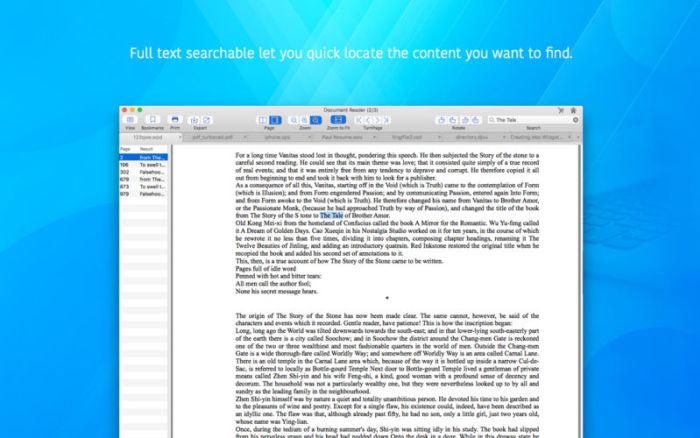
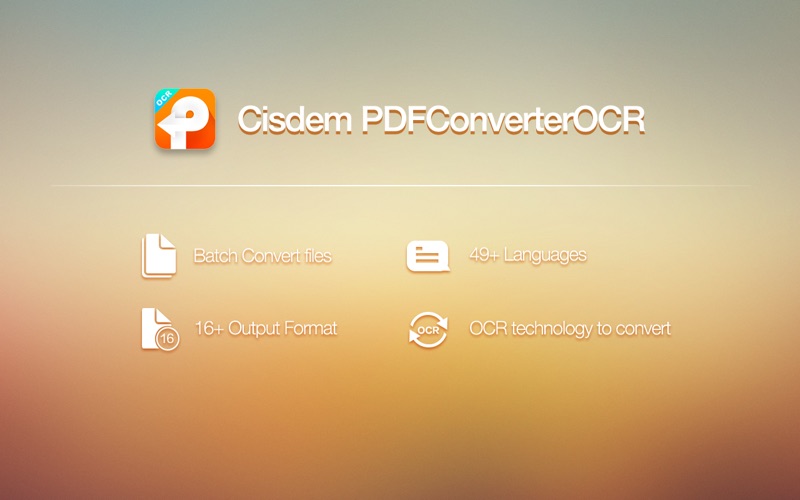
It makes it possible for you to convert both scanned and normal PDFs, as well as your images into editable and text-formatted files

Cisdem PDFConverterOCR is a straightforward application that aims to provide you with the necessary tools to convert any PDF document or image file with text to a wide array of editable  formats.

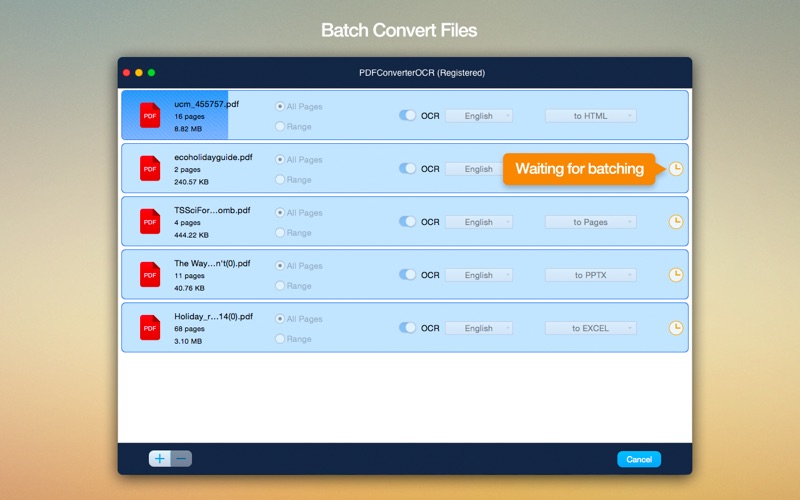
Basically, with the help of Cisdem PDFConverterOCR, you can easily convert both normal and scanned PDF documents into editable and text-formatted files. What’s more, with the help of the four selection tools found on the app’s top toolbar, you can manually select which parts of your documents should be exported as text, images, or tables.

Effortlessly convert PDFs into editable and text-formatted file formats

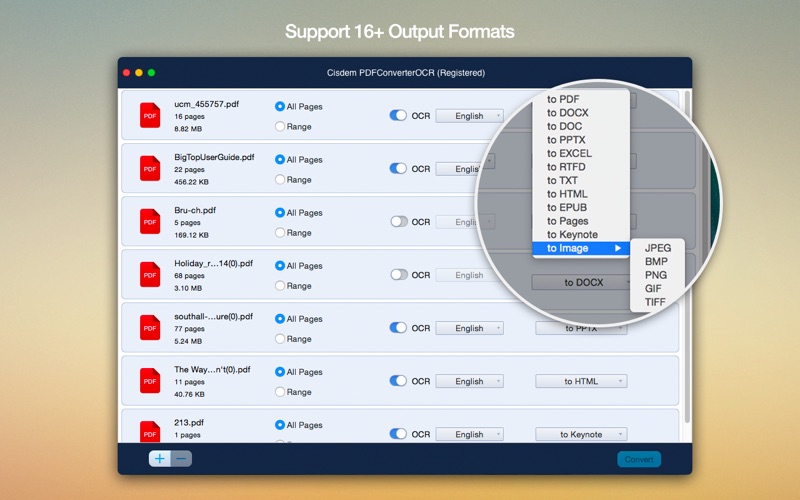
Straight off the bat, it must be pointed out that the best part about this application is, fortunately, its OCR feature. With the help of its powerful optical character recognition system, the app makes it possible for you to convert PDFs to common Microsoft Office, iWork, ePub, HTML, and the most popular image file formats, among others.

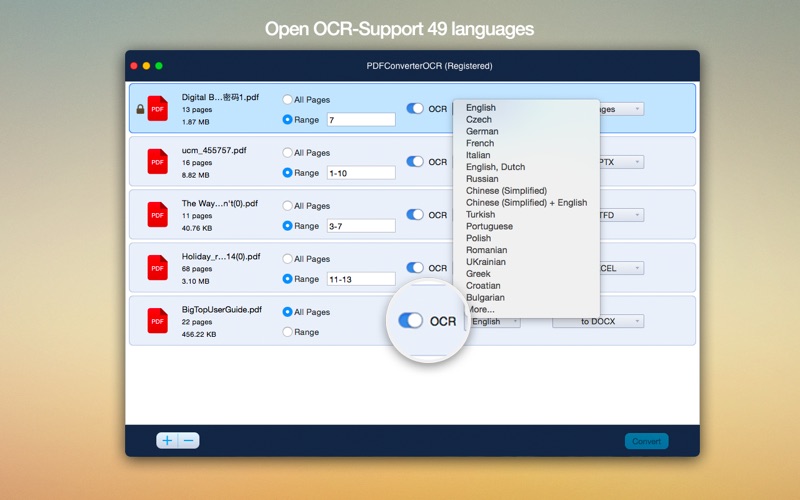
Another worth-mentioning feature is the fact that Cisdem PDFConverterOCR’s optical recognition system has the ability to scan and recognize the text from your PDFs or images for 49 languages, so chances that your text will be converted with strange characters or symbols are quite low.

An all-round good utility for the Mac, but not without faults

While PDFConvertorOCR’s text recognition system works undoubtedly well, it isn’t what you would call fast. In fact, the app’s OCR system is so slow that it feels like it’s actually slowing everything else down as well. One thing’s for sure, you will have to get your head around the fact that some great deal of time will be spent waiting.

All in all, while not the fastest and clearly not the most stylish application out there, eventually, Cisdem PDFConverterOCR will get the job done and could prove to be a very useful tool in office related situations or for home use when you need to turn scanned documents or photographs into searchable and editable text-based files.

Compatibility: OS X 10.10 or later 64-bit
Web Site: http://www.cisdem.com

What’s New in Cisdem PDF Converter OCR 5.3

  • Release notes not available at the time of this post.

Screenshots

Password

otgzm-[mac-torrents.net]-ty0yz

Name Cisdem PDF Converter OCR 5 3 0 TNT.zip
Size 477.9 MB
Created on 2018-06-09 07:44:59
Hash 3a3e58d9365aa34a4cdf727624768eac222a9170
Files Cisdem PDF Converter OCR 5 3 0 TNT.zip (477.9 MB)

FilmLight Daylight 5.1.10636

FilmLight Daylight 5.1.10636 macOS

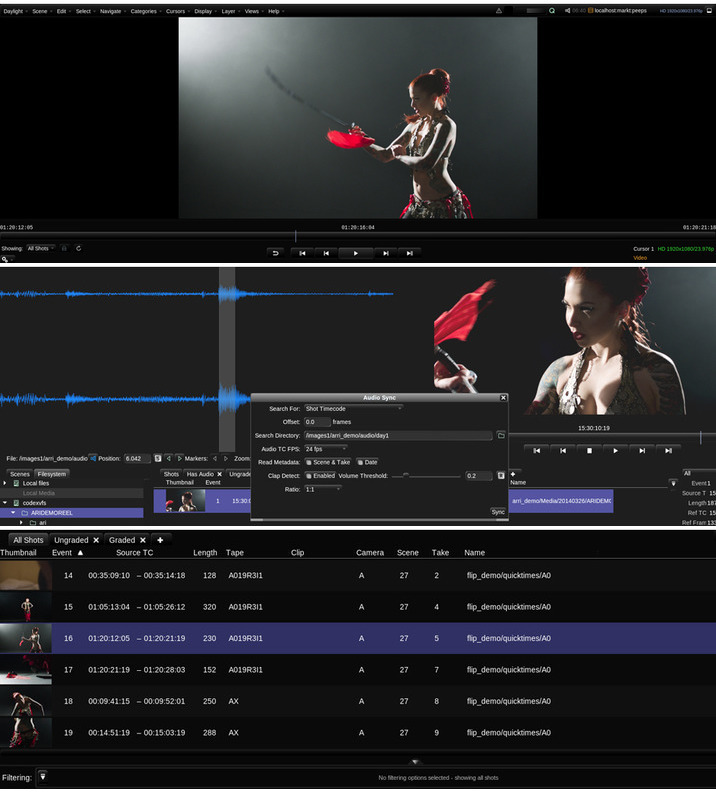
Daylight is designed as a compact yet powerful grading decision tool to help DoPs and directors establish looks and visualise what they have shot, on set or on location, as well as meeting all of the sophisticated deliverables requirements—in one application.

Full Baselight creativity

Grades can of course be limited to CDL values or exported as 3D LUTs for standard cross-platform workflows, but you don’t need to be constrained by the lowest common denominator. All shots can have full sophisticated Baselight looks—authored and applied using the same compact grading interface familiar to users of Baselight Editions for Avid, FCP and NUKE.

Deploy with ease

Daylight is available for purchase or quarterly rental, and the freelance licence option allows the licence to be moved from machine to machine using a simple, web-based authentication scheme.

The software will run on any Mac system equipped with OSX 10.9 or above. Using the same philosophy as Baselight Editions, Daylight uses whatever graphics card is installed without the need for special, CUDA-capable variants.

Extensive metadata support

Daylight provides comprehensive end-to-end handling of metadata. The system reads all the data it can from the headers of your camera and audio files and displays relevant metadata fields in the Sequence Browser and the Shots View—and you can also choose to display information on thumbnails in the Scene and Galleries.

Custom reporting

Daylight’s extensive metadata handling carries right on over into a sophisticated report generator that includes custom columns, colour accurate thumbnail images and cover pages. This means that you can produce a consistent, professional report at the end of every workday.

Transcoding in post

Daylight makes use of over 10 years of accumulated Baselight development to provide comprehensive support for all camera and deliverable formats—including audio and retiming capability. Support for sophisticated rescaling, filtering, masking and burn-in operations, alongside Truelight Colour Spaces for accurate colour transforms, means that all of your deliverable requirements can be met by one application.

Comprehensive codec support

Baselight is well regarded for supporting all common RAW camera formats and delivery codecs natively as soon as they are released. This is carried across to Daylight, along with user-defined formats and a sophisticated format mapping system that allows resolution, aspect ratio, frame rate and colour space to be freely mixed within a project.

Audio sync & playback

Audio can easily be synced with your camera footage—either automatically using timecode, or semi-automatically using a clap-detector, which pinpoints the exact time in the audio file that the clapper closes. Sound files that span multiple camera takes are easily handled and waveforms help you to manually adjust sound sync on a per-shot basis.
The fastest renderer never runs

Working with Baselight or Baselight Editions in post?

Of course, the sophistication of the Daylight render queue is welcome when you have to deliver graded files; however, the fastest renderer is the one that never runs. Instead of images, it delivers grading metadata. If you are working with a post-production facility equipped with Baselight or Baselight Editions, the full grade from Daylight can be encapsulated in a completely portable, cross-platform BLG file. No amount of additional GPUs or CPUs can be as fast or as flexible as this workflow.

Professional panel support

Daylight supports for Tangent Wave and Element panels, as well as Avid Artist Color and Transport devices. However, just because you’re grading dailies and don’t have the space, it doesn’t mean you can’t have a purpose-designed control surface. Our Slate panel is an ideal size for the near-set environment.

Render Queue with multiple deliverables

No need to wait for Daylight to finish rendering before you can start the next operation. You can easily pause, re-order and resubmit tasks to the Render Queue enabling you to work more efficiently. You can even optimise the process by producing several deliverables simultaneously from the one scene; for example, producing QuickTime movies at the same time as rendered DPX files.

Specifications:
  • Supported on macOS 10.1010.13
Minimum specification:
  • MacBook Pro or Mac Pro
  • 1GB GPU memory
  • 8GB RAM
Recommended specification:
  • 2013 Mac Pro
  • 2GB GPU memory
  • 16GB RAM
  • External highperformance disk system
  • AJA video monitoring

Web Site: http://www.filmlight.ltd.uk/products/daylight/overview_dl.php

What’s New in FilmLight Daylight 5.1.10636

  • Release notes not available at the time of this post.

Screenshots
Name FilmLight.Daylight.v5.1.10636.MACOSX.Incl.Keygen-AMPED.zip
Size 290.5 MB
Created on 2018-06-09 03:39:08
Hash c9aaab64b90a3421a8d2bb7da6a8c9046d6f37fc
Files FilmLight.Daylight.v5.1.10636.MACOSX.Incl.Keygen-AMPED.zip (290.5 MB)

Infinity Dashboard 1.2

Infinity Dashboard 1.2

Track Anything You Want

Infinity Dashboard allows you to track anything through its beautifully organized interface. With over 35 built-in modules, you can monitor things ranging from current weather, travel times, website stats, stock prices, birthdays and much more. You can even write your own custom modules to track almost anything you want.

Stop Repeatedly Checking Websites

Having all your data points tracked and automatically updated within a single app means that you don’t need to waste time throughout the day constantly checking multiple websites just to stay informed of what matters to you. See your App Store earnings, YouTube views, Facebook fans, Fitbit stats, exchange rates, Mac system info and more at a glance.

Notifications For What Matters

Certain modules support notifications that allow you to get alerted to important changes to data you are tracking. For example, you can get notified when the price of a product you are tracking on Amazon changes.

Emoji Picker for Groups

You can add a relevant emoji icon next to a group created in Infinity Dashboard to customise the interface further – it also helps to easily identify different sections within your dashboard.

Compatibility: macOS 10.10 or later 64-bit
Web Site: https://fiplab.com/apps/infinity-dashboard-for-mac

What’s New in Infinity Dashboard 1.2

  • Release notes not available at the time of this post.

Name Infinity Dashboard 1 2 TNT.zip
Size 94.34 MB
Created on 2018-06-09 02:49:27
Hash 3e3b3412c1a1c7dd4eb6be2a2737c3f777f4b4ae
Files Infinity Dashboard 1 2 TNT.zip (94.34 MB)

Cisdem PDF Converter 5.3

Cisdem PDF Converter 5.3

Cisdem PDF Converter lets you stop retyping PDF documents with complex layouts and graphics today. It can quickly and accurately convert PDF files into Microsoft Word (.docx), PowerPoint(.pptx), ePub, RTFD, plain text, HTML, Keynote, Pages, images, and more – with accurate, fully-formatted text content, layouts, formatting, columns, tables, and graphics.

Features
  • Export PDF to Word, PowerPoint, ePub, RTFD, Text, HTML, Keynote, Pages and Image (JPEG, PNG, TIFF, GIF, BMP)
  • Create PDF from Word, PowerPoint, ePub, RTFD, Text, HTML, CHM and Image (*.ico, *.psd, *.jpeg, *.png, *.gif, *.bmp, *.tga, *.tiff, *.jpg)
  • Convert encrypted PDF to supported formats
  • Convert in batch
  • Convert selected pages of imported documents
  • Extract images from PDF
  • Protect PDF
  • Merge PDF
  • Customize PDF size and quality
  • Preview PDF

Compatibility: OS X 10.10 or later 64-bit

Web Site: https://www.cisdem.com/pdf-converter-mac.html

What’s New in Cisdem PDF Converter 5.3

  • Release notes not available at the time of this post.

Name Cisdem PDF Converter 5 3 0 TNT.zip
Size 12.45 MB
Created on 2018-06-09 02:49:35
Hash ec78175829c0ef9f02e9e036bde119a236e74344
Files Cisdem PDF Converter 5 3 0 TNT.zip (12.45 MB)

Aiseesoft Mac Video Converter Ultimate 9.2.12

Name Aiseesoft Mac Video Converter Ultimate 9 2 12 TNT.zip
Size 80.40 MB
Created on 2018-06-09 03:35:50
Hash 725ed2742ab2a3299b0f2a20445d41b1460ada60
Files Aiseesoft Mac Video Converter Ultimate 9 2 12 TNT.zip (80.40 MB)

Aiseesoft Mac Video Converter Ultimate 9.2.12

The best Mac video software ever, allowing users to easily download, convert and edit videos including 4K videos as well as homemade DVDs on Mac.

  • Support external audio track and multiaudio track (New)
  • Enhance video quality for clearer visual experience
  • Rotate and flip video file with one click
  • Stabilize shaky videos to get a stabilization screen
  • Download and save online videos on Mac, including 4K videos
  • Support converting videos to and from 4K UHD
  • Edit your videos

Compatibility: OS X 10.7 or later
Web Site: http://www.aiseesoft.com/mac-video-converter-ultimate/

What’s New in Aiseesoft Mac Video Converter Ultimate 9.2.12

  • Release notes not available at the time of this post.

Screenshots
Aiseesoft Audio Converter 9.2.6

Name Aiseesoft Audio Converter for Mac 9 2 6 TNT.zip
Size 56.34 MB
Created on 2018-06-09 03:21:36
Hash a76dfcf46566db98a578800a50c57db218171e52
Files Aiseesoft Audio Converter for Mac 9 2 6 TNT.zip (56.34 MB)

Aiseesoft Audio Converter 9.2.6

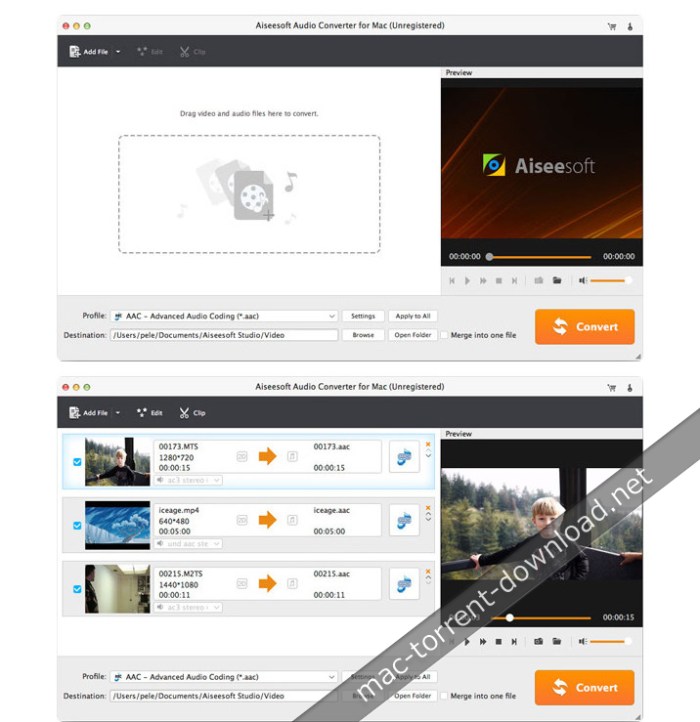
Best Audio converter can help you convert audio/video file to any regular and lossless audio format like MP3, WAV, AAC, M4A, WMA, FLAC, etc. in high sound quality.

Convert audio file to MP3, AAC, M4A, AIFF, ALAC, WAV, FLAC and more with fast speed and high quality. Moreover, it can extract audio track from HD/SD video and convert the audio to your preferred audio format.

Convert any audio format:

Audio Converter for Mac can convert audio files to MP3, WAV, AAC, M4A, WMA, FLAC and other regular or lossless audio formats in high quality.

Extract audio from video:

It enables you to extract audio track from imported video and convert audio to any popular audio format like AAC/AIFF/MP3/M4A/WAV/FLAC, etc.

Powerful editing function:

This audio file converter can help you to trim the loaded video/audio to segments and merge several clips into one complete audio file.

Compatibility: OS X 10.7 or later
Web Site: http://www.aiseesoft.com/audio-converter-for-mac.html

What’s New in Aiseesoft Audio Converter 9.2.6

  • Release notes not available at the time of this post.

Screenshots
Aiseesoft HD Converter 9.2.6

Name Aiseesoft HD Converter for Mac 9 2 6 TNT.zip
Size 53.80 MB
Created on 2018-06-09 03:36:28
Hash 39acd0523f8506ad0fa4cc1a59945ec40cf6d0b6
Files Aiseesoft HD Converter for Mac 9 2 6 TNT.zip (53.80 MB)

Aiseesoft HD Converter 9.2.6

The professional HD Converter for Mac can convert HD video to suitable HD/SD video. Moreover, it allows you to change original SD video to high definition video. This HD converting program supports almost all HD formats, such as AVCHD (MTS, M2TS), HD TS, HD MPEG, HD WMV, HD MPG, HD MP4, QuickTime HD MOV, HD H.264, HD RM video, etc. It can easily change the format of a HD video for better compatibility with your media player, portable device or editing software.

Besides converting HD video, this HD Video Converter for Mac is the best solution to convert audio file. It can freely change format between general audio and lossless audio. In addition, it enables you to extract audio from HD video files. Once you’ve converted your video files to audio, it becomes possible to enjoy them anywhere and anytime you like. The application allows you to convert HD videos to any commonly-used general/lossless audio files, such as MP3, AAC, AC3, AIFF, FLAC, WAV, WMA and so on.

This Mac HD Converter comes with multiple editing functions allowing you to customize the output video and audio effects.

You can adjust the HD/SD video’s brightness, contrast, saturation and volume to meet your satisfaction. Also, you are allowed to set audio volume. What’s more, you are able to crop video to remove the unnecessary part of video to better fit your player, and clip video, merge segments and add personal watermark. And you can handily bring 3D effect to the output video.

Compatibility: OS X 10.7 or later

Web Site: https://www.aiseesoft.com/hd-converter-for-mac.html

What’s New in Aiseesoft HD Converter 9.2.6

  • Release notes not available at the time of this post.

Aiseesoft MP4 Converter 9.2.6

Name Aiseesoft MP4 Converter for Mac 9 2 6 TNT.zip
Size 55.89 MB
Created on 2018-06-09 03:20:55
Hash 8b9bd08d5d705f5ba9777f69d8ea92487414c411
Files Aiseesoft MP4 Converter for Mac 9 2 6 TNT.zip (55.89 MB)

Aiseesoft MP4 Converter 9.2.6

The best Mac video software ever, allowing users to easily download, convert and edit videos including 4K videos as well as homemade DVDs on Mac. A straightforward video converter and editor that enables you to effortlessly batch encode multiple files, trim and merge videos before conversion

Aiseesoft MP4 Converter for Mac can convert all video formats (including MPG, MPEG, MPEG 2, VOB, DAT, MP4, M4V, TS, RM, RMVB, WMV, ASF, MKV, AVI, 3GP, 3G2, FLV, SWF, MPV, MOD, TOD and HD video) to MPEG-4, MOV, H.264 AVI, DivX, XviD with super fast conversion speed and high output quality, Aiseesoft MP4 Converter for Mac works well on MP4 Players, such as iPhone, iPod, Sony Walkman, Creative Zen, Apple TV, Nokia, PSP, Zune and so on.

  • Convert videos to MP4 on Mac
  • Select subtitles and audio tracks
  • Output different formats with only one conversion
  • Preview and snapshot

Compatibility: OS X 10.7 or later

Web Site: http://www.aiseesoft.com

What’s New in Aiseesoft MP4 Converter 9.2.6

  • Release notes not available at the time of this post.

Aiseesoft 4K Converter 9.2.6

Name Aiseesoft 4K Converter for Mac 9 2 6 TNT.zip
Size 53.17 MB
Created on 2018-06-09 02:49:52
Hash 9c371c4b5fbb2afea55a55775c814dd265fa0e35
Files Aiseesoft 4K Converter for Mac 9 2 6 TNT.zip (53.17 MB)

Aiseesoft 4K Converter 9.2.6

The best 4K Converter for converting 4K videos to 1080p HD, SD with any popular video formats on Mac.

Convert 4K videos to 1080p, 720p for playing on more devices. You can also convert 4K video to other 4K formats, such as 4K MP4, 4K AVI, 4K MKV, etc.

Convert 4K to HD/SD

Easily convert 4K video to 1080p, 720p on Mac for playing on more portable devices, such as Mac, 1080p TV, iPhone, iPad, and Android phone.

Convert 4K to other 4K formats.

This 4K Converter for Mac supports 6 kinds of 4K formats: 4K MP4, 4K TS, 4K AVI, 4K FLV, 4K MKV and 4K WebM. You can convert your 4K video to other formats you want.

Edit 4K video on Mac

The built-in editing function allows you to adjust the brightness, contrast, saturation, hue for a better enjoyment. In addition, you can cut, merge, rotate and add watermark of the 4K video.

Compatibility: OS X 10.7 or later

Web Site: http://www.aiseesoft.com/4k-converter-for-mac/

What’s New in Aiseesoft 4K Converter 9.2.6

  • Release notes not available at the time of this post.

Aiseesoft Mac Video Enhancer 9.2.6

Name Aiseesoft Mac Video Enhancer 9 2 6 TNT.zip
Size 53.29 MB
Created on 2018-06-09 02:49:44
Hash 73d20ae6e64d37a90e9963506a048c49925a10c3
Files Aiseesoft Mac Video Enhancer 9 2 6 TNT.zip (53.29 MB)

Aiseesoft Mac Video Enhancer 9.2.6

Aiseesoft Mac Video Enhancer is the most professional video enhancement software for Mac users. It is skilled in enhancing video quality to bring a clearer video vision. Also, it works as video editing software for Mac to rotate or flip your video angle. More editing functions enable you to clip, crop, and make video or audio effects manually.

The Fantastic Video Enhancing Software

This video enhancement tool wins a super admiration for its three flashpoints: upscale resolution, optimize brightness and contrast and remove video noise.

Enhance video resolution

This function enables you to upscale lower resolution SD video to HD, and even 4K video. You can get rid of the grainy video to enjoy a high quality video feast.

Optimize brightness and contrast automatically

This video enhancer software makes it available to optimize video brightness and contrast automatically, which will illuminate the dark video imagery.

Remove video noise

Still bothered by the dirt-like spots on video? Now, you can snap out of this trouble with one click to get a neat video screen by removing the annoyed video noise.

Stabilize shaky videos

– Newly update function
After updating, now this Video Enhancer has a new video stabilization function. When you get some shaky videos, you can use this stabilizer on your Mac to fix the shaky problem and make your video seems more stable. This is quite useful for videos shot in emergent situation or sports events videos.

Rotate & flip

The increasing high pixel mobile camera phones in present market offer shutterbugs a quick way to record videos in a wedding or family party. However, for some reasons, the recorded videos are showed sideways on the computer. This function exactly turns to rotate your iPhone video to correct angle with 90 clockwise or counterclockwise. Additionally, it will meet your personal needs to flip video horizontally or vertically.

More video editing effects

Clip and merge

Cut favorite parts from a long movie and merge interesting clips into one video to amuse yourself.

Crop

Get rid of the letter box to suit screen better, and give a clear close-up for your preferred images.

Adjust

Adjust the video brightness, contrast, saturation, hue, and control audio for editing special video effects.

Watermark

Add text or picture to design your personal video watermark and make it a YouTube sensation.

Compatibility: OS X 10.7 or later

Web Site: http://www.aiseesoft.com/video-enhancer/

What’s New in Aiseesoft Mac Video Enhancer 9.2.6

  • Release notes not available at the time of this post.

Screenshots
RevisionFX RE:Match 2.0.1 for After Effects

RevisionFX RE:Match 2.0.1 for AE macOS

REVisionFX RE:Match takes intuitive color and texture matching to a whole new level by addressing common problems on multicam and stereo shoots. RE:Match is a set of plugins to match one view of video or film to another so that it looks as if it was shot with the same camera and settings. RE:Match assumes that both image sequences are taken roughly at the same location but perhaps were not shot at the same time or from the same point-of-view.

Features:
  • Ability to globally color correct one sequence to match another.
  • Ability to globally color correct a whole sequence based on a particular point in time, or can be performed separately for each pair of frames in both sequences.
  • Ability to perform automatic global (whole image) color correction based on a smaller window of pixels for each of the image sequences.
  • Works well with over bright values and very wide dynamic ranges.
  • Matching for stereo pairs takes advantage of internal perpixel registration using optical flow methods.
  • Stereo pair matching takes into account occlusions.
  • Stereo pair matching takes into account that the two images may not have corresponding details at some of the edges of the frame.
  • Stereo matching has controls for making details, such as reflections, lens flares and specular highlights match between the two views.
  • Methods provided to remove or attenuate onlens artifacts (such as water drops on a lens).
  • Because RE:Match uses internal pixel registration, stereo matching does not require image alignment prior to use.
  • Visualization modes are provided to visualize and guide what RE:Match is doing internally.
  • Not limited to any particular resolution of images.
  • Works on all bit depths, including HDR images.

Compatibility: After Effects CS6 or later

Web Site: http://revisionfx.com/products/rematch/after-effects/

What’s New in RevisionFX RE:Match 2.0.1

  • PREMIERE ONLY: Fixes a bug where RE:Match Color could return the wrong image(s) when keyframing reference frames.

Name RevisionFX.REMatch.v2.0.1.MACOSX-AMPED.dmg
Size 25.69 MB
Created on 2018-06-08 23:18:41
Hash a21990e0baf43ea2553ea10f20519be8e5d4eda7
Files RevisionFX.REMatch.v2.0.1.MACOSX-AMPED.dmg (25.69 MB)

MacUpdater 1.2.7

MacUpdater 1.2.7

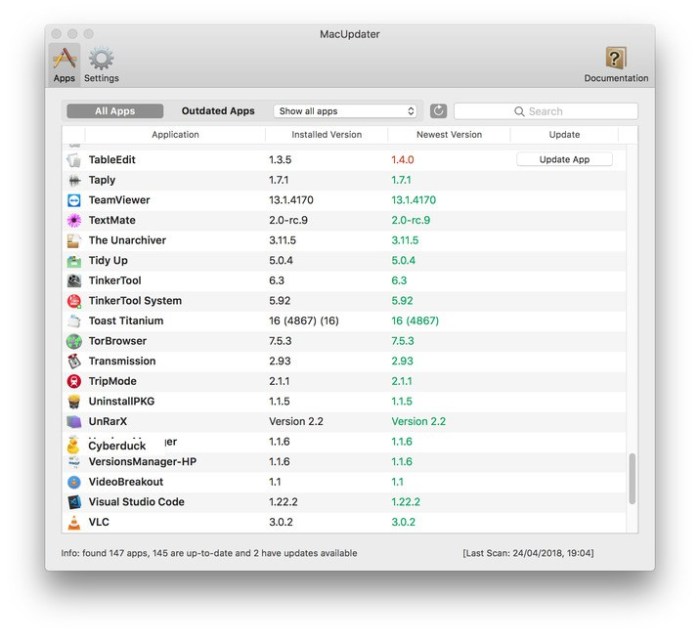
MacUpdater can automatically track the latest updates of all applications installed on your Mac. Launch MacUpdater to see at a glance which of your apps are out-of-date. And with a simple click you can update any outdated app. Don’t waste any more time manually searching for updates, downloading, installing and cleaning up. Let MacUpdater take care of it all for you!

Scan your Apps – Maintain the Overview

Nothing could be more easy than finding out which of your apps are out-of-date with MacUpdater. Just launch it and let it scan your apps. You’ll see a list of all your apps, and apps with updates are listed in red. There are convenient filter-options to display just those apps that are outdated. You can also ignore apps or updates you are not interested in.

No Registration Needed – Total Privacy

In contrast to competing services, you don’t need to register to use MacUpdater. Just launch it, scan & update. Even more important, everything in MacUpdater is designed with your privacy in mind. We don’t track you and we don’t sell your data – because we don’t even have it. In fact we have an industry-leading Privacy Policy that should keep you all warm & snug.

Stay Up-to-Date – Stay Secure

Updating apps could not be simpler – just click the “Update” button next to any outdated app and MacUpdater will update the app to the current version automatically. MacUpdater can silently run in the back-ground, check your apps for updates every day and let you know about new updates with with notifications.

One-time Purchase No Subscriptions

MacUpdater is an one-time-purchase without any shady memberships, subscription crap or adhesion contracts. There is no need to sell your soul or to rob the piggy-bank to use MacUpdater. Its a simple, one-time purchase costing 9.99$/. And if you just want to scan your apps without updating them, its even free

Compatibility: OS X 10.11 or later 64-bit

Web Site: https://www.corecode.io/macupdater/index.html

What’s New in MacUpdater 1.2.7

  • Release notes not available at the time of this post.

Screenshots
Name MacUpdater 1 2 7 TNT.zip
Size 8.76 MB
Created on 2018-06-08 21:19:21
Hash 1ee8db9b7c485ac6d6c31b982017771e082fe8c6
Files MacUpdater 1 2 7 TNT.zip (8.76 MB)

Anesidora 1.03

Name Anesidora 1 03 TNT.zip
Size 10.47 MB
Created on 2018-06-07 22:19:38
Hash 1a6d4dff3a734cbd53884ce12a1ad6531668fdf9
Files Anesidora 1 03 TNT.zip (10.47 MB)

Anesidora 1.03

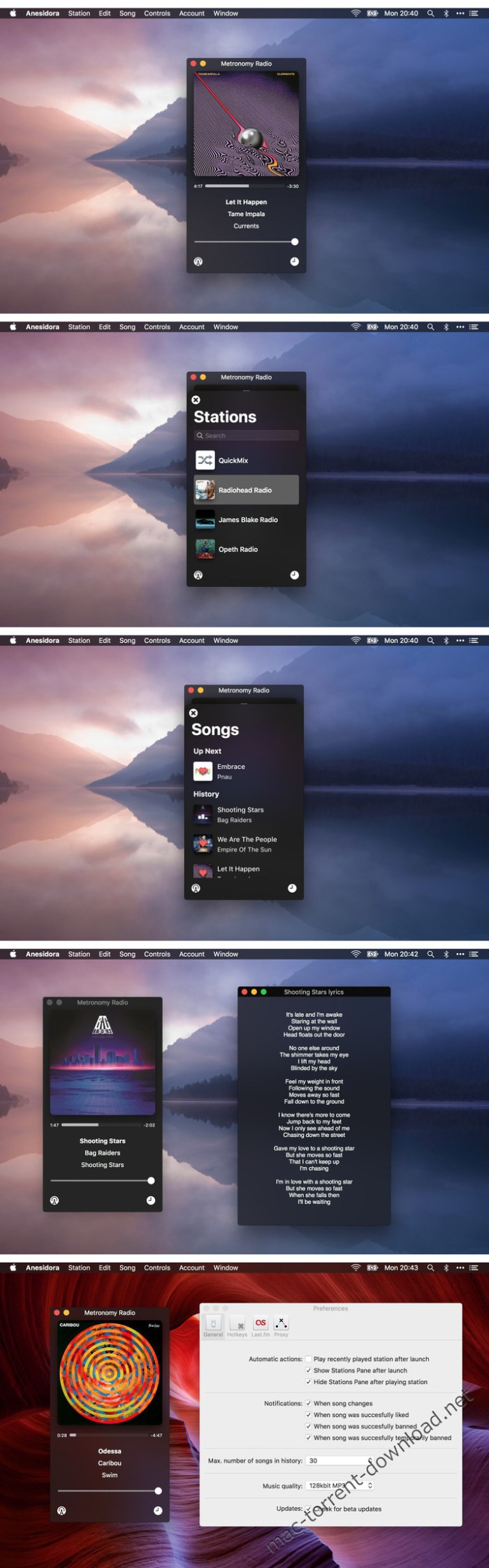
The app allows full Pandora experience on your Macintosh – you can log in or create an account if you don’t have one. The app downloads all your stations and the search allows to create new ones. You can like, ban or temporarily ban each song, so the radio you’re listening to is even more personalised.

Last.fm

Anesidora has a built-in Last.fm scrobbler, so each song is saved on Last.fm.
Want to share a song, but your friend uses either Spotify or Apple Music? No problem – Anesidora will try to find a link to the song and copy it.

Lyrics

Anesidora will search for lyrics to each song, so they’re easily accessible.

Proxy

The app automatically applies a proxy if needed.
Have your own proxy? No problem – you can change it in the app preferences.

Hotkeys

Anesidora supports multimedia keys on your Mac and offers customizable global hotkeys for liking, banning a song and bringing the app to front.

History

Anesidora remembers up to 60 songs, so you can like or ban a song even if you haven’t earlier. You can also create a new station based on a track from the list.

Features:
  • Builtin proxy, so the radio works outside U.S.
  • Notifications when song changes, was liked etc.
  • Multimedia keys supported to play/pause and change the song
  • Builtin Last.fm scrobbler
  • Builtin lyrics
  • Global hotkeys to like, ban, temporarily ban song and to bring the app to front.

Compatibility: macOS 10.12.2 or later 64-bit

Web Site: https://micropixels.pl/anesidora/
Mac App Store: https://itunes.apple.com/us/app/anesidora/id1369500258?mt=12

What’s New in Anesidora 1.03

  • Lyrics are now automatically refreshed in the window,
  • Stations shows recently played station on the top

Screenshots

iZotope DDLY Dynamic Delay 1.01b

iZotope DDLY Dynamic Delay 1.01b macOS

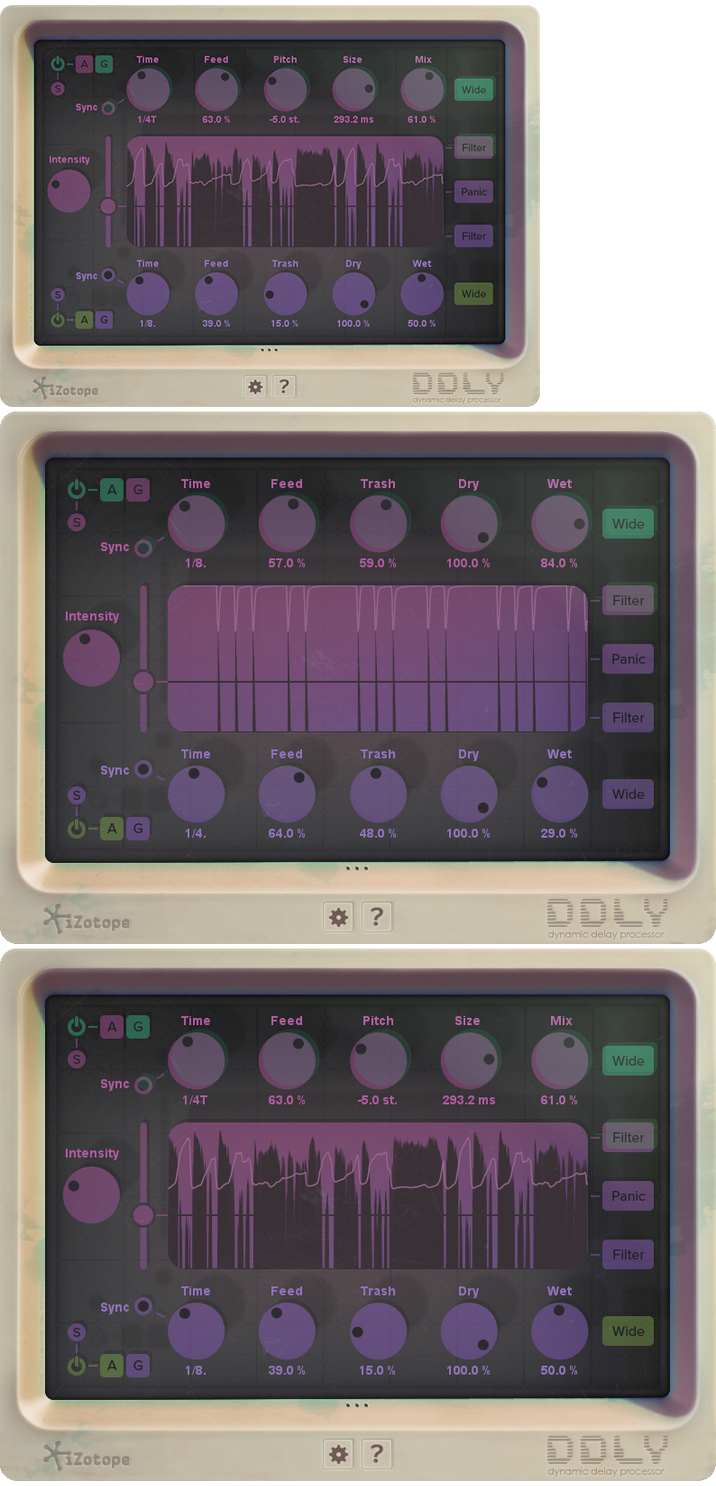
DDLY Dynamic Delay responds to your track’s musical dynamics to create versatile and intriguing delays. It’s a one-of-a-kind effects plug-in that delays the signal differently depending on the character of the sound, without turning your track to aural mud. Adjust the threshold to split your signal based on transients, then send it down two separate analog or granular delay paths.

Two delays in one

DDLY is actually two separate delays! DDLY analyzes your audio based on an adjustable threshold to determine what to send to the top delay and what to send to the bottom delay. Adjust the Intensity to affect how strongly the signal is split between the two—great for a punchy delay on the harder, transient crack of your drums and a shuffling delay on the main beat elements.

Customize your delay

Manipulate the settings in each delay independently or in sync with the other. Choose analog mode to produce warm lo-fi delays with smearing and nostalgic degradation, or choose Grain for melodic, symphonic, and futuristic sounds. Crank the Feed and Trash knobs to throw in some extra destruction, or use the parallel dry/wet knobs to add just the right amount of sweetness.

Key Features:
  • Two delays in one: DDLY analyzes your audio based on an adjustable threshold to determine what to send to the top delay and what to send to the bottom delay. Adjust the Intensity to affect how strongly the signal is split between the two—great for a punchy delay on the harder, transient crack of your drums and a shuffling delay on the main beat elements.
  • Customize your delay: Both delays have two modes to choose from: Analog or Grain. Analog produces warm lofi delays with smearing and nostalgic degradation. Grain produces melodic, symphonic, and futuristic sounds for truly new soundscapes.
  • Responsive interface: The interface of DDLY reacts to the material it’s applied to for unique realtime visual feedback. As the knobs come to life, your sound gets cooler. Go ahead, get ‘em all going!
  • Automatable: DDLY can be set up with automation in your audio host, to engage the dynamic delay on your mix when you want it to and back off when you need the raw material to shine.

DDLY Dynamic Delay Technical Specs

Operating system requirements:

OS X 10.8 or later

Plug-in formats

VST 2 (32-bit and 64-bit), VST 3 (32-bit and 64-bit), Audio Unit (32-bit and 64-bit), AAX (64-bit), RTAS (32-bit), Audiosuite DPM and AAX.

All listed plug-in formats include support for automation except for Audiosuite DPM and Audiosuite AAX.

Plug-in host compatibility

Logic Pro X.2, Ableton Live 9.5, Pro Tools 12.4, Pro Tools 11.3.1, Cubase Pro 8.5, REAPER 5.11, FL Studio 12.2, Studio One 3.1.1, Pro Tools 10.3.1

Supported sample rates

44.1 kHz, 48 kHz, 88.2 kHz, 96 kHz, 176.4 kHz, 192 kHz

Web Site: https://www.izotope.com/en/products/create-and-design/ddly-dynamic-delay.html

What’s New in iZotope DDLY Dynamic Delay 1.01b

  • Release notes not available at the time of this post.

Screenshots

Name iZotope DDLY Dynamic Delay v1.01b Ked MAC-DDP.zip
Size 23.51 MB
Created on 2018-06-07 07:51:21
Hash 73eee2bfd133b051c2f251205db0f677c480bd71
Files iZotope DDLY Dynamic Delay v1.01b Ked MAC-DDP.zip (23.51 MB)

iZotope Ozone Advanced 8.01

iZotope Ozone Advanced 8.01 macOS

As the industry’s most comprehensive mastering suite, Ozone 8 adds to its legacy by introducing new intelligent signal processing, spectral shaping, Tonal Balance Control, and more. Master your audio with over fifteen years of audio industry firsts at your fingertips. Enhanced with new, futuristic, intelligent features, Ozone 8 is your one stop for a tonally balanced, professional master with twelve essential mastering processors. It’s the smartest version of Ozone yet.

Tonal Balance Control

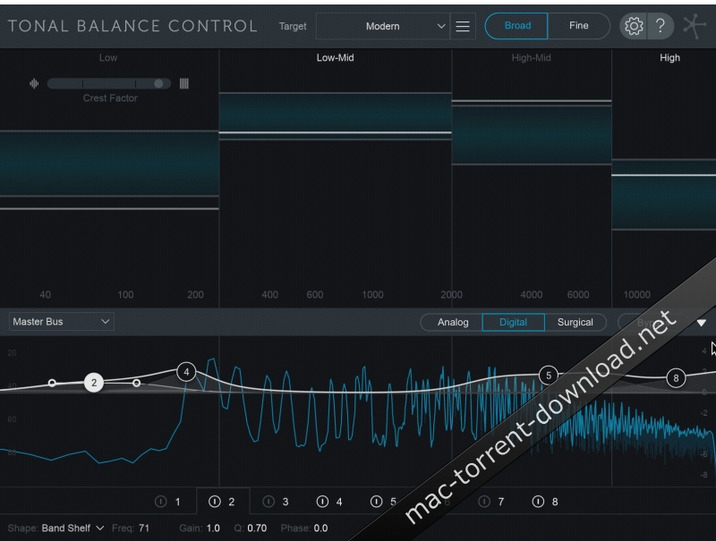
The new Tonal Balance Control plug-in presents industry-first visual analysis and communicates with all instances of Neutron 2, allowing you to reach your desired master faster. Compare your work with track references and genre standards informed by analysis on years of popular masters, achieve a target sonic profile, and ensure your delivery will translate for popular distribution channels.

NEW! Spectral Shaper

Smooth and sculpt problematic and harsh frequencies with the new Spectral Shaper module. Mold your audio by applying frequency-specific dynamics, surgically or creatively, to create smooth, balanced audio. Fantastic for taming percussive transients, Spectral Shaper can tame sibilant hi-hats, harsh vocals, plucky acoustic guitars, and other overly bright mix elements. For a creative twist, use Spectral Shaper across any frequency band to experiment with timbre, resonance, and transient information without affecting other elements of the source audio.

12 Essential Mastering Tools with Component Plug-ins

Ozone 8 Advanced includes twelve essential modern and vintage modules with component plug-ins: Spectral Shaper, EQ, Dynamic EQ, Post EQ, Maximizer (with IRC IV and new IRC LL), Imager, Exciter, Dynamics, Vintage Limiter, Vintage Tape, Vintage EQ, Vintage Compressor. Ozone 8 Advanced comes with each module as a component plug-in, allowing you to use any piece of Ozone independently in your session.

Track Referencing

A/B your master against reference tracks directly within any instance of Ozone or its standalone application. Now an integrated process, track referencing is easy, intelligent, and incorporated into Ozone’s workflow. Track referencing in Ozone allows you to load up to 10 tracks and will identify sections of your reference for easy playback like Verse or Chorus, so you can spend less time finding and more time mastering.

System Requirements:
  • Compatibility: OS X 10.8.5 (Pro Tools 10 only), OS X 10.9 macOS Sierra (10.12)
  • Plugin Formats: VST2, VST3, AudioUnit (Mac Only), AAX (Realtime & AudioSuite; 64bit only), RTAS (Realtime & Audiosuite (DPM. 32bit only)

Web Site: https://www.izotope.com/en/products/master-and-deliver/ozone/ozone-advanced.html

What’s New in iZotope Ozone Advanced 8.01

  • Release notes not available at the time of this post.

Screenshots

Name iZotope.Ozone.Advanced.v8.01.MacOSX.zip
Size 926.4 MB
Created on 2018-06-07 00:56:00
Hash 38d12d754346888d2f097dd2309711e403f19676
Files iZotope.Ozone.Advanced.v8.01.MacOSX.zip (926.4 MB)

Rampant Design Tools – Matte Transitions X v1 – 40 HD FCPX Effects

Rampant Design Tools – Matte Transitions X v1 – FCPX Plugin

Rampant Matte Transitions X allows you to quickly and easily add animated matte transitions to your video. Available in HD, Matte Transitions X are the quickest and easiest way to add animated mattes to your next video.

Why Do You Need Matte Transitions X?

Matte Transitions X allows you to quickly and easily add animated matte transitions to your video.

FEATURES
  • 40 Matte Transitions
  • Created by Emmy Award Winning VFX Artists
  • Shot on RED Epic Digital Cinema Cameras
  • Available in HD
  • High quality FCPX plugin
  • Easy to use. Instantly stylize your edit
  • Builtin controls: Add blur, glows, black & white effects & sepia effects.

Compatibility: OS X 10.10.5 or later
Requirements: FCPX 10.2.3 or Motion 5.2.3 or later

Web Site: https://rampantdesigntools.com/product/rampant-matte-transitions-x-v1/

Name Rampant Design-Matte Transitions X v1-FCPX Plugin.zip
Size 2.05 GB
Created on 2018-06-06 21:35:44
Hash 4e6fc261a7fd6db4d7527a21ff919a839d704727
Files Rampant Design-Matte Transitions X v1-FCPX Plugin.zip (2.05 GB)

Marvelous Designer 7.5 v4.1.99.32511

Marvelous Designer 7.5 v4.1.99.32511 macOS

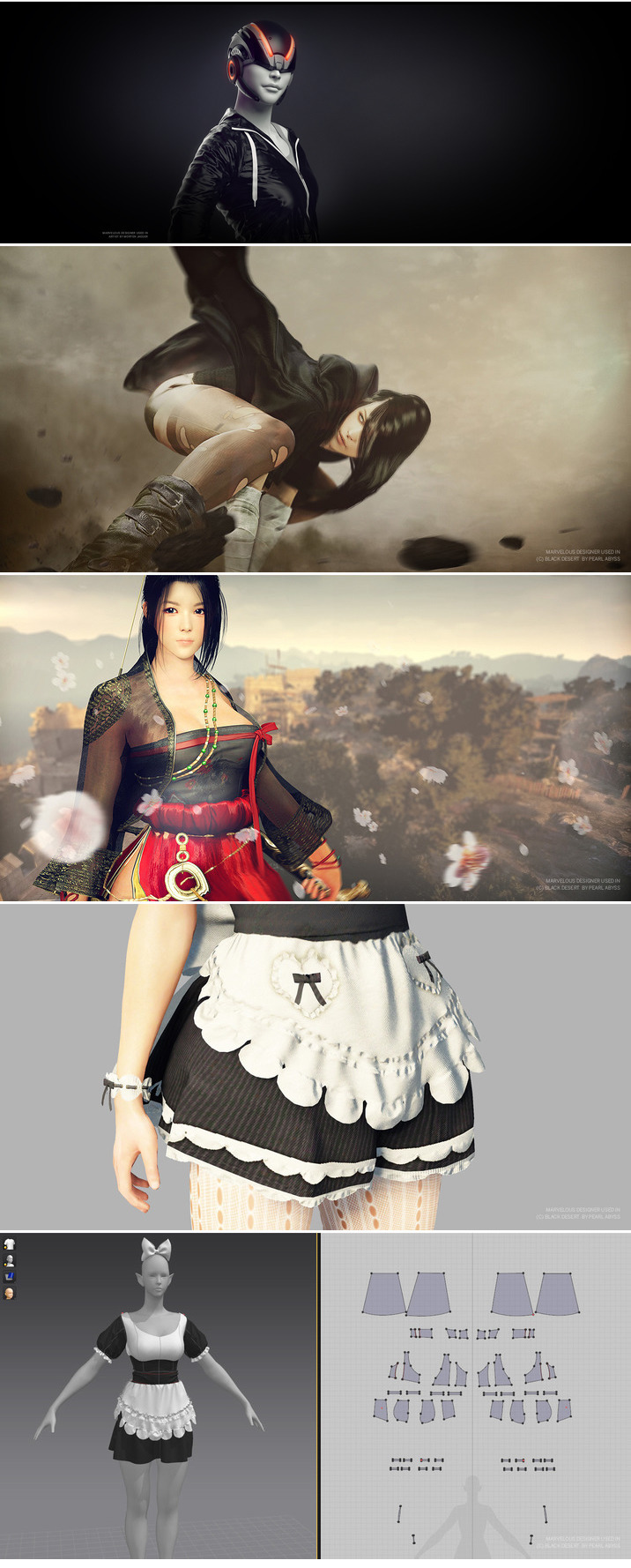
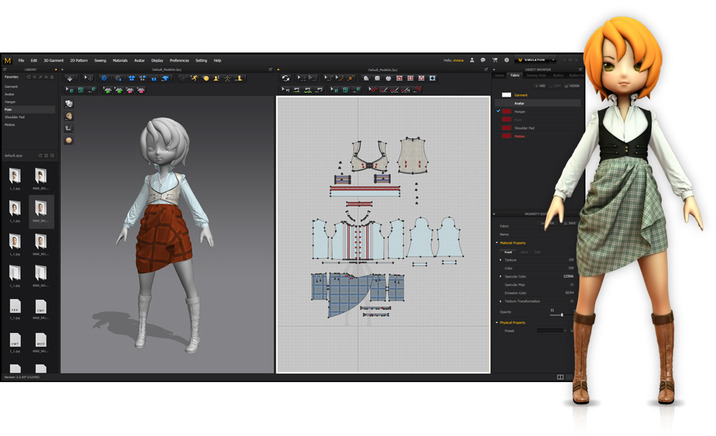
Marvelous Designer allows you to create beautiful 3D virtual clothing with our cutting-edge design software. Finally breathe life into your designs with tools that enhance quality while saving you time. From basic shirts to intricately pleated dresses and rugged uniforms, Marvelous Designer can virtually replicate fabric textures and physical properties to the last button, fold, and accessory.

What’s New in Marvelous Designer 7:

Faster than ever before.

It’s simply marvelous!

Expand your character’s closet with clothes for every occasion.

Marvelous Designer allows you to build a rich wardrobe for your characters where each garment can be modified and reused. Every shirt or dress you create can now be transformed in endless ways. Mix and match between outfits and characters. Adding variety has never been easier.

You don’t have to be a fashion designer. It’s simple and easy.

Our technology is based on the art of sewing and patternmaking (making the blueprint for a garment), which we believe is the only way to realistically express garments. You don’t need a fashion design background to create clothing using Marvelous Designer. It is surprisingly easy and simple with our intuitive tools. Build your skills by mastering our online curriculum.

Easy-to-use software that just makes sense.

Designing ‘true to life’ virtual garments is easy and straightforward with our intuitive user interface and tools such as arrangement points and pins. Marvelous Designer saves you from guessing how clothes should fit in real life. Textural coordinates are packaged along with your patterns for simple data translation and use. Edit textures, fabrics and its physical properties via preset our library to accurately simulate onto your characters without costing countless hours.

Augmented capabilities with your existing software tools.

Across modeling and animation, Marvelous Designer can easily import and export data between software including Maya, 3DS Max, Softimage, Modo and ZBrush.
Major game studios like EA and Ubisoft as well as the animated film studios behind Avatar (Weta Digital) and Total Recall (Double Negative) have taken advantage of our software’s compatibility.

Authentic simulation for amazing animation.

Bringing your characters to life shouldn’t take a lifetime. Traditional modeling and sculpting techniques require hours of work for each wrinkle, bend, and fold and don’t guarantee convincing results. Marvelous Designer’s animation cache functionality with high-polygon modeling makes it possible to capture the realistic movement of clothing when draped onto moving characters, whether they are running, jumping, or twirling midair.

Revolutionizing 3D virtual clothing.

Marvelous Designer’s novel pattern-based approach allows not only for beautiful graphics, but also compiles your garments’ data to be reused, revamped, and refreshed again and again.

Pattern Creation and Editing

Our expansive pattern design feature lets you easily create and edit rectangular, circular, or any other polygon shaped patterns. In addition, we provide intuitive interfaces such as moving point/segment in parallel/perpendicular fashion, moving point/segment via input value, or dividing the segment in proportion.

Segment and Free Sewing

Check out the simple and smart sewing tool that you can define sewing direction and range accurately and edit them at any time, which is not fully supported in other 3D CAD software. Our simple and smart sewing tool makes life easier for users. You can easily create and edit seam lines with more freedom in sewing directions and range, accurate sewing has been extremely difficult to articulate in other 3D CAD software due to the limitations in its narrow directions and range.

Officially Supported OS: OS X Mountain Lion, Mavericks, Yosemite, El Capitan, macOS Sierra

Web Site: https://www.marvelousdesigner.com/

What’s New in Marvelous Designer 7.5 v4.1.99.32511

  • Release notes not available at the time of this post.

Screenshots

Name Marvelous Designer 7.5 v4.1.99.32511 macOS.zip
Size 989.7 MB
Created on 2018-06-06 21:38:21
Hash 1a0ab8640cd1cae380a21127f6d8c541f9d773cd
Files Marvelous Designer 7.5 v4.1.99.32511 macOS.zip (989.7 MB)

DxO PhotoLab ELITE Edition 1.2.0.75

DxO PhotoLab ELITE Edition 1.2.0.75

A professional and feature-rich photo correction and manipulation application designed to automatically improve the quality of your images

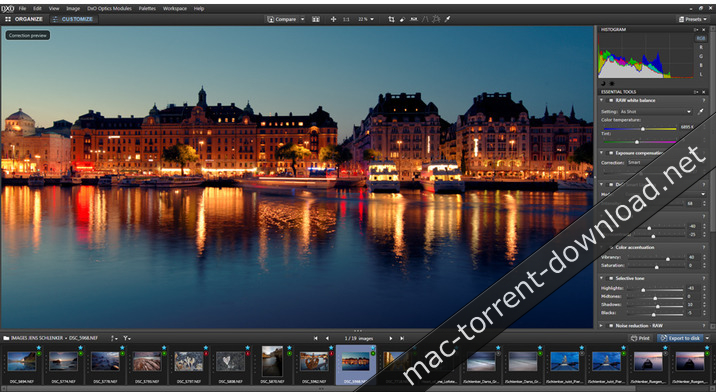
DxO PhotoLab (formerly DxO Optics Pro) is a streamlined and powerful photo processing OS X application designed from the ground up to help you improve your images automatically.

When having to deal with RAW photos, the DxO PhotoLab app is transforming the RAW sensor data to a virtually free of artifacts output image and will instantly correct the exposure with an automatic adjustment algorithm for keeping highlights from ‘burning out’.

Wide assortment of built-in image distortion repair tools

Furthermore, with the help of DxO PhotoLab you will also be able to recover some partially burnt-out highlights that would otherwise completely ruin your photo.

Moreover, DxO PhotoLab can be used to correct all five possible optical distortions: vignetting, chromatic aberration (longitudinal and lateral), geometric distortion, and lens softness, with you just having to click a button.

In addition, DxO PhotoLab also provides high-performance de-noising capabilities which will allow you to shoot RAW or JPEG photos using ISO values as high as 100,000.

Adjust your photos’ color with extreme ease

Its smart lighting features will help you to effortlessly fine-tune the balance between over and under exposed areas in your photos, a fact that will make it a lot easier for you to discover new details in pictures that would get discarded if not for DxO PhotoLab.

DxO PhotoLab makes it simple to tweak any photo’s colors using a series of slider based controls that will enable you to customize the image’s overall vibrance, the actual tone curve, and the white balance, in order to generate more vivid looking pictures out of otherwise ordinary looking snapshots.

Vast collection of image correction presets designed to make it a must-have tool for speedy one-click image auto-correction

To make your photo enhancing workflow even more simple and effortless, DxO PhotoLab also provides you with a large variety of presets which will help you to apply a carefully selected set of image corrections, depending on the type of image that you want to adjust.

As an added bonus, DxO PhotoLab also features a minimalist looking yet very effective user interface, designed to help you customize and organize your photos as simply and as quickly as possible.

Compatibility: OS X 10.11 or later 64-bit

Web Site: http://www.dxo.com

What’s New in DxO PhotoLab ELITE Edition 1.2.0.75

  • Release notes not available at the time of this post.

Screenshots

Name DxO PhotoLab ELITE Edition 1 2 0 75 TNT.zip
Size 285.7 MB
Created on 2018-06-06 21:47:37
Hash 9bfb29f1ebf6fbf40222469e43e0c100cd86c226
Files DxO PhotoLab ELITE Edition 1 2 0 75 TNT.zip (285.7 MB)

Grids for Instagram 4.10.2

Grids for Instagram 4.10.2

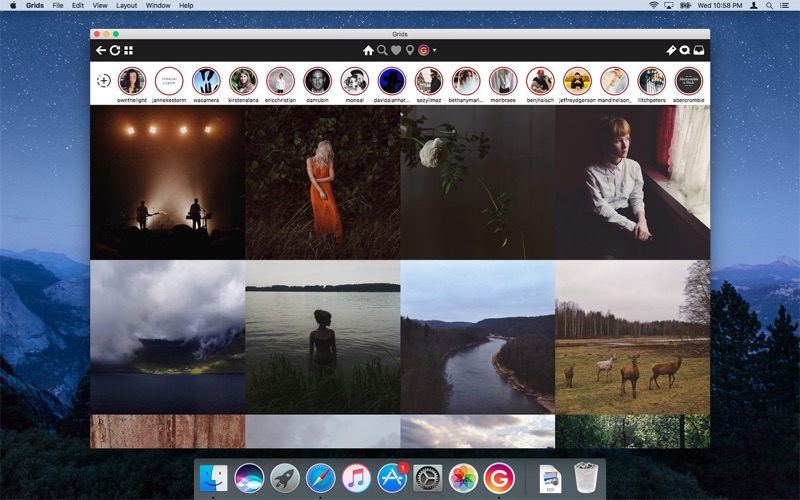
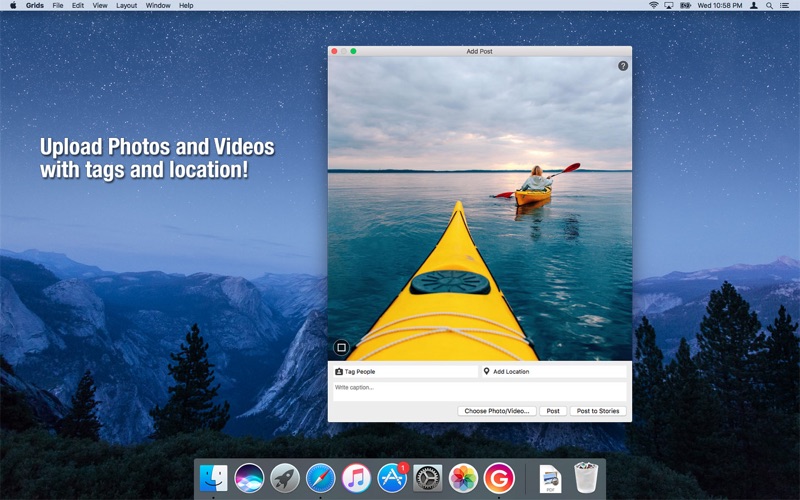
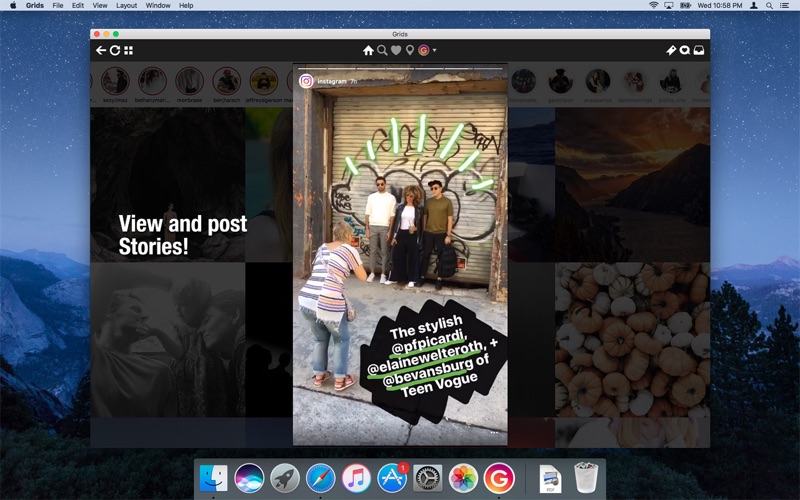
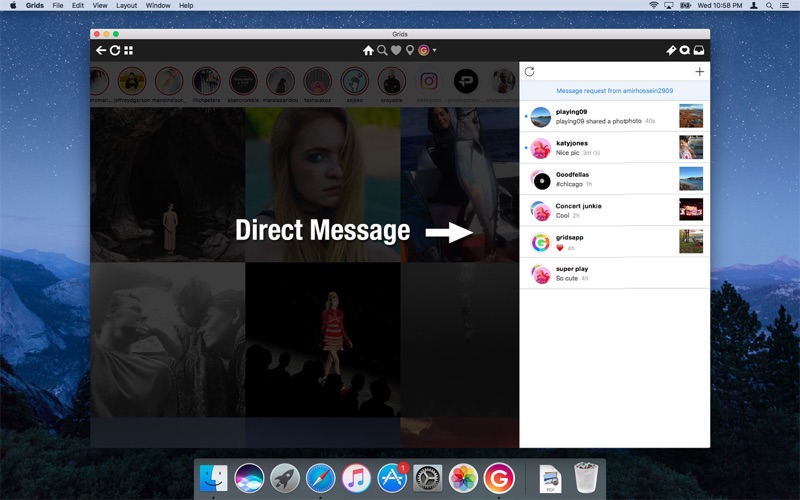
Grids brings the best Instagram experience to your Mac, with Stories (first and only app that supports stories!), Direct Message and Large/Fullscreen photo and video viewing.

As featured on TheNextWeb, AppAdvice, iDownloadBlog, DigitalTrends and many others.

  • View Stories (pro)
  • Direct message (pro)
  • Share photos/user profiles/tags/locations via message
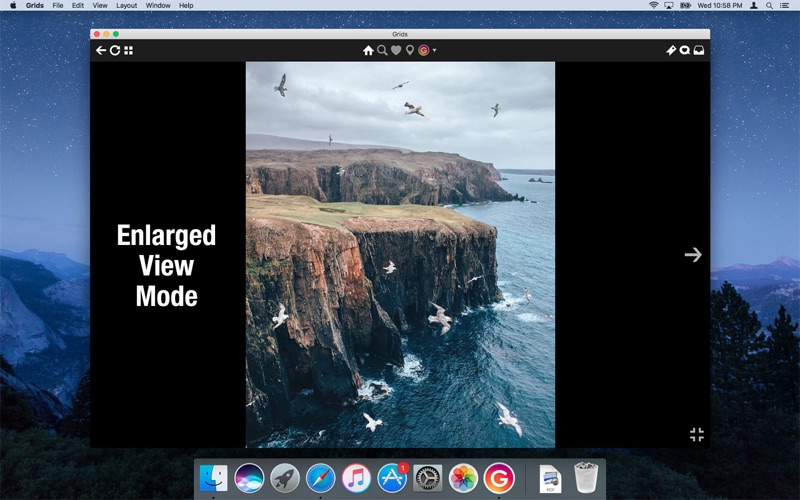
  • Enlarged view mode allows photo viewing and video playing in large or full screen
  • Clean, adaptive UI. Works at full screen as well as widgetsized window.
  • Pixelperfect layout and rendering. Retina display support. Your Instagram photos never looked this gorgeous.
  • 4 beautiful layout styles for the pleasure of your eyes
  • Picture size as well as spacing and background color can be adjusted to your liking.
  • Fastest Instagram browsing experience you will have!
  • Switch between multiple accounts seamlessly.
  • Like, comment, follow, search people and tags.
  • Show users tagged in photo
  • Bookmark allows you to bookmark people (without having to follow them), locations, tags and individual photos or videos (without having to like them).
  • Get notification when new feed is available and/or when there is new followers/likes/comments/mentions.
  • View latest following/news just like on your phone

Compatibility: OS X 10.11 or later, 64bit

Web Site: http://thinktimecreations.com/
Mac App Store: https://geo.itunes.apple.com/app/id916198600

What’s New in Grids for Instagram 4.10.2

– Fixed crashing issue
– Fixed issue that messages not showing

Screenshots

Name Grids for Instagram 4 10 2 MAS TNT.zip
Size 27.51 MB
Created on 2018-06-06 21:36:37
Hash 226a45e7438c5b30b2d52fc713b46c66b5997b92
Files Grids for Instagram 4 10 2 MAS TNT.zip (27.51 MB)

Dr. Cleaner Pro 1.2.2

Dr. Cleaner Pro 1.2.2

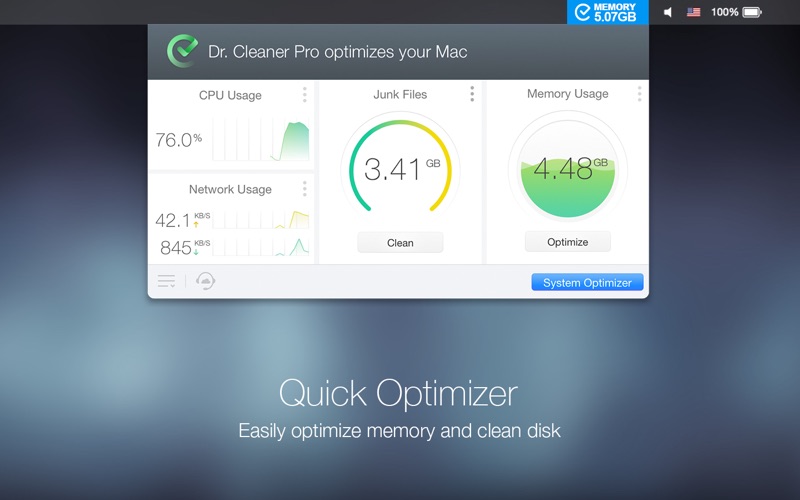
Dr. Cleaner Pro is the professional version of Dr. Cleaner. Dr. Cleaner Pro also includes Duplicate Finder and App Uninstaller.

Clean, Optimize, and Maintain your Mac in one professional tool:

[Smart Memory Optimizer]
  • 1click memory optimization
  • Instantly reclaim memory from closed Apps
  • Identify Apps that use a significant amount of memory
[Junk Files Cleaner]
  • Quick disk clean from status bar menu
  • Clean temporary files, including logs, mail caches, iTunes and iOS temporary files, etc. Empty Trash for current user
  • Detect remaining files after deleting Apps
  • Clean trash in removable storage
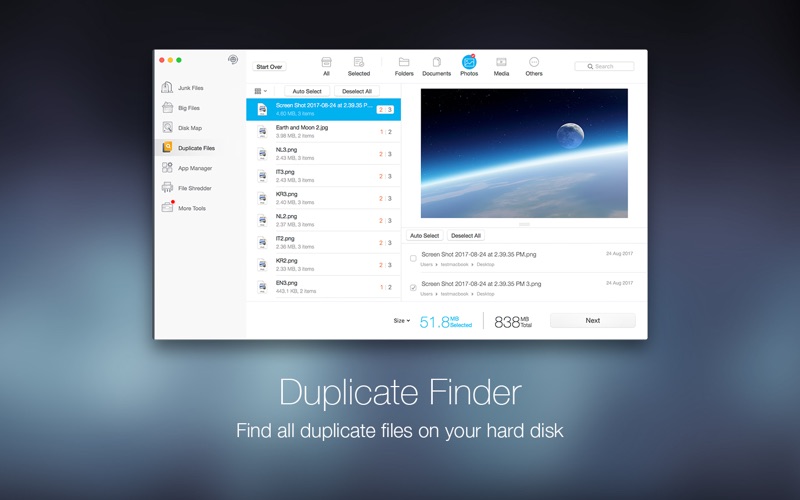
[Duplicate Files Finder]
  • Thorough and quick scan — fast and accurate scanning technique covers your entire home folder
  • Smart and accurate selection — duplicates are selected not only by file names but also by their contents. Files are shown in detailed previews. It can also help you “”decide”” which copy to delete by presenting “”Auto Select”” button
  • Easy and safe decision — duplicates can be sorted by file type and listed in their full route for you to track. You can decide which way to clean these files; either by sending them to Trash or deleting them permanently
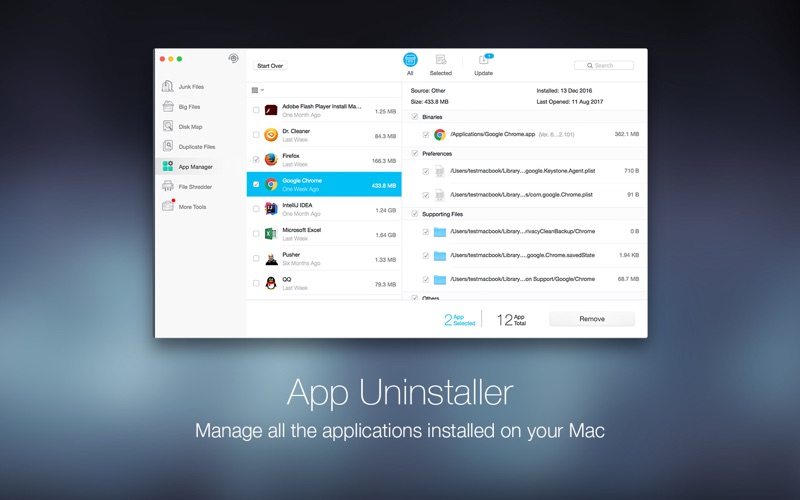
[Intelligent App Uninstaller]
  • Autoclean leftovers of deleted Apps
  • Manage all the applications installed on your Mac easily
  • View all the information of applications installed on your Mac clearly and easily
  • List all the applications installed on your Mac by name, size, and last opened date
  • Remove applications on your Mac easily and completely
  • Remove all the associated files of uninstalled applications
  • Alert user about new upgrades to installed apps
[Real-Time System Status]
  • Realtime network usage
  • Realtime CPU usage
[Big Files Scanner]
  • 1click scan of big files (customizable size from 10 MB and above)
  • Multiple filters of size, date, name and type
  • Local files in sync with your cloud drives can also be found
  • * Important big files can be “”locked”” into the protected list to avoid accidental deletion
[Disk Map]
  • Scans all your disks and creates a clickable map of the files on your disk, colorcoded by type
  • Provides additional information about files when you click on an item on the map
  • Views your entire disk by file or folder size so you can determine which files or folders use the most space
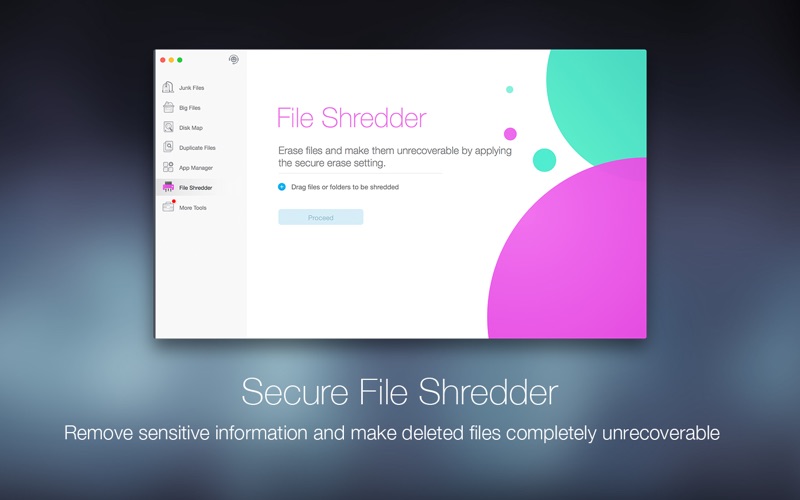
[Securely File Shredder]
  • Permanently remove sensitive information
  • Completely delete files, making them unrecoverable
  • Easy to use drag and drop feature
  • Oneclick shredding of deleted files

Compatibility: OS X 10.10 or later 64-bit

Web Site: http://www.drcleaner.com
Mac App Store: https://itunes.apple.com/app/dr-cleaner-pro-system-clean/id1133028347?mt=12

What’s New in Dr. Cleaner Pro 1.2.2

Various bugs fixed

Screenshots

Name DrCleanerProPlus_1.2.2 TNT.zip
Size 26.12 MB
Created on 2018-06-06 21:36:06
Hash 0450dc739480859bfbfdab2589b4ffb5f0f6a08f
Files DrCleanerProPlus_1.2.2 TNT.zip (26.12 MB)

Touch Forms Pro 7.0

Touch Forms Pro 7.0

Makes it easy for you to build comprehensive forms with the help of its plethora of tools and built-in templates, via a streamlined user interface

One of the best ways to get accurate feedback from third parties is with the help of forms. Forms are documents that contain blank field so that users can fill in data or answers.

Effortlessly design and publish your forms

Touch Forms Pro is a streamlined cross-platform application that helps you design and publish electronic forms with question fields, paragraphs, multiple choice answers and check-boxes.

As mentioned above, Touch Forms Pro doesn’t only help you build forms, but, with the help of its FTP uploader, it makes it as easy as possible for you to upload forms to your website.

This being said, you should know that Touch Forms Pro can help you design and update forms in offline mode, an internet connection being necessary only when you are ready to publish.

Bundles a plethora of tools that will help you build comprehensive forms

Because forms are worthless without further processing and data analysis, Touch Forms Pro comes with an efficient feature that that sends the completed forms to you via email, so you will always have the forms within easy reach.

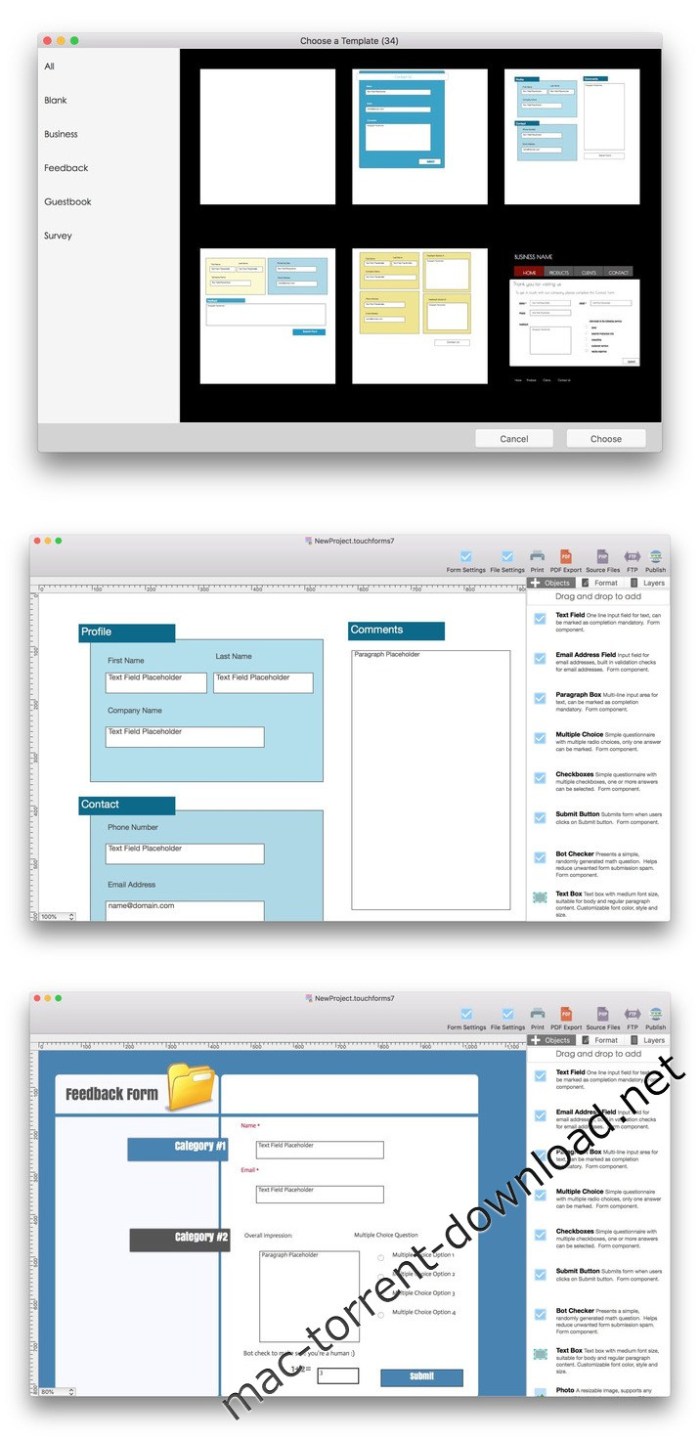
As expect, Touch Forms Pro provides you with the possibility to create forms from scratch with the help of specific form elements such as text fields, email address text fields, paragraph boxes, multiple choice answers, check-boxes, submit buttons, and bot checker, as well as images, shapes, tables.

Take advantage of a large collection of form templates

The most noteworthy feature is the fact that Touch Forms Pro enables you to kick start your form designing process with the help of a wide assortment of built-in templates for both professional and personal websites.

On the whole, Touch Forms Pro, despite not having a native OS X interface, is worthy to be taken into consideration if you are looking for an affordable form designer for your Mac.

Compatibility: OS X 10.10 or later 64-bit

Web Site: http://www.aidaluu.com

What’s New in Touch Forms Pro 7.0

  • Optimized for compatibility with macOS High Sierra 10.13
  • Bug fixes and performance improvements

Screenshots

Name Touch Forms Pro 7 7 0 TNT.zip
Size 54.03 MB
Created on 2018-06-06 21:37:25
Hash 20ade83dc7cd86e0fa7cefb37faf68f9bbc407e6
Files Touch Forms Pro 7 7 0 TNT.zip (54.03 MB)

ARCHICAD 21 Build 6003

GRAPHISOFT ARCHICAD 21 Build 6003 macOS

Innovation has been a key differentiator for ARCHICAD since the beginning. ARCHICAD 21 introduces the highly-anticipated Stair Tool, featuring GRAPHISOFT’s patent-pending Predictive Design™ technology. ARCHICAD 21 delivers a number of other, important functional improvements in the fields of visualization, OPEN BIM, performance and productivity making this version one of the strongest in GRAPHISOFT’s history.

Stair Tool

Designing stairs is one of the most complex tasks in architecture. ARCHICAD 21’s new Stair Tool offers the most optimal stair designs to choose from in the context of the specific building.

Railing Tool

Complex yet configurable railing systems can be created that are associated with Stairs, Slabs, Walls, Roofs or Meshes

Visualization

ARCHICAD 21’s integrated CineRender – based on MAXON’s Cinema 4D v18 rendering engine – offers architects high quality, photo-realistic rendering in the BIM context.

Element Classification

An ARCHICAD design model can be described as a central BIM database that stores all project data and makes it accessible to any project stakeholder.

IFC Hotlinks

External IFC model content created by consultants – such as Structural or MEP engineers – can be placed as hotlinks into ARCHICAD 21 design projects as protected reference content.

Collision Detection

With the evolution of BIM as the de facto workflow, architects increasingly receive consultant information in a BIM format.

Touch Bar support for the Apple MacBook Pro

The Touch Bar is a Multi-Touch enabled strip of glass built into the keyboard for instant access to essential tools, right when you need them. By using the new MacBook Pro Touch Bar, architects can easily access the most relevant ARCHICAD controls and commands with ease.

Auto-Text with parameters

Auto-Text can now access element specific parameters and properties and also lets the users to create custom labels.

Compatibility: OS X 10.10 or later

Web Site: http://www.graphisoft.com/archicad/

What’s New in ARCHICAD 21 Build 6003

  • Release notes not available at the time of this post.

Name ARCHICAD 21 Build 6003 macOS.zip
Size 2.68 GB
Created on 2018-06-06 08:57:41
Hash c4356e640806ad0965c47536f46cd8b67d13218e
Files ARCHICAD 21 Build 6003 macOS.zip (2.68 GB)

Cineflare HAND HELD 2.0 for Final Cut Pro X

Cineflare HAND HELD 2.0 for Final Cut Pro X macOS

With the advent of higher resolution cameras, now more than ever, we have the ability to get super clean, crisp images and manipulate them in post production to include cropping, zooming, and scaling without losing image quality. Why not take advantage of that? Don’t “bake-in” your effects in-camera…do it after in post production and have complete control!

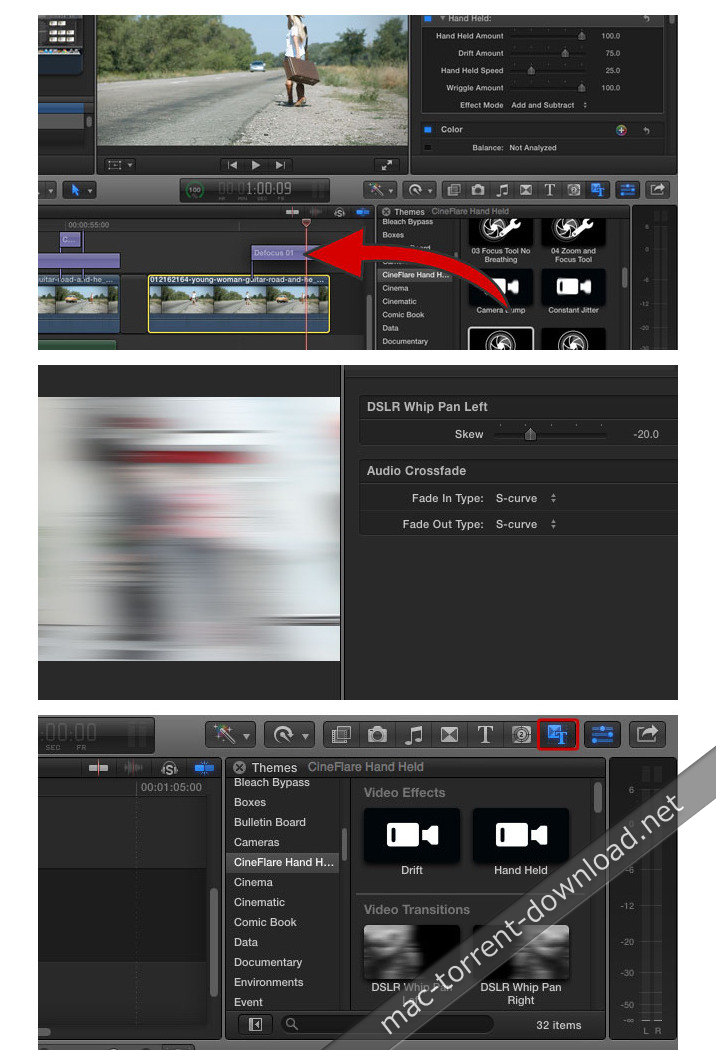
Hand Held for FCPX mimics all the moves that you could ever want of a hand-held camera. Take clean, locked-down footage and add a subtle or intense hand-held effect, whip pan, lens focusing and zooms, and even bumps and jitters.

Web Site: http://cineflare.com/handheld/

What’s New in Cineflare HAND HELD 2.0

  • Release notes not available at the time of this post.

Screenshots

Name Handheldv2.zip
Size 11.28 MB
Created on 2018-06-06 09:59:50
Hash 5a8dcb8a3996bb34c30622b9bfd280a37d432399
Files Handheldv2.zip (11.28 MB)

RE:VisionFX SmoothKit 3.3.5 for After Effects

RE:VisionFX SmoothKit 3.3.5 macOS

The ultimate blurring filter set that combines user directed controls and feature sensitive methods.

PRESERVE EDGES

Soften areas while preserving sharp edges.

CHOOSE WHAT TO PROCESS

Selectively filter the luminance, or the chrominance, or each of the RGB channels independently.

SHARPEN

Sharpen plugin with a proprietary technique that significantly reduces usual sharpening ringing artifacts.

REDUCE STAIRCASING

Includes a jaggie-reducing filter, to help eliminate staircasing.

BETTER MEDIAN FILTER

Get much less blocky results with SmoothKit’s median filter.

COMPOUND BLUR

Optional grayscale images may be used to modify blur size on a pixel-by-pixel basis.

SPLINES TO CONTROL BLUR DIRECTION

Ability to use splines to control the direction of the blur at each pixel.

BLUR USING PROVIDED DIRECTIONS

Directional filtering with per-pixel direction and strength controls.

BLOCK ARTIFACTS

Intelligently reduces block artifacts in MPEG or other compressed footage.

TEMPORAL FILTER

Multi-frame (temporal) filtering with several useful processing modes.

DEPTH OF FIELD

Z-blur uses depth maps for blurring control. Ability to change where the focal point should be.

COMPATIBILITY

Installed plug-in will work with After Effects CS5 (and up) and Premiere Pro CS5.

SYSTEM REQUIREMENTS

The same OS and hardware requirements for the version of After Effects that you are using.

Web Site: http://revisionfx.com/products/smoothkit/

What’s New in RE:VisionFX SmoothKit 3.3.5

  • Fixes a bug in Simple Gaussian that didn’t properly scale the Y blurring kernel when doing X and Y separately.
  • Fixes a bug in SK Directional with Splines where it didn’t work properly sometimes on adjustment layers in AE.

Name RevisionFX SmoothKit v3 3 5 MACOSX-AMPED.zip
Size 25.28 MB
Created on 2018-06-06 08:56:35
Hash 1636796bc0dc48cf9dda51012558dece7ee2788b
Files RevisionFX SmoothKit v3 3 5 MACOSX-AMPED.zip (25.28 MB)

PRO Lightroom Presets Bundle

PRO Lightroom Presets Bundle 2544334

PRO Lightroom Presets Bundle is great for any type of photography. This pack of presets is perfect for beginners and experts.

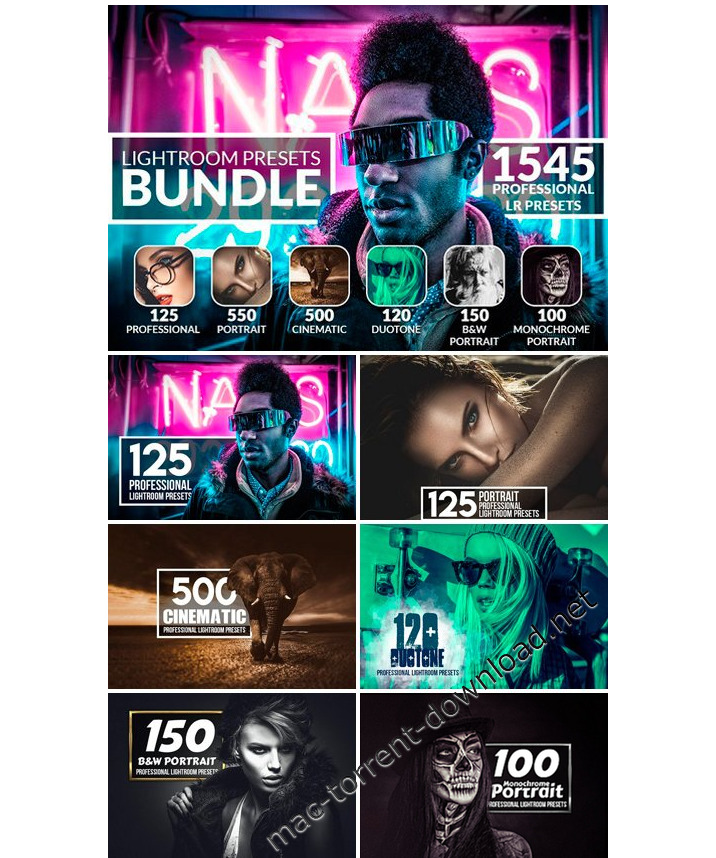
If you are looking for something unique and special for your graphic designs and photography effects then you are in the right place! We offer you a collection of 1545 Professional Lightroom Presets

What presets you will get from this bundle:
  • 125 Professional Lightroom Presets
  • 550 Portrait Lightroom Presets
  • Cinematic 500 Lightroom Presets
  • Duotone 120 Lightroom Presets
  • B&W Portrait 150 Lightroom Presets
  • Monochrome Portrait 100 Lightroom Presets
Features:
  • Professional results with one click
  • All presets can be edited and applied very easily
  • All my Lightroom Presets are fully customizable
  • Those Lightroom Presets are compatible with Lightroom 4 or newer
The bundle includes:
  • 1545 .lrtemplate files
  • ReadMe file (with detailed instructions) Please read it before using this preset!

Screenshots

Name PRO Lightroom Presets Bundle 2544334.zip
Size 2.91 MB
Created on 2018-06-06 08:56:44
Hash 623a788877b6fe2c108f4534ee4933650edd4379
Files PRO Lightroom Presets Bundle 2544334.zip (2.91 MB)

Paintstorm Studio 2.30.040618

Paintstorm Studio 2.30.040618 macOS

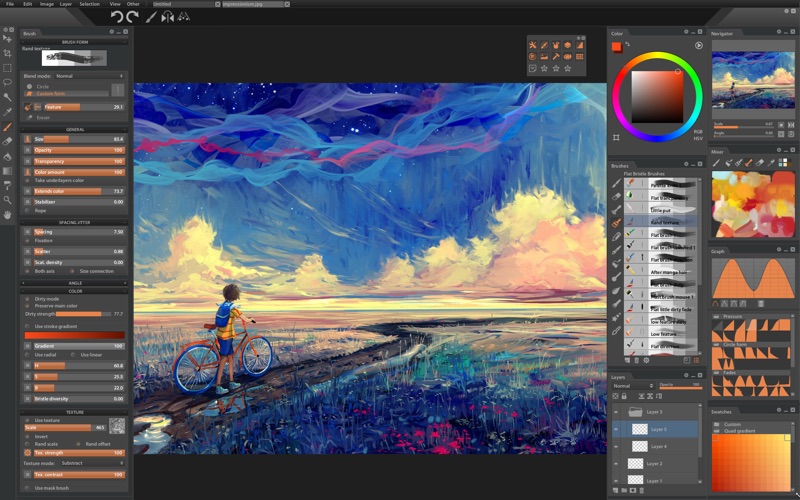
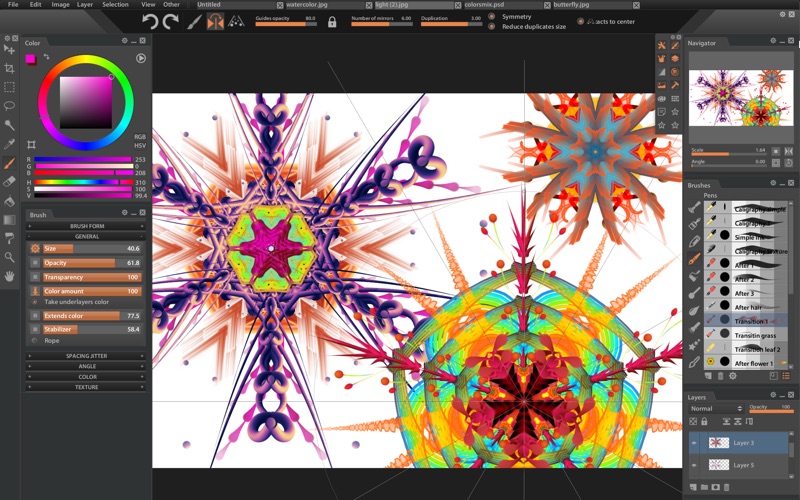
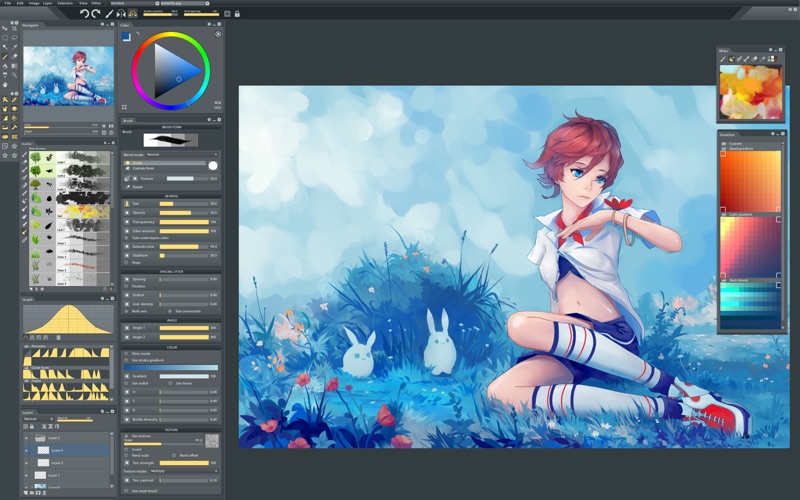
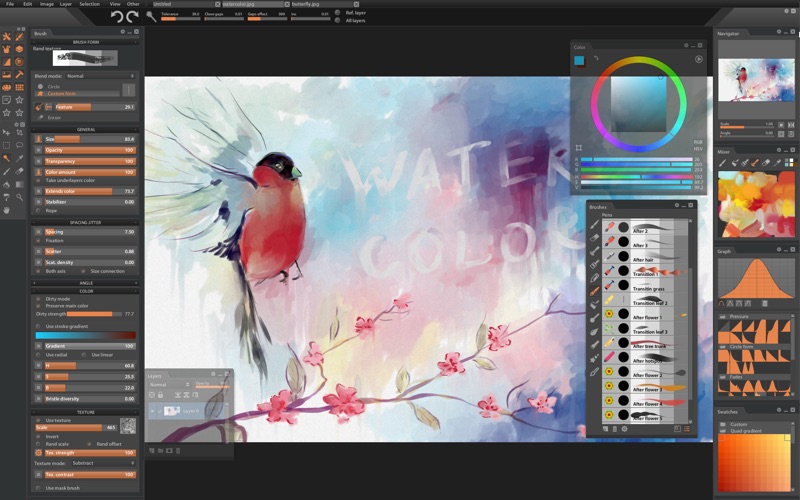
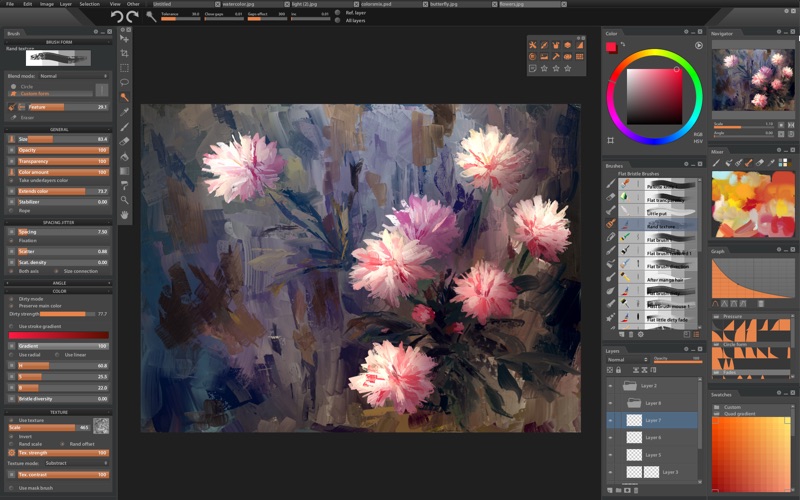
Paintstorm Studio is created for professional digital painting. And a major role in this program play the brushes. We did our best so that you can easily and quickly adjust the brushes suitable for your painting style.

Main Features:
  • Incredıble Possıbılıtıes For Brush Settıngs
  • Full Control Of All Brush Optıons
  • Brıstle Brushes Of Any Form And Kınd
  • Stroke Post Correctıon
  • Parameters Bındıng To The Perspectıve
  • Dynamıc Interface (Panels Scale, Opacity, Color, TabLock)
  • Custom Panels
  • Full Controlled MaskBrush
  • Takes Underlayer’s Color Whıle Blendıng
  • “Close Gaps” Functıon When You Fıll Or Select
  • Indıvıdual Hotkeys For Any Brushes
  • Advanced Symmetry Tools
Additional Cookies:
  • Fast Layer Selectıon
  • Smooth Zoom And Brush Resıze
  • Smart “Dırty Mode”
  • Nıce Stroke Stabılızer
  • Usable Color Mıxer
  • Dıfferent Gradıent Strokes
  • Selectıon Autohıde
  • Psd Supported
  • Control Of The Random Amounts

Requirements: MAC OS 10.7 and higher

Web Site: http://paintstormstudio.com/index.html

What’s New in Paintstorm Studio 2.30.040618

  • Release notes not available at the time of this post.

Screenshots

Name PaintstormStudio-v2.30.zip
Size 54.93 MB
Created on 2018-06-06 08:57:01
Hash 63c4090bfea6877227a537b443847bf3e3ef454b
Files PaintstormStudio-v2.30.zip (54.93 MB)

Wondershare MobileTrans 6.9.5.8

Wondershare MobileTrans 6.9.5.8

A small and stylish utility that can streamline the process of file transfer between two Android or iOS smartphones, as well as between a smartphone and a Mac

Phones are the most important gadgets of our times because they offer us the best options for efficient communication by making it easy to search everything on the web, take pictures, record videos, transfer money, buy things online, store personal information and many more actions that make our lives easier.

Because of this, when changing phones, a lot of important data needs to be transferred from one device to the other. Here is where Wondershare’s MobileTrans comes into play by providing you with an easy easy to use solution for data transfer between two phones, and quick back-up or restoration possibilities.

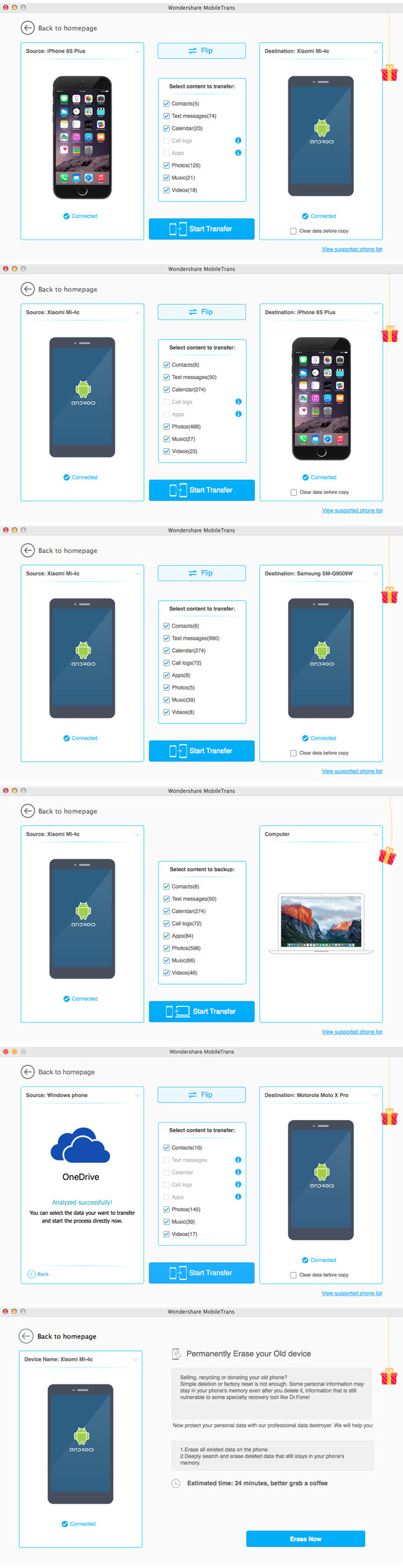
Choose from 4 usage modes and follow 3 simple steps in order to sync phones and effortlessly erase, backup or restore all important data

Getting a handle on Wondershare MobileTrans is very simple because of its carefully organized user interface and straightforward functionality.

To start using it, open the app, connect your mobile phone to your Mac, and, once the connection process is completed, select one of four self-explanatory usage modes: “Phone to Phone transfer”, “Restore from backups”, “Back Up Your Phone”, and “Erase your old phone”

Almost all actions when using Wondershare MobileTrans are done in three simple steps: connect your mobile phone to your mac via USB, choose the the files you want to transfer from different categories, and click the ever-present “Start Copy” button from the lower area of each transfer mode’s window.

Comes with support for popular mobile device platforms such as Android and iOS, and for over 3000 smartphones models

Noteworthy is the fact that Wondershare MobileTrans, besides the fact that it can quickly transfer contacts, SMSs, videos, photos and audio file between different phones, for Android devices it can also transfer entire call logs and installed applications.

Another big advantage presents itself as the fact that Wondershare MobileTrans is able to efficiently erase all data from your old phone, so that, if you want to sell it, none of your important data will get into a stranger’s hands.

Worthwhile and useful all-in-one mobile phone management utility that will easily find its place on your Mac

To conclude, Wondershare MobileTrans proves itself to be a very useful application because it enables you to use your Mac for simplifying and speeding up vital mobile phone management tasks efficiently.

Compatibility: OS X 10.7 or later

Web Site: http://www.wondershare.com/

What’s New in Wondershare MobileTrans 6.9.5.8

  • Release notes not available at the time of this post.

Screenshots

Name Wondershare_MobileTrans_6.9.5.8__TNT.rar
Size 49.74 MB
Created on 2018-06-06 04:59:52
Hash cc8b278c6a6975aa991956e0f857421cebc7340c
Files Wondershare_MobileTrans_6.9.5.8__TNT.rar (49.74 MB)

SiteSucker 2.11.5

SiteSucker 2.11.5

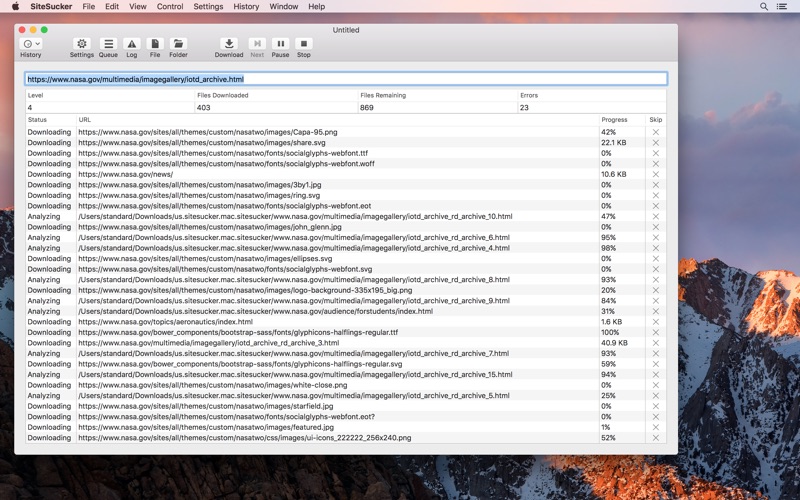
SiteSucker is an application that automatically downloads Web sites from the Internet. It does this by copying the site’s HTML documents, images, backgrounds, movies, and other files to your local hard drive. Just enter a URL and click a button and SiteSucker can download the entire site.

SiteSucker can be used to make local copies of your Web sites for easy maintenance. SiteSucker can download files unmodified, or it can “localize” the files it downloads, allowing you to browse a site off-line.

OS version:macOS 10.12 or later
Processor type(s) & speed: 64-bit processor

Web Site: http://ricks-apps.com/osx/sitesucker/index.html

What’s New in SiteSucker 2.11.5

Fixed a bug that could cause SiteSucker to crash when relocating the destination folder while paused.

Screenshots

Name SiteSucker 2 11 5 MAS TNT.zip
Size 4.46 MB
Created on 2018-06-06 08:56:26
Hash 3a405543b1f722c830f3aa068e64d31e6053accd
Files SiteSucker 2 11 5 MAS TNT.zip (4.46 MB)

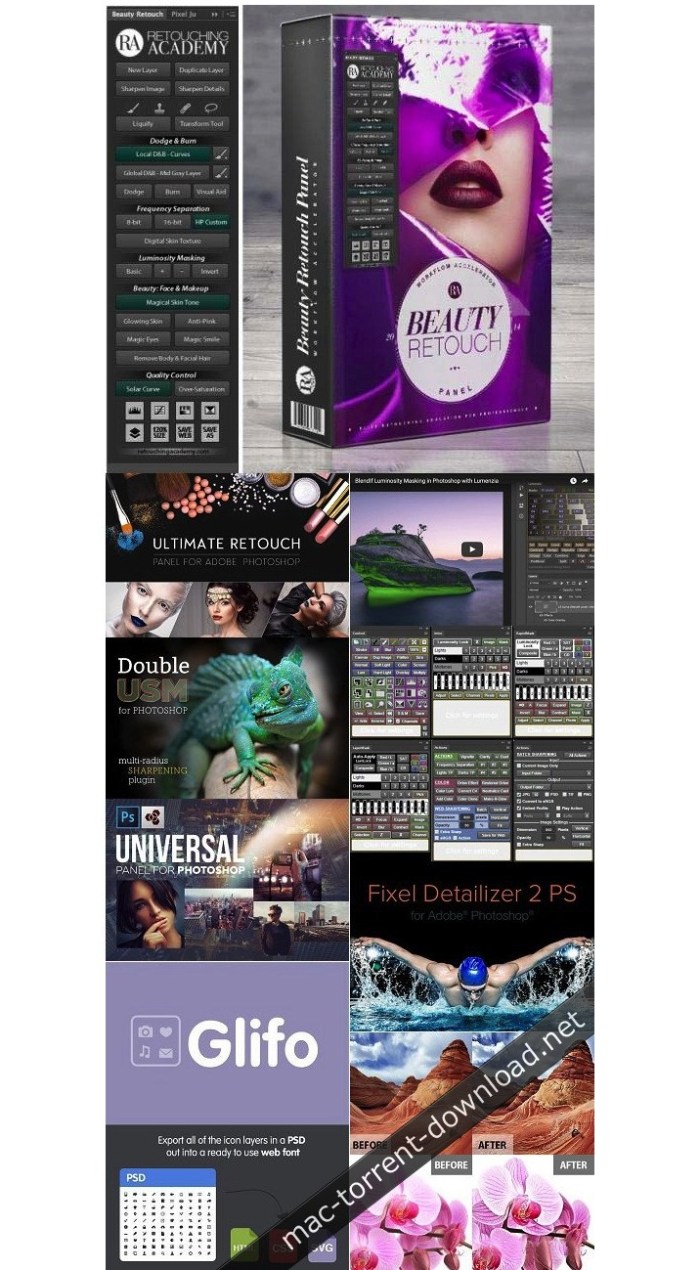
Photoshop Panels & Plugins Collection (Updated 06.2018)

Photoshop Panels & Plugins Collection (Updated 06.2018) macOS

Photoshop Panels, Tools , Plugins, Extensions for Adobe Photoshop

Photoshop Panels & Plugins Collection (Updated 10.05.2018) Included Panels and Plugins
  1. RA Beauty Retouch Panel v3.1 + PixelJuggler
  2. TKActions V6
  3. TKActions V5
  4. Ultimate Retouch Panel 3.5
  5. Fixel Detailizer 2 PS
  6. Double USM 2 Panel for Adobe Photoshop
  7. Lumenzia 6
  8. Luminosity Grading Panel
  9. Millenium Panel Build 12.2016
  10. Universal Photoshop Panel
  11. Magic Retouch Panel v4.2
  12. 3D Map Generator GEO
  13. Spicy images 1.0
  14. TK Infinity Mask Panel
  15. Raya Pro Panel 2.1
  16. Instamask Panel 1.1
  17. ON1 Photo RAW 2018 12.0.0.4929
  18. Topaz Plugins Bundle for Adobe Photoshop DC 16.11.2017

  19. Imagenomic Portraiture 3 Build 3036
  20. Coolorus v2.5.9.469
  21. Xe8472 v2.0.2
  22. Conny Wallstrom’s Retouching Toolkit
  23. Benvista PhotoZoom Pro 7.1
  24. ALCE 3.0.0 for Adobe Photoshop
  25. Photoshop Custom tools Plugin
  26. ADP Pro v3.1 Luminosity Mask Panel for Photoshop CC2014 CC2018
  27. Infinite Color Panel Plugin
  28. Action Station 2

Web Site: http://www.pspanels.com/

Screenshots

Name Photoshop Panels and Plugins Collection 06.2018.zip
Size 3.38 GB
Created on 2018-06-05 23:10:53
Hash 3d948a65a99dd592319f62c0c7edac974dbb2820
Files Photoshop Panels and Plugins Collection 06.2018.zip (3.38 GB)

1Password 7.0.4

Name 1Password 7 v7 0 4 TNT.zip
Size 49.21 MB
Created on 2018-06-05 06:30:10
Hash d210fd32c5bddc5c657baf4819227951b08a8d1c
Files 1Password 7 v7 0 4 TNT.zip (49.21 MB)

1Password 7.0.4

1Password is a popular tool for storing usernames, passwords, credit cards, addresses, notes, bank accounts, driver’s licenses, passports, and more behind one master password, with end-to-end encryption. A built-in password generator lets users create strong, unique passwords and memorizable pass-phrases.

The latest version of the popular password manager is a major update with dozens of new features and improvements, including a new dark-themed, collapsible sidebar that makes it easier to use and manage password vaults.

The app’s redesign extends to the lock screen, login icons, tags, pop-out windows for items, and more, while there is a new custom font Courier Prime Bits, by Alan Dague-Greene, that makes it easier to view passwords.

A quick list of other changes from AgileBits:
  • Every pixel has been put under the microscope and polished for maximum upgradedness.
  • The new “popout” feature allows you to view an item in a window of its own and keep it handy.
  • Secure notes are now rendered using Markdown.
  • Quick Open allows you to quickly jump to your items or vaults (find it under the File menu).
  • A custom password font, all our own, courtesy of Alan DagueGreene.
  • A new password strength meter.
  • Touch ID now leverages your computer’s Secure Enclave, making it more secure than ever before.
  • Login items now have a gorgeous, custom rendered icon by default.
  • Remove duplicate items on a pervault basis by clicking Help > Tools > Clean Up Duplicate Items.
  • Integration with Spotlight allows you to find your items using Apple’s builtin search engine.
  • Nested tags allow you to up your organization: add tags with / in them and 1Password will break them down into groups.
  • Opt in to automatic updates and never be left behind again.

Compatibility: macOS 10.12 or later 64-bit

Web Site: https://1password.com
Mac App Store: https://itunes.apple.com/app/1password-7/id1333542190?mt=12

What’s New in 1Password 7.0.4

  • Release notes not available at the time of this post.

Screenshots

AKVIS AliveColors 1.3.1831.16686

Name Colors_1.3.zip
Size 428.8 MB
Created on 2018-06-05 03:03:12
Hash 0f314cd4970c030e0889ac5ea2df72539beed2dc
Files Colors_1.3.zip (428.8 MB)

AKVIS AliveColors 1.3.1831.16686 macOS

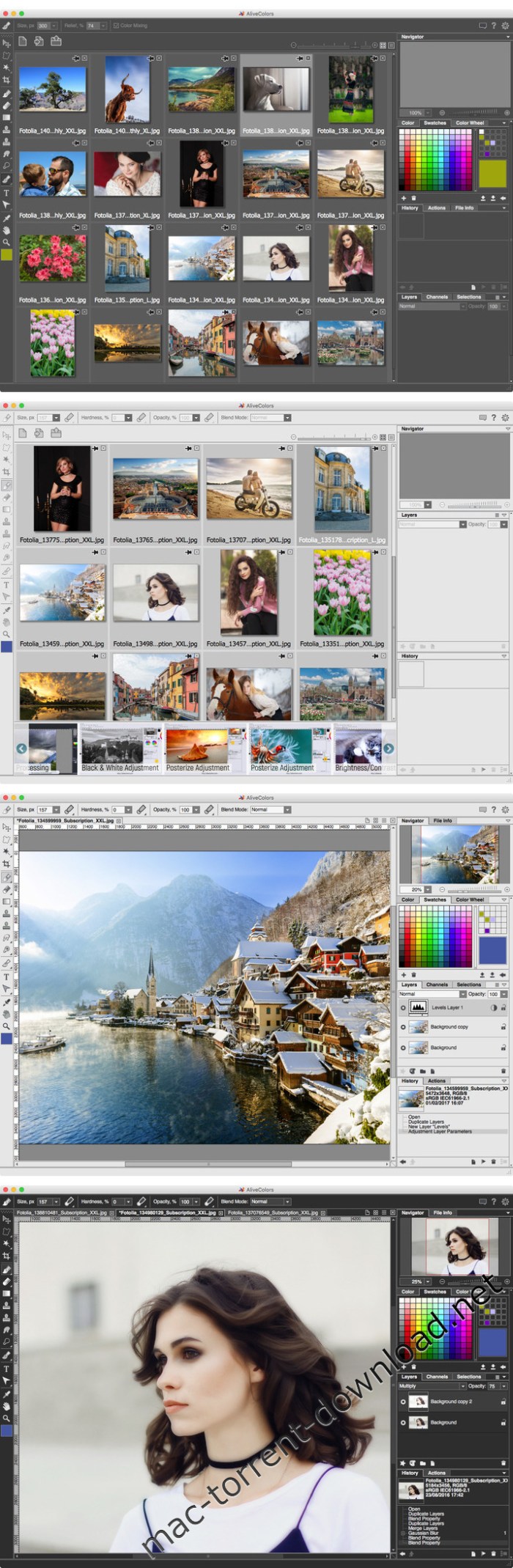
AliveColors is comprehensive graphics and photo editing software for Windows and Mac. This self-explanatory program is not only intended for professionals, but also for amateurs and beginners. Boost your creativity with AliveColors!

AliveColors offers a wide range of tools, adjustments, filters, and multiple effects, taking your photographs to the next level. Along with the image enhancement features, the software provides artistic brushes and filters that allow them to stylize photos and create images from scratch. The program also includes easy-to-use shape tools which are indispensable for designing scalable vector-based graphics.

Support for Ultra HD Resolution

AliveColors offers the intuitive user interface with support for 4k & 5k displays. The vector based UI is completely customizable giving you the flexibility to personalize your workflow.

Support for Graphic Tablets

AliveColors is compatible with pressure sensitive graphics tablets giving you total control over the design process.

Multilingual UI

AliveColors supports several interface languages: English, German, French, Italian, and Russian. You can change the language in the Preferences.

Professional Photo Editing

AliveColors is equipped with all necessary tools to enhance your photos to their full potential: advanced image editing & enhancement features including powerful noise reduction, focus improvement & blur effects, resurfacing & recoloring, portrait retouching, tone correction, prepress processing, improving detail, selective color correction, creating HDR images, extracting complex objects, text adding and editing, etc. The program also implements exhaustive RAW editing functionality. To save time and effort, you can use the Batch Processing feature that lets you quickly process dozens of photos.

Photo Retouching & Restoration

The program’s retouching tools combine cutting-edge technologies, great performance, and user friendliness. You can not only restore damaged photos and reconstruct missing parts but also remove unwanted objects from images. Furthermore, you can make the most of your portraits using fashion & beauty retouching techniques.

Life-Like Image Colorization

The best-in-class image colorization feature gives you the full control over the colors: from colorizing old black and white photographs from your family album to replacing colors in color images.

Advanced Shape Tools

The Shape tools enable you to create scalable vector-based objects that can be resized without quality loss. Create eye-catching infographic designs, unique logos, stunning digital illustrations, backgrounds and mock-ups with ease!

Precise Selections Made Easy

Forget about time-consuming selection techniques. The invaluable masking tools allow you to cut out complex objects like hair, fur, clouds, glass, trees, or water splashes automatically! Apply the Refine Edges feature to accurately modify the boundary of hard-to-select image elements.

Adjustment Layers

Optimize and enhance your digital images by applying Levels, Curves, Brightness/Contrast, Hue/Saturation, Black & White, etc. Experiment with color and tonal adjustments without damaging the original photo!

Creativity with No Limit

Combining state-of-the-art technologies with an artistic approach, the professional level drawing & painting tools allow you to create freehand images from scratch or spice up regular photos. For a quick result, you can apply unique artistic filters transforming images into gorgeous paintings in real time. Put the resulting image into one of the built-in frames and choose a paper texture from the integrated library. Observe digital masterpieces unfolding before your very eyes!

Unique Effects

The program allows imitating extraordinary effects such as nature phenomena or light & star effects in a click. Make your digital sceneries look dramatically different by putting the shining sun or a marvelous rainbow, or even a lightning bolt on it, and by adding rain or snow, or a misty fog. Also, you can apply Stylize filters like Halftone, Two Keys, Texturization, Polar Coordinates, Extrude, Displace, Mosaic, Crystalize, Posterize, and many others.

Minimum System Requirements:
  • Mac OS X 10.710.11, macOS 10.1210.13 (64bit only).
  • Intel, 4 Gb RAM
  • Interface languages: English, German, French, Italian, Russian

Web Site: https://alivecolors.com/en/index.php

What’s New in AKVIS AliveColors 1.3.1831.16686

  • Release notes not available at the time of this post.

Screenshots

Sharks 3D 1.3.0

Name Sharks 3D 1 3 0 MAS In-App TNT.zip
Size 109.2 MB
Created on 2018-06-03 23:59:19
Hash b6d7a41310fb67224b63c7a47223a256da6bc725
Files Sharks 3D 1 3 0 MAS In-App TNT.zip (109.2 MB)

Sharks 3D 1.3.0

What is the creature of those spine-tingling movies? Which animal is over 400 million years old? Millions have never seen these creatures for real – sharks, of course! Launch Sharks 3D now and explore the lives of sharks in their natural habit!

Features:
  • 4 different 3D scenes
  • 6 species of sharks
  • highquality 3D graphics and effects
  • Retina display ready
  • original music track
  • compatible with macOS High Sierra
  • screen saver mode with password protection
  • full multimonitor support
  • removing dock icon
  • autostart at login
  • doesn’t prevent your computer from going to sleep

_________________

Checkout our other apps:
  • Mechanical Clock 3D Fascinated by clock mechanisms? Get this cool 3D wallpaper.
  • The Lost Watch 3D The Net’s most unusual 3D animated wallpaper.
  • Fireplace 3D Real fireplace at your desktop.
  • Earth 3D Turn your monitor into a realistic space shuttle window!
  • Dolphins 3D Deep blue sea, beautiful dolphins, all on your screen.

Compatibility: OS X 10.7 or later 64 bit

Web Site: http://www.3planesoft.com/mac/sharks-3d/
Mac App Store: https://itunes.apple.com/app/sharks-3d/id681830638?mt=12

What’s New in Sharks 3D 1.3.0

  • fixed compatibility issues with macOS High Sierra

Screenshots

ActiveDock 1.1

Name ActiveDock 1 1 TNT.zip
Size 14.24 MB
Created on 2018-06-03 04:32:31
Hash 7566f20595af9599fec57b55092184db062e65f5
Files ActiveDock 1 1 TNT.zip (14.24 MB)

ActiveDock 1.1

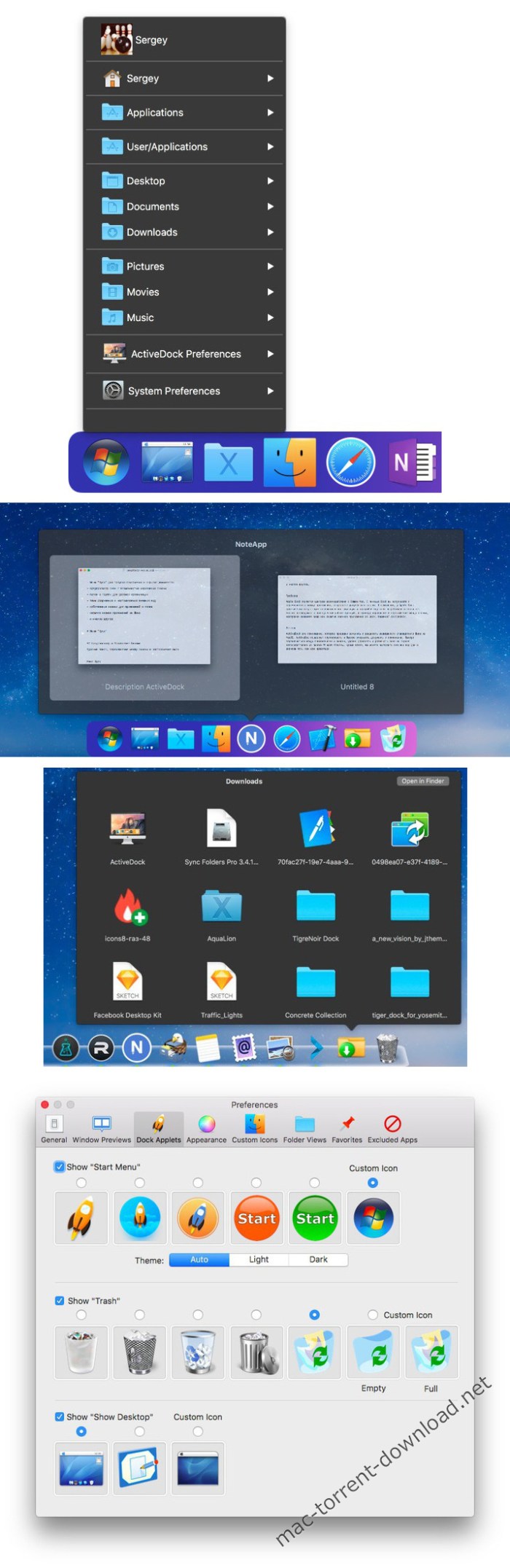
ActiveDock is a full replacement for Apple Dock with customization features. Tools for quicker switching between apps and windows, and managing windows from the previews on the dock.

Features
  • Save time when working with many applications at once.
  • Fast access to apps and documents you need.
  • Customize the appearance and custom icons for apps.
  • Windows-style “Start” button for launching applications.
  • Make groups and folders of apps and documents for quick access.
  • Hide or exclude app icons from the dock.

OS version:OS X 10.10 or later
Processor type(s) & speed: 64-bit processor

Web Site: http://www.noteifyapp.com/activedock/

What’s New in ActiveDock 1.1

  • The control of the position of the windows on the screen which is accessible directly from the Window Preview window.

Screenshots

Adobe Dreamweaver CC 2018 18.2

Name Adobe Dreamweaver CC 2018 18.2
Size 948.3 MB
Created on 2018-06-02 07:10:54
Hash 8462c132629dcd7269d353dd8ec345f90ad10ef5
Files DreamWCC182.zip (948.3 MB)

Adobe Dreamweaver CC 2018 18.2

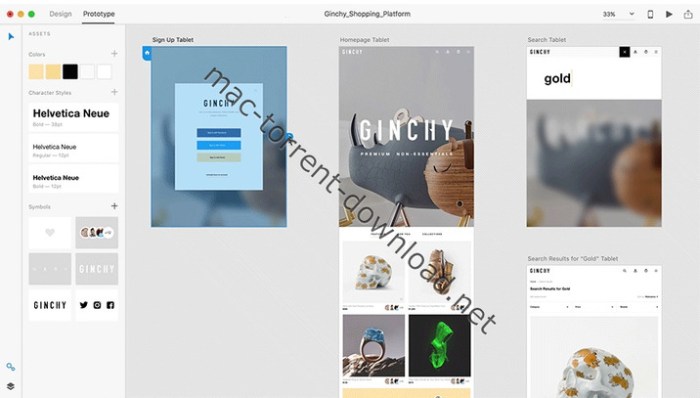
Adobe XD CC is the complete solution for design, prototyping and sharing user experiences for all products and services.

Interactive prototypes

Go to Prototyping with a click of Design. Combine drawing surfaces with each other to visualize navigation within large apps. Link design elements across the drawing area, B. Cells from repetition screens. Add interactions using visual controls to test and validate the experience.

Publish prototypes and get feedback

Generate weblinks to your designs that you can share with others to get feedback. Or embed it into a web page, For example on Behance. Comments can be attached directly to the prototype or to specific components of your design. You will be notified as soon as a comment has been added. To see your changes, checkers simply need to reload the link in the browser.

Liquid working with drawing surfaces

Whether you work with one or hundreds of workspaces, it does not matter: You can rely on the performance of XD. Create any number of designs for different screens and devices within a project. Pan and zoom without jerking or stuttering. Choose a template or define your own drawing area. Copy design elements between drawing faces while the layout is preserved.

repeating grid

Select an item in your design, Such as a contact list or a photo gallery, and duplicate it as often in the horizontal or vertical direction. All styles and distances are preserved. When you edit the item, the changes are applied to the entire design.
Platform-wide support

Control panel “Elements”

Colors and character formats are handy and reusable when you add them to the “Elements” panel (formerly “Symbols”). This panel also contains the icons. When you edit a color or format in the panel, the change is automatically performed throughout the document.

Next generation symbols

Work with time-saving symbols. The ready-to-use design components make it unnecessary to search for and edit each instance of an item in a document. When you edit an instance, all other instances are automatically updated. Overwriting certain entities is also possible. The symbols can be vector graphics, raster images or text objects, which you can also use as objects within repeating screens.

Creative Cloud libraries

With integration with Creative Cloud libraries, Adobe XD CC lets you access colors and character formats created in Photoshop CC, Illustrator CC, or any other Creative Cloud application, and use them in your design.

Requires macOS 10.11 or later

Web Site: https://www.adobe.com/products/dreamweaver.html

What’s New in Adobe Dreamweaver CC 2018 18.2

  • Release notes not available at the time of this post.

Adobe XD CC 2018 8.0

Name Adobe Experience Design CC 2018 8.0
Size 456.7 MB
Created on 2018-06-02 07:08:40
Hash ec2b2bc80dfccb18d7c598edf043aa7845ae8b68
Files Ad0bXD8.zip (456.7 MB)

Adobe Experience Design CC 2018 8.0

Adobe XD CC is the complete solution for design, prototype and share user experiences for all products and services.

Interactive prototypes

Go to prototypes by clicking Design. Combines drawing surfaces together to display navigation within large applications. Linking design elements in the drawing area, B. Cells replay screens. Add interactions using visual controls to test and validate the experience.

Post prototypes and obtain feedback

Generate web links to your designs that you can share with others for comment. Or embed it on a website, for example Behance. Comments can be attached directly to the prototype or specific components of your design. You will be notified as soon as you have added a comment. To view your changes, inspectors simply need to reload the link in the browser.

Liquid working with drawing surfaces

Whether working with one or hundreds of workspaces, no matter: you can rely on the performance of XD. Create any number of designs for different screens and devices within a project. Pan and zoom without jerking or stuttering. Choose a template or define your own drawing area. Copy design elements between faces drawing while the design is retained.

Repetitive grid

Select an item in its design, such as a contact list or a photo gallery, and duplicate it with the same frequency in the horizontal or vertical direction. All styles and distances are preserved. When you edit the article, the changes apply to all design.
Platform support throughout the

Control Panel “Elements”

Colors and formats characters are practical and reusable when added to the “Elements” (formerly “Symbols”) panel. This panel also contains the icons. When you edit a color or form on the panel, the change is automatically made throughout the document.

Symbols next generation

Work with symbols that save time. Components ready to use design make it unnecessary search and edit each instance of an item in a document. When you edit an instance, all other instances are updated automatically. Overwrite certain entities is also possible. Symbols can be vector graphics, raster images or text objects, which can also be used as objects within repetitive screens.

Creative Cloud Libraries

Integration with libraries Creative Cloud, Adobe CC XD allows you to access the colors and character formats created in Photoshop CC, Illustrator CC or any other application of Creative Cloud and use them in your design.

Requires macOS 10.11 or later

Web Site: http://www.adobe.com/

What’s New in Adobe XD CC 2018 8.0

Replace symbols in a snap:

It’s now easy to find and replace every occurrence of a symbol all at once. Just drag the new symbol from the Assets panel and drop it onto the symbol you want to replace.

Paste to multiple artboards:

Copy and paste an object onto multiple artboards and it retains its original position and settings. Along with symbol improvements, this allows you to quickly and consistently manage multiple artboards.

Improved Photoshop integration:

Get better fidelity on Photoshop files that you bring into XD. The latest updates also let you transfer stroke and image effects and import PSDs faster.

Sketch file enhancements:

We’ve improved the way Sketch files open in XD so they retain more of their original features, including better text position accuracy, page and symbol separation, and global color styles.

Password protect Design Specs:

Now you can control who sees your design specs by making them password protected.

Learn about the latest features:

Get more details on the May release in the XD blog at http://www.adobe.com/go/xd-may-whatsnew-blog.

Screenshots

Alien Skin Plug-ins Bundle 2018 (2018.06.01)

Name Alien Skin Plug-ins Bundle 2018.06.01.zip
Size 569.0 MB
Created on 2018-06-02 00:34:45
Hash 46f2189e18d3be8cb2e3c9c0381b1a900bbabe90
Files Alien Skin Plug-ins Bundle 2018.06.01.zip (569.0 MB)

Alien Skin Plug-ins Bundle 2018 (update 01.06)

The products in the Photo Bundle enhance a professional workflow by saving time, improving image quality, and providing creative freedom. In combination, these products are even more effective. For instance, Bokeh’s lens simulation and Exposure’s film simulation provide traditional photographic tools to make digital photos look more natural and less digital. Blow Up and Snap Art together can turn a photograph into a realistic oil painting that is suitable for printing on a large canvas

About Blow Up

Blow Up enlarges photos while keeping them crisp and clear. Blow Up takes the complexity out of preparing photos for printing with a user interface that intelligently handles resizing, cropping, and sharpening. The sophisticated enlargement algorithm produces photos dramatically sharper and more detailed than any other method.

About Exposure

Exposure accurately simulates a wide range of film stocks, including ones that were discontinued such as Polaroid®, Kodachrome®, and Scala®. Attention to the subtleties of film grain, contrast, saturation, and color cast brings back the unique looks of classic film. With over 300 presets for films, special effects, and dark room techniques, it is easy to get started with Exposure.

About Snap Art

Snap Art turns a photo into a beautiful work of art with a single click. Choose from ten natural media and hundreds of styles, such as oil paint, watercolor, and pencil sketch. Detailed simulation of individual brush strokes and canvas texture gives results that are indistinguishable from handmade art. You make the creative choices while Snap Art takes care of all the tedious work of drawing brush strokes.

About Eye Candy 7

Eye Candy 7 renders realistic effects that are difficult or impossible to achieve in Photoshop alone, such as Fire, Chrome, and the new Lightning. Effects like Animal Fur, Smoke, and Reptile Skin are rendered in exquisite detail down to individual hairs, turbulent wisps, and shiny scales.

Eye Candy helps you quickly explore and design looks. In Eye Candy 7, effects are chosen through easy to recognize icons rather than text menus. Presets are rapidly previewed by simply mousing over them. The theme is less clicking and more visual browsing.

Host Requirements

All of the products in the Photo Bundle are plug-ins and require a host application. They will all work with the hosts listed below. Some of them will also work with other hosts. For details on each product, visit www.alienskin.com

Alien Skin Plug-ins Bundle 2018 (2018.06.01) Includes:
  • Alien Skin Exposure X3 Bundle 3.5.4.114
  • Alien Skin Exposure X3 3.5.4.137
  • Alien Skin Snap Art 4.1.0.155
  • Alien Skin Blow Up 3.1.0.157
  • Alien Skin Eye Candy 7.2.0.50

Web Site: http://www.alienskin.com/photobundle/

Alien Skin Exposure X3 Bundle 3.5.4.114

Name Alien Skin Exposure X3 Bundle 3 5 4 114 TNT.zip
Size 261.1 MB
Created on 2018-06-01 23:26:13
Hash 665dca9ccd52847a28c395937cdc151d72022655
Files Alien Skin Exposure X3 Bundle 3 5 4 114 TNT.zip (261.1 MB)

Alien Skin Exposure X3 Bundle 3.5.4.114

The Exposure X Bundle is a photo editor and organizer that integrates all of Alien Skin’s award-winning photo editing apps into a single product.. The centerpiece of the bundle is Exposure X, the editing app that streamlines your workflow and provides a rich set of creative tools.

Two additional apps expand the creative possibilities: Blow Up 3 enlarges your photos into large prints with the sharpest resizing technology available, and Snap Art 4 transforms your photos into gorgeous, handcrafted paintings.

  • Exposure X3 nondestructive RAW photo editor
  • Integrated Snap Art natural media
  • Integrated Blow Up highquality photo enlargement
  • Exposure X3, Snap Art, and Blow Up plugins for Lightroom and Photoshop

Exposure X3 is a complete photo editing and organizing solution. It can also be used as a creative editing plug-in.

The plug-in requirements are as follows:
  • Adobe Photoshop CS6 or Adobe Photoshop CC 2015 or newer
  • Adobe Lightroom 6 or Adobe Lightroom CC 2015 or newer

Compatibility: OS X 10.11 or later, 64 bit

Web Site: https://www.alienskin.com/

What’s New in Alien Skin Exposure X3 Bundle 3.5.4.114

  • Release notes not available at the time of this post.

Alien Skin Exposure X3 3.5.4.137

Name Alien Skin Exposure X3 3 5 4 137 TNT.zip
Size 210.3 MB
Created on 2018-06-01 23:26:03
Hash 17912e88ebc2dc6ac94911586e44153e0ea09412
Files Alien Skin Exposure X3 3 5 4 137 TNT.zip (210.3 MB)

Alien Skin Exposure X3 3.5.4.137

The legendary effects plug-in is now an award-winning photo editor and organizer. Introducing Exposure X3, the advanced non-destructive RAW editor that enables you to easily create beautiful images and master your entire workflow. Fast performance, powerful organizing tools, and unmatched creative editing make Exposure the only app you need to quickly transform your photos into works of art.

Use Exposure as a complete photo editor to master your full workflow, or as a Lightroom or Photoshop plug-in for your creative edits. Exposure has hundreds of presets that provide beautiful looks for your photos. Use them unmodified or customize them to express your individual style. Exposure is the only RAW editor designed from the ground up for accurate film emulation and gorgeous creative photo effects.

Over 500 presets emulate iconic analog films, ranging from vintage Daguerreotype to modern portrait films like Kodak Portra. Lo-fi, faded, and cross processing looks go beyond film, offering tasteful effects. You can customize each one, and blend multiple presets using Exposure’s non-destructive layering and brushing tools. View all of Exposure’s presets on our presets page.

Exposure X3 is a complete photo editing and organizing solution. It can also be used as a creative editing plug-in.

The plug-in requirements are as follows:
  • Adobe Photoshop CS6 or Adobe Photoshop CC 2015 or newer
  • Adobe Lightroom 6 or Adobe Lightroom CC 2015 or newer

Compatibility: OS X 10.11 or later, 64 bit

Web Site: https://www.alienskin.com/exposure/

What’s New in Alien Skin Exposure X3 3.5.4.137

  • Release notes not available at the time of this post.

1Password 7.0.3

Name 1Password 7 v7 0 3 TNT.zip
Size 49.57 MB
Created on 2018-06-01 23:10:55
Hash 142852c82dea1b49f0964a7ad690584dfeeef339
Files 1Password 7 v7 0 3 TNT.zip (49.57 MB)

1Password 7.0.3

1Password is a popular tool for storing usernames, passwords, credit cards, addresses, notes, bank accounts, driver’s licenses, passports, and more behind one master password, with end-to-end encryption. A built-in password generator lets users create strong, unique passwords and memorizable pass-phrases.

The latest version of the popular password manager is a major update with dozens of new features and improvements, including a new dark-themed, collapsible sidebar that makes it easier to use and manage password vaults.

The app’s redesign extends to the lock screen, login icons, tags, pop-out windows for items, and more, while there is a new custom font Courier Prime Bits, by Alan Dague-Greene, that makes it easier to view passwords.

A quick list of other changes from AgileBits:
  • Every pixel has been put under the microscope and polished for maximum upgradedness.
  • The new “popout” feature allows you to view an item in a window of its own and keep it handy.
  • Secure notes are now rendered using Markdown.
  • Quick Open allows you to quickly jump to your items or vaults (find it under the File menu).
  • A custom password font, all our own, courtesy of Alan DagueGreene.
  • A new password strength meter.
  • Touch ID now leverages your computer’s Secure Enclave, making it more secure than ever before.
  • Login items now have a gorgeous, custom rendered icon by default.
  • Remove duplicate items on a pervault basis by clicking Help > Tools > Clean Up Duplicate Items.
  • Integration with Spotlight allows you to find your items using Apple’s builtin search engine.
  • Nested tags allow you to up your organization: add tags with / in them and 1Password will break them down into groups.
  • Opt in to automatic updates and never be left behind again.

Compatibility: macOS 10.12 or later 64-bit

Web Site: https://1password.com
Mac App Store: https://itunes.apple.com/app/1password-7/id1333542190?mt=12

What’s New in 1Password 7.0.3

  • Release notes not available at the time of this post.

Screenshots

4K Video Downloader 4.4.7

4K Video Downloader 4.4.7

A video downloader that works with popular online resources, such as YouTube, SoundCloud, Facebook, DailyMotion, Flickr, or Vimeo

4K Video Downloader offers you the possibility to download content from popular online resources and make them compatible with other devices, such as your iPad or iPhone. The utility can work with high-quality videos, but it can also extract only the audio content.

User-friendly solution for downloading videos from online sharing services

4K Video Downloader offers you the possibility to download HD and 4K quality video content from various sharing services, such as YouTube, Vimeo, DailyMotion, Facebook, Flickr, or SoundCloud.

To get started, just paste the URL to the video page in the 4K Video Downloader main window and the utility will automatically detect the content and allow you to choose the output quality and file format.

4K Video Downloader can download videos and export them to MP4 or MKV files to a location of your choice. In addition, the app can also extract only the audio file and use the MP3, M4A, or OGG file formats for the output.

Streamline the download procedure by downloading entire YouTube playlists or channels

For your convenience, 4K Video Downloader comes with a Smart Mode that will apply the same user defined settings to all your downloads. On the other hand, 4K Video Downloader can also process entire YouTube channels or playlist, hence eliminating the need to manually provide the link to each video.

Given that 4K Video Downloader can output the data to popular video and audio file formats, you will be able to transfer the files to other devices without having to worry about compatibility issues.

Efficient solution for downloading high-quality videos

To conclude 4K Video Downloader can be used to download video and audio content from popular media sharing websites with minimal effort. You can apply the same settings to all your downloads to streamline the process, or you can batch download all the entries included in a playlist or published on a particular YouTube channel.

Compatibility: OS X 10.10 or later 64-bit

Web Site: http://www.4kdownload.com/

What’s New in 4K Video Downloader 4.4.7

  • Release notes not available at the time of this post.

Screenshots

Name 4K Video Downloader 4 4 7 TNT.zip
Size 30.60 MB
Created on 2018-05-31 21:46:07
Hash 3376645736b5ebfee8878ab2d1e54a451a1472f6
Files 4K Video Downloader 4 4 7 TNT.zip (30.60 MB)

4K YouTube to MP3 3.3.6

4K YouTube to MP3 3.3.6

Convert YouTube videos to MP3 audio files in order to make them available offline or transfer them to other devices that don’t have access to the internet

4K YouTube to MP3 is an application that enables its users to extract audio from YouTube, Facebook, Video and similar services.

All you have to do is copy the link from your browser and press Paste URL in the application interface.

Compatibility: OS X 10.10 or later 64-bit

Web Site: https://www.4kdownload.com/es/products/product-youtubetomp3

What’s New in 4K YouTube to MP3 3.3.6

  • Release notes not available at the time of this post.

Screenshots

Name 4K YouTube to MP3 3 3 6 TNT.zip
Size 29.50 MB
Created on 2018-05-31 21:46:13
Hash 1a06d3b2e1c0453b646380f1fb66937774aa5348
Files 4K YouTube to MP3 3 3 6 TNT.zip (29.50 MB)

4K Stogram 2.6.13

4K Stogram 2.6.13

4K Stogram is an Instagram downloader which allows you to download and backup Instagram photos and videos, even from private accounts. mac-torrents.net Download Instagram photos by hashtags or favorite locations!

Features:
  • Grab photos of few account simultaneously and save it in JPEG on your desktop. mactorrentdownload.net
  • Follow your favourite photographers and get their latest photos automatically.
  • Login with your Instagram credentials and download photos of private friends accounts. mactorrentdownload.net
  • Access to your viewer directly from the application.
  • Download Instagram video in MP4 format.
  • Enjoy the minimalistic interface of application.
  • Use 4K Stogram on your PC, Mac or Ubuntu for free.

Compatibility: OS X 10.10 or later 64-bit

Web Site: https://www.4kdownload.com/products/product-stogram

What’s New in 4K Stogram 2.6.13

  • Release notes not available at the time of this post.

Screenshots

Name 4K Stogram 2 6 13 TNT.zip
Size 22.46 MB
Created on 2018-05-31 21:46:00
Hash 0ae5204492c4f3a0e08a8582e5a761948c15814e
Files 4K Stogram 2 6 13 TNT.zip (22.46 MB)

1Blocker 1.4.2

1Blocker 1.4.2

The most powerful and the fastest content blocker, used by over a million people on iOS and Mac. Essential app for anyone who uses Safari.

Unlike other adblock apps, we can’t see what sites you visit and track you. That’s because 1Blocker is a native Safari content blocker, not a shady VPN server. We are supported entirely by our users, there’s no “acceptable ads” program.

LOVED BY CUSTOMERS

1Blocker has been featured in The New York Times, TechCrunch, and many more.

  • “I like 1Blocker enough that I’ve stopped thinking about blockers.” John Gruber, Daring Fireball.
  • “Switched from Ghostery to 1Blocker for macOS Safari, which uses the fast new contentblocking API, and it seems noticeably faster.” Marco Arment.
  • “Does exactly what you want it to do, and the customer support is fantastic. Highly recommended ad blocker.”

WHY DO YOU NEED 1BLOCKER

– Block annoying ads (adblock)-

Ads have become a total disaster on websites by ruining the browsing experience. No one likes to see ads that pop over the entire screen.

– Save battery, data and time-

Independent tests by Wirecutter, NY Times, and BrooksReview confirm that 1Blocker cuts data loaded by sites on average by over 50%.

– Protect yourself online-

Many corporations track your behavior and what sites you visit. Online ads are not safe and may serve you malware even on major sites like Forbes and Yahoo.

– Improve your productivity-

Besides ads, webpages often contain distracting elements (like “You Might Also Like” and subscription boxes) that disturb your work flow and productivity.

FEATURES

1Blocker comes with almost 50 000 built-in blocker rules. It is very configurable.

  • Block ads, trackers and other annoyances. Make browsing over 2x faster.
  • Tap to hide any annoying content with our visual editor.
  • Support sites you love by whitelisting them.
  • Create your own custom blocker rules (hide elements, block sites and cookies).
  • All your settings are synced over iCloud.

1Blocker is also available for iOS in the App Store.

HOW IS 1BLOCKER BETTER THAN OTHERS

We believe 1Blocker is better than anything else available. Here is why:

  • We don’t make deals with advertisers.
  • We don’t and technically can’t track our users.
  • We have no customer data to sell.
  • We are bootstrapped and selffunded. No investors. Made by a tiny twoperson team.
EFFICIENT BLOCKING

While most other adblock apps block content by filtering elements of an already downloaded page, 1Blocker uses native Safari content blocker technology (API) to tell Safari in advance what should be blocked. This vastly improves efficiency, doesn’t slow down Safari, and saves battery life.

Compatibility: OS X 10.11 or later 64-bit

Mac App Store: https://itunes.apple.com/app/1blocker/id1107421413?mt=12

What’s New in 1Blocker 1.4.2

Hello there, dear customer. This version contains an updated blocker list with fixes and improvements for issues on some websites you’ve reported. Make sure to manually launch the app after updating to the latest version to have new rules applied in Safari.

Screenshots

Name 1Blocker 1 4 2 MAS TNT.zip
Size 12.73 MB
Created on 2018-05-31 22:15:18
Hash 7df904887f1b542960d7c97766288c3c55650f28
Files 1Blocker 1 4 2 MAS TNT.zip (12.73 MB)

Projection 3D 1.03 Plug-in for After Effects

Projection 3D 1.03 Plug-in for After Effects macOS

Advanced tool for camera projection mapping and photo parallax animation in After Effects

  • Real 3D Projection!
  • Tools For Modeling Directly in AE
  • 8 Primitive Objects
  • Import 3D Positions of Objects in 2D Photo
  • Create Rough Mesh of A Model Then Mask It

Compatibility: After Effects CC 2018, CC 2017, CC 2015.3, CC 2015, CC 2014, CC, CS6, CS5.5

Web Site: https://aescripts.com/projection-3d/

What’s New in Projection 3D 1.03

Fixed bug with version ae cs6 (mac os)

Screenshots

Name Projection 3D v1.03.zip
Size 94.22 MB
Created on 2018-05-31 22:16:43
Hash 76e3734a5bf7d81192821a5a6b93254b68625d8f
Files Projection 3D v1.03.zip (94.22 MB)

AEInfoGraphics 2 Plug-in for After Effects

AEInfoGraphics 2 Plug-in for After Effects macOS

AEInfoGraphics is an AfterEffects extension that converts your data into amazing and beautiful chart animations. It allows you to import csv files directly to After Effects. You can also create your own tables in AE using AEInfoGraphics’s easy to use interface. Select from twelve beautiful chart templates to generate your chart composition. That is all! Your chart animation is ready to use!

What’s new in AEInfoGraphics 2

Preview Feature

A powerful preview feature comes with this new version. You can easily see your final output before creating it.

Multiple Data Sets

For selected charts there is multiple data set support. Now you can compare two sets of data in a single chart.

Timing

Animation and Composition durations can be set.

Labeling

You can set the label type shown on charts (values or percentages)

Save Option

You can save your data as well as all your settings. You can load them anytime you want.

Compatibility: After Effects CC 2018, CC 2017, CC 2015.3, CC 2015, CC 2014

Web Site: http://aescripts.com/aeinfographics/

What’s New in AEInfoGraphics 2

  • Initial release

Name AEinfographics2 1.zip
Size 1.73 MB
Created on 2018-05-31 22:16:23
Hash e52f050537586d87365bae4410137ceea1f459b0
Files AEinfographics2 1.zip (1.73 MB)

Ray Dynamic Texture 1.1 Plugin for After Effects

Ray Dynamic Texture 1.1 Plugin for After Effects macOS

Ray Dynamic Texture is your solution to tedious texture work. This tool conveniently stores textures, including their layer settings, applied effects, keyframes, expressions and layer styles. It’s simplicity is key: After you’ve set it up you can apply it directly as a texture to any selected layer. In addition to this, the tool can store your most used Effects, Shapes and Expressions—all with one click.

Features:
  • Store textures in a library “palette” including their layer settings.
  • Apply textures to selected layers, Alpha Matte and Luma supported.
  • Makes the Set Matte Effect usable to texture with.
  • Texture Multiple objects at once.
  • Build your own texture palettes.
  • Add textures, effects, shapes and expressions from timeline to palette.
  • Create Master controller for any property.
  • Invert Mattes.
  • Create excact clone of any layer.
  • Replace textures with one click.
  • Compact, responsive user interface

Compatibility: After Effects CC 2018, CC 2017, CC 2015.3, CC 2015, CC 2014, CC, CS6

Web Site: http://aescripts.com/ray-dynamic-texture/

What’s New in Ray Dynamic Texture 1.1

  • Added support for Layer Styles
  • Fixed Shape Layer positioning
  • Fixed multiple layer texturing issue
  • Fixed scaled and rotated texture issue

Name Ray Dynamic Texture_v1.1.zip
Size 461.6 kB
Created on 2018-05-31 22:16:16
Hash d3c11a3afd2d111ed2aefb08f30bad0281c8aa08
Files Ray Dynamic Texture_v1.1.zip (461.6 kB)

Scribe 1.0.4 Plugin for After Effects

Scribe 1.0.4 Plugin for After Effects macOS

Scribe carries 6 mono-line animation ready fonts that are a perfect pick when you need to animate hand written text. Select a desired font, enter font size, fill in the text and hit the button – you’ll get a shape layer that contains all the letters.

Quickly adjust the writing evolution by going to Effects tab and changing the “End” value. Even more, tweak the Stroke size to get the font look that suits you best. As these fonts are presented as shape paths, you can easily add other generators, like “Repeater”, “Gradient Fill”, “Offset Paths” and such.

Key Points
  • Script library contains 6 fonts with ~500 animated glyphs in total,
  • Built with Shape Layers, meaning you can add additional generators to style the look of the font,
  • You can reorder the letters (or any part of the letter) to change animation order or fully customize it and make it your own design,
  • Animation capabilities are preserved even if you adjust the shape of characters.

Compatibility: After Effects CC 2018, CC 2017, CC 2015.3, CC 2015, CC 2014, CC, CS6, CS5.5, CS5, CS4, CS3

Web Site: http://aescripts.com/scribe/

What’s New in Scribe 1.0.4

Adds french characters

Name Scribe v1.0.4.zip
Size 498.6 kB
Created on 2018-05-31 22:16:29
Hash c9fdcfb2cac15994949ec2076ec0be0e06886d2d
Files Scribe v1.0.4.zip (498.6 kB)

3D-Coat 4.8.16A

Name 3DCoat4816A.zip
Size 796.4 MB
Created on 2018-05-31 22:17:01
Hash d74f9fc6f1bb97c7c2c69239a036437ef1ff8039
Files 3DCoat4816A.zip (796.4 MB)

3D-Coat 4.8.16A macOS

Pilgway has released an updated (version 4.8.04) 3D-Coat, is the one application that has all the tools you need to take your 3D idea from a block of digital clay all the way to a production ready, fully textured organic or hard surface model.

About 3D-Coat.

3D-Coat software from Pilgway is used primarily in the production of 3D models for computer games, but also in related fields such as film and entertainment. The software is on the cutting edge of 3D graphics.

About Pilgway.

Pilgway, an international company at the forefront of 3D technology, is investing in academic game development worldwide with its innovative 3D software.

Compatibility: OS X 10.7 or later
Web Site: http://3d-coat.com

What’s New in 3D-Coat 4.8.16A

  • Release notes not available at the time of this post.

Screenshots

Torrents Download Apple,Mac Osx,Apps ,Software

Exit mobile version