Category Archives: Utilities

Cookie 4.3.1

Name Cookie 4.3.1
Size 10.27 MB
Created on 2015-08-02 23:35:26
Tracker http://109.235.50.166:2710/announce
Hash ca5a948a11e6dac4674f4a70f63babfd20094a25
Files Cookie 4.3.1/Cookie 4.3.1.dmg (8.94 MB)
Cookie 4.3.1/Cookie 4.x [SP].zip (1.34 MB)

Descriptions for Description

Name: Cookie
Version: 4.3.1
Mac Platform: Intel
Includes: K

OS version: 10.6.8 or higher

Whats new:

Fixed a crash related to removal of browser extensions
Fixed some localization issues

Courtesy of Special K


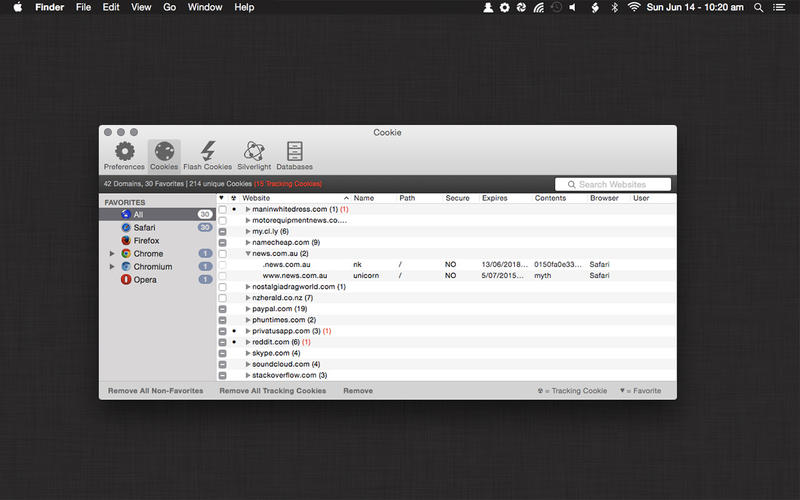
Cookie is the only cookie manager which gives you complete control over your privacy.

Cookie prevents third parties from hijacking your browsing experience.

The sites you visit store "cookies" in your browser without your knowledge or consent. Some are helpful, but others are frustrating and invasive. Cookie can help.

More privacy, better browsing

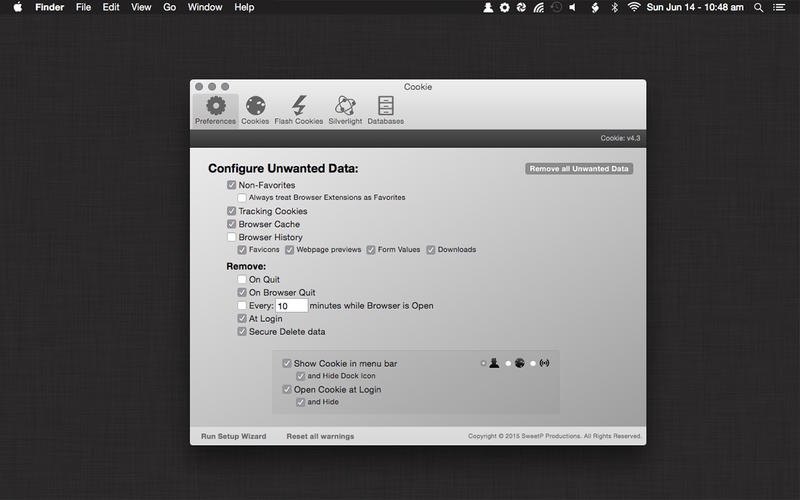
*Enhanced for Security. Secure delete any unwanted data, and rest easy knowing that external threats can't recover your private data.

*Avoid invasive marketing. Tired of targeted ads that mysteriously know what products you've been shopping for online? Eliminate them with Cookie.

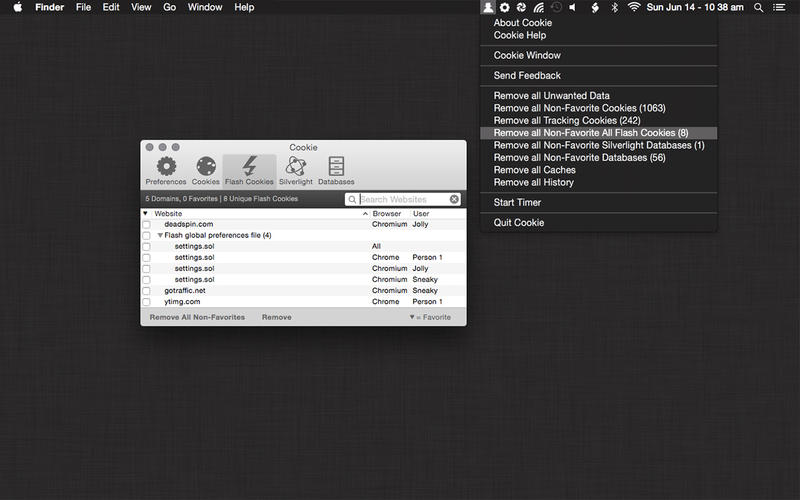
*Freedom from Flash, and Silverlight. Cookie is adept at eliminating Flash and Silverlight cookies, especially large and persistent types of cookie.

*Impressive results, with minimal effort. By consolidating all your cookie controls into an easy interface, Cookie makes maintaining your browsing privacy a cinch.

More info: https://itunes.apple.com/us/app/cookie/id415585910?mt=12

Screenshots

1_Cookie.jpg

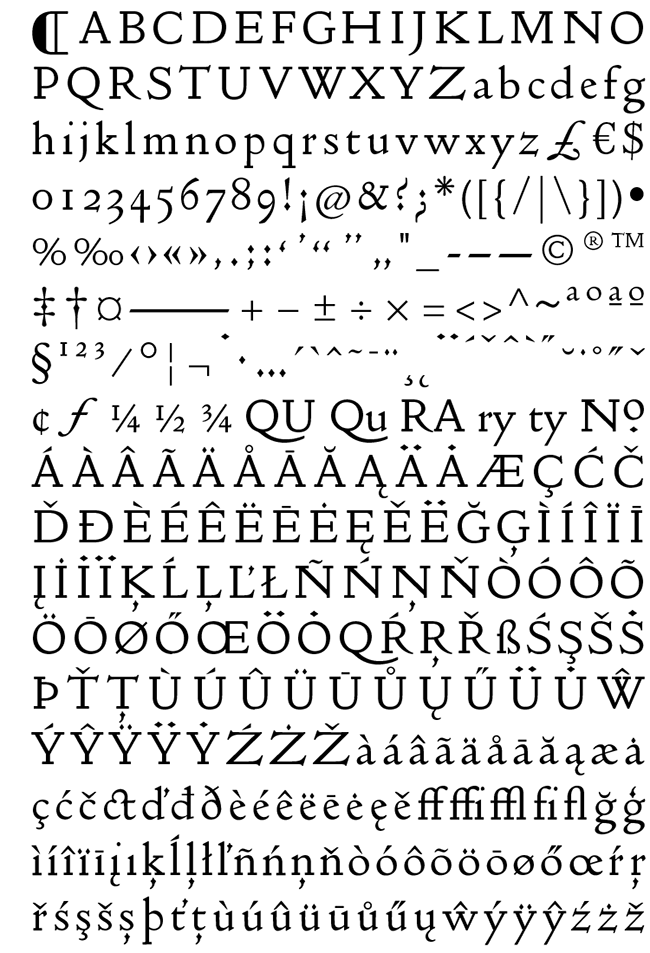
The Doves Type 2.0 – font

Description

Info: http://www.typespec.co.uk/doves-type/

After three years research & drawing from original source material, Robert Green’s digitised facsimile of the lost metal Doves Press Fount of Type, The Doves Type®, is now available to purchase. The updated Doves Type® Regular, released in January 2015, comes after the discovery in the Thames of a portion of the original metal type and replaces the initial Imprint weight which was first available back in 2013.

Screenshots

Files

The Doves Type 2.0/Doves Type 2.0 OTF 5 user/Doves Type 2.0 update.txt (2.05 kB)
The Doves Type 2.0/Doves Type 2.0 OTF 5 user/Doves Type 2.0.otf (139.5 kB)
The Doves Type 2.0/Doves Type 2.0 OTF 5 user/Typespec EULA 1.3.pdf (102.9 kB)
The Doves Type 2.0/Doves Type 2.0 web 100K/READ ME (100K).rtf (0.68 kB)
The Doves Type 2.0/Doves Type 2.0 web 100K/doves_type_2.0-demo.html (45.31 kB)
The Doves Type 2.0/Doves Type 2.0 web 100K/doves_type_2.0-webfont.eot (51.00 kB)
The Doves Type 2.0/Doves Type 2.0 web 100K/doves_type_2.0-webfont.svg (602.8 kB)
The Doves Type 2.0/Doves Type 2.0 web 100K/doves_type_2.0-webfont.ttf (144.9 kB)
The Doves Type 2.0/Doves Type 2.0 web 100K/doves_type_2.0-webfont.woff (62.94 kB)
The Doves Type 2.0/Doves Type 2.0 web 100K/doves_type_2.0-webfont.woff2 (44.52 kB)
The Doves Type 2.0/Doves Type 2.0 web 100K/specimen_files/easytabs.js (1.08 kB)
The Doves Type 2.0/Doves Type 2.0 web 100K/specimen_files/grid_12-825-55-15.css (4.60 kB)
The Doves Type 2.0/Doves Type 2.0 web 100K/specimen_files/specimen_stylesheet.css (7.31 kB)
The Doves Type 2.0/Doves Type 2.0 web 100K/stylesheet.css (0.57 kB)

Name The Doves Type 2.0
Size 1.21 MB
Created on 2015-07-29 23:42:38
Tracker http://109.235.50.166:2710/announce
Hash 33fe99de239f96be76c0f6af4da01b3ad2481fcf
Files ※ See Description

Script Center 1.0

Name Script Center 1.0
Size 3.15 MB
Created on 2015-07-23 05:11:41
Tracker http://109.235.50.166:2710/announce
Hash 1c3e63aa0935e7458125a234a09ef55f1482712f
Files Script Center 1.0/Paddle Generic KeyfileGen v2.2 CORE.dmg (418.0 kB)
Script Center 1.0/ScriptCenter.zip (2.73 MB)

Descriptions for Description

Name: Script Center
Version: 1.0
Mac Platform: Intel
Includes: KG

OS version: OS X 10.10 or later
Processor type(s) & speed: 64-bit processor

Block connections to:
gngrwzrd.com
www.gngrwzrd.com
www.paddleapi.com

Courtesy of C.O.R.E.

Includes Paddle Generic Keyfile Maker v2.2 by C.O.R.E.

Instructions
1. Copy App to /Applications ( DO NOT LAUNCH YET! )
2. Launch Keyfilemaker, enter your desired email (or use the default)
3. Click "Open" and select /Applications/AppName.app, then click "Save"
4. Enjoy!

Please note:
KG should be used BEFORE opening app for the first time for the best results.
If having issues, remove app with AppCleaner and run in terminal: killall -HUP cfprefsd , then try again!

Release Date: May 25, 2015

What's New in Version 1.0

First public release.


Full Release Notes: http://gngrwzrd.com/script-center-changelog.html


More Info: http://www.gngrwzrd.com/script-center/

Script Center
Organize and run scripts from one document!

Features

Set executable path
Set working directory
Add parameters
Add parameters for files or folder paths
Watch files and folders (recursively) for changes
Custom environment variables
Output panel to see output from an executable
Drag and drop
Saves relative paths so documents will work on other people's computers
Run executables as root

iTools Pro 1.1.0

Name iTools Pro 1.1.0
Size 4.73 MB
Created on 2015-07-23 05:11:17
Tracker http://109.235.50.166:2710/announce
Hash 8532862879801afe8be841f61686930995cac427
Files iTools Pro 1.1.0.dmg (4.73 MB)

Descriptions for Description

Name: iTools Pro
Version: 1.1.0
Mac Platform: Intel
Includes: Pre-K'ed

OS version: OS X 10.6.8 or later

You may wish to block connections to:
serv-en.itools.hk
ol-en.itools.hk
stat2.itools.hk
itools.hk

Courtesy of TNT Team

Release Date: July 20, 2015

What's New in Version 1.1.0
1. Support jailbreak device opens the application documents;
2. Optimize the trusted connection.
Full Release Notes: http://dl2.itools.hk/update/iToolsProForMacWhatsNew.html
AppCast: http://dl2.itools.hk/update/iToolsProForMacCast.xml

More Info: http://pro.itools.cn/pro_mac/english

Managing the content of your iOS device using iTunes, the default OS X music player, is not always very intuitive. iTools is a simple Mac app that offers an alternative when you need to visualize, organize, or transfer data to and from your iPhone, iPad, or iPod touch

Pro version also includes the following features (compared to free version)

Applications Document Management (Does not support iOS 8.3 and later)
Photo Slideshow
Music, Movies, Tone format conversion
Music playlists
Ringtone Maker
Contacts Edit
Airplayer
System log

Shortcat 0.7.6

Name Shortcat 0.7.6
Size 4.47 MB
Created on 2015-07-23 05:09:34
Tracker http://109.235.50.166:2710/announce
Hash 82d67e0e8360d23011f3b207b4c198d667aa5f37
Files Shortcat 0.7.6/Shortcat 0.x [SP].zip (1.22 MB)
Shortcat 0.7.6/Shortcat.zip (3.25 MB)

Descriptions for Description

Name: Shortcat
Version: 0.7.6
Mac Platform: Intel
Includes: K

OS version: OS X 10.10 or later
Processor type(s) & speed: 64-bit processor

Yosemite Compatible Patcher

Courtesy of Special [K]

Neutral Leech because it's still technically Beta, despite selling licenses.

Release Date: June 1, 2015

What's New in Version 0.7.6

Updated beta expiry date


Full Release Notes: https://shortcatapp.com/changelog.html


More Info: https://shortcatapp.com/

Keep your hands on the keyboard and boost your productivity! Shortcat is a keyboard tool for Mac OS X that lets you "click" buttons and control your apps with a few keystrokes. Think of it as Spotlight for the user interface.

Click with the keyboard
Shortcat is a unique application that enables you to click without using the mouse! Shortcat is particularly suited to fast typists.
You simply activate Shortcat with a keyboard shortcut, type a few letters that match the UI element you want to click on, and Shortcat will search the current active window (and menu bar) for matching elements.
Simply hit 'Return' to click on the desired element!

Works with most apps
Shortcat leverages the Accessibility API, which is supported by all applications that come with Mac OS X and most applications!
Finder, Safari, Xcode, Textual, Skype, Calendar and more are supported. Shortcat is constantly being updated to work better with more applications!

Be more productive
It takes an average of three seconds to move your hand from the keyboard to the mouse, clicking once, and then moving back to the keybord.
Shortcat lets you keep your hands on the keyboard to click, saving time and energy. Imagine all the time you could save!

Use cases

Below is a list of examples Shortcat can be used for:
Switching channels in Textual
Switching chats in Skype
Clicking links in chat apps
Changing settings in System Preferences
Browsing the web in Safari
Using apps within the iOS Simulator
Switching tabs in Chrome
And much much more! Users are discovering new uses for Shortcat every day

Goldfish Professional 3.9

Description

Name: Goldfish Professional
Version: 3.9
Mac Platform: Intel
Includes: Pre-K'ed

OS version: 10.6.6 or higher

Whats new:

Many bugs resolved.

Courtesy of TNT Team


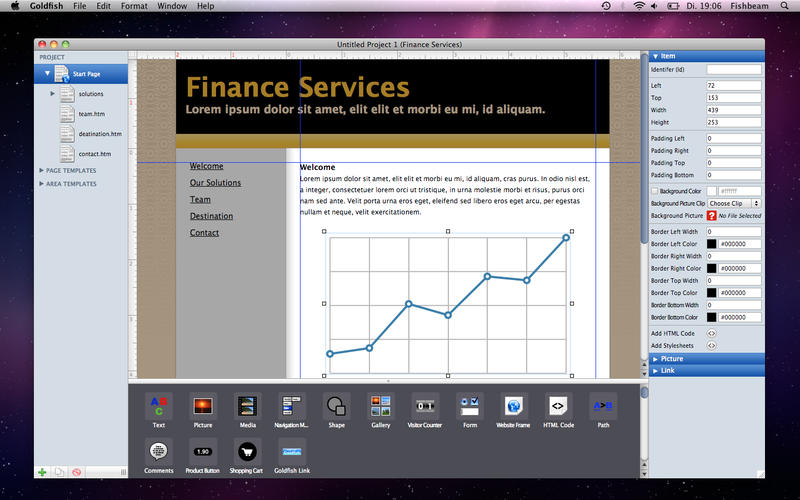
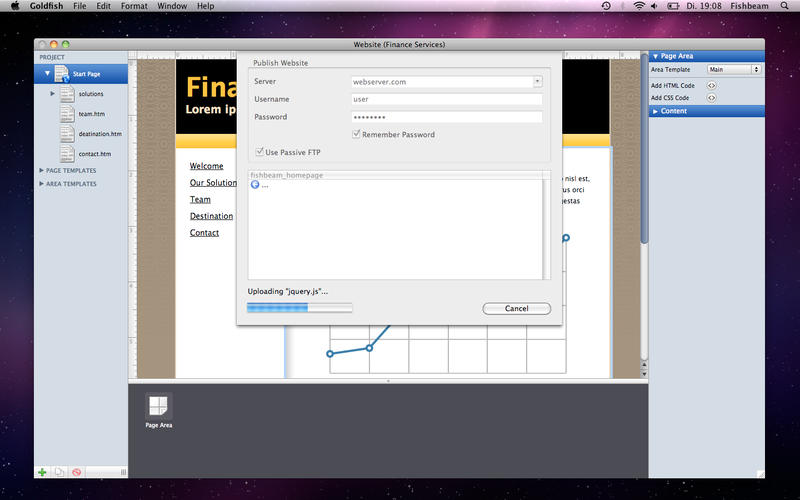
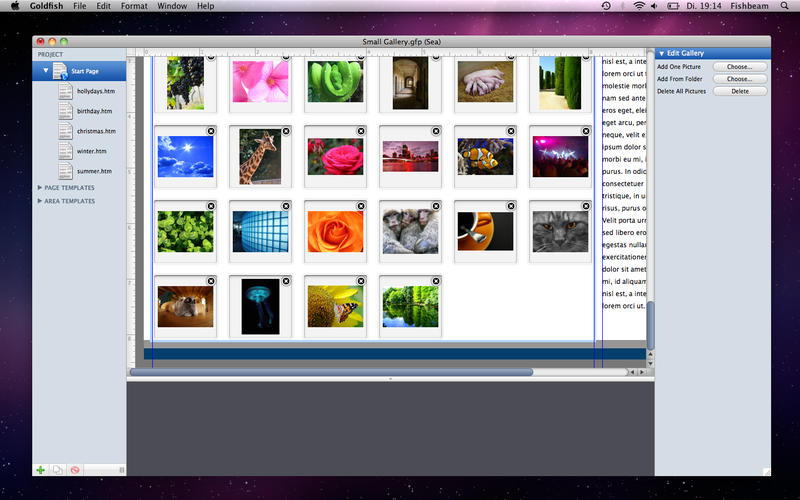
Goldfish is the easy to use solution for creating gorgeous, individual websites with the latest HTML5 technology in little time. In the last few years Goldfish has developed from a small tool to a widespread website creator with a growing user base. Goldfish is available in two different versions.

Goldfish Professional Features:

- Gorgeous designs for the creation of your website in only minutes
- Efficient and intuitive creation with the unique Goldfish construction kit
- Assistance by the use of templates for pages and page areas
- Design your website freely with text, images und rich media content
- Professional animated image gallery in multiple different styles
- Dynamic menus with customizable design and in different styles
- Dynamic visitor counter in many pleasent styles
- Entirely customizable e-mail forms

And much more...

More info: https://itunes.apple.com/us/app/goldfish-3-professional-edition/id528040701?ls=1&mt=12

Screenshots

Name Goldfish Professional 3.9
Size 24.60 MB
Created on 2015-07-10 05:03:25
Tracker http://109.235.50.166:2710/announce
Hash 1c1597431fe9e4fab872169bbb4204babeddfaa4
Files Goldfish Professional 3.9/Goldfish 3.9.dmg (24.60 MB)

Final Draft 9.0.7

Name Final Draft 9.0.7 Size 57.90 MB Created on 2015-07-10 05:03:01 Tracker http://109.235.50.166:2710/announce Hash b4e8b3c2a191c90c9bd69889b314ff5bbc37b0d1 Files Final Draft 9.0.7.zip (57.90 MB) Download Download Description Name: Final Draft Version: 9.0.7 Mac Platform: Intel Includes: K OS version: OS X v10.7 or later Processor type(s) & speed: 64-bit RAM minimum: 2 GB Video RAM: – What’s New Faster Typing Speed Fixed a case of upside-down text in Full Screen mode Fixed bug involving Index Cards and Printing Printing Page Range now works in Text Documents Support links added to “Get Help” menu Fixed crash caused by empty scene headings at the end …

Copyright © 2019 Mac Torrent Download All Rights Reserved.

Pagico 7.1

Description

Name: Pagico
Version: 7.1 (1781)
Mac Platform: Intel
Includes: K

OS version: 10.7 or higher
64 bit

Whats new:

Change log for build 1781 not ready at time of post

Build 1780:

New: Word and letter count when you select a portion of text
New: The lock screen (with customizable background image) is now available for databases without passwords
Improved context menu for easier task creation (you can now right-click on a project in the projects list to create new tasks)
Improved Natural Language Parsing
In List item edit mode, a confirmation will be shown to prevent losing unsaved changes by accidentally pressing the ESC key
Greatly improved content listing performance in data containers (projects, contacts and inbox)
Improved the stability of workspace sync
Improved Daily Planning section with a small yet satisfying animation when you complete all your Today's items.
Improved the rendering of appointments in Dashboard
When switching to a container for a specific object, the object in question will be elegantly highlighted
Creating lists (instead of tasks) is easier in containers by using the individual "+" buttons
Improved the user experience in the New Task panel
Fixed the rendering of ampersand symbols in lists
Fixed a bug where the Show Hidden Items toggle may not appear as expected in some rare cases

Courtesy of Special K

Install:

Install app to wherever, do not open.
Open Special K licensor, apply K.


Store and manage all your tasks, notes, files, projects and contacts in one easy-to-use app. Keeping everything organized and on-track is easier than ever.

Interactive Flowcharts
Its revolutionary flowchart intuitively presents all your schedule data without being overwhelming, helping you to easily and visually stay on track. With the brand-new Stats view, you can actually see how productive you have been, making your job a little more satisfying to do.

And more...

More info: http://www.pagico.com

Name Pagico 7.1
Size 23.13 MB
Created on 2015-07-08 04:56:07
Tracker http://109.235.50.166:2710/announce
Hash c2a16e0032aa926903e6f0813e7483988d944d7f
Files Pagico 7.1/Pagico [Lic] [SPK].zip (1.09 MB)
Pagico 7.1/Pagico_Desktop_r1781.dmg (22.04 MB)

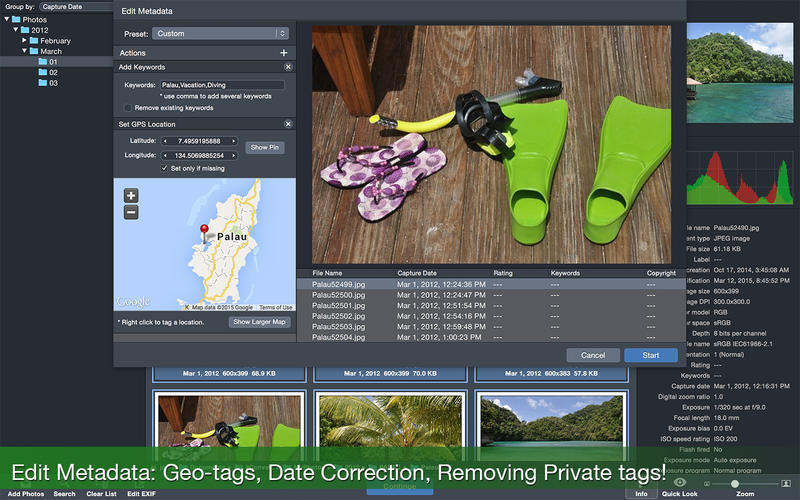
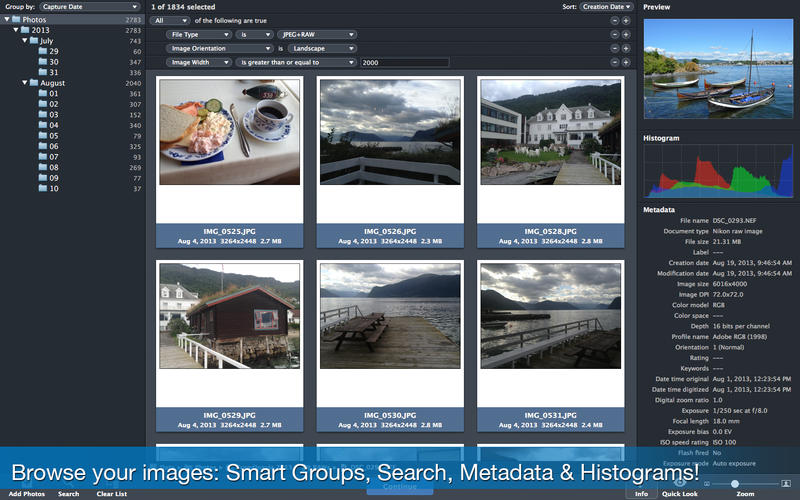
iWatermark Pro 1.71

Description

Name: iWatermark Pro
Version: 1.71
Mac Platform: Intel
Includes: Serial

OS version: 10.6 or higher
64 bit

Whats new:

Note: This version and future versions need to be downloaded manually because of changes Apple made to security. The usual 'Check for Updates' no longer works the same way. Updates will need to be downloaded manually for every new version.

Removed sparkle framework (not currently using due to sandbox changes by Apple)
Updated version check to know about pre-release versions.
Fixed 1 pixel off issue aligning right hand or top.
Cleanup some log message and improved loggin for layout issues.
Changed update options to download zip to work around sandbox issues.
Require OS X 10.7 or later for PhotoNotary. So, in OS X 10.6 PhotoNotary will say disabled.
Fixed signing issue related to support OS X 10.7, 10.8, 10.9, and 10.10.
Move ps2png out of the resource folder, as suggested by Apple.
Minor code cleanup


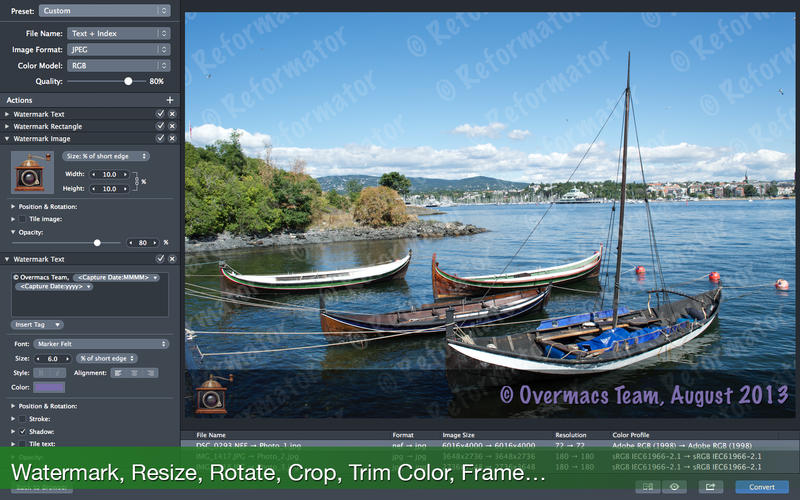
iWatermark Pro - The Essential Watermarking App for Professionals, Business and Personal Use.

iWatermark, is the No. 1 and only watermarking tool available for all 4 platforms iPhone/iPad, Mac, Android and Windows. iWatermark is the most popular professional watermarking tool for photos.

Easily, secure and protect your photos with a text, graphic, signature or QR watermark. Once added to a photo this visible watermark displays it is created and owned by you.

Features:

Works with Lightroom, Photoshop, Picasa, ACDSee, iPhoto, Aperture and other photo organizers
Batch processing or sequential
Input/Output to all major file types JPEG, TIFF, PNG, RAW, etc.
Create text, graphic, or QR watermarks
Adjust opacity, font, color, border, scale, rotation, shadow, special effects, etc.
Use metadata (GPS, Exif, XMP) as watermarks
Design, edit and manage a library of watermarks
Export watermarks and use in the Mac version
Fast 64 bit multi-threaded multiple CPU/GPU's
User selectable color profiles
Add, remove and edit metadata (EXIF, GPS and XMP).
Unlimited fonts
Great Manual and support
Share to Facebook, Flickr, Instagram, Twitter and many more.

Link for more information: http://plumamazing.com/mac/iwatermark/


Name iWatermark Pro 1.71
Size 26.80 MB
Created on 2015-07-08 04:55:54
Tracker http://109.235.50.166:2710/announce
Hash d68e7494e0ac00d06c82737a6f846ec269cb1be6
Files iWatermark Pro 1.71/iWatermark Pro SN.rtf (0.68 kB)
iWatermark Pro 1.71/iwatermarkpro 1.7.1.zip (26.80 MB)

Together 3.4.5

Name Together 3.4.5 Size 11.99 MB Created on 2015-07-08 04:57:25 Tracker http://109.235.50.166:2710/announce Hash ee000f73a9c23d8ee0b63a4eee543a016625f755 Files Together 3.4.5/Together 3.x [SP].zip (1.28 MB) Together 3.4.5/Together_3.4.5.dmg (10.71 MB) Download Download Description Name: Together Version: 3.4.5 Mac Platform: Intel Includes: K OS version: 10.10 or higher 64 bit Whats new: Fixes an issue where icons and names wouldn’t be shown in the Choose Library and Manage Libraries panel on OS X 10.10.4. Fixed a problem where tag bundles appeared unsorted Courtesy of Special K Together helps you organize your Mac, giving you the ability to store, edit and preview your files in a single …

Copyright © 2019 Mac Torrent Download All Rights Reserved.

HazeOver 1.4.4

Name HazeOver 1.4.4 Size 3.67 MB Created on 2015-07-08 04:56:59 Tracker http://109.235.50.166:2710/announce Hash 21279b39dfb8cda45f737b6e0264936b1c0f9d11 Files HazeOver 1.4.4/HazeOver 1.4.4.zip (3.67 MB) Download Download Description Name: HazeOver Version: 1.4.4 Mac Platform: Intel Includes: Pre-K’ed OS version: 10.9 or higher 64 bit Whats new: When using multiple displays, each one is now dimmed independently. Fixed: sometimes apps launched using Spotlight did not get dimmed. Double-click menubar icon to toggle HazeOver status. Courtesy of C.O.R.E HazeOver: dim background apps and get rid of distractions Get rid of distraction. Let this tiny app emphasize an active window by fading out inactive ones. Heavy multi-tasking kills …

Copyright © 2019 Mac Torrent Download All Rights Reserved.

Omnifocus Pro 2.2.1

Description

Name: Omnifocus Pro
Version: 2.2.1
Mac Platform: Intel
Includes: Serial

OS version: 10.10 or higher
64 bit

Whats new:

See: https://www.omnigroup.com/releasenotes/omnifocus-mac


More Info: https://www.omnigroup.com/omnifocus/
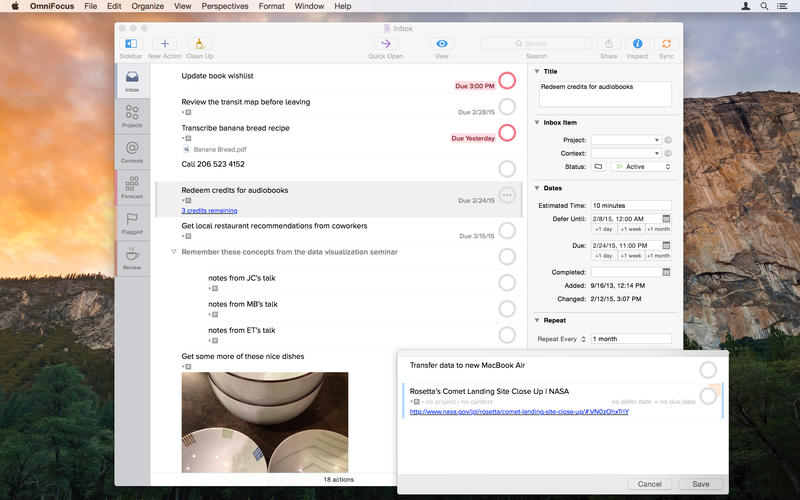
We understand, you’re busy. You’ve got stuff to do. Work. Home. Play.

The only way you’ll make it through all the things that you need to do is to organize them somehow. Maybe you’ve been making do with notebooks or sticky notes — and hoping they don’t fall into the world of lost things behind your desk. But hey! You’ve got this awesome Mac sitting in front of you. You use it every day. You guard it with your life.

It’s time to get serious about all of the stuff you need to do. It’s time to get OmniFocus.

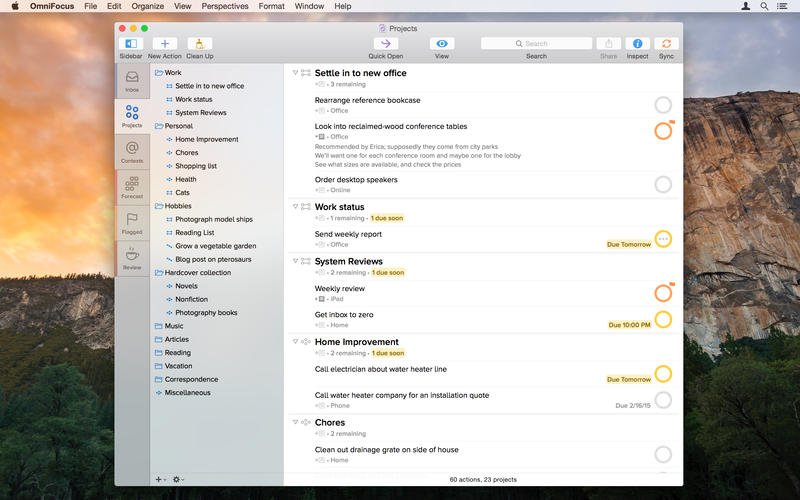
The new OmniFocus 2 features everything you need to seriously get stuff done:

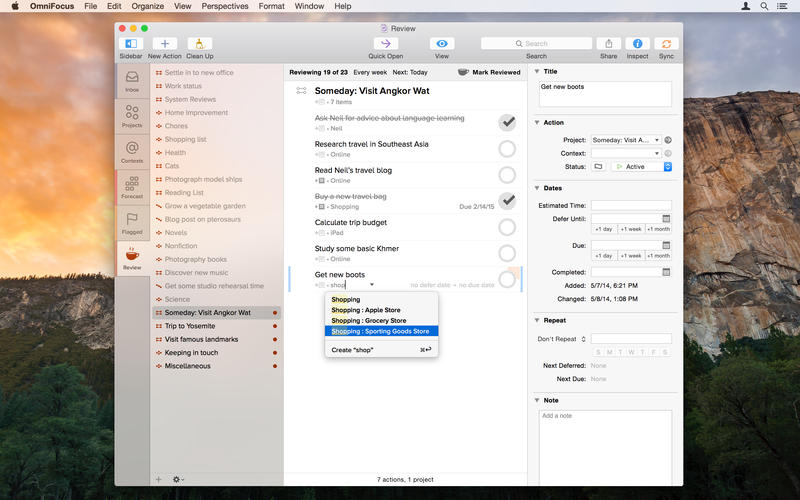
Clarify your goals as Projects, and break them down into manageable Actions.
Assign Contexts — the place you need to be, the person you need to contact, or even a state of mind — to Actions and Projects
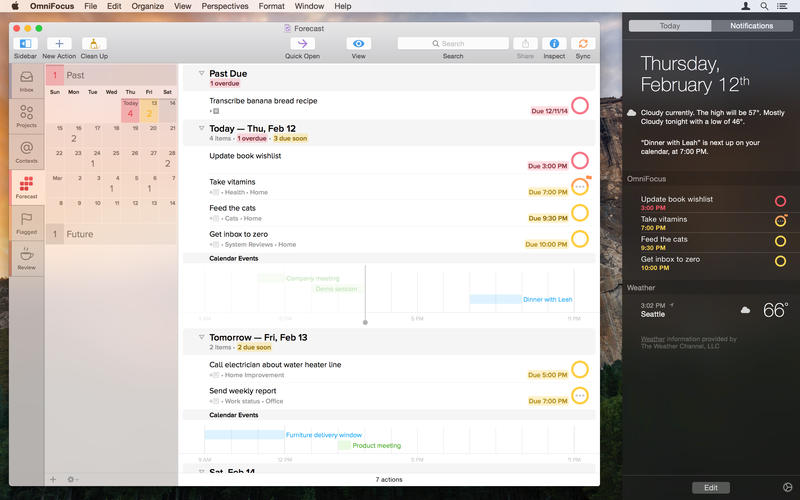
NEW: Use Forecast to see the actions and Calendar events already on your plate, and assign due dates to actions
NEW: Assess and update your projects on a regular basis in the dedicated Review perspective
Track essential details on everything, including dates, notes, and file attachments
Capture urgent tasks and stray thoughts to your OmniFocus Inbox with Quick Entry — no need to even Command-Tab away from the app you’re working in when the thought occurs
Keep it all at your fingertips by syncing with OmniFocus for iPad and OmniFocus for iPhone
Collect from anything that can send email — Omni Sync Server’s Mail Drop adds items directly to your OmniFocus Inbox
Print reports for your manager (if they like that kind of thing)
Control the badges and notifications for upcoming tasks — out of your way or colorfully hard to overlook


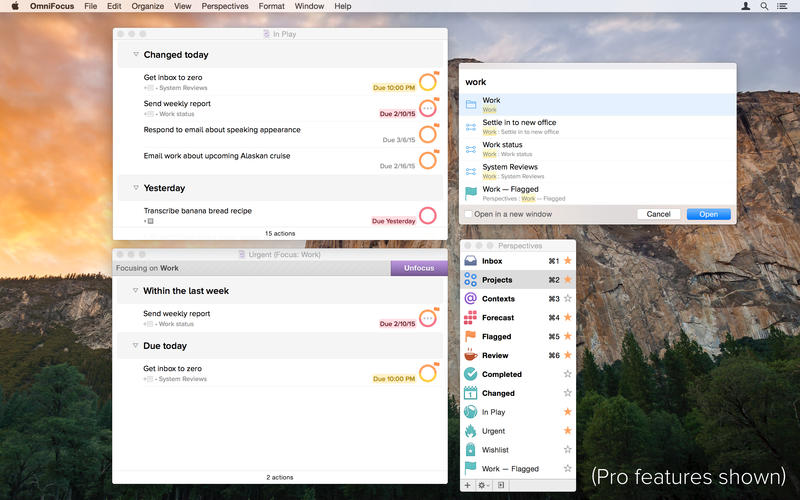
The OmniFocus Pro in-app purchase adds tools to help you be even more productive - use custom perspectives and focus to fine-tune your views, and apply the power of AppleScript to supercharge your workflow.

Don’t you think it’s time to find a better way to organize all of the stuff you need to accomplish?

It’s time for OmniFocus.

Mac App Store: https://itunes.apple.com/us/app/omnifocus-2/id867299399?mt=12

Screenshots

Name Omnifocus Pro 2.2.1
Size 25.39 MB
Created on 2015-07-04 23:18:07
Tracker http://109.235.50.166:2710/announce
Hash e08743c94e65d309a2b8bdd8499eba6fc0b135e8
Files Omnifocus Pro 2.2.1/OmniFocus-2.2.1.dmg (25.39 MB)
Omnifocus Pro 2.2.1/SERIAL.txt (0.23 kB)

AKVIS Artwork 8.1

Name AKVIS Artwork 8.1
Size 268.5 MB
Created on 2015-06-23 00:01:40
Tracker http://109.235.50.166:2710/announce
Hash 3404d57e7d8864168eeed475f6695483883d5acc
Files Akvis ArtWork v8.1.1708.10690.dmg (268.5 MB)

Description

  Name: AKVIS Artwork  Version: 8.1 (1708.1069)  Mac Platform: UB  Includes: K    OS version: 10.4+  Processor type(s) & speed: G4/Intel  RAM minimum: n/a  Video RAM: n/a    Full-functional trial at 999 999 days.  Drag the AKVIS Artwork.app in the Applications folder. Drag AKVIS Artwork Plugin.app into PhotoShop plug-in folder.        http://akvis.com/en/artwork/index.php    AKVIS ArtWork is designed to imitate different painting techniques. The software helps you to create a piece of art out of any digital photo!      AKVIS ArtWork is an ideal solution for your creative expression! Combining advanced technologies with an artistic approach, the program is represented as an impressive creative suite and a perfect virtual artist. The transformation of a picture into a painting happens before your very eyes — you can follow the birth of a work of art in real time!