Tag Archives: Pro

ABBYY FineReader Pro 12.1.4

Description

Version: 12.1.4
Mac Platform: Intel
Includes: Serial

OS version: 10.8+
Processor type(s) & speed: n/a
RAM minimum: n/a
Video RAM: n/a

What's new in version 12.1.4:
• Support for OS X 10.11 El Capitan;
• Added new interface language - Danish;
• Some other improvements and bug fixes.


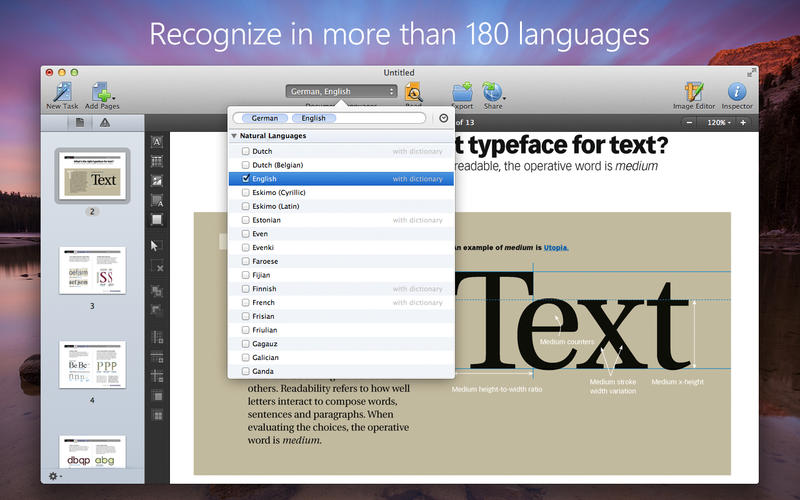
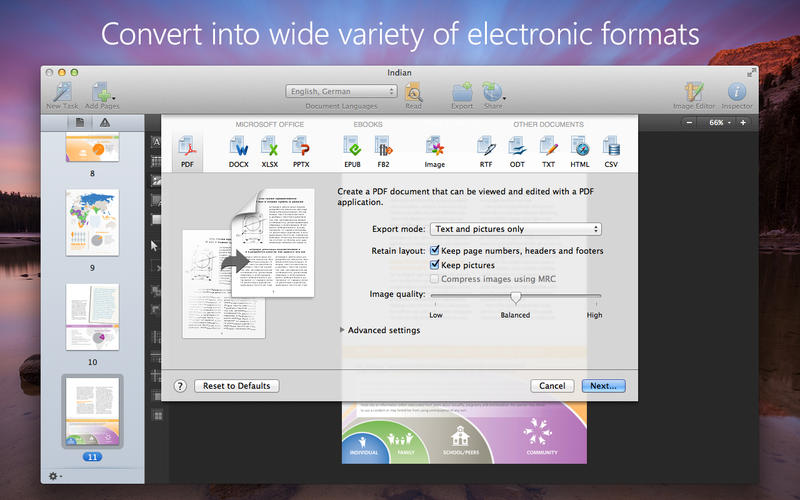
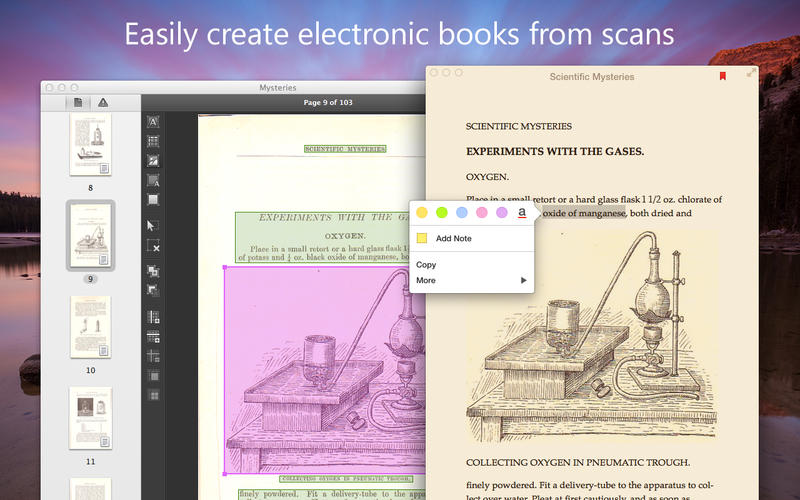
Easily transform paper documents, PDFs and digital photos of text into editable and searchable files with ABBYY FineReader Pro for Mac. No more manual retyping or reformatting. Instead you can edit, search, share, archive, and copy information from documents for reuse and quotation — saving your time, effort and hassles.

FineReader Pro combines exceptional OCR and document conversion accuracy, time-saving task automation features and unsurpassed language support with an intuitive interface.

Home page for more info: http://finereader.abbyy.com/

Mac App Store: https://itunes.apple.com/app/finereader-ocr-pro/id687301476?mt=12

Screenshots

1_FineReader_OCR_Pro.jpg

Name ABBYY FineReader Pro 12.1.4
Size 611.3 MB
Created on 2015-11-23 01:04:52
Tracker http://109.235.50.166:2710/announce
Hash e85fa924c0395b55d994fb26ffb9048dd915c678
Files ABBYY FineReader Pro 12.1.4/ABBYY_FineReader_Pro_ESD.dmg (611.3 MB)
ABBYY FineReader Pro 12.1.4/SN.rtf (0.68 kB)

Creativemarket Pro Portrait Lightroom Presets Vol 1 200119

Name Creativemarket Pro Portrait Lightroom Presets Vol 1 200119
Size 108.0 kB
Created on 2015-03-04 19:14:08
Hash fd6fe79041b353fe26340cdff1f302349a29c5e2
Files Creativemarket Pro Portrait Lightroom Presets Vol 1 200119/Creativemarket Pro Portrait Lightroom Presets .tgz (107.5 kB)
Creativemarket Pro Portrait Lightroom Presets Vol 1 200119/Torrent Downloaded From ExtraTorrent.cc.txt (0.35 kB)
Creativemarket Pro Portrait Lightroom Presets Vol 1 200119/Torrent downloaded from AhaShare.com.txt (0.06 kB)
Creativemarket Pro Portrait Lightroom Presets Vol 1 200119/Torrent downloaded from demonoid.pw.txt (0.05 kB)

Descriptions for Description

Name : Pro Portrait Lightroom Presets Vol 1
Files : PDF
File Size : 222.2 KB
Requirements : Adobe CS1+

// Grab all of our presets and more for one low price at http://www.shuttersweets.com/membership //
Portraits can capture the entire history of a person's life in a single shot. As a photographer, it's your job to help their past shine through.
These 10 Lightroom presets make it easy to bring out the best in your subjects, enhancing the depth and character of each photo.


Link for more information: https://creativemarket.com/ShutterSweets/200119-Pro-Portrait-Lightroom-Presets-Vol-1

Screenshots

Tulipan Broken Caps Pro Font

Name tulipan.broken.caps.pro.font.40
Size 6.43 MB
Created on 2014-12-18 18:14:31
Hash 06e089e5da584c410405fc10f32b52023d836cc6
Files Tulipan Broken Caps Pro Font $40/Torrent Downloaded From ExtraTorrent.cc.txt (0.35 kB)
Tulipan Broken Caps Pro Font $40/Torrent downloaded from AhaShare.com.txt (0.06 kB)
Tulipan Broken Caps Pro Font $40/Torrent downloaded from demonoid.ph.txt (0.05 kB)
Tulipan Broken Caps Pro Font $40/Tulipan Broken Caps Pro Font $40.tgz (6.43 MB)

Descriptions for Description

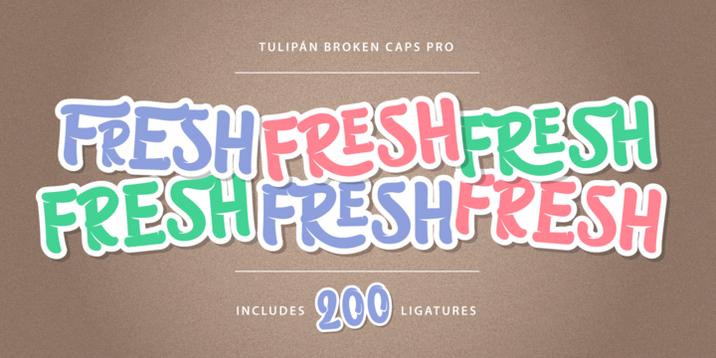
Tulipán Broken Caps Pro is new variable/complement of Tulipán Broken Caps, it includes 200 interesting ligatures, specially designed for games, apps, books, logos and packaging. Its bold structure is perfect to give great effects.


Link for more information: http://www.myfonts.com/fonts/calderon-estudio-type-foundry/tulipan-broken-caps-pro/

Screenshots

Apple Final Cut Pro 10.2.2

Description

Name: Final Cut Pro
Version: 10.2.2
Mac Platform: Intel
Includes: Pre-K'ed

OS version: OS X 10.10.4 or later
Processor type(s) & speed: 64-bit processor

Courtesy of TNT Team

Release Date: September 3, 2015

What's New in Version 10.2.2
• Native support for Sony XAVC-L and Panasonic AVC-Intra 4:4:4 up to 4K resolution
• Import Canon XF-AVC 8-bit video files with Canon plug-in
• Export interlaced H.264 video
• Asset management systems can include a library backup file when sharing from Final Cut Pro
• Fixes render errors that may occur when using reflective materials with 3D text
• Improves stability when swapping materials on 3D text with published parameters
• Improves performance when loading text styles
• Motion Title templates with published text layout parameters now export correctly
• Fixes an issue that may cause 3D text to appear dark when rendered
• Addresses issues with timing on certain animated effects

Introduced in Version 10.2
Introducing 3D titles
• Beautifully animated and easily customizable 3D text
• Simple templates to get started quickly
• Cinematic templates with built-in backgrounds and animations
• Large collection of text styles to create stunning looks in one click
• Customize your titles with hundreds of combinations of materials, lighting, and edges
• Additional controls let you adjust environments, shadows, and more
• Instantly convert any 2D title to 3D
• Open any title in Motion to add multiple lights, cameras, and tracking

Advanced effects
• Display up to four video scopes simultaneously
• Apply super ellipse Shape mask to any clip
• Apply Draw mask to any clip, with options for linear, bezier, or B-spline smoothing
• New Shape and Color mask controls for every effect
• Instantly display the alpha channel for any effect mask
• Save custom effects as presets for quick access
• Color Board merged into the new Color Correction effect
• Rearrange the processing order of Color Correction effect
• Improved keyframing with better motion smoothing
• Improved optical flow for beautiful slow motion on a wider range of content
• Better performance of FxPlug plug-ins and built-in effects that use multiple frames like Visual Echo and Trails

Camera formats
• Panasonic AVC-Ultra codec family
• Sony XAVC-S
• Import Sony XAVC and XDCAM formats without separate plug-in
• JVC H.264 Long GOP
• GPU-accelerated RED RAW processing with support for dual GPUs
• Support for RED RAW anamorphic formats

Additional features
• Smart Collections can be used at the event and library level
• Import window consolidates all options into single sidebar
• GPU rendering when using Send to Compressor with support for dual GPUs


More Info: https://itunes.apple.com/us/app/final-cut-pro/id424389933?mt=12

Completely redesigned from the ground up, Final Cut Pro adds extraordinary speed, quality, and flexibility to every part of the post-production workflow.

Revolutionary Video Editing
• Assemble clips in the Magnetic Timeline without clip collisions or sync problems
• Use Clip Connections to attach B-roll, sound effects, and music to the timeline
• Reduce clutter by grouping clips into a Compound Clip.
• Perfect your pacing right in the timeline with the Inline Precision Editor
• Cycle through different shots, graphics, or effects at one place in the timeline with Auditions
• Edit multi-camera projects with automatic sync and support for up to 64 camera angles

Powerful Media Organization
• Organize your work within libraries for efficient media management and collaboration
• Work natively with a broad range of formats including RED, AVCHD, H.264 from DSLRs, and more
• Content Auto-Analysis captures camera metadata and analyzes shots in the background
• Create and apply custom keywords on the fly as you select ranges in clips
• Smart Collections let you dynamically organize content and find any shot in a few clicks

Incredible Performance
• Final Cut Pro uses all the GPUs in your Mac for superior real-time playback performance and fast background rendering
• 64-bit architecture uses all the RAM in your system for larger projects and richer effects
• Background processing lets you keep working without interruption
• External monitoring lets you route video and audio through HDMI or third-party Thunderbolt and PCIe devices

Compelling, Customizable Effects
• Preview effects to see how they look with your footage before applying them
• Change the look of titles, transitions, and effects using intuitive controls
• Control effects with precision using a keyframe editor that appears directly in the timeline
• Use third-party FxPlug plug-ins with custom interfaces and dual-GPU support

Integrated Audio Editing
• Expand and edit multichannel audio files directly in the timeline
• Let Final Cut Pro repair significant audio problems such as hum, excessive noise, and more
• Sync DSLR video with separate audio in a single step, with instant audio waveform matching

Intuitive Color Grading
• Improve the look of any clip with the single-click Balance Color feature
• Apply the Match Color feature to match the looks of two clips shot under different conditions
• Manipulate color, saturation, and exposure with the Color Board
• Fine tune color for a specific color range or area of the screen using keying and masks

One-Step, Optimized Output
• Deliver projects for playback on Apple devices and websites such as Vimeo, YouTube, and Facebook
• Use themed menus to quickly author and burn a DVD or Blu-ray disc
• Export customized audio stems and multiple versions of a finished video using Roles metadata
• Import and export XML to support third-party workflows

Screenshots

Name Final Cut Pro 10.2.2
Size 2.68 GB
Created on 2015-09-05 04:59:49
Tracker http://109.235.50.166:2710/announce
Hash 9ef42400cca75130f6e69c9a946fae6ddef2ec4d
Files Final Cut Pro 10.2.2.dmg (2.68 GB)

Toast Pro 14 (3734)

Name Toast Pro 14 (3734) Size 1.19 GB Created on 2015-08-30 22:58:58 Tracker http://109.235.50.166:2710/announce Hash ec9b6df7c6a2089817707ef190a4d104e9c601a3 Files Desktop/Serial.rtf (0.40 kB) Desktop/Toast_14_Pro_3734.dmg (1.19 GB) Download Download Description Name: Toast Pro 14 Version: 14 (3734) Mac Platform: Intel Includes: Serial OS version: 10.7 and up Processor type(s) & speed: 64-bit processor RAM minimum: 2 Gb rec Video RAM: 4 Gb rec Minimum System Requirements: Mac® computer with an Intel® processor 1 GB RAM (2 GB RAM recommended for Pro) Mac OS® X 10.7, 10.9, 10.10. Partial functionality on Mac OS 10.8 Approximately 1 GB (5 GB for Pro) of free space to …

Copyright © 2019 Mac Torrent Download All Rights Reserved.

PF Regal Swash Pro Font Family – 6 Fonts

Name pf.regal.swash.pro.font.family.6.fonts.for.euro.375
Size 3.83 MB
Created on 2014-10-30 21:11:04
Tracker udp://open.demonii.com:1337/announce
Tier #2
udp://tracker.publicbt.com:80/announce
Tier #3
udp://tracker.openbittorrent.com:80/announce
Tier #4
udp://tracker.istole.it:80/announce
Tier #5
udp://tracker.token.ro:80/announce
Tier #6
http://tracker.torrentfrancais.com/announce
Tier #7
udp://9.rarbg.com:2710/announce
Tier #8
http://tracker.ex.ua/announce
Tier #9
http://torrent.gresille.org/announce
Tier #10
udp://tracker.yify-torrents.com:80/announce
Hash 1d698e7eeb04930d37151faa56d5ba32fdeff7be
Files PF Regal Swash Pro Font Family – 6 Fonts for Euro 375/PF Regal Swash Pro Font Family.tgz (3.83 MB)
PF Regal Swash Pro Font Family – 6 Fonts for Euro 375/Torrent Downloaded From ExtraTorrent.cc.txt (0.35 kB)
PF Regal Swash Pro Font Family – 6 Fonts for Euro 375/Torrent downloaded from AhaShare.com.txt (0.06 kB)
PF Regal Swash Pro Font Family – 6 Fonts for Euro 375/Torrent downloaded from demonoid.ph.txt (0.05 kB)

Descriptions for Description

================
[INFO:]
================

PF Regal Swash Pro Font Family - 6 Fonts for €375
OTF | 6 Fonts | JPEG Preview | 4.8 Mb


The objective of this project was to design a new typeface series for Grazia magazine. First published in 2010, Regal was later revamped and redesigned for commercial use, evolving into a type system with five related superfamilies. According to the brief, this typeface had to be elegant, luxurious, sexy, vibrant, reflect the female sensitivity and take into consideration a modern woman who is more proud, more connected, more spontaneous, open-minded and eager to try a whole host of new products and services. Targeting this consumption-wise and well-educated woman, required a typeface that is not strictly based on classic forms, but incorporates several distinct elements that express a modern woman’s personality and the products she consumes. In that respect, a whole series of 5 related superfamilies was designed, which not only emphasize femininity but also reflect both the romantic as well as the dynamic side of the female personality. For that matter, elegant curvy details were introduced in order to create a link to the female figure; teardrop terminals which reflect a woman’s sensitivity; pronounced quirks on upper and lower arms for her eyelashes; high-contrast, sharp corners at thinning terminals for her high heels; alternate glyphs for the woman who prefers to express her individuality -rather than slavishly follow trends- by using various accessories which can dramatically change her appearance; elegant endings and long curves to reflect her predisposition to dream; bell-shaped serifs with an inward rather than outward direction which recall streamlined seventies fashion. This series of typefaces is diverse in its construction as it consists of five related superfamilies i.e. text, display, ?nesse, swash and stencil. There is a variety of weights which range from regular to ultra black for each one of the five families. These families share common attributes but they di?er in content according to each one’s usage. The whole superfamily type system is comprised of 47 weights with an average of 898 glyphs per weight. It supports simultaneously Latin, Cyrillic and Greek and comes with many alternate glyphs.

Screenshots

TinyBooks Pro 8.1.0

Name TinyBooks Pro 8.1.0
Size 4.55 MB
Created on 2015-08-24 23:32:47
Tracker http://109.235.50.166:2710/announce
Hash 40a1b2ab358040c2313130d0db45edaa706e202e
Files TinyBooks Pro 8.1.0/TinyBooksPro 8.1.0.zip (4.10 MB)
TinyBooks Pro 8.1.0/cr-tnybkp8.dmg (450.4 kB)

Descriptions for Description

Name: TinyBooks Pro
Version: 8.1.0
Mac Platform: Intel
Includes: KG

OS version: 10.7 or higher

Whats new

Added new Monthly Notes dialog, fixed a few cosmetic-only bugs, etc.

[/b]Keygen Courtesy of C.O.R.E[/b]


TinyBooks Pro is a simple, flexible, non-bloated, single-entry bookkeeping and accounting system for the Mac. TinyBooks Pro is designed for sole proprietors, home and other small businesses, and family finances.

Unlike many tax-related programs, TinyBooks Pro does not have to be re-purchased year after year. TinyBooks Pro can easily help you with your taxes this year and in years to come.

TinyBooks Pro is the simplest way to handle the books for most small companies. Just enter your expenses and income, and TinyBooks Pro does the rest.

Current and year-to-date on-the-fly totals are continually displayed. Fully automatic bar-charting of all expense and income accounts make the determination of monthly trends intuitively obvious.

More info: http://www.winograd.com

SnapNDrag Pro 3.6.1

Name SnapNDrag Pro 3.6.1
Size 2.49 MB
Created on 2015-08-23 23:37:17
Tracker http://109.235.50.166:2710/announce
Hash 0d94734dd7aa24bddebd08113a3b63c0d29e08ed
Files SnapNDrag 3.6.1/Serial.rtf (0.55 kB)
SnapNDrag 3.6.1/SnapNDrag 3.6.1.zip (2.49 MB)

Descriptions for Description

Name: SnapNDrag Pro
Version: 3.6.1
Mac Platform: Intel
Includes: Serial

OS version: 10.9 or higher
64 bit

Whats new:

Made the library more robust. SnapNDrag no longer needs to rebuild the library even after the app quit unexpectedly.


Effortless Screen Capture

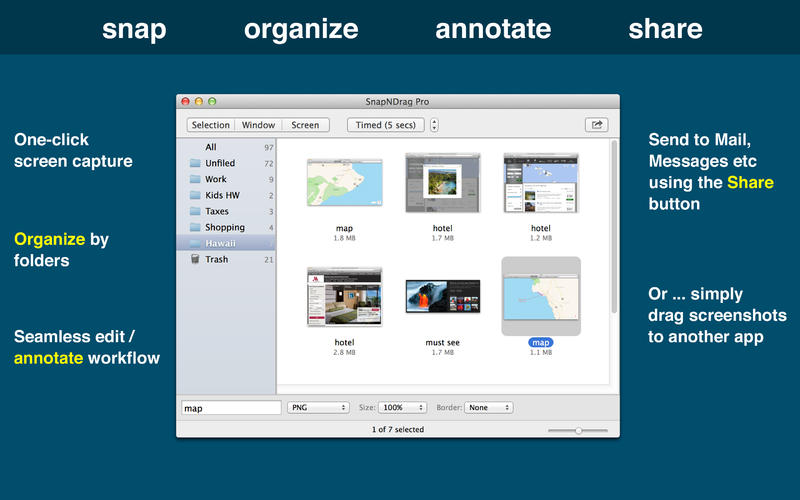
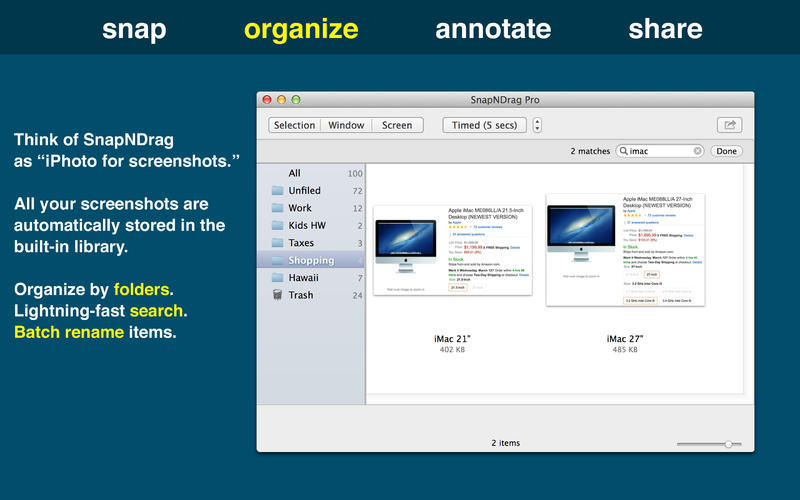
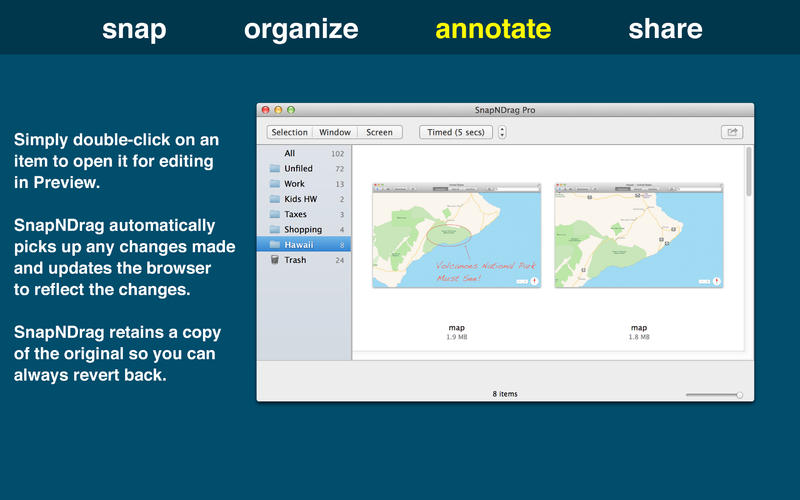
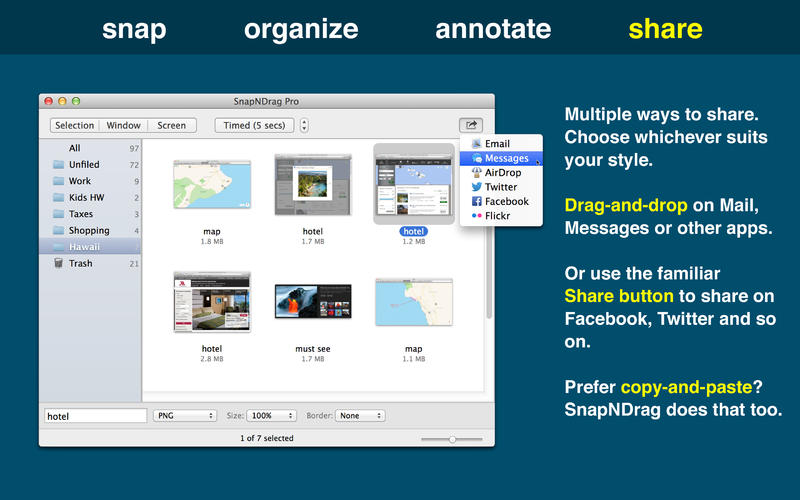
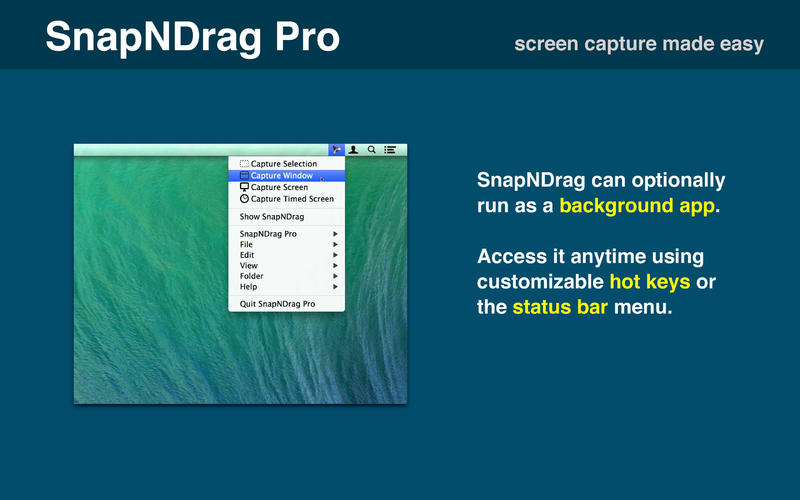
SnapNDrag lets you take a screenshot by just clicking a button and dragging the resulting screenshot off.

For example, to email a screenshot, you would drag the screenshot from SnapNDrag to the Mail application. It is that simple. No hard-to-remember key combinations, no file conversion to deal with, no file dialog boxes to navigate, no temporary files to erase later on.

More info: http://yellowmug.com/snapndrag/

Mac App Store: https://itunes.apple.com/us/app/snapndrag-pro/id430397512?mt=12

Screenshots

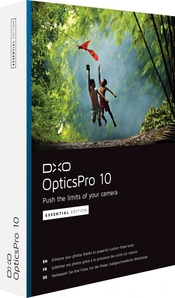
DxO Optics Pro 10.4.3

Description

Name: DxO Optics Pro
Version: 10.4.3
Mac Platform: Intel
Includes: K

OS version: 10.8 or higher
64 bit

Whats new:

See: http://www.dxo.com/intl/photography/dxo-optics-pro


Link for more information : http://www.dxo.com/intl/photography/dxo-optics-pro

Push the limits of your camera

Enhance your photos with DxO Optics Pro, the software of reference for all demanding photographers. Based on an exclusive approach of prior equipment calibration, DxO Optics Pro includes powerful tools for processing RAW and JPEG images.

Efficiently reduce noise, optimize exposure and contrast, magnify colors, and boost details: DxO Optics Pro lets you bring out the best in your photos in just a few clicks, regardless of the shooting conditions.

Thanks to PRIME’s exclusive noise reduction technology, which analyzes in depth the structure of the images, DxO Optics Pro automatically enhances the quality of your photos, with spectacular results: noise is eliminated, textures are restored, details and color saturation are preserved in shadows — even at very high ISO values!

DxO Optics Pro software automatically improves image quality by taking into account the precise characteristics of your photographic equipment (camera body and lenses). Designed for serious amateurs as well as for professional photographers who are looking for the best image quality possible.

DxO Optics Pro processes both JPEG and RAW image files. Recognized around the world for its award-winning automatic optical corrections.

DxO Optics Pro handles every kind of problem that can affect image quality. Whether you want to use its image processing capabilities to automatically improve hundreds of images through batch processing, or if you prefer to manually define the processing settings for each photo.

DxO Optics Pro perfectly adapts to your needs to give you unsurpassed image quality and incomparable productivity.

DxO Optics Pro adapts very specifically to your equipment and automatically makes corrections to your images, whether in JPEG or RAW, thanks to a preliminary calibration of equipment identical to yours in our laboratory.

What' ''s new
• DxO OpticsPro 10 introduces DxO ClearView, a spectacular new feature that eliminates atmospheric haze from photos. This new version also improves the revolutionary PRIME denoising technology, which offers a gain in image quality of up to one stop greater than the best denoising algorithms on the market.

Requirements:
• Processor: Intel Mac only, 64-bit compatible (recommended: Intel® Core™ i5 or higher).
• Ram: Minimum: 2 GB or more. RECOMMENDS: 4 GB or more.
• Graphics Card: o 256 MB of video memory is recommended for support of the GPU acceleration.
• To deal with the RAW images of more than 20 MP camera, 4Gb of RAM are strongly recommended.
• To process the RAW images of the Nikon D800 and the Nikon D800E, a machine equipped with a processor 4 hearts or more is strongly recommended.
• 2 GB of available disk space (6 GB recommended).
• OS X 10.8 or later

What' ''s new
• DxO OpticsPro processes RAW-format images from more than 250 digital cameras calibrated in our laboratories.
Check that DxO OpticsPro supports your camera’s RAW format.

Name DxO Optics Pro 10.4.3
Size 286.2 MB
Created on 2015-08-21 04:44:14
Tracker http://109.235.50.166:2710/announce
Hash c8cc419ff17f1c36488b279a01261b311d8d7e3e
Files DxO Optics Pro Elite 10.4.3/DxO Labs [patcher].zip (473.1 kB)
DxO Optics Pro Elite 10.4.3/DxO_OpticsPro1043b152.dmg (285.7 MB)

FontExplorer X Pro 5.0.1

Name FontExplorer X Pro 5.0.1 Size 25.39 MB Created on 2015-08-02 23:35:44 Tracker http://109.235.50.166:2710/announce Hash 09d53e198556cedd36cca92ff972835159afe239 Files FontExplorer Pro 5.0.1/ClientLicense.fcl.zip (827.0 kB) FontExplorer Pro 5.0.1/FontExplorer X Pro.zip (24.56 MB) Download Download Description Name: FontExplorer X Pro Version: 5.0.1 Mac Platform: Intel Includes: Pre-K’ed OS version: 10.8 or higher 64 bit Whats new: See: http://www.macupdate.com/app/mac/19514/fontexplorer-x-pro Block connections to: fex.linotype.com Courtesy of The Shark (original icon restored) Instructions: 1. Go through setup process, then, once finished, select “FontExplorer X Pro > Client License…” from the menubar. 2. Select included license file, and voila! 3. Do not update (the app is cracked to …

Copyright © 2019 Mac Torrent Download All Rights Reserved.

iTools Pro 1.1.0

Name iTools Pro 1.1.0
Size 4.73 MB
Created on 2015-07-23 05:11:17
Tracker http://109.235.50.166:2710/announce
Hash 8532862879801afe8be841f61686930995cac427
Files iTools Pro 1.1.0.dmg (4.73 MB)

Descriptions for Description

Name: iTools Pro
Version: 1.1.0
Mac Platform: Intel
Includes: Pre-K'ed

OS version: OS X 10.6.8 or later

You may wish to block connections to:
serv-en.itools.hk
ol-en.itools.hk
stat2.itools.hk
itools.hk

Courtesy of TNT Team

Release Date: July 20, 2015

What's New in Version 1.1.0
1. Support jailbreak device opens the application documents;
2. Optimize the trusted connection.
Full Release Notes: http://dl2.itools.hk/update/iToolsProForMacWhatsNew.html
AppCast: http://dl2.itools.hk/update/iToolsProForMacCast.xml

More Info: http://pro.itools.cn/pro_mac/english

Managing the content of your iOS device using iTunes, the default OS X music player, is not always very intuitive. iTools is a simple Mac app that offers an alternative when you need to visualize, organize, or transfer data to and from your iPhone, iPad, or iPod touch

Pro version also includes the following features (compared to free version)

Applications Document Management (Does not support iOS 8.3 and later)
Photo Slideshow
Music, Movies, Tone format conversion
Music playlists
Ringtone Maker
Contacts Edit
Airplayer
System log

iWatermark Pro 1.71

Description

Name: iWatermark Pro
Version: 1.71
Mac Platform: Intel
Includes: Serial

OS version: 10.6 or higher
64 bit

Whats new:

Note: This version and future versions need to be downloaded manually because of changes Apple made to security. The usual 'Check for Updates' no longer works the same way. Updates will need to be downloaded manually for every new version.

Removed sparkle framework (not currently using due to sandbox changes by Apple)
Updated version check to know about pre-release versions.
Fixed 1 pixel off issue aligning right hand or top.
Cleanup some log message and improved loggin for layout issues.
Changed update options to download zip to work around sandbox issues.
Require OS X 10.7 or later for PhotoNotary. So, in OS X 10.6 PhotoNotary will say disabled.
Fixed signing issue related to support OS X 10.7, 10.8, 10.9, and 10.10.
Move ps2png out of the resource folder, as suggested by Apple.
Minor code cleanup


iWatermark Pro - The Essential Watermarking App for Professionals, Business and Personal Use.

iWatermark, is the No. 1 and only watermarking tool available for all 4 platforms iPhone/iPad, Mac, Android and Windows. iWatermark is the most popular professional watermarking tool for photos.

Easily, secure and protect your photos with a text, graphic, signature or QR watermark. Once added to a photo this visible watermark displays it is created and owned by you.

Features:

Works with Lightroom, Photoshop, Picasa, ACDSee, iPhoto, Aperture and other photo organizers
Batch processing or sequential
Input/Output to all major file types JPEG, TIFF, PNG, RAW, etc.
Create text, graphic, or QR watermarks
Adjust opacity, font, color, border, scale, rotation, shadow, special effects, etc.
Use metadata (GPS, Exif, XMP) as watermarks
Design, edit and manage a library of watermarks
Export watermarks and use in the Mac version
Fast 64 bit multi-threaded multiple CPU/GPU's
User selectable color profiles
Add, remove and edit metadata (EXIF, GPS and XMP).
Unlimited fonts
Great Manual and support
Share to Facebook, Flickr, Instagram, Twitter and many more.

Link for more information: http://plumamazing.com/mac/iwatermark/

Name iWatermark Pro 1.71
Size 26.80 MB
Created on 2015-07-08 04:55:54
Tracker http://109.235.50.166:2710/announce
Hash d68e7494e0ac00d06c82737a6f846ec269cb1be6
Files iWatermark Pro 1.71/iWatermark Pro SN.rtf (0.68 kB)
iWatermark Pro 1.71/iwatermarkpro 1.7.1.zip (26.80 MB)

Omnifocus Pro 2.2.1

Description

Name: Omnifocus Pro
Version: 2.2.1
Mac Platform: Intel
Includes: Serial

OS version: 10.10 or higher
64 bit

Whats new:

See: https://www.omnigroup.com/releasenotes/omnifocus-mac


More Info: https://www.omnigroup.com/omnifocus/

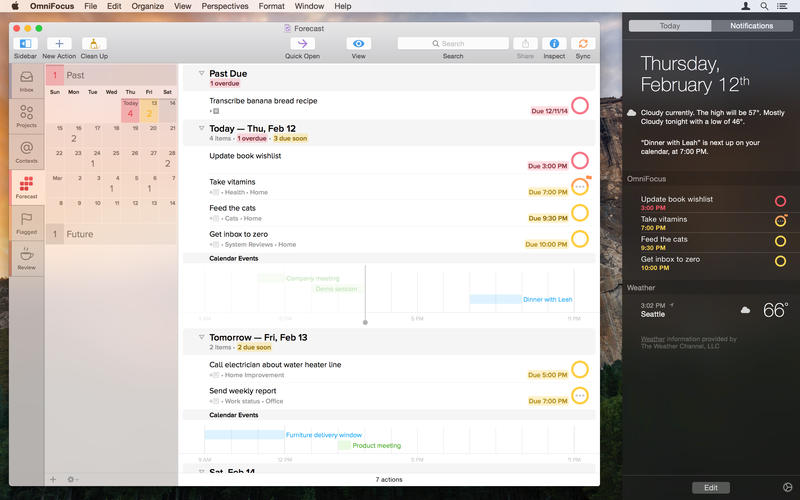
We understand, you’re busy. You’ve got stuff to do. Work. Home. Play.

The only way you’ll make it through all the things that you need to do is to organize them somehow. Maybe you’ve been making do with notebooks or sticky notes — and hoping they don’t fall into the world of lost things behind your desk. But hey! You’ve got this awesome Mac sitting in front of you. You use it every day. You guard it with your life.

It’s time to get serious about all of the stuff you need to do. It’s time to get OmniFocus.

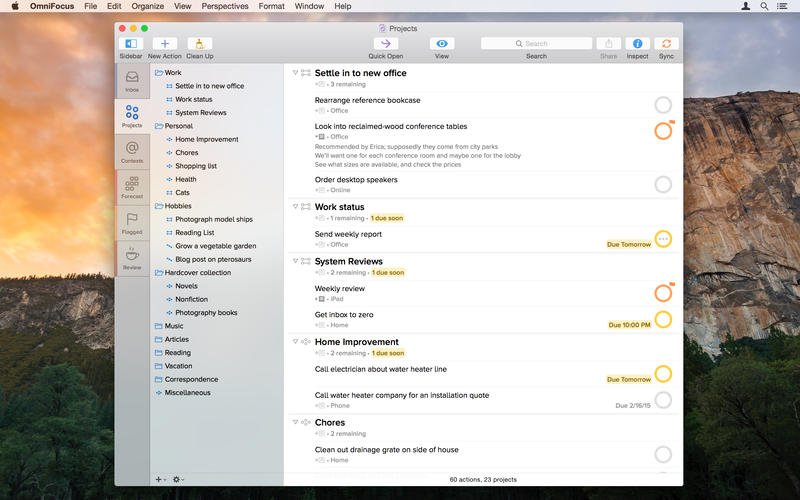
The new OmniFocus 2 features everything you need to seriously get stuff done:

Clarify your goals as Projects, and break them down into manageable Actions.
Assign Contexts — the place you need to be, the person you need to contact, or even a state of mind — to Actions and Projects
NEW: Use Forecast to see the actions and Calendar events already on your plate, and assign due dates to actions
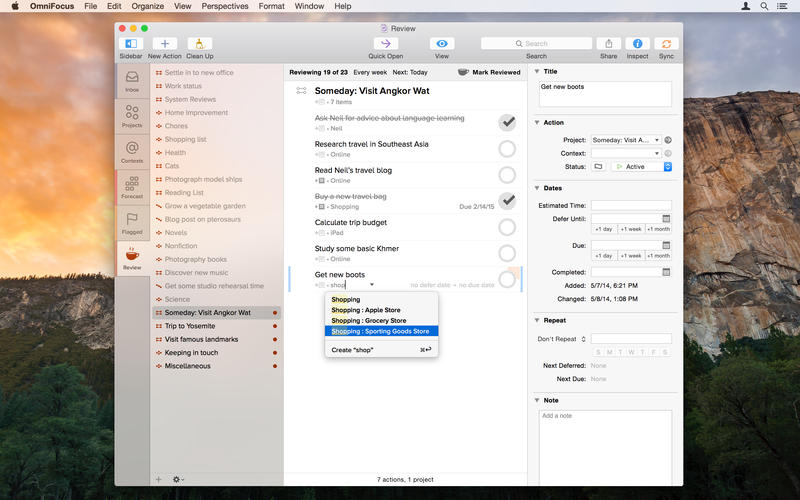
NEW: Assess and update your projects on a regular basis in the dedicated Review perspective
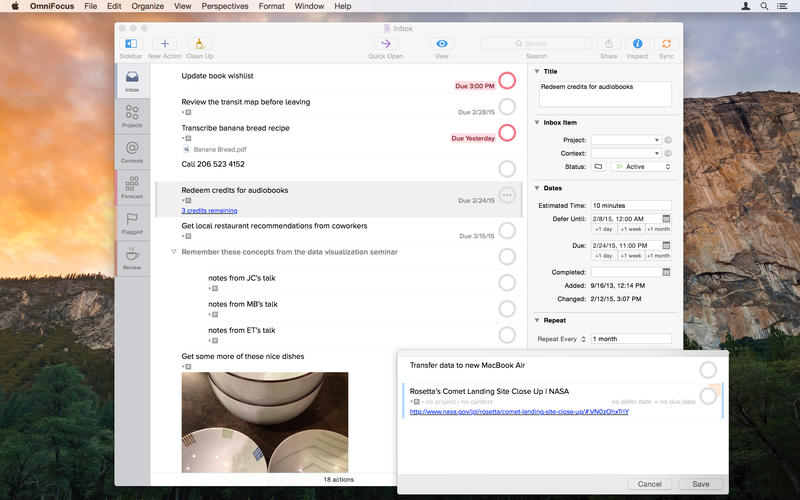
Track essential details on everything, including dates, notes, and file attachments
Capture urgent tasks and stray thoughts to your OmniFocus Inbox with Quick Entry — no need to even Command-Tab away from the app you’re working in when the thought occurs
Keep it all at your fingertips by syncing with OmniFocus for iPad and OmniFocus for iPhone
Collect from anything that can send email — Omni Sync Server’s Mail Drop adds items directly to your OmniFocus Inbox
Print reports for your manager (if they like that kind of thing)
Control the badges and notifications for upcoming tasks — out of your way or colorfully hard to overlook


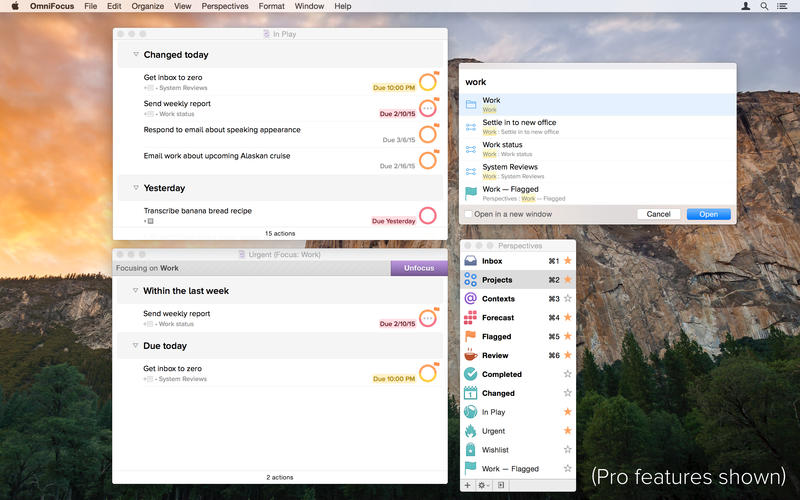
The OmniFocus Pro in-app purchase adds tools to help you be even more productive - use custom perspectives and focus to fine-tune your views, and apply the power of AppleScript to supercharge your workflow.

Don’t you think it’s time to find a better way to organize all of the stuff you need to accomplish?

It’s time for OmniFocus.

Mac App Store: https://itunes.apple.com/us/app/omnifocus-2/id867299399?mt=12

Screenshots

Name Omnifocus Pro 2.2.1
Size 25.39 MB
Created on 2015-07-04 23:18:07
Tracker http://109.235.50.166:2710/announce
Hash e08743c94e65d309a2b8bdd8499eba6fc0b135e8
Files Omnifocus Pro 2.2.1/OmniFocus-2.2.1.dmg (25.39 MB)
Omnifocus Pro 2.2.1/SERIAL.txt (0.23 kB)

DxO Optics Pro 10.4.1

Name DxO Optics Pro 10.4.1
Size 289.8 MB
Created on 2015-06-19 23:16:43
Tracker http://109.235.50.166:2710/announce
Hash 63c23504447982b7d66243ca511e35c84a8a1d1b
Files DxO Optics Pro 10.4.1/DxO Labs [azr+ patcher].zip (142.5 kB)
DxO Optics Pro 10.4.1/DxO_OpticsPro10.dmg (289.6 MB)
DxO Optics Pro 10.4.1/Read me.rtf (0.68 kB)

Descriptions for Description

Name: DxO Optics Pro
Version: 10.4.1
Mac Platform: Intel
Includes: K

OS version: 10.8 or higher
64 bit
Ram: Minimum: 2 GB or more

Whats new:

Change log not ready at time of post.

Usual credits to you know who for this 


Link for more information : http://www.dxo.com/intl/photography/dxo-optics-pro

Push the limits of your camera

Enhance your photos with DxO Optics Pro, the software of reference for all demanding photographers. Based on an exclusive approach of prior equipment calibration, DxO Optics Pro includes powerful tools for processing RAW and JPEG images.

Efficiently reduce noise, optimize exposure and contrast, magnify colors, and boost details: DxO Optics Pro lets you bring out the best in your photos in just a few clicks, regardless of the shooting conditions.

Thanks to PRIME’s exclusive noise reduction technology, which analyzes in depth the structure of the images, DxO Optics Pro automatically enhances the quality of your photos, with spectacular results: noise is eliminated, textures are restored, details and color saturation are preserved in shadows — even at very high ISO values!

DxO Optics Pro software automatically improves image quality by taking into account the precise characteristics of your photographic equipment (camera body and lenses). Designed for serious amateurs as well as for professional photographers who are looking for the best image quality possible.

DxO Optics Pro processes both JPEG and RAW image files. Recognized around the world for its award-winning automatic optical corrections.

DxO Optics Pro handles every kind of problem that can affect image quality. Whether you want to use its image processing capabilities to automatically improve hundreds of images through batch processing, or if you prefer to manually define the processing settings for each photo.

DxO Optics Pro perfectly adapts to your needs to give you unsurpassed image quality and incomparable productivity.

DxO Optics Pro adapts very specifically to your equipment and automatically makes corrections to your images, whether in JPEG or RAW, thanks to a preliminary calibration of equipment identical to yours in our laboratory.

What's new
• DxO OpticsPro 10 introduces DxO ClearView, a spectacular new feature that eliminates atmospheric haze from photos. This new version also improves the revolutionary PRIME denoising technology, which offers a gain in image quality of up to one stop greater than the best denoising algorithms on the market.

Requirements:
• Processor: Intel Mac only, 64-bit compatible (recommended: Intel® Core™ i5 or higher).
• Ram: Minimum: 2 GB or more. RECOMMENDS: 4 GB or more.
• Graphics Card: o 256 MB of video memory is recommended for support of the GPU acceleration.
• To deal with the RAW images of more than 20 MP camera, 4Gb of RAM are strongly recommended.
• To process the RAW images of the Nikon D800 and the Nikon D800E, a machine equipped with a processor 4 hearts or more is strongly recommended.
• 2 GB of available disk space (6 GB recommended).
• OS X 10.8 or later

What's new
• DxO OpticsPro processes RAW-format images from more than 250 digital cameras calibrated in our laboratories.
Check that DxO OpticsPro supports your camera’s RAW format.

iWatermark Pro 1.70

Name iWatermark Pro 1.70 Size 28.12 MB Created on 2015-06-16 23:46:24 Tracker http://109.235.50.166:2710/announce Hash 7dd6e67f438950f441bd9da2ac559cb6b3768531 Files iWatermark Pro 1.70/SN iWatermark Pro.rtf (0.51 kB) iWatermark Pro 1.70/iWatermark Pro 1.70.zip (28.12 MB) Download Download Description Name: iWatermark Pro Version: 1.70 Mac Platform: Intel Includes: Serial OS version: 10.6 or higher 64 bit Whats new: Change update options to download zip to work around sandbox issues. Require OS X 10.7 or later for PhotoNotary. So, in OS X 10.6 PhotoNotary will say disabled. Fixed signing issue related to support OS X 10.7, 10.8, 10.9 and 10.10. Move ps2png out of the resource folder, …

Copyright © 2019 Mac Torrent Download All Rights Reserved.

Noiseless Pro 1.0.2

Name Noiseless Pro 1.0.2 Size 59.86 MB Created on 2015-05-16 23:46:40 Tracker http://109.235.50.166:2710/announce Hash 5f9849984d8e8a1802f1411caebca214ec79a97e Files Noiseless Pro 1.0.2/IMPORTANT !!!!!.rtf (1.04 kB) Noiseless Pro 1.0.2/Noiseless Pro [Lic].dmg (603.8 kB) Noiseless Pro 1.0.2/NoiselessPro_Distribution_v1_0_2_295.zip (59.26 MB) Download Download Description Name: Noiseless Pro Version: 1.0.2 Mac Platform: Intel Includes: K OS version: 10.8 or higher 64 bit Mac App Store: https://itunes.apple.com/us/app/noiseless/id969978718?mt=12 Whats new: Added German and French localizations. Added Adobe Lightroom CC/6 support. Adobe Lightroom RAW transfer support: go to File->Plugin extras->Transfer to Noiseless Pro. You need to reinstall the plugin in the plugin-install panel. Fixed bugs with color/dark elements on images. Minor …

Copyright © 2019 Mac Torrent Download All Rights Reserved.

Apple Final Cut Pro X 10.2.1 [MAS]

Description

Name: Final Cut Pro X
Version: 10.2.1
Mac Platform: Intel
Includes: Pre-K'ed

OS version: OS X 10.10.2
Processor type(s) & speed: 64-bit processor

Courtesy of TNT Team

Release Date: May 14, 2015

What's New in Version 10.2.1

Restores support for Panasonic AVCCAM video at 25p and 30p
Improves accuracy when dragging to select a range in the Timeline
Fixes an issue that may cause Final Cut Pro to quit on launch


More Info: https://itunes.apple.com/us/app/final-cut-pro/id424389933?mt=12

Completely redesigned from the ground up, Final Cut Pro adds extraordinary speed, quality, and flexibility to every part of the post-production workflow.

Revolutionary Video Editing
• Assemble clips in the Magnetic Timeline without clip collisions or sync problems
• Use Clip Connections to attach B-roll, sound effects, and music to the timeline
• Reduce clutter by grouping clips into a Compound Clip.
• Perfect your pacing right in the timeline with the Inline Precision Editor
• Cycle through different shots, graphics, or effects at one place in the timeline with Auditions
• Edit multi-camera projects with automatic sync and support for up to 64 camera angles

Powerful Media Organization
• Organize your work within libraries for efficient media management and collaboration
• Work natively with a broad range of formats including RED, AVCHD, H.264 from DSLRs, and more
• Content Auto-Analysis captures camera metadata and analyzes shots in the background
• Create and apply custom keywords on the fly as you select ranges in clips
• Smart Collections let you dynamically organize content and find any shot in a few clicks

Incredible Performance
• Final Cut Pro uses all the GPUs in your Mac for superior real-time playback performance and fast background rendering
• 64-bit architecture uses all the RAM in your system for larger projects and richer effects
• Background processing lets you keep working without interruption
• External monitoring lets you route video and audio through HDMI or third-party Thunderbolt and PCIe devices

Compelling, Customizable Effects
• Preview effects to see how they look with your footage before applying them
• Change the look of titles, transitions, and effects using intuitive controls
• Control effects with precision using a keyframe editor that appears directly in the timeline
• Use third-party FxPlug plug-ins with custom interfaces and dual-GPU support

Integrated Audio Editing
• Expand and edit multichannel audio files directly in the timeline
• Let Final Cut Pro repair significant audio problems such as hum, excessive noise, and more
• Sync DSLR video with separate audio in a single step, with instant audio waveform matching

Intuitive Color Grading
• Improve the look of any clip with the single-click Balance Color feature
• Apply the Match Color feature to match the looks of two clips shot under different conditions
• Manipulate color, saturation, and exposure with the Color Board
• Fine tune color for a specific color range or area of the screen using keying and masks

One-Step, Optimized Output
• Deliver projects for playback on Apple devices and websites such as Vimeo, YouTube, and Facebook
• Use themed menus to quickly author and burn a DVD or Blu-ray disc
• Export customized audio stems and multiple versions of a finished video using Roles metadata
• Import and export XML to support third-party workflows

System Requirements: OS X v10.10.2 or later, 4GB of RAM (8GB recommended for 4K), OpenCL-capable graphics card or Intel HD Graphics 3000 or later, 256MB of VRAM (1GB recommended for 4K and 3D titles), 4.15GB of disk space.

Some features require Internet access; additional fees may apply. Blu-ray recorder required for burning Blu-ray discs.


What's New in Version 10.2.1
• Restores support for Panasonic AVCCAM video at 25p and 30p
• Improves accuracy when dragging to select a range in the Timeline
• Fixes an issue that may cause Final Cut Pro to quit on launch

Introduced in Version 10.2
Requires OS X 10.10.2 or later
Introducing 3D titles
• Beautifully animated and easily customizable 3D text
• Simple templates to get started quickly
• Cinematic templates with built-in backgrounds and animations
• Large collection of text styles to create stunning looks in one click
• Customize your titles with hundreds of combinations of materials, lighting, and edges
• Additional controls let you adjust environments, shadows, and more
• Instantly convert any 2D title to 3D
• Open any title in Motion to add multiple lights, cameras, and tracking

Advanced effects
• Display up to four video scopes simultaneously
• Apply super ellipse Shape mask to any clip
• Apply Draw mask to any clip, with options for linear, bezier, or B-spline smoothing
• New Shape and Color mask controls for every effect
• Instantly display the alpha channel for any effect mask
• Save custom effects as presets for quick access
• Color Board merged into the new Color Correction effect 
• Rearrange the processing order of Color Correction effect
• Improved keyframing with better motion smoothing
• Improved optical flow for beautiful slow motion on a wider range of content
• Better performance of FxPlug plug-ins and built-in effects that use multiple frames like Visual Echo and Trails

Camera formats
• Panasonic AVC-Ultra codec family
• Sony XAVC-S
• Import Sony XAVC and XDCAM formats without separate plug-in
• JVC H.264 Long GOP
• GPU-accelerated RED RAW processing with support for dual GPUs
• Support for RED RAW anamorphic formats

Additional features
• Smart Collections can be used at the event and library level
• Import window consolidates all options into single sidebar
• GPU rendering when using Send to Compressor with support for dual GPUs

Screenshots

Name Final Cut Pro X 10.2.1
Size 2.67 GB
Created on 2015-05-15 12:43:21
Tracker http://109.235.50.166:2710/announce
Hash 6e6b40a6f440ca42f8153f0a868805fd15ae14ef
Files Final Cut Pro 10.2.1.dmg (2.67 GB)

Apple Final Cut Pro [MAS] 10.2

Name Final Cut Pro [MAS] 10.2
Size 2.85 GB
Created on 2015-04-14 12:51:09
Tracker http://109.235.50.166:2710/announce
Hash 9173bd25b6cf289b8bbd9e373f7a14ac07fd3d87
Files Final Cut Pro.zip (2.85 GB)

Descriptions for Description

Name: Final Cut Pro [MAS]
Version: 10.2
Mac Platform: Intel
Includes: Pre-K'ed

OS version: 10.10
Processor type(s) & speed: 2.0
RAM minimum: 4gb
Video RAM: 1024

“We loved using Final Cut Pro X to edit Focus,” said Glenn Ficarra and John Requa, co-directors of the 2015 feature film, Focus. “We created the final theatrical titles for the movie right in Final Cut Pro, and the new 3D titling and effects features will let us take in-app graphics even further. We’re using the new Final Cut Pro on our next feature film.”

Final Cut Pro 10.2 lets video editors create gorgeous 3D titles with drag-and-drop ease and ships with simple templates to get started quickly, as well as cinematic templates with built-in backgrounds and animations. Users can choose from a set of text styles to customize the look of their titles with hundreds of combinations of materials, lighting and edges, and instantly convert 2D titles to 3D and see changes in real time. Final Cut Pro 10.2 also lets editors view up to four video scopes simultaneously, for more precision when color grading, and includes improved Shape masks on any effect that can be saved as presets for quick access later. In addition, Final Cut Pro 10.2 natively supports even more video formats, including Panasonic AVC-Ultra and Sony XAVC-S, and makes working with RED RAW files faster than ever with GPU-accelerated transcoding, playback and rendering—including support for dual GPUs on Mac Pro®.

What's New: Show


More information:
https://www.apple.com/final-cut-pro/
https://itunes.apple.com/app/final-cut-pro/id424389933?mt=12


Completely redesigned from the ground up, Final Cut Pro adds extraordinary speed, quality, and flexibility to every part of the post-production workflow.

Revolutionary Video Editing
• Assemble clips in the Magnetic Timeline without clip collisions or sync problems
• Use Clip Connections to attach B-roll, sound effects, and music to the timeline
• Reduce clutter by grouping clips into a Compound Clip.
• Perfect your pacing right in the timeline with the Inline Precision Editor
• Cycle through different shots, graphics, or effects at one place in the timeline with Auditions
• Edit multi-camera projects with automatic sync and support for up to 64 camera angles

Powerful Media Organization
• Organize your work within libraries for efficient media management and collaboration
• Work natively with a broad range of formats including RED, AVCHD, H.264 from DSLRs, and more
• Content Auto-Analysis captures camera metadata and analyzes shots in the background
• Create and apply custom keywords on the fly as you select ranges in clips
• Smart Collections let you dynamically organize content and find any shot in a few clicks

Incredible Performance
• Final Cut Pro uses all the GPUs in your Mac for superior real-time playback performance and fast background rendering
• 64-bit architecture uses all the RAM in your system for larger projects and richer effects
• Background processing lets you keep working without interruption
• External monitoring lets you route video and audio through HDMI or third-party Thunderbolt and PCIe devices

Compelling, Customizable Effects
• Preview effects to see how they look with your footage before applying them
• Change the look of titles, transitions, and effects using intuitive controls
• Control effects with precision using a keyframe editor that appears directly in the timeline
• Use third-party FxPlug plug-ins with custom interfaces and dual-GPU support

Integrated Audio Editing
• Expand and edit multichannel audio files directly in the timeline
• Let Final Cut Pro repair significant audio problems such as hum, excessive noise, and more
• Sync DSLR video with separate audio in a single step, with instant audio waveform matching

Intuitive Color Grading
• Improve the look of any clip with the single-click Balance Color feature
• Apply the Match Color feature to match the looks of two clips shot under different conditions
• Manipulate color, saturation, and exposure with the Color Board
• Fine tune color for a specific color range or area of the screen using keying and masks

One-Step, Optimized Output
• Deliver projects for playback on Apple devices and websites such as Vimeo, YouTube, and Facebook
• Use themed menus to quickly author and burn a DVD or Blu-ray disc
• Export customized audio stems and multiple versions of a finished video using Roles metadata
• Import and export XML to support third-party workflows

Autodesk SketchBook Pro 2016 – 7.2.0

Description

Name: Autodesk SketchBook Pro
Version: 2016 - 7.2.0
Mac Platform: Intel
Includes: K

OS version: 10.7
Processor type(s) & speed: Intel
RAM minimum: 2GB
Video RAM: *

More info - http://www.autodesk.com/products/sketchbook-pro/overview


More information:
http://www.autodesk.com/products/sketchbook-pro/overview

Sketching and painting software

Autodesk® SketchBook® Pro sketching software for Windows® or Mac® computers is a professional-grade painting app that is easy to use for every artist. This intuitive sketching and painting software can transform your computer into a complete toolkit for professional artists, illustrators, and designers.

Features
Flipbook animation toolset New
Create simple flipbook-style animation based on Grease Pencil technology from Maya 3D animation, modeling, simulation, rendering, and compositing software.
The new flipbook animation toolset enables you to create flipbooks with standard film resolutions, use timeline controls, and view frame groups with onion skinning—all within the intuitive SketchBook Pro interface.

Perspective tool New
Draw perfect lines and take the guesswork out of plotting 1-point, 2-point, 3-point, or fisheye perspectives.

Whether you're dropping down a base grid or sketching 3D objects, the Perspective tool enables you to worry less about creating perfect lines, so you can focus more on your artwork.

Familiar tools and brush types
Access more than 100 responsive digital pencils, pens, Copic markers, paintbrushes, and airbrushes with adjustable size and opacity.

Pen tablet support
SketchBook Pro works with a variety of pen tablets and devices so you can draw and paint with ease.

The tablet drawing software included with SketchBook Pro supports Wacom

Name Autodesk SketchBook Pro 2016 – 7.2.0
Size 294.6 MB
Created on 2015-03-27 12:57:35
Tracker http://109.235.50.166:2710/announce
Hash df05631fc993866c18ba64b46da6c843d470875b
Files Autodesk SketchBook Pro 2016/Autodesk SketchBook Pro 2016 Multilingual.dmg (293.7 MB)
Autodesk SketchBook Pro 2016/CD-Keys Version 2016.txt (5.47 kB)
Autodesk SketchBook Pro 2016/Install.txt (1.24 kB)
Autodesk SketchBook Pro 2016/Keygen.dmg (810.5 kB)

Wirecast Pro 6.0.3

Name Wirecast Pro 6.0.3
Size 74.02 MB
Created on 2015-03-22 23:05:36
Tracker http://109.235.50.166:2710/announce
Hash 8a6cb2f3b1614d133b20905c6856e9fd098d12a1
Files Wirecast Pro v6.0.3/Wirecast-6.0.3.dmg (73.53 MB)
Wirecast Pro v6.0.3/cr-telestream.dmg (484.9 kB)
Wirecast Pro v6.0.3/install_instructions.txt (0.80 kB)

Descriptions for Descriptions for Wirecast Pro 6.0.3

Name: Wirecast Pro
Version: 6.0.3
Mac Platform: Intel
OS version: OS X 10.9 or later
Processor type(s) & speed: Intel
RAM minimum: 2 GB
Video RAM: 512 MB

Includes: KG (C.O.R.E.)
Web Site: http://www.telestream.net/wirecast/overview.htm

Installation:

1. Use our keymaker to generate a serial and activation key.
These will only work on the system they were generated.
2. Block the following address either with your firewall or hosts file: store.esellerate.net
3. Enter the serial into the application and select continue. It may ask you to restart to activate product.
4. When prompted, select “I already have an Activation Key and would like to activate now” and enter activation key.
5. Done!

Note: To be able to access offline activation you *MUST* block store.esellerate.net in some manner. Going offline to register isn’t enough because the application will sometimes attempt to check on launch. Other connections besides store.esellerate.net are ok to let through for now however that may change in the future.

Overview

Wirecast lets you capture an unlimited number of input devices from live camera feeds, iOS cameras (coming soon), computer desktop, Web feeds, and more. Then add polish and professionalism to your broadcast with live switching, transitions, titles, lower thirds, and more. And finally, use the built in multiformat encoding capabilities and easily stream to integrated streaming services and CDNs.

What’s New in Wirecast Pro 6.0.3

http://forum.telestream.net/forum/messageview.aspx?catid=44&threadid=5017&enterthread=y