Tag Archives: Internet

Internet Speed Test 4.0

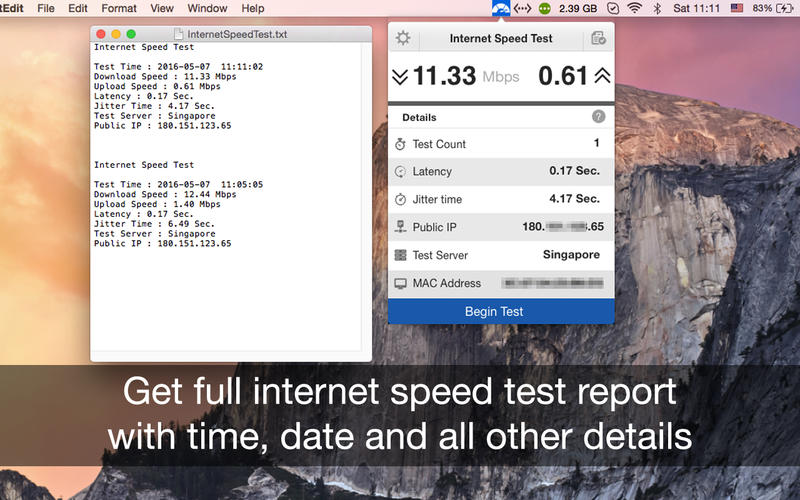
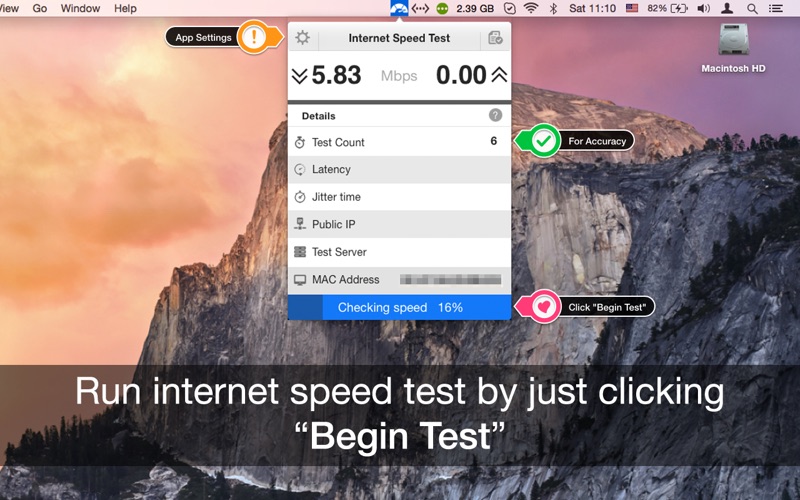
Internet Speed test is a single threaded test while most others (like speed test dot net) are multi-threaded. It uses a single connection to download the sample files which is closer to what you actually do in your everyday browsing and downloading.

Features: 

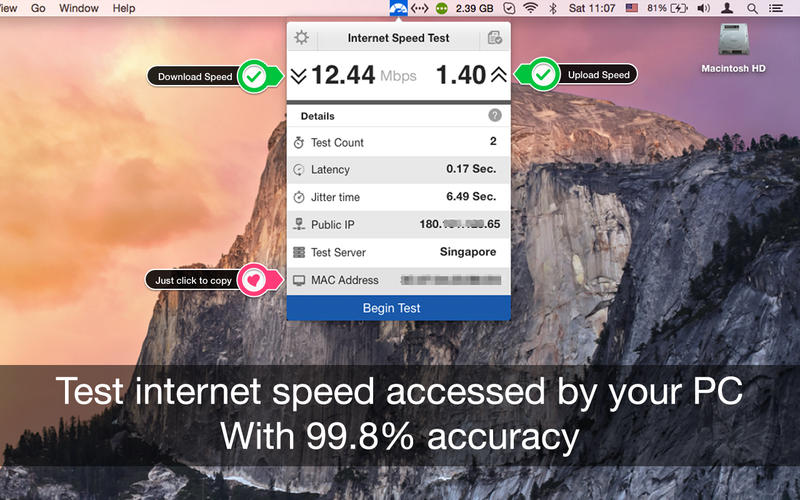
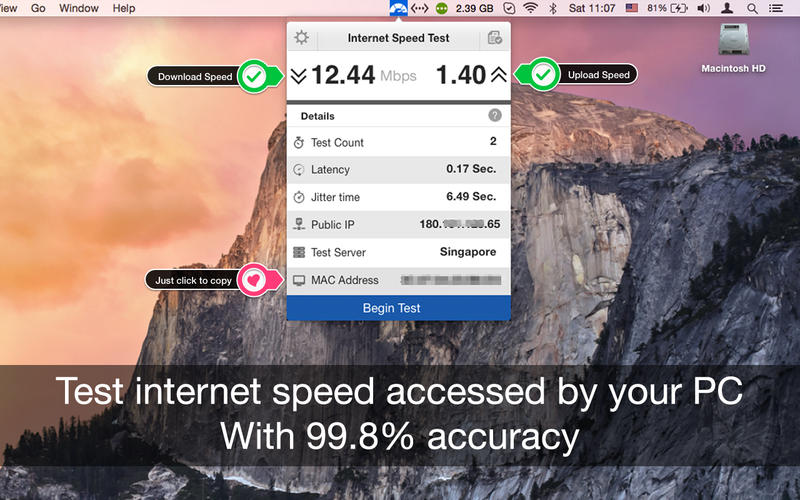
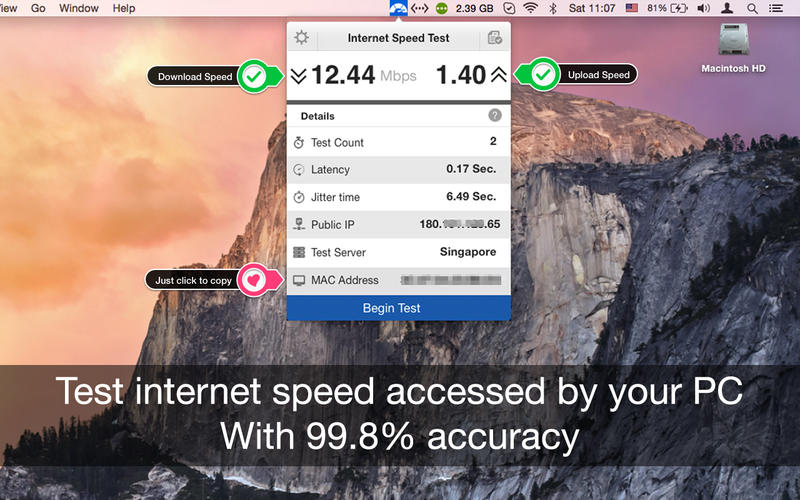
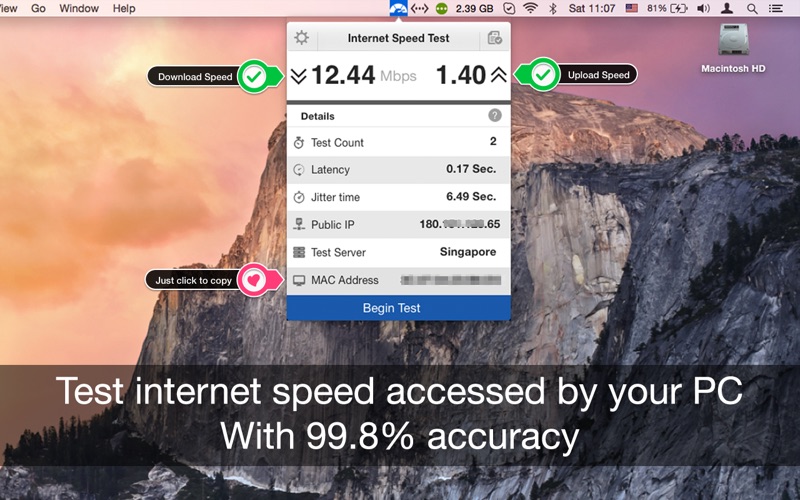
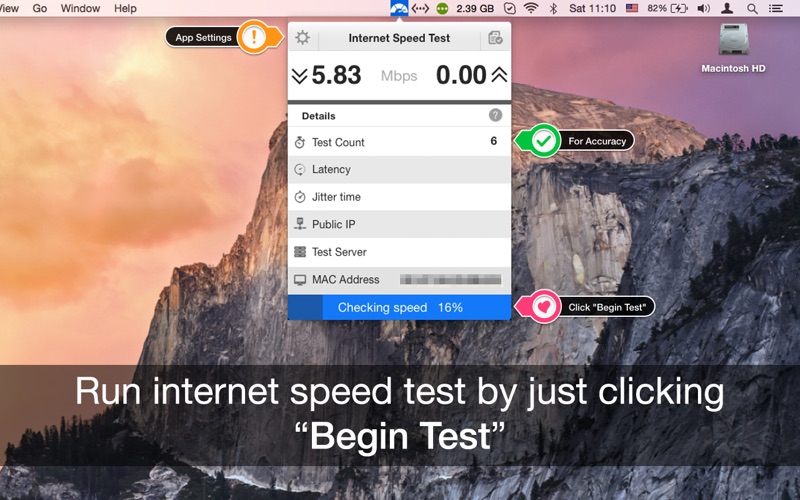
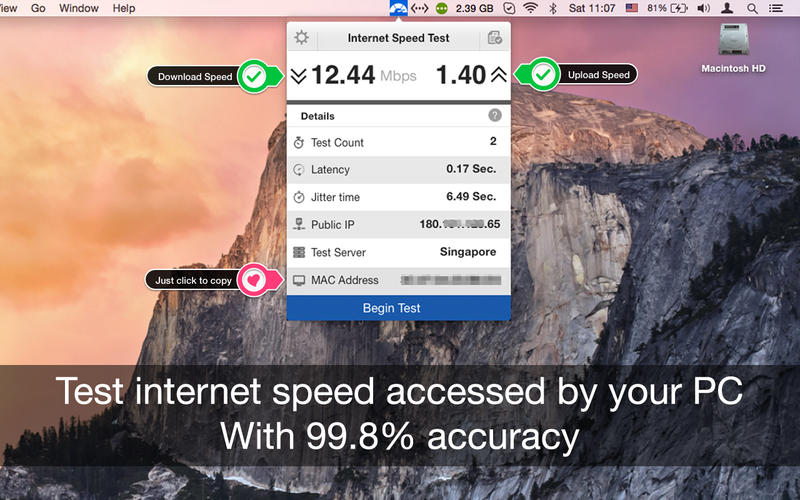
  • One click internet speed test right from the menu bar.
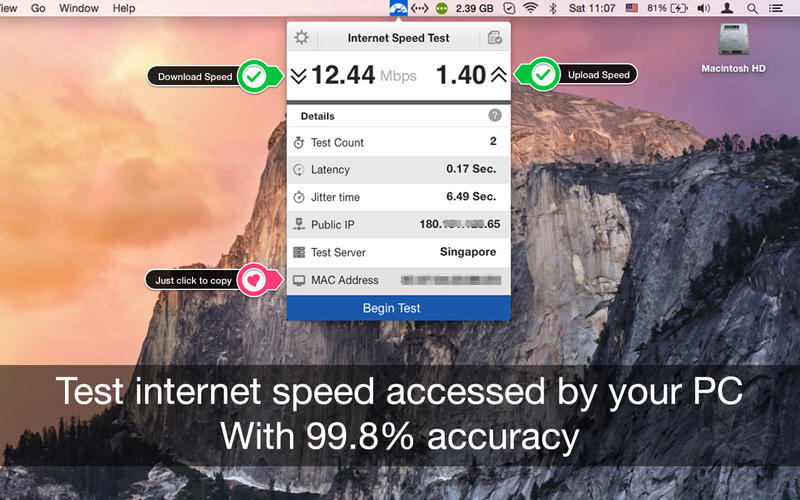
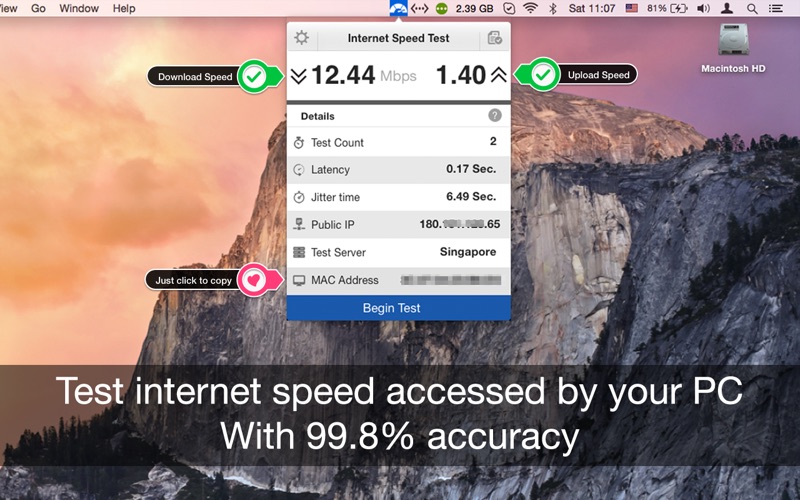
  • Upload and Download speed of your network connection.
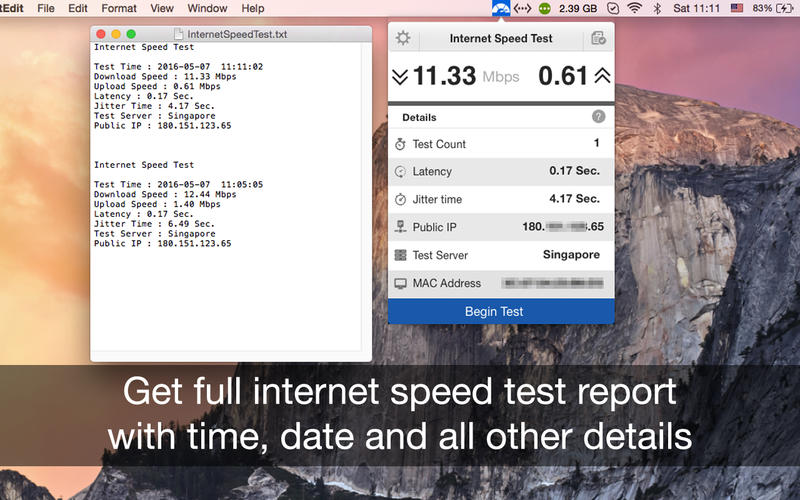
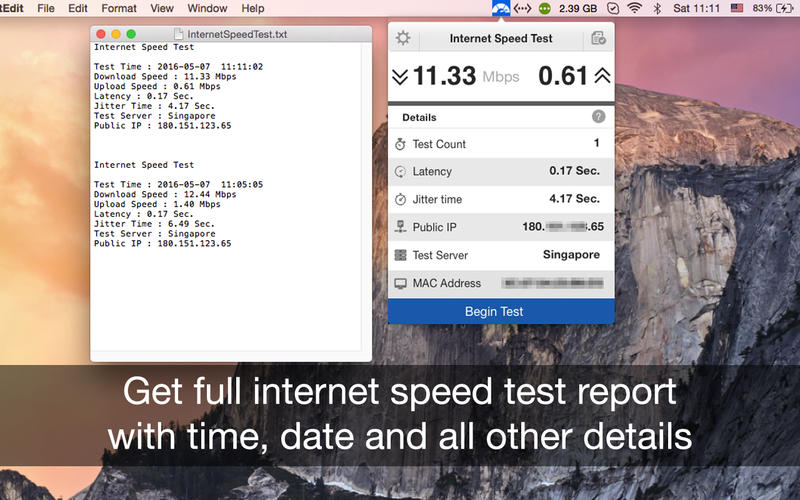
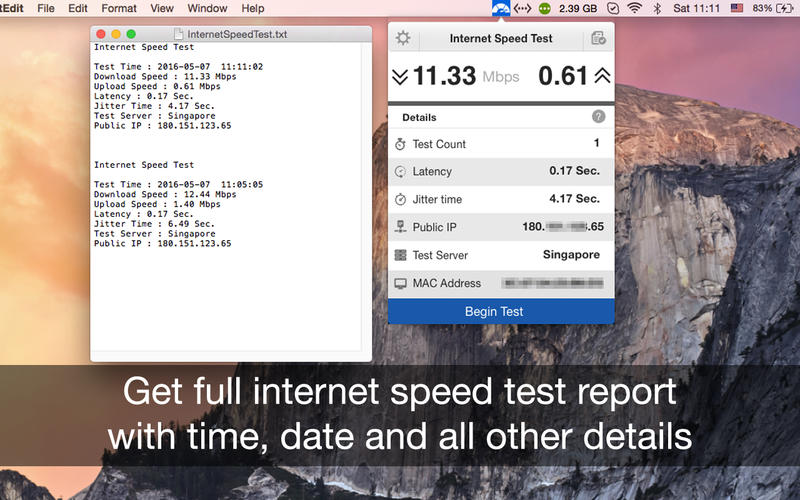
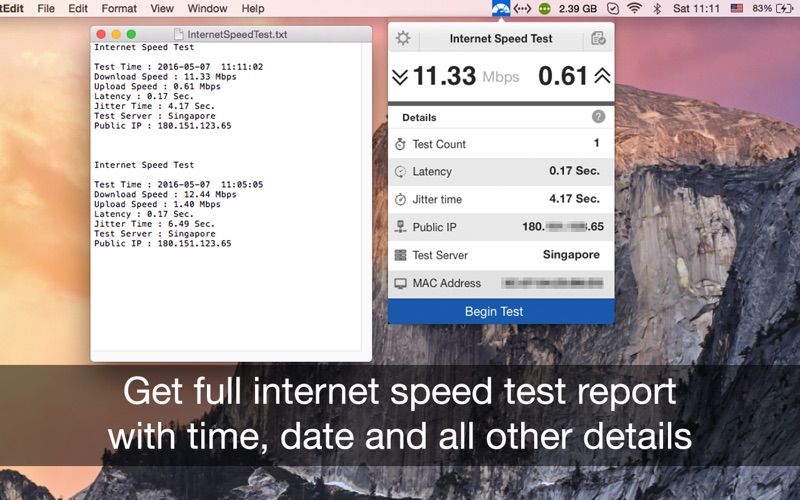
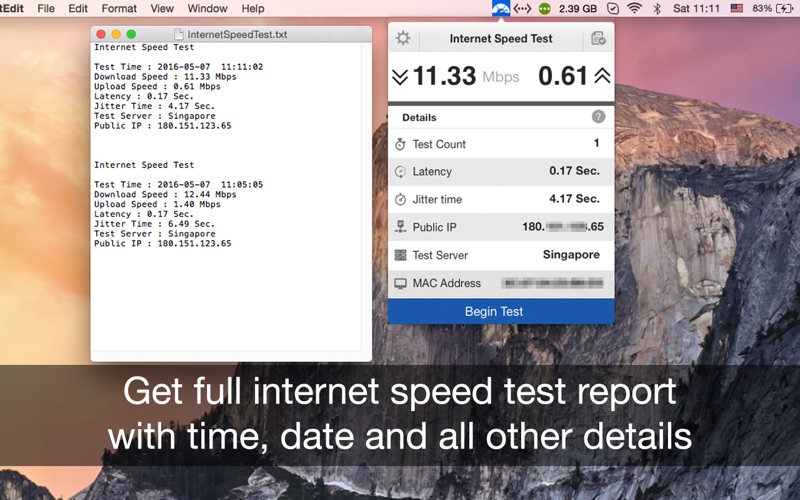
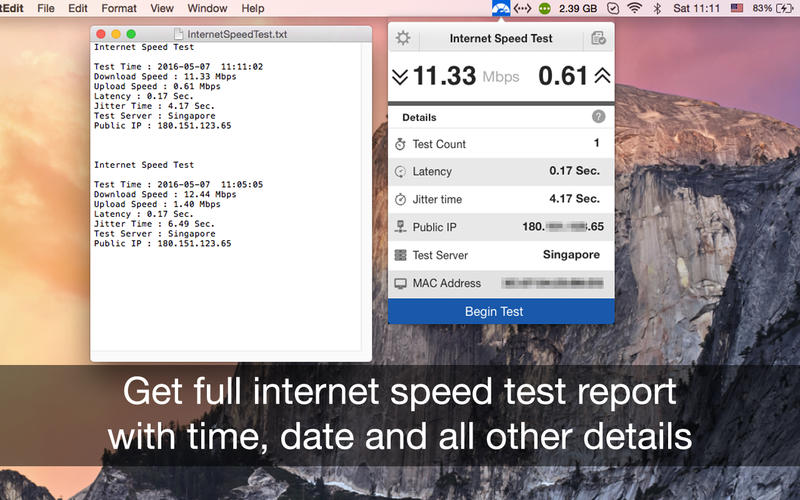
  • Export .txt format report for internet speed tests with date and time.
  • Get the public IP address of your computer.
  • Just click to copy MAC address of your PC.
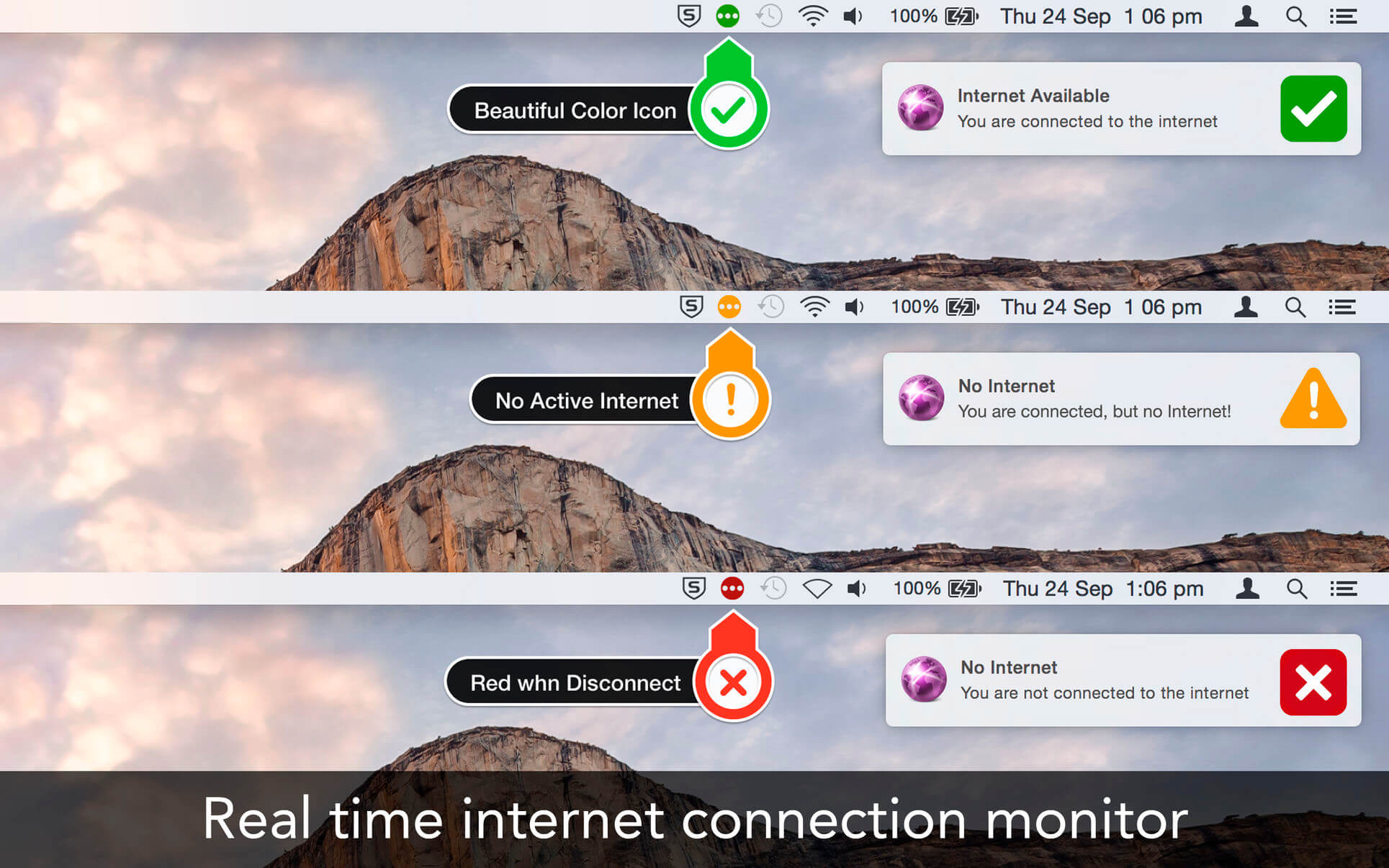
  • PC network connectivity is shown with a dark and grey icon.
  • Retina Display enabled icons.
  • Easy to use interface.
  • Best in the market.

Basics:

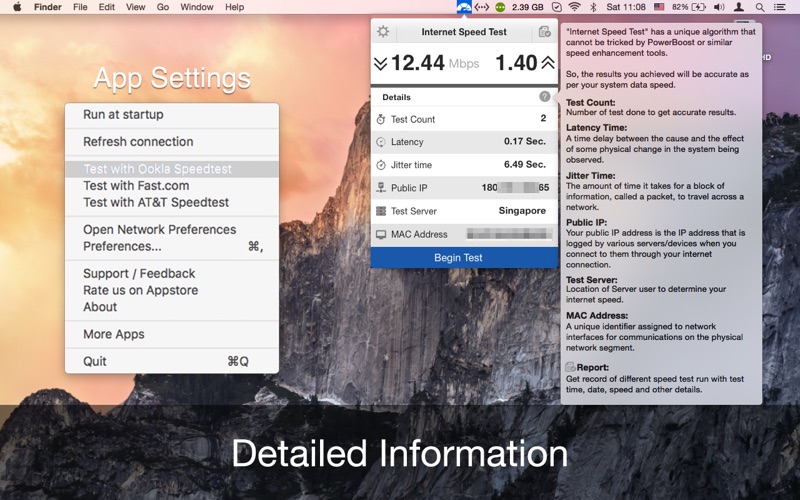
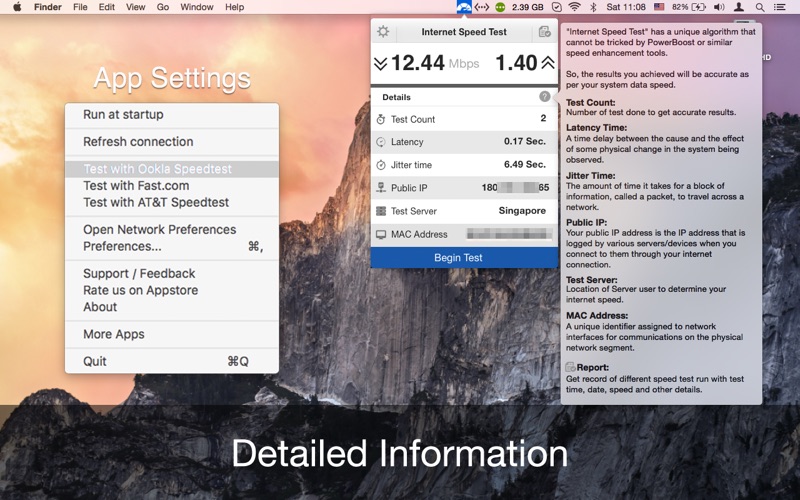
  • Test Count: Number of tests done to get accurate results
  • Latency Time: A time delay between the cause and the effect of some physical change in the system being observed.
  • Jitter Time: The amount of time it takes for a block of information, called a packet, to travel across a network
  • Public IP: Your public IP address is the IP address that is logged by various servers/devices when you connect to them through your internet connection.
  • Test Server: Location of Server user to determine your internet speed.
  • Mac Address: A unique identifier assigned to network interfaces for communications on the physical network segment.

Compatibility: macOS 10.12 or later
Homepage https://appyogi.com/apps/internet-speed-test-app/

Screenshots

Name: InternetSpeedTest_4.0_Mactorrents.Me.dmg
Size: 5 MB
Files InternetSpeedTest_4.0_Mactorrents.Me.dmg[5 MB]


   Download Torrent


   Download Link

Internet Speed Test 3.9

Name: InternetSpeedTest_3.9_Mactorrents.biz.dmg
Size: 5 MB
Files InternetSpeedTest_3.9_Mactorrents.biz.dmg[5 MB]

   Download Torrent
   Link Download

Internet Speed test is a single threaded test while most others (like speed test dot net) are multi-threaded. It uses a single connection to download the sample files which is closer to what you actually do in your everyday browsing and downloading.

Features: 

  • One click internet speed test right from the menu bar.
  • Upload and Download speed of your network connection.
  • Export .txt format report for internet speed tests with date and time.
  • Get the public IP address of your computer.
  • Just click to copy MAC address of your PC.
  • PC network connectivity is shown with a dark and grey icon.
  • Retina Display enabled icons.
  • Easy to use interface.
  • Best in the market.

Basics:

  • Test Count: Number of tests done to get accurate results
  • Latency Time: A time delay between the cause and the effect of some physical change in the system being observed.
  • Jitter Time: The amount of time it takes for a block of information, called a packet, to travel across a network
  • Public IP: Your public IP address is the IP address that is logged by various servers/devices when you connect to them through your internet connection.
  • Test Server: Location of Server user to determine your internet speed.
  • Mac Address: A unique identifier assigned to network interfaces for communications on the physical network segment.

Compatibility: macOS 10.12 or later
Homepage https://appyogi.com/apps/internet-speed-test-app/

Screenshots

Internet Status 5.7

Name: Internet_Status_5.7_Mactorrents.biz.dmg
Size: 10 MB
Files Internet_Status_5.7_Mactorrents.biz.dmg[10 MB]

   Download Torrent
   Link Download

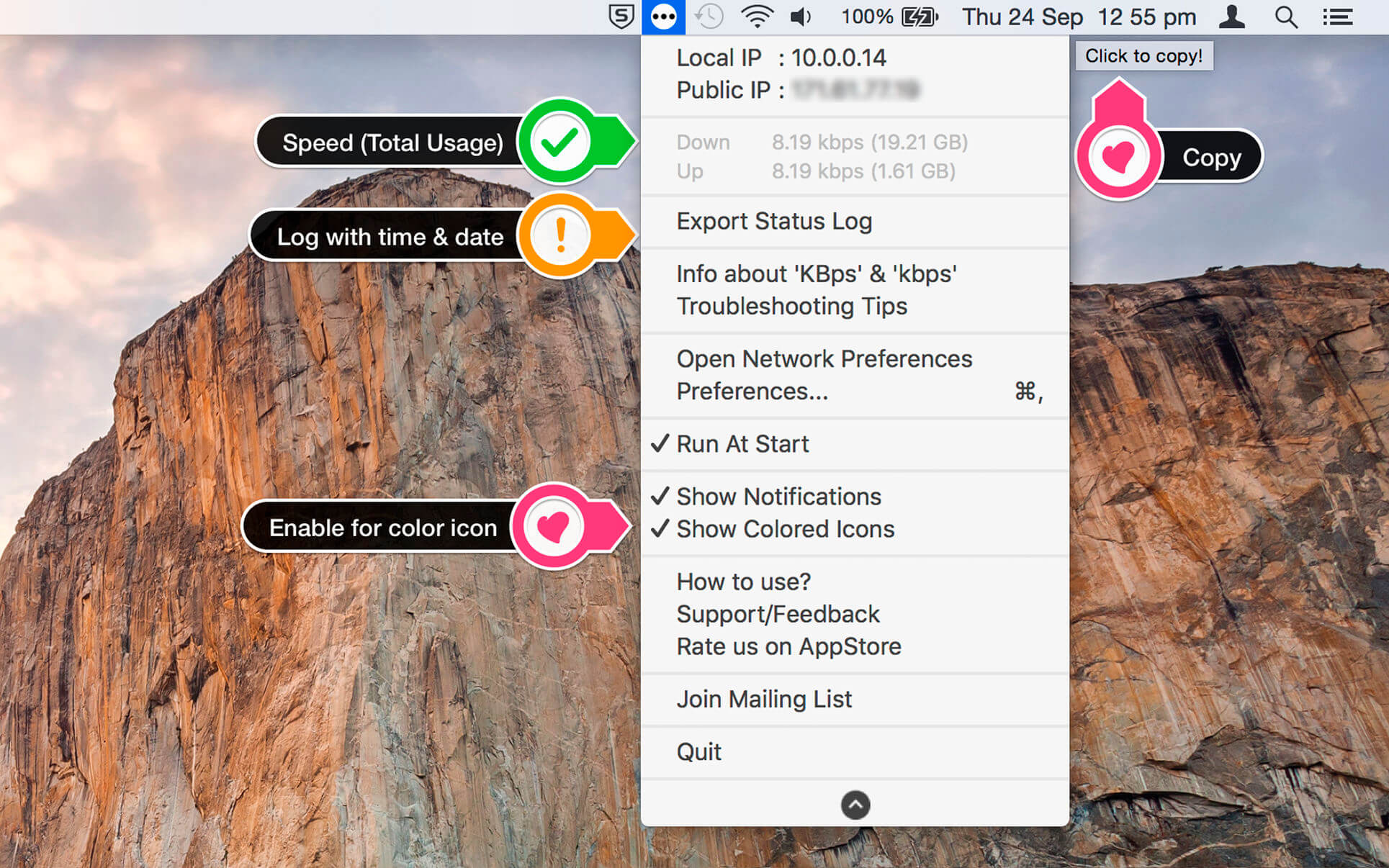
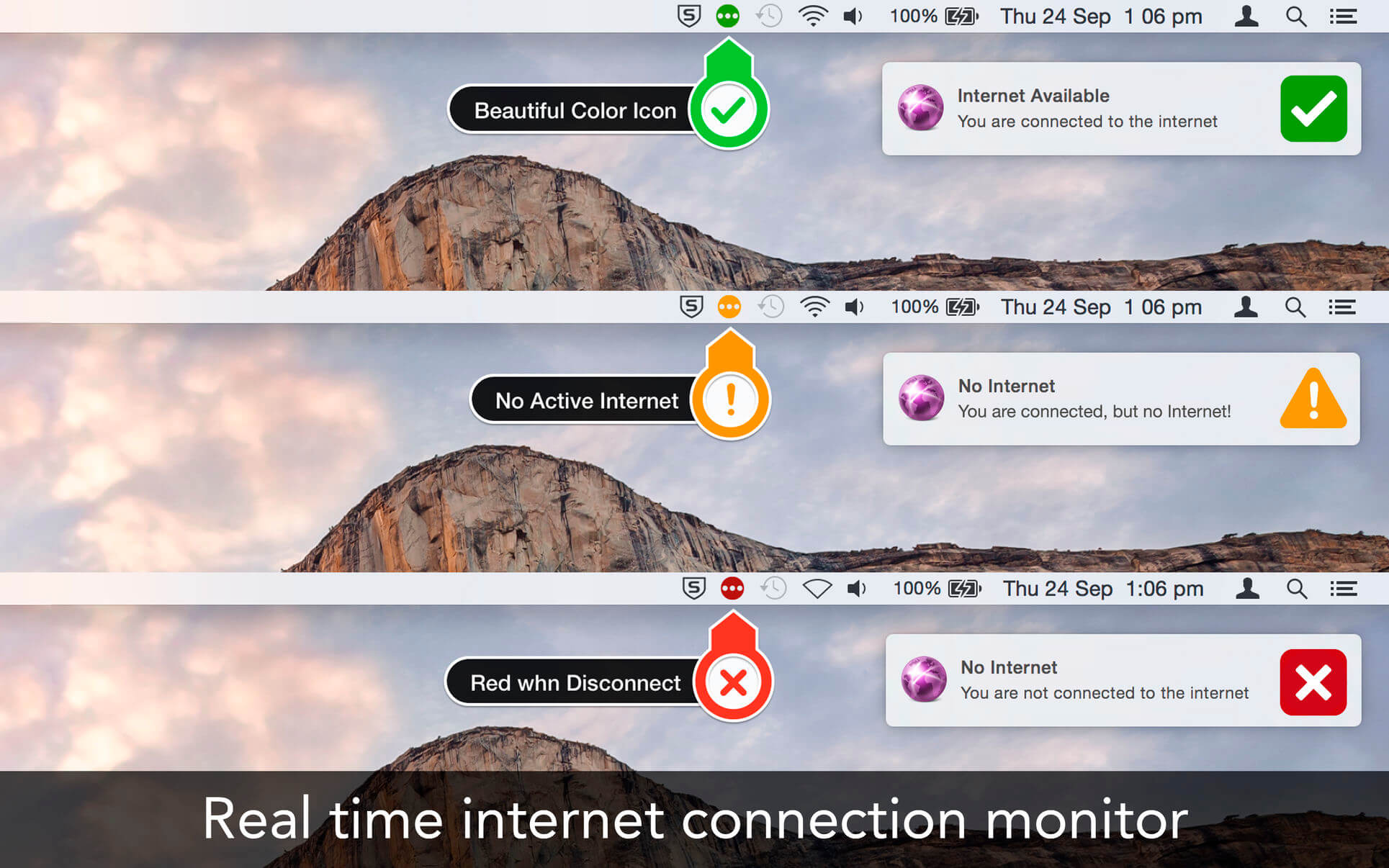
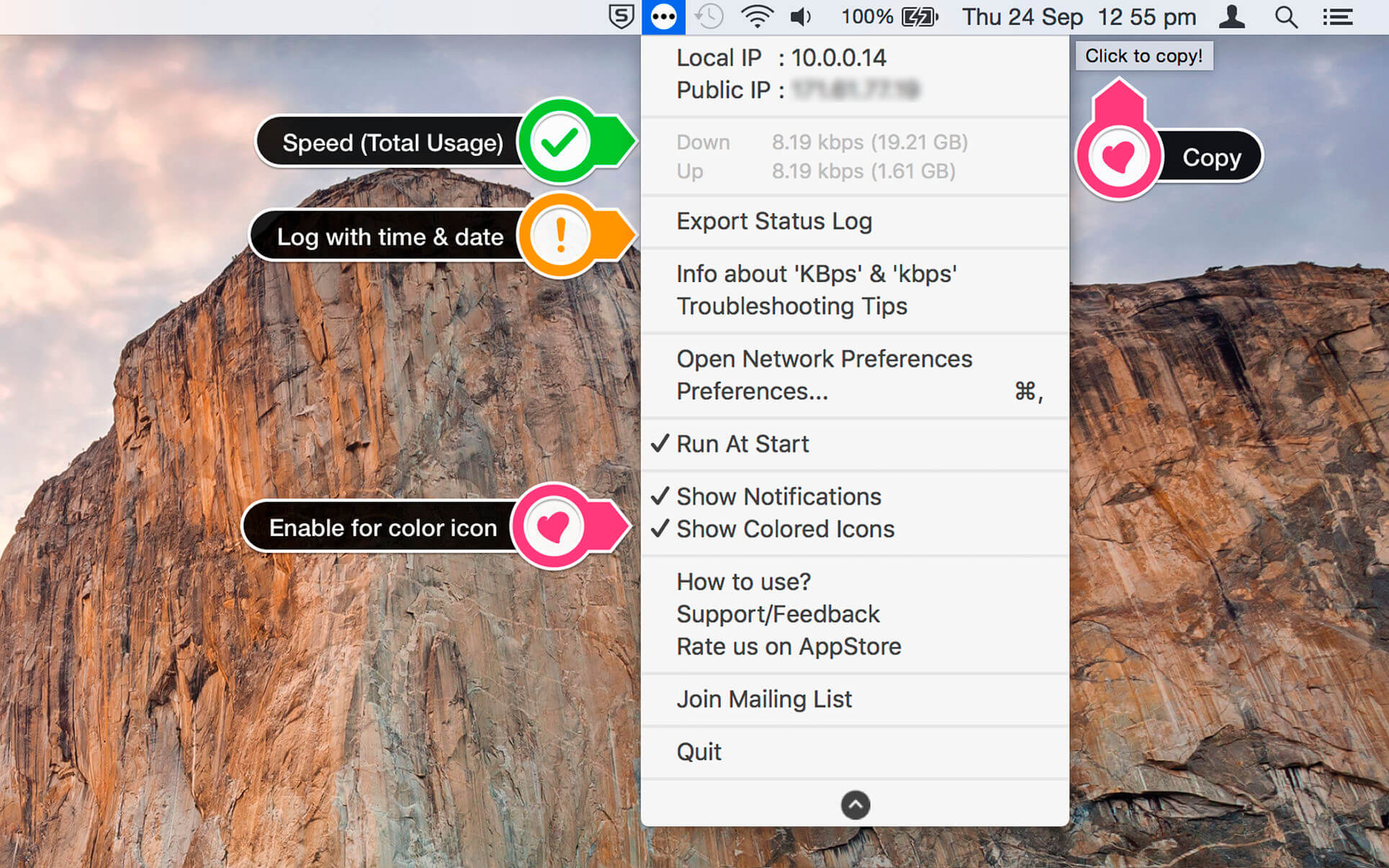
Internet Status keeps you informed about your Internet/network connection right from the menu bar. Its icon indicates the status of the connection and opens to display other stats, such as your IP address, upload and download speed, etc.

Features

  • See the connection status, and speed of the network connection
  • Get the public IP address of your computer
  • Retina-display enabled icons with dark theme support
  • Option to change icon color from dark to colored
  • Copy public IP with a click from the menu
  • See status of all active interfaces based on the user priority
  • Upload and download speed and record of the usage (Note: Data usage counters are reset on reboot)

Compatibility: macOS 10.12 or later
Homepage https://appyogi.com

Screenshots


Internet Speed Test 3.8

Name: InternetSpeedTest_3.8_MAS__TNT_Mactorrents.biz.dmg
Size: 5 MB
Files InternetSpeedTest_3.8_MAS__TNT_Mactorrents.biz.dmg[5 MB]

   Download Torrent

Internet Speed test is a single threaded test while most others (like speed test dot net) are multi-threaded. It uses a single connection to download the sample files which is closer to what you actually do in your everyday browsing and downloading.

Features: 

  • One click internet speed test right from the menu bar.
  • Upload and Download speed of your network connection.
  • Export .txt format report for internet speed tests with date and time.
  • Get the public IP address of your computer.
  • Just click to copy MAC address of your PC.
  • PC network connectivity is shown with a dark and grey icon.
  • Retina Display enabled icons.
  • Easy to use interface.
  • Best in the market.

Basics:

  • Test Count: Number of tests done to get accurate results
  • Latency Time: A time delay between the cause and the effect of some physical change in the system being observed.
  • Jitter Time: The amount of time it takes for a block of information, called a packet, to travel across a network
  • Public IP: Your public IP address is the IP address that is logged by various servers/devices when you connect to them through your internet connection.
  • Test Server: Location of Server user to determine your internet speed.
  • Mac Address: A unique identifier assigned to network interfaces for communications on the physical network segment.

Compatibility: macOS 10.12 or later
Homepage https://appyogi.com/apps/internet-speed-test-app/

Screenshots


Internet Speed Test 3.7

Internet Speed test is a single threaded test while most others (like speed test dot net) are multi-threaded. It uses a single connection to download the sample files which is closer to what you actually do in your everyday browsing and downloading.

Features: 

  • One click internet speed test right from the menu bar.
  • Upload and Download speed of your network connection.
  • Export .txt format report for internet speed tests with date and time.
  • Get the public IP address of your computer.
  • Just click to copy MAC address of your PC.
  • PC network connectivity is shown with a dark and grey icon.
  • Retina Display enabled icons.
  • Easy to use interface.
  • Best in the market.

Basics:

  • Test Count: Number of tests done to get accurate results
  • Latency Time: A time delay between the cause and the effect of some physical change in the system being observed.
  • Jitter Time: The amount of time it takes for a block of information, called a packet, to travel across a network
  • Public IP: Your public IP address is the IP address that is logged by various servers/devices when you connect to them through your internet connection.
  • Test Server: Location of Server user to determine your internet speed.
  • Mac Address: A unique identifier assigned to network interfaces for communications on the physical network segment.

Compatibility: OS X 10.8 or later
Homepage https://appyogi.com/apps/internet-speed-test-app/

Screenshots


Name: InternetSpeedTest_3.7_MAS_In-App__TNT_Mactorrents.is.dmg
Size: 5 MB
Files InternetSpeedTest_3.7_MAS_In-App__TNT_ Mactorrents.is.dmg[5 MB]

   Download Torrent
   Download Links

Internet Speed Test 3.6

Internet Speed test is a single threaded test while most others (like speed test dot net) are multi-threaded. It uses a single connection to download the sample files which is closer to what you actually do in your everyday browsing and downloading.

Features: 

  • One click internet speed test right from the menu bar.
  • Upload and Download speed of your network connection.
  • Export .txt format report for internet speed tests with date and time.
  • Get the public IP address of your computer.
  • Just click to copy MAC address of your PC.
  • PC network connectivity is shown with a dark and grey icon.
  • Retina Display enabled icons.
  • Easy to use interface.
  • Best in the market.

Basics:

  • Test Count: Number of tests done to get accurate results
  • Latency Time: A time delay between the cause and the effect of some physical change in the system being observed.
  • Jitter Time: The amount of time it takes for a block of information, called a packet, to travel across a network
  • Public IP: Your public IP address is the IP address that is logged by various servers/devices when you connect to them through your internet connection.
  • Test Server: Location of Server user to determine your internet speed.
  • Mac Address: A unique identifier assigned to network interfaces for communications on the physical network segment.

Compatibility: macOS 10.10 or later
Homepage https://appyogi.com/apps/internet-speed-test-app/

Screenshots


Name: InternetSpeedTest_3.6_MAS_In-App_[TNT]_Mactorrents.is.dmg
Size: 4.8 MB
Files InternetSpeedTest_3.6_MAS_In-App_[TNT]_ Mactorrents.is.dmg[4.8 MB]

   Download

Internet Status 5.0

Internet Status keeps you informed about your Internet/network connection right from the menu bar. Its icon indicates the status of the connection and opens to display other stats, such as your IP address, upload and download speed, etc.

Features

  • See the connection status, and speed of the network connection
  • Get the public IP address of your computer
  • Retina-display enabled icons with dark theme support
  • Option to change icon color from dark to colored
  • Copy public IP with a click from the menu
  • See status of all active interfaces based on the user priority
  • Upload and download speed and record of the usage (Note: Data usage counters are reset on reboot)

What’s New:

Version 5.0

  • Added option to get custom sound alerts, this feature requested by the loyal user.
  • Fixed Autorun at the login

Compatibility: macOS 10.8 or later 64-bit
Homepage https://appyogi.com

Screenshots


Name: Internet_Status_5.0_MAS__TNT_Mactorrents.io.dmg
Size: 7.51 MB
Files Internet_Status_5.0_MAS__TNT_Mactorrents.io.dmg[7.51 MB]

   Download

SonicWeb Internet Radio Player 2.5

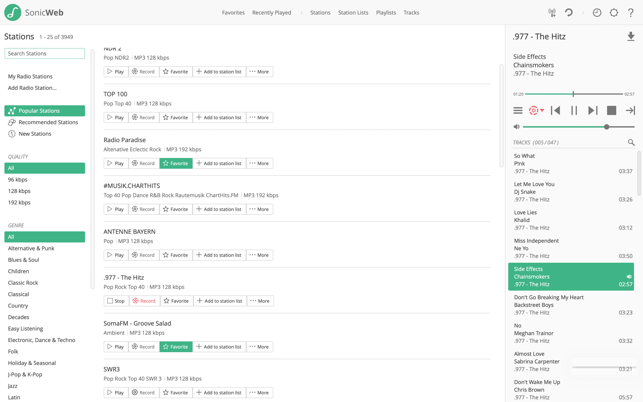
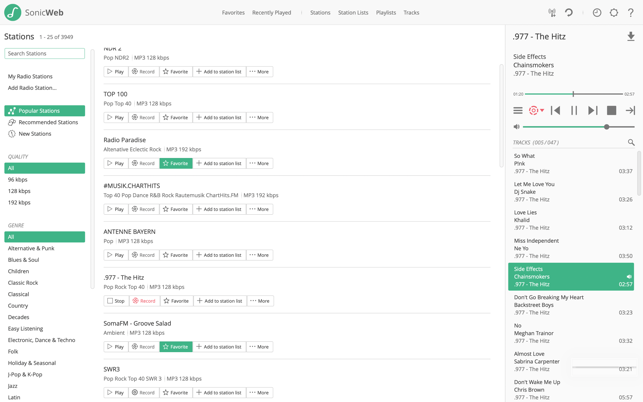
SonicWeb is a powerful internet radio player and recorder. Listen to free Internet radio, record multiple radio stations simultaneously and listen to your recordings as often you like, whenever you want.

=== Discover new music ===
Tunein to more than three thousand free, hand selected, high quality internet radio stations or add your own radio stations.

=== Fully featured internet radio player ===
Browse popular and recommended radio stations, set favorites, filter by genre or bitrate and search by name.

=== Advanced internet radio recorder ===
Record multiple stations simultaneously.

Record continuously or automatically split the internet radio streams into tracks and put them into a playlist.

Timeshift internet radio: pause and resume playback at any time without any gaps.

=== Custom playlists ===
Create custom playlists from the tracks you like. Keep the tracks as long as you want and play them as many times as you like.

=== Unique to SonicWeb: The powerful station list feature ===
With several simultaneously turned on radio stations your playlist will quickly contain many unplayed tracks. This enables you to skip tracks you don’t like without any skip limit as long as there are more tracks available in your playlist.

Enjoy gapless audio playback with tracks from different radios stations crossfading into each other. SonicWeb dynamically adjusts the volume of loud and silent tracks so that you don’t have to.

Together these features create your own personal radio station: seamless playback of diverse playlists with ever changing tracks that you can control just like a regular media player.

=== Deep Mac OS X integration ===
– Menu bar icon. Keep your dock tidy. SonicWeb can hide its dock icon and show an icon in the menu bar instead.

– Background notifications. SonicWeb can show background notifications in Mountain Lion’s Notification Center.

What’s new in SonicWeb Internet Radio Player
Version 2.5:

  • Support for macOS Catalina
  • Languages : English, German
    Compatibility: OS X 10.8 or later, 64-bit processor
    Homepage https://apps.apple.com/app/sonicweb-internet-radio-player/id660638272

    Screenshots

    Name: SonicWeb_Internet_Radio_Player_2.5_MAS__HCiSO_Mactorrents.io.dmg
    Size: 14.3 MB
    Files SonicWeb_Internet_Radio_Player_2.5_MAS__HCiSO_Mactorrents.io.dmg[14.3 MB]

       Download

    Internet Status 4.9

    Internet Status 4.9

    Internet Status keeps you informed about your Internet/network connection right from the menu bar. Its icon indicates the status of the connection and opens to display other stats, such as your IP address, upload and download speed, etc.

    Features

    • See the connection status, and speed of the network connection
    • Get the public IP address of your computer
    • Retina-display enabled icons with dark theme support
    • Option to change icon color from dark to colored
    • Copy public IP with a click from the menu
    • See status of all active interfaces based on the user priority
    • Upload and download speed and record of the usage (Note: Data usage counters are reset on reboot)

    What’s New:

    Version 4.8:

    • Release notes were unavailable when this listing was updated.

    Compatibility: macOS 10.8 or later 64-bit
    Homepage https://appyogi.com

    Screenshots


    Name: Internet_Status_4.9_MAS__TNT_Mactorrents.io.dmg
    Size: 7 MB
    Files Internet_Status_4.9_MAS__TNT_Mactorrents.io.dmg[7 MB]

       Download

    Internet Speed Test 2.9.1

    Name InternetSpeedTest 2 9 1 TNT.zip
    Size 5.54 MB
    Created on 2019-01-15 21:35:18
    Hash 276d093aee6952cfbe206171048d0d6de87d5676
    Files InternetSpeedTest 2 9 1 TNT.zip (5.54 MB)

    Download

    Descriptions for Internet Speed Test 2.9.1

    “Internet Speed test” has a unique algorithm that cannot be tricked by PowerBoost or similar speed enhancement tools. So, the results you achieved will be accurate as per your system data speed. “Internet Speed test” is a single threaded test while most others (like speed test dot net) are multi-threaded. It uses a single connection to download the sample files which is closer to what you actually do in your everyday browsing and downloading.

    Features:

    • One click internet speed test right from the menu bar.
    • Upload and Download speed of your network connection.
    • Export .txt format report for internet speed tests with date and time.
    • Get the public IP address of your computer.
    • Just click to copy MAC address of your PC.
    • PC network connectivity is shown with a dark and grey icon.
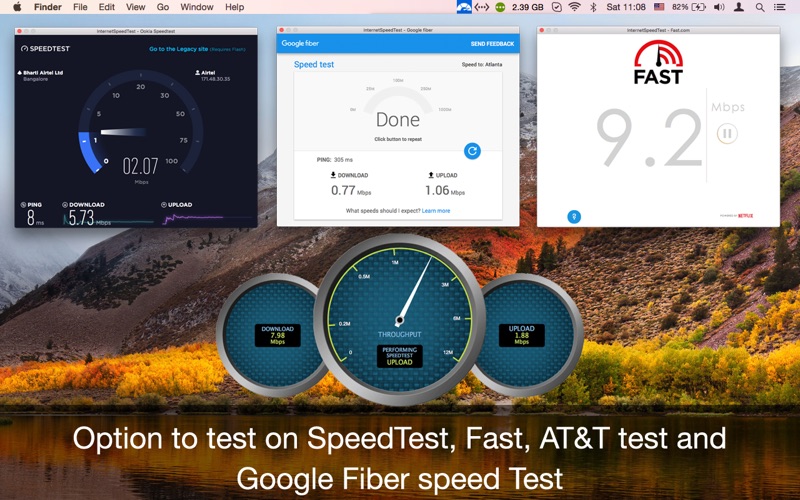
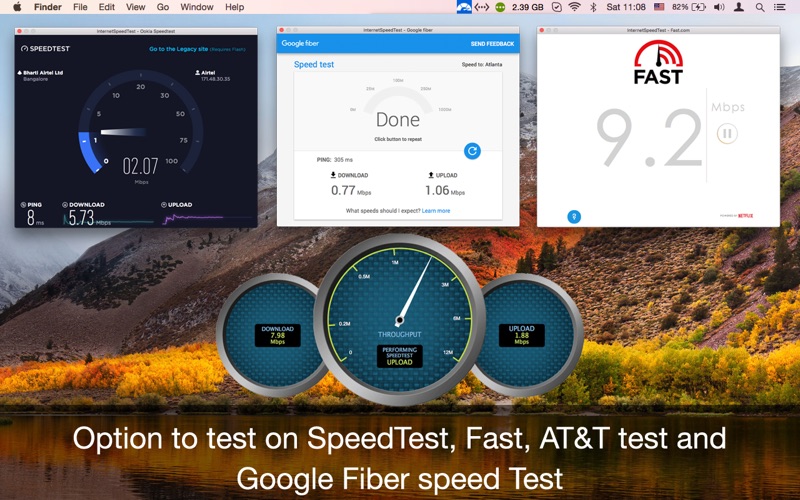
    • Can also test with Ookla (speedtest.net), Netflix (fast.com) and AT & T.
    • Retina Display enabled icons.
    • Easy to use interface.
    • Best in the market.

    Basics:

    • Test Count: Number of tests done to get accurate results
    • Latency Time: A time delay between the cause and the effect of some physical change in the system being observed.
    • Jitter Time: The amount of time it takes for a block of information, called a packet, to travel across a network
    • Public IP: Your public IP address is the IP address that is logged by various servers/devices when you connect to them through your internet connection.
    • Test Server: Location of Server user to determine your internet speed.
    • Mac Address: A unique identifier assigned to network interfaces for communications on the physical network segment.

    Compatibility: OS X 10.8 or later 64 bit

    Web Site: http://appyogi.com/apps
    Mac App Store: https://itunes.apple.com/app/internet-speed-test-app/id1087442457?mt=12

    What’s New in Internet Speed Test 2.9.1

    We fixed bugs and made some improvements to enhance your experience with the application.

    Screenshots

    Internet Speed Test 2.7

    Descriptions for Internet Speed Test 2.7

    Name: Internet Speed Test App
    Version: 2.7
    Release Date: March 21, 2018
    Developer: AppYogi Software
    MAS Rating: 4+
    Mac Platform: Intel
    OS Version: OS X 10.8 or later

    Includes: Pre-K’ed (TNT)

    Web Site: http://appyogi.com/apps
    Mac App Store: https://itunes.apple.com/app/internet-speed-test-app/id1087442457?mt=12

    Overview

    “Internet Speed test” has a unique algorithm that cannot be tricked by PowerBoost or similar speed enhancement tools.
    So, the results you achieved will be accurate as per your system data speed.

    “Internet Speed test” is a single threaded test while most others (like speed test dot net) are multi-threaded. It uses a single connection to download the sample files which is closer to what you actually do in your everyday browsing and downloading.

    Features:
    • One click internet speed test right from the menu bar.
    • Upload and Download speed of your network connection.
    • Export .txt format report for internet speed tests with date and time.
    • Get the public IP address of your computer.
    • Just click to copy MAC address of your PC.
    • PC network connectivity is shown with a dark and grey icon.
    • Can also test with Ookla (speedtest.net), Netflix (fast.com), AT & T and Google (Fibre Speed Test).
    • Retina Display enabled icons.
    • You can also have option to test internet speed on internet speed.net, fast. com, AT&T and Google Fiber Speed Test IST.
    • Easy to use interface.
    • Best in the market.
    Basics:
    • – Test Count: Number of tests done to get accurate results
    • – Latency Time: A time delay between the cause and the effect of some physical change in the system being observed.
    • – Jitter Time: The amount of time it takes for a block of information, called a packet, to travel across a network
    • – Public IP: Your public IP address is the IP address that is logged by various servers/devices when you connect to them through your internet connection.
    • – Test Server: Location of Server user to determine your internet speed.
    • – Mac Address: A unique identifier assigned to network interfaces for communications on the physical network segment.

    What’s New in Internet Speed Test 2.7

    • Improved over Stability
    • Bug fix.

    Screenshots

    Name InternetSpeedTest 2 7 MAS TNT.dmg
    Size 5.58 MB
    Created on 2018-03-23 14:20:36
    Hash ef9e23310d668c62ee367078aafad3aa3173783f
    Files InternetSpeedTest 2 7 MAS TNT.dmg (5.58 MB)