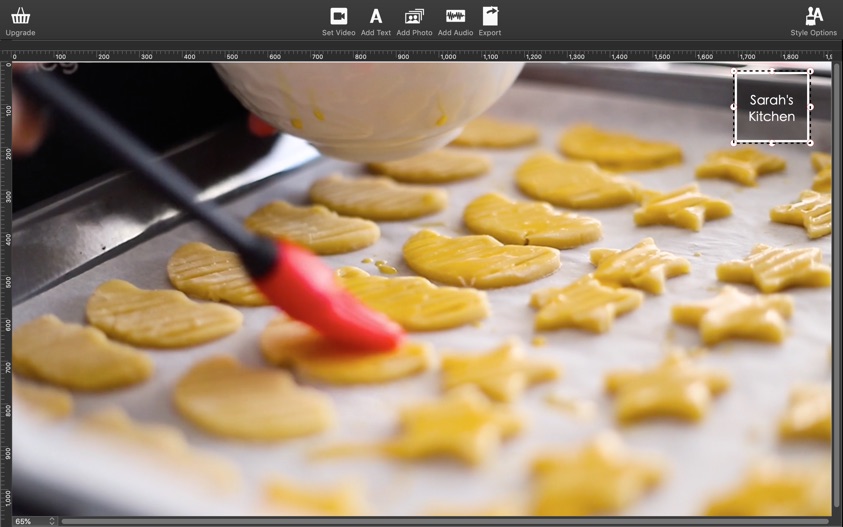
If you need easy-to-use slideshow software for Mac, choose Movavi Slideshow Maker! Creating cool-looking movies from photos is a breeze with this app. All you need to do is upload your images, choose a couple of settings, and the software will do the rest for you – automatically!
You don’t need to be a professional to work with our slideshow program for Mac – thanks to its intuitive interface, the software is accessible even to absolute beginners. – Make slideshows in no time – Select basic or full-function mode – Add music, fades, captions, and special effects
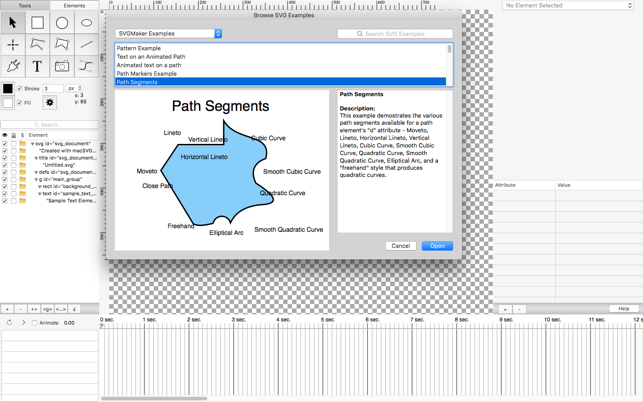
SVG is a markup language for describing two-dimensional graphics applications and images, and a set of related graphics script interfaces. SVGMaker is a application for designing SVG content for HTML5 web pages, mobile apps, animation design, and general graphics usage.
Main Features:
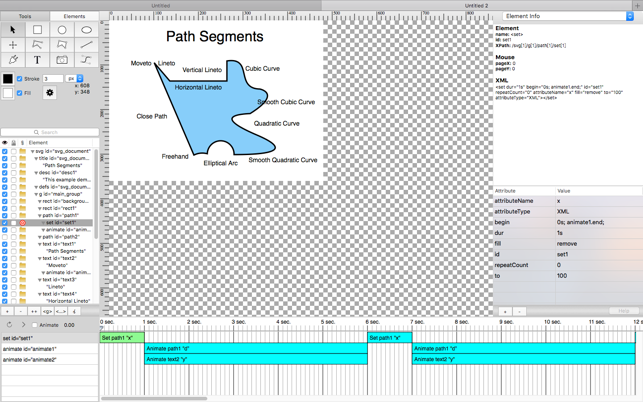
Outline view of SVG XML document structure. Elements can be imported and reordered in the structure with drag-and-drop actions.
SVG multi-segment path editing, with support for text on a path, path shape animation, and other path functions.
Setting attribute values such as colors, color gradients, patterns, transforms, text paths, animation, path shape animations, etc.
JPEG and PNG images can be embedded in the SVG document, or referenced externally with a URL. SVG documents can contain embedded SVG documents.
A visual timeline graph for SMIL animation, with pause, play and restart controls. The time marker can be dragged (i.e., scrubbed) on the timeline to see the state of the animation at any point in time.
Export SVG animation to MPEG-4 for HTML5 web video.
Check out Slideshow Maker Movavi – a handy app that will help you turn your photos into a spectacular movie in no time.
With our easy-to-use Slideshow Maker, you can:
Make high-quality slideshows in a few clicks
Crop, rotate, and make other edits to your images
Improve picture quality automatically or by hand
Join media files together using stylish transitions
Add your own audio or select from the default soundtracks
Use automatic beat detection and sync slides with background music
Export the slideshow in any popular format
Prepare your movie for viewing on iPod, iPad, iPhone, or other mobile devices
Share your creative work with the whole world using the special export presets for Facebook, YouTube, and other social networks
Slideshow Maker lets you combine photos into stunning movies with almost no effort. Import your photos in BMP, JPEG, PNG, GIF, or other image format and join them together to create amazing slideshows. Insert stylish animated transitions between the photos to give your movie a smooth flow.
Edit your video to make it perfect:
Change the composition: crop, rotate and flip images
Emphasize important elements: zoom and pan, highlight, or conceal
Adjust colors by hand or use Magic Enhance for automatic fixes
The best way to make your slideshow your own is to add a soundtrack. Import sound effects or music in MP3, FLAC, WAV, or other popular format to generate a specific atmosphere in your video. Automatic beat detection will help you sync your slides with the background music and give your slideshow added appeal.
Try Slideshow Wizard and create a photo-based presentation in 3 simple steps:
Add photos one by one or in groups, or upload entire folders
Choose a transition style: crossfade, simple, geometric, artistic, or random
Add music: upload your own soundtrack or choose from the built-in library
Save your slideshow in any convenient format – AVI, MP4, M2TS, and more. You can also choose one of the many export presets and prepare your file for viewing on a specific mobile device or for uploading to the web.
What’s New:
Version 6.0:
Modern and stylish design with more intuitive navigation.
New Media bin for your personal files. You can browse, sort and select your files right in the editor and add them anywhere on the Timeline so they’re easily available for the future montage.
New parallax transitions, glitch, and retro effects.
Transitions and themes have been grouped together on the Templates tab.
Change the music in a selected theme, if you don’t like the default track.
Check out Slideshow Maker Movavi – a handy app that will help you turn your photos into a spectacular movie in no time.
With our easy-to-use Slideshow Maker, you can:
Make high-quality slideshows in a few clicks
Crop, rotate, and make other edits to your images
Improve picture quality automatically or by hand
Join media files together using stylish transitions
Add your own audio or select from the default soundtracks
Use automatic beat detection and sync slides with background music
Export the slideshow in any popular format
Prepare your movie for viewing on iPod, iPad, iPhone, or other mobile devices
Share your creative work with the whole world using the special export presets for Facebook, YouTube, and other social networks
Slideshow Maker lets you combine photos into stunning movies with almost no effort. Import your photos in BMP, JPEG, PNG, GIF, or other image format and join them together to create amazing slideshows. Insert stylish animated transitions between the photos to give your movie a smooth flow.
Edit your video to make it perfect:
Change the composition: crop, rotate and flip images
Emphasize important elements: zoom and pan, highlight, or conceal
Adjust colors by hand or use Magic Enhance for automatic fixes
The best way to make your slideshow your own is to add a soundtrack. Import sound effects or music in MP3, FLAC, WAV, or other popular format to generate a specific atmosphere in your video. Automatic beat detection will help you sync your slides with the background music and give your slideshow added appeal.
Try Slideshow Wizard and create a photo-based presentation in 3 simple steps:
Add photos one by one or in groups, or upload entire folders
Choose a transition style: crossfade, simple, geometric, artistic, or random
Add music: upload your own soundtrack or choose from the built-in library
Save your slideshow in any convenient format – AVI, MP4, M2TS, and more. You can also choose one of the many export presets and prepare your file for viewing on a specific mobile device or for uploading to the web.
Check out Slideshow Maker Movavi – a handy app that will help you turn your photos into a spectacular movie in no time.
With our easy-to-use Slideshow Maker, you can:
Make high-quality slideshows in a few clicks
Crop, rotate, and make other edits to your images
Improve picture quality automatically or by hand
Join media files together using stylish transitions
Add your own audio or select from the default soundtracks
Use automatic beat detection and sync slides with background music
Export the slideshow in any popular format
Prepare your movie for viewing on iPod, iPad, iPhone, or other mobile devices
Share your creative work with the whole world using the special export presets for Facebook, YouTube, and other social networks
Slideshow Maker lets you combine photos into stunning movies with almost no effort. Import your photos in BMP, JPEG, PNG, GIF, or other image format and join them together to create amazing slideshows. Insert stylish animated transitions between the photos to give your movie a smooth flow.
Edit your video to make it perfect:
Change the composition: crop, rotate and flip images
Emphasize important elements: zoom and pan, highlight, or conceal
Adjust colors by hand or use Magic Enhance for automatic fixes
The best way to make your slideshow your own is to add a soundtrack. Import sound effects or music in MP3, FLAC, WAV, or other popular format to generate a specific atmosphere in your video. Automatic beat detection will help you sync your slides with the background music and give your slideshow added appeal.
Try Slideshow Wizard and create a photo-based presentation in 3 simple steps:
Add photos one by one or in groups, or upload entire folders
Choose a transition style: crossfade, simple, geometric, artistic, or random
Add music: upload your own soundtrack or choose from the built-in library
Save your slideshow in any convenient format – AVI, MP4, M2TS, and more. You can also choose one of the many export presets and prepare your file for viewing on a specific mobile device or for uploading to the web.
What’s New:
Version 6.0:
Modern and stylish design with more intuitive navigation.
New Media bin for your personal files. You can browse, sort and select your files right in the editor and add them anywhere on the Timeline so they’re easily available for the future montage.
New parallax transitions, glitch, and retro effects.
Transitions and themes have been grouped together on the Templates tab.
Change the music in a selected theme, if you don’t like the default track.
Movie Thumbnails Maker lets you catch the content of the latest movies at first glance. How about creating an amazing overview for all the latest movies? Movie Thumbnails Maker is the all-in-one solution, you don’t need guess the content of the movie any more.
Key Features:
Support various formats such as AVI, WMV, RM, MPG, TS, MKV, MOV, FLV, MP4, RMVB, etc;
Fast and easy to use, you can get the amazing overview with one click;
Custom settings for background color,border color, position of metadata,etc;
Batch process several movie files at onece, with one setting for each movie;
Various output image formats such as BMP, PNG, TIFF,JPEG.
What’s New:
Version 3.3.0:
Release notes were unavailable when this listing was updated.
Movie Thumbnails Maker lets you catch the content of the latest movies at first glance. How about creating an amazing overview for all the latest movies? Movie Thumbnails Maker is the all-in-one solution, you don’t need guess the content of the movie any more.
Key Features:
Support various formats such as AVI, WMV, RM, MPG, TS, MKV, MOV, FLV, MP4, RMVB, etc;
Fast and easy to use, you can get the amazing overview with one click;
Custom settings for background color,border color, position of metadata,etc;
Batch process several movie files at onece, with one setting for each movie;
Various output image formats such as BMP, PNG, TIFF,JPEG.
What’s New:
Version 3.2.0:
Release notes were unavailable when this listing was updated.
Movie Thumbnails Maker lets you catch the content of the latest movies at first glance. How about creating an amazing overview for all the latest movies? Movie Thumbnails Maker is the all-in-one solution, you don’t need guess the content of the movie any more.
Key Features:
Support various formats such as AVI, WMV, RM, MPG, TS, MKV, MOV, FLV, MP4, RMVB, etc;
Fast and easy to use, you can get the amazing overview with one click;
Custom settings for background color,border color, position of metadata,etc;
Batch process several movie files at onece, with one setting for each movie;
Various output image formats such as BMP, PNG, TIFF,JPEG.
What’s New:
Version 3.2.1:
Release notes were unavailable when this listing was updated.
Movie Thumbnails Maker lets you catch the content of the latest movies at first glance. How about creating an amazing overview for all the latest movies? Movie Thumbnails Maker is the all-in-one solution, you don’t need guess the content of the movie any more.
Key Features:
Support various formats such as AVI, WMV, RM, MPG, TS, MKV, MOV, FLV, MP4, RMVB, etc;
Fast and easy to use, you can get the amazing overview with one click;
Custom settings for background color,border color, position of metadata,etc;
Batch process several movie files at onece, with one setting for each movie;
Various output image formats such as BMP, PNG, TIFF,JPEG.
What’s New:
Version 3.2.0:
Release notes were unavailable when this listing was updated.
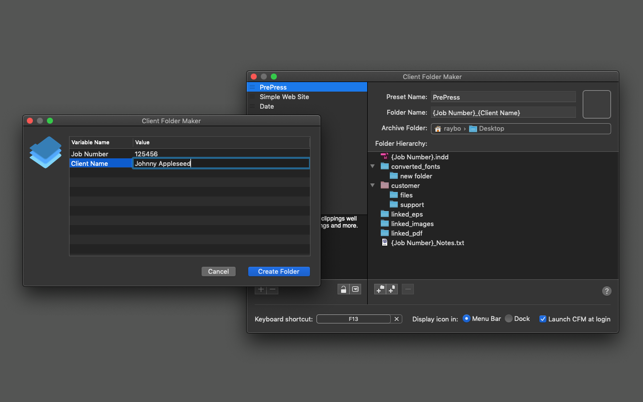
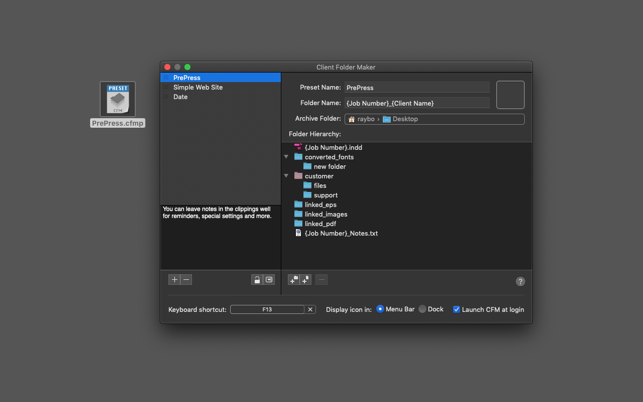
Client Folder Maker is a simple, easy-to-use general purpose folder creation and management tool for the busy desktop publisher, prepress operator or web designer. It allows you to set up a hierarchy of folders once, then quickly re-create that hierarchy anywhere in the filesystem with just a few clicks from the Finder.
Client Folder Maker utilizes a very simple approach to building custom folder sets for any job. Easily add, rename, or delete folders in the hierarchy and create new files under the folder tree. The hidden gem is CFM’s limitless customization of tag variables, so the possibilities for personal customization are endless.
Client Folder Maker ships with default Presets for the design or prepress minded, as well as a simple website structure for web developers. Both have their own unique tag variables, but can easily be customized for any working environment.
After setting a pre-determined archive folder, you can chose any Preset via Menu Item, Keyboard Shortcut, or by a handy Finder Extension. Simply enter the Client or Project Name, the Job or Version Number, and click the “Create Folder” button. Instantly, a new folder hierarchy is created. Client Folder Maker will faithfully create the folder structure based on the client’s name and the number associated with that job – with all the support folders inside.
Despite its namesake, Client Folder Maker’s default presets aren’t limited to simply a “client name” or a “job number.” As long as the chosen words or phrases are surrounded in braces, you can create and use any tags you wish.
To aid in building folder presets, you may also Drag & Drop existing folder structures on top of CFM’s Preference window. This will automatically create a new preset on-the-fly, based on the content of that folder. All that is necessary is adjusting the tag variables and setting its preferred Archive Folder Path (or Desktop).
Among Client Folder Maker’s most useful features is its ability to import and export Presets via Drag & Drop. You can drag any Preset to the Desktop for setting up another machine, to save and archive, or even to share with friends and colleagues. Existing Presets may also be sorted in any way in the list. You can also add useful descriptions for each Preset to better describe its use under different conditions.
Client Folder Maker doesn’t stop there. Users can also designate content to be auto-imported from existing source files. This feature easily copies content from any text file into the newly created files in the new folders. It is prefect for users who find themselves using the same base content in their projects, such as custom HTML markup, jQuery, CSS files, and more.
Client Folder Maker also incorporates a “Copy To …” facility. You can place any native file (for example, an InDesign, ScreenFlow, Excel, Quark, etc) inside the “Copy To …” folder. Now, when CFM is invoked, it will dutifully copy this document to any new folder structure. This is perfect for graphic designers who can easily set up presets for specific job types, such as business card or magazine design.
Most designers maintain an archives or “work in progress” folder on their desktop. Client Folder Maker embraces this methodology by allowing users to select an archive of their choice at the Preset level. Now when CFM is invoked, it will automatically place any newly created folder heirarchy inside this WIP folder, or even your Desktop in the Finder.
If you have any questions about Client Folder Maker, or even need help setting up that Perfect Preset, we invite customers to contact us at any time. We’ll be happy to address any potential issues. We also encourage new users to check out the Help Video on CFM’s official website.
Movie Thumbnails Maker lets you catch the content of the latest movies at first glance. How about creating an amazing overview for all the latest movies? Movie Thumbnails Maker is the all-in-one solution, you don’t need guess the content of the movie any more.
Key Features:
Support various formats such as AVI, WMV, RM, MPG, TS, MKV, MOV, FLV, MP4, RMVB, etc;
Fast and easy to use, you can get the amazing overview with one click;
Custom settings for background color,border color, position of metadata,etc;
Batch process several movie files at onece, with one setting for each movie;
Various output image formats such as BMP, PNG, TIFF,JPEG.
What’s New:
Version 3.1.2:
Release notes were unavailable when this listing was updated.
Movie Thumbnails Maker lets you catch the content of the latest movies at first glance. How about creating an amazing overview for all the latest movies? Movie Thumbnails Maker is the all-in-one solution, you don’t need guess the content of the movie any more.
Key Features:
Support various formats such as AVI, WMV, RM, MPG, TS, MKV, MOV, FLV, MP4, RMVB, etc;
Fast and easy to use, you can get the amazing overview with one click;
Custom settings for background color,border color, position of metadata,etc;
Batch process several movie files at onece, with one setting for each movie;
Various output image formats such as BMP, PNG, TIFF,JPEG.
What’s New:
Version 3.1.0:
Release notes were unavailable when this listing was updated.
Check out Slideshow Maker Movavi – a handy app that will help you turn your photos into a spectacular movie in no time.
With our easy-to-use Slideshow Maker, you can:
Make high-quality slideshows in a few clicks
Crop, rotate, and make other edits to your images
Improve picture quality automatically or by hand
Join media files together using stylish transitions
Add your own audio or select from the default soundtracks
Use automatic beat detection and sync slides with background music
Export the slideshow in any popular format
Prepare your movie for viewing on iPod, iPad, iPhone, or other mobile devices
Share your creative work with the whole world using the special export presets for Facebook, YouTube, and other social networks
Slideshow Maker lets you combine photos into stunning movies with almost no effort. Import your photos in BMP, JPEG, PNG, GIF, or other image format and join them together to create amazing slideshows. Insert stylish animated transitions between the photos to give your movie a smooth flow.
Edit your video to make it perfect:
Change the composition: crop, rotate and flip images
Emphasize important elements: zoom and pan, highlight, or conceal
Adjust colors by hand or use Magic Enhance for automatic fixes
The best way to make your slideshow your own is to add a soundtrack. Import sound effects or music in MP3, FLAC, WAV, or other popular format to generate a specific atmosphere in your video. Automatic beat detection will help you sync your slides with the background music and give your slideshow added appeal.
Try Slideshow Wizard and create a photo-based presentation in 3 simple steps:
Add photos one by one or in groups, or upload entire folders
Choose a transition style: crossfade, simple, geometric, artistic, or random
Add music: upload your own soundtrack or choose from the built-in library
Save your slideshow in any convenient format – AVI, MP4, M2TS, and more. You can also choose one of the many export presets and prepare your file for viewing on a specific mobile device or for uploading to the web.
What’s New:
Version 6.0:
Modern and stylish design with more intuitive navigation.
New Media bin for your personal files. You can browse, sort and select your files right in the editor and add them anywhere on the Timeline so they’re easily available for the future montage.
New parallax transitions, glitch, and retro effects.
Transitions and themes have been grouped together on the Templates tab.
Change the music in a selected theme, if you don’t like the default track.
Movie Thumbnails Maker lets you catch the content of the latest movies at first glance. How about creating an amazing overview for all the latest movies? Movie Thumbnails Maker is the all-in-one solution, you don’t need guess the content of the movie any more.
Key Features:
Support various formats such as AVI, WMV, RM, MPG, TS, MKV, MOV, FLV, MP4, RMVB, etc;
Fast and easy to use, you can get the amazing overview with one click;
Custom settings for background color,border color, position of metadata,etc;
Batch process several movie files at onece, with one setting for each movie;
Various output image formats such as BMP, PNG, TIFF,JPEG.
What’s New:
Version 3.1.0:
Release notes were unavailable when this listing was updated.
Aiseesoft iPhone Ringtone Maker for Mac – Convert any video and audio to iPhone ringtone M4R format and upload M4R files to iPhone, iTunes and Mac. As the professional Mac iPhone ringtone creator and manager for Mac users, this software can convert almost all the video and audio formats to iPhone ringtone M4R and upload directly to your iPhone as the ringtone.
How to get ringtones on iPhone? iPhone Ringtone Maker for Mac lets you convert any audio file from your CD album or iTunes, including MP3, WMA, AAC, WAV, OGG, M4A, RA, RAM, AC3, MP2, etc. to M4R file as the iPhone ringtone. It can also extract free audio from favorite movies or paticular animated movie with catchy tones in AVI, MPEG, WMV, MP4, FLV, MKV, H.264/MPEG-4, DivX, XviD, MOV, RM, RMVB, M4V, VOB, ASF, 3GP, 3G2, H.264, QT, MPV, etc. and create it to M4R audio format as the ringtone.
Check out Slideshow Maker Movavi – a handy app that will help you turn your photos into a spectacular movie in no time.
With our easy-to-use Slideshow Maker, you can:
Make high-quality slideshows in a few clicks
Crop, rotate, and make other edits to your images
Improve picture quality automatically or by hand
Join media files together using stylish transitions
Add your own audio or select from the default soundtracks
Use automatic beat detection and sync slides with background music
Export the slideshow in any popular format
Prepare your movie for viewing on iPod, iPad, iPhone, or other mobile devices
Share your creative work with the whole world using the special export presets for Facebook, YouTube, and other social networks
Slideshow Maker lets you combine photos into stunning movies with almost no effort. Import your photos in BMP, JPEG, PNG, GIF, or other image format and join them together to create amazing slideshows. Insert stylish animated transitions between the photos to give your movie a smooth flow.
Edit your video to make it perfect:
Change the composition: crop, rotate and flip images
Emphasize important elements: zoom and pan, highlight, or conceal
Adjust colors by hand or use Magic Enhance for automatic fixes
The best way to make your slideshow your own is to add a soundtrack. Import sound effects or music in MP3, FLAC, WAV, or other popular format to generate a specific atmosphere in your video. Automatic beat detection will help you sync your slides with the background music and give your slideshow added appeal.
Try Slideshow Wizard and create a photo-based presentation in 3 simple steps:
Add photos one by one or in groups, or upload entire folders
Choose a transition style: crossfade, simple, geometric, artistic, or random
Add music: upload your own soundtrack or choose from the built-in library
Save your slideshow in any convenient format – AVI, MP4, M2TS, and more. You can also choose one of the many export presets and prepare your file for viewing on a specific mobile device or for uploading to the web.
What’s New:
Version 6.0:
Modern and stylish design with more intuitive navigation.
New Media bin for your personal files. You can browse, sort and select your files right in the editor and add them anywhere on the Timeline so they’re easily available for the future montage.
New parallax transitions, glitch, and retro effects.
Transitions and themes have been grouped together on the Templates tab.
Change the music in a selected theme, if you don’t like the default track.
Check out Slideshow Maker Movavi – a handy app that will help you turn your photos into a spectacular movie in no time.
With our easy-to-use Slideshow Maker, you can:
Make high-quality slideshows in a few clicks
Crop, rotate, and make other edits to your images
Improve picture quality automatically or by hand
Join media files together using stylish transitions
Add your own audio or select from the default soundtracks
Use automatic beat detection and sync slides with background music
Export the slideshow in any popular format
Prepare your movie for viewing on iPod, iPad, iPhone, or other mobile devices
Share your creative work with the whole world using the special export presets for Facebook, YouTube, and other social networks
Slideshow Maker lets you combine photos into stunning movies with almost no effort. Import your photos in BMP, JPEG, PNG, GIF, or other image format and join them together to create amazing slideshows. Insert stylish animated transitions between the photos to give your movie a smooth flow.
Edit your video to make it perfect:
Change the composition: crop, rotate and flip images
Emphasize important elements: zoom and pan, highlight, or conceal
Adjust colors by hand or use Magic Enhance for automatic fixes
The best way to make your slideshow your own is to add a soundtrack. Import sound effects or music in MP3, FLAC, WAV, or other popular format to generate a specific atmosphere in your video. Automatic beat detection will help you sync your slides with the background music and give your slideshow added appeal.
Try Slideshow Wizard and create a photo-based presentation in 3 simple steps:
Add photos one by one or in groups, or upload entire folders
Choose a transition style: crossfade, simple, geometric, artistic, or random
Add music: upload your own soundtrack or choose from the built-in library
Save your slideshow in any convenient format – AVI, MP4, M2TS, and more. You can also choose one of the many export presets and prepare your file for viewing on a specific mobile device or for uploading to the web.
What’s New:
Version 6.0:
Modern and stylish design with more intuitive navigation.
New Media bin for your personal files. You can browse, sort and select your files right in the editor and add them anywhere on the Timeline so they’re easily available for the future montage.
New parallax transitions, glitch, and retro effects.
Transitions and themes have been grouped together on the Templates tab.
Change the music in a selected theme, if you don’t like the default track.
Check out Slideshow Maker Movavi – a handy app that will help you turn your photos into a spectacular movie in no time.
Features
With our easy-to-use Slideshow Maker, you can:
Make high-quality slideshows in a few clicks
Crop, rotate, and make other edits to your images
Improve picture quality automatically or by hand
Join media files together using stylish transitions
Add your own audio or select from the default soundtracks
Use automatic beat detection and sync slides with background music
Export the slideshow in any popular format
Prepare your movie for viewing on iPod, iPad, iPhone, or other mobile devices
Share your creative work with the whole world using the special export presets for Facebook, YouTube, and other social networks
Slideshow Maker lets you combine photos into stunning movies with almost no effort. Import your photos in BMP, JPEG, PNG, GIF, or other image format and join them together to create amazing slideshows. Insert stylish animated transitions between the photos to give your movie a smooth flow.
Edit your video to make it perfect:
Change the composition: crop, rotate and flip images
Emphasize important elements: zoom and pan, highlight, or conceal
Adjust colors by hand or use Magic Enhance for automatic fixes
The best way to make your slideshow your own is to add a soundtrack. Import sound effects or music in MP3, FLAC, WAV, or other popular format to generate a specific atmosphere in your video. Automatic beat detection will help you sync your slides with the background music and give your slideshow added appeal.
Try Slideshow Wizard and create a photo-based presentation in 3 simple steps:
Add photos one by one or in groups, or upload entire folders
Choose a transition style: crossfade, simple, geometric, artistic, or random
Add music: upload your own soundtrack or choose from the built-in library
Save your slideshow in any convenient format – AVI, MP4, M2TS, and more. You can also choose one of the many export presets and prepare your file for viewing on a specific mobile device or for uploading to the web.
Modern and stylish design with more intuitive navigation.
New Media bin for your personal files. You can browse, sort and select your files right in the editor and add them anywhere on the Timeline so they’re easily available for the future montage.
New parallax transitions, glitch, and retro effects.
Transitions and themes have been grouped together on the Templates tab.
Change the music in a selected theme, if you don’t like the default track.