Tag Archives: Maya

Autodesk Maya 2026

Maya 3D animation software offers a comprehensive creative feature set for 3D computer animation, modeling, simulation, rendering, and compositing on a highly extensible production platform. Maya has next-generation display technology, accelerated modeling workflows, and tools for handling complex data.

Facilities and software features of Autodesk Maya

  • Advanced design three-dimensional models
  • simulate a variety of natural and environmental elements such as climate change, water and liquids, fire, plants and …
  • having a variety of tools for modeling and data management
  • the possibility of transferring the properties of one object to another object
  • Design Clothes, hair and sex and different scenarios
  • Coordination with other software modeling and animating
  • Supports mathematical model NURBS (short for Non-uniform rational B-spline)
  • ability to combine elements of two-dimensional and three-dimensional models
  • Ability to use scripting programming language and MEL (stands for Maya embedded language) and ++ C and Python in the development of software

System Requirements: macOS 11.0 or later
Homepage https://www.autodesk.com/

Name: Autodesk.Maya.2026.macOS_Mactorrents.Me.zip
Size: 4.39 GB
Files Autodesk.Maya.2026.macOS_Mactorrents.Me.dmg[4.39 GB]


   Download Torrent

Autodesk Maya Creative 2026

Maya 3D animation software offers a comprehensive creative feature set for 3D computer animation, modeling, simulation, rendering, and compositing on a highly extensible production platform. Maya has next-generation display technology, accelerated modeling workflows, and tools for handling complex data.

Maya Creative software includes sophisticated animation, modeling, and rendering tools to bring your vision to life.
– Create lifelike animations with intuitive animation tools
– Build detailed 3D models with a powerful modeling toolset
– Render high-quality 3D images in fewer clicks

Get your creations moving with engaging animation tools
– Maya Creative’s animation tools simplify the process of creating and editing animations, saving you time so you can focus on creativity.
– Plant creature. Image courtesy of Ecem Okumus.

Facilities and software features of Autodesk Maya
– Advanced design three-dimensional models
– simulate a variety of natural and environmental elements such as climate change, water and liquids, fire, plants and …
– having a variety of tools for modeling and data management
– the possibility of transferring the properties of one object to another object
– Design Clothes, hair and sex and different scenarios
– Coordination with other software modeling and animating
– Supports mathematical model NURBS (short for Non-uniform rational B-spline)
– ability to combine elements of two-dimensional and three-dimensional models
– Ability to use scripting programming language and MEL (stands for Maya embedded language) and ++ C and Python in the development of software

Homepage https://www.autodesk.com/

Name: Autodesk.Maya.Creative.2026.macOS_Mactorrents.Me.zip
Size: 4.05 GB
Files Autodesk.Maya.Creative.2026.macOS_Mactorrents.Me.dmg[4.05 GB]


   Download Torrent

Autodesk Maya 2025.1

Name: Autodesk_Maya_2025_1_Update_MacOS_Mactorrents.biz.zip
Size: 4 GB
Files Autodesk_Maya_2025_1_Update_MacOS_Mactorrents.biz.dmg[4 GB]

   Download Torrent

Maya 3D animation software offers a comprehensive creative feature set for 3D computer animation, modeling, simulation, rendering, and compositing on a highly extensible production platform. Maya has next-generation display technology, accelerated modeling workflows, and tools for handling complex data.

Facilities and software features of Autodesk Maya
-Advanced design three-dimensional models
-simulate a variety of natural and environmental elements such as climate change, water and liquids, fire, plants and …
-having a variety of tools for modeling and data management
-the possibility of transferring the properties of one object to another object
-Design Clothes, hair and sex and different scenarios
-Coordination with other software modeling and animating
-Supports mathematical model NURBS (short for Non-uniform rational B-spline)
-ability to combine elements of two-dimensional and three-dimensional models
-Ability to use scripting programming language and MEL (stands for Maya embedded language) and ++ C and Python in the development of software

System Requirements:
OS:Apple® macOS® 13.x, 12.x, 11.x
CPU:64-bit Intel® or AMD® multi-core processor with SSE4.2 instruction set
RAM:8 GB of RAM (16 GB or more recommended)

Homepage https://www.autodesk.com/

Autodesk Maya 2025

Name: Autodesk_Maya_2025_macOS_Mactorrents.biz.zip
Size: 4 GB
Files Autodesk_Maya_2025_macOS_Mactorrents.biz.dmg[4 GB]

   Download Torrent
   Link Download

Maya 3D animation software offers a comprehensive creative feature set for 3D computer animation, modeling, simulation, rendering, and compositing on a highly extensible production platform. Maya has next-generation display technology, accelerated modeling workflows, and tools for handling complex data.

Facilities and software features of Autodesk Maya
-Advanced design three-dimensional models
-simulate a variety of natural and environmental elements such as climate change, water and liquids, fire, plants and …
-having a variety of tools for modeling and data management
-the possibility of transferring the properties of one object to another object
-Design Clothes, hair and sex and different scenarios
-Coordination with other software modeling and animating
-Supports mathematical model NURBS (short for Non-uniform rational B-spline)
-ability to combine elements of two-dimensional and three-dimensional models
-Ability to use scripting programming language and MEL (stands for Maya embedded language) and ++ C and Python in the development of software

System Requirements:
OS:Apple® macOS® 13.x, 12.x, 11.x
CPU:64-bit Intel® or AMD® multi-core processor with SSE4.2 instruction set
RAM:8 GB of RAM (16 GB or more recommended)

Homepage https://www.autodesk.com/

Autodesk Maya 2024.2

Name: Maya_2024_2_macOS_Mactorrents.biz.zip
Size: 3.5 GB
Files Maya_2024_2_macOS_Mactorrents.biz.dmg[3.5 GB]

   Download Torrent

Maya 3D animation software offers a comprehensive creative feature set for 3D computer animation, modeling, simulation, rendering, and compositing on a highly extensible production platform. Maya has next-generation display technology, accelerated modeling workflows, and tools for handling complex data.

Facilities and software features of Autodesk Maya

  • Advanced design three-dimensional models
  • simulate a variety of natural and environmental elements such as climate change, water and liquids, fire, plants and …
  • having a variety of tools for modeling and data management
  • the possibility of transferring the properties of one object to another object
  • Design Clothes, hair and sex and different scenarios
  • Coordination with other software modeling and animating
  • Supports mathematical model NURBS (short for Non-uniform rational B-spline)
  • ability to combine elements of two-dimensional and three-dimensional models
  • Ability to use scripting programming language and MEL (stands for Maya embedded language) and ++ C and Python in the development of software

Compatibility: macOS 11.0 or later
Homepage https://www.autodesk.com/

Autodesk Maya 2024.1

Name: Autodesk_Maya_2024_1_Update_macOS_Mactorrents.biz.zip
Size: 3.54 GB
Files Autodesk_Maya_2024_1_Update_macOS_Mactorrents.biz.dmg[3.54 GB]

   Download Torrent

Maya 3D animation software offers a comprehensive creative feature set for 3D computer animation, modeling, simulation, rendering, and compositing on a highly extensible production platform. Maya has next-generation display technology, accelerated modeling workflows, and tools for handling complex data.

Facilities and software features of Autodesk Maya

  • Advanced design three-dimensional models
  • simulate a variety of natural and environmental elements such as climate change, water and liquids, fire, plants and …
  • having a variety of tools for modeling and data management
  • the possibility of transferring the properties of one object to another object
  • Design Clothes, hair and sex and different scenarios
  • Coordination with other software modeling and animating
  • Supports mathematical model NURBS (short for Non-uniform rational B-spline)
  • ability to combine elements of two-dimensional and three-dimensional models
  • Ability to use scripting programming language and MEL (stands for Maya embedded language) and ++ C and Python in the development of software

What’s New:

Version 2024:

Release Notes:
Compatibility: macOS 11.0 or later
Homepage https://www.autodesk.com/

Autodesk Maya 2024.0.1

Name: Maya_2024.0.1_U2B_macOS_Mactorrents.biz.zip
Size: 3.5 GB
Files Maya_2024.0.1_U2B_macOS_Mactorrents.biz.dmg[3.5 GB]

   Download Torrent

Maya 3D animation software offers a comprehensive creative feature set for 3D computer animation, modeling, simulation, rendering, and compositing on a highly extensible production platform. Maya has next-generation display technology, accelerated modeling workflows, and tools for handling complex data.

Facilities and software features of Autodesk Maya
-Advanced design three-dimensional models
-simulate a variety of natural and environmental elements such as climate change, water and liquids, fire, plants and …
-having a variety of tools for modeling and data management
-the possibility of transferring the properties of one object to another object
-Design Clothes, hair and sex and different scenarios
-Coordination with other software modeling and animating
-Supports mathematical model NURBS (short for Non-uniform rational B-spline)
-ability to combine elements of two-dimensional and three-dimensional models
-Ability to use scripting programming language and MEL (stands for Maya embedded language) and ++ C and Python in the development of software

Homepage https://www.autodesk.com/

Autodesk Maya 2024 Multilingual

Name: Maya_2024_macOS_Mactorrents.biz.zip
Size: 3.4 GB
Files Maya_2024_macOS_Mactorrents.biz.dmg[3.4 GB]

   Download Torrent

Maya 3D animation software offers a comprehensive creative feature set for 3D computer animation, modeling, simulation, rendering, and compositing on a highly extensible production platform. Maya has next-generation display technology, accelerated modeling workflows, and tools for handling complex data.

Facilities and software features of Autodesk Maya
-Advanced design three-dimensional models
-simulate a variety of natural and environmental elements such as climate change, water and liquids, fire, plants and …
-having a variety of tools for modeling and data management
-the possibility of transferring the properties of one object to another object
-Design Clothes, hair and sex and different scenarios
-Coordination with other software modeling and animating
-Supports mathematical model NURBS (short for Non-uniform rational B-spline)
-ability to combine elements of two-dimensional and three-dimensional models
-Ability to use scripting programming language and MEL (stands for Maya embedded language) and ++ C and Python in the development of software

System Requirements:
OS:Apple® macOS® 13.x, 12.x, 11.x
CPU:64-bit Intel® or AMD® multi-core processor with SSE4.2 instruction set
RAM:8 GB of RAM (16 GB or more recommended)

Homepage https://www.autodesk.com/

Autodesk Maya 2023.3 (x64)

Maya 3D animation software offers a comprehensive creative feature set for 3D computer animation, modeling, simulation, rendering, and compositing on a highly extensible production platform. Maya has next-generation display technology, accelerated modeling workflows, and tools for handling complex data.

Facilities and software features of Autodesk Maya:

  • Advanced design three-dimensional models
  • simulate a variety of natural and environmental elements such as climate change, water and liquids, fire, plants and …
  • having a variety of tools for modeling and data management
  • the possibility of transferring the properties of one object to another object
  • Design Clothes, hair and sex and different scenarios
  • Coordination with other software modeling and animating
  • Supports mathematical model NURBS (short for Non-uniform rational B-spline)
  • ability to combine elements of two-dimensional and three-dimensional models
  • Ability to use scripting programming language and MEL (stands for Maya embedded language) and ++ C and Python in the development of software

Compatibility: macOS 10.14 or later, 64-bit processor
Homepage https://www.autodesk.com/

Screenshots


Name: Maya_2023_3_Mactorrents.is.zip
Size: 2.73 GB
Files Maya_2023_3_Mactorrents.io.dmg[2.73 GB]

   Download

Autodesk Maya LT 2020

Autodesk Maya LT 2020 Multilingual MacOS

Autodesk has released an update to Maya LT 2019, the latest version of its cut-down edition of Maya for games artists. The update adds new sculpting features including support for topological symmetry and vector displacement map stamping, and iterates on recent updates to the UV Editor, Graph Editor and Time Editor.

This release focuses on letting you work faster than ever before through new workflows and numerous performance enhancements.

A myriad of improvements to Viewport 2.0 enhance its performance when doing everything from loading scenes to selecting objects, to handling dense meshes.

Additionally, cached playback speeds up your ability to preview animation changes by intelligently redrawing only what’s changed rather than updating the entire scene. This greatly improves viewport playback performance, removing the need to constantly playblast your scenes.

This release also gives you the most powerful tools yet for tracking exactly how Maya is using your computer’s resources. New features in the Evaluation Toolkit and Profiler allow you to pinpoint exactly where there may be inefficiencies or problems that are slowing down your scene.

Improvements to Render Setup enable you to better organize your render layers by coloring and isolating them in the Render Setup editor, or by controlling whether lights are included in each layer by default. In addition, more options are available for exporting and importing scene Render Settings and AOVs.

You can also now render Arnold right in the viewport, including all its RenderView options such as Debug Shading, AOVs, and region rendering.

New Graph Editor filters have been added to help you refine animation curves quicker and easier than before.

Plenty of examples and presets have been added to the Content Browser covering a variety of areas, from motion capture, to motion graphics, to characters. Use them as-is, or as a jumping-off point for your own work.

Screenshots


Name: Autodesk_Maya_LT_2020_Mactorrents.io.rar
Size: 1.1 GB
Files Autodesk_Maya_LT_2020_Mactorrents.io.rar[1.1 GB]

   Download

Maya 2015 Ext1 SP6

Name Maya 2015 Ext1 SP6
Size 1.42 GB
Created on 2015-04-16 12:52:04
Tracker http://109.235.50.166:2710/announce
Hash 4aa4709f57dc4f5206949e8e90ac957417efd7d4
Files Autodesk Maya 2015 Ext1 SP6 MacOSX x64/Autodesk_Maya_2015_EXT1_SP6_EN_JP_ZH_MAC_OSX.dmg (1.42 GB)
Autodesk Maya 2015 Ext1 SP6 MacOSX x64/Crack-OSX/install.txt (1.64 kB)
Autodesk Maya 2015 Ext1 SP6 MacOSX x64/Crack-OSX/xf-adsk2015.dmg (847.4 kB)

Descriptions for Description

Name: Maya
Version: 2015 Ext1 SP6
Mac Platform: Intel
Includes: K

OS version: OS X 10.8.5 or later
Processor type(s) & speed: 64 bit
RAM minimum: 4 GB
Video RAM: N/A

Release notes: http://knowledge.autodesk.com/sites/default/files/file_downloads/Maya%202015%20SP6%20Release%20Notes_enu.htm


Comprehensive 3D animation software
Maya® 3D animation, modeling, simulation, and rendering software offers artists a comprehensive creative toolset. These tools provide a starting point to realize your vision in modeling, animation, lighting, and VFX.

More info: http://www.autodesk.com/products/maya/overview

Autodesk Maya LT 2019.2

Download

Autodesk Maya LT 2019.2

With several UV improvements and exciting new modeling tool updates, Autodesk® Maya LT® 2018 helps game developers work faster than ever before.

With several UV improvements and exciting new modeling tool updates, Autodesk® Maya LT® 2018 helps game developers work faster than ever before. Modeling, animation, workflows have seen significant improvements that not only help artists work quicker but also help make character creation more enjoyable

Professional Modeling tools

Maya LT users can leverage the familiar and powerful Maya modeling toolset to help rapidly create and edit 3D characters, props, and environments. Modeling has never been easier thanks to the recently integrated NEX custom toolset and efficient
automatic poly-reduction tools that makes creating assets for various screen resolutions a breeze.

Materials and shaders

Maya LT includes ShaderFX, a real-time, node-based editor that enables the rapid creation of gpu accelerated, programmable shaders without requiring manual coding. Shaders can easily be exported as HLSL, GLSL, or CgFX shader programs, then imported into any game engine that supports Microsoft DirectX 11 or OpenGL.

Animation tools

Bring your game characters, props and environments to life with a variety of animation tools based on Autodesk Maya and Autodesk HumanIK inverse kinematic software. Create keyframe animations and editable motion trails/trajectories to fine-tune motion animation directly in the viewport for maximum efficiency.

Streamlined workflows

Utilizing the industry standard FBX file format, Maya LT offers efficient workflows with most major gaming engines including Unity, Unreal and CryEngine. The Microsoft DX11 enabled Viewport 2.0 ensures highly accurate art previews which help minimize round tripping and iteration times.

Web Site: https://www.autodesk.com/products/maya-lt/overview

What’s New in Autodesk Maya LT 2019.2

  • Release notes not available at the time of this post.

Name Autodesk_MayaLT_2019_2_Update_Mac_OSX.zip
Size 988.7 MB
Created on 2019-08-01 01:03:13
Hash 75b3e156a1b4c5b859fab6cc49e3426851986cae
Files Autodesk_MayaLT_2019_2_Update_Mac_OSX.zip (988.7 MB)

Download

Autodesk Maya 2019.2


Download


Autodesk Maya 2019.2

Make it with Maya computer animation software. Maya 3D animation, modeling, simulation, and rendering software provides an integrated, powerful toolset. Use it for animation, environments, motion graphics, virtual reality, and character creation.

UV editor workflow, look, and feel

The UV Editor interface has been overhauled, and includes a new UV Toolkit with better tools and functionality.

Clump modifier for interactive grooming

Generate realistic clumping effects in hair and fur for more natural-looking hair.

After Effects live link

Create a live link between Maya and Adobe After Effects to make real-time changes and view scenes simultaneously.

Additional MASH nodes

The MASH toolset gives you new nodes (curve, signal, world, placer, and more), as well as updates to existing nodes.

Whats New:
  • UV editor workflow, look, and feel
  • The UV Editor interface has been overhauled, and includes a new UV Toolkit with better tools and functionality.
Clump modifier for interactive grooming

Generate realistic clumping effects in hair and fur for more natural-looking hair.

After Effects live link

Create a live link between Maya and Adobe After Effects to make real-time changes and view scenes simultaneously.

Additional MASH nodes

The MASH toolset gives you new nodes (curve, signal, world, placer, and more), as well as updates to existing nodes.

Language: English, Japanese, Chinese

Compatibility: macOS 10.11 or later

Web Site: https://www.autodesk.com/products/maya

What’s New in Autodesk Maya 2019.2

  • Release notes not available at the time of this post.

Screenshots


Name Autodesk_Maya_2019_2_Update_Mac_OSX.zip
Size 1.34 GB
Created on 2019-08-01 01:02:22
Hash 56df7dac79f2a4f48d7f34dd2ea3cdb587408689
Files Autodesk_Maya_2019_2_Update_Mac_OSX.zip (1.34 GB)

Download

Autodesk Maya 2017.1

Name Autodesk Maya 2017.1
Size 1.10 GB
Created on 2017-02-15 01:51:52
Tracker http://109.235.50.166:2710/announce
Hash eeb105a3d4daed6eb65294ff6bbd513735d21c5a
Files Autodesk Maya 2017.1.zip (1.10 GB)

Descriptions for Description

Autodesk Maya for Mac
Version: 2017.1
Released: November 23rd, 2016
Mac Platform: Intel
OS Version: OS X 10.9.5 or later
Processor type(s) & speed: 64-bit processor


Overview
Autodesk Maya is a fully-featured professional 3D modeling, animation, rendering and composing solution that provides a wide variety of features and dynamic tools to simulate fluids, cloth, particles and hair.

Moreover, Autodesk Maya is an industry-leading package that you can try for 30 days before buying. To install the Maya app you need to download the disk image, mount it with a double click and follow the instructions offered by the installer.

As expected from a 3D modeling, animation and rendering utility, Autodesk Maya's installation process is quite lengthy and it will require a big chunk of your Mac's hard disk space.
Complex and feature packed 3D modeling and animation utility

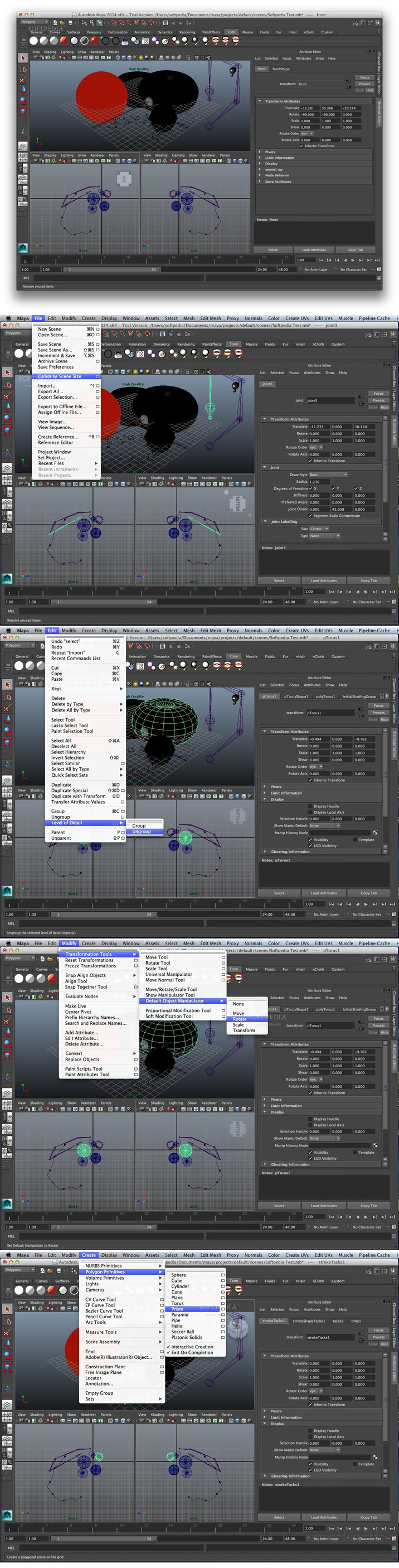
Autodesk Maya's interface might be overwhelming at first, especially for beginners, but you can learn how to use the app and how all features are organized by following the tutorials offered on the developer's page.

All visual elements like animation, surfaces, polygons or dynamics can be accessed via tabs, while more advanced editing features are available in the Attribute Editor panel. Additionally, From the Timeline you will be able to animate and manage the evolution of your modelling project with just a few mouse clicks.
Very simple to script and a vast array of tools for effortless design automation

Thanks to Autodesk Maya's open architecture, the embedded scripting languages (C++, Python and MEL), along with the comprehensive Application Programming Interface, you will be able to create custom tools and script or program your work.

Professional users will be able to enjoy a smooth and fluid experience when it comes to animation as long as they have the appropriate rig.
Provides you with a streamlined design workflow and easy to access on-screen drawing tools

In addition, The Grease Pencil allows you to draw directly onto the screen. This features comes in handy when you have to draw on frames, outline animated sequences and more.

If you enable the Modelling Toolkit you will have quick and easy access to handy features in the right-hand panel without having to search through the menus for the desired tool.
Comprehensive and state-of-the-art 3D designer, animator and renderer app for your Mac

As an extra advantage, the Autodesk Maya application enables you to fully preview your work in real-time and visualize your models before rendering and exporting them.

To conclude, Autodesk Maya is a powerful and well-designed animation, composing, rendering and modeling utility created to provide you with all the tools and features required by professional film makers, game developers and graphic designers.


What's New in Version 2017.1:
Animation:
 ● MAYA-73609: Time Editor : Clip matching cannot match translation only (without rotation)
 ● MAYA-73459: Time Editor : Animation is incorrect after splitting clips
 ● MAYA-73775: Time Editor : Insert keyframe button and "s" hotkey on additive layer causes crash and corruption
 ● MAYA-72836: Time Editor : "Clip Edge Edit" cursor not appearing when hovering mouse over edge of clip
 ● MAYA-72839: Time Editor: ime ruler and time marker scrubbing icons are not appearing
 ● MAYA-73757: Time Editor: Duplicating tab results in a broken panel
 ● MAYA-73113: Graph Editor : Region/Lattice tool not drawn correctly after undo
 ● MAYA-73489: Graph Editor : Selection : Shift+Click for additive selection in Graph Editor not working
 ● MAYA-73549: Graph Editor : No audio while scrubbing Graph Editor's Timeline
 ● MAYA-73305: Graph Editor : Crash when selecting controllers if Graph Editor is opened
 ● MAYA-73595: Graph Editor : Region/Lattice tools don't always show the correct bounding box
 ● MAYA-73606: Graph Editor : Beta : Visual design for locked tangent weight (tangent length)
 ● MAYA-73501: Graph Editor: Hotkey "i" is no longer working for insert
 ● MAYA-73548: Zero-keying on override layers should capture clip values
 ● MAYA-60622: Hang in Parallel evaluation when merging animation layers.
 ● MAYA-72840: Cannot bake animation on curves with no keys
 ● MAYA-73001: Crash when merging animation layers
 ● MAYA-73569: Character sets don't capture correct keyframe value
 ● MAYA-72849: Cannot find procedure "buidMuscleMenu".
 ● MAYA-72838: The -areCurvesSelected flag is not recognized in the animCurveEditor command

Character Setup:
 ● MAYA-73379: HIK : Missing Custom Rig UI
 ● MAYA-73754: HIK : Deleting a target object also deletes the constrained object
 ● MAYA-73180: Skinning : Setting vertices on skins programmatically is broken

General:
 ● MAYA-47780: Unlocked nodes not saving
 ● MAYA-57803: Saving references performance Improvements
 ● MAYA-58568: Hotkey Editor: Press & Release: Setting a hotkey for "Release" without having the same key set for "Press" resets the hotkey to Press upon save
 ● MAYA-73541: Intermittent Crash on OSX when Starting Maya
 ● MAYA-72187: Saving packed multi-multi attribute to mayaBinary can corrupt data
 ● MAYA-71902: Undo Performance Enhancements
 ● MAYA-72812: Mac 10.11.x: Boss: Intel MKL FATAL ERROR's (and in some cases a crash)

UI:
 ● MAYA-72460: Fixed an issue where the layout of nodes in an asset container is lost in the legacy Hypershade
 ● MAYA-72981: Mac (retina): Shelf buttons with extra menu items have no gray triangle drawn overtop icon (bottom right corner)
 ● MAYA-69307: Qt5: Mac: When Maya is in Two Button mode (prefs > Interface > Devices > Mouse Tracking > Two Button), drag and drop doesn't work correctly
 ● MAYA-72375: "panel -q -tearOff" always return 0 even if the panel is torn off
 ● MAYA-71128: Using M3dView during a timer callback will make Maya menu items display improperly (can also break the fonts)
 ● MAYA-72432: Problem with docking and resizing of C# controls
 ● MAYA-50910: Attribute color and attribute background color do not display as expected in both main channel box and custom channel box
 ● MAYA-73054: Content Browser: Crash after drag and dropping fbx file into Time Editor track
 ● MAYA-60498: Outliner: The color of constrains, locators and joints are easier to be differentiated
 ● MAYA-70693: Qt5: Mac/Linux: Remove multiple output messages about "QLayout: Attempting to add Layout" from the terminal when opening various editors
 ● MAYA-72373: Render View window cannot be closed using command "control -e -visible 0 renderViewWindow"
 ● MAYA-73129: NodeEditor: Missing "Other" plug at the bottom of the pop-up list
 ● MAYA-68808: When hiding the Shelf tabs, the Shelf doesn't get any shorter

Workspaces:
 ● MAYA-72900: Workspaces: Attribute Editor and Channel Box does not remember its resized state
 ● MAYA-68268: Workspaces: Undocked Status Line cannot be re-docked
 ● MAYA-71496: Workspaces: Switching between Workspaces can cause the Help Line to grow taller

Viewport:
 ● MAYA-66093: Selection behaviour using drawing overrides of shapes nodes, causing Maya to stall.
 ● MAYA-73956 / MAYA-73182: Viewport1: MPxGLBuffer - GL error
 ● MAYA-72857: Slow Viewport2 tumble: gpuCache nodes are still updating when hidden
 ● MAYA-73359: .TX File Textures will not update

Shading/Rendering:
 ● MAYA-73821: DX11Shader set technique crashes on "Send To" from Max to Maya
 ● MAYA-73390: Render Setup and Light Editor windows don't save/restore expand/collapse state of trees
 ● MAYA-72862: Render Setup window lags on every operation if one collection has a long static node list
 ● MAYA-70783: Objects created by interactive creation do not always get added correctly to Untitled creation in Render Setup
 ● MAYA-67935: Per-face shading is overwritten in masterLayer when doing referencing + duplicating geo + material overrides
 ● MAYA-67073: Interactive Batch Render fails on Layers with Image Name Prefix overrides in Render Setup (but command line batch works fine)
 ● MAYA-73590: Outliner find filters for Render Setup can’t select all lights
 ● MAYA-73535: Light editor breaks if LE groups were created and LE window is left open after file > new or file > open
 ● MAYA-46083: Cannot change OCIO context environment variables and see the scene color management updated.
 ● MAYA-66816: Maya slow to open when rendering on multiple machines. Maya attempts to get a write lock on /prefs/synColorConfig.xml in the user's home directory.
 ● MAYA-72548: Color Management : Crash on headless machines using SynColor
 ● MAYA-72823: Color Management : Maya Batch hangs at startup
 ● MAYA-72855: Color Management : "Parameter is less than lower bound" error when using OCIO file.

Modeling:
 ● MAYA-72067: Bevel distorted result
 ● MAYA-73009: Bevel double faces: nGons Subdivisions
 ● MAYA-73013: When user creates a MMeshIsectAccelParams in Python and is using it for intersection, Maya will crash
 ● MAYA-72532: Quad Draw Performance improvements - specific mesh
 ● MAYA-73617: Sculpt tools don't render properly with backface culling
 ● MAYA-72606: Modelers should be able to use non-joint transforms for transform space blend shape targets
 ● MAYA-73007: Tangent and transform space targets don't work correctly with non-uniformly scaled objects
 ● MAYA-73008: Pose Interpolator with many poses is slow for parallel EM mode
 ● MAYA-73010: OGS UV Editor - Toggle isolate select mode feature does not work
 ● MAYA-73063: Memory leak while hovering over UVs in UV Editor
 ● MAYA-56115: Toggle isolate select mode feature does not work in UV Editor
 ● MAYA-73061: Show Last Hidden' failed after undo 'Show Last Hidden'
 ● MAYA-72663: Mesh error doesn't include object name
 ● MAYA-71349: Target with visibility OFF will become visible when merged with another target
 ● MAYA-70556 : Normals are wrong after undoing Mask stroke (on top of clone)
 ● MAYA-72604: Improve feedback on the invisible targets who turn visible after switching to a new tool
 ● MAYA-72527: Target with visibility OFF will become visible when merged with another target
 ● MAYA-72526: Modeling Toolkit goes away permanently
 ● MAYA-72241: Target Shape changed after playback
 ● MAYA-72091: Modelers should be able to use non-joint transforms for transform space blend shape targets
 ● MAYA-72030: angent and transform space targets don't work correctly with non-uniformly scaled objects
 ● MAYA-71952: mb file poly mesh from Maya 2016 sp6 opens severely corrupted in Maya 2016 EXT2
 ● MAYA-69466: Invert doesn't affect Mask Target tool's Flood option
 ● MAYA-73012: Target shape changed after playback
 ● MAYA-71273: Target visibility problem after deleting a Target modified with the Clone tool.
 ● MAYA-73155: Maya crashes with File -> New after using the Clone tool
 ● MAYA-72528: Target visibility problem after deleting a Target modified with the Clone tool.
 ● MAYA-73154: Bevel problem with high valence corners
 ● MAYA-72180: Pose Interpolator with many poses is slow for parallel EM mode
 ● MAYA-73153: Mesh shape artifacts after Undo erase target and erase target again
 ● MAYA-73387: Modelers need Per Vertex data (normals, creasing, etc.) to be preserved when transferring or reordering vertex order.
 ● MAYA-73391: Mesh is inverted and back faces are ignored when reordering specific mesh
 ● MAYA-73392: Reordering verts with per-face shader assignments on object results in green shading (no shader)
 ● MAYA-73779: Toggle enable button will change the weight value of Edit Pose
 ● MAYA-72423: The keyable state of a mesh's visibility attribute is not saved

XGen:
 ● MAYA-42690: Wireframe mode: XGen guides alias/fade out in VP2 OpenGL render when you zoom out

Screenshots

Maya 2017 Update 1

Name Maya 2017 Update 1
Size 1.12 GB
Created on 2016-09-19 15:46:32
Tracker http://109.235.50.166:2710/announce
Hash 3eb9098c11bba50996f4cf88f6c558be95ea2840
Files AudeMay2017u1.zip (1.12 GB)

Descriptions for Description

Name: Autodesk Maya - Professional 3D modeling and animation tool.
Version: 2017 Update 1
Mac Platform: Intel
OS Version: OS X 10.10.5 or later
Processor type(s) & speed: 64-bit processor


Overview
Maya is an award-winning software and powerful, integrated 3D modeling, animation, visual effects, and rendering solution. Because Maya is based on an open architecture, all your work can be scripted or programmed using a well-documented and comprehensive API (application programming interface), or one of two embedded scripting languages, the Maya Embedded Language (MEL) or Python. This level of openness, combined with an industry-leading suite of 3D visual effects, computer graphics, and character animation tools, enables you to realize your creative vision for your film, television, game development, and design projects.


What's New in Version 2017 Update 1:
See: https://knowledge.autodesk.com/sites/default/files/Maya_2017_Update1_Readme_enu.htm

Autodesk Maya 2017

Description

Name: Autodesk Maya - Professional 3D modeling and animation tool.
Version: 2017
Mac Platform: Intel
OS Version: OS X 10.10.5 or later
Processor type(s) & speed: 64-bit processor


Overview
Maya is an award-winning software and powerful, integrated 3D modeling, animation, visual effects, and rendering solution. Because Maya is based on an open architecture, all your work can be scripted or programmed using a well-documented and comprehensive API (application programming interface), or one of two embedded scripting languages, the Maya Embedded Language (MEL) or Python. This level of openness, combined with an industry-leading suite of 3D visual effects, computer graphics, and character animation tools, enables you to realize your creative vision for your film, television, game development, and design projects.


What's New in Version 2017:
Alembic
 ・Maya crashes when choosing a different gpuCache file while one is loading
 
Animation General
 ・Graph Editor : Moving vertices is slow when Graph Editor is open
 ・Viewport 2.0 performance drops when many joints are constrained to many vertices
 ・5000 connected transform nodes may crash Maya
 ・Graph Editor : Locked tangents not preserving their length on manipulation of rotation curves
 ・Graph Editor : Animation curve becomes corrupted when using the Retimer tool
 ・Very long DG node chain causes Maya to crash
 ・Rotate command does not set rotateX component when Autokey is enabled
 ・listConnections doesn't return all DG connections on sparse arrays
 ・Published attributes in the Channel box get stuck on connected and remain yellow
 ・Scenes with skincluster weights load slowly because weights are stored as separate setAttr commands
 ・Graph Editor : GPU : Animation curves auto-adjust after manipulation when normalized
 ・Graph Editor : GPU : Constant values should appear at value 0 in normalized view
 ・Crash when running cmds.bakeResults using -destinationLayer flag
 ・Maya command error occurs when trying to execute bakeResults
 ・Performance : Some rig controllers cause instability with parallel evaluation
 ・scaleConstraint - inherit group scale values are incorrect
 ・nCloth with InputAttract and animated nucleus transform will double translate
 ・Crash when evaluating two rigs in parallel
 ・Performance : Parallel evaluation performance slows down when reference objects are loaded
 ・Crash after disabling Evaluation Manager via script
 ・Attached user scene crashes on playback
 ・Crash in specific scene during Evaluation Manager parallel playback
 
API and Scripting	 
 ・workspace command: cannot create a baseWorkspace and documentation needs clarification
 ・mayapy crashes with initialize() when launched from a terminal using a relative path
 ・MPxContextCommand cannot be created with .Net API
 ・FBX - Hang on FBX export when baking is enabled on export and exporting is done via script
 ・MFnGenericAttribute.addAccept() fails when adding a second single component type
 ・MFnUnitAttribute::setMax() does not handle angle units correctly
 ・Connection to multi-message attribute (indexMatters set to false) is also duplicated when duplicating the connection's source node


Full Release Notes
See: https://knowledge.autodesk.com/sites/default/files/Maya_2017_Readme_enu.htm

Name Maya 2017
Size 1.11 GB
Created on 2016-07-27 01:30:42
Tracker http://109.235.50.166:2710/announce
Hash 5eac3e93e6c3e7b79909fe98f6af3e88deee9741
Files Maya2017.zip (1.11 GB)

Autodesk Maya 2016 SP6

Description

Name: Autodesk Maya 2016
Version: SP6
Language: English
Includes: Keygen, instruction

Homepage: http://www.autodesk.com/


Overview
Autodesk Maya 2016 3D animation, 3D modeling, 3D simulation, 3D rendering, and compositing software offers a comprehensive creative feature set on a highly extensible production platform. Autodesk Maya 2016 provides high-end character and effects toolsets along with increased productivity for 3D modeling, texturing, and shader creation tasks. Create impressive dynamic effects and bring your scenes to life with tools to simulate and render hair, fur, feathers, cloth, liquids, fluids, particles, and rigid and soft bodies. Autodesk Maya 2016 3D animation has the specialized tools for character creation, 3D editorial, and keyframing. Bring your imagination to life with the Maya 3D animation toolset – used to create some of the most believable 3D characters in entertainment.

Autodesk Maya 2016 is a highly customizable and extensible application that offers several avenues for pipeline integration. It provides extensive scripting and API (application programming interface) tools, streamlined workflows with certain 2D and 3D applications, and tools for handling large data sets.

Build and texture both organic and hard-surface models with an extensive polygon toolset, as well as powerful, production-proven NURBS and subdivision surface tools.

Autodesk Maya 2016 turns your ideas into images – whether your target platform is the big screen or small, or you are creating highly realistic imagery or stylized cartoons.

• Maya Fluid Effects – Simulate and render a huge variety of atmospheric, pyrotechnic, viscous liquid, and open ocean effects. Maya Fluid Effects overcomes one of the greatest barriers in computer animation.
• Maya Fur – Easy creation of realistic fur, short hair, wool and grass on NURBS or polygonal models. Incredibly realistic styling and rendering of short hair and fur, with Maya Artisan brush interface for painting fur attributes.
• Maya Cloth – The fastest and most accurate software solution for simulating a wide variety of digital clothing and other fabric objects. Any cloth object can be animated including sails, skins, tents, drapery, bedding, etc.
• Maya Live – Sophisticated matchmoving combines 2D live-action with 3D elements. Maya Live provides greater flexibility, a fast integrated 2D tracker and an interactive root frame solver. Maya Live also allows you to reconstruct live-action elements as 3D geometry plus output to external applications.
• Maya Hair – Tools for the creation, styling and rendering of fully dynamic long hair on NURBS or polygon objects. Make any NURBS curve dynamic for use in advanced character rigging and effects. Create a wide range of other “non-hair” effects too.

Autodesk Maya 2016 Complete:
• Intuitive User Interface
• Data and Scene Management Tools
• Polygon Modeling
• NURBS Modeling
• Subdivision Surface Modeling
• General Animation
• Character Animation
• Deformers
• Rigid and Soft Body Dynamics
• Particles and Fields
• Maya Paint Effects
• Toon Shader
• Maya Artisan
• 3D Paint
• Multiple Rendering Options
• Rendering Controls and Effects
• MEL
• Maya API/SDK
• Connectivity and Integration

Autodesk Maya 2016 software is supported on the following 64-bit operating systems: Microsoft Windows 7 (SP1) and Windows 8.1 Professional, Windows 10 Pro, Apple Mac OS X 10.8.5 and 10.10.x, Red Hat Enterprise 6.5, CentOS 6.5.


What's New in Autodesk Maya 2016:
* Increase the speed of playback and manipulation of character rigs with a new parallel, multi-threaded evaluation system in Maya® that is designed to distribute computation amongst existing cores and graphics processors in your computer.
* Experience better performance within the viewport for quicker feedback on your work using a new GPU-based mechanism that performs deformations on your graphics hardware within Viewport 2.0.
* Create customised GPU-accelerated deformers by utilising provided APIs for greater flexibility to your pipeline.
* Understand and target bottlenecks in scenes and plug-ins more easily with a new, more integrated performance profiler.
* Sculpt and shape models more artistically and intuitively with a new sculpting toolset that provides more detail and resolution.
* Updates to previous sculpting tools include a brushes feature, Volume and Surface falloff, stamp images, sculpting UVs, and support for vector displacement stamps.
* Create more realism and detail by adding foam and bubbles (“whitewater”) to your liquid simulations, such as scenes with oceans, beaches, lakes, and stormy seas
* Work more quickly with shorter simulation times. With adaptivity switched on, the whitewater system now has a higher resolution within the camera's view, allowing for computing detail only where you need it.
* Guide final results closer to the original geometry with Delta Mush, which smoothens deformations, and can be used in many different workflows such as paint-free skinning, smoothing of coarse simulation results, and shot post corrections
* More easily discover and use the tools you need, when you need them, with a newly redesigned user interface (UI) that delivers a more modern, consistent, and fresh user experience while maintaining familiarity with the workflows you rely on. New icons, fonts, and a refined layout enable scaling and readability of the Maya UI across multiple form factors, displays, and resolutions—from handheld tablet PC's to Ultra HD or 5K monitors.
* Boost efficiency using a new re-categorised menu system based on workflows that make it easier for artists to quickly access the tools they need.


▬▬▬▬▬▬▬▬▬▬▬▬▬▬▬▬▬▬▬▬▬▬▬


Software completo de animación en 3D (3D animation)

El software Maya® de animación, modelado, simulación y renderización en 3D ofrece a los realizadores un completo conjunto de herramientas creativas. Estas herramientas suponen un punto de partida para hacer realidad su visión en el modelado, la animación, la iluminación y los efectos visuales. 


Nombre: Autodesk Maya 2016
Versión: SP6
Incluye: Keygen, instruccione
Idioma: Inglés

Procesador: Intel
Versión Mac: 10.9.5 o posterior
RAM: 4 GB
Más info: http://www.autodesk.es/products/maya/overview

Name maya.2016.sp6.mac.os.x
Size 982.8 MB
Created on 2016-04-09 17:14:25
Hash 0600714687a71ab378e336acd2554e39999b3621
Files Maya_2016_SP6.zip (982.8 MB)