Name motionVFX – mRays 2K.dmg Size 3.09 GB Created on 2017-09-30 14:24:31 Hash 5c8734861ee10015422079beac604688f9e91ee2 Files motionVFX – mRays 2K.dmg (3.09 GB) Download Download Descriptions for motionVFX – mRays 2K Name: motionVFX – mRays 2K Web Site: https://www.motionvfx.com/mplugs-55.html Overview 60 2K Realistic Rays Compositing Elements For Any NLE mRays is a collection of 60 rays elements for any compositing or NLE software supporting blending modes. – 60 Rays elements for Realistic any non-linear Editing system-supporting blending modes – 2k video footage – ProRes – Cross Platform / Application Compatible Screenshots
Name: Digital Film Tools Rays
Version: 2.0 v10
Language: English
Mac Platform: Intel
OS Version: OS X 10.8 or later
Processor type(s) & speed: 64-bit processor

SOFTWARE REQUIREMENTS:
 • Adobe Photoshop CS5 and up (64 Bit Only)
 • Adobe Photoshop Elements 13 and up (Non-app store version)
 • Apple Photoshop Lightroom 3 and up
 • Apple Aperture 3
 • Adobe After Effects CS5 and up
 • Adobe Premiere Pro CS5 and up
 • Apple Final Cut Pro X
 • Apple Motion 5
 • Avid Editing Systems (64 Bit only)
 • Assimilate Scratch v8 and up
 • Black Magic Resolve v11 and up
 • Sony Vegas v13 and up
 • The Foundry's Nuke v8 and up


Includes: Crack Special K and License File


Web Site: http://www.digitalfilmtools.com/rays/


Overview
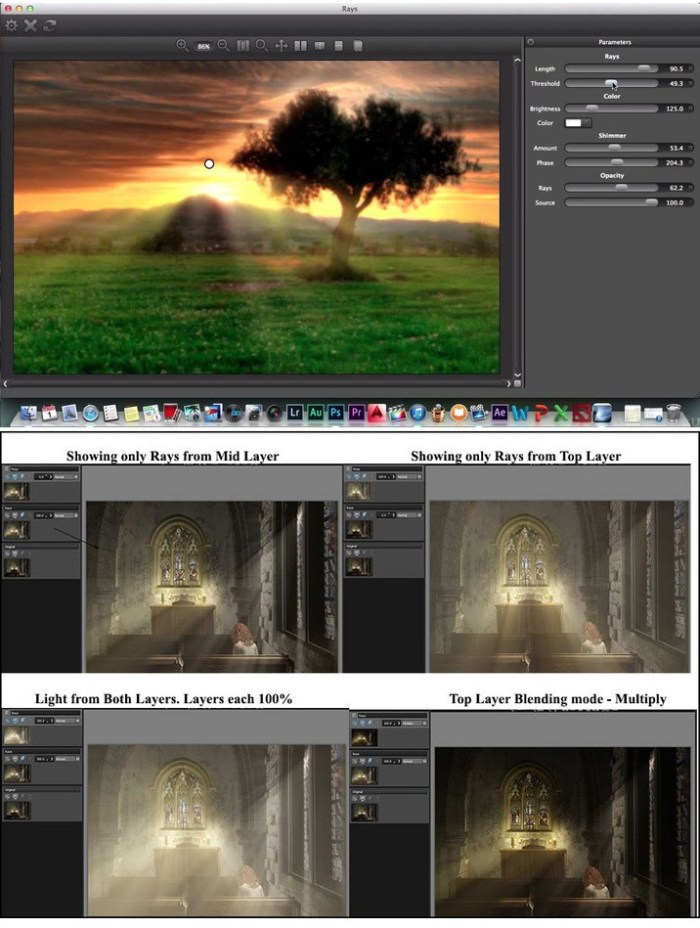
Create stunning and realistic light ray effects quickly and easily. Known as volumetric lighting in computer graphics or crepuscular rays in atmospheric optics, this dramatic effect adds polish and style.

Since the rays are only added to highlight areas, they have the effect of passing through objects and add a third dimensional quality. Add shafts of light streaming through clouds, rays filtering through a forest canopy, beams of light on a foggy night or rays shooting out from text. Rays adds a striking and dramatic quality to any image.

Key Features:
- Set the ray length and brightness
- Control ray direction with an on-screen control
- Customize the color of the rays using a color picker
- Threshold control to specify where the rays will be visible
- Add your own light source to generate rays
- Randomize the rays
- Add texture inside the rays for a more natural and organic look
- Modify settings with sliders
- Sophisticated but easy to use masking tools
- Layering system for multiple film stock application
- Modify settings with sliders


What's New in Version 2.0 v10:
Bug Fix
- Plug-ins not showing up in FCPX and Motion
We worked around a bug in macOS Sierra which prevented our plug-ins from appearing in FCPX and Motion.