Tag Archives: MediaHuman

MediaHuman Video Converter 2.0.1

MediaHuman Video Converter is designed to make your life easier when you need to convert videos from one format to another or change their quality and size to fit the storage space of your mobile device. It supports most common video formats such as Audio Video Interleaved (AVI), Digital Video, DVD Video, Flash Video (FLV), H.264/MPEG 4, iTunes Video, Matroska Video (MKV), MPEG, QuickTime and much more.

→ Clean and easy interface
→ Supports most of the popular formats
→ Simultaneous conversion of files

You can convert videos in just a few easy steps. Run the program, add your video file, select the desired format and start the conversion. Selection of the output format and its settings are simplified. The program already includes settings for several popular devices like Apple TV, iPod, iPhone, iPad, Sony PlayStation 3, PSP, Xbox, Wii and others.

Interface of the software is clean and easy for understanding. It contains nothing superfluous that can disorient you.

Compatibility: macOS 10.12 or later • Apple Silicon or Intel Core processor
Homepage http://www.mediahuman.com/video-converter

Name: MediaHuman_Video_Converter_2.0.1__HCiSO_Mactorrents.is.dmg
Size: 53.84 MB
Files MediaHuman_Video_Converter_2.0.1__HCiSO_ Mactorrents.is.dmg[53.84 MB]

   Download Torrent
   Download Links

MediaHuman YouTube Downloader 3.9.9.38 (1305)

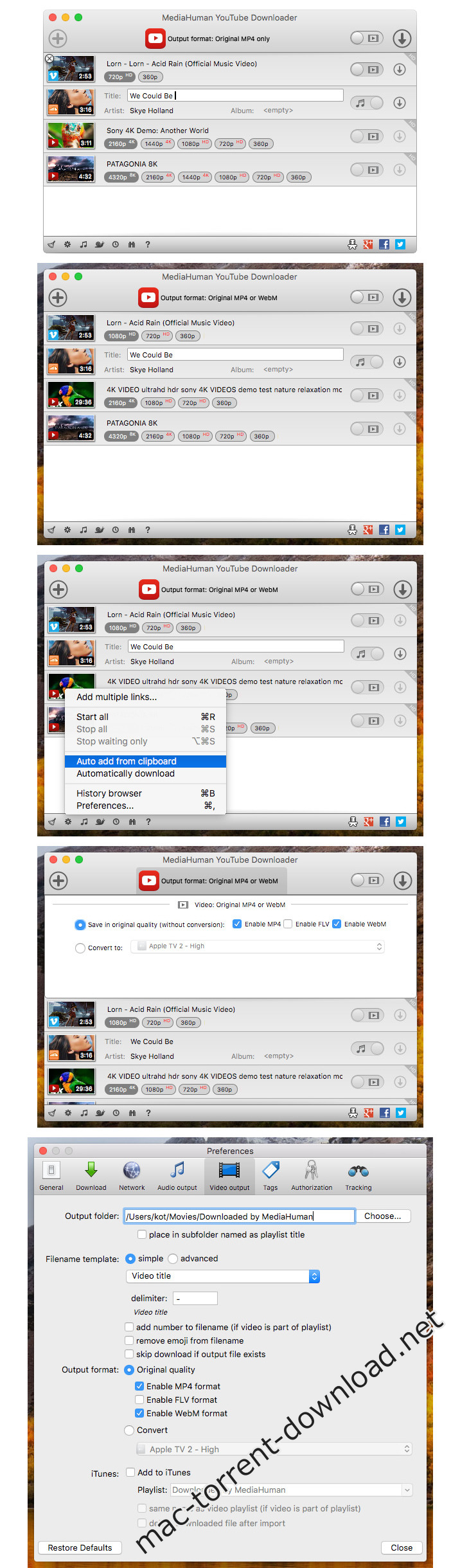
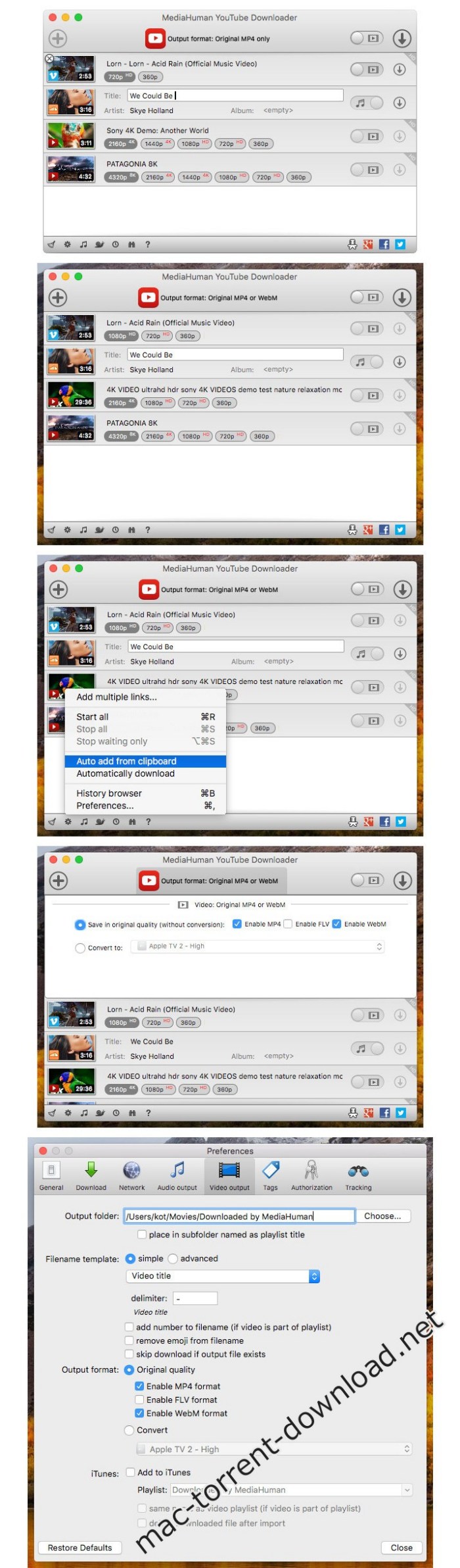
MediaHuman YouTube Downloader is a handy application when you find a favorite music video or a trailer of a new movie and want to keep it on your computer for viewing offline. Very useful if you need to download a video lesson/tutorial for viewing later or offline. Our video downloader is the ideal solution for such kind of tasks.

Main Features:
Playlists and channels
The program supports downloading of all videos of a playlist or a channel. And there’s also an option to track the selected channel or playlist and download new clips as they are uploaded.

Add to iTunes
You can configure the program to automatically add downloaded movies to your iTunes library. You can also pick a playlist to add them.

HQ, HD or 4K
The program supports all available resolutions, be that 720p, 1080p or 4K. The choice is up to you.

Monitor the clipboard
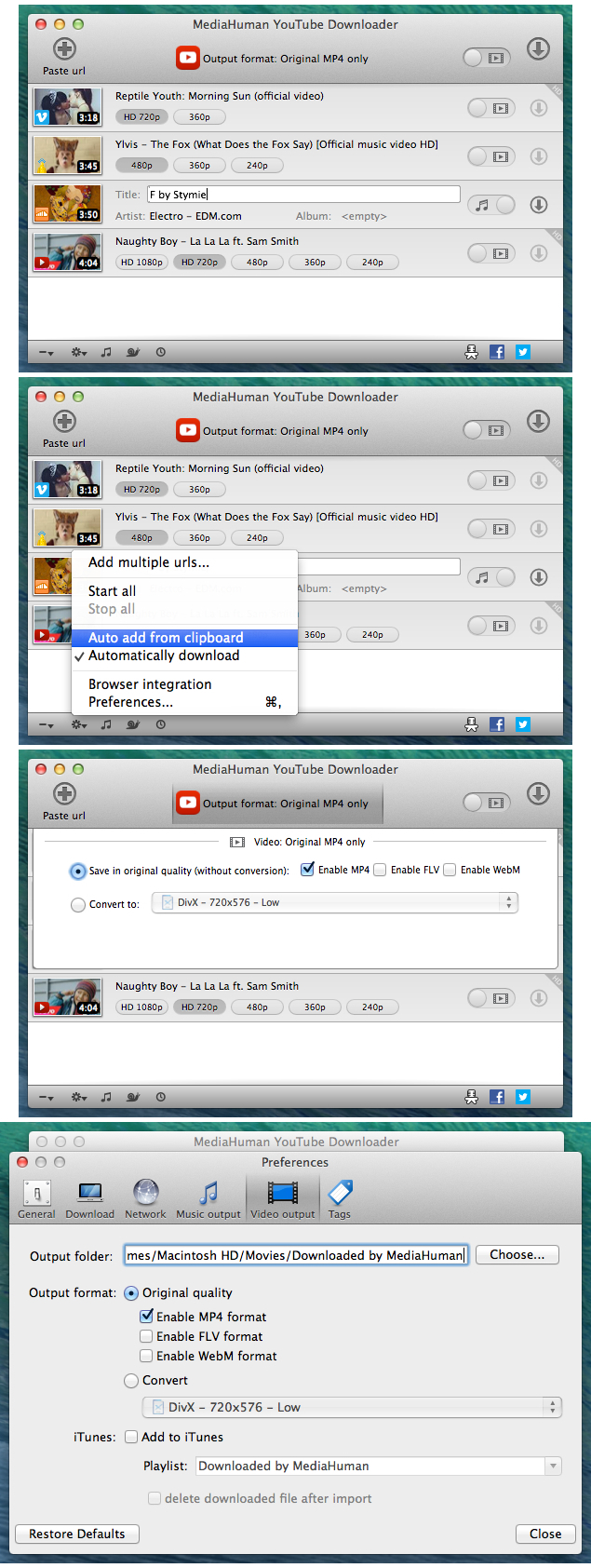
The program keeps an eye on the clipboard and as soon as it spots a supported link there, it automatically adds this video into the download queue.

Quality of the original
You can choose to save videos in the original quality (usually in MP4 format), without any modifications. In this case, the clip you get is exactly the same as the one its author uploaded.

Simple tag editor
The app automatically detects the artist and the title of a video and saves them to the downloaded file. And you can easily change them later.

Not just YouTube
The program supports Vevo.com, Vimeo, Dailymotion, Facebook, VKontakte, SoundCloud and a lot of other sites. So you can download video from these websites as easy as you do from YouTube.

Drag & Drop
The app features a 100% drag&drop support. Just drag the link to a video with your mouse and drop it to the main window of the program, or to its dock icon on Mac.

Compatibility: OS X 10.6 or later, 64-bit processor
Homepage https://www.mediahuman.com/youtube-downloader/

Screenshots


Name: MediaHuman_YouTube_Downloader_3.9.9.38__1305___TNT_Mactorrents.io.dmg
Size: 81 MB
Files MediaHuman_YouTube_Downloader_3.9.9.38__1305___TNT_Mactorrents.io.dmg[81 MB]

   Download

MediaHuman YouTube Downloader 3.9.9.38 (1105)

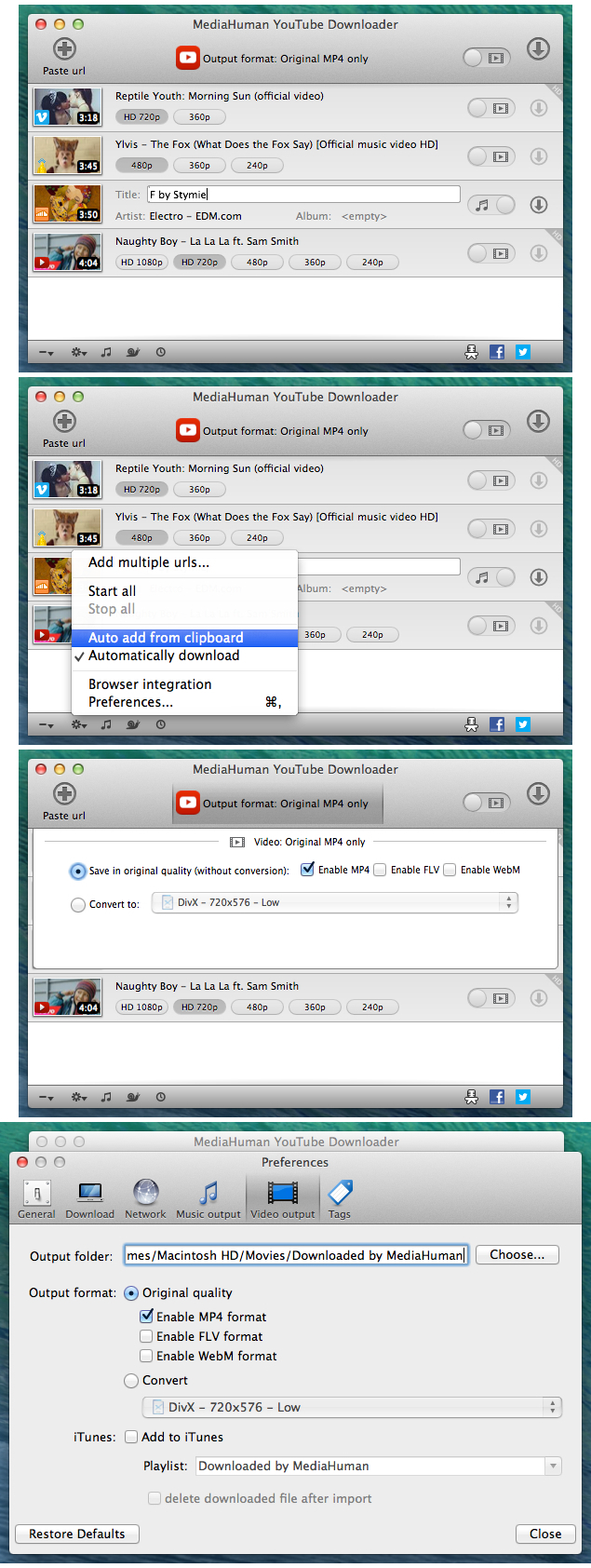
MediaHuman YouTube Downloader is a handy application when you find a favorite music video or a trailer of a new movie and want to keep it on your computer for viewing offline. Very useful if you need to download a video lesson/tutorial for viewing later or offline. Our video downloader is the ideal solution for such kind of tasks.

Main Features:
Playlists and channels
The program supports downloading of all videos of a playlist or a channel. And there’s also an option to track the selected channel or playlist and download new clips as they are uploaded.

Add to iTunes
You can configure the program to automatically add downloaded movies to your iTunes library. You can also pick a playlist to add them.

HQ, HD or 4K
The program supports all available resolutions, be that 720p, 1080p or 4K. The choice is up to you.

Monitor the clipboard
The program keeps an eye on the clipboard and as soon as it spots a supported link there, it automatically adds this video into the download queue.

Quality of the original
You can choose to save videos in the original quality (usually in MP4 format), without any modifications. In this case, the clip you get is exactly the same as the one its author uploaded.

Simple tag editor
The app automatically detects the artist and the title of a video and saves them to the downloaded file. And you can easily change them later.

Not just YouTube
The program supports Vevo.com, Vimeo, Dailymotion, Facebook, VKontakte, SoundCloud and a lot of other sites. So you can download video from these websites as easy as you do from YouTube.

Drag & Drop
The app features a 100% drag&drop support. Just drag the link to a video with your mouse and drop it to the main window of the program, or to its dock icon on Mac.

Compatibility: OS X 10.6 or later, 64-bit processor
Homepage https://www.mediahuman.com/youtube-downloader/

Screenshots


Name: MediaHuman_YouTube_Downloader_3.9.9.38__1105___TNT_Mactorrents.io.dmg
Size: 81 MB
Files MediaHuman_YouTube_Downloader_3.9.9.38__1105___TNT_Mactorrents.io.dmg[81 MB]

   Download

MediaHuman YouTube Downloader 3.9.9.38 (1005)

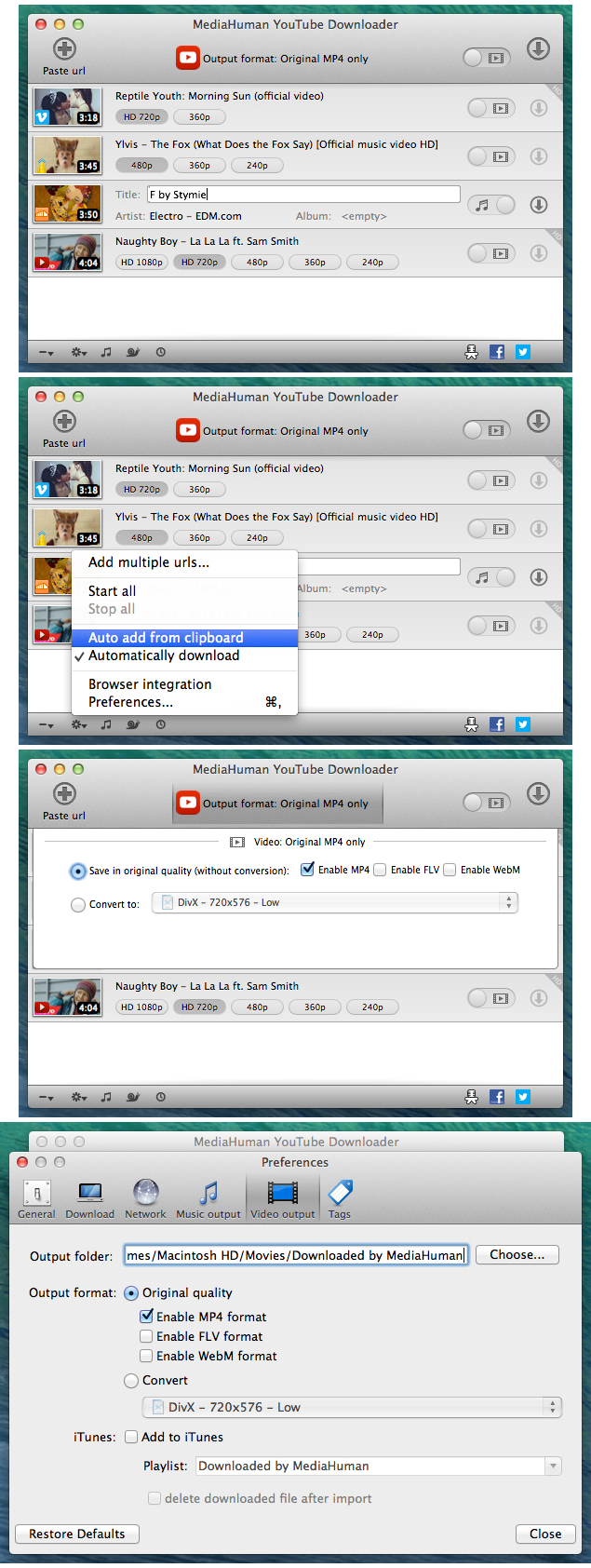
MediaHuman YouTube Downloader is a handy application when you find a favorite music video or a trailer of a new movie and want to keep it on your computer for viewing offline. Very useful if you need to download a video lesson/tutorial for viewing later or offline. Our video downloader is the ideal solution for such kind of tasks.

Main Features:
Playlists and channels
The program supports downloading of all videos of a playlist or a channel. And there’s also an option to track the selected channel or playlist and download new clips as they are uploaded.

Add to iTunes
You can configure the program to automatically add downloaded movies to your iTunes library. You can also pick a playlist to add them.

HQ, HD or 4K
The program supports all available resolutions, be that 720p, 1080p or 4K. The choice is up to you.

Monitor the clipboard
The program keeps an eye on the clipboard and as soon as it spots a supported link there, it automatically adds this video into the download queue.

Quality of the original
You can choose to save videos in the original quality (usually in MP4 format), without any modifications. In this case, the clip you get is exactly the same as the one its author uploaded.

Simple tag editor
The app automatically detects the artist and the title of a video and saves them to the downloaded file. And you can easily change them later.

Not just YouTube
The program supports Vevo.com, Vimeo, Dailymotion, Facebook, VKontakte, SoundCloud and a lot of other sites. So you can download video from these websites as easy as you do from YouTube.

Drag & Drop
The app features a 100% drag&drop support. Just drag the link to a video with your mouse and drop it to the main window of the program, or to its dock icon on Mac.

What’s New:

  • improved Facebook authorization
  • added ‘skipped’ to filter panel
  • added support for 2K and 4K Dailymotion videos
  • added ‘open in browser’ to context menu for failed items
  • corrected behaviour of ‘auto add from clipboard’ to filter not links content
  • added option ‘expand playlist automatically’ in Preferences
  • added ItemID tag in output filename template

Compatibility: OS X 10.6 or later, 64-bit processor
Homepage https://www.mediahuman.com/youtube-downloader/

Screenshots


Name: MediaHuman_YouTube_Downloader_3.9.9.38__1005_TNT_Mactorrents.io.dmg
Size: 81 MB
Files MediaHuman_YouTube_Downloader_3.9.9.38__1005_TNT_Mactorrents.io.dmg[81 MB]

   Download

MediaHuman YouTube Downloader 3.9.9.36 (0405)

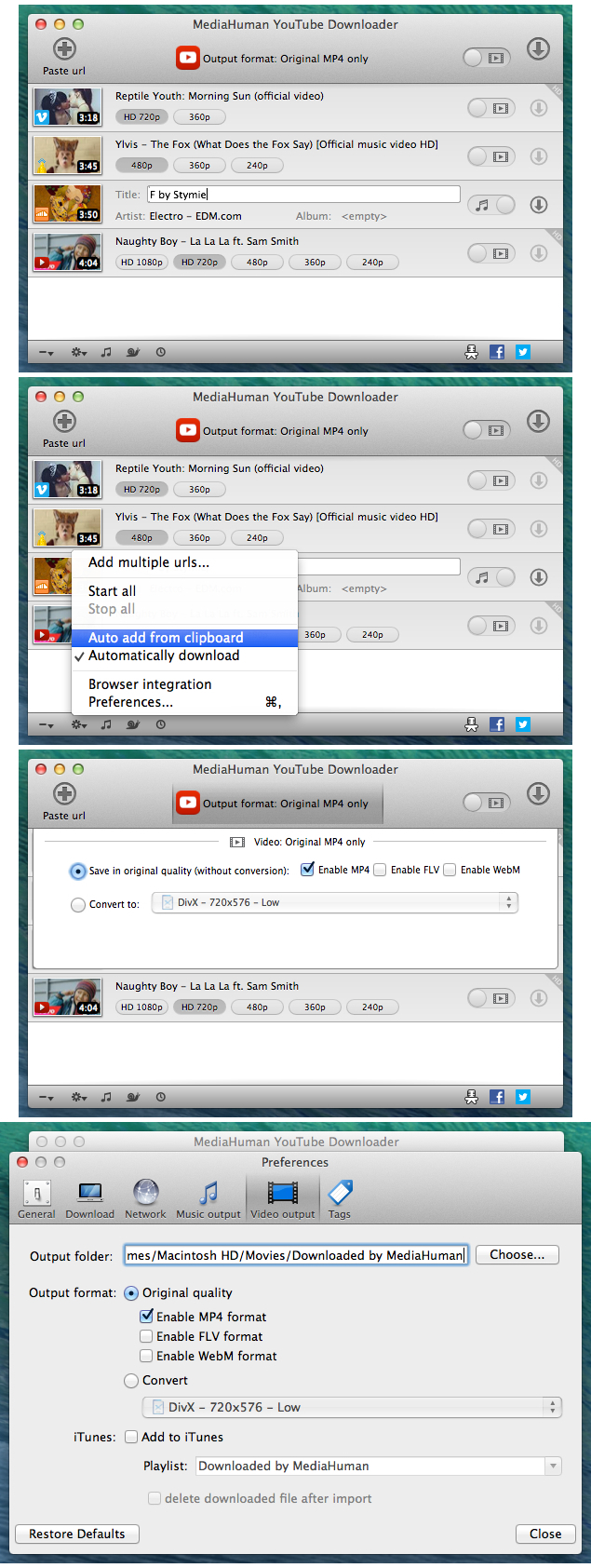
MediaHuman YouTube Downloader is a handy application when you find a favorite music video or a trailer of a new movie and want to keep it on your computer for viewing offline. Very useful if you need to download a video lesson/tutorial for viewing later or offline. Our video downloader is the ideal solution for such kind of tasks.

Main Features:
Playlists and channels
The program supports downloading of all videos of a playlist or a channel. And there’s also an option to track the selected channel or playlist and download new clips as they are uploaded.

Add to iTunes
You can configure the program to automatically add downloaded movies to your iTunes library. You can also pick a playlist to add them.

HQ, HD or 4K
The program supports all available resolutions, be that 720p, 1080p or 4K. The choice is up to you.

Monitor the clipboard
The program keeps an eye on the clipboard and as soon as it spots a supported link there, it automatically adds this video into the download queue.

Quality of the original
You can choose to save videos in the original quality (usually in MP4 format), without any modifications. In this case, the clip you get is exactly the same as the one its author uploaded.

Simple tag editor
The app automatically detects the artist and the title of a video and saves them to the downloaded file. And you can easily change them later.

Not just YouTube
The program supports Vevo.com, Vimeo, Dailymotion, Facebook, VKontakte, SoundCloud and a lot of other sites. So you can download video from these websites as easy as you do from YouTube.

Drag & Drop
The app features a 100% drag&drop support. Just drag the link to a video with your mouse and drop it to the main window of the program, or to its dock icon on Mac.

What’s New:

  • improved Facebook authorization
  • added ‘skipped’ to filter panel
  • added support for 2K and 4K Dailymotion videos
  • added ‘open in browser’ to context menu for failed items
  • corrected behaviour of ‘auto add from clipboard’ to filter not links content
  • added option ‘expand playlist automatically’ in Preferences
  • added ItemID tag in output filename template

Compatibility: OS X 10.6 or later, 64-bit processor
Homepage https://www.mediahuman.com/youtube-downloader/

Screenshots


Name: MediaHuman_YouTube_Downloader_3.9.9.36_0405 _TNT_Mactorrents.io.dmg
Size: 81 MB
Files MediaHuman_YouTube_Downloader_3.9.9.36_0405 _TNT_Mactorrents.io.dmg[81 MB]

   Download

MediaHuman YouTube Downloader 3.9.9.36 (1704)

MediaHuman YouTube Downloader is a handy application when you find a favorite music video or a trailer of a new movie and want to keep it on your computer for viewing offline. Very useful if you need to download a video lesson/tutorial for viewing later or offline. Our video downloader is the ideal solution for such kind of tasks.

Main Features:
Playlists and channels
The program supports downloading of all videos of a playlist or a channel. And there’s also an option to track the selected channel or playlist and download new clips as they are uploaded.

Add to iTunes
You can configure the program to automatically add downloaded movies to your iTunes library. You can also pick a playlist to add them.

HQ, HD or 4K
The program supports all available resolutions, be that 720p, 1080p or 4K. The choice is up to you.

Monitor the clipboard
The program keeps an eye on the clipboard and as soon as it spots a supported link there, it automatically adds this video into the download queue.

Quality of the original
You can choose to save videos in the original quality (usually in MP4 format), without any modifications. In this case, the clip you get is exactly the same as the one its author uploaded.

Simple tag editor
The app automatically detects the artist and the title of a video and saves them to the downloaded file. And you can easily change them later.

Not just YouTube
The program supports Vevo.com, Vimeo, Dailymotion, Facebook, VKontakte, SoundCloud and a lot of other sites. So you can download video from these websites as easy as you do from YouTube.

Drag & Drop
The app features a 100% drag&drop support. Just drag the link to a video with your mouse and drop it to the main window of the program, or to its dock icon on Mac.

What’s New:

  • improved Facebook authorization
  • added ‘skipped’ to filter panel
  • added support for 2K and 4K Dailymotion videos
  • added ‘open in browser’ to context menu for failed items
  • corrected behaviour of ‘auto add from clipboard’ to filter not links content
  • added option ‘expand playlist automatically’ in Preferences
  • added ItemID tag in output filename template

Compatibility: OS X 10.6 or later, 64-bit processor
Homepage https://www.mediahuman.com/youtube-downloader/

Screenshots


Name: MediaHuman_YouTube_Downloader_3.9.9.36__1704___TNT_Mactorrents.io.dmg
Size: 81 MB
Files MediaHuman_YouTube_Downloader_3.9.9.36__1704___TNT_Mactorrents.io.dmg[81 MB]

   Download

MediaHuman YouTube Downloader 3.9.9.35 (0604)

MediaHuman YouTube Downloader is a handy application when you find a favorite music video or a trailer of a new movie and want to keep it on your computer for viewing offline. Very useful if you need to download a video lesson/tutorial for viewing later or offline. Our video downloader is the ideal solution for such kind of tasks.

Main Features:
Playlists and channels
The program supports downloading of all videos of a playlist or a channel. And there’s also an option to track the selected channel or playlist and download new clips as they are uploaded.

Add to iTunes
You can configure the program to automatically add downloaded movies to your iTunes library. You can also pick a playlist to add them.

HQ, HD or 4K
The program supports all available resolutions, be that 720p, 1080p or 4K. The choice is up to you.

Monitor the clipboard
The program keeps an eye on the clipboard and as soon as it spots a supported link there, it automatically adds this video into the download queue.

Quality of the original
You can choose to save videos in the original quality (usually in MP4 format), without any modifications. In this case, the clip you get is exactly the same as the one its author uploaded.

Simple tag editor
The app automatically detects the artist and the title of a video and saves them to the downloaded file. And you can easily change them later.

Not just YouTube
The program supports Vevo.com, Vimeo, Dailymotion, Facebook, VKontakte, SoundCloud and a lot of other sites. So you can download video from these websites as easy as you do from YouTube.

Drag & Drop
The app features a 100% drag&drop support. Just drag the link to a video with your mouse and drop it to the main window of the program, or to its dock icon on Mac.

What’s New:

  • improved Facebook authorization
  • added ‘skipped’ to filter panel
  • added support for 2K and 4K Dailymotion videos
  • added ‘open in browser’ to context menu for failed items
  • corrected behaviour of ‘auto add from clipboard’ to filter not links content
  • added option ‘expand playlist automatically’ in Preferences
  • added ItemID tag in output filename template

Compatibility: OS X 10.6 or later, 64-bit processor
Homepage https://www.mediahuman.com/youtube-downloader/

Screenshots


Name: MediaHuman_YouTube_Downloader_3.9.9.35__0604___TNT_Mactorrents.io.dmg
Size: 81 MB
Files MediaHuman_YouTube_Downloader_3.9.9.35__0604___TNT_Mactorrents.io.dmg[81 MB]

   Download

MediaHuman YouTube Downloader 3.9.9.33 (2002)

MediaHuman YouTube Downloader 3.9.9.33 (2002)

MediaHuman YouTube Downloader is a handy application when you find a favorite music video or a trailer of a new movie and want to keep it on your computer for viewing offline. Very useful if you need to download a video lesson/tutorial for viewing later or offline. Our video downloader is the ideal solution for such kind of tasks.

Main Features:
Playlists and channels
The program supports downloading of all videos of a playlist or a channel. And there’s also an option to track the selected channel or playlist and download new clips as they are uploaded.

Add to iTunes
You can configure the program to automatically add downloaded movies to your iTunes library. You can also pick a playlist to add them.

HQ, HD or 4K
The program supports all available resolutions, be that 720p, 1080p or 4K. The choice is up to you.

Monitor the clipboard
The program keeps an eye on the clipboard and as soon as it spots a supported link there, it automatically adds this video into the download queue.

Quality of the original
You can choose to save videos in the original quality (usually in MP4 format), without any modifications. In this case, the clip you get is exactly the same as the one its author uploaded.

Simple tag editor
The app automatically detects the artist and the title of a video and saves them to the downloaded file. And you can easily change them later.

Not just YouTube
The program supports Vevo.com, Vimeo, Dailymotion, Facebook, VKontakte, SoundCloud and a lot of other sites. So you can download video from these websites as easy as you do from YouTube.

Drag & Drop
The app features a 100% drag&drop support. Just drag the link to a video with your mouse and drop it to the main window of the program, or to its dock icon on Mac.

What’s New:

  • improved Facebook authorization
  • added ‘skipped’ to filter panel
  • added support for 2K and 4K Dailymotion videos
  • added ‘open in browser’ to context menu for failed items
  • corrected behaviour of ‘auto add from clipboard’ to filter not links content
  • added option ‘expand playlist automatically’ in Preferences
  • added ItemID tag in output filename template

Compatibility: OS X 10.6 or later, 64-bit processor
Homepage https://www.mediahuman.com/youtube-downloader/

Screenshots


Name: MediaHuman_YouTube_Downloader_3.9.9.33__2002__Mactorrents.io.dmg
Size: 32.21 MB
Files MediaHuman_YouTube_Downloader_3.9.9.33__2002__Mactorrents.io.dmg[32.21 MB]

   Download

MediaHuman YouTube Downloader 3.9.9.33 (1802)

MediaHuman YouTube Downloader 3.9.9.33 (1802)

MediaHuman YouTube Downloader is a handy application when you find a favorite music video or a trailer of a new movie and want to keep it on your computer for viewing offline. Very useful if you need to download a video lesson/tutorial for viewing later or offline. Our video downloader is the ideal solution for such kind of tasks.

Main Features:
Playlists and channels
The program supports downloading of all videos of a playlist or a channel. And there’s also an option to track the selected channel or playlist and download new clips as they are uploaded.

Add to iTunes
You can configure the program to automatically add downloaded movies to your iTunes library. You can also pick a playlist to add them.

HQ, HD or 4K
The program supports all available resolutions, be that 720p, 1080p or 4K. The choice is up to you.

Monitor the clipboard
The program keeps an eye on the clipboard and as soon as it spots a supported link there, it automatically adds this video into the download queue.

Quality of the original
You can choose to save videos in the original quality (usually in MP4 format), without any modifications. In this case, the clip you get is exactly the same as the one its author uploaded.

Simple tag editor
The app automatically detects the artist and the title of a video and saves them to the downloaded file. And you can easily change them later.

Not just YouTube
The program supports Vevo.com, Vimeo, Dailymotion, Facebook, VKontakte, SoundCloud and a lot of other sites. So you can download video from these websites as easy as you do from YouTube.

Drag & Drop
The app features a 100% drag&drop support. Just drag the link to a video with your mouse and drop it to the main window of the program, or to its dock icon on Mac.

What’s New:

  • improved Facebook authorization
  • added ‘skipped’ to filter panel
  • added support for 2K and 4K Dailymotion videos
  • added ‘open in browser’ to context menu for failed items
  • corrected behaviour of ‘auto add from clipboard’ to filter not links content
  • added option ‘expand playlist automatically’ in Preferences
  • added ItemID tag in output filename template

Compatibility: OS X 10.6 or later, 64-bit processor
Homepage https://www.mediahuman.com/youtube-downloader/

Screenshots


Name: MediaHuman_YouTube_Downloader_3.9.9.33_1802_Mactorrents.io.dmg
Size: 32 MB
Files MediaHuman_YouTube_Downloader_3.9.9.33_1802_Mactorrents.io.dmg[32 MB]

   Download

MediaHuman YouTube Downloader 3.9.9.33.1502

MediaHuman YouTube Downloader 3.9.9.33.1502

MediaHuman YouTube Downloader is a handy application when you find a favorite music video or a trailer of a new movie and want to keep it on your computer for viewing offline. Very useful if you need to download a video lesson/tutorial for viewing later or offline. Our video downloader is the ideal solution for such kind of tasks.

Main Features:
Playlists and channels
The program supports downloading of all videos of a playlist or a channel. And there’s also an option to track the selected channel or playlist and download new clips as they are uploaded.

Add to iTunes
You can configure the program to automatically add downloaded movies to your iTunes library. You can also pick a playlist to add them.

HQ, HD or 4K
The program supports all available resolutions, be that 720p, 1080p or 4K. The choice is up to you.

Monitor the clipboard
The program keeps an eye on the clipboard and as soon as it spots a supported link there, it automatically adds this video into the download queue.

Quality of the original
You can choose to save videos in the original quality (usually in MP4 format), without any modifications. In this case, the clip you get is exactly the same as the one its author uploaded.

Simple tag editor
The app automatically detects the artist and the title of a video and saves them to the downloaded file. And you can easily change them later.

Not just YouTube
The program supports Vevo.com, Vimeo, Dailymotion, Facebook, VKontakte, SoundCloud and a lot of other sites. So you can download video from these websites as easy as you do from YouTube.

Drag & Drop
The app features a 100% drag&drop support. Just drag the link to a video with your mouse and drop it to the main window of the program, or to its dock icon on Mac.

What’s New:

  • improved Facebook authorization
  • added ‘skipped’ to filter panel
  • added support for 2K and 4K Dailymotion videos
  • added ‘open in browser’ to context menu for failed items
  • corrected behaviour of ‘auto add from clipboard’ to filter not links content
  • added option ‘expand playlist automatically’ in Preferences
  • added ItemID tag in output filename template

Compatibility: OS X 10.6 or later, 64-bit processor
Homepage https://www.mediahuman.com/youtube-downloader/

Screenshots


Name: MediaHuman_YouTube_Downloader_3.9.9.33.1502_Mactorrents.io.dmg
Size: 28 MB
Files MediaHuman_YouTube_Downloader_3.9.9.33.1502_Mactorrents.io.dmg[28 MB]

   Download

MediaHuman YouTube Downloader 3.9.9.32 (1202)

MediaHuman YouTube Downloader 3.9.9.32 (1202)

MediaHuman YouTube Downloader is a handy application when you find a favorite music video or a trailer of a new movie and want to keep it on your computer for viewing offline. Very useful if you need to download a video lesson/tutorial for viewing later or offline. Our video downloader is the ideal solution for such kind of tasks.

Main Features:
Playlists and channels
The program supports downloading of all videos of a playlist or a channel. And there’s also an option to track the selected channel or playlist and download new clips as they are uploaded.

Add to iTunes
You can configure the program to automatically add downloaded movies to your iTunes library. You can also pick a playlist to add them.

HQ, HD or 4K
The program supports all available resolutions, be that 720p, 1080p or 4K. The choice is up to you.

Monitor the clipboard
The program keeps an eye on the clipboard and as soon as it spots a supported link there, it automatically adds this video into the download queue.

Quality of the original
You can choose to save videos in the original quality (usually in MP4 format), without any modifications. In this case, the clip you get is exactly the same as the one its author uploaded.

Simple tag editor
The app automatically detects the artist and the title of a video and saves them to the downloaded file. And you can easily change them later.

Not just YouTube
The program supports Vevo.com, Vimeo, Dailymotion, Facebook, VKontakte, SoundCloud and a lot of other sites. So you can download video from these websites as easy as you do from YouTube.

Drag & Drop
The app features a 100% drag&drop support. Just drag the link to a video with your mouse and drop it to the main window of the program, or to its dock icon on Mac.

What’s New:

  • improved Facebook authorization
  • added ‘skipped’ to filter panel
  • added support for 2K and 4K Dailymotion videos
  • added ‘open in browser’ to context menu for failed items
  • corrected behaviour of ‘auto add from clipboard’ to filter not links content
  • added option ‘expand playlist automatically’ in Preferences
  • added ItemID tag in output filename template

Compatibility: OS X 10.6 or later, 64-bit processor
Homepage https://www.mediahuman.com/youtube-downloader/

Screenshots


Name: MediaHuman_YouTube_Downloader_3.9.9.32__1202___TNT_Mactorrents.io.dmg
Size: 32.2 MB
Files MediaHuman_YouTube_Downloader_3.9.9.32__1202___TNT_Mactorrents.io.dmg[32.2 MB]

   Download

MediaHuman YouTube Downloader 3.9.9.32 (2801)

MediaHuman YouTube Downloader 3.9.9.32 (2801)

MediaHuman YouTube Downloader is a handy application when you find a favorite music video or a trailer of a new movie and want to keep it on your computer for viewing offline. Very useful if you need to download a video lesson/tutorial for viewing later or offline. Our video downloader is the ideal solution for such kind of tasks.

Main Features:
Playlists and channels
The program supports downloading of all videos of a playlist or a channel. And there’s also an option to track the selected channel or playlist and download new clips as they are uploaded.

Add to iTunes
You can configure the program to automatically add downloaded movies to your iTunes library. You can also pick a playlist to add them.

HQ, HD or 4K
The program supports all available resolutions, be that 720p, 1080p or 4K. The choice is up to you.

Monitor the clipboard
The program keeps an eye on the clipboard and as soon as it spots a supported link there, it automatically adds this video into the download queue.

Quality of the original
You can choose to save videos in the original quality (usually in MP4 format), without any modifications. In this case, the clip you get is exactly the same as the one its author uploaded.

Simple tag editor
The app automatically detects the artist and the title of a video and saves them to the downloaded file. And you can easily change them later.

Not just YouTube
The program supports Vevo.com, Vimeo, Dailymotion, Facebook, VKontakte, SoundCloud and a lot of other sites. So you can download video from these websites as easy as you do from YouTube.

Drag & Drop
The app features a 100% drag&drop support. Just drag the link to a video with your mouse and drop it to the main window of the program, or to its dock icon on Mac.

What’s New:

  • improved Facebook authorization
  • added ‘skipped’ to filter panel
  • added support for 2K and 4K Dailymotion videos
  • added ‘open in browser’ to context menu for failed items
  • corrected behaviour of ‘auto add from clipboard’ to filter not links content
  • added option ‘expand playlist automatically’ in Preferences
  • added ItemID tag in output filename template

Compatibility: OS X 10.6 or later, 64-bit processor
Homepage https://www.mediahuman.com/youtube-downloader/

Screenshots


Name: MediaHuman_YouTube_Downloader_3.9.9.32__2801_Mactorrents.io.dmg
Size: 32.2 MB
Files MediaHuman_YouTube_Downloader_3.9.9.32__2801_Mactorrents.io.dmg[32.2 MB]

   Download

MediaHuman YouTube Downloader 3.9.9.32 (2401)

MediaHuman YouTube Downloader 3.9.9.32 (2401)

MediaHuman YouTube Downloader is a handy application when you find a favorite music video or a trailer of a new movie and want to keep it on your computer for viewing offline. Very useful if you need to download a video lesson/tutorial for viewing later or offline. Our video downloader is the ideal solution for such kind of tasks.

Main Features:
Playlists and channels
The program supports downloading of all videos of a playlist or a channel. And there’s also an option to track the selected channel or playlist and download new clips as they are uploaded.

Add to iTunes
You can configure the program to automatically add downloaded movies to your iTunes library. You can also pick a playlist to add them.

HQ, HD or 4K
The program supports all available resolutions, be that 720p, 1080p or 4K. The choice is up to you.

Monitor the clipboard
The program keeps an eye on the clipboard and as soon as it spots a supported link there, it automatically adds this video into the download queue.

Quality of the original
You can choose to save videos in the original quality (usually in MP4 format), without any modifications. In this case, the clip you get is exactly the same as the one its author uploaded.

Simple tag editor
The app automatically detects the artist and the title of a video and saves them to the downloaded file. And you can easily change them later.

Not just YouTube
The program supports Vevo.com, Vimeo, Dailymotion, Facebook, VKontakte, SoundCloud and a lot of other sites. So you can download video from these websites as easy as you do from YouTube.

Drag & Drop
The app features a 100% drag&drop support. Just drag the link to a video with your mouse and drop it to the main window of the program, or to its dock icon on Mac.

What’s New:

  • improved Facebook authorization
  • added ‘skipped’ to filter panel
  • added support for 2K and 4K Dailymotion videos
  • added ‘open in browser’ to context menu for failed items
  • corrected behaviour of ‘auto add from clipboard’ to filter not links content
  • added option ‘expand playlist automatically’ in Preferences
  • added ItemID tag in output filename template

Compatibility: OS X 10.6 or later, 64-bit processor
Homepage https://www.mediahuman.com/youtube-downloader/

Screenshots


Name: MediaHuman_YouTube_Downloader_3.9.9.32__2401_TNT_Mactorrents.io.dmg
Size: 32.15 MB
Files MediaHuman_YouTube_Downloader_3.9.9.32__2401_TNT_Mactorrents.io.dmg [32.15 MB]

   Download

MediaHuman YouTube Downloader 3.9.9.30 (2912)

MediaHuman YouTube Downloader 3.9.9.30 (2912)

MediaHuman YouTube Downloader is a handy application when you find a favorite music video or a trailer of a new movie and want to keep it on your computer for viewing offline. Very useful if you need to download a video lesson/tutorial for viewing later or offline. Our video downloader is the ideal solution for such kind of tasks.

Main Features:
Playlists and channels
The program supports downloading of all videos of a playlist or a channel. And there’s also an option to track the selected channel or playlist and download new clips as they are uploaded.

Add to iTunes
You can configure the program to automatically add downloaded movies to your iTunes library. You can also pick a playlist to add them.

HQ, HD or 4K
The program supports all available resolutions, be that 720p, 1080p or 4K. The choice is up to you.

Monitor the clipboard
The program keeps an eye on the clipboard and as soon as it spots a supported link there, it automatically adds this video into the download queue.

Quality of the original
You can choose to save videos in the original quality (usually in MP4 format), without any modifications. In this case, the clip you get is exactly the same as the one its author uploaded.

Simple tag editor
The app automatically detects the artist and the title of a video and saves them to the downloaded file. And you can easily change them later.

Not just YouTube
The program supports Vevo.com, Vimeo, Dailymotion, Facebook, VKontakte, SoundCloud and a lot of other sites. So you can download video from these websites as easy as you do from YouTube.

Drag & Drop
The app features a 100% drag&drop support. Just drag the link to a video with your mouse and drop it to the main window of the program, or to its dock icon on Mac.

What’s New:

  • improved Facebook authorization
  • added ‘skipped’ to filter panel
  • added support for 2K and 4K Dailymotion videos
  • added ‘open in browser’ to context menu for failed items
  • corrected behaviour of ‘auto add from clipboard’ to filter not links content
  • added option ‘expand playlist automatically’ in Preferences
  • added ItemID tag in output filename template

Compatibility: OS X 10.6 or later, 64-bit processor
Homepage https://www.mediahuman.com/youtube-downloader/

Screenshots


Name: MediaHuman_YouTube_Downloader_3.9.9.30__2912_Mactorrents.io.dmg
Size: 32 MB
Files MediaHuman_YouTube_Downloader_3.9.9.30__2912_Mactorrents.io.dmg[32 MB]

   Download

MediaHuman YouTube Downloader 3.9.9.30 (2612)

MediaHuman YouTube Downloader 3.9.9.30 (2612)

MediaHuman YouTube Downloader is a handy application when you find a favorite music video or a trailer of a new movie and want to keep it on your computer for viewing offline. Very useful if you need to download a video lesson/tutorial for viewing later or offline. Our video downloader is the ideal solution for such kind of tasks.

Main Features:
Playlists and channels
The program supports downloading of all videos of a playlist or a channel. And there’s also an option to track the selected channel or playlist and download new clips as they are uploaded.

Add to iTunes
You can configure the program to automatically add downloaded movies to your iTunes library. You can also pick a playlist to add them.

HQ, HD or 4K
The program supports all available resolutions, be that 720p, 1080p or 4K. The choice is up to you.

Monitor the clipboard
The program keeps an eye on the clipboard and as soon as it spots a supported link there, it automatically adds this video into the download queue.

Quality of the original
You can choose to save videos in the original quality (usually in MP4 format), without any modifications. In this case, the clip you get is exactly the same as the one its author uploaded.

Simple tag editor
The app automatically detects the artist and the title of a video and saves them to the downloaded file. And you can easily change them later.

Not just YouTube
The program supports Vevo.com, Vimeo, Dailymotion, Facebook, VKontakte, SoundCloud and a lot of other sites. So you can download video from these websites as easy as you do from YouTube.

Drag & Drop
The app features a 100% drag&drop support. Just drag the link to a video with your mouse and drop it to the main window of the program, or to its dock icon on Mac.

What’s New:

  • improved Facebook authorization
  • added ‘skipped’ to filter panel
  • added support for 2K and 4K Dailymotion videos
  • added ‘open in browser’ to context menu for failed items
  • corrected behaviour of ‘auto add from clipboard’ to filter not links content
  • added option ‘expand playlist automatically’ in Preferences
  • added ItemID tag in output filename template

Compatibility: OS X 10.6 or later, 64-bit processor
Homepage https://www.mediahuman.com/youtube-downloader/

Screenshots


Name: MediaHuman_YouTube_Downloader_3.9.9.30__2612_Mactorrents.io.dmg
Size: 31.77 MB
Files MediaHuman_YouTube_Downloader_3.9.9.30__2612_Mactorrents.io.dmg[31.77 MB]

   Download

MediaHuman YouTube Downloader 3.9.9.30 (2512)

MediaHuman YouTube Downloader 3.9.9.30 (2512)

MediaHuman YouTube Downloader is a handy application when you find a favorite music video or a trailer of a new movie and want to keep it on your computer for viewing offline. Very useful if you need to download a video lesson/tutorial for viewing later or offline. Our video downloader is the ideal solution for such kind of tasks.

Main Features:
Playlists and channels
The program supports downloading of all videos of a playlist or a channel. And there’s also an option to track the selected channel or playlist and download new clips as they are uploaded.

Add to iTunes
You can configure the program to automatically add downloaded movies to your iTunes library. You can also pick a playlist to add them.

HQ, HD or 4K
The program supports all available resolutions, be that 720p, 1080p or 4K. The choice is up to you.

Monitor the clipboard
The program keeps an eye on the clipboard and as soon as it spots a supported link there, it automatically adds this video into the download queue.

Quality of the original
You can choose to save videos in the original quality (usually in MP4 format), without any modifications. In this case, the clip you get is exactly the same as the one its author uploaded.

Simple tag editor
The app automatically detects the artist and the title of a video and saves them to the downloaded file. And you can easily change them later.

Not just YouTube
The program supports Vevo.com, Vimeo, Dailymotion, Facebook, VKontakte, SoundCloud and a lot of other sites. So you can download video from these websites as easy as you do from YouTube.

Drag & Drop
The app features a 100% drag&drop support. Just drag the link to a video with your mouse and drop it to the main window of the program, or to its dock icon on Mac.

What’s New:

  • improved Facebook authorization
  • added ‘skipped’ to filter panel
  • added support for 2K and 4K Dailymotion videos
  • added ‘open in browser’ to context menu for failed items
  • corrected behaviour of ‘auto add from clipboard’ to filter not links content
  • added option ‘expand playlist automatically’ in Preferences
  • added ItemID tag in output filename template

Compatibility: OS X 10.6 or later, 64-bit processor
Homepage https://www.mediahuman.com/youtube-downloader/

Screenshots


Name: MediaHuman_YouTube_Downloader_3.9.9.30_2512_Mactorrents.io.dmg
Size: 31.77 MB
Files MediaHuman_YouTube_Downloader_3.9.9.30_2512_Mactorrents.io.dmg[31.77 MB]

   Download

MediaHuman YouTube Downloader 3.9.9.29 (0412)

MediaHuman YouTube Downloader 3.9.9.29 (0412)

MediaHuman YouTube Downloader is a handy application when you find a favorite music video or a trailer of a new movie and want to keep it on your computer for viewing offline. Very useful if you need to download a video lesson/tutorial for viewing later or offline. Our video downloader is the ideal solution for such kind of tasks.

Main Features:
Playlists and channels
The program supports downloading of all videos of a playlist or a channel. And there’s also an option to track the selected channel or playlist and download new clips as they are uploaded.

Add to iTunes
You can configure the program to automatically add downloaded movies to your iTunes library. You can also pick a playlist to add them.

HQ, HD or 4K
The program supports all available resolutions, be that 720p, 1080p or 4K. The choice is up to you.

Monitor the clipboard
The program keeps an eye on the clipboard and as soon as it spots a supported link there, it automatically adds this video into the download queue.

Quality of the original
You can choose to save videos in the original quality (usually in MP4 format), without any modifications. In this case, the clip you get is exactly the same as the one its author uploaded.

Simple tag editor
The app automatically detects the artist and the title of a video and saves them to the downloaded file. And you can easily change them later.

Not just YouTube
The program supports Vevo.com, Vimeo, Dailymotion, Facebook, VKontakte, SoundCloud and a lot of other sites. So you can download video from these websites as easy as you do from YouTube.

Drag & Drop
The app features a 100% drag&drop support. Just drag the link to a video with your mouse and drop it to the main window of the program, or to its dock icon on Mac.

What’s New:

  • improved Facebook authorization
  • added ‘skipped’ to filter panel
  • added support for 2K and 4K Dailymotion videos
  • added ‘open in browser’ to context menu for failed items
  • corrected behaviour of ‘auto add from clipboard’ to filter not links content
  • added option ‘expand playlist automatically’ in Preferences
  • added ItemID tag in output filename template

Compatibility: OS X 10.6 or later, 64-bit processor
Homepage https://www.mediahuman.com/youtube-downloader/

Screenshots


Name: MediaHuman_YouTube_Downloader_3.9.9.29_Torrentmac.net_.dmg
Size: 32.15 MB
Files MediaHuman_YouTube_Downloader_3.9.9.29_Torrentmac.net_.dmg [32.15 MB]

   Download

MediaHuman YouTube Downloader 3.9.9.22 (2208)


Download

MediaHuman YouTube Downloader 3.9.9.22 (2208)

There are so many interesting things to be found on YouTube, but you can’t download the videos or save them as audio files by default. That’s why we developed YouTube Downloader. This app will help you to accomplish video downloads quickly and without hangups. Using our program you can simply download an entire YouTube playlist or channel at once and watch it whenever and wherever you want.

The application has many other convenient and practical functions for you to explore and enjoy. Give it a try, download it now!

  • Simultaneous downloads
  • Supports Ultra High resolutions including 4K & 8K
  • Downloads entire playlists and channels
  • YouTube, Vimeo, Dailymotion, Soundcloud and much more
  • Extracts audio track and saves it as MP3
  • Supports exporting to iTunes
  • Works on all modern platforms (macOS, Windows and Ubuntu)

Main Features:

Playlists and channels

The program supports downloading of all videos of a playlist or a channel. And there’s also an option to track the selected channel or playlist and download new clips as they are uploaded.

Add to iTunes

You can configure the program to automatically add downloaded movies to your iTunes library. You can also pick a playlist where the downloaded video should be added.

HQ, HD, 4K or 8K

The program supports all available resolutions, be that 720p, 1080p, 4K or 8K. The choice is up to you.

Monitor the clipboard

The program keeps an eye on the clipboard and as soon as it spots a supported link there, it automatically adds this video into the download queue.

Quality of the original

You can choose to save videos in the original quality (usually in MP4 format), without any modifications. In this case, the clip you get is exactly the same as the one its author uploaded.

Simple tag editor

The app automatically detects the artist and the title of a video and saves them to the downloaded file. And you can easily change them later.

Not just YouTube

The program supports Vevo.com, Vimeo, Dailymotion, Facebook, UOL, VKontakte, SoundCloud and a lot of other sites. So you can download video from these websites as easy as you do from YouTube.

Drag & Drop

The app features a 100% drag&drop support. Just drag the link to a video with your mouse and drop it to the main window of the program, or to its dock icon on Mac.

Multi-language interface

The app is translated into: Arabic, Armenian, Azerbaijani, Bulgarian, Catalan, Chinese (Taiwan), Croatian, Czech, Danish, Dutch, English, Esperanto, French, German, Greek, Hebrew (Israel), Hungarian, Indonesian, Italian, Japanese, Korean, Latvian, Lithuanian, Malay, Norwegian Bokmål, Polish, Portuguese, Portuguese (Brazil), Romanian, Russian, Spanish, Swedish, Turkish, Vietnamese.

Compatibility: OS X 10.8 or later 64-bit

Web Site: http://www.mediahuman.com/

What’s New in MediaHuman YouTube Downloader 3.9.9.22 (2208)

  • Release notes not available at the time of this post.

Screenshots

Name MediaHuman_YouTube_Downloader_3.9.9.22_2208_TNT.zip
Size 42.79 MB
Created on 2019-08-23 17:23:07
Hash 65481228d368be62d8046e5cfddc953191739ffa
Files MediaHuman_YouTube_Downloader_3.9.9.22_2208_TNT.zip (42.79 MB)

Download

MediaHuman YouTube Downloader 3.9.9.21 (1608)

Download

MediaHuman YouTube Downloader 3.9.9.21 (1608)

There are so many interesting things to be found on YouTube, but you can’t download the videos or save them as audio files by default. That’s why we developed YouTube Downloader. This app will help you to accomplish video downloads quickly and without hangups. Using our program you can simply download an entire YouTube playlist or channel at once and watch it whenever and wherever you want.

The application has many other convenient and practical functions for you to explore and enjoy. Give it a try, download it now!

  • Simultaneous downloads
  • Supports Ultra High resolutions including 4K & 8K
  • Downloads entire playlists and channels
  • YouTube, Vimeo, Dailymotion, Soundcloud and much more
  • Extracts audio track and saves it as MP3
  • Supports exporting to iTunes
  • Works on all modern platforms (macOS, Windows and Ubuntu)

Main Features:

Playlists and channels

The program supports downloading of all videos of a playlist or a channel. And there’s also an option to track the selected channel or playlist and download new clips as they are uploaded.

Add to iTunes

You can configure the program to automatically add downloaded movies to your iTunes library. You can also pick a playlist where the downloaded video should be added.

HQ, HD, 4K or 8K

The program supports all available resolutions, be that 720p, 1080p, 4K or 8K. The choice is up to you.

Monitor the clipboard

The program keeps an eye on the clipboard and as soon as it spots a supported link there, it automatically adds this video into the download queue.

Quality of the original

You can choose to save videos in the original quality (usually in MP4 format), without any modifications. In this case, the clip you get is exactly the same as the one its author uploaded.

Simple tag editor

The app automatically detects the artist and the title of a video and saves them to the downloaded file. And you can easily change them later.

Not just YouTube

The program supports Vevo.com, Vimeo, Dailymotion, Facebook, UOL, VKontakte, SoundCloud and a lot of other sites. So you can download video from these websites as easy as you do from YouTube.

Drag & Drop

The app features a 100% drag&drop support. Just drag the link to a video with your mouse and drop it to the main window of the program, or to its dock icon on Mac.

Multi-language interface

The app is translated into: Arabic, Armenian, Azerbaijani, Bulgarian, Catalan, Chinese (Taiwan), Croatian, Czech, Danish, Dutch, English, Esperanto, French, German, Greek, Hebrew (Israel), Hungarian, Indonesian, Italian, Japanese, Korean, Latvian, Lithuanian, Malay, Norwegian Bokmål, Polish, Portuguese, Portuguese (Brazil), Romanian, Russian, Spanish, Swedish, Turkish, Vietnamese.

Compatibility: OS X 10.8 or later 64-bit

Web Site: http://www.mediahuman.com/

What’s New in MediaHuman YouTube Downloader 3.9.9.21 (1608)

  • Release notes not available at the time of this post.

Screenshots

Name MediaHuman_YouTube_Downloader_3.9.9.21_1608_TNT.zip
Size 39.76 MB
Created on 2019-08-17 23:10:30
Hash 3c87355ca5ac3b89c5ace36b3f077d5e30f1beb9
Files MediaHuman_YouTube_Downloader_3.9.9.21_1608_TNT.zip (39.76 MB)

Download

MediaHuman YouTube Downloader 3.9.9.21 (3007)

Download

MediaHuman YouTube Downloader 3.9.9.21 (3007)

There are so many interesting things to be found on YouTube, but you can’t download the videos or save them as audio files by default. That’s why we developed YouTube Downloader. This app will help you to accomplish video downloads quickly and without hangups. Using our program you can simply download an entire YouTube playlist or channel at once and watch it whenever and wherever you want.

The application has many other convenient and practical functions for you to explore and enjoy. Give it a try, download it now!

  • Simultaneous downloads
  • Supports Ultra High resolutions including 4K & 8K
  • Downloads entire playlists and channels
  • YouTube, Vimeo, Dailymotion, Soundcloud and much more
  • Extracts audio track and saves it as MP3
  • Supports exporting to iTunes
  • Works on all modern platforms (macOS, Windows and Ubuntu)

Main Features:

Playlists and channels

The program supports downloading of all videos of a playlist or a channel. And there’s also an option to track the selected channel or playlist and download new clips as they are uploaded.

Add to iTunes

You can configure the program to automatically add downloaded movies to your iTunes library. You can also pick a playlist where the downloaded video should be added.

HQ, HD, 4K or 8K

The program supports all available resolutions, be that 720p, 1080p, 4K or 8K. The choice is up to you.

Monitor the clipboard

The program keeps an eye on the clipboard and as soon as it spots a supported link there, it automatically adds this video into the download queue.

Quality of the original

You can choose to save videos in the original quality (usually in MP4 format), without any modifications. In this case, the clip you get is exactly the same as the one its author uploaded.

Simple tag editor

The app automatically detects the artist and the title of a video and saves them to the downloaded file. And you can easily change them later.

Not just YouTube

The program supports Vevo.com, Vimeo, Dailymotion, Facebook, UOL, VKontakte, SoundCloud and a lot of other sites. So you can download video from these websites as easy as you do from YouTube.

Drag & Drop

The app features a 100% drag&drop support. Just drag the link to a video with your mouse and drop it to the main window of the program, or to its dock icon on Mac.

Multi-language interface

The app is translated into: Arabic, Armenian, Azerbaijani, Bulgarian, Catalan, Chinese (Taiwan), Croatian, Czech, Danish, Dutch, English, Esperanto, French, German, Greek, Hebrew (Israel), Hungarian, Indonesian, Italian, Japanese, Korean, Latvian, Lithuanian, Malay, Norwegian Bokmål, Polish, Portuguese, Portuguese (Brazil), Romanian, Russian, Spanish, Swedish, Turkish, Vietnamese.

Compatibility: OS X 10.8 or later 64-bit

Web Site: http://www.mediahuman.com/

What’s New in MediaHuman YouTube Downloader 3.9.9.21 (3007)

  • Release notes not available at the time of this post.

Screenshots

Name MediaHuman YouTube Downloader 3 9 9 21 3007 TNT.zip
Size 39.99 MB
Created on 2019-07-31 15:56:30
Hash 1dffca38727e80c07bce665c905c5cfbd9c96e2f
Files MediaHuman YouTube Downloader 3 9 9 21 3007 TNT.zip (39.99 MB)

Download

MediaHuman YouTube Downloader 3.9.9.20 (2207)

Download

MediaHuman YouTube Downloader 3.9.9.20 (2207)

There are so many interesting things to be found on YouTube, but you can’t download the videos or save them as audio files by default. That’s why we developed YouTube Downloader. This app will help you to accomplish video downloads quickly and without hangups. Using our program you can simply download an entire YouTube playlist or channel at once and watch it whenever and wherever you want.

The application has many other convenient and practical functions for you to explore and enjoy. Give it a try, download it now!

  • Simultaneous downloads
  • Supports Ultra High resolutions including 4K & 8K
  • Downloads entire playlists and channels
  • YouTube, Vimeo, Dailymotion, Soundcloud and much more
  • Extracts audio track and saves it as MP3
  • Supports exporting to iTunes
  • Works on all modern platforms (macOS, Windows and Ubuntu)

Main Features:

Playlists and channels

The program supports downloading of all videos of a playlist or a channel. And there’s also an option to track the selected channel or playlist and download new clips as they are uploaded.

Add to iTunes

You can configure the program to automatically add downloaded movies to your iTunes library. You can also pick a playlist where the downloaded video should be added.

HQ, HD, 4K or 8K

The program supports all available resolutions, be that 720p, 1080p, 4K or 8K. The choice is up to you.

Monitor the clipboard

The program keeps an eye on the clipboard and as soon as it spots a supported link there, it automatically adds this video into the download queue.

Quality of the original

You can choose to save videos in the original quality (usually in MP4 format), without any modifications. In this case, the clip you get is exactly the same as the one its author uploaded.

Simple tag editor

The app automatically detects the artist and the title of a video and saves them to the downloaded file. And you can easily change them later.

Not just YouTube

The program supports Vevo.com, Vimeo, Dailymotion, Facebook, UOL, VKontakte, SoundCloud and a lot of other sites. So you can download video from these websites as easy as you do from YouTube.

Drag & Drop

The app features a 100% drag&drop support. Just drag the link to a video with your mouse and drop it to the main window of the program, or to its dock icon on Mac.

Multi-language interface

The app is translated into: Arabic, Armenian, Azerbaijani, Bulgarian, Catalan, Chinese (Taiwan), Croatian, Czech, Danish, Dutch, English, Esperanto, French, German, Greek, Hebrew (Israel), Hungarian, Indonesian, Italian, Japanese, Korean, Latvian, Lithuanian, Malay, Norwegian Bokmål, Polish, Portuguese, Portuguese (Brazil), Romanian, Russian, Spanish, Swedish, Turkish, Vietnamese.

Compatibility: OS X 10.8 or later 64-bit

Web Site: http://www.mediahuman.com/

What’s New in MediaHuman YouTube Downloader 3.9.9.20 (2207)

  • Release notes not available at the time of this post.

Screenshots

Name MediaHuman YouTube Downloader 3.9.9.20 2207 TNT.zip
Size 39.91 MB
Created on 2019-07-30 00:01:22
Hash 912bdbbc50d770947d0824c0cd3b2572d8ca2c4d
Files MediaHuman YouTube Downloader 3.9.9.20 2207 TNT.zip (39.91 MB)

Download

MediaHuman YouTube Downloader 3.9.9.7 (1310)

Name MediaHuman YouTube Downloader 3 9 9 7 1310 TNT.zip
Size 30.04 MB
Created on 2018-10-14 06:34:42
Hash 695fbaba22c76bee75873e8b290b7d78137cd4dc
Files MediaHuman YouTube Downloader 3 9 9 7 1310 TNT.zip (30.04 MB)

Descriptions for MediaHuman YouTube Downloader 3.9.9.7 (1310)

A very easy to use, intuitive, as well as cross-platform application that allows you to download videos from multiple video hosting websites to your Mac’s hard drive

Downloading content from the YouTube video sharing platform is necessary if you need to have offline access, or if you have a poor internet connection that cannot handle the streaming.

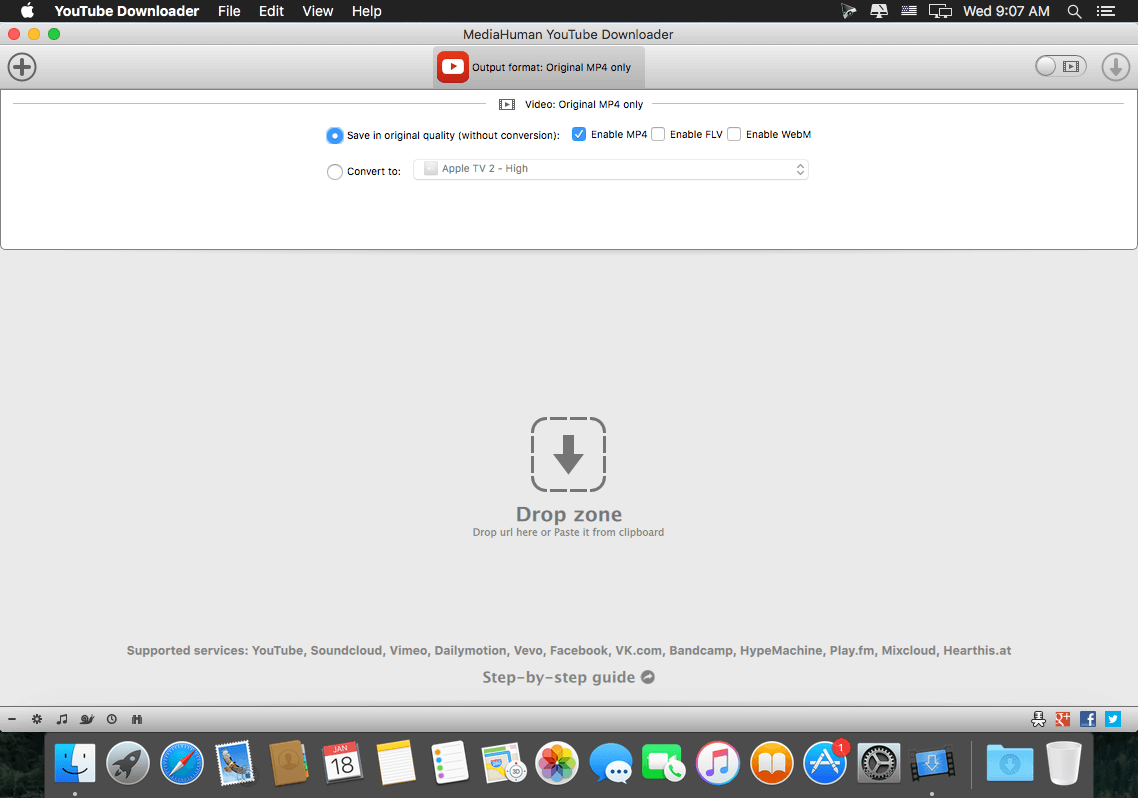
YouTube Downloader is a straightforward OS X utility that can help you handle the task in a time efficient manner: can work with multiple videos at the same time, is able to extract only the audio, and can send the tracks to your iTunes library.

Download tool that works with multiple video sharing platforms

Even though the YouTube Downloader app has been essentially developed to handle the YouTube links, you can also employ its capabilities to transfer content hosted on other media sharing platforms, such as Vimeo, SoundCloud, DailyMotion, and so on.

For your convenience, YouTube Downloader will monitor your clipboard and, as soon as it detects a suitable URL, offers you the option to add the task to the download queue.

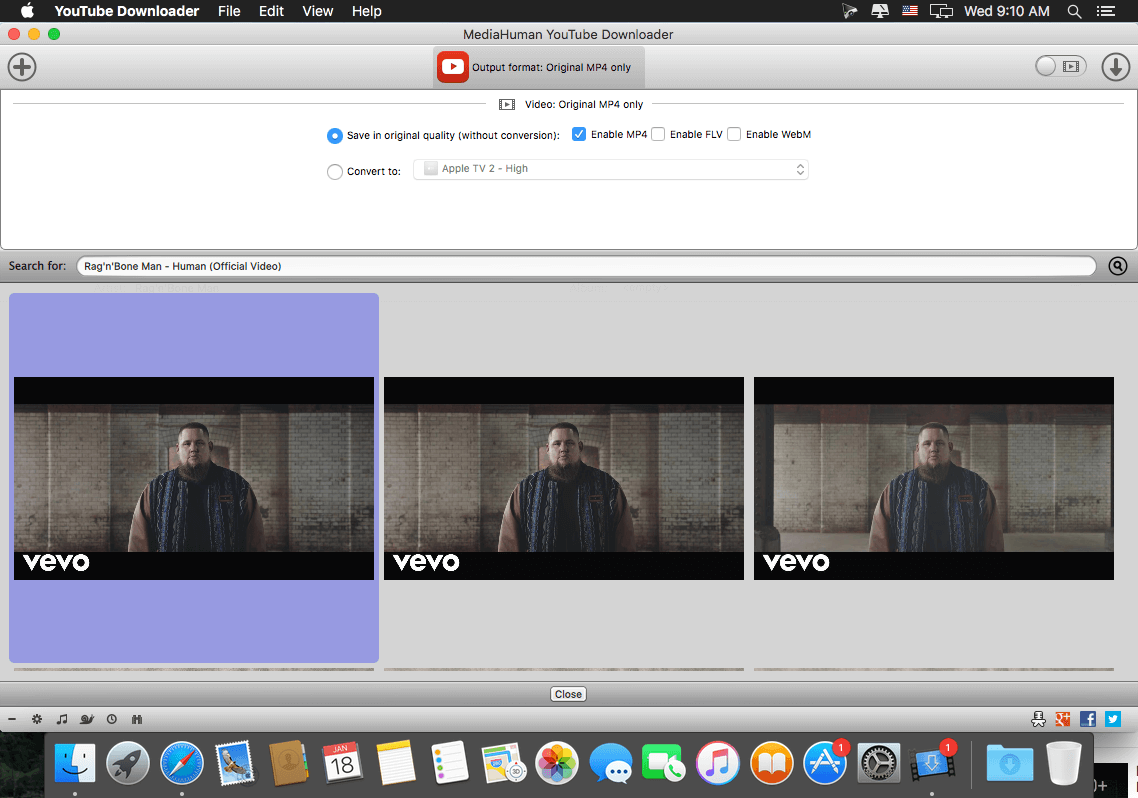
Here you get to specify if you want to download the video and select the video quality and the output format or opt to extract only the audio.

After reviewing the configuration for each task, just start the download procedure, and YouTube Downloader will let you monitor the progress in its main window. At this point, no further user interaction is needed.

Transfer to your Mac entire playlists and get full control over the output quality

To optimize your workflow, YouTube Downloader enables you to load both playlists and channels to be downloaded and can monitor them for new content. This means that, if an internet connection is available, the app can automatically download the newly posted videos.

At the same time, the utility can also send the downloaded content to your iTunes library, and even detect metadata information, such as the artist name or the video or track title. Note that you can choose to use an output format compatible with certain devices to eliminate the need to process the files further.

Make online content available offline without wasting too much time

YouTube Downloader brings to the table a streamlined solution for transferring media content hosted on various online platforms to your own computer.

The YouTube Downloader app can handle entire playlists or channels, can make the output compatible with different devices, and can extract only the audio content from a video.

Compatibility: OS X 10.8 or later 64-bit
Web Site: http://www.mediahuman.com/

What’s New in MediaHuman YouTube Downloader 3.9.9.7 (1310)

  • Release notes not available at the time of this post.
Screenshots

MediaHuman YouTube Downloader 3.9.8.26 (0809)

MediaHuman YouTube Downloader 3.9.8.26 (0809)

A very easy to use, intuitive, as well as cross-platform application that allows you to download videos from multiple video hosting websites to your Mac’s hard drive

Downloading content from the YouTube video sharing platform is necessary if you need to have offline access, or if you have a poor internet connection that cannot handle the streaming.

YouTube Downloader is a straightforward OS X utility that can help you handle the task in a time efficient manner: can work with multiple videos at the same time, is able to extract only the audio, and can send the tracks to your iTunes library.

Download tool that works with multiple video sharing platforms

Even though the YouTube Downloader app has been essentially developed to handle the YouTube links, you can also employ its capabilities to transfer content hosted on other media sharing platforms, such as Vimeo, SoundCloud, DailyMotion, and so on.

For your convenience, YouTube Downloader will monitor your clipboard and, as soon as it detects a suitable URL, offers you the option to add the task to the download queue.

Here you get to specify if you want to download the video and select the video quality and the output format or opt to extract only the audio.

After reviewing the configuration for each task, just start the download procedure, and YouTube Downloader will let you monitor the progress in its main window. At this point, no further user interaction is needed.

Transfer to your Mac entire playlists and get full control over the output quality

To optimize your workflow, YouTube Downloader enables you to load both playlists and channels to be downloaded and can monitor them for new content. This means that, if an internet connection is available, the app can automatically download the newly posted videos.

At the same time, the utility can also send the downloaded content to your iTunes library, and even detect metadata information, such as the artist name or the video or track title. Note that you can choose to use an output format compatible with certain devices to eliminate the need to process the files further.

Make online content available offline without wasting too much time

YouTube Downloader brings to the table a streamlined solution for transferring media content hosted on various online platforms to your own computer.

The YouTube Downloader app can handle entire playlists or channels, can make the output compatible with different devices, and can extract only the audio content from a video.

Compatibility: OS X 10.8 or later 64-bit
Web Site: http://www.mediahuman.com/

What’s New in MediaHuman YouTube Downloader 3.9.8.26 (0809)

  • Release notes not available at the time of this post.
Screenshots

Name MediaHuman YouTube Downloader 3 9 8 26 0809 TNT.zip
Size 29.84 MB
Created on 2018-09-09 03:22:08
Hash 1bd6fce090cdc44a0ac79130a92e75d2d538123b
Files MediaHuman YouTube Downloader 3 9 8 26 0809 TNT.zip (29.84 MB)

MediaHuman YouTube Downloader 3.9.8.25 (0806)

MediaHuman YouTube Downloader 3.9.8.25 (0806)

A very easy to use, intuitive, as well as cross-platform application that allows you to download videos from multiple video hosting websites to your Mac’s hard drive

Downloading content from the YouTube video sharing platform is necessary if you need to have offline access, or if you have a poor internet connection that cannot handle the streaming.

YouTube Downloader is a straightforward OS X utility that can help you handle the task in a time efficient manner: can work with multiple videos at the same time, is able to extract only the audio, and can send the tracks to your iTunes library.

Download tool that works with multiple video sharing platforms

Even though the YouTube Downloader app has been essentially developed to handle the YouTube links, you can also employ its capabilities to transfer content hosted on other media sharing platforms, such as Vimeo, SoundCloud, DailyMotion, and so on.

For your convenience, YouTube Downloader will monitor your clipboard and, as soon as it detects a suitable URL, offers you the option to add the task to the download queue.

Here you get to specify if you want to download the video and select the video quality and the output format or opt to extract only the audio.

After reviewing the configuration for each task, just start the download procedure, and YouTube Downloader will let you monitor the progress in its main window. At this point, no further user interaction is needed.

Transfer to your Mac entire playlists and get full control over the output quality

To optimize your workflow, YouTube Downloader enables you to load both playlists and channels to be downloaded and can monitor them for new content. This means that, if an internet connection is available, the app can automatically download the newly posted videos.

At the same time, the utility can also send the downloaded content to your iTunes library, and even detect metadata information, such as the artist name or the video or track title. Note that you can choose to use an output format compatible with certain devices to eliminate the need to process the files further.

Make online content available offline without wasting too much time

YouTube Downloader brings to the table a streamlined solution for transferring media content hosted on various online platforms to your own computer.

The YouTube Downloader app can handle entire playlists or channels, can make the output compatible with different devices, and can extract only the audio content from a video.

Compatibility: OS X 10.8 or later 64-bit
Web Site: http://www.mediahuman.com/

What’s New in MediaHuman YouTube Downloader 3.9.8.25 (0806)

  • Release notes not available at the time of this post.

Screenshots

Name MediaHuman YouTube Downloader 3 9 8 25 0806 TNT.zip
Size 29.84 MB
Created on 2018-06-09 07:44:38
Hash ab414cf652c65acb4d16d37ec206a782b895a252
Files MediaHuman YouTube Downloader 3 9 8 25 0806 TNT.zip (29.84 MB)

MediaHuman YouTube Downloader 3.9.8.24 (1205)

MediaHuman YouTube Downloader 3.9.8.24 (1205)

Name: YouTube Downloader
Version: 3.9.8.23 (1205)
Developer: MediaHuman
Mac Platform: Intel
OS Version: OS X 10.8 or later

Includes: Pre-K’ed (TNT)

Web Site: http://www.mediahuman.com/

Overview

A very easy to use, intuitive, as well as cross-platform application that allows you to download videos from multiple video hosting websites to your Mac’s hard drive

Downloading content from the YouTube video sharing platform is necessary if you need to have offline access, or if you have a poor internet connection that cannot handle the streaming.

YouTube Downloader is a straightforward OS X utility that can help you handle the task in a time efficient manner: can work with multiple videos at the same time, is able to extract only the audio, and can send the tracks to your iTunes library.

Download tool that works with multiple video sharing platforms

Even though the YouTube Downloader app has been essentially developed to handle the YouTube links, you can also employ its capabilities to transfer content hosted on other media sharing platforms, such as Vimeo, SoundCloud, DailyMotion, and so on.

For your convenience, YouTube Downloader will monitor your clipboard and, as soon as it detects a suitable URL, offers you the option to add the task to the download queue.

Here you get to specify if you want to download the video and select the video quality and the output format or opt to extract only the audio.

After reviewing the configuration for each task, just start the download procedure, and YouTube Downloader will let you monitor the progress in its main window. At this point, no further user interaction is needed.

Transfer to your Mac entire playlists and get full control over the output quality

To optimize your workflow, YouTube Downloader enables you to load both playlists and channels to be downloaded and can monitor them for new content. This means that, if an internet connection is available, the app can automatically download the newly posted videos.

At the same time, the utility can also send the downloaded content to your iTunes library, and even detect metadata information, such as the artist name or the video or track title. Note that you can choose to use an output format compatible with certain devices to eliminate the need to process the files further.

Make online content available offline without wasting too much time

YouTube Downloader brings to the table a streamlined solution for transferring media content hosted on various online platforms to your own computer.

The YouTube Downloader app can handle entire playlists or channels, can make the output compatible with different devices, and can extract only the audio content from a video.

What’s New in MediaHuman Youtube Downloader 3.9.8.23 (1205)

  • Release notes not available at the time of this post.

Screenshots

Name MediaHuman YouTube Downloader 3 9 8 24 1205 TNT.zip
Size 29.79 MB
Created on 2018-05-13 07:35:52
Hash 4719042debe6711d3bf953549708495788d49b02
Files MediaHuman YouTube Downloader 3 9 8 24 1205 TNT.zip (29.79 MB)

MediaHuman YouTube Downloader 3.9.8.22 (2203)

Descriptions for MediaHuman YouTube Downloader 3.9.8.22 (2203)

Name: YouTube Downloader
Version: 3.9.8.22 (2203)
Developer: MediaHuman
Mac Platform: Intel
OS Version: OS X 10.8 or later

Includes: Pre-K’ed (TNT)

Web Site: http://www.mediahuman.com/

Overview

A very easy to use, intuitive, as well as cross-platform application that allows you to download videos from multiple video hosting websites to your Mac’s hard drive

Downloading content from the YouTube video sharing platform is necessary if you need to have offline access, or if you have a poor internet connection that cannot handle the streaming.

YouTube Downloader is a straightforward OS X utility that can help you handle the task in a time efficient manner: can work with multiple videos at the same time, is able to extract only the audio, and can send the tracks to your iTunes library.

Download tool that works with multiple video sharing platforms

Even though the YouTube Downloader app has been essentially developed to handle the YouTube links, you can also employ its capabilities to transfer content hosted on other media sharing platforms, such as Vimeo, SoundCloud, DailyMotion, and so on.

For your convenience, YouTube Downloader will monitor your clipboard and, as soon as it detects a suitable URL, offers you the option to add the task to the download queue.

Here you get to specify if you want to download the video and select the video quality and the output format or opt to extract only the audio.

After reviewing the configuration for each task, just start the download procedure, and YouTube Downloader will let you monitor the progress in its main window. At this point, no further user interaction is needed.

Transfer to your Mac entire playlists and get full control over the output quality

To optimize your workflow, YouTube Downloader enables you to load both playlists and channels to be downloaded and can monitor them for new content. This means that, if an internet connection is available, the app can automatically download the newly posted videos.

At the same time, the utility can also send the downloaded content to your iTunes library, and even detect metadata information, such as the artist name or the video or track title. Note that you can choose to use an output format compatible with certain devices to eliminate the need to process the files further.

Make online content available offline without wasting too much time

YouTube Downloader brings to the table a streamlined solution for transferring media content hosted on various online platforms to your own computer.

The YouTube Downloader app can handle entire playlists or channels, can make the output compatible with different devices, and can extract only the audio content from a video.

What’s New in MediaHuman Youtube Downloader 3.9.8.22 (2203)

  • Release notes not available at the time of this post.

Screenshots

Name MediaHuman YouTube Downloader 3 9 8 22 2203 TNT.dmg
Size 31.28 MB
Created on 2018-03-22 12:03:42
Hash 511bf559895227006dae5db57f1582ddd49e4b55
Files MediaHuman YouTube Downloader 3 9 8 22 2203 TNT.dmg (31.28 MB)

MediaHuman Youtube Downloader 3.9.8.22 (1503)

Descriptions for MediaHuman Youtube Downloader 3.9.8.22 (1503)

Name: YouTube Downloader
Version: 3.9.8.22 (1503)
Developer: MediaHuman
Mac Platform: Intel
OS Version: OS X 10.8 or later

Includes: Pre-K’ed (TNT)

Web Site: http://www.mediahuman.com/

Overview

A very easy to use, intuitive, as well as cross-platform application that allows you to download videos from multiple video hosting websites to your Mac’s hard drive

Downloading content from the YouTube video sharing platform is necessary if you need to have offline access, or if you have a poor internet connection that cannot handle the streaming.

YouTube Downloader is a straightforward OS X utility that can help you handle the task in a time efficient manner: can work with multiple videos at the same time, is able to extract only the audio, and can send the tracks to your iTunes library.

Download tool that works with multiple video sharing platforms

Even though the YouTube Downloader app has been essentially developed to handle the YouTube links, you can also employ its capabilities to transfer content hosted on other media sharing platforms, such as Vimeo, SoundCloud, DailyMotion, and so on.

For your convenience, YouTube Downloader will monitor your clipboard and, as soon as it detects a suitable URL, offers you the option to add the task to the download queue.

Here you get to specify if you want to download the video and select the video quality and the output format or opt to extract only the audio.

After reviewing the configuration for each task, just start the download procedure, and YouTube Downloader will let you monitor the progress in its main window. At this point, no further user interaction is needed.

Transfer to your Mac entire playlists and get full control over the output quality

To optimize your workflow, YouTube Downloader enables you to load both playlists and channels to be downloaded and can monitor them for new content. This means that, if an internet connection is available, the app can automatically download the newly posted videos.

At the same time, the utility can also send the downloaded content to your iTunes library, and even detect metadata information, such as the artist name or the video or track title. Note that you can choose to use an output format compatible with certain devices to eliminate the need to process the files further.

Make online content available offline without wasting too much time

YouTube Downloader brings to the table a streamlined solution for transferring media content hosted on various online platforms to your own computer.

The YouTube Downloader app can handle entire playlists or channels, can make the output compatible with different devices, and can extract only the audio content from a video.

What’s New in MediaHuman Youtube Downloader 3.9.8.22 (1503)

  • Release notes not available at the time of this post.

Screenshots

Name MediaHuman Youtube Downloader 3.9.8.22 (1503)
Size 28.64 MB
Created on 2018-03-17 00:59:07
Hash dd8de365c893a0a7b7d27a1f875a0b47c7e7ea64
Files MediaHuman_YouTube_Downloader_3.9.8.22__1503___TNT.rar (28.64 MB)

MediaHuman YouTube Downloader 3.9.8.20 (1202)

Descriptions for MediaHuman YouTube Downloader 3.9.8.20 (1202)

Name: YouTube Downloader
Version: 3.9.8.20 (1202)
Developer: MediaHuman
Mac Platform: Intel
OS Version: OS X 10.8 or later

Includes: Pre-K’ed (TNT)

Web Site: http://www.mediahuman.com/

Overview

A very easy to use, intuitive, as well as cross-platform application that allows you to download videos from multiple video hosting websites to your Mac’s hard drive

Downloading content from the YouTube video sharing platform is necessary if you need to have offline access, or if you have a poor internet connection that cannot handle the streaming.

YouTube Downloader is a straightforward OS X utility that can help you handle the task in a time efficient manner: can work with multiple videos at the same time, is able to extract only the audio, and can send the tracks to your iTunes library.

Download tool that works with multiple video sharing platforms

Even though the YouTube Downloader app has been essentially developed to handle the YouTube links, you can also employ its capabilities to transfer content hosted on other media sharing platforms, such as Vimeo, SoundCloud, DailyMotion, and so on.

For your convenience, YouTube Downloader will monitor your clipboard and, as soon as it detects a suitable URL, offers you the option to add the task to the download queue.

Here you get to specify if you want to download the video and select the video quality and the output format or opt to extract only the audio.

After reviewing the configuration for each task, just start the download procedure, and YouTube Downloader will let you monitor the progress in its main window. At this point, no further user interaction is needed.

Transfer to your Mac entire playlists and get full control over the output quality

To optimize your workflow, YouTube Downloader enables you to load both playlists and channels to be downloaded and can monitor them for new content. This means that, if an internet connection is available, the app can automatically download the newly posted videos.

At the same time, the utility can also send the downloaded content to your iTunes library, and even detect metadata information, such as the artist name or the video or track title. Note that you can choose to use an output format compatible with certain devices to eliminate the need to process the files further.

Make online content available offline without wasting too much time

YouTube Downloader brings to the table a streamlined solution for transferring media content hosted on various online platforms to your own computer.

The YouTube Downloader app can handle entire playlists or channels, can make the output compatible with different devices, and can extract only the audio content from a video.

What’s New in MediaHuman Youtube Downloader 3.9.8.20 (1202)

  • Release notes not available at the time of this post.

Screenshots

Name MediaHuman YouTube Downloader 3 9 8 20 1202 TNT.zip
Size 32.71 MB
Created on 2018-02-15 23:16:04
Hash 2902a7ba4eb3d84906113da8dc6e61da861db2a3
Files MediaHuman YouTube Downloader 3 9 8 20 1202 TNT.zip (32.71 MB)