Tag Archives: 1.1.3

Heavyocity FURY Distortion Designer 1.1.3

Heavyocity’s FURY | Distortion Designer is a bold distortion VST plugin featuring a wide range of distortion flavors for guitars, bass, and more—from subtle warmth to hard clipping, lo-fi crush to analog-modeled circuitry, and simple to chaotic. The FURY distortion VST will shape, mangle, and crunch your sound with aggressive precision.n.

HEAVY SYNTH
Give your synth line that beefy and aggressive crunch. Click the speaker icon to hear the sounds from this distortion VST in action.

ENERGETIC DRUMS
Bigger, badder, and more dynamic-sounding drums are created with the FURY VST by adding saturation and giving them some drive. Click the speaker icon to hear it in action.

BRUTAL BASS
Increase the sonic versatility of your low-end with thump, punch, and drive. Click the speaker icon to hear the bass distortion plugin in action.

The Playground
Send your sound through your own custom distortion. With over 700 possible module combinations, you can mix and match the levels of boosting, mangling, and tonality — from a traditional distortion to a most obscure creation, you’ll have your own customized tone.

Surgical Shaping
Fine-tune the modules, and adjust your parameters — with access to various controls like gate, feedback, and pre/post distortion EQs you can get more precise with your sound. The LFO, Envelope Follower, and Sequencer can add subtle movement, reactivity, or rhythmic complexity — resulting in a unique, hand-crafted distorted signal.

Endless Presets
FURY lays the groundwork to cover a wide variety of sources and uses. Offering over 100 factory presets, arranged by instrument and use-type — from keys and synth to guitars and bass — FURY offers an extensive selection of distortion flavors for you to explore.

→ Features:
• 128 Expertly-Crafted Presets in SIX Categories – Essentials, Drums, Experimental, Guitars and Bass, Keys and Synth, and Rhythmic
• 29 unique drive and distortion modules
• Shape page for full control
• Modulation page to add movement with LFO, ENV follow, and Step Sequencer

Compatibility: OS X 10.15 or later • Apple Silicon or Intel Core processor
Homepage https://heavyocity.com/product/fury/

Name: Heavyocity_FURY_1.1.3__HCiSO_Mactorrents.Me.dmg
Size: 57.78 MB
Files Heavyocity_FURY_1.1.3__HCiSO_Mactorrents.Me.dmg[57.78 MB]


   Download Torrent

Initiater Pro 1.1.3

Capture Text and Graphics! Upgrade your productivity to the next level!

Initiater is an easy to use small macOS OCR (Optical Character Recognition) app that extracts and recognizes any non-editable text on your Mac computer’s screen. As an extra feature, it can turn graphic files into editable text.

Initiater is a small app which lives in menu bar, it’s accessible whenever you need it. The app is convenient to use and makes extracting text from your images, scanned documents, or even videos easy.

If you have ever used a built-in Mac’s screen capture application or any other screenshot app before, then it’s not difficult for you to work with Iitiater. Select with a mouse any part of the image, photo, document, or anything on the screen, and the app will process and recognizes any text within this selection. Grabbed part of the screen and having any text in that area be instantly recognized and copied to clipboard or shown in a small window.

Screenshot images containing text part, convert them into editable text files or copy to clipboard where you can paste as a text. Or just save selected part as an image file.

Additionally, the application supports recognizing text from PNG, JPG, JPEG, BMP, TIFF and PSD files, and convert them into plain text. All conversion and screenshots are done securely only on your device, none of your images or texts are sent to any third-party services in the cloud.

This app’s OCR engine or any other feature doesn’t need an internet connection to process function. Secure optical character recognition or screenshot solution for those who are concerned about privacy. The application doesn’t collect any users’ data.

Features in Short

  • Grab an screen area
  • Recognize text – copy to clipboard or save as text file
  • Save screenshot as an image file
  • Recognize text from graphic files
  • Ultra light app which runs as a menu bar app
  • Runs natively on Apple M1 and Intel processors
  • On-device OCR Technology, no internet connection is needed
  • Instant text recognition. No need to upload files into the network
  • Running macOS Catalina: English language is only supported

This version of the app recognizes primarily written in English, French, German, Italian, Spanish, Portuguese and Chinese languages. You can change default recognition language in Settings window.

For best results, use “Best” mode, or “Normal” mode for lighting speed results. For corrupted or old images, using “Best” mode is recommended.

Top In-App Purchases: Pro Version – included
Compatibility: macOS 10.15 or later
Mac App Store https://apps.apple.com/app/initiater/id1578490291

Screenshots


Name: Initiater_1.1.3_Mactorrents.Me.dmg
Size: 4 MB
Files Initiater_1.1.3_Mactorrents.Me.dmg[4 MB]


   Download Torrent


   Download Link

TeaCode 1.1.3

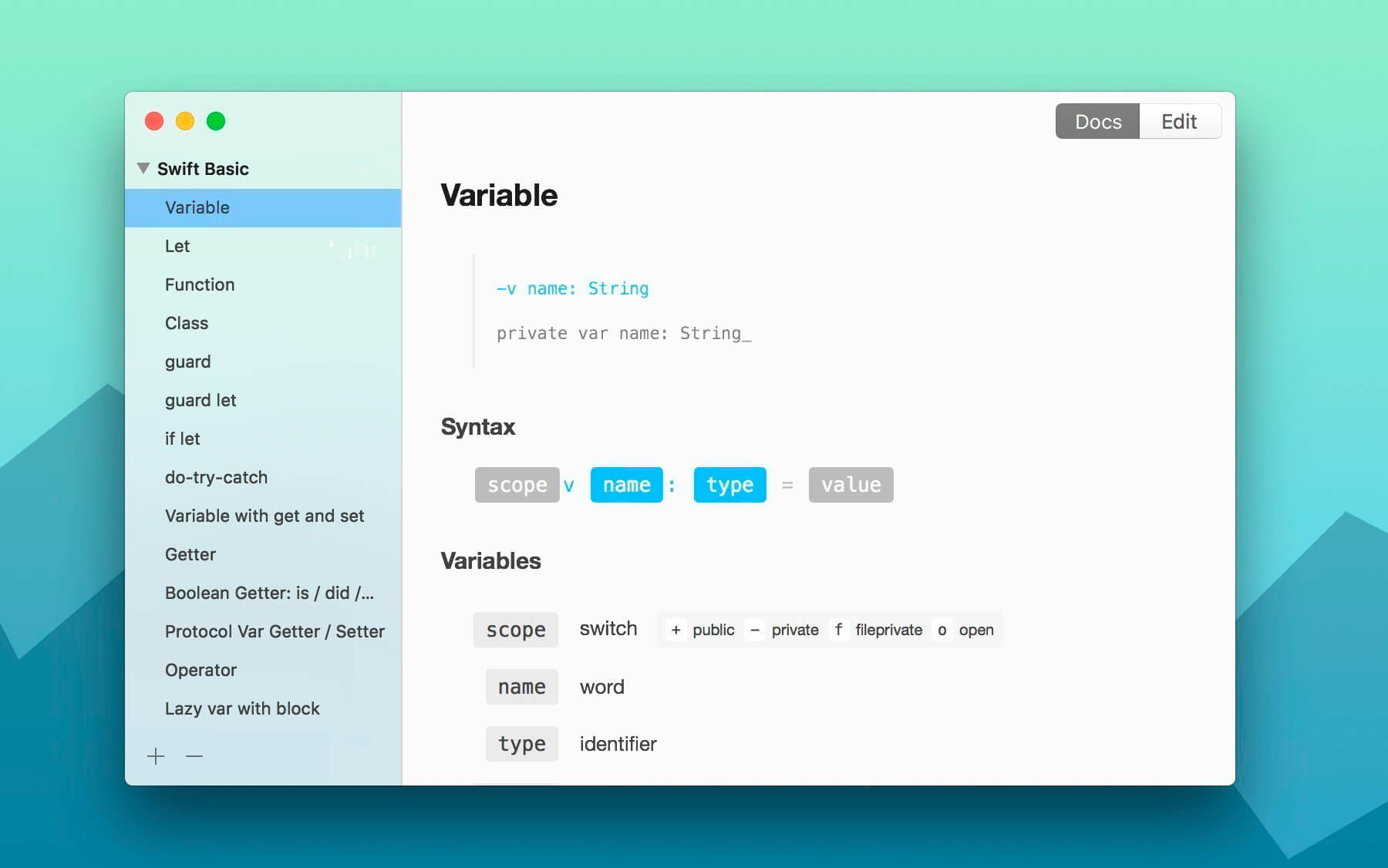
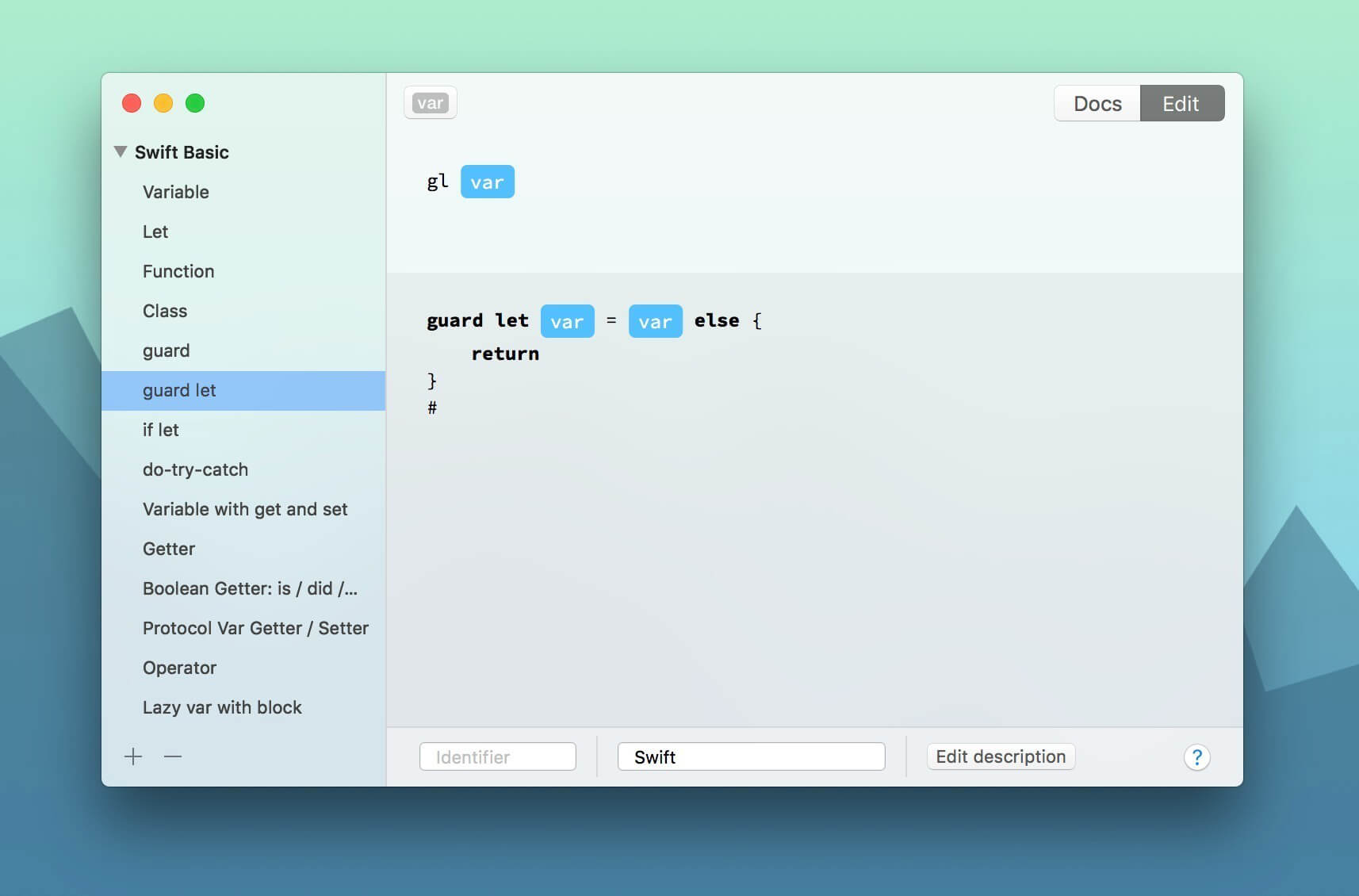
TeaCode speeds up your code writing with a powerful variable-based language. The app comes with over 80 built-in expanders. Creating new ones is extremely easy, and it works with almost any editor. No matter what programming language do we use, we always write lots of code. TeaCode writes it with you. Quickly.

  • Focus on your code: Just write your code pattern, press TeaCode shortcut and keep writing your code.
  • Any text editor: TeaCode works with probably all the native macOS text editors. For non-native ones, we’ve already made some plugins.
  • 80+ built-in expanders: TeaCode comes with 70+ built-in expanders. For Swift, PHP, and HTML.
  • Create your own expanders: t’s very easy. Create them once and write your code faster.
  • Export: You can export your bundle of expanders and share with others.
  • Quick browser: Need to access expander syntax quickly? Or to quickly find one? Press ⌘+⇧+space and start typing.

Compatibility: macOS 10.12 or later 64 bit
Homepage https://www.apptorium.com

Screenshots


Name: TeaCode_1.1.3_Mactorrents.Me.dmg
Size: 16 MB
Files TeaCode_1.1.3_Mactorrents.Me.dmg[16 MB]


   Download Torrent

MetaVideo 1.1.3

Name: MetaVideo_1.1.3_Mactorrents.biz.dmg
Size: 52 MB
Files MetaVideo_1.1.3_Mactorrents.biz.dmg[52 MB]

   Download Torrent
   Link Download

We’re aware of a bug in the current app version affecting file reading. Rest assured, a fix is on the way. Looking to take control of your video metadata and streamline your workflow? Look no further than MetaVideo, the ultimate app for managing your video metadata on Mac!

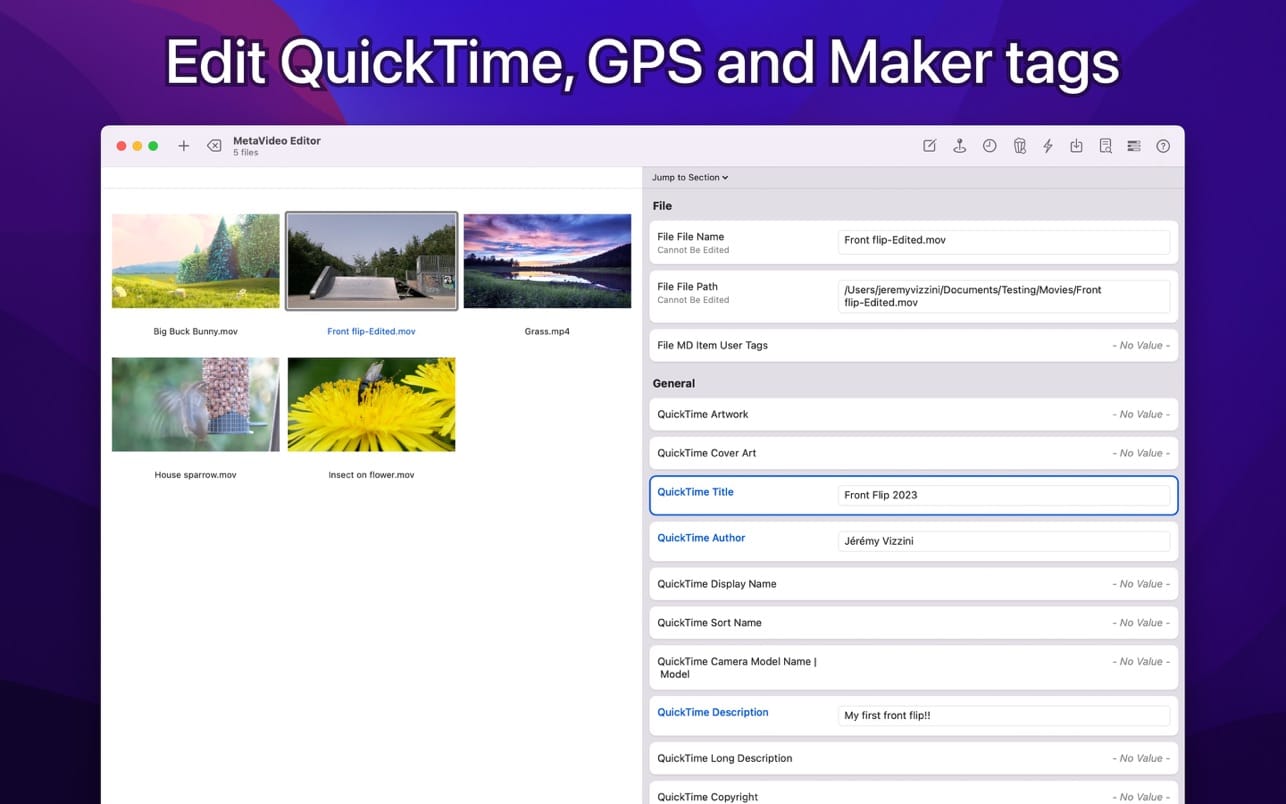
With MetaVideo, you can automate the editing of QuickTime and GPS tags, making it the perfect tool. Whether you need to change metadata, add artwork, or fix GPS coordinates, MetaVideo has got you covered. Plus, you can create presets and apply the same changes to multiple videos, saving you tons of time and effort.

BEYOND QUICKTIME AND VIDEO TAGS
That’s not all – MetaVideo goes beyond just QuickTime tags. It supports a wide range of other metadata tags, including EXIF, XMP, and IPTC, for video and audio files that support them. The app does not support only MP4 and MOV. Manage all popular video and audio formats in one place.

MADE FOR MOVIES AND TV SHOWS
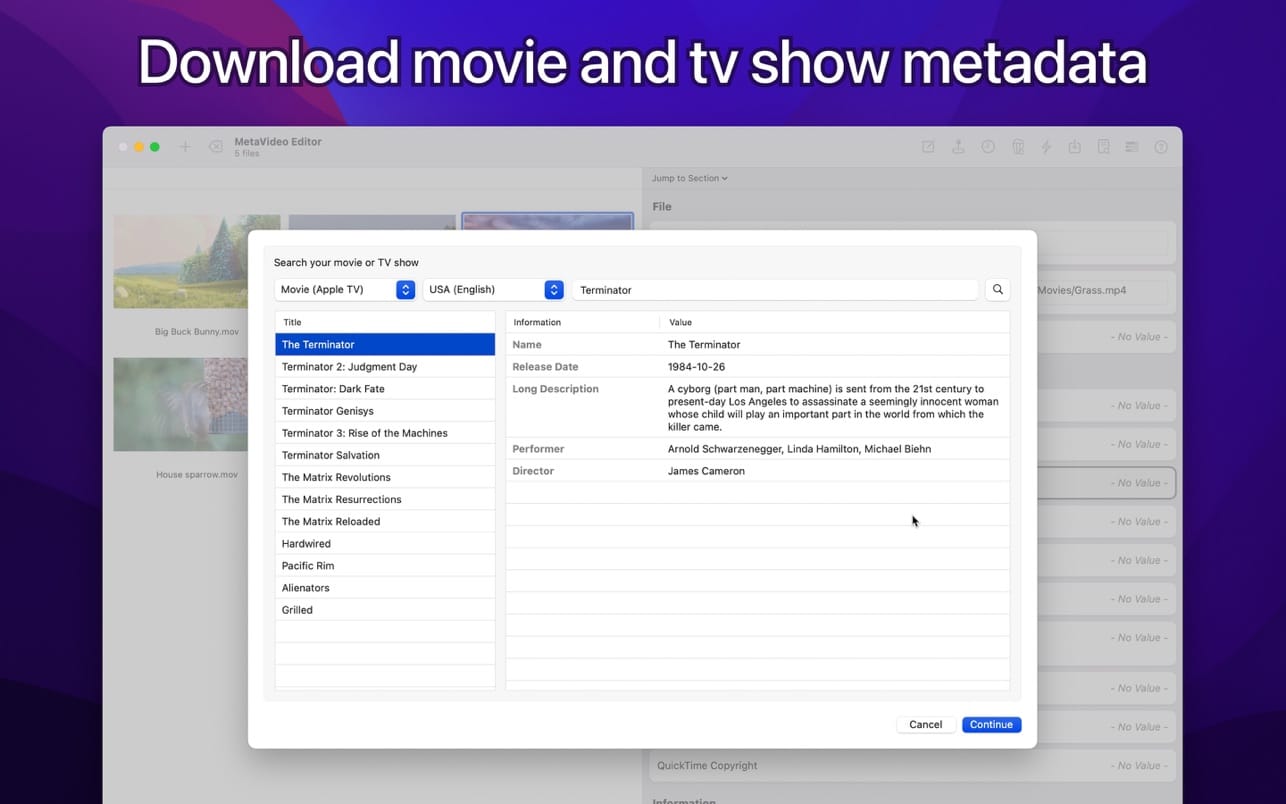
Need to download meta information for your movies and TV shows? MetaVideo’s got your back. The app can automatically retrieve relevant metadata for your media files, such as titles, descriptions, release dates, genres, ratings, and even cover art, from online services like Apple TV, iTunes, TheMovieDB, and more.

GPS TAGGING SUPPORT
With MetaVideo’s unique ability to edit QuickTime location ISO6709, you can easily add GPS coordinates to your videos and audio files. The app provides multiple options to add GPS coordinates, so you can choose the one that’s easiest for you.

Compatibility: macOS 11.0 or later
Homepage https://neededapps.com/

Screenshots