
JetBrains AppCode 2018.3.2

Name JetBrains.AppCode.v2018.3.2.MACOSX.zip
Size 600.5 MB
Created on 2018-12-20 09:40:33
Hash a9ae9bd178a39f52f15f957fc84776e49188e0da
Files JetBrains.AppCode.v2018.3.2.MACOSX.zip (600.5 MB)

Download

JetBrains AppCode 2018.3.2 macOS

your bright ideas into outstanding iOS/OS X apps with ease and pleasure. Rely on AppCode’s intelligent assistance as you code, refactor, debug and test.

Why AppCode

Intelligent development environment
Thanks to an in-depth understanding of your code structure, AppCode takes care of your routine tasks and saves you from extra typing. It gives you smart code completion, formatting, reordering, automatic import, and powerful navigation options and code generation. Quickly fine-tune your apps or unit tests using a robust LLDB debugger with flexible breakpoints, watches, frames view and evaluate expressions.

The complete experience

AppCode is 100% compatible and interoperable with Xcode, with no additional configuration required. It seamlessly integrates with the most popular version control systems; Kiwi and Google testing frameworks; Dash and Ingredients documentation tools; CocoaPods (including intention actions in pod files and automatic install and update of pods); Reveal application; and a number of issue trackers. An integrated UI Designer is also included.

Code quality is important

AppCode is constantly monitoring the quality of your code. It warns you of errors and smells and suggests quick-fixes to resolve them automatically. Clang Static Analyzer is integrated as well, and a wide range of reliable refactorings lets you easily clean and improve your code in the most accurate and intelligent way.

Many languages, one IDE

AppCode natively supports Objective-C, Swift, C and C++, including C++11, libc++ and Boost, as well as javascript, XML, HTML, CSS and XPath. Use your preferred language to create your iOS/OS X application.

System Requirements:
  • macOS 10.8 or higher
  • 1 GB RAM minimum, 2 GB RAM recommended
  • 300 MB hard disk space + at least 1 GB for caches
  • 1024×768 minimum screen resolution

Web Site: http://www.jetbrains.com/

What’s New in JetBrains AppCode 2018.3.2

  • Release notes not available at the time of this post.

Screenshots

appcode_333

JetBrains CLion 2018.3.2

Name JetBrains.CLion.v2018.3.2.macOS.zip
Size 433.3 MB
Created on 2018-12-20 09:40:16
Hash 51eb8b02d907bef41a63d7c6c8498ff0fb6da68d
Files JetBrains.CLion.v2018.3.2.macOS.zip (433.3 MB)

Download

JetBrains CLion 2018.3.2 macOS

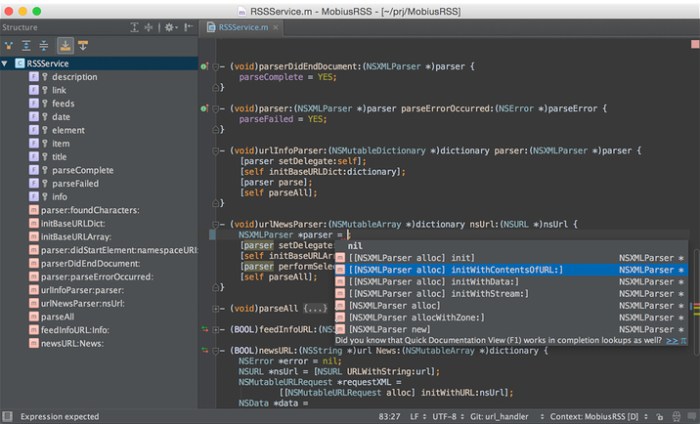
A power tool for A power language. Smart C and C++ editor. Thanks to native C and C++ support, including C++11 standard, libc++ and Boost, CLion knows your code through and through and takes care of the routine while you focus on the important things.

Navigation

Instantly navigate to a symbol’s declaration or context usages, find your way through the code base with structure and hierarchical views.

Code generation

Add class members, override/implement functions, wrap a block of code with a statement, or generate a declaration from actual usage – all via simple keyboard shortcuts.

Refactoring

Rename symbols, move members up/down the hierarchy, change function signature, and be sure CLion’s automated refactorings will accurately propagate the appropriate changes throughout your code.

On-the-fly code analysis

With CLion, you can create code that’s beautiful and correct at the same time. Potential code issues are identified instantly…
…and fixed as you type! Be sure all the proper changes are handled automatically by CLion.
CLion also performs Data Flow analysis to find out all the cases of the unreachable code, infinite recursion and more.

Integrated debugger

Investigate and solve problems with ease through CLion’s friendly debugger user interface with GDB or LLDB (on OS X) available as a backend.

Inline variable view

Get the complete view of your project with variable values shown right in the editor as you debug.

Watches and variables view

Inspect the state of all the variable for a chosen function in the stack frame, or monitor variable/expression changes during the debug session.

CMake

Using CMake as a project model, CLion handles your changes in CMake files automatically, using all the information from there during code editing and refactorings.

The complete experience

Popular VCS supported out of the box include Subversion, Git, GitHub, Mercurial, CVS, Perforce (via plugin), and TFS.
CLion also seamlessly integrates with Google Test framework.

Embedded terminal

Run any command without leaving the IDE: locally or remotely using the SSH protocol. Depending on your platform, you can work with a command line prompt, Far, powershell, bash, or other tools.

Keyboard-centric approach

To help you focus on code and raise your productivity, CLion has keyboard shortcuts for nearly all its features, actions and commands.

System requirements
  • macOS 10.9.4 or higher
  • 2 GB free RAM
  • 1024×768 minimum screen resolution

Web Site: http://www.jetbrains.com/

What’s New in JetBrains CLion 2018.3.2

  • Release notes not available at the time of this post.

Screenshots
JetBrains PyCharm Professional 2018.3.2

Name JetBrains.PyCharm.Professional.v2018.3.2.MACOSX.zip
Size 395.8 MB
Created on 2018-12-19 20:34:58
Hash 6c3b5f9f6445b087dc363aa892261179b7cf9298
Files JetBrains.PyCharm.Professional.v2018.3.2.MACOSX.zip (395.8 MB)

Download

JetBrains PyCharm Professional 2018.3.2 macOS

The Most Intelligent Python IDE. Enjoy productive Python, Django, and Web development with PyCharm, an intelligent Python IDE offering unique coding experience. PyCharm’s smart code editor provides first-class support for Python, javascript, CoffeeScript, TypeScript, CSS, popular template languages and more. Take advantage of language-aware code completion, error detection, and on-the-fly code fixes!

Python & Web Development

Intelligent Python Support

Enjoy outstanding coding assistance with smart code completion, code inspections, on-the-fly error highlighting, auto-fixes, along with automated code refactorings and rich navigation capabilities for all major Python implementations.

Smart Cross-technology Support

In addition to Python, Pycharm supports javascript, CoffeeScript, TypeScript, HTML/CSS, Cython, template languages, AngularJS, Node.js, and more.

Web Development Frameworks

PyCharm offers great framework-specific support for modern web development frameworks such as Django, Flask, Google App Engine, Pyramid, and web2py.

Remote Development Capabilities

Run, debug, test, and deploy applications on remote hosts or virtual machines, with remote interpreters, integrated ssh terminal, Docker and Vagrant integration.

Built-in Developer Tools

An amazing suite of tools right out of the box: an integrated debugger and graphical test runner; a built-in terminal; integration with Git, SVN, and Mercurial; built-in Database Tools & SQL support.

Customizable and Cross-platform IDE

PyCharm works on Windows, Mac OS or Linux with a single license key. Enjoy a fine-tuned workspace with customizable color schemes and key-bindings, with VIM emulation available.

System requirements
  • macOS 10.8 or higher
  • 1 GB RAM minimum, 2 GB RAM recommended
  • 300 MB hard disk space + at least 1 GB for caches
  • 1024×768 minimum screen resolution

Web Site: http://www.jetbrains.com/

What’s New in JetBrains PyCharm Professional 2018.3.2

  • Release notes not available at the time of this post.

Screenshots

Geekbench 4.3.1

Name Geekbench 4 4 3 1 MAS TNT.zip
Size 78.72 MB
Created on 2018-12-19 05:10:17
Hash fecb0a3bdf59f70575a403bc4c05ae88644095b4
Files Geekbench 4 4 3 1 MAS TNT.zip (78.72 MB)

Download

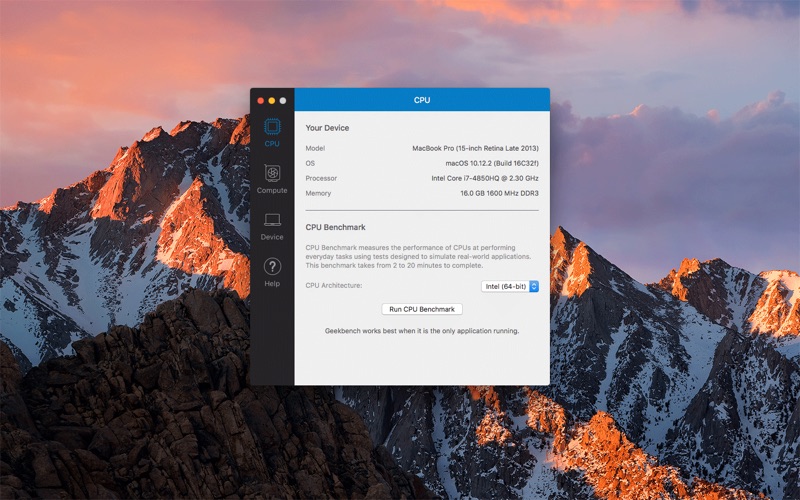
Descriptions for Geekbench 4.3.1

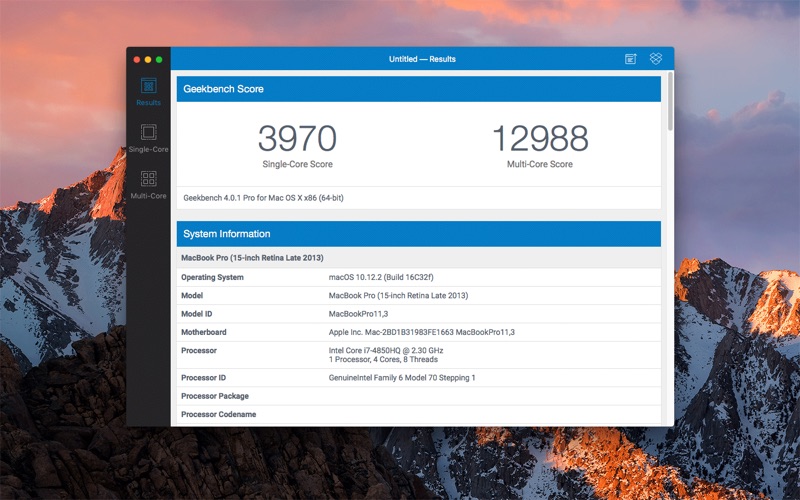
Geekbench 4 measures your system’s power and tells you whether your computer is ready to roar. How strong is your mobile device or desktop computer? How will it perform when push comes to crunch? These are the questions that Geekbench can answer.

Compatibility: OS X 10.10.5 or later 64-bit

Web Site: http://www.geekbench.com/
Mac App Store: https://itunes.apple.com/app/geekbench-4/id1175706108?mt=12

What’s New in Geekbench 4.3.1

Fix Dropbox support on iOS and macOS.

Screenshots

Boom 3D 1.1.5

 Boom 3D 1.1.5 download for mac)

Name Boom 3D 1 1 5 MAS TNT.zip
Size 29.58 MB
Created on 2018-12-18 18:29:59
Hash e610d314d8a79eb35e31cc6f9ebb35051b53bdd0
Files Boom 3D 1 1 5 MAS TNT.zip (29.58 MB)

Download

Boom 3D 1.1.5

An unobtrusive and lightweight application capable of boosting your Mac’s sound volume and improve the audio quality of your audio files
Boom 3D is straightforward volume booster and sound equalizer specially designed to increase the volume and quality of the sound coming out from your Mac’s speakers.

Enjoy a louder, clearer and better sound

Boom 3D seamlessly integrates with macOS and its controls are similar to the default system volume control. However, Boom 3D provides additional features and capabilities that can be used to enhance the quality of the sound.

Thanks to Boom 3D you can boost the sound coming from YouTube video clips, songs and videos played using iTunes, Netflix, Spotify or any other application. Moreover, you can use Boom 3D to improve the clarity of Skype and FaceTime video chats.

Intuitive interface

From Boom 3D’s status bar menu you can quickly adjust the sound volume or change the EQ preset with just a couple of mouse clicks. By accessing Boom 3D’s main window you can enable or disable the volume booster and sound equalizer, adjust the sound level and customize the equalizer.

Boom 3D comes with a series of presets that you can easily adjust and personalize according to your likes. You can even save your own presets and load them via the Boom Presets slide menu.

Powerful audio level booster

By accessing the Boost File tab, you can easily adjust the sound level of multiple audio and video files at the same time. What is more, you can configure Boom 3D to automatically add the modified files to a new playlist in iTunes at the end of the process.

The Preferences window helps you turn on or off the notification sounds, set the default location for boosted files and type in the suffix for the boosted items. On top of that you can enable and customize the level up and level down hot-keys.

Compatibility: OS X 10.10 or later 64 bit

Web Site: http://www.globaldelight.com/boom3d/index.php
Mac App Store: https://itunes.apple.com/app/boom-3d-the-best-virtual-surround-audio/id1233048948?mt=12

What’s New in Boom 3D 1.1.5

Boom 3D welcomes the tenth macOS, Mojave and is fully compatible with it.

LRTimelapse Pro 5.1.1 Build 567

Name LRT.5.1.1.macOS.zip
Size 243.6 MB
Created on 2018-12-18 18:49:41
Hash 8913f093cc38df301b45accf5d37cc2cde355d79
Files LRT.5.1.1.macOS.zip (243.6 MB)

Download

Descriptions for LRTimelapse Pro 5.1.1 Build 567 MacOS

LRTimelapse 5 provides the most comprehensive solution for time lapse editing, keyframing, grading and rendering. No matter if on Windows or Mac, or which camera you use: LRTimelapse will take your time lapse results to the next level.

LRTimelapse 5 provides the most comprehensive solution for time lapse editing, keyframing, grading and rendering. No matter if on Windows or Mac, or which camera you use: LRTimelapse will take your time lapse results to the next level. LRTimelapse is being used by most known time lapse producers and many amateurs. It allows keyframing and grading of time lapse sequences in an all-raw-file-based workflow, utilizing the Adobe Camera RAW develop engine implemented in Lightroom (CC Classic, 6, 5 and 4) and Adobe Camera Raw.

Creating Day-to-Night and Night-to-Day time lapse transitions is easily and perfectly done with the “Holy-Grail-Wizard”. Rendering of the final sequences can be done in professional video formats like Prores 4:4:4 and 4:2:2 and resolutions up to 8K and beyond – of course consumer formats like MP4/H.264/H.265/HEVC, MJpeg are supported as well. Time lapse movies are getting more and more popular these days. Still-photographers, filmmakers and multimedia artists are discovering this new and exciting facet of photography.

LRTimelapse is being used by those people (see some outstanding work by LRTimelapse users on the demo page), because it enables them to use their favorite photographic tools (Lightroom Classic or Adobe Camera RAW) to produce time lapses with all the advantages and power that those tools offer for image editing. It allows them to easily deal with time lapse specifics, like getting rid of the tedious flicker-effect and even helps them to achieve the so called “holy grail of time lapse photography”: smooth day-to-night transitions.

Features:

  • Animate and Keyframe Exposure, White Balance, and any other Lightroom editing tool over the time. You can use the full potential of Lightroom / ACR for color grading and even animate Graduated, Radial and PaintBrushFilters
  • Make the “Holy Grail” of time lapse photography (day to night transition) really easy either by just manually adjusting your camera when shooting or by using a ramper like qDslrDashboard or others.
  • Deflicker with one click do this based on the look of the developed images without having to leave the RAWworkflow. This gives you the best quality possible.
  • Seamless integration with Lightroom CC Classic, 6, 5, and 4 with the powerful LRTExport plugin.
  • High performance video rendering engine for high quality videos in up to 8K resolution and in MP4/H.264, ProRes (even on Windows), H.265 and MJpeg.
  • and many, many more…

Compatibility: OS X 10.9 or later

Web Site: https://lrtimelapse.com/

What’s New in LRTimelapse Pro 5.1.1 Build 567

  • Release notes not available at the time of this post.

Screenshots

Alfred 3 Powerpack 3.7.1 (946)

Name Alfred 3 Powerpack 3 7 1 946 TNT.zip
Size 5.59 MB
Created on 2018-12-18 08:35:59
Hash 8ac836bdf2a9c4c7da5fbec7b1bbd889e6e11dc7
Files Alfred 3 Powerpack 3 7 1 946 TNT.zip (5.59 MB)

Download

Alfred 3 Powerpack 3.7.1 (946)

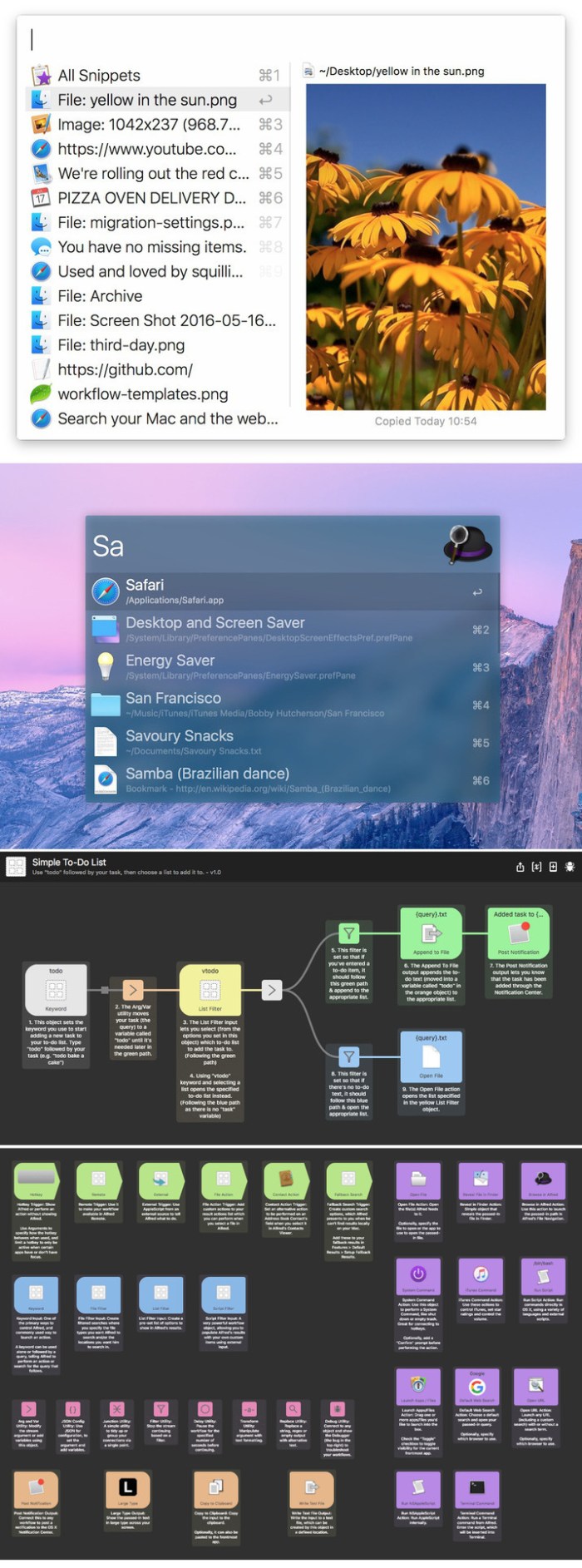
Alfred is an award-winning app for Mac OS X which boosts your efficiency with hotkeys, keywords, text expansion and more. Search your Mac and the web, and be more productive with custom actions to control your Mac.

Search and Browse

Launch applications and find files on your Mac or on the web. Alfred learns how you use your Mac and prioritises results.

Save countless hours by using hotkeys, keywords and customising how you want to search your Mac and activity history.

Jump in and browse, preview files and take action on them without lifting your fingers off the keyboard.

Type Less, Say More

With Alfred’s Clipboard History and Snippets features, there’s no need to type the same URLs or responses over and over.

Use the Clipboard History to locate any text, image or file you copied earlier and paste it again.

Create your own snippets and type a short abbreviation to auto-expand them into a full text snippet, saving yourself hours of typing in the long run!

Extend and Automate

With Alfred’s Powerpack, use immensely powerful workflows to perform tasks more efficiently and cut down on repetitive manual tasks.

Link hotkeys, keywords and actions together to create your own workflows; There’s no need to write a single line of code to create a workflow. Import workflows from the thousands our community of creators have shared.

Control Your Music

You’re the boss. Boost your productivity by controlling your Mac using Alfred’s deep integration with OS X. Swiftly take action on files and contacts, control your music player and dispatch System commands.

Add some fun to your day; Turn your iPhone or iPad into a command centre for your Mac with Alfred Remote for iOS.

Alternatively, take a look at the many workflows for other music services like Spotify.

Alfred Powerpack

Control your Mac with the Powerpack’s incredible features, and enjoy workflows and themes.

Compatibility: macOS 10.9 or later 64-bit
Web Site: http://alfredapp.com/

What’s New in Alfred 3 Powerpack 3.7.1 (946)

  • Release notes not available at the time of this post.

Screenshots

iskysoft imedia converter deluxe 10.3.0.3

Name iSkysoft iMedia Converter Deluxe 10 3 0 3 TNT.zip
Size 103.6 MB
Created on 2018-12-17 23:33:15
Hash ce43e182798ef3a04723f022bbe7cb888cb8a224
Files iSkysoft iMedia Converter Deluxe 10 3 0 3 TNT.zip (103.6 MB)

Download

iSkysoft iMedia Converter Deluxe 10.3.0.3

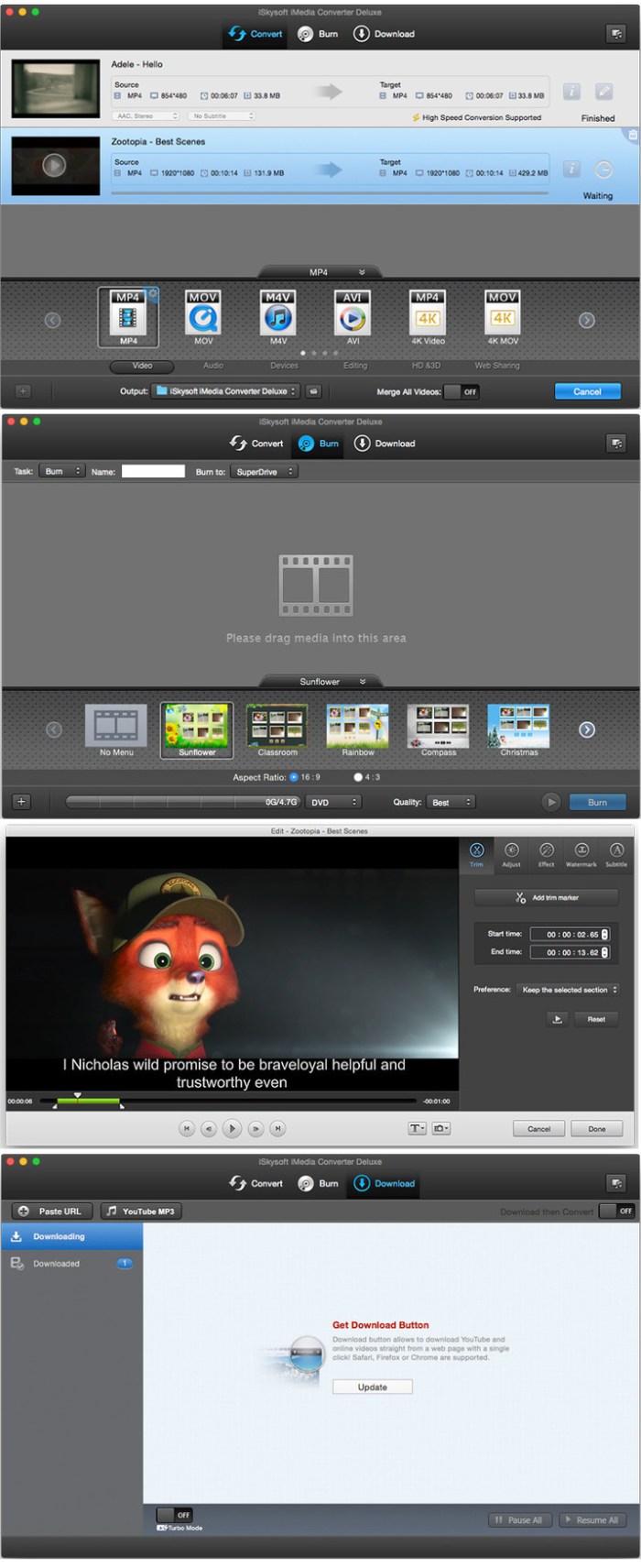
Fast Convert Video in High Quality, iSkysoft iMedia Converter Deluxe for Mac helps convert video, audio and even DVD file to various formats. In addition, it will continue to add new supported formats after the release of new versions! You will always get free updates of this greatest video converter for Mac.

The boost in speed is the result of harnessing GPU power to do the computing. Intel & NVIDIA GPU hardware acceleration increases the conversion speed of iSkysoft iMedia Converter Deluxe. If you want to convert videos that are encoded in H.264, this Mac video converter will always keep the original video & audio quality unless you change the encode settings or compress videos.

As the best video converter for Mac, iSkysoft iMedia Converter Deluxe Mac can convert not only local but online videos. It enables you to convert online videos (including 4K & HD) from 1,000+ sites, including YouTube, Hulu, Facebook, VEVO, Vimeo, Dailymotion, etc. to any format or device as you want.

Compatibility: OS X 10.7 or later 64 bit

Web Site: https://videoconverter.iskysoft.com/

What’s New in iSkysoft iMedia Converter Deluxe 10.3.0.3

  • Release notes not available at the time of this post.

Screenshots
snippetslab 1.8 2

Name SnippetsLab 1 8 2 MAS TNT.zip
Size 15.72 MB
Created on 2018-12-17 23:34:21
Hash 9f37fe898a6a993d3900292f52efb979cec34adf
Files SnippetsLab 1 8 2 MAS TNT.zip (15.72 MB)

Download

SnippetsLab 1.8.2 MAS + iCloud

Stop reinventing the wheel – be more productive with SnippetsLab.

SnippetsLab is an easy-to-use snippets manager. It helps you to collect and organize valuable code snippets and makes sure that you have easy access to them whenever you want.

Features

  • Beautiful user interface with 12 beautiful themes
  • Syntax highlighting for over 380 languages
  • Markdown snippets (edit & preview), with all languages and LaTeX support
  • Create nested folders, Smart Groups, and shortcuts
  • Add notes & tags to a snippet
  • Include multiple fragments in a single snippet (useful when one snippet logically consists of multiple separate “parts,” such as a header and an implementation, or different solutions to one problem; every fragment under one snippet can have its own language and note)
  • Multiple windows & pin individual window at the top of the screen
  • Use advanced search (search by folder/tags/languages) to find your snippets instantly
  • Use iCloud to synchronize your database ​across multiple devices
  • Export the library to JSON, XML or plain text files
  • Use the SnippetsLab Assistant to search, browse and create snippets right from the menu bar
  • Automatic backups to ensure data safety
  • Support for printing, sharing, macOS Services, Force Touch, etc.

Integrations

  • Data Sync: Customize the library location to use 3rdparty filebased sync services (such as Dropbox or Google Drive).
  • CodeBox: Import from CodeBox Library (.cbxml) files
  • Gist: Import from GitHub Gist & publish your snippets as gists. SnippetsLab supports both GitHub.com and GitHub Enterprise accounts (Note: Twoway sync is not supported.)
  • Alfred Custom Search: Start searching from Alfred using the “snippetslab://search/query” URL scheme
  • Alfred Workflow: Search and view the results directly in Alfred, open them in SnippetsLab, copy to clipboard or paste to the frontmost app (Note: Alfred Powerpack is required to use the workflow)
Supported Languages

For a complete list of all 380+ supported languages, please visit: https://www.renfei.org/snippets-lab/manual/mac/faq.html#what-languages-are-supported

Compatibility: macOS 10.10 or later, 64bit

Web Site: https://www.renfei.org/snippets-lab/
Mac App Store: https://itunes.apple.com/app/snippetslab/id1006087419?mt=12

What’s New in SnippetsLab 1.8.2

Bug fixes and performance improvements.

cyberbyte antivirus and internet security premium 2.5 5

Name CyberByte Antivirus and Internet Security Premium 2 5 5 TNT.zip
Size 172.6 MB
Created on 2018-12-17 23:32:20
Hash 8374b121008ff8aa0f83be0ea29aeb5f9a8c896f
Files CyberByte Antivirus and Internet Security Premium 2 5 5 TNT.zip (172.6 MB)

Download

CyberByte Antivirus and Internet Security Premium 2.5.5

CyberByte Antivirus is a security tool to be used by the home users even they have or not any vast computer knowledge. The Mac is generally considered to be safe and secure, and there are a number of reasons why Macs are considered more secure than PCs, but there are plenty of risks that Macs haven’t managed to completely avoid.

We, at CyberByte, besides our security consultancy expertise, we study the malware evolution and we had observed that there has been a 120% increase in Mac malware.

This is the reason why we had developed the CyberByte Antivirus and Internet Security, the antivirus for Mac. The main goal of this product is to be able to be used by the home users even they have or not any vast computer knowledge.

Our malware protection will continuously look after your device providing the best security against viruses. Give us the chance to prove it by downloading the antivirus for your device.

Features
  • We are now OPSWAT certified product and partners: https://www.opswat.com/partners/technologypartners/cyberbyte
  • Malware research team that possesses certifications in malware analysis and incident response.
  • Updated malware patterns daily, based on which malware campaigns are active.
  • CyberByte has an active protection shield which will alert you if you will download a potential malware.
  • CyberByte comes with a network mapping tool which will keep an eye on your connected devices.
  • Malware research team, which is keeping an updated malware pattern database
  • An ultrafast and optimized malware scan tool
  • A fast network mapping tool which will keep an eye on your connected devices
  • The active monitor protection, which is constantly monitoring your Downloads folder, in order to identify if a malware will sneak in there The power of any antivirus comes from its malware pattern database.
  • A malware pattern database is a file that contains the signatures of malware that the antivirus can identify. A poor database means poor detection. The scanning speed is also an important element. Slow scan speed means the time to complete a full scan is longer and your Mac resources are used at maximum.
  • Network mapping tool is a masterpiece that is useful when you are connected to your home wireless network.

Compatibility: OS X 10.10 or later 64-bit

Web Site: https://mac.cyberbyte.org

What’s New in CyberByte Antivirus and Internet Security Premium 2.5.5

  • Release notes not available at the time of this post.

permute 3.0.3

Name Permute 3 3 0 3 TNT.zip
Size 50.77 MB
Created on 2018-12-17 23:34:06
Hash 8f6b161b45badb914e7aa63df77c5147725faa1b
Files Permute 3 3 0 3 TNT.zip (50.77 MB)

Download

Permute 3.0.3

Permute is the easiest to use media converter with it’s easy to use, no configuration, drag and drop interface, it will meet the needs to convert all your media.

Easy to Use

Built from the ground up, Permute is a perfect example of what a Mac app should be. With a gorgeous interface and drag & drop simplicity no need for complicated options.

Insanely Fast

Permute was engineered to be incredibly fast. Let us take care of the hard stuff. Just select the video format you want and it’ll be done faster than you can say “Antidisestablishmentarianism”.

Everything Included

It doesn’t matter if you’re converting home movies or processing images. Permute can do it all. We support nearly every format and have plenty of device presets to choose from.

Compatibility: OS X 10.11 or later

Web Site: http://permute.charliemonroe.net
Mac App Store: https://itunes.apple.com/app/permute-2/id731738567?mt=12

What’s New in Permute 3.0.3

  • Release notes not available at the time of this post.

cisdem video player 4 2.0

Name Cisdem Video Player 4 1 0 TNT.zip
Size 36.06 MB
Created on 2018-12-17 23:32:09
Hash 7de8c2c61c22797b64c3c5900d26604feba8fa7d
Files Cisdem Video Player 4 1 0 TNT.zip (36.06 MB)

Download

Cisdem Video Player 4.2.0

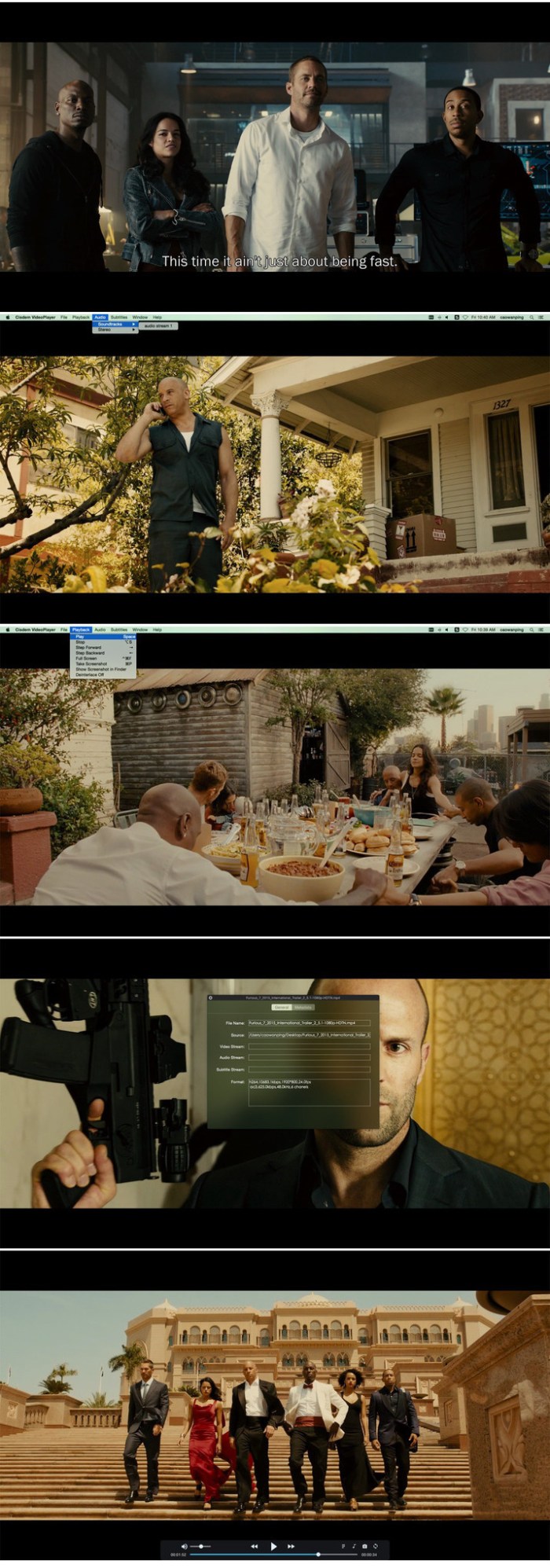
Cisdem Video Player is a free video and audio player that supports almost any media files (Including 5K and Full HD 1080P video) with no additional codecs or plugins needed. It delivers a better HD video playing experience without buffering or crashes. You can load subtitle files automatically and add subtitle files easily. Supporting more than fifty formats, it stands out in the crowd of other media players.

Features
  • Support to convert video/audio formats Cisdemc Video Player adds the new features of converting video formats. For the downloaded videos, it supports to convert them to mp4, m4k, mov, mkv, mp3, m4a, avi etc. What’s more, it also supports to convert the formats that mainstream devices supported, such as iPhone 7/plus, iPad Pro, Samsung Galaxy S8, Android Generic
  • Improve the watching experience Take control of the volume by the key↑and↓ Hide the mouse while watching video Close energy saver while watching video

Compatibility: OS X 10.10 or later 64-bit

Web Site: https://www.cisdem.com

What’s New in Cisdem Video Player 4.2.0

  • Release notes not available at the time of this post.

Screenshots

grandtotal 5 2.3

Name GrandTotal 5 2 3 TNT.zip
Size 37.82 MB
Created on 2018-12-17 23:32:38
Hash 8dc29b41033a23d5329b50bc19fefb556da503c1
Files GrandTotal 5 2 3 TNT.zip (37.82 MB)

Download

GrandTotal 5.2.3

A powerful, yet easy to use financial application that enables you to effortlessly generate estimates and invoices with the help of customizable templates

GrandTotal is a lightweight, intuitive and reliable macOS application created from the very beginning to provide you with all the tools required to create invoices and estimate for your clients using a Mac.

Helps you create, print and email invoices and estimates with a couple of mouse clicks

GrandTotal comes with a simple and well-designed interface from which you can quickly access the tools and features you might need to complete your tasks.

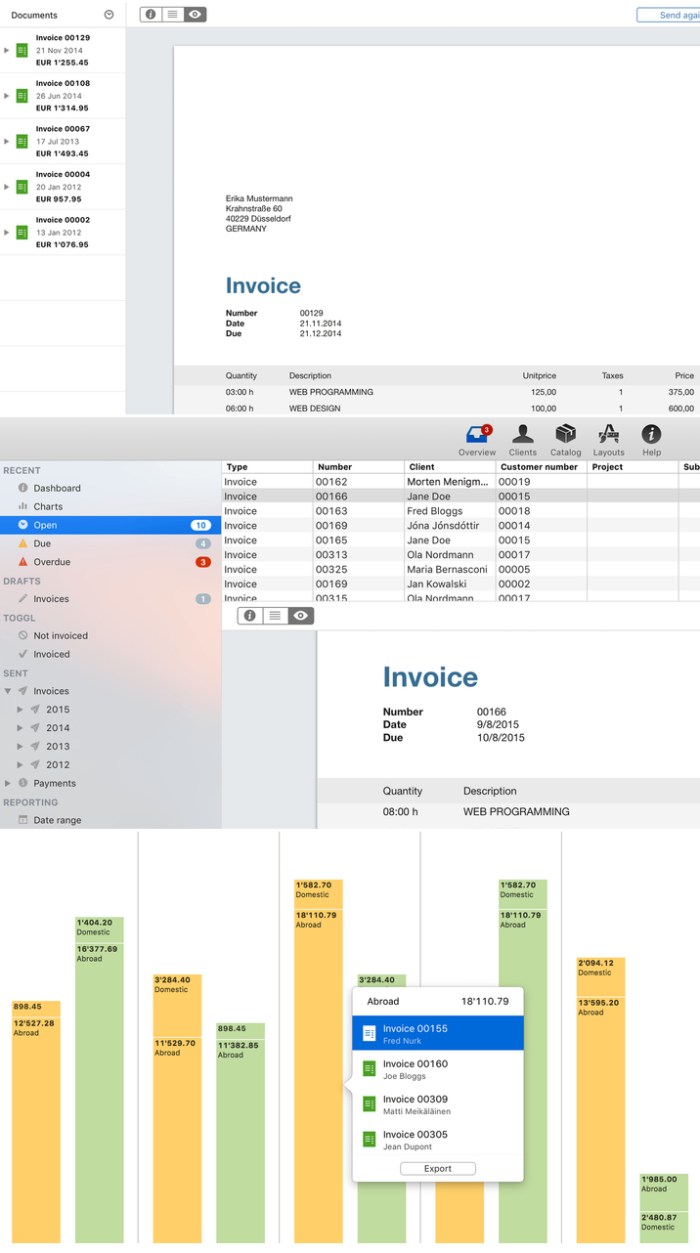
As follows, from GrandTotal’s main window, you can have an overview of your recent activity, check the financial status, access various drafts, view a list with all sent payments, generate reports for a given period of time or for any given client, create smart-lists and more.

Naturally, the Clients tab offers you easy access to your clients list and helps you find, manage and track the documents created for your clients. Thanks to the built-in search form you can instantly find a contact and filter the list of generated documents.

Designed to seamlessly integrate with Apple’s Contacts app

GrandTotal also allows you to manually add new clients or retrieve new contacts from Apple’s Contacts app with just a couple of mouse clicks.

For every client you can generate an invoice, estimate, project and payment that can accompanied by be scheduled wit the help of the built-in calendar feature.

By accessing the Catalog tab, you can easily view a list with all your items, add or remove an item and provide a title, description and price before including it into an item group.

At the same time, GrandTotal’s Layouts tab provides you with the option to create personalized layouts for your invoices and estimates.

Insert QR codes, logos and other graphical elements in your documents with extreme ease

As an added bonus, the GrandTotal application also comes with a couple of templates that you can download from within the app and customize based on your needs.

Furthermore, GrandTotal’s edit toolbar helps you insert text boxes, images, logos, rectangles, PayPal logos and QR codes within your invoices, while the bottom toolbar allows you to zoom in or out the page to get a birds eye view of you documents.

Compatibility: OS X 10.9 or later 64-bit

Web Site: http://www.mediaatelier.com/GrandTotal/

What’s New in GrandTotal 5.2.3

  • Release notes not available at the time of this post.

Screenshots

tipard dvd creator for mac 3.2.8

Name Tipard DVD Creator for Mac 3 2 8 77731 TNT.zip
Size 39.67 MB
Created on 2018-12-17 23:34:38
Hash c0544b6f9ef029cabd5792f3c65fce670cc77431
Files Tipard DVD Creator for Mac 3 2 8 77731 TNT.zip (39.67 MB)

Download

Tipard DVD Creator for Mac 3.2.8

Tipard DVD Creator for Mac lets you burn any videos like MP4, AVI, WMV, MOV, MKV to DVD on Mac at ultra-fast speed. Tipard DVD Creator for Mac is a professional DVD authoring, burning and copying tool that helps you convert video in any format like MKV, AVI and MP4 to DVD without watermark. Now you can create your personalized DVD disc/folder/ISO files from favorite videos!

  • Burn videos from MP4, AVI, FLV, MOV, etc. (including HD videos) to DVD Disc/folder/ISO files on Mac
  • Create DVD with downloaded YouTube video and home movie recorded by iPhone, iPad, camcorder, etc.
  • Free customize DVD with various menu templates
  • Free edit your video by trimming, cropping, and watermarking
  • DVD5, DVD9; DVDR, DVD+R, DVDR DL, DVD+R DL, DVDRW, DVD+RW are supported

Compatibility: macOS 10.7 or later

Web Site: http://www.tipard.com/dvd-creator-for-mac/
Mac App Store: https://itunes.apple.com/app/any-dvd-creator-make-burn-dvd-with-any-video/id669834982?mt=12

What’s New in Tipard DVD Creator for Mac 3.2.8

  • Release notes not available at the time of this post.

athentech perfectly clear complete 3.6 3.1385

Name Perfectly Clear Complete v3 3 6 3 1385 REPACK TNT.zip
Size 132.5 MB
Created on 2018-12-17 23:33:42
Hash bc734e0837d75db43907dbef95c65c7b80d21a10
Files Perfectly Clear Complete v3 3 6 3 1385 REPACK TNT.zip (132.5 MB)

Download

Athentech Perfectly Clear Complete 3.6.3.1385

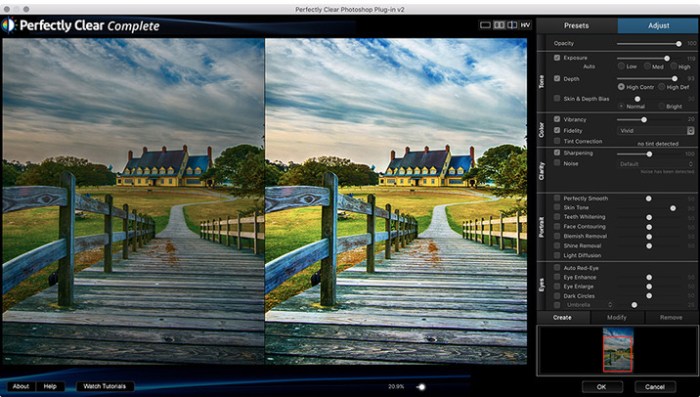
With Perfectly Clear, you’ll get results faster so you can spend more time behind the camera and less time in front of the computer. Take advantage of intelligent image analysis to find and fix numerous camera flaws automatically. Plus, you can quickly add your favorite finishing touch with our stylized LOOKs.

Take complete control.

Our presets are just the starting point. Easily apply only the adjustments you need for the perfect image. Use our powerful sharpening and noise reduction, which goes beyond what other tools can do, to unlock a whole new image. Keep an eye on your color and exposure with a dynamic histogram that tracks exposure and color clipping.

A custom experience.

Every photographer is different, and so is Perfectly Clear. Our adaptive interface lets you hide tools you don’t need while you work, allowing you to focus on your image. Plus, you can make and manage your own presets, which intelligently adapt to each photo.

Why change your workflow?

Rather than move your entire image library or change your workflow, we’ll make your existing workflow better. We support several platforms and have more coming soon. With powerful batch processing and up to 30 corrections in one click, we’ll make everything better.

We’ve got image correction down to a science.
Creating our award-winning technology took more than a decade of R&D, multiple patented processes, and over a dozen unique algorithms. We cracked the code on correcting every pixel independently. The proof is in your pictures.

Web Site: http://www.athentech.com/products/plugins

What’s New in Athentech Perfectly Clear Complete 3.6.3.1385

  • Release notes not available at the time of this post.

Screenshots

abelssoft doku downloader 2019 v1.1

Name Abelssoft.Doku.Downloader.2019.v1.1.MacOS-DVT.zip
Size 101.8 MB
Created on 2018-12-17 23:31:50
Hash 8043d323ef2b8f2f3779470f1376e687eb9a2154
Files Abelssoft.Doku.Downloader.2019.v1.1.MacOS-DVT.zip (101.8 MB)

Download

Abelssoft Doku Downloader 2019 v1.1 macOS

Get with the documentary Downloader access to thousands of exciting documentaries from popular media centers such as ARD, ZDF and more. Even YouTube is on board!

Every day hundreds of new documentaries

Who wants to always look the same? The documentary Downloader provides you every day hundreds of new documentaries from over 10 different categories.

See documentaries or download

No matter where you look at you the next document – the documentary Downloader does it all. Take a look at a document directly in the program or to invite them to you as the video down.

Compatibility: OS X 10.7 or Later

Web Site: www.abelssoft.de

What’s New in Abelssoft Doku Downloader 2019 v1.1

  • Release notes not available at the time of this post.

lingon x 6 5 3

Name Lingon X 6 5 3 TNT.zip
Size 13.61 MB
Created on 2018-12-17 23:33:23
Hash 286f9375fa4dd5fa9128a50192ae2d98e1f44834
Files Lingon X 6 5 3 TNT.zip (13.61 MB)

Download

Lingon X 6.5.3

Lingon X 5 is based on the great Lingon 3 and extends it with new features like running jobs as root and at multiple dates. It is now even easier to use yet much more powerful. Version X 5 is a paid upgrade.

Features
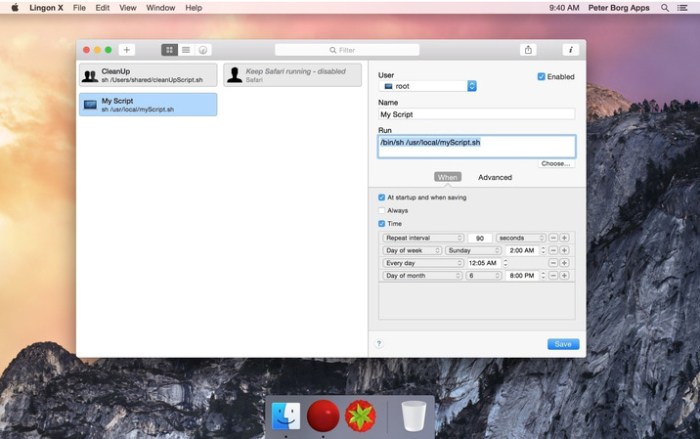
  • Start an app, a script or run a command automatically whenever you want it to. You can schedule it to run at a specific times, regularly or when something special happens.
  • It can also make sure that an app or a script automatically restarts if it crashes. Lingon X can do all this for you and much more.
  • Lets you run things automatically by modifying configuration files for the built-in system function called launchd so the system handles running the jobs so you don’t need to have Lingon open after you have saved your job.
  • Released outside Mac App Store to be able to include requested features.
  • Still available in Mac App Store for those who still use OS X 10.7 Lion or prefer the comfort and convenience of the Mac App Store.
  • Earlier versions of Lingon X are still available to work with macOS from 10.8. And a license bought today can be used with both Lingon X 5 and Lingon X 4.

Compatibility: macOS 10.13 or later 64-bit

Web Site: https://www.peterborgapps.com/lingon/

What’s New in Lingon X 6.5.3

  • Release notes not available at the time of this post.

Screenshots
iCash 7.7.1

Name iCash_v7.7.1.zip
Size 56.19 MB
Created on 2018-12-17 23:33:05
Hash 39abacea434b23627df91c37755bd0df9cec99f4
Files iCash_v7.7.1.zip (56.19 MB)

Download

Maxprog iCash 7.7.1 macOS

iCash is a software intended to control your personal finances, keeping track of incomes, expenses, credits, debts and Banks transactions for you. As simple as creating the accounts you need and move money between them! You don’t even need to know about accounting or even care about it! Your finances depend largely on good organization that lets you know where your money comes from and to where it goes.

iCash is an easy-to-use, full featured and multi-purpose Personal Finance Manager tool for Macintosh and Windows intended to help you control all kinds of money issues. iCash can serve several small accounting needs for either private users, or clubs, associations, self-employed, small businesses or simply to be used at home, making keeping track of incomes, expenses and Banks transactions a snap. With a few clicks you can begin creating accounts and making transactions in minutes.

iCash is versatile and user-friendly. For this reason it doesn’t use the principle of double-entry bookkeeping making it much easier to be used by people with very little or no accounting knowledge at all. Simply create accounts for all your expenses, incomes, Banks… and start moving money between them! iCash will then allow you to find out where all your money comes from and where it goes. All accounts are well organized according to user-defined categories and built-in types so reports can be tailored to include all records or only ones meeting specified criteria. iCash also allows you to have as many money manager documents as necessary so you can control almost anything from Clubs, associations, home and so on at the same time.

iCash is available in English, German, French, Spanish, Italian, Swedish, Russian, Chinese, Japanese, Korean, Dutch, Polish, Czech, Catalan and Portuguese.

Key Features:
  • No accounting knowledge required, no doubleentry bookkeeping.
  • Easytouse, straightforward and userfriendly allinone interface.
  • Share your documents between your Mac and your PC hassle free.
  • Unlimited Accounts, Categories and Contacts.
  • Logical Account classification by category and type.
  • Multiple currencies support with exchange rate manager.
  • Transaction autobalance and reconciliation.
  • Scheduled and recurring transactions support.
  • Full Budget support with customizable calculator.
  • Project categorization of transactions for queries and reporting.
  • Predefined customizable Reports.
  • Advanced recordable Queries and Statistics.
  • Chart creation by account, type, category including Profit & Loss.
  • Fast Import and Export of Categories, Accounts and Transactions. (OFX, QIF, CSV)
  • Powerful SQL database engine with autobackup protection.
  • Multidocument interface with password protection.

Compatibility: OS X 10.7 or later
Web Site: http://www.maxprog.com/site/software/personal-finance/icash_sheet_us.php
Mac App Store: https://itunes.apple.com/app/icash-se/id418794867?mt=12

What’s New in iCash 7.7.1

  • Overview panel has been redesigned. It now displays chart and summary information.
  • The chart panel now support 3D pie charts.
  • New ‘Last 12 months’, 2, 3, 5 and 10 years chart periods.
  • The ‘Overview’ panel has been renamed. It is now labeled ‘Accounts’.
  • All chart system has been redesigned to support HiDpi.
  • Fix: Comment autocompletion failing in given occasions.
  • Fix: Crash when quitting the application while entering a transaction.
  • Fix: Chart data entries unchecked by error for given periods.

qp bang v1.0.3 for after effects

Name Bang v1.0.3 Mac.zip
Size 354.1 kB
Created on 2018-12-17 06:53:50
Hash 3195085b9e94e18aa2f956ab25a734a0f0e78513
Files Bang v1.0.3 Mac.zip (354.1 kB)

Download

QP Bang v1.0.3 for After Effects macOS

Bang is a modular, fully procedural 3D muzzle flash plugin for After Effects

Bang is an After Effects plugin that lets you easily add realistic and stylised muzzle flashes directly to your footatge. Its 3D particle system renders unique flashes viewable from any angle, taking into account After Effects’ comp cameras. Bang is a modular plugin allowing up to four different flash types and sixteen flash instances per layer, and includes the Bang Relighter module for simulating illumination of your actors and surroundings.

Compatibility: After Effects CC 2018, CC 2017, CC 2015.3, CC 2015, CC 2014, CC, CS6

Web Site: https://aescripts.com/bang/

What’s New in QP Bang v1.0.3

FIxed a crash with Relighter if a muzzle flash was positioned close to the edge of frame; fixed audio corruptions due to the Module Selector; Added the global Displacement Evolution Speed parameter

kcncrew pack 12.15 18

Name KCNcrew Pack 12-15-18.zip
Size 10.32 MB
Created on 2018-12-17 06:53:22
Hash e6e39002f221ad192b1d61b39a54ec26788ccda1
Files KCNcrew Pack 12-15-18.zip (10.32 MB)

Download

KCNcrew Pack 12-15-18 macOS

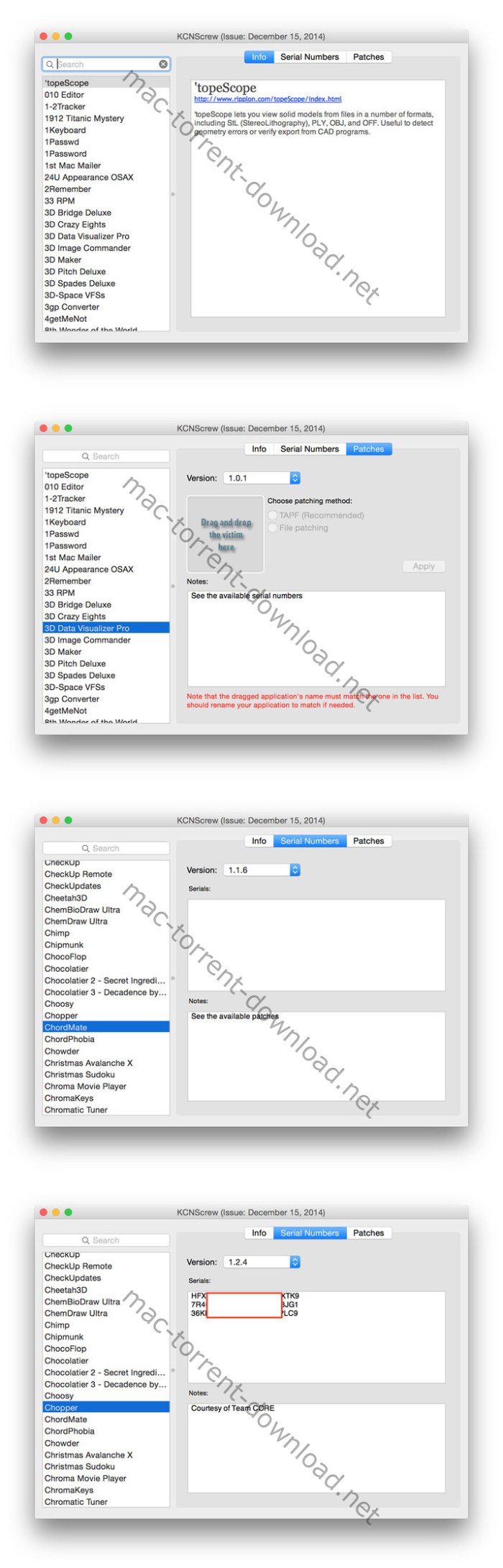
KCNcrew Pack – This is a huge collection of serial numbers for software under MacOS X with a convenient cover for browsing and searching. There is a very long time and is periodically updated! Base serial numbers KCNcrew project as of October2017. Unlike Serial Box, no readers are required.

Just open the dmg file, drag and drop the app where you like. However, there is no way to view what serials, cracks and patches are new in this issue as compared to the previous. Thanks to all contributors and supporters!

OS Version: OS X 10.6 or later

Screenshots

dornisoft aftercodecs v1.5 1 for adobe premiere pro media encoder

Graphics & Design Video

Name AfterCodecsPPME OSX bundle.zip
Size 3.29 MB
Created on 2018-12-17 06:53:57
Hash 987e8a9d9b11ad0fb2a82ad054932e35a03efe8b
Files AfterCodecsPPME OSX bundle.zip (3.29 MB)

Download

Dornisoft AfterCodecs v1.5.1 for Adobe Premiere Pro & Media Encoder MacOS

Native exporter for AE bringing you ProRes on Windows and h264 (x264 and x265) codecs for excellent quality and lightweight videos.

AfterCodecs is a native render queue plugin for After Effects that allows you to render directly to the codecs listed below.

Need to render ProRes on Windows?

Want to render directly to a small file size, high quality H264 straight from the After Effects render queue?

AfterCodecs can do it without requiring any intermediate files!

Codecs

  • ProRes : LT / Proxy / Normal / HQ and even 444 that supports Alpha Channel.
  • x264 : best H264/AVC implementation, outperforming both Adobe Media Encoder and QuickTime H264.
  • x265 : files are 30% lighter than x264 and it also supports 8K resolution.
  • x264 RGB : same as x264 but avoids YUV colorspace, best for storing separate channels in one video (UV map, Alphas…) for power users only.
Compatibility:
  • After Effects CC 2019, CC 2018, CC 2017, CC 2015.3, CC 2015, CC 2014
  • Premiere CC 2019, CC 2018, CC 2017, CC 2015.3, CC 2015, CC 2014
  • Media Encoder CC 2019, CC 2018, CC 2017, CC 2015

Web Site: https://aescripts.com/aftercodecs/

What’s New in Dornisoft AfterCodecs v1.5.1

  • Using ffkroma 4.184 and not using ffmpeg anymore, you can delete the old ffmpeg executable it if you want
  • All color shifts with ProRes codecs are fixed now, please update !
  • H264 / H265 : 8 bpc / 10 bpc, TV Range / Full Range, YUV subsampling choice (4:2:0 / 4:2:2 / 4:4:4)
  • H264 YouTube profile in .MP4 will render AAC audio now, please use .MOV that will generate WAVE audio so that Youtube has the best quality to reencode after upload ?
  • PPro / AME : new audio layout to render all individual mono tracks separately, reimportable in Premiere Pro ! “All Channels” layout are now called : “All : One MultiChannel Track”, “All : Individuals Mono Tracks” and “All : Individuals Stereo Tracks” for more clarity
  • AE : alpha channel interpretation (Straight or Premultiplied) and Matte color are now saved into files and work when reimporting into Adobe softwares
  • New “Open target directory at the end of each render” checkbox in Settings tab (it won’t open the folder multiple times if rendering multiple times in the same folder, it will only bring the Explorer / Finder window on the foreground)
  • Hap codecs glitch bug fix
  • Memory optimization for very long renders

Graphics & Design, Video

By

focused 3.2

Name Focused 3 2 TNT.zip
Size 35.49 MB
Created on 2018-12-17 06:53:37
Hash 29cba92e8bf7cb76bb58e278a431e4dd2103c7c9
Files Focused 3 2 TNT.zip (35.49 MB)

Download

Focused 3.2

Focused (was Typed) is the stunning new writing app for the Mac, and the first that improves your focus so you can create great content. Focused makes writing for the web incredibly easy, and its Zen Mode features relaxing soundtracks that help you concentrate.

With stunning typography that makes it a breeze to write structured documents, and quick and easy export, Focused is the new benchmark for apps that enable you not just to write, but also focus on your work. Many apps claim to offer a distraction-free writing environment, but only Focused was created specifically to aid your focus as you write. Here’s how…

Features
  • Minimal UI – No clutter, no distractions. Just a perfectly-honed set of tools to help you write and stay focused on the task at hand.
  • Word Count – Need to hit a word count, or stick to a character limit? Focused keeps you on target without cluttering your workspace.
  • Auto Save Support – The dog will never eat your homework again – Auto Save keeps your content safe, with Versions support to retrieve an edit.
  • Zen Mode – Filter out life’s distractions with 6 calming soundtracks that aid your focus, allowing you to concentrate on your writing.
  • HTML Preview & Export – Focused is built to help you write for the web without the need to know any code – Focused generates it all for you.
  • Keyboard Shortcuts – Never leave the keyboard again, with comprehensive keyboard shortcuts to help you structure and format.

Compatibility: OS X 10.11 or later 64bit

Web Site: http://codebots.co.uk/

What’s New in Focused 3.2

  • Release notes not available at the time of this post.

edgeview 2.510

Graphics & Design

Name EdgeView 2 2 510 MAS TNT.zip
Size 14.56 MB
Created on 2018-12-17 06:53:43
Hash 5e0677fb3eadb788536c19046447eb01b957e219
Files EdgeView 2 2 510 MAS TNT.zip (14.56 MB)

Download

EdgeView 2.510

EdgeView 2 is a cutting-edge image viewer for MacOS X. You can open various image files, can also open archive files like as ZIP, rar without extraction. You can check and open files on built-in file browser. And can connect to FTP and open the file directly. EdgeView 2 is the best choice when viewing and managing image files, cartoon files like as archives.

======= Function / specification =======

——- Image viewer ——
  • Supporting image files such as JPG, GIF, BMP, PSD, TIFF, RAW(DNG) and PDF
  • Supporting major archive formats such as ZIP, RAR, CBZ, CBR, 7zip, ALZ, etc.
  • Can extract encrypted archive file
  • Can read archive file in archive file in archive… as they are
  • Advanced preread cache for fast loading
  • High quality image rendering
  • Provide suitable function for comic reading
    • Twopage spread, reading from right to left, etc.
  • Powerful navigation function
    • Move previous/next, skip, move only one page(shift previous/next), etc.
    • You can move while checking thumbnails with progress bar and thumbnail bar
  • Support for trackpad gestures
    • Moving pages with swipe gesture, scaling with pinch gesture
  • Builtin loupe function to make it easier to see small character
  • Can zoom in/out image freely
  • Various special effects can be applied in real time
    • Insert shadow in spread pages, auto level correction, blur, sharpen, unsharpen mask, grayscale, colorize, etc.
    • Detailed setting is possible from the effects HUD
  • Can roate, flip horizontal, flip vertical image
  • Support for Animated GIF, and Animated PNG
    • Pause/play, move to previous/next frame, and can change frame rates from animated HUD
  • Support for Slideshow
  • You can adjust transparency for each window
  • Can sharing image via SNS.
  • Can remote control in comicShare app in iOS device
  • (http://comicshare.yunagi.com)
——- File Browser ——
  • Builtin file browser display files as lists or icon
  • Can be arranged by file name, rates, writer, category, etc.
  • Easily add and modify additional information such as rates, writer, category
  • Provide search functions such as spotlight search, file name search
  • Can connect to FTP server in a file browser
  • FTP file search is also supported
  • Image files, archive files in FTP can also be opened directly * 1
  • Save opened folders, archive files, PDF files as history
  • The last opened page, file position, special effects, display settings are saved and restored as it is at the last state when reopening
——- Other ——
  • Automatically create thumbnails of archive files containing images with the builtin QuickLook plugin
  • Archive files without images display the included file list on the QuickLook panel
  • Comics on Screenshot
  • [Give My Regards to Black Jack], by SHUHO SATO. Distributed in Manga on Web (http://mangaonweb.com/satoshuho/download.html)

* 1) The archive file will be downloaded and opened in a temporary folder. The files in the temporary folder are deleted automatically afterwards

Compatibility: macOS 10.11 or later 64-bit

Web Site: http://edgeview.co.kr/en/home/
Mac App Store: https://itunes.apple.com/us/app/edgeview-2/id1206246482?mt=12

What’s New in EdgeView 2.510

* Please update to this version! Previous 2.5 version has a critical bug. I’m sorry.
– Fixed critical bug!

Graphics & Design

By

fsnotes 2.5 2

Name FSNotes 2 5 2 MAS TNT.zip
Size 10.22 MB
Created on 2018-12-17 06:53:28
Hash a873ae9816df717d3e97a515ff62707427efbac1
Files FSNotes 2 5 2 MAS TNT.zip (10.22 MB)

Download

FSNotes 2.5.2

FSNotes is a plain-text note manager for macOS, and is modern reinvention of notational velocity (nvALT) on steroids. Our application respects the following open formats: plain/text, Markdown, and RTF, and stores data in the file system. You can view, edit, and copy data in your favourite external editor, and see live results in FSNotes.

FSNotes features:
  • iCloud synchronization over iCloud Documents
  • keyboard centric
  • global shortcuts (clipboard save / search field)
  • markdown and RTF markup (files stored on disk as plain/text and rich text)
  • markdown preview mode
  • elastic three pane view (vertical and horizontal layout)
  • blazing fast and lightweight
  • open files in finder / works with external editors (changes seamless live sync with UI)
  • pin/unpin important notes in top
  • multi folder storage
  • markdown code highlighting with over 170 languages
  • markdown images live preview
  • tags

Compatibility: macOS 10.12 or later, 64bit

Web Site: https://fsnot.es
Mac App Store: https://itunes.apple.com/app/fsnotes/id1277179284?mt=12

What’s New in FSNotes 2.5.2

  • Release notes not available at the time of this post.

Rowbyte Plexus 3.1.8 for Adobe After Effects

Name Plexus_v3.1.8.zip
Size 12.75 MB
Created on 2018-12-17 00:05:19
Hash e5236c4a8f983385cde6f314601e6007dea3700d
Files Plexus_v3.1.8.zip (12.75 MB)

Download

Rowbyte Plexus 3.1.8 for Adobe After Effects macOS

Plexus is a plug-in designed to bring generative art closer to a non-linear program like After Effects. It lets you create, manipulate and visualize data in a procedural manner. Not only you can render the particles, but also create all sorts of interesting relationships between them based on various parameters using lines and triangles. The workflow for Plexus is very modular allowing you to create truly infinite set of configurations and parameters.

What’s New in Plexus 3?

Object based UI

Plexus 3 comes with a tree based Object Panel, that helps you organize multiple Plexus objects with in the layer. It improves workflow dramatically and the panel itself is dockable anywhere with in After Effects. It helps you keep track of your Geometry Objects, Effector Objects, Render Objects and Groups by allowing you to select only what you need so no more scrolling through a long Effects Control Window.

Motion Blur

Finally. Now along with Depth of Field, you can add Motion Blur to create cinematic animations. You can use either comp settings or custom camera shutter values.

Sound Effector

A new Sound Effector Object let’s you sample a waveform from a sound layer in AE and apply it to vertex position or scale or color. You can also Echo the sampled waveform so that the sound is sampled over time.

Slicer Object

The Slicer Object let’s you ‘slice’ through a mesh and create interesting visualizations. It works best with OBJ meshes and can be used very well along with the instance object.

Seamless Beams

Render sweeping volumetric beams with seamless rendering. Beams no longer show any ‘overlapping joints’. Not only it improves rendering performance, but also renders much more accurate colors.

Designed for AE’s New Architecture

Plexus 3 was designed from the ground up to take advantage of AE’s new multi-threaded architecture introduced in 13.5. That means better support for Persistent Caching, better performance and the best part, automagically refresh Instances. You can have many nested instances and all the changes are automatically detected. Also, just in case you need to refresh cache, a new button that let’s you do that with a single click without affecting caches of other layers.

Depth Map Culling

You can use a Depth Map exported by a 3D program or Buena Depth Cue to occlude pixels directly. It helps composite Plexus in 3D scenes with ease.

Improved OBJ Import

You can now import OBJ files and file sequences using AE’s default file importer, which helps you organize footage better and collect project files. OBJ Object now also imports normals and texture co-ordinates along with vertex positions and facets.

Nested Compositions

Collapse Transforms for a nested composition, and Plexus behaves like a native AE composition. It reacts to Camera and lights of the native composition. It allows you to pre-comp Plexus layers and still have the flexibility to animate Camera movements.

Null Object Performance

Null Objects have similar performance to point lights if you’re running the latest version of After Effects. No need to convert Nulls exported from 3D applications to point lights anymore.

Path Object Improvements

Path Object is improved with scaling controls for replication and tessellation for closed paths. Now there is yet another way to create 3D text in After Effects, but make it a little more interesting.

Custom Visibility Settings

You can gradually fade or vanish points, lines or polys when they get close to the camera or far away from the camera. You can also custom hide polygons that face towards or away from the camera.

Unified Rendering

Unified rendering allows all objects to have a common 3D space. It allows points, lines & polys created by multiple objects to intersect with one another in z-space.

Loop Noise

You can seamlessly loop noise values for animations. You can cycle through noise evolution and it works for position, scale & color values.

Compatibility

Plexus is compatible with Adobe After Effects CS5.5, CS6, CC, CC 2014, CC 2015, CC 2015.3, CC 2017, CC 2018

Web Site: http://www.rowbyte.com/plexus/

templates for keynote design 6.0.4

Productivity

Name Templates for Keynote – DesiGN 6 0 4 MAS TNT.zip
Size 19.92 MB
Created on 2018-12-17 00:05:28
Hash f19ce58af26c388b07ab94c92eb2dd415fdf1b6e
Files Templates for Keynote – DesiGN 6 0 4 MAS TNT.zip (19.92 MB)

Download

Templates for Keynote – DesiGN 6.0.4

DesiGN for Keynote- Templates set consists over 150 high-quality designs for Keynote presentations. These are more than just beautiful backgrounds – each one of them includes up to 25 different master slides, which lets you choose the best layout for your information.

The themes are available in two sizes: standard 4:3 and widescreen 16:9. Let us take care of the appearance of your presentation, while you focus on the content.

* Requires the latest version of Keynote.

Compatibility: macOS 10.11 or later 64 bit

Web Site: http://graphicnode.com/
Mac App Store: https://itunes.apple.com/app/design-for-keynote-templates/id935290998?mt=12

What’s New in Templates for Keynote – DesiGN 6.0.4

• Stability and performance improvements.

composite brush v1.2 for after effects

Graphics & Design Video

Name AEScripts Composite Brush 1.2 Mac.zip
Size 421.6 kB
Created on 2018-12-17 00:04:54
Hash 480f8eb5b2867dea9b66d694c348d73aa99bca45
Files AEScripts Composite Brush 1.2 Mac.zip (421.6 kB)

Download

Composite Brush v1.2 for After Effects macOS

Composite Brush is an accurate and easy to use color selector and modifier for After Effects. Create a selection with just a few strokes, and modify colors or pull a key with the effect.

Compatibility: After Effects CC 2019, CC 2018, CC 2017

Web Site: https://aescripts.com/composite-brush/

What’s New in Composite Brush v1.2

  • Added “Previous Effects” Transfer mode.
  • Added “Replace Alpha” Transfer mode.
  • Removed “Alpha Minimax” and replaced with “Matte Choke”.

Graphics & Design, Video

By

mirror for panasonic tv 3.3

Name Mirror for Panasonic TV 3 3 TNT.zip
Size 15.02 MB
Created on 2018-12-17 00:05:11
Hash 96bc7d7e9aeb59146eb68728a35507b1f915c93b
Files Mirror for Panasonic TV 3 3 TNT.zip (15.02 MB)

Download

Mirror for Panasonic TV 3.3

Application to mirror the screen of your Mac to any Panasonic Smart TV. No wires and no additional hardware needed! You can also stream individual video files from your Mac to your TV. Also, we included the option to watch one window on your Mac, and another window on your TV!

This works on any Panasonic Smart TV from the 2012 models onward.

In using the app, there will be about a second of latency. So this mirroring is not suitable for gaming.

However, it is very suitable for watching movies, giving presentations, watching photos, and much more!

The quality of your experience will be dependent on the quality of your local network. Some tips to enhance the experience:

  • Preferably, connect your TV by LAN cable to your router.
  • Use an “ac” router. If you don’t have one, then an “n” router.
  • Try not to overload your wifi network by moving big files around while you are mirroring.
How the app works:

First, make sure that your Samsung TV is on the same local network and same subnet as your Mac. The TV should not be in screen mirroring mode, but just on “TV” Mode or any HDMI IN port.

After launching the app, you will see the app icon appearing in the top bar of your Mac and the app will look for your TV on the network. It will show your TV when it has found it. Now, you have two options:

Mirror your Mac Screen:

Use this option to put the screen of your Mac on TV. In source, you can select which screen (or attached monitor) you want to display on TV. If you are running multiple applications on your Mac, you can also select which application window you want to see on TV.

Enable Sound: check this to hear the sound of your Mac coming from the TV. You will need the additional (free) audio driver, which you can download here: http://bit.ly/MirrorAudio

Play Video File:

Use this option if you have a video file on your Mac and you want to play just the file on TV. Drop it in the box and it will play on TV.

Settings (the icon in the bottom right of the app): click here to request support from our 24/7 support staff. They usually respond within 2 hours on any query that you might have. If your question is technical, please also include the diagnostics information.

When you like the app, please don’t forget to give it a positive rating! Thanks in advance from the AirBeamTV development team!

Compatibility: OS X 10.10 or later 64-bit

Web Site: https://www.airbeam.tv
Mac App Store: https://itunes.apple.com/app/mirror-for-panasonic-tv/id1148522522?mt=12

What’s New in Mirror for Panasonic TV 3.3

  • Release notes not available at the time of this post.

adguard 1.5 14 464

Name Adguard 1 5 12 462 TNT.zip
Size 45.01 MB
Created on 2018-12-14 21:49:33
Hash cbd094e2b9f66939dc16ad4c87163bfc83c994bc
Files Adguard 1 5 12 462 TNT.zip (45.01 MB)

Download

Adguard 1.5.14 (464)

Adguard can make your online experience safer because, though Macs and Apple laptops are quite safe to use, when it comes to ad blockers, Macs experience real problems. Already-existing solutions do not consider the specifics of OS X. That greatly influences the stability of work in Safari, and these ad-blocking extensions fail to do their work properly, especially when video ads are an issue.

New Adguard lets you fully enjoy web surfing without any distractions. Watch those videos you want to watch, and not video ads, on YouTube, Twitch, or any other website. Look at photos of your friends and not at endless banners on Facebook and other social networks. Adguard gives you freedom of choice and saves your nerves. It works perfectly with all browsers, as it was developed specially for use on OS X.

  • Ad Blocker. Subtle filtering of all incoming traffic, and what is more, ads are blocked before they load to the page.
  • Browsing Security. Adguard checks every page for any malicious content using our databases, and blocks requests from potentially dangerous ones.
  • Privacy Protection. Any counters and tracking instruments will be blocked by powerful Spyware filter. With Adguard you can stop worrying for the privacy of your actions on the Internet.
  • Adguard works in all browsers. Safari, Chrome – you name it. No exceptions.
  • Easy to install. A couple of clicks, and your Mac is protected from ads. You don’t have to struggle with overcomplicated settings – just surf the net and Adguard will do all the work.
  • Blocking video ads. Any video ad, on any site – Adguard will block it.
  • Application filtering. Adguard is more than just an addon for browser. It can help you to get rid of ads in any app on your Mac.
  • Is supported in all OS X versions from 10.7 64-bit and higher.
  • Adguard has intuitive and simple UI with such additional features like Adguard Assistant and filtering log.
  • Daily ad filters and phishing databases updates.

Compatibility: OS X 10.10 or later 64-bit

Web Site: https://adguard.com/en/welcome.html

What’s New in Adguard 1.5.14 (464)

  • Release notes not available at the time of this post.

compressor 4 4 3

Name Compressor 4 4 3 MAS TNT.zip
Size 412.2 MB
Created on 2018-12-14 21:48:57
Hash 4e931adb825ae830c64991b3651b15dc8d658be5
Files Compressor 4 4 3 MAS TNT.zip (412.2 MB)

Download

Compressor 4.4.3

Compressor integrates tightly with Final Cut Pro to add power and flexibility to your video conversions. A simple interface lets you quickly customize output settings, enhance images, and package your film for sale on the iTunes Store. For even faster conversions, easily set up distributed encoding using other Mac computers.

Advanced Encoding for Final Cut Pro 
  • Use Compressor to customize encoding settings for Final Cut Pro
  • Save a custom setting in Compressor and the setting will automatically appear in Final Cut Pro
  • Set up batch processes to streamline the encoding of large numbers of files 
  • Build custom Destinations to combine encoding with additional tasks such as moving or copying files
  • Create selfcontained Droplets to encode on the desktop with draganddrop ease
  • Share settings like an HEVC output setting with other editors, even if Compressor isn’t installed on their systems 
  • Send Final Cut Pro and Motion projects to Compressor to encode video in the HEVC format
iTunes Store Package Creation
  • Import and organize your movie, trailer, closed captions, audio descriptions, and subtitles into an iTunes Storecompliant package for submission to an Applecertified iTunes delivery partner
  • Audition video with any audio, caption, or subtitle to verify sync
  • Builtin error detection helps you identify issues with your iTunes Store Package and navigate directly to the source of the issue
  • Deliver HDR video as P3 D65 PQ, Rec. 2020 HLG, and Rec. 2020 PQ for HDR10
  • Support in the iTunes Store Package to link a Dolby Vision graded video file to a Dolby Vision XML
Support for Industry Standards
  • Encode to a broad range of industry standard formats including MPEG4, H.264, MXF and ProRes
  • Work with a choice of themed menus to encode and burn a DVD or Bluray disc
  • Generate files for HTTP live streaming in a single step 
  • Import Targa, DPX, TIFF, PSD, PNG or OpenEXR image sequences and encode them to any setting
  • View, adjust, and deliver closed captions in both CEA608 and iTT formats
Pristine Format Conversions 
  • Convert any file between formats — such as NTSC to PAL, SD to HD or progressive to interlaced video
  • Import and manipulate wide color video, then deliver in standard Rec. 601 and Rec. 709 color spaces or in wide Rec. 2020 color space
  • Deliver High Dynamic Range (HDR) video with controls for color space conversions and HDR metadata
  • Deliver HDR video as P3 D65 PQ, Rec. 2020 PQ, and Rec. 2020 HLG
  • Use CABAC entropy multipass H.264 encoding for superior results with hardwareaccelerated export on supported systems
  • Clean up and customize your content using image filters, a timecode overlay, and watermarks
  • Speed up video, slow it down, or adjust the frame rate to make the duration match a runtime 
Distributed Encoding 
  • Save time by distributing encoding work among multiple workstations
  • Install Compressor on any Mac to activate it as a node for distributed encoding 
  • Speed up encoding in Final Cut Pro by choosing a group of shared computers for exporting
System Requirements:

System Requirements: macOS 10.13.6 or later, 4GB of RAM (8GB recommended for 4K editing, 3D titles, and 360° video editing), OpenCL-capable GPU graphics card or Intel HD Graphics 3000 or later, 256MB of VRAM (1GB recommended for 4K editing, 3D titles, and 360° video editing), 1.2GB of available disk space.

Some features require Internet access; fees may apply. Blu-ray recorder required for burning Blu-ray discs. HEVC export requires macOS High Sierra.

Web Site: http://www.apple.com/finalcutpro/compressor/
Mac App Store: https://itunes.apple.com/app/compressor/id424390742?mt=12

What’s New in Compressor 4.4.3

  • Support for ProRes RAW and ProRes RAW HQ formats on Mac computers that support Metal
Introduced in Version 4.4.2
  • 64bit architecture takes advantage of all memory in your Mac to support high resolution images and projects
  • Backward compatibility supports legacy 32bit formats
  • View, edit, and deliver closed captions in the SRT format, which is used by a wide range of websites including Facebook
  • Compressor uses source media properties to automatically configure MXF and QuickTime settings
  • Automatic configuration of settings applies correct frame rate, field order, and color space

cloudtv 3.9 7

Name CloudTV 3 9 7 TNT.zip
Size 49.14 MB
Created on 2018-12-15 21:01:33
Hash 76a8a764398a9e3ec4854e024c17969a9deff396
Files CloudTV 3 9 7 TNT.zip (49.14 MB)

Download

CloudTV 3.9.7

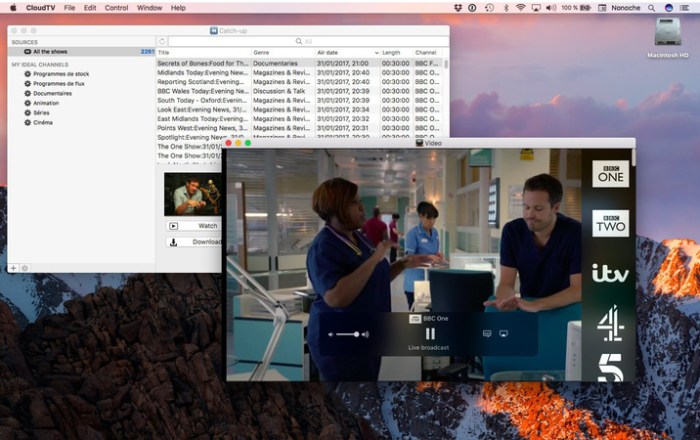
CloudTV lets you watch over 400 live TV channels from around the world and download thousands of programs updating the UK and France, with smart playlists and compatibility with AirPlay.

Stream hundreds of live TV channels

Enjoy over 800 live tv channels from all over the world (UK, Ireland, USA, France, Switzerland, Belgium, Italy, Greece, Portugal, Germany, China, etc). No need for antennas or boxes, as long as you have access to WiFi, you’re on! (Note: due to broadcasting rights, some channels restrict their access to their designated countries).

Binge-watch catch-up programmes

Nothing’s on? No worries! Stream thousands of catch-up programmes from BBC channels (access restricted to UK IP addresses) or a selection of French TV channels, or download them forever, DRM free! You can even use them to create your ideal channels thanks to smart playlists with your own criteria.

Back to the TV

Stream live and catch-up programmes to your Apple TV through AirPlay (requires macOS X 10.11).

Sleek, simple, awesome.

CloudTV has a beautifully simple interface: just click and play! CloudTV doesn’t require any plugins and as such is fully compatible with VoiceOver.

Compatibility: OS X 10.10 or later 64-bit

Web Site: http://cloudtvapp.net/

What’s New in CloudTV 3.9.7

  • Release notes not available at the time of this post.

Screenshots

video copilot complete after effects plugins bundle

Name VideoProc 3 2 20181213 TNT.zip
Size 50.29 MB
Created on 2018-12-15 21:00:17
Hash 4f44183957c6ec1cc0ee6773942a0ee12e82c4a6
Files VideoProc 3 2 20181213 TNT.zip (50.29 MB)

Download

Video Copilot Complete After Effects Plugins Bundle macOS

Video Copilot Plugins is one of the best decision for designing and animating various realistic effects. This set includes leading plugins for After Effects, such as: Optical Flares, Heat Distortion, Element 3D and Twitch.

VC Optical Flares 1.3.5 is a plug-in for designing and animating realistic lens flares in After Effects.

VC Twitch 1.1 a plug-in for After Effects that synchronizes random operators to create stylistic video effects for motion graphics and visual effects.

VC Heat Distortion 1.0.30 is a plug-in that simulates realistic heat waves and distortion. Features advanced Noise options, wind and more.

Heat Distortion Features:

  • Realistic Heat Noise
  • Image Distortion
  • Heat Haze
  • Advanced Noise Control
  • Wind

VC Element 3D 2.2.2 Build 2155 is an advanced 3D object and particle render engine. High Performance After Effects Plug-in for creating Motion Design & Visual FX.

Video Copilot Element 3D Capabilities:

  • 3D Rendering in After Effects
  • Create Complex Animations
  • Physically Based Materials
  • 3D VFX and Motion Graphics
  • 3D Particle Shapes
  • Wireframe
  • Sub Surface Scattering
  • Shadows and AO
System requirements:
  • MAC users version from OS 10.7
  • After Effects CS5, CS6, CC, CC 2014, CC 2015 and above

arturia pigments v1.0.0.473.64bits fixed

Name Arturia_Pigments_v1.0.0.473_macOS-offset.zip
Size 175.8 MB
Created on 2018-12-16 20:15:51
Hash 4b7141bc055fd52a3bf01d6039a6f09113931cdb
Files Arturia_Pigments_v1.0.0.473_macOS-offset.zip (175.8 MB)

Download

Arturia Pigments v1.0.0.473 macOS 64bits FIXED-OFFSET

Taking that spark of imagination and transforming it into sound is the most fundamental, exhilarating part of creating music. Pigments makes that process natural, intuitive, and colorful.

Your sound, in living color
Imagine a sound, then create it.

Pigments gives you the finest elements ever found in a software instrument, letting you create pioneering, exciting, and deeply personal sounds. Laying everything out before you, Pigments lets you fully express your creativity in a way that’s never been seen before in a software instrument.

INTUITIVE
LIGHTNING-FAST
WORKFLOW

POWERFUL
AWESOME-SOUNDING
ARCHITECTURE

AMAZING
LEGENDARY ARTISTS
PRESETS

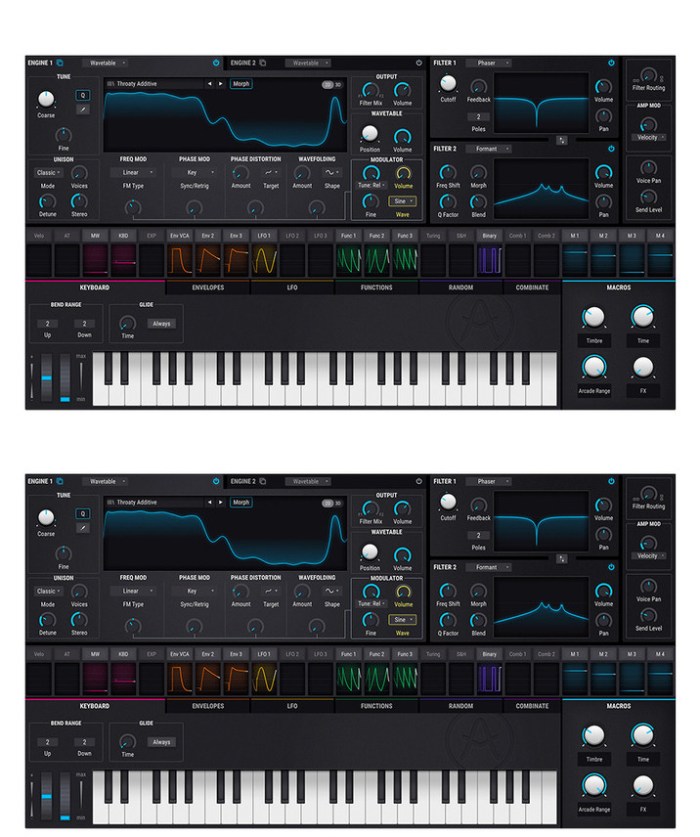
Pigments features a twin audio engine, letting you mix virtual analog and wavetable oscillators to create the perfect starting point for your patch. You can even morph wavetables, or import your own.

What you do next is up to you. Experiment with 3 envelopes, 3 LFOs, and 3 function generators. Assign modulators to animate your sound, and breathe life into it. Add controlled, or totally wild random changes to any parameter with a Turing probability generator. Run it through 2 filters, with any combination of iconic analog filters or modern formant and surgeon filters you want. Process your patch with exciting contemporary effects like wavefolder and multifilter, or vintage studio reverbs, delays, and EQs.

Making a masterpiece

For 20 years, we have been analyzing, emulating, and refining the most iconic synthesizers ever made.

Working with Dr Robert Moog, Cameron Jones, and many other industry legends, we have built our reputation on creating world-class instruments. We turned the music industry on its head with the release of our trailblazing, affordable analog hardware synthesizer, the MiniBrute.

With multiple awards under our belt, you could say that we’ve done our homework. Pigments combines our passion for vintage FM and analog sound with modern wavetable synthesis to create what is, to us, the ultimate software synth.

Main Features:

  • Two engines in parallel
  • Virtual Analog triple osc engine
  • Complex Wavetable engine
  • Two filters
  • Classic filter types from V Collection instruments
  • Modern filter types
  • Continuous series/parallel routing
  • Powerful effects section
  • Insert or Send routing
  • Modulable parameters
  • Advanced modulation system
  • Graphical editing, sourcebased or destinationbased.
  • Envelopes, LFOs, Function generators, Random src, …
  • Visual interface
  • Graphical representation of the most important modules
  • Polyrhythmic Sequencer and Arpeggiator
  • Create complex, custom and evolving sequences/arps
  • Extensive factory preset library

FiX Notes:

Now everything works as it should. This time a more in deep reverse job was done.
Remember to use “sudo codesign -fs /Library/Audio/Plug-Ins/Components/Pigments.component/Contents/Resources/plugin.vst3/Contents/MacOS/Pigment” command before loading it into Logic.

Web Site: https://www.arturia.com/products/analog-classics/pigments/overview#en

What’s New in Arturia Pigments v1.0.0.473

  • Release notes not available at the time of this post.

Screenshots
theme lab templates 5 4 2

Name Theme Lab – Templates 5 4 2 MAS TNT.zip
Size 13.24 MB
Created on 2018-12-16 20:14:01
Hash 1e2d2bfac97d759b588dd110da849df37aecab88
Files Theme Lab – Templates 5 4 2 MAS TNT.zip (13.24 MB)

Download

Theme Lab – Templates 5.4.2

Create outstanding presentations quickly and efficiently! Theme Lab for Keynote makes presenting your ideas easier than ever. With over 100 professionally-designed and structured themes, you get unparalleled freedom to turn your ideas into winning presentations!

All themes inside Theme Lab for Keynote have at least 32 master slides, offering a comprehensive selection between text- or image-based slides, as well as lists with custom bullets, matching tables, data charts, and much more. Every theme is available both in Standard (4:3) and Widescreen (16:9) ratios.

All themes are designed to allow effortless yet powerful customization using the standard functionality available in Apple Keynote. Every object can be resized, recolored, reshaped, moved or removed. Change backgrounds into colors, gradients or photos, easily add or remove text boxes, customize fonts, or insert your own images into convenient placeholder! Become the master of Keynote with Jumsoft’s Theme Lab for Keynote!

* Requires Apple Keynote 6.0 or later.

Compatibility: macOS 10.12 or later 64-bit

Web Site: http://www.jumsoft.com/keynote-themes/
Mac App Store: https://itunes.apple.com/app/theme-lab-templates/id402666572?mt=12

What’s New in Theme Lab – Templates 5.4.2

• 5 new Themes.

omnigraffle pro 7.9 4

Name OmniGraffle.Pro.7.9.4.macOS.zip
Size 104.8 MB
Created on 2018-12-16 20:15:00
Hash ba930e4afce7ca262a4a0c2ee9c3965eee64449c
Files OmniGraffle.Pro.7.9.4.macOS.zip (104.8 MB)

Download

OmniGraffle Pro 7.9.4 macOS

OmniGraffle 7 is a completely redesigned version of the application, offering integrated Inspector and Stencil windows, a brand new Resource Browser to manage stencils and templates, new artistic Fill and Stroke styles, improved Shared layers, powerful Shape Combinations, better Image Masking and Cropping, and a bevy of other new features.

Create Anything

OmniGraffle is for creating precise, beautiful graphics. Like website wireframes, an electrical system design, a family tree, or mapping out software classes. For artists, designers, casual data-mappers, and everyone in-between.

Design how you like

Extensive options for objects, canvases, templates, inspectors, and stencils in OmniGraffle mean that you can set out to do something well, quickly. Exactly what you’d expect.

All the extras

You’re not going to find a tediously navigable set of menubar items in OmniGraffle—just your favorite features, easy to find and easier than ever to use.

Work how you like

Make OmniGraffle yours, each and every way. From flexible inspectors to your own templates and stencils, it’ll be your most used, most comfortable tool, every day.

Pro Features:

  • Visio import/export: Open Microsoft Visio® documents (VSD or VDX) directly in OmniGraffle, as well as Visio stencils (VSS) and templates (VST). Export to Visio XML documents (VDX).
  • Shared layers: Easily update common elements that you’d like to display on multiple canvases. Layers can now be toggled between a normal and a Shared layer.
  • New controls specify which edge or center of an object is reflected in the Geometry Inspector. You can set the X and Y coordinates of a selected vertex point.
  • Shape combinations: Easily create new shapes using combinations of existing shapes (with support for union, intersection, and subtraction). Combined shapes can now be uncombined into their component shapes.
  • Resolutionindependent Display Scale: When zoom is at 100%, match an Apple point, PostScript point, or screen pixel.
  • Photoshop export has returned, and supports the export of OmniGraffle layers to Photoshop layers.
  • Tables: Group shapes using tables, making it easy to add new rows or columns of your template shape.

Requirements: OS X 10.10 or later, 64-bit processor.

Web Site: https://www.omnigroup.com/omnigraffle
Mac App Store: https://itunes.apple.com/app/omnigraffle-7/id1142578753?mt=12

What’s New in OmniGraffle Pro 7.9.4

  • Release notes not available at the time of this post.

Glyph Designer 2.1

Name Glyph Designer 2 1 TNT.zip
Size 8.29 MB
Created on 2018-12-16 20:15:32
Hash a4850ef43e91a7729e2cf2bce9e954381ae175ff
Files Glyph Designer 2 1 TNT.zip (8.29 MB)

Download

Glyph Designer 2.1

Glyph Designer is a powerful bitmap font designer. Create beautiful designs using highly configurable effects, definable backgrounds, custom images, editable glyph metrics and more. Make the most of your screen with smart zooming and full screen support.

You can add text to your games in a few different ways. Many of the frameworks allow you to use a truetype font for your text but this comes at a cost. You lose a lot of flexibility with styling but most importantly you lose performance. No one likes a game that takes a long time to load or drops frames at that crucial point. Using bitmap fonts you can achieve the perfect style and gain a MASSIVE performance increase over alternative methods.

Compatibility: OS X 10.10 or later

Web Site: https://www.71squared.com

What’s New in Glyph Designer 2.1

  • Release notes not available at the time of this post.

Screenshots
swinsian 2.1.11

Name Swinsian 2 1 11 TNT.zip
Size 16.54 MB
Created on 2018-12-16 20:14:45
Hash 0f642f2a3a4f2beab8dd9c4890678dfa38eb81f5
Files Swinsian 2 1 11 TNT.zip (16.54 MB)

Download

Swinsian 2.1.11

Swinsian is a sophisticated music player for Mac OS X with wide format support, folder watching and advanced tag editing and designed to be responsive even with the largest libraries.

Features
  • Supports FLAC/Ogg Vorbis as well as MP3, AAC, WAV, APE, AC3, WavPack, WMA, and cue files
  • Copies tracks from iPods and iPhones
  • Watches folders for new files
  • Fetches album art
  • Quick control window
  • Imports iTunes libraries
  • Playback over AirTunes
  • Duplicate finding
  • Bulk tag editing with regex support

Compatibility: OS X 10.7 or later 64-bit

Web Site: http://swinsian.com/

What’s New in Swinsian 2.1.11

  • Release notes not available at the time of this post.

Screenshots

tipard blu ray converter for mac 9 2.12

Name Tipard Blu-ray Converter for Mac 9 2 12 81549 TNT.zip
Size 56.33 MB
Created on 2018-12-16 20:13:53
Hash 2872e7d002c8492aa668dbdbe1fd5235f5e84ba5
Files Tipard Blu-ray Converter for Mac 9 2 12 81549 TNT.zip (56.33 MB)

Download

Tipard Blu-ray Converter for Mac 9.2.12

Tipard Mac Blu-ray ripper is a 3-in-1 media video converting application, which can be a Mac Blu-ray Converter, also can be a Mac DVD Ripper and a Mac Video converter. Then, you can easily convert home-made Blu-ray movie to your preferred video or audio formats to enjoy on your mobile phone or video player.

Plus, you can rip and convert home-made DVD disc, DVD folder or IFO files and video files to various popular formats on Mac with this powerful Blu-ray Converter for Mac. Also, you are allowed to edit any video source file to create personalized video work to share with friends for entertainment and joy.

Media converter to rip home-made Blu-ray/DVD, and convert video

Powerful Blu-ray Converter for Mac, DVD Ripper for Mac, and Video Converter for Mac

Rip home-made Blu-ray and DVD files

Easily rip Blu-ray Disc, Blu-ray folder, DVD ROM, DVD folder and IFO files to any other video/audio formats like , etc.MP4, AVI, 3GP, MPEG, FLV and TS, MKV, ASF

Convert any video files

Support almost all video formats (including HD) and can convert any source file to 3GP, 3G2, AMV, ASF, AVI, MPEG-4, MP4, M4V and other popular video and audio formats on Mac.

Video editor to give you perfect video effect

Powerful editing functions to create the perfect output video for you

Set video effect

You are allowed to freely adjust brightness, saturation, contrast, hue and the volume for the output video to get your ideal video effect.

Crop video

This Blu-ray Converter for Mac enables you to cut off black edges and unwanted playing area and choose your perferred image Aspect Ratio to fit your player’s screen.

Watermark video

Add a text/image watermark to the source video. Also you can set its position and transparency.

Trim and merge

Trim any segment of a Blu-ray movie by setting its start and end time or just dragging the slide bar, and merge several video/DVD pieces together for better watching experience.

Preview and Snapshot

The built-in player helps you preview the output video effect. And you and capture your favorite Blu-ray movie pictures and save it as JPEG, PNG or BMP format. You can also set the output folder or it will be saved automatically in the default folder.

Compatibility: OS X 10.7 or later
Web Site: http://www.tipard.com/blu-ray-converter-for-mac/

What’s New in Tipard Blu-ray Converter for Mac 9.2.12

  • Release notes not available at the time of this post.

mp3 gain 4.0.0.4.0 1

Name MP3 Gain 4 4 0 0 4 0 1 TNT.zip
Size 14.00 MB
Created on 2018-12-16 20:15:06
Hash 767d2940546f3e23ed2c6147de3ebdae2f2a58d5
Files MP3 Gain 4 4 0 0 4 0 1 TNT.zip (14.00 MB)

Download

MP3 Gain 4.0.0 (4.0.1)

Do you often get into the problem of adjusting the audio volume? May be this app help.

MP3 Gain is a simple tool designed specifically to adjust and normalize the volume of audio(mp3, wma, etc) files. It automatically normalize the volume of audio files and adjust the loudness of audio tracks without lossy. It performs statistical analysis to determine how loud the file actually sounds to the human ear.

Comply with the EBU R128 loudness normalization specification.

Key feature:
  • Support many audio formats(mp3, wma, wav, flac, m4a, ac3, mp2, ogg)
  • Support batch adjustment

Note: NOT support DRM protected audio files.

Compatibility: OS X 10.10 or later 64-bit

Web Site: http://www.imacbits.com/mp3-gain
Mac App Store: https://itunes.apple.com/app/mp3-gain-4/id697885500?mt=12

What’s New in MP3 Gain 4.0.0 (4.0.1)

1.Improve audio quality with new algorithms
2.Easy to use with new interface.
3.Support wma, wav, ac3, flac, mp2, ogg audio format gain(IAP).
4.Fixed some other bugs.

itrash 4 1.4

Name iTrash.414.zip
Size 17.57 MB
Created on 2018-12-16 20:15:25
Hash 0a7125c7b279230391567c966c2da2de65c513fa
Files iTrash.414.zip (17.57 MB)

Download

iTrash 4.1.4 macOS

Applications distribute several files throughout your system storage devices. Deleting an application itself is mostly not enough and will leave files untouched. iTrash uses a special search algorithm to find all related files and deletes them when asked.

Ghost Mode

Background mode. Drop something into the trash and iTrash pops up.

Expert Mode

Using the Levenshtein Distance search algorithm it can trace down more possible related files.

Simple drag&drop

Drag an application, widget, prefpane, .. onto the main window to reveal related files.

Lost Files

This enables you to find related files that are obsolete (Application is not present anymore).

Application Lister

Shows all installed applications, widgets, prefpanes, LaunchDaemons, LaunchAgents .. on ALL available volumes.

File Protection

Protect default, custom and related applications files.

History Log

Keeps a log of all activities.

Localized

English, Dutch, Slovak, Spanish, Polish, Croatian , German, French, Italian, Persian, Turkish and Portuguese.

Requirements: For Mac OS X 10.10.x, 10.11.x, macOS 10.12.x and macOS 10.13.x

Web Site: http://www.osxbytes.com/itrash.html

What’s New in iTrash 4.1.4

  • Release notes not available at the time of this post.

Screenshots

pingey 1.0.0

Name Pingey 1 0 0d TNT.zip
Size 11.40 MB
Created on 2018-12-16 20:14:52
Hash 876ff3ab1b619ea19c2f2d10a73d322452e677fa
Files Pingey 1 0 0d TNT.zip (11.40 MB)

Download

Pingey 1.0.0

Pingey is the simplest way to monitor your websites. It sits in the menu bar, always one click away. Click on its icon to see status of all your websites or add separate menu bar items for your most important ones to make them glanceable.

Features:
  • option to add separate, always visible menu bar item for each website,
  • easy to use, straightforward design,
  • customizable ping frequency.

Compatibility: macOS 10.13 or later 64-bit

Web Site: http://getniceapps.com/pingey
Mac App Store: https://itunes.apple.com/app/pingey-menu-bar-website-ping/id1440865178?mt=12

What’s New in Pingey 1.0.0

data recovery essential pro 3.6

Name Data Recovery Essential 3 6 MAS In-App TNT.zip
Size 18.37 MB
Created on 2018-12-16 20:15:39
Hash 45495813f8abf280f8277a156f189fd61847b227
Files Data Recovery Essential 3 6 MAS In-App TNT.zip (18.37 MB)

Download

Data Recovery Essential Pro 3.6 MAS + In-App

Data Recovery Essential is a fresh, constantly updated, data recovery and undelete app. It also comes with the free daily recovery of up to 100MB, that is perfect if you lost a document or two and need a quick data recovery session right away.

Data Recovery Essential will restore all existing file formats: images and photos, music, documents, videos, ZIP and other compressed files, etc. If your lost data is not recoverable with our Quick Scan or your file system has been damaged, Deep Scan and other extensive data retrieval algorithms will reconstruct your files based on our unique collection of binary file signatures (which is also constantly updated).

Data Recovery Essential scans all existing file systems, including HFS+, NTFS, FAT32, EXT4 and others, and will also be able to find deleted data after accidental or incomplete disk format. All internal and external storage devices supported: your Mac’s main hard drive, any mountable external disks, USB flash thumb drives, cameras, memory cards, and even other Macs.

Data Recovery Essential app was created by CleverFiles, the team of top-notch experts in data recovery for Macs. You are more than welcome to send any questions and tech support requests any time to help@cleverfiles.com

A regular data rescue process with Data Recovery Essential starts with creating a disk image from the storage device where the lost files reside. This step is very easy to accomplish and is required to prevent further data loss if the target drive has mechanical issues. Make sure you learn how to do it in our simple step-by-step guide here: https://www.cleverfiles.com/masver/

Once the disk image is created, load it into Data Recovery Essential app and scan it for deleted data. The app will then show all your recoverable files in a well-structured list that can be searched and filtered. You can recover selected files or just dump everything to another disk or destination and sort it out later. The data recovery process is very fast, smooth and clear.

Note: Data Recovery Essential cannot recover deleted data from iOS devices (iPhones, iPads, iPods Touch).

Top In-App Purchases: Pro Version – included
Compatibility: macOS 10.12 or later 64-bit

Mac App Store: https://itunes.apple.com/app/data-recovery-essential/id1208148558?mt=12

What’s New in Data Recovery Essential Pro 3.6

*** New ***

+ Multiple internal optimizations and improvements for macOS Mojave
+ All FAT32 smart recovery algorithms updated
+ Canon RAW Movie (CRM) file format added to Deep Scan’s file signature repository
+ Data recovery from Apple’s RAID arrays – Striped (RAID 0), Mirrored (RAID 1) and Concatenated (JBOD)
+ Automatic detection of APFS Fusion Drives

*** Extras ***

* Improved universal recovery sequence on APFS partitions
* Improved processing of Core Storage
* Improved data recovery routines on encrypted APFS volumes, emphasis on Deep Scan
* Improved recovery consistency on FAT32 partitions with 8K cluster size
* Improved preview on macOS 10.10
* Improved MP3 recovery and labeling as part of Deep Scan
* Several minor UI enhancements
* Multiple improvements in UI translations

anymp4 dvd ripper for mac 8 2.10

Name AnyMP4 DVD Ripper for Mac 8 2 10 81348 TNT.zip
Size 52.41 MB
Created on 2018-12-16 20:15:58
Hash 52a2644272eee5773b4448695b9ff7da871d2a02
Files AnyMP4 DVD Ripper for Mac 8 2 10 81348 TNT.zip (52.41 MB)

Download

AnyMP4 DVD Ripper for Mac 8.2.10

Do you want to save a DVD movie to PC local drive? DVD disc could be easily damaged and is not very convenient to play DVD disc anytime and anywhere. So you are recommended to rip DVD to video for playback on any digital device like iPhone/iPad/iPod, Samsung, LG, HTC and more. AnyMP4 DVD Ripper, a powerful DVD Ripping software, helps you rip DVD movie into a variety of popular video and audio formats.

You can convert DVD to MP4, MKV, AVI, MOV, WMV, FLV, M4V, TS, DivX, WebM, 3GP and other 4K/1080p/720p video formats with ease and than save DVD to computer for backup. In addition, AnyMP4 DVD Ripper can help you extract audio track from DVD and convert it to your preferred audio format like MP3, WAV, WMA, AAC, M4A, ALAC, FLAC, OGG, and more.

Compatibility: OS X 10.7 or later

What’s New in AnyMP4 DVD Ripper for Mac 8.2.10

  • Release notes not available at the time of this post.

tuneskit video cutter 1.0.3.28

Name TunesKit Video Cutter 1 0 3 28 TNT.zip
Size 57.11 MB
Created on 2018-12-16 20:13:37
Hash 5d80e0fd03a47bc3ee3094004bc4bbe04a9d4c19
Files TunesKit Video Cutter 1 0 3 28 TNT.zip (57.11 MB)

Download

TunesKit Video Cutter 1.0.3.28

An all-powerful video cutting tool that can not only trim and merge videos and audios with 100% lossless quality preserved, but also edit and save splitted video clips with multiple effects in any popular format for playing on any device.

It won’t be a time-consuming job any more to edit a home video if you got TunesKit Video Cutter for Mac. With this smart tool, anyone can easily trim, merge and convert all popular video and audio files into other formats without causing any quality damage to the source media. Thanks to its simple-to-use interface, even beginners can handle the whole cutting process without referring to the user guide.

As a comprehensive video cutting software, TunesKit Video Cutter for Mac can not only split your videos and audios to small clips, but also provide the ability to convert the splitted media segments to multiple formats, including MP4, AVI, MPG, MPEG, 3GP, MKV, WMV, FLV, ASF, H.264, MP3, M4A, AAC, AC3, OGG, AIFF, APE, etc. With a full range of preset output profiles, you can directly convert the media cuts to popular devices such as Apple gadgets, Samsung Galaxy, games consoles, smart TVs for playback.

Compatibility: OS X 10.8 or later

Web Site: http://www.tuneskit.com

What’s New in TunesKit Video Cutter 1.0.3.28

  • Release notes not available at the time of this post.

temp monitor 1.2.3

Name Temp Monitor 1 2 3 TNT.zip
Size 11.74 MB
Created on 2018-12-16 20:14:39
Hash fb4cca9b340591d5cee330aa1fffa65872c1a8d0
Files Temp Monitor 1 2 3 TNT.zip (11.74 MB)

Download

Temp Monitor 1.2.3

Temp Monitor app is an unobtrusive tool which will alert you when your Mac overheats, and the perfect utility to help you log all instances when the processor goes beyond a temperature which might be dangerous for both your Mac and yourself, if you’re using a MacBook or MacBook Pro.

Features
  • Support for customizable overheat temperature – Temp Monitor is a macOS application specifically designed to watch a Mac processor’s temperature very closely and display it in the menu bar in the form of a text- and icon-based status item. More precisely, Temp Monitor runs in the background and will let you know when the CPU’s temperature reaches dangerous levels, thus enabling you to pause highly intensive processing tasks and resume them at a later time to protect your Mac’s integrity. The CPU temperature which triggers Temp Monitor to display an overheat notification can be customized via the app’s settings window. From there you can also set Temp Monitor to launch on login and choose the default temperature unit it uses.
  • Notification Center integration and automatic logging of all overheat alerts – Furthermore, the Temp Monitor utility displays audio and visual notifications via macOS’ Notification Center feature, and it they are by default set to be alerts which will not go away until manually dismissed, an excellent idea for when you are away from your Mac and the CPU temperature goes above the safe threshold. The temperature warnings are also added automatically to Notification Center’s notifications tab, for later reviewing of all past alerts when and if needed.

Compatibility: OS X 10.11 or later 64-bit

Web Site: https://vimistudios.com/

What’s New in Temp Monitor 1.2.3

  • Release notes not available at the time of this post.

videoproc 3.2 20181213

Name Video Copilot Complete Mac Plugins.zip
Size 380.9 MB
Created on 2018-12-15 21:00:32
Hash f6472c9774ee157135f89d8e86453f2c2748bbc5
Files Video Copilot Complete Mac Plugins.zip (380.9 MB)

Download

VideoProc 3.2 (20181213)

New video processing software designed to cut, trim, merge, adjust, transcode, edit 4k video with full hardware acceleration

VideoProc achieves the record-setting “FIRST” in video processing industry – crafting the easiest video editor, together with DVD video converter, downloader, and recorder at the core.

All engineered for the 4K UHD era, it is your must-have video toolbox to handle even the most demanding tasks from HD to 3D, UHD 4K, 5K and 8K, no matter it is from iPhone, GoPro, Dji, Samsung, YouTube, DVD disc or other sources. Process your media files to fit YouTube, Facebook, Instagram, iPhone, iPad, TV, PS4, etc, edit raw footages flexibly into more engaging stories, backup and rip a full DVD in 5 minutes, all finished at world’s fastest speed, without compromising quality.

Compatibility: OS X 10.8 or later 64-bit

Web Site: https://www.macxdvd.com/mac-video-converter-pro/

What’s New in VideoProc 3.2 (20181213)

  • Release notes not available at the time of this post.

devonthink pro office 2.11

Name DEVONthink Pro Office 2.11.zip
Size 62.32 MB
Created on 2018-12-15 21:01:28
Hash 72a1eeb4604e96ac87ea4af389fd0754a8acc1da
Files DEVONthink Pro Office 2.11.zip (62.32 MB)

Download

DEVONthink Pro Office 2.11 macOS

Document management reinvented. DEVONthink Pro Office is your Mac paperless office. It stores all your documents, helps you keep them organized, and presents you with what you need to get the job done.

  • Keep your data together in one place
  • Scan your paper, archive your email
  • Let artificial intelligence help you file your data
  • Sync your data to all your devices, fast and secure
  • Share your data with anyone, whether they use Mac or PC
Get organized, effortlessly
  • DEVONthink keeps your valuable data organized and presents it in the way you want.
  • DEVONthink keeps all your information in one easytobackup database, and presents it to you in a variety of ways optimized to your work style. Multiple views help you quickly navigate your data.
  • Many documents can be viewed and edited inline, without resorting to Quick Look or opening another app. Read webpages as if they were local documents.
Be more productive
  • Don’t fight the information flood by yourself. DEVONthink is smart and actively assists you with its builtin artificial intelligence.
  • Let DEVONthink automatically file new documents for you based on how you filed similar documents. Later, the advanced search function retrieves the documents that you need for your task, while smart groups present related data together. Quickly find similar documents using keywords extracted from the document and the unique “See also” function.
Create something new
  • It’s not about data, it’s about creating something meaningful from it. DEVONthink is your information power tool.
  • Collect, analyze, summarize, write: With DEVONthink you have all you need in one app that actively supports your workflow. View all your data in one place, use our innovative approach to tags to quickly organize documents, and write in the enhanced rich text editor. Use manual or automatic Wikistyle links to effortlessly crossreference your work.
  • DEVONthink’s two full screen modes help you stay focused, while smart templates are a great starting point for new documents.
Your data, no boundaries
  • Wherever your data comes from and whatever you want to do with it, DEVONthink provides you with the best tools and as much metadata as possible.
  • Store your documents in the selfcontained database or simply reference them by using the index feature. Clip data from other apps with just a keystroke, adding it to the GTD®like inbox for later filing, or take notes with the Take Note panel or the Dashboard widget. Browser extensions, the Services menu, and the Sorter panel integrate DEVONthink with your workflow.
  • Send links to your documents to any app which handles web addresses (URLs), e.g. OmniFocus or Mail, or export your documents in their original file format. DEVONthink doesn’t hold your data hostage.
Keep everything in sync — fast, robust, and secure
  • Use your databases on all your Macs, iPads, and iPhones. Collaborate in your team. It’s ultrafast, super robust, and strong encryption keeps prying eye out.
  • Sync your data directly on the local network, via WebDAV or Dropbox, or using just anything mountable, e.g. a USB stick or SD card. You decide what data is synced, when, and to which locations. Full AES 256 bit encryption keep everyone out who you don’t want to let in. Your data belongs to you, not to your service provider or us.
  • Carry your important data with you all the time with DEVONthink To Go 2 (available soon). Use the same database on all your team’s Macs but let everyone work independently by regularly synchronizing new work on the local network, an NAS, or internetbased file service.
The Pro advantage
  • DEVONthink grows with your needs. DEVONthink Pro and Pro Office support your personal work style with many advanced options.
  • Use separate databases for each project, and let automatic grouping create order from chaos. Add RSS feeds to your database to automatically import new articles, or download and archive full websites. The concordance gives you a realtime analysis of your data.
  • AppleScript support, Automator actions, and scriptdriven smart templates let you integrate DEVONthink with other software. The sky’s the limit!

Requirements: Intel, 64-bit processor, OS X 10.8.5 or later
Language: Multilingual

Web Site: http://devontechnologies.com/

What’s New in DEVONthink Pro Office 2.11

This release brings an exciting new improvement to sync: push notifications. When you make changes to your databases on Mac or mobile, a notification will be sent to other devices you are syncing. This decreases the amount of time before changes are downloaded. Also in this release, changing an encryption key for a sync location will prompt you what to do if you have already synced to it. Support for JSON RSS feeds has been added. Dragging and dropping text selections will include the reference URL of the file the text is dragged from. Some minor cosmetic adjustments have been made to the interface. And, as we always deliver, performance and stability has been improved.

NEW
  • Added support for JSON RSS feeds.
NEW (Sync)
  • Push notifications are now used to notify synchronized devices of changes available for immediate download. For syncing with your iOS device, DEVONthink To Go 2.7 is required. On the Mac macOS Sierra is also required.
  • Added an alert to clean the sync store after changing the encryption key on a sync location.
Improved
  • Renamed Go > Workspace > Update to Update (…). The last used workspace is now updated.
  • Preferences > General > Always open groups in a new window has been renamed to Doubleclick opens groups in a new window.
  • Custom icons on formatted notes and web archives are retained after changes are saved.
  • The URL field of imported and indexed files will now only use downloadable URLs, like web page addresses, imported from the files’ metadata.
  • When dragging or copying selections from plain or rich text documents, the reference URL of the record is included. Note: The use of the reference URL is up to the receiving application.
  • Improved reliability when using Spotlight importers on macOS Mojave.
  • Improved naming of files when dragging pages from PDF sidebars to the Finder. In addition, existing files aren’t overwritten in the Finder anymore.
  • Improved handling of RSS feeds with no title.
  • The Support Assistant is now loaded from our website and uses styled, longer tips.
  • Improved overall performance and reliability.
Improved (Sync)
  • Opening Preferences > Sync no longer immediately awakens external discs containing local sync stores.
  • Setting the sync interval to Automatic now syncs more often.
  • Improved handling of indexed files when synchronizing of indexed contents is disabled.
  • Improved logging for troubleshooting purposes.
Fixed
  • Fixed an issue where an alert was not displayed after entering a license code for the wrong product or edition.
  • Fixed an issue where dropping images into the preview pane could replace the currently displayed image.
  • Fixed an issue where opening the License panel could stall the application when there is a slow or unreliable network connection.
  • Fixed an issue where the background color of the left/upper pane of Split or Three Pane views wasn’t always correct (macOS Mojave).
  • Fixed an issue where View > as Icons and View > as Split View could cause unnecessary console messages (macOS High Sierra and later).
Fixed (Sync)
  • Fixed an artifact in the list of databases in Preferences > Sync on macOS Mojave.
  • Fixed an issue where cleaning sync stores could fail if an incorrect encryption key was entered.
  • Fixed an issue where downloading indexed pending items could fail if the item was uploaded as an imported one and deconsolidated later if the Synchronize indexed contents sync location option was disabled on the Mac. This reduces also slightly the memory footprint and the delay before synchronizing, especially on iOS.
  • Fixed an issue with syncing indexed file causing unnecessary download attempts.
  • Fixed a rare crash that occurred while cleaning or verifying sync stores.
  • Fixed an crash caused by corrupted sync status files.

Screenshots

Torrents Download Apple,Mac Osx,Apps ,Software

Exit mobile version