Rogue Amoeba Loopback 2.0.0

Name Rogue Amoeba Loopback 2.0.0 MacOS.zip
Size 7.66 MB
Created on 2019-01-06 19:06:13
Hash 8cb5316c3aa8bb6a4e01a1fbd187e13b1e7ab52c
Files Rogue Amoeba Loopback 2.0.0 MacOS.zip (7.66 MB)

Download

Rogue Amoeba Loopback 2.0.0 MacOS

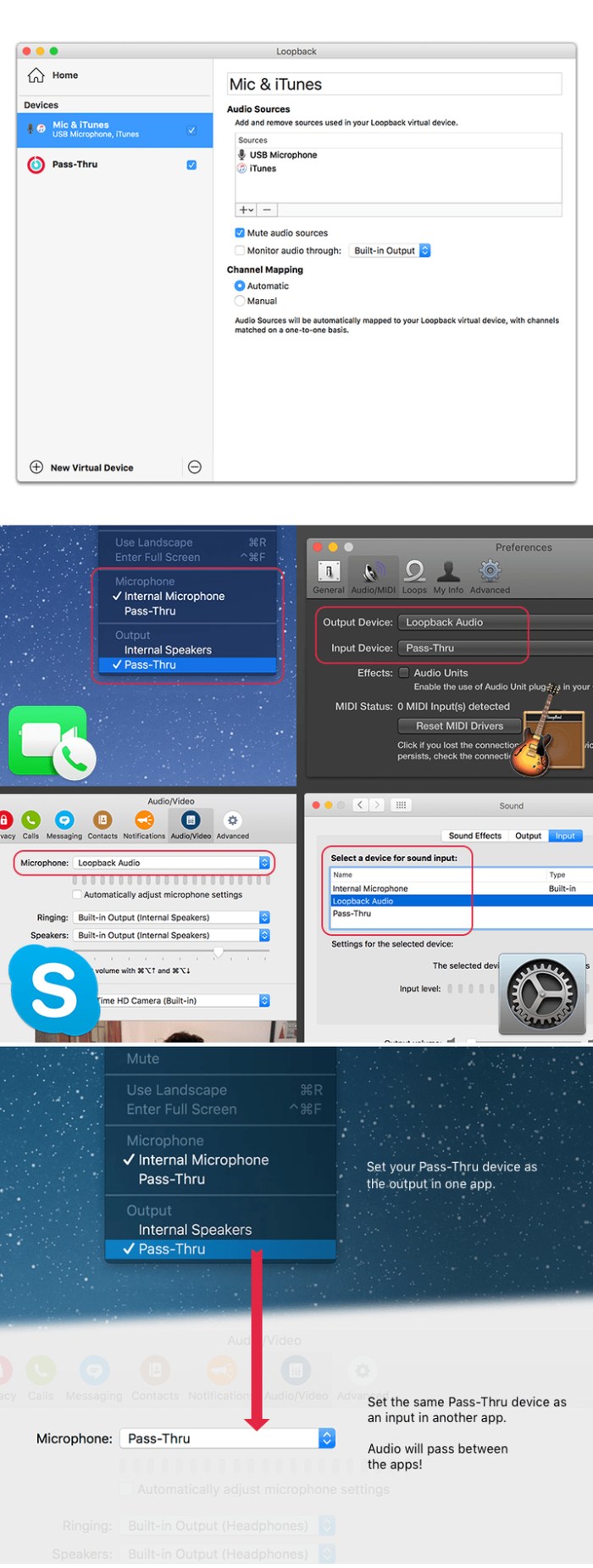
Suddenly, it’s easy to pass audio between applications on your Mac. Create virtual audio devices to take the sound from applications and audio input devices, then send it to audio processing applications. Loopback gives you the power of a high-end studio mixing board, right inside your computer!

Record Gameplay Videos

Making gameplay videos with great audio can often be very difficult. If you’re using a device like Elgato’s Game Capture hardware and you want to record both your microphone and the game’s audio at once, Loopback can assist!

Combine Hardware Devices

Apps like GarageBand, Logic, and Ableton Live only record from a single audio device at once. Thankfully, they offer recording from many channels. With Loopback, you can combine multiple input devices into one virtual device for easy recording.

Create Top-Notch Screencasts

Screen recorders, including QuickTime Player, allow you to include your mic’s audio. Some allow recording of system audio instead, but neither option is ideal. Create a virtual device that grabs just the mic and the app’s audio to get exactly the audio you want.

Route Audio For Broadcasts

Set a simple (pass-thru) device as the output at the end of an Audio Hijack chain, and then as the input source in Nicecast. Now listeners can tune in to a live stream of your podcast as you record it!

So Much More…

With Loopback, you gain incredible power and control over how audio is routed around your Mac and between applications. We can’t wait to hear about the incredible new uses you find for it!

Works With Any Application

Make a virtual audio device with audio from the applications on your Mac, including production apps like Logic or Reason, as well as simple audio players, like iTunes or QuickTime.

Works With Any Input Device

Pull audio from the physical audio devices connected to your Mac. Whether you’ve got simple USB microphones, or high-end studio mixers, Loopback can access it all.

Combine Apps and Physical Devices

Of course, you can create a virtual audio device that includes audio from both apps and physical audio devices.

Multichannel Audio

Your virtual audio devices can be configured to have up to 32 channels, providing tremendous power.

Custom Channel Mapping

By default, Loopback sets up channel mapping automatically. If you want to manually configure things, though, you’ve got powerful options!

Unlimited Devices

Create as many virtual audio devices as you need to get the job done.

Compatibility: MacOS 10.11 or Later

Web Site: http://www.rogueamoeba.com/

What’s New in Rogue Amoeba Loopback 2.0.0

A Massive Interface Overhaul:
  • The most noticeable change in Loopback 2 is its brandnew user interface. The first version of Loopback offered tremendous audio routing capability, but harnessing that power was not as simple as it could’ve been.
  • For version 2, we worked hard on a redesigned interface that will be intuitive for everyone. Loopback now features a simple new wiring system that lets you easily visualize and adjust how your audio will flow.
Volume Controls Galore:
  • Users asked for it, and we provided it. Loopback 2 provides control over volume levels at every step of the way. The volume from individual sources can be tweaked relative to other sources, to get the perfect mix. Audio levels sent to monitoring devices can also be adjusted, as can the audio level from the virtual audio device itself.
More Powerful Monitoring:
  • Monitoring virtual audio devices is now simpler than ever. Just add a monitor at the end of the device, and wire it up to get the exact audio desired. Listen in to the entire device, or use the custom wiring to monitor just part of the audio. You can even have multiple Monitors per virtual audio device, so you can hear exactly what you need to.
Capture Hidden Sources:
  • Audio can now be captured from previously unavailable sources, like Siri, VoiceOver, and TexttoSpeech. Hold down the option key while clicking the Add Source button to reveal the “Running Processes” menu, then select the correct hidden source.
Up to 64 Channels:
  • Virtual audio devices can now provide up to 64 channels of input and output, for amazing power.
Fully Configurable Channels:
  • Just about any setup is now possible, with configurable routing of audio from all audio sources to output channels, as well as from output channels to the new, more powerful monitoring devices.
An Explicit Pass-Thru Source:
  • PassThru functionality, previously an implicit part of Loopback, is now visible as an actual audio source. This allows for more power and control over the audio passing through your virtual audio devices.
On/Off Toggles for Sources and Monitors:
  • Loopback’s virtual audio devices are more configurable than ever, with the ability to turn off individual sources and monitors within a device. Rather than deleting a source or monitor, and losing its settings, you can now temporarily toggle it off as you make adjustments to get exactly the audio you need.

Screenshots

loopback_v101

Rowbyte TV Distortion Bundle v1.0 for After Effects

Graphics & Design Video

Name TV Distortion Bundle v1.0 Mac.zip
Size 34.38 MB
Created on 2019-01-06 19:06:34
Hash fbe5928b764693c83809fc54c6eb1418b66c227e
Files TV Distortion Bundle v1.0 Mac.zip (34.38 MB)

Download

Rowbyte TV Distortion Bundle v1.0 for After Effects MacOS

All the Rowbyte distortion plugins: Data Glitch, Bad TV, TVPixel, Dot Pixels and Separate RGB in a single bundle . These plugins help you to create Analog Distortion, Digital Image & Satellite Distortion, Digital Pixel Simulation and Chromatic Aberration with ease.

Compatibility:
  • After Effects CC 2019, CC 2018, CC 2017, CC 2015.3, CC 2015, CC 2014, CC, CS6
  • Premiere CC 2019, CC 2018, CC 2017, CC 2015.3, CC 2015, CC 2014, CC, CS6

Web Site: https://aescripts.com/tv-distortion-bundle/

What’s New in Rowbyte TV Distortion Bundle v1.0

Graphics & Design, Video

By

Related Posts

DAZ Studio Pro 4.9.1.30 + Extra Addons

Name DazStudio491Mac.zip Size 490.3 MB Created on 2017-04-12 15:14:28 Hash 24cd987256d7a6e6983f06f0f …

Instant Effects 1.1

Name Instant Effect 1.1 MAS [ked].zip Size 4.91 MB Created on 2018-01-01 03:39:45 Hash d70939a6616e8 …

Flux 7.1.11

Name Flux 7 1 11 TNT.zip Size 116.8 MB Created on 2018-10-30 16:37:20 Hash b6e15195b4453707ae13aa94b …

CDRViewer Pro 1.0

Name CDRViewer Pro 1.0 Size 16.57 MB Created on 2016-11-19 12:11:38 Tracker http://109.235.50.166:27 …

Athentech Perfectly Clear Complete 3.6.3.1392

Name PerfectlyClearComplete V3 3 6 3 1392 TNT.zip Size 132.6 MB Created on 2018-12-22 23:53:59 Hash …

Audirvana Plus 3.2.14

Name Audirvana Plus 3 2 14 TNT.zip
Size 18.20 MB
Created on 2019-01-06 19:05:30
Hash 17b800107d394c244be00db849919562a0c4f134
Files Audirvana Plus 3 2 14 TNT.zip (18.20 MB)

Download

Audirvana Plus 3.2.14

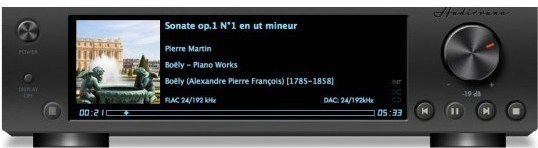
Audirvana Plus has no equalizer, no trendy special effects, just the best sounding music

  • Native playing of FLAC, libSndFile (WAV, AIFF, …), ALAC and other QuickTime formats (AAC, MP3, …)
  • Direct sound path, directly to the !CoreAudio HAL for pure bit perfect sound
  • Audio Device exclusive access mode
  • HAL I/O using DAC native physical formats “Integer Mode” (instead of CoreAudio 32-bit float)
  • Automatic sample-rate switching
  • Up/Oversampling capability
  • Plays completely from memory
  • Tracks are loaded, decoded, and sample-rate converted in a memory buffer before being played, minimizing CPU and hard drive activity to lessen sources of interference
  • Gapless playback by using a double-buffering mechanism (playing track and next track)
  • Transparent split load for loading tracks of any size
  • Background tracks loading/decoding (including sample-rate conversion)
  • Playlist (M3U and M3U8 formats) load/save
  • Handles Apple IR Remote
  • Automated updates downloading (using Sparkle)

Compatibility: OS X 10.9 or later 64-bit

Web Site: https://audirvana.com

What’s New in Audirvana Plus 3.2.14

  • Fixed display of similar artists from TIDAL

Screenshots

Spaceward Ho! 5.0.5

Spaceward.Ho.v5.0.5.MacOSX.zip

Spaceward Ho! 5.0.5 | 6.40 MB

Mac Platform: PowerPC
Includes: Pre-K’ed

OS version: Mac OS 9
Processor type(s) & speed: PowerPC
RAM minimum:
Video RAM:

1) Unzip
2) Play

Mac OS Classic Game
Version: Retail 5.0.5

Spaceward Ho! is a strategic game of awesome scope. You control the entire military and economy of a spacefaring race. Your goal: explore and colonize the galaxy.

Unfortunately, you are not alone. Alien enemies bent on galactic conquest will oppose your expansion. You fight them by developing new technologies and expanding your empire, or you can ally with them to turn enemies into friends.

Terraform newly discovered worlds or mine their natural resources. Maneuver your starship fleets, both in defense of your own systems and in offensive strikes against the evil aliens. Your strategic decisions will determine the fate of the galaxy.

It’s incredibly fun to play alone against the excellent computer players, and even better with other humans on the internet.

Spaceward Ho! has won numerous awards over the years, including being inducted into the MacWorld Game Hall of Fame and winning Best Network Game of the year.

The new version 5 is better than ever, with free internet play on spacewardho.net, combined fleets, new battle options, an all-new user interface, and much more.

More information: https://www.deltatao.com/ho/

Other posts you might like

Cinemagraph Pro 2.7.1

Name Cinemagraph_Pro_2.7.1.zip
Size 75.54 MB
Created on 2019-01-06 19:05:47
Hash 8ee353e4c631980bec042a4934eb96abf202dd9f
Files Cinemagraph_Pro_2.7.1.zip (75.54 MB)

Download

Cinemagraph Pro 2.7.1

Cinemagraph Pro is the only professional tool specifically designed for the creation of living photos. With its unique “live-masking” technology, artists can preview their living images in real time and output HD (1080) and UHD (4k) quality hybrid photographs.

An intuitive interface enables swift navigation amongst a full suite of editing modes and with just a few clicks, your living photos are shared with the world. It’s never been easier to create beautiful professional-grade Cinemagraph images.

Compatibility: macOS 10.12.2 or later 64-bit

What’s New in Cinemagraph Pro 2.7.1

Bug fixes and performance improvements

TunesKit Spotify Converter 1.4.1

Name TunesKit Spotify Converter 1 4 1 TNT.zip
Size 6.44 MB
Created on 2019-01-06 01:59:37
Hash 34a1169034a9088f51aa941ad322fb0a601b88b5
Files TunesKit Spotify Converter 1 4 1 TNT.zip (6.44 MB)

Download

TunesKit Spotify Converter 1.4.1

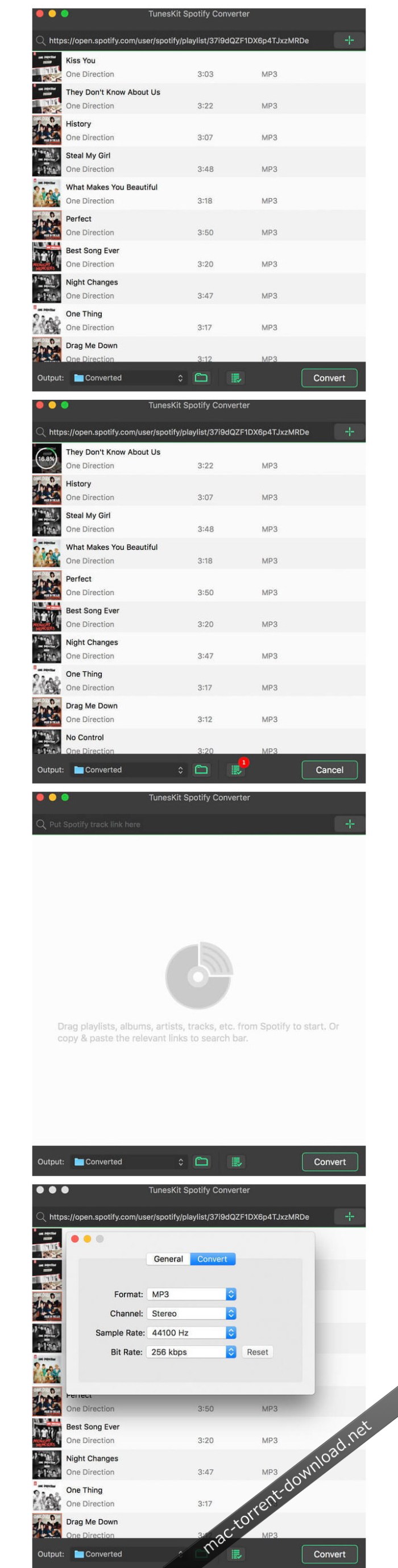
A mighty and smart Spotify music converter to download Spotify songs, playlists, albums, artists as well as convert any track from Spotify to plain MP3, M4A, AAC, WAV, M4B, FLAC for any music player, like iPod, Zune, Creative Zen, etc.

Break DRM protection from all Spotify songs and playlists

DRM restriction on Spotify prevents us from playing the music offline. Thus TunesKit Spotify Music Converter for Mac comes out to free Spotify users from DRM for good! With this smart Spotify converter, subscribers can now take full control of your Spotify music songs by easily downloading all tracks, artists, albums as well as playlists from Spotify while completely stripping off the DRM protection with high quality.

Download & convert Spotify music tracks, playlists, albums, artists to MP3, AAC, WAV, FLAC, M4A, M4B

In addition to a powerful Spotify DRM removal tool, it also works as a professional Spotify to MP3 converter so that you can decrypt and convert any Spotify music file, including single track, albums, playlists and artists to plain MP3, AAC, WAV, FLAC, and other common audio formats as you wish.

Keep 100% lossless quality and ID tags

TunesKit Spotify Music Converter for Mac is well designed to provide you with fantastic listening effects so that it can losslessly retain the original quality of the Spotify music in the converted DRM-free songs. Besides, the ID tags and other metadata information of the Spotify songs, such as artwork, artist, composer, album, year, track number, genre, etc. will be preserved in the output files as well.

Play Spotify music songs on all popular players offline

Thanks to this smart Spotify music conversion tool, you are enabled to freely download and play any DRM-protected Spotify music track, album, or playlist on any popular device and player, including Apple iPod, iPhone, Zune, Creative Zen, Sony, Samsung, car radio system, and other common MP3 players, etc.

5X faster speed & free lifelong upgrade

Due to the advanced DRM decrypting and accelerating technique, TunesKit Spotify Music Converter for Mac is able to convert any Spotify song and playlist to MP3, AAC, WAV, FLAC, M4A, M4B at 5X faster speed. You can set it as 1X speed if you want to get lossless quality. Besides, the software will always keep up to date with the latest Mac OS and Spotify and you’ll get free upgrade once purchasing it.

Best Spotify music solution to download and convert any Spotify songs

TunesKit Spotify Music Converter for Mac is the ultimate solution for Spotify subscribers who want to fully control the songs. With this powerful Spotify DRM removal app, you can easily download any Spotify song and convert the track to DRM-free formats for any device and player.

Customize output settings & music library

If you are a music enthusiastic who pay much attention to music quality, TunesKit Spotify Converter for Mac won’t let you down as it allows you edit the audio quality of the Spotify tracks by changing the audio channel, codec, bit rate, sample rate, etc. all depend on your own needs. Moreover, this smart Spotify converter will classify the output tracks in albums and artists so that you can manage the music library more easily.

Compatibility: OS X 10.8 or later, 64 bit

Web Site: https://www.tuneskit.com/music-converter-for-spotify-mac.html

What’s New in TunesKit Spotify Converter 1.4.1

  • Release notes not available at the time of this post.

Screenshots

Brochures Templates – DesiGN 3.0.2

Name Brochures Templates – DesiGN 3 0 2 MAS TNT.zip
Size 16.16 MB
Created on 2019-01-06 19:05:36
Hash e931c9a9f4408f8e807ea37f5a29f1138ee67188
Files Brochures Templates – DesiGN 3 0 2 MAS TNT.zip (16.16 MB)

Download

Descriptions for Brochures Templates – DesiGN 3.0.2

DesiGN Brochures Templates for Pages is a top-quality collection of over 255 original templates for Apple’s Pages word processing app. Whether you’re starting a new business, organizing an event, or trying to give your sales a boost, DesiGN Brochures for Pages will help you.

Every object in DesiGN Brochures Templates for Pages can be easily recolored, reshaped, moved, or removed. Type or paste your own text, add or remove text boxes, and change the font if you want to. Add your photos to replace the stock images. Every layout – from the understated elegance of traditional corporate brochures to the joyful colors of modern flyers – features quality design and great usability.

The templates are available in the US and international page sizes.

* Requires the latest version of Pages.

Compatibility: OS X 10.11 or later 64-bit

Web Site: http://graphicnode.com
Mac App Store: https://itunes.apple.com/app/design-brochures-templates/id548604213?mt=12

What’s New in Brochures Templates – DesiGN 3.0.2

• The new version improves compatibility with a new version of macOS.
• macOS Mojave Dark Mode integration.
• Stability improvements.
• macOS El Capitan compatibility bug fixes.

Screenshots

Mirror for Sony TV 3.4.1

Name Mirror for Sony TV 3 4 1 TNT.zip
Size 15.18 MB
Created on 2019-01-06 19:06:05
Hash 496a8c7e97d50c5106e1a1012b319ce68ee4df5f
Files Mirror for Sony TV 3 4 1 TNT.zip (15.18 MB)

Download

Descriptions for Mirror for Sony TV 3.4.1

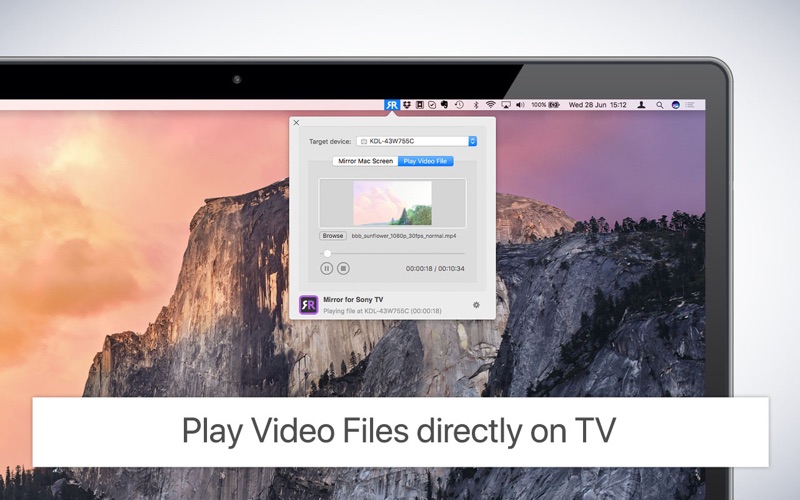
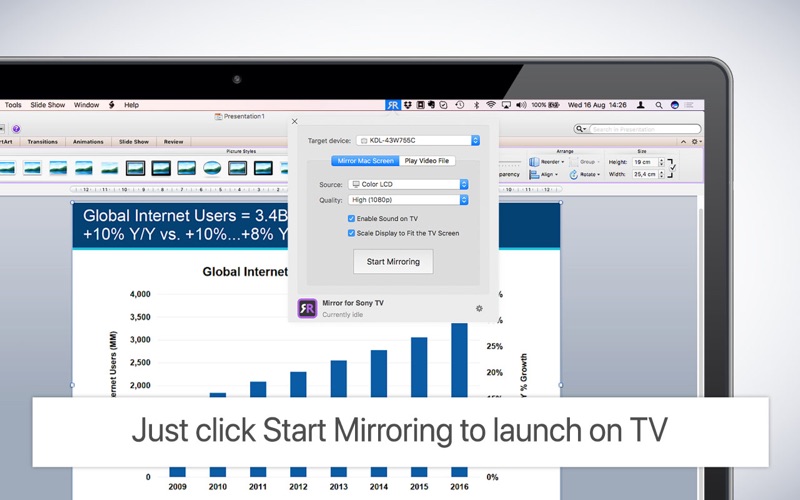
Application to mirror the screen of your Mac to any Sony Bravia Smart TV. No wires and no additional hardware needed! You can also stream individual video files from your Mac to your TV. Also, we included the option to watch one window on your Mac, and another window on your TV!

This works on any Sony Smart TV from the 2012 models onwards.

In using the app, there will be about 1 to 2 seconds of latency. So this mirroring is not suitable for gaming.

However, it is very suitable for watching movies, giving presentations, watching photos, and much more!

The quality of your experience will be dependent on the quality of your local network.

Some tips to enhance the experience:
  • Preferably, connect your TV by LAN cable to your router.
  • Use an “ac” router. If you don’t have one, then an “n” router.
  • Try not to overload your wifi network by moving big files around while you are mirroring.
How the app works:

First, make sure that your Sony TV is on the same local network and same subnet as your Mac. The TV should not be in screen mirroring mode, but just on “TV” Mode or any HDMI IN port.

After launching the app, you will see the app icon appearing in the top bar of your Mac and the app will look for your TV on the network. It will show your TV when it has found it. Now, you have two options:

Mirror your Mac Screen:

Use this option to put the screen of your Mac on TV. In source, you can select which screen (or attached monitor) you want to display on TV. If you are running multiple applications on your Mac, you can also select which application window you want to see on TV.

Enable Sound:

Check this to hear the sound of your Mac coming from the TV. You will need the additional (free) audio driver, which you can download here: http://bit.ly/MirrorAudio

Play Video File:

Use this option if you have a video file on your Mac and you want to play just the file on TV. Drop it in the box and it will play on TV.

Settings (the icon in the bottom right of the app):

click here to request support from our 24/7 support staff. They usually respond within 2 hours on any query that you might have. If your question is technical, please also include the diagnostics information.

Limitations:

Apple has HDCP DRM protection for playing iTunes movies. This means that screen mirroring is not possible when watching movies from iTunes.

When you like the app, please don’t forget to give it a positive rating! Thanks in advance from the AirBeamTV development team!

Please give us feedback by mailing to info@airbeam.tv

Compatibility: OS X 10.10 or later 64-bit

Web Site: https://www.airbeam.tv/mirror-your-mac-screen/sony/
Mac App Store: https://itunes.apple.com/app/mirror-for-sony-tv/id1173947380?mt=12

What’s New in Mirror for Sony TV 3.4.1

– Bugfixes and Stability Improvements

Screenshots

Moody Photoshop Panel 1.1.2 (Win/macOS)

Name Moody Photoshop Panel 1.1.2.zip
Size 102.3 MB
Created on 2019-01-06 02:58:25
Hash 693c66e9735dc9a6d399d45c11df0b4670f70f21
Files Moody Photoshop Panel 1.1.2.zip (102.3 MB)

Download

Moody Photoshop Panel 1.1.2 (Win/macOS)

Moody Photoshop Panel is a panel for Adobe Photoshop that helps the user to give a perfect and professional color in just one click. Its technology allows it to adapt to any type of photos, any kind of photography can put in Moody difficulties. If you have a photo underexposed or overexposed no problem. Moody before applying any effect, it’s a color or contrast, automatically recognizes the exposure giving it the best mix between light and mood. Make your photos unique!

From now just one click to give the right mood to your photos, whether you are sad or happy, no matter! We say enough to the hours spent at the computer to try to recreate an effect, thanks to hundreds of Moody advanced filters you will always find the right concept for your photos … effortlessly!

DESIGN

The simple and clean design allows the user to have a unique user experience and simple.

UI

The user experience is also dictated by the order of the effect divided into four categories.

SETTINGS

Moody also has a menu to have made settings tailored for you.

ALLAPORTATA OF Tutt

Its functionality revolves around a click! Just search the hundreds of effects and click to apply it!

MOODY COLORS

Thank moody colors we can choose the dominant color and sharpness that is most pleasing to our picture, these filters use a special technique that is just hitting the affected areas without giving too strong dominant.

LIGHT COLORS

With advanced techniques, these filters affect only and exclusively the lights in a photo, so if a picture is lacking of light as the best way to give life?

FILTERS

This section uses real filters, which, thanks to the ILC Technology (image light control) improves, in contrast, exhibits or darken your photos whatever it is the situation. You have a dark photo? Well, you apply the filter by illuminating and vice versa. This section also works on special highly sought mood today!

B & W

Filters that apply the technique of black and white in various solutions, from darker to lighter and fluffy!

Moody is compatible with:
  • Photoshop CC2014 (V.15), CC2015, CC2015.5, CC2017, CC2018 +
  • Windows and macOS are both supported

Web Site: https://www.moodypanel.com/products/moody-panel

Assassin’s Creed v06.3305hy

Assassins Creed.zip

Assassin’s Creed v06.3305hy | 5.83 GB

Mac Platform: Unofficial Cider (games only)
Includes: Pre-K’ed

OS version: 10.5.6
Processor type(s) & speed: Intel Core 2 Duo
RAM minimum: 2GB
Video RAM: 256MB

Known issues:
– Due to a missing font, during tutorials and instructions, where the game should show controls, it instead shows little Ubisoft icons

Assassins Creed centers around use of a machine named the “Animus”, which allows the viewing of the protagonist’s genetic memories of his ancestors. Through this plot device, details emerge of a struggle between two factions, the Knights Templar and the Assassins, over an artifact known as a “Piece of Eden” and the game primarily takes place during the Third Crusade in the Holy Land in 1191.

System requirements:
Mac OS version: 10.5.6 (Runs better on 10.6.2)
Min. Processor: Pentium D / Core 2 Duo
Min RAM: 2GB
Video RAM: 256MB
Hard-disk Space: 8GB

All credit goes to Cartri from The Porting Team for putting together this WONDERFUL wrapper.

Other posts you might like

AudFree Audio Capture 1.0.4.4

AudFree_Audio_Capture_1.0.4.4

AudFree Audio Capture 1.0.4.4 | Mac OS X | 28 MB. 

AudFree Mac Audio Capture is an audio recorder with the ability to capture any sound played through all Mac applications, including Safari, Chrome, iTunes, QT, VLC and other local or web media players. It is a good solution for recording music streaming like Spotify, Pandora, Apple Music, YouTube and live broadcasts, music games, online radios and lossless quality and ID3 tags retained.


Other posts you might like

TunesKit Spotify Converter 1.4.1


TunesKit_Spotify_Converter_1.4.1

TunesKit Spotify Converter 1.4.1 | Mac OS X | 6 MB.

Spotify Music Converter for Mac
Powerful and intelligent converter Spotify music to download songs, playlists, albums and artists Spotify, as well as convert any track from Spotify to MP3, M4A, AAC, WAV, M4B, FLAC for any player music, like iPod, Zune, Creative Zen, etc.


Other posts you might like

MediaHuman Youtube Downloader 3.9.9.10 (0501)


MediaHuman_YouTube_Downloader_3.9.9.10__0501

MediaHuman Youtube Downloader 3.9.9.10 (0501) | Mac OS X | 29 MB. 

MediaHuman YouTube Downloader is useful for those who have found a music video or a trailer for a new movie and want to keep on your computer to be viewed without being connected application. Or if you need to download a video lesson. It is ideal for tasks such solution.

  • multiple downloads
  • Save as audio and video
  • Download playlists
  • YouTube, Vimeo, Dailymotion, SoundCloud
  • supports iTunes
  • Kept in the original quality or convert


Other posts you might like

iSubtitle 3.2


iSubtitle_3.2

iSubtitle 3.2 | Mac OS X | 28 MB. 


Subtitles for movies and much more. 
iSubtitle delivers everything you need to find subtitles for movies and television series, integrate, view the result fullscreen and even split a video into chapters and create you a cover.

Its operation is very simple, suitable for all audiences. Open the video, choose a location from the list where you look for subtitles, you should decide what and iSubtitle will download and automatically added so you can enjoy videos in original version.
iSubtitle serves as a player, but if you want to offer the option to export the video to enjoy on your iPod, iPhone or AppleTV and add it to your list of iTunes.
Finally, iSubtitle lets you set chapters, edit digital data file adding more information and add a cover from one frame.


Other posts you might like

Bootstrap Studio 4.3.7

Name Bootstrap_Studio_4.3.7_macOS.zip
Size 48.91 MB
Created on 2019-01-06 02:58:15
Hash a7f7c22e31b622845cd87819baa08199b0cbf10e
Files Bootstrap_Studio_4.3.7_macOS.zip (48.91 MB)

Download

Bootstrap Studio 4.3.7

A powerful desktop app for creating responsive websites using the Bootstrap framework. Bootstrap Studio is a desktop application that helps you create beautiful websites. It comes with a large number of built-in components, which you can drag and drop to assemble responsive web pages. It is built on top of the hugely popular Bootstrap framework, and exports clean and semantic HTML. Thousands of developers and designers use it every day. We are sure you’ll love it too!

The Interface

Bootstrap Studio has a beautiful and powerful interface, which is built around the simplicity of drag and drop. This makes it the perfect tool for prototyping and designing web pages and apps.

Beautiful Built-in Components

Bootstrap Studio comes with a large number of pretty components for building responsive pages. We’ve got headers, footers, galleries, slideshows and even basic elements like spans and divs.

Smart Drag & Drop

Bootstrap Studio knows which Bootstrap components can be nested in one another and gives you suggestions. It automatically generates beautiful HTML for you, which looks as if it was written by hand by an expert.

Create Your Own Components

You can extract pieces of your designs as Custom Components, and have them ready to be dropped into any design you create. You can also export these components as files and share them.

Online Library

If you need a component which doesn’t exist in our library, just click the Online tab in the Component Panel. There you will find thousands of components built and shared by the community. You can also upload your own.

Linked Components

This is a powerful feature which allows you to synchronize components, so changing one will automatically change the other. This is especially useful for things like headers and footers which you need to update across pages.

Realtime Preview

Bootstrap Studio has a powerful feature called Preview. With it, you can open your design in multiple web browsers and devices, and every change you make within the app will be shown instantaneously everywhere.

Editing Code

For some things drag and drop isn’t enough. This is why Bootstrap Studio gives you full control over your markup when you need it. You can import and edit CSS, javascript and HTML in our Sublime Text-like editor.

Advanced CSS Editor

Our advanced CSS editing interface supports auto suggest and rule validation, and shows the active and inherited rules at an any given time. You will soon dread having to go back to your text editor.

javascript Editing

Write javascript in our Sublime Text-like editor. All your changes are synced with the preview, so you can write code and try it out without having to reload your browser.

HTML Editing

With our powerful Custom Code component, you can write HTML directly, without going through our drag and drop interface. You can also convert any piece of your page into Custom Code when you need it.

Requirements: Runs on macOS 10.9 and above.
Web Site: https://bootstrapstudio.io/

What’s New in Bootstrap Studio 4.3.7

  • Release notes not available at the time of this post.

Screenshots

Adobe Captivate 2019 v11.0.1.266

Name Adobe Captivate 2019 v11.0.1.266 Multilingual macOS.zip
Size 3.49 GB
Created on 2019-01-06 02:52:34
Hash 9e07d4c998a61878b1823abf764e8febc14b19e1
Files Adobe Captivate 2019 v11.0.1.266 Multilingual macOS.zip (3.49 GB)

Download

Adobe Captivate 2019 v11.0.1.266 macOS

Adobe Captivate is an authoring tool developed to create and maintain e-learning projects, including courses, software demonstrations and simulations, as well as presentations and quizzes.

Features:

Immersive learning with VR experiences [NEW]

Battle shrinking attention spans with immersive learning scenarios that your learners can experience in Virtual Reality using VR headsets. Now Adobe Captivate makes it possible for you to import 360° media assets and add hotspots, quizzes and other interactive elements to engage your learners with near real-life scenarios. Achieve learning use cases such as – “be in the shoes of”, “virtual tours”, “crises management”, “safety drills” and more.

Fluid boxes 2.0 [ENHANCED]

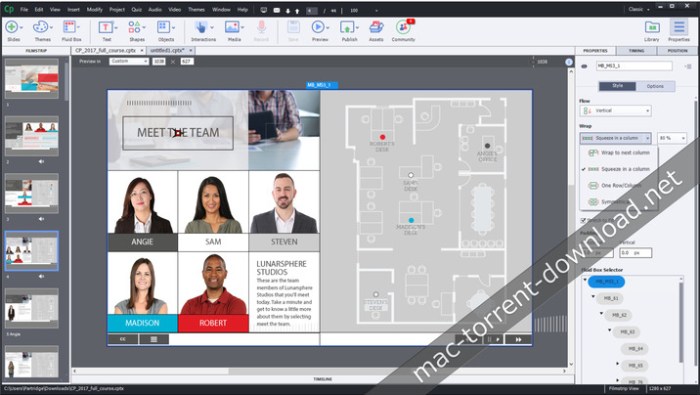
Objects placed in Fluid Boxes get aligned automatically so that learners always get a fully responsive experience regardless of their device or browser. Use the pre-defined boxes in a responsive theme or draw your own. In the 2019 release of Adobe Captivate, Fluid Boxes get a productivity makeover – use the intuitive UI to control and customize your Fluid Boxes, view and change parent-child relations, distribute objects in a single click, define object positions in Static Fluid Boxes and more.

Interactive videos [NEW]

Liven up demos and training videos by making them interactive with the new Adobe Captivate. Create your own or bring in existing YouTube videos, add questions at specific points and conduct knowledge checks. Add bookmarks in the timeline to aid learner remediation. Customize feedback options for answers and interactions.

Live device preview [NEW]

See exactly how your eLearning content will play out on your learners’ VR devices. Use the live preview feature in Adobe Captivate to generate a QR code that you can scan using a mobile device and mirror the project real-time on your device browser. Once the initial connection is done, you can keep previewing all your work across projects as long as the Adobe Captivate session is active.

360 learning experiences [NEW]

Augment the learning landscape with 360° images and videos and convert them into interactive eLearning material with customizable overlay items such as information blurbs, audio content & quizzes. Make learners explore their surroundings and actively engage with the environment to enhance retention. Achieve complex learning use cases such as compliance protocols in action, virtual walkthroughs, realistic product demos and more.

Automatic chroma key effects [New]

Transform your videos by making their backgrounds transparent and replace them in just a few clicks without the need for any green-screen technology. Personalize your video background by adding images or videos of places, scenarios or on-slide content. Get your project on the road with free media assets shipped with Adobe Captivate or choose your own.

Smart video recording – webcam + screen [NEW]

Create studio-quality HD videos as you simultaneously record your webcam and on-screen content with just a few clicks. Adjust the talking-head video position and add persona to your training content. Easily edit the videos in Adobe Captivate and add interactivity to multi-screen video-based learning.

CSV question import template [NEW]

Reduce authoring time and effort with the .csv Question Import template in Adobe Captivate, which helps you automatically create question slides in your Adobe Captivate Project. Include all question slide logic in the same .csv file such as marks, correct answers and feedback. You can also import format-compatible question banks from other authoring tools with just a few clicks.

PowerPoint to responsive eLearning [NEW]

Fast-forward to smart eLearning authoring by importing PowerPoint presentations to Adobe Captivate with just a few clicks. Transform static PowerPoint slides into responsive eLearning content that works seamlessly across all devices. Enhance the learning experience by adding interactive elements, assets and quizzes.
Automatic device preview [NEW]
Hit the play button to see your content automatically change shape and form factor across the full spectrum of device sizes. Get a holistic view of how responsive your content is on every screen size.
and more…

System Requirements:
  • 2 GHz or faster Intel processor
  • OS X 10.10 or higher.
  • Windows 64bit operating system is supported.
  • 8 GB RAM
  • 10GB of available harddisk space for installation; additional free space required during installation (cannot install on removable flashbased storage devices)
  • Adobe Flash Player 10 (or more) for viewing multimedia content
  • 1024×768 display (1280×1024 recommended) with WebGL compatible Graphics Cards
Adobe Captivate is available in the following languages:
  • English
  • French
  • German
  • Japanese
  • Korean
  • Portuguese (Brazilian)
  • Spanish

Web Site: Web Site: http://www.adobe.com/products/captivate.html

What’s New in Adobe Captivate 2019 v11.0.1.266

  • Release notes not available at the time of this post.

Screenshots

iSubtitle 3.2

Name iSubtitle 3 2 TNT.zip
Size 28.30 MB
Created on 2019-01-06 02:05:39
Hash 689b9f2abbbbc36108e582b6bb68b7bf1ccc2b14
Files iSubtitle 3 2 TNT.zip (28.30 MB)

Download

iSubtitle 3.2

Inject subtitle tracks, chapter markers and metadata into your movies and TV-shows. The perfect companion app for your iTunes library and all your Apple devices, like the iPhone, iPad, iPod, Apple TV and Mac.

iSubtitle takes full advantage of Apple’s soft subtitle technology. The subtitle tracks are resolution independent and rendered in real-time as you watch the movie. Subtitles are always displayed at the best quality your device can perform. There are support for multiple languages in the same movie file and you can even switch language on the fly as you watch. The export and metadata tagging is fully automated so you don’t need to tweak a lot of parameters to get your movie into iTunes with beautiful tagging and artwork.

Main Features
  • Add soft, nondestructive subtitle tracks, that won’t change or alter the original movie.
  • Subtitles can be turned on/off using the interface of the device or application.
  • Complete support for multiple languages in the same file.
  • Perfect integration with your iTunes library.
  • Supports all Apple devices like the iPod, iPhone, iPad, Apple TV and Mac.
  • Supports encoding in AVC, aka H.264 and HEVC, aka H.265 (for iOS 11, tvOS 11 and macOS High Sierra).
  • Supports pass through for H.264 and H.265 video tracks and AC3 and AAC audio tracks, ie no encoding needed = fast!
  • Supports all major subtitle file formats like SubRip (.srt), SubViewer 1 & 2 (.sub), SubStation Alpha (.ssa/.ass), Spruce (.stl), iTunes Timed Text (.itt) and WebVTT (.vtt).
  • Matroska subtitles, like ssa/ass and srt, are automatically converted to soft subtitle tracks on import.
  • Sync individual subtitle tracks in realtime using the time offset stepper.
  • Automatic and manual metadata tagging.
  • Create chapter markers automatically or manually.
  • Batch reencode movies within the application to support your target device or application.
  • Smart export will only reencode your movie if really needed for it to play on your device.
  • Save inline directly to the source file if it’s already in a compatible mp4/m4v format.
  • Watch subtitled movies in fullscreen without leaving the application.
  • Works like a charm with High Sierra, Sierra, El Capitan and Yosemite.

• Please use the Feedback feature in the app if you are having issues and I will get back to you!

NOTE! iSubtitle cannot add subtitles to movies or tv-shows purchased or rented in the iTunes store due to DRM protection.
NOTE! iSubtitle is not a subtitle file authoring application.

Compatibility: OS X 10.10 or later 64bit

Web Site: http://www.bitfield.se
Mac App Store: https://itunes.apple.com/app/isubtitle-3/id1166951701?mt=12

What’s New in iSubtitle 3.2

  • FFmpeg updated to the 4.0 “Wu” release.
  • Fixed a problem with inline saving metadata to mp4, m4v files.
  • Watch Quick Start Movie in the Welcome window now works again.

AudFree Audio Capture 1.0.4.4

Name AudFree Audio Capture 1 0 4 4 TNT.zip
Size 28.90 MB
Created on 2019-01-06 02:05:31
Hash 630d76cefb2dc6ec20e68e7936844c41cc703d5e
Files AudFree Audio Capture 1 0 4 4 TNT.zip (28.90 MB)

Download

AudFree Audio Capture 1.0.4.4

AudFree Mac Audio Capture is an audio recorder with the ability to capture any sound playing through all Mac apps, including Safari, Chrome, iTunes, QT, VLC and other local or web media players. It is a good solution to record streaming music like Spotify, Pandora, Apple Music, YouTube, and live broadcasts, game music, online radios, and more with lossless quality and ID3 tags retained.

Compatibility: macOS 10.8 or later

Web Site: https://www.audfree.com/audio-capture-mac/

What’s New in AudFree Audio Capture 1.0.4.4

  • Release notes not available at the time of this post.

DoYourData Super Eraser 5.6


DoYourData_Super_Eraser_5.6

DoYourData Super Eraser 5.6 MAS | Mac OS X | 6 MB. 

Say goodbye to data from Mac forever – DoYourData Super Eraser for Mac erased completely and permanently files / folders, clean your hard drive, deletes the data in the storage device and clean the unused space in Mac OS X.

Permanently erases or deletes data from Mac
DoYourData Super Eraser for Mac is a powerful data erasure software Mac OS operating system. Permanently and completely you can delete files, folders and data on the Mac hard drive or storage device. It will destroy / delete the selected data and overwrite the disk space with zeros / or random bits. After the deletion, the deleted data will be lost forever, can not be recovered by any software or data recovery service.
Delete selected files / folders in Mac OS X
selectively and permanently deletes selected files or folders or storage media machines under Mac OS X. No need to erase your entire hard drive.
Thoroughly clean Mac hard drive or Storage Media
Complete and conveniently clean Mac hard drive or storage device to destroy and erase all existing data, loss of data, history data or hard disk storage.
Safely cleans the unused disk space
One click to clean up the unused disk space on Mac or storage medium to permanently erase the lost data or fingerprints on disk space unused. This leads to a safer and more efficient hard drive clean.
Delete data before giving your Mac to others
Before resell, donate, discard the storage device or Mac, you better remove part or all data permanently on it to protect your privacy.
Delete personal data in a public setting
permanently delete personal data when you leave a shared Mac in public settings (including perhaps the situation that shares the same Mac with family members). 
Permanently erase confidential data
permanently erase important and sensitive data such as financial data, information privacy, if you do not want to be used by cybercriminals.


Other posts you might like

AirMail 3.6.56

Name Airmail 3 3 6 56 MAS TNT.zip
Size 56.41 MB
Created on 2019-01-05 22:49:42
Hash e55142c0d7f2c5ae3696ce7fa1c7ac92b1cc2475
Files Airmail 3 3 6 56 MAS TNT.zip (56.41 MB)

Download

AirMail 3.6.56

Airmail 3 is a new mail client designed with performance and intuitive interaction in mind optimized for macOS High Sierra!

Support for iCloud™, MS Exchange, Gmail™, Google™ Apps, IMAP, POP3, Yahoo!™, AOL™, Outlook.com™, Live.com™

Airmail was designed from the ground UP to retain the same experience with a single or multiple accounts and provide a quick, modern and easy-to-use user experience. Airmail is clean and allows you to get to your emails without interruption- it’s the mail client for the 21st century.

We have taken usability and function to the next level with Airmail and bring a striking-design with support for all major email services. Switch between accounts like a breeze and quick reply to incoming messages within seconds- email has never been so easy and productive.

  • iCloud Account sync
  • iCloud attachment upload and share the link.
  • Handoff support, Composing Draft and folder selection are mirrored on different devices
  • Today Extension, quick access to your inbox.
  • Action Extension, Airmail Compose, Inline create and send messages directly form other apps
  • Action Extension, Airmail Share to quick send messages and attachments.
Accounting:
  • Unified Inbox
  • Alias with custom SMTP
  • Exchange, iCloud™, Gmail™, IMAP, POP3, Google™ Apps, Yahoo!™, AOL™, Outlook.com™, Live.com™
  • Local Accounts
  • Import from Apple Mail, MBOX archive, EML, EMLX, Airmail 1.x
Interactions:
  • Quick Reply
  • Undo History
  • Offline operations
  • Move messages on Different mailboxes
  • Interaction sounds
  • Multi Touch gestures
  • Exchange Meeting Invite
Shortcuts:
  • Gmail Shortcuts
  • Custom global shortcuts
  • Quick Label, Move, Label and Archive
  • Quick folder selection
Attachment:
  • Drag and drop
  • Quick Look preview
  • Google Drive, Dropbox, CloudApp, Box, Onedrive, Droplr, FTP
  • Inline image attachments
  • Winmail.dat preview
  • VCalendar
Conversations:
  • Group by id
  • Group by subject
  • Chronological Reverse
  • Muted CC’d conversation
Visual:
  • Multiple visual themes
  • Minimal and extended Mode
  • Plain Text Rendering
Notifications:
  • Per account notifications
  • Notification center support
  • Notification alerts with custom actions
Address:
  • Gmail, Exchange and OS X contacts
  • Contacts Group
  • Filter by address
  • Open Directory search
Composer:
  • Google App Directory
  • Exchange Global Address List
  • LDAP directory
  • Markdown, Html(Html Source for templates), and text only.
  • Custom settings per single account
  • Bullet and numbered list.
Sending:
  • Auto CC, BCC.
  • Pending operations
  • Send Delay
  • Redirect
  • Send again
  • Bounce
Advanced:
  • Split Screen Support
  • Time Machine friendly
  • Deckles mode
  • EML Import/Export
  • Disable GPU to save battery life
  • Applescript
  • Activity monitor
  • Data Detectors
Signatures:
  • Multiple Account Signatures
  • Markdown, Rich text, Html Source, and text only.
  • Signature above or below the quote
Search & Filtering:
  • Global search for multiple accounts
  • Realtime powerful filters
  • Sort messages, Date, Attachments, Conversations ….
  • Show messages of the same user
  • Flags and filters
Folders, Labels:
  • Nested folders
  • Create, Delete and edit folders
  • Custom colors synced by iCloud
  • Custom folder mappings
  • ToDo, Done, Memo
Send to:
  • Omnifocus
  • Fantastical
  • Evernote
  • Apple Reminder
  • Calendar
  • BusyCal
  • Things
  • 2To
  • Wunderlist
  • Todoist
Privacy:
  • Per user Autoload Remote Images,
  • Disable icon detection

Compatibility: OS X 10.10 or later 64-bit

Web Site: http://airmailapp.com
Mac App Store: https://itunes.apple.com/app/airmail-3/id918858936?mt=12

What’s New in AirMail 3.6.56

Bugfix

Apeaksoft DVD Creator 1.0.6


DVD_Creator_for_Mac_1.0.6.80358

Apeaksoft DVD Creator 1.0.6 | macOS | 40 MB.

Whether you want to create a DVD as a gift, or want to keep the classic movie on a DVD disc to preserve it forever, even if you want to create multiple DVDs for your customer, DVD Creator will be your best option. better choice.

Supports almost types of DVD, such as DVD-R, DVD + R, DVD-RW, DVD + RW, DVD + R DL, DVD-R DL, DVD-5, DVD-9, etc., which can be easily done Although the DVD disc has not obtained a DVD disc, you can create video DVD folder and ISO file for later use on your computer directly.


Other posts you might like

PhoneRescue for iOS 3.7.2.20181229


PhoneRescue_for_iOS_3.7.2__20181229

PhoneRescue for iOS 3.7.2.20181229 | Mac OS X | 40 MB. 

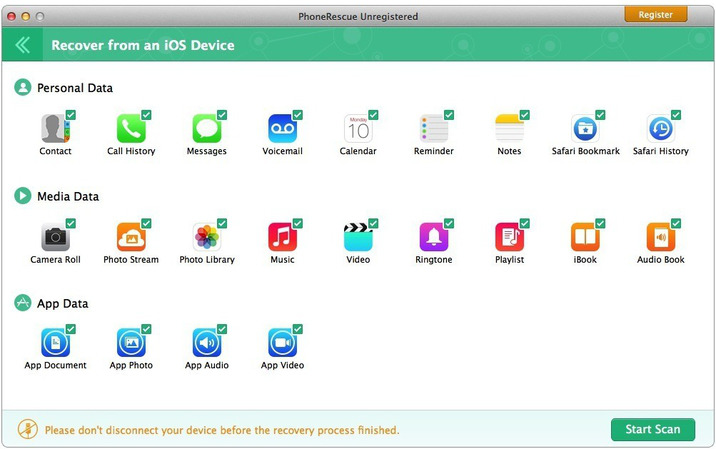
erroneous deletion of stored photos, text messages, call log or other vital information about the iPhone could be a disaster in your life. This is why we present our PhoneRescue, promising to get all your media valued-lost or text data back in your hands. Thanks mode Recover from iDevice, PhoneRescue could always find a safe and reliable way to recover the data and important files from your device, regardless of the iOS device that it is so.

PhoneRescue also gives a hand when you are in difficult and desperate situations. For example, the device was badly damaged or could not be recognized by the computer, or but we still stole mode Recover from iTunes Backup will help. Everything happens here is, without connecting the device to your computer. In addition, the content removed in Roll, Photo Stream and voicemails he believed lost permanently also be recovered from the iTunes backup, though it is encrypted.

What if you do not have an Apple device feasible nor a backup of iTunes available? Now PhoneRescue does wonders for you with the help of his way to recover from iCloud backup. With a quick scan of the data stored in iCloud, PhoneRescue could download previous backup to iCloud and restore your desired content in a few clicks.

It focuses on the analysis and recovery of the 22 types of iOS content
Recovers all your valuable information through 3 safe and reliable forms
Extract photos and voice messages from iTunes Backup, although it is an encrypted
Saves messages and call history format HTML or copied to the clipboard
Export music, movies and books to computer even you can not access your iPhone


Other posts you might like

Airmail 3.6.56


Airmail_3_3.6.56_MAS

Airmail 3.6.56 | Mac OS X | 55 MB. 


Airmail 3 is a new mail client designed with performance and intuitive interaction optimized for MacOS Mojave mind.

Support for iCloud ™, MS Exchange, Gmail ™, Google ™ Apps, IMAP, POP3, Yahoo! ™, AOL ™, Outlook.com ™, Live.com ™

Airmail was designed from scratch to maintain the same experience with one or more accounts and provide experience fast, modern and easy to use user. Airmail is clean and allows you to access your emails without interruption; It is the email client for the XXI century.

We have taken usability and functionality to the next level with Airmail and bring a striking design with support for all major email services. Switches between accounts like a breeze and quick reply to incoming messages within seconds: e – mail has never been so easy and productive.

– Synchronizing iCloud account
– Load attachments iCloud and share the link.
– The Handoff support, Composing Draft and selecting folders are duplicated on different devices
– Today Extension, quick access to your inbox.
– Action Extension, Airmail Compose, Inline create and send messages directly from other applications
– Action Extension, Airmail Share to send messages and attachments quickly.

Accounting:
– Unified Inbox
– Alias with custom SMTP
– Exchange, iCloud ™, Gmail ™, IMAP, POP3, Google ™ Apps, Yahoo! ™, AOL ™, Outlook.com ™, Live.com ™
– Local Accounts
– Import from Apple Mail, MBOX, EML, EMLX, Airmail 1.x file

Interactions:
– Quick Response
– Undo history
– Operations offline
– Move messages in different mailboxes
– interaction sounds
– Multi Touch gestures
– Invitation to exchange meeting

Shortcuts:
– Gmail Shortcuts
– custom global shortcuts
– Quick Label, move, label and file
– Quick Selection folders

Attachment:
– Drag and Drop
– Quick Preview
– Google Drive, Dropbox, CloudApp, Box, OneDrive, Droplr, FTP
– image attachments Online
– Preview Winmail.dat
– VCalendar

Conversations
– Group by id
– Group by subject
– Chronological Reverse
– Conversation turned off CC

Visual:
– Multiple visual themes
– minimal and extended Mode
– plain text rendering

Notifications:
– on account notifications
– Support center Notifications
– notification alerts with custom actions

Address:
– Contacts from Gmail, Exchange and OS X
– Contact Group
– Filter by address
– Search Open Directory

Composer:
– Directory applications Google
– Global Address List Exchange
– Directory LDAP
– Markdown, HTML (HTML for templates Source) and text only.
– customized by individual account settings
bullet and numbered list -.

Sending:
– Auto CC, BCC.
– Pending operations
– Send delay
– Forward
– Send again
– Bounce

Advanced:
– Support split screen
– Time Machine friendly
– Eckels Mode
EML Import / Export –
– Disable GPU to save battery life
– Applescript
– Activity monitor
– Data Detectors

Signatures:
– Multiple Signatures account
– Markdown, Rich Text, source HTML and text only.
– Signature above or below the quote

Search and Filtering:
– Global search for multiple accounts
– Powerful filters in real time
– Sort messages, date, attachments, conversations ….
– Display posts of the same user
– Flags and filters

Folders, labels:
– nested folders
– Create, delete and edit folders
– Custom colors synchronized by iCloud
– Letters of custom folders
– ToDo, Done, Memo

Send to:
– OmniFocus
– Fantastico
– Evernote
– Reminder Apple
– Calendar
– BusyCal
– Things
– 2To
– Wunderlist
– Todoist

Privacy:
– Per user Autoload Remote Images ,
– Disable detection icons


Other posts you might like

CISDEM Video Converter 3.11.0


Cisdem_Video_Converter_3.11.0

CISDEM Video Converter 3.11.0 | Mac OS X | 63 MB. 

CISDEM Video Converter 3 for Mac: Download and convert videos on Mac without quality loss! The best video conversion tool gives you everything you need to download videos to conventional devices.

Download YouTube HD videos and YouTube
Mac Video Converter allows you to download videos from YouTube, including YouTube videos and YouTube HD 4K UHD, completely free of charge. You can save the downloaded YouTube videos in a quality and resolution chosen until his election.

Convert audio and video and rip DVD movies to like
Mac Video Converter is the all in one solution to convert video and audio files in any format, rip DVD movies and convert online videos.

Convert videos with the highest possible output quality
We know that quality matters. That’s why we use an advanced engine HD video decoding to convert video from one format to another without re-compressing it . Since only it changes the format of a file, not its content. You can preserve the original video quality video files and get the best possible quality.

Advanced technology audio and video synchronization
program adopted sync audio and video technology; Synchronization problems video / audio corrected so you can enjoy videos synchronized smoothly.

A real time saver: up to 30 times faster
With extremely fast download and conversion accelerator built. Each video you enter into Mac Video Converter converts as fast as copying files from one folder to another, even during batch conversions of multiple files simultaneously. Some formats are processed even 30 times faster than any competitor! Download the program and see for yourself.

Regain space compressing large media files
Video files recorded by camcorders are often very large, especially taking HD camcorder. Integrated with advanced video processing technology, Video Converter for Mac will reduce the size of video files with minimal loss of quality! The converted videos are almost indistinguishable from the originals. Thus, you can free up a lot of storage space on their devices.

Perform basic editing: crop, rotate, watermark, etc.
Mac Video Converter also includes a range of basic editing tools including combine, trim, crop, rotate, watermark, subtitles, interlacing, effects, etc.

Watermark your video
Add Watermark to Videos for copyright protection or self – promotion.

Add subtitles
Load external .srt subtitles for better understanding.

Get the sections that need
Trims the video to remove unnecessary parts and trim for your favorite segment.

Merge videos into one
Join a video file or different clips into a single video.

Deinterleaving fragments crude
interlace interlaced video progressive one.

Adjust video effects
Adjust the brightness of the video or add effects such as 2D to 3D, Grayscale, Gamma, etc.

Devices
iPhone7 / 7plus / 6 / 6S, iPad, iPod Touch, Apple TV, Samsung, Amazon, PSP, etc.

SD / HD Video
AVI, MP4, FLV, WMV, 3GP, MKV, MPEG, MP3, etc.

Social sites
Post newly created videos on many social networking sites like Facebook, Twitter, Goolge +, etc.

Online
directly Upload your video to YouTube, Vemeo and other video sharing sites.


Other posts you might like

PhoneRescue for iOS 3.7.2 (20181229)

Name PhoneRescue for iOS 3 7 2 20181229 TNT.zip
Size 40.65 MB
Created on 2019-01-05 22:50:18
Hash 3e978a92a6a1deb6c74dc6a9e82854bc2025723b
Files PhoneRescue for iOS 3 7 2 20181229 TNT.zip (40.65 MB)

Download

Descriptions for PhoneRescue for iOS 3.7.2 (20181229)

PhoneRescue is an iOS data recovery program designed for retrieving your lost photos, messages, contacts, notes and more on your iPhone, iPad and iPod touch. Also it can repair an iDevice from any iOS crash errors.

Features
  • Focuses on analyzing and recovering the most important 29 types of iOS content, such as photos, messages, contacts, music, and more
  • Recovers data and files directly back to iPhone for instant use, or to computer for future use
  • Retrieves your valued information via 3 safe and reliable ways: from device, iTunes and iCloud backup, even an encrypted one
  • Extracts the valuable information from any kind of iTunes backup – no matter it’s a damaged one, or the backup failed to be restored via iTunes or other 3rd-party recovery tools
  • Selectively or fully scans the file types based on your choice, and choose what you want for recovery, making the whole process more accurate and faster
  • Export data & files with a wide variety of formats, like TXT, CSV, HTML, and more
  • Fixes any iOS errors via Standard mode and Advanced mode, without losing any data

PhoneRescue is an all-inclusive iOS data recovery program designed for retrieving your lost photos, messages, contacts, music and more data from your iPhone, iPad and iPod touch. Whether you mistakenly deleted or accidentally lost anything important to you, it helps find them back.

It also brings you an intuitive and simple user interface, even your grandparents can easily use it to get back all their lost data, all by themselves. More than a recovering tool, it also revives your iPhone from any iOS system problems or crashes like stuck on Apple logo, recovery more loop, black screen, and more.

Compatibility: OS X 10.8 or later

Web Site: https://www.imobie.com/phonerescue/ios-data-recovery.htm

What’s New in PhoneRescue for iOS 3.7.2 (20181229)

  • Release notes not available at the time of this post.

Screenshots

AirMail 3.6.55

Name Airmail_3_3.6.55_MAS__TNT.rar
Size 54.41 MB
Created on 2019-01-04 03:26:55
Hash 730d70cee6ab7477d69f49c773a1e48cbee986db
Files Airmail_3_3.6.55_MAS__TNT.rar (54.41 MB)

Download

AirMail 3.6.55

Airmail 3 is a new mail client designed with performance and intuitive interaction in mind optimized for macOS High Sierra!

Support for iCloud™, MS Exchange, Gmail™, Google™ Apps, IMAP, POP3, Yahoo!™, AOL™, Outlook.com™, Live.com™

Airmail was designed from the ground UP to retain the same experience with a single or multiple accounts and provide a quick, modern and easy-to-use user experience. Airmail is clean and allows you to get to your emails without interruption- it’s the mail client for the 21st century.

We have taken usability and function to the next level with Airmail and bring a striking-design with support for all major email services. Switch between accounts like a breeze and quick reply to incoming messages within seconds- email has never been so easy and productive.

  • iCloud Account sync
  • iCloud attachment upload and share the link.
  • Handoff support, Composing Draft and folder selection are mirrored on different devices
  • Today Extension, quick access to your inbox.
  • Action Extension, Airmail Compose, Inline create and send messages directly form other apps
  • Action Extension, Airmail Share to quick send messages and attachments.
Accounting:
  • Unified Inbox
  • Alias with custom SMTP
  • Exchange, iCloud™, Gmail™, IMAP, POP3, Google™ Apps, Yahoo!™, AOL™, Outlook.com™, Live.com™
  • Local Accounts
  • Import from Apple Mail, MBOX archive, EML, EMLX, Airmail 1.x
Interactions:
  • Quick Reply
  • Undo History
  • Offline operations
  • Move messages on Different mailboxes
  • Interaction sounds
  • Multi Touch gestures
  • Exchange Meeting Invite
Shortcuts:
  • Gmail Shortcuts
  • Custom global shortcuts
  • Quick Label, Move, Label and Archive
  • Quick folder selection
Attachment:
  • Drag and drop
  • Quick Look preview
  • Google Drive, Dropbox, CloudApp, Box, Onedrive, Droplr, FTP
  • Inline image attachments
  • Winmail.dat preview
  • VCalendar
Conversations:
  • Group by id
  • Group by subject
  • Chronological Reverse
  • Muted CC’d conversation
Visual:
  • Multiple visual themes
  • Minimal and extended Mode
  • Plain Text Rendering
Notifications:
  • Per account notifications
  • Notification center support
  • Notification alerts with custom actions
Address:
  • Gmail, Exchange and OS X contacts
  • Contacts Group
  • Filter by address
  • Open Directory search
Composer:
  • Google App Directory
  • Exchange Global Address List
  • LDAP directory
  • Markdown, Html(Html Source for templates), and text only.
  • Custom settings per single account
  • Bullet and numbered list.
Sending:
  • Auto CC, BCC.
  • Pending operations
  • Send Delay
  • Redirect
  • Send again
  • Bounce
Advanced:
  • Split Screen Support
  • Time Machine friendly
  • Deckles mode
  • EML Import/Export
  • Disable GPU to save battery life
  • Applescript
  • Activity monitor
  • Data Detectors
Signatures:
  • Multiple Account Signatures
  • Markdown, Rich text, Html Source, and text only.
  • Signature above or below the quote
Search & Filtering:
  • Global search for multiple accounts
  • Realtime powerful filters
  • Sort messages, Date, Attachments, Conversations ….
  • Show messages of the same user
  • Flags and filters
Folders, Labels:
  • Nested folders
  • Create, Delete and edit folders
  • Custom colors synced by iCloud
  • Custom folder mappings
  • ToDo, Done, Memo
Send to:
  • Omnifocus
  • Fantastical
  • Evernote
  • Apple Reminder
  • Calendar
  • BusyCal
  • Things
  • 2To
  • Wunderlist
  • Todoist
Privacy:
  • Per user Autoload Remote Images,
  • Disable icon detection

Compatibility: OS X 10.10 or later 64-bit

Web Site: http://airmailapp.com
Mac App Store: https://itunes.apple.com/app/airmail-3/id918858936?mt=12

What’s New in AirMail 3.6.55

– Improved search

Transmit 5.2.1

Name Transmit 5 2 1 TNT.zip
Size 73.01 MB
Created on 2019-01-05 10:08:22
Hash 834421376faab8e5f1ec51936264cdb6c0f804bb
Files Transmit 5 2 1 TNT.zip (73.01 MB)

Download

Transmit 5.2.1

A simple, clean and intuitive application that enables you to effortlessly upload, download and delete files to and from FTP, SFTP, Amazon S3 or WebDAV

Transmit is a powerful and versatile macOS application that makes it easy for you to manage and organize large files on various servers on clouds.

With Transmit’s help you can quickly and effortlessly transfer files to SFTP or FTP server, as well as Amazon S3 or WevDAV from within a user-oriented interface.

User-oriented interface with support for multiple tabs

Transmit comes a simple and reliable solution for users that need to maintain websites, upload numerous photos or perform backups.

Transmit comes with a “Twin-Turbo Engine”, multi-connection transfer and FXP support fact that makes it a fast, smooth-running and dependable client for most Mac users.

On top of that, Transmit enables you to limit the bandwidth, synchronize or compare files with ease.

Choose between a single or dual pane window

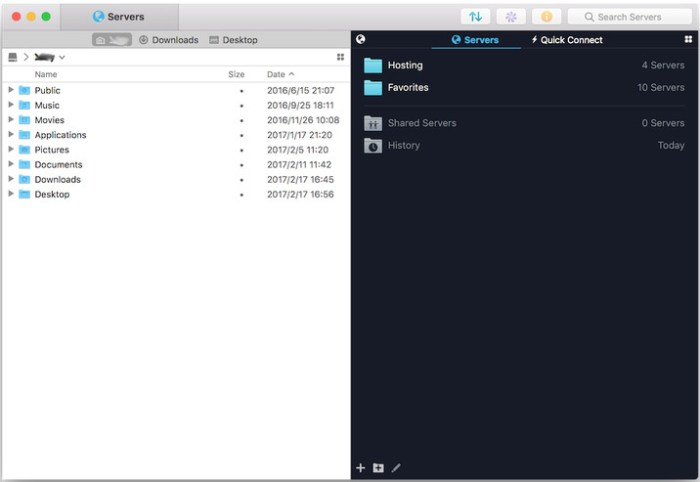
From Transmit’s two-panel window you can view the files stored locally and the ones saved on the server. At the same time, Transmit helps you create a list with favorite servers add a new FTP, SFTP, Amazon S3 or WebDAV server.

The top toolbar allows you to switch between the thumbnail, list, column and Cover Flow view mode and change from the a dual pane to a single pane window. In addition, Transmit seamlessly integrates Mac OS X’s Quick Look feature, a fact that helps you preview files before transferring them.

Handy synchronization features

By accessing the Action drop-down menu, you can open the Info window, copy the file path or URL address, move items to Trash or the desired location, create duplicates, compress or label files. On top of that, you have the option to create new folders or files, refresh the list and open a folder in a new tab or new window.

Thanks to the built-in search form, you can quickly and effortlessly filter the displayed items as soon as you start typing. The Preferences window enables you to change the default FTP client and configure Transmit to synchronize your favorite items via iCloud or Dropbox.

OS Version: OS X 10.11 or later

Web Site: http://www.panic.com/

What’s New in Transmit 5.2.1

Fixed:
  • Fixed an issue where copying remote file selection no longer added path to clipboard
  • Added support for the latest version of Krypton when connecting with SFTP
  • Connecting to a Server with an invalid local path no longer displays error alert twice
  • Thumbnail view background color preference is now correctly saved between launches
  • Thumbnail view background color defaults to light when using light system appearance
  • Folder icons are now drawn darker in dark mode
  • Improved File Synchronize sheet appearance when using dark mode
  • Workedaround bug on macOS 10.14 where switching to Thumbnail view may not draw as expected
  • Miscellaneous small improvements when using Dark Mode on Mojave

Screenshots

PDF Expert 2.4.20 (608)

Name PDF Expert 2 4 20 608 TNT.zip
Size 47.28 MB
Created on 2019-01-05 10:08:30
Hash b60f4090a69262eedbd9d430ae776566970adce9
Files PDF Expert 2 4 20 608 TNT.zip (47.28 MB)

Download

PDF Expert 2.4.20 (608)

PDF Expert springs into action with smooth scrolling and fast search from the first document you select. PDFs open instantly, whether they are just small email attachments or 2000-page reports.

  • Professional Annotation Tool – From simple changes to marathon editing sessions, PDF Expert lives up to its name. Powerful yet easy-to-use tools are just a click away so you can leave your mark in record time.
  • Read – An award-winning, lightning-fast, tabbed document viewer will get you through multiple PDFs faster than ever.
  • Excellent for Form Filling – PDF Expert provides the best experience for filling out PDF forms. Text fields, checkboxes, radio buttons, and other form elements work as you expect, and all the information you enter is saved within the form. Even complex interactive forms with Javascript work impressively well.
  • An Easy Way to Sign Documents – Signing document on your Mac is as simple as it could be. Just type your name on a keyboard and PDF Expert will transform it into beautiful handwriting. Or use your Macbook’s trackpad and write with your finger. You can even use signatures already created in PDF Expert for iOS.
  • Wide Sharing Options – You don’t work alone, and neither does PDF Expert. When it’s time to send documents to clients, coworkers, and everyone in between, PDF Expert has top-notch support for your Mac’s system-wide share sheet and other apps. If an app accepts PDFs, PDF Expert can get them there.
  • Works across all your devices – Use PDF Expert on any Apple device – Mac, iPad, and iPhone. Use Apple’s Continuity and Handoff features to seamlessly transfer document from one device to another and continue editing where you left.

Compatibility: OS X 10.10 or later, 64bit

Web Site: https://pdfexpert.com

What’s New in PDF Expert 2.4.20 (608)

  • Release notes not available at the time of this post.

Boom 3D 1.2.1

Name Boom 3D 1 2 1 MAS.zip
Size 43.68 MB
Created on 2019-01-05 10:08:43
Hash 0f60988a7163afcb9344d56584f26f43b0f6c498
Files Boom 3D 1 2 1 MAS.zip (43.68 MB)

Download

Boom 3D 1.2.1

An unobtrusive and lightweight application capable of boosting your Mac’s sound volume and improve the audio quality of your audio files
Boom 3D is straightforward volume booster and sound equalizer specially designed to increase the volume and quality of the sound coming out from your Mac’s speakers.

Enjoy a louder, clearer and better sound

Boom 3D seamlessly integrates with macOS and its controls are similar to the default system volume control. However, Boom 3D provides additional features and capabilities that can be used to enhance the quality of the sound.

Thanks to Boom 3D you can boost the sound coming from YouTube video clips, songs and videos played using iTunes, Netflix, Spotify or any other application. Moreover, you can use Boom 3D to improve the clarity of Skype and FaceTime video chats.

Intuitive interface

From Boom 3D’s status bar menu you can quickly adjust the sound volume or change the EQ preset with just a couple of mouse clicks. By accessing Boom 3D’s main window you can enable or disable the volume booster and sound equalizer, adjust the sound level and customize the equalizer.

Boom 3D comes with a series of presets that you can easily adjust and personalize according to your likes. You can even save your own presets and load them via the Boom Presets slide menu.

Powerful audio level booster

By accessing the Boost File tab, you can easily adjust the sound level of multiple audio and video files at the same time. What is more, you can configure Boom 3D to automatically add the modified files to a new playlist in iTunes at the end of the process.

The Preferences window helps you turn on or off the notification sounds, set the default location for boosted files and type in the suffix for the boosted items. On top of that you can enable and customize the level up and level down hot-keys.

Compatibility: OS X 10.10 or later 64 bit

Web Site: http://www.globaldelight.com/boom3d/index.php
Mac App Store: https://itunes.apple.com/app/boom-3d-the-best-virtual-surround-audio/id1233048948?mt=12

What’s New in Boom 3D 1.2.1

Defect fixes.

Transmit 5.2.1


Transmit_5.2.1

Transmit 5.2.1 | Mac OS X | 72 MB. 


Transmit is the last transfer client FTP + SFTP + WebDAV + Amazon S3 eparaMac files.

You need to transfer files. Maybe to an FTP or SFTP server, or the cloud via Amazon S3, or using WebDAV. It maintains a website, back up or upload photos. Transmit needs, client # 1 Mac OS X FTP.

INCREDIBLE FEATURES.

  • Power protocol: FTP (Normal, Implicit SSL and TLS / SSL), SFTP, Amazon S3 and WebDAV (HTTP and HTTPS)
  • Flexible Favorites for quick access to the server
  • practical view of two panels
  • Rapid transfer of multiple connections
  • Easy Transfer Manager
  • Synchronization
  • Quick Look, CoverFlow, thumbnail image
  • Places to access folders with a single click
  • FXP support
  • Bandwidth limitation
  • Much more!

ASTONISHING SPEED.

  • Scary, wicked fast compared to Transmit 3 – 25 times.
  • 4x Faster: 30,000 list of remote files.
  • 18x Faster: 30,000 download small files.
  • 2.25x faster: eliminating 30,000 small files.
  • 25x Faster: loading 15,000 small files.


Other posts you might like

Boom 3D 1.2.1


Boom_3D_1.2.1

Boom 3D 1.2.1 MAS | Mac OS X | 43 MB. 


Boom – Equalizer for Mac, it actually improves the sound.

A new product called Boom 3D has become “more magical,” it represents more exciting and 3D surround sound.

If you often experience problems with the sound volume when watching movies or videos on the Internet, chat audio chat or simply listening to music, Boom is what you need. First Boom suits the owners of MacBook and MacBook Air, as the standard sound of portable devices leaves much to be desired.

Boom greatly improves audio quality in movies and music in all applications on your Mac. It has a customizable equalizer, which allows you to achieve excellent sound, the app has a beautiful interface.

Boom 3D is a beautiful implementation of audio amplifier and the parametric equalizer, which is an intelligent interface with the ability to self-calibrate specifically for the computer on which the application is installed and according to the audio path used. The application offers a modern control system and unique EQ, using a variety of amazing sound effects to enhance the quality of audio output.


Other posts you might like

PDF Expert 2.4.20 (608)


PDF_Expert_2.4.20__608

PDF Expert 2.4.20 (608) MAS | Mac OS X | 46 MB. 

Expert PDF is a fast, robust and beautiful PDF editor.
Read, annotate and edit PDFs like never before!

** *** Edit PDFs
PDF Expert is the best way to edit PDF text, images, links and schemes. Correct typos, change the logo on a contract, or update your CV is now a matter of seconds.

Skillful and Fast ** **
From the first document, PDF Expert comes in with smooth scrolling and quick search. Open PDFs instantly, either a small or a report accompanying 2000 pages.

** ** Rugged and Beautiful
When it’s time to edit, all the great tools you need are easy to find and are a click away. Rapid Expert PDF annotations, form filling simple and powerful file merging facilitate work in record time.

* Edit – Edit text, adjust or replace images, add and edit text and diagrams smoothly.
* Read – Awarded tabbed document viewer that lets you super fast surf multiple PDFs faster than ever.
* Note – classic tools and innovations that allow you to highlight, annotate and redact with one click.
* Merge – Combines multiple documents into a new PDF, or extract individual pages.
* Sign – Create multiple signatures for each situation and signature on the line with a single click.
* Fill – Avoid your printer with intelligent form filler that will save paper and time tools.

Share Files ** **
You do not work in a bubble, and PDF Expert either. When the time to send documents to clients, colleagues or anyone else, PDF Expert has the best support for sharing with other apps even it arrives. If the application accepts PDFs, PDF Expert can get to her.

You can also password protect sensitive documents before sharing them .


Other posts you might like

Chronicle 8.7.1


Chronicle_8_8.7.1

Chronicle 8.7.1 | Mac OS X | 25 MB. 

If you pay bills, you need Chronicle. It gives you peace of never having to worry about if you paid a bill again mentally.

Even if you use another application finance for general finance, you need Chronicle. A late payment can wreak havoc on your credit score, leading to higher interest rates and more denied loans – in short, completely affecting your financial life.

That’s why you need Chronicle. Chronicle will remind you when your bills are due, even when not working. And in just a few minutes a month, you can handle everything about paying their bills.

• Never forget an invoice – you are reminded when your bills are due to alerts that can be synced to your iPhone and all your Macs, even when Chronicle is not running.
• Pay your bills online easily using the integrated browser Chronicle or your default browser.
• Keep proof of all payments – confirmation numbers and store receipts Chronicle, so you always have proof of your payments.

• Get reminders in your notification center and put bills on your calendar. Chronicle can remind you through the notification center Mountain Lion, and all Macs, you can add your bills on your calendar so you can visually see when to.


Other posts you might like

Folx GO + 5.7


Folx_GO__5.7_MAS

Folx GO + 5.7 MAS | Mac OS X | 15 MB. 

Folx GO + is an Internet download manager. It does a wonderful job of organization and management.
Flaunts its modern Mac – style interface with support for Retina, ability to split downloads into threads, resume interrupted downloads, its various ways of adding download tasks, high speed download, and more.

** This is what you get with Folx GO +: **
* smart labeling system
can assign one or many tags to each download task and easily find downloaded files when you need them . Labels can be assigned during the initial or automatically downloaded by a set of own rules.
* Convenient file management system
Folx GO + has a convenient file management system with integration with Quick Look, which offers excellent preview. Folx GO + can sort downloads by date, type and label.
* Number of options outstanding download
Folx GO + makes the download process visual and easy as possible. It has interesting mini drivers for when in compact view, and also offers integration with Growl and Spotlight.

************************************************** **************
** so this is what you get with Folx GO PRO! **
• Intelligent Cruise Control
Control the download speed, either manually or automatically, for better utilization of Internet traffic between running applications.
• Agenda download
Allows you to choose the most suitable to start and stop the download time.
• ?? Division downloads in up to 10 threads
By splitting your downloads into threads can significantly increase download speed.
• Integration with iTunes
music and downloaded videos are automatically added to the iTunes charts.


Other posts you might like

Calendar 366 II 2.4.2


Calendar_366_II_2.4.2

Calendar 366 II v2.4.2 | Mac OS X | 18 MB. 


The calendar full menu bar for events and reminders! 
Appointments and tasks, meetings and deadlines, birthdays and dates: Make the most of your time with Calendar 366 II!
Anything you can do a calendar, Calendar 366 II can do better, and all functions can be adjusted easily and intuitively.

An appointment with the dentist is not a friend’s wedding: make your appointment calendar makes a difference.
How often and how accurately you want me to remember what is important?
Create a calendar that match your preferences and priorities.

Features:

  • Quick access to the menu bar (shortcut key)
  • Calendar application bar full menu
  • Synchronization with the account and calendar settings OS X
  • Customization menu item (Icon, date / time, date and time icon)
  • Localized date format with the system configuration
  • Show or hide calendar weeks
  • Quick Search Event
  • Easy to create, modify or delete events
  • Full easily create reminders
  • Different adjustments to the list of upcoming events
  • Switching between compact and full view
  • Define your own hotkey to open Calendar 366
  • Dark-compatible mode
  • Menu bar icons white or colored Black


Other posts you might like

Alien Skin Blow Up 3.1.2.207

Name Alien Skin Blow Up 3 3 1 2 207 TNT.zip
Size 34.27 MB
Created on 2019-01-04 21:38:21
Hash 5800f386e2f9cae5597f38e680ef04f5169cf892
Files Alien Skin Blow Up 3 3 1 2 207 TNT.zip (34.27 MB)

Download

Alien Skin Blow Up 3.1.2.207

Blow Up keeps photos crystal clear during enlargement. Especially in large prints hung on a wall, the difference between Blow Up and Photoshop is astounding. Version 3 makes pictures even sharper without computer artifacts. If you understand Photoshop’s resize command then you already know how to use Blow Up. Our large library of standard paper sizes makes it even easier. With Lightroom and CMYK support, Blow Up fits into a professional workflow.

We thoroughly test and support this product on the systems listed below. This product may also work in other configurations, but we do not guarantee it.

Host Requirements

Blow Up 3 is a plug-in and requires one of the following host applications:

  • Alien Skin Exposure X or newer
  • Adobe Photoshop CS6 or Adobe Photoshop CC 2015 or newer
  • Adobe Lightroom 6 or Adobe Lightroom CC 2015 or newer

Compatibility: OS X 10.10 or later 64-bit

Web Site: https://www.alienskin.com/

What’s New in Alien Skin Blow Up 3.1.2.207

  • Release notes not available at the time of this post.

Screenshots

Alien Skin Snap Art 4.1.2.199

Name Alien Skin Snap Art 4 4 1 2 199 TNT.zip
Size 40.47 MB
Created on 2019-01-04 21:38:30
Hash 7c46ff3e26ba8db9bcfa247833698a914f464189
Files Alien Skin Snap Art 4 4 1 2 199 TNT.zip (40.47 MB)

Download

Alien Skin Snap Art 4.1.2.199

Transforming your photographs into beautiful works of art has never been easier than with Snap Art 4. By analyzing the visual elements and techniques of artists through the centuries, we have designed Snap Art to produce images that look they were made by a human, not a computer.

Snap Art 4 lets you experiment with multiple artistic styles via a simple, sleek user interface. The refreshed design and layout reduces distractions and provides fast visual browsing of a wide array of presets so you can achieve perfect results quicker than ever. Snap Art works everywhere you do, including as a standalone application that provides easy batch processing.

Forget about buying a pen tablet and taking classes to learn how to use complicated painting software. Snap Art expertly applies thousands of brush strokes. You simply show where you want more detail. This improved level of control makes it easy to render stunning portraits.

Quickly start by choosing from hundreds of new styles and ten natural media, such as oil paint, watercolor, and pencil sketch. Then customize anything from brush size to paint thickness to make your signature look. Snap Art’s wide range of control lets you make your work completely unique.

Whatever your workflow, Snap Art 4 will blend right in. It integrates seamlessly with Photoshop, Photoshop Elements, Lightroom and now Aperture. Snap Art now works as a standalone application too. This helps you quickly batch process multiple images and supports workflows that don’t use plug-ins.

Host Requirements

Snap Art 4 may be used as a standalone program or a plug-in. When Snap Art is used as a plug-in it requires one of these host applications:

  • Alien Skin Exposure X or newer
  • Adobe Photoshop CS6 or Adobe Photoshop CC 2015 or newer
  • Adobe Lightroom 6 or Adobe Lightroom CC 2015 or newer

Compatibility: OS X 10.10 or later 64-bit

Web Site: http://www.alienskin.com/snapart/

What’s New in Alien Skin Snap Art 4.1.2.199

  • Release notes not available at the time of this post.

Screenshots

Alien Skin Exposure X4 4.0.5.135

Graphics & Design Photography

Name Alien Skin Exposure X4 4 0 5 135 TNT.zip
Size 363.0 MB
Created on 2019-01-04 20:33:26
Hash 237b3d48dd4edf3a4e9d1f63bd812315c5a167b1
Files Alien Skin Exposure X4 4 0 5 135 TNT.zip (363.0 MB)

Download

Alien Skin Exposure X4 4.0.5.135

The legendary effects plug-in is now an award-winning photo editor and organizer. Introducing Exposure X4, the advanced non-destructive RAW editor that enables you to easily create beautiful images and master your entire workflow. Fast performance, powerful organizing tools, and unmatched creative editing make Exposure the only app you need to quickly transform your photos into works of art.

Here’s what you can look forward to when Exposure X4 is available:

  • Improvements to Exposure’s RAW processing system
  • Perspective and keystone correction to minimize or eliminate optical distortion
  • Enhanced light effects that you can move and rotate freely anywhere in your image
  • Smart collections
 that automatically populate based on photo criteria that you choose
  • Faster file exporting and launch times
  • Lightroom migration tool that brings your Lightroom organizational metadata over into Exposure
  • Monitored folders that support tethered shooting workflows
  • New printing presets
  • Support for new cameras and lenses
  • Expanded workflow options for image copying and exporting

Exposure X4 is a complete photo editing and organizing solution. It can also be used as a creative editing plug-in. The plug-in requirements are as follows:

  • Adobe Photoshop CS6 or Adobe Photoshop CC 2015 or newer
  • Adobe Lightroom 6 or Adobe Lightroom CC 2015 or newer

Compatibility: OS X 10.11 or later, 64 bit

Web Site: https://www.alienskin.com/exposure/

What’s New in Alien Skin Exposure X4 4.0.5.135

  • Release notes not available at the time of this post.

Graphics & Design, Photography
,

By

Alien Skin Exposure X4 Bundle 4.0.5.145

Graphics & Design Photography

Name Alien Skin Exposure Bundle X4 4 0 5 145 TNT.zip
Size 414.8 MB
Created on 2019-01-04 20:33:43
Hash 968a8f0c9749f14dbfab5886c1da4f1c800fe33d
Files Alien Skin Exposure Bundle X4 4 0 5 145 TNT.zip (414.8 MB)

Download

Alien Skin Exposure X4 Bundle 4.0.5.145

The Exposure X Bundle is a photo editor and organizer that integrates all of Alien Skin’s award-winning photo editing apps into a single product.. The centerpiece of the bundle is Exposure X, the editing app that streamlines your workflow and provides a rich set of creative tools.

Two additional apps expand the creative possibilities: Blow Up 3 enlarges your photos into large prints with the sharpest resizing technology available, and Snap Art 4 transforms your photos into gorgeous, handcrafted paintings.

  • Exposure X3 nondestructive RAW photo editor
  • Integrated Snap Art natural media
  • Integrated Blow Up highquality photo enlargement
  • Exposure X3, Snap Art, and Blow Up plugins for Lightroom and Photoshop

Exposure X3 is a complete photo editing and organizing solution. It can also be used as a creative editing plug-in.

The plug-in requirements are as follows:
  • Adobe Photoshop CS6 or Adobe Photoshop CC 2015 or newer
  • Adobe Lightroom 6 or Adobe Lightroom CC 2015 or newer

Compatibility: OS X 10.11 or later, 64 bit

Web Site: https://www.alienskin.com/

What’s New in Alien Skin Exposure X4 Bundle 4.0.5.145

  • Release notes not available at the time of this post.

Graphics & Design, Photography

By

Alien Skin Blow Up 3.1.2.207


Alien_Skin_Blow_Up_3_3.1.2.207__TNT

Alien Skin Blow Up 3.1.2.207 | Mac OS X | 31 MB. 

Increase the size of your photos without losing quality. 
Blow Up keeps the crystal pictures for enlargement. Especially in large prints hung on a wall, the difference between Blow Up and Photoshop is amazing. Version 3 makes sharper images even without computer devices. If you understand the command to resize Photoshop, you know how to use Blow Up. Our large library of standard paper sizes makes it even easier. Compatibility with Lightroom and CMYK, Blow Up is adapted to a professional workflow.

We tested and fully support this product on systems that are detailed below. This product can also work in other configurations, but not guaranteed.

Host Requirements
Blow Up 3 is a supplement and requires one of the following host applications:
• Alien Skin Exposure X or later
• Adobe Photoshop CS6 or Adobe Photoshop CC 2015 or later
• Adobe Lightroom Adobe Lightroom 6 or CC 2015 or later


Other posts you might like

Alien Skin Exposure Bundle X4 4.0.5.145


Alien_Skin_Exposure_Bundle_X4_4.0.5.145__TNT

Alien Skin Exposure Bundle X4 4.0.5.145 | Mac OS X | 395 MB. 

Exposure X Bundle is a photo editor and organizer that integrates all the award – winning photo editing applications Alien Skin in a single product. The centerpiece of the package is Exposure X, the editing application that streamlines workflow and provides a rich set of creative tools.

Two additional applications extend the creative possibilities: Blow Up 3 expands your photos into great prints with changing technology sharper size available, and Snap Art 4 transforms your photos into gorgeous paintings craft.
– Photo Editor RAW nondestructive exposure X3
– integrated natural means of Snap Art
– Blow Up Photo Integration integrated high quality
– Plug-ins Exhibition X3, Snap Art and Blow Up for Lightroom and Photoshop

Exposure X4 is a complete solution for editing and organizing photos. It can also be used as a complement to creative editing. The plug-in requirements are:
– Adobe Photoshop CS6 or Adobe Photoshop CC 2015 or later
– Adobe Lightroom Adobe Lightroom 6 or CC 2015 or later


Other posts you might like

Puzzle Quest 2 1.0.1009

Puzzle Quest 2.dmg

Puzzle Quest 2 1.0.1009 | 452.78 MB

Mac Platform: Unofficial Cider (games only)
Includes: Pre-K’ed

OS version: 10.5.8 Leopard
Processor type(s) & speed: Intel Core 2 Duo
RAM minimum: 1GB
Video RAM: 128MB

This release does not need a crack or keygen and has been tested to work on both 10.11.6 El Capitan and 10.14.1 Mojave.

Max screen resolution is 1920 X 1200 non HiDPI and most likely will not work in windowed mode

Puzzle Quest 2 is a brand new adventure from Infinite Interactive, the award winning developer of the supreme puzzle-rpg experience. Featuring a hallmark blend of match-3 gem matching and fantasy, Puzzle Quest 2 offers a captivating, rewarding, and accessible journey for players of all skill levels as they make their way to reclaim the once peaceful village of Verloren from the evil clutch of the demon Gorgon. Players will get closer to the Puzzle Quest action than ever before with a more intimate viewpoint of the world and choose from any of four character classes, Sorcerer, Templar, Barbarian, or Assassin, each providing interesting twists on class-specific mechanics for hours of replayability. Players will level up their character to progress through the adventure in Story Mode or dive into Instant Action, Tournament Mode, or Multiplayer Mode for a rich and diverse gameplay experience.
Other posts you might like

Focus 1.9.9


Focus_1.9.9__TNT

Focus 1.9.9 | Mac OS X | 8 MB. 

Block distractions and improve productivity with Focus. Facebook? Reddit? IM? These services are great, but do things can be difficult when they are just a click away. Would not it be great if there was a way to quickly create your ideal working environment on your computer?

In the real world, it is easy to close the door or put headphones. But block out distractions on a computer is more difficult. We socialize and entertain at the same computers where we work. Interruptions make it difficult to get into a state of flux.

Focus is an application for Mac menu bar that helps you find your zen. Clicking creates an optimal working environment.


Other posts you might like

Alien Skin Exposure X4 4.0.5.135

Alien_Skin_Exposure_X4_4.0.5.135__TNT

Alien Skin Exposure X4 4.0.5.135 | Mac OS X | 346 MB. 

The legendary effects plugin is now an award – winning photo editor and organizer. Exposure present X4, advanced non – destructive RAW editor that lets you easily create beautiful images and master all your workflow. Fast performance, powerful organizing tools and unmatched creative editing make Exposure in only application you need to quickly transform your photos into works of art.

This is what you can expect when Exposure X4 is available:
– Improved processing system RAW Exposure
– Correction of perspective and keystone to minimize or eliminate optical distortion
– Light effects improved you can move and rotate freely anywhere your image
– Smart Collections that are automatically populated according to the criteria of the photo you choose
– faster export files and launch times
– Migration Tool Lightroom leading organizational metadata Lightroom to Exhibition
– Watched folders that support workflows shooting connected
– new print presets
– Support for new cameras and lenses
– expanded workflow options to copy and export images

Exposure X4 is a complete solution for editing and organizing photos. It can also be used as a complement to creative editing. The plug-in requirements are:
Adobe Photoshop CS6 or Adobe Photoshop CC 2015 or later
Adobe Lightroom Adobe Lightroom 6 or CC 2015 or later


Other posts you might like

Flying Meat Acorn 6.3


Acorn_6.3__TNT

Flying Meat Acorn 6.3 | Mac OS X | 14 MB. 

Graphical editor for humans. 
Although Acorn Acorn mean in English, the authors consider it an image editor for humans, and that this nice tool lets use both by experts and newcomers to the world of digital image editing.

With Acorn You can open images in standard formats, including Photoshop PSD format, and edit photos or draw well.

Acorn has a brush editor, adding new textures and forms that already incorporates Acorn and allow you to perform all kinds of strokes, with the mouse or a digitizer tablet. And for photo editing, Acorn provides filters to apply to the entire image or a particular layer.

Acorn has everything you need in an image editor.

Powerful image editing
Use curves, levels and non – destructive filters. The power of GPU Metal 2. Add layer masks and selections to retouch your images or create something completely new. Eliminates funds, combine image, performs color corrections, resize, transform, crop and more.
Text on a path
Acorn 6 includes a new text tool path, so you can wrap and deform the text anywhere you want. Just create a shape or path, and add your text! And since the text of Acorn is always aware of Unicode, Emoji can even have a route.
Nondestructive filters
Combine filters to create infinite combinations of unique effects knowing that you can always change your mind later. Customize your own presets and use the controls on canvas to place your filters exactly where you need them .
Circle Text Tool
Place your text quickly and easily in a circle to create logos and other designs of useful text. Modify your text with controls on canvas for the circle radius, rotation and investment. Use the sliders reference and kerning to adjust your text.
photographic effects
Tilt – shift, vignette, drop shadow, gradients, sharpness, color correction, distortions, blurs and more than a hundred more. With the filter panel Acorn, add effects to your images has never been easier. The effects can be seen in real time, so you can get the correct settings.
Vector tools
The stars, arrows, Bezier curves, Boolean operations and text tools, including circular text path text, are just some of the features of vectors that await you. Modify the alignment line, the style of joint line and the combination of shapes from the palette inspector.

New to Acorn 6:

Export Quality Web
Zoom, pan , and use shortcuts to change the scale of your image. Keep or delete the image metadata and find pixels that are out of reach sRGB. Get a preview of your changes before exporting and compare with the original. Observe the file size settings in real time!
Clone images, layers and
updates the tool cloning Acorn include the ability to clone in different images, layers and even layers clone from groups or forms. Easily modify the smoothness and flow of the brush in the palette inspector. Hold down the Shift key whenever you click and treat Acorn cloning tool as a stamp tool.
Smart Export layers
Smart Layer Export is similar to slicing. Check out the new configurable palette to set levels Smart Layer Export of a layer. Adjust the mobile frame representing the export limits your image, name your file and you can even choose your layer is automatically exported as @ 1x, 2x @, @ 3X @ 5x. sizes.


Other posts you might like

iStatistica Pro 1.0

Name iStatistica_Pro_1.0__TNT.rar
Size 6.90 MB
Created on 2019-01-04 03:26:48
Hash 34350b9e78713d3222d0f20e258455ae5385089c
Files iStatistica_Pro_1.0__TNT.rar (6.90 MB)

Download

iStatistica Pro 1.0

iStatistica is an advanced system monitor for macOS. It includes notification center widget and status bar menu. Simply slide out notification center to keep an eye on your CPU, memory, disk usage and network activity.

Features list:

System monitoring
  • uptime
  • memory (used, free, cache, system)
  • CPU usage
  • disk usage
  • ejecting external drives
Battery information
  • cycles
  • health
  • capacity
  • time remaining
Network activity
  • network map
  • external WAN IP and Country
  • internal LAN IP address
  • router IP address and MACaddress
  • incoming & outgoing traffic

Compatibility: OS X 10.10 or later

Web Site: https://www.imagetasks.com
Mac App Store: https://itunes.apple.com/app/istatistica/id1025822138?mt=12

What’s New in iStatistica Pro 1.0

Money Pro 2.0.1

Name Money_Pro_2.0.1_MAS__TNT_.dmg
Size 40.82 MB
Created on 2019-01-04 12:03:12
Hash 8c10a8cf5d22d0c8aaff72d7ca435bcf20e7ae88
Files Money_Pro_2.0.1_MAS__TNT_.dmg (40.82 MB)

Download

Money Pro 2.0.1 – Personal Finance

Manage money like a pro. Сhange your spending behavior for good.

Money Pro is the one place for bill planning, budgeting and keeping track of your accounts.
Money Pro works great for home budgeting and even for business use.

Easy sync with iPhone/iPad version. Money Pro is the next generation of Money app (over 2 million downloads worldwide).

Now you can use Online Banking. Money Pro will connect to your bank and download your transactions.

FEATURES

Calendar
  • Mark days on the big calendar when your bills are due.
  • Schedule recurring bills with custom periodicity.
Today view
  • Take a quick glance at bills due.
  • When you actually have a transaction, approve it quickly.
Bills due notifications
  • A whole system of reminders will alert you of upcoming bills.
  • Quick rescheduling option will help you deal with bills due.
Budgets
  • Create budgeted entries both for your income and expenses.
  • Set different budget limits for every period if needed.
  • Start adding every transaction you have, and see progress of each category and the overall progress.
  • Monitor visual indicators for budget overspending.
Budget rollover
  • You can set budgets to transfer the leftover of the current period to the next budget period.
  • Budget rollover limits your spending automatically if you overspent in previous periods.
Checkbook register
  • Unlimited number of accounts in one place (checking, credit card, etc)
  • Setting transactions as recurring or as onetime only
  • Balance change history
  • Additional fields for organizing your records including payee, description, check #, class (personal/business travel expenses)
  • Attachment of receipt photos
Account reconciliation
  • You can record transactions and clear them later on (reconcile).
  • Automatically calculated available balance and cleared balance.
Online Banking (Money Pro Gold subscription)
  • Connect banks and download your data.
Import of bank statements
  • Import history of your transactions and keep your accounts always uptodate (supported files: .ofx, .csv).
  • Money Pro learns how you categorize transactions and predicts categories for the transactions being imported.
Split transactions
  • You can split a transaction into multiple categories which is useful when you shop at mega stores and pay for multiple items at once.
Search
  • Search transactions by amount, category, description, payee, etc.
Detailed reports
  • Income/Expenses
  • Cash flow
  • Transactions
  • Assets/Liabilities (net worth)
  • Projected balance
  • Trend chart for days/weeks/months/years
Lots of options for customization
  • Custom periodicity is available for budgeting and bill planning (weekly, monthly, etc).
  • Adjust the structure of income/expense categories & subcategories for your needs.
  • Customize accounts and categories with over 1,500 builtin icons.
  • Create your own unique icons using photos.
iCloud
  • Money Pro uses iCloud to keep your data in sync on all of your devices.
Multiple profiles
  • You can set multiple profiles and track your finances separately for home budget and your small business.
More
  • Calculator and currency converter
  • Print and Export to pdf, qif, csv formats
  • Notification Center Widget
  • Password protection
  • Backups of your data
  • Multiple currencies support & automatic update of exchange rates
  • Import data from CSV

Compatibility: OS X 10.10 or later 64-bit

Web Site: http://ibearmoney.com/pro
Mac App Store: https://itunes.apple.com/app/money-pro-personal-finance/id972572731?mt=12

What’s New in Money Pro 2.0.1

Now you can track your expenses on different devices (iOS/Android/Mac) and together with other users. Money Pro Sync is available with subscriptions PLUS or GOLD.

Acorn 6.3

Name Acorn 6 3 TNT.zip
Size 15.36 MB
Created on 2019-01-04 20:33:51
Hash 82830e54e951f378d552ae6c4538c769712d5b93
Files Acorn 6 3 TNT.zip (15.36 MB)

Download

Acorn 6.3

# Mac App Store Best of 2015

The Image Editor for Humans.

Everyone needs to edit photos at some point, but not everyone has the time to learn complicated super pricey photo editing software. This is why we created Acorn. Add text and shapes to your digital pictures. Combine images together to create a photo collage. Work with layers to touch up your favorite photos or make something entirely new from scratch. Do all this and more with Acorn!

Latest Features Highlights
  • Text on a path. Create a path with any of Acorn’s shape tools, then add text!
  • Enhanced clone tool to clone across layers, images, and even clone group or shape layers.
  • Updated web export window includes the ability to zoom, pan, scale, convert color profile, and retain or remove image metadata
  • Smart layer export, Acorn’s alternative to slicing, has a new configurable palette to export your layers from 1x5x.
What can Acorn do? Here’s a glimpse at a handful of Acorn’s capabilities:
  • Remove image backgrounds using the magic wand selection tool or instant alpha eraser tools
  • Combine images together to create collages or photo layouts
  • Create logos and other vector designs using the path text tool or circle text
  • Correct blemishes or image imperfections using the clone tool
  • Easily adjust the contrast, highlights, shadows, and midtones in your images using levels and curves
  • Lighten or darken images using blending modes, filters, or touchup tools
Powerful Image and Layer Capabilities
  • Over 25 different nondestructive blending mode options
  • Unlimited layers and group layers
  • Layer masks for nondestructive editing
  • Transform, rotate, move, lock, merge, delete, and duplicate your layers
  • Snap to grid, guides, selections, shapes, layers, and the canvas
  • Supports image depth of 8, 16, and 32 bits per channel
Filters, Layer Styles, and Effects
  • Unlimited combinations of layer styles and nondestructive filters possible
  • Save and modify your filters later
  • Create filter presets
  • Tilt shift, vignette, drop shadow, distortions, & blurs
  • Over one hundred additional effects
  • Nondestructive curves and levels to adjust individual color channels
The Tools You Need
  • Customizable clone, stamp, dodge, burn, blur, eraser, and smudge brushes
  • Builtin brush designer for control of softness, spacing, and dozens of other brush refinements
  • Drag and drop to import photoshop brushes
  • Multistop live gradients
  • Rectangle, elliptical, freehand, polygonal, and magic wand selection tools for making precise selections
  • Convert selection to shape
  • Quickmask mode to paint on a selection
  • Custom color picker
Vector Prowess
  • Stars, arrows, bézier curves, circles, lines, and rectangles
  • Shape processor to move, tweak, generate, and adjust shapes in a stackable nondestructive interface
  • Boolean shape operations include union, intersect, difference and exclude.
  • Convert text to bézier paths for finer control of your text
  • Snap shapes to pixel boundaries for precise alignment
Sharing & File Support
  • Photos extension to edit your images from Photos
  • Share images to Photos, Facebook, Twitter, and more
  • Import JPEG, JPEG 2000, PNG, TIFF, GIF, PDF, PSD, BMP, PSD, RAW, PICT, SVG, TGA, ICO, and AI (with PDF compatibility turned on)
  • Export JPEG, JPEG 2000, PNG, TIFF, GIF, PDF, PSD, BMP, SVG, TGA, & ICO
  • Export TIFF and JPEG with CMYK color profile
Professional Features
  • RAW image import of 32, 64, & 128 bit images
  • Create layered screenshots of every window you have open on your computer
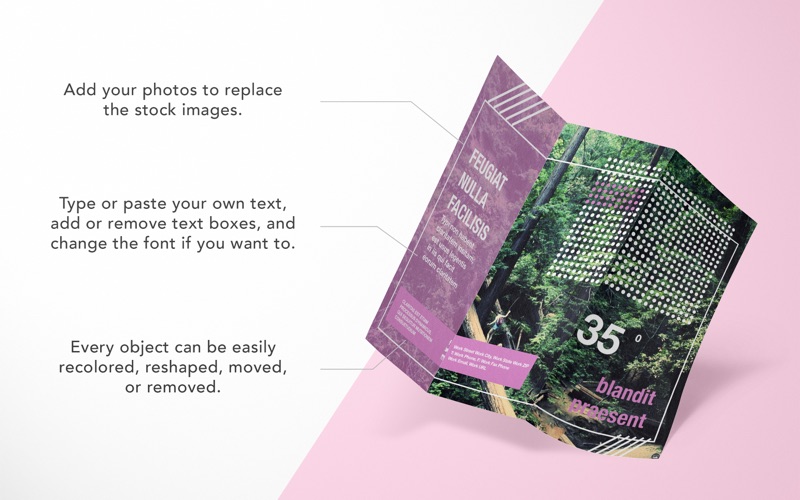
  • Web export with wide gamut detection
  • Automatable + scriptable.
  • Perform batch image editing using Automator, AppleScript, and JS
  • Editable image metadata
  • Touch bar support

Compatibility: OS X 10.11.4 or later 64-bit

Web Site: https://flyingmeat.com/acorn/
Mac App Store: https://itunes.apple.com/app/acorn-6-image-editor/id1233861775?mt=12

What’s New in Acorn 6.3

  • Release notes not available at the time of this post.

Screenshots
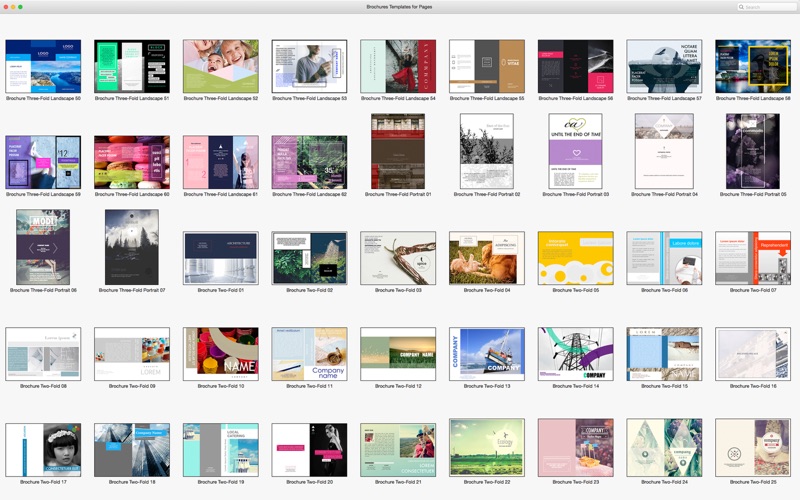
Torrents Download Apple,Mac Osx,Apps ,Software

Exit mobile version