Category Archives: Mac os

Microsoft Word 2016 VL 16.16.5

Name W16165.zip
Size 1.11 GB
Created on 2018-12-28 08:02:20
Hash 86e6cbf088288096916a1c083b5092cbf36122dc
Files W16165.zip (1.11 GB)

Download

Microsoft Word 2016 VL 16.16.5 macOS

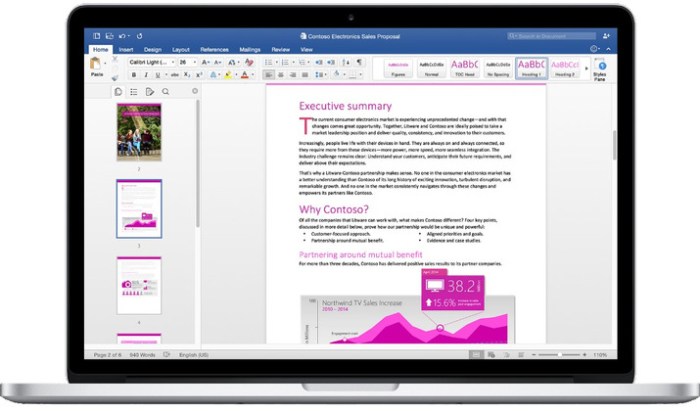
Create, polish, and share beautiful and professional documents. The state-of-the-art authoring and reviewing tools in Word make the creation of polished documents easy. The new Insights pane shows relevant contextual information from the web inside Word.

The Design tab enables you to manage layout, colors, and fonts across a document. Get more done by working together using built-in tools to share and review documents. Several people can work on the same document simultaneously and use threaded comments to have a conversation right next to relevant text.

Word features

  • The Design tab provides quick access to design elements to make your documents look great.
  • The new Insights pane, powered by Bing, shows relevant contextual information from the web within the reading and authoring experience.
  • Threaded comments enable you to have useful conversations right next to relevant text.
  • Sharing options. Easily share your work and invite others to review or edit your documents.
  • Coauthoring enables several people to work simultaneously in the same Word document.
  • Mail Merge. Prepare correspondence using Word, Excel, and Outlook.
Languages:

English, Arabic, Simplified Chinese, Traditional Chinese, Czech, Danish, Dutch, Finnish, French, German, Greek, Hebrew, Hungarian, Indonesian, Italian, Japanese, Korean, Norwegian, Polish, Portuguese, Russian, Slovak, Spanish, Swedish, Thai, Turkish

Compatibility: OS X 10.10 or later

Web Site: https://products.office.com/en-us/word

What’s New in Microsoft Word 2016 VL 16.16.5

  • Release notes not available at the time of this post.

Screenshots

microsoft_word_2016_15250

MediaHuman YouTube Downloader 3.9.9.10 (2712)

Name MediaHuman YouTube Downloader 3 9 9 10 2712 TNT.zip
Size 30.11 MB
Created on 2018-12-28 07:46:25
Hash 89d4287d4a8be393afe5414d2e642cbec26c0802
Files MediaHuman YouTube Downloader 3 9 9 10 2712 TNT.zip (30.11 MB)

Download

MediaHuman YouTube Downloader 3.9.9.10 (2712)

A very easy to use, intuitive, as well as cross-platform application that allows you to download videos from multiple video hosting websites to your Mac’s hard drive

Downloading content from the YouTube video sharing platform is necessary if you need to have offline access, or if you have a poor internet connection that cannot handle the streaming.

YouTube Downloader is a straightforward OS X utility that can help you handle the task in a time efficient manner: can work with multiple videos at the same time, is able to extract only the audio, and can send the tracks to your iTunes library.

Download tool that works with multiple video sharing platforms

Even though the YouTube Downloader app has been essentially developed to handle the YouTube links, you can also employ its capabilities to transfer content hosted on other media sharing platforms, such as Vimeo, SoundCloud, DailyMotion, and so on.

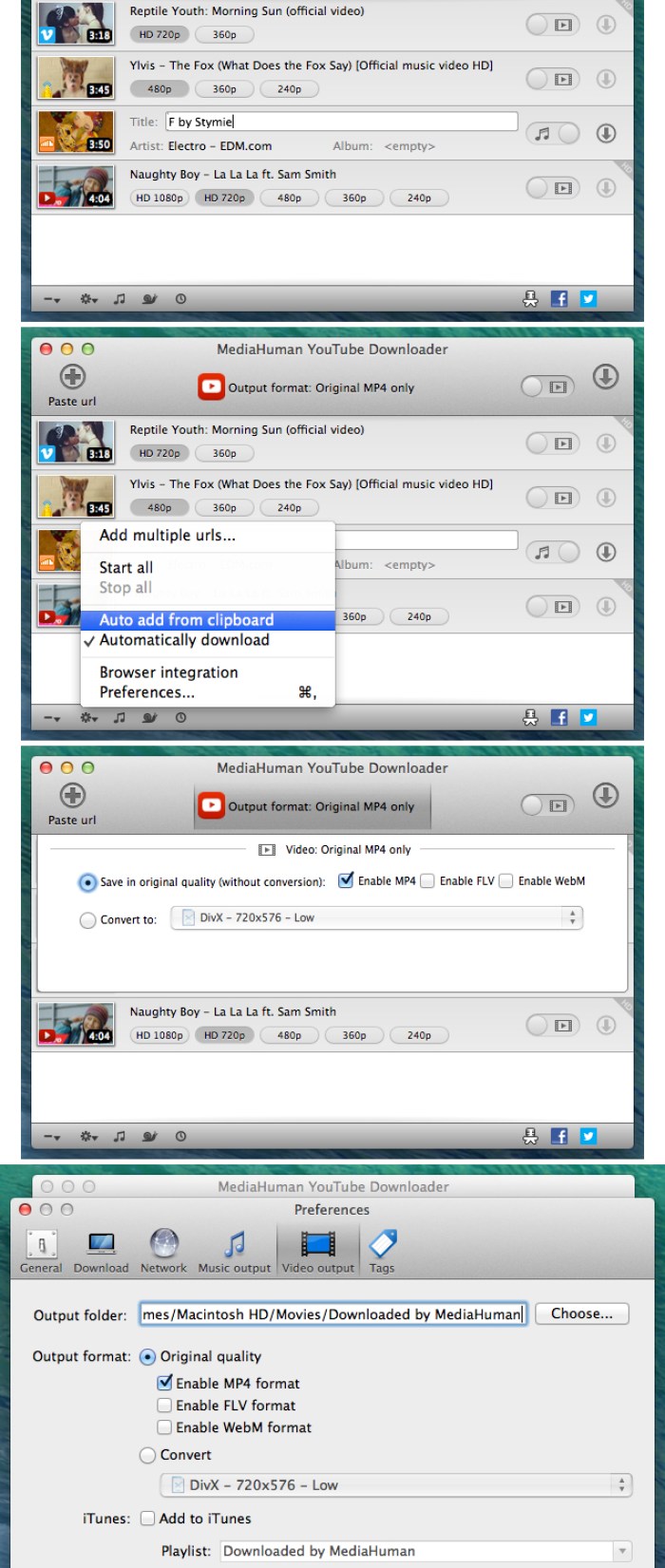
For your convenience, YouTube Downloader will monitor your clipboard and, as soon as it detects a suitable URL, offers you the option to add the task to the download queue.

Here you get to specify if you want to download the video and select the video quality and the output format or opt to extract only the audio.

After reviewing the configuration for each task, just start the download procedure, and YouTube Downloader will let you monitor the progress in its main window. At this point, no further user interaction is needed.

Transfer to your Mac entire playlists and get full control over the output quality

To optimize your workflow, YouTube Downloader enables you to load both playlists and channels to be downloaded and can monitor them for new content. This means that, if an internet connection is available, the app can automatically download the newly posted videos.

At the same time, the utility can also send the downloaded content to your iTunes library, and even detect metadata information, such as the artist name or the video or track title. Note that you can choose to use an output format compatible with certain devices to eliminate the need to process the files further.

Make online content available offline without wasting too much time

YouTube Downloader brings to the table a streamlined solution for transferring media content hosted on various online platforms to your own computer.

The YouTube Downloader app can handle entire playlists or channels, can make the output compatible with different devices, and can extract only the audio content from a video.

Compatibility: OS X 10.8 or later 64-bit
Web Site: http://www.mediahuman.com/

What’s New in MediaHuman YouTube Downloader 3.9.9.10 (2712)

  • Release notes not available at the time of this post.

Screenshots

Mac Backup Guru 6.7

Name Mac Backup Guru 6 7 TNT.zip
Size 6.86 MB
Created on 2018-12-28 00:54:53
Hash 5563636ab87a0950441a7f10004aa77bad3caebc
Files Mac Backup Guru 6 7 TNT.zip (6.86 MB)

Download

Mac Backup Guru 6.7

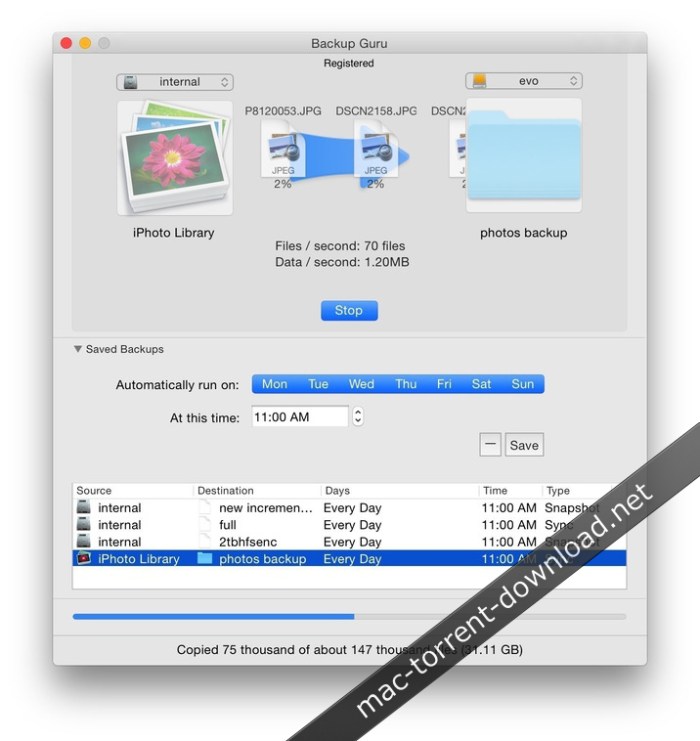
Mac Backup Guru lets you copy and paste a bootable volume in the Finder, or make incremental snapshots. It is the only software which has the ease-of-use to allow you to copy and paste anything – even a bootable volume – using the contextual menu in the Finder (OS X 10.10 Yosemite and later only).

It is also the only 3rd-party software which can make incremental snapshots of your disk, which creates daily copies of your startup disk on an external disk and allows you to go back to prior versions of documents or deleted documents. And it does this while using very little space.

You can literally store 30 apparent bootable copies of your 1TB startup disk on a 1.5TB backup disk. Apart from that it has all the standard backup software features, such as scheduled backups which activate when you connect your backup disk (so backing up becomes a matter of simply connecting your disk and everything happens safely and automatically), and it wraps it all up in a ridiculously easy-to-use user interface.

Compatibility: OS X 10.8 or later 64-bit

Web Site: https://macdaddy.io/mac-backup-software/

What’s New in Mac Backup Guru 6.7

  • Release notes not available at the time of this post.
Screenshots

Mac Data Recovery Guru 4.0.3

Name Mac Data Recovery Guru 4 0 3 TNT.zip
Size 5.32 MB
Created on 2018-12-28 00:47:53
Hash 2d253882b667bb8d59cf95f9990f6924a57ea3f8
Files Mac Data Recovery Guru 4 0 3 TNT.zip (5.32 MB)

Download

Mac Data Recovery Guru 4.0.3

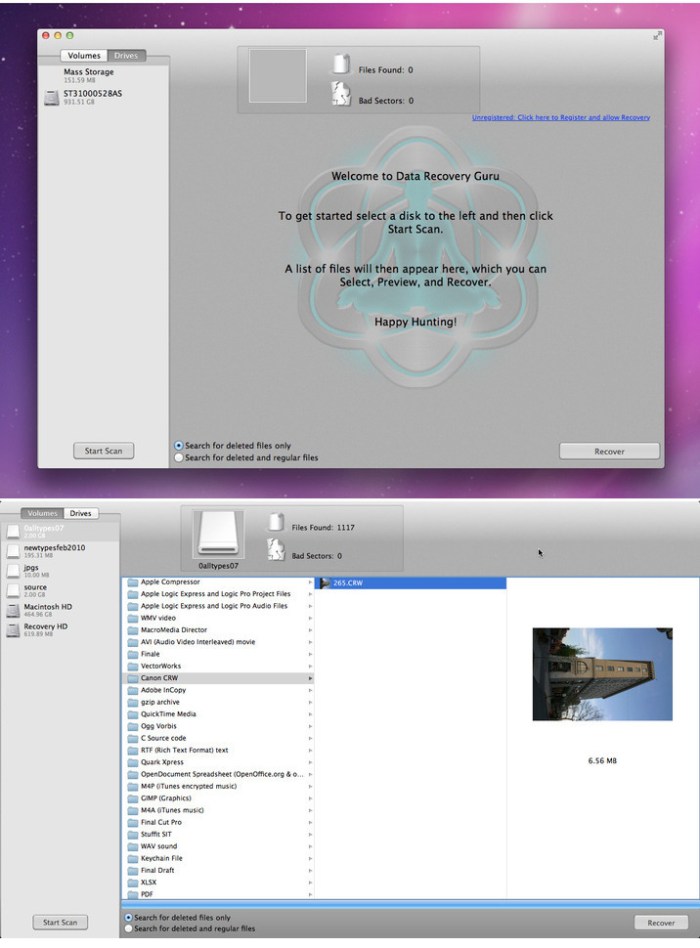
Mac Data Recovery Guru is the most modern, the most technologically advanced, and the easiest to use Mac data recovery software available. We would not state that if we could not back it up. But back it up we can, and instantly and risk free. Download the Free Demo to be able to quickly see it in action for yourself. This shows you previews of your personally deleted files, proving its effectiveness.

Our Mac Data Recovery results are 100% money-back guaranteed. We stake our reputation on this.

Mac Data Recovery Guru works by employing content-based file scanning. This is a different approach to traditional forms of data recovery which attempt to repair the device in question, which when they go wrong will write over the data you were trying to retrieve in the first place. Our method opens the device in read-only mode, and will search through the entire device for files, or pieces of files, that are present. It reassembles the data it finds into regular files on the fly. Sound complicated? It is, but after years of refinement it appears to the user as a seamless process, and is as easy as browsing through your regular files in the Finder. In fact, it looks almost the same if you look at the screenshots.

Compatibility: OS X 10.8 or later 64-bit

Web Site: http://macosxfilerecovery.com/datarecoveryproducts/data-recovery-guru/

What’s New in Mac Data Recovery Guru 4.0.3

  • Release notes not available at the time of this post.

Screenshots

OmniPlan Pro 3.10.3

Name OmniPlan-3.10.3.zip
Size 80.61 MB
Created on 2018-12-28 00:47:41
Hash 6b032a05ba04b683e134ff92c5944163d59aa10a
Files OmniPlan-3.10.3.zip (80.61 MB)

Download

OmniPlan Pro 3.10.3 MacOS

OmniPlan is designed to help you visualize, maintain, and simplify your projects. Break down tasks, optimize the required resources, control costs, and monitor your entire plan—all at a glance. Collaborate with your colleagues and share every detail, update a calendar with your days off, or mix and match. Accept and reject changes one-by-one or all in one go.

Multi-Project Dashboard

Here’s where you put together a beautiful, personal command station for a set of projects. The focus here is on resource load and easy-to-understand visuals.

Monte Carlo Simulation

Two clicks for a much better understanding of your project’s finishability! OmniPlan does quick math and predicts the future.

Network Diagrams

An incredibly easy way to visualize a project’s flow, dependencies, and tasks. All completely customizable, too.

Earned Value Analysis

Using built-in EVA formulas, you’ll always know if the money going in to a project is producing the expected results. And we’ve already checked the math.

What’s new in OmniPlan 3
  • Standard And Pro — OmniPlan Standard provides the core functionality that most users need to plan a project. OmniPlan Pro takes your project to the next level with collaboration, forecasting, and reporting features.
  • User Interface — Out with the old, in with the new! The Gantt chart and resource timeline now sport a flat, modern design, and the inspectors live in their new home in the sidebar.
  • Network View — An elegant and easy way to rapidly prototype and visualize your project’s flow as a network diagram of nodes connected by dependencies.
  • MultiProject Dashboard (PRO) — See everything at once! Assemble a beautiful dashboard to review your projects at a glance, and see how busy or idle every team member is across all of them.
  • Earned Value Analysis (PRO) — Time is money! Measure a project’s progress at any given point in the schedule and forecast its completion date and final cost, without having to remember all of those EVA formulas.
  • Meeting Task Type — A new resource allocation option that allows you to specify if multiple resources need to work on a task independently or simultaneously.
  • AutoEffort Estimation (PRO) — Think some tasks might take longer or finish earlier than expected? Let OmniPlan assign your best and worst estimates to account for every scenario.
  • Monte Carlo Simulation (PRO) — Run multiple simulations in seconds to forecast milestone completion dates with varying levels of confidence.
  • OffDay Styling — Want to see every single offhour time period, just the weekends, or just the holidays on your Gantt chart? You can now show or hide them all!
  • Reports (PRO) — Generate project reports with a single click! We’ve created gorgeous, customizable HTML templates that are dressed to impress at your next status meeting.
  • Unlinked Duration and Effort — Set different values for a task’s effort and duration, then let OmniPlan crunch the numbers for your resource assignment percentage.
  • Display Task Hierarchy — Have a lot of repetitive tasks with the same name? Differentiate them by showing the full hierarchical path of a task and its parent group in the task outline and Gantt chart.

Requirements: Mac: OS X 10.10 or higher.

Web Site: https://www.omnigroup.com/omniplan

What’s New in OmniPlan Pro 3.10.3

  • Help OmniPlan’s Help has been updated with information about the new Sync & Sharing workflow.
  • Help The Custom Template Tokens chapter has been updated with additional tokens.
  • Dutch Localization The “Any” filter option is no longer missing in Dutch.
  • Localizations The new Sync & Sharing workflow is now fully localized.
  • Trial OmniPlan’s Trial period is once again compatible with nonGregorian calendars.
  • Stability Fixed a crash editing a task’s title after it was deleted in Network View.

Lens Distortions – Legacy 4K (Prores)

Graphics & Design Video

Name Lens Distortions – Legacy 4K.zip
Size 9.85 GB
Created on 2018-12-26 22:29:26
Hash 03f2145ccf082bb29ff949a68a77a2a80f2d2b2c
Files Lens Distortions – Legacy 4K.zip (9.85 GB)

Download

Lens Distortions – Legacy 4K (Prores)

Key Features:

  • 30 After Effects Templates
  • 30 Gorgeous Light Leaks in ProRes
  • Shot on RED. Each clip is between 3 and 15 seconds in length.
  • Templates are compatible with After Effects CS6 CC

Web Site: https://lensdistortions.com/product/legacy-4k/

Graphics & Design, Video

By

Related Posts

Pixel Film Studios Proteaser (Vol. 1-10)

Pixel Film Studios Proteaser (Vol. 1-10) Size:1.42 GB Added:2014-08-06 Last Update:2014-10-22 Downlo …

Icon Slate 4.4.3

Name Icon Slate 4.4.3 Size 2.88 MB Created on 2015-11-21 09:19:56 Tracker http://109.235.50.166:2710 …

SketchUp Pro 2017 17.3.116

Name SketchUp.Pro.17.3.116.zip Size 262.8 MB Created on 2017-09-27 01:37:40 Hash 84c29ca9141f3ce26fc …

Permute 3.0

Name Permute 3 3 0 TNT.zip Size 50.89 MB Created on 2018-12-05 23:16:46 Hash bb44d3dcc72ffa88cee8133 …

Abelssoft Doku Downloader 2019 v1.00

Name Abelssoft.Doku.Downloader.2019.v1.00.MacOSX-DVT.zip Size 101.8 MB Created on 2018-11-13 00:23:3 …

Athentech Perfectly Clear Complete 3.6.3.1397

 Athentech Perfectly Clear Complete 3.6.3.1397 download for mac)

Name Perfectly Clear Complete V3 3 6 3 1397 REPACK TNT.zip
Size 132.6 MB
Created on 2018-12-27 22:49:25
Hash 3ae399e607ea306f20a71b8fc60e9659be0d10af
Files Perfectly Clear Complete V3 3 6 3 1397 REPACK TNT.zip (132.6 MB)

Download

Athentech Perfectly Clear Complete 3.6.3.1397

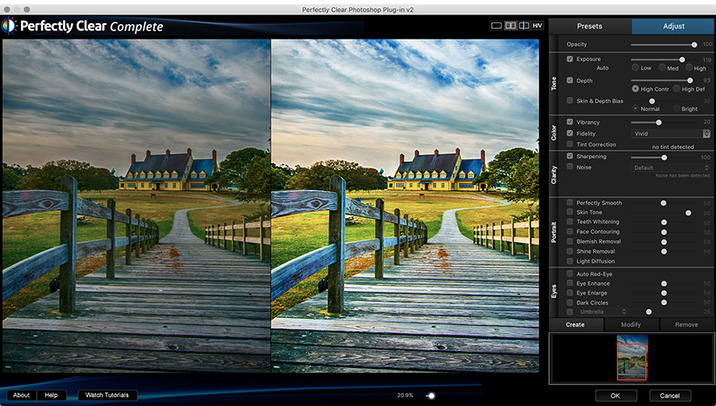
With Perfectly Clear, you’ll get results faster so you can spend more time behind the camera and less time in front of the computer. Take advantage of intelligent image analysis to find and fix numerous camera flaws automatically. Plus, you can quickly add your favorite finishing touch with our stylized LOOKs.

Take complete control.

Our presets are just the starting point. Easily apply only the adjustments you need for the perfect image. Use our powerful sharpening and noise reduction, which goes beyond what other tools can do, to unlock a whole new image. Keep an eye on your color and exposure with a dynamic histogram that tracks exposure and color clipping.

A custom experience.

Every photographer is different, and so is Perfectly Clear. Our adaptive interface lets you hide tools you don’t need while you work, allowing you to focus on your image. Plus, you can make and manage your own presets, which intelligently adapt to each photo.

Why change your workflow?

Rather than move your entire image library or change your workflow, we’ll make your existing workflow better. We support several platforms and have more coming soon. With powerful batch processing and up to 30 corrections in one click, we’ll make everything better.

We’ve got image correction down to a science.
Creating our award-winning technology took more than a decade of R&D, multiple patented processes, and over a dozen unique algorithms. We cracked the code on correcting every pixel independently. The proof is in your pictures.

Web Site: http://www.athentech.com/products/plugins

What’s New in Athentech Perfectly Clear Complete 3.6.3.1397

  • Release notes not available at the time of this post.
Screenshots

Athentech Perfectly Clear Essentials 3.6.3.1397

 Athentech Perfectly Clear Essentials 3.6.3.1397 download for mac torrents)

Name Perfectly Clear Essentials V3 3 6 3 1397 REPACK TNT.zip
Size 88.27 MB
Created on 2018-12-27 22:49:47
Hash 11bf2f20c158ca8d0da44465c4f255b6c01639c1
Files Perfectly Clear Essentials V3 3 6 3 1397 REPACK TNT.zip (88.27 MB)

Download

Athentech Perfectly Clear Essentials 3.6.3.1397

Athentech has released a new product called Perfectly Clear Essentials. This product contains all of the Tone, Color, and Details controls that can give you perfect exposure, great color, and sharp photos with no noise. All of the preset functionality, as well as Creative LOOKs and Corrective Filters, are also unlocked.

  • 40+ useful adjustments for perfect exposure, color, and details
  • Includes 32 Useful Presets for fixing most photographic challenges
  • Includes 42 Creative LOOKs to stylize your images
  • Unlock more features your favorite presets or LOOKs
  • Create your own presets and share with others

It is virtually identical to Perfectly Clear Complete except in two ways.
It removes controls for all of the Beautify technology. These adjustments are helpful for portrait and wedding photographers, but not really useful to landscape and travel folks.
It removed the batch export module from Lightroom.

While both of the above are useful, they are designed for pros who need the most time-saving options for processing portraits. If you do need portrait adjustments, you can easily add the Kristina Sherk preset packs or a new forthcoming one from Matthew Jordan Smith.

You can also create your own presets and exchange your favorite settings with other users. This is a great deal if you want the time-saving features as well as advanced technology to unlock perfect exposure and sharper images.

Requirements:
  • Intel, 64bit processor
  • OS X 10.9 or later
  • Photoshop CS6 or Creative Cloud
  • Photoshop Elements 13,14,15
  • Corel PaintShop Pro X6, X7, X8, X9
  • Lightroom 4 or newer, including v6 and CC

Web Site: http://www.athentech.com/apps/perfectly-clear-essentials

What’s New in Athentech Perfectly Clear Essentials 3.6.3.1397

  • Release notes not available at the time of this post.

Screenshots

Athentech Perfectly Clear WorkBench 3.6.3.1397

 Athentech Perfectly Clear WorkBench 3.6.3.1397 download mac torrent)

Photography

Name Perfectly Clear Workbench V3 3 6 3 1397 REPACK TNT.zip
Size 38.02 MB
Created on 2018-12-27 22:49:54
Hash 266442466de297b8573a837a62b4e54f1870a39e
Files Perfectly Clear Workbench V3 3 6 3 1397 REPACK TNT.zip (38.02 MB)

Download

Athentech Perfectly Clear WorkBench 3.6.3.1397

Perfectly Clear Workbench is an application that uses Athentech’s Perfectly Clear image correction libraries and is made available to demonstrate the capabilities of the Perfectly Clear processing libraries, face detection library and to allow a quick export of the processing settings for use.

Supported Image Formats:

Perfectly Clear requires RGB-formatted images in either 8 or 16-bit color depth. Any image file that Photoshop or Lightroom can open and convert to this format may be used in Perfectly Clear. Monochrome and CMYK images must be converted to RGB before using Perfectly Clear. RAW files must be opened through Adobe Camera RAW and loaded into Photoshop to be accessible to Perfectly Clear.

Compatibility: macOS 10.9 or later 64-bit

Web Site: http://www.athentech.com

What’s New in Athentech Perfectly Clear WorkBench 3.6.3.1397

  • Release notes not available at the time of this post.
 

BatchOutput PDF 2.2.32

Name BatchOutput PDF 2 2 32 TNT.zip
Size 12.41 MB
Created on 2018-12-26 22:30:46
Hash 0be9b52bd789043edb747b950abd70f0636040fe
Files BatchOutput PDF 2 2 32 TNT.zip (12.41 MB)

Download

BatchOutput PDF 2.2.32

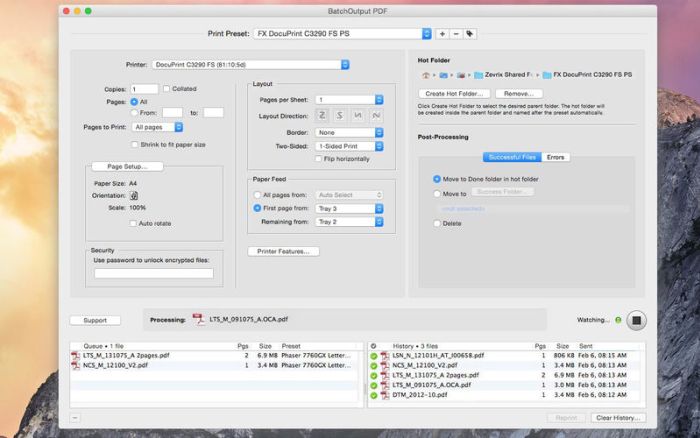
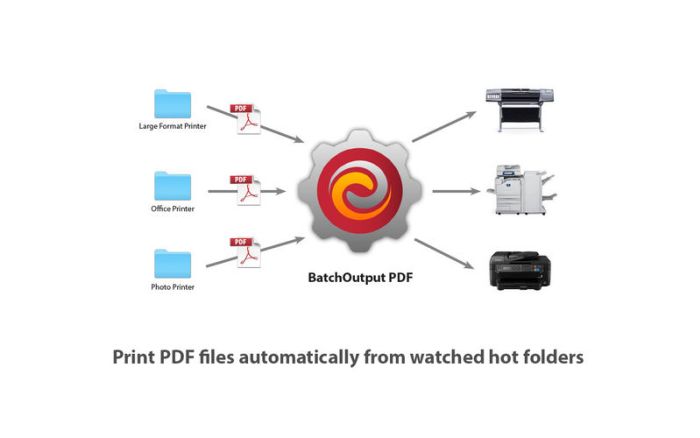
BatchOutput PDF prints PDF files automatically from watched hot folders. Create hot folders for various printing settings, then just drop PDFs there, and BatchOutput PDF will do the rest for you. Keep working with other programs while BatchOutput PDF works in the background. Save time and hassle of opening and printing each PDF manually.

BatchOutput PDF Server can serve unlimited users on a network via watched hot folders.

Key Features
  • Watched hot folders for various printing settings
  • Drop PDF files into hot folders to print automatically
  • Serve multiple users with a single copy of BatchOutput PDF Server
  • File successful jobs and errors to specific locations
  • Specify password to open encrypted PDF automatically
  • Processing history

Compatibility: OS X 10.8 or later 64-bit

Web Site: http://zevrix.com/support.php
Mac App Store: https://itunes.apple.com/app/batchoutput-pdf-server/id869981044?mt=12

What’s New in BatchOutput PDF 2.2.32

  • Release notes not available at the time of this post.

Screenshots

Xliff Editor 2.5.0.1

Name Xliff Editor 2 5 0 1 TNT.zip
Size 6.64 MB
Created on 2018-12-26 22:27:23
Hash 36a17e03f2c6bff0d79e8a1143872be339cc4346
Files Xliff Editor 2 5 0 1 TNT.zip (6.64 MB)

Download

Xliff Editor 2.5.0.1

Xliff Editor- its fast to load, easy to use, and has a low memory footprint. Did we forget to mention Inline tag protection, Fuzzy search, intuitive shortcuts, multiple concurrent file editing and native spell checker. It also has some pretty nice customizations you can use to better suit your workflow.

Not all Xliff editors have been created equally. We’ve custom built our own XML parser to read even the most complex Xliff v1.2 files. Xliff Editor effortlessly handles Segmentation, Inline tags and Alternate translations.

*Whats an XLIFF file?

An xliff file is a standardized file format based on XML, used to represent localization data. In its simplest form the original(source) string is stored as well as its translated(target) complement. Xliff files enable localization to be much more user friendly, and less error prone than manual translation. Xliff files can be identified by the extensions .xliff or .xlf. SDL Trados (.sdlxliff) also uses the xliff format, but includes some extra proprietry data.

*Why XLIFF?

Xcode 6 introduced the ability to export/import all your localisation data, taking away the need for sending various file formats to your localisers for translating. The XLIFF format makes translating a cinch, as it removes all the layout and formatting, and just provides a simple text-to-text translation mechanism for your translators.

*Xliff Editor Features:

  • Highlighted search
  • Fuzzy search
  • Spell checker
  • Easy recognition of untranslated strings
  • XLIFF, XLF file support
  • SDLXIFF read support with export to XLIFF
  • Support for alttrans and segsource nodes
  • inline tag protection
  • Support for editing Multiple files simultaneously
  • Support for opening files in tabs
  • Beautiful interface

**Currently only XLIFF v1.2 files are supported.

Compatibility: OS X 10.11 or later, 64-bit

Web Site: https://xliffedit.com
Mac App Store: https://itunes.apple.com/app/xliff-editor/id1054842874?mt=12

What’s New in Xliff Editor 2.5.0.1

  • Release notes not available at the time of this post.
ToothFairy 2.4.8

Name ToothFairy 2 4 8 MAS TNT.zip
Size 7.97 MB
Created on 2018-12-26 22:30:57
Hash 40b2ad8d53db79e3e5654d3c367d12461d3cf7f8
Files ToothFairy 2 4 8 MAS TNT.zip (7.97 MB)

Download

ToothFairy 2.4.8

Connect AirPods (or other Bluetooth headphones) to your Mac with a single click or keypress.

AirPods are great, but they don’t work quite as smoothly with Macs as they do iPhones. You can’t tell at a glance whether audio will play from the AirPods or your Mac’s built-in speaker, you have to dig into a Bluetooth submenu to connect, and then you have to go back to the menu to see when the AirPods are ready for use. ToothFairy streamlines this: just click an icon in the menu bar (or press a hotkey) to switch to the AirPods, and the icon always shows whether they’re connected.

  • Works with AirPods, as well as any Bluetooth headphones, speakers, or headset that you can connect to your Mac.
  • Click the hollow AirPods icon in the menu bar to switch to AirPods. It fills in to show they are connected and also displays a battery indicator.
  • Supports multiple Bluetooth audio devices; you can choose a different icon and hotkey for each.
  • Get the best audio quality. macOS will normally use the SCO codec if it thinks you’re going to use the microphone. ToothFairy can ensure that it uses the higher quality AAC codec when you only care about audio output: listening to music or video or playing a game.
  • Disconnect a Bluetooth device by clicking the icon (or pressing the hotkey) again, so that you can switch back to your phone. AirPods and Beats devices with an Apple W1 chip do not need to be manually disconnected, and you can set them to “Connection only mode” to avoid accidental disconnetions when pressing the hotkey multiple times.
  • ToothFairy automatically launches at login, so it’s always there when you need it.
  • Optionally hide the Dock icon so it only appears in the menu bar. With the Dock icon hidden, you can rightclick (or Controlclick) the menu bar icon to access the settings.
  • Run a shell script when the AirPods are connected or disconnected.

Note: ToothFairy works with devices that can be connected via the macOS Bluetooth menu. Please make sure the devices you want to connect have been paired to the system correctly before using them with ToothFairy.

Compatibility: OS X 10.11 or later, 64bit

Web Site: https://c-command.com/toothfairy
Mac App Store: https://itunes.apple.com/app/toothfairy/id1191449274?mt=12

What’s New in ToothFairy 2.4.8

– If there’s an error connecting to your Bluetooth device, ToothFairy now recommends to you how you can fix it.

– Improved the wording in various user interface text.

– Fixed a bug where the menu bar background color when clicking on the menu didn’t match the accent color on macOS 10.14 or the Graphite appearance on earlier versions.

– Added the “Why isn’t my device connecting?” and “Why do I see the Dock icon even after hiding it?” sections of the manual.

– The **Credits** sheet now links to the privacy policy.

– Added accessibility descriptions in the **Preferences** window.

– Improved the diagnostic report.

– Error logging now includes more information about the error and the device it’s related to.

RAW-Editor 2.0

Name RAW-Editor 2 0 TNT.zip
Size 5.73 MB
Created on 2018-12-26 22:27:17
Hash b7ec6b8b5c5fa81a3703853e37637a94463a2561
Files RAW-Editor 2 0 TNT.zip (5.73 MB)

Download

RAW-Editor 2.0

Color life is so easy with RAW Editor

RAW Editor is the integrated photo processing solution which specially optimized for
RAW format processing. It supports almost popular cameras, rotate, crop, adjust white balance and so on. This version has been supported some fantasy photo effect, such as photo fade, photo mono etc. With new feature named preset, you can save the effect parameters for future. And don’t worry forget which value has been set. Many new features have been supported in this version, you can browse the key features section.

Key features

  • Supported almost popular cameras(supported cameras section).
  • Supported many fantasy photo effects(supported photo effects section).
  • Supported rotate, flip, crop photo.
  • Supported preset edit.
  • The redesigned user interface is more beautiful and efficient.
  • Easy to use without professional skills.
  • Improved performance.

Supported cameras:http://www.imacbits.com/supportcamera.pdf

Supported photo effects:

Straighten, Saturation, Contrast, Brightness, Exposure adjust, White Balance, Temperature and Tint
Sepia Tone, Hue Adjust, Sharpen, Noise Reduction, Vibrance, Vignette, Photo Chrome,
Photo Fade, Photo Instant, Photo Mono, Photo Noir, Photo Process, Photo Tonal, Photo Transfer.

Supported input formats:

-JPEG,JPEG-2000, PNG,TIFF,BMP,GIF

Supported output formats:

-JPEG,JPEG-2000,PNG,TIFF,BMP,GIF

Compatibility: OS X 10.10 or later 64-bit

Web Site: http://www.imacbits.com/raw-converter-pro
Mac App Store: https://itunes.apple.com/app/raw-editor/id686812452?mt=12

What’s New in RAW-Editor 2.0

1.Support more cameras
2.Support more photo effects
3.Add preset feature.
4.Redesigned user interface
5.Improved performance
6.Fixed some bugs.

IconKit: The Icon Resizer 10.1.1

Name IconKit 10 1 1 MAS TNT.zip
Size 3.41 MB
Created on 2018-12-26 22:27:04
Hash 8b878e97c9844cd3425ab6f37984ee767f717afa
Files IconKit 10 1 1 MAS TNT.zip (3.41 MB)

Download

IconKit: The Icon Resizer 10.1.1

IconKit – So you want to include all of your app icons at the correct sizes without having to resize every single one manually? Are you tired of confusing apps? IconKit brings you a great new experience of icon generator for developers and designers, just drag your image into IconKit to start.

Features:

  • Export icons for iOS, watchOS, CarPlay, iMessage and macOS applications.
  • Support for Android mipmap and drawable icon sets.
  • Preview your icons before export.
  • Tired of assigning every single icon in Xcode? Generate AppIcon.appiconset including properly formatted JSON file for Asset Catalogs.
  • Reduction of @2x or @3x icons to 1x scale factor with a tiny tool called ScaleReducer right on your status bar.

Compatibility: macOS 10.13 or later 64 bit

Web Site: http://appersian.net
Mac App Store: https://itunes.apple.com/app/iconkit-the-icon-resizer/id507135296?mt=12

What’s New in IconKit: The Icon Resizer 10.1.1

  • Fixes an error with the JSON file

Contacts Sync for Google Gmail 7.0.3

Name Contacts Sync For Google Gmail 7 0 3 MAS In-App TNT.zip
Size 8.60 MB
Created on 2018-12-26 22:26:57
Hash 47c9779aef98b2364dd1130cc16f6aa34d4c84e3
Files Contacts Sync For Google Gmail 7 0 3 MAS In-App TNT.zip (8.60 MB)

Download

Contacts Sync for Google Gmail 7.0.3 MAS + In-App

Contacts Sync for Google Gmail allows you to quickly and easily sync your Gmail and Mac contacts so you can have access to your contacts wherever you go. This app stands out from the competition with its reliability, ease of use, speed, and with a true “2-way sync” that allows you to merge changes you’ve made to your Gmail and Mac contacts.

Also of significance, this app syncs contact groups with Google. For instance, you may have your Gmail contacts organized into groups such as “friends,” “family,” and “coworkers.” After syncing, your Mac groups will match your Gmail groups.

With the customizability that this app provides, it can be used in a number of creative ways. For example, you can backup your Mac contacts to Gmail, you can sync iCloud contacts with Gmail, or you can perform syncs in one direction only (such as Gmail to Mac).

Top In-App Purchases: Full Version – included

Compatibility: macOS 10.13 or later 64-bit

Mac App Store: https://itunes.apple.com/us/app/contacts-sync-for-google-gmail/id451691288?mt=12
Web Site: http://mac.softpedia.com

What’s New in Contacts Sync for Google Gmail 7.0.3

* Addressed crash that occurred when syncing several thousands of contacts

Dark Mode for Safari 1.9.6

Name Dark Mode for Safari 1 9 6 MAS TNT.zip
Size 7.37 MB
Created on 2018-12-26 22:27:11
Hash e19576645cce1db43c271102cb852d4bfa5f7697
Files Dark Mode for Safari 1 9 6 MAS TNT.zip (7.37 MB)

Download

Dark Mode for Safari 1.9.6

Dark Mode makes your browser more comfortable, enjoyable and cool by changing the colour scheme to make web pages easier to read. Works especially well for people working during the night or in low light environments or when you want to match your browser with the new Mojave dark mode look.

HOW TO USE IT

  • Once you activate the extension all websites will display a darker theme. You can start the extension manually, you can schedule it or turn it on automatically (when macOS Mojave dark mode is active)
  • Just press the tool bar button and you can change the theme to a softer or a mono theme
  • You can deactivate the theme for any site or apply dark mode for some sites only

FEATURES

  • A simple and powerful Safari extension
  • Choose between 3 themes: Dark, Soft Dark or Mono
  • Multiple ways to activate the extension: manually, schedule it for your preferred night hours or when macOS Mojave dark mode is on
  • You can ignore any site or you can apply Dark Mode for some websites only

Compatibility: macOS 10.12 or later 64 bit

Web Site: http://alexdenk.eu
Mac App Store: https://itunes.apple.com/app/dark-mode-for-safari/id1397180934?mt=12

What’s New in Dark Mode for Safari 1.9.6

• Bug fixes

Explaindio Platinum 4.014

Name Explaindio Platinum 4.014.zip
Size 280.4 MB
Created on 2018-12-27 02:50:27
Hash c8ef05ce154e3292daa7b73c7070316761c91f7f
Files Explaindio Platinum 4.014.zip (280.4 MB)

Download

Explaindio Platinum 4.014 MacOS

Discoverthe Proven Video Creator That Attracts, Engages, And Converts Visitors to Buyers. 2D & 3D Animation, Explainer, Doodle Sketch And Motion In Minutes! Create Attention-Grabbing Professinal Videos In Just Minutes! The Easy To Use Drag-n-Drop Video Creator.

Nothing. Beats. Video.

  • By now, you know how powerful video is.
  • YouTube gets over 3 Billion views a day.
  • And Facebook VIDEO gets almost 2 Billion a day as well.
  • With that many viewers, there’s almost an unlimited availability of traffic, regardless of what your niche or business is.

Video has become the strongest and easiest way to captivate, engage, and sell on the internet today!

  • By now, you know how powerful video is.
  • YouTube gets over 3 Billion views a day.
  • And Facebook VIDEO gets almost 2 Billion a day as well.
  • With that many viewers, there’s almost an unlimited availability of traffic, regardless of what your niche or business is.

No Experience Required

Explaindio is an all-in-one video creator that focuses on helping you create attention grabbing, professional looking 2D, 3D explainer and training videos in just minutes.

  • WITHOUT required hours of training or technical experience
  • WITHOUT requiring special set of software
  • WITHOUT spending hours upon hours and hundreds to thousands of dollars getting video created
  • Explaindio is focused on creating amazing video content to help you get more leads and make more sales.

Explaindio 4 Highlights:

  • Multiple Animations At the Same Time
  • Full 3D Animations
  • 180+ PreMade Text Animations
  • Full MultiTimeline Editing
  • Import videos and images
  • 200 PreMade Animated Scenes
  • Over 300+ Fonts Included
  • Integrated with Pixabay
  • Background Audio Tracks
  • Easy Export Options
  • 6 Animated Characters
  • Step by Step Tutorials

Get More Leads And Sales!

  • Explaindio Videos grab attention. That means it stops visitors as they scroll through their social media and gets them to watch your video.
  • Using Explaindio you can engage and attract more visitors to your website, to help you get more leads and sales!

Elevate Your Videos in 60 seconds!

Brands like Starbucks, M&M’s, Wendy’s, Samsung and many other fortune 500 companies use this style of video to make an announcement, tell a story, promote a product, or even promote an event. Use them in your video to elevate the video, share a stronger story, and get more views.

Web Site: http://explaindio.com/fe/

What’s New in Explaindio Platinum 4.014

  • Release notes not available at the time of this post.

Paragon Hard Disk Manager 1.3.873

Name Paragon Hard Disk Manager for Mac 1.3.873.zip
Size 25.76 MB
Created on 2018-12-26 23:34:58
Hash f00a3b526e65cd85aedfa99e9217ef380a8d69f8
Files Paragon Hard Disk Manager for Mac 1.3.873.zip (25.76 MB)

Download

Paragon Hard Disk Manager 1.3.873 MacOS

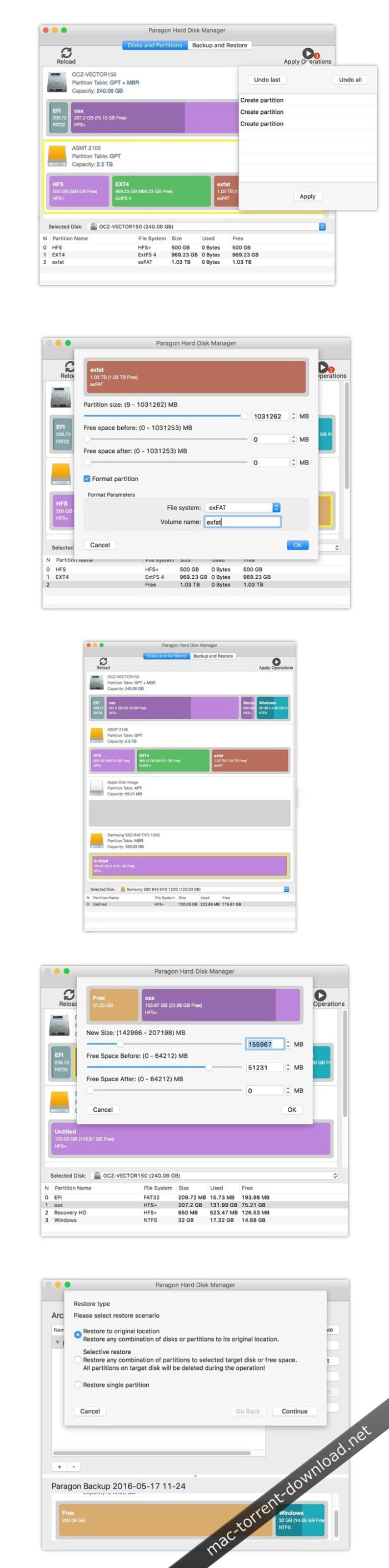
Paragon Hard Disk Manager for Mac® is the ideal system and data management solution for Mac. Powerful backup and flexible recovery functions, everything you need for perfect partitioning, reliable data wiping algorithms, and much more… All of this is what will make your Mac happy!

The first all-round solution to completely protect, maintain and manage your Mac!
  • Snapshotdriven backup & powerful recovery features
  • Resizing partitions and redistributing unused space
  • Recovering lost or accidentally deleted partitions
  • Disk copying and secure data wiping
  • Easy way to disable System Integrity Protection
  • Supports the latest macOS Sierra
Complete hard disk management

Covers all aspects of a Mac computer life cycle, beginning from drive partitioning and regular backup to system migration, disaster recovery and secure utilization of an outdated storage. You need two or more competitive utilities to have a similar set of functions.

Regular data protection

Sector-level data processing through the Paragon’s Snapshot enables to do live imaging of the entire Mac including OS, applications with great perfomance. Backup to VMDK opens up an easy migration to a virtual environment of VMware Fusion. Fast restore at a granular level allows to restore only needed files through the Finder by mounting backup image.

Bootable recovery media

Create a bootable USB-flash stick or external storage to restore OS X system volumes or accomplish drive partitioning when OS X fails to start up or SIP doesn’t allow to perform the operations.

Boot Camp management

Anything you may need to effectively manage your Boot Camp Windows: backup, restore, repartitioning as well as boot correction capabilities.

Secure wiping

10 military and governmental data wiping standards as well as support of the “SSD Trim” function to safely erase all on-disk data or only remnants of deleted files on traditional rotating platter disks or solid state drives.

New Features:

Sector-level imaging

Enables to significantly reduce backup and recovery times while improving general performance.

Snapshot onboard

Enables to take consistent snapshots of both inactive and in-use partitions, e.g. those that host Mac OS X, providing a coherent state of all open files involved in the process and taking into account that applications may still keep writing to disks.

Full images

Help to secure your software environment, including OS, applications and data. Full copies of disks and partitions enable to recover your system to a working state within several minutes.

Core Storage Backup & Restore

Supports Core Storage backup and restore (including FileVault2 and FusionDrive)

OS protection

Any Windows or Mac OS X resided on your disks will be detected automatically. Just make your choice and let the program do the rest.

Incremental imaging

Minimizes backup storage footprint for several time stamps of the same data.

pVHD support

Paragon Virtual Hard Drive does away with all limitations of a standard virtual drive format, such as a poor compression ratio, lack of integrity control and encryption capabilities.

Backup destination

pVHD images can be saved to a local volume, external storage (USB, FireWire, Thunderbolt) or a network share.

Fast bare-metal recovery

OS X system volumes can be restored from a special bootable USB-flash stick or external disk in one action without the need of re-installing the operating system.

Selective restore

You can mount an existing backup image in the read-only mode, thus getting access to its contents through the Finder. This option can help to quickly retrieve individual files without accomplishing a full restore operation.

Multi-platform backup

Our program supports GPT and MBR disks formatted to any of OS X, Windows, and Linux file systems.

Partitioning in El Capitan

In the latest OS X layout of the system disk is not allowed to modify by any third-party application until System Integrity Protection or SIP is deactivated, which is not an option for many users. Our program detects an active SIP and prompts to create and use a special bootable USB-flash stick or external disk to do drive partitioning.

Redistribute free space

Increases free space on one partition by utilizing the unused space on the adjacent partition.

Supported Operating Systems:
  • macOS 10.14 Mojave
  • macOS 10.13 High Sierra
  • macOS 10.12 Sierra
  • OS X 10.11 El Capitan
  • OS X 10.10 Yosemite
  • OS X 10.9 Mavericks

Web Site: https://www.paragon-software.com/home/hdm-mac/

What’s New in Paragon Hard Disk Manager 1.3.873

  • Release notes not available at the time of this post.
Paragon NTFS for Mac 15.4.44

Utilities

Name Paragon NTFS for Mac 15.4.44.zip
Size 29.22 MB
Created on 2018-12-26 23:35:06
Hash f5e2bcdf773cb99fea99ba3cfbda0dba02e2682c
Files Paragon NTFS for Mac 15.4.44.zip (29.22 MB)

Download

Paragon NTFS for Mac 15.4.44 macOS

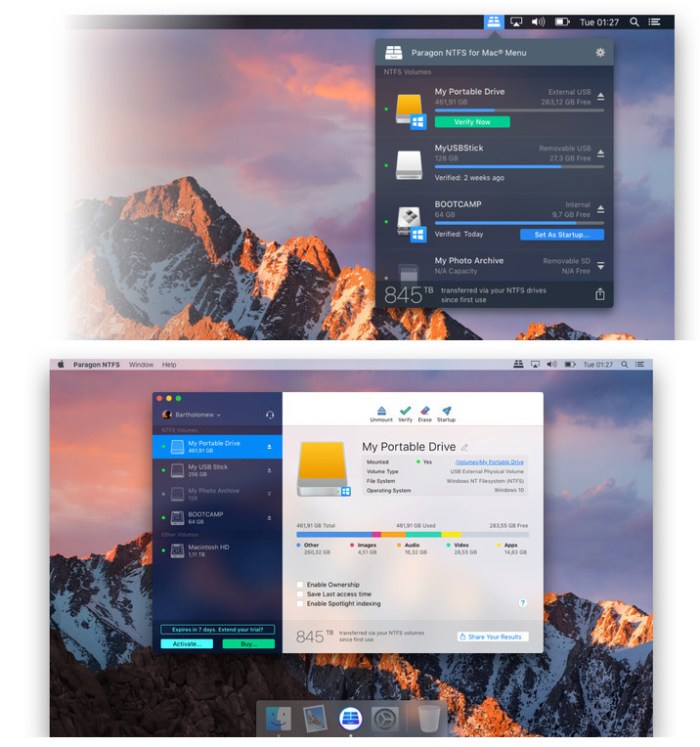
Paragon NTFS for Mac® is fully compatible with Apple’s new security policy ensuring fast, hassle-free and safe access to NTFS partitions from macOS 10.12 Sierra. Once the program is installed, the user can get started right away: conveniently navigate contents and read, edit, copy or create files and folders. The driver guarantees advanced support of NTFS file systems and provides fast and transparent read/write access to any NTFS partition under macOS 10.12.

  • Unlimited access to NTFS volumes in macOS Sierra!
  • Full read/write access to NTFS partitions under OS X
  • Unprecedented high NTFS performance
  • Easy to install and to use
  • Verify, repair and format options
  • Support for macOS 10.12 Sierra

Efficiency is everything
Paragon NTFS for Mac® is the world’s fastest application, achieving speeds of native drivers, with macOS Sierra! Volume management tools allow formatting, checking and repairing NTFS volumes.

Install it and let it go. It’s that simple
You’ll be accessing Windows® partitions on your Mac® so naturally that you’ll forget who’s actually running the show

Safety matters
Paragon NTFS for Mac® provides unhampered data exchange between Windows® and Mac®, even under a heavy workload

Additional utilities
Format any partition as NTFS on your Mac, check NTFS partition integrity and control driver behavior

Recent Changes in NTFS for Mac:
  • Multilingual version
  • macOS 10.12 Sierra support
  • Verify, repair and format options
  • Unprecedented high NTFS performance

Compatibility: OS X 10.10 or later

Web Site: https://www.paragon-software.com/home/ntfs-mac/

What’s New in Paragon NTFS for Mac 15.4.44

  • Release notes not available at the time of this post.

Screenshots

Utilities
,

By

Related Posts

Hogwasher 5.08

Name Hogwasher 5.08 Size 13.21 MB Created on 2016-09-03 11:52:16 Tracker http://109.235.50.166:2710/ …

iCareFone 3.4.1

Name iCareFone 3.4.1 Size 34.59 MB Created on 2016-11-17 14:12:00 Tracker http://109.235.50.166:2710 …

DriveDx 1.7.0

Name DriveDx 1 7 0 TNT.zip Size 27.97 MB Created on 2017-12-07 08:02:05 Hash 0de43755b58cd9fb793d229 …

Hands Off! 4.0.1

Name Hands_Off_4.0.1.macOS Size 7.56 MB Created on 2018-11-01 08:50:37 Hash 253ba509831503a08c230e08 …

SSDReporter 1.5.0

Name SSDReporter 1 5 0 MAS TNT.zip Size 8.07 MB Created on 2018-08-14 16:03:13 Hash 6f7d5652357bbf26 …

VueScan Pro 9.6.24

Name Vueescan9624.zip
Size 9.06 MB
Created on 2018-12-25 19:50:17
Hash a5779088d9b094117d65f305adfe2daa9818dea7
Files Vueescan9624.zip (9.06 MB)

Download

VueScan Pro 9.6.24 MacOS

VueScan, the world’s most popular scanner software, is used extensively by photographers, home users, scanning services and corporations. VueScan is a scanning program that works with most high-quality flatbed and film scanners to produce scans that have excellent color fidelity and color balance. It is very easy to use, and also has advanced features for restoring faded colors, batch scanning and other features used by professional photographers.

VueScan changes nothing on your system, installs nothing in your operating system and all other scanner software will continue to function. VueScan increases your productivity and saves you money. VueScan has advanced scanning options, powerful features, and greatly improves your scans with superior color accuracy and better color balance. VueScan supports more than 700 scanners and 209 digital camera raw files and takes about 5 minutes to download and install.

Features:
  • Works with 1200 flatbed and film scanners
  • Runs on Mac OS X, Windows and Linux
  • Improves your productivity and quality of scans
  • Has been downloaded more than 5 million times
  • Create raw scan files
  • ICC profiles and color spaces
  • IT8 color calibration

Compatibility: OS X 10.5 or later

Web Site: http://www.hamrick.com/

What’s New in VueScan Pro 9.6.24

  • Release notes not available at the time of this post.
Screenshots

Enigma Recovery 2.6.0

Name Enigma Recovery 2 6 0 TNT.zip
Size 21.47 MB
Created on 2018-12-25 19:49:52
Hash 42ee1cf27764755ba27bf1433deade077c07e2fa
Files Enigma Recovery 2 6 0 TNT.zip (21.47 MB)

Download

Enigma Recovery 2.6.0

SmartPhone Recovery Pro is designed to instantly recover deleted data from your iPhone, iPad, or iPod Touch, including SMS text messages, Contacts, Calendar, and Notes. Data can also be recovered from an iTunes backup file if your device has been lost or stolen. Additionally the scan retrieves deleted photos contained in the iOS ‘recently deleted’ folder. The data found by SmartPhone Recovery Pro can be exported to a location of your choice on your Mac for future use and as a backup. You can also restore deleted data to your iPhone, using our free Restore iOS app. The software is available to download as a free trial – during the trial you will see 20 retrieved (non-deleted) items per feature and five recovered (deleted) entry per feature. The software will also explore your device or iTunes backup file, and display the total amount of remaining data that has been found. To view and export all of this data, simply upgrade to the full version of the software, which will display all of your data. The software can be used as many times as you like on up to 5 devices.

Recover iPhone data

If you have lost or deleted your iPhone data, stay calm. You can recover your deleted messages, contacts, calls, notes and calendar from your iPhone, using Enigma Recovery desktop software. From there, you can export or restore your deleted data back to your device with the free Restore iOS app. If your iPhone has been damaged, stolen or lost you can still recover your data without your phone by scanning your iTunes or iCloud backup file, if you have one available.

Recover iPad data

We understand how worrying it can be to lose or delete data from your iPad. However, with Enigma Recovery software, you can still restore your deleted messages contacts, notes, calendar and more back to your iPad, regardless of how old your device is. Our software will also enable you to export all data you recover to your Mac or Windows computer in a range of formats. If you’re looking to restore multimedia files, you can export recovered photos and videos to your desktop and transfer them back to your iPad using iTunes.

Recover iPod Touch Data

If you think losing or accidentally deleting your iPod Touch data is irreversible, guess again. With Enigma Recovery software, you can retrieve deleted messages, contacts, notes, calendar and more from your iPod Touch. Once you’ve recovered your data, you can use our free Restore iOS app, to send data back to your iPod Touch. You can also export all data to your Mac or Windows computer in a range of different formats.

Compatibility: OS X 10.9 or later 64-bit

Web Site: https://www.enigma-recovery.com/ios/

What’s New in Enigma Recovery 2.6.0

  • Release notes were unavailable when this listing was updated.

Screenshots

TG Pro (Temperature Gauge Pro) 2.36

Name TG Pro 2 36 TNT.zip
Size 12.31 MB
Created on 2018-12-25 19:50:09
Hash df529242b146bfba6cfb82483df254a71c9618e3
Files TG Pro 2 36 TNT.zip (12.31 MB)

Download

TG Pro (Temperature Gauge Pro) 2.36

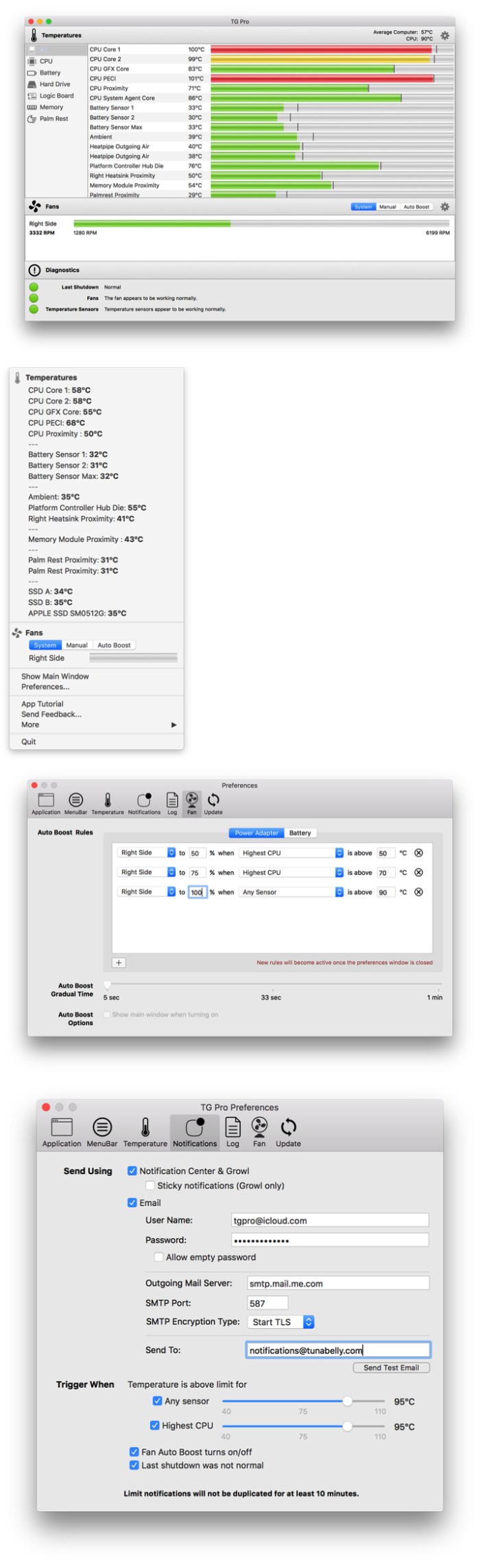
Take a look at what’s going on inside your Mac with TG Pro – no other app shows more temperature sensors or has as many options for notifications and fan speeds.Find out which components are getting hot (and potentially overheating), turn up the fan speeds to cool down your Mac, get notifications for temperature alerts along with many other fantastic features. Plus, see if any sensors or fans are defective with the built-in hardware diagnostics.

Compatibility: OS X 10.9 or later 64-bit

Web Site: http://www.tunabellysoftware.com

What’s New in TG Pro (Temperature Gauge Pro) 2.36

Fixed
  • Issue where the disk temperatures would not update properly.
  • Issue where some types of SATA disks would be missing.

Screenshots

Red Giant Primatte Keyer v5.1.9

Name Red Giant Primatte Keyer v5.1.9 MacOS.zip
Size 53.10 MB
Created on 2018-12-25 19:49:59
Hash a6bc79626db437bfdf5f89d3e6c5a964529a05ba
Files Red Giant Primatte Keyer v5.1.9 MacOS.zip (53.10 MB)

Download

Red Giant Primatte Keyer v5.1.9 MacOS

Quality, speed, control. That’s what you need from a professional chromakey tool and Primatte Keyer delivers. Version 5.0 gives new levels of automation and efficiency with a reorganized interface, default settings that give great results, and tools to quickly tweak your key. An improved Auto Compute and the new Adjust Light tool are the special sauce in Primatte 5.1, creating an accurate key in a few clicks.

Use the new Hybrid Matte for unprecedented control in keeping matte edges clean and a new Smart Sample algorithm for smarter foreground selection. Whether you are creating a documentary film, an indie production, news station promo or music video, Primatte 5.0 is an industry-loved solution that unlocks the secret to an easy, automatic key.

Features:

  • New Host Apps: Primatte Keyer is now compatible with After Effects, Premiere Pro, Final Cut Pro X and Motion.
  • Improved Auto Compute generates an accurate key in seconds
  • New Smart Sample algorithm for refined foreground sampling
  • Two new View modes help visualize your composite while building it
  • New Hybrid Matte feature for generating cleaner matte edges
  • New Adjust Light evens the background screen color for better selection

COMPATIBILITY

HOST APPLICATIONS
  • Adobe After Effects CC(2019), CC (2018), CC (2017), CC(2015.3), CC (2015), CC (2014), CC, CS6
  • Adobe Premiere Pro CC(2019), CC (2018), CC (2017), CC(2015.3), CC (2015), CC (2014), CC, CS6
  • Apple Final Cut X 10.2.3 or higher
  • Apple Motion 5
OPERATING SYSTEMS
  • Mac OS X 10.8
  • Mac OS X 10.9
  • Mac OS X 10.10
  • Mac OS X 10.11
  • Mac OS X 10.12
  • Mac OS X 10.13
  • Mac OS X 10.14
  • Mac Intel
  • 2 GB of RAM
  • 30 MB of Hard Drive space

Web Site: http://www.redgiant.com/products/keying-suite/

What’s New in Red Giant Primatte Keyer v5.1.9

  • Release notes not available at the time of this post.

iA Writer 5.2.1

Name iA Writer 5 2 1 MAS TNT.zip
Size 18.05 MB
Created on 2018-12-25 21:39:58
Hash 7cd6b4b5f297ca9aa56efbc3d3b290a7a85c631c
Files iA Writer 5 2 1 MAS TNT.zip (18.05 MB)

Download

iA Writer 5.2.1 MAS + iCloud

iA Writer (was iA Writer Pro) is a professional writing suite that gives you full control over your notes, drafts and edits.

  • Workflow: Note – Write – Edit – Read. Each stage has a task-specific typeface and color.
  • Syntax Control scans the syntax of English, French, German, Italian, and Spanish text and highlights your adjectives, nouns, verbs, adverbs, prepositions or conjunctions.
  • Precision Writing Tools:
    • Auto Markdown formats text on-screen — your hands stay on the keyboard
    • Syntax Control introduces syntactic markup for natural language text. It covers English, French, German, Italian, and Spanish. Patent pending.
    • Convert Markdown to Microsoft Word 2007 .docx, and back again
Features
  • Workflow states
  • Custom typefaces, carefully set for optimal readability
  • In-app preview
  • Reading time, plus sentence, word, and character count
  • Real-time iCloud sync
  • Ready for Retina displays
  • Full-screen

Compatibility: OS X 10.11 or later 64 bit

Web Site: https://ia.net/writer/
Mac App Store: https://itunes.apple.com/us/app/ia-writer/id775737590?mt=12

What’s New in iA Writer 5.2.1

  • New typeface in three flavors
    • Mono:Single character width, the classic
    • Duo:Two widths, freeing M and W
    • Quattro:Four widths, for a cleaner text image
  • Over 1,000 optical variations seamlessly adapt to provide the best writing experience in any environment
  • 14 text sizes in Editor and Preview
  • Many Chinese, Japanese, and Korean typography improvements, including emphasis dots
  • Bold, italic, and strikethrough commands are much more reliable and work inside words
  • High quality math equation typesetting in Preview using KaTeX
Library Locations:
  • Now support Desktop & Documents in iCloud
  • Can be added from anywhere in iCloud Drive
Fully-Featured Export to Microsoft Word:
  • Rebuilt from the ground up
  • Compatible with Microsoft Word 2007 or newer, Apple Pages, and Google Docs
  • Supports local images, footnotes, citations, page breaks, tables, math, headings, unordered lists, ordered lists, task lists, definition lists, blockquotes, bold, italic, CJK emphasis, strikethrough, superscript, subscript, links, horizontal rules, code
Other Improvements:
  • Added visible filename when switching between tabs with hidden title bar
  • Copy URL command to open files from menu in Library
  • Command-Click links in Editor
  • Use to exclude words from searches:-microsoft word
  • Inline code command
  • Typing suggestions can be enabled in Touch Bar
  • Korean and Russian localizations
  • Added help articles
  • Better hashtag detection

Phase One – Latitude | Deep Forest for Capture One Pro (Win/Mac)

Name LATITUDE-DEEPFOREST.zip
Size 126.3 kB
Created on 2018-12-25 19:48:14
Hash a9c5245f4a58a15e45691703cd443416436a1067
Files LATITUDE-DEEPFOREST.zip (126.3 kB)

Download

PhaseOne – Latitude | Deep Forest for Capture One Pro (Win/Mac)

Add depth and mystique to your images with the Latitude | Deep Forest Style Pack. Inspired by some of the most spectacular ancient forests on earth, these styles will add atmosphere and transform the mood while speeding up your workflow to bring you one step closer to visual perfection.

compatible

Web Site: https://www.phaseone.com/en/Products/Software/Capture-One-Pro/Styles.aspx

Movavi Video Editor 15 Business 15.1.0

Name Movavi Video Editor 15 Business 15 1 0 TNT.zip
Size 155.9 MB
Created on 2018-12-26 04:34:55
Hash b1489a0d9290202df6b953cb98b4fc496899489d
Files Movavi Video Editor 15 Business 15 1 0 TNT.zip (155.9 MB)

Download

Movavi Video Editor 15 Business 15.1.0

With Movavi Video Editor Business for Mac, you can easily create high-quality videos for your business: tutorials, marketing videos, software presentations, video blog content, and much more. Grab your clients’ and prospects’ attention and increase your income with custom videos. Promote your company through branded footage, complete with your logo and contact information. Market your product or service by uploading the video to YouTube directly from the program. Save time with the intuitive interface and fast export.

Compatibility: OS X 10.7 or later 64-bit

Web Site: https://www.movavi.com/video-editor-business-mac/

What’s New in Movavi Video Editor 15 Business 15.1.0

  • Release notes not available at the time of this post.
Set A Light 3D Studio v2.00.11

Name Set.a.light_3D_v2.0_11.zip
Size 2.08 GB
Created on 2018-12-26 04:39:36
Hash c03c4990a617bc74d22037d38a296570d2388374
Files Set.a.light_3D_v2.0_11.zip (2.08 GB)

Download

Set A Light 3D Studio v2.00.11 MacOS

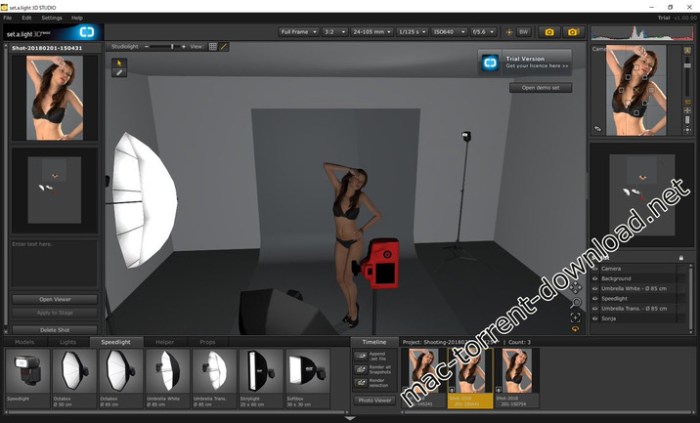
set.a.light 3D STUDIO is the world’s first photo studio simulation, with which you can build lighting sets in advance on a PC and realistically simulate the expected picture results.

All of your equipment is packed into one single program.

The intuitive user interface and all of the features are tailored to the needs of photographers and will revolutionize your everyday work.

set.a.light 3D V2.0 – the dawn of a new era

Even more realistic, better light calculation new innovative features and a fully overhauled user interface. Plus more possibilities and flexibility, a greatly improved workflow and higher work efficiency.

NEW! High-resolution and customizable models

One of the most important points in the development have been the models. The avatars look extremely real and harmonize perfectly with the new light calculation. Hait, make-up and clothing is changeable.

NEW! Full flexibility with the new posing tool

Definitely one of the features users have been waiting for the most: From their individual fingers up to their head and down to the feet – everything about our models can be moved! Make sure to save the positions for later! Even their eyes will be able to face the light shaper or the camera with just one click!

Realtime light simulation & real characteristics

For its simulation, set.a.light 3D uses special real-light data developed by us, that emulate the radiation behavior through complex algorithms – in real time! That’s why you can transfer your setup into reality one by one.

Flashes and speedlights

In set.a.light 3D there are more than 50 hard and soft light shapers (softboxes, reflectors, beauty dish, ….) that can be used with or without a honeycomb grid ss etc. You can test your planned light setups and experiment around with the new settings. The output of all flashes can be regulated they may be used as a modelling light as well. Speedlights are available as well.

NEW! Fantastic options with permanent light

With the newly implemented shutter speed mixtures of permanent light and flash lught can be used. It didn’t matter earlier whether their options were in 1/125 or 0,5 seconds – nothing changed in the studio. With the shutter speed all of that makes a difference now!

NEW! Discover gobos for exciting effects on the background or a dramatic lighting on the model

With the new gobos users can create great light and background effects without having to change the location. Create own presets, import them and use them for your creative lighting.

Trendy color screen foils

Color foils are a great supplement for turning setups into something more exciting. It’s possible to quickly create a nice morning sun, as well as to simulate a peaceful atmosphere in the middle of night. There’s a selection of over 30 foils of the popular manufacturer Lee that have been integrated into the software.

A picture says more than a thousand words

The virtual camera simulates your results in real-time. Set the crop-factor, the format and the focal length. Decide, whether you want to use a zoom objective or not. Over 25 objectives are ready to get used. set.a.light 3D provides an incredibly detailed calculation, even with the depth of field. You can directly see over- or underexposure in the histogram.

Simply better photography and documentation with the setplan

This one’s something for all of you but especially the ones that have own social media sites/pages or tend to show customers a lot of their work. All of your setups can be exported as a printable PDF or JPG. The plan includes everything you need to know to build up your setups on location. This leads to less moving around and more time with your model – a good base for great shots and successful shootings. Individualize the setplan exports by having your own logo on it or adding a title and notes!

Web Site: http://www.elixxier.com/

What’s New in Set A Light 3D Studio v2.00.11

  • Release notes not available at the time of this post.

Screenshots

PhaseOne – Latitude | Sunbound Styles for Capture One Pro (Win/Mac)

Name LATITUDE-SUNBOUND.zip
Size 127.8 kB
Created on 2018-12-25 19:48:06
Hash a411b88f24590e125bd27599c910cbbc5bbba25b
Files LATITUDE-SUNBOUND.zip (127.8 kB)

Download

PhaseOne – Latitude | Sunbound Styles for Capture One Pro (Win/Mac)

Infuse the spirit of adventure and the thrill of the unknown into your images with the Latitude | Sunbound Style Pack. These sun-drenched styles will add warmth and depth, while giving you the tools to fully control your vision and creativity.

Web Site: https://www.phaseone.com/en/Products/Software/Capture-One-Pro/Styles.aspx

Lens Distortions – Luminary 4K for Final Cut X, Premiere, or After Effects

Graphics & Design Video

Name Lens Distortions – Luminary 4K.zip
Size 14.90 GB
Created on 2018-12-24 02:02:57
Hash c144ae1ce9453634204cffbe4976d5ea91c0e62c
Files Lens Distortions – Luminary 4K.zip (14.90 GB)

Download

Lens Distortions – Luminary 4K

Features

  • Includes 90 curated clips
  • 5 Distinct Categories: Quick, Bold, Delicate, Immersive, Intricate
  • Compatible with all video editing apps

Since the beginning, distinguished glass effects have been a hallmark of Lens Distortions. Luminary is the definitive example of this signature style.

From delicate to intricate to bold, the glass textures in this pack offer you a unique way to build intrigue in a scene, complement your subject, and accentuate or soften parts of your shot.

Web Site: https://lensdistortions.com/video/luminary/

Graphics & Design, Video

By mactorrent

Related Posts

Name Mirror for LG TV 1.4.1 Size 7.34 MB Created on 2017-03-12 13:44:15 Tracker http://109.235.50.16 …

Name QuarkXPress_2017_13.2.zip Size 442.5 MB Created on 2018-01-23 05:51:47 Hash 4207804bee228f36863 …

Name Downie 3 3 3 4 TNT.zip Size 37.39 MB Created on 2018-05-27 20:59:02 Hash 04866a8518e60827bbf621 …

Name RevisionFX DEFlicker v1 6 0 MACOSX-AMPED.zip Size 23.15 MB Created on 2018-12-03 20:53:08 Hash …

Name Millumin 2.1.8q.zip Size 30.86 MB Created on 2018-07-05 22:10:23 Hash 4ae1941b649e136ced08512f7 …

IWLTBAP Psychedelia Luts Pack for Final Cut X, Photoshop, Premiere, After Effects, Lightroom etc (Win/macOS)

Name Psychedelia LUTs Pack.zip
Size 154.3 MB
Created on 2018-12-25 19:49:04
Hash 0b3f1ca29939bbc35b1287343112a8f71049459e
Files Psychedelia LUTs Pack.zip (154.3 MB)

Download

IWLTBAP Psychedelia Luts Pack (Win/macOS)

Unique, surrealistic, fantastic, chemical, baroque, strange 70+ color grading presets for photo & video editing apps

A Look-Up Table (LUT) is a file with .CUBE or .3DL extension, containing math instructions to replace a color (based on RGB value) by another one. It’s like a color grading preset.

This process is done pixel by pixel with a very high accuracy.

These LUTs are compatible with almost all photo and video editing apps and can be applied on the images made from any cameras (list of compatible applications below).

Compatible applications

These presets can be used with the most photo and video editing softwares (Mac/Windows):

  • Adobe Photoshop (CS6 and +)
  • Adobe After Effects (CS6 and +)
  • Adobe Premiere Pro (CS6 and +)
  • Adobe SpeedGrade
  • Adobe Lightroom (read note below)
  • Avid Media Composer (7 and +)
  • The Foundry NUKE
  • DaVinci Resolve
  • Assimilate Scratch
  • Edius (8 and +)
  • CyberLink ColorDirector (4 and +)
  • Final Cut Pro X
  • Sony Vegas (12 and +)
  • Wondershare Filmora
  • PowerDirector 16
  • Capture One 10 (read note below)
  • Affinity Photo
  • ON1 Photo RAW
  • HitFilm 4
  • Video LUT (iOS)
  • LumaFusion (iOS)
  • 3DLUT mobile (iOS/Android)
  • and more

For Premiere Pro CS6 and After Effects CS6, you need Magic Bullet LUT Buddy

(included for free in the trial version of Magic Bullet Suite 12.0.1):
https://support.redgiant.com/hc/en-us/articles/230764087-Where-is-LUT-Buddy-
(Full instructions here)

Final Cut Pro X 10.4 supports the LUTs without plugin. For Final Cut Pro X (10.3.?), you need a LUT plugin like the free one by motionVFX:

https://www.motionvfx.com/mplugs-107.html
Or the LUT Utility plugin ($29) by Color Grading Central:
http://www.colorgradingcentral.com/lututility
Or the Color Finale plugin ($99) by Color Grading Central:
http://try.colorgradingcentral.com/colorfinale/

For Sony Vegas (Pro/Movie Studio), you need this free LUT plugin by VisionColor:

http://www.vision-color.com/lutplugin

Important note about Lightroom & Capture One

The LUTs are not Lightroom presets.
If you have the latest version of Lightroom (v7.3) you
can use the XMP files included in the pack

If you have an older version you can still use
the ICC files included in the pack.
About Capture One, you have to use the COSTYLE
files included in the pack.

Web Site: https://psychedelia.iwltbap.com/

SmallCubed MailSuite 1.0.2

Name SmallCubed.MailSuite.v1.0.2.MacOS.Incl.Keymaker-CORE.zip
Size 13.43 MB
Created on 2018-12-25 08:10:19
Hash ee8df5ba27673d350ba3b5c0b8ce80f86ac1bbe9
Files SmallCubed.MailSuite.v1.0.2.MacOS.Incl.Keymaker-CORE.zip (13.43 MB)

Download

SmallCubed MailSuite 1.0.2 macOS

We have been working hard on getting our MailSuite ready for Mac OS 10.14 Mojave. With MailSuite we will be migrating our 4 core products( MailTags, Mail Act-On, Mail Perspectives, and SigPro ) to a single plugin: SmallCubed MailSuite.

Provide full compatibility with different email servers. Past versions of MailTags could not sync all tag data for Gmail messages and some other servers. Now complete tag data will synchronise for all messages regardless of the type of mail server.

Dramatically increase the speed that tags are saved and synced between computers. Past versions of MailTags required each message to rewrite its full contents to the IMAP server when saving tags. For larger messages, this needed significant time and bandwidth. Now, only the tag information is synced.

Improve reliability. Because tag data was stored inside each message, MailTags had to do a lot of work behind the scenes to ensure that tags remain intact between different actions (such as rules application, moving messages, rebuilding accounts) Now tag data are separate records which are associated with each message, it is much simpler and more reliable to store and sync data and the original messages are not altered.

Build future products. Changing the tagging mechanism is essential for our future directions including being able to work with tag data on other platforms such as iOS. We plan to communicate more about this soon.

There are a few implications of this change in tag format:
To sync tag data, we need to employ a separate server managed by SmallCubed. Privacy and security are critical to us, and we strongly feel that no service should have access to email accounts or content. We have designed our service with this in mind, and no content from original emails is stored on our servers. For each message we store two pieces of information: a unique key for the message generated from a “one-way hash” of specific message header information, and the encrypted tag data for the message. For more information check our security documentation.

The new tag format is NOT compatible with older versions of MailTags. If you work with tag data in SmallCubed MailSuite, computers with MailTags versions 2-5 will not work with this new format. We are planning to make SmallCubed MailSuite compatible with OS versions going back to 10.12 to accommodate mixed OS environments. We will steer you through importing tag data from the older format.

Messages within the same account cannot have distinct tags. Each instance of a specific message in an email account shares the same identifier, and so share the same tag data. This may affect those who tag the same message differently for different mailboxes on the same account.

Sharing tag data between users who share an IMAP account is forthcoming. If data sharing is essential to your workflow, we recommend that you do not upgrade to macOS 10.14 Mojave at this time. We expect tag sharing to be ready before the end of the year

Web Site: https://smallcubed.com/scs/

What’s New in SmallCubed MailSuite 1.0.2

  • Release notes not available at the time of this post.
Softorino YouTube Converter 2.1.1

Name Softorino YouTube Converter 2 2 1 1 TNT.zip
Size 19.44 MB
Created on 2018-12-25 08:10:13
Hash 109dd837cdb1c8ddd365b4783427246559bf165b
Files Softorino YouTube Converter 2 2 1 1 TNT.zip (19.44 MB)

Download

Softorino YouTube Converter 2.1.1

Download YouTube or Vimeo videos to enjoy them offline and copy clips directly to your iPhone or iPad, with this easy-to-use app

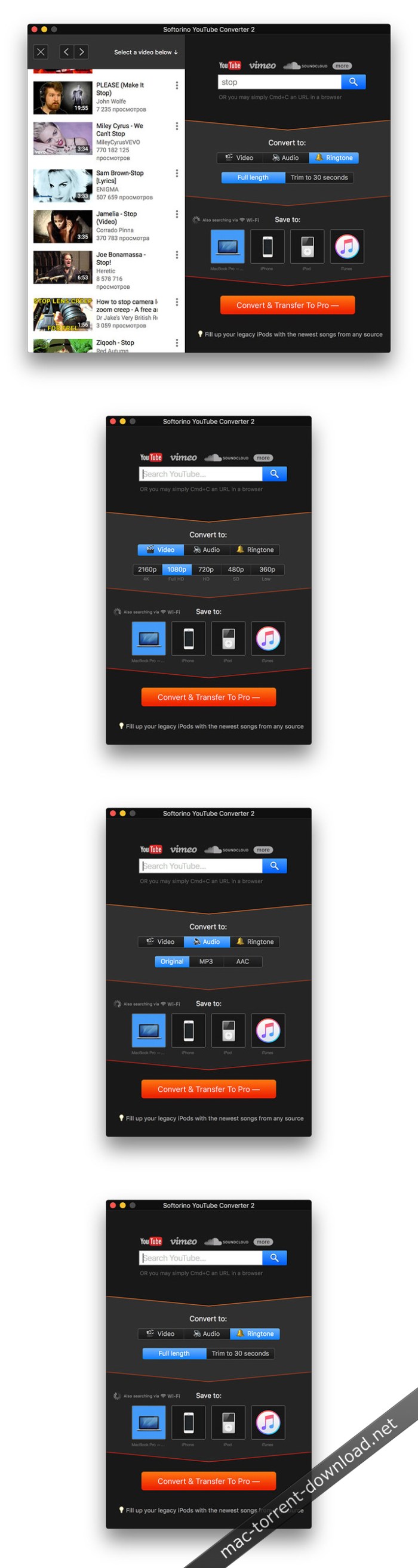
Whether you want to download music, videos or ringtones to your Mac or iOS device or simply want to watch online videos from the most popular video sources without suffering through irritating ads, there is a simple solution for your problems.

Softorino YouTube Converter is a handy app that does just that and more: it enables you to queue any number of videos by simply copying their URLs, selecting the destination device or location.

Afterward, it is a simple matter of choosing the desired resolution andsaving the video or audio files on your Mac. However, you also have theoption of sending them directly to a connected iPhone, iPod or iPad.

Easy-to-use app that makes downloading videos a walk in the park

From here the Softorino YouTube Converter app will take care of everything else for you, making sure that the video, song or ringtone you wanted to download will be there when you need it.

To make things even better, Softorino YouTube Converter comes withbuilt-in support for all devices released by Apple during the past 15years, which means that everything you have to do is to connect them toyour Mac, and the app will automatically recognize them and prepare themfor you.

Softorino YouTube Converter can also export videos in 2160p, 1080p, 720p or 360p, as well as extract audio tracks and save them as M4A or MP3 files.

Lightweight utility that can be used to download high-resolution videos and entire playlists

Moreover, if you copy a playlist’s URL, the app automatically downloads all the included clips, making it very easy to save all your favorite videos on local storage.

When a new item has been added to the download queue, the application can notify you by bouncing the Dock icon or displaying a notification banner. Both of these alerts can be disabled.

We have to say that Softorino YouTube Converter is a very impressive app, and its smart and user-friendly design ensures that even the most inexperienced users should be able to get the hang of things in no time at all.

Nifty app that ticks pretty much all the right boxes

If there is one feature we would love to see in a future version, it’s the ability to send the app to the menu bar and do away with the Dock icon completely. Its features are simple enough to be operated from a menulet, and this would make the app even less obtrusive.

In short, if you want to enjoy YouTube or Vimeo clips on your Mac or iOS device, Softorino YouTube Converter is the right tool for the job. It can download videos quickly, without getting in your way, as well as transfer them directly to your iPhone, iPad or iPod.

Compatibility: OS X 10.10 or later

Web Site: http://softorino.com/

What’s New in Softorino YouTube Converter 2.1.1

  • Release notes not available at the time of this post.

Screenshots

GN Bundle for iWork – Templates 6.1

Name Bundle for iWork -GN Templates 6 1 MAS TNT.zip
Size 14.59 MB
Created on 2018-12-25 08:10:33
Hash 43e37553fb5c4539328717b6b54e7b26ec72fe11
Files Bundle for iWork -GN Templates 6 1 MAS TNT.zip (14.59 MB)

Download

GN Bundle for iWork – Templates 6.1

The ideal tool for users of iWork, GN Bundle for iWork-Templates for iWork provides you with over 3,100 unique designs for Pages documents, 400 spreadsheet templates for Numbers, over 150 first-class slideshow themes for Keynote, and over 2,000 images for illustrating your content. All templates are available in the US and international paper sizes.

Templates for Pages

Consists of categories:
  • Badges
  • Books
  • Brochures
  • Business Cards
  • Cards & Invitations
  • Catalogs
  • CD & DVD Covers
  • Certificates
  • Employee IDs
  • Envelopes
  • Evaluation
  • Fax
  • Flyers
  • Invoices
  • Labels
  • Leisure
  • Letters
  • Manual
  • Meeting Notes
  • Memo
  • Menus
  • Newsletters
  • Posters
  • Proposals
  • Reports
  • Resumes

The premium-quality Pages Templates set offers over 3100 beautiful and functional templates for Apple’s Pages. It includes a variety of template types, from business cards and brochures to posters and invitations. Pages Templates features a compelling combination of a modern and professional print layout and the gripping feel of creativity, adding a note of sophistication to your content.

Templates for Numbers

Consists of categories:
  • Calendars & Schedules
  • Comparison
  • Exercise & Health
  • Finance & Investment
  • Home & Family
  • Leisure
  • Lists & Checklists
  • Miscellaneous

The high-quality Numbers Templates collection offers 400 diverse and useful templates for Apple`s Numbers. Use them for your business or personal needs. Handle your day-to-day tasks without difficulty. Customize the templates to your requirements: create tables, make calculations, draw diagrams, insert images thus tackling your job efficiently and effortlessly.

Keynote Templates

Keynote Templates consist of over 150 themes for Keynote presentations. These are more than just pretty backgrounds – each one of them includes up to 24 different master slides, which lets you choose the best layout for your information. The themes are available in up to two sizes: standard 4:3 and widescreen 16:9. Let us take care of the appearance of your presentation, while you focus on the content.

Graphics

The Clipart category is a collection of 100 beautiful, detailed images, illustrations is an arresting collection of 324 images, ranging from lipsticks and watches to airplanes and factories–just drag and drop any of these images onto your presentation slides or text content, icons is a set of 329 slick, colorful icon images, including designs for electronics, medicine, transport, and the green movement. They will a touch of style to your website or infographic presentation, people Clipart contains 300 top-quality images, depicting people and their reactions in various work and leisure situations. They will help you put a friendly face on your slides, posters, Web pages, and other content. 784 photos contains high resolution photo images. Traffic Signs is a collection of 217 images of traffic signs used in the US and Europe. Speed limits, warnings, and bicycle lane marks – everything is covered. As other clipart products, traffic signs include transparent backgrounds, which allow placing the images on backgrounds of your choice.

Pictures

Royalty-free stock images, illustrations, photographs in a fast-growing library. Can be used for both personal and commercial projects.

* Templates for Pages requires latest version of Pages; Templates for Numbers requires latest version of Numbers; Templates for Keynote requires latest version of Keynote.

Compatibility: OS X 10.11 or later, 64bit

Web Site: http://graphicnode.com/bundle-for-iwork/
Mac App Store: https://itunes.apple.com/app/gn-bundle-for-iwork-templates/id538727314?mt=12

What’s New in GN Bundle for iWork – Templates 6.1

• We have modified some categories to achieve better and smoother navigation thru the expanding library.
• New sections “Elements” for Pages and Keynote has been added. The new designs will come in a short time.

AnyMP4 iPhone Transfer Pro 8.3.10

Name AnyMP4 iPhone Transfer Pro 8 3 10 80292 TNT.zip
Size 40.04 MB
Created on 2018-12-25 08:10:46
Hash 60c1d035af4956235dd03c4221ffdee64ea0786b
Files AnyMP4 iPhone Transfer Pro 8 3 10 80292 TNT.zip (40.04 MB)

Download

AnyMP4 iPhone Transfer Pro 8.3.10

AnyMP4 Mac iPhone Transfer Pro is the best iOS data transferring software for all iPhone users. This iPhone Transfer Pro for Mac can easily transfer all kinds of iOS data from iPhone, iPod and iPad to Mac and iTunes. As the professional iPhone data transferring software, it is able to transfer files between your iPhone/iPad/iPod and Mac without iTunes.

Multiple file types are supported, such as Music, Photos, Videos, Voice Memos, notes, Camera Shot, Movies, TV Shows, Podcasts, iTunes U, Ringtones, Audio Books, Playlists, Albums, ePub, PDF, etc. What’s more, it can view and copy photos, videos, ringtones, voice memos, and more from the iOS device like iPhone/iPad/iPod to the iTunes library at fast speed.

Compatibility: OS X 10.9 or later 64-bit
Web Site: http://www.anymp4.com/iphone-transfer-for-mac/

What’s New in AnyMP4 iPhone Transfer Pro 8.3.10

  • Release notes not available at the time of this post.
Screenshots

Agisoft PhotoScan Professional 1.4.5 Build 7354

Photography

Name Agisoft.Photoscan.Professional.v1.4.5.MACOSX.MERRY.CHRISTMAS-AMPED.zip
Size 142.5 MB
Created on 2018-12-25 08:10:56
Hash 848f149bfc39f3b18e06d284a1eb43c1550aeb42
Files Agisoft.Photoscan.Professional.v1.4.5.MACOSX.MERRY.CHRISTMAS-AMPED.zip (142.5 MB)

Download

Agisoft PhotoScan Professional 1.4.5 Build 7354 macOS

Agisoft PhotoScan is an advanced image-based 3D modeling solution aimed at creating professional quality 3D content from still images. Based on the latest multi-view 3D reconstruction technology, it operates with arbitrary images and is efficient in both controlled and uncontrolled conditions. Photos can be taken from any position, providing that the object to be reconstructed is visible on at least two photos. Both image alignment and 3D model reconstruction are fully automated.

Main Features
  • Aerial and closerange triangulation
  • Point cloud generation (sparse / dense)
  • Polygonal model generation (plain / textured)
  • Setting coordinate system
  • Digital Elevation Model (DEM) generation
  • True orthophoto generaton
  • Georeferencing using flight log and / or GCPs
  • Multispectral imagery processing
  • 4D reconstruction for dynamic scenes
  • Python scripting support
System Requirements:
  • In most cases the maximum project size that can be processed is limited by the amount of RAM available. Therefore it is important to select the platform allowing to install required amount of RAM.
  • Complex geometry reconstruction algorithms need a lot of computational resources for processing. A high speed multi core CPU (3GHz+) is recommended.
  • Agisoft PhotoScan supports GPU acceleration for image matching and dense cloud generation steps, so highend OpenCL or CUDAcompatible graphics card can speed up the processing.

Web Site: http://www.agisoft.com/

What’s New in Agisoft PhotoScan Professional 1.4.5 Build 7354

  • Release notes not available at the time of this post.

Photography

By

1Password 7.2.4

Name 1Password 7 v7 2 4 TNT.zip
Size 57.53 MB
Created on 2018-12-25 08:11:06
Hash 53ee01159f2a8399be54f67631bf72ed6bea7d1f
Files 1Password 7 v7 2 4 TNT.zip (57.53 MB)

Download

1Password 7.2.4

1Password is a popular tool for storing usernames, passwords, credit cards, addresses, notes, bank accounts, driver’s licenses, passports, and more behind one master password, with end-to-end encryption. A built-in password generator lets users create strong, unique passwords and memorizable pass-phrases.

The latest version of the popular password manager is a major update with dozens of new features and improvements, including a new dark-themed, collapsible sidebar that makes it easier to use and manage password vaults.

The app’s redesign extends to the lock screen, login icons, tags, pop-out windows for items, and more, while there is a new custom font Courier Prime Bits, by Alan Dague-Greene, that makes it easier to view passwords.

A quick list of other changes from AgileBits:
  • Every pixel has been put under the microscope and polished for maximum upgradedness.
  • The new “popout” feature allows you to view an item in a window of its own and keep it handy.
  • Secure notes are now rendered using Markdown.
  • Quick Open allows you to quickly jump to your items or vaults (find it under the File menu).
  • A custom password font, all our own, courtesy of Alan DagueGreene.
  • A new password strength meter.
  • Touch ID now leverages your computer’s Secure Enclave, making it more secure than ever before.
  • Login items now have a gorgeous, custom rendered icon by default.
  • Remove duplicate items on a pervault basis by clicking Help > Tools > Clean Up Duplicate Items.
  • Integration with Spotlight allows you to find your items using Apple’s builtin search engine.
  • Nested tags allow you to up your organization: add tags with / in them and 1Password will break them down into groups.
  • Opt in to automatic updates and never be left behind again.

Compatibility: macOS 10.12 or later 64-bit

Web Site: https://1password.com
Mac App Store: https://itunes.apple.com/app/1password-7/id1333542190?mt=12

What’s New in 1Password 7.2.4

  • 1Password will now find your 1Password.com emergency kit in your Downloads folder, making it even easier to get started for the first time.
  • You can now use [Continuity Camera] (https://support.apple.com/en-us/HT209037) to scan 1Password Setup Codes and two-factor QR codes on macOS Mojave. apple-issues#2262
Improvements
  • Improved the speed and capabilities of keyboard navigation through lists in 1Password mini. apple-issues#1508
  • Reduced the CPU usage when performing Watchtower database updates.
  • Navigating the item list in 1Password using VoiceOver is now better than ever.
  • The item detail section of 1Password provides better accessibility for VoiceOver users.
  • You will now be asked to save unsaved changes before creating a new item. apple-issues#2548
  • Many improvements have been made when using 1Password in right-to-left languages.
  • Detached windows are now sent behind the main window while locked. apple-issues#2515
  • Improved the experience of entering a password when importing AgileKeychain files by adding the ability to cancel the operation. apple-issues#1573
  • Improved load times for those with a large number of vaults and items.
  • Added an informative alert when dismissing a two-factor prompt without completing account login. apple-issues#2495
  • You can now add custom fields to the first section of items. apple-issues#2601
  • Updated our website filling capabilities which should greatly improve filling on many sites.
  • The 1Password Updater will no longer run while a macOS user account is not active (either at the Login Window or signed into a different account via Fast User Switching). apple-issues#2754
  • The 1Password Updater now validates the code signature of 1Password after installing it into the Applications folder. This is in addition to code signature checks it has done on the downloaded updates all along.
Fixed
  • Fixed an issue where the last line of rich text would have its border cut off. apple-issues#2490
  • Fixed a rare crash when the screensaver locks.
  • Can now control-click vaults in the sidebar. apple-issues#486
  • Fixed a crash that would occur if the font used for Markdown was removed. apple-issues#2524
  • Fixed an issue where 1Password would not unhide when Command-Tabbing it to the front. apple-issues#2348
  • Fixed the error message shown when a document could not be copied to another server. apple-issues#1306
  • Fixed a crash when trying to save app preferences while 1Password was locked. apple-issues#2322
  • The loss of a network connection no longer causes future MFA authentication failures.
  • Fixed a crash when encountering an invalid item type. apple-issues#2488
  • Added a missing period in the autocomplete suggestion of the 1Password.com account sign-in address field. apple-issues#2404R
  • Fixed an issue where items could sometimes not be duplicated. apple-issues#2591
  • The vault import window now supports Dark Mode. apple-issues#2547
  • Fixed a crash when locking during Watchtower updates. apple-issues#2270
  • Fixed a crash that could occur when attempting to open and fill. apple-issues#2595
  • Fixed an issue where the menu bar icon could reappear if activated from browser.
  • Fixed a crash that could occur during vulnerable password checking. apple-issues#2609
  • Fixed a crash that could occur when loading items. apple-issues#2657
  • Fixed an issue where an item would disappear until next unlock after removing its attachment. apple-issues#1934
  • Fixed an issue that could cause 1Password accounts to fail to automatically sync changes made on other devices. apple-issues#2647
  • Fixed a crash that could occur when deleting a vault. apple-issues#2627
  • Fixed an issue where opening a Document item in a separate window could cause Quick Look to break. apple-issues#2582
  • Fixed an issue where multiple import windows could be opened. apple-issues#2660
  • Fixed an issue that caused extra characters to be inserted into a tag when editing. apple-issues#2589
  • Fixed a bug that could leave a non-functioning Add Account popup when signing into multiple accounts in your web browser. apple-issues#2620
  • Fixed the display of dates (Dec 31, 1969 and Jan 1, 1970) imported from older legacy versions of 1Password. apple-issues#2517
  • Fixed an issue where right-clicking on a tag in the sidebar did not show the Delete command. apple-issues#2047
  • Fixed an issue where the Display In Browser setting was being ignored. apple-issues#1323
Security
  • Fixed a rare issue where locking would freeze during bulk document download. apple-issues#2751
  • 1Password now requires Certificate Transparency from 1Password.com/1Password.eu/1Password.ca. apple-issues#715

Imagenomic Portraiture 3.5.1 Build 3516 for Adobe Photoshop

Name Imagenomic_Portraiture_3.5.1_Build_3516_macOS.zip
Size 10.12 MB
Created on 2018-12-25 08:10:26
Hash e18ab7415458751d956ce39899bcf7040aa491c9
Files Imagenomic_Portraiture_3.5.1_Build_3516_macOS.zip (10.12 MB)

Download

Imagenomic Portraiture 3.5.1 Build 3516 macOS

Portraiture for Photoshop eliminates the tedious manual labor of selective masking and pixel-by-pixel treatments to help you achieve excellence in portrait retouching.

Imagenomic has released the Portraiture 3 plug-in for Photoshop. The next-generation skin smoothing, healing and enhancing software builds on the tech of Version 2, with twice the speed and performance, plus output quality refinement that produces consistent and pleasing retouching results. Additional improvements include optimization for handling large image files shot with high-megapixel cameras and a new user interface for simpler navigation.

The new version is designed to enhance the photographer’s workflow, especially wedding and portrait shooters, with more precise masking and predefined presets. In fact, Imagenomic recently completed an exhaustive public beta test of Portraiture 3 and received “enthusiastic feedback from across the photographic and retouching communities, including some of the most respected photographers and educators in the industry,” notes the company.

Portraiture 3 is designed to provide seamless and time-saving steps for photography workflows, creative studios, and image production environments, with features and functions including:

  • Twice the speed and performance of the previous generation software
  • Optimized for quality and speed to effectively handle large image files taken with high megapixel cameras
  • Completely new User Interface for easier navigation

Precise Masking

Inimitable skin smoothing, healing and enhancing effects plugin.

Features:

Support for latest macOS

Mac OS 10.10 / 10.11 / 10.12 / 10.13 / 10.14.

Host

Adobe Photoshop CC 2015.5 / 2017 / 2018 / 2019.

Version 3

Portraiture 3 features 8/16 bit

RGB/LAB

Only for Photoshop

Smart Filter and Action Support
  • Only for Photoshop
  • Custom filter preset support
Other

Any image format for Photoshop
– CC2019 Support.

System Requirements:
  • 10.10 / 10.11 / 10.12 / 10.13 / 10.14.
  • For Adobe Photoshop CC 2015.5 and up

Web Site: http://www.imagenomic.com/Products/Portraiture

What’s New in Imagenomic Portraiture 3.5.1 Build 3516

  • Release notes not available at the time of this post.

Screenshots

Cook’n Recipe Organizer 12.14.2

Name Cook.12.14.2.zip
Size 557.3 MB
Created on 2018-12-24 21:08:03
Hash 84c88ef2b2c9a1bb35cc01b8aa9823a94e969a7e
Files Cook.12.14.2.zip (557.3 MB)

Download

Cook’n Recipe Organizer 12.14.2 macOS

#1 Best-Selling Recipe App with millions and millions served! Organize your own recipes into Cook’n. Use Cook’n to Organize all your recipes.Cook’n is the perfect solution to organize your personal recipes.

When you have entered your personal recipes into Cook’n you can:

– Create a family Cookbook
– Share your recipes easily
– Create menus and meal plans
– Enhance the recipe by adding photos and stories
– Get the nutritional facts for your recipes
– and much more!

Create Menus and Meal Plans

Reasearch shows that those who use and effective menu planner are mor likely to:

– Save time by making less trips and by staying organized on what’s for dinner
– Save money by eating-out less beacuse they are prepared to make delicious home-cooked meals.
– Eat healthier by planning healthy menus and meal plans. And avaoiding convenient foods rather than nutritional foods.
– Save gas by making less trips to the store and on fast-food pickups.

Analyze Recipe Nutrition using Cook’n

Stop guessing what nutrients are in the foods you are eating. Use Cook’n to help you stay organized in your dieting!

Analyze the nutritional elements of recipes and menus (even the ones you add!)

Cook’n makes it simple to calculate the nutrients your body is receiving. After typing in a recipe or importing one from the internet, simply click a button for the information you need. Save you a ton of time by analyzing nutrition in seconds!

View nutritional labels for every food and recipe
You don’t have to be a nutritionist to understand how to analyze your recipes — that’s because Cook’n nutrition facts window looks just like the label on a can.

Choose which brands are healthier

Cook’n has nutrition facts from the labels of over 10,000 food products. You can even choose between different brands to see what the nutritional effect is. Stop the guesswork among different brands and know which one is most appropriate for your needs.

Include nutritional info on printouts

When printing out a recipe or cookbook, Cook’n gives you the option to include nutritional information right underneath the recipe. Now you can plan menus based on dietary needs and tastes. Prepare healthy, delicious meals for the entire family.

Grocery Shopping Assistant

Cook’n also calculates the approximate cost of your shopping list. Cook’n automatically combines the food on your menus and makes a grocery shopping list. It even converts tablespoons of tomato paste to 8 oz. cans! Cook’n organizes your shopping list by aisle to save you time at the store.

Organize your Pinterest Recipes in Cook’n

Cook’n will Automatically import all of your Pinterest recipes with one click and synchronize the two so any new recipes that you Pin will automatically appear in Cook’n! It’s not magic… but it’s pretty close to it!

With the new Scan-It feature, it’s easy to get all of your printed recipes into Cook’n without having to type any of them!
Importing recipes you clipped from magazines and newspapers is easy… just scan them! Or, take a picture with your mobile phone. Use the Scan-it feature to translate scanned recipes to text and use the Snip-It tool to copy & paste the text into Cook’n with just a few clicks!

Cook’n Snip-It Tool

Most of the time, you can capture internet recipes with just one click. However, this doesn’t work with web pages that are not formatted properly (like the recipes posted on many blogs). Enter Cook’n Version 12.

When Cook’n Version 12 detects web pages that are not marked up properly, it will automatically split the screen and display the Snip-It toolbar in the middle. Simply highlight the recipe directions and click the Directions button. Highlight the recipe ingredients and click the Ingredients button. With the new Snip-It Tool capturing recipes from your favorite blogs is a snap!

Custom Live Recipe Feeds

Looking for recipe inspiration? Rather than browsing allrecipes.com, foodnetwork.com and other recipe websites, just launch Cook’n! As soon as a new recipe is posted on the web, it will appear in the Cook’n Live Recipe Feed. Customize your recipe feed and follow your favorite websites easily. Click the recipe to see more or simply drag & drop it to save it in your personal cookbook.

Cook’n Snag-It Tool

Cook’n makes it easy to import recipes from Word, Notepad, and all other text based program. Just copy the text and paste it into Cook’n and the Snag-It tool will parse the text and divide ingredient lines into their component parts automatically!

Import your recipes from allrecipes.com with one click
There are over 30 millions searches for recipes everyday. The problem is: what do you do when you find a great recipe on the web? We create accounts on websites like allrecipes.com and end up with different recipes on different accounts. Cook’n allows you to combine all your recipes from across the web into one place.

Print Themed Recipes

The themes in Cook’n are great! And, they’re getting better all the time! Now, with Cook’n 12, your printed recipes can look just as fantastic as they do on the computer! In Cook’n 12, the print preview window is embedded inside Cook’n. And, the new printing tool is capable of printing themed recipes in all formats (3×5, 4×6, and full page). Add pizzazz to your recipes and share them in style with Cook’n 12!

Print Family Cookbook Recipe Cards

Cook’n will make a professional looking cookbook complete with a title page table of contents, page numbers, index, food photos, etc. You can print one book for yourself or create a PDF file that you can em-mail to your local copy shop. Have them print and professionally bind multimple copies that you can give away as gifts that your friends and family will treasure.

Easily Share Your Recipes

Post your favorite recipes on Facebook or pin your recipes on Pinterest with just one click! Print a family cookbook and give a gift that everyone will treasure or simply e-mail a recipe to a friend. Tweet your recipes, embed your recipes in your web pages, and link to them. Sharing your favorite recipes with Cook’n has never been so fun!

Email Your Recipes

Cook’n makes it easy to email recipes to friends. With just a couple clicks, you can send recipes to anyone! oOr, export recipes to HTML and post them on your website or blog!

Sync to the Cook’n Cloud

New Cook’n users get a free 5 month Standard membership which provides unlimited Cook’n Cloud access. The Cook’n Cloud provides an off-site backup of your valuable recipe collection to keep your recipes safe and to protect against viruses, computer system failures, hard disk corruptions, and data-loss. The Cook’n Cloud also makes it easier than ever to synchronize recipes between all of your Cook’n apps. For example, recipes entered into Cook’n on your PC will automatically appear on your iPhone, iPad, Android, Mac, and other PC’s.

Download from the Cook’n Cloud

When you log into your Cook’n Cloud account all of your own recipes will be downloaded to your mobile device for easy access in the kitchen. And, any edits that you make or photos that you take will sync back up to the Cook’n Cloud. Cook’n will sync recipes between all of your mobile devices AND desktop computers automatically.

Compatibility: OS X 10.6 or later
Web Site: http://www.dvo.com/recipe-organizer.php

What’s New in Cook’n Recipe Organizer 12.14.2

  • Release notes not available at the time of this post.
Screenshots

AnyTrans for Android 6.4.1 (20181220)

Utilities

Name AnyTrans for Android 6 4 1 20181220 TNT.zip
Size 64.43 MB
Created on 2018-12-24 21:07:23
Hash 4602624d25a6b95c234786e61d6d15e7113cadf1
Files AnyTrans for Android 6 4 1 20181220 TNT.zip (64.43 MB)

Download

AnyTrans for Android 6.4.1 (20181220)

AnyTrans for Androidis a mighty Android manager that converges your entire Android phone/tablet and consolidates every access to all your content in one handy place, such as messages, photos, contacts, videos, apps, and more. In just one tap, it helps transfer everything from Android-to-Android, or even from iOS-to-Android seamlessly. It also enables you to take control over all your Android data and files.

Features
  • Transfer the most types of data from Android to Android – including messages, photos, contacts, videos, apps, and more.
  • Transfer data from Android to PC/Mac, or vice versa – covering messages, photos, contacts, etc.
  • 1-click clone everything from Android-to-Android, even from iOS-to-Android.
  • Manage your personal info with 100% safe guaranteed – edit, add, delete or rename contacts, messages, call logs as you need.
  • Hide your personal portraits, family photos, and travel memories, etc., to protect your privacy. And unhide any of them in seconds if needed.
  • Full control of all your apps on your Android phone/tablet — install, uninstall, transfer games, music apps, and other apps by simple drag-and-drop.

Compatibility: OS X 10.8 or later 64 bit

Web Site: https://www.imobie.com/anytrans/android-manager.htm

What’s New in AnyTrans for Android 6.4.1 (20181220)

  • Release notes not available at the time of this post.

MacFamilyTree 8.3.6

Name MacFamilyTree 8 8 3 6 MAS TNT.zip
Size 215.1 MB
Created on 2018-12-24 21:08:18
Hash f955a63654366f55e579376f11217a482fdbd956
Files MacFamilyTree 8 8 3 6 MAS TNT.zip (215.1 MB)

Download

MacFamilyTree 8.3.6 MAS + iCloud

Streamlined and user-friendly macOS application designed to help you keep track of your entire family using intuitive genealogy graphs and reports

MacFamilyTree is a comprehensive and user-oriented software solution designed from the beginning with one single goal in mind: to help you create a detailed tree of your entire family and to generate genealogy trees spanning entire centuries.

Powerful and comprehensive genealogy data analyzer and visualizer for macOS

Moreover, with the help of the MacFamilyTree application, you can effortlessly manage and analyze your family’s genealogy data by rapidly creating various types of reports and charts that will make it very easy and straightforward to understand who your ancestors were.

MacFamilyTree also comes with a well-designed interface which will enable you to get the most out of the genealogy data at hand.

Thus, the app features 4 side tabs (i.e. Edit, Views, Reports, Export) that allow you to edit your genealogy data, view it using simple to grasp models, generate reports with a couple of mouse clicks and export your analysis’ results for further usage within other genealogy or statistics analytic tools.

Implements and supports both CoreAnimation and Core Data state-of-the-art development infrastructures for the best performance possible

In addition, MacFamilyTree makes use of the powerful Apple CoreAnimation technology in order to provide you with the best possible experience on your Mac while you’re browsing your family’s tree and adding relatives or going through the list of your successors and forefathers.

Furthermore, MacFamilyTree’s built-in Core Data database technology enables it to make it possible to list and family trees of hundreds or thousands of people without putting a load on your Mac’s processor and memory.

Adds support for iCloud-based synchronization to your family tree so that you can access it effortlessly from all your iCloud-enabled devices

Also, because it is also build as a 64-bit macOS application, MacFamilyTree knows how to manage your processor’s resources in such a way that your system will always be stable even when the app is working on intensive report generation tasks.

MacFamilyTree also features iCloud synchronization support, thus helping you keep your family tree in sync wether you have it stored on your Mac or on any of your iOS devices.

Full-featured and user-friendly macOS family tree builder and viewer for all Mac users, advanced and beginners alike
All in all, because of its modern technology support and ease of use when working with huge family tree databases, MacFamilyTree is the app you want if you’re trying to get a clear and fact-based overview of your family tree using your Mac.

What’s New in MacFamilyTree 8.3.6

  • Age calculation in several views improved
  • Plausibility checks improved
  • Bug concerning the layout of several reports fixed
  • File size of exported PDF files improved
  • Duplicate search for Places improved
  • Error selecting categories in the World History section improved
  • Error in the GEDCOM header of exported GEDCOM files fixed
  • Improved localisations

McAfee VirusScan for Mac 9.8.1791

Name McAfee.VirusScan.for.Mac.v9.8.1791.MacOS.MERRY.CHRISTMAS-DVT.zip
Size 141.3 MB
Created on 2018-12-24 21:47:46
Hash 3206922618eb22f2fcf8a417cf2839d5cd4f24f8
Files McAfee.VirusScan.for.Mac.v9.8.1791.MacOS.MERRY.CHRISTMAS-DVT.zip (141.3 MB)

Download

McAfee VirusScan for Mac 9.8.1791

McAfee VirusScan for Mac provides complete proactive malware protection for Mac systems and users. Using proven protection methods, it stops all types of viruses and malicious code, including spyware, adware, Trojans, and new, unknown threats.

Compatibility: OS X 10.4.6 or later

What’s New in McAfee VirusScan for Mac 9.8.1791

  • Release notes not available at the time of this post.

Onyx 3.5.5

Name OnyX 3.5.5.zip
Size 5.78 MB
Created on 2018-12-24 21:08:27
Hash c471442c59dcd71c9959c7528e5be22cb15fcabe
Files OnyX 3.5.5.zip (5.78 MB)

Download

Onyx 3.5.5 macOS

Free macOS application designed to help you perform a large variety of optimization, maintenance, and customization tasks via a very simple and intuitive interface

Tweaking applications for macOS come in various shapes and prices, and you are free to pick the one that meets your needs, be it focused on finding and fixing as many system errors and problems as possible or on boosting your Mac’s overall performance.

Onyx is a free and very complex macOS application created to cope with both these aspects, while also providing its users with a very simple and intuitive interface.

It has a version for each macOS release, so download the version for your operating system!

All-in-one system maintenance, tweak and cleaning tool

The OnyX utility has been designed as multi-functional app to help you check your Mac’s start-up disk and system files, to run various system maintenance tasks, to tweak the settings for various apps and system components, and to find and remove app caches and various types of files that, in time, will occupy unnecessary space on your hard drive.

As said before, Onyx comes with a user-friendly graphical interface which organizes all the available tools using tabs, to make it easy for you to find the exact setting or utility you need, as rapidly as possible.

Run automated maintenance scripts and fix permissions

Via the “Verify” tab, Onyx provides you with the tools you need to run a SMART status diagnostic that will help you prevent a hard disk failure.

The next tab, “Maintenance”, will help you to launch a system files permissions check and repair, to execute macOS’ daily, weekly and monthly maintenance scripts, and to rebuild various services and indexes.

Clean your Mac’s hard drive with a couple of mouse clicks

Additionally, Onyx can be used to quickly clean system, user, fonts and internet caches, to remove obsolete and unneeded log files, and to securely empty the contents of the Trash folder, all of these for freeing up space on your Mac’s hard drive and to take make your applications more responsive and quicker to launch.

On top of that, you can also use Onyx to run multiple maintenance, cleaning and rebuilding tasks via the Automation tab. Thus, you can check which tasks you want to perform at a time and, by clicking the “Execute” button, they will all be started one after the other, to help you effortlessly automate the process of optimizing and maintaining your system.

Intuitive and streamlined macOS optimizer

On the whole, Onyx is more than your average junk file remover or system optimizing tool because it can do almost anything that’s needed to keep a macOS system in perfect shape, with little to no intervention on your part.

Compatibility: OS X 10.14 or later
Web Site: https://www.titanium-software.fr

What’s New in Onyx 3.5.5

  • Issue corrected in the Maintenance pane
  • Internet cleaning improved
  • Option Install/Uninstall Archives Preferences pane removed

Screenshots

Pixelmator 3.8.0

Name Pixelmator 3 8 MAS TNT.zip
Size 120.1 MB
Created on 2018-12-24 21:09:39
Hash ccc0f8ccd691a95de19ec8156294f41be456face
Files Pixelmator 3 8 MAS TNT.zip (120.1 MB)

Download

Pixelmator 3.8.0 MAS + iCloud

Full-featured and powerful image editing app for the Mac.

Pixelmator takes full advantage of the latest Mac features and technologies, giving you speedy, powerful tools that let you touch up and enhance images, draw or paint, apply dazzling effects, or create advanced compositions with ease. Once your images are ready, save them to popular image formats, share them via email or social networks, print them, or instantly add them to your Photos library. All right from Pixelmator.

The new Pixelmator 3.6 Cordillera is designed to integrate seamlessly with macOS Sierra’s fresh and modern look, macOS Continuity features, like Handoff and iCloud Drive, and it works wonderfully together with Pixelmator for iOS.

A powerful, pixel-accurate collection of selection tools

  • Quickly and easily select any part of an image
  • Edit and apply special effects to parts of your pictures
  • Select and remove unwanted elements of your photos
  • Cut out objects from one image to place in another

Top-notch painting tools

  • Paint with Pixelmator as you would on canvas
  • Use different brush sizes, shapes, hardness, and blending modes
  • Adjust brush settings to get just the look you want
  • Cover any area with beautiful gradients and color fills

Retouching tools

  • Correct wrinkles and repair scratches
  • Make flaws vanish from your photos, remove or rearrange objects in a composition
  • Blur, sharpen, lighten, or darken specific areas
  • Reshape areas to subtly improve or give images a completely unexpected look
  • Combine different tools and effects for an endless number of ways to refine your images

Drawing tools

  • Easily add, create, combine, and edit shapes
  • Quickly add lines, circles, rectangles, polygons, and many more custom shapes
  • Effortlessly apply shadows, fills, and strokes for more advanced shapes
  • Create buttons, icons, web page elements, illustrations, and much more

A real effects machine

  • Play with over 160 breathtaking effects
  • Combine different effects for unique, neareffortless artistic creations
  • See stunning results in realtime

An elegant collection of professional-grade color correction tools

  • Adjust exposure, hue, saturation, shadows and highlights, brightness, contrast, and much more
  • Replace and remix colors
  • Dramatically improve lessthanperfect images with one click
  • Designed with friendly interface features for intuitive ease of use

Layer Styles

  • Easily add nondestructive layer effects like shadows, outlines, color, gradient fills, or reflections
  • Combine a set of effects to create and save your own unique layer styles presets
  • Or just use any of the Pixelmator Teamdesigned layer styles presets
  • Apply any of the layer styles presets with a drag and drop

Compatibility

  • Send your images directly to Photos
  • Open and save images using PSD, TIFF, JPEG, PNG, PDF, and many other popular formats
  • Open and save Photoshop images with layers
  • Open and save 16bits per channel images

iCloud, sharing, and saving for the web

  • Let iCloud automatically store your edited images and seamlessly take your work to all your Macs
  • Skip manual saving of your documents thanks to Auto Save
  • Email your photos right from Pixelmator
  • Publish your images to social applications like Flickr, Twitter, and Facebook
  • Optimize and save images for use on your web pages, blogs, photo albums, and more

Editing extensions for the Photos app:

  • Retouch photos with powerful Pixelmator Retouch tools right inside the Photos app
  • Reshape images with Metalbased Pixelmator Distort tools without leaving Photos

Built exclusively for Mac

Pixelmator uses a number of macOS features and technologies like Cocoa, OpenGL, OpenCL, Core Image, Grand Central Dispatch, 64-bit, FaceTime camera, Automator, Full-Screen, built-in Sharing and much more. And Pixelmator’s beautiful interface and image editing engine are fully optimized for the MacBook Pro with Retina display.

Compatibility: macOS 10.11 or later 64 bit

Web Site: http://www.pixelmator.com/
Mac App Store: https://itunes.apple.com/app/pixelmator/id407963104?mt=12

What’s New in Pixelmator 3.8.0

Pixelmator 3.8 Phoenix brings full support for macOS Mojave, colorful SVG fonts, Continuity Camera support, and more.

New Features

  • Pixelmator is now fully compatible with macOS Mojave.
  • With support for SVG fonts, you can now create richer, more vibrant graphics and designs — the Gilbert Color font is included in the app.
  • Thanks to support for the Continuity Camera, you can now take pictures using your iPhone and have them instantly appear in the Pixelmator document you’re editing.
  • In macOS Mojave, Pixelmator will now use a dark appearance for system windows like the Open dialog and the Colors window.
  • HEIF is now available as a format when using the Change Type of Images Automator action.

Fixes

  • Shape layers would occasionally shift when files saved in Pixelmator were opened in Pixelmator for iOS. Fixed.
  • Fixed a crashing issue with the Quick Selection tool.
  • Previewing the Light Leak effect would occasionally cause Pixelmator to quit unexpectedly. Fixed.
  • A variety of other fixes improve the stability of Pixelmator.

Alfred 3 Powerpack 3.7.1 (3.7.2.948) beta

Name Alfred 3 Powerpack 3 7 1 3 7 2 948 TNT.zip
Size 5.55 MB
Created on 2018-12-24 06:54:41
Hash f913fcf29ac43722b6217e6315a0792194b433ea
Files Alfred 3 Powerpack 3 7 1 3 7 2 948 TNT.zip (5.55 MB)

Download

Alfred 3 Powerpack 3.7.1 (3.7.2.948) beta

Alfred is an award-winning app for Mac OS X which boosts your efficiency with hotkeys, keywords, text expansion and more. Search your Mac and the web, and be more productive with custom actions to control your Mac.

Search and Browse

Launch applications and find files on your Mac or on the web. Alfred learns how you use your Mac and prioritises results.

Save countless hours by using hotkeys, keywords and customising how you want to search your Mac and activity history.

Jump in and browse, preview files and take action on them without lifting your fingers off the keyboard.

Type Less, Say More

With Alfred’s Clipboard History and Snippets features, there’s no need to type the same URLs or responses over and over.

Use the Clipboard History to locate any text, image or file you copied earlier and paste it again.

Create your own snippets and type a short abbreviation to auto-expand them into a full text snippet, saving yourself hours of typing in the long run!

Extend and Automate

With Alfred’s Powerpack, use immensely powerful workflows to perform tasks more efficiently and cut down on repetitive manual tasks.

Link hotkeys, keywords and actions together to create your own workflows; There’s no need to write a single line of code to create a workflow. Import workflows from the thousands our community of creators have shared.

Control Your Music

You’re the boss. Boost your productivity by controlling your Mac using Alfred’s deep integration with OS X. Swiftly take action on files and contacts, control your music player and dispatch System commands.

Add some fun to your day; Turn your iPhone or iPad into a command centre for your Mac with Alfred Remote for iOS.

Alternatively, take a look at the many workflows for other music services like Spotify.

Alfred Powerpack

Control your Mac with the Powerpack’s incredible features, and enjoy workflows and themes.

Compatibility: macOS 10.9 or later 64-bit
Web Site: http://alfredapp.com/

What’s New in Alfred 3 Powerpack 3.7.1 (3.7.2.948) beta

  • Release notes not available at the time of this post.

Screenshots

Cocktail High Sierra Edition 11.7

 Cocktail High Sierra Edition 11.7 download mac torrents)

Utilities

Name Cocktail High Sierra Edition 11.7.zip
Size 3.11 MB
Created on 2018-12-24 21:07:46
Hash b4f4b1908c85cfc41d8738bd3c382ba692a83747
Files Cocktail High Sierra Edition 11.7.zip (3.11 MB)

Download

Cocktail High Sierra Edition 11.7 macOS

Cocktail is a general purpose utility for OS X that lets you clean, repair and optimize your Mac. It is a powerful digital toolset that helps hundreds of thousands of Mac users around the world get the most out of their computers every day.

Disks
  • Automatically check SMART disk health status
  • Enable or disable logging
  • Repair disk permissions
  • Reset permissions on the home directory and access control lists
  • Set the sleep drive (spindown)
  • Enable or disable the Sudden Motion Sensor
System
  • Run the periodic maintenance scripts
  • Cleaning inactive memory and optimize the use of virtual memory
  • Enable or disable virtual memory swapping
  • Management Spotlight indexing
  • Erase codes Spotlight
  • Change Time Machine preferences
  • Rebuild Launch Services database
  • Change the startup mode, or set the startup delay
  • The strength of the empty basket
  • Mute start
  • Disable Notification Center
Files
  • Clear the cache system
  • Clear cache user
  • Clear cache fonts
  • Clear virtual memory pagefile
  • Clear temporary files
  • Clear Internet cache
  • Clear Cookies, download lists, form values ​​and history files
  • Clear cache Adobe Flash Player and cookies
  • Search corrupted file settings
  • Delete unnecessary localization
  • Clean and manage (view, print and save) the log files
  • Clear the DNS cache
  • Delete files invisible DS Store
  • Delete locked or inaccessible items
Network
  • Changing the speed, duplex, and MTU network cards
  • It is easy to optimize the network settings for common types of connection
  • Change the IP configuration settings
  • Configure built (File Sharing) OS X file server
Interface
  • Customize the appearance and the possibility of Finder, Dock, a login window, and other system services
  • Change hidden settings Safari, Mail, Itunes, and QuickTime X
  • Setting the default file save location in the allowed application ICloud

Requires: MacOSX 10.13 or Later
Web Site: http://www.maintain.se

What’s New in Cocktail High Sierra Edition 11.7

  • Added ability to verify the file system data structures of the boot volume at startup (Preferences General)
  • Addresses minor compatibility issues with Apple File System (APFS) volumes
  • Improvements on the “Clear applications caches” procedure
  • Updated Help files

Screenshots

Movist 2.0.4

Name Movist 2 0 4 MAS TNT.zip
Size 49.40 MB
Created on 2018-12-24 06:54:35
Hash 3c101bdf89d595a1d15611984fdf73e7339d4e16
Files Movist 2 0 4 MAS TNT.zip (49.40 MB)

Download

Movist 2.0.4

************************** IMPORTANT *************************************
• Some features of previous version are not implemented yet in Movist version 2. They will return in future updates as soon as possible. If you need them, please don’t update and wait until they returns.
• Not implemented features yet. (will be supported soon)
– Full screen navigation
– and some minor options
**************************************************************************

Movist is an easy-to-use and powerful movie player. You can choose QuickTime or FFmpeg as decoder for each video codec and reopen with other decoder instantly. Movist supports many useful features to enjoy movies including H.264, H.265/HEVC hardware video decode acceleration, digital audio out (S/PDIF), high quality subtitles, convenient & beautiful user interface and so on.

Just Enjoy Movies with Movist.

  • Single Window Mode or Multiple Document Mode.
  • App Sandbox supported.
  • Retina Display supported.
  • Many File Format supported.
  • Many Video & Audio Codecs supported.
  • H.264, H.265/HEVC Video Decode Acceleration.
  • Many Core Image Filters supported.
  • Video Rotation & Flip.
  • Deinterlace (FFmpeg Only).
  • Digital Audio Out (S/PDIF) (FFmpeg Only).
  • Audio Equalizer supported (FFmpeg Only).
  • A/V Sync Adjustment.
  • High Quality Subtitle.
  • Many Subtitle Format supported.
  • Embedded Subtitles supported.
  • Compressed Subtitles in .zip & .rar supported.
  • 3D Subtitle supported.
  • Subtitle Display on Letter Box.
  • UnlimitedSubtitles Concurrent Display.
  • Fully Customizable Subtitle Display. 5
  • Subtitle Text Encoding autodetection.
  • Subtitle Sync Adjustment.
  • AutoFilling Playlist (searching series & subtitle files)
  • Playlist Shuffle & Repeat Mode.
  • Playlist Load & Save.
  • Playback Speed Adjustment.
  • Screenshot Capture.

Compatibility: macOS 10.10 or later 64-bit

Web Site: http://cocoable.tistory.com

What’s New in Movist 2.0.4

  • Fixed intermittent crash when played to the end
  • Fixed crash in some ttxt subtitles
  • Fixed crash in some ass subtitles
  • Fixed crash in some pgs subtitles
  • Fixed some strange characters appearing in some subrip and sami subtitles
  • Fixed incorrect aspect ratio of some videos when opened with QuickTime decoder
  • Fixed incorrect resizing height of inspector window
  • Added Preferences > Playback > “Speed adjustment unit”

Downie 3.5.5

 Downie 3.5.5 download for mac os)

Name Downie 3 3 5 5 TNT.zip
Size 37.39 MB
Created on 2018-12-24 00:41:06
Hash ab3a3178272429914a904c377d8fa2038cb72b64
Files Downie 3 3 5 5 TNT.zip (37.39 MB)

Download

Downie 3.5.5

A simple download manager that offers you the possibility to quickly save videos from different websites to your own disk drive.

If you are using a poor internet connection, trying to visualize videos streamlined online might not work properly since the content is loaded too slowly. Downie is a simple Mac app that can help you download those videos to your computer, and then watch them by using your default media player.

User friendly video downloader featuring support for drag and drop actions

Working with Downie is extremely straightforward: simply drop the video URL on top of the app’s main window or on the Dock icon. Downie adds the video to your downloads list, so all you have to do next is start the process by pressing the appropriate button. Of course, you can also remove items from the list.

By default, Downie downloads MP4 files and places them in your default Downloads folder, but you can easily change this via the Preferences window. The same area allows you to setup notifications, or post processing actions (convert to MP4 if necessary, or extract audio only).

Effortlessly download videos from a wide collection of hosting websites

Downie provides support for more than 400 different websites that host video content, among which there are the most popular choices, such as YouTube, Apple, LiveLeak, Vimeo, BBC, and so on. If a certain website is not included, within the app you can send a request email to the Downie developers.

Moreover, Downie also provides matching extensions for various popular web browsers, such as Firefox, Safari, Google Chrome or Chromium. The add-ons are not installed by default: open the Preferences window and install only the ones you plan to use.

Straightforward solution for downloading video content hosted online

Downie is a great tool for saving videos posted on various websites to your Mac for offline playback. The application is extremely useful especially if you have a slow internet connection.

Compatibility: OS X 10.11 or later 64-bit

Web Site: https://software.charliemonroe.net/downie.php

What’s New in Downie 3.5.5

  • New: elmundo.es.
  • Improved: bloomberg.com, cbs.com, cnevids.com, ctv.ca, fm4.orf.at, globalnews.ca, jtbc.com, kaltura.com, mediaset.it, mgtv.com, npo.nl, qq.com, tukif.com, tuto.com, viafree.se, vrt.be, youtube.com.

Screenshots

AnyTrans for iOS 7.0.4 (20181220)

Name AnyTrans for iOS 7 0 4 20181220 TNT.zip
Size 101.3 MB
Created on 2018-12-23 04:34:23
Hash 44948fce554166a100194d3986592be285cc16ac
Files AnyTrans for iOS 7 0 4 20181220 TNT.zip (101.3 MB)

Download

AnyTrans for iOS 7.0.4 (20181220)

AnyTrans lets you converge your entire Apple products and consolidate every access to all your content in one place, including music, videos, photos, messages, books, Safari history, voice memo, and more. No matter the content is from your iPhone, iTunes, even from iCloud. It gives efficient and minimalist control and absolute freedom over all your iOS data and files.

Features

  • Move everything from Android device to your new iPhone Transfer the most of your Android content to your new iPhone, including messages, photos, contact, even music and call log, etc.
  • Migrate everything from old iPhone to your new one within one click clone Upon just one simple click, everything from your old iPhone, even from iPad will be cloned to your new iPhone.
  • Download millions of online videos and audios Download your favorite online videos from Dailymotion, Vine and another 900+ sites directly to your iPhone iPad for offline watching, or to your computer for collection.
  • Manage your iCloud content in a better way Download photos in bulk from your iCloud account and extract data from your iCloud backup. Also integrate data from multiple iCloud accounts to your daily used one for quicker access.
  • Easily manage all your contents on iPhone, iPad, and iPod touch Browse, edit and export important music, messages, notes, and more personal data from iPhone, iPad, and iPod touch.
  • Fullway transfer across your iOS devices, iTunes, iCloud and computer gets anything transferred freely between your iPhone, iPad, iPod touch, iTunes, iCloud and computer from iPhone to computer, iPhone to iPhone, iPhone to iTunes, computer to iPhone, etc.
  • Back up and extract your precious data with ease AnyTrans can 1click back up your whole iPhone data or selectively back up what you need.

Compatibility: OS X 10.8 or later 64 bit

Web Site: Web Site: http://www.imobie.com

What’s New in AnyTrans for iOS 7.0.4 (20181220)

  • Release notes not available at the time of this post.

Screenshots