Category Archives: Mac os

AE Pixel Sorter 2 v.2.0.4

Name AE_Pixel_Sorter_2.0.4_Mac.zip
Size 335.5 kB
Created on 2019-01-03 22:48:52
Hash 8270217040814597b4fa77b0f8ad6d4b4b1a0779
Files AE_Pixel_Sorter_2.0.4_Mac.zip (335.5 kB)

Download

AE Pixel Sorter 2 v.2.0.4 MacOS

AE Pixel Sorter lets you create and experiment with pixel sorting in After Effects with ease.

AE Pixel Sorter is the first tool that makes pixel sorting available for motion designers and video editors. Experimenting with pixel sorting algorithms just became so much easier! You can choose and animate all the classic pixel sorting modes, play with the threshold and get near-live feedback of what you’re doing. Pixel sorting effects adds a fresh take on ditigal glitch art and goes well with any glitches and datamoshing!

I’m very happy to release this plugin, hoping it will help generating awesome images with an innovative look.

This first version is released to make pixel sorting in After Effects available as quickly as possible. There is a lot of ideas out there and a lot of things to come in further free updates!

Compatibility: After Effects CC 2019, CC 2018, CC 2017, CC 2015.3, CC 2015, CC 2014, CC, CS6

Web Site: http://aescripts.com/ae-pixel-sorter/

What’s New in AE Pixel Sorter 2 v.2.0.4

– Added “Cycle” option

EtreCheck 5.1

Name EtreCheck_Pro_5.1.zip
Size 14.81 MB
Created on 2019-01-01 00:17:07
Hash c68b0d663cc825085bef38f62d8d0b222067835c
Files EtreCheck_Pro_5.1.zip (14.81 MB)

Download

EtreCheck 5.1 macOS

A minimalist and very easy to use macOS application that gathers essential information about your system and help you share it with others

Gathering essential information about your Macs hardware components, installed software, or running processes can prove to be rather challenging for inexperienced users, or time consuming for practiced operators.

Extremely user friendly workflow

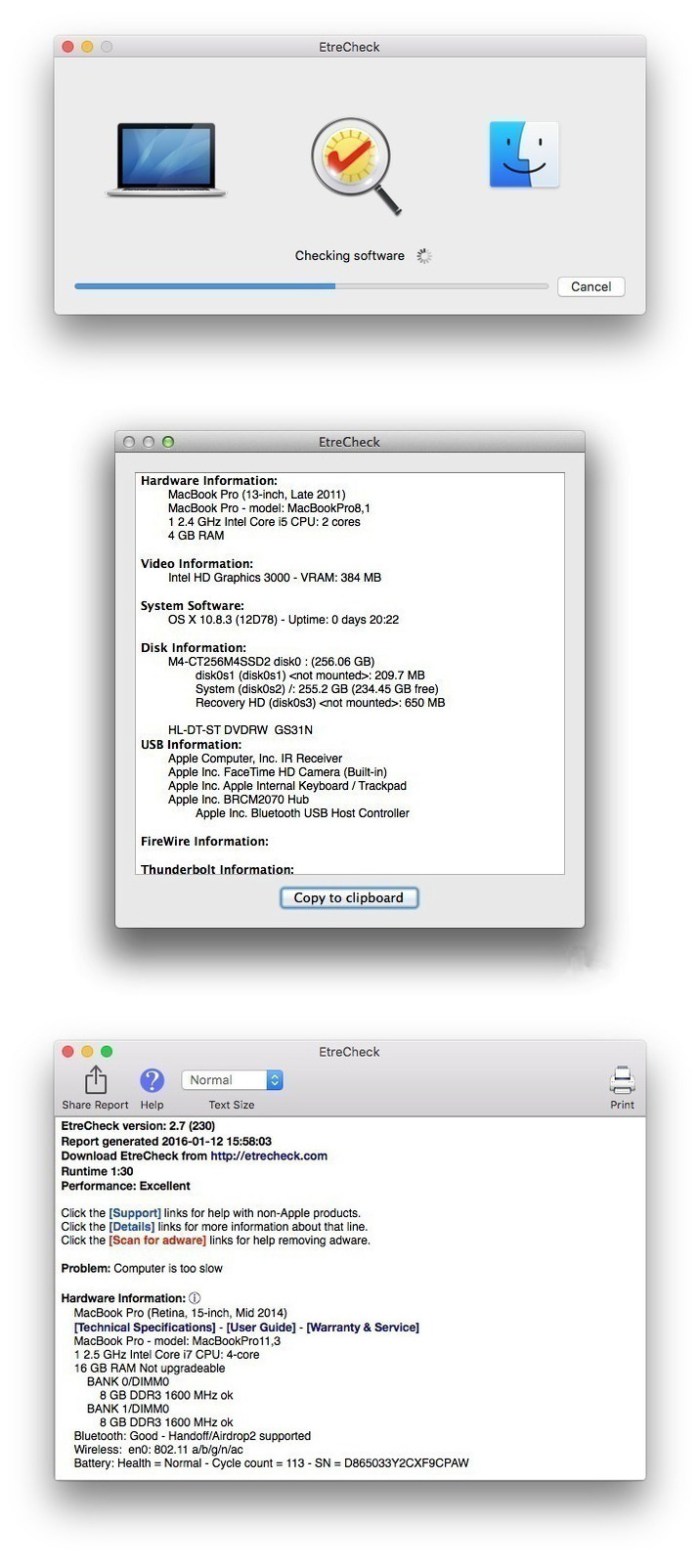
EtreCheck is a small Mac application that, when launched, scans your system and extracts all sorts of useful information. The data can then be copied to your clipboard and quickly shared with others.

Working with EtreCheck is extremely easy because the applications takes care of the analysis process on its own: all you have to do is launch the procedure and analyze the results.

Extensive diagnostics details for your machine

In the EtreCheck main window you will be able to see information about your hardware components, video performance, system software, disk attributes, USB and Thunderbolt configuration, the status of your configuration files, or of the Gatekeeper security function.

Moreover, you can view the installed Kernel extensions, startup items, user login items, internet / audio plug-ins, Safari extensions, iTunes plug-ins, or third party Preferences Panes.

Additionally, you can see a list of your launch daemons and launch agents, together with their current status (loaded, not loaded, running, or failed). The “Support” button associated with each entry performs a Google search query for the agent’s webpage in your default web browser.

Practical tool for analyzing the status of your Mac and identifying possible issues

Last but not least, EtreCheck provides the top processes sorted by CPU or memory usage, and offers details about your virtual memory.

EtreCheck is a great tool to have around if you are experiencing computer issues: the detailed diagnostics offer you the possibility to have a clear view upon how are your resources employed. At the same time, you can also share the info with more experienced users that might help you detect any anomalies.

Compatibility: OS X 10.9 or later 64-bit
Web Site: http://www.etrecheck.com

What’s New in EtreCheck 5.1

  • Release notes not available at the time of this post.

Screenshots

BusyCal 3.5.7

Name BusyCal 3.5.7.zip
Size 27.89 MB
Created on 2019-01-01 00:17:49
Hash 90eb4eaabb129c602e28f509f90db3d1eb128342
Files BusyCal 3.5.7.zip (27.89 MB)

Download

BusyCal 3.5.7 MacOS

BusyCal 3 is the most powerful, flexible, reliable calendar app for macOS. It’s packed with innovative, time-saving features including customizable views, integrated to dos, travel time, maps, natural language input, weather, moons, graphics, tags and more.

CUSTOMIZABLE VIEWS

BusyCal displays your calendar in Day, Week, Month, Year and List views. What makes BusyCal unique is its ability to customize these views to more precisely meet your needs. You can choose the number of weeks shown per month, or days shown per week, and you can even customize the calendar’s appearance by choosing a font face and size, calendar colors, time format and more.

INTEGRATED TO DOS

In BusyCal, To Dos are integrated into your calendar, display on the date or time they are due, and carry forward until completed. You can also display a To Do List in the sidebar. To Dos in BusyCal are compatible and sync with the Reminders app on Mac and iOS.

INFO PANEL

BusyCal’s info panel enables you to quickly view and edit event details with speed and precision. The info panel can be displayed in the sidebar, as a popup or a floating window. And it’s completely customizable, you can choose from a wide range of attributes to display including time zones, tags, maps, private notes, last edit time and more.

NATURAL LANGUAGE INPUT

BusyCal enables you to create events and to dos using natural language. A preview of the event details are displayed while you type as it recognizes titles, dates and times, locations and more. You can even use it to add contacts or attendees to an event, set alarms, add URLs, and to indicate the calendar to create the event on.

TRAVEL TIME

BusyCal allows you to block out time for walking, driving or taking mass transit to an event or location. You can set a fixed amount of travel time or determine it automatically using the integrated support for Location Services and Apple Maps. You can even receive alerts when it’s time to leave as traffic conditions change.

MENU BAR APP

The BusyCal menu bar app is always running, even when the main BusyCal app is not running, so you always have access to your schedule. It displays a mini-month, a scrolling list of your events and to dos, and the weather forecast. You can click on an event to view its details, and create new events and to dos using natural language.

SMART FILTERS

BusyCal’s Smart Filters are a powerful tool for managing your calendar. Smart Filters can be accessed with a keyboard shortcut or a button on the toolbar to display calendar sets (showing/hiding multiple calendars), perform saved searches (events that contain ‘Joe’), apply view settings (an 8-week month view) and much more.

ALARMS

BusyCal displays alarms in a movable, resizable floating window that offers the ability to snooze an alarm for any number of minutes from now or before the start of an event, or snooze multiple alarms at once. And BusyCal Alarms trigger even when the main BusyCal app isn’t running, so you’ll never miss an important appointment.

WEATHER & MOONS

BusyCal displays a live 10-day weather forecast, phases of the moon, and sunrise and sunset times.

GRAPHICS

BusyCal lets you add graphics to your calendar to highlight holidays and special events. You can choose from the built-in Emoji and IconFinder images, or drag images from your desktop or web.

BUSYCONTACTS INTEGRATION

BusyCal integrates with its sister app, BusyContacts, forming a flexible easy-to-use CRM solution. By adding contacts to events in BusyCal, you have instant access to a contact’s email address and phone number, as well as a record in BusyContacts of your interactions with them.

SYNC AND SHARE CALENDARS

BusyCal supports iCloud, Google, Exchange and CalDAV servers, enabling you to sync calendars with other Macs and iOS devices running BusyCal or the built-in Calendar app. This includes the ability to share calendars, schedule meetings, and view the availability of others.

OS Version: OS X 10.11 or later

Web Site: https://www.busymac.com
Mac App Store: https://itunes.apple.com/app/busycal-calendar-reminders/id1173663647?mt=12

What’s New in BusyCal 3.5.7

* Weather Underground has retired its service. BusyCal weather updates are now powered by Dark Sky, which provides more accurate weather forecasts. It’s also now easier to perform a city / town / zip-code lookup in preferences.
* Improved handling of CalDAV meeting invitations where these wouldn’t otherwise show in the Inbox
* Completed todos with due times now show at their original due times instead of in the all-day section. This behavior can be changed from Preferences > ToDos.
* The “Carry forward uncompleted todos” setting no longer includes completed todos
* Updates to events with pending invites are now automatically synced to the server
* Meeting invitations sent to group calendar on Exchange, no longer appear in the Inbox when you’re not invited
* WebEx meeting links inserted by google are no longer stripped out
* Extra details related to an embedded Hangouts call, hidden by default, can now be seen by clicking on a (i) button next to the Join Hangout Call link.
* Improvements to accounts preferences
* Several CalDAV servers (including iCloud) reject accepting Todos containing custom alarms with ‘Open file’ attachments / URLs. This option has now been disabled.
* Improved display of event tiles using custom condensed fonts
* Fixed a bug where the To-do list would not at times refresh if ‘Show Completed Todos’ was set to ‘In Calendar Range’
* Fixed a bug where alerts would not fire for some unselected calendars
* Fix for Outlook and Airmail opening multiple windows when using the “Email attendees” option
* Performance improvements
* Ongoing stability improvements


BusyContacts 1.3.2

Name BusyContacts 1.3.2.zip
Size 20.20 MB
Created on 2019-01-01 00:17:42
Hash f0cd9b435e122f42ca89cb0d0cc1d67243e7264c
Files BusyContacts 1.3.2.zip (20.20 MB)

Download

BusyContacts 1.3.2 MacOS

BusyContacts is a contact manager for OS X that makes creating, finding, and managing contacts faster and more efficient.

BusyContacts brings to contact management the same power, flexibility, and sharing capabilities that BusyCal users have enjoyed with their calendars. What’s more, BusyContacts integrates seamlessly with BusyCal forming a flexible, easy to use CRM solution that works the way you do.

BusyContacts syncs with the built-in Contacts app on OS X and iOS and supports all leading cloud services, including iCloud, Google, Exchange, Facebook, Twitter and LinkedIn.

CUSTOMIZABLE VIEWS

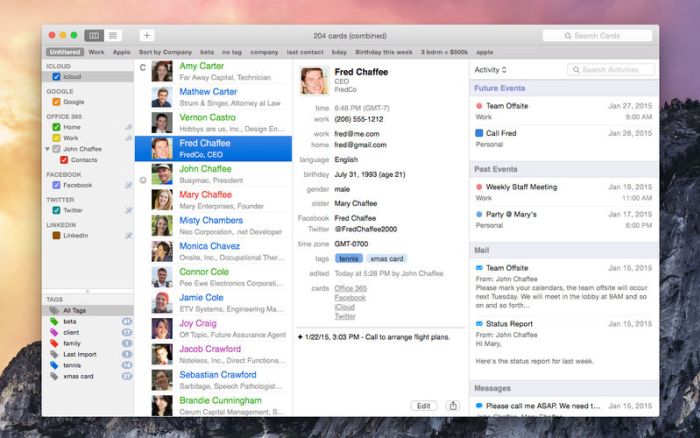
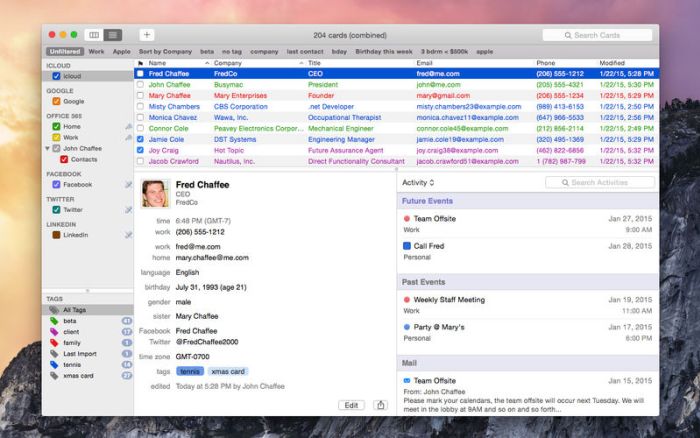
Contacts can be displayed in two views: A single column list view, or a multi-column table view that allows you to control the columns displayed (e.g. company, last name, first name, email, phone, etc.) and the sort order.

TAGS

Tags are an extremely flexible way to manage contacts in BusyContacts. You can assign multiple tags to each contact and a tag cloud allows you to easily filter the list of contacts by tag (e.g. family, client, prospect, coworker, etc.).

ACTIVITY LIST

The Activity List shows a chronological listing of activities associated with the selected contact including meetings, to dos and other calendar events, communication through email and messaging, and social network posts.

BUSYCAL INTEGRATION

BusyContacts integrates with BusyCal allowing you to link contacts to events and to dos in your calendar, providing flexible CRM capabilities for scheduling meetings, follow up tasks, and tracking past activities.

SOCIAL NETWORK INTEGRATION

BusyContacts syncs with leading social networks including Facebook, Twitter and LinkedIn, allowing you to integrate photos, birthdays and other information from social networks with your contacts.

SMART FILTERS

Smart Filters are a powerful tool for filtering contacts and creating saved searches that can be applied with a single click. You can create Smart Filters to display contacts that match certain conditions, such as a text string, tag, or birthdate. Or you can create Smart Filters to remember view settings such as columns displayed and sort order.

SYNC

BusyContacts syncs with all leading cloud services including iCloud, Google, Exchange, and other CardDAV servers, and syncs with the built-in Contacts app on OS X and iOS.

SHARE

BusyContacts allows you to share address books with other BusyContacts users with read-only or read/write privileges. Address Books can be shared through Exchange, Fruux, Kerio, over the LAN, and through other CardDAV servers that support sharing.

OS Version: OS X 10.11 or later

Web Site: http://www.busymac.com/busycontacts/index.html
Mac App Store: https://itunes.apple.com/app/busycontacts/id964258399?mt=12

What’s New in BusyContacts 1.3.2

  • Release notes not available at the time of this post.

Screenshots

AweEraser 3.3

Name AweEraser 3 3 TNT.zip
Size 10.73 MB
Created on 2019-01-01 00:18:02
Hash b1fac0198bf44b3b63007e74573a2beec26a0328
Files AweEraser 3 3 TNT.zip (10.73 MB)

Download

AweEraser 3.3

Do you want to permanently shred your sensitive data before you sell, donate or lend your computer / storage media device? AweEraser is such a tool which can help you securely and permanently erase targeted files and folders from Mac, USB flash drive, memory card, SSD, digital camera, etc. With advanced data erasure technology, AweEraser can 100% erase the files or folders, making data recovery impossible.

Key features:

1. Permanently and securely erase files/folders from Mac, HDD, SSD, USB flash drive, memory card, etc.
2. 100% effective, no chance for data recovery.
3. Certified data erasure algorithms including HMG Infosec Standard 5 (1 pass); German FOFIS (2 passes); DOD 5220.22-M (3 passes); U.S. Army AR380-19 (7 passes); Peter Gutmann’s algorithm (35 passes).
4. Very easy-to-use and 100% safe.

Compatibility: OS X 10.8 or later

Web Site: https://www.magoshare.com/data-eraser/mac-data-eraser.html
Mac App Store: https://itunes.apple.com/app/aweeraser/id1358167642?mt=12

What’s New in AweEraser 3.3

  • Release notes not available at the time of this post.

EdgeView 2.530

Graphics & Design

Name EdgeView 2 2 530 MAS TNT.zip
Size 14.92 MB
Created on 2019-01-01 00:17:14
Hash 68bbd3839419aabc19076f17bb95e551608e2fb0
Files EdgeView 2 2 530 MAS TNT.zip (14.92 MB)

Download

EdgeView 2.530

EdgeView 2 is a cutting-edge image viewer for MacOS X. You can open various image files, can also open archive files like as ZIP, rar without extraction. You can check and open files on built-in file browser. And can connect to FTP and open the file directly. EdgeView 2 is the best choice when viewing and managing image files, cartoon files like as archives.

======= Function / specification =======

——- Image viewer ——
  • Supporting image files such as JPG, GIF, BMP, PSD, TIFF, RAW(DNG) and PDF
  • Supporting major archive formats such as ZIP, RAR, CBZ, CBR, 7zip, ALZ, etc.
  • Can extract encrypted archive file
  • Can read archive file in archive file in archive… as they are
  • Advanced preread cache for fast loading
  • High quality image rendering
  • Provide suitable function for comic reading
    • Twopage spread, reading from right to left, etc.
  • Powerful navigation function
    • Move previous/next, skip, move only one page(shift previous/next), etc.
    • You can move while checking thumbnails with progress bar and thumbnail bar
  • Support for trackpad gestures
    • Moving pages with swipe gesture, scaling with pinch gesture
  • Builtin loupe function to make it easier to see small character
  • Can zoom in/out image freely
  • Various special effects can be applied in real time
    • Insert shadow in spread pages, auto level correction, blur, sharpen, unsharpen mask, grayscale, colorize, etc.
    • Detailed setting is possible from the effects HUD
  • Can roate, flip horizontal, flip vertical image
  • Support for Animated GIF, and Animated PNG
    • Pause/play, move to previous/next frame, and can change frame rates from animated HUD
  • Support for Slideshow
  • You can adjust transparency for each window
  • Can sharing image via SNS.
  • Can remote control in comicShare app in iOS device
  • (http://comicshare.yunagi.com)
——- File Browser ——
  • Builtin file browser display files as lists or icon
  • Can be arranged by file name, rates, writer, category, etc.
  • Easily add and modify additional information such as rates, writer, category
  • Provide search functions such as spotlight search, file name search
  • Can connect to FTP server in a file browser
  • FTP file search is also supported
  • Image files, archive files in FTP can also be opened directly * 1
  • Save opened folders, archive files, PDF files as history
  • The last opened page, file position, special effects, display settings are saved and restored as it is at the last state when reopening
——- Other ——
  • Automatically create thumbnails of archive files containing images with the builtin QuickLook plugin
  • Archive files without images display the included file list on the QuickLook panel
  • Comics on Screenshot
  • [Give My Regards to Black Jack], by SHUHO SATO. Distributed in Manga on Web (http://mangaonweb.com/satoshuho/download.html)

* 1) The archive file will be downloaded and opened in a temporary folder. The files in the temporary folder are deleted automatically afterwards

Compatibility: macOS 10.11 or later 64-bit

Web Site: http://edgeview.co.kr/en/home/
Mac App Store: https://itunes.apple.com/us/app/edgeview-2/id1206246482?mt=12

What’s New in EdgeView 2.530

– Fix a crash bug in loop event.

Graphics & Design

By

Related Posts

Adobe XD CC 2018 4.0.12

Name Adobe XD CC 2018 v4.0.12 [zii] [mac-torrents.net].zip Size 505.3 MB Created on 2018-01- …

Genarts Sapphire 9.0.3

Name Genarts Sapphire 9.0.3 Size 670.1 MB Created on 2016-09-09 01:36:28 Tracker http://109.235.50.1 …

Toolbox for Pages 2.2.4 (Everything Unlocked)

Name Toolbox for Pages 2.2.4_MAC599 Size 147.6 MB Created on 2016-05-16 04:15:00 Hash eace194e1bd2f3 …

RapidWeaver 8 v8.1 FC

Name RapidWeaver 8 8 1 FC 20462b TNT.zip Size 82.06 MB Created on 2018-11-23 07:27:56 Hash c14307037 …

Autopano PRO 4.4 RC3

Name Autopano Pro v4.4 RC3.zip Size 53.42 MB Created on 2017-03-18 06:52:51 Hash 18bbd5d95ad007f95f0 …

TurboMosaic 3.0.11

Name TurboMosaic 3 0 11 TNT.zip
Size 84.90 MB
Created on 2019-01-02 03:46:31
Hash 829050b7cb315aa5dbb517f0cb68f08872abf9db
Files TurboMosaic 3 0 11 TNT.zip (84.90 MB)

Download

TurboMosaic 3.0.11

TurboMosaic is a photomosaic software that lets you make the most amazing picture mosaics with little effort — we bet you’d be pleasantly surprised with the quality of results.

What is a Photo Mosaic?

A mosaic is a photo made out of many smaller photos. When viewed from a distance the big picture is prominent whereas when viewed from close up the individual smaller pictures show out distinctly.

Make a Photo Mosaic in 3 Simple Steps

Absolutely anyone can make a photo mosaic in a few minutes — no design expertise or experience needed!

Compatibility: OS X 10.9 or later 64-bit

Web Site: http://www.turbomosaic.com

What’s New in TurboMosaic 3.0.11

  • Release notes not available at the time of this post.

MovieSherlock 5.9.7

Name MovieSherlock 5 9 7 TNT.zip
Size 13.28 MB
Created on 2019-01-02 03:46:48
Hash 722c48c5df3d91436ff904e8f4faffadfb572b23
Files MovieSherlock 5 9 7 TNT.zip (13.28 MB)

Download

MovieSherlock 5.9.7

MovieSherlock is an all-in-one YouTube downloader and converter. It allows you to search, download, and convert YouTube movies. MovieSherlock lets you to download videos fast, smoothly and no quality loss whats so ever! MovieSherlock is just the best way to get videos to your Mac.

MovieSherlock allows you to download any video from YouTube and convert it on your Mac to a high-quality MP4 video that is playable in iTunes or your favorite video player. MovieSherlock supports both HD (High Definition) and SD (Standard Definition) video from YouTube. However.

  • Save as MP4 and MP3: downloaded videos will be automatically converted.
  • YouTube, Vimeo, DailyMotion and thousands of websites support
  • Fast download: 15x faster than real time!
  • iTunes integration: Add to iTunes feature allows to copy downloaded video and music to any of your devices such as iPhone, iPad, iPod, etc.
  • Download video with subtitles from YouTube and DailyMotion.
  • Correct file naming: The downloaded videos will retain the original names from the source webpages.
  • Native video format: If you get the video with MovieSherlock, be sure you can play it.
  • Simultaneous download: Get so many files you need at one time.

Compatibility: OS X 10.7 or later

Web Site: http://www.moviesherlock.com/

What’s New in MovieSherlock 5.9.7

  • Release notes not available at the time of this post.

PopChar X 8.5.0

Name PopChar_X_8.5.zip
Size 4.91 MB
Created on 2019-01-02 03:46:37
Hash 69376aeb95e40b7fe9a222576d86a25d83aa0185
Files PopChar_X_8.5.zip (4.91 MB)

Download

PopChar X 8.5.0 macOS

PopChar helps you get the most out of your font collection. With its crystal-clear interface, PopChar provides a frustration-free way to access any font’s special characters.

Features
  • Expanded accessibility – Your Mac includes over 700 fonts, each of which contains thousands of characters — Why not make them as accessible as possible? PopChar makes it happen.
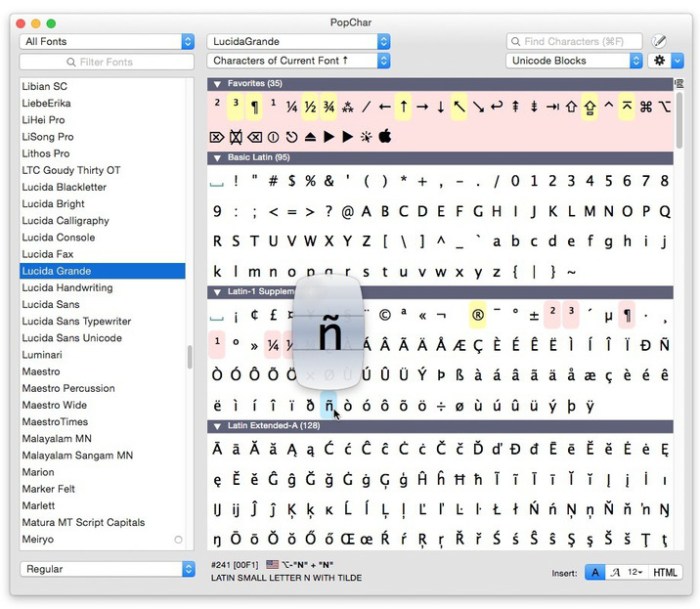
  • Interface advantages – PopChar displays easy-to-analyze tables of characters, giving you an ultra-convenient interface. You can’t access most of these characters from your keyboard — PopChar puts them within your reach.
  • Liberating compatibility – No matter what app you are using, PopChar brings snappy simplicity to all font-related tasks. Whether you’re working with a word processor or a Web browser, PopChar integrates seamlessly.
  • Smarter searching – PopChar’s seasoned search capabilities will help you find what you are looking for, whether you need to search for a character by name, identify fonts that contain specific characters, or explore the entire character set of a font.

Requirements: OS X 10.6 or later

Web Site: http://www.ergonis.com/products/popcharx/

What’s New in PopChar X 8.5.0

  • New option for lightondark character table in Mojave’s Dark Mode
  • Preference option for highlighting favorite characters
  • New mechanism for alternative names in the Unicode standard (currently used to unify lambda/lamda)
  • Layouts are now always listed in alphabetical order in the menu

Screenshots

KeyMix v1.0 for After Effects

Graphics & Design Video

Name KeyMix_v1.0_Mac.zip
Size 182.8 kB
Created on 2019-01-02 03:46:54
Hash e1eb0020c4308464c5a2b136d81e9a0875f183e0
Files KeyMix_v1.0_Mac.zip (182.8 kB)

Download

KeyMix v1.0 for After Effects MacOS

KeyMix allows you to mix multiple keys on a single layer using masks or a matte layer. Free and un-watermarked for renders under 720p!

Getting the perfect key usually involves pulling multiple keys with different settings and then mixing them back together. KeyMix streamlines this process, allowing you to mix all your keys back on a single layer rather than inside a separate precomp.

Features:

  • Mix using masks or a matte layer. Using masks is more convenient, whereas using a matte layer provides more flexibility and the option to apply tracking data.
  • Handy mix slider. Finetune the mix % to get a perfect blend of keys.
  • Compatible with feathering and pervertex mask feathering.
  • Compatible with CS6 and up, Windows and Mac.

Compatibility: After Effects CC 2019, CC 2018, CC 2017, CC 2015.3, CC 2015, CC 2014, CC, CS6

Web Site: https://aescripts.com/keymix/

What’s New in KeyMix v1.0

Graphics & Design, Video

By

Related Posts

Vectoraster 7.2.4

Name Vectoraster 7 2 4 TNT.zip Size 15.32 MB Created on 2018-04-07 17:50:31 Hash ae0fdc28addf5ae1c71 …

CameraBag Cinema 1.0.6

Name CameraBag Cinema 1.0.6 Size 46.79 MB Created on 2016-07-31 23:48:13 Tracker http://109.235.50.1 …

4K Video Downloader 3.6.0

Name 4K Video Downloader 3.6.0 Size 24.22 MB Created on 2015-07-22 05:02:58 Tracker http://109.235.5 …

Principle 5.0

Name Principle 5 0 TNT.zip Size 6.33 MB Created on 2018-10-26 18:54:52 Hash 4a1de972be8918171f4184e2 …

Instant Convert 1.1.1

Name Instant Convert 1.1.1.zip Size 2.75 MB Created on 2018-01-17 23:53:37 Hash 8674fb6990cdb7f7595f …

NEW KREATIV LUTS (Win/MacOS)

Graphics & Design Video

Name New KreativWedding LUTs.zip
Size 8.40 MB
Created on 2019-01-02 03:46:42
Hash a6109d8cd4ee49f2e3665151dc96690ba3d638ee
Files New KreativWedding LUTs.zip (8.40 MB)

Download

NEW KREATIV LUTS (Win/MacOS)

This is the biggest collection of LUTs that we created till now. We spent the last months trying them on a lot of different cameras and Picture Profiles. They are all different and can fit different kinds of situations or styles. In this package you can find 30 LUTs that can be used in any software that supports .cube files.

WORKFLOW SUGGESTIONS Kreativ LUTs are a color grading tool – the footage has to be color corrected before you apply it, therefore white balance, saturation and contrast should be adjusted. The more highlight and shadow information you have, the nicer your footage. If you are shooting Log footage, you will need to transform it Rec709 before applying KREATIV LUTs for an optimal result.

Web Site: https://www.shop-kreativ-wedding.com/produkt/kreativ-wedding-kreativ-luts/?lang=en

Graphics & Design, Video

By

Serial Box 01.2019

Name Sbox012019.zip
Size 10.19 MB
Created on 2019-01-02 04:57:25
Hash 256fa69ea034544c0deff1eaa9cdbe38e1a5343c
Files Sbox012019.zip (10.19 MB)

Download

Serial Box 01.2019 MacOS

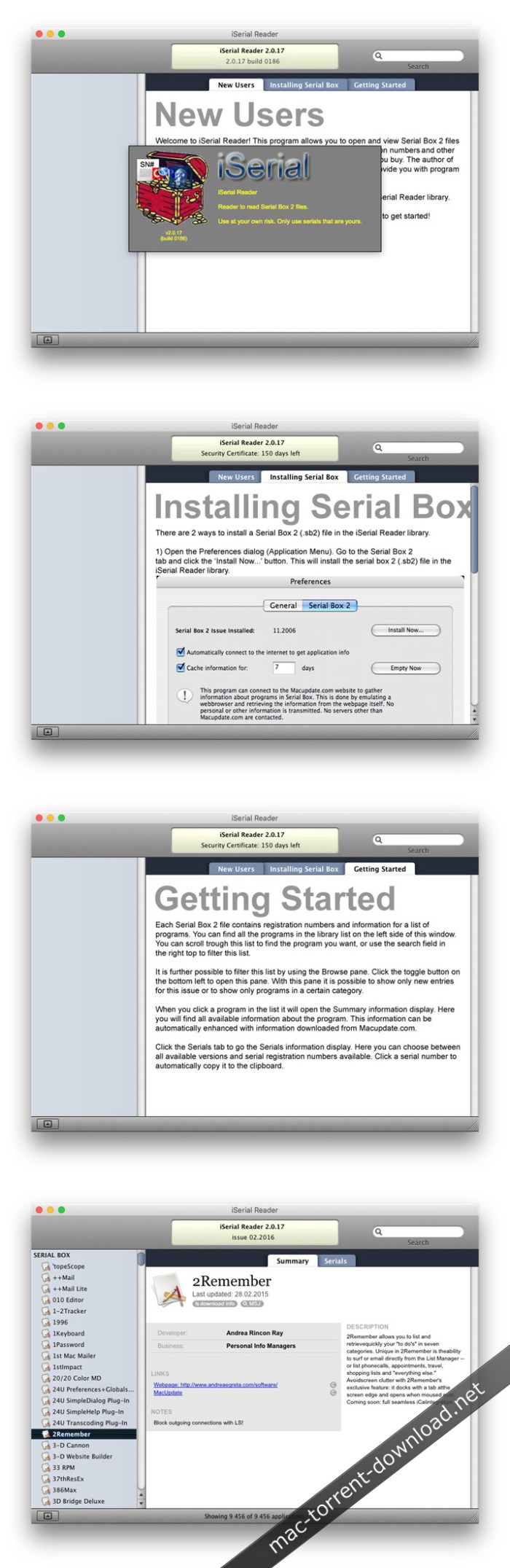
The base of serial numbers project iSerial as of 2019. It contains information on how to activate (serial numbers, information about other methods of activation) for the PowerPC platform programs so and Intel.

Just open the dmg file, drag and drop the app where you like. However, there is no way to view what serials, cracks and patches are new in this issue as compared to the previous. Thanks to all contributors and supporters!

Compatibility: OS X 10.6 or higher

Screenshots

Ni LabVIEW 2018

Name LV18_OSX.zip
Size 1.30 GB
Created on 2019-01-01 00:16:41
Hash 417f9c2da8892f0823678e841319714fa7d2bd2c
Files LV18_OSX.zip (1.30 GB)

Download

Ni LabVIEW 2018 MacOS

National Instruments (NI), has announced the release of LabVIEW 2018 system design software. The latest version of LabVIEW delivers speed improvements, new and improved features, and fixed bugs.

About NI LabView. LabVIEW (Laboratory Virtual Instrument Engineering Workbench) is a graphical programming language that uses icons instead of lines of text to create applications. In contrast to text-based programming languages that use instructions to determine the order of program execution, LabVIEW uses dataflow programming. In data flow programming, the flow of data through the nodes on the block diagram determines the execution order of the VIs and functions. VIs, or virtual instruments, are LabVIEW programs that imitate physical instruments.

In LabVIEW, you build a user interface by using a set of tools and objects. The user interface is known as the front panel. After you build the front panel, you add code using graphical representations of functions to control the front panel objects. You add this graphical code, also known as G code or block diagram code, to the block diagram. The block diagram somewhat resembles a flowchart. The block diagram, front panel, and graphical representations of code compose a VI.

Web Site: http://www.ni.com/

What’s New in Ni LabVIEW 2018

  • Release notes not available at the time of this post.

IP Scanner Pro 3.70

Name IP Scanner Pro 3 70 TNT.zip
Size 11.40 MB
Created on 2019-01-01 00:16:50
Hash 8cd2a96e01689c82ca5ca700db6e57ac92870247
Files IP Scanner Pro 3 70 TNT.zip (11.40 MB)

Download

IP Scanner Pro 3.70

IP Scanner Pro for Macintosh scans your local area network to determine the identity of all machines and internet devices on the LAN. Powerful results, yet easy and intuitive to use.

IP Scanner is all about customizing the way you view your network. You may apply custom names and icons to the devices on your network and adjust the type and amount of information you see in the network overview; don’t need to see the MAC address column…don’t display it! Text too small…make it larger!

IP Scanner can be used in several primary modes: as a way to get a quick overview of which devices are currently on the network, including seeing which devices are actively and passively present, or view network changes over time with IP Scanner’s ‘cumulative mode’, including options to display devices which were once present but now no longer visible.

Finally, by using the whitelist feature you may filter out known and trusted devices to reveal new or unexpected ones, a great way to easily identify unwanted network visitors.

Other notable features:
  • Sort network list by device name, IP address, MAC address or Last Seen
  • Growl support for notifications of newly discovered devices and changes in device state
  • Rightclick a device to obtain additional contextualized tool options, including Ping, WOL and Port Scan tools
  • Local network segments are scanned automatically; custom ranges may be added manually

Not sure if IP Scanner does what you want? Try IP Scanner standard edition for free to see if IP Scanner is for you, or visit http://10base-t.com for more info.

Compatibility: OS X 10.9 or later, 64bit

Web Site: http://10base-t.com/macintosh-software/ipscanner-appstore/
Mac App Store: https://itunes.apple.com/app/ip-scanner-pro/id404167677?mt=12

What’s New in IP Scanner Pro 3.70

  • Release notes not available at the time of this post.

Resume Templates – Design 2.0.4

Name Resume Templates – Design 2 0 4 MAS TNT.zip
Size 14.75 MB
Created on 2019-01-01 00:15:38
Hash 7c6653ce029018cd8ff07709fb82cad866b1d472
Files Resume Templates – Design 2 0 4 MAS TNT.zip (14.75 MB)

Download

Resume Templates – Design 2.0.4

Resume DesiGN- Templates is a high-quality collection of more than 130 original Pages templates designed to give your career prospects a major boost. Present your educational background, experience, and skills in a way that will catch any recruitment manager’s attention.

Every object in Resume DesiGN- Templates can be easily recolored, reshaped, moved, or removed. Type or paste your own text, add or remove text boxes, and change the font if you want to. Add your photos to replace the stock images. Every layout – from the understated elegance of the traditional career descriptions to the buoyant colors of the resumes for creative professionals – features quality design and great usability.

The templates are available in the US and international page sizes.

* Requires the latest version of Pages.

Compatibility: OS X 10.11 or later

Web Site: http://graphicnode.com
Mac App Store: https://itunes.apple.com/app/resume-design-templates/id1103224543?mt=12

What’s New in Resume Templates – Design 2.0.4

• Bug fixes.

Fenetre 0.6.3

Name Fenetre 0 6 3 MAS TNT.zip
Size 79.58 MB
Created on 2019-01-01 00:17:00
Hash fdeb37d5d1452b73f5528a7bb471e674e5384834
Files Fenetre 0 6 3 MAS TNT.zip (79.58 MB)

Download

Fenetre 0.6.3

Keep a window open, always on top of everything else.
The picture in picture mode now available on your mac.
Fenêtre lets you visualize a video, a picture, a flat file or a website.

Feel free to watch the latest episode while working on your paper.
Keep an eye on some documentation while working on your latest library.
Have a reference design open while working on your amazing website.

The window will stay on top of the rest.
Amazing features will keep you focused on your main activity without getting in the way.

Features included in the pro version:
  • Amazing See Through mask following your mouse.
  • Lets you Click Through the window when needed.
  • Interact with your clipboard.
  • [Lite too] Get the browser extension (Chrome or Firefox) to open a link or the current url directly while browsing.
  • Control the opacity of your window.
  • [Lite too] Get an amazing refined experience on specific websites (Youtube, Twitch, GitHub, …).
  • Preview markdown files.
  • Collapse the window to keep it completely out of the way.
  • Customize your experience with settings and hotkeys.
  • Keep an history of what you’ve opened.
  • Open as many windows as you’d like.

And more to come.

Compatibility: OS X 10.9 or later 64-bit

Web Site: https://fenêt.re
Mac App Store: https://itunes.apple.com/app/fen%C3%AAtre/id1286743037?mt=12

What’s New in Fenetre 0.6.3

## 0.6.3 (2018-12-22)

### Features

* feat: add sandbox access to location, camera and microphone

BetterTouchTool 2.685

Name BetterTouchTool_2.685.zip
Size 22.37 MB
Created on 2019-01-01 00:17:55
Hash 0d4fad52f09968d4a296104b7e696e3326a8b338
Files BetterTouchTool_2.685.zip (22.37 MB)

Download

BetterTouchTool 2.685 macOS

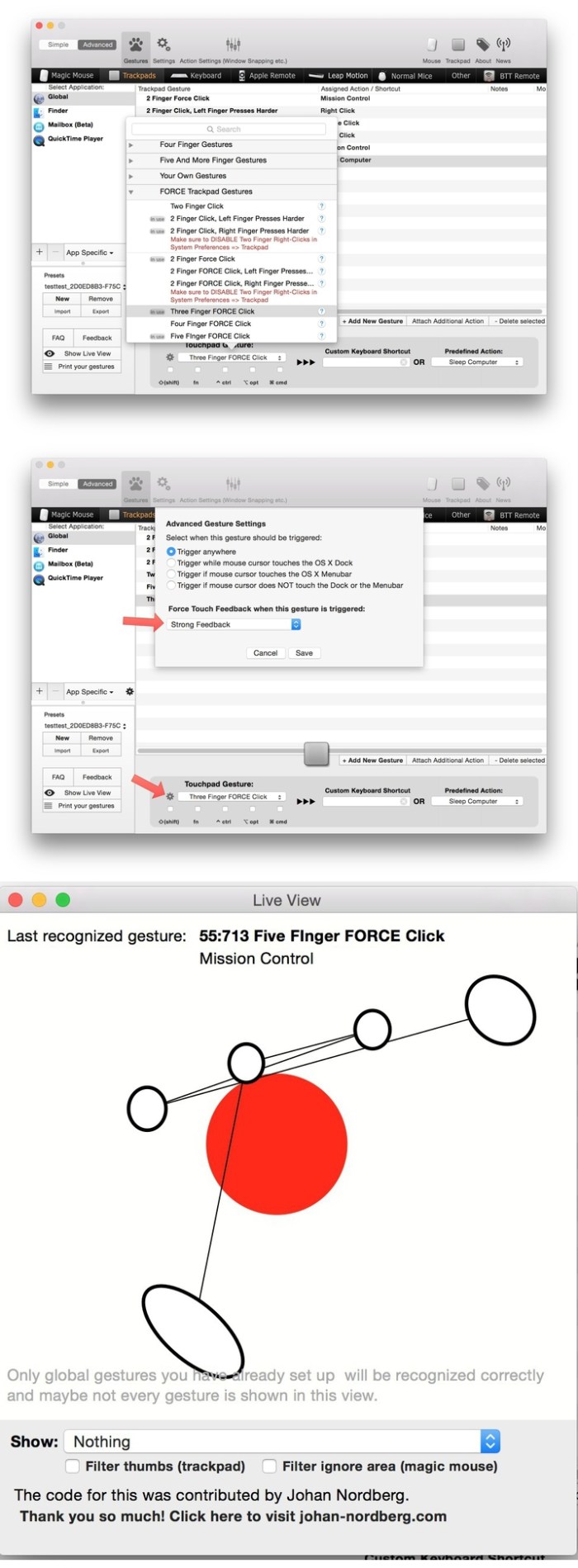
BetterTouchTool adds many new, fully customizable gestures to the Magic Mouse, Multi-Touch MacBook trackpad, and Magic Trackpad.

These gestures are customizable:
  • Magic Mouse:
    • Pinch in / out (zoom)
    • single-finger tap left
    • single-finger tap right
    • single-finger tap middle
    • single-finger tap
    • single-finger click middle
    • two-finger tap
    • two-finger click
    • two-finger swipe (up/down/left/right)
    • two-finger tip tap left/right
    • three-finger tap
    • three-finger click
    • three-finger swipe (up/down/left/right)
    • four-finger swipe up/down
    • four-finger click
    • TipTap left/right
  • Touchpad:
    • single-finger tap top-left
    • single-finger tap top-right
    • single-finger tap top-middle
    • single-finger tap bottom-left
    • single-finger tap bottom-right
    • single-finger tap bottom-middle
    • single-finger tap left-middle
    • single-finger tap right-middle
    • two-finger tip tap left/right
    • three-finger swipes (up/down/left/right)
    • three-finger tap
    • three-finger click
    • four-finger swipes (up/down/left/right)
    • four-finger tap
    • five-finger tap
    • five-finger swipe up/down/left/right (see FAQ)
    • TipTap
    • two-finger TipTap
    • three-finger TipTap

OS version:OS X 10.10 or later

Web Site: https://folivora.ai/

What’s New in BetterTouchTool 2.685

  • This should be the last release before the new UI is rolled out
  • This should signficantly reduce average cpu consumption when using Touch Bar stuff
  • Fixed JavaScript for Automation execution
  • Touch Bar visibility after sleep fix
  • New advanced modifier options for Touch Bar buttons/widgets
  • Added Touch Bar option to also show specific buttons while Touch Bar groups are open
  • Conditional activation groups can now trigger based on the currently open Touch Bar group
  • Fixed an issue with keyboard shortcuts and conditional activation groups
  • Various bugfixes

Screenshots

Canary Mail – Encrypted Email 2.18

Name Canary Mail 2 18 MAS TNT.zip
Size 22.77 MB
Created on 2019-01-01 00:17:35
Hash e3c38b7f9da2e4ef50b3e4ad58ce0a61a07c2038
Files Canary Mail 2 18 MAS TNT.zip (22.77 MB)

Download

Canary Mail – Encrypted Email 2.18

Modern email apps compromise on security or features. Canary does not.

Some of your most important info is shared via email, which is why we built end-to-end encryption into our app. This ensures only you and the person you’re communicating with can read what is sent, and nobody in between, not even your provider.

All of this happens automatically: no need to turn on settings or set up special secret keys to secure your emails.

Welcome to secure, effortless, email.

**ENCRYPTION ON DEMAND**

With Canary’s one-click encryption, you can effortlessly enhance your email security. The email is encrypted on your device and decrypted on your recipient’s device. It will be unreadable on your provider’s web interface, or by anyone else on any other app!

  • Automatic: Automate the key exchange to focus on crunching emails, without worrying about security.
  • Manual: Advanced PGP users can manage their own keys and exchange encrypted emails with anyone.
**FOCUS ON WHAT’S IMPORTANT**

With natural language search, smart filters, algorithmic bulk cleaner, and intelligent typography enhancements, Canary helps you easily find and act on what’s important, and get rid of what’s not!

  • Focused Inbox:Canary learns which emails are important to you and highlights them for easy access. Intelligent typography enchancements ensure optimum readability.
  • Natural Language Search: Search for photos from dad, receipts this month, or unread newsletters. Canary understands what you’re looking for and finds it first time, everytime.
  • Smart Filters: Quickly isolate unread emails, or emails with attachments. Check if you’ve missed replying via the unanswered filter. Gmail users can also access their Inbox tabs / categories.
  • Bulk Cleaner: Canary’s adaptive algorithms learn which emails are likely to be unimportant. Tap on the magic wand and scroll to automatically find, select, and then delete unwanted emails.
**POWERFUL FEATURES**

Don’t pay a monthly fee for features you want and need. With Canary, you always have full access!

  • Read Notifications: Get notified when your emails are read.
  • Snooze: Deal with emails at your convenience.
  • Email Templates: Avoid repetition. Save and reuse frequently sent emails.
  • OneClick Unsubscribe: No need to look for pesky unsubscribe links.
**SEAMLESS INTEGRATIONS**

Email plays a central role when it comes to files, events, and tasks.
So we made sure Canary plays nice with your favorite apps!

  • Google Drive
  • Dropbox
  • Todoist
  • Things
  • iCal
  • Google Calendar
  • Giphy
  • Keybase & MIT
**USE YOUR FAVORITE EMAIL PROVIDER**

Get all of Canary’s powerful features and cutting-edge encryption technology with your existing email account(s). Just add your account(s) and go!

  • Gmail
  • iCloud
  • Office 365
  • Yahoo
  • Custom IMAP
  • Exchange (if IMAP is enabled on server)

Compatibility: OS X 10.10 or later

Web Site: https://canarymail.io
Mac App Store: https://itunes.apple.com/app/canary-mail-secure-email-app/id1236045954?mt=12

What’s New in Canary Mail – Encrypted Email 2.18

This update brings improved search functionality and faster email fetching & rendering.

1Blocker 1.4.5

Name 1Blocker 1 4 5 MAS TNT.zip
Size 13.36 MB
Created on 2019-01-01 00:18:09
Hash e3eb018eff5bfba388af198835877aad8ee9e4b0
Files 1Blocker 1 4 5 MAS TNT.zip (13.36 MB)

Download

1Blocker 1.4.5

The most powerful and the fastest content blocker, used by over a million people on iOS and Mac. Essential app for anyone who uses Safari.

Unlike other adblock apps, we can’t see what sites you visit and track you. That’s because 1Blocker is a native Safari content blocker, not a shady VPN server. We are supported entirely by our users, there’s no “acceptable ads” program.

LOVED BY CUSTOMERS

1Blocker has been featured in The New York Times, TechCrunch, and many more.

  • “I like 1Blocker enough that I’ve stopped thinking about blockers.” John Gruber, Daring Fireball.
  • “Switched from Ghostery to 1Blocker for macOS Safari, which uses the fast new contentblocking API, and it seems noticeably faster.” Marco Arment.
  • “Does exactly what you want it to do, and the customer support is fantastic. Highly recommended ad blocker.”

WHY DO YOU NEED 1BLOCKER

– Block annoying ads (adblock)-

Ads have become a total disaster on websites by ruining the browsing experience. No one likes to see ads that pop over the entire screen.

– Save battery, data and time-

Independent tests by Wirecutter, NY Times, and BrooksReview confirm that 1Blocker cuts data loaded by sites on average by over 50%.

– Protect yourself online-

Many corporations track your behavior and what sites you visit. Online ads are not safe and may serve you malware even on major sites like Forbes and Yahoo.

– Improve your productivity-

Besides ads, webpages often contain distracting elements (like “You Might Also Like” and subscription boxes) that disturb your work flow and productivity.

FEATURES

1Blocker comes with almost 50 000 built-in blocker rules. It is very configurable.

  • Block ads, trackers and other annoyances. Make browsing over 2x faster.
  • Tap to hide any annoying content with our visual editor.
  • Support sites you love by whitelisting them.
  • Create your own custom blocker rules (hide elements, block sites and cookies).
  • All your settings are synced over iCloud.

1Blocker is also available for iOS in the App Store.

HOW IS 1BLOCKER BETTER THAN OTHERS

We believe 1Blocker is better than anything else available. Here is why:

  • We don’t make deals with advertisers.
  • We don’t and technically can’t track our users.
  • We have no customer data to sell.
  • We are bootstrapped and selffunded. No investors. Made by a tiny twoperson team.
EFFICIENT BLOCKING

While most other adblock apps block content by filtering elements of an already downloaded page, 1Blocker uses native Safari content blocker technology (API) to tell Safari in advance what should be blocked. This vastly improves efficiency, doesn’t slow down Safari, and saves battery life.

Compatibility: OS X 10.11 or later 64-bit

Mac App Store: https://itunes.apple.com/app/1blocker/id1107421413?mt=12

What’s New in 1Blocker 1.4.5

  • Release notes not available at the time of this post.

Permute 3.0.5

Name Permute 3 3 0 5 TNT.zip
Size 51.97 MB
Created on 2019-01-01 03:33:30
Hash 1e8d81d94847e1f62ae78f0c701e681f8cbb543e
Files Permute 3 3 0 5 TNT.zip (51.97 MB)

Download

Permute 3.0.5

Permute is the easiest to use media converter with it’s easy to use, no configuration, drag and drop interface, it will meet the needs to convert all your media.

Easy to Use

Built from the ground up, Permute is a perfect example of what a Mac app should be. With a gorgeous interface and drag & drop simplicity no need for complicated options.

Insanely Fast

Permute was engineered to be incredibly fast. Let us take care of the hard stuff. Just select the video format you want and it’ll be done faster than you can say “Antidisestablishmentarianism”.

Everything Included

It doesn’t matter if you’re converting home movies or processing images. Permute can do it all. We support nearly every format and have plenty of device presets to choose from.

Compatibility: OS X 10.11 or later

Web Site: http://permute.charliemonroe.net
Mac App Store: https://itunes.apple.com/app/permute-2/id731738567?mt=12

What’s New in Permute 3.0.5

  • Various minor bug fixes and improvements.

Downie 3.5.6

Name Downie 3 3 5 6 TNT.zip
Size 38.16 MB
Created on 2019-01-01 03:33:16
Hash 54d8cd963456a2c4e858daabaa5f96f8492d6ed4
Files Downie 3 3 5 6 TNT.zip (38.16 MB)

Download

Downie 3.5.6

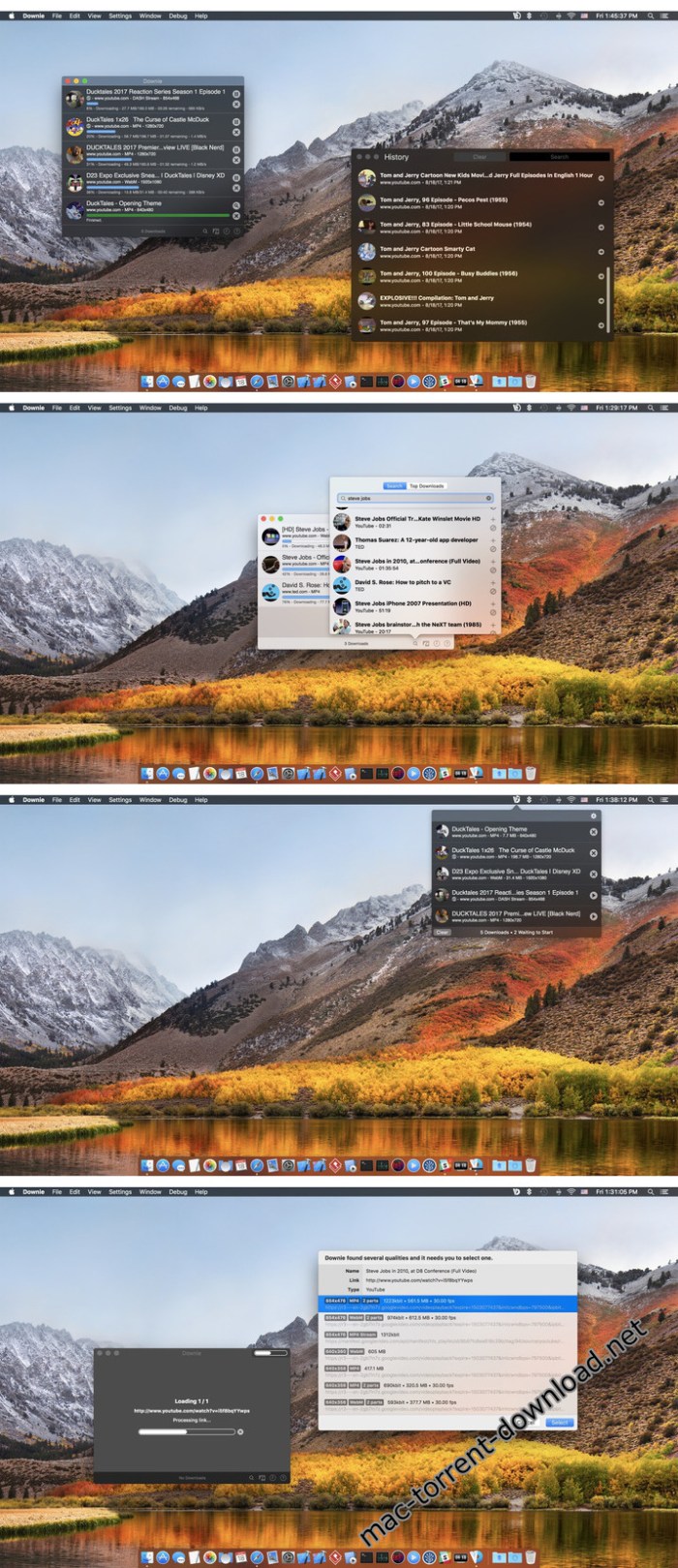
A simple download manager that offers you the possibility to quickly save videos from different websites to your own disk drive.

If you are using a poor internet connection, trying to visualize videos streamlined online might not work properly since the content is loaded too slowly. Downie is a simple Mac app that can help you download those videos to your computer, and then watch them by using your default media player.

User friendly video downloader featuring support for drag and drop actions

Working with Downie is extremely straightforward: simply drop the video URL on top of the app’s main window or on the Dock icon. Downie adds the video to your downloads list, so all you have to do next is start the process by pressing the appropriate button. Of course, you can also remove items from the list.

By default, Downie downloads MP4 files and places them in your default Downloads folder, but you can easily change this via the Preferences window. The same area allows you to setup notifications, or post processing actions (convert to MP4 if necessary, or extract audio only).

Effortlessly download videos from a wide collection of hosting websites

Downie provides support for more than 400 different websites that host video content, among which there are the most popular choices, such as YouTube, Apple, LiveLeak, Vimeo, BBC, and so on. If a certain website is not included, within the app you can send a request email to the Downie developers.

Moreover, Downie also provides matching extensions for various popular web browsers, such as Firefox, Safari, Google Chrome or Chromium. The add-ons are not installed by default: open the Preferences window and install only the ones you plan to use.

Straightforward solution for downloading video content hosted online

Downie is a great tool for saving videos posted on various websites to your Mac for offline playback. The application is extremely useful especially if you have a slow internet connection.

Compatibility: OS X 10.11 or later 64-bit

Web Site: https://software.charliemonroe.net/downie.php

What’s New in Downie 3.5.6

  • New: michelonfray.com, showtimes.com.
  • Improved: americastestkitchen.com, bilibili.com, disney.com, ina.com, iqiyi.com, kaltura.com, ooyala.com, polyv.com, sina.com, soundcloud.com, viafree.se, vshare.eu, zdf.de, zype.com.

Screenshots

VENUS Retouch Panel for Photoshop 2.0.0 (Win/macOS)

Name Venus Retouch Panel 2.0.0.zip
Size 687.8 MB
Created on 2019-01-01 03:33:49
Hash eccd8fd26e321e08c65b4b6c33647ad3717c620a
Files Venus Retouch Panel 2.0.0.zip (687.8 MB)

Download

Venus Retouch Panel 2.0.0 (Win/macOS)

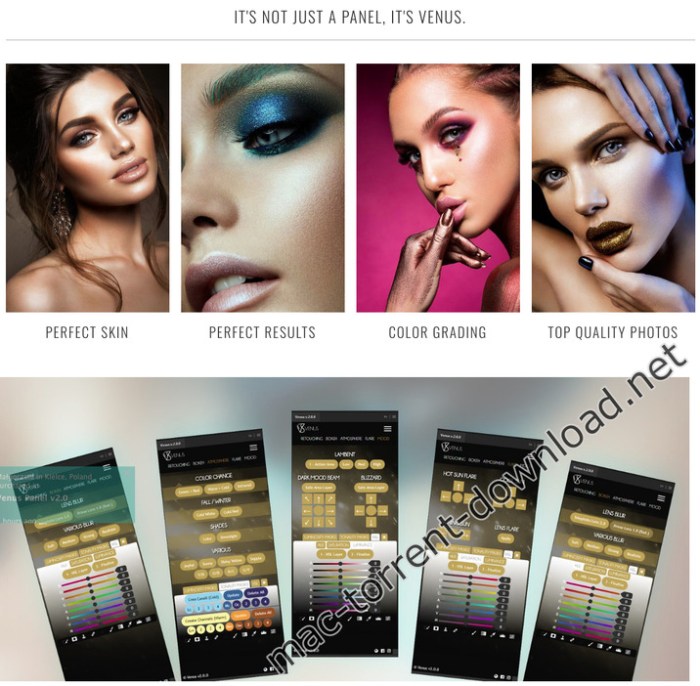
Venus Panel is an extension for Adobe Photoshop CC designed and manufactured to suit all types of photographers, from amateur to professional. Created by professionals, Venus Panel , is a concentration of technology that will help you speed up, simplify and increase the quality of your work.

Main Features:

  • Easy to use
  • Fast Workflow
  • Comfort graphic
  • Suitable for beginners and professionals
  • original and unique features
  • Quick and easy installation
  • Fast and efficient service

RITOCCO

A number of features aimed at professional retouching skin and eyes, through these functions can aim for perfection in editing, in fact, thanks to dodge & burn automated functions, tweaking eyes, noise reduction and sharpness can have perfect skin in a few clicks .

BOKEH

For this function we studied the blur present in the main objectives for the portrait, now, thanks to this function we can have ourselves a perfect and realistic blur. In addition to classic blurs 1.8 and 2.8 we can choose the classic blurs and read.

ATMOSPHERE

When the light or the situation is not the best from life to your photos with the revolutionary features of the “atmosphere”. Thanks to them, in fact, you can turn a photo from one situation to a completely different. Transform a scene of a green forest in autumnal, a hot day on a cold, snowy picture, rain and other effects to give life to your photos.

FLARE

A collection of realistic sun flare to be placed in your scene to give a pleasing visual effect where there is no light.

MOOD

You have a flat picture and worthless? Well. Stravolgila thanks to the revolutionary effect “mood”, studied and designed to completely change your scene in a blizzard or an epic scene, all in one click and totally AUTOMATED!

COMPATIBLE WITH:
  • PHOTOSHOP CC2014 (V.15), CC2015, CC2015.5, CC2017, CC2018 +
  • WINDOWS & MAC OS

Web Site: https://www.venuspanel.net/

Screenshots

CorelCAD 2019.0 v19.0.1.1026

Name CorelCAD_2019.0_v19.0.1.1026_macOS.zip
Size 222.2 MB
Created on 2019-01-01 00:17:28
Hash a689c79abd8692aa3597494b9b701b9dd59f68be
Files CorelCAD_2019.0_v19.0.1.1026_macOS.zip (222.2 MB)

Download

CorelCAD 2019.0 v19.0.1.1026 macOS

Enhance your visual communication expertise with the precision of superior 2D drafting and 3D design tools available in CorelCAD™ 2019. It’s the smart, affordable solution for drawing the detailed elements required in technical design. With native .DWG file support and optimization for Windows and macOS, you can enjoy computer aided design software that delivers increased productivity and impressive performance on the platform of your choice. CorelCAD 2019 provides flexible expansion options for both new users and existing customers to match any workflow.

New CorelCAD 2019 – CAD software

  • Professional 2D drafting and 3D design tools
  • Industrystandard file compatibility with .DWG, .STL, .PDF and .CDR
  • Efficient project collaboration and sharing
  • Optional automation and customization

Efficiency and productivity

Expand your visual communication expertise with the precision of superior drafting and design tools available in CorelCAD 2019. With an enhanced user interface and new time-saving features, you can increase workflow and deliver impressive, visually rich CAD designs.

2D drafting

Get the design power you need with an expansive collection of professional drafting tools that deliver the control and detail you require for any project. CorelCAD 2019 offers new helix tools for 2D spirals, advanced table tools, and a MultiLeader tool to configure and adjust callouts as your drawings evolve.

3D design

Experience the skillful and exacting results of the 3D capabilities in CorelCAD 2019, and transition your drawings from 2D drafting into advanced 3D designs. With an array of expert and intuitive 3D tools, including the enhanced EntityGrips and Properties palette, you are well equipped to move from project sketches to 3D output and printing.

Compatibility and optimization

Streamline project sharing with both internal teams and external suppliers. CorelCAD 2019 is fully compatible with the latest version, AutoCAD R2019 .DWG file format, to ensure worry-free collaboration with business partners, and includes innovative customization and automation support options to align with any working environment.

New Features in CorelCAD 2019:

MultiLeader and Smart Dimension tools

Draw, edit and configure callouts with multiple leader lines. This handy tool also allows you to add and remove leader lines to and from the MultiLeaders to adjust and edit as your drawing changes. Use dimension tools for accurate measurements, plus the Smart Dimension tool will suggest the most appropriate and precise dimension type automatically.

NEW! Helix Tool

Increase the shaping possibilities using the new Helix tool to create 2D spirals and 3D helixes to provide any object with a three-dimensional shape in a single layer around a cylindrical shape, such as a spring or spiral staircase.

ENHANCED! 3D solid editing and modeling tools

Save invaluable design time with faster on-screen editing tools. The enhanced EntityGrips and Properties palette allow for 3D editing and provide intuitive manipulation capabilities in 3D. Add 3D solid primitives to your design and use Boolean operations to unite, intersect and subtract bodies. Use advanced editing tools like Filleting Edges of 3D Solids, and coloring, moving, rotating and offsetting individual faces of 3D solids.

ENHANCED! Table support

Use the new ExportTable command to export tables in a comma separated format (CSV), and import CSV files in Microsoft Excel or database applications. In tables, you can add formulas into cells plus insert, delete, merge or resize cells, rows and columns within existing tables.

See Users‘ Favorite Features in Action

Discover how CorelCAD can help you drafting and designing in 2D and 3D by watching these short videos about CAD users‘ favorite tools.

Windows ribbon UI

Increase productivity with the customizable ribbon UI* workspaces and use the contextual ribbon options to select and implement the various design tools you need, such as tables, in-place text editing and more.

Quick Input

Establish a command interface in your project using the cursor in the drawing area. It’s an efficient and time-saving feature that brings commands directly to the cursor so when you move it, the tooltips track and enable input of coordinate positions, lengths, angles, lines and more – when and where you need it.

Drawing constraints

Add the precision you need by applying dimensional constraints to ensure your 2D designs meet your exact proportion, angle and size requirements by forcing a geometric shape to perform in a specified way. In addition, you can use geometric constraints to control dependencies and relationships between your objects.

ENHANCED! Object snaps and EntityGrips

Use CorelCAD smart tools, such as object snaps, grips and polar guides, to quickly reposition, align, copy or resize objects. The enhanced EntityGrips provide 3D editing and intuitive manipulation. Simply use the contextual shortcut menus to instantly edit the geometry of objects in place when you hover over any EntityGrip.

System Requirements:
  • Mac OS X v10.10 (Yosemite) or higher (incl. macOS Mojave)
  • Intel Core 2 Duo processor (or better)
  • 2 GB RAM (8 GB recommended)
  • 500 MB hard disk space
  • 3D Graphics accelerator card with OpenGL version 1.4 (OpenGL version 3.2 or better recommended)
  • 1280 x 768 display (1920 x 1080 (Full HD) recommended)
  • Mouse or tablet

Web Site: https://www.coreldraw.com

What’s New in CorelCAD 2019.0 v19.0.1.1026

  • Release notes not available at the time of this post.

SUMMER 18 LUTs for Final Cut Pro, Premiere Pro(Win/MacOS)

Name SUMMER 18 LUTs.zip
Size 140.2 kB
Created on 2019-01-01 00:15:30
Hash bbc37e43c956809bc957a92bae6e33740dd9d648
Files SUMMER 18 LUTs.zip (140.2 kB)

Download

SUMMER 18 LUTs (Win/MacOS)

For a warmer and more vivid look on your footage taken in sunlight I created this 3D LUT.

It’s based on Sony Cine Picture Profiles (Cine4) but you can use it on almost every footage (Like Canon, iPhone, GoPro). For a better result try to overexpose 0.5 – 1 stop.

You’ll get a pack with two .cube LUT files (’17 & ’18)

The LUT can be used in any video editing programs like Premiere Pro (Lumetri Color) or Final Cut Pro X.

Also you won’t have troubles with using it in FCPX anymore!

Here are my favorite Sony Picture Profile Settings to use it:

  • Black Level: 0
  • Gamma: Cine4
  • Color Mode: Cinema or Pro
  • Saturation: +10
  • Detail: 5 (Crisp +7)

Web Site: https://sellfy.com/p/9cyN/

Oxygen 2.1.2

Name Oxygen 2.1.2 MacOS.zip
Size 4.38 MB
Created on 2018-12-31 01:52:21
Hash 7f5c612c3b8bd61e18e28caffbac2ed8545c550f
Files Oxygen 2.1.2 MacOS.zip (4.38 MB)

Download

Oxygen 2.1.2 MacOS

Oxygen is the new, easier way to design WordPress websites.

Build beautiful websites in minutes.

Our vast library of components and page designs has everything you need to build any type of website.

Design anything you can imagine.

Scary power. Very flexible. All visual.
Rapidly create pixel-perfect, responsive designs.
Build from fundamental HTML elements and visually edit CSS properties for down-to-the-pixel control.
Never touch a theme file again.
Sick of tweaking theme files? So are we. Insert and customize plugin output, write javascript and PHP, run custom WP loops, and call WP API functions right inside Oxygen.

See your changes live.

Your entire workflow takes place inside WordPress. Say goodbye to the endless cycle of editing, uploading, and refreshing. Preview your design as you create it, on any content.

Web Site: https://oxygenapp.com/

What’s New in Oxygen 2.1.2

  • Release notes not available at the time of this post.

WebVideoHunter Pro 5.9.7

Name WebVideoHunter Pro 5 9 7 TNT.zip
Size 13.19 MB
Created on 2018-12-31 01:51:51
Hash bfb250275b190a6e2a64fb2a1c517ce4122be412
Files WebVideoHunter Pro 5 9 7 TNT.zip (13.19 MB)

Download

WebVideoHunter Pro 5.9.7

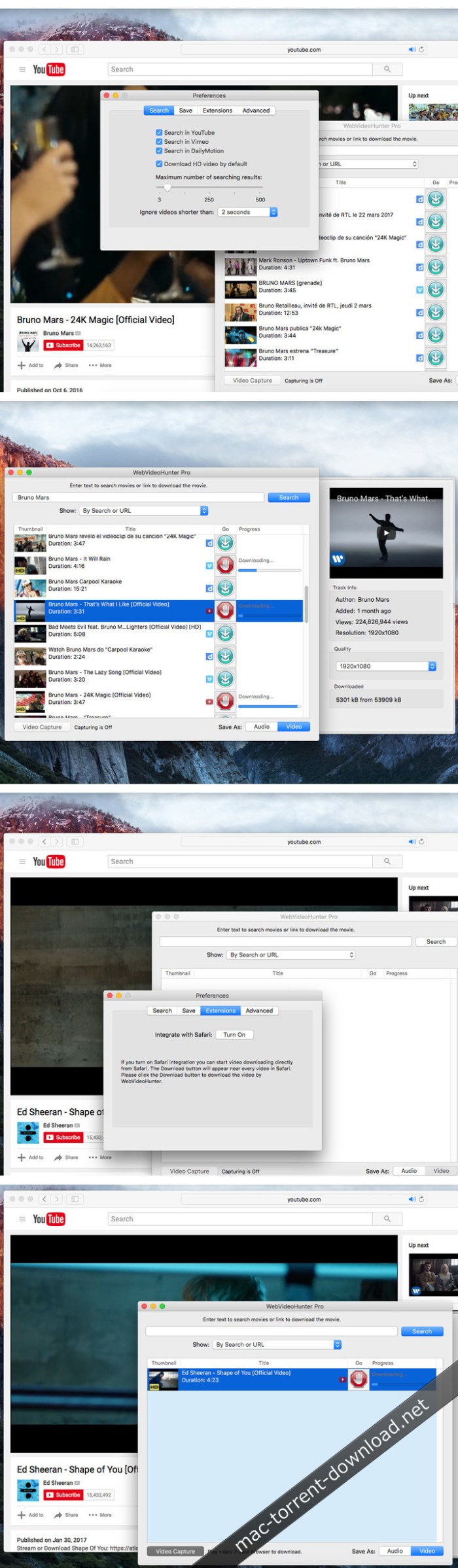
WebVideoHunter (formerly known as YouTubeHunter) is a versatile OS X application that allows you to download videos from popular sites such as Vimeo, YouTube or Dailymotion. Furthermore, with the help of the WebVideoHunter utility you will be able to search for videos, play them, and download them in any quality format.

The Full and Pro versions of WebVideoHunter also support downloading HD videos, and provide other features.

  • Search and download HD video from YouTube
  • Search and download video from Vimeo and others (including HD video)
  • Get video by URL
  • YouTube to iTunes feature

Compatibility: OS X 10.7 or later

Web Site: http://webvideohunter.com/

What’s New in WebVideoHunter Pro 5.9.7

  • Release notes not available at the time of this post.

Screenshots

Mac Data Recovery Guru 6.0

Name Mac Data Recovery Guru 5 0 TNT.zip
Size 5.36 MB
Created on 2018-12-31 01:52:35
Hash f2bdacd7fea6e4152b3e388f8dac3298711b6f55
Files Mac Data Recovery Guru 5 0 TNT.zip (5.36 MB)

Download

Mac Data Recovery Guru 5.0

Mac Data Recovery Guru is the most modern, the most technologically advanced, and the easiest to use Mac data recovery software available. We would not state that if we could not back it up. But back it up we can, and instantly and risk free. Download the Free Demo to be able to quickly see it in action for yourself. This shows you previews of your personally deleted files, proving its effectiveness.

Our Mac Data Recovery results are 100% money-back guaranteed. We stake our reputation on this.

Mac Data Recovery Guru works by employing content-based file scanning. This is a different approach to traditional forms of data recovery which attempt to repair the device in question, which when they go wrong will write over the data you were trying to retrieve in the first place. Our method opens the device in read-only mode, and will search through the entire device for files, or pieces of files, that are present. It reassembles the data it finds into regular files on the fly. Sound complicated? It is, but after years of refinement it appears to the user as a seamless process, and is as easy as browsing through your regular files in the Finder. In fact, it looks almost the same if you look at the screenshots.

Compatibility: OS X 10.8 or later 64-bit

Web Site: http://macosxfilerecovery.com/datarecoveryproducts/data-recovery-guru/

What’s New in Mac Data Recovery Guru 5.0

  • Release notes not available at the time of this post.

Screenshots

Mac DVD Ripper Pro 8.0

Name Mac DVDRipper Pro 8.0.zip
Size 516.8 MB
Created on 2018-12-31 03:03:07
Hash db0010645dd54de76694ce6812cee45120a05fe0
Files Mac DVDRipper Pro 8.0.zip (516.8 MB)

Download

Mac DVD Ripper Pro 8.0 MacOS

Mac DVDRipper Pro is the DVD backup solution that lets you protect your DVDs from scratches, save your batteries by reading your movies from your hard disk, manage your collection with just a few clicks, time-shift your rental, backup your DVD collection, and much more!

Mac DVDRipper Pro allows you to copy all your DVDs on your Mac so you can easily view them without having to spend your battery on spinning your optical drive. It analyzes the DVD and uses intelligent algorithms to ensure proper rips. It is the best at what it does, at an unbeatable price! And when using the disc image mode, you can also burn directly to another DVD from the application.

You can try it for free before buying, Mac DVDRipper Pro will work without any limitations for your first 5 rips.

Compatibility: OS X 10.8 or later
Web Site: https://www.macdvdripperpro.com/

What’s New in Mac DVDRipper Pro 8.0

  • Up to 32 subtitle tracks
  • Automatically includes all subtitles when converting
  • Export to .m4v/.mp4/.mkv
  • Upgraded local OCR
  • And most importantly, METADATA!
  • Requirements for Mac DVDRipper Pro

EOSHD Pro Color V4.0 HDR – For Sony A7 III and A7R III (Win/MacOS)

Name EOSHD Pro Color V4.0 HDR – For Sony A7 III and A7R III.zip
Size 2.82 MB
Created on 2018-12-29 00:14:46
Hash 06c7b67b2c57f826d892ccd89cc53cdbb12d4d48
Files EOSHD Pro Color V4.0 HDR – For Sony A7 III and A7R III.zip (2.82 MB)

Download

EOSHD Pro Color V4.0 HDR – For Sony A7 III and A7R III (Win/MacOS)

Critically acclaimed, EOSHD Pro Color gives you cinematic straight-out-of-camera image quality, improved in all shooting situations.

New for this version is a second profile – Pro Color HDR – which increases dynamic range in the highlights by as much as 2 stops. No grading is required on either profile.

All the previous advantages of EOSHD Pro Color look better than ever on the A7 III thanks to Sony’s new 14bit sensor and full pixel readout.

The image issues fixed by EOSHD Pro Color on previous Sony cameras are still needed on the new models. All features are carried over from before:

  • Skintones, faces and people given a more flattering treatment
  • Reduced colour clipping (prevents luminous blues burning out to neon green)
  • Maximum colour fidelity and dynamic range with EOSHD Pro Color HDR
  • Truer, deeper reds and warm tones
  • Greater separation of green hues for richer looking landscapes
  • Greater separation of blue hues for better skies and deeper cool tones under artificial light
  • Makes the camera better in mixed lighting situations, with better look to both warm AND cool light in one shot
  • Smoother and more filmlike roll off to highlights and shadows
  • Confidence on a shoot you have expertly set colour with no unpleasant surprises
  • Works with 4K and 1080p video
  • Works with JPEG photos

Web Site: https://www.eoshd.com/eoshd-pro-color-hdr-v4-a7-iii-a7r-iii/

Seasonal Splendor PS ACTIONS Collection

Design Assets

Name Seasonal Splendor PS ACTIONS Collection.zip
Size 1.76 MB
Created on 2018-12-29 00:14:14
Hash 23d7cfb76a80b836fdb98d674bece54db0c99a18
Files Seasonal Splendor PS ACTIONS Collection.zip (1.76 MB)

Download

Seasonal Splendor PS ACTIONS Collection

With our “Seasonal Splendor” collection you are able to easily transform your photographs into an Autumn or Wintry scene in just minutes!

Compatibility:
  • Works with English versions of PS and PSE
  • Fully compatible with both PC and Mac
  • Adobe® Photoshop® CS6CC+
  • Adobe® Photoshop® Elements 11+
  • NOTE Our products are designed to be userfriendly as possible, however you will need basic knowledge of Adobe Photoshop to use any of our products.

Web Site: http://www.seasalt-co.com/product/seasonal-splendor-collection/

Screenshots

Design Assets
,

By

Cinematic Film LUTs for Adobe Premiere Pro (Win/MacOS)

Graphics & Design Video

Name Cinematic Film LUTs for Adobe Premiere Pro.zip
Size 842.0 kB
Created on 2018-12-29 00:15:09
Hash e6f29d892da4ebef8ce091b7b40cc1fa3feee3ae
Files Cinematic Film LUTs for Adobe Premiere Pro.zip (842.0 kB)

Download

Cinematic Film LUTs for Adobe Premiere Pro (Win/MacOS)

This Cinematic Film LUT pack includes 15 cinematic film color correction luts . These luts will make your video and photo even brighter and more saturated. You just load the .cube in lumetri and you’re done! No After Effects required. Enjoy!

Graphics & Design, Video

By

ExactScan Pro 18.12.24

Name ExactScan Pro 18 12 24 TNT.zip
Size 20.49 MB
Created on 2018-12-29 21:36:09
Hash 8b3b108deeac28e5417988ea995063d9e7f3d466
Files ExactScan Pro 18 12 24 TNT.zip (20.49 MB)

Download

ExactScan Pro 18.12.24

ExactScan Pro is the professional scan solution for a paperless office on the Mac. ExactScan comes with over 400 drivers for professional document scanners from Avision, Canon DR-series, Fujitsu fi-series, Kodak, Oki, Panasonic, Visioneer and Xerox, which otherwise do not come with a Mac driver.

ExactScan Pro is the professional scan solution for a paperless office on the Mac. ExactScan comes with over 400 drivers for professional document scanners from Avision, Canon DR-series, Fujitsu fi-series, Kodak, Oki, Panasonic, Visioneer and Xerox, which otherwise do not come with a Mac driver. Additionally it allows to use any other scanner with TWAIN or ImageCapture driver.

Scan all your documents for fast retrieval, and get rid of dusty paper archives. Find searchable PDF everywhere with Spotlight in a snap.

  • Over 400 native builtin drivers for professional document scanners from Avision, Canon, Fujitsu, HP, Kodak, Oki, Panasonic, Visioneer and Xerox
  • Support for a variety of third party scanners via ImageCapture and TWAIN drivers
  • Save to PDF, TIFF, JPEG, JPEG 2000, PNG, BMP, PNM
  • Advanced and intelligent image processing algorithms
  • Autocrop & deskew
  • Blank page removal
  • Direct scan to print
  • Profiles to configure scan workflow
  • AppleScript support for professionals
ExactScan Pro additionally includes:
  • OCR to directly create searchable PDF files
  • Content based page deskew
  • Automatic rotation, color and source detection
  • Imprinter to print flexible text into the scanned image
  • Barcode recognition to file stacks by barcodes
  • Batch processing of existing image files
The following languages are supported by the OCR:

Bulgarian, Croatian, Czech, Danish, Dutch, English, Estonian, French, German, Hungarian, Italian, Latvian, Lithuanian, Polish, Portuguese, Rumanian, Russian, Serbian, Slovenian, Spanish, Swedish, Turkish, Ukrainian, and Norwegian.

Compatibility: OS X 10.8 or later 64 bit
Web Site: http://exactscan.com
Mac App Store: https://itunes.apple.com/app/exactscan-pro/id410310670?mt=12

What’s New in ExactScan Pro 18.12.24

  • Release notes not available at the time of this post.

Smultron 11.1.3

Name Smultron 11 1 3 TNT.zip
Size 16.00 MB
Created on 2018-12-30 03:58:30
Hash 7fc1e5c9218e06e4c94382a35cf96f7eeedc3aae
Files Smultron 11 1 3 TNT.zip (16.00 MB)

Download

Smultron 11.1.3

Smultron 10 is an elegant and powerful text editor that is easy to use. You can use Smultron 10 to create or edit any text document. Everything from a web page, a note or a script to any single piece of text or code. Smultron 10 is very easy to use, it is fast and uses powerful technologies like auto save. It helps you to do what you want to do without getting in your way. So you can save time and get things done. Use Smultron 10 for all your text needs..

  • Smultron 10 is designed to be intuitive and easy to use
  • Edit your text with many helpful and powerful tools
  • All your documents are easily accessible
  • Use Smultron 10 in your own language as it is translated into many languages
  • Store your documents in iCloud and access them on all your Macs
  • It has all the features you want when you need them, such as syntax colors for over 130 code languages, regular expressions, commands, text snippets, text folding, line numbers, document comparison and many, many more

The new Smultron 10 has many new features and improvements:

  • Folders – easy access to all documents within a folder
  • Dark mode
  • Faster
  • New syntax support for Ansible, Gravity, Idris, and TypeScript
  • Improved accessibility, preview, tabs, and syntax coloring
  • Optimized for macOS 10.13 High Sierra

Compatibility: macOS 10.12 or later 64-bit

Web Site: https://www.peterborgapps.com/smultron/
Mac App Store: https://itunes.apple.com/app/smultron-10-text-editor/id1263938639?mt=12

What’s New in Smultron 11.1.3

  • Release notes not available at the time of this post.

Lingon X 6.5.4

Name Lingon X 6 5 4 TNT.zip
Size 13.62 MB
Created on 2018-12-30 03:58:49
Hash 73c1e5de02fe97ff42fe75917821d8129672faf7
Files Lingon X 6 5 4 TNT.zip (13.62 MB)

Download

Lingon X 6.5.4

Lingon X 5 is based on the great Lingon 3 and extends it with new features like running jobs as root and at multiple dates. It is now even easier to use yet much more powerful. Version X 5 is a paid upgrade.

Features
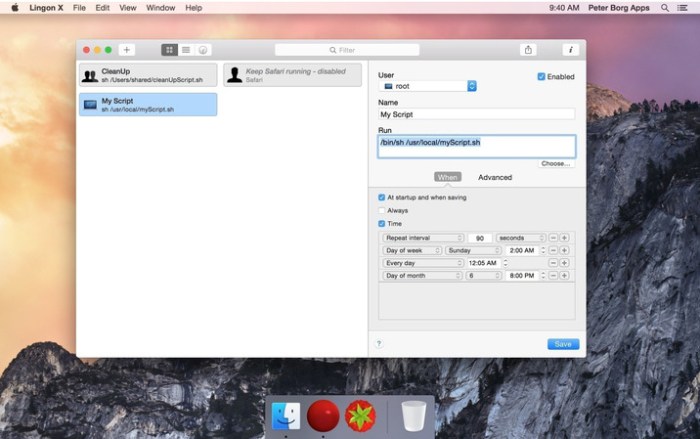
  • Start an app, a script or run a command automatically whenever you want it to. You can schedule it to run at a specific times, regularly or when something special happens.
  • It can also make sure that an app or a script automatically restarts if it crashes. Lingon X can do all this for you and much more.
  • Lets you run things automatically by modifying configuration files for the built-in system function called launchd so the system handles running the jobs so you don’t need to have Lingon open after you have saved your job.
  • Released outside Mac App Store to be able to include requested features.
  • Still available in Mac App Store for those who still use OS X 10.7 Lion or prefer the comfort and convenience of the Mac App Store.
  • Earlier versions of Lingon X are still available to work with macOS from 10.8. And a license bought today can be used with both Lingon X 5 and Lingon X 4.

Compatibility: macOS 10.13 or later 64-bit

Web Site: https://www.peterborgapps.com/lingon/

What’s New in Lingon X 6.5.4

  • Release notes not available at the time of this post.

Screenshots

FlawlessApp 0.9.7

Name FlawlessApp 0 9 7 TNT.zip
Size 17.96 MB
Created on 2018-12-30 03:58:56
Hash 8b1ec257e90513812ca9496d050f2db2e2152b0b
Files FlawlessApp 0 9 7 TNT.zip (17.96 MB)

Download

FlawlessApp 0.9.7

Flawless allows you to make your iOS apps look exactly like the expected design. With real-time comparison of expected and implemented design that is all built into an iOS simulator. We made Flawless for those, who are obsessed with quality of mobile apps.

HOW FLAWLESS APP WORKS

Select Design File

Simply choose a design from the interface, or drag & drop files onto the Flawless App icon in the menu bar. You can select one or multiple designs in different formats: sketch, jpeg, png, tiff or gif.

Choose Comparison Mode

Once a design file has been chosen, it will appear on your iOS simulator. You can use overlay or split comparison mode for spotting any visual differences between expected design and implementation. Flawless App supports comparison of portrait and landscape screens, so you can check pixel by pixel the quality of every design.

Inspect visual bugs in iOS simulator

Flawless App is integrated right inside your iOS simulator as a plugin. It allows to fix visual issues on the fly, before they cost you time and money.

No need to distract your development workflow by adding any third-party library. Flawless App works out of the box, without any additional setup.

Compatibility: macOS 10.11 or later 64-bit

Web Site: https://flawlessapp.io/

What’s New in FlawlessApp 0.9.7

  • Release notes not available at the time of this post.

Position Matte 2.1 Plugin for After Effects

Name Position Matte 2.1 Plugin for After Effects MacOS.zip
Size 226.5 kB
Created on 2018-12-30 03:58:37
Hash 9ffe37077850df89624dedcb13f78fb2452cfc34
Files Position Matte 2.1 Plugin for After Effects MacOS.zip (226.5 kB)

Download

Position Matte 2.1 Plugin for After Effects MacOS

Position Matte is a powerful compositing tool that allows for the simple creation of mattes based on 3D Position Passes. This means more flexibility, less matte passes required and far less roto.

New Features!

  • Use footage, shape layers or precomps as mattes/projections
  • Tiling and offset in layer mode
  • 3D world rotation
  • Full control over rotation order

Position Matte is a powerful compositing tool that allows for the simple creation of mattes based on World Position Passes out of your 3D application of choice. This means more flexibility, less matte passes required and far less rotoing.

In addition there are several modes that are useful for adding extra scene detail in post, such as Grids, Radial Waves and Rays.

Compatible with VideoCopilot’s Element 3D. Just set your “Output” to “World Position” and set it to “Show: Color”.

Web Site: http://aescripts.com/position-matte/

What’s New in Position Matte 2.1

– Updated licensing framework to allow floating licenses

Luminar 3.0.1 (2751)

Photography

Name Luminar 3 3 0 1 2751 TNT.zip
Size 230.4 MB
Created on 2018-12-30 05:47:47
Hash 8023ea29bc9a80125e05dfd00a3ddede6d9e9d6d
Files Luminar 3 3 0 1 2751 TNT.zip (230.4 MB)

Download

Luminar 3.0.1 (2751)

Luminar 2018 is the new full-featured image editor that adapts to the way you edit photos. Over 300 essential tools to fix, edit, and enhance your photos with comfort. The future of photo editing is here.

Features
  • Adaptive Interface Inspires You Do to More – While other photo editors make you adapt to their interface, Luminar adapts to your skill level. There is no need to face dozens of sliders if you simply want to remove an object from an image or apply a preset. But if you do need to perform some serious tasks, you can easily access all the advanced features.
  • Powerful Tools Allow You to Do More – Luminar lets you remove unwanted objects, color casts and digital noise. It helps you retouch skin and reveals the hidden details in your photos. It features layers with blend modes, texture overlays and powerful image masking. Easily edit upper and lower sections of the image without having to make any selections. And so much more!
  • State-of-the-Art Darkroom You Design Yourself – The workspaces in Luminar reveal only the most essential photo filters for a specific type of photo. Enjoy default workspaces and effects for landscape, portrait, street and B-and-W images. Or create your own, based on your preferences.
  • New Approach to Pro Photo Editing – Luminar combines all kinds of pro-level photo effects and tools in one package. It brings layers, luminosity masks, radial and gradient masking, histogram, blend modes, brushes for selective editing, color mixer, split toning and a lot more.
    • Fast Raw file support
    • Dozens of photo filters
    • Presets for instant results
    • Layers
    • Blend modes
    • Custom textures
    • Workspaces
    • Adaptive UI
    • History menu
    • B-and-W photo tools
    • Noise reduction
    • Object removal
    • Face retouching
    • Foliage enhancer
    • Grain engine
    • Polarize filter
    • Crop and Transform
    • Editing brush
    • Luminosity masking
    • Toning
    • Structure
    • Sharpening
    • Bi-Color
    • Fog
    • Gradient and Radial masking
    • Clarity, Detail, Structure
    • Soft Glow and Focus
    • Orton effect
    • Vignette
    • Social sharing
    • And much more

Compatibility: OS X 10.10.5 or later 64bit

Web Site: https://skylum.com/luminar

What’s New in Luminar 3.0.1 (2751)

  • Release notes not available at the time of this post.

Photography
,

By

Related Posts

AKVIS AliveColors 1.2.1629.16414

Name AKVIS AliveColors 1.2.1629.16414 [k].zip Size 385.7 MB Created on 2018-04-14 06:46:25 Hash b696 …

iFoto Denoise 2.5

Name iFoto Denoise v2.5.zip Size 6.50 MB Created on 2017-02-15 22:07:19 Hash ff93529072f7358d1012869 …

RAW Power 1.4.2

Name RAW Power 1 4 2 MAS TNT.zip Size 13.56 MB Created on 2018-08-22 17:04:05 Hash bdbf2cc9ebf7992ea …

PhotoScan Professional 1.1.5

Name PhotoScan Professional 1.1.5 Size 68.63 MB Created on 2015-04-07 00:37:58 Tracker http://109.23 …

Agisoft Photoscan Professional 1.4.2

Name Agisoft Photoscan Professional v1 4 2 MACOSX-AMPED [k].zip Size 118.4 MB Created on 2018-04-25 …

Cyberlink PhotoDirector Ultra 10.0.2302

Name Cyberlink.PhotoDirector.Ultra.v10.0.2302.MacOS.Incl.Keymaker-CORE.zip
Size 434.0 MB
Created on 2018-12-30 03:59:13
Hash 2cea133bd62f0d380bf8b9a162f23b33c2b52b37
Files Cyberlink.PhotoDirector.Ultra.v10.0.2302.MacOS.Incl.Keymaker-CORE.zip (434.0 MB)

Download

Cyberlink PhotoDirector Ultra 10.0.2302 macOS

When it comes to making unforgettable photos that stand apart from the others, nothing beats PhotoDirector. Discover how millions of PhotoDirector fans are turning the ordinary into extraordinary!

Express Template Packs (NEW!)

Express Layer Packs contain all the layer components that make up complex images. They’re not only an easy way to put together stunning images, but also help to show how layers combine to produce photographic effects.

Creativity Powered by AI (NEW!)

We’ve trained our AI Style Engine to analyze images in detail and identify different aspects of each shot. It then intelligently applies brushstrokes that make your shots look like they were designed and painted by a master artist.

One-click Photo Presets

Create impressive photos with creative presets including HDR, black & white and split tone as well as presets designed specifically for portraits & landscapes.

One-click Keystone Correction (NEW!)

Intelligently fix image perspective to make objects appear flat on the horizon.

Incredible Multi-exposure Shots

Easily extract a series of photos from a video clip and turn them into incredibly creative multi-exposure images with just a single click.
Create amazing motion stills and cinemagraphs from videos. A moving scene frozen in time.

Vibrant Motion Stills™ (UNIQUE!)

Brush over sections of a video clip to retain movement in that area only. Other parts of your photo will appear frozen in time.
Take perfect group shots every time using video.

Video-to-Photo Face Swap (UNIQUE!)

Instantly create perfect group photos from video clips. Ensure everyone is smiling, and all eyes are open!

360˚ Little Planets

Turn your photos into a world of their own in just a few quick clicks with the new Little Planet feature.

Panoramas from 360º Shots

Creating panorama images has never been easier. With a 360º image and PhotoDirector, you will create artistic panoramic shots in no time.

Straighten 360º Photos (UNIQUE!)

Ensure that your 360º photos are picture perfect. Straighten them so that to remove distortions on the horizon for perfect shots every time.

Face & People Beautification

The broad collection of easy-to-use touch-up tools in the new PhotoDirector make it easy to professionally remove imperfections from your portraits, selfies, and group shots.

Sharper Images. Better Clarity.

Strip away haze, fog and smog to reveal crisp, clear landscapes with the intuitive Dehaze slider.

Tethered Shooting (NEW!)

Tethered shooting enables you to get the perfect photo in fewer attempts. Each shot you take is instantly ready to view on your monitor so that you can quickly identify & fix problems with focus, lighting or composition.

Soft Proofing (NEW!)

With soft proofing, you’re able to save even more time allowing you to view a simulated printer output on your monitor with gamut warning. Foresee and correct any issues that may arise when you print your work.

Advanced Layer Editing (ENHANCED!)

Layer editing provides the flexibility to create unique image compositions by combining images, texts and graphics. Using a combination of blending modes and masks, your creative possibilities are virtually endless.

  • Creative Blending Modes
  • Apply Clipping Mask (NEW!)
  • Use Adjustment Layers (NEW!)
  • Group Layers (NEW!)
  • Layer Mask (NEW!)
  • Advanced Text Editing in Layers (NEW!)

Web Site: https://www.cyberlink.com

What’s New in Cyberlink PhotoDirector Ultra 10.0.2302

  • Release notes not available at the time of this post.

FruitJuice 2.3.5

Name FruitJuice 2 3 5 MAS TNT.zip
Size 6.84 MB
Created on 2018-12-29 21:36:17
Hash decc2aad20d4c59dfc6afc80a98092533a147095
Files FruitJuice 2 3 5 MAS TNT.zip (6.84 MB)

Download

FruitJuice 2.3.5

FruitJuice helps you achieve the longest runtime and lifespan from your Apple notebook battery.

FruitJuice will let you know how long to stay “on battery” each day to keep your battery healthy based on Apple’s recommendations. *

FruitJuice keeps a detailed record of your battery charge and discharge activity so that it can make precise recommendations about how long to use your machine on battery based on Apple’s recommended usage patterns.

Recommendations are tailored to your specific usage patterns and are adjusted in real-time based on how you actually use your machine.

Flexible configuration allows you to see as much or as little information as you wish.

Notifications will let you know when to plug in or unplug your machine to keep your battery healthy and avoid the surprise of “You are now running on reserve battery power.”

FruitJuice also will show you a realistic assessment of the overall condition of your battery: it combines the battery condition, age, factory capacity and lifespan numbers to give you real-time insight into the health of your battery.

* see Apple’s Battery page (http://www.apple.com/batteries/notebooks.html)

Web Site: http://fruitjuiceapp.com
Mac App Store: https://itunes.apple.com/app/fruitjuice-active-battery/id671736912?mt=12

What’s New in FruitJuice 2.3.5

– Bug Fixes
– Support for both light and dark appearances in Mojave

Pixelmator Pro 1.2.1

Name Pixelmator Pro 1 2 1 MAS TNT.zip
Size 173.0 MB
Created on 2018-12-29 21:36:30
Hash 71f5909dbd7cf455bb53b870a26564404b0a8dc7
Files Pixelmator Pro 1 2 1 MAS TNT.zip (173.0 MB)

Download

Pixelmator Pro 1.2.1 MAS + iCloud

Pixelmator Pro is an incredibly powerful, beautiful, and easy to use image editor designed exclusively for Mac.

With a wide range of professional-grade, nondestructive image editing tools, Pixelmator Pro lets you bring out the best in your photos, create gorgeous compositions and designs, draw, paint, apply stunning effects, design beautiful text, and edit images in just about any way you can imagine. And thanks to its intuitive and accessible design, Pixelmator Pro is delightfully easy to use — whether you’re just starting out with image editing or you’re a seasoned pro.

New Interface
  • The modern, singlewindow interface is designed exclusively for working with images on a Mac
  • An intuitive and accessible design makes it easy for anyone to edit images — from complete beginners to design professionals
Professional Tools
  • Enhance your existing images and create new ones using every image editing tool you could ever need
  • Edit nondestructively, adjusting individual changes whenever you like
  • Easily move, resize, and arrange objects to create stunning compositions
  • Adjust the colors in images with a collection of nondestructive color adjustments
  • Enjoy superior support for RAW files, editing RAW images right inside Pixelmator Pro without having to preprocess them
  • Create digital or traditional paintings using a collection of handcrafted, fullycustomizable, dualtexture brushes with full support for digital graphics tablets
  • Combine the builtin effects in Pixelmator Pro to create any artistic or special effects you can imagine
  • Nondestructively customize the look of layers in your image using layer styles
  • Save the adjustment, effect, and layer style combinations your create, use them in any of your images, and share them with others
  • Magically remove small imperfections or entire objects, seamlessly clone parts of your photos, lighten or darken precise areas, and more using a full set of retouching tools
  • Use the reshaping tools to easily change the shape of any object or area in your images, create striking artistic effects or make subtle changes to portrait photos
  • Pick out and edit precise parts of your images or copy objects from one image to another using a range of pixelaccurate selection tools
  • Add highquality, customizable vector graphics designed by the Pixelmator Team
  • Create your own vector graphics using the Pen and Freeform Pen tools
  • Easily design greatlooking text with a full set of typography tools
Image Editing Enhanced by Machine Learning
  • Automatically give descriptive names to the layers you add
  • Intelligently straighten images using horizon detection
  • Magically remove objects, recreating image areas with stunning realism
  • Quickly make accurate selections with ease
Compatibility
  • Open and edit images in all the most popular image formats, including JPEG, TIFF, PNG, PSD, PDF, GIF, BMP, TGA, JPG2000
  • Open and edit Photoshop images with layers
  • Import HEIF images
  • Launch Pixelmator Pro directly from the Photos app and save edits back to the original image in your library
  • Share your images to the Photos app, Twitter, Facebook, Flickr, and other locations right from Pixelmator Pro
Built Exclusively for Mac

Designed exclusively for macOS, Pixelmator Pro supports almost every major macOS feature and integrates seamlessly with macOS High Sierra. Simply put, it’s the ultimate Mac app. With a design that is totally and completely Mac, Pixelmator Pro feels instantly familiar from the moment you first launch the app.

Minimum System Requirements

Pixelmator Pro requires a Mac compatible with Metal 2 running macOS 10.13 High Sierra.

Compatibility: macOS 10.13 or later 64 bit

Web Site: http://www.pixelmator.com/pro/
Mac App Store: https://itunes.apple.com/app/pixelmator-pro/id1289583905?mt=12

What’s New in Pixelmator Pro 1.2.1

Pixelmator Pro 1.2 Quicksilver adds full support for macOS Mojave, includes a gorgeous new light appearance, Core ML-powered automatic photo enhancement, batch processing via Automator, and more.

New Features
• Pixelmator Pro is now fully compatible with macOS Mojave.
• A gorgeous new light appearance lets you experience Pixelmator Pro in a whole new way — change appearance any time in Pixelmator Pro preferences.
• Use ML Enhance to automatically improve the look of any photo using a machine learning algorithm trained on millions of professional photos.
• Batch process images using five powerful Pixelmator Pro actions in the Automator app — Apply Color Adjustments to Images, Apply Effects to Images, Auto Enhance Images, Auto White Balance Images, and Change Type of Images.
• Create even richer, more vibrant graphics and designs with colorful SVG fonts — the Gilbert Color font is included with this update.
• Thanks to support for the Continuity Camera, you can now take pictures using your iPhone and have them instantly appear in the Pixelmator Pro document you’re editing.

Improvements

• The Pixelmator Pro interface has been refined to more closely match the look of macOS in both light and dark mode.
• Accent color support means the buttons and sliders in Pixelmator Pro will now match your preferences.
• You can now change the color of the Pixelmator Pro window background in Pixelmator Pro preferences.
• The Pixel Paint tool now has an Eraser Mode.

Fixes
• After hiding and showing the Pixelmator Pro Tool Options pane, certain buttons would not be updated when using the Arrange tool. Fixed,
• When scrolling inside the brush size text field to resize the retouching and distort tools, the ratio between the brush size and scroll speed was incorrect. Fixed.
• When opening images with no PPI information, the PPI will now be set at 72 by default, rather than 150.
• Closing a document while using the Quick Selection tool would occasionally cause Pixelmator Pro to quit unexpectedly. Fixed.
• The Color Selection tool was not working correctly in all images. Fixed.

Mirror for Sony TV 3.4

Name Mirror for Sony TV 3 4 TNT.zip
Size 15.18 MB
Created on 2018-12-29 03:39:38
Hash 4c405ec9bbe5f27a877814065446b46f0430eb3b
Files Mirror for Sony TV 3 4 TNT.zip (15.18 MB)

Download

Mirror for Sony TV 3.4

Application to mirror the screen of your Mac to any Sony Bravia Smart TV. No wires and no additional hardware needed! You can also stream individual video files from your Mac to your TV. Also, we included the option to watch one window on your Mac, and another window on your TV!

This works on any Sony Smart TV from the 2012 models onwards.

In using the app, there will be about 1 to 2 seconds of latency. So this mirroring is not suitable for gaming.

However, it is very suitable for watching movies, giving presentations, watching photos, and much more!

The quality of your experience will be dependent on the quality of your local network.

Some tips to enhance the experience:
  • Preferably, connect your TV by LAN cable to your router.
  • Use an “ac” router. If you don’t have one, then an “n” router.
  • Try not to overload your wifi network by moving big files around while you are mirroring.
How the app works:

First, make sure that your Sony TV is on the same local network and same subnet as your Mac. The TV should not be in screen mirroring mode, but just on “TV” Mode or any HDMI IN port.

After launching the app, you will see the app icon appearing in the top bar of your Mac and the app will look for your TV on the network. It will show your TV when it has found it. Now, you have two options:

Mirror your Mac Screen:

Use this option to put the screen of your Mac on TV. In source, you can select which screen (or attached monitor) you want to display on TV. If you are running multiple applications on your Mac, you can also select which application window you want to see on TV.

Enable Sound:

Check this to hear the sound of your Mac coming from the TV. You will need the additional (free) audio driver, which you can download here: http://bit.ly/MirrorAudio

Play Video File:

Use this option if you have a video file on your Mac and you want to play just the file on TV. Drop it in the box and it will play on TV.

Settings (the icon in the bottom right of the app):

click here to request support from our 24/7 support staff. They usually respond within 2 hours on any query that you might have. If your question is technical, please also include the diagnostics information.

Limitations:

Apple has HDCP DRM protection for playing iTunes movies. This means that screen mirroring is not possible when watching movies from iTunes.

When you like the app, please don’t forget to give it a positive rating! Thanks in advance from the AirBeamTV development team!

Please give us feedback by mailing to info@airbeam.tv

Compatibility: OS X 10.10 or later 64-bit

Web Site: https://www.airbeam.tv/mirror-your-mac-screen/sony/
Mac App Store: https://itunes.apple.com/app/mirror-for-sony-tv/id1173947380?mt=12

What’s New in Mirror for Sony TV 3.4

This is an important update of the app. We managed to reduce the latency (the delay between your Mac screen and your TV) significantly! Please give it a try. If your Sony TV is running the Android TV operating system, there is also a Android TV app on the Google Play Store that you can install on your Sony TV for even better performance, check it here: http://bit.ly/gpsmirror

Movavi Screen Capture Pro 10.0.2

Utilities Video

Name Movavi Screen Capture Pro 10 0 2 TNT.zip
Size 86.58 MB
Created on 2018-12-29 03:18:40
Hash 7eb9917243edbcf06d01e71149ad9845ae97ed27
Files Movavi Screen Capture Pro 10 0 2 TNT.zip (86.58 MB)

Download

Movavi Screen Capture Pro 10.0.2

With Movavi Screen Capture Studio for Mac, you can easily record your computer screen and create video tutorials with voiceovers, software presentations, or content for your video blog. The built-in video editor lets you polish your recordings with stylish filters, titles, background music, and more. Screen Capture Studio for Mac has everything you need to make professional-looking screencasts.

Record video
  • Select the capture area on the screen
  • Plug your microphone in to record your voice
  • Adjust the volume level, frame rate, and other parameters
Edit the recording
  • Remove unwanted footage
  • Add titles and music
  • Experiment with filters and effects
Save the result
  • Choose MP4, MOV, AVI, or other popular format
  • Prepare video for playing on mobile devices or sharing online
  • Save your recording in no time with SuperSpeed mode

Compatibility: OS X 10.7 or later 64-bit
Web Site: https://www.movavi.com/mac-screen-capture/

What’s New in Movavi Screen Capture Pro 10.0.2

  • Release notes not available at the time of this post.

Screenshots

Movavi Video Editor 5 Business 5.1.2

Name Movavi Video Editor 5 Business 5.1.2 Size 84.36 MB Created on 2018-05-30 01:45:36 Hash 986cf5e1 …

Carbon Copy Cloner 5.1.7

Name Carbon Copy Cloner 5 1 7 5627.zip
Size 27.30 MB
Created on 2018-12-29 03:18:20
Hash 324d5bf07c17ef18f100152c9df06bf8613a5211
Files Carbon Copy Cloner 5 1 7 5627.zip (27.30 MB)

Download

Carbon Copy Cloner 5.1.7 macOS

Introducing Carbon Copy Cloner 5: The smarter, easier CCC. The first bootable backup solution for the Mac is better than ever. When disaster strikes your hard disk, you can boot from your backup and keep working. Troubleshoot the problem disk when you have time to spare.

Bootable Backups

When disaster strikes your hard disk, you can boot from your backup and keep working. Troubleshoot the problem disk when you have time to spare.

Smart Updates

Update only the files that have been added or modified.

Guided Setup

CCC can walk you through the setup process.

Backups Anywhere

Create a backup on your external drive, or back up your files to a networked drive.

Carbon Copy Cloner 5 Features:

  • Bootable backups
  • Run backups automatically on a schedule even if you’re not logged in
  • Clone Recovery HD
  • Guided setup
  • Guided restore
  • Smart updates back up only new or changed files
  • Menubar application
  • SafetyNet archive of changed and deleted items
  • Back up to locally attached volumes, network volumes, or another Mac
  • Backup notifications via Notification Center or email
  • Cloning coach with timely troubleshooting advice
  • Task sorting by name, last status, last run, next run or manually
  • Import and export tasks
  • Backup task collision detection
  • Restrict backup tasks to weekdays or weekends, or when connected to a power source
  • Onetime task scheduling schedule tasks to run once in the future
  • Hourly runtime limits restrict backup tasks to certain times of day
  • Chain individual backup tasks
  • Organize backup tasks into groups
  • Schedule and run task groups
  • Task outlook for task groups
  • Task history
  • Task history trend charts task performance and amount of data copied
  • Custom task filters control exactly what is included in your backup
  • Expanded and improved task filter interface
  • Import and export task filters
  • Preview total data to be copied
  • Automatic update checking without launching CCC application
  • Pre and postflight scripts
  • Command line application
  • Compatible with Mountain Lion (10.8) and Mavericks (10.9)
  • Qualified for Yosemite (10.10) through High Sierra (10.13)
  • Designed for APFS and High Sierra (10.13)

Requirements: Yosemite (10.10), El Capitan (10.11), Sierra (10.12), or High Sierra (10.13).

Web Site: http://www.bombich.com/

What’s New in Carbon Copy Cloner 5.1.7

  • CCC will now proactively warn about configurations specific to T2 Macs that will produce nonbootable results, and configurations that will lead to problems with enabling encryption or modifying Startup Security settings.
  • Addressed an issue in which a Mojaverunning remote Macintosh would fail (inconsistently) to correctly validate the code signature of CCC’s file copier, thus causing backups to the remote Mac to fail.
  • Apple cache files that have been found to degrade task performance are now excluded from backup tasks by default.
  • CCC can now distinguish between a volume that is encrypted vs. a volume that has FileVault enabled. This is a subtle difference that is only apparent on T2based Macs. CCC will no longer ask for a password for encrypted volumes that are not FileVault protected.
  • The “Shut down if previously off” setting is now allowed on a nonscheduled task as long as that task is part of a scheduled group.
  • Improved compatibility with VeraCrypt volumes.

Screenshots

BBEdit 12.5.2 [Working]

 BBEdit 12.5.2 [Working] download for mac)

Name BBEdit 12.5.2.zip
Size 28.22 MB
Created on 2018-12-29 03:39:31
Hash 2c3ba9e4fb9ca5519c281f4d4b819176dbfc4a29
Files BBEdit 12.5.2.zip (28.22 MB)

Download

BBEdit 12.5.2 [Working]

BBEdit is the leading professional HTML and text editor for the Macintosh. Specifically crafted in response to the needs of Web authors and software developers, this award-winning product provides an abundance of high-performance features for editing, searching, and manipulation of text.

With BBEdit, you can…
  • Exercise Total Control Over Text
  • Work YOUR Way
  • Command Files, Folders, Disks, and Servers
  • Enjoy Textual Omnipotence
  • Live Up To Standards
  • Integrate Smoothly Into Existing Workflows
What’s new in BBEdit 12?
  • Improved darktheme support When using a dark color scheme, BBEdit now colors editing and project window chrome to match, for a more integrated overall appearance. (For customers used to the old behavior, this can be set in the “Appearance” preferences.) For customers who have never before used BBEdit or TextWrangler, the “BBEdit Dark” color scheme is now the factory default; this can be changed if desired in the “Text Colors” preferences.
  • Improved platform behavior Thanks to extensive internal overhaul, BBEdit now supports intrinsic OS behaviors such as Split View (and many others).
  • Improved UI for FTP/SFTP Browsers, Text Factory, and Preview windows many nonediting windows have been overhauled for improved appearance and behavior, and to add features.
  • New “Canonize” tool Provides a textbased model for batch search and replace, either within a single file or (by using a Text Factory) in multiple files.
  • New “Columns” Editing Commands Easily cut, copy, delete, or rearrange columns in delimited (CSV, TSV) text files without requiring a spreadsheet or complicated regular expressions.
  • FTP/SFTP browsers now feature an outline view for improved navigation
  • Text Factory windows now provide the ability to turn individual steps on and off
  • Preview in BBEdit windows now provide runtime introspection of previewed pages using the WebKit Inspector
  • Text Extraction This powerful addition to BBEdit’s legendary searching capabilities allows you to locate and collect search results into a single text document. Extraction can be run on the active text document, or across multiple files and folders. Use of Grep replacement patterns during extraction enables transformations to the extracted text.
  • Extensive Internal Modernization Many internal subsystems have been rewritten or updated to support new features, improve performance, add refinement, and make future enhancements possible

Requires macOS 10.6 or later

Web Site: http://www.barebones.com/products/

What’s New in BBEdit 12.5.2 [Working]

  • Release notes not available at the time of this post.

Screenshots

Wondershare Filmora 9.0.4.2

Name Wondershare Filmora9 9 0 4 2 TNT.zip
Size 278.8 MB
Created on 2018-12-28 20:53:12
Hash b9b8353344a74608eef242963c632dd0d5fd8211
Files Wondershare Filmora9 9 0 4 2 TNT.zip (278.8 MB)

Download

Wondershare Filmora 9.0.4.2

Filmora scrn is an easy-to-use screen recorder that is perfect for recording games, or anything else you want to capture. Much more than a simple screen capture program, Filmora scrn includes a a video editing suite tailored for screen recordings. You can cut, rotate, and crop your clips. You can also add annotation and custom cursor effects. Videos created with Filmora scrn can be exported as MP4s, MOVs, or GIFs.

Features

Changeable Cursor

Adjust the size, shape and color of your cursor to make it stand out.

Full Editing Suite

Edit your clips quickly and easily with a wide range of professional tools.

2 Devices

Record from your computer and webcam simultaneously.

Import Over 50 File Formats

Import images, videos, music, and other media files.

FPS (15-120)

Perfect for recording fast-paced games. (Up to 60 fps for Mac)

Export To MP4, MOV, GIF

Export to mutliple formats

PIP (Picture In Picture)

Add a second image or video to your main footage, like a facecam for gaming.

Custom Recording Field

Choose to record all, or just part of, your computer screen.

Annotations

Add text and other elements to enhance the learning experience for your viewers.
Tutorial Features

Draw circles and arrows on your screen to help direct attention.

System Requirements:

  • OS X 10.10(Yosemite), OS X 10.11(El Capitan), macOS 10.12(Sierra), macOS 10.13 (High Sierra)
  • CPU: 2GHz or above Intel processor
  • Memory: At least 4GB physical RAM (8GB required for HD and 4K videos)
  • Disk: At least 2GB free harddisk space for installation (SSDSolid State Disk recommended for editing HD and 4K videos)

Web Site: http://www.wondershare.com/

What’s New in Wondershare Filmora 9.0.4.2

  • Release notes not available at the time of this post.

Microsoft Outlook 2016 VL v16.16.5

Name OU16165.zip
Size 911.0 MB
Created on 2018-12-28 08:01:51
Hash 2e37ef4c84d2b5f0e05b82fed8a4fef62a866665
Files OU16165.zip (911.0 MB)

Download

Microsoft Outlook 2016 VL v16.16.5 macOS

Stay organized with an email and calendar experience that’s fast and looks great. Managing your email, calendar, contacts, and tasks has never been easier. The new Outlook for Mac has push mail support so your inbox is always up to date.

The improved conversation view automatically organizes your inbox around threaded conversations, so you’ll never hunt for related messages again. And the new message preview gives you the first sentence of an email just below the subject line, so you can quickly decide if you want to read it now or come back later.

Outlook features

  • Easy navigation between the five main Outlook elements: Mail, Calendar, People, Tasks, and Notes.
  • Push Mail support ensures that your inbox is always up to date.
  • Move messages from your inbox to an Online Archive on the server to make space in your mailbox. An online archive folder in the navigation pane provides access to your archived messages when you need them.
  • Propose New Time. When you receive a meeting request for a time that is not preferable, you can propose a new meeting time. The meeting organizer can easily accept or decline your proposal.
  • Side by Side Calendar. See multiple calendars in parallel.
  • Weather Forecast in Calendar. Will it be sunny or rainy? No need to look up your local weather forecast because Outlook shows the weather info right in the Calendar view.
  • Category Sync. Categories, including their names and colors, are now synced and the same in Outlook for Mac, Outlook for Windows, and the Outlook Web App.
Languages:

English, Arabic, Simplified Chinese, Traditional Chinese, Czech, Danish, Dutch, Finnish,French, German, Greek, Hebrew, Hungarian, Indonesian, Italian, Japanese, Korean,Norwegian, Polish, Portuguese, Russian, Slovak, Spanish, Swedish, Thai, Turkish

Compatibility: OS X 10.10 or later

Web Site: https://products.office.com/en-us/outlook/email-and-calendar-software-microsoft-outlook

What’s New in Microsoft Outlook 2016 VL v16.16.5

  • Release notes not available at the time of this post.

Screenshots

Microsoft Powerpoint 2016 VL 16.16.5

Name PP16165.zip
Size 750.6 MB
Created on 2018-12-28 07:46:46
Hash b475cee5055116352742f4af82184fa854380d1f
Files PP16165.zip (750.6 MB)

Download

Microsoft Powerpoint 2016 VL 16.16.5 macOS

Harness your thoughts in your very own digital notebook. Capture, organize, and share your ideas with digital notebooks that you can access on any device. Find things quickly with a powerful search engine that tracks your tags, indexes your typed notes, and recognizes text in images and handwritten notes. Bold, italicize, underline, highlight, insert files, pictures and tables—format your notes like you want. Easily share notebooks with friends, family, or colleagues so everyone can work together on travel plans, household tasks, or work projects.

PowerPoint features

  • Threaded comments enable you to have useful conversations right next to relevant text.

  • Change the style of your presentation using theme variants, different color schemes for a theme.
  • Presenter View gives you the tools to present with confidence, displaying the current slide, next slide, speaker notes, and a timer on your Mac, while projecting only the presentation to your audience on the big screen.
  • The Animation pane helps you design and finetune animations.
  • Coauthoring enables several people to work simultaneously in the same PowerPoint presentation.
  • The Conflict Resolution view lets you visually compare conflicting changes, so you can easily decide what version to keep.
Languages:

English, Arabic, Simplified Chinese, Traditional Chinese, Czech, Danish, Dutch, Finnish, French, German, Greek, Hebrew, Hungarian, Indonesian, Italian, Japanese, Korean, Norwegian, Polish, Portuguese, Russian, Slovak, Spanish, Swedish, Thai, Turkish

Compatibility: OS X 10.10 or later

Web Site: Web Site: https://products.office.com/en-us/powerpoint

What’s New in Microsoft Powerpoint 2016 VL 16.16.5

  • Release notes not available at the time of this post.

Screenshots

Microsoft Excel 2016 VL 16.16.5

Name EX16165.zip
Size 818.1 MB
Created on 2018-12-28 07:46:15
Hash d1476d70afae5926ee7a6b3497a4e93556133a7a
Files EX16165.zip (818.1 MB)

Download

Microsoft Excel 2016 VL 16.16.5 macOS

Analyze and visualize numbers in new and intuitive ways. The new Excel for Mac enables you to turn numbers into insights. Familiar keyboard shortcuts and data entry enhancements like formula builder and autocomplete immediately make you more productive.
Excel also helps you visualize your data by recommending charts best suited for your numbers, and letting you quickly preview the different options. New PivotTable Slicers help you discover patterns in large volumes of data.

Excel features

  • Recommended charts. Choose the best chart that Excel recommends for your data.
  • PivotTable Slicers help you discover patterns in large volumes of data.
  • Use the Analysis Toolpak addon to perform complex statistical or engineering analyses.
  • The Formula Builder pane helps you create formulas that enable you to tap into the full power of Excel’s formulas.
  • Most Excel 2013 for Windows functions are supported for easier file sharing between Mac and PC.
  • Print Improvements, including the ability to print to a single PDF file.
  • Familiar keyboard shortcuts of Excel for Windows are now also available on Mac.

Languages:

English, Arabic, Simplified Chinese, Traditional Chinese, Czech, Danish, Dutch, Finnish, French, German, Greek, Hebrew, Hungarian, Indonesian, Italian, Japanese, Korean, Norwegian, Polish, Portuguese, Russian, Slovak, Spanish, Swedish, Thai, Turkish

Compatibility: OS X 10.10 or later

Web Site: https://products.office.com/en-US/excel

What’s New in Microsoft Excel 2016 VL 16.16.5

  • Release notes not available at the time of this post.

Screenshots