Category Archives: Mac os

AudFree Spotify Music Converter 1.2.1

Name AudFree Spotify Music Converter 1 2 1 TNT.zip
Size 6.37 MB
Created on 2019-01-07 10:27:38
Hash 6faa1367d2f5cee249db1742d72777d970f384e5
Files AudFree Spotify Music Converter 1 2 1 TNT.zip (6.37 MB)

Download

AudFree Spotify Music Converter 1.2.1

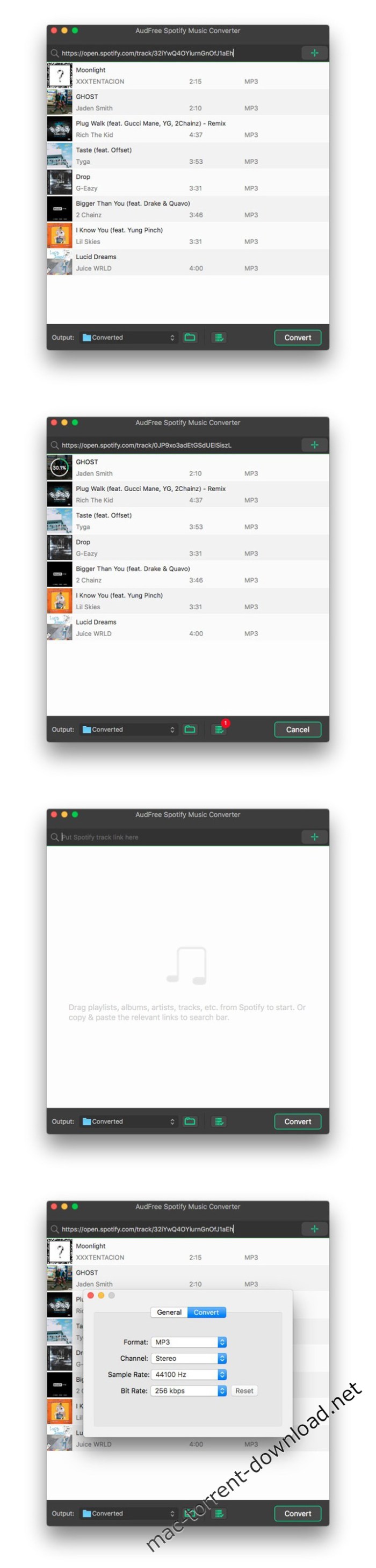
AudFree Spotify Music Converter can help both free and premium subscribers to easily download and convert any track, album, playlist and artist from Spotify to common audio formats so that you can play the Spotify music offline on any popular device without limit. It works at 5X faster speed while keeping the original ID3 tags and metadata info in downloaded Spotify songs.

Compatibility: OS X 10.8 or later 64-bit

Web Site: https://www.audfree.com/spotify-music-converter-mac/

What’s New in AudFree Spotify Music Converter 1.2.1

Screenshots

audfree_spotify_music_converter_100238

Boxy SVG 3.22.6

Name Boxy SVG 3 22 6 MAS TNT.zip
Size 60.01 MB
Created on 2019-01-08 01:01:43
Hash 7f82cfb01b61cabeab00e5907a72ab1e5019a474
Files Boxy SVG 3 22 6 MAS TNT.zip (60.01 MB)

Download

Boxy SVG 3.22.6

SCALABLE VECTOR GRAPHICS (SVG) EDITOR

SVG is the standard format for storing vector graphics such as icons, banners, charts and illustrations.

Boxy SVG project goal is to create the best SVG editor for non-technical users as well as for professional designers and developers.

CORE FEATURES

  • Clean and intuitive UI heavily inspired by Inkscape, Sketch and Adobe Illustrator
  • Extensive support for oncanvas editing of object geometry, transform, paint and other properties
  • Save to SVG and SVGZ formats, export to PNG, JPG, WebP, PDF and HTML5
  • Open Clip Art Library integration with thousands of free stock vector arts
  • Google Fonts integration with hundreds of free fonts
  • Configurable keyboard shortcuts for over 100 commands
  • Manual guides, smart guides and grid
  • Path operations (unite, intersect, subtract, exclude, close, reverse, etc.)
  • Arrangement operations (align to, rotate, flip, order, group, etc.)

FOR WEB DEVELOPERS

  • Chromiumbased rendering engine
  • SVG and CSS code inspector similar to Chrome Dev Tools
  • Clean SVG output that preserves IDs, classes, titles and other metadata
  • SVG sprites editing support

Compatibility: OS X 10.9 or later 64-bit

Web Site: https://boxy-svg.com
Mac App Store: https://itunes.apple.com/app/boxy-svg/id611658502?mt=12

What’s New in Boxy SVG 3.22.6

– Bugfix: Gradient controls are not rendered correctly if “stop-color” presentation attribute is used (reported by Dallas)
– Bugfix: Color picker sometimes makes the app unresponsive (reported by Sebastian)
– Bugfix: “File -> Open recent” menu is missing

FruitJuice 2.4

Name FruitJuice 2 4 MAS TNT.zip
Size 6.48 MB
Created on 2019-01-08 01:01:27
Hash 8406c1d917a185216cebc457ba0adf2431f94a80
Files FruitJuice 2 4 MAS TNT.zip (6.48 MB)

Download

FruitJuice 2.4

FruitJuice helps you achieve the longest runtime and lifespan from your Apple notebook battery.

FruitJuice will let you know how long to stay “on battery” each day to keep your battery healthy based on Apple’s recommendations. *

FruitJuice keeps a detailed record of your battery charge and discharge activity so that it can make precise recommendations about how long to use your machine on battery based on Apple’s recommended usage patterns.

Recommendations are tailored to your specific usage patterns and are adjusted in real-time based on how you actually use your machine.

Flexible configuration allows you to see as much or as little information as you wish.

Notifications will let you know when to plug in or unplug your machine to keep your battery healthy and avoid the surprise of “You are now running on reserve battery power.”

FruitJuice also will show you a realistic assessment of the overall condition of your battery: it combines the battery condition, age, factory capacity and lifespan numbers to give you real-time insight into the health of your battery.

* see Apple’s Battery page (http://www.apple.com/batteries/notebooks.html)

Web Site: http://fruitjuiceapp.com
Mac App Store: https://itunes.apple.com/app/fruitjuice-active-battery/id671736912?mt=12

What’s New in FruitJuice 2.4

– NEW: Added new “Factory Capacity History” graph which allows you to track the history of the factory capacity percentage and charge cycle changes.
– Fix an issue introduced in the Mojave update where the Power History graph would not honor the number of days setting.
– Remove divider lines from the status menu item tooltip.

Dropzone 3.7.0

Name Dropzone 3 3 7 0 TNT.zip
Size 28.61 MB
Created on 2019-01-08 01:01:34
Hash e6199dd7d4cc2b3bc716f5b710232b08a3ea2960
Files Dropzone 3 3 7 0 TNT.zip (28.61 MB)

Download

Dropzone 3.7.0

Dropzone makes it faster and easier to copy and move files, open applications and share files with many different services.

Dropzone 3 is a unique and amazing app that’s like nothing you’ve ever used before.
We’ve paid fanatical attention to every detail and built an app that looks and feels like an integral part of OS X.

Dropzone ships with a powerful scripting API and with a little programming knowledge you can modify any of your actions or even create entirely new ones. This gives Dropzone unlimited extendability and utility. We’re always thinking up new actions so Dropzone will become even more useful over time.

Drop Bar is a brand new feature in Dropzone 3 that makes it easy to stash files you know you’ll need later. Just drop files on the target and they stick there until you’re ready to use them. You can even combine groups of files into stacks and then drop them onto a Dropzone action or onto another app.

Setup your customizable grid of actions how you want and swap in different actions as your needs change.

Features
  • Open applications, move and copy files faster than ever before.
  • Share with Twitter, Flickr, Facebook or Messages
  • Shorten URLs quickly using the newly added Goo.gl shortener. Just select a URL to shorten and press Ctrl+Option+Cmd+S and the shortened URL is automatically copied to the clipboard.
  • AirDrop integration lets you drop files or folders from any app and share them with your other Macs over the network.
  • Imgur integration lets you share images fast and get a link for pasting. It even allows you to drop multiple images to create an Imgur album. You can use it with or without an Imgur account and it comes setup and ready to go.
  • Upload via FTP and Amazon S3.
  • Download and install addon actions that let you upload to services like Google Drive, YouTube and many others.
  • Notification Center notifications let you know when your actions finish.
  • Powerful multitasking engine allows you to run multiple tasks at once and track the progress of each one through the ingrid task status area.
  • See how tasks are progressing at a glance in the animated menu item.
  • Reorder your actions quickly via drag and drop.
  • Launch Dropzone actions with the newly added keyboard shortcuts feature
  • Add applications, folders or actions to your grid easily by dragging and dropping them on the Add to Grid area.
  • Develop your own actions using the updated and massively improved Ruby or Python API.

We’re always working to improve Dropzone and we’re going to bring you many free feature updates and more actions in future. We’d love to hear what you think of the app, you can get in touch via the App Store “Support” link, or tweet us @aptonic.

Compatibility: OS X 10.9 or later 64bit

Web Site: https://aptonic.com/dropzone3
Mac App Store: https://itunes.apple.com/app/dropzone-3/id695406827?mt=12

What’s New in Dropzone 3.7.0

  • Release notes not available at the time of this post.

Imagenomic Portraiture 3 for Adobe Lightroom 3.5.1 build 3516

Name Portraiture 3 Plug-in for Lightroom 3 5 1 build 3516 TNT.zip
Size 7.59 MB
Created on 2019-01-08 01:01:18
Hash 0d15cdd0a4aedd7e8298563799065275b73c4500
Files Portraiture 3 Plug-in for Lightroom 3 5 1 build 3516 TNT.zip (7.59 MB)

Download

Imagenomic Portraiture 3 for Adobe Lightroom 3.5.1 build 3516

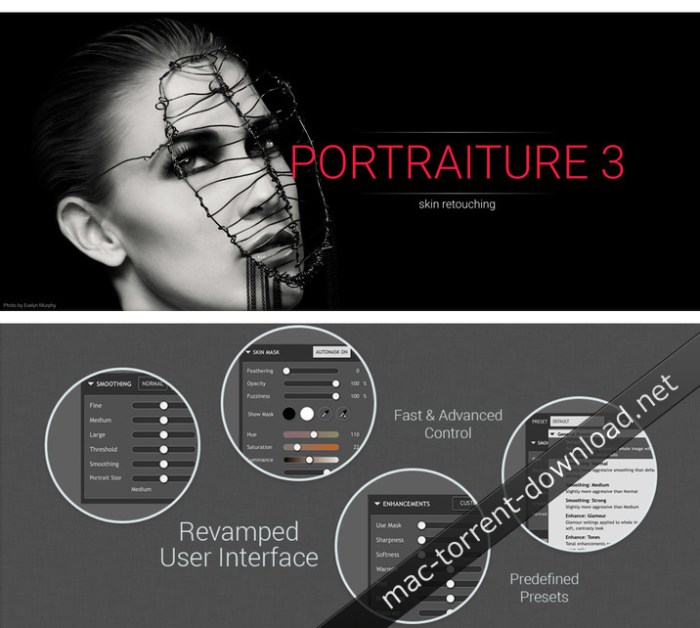
Portraiture for Adobe Lightroom eliminates the tedious manual labor of selective masking and pixel-by-pixel treatments to help you achieve excellence in portrait retouching. Imagenomic’s Portraiture is a powerful but user-friendly plug-in for Lightroom. It’s an effective tool for smoothing skin while maintaining texture for realistic results—a fine line that all portrait photographers must be aware of.

The program automatically detects the subject’s skin and creates a mask, which can be tweaked if needed. There are plenty of options for refining the portrait with tools to adjust hue, saturation, luminance and latitude. A separate Enhancements panel provides sliders for a range of parameters including sharpness, tint, brightness, and contrast for fine-tuning the overall look and feel of a portrait. And if you’re not sure exactly what you want, the program has a bracketing feature so you can choose from several variations of the same image. A handful of presets are available to get you started but you can create and save your own, along with a space for your notes so you can mix and match them each time you shoot a portrait under similar conditions.

Compatibility: macOS 10.10 or later 64-bit

Web Site: http://imagenomic.com/Products/Portraiture

What’s New in Imagenomic Portraiture 3 for Adobe Lightroom 3.5.1 build 3516

  • Release notes not available at the time of this post.

Screenshots

MathType 7.4.1 (418)

Name MathType.7.4.1.macOS.zip
Size 42.26 MB
Created on 2019-01-08 03:12:21
Hash 9c7a59e2b066e56ad8dbd04a7ab02c89663facff
Files MathType.7.4.1.macOS.zip (42.26 MB)

Download

MathType 7.4.1 (418) macOS

MathType is a powerful interactive equation editor for Windows and Macintosh that lets you create mathematical notation for word processing, web pages, desktop publishing, presentations, elearning, and for TeX, LaTeX, and MathML documents.

Productivity is key

When you’re ready to sit down and write a scientific or technical paper, a test, a slide presentation, or where ever you want to include math notation, you’re empowered with MathType. Open MathType on your computer or device and you have everything at your fingertips to do your work fast, easy and efficiently.

With MathType you can: Point-and-click, handwrite, use keyboard shortcuts, insert equation numbers, use color, choose fonts, control spacing…

Set up your work environment in a way that works best for you:
  • Save frequently used equations and symbols in customizable toolbars
  • Set MathType preferences to quickly change from one “look” to another for different types of documents
  • Setup personal keyboard shortcuts
  • Copy or convert to LaTeX
  • Much more!
Professional-quality math typesetting

MathType is a big upgrade to the default math tools built into many applications.

Accessibility with [MT]

You can now have quality everywhere. Choose the classic MathType look or the LaTeX look. Control spaces in your expressions down to the pixel. Mathematical notation is rich and changes among different cultures; MathType supports mathematical notation for different education levels and cultures. Accessibility is a must for any quality solution. MathType helps readers access scientific content, and it helps authors create accessible scientific content.

MathType for Learning Platforms

Students can hand write equations on a tablet or mobile device and MathType will immediately recognize and change them into perfectly-formatted equations. Students and teachers can now easily interact in LMS forum discussions (such as Canvas, Moodle or Schoology, for instance), without the distraction of typing code or using clunky math tools.

Chemistry for all

ChemType is a flavor of MathType designed to help you work with chemical notation. You’ll find a specific toolbar with the common chemical symbols and a user experience adapted to chemistry authors.

System Requirements:
  • Mac OS X El Capitan and newer, including macOS High Sierra
  • Mac Office 2011 or Office 2016 (version 15.39 or newer).

Web Site: http://www.wiris.com/mathtype

What’s New in MathType 7.4.1 (418)

  • Release notes not available at the time of this post.

CMG – Cine LUTs for Sony A7III (Win/MacOS)

Name CMG – Cine LUTs for A7III.zip
Size 403.5 kB
Created on 2019-01-08 01:31:07
Hash a1fd879b4c6dda032fd91ad06a9300e96a0ec6db
Files CMG – Cine LUTs for A7III.zip (403.5 kB)

Download

CMG – Cine LUTs for Sony A7III (Win/MacOS)

Here are some new LUTs for your Sony A7III (and other cameras from the A7-series like A7R III and a6xxx but also they look good with Canon C-Log or Cinestyle). They will give you a nice cinematic film look with a click and works perfectly with the picture profile settings you can find inside the pack (Cine2).

You don’t have to overexpose your image, just leave it in the middle or underexpose 0,3 to 0,7. You simply have to test out what works best for you.

Works in all video editing programs like Adobe Premiere Pro or Final Cut X.

You will get six .cube files – all a bit different to each other you have to import in your programs to use it. They work perfectly for indoor, lowlight moody days and sunny outdoor scenes!

I recommend to use it on an adjustment layer so you can tweak your original clips underneath it in Lumetri. For example if it looks too blueish or cold try to adjust temperature to the right on your clip.

Web Site: https://sellfy.com/p/6r7C/

Kreativ Wedding LUTs Collection Updated (Win/Mac)

Graphics & Design Video

Name Kreativ_Wedding_LUTS_Bundle.zip
Size 127.3 MB
Created on 2019-01-08 01:31:22
Hash 421946630ed9a7250f749a6599567c615cda98fd
Files Kreativ_Wedding_LUTS_Bundle.zip (127.3 MB)

Download

Kreativ Wedding LUTs Collection Updated (Win/Mac)

‘Lookup Table’ or a LUT are a very quick way in colour grading your videos. These LUTs are used in many of our films and have all been personally created by us. In the new they can all be used in the new versions of Premier CC, After Effects CC and Resolve 12.5. With the use of Plugins e.g. Lututility or Color Finale the LUTs can be imported into Final Cut Pro X and Motion 5.

  • New Kreativ LUTs
  • Kreativ Wedding Vol.1
  • Kreativ Wedding Vol.2
  • Kreativ Wedding Vol.3
  • Kreativ Wedding Vol.4

Web Site: http://kreativ-wedding.de/produkt-kategorie/luts/

Exapunks 1.0

Exapunks.MacOSX.zip

Exapunks 1.0 | 515.08 MB

Mac Platform: Intel
Includes: Pre-K’ed

OS version: 10.9+
Processor type(s) & speed: 64-Bit Intel 2Ghz
RAM minimum: 4 GB
Video RAM:

1) Unpack
2) Play

Language: English
Version: Steam v1.0 (Initial)
Cure: ACTiVATED

In Exapunks you play as a former hacker who is forced to return to your old ways after being infected by “The Phage”. Your only way to survive is to keep up your deal with a mysterious benefactor; One dose of medicine for one hack. You need one dose a day to stave off the disease. With your computer and zine in hand you got everything you need, and everything can be hacked. Banks, laundromats, game consoles, highway signs, even your own body.

Features
  • Read zines: Learn to hack from Trash World News, the underground computer magazine. Tutorials, hacking tips, secret information, searing commentary— Trash World News has you covered.
  • Write viruses: Program your EXAs (EXecution Agents) to tear through networks, replicate themselves, trash files, terminate other EXAs— and leave without a trace.
  • Hack everything: Hack banks, universities, factories, TV stations, highway signs, game consoles, the government… oh yeah, and your own body.
  • Slack off: Play ПАСЬЯНС, if you hack the server where it’s stored. Or play Hack*Match, if you hack the region lock on your Sawayama WonderDisc. Or create your own homebrew games for the TEC Redshift… if you hack the development kit.
  • Take down your friends: Compete with your friends by running your programs directly against theirs in all-out hacker battles. Make every cycle count.
  • Create your own puzzles: Create your own networks to hack, and share them with the world on Steam Workshop.

More information: https://store.steampowered.com/app/716490/EXAPUNKS/

Eon Timer 2.7.5

Name Eon 2 7 5 TNT.zip
Size 11.72 MB
Created on 2019-01-07 10:26:57
Hash 7effa1ab242c8c6f8e464f3fc40c2acd4c91ccf8
Files Eon 2 7 5 TNT.zip (11.72 MB)

Download

Eon Timer 2.7.5

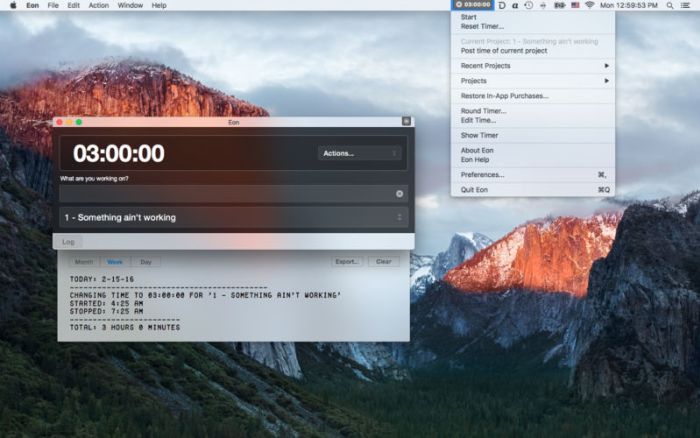
Eon helps you easily track time on your Mac. Eon allows you to easily post time to several services to make invoicing as painless as possible.

Supported services:
  • ActiveCollab
  • Assembla
  • AtTask
  • Basecamp
  • Blinksale
  • Cashboard
  • Celoxis
  • Codebase
  • fixx
  • FogBugz
  • Freckle
  • FreeAgent
  • FreshBooks
  • Harvest
  • Intervals
  • Invoice Machine
  • Invoicera
  • KashFlow
  • LessAccounting
  • mite
  • Paymo
  • Project Bubble
  • Redmine
  • Ronin
  • SUBERNOVA
  • Teambox
  • TeamworkPM
  • Tick
  • Toggl
  • Unfuddle
  • WorkflowMax
  • Zoho Invoice

Compatibility: OS X 10.11 or later 64-bit

Web Site: http://eon.charliemonroe.net
Mac App Store: https://itunes.apple.com/app/eon-timer/id413744108?mt=12

What’s New in Eon Timer 2.7.5

Improving ActiveCollab 5 integration.

Screenshots

Hydra – HDR Photo Editor 4.2

Name Hydra.4.2.zip
Size 25.54 MB
Created on 2019-01-07 10:26:40
Hash bf62207991b4b4d802574af6475a9dda96fed88a
Files Hydra.4.2.zip (25.54 MB)

Download

Hydra – HDR Photo Editor 4.2 macOS

Hydra lets you easily create beautiful high-dynamic-range (HDR) images from a set of exposures, effectively capturing both dark and bright subjects to make it more natural or to enhance scene drama.

Very often, a single photo can’t represent the entire dynamic range of light in a scene due to the physical limitations of the sensor. The picture is either underexposed (too dark) or overexposed (too bright), or both at the same time. Hydra allows you to overcome this limitation by merging a number of photos with different exposure settings and to create a natural image that is much closer to what your eyes actually see. Alternatively, Hydra also lets you artistically push contrasts to increase drama and emotions in your pictures beyond reality.

Optimized for Metal

Hydra has been optimized for latest macOS enhancements and brings native Metal support for maximum performance. Hydra comes with a completely rewritten computation and display architecture that is optimized for Metal from the ground up. It provides a high-precision 128-bit per pixel internal format with extremely fast 60 FPS previewing at full resolution. This lets you change tone mapper settings in real-time, at full size, and with no delay which in turn gives you more creative power and control on the result.

Image Alignment & Ghost Removal

Because multiple photos are merged, input pictures typically need alignment to compensate for camera motion if no tripod is used. Also, moving subjects in the scene may create ghosting artefacts that must be handled. Hydra 4 provides an advanced alignment tool to interactively align images against the reference one by locating feature points. You can inspect alignment quality through various 1 to 1 image difference schemes (blue/red, overlay…) or even preview the whole merging result. Full automatic alignment is also provided for simple cases. For ghost handling, Hydra 4 lets you delineate regions where moving subjects occur, and then, for each of these region, define which images do contribute to the merged image. This makes it possible to create beautiful HDR images even for difficult conditions.

New Tone Mapper

Hydra 4 comes with a brand new tone mapper based on a new technique which is faster, more accurate, and gives more control for fine tuning the details. This new tone mapper allows real-time previewing on the full resolution image for the best possible user experience. All settings get instant feedback that corresponds to the actual output. 12 tone mapping presets are available in Hydra 4 from which you can start, and then fine-tune the result using Hydra’s manual mode.

Modern Features & User Experience

In addition to native Metal support, Hydra 4 also provides support for lots of modern OS and hardware features, such as accurate color processing that includes support for Deep & Wide Color of latest Mac displays (P3 Retina displays), integration with Photos app, multitouch trackpad navigation and a gorgeous Mac-native translucent user interface. A number of unique features are also provided for a complete HDR editing experience, such as a new comparison tool that lets you compare the result with individual input pictures, a flashing mode that shows under- or overexposed regions, and snapshots that let you quickly save multiple tone mapper configurations to later compare together. Hydra 4 also provides more advanced options when needed, such RAW input options, Radiance and OpenEXR input and output file formats, color space choices for image exports, and per-scope tone mapper settings.

Powerful HDR app

Combines multiple exposures into an HDR image that can be tone mapped. Optimized for latest macOS enhancements.

New Tone Mapper

More accurate tone mapper that allows real time editing in full resolution. Various settings provided: Range Compression, Shadow Boosting, Highlight Recovery, etc. Additional “per-scope” settings also available to edit specific image regions.

Built-in Presets

12 tone mapper presets are provided to quickly tune towards a given target. Fine tuning can still be applied from the chosen preset by manual adjustment.

Project List

Original app-maintained projects list to enable easy project management. Hydra projects can also be exported to the file system when needed.

OS Integration

Integration with OS services for output (export to messaging apps, social networks). Share extension to import images from other apps

Optimized for Metal

Modern Metal-based display and computation architecture, that allows fast and accurate rendering. OpenGL fallback & resolution limits are available for older Macs.

Comparison Tool & Flashing

Splitscreen comparison of tone-mapped image against input images or the merged image (HDR). Flashing of overexposed and underexposed regions of the image.

Settings Snapshots

Multiple image settings can be saved in the project to quickly move between them.

User Experience

Elegant and modern user interface that makes use of latest OS features like translucency, and animated transitions. Prepare mode to setup input images before merging; Develop mode to edit tone mapper settings before export.

Image Alignment Technology

Automatic or manual homography computation. Alignment points can be precisely located manually with edge-enhanced views of reference and target image. Tool to preview alignment before processing image in the tone mapper. Displayed as icons (with optional name) or as a table.

Input Image Tools

Automatic Image EV determination from EXIF or from image contents + calculator allowing manual EV override from user-entered aperture, exposure time, and ISO. Additional resharpening option is available for RAW inputs. Inspection of EXIF properties.

Fast Viewing & Editing

Full-speed, high quality, aliasing-free scrolling at native resolution. Real-time image editing with tone mapper at any zoom level.

File Formats

Support for various input photo formats: JPEG, RAW (macOS), OpenEXR / Radiance. Support for various output image formats: JPG, TIFF, OpenEXR, Radiance and color spaces: sRGB, ACES CG Linear, Adobe RGB, Pro Photo, DCI-P3.

Cropping Tool

Support for automatic cropping that depends on alignment, and manual cropping and rotation.

Dynamic HDR & LDR Histogram

Image histograms before (HDR) and after (LDR) tone mapping to inspect image features. Both histograms display light intensity under mouse cursor in real time.

Wide & Deep Colors Display

Support for DCI-P3 displays of latest Macs. Editing workflow is completely color matched for accurate results.

Ghost Handling

Improved ghosts (moving subjects across input pictures) handling tools. Delineation of moving regions & selection of which photo(s) contribute to final image for each region. Tool to preview merged image including ghost removal across full exposure range.

Apple Photos Workflow

Share Extension that enables exporting multiple exposures from Apple Photos (or possibly other apps). Rendered image can be exported back to Apple Photos.

System Requirements:
  • Operating System: macOS 10.11 El Capitan
  • GPU compatible with OpenGL Core Profile 4.1 (HD Graphics 4000 or latest).

What’s New in Hydra – HDR Photo Editor 4.2

  • Optimized for macOS 10.14 Mojave.
  • Improved support for dark theme & accent color. Accent color now effective throughout the app, in particular ghost selection & various buttons.
  • Metal 2 optimisations.
  • Fixed 8bit rendering on integrated Intel GPUs that could output corrupt image (Mojave only).
  • Fixed 32bit rendering on discrete GPUs that could output black image when tone mapping was not applied.


DriveDx 1.8.2

Name DriveDx 1 8 2 TNT.zip
Size 30.25 MB
Created on 2019-01-07 10:27:12
Hash 54a68d9e670f032eda725ece1e44156eb0c68529
Files DriveDx 1 8 2 TNT.zip (30.25 MB)

Download

DriveDx 1.8.2

DriveDx is advanced drive-health diagnostic and monitoring utility. Save yourself from data loss and downtime that is associated with unexpected drive failures. Don’t worry about losing your important data, music, and photographs.

Features:
  • Support of modern SSDs and HDDs
  • SSD lifetime left indicator
  • Different routines for SSD and HDD health evaluation
  • Realtime SSD & HDD health status monitoring
  • User friendly and intuitive UI
  • Prefailure state early detection DriveDx supports 4 drive health statuses: Ok, Warning, Failing (prefailure) and Failed. (Most of drive utilities support only 2: “Ok” and “Failed”)
  • Drive failure prediction based on health indicators that are closely related to SSD or HDD failures
  • Interactive hints and descriptions for all health indicators (SMART attributes)
  • Multitier warning system that will inform the user about deviations from the normal state of drive attributes
  • Diagnostic Knowledge Base online autoupdating
  • Drive overall health rating
  • Drive overall performance rating (if drive supports this subset of indicators)
  • I/O errors monitoring
  • Drive free space monitoring
  • Support of drive short and full (extended) selftests
  • Save drive(s) health report to file
  • Automatic drive health reports by email (automatic email reports)
  • Humanreadable drive health indicators (attributes) representation
  • Drive temperature monitoring
  • Historybased drive health evaluation
  • S.M.A.R.T. error log
  • Growl notifications
  • Retina displays support

Compatibility: OS X 10.6.8 or later

Web Site: http://binaryfruit.com

What’s New in DriveDx 1.8.2

Fixed:
  • Disk Free Space Monitoring on Bootcamp volumes
Improved:
  • Disk Free Space Monitoring email reports
  • Temperature monitoring for SSDs
  • Detection of drives behind some RAIDs
  • Diagnostic algorithms and heuristics
Added:

EditReady 2.5.2

Graphics & Design Video

Name EditReady 2 5 2 TNT.zip
Size 57.16 MB
Created on 2019-01-07 10:27:05
Hash a4f492ba0054316170ec8b6251aa5353d20cba30
Files EditReady 2 5 2 TNT.zip (57.16 MB)

Download

EditReady 2.5.2

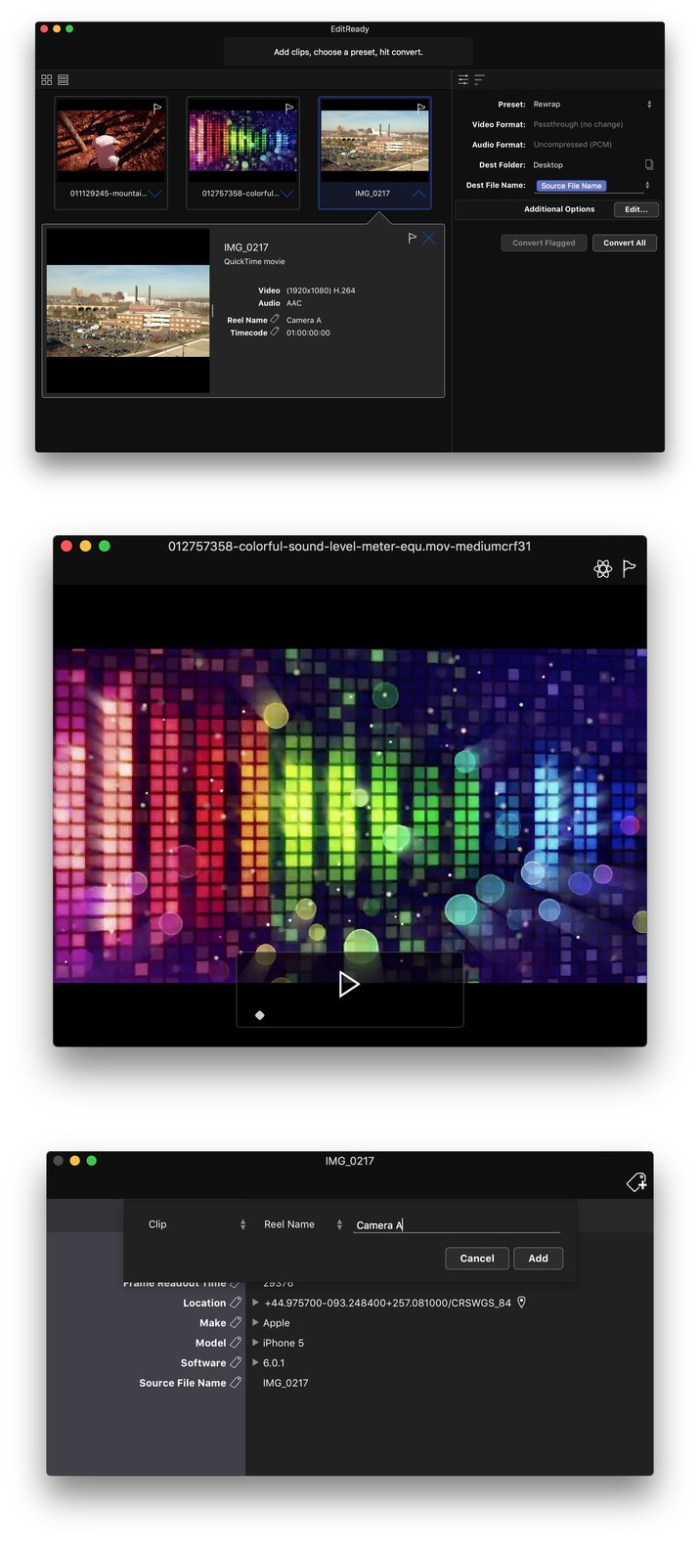
EditReady provides easy, fast and powerful transcoding for video professionals, without an overwhelming interface or outdated format choices. MOV, MP4 and MXF media can all be quickly converted to edit ready quicktime movies in ProRes or DNxHD.

Features
  • More than just transcoding – In addition to transcoding to professional formats like ProRes, DNxHD, and H.264, EditReady makes it easy to prep your footage for screening and editing. You can apply LUTs to your video during conversion to set a specific look or convert your Log footage into Linear. EditReady also allows you to override the framerate on your converted files, for pristine slow-motion with your 60p or 120p footage.
  • Smart Metadata Editing – EditReady provides a rich metadata viewer and editor. Modern cameras store GPS data, lens settings, diagnostic data, and more. Manually add location data if your camera didn’t store it, or set a reel name for all of your files. You can even use metadata to generate filenames for your transcoded files.
  • Modern, Blazing Fast, Ready for the Future – EditReady is designed to take advantage of all of the power available on modern Macs. It leverages hardware accelerated video decoding, OpenCL image processing, and every CPU cycle your system has to spare. And EditReady is designed with the future in mind – it’s ready to adopt new formats and workflows.

Compatibility: OS X 10.8 or later 64-bit

Web Site: https://www.divergentmedia.com/editready

What’s New in EditReady 2.5.2

Fixed
  • A potential crash in MacOS 10.11.6 when opening preview windows
  • A crash on MacOS 10.10.5
Resolved
  • An issue playing converted files with discrete audio tracks in Quicktime Player
  • An issue with audio conversion from HDV footage
  • An issue with distorted audio conversion from AVCHD

Screenshots

Graphics & Design, Video

By

Algoriddim djay Pro 2.0.10 (Complete FX Pack)

Name djay Pro 2 0 10 TNT.zip
Size 272.6 MB
Created on 2019-01-07 10:27:24
Hash 47a7acf3725e995c7ede57e762c94ef4bc684b3d
Files djay Pro 2 0 10 TNT.zip (272.6 MB)

Download

Algoriddim djay Pro 2.0.10 (Complete FX Pack)

djay Pro 2 is the next generation of Algoriddim’s multiple award-winning DJ software with countless new features, a redesigned user interface, and advanced library management tools. djay Pro’s unique, modern interface is built around a sophisticated integration with iTunes and Spotify, giving you instant access to millions of songs. Pristine sound quality and a powerful set of features including high-definition waveforms, four decks, audio effects, video mixing and hardware integration give you endless creative flexibility to take your sets to new heights.

WHAT’S NEW

All-new UI
  • 1, 2, 4deck, and video modes
  • Modular design with customizable tools, sampler and FX configurations
  • New highres waveforms
  • New Video mode with Photos integration
  • Single Deck view: prepare your tracks and library
  • Automix view
Library Management
  • “My Library” section to create your own playlists
  • Spotify integration
  • Create smart playlists with tracks from iTunes, Spotify, and the file system
  • Powerful track filtering: filter any playlist by BPM, key, and other attributes
  • Split mode: show two library sources side by side
Automix AI
  • Automatic, beatmatched mixes based on artificial intelligence
  • Queue and Playlist automation
  • Automatic transitions
  • Match powered by Spotify
PhotoBeat
  • Mix photos in perfect sync with the beat
  • Beatmatched automatic photo slide shows
  • Adjustable frequency of photos per beat
  • Image effects
Advanced Features
  • Keyboard Shortcut Editor
  • Save up to 8 loops per song
  • Assign names to saved cue points and loops
  • Cue Loops
New audio engine
  • Highquality, lowlatency audio engine
  • Postfader FX
  • Highquality effects, filter, and EQs
  • Master output effects via AudioUnits

FEATURES OVERVIEW

Spotify Integration
  • Instant access to millions songs
  • Playlists, Songs, Charts, Browse
  • Match: cloudbased song recommendations
  • Instant access to BPM and Key information through the cloud
  • Onthefly playlist editing and song saving
  • Drag & Drop from Spotify app
  • Powerful audio streaming technology: ultralow latency, advanced effects, onthefly analysis
CDJ Integration- officially certified by Pioneer DJ
  • Native support for CDJ lineup
  • Guided plug & play setup
  • Full hardware control including slip mode, scratching, pitch bending, looping, cueing, master tempo
  • Library navigation including Spotify, iTunes, waveforms, and cue point display on the CDJ screens
  • Connect up to 4 CDJs
Recording
Audio Processing
  • Advanced timestretching (up to + 75%)
  • Pitch shifting (up to + 1 octave)
  • Audio mixing with adjustable crossfader curves
  • EQ, panning, and highpass/lowpass filtering
  • Audio Limiter
  • Support for Audio Unit plugins
Audio Analysis
  • BPM and beat detection
  • Flexible beat grids with support for dynamic tempo
  • Frequencybased colored waveforms
  • Key detection
  • Autogain / Normalize
  • Multicore batch analysis
Hardware Integration
  • Native support for over 50 MIDI controllers
  • Native support for Pioneer DJ CDJ lineup
  • Advanced MIDI Learn
  • External Mixer Mode
  • Support for multichannel USB audio interfaces
  • Support for external audio input and microphones
Built for macOS
  • Support for Touch Bar
  • Native 64bit application
  • Optimized for MacBook Pro and iMac with Retina Display
  • Multicore analysis (up to 24 processing threads on 12core Mac Pro)
  • Extensive keyboard shortcuts
  • Multitouch trackpad control
  • iCloud integration
  • Accessible via VoiceOver

djay Pro 2 is compatible with any Mac running macOS 10.11 or later.

A Spotify Premium subscription and an internet connection is required to access the Spotify music catalog from djay Pro 2. No recording available for songs from Spotify.

To use songs from iCloud in djay Pro 2 please download them first via iTunes. DRM protected songs are not supported and djay Pro can not access tracks from Apple Music.

Compatibility: OS X 10.11 or later 64-bit

In-App Purchases: Complete FX Pack Collection – included

Web Site: https://www.algoriddim.com/djay-pro-mac
Mac App Store: https://itunes.apple.com/app/djay-pro-2/id1302002064?mt=12

What’s New in Algoriddim djay Pro 2.0.10 (Complete FX Pack)

  • Improved analyze library performance
  • Improved scroll performance in media library
  • Improved Spotify login on macOS 10.12 Sierra
  • Fixed possible crash when using Touch Bar on macOS 10.14 Mojave
  • Fixed “Show in iTunes” and “Export iTunes Playlist” not working correctly on macOS 10.14 Mojave
  • Fixed issue where artwork would sometimes not show up in the media library on macOS 10.14 Mojave
  • Fixed possible UI layout issue when moving main window between screens on macOS 10.14 Mojave
  • Stability improvements

Final Draft 11.0.1

Name Final Draft 11 11 0 1 TNT.zip
Size 70.20 MB
Created on 2019-01-07 10:26:51
Hash ef5bdd625c325516a574431683f26e3544c4b025
Files Final Draft 11 11 0 1 TNT.zip (70.20 MB)

Download

Final Draft 11.0.1

Write movie and TV scripts, stage plays, and new media with Final Draft – the number-one selling entertainment industry-standard application that combines powerful word processing with professional script formatting.

Final Draft automatically formats your script to industry standards as you write so you can focus on what’s important – story and character.

Works seamlessly with the Final Draft Mobile app for iPhone and iPad (sold separately).

TOP WRITING FEATURES INCLUDE:

  • Scene View Outline your script and reorder scenes using a simple draganddrop interface.
  • Navigator View, sort and filter the important details of your Scenes, Scriptnotes and Characters. Easily store, access and color code scene summary, location, and other useful story data.
  • Index Cards Build your script with Index Cards. Enter plot points, locations, comments, or notes. Colorcode and move index cards to easily organize your scenes. Send Index Card content directly to the script.
  • ScriptNotes Make general or element specific colorcoded notes that won’t affect your script’s pagination.
  • Templates Final Draft gives you access to over 300 templates for formats from today’s teleplays to immersive scripts, comic books, and Beat Board structure guides, plus the option to customize your own.
  • Pagination Final Draft automatically formats and paginates to industry standards. Meet page count requirements by using any of the Final Draft 11 custom formatting tools.
  • Watermarking in Printing and PDF Options You can print your watermarked script to any printer with standardized paper size or save directly to PDF in flawless script format.
  • Panels System Split your screen in half so you can view scene outlines while simultaneously writing your script.
  • Final Draft Courier Font We have created the ideal screenwriting font that is easy to read while meeting industry requirements.
  • Writing Management Check content you’ve written to help you manage your writing goals.
  • Format Assistant Be confident your script is professionally formatted before you print or email it.
  • Retina and Full Screen Support Distractionfree writing in full screen mode and retina display compatibility.

TOP PRODUCTION FEATURES INCLUDE:

  • Title Page Create and easily include a professional Title Page with your script.
  • Revision Mode Revise your script as often as you’d like. Save different revisions for production purposes.
  • Page Locking Omit scenes, lock pages and Apages, and set revision colors. You can take your script all the way from concept to final production.
  • Colored Production Pages for Revisions Colored border allows for writing ease, with solid color production pages in PDF for distribution.
  • Character Highlighting Easily see characters’ dialogue in color. Great for table reads or tracking a character’s dialogue throughout your script.
  • Customizable Reporting Final Draft offers seven different reports for production including Scene, Character, and Location reports. Print or email reports separately from your script.

NEW IN FINAL DRAFT 11

Speech to Script

Use the Mac’s built-in dictation with the Final Draft Speech to Script feature for hands-free writing that’s as fast as your ideas.

Image Support

Insert images into your script, title page or the Beat Board to help visualize your story.

Tagging

Track and report on customizable story elements. Breakdown scripts for scheduling and budgeting.

Night Mode

Quickly shift to a dark screen for easier viewing when writing.

Multi-Language Support

Write in over 95 different languages.

IMPROVED Collaboration

Simultaneously edit your script remotely in real-time with writing partners.

IMPROVED Beat Board & Story Map

Add images to beats by dragging and dropping, drag content to and from the script while retaining formatting, color code with new vibrant custom colors, snap beats to grid, zoom, and export to PDF. See images in your Beats and Structure Points on Story Map.

What’s New in Final Draft 11.0.1

  • Tags improvements
  • Night mode improvements
  • New preference for trackpad zoom

Kami 1.1.0

Kami.v1.1.0.MacOSX.zip

Kami 1.1.0 | 56.05 MB

Mac Platform: Intel
Includes: Pre-K’ed

OS version: 10.6
Processor type(s) & speed: Intel
RAM minimum: 512 MB
Video RAM:

1) Unpack
2) Play

Version: DRM Free v1.1.0

KAMI is deceptively simple: fold out coloured paper to fill the screen in as few moves as possible.

Relaxing and easy to pick up, you’ll soon find yourself deep in contemplation to perfect each puzzle.

Created by State of Play, famous for their handcrafted aesthetic, KAMI has been created with real paper in an elegant Japanese theme.

KAMI is tactile, engaging and stunning to look at.

Features
  • 63 unique puzzles!
  • Premium Puzzles and Hints included
  • Beautiful handcrafted Japanese look, created using real paper
  • Calming and elegant soundtrack
  • Created by State of Play, creators of the award-winning papercraft game ‘Lume’

More information: https://store.steampowered.com/app/272040/KAMI/

Other posts you might like

Treadnauts 1.0

Treadnauts.v1.0.MacOSX.zip

Treadnauts 1.0 | 266.63 MB

Mac Platform: Intel
Includes: Pre-K’ed

OS version: 10.7+
Processor type(s) & speed: Dual Core Intel
RAM minimum: 3 GB
Video RAM:

1) Unpack
2) Play

Languages: English, French, German, Spanish, Italian, Greek, Portuguese, Polish, Turkish, Russian, Japanese, Chinese, Korean
Version: Steam v1.0 (Initial)
Cure: ACTiVATED

Treadnauts gives competitive platform fighters a kiss of physics finesse. Gracefully pilot your tank through gorgeous arenas to land a deadly shot on your opponents! You’ve got a slew of useful tricks at your disposal, including treads that stick to any wall, boosters for midair hops, zero-friction slides, and rocket jumps for soaring into the sky. It’s all about moving with style!
Features
  • Four playable zones, each with unique mechanics and physics objects
  • Explosive couch competitive mode for 2-4 artillery rocket scientists
  • Online multiplayer beta for solo pilots or duos
  • Computer AI tanks with three difficulty levels
  • Single-player Target Test mode with medals and global leaderboards
  • Laser guns, grappling hooks, homing shells, and tons of other power-ups to collect
  • A dynamic soundtrack by King Felix that changes every time you play
  • Player progression with levels, maps and characters to unlock
  • Modifiers to shake things up: zero gravity, slow motion, chaos mode and many more!

More information: https://store.steampowered.com/app/695970/Treadnauts/

Other posts you might like

Color Finale Pro 1.9.2

Graphics & Design Video

Name Color Finale Pro 1 9 2 TNT.zip
Size 9.29 MB
Created on 2019-01-07 10:27:30
Hash 8d65c4458a9cad6f6bfc6e4aa49f1e68da2d0643
Files Color Finale Pro 1 9 2 TNT.zip (9.29 MB)

Download

Color Finale Pro 1.9.2

ColorFinale allows you to color grade in Final Cut Pro X.

ColorFinale Features:
  • The power and elegance of grading via layers. We incorporate the best features of image editing applications.
  • Industry standard 3 Way Color Corrector and RGB Curves. We incorporate the best that the telecine suite has to offer.
  • Apply industry standard Look Up Tables like OSIRIS and ImpulZ to accurately emulate the look of 35mm film.
  • Powerful vector based grading to apply quick and accurate secondaries.

Compatibility: OS X 10.12.4 or later 64bit

Web Site: http://try.colorgradingcentral.com/colorfinale/

What’s New in Color Finale Pro 1.9.2

  • Release notes not available at the time of this post.

Persecond 1.4.1

Name Persecond 1 4 1 115 TNT.zip
Size 32.36 MB
Created on 2019-01-06 19:06:19
Hash bd2501d1eb047f1d5c6e7beb1badfc20a428c6ea
Files Persecond 1 4 1 115 TNT.zip (32.36 MB)

Download

Persecond 1.4.1

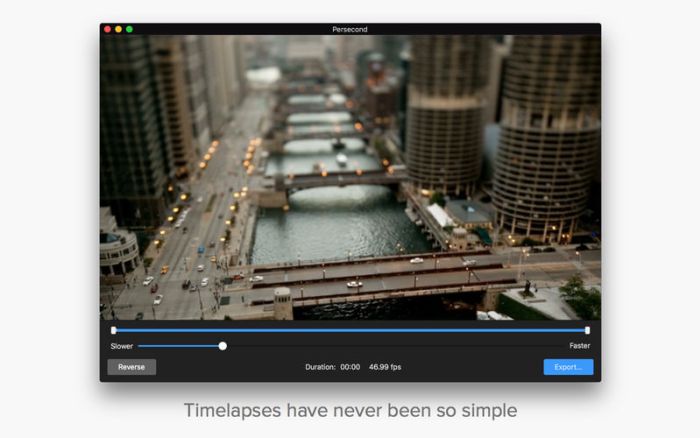
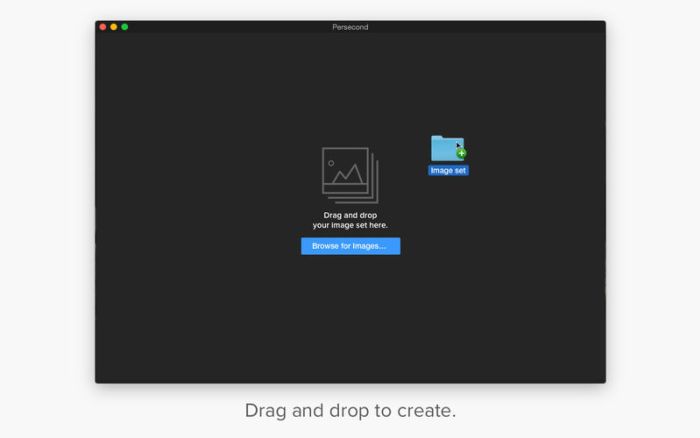
Persecond from Flixel Photos is the new super-easy way to create a beautiful timelapse video.

WHAT IS A TIMELAPSE?
Timelapse is a photography and video technique that creates an accelerated view of slow moving events. Anything from clouds moving in the sky, a sunset over the ocean or a busy street scene can make for a great timelapse video.
  • Beautiful, simple interface that makes it easy to create a timelapse video.
  • Simply import a sequence of images
  • Trim the sequence to your desired length
  • Adjust the speed for dramatic effect or specific duration
  • Reverse the playback direction for a different look
  • Export your timelapse video in H.264, or broadcast quality with Apple ProRes 422 and 4444
  • Import your timelapse video into Cinemagraph Pro and create a gorgeous cinemagraph in seconds

The free version is full featured and exports with a Flixel overlay. You have two options to buy and remove the overlay:
(1) a one-time payment for a license for v1.x, or (2) a Business plan.

A Business plan gives you access to Cinemagraph Pro for macOS and iOS, Persecond for macOS, plus the world’s leading service for hosting and sharing your HD quality cinemagraphs on the web, and social networks. It’s your best value.

Flixel Cloud subscriptions will be charged to your credit card through your iTunes account. Your subscription will automatically renew unless cancelled at least 24 hours before the end of the current period. You will not be able to cancel a subscription during the active period. Manage your subscriptions in Account Settings. Subscriptions are 1 year in length.

Compatibility: macOS 10.13 or later 64-bit

Web Site: https://flixel.com/products/mac/persecond/
Mac App Store: https://itunes.apple.com/app/persecond/id998361138?mt=12

What’s New in Persecond 1.4.1

Bug fixes and performance improvements

Screenshots

Rogue Amoeba Loopback 2.0.0

Name Rogue Amoeba Loopback 2.0.0 MacOS.zip
Size 7.66 MB
Created on 2019-01-06 19:06:13
Hash 8cb5316c3aa8bb6a4e01a1fbd187e13b1e7ab52c
Files Rogue Amoeba Loopback 2.0.0 MacOS.zip (7.66 MB)

Download

Rogue Amoeba Loopback 2.0.0 MacOS

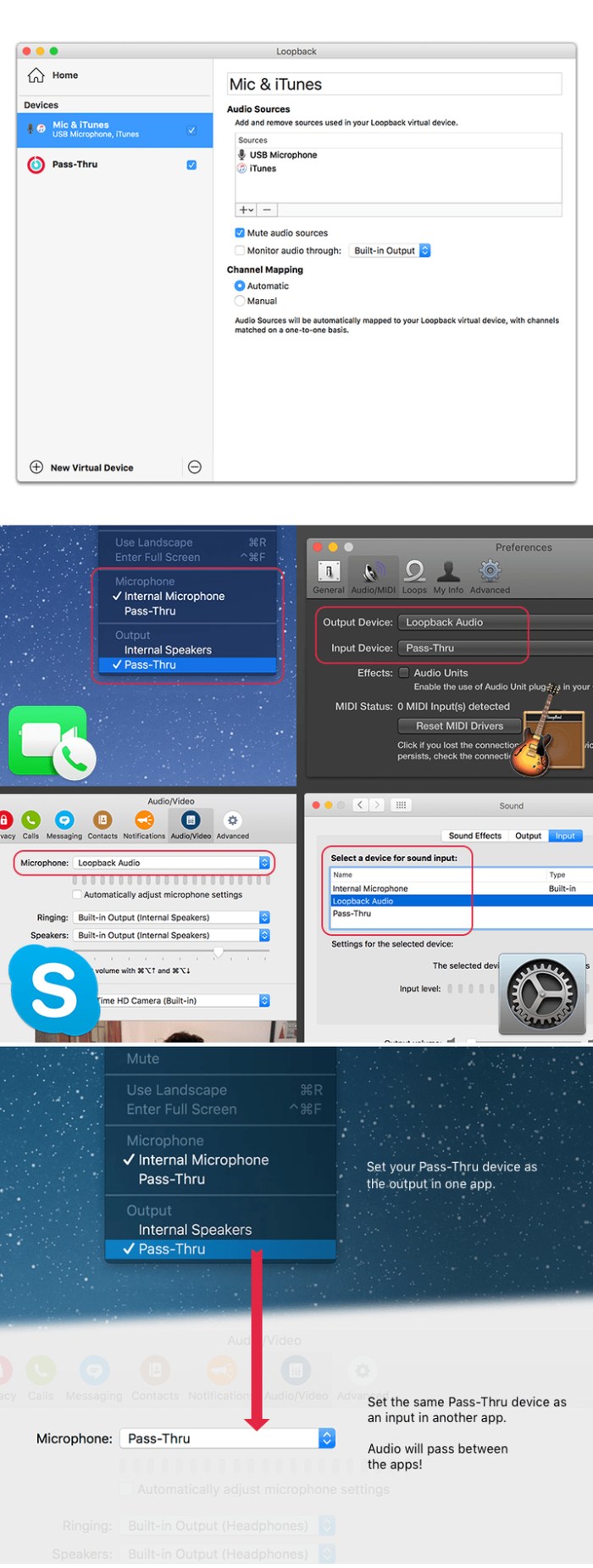
Suddenly, it’s easy to pass audio between applications on your Mac. Create virtual audio devices to take the sound from applications and audio input devices, then send it to audio processing applications. Loopback gives you the power of a high-end studio mixing board, right inside your computer!

Record Gameplay Videos

Making gameplay videos with great audio can often be very difficult. If you’re using a device like Elgato’s Game Capture hardware and you want to record both your microphone and the game’s audio at once, Loopback can assist!

Combine Hardware Devices

Apps like GarageBand, Logic, and Ableton Live only record from a single audio device at once. Thankfully, they offer recording from many channels. With Loopback, you can combine multiple input devices into one virtual device for easy recording.

Create Top-Notch Screencasts

Screen recorders, including QuickTime Player, allow you to include your mic’s audio. Some allow recording of system audio instead, but neither option is ideal. Create a virtual device that grabs just the mic and the app’s audio to get exactly the audio you want.

Route Audio For Broadcasts

Set a simple (pass-thru) device as the output at the end of an Audio Hijack chain, and then as the input source in Nicecast. Now listeners can tune in to a live stream of your podcast as you record it!

So Much More…

With Loopback, you gain incredible power and control over how audio is routed around your Mac and between applications. We can’t wait to hear about the incredible new uses you find for it!

Works With Any Application

Make a virtual audio device with audio from the applications on your Mac, including production apps like Logic or Reason, as well as simple audio players, like iTunes or QuickTime.

Works With Any Input Device

Pull audio from the physical audio devices connected to your Mac. Whether you’ve got simple USB microphones, or high-end studio mixers, Loopback can access it all.

Combine Apps and Physical Devices

Of course, you can create a virtual audio device that includes audio from both apps and physical audio devices.

Multichannel Audio

Your virtual audio devices can be configured to have up to 32 channels, providing tremendous power.

Custom Channel Mapping

By default, Loopback sets up channel mapping automatically. If you want to manually configure things, though, you’ve got powerful options!

Unlimited Devices

Create as many virtual audio devices as you need to get the job done.

Compatibility: MacOS 10.11 or Later

Web Site: http://www.rogueamoeba.com/

What’s New in Rogue Amoeba Loopback 2.0.0

A Massive Interface Overhaul:
  • The most noticeable change in Loopback 2 is its brandnew user interface. The first version of Loopback offered tremendous audio routing capability, but harnessing that power was not as simple as it could’ve been.
  • For version 2, we worked hard on a redesigned interface that will be intuitive for everyone. Loopback now features a simple new wiring system that lets you easily visualize and adjust how your audio will flow.
Volume Controls Galore:
  • Users asked for it, and we provided it. Loopback 2 provides control over volume levels at every step of the way. The volume from individual sources can be tweaked relative to other sources, to get the perfect mix. Audio levels sent to monitoring devices can also be adjusted, as can the audio level from the virtual audio device itself.
More Powerful Monitoring:
  • Monitoring virtual audio devices is now simpler than ever. Just add a monitor at the end of the device, and wire it up to get the exact audio desired. Listen in to the entire device, or use the custom wiring to monitor just part of the audio. You can even have multiple Monitors per virtual audio device, so you can hear exactly what you need to.

Capture Hidden Sources:
  • Audio can now be captured from previously unavailable sources, like Siri, VoiceOver, and TexttoSpeech. Hold down the option key while clicking the Add Source button to reveal the “Running Processes” menu, then select the correct hidden source.
Up to 64 Channels:
  • Virtual audio devices can now provide up to 64 channels of input and output, for amazing power.
Fully Configurable Channels:
  • Just about any setup is now possible, with configurable routing of audio from all audio sources to output channels, as well as from output channels to the new, more powerful monitoring devices.
An Explicit Pass-Thru Source:
  • PassThru functionality, previously an implicit part of Loopback, is now visible as an actual audio source. This allows for more power and control over the audio passing through your virtual audio devices.
On/Off Toggles for Sources and Monitors:
  • Loopback’s virtual audio devices are more configurable than ever, with the ability to turn off individual sources and monitors within a device. Rather than deleting a source or monitor, and losing its settings, you can now temporarily toggle it off as you make adjustments to get exactly the audio you need.
Screenshots

Rowbyte TV Distortion Bundle v1.0 for After Effects

Graphics & Design Video

Name TV Distortion Bundle v1.0 Mac.zip
Size 34.38 MB
Created on 2019-01-06 19:06:34
Hash fbe5928b764693c83809fc54c6eb1418b66c227e
Files TV Distortion Bundle v1.0 Mac.zip (34.38 MB)

Download

Rowbyte TV Distortion Bundle v1.0 for After Effects MacOS

All the Rowbyte distortion plugins: Data Glitch, Bad TV, TVPixel, Dot Pixels and Separate RGB in a single bundle . These plugins help you to create Analog Distortion, Digital Image & Satellite Distortion, Digital Pixel Simulation and Chromatic Aberration with ease.

Compatibility:
  • After Effects CC 2019, CC 2018, CC 2017, CC 2015.3, CC 2015, CC 2014, CC, CS6
  • Premiere CC 2019, CC 2018, CC 2017, CC 2015.3, CC 2015, CC 2014, CC, CS6

Web Site: https://aescripts.com/tv-distortion-bundle/

What’s New in Rowbyte TV Distortion Bundle v1.0

Graphics & Design, Video

By

Related Posts

DAZ Studio Pro 4.9.1.30 + Extra Addons

Name DazStudio491Mac.zip Size 490.3 MB Created on 2017-04-12 15:14:28 Hash 24cd987256d7a6e6983f06f0f …

Instant Effects 1.1

Name Instant Effect 1.1 MAS [ked].zip Size 4.91 MB Created on 2018-01-01 03:39:45 Hash d70939a6616e8 …

Flux 7.1.11

Name Flux 7 1 11 TNT.zip Size 116.8 MB Created on 2018-10-30 16:37:20 Hash b6e15195b4453707ae13aa94b …

CDRViewer Pro 1.0

Name CDRViewer Pro 1.0 Size 16.57 MB Created on 2016-11-19 12:11:38 Tracker http://109.235.50.166:27 …

Athentech Perfectly Clear Complete 3.6.3.1392

Name PerfectlyClearComplete V3 3 6 3 1392 TNT.zip Size 132.6 MB Created on 2018-12-22 23:53:59 Hash …

Audirvana Plus 3.2.14

Name Audirvana Plus 3 2 14 TNT.zip
Size 18.20 MB
Created on 2019-01-06 19:05:30
Hash 17b800107d394c244be00db849919562a0c4f134
Files Audirvana Plus 3 2 14 TNT.zip (18.20 MB)

Download

Audirvana Plus 3.2.14

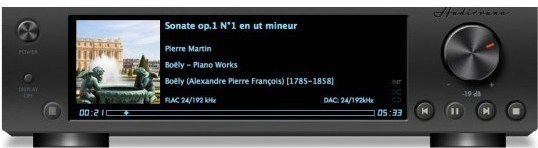
Audirvana Plus has no equalizer, no trendy special effects, just the best sounding music

  • Native playing of FLAC, libSndFile (WAV, AIFF, …), ALAC and other QuickTime formats (AAC, MP3, …)
  • Direct sound path, directly to the !CoreAudio HAL for pure bit perfect sound
  • Audio Device exclusive access mode
  • HAL I/O using DAC native physical formats “Integer Mode” (instead of CoreAudio 32-bit float)
  • Automatic sample-rate switching
  • Up/Oversampling capability
  • Plays completely from memory
  • Tracks are loaded, decoded, and sample-rate converted in a memory buffer before being played, minimizing CPU and hard drive activity to lessen sources of interference
  • Gapless playback by using a double-buffering mechanism (playing track and next track)
  • Transparent split load for loading tracks of any size
  • Background tracks loading/decoding (including sample-rate conversion)
  • Playlist (M3U and M3U8 formats) load/save
  • Handles Apple IR Remote
  • Automated updates downloading (using Sparkle)

Compatibility: OS X 10.9 or later 64-bit

Web Site: https://audirvana.com

What’s New in Audirvana Plus 3.2.14

  • Fixed display of similar artists from TIDAL

Screenshots

Spaceward Ho! 5.0.5

Spaceward.Ho.v5.0.5.MacOSX.zip

Spaceward Ho! 5.0.5 | 6.40 MB

Mac Platform: PowerPC
Includes: Pre-K’ed

OS version: Mac OS 9
Processor type(s) & speed: PowerPC
RAM minimum:
Video RAM:

1) Unzip
2) Play

Mac OS Classic Game
Version: Retail 5.0.5

Spaceward Ho! is a strategic game of awesome scope. You control the entire military and economy of a spacefaring race. Your goal: explore and colonize the galaxy.

Unfortunately, you are not alone. Alien enemies bent on galactic conquest will oppose your expansion. You fight them by developing new technologies and expanding your empire, or you can ally with them to turn enemies into friends.

Terraform newly discovered worlds or mine their natural resources. Maneuver your starship fleets, both in defense of your own systems and in offensive strikes against the evil aliens. Your strategic decisions will determine the fate of the galaxy.

It’s incredibly fun to play alone against the excellent computer players, and even better with other humans on the internet.

Spaceward Ho! has won numerous awards over the years, including being inducted into the MacWorld Game Hall of Fame and winning Best Network Game of the year.

The new version 5 is better than ever, with free internet play on spacewardho.net, combined fleets, new battle options, an all-new user interface, and much more.

More information: https://www.deltatao.com/ho/

Other posts you might like

Cinemagraph Pro 2.7.1

Name Cinemagraph_Pro_2.7.1.zip
Size 75.54 MB
Created on 2019-01-06 19:05:47
Hash 8ee353e4c631980bec042a4934eb96abf202dd9f
Files Cinemagraph_Pro_2.7.1.zip (75.54 MB)

Download

Cinemagraph Pro 2.7.1

Cinemagraph Pro is the only professional tool specifically designed for the creation of living photos. With its unique “live-masking” technology, artists can preview their living images in real time and output HD (1080) and UHD (4k) quality hybrid photographs.

An intuitive interface enables swift navigation amongst a full suite of editing modes and with just a few clicks, your living photos are shared with the world. It’s never been easier to create beautiful professional-grade Cinemagraph images.

Compatibility: macOS 10.12.2 or later 64-bit

What’s New in Cinemagraph Pro 2.7.1

Bug fixes and performance improvements

TunesKit Spotify Converter 1.4.1

Name TunesKit Spotify Converter 1 4 1 TNT.zip
Size 6.44 MB
Created on 2019-01-06 01:59:37
Hash 34a1169034a9088f51aa941ad322fb0a601b88b5
Files TunesKit Spotify Converter 1 4 1 TNT.zip (6.44 MB)

Download

TunesKit Spotify Converter 1.4.1

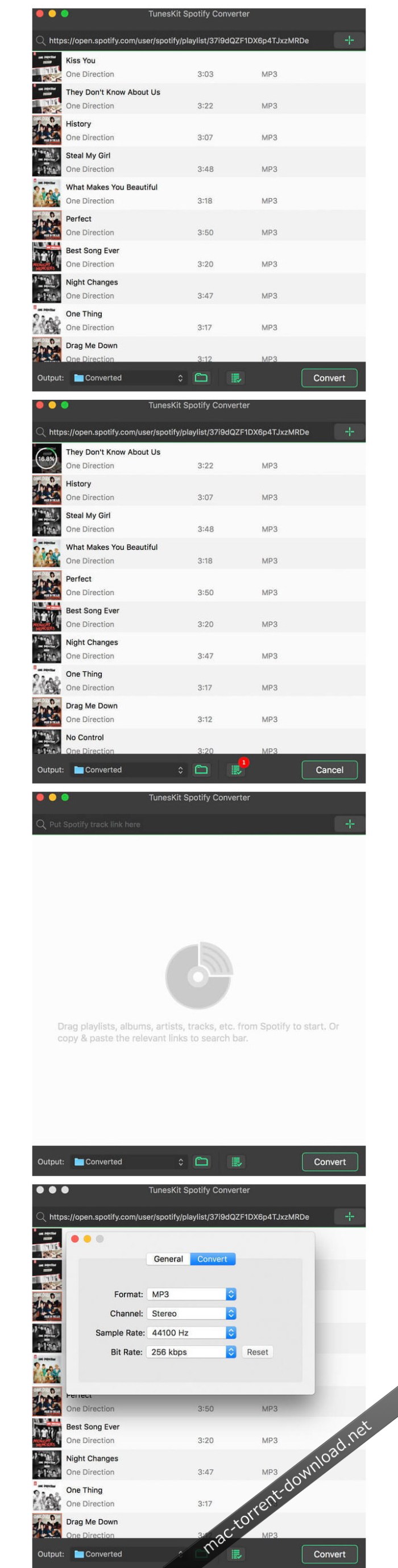
A mighty and smart Spotify music converter to download Spotify songs, playlists, albums, artists as well as convert any track from Spotify to plain MP3, M4A, AAC, WAV, M4B, FLAC for any music player, like iPod, Zune, Creative Zen, etc.

Break DRM protection from all Spotify songs and playlists

DRM restriction on Spotify prevents us from playing the music offline. Thus TunesKit Spotify Music Converter for Mac comes out to free Spotify users from DRM for good! With this smart Spotify converter, subscribers can now take full control of your Spotify music songs by easily downloading all tracks, artists, albums as well as playlists from Spotify while completely stripping off the DRM protection with high quality.

Download & convert Spotify music tracks, playlists, albums, artists to MP3, AAC, WAV, FLAC, M4A, M4B

In addition to a powerful Spotify DRM removal tool, it also works as a professional Spotify to MP3 converter so that you can decrypt and convert any Spotify music file, including single track, albums, playlists and artists to plain MP3, AAC, WAV, FLAC, and other common audio formats as you wish.

Keep 100% lossless quality and ID tags

TunesKit Spotify Music Converter for Mac is well designed to provide you with fantastic listening effects so that it can losslessly retain the original quality of the Spotify music in the converted DRM-free songs. Besides, the ID tags and other metadata information of the Spotify songs, such as artwork, artist, composer, album, year, track number, genre, etc. will be preserved in the output files as well.

Play Spotify music songs on all popular players offline

Thanks to this smart Spotify music conversion tool, you are enabled to freely download and play any DRM-protected Spotify music track, album, or playlist on any popular device and player, including Apple iPod, iPhone, Zune, Creative Zen, Sony, Samsung, car radio system, and other common MP3 players, etc.

5X faster speed & free lifelong upgrade

Due to the advanced DRM decrypting and accelerating technique, TunesKit Spotify Music Converter for Mac is able to convert any Spotify song and playlist to MP3, AAC, WAV, FLAC, M4A, M4B at 5X faster speed. You can set it as 1X speed if you want to get lossless quality. Besides, the software will always keep up to date with the latest Mac OS and Spotify and you’ll get free upgrade once purchasing it.

Best Spotify music solution to download and convert any Spotify songs

TunesKit Spotify Music Converter for Mac is the ultimate solution for Spotify subscribers who want to fully control the songs. With this powerful Spotify DRM removal app, you can easily download any Spotify song and convert the track to DRM-free formats for any device and player.

Customize output settings & music library

If you are a music enthusiastic who pay much attention to music quality, TunesKit Spotify Converter for Mac won’t let you down as it allows you edit the audio quality of the Spotify tracks by changing the audio channel, codec, bit rate, sample rate, etc. all depend on your own needs. Moreover, this smart Spotify converter will classify the output tracks in albums and artists so that you can manage the music library more easily.

Compatibility: OS X 10.8 or later, 64 bit

Web Site: https://www.tuneskit.com/music-converter-for-spotify-mac.html

What’s New in TunesKit Spotify Converter 1.4.1

  • Release notes not available at the time of this post.

Screenshots

Moody Photoshop Panel 1.1.2 (Win/macOS)

Name Moody Photoshop Panel 1.1.2.zip
Size 102.3 MB
Created on 2019-01-06 02:58:25
Hash 693c66e9735dc9a6d399d45c11df0b4670f70f21
Files Moody Photoshop Panel 1.1.2.zip (102.3 MB)

Download

Moody Photoshop Panel 1.1.2 (Win/macOS)

Moody Photoshop Panel is a panel for Adobe Photoshop that helps the user to give a perfect and professional color in just one click. Its technology allows it to adapt to any type of photos, any kind of photography can put in Moody difficulties. If you have a photo underexposed or overexposed no problem. Moody before applying any effect, it’s a color or contrast, automatically recognizes the exposure giving it the best mix between light and mood. Make your photos unique!

From now just one click to give the right mood to your photos, whether you are sad or happy, no matter! We say enough to the hours spent at the computer to try to recreate an effect, thanks to hundreds of Moody advanced filters you will always find the right concept for your photos … effortlessly!

DESIGN

The simple and clean design allows the user to have a unique user experience and simple.

UI

The user experience is also dictated by the order of the effect divided into four categories.

SETTINGS

Moody also has a menu to have made settings tailored for you.

ALLAPORTATA OF Tutt

Its functionality revolves around a click! Just search the hundreds of effects and click to apply it!

MOODY COLORS

Thank moody colors we can choose the dominant color and sharpness that is most pleasing to our picture, these filters use a special technique that is just hitting the affected areas without giving too strong dominant.

LIGHT COLORS

With advanced techniques, these filters affect only and exclusively the lights in a photo, so if a picture is lacking of light as the best way to give life?

FILTERS

This section uses real filters, which, thanks to the ILC Technology (image light control) improves, in contrast, exhibits or darken your photos whatever it is the situation. You have a dark photo? Well, you apply the filter by illuminating and vice versa. This section also works on special highly sought mood today!

B & W

Filters that apply the technique of black and white in various solutions, from darker to lighter and fluffy!

Moody is compatible with:
  • Photoshop CC2014 (V.15), CC2015, CC2015.5, CC2017, CC2018 +
  • Windows and macOS are both supported

Web Site: https://www.moodypanel.com/products/moody-panel

Assassin’s Creed v06.3305hy

Assassins Creed.zip

Assassin’s Creed v06.3305hy | 5.83 GB

Mac Platform: Unofficial Cider (games only)
Includes: Pre-K’ed

OS version: 10.5.6
Processor type(s) & speed: Intel Core 2 Duo
RAM minimum: 2GB
Video RAM: 256MB

Known issues:
– Due to a missing font, during tutorials and instructions, where the game should show controls, it instead shows little Ubisoft icons

Assassins Creed centers around use of a machine named the “Animus”, which allows the viewing of the protagonist’s genetic memories of his ancestors. Through this plot device, details emerge of a struggle between two factions, the Knights Templar and the Assassins, over an artifact known as a “Piece of Eden” and the game primarily takes place during the Third Crusade in the Holy Land in 1191.

System requirements:
Mac OS version: 10.5.6 (Runs better on 10.6.2)
Min. Processor: Pentium D / Core 2 Duo
Min RAM: 2GB
Video RAM: 256MB
Hard-disk Space: 8GB

All credit goes to Cartri from The Porting Team for putting together this WONDERFUL wrapper.

Other posts you might like

Bootstrap Studio 4.3.7

Name Bootstrap_Studio_4.3.7_macOS.zip
Size 48.91 MB
Created on 2019-01-06 02:58:15
Hash a7f7c22e31b622845cd87819baa08199b0cbf10e
Files Bootstrap_Studio_4.3.7_macOS.zip (48.91 MB)

Download

Bootstrap Studio 4.3.7

A powerful desktop app for creating responsive websites using the Bootstrap framework. Bootstrap Studio is a desktop application that helps you create beautiful websites. It comes with a large number of built-in components, which you can drag and drop to assemble responsive web pages. It is built on top of the hugely popular Bootstrap framework, and exports clean and semantic HTML. Thousands of developers and designers use it every day. We are sure you’ll love it too!

The Interface

Bootstrap Studio has a beautiful and powerful interface, which is built around the simplicity of drag and drop. This makes it the perfect tool for prototyping and designing web pages and apps.

Beautiful Built-in Components

Bootstrap Studio comes with a large number of pretty components for building responsive pages. We’ve got headers, footers, galleries, slideshows and even basic elements like spans and divs.

Smart Drag & Drop

Bootstrap Studio knows which Bootstrap components can be nested in one another and gives you suggestions. It automatically generates beautiful HTML for you, which looks as if it was written by hand by an expert.

Create Your Own Components

You can extract pieces of your designs as Custom Components, and have them ready to be dropped into any design you create. You can also export these components as files and share them.

Online Library

If you need a component which doesn’t exist in our library, just click the Online tab in the Component Panel. There you will find thousands of components built and shared by the community. You can also upload your own.

Linked Components

This is a powerful feature which allows you to synchronize components, so changing one will automatically change the other. This is especially useful for things like headers and footers which you need to update across pages.

Realtime Preview

Bootstrap Studio has a powerful feature called Preview. With it, you can open your design in multiple web browsers and devices, and every change you make within the app will be shown instantaneously everywhere.

Editing Code

For some things drag and drop isn’t enough. This is why Bootstrap Studio gives you full control over your markup when you need it. You can import and edit CSS, javascript and HTML in our Sublime Text-like editor.

Advanced CSS Editor

Our advanced CSS editing interface supports auto suggest and rule validation, and shows the active and inherited rules at an any given time. You will soon dread having to go back to your text editor.

javascript Editing

Write javascript in our Sublime Text-like editor. All your changes are synced with the preview, so you can write code and try it out without having to reload your browser.

HTML Editing

With our powerful Custom Code component, you can write HTML directly, without going through our drag and drop interface. You can also convert any piece of your page into Custom Code when you need it.

Requirements: Runs on macOS 10.9 and above.
Web Site: https://bootstrapstudio.io/

What’s New in Bootstrap Studio 4.3.7

  • Release notes not available at the time of this post.

Screenshots

Adobe Captivate 2019 v11.0.1.266

Name Adobe Captivate 2019 v11.0.1.266 Multilingual macOS.zip
Size 3.49 GB
Created on 2019-01-06 02:52:34
Hash 9e07d4c998a61878b1823abf764e8febc14b19e1
Files Adobe Captivate 2019 v11.0.1.266 Multilingual macOS.zip (3.49 GB)

Download

Adobe Captivate 2019 v11.0.1.266 macOS

Adobe Captivate is an authoring tool developed to create and maintain e-learning projects, including courses, software demonstrations and simulations, as well as presentations and quizzes.

Features:

Immersive learning with VR experiences [NEW]

Battle shrinking attention spans with immersive learning scenarios that your learners can experience in Virtual Reality using VR headsets. Now Adobe Captivate makes it possible for you to import 360° media assets and add hotspots, quizzes and other interactive elements to engage your learners with near real-life scenarios. Achieve learning use cases such as – “be in the shoes of”, “virtual tours”, “crises management”, “safety drills” and more.

Fluid boxes 2.0 [ENHANCED]

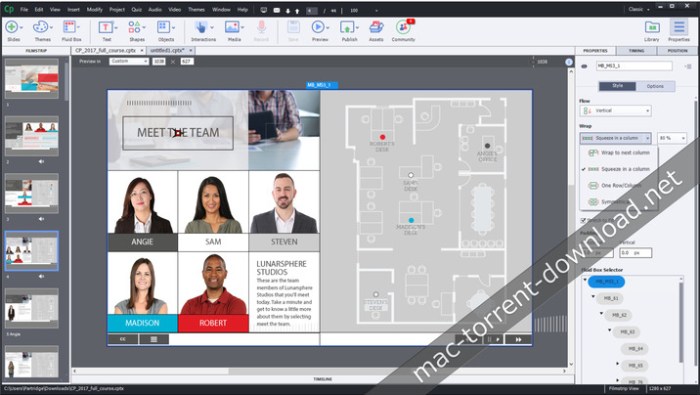
Objects placed in Fluid Boxes get aligned automatically so that learners always get a fully responsive experience regardless of their device or browser. Use the pre-defined boxes in a responsive theme or draw your own. In the 2019 release of Adobe Captivate, Fluid Boxes get a productivity makeover – use the intuitive UI to control and customize your Fluid Boxes, view and change parent-child relations, distribute objects in a single click, define object positions in Static Fluid Boxes and more.

Interactive videos [NEW]

Liven up demos and training videos by making them interactive with the new Adobe Captivate. Create your own or bring in existing YouTube videos, add questions at specific points and conduct knowledge checks. Add bookmarks in the timeline to aid learner remediation. Customize feedback options for answers and interactions.

Live device preview [NEW]

See exactly how your eLearning content will play out on your learners’ VR devices. Use the live preview feature in Adobe Captivate to generate a QR code that you can scan using a mobile device and mirror the project real-time on your device browser. Once the initial connection is done, you can keep previewing all your work across projects as long as the Adobe Captivate session is active.

360 learning experiences [NEW]

Augment the learning landscape with 360° images and videos and convert them into interactive eLearning material with customizable overlay items such as information blurbs, audio content & quizzes. Make learners explore their surroundings and actively engage with the environment to enhance retention. Achieve complex learning use cases such as compliance protocols in action, virtual walkthroughs, realistic product demos and more.

Automatic chroma key effects [New]

Transform your videos by making their backgrounds transparent and replace them in just a few clicks without the need for any green-screen technology. Personalize your video background by adding images or videos of places, scenarios or on-slide content. Get your project on the road with free media assets shipped with Adobe Captivate or choose your own.

Smart video recording – webcam + screen [NEW]

Create studio-quality HD videos as you simultaneously record your webcam and on-screen content with just a few clicks. Adjust the talking-head video position and add persona to your training content. Easily edit the videos in Adobe Captivate and add interactivity to multi-screen video-based learning.

CSV question import template [NEW]

Reduce authoring time and effort with the .csv Question Import template in Adobe Captivate, which helps you automatically create question slides in your Adobe Captivate Project. Include all question slide logic in the same .csv file such as marks, correct answers and feedback. You can also import format-compatible question banks from other authoring tools with just a few clicks.

PowerPoint to responsive eLearning [NEW]

Fast-forward to smart eLearning authoring by importing PowerPoint presentations to Adobe Captivate with just a few clicks. Transform static PowerPoint slides into responsive eLearning content that works seamlessly across all devices. Enhance the learning experience by adding interactive elements, assets and quizzes.
Automatic device preview [NEW]
Hit the play button to see your content automatically change shape and form factor across the full spectrum of device sizes. Get a holistic view of how responsive your content is on every screen size.
and more…

System Requirements:
  • 2 GHz or faster Intel processor
  • OS X 10.10 or higher.
  • Windows 64bit operating system is supported.
  • 8 GB RAM
  • 10GB of available harddisk space for installation; additional free space required during installation (cannot install on removable flashbased storage devices)
  • Adobe Flash Player 10 (or more) for viewing multimedia content
  • 1024×768 display (1280×1024 recommended) with WebGL compatible Graphics Cards
Adobe Captivate is available in the following languages:
  • English
  • French
  • German
  • Japanese
  • Korean
  • Portuguese (Brazilian)
  • Spanish

Web Site: Web Site: http://www.adobe.com/products/captivate.html

What’s New in Adobe Captivate 2019 v11.0.1.266

  • Release notes not available at the time of this post.

Screenshots

iSubtitle 3.2

Name iSubtitle 3 2 TNT.zip
Size 28.30 MB
Created on 2019-01-06 02:05:39
Hash 689b9f2abbbbc36108e582b6bb68b7bf1ccc2b14
Files iSubtitle 3 2 TNT.zip (28.30 MB)

Download

iSubtitle 3.2

Inject subtitle tracks, chapter markers and metadata into your movies and TV-shows. The perfect companion app for your iTunes library and all your Apple devices, like the iPhone, iPad, iPod, Apple TV and Mac.

iSubtitle takes full advantage of Apple’s soft subtitle technology. The subtitle tracks are resolution independent and rendered in real-time as you watch the movie. Subtitles are always displayed at the best quality your device can perform. There are support for multiple languages in the same movie file and you can even switch language on the fly as you watch. The export and metadata tagging is fully automated so you don’t need to tweak a lot of parameters to get your movie into iTunes with beautiful tagging and artwork.

Main Features
  • Add soft, nondestructive subtitle tracks, that won’t change or alter the original movie.
  • Subtitles can be turned on/off using the interface of the device or application.
  • Complete support for multiple languages in the same file.
  • Perfect integration with your iTunes library.
  • Supports all Apple devices like the iPod, iPhone, iPad, Apple TV and Mac.
  • Supports encoding in AVC, aka H.264 and HEVC, aka H.265 (for iOS 11, tvOS 11 and macOS High Sierra).
  • Supports pass through for H.264 and H.265 video tracks and AC3 and AAC audio tracks, ie no encoding needed = fast!
  • Supports all major subtitle file formats like SubRip (.srt), SubViewer 1 & 2 (.sub), SubStation Alpha (.ssa/.ass), Spruce (.stl), iTunes Timed Text (.itt) and WebVTT (.vtt).
  • Matroska subtitles, like ssa/ass and srt, are automatically converted to soft subtitle tracks on import.
  • Sync individual subtitle tracks in realtime using the time offset stepper.
  • Automatic and manual metadata tagging.
  • Create chapter markers automatically or manually.
  • Batch reencode movies within the application to support your target device or application.
  • Smart export will only reencode your movie if really needed for it to play on your device.
  • Save inline directly to the source file if it’s already in a compatible mp4/m4v format.
  • Watch subtitled movies in fullscreen without leaving the application.
  • Works like a charm with High Sierra, Sierra, El Capitan and Yosemite.

• Please use the Feedback feature in the app if you are having issues and I will get back to you!

NOTE! iSubtitle cannot add subtitles to movies or tv-shows purchased or rented in the iTunes store due to DRM protection.
NOTE! iSubtitle is not a subtitle file authoring application.

Compatibility: OS X 10.10 or later 64bit

Web Site: http://www.bitfield.se
Mac App Store: https://itunes.apple.com/app/isubtitle-3/id1166951701?mt=12

What’s New in iSubtitle 3.2

  • FFmpeg updated to the 4.0 “Wu” release.
  • Fixed a problem with inline saving metadata to mp4, m4v files.
  • Watch Quick Start Movie in the Welcome window now works again.

AirMail 3.6.56

Name Airmail 3 3 6 56 MAS TNT.zip
Size 56.41 MB
Created on 2019-01-05 22:49:42
Hash e55142c0d7f2c5ae3696ce7fa1c7ac92b1cc2475
Files Airmail 3 3 6 56 MAS TNT.zip (56.41 MB)

Download

AirMail 3.6.56

Airmail 3 is a new mail client designed with performance and intuitive interaction in mind optimized for macOS High Sierra!

Support for iCloud™, MS Exchange, Gmail™, Google™ Apps, IMAP, POP3, Yahoo!™, AOL™, Outlook.com™, Live.com™

Airmail was designed from the ground UP to retain the same experience with a single or multiple accounts and provide a quick, modern and easy-to-use user experience. Airmail is clean and allows you to get to your emails without interruption- it’s the mail client for the 21st century.

We have taken usability and function to the next level with Airmail and bring a striking-design with support for all major email services. Switch between accounts like a breeze and quick reply to incoming messages within seconds- email has never been so easy and productive.

  • iCloud Account sync
  • iCloud attachment upload and share the link.
  • Handoff support, Composing Draft and folder selection are mirrored on different devices
  • Today Extension, quick access to your inbox.
  • Action Extension, Airmail Compose, Inline create and send messages directly form other apps
  • Action Extension, Airmail Share to quick send messages and attachments.
Accounting:
  • Unified Inbox
  • Alias with custom SMTP
  • Exchange, iCloud™, Gmail™, IMAP, POP3, Google™ Apps, Yahoo!™, AOL™, Outlook.com™, Live.com™
  • Local Accounts
  • Import from Apple Mail, MBOX archive, EML, EMLX, Airmail 1.x
Interactions:
  • Quick Reply
  • Undo History
  • Offline operations
  • Move messages on Different mailboxes
  • Interaction sounds
  • Multi Touch gestures
  • Exchange Meeting Invite
Shortcuts:
  • Gmail Shortcuts
  • Custom global shortcuts
  • Quick Label, Move, Label and Archive
  • Quick folder selection
Attachment:
  • Drag and drop
  • Quick Look preview
  • Google Drive, Dropbox, CloudApp, Box, Onedrive, Droplr, FTP
  • Inline image attachments
  • Winmail.dat preview
  • VCalendar
Conversations:
  • Group by id
  • Group by subject
  • Chronological Reverse
  • Muted CC’d conversation
Visual:
  • Multiple visual themes
  • Minimal and extended Mode
  • Plain Text Rendering
Notifications:
  • Per account notifications
  • Notification center support
  • Notification alerts with custom actions
Address:
  • Gmail, Exchange and OS X contacts
  • Contacts Group
  • Filter by address
  • Open Directory search
Composer:
  • Google App Directory
  • Exchange Global Address List
  • LDAP directory
  • Markdown, Html(Html Source for templates), and text only.
  • Custom settings per single account
  • Bullet and numbered list.
Sending:
  • Auto CC, BCC.
  • Pending operations
  • Send Delay
  • Redirect
  • Send again
  • Bounce
Advanced:
  • Split Screen Support
  • Time Machine friendly
  • Deckles mode
  • EML Import/Export
  • Disable GPU to save battery life
  • Applescript
  • Activity monitor
  • Data Detectors
Signatures:
  • Multiple Account Signatures
  • Markdown, Rich text, Html Source, and text only.
  • Signature above or below the quote
Search & Filtering:
  • Global search for multiple accounts
  • Realtime powerful filters
  • Sort messages, Date, Attachments, Conversations ….
  • Show messages of the same user
  • Flags and filters
Folders, Labels:
  • Nested folders
  • Create, Delete and edit folders
  • Custom colors synced by iCloud
  • Custom folder mappings
  • ToDo, Done, Memo
Send to:
  • Omnifocus
  • Fantastical
  • Evernote
  • Apple Reminder
  • Calendar
  • BusyCal
  • Things
  • 2To
  • Wunderlist
  • Todoist
Privacy:
  • Per user Autoload Remote Images,
  • Disable icon detection

Compatibility: OS X 10.10 or later 64-bit

Web Site: http://airmailapp.com
Mac App Store: https://itunes.apple.com/app/airmail-3/id918858936?mt=12

What’s New in AirMail 3.6.56

Bugfix

AirMail 3.6.55

Name Airmail_3_3.6.55_MAS__TNT.rar
Size 54.41 MB
Created on 2019-01-04 03:26:55
Hash 730d70cee6ab7477d69f49c773a1e48cbee986db
Files Airmail_3_3.6.55_MAS__TNT.rar (54.41 MB)

Download

AirMail 3.6.55

Airmail 3 is a new mail client designed with performance and intuitive interaction in mind optimized for macOS High Sierra!

Support for iCloud™, MS Exchange, Gmail™, Google™ Apps, IMAP, POP3, Yahoo!™, AOL™, Outlook.com™, Live.com™

Airmail was designed from the ground UP to retain the same experience with a single or multiple accounts and provide a quick, modern and easy-to-use user experience. Airmail is clean and allows you to get to your emails without interruption- it’s the mail client for the 21st century.

We have taken usability and function to the next level with Airmail and bring a striking-design with support for all major email services. Switch between accounts like a breeze and quick reply to incoming messages within seconds- email has never been so easy and productive.

  • iCloud Account sync
  • iCloud attachment upload and share the link.
  • Handoff support, Composing Draft and folder selection are mirrored on different devices
  • Today Extension, quick access to your inbox.
  • Action Extension, Airmail Compose, Inline create and send messages directly form other apps
  • Action Extension, Airmail Share to quick send messages and attachments.
Accounting:
  • Unified Inbox
  • Alias with custom SMTP
  • Exchange, iCloud™, Gmail™, IMAP, POP3, Google™ Apps, Yahoo!™, AOL™, Outlook.com™, Live.com™
  • Local Accounts
  • Import from Apple Mail, MBOX archive, EML, EMLX, Airmail 1.x
Interactions:
  • Quick Reply
  • Undo History
  • Offline operations
  • Move messages on Different mailboxes
  • Interaction sounds
  • Multi Touch gestures
  • Exchange Meeting Invite
Shortcuts:
  • Gmail Shortcuts
  • Custom global shortcuts
  • Quick Label, Move, Label and Archive
  • Quick folder selection
Attachment:
  • Drag and drop
  • Quick Look preview
  • Google Drive, Dropbox, CloudApp, Box, Onedrive, Droplr, FTP
  • Inline image attachments
  • Winmail.dat preview
  • VCalendar
Conversations:
  • Group by id
  • Group by subject
  • Chronological Reverse
  • Muted CC’d conversation
Visual:
  • Multiple visual themes
  • Minimal and extended Mode
  • Plain Text Rendering
Notifications:
  • Per account notifications
  • Notification center support
  • Notification alerts with custom actions
Address:
  • Gmail, Exchange and OS X contacts
  • Contacts Group
  • Filter by address
  • Open Directory search
Composer:
  • Google App Directory
  • Exchange Global Address List
  • LDAP directory
  • Markdown, Html(Html Source for templates), and text only.
  • Custom settings per single account
  • Bullet and numbered list.
Sending:
  • Auto CC, BCC.
  • Pending operations
  • Send Delay
  • Redirect
  • Send again
  • Bounce
Advanced:
  • Split Screen Support
  • Time Machine friendly
  • Deckles mode
  • EML Import/Export
  • Disable GPU to save battery life
  • Applescript
  • Activity monitor
  • Data Detectors
Signatures:
  • Multiple Account Signatures
  • Markdown, Rich text, Html Source, and text only.
  • Signature above or below the quote
Search & Filtering:
  • Global search for multiple accounts
  • Realtime powerful filters
  • Sort messages, Date, Attachments, Conversations ….
  • Show messages of the same user
  • Flags and filters
Folders, Labels:
  • Nested folders
  • Create, Delete and edit folders
  • Custom colors synced by iCloud
  • Custom folder mappings
  • ToDo, Done, Memo
Send to:
  • Omnifocus
  • Fantastical
  • Evernote
  • Apple Reminder
  • Calendar
  • BusyCal
  • Things
  • 2To
  • Wunderlist
  • Todoist
Privacy:
  • Per user Autoload Remote Images,
  • Disable icon detection

Compatibility: OS X 10.10 or later 64-bit

Web Site: http://airmailapp.com
Mac App Store: https://itunes.apple.com/app/airmail-3/id918858936?mt=12

What’s New in AirMail 3.6.55

– Improved search

Transmit 5.2.1

Name Transmit 5 2 1 TNT.zip
Size 73.01 MB
Created on 2019-01-05 10:08:22
Hash 834421376faab8e5f1ec51936264cdb6c0f804bb
Files Transmit 5 2 1 TNT.zip (73.01 MB)

Download

Transmit 5.2.1

A simple, clean and intuitive application that enables you to effortlessly upload, download and delete files to and from FTP, SFTP, Amazon S3 or WebDAV

Transmit is a powerful and versatile macOS application that makes it easy for you to manage and organize large files on various servers on clouds.

With Transmit’s help you can quickly and effortlessly transfer files to SFTP or FTP server, as well as Amazon S3 or WevDAV from within a user-oriented interface.

User-oriented interface with support for multiple tabs

Transmit comes a simple and reliable solution for users that need to maintain websites, upload numerous photos or perform backups.

Transmit comes with a “Twin-Turbo Engine”, multi-connection transfer and FXP support fact that makes it a fast, smooth-running and dependable client for most Mac users.

On top of that, Transmit enables you to limit the bandwidth, synchronize or compare files with ease.

Choose between a single or dual pane window

From Transmit’s two-panel window you can view the files stored locally and the ones saved on the server. At the same time, Transmit helps you create a list with favorite servers add a new FTP, SFTP, Amazon S3 or WebDAV server.

The top toolbar allows you to switch between the thumbnail, list, column and Cover Flow view mode and change from the a dual pane to a single pane window. In addition, Transmit seamlessly integrates Mac OS X’s Quick Look feature, a fact that helps you preview files before transferring them.

Handy synchronization features

By accessing the Action drop-down menu, you can open the Info window, copy the file path or URL address, move items to Trash or the desired location, create duplicates, compress or label files. On top of that, you have the option to create new folders or files, refresh the list and open a folder in a new tab or new window.

Thanks to the built-in search form, you can quickly and effortlessly filter the displayed items as soon as you start typing. The Preferences window enables you to change the default FTP client and configure Transmit to synchronize your favorite items via iCloud or Dropbox.

OS Version: OS X 10.11 or later

Web Site: http://www.panic.com/

What’s New in Transmit 5.2.1

Fixed:
  • Fixed an issue where copying remote file selection no longer added path to clipboard
  • Added support for the latest version of Krypton when connecting with SFTP
  • Connecting to a Server with an invalid local path no longer displays error alert twice
  • Thumbnail view background color preference is now correctly saved between launches
  • Thumbnail view background color defaults to light when using light system appearance
  • Folder icons are now drawn darker in dark mode
  • Improved File Synchronize sheet appearance when using dark mode
  • Workedaround bug on macOS 10.14 where switching to Thumbnail view may not draw as expected
  • Miscellaneous small improvements when using Dark Mode on Mojave

Screenshots

PDF Expert 2.4.20 (608)

Name PDF Expert 2 4 20 608 TNT.zip
Size 47.28 MB
Created on 2019-01-05 10:08:30
Hash b60f4090a69262eedbd9d430ae776566970adce9
Files PDF Expert 2 4 20 608 TNT.zip (47.28 MB)

Download

PDF Expert 2.4.20 (608)

PDF Expert springs into action with smooth scrolling and fast search from the first document you select. PDFs open instantly, whether they are just small email attachments or 2000-page reports.

  • Professional Annotation Tool – From simple changes to marathon editing sessions, PDF Expert lives up to its name. Powerful yet easy-to-use tools are just a click away so you can leave your mark in record time.
  • Read – An award-winning, lightning-fast, tabbed document viewer will get you through multiple PDFs faster than ever.
  • Excellent for Form Filling – PDF Expert provides the best experience for filling out PDF forms. Text fields, checkboxes, radio buttons, and other form elements work as you expect, and all the information you enter is saved within the form. Even complex interactive forms with Javascript work impressively well.
  • An Easy Way to Sign Documents – Signing document on your Mac is as simple as it could be. Just type your name on a keyboard and PDF Expert will transform it into beautiful handwriting. Or use your Macbook’s trackpad and write with your finger. You can even use signatures already created in PDF Expert for iOS.
  • Wide Sharing Options – You don’t work alone, and neither does PDF Expert. When it’s time to send documents to clients, coworkers, and everyone in between, PDF Expert has top-notch support for your Mac’s system-wide share sheet and other apps. If an app accepts PDFs, PDF Expert can get them there.
  • Works across all your devices – Use PDF Expert on any Apple device – Mac, iPad, and iPhone. Use Apple’s Continuity and Handoff features to seamlessly transfer document from one device to another and continue editing where you left.

Compatibility: OS X 10.10 or later, 64bit

Web Site: https://pdfexpert.com

What’s New in PDF Expert 2.4.20 (608)

  • Release notes not available at the time of this post.

Boom 3D 1.2.1

Name Boom 3D 1 2 1 MAS.zip
Size 43.68 MB
Created on 2019-01-05 10:08:43
Hash 0f60988a7163afcb9344d56584f26f43b0f6c498
Files Boom 3D 1 2 1 MAS.zip (43.68 MB)

Download

Boom 3D 1.2.1

An unobtrusive and lightweight application capable of boosting your Mac’s sound volume and improve the audio quality of your audio files
Boom 3D is straightforward volume booster and sound equalizer specially designed to increase the volume and quality of the sound coming out from your Mac’s speakers.

Enjoy a louder, clearer and better sound

Boom 3D seamlessly integrates with macOS and its controls are similar to the default system volume control. However, Boom 3D provides additional features and capabilities that can be used to enhance the quality of the sound.

Thanks to Boom 3D you can boost the sound coming from YouTube video clips, songs and videos played using iTunes, Netflix, Spotify or any other application. Moreover, you can use Boom 3D to improve the clarity of Skype and FaceTime video chats.

Intuitive interface

From Boom 3D’s status bar menu you can quickly adjust the sound volume or change the EQ preset with just a couple of mouse clicks. By accessing Boom 3D’s main window you can enable or disable the volume booster and sound equalizer, adjust the sound level and customize the equalizer.

Boom 3D comes with a series of presets that you can easily adjust and personalize according to your likes. You can even save your own presets and load them via the Boom Presets slide menu.

Powerful audio level booster

By accessing the Boost File tab, you can easily adjust the sound level of multiple audio and video files at the same time. What is more, you can configure Boom 3D to automatically add the modified files to a new playlist in iTunes at the end of the process.

The Preferences window helps you turn on or off the notification sounds, set the default location for boosted files and type in the suffix for the boosted items. On top of that you can enable and customize the level up and level down hot-keys.

Compatibility: OS X 10.10 or later 64 bit

Web Site: http://www.globaldelight.com/boom3d/index.php
Mac App Store: https://itunes.apple.com/app/boom-3d-the-best-virtual-surround-audio/id1233048948?mt=12

What’s New in Boom 3D 1.2.1

Defect fixes.

Alien Skin Blow Up 3.1.2.207

Name Alien Skin Blow Up 3 3 1 2 207 TNT.zip
Size 34.27 MB
Created on 2019-01-04 21:38:21
Hash 5800f386e2f9cae5597f38e680ef04f5169cf892
Files Alien Skin Blow Up 3 3 1 2 207 TNT.zip (34.27 MB)

Download

Alien Skin Blow Up 3.1.2.207

Blow Up keeps photos crystal clear during enlargement. Especially in large prints hung on a wall, the difference between Blow Up and Photoshop is astounding. Version 3 makes pictures even sharper without computer artifacts. If you understand Photoshop’s resize command then you already know how to use Blow Up. Our large library of standard paper sizes makes it even easier. With Lightroom and CMYK support, Blow Up fits into a professional workflow.

We thoroughly test and support this product on the systems listed below. This product may also work in other configurations, but we do not guarantee it.

Host Requirements

Blow Up 3 is a plug-in and requires one of the following host applications:

  • Alien Skin Exposure X or newer
  • Adobe Photoshop CS6 or Adobe Photoshop CC 2015 or newer
  • Adobe Lightroom 6 or Adobe Lightroom CC 2015 or newer

Compatibility: OS X 10.10 or later 64-bit

Web Site: https://www.alienskin.com/

What’s New in Alien Skin Blow Up 3.1.2.207

  • Release notes not available at the time of this post.

Screenshots

Alien Skin Snap Art 4.1.2.199

Name Alien Skin Snap Art 4 4 1 2 199 TNT.zip
Size 40.47 MB
Created on 2019-01-04 21:38:30
Hash 7c46ff3e26ba8db9bcfa247833698a914f464189
Files Alien Skin Snap Art 4 4 1 2 199 TNT.zip (40.47 MB)

Download

Alien Skin Snap Art 4.1.2.199

Transforming your photographs into beautiful works of art has never been easier than with Snap Art 4. By analyzing the visual elements and techniques of artists through the centuries, we have designed Snap Art to produce images that look they were made by a human, not a computer.

Snap Art 4 lets you experiment with multiple artistic styles via a simple, sleek user interface. The refreshed design and layout reduces distractions and provides fast visual browsing of a wide array of presets so you can achieve perfect results quicker than ever. Snap Art works everywhere you do, including as a standalone application that provides easy batch processing.

Forget about buying a pen tablet and taking classes to learn how to use complicated painting software. Snap Art expertly applies thousands of brush strokes. You simply show where you want more detail. This improved level of control makes it easy to render stunning portraits.

Quickly start by choosing from hundreds of new styles and ten natural media, such as oil paint, watercolor, and pencil sketch. Then customize anything from brush size to paint thickness to make your signature look. Snap Art’s wide range of control lets you make your work completely unique.

Whatever your workflow, Snap Art 4 will blend right in. It integrates seamlessly with Photoshop, Photoshop Elements, Lightroom and now Aperture. Snap Art now works as a standalone application too. This helps you quickly batch process multiple images and supports workflows that don’t use plug-ins.

Host Requirements

Snap Art 4 may be used as a standalone program or a plug-in. When Snap Art is used as a plug-in it requires one of these host applications:

  • Alien Skin Exposure X or newer
  • Adobe Photoshop CS6 or Adobe Photoshop CC 2015 or newer
  • Adobe Lightroom 6 or Adobe Lightroom CC 2015 or newer

Compatibility: OS X 10.10 or later 64-bit

Web Site: http://www.alienskin.com/snapart/

What’s New in Alien Skin Snap Art 4.1.2.199

  • Release notes not available at the time of this post.

Screenshots

Alien Skin Exposure X4 4.0.5.135

Graphics & Design Photography

Name Alien Skin Exposure X4 4 0 5 135 TNT.zip
Size 363.0 MB
Created on 2019-01-04 20:33:26
Hash 237b3d48dd4edf3a4e9d1f63bd812315c5a167b1
Files Alien Skin Exposure X4 4 0 5 135 TNT.zip (363.0 MB)

Download

Alien Skin Exposure X4 4.0.5.135

The legendary effects plug-in is now an award-winning photo editor and organizer. Introducing Exposure X4, the advanced non-destructive RAW editor that enables you to easily create beautiful images and master your entire workflow. Fast performance, powerful organizing tools, and unmatched creative editing make Exposure the only app you need to quickly transform your photos into works of art.

Here’s what you can look forward to when Exposure X4 is available:

  • Improvements to Exposure’s RAW processing system
  • Perspective and keystone correction to minimize or eliminate optical distortion
  • Enhanced light effects that you can move and rotate freely anywhere in your image
  • Smart collections
 that automatically populate based on photo criteria that you choose
  • Faster file exporting and launch times
  • Lightroom migration tool that brings your Lightroom organizational metadata over into Exposure
  • Monitored folders that support tethered shooting workflows
  • New printing presets
  • Support for new cameras and lenses
  • Expanded workflow options for image copying and exporting

Exposure X4 is a complete photo editing and organizing solution. It can also be used as a creative editing plug-in. The plug-in requirements are as follows:

  • Adobe Photoshop CS6 or Adobe Photoshop CC 2015 or newer
  • Adobe Lightroom 6 or Adobe Lightroom CC 2015 or newer

Compatibility: OS X 10.11 or later, 64 bit

Web Site: https://www.alienskin.com/exposure/

What’s New in Alien Skin Exposure X4 4.0.5.135

  • Release notes not available at the time of this post.

Graphics & Design, Photography
,

By

Alien Skin Exposure X4 Bundle 4.0.5.145

Graphics & Design Photography

Name Alien Skin Exposure Bundle X4 4 0 5 145 TNT.zip
Size 414.8 MB
Created on 2019-01-04 20:33:43
Hash 968a8f0c9749f14dbfab5886c1da4f1c800fe33d
Files Alien Skin Exposure Bundle X4 4 0 5 145 TNT.zip (414.8 MB)

Download

Alien Skin Exposure X4 Bundle 4.0.5.145

The Exposure X Bundle is a photo editor and organizer that integrates all of Alien Skin’s award-winning photo editing apps into a single product.. The centerpiece of the bundle is Exposure X, the editing app that streamlines your workflow and provides a rich set of creative tools.

Two additional apps expand the creative possibilities: Blow Up 3 enlarges your photos into large prints with the sharpest resizing technology available, and Snap Art 4 transforms your photos into gorgeous, handcrafted paintings.

  • Exposure X3 nondestructive RAW photo editor
  • Integrated Snap Art natural media
  • Integrated Blow Up highquality photo enlargement
  • Exposure X3, Snap Art, and Blow Up plugins for Lightroom and Photoshop

Exposure X3 is a complete photo editing and organizing solution. It can also be used as a creative editing plug-in.

The plug-in requirements are as follows:
  • Adobe Photoshop CS6 or Adobe Photoshop CC 2015 or newer
  • Adobe Lightroom 6 or Adobe Lightroom CC 2015 or newer

Compatibility: OS X 10.11 or later, 64 bit

Web Site: https://www.alienskin.com/

What’s New in Alien Skin Exposure X4 Bundle 4.0.5.145

  • Release notes not available at the time of this post.

Graphics & Design, Photography

By

iStatistica Pro 1.0

Name iStatistica_Pro_1.0__TNT.rar
Size 6.90 MB
Created on 2019-01-04 03:26:48
Hash 34350b9e78713d3222d0f20e258455ae5385089c
Files iStatistica_Pro_1.0__TNT.rar (6.90 MB)

Download

iStatistica Pro 1.0

iStatistica is an advanced system monitor for macOS. It includes notification center widget and status bar menu. Simply slide out notification center to keep an eye on your CPU, memory, disk usage and network activity.

Features list:

System monitoring
  • uptime
  • memory (used, free, cache, system)
  • CPU usage
  • disk usage
  • ejecting external drives
Battery information
  • cycles
  • health
  • capacity
  • time remaining
Network activity
  • network map
  • external WAN IP and Country
  • internal LAN IP address
  • router IP address and MACaddress
  • incoming & outgoing traffic

Compatibility: OS X 10.10 or later

Web Site: https://www.imagetasks.com
Mac App Store: https://itunes.apple.com/app/istatistica/id1025822138?mt=12

What’s New in iStatistica Pro 1.0

Acorn 6.3

Name Acorn 6 3 TNT.zip
Size 15.36 MB
Created on 2019-01-04 20:33:51
Hash 82830e54e951f378d552ae6c4538c769712d5b93
Files Acorn 6 3 TNT.zip (15.36 MB)

Download

Acorn 6.3

# Mac App Store Best of 2015

The Image Editor for Humans.

Everyone needs to edit photos at some point, but not everyone has the time to learn complicated super pricey photo editing software. This is why we created Acorn. Add text and shapes to your digital pictures. Combine images together to create a photo collage. Work with layers to touch up your favorite photos or make something entirely new from scratch. Do all this and more with Acorn!

Latest Features Highlights
  • Text on a path. Create a path with any of Acorn’s shape tools, then add text!
  • Enhanced clone tool to clone across layers, images, and even clone group or shape layers.
  • Updated web export window includes the ability to zoom, pan, scale, convert color profile, and retain or remove image metadata
  • Smart layer export, Acorn’s alternative to slicing, has a new configurable palette to export your layers from 1x5x.
What can Acorn do? Here’s a glimpse at a handful of Acorn’s capabilities:
  • Remove image backgrounds using the magic wand selection tool or instant alpha eraser tools
  • Combine images together to create collages or photo layouts
  • Create logos and other vector designs using the path text tool or circle text
  • Correct blemishes or image imperfections using the clone tool
  • Easily adjust the contrast, highlights, shadows, and midtones in your images using levels and curves
  • Lighten or darken images using blending modes, filters, or touchup tools
Powerful Image and Layer Capabilities
  • Over 25 different nondestructive blending mode options
  • Unlimited layers and group layers
  • Layer masks for nondestructive editing
  • Transform, rotate, move, lock, merge, delete, and duplicate your layers
  • Snap to grid, guides, selections, shapes, layers, and the canvas
  • Supports image depth of 8, 16, and 32 bits per channel
Filters, Layer Styles, and Effects
  • Unlimited combinations of layer styles and nondestructive filters possible
  • Save and modify your filters later
  • Create filter presets
  • Tilt shift, vignette, drop shadow, distortions, & blurs
  • Over one hundred additional effects
  • Nondestructive curves and levels to adjust individual color channels
The Tools You Need
  • Customizable clone, stamp, dodge, burn, blur, eraser, and smudge brushes
  • Builtin brush designer for control of softness, spacing, and dozens of other brush refinements
  • Drag and drop to import photoshop brushes
  • Multistop live gradients
  • Rectangle, elliptical, freehand, polygonal, and magic wand selection tools for making precise selections
  • Convert selection to shape
  • Quickmask mode to paint on a selection
  • Custom color picker
Vector Prowess
  • Stars, arrows, bézier curves, circles, lines, and rectangles
  • Shape processor to move, tweak, generate, and adjust shapes in a stackable nondestructive interface
  • Boolean shape operations include union, intersect, difference and exclude.
  • Convert text to bézier paths for finer control of your text
  • Snap shapes to pixel boundaries for precise alignment
Sharing & File Support
  • Photos extension to edit your images from Photos
  • Share images to Photos, Facebook, Twitter, and more
  • Import JPEG, JPEG 2000, PNG, TIFF, GIF, PDF, PSD, BMP, PSD, RAW, PICT, SVG, TGA, ICO, and AI (with PDF compatibility turned on)
  • Export JPEG, JPEG 2000, PNG, TIFF, GIF, PDF, PSD, BMP, SVG, TGA, & ICO
  • Export TIFF and JPEG with CMYK color profile
Professional Features
  • RAW image import of 32, 64, & 128 bit images
  • Create layered screenshots of every window you have open on your computer
  • Web export with wide gamut detection
  • Automatable + scriptable.
  • Perform batch image editing using Automator, AppleScript, and JS
  • Editable image metadata
  • Touch bar support

Compatibility: OS X 10.11.4 or later 64-bit

Web Site: https://flyingmeat.com/acorn/
Mac App Store: https://itunes.apple.com/app/acorn-6-image-editor/id1233861775?mt=12

What’s New in Acorn 6.3

  • Release notes not available at the time of this post.

Screenshots