Category Archives: Cisdem

Cisdem AppCrypt 4.5.0

Cisdem appcrypt icon

Download Cisdem AppCrypt 4.5.0

Cisdem AppCrypt is designed for protecting your apps and block websites to make sure you are the only master. It is quite easy to use. Just simply setting a password and adding the apps and websites to the lock list and no one is able to access your protected apps and websites without the correct password. You will never worry about prying eyes when you share your Mac with others.

Use Cisdem AppCrypt to lock app and block distracting websites on your Mac so you can get your work done.
Facebook, Twitter, games, Reddit – no worries. Just set a time limit and pick which apps or website to be blocked and AppCrypt keeps them secure.

Features:

  • Securely Lock App on Mac

    It’s a huge pain to secure your Mail, Quicken and other apps on Mac. But it’s dangerous if you don’t. Use Cisdem AppCrypt to lock apps like games, facebook, twitter on Mac so that you and your kids can get focused on work and study. No more distractions!

  • Block Website on Mac to Improve Productivity

    Interrupted by messages from facebook, ebay or Gmail? Just make use of Cisdem AppCrypt to create ideal work environment on your Mac. Any website can be added into your blacklist or whitelist to this website blocker Mac.

  • One Password for All Apps & Websites

    Drag-n’-drop apps or add website blacklist/whitelist and set a password for all. Next time, if no password, definitely no apps and sites!

  • Customize Encryption Time Schedule

    lock app and block games on specific days and times. For example, set it as after school (3:00-5:00) but not after 10:00 pm.

  • Automatically Exit Inactive Apps

    When your Mac goes to sleep, the Mac app blocker will intelligently terminate programs that aren’t currently running in frontmost.

  • Track Fail Attempts to Locked Apps

    Keep track of failed attempts with date, time and optional captured photos so that you can review and find suspicious activities.

  • Invisible for the Eyes

    With the icon in Mac’s menu bar, the Mac app blocker works as background process and doesn’t take CPU load while idle.

  • Invisible for the Eyes

    You flexibly set global shortcut keys to quickly hide/reveal main window and enable/disable website blocker if necessary.

Information

Compatibility
OS X 10.10 or later 64-bit
Languages
English

What’s New in Cisdem AppCrypt 4.5.0

  • Release notes not available at the time of this post.

Screenshots

Cisdem appcrypt icon
Name Cisdem AppCrypt 4.5.0 [TNT] mac-torrents.net.zip
Size 18.11 MB
Created on 2019-10-25 21:03:30
Hash eb2fc41a02a285f02f017d6e65ec767ea92f01f9
Files Cisdem AppCrypt 4.5.0 [TNT] mac-torrents.net.zip (18.11 MB)

Download

Cisdem PDF to Word Converter with OCR 7.0.0


Download Cisdem PDF to Word Converter with OCR 7.0.0

Convert Scanned PDF/images to Word. Support industry-leading OCR feature. Supports 200+ OCR languages. Convert PDF to Word Mac that helps you save much time on the busywork! The best PDF to Word converter makes thing become easier.

Features

Convert Scanned PDF/Images

PDF to Word OCR Converter version comes with OCR technology which scanned PDF or images to text-based Word and Rich Text Format files.

Accurate OCR Recognition

Built-in OCR function helps you convert image-based PDFs to searchable and editable Word and Rich Text Format with extremely high accuracy.

Supports 200+ OCR languages

Supports 200+ OCR recognition languages including English, German, French, Italian, Spanish, Chinese, Japanese, Russian, Korean, Malay, Norwegian, Polish, etc.

Add Single or Batch Files

PDF to Word converter allows you to drag & drop files one by one or add as many PDFs in batch: import up to 50 PDF files to the panel for conversion at one time.

Convert PDF to Word or RTFD

You can choose to save the output files as Microsoft Word or RTFD formats. Also, you can easily specify the location of output Word files before stating the conversions.

Information

CompatibilityOS X 10.10 or later 64-bit
LanguagesEnglish

What’s new in Cisdem PDF to Word Converter with OCR 7.0.0

  • Release notes not available at the time of this post.

Screenshots


Name Cisdem PDF to Word Converter with OCR 7.0.0 [TNT] mac-torrents.net.zip
Size 337.1 MB
Created on 2019-10-20 17:03:20
Hash 4b550d4b9539e99ddfa85869dc12f655dad02679
Files Cisdem PDF to Word Converter with OCR 7.0.0 [TNT] mac-torrents.net.zip (337.1 MB)

Download

Cisdem PDF to Word Converter 7.0.0


Download Cisdem PDF to Word Converter 7.0.0

Convert PDF to Editable Word With Best PDF to Word Converter for Mac. Wanna reuse or edit non-original PDF files? Cisdem PDF to Word converter for Mac helps boost productivity by converting PDF to Docx or Rtfd in batch, keeping original layout. Its friendly interface makes you convert PDF to Word on Mac be simple and enjoyable!

Convert PDF to Word Mac that helps you save much time on the busywork! The best PDF to Word converter makes thing become easier.

Features

Convert PDF to Word. Editing is Easy.

Convert PDF to editable Word that you can use right away. After it, you can edit large areas of text, change the flow between pages, font sizes, and styles, extract and reuse images, etc.

Keep Original Format. No Reformatting.

The best PDF to Word converter preserves everything that the original PDFs contain, including images, graphs, columns, sheets, table, hyperlinks, and special characters – what you see in your PDFs is what you get in Word.

Support Encrypted PDFs. Fully-Compatible.

The Cisdem PDF to Word converter for Mac could decrypt and convert PDFs what have password-protected from editing, printing and copying to Word; For those protected by open password, just click on the lock icon and enter into your password to continue. It supports PDF version 1.0 to 1.7 and files created using any application.

Information

CompatibilityOS X 10.10 or later 64-bit
LanguagesEnglish

What’s New in Cisdem PDF to Word Converter 7.0.0

  • Release notes not available at the time of this post.

Screenshots


Name Cisdem PDF to Word Converter 7.0.0 [TNT] mac-torrents.net.zip
Size 23.13 MB
Created on 2019-10-20 07:50:39
Hash fe4e941009b697159372d47fd6739939ed0f7f83
Files Cisdem PDF to Word Converter 7.0.0 [TNT] mac-torrents.net.zip (23.13 MB)

Download

Cisdem Duplicate Finder 4.8.0


Descriptions for Cisdem Duplicate Finder 4.8.0

A straightforward duplicate finder and remover that enables you to recover hard disk space by finding and deleting duplicate files

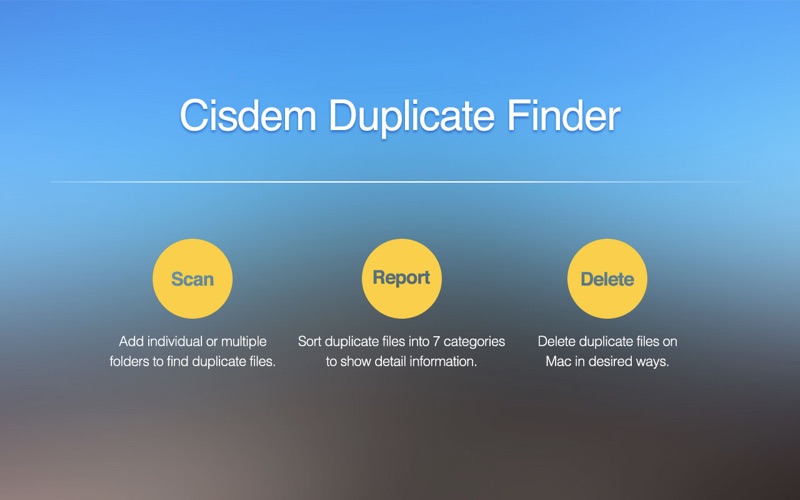
Cisdem DuplicateFinder is a light and user-oriented Mac OS application that provides the required tools and features to find and remove duplicate files from your hard disks.

Simple and intuitive duplicate finder that helps you clean up your Mac in a snap

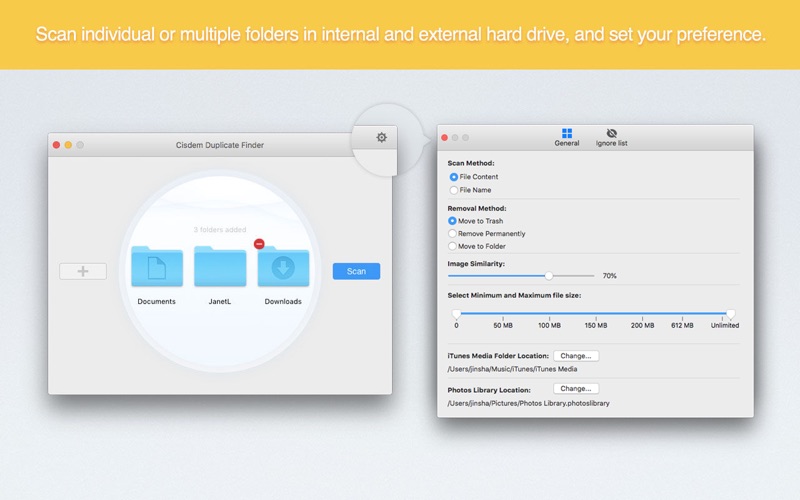
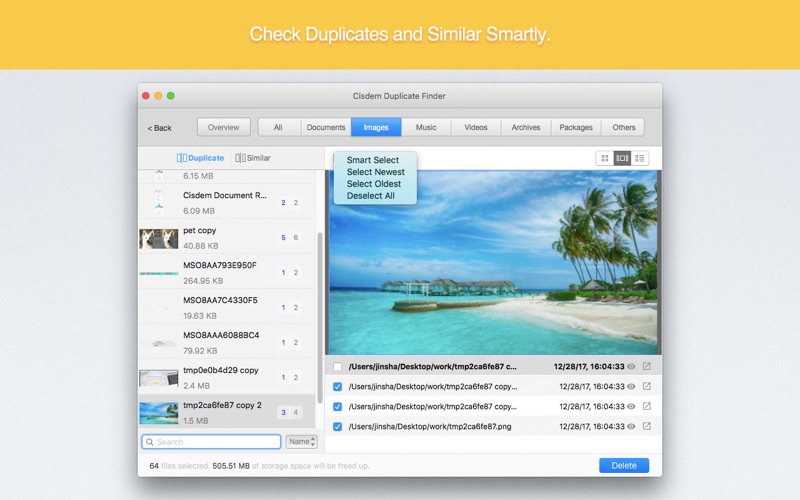
Cisdem Duplicate Finder comes with a simple and intuitive interface that enables you to quickly select the folders you want to scan for duplicate items. The app also provides support for drag and drop actions.

Note that the Cisdem Duplicate Finder scanning process can be easily customized via the Settings panel: you can choose to ignore packages or files that have a particular extension, or to manually provide the size range for the duplicate files.

The same area enables you to decide if you want to move the deleted files to the trash or to a folder of your choice, or you want to have them removed permanently from the start. In addition, you get to select the scanning method you want to apply: by file content or by file name.

Browse the duplicates results list and decide on your own which files are to be deleted

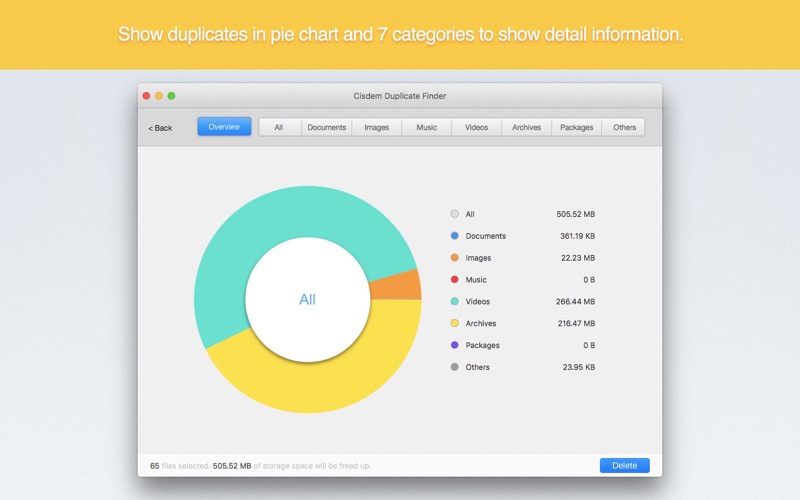
Within the Cisdem Duplicate Finder Results panel, the duplicate files are organized into multiple tabs, depending on their type: Documents, Images, Music, Videos, Archives, Package, and Other. The app also includes a simple search tool, and offers you the option to further sort the list by file size and type, name, or file count.

When you switch to the Overview mode,  Cisdem Duplicate Finder generates an animated graphic that helps you visualize the space distribution: each file type gets to be represented using a different color label, and you can see the overall storage space occupied by every category.

Preview images and reveal duplicates in the Finder

From each set of duplicate files, you can choose to select the ones you want to delete, or you can decide to hide certain items. Furthermore, you can reveal the selected file in your Finder and, if it is a supported image format, you also can preview the thumbnail directly from within Cisdem Duplicate Finder.

Although Cisdem Duplicate Finder is easy to use and provides multiple sorting options, it does not provide its users with the possibility to automatically mark for deletion multiple duplicates based on various criteria, such as creation date or file size, audio quality and other related information.

You do get to select all the files and delete them at the same time, but if you have multiple duplicates for the same file and you need to decide which document you want to keep, you might find Cisdem Duplicate Finder to be useful if you have to deal with a small number of duplicate files since you have to go through the entire list and verify each selection.

Bottom line, if you need to remove duplicate files from large folders with hundreds or thousands of files based on user defined criteria, you might want to look for alternative solutions better suited to deal with the task.

Information

CompatibilityOS X 10.10 or later 64-bit
LanguagesEnglish

What’s New in Cisdem Duplicate Finder 4.8.0

  • 1. Refined the interface for retina display.
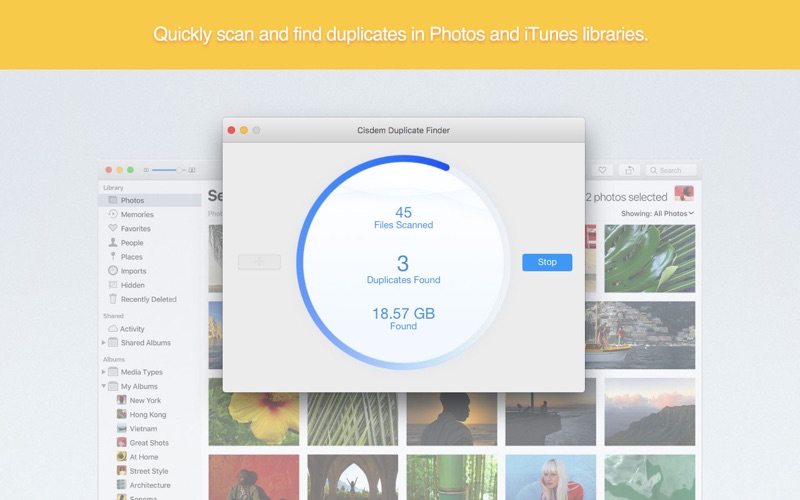
  • 2. Improved the capability to remove duplicates in iTunes and Photos.
  • 3. Solved the unable to set Photos library path issue.
  • 4. Solved the IAP buying problem for 1-year license.
  • 5. Fixed some minor bugs.

Screenshots


Name Cisdem_Duplicate_Finder_4.8.0_TNT_mac-torrents.net.zip
Size 22.53 MB
Created on 2019-09-23 16:40:58
Hash 4ade8cb02cd97710298194768234c0457a3c6acf
Files Cisdem_Duplicate_Finder_4.8.0_TNT_mac-torrents.net.zip (22.53 MB)

Download

Cisdem PDF Compressor 3.1.0


Download


Cisdem PDF Compressor 3.1.0

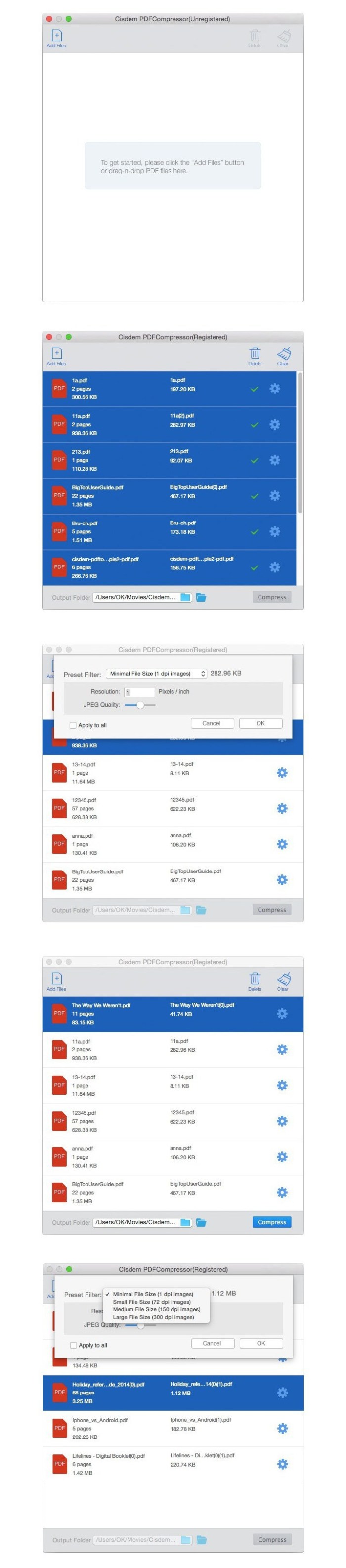
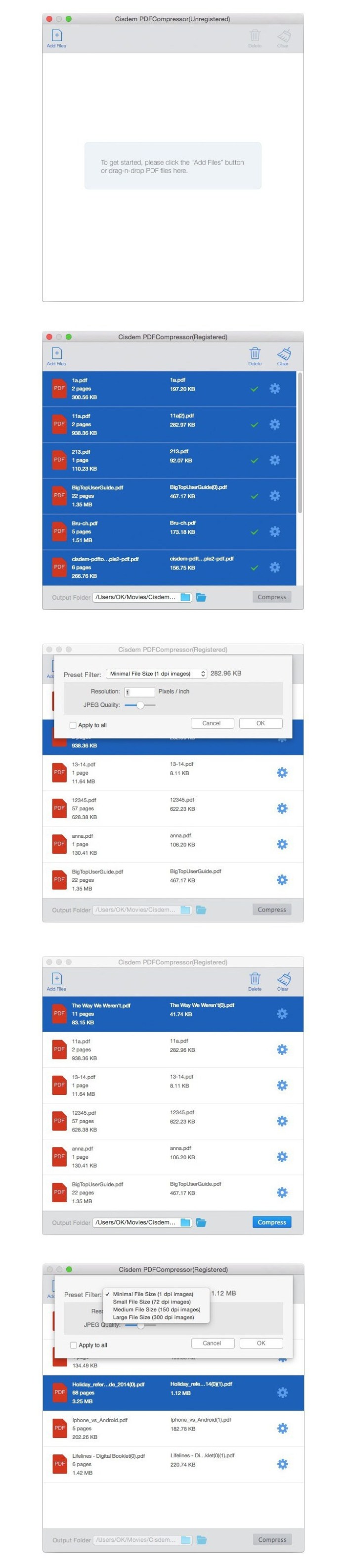
Cisdem PDFCompressor is a smart PDF compressor to reduce PDF file size. With the user-friendly interface, it can easily compress the size of single or multiple PDF files and maintain the original PDF format. Besides, four preset filter modes (Minimal file Size, Small File Size, Medium File Size, Large File Size) and resolution/image quality settings let you quickly set the resolution and JPEG quality for different PDF documents.

Features
  • Four Preset Modes: Minimal File Size, Small File Size, Medium File Size, Large File Size to meet your different ordinary compression need.
  • Customized DPI (Dots Per Inch): You can also set the specific preferred compression result and content quality if necessary.
  • Realtime Size: Show the sizes of your PDF files and the predicted sizes in different compression modes after compression.
  • Support Batch Compression: No matter compress hundreds of PDF documents or a 500page PDF file, it just need one click.
  • Support Page Selection and Preview: Dragndrop multiple PDFs in one go, preview them and select specified pages (e.g., 1,310,21 or all pages) to compress.
  • Keep the Highest Quality: Only remove the useless elements to reduce the large PDFs to their smallest size, without compromising quality.
  • Support all versions of PDF documents without Adobe Acrobat Reader installed.
  • Fully support macOS Sierra 10.12.

Compatibility: OS X 10.10 or later 64-bit

Web Site: https://www.cisdem.com/pdf-compressor-mac.html

What’s New in Cisdem PDF Compressor 3.1.0

  • Release notes not available at the time of this post.

Screenshots


Name Cisdem PDF Password Remover 3 7 0 TNT.zip
Size 16.24 MB
Created on 2019-07-05 05:52:25
Hash 06387df23ef86c2278231b042fa789da57987eeb
Files Cisdem PDF Password Remover 3 7 0 TNT.zip (16.24 MB)

Download

 you can download from other site :
Cisdem PDF Compressor 3.1.0

Cisdem PDF Password Remover 3.7.0


Download


Cisdem PDF Password Remover 3.7.0

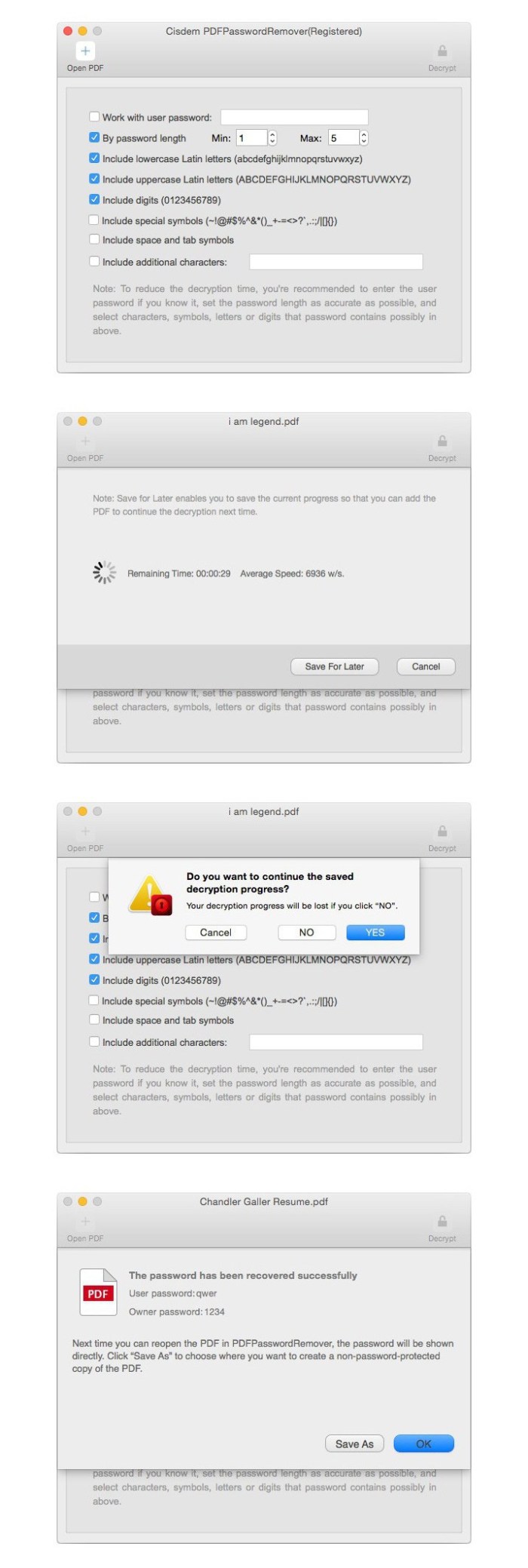
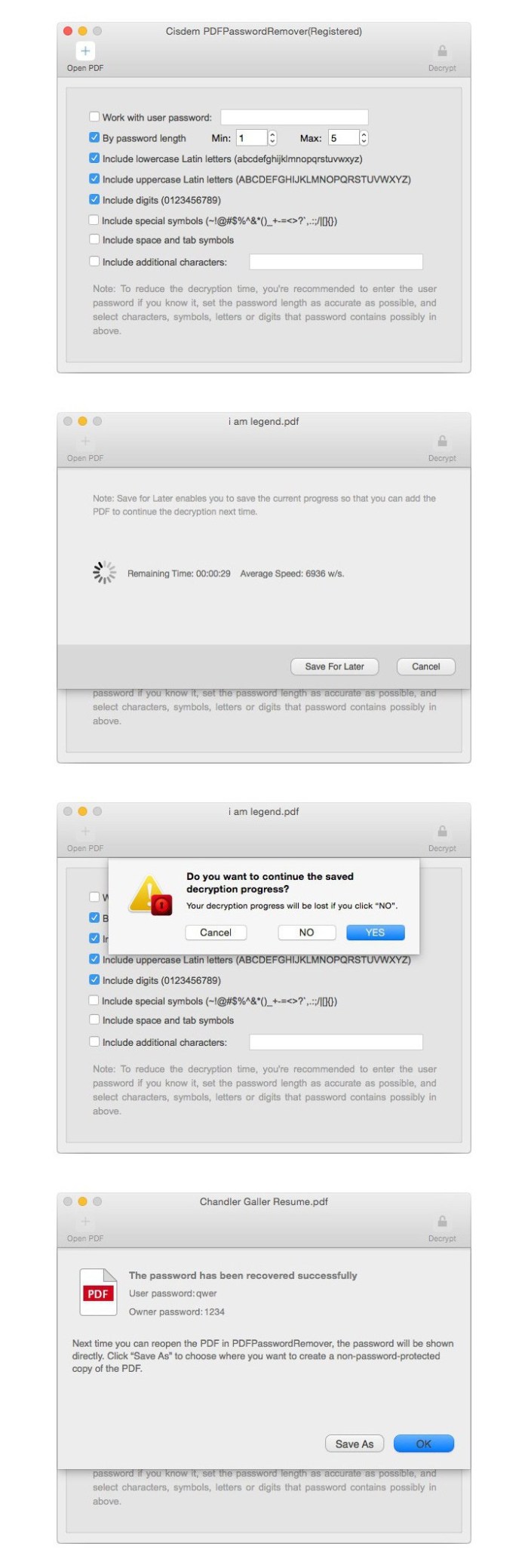
Cisdem PDFPasswordRemover is an excellent PDF decrypter, which unlocks all restrictions of both owner password and open password. So there are no restrictions to open, edit, copy and print PDF files any more! With automatically remembering decryption preference setting and resume decryption progress, it could be your individual and business tool of choice.

Features
  • Decrypt Both Owner Password and Open Password Respectively Cisdem PDFPasswordRemover can not only be used to easily remove PDF owner password (used to limit printing, copying, and editing PDF files) with 2 clicks, but also recover PDF user password (used to limit opening PDF files) using brute force decryption.
  • Batch Processing at High Speed The software allows you to remove limitations of PDF files that are protected by owner password in batch. Up to 200 PDF files can be added and unlocked at a time. Besides, the decryption process is as quick as a flash.
  • Decryption Preference Settings To save search time, you can check or fill in some details about your password like user name, password length, additional characters, etc. Besides, it will automatically remember your search preference for the settings.
  • Resume the Decryption Beside showing the decryption speed and remaining time, it could remember the decryption progress. When your decryption process for files protected by complicated password can be kept to continue next time.
  • Fully supports PDF version 1.01.7, OS X 10.7  10.11, and multiple languages, including English, German, French, Japanese, Greek, Latin, Korean, etc.

Compatibility: OS X 10.10 or later 64-bit

Web Site: https://www.cisdem.com/pdf-password-remover-mac.html

What’s New in Cisdem PDF Password Remover 3.7.0

  • Release notes not available at the time of this post.

Screenshots


Name Cisdem PDF Compressor 3 1 0 TNT.zip
Size 15.14 MB
Created on 2019-07-05 05:52:32
Hash ac4cb0a48f331b956253da38ee0b58627865ab09
Files Cisdem PDF Compressor 3 1 0 TNT.zip (15.14 MB)

Download

 you can download from other site :
Cisdem PDF Password Remover 3.7.0

Cisdem Duplicate Finder 4.7.0


Download


Cisdem Duplicate Finder 4.7.0

A straightforward duplicate finder and remover that enables you to recover hard disk space by finding and deleting duplicate files

Cisdem DuplicateFinder is a light and user-oriented Mac OS application that provides the required tools and features to find and remove duplicate files from your hard disks.

Simple and intuitive duplicate finder that helps you clean up your Mac in a snap

Cisdem Duplicate Finder comes with a simple and intuitive interface that enables you to quickly select the folders you want to scan for duplicate items. The app also provides support for drag and drop actions.

Note that the Cisdem Duplicate Finder scanning process can be easily customized via the Settings panel: you can choose to ignore packages or files that have a particular extension, or to manually provide the size range for the duplicate files.

The same area enables you to decide if you want to move the deleted files to the trash or to a folder of your choice, or you want to have them removed permanently from the start. In addition, you get to select the scanning method you want to apply: by file content or by file name.

Browse the duplicates results list and decide on your own which files are to be deleted

Within the Cisdem Duplicate Finder Results panel, the duplicate files are organized into multiple tabs, depending on their type: Documents, Images, Music, Videos, Archives, Package, and Other. The app also includes a simple search tool, and offers you the option to further sort the list by file size and type, name, or file count.

When you switch to the Overview mode,  Cisdem Duplicate Finder generates an animated graphic that helps you visualize the space distribution: each file type gets to be represented using a different color label, and you can see the overall storage space occupied by every category.

Preview images and reveal duplicates in the Finder

From each set of duplicate files, you can choose to select the ones you want to delete, or you can decide to hide certain items. Furthermore, you can reveal the selected file in your Finder and, if it is a supported image format, you also can preview the thumbnail directly from within Cisdem Duplicate Finder.

Although Cisdem Duplicate Finder is easy to use and provides multiple sorting options, it does not provide its users with the possibility to automatically mark for deletion multiple duplicates based on various criteria, such as creation date or file size, audio quality and other related information.

You do get to select all the files and delete them at the same time, but if you have multiple duplicates for the same file and you need to decide which document you want to keep, you might find Cisdem Duplicate Finder to be useful if you have to deal with a small number of duplicate files since you have to go through the entire list and verify each selection.

Bottom line, if you need to remove duplicate files from large folders with hundreds or thousands of files based on user defined criteria, you might want to look for alternative solutions better suited to deal with the task.

Compatibility: OS X 10.10 or later 64-bit

Web Site: https://www.cisdem.com

What’s New in Cisdem Duplicate Finder 4.7.0

  • Optimized interface.
  • Fixed some minor bugs.

Screenshots


Name Cisdem Duplicate Finder 4 7 0 TNT.zip
Size 22.31 MB
Created on 2019-07-03 06:06:51
Hash 42286bc861b0f9e33484c03f56dfbbaecfee349b
Files Cisdem Duplicate Finder 4 7 0 TNT.zip (22.31 MB)

Download

 you can download from other site :
Cisdem Duplicate Finder 4.7.0

Cisdem Duplicate Finder 4.6.0


Download


Cisdem Duplicate Finder 4.6.0

A straightforward duplicate finder and remover that enables you to recover hard disk space by finding and deleting duplicate files

Cisdem DuplicateFinder is a light and user-oriented Mac OS application that provides the required tools and features to find and remove duplicate files from your hard disks.

Simple and intuitive duplicate finder that helps you clean up your Mac in a snap

Cisdem Duplicate Finder comes with a simple and intuitive interface that enables you to quickly select the folders you want to scan for duplicate items. The app also provides support for drag and drop actions.

Note that the Cisdem Duplicate Finder scanning process can be easily customized via the Settings panel: you can choose to ignore packages or files that have a particular extension, or to manually provide the size range for the duplicate files.

The same area enables you to decide if you want to move the deleted files to the trash or to a folder of your choice, or you want to have them removed permanently from the start. In addition, you get to select the scanning method you want to apply: by file content or by file name.

Browse the duplicates results list and decide on your own which files are to be deleted

Within the Cisdem Duplicate Finder Results panel, the duplicate files are organized into multiple tabs, depending on their type: Documents, Images, Music, Videos, Archives, Package, and Other. The app also includes a simple search tool, and offers you the option to further sort the list by file size and type, name, or file count.

When you switch to the Overview mode,  Cisdem Duplicate Finder generates an animated graphic that helps you visualize the space distribution: each file type gets to be represented using a different color label, and you can see the overall storage space occupied by every category.

Preview images and reveal duplicates in the Finder

From each set of duplicate files, you can choose to select the ones you want to delete, or you can decide to hide certain items. Furthermore, you can reveal the selected file in your Finder and, if it is a supported image format, you also can preview the thumbnail directly from within Cisdem Duplicate Finder.

Although Cisdem Duplicate Finder is easy to use and provides multiple sorting options, it does not provide its users with the possibility to automatically mark for deletion multiple duplicates based on various criteria, such as creation date or file size, audio quality and other related information.

You do get to select all the files and delete them at the same time, but if you have multiple duplicates for the same file and you need to decide which document you want to keep, you might find Cisdem Duplicate Finder to be useful if you have to deal with a small number of duplicate files since you have to go through the entire list and verify each selection.

Bottom line, if you need to remove duplicate files from large folders with hundreds or thousands of files based on user defined criteria, you might want to look for alternative solutions better suited to deal with the task.

Compatibility: OS X 10.10 or later 64-bit

Web Site: https://www.cisdem.com

What’s New in Cisdem Duplicate Finder 4.6.0

  • Refined interface.
  • Fixed some minor bugs.

Screenshots


Name Cisdem Duplicate Finder 4 6 0 TNT.zip
Size 22.25 MB
Created on 2019-06-14 01:35:26
Hash eabb8ffc577697b72e3b65284b82e0422a290036
Files Cisdem Duplicate Finder 4 6 0 TNT.zip (22.25 MB)

Download

 you can download from other site :
Cisdem Duplicate Finder 4.6.0