Category Archives: Productivity

Pagico 7.1

Pagico icon

Description

Name: Pagico
Version: 7.1 (1781)
Mac Platform: Intel
Includes: K

OS version: 10.7 or higher
64 bit

Whats new:

Change log for build 1781 not ready at time of post

Build 1780:

New: Word and letter count when you select a portion of text
New: The lock screen (with customizable background image) is now available for databases without passwords
Improved context menu for easier task creation (you can now right-click on a project in the projects list to create new tasks)
Improved Natural Language Parsing
In List item edit mode, a confirmation will be shown to prevent losing unsaved changes by accidentally pressing the ESC key
Greatly improved content listing performance in data containers (projects, contacts and inbox)
Improved the stability of workspace sync
Improved Daily Planning section with a small yet satisfying animation when you complete all your Today's items.
Improved the rendering of appointments in Dashboard
When switching to a container for a specific object, the object in question will be elegantly highlighted
Creating lists (instead of tasks) is easier in containers by using the individual "+" buttons
Improved the user experience in the New Task panel
Fixed the rendering of ampersand symbols in lists
Fixed a bug where the Show Hidden Items toggle may not appear as expected in some rare cases

Courtesy of Special K

Install:

Install app to wherever, do not open.
Open Special K licensor, apply K.


Store and manage all your tasks, notes, files, projects and contacts in one easy-to-use app. Keeping everything organized and on-track is easier than ever.

Interactive Flowcharts
Its revolutionary flowchart intuitively presents all your schedule data without being overwhelming, helping you to easily and visually stay on track. With the brand-new Stats view, you can actually see how productive you have been, making your job a little more satisfying to do.

And more...

More info: http://www.pagico.com

Name Pagico 7.1
Size 23.13 MB
Created on 2015-07-08 04:56:07
Tracker http://109.235.50.166:2710/announce
Hash c2a16e0032aa926903e6f0813e7483988d944d7f
Files Pagico 7.1/Pagico [Lic] [SPK].zip (1.09 MB)
Pagico 7.1/Pagico_Desktop_r1781.dmg (22.04 MB)

Together 3.4.5

Name Together 3.4.5 Size 11.99 MB Created on 2015-07-08 04:57:25 Tracker http://109.235.50.166:2710/announce Hash ee000f73a9c23d8ee0b63a4eee543a016625f755 Files Together 3.4.5/Together 3.x [SP].zip (1.28 MB) Together 3.4.5/Together_3.4.5.dmg (10.71 MB) Download Download Description Name: Together Version: 3.4.5 Mac Platform: Intel Includes: K OS version: 10.10 or higher 64 bit Whats new: Fixes an issue where icons and names wouldn’t be shown in the Choose Library and Manage Libraries panel on OS X 10.10.4. Fixed a problem where tag bundles appeared unsorted Courtesy of Special K Together helps you organize your Mac, giving you the ability to store, edit and preview your files in a single …

Copyright © 2019 Mac Torrent Download All Rights Reserved.

HazeOver 1.4.4

Name HazeOver 1.4.4 Size 3.67 MB Created on 2015-07-08 04:56:59 Tracker http://109.235.50.166:2710/announce Hash 21279b39dfb8cda45f737b6e0264936b1c0f9d11 Files HazeOver 1.4.4/HazeOver 1.4.4.zip (3.67 MB) Download Download Description Name: HazeOver Version: 1.4.4 Mac Platform: Intel Includes: Pre-K’ed OS version: 10.9 or higher 64 bit Whats new: When using multiple displays, each one is now dimmed independently. Fixed: sometimes apps launched using Spotlight did not get dimmed. Double-click menubar icon to toggle HazeOver status. Courtesy of C.O.R.E HazeOver: dim background apps and get rid of distractions Get rid of distraction. Let this tiny app emphasize an active window by fading out inactive ones. Heavy multi-tasking kills …

Copyright © 2019 Mac Torrent Download All Rights Reserved.

Omnifocus Pro 2.2.1

Description

Name: Omnifocus Pro
Version: 2.2.1
Mac Platform: Intel
Includes: Serial

OS version: 10.10 or higher
64 bit

Whats new:

See: https://www.omnigroup.com/releasenotes/omnifocus-mac


More Info: https://www.omnigroup.com/omnifocus/

We understand, you’re busy. You’ve got stuff to do. Work. Home. Play.

The only way you’ll make it through all the things that you need to do is to organize them somehow. Maybe you’ve been making do with notebooks or sticky notes — and hoping they don’t fall into the world of lost things behind your desk. But hey! You’ve got this awesome Mac sitting in front of you. You use it every day. You guard it with your life.

It’s time to get serious about all of the stuff you need to do. It’s time to get OmniFocus.

The new OmniFocus 2 features everything you need to seriously get stuff done:

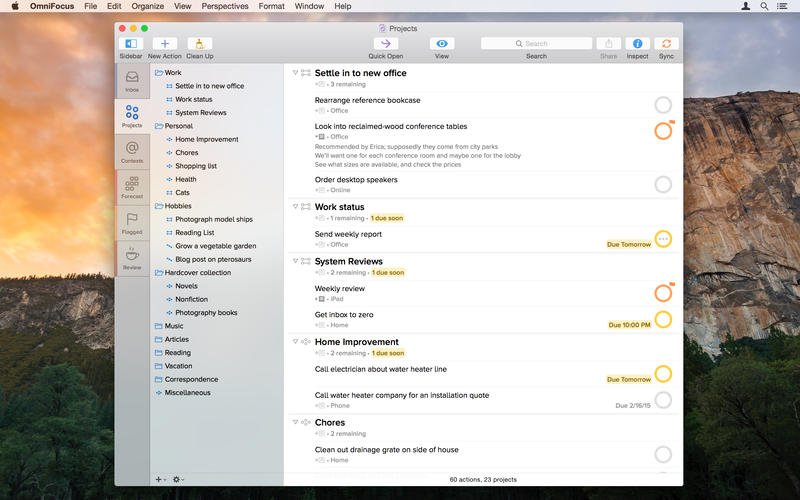
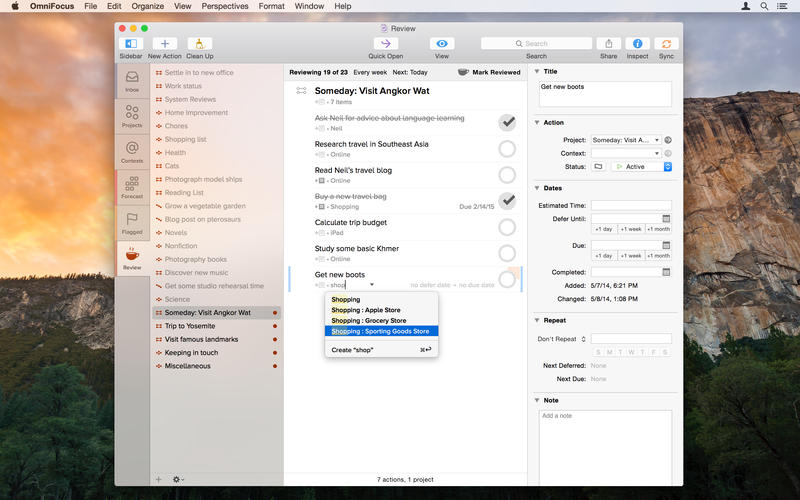
Clarify your goals as Projects, and break them down into manageable Actions.
Assign Contexts — the place you need to be, the person you need to contact, or even a state of mind — to Actions and Projects
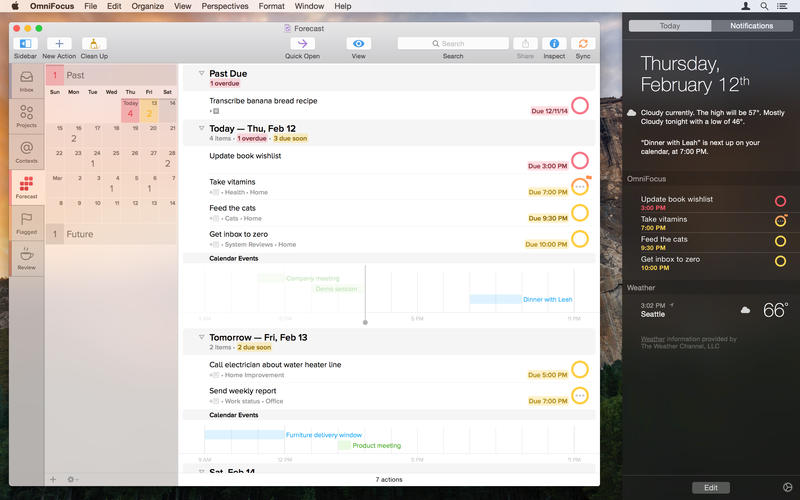
NEW: Use Forecast to see the actions and Calendar events already on your plate, and assign due dates to actions
NEW: Assess and update your projects on a regular basis in the dedicated Review perspective
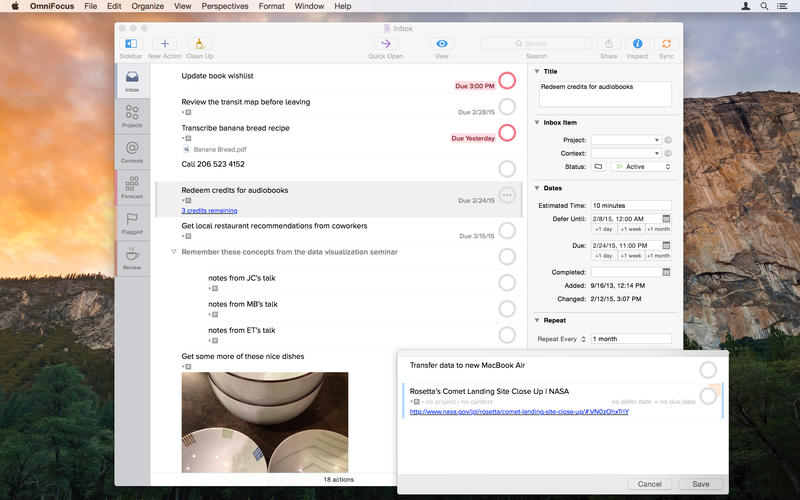
Track essential details on everything, including dates, notes, and file attachments
Capture urgent tasks and stray thoughts to your OmniFocus Inbox with Quick Entry — no need to even Command-Tab away from the app you’re working in when the thought occurs
Keep it all at your fingertips by syncing with OmniFocus for iPad and OmniFocus for iPhone
Collect from anything that can send email — Omni Sync Server’s Mail Drop adds items directly to your OmniFocus Inbox
Print reports for your manager (if they like that kind of thing)
Control the badges and notifications for upcoming tasks — out of your way or colorfully hard to overlook


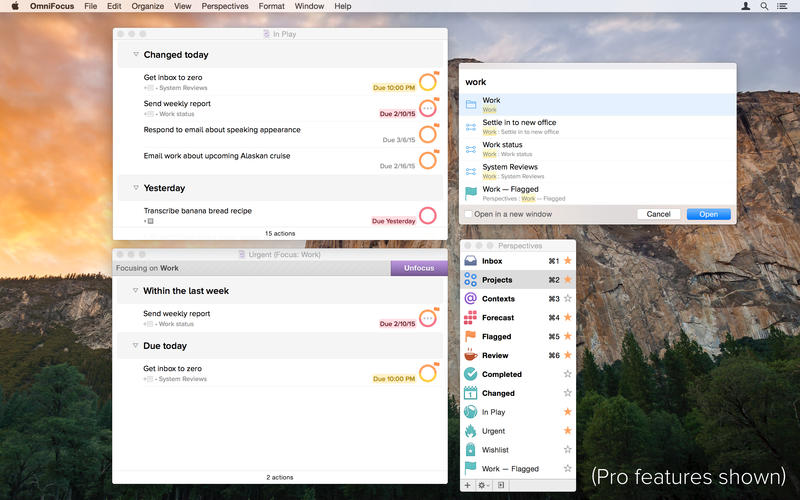
The OmniFocus Pro in-app purchase adds tools to help you be even more productive - use custom perspectives and focus to fine-tune your views, and apply the power of AppleScript to supercharge your workflow.

Don’t you think it’s time to find a better way to organize all of the stuff you need to accomplish?

It’s time for OmniFocus.

Mac App Store: https://itunes.apple.com/us/app/omnifocus-2/id867299399?mt=12

Screenshots

Name Omnifocus Pro 2.2.1
Size 25.39 MB
Created on 2015-07-04 23:18:07
Tracker http://109.235.50.166:2710/announce
Hash e08743c94e65d309a2b8bdd8499eba6fc0b135e8
Files Omnifocus Pro 2.2.1/OmniFocus-2.2.1.dmg (25.39 MB)
Omnifocus Pro 2.2.1/SERIAL.txt (0.23 kB)

Snippets 1.4.4

Description

Name: Snippets
Version: 1.4.4
Mac Platform: Intel
Includes: Pre-K'ed + K

OS version: OS X 10.6 or later
Processor type(s) & speed: 64-bit processor

Block connections to: www.snippetsapp.com

Pre-K'ed version and Pre-Yosemite Patcher (for future versions)

As the patcher is not Yosemite-compatible I've precracked the app using the codesign swap and tested it on a different machine, patch holds. I've included the patcher for archival purposes, so that it can be used to patch future versions.

Courtesy of Special [K]

1.4.4: Bugfixes - Mar 30, 2014

ADDED Link detection in code editor.
FIXED Disable quote and dash substitutions in code editor.
FIXED Disable spelling corrections and text replacement in code editor.
FIXED Crash on OS X 10.8 Mountain Lion when typing any character in search field in Menu Bar.
FIXED Snippets Assistant was not launching automatically.


1.4.3: Hotfix - Jan 21, 2014

FIXED Issue with licenses on OS X Mavericks.


1.4.2: Snippets meets Mavericks - Dec 08, 2013

IMPROVED Support for OS X 10.9 Mavericks.
FIXED Licensing issues on OS X Mavericks.
REMOVED MobileMe Sync options from the Preferences window.
REMOVED Support for OS X 10.6.


1.4.1: Mountain Lion - Jul 27, 2012

FIXED OS X 10.8 Mountain Lion support
FIXED Wrong behaviour on multiple desktops


Full Release Notes: http://www.snippetsapp.com/release-notes/


More Info: http://www.snippetsapp.com

Snippets is a powerful application for Mac OS X that stores the most valuable pieces of code you can reuse in different projects many times.

The main idea is to make the process of reusing as easy as possible to avoid wasting your valuable time to write the same code again.

WHY?
We usually spend a lot of time to find something useful within the past projects. This utility allows сreate, organize, and reuse your code snippets simpler and faster.

Using such powerful features as smart groups, labels, and integration with other applications increases the speed of coding.

Name Snippets 1.4.4
Size 4.68 MB
Created on 2015-06-20 23:51:11
Tracker http://109.235.50.166:2710/announce
Hash 7221d83616f441006cb899f268de1b84352108f4
Files Snippets 1.4.4/Snippets 1.4.4 [Pre-K’ed].dmg (4.06 MB)
Snippets 1.4.4/Snippets 1.x [SP] (for future versions).zip (627.0 kB)

Magic Calculator 2.10

Name Magic Calculator 2.10
Size 2.34 MB
Created on 2015-06-19 12:19:35
Tracker http://109.235.50.166:2710/announce
Hash f7017d9bf6b8e9bb98169e32a183377c63fc4649
Files Magic Calculator 2.10/Magic_Calculator_v2.10.zip (2.34 MB)

Descriptions for Description

Name: Magic Calculator
Version: 2.10
Mac Platform: Intel
Includes: Pre-K'ed

OS version: 10.6 or higher
64 bit

Whats new:

• Added a button to clear the current document
• Fixed few bugs

Courtesy of C.O.R.E


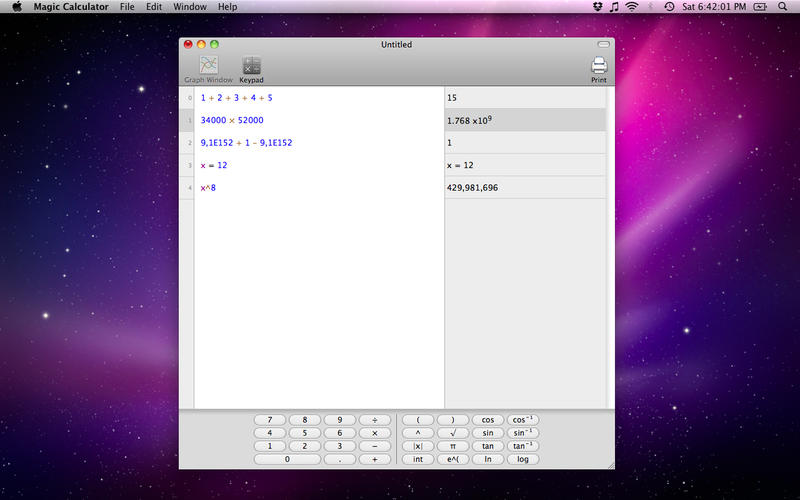
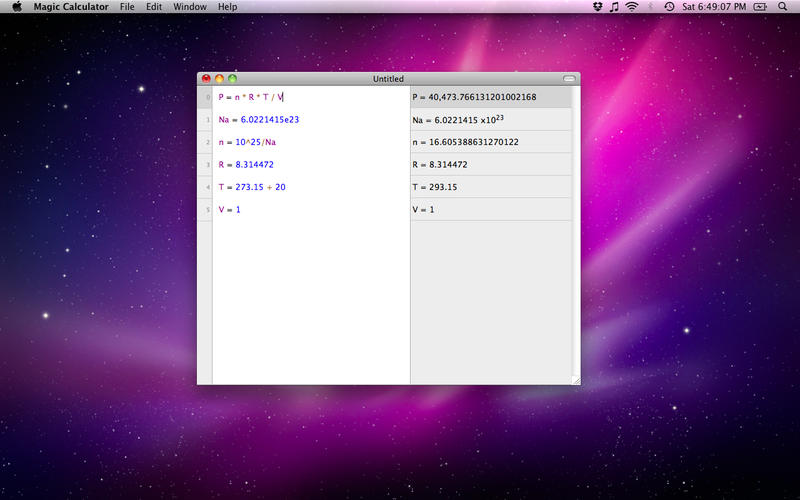
Magic Calculator is a scientific calculator that allows you to write calculations directly with the keyboard.

A Magic Calculator document looks like a text editor. Each line of the text is a calculation. Just type expressions and get immediately the results.
If you make a change, everything is automatically updated.

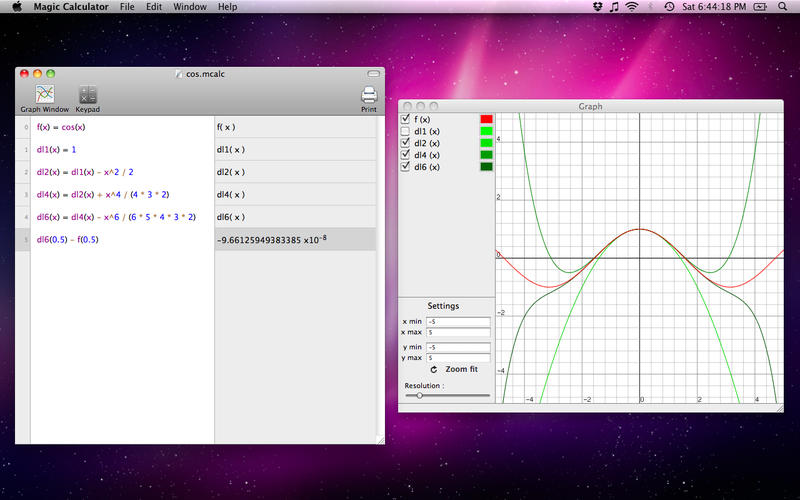
It also allows you to define variables and functions. With the function plotter, you can visualise the graph of the functions you have defined.

The following features are supported:

• Write calculations in natural notation
• High precision calculations
• Trigonometric functions (in radian or degree)
• Variables and functions
• Save and print documents
• Function plotter
• Help page

More info: https://itunes.apple.com/us/app/magic-calculator/id421993158?mt=12

Screenshots

MindManager 10.3.637

Name MindManager 10.3.637
Size 120.4 MB
Created on 2015-06-18 23:58:00
Tracker http://109.235.50.166:2710/announce
Hash 7d4e8cc43d8bf8a248285a47355ff46275dbb7df
Files Mindjet MindManager 10.3.637/CORE Keygen.zip (489.8 kB)
Mindjet MindManager 10.3.637/Mindjet MindManager 10.3.637.zip (119.9 MB)

Descriptions for Description

Name: MindManager
Version: 10.3.637
Mac Platform: Intel
Includes: KG

OS version: 10.7 or higher

Whats new:

Change log not ready at time of post

Thanks to C.O.R.E.


More Info: http://www.mindjet.com/mindmanager/platforms/mac/

Mindjet MindManager for Mac

MindManager for Mac is the newest version of our Mac desktop product. MindManager for Mac has all of the basic MindManager information mapping tools in a native Mac OS interface.

VISUAL FRAMEWORK
Use a visual framework to capture information, create clarity, ensure participation, and spark innovative thinking. MindManager for Mac allows you to capture stakeholder input and make connections between ideas and information and turn that input into a plan. The map becomes a tool to clearly communicate the goals and objectives of the overall plan.

CONTENT AND CONTEXT
Add hyperlinks, attachments, notes, images, and spreadsheets for content detail. Add context with icons, tags, topic shapes, callouts, boundaries, colors, topic sorting, and numbering.

PLANNING AND TASK MANAGEMENT SOFTWARE
Identify priorities, completion status, resources, and timelines to plan your work with the MindManager task management software

INTEGRATION AND SHARING
Import from Apple iWork Pages and Microsoft Word. Export to Apple iWork Pages, Keynote, Microsoft Word and PowerPoint. Integrates with Apple iCal, iChat, IPhoto and Address Book, Microsoft Entourage for synching calendar and contact information.

MailBar 1.2.4

Name MailBar 1.2.4
Size 7.15 MB
Created on 2015-06-05 23:51:06
Tracker http://109.235.50.166:2710/announce
Hash 710cb00d046ef3e0a5e9932b3b828b4310580da0
Files MailBar 1.2.4/MailBar 1.2.4.zip (7.15 MB)

Descriptions for Description

Name: MailBar
Version: 1.2.4
Mac Platform: Intel
Includes: Pre-K'ed

OS version: 10.9 or higher
64 bit

Whats new:

Added “Restart MailBar” button to menu.
Added ability turn off analytics that sent to MailBar team at the preferences.
Now after adding, editing or deleting “smart mailbox”, changes appear at MailBar immediately.
Fixed bug with adding new recepients on TAB key press.
Fixed minor bugs on MailBar plugin.


MailBar enables you to check your inbox and manage your emails directly from your Mac's status bar.

The light and discreet application is designed to run in the background and display the number of new emails next to its menu bar icon. Thanks to MailBar, you can monitor and manage up to four different mailboxes. From MailBar's status bar menu you can easily view all existing emails or filter the list by showing only the unread messages. On top of that, MailBar comes with a powerful built-in search form that enables you to narrow down the list of displayed emails.

What is more, MailBar offers you the option to mark a message as read, reload it and even open it and read it directly from within the app. MailBar also offers you the option to pin its status bar menu to your desktop as you read and go through your emails. By accessing the Preferences window, you can easily assign different colors to you mailboxes, enable or disable an inbox and select a different sound notification for each inbox. In addition, MailBar can be configured to automatically check for updates and launch at startup.

Set for iWork 3.2

Name Set for iWork 3.2 Size 267.8 MB Created on 2015-06-05 00:14:34 Tracker http://109.235.50.166:2710/announce Hash 69fe54ad96c1c0c335cdf89f52d328b8dbb15c92 Files Set for iWork 2.3/Set for iWork 2.3.dmg (267.8 MB) Download Download Description Name: Set for iWork Version: 3.2 Mac Platform: Intel Includes: Pre-K’ed OS version: 10.8 or higher 64 bit Whats new: New 80 pages templates. The ideal tool for users of iWork, Set for iWork provides you with over 1300 unique designs for Pages documents, 155 spreadsheet templates for Numbers, 110 first-class slideshow themes for Keynote, and 1733 images for illustrating your content. All templates are available in the US and international …

Copyright © 2019 Mac Torrent Download All Rights Reserved.

Timelime 1.3.2

Name Timelime 1.3.2
Size 7.13 MB
Created on 2015-05-16 00:14:27
Tracker http://109.235.50.166:2710/announce
Hash 4e91c7a8525cd52dc4fdab873e478b312ca5a4d1
Files Timelime 1.3.2/Timelime 1.3.2.zip (7.13 MB)

Descriptions for Description

Name: Timelime
Version: 1.3.2
Mac Platform: Intel
Includes: Pre-K'ed

OS version: 10.9.5 or higher
Processor type(s) & speed: 64 bit
RAM minimum: 1
Video RAM: 1

Whats new:

This version fixes several minor bugs.


Timelime is the easiest and most beautiful way to track and visualize your working hours.

Timelime is the perfect assistant for:

Freelancers and independent contractors who have to track their time spent on projects
Students who want to spend more time studying by monitoring their daily/weekly/monthly workload
Individuals who are interested in how they spend their work time
People who wish to reduce the amount of time not being productive
Anyone else who likes simple yet powerful time tracking and visualization

Timelime's key highlights are:

Unobtrusive interface:

When timing, Timelime hides away in the menu bar. Even the menu bar icon is customizable to make it as unobtrusive as you like. Start and stop the timer from the menu bar or by a hotkey.

Task Grouping:

Organize your tasks by groups using simple drag and drop. Timelime supports up to two levels of subtasks.

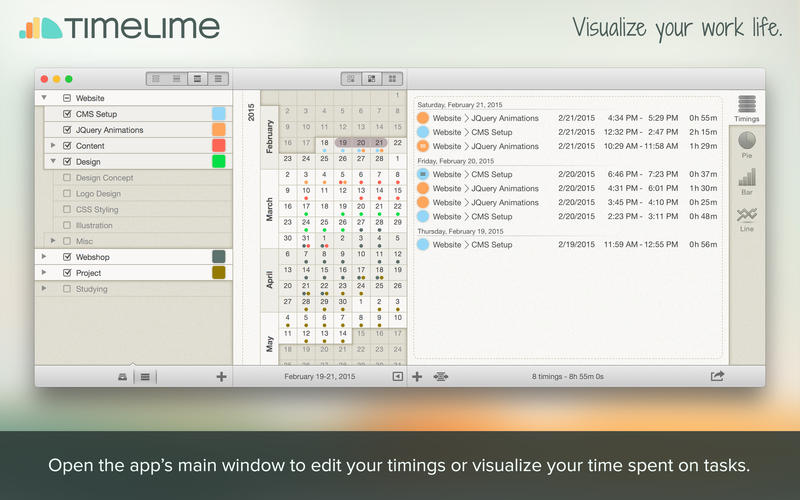
Calendar view:

View your daily work activity in a unique continuous calendar, which also allows you to select date ranges for review.

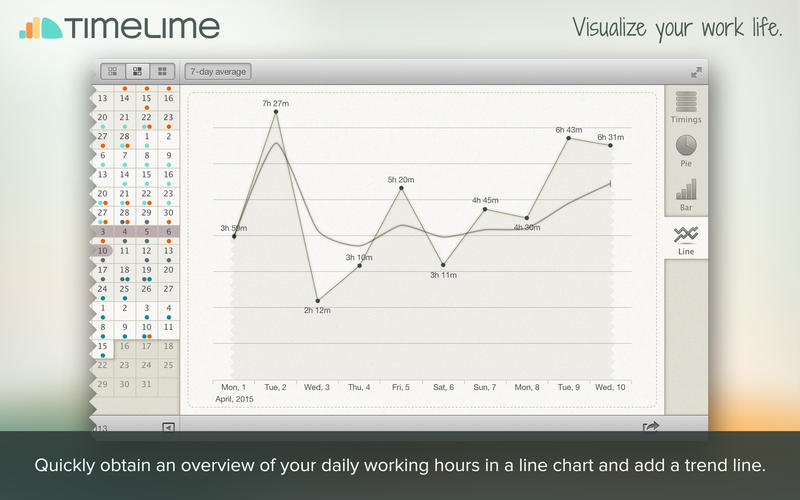
Beautiful charts:

Whether you want to display your workload in a bar, line, or pie chart, Timelime enables you to generate customizable and beautiful charts.

And more....

Other Features:

Retina display support
Idle time detection
Undo/Redo support
Adapts to localized date and time formats
Import data from TicToc App
Add notes to your tasks and timings
Manually add, edit, or delete timings
Backup and restore your data
Automatically merge timings by day

Please note that Timelime currently only supports the Gregorian calendar.

More info: https://itunes.apple.com/us/app/timelime/id589698946

Screenshots

Smultron 7.1

Description

Name: Smultron 7
Version: 7.1
Mac Platform: Intel
Includes: Pre-K'ed

OS version: 10.10 or higher
64 bit

Whats new:

• Accessibility improvements
• Syntax highlighting improvements
• Some performance improvements
• Some other bug fixes and improvements

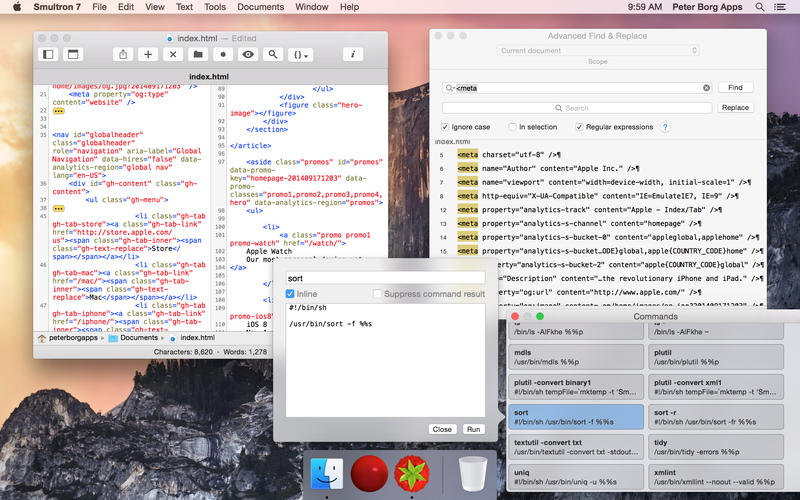
Smultron 7 is an elegant and powerful text editor that is easy to use.

Use Smultron 7 to create or edit any text document. Everything from a note, a web page, or a script to every single piece of text or code.

(Please note that Smultron 7 only works with OS X Yosemite 10.10, if you are using an earlier OS X you can get an earlier Smultron.)

• It is easy to begin using Smultron 7 as it is designed to be very intuitive
• Edit your text with many helpful tools
• You have access to many powerful text tools
• All your open documents are easily accessible
• Use Smultron 7 in your own language as it is translated into many languages
• Store your documents in iCloud and access them on all your Macs
• It has all the features you want when you need them - like syntax colors for 110 code languages, regular expressions, commands, text snippets, text folding, line numbers and many more

The new Smultron 7 has many new features and improvements:

• The best ever Smultron and one of the biggest Smultron updates ever
• Added a new document list
• A new improved tab bar
• An optional quick look preview panel for each document
• Better and faster syntax coloring
• Search multiple files in a folder on disk
• New syntax support for: Arduino, Clojure, Final Cut Pro XML, Fountain, Hack, Notation3, Processing, Rust, Strings, Swift, Turtle, XLIFF, XQuery, Zimbu
• Print line numbers
• Improved accessibility support
• Updated for OS X Yosemite 10.10
• Many, many other improvements like for instance better contextual menus and many more toolbar icons
• Many bug fixes

More info: https://itunes.apple.com/us/app/smultron-7/id921128244?ls=1&mt=12

Screenshots

Name Smultron 7.1
Size 5.40 MB
Created on 2015-05-11 00:09:30
Tracker http://109.235.50.166:2710/announce
Hash 695578e9662e8c272cb997868597945d9596f06b
Files Smultron 7.1/Smultron 7.1.zip (5.40 MB)

Fantastical 2.0.4

Name Fantastical 2.0.4 Size 13.85 MB Created on 2015-05-11 00:12:38 Tracker http://109.235.50.166:2710/announce Hash a220873922c7aa893ff05dd935c58a4c6c76a873 Files Flexibits.Fantastical.v2.0.4.MacOSX.Incl.Keymaker.and.Patch-CORE/CORE.NFO (9.44 kB) Flexibits.Fantastical.v2.0.4.MacOSX.Incl.Keymaker.and.Patch-CORE/Fantastical_2.0.4.zip (13.41 MB) Flexibits.Fantastical.v2.0.4.MacOSX.Incl.Keymaker.and.Patch-CORE/cr-flexibits.dmg (429.9 kB) Download Download Description Name: Fantastical Version: 2.0.4 Mac Platform: Intel Includes: KG OS version: 10.10 Processor type(s) & speed: Intel, 64-bit RAM minimum: n/a Video RAM: n/a From NFO: Use our keymaker to patch & register the application. Note: It is recommended to be offline or block Fantastical from phoning home when registering. This check only happens once when applying the license details. It is safe to allow other connections from Fantastical for now. Note: This …

Copyright © 2019 Mac Torrent Download All Rights Reserved.

BookletCreator 1.6

Description

Name: BookletCreator
Version: 1.6
Mac Platform: Intel
Includes: Pre-K'ed

OS version: 10.6 or higher
64 bit

Whats new:

Personal and Business licenses merged into one license type
Bug fixes

Courtesy of Special K


BookletCreator is a simple tool that allows you to create a booklet from a PDF document. It reorders pages so that after printing and folding the pages, a small book is created.

Link for more information: http://bookletcreator.com/

Name BookletCreator 1.6
Size 616.0 kB
Created on 2015-05-11 00:10:20
Tracker http://109.235.50.166:2710/announce
Hash 4fe7386ca225f38de17e6d1fec456c7384ec1203
Files BookletCreator 1.6/BookletCreator 1.6 .zip (616.0 kB)

iThoughtsX 2.21

Name iThoughtsX 2.21 Size 28.73 MB Created on 2015-04-30 00:00:48 Tracker http://109.235.50.166:2710/announce Hash 335e68ef0e0a3b459fcc894af3b93ee33a128183 Files iThoughtsX 2.21/iThoughtsX 2.21.zip (27.50 MB) iThoughtsX 2.21/iThoughtsX 2.x [SP].zip (1.24 MB) Download Download Description Name: iThoughtsX Version: 2.21 Mac Platform: Intel Includes: K OS version: 10.8.2 or higher 64 bit Whats new: Fixes for the previous performance improvements. Courtesy of Special K Mindmapping enables you to visually organise your thoughts, ideas and information. Typical Uses: • Course Notes/Revision • Project planning • Task lists • Brainstorming • Goal setting • WBS • Meeting Notes • GTD Import and export many different file formats: • Mindjet …

Copyright © 2019 Mac Torrent Download All Rights Reserved.

Keynote 6.5.3

Description

Version: 6.5.3
Mac Platform: Intel
OS version: 10.10+
Processor type(s) & speed: Intel 64-bits ONLY
RAM minimum: 2GB
Video RAM: 256MB

What's new:
- This update contains stability improvements and bug fixes.


More info: https://itunes.apple.com/app/id409183694

Description

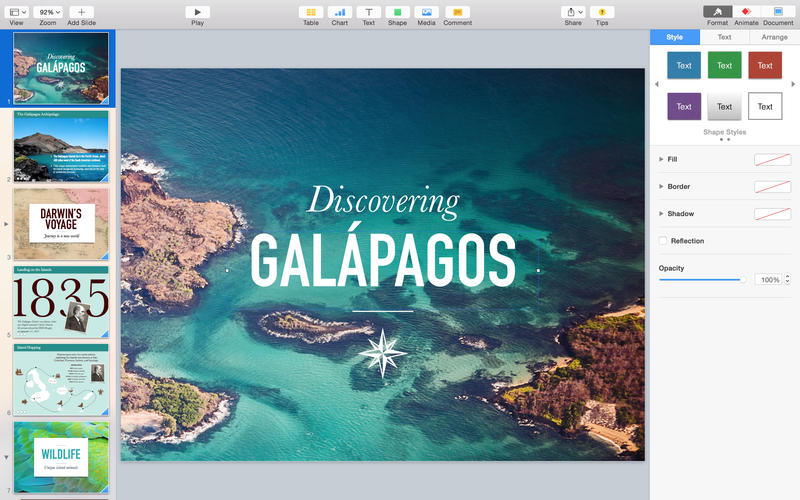
Easily create gorgeous presentations with the all-new Keynote, featuring powerful yet easy-to-use tools and dazzling effects that will make you a very hard act to follow.

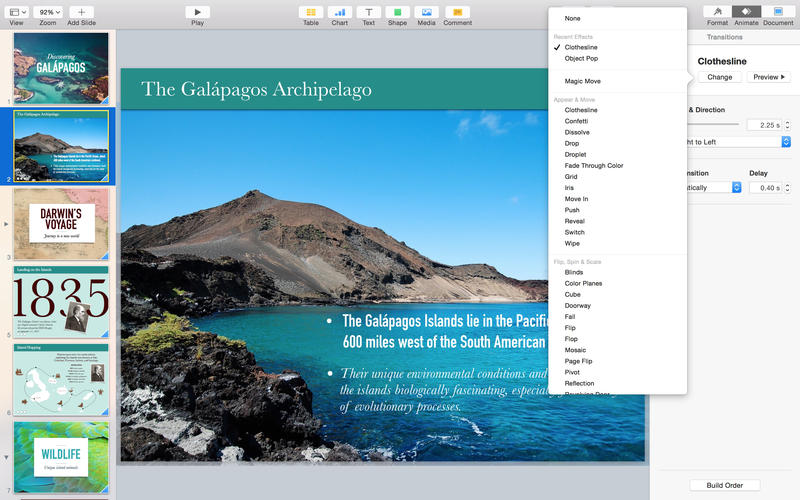
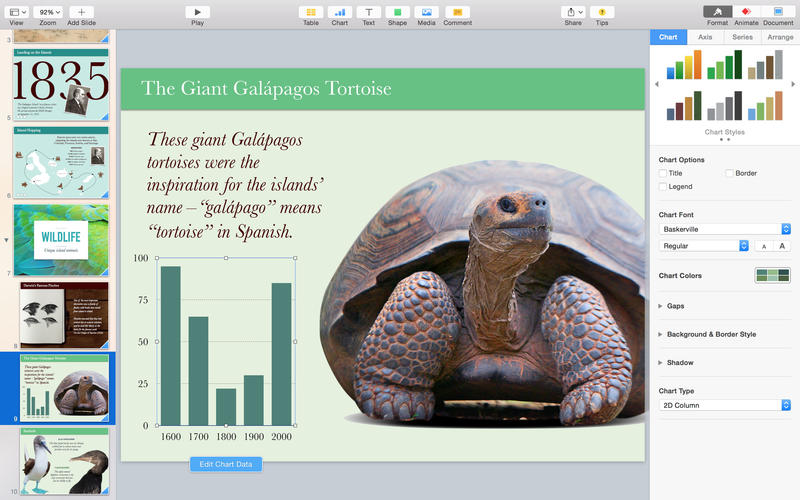
The Theme Chooser lets you skim through an impressive collection of 30 new and updated Apple-designed themes. Once you’ve chosen the perfect canvas for your presentation, simply replace the placeholder text and graphics with your own words and images. Easy-to-use tools let you add tables, charts, shapes, photos, and videos to slides—and bring it all to life with cinematic animations and transitions that look as though they were created by your own special effects team. Animate your data with new interactive column, bar, scatter, and bubble charts.

Use iCloud to keep your presentations up to date across all your devices. You can instantly share a presentation using just a link, giving others the latest version and the ability to edit it directly with Keynote for iCloud beta from www.icloud.com using a Mac or PC browser.

With Keynote, you have all the tools you need to make an amazing presentation quickly and easily.

Screenshots

Name Keynote 6.5.3
Size 438.3 MB
Created on 2015-04-23 23:52:33
Tracker http://109.235.50.166:2710/announce
Hash e6904307bfcc4f9c75ff18007fbf8c153c7bb233
Files Keynote 6.5.3.dmg (438.3 MB)

Pages 5.5.3

Name Pages 5.5.3 Size 303.6 MB Created on 2015-04-23 23:52:06 Tracker http://109.235.50.166:2710/announce Hash 1156ef0ce0cde190f58e82fc33963d56fe402553 Files Pages 5.5.3.dmg (303.6 MB) Download Download Description Version: 5.5.3 Mac Platform: Intel OS version: 10.10+ Processor type(s) & speed: Intel 64-bits ONLY RAM minimum: 2GB Video RAM: 256MB What’s new: – This update contains stability improvements and bug fixes. Create gorgeous documents in minutes with the all-new Pages for Mac word processor — featuring a stunning new design, new writing tools, and improved performance. Start with an Apple-designed template or create your own design using fonts, styles, and tools from the intelligent Format Panel. Easily …

Copyright © 2019 Mac Torrent Download All Rights Reserved.

RapidWeaver 6.1.1

Name RapidWeaver 6.1.1
Size 171.4 MB
Created on 2015-04-22 12:45:28
Tracker http://109.235.50.166:2710/announce
Hash d3d6078441f277104a4b282f1755d8db38ff348d
Files RapidWeaver 6.1.1/RapidWeaver 6 6.x [SP] Special K.zip (1.31 MB)
RapidWeaver 6.1.1/RapidWeaver6-14765.zip (169.7 MB)
RapidWeaver 6.1.1/Realmac Software MultiGen [KG] CORE.zip (433.7 kB)

Descriptions for Description

Name: RapidWeaver
Version: 6.1.1
Mac Platform: Intel
Includes: K

OS version: OS X 10.9 or later
Processor type(s) & speed: 64-bit processor

Block connections to:
hello.devmate.com
updates.devmate.com
realmacsoftware.com

Two activation options:
KG+P Courtesy of C.O.R.E.
Patcher Courtesy of Special [K]

Release Date: April 16, 2015

RapidWeaver 6.1.1

Due to an issue with the software update feature in RapidWeaver 6.0.9, you may have experienced problems updating to RapidWeaver 6.1. Today’s update fixes this issue, and to work around this issue must be downloaded from the Realmac Software website.


Full Release Notes: http://realmacsoftware.com/rapidweaver/releasenotes
Sparkle Release Notes: http://updateinfo.devmate.com/com.realmacsoftware.rapidweaver6/14772/releasenotes.html

Direct Download: http://dl.devmate.com/com.realmacsoftware.rapidweaver6/14765/1429195960/RapidWeaver6-14765.zip


More Info: http://realmacsoftware.com/rapidweaver

Web Design Software for Mac
RapidWeaver is the all-in-one app that enables you to build the website you’ve always wanted. Whether it’s an online store, stunning photo gallery or blog, RapidWeaver provides you with the know-how to quickly publish websites that even pros are proud of.

Amazingly Powerful, Infinitely Expandable
RapidWeaver is the leading Mac web design app, and has been ever since its launch over ten years ago. Each release is designed to make your website better, and we’ve carefully ensured that RapidWeaver has all the tools you need to create the perfect website. Best of all, RapidWeaver allows your site to grow as you build it and is expandable with hundreds of third-party addons available.

Code-Free Creation
There’s no need to know any code - RapidWeaver generates it all for you, based on the content you add to your website. If you need to add some code (maybe a Twitter button), just paste it in and RapidWeaver automatically places it alongside your existing content.

Stunning Designs
RapidWeaver 6 comes with 5 brand-new themes, built especially for this release by some of the Addon community’s finest developers: Nick Cates Design, Elixir Graphics, Brandon Lee Themes, Yuzool Themes & OneLittleDesigner. They’re fully-responsive, and take advantages of new theme features in RapidWeaver 6 such as Split Navigation.

Content First
RapidWeaver is a different type of web design app - one that allows you to focus on the most important aspect of any website: your content. With drag-and-drop creation for photo galleries, online stores, blogs, personal websites and more you can count on RapidWeaver to help you build a stunning website in no time.

Supercharged Publishing
Smart Publishing has been completely re-worked to make uploading your changes even quicker. Thanks to simultaneous multi-file publishing, and a host of other clever tricks, publishing in RapidWeaver 6 is up to 3 times faster than previous versions. If your host supports FTP, SFTP or FTPS (new in RapidWeaver 6) you’re good to go - and if you need hosting, Little Oak has a special deal for RapidWeaver users!


RapidWeaver 6.1

Description

Version: 6.1
Mac Platform: Intel
Includes: K

OS version: OS X 10.9 or later
Processor type(s) & speed: 64 bit
RAM minimum: N/A
Video RAM: N/A

RapidWeaver 6.1

CORE KG & Patch included

# New Feature
- Notes - now available in the Site Setup sidebar, Notes can be used to document changes or things that need to be changed. If you’re working with another developer or co-worker, you can note what you’ve worked on here.

# Fixes and Improvements
- RapidWeaver will now warn you if you change the filename of project homepages.
- RapidWeaver no longer marks every page in your site changed when changing the Browser Title of a single page.
- Substantial updates to the FTP engine in RapidWeaver to ensure even greater compatibility with different hosting setups.
- Adds a new (optional) advanced FTP setting to enable Extended Passive FTP Mode. This mode is enabled by default. If you’re experiencing issues with publishing, try unchecking it!
- Fixes a problem where some changes in publishing credentials would not be relayed to RapidWeaver’s Publishing feature.
- Fixes a problem where RapidWeaver would, in some hosting configurations, not upload to a non-empty location.
- Fixes a problem where errors from the FTP uploader would not be displayed in RapidWeaver.
- Improves CSS Consolidation for themes that use `@import` statements.
- Fixes a problem that caused videos to not be output at the correct size.
- Fixes a problem that would cause RapidWeaver to crash when a Website Address is malformed.
- Fixes for the Project Window appearing when opening large projects.
- Fixes a problem where custom CSS does not appear on Photo Album pages.
- Fixes a problem that would prevent RapidWeaver from opening a project file with missing resources.
- Fixes a problem that prevented large blog pages from publishing.
- Fixes some quirks in RapidWeaver’s “Remove Link” option in the Styled Text plugin.
- Fixes a problem where an HTML document would be generated by RapidWeaver’s Markdown engine instead of regular HTML
- Fixes a problem where in certain circumstances RapidWeaver may crash on closing a project window.
- Fixes a problem where RapidWeaver might crash when removing a re-ordered Contact Form element.
- Updates the welcome screen to reflect RapidWeaver’s no-longer-purple UI.
- RapidWeaver no longer refreshes the previews of all open projects when making a change in one project.
- Fixes a problem where the Photo Album page name may cause Photo Album pages to fail to load.
- Fixes a problem where reverting the changes in a project when the Site-wide Code area is open would cause RapidWeaver to crash.
- Fixes a problem where the default metatags would not be reverted when reverting a project when the Site-wide Code area is open.
- Fixes a problem where RapidWeaver would crash when attempting to Quick Look a missing project resource.
- CSS and feature changes to the Split theme.


More Info: http://realmacsoftware.com/rapidweaver

Web Design Software for Mac
RapidWeaver is the all-in-one app that enables you to build the website you’ve always wanted. Whether it’s an online store, stunning photo gallery or blog, RapidWeaver provides you with the know-how to quickly publish websites that even pros are proud of.

Amazingly Powerful, Infinitely Expandable
RapidWeaver is the leading Mac web design app, and has been ever since its launch over ten years ago. Each release is designed to make your website better, and we’ve carefully ensured that RapidWeaver has all the tools you need to create the perfect website. Best of all, RapidWeaver allows your site to grow as you build it and is expandable with hundreds of third-party addons available.

Code-Free Creation
There’s no need to know any code - RapidWeaver generates it all for you, based on the content you add to your website. If you need to add some code (maybe a Twitter button), just paste it in and RapidWeaver automatically places it alongside your existing content.

Stunning Designs
RapidWeaver 6 comes with 5 brand-new themes, built especially for this release by some of the Addon community’s finest developers: Nick Cates Design, Elixir Graphics, Brandon Lee Themes, Yuzool Themes & OneLittleDesigner. They’re fully-responsive, and take advantages of new theme features in RapidWeaver 6 such as Split Navigation.

Content First
RapidWeaver is a different type of web design app - one that allows you to focus on the most important aspect of any website: your content. With drag-and-drop creation for photo galleries, online stores, blogs, personal websites and more you can count on RapidWeaver to help you build a stunning website in no time.

Supercharged Publishing
Smart Publishing has been completely re-worked to make uploading your changes even quicker. Thanks to simultaneous multi-file publishing, and a host of other clever tricks, publishing in RapidWeaver 6 is up to 3 times faster than previous versions. If your host supports FTP, SFTP or FTPS (new in RapidWeaver 6) you’re good to go - and if you need hosting, Little Oak has a special deal for RapidWeaver users!

Name RapidWeaver 6.1
Size 169.7 MB
Created on 2015-04-15 12:46:53
Tracker http://109.235.50.166:2710/announce
Hash 04956bfd70c8d58388613a5ac95f0ad59d507953
Files RapidWeaver v6.1/RapidWeaver6.zip (169.3 MB)
RapidWeaver v6.1/core.nfo (8.17 kB)
RapidWeaver v6.1/cr-realmac.dmg (412.1 kB)

Storyist 3.1

Name Storyist 3.1 Size 10.71 MB Created on 2015-04-15 23:57:50 Tracker http://109.235.50.166:2710/announce Hash 00259c9a20d31a7aef9dfc91f97fb2c410ef700e Files Storyist 3.1/Storyist 3.1.dmg (10.71 MB) Storyist 3.1/Storyist SN.rtf (0.47 kB) Download Download Description Name: Storyist Version: 3.1 Mac Platform: Intel Includes: Serial OS version: 10.9 or higher 64 bit Whats new: Storyist now supports dark mode on Yosemite. To enable dark mode, open the Appearance pane of the Preferences window, select Interface (the 4th tab) and click the dark mode checkbox. Storyist can now print storyboard items (e.g. index cards) and outlines. When printing, Storyist now correctly accommodates the non-printable area reported by specific printers. …

Copyright © 2019 Mac Torrent Download All Rights Reserved.

Snagit 3.3.2

Description

Name: Snagit
Version: 3.3.2
Mac Platform: Intel
Includes: Serial

OS version: 10.9 or higher
64 bit

Whats new:

Fixed Scrolling Capture in Firefox on Snagit Mac
Bug fixes and improvements

Courtesy of alzir+


http://www.techsmith.com/snagit.html

Snagit lets you create an image of what you see on your computer monitor. Features:

Flexible options that let you capture only what you want.
Annotation varieties like arrows, speech bubbles, and more make it easy to customize your capture.
Versatility in what you do with your capture. Send it to your favorite app, share it online, or save it for later.

Name Snagit 3.3.2
Size 65.22 MB
Created on 2015-04-15 23:59:03
Tracker http://109.235.50.166:2710/announce
Hash 86f96d5562237ab4c1f28005ea3294b661120107
Files Snagit 3.3.2/Snagit 3 SN.rtf (0.50 kB)
Snagit 3.3.2/Snagit 3.3.2.dmg (65.22 MB)

SnagIt 3.2.3

Description

Version: 3.2.3
Mac Platform: Intel
Includes: Serial

OS version: 10.8 or later
Processor type(s) & speed: 64-bit
RAM minimum: 1
Video RAM: -

What's New
Snagit v3.2.3 Maintenance Release

Introduced in-product tips and tricks
Bug fixes

Snagit v3.2.2 Maintenance Release

Improved Yosemite support
Bug fixes


http://www.techsmith.com/snagit.html

Snagit lets you create an image of what you see on your computer monitor. Features:

Flexible options that let you capture only what you want.
Annotation varieties like arrows, speech bubbles, and more make it easy to customize your capture.
Versatility in what you do with your capture. Send it to your favorite app, share it online, or save it for later.

EagleFiler v1.6.4

 EagleFiler v1.6.4 download for mac os)

  • Name: EagleFiler v1.6.4
  • Total Size: 20.59 MB
  • Created on: Wed Jan 28 13:13:38 2015
  • Tracker: http://109.235.50.166:2710/announce

Download

Description

 Version: 1.6.4
 Mac Platform: Intel
 Includes: KG
 
 OS version: OS X 10.6.8 or later
 Processor type(s) & speed: Intel
 RAM minimum: N/A
 Video RAM: N/A
 
 Use the keymaker to register the application.
 
 What's new in version 1.6.4:
 http://c-command.com/blog/2015/01/26/eaglefiler-1-6-4/
 
 Courtesy of C.O.R.E.
 
 
 EagleFiler makes managing your information easy. It lets you archive and search mail, Web pages, PDF files, word processing documents, images, and more. Use it to collect information from a variety of sources.
 
 Browse different types of files using a standard three-pane interface. Organize them into folders and annotate them with tags and notes, or leave everything in one folder and pin-point the information you need using the live search. Since EagleFiler stores its library in Finder format, you can use it in concert with the other tools in your Mac ecosystem.
 
 EagleFiler in a nutshell:
 
 With a single keypress, import Web pages, mail messages, or any file on your Mac.
 
 EagleFiler stores them in an open format: regular files and folders that are fully accessible to your other applications.
 
 Optionally: encrypt the files, add tags, notes, color-coded labels, and other metadata.
 
 Browse by folder or by tag, or use the live search to find the information you need (faster than Spotlight).
 
 View, edit, or create documents directly in EagleFiler's streamlined interface, or double-click to edit using another application.
 
 More info: http://c-command.com/eaglefiler/
 

EagleFiler v1.6.3

 EagleFiler v1.6.3 download for mac)

Productivity

2014-12-05   

  • Name: EagleFiler v1.6.3
  • Total Size: 20.30 MB
  • Created on: Tue Nov 25 01:13:50 2014
  • Tracker: http://109.235.50.166:2710/announce

Download

Description

 C-Command EagleFiler v1.6.3 *INCL.KEYMAKER*
 
 Cracked by: symmetry Release-Name: CR-8NHA_.ZIP
 Supplied: CORE Release-Date: 2014/11/24
 Packaged: Bergelmir Release-Type: Util
 Protection: Serial OS: MacOSX
 Crack/SN: Serial Language: English
 Rating: [You decide!] Disks: 4
 
 DESCRiPTiON: Organize, search, and archive your e-mail, Web pages, files, and
 miscellaneous scraps of information
 
 iNSTALL/REGiSTER NOTES: Use our keymaker to register the application