EdgeView 3 is fast image viewer has elegant user interface. EdgeView 3 is developed and designed for modern MacOS. It can open various image files such as JPEG, PNG, TIFF, BMP, and RAW file of DSLR, EPS and PDF, AI(Adobe Illustrator). Can open image files in archive directly without extraction.
User can open files, rename files, delete files from EdgeView’s file browser. Also can access to SMB/AFP/FTP network volume.
User can navigate images quickly by using keyboard shorcut, mouse wheel, trackpad gesture. EdgeVew show EXIF information, play animation GIF/PNG/WebP smoothly. Save last status to history, and restore when reopen file.
EdgeView 3 will be the best choice when viewing and managing image files.
Features
Rewrote full code as Swift for improve performance.
Support m1 CPU Mac.
Has easy UI, can control main function at Sidebar.
Support English/Korean/Japanese/Chinese(Simplified).
Image Viewer
Supporting image files such as JPG, GIF, BMP, PSD, TIFF, RAW, WEBP and PDF, EPS, AI(Adobe Illustrator), OpenEXR, HDR, TGA.
Can play animation GIF/PNG/WebP. User can control animation with floating animation controller.
Dispaly internal image(or frame) of animation GIF/PNG/WebP or HEIC that has multiple internal image.
Can read and show images of major archive formats (such as ZIP, RAR, CBZ, CBR, 7-zip) without extraction. Of course, can open ZIP file that 4GB over.
Can read encrypted archive file.
Can read archive file in archive file recursively
Improved draw speed by rebuilt image cache system and drawing engine.
Draw images as high quality.
Provide suitable functions for comic reading such as ‘Two-Page Spread’, ‘Continuous Scroll mode’, ‘Right to Left’, etc.
Provide multiple navigation functions like as ‘Move’, ‘Skip’, ‘Shift’, etc.
User can navigate images and check whole thumbnails at Thumbnailsbar.
User can navigate images by using keyboard shortcut, mouse wheel, trackpad gesture.
Can rotate and flip images. Orientation will be saved to history.
User can select part of images, and copy it or save as file.
Can zoom in/out image freely.
Built-in loupe function to make it easier to magnify part of image.
Show histogram.
Show neighbor files list. And can open neighbor file.
Support history feature for saving and restoring last status of file.
Can reopen file or remove history at history list.
Can rate image files.
File Browser
Built-in file browser can show and open files from local drive or AFP/SMB/FTP network drive.
Can display files as lists or icon.
Show images in folder/archive file at preview panel.
Generate thumbnails of archive files and folders.
Support powerful search feature.
Show category and writer information.
User can sort files by various options, and can delete or rename files.
Can rate files or folders.
Others
Support customizing feature. Also user can change shortcuts.
Built-in Quick Look Extension generate thumbnails and preview of archive files at Finder.
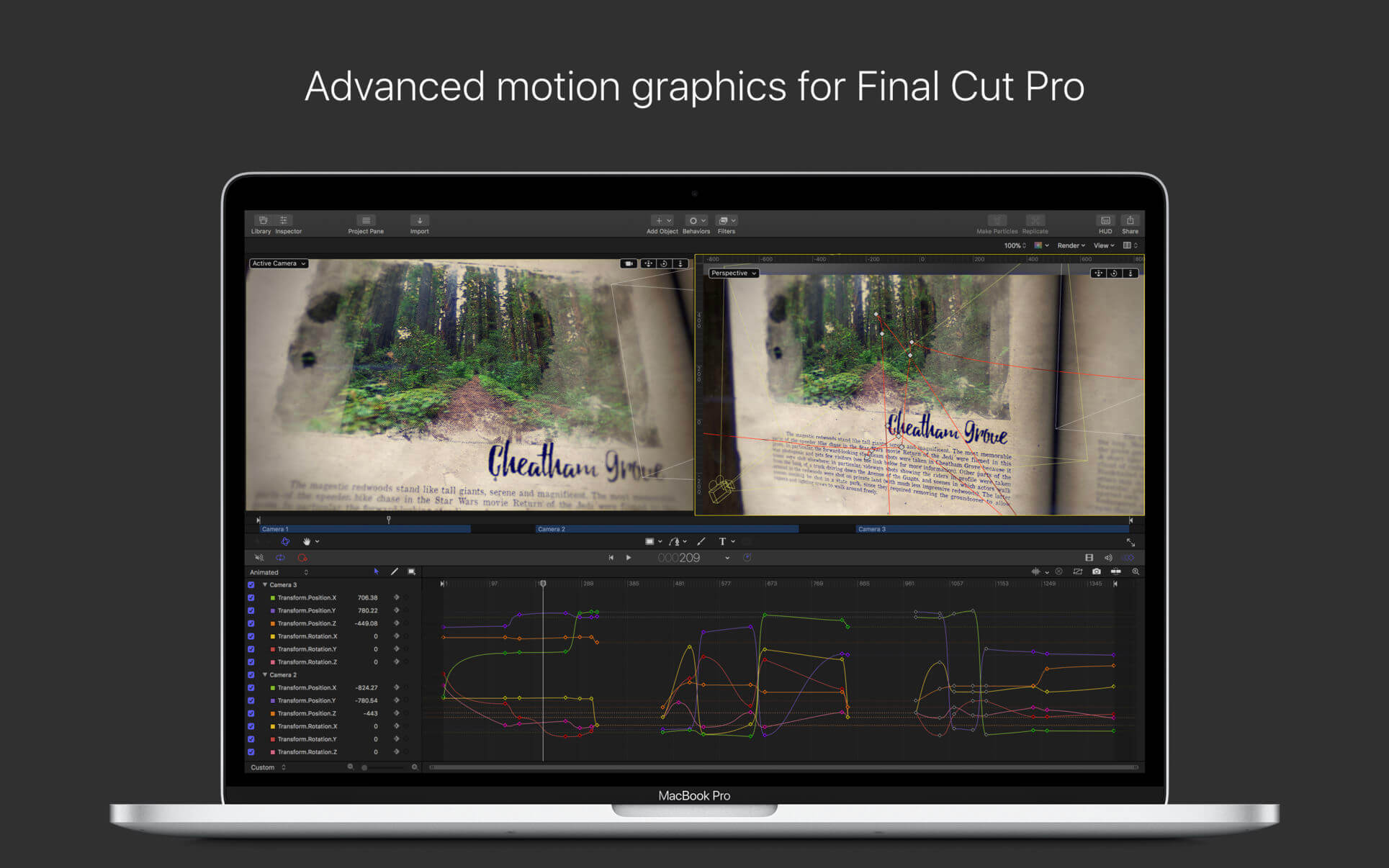
Designed for video editors, Motion is a powerful motion graphics tool that makes it easy to create cinematic 2D and 3D titles, fluid transitions, and realistic effects in real time.
2D and 3D Titles
Import 360° media and design 360° titles, generators, and effects
Build 3D titles from scratch, design them with easy-to-use templates, or instantly convert any existing 2D title to 3D
Easily create beautiful titles that you can animate using more than 100 drag-and-drop behaviors and intuitive text animation tools
Customize 3D titles to create endless looks with over 90 Apple-designed 3D materials including metal, wood, and stone surfaces
Motion Graphics for Final Cut Pro
Save any title, effect, transition or generator and access it directly in Final Cut Pro
Customize Final Cut Pro titles, effects, and transitions by opening them in Motion
Create Motion Templates with any combination of single parameters and rigs, that let you control a group of parameters with a slider, pop-up menu, or checkbox in Final Cut Pro
Use Display Aspect Ratio snapshots to create templates that support multiple aspect ratios
Stunning Effects
Choose from more than 230 behaviors for natural animation without keyframes
Create an accurate chroma key in a single step with the Keying filter
Change focus points or the depth effect for video shot in Cinematic mode on iPhone (requires macOS Monterey or later)
Design your own particle emitters or choose from 200 presets for real-world effects like smoke and sparkles
Use professional masking tools to quickly draw and adjust control points for rotoscoping
Automatically detect, track, and match the movement of faces or objects using machine learning
Choose between different tracking analysis types
Add the Neon filter to easily add a neon glow to text, shapes, video, stills, and more
Harness an ecosystem of third-party FxPlug plug-ins for tasks like advanced tracking, advanced motion graphics, and more
Effortless 3D
Transition from 2D to 3D space by adding cameras
Create 3D scenes within a 360° project for ultra-realistic 360° environments
Set up realistic shadows that animate dynamically with the movement of cameras and lights
Turn any shape, video plane, or paint stroke into a reflective surface in 3D space
Import third party USDZ objects or use one of 60 premade objects in the Motion Library
Breakthrough Speed, Quality, and Output
Import wide color HDR images, view them on supported Mac computers, and export in standard Rec. 709 or wide Rec. 2020 color space
Improved performance and efficiency on Mac computers with Apple silicon
Unrivaled performance with optimizations for the M1 Pro, M1 Max ** and M1 Ultra chips on the new Mac Studio and MacBook Pro
System Requirements: macOS 12.6 or later, 4GB of RAM (8GB recommended for 4K editing, 3D titles, and 360° video editing), Metal-capable graphics card, 1GB of VRAM recommended for 4K editing, 3D titles, and 360° video editing, 4.7GB of available disk space (3.5GB app, 1.2GB supplemental content).