Category Archives: Mac os

anymp4 mac video converter ultimate 8 2.12

Name AnyMP4 Mac Video Converter Ultimate 8 2 12 81348 TNT.zip
Size 56.36 MB
Created on 2018-11-25 22:22:26
Hash c414bf73b7e6e1003e08b6f39a67d0138c33bccc
Files AnyMP4 Mac Video Converter Ultimate 8 2 12 81348 TNT.zip (56.36 MB)

Download

AnyMP4 Mac Video Converter Ultimate 8.2.12

AnyMP4 Mac Video Converter Ultimate, the all-in-one deluxe Mac DVD and Video software, helps you convert and edit videos, rip DVDs, and even download online videos from YouTube, Yahoo, Vimeo, Dailymotion, Facebook, Metacafe and other online sources.

Once downloaded, these videos can be easily converted to your needed formats on Mac. It gives you the option of converting video files in over 200 formats while maintaining fantastic conversion speeds and absolutely faultless video quality.

  • Convert formats between 4K/1080p HD videos and common videos like MP4, MOV, M4V, MPEG, FLV, AVI, WMV, etc. on the Mac
  • Download YouTube videos onto your Mac at ultrafast speeds while maintaining the original video quality at 100%
  • Convert a DVD to any 1080p HD, 3D, or common video file in the blink of an eye
  • Personalize video effect video enhancer, rotate, 3D, crop, watermark and so on
  • Output video files that are compatible with the latest digital devices such as iPhone 6s/6s Plus/6/6 Plus/5/5s/5c, iPad Pro/mini 3/4 , Samsung Galaxy S6/Note 4, Sony Xperia Z3, LG G3, and more

Compatibility: OS X 10.7 or later

Web Site: http://www.anymp4.com/mac-video-converter-ultimate/

What’s New in AnyMP4 Mac Video Converter Ultimate 8.2.12

  • Release notes not available at the time of this post.

Screenshots

anymp4_mac_video_converter_ultimate_8010

%RATINGS_IMAGES% (%RATINGS_USERS% votes, average: %RATINGS_AVERAGE% out of %RATINGS_MAX%)
You need to be a registered member to rate this.

rar extractor expert pro 2.1

Name RAR Extractor Expert Pro 2 1 MAS In-App TNT.zip
Size 29.06 MB
Created on 2018-11-25 02:29:57
Hash 52767517f212842dd7ad17673b91805825b55468
Files RAR Extractor Expert Pro 2 1 MAS In-App TNT.zip (29.06 MB)

Download

RAR Extractor Expert Pro 2.1

RAR Extractor Expert is an easy-to-use, fast compressed file extractor. With RAR Extractor Expert, you only need to double click the archive file to decompress it. RAR Extractor Expert also support decompress password protected files and batch extracting.

Features:

  • Supported file formats include: RAR, 7Z, ZIP, TAR, GZ, LHA, JAR, BZ2, SIT and many other old and obscure formats
  • Supports password protected archive files extracting
  • Supports batch extracting
  • Supports macOS Mojave & Dark Mode

Compatibility: OS X 10.11 or later 64-bit

Web Site: http://myproapps.github.io/hnb/index.html
Mac App Store: https://itunes.apple.com/app/rar-extractor-expert/id647686027?mt=12

What’s New in RAR Extractor Expert Pro 2.1

1. Bug fixes;
2. Free to download, but with IAP;
3. App name changed.

%RATINGS_IMAGES% (%RATINGS_USERS% votes, average: %RATINGS_AVERAGE% out of %RATINGS_MAX%)
You need to be a registered member to rate this.

fxfactory pro 7.0.8 build 5849

Name FxFactory Pro 7.0.8 Build 5849 macOS.zip
Size 20.72 MB
Created on 2018-11-25 07:07:14
Hash 551835ad8838ef3fbed8d80719dadd25a0e31fda
Files FxFactory Pro 7.0.8 Build 5849 macOS.zip (20.72 MB)

Download

FxFactory Pro 7.0.8 Build 5849 macOS

Visual effects toolbox with unmatched features. FxFactory is a revolutionary visual effects package which powers the largest collection of plug-ins for Final Cut Pro, Motion, After Effects, and Premiere Pro.

FxFactory Pro Key Features:
  • FxFactory provides quick access to a collection of visual effects designed to work with Adobe After Effects, Final Cut Pro or Motion.
  • Moreover, FxFactory is featuring a intuitive interface that allows you to browse and manage all effects that are installed on your system.
  • The FxFactory OS X application also allows you to use the free products without purchasing but also provides support for purchasing and registering commercial products.
  • The FxFactory Pro version allows you to make your own visual effects without writing a single line of code.
  • The user can check all the plugins and configure them suitably for your project, or create new ones based on existing ones.
  • Create your own effects for Final Cut Studio without writing code. Seamless integration with FxPlug: once to install the plugin, you can immediately start using them in Final Cut Pro, Motion and After Effects and more!
  • An additional advantage is that the Pro Pack plugins support the construction of a moving image of 16bit and 32bit. FxFactory it’s not just the builtin plugin manager, but also a complete environment for their management. Through it you can connect to the project the necessary modules, apply them to your content, preview and rendering.
One of the following:
  • Apple Final Cut Pro X 10.2 or later
  • Motion 5.2 or later
  • Adobe After Effects CC 2015, CC 2017, or CC 2018 (13.5 or later)
  • Adobe Premiere Pro CC 2015, CC 2017, or CC 2018 (10 or later)

Web Site: https://fxfactory.com/

What’s New in FxFactory Pro 7.0.8 Build 5849

  • Release notes not available at the time of this post.

%RATINGS_IMAGES% (%RATINGS_USERS% votes, average: %RATINGS_AVERAGE% out of %RATINGS_MAX%)
You need to be a registered member to rate this.

macpilot 10 14

Name MacPilot 10 14 TNT.zip
Size 40.92 MB
Created on 2018-11-25 19:31:31
Hash f0141c083bca90f562a842ae9645f50ba86976b1
Files MacPilot 10 14 TNT.zip (40.92 MB)

Download

MacPilot 10.14

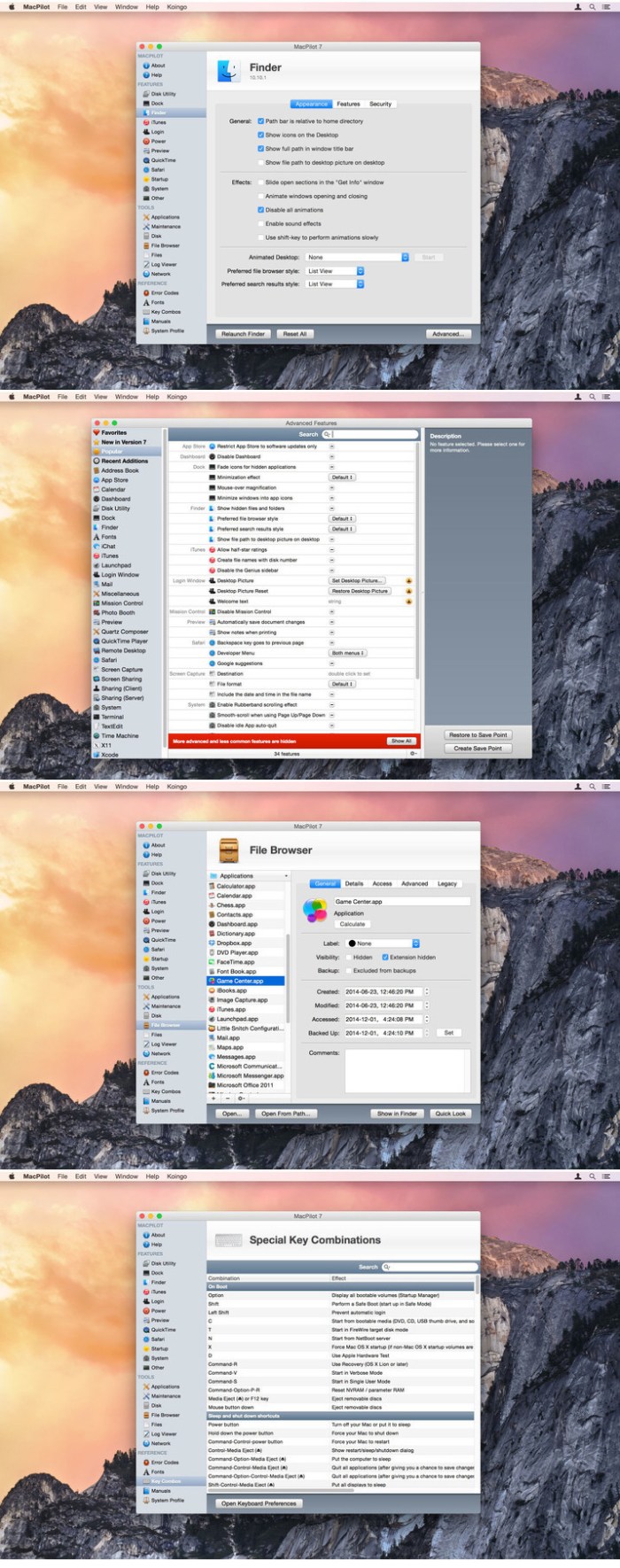
MacPilot gives you the power of UNIX and the simplicity of Macintosh, which means a phenomenal amount of untapped power in your hands! Use MacPilot to unlock over 1,200 features, and access them all with the easy and familiar Macintosh user interface. No command line tools or complicated file operations!

Display hidden files in the Finder, disable the startup chime, add spacers and stacks to the Dock, change the screenshot file format, run maintenance tools, tweak network settings, force empty the Trash, and tons more. Keep yourself in awe and busy for days as you discover how much Mac OS X has “under the hood”.

Get out of the passenger seat and take control of your Mac. Set your login window picture, use the screensaver as your Desktop, modify advanced file permissions (ACL), change the system welcome message, enable simultaneous recordings in QuickTime, view system logs, or enable the Debug menu in numerous apps.

OS Version: macOS 10.12 or later

Web Site: http://www.koingosw.com/

What’s New in MacPilot 10.13

  • Added feature to enable Dark Mode in High Sierra
  • Fixed Advanced Features window on Dark Mode

Screenshots

%RATINGS_IMAGES% (%RATINGS_USERS% votes, average: %RATINGS_AVERAGE% out of %RATINGS_MAX%)
You need to be a registered member to rate this.

multitouch 1.8

Name Multitouch 1 8 TNT.zip
Size 16.20 MB
Created on 2018-11-25 19:49:41
Hash 238c93bc03e39de07a7a2671cdd1455b8d109a3b
Files Multitouch 1 8 TNT.zip (16.20 MB)

Download

Multitouch 1.8

Multitouch (formerly TouchOven) ties a custom action to a specific magic trackpad or magic mouse gesture. For example, a three finger click can execute a paste. Improve your workflow by executing keyboard shortcuts, controlling your browser’s tabs, performing a middle mouse click, and much more.

Features
  • Free updates with a growing list of gestures and actions.
  • Privacy. No user data is gathered from the app.
  • Does not require Accessibility privileges to run.

Compatibility: macOS 10.12 or later 64-bit

Web Site: https://www.multitouch-app.com

What’s New in Multitouch 1.8

  • Release notes not available at the time of this post.

%RATINGS_IMAGES% (%RATINGS_USERS% votes, average: %RATINGS_AVERAGE% out of %RATINGS_MAX%)
You need to be a registered member to rate this.

loop mash up pro 1.0.2

Name Loop Mash Up Pro 1 0 2 MAS In-App TNT.zip
Size 128.5 MB
Created on 2018-11-25 20:03:46
Hash 1e85602ce6008c637506c88343bdda95f7f76b23
Files Loop Mash Up Pro 1 0 2 MAS In-App TNT.zip (128.5 MB)

Download

Loop h Up Pro 1.0.2

Make professional music with Loop Mash Up. This app is a powerful sampler with plenty of loops and presets.
All samples were created by professional musicians and DJs. Enjoy creating powerful beats by simply tapping the pads and get the instant result!

VARIOUS ELECTRONIC MUSIC STYLES

– Choose between 6 most popular genres of electronic music

VARIOUS SAMPLES & LOOPS

– Dozens of sounds for each music style

ADJUSTABLE BEAT PAD & HOTKEYS

– Adjust samples and loops layout and assign hot keys

RECORD YOUR TRACKS LIVE

– Create and save your songs on your device

Become the best electronic music producer with Loop Mash Up!

Top In-App Purchases: Prol Version – included

Compatibility: OS X 10.11 or later 64-bit

Mac App Store: https://itunes.apple.com/app/loop-mash-up/id1339022073?mt=12

What’s New in Loop Mash Up Pro 1.0.2

We removed some known issues to provide a better user experience

%RATINGS_IMAGES% (%RATINGS_USERS% votes, average: %RATINGS_AVERAGE% out of %RATINGS_MAX%)
You need to be a registered member to rate this.

dxo photolab elite edition 1.2.3.82

Name DxO PhotoLab ELITE Edition 1 2 3 82 TNT.zip
Size 286.7 MB
Created on 2018-11-24 23:16:58
Hash 0ef998eb953ec35f80d01305bd446971a365bcea
Files DxO PhotoLab ELITE Edition 1 2 3 82 TNT.zip (286.7 MB)

Download

DxO PhotoLab ELITE Edition 1.2.3.82

A professional and feature-rich photo correction and manipulation application designed to automatically improve the quality of your images

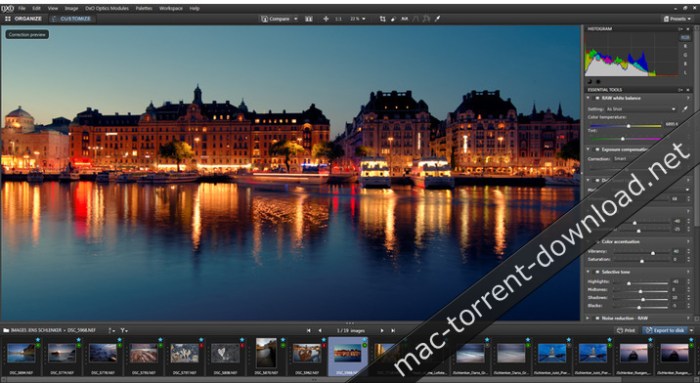
DxO PhotoLab (formerly DxO Optics Pro) is a streamlined and powerful photo processing OS X application designed from the ground up to help you improve your images automatically.

When having to deal with RAW photos, the DxO PhotoLab app is transforming the RAW sensor data to a virtually free of artifacts output image and will instantly correct the exposure with an automatic adjustment algorithm for keeping highlights from ‘burning out’.

Wide assortment of built-in image distortion repair tools

Furthermore, with the help of DxO PhotoLab you will also be able to recover some partially burnt-out highlights that would otherwise completely ruin your photo.

Moreover, DxO PhotoLab can be used to correct all five possible optical distortions: vignetting, chromatic aberration (longitudinal and lateral), geometric distortion, and lens softness, with you just having to click a button.

In addition, DxO PhotoLab also provides high-performance de-noising capabilities which will allow you to shoot RAW or JPEG photos using ISO values as high as 100,000.

Adjust your photos’ color with extreme ease

Its smart lighting features will help you to effortlessly fine-tune the balance between over and under exposed areas in your photos, a fact that will make it a lot easier for you to discover new details in pictures that would get discarded if not for DxO PhotoLab.

DxO PhotoLab makes it simple to tweak any photo’s colors using a series of slider based controls that will enable you to customize the image’s overall vibrance, the actual tone curve, and the white balance, in order to generate more vivid looking pictures out of otherwise ordinary looking snapshots.

Vast collection of image correction presets designed to make it a must-have tool for speedy one-click image auto-correction

To make your photo enhancing workflow even more simple and effortless, DxO PhotoLab also provides you with a large variety of presets which will help you to apply a carefully selected set of image corrections, depending on the type of image that you want to adjust.

As an added bonus, DxO PhotoLab also features a minimalist looking yet very effective user interface, designed to help you customize and organize your photos as simply and as quickly as possible.

Compatibility: OS X 10.11 or later 64-bit

Web Site: http://www.dxo.com

What’s New in DxO PhotoLab ELITE Edition 1.2.3.82

  • Release notes not available at the time of this post.

Screenshots
%RATINGS_IMAGES% (%RATINGS_USERS% votes, average: %RATINGS_AVERAGE% out of %RATINGS_MAX%)
You need to be a registered member to rate this.

tokyo dawn records tdr limiter 6 ge v1.1.0

Name Tokyo Dawn Records TDR Limiter 6 GE v1.1.0 MacOSX-iND.zip
Size 15.17 MB
Created on 2018-11-25 02:30:29
Hash 79b00e688d5de2ccc007b14b9165dee2d6687c8d
Files Tokyo Dawn Records TDR Limiter 6 GE v1.1.0 MacOSX-iND.zip (15.17 MB)

Download

Tokyo Dawn Records TDR Limiter 6 GE v1.1.0 macOS-iND

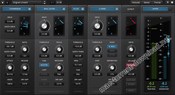
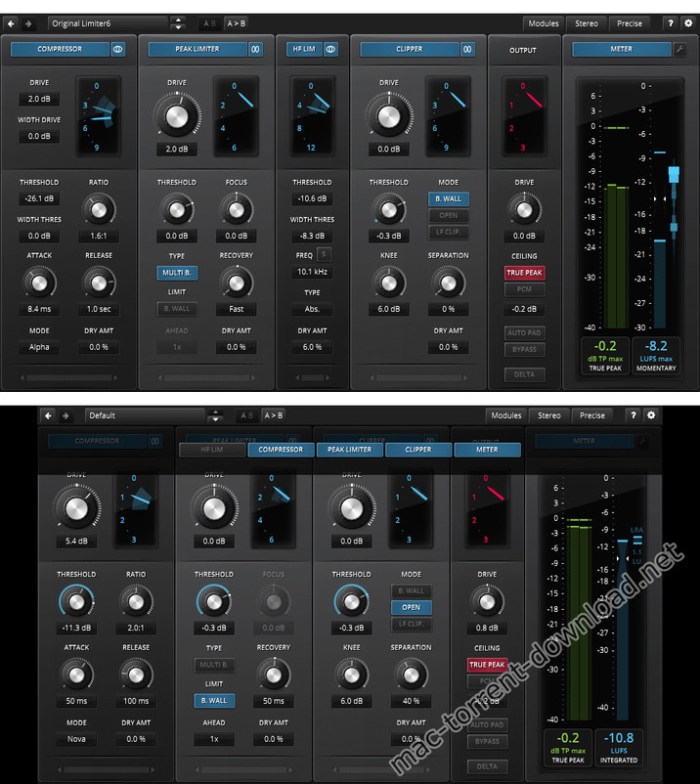
TDR Limiter 6 GE is a modern dynamics compression and limiting toolkit featuring six specialized modules that can be arranged in variable order. Together, they cover a remarkable range of applications from delicate loudness control, to brutal “brick-walling” and creative mix bus crunching.

Modules

  • Dynamics Compressor
  • Clipper
  • High Frequency Limiter
  • Peak Limiter
  • Output Protection Limiter
  • True Peak and EBU Loudness Meter

Each module offers dedicated control over different types of events, from macro to micro, and allows you to determine the signal path. Combined wisely they can greatly increase the perceived loudness of a mix while preserving superior musical fidelity, punch, and excitement.

With its appealing visual aesthetic, the advanced true peak and EBU R128 compliant loudness metering section gives a detailed insight into the signal’s dynamics. The equal loudness bypass will also make sure the operators’ aural perception isn’t tricked from any loudness differences.

A collection of sensible starting points allows for quick, yet precise loudness maximization. If needed, a wide range of options offer endless creative possibilities for getting that optimal setting. Going further, Limiter 6 also enables the operator to build his personal take loudness maximization, bus processing and much more.

Web Site: https://www.tokyodawn.net/tdr-limiter6-ge/

What’s New in Tokyo Dawn Records TDR Limiter 6 GE v1.1.0

1.1.0 Maintenance update
  • New compressor mode “Nova”
  • GR meter range now grow automatically
  • New UI scales 100%, 125% and 150%
  • Peak meter UI updated, threshold markers added.
  • UI performance improvements
  • Various little changes to toolbar and context menu
  • Fixed unwanted loudness meter reset on audio reset
  • Option added: “Always render at highest quality”
  • Loudness meter: mono mode fixed

Screenshots

%RATINGS_IMAGES% (%RATINGS_USERS% votes, average: %RATINGS_AVERAGE% out of %RATINGS_MAX%)
You need to be a registered member to rate this.

creo 1.2.0

Name Creo 1 2 0 TNT.zip
Size 65.58 MB
Created on 2018-11-24 23:16:40
Hash 866571d277cfb02dec5ec5d408db5afa330b35c1
Files Creo 1 2 0 TNT.zip (65.58 MB)

Download

Creo 1.2.0

Development tool for mobile application that integrates support both for designing the user interface and writing the code that powers the utility

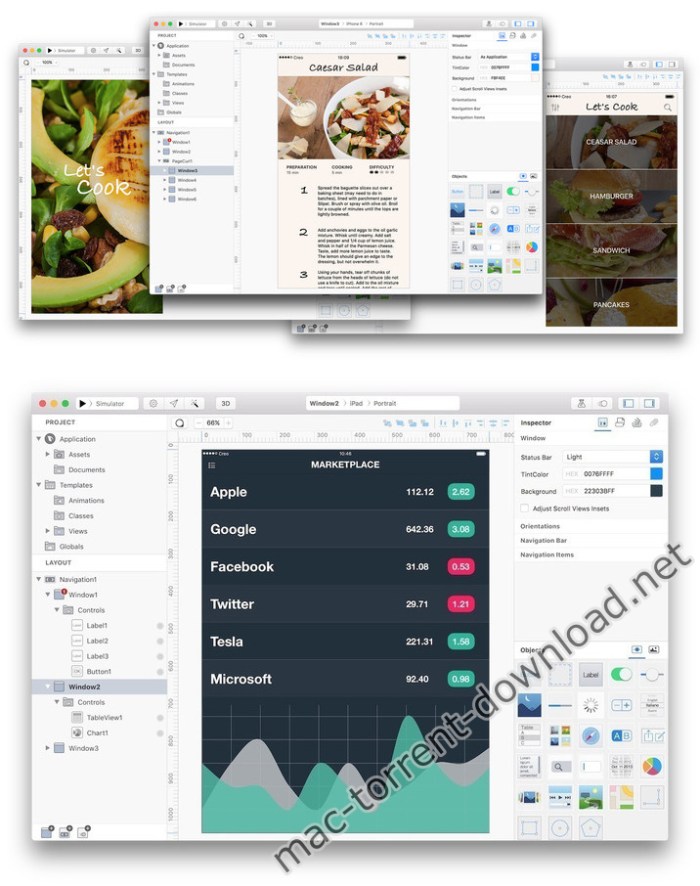
Creo is a development tool for mobile applications that aims to bring design and coding related tasks under the same roof. The utility enables you to create and customize the app’s layout while also providing support for object-based programming.

Design the user interface for your mobile projects and modify the layout in no time

To help you get started, Creo comes with a collection of app templates that you can use as starting points for your own projects. Within the Creo main window you get to see the project assets and documents, and see the layout for each included window.

Note that you can add new items to the layout, or rearrange their position with simple drag and drop movements. You get to view each object in the Creo canvas area while the Inspector panel provides more detailed information.

The best part is that Creo integrates 3D rendering capabilities and offers you the possibility to preview each screen included in your apps from various angles.

Object based programming languages power the code writing tools

Instead of creating non-functional prototypes, Creo is also building the native application and integrates the CreoKIT framework that enables you to execute the code. Just switch to the Gravity Code Editor and assign values to events, or define functions in order to trigger various effects.

Creo enables you to create connections between various objects with ease and also integrates an animation editor that uses an intuitive timeline in order to simplify the procedure. This is great because you get to experiment with the animations until you find the best solution.

Development environment that helps you create native iOS apps

Creo proposes a clean and well-organized workspace where you get to design, build, and test mobile applications without having to employ multiple utilities.

The tool works with object-based programming, allows you to create animations using a user-friendly timeline, and offers you the possibility to either run the apps in a simulator or send them to a device.

Compatibility: OS X 10.10 or later 64-bit

Web Site: https://creolabs.com

What’s New in Creo 1.2.0

  • Release notes not available at the time of this post.

Screenshots

%RATINGS_IMAGES% (%RATINGS_USERS% votes, average: %RATINGS_AVERAGE% out of %RATINGS_MAX%)
You need to be a registered member to rate this.
istatistica 4 5 1

Name iStatistica 4 5 1 TNT.zip
Size 8.63 MB
Created on 2018-11-25 07:07:24
Hash 81de522528239cc9131506ebc45051c7c3e11220
Files iStatistica 4 5 1 TNT.zip (8.63 MB)

Download

iStatistica 4.5.1

iStatistica is an advanced system monitor for macOS. It includes notification center widget and status bar menu. Simply slide out notification center to keep an eye on your CPU, memory, disk usage and network activity.

Features list:

System monitoring
  • uptime
  • memory (used, free, cache, system)
  • CPU usage
  • disk usage
  • ejecting external drives
Battery information
  • cycles
  • health
  • capacity
  • time remaining
Network activity
  • network map
  • external WAN IP and Country
  • internal LAN IP address
  • router IP address and MACaddress
  • incoming & outgoing traffic

Compatibility: OS X 10.10 or later

Web Site: https://www.imagetasks.com
Mac App Store: https://itunes.apple.com/app/istatistica/id1025822138?mt=12

What’s New in iStatistica 4.5.1

  • Release notes not available at the time of this post.

%RATINGS_IMAGES% (%RATINGS_USERS% votes, average: %RATINGS_AVERAGE% out of %RATINGS_MAX%)
You need to be a registered member to rate this.

scientific toolworks understand 5.0.971

Name Scientific.Toolworks.Understand.v5.0.971.MACOSX.zip
Size 101.1 MB
Created on 2018-11-25 02:30:17
Hash a81b11bdae3d2e98cebf96acde3c486da2ce1e51
Files Scientific.Toolworks.Understand.v5.0.971.MACOSX.zip (101.1 MB)

Download

Scientific Toolworks Understand 5.0.971 macOS

Understand is a static analysis tool for maintaining, measuring, & analyzing critical or large code bases. From metrics and graphs to dependency analysis, Master your source code with Understand.

Basic Metrics
  • Class Count
  • File Count
  • Function Count
  • Line Count
  • Blank Line Count
  • Code Line Count
  • Comment Line Count
  • Inactive Line Count
  • Declarative Statement Count
  • Executable Statement Count
  • Ratio Comment to Code
Advanced Metrics (Partial list)
  • Cyclomatic Complexity
  • Knots
  • Class Coupling
  • Percent Lack of Cohesion
  • Path Count
  • Max Inheritance
  • Base Class Count
  • Inherited Class Count
  • Number of Instance Methods
  • Weighted Methods per Class

Compatibility: OS X 10.6 and later

Web Site: http://www.scitools.com/

What’s New in Scientific Toolworks Understand 5.0.971

  • Release notes not available at the time of this post.

%RATINGS_IMAGES% (%RATINGS_USERS% votes, average: %RATINGS_AVERAGE% out of %RATINGS_MAX%)
You need to be a registered member to rate this.

flyer templates design 3.0 1

Name Flyer Templates – DesiGN 3 0 1 MAS TNT.zip
Size 16.00 MB
Created on 2018-11-25 02:29:35
Hash f46f1867f6568ac71f5bd41749a4ff3d78c876a5
Files Flyer Templates – DesiGN 3 0 1 MAS TNT.zip (16.00 MB)

Download

Flyer Templates – DesiGN 3.0.1

DesiGN Flyers Templates for Pages is an excellent collection of 235 original templates, designed to give a unique look to your promo material. Whether you’re promoting a cool event, launching a new product, or announcing a mind-blowing sale, these flyers will help you do that with efficiency and style.

Every object in DesiGN Flyers Templates for Pages can be easily recolored, reshaped, moved, or removed. Type or paste your own text, add or remove text boxes, and change the font if you want to. Add your photos and pictures to replace the stock images. Every design, from minimalistic black-and-white layouts to vibrant, colorful ads, features great creativity and usability.

The templates are available in the US and international page sizes.

* Requires the latest version of Pages.

Compatibility: OS X 10.11 or later 64-bit

Web Site: http://graphicnode.com
Mac App Store: https://itunes.apple.com/app/design-flyers-templates/id1129110541?mt=12

What’s New in Flyer Templates – DesiGN 3.0.1

  • The new version improves compatibility with a new version of macOS.
  • macOS Mojave Dark Mode integration.
  • Stability improvements.
  • macOS El Capitan compatibility bug fixes.

%RATINGS_IMAGES% (%RATINGS_USERS% votes, average: %RATINGS_AVERAGE% out of %RATINGS_MAX%)
You need to be a registered member to rate this.

poster templates design 3.0 1

Name Poster Templates – DesiGN 3 0 1 MAS TNT.zip
Size 16.06 MB
Created on 2018-11-25 02:29:46
Hash ae1433f7b9633912ebbedeb848207828858e0c95
Files Poster Templates – DesiGN 3 0 1 MAS TNT.zip (16.06 MB)

Download

Poster Templates – DesiGN 3.0.1

Posters DesiGN – Templates is a collection of over 300 original templates of the highest quality, created to lend a unique look to your promo material. Whether you’re trying to hype up a cool new product, starting a season sale, or announcing a mind-blowing event, Graphic Node’s posters will help you make sure your promotion is sophisticated and effective.

Every object in Posters DesiGN – Templates can be easily recolored, reshaped, moved, or removed. Type or paste your own text, add or remove text boxes, and change the font if you want to. Add your photos and pictures to replace the stock images. Every design, from minimalistic black-and-white layouts to cute pastel ads, features great creativity and usability.

The templates are available in the US and international page sizes.

* Requires the latest version of Pages.

Compatibility: OS X 10.12 or later

Web Site: http://graphicnode.com
Mac App Store: https://itunes.apple.com/app/design-posters-templates/id1147140326?mt=12

What’s New in Poster Templates – DesiGN 3.0.1

  • The new version improves compatibility with a new version of macOS.
  • macOS Mojave Dark Mode integration.
  • Stability improvements.
  • macOS El Capitan compatibility bug fixes.

%RATINGS_IMAGES% (%RATINGS_USERS% votes, average: %RATINGS_AVERAGE% out of %RATINGS_MAX%)
You need to be a registered member to rate this.
spy cam 3.5

Name Spy Cam 3 5 MAS TNT.zip
Size 7.85 MB
Created on 2018-11-24 08:20:29
Hash 93d7856914ca29f7a1cd118bc62167105c8e064d
Files Spy Cam 3 5 MAS TNT.zip (7.85 MB)

Download

Spy Cam 3.5

Spy just like… a real spy! Spy Cam is the easy to use app that turns your Mac into a stealth surveillance system. Covertly record clips and sound from your Mac’s camera, or an external camera, and upload them to view remotely. macOS Mojave Ready!

Serious spies use the best equipment. And now you can record and store video clips like a KGB or CIA agent. Spy Cam is easy to use, and is a ranked #1 top paid utilities app in the US, UK, Canada, France, Italia, Germany, Brazil, Australia, Finland, Austria, Belgium, Sweden, Switzerland, Israel, Russia, Japan and China!!! 

Spy Cam turns your Mac into a surveillance system that records video clips with sound. You can store the clips to view them later, or automatically upload them so you can see what’s happening remotely!

Spy Cam uses your Mac’s built-in camera and microphone, or an external camera and microphone, to take video clips of whatever it is pointed at – your desk, your front door, a filing cabinet, the refrigerator, or anything else you want to monitor, including who is using your Mac when you are not there.

By linking Spy Cam to your Dropbox account, it automatically saves the clips to your Dropbox file as they are shot, so you can view them from wherever you are – downstairs, across town, or on the other side of the world. 


With Spy Cam you can:

  • Monitor your home or office while you are away
  • See if your kids are doing their homework
  • Check on the babysitter
  • Monitor your pets
  • keep an eye on your desk, personal papers, and on your Mac
  • And, if your computer is taken, you have videos of the thief, their surroundings, their voice, and maybe even their name and other personal details.

Features & Benefits:

  • Easytouse Setups in less than 1 minute
  • Four modes of operation Continuous, Timed (intermittent), Motion Detection, Record on screensaver exit/unlock event
  • Timed Mode Operation
  • Automatically sends clips to your Dropbox account view clips from anywhere
  • Covert Operation
  • App can be hidden from users
  • Clips are hidden deep in your file structure
  • Activates automatically on login
  • Password protected so only you can control the app
  • HD Recording format
  • Creates folders and stores files automatically by date easy to find clips
  • Can be activated at login, launch or from the control panel
  • Does not interfere with other autolaunch apps
  • Optimally compresses clips to minimize storage
  • Supports either the builtin or an external camera

Compatibility: OS X 10.9 or later 64-bit

Web Site: http://zipzapmac.com/spycam
Mac App Store: https://itunes.apple.com/app/spy-cam/id438924363?mt=12

What’s New in Spy Cam 3.5

  • Ready for macOS Mojave
  • Fixed activating by schedule

%RATINGS_IMAGES% (%RATINGS_USERS% votes, average: %RATINGS_AVERAGE% out of %RATINGS_MAX%)
You need to be a registered member to rate this.

wondershare filmora 8 7 6 30

Name Wondershare Filmora 8 7 6 30 TNT.zip
Size 181.7 MB
Created on 2018-11-24 01:16:57
Hash f4e86ad7e0872af55568b2088c69a520ad92ebba
Files Wondershare Filmora 8 7 6 30 TNT.zip (181.7 MB)

Download

Wondershare Filmora 8.7.6.30

Filmora scrn is an easy-to-use screen recorder that is perfect for recording games, or anything else you want to capture. Much more than a simple screen capture program, Filmora scrn includes a a video editing suite tailored for screen recordings. You can cut, rotate, and crop your clips. You can also add annotation and custom cursor effects. Videos created with Filmora scrn can be exported as MP4s, MOVs, or GIFs.

Features

Changeable Cursor

Adjust the size, shape and color of your cursor to make it stand out.

Full Editing Suite

Edit your clips quickly and easily with a wide range of professional tools.

2 Devices

Record from your computer and webcam simultaneously.

Import Over 50 File Formats

Import images, videos, music, and other media files.

FPS (15-120)

Perfect for recording fast-paced games. (Up to 60 fps for Mac)

Export To MP4, MOV, GIF

Export to mutliple formats

PIP (Picture In Picture)

Add a second image or video to your main footage, like a facecam for gaming.

Custom Recording Field

Choose to record all, or just part of, your computer screen.

Annotations

Add text and other elements to enhance the learning experience for your viewers.

Tutorial Features

Draw circles and arrows on your screen to help direct attention.

System Requirements:
  • OS X 10.10(Yosemite), OS X 10.11(El Capitan), macOS 10.12(Sierra), macOS 10.13 (High Sierra)
  • CPU: 2GHz or above Intel processor
  • Memory: At least 4GB physical RAM (8GB required for HD and 4K videos)
  • Disk: At least 2GB free harddisk space for installation (SSDSolid State Disk recommended for editing HD and 4K videos)

Web Site: http://www.wondershare.com/

What’s New in Wondershare Filmora 8.7.6.30

  • Release notes not available at the time of this post.

%RATINGS_IMAGES% (%RATINGS_USERS% votes, average: %RATINGS_AVERAGE% out of %RATINGS_MAX%)
You need to be a registered member to rate this.

red giant magic bullet looks 4.0.6

Name Red Giant Magic Bullet Looks 4.0.6 macOS.zip
Size 139.9 MB
Created on 2018-11-24 01:39:06
Hash 89b9d2b2ad6cea4ad42d48a3a614dc393bc2612c
Files Red Giant Magic Bullet Looks 4.0.6 macOS.zip (139.9 MB)

Download

Red Giant Magic Bullet Looks 4.0.6 macOS

Choose from 198 brand-new Look presets, designed to match your favorite movies and TV shows. Every preset is fully-customizable. Alter the presets by adding or removing tools along the toolchain, or just build a look from scratch by combining any of the 41 tools.

Features:

PRESETS (NEW)

The Looks Library has been updated with 198 new, fully-customizable presets, designed to match the latest Hollywood films and TV shows.

UPDATED USER INTERFACE (NEW)

Magic Bullet Looks is the most intuitive color finishing tool on the market today. Get in, choose a preset look, tweak it a bit, and get on with your workflow. Version 3.0 includes new additions like better looks management, tool presets, keyboard shortcuts and pinning tools on the toolchain when adding new looks.

PROFESSIONAL SCOPES

Classic color scopes like RGB Parade, Slice Graph, Hue/Saturation and Hue/Lightness, are essential to protecting your color. Along with a unique Memory Colors scope for monitoring important colors, Looks helps guide you in your color correction and grading process, like nothing else.

OPEN GL

Magic Bullet Looks has been rebuilt from scratch to completely take advantage of your graphics card’s GPU – giving you the color grading power you’ve come to expect in Magic Bullet Looks – but much, MUCH faster.

POWERFUL TOOLS

Magic Bullet Looks includes 41 tools, 9 of which are new to version 3.0. These tools go beyond the capabilities of your host application or dedicated grading software.Tools include essential color correction tools as well as beautiful camera-based effects such as Anamorphic Flare, Haze/Flare, Diffusion, Shutter Streak and more. New tools like the Color Space and Duotone give you even more control over the color grading process.

FILM NEGATIVE/FILM PRINT TOOLS (NEW)

Provides the look of various film stocks. These 2 tools work together to emulate the photochemical process used in motion-picture film. 22 Negative Film Stocks and 4 print stocks are included.

MOJO TOOL (NEW)

Based on the incredibly popular plug-in of the same name, Mojo warms up skin tones while cooling the background. An easy way to get a customized “Blockbuster” film look.

COSMO TOOL

Cosmo gives you the ability to quickly balance skin tones, reducing wrinkles and remove skin blemishes, to make your talent look their best. Cosmo make it simple to keep skin looking natural and consistent.

COLORISTA TOOL (NEW)

Magic Bullet Looks 3 includes an update to the Colorista tool. It now includes a powerful 3-way color corrector, Hue, Saturation, and Luminance control for individual colors, and a Curves control, all in one tool.

COMPATIBILITY

HOST APPLICATIONS
  • Adobe After Effects: CC(2018), CC(2017), CC(2015.3), CC (2015), CC (2014)
  • Adobe Premiere Pro: CC(2018), CC(2017), CC(2015.3), CC (2015), CC (2014)
  • Apple Final Cut Pro X 10.2.3 and up
  • Apple Motion 5.2.3 and up
  • Magix Vegas Pro 14, Magix Vegas Pro 15
  • Avid Media Composer 8.2 or later
  • Davinci Resolve 12.5, Davinci Resolve 14, Davinci Resolve 15
  • EDIUS 8.2
  • HitFilm Pro 2017

*Please note that you’ll need the OFX Bundle from New Blue for our plugins to work in Edius”

OPERATING SYSTEMS
  • Mac OS X 10.10
  • Mac OS X 10.11
  • Mac OS X 10.12
  • Mac OS X 10.13
  • Mac OS X 10.14
  • 8 GB of RAM
  • 300 MB of Hard Drive space

Web Site: http://www.redgiant.com/products/magic-bullet-looks/

What’s New in Red Giant Magic Bullet Looks 4.0.6

  • Release notes not available at the time of this post.

Screenshots

%RATINGS_IMAGES% (%RATINGS_USERS% votes, average: %RATINGS_AVERAGE% out of %RATINGS_MAX%)
You need to be a registered member to rate this.
capture one pro 12.0.0b6

Name Capture One Pro 12 12 0 0 269b6 TNT.zip
Size 353.6 MB
Created on 2018-11-24 02:02:28
Hash 82da4b6a4f9e9ddd090bca9e1e6461a16c283be8
Files Capture One Pro 12 12 0 0 269b6 TNT.zip (353.6 MB)

Download

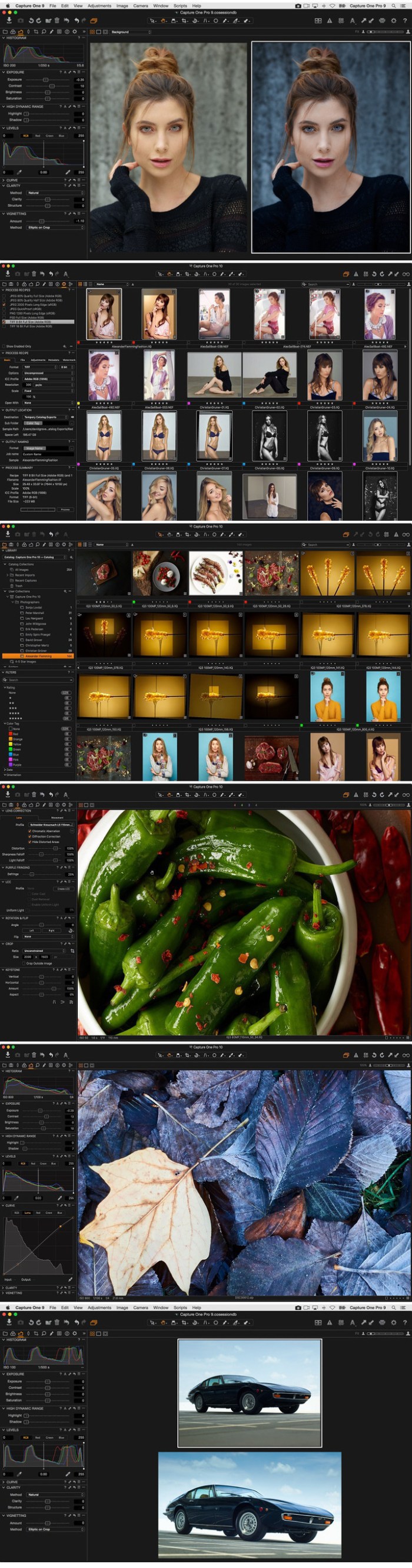
Capture One Pro 12.0.0b6

Capture One is a professional RAW converter offering you ultimate image quality with beautiful colors and incredible detail for more than 500 high-end cameras. It offers state- of-the-art tethered capture, powerful digital asset management, extensive adjustment tools and a flexible workflow through customizable workspaces.

With an updated processing engine, market-leading performance and powerful new features, Capture One is the professional choice in imaging software. You get the highly responsive precision tools you need to create stunning images from your camera’s RAW files in a time-saving workflow that can be customized to fit your needs.

New features

  • New interface
  • New Menu system
  • New Keyboard Shortcut Manager
  • Luma Range Masking
  • Linear Gradient Mask tool
  • Radial Gradient Mask tool
  • Plugins Export and publish
  • Revised noise reduction algorithm See notes
  • User experience changes
  • Extended AppleScript support
  • Fujifilm Film Simulations

Compatibility: macOS 10.12 or later 64-bit

Web Site: https://www.phaseone.com/en/Products/Software/Capture-One-Pro/Highlights.aspx

What’s New in Capture One Pro 12.0.0b6

  • Release notes not available at the time of this post.

Screenshots

%RATINGS_IMAGES% (%RATINGS_USERS% votes, average: %RATINGS_AVERAGE% out of %RATINGS_MAX%)
You need to be a registered member to rate this.
resolume avenue 6.1.1

Name Resolume Avenue 6.1.1 macOS.zip
Size 222.1 MB
Created on 2018-11-23 23:44:40
Hash 413af71c334a09db762db7975a0bb33de4832dba
Files Resolume Avenue 6.1.1 macOS.zip (222.1 MB)

Download

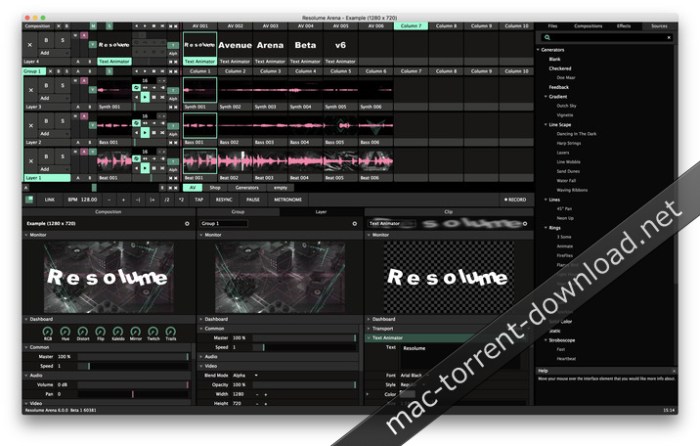
Resolume Avenue 6.1.1 macOS

Avenue 6 is an instrument for VJs, performers and visual artists. Avenue provides you with all the media and effects at your fingertips so you can quickly play and improvise live visuals.

Idel is suitable for a local club or a big stage. You can use any number of video outputs. From a simple projection behind the back of a DJ in your club to the main stage at the big festival. If only your computer can detect the output of the image, Resolume can use it.

Basic features:
  • mixing HD Video live.
  • intuitive interface.
  • rendering in real time.
  • Blackmagic devices support.
  • audio analysis.
  • enables operation through a MIDI controller or OSC application
  • it plays both video and audio files.
  • has effects for both image and sound.

Web Site: https://resolume.com/

What’s New in Resolume Avenue 6.1.1

  • Release notes not available at the time of this post.

Screenshots

%RATINGS_IMAGES% (%RATINGS_USERS% votes, average: %RATINGS_AVERAGE% out of %RATINGS_MAX%)
You need to be a registered member to rate this.

plugin boutique scaler v1.6.1

Name Plugin Boutique Scaler v1 6 1 WiN OSX-NU DiSCO.zip
Size 385.3 MB
Created on 2018-11-23 23:46:44
Hash 72178156f5671f30bd480bce426d6ab2f77fef71
Files Plugin Boutique Scaler v1 6 1 WiN OSX-NU DiSCO.zip (385.3 MB)

Download

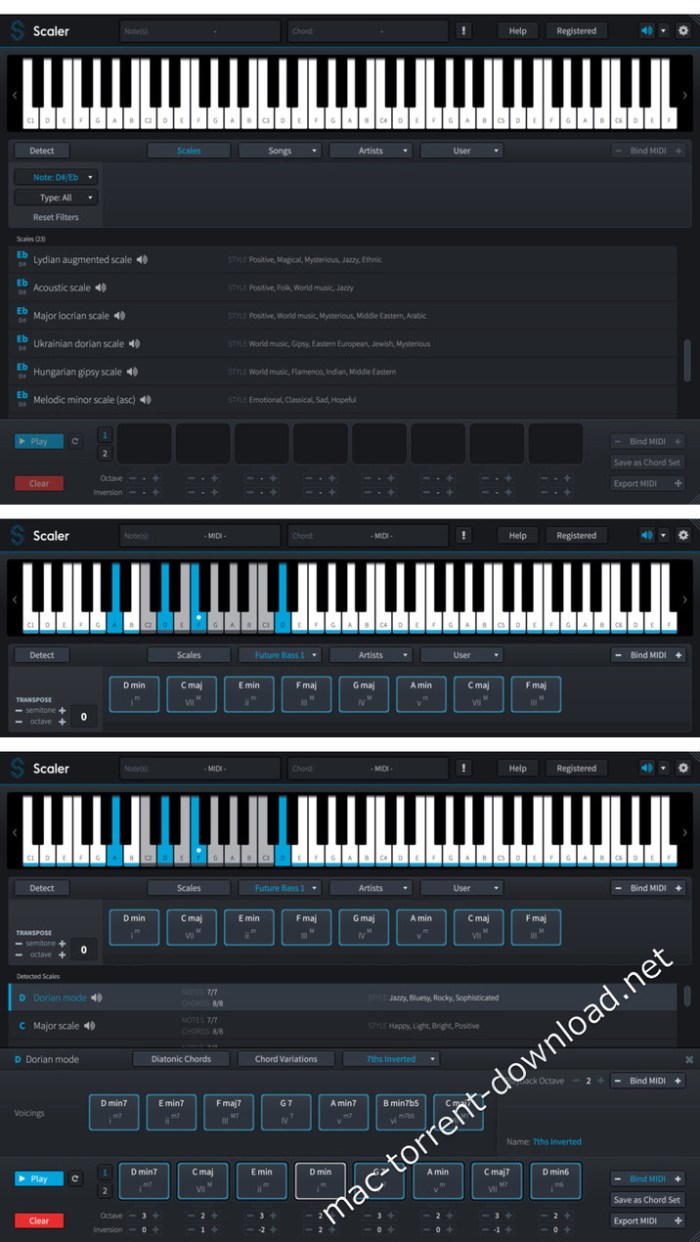
Plugin Boutique Scaler v1.6.1 WiN OSX-NU DiSCO

Scaler is a unique and inspirational MIDI effect that makes finding chords and progressions intuitive and fun! With note detection, scale selection and chord suggestions, Scaler is a comprehensive but easy-to-use toolbox that will help anyone make better music.

A first of its kind, Scaler can determine what key and scale you’re in and suggest chords that match your music, or it can inspire a tune from scratch by providing a set of initial chords in an unexplored key. With the onboard bank of 1,728 scales and modes including genre and artist presets, there’s more than enough to keep the juices flowing.

Once you’ve determined a scale, Scaler lays out basic diatonic chords for you to audition, and lets you take things further with dozens of chord variations and voicings to try out. Theory buffs can also get an insight into each chord’s harmonic function.

Ready to put together a progression? Simply drag and drop chords into Scaler’s sequencer, change up octaves and inversions, and record or drag the progression into your DAW.

Scaler 1.6

Use email…..tomtombruce1@gmail.com

Improved Drag & Drop – Export strums and arpeggio simply by dragging a chord or progression to your DAW.

Heavily requested feature from users now allows that arpeggio and strum settings are included in the export. So you can now export your chords with arp pattern for use in other software / tracks

Scale Lock – New Scale-Lock mode – Map any scale to the white keys

Previously in 1.5 we locked the incorrect notes of the scale but after several user requests we also added a preference to lock to all white keys, really useful to play a c major and then select other scales which will play the first diatonic chord (and all other degrees) of that scale whilst you are holding down the c major keys

10 New Chord Sets – Cinematic – Horror & Suspense

Check these out with the new brass sounds, very filmic chord sets, instant batman, video game, horror composition!

Arpeggio Sync – Arpeggio now syncs with your DAW

The Arp didn’t sync so well when recorded through bind mode but we have now reworked the arp to sync to your daw on playback of recorded and bound notes – rock solid

2 New Sounds – Electric Piano & Brass Ensemble

Cool sounds, electric piano has been a user request

Improved Strumming – Set your preferred strumming direction

(Alternate/Up/Down) & discover a new (slower) strumming profile.

We will continue to improve strumming features but this adds some nice authenticity

Bug fixes and performance improvements

There were a few minor bugs reported to us since 1.5 release and we have addressed them here. All users should be encouraged to update!

What’s New in Plugin Boutique Scaler v1.6.1

  • Release notes not available at the time of this post.

Screenshots

%RATINGS_IMAGES% (%RATINGS_USERS% votes, average: %RATINGS_AVERAGE% out of %RATINGS_MAX%)
You need to be a registered member to rate this.

vmware fusion pro 11.0.2 build 10952296

Name VMware-Fusion-11.0.2-10952296.zip
Size 516.9 MB
Created on 2018-11-23 20:41:50
Hash 2e60b99d56fe41718a1264d8e9e7cbe8cc2b858d
Files VMware-Fusion-11.0.2-10952296.zip (516.9 MB)

Download

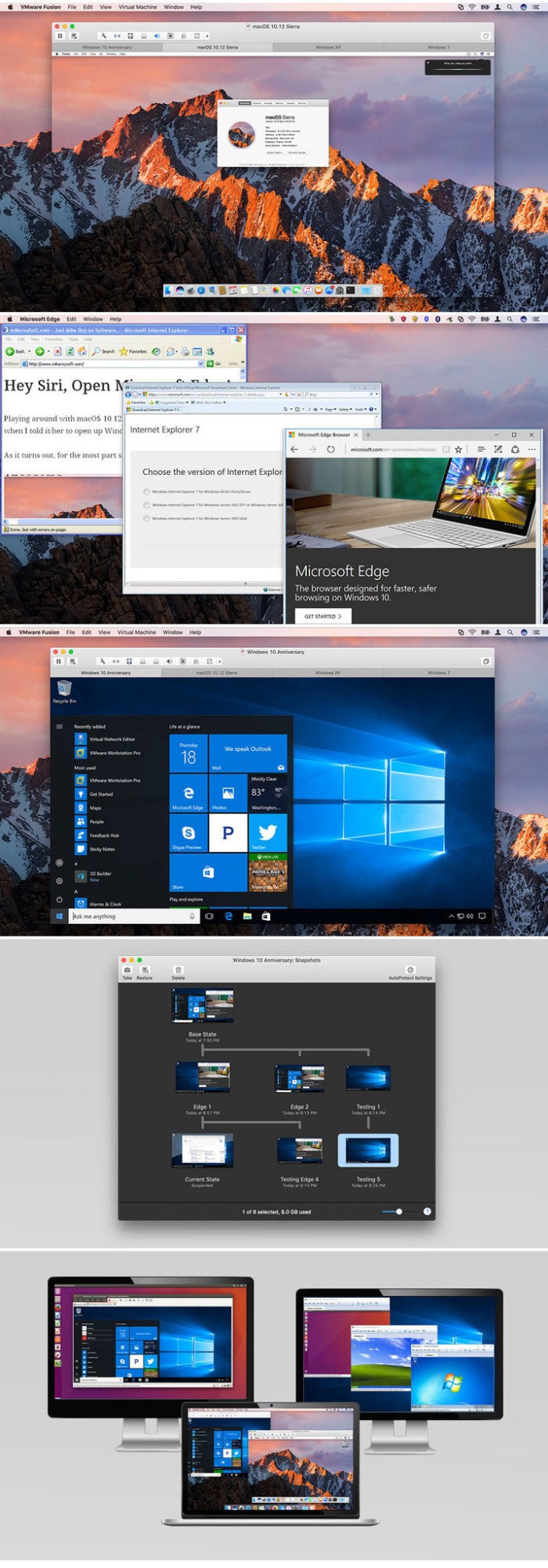
VMware Fusion Pro 11.0.2 Build 10952296 macOS

VMware Fusion gives Mac users the power to run Windows on Mac along with hundreds of other operating systems side by side with Mac applications, without rebooting. Fusion is simple enough for home users and powerful enough for IT professionals, developers and businesses.

Run Nearly Any Operating System on a Mac

Running Windows on Mac is only the beginning. VMware Fusion lets you choose from hundreds of supported operating systems, from lesser-known Linux distributions to the latest Windows 10 release.

Connect to VMware vSphere

Securely connect with vSphere, ESXi and Workstation servers to launch, control and manage both virtual machines (VMs) and physical hosts. Thanks to the common VMware platform, VMs can be easily transferred from the vSphere data center to the Mac desktop and then run in Fusion.

Develop and Test for Any Platform

Fusion makes it simple to test nearly any OS and app on a Mac. Build and test apps in a sandbox while securely sharing local source files and folders. Fusion Pro now includes a RESTful API to integrate with modern development tools like Docker, Vagrant, Ansible, Chef, and others to fit the power of VMware into today’s Agile and DevOps-oriented production pipelines.

Design and Demo Complex Solutions

With the ability to run an entire virtual cloud stack on a single Mac, solution architects can demonstrate their entire software solution in real time, with safe rollback points to return to known configurations. Fully express the story of your software journey by running all of its components on a single notebook to show the world.

WHAT’S NEW :

Professionals Run Windows on Mac with Fusion Pro

Fusion 8 Pro lets Mac users take advantage of Windows 10 features like the all new Edge browser, or strike up a conversation with Cortana, the all-new personal digital assistant, even while Fusion is running in the background. With support for over 200 operating systems including Windows 10, Fusion 8 Pro delivers unsurpassed platform compatibility and integration with the VMware ecosystem.

Expiring Virtual Machines

For workers assigned to short-term projects, temporary employees, or for a software evaluation, create restricted virtual machines that expire at a predefined date and time. When powered on, the virtual machine will query the server at specified time intervals, storing the current system time in the restricted virtual machine’s policy file as the last trusted timestamp. An expired virtual machine will automatically suspend and will not restart without administrator intervention.

Minimum System Requirements
  • Any 64bit capable Intel® Mac® (Compatible with Core 2 Duo, Xeon, i3, i5, i7 processors or better)
  • Minimum 4GB of RAM
  • 750MB free disk space for VMware Fusion and at least 5GB for each virtual machine
  • Mac OS X 10.9.0 or later
  • Operating system installation media (disk or disk image) for virtual machines
  • Microsoft Windows is not included with VMware Fusion
  • Recommended graphics hardware for Windows DirectX 10 or OpenGL 3.3 includes NVIDIA 8600M or better and ATI 2600 or better

Web Site: http://www.vmware.com/

What’s New in VMware Fusion Pro 11.0.2 Build 10952296

Important Fixes:

This release of VMware Fusion addresses the following issue:

  • VMware Fusion contains an integer overflow vulnerability in the virtual network devices which may allow a guest to execute code on the host. The Common Vulnerabilities and Exposures project (cve.mitre.org) has assigned the identifier CVE20186983 to this issue. See VMSA20180030 for further information.

Screenshots

%RATINGS_IMAGES% (%RATINGS_USERS% votes, average: %RATINGS_AVERAGE% out of %RATINGS_MAX%)
You need to be a registered member to rate this.

jetbrains appcode 2018 2.5

Name JetBrains.AppCode.v2018.2.5.MACOSX.zip
Size 585.2 MB
Created on 2018-11-24 23:17:30
Hash 45f3e992314bd40e6767fb837af2d539238d2bbd
Files JetBrains.AppCode.v2018.2.5.MACOSX.zip (585.2 MB)

Download

JetBrains AppCode 2018.2.5 macOS

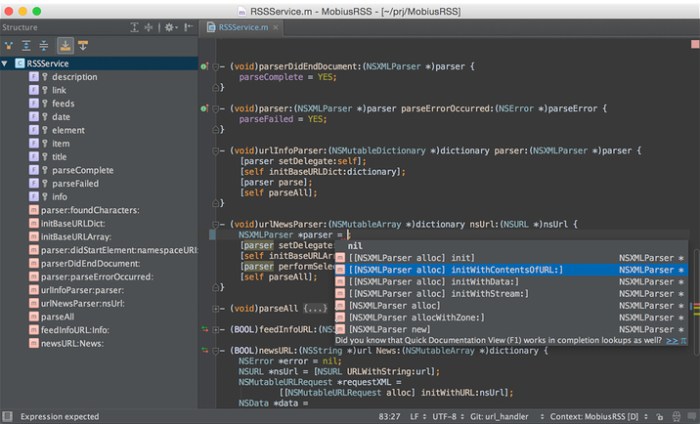
your bright ideas into outstanding iOS/OS X apps with ease and pleasure. Rely on AppCode’s intelligent assistance as you code, refactor, debug and test.

Why AppCode

Intelligent development environment
Thanks to an in-depth understanding of your code structure, AppCode takes care of your routine tasks and saves you from extra typing. It gives you smart code completion, formatting, reordering, automatic import, and powerful navigation options and code generation. Quickly fine-tune your apps or unit tests using a robust LLDB debugger with flexible breakpoints, watches, frames view and evaluate expressions.

The complete experience

AppCode is 100% compatible and interoperable with Xcode, with no additional configuration required. It seamlessly integrates with the most popular version control systems; Kiwi and Google testing frameworks; Dash and Ingredients documentation tools; CocoaPods (including intention actions in pod files and automatic install and update of pods); Reveal application; and a number of issue trackers. An integrated UI Designer is also included.

Code quality is important

AppCode is constantly monitoring the quality of your code. It warns you of errors and smells and suggests quick-fixes to resolve them automatically. Clang Static Analyzer is integrated as well, and a wide range of reliable refactorings lets you easily clean and improve your code in the most accurate and intelligent way.

Many languages, one IDE

AppCode natively supports Objective-C, Swift, C and C++, including C++11, libc++ and Boost, as well as javascript, XML, HTML, CSS and XPath. Use your preferred language to create your iOS/OS X application.

System Requirements:
  • macOS 10.8 or higher
  • 1 GB RAM minimum, 2 GB RAM recommended
  • 300 MB hard disk space + at least 1 GB for caches
  • 1024×768 minimum screen resolution

Web Site: http://www.jetbrains.com/

What’s New in JetBrains AppCode 2018.2.5

  • Release notes not available at the time of this post.

Screenshots

%RATINGS_IMAGES% (%RATINGS_USERS% votes, average: %RATINGS_AVERAGE% out of %RATINGS_MAX%)
You need to be a registered member to rate this.
capto 1.2.9

Name Capto 1 2 9 MAS TNT.zip
Size 32.18 MB
Created on 2018-11-24 23:16:10
Hash c26af5909762794480397aa82e3ef6b3e1a68d36
Files Capto 1 2 9 MAS TNT.zip (32.18 MB)

Download

Capto 1.2.9

Capto (was Voila) is an easy-to-use app that takes capturing, recording, video and image editing to the next level. With an intelligent file manager and quick sharing options, Capto is perfect for teachers, students, creative professionals and anyone in need of a powerful screen capture tool.

Web Site: http://www.globaldelight.com/capto/
Mac App Store: https://itunes.apple.com/app/capto-screen-capture-recording/id1078184147?mt=12

Compatibility: OS X 10.10 or later 64 bit

Web Site: http://www.globaldelight.com/capto/
Mac App Store: https://itunes.apple.com/app/capto-screen-capture-recording/id1078184147?mt=12

What’s New in Capto 1.2.9

Defect Fixes.

%RATINGS_IMAGES% (%RATINGS_USERS% votes, average: %RATINGS_AVERAGE% out of %RATINGS_MAX%)
You need to be a registered member to rate this.

boinx mimolive 4 5 build 26739

Name Boinx_mimoLive_4.5-26739.zip
Size 99.32 MB
Created on 2018-11-24 23:16:01
Hash 56dae77a01aaf2d13dad2d23a7c32a1a2e9201ac
Files Boinx_mimoLive_4.5-26739.zip (99.32 MB)

Download

Boinx mimoLive 4.5 Build 26739 macOS

mimoLive – The Multi-in, Multi-out Live-Video Engine – (was BoinxTV) is like your personal TV truck without the truck. Easy to learn and easy to master, it allows you to broadcast your message on a dime. Combine live camera video, clips, photos, 3D graphics, lower thirds, audio, and more to create a stunning recording or live video stream. mimoLive is perfect for school TV, events, conferences, video podcasts, webinars, training videos, game streaming, sports, concerts, sermons, and more. Stream directly to YouTube, Facebook, and more, or record to disk.

  • Stream your video live directly to YouTube Live, Facebook Live, Twitch.tv, Hitbox and more.
  • Use your own servers based on NGINX or Wowza Streaming Server or other RTMP based solution.
  • Add multiple camera angles, fancy graphics, and integrate with social media to make your stream stand out.
  • Supports 360° live video streaming to YouTube.
  • Create portrait video streams or any other arbitrary format.
  • Position, scale, crop and convert the format of video inputs to suit your output format.
  • mimoLive’s powerful graphics engine is based on the concept of Layers that combine to compose a final video.
  • Graphical elements include text, images, standard lower thirds, station logos, news tickers, clocks, countdowns, background animations and more.
  • Data driven elements include sports scoring, weather maps, stock charts, Twitter feeds and more.
  • Layers are highly customizable, allowing you to easily adapt your mimoLive template to your own CI look and feel.
  • Create your own complex Layers, including application logic, for example to build entire gaming engines. This allows broadcasters to easily implement and test new ideas with very little investment.
  • Key out green or blue screen or any background color you like in real time.
  • Chroma Key Basic for situations where lighting is not perfect, for example at home or in the classroom.
  • Chroma Key Pro for better results when lighting is more sophisiticated.
  • Real time keying enables you to use chroma keying in live streams or to previsualize a video production for a client.
  • Endless fun for kids!
  • mimoLive records a high resolution file of the live edited video to disk at the same time as streaming and playing out through SDI or on a second screen.
  • Record in H.264 for immediate upload to a video hosting platform.
  • Record in ProRes for use in Final Cut Pro X and other video editing apps if you still want to do post production.
  • Record in ProRes 4444 to preserve transparency in the alpha channel. Quickly create graphics like animated lower thirds for your Final Cut Pro X or Adobe Premiere projects.
  • Builtin switcher supports up to four video sources.
  • Connecting all video sources directly to mimoLive gives you the ability to use multiple sources at the same time on screen, for example to display two or more camera angles simultaneously.
  • If you need to switch more video sources, mimoLive supports direct control of Blackmagic Design ATEM switchers through an addon.
  • Use mimoLive for easy play out of graphics and videos to the ATEM switcher or to add graphics to the video feed from the switcher and stream or record the resulting mix.
  • Integrate mimoLive in your existing broadcasting environment as a powerful graphics machine or video switcher.
  • Play out video including the alpha channel via SDI through Blackmagic Design devices separated by key and fill signal.
  • Play out video through the second monitor connector of your Mac analog or digital via VGA, DVI or HDMI for display on a projector on stage or to feed into your school TV network.
  • mimoLive is optimized for the 64 bit architecture of modern Macs which leads to better performance and more stability.
  • Recording and streaming for days or playing lots of videos doesn’t let mimoLive run out of memory.
  • Using modern OS X features such as the full screen mode make for a better user experience

.
Requirements: Intel, 64-bit processor OS X 10.10 or later

Web Site: http://www.boinx.com/

What’s New in Boinx mimoLive 4.5 Build 26739

  • Release notes not available at the time of this post.

%RATINGS_IMAGES% (%RATINGS_USERS% votes, average: %RATINGS_AVERAGE% out of %RATINGS_MAX%)
You need to be a registered member to rate this.
navicat premium 12.1.13

Name Navicat Premium 12 1 13 TNT.zip
Size 150.8 MB
Created on 2018-11-24 23:18:59
Hash c47fcf855127d11fa56a44aba9afd5e1f73feb87
Files Navicat Premium 12 1 13 TNT.zip (150.8 MB)

Download

Navicat Premium 12.1.13

An all-in-one database administration utility that enables you to concomitantly connect to SQL Server, MySQL, MariaDB, Oracle, SQLite and PostgreSQL databases

Navicat Premium is a flexible and fully-featured database administration solution that features tools and functions from various Navicat products and also provides a long list of tools encountered in most database management system.

Fully-featured and streamlined database manager

Moreover, with Navicat Premium’s help, you can effortlessly transfer data across numerous database systems and even plain text files with SQL format and encoding. The batch processing capabilities, make it easy for you to perform multiple tasks and schedule jobs at a specific time.

Navicat Premium also comes with a handy Import and Export wizard, Report and Query Builder, Backup, Job Scheduler, Data Synchronization, Stored Procedures, Views, Triggers, Events and many other essential functions.

You can easily establish a secure SSH session via SSH Tunneling and enjoy the benefits of a strong authentication and secure encryption between two hots.

Securely connect to your databases

The authentication method can be based on a password or public/private key pair while the HTTP Tunneling allows you to bypass ISP restrictions and directly connect to the database server.

Furthermore, Navicat Premium’s Grid view helps you add, remove and edit records using spreadsheet-like features such as sorting, data groups, memos, hexes and more. On the other hand, while in the Form view, you can get a clean view of the field names and values.

Thanks to Navicat Premium’s Visual SQL Builder, you can also create and edit queries and views by simply selected the operation you like to perform without worrying about commands and syntax.

Effortlessly create and edit queries and views via a user friendly interface

At the same time, Navicat Premium comes with a handy code completion feature that makes it easy for you to select properties of database objects and SQL keywords from the drop-down list.

Ont he whole, Navicat Premium helps you visualize and modify your database’s structure, create a graphic model of your database, and even to reverse engineer existing databases.

Also, Navicat Premium allows you to import any type of data within your databases from a wide variety of file formats like XML, TXT, XLS, JSON, CSV and export data to Excel, XML, DBF, CSV and other specific formats.

Compatibility: OS X 10.10 or later 64-bit

Web Site: https://www.navicat.com/en/products/navicat-premium

What’s New in Navicat Premium 12.1.13

  • Release notes not available at the time of this post.

%RATINGS_IMAGES% (%RATINGS_USERS% votes, average: %RATINGS_AVERAGE% out of %RATINGS_MAX%)
You need to be a registered member to rate this.
vuescan pro 9 6 21

Name Vuescan.9621.macOS.zip
Size 17.97 MB
Created on 2018-11-24 23:19:28
Hash a2d93e8ea5e46002a7af185373f65e1c2f127635
Files Vuescan.9621.macOS.zip (17.97 MB)

Download

VueScan Pro 9.6.21 macOS

VueScan, the world’s most popular scanner software, is used extensively by photographers, home users, scanning services and corporations. VueScan is a scanning program that works with most high-quality flatbed and film scanners to produce scans that have excellent color fidelity and color balance. It is very easy to use, and also has advanced features for restoring faded colors, batch scanning and other features used by professional photographers.

VueScan changes nothing on your system, installs nothing in your operating system and all other scanner software will continue to function. VueScan increases your productivity and saves you money. VueScan has advanced scanning options, powerful features, and greatly improves your scans with superior color accuracy and better color balance. VueScan supports more than 700 scanners and 209 digital camera raw files and takes about 5 minutes to download and install.

Features:
  • Works with 1200 flatbed and film scanners
  • Runs on Mac OS X, Windows and Linux
  • Improves your productivity and quality of scans
  • Has been downloaded more than 5 million times
  • Create raw scan files
  • ICC profiles and color spaces
  • IT8 color calibration

Compatibility: OS X 10.5 or later

Web Site: http://www.hamrick.com/

What’s New in VueScan Pro 9.6.21

  • Release notes not available at the time of this post.

Screenshots

%RATINGS_IMAGES% (%RATINGS_USERS% votes, average: %RATINGS_AVERAGE% out of %RATINGS_MAX%)
You need to be a registered member to rate this.

graphic inspector 2.4 2

Name Graphic Inspector 2 4 2 TNT.zip
Size 7.21 MB
Created on 2018-11-24 23:17:11
Hash 84e2f6e66ca25fd0ef86b511b67f07d3d3d0957e
Files Graphic Inspector 2 4 2 TNT.zip (7.21 MB)

Download

Graphic Inspector 2.4.2

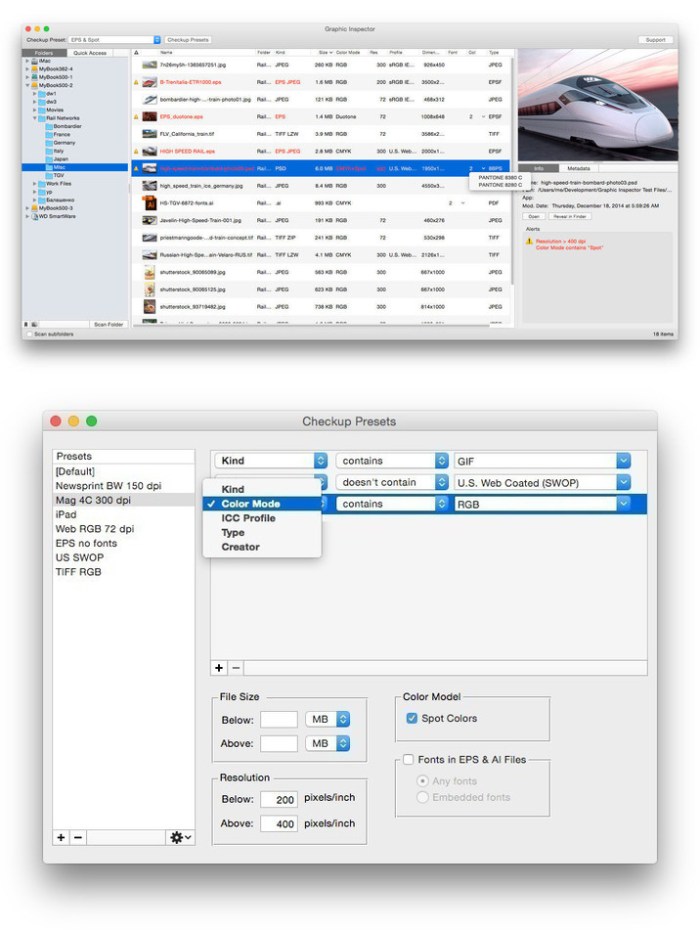
Graphic Inspector provides extensive info on entire folders of images and vector graphic files and helps locate potential problems according to user-defined rules. Graphic Inspector is a professional checkup tool designed to help users of any trade, whether it’s print, web design, photography or publishing on mobile devices.

The program will go through batches of files, display extensive info on their attributes and flag files with specific properties:

  • kind, size, and dimensions
  • resolution
  • color mode (including Photoshop mode variations)
  • ICC profile
  • spot colors in images and vector graphics files (Illustrator, EPS etc.)
  • TIFF / EPS compression
  • fonts in Illustrator files
  • complete image metadata (including EXIF, IPTC and GPS)

Powerful Checkup presets will let you quickly spot files with specific attributes, saving hours of manual checking and dealing with consequences of costly mistakes. For example, Graphic Inspector can warn you about all files whose color mode is RGB, format is JPEG, resolution is below 200 dpi, ICC profile doesn’t contain “US Web Coated”, etc.

Compatibility: OS X 10.8 or later

Web Site: http://zevrix.com/graphicinspector.php

What’s New in Graphic Inspector 2.4.2

  • Release notes not available at the time of this post.

Screenshots

%RATINGS_IMAGES% (%RATINGS_USERS% votes, average: %RATINGS_AVERAGE% out of %RATINGS_MAX%)
You need to be a registered member to rate this.
touchcopy 16 26

Name TouchCopy 16 16 26 TNT.zip
Size 10.45 MB
Created on 2018-11-24 23:19:19
Hash 387f6f2bbc6be7100180b6fe34a68e9fe5328312
Files TouchCopy 16 16 26 TNT.zip (10.45 MB)

Download

TouchCopy 16.26

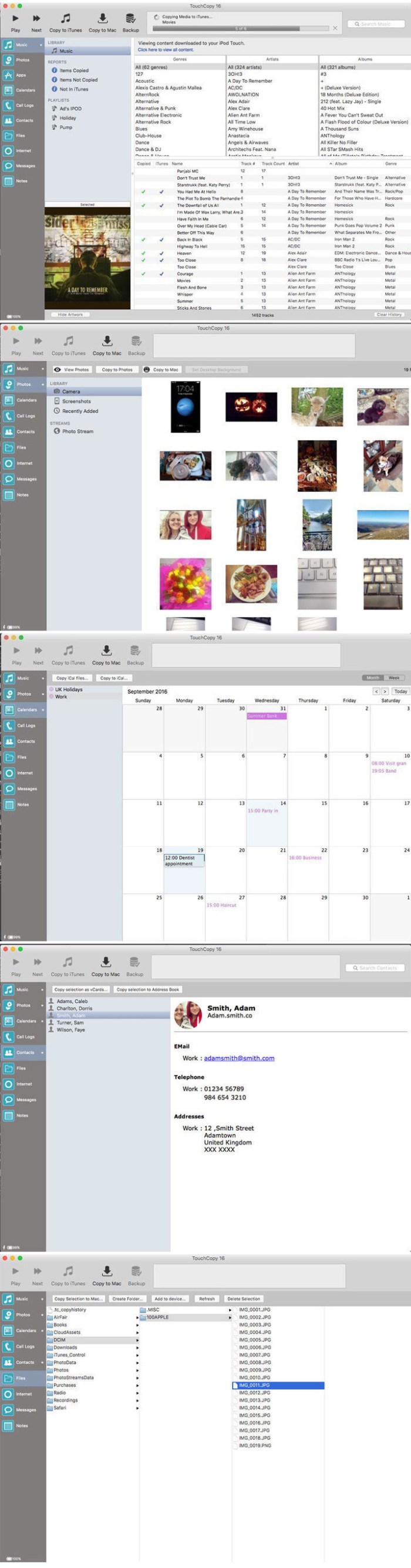
Backup music and other media from your iPod and iPhone. TouchCopy lets you copy your music, video, photos, text messages, and more from your iPod, iPhone, or iPad back onto your Mac or directly into iTunes.

Features
  • Transfer music and playlists from your iPhone, iPad or iPod back to iTunes on your Mac
  • Save your Text Message, iMessage and WhatsApp conversations to your Mac.
  • Save Voice Mails from your iPhone to your Mac.
  • View and copy Calendars, Contacts, Notes, internet history and more to your Mac.
  • Powerful iPhone, iPod Touch and iPad File Manager allowing you to copy files to and from your iOS device.
  • Includes a comprehensive help system and friendly email support.
  • Supports all iPods, iPhones and iPads including iPhone 8/X
  • Support for iOS 4 to iOS 11
  • New user interface
  • The ability to save iPhone SMS, MMS, iMessage, and WhatsApp conversations in text, HTML, and PDF formats
  • A complete redesign making TouchCopy 16 faster and more reliable

OS version:OS X 10.9 or later Apple iTunes 10 or later
Processor type(s) & speed: 64-bit processor

What’s New in TouchCopy 16.26

  • Release notes not available at the time of this post.

Screenshots

%RATINGS_IMAGES% (%RATINGS_USERS% votes, average: %RATINGS_AVERAGE% out of %RATINGS_MAX%)
You need to be a registered member to rate this.

orion pdf author 2 v2.30 1

Name Orion PDF Author 2 2 30 1 TNT.zip
Size 33.50 MB
Created on 2018-11-24 23:19:10
Hash f6cc3572747c14a1e098924c9117d7a0e3cb398f
Files Orion PDF Author 2 2 30 1 TNT.zip (33.50 MB)

Download

Orion PDF Author 2 v2.30.1

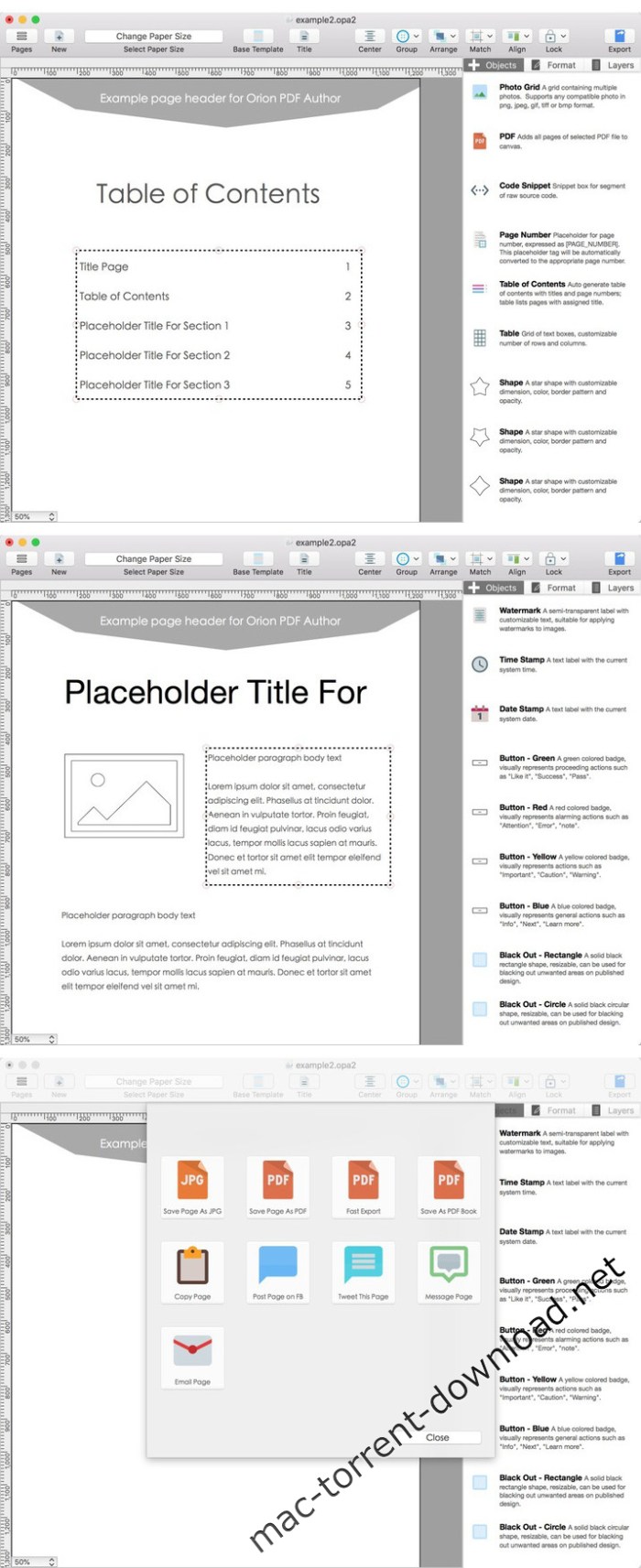
Introducing Orion PDF Author, a new and easier way to create multi-page PDF-format user guides, instruction manuals, and booklets.

Features
  • Drag-and-drop design editor
  • Advanced page-management interface
  • Full suite of annotation objects
  • Supports text boxes, photos, photo grids, outlines, shapes, lines, and arrows
  • Easy-to-use alignment and layout tools
  • Auto page numbering
  • Shared headers and footers
  • Publish in PDF format:
    • Exports any single page in PDF format
    • Exports entire project in multi-page PDF format
  • Supports multiple page dimensions:
    • US letter HD and 72 DPI formats (both landscape and portrait)
    • International A4 HD and 72 DPI formats (both landscape and portrait)

Compatibility: OS X 10.10 or later 64-bit

Web Site: http://orion.aidaluu.com

What’s New in Orion PDF Author 2 v2.30.1

  • Release notes not available at the time of this post.

Screenshots

%RATINGS_IMAGES% (%RATINGS_USERS% votes, average: %RATINGS_AVERAGE% out of %RATINGS_MAX%)
You need to be a registered member to rate this.

navicat for sql server 12.1.13

Name Navicat for SQL Server 12 1 13 TNT.zip
Size 62.23 MB
Created on 2018-11-24 23:18:46
Hash 5ea14f1d9b4fc685f10dfca16965bcbd4d5b5d8d
Files Navicat for SQL Server 12 1 13 TNT.zip (62.23 MB)

Download

Navicat for SQL Server 12.1.13

Navicat for SQL Server is an ideal solution for SQL Server administration and development which lets you create, edit databases, run SQL queries and connect to remote SQL Server in an easier way. It features an intuitive GUI and offers powerful visual tools such as Query Editor with syntax highlight capability, SQL Preview, SQL Console, TEXT, Hex and BLOB viewer/editor, SSH Tunnel and more, to increase your productivity.

Also, Navicat provides a number of tools allowing to perform all the necessary database operations such as creating, editing, and duplicating database objects. It also offers a well-described wizard system that simplifies your database development tasks and a full featured graphical manager for setting the users and access privileges.

It runs on Windows and Mac OSX with remote connection capability. Navicat is also available for MySQL, Oracle, SQLite and PostgreSQL.

Easy installation and intuitive interface make it an irreplaceable tool for SQL Server on the Web or your local desktop.

Navicat full version includes more powerful features such as Data modeling, Data/Structure Synchronization, Import/Export, Backup, Report, task scheduling, code completion, etc. Together with comprehensive and instant support services, Navicat for SQL Server makes database and application development faster and easier while simplifying day-to-day administration tasks.

Compatibility: macOS 10.10 or later 64-bit

Web Site: https://www.navicat.com/en/products/navicat-for-sqlserver

What’s New in Navicat for SQL Server 12.1.13

  • Release notes not available at the time of this post.

%RATINGS_IMAGES% (%RATINGS_USERS% votes, average: %RATINGS_AVERAGE% out of %RATINGS_MAX%)
You need to be a registered member to rate this.

awesome mails pro 3 v3.20

Name Awesome Mails Pro 3 3 20 TNT.zip
Size 67.85 MB
Created on 2018-11-24 23:15:51
Hash 72d1426a4d1139f549880485db961a0db376bde3
Files Awesome Mails Pro 3 3 20 TNT.zip (67.85 MB)

Download

Awesome Mails Pro 3 v3.20

Awesome Mails Pro – is a professional newsletter and marketing email designer. Create beautiful interactive emails with photos, stylish fonts and web hyper links.

The app comes with various predefined templates and allows you to create new ones from scratch. Using Awesome Mails Pro is a breeze thanks to the simple and organized interface that is divided into the top toolbar, the email area, and the settings pane. When you start working on a new project, you can preview each template and choose one that matches your needs.

Send emails in dynamic image format

Multiple options to store images used in emails including in-mail attachment, upload to your own web server with built in FTP uploader or upload to your Dropbox account.

Professionally designed templates As featured on Macworld.com:

“Awesome Mails helps you create professional-looking e-mail messages with a simple and intuitive interface..” Bundled with beautifully designed email templates covering various styles including Business Classic, Memo, Notes, Marketing, Holiday, Categories, Retail, Invitation and more!

Compatibility: OS X 10.10 or later 64-bit
Web Site: http://awesomemails.aidaluu.com/

What’s New in Awesome Mails Pro 3 v3.20

  • Release notes not available at the time of this post.

%RATINGS_IMAGES% (%RATINGS_USERS% votes, average: %RATINGS_AVERAGE% out of %RATINGS_MAX%)
You need to be a registered member to rate this.
texpad 1.8 7 build 447

Name Texpad.v1.8.7.Build.447.MacOSX.Cracked-ARN.zip
Size 47.50 MB
Created on 2018-11-24 08:20:19
Hash 0d0992fee6fab808873943072c7a66b8a14e9e76
Files Texpad.v1.8.7.Build.447.MacOSX.Cracked-ARN.zip (47.50 MB)

Download

Texpad 1.8.7 Build 447 macOS

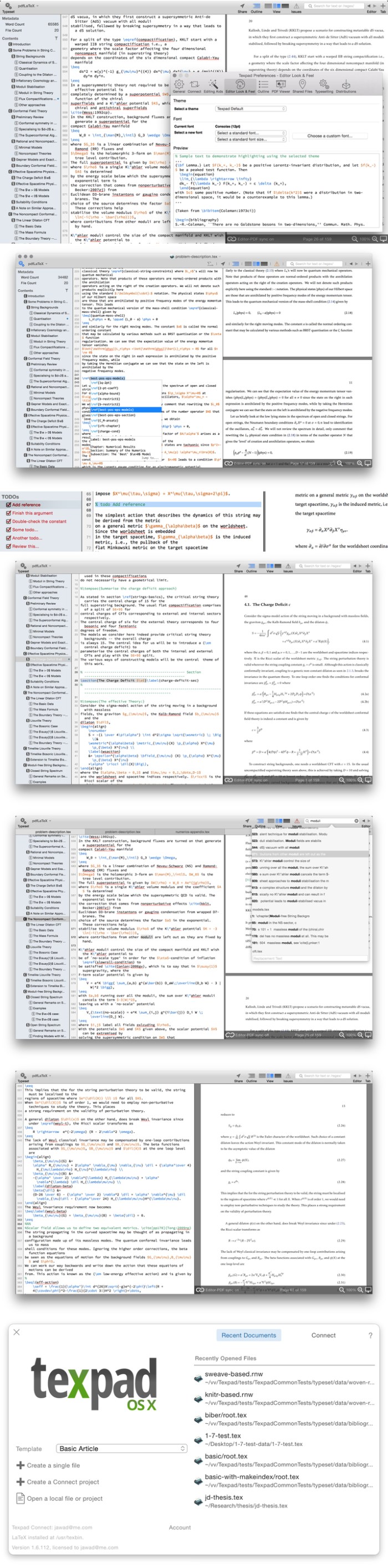
Texpad is a LaTeX editor designed for straightforward navigation of projects of any size. When Texpad opens a document it scans through it, looking for LaTeX structure commands and any included files, then it presents you with an outline view with which you can swiftly navigate the entire project.

Texpad replaces LaTeX’s obscure console output with a table of typesetting errors. Clicking on these errors will direct you to the offending line in the LaTeX source.

Texpad’s elegant single window design saves you from the clutter of windows. In even the largest projects all files are accessible from the outline view to the left of the editor. This one-window design works especially well with OS X 10.7 Lion’s fullscreen mode.

Compatibility: OSX 10.8 or Later
Web Site: https://www.texpad.com/osx

What’s New in Texpad 1.8.7 Build 447

  • Release notes not available at the time of this post.

Screenshots

%RATINGS_IMAGES% (%RATINGS_USERS% votes, average: %RATINGS_AVERAGE% out of %RATINGS_MAX%)
You need to be a registered member to rate this.
iconfly 3.8 2

Name IconFly 3 8 2 MAS TNT.zip
Size 9.67 MB
Created on 2018-11-24 01:39:26
Hash d713cb1d32a20bf0563bb3299414661279902850
Files IconFly 3 8 2 MAS TNT.zip (9.67 MB)

Download

IconFly 3.8.2

IconFly is an incredible time saver that allows you to easily create icons in many formats for your Mac, iPhone, iPad and Apple Watch applications. Moreover, IconFly allows you to create icons for Android applications as well as Web clip icons and favicons. IconFly is actively supported and consistently updated.

Supported image formats for icons creation: PNG, JPEG, TIFF, GIF, ICNS, PSD, EPS, AI, PDF.

Features:

  • Create appiconset and icons packages for your Mac, iPhone, iPad and Apple Watch applications
  • Create a folder with an icon
  • Set an icon on the folder
  • Create Mac app icons in the following formats: iconset, ICNS
  • Preview your icons before export
  • Replace images separately for different sizes
  • Supports app icons for iOS 7 and later (including latest iOS 12)
  • Supports app icons for iPhone
  • Supports app icons for iPad
  • Supports app icons for Apple Watch
  • Create full icons package for Android applications
  • Create different types of icons for websites or web applications
  • QuickIcon

Additional features:

  •  Save icons as images in the following formats: PNG, JPEG, TIFF
  • Preview in Dock
  • 6 types of roundings and 8 types of masks

Appiconset

IconFly allows you to create the Appiconset with all the correctly sized icons and properly formatted JSON file. You can save it directly to the Assets Catalog in your project and Appiconset is ready to use right after that without any additional changes. Appiconset created by IconFly is fully compatible with Xcode 6.0 or later.

QuickIcon

QuickIcon is an innovative feature that allows you to create all needed icons much more quickly, just in one click.

Web icons

IconFly allows you to create the following web icons:

  • Web clip icons with headers
  • Ordinary and Extended favicon
  • Android web icons with headers and manifest

IconFly is easy to use. Just drag your image into the app, click Generate, and IconFly will immediately produce all of the icon previews to instantly see how your icons will look in different sizes. Moreover, you can not only see but also replace the images separately for different sizes. And when you are satisfied with the results, you can easily export your icons for immediate use.

Compatibility: OS X 10.10 or later

Web Site: http://iconfly.aperio-lux.com
Mac App Store: https://itunes.apple.com/app/iconfly/id556381974?mt=12

What’s New in IconFly 3.8.2

Fix minor issues

%RATINGS_IMAGES% (%RATINGS_USERS% votes, average: %RATINGS_AVERAGE% out of %RATINGS_MAX%)
You need to be a registered member to rate this.
gluemotion 1.2.3

Name GlueMotion 1 2 3 TNT.zip
Size 14.06 MB
Created on 2018-11-24 01:17:34
Hash 9d439b3aa4d304ffed13c4e3a458087847ac6901
Files GlueMotion 1 2 3 TNT.zip (14.06 MB)

Download

GlueMotion 1.2.3

GlueMotion is the perfect tool for time lapse photographers. The application allows you to batch edit, deflicker and assemble sequences of images into time lapse movies.

GlueMotion has been made to save your time and guide you during the process of creation. By using the included batch editing tool, you will not have to use additional applications. GlueMotion is able to crop, rotate, flip and adjust colors of your photos such as exposure, saturation or brightness. Moreover the application is able to deflicker the sequences of photos. In other words, GlueMotion will analyze your photos and select automatically the optimal brightness correction for each image.

The application is designed for professional needs. That is why it can handle several hundreds of thousands of images painlessly. In addition, all industry-standard formats are supported. The application can import PNG, JPEG as well as all RAW image formats supported by macOS. The exported movie can be encoded in H.264, Apple ProRes as well as HEVC.

This version has been optimized for macOS High Sierra and later. Moreover the application is available in 7 languages (English, French, German, Spanish, Italian, Japanese and Chinese).

Feedbacks can be sent directly from the application. In this way, you can contact us for any kind of suggestions and improvements in few clics.

GlueMotion is accompanied by other applications.

  • SnapMotion: extract still images from videos with precision.
  • MetaImage: edit image metadata and geographical tags.

OS Version: OS X 10.13 or later

Web Site: https://neededapps.com/
Mac App Store: https://itunes.apple.com/app/gluemotion/id1396851118?mt=12

What’s New in GlueMotion 1.2.3

%RATINGS_IMAGES% (%RATINGS_USERS% votes, average: %RATINGS_AVERAGE% out of %RATINGS_MAX%)
You need to be a registered member to rate this.

bookends 13.1.5

Name Bookends.1315.zip
Size 51.42 MB
Created on 2018-11-23 22:24:16
Hash ec498d0a478cbc823f2914783340cbad68461642
Files Bookends.1315.zip (51.42 MB)

Download

Bookends 13.1.5 macOS

Bookends is a full-featured and cost-effective bibliography, reference, and information management system for students and professionals. Bookends requires Intel Macs and Mac OS X 10.7 or later.

Bookends is unicode-savvy, so you can mix Roman (English, French, German, etc.) and non-Roman (Japanese, Greek, Hebrew, etc.) characters.

Introducing WYSIWYW (What You See Is What You Want)
A highly configurable, interactive, and editable interface lets you work with reference information the way you want. View Groups or Term Lists (Authors, Keywords, etc.) on the left. In the concise reference view on the right, arrange fields in any order, show just the ones that you find useful, and label them as you like. Editing or entering information is a single click away. Show attachments (pdfs, text files, images, etc.), or use the reference’s URL to show live web pages of its contents. Notecards let you enter, edit, and rearrange your thoughts, and make citing pages in footnotes a snap. Tag clouds let you visualize your terms and word use, and quickly tunnel down to the references you want.

Here are some of many different ways that the same data can be viewed in Bookends:
  • Formatted reference, reference summary, single column reference list
  • PDF display and outline view
  • Groups, browser, and note stream
  • Tag cloud
  • Term List (Authors)
  • Enter/Edit Reference
  • View PDF in edit pane

Requirements: macOS 10.9 (Mavericks) or later.

Web Site: http://www.sonnysoftware.com/aboutreferenceminer.html

What’s New in Bookends 13.1.5

  • Release notes not available at the time of this post.

%RATINGS_IMAGES% (%RATINGS_USERS% votes, average: %RATINGS_AVERAGE% out of %RATINGS_MAX%)
You need to be a registered member to rate this.

symantec endpoint protection 14 2.1023.0100

Name Symantec Endpoint Protection v14 2 1023 0100 MacOSX-DVT.zip
Size 48.43 MB
Created on 2018-11-23 21:49:53
Hash 6e5e7f12b83789ea6746cfb5bf661effa3470212
Files Symantec Endpoint Protection v14 2 1023 0100 MacOSX-DVT.zip (48.43 MB)

Download

Symantec Endpoint Protection 14.2.1023.0100 macOS

Symantec Endpoint Protection – Proactively detect and block today’s most advanced threats with an endpoint protection solution that goes beyond antivirus. Unrivaled Security – Stop advanced threats with intelligent security!

Intelligent Endpoint Workshop

  • About the importance and function of each of the protection engines in Symantec Endpoint Protection
  • The top 10 misconceptions about deploying advanced features in Symantec Endpoint Protection and strategies for implementing them successfully
  • How Symantec Endpoint Protection forms a solid foundation for advanced threat protection across multiple control points, including the endpoint, network, and email
  • How to gain more value from your existing Symantec Endpoint Protection implementation

Stop advanced threats with intelligent security

Last year, we saw 317 million new malware variants, with targeted attacks and zero-day threats at an all-time high. Organizations are struggling to keep up with the rapidly evolving threats. Symantec Endpoint Protection is designed to protect against advanced threats with powerful, layered protection backed by industry leading security intelligence.

  • Network Threat Protection stops most threats before they can take up residence on the machine
  • Insight reputation scoring accurately detects rapidly mutating malware and zeroday threats
  • SONAR™ behavioral analysis stops malicious files designed to appear legitimate
  • Strong antivirus, antispyware and firewall protection eradicate known mass malware

Granular Control

Get extended protection, flexibility, and scalability
If you have multiple user groups or you have users across different locations, you need the flexibility to set different security policies. You can proactively secure your ecosystem by using policy-based system lockdown and application control. These features will allow you to have tighter controls for employees handling confidential data.

  • Application Control monitors and controls applications behavior, including automated system lockdown, and advanced whitelisting and blacklisting capabilities
  • External media control restricts and enables access to the hardware that can be used to protect and increase productivity
  • Host Integrity detects unauthorized change, conducts damage assessment and ensures endpoints are protected and compliant

Smarter Management

Single management across physical and virtual
Managing endpoint protection should be easy. Symantec provides multiple layers of protection through a single high-powered client and management console across both physical and virtual machines. We make it easy to deploy, update and manage your endpoint security across various locations, user groups, and operating systems.

  • One solution protects Windows, Mac, Linux, virtual machines and embedded systems
  • Optimized for performance across physical, virtual and embedded machines
  • Single console provides a one stop shop for reporting, alerts, configuration and management
  • Enabled for remote deployment and client management

Compatibility: OS X 10.9 or later
Web Site: http://www.symantec.com/

What’s New in Symantec Endpoint Protection 14.2.1023.0100

  • Release notes not available at the time of this post.

%RATINGS_IMAGES% (%RATINGS_USERS% votes, average: %RATINGS_AVERAGE% out of %RATINGS_MAX%)
You need to be a registered member to rate this.
vsco film pack 1.7 for lightroom and acr updated 2018

Name 2018 Complete VSCO with canon 5d mark4 profiles.zip
Size 778.0 MB
Created on 2018-11-23 21:29:13
Hash 528d6ffb66eb10f681fdda7e0d65faa5dea8d34a
Files 2018 Complete VSCO with canon 5d mark4 profiles.zip (778.0 MB)

Download

VSCO Film Pack 1-7 for Lightroom and ACR (Updated 2018)

Revolutionary presets and camera profiles to speed up the process in the production of excellent results post-processing.

VSCO Film presets are based on the individual profiles of the camera. If you want to, for example, to recreate the look of Polaroid, Fuji or other types of film in a manner different from the standard application of the general changes to each photo, then this software is the one thing you should pay your attention.
VSCO Film presets designed specifically for cameras Fuji, Canon, Nikon, Sony, Olympus and Leica (you choose which camera you use to apply effects according to its type).

Film VSCO up of beautiful films emulations consumer mass market 20 years ago. Relying on the basis of the previous film bags VSCO, set Archetype Films represents the finest digital emulation of which have been to date, and is the epitome of nostalgic film stocks, the golden era of analog camera. For example, you can reduce the sharpness and tonal contrast, the effect of using old lenses, add a different shading, as well as add vignetting of various kinds.

Presets work with cameras from other manufacturers (see official site)

Requires
  • Adobe Camera Raw 7 & 9
  • Adobe Lightroom 4,5 & 6
  • Win/Mac

Web Site: http://vsco.co/

%RATINGS_IMAGES% (%RATINGS_USERS% votes, average: %RATINGS_AVERAGE% out of %RATINGS_MAX%)
You need to be a registered member to rate this.
jop super color luts bundle 1.16 jop colored luts win mac

Name JOP LUT Bundle #1.zip
Size 772.9 kB
Created on 2018-11-23 21:28:52
Hash 8cd64cf70272d2774f343c030ac5b5a22aede3c0
Files JOP LUT Bundle #1.zip (772.9 kB)

Download

JOP Super Color LUT’s Bundle #1 – 16 JOP Colored LUT’s (Win/Mac)

A bundle of 16 different ALL ORIGINAL highly stylized JOP colored LUT’s.

Use these LUT’s to dramatically color grade your footage.

Use the different color grades JOP himself created, and uses on his own videos to get the perfect cinematic look for your footage!

NOTE: LUT’s work best with FLAT image picture profiles.

LUT’s:

  1. Blue Beach Faded
  2. Blue Beach High Contrast
  3. Vibrant Beach
  4. Vintage Blue
  5. Washed Out
  6. Extreme Fade
  7. Heavy Green
  8. Vintage Vibrance Wash
  9. Vintage Vibrance Wash 2
  10. JOP Lut 1
  11. JOP Lut 2
  12. JOP Lut 3
  13. JOP Lut 4 (B&W)
  14. JOP Lut 5
  15. JOP LUT 6
  16. (BONUS) What I’m Talkin Bout

Web Site: http://jakobowensproductions.bigcartel.com/product/jop-super-color-lut-s-bundle

Screenshots

%RATINGS_IMAGES% (%RATINGS_USERS% votes, average: %RATINGS_AVERAGE% out of %RATINGS_MAX%)
You need to be a registered member to rate this.

amadeus pro 2.5 2 2084

Name Amadeus Pro 2 5 2 2084 TNT.zip
Size 21.29 MB
Created on 2018-11-23 20:44:02
Hash 516d06d9128769f869a22bab60cb43127d2c0556
Files Amadeus Pro 2 5 2 2084 TNT.zip (21.29 MB)

Download

Amadeus Pro 2.5.2 (2084)

Amadeus Pro lets you use your Mac for any audio-related task, such as live audio recording, digitizing tapes and records, converting between a variety of sound formats, etc. Thanks to its outstanding direct-to-disk abilities and waveform caching, edits on arbitrarily large sounds (even beyond the usual 2GB limit) are performed at lightning speed. The handling of large sounds is furthermore facilitated by the extensive support of markers. Its outstanding sound repairing and denoising abilities make Amadeus Pro particularly suitable for transferring vinyl records on CD.

Features
  • Simple and elegant OS X-like user interface
  • Multitrack editing an recording.
  • Batch processing and conversion.
  • Sound denoising and repairing.
  • Supports a variety of sound formats, including AIFF, Multichannel Wave, MP3, MP4, Ogg Vorbis, FLAC, SoundDesigner II, QuickTime, Apple CAF, etc.
  • Support for VST and Audio Unit plug-ins.
  • A “favourite actions” palette allows to have your most commonly used effects only a mouse click away.
  • A wide range of powerful audio analysis tools.
  • Audio CDs with CD-TEXT data can be burned directly from within Amadeus Pro.

OS version:OS X 10.8 or later (OS X 10.11 or later recommended)

Web Site: http://www.hairersoft.com/pro.html

What’s New in Amadeus Pro 2.5.2 (2084)

  • Release notes not available at the time of this post.

%RATINGS_IMAGES% (%RATINGS_USERS% votes, average: %RATINGS_AVERAGE% out of %RATINGS_MAX%)
You need to be a registered member to rate this.
iringg 1.0.37

Name iRingg 1 0 37 TNT.zip
Size 26.08 MB
Created on 2018-11-23 20:43:38
Hash 80e93fce59ba69a3358cea343016eaadca25b19b
Files iRingg 1 0 37 TNT.zip (26.08 MB)

Download

iRingg 1.0.37

Streamlined tool for creating ringtones from any video or music track on YouTube, SoundCloud or your Mac’s hard drive, and to upload it to your iPhone with a mouse click

iRingg is a user-friendly iPhone ringtone creator utility designed to help you send your ringtones to your iPhone with a simple mouse click, without the need of using Apple’s iTunes.

According to the development team, iRingg uses the 6-Sense technology based on your music tastes and machine learning to suggest you tracks you would like, and you may want to use as ringtones for your phones.

Suggests songs you may want to use as ringtones usingits 6-Sense technology

And, to our surprise, iRingg clearly delivers on its promise as it suggested songs from our playlists, either from YouTube or our iPhones’ music libraries.

To begin with, you have to either choose one of the suggested tracks in the For You starting tab, find one using the search field in the Search Music tab, or drag and drop or pick an MP3 or FLAC song using the Browse tab.

Once you select and load a song in iRingg, you can choose what part of it you want to trim and use as a ringtone, up to 30 seconds. Going forward to the next step, you can also add a recording of yourself as the intro or one of the built-in SndMoji (small audio clips) anywhere within the ringtone.

Use YouTube, SoundCloud, iTunes and local audio tracks to create custom ringtones

After hitting the Export button in the Personalize & Edit tab, you can choose to either save the ringtone to your Mac’s hard drive as an M4R audio file or push it to your iPhone’s sound library.

It is important to mention that you have to connect your iPhone to the Mac either via a USB or Wi-Fi connection to be able to send the ringtones, otherwise they will not be available in the Settings > Sounds menu.

Create ringtones and send them to your iPhone without the need of using extra apps

That being said, iRingg is the perfect tool to have on your Mac if you need to create original ringtones for your iPhone and send them to your device with just one mouse click.

In short, iRingg effectively eliminates the need of using iTunes to add extra ringtones on your phone, as well as having to use a dedicated audio editor to create them from scratch using your Mac.

Compatibility: OS X 10.11 or later 64 bit
Web Site: http://softorino.com/

What’s New in iRingg 1.0.37

  • Critical crash fixed;
  • Ton of UI bug fixes.

Screenshots

%RATINGS_IMAGES% (%RATINGS_USERS% votes, average: %RATINGS_AVERAGE% out of %RATINGS_MAX%)
You need to be a registered member to rate this.

fontbook 5.0.6

Name FontBook 5 0 6 TNT.zip
Size 23.45 MB
Created on 2018-11-23 20:43:46
Hash 3a18ac5b657d7c9a80640688eb9e634defb696c5
Files FontBook 5 0 6 TNT.zip (23.45 MB)

Download

FontBook 5.0.6

FontBook is the ultimate font utility for all macOSusers who require a quick, easy and comprehensive overview of all their fonts.

Let FontBook display uninstalled fonts on the screen in various layouts. You can print reference pages with selected fonts to assess the typeface, sizes and impression. Or you can find keyboard shortcuts for less-used special characters.

In short, FontBook is the ideal font utility if you regularly have to look for a suitable font or special character.

Compatibility: macOS 10.11 or later 64-bit

Web Site: https://www.lemkesoft.de/en/products/fontbook/

What’s New in FontBook 5.0.6

  • Zoom menu items added to the view menu
  • Preferences menu item: fit content to window as option
  • Unicode layout
  • FontBook now supports the Hardened Runtime on macOS 10.14
  • FontBook is now notarized by Apple

%RATINGS_IMAGES% (%RATINGS_USERS% votes, average: %RATINGS_AVERAGE% out of %RATINGS_MAX%)
You need to be a registered member to rate this.
remote desktop manager enterprise edition 6.1.0.0

Name Devolutions.Remote.Desktop.Manager.Enterprise.Edition.v6.1.0.0.MACOSX.Incl.Keygen-AMPED.zip
Size 132.5 MB
Created on 2018-11-23 20:41:31
Hash 6c5f67e21de77e1b0d28d62e665d64dd38b7b3a3
Files Devolutions.Remote.Desktop.Manager.Enterprise.Edition.v6.1.0.0.MACOSX.Incl.Keygen-AMPED.zip (132.5 MB)

Download

Devolutions Remote Desktop Manager Enterprise Edition 6.1.0.0 macOS

Remote Desktop Manager – is a small application to control the remote connection. With Remote Desktop Manager program, you can add, edit, delete, organize or find your remote connection quickly. The utility is compatible with the Microsoft Remote Desktop or Terminal Services, is a very simple to use, but at the same time is powerful and effective. Remote Desktop Manager is suitable for any user.

Remote Connections

Connect any session type, such as: RDP, SSH, Web, VNC, Telnet, Apple Remote Desktop, TeamViewer, LogMeIn and many more
Increase productivity and efficiency with all the integrated applications
Securely connect to more than multiple VPN types

Password Management

Save and manage all your passwords
Input credentials and automatically login everywhere
Import or integrate existing password managers, such as 1Password and many more

Documents & Information

Protect sensitive data, such as credit card numbers, serial numbers and bank accounts
Store, share and link documents and contacts
Create templates to simplify management

TeamTeam Solution

Share and centralize all of your connections and passwords within the organization
Access your data when offline
Manage and restrict user access
View connection logs and track all remote access details

Security

Secure the organization via the best encryption algorithm
Generate strong passwords and identify weak passwords
U.S. federal government approved encryption

User Interface & Organization

Intuitive interface for all types of users
Easy to deploy and use in an Enterprise environment
No extensive training required

Requires: Intel Mac OS X 10.8 or later.

Web Site: http://mac.remotedesktopmanager.com

What’s New in Remote Desktop Manager Enterprise Edition 6.1.0.0

  • Release notes not available at the time of this post.

Screenshots

%RATINGS_IMAGES% (%RATINGS_USERS% votes, average: %RATINGS_AVERAGE% out of %RATINGS_MAX%)
You need to be a registered member to rate this.

flawlessapp 0.9 4

Name FlawlessApp 0 9 4 TNT.zip
Size 13.77 MB
Created on 2018-11-23 20:43:53
Hash 3e909281d4b0e515727f4f7a7dbb2c9a1849de16
Files FlawlessApp 0 9 4 TNT.zip (13.77 MB)

Download

FlawlessApp 0.9.4

Flawless allows you to make your iOS apps look exactly like the expected design. With real-time comparison of expected and implemented design that is all built into an iOS simulator. We made Flawless for those, who are obsessed with quality of mobile apps.

HOW FLAWLESS APP WORKS

Select Design File

Simply choose a design from the interface, or drag & drop files onto the Flawless App icon in the menu bar. You can select one or multiple designs in different formats: sketch, jpeg, png, tiff or gif.

Choose Comparison Mode

Once a design file has been chosen, it will appear on your iOS simulator. You can use overlay or split comparison mode for spotting any visual differences between expected design and implementation. Flawless App supports comparison of portrait and landscape screens, so you can check pixel by pixel the quality of every design.

Inspect visual bugs in iOS simulator

Flawless App is integrated right inside your iOS simulator as a plugin. It allows to fix visual issues on the fly, before they cost you time and money.

No need to distract your development workflow by adding any third-party library. Flawless App works out of the box, without any additional setup.

Compatibility: macOS 10.11 or later 64-bit

Web Site: https://flawlessapp.io/

What’s New in FlawlessApp 0.9.4

  • Release notes not available at the time of this post.

%RATINGS_IMAGES% (%RATINGS_USERS% votes, average: %RATINGS_AVERAGE% out of %RATINGS_MAX%)
You need to be a registered member to rate this.

xilisoft iphone ringtone maker 3.2.13 build 20181119

Name Xilisoft iPhone Ringtone Maker 3.2.13.macOS.zip
Size 46.64 MB
Created on 2018-11-23 22:24:40
Hash 37adec7c0475aef4397aca515f1a69fffb305cb7
Files Xilisoft iPhone Ringtone Maker 3.2.13.macOS.zip (46.64 MB)

Download

Xilisoft iPhone Ringtone Maker 3.2.13 Build 20181119 macOS

Xilisoft iPhone Ringtone Maker for Mac is a fast and easy-to-use Mac iPhone ringtone converter for iPhone users.

It can convert audios like WMA, WAV, RA, M4A, MP3 and videos like VI, WMV, DivX, MP4, H.264/AVC, AVCHD, MKV, RM, to M4R iPhone ringtone. After iPhone ringtone making done, this iPhone ringtone maker can directly transfer ringtone to iPhone.

  • Fully support all iPhone/iPad, latest iPhone 8, iPhone 8 Plus, iPhone X, iOS 11 and iTunes 12
  • Convert WMA, WAV, M4A, MP3 to M4R iPhone ringtone on Mac
  • Create iPhone ringtone from AVI, MPEG, WMV, MP4, MKV
  • Make music clip from video/audio and turn it into iPhone ringtone
  • Transfer ringtone file to iPhone directly

Compatibility: Mac OS X v10.6 – 10.14(Mojave)

Web Site: http://www.xilisoft.com/iphone-ringtone-maker-mac.html

What’s New in Xilisoft iPhone Ringtone Maker 3.2.13 Build 20181119

  • Release notes not available at the time of this post.

%RATINGS_IMAGES% (%RATINGS_USERS% votes, average: %RATINGS_AVERAGE% out of %RATINGS_MAX%)
You need to be a registered member to rate this.

xilisoft iphone contacts backup 1.2 25 build 20181119

Name Xilisoft iPhone Contacts Backup 1.2.25 macOS.zip
Size 28.78 MB
Created on 2018-11-23 22:24:25
Hash 69d2cf9dad2d4ec9340994a4c4a44d0ea79f4dee
Files Xilisoft iPhone Contacts Backup 1.2.25 macOS.zip (28.78 MB)

Download

Xilisoft iPhone Contacts Backup 1.2.25 Build 20181119 macOS

Xilisoft iPhone Contacts Backup for Mac is able to backup and restore iPhone contacts information to keep data security, import contacts from icloud or import/exporting contacts from/to the most popular Address Book programs as well as managing your contacts with ease!

Backup contacts to the program and restore back to your iPhone if needed
Import/export contacts information from/to other address books like Google Contacts, Yahoo Address Book and etc
Transfer contacts between multiple phones without limitation
With Xilisoft iPhone Contacts Backup for Mac you are free to synchronize your iPhone contacts with iCloud
Delete any contact information freely, sort all contacts in different categories, save images of contacts to computer, search contacts with ease
Fully support all iPhone/iPad, latest iPhone XS, iPhone XS Max, iPhone XR, iOS 12 and iTunes 12

System Requirements
  • OSIntel® processor
  • ProcessorMac OS X v10.6 10.14(Mojave)
  • RAM512MB RAM
  • Free Hard Disk50MB free hard disk space for installation
  • Graphic CardSuper VGA (800×600) resolution, 16bit graphics card or higher
  • OthersiTunes 9.1 or above

Web Site: Xilisoft iPhone Contacts Backup 1.2.25 Build 20181119 http://www.xilisoft.com/iphone-contacts-backup-mac.html

What’s New in Xilisoft iPhone Contacts Backup 1.2.25 Build 20181119

  • Release notes not available at the time of this post.

%RATINGS_IMAGES% (%RATINGS_USERS% votes, average: %RATINGS_AVERAGE% out of %RATINGS_MAX%)
You need to be a registered member to rate this.

xliff editor 2.4

Name Xliff Editor 2 4 TNT.zip
Size 6.56 MB
Created on 2018-11-23 20:42:58
Hash 64c472ba447ff2efc5d53ca493ebe0d436760b29
Files Xliff Editor 2 4 TNT.zip (6.56 MB)

Download

Xliff Editor 2.4

Xliff Editor- its fast to load, easy to use, and has a low memory footprint. Did we forget to mention Inline tag protection, Fuzzy search, intuitive shortcuts, multiple concurrent file editing and native spell checker. It also has some pretty nice customizations you can use to better suit your workflow.

Not all Xliff editors have been created equally. We’ve custom built our own XML parser to read even the most complex Xliff v1.2 files. Xliff Editor effortlessly handles Segmentation, Inline tags and Alternate translations.

*Whats an XLIFF file?

An xliff file is a standardized file format based on XML, used to represent localization data. In its simplest form the original(source) string is stored as well as its translated(target) complement. Xliff files enable localization to be much more user friendly, and less error prone than manual translation. Xliff files can be identified by the extensions .xliff or .xlf. SDL Trados (.sdlxliff) also uses the xliff format, but includes some extra proprietry data.

*Why XLIFF?

Xcode 6 introduced the ability to export/import all your localisation data, taking away the need for sending various file formats to your localisers for translating. The XLIFF format makes translating a cinch, as it removes all the layout and formatting, and just provides a simple text-to-text translation mechanism for your translators.

*Xliff Editor Features:

  • Highlighted search
  • Fuzzy search
  • Spell checker
  • Easy recognition of untranslated strings
  • XLIFF, XLF file support
  • SDLXIFF read support with export to XLIFF
  • Support for alttrans and segsource nodes
  • inline tag protection
  • Support for editing Multiple files simultaneously
  • Support for opening files in tabs
  • Beautiful interface

**Currently only XLIFF v1.2 files are supported.

Compatibility: OS X 10.11 or later, 64-bit

Web Site: https://xliffedit.com
Mac App Store: https://itunes.apple.com/app/xliff-editor/id1054842874?mt=12

What’s New in Xliff Editor 2.4

added custom icons for filetypes

%RATINGS_IMAGES% (%RATINGS_USERS% votes, average: %RATINGS_AVERAGE% out of %RATINGS_MAX%)
You need to be a registered member to rate this.
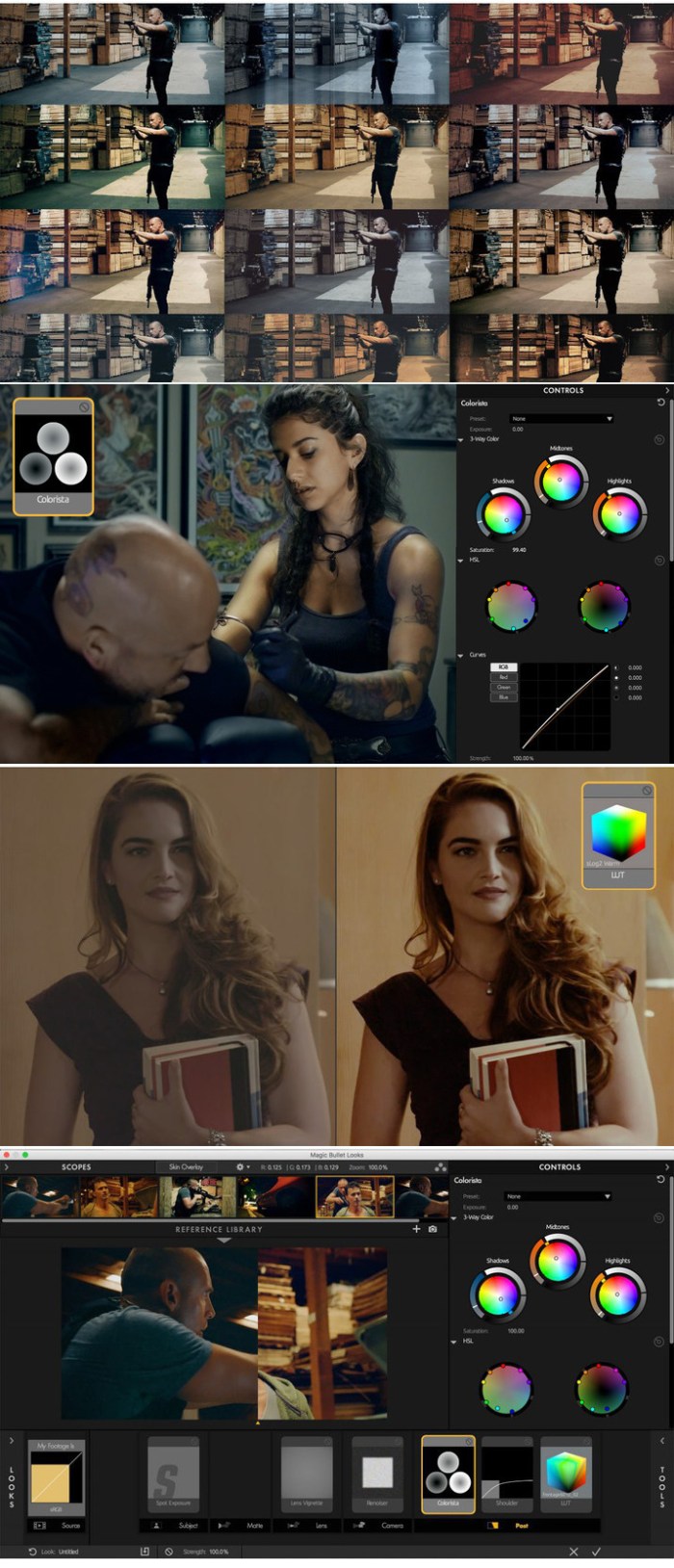
sqlpro for mssql 1.0.316

Name SQLPro for MSSQL 1 0 316 TNT.zip
Size 9.32 MB
Created on 2018-11-23 20:43:20
Hash bef61138e182aace0f890eb0f931ded527be15c2
Files SQLPro for MSSQL 1 0 316 TNT.zip (9.32 MB)

Download

SQLPro for MSSQL 1.0.316

SQLPro for MSSQL is a lightweight Microsoft SQL Server database client, allowing quick and simple access to MSSQL Servers, including those hosted via cloud services such as SQL Azure or Amazon RDS.

Features include:
  • Syntax highlighting (including customizable themes).
  • Intellisense.
  • Tabbed based interface.
  • Support for executing multiple queries at once.
  • Quick access to tables, columns and more.
  • Stored procedure execution.
  • NTLMv2 supported (but not required).
SQLPro for MSSQL can be used to connect with the following databases:
  • Microsoft SQL Azure
  • Microsoft SQL Server 2005
  • Microsoft SQL Server 2008
  • Microsoft SQL Server 2008 R2
  • Microsoft SQL Server 2012
  • Microsoft SQL Server 2014
  • Microsoft SQL Server 2016

Thanks to the FreeTDS project (http://www.freetds.org/) for their great library.

This SQL Client does NOT work with MySQL or Postgres. Please ensure that your server is a Microsoft SQL Server (2005 or above).

Note 1: SQL Server Express is supported, however using it makes me sad. Please confirm that the SQL Server Express installation has been configured properly for remote connections over TCP/IP, and that you can connect remotely from another windows pc before requesting support.

Note 2: SQLPro for MSSQL can connect to Microsoft SQL Server 2000 however it is not supported.

Compatibility: OS Version: OS X 10.11 or later

Web Site: http://www.macsqlclient.com/
Mac App Store: https://itunes.apple.com/app/sqlpro-for-mssql/id828466809?mt=12

What’s New in SQLPro for MSSQL 1.0.316

  • Release notes not available at the time of this post.

%RATINGS_IMAGES% (%RATINGS_USERS% votes, average: %RATINGS_AVERAGE% out of %RATINGS_MAX%)
You need to be a registered member to rate this.

sqlpro for mysql 1.0.315

Name SQLPro for MySQL 1 0 315 TNT.zip
Size 9.45 MB
Created on 2018-11-23 20:43:13
Hash af34c4f2220e2081bbc8696538a8382001818801
Files SQLPro for MySQL 1 0 315 TNT.zip (9.45 MB)

Download

SQLPro for MySQL 1.0.315

SQLPro for MySQL is a powerful MySQL & MariaDB database client which allows quick and simple access to MySQL Servers, including (but not limited to) those hosted in Amazon RDS and Microsoft Azure.

This SQL Client is only for MySQL and MariaDB. It will not work with other database servers such as MSSQL or PostgresSQL.

Features include:

  • Syntax highlighting.
  • Intellisense/Auto complete.
  • Tabbed based interface.
  • Support for executing multiple queries at once.
  • Quick access to tables, columns and more.
  • Use one of our prebuilt themes, or customize your own.
  • Stored procedure execution.

Compatibility: OS X 10.11 or later 64-bit

Web Site: http://www.hankinsoft.com
Mac App Store: https://itunes.apple.com/us/app/sqlpro-for-mysql/id899174769?mt=12

What’s New in SQLPro for MySQL 1.0.315

  • Release notes not available at the time of this post.

%RATINGS_IMAGES% (%RATINGS_USERS% votes, average: %RATINGS_AVERAGE% out of %RATINGS_MAX%)
You need to be a registered member to rate this.
xilisoft ipad pdf transfer 3.3.19 build 20181119

Name Xilisoft.iPad.PDF.Transfer.3.3.19.macOS.zip
Size 41.92 MB
Created on 2018-11-23 22:24:51
Hash 7b80f65ce690a333b024cff6a388c9b629b71ab5
Files Xilisoft.iPad.PDF.Transfer.3.3.19.macOS.zip (41.92 MB)

Download

Xilisoft iPad PDF Transfer 3.3.19 Build 20181119 macOS

Simplifying processes to transfer your loved eBooks to iPad, Xilisoft iPad PDF Transfer for Mac provides the most valuable solution to help you transfer your loved eBooks in most common formats PDF and EPUB to iPad directly on Mac, skipping iTunes. With Xilisoft iPad PDF Transfer for Mac, you can transfer PDF and EPUB files between iPad and your Mac, and backup PDF and EPUB files in iTunes for later usage.

Xilisoft iPad PDF Transfer for Mac also owns the abilities to customize PDF and EPUB files by editing information, like name, author, published year and etc.

  • Fully support all iPad/iPhone/iPod, latest iPhone 6S, iPhone 6S Plus, iPad mini 4, iPad Pro, iOS 9 and iTunes 12
  • Transfer PDF and EPUB files from Mac to iPad/iPod/iPhone without iTunes
  • Backup PDF and EPUB files in iPad/iPod/iPhone to Mac
  • Backup PDF and EPUB files in iPad/iPod/iPhone in iTunes
  • Support most versions of iPad/iPod/iPhone
  • Batch transferring is supported, quick and efficient

Compatibility: OS X 10.7 or later, 64-bit processor

Web Site: http://www.xilisoft.com/ipad-pdf-transfer-mac.html

What’s New in Xilisoft iPad PDF Transfer 3.3.19 Build 20181119

  • Release notes not available at the time of this post.

Screenshots

%RATINGS_IMAGES% (%RATINGS_USERS% votes, average: %RATINGS_AVERAGE% out of %RATINGS_MAX%)
You need to be a registered member to rate this.