Category Archives: Mac os

wordfast pro 5 6.0

Wordfast pro icon
Name Wordfast.Pro.5.6.0.zip
Size 276.2 MB
Created on 2018-11-28 02:52:56
Hash cce949001676d3954c5e96c017ec88952d6f8f03
Files Wordfast.Pro.5.6.0.zip (276.2 MB)

Download

Wordfast Pro 5.6.0 macOS

Wordfast Pro is the latest standalone, multi-platform TM tool designed to address the needs of translators, language service providers, and multi-national companies. It offers a complete translation environment that stores your translated content for reuse on future projects, thereby maximizing efficiency, increasing overall consistency and reducing translation costs.

WYSIWYG Interface

Wordfast Pro 5 offers users the ability to choose either a tag mark-up editor or WYSIWIG (what you see is what you get) editor based on personal preference. Proficiency is made virtually instantaneous by offering users customizable shortcut key bindings including pre-configured shortcut key maps for all major TM systems.

Target-only Live Preview

After translating your document, proofread a target-only version with layout and formatting in Wordfast Pro. Click on a segment in the preview you need to change and you are brought directly to the segment in the bilingual TXLF file for faster editing.

Segment Filtering

Wordfast Pro 5 allows you to filter segments based on terms, regular expressions, match scores, notes, and other attributes.

Multilingual Translation Projects

Wordfast Pro 5 allows you to configure a multilingual translation package when you need to translate into multiple target languages. The project can then be sent as a single package or separate packages based on language pairs. There are no language limits or restrictions in the licensed version (the demo version is limited to bilingual projects).

Export and Import Translation Packages

Wordfast Pro 5 allows you to configure and export translation packages for fast, seamless translation management. Your translators can simply drag and drop to import the package, translate the files, and export for round-trip delivery. You can also directly import SDL Trados packages.

Support for Multiple File Formats

Wordfast Pro 5 enables you to translate virtually any file format, including MS Office, Adobe InDesign, FrameMaker, PDF, HTML, XML, SDL Trados Xliff, MemoQ Xliff, and more!

Chain Files

Wordfast Pro 5 allows you to chain multiple files into a single file to improve the consistency of repeated segments and facilitate file management.

Advanced Time-Saving Features

Work faster and more efficiently with several powerful time-saving features including advanced segment filtering, locking segments, and high-speed batch processing.

Unlimited TM and Glossary Access

Wordfast Pro 5 enables users to access an unlimited number of TMs and Glossaries simultaneously. Users can also prioritize TMs as primary or secondary.

Integration with Machine Translation

Wordfast Pro 5 integrates with multiple MT engines enabling users to leverage machine translations when there are no translation memory matches. Users can also assign penalties to machine translated content.

Real-Time Quality Assurance (Transcheck)

Wordfast Pro 5’s Transcheck feature verifies elements in your translation and warns about potential errors in spelling, grammar, punctuation, numbers, terminology consistency, and placeables as you type.

Supported File Formats:

  • MS Word
  • Excel
  • PowerPoint
  • RTF
  • TXT
  • PDF (Windows only)
  • HTM/HTML
  • XML
  • InDesign
  • Framemaker
  • Visio
  • ASP/JSP/JSON/JAVA
  • TTX
  • XLIFF
  • TXLF
  • SDLPPX (SDL Trados Package)
  • SDLXLIFF
  • MQXLIFF
Supported Languages:

Wordfast Pro 5 supports any language that is supported by Microsoft Word. This includes Eastern European, Cyrillic, Asian, Right-to-Left, and various other languages.

Requirements: Mac OSX 10.10 and higher

Web Site: https://www.wordfast.com

What’s New in Wordfast Pro 5.6.0

  • Release notes not available at the time of this post.

%RATINGS_IMAGES% (%RATINGS_USERS% votes, average: %RATINGS_AVERAGE% out of %RATINGS_MAX%)
You need to be a registered member to rate this.


publisher lab templates 4 4 2

Name Publisher Lab – Templates 4 4 2 MAS TNT.zip
Size 88.70 MB
Created on 2018-11-28 02:54:21
Hash e47338b5104d3ace997de8dd14eba6b7ef19fcf3
Files Publisher Lab – Templates 4 4 2 MAS TNT.zip (88.70 MB)

Download

Publisher Lab – Templates 4.4.2

Jumsoft’s Publisher Lab for Pages is a powerful companion to supercharge your personal and business Pages documents! Make use of thousands of professionally-designed templates with limitless customization opportunities. Creating exceptional work with Pages has never been quicker and easier!

Publisher Lab for Pages offers a wide range of customizable and interchangeable template categories: Ads & Flyers, Books & Albums, Brochures & Catalogs, Business Cards, Cards & Invitations, Newsletters, Posters – just to name a few. As if it weren’t enough, our design team issues regular content updates to make sure that you never run out of the best template designs available on the market! Be prepared for anything with Publisher Lab for Pages.

* Requires Pages 5.6 or later

Web Site: http://www.jumsoft.com/jam
Mac App Store: https://itunes.apple.com/app/publisher-lab-for-pages/id402662285?mt=12

What’s New in Publisher Lab – Templates 4.4.2

  • 5 new Ads & Flyers;
  • 5 new Business Cards sets;
  • 9 new Calendars & Planners;
  • 10 new Cards & Invitations;
  • 18 new Forms & Envelopes (5 new Resumes);

%RATINGS_IMAGES% (%RATINGS_USERS% votes, average: %RATINGS_AVERAGE% out of %RATINGS_MAX%)
You need to be a registered member to rate this.

webvideohunter pro 5 9 1

Name WebVideoHunter Pro 5 9 1 TNT.zip
Size 13.22 MB
Created on 2018-11-28 02:53:20
Hash 0d24e872933c2e910b89475c41ec3bc21a3896ab
Files WebVideoHunter Pro 5 9 1 TNT.zip (13.22 MB)

Download

WebVideoHunter Pro 5.9.1

WebVideoHunter (formerly known as YouTubeHunter) is a versatile OS X application that allows you to download videos from popular sites such as Vimeo, YouTube or Dailymotion. Furthermore, with the help of the WebVideoHunter utility you will be able to search for videos, play them, and download them in any quality format.

The Full and Pro versions of WebVideoHunter also support downloading HD videos, and provide other features.

  • Search and download HD video from YouTube
  • Search and download video from Vimeo and others (including HD video)
  • Get video by URL
  • YouTube to iTunes feature

Compatibility: OS X 10.7 or later

Web Site: http://webvideohunter.com/

What’s New in WebVideoHunter Pro 5.9.1

  • Release notes not available at the time of this post.

Screenshots

%RATINGS_IMAGES% (%RATINGS_USERS% votes, average: %RATINGS_AVERAGE% out of %RATINGS_MAX%)
You need to be a registered member to rate this.
multitouch 1.8 1

Name multitouch1.8.1.zip
Size 14.22 MB
Created on 2018-11-28 02:54:35
Hash 9a0f7f3deffa416571bc5364a7f1d783c5332e37
Files multitouch1.8.1.zip (14.22 MB)

Download

Multitouch 1.8.1 macOS

Multitouch (formerly TouchOven) ties a custom action to a specific magic trackpad or magic mouse gesture. For example, a three finger click can execute a paste. Improve your workflow by executing keyboard shortcuts, controlling your browser’s tabs, performing a middle mouse click, and much more.

Features
  • Free updates with a growing list of gestures and actions.
  • Privacy. No user data is gathered from the app.
  • Does not require Accessibility privileges to run.

Compatibility: macOS 10.12 or later 64-bit

Web Site: https://www.multitouch-app.com

What’s New in Multitouch 1.8.1

  • Release notes not available at the time of this post.

%RATINGS_IMAGES% (%RATINGS_USERS% votes, average: %RATINGS_AVERAGE% out of %RATINGS_MAX%)
You need to be a registered member to rate this.

rocket typist 2.0 1

Name Rocket Typist 2 0 1 TNT.zip
Size 23.95 MB
Created on 2018-11-28 04:34:10
Hash 292f9dd0c78ef76cbb98fb13ff5d574d27f2cad2
Files Rocket Typist 2 0 1 TNT.zip (23.95 MB)

Download

Rocket Typist 2.0.1

Rocket Typist is a modern Mac application, created with simplicity in mind. During a regular day, most of us type the same text over and over again, wasting an enormous amount of time in the process. Why not let your computer do some of that work for you?

Once you have collected your snippets, you will never have to type them again.

Here are just a few examples:

  • Commonly repeated phrases such as “How are you?”
  • Signatures with or without images
  • Current date and time
  • Names, addresses and other contact details
  • Hard to remember technical terms
  • Support replies to your customers
  • Code snippets for developers

Features

  • Type an abbreviation and expend it into a snippet
  • Use macros to make your snippets more dynamic
  • Snippets can either be plain or rich text
  • Select snippets from your Mac’s Touch Bar
  • Export and import snippets

Compatibility: macOS 10.11 or later 64-bit

Web Site: https://witt-software.com/rockettypist/

What’s New in Rocket Typist 2.0.1

Bug Fixes:
  • Clicking the AutoPaste notification could crash the app
  • Deleting a snippet in the cloud did not always work
  • The app did not launch at login for some users

Screenshots

%RATINGS_IMAGES% (%RATINGS_USERS% votes, average: %RATINGS_AVERAGE% out of %RATINGS_MAX%)
You need to be a registered member to rate this.
pulltube 0 11.11

Name PullTube 0 11 11 TNT.zip
Size 18.43 MB
Created on 2018-11-28 04:34:03
Hash 07f35c199c95a4446de1cd1b24b949a61dd89f72
Files PullTube 0 11 11 TNT.zip (18.43 MB)

Download

PullTube 0.11.11

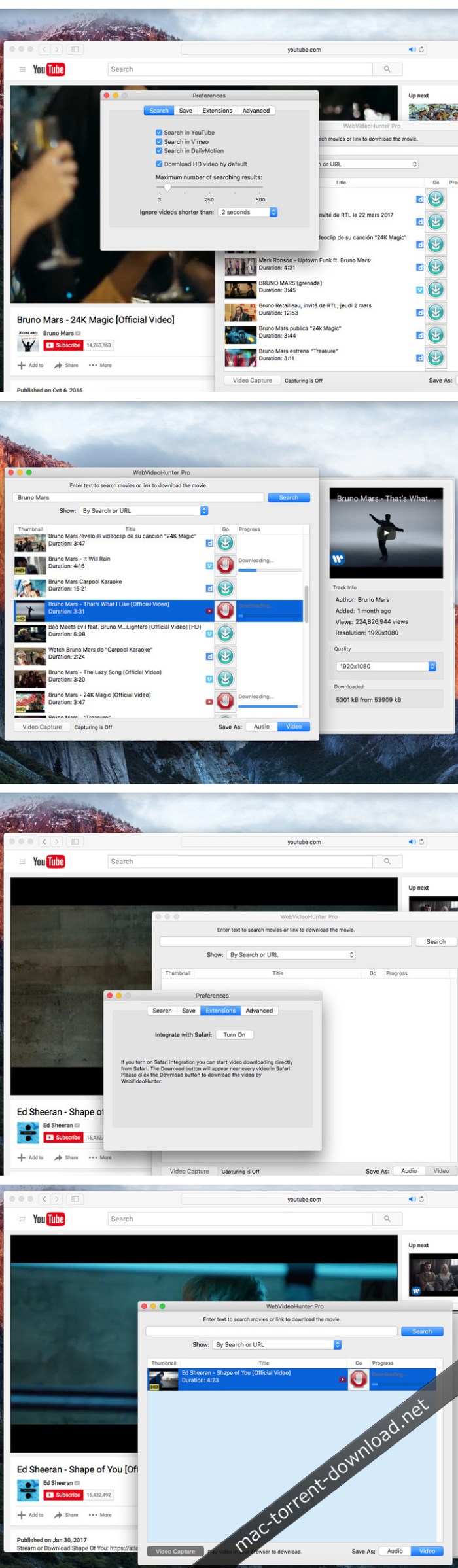
A beautiful online video downloader for your Mac PullTube proposes a streamlined workflow for quickly downloading videos from YouTube or Vimeo, provides control over the output quality, and enables you to extract the audio to MP3 or M4A files. The PullTube app can handle videos of any duration or size, and you get to monitor the download progress within its main window. The utility also integrates with the Notification Center to send completion alerts.

  • Supports Youtube, Vimeo, Facebook, Dailymotion, Instagram, Youku and IQY.
  • More platforms to be added upon user requests.
  • PullTube allows you to download video in any format available
  • Convert and save videos to mand m4a
  • Nice looking, dark user interface

Compatibility: OS X 10.11 or later 64-bit

Web Site: http://mymixapps.com

What’s New in PullTube 0.11.11

  • Release notes not available at the time of this post.

Screenshots

%RATINGS_IMAGES% (%RATINGS_USERS% votes, average: %RATINGS_AVERAGE% out of %RATINGS_MAX%)
You need to be a registered member to rate this.

wondershare mobiletrans 6 9 11.30

Name Wondershare MobileTrans 6 9 11 30 TNT.zip
Size 51.50 MB
Created on 2018-11-28 02:53:07
Hash 9cf047c9a64674f61b4d9f31543b8098a5ef3745
Files Wondershare MobileTrans 6 9 11 30 TNT.zip (51.50 MB)

Download

Wondershare MobileTrans 6.9.11.30

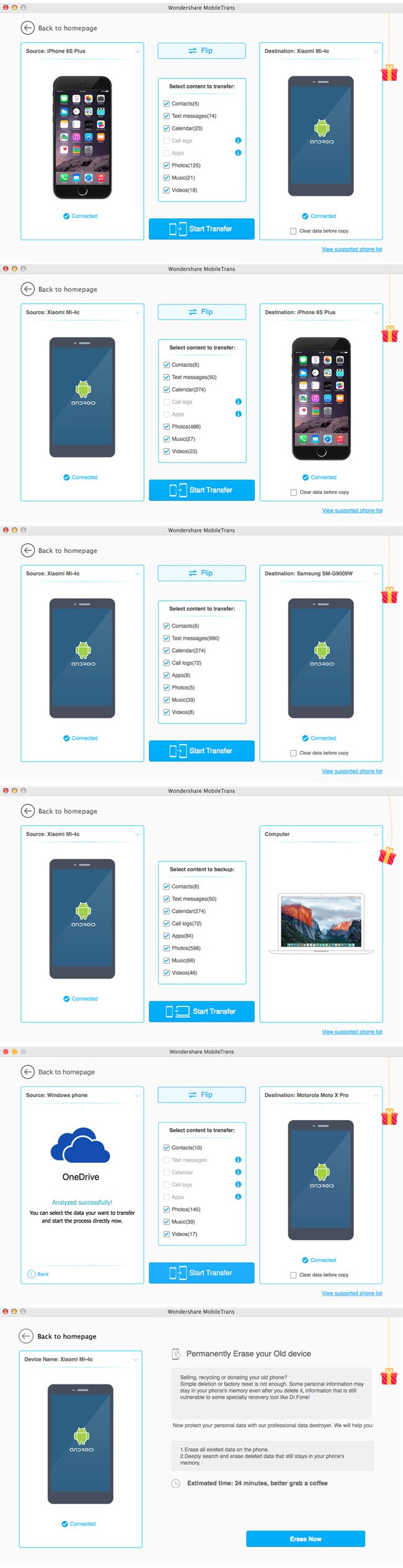
A small and stylish utility that can streamline the process of file transfer between two Android or iOS smartphones, as well as between a smartphone and a Mac

Phones are the most important gadgets of our times because they offer us the best options for efficient communication by making it easy to search everything on the web, take pictures, record videos, transfer money, buy things online, store personal information and many more actions that make our lives easier.

Because of this, when changing phones, a lot of important data needs to be transferred from one device to the other. Here is where Wondershare’s MobileTrans comes into play by providing you with an easy easy to use solution for data transfer between two phones, and quick back-up or restoration possibilities.

Choose from 4 usage modes and follow 3 simple steps in order to sync phones and effortlessly erase, backup or restore all important data

Getting a handle on Wondershare MobileTrans is very simple because of its carefully organized user interface and straightforward functionality.

To start using it, open the app, connect your mobile phone to your Mac, and, once the connection process is completed, select one of four self-explanatory usage modes: “Phone to Phone transfer”, “Restore from backups”, “Back Up Your Phone”, and “Erase your old phone”

Almost all actions when using Wondershare MobileTrans are done in three simple steps: connect your mobile phone to your mac via USB, choose the the files you want to transfer from different categories, and click the ever-present “Start Copy” button from the lower area of each transfer mode’s window.

Comes with support for popular mobile device platforms such as Android and iOS, and for over 3000 smartphones models

Noteworthy is the fact that Wondershare MobileTrans, besides the fact that it can quickly transfer contacts, SMSs, videos, photos and audio file between different phones, for Android devices it can also transfer entire call logs and installed applications.

Another big advantage presents itself as the fact that Wondershare MobileTrans is able to efficiently erase all data from your old phone, so that, if you want to sell it, none of your important data will get into a stranger’s hands.

Worthwhile and useful all-in-one mobile phone management utility that will easily find its place on your Mac

To conclude, Wondershare MobileTrans proves itself to be a very useful application because it enables you to use your Mac for simplifying and speeding up vital mobile phone management tasks efficiently.

Compatibility: OS X 10.7 or later

Web Site: http://www.wondershare.com/

What’s New in Wondershare MobileTrans 6.9.11.30

  • Release notes not available at the time of this post.

Screenshots

%RATINGS_IMAGES% (%RATINGS_USERS% votes, average: %RATINGS_AVERAGE% out of %RATINGS_MAX%)
You need to be a registered member to rate this.

snapmotion 4 2.7

Name SnapMotion 4 2 7 TNT.zip
Size 14.32 MB
Created on 2018-11-28 02:54:13
Hash 35bc1f517416d269842dffeccb9ad48d566c14e9
Files SnapMotion 4 2 7 TNT.zip (14.32 MB)

Download

SnapMotion 4.2.7

SnapMotion is the most innovative and most used tool to extract images from videos. The application allows you to extract frames with precision and without loss of quality.

Two modes are provided:
  • A manual mode allowing you to extract images precisely at the selected time.
  • A batch processing mode allowing you to extract thousands images concurrently.

SnapMotion has been designed to support big video files such as 4K movies and to extract every frame of your media if needed. The application can play every video supported natively by macOS. Moreover it can export images into all industry-standard formats including PNG, JPEG, TIFF and HEIC.

SnapMotion additional features:
  • share images on social network (Facebook, Twitter, …)
  • drag and drop images to export
  • create animated GIF from your snaps
  • rotate videos directly in the player
  • copy extracted images in the pasteboard
  • customize output filenames
  • support notifications and touch bar

This version has been optimized for macOS High Sierra and later. Moreover the application is available in 7 languages (English, French, German, Spanish, Italian, Japanese and Chinese).

Feedbacks can be sent directly from the application. In this way, you can contact us for any kind of suggestions and improvements in few clics.

OS Version: OS X 10.13 or later

Web Site: https://neededapps.com/
Mac App Store: https://itunes.apple.com/app/snapmotion/id1024350410?mt=12

What’s New in SnapMotion 4.2.7

  • Release notes not available at the time of this post.

%RATINGS_IMAGES% (%RATINGS_USERS% votes, average: %RATINGS_AVERAGE% out of %RATINGS_MAX%)
You need to be a registered member to rate this.

etrecheck 5.0.9

Name EtreCheck Pro 5.0.9.zip
Size 15.42 MB
Created on 2018-11-28 02:54:58
Hash 4d91803ff639f3fbe5805934f810744856e902bc
Files EtreCheck Pro 5.0.9.zip (15.42 MB)

Download

EtreCheck 5.0.9 macOS

A minimalist and very easy to use macOS application that gathers essential information about your system and help you share it with others

Gathering essential information about your Macs hardware components, installed software, or running processes can prove to be rather challenging for inexperienced users, or time consuming for practiced operators.

Extremely user friendly workflow

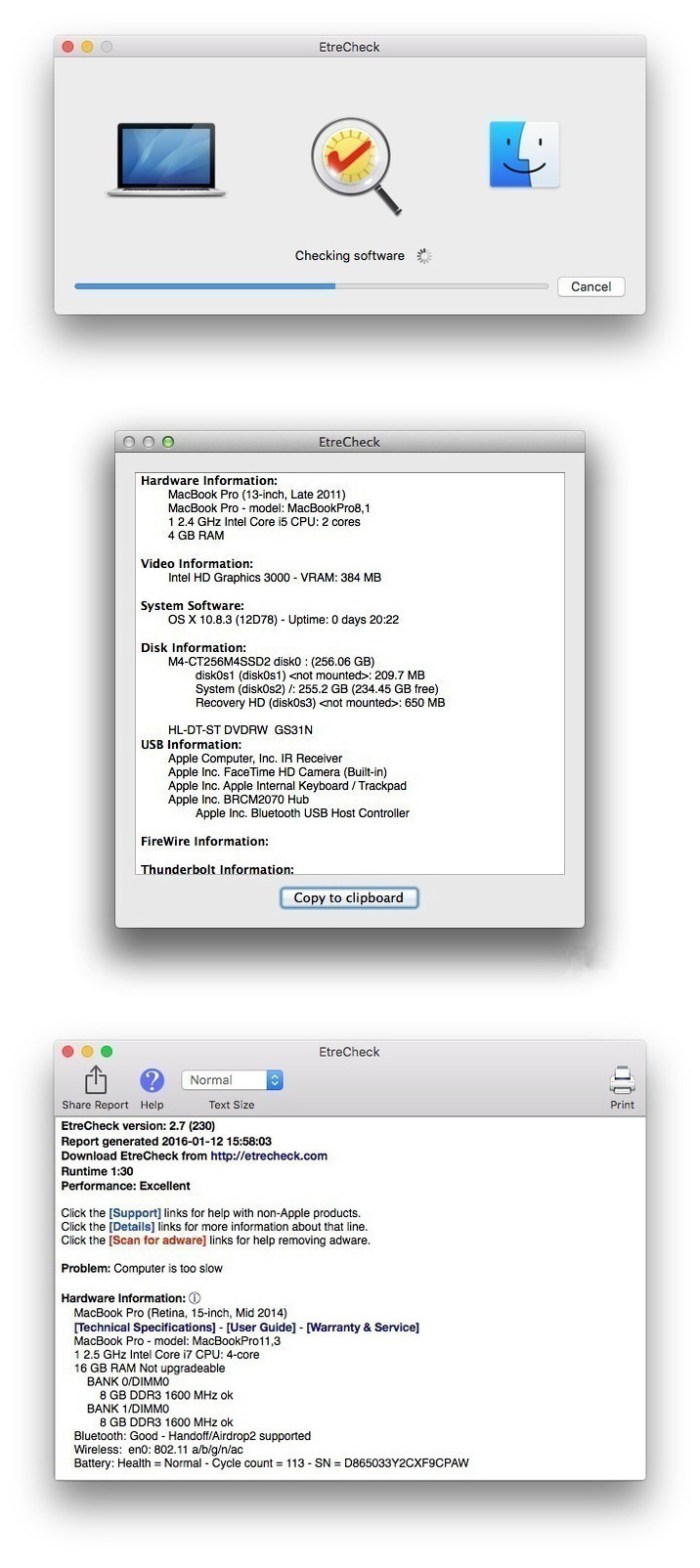
EtreCheck is a small Mac application that, when launched, scans your system and extracts all sorts of useful information. The data can then be copied to your clipboard and quickly shared with others.

Working with EtreCheck is extremely easy because the applications takes care of the analysis process on its own: all you have to do is launch the procedure and analyze the results.

Extensive diagnostics details for your machine

In the EtreCheck main window you will be able to see information about your hardware components, video performance, system software, disk attributes, USB and Thunderbolt configuration, the status of your configuration files, or of the Gatekeeper security function.

Moreover, you can view the installed Kernel extensions, startup items, user login items, internet / audio plug-ins, Safari extensions, iTunes plug-ins, or third party Preferences Panes.

Additionally, you can see a list of your launch daemons and launch agents, together with their current status (loaded, not loaded, running, or failed). The “Support” button associated with each entry performs a Google search query for the agent’s webpage in your default web browser.

Practical tool for analyzing the status of your Mac and identifying possible issues

Last but not least, EtreCheck provides the top processes sorted by CPU or memory usage, and offers details about your virtual memory.

EtreCheck is a great tool to have around if you are experiencing computer issues: the detailed diagnostics offer you the possibility to have a clear view upon how are your resources employed. At the same time, you can also share the info with more experienced users that might help you detect any anomalies.

Compatibility: OS X 10.9 or later 64-bit
Web Site: http://www.etrecheck.com

What’s New in EtreCheck 5.0.9

  • Release notes not available at the time of this post.

Screenshots

%RATINGS_IMAGES% (%RATINGS_USERS% votes, average: %RATINGS_AVERAGE% out of %RATINGS_MAX%)
You need to be a registered member to rate this.
pdfpen 10.2.1

Name PDFpen 10 2 1 TNT.zip
Size 78.48 MB
Created on 2018-11-27 20:50:02
Hash e1c00cb59c5112f7a8cbe8858cc8f5450ebb0450
Files PDFpen 10 2 1 TNT.zip (78.48 MB)

Download

PDFpen 10.2.1

PDFpen allows users to easily edit PDF’s. Add text, images and signatures. Fill out PDF forms. Merge or split PDF documents. Reorder and delete pages. Even correct text and edit graphics!

Features
  • Add text, images and signatures to PDF
  • Correct text in original PDF with editable text blocks
  • Fill out interactive PDF forms and sign them
  • Redact or erase text, including OCR text
  • Search and redact text; search and replace text
  • Export in Microsoft® Word format
  • Scan directly from Image Capture or TWAIN scanners
  • Perform OCR (Optical Character Recognition) on scanned documents
  • Viewable OCR layer for proofing OCR text from scanned pages
  • Adjust resolution, color depth and contrast, skew, and size of an image or scanned document
  • Sign PDF forms via interactive signature fields (not digital signatures)
  • Insert and remove pages; reorder pages in a PDF by draganddrop; combine PDFs
  • Move, resize, copy and delete images in original PDF
  • Save PDFs directly to Evernote
  • Copy and paste rich text; retain fonts and formatting when copying from PDFs, including columns
  • Contextsensitive popupmenus enable quick edits
  • Add (and print) notes and comments
  • Mark up documents with highlighting, underscoring and strikethrough
  • Save frequentlyused images, signatures, objects and text in the Library
  • Apply businessrelated and sign here stamps via the Library
  • Print notes and comments with or without the original text
  • Print a list of all annotations along with the document
  • Full screen mode, as well as zoom to document width and zoom to actual document size
  • Password protect a document with up to 256bit AES encryption
  • Compatible with iCloud Drive
  • Sync Library items with PDFpen for iPad and iPhone via iCloud
  • Automate PDF manipulations with AppleScript
  • Available in English, Japanese, German, French, Italian, and Spanish

Compatibility: macOS 10.12 or later 64-bit

Mac App Store: https://itunes.apple.com/us/app/pdfpen-10/id1359905378?mt=12&ign-mpt=uo%3D4

What’s New in PDFpen 10.2.1

  • Release notes not available at the time of this post.

%RATINGS_IMAGES% (%RATINGS_USERS% votes, average: %RATINGS_AVERAGE% out of %RATINGS_MAX%)
You need to be a registered member to rate this.

big mean folder machine 2.38

Name Big Mean Folder Machine 2 2 38 TNT.zip
Size 9.51 MB
Created on 2018-11-27 17:57:33
Hash 68259b3c603fea5a4e3e3b2d81920c6f072db8b8
Files Big Mean Folder Machine 2 2 38 TNT.zip (9.51 MB)

Download

Big Mean Folder Machine 2.38

Big Mean Folder Machine is an easily operated file and folder management utility. mac-torrents.net It can split files into folder hierarchies or merge them into a single folder. mac-torrents.net With a familiar assistant-styled interface, The Big Mean Folder Machine is an essential tool for anyone who works with large file collections, including digital photographers, content creation, post-production, system administrators, and other creative professionals.

Features
  • Perfect for re-organizing your photo collection – The Big Mean Folder Machine knows all about the shooting dates and times embedded in your digital JPEG EXIF or RAW picture files. With only a few clicks you can reorganize your entire photo collection into a customized folder hierarchy. mac-torrents.net Fancy organizing your photos by year and month? Click. Click. Done. Prefer a deeper hierarchy with year, month and date? Click. Click. Done.
  • We love your music too – The Big Mean Folder Machine is just as useful for your music collections as it can read id3 tags (Artist, Album, Title, Year, etc.) and use them to split your entire collection into a pristine folder hierarchy of your own design.
  • Create fixed sized batch folders – Anybody who has ever tried to burn a large file collection onto physical media such as DVDs or CDs will appreciate the Big Mean Folder Machine’s ability to create batch folders of a particular size, so that you can backup each folder onto a separate data carrier.
  • Merging folders – The Big Mean Folder Machine cannot only split files into folders, but it can also do the reverse, namely merging the files from many folders and folder hierarchies into a single folder. Not only is doing this manually exceedingly tedious, but you also run into real problems when you run into files with the same name in several folders. The Big Mean Folder Machine takes care of these issues with its customizable file name conflict resolution algorithm.
  • Safe, flexible and industrial strength – All this would be of little use unless there is a safe, flexible and capable engine behind these pretty buttons.. The Big Mean Folder Machine packs an industrial-strength 64-bit database-backed processing engine that is capable of shifting hundreds of thousands of files and terabytes of data, while taking care of pesky problems such as file name conflicts.

The Big Mean Folder Machine provides you a full (!) preview of the folder hierarchies that it will create before doing anything and by default your files are copied rather than moved to their new locations, leaving you with a perfect copy should things not work out as expected. mac-torrents.net For the more adventurous file moving is of course also available, saving time and disk space but this is inherently less safe.

Compatibility: OS X 10.8 or later

Web Site: http://www.publicspace.net/BigMeanFolderMachine/
Mac App Store: https://itunes.apple.com/us/app/big-mean-folder-machine-2/id402440280?mt=12

What’s New in Big Mean Folder Machine 2.38

  • Release notes not available at the time of this post.

%RATINGS_IMAGES% (%RATINGS_USERS% votes, average: %RATINGS_AVERAGE% out of %RATINGS_MAX%)
You need to be a registered member to rate this.
iskysoft phone transfer 1.7 4 58

Name iSkysoft Phone Transfer 1 7 4 58 TNT.zip
Size 51.51 MB
Created on 2018-11-27 17:57:50
Hash 41151d68ac861b4f77a7f60c1059b610728c0a85
Files iSkysoft Phone Transfer 1 7 4 58 TNT.zip (51.51 MB)

Download

iSkysoft Phone Transfer 1.7.4.58

iSkysoft Phone Transfer is an easy-to-use solution to transfer music, photos, video, sms text messages, contacts, call history, calendar and apps between iOS (iOS 12 supported), Android (Android 8.0 supported), BlackBerry and Symbian OS in just 1 click. No matter you switch to a new phone or upgrade phones, this mobile transfer tool can safely transfer your phone data 100% the same as your original data.

Compatibility: OS X 10.8 or later
Web Site: https://www.iskysoft.com/phone-transfer-for-mac.html

What’s New in iSkysoft Phone Transfer 1.7.4.58

  • Release notes not available at the time of this post.

Screenshots

%RATINGS_IMAGES% (%RATINGS_USERS% votes, average: %RATINGS_AVERAGE% out of %RATINGS_MAX%)
You need to be a registered member to rate this.

gtasks pro tasks for google 1.3.8

Productivity

Name gTasks Pro 1 3 8 MAS TNT.zip
Size 6.08 MB
Created on 2018-11-27 07:48:48
Hash 9d5887b92eb50b4dbda503c17c9bf14ca71d1354
Files gTasks Pro 1 3 8 MAS TNT.zip (6.08 MB)

Download

gTasks Pro – Tasks for Google 1.3.8

Never liked your tasks app? You’ll love this one ?

MAIN FEATURES

  • Sync your tasks with Google Tasks.
  • Sync tasks between your Mac, iPhone & iPad devices.
  • Keep your tasks organized with subtasks.
  • Set repeating tasks such as “Pay bills” every month.

GOOGLE TASKS

  • Naturally integrating into Google Calendar.
  • No permanent internet connection required. The app will sync updated tasks as soon as an internet connection is available.
  • Your tasks are backed up.
  • Share tasks with your colleagues.

Compatibility: OS X 10.10 or later 64-bit

Web Site: http://www.katans.com
Mac App Store: https://itunes.apple.com/app/gtasks-pro-tasks-for-google/id1028999835?mt=12

What’s New in gTasks Pro – Tasks for Google 1.3.8

  • Support macOS Mojave Dark Mode!
  • Fixed bugs and improved performance.

Productivity

By mactorrent

templates lab for ms office 3.4 2

Name Templates Lab for MS Office 3 4 2 MAS TNT.zip
Size 102.7 MB
Created on 2018-11-27 07:49:18
Hash f931b9dbf6aed8679829a04622d1862a910e8175
Files Templates Lab for MS Office 3 4 2 MAS TNT.zip (102.7 MB)

Download

Templates Lab for MS Office 3.4.2

Templates Lab for MS Office by Jumsoft is a comprehensive collection of templates to supercharge your work on Microsoft Office for Mac for any occasion! It contains thousands of templates, from casual and business templates for Word, themes and layouts for Keynote, complex spreadsheets for Excel – you name it, we have it!

The templates inside Templates Lab for MS Office are the best in the market – designed from ground-up by a team of talented designers at Jumsoft. Explore the vast variety of items inside and experience how quick and easy working with Microsoft Office for Mac can be!

* Requires Microsoft Office for Mac 2011 or later

Compatibility: OS X 10.11 or later 64-bit

Web Site: http://www.jumsoft.com/toolbox-for-ms-office/
Mac App Store: https://itunes.apple.com/app/templates-lab-for-ms-office/id691112702?mt=12

What’s New in Templates Lab for MS Office 3.4.2

  • macOS Mojave support;
  • macOS Mojave Dark Mode integration;
  • New, beautiful banners for all content categories;
  • Content management improvements to speed up new content downloads;
  • Fixed crash when clicking on search field.

%RATINGS_IMAGES% (%RATINGS_USERS% votes, average: %RATINGS_AVERAGE% out of %RATINGS_MAX%)
You need to be a registered member to rate this.
wondershare pdfelement pro 6 7.9

Name PDFelementPro6 6 7 9 MAS In-App TNT.zip
Size 613.5 MB
Created on 2018-11-27 07:49:00
Hash 08a3e1ca80f617686a1303139e6b0e02a87874c4
Files PDFelementPro6 6 7 9 MAS In-App TNT.zip (613.5 MB)

Download

Wondershare PDFelement Pro 6.7.9 MAS+InApp

The Complete PDF Solution. Create high-quality PDFs with a complete set of tools to create, edit, convert and sign your PDFs, and more. Best of all, it’s affordable.

Brand New Design

Work better, faster and easier with a revamped design consistent across Windows and Mac. form data automation

Form Data Automation

Empower your business workflow with advanced form automation and data extraction technology. text editing

Smarter, Faster Text Editing

Get an extremely smooth text editing experience that is like Microsoft Word™.

The Complete PDF Solution

Get everything you need to create, convert, edit and sign PDFs. Best of all, it’s affordable.

Edit PDFs like Word

It’s never been easier to edit any Microsoft™ office files without compromising formatting & style.

Smarter Editing

Take control of your Office documents by adjusting or changing the font type, size and style, without losing font and formatting.

OCR

Use a robust Optical Character Recognition feature to free text from scans and photos and transform it into editable, searchable and selectable PDFs.

Text Autofit

Automatically reflow text when altering paragraphs in single line or paragraph mode.

Spell Check

Fix typos and other small mistakes highlighted for you with automated spelling error detection.

Create Fillable PDF Forms

Turn any non-fillable form made in Word, Excel or other Office applications into a fillable, editable PDF with just one click.

Mac Platform: Intel, 64-bit processor OS X 10.10 or later

Web Site: https://pdf.wondershare.com
Mac App Store: https://itunes.apple.com/app/pdfelement-6-pro-pdf-ocr/id1193983823?mt=12

What’s New in Wondershare PDFelement Pro 6.7.9

  • Release notes not available at the time of this post.

%RATINGS_IMAGES% (%RATINGS_USERS% votes, average: %RATINGS_AVERAGE% out of %RATINGS_MAX%)
You need to be a registered member to rate this.

pcdj dex 3.12.0.2

Name PCDJ_DEX_3.12.0.2_macOS.zip
Size 97.02 MB
Created on 2018-11-27 06:06:53
Hash af4692ecbe921cc02adf1fffae76d39d11702085
Files PCDJ_DEX_3.12.0.2_macOS.zip (97.02 MB)

Download

PCDJ DEX 3.12.0.2 macOS

PCDJ DEX 3 is professional DJ Software for macOS that allows you to seamlessly mix music, music videos and host karaoke shows. DEX 3 gives you full control over your media, allowing for more creative freedom while mixing than ever before. With our beat-grid based automatic beat mixing it’s easy to blend tracks, allowing you to focus on the other aspects of your mix.

Since DEX 3 offers no-latency playback; loops, hot cues, and all playback features are ultra-responsive. Use DEX 2 with a keyboard or mouse, or use one of the 65+ supported DJ controllers for tactile hands-on control. So download DEX 3, import you tunes, and cue up your imagination – DEX 3 is the complete DJ mixing software solution.

Transport And DJ Mixer Controls

DEX 3 makes it easy to mix everything. The DEX user interface emulates the look and feel of CD Decks and includes mixer controls much like you find on physical DJ mixers. Use a traditional 2-Deck interface with or without video mixing controls, or layer in your mix with one of the included 4-Deck skins. BPM beat-sync, looping, key-lock, hot cue points, filters and effects all work flawlessly whether youíre mixing audio or blending music videos.

Advanced Media File Browser With Search, Playlists And Automix

DEX 3 includes an advanced media file browser for all your music, music videos and karaoke files. The included library filters allow you to view only the file type you want to work with, and the fast search feature displays results as you type. Create custom playlists or generate lists from directories on your hard drive. Album art and color coding makes it easy to find the song/s you’re looking for. Playlist playback automation is built right in; engage Automix or Shuffle Play if you need a break.

65+ COMPATIBLE DJ CONTROLLERS

DJ Controllers provide hands-on tactile control over PCDJ DEX, allowing for more creativity while mixing. Over 65 DJ controllers from popular DJ equipment manufacturers are natively supported, which means zero-configuration for you so you can get into the mix right away. When you press a button, twist a knob or scratch a platter on your DJ controller PCDJ will react immediately, without latency.

DJ Music And Music Videos For DJs

PCDJ has teamed up with two great record pool services for pro DJs. Our partners at the iDJPool have the hottest new music in 320kbps MP3, plus 2 years of back catalog available in all popular genres to subscribers. Get unlimited downloads in all genres for only $50, or select the “Country Pool” or “Urban Pool” options only.

System Requirements: Mac
  • Mac: OSX 10.7.5 (Lion) or greater.
  • 2.5GHz Intel Core 2 Duo / Core i3/i5/i7.
  • 4 GIG RAM or Better.
  • Video Card: Dedicated Graphics Card with at least 512MB (or Intel HD 3000 Series or better)
  • Multichannel Core Audio soundcard.
  • 200 MB free on the harddrive.

Web Site: http://www.pcdj.com/

What’s New in PCDJ DEX 3.12.0.2

  • Release notes not available at the time of this post.

Screenshots

%RATINGS_IMAGES% (%RATINGS_USERS% votes, average: %RATINGS_AVERAGE% out of %RATINGS_MAX%)
You need to be a registered member to rate this.
alive software flipcreator 5 1.0.6122

Name FlipCreator_5.1.0.6122_macOS.zip
Size 72.50 MB
Created on 2018-11-27 00:46:40
Hash 0ba0ba93df2ee6ffb322d692112c122a905347ca
Files FlipCreator_5.1.0.6122_macOS.zip (72.50 MB)

Download

Alive Software FlipCreator 5.1.0.6122 macOS

With our easy to use interface, you can make a digital publication in a few mouse clicks! Even a new user, you can use FlipCreator within a couple of minutes without any special learning.

Easy to use.

With our easy to use interface, you can make a digital publication in a few mouse clicks! Even a new user, you can use FlipCreator within a couple of minutes without any special learning.

Html5 version for Apple iPad/iphone/ipod touch, android and more…

Beside Flash version, all publications created by FlipCreator will also include HTML5 version. So you can view the publications not only on your PC and Mac, but also mobile devices, such as iPad, iPhone and Android devices.

Insert Video, youtube video, Audio, Links, Flash animation, button, picture.

Embed multimedia such as audio, video, YouTube video, button, picture and Flash animation to pages of your publication. Insert hyperlinks(internal/external links) in your publications. All hyperlinks in a PDF can be imported into your publication automatically.

Password protection

This feature allows you to protect your publications from unauthorized access. All you need to do is to add a password for your publicaton. Your audiences will be prompted to type password when opening the protected publication.

Track everything

Measure and track all reader behavior, including number of vistors, visits and page views, time spent on publication, time spent on page, links clicked, audios played, videos played, keywords searched and many more… All you need to is to enter your Google Analytics UA.

Import table of contents from pdf, or Create it by yourself.

FlipCreator supports analyzing and importing table of contents from PDF files. After that, you can edit the imported table of contents. If you want to create it by yourself, instead of importing from PDF, or your PDF does not contain a table of contents, FlipCreator can help you to create table of contents for your digital publication.

Add bookmarks for you readers.

Add bookmarks for you readers. You can add bookmarks for some important pages. All your readers can see these bookmarks you defined. On the other hand, FlipCreator also has the abiity to add bookmarks by your readers. The difference is that these bookmarks are only visible to the person who created them.

Generate Files for Search Engines.

FlipCreator can generate html files for search-engines to index. Once you submit one of these files to search engines, your publications will become searchable.

Show advertising banner to your readers.

You can add an advertising banner to the top of the “book”. You can also add a intruction banner to the right hand side of the “book”. The banner can be not only jpeg format, but also gif or flash animated banner.

12 languages available

Currently FlipCreator supports 12 languages for interface of publication, they are: English, Japanese, French, German, Spanish, Portuguese, Simplified Chinese, Tranditional Chinese, Dutch, Russian, Arabic and Korean. More languages will be added, as per your request.

System Requirements:
  • Mac OS X 10.5 or higher
  • Pentium 4 or higher
  • 200 MB Hard Drive
  • 512 MB RAM
  • Adobe Flash Player 10 or later

Web Site: http://www.flipcreator.net/

What’s New in Alive Software FlipCreator 5.1.0.6122

  • Release notes not available at the time of this post.

%RATINGS_IMAGES% (%RATINGS_USERS% votes, average: %RATINGS_AVERAGE% out of %RATINGS_MAX%)
You need to be a registered member to rate this.

luxion keyshot pro 8 1.61

Name Luxion KeyShot Pro 8.1.61 Mac x64.zip
Size 821.7 MB
Created on 2018-11-27 01:36:50
Hash 14793a28739114b935c42568af8100a51616e771
Files Luxion KeyShot Pro 8.1.61 Mac x64.zip (821.7 MB)

Download

Luxion KeyShot Pro 8.1.61 macOS

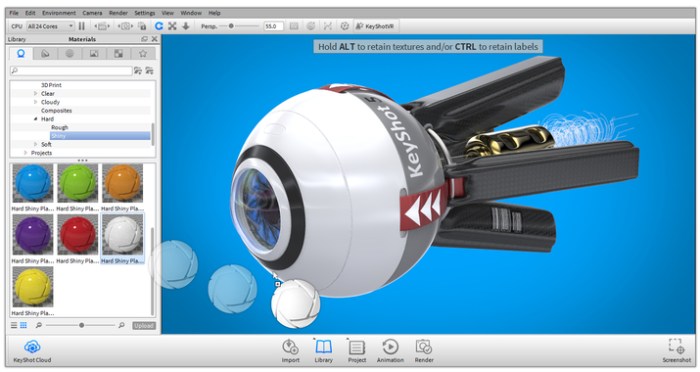
KeyShot is everything you need to create fast, accurate and amazing visuals. Featuring a real-time workflow to see your renderings and animations take shape instantly, KeyShot reduces the time it takes to create that perfect shot. From scientifically accurate material and environment presets to advanced material editing and animation, creating product visuals or sales and marketing imagery has never been easier.

Simple Interface

KeyShot’s simple user interface is minimal, but powerful, with all the options you need for advanced visualization and none of the clutter to impede workflow.

Rendering Speed

The speed you have within KeyShot cannot be compared. Whether you’re on a small laptop or a networked server with multiple CPUs, KeyShot will use all the cores available.

Fast

Everything inside KeyShot happens in real time. KeyShot uses unique rendering technology which makes it possible to see all changes to materials, lighting, and cameras instantly.

Easy

You don’t have to be a rendering expert to create photorealistic images of your 3D model. Simply import your data, assign materials by dragging and dropping them onto the model, adjust the lighting, and move the camera, Done.

What’s New in KeyShot 7:

Improved Workflow Efficiency

Easier ways to set up your scene, work more efficiently, and deliver amazing visuals with speed.

Greater Material Control

More control over materials with enhancements and advanced material editing for unlimited possibilities.

Amazing New Capabilities

New capabilities to elevate what’s possible with geometry, viewing and rendering your scenes.

Powerful Feature Enhancements

More power from import to creating animations and interactive visuals of your designs and ideas.

Accurate

KeyShot is the most accurate rendering solution for your 3D data. KeyShot is built on Luxion’s internally developed, physically correct render engine based on research in the areas of scientifically accurate material representation and global illumination.

Web Site: https://www.keyshot.com

What’s New in Luxion KeyShot Pro 8.1.61

  • Release notes not available at the time of this post.

Screenshots

%RATINGS_IMAGES% (%RATINGS_USERS% votes, average: %RATINGS_AVERAGE% out of %RATINGS_MAX%)
You need to be a registered member to rate this.
quiver 3.2

Name Quiver 3 2 MAS TNT.zip
Size 13.91 MB
Created on 2018-11-27 00:43:08
Hash 09feb38bec6c75b1d3de5bb4abe8d90363603131
Files Quiver 3 2 MAS TNT.zip (13.91 MB)

Download

Quiver 3.2

Quiver is a note-taking app built for programmers. Its unique cell-based design lets you easily mix text and code within one note, edit code with an awesome code editor, and find any note instantly via the full-text search.

Features
  • Mix Text With Code – A note in Quiver is comprised of cells — snippets of text or code. You can freely mix text cells with code cells, even setting different language modes for different code cells, all inside one note.
  • Edit In Place – Whether you are writing code or changing text styles, edits are always made in-place. There is no mode switching in Quiver. You just click where you want to edit and start typing.
  • An Awesome Code Editor – The programmer’s notebook should make code editing effortless. Quiver packs the awesome ACE code editor in code cells, which supports syntax highlighting for most languages, over 20 themes, automatic indent and outdent, and much more.
  • Lightning-Fast Full-Text Search – Notes are only useful if you can find them quickly. Quiver’s full-text search is based on Search Kit, the same technology used to power Spotlight on your mac. That’s how Quiver can search through thousands of notes in a blink of an eye.
  • Tags – If organizing notes into notebooks isn’t enough for you, Quiver also lets you assign tags to each note, so you can manage your notes any way you like.
  • Autosave – Quiver automatically saves all your changes as you work, so you never need to worry about losing changes.
  • Plain JSON – Quiver saves your notes in the plain JSON format, so you have full control over your content. You can export a note in the JSON or HTML format, or print it to PDF.

Compatibility: macOS 10.7 or later 64 bit

Web Site: http://happenapps.com/

What’s New in Quiver 3.2

  • Quiver 3.2 brings multilibrary support, better syncing, better fulltext search, significant performance improvements for handling large Quiver libraries, and many bug fixes.
  • Several core components have been rewritten from scratch in this release: the entire data model layer, caching, syncing, and fulltext search. This puts Quiver back on firm footing for further development.
Multi-Library Support
  • In Quiver 3.2, you can have multiple Quiver libraries open at the same time. This is useful when you want to separate personal notes from work notes. This is also great for team collaboration, since a shared Quiver library offers more ways to organize notes (e.g., nested notebooks) than a shared notebook. It’s easy to move notes or notebooks between libraries just drag and drop.
Better Syncing
  • Many syncing issues have been resolved in this release. Spurious change conflicts are gone. Quiver 3.2 automatically reloads currently opened notes to the latest version upon syncing completion.
Better Full-Text Search
  • Fulltext search now correctly finds terms anywhere within a sentence. It works well with Chinese texts, too. The search field now supports prefix search (query), suffix search (query), infix search (query), and phrase search (“query phrase”).
Performance Improvements
  • Lots of performance optimizations have gone into this release, especially for handling large Quiver libraries with 10,000+ notes. For users with such large libraries, the app now launches significantly faster (under 1s on a 2017 MacBook Pro), and user actions inside the app (e.g., add a note, fulltext search) are instantaneous.

%RATINGS_IMAGES% (%RATINGS_USERS% votes, average: %RATINGS_AVERAGE% out of %RATINGS_MAX%)
You need to be a registered member to rate this.

nch doxillion plus 3.11

Name NCH Doxillion Plus 3.11.zip
Size 7.26 MB
Created on 2018-11-27 00:44:04
Hash 51b42de11e9f99419b16f07891937d36c8b253c7
Files NCH Doxillion Plus 3.11.zip (7.26 MB)

Download

NCH Doxillion Plus 3.11 macOS

Convert DOCX, PDF, MPBI, WPS, HTML, TXT and other document file formats on a Mac

Doxillion is one of the most stable, easy-to-use, and comprehensive multi-format document file converters available. Designed to be very easy and intuitive to use, Doxillion document onverter will be converting files in minutes.

Document Converter Features
  • Convert between many different text document formats
  • Supports Word converting doc and docx, WordPerfect wps, pdf text, Open Office odt and much more
  • Converts images to text as needed with OCR
  • Convert ebooks from epub to docx, pdf, html, and more
  • Batch convert thousands of files at once
  • Use your right click menu to convert documents from outside the program
  • Drag and drop documents to be converted into Doxillion document converter software

Compatibility: Mac OS X 10.4 or later

Web Site: http://www.nchsoftware.com/documentconvert

What’s New in NCH Doxillion Plus 3.11

  • Release notes not available at the time of this post.

%RATINGS_IMAGES% (%RATINGS_USERS% votes, average: %RATINGS_AVERAGE% out of %RATINGS_MAX%)
You need to be a registered member to rate this.
navicat for postgresql 12.1.13

Name Navicat for PostgreSQL 12 1 13 TNT.zip
Size 62.83 MB
Created on 2018-11-27 00:44:38
Hash 8acc8afd782567ddbbba0e06ee1e5be5ba426372
Files Navicat for PostgreSQL 12 1 13 TNT.zip (62.83 MB)

Download

Navicat for PostgreSQL 12.1.13

***** Navicat Premium named “Best Database Administration Solution” by Database Trends and Applications Magazine *****

** Best-in-Class Database Management Tools **

Navicat for PostgreSQL Enterprise Edition is a powerful database administration and development tool for PostgreSQL. It comes with advanced features such as the Data Modeling Tool, Import/Export, Visual Query Builder, Data Transfer, Data and Structure Synchronization, and Batch Job Scheduling. Create, organize, access, and share information securely and easily with an intuitive GUI and take advantage of the flexibility of Navicat Cloud to sync your connection settings, models, queries and virtual groups to the cloud so you can get real-time access to them anytime.

Navicat’s sophisticated features provide professional developers with the tools they need, but are designed to be easy to learn for users new to database servers. Navicat for PostgreSQL is compatible with PostgreSQL Database Servers from version 7.3 or above, and supports most of the latest PostgreSQL features.

– Visual Database Designer

The Data Modeling Tools allows you to create graphical representations of a relational database. The Reverse Engineer lets you create and edit database models from existing databases or create a model and generate a database to support it.

Navicat Data Modeling also allows you to compare and synchronize between Models and Databases and generate SQL/DDL scripts.

– Advanced PostgreSQL Management Tools

The PL/PGSQL Debugger offers features for setting breakpoints, stepping through the program, viewing and modifying variable values, and examining the call stack. Debug PL/PGSQL code directly from the Navicat environment.

– Query-Building Tools

The Visual Builder allows you to build complicated queries without knowledge of SQL syntax. Quickly construct SQL statements in SQL Editor with the code/word completion feature. All it takes is a pick from the drop-down list.

– Data Import and Export

Navicat for PostgreSQL provides a wide variety of file formats for inserting and extracting data to/from your database. Create new tables or update existing ones with formats including XLS, XML, CSV, TXT, and DBF.

– Data Manipulation Tools

Advanced Data Transfer brings a new level of reliability in data transfers between databases. Navicat’s synchronization tools help you centralize data and keep databases up-to-date so that each repository contains the same information.

– Navicat Cloud

Sync your connection settings, models, queries and virtual groups to the cloud so you can get real-time access to them anytime, anywhere. With Navicat Cloud Collaboration, you can create, organize and share files/projects with your coworkers from anywhere, on any device.

You can take control of your project– adding members you choose, defining the role of each member, and get visibility into your team activities from the Activity Log to align your team for greater productivity.

Other useful features:
  • ER Diagram View
  • Database Backup and Restoration
  • Scheduling
  • User Privilege Manager
  • Form View
  • Text/Hex/Image Viewer and Editor
  • SQL Beautifier
  • Connection coloring
  • Virtual grouping
  • Database Wide Search
  • Object Filter

* For more detailed information, please visit:
http://www.navicat.com/products/navicat-for-postgresql#mac

** For technical questions related to the Mac App Store, please visit:
https://help.navicat.com/hc/en-us

Compatibility: macOS 10.10 or later 64-bit

Web Site: http://www.navicat.com
Mac App Store: https://itunes.apple.com/app/navicat-12-for-postgresql/id1257393430?mt=12

What’s New in Navicat for PostgreSQL 12.1.13

  • Release notes not available at the time of this post.

%RATINGS_IMAGES% (%RATINGS_USERS% votes, average: %RATINGS_AVERAGE% out of %RATINGS_MAX%)
You need to be a registered member to rate this.

nch prism plus 4 2.3

Name NCH Prism Plus 4.2.3.zip
Size 11.50 MB
Created on 2018-11-27 00:43:33
Hash bbb957f6c4b9af3a6bfafc3d77b1e90f67991241
Files NCH Prism Plus 4.2.3.zip (11.50 MB)

Download

NCH Prism Plus 4.2.3 macOS

Prism is the most stable and comprehensive multi-format video converter available and is very easy to use.Convert or compress video files within minutes. Universal video converter supporting all popular formats. Batch video conversion to convert multiple videos at once

Convert Many Video Formats
Prism converts avi, mpg, vob, asf, wmv, mp4 and all video formats that have a DirectShow based codec. If you can play the video file using Windows Media Player, you can convert it using Prism. Full Video Formats list at http://www.nchsoftware.com/prism/kb/1217.html

Adjust Video Settings Easily
Prism lets you set compression/encoder rates, resolution and frame rate of output files. Prism supports everything from HD to high compression for smaller files. You can even set a specific size for output files.

Preview Before Converting Videos
Preview original videos and what the video output results will be before converting to ensure effect settings including video rotation and captions are set up correctly.

Direct DVD Converting
Convert from DVDs by simply adding the DVD, selecting the format and clicking convert.

Add Video Effects
Convert individual files or a batch of files with added effects such as a watermark, text overlay, or rotate your videos to the correct orientation. Easily optimize the color by adjusting the brightness and contrast, or by applying a filter.

Requirements: OS X 10.6 or later

Web Site: http://www.nchsoftware.com/prism/index.html

What’s New in NCH Prism Plus 4.2.3

  • Release notes not available at the time of this post.

%RATINGS_IMAGES% (%RATINGS_USERS% votes, average: %RATINGS_AVERAGE% out of %RATINGS_MAX%)
You need to be a registered member to rate this.

navicat for oracle 12.1.13

Name Navicat for Oracle 12 1 13 TNT.zip
Size 126.5 MB
Created on 2018-11-27 00:44:59
Hash 9454bc52e2baf37dadf676708cd45d30e9a602d2
Files Navicat for Oracle 12 1 13 TNT.zip (126.5 MB)

Download

Navicat for Oracle 12.1.13

***** Navicat Premium named “Best Database Administration Solution” by Database Trends and Applications Magazine *****

** Best-in-Class Database Management Tools **

Navicat for Oracle Enterprise Edition is a powerful database administration and development tool for Oracle. It comes with advanced features such as the Data Modeling Tool, Import/Export, Debugger, Visual Query Builder, Data Transfer, Data and Structure Synchronization, and Batch Job Scheduling. Create, organize, access, and share information securely and easily with an intuitive GUI and take advantage of the flexibility of Navicat Cloud to sync your connection settings, models, queries and virtual groups to the cloud so you can get real-time access to them anytime.

Navicat’s sophisticated features provide professional developers with the tools they need, but are designed to be easy to learn for users new to database servers. Navicat for Oracle is compatible with Oracle Database Servers from version 8i or above, and supports most of the latest Oracle Objects.

– Visual Database Designer

The Data Modeling Tools allows you to create graphical representations of a relational database. The Reverse Engineer lets you create and edit database models from existing databases or create a model and generate a database to support it.

Navicat Data Modeling also allows you to compare and synchronize between Models and Databases and generate SQL/DDL scripts.

– Advanced Oracle Management Tools

The PL/SQL Debugger offers features for setting breakpoints, stepping through the program, viewing and modifying variable values, and examining the call stack. Debug PL/SQL code directly from the Navicat environment.

– Query-Building Tools

The Visual Builder allows you to build complicated queries without knowledge of SQL syntax. Quickly construct SQL statements in SQL Editor with the code/word completion feature. All it takes is a pick from the drop-down list.

– Data Import and Export

Navicat for Oracle provides a wide variety of file formats for inserting and extracting data to/from your database. Create new tables or update existing ones with formats including XLS, XML, CSV, TXT, and DBF.

– Data Manipulation Tools

Advanced Data Transfer brings a new level of reliability in data transfers between databases. Navicat’s synchronization tools help you centralize data and keep databases up-to-date so that each repository contains the same information.

-Navicat Cloud

Sync your connection settings, models, queries and virtual groups to the cloud so you can get real-time access to them anytime, anywhere. With Navicat Cloud Collaboration, you can create, organize and share files/projects with your coworkers from anywhere, on any device.

You can take control of your project– adding members you choose, defining the role of each member, and get visibility into your team activities from the Activity Log to align your team for greater productivity.

Other useful features:
  • ER Diagram View
  • Database Backup and Restoration
  • Scheduling
  • User Privilege Manager
  • Form View
  • Text/Hex/Image Viewer and Editor
  • SQL Beautifier
  • Connection coloring
  • Virtual grouping
  • Database Wide Search
  • Object Filter

* For more detailed information, please visit:
http://www.navicat.com/products/navicat-for-oracle#mac

** For technical questions related to the Mac App Store, please visit:
https://help.navicat.com/hc/en-us

Compatibility: macOS 10.10 or later 64-bit

Web Site: http://www.navicat.com
Mac App Store: https://itunes.apple.com/app/navicat-12-for-oracle/id1257393716?mt=12

What’s New in Navicat for Oracle 12.1.13

  • Release notes not available at the time of this post.

%RATINGS_IMAGES% (%RATINGS_USERS% votes, average: %RATINGS_AVERAGE% out of %RATINGS_MAX%)
You need to be a registered member to rate this.

rightfont 5 2 2108

Name RightFont 5 5 2 2108 TNT.zip
Size 7.44 MB
Created on 2018-11-27 00:42:54
Hash 9f6190da4c0759240b731655cb198ce30f62b9eb
Files RightFont 5 5 2 2108 TNT.zip (7.44 MB)

Download

RightFont 5.2 (2108)

RightFont 5 is an innovative, beautiful and professional font manager app for macOS, helping designers to preview, install, sync and manage their font files. RightFont is a lightweight font manager with a clean, beautiful interface. It offers many features which help you manage all your local fonts with ease

  • Fontmanagement access anytime directly from your menubar
  • Mark any font as starred with a click
  • Create and manage font lists
  • Access fonts directly in Adobe Creative Cloud (Photoshop, Illustrator, InDesign, Flash, AfterEffect), Sketch, etc.
  • Instant search results as you type
  • Change font preview and font size in realtime
  • Find the right font faster
  • Easily filter fonts by classifications (sans serif, serif, script, etc.), font width and font weight. Even Google fonts and Adobe TypeKit fonts are listed separately for you.
  • Effortless integrations You can use RightFont with design software. With a simple doubleclick, the font used in your text layer can be changed.

Interface Redesign

RightFont 5 was totally redesigned to keep a balance between simplicity and features. It’s now much easier to enable creative designers and teams accelerate their workflow.

Font Library

As you wish, Font Library is finally introduced in RightFont 5. Now you are able to organize fonts and fontlists in a font library, and free to move it anywhere for font sharing or backup purpose.

macOS Mojave Support

RightFont 5 is fully optimized for macOS Mojave, with the support for dark theme, Touchbar, color SVG fonts and more.

Better Performance

Performance is a big step forward in RightFont 5, now 2x faster than version 4.0 when importing and rendering fonts.

Compatibility: macOS 10.11 or later 64-bit

Web Site: https://rightfontapp.com

What’s New in RightFont 5.2 (2108)

  • Release notes not available at the time of this post.

%RATINGS_IMAGES% (%RATINGS_USERS% votes, average: %RATINGS_AVERAGE% out of %RATINGS_MAX%)
You need to be a registered member to rate this.

iconkit the icon resizer 10 1

Name IconKit 10 1 MAS TNT.zip
Size 3.41 MB
Created on 2018-11-27 00:45:57
Hash 38a51fe8cf33933d1a74f1e4938bedb456cb2bfb
Files IconKit 10 1 MAS TNT.zip (3.41 MB)

Download

IconKit: The Icon Resizer 10.1

IconKit – So you want to include all of your app icons at the correct sizes without having to resize every single one manually? Are you tired of confusing apps? IconKit brings you a great new experience of icon generator for developers and designers, just drag your image into IconKit to start.

Features:

  • Export icons for iOS, watchOS, CarPlay, iMessage and macOS applications.
  • Support for Android mipmap and drawable icon sets.
  • Preview your icons before export.
  • Tired of assigning every single icon in Xcode? Generate AppIcon.appiconset including properly formatted JSON file for Asset Catalogs.
  • Reduction of @2x or @3x icons to 1x scale factor with a tiny tool called ScaleReducer right on your status bar.

Compatibility: macOS 10.13 or later 64 bit

Web Site: http://appersian.net
Mac App Store: https://itunes.apple.com/app/iconkit-the-icon-resizer/id507135296?mt=12

What’s New in IconKit: The Icon Resizer 10.1

  • Release notes not available at the time of this post.

%RATINGS_IMAGES% (%RATINGS_USERS% votes, average: %RATINGS_AVERAGE% out of %RATINGS_MAX%)
You need to be a registered member to rate this.
querious 2.1.12

Name Querious 2.1.12.zip
Size 76.57 MB
Created on 2018-11-27 00:43:22
Hash 0663793133bb0b86173834d386a3cd017d5bcc3f
Files Querious 2.1.12.zip (76.57 MB)

Download

Querious 2.1.12 macOS

Querious allows you to view, search, edit, import, export, build, configure, and monitor your MySQL and MariaDB databases easier than ever before. With Querious, you can even open up raw CSV or tab-delimited files and easily split, join, reorder, add, remove, and process columns and rows, and then convert the whole file to another format in a snap.

Querious 2 is massive upgrade, throughly enhancing appearance, usability, features, performance, and everything in between. So far we’ve added over 170 new features and improvements.

Here’s just a small sample…

  • Full support for views, triggers, functions, procedures, and events
  • Blazing fast import and export (even faster than mysqldump!)
  • Duplication of databases (including data!), even between servers
  • Monitor server status and running processes
  • Access the server Error Log and Slow Query log
  • Rich and powerful editor for CSV/Tab files
  • Table relationship mapping
  • Significant table data editor improvements
  • Upgraded custom query auto-complete and table reference
  • More convenient little goodies than you can shake a stick at
  • And much more!

Mac Platform: Intel, 64-bit processor OS X 10.10 or later

Web Site: http://www.araelium.com/querious/

What’s New in Querious 2.1.12

  • Release notes not available at the time of this post.

%RATINGS_IMAGES% (%RATINGS_USERS% votes, average: %RATINGS_AVERAGE% out of %RATINGS_MAX%)
You need to be a registered member to rate this.

acrok hd video converter for mac 5.0.85

Name Acrok HD Video Converter for Mac 5 0 85 734 TNT.zip
Size 38.17 MB
Created on 2018-11-27 00:47:29
Hash 2f0a2a349d368825cc04aac0c9891c29e94eec08
Files Acrok HD Video Converter for Mac 5 0 85 734 TNT.zip (38.17 MB)

Download

Acrok HD Video Converter for Mac 5.0.85

Acrok HD Video Converter for Mac is excellent software to convert HD Videos to common video formats or HD formats. It supports converting HD MKV, MOV, MTS, M2TS, TS, MXF, MP4, AVI, MPG, WMV, VOB, ASF, 3GP, FLV, F4V, TiVo, etc. to any video/audio formats for playing or editing.

It can convert videos recorded by Canon, Nikon, Sony, Panasonic, Pentax, JVC cameras or camcorders perfectly. This Mac HD Video Converter can convert videos to best supported codec for editing software, like Apple ProRes 422/4444 codec for Final Cut Pro X/7/6, Apple InterMediate Codec (AIC) for iMovie and Final Cut Express, DNxHD codec for Avid Media Composer, and more formats for Adobe Premiere Pro, After Effects, Apple Aperture, etc.

Compatibility: OS X 10.8 or later

Web Site: http://www.acrok.com

What’s New in Acrok HD Video Converter for Mac 5.0.85

  • Release notes not available at the time of this post.

%RATINGS_IMAGES% (%RATINGS_USERS% votes, average: %RATINGS_AVERAGE% out of %RATINGS_MAX%)
You need to be a registered member to rate this.
bbedit 12.5 1

Name BBEdit 12.5.1.zip
Size 20.20 MB
Created on 2018-11-27 01:36:31
Hash cf2bda85d97d2ed5e92f2c15f9e0131e39f0eafe
Files BBEdit 12.5.1.zip (20.20 MB)

Download

BBEdit 12.5.1 macOS

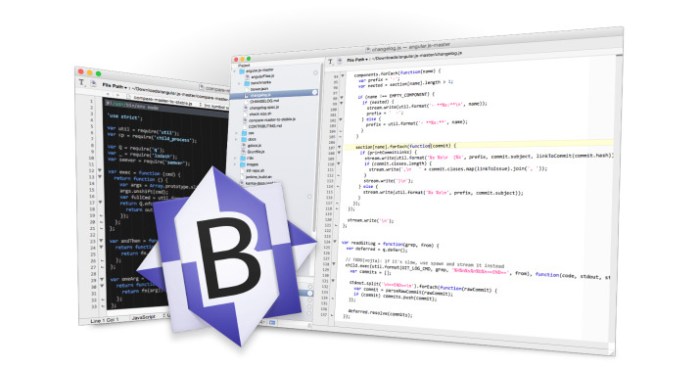
BBEdit is the leading professional HTML and text editor for the Macintosh. Specifically crafted in response to the needs of Web authors and software developers, this award-winning product provides an abundance of high-performance features for editing, searching, and manipulation of text.

With BBEdit, you can…
  • Exercise Total Control Over Text
  • Work YOUR Way
  • Command Files, Folders, Disks, and Servers
  • Enjoy Textual Omnipotence
  • Live Up To Standards
  • Integrate Smoothly Into Existing Workflows
What’s new in BBEdit 12?
  • Improved darktheme support When using a dark color scheme, BBEdit now colors editing and project window chrome to match, for a more integrated overall appearance. (For customers used to the old behavior, this can be set in the “Appearance” preferences.) For customers who have never before used BBEdit or TextWrangler, the “BBEdit Dark” color scheme is now the factory default; this can be changed if desired in the “Text Colors” preferences.
  • Improved platform behavior Thanks to extensive internal overhaul, BBEdit now supports intrinsic OS behaviors such as Split View (and many others).
  • Improved UI for FTP/SFTP Browsers, Text Factory, and Preview windows many nonediting windows have been overhauled for improved appearance and behavior, and to add features.
  • New “Canonize” tool Provides a textbased model for batch search and replace, either within a single file or (by using a Text Factory) in multiple files.
  • New “Columns” Editing Commands Easily cut, copy, delete, or rearrange columns in delimited (CSV, TSV) text files without requiring a spreadsheet or complicated regular expressions.
  • FTP/SFTP browsers now feature an outline view for improved navigation
  • Text Factory windows now provide the ability to turn individual steps on and off
  • Preview in BBEdit windows now provide runtime introspection of previewed pages using the WebKit Inspector
  • Text Extraction This powerful addition to BBEdit’s legendary searching capabilities allows you to locate and collect search results into a single text document. Extraction can be run on the active text document, or across multiple files and folders. Use of Grep replacement patterns during extraction enables transformations to the extracted text.
  • Extensive Internal Modernization Many internal subsystems have been rewritten or updated to support new features, improve performance, add refinement, and make future enhancements possible

Requires macOS 10.6 or later

Web Site: http://www.barebones.com/products/

What’s New in BBEdit 12.5.1

  • Release notes not available at the time of this post.

Screenshots

%RATINGS_IMAGES% (%RATINGS_USERS% votes, average: %RATINGS_AVERAGE% out of %RATINGS_MAX%)
You need to be a registered member to rate this.

handy note 1.0.8

Name Handy Note 1 0 8 TNT.zip
Size 11.18 MB
Created on 2018-11-27 00:46:11
Hash dda9aaa4dd5862d4a848e022467ce0397c1cd0ec
Files Handy Note 1 0 8 TNT.zip (11.18 MB)

Download

Handy Note 1.0.8

Elegant and simple to use macOS application which allows you to create collapsible and searchable sticky notes on your Mac’s desktop

When you need to have multiple snippets of information at hand throughout the day, you can use macOS’ built-in Stickies application. Even though it comes with an appropriate amount of features to make the task of managing desktop notes easy and fast, the Stickies app can still be improved.

Handy Note is a utility which strives to do just that by adding a number of extra features to further expand the things you can do using a sticky manager on your Mac.

Global keyboard and rich text support

Using Handy Note is quite straightforward seeing that once launched on your Mac, you can quickly start adding sticky notes on your desktop either via the File menu, via the app’s status bar menu, by using the ⌘ + N keyboard shortcut while the app is active or with the help of the  ⌘ + ⌥ + ⌃ + N global shortcut.

Every note you create uses a rich text input area and will allow you to access macOS’ default text formatting and management tools via the right-click context menu.

Furthermore, if you add a lot of notes and you need to clear out your desktop, you can quickly hide all of them with a double mouse click on Handy Note’s status bar item or collapse the ones you don’t need at the moment by double clicking their title bars.

Organize your sticky notes using hashtags

Moreover, each note’s opacity is customizable via the top left cogwheel menu, and it’s also possible to choose between three window levels: normal, floating or desktop.

Handy Note also comes with support for hashtags which will help you organize the sticky notes and search for information within them quickly and effortlessly.

As a bonus, the Handy Note sticky note manager also comes with support for themes, with a handful of them pre-defined and the possibility to create custom ones using the inbuilt theme editor available within the Themes options window.

A better Stickies app for your Mac

Overall, if you use Apple’s Stickies app on a daily basis and you’ve ever felt that it lacks a feature or two, give Handy Note a quick spin to see if it better fits your workflow and needs. You might be surprised.

Compatibility: OS X 10.10 or later 64-bit

Web Site: https://fiplab.com

What’s new in Handy Note 1.0.8

  • Release notes not available at the time of this post.

%RATINGS_IMAGES% (%RATINGS_USERS% votes, average: %RATINGS_AVERAGE% out of %RATINGS_MAX%)
You need to be a registered member to rate this.

graphicconverter 10.6 7

Name GraphicConverter 10 10 6 7 TNT.zip
Size 156.9 MB
Created on 2018-11-27 00:46:22
Hash 9f4cab0d4f77dde493b67ef1ff093c0ec7f67a8d
Files GraphicConverter 10 10 6 7 TNT.zip (156.9 MB)

Download

GraphicConverter 10.6.7

GraphicConverter 10 is the universal tool for browsing, enhancing and converting images. Simply drag a folder onto GraphicConverter 10 to view your pictures.

The slide show for viewing and sorting images is a big hit among users. Use standard tools to edit images or display the most important controls in the window.

Professional users love GraphicConverter 10 because of it’s wide range of functions for handling meta data like Exif, IPTC, XMP and GPS. Want to copy the filename into the IPTC description? GraphicConverter 10 will take care of this for you.

You can open over 200 graphic file types and save images in over 80 formats. A simple multiple conversion mode takes care of batch runs. Want to use a batch function to alter the image size or change the color mode to CMYK? Dozens of batch functions are available.

GraphicConverter 10 has everything you would expect from a versatile image processing application for your Mac. Simple usage and far-reaching options await you along with stability and reliability.

In the press, GraphicConverter has been described as a “Swiss Army knife” and as an “all-round wizard for image editing on Macs”. We could not describe it better.

New features of version 10:

Collage

Would you like to put together a collage of the best photos from your vacation? No problem with the new Collage function. Select the image files in the Browser and open the Collage window where you will find basic layout functions. It is so easy to use that even your children could do it. That’s a promise.

Face Recognition

You will notice how useful Face Recognition is, for example, when you want to print your best family photos for an annual album. Simply enter the names of people you want to add. GraphicConverter does everything else for you and will display the pictures in the Browser. You want to add your children’s best friends too? Simply enter their names and the job is almost done.

Picture Package

We all know the situation. You want to print several copies of a portrait or a passport photo on one sheet of paper. This is very easy now thanks to the new Picture Package function. Select the picture, open Picture Package and off you go. It is childishly simple and versatile. Also, it allows you to use valuable photo paper in an ideal way.

And much more…

Compatibility: OS X 10.9 or later 64-bit

Web Site: https://www.lemkesoft.de/en/products/graphicconverter/
Mac App Store: https://itunes.apple.com/app/graphicconverter-10/id1090470302?mt=12

What’s New in GraphicConverter 10.6.7

  • Release notes not available at the time of this post.

%RATINGS_IMAGES% (%RATINGS_USERS% votes, average: %RATINGS_AVERAGE% out of %RATINGS_MAX%)
You need to be a registered member to rate this.

fasttasks 2.51

Name FastTasks 2 2 51 TNT.zip
Size 3.92 MB
Created on 2018-11-27 00:46:57
Hash 315d3ea6b17030fd660eff621c3bc2d5b0b676f4
Files FastTasks 2 2 51 TNT.zip (3.92 MB)

Download

FastTasks 2.51

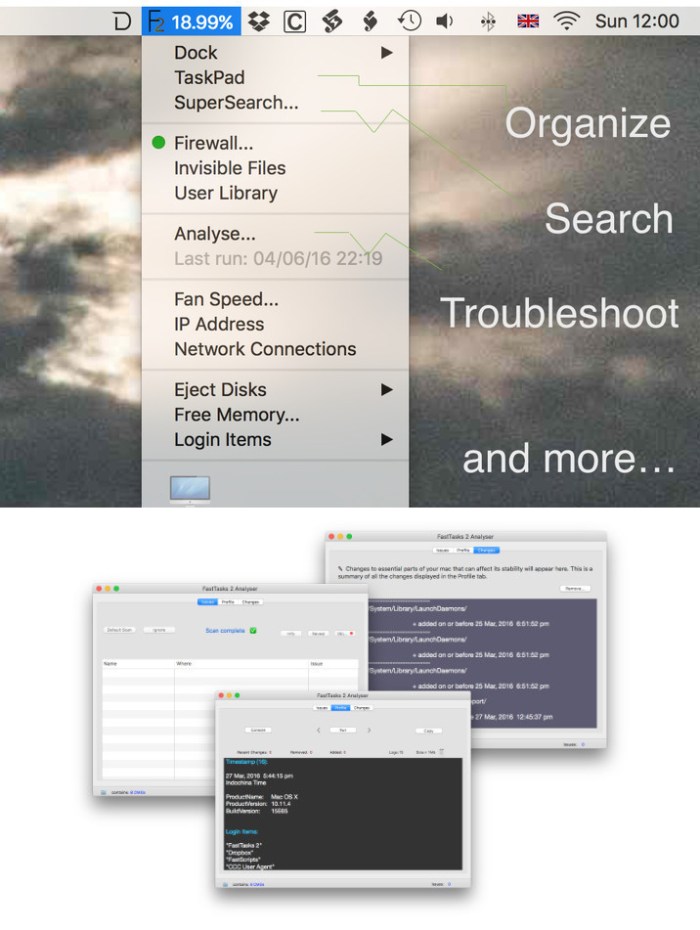
An easy to use utility that offers you the possibility to toggle the TRIM status, the hidden files and the user Library visibility, to flush the DNS cache and more

FastTasks is a minimalist status bar menu application that provides quick access to a collection of simple yet efficient tools that can help you improve your system’s performance, or visualize all sorts of relevant information about your computer.

Unobtrusive software solution featuring basic system management tools

Since the FastTasks application resides in your status bar, it will never interfere with your workflow, unless you choose to activate its menu. Simply open the FastTasks menu, select the action you want performed, and the app takes care of the rest.

Noteworthy is that the FastTasks application must be included in the list of applications that have the permission to control your computer: navigate to the Security&Privacy panel included in your System Preferences window, and make the necessary adjustments.

Effective system management tools grouped together in an user friendly GUI

The FastTasks menu is able to display general details about your computer, such as the operating system version, info about your disk, about your recovery disk, the RAM amount, the Uptime, and the active user accounts. In addition, you can see the fan speed, your IP address, or the login items.

At the same time, the app enables you to activate or deactivate the OS X Firewall, the invisible files, or to open the user Library folder. The same menu allows you to eject all disks, to flush the DNS cache, to free up your memory, or to eject the RAM Disk.

Minimalist yet powerful solution for performing various system maintenance tasks

FastTasks provides quick access to a collection of basic yet highly efficient tools that can help you improve your system’s performance without too much hustle.

Furthermore, you can easily extract information about your operating system, or access functions that cannot be handled via the OS X GUI, even though they can be triggered by Terminal commands.

Compatibility: OS X 10.10.5 or later 64-bit
Web Site: http://sqwarq.com/

What’s New in FastTasks 2.51

  • Release notes not available at the time of this post.

Screenshots

%RATINGS_IMAGES% (%RATINGS_USERS% votes, average: %RATINGS_AVERAGE% out of %RATINGS_MAX%)
You need to be a registered member to rate this.
navicat for mariadb 12.1.13

Name Navicat for MariaDB 12 1 13 TNT.zip
Size 61.69 MB
Created on 2018-11-27 00:45:44
Hash ac6705d56da03d6c8ad1fe899f29047d96311508
Files Navicat for MariaDB 12 1 13 TNT.zip (61.69 MB)

Download

Navicat for MariaDB 12.1.13

A secure, streamlined and versatile tool for MariaDB database management and administration with plenty of sophisticated features

Navicat for MariaDB is a powerful database management application for MariaDB databases that enables you to execute SQL queries and scripts, design database structures, as well as to manage MariaDB users.

Friendly database manager for both beginner and advanced users

With its easy-to-use interface and powerful features, Navicat for MariaDB is designed for both professional developers and novice users who are just starting to learn database servers.

Using features such as the table viewer, object designer, database designer or SQL editor, Navicat for MariaDB enables you to securely and easily create, access, share and manage information from MariaDB databases.

Support for all MariaDB object types

Another benefit of using the Navicat for MariaDB application is that it supports every kind of MariaDB object type. What’s more, it offers plenty of extra functions (e.g. microseconds and storage engines) besides the ones you get from MySQL Servers.

When starting Navicat for MariaDB for the first time, you need, of course, to connect to a server. The application allows you to establish secure connections using SSH or HTTP tunneling. What’s more, you can assign a password or public / private key pair for the authentication method.

Full featured MariaDB database manager with a built-in SQL builder

One other important tool is the built-in table viewer which comprises a grid / form view and foreign key data selection. Furthermore, the SQL builder allows developers to visually create and edit queries without specialized syntax knowledge.

The list of features continues with the database designer. First of all, you are allowed to use an existing database to build a new database model. Secondly, you can use the integrated graphic tools to create models and use them to generate databases.

Navicat for MariaDB is a powerful and comprehensive MariaDB database management utility that, besides the features mentioned above, comes with a lot of other inbuilt tools, for data manipulation (data transfer, data sync or import / export wizard), ER diagram, tree / object filter, as well as virtual grouping / connection coloring.

Compatibility: macOS 10.10 or later 64-bit

Web Site: http://www.navicat.com
Mac App Store: https://itunes.apple.com/app/navicat-12-for-mariadb/id1257393816?mt=12

What’s New in Navicat for MariaDB 12.1.13

  • Release notes not available at the time of this post.

%RATINGS_IMAGES% (%RATINGS_USERS% votes, average: %RATINGS_AVERAGE% out of %RATINGS_MAX%)
You need to be a registered member to rate this.

navicat premium essentials 12.1.13

Name Navicat Premium Essentials 12 1 13 TNT.zip
Size 150.7 MB
Created on 2018-11-27 00:44:16
Hash 8f6fbef2c5ee3de52d9edf5e0888136e85ed5376
Files Navicat Premium Essentials 12 1 13 TNT.zip (150.7 MB)

Download

Navicat Premium Essentials 12.1.13

Navicat Premium Essentials is a compact version of Navicat which provides basic and necessary features you will need to perform simple administration on a database. It supports the latest features including Trigger, Function, View, and it also comes with an Import/Export tool which allow user to import and export data from plain text file formats including TXT, CSV and XML.

Navicat Essentials is for commercial use. Currently, Navicat Essentials is available for MySQL, SQL Server, PostgreSQL, Oracle and SQLite databases. If you need to administer all the above database servers at the same time, there is also Navicat Premium Essentials which allows you to access multiple database servers within one single application.

Navicat Essentials is available for three platforms – Microsoft Windows, OS X and Linux. It can connect you to local/remote server, providing several utilities such as SQL editors, import/export, dump/execute SQL scripts and Server Monitor to facilitate the process of data maintenance.

OS version:OS X 10.10 or later
Processor type(s) & speed: 64-bit processor

Web Site: https://www.navicat.com/en/products/navicat-essentials

What’s New in Navicat Premium Essentials 12.1.13

  • Release notes not available at the time of this post.

%RATINGS_IMAGES% (%RATINGS_USERS% votes, average: %RATINGS_AVERAGE% out of %RATINGS_MAX%)
You need to be a registered member to rate this.
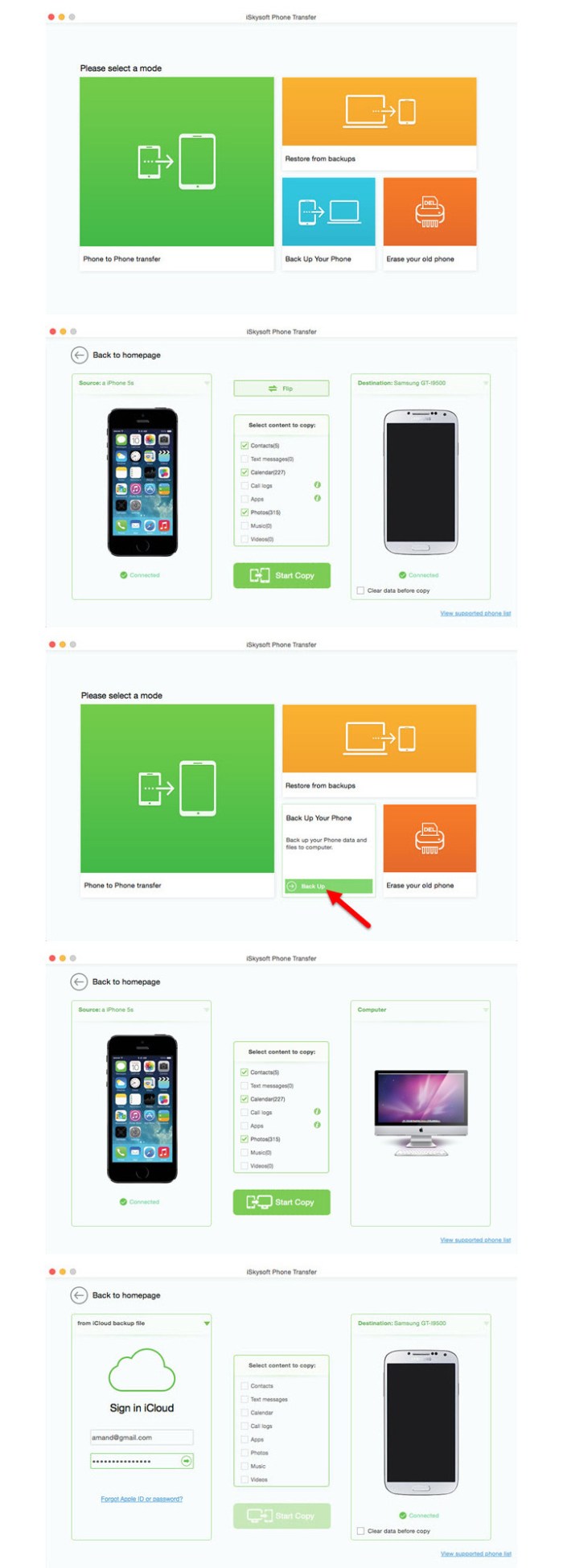
navicat for mysql 12.1.13

Name Navicat for MySQL 12 1 13 TNT.zip
Size 63.61 MB
Created on 2018-11-27 00:45:26
Hash 7ad5e680c1b03d6373dc35acbf93c7d5cf40682f
Files Navicat for MySQL 12 1 13 TNT.zip (63.61 MB)

Download

Navicat for MySQL 12.1.13

***** Navicat Premium named “Best Database Administration Solution” by Database Trends and Applications Magazine *****

** Best-in-class tools for your Database Management **

Navicat for MySQL Enterprise Edition is a powerful database administration and development tool which allows you to simultaneously connect to MySQL and MariaDB databases. It comes with advanced features such as Navicat Cloud, Data Modeling Tool, Import/Export, Visual Query Builder, Data Transfer, Data and Structure Synchronization and Batch Job Scheduling. Create, organize, access, and share information securely and easily with an intuitive GUI and take advantage of the flexibility of Navicat Cloud to sync your connection settings, models, queries and virtual groups to the cloud so you can get real-time access to them anytime.

Navicat’s sophisticated features provide professional developers with the tools they need, but are designed to be easy to learn for users new to database servers. Navicat for MySQL is compatible with MySQL Database Servers from version 3.21 or above and MariaDB 5.1 or higher, and supports most of the latest MySQL/MariaDB features.

– Visual Database Designer

The Data Modeling Tools allows you to create graphical representations of a relational database. The Reverse Engineer lets you create and edit database models from existing databases or create a model and generate a database to support it.

Navicat Data Modeling also allows you to compare and synchronize between Models and Databases and generate SQL/DDL scripts.

– Query-Building Tools

The Visual Builder allows you to build complicated queries without knowledge of SQL syntax. Quickly construct SQL statements in SQL Editor with the code/word completion feature. All it takes is a pick from the drop-down list.

– Data Import and Export

Navicat for MySQL provides a wide variety of file formats for inserting and extracting data to/from your database. Create new tables or update existing ones with formats including XLS, XML, CSV, TXT, and DBF.

– Data Manipulation Tools

Advanced Data Transfer brings a new level of reliability in data transfers between databases. Navicat’s synchronization tools help you centralize data and keep databases up-to-date so that each repository contains the same information.

– Navicat Cloud

Sync your connection settings, models, queries and virtual groups to the cloud so you can get real-time access to them anytime, anywhere. With Navicat Cloud Collaboration, you can create, organize and share files/projects with your coworkers from anywhere, on any device.

You can take control of your project– adding members you choose, defining the role of each member, and get visibility into your team activities from the Activity Log to align your team for greater productivity.

Other useful features:
  • ER Diagram View
  • Database Backup and Restoration
  • Scheduling
  • User Privilege Manager
  • Form View
  • Text/Hex/Image Viewer and Editor
  • SQL Beautifier
  • Connection coloring
  • Virtual grouping
  • Database Wide Search
  • Object Filter

* For more detailed information, please visit:
http://www.navicat.com/products/navicat-for-mysql#mac

** For technical questions related to the Mac App Store, please visit:
https://help.navicat.com/hc/en-us

Compatibility: macOS 10.10 or later 64-bit

Web Site: http://www.navicat.com
Mac App Store: https://itunes.apple.com/app/navicat-12-for-mysql/id1257393420?mt=12

What’s New in Navicat for MySQL 12.1.13

  • Release notes not available at the time of this post.

%RATINGS_IMAGES% (%RATINGS_USERS% votes, average: %RATINGS_AVERAGE% out of %RATINGS_MAX%)
You need to be a registered member to rate this.

dvdfab all in one 11.0.0.5

Name DVDFab_11.0.0.5.zip
Size 342.3 MB
Created on 2018-11-26 04:29:50
Hash b6d4a09947861db2a99c229366bf29b7468bd515
Files DVDFab_11.0.0.5.zip (342.3 MB)

Download

DVDFab All-In-one 11.0.0.5 macOS

DVDFab All-In-One for Mac is a versatile combo of nearly all the powerful DVDFab products – DVD Copy for Mac, DVD Ripper for Mac, Blu-ray Copy for Mac, Blu-ray Ripper for Mac, Blu-ray to DVD Converter for Mac, DVD to Blu-ray Converter for Mac, DVD Creator for Mac, Blu-ray Creator for Mac, Video Converter for Mac, DVD Cinavia Removal for Mac, Blu-ray Cinavia Removal for Mac, and File Transfer for Mac. It provides totally complete solution for all your DVD/Blu-ray/video issues and performs perfectly.

A Versatile and Complete Combination of Nearly All DVDFab Products

DVDFab All-In-One for Mac is definitely a perfect integration of all the current DVDFab products with all full features for Mac, and that’s not the whole thing you will own for purchasing it. You can also save more than 239 US dollars for 1 year subscription at least, and more than 416 US dollars for lifetime to the maximum.

Ultimate Solution for All Your DVD/Blu-ray/Video Issues

DVDFab All-In-One for Mac is the ultimate solution for all your DVD/Blu-ray/video issues. The included DVD options, Blu-ray options, video options, Cinavia removal options and file transfer options enable you to freely copy/burn/clone DVD/Blu-ray to any blank DVD disc or to the hard drive on your Mac for display or backup; rip and convert DVD/Blu-ray/video to almost all popular video/audio formats or devices in support of video playback; remove the hard-to-conquer Cinavia protections embedded in the audio tracks of many Blu-rays; transfer the converted files to Apple devices.

Professional, Full-featured and Fast

DVDFab All-In-One for Mac provides the integrated solution with an intuitive and simple UI designation and optimized profiles for you to finish all the operations smoothly and successfully, and the maximum convenience to let you customize the output file in your way to make it more suitable for your need. Moreover, thanks to its supports of bath conversion, multi-core CPUs, the newest NIVIDA CUDA and acceleration high-techs, the processing speed is faster than all its peers.

Tech-Savvy to Output Spotless Quality

DVDFab products all have been in development for years to keep its high-end experience and to catch up with the latest technology trends. So, there is no doubt you will have a smooth process no matter how many customizations you made for the output file, and an astonishing resulting file with original quality kept maximally.

This bundle includes:

  • DVD Creator
  • DVD Copy
  • DVD Ripper
  • DVD to Bluray Converter
  • DVD Cinavia Removal
  • Bluray Creator
  • Bluray Copy
  • Bluray Ripper
  • Bluray to DVD Converter
  • Bluray Cinavia Removal
  • Video Converter
  • DRM Removal for Apple

Compatibility: OS X 10.7 or later
Processor type(s) & speed: 64-bit processor

Web Site: https://www.dvdfab.cn/all-in-one-for-mac.htm

What’s New in DVDFab All-In-one 11.0.0.5

  • Release notes not available at the time of this post.

%RATINGS_IMAGES% (%RATINGS_USERS% votes, average: %RATINGS_AVERAGE% out of %RATINGS_MAX%)
You need to be a registered member to rate this.
soundmorph timeflux v1.0.3 incl content win osx

Name SoundMorph TimeFlux v1.0.3 Incl Content WiN OSX-iND.zip
Size 4.06 GB
Created on 2018-11-26 04:19:43
Hash 5ffaf794bfd13e7f09ffaa6cc29e1e55fef6079a
Files SoundMorph TimeFlux v1.0.3 Incl Content WiN OSX-iND.zip (4.06 GB)

Download

SoundMorph TimeFlux v1.0.3 Incl Content WiN OSX-iND

Stretch, pitch & morph your sounds to infinity! 3.6Gb of custom sounds made by Ivo Ivanov & SoundMorph! TimeFlux: the ultimate time stretching, morphing, and spectral effects processing software. Just like time is endless, the possibilities in TimeFlux are endless as you Morph between 8 snapshots using our custom Sphere controller area. Control TimeFlux with your mouse, or as an added bonus control it with an optional Leap Motion controller and harness the powers of time in your hand! TimeFlux takes your sound to a whole new level of control and sonic manipulation.

You can load up to 4 sounds and 4 VSTs in TimeFlux, record your performance, and export it as a .WAV file or record straight into your DAW.

TimeFlux also contains 3.6Gb of custom made sound design revolving around the theme of time manipulation. All sounds included were carefully crafted by SoundMorph and Ivo Ivanov of Glitchmachines. Both experimental and practical, the included sound design library complements the TimeFlux software, and is also quite usable on it’s own. Time and space will never be the same!

WHAT’S INSIDE

Features:
  • Load up to 4 sound files
  • Load up to 4 VST plugins within TimeFlux
  • 8 snapshot Sphere Controller
  • Optional Leap Motion controller
  • 2 time stretchers
  • 1 morpher
  • 4 filters
  • Record and Export your performance in WAV files
  • 3.6Gb TimeFlux sound design soundpack included made by SoundMorph and Ivo Ivanov
  • Compatible with Mac and PC (32 bit and 64 bit)
System Requirements:

An Intel® Mac with Mac OS X 10.7 (or later), OR a PC with Windows 7 (or later); Multicore processor; 2 GB RAM; 1024×768 display.

Web Site: https://www.soundmorph.com/product/24/timeflux

%RATINGS_IMAGES% (%RATINGS_USERS% votes, average: %RATINGS_AVERAGE% out of %RATINGS_MAX%)
You need to be a registered member to rate this.

serviio pro 1.10

Name Serviio Pro 1.10 Multilingual.zip
Size 152.6 MB
Created on 2018-11-26 03:12:12
Hash b13314c77a2b526ab3d3ae695b88af2bbbad1513
Files Serviio Pro 1.10 Multilingual.zip (152.6 MB)

Download

Serviio Pro 1.10 macOS

Serviio is a media server. It allows you to stream your media files (music, video or images) to renderer devices (e.g. a TV set, Bluray player, games console or mobile phone) on your connected home network.

Features

  • streams audio, video (SD & HD) and image files in their native format or transcoded in realtime
  • streams content from online sources, like RSS feeds, live audio/video streams, web page content
  • includes a plugin system to support streaming from nontrivial online sources
  • supports most known playlist formats
  • supports subtitles
  • automatically updates the media library when you add/update/remove a media file or a metadata file
  • supports RAW camera images
  • wide array of localized library browsing options
  • supports different editable renderer profiles
  • supports automatic renderer detection and perIP profile assignment
  • extracts metadata of your media files the way you want it, incl. embedded metadata tags, local metadata files, online metadata sources (in preferred language), XBMC, Swisscenter, MyMovies
  • supports video thumbnails, CD covers, DVD posters, etc.
  • categorizes video files into movie and/or series and marks last viewed episodes of a series
  • available for Windows, Linux and Mac (with the possibility to run the server part on one platform and console on another)

Supported renderers

  • Samsung TVs and Bluray players (supports additional features, e.g. subtitles)
  • Sony TVs and Bluray players
  • Panasonic TVs
  • Playstation 3
  • Xbox 360
  • LG TVs and Bluray players
  • Toshiba TVs
  • Sharp TVs
  • Philips TVs
  • WDTV Live (supports subtitles)
  • Oppo BDP83
  • MusicPal
  • DirecTV DVR
  • Pure Flow deices
  • Android phones, iOS phones
  • … and many

Supported media files

  • Audio: MP3( .mp3), MP2 (.mp2), Windows Media Audio (.wma), AAC (.m4a), OGG (.ogg, .oga), FLAC (.flac), Wawpack (.wv), Musepack (.mpc), Monkey’s Audio (.ape)
  • Video: MPEG1 (.mpg, .mpeg), MPEG2 PS (.mpg, .mpeg, vob, mod), MPEG2 TS (.ts, .m2ts), MPEG4 (.mp4, m4v, mov), AVI (.avi, .divx), Windows Media Video (.wmv, .asf), Matroska (.mkv), Flash (.flv, .f4v), DVRMS (.dvr, .dvrms), WTV (.wtv), OGG (.ogv, .ogm), 3GP (.3gp), RealVideo (.rm, .rmvb)
  • Image: JPEG (.jpg, .jpeg), GIF (.gif), PNG (.png), RAW (.arw, .cr2, .crw, .dng, .raf, .raw,. rw2, .mrw, .nef, .nrw, .pef, .srf, .orf)
  • Playlist: PLS (.pls), M3U (.m3u, .m3u8), ASX (.asx, .wax., .wrx), WPL (.wpl)
  • Subtitles: SubRip (.srt, .txt), SSA/ASS (.ssa, .ass), MicroDVD (.sub, .txt), SAMI (.smi), VTT (.vtt), MOV open text

Requirements: OS X 10.8 +

Web Site: http://www.serviio.org/

What’s New in Serviio Pro 1.10

Added:
  • ForceSquarePixels attribute to transcoding definition
  • 4:3, 3:2 and 21:9 Display Aspect Ratio options to the transcoding definition
  • maxWidth parameter to video transcoding definition in order to limit wide videos
  • Support for Opus audio codec
  • Support for .webm files
  • Supported DLNA profiles for MKV files
  • A profile for Xbox One S/X; ticket #1032 playback of online resources in MediaBrowser
Fixed:
  • NullPointerException when adding some images
  • Various iOS problems in MediaBrowser
  • language code matching in OpenSubtitles results
Other:
  • Reload the logging configuration file when Start Server is clicked in the Console widthGreaterThan and heightGreaterThan transcoding matchers to enable limiting 4k files when not supported
  • Support for multiple genres in audio files
  • Updated commonsimaging updated FFmpeg to 3.4.4 updated Java to 1.8.0_181
  • Faster search for subtitles on opensubtitles.org
  • Expose CDS ports via system properties extract embedded metadata from video (and otherwise unsupported) audio files
  • Changed default log file size to 5MB
  • Package 64bit FFmpeg in the Windows installer and use on 64bit systems use native fullscreen in MediaBrowser on iOS devices

Screenshots

%RATINGS_IMAGES% (%RATINGS_USERS% votes, average: %RATINGS_AVERAGE% out of %RATINGS_MAX%)
You need to be a registered member to rate this.

music tags pro 1.0.0

Name Music Tags Pro 1 0 0 MAS In-App TNT.zip
Size 13.58 MB
Created on 2018-11-26 06:32:36
Hash 0eaccf459132488cbf60dc2de19896297a2ecf14
Files Music Tags Pro 1 0 0 MAS In-App TNT.zip (13.58 MB)

Download

Music Tags Pro 1.0.0

Music Tags is a handy tool for batch editing tags in audio files. It helps you easily organize your digital music collection.

Features:

  • Edit ID3 tags of any supported audio files
  • Batch editing
  • Option to add or change song cover
  • Builtin audio player
  • Sorting by title, artist, album, genre, and time
  • Supported audio formats: mp3. m4a

Compatibility: OS X 10.11 or later 64-bit

Mac App Store: https://itunes.apple.com/app/music-tags/id1395905089?mt=12

What’s New in Music Tags Pro 1.0.0

%RATINGS_IMAGES% (%RATINGS_USERS% votes, average: %RATINGS_AVERAGE% out of %RATINGS_MAX%)
You need to be a registered member to rate this.

qbserve 1.8

Name Qbserve 1 8 TNT.zip
Size 6.82 MB
Created on 2018-11-26 03:12:29
Hash 667c066c9178a7c6330b18029bf91f1b7ec4455d
Files Qbserve 1 8 TNT.zip (6.82 MB)

Download

Qbserve 1.8

Improve your productivity by observing how much time you spend on particular websites, using certain apps, and so on, with the help of an automatic time tracker

Qbserve offers you the option to analyze the way in which you are spending your time by using automatically generated graphs. You get to use Qbserve to log your activity, and the utility will sort the entries on its own, without requiring too much user interaction.

For more accurate results, the user can manually curate the list of activities and manually assign the category for each entry. You are bound to use the 3 predefined main categories, but you can also add your own divisions in each case.

Time tracking utility that can monitor your overall activity and sort the data by category

Qbserve is able to recognize more that 5500 different applications, games, and websites, and keeps them organized in 3 main categories: productive, neutral, and disruptive. The graphs generated by the gathered information can be previewed in the Overview panel.

On the other hand, Qbserve automatically determines the percent of productive activity compared to the totally logged time, and you get to see the real-time assessment in the companion status bar menu. The menulet also provides quick access to the Qbserve console.

Log all the apps, websites, or games you are playing and handle the sorting process manually

In the Qbserve Details panel, you can see a comprehensive list of activities and the category that has been assigned by default. In each case, you get to see the total spent time, and how much it represents for your overall performance expressed in percents.

To help you get more precise diagrams, Qbserve offers you the possibility to change both the category and the subcategory for each entry manually. Moreover, Qbserve also provides the option to ignore certain activities.

Pause the tracking or define alerts and reminders in order to stay focused on your work

Qbserve offers you the possibility to quickly visualize how you have been spending your time with the help of colorful diagrams that can display your records for the entire year, or for a particular hour in the day.

However, you get to pause the tracking for a particular period if you don’t want certain activities to be included in your statistics.

At the same time, Qbserve integrates with the Notification Center and can help you set alerts and reminders to make sure you are focused on what you are doing.

Compatibility: OS X 10.10 or later 64-bit

Web Site: https://qotoqot.com/

What’s New in Qbserve 1.8

  • Release notes not available at the time of this post.

Screenshots

%RATINGS_IMAGES% (%RATINGS_USERS% votes, average: %RATINGS_AVERAGE% out of %RATINGS_MAX%)
You need to be a registered member to rate this.

soundmorph wave warper v1.5.0 win osx

Name SoundMorph Wave Warper v1 5 0 WIN OSX-iND.zip
Size 327.9 MB
Created on 2018-11-26 03:11:15
Hash 7f14c8230a5bf76f3058bcba45c05ccd3b1cfbb0
Files SoundMorph Wave Warper v1 5 0 WIN OSX-iND.zip (327.9 MB)

Download

SoundMorph Wave Warper v1.5.0 WiN OSX-iND

Quickly create cutting edge real-time controlled whooshes for your sound design or music! Wave Warper is a revolutionary new way to create your own amazing custom whooshes, passbys, morphed sounds, and sample mayhem. It is a standalone app that combines and loops up to 6 sound file layers to create one new dynamic file using multiple real-time controllable effects and optional VST plugins.

For years sound designers and musicians alike have had to painstakingly layer sounds within DAWs and create time consuming midi controlling scenes to create whoosh, doppler, and passby effects.

Wave Warper takes advanced concepts and simplifies them into one quick, fun, and intuitive software. It is incredibly addictive to use, and produces sounds like you’ve never heard before. Be sure to check out our Making-of tutorial to get an in depth glimpse at just how cool Wave Warper is!

Wave Warper features:

  • Load up to 6 sound files
  • Load up to 10 VST plugins within Wave Warper
  • Realtime user controlled XY pad allows you to ‘perform’ Wave Warper
  • Pitch, volume, panning, and filtering defined envelopes follow along in realtime
  • Randomizes your sound library folders to quickly generate new sounds
  • Sine, triangle and square LFOs
  • Wind and whistle generators
  • 2 compressors
  • 9 filter settings that follow along in realtime
  • Volume fluctuation on each file for creating dynamic sounds per layer
  • Leap Motion control option. Leap Motion sold separately here
  • Reverb
  • Compatible with Mac and PC (32 bit and 64 bit)
System Requirements:

An Intel® Mac with Mac OS X 10.7 (or later), OR a PC with Windows 7 (or later); Multicore processor; 2 GB RAM; 1024×768 display.

Web Site: https://www.soundmorph.com/product/7/wave-warper

%RATINGS_IMAGES% (%RATINGS_USERS% votes, average: %RATINGS_AVERAGE% out of %RATINGS_MAX%)
You need to be a registered member to rate this.
soundmorph galactic assistant v1.1 1 reaktor max4live win osx

Name SoundMorph Galactic Assistant v1 1 1 WIN OSX-iND.zip
Size 221.4 MB
Created on 2018-11-26 03:11:27
Hash 91c0cb10102f3276dfc5723ddaa8b4baaedad815
Files SoundMorph Galactic Assistant v1 1 1 WIN OSX-iND.zip (221.4 MB)

Download

SoundMorph Galactic Assistant v1.1.1 Reaktor Max4Live WiN OSX-iND

Galactic Assistant is the first synthesizer software specifically made for creating hi-tech interface sounds. Developed for sound designers and musicians alike, it’s the perfect companion for creating a new sonic universe. Use it to design your own hi-tech interface sounds or create glitch or highlights for your musical project.
If you need even more interface sounds, Galactic Assistant is still included for free with our Users of Tomorrow soundpack, which contains over 1,800 different high-tech interface sounds, created by our sound design team using some of the most leading audio tools and software.

WHAT’S INSIDE

Features:
  • One tone generator
  • Two beep generators
  • One FM synth module
  • Save and recall presets
  • Randomized parameters
  • Record and export audio files within the synth while performing
  • Shift click on knobs & sliders to midi learn and control them
  • Compatible with Mac and PC (32 bit and 64 bit) Reaktor 5.5 or higher, Max4Live, and Standalone
System Requirements:

An Intel® Mac with Mac OS X 10.7 (or later), OR a PC with Windows 7 (or later); Multicore processor; 2 GB RAM; 1024×768 display.

Screenshots

%RATINGS_IMAGES% (%RATINGS_USERS% votes, average: %RATINGS_AVERAGE% out of %RATINGS_MAX%)
You need to be a registered member to rate this.

rightfont 5 1.2076

Name RightFont 5 5 1 2076 TNT.zip
Size 7.41 MB
Created on 2018-11-26 03:12:20
Hash e97c2dfbbfb1e4d13fca43d60056b9c72e360a19
Files RightFont 5 5 1 2076 TNT.zip (7.41 MB)

Download

RightFont 5.1 (2076)

RightFont 5 is an innovative, beautiful and professional font manager app for macOS, helping designers to preview, install, sync and manage their font files. RightFont is a lightweight font manager with a clean, beautiful interface. It offers many features which help you manage all your local fonts with ease

  • Fontmanagement access anytime directly from your menubar
  • Mark any font as starred with a click
  • Create and manage font lists
  • Access fonts directly in Adobe Creative Cloud (Photoshop, Illustrator, InDesign, Flash, AfterEffect), Sketch, etc.
  • Instant search results as you type
  • Change font preview and font size in realtime
  • Find the right font faster
  • Easily filter fonts by classifications (sans serif, serif, script, etc.), font width and font weight. Even Google fonts and Adobe TypeKit fonts are listed separately for you.
  • Effortless integrations You can use RightFont with design software. With a simple doubleclick, the font used in your text layer can be changed.

Interface Redesign

RightFont 5 was totally redesigned to keep a balance between simplicity and features. It’s now much easier to enable creative designers and teams accelerate their workflow.

Font Library

As you wish, Font Library is finally introduced in RightFont 5. Now you are able to organize fonts and fontlists in a font library, and free to move it anywhere for font sharing or backup purpose.

macOS Mojave Support

RightFont 5 is fully optimized for macOS Mojave, with the support for dark theme, Touchbar, color SVG fonts and more.

Better Performance

Performance is a big step forward in RightFont 5, now 2x faster than version 4.0 when importing and rendering fonts.

Compatibility: macOS 10.11 or later 64-bit

Web Site: https://rightfontapp.com

What’s New in RightFont 5.1 (2076)

  • Release notes not available at the time of this post.

%RATINGS_IMAGES% (%RATINGS_USERS% votes, average: %RATINGS_AVERAGE% out of %RATINGS_MAX%)
You need to be a registered member to rate this.
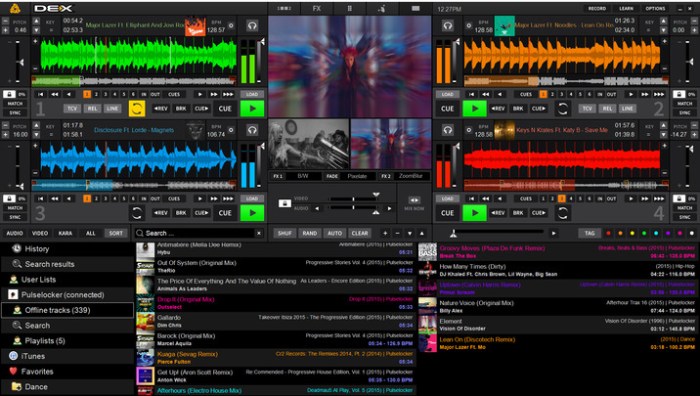
hornet thirtyone v1.2.4

Name HoRNet ThirtyOne v1.2.4 WiN OSX.zip
Size 21.54 MB
Created on 2018-11-26 03:13:26
Hash 908b81024149a43551e3e0967f8ac49fac7cc6f4
Files HoRNet ThirtyOne v1.2.4 WiN OSX.zip (21.54 MB)

Download

HoRNet ThirtyOne v1.2.4 WiN OSX-iND

Thirty one is a single package that includes a spectrum analyzer and a graphic equalizer, both has the standard 31 one third octave bands.

This pair of tools is very common in every rack of any live mixer as the final tool in the master bus, for this reason we decided to recreate the behaviour and specific time response of a very common Italian analog spectrum analyzer.

The equalizer is also inspired by analog units allowing ThirtyOne to recreate that master chain feeling that you are used to.

We put a great care in recreating the smooth lighting of LEDs driven by a smoothly increasing current flow, each column of twelve LEDs comes after a 20dB/octave filter (like the original hardware unit) and it’s response speed is selectable between 0.25, 1 or 4 seconds allowing you to see both fast peaks and average frequency level.

Each of the LED of the bar can have a value of 1, 2 or 3 dBs (like in the original hardware unit) and we also added 6dB/LED option, when changing the resolution the scale on the left of the LED display updates accordingly.

We also added a maximum peak hold LED for each frequency band that can be enabled or disabled that the original unit did not have.

Hovering the mouse on each of the analyzer band will let you know the band frequency and the maximum peak recorded for the specific band.

Right below the spectrum analyzer we have put the 31 sliders that will let you shape the output and fix any particular resonance. Each of the sliders drives a standard 1/3 octave second order filter and can be adjusted from -15 to +15 dB, you can also change the value for each band typing in the box below each slider.

The equalizer has a very special feature called the “Auto EQ”, when enabled (both in static and continuous mode) the output of the spectrum analyzer is used to tune the gain for each of the EQ band allowing the equalizer to automatic set itself so that the maximum harmonic balance is achieved, removing frequency masking and improving mix clarity.

Internally the “Auto EQ” algorithm compares the average peak level of the frequency bands with each of the bands and computes the necessary gain to apply to the EQ to bring the level of that specific band to match with the one of a carefully designed ideal response. This sounds complicated but it’s actually very effective in automatically balancing the frequency content of the mix.

You can choose between two different modes for the “Auto EQ”, the static and the continuous one.

The first takes in consideration only the maximum peak of each band so that you have an EQ curve valid from the beginning to the end of the mix, this mode is very useful in mastering a single track as it gives a “static” EQ correction curve.

The second algorithm is more complex and continuously look at the level of each frequency band and consequently updates the equalizer to reduce masking and keep the track balanced in ever single moment. If you use the plugin with this mode inside a broadcasting chain you can always guarantee a constant frequency optimized output even if the content of your audio changes a lot.

“Auto EQ” is linked to the frequency analyzer output so changing the analysis speed affects the algorithm, using the 0.25s changes the equalization very fast and allows you to track also the fast frequency spikes, while using the 4s setting works more on the average frequency content.

Features:
  • 31, one third octave, spectrum analyzer bands.
  • Spectrum analyzer carefully crafted to give you the feeling of analog hardware units.
  • three different integration times for the analyzer.
  • four scale ranges for the analyzer.
  • peak hold display.
  • display both the L+R (mid) component or the LR(side) component of the audio spectrum.
  • 31, one third octave, equalizer.
  • each band gain adjustable from 15 to +15 dBs.
  • “Auto EQ” automatically balances frequency content.
  • Two different algorithms for AutoEQ
  • Each of the two modules can be disabled to save CPU.
  • AutoEQ amount knob to scale the effect impact
  • Custom compensation EQ profile for the AutoEQ algorithm
  • Bypass button for the eqalizer.
  • 2x internal oversampling to allow analog sounding filters up to 20kHz.
  • Mac OS X (>=10.7) and Windows (Vista an later) support.
  • 32 and 64bit compatibility both on Mac and Windows.
  • Audio Units VST2.4, VST3 and AAX format.
Installation:

It’s uncracked, there was no authorization process. Simple draq&drop to the plugin folder.

Web Site: https://www.hornetplugins.com/plugins/hornet-thirtyone/

%RATINGS_IMAGES% (%RATINGS_USERS% votes, average: %RATINGS_AVERAGE% out of %RATINGS_MAX%)
You need to be a registered member to rate this.

hornet elliptiq v1.0.2

Name HoRNet ElliptiQ v1.0.2 WiN OSX.zip
Size 18.65 MB
Created on 2018-11-26 03:13:36
Hash adf87dbee38c91d44dace4a170b14f8de860e807
Files HoRNet ElliptiQ v1.0.2 WiN OSX.zip (18.65 MB)

Download

HoRNet ElliptiQ v1.0.2 WiN OSX-iND

HoRNet ElliptiQ is an elliptic equalizer, this kind of tool is a very special case of equalizer that has its root in the vinyl cutting era.

A tool like this is needed because if the bass frequencies goes in anti phase or the difference between left and right channel are too wide the needle may jump outside the groove in the final vinyl master, so an elliptic eq works on the difference of the two channels removing part of the low frequencies and preventing this problem.

While the vinyl is having a renaissance you can use a tool like this to reduce the stereo wideness of the bass in your tracks, both to fix problems if there is some kind of anti phase between left and right channel or to give more impact and presence to your bass making it mono.

An elliptic eq works on the side component of the signal, so first the plugin encodes the stereo signal in the Mid/Side matrix extracting the difference from the left and right channel, then the side part of the channel is filtered with a low shelf leaving intact only the mid part, after the reconstruction you get a stereo output reduced in wideness un the low frequencies.

HoRNet ElliptiQ allows you to filter out frequencies up to 2000Hz, so it extends well into the mid frequencies. To cut the stereo info you can use a Butterworth style low shelf with three different slopes: 12, 24 and 48 dB/octave so from a gentle curve to a very steep one.

EllpitiQ also offer a very unique “auto width” feature, when activated the difference between the mid and side informations is continuously evaluated and if the side is too high (hence the stereo width of the bass is too wide) it is automatically reduced to avoid creating issues and give more impact to the track.

The plugin also provides a very handy correlation meter divided into seven key frequencies so that you may spot issues with anti phase in different areas of the spectrum.

Features
  • Elliptic eq from 20 to 2000 Hz.
  • Three different slopes: 12, 24, 48 dB/octave.
  • Stereo wideness for low frequency from 100% to mono.
  • Automatic stereo wideness setting.
  • Correlation meter with 7 frequency bands.
  • Mac OS X (>=10.7) and Windows support.
  • 64bit compatibility both on Mac and Windows.
  • Audio Units VST2.4, VST3, AAX format.
Installation:

It’s uncracked, there was no authorization process. Simple draq&drop to the plugin folder.

Web Site: https://www.hornetplugins.com/plugins/hornet-elliptiq/

%RATINGS_IMAGES% (%RATINGS_USERS% votes, average: %RATINGS_AVERAGE% out of %RATINGS_MAX%)
You need to be a registered member to rate this.

chronosync 4 9.0 chronoagent 1.9.0

Name ChronoSync 4.9.0.zip
Size 95.15 MB
Created on 2018-11-26 03:13:47
Hash 3e5233ead605ab8c411229898d3d670e0dbe7b44
Files ChronoSync 4.9.0.zip (95.15 MB)

Download

ChronoSync 4.9.0 & ChronoAgent 1.9.0 macOS

ChronoSync is an application for Mac, which can be used to synchronize or backup files and folders. Allows you to make a backup of the entire system as well, to create a bootable backup

With ChronoSync can sync or do a backup for most devices and directories, and all that can be connected to the Mac, including a folder on your Mac, other Macs, PCs and external drives.

Possibilities:
  • Fully customizable toolbar
  • All settings are stored in separate files that can be edited at any time
  • Synchronization in two directions
  • drafting rules to filter the files by various attributes
  • Compare files before sync
  • Run a test to verify the results of synchronization before performing operations
  • history of synchronization, which can be printed or saved to a file
  • Automatic synchronization on a schedule
  • Use AppleScripts to automate synchronization.
Requirements:

Intel, 64-bit processor OS X 10.8 or later

Web Site: https://www.econtechnologies.com/chronosync/overview.html

What’s New in ChronoSync 4.9.0 & ChronoAgent 1.9.0

  • Release notes not available at the time of this post.

Screenshots

%RATINGS_IMAGES% (%RATINGS_USERS% votes, average: %RATINGS_AVERAGE% out of %RATINGS_MAX%)
You need to be a registered member to rate this.
navicat for sqlite 12.1.13

Name Navicat for SQLite 12 1 13 TNT.zip
Size 59.47 MB
Created on 2018-11-26 03:12:56
Hash a9c2e2bfac20b84d7016c77bb7b98af0c24e3f9c
Files Navicat for SQLite 12 1 13 TNT.zip (59.47 MB)

Download

Navicat for SQLite 12.1.13

Manage SQLite databases with this powerful application that offers a comprehensive set of features and numerous tools to make your job easier

Navicat for SQLite is a feature-packed SQLite GUI that aims to help database administrators create, organize, access and share information in an efficient and secure manner, while also making it possible to sync data via a native cloud storage service.

Intuitive interface that has a streamlined, modern design

Navicat for SQLite features a minimalistic layout that takes very little getting used to, as all the important buttons and menus are right where you would expect to find them.

You can view the database’s structure in a tree-like view and apply filters to find certain objects more easily, as the relevant items are then displayed in the main window.

Database objects can be created, modified and designed using specialized tools, allowing you to manage tables, views, triggers and indexes without having to write any complex code. If you do want to try your hand at writing statements, however, you should be pleased to learn that the app also offers smart code completion.

Extensive feature array and numerous helpful tools

Moreover, the SQL builder enables you to create and edit queries or views without using the regular commands, as the application writes the SQL statements automatically as soon as you have selected a certain operation.

Furthermore, you can design a database model from an existing structure by using the Reverse Engineer function, quickly transfer data between databases and even schedule various operations to be performed automatically at a specific time.

Powerful and secure database management app that provides access to the Navicat Cloud service

Navicat for SQLite offers support for HTTP Tunneling, enabling you to get past any ISP restrictions when connecting to a database server, as HTTP tunnels use the same protocol and port as a regular web server.

To ensure you have access to your settings, models, queries and virtual groups from any location, you can connect to your Navicat Cloud account and synchronize data across multiple devices.

All in all, Navicat for SQLite has all the makings of a reliable SQLite administration app that can help you manage your databasea with minimal effort via a clean and intuitive graphical user interface.

Compatibility: macOS 10.10 or later 64-bit

Web Site: http://www.navicat.com
Mac App Store: https://itunes.apple.com/app/navicat-12-for-sqlite/id1257393808?mt=12

What’s New in Navicat for SQLite 12.1.13

  • Release notes not available at the time of this post.

%RATINGS_IMAGES% (%RATINGS_USERS% votes, average: %RATINGS_AVERAGE% out of %RATINGS_MAX%)
You need to be a registered member to rate this.

navicat for mongodb 12.1.13

Name Navicat for MongoDB 12 1 13 TNT.zip
Size 71.08 MB
Created on 2018-11-26 03:13:10
Hash 44812cac2bc5ff627e43cc2a9f272ae832212a20
Files Navicat for MongoDB 12 1 13 TNT.zip (71.08 MB)

Download

Navicat for MongoDB 12.1.13

Navicat for MongoDB gives you a highly effective GUI interface for MongoDB database management, administration and development. Connect to local/remote MongoDB servers and compatible with MongoDB Atlas. Navicat for MongoDB offers notable features for managing, monitoring, querying, and visualizing your data. You can easily increase productivity performing for routine MongoDB operations.

Compatibility: macOS 10.10 or later 64-bit

Web Site: https://www.navicat.com/en/products/navicat-for-mongodb

What’s New in Navicat for MongoDB 12.1.13

  • Release notes not available at the time of this post.

Screenshots

%RATINGS_IMAGES% (%RATINGS_USERS% votes, average: %RATINGS_AVERAGE% out of %RATINGS_MAX%)
You need to be a registered member to rate this.
wondershare pdfelement express 1.0 1

Name PDFelement Express 1 0 1 TNT.zip
Size 21.46 MB
Created on 2018-11-26 03:12:38
Hash 1a8b0a2df27970e5e5f546ab1761385ee2185ec7
Files PDFelement Express 1 0 1 TNT.zip (21.46 MB)

Download

Wondershare PDFelement Express 1.0.1

Whether you want to read, edit, or annotate PDFs, PDFelement Express has it all, without the unnecessary filler. Create stunning documents and express your ideas clearly. Try it out today!

Read PDFs Perfectly

PDFelement Express for Mac offers a seamless scrolling experience. No matter what type of document you’re working with, there’s a viewing option available that perfectly fits the task at hand.

Wider Page View

View one page at a time, all pages continuously, or two pages side-by-side to achieve the best readability for your needs.

Faster Page Operation

Scroll through pages effortlessly and enjoy a better user experience with enhanced navigation tools that let you seamlessly work with PDFs.

Easier to Annotate

Add annotations and comments to PDF documents in just a few simple clicks. All the tools you need are available on the go, without having to sort through clutter!

Compatibility: macOS 10.12 or later 64 bit

Web Site: https://pdf.wondershare.com/pdfelement-express-mac.html

What’s New in Wondershare PDFelement Express 1.0.1

  • Release notes not available at the time of this post.

%RATINGS_IMAGES% (%RATINGS_USERS% votes, average: %RATINGS_AVERAGE% out of %RATINGS_MAX%)
You need to be a registered member to rate this.