Category Archives: Mac os

motionvfx mtitle wedding pack for final cut pro x motion 5

Graphics & Design Video

2018-11-28   

Motionvfx mtitle wedding pack icon
Name motionVFX mTitle Wedding Pack for Final Cut Pro X.zip
Size 329.2 MB
Created on 2018-11-28 21:36:22
Hash 2312b4e2a53ce78933b53d31de26caf6921bdac3
Files motionVFX mTitle Wedding Pack for Final Cut Pro X.zip (329.2 MB)

Download

mTitle Wedding Pack for Final Cut Pro X & Motion 5 macOS

A Brilliant Set of 20 Wedding Titles for FCPX and Motion 5

Make Every Wedding Edit Special

mTitle Wedding Pack is the easiest way of creating brilliant openers and titles for every wedding footage you edit. This set of 20 Motion 5 & FCPX Titles will make your work much easier and smoother. You can customize everything and create countless looks!

TECHNICAL SPECIFICATION
  • Supported software: FCPX 10.1.1, Motion 5.1.1 (or later)
  • System: Mac OS X 10.7.5 (or later)
  • Includes: 20 FCPX titles

Web Site: https://www.motionvfx.com/mplugs-53.html

Graphics & Design, Video

By mactorrent

%RATINGS_IMAGES% (%RATINGS_USERS% votes, average: %RATINGS_AVERAGE% out of %RATINGS_MAX%)
You need to be a registered member to rate this.

sketch 52.5

Name Sketch 52 5 TNT.zip
Size 41.11 MB
Created on 2018-11-28 21:35:37
Hash b6aebf13e82fab81eda9295aa4dd761f5c7199c8
Files Sketch 52 5 TNT.zip (41.11 MB)

Download

Sketch 52.5

The digital design toolkit – Sketch is a design toolkit built to help you create your best work — from your earliest ideas, through to final artwork.

Sketch is built for designers like you.

With useful features, an intuitive interface and powerful plugins built by a community of developers, it helps you focus on what you do best.

  • Complete Toolkit
  • Nondestructive Editing
  • Pixel Precision
  • Vector Editing
  • Export Presets
  • Code Export
  • Grid and Guides
  • Prototyping

Design once. Reuse anywhere. Update easily.

With Symbols, Sketch takes the pain out of working with repeated design elements — from icons to avatars.

Iterate at speed

Create a master Symbol, use it anywhere in your document and Sketch will sync your changes.

Override text and images

Edit text and images in your Symbols — wherever they’re used — for dynamic designs.

One size fits all

Resize Symbols wherever you use them to test elements across different screen sizes.

Roll your own UI Kit

Sync, share and update Symbols, across all of your documents, with Libraries.

Compatibility: OS X 10.11.2 or later, 64-bit processor

Web Site: https://www.sketchapp.com/

What’s New in Sketch 52.5

  • Release notes not available at the time of this post.

Screenshots

%RATINGS_IMAGES% (%RATINGS_USERS% votes, average: %RATINGS_AVERAGE% out of %RATINGS_MAX%)
You need to be a registered member to rate this.

1password 7 2 2

Name 1Password 7 v7 2 2 TNT.zip
Size 51.36 MB
Created on 2018-11-28 21:33:30
Hash 6ad7865075f5eafd4d470ed66c774f10d7c3d5fb
Files 1Password 7 v7 2 2 TNT.zip (51.36 MB)

Download

1Password 7.2.2

1Password is a popular tool for storing usernames, passwords, credit cards, addresses, notes, bank accounts, driver’s licenses, passports, and more behind one master password, with end-to-end encryption. A built-in password generator lets users create strong, unique passwords and memorizable pass-phrases.

The latest version of the popular password manager is a major update with dozens of new features and improvements, including a new dark-themed, collapsible sidebar that makes it easier to use and manage password vaults.

The app’s redesign extends to the lock screen, login icons, tags, pop-out windows for items, and more, while there is a new custom font Courier Prime Bits, by Alan Dague-Greene, that makes it easier to view passwords.

A quick list of other changes from AgileBits:
  • Every pixel has been put under the microscope and polished for maximum upgradedness.
  • The new “popout” feature allows you to view an item in a window of its own and keep it handy.
  • Secure notes are now rendered using Markdown.
  • Quick Open allows you to quickly jump to your items or vaults (find it under the File menu).
  • A custom password font, all our own, courtesy of Alan DagueGreene.
  • A new password strength meter.
  • Touch ID now leverages your computer’s Secure Enclave, making it more secure than ever before.
  • Login items now have a gorgeous, custom rendered icon by default.
  • Remove duplicate items on a pervault basis by clicking Help > Tools > Clean Up Duplicate Items.
  • Integration with Spotlight allows you to find your items using Apple’s builtin search engine.
  • Nested tags allow you to up your organization: add tags with / in them and 1Password will break them down into groups.
  • Opt in to automatic updates and never be left behind again.

Compatibility: macOS 10.12 or later 64-bit

Web Site: https://1password.com
Mac App Store: https://itunes.apple.com/app/1password-7/id1333542190?mt=12

What’s New in 1Password 7.2.2

Good day, folks! The development team has been hard at work on a number of improvements to everyone’s favorite password manager. We recently began a new practice of setting aside 20% of our normal development time to focus solely on bugs and quality-of-life improvements. Every item you see in today’s update was reported by you, our wonderful customers. Thank you all for your feedback, we truly appreciate it.

## New
  • 1Password now requires you type your Master Password any time you add or remove fingerprints. appleissues#690
## Improved
  • 1Password will now prompt you to enable the Safari App Extension if it is not enabled when Safari becomes active.
  • The item detail section provides better accessibility for VoiceOver users.
  • Detection of reused passwords in Watchtower has been improved. appleissues#2031
  • Added an option to disable Markdown in Secure Notes. You can find this setting in Preferences > General. appleissues#460
  • Favorites can now be sorted by the usual methods (Date Created, Date Modified, etc). appleissues#1499
  • Improved unlock speed for users who have a large number of vaults.
  • Search Options can now search based on the presence of a 2FA code. appleissues#1816
  • Hitting the Return key in an empty Master Password field will now prompt for Touch ID if it is available. appleissues#1864
  • CommandShiftC will now always copy an item’s password. This restores behavior that existed prior to the 1Password 7 update. appleissues#1429
  • OmniFocus 3 has been added to the list of applications for which 1Password mini will show suggested items. (Shout out to our friends in Seattle, congrats on the release!)
## Fixed
  • Corrected the VoiceOver text available in empty categories, making access faster and more fluid than before.
  • Fixed an issue that could cause 1Password to slow down over time. appleissues#2365
  • Fixed a layout issue that resulted in the Browser preferences being laid out incorrectly. appleissues#2016
  • Fixed an issue where search terms would be ignored when searching using the onepassword://extension/search/ URL. appleissues#2417
  • Fixed an issue that caused 1Password to come to the foreground when copying items from an anchored window. appleissues#2348
  • Fixed an issue that prevented the Copy button from working in Preferences > Accounts. appleissues#2336
  • Fixed an issue that would result in the Touch ID settings being hidden if you were in a state that required you to supply your Master Password to reauthorize Touch ID.
  • Fixed issue where if the app was hidden, opening 1Password mini would also open the main window. appleissues#1157
  • Fixed a rare issue that would cause vault edits to fail. appleissues#2272
  • Fixed an issue where items with removed custom templates would not be displayed. appleissues#1377
  • You can (finally) search through your notes using the CommandF keyboard shortcut again.
  • Fixed an issue where Safari 11 users would receive a deluge of alerts telling them to upgrade to Safari 12.
  • The lock keyboard shortcut now updates when the preference changes. appleissues#2249
  • Fixed an issue where a twofactor authentication prompt might not be shown when 1Password is locked. appleissues#2271
## Security
  • Resolved an issue that allowed minimized item detail windows to appear unlocked when the application was locked. appleissues#2475
  • Downloaded document files are no longer decrypted until viewed in the 1Password user interface. appleissues#2419
  • 1Password no longer shows the vault selector in the Touch Bar while locked. appleissues#2285

%RATINGS_IMAGES% (%RATINGS_USERS% votes, average: %RATINGS_AVERAGE% out of %RATINGS_MAX%)
You need to be a registered member to rate this.

cinepunch lutmaster color suite win mac

Graphics & Design Video

2018-11-28   

Name Cinepunch LUTMASTER Color Suite Win Mac.zip
Size 255.2 MB
Created on 2018-11-27 04:33:49
Hash 62efbb8724e50c3e99bd38112710d52e5eaf4525
Files Cinepunch LUTMASTER Color Suite Win Mac.zip (255.2 MB)

Download

Cinepunch LUTTER Color Suite (Win/Mac)

The LUTMASTER Color Suite gives you 500 Professionally Graded Color LUTS, as well as a large variety of camera profiles for you to speed through your coloring workflow. From Cinematic, Commercial or Special FX Looks, LUTMASTER was designed to fulfill all your coloring needs.

Web Site: http://www.cinepunchsuite.com/lutmaster/

Graphics & Design, Video

By

%RATINGS_IMAGES% (%RATINGS_USERS% votes, average: %RATINGS_AVERAGE% out of %RATINGS_MAX%)
You need to be a registered member to rate this.

layouts lab templates 3.3.1

Name Layouts Lab – Templates 3 3 1 MAS TNT.zip
Size 12.58 MB
Created on 2018-11-29 07:02:52
Hash 2f41a9a9f448e165e8cbd1754c884065762c657f
Files Layouts Lab – Templates 3 3 1 MAS TNT.zip (12.58 MB)

Download

Layouts Lab – Templates 3.3.1

Layouts for Keynote is a collection of 100+ themes created for your unique slideshows by the Jumsoft design team. Outline your ideas, proposals, contracts, and solutions. Then, enhance them with stylish backgrounds, charts, diagrams, tables, and other data visualization elements to attain all you have been working for.

Each theme contains at least 20 master slides, covering everything from basic bullet layouts to complex diagrams and illustrations. All photo slides feature media placeholders to neatly crop a placed image, and most visualization elements can be easily edited.

Most objects in Layouts for Keynote can be easily recolored, reshaped, moved, or removed. You can change the background to a color, gradient, or photo with a simple modification in the Appearance Inspector. Type or paste your own text, add and remove text boxes, and change the fonts if you wish. Edit the charts and diagrams to fit your data. Drag your photos or pictures onto slides to replace the stock images. Use every available tool to make your audience hang on your every word.

*Requires Keynote 6.0 or later

Compatibility: OS X 10.11 or later 64-bit

Web Site: http://www.jumsoft.com/toolbox-for-keynote/
Mac App Store: https://itunes.apple.com/app/layouts-lab-templates/id671768282?mt=12

What’s New in Layouts Lab – Templates 3.3.1

  • macOS Mojave support;
  • macOS Mojave Dark Mode integration;
  • New, beautiful banners for all content categories;
  • Content management improvements to speed up new content downloads.

%RATINGS_IMAGES% (%RATINGS_USERS% votes, average: %RATINGS_AVERAGE% out of %RATINGS_MAX%)
You need to be a registered member to rate this.

propresenter 6 3.8

Name ProPresenter 6.3.8.zip
Size 76.62 MB
Created on 2018-11-29 07:02:37
Hash 8a5fae87ffdb6072feee8d7a3bdf4789c1abd152
Files ProPresenter 6.3.8.zip (76.62 MB)

Download

ProPresenter 6.3.8 macOS

ProPresenter is a cross-platform lyric and media presentation package built specifically to make high-quality live productions easy – including worship gatherings, sporting events, conferences, or studio broadcasts.

Our program allows an operator to click on a slide in our “Control Panel”, at which point the projector screen immediately transitions to the new slide.

What’s more, the program supports QuickTime, and can synch slides with an audio track for canned music presentations. ProPresenter also allows you to change your backgrounds dynamically and, of course, you can integrate ProPresenter with your video production system to key the words over live or recorded video.

In version 6, ProPresenter gains even more tools for diverse productions and focuses on unparalleled video presentation quality, tighter social media integration, and enhanced editing tools.

Extraordinary Output Quality

Whatever the story you are wanting to tell, ProPresenter 6 has the tools to help you tell it in the most engaging way possible. With a completely revamped video engine that is equally suitable for powering presentations in a room of 100 people or 100,000, the quality and professionalism of the output is unprecedented.

High Quality Video Output

The ability to create high-quality video is becoming increasingly easy, making the use of videos in productions more prevalent than ever.

The ProPresenter video engine, re-engineered from the ground up in ProPresenter 6, makes simple video playback (which so often isn’t so simple) the perfect tool to present your final edit. You can import and play videos instantly in ProPresenter, with the ability to set in and out points dynamically, effect color, brightness, and volume, and crop/zoom videos dynamically from right within the software. Video effects empower you to leverage our video library to create limitless new looks for your pre-produced content. All of the tools ProPresenter has to effect pre-produced videos can also be used on live video sources.

Easy to Use

Regardless of how powerful a tool is, it’s value is determined in how easy it is to access that power. ProPresenter was designed from the beginning to allow beginners to feel confident in running the software with only a few minutes of training, and we make all of our training available free online via video tutorials you can access before you even purchase the software. Here are just some of the ways that we make it easy for you to create the presentations that tell your story.

Templates

It’s important that presentations have a consistent and uniform look. To this end, ProPresenter makes use of templates with which you can quickly create and transform your content to ensure everything looks right.

Creation and Editing

Pro6 Operator Powerful importing tools including a text reflow editor that allows you to edit slides as easily as editing text in a word processor. Build slides with a variety of elements, including: shapes, text, graphics, videos, live video inputs, and even HTML5 web pages. Propresenter 6 adds dynamic alignment guides and the ability to set the opacity of each object on a slide, as well as individual slide object builds – all in an intuitive, easts-to-use interface.

Requirements: Mac OS X 10.9 or later
Web Site: http://www.renewedvision.com/pvp.php

What’s New in ProPresenter 6.3.8

  • Release notes not available at the time of this post.

Screenshots

%RATINGS_IMAGES% (%RATINGS_USERS% votes, average: %RATINGS_AVERAGE% out of %RATINGS_MAX%)
You need to be a registered member to rate this.

things 3.7 4

Name Things3 3 7 4 MAS TNT.zip
Size 17.04 MB
Created on 2018-11-29 17:54:24
Hash 6d35968e7defcd453909ace913c00385fdc2a1a3
Files Things3 3 7 4 MAS TNT.zip (17.04 MB)

Download

Things 3.7.4

Meet the all-new Things! A complete rethinking of the original, award-winning task manager – with a perfect balance between simplicity and power, incredible new features, delightful interactions, and a timeless new design.

Our screencast is a great introduction.
  • The big picture. A Leopardstyle source list lets you easily focus without ever switching view modes or wrapping your head around filter criteria.
  • A magical tag bar automatically appears when needed and adapts to the currently displayed list. It lets you drill down even the longest list of ToDos. Hierarchical tags? We got you covered!
  • Teamwork. Things offers convenient collaboration features. Easily delegate tasks to members of your team. (This is work in progress.)
  • No columns! Whether it’s multiple tags, dates or notes, ToDo items display their information on an as needed basis. No more space wasted by empty or irrelevant column cells!
  • Out of your head, out of your way. A quick entry HUD lets you enter any idea the moment it hits you. Never let the thought of an unfinished business distract you again.
  • Yours forever. We won’t lock you in.

Compatibility: OS X 10.11 or later 64 bit

Web Site: https://culturedcode.com/things/mac/
Mac App Store: https://itunes.apple.com/app/things-3/id904280696?mt=12

What’s New in Things 3.7.4

• Improved stability and bug fixes.

%RATINGS_IMAGES% (%RATINGS_USERS% votes, average: %RATINGS_AVERAGE% out of %RATINGS_MAX%)
You need to be a registered member to rate this.

ams ringtone maker 2.0.0

Name Ringtone Maker 2 0 0 TNT.zip
Size 15.04 MB
Created on 2018-11-29 07:02:22
Hash 779ced2770a0a46f8a13cfe469aba99425e90cd1
Files Ringtone Maker 2 0 0 TNT.zip (15.04 MB)

Download

AMS Ringtone Maker 2.0.0

AMS Ringtone Maker is the fastest, easiest and most powerful utility for Mac to make ringtone. Enjoy them on iPhone, iPad, Apple TV and Android devices. Create your own ringtone from your favorite music without buying.

Compatibility: macOS 10.10 or later 64-bit

Web Site: https://applemediasoft.com

What’s New in AMS Ringtone Maker 2.0.0

  • Release notes not available at the time of this post.

%RATINGS_IMAGES% (%RATINGS_USERS% votes, average: %RATINGS_AVERAGE% out of %RATINGS_MAX%)
You need to be a registered member to rate this.

ams any video to gif 2.0.0

Name AnyVideo2Gif 2 0 0 TNT.zip
Size 14.24 MB
Created on 2018-11-29 07:03:46
Hash 599a3f5f8b7554126c20646e21cd74279f43e367
Files AnyVideo2Gif 2 0 0 TNT.zip (14.24 MB)

Download

AMS Any Video To Gif 2.0.0

AMS Any Video To Gif is the fastest, easiest and most powerful utility for Mac to convert video & music to gif you want. Enjoy them on iPhone, iPad, Apple TV and Android devices.

Compatibility: macOS 10.10 or later 64-bit

What’s New in AMS Any Video To Gif 2.0.0

  • Release notes not available at the time of this post.
%RATINGS_IMAGES% (%RATINGS_USERS% votes, average: %RATINGS_AVERAGE% out of %RATINGS_MAX%)
You need to be a registered member to rate this.

downie 3.5 2

Name Downie 3 3 5 2 TNT.zip
Size 37.76 MB
Created on 2018-11-29 07:03:35
Hash ca751612b0f84bd5a2bfd41b349ecb614aaef138
Files Downie 3 3 5 2 TNT.zip (37.76 MB)

Download

Downie 3.5.2

A simple download manager that offers you the possibility to quickly save videos from different websites to your own disk drive.

If you are using a poor internet connection, trying to visualize videos streamlined online might not work properly since the content is loaded too slowly. Downie is a simple Mac app that can help you download those videos to your computer, and then watch them by using your default media player.

User friendly video downloader featuring support for drag and drop actions

Working with Downie is extremely straightforward: simply drop the video URL on top of the app’s main window or on the Dock icon. Downie adds the video to your downloads list, so all you have to do next is start the process by pressing the appropriate button. Of course, you can also remove items from the list.

By default, Downie downloads MP4 files and places them in your default Downloads folder, but you can easily change this via the Preferences window. The same area allows you to setup notifications, or post processing actions (convert to MP4 if necessary, or extract audio only).

Effortlessly download videos from a wide collection of hosting websites

Downie provides support for more than 400 different websites that host video content, among which there are the most popular choices, such as YouTube, Apple, LiveLeak, Vimeo, BBC, and so on. If a certain website is not included, within the app you can send a request email to the Downie developers.

Moreover, Downie also provides matching extensions for various popular web browsers, such as Firefox, Safari, Google Chrome or Chromium. The add-ons are not installed by default: open the Preferences window and install only the ones you plan to use.

Straightforward solution for downloading video content hosted online

Downie is a great tool for saving videos posted on various websites to your Mac for offline playback. The application is extremely useful especially if you have a slow internet connection.

Compatibility: OS X 10.11 or later 64-bit

Web Site: https://software.charliemonroe.net/downie.php

What’s New in Downie 3.5.2

  • Release notes not available at the time of this post.

Screenshots

%RATINGS_IMAGES% (%RATINGS_USERS% votes, average: %RATINGS_AVERAGE% out of %RATINGS_MAX%)
You need to be a registered member to rate this.

jetbrains datagrip 2018 3

Name JetBrains.DataGrip.v2018.3.MACOSX.zip
Size 283.1 MB
Created on 2018-11-29 07:03:02
Hash b8b4df49b54a6425552fc14a6aeee342d42864cf
Files JetBrains.DataGrip.v2018.3.MACOSX.zip (283.1 MB)

Download

JetBrains DataGrip 2018.3 macOS

DataGrip is a new database IDE that is tailored to suit specific needs of professional SQL developers.

Features:
  • Intelligent query console: allows you to execute queries in different modes and provides local history that keeps track of all your activity and protects you from losing your work.
  • Efficient schema navigation: lets you jump to any table, view, or procedure by its name via the corresponding action, or directly from its usages in the SQL code.
  • Explain plan: gives you an extended insight into how your queries work and into database engine behavior so you can make your queries more efficient.
  • Smart code completion: DataGrip provides context-sensitive code completion, helping you to write SQL code faster. Completion is aware of the tables structure, foreign keys, and even database objects created in code you’re editing.
  • On-the-fly analysis and quick-fixes: DataGrip detects probable bugs in your code and suggests the best options to fix them on the fly. It will immediately let you know about unresolved objects, using keywords as identifiers and always offers the way to fix problems.

OS version:OS X 10.8 or later

Web Site: https://www.jetbrains.com/datagrip/

What’s New in JetBrains DataGrip 2018.3

  • Release notes not available at the time of this post.

Screenshots

%RATINGS_IMAGES% (%RATINGS_USERS% votes, average: %RATINGS_AVERAGE% out of %RATINGS_MAX%)
You need to be a registered member to rate this.

ams imedia converter 2.0.0

Name AMS iMedia Converter 2 0 0 TNT.zip
Size 15.35 MB
Created on 2018-11-29 07:03:53
Hash 959bda18281b7bf4dbe991e55baf2f2edb74b90b
Files AMS iMedia Converter 2 0 0 TNT.zip (15.35 MB)

Download

AMS iMedia Converter 2.0.0

AMS iMedia Converter is the powerful utilities for Mac to convert video & music to any format you want, and enjoy them on iPhone, iPad, Apple TV, or Android devices! Not just a converter, but also a editor to clip, crop, rotate, flip, add watermark, add brightness, contrast, saturation, hue, sharpness effect.

Support a wide range of output formats:

MP4, MPEG, VOB, WMV, 3GP, 3G2, MKV, MOD, M2TS, RMVB, AVI, MOV, FLV, F4V, DVR-MS, TOD, DV, MXF, OGG, WEBM and more.

Edit Your Own Wonderful Videos

Trim Your Video to Meet Different Demands. Enhance Video Quality with Special Effects and Filters. Crop And Adjust Your Video with Better Experience. Add Watermark to Protect Your Video Copyrights.

Convert Videos for Many Devices

Use ready profiles for Apple, Windows, Google Android, Samsung, Huawei, tablets, consoles. Change different file formats into 3GP for old cell phones. For rare gadgets, create and use your own conversion settings.

Compatibility: macOS 10.10 or later 64-bit

Web Site: https://applemediasoft.com/imedia-converter

What’s New in AMS iMedia Converter 2.0.0

%RATINGS_IMAGES% (%RATINGS_USERS% votes, average: %RATINGS_AVERAGE% out of %RATINGS_MAX%)
You need to be a registered member to rate this.

rightfont 5 2.1.2129

Name RightFont 5 5 2 1 2129 TNT.zip
Size 7.46 MB
Created on 2018-11-29 07:02:29
Hash 0f4136e7a89b99a66a79e7bbf2b4a14eb5148f4b
Files RightFont 5 5 2 1 2129 TNT.zip (7.46 MB)

Download

RightFont 5.2.1 (2129)

RightFont 5 is an innovative, beautiful and professional font manager app for macOS, helping designers to preview, install, sync and manage their font files. RightFont is a lightweight font manager with a clean, beautiful interface. It offers many features which help you manage all your local fonts with ease

  • Fontmanagement access anytime directly from your menubar
  • Mark any font as starred with a click
  • Create and manage font lists
  • Access fonts directly in Adobe Creative Cloud (Photoshop, Illustrator, InDesign, Flash, AfterEffect), Sketch, etc.
  • Instant search results as you type
  • Change font preview and font size in realtime
  • Find the right font faster
  • Easily filter fonts by classifications (sans serif, serif, script, etc.), font width and font weight. Even Google fonts and Adobe TypeKit fonts are listed separately for you.
  • Effortless integrations You can use RightFont with design software. With a simple doubleclick, the font used in your text layer can be changed.

Interface Redesign

RightFont 5 was totally redesigned to keep a balance between simplicity and features. It’s now much easier to enable creative designers and teams accelerate their workflow.

Font Library

As you wish, Font Library is finally introduced in RightFont 5. Now you are able to organize fonts and fontlists in a font library, and free to move it anywhere for font sharing or backup purpose.

macOS Mojave Support

RightFont 5 is fully optimized for macOS Mojave, with the support for dark theme, Touchbar, color SVG fonts and more.

Better Performance

Performance is a big step forward in RightFont 5, now 2x faster than version 4.0 when importing and rendering fonts.

Compatibility: macOS 10.11 or later 64-bit

Web Site: https://rightfontapp.com

What’s New in RightFont 5.2.1 (2129)

  • Release notes not available at the time of this post.

%RATINGS_IMAGES% (%RATINGS_USERS% votes, average: %RATINGS_AVERAGE% out of %RATINGS_MAX%)
You need to be a registered member to rate this.

mellel 4 1.3

Name Mellel 4 4 1 3 TNT.zip
Size 98.76 MB
Created on 2018-11-29 18:14:10
Hash 935ebae12dffdfe9aaf2fc8d1795b3ee6c7b32cb
Files Mellel 4 4 1 3 TNT.zip (98.76 MB)

Download

Mellel 4.1.3

Keeping complex documents in order is not an easy task, especially if you need to include various tables, lists, images, footnotes, references and much more. Mellel is a powerful word processor that comes with an Outline tool designed to help you manage your document in an efficient manner.

Classic text editing tools and outline tool for easy document navigation

To get you started, Mellel provides a collection of document templates organized by type: default (portrait with white / blue / yellow background, landscape, letter or letter landscape), letter, envelope, resume, form, newsletter, certificate and other. Simply select the document type and start editing.

Mellel includes all the classic text editing tools and its interface is organized in a manner familiar to anyone that has used a text processor before. However, to avoid cluttering its main window, Mellel is providing the Attributes and styles customization options in a separate panel.

If you are dealing with large documents, enabling the Outline panel can prove to be extremely beneficial: here you can view the project’s structure and quickly jump to specific areas.

Advanced tools for writing and wrapping text around images

Mellel enables you to attach footnotes and endnotes, to add reference notes anywhere you like, to include headings and titles or to manage the document bibliography, the used citations and more.

Other useful capabilities include the possibility to create a Table of Contents and to count the elements included in the project in a very organized manner. You are able to specify exactly what should be counted: words, images, citations, tables, footnotes and more.

Of course, Mellel offers you the possibility to include images and graphics into your projects but that does not mean that the document flow is interrupted: you get to wrap text around them and make everything look very natural.

Full-featured Mac word processor for highly documented projects

In addition, the Mellel app can also be successfully used to process small documents and the predefined templates will also further simplify your work.

However, Mellel’s advanced capabilities will prove to be extremely useful if you need to manage large documents that have a large bibliography and include multiple references, citations, footnotes and so on.

Compatibility: OS X 10.9 or later 64 bit

Web Site: https://www.mellel.com

What’s New in Mellel 4.1.3

  • Release notes not available at the time of this post.

%RATINGS_IMAGES% (%RATINGS_USERS% votes, average: %RATINGS_AVERAGE% out of %RATINGS_MAX%)
You need to be a registered member to rate this.

contacts journal crm 1.6.1

Name Contacts Journal CRM 1 6 1 MAS TNT.zip
Size 14.22 MB
Created on 2018-11-29 18:13:56
Hash ce5d654c791a0806860ef7dde36db9d48334f2c2
Files Contacts Journal CRM 1 6 1 MAS TNT.zip (14.22 MB)

Download

Contacts Journal CRM 1.6.1

Contacts Journal is a powerful tool that will transform your business and personal relationships: save notes of important meetings, set follow ups and meetings, create custom contact fields, and attach important documents to each of your contacts. Available on the Mac, iPhone and iPad, with seamless iCloud syncing across all devices.

** Featured by Apple in “Best New Apps” on the Mac App Store **

USE CONTACTS JOURNAL TO:
  • add value to your professional network
  • track your customer and client relationships
  • manage your sales pipeline
  • get the best out of networking opportunities
  • see a map of all your contacts, with colorcoding options
  • be prepared for your next meeting
  • track interactions with friends and family
  • effectively manage tasks and appointments
  • carry a virtual folder of documents with you
  • keep a call log
  • store important contact data using customizable contact fields
OUR CUSTOMERS INCLUDE:
  • sales teams
  • small business owners
  • contractors
  • portfolio managers
  • personal productivity hackers
  • professional like lawyers, realestate agents, teachers, nurses etc.

As long as you are someone who interacts with many people, professionally or personally, Contacts Journal will keep you on top of things. Don’t keep it all in your head, or locked up in a spreadsheet or legacy system – use Contacts Journal to track your interactions with the people who matter.

KEY FEATURES:
  • Import and link contacts directly from the Contacts app
  • Create Private Contacts and Private Groups to keep information separate from your Contacts app
  • Create Email Templates with personalization tags, to send prepared emails quickly but with a personal touch
  • Define and create your custom fields, and attach custom data for each contact
  • See all your contacts and notes on a single Map view
  • Attach Files to your contacts; import using file picker, or drag and drop documents into app
  • Drag emails from the Mail app and attach to contact
  • Add ToDos with alerts in Notification Center for important followups
  • Create events in Calendar app for your ToDos
  • Call (using Skype, Facetime Audio, or iPhone over WiFi), message or email your contacts directly from the app
  • Export your data for reporting by email, CSV, or PDF
  • No recurring billing, no hosted service. Works offline
  • Featuring automatic, seamless syncing with iCloud between Mac, iPhone and iPad apps
  • DropBox sync also available
ACCOLADES FOR IOS APP:
  • * Featured by Apple in “Start Your Business”
  • * Forbes.com 10 Best iPhone Apps for Business Networkers
  • * Featured in the NYTimes “Business Cards Give Way to Cellphone Apps for Networking”
  • * App Store Reviews: read reviews for iPhone and iPad versions from satisfied customers!
Please note:
  • iPhone and iPad apps are sold separately
  • We cannot access information about incoming emails
  • Try out our Lite version of Contacts Journal Mac app to see if it fits your need; now available from our website www.contactsjournal.com

Compatibility: macOS 10.12 or later 64-bit

Web Site: http://www.contactsjournal.com
Mac App Store: https://itunes.apple.com/app/contacts-journal-crm/id916377538?mt=12

What’s New in Contacts Journal CRM 1.6.1

[NEW] Text Formatting Options
  • you can now bold, italics or underline text in the notes field for a Log or Todo, to make your text stand out.
  • you can also combine multiple formatting options on the same selected text
  • works across both iOS and Mac app
[NEW] “Contact Filters”
  • added Filters for “Private Contacts”, “Active Contacts” and “Recently Added Contacts”
  • makes it much easier to filter and search through your contacts list

%RATINGS_IMAGES% (%RATINGS_USERS% votes, average: %RATINGS_AVERAGE% out of %RATINGS_MAX%)
You need to be a registered member to rate this.

email address extractor 3.4 1

Name eMail Address Extractor 3 4 1 TNT.zip
Size 8.94 MB
Created on 2018-11-29 17:54:02
Hash 5e0cc3e9daa40d2f30685f2359438f90bc7079e3
Files eMail Address Extractor 3 4 1 TNT.zip (8.94 MB)

Download

eMail Address Extractor 3.4.1

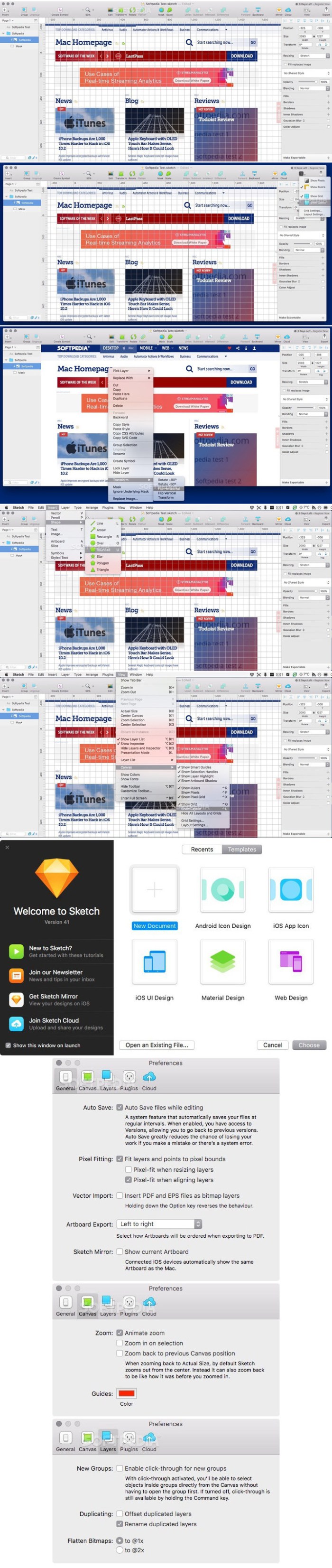
eMail Address Extractor is highly intuitive, just select your output file format, then Drop data files or entire directories onto the hand drop-zone to quickly produce a non-duplicate list of all valid email addresses.

Easily extract addresses from websites, your entire Apple Mail database, selected Mail.app folders, iWork projects (Pages, Keynote, Numbers), Microsoft Office (docx, xlsx). You can even scans within zip archives! so there’s no need to extract your archived databases and documents.

eMail Address Extractor is great for:
  • creating personal and business mailing lists
  • processing SQLite databases
  • scanning multiple documents at one time
  • removing duplicate adresses from mailing lists
  • merging lists
  • getting contact details from websites
Files can be processed:
  • via the menubar
  • drag and drop
Configuration to streamline your workflow:
  • less false positives
  • add flies types to an ignore list (speed up your workflow by not needing to manually sort through valid file types)
  • ignore email addresses containing strings (mailerdaemon, noreply addresses for example)
  • option to also scan the contents of emails (not just the headers)
  • output results to CSV or TXT file
  • notifications when tasks have been completed

*pdf files need to be in a text format. OCR data retrieval is not currently supported.

Compatibility: OS X 10.11 or later 64-bit

Web Site: https://sweetpproductions.com
Mac App Store: https://itunes.apple.com/app/email-address-extractor/id580832319?mt=12

What’s New in eMail Address Extractor 3.4.1

  • Release notes not available at the time of this post.
Screenshots

%RATINGS_IMAGES% (%RATINGS_USERS% votes, average: %RATINGS_AVERAGE% out of %RATINGS_MAX%)
You need to be a registered member to rate this.

data guardian 4.0.8

Name Data Guardian 4 0 8 TNT.zip
Size 28.67 MB
Created on 2018-11-29 17:53:55
Hash 17784965c83f109bfd41e38f2b7a3e6f6a33d616
Files Data Guardian 4 0 8 TNT.zip (28.67 MB)

Download

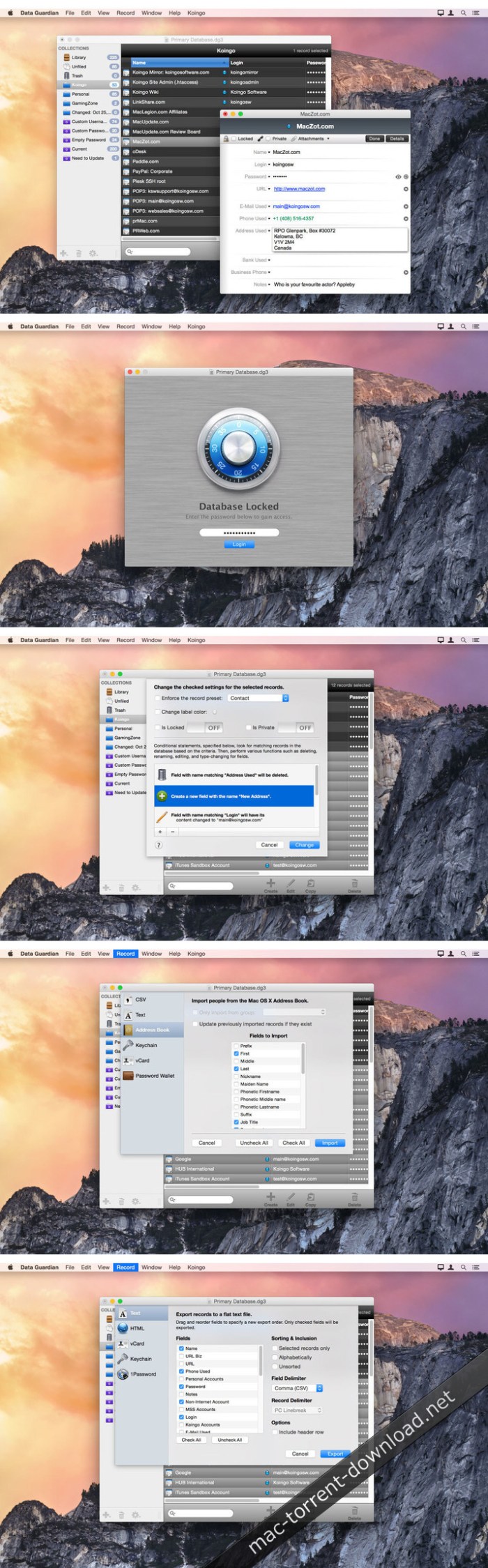
Data Guardian 4.0.8

macOS application designed to help you protect accounts details, passwords, and more using the 448-bits Blowfish encryption algorithm

Using singular passkeys for different accounts is the least you can do when it comes to staying safe: this way, even if one of your accounts is compromised, the others remain safe. However, memorizing all that information can prove to be rather challenging.

Data Guardian is a macOS application that enables you to quickly create a database that contains the credentials for all your accounts. To keep everything safe, you can protect the database with a master password, while Data Guardian will encrypt it by using the powerful  448-bits Blowfish algorithm.

Provides support for multiple databases

To get stated with Data Guardian, you must first create a database and then populate it with details about various types of accounts. The application is also able to store data about products licenses, contacts, notes, and even recipes.

The best part is that you can create as many databases as you like: this way, the application can be used by multiple users at the same time. Moreover, you can sync the database to other devices, and have access to your credentials at all times.

Helps you generate reliable passwords

In addition, Data Guardian comes with a password generator that is able to create random passkeys in no time. Note that the template for the random password can be easily changed via the Preferences window

On top of that, the built in Password Assistant enables you make personalized passwords. First off, you get to select the password type: memorable, letters&numbers, numbers only, random, or FIPS-181 compliant. The next step is to select the password length from a slider bar: depending on the result, Data Guardian lets you know the quality level of the currently generated password.

Straightforward password management utility with powerful encryption capabilities

Data Guardian offers you the possibility to store your passwords and other type of data in a clean and organized environments. Moreover, you get to protect the database with a master password and use the Blowfish encryption algorithm.

What’s New in Data Guardian 4.0.8

  • Release notes not available at the time of this post.

Screenshots

%RATINGS_IMAGES% (%RATINGS_USERS% votes, average: %RATINGS_AVERAGE% out of %RATINGS_MAX%)
You need to be a registered member to rate this.

metaimage 1.4 2

Name MetaImage 1 4 2 MAS TNT.zip
Size 29.47 MB
Created on 2018-11-29 17:54:08
Hash 20ca8ced1e2a2813b2165e8c0e23228cb65df3ec
Files MetaImage 1 4 2 MAS TNT.zip (29.47 MB)

Download

MetaImage 1.4.2

MetaImage is the ultimate tool to read, write and edit images metadata. This is first editor that allows you to edit EXIF, IPTC and XMP tags as well as MakerNotes in a beautiful and familiar interface.

The application has been designed to improve your workflow. Users can create and manage presets. Moreover, a special support is provided for geographical and thumbnail data. In addition, displayed tags can be customized via the preferences. In this way, the application fits to your personal needs.

MetaImage is completely integrated to your mac ecosystem. The application even includes a Photos extension.

Supported tags (>5000 tags):
  • EXIF
  • IPTC
  • XMP
  • ICC Profile
  • Canon
  • Leica
  • FujiFilm
  • Nikon
  • Olympus
  • Panasonic
  • Pentax
  • SigmaRaw
  • Sony
  • and much more

The application is designed for professional needs. More than 90 image formats are supported (MOS, CR2, DNG, NEF, NRW, JPEG, PNG, TIFF, RAW, and much more). MakerNotes tags may be edited but not created or deleted. This avoids many potential problems with OEM software.

Additional features:
  • Export tags to CSV and JSON
  • Export embedded thumbnails
  • Export embedded jpeg from raw
  • Copy/Paste multiple tags
  • Support passwordprotected images
  • Support notifications and touch bar

This version has been optimized for macOS High Sierra and later. Moreover the application is available in 7 languages (English, French, German, Spanish, Italian, Japanese and Chinese).

Feedbacks can be sent directly from the application. In this way, you can contact us for any kind of suggestions and improvements in few clics.

MetaImage is accompanied by other applications.

  • SnapMotion: extract still images from videos with precision.
  • GlueMotion: edit, deflicker and assemble images into time lapse.

OS Version: OS X 10.13 or later

Web Site: https://neededapps.com/
Mac App Store: https://itunes.apple.com/app/metaimage/id1397099749?mt=12

What’s New in MetaImage 1.4.2

– Fixed localization issues

%RATINGS_IMAGES% (%RATINGS_USERS% votes, average: %RATINGS_AVERAGE% out of %RATINGS_MAX%)
You need to be a registered member to rate this.

silkypix developer studio 8e 8 1.27

Name SILKYPIX Developer Studio St 8 1 27 0 REPACK TNT.zip
Size 371.3 MB
Created on 2018-11-29 17:54:18
Hash 061a0632256a885d982632354463f1a4d0698274
Files SILKYPIX Developer Studio St 8 1 27 0 REPACK TNT.zip (371.3 MB)

Download

SILKYPIX Developer Studio 8E 8.1.27

A handy and intuitive RAW photo processor that enables you to enhance, adjust, correct and convert RAW pictures into popular image formats

SILKYPIX Developer Studio is a straightforward multi-platform application designed to provide you with all the tools and features needed to generate high-resolution images.

Moreover, SILKYPIX Developer Studio comes with inbuilt support for a wide variety of RAWpicture files that you can easily adjust and convert into JPEG or TIFFfiles.

Helps you preview, process and convert RAW images on your Mac

With the help of its built-in image processor, SILKYPIX Developer Studio allows you to accurately make color adjustments from shadows to highlights.

Amateur and professional photographers will be happy to know that SILKYPIX Developer Studio also comes with noise reduction and lens aberration controllers that enable you to obtain high quality images with just a couple of mouse clicks.

From SILKYPIX Developer Studio’s top toolbar you can easily access various tools and features, load multiple photos and switch between different viewing modes. As follows, you can undo and redo the last actions, switch between photos, trim and rotate the original picture.

Intuitive interface and basic image processing tools

The context menu helps you zoom in and out the picture, change the currently used viewing mode, summon the loupe tool, mark multiple files print the selected photo.

By accessing the Image Property window, you can view detailedinformation about the currently selected image and video info such asresolution, colorspace, ISO, shutter speed, aperture and focal lengthvalue, the model and maker name of the used digital camera and more.

At the same time, the left side panel helps you adjust the pictureexposure, white balance, tone and color, increase or decrease thesharpness and reduce the noise from the image.

Accurately make color adjustments and reduce image noise

On top of that, the SILKYPIX Developer Studio app bundles a large array of predefined RAW processing profiles that can be used to quickly and effortlessly modify and adjust images based on your requirements.

To conclude, SILKYPIX Developer Studio is a simple and user-friendly RAW image processor that will help you to adjust, enhance and convert RAW image files using your Mac.

OS Version: OS X 10.6.8 or later

Web Site: http://www.isl.co.jp/SILKYPIX/english/

What’s New in SILKYPIX Developer Studio 8E 8.1.27

  • Release notes not available at the time of this post.
Screenshots

%RATINGS_IMAGES% (%RATINGS_USERS% votes, average: %RATINGS_AVERAGE% out of %RATINGS_MAX%)
You need to be a registered member to rate this.

micromat drive scope 1.2 2

Name Drive.Scope.1.2.2.zip
Size 22.27 MB
Created on 2018-11-29 07:03:23
Hash 5156cea4203920e82fdda3449c109a7aed4ddd57
Files Drive.Scope.1.2.2.zip (22.27 MB)

Download

Micromat Drive Scope 1.2.2 macOS

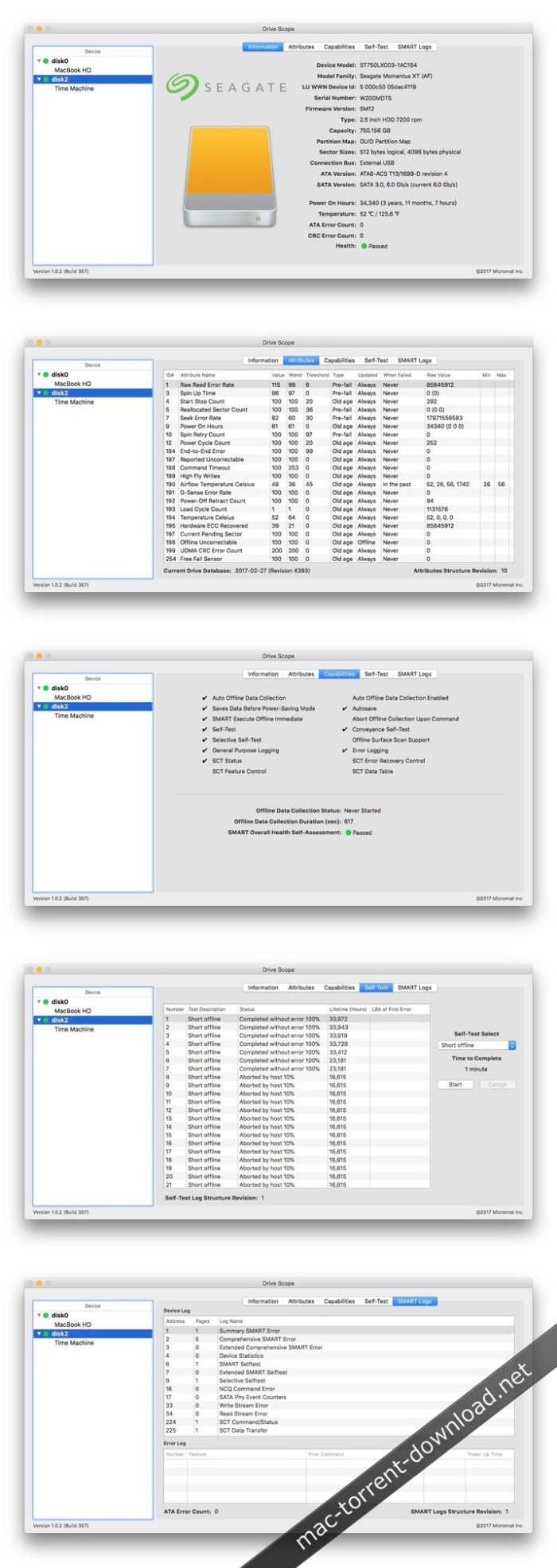
Hard drives (and solid state drives) are the most failure prone components in your Mac. For that very reason, in fact, drive manufacturers have built in self monitoring, analysis and reporting technology right into the drive. (a.k.a. SMART) Most utilities barely scratch the surface of this information, simply reporting the bare essentials: pass or fail. Too often, once the overall failure has occurred, there isn’t enough time to get important data from the drive. With Drive Scope you can see into the health of most any drive connected to your Mac.

Drive Health

With Drive Scope you can see the complete picture of your Drive’s health. Granular information about each aspect your drive is monitoring is available for review. See each of the attributes that contribute to the drive’s health – in detail. See which attributes contribute to overall failure versus those that are merely informational.

Control over Testing

Typically, a drive will check it’s SMART attributes whenever it is convenient. With Drive Scope, you can manually trigger the drive’s internal tests to make sure the SMART data is as up-to-date as possible. Check how long since the last time the drive ran a test with the drive’s testing log.

Information

When you first open Drive Scope, an information page is displayed, summarizing all the critical information about your drive. See Drive Scope’s advanced health assesment at a glance, along with the number of errors encountered, as well as model and capacity information specific to your drive.

System Requirements:
  • Intelbased Macs
  • OS X 10.8.5 or greater, including macOS 10.13 ‘High Sierra’

Web Site: https://www.micromat.com/products/drive-scope

What’s New in Micromat Drive Scope 1.2.2

  • Release notes not available at the time of this post.

Screenshots

%RATINGS_IMAGES% (%RATINGS_USERS% votes, average: %RATINGS_AVERAGE% out of %RATINGS_MAX%)
You need to be a registered member to rate this.

mininote pro 5 3

Name MiniNote Pro 5 3 MAS TNT.zip
Size 7.55 MB
Created on 2018-11-29 07:02:45
Hash 2b872b7b1538625225f48dbda5039e7c20b2da84
Files MiniNote Pro 5 3 MAS TNT.zip (7.55 MB)

Download

MiniNote Pro 5.3

NOTE TAKING- FINALLY DONE RIGHT, WITH REAL-TIME CLOUD SYNCING

This is the pro version of the best cross platform note taking app with great extra features such as real-time cloud syncing, a detachable and resizable window, font styling, multiple themes and much more.

MiniNote Pro is quite simply the best notes app you will ever use. It has been engineered from the ground up to offer the fastest and most pleasurable note taking experience possible. Try it for a week and you’ll be hooked for life.

The app lives in your Mac’s menubar and is always available at the click of a button. Use it to write down your thoughts and important pieces of information and be happy in the knowledge that your notes will be easily accessible when needed. Want to create and read your notes on the move? No problem, our real-time syncing service means that your notes will be instantly available via our companion apps for the iPhone & iPad.

Our Pro app gives you the following extra features over MiniNote Lite:

  • MiniNote realtime cloud sync service (iPhone, iPad, Mac)
  • Detachable window to move and resize the app anywhere around your single or multi screen setup
  • Gorgeous custom full screen editing mode
  • Choice of two UI themes
  • Text styling (bold, italics, underline)
  • Undo/Redo buttons
  • 6 great fonts with font size selection
  • Opacity control
  • Complete adfree experience

In addition to the above Pro features, you also get:

  • Beautiful pixel perfect design with retina support
  • Advanced dynamic search bar to quickly find the note you are looking for
  • Create and view favourites using the Star button.
  • Time stamps for each note you create
  • Share notes via Email, Facebook, Twitter and iMessage
  • Backup notes to a location you choose in RTF and TXT format
  • Anchor button to make the app visible above all other apps
  • Handy keyboard shortcuts:
    • Ctrl + N to open app
    • Cmd + Ctrl + N to create a new note
    • Cmd + R to anchor
    • Cmd + [ to go back to list view
    • Cmd + F to search whilst in list view
    • Cmd + , to enter the Settings panel
    • Cmd + P to Print notes
    • Cmd + X/C/V to Cut/Copy/Paste text respectively
    • Cmd + Z to undo
    • Cmd + Shift + Z to redo
    • Cmd + B/U/I to Bold/Underline/Italics text respectively
    • Cmd + D to toggle window docking on and off
    • Cmd + Shift + E to create a new note with the content you have highlighted
    • Esc to hide window 

We’ve spent a great deal of time thinking about the details and after using this app for a few days, you’ll begin to notice our small yet creative touches. We plan on a very active development cycle, so please spread the word and keep sending us your feedback!

Compatibility: macOS 10.10 or later 64 bit

More information: https://fiplab.com/apps/mininote-for-mac
Mac App Store: https://itunes.apple.com/app/mininote-pro/id506772307?mt=12

What’s New in MiniNote Pro 5.3

– Minor bug fix

%RATINGS_IMAGES% (%RATINGS_USERS% votes, average: %RATINGS_AVERAGE% out of %RATINGS_MAX%)
You need to be a registered member to rate this.

macbooster 7 2.1.28600

Name MacBooster 5 2 1 28600 REPACK TNT.zip
Size 33.62 MB
Created on 2018-11-28 21:34:57
Hash 73d423017eb15743842c6e35751241f430f0680a
Files MacBooster 5 2 1 28600 REPACK TNT.zip (33.62 MB)

Download

MacBooster 7.2.1 (28600)

MacBooster provides a full arsenal of system-maintenance tools to make your Mac run faster. Your one-stop Mac maintenance tool to clean up 20 types of junk files and remove Mac malware and virus to protect your Mac, Besides, MacBooster 7 also can optimize Mac hard disk, fix disk permission issues and clean Mac memory which will help boost your Mac to the peak performance.

  • System Status: Explore the status of your Mac by running a full scan.
  • Virus & Malware Scan: Quickly and deeply analyze the security status of your Mac. Safely remove the threats to make your Mac stay safe.
  • Privacy Clean: Explore the status of your Mac by running a full scan.
  • System Junk: Scan every corner of your system, find out junk files to keep your hard disk from being wasted.
  • Uninstaller: Help get rid of unwanted apps or leftover files.
  • Large Files Cleaner: Find and remove the large files you no longer need to free up more space.
  • Memory Clean: Clean to regain more available RAM and make application start faster.
  • Startup Optimization: Manage your startup items to optimize the OS X boot speed.
  • Defragment: new feature to optimize and fix your disks with 1-click.
  • Duplicates Finder: Locate and remove the duplicated files on your Mac quickly.
  • Photo Sweeper: Effectively and quickly find similar or duplicated photos. Keep the most beautiful ones.
  • Crafted New Mini: added realtime monitor for network speed and notification for scan and fix result.

Compatibility: OS X 10.7 or later 64-bit

Web Site: http://www.macbooster.net/

What’s New in MacBooster 7.2.1 (28600)

  • Release notes not available at the time of this post.
Screenshots

%RATINGS_IMAGES% (%RATINGS_USERS% votes, average: %RATINGS_AVERAGE% out of %RATINGS_MAX%)
You need to be a registered member to rate this.

vray adv 3.70.01 for cinema 4d r20

Name Vray 3.70.01 for Cinema 4D MacOsx.zip
Size 138.9 MB
Created on 2018-11-28 21:36:03
Hash 03b931f4cf0d1b60c7acf9c5f9e57ef3eb420d1c
Files Vray 3.70.01 for Cinema 4D MacOsx.zip (138.9 MB)

Download

Vray Adv 3.70.01 for Cinema 4D R20 macOS

V-Ray for Cinema 4D is a professional rendering system optimized for large productions and photo-realistic design projects.

QUALITY

V-Ray comes with all the lighting, shading and rendering tools you need to create professional, photoreal imagery and animation.

POWER

Built to handle your biggest projects and your toughest scenes — render anything and everything with the power of V-Ray.

SPEED

Spend less time waiting and more time being creative. Deliver your best work and never miss a deadline.

CREATIVE CONTROL

V-Ray puts you in the driver’s seat. Take control with V-Ray’s versatile features and choose the best approach for your scenes.

DEEP CINEMA 4D INTEGRATION

V-Ray’s ultra-deep Cinema 4D integration keeps your workflow fluid, smooth and combines the best of both worlds.

INDUSTRY STANDARD

Join independent artists and top studios across the globe using V-Ray daily to create world-class designs and visual effects.

Web Site: https://www.chaosgroup.com/vray/cinema-4d

What’s New in Vray Adv 3.70.01 for Cinema 4D R20

  • Release notes not available at the time of this post.
%RATINGS_IMAGES% (%RATINGS_USERS% votes, average: %RATINGS_AVERAGE% out of %RATINGS_MAX%)
You need to be a registered member to rate this.

macpilot 10 15

Name MacPilot 10 15 TNT.zip
Size 40.25 MB
Created on 2018-11-28 21:35:16
Hash efc313d3511c1fba6759aef78aca2e03139fc587
Files MacPilot 10 15 TNT.zip (40.25 MB)

Download

MacPilot 10.15

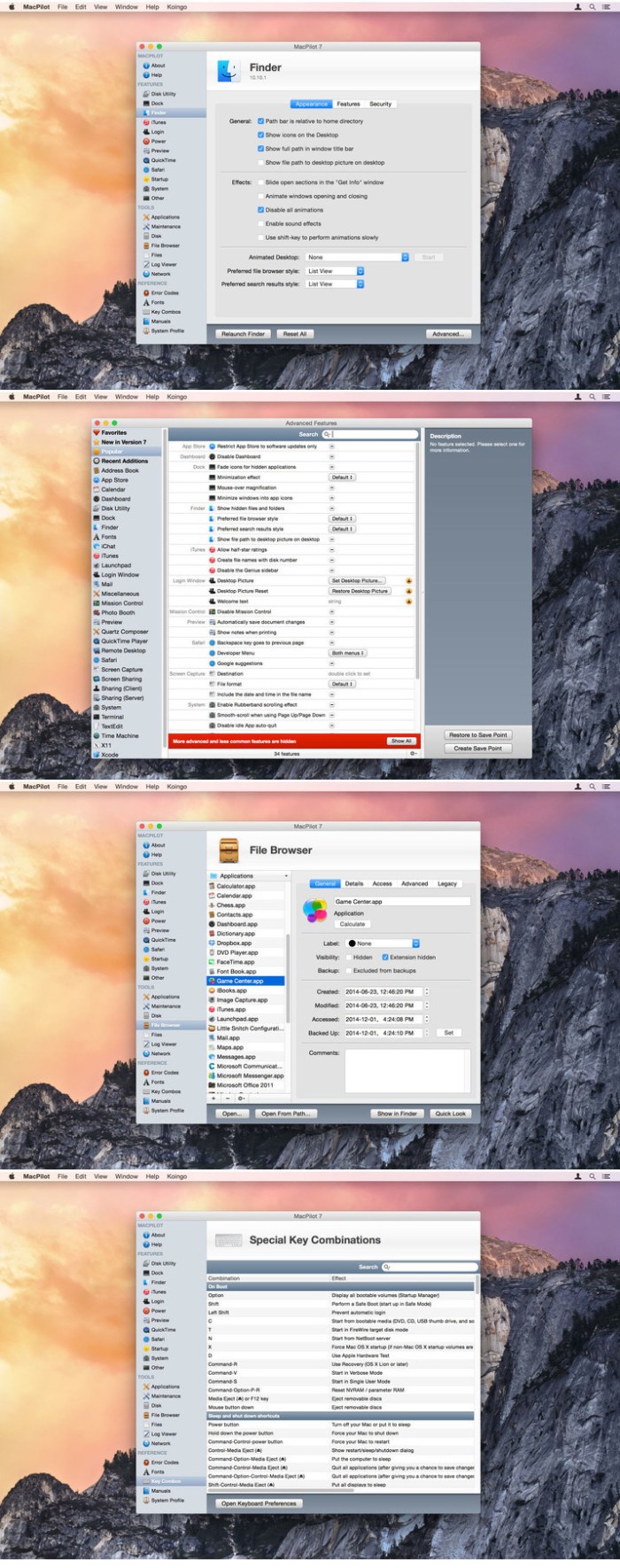
MacPilot gives you the power of UNIX and the simplicity of Macintosh, which means a phenomenal amount of untapped power in your hands! Use MacPilot to unlock over 1,200 features, and access them all with the easy and familiar Macintosh user interface. No command line tools or complicated file operations!

Display hidden files in the Finder, disable the startup chime, add spacers and stacks to the Dock, change the screenshot file format, run maintenance tools, tweak network settings, force empty the Trash, and tons more. Keep yourself in awe and busy for days as you discover how much Mac OS X has “under the hood”.

Get out of the passenger seat and take control of your Mac. Set your login window picture, use the screensaver as your Desktop, modify advanced file permissions (ACL), change the system welcome message, enable simultaneous recordings in QuickTime, view system logs, or enable the Debug menu in numerous apps.

OS Version: macOS 10.12 or later

Web Site: http://www.koingosw.com/

What’s New in MacPilot 10.15

Minor bug fixes

Screenshots

%RATINGS_IMAGES% (%RATINGS_USERS% votes, average: %RATINGS_AVERAGE% out of %RATINGS_MAX%)
You need to be a registered member to rate this.

elmedia player pro 7.0 1615

Name Elmedia Player Pro 7 0 1615 TNT.zip
Size 57.30 MB
Created on 2018-11-28 21:34:25
Hash c8d70251d69df9911c411d3a82834e6229ab46f1
Files Elmedia Player Pro 7 0 1615 TNT.zip (57.30 MB)

Download

Elmedia Player Pro 7.0 (1615)

Elmedia Player GO will play various file formats, be it AVI, MP4, WMV, MKV, MP3, M4V, or else. The good news is Elmedia Player GO is a versatile app that doesn’t require any additional codecs and plugins.

**Elmedia Player is available for Apple TV now!**

Elmedia offers fantastic HD experience thanks to its native hardware accelerated decoding feature. It doesn’t just bring you the best quality picture but also doesn’t load your computer’s processor.

*Highlights:

Video and audio

  • Bring the player on top of all other open apps and never miss a moment of the movie.
  • Play any sound track including external ones.
  • Has its own volume control.
  • Offers exceptional support for subtitles, including Arabic, Eastern Asian languages, Hebrew.
  • Sound and subtitles languages are easy to select;
  • Creation & management of playlists.
  • Easy to fit the video image to screen.
  • Playback speed is adjustable.

Flexible settings

  • When a movie has subtitles Elmedia Player GO can sync them with the video in case there is any mismatch.
  • Play a DVD or a video that was copied from DVD without any additional hassle.
  • Choose which monitor will show fullscreen;
  • Snap a screenshot of any moment in the video or create a series of pictures with adjustable interval.
  • Virtual surround and speakers emulation provides the exquisite hearing experience.
  • Select the output device for sound.
  • Transmit AC3/DTS through S/PDIF.

**Supported formats**

  • Audio: mp3, m4a, wma, aac, ac3, aiff, ape, flac, mka, ogg, pcm, ra, vaw, waw, wav, aif, oga, caf, midi, mid, acm, dts, mpa, webm
  • Video: 3gp, avi, mp4, mpeg, vob, flv, mov, mkv, 3iv, asf, fli, m1v, m2t, m2ts, m2v, m4v, mp2, mpg, mpg2, mpg4, mpv, mqv, nut, nuv, nsv, qt, ram, rec, rm, rmvb, ts, vcd, vfw, wmv, webm, rv, f4v, ogv, ogm, divx, asx, dat, tp, mjp, yuv, xvid, vc1, mtv, mxf, qtz, dv, hdv, 3g2, mts
  • Subtitles: utf, srt, ass, smi, txt, ssa, smil, jss, rt, idx, sub, xml

Refine the Playback

  • Adjust brightness, contrast, saturation even during playback.
  • Rotate, flip, mirror the video image;
  • Set any part of movie or music video on a continuous loop;
  • Play with deinterlacing and image enhancement;
  • The 10band equalizer lets you make the audio just perfect for you. Existing presets include Large Hall, Party, and more. You can also create your unique sound setting.

*AirPlay support:

  • Stream content from and to Elmedia Player to or from other AirPlay devices or other Mac computers with Elmedia installed. Things to note:
  • Videos in AVI, FLV, MKV, 3GP formats don’t need conversion to be played on Apple TV.
  • Elmedia supports both embedded and external subtitle files for streaming.
  • VIDEO_TS, .swf, and .exe are not supported for streaming.
  • YouTube videos can be streamed to Apple TV. YouTube videos in MP4 format are supported by AirPlay, FLV, MKV, 3GP videos are not.

* Myo Connect

Elmedia Player GO works with your Myo armband- check details at http://goo.gl/SLqbQL.

NOTE: If you updated Elmedia Player GO to Version 6.9 and did not find download option there, please contact our support team.

Compatibility: OS X 10.9 or later

Web Site: https://mac.eltima.com/media-player.htm

What’s New in Elmedia Player Pro 7.0 (1615)

  • Release notes not available at the time of this post.

%RATINGS_IMAGES% (%RATINGS_USERS% votes, average: %RATINGS_AVERAGE% out of %RATINGS_MAX%)
You need to be a registered member to rate this.

digital sentry 1.4 4

Name Digital Sentry 1 4 4 TNT.zip
Size 25.33 MB
Created on 2018-11-28 21:34:17
Hash ee238ac9bd4cd23188ae0e5b2961e16bc5346553
Files Digital Sentry 1 4 4 TNT.zip (25.33 MB)

Download

Digital Sentry 1.4.4

Digital Sentry monitors your system for specific events, and then can perform a vast array of unique actions in response. Use it to automatically cleanse internet history when closing a browser, automate redundant computer tasks, perform covert surveillance, or even protect your sensitive data during unauthorized access or theft!

Watch for such system events as waking from sleep, program launches, closes, or switches, file modifications, incorrect password attempts, mouse and keyboard input, and many more. Then, perform any number of tasks like sending an e-mail, shutting down the computer, starting a simulated self-destruct, pinging a web URL, taking a web cam shot, taking a screenshot, playing a multimedia file, speaking some text, executing a shell script… the list goes on!

Curious who’s been using your computer while you make a quick trip out of the room? Turn on the ‘incorrect password’ attempt monitor, and have Digital Sentry take a picture of them with a web cam, e-mail it to you, and then sending you a notification by text message to your cell phone! Ideal for catching a thief in the event your laptop has been stolen.

Alternatively, use Digital Sentry to organize your life by performing a task such as speaking a line of text on an interval to remind you to get up from the computer and stretch, or to perform a system backup. In the case of a backup, then even get Digital Sentry to do it for you by executing a shell script.

Compatibility: OS X 10.10 or later, 64bit

Web Site: http://www.koingosw.com/products/digitalsentry/
Mac App Store: https://itunes.apple.com/app/digital-sentry/id414765043?mt=12

What’s New in Digital Sentry 1.4.4

  • Release notes not available at the time of this post.
Screenshots

%RATINGS_IMAGES% (%RATINGS_USERS% votes, average: %RATINGS_AVERAGE% out of %RATINGS_MAX%)
You need to be a registered member to rate this.

enfocus pitstop server 2018 v18.0 1 build 908041

Name Enfocus PitStop Server 2018 v18.0.1 Build 908041.zip
Size 1.05 GB
Created on 2018-11-28 22:42:22
Hash cd10be28c07494e7283aedd9a9a8b9e814b5aba7
Files Enfocus PitStop Server 2018 v18.0.1 Build 908041.zip (1.05 GB)

Download

Enfocus PitStop Server 2018 v18.0.1 Build 908041 macOS

PitStop Server is a stand-alone hot folder based application that checks and fixes PDF files. Let PitStop Server automate your PDF Preflight and fixing so your operators can focus on billable tasks.

Save time and money

Save time and money by automating PDF Preflight and correction

High quality guaranteed

Reduce risk of human errors, high quality guaranteed every time

Free up your staff

Free up your staff for work that you can actually charge for

Top features:

  • Standalone application
  • Allows you to create and edit Preflight Profiles and Action Lists (New!)
  • Supports all PDF versions up to 1.7 and international PDF standards
  • Supports XML/Job Ticket driven variable Preflight
  • Processes unlimited number of files simultaneously
  • Various PDF and XML Preflight Reports depending on your needs
  • Customizable error messages to communicate with nontechnical people (New!)
  • Full ICC color management and DeviceLink support
  • Preflight Profiles compatible with PitStop Pro

New in PitStop Server 2018:

The latest version of PitStop Server is all about making life easier, saving time and providing additional advanced editing functionality – PitStop 2018 ensures a print-ready PDF file every time!

New XML report

PitStop Server gains a new XML report (v3). This report was developed in conjunction with other channel partners, customers and integrators. The new XML structure makes the report much easier to work with when using XPaths and parsing the report for data.

New check for minimum printing dot

This check identifies very light tints that may cause trouble in production, the threshold value is configurable, and the check is designed to check each separation separately. Very useful for identifying scum dots, and also for users who prepare files for Flexo printing.

Better integration with Switch

The new PitStop Server configurator brings the familiar PitStop Server interface to Switch.

Pantone Color Actions

Pantone colors continue to be a challenge for users, particularly with the different CMYK and Lab alternate colors that are available in the market from different versions of applications. We have added new functionality that allows more control over Pantone colors, enabling users to automatically rename color names to the correct Pantone format, and also map colors to the correct Pantone libraries of their choice, using the official Pantone color breakdowns.

Add barcodes to PDF files

This action supports over 100 different barcode types, including 1D Barcodes, 2D Barcodes such as QR and Datamatrix, a selection of International Postal Barcodes and GS1 Barcodes. The functionality includes the ability to set a Bar Width Reduction value or percentage if required.

Color type report

A special new chapter in the PitStop preflight report that emulates a DFE and tells a user if pages are empty, black and white or CMYK. This is especially useful for customers who pay click charges on their digital print engines.

Web Site: https://www.enfocus.com

%RATINGS_IMAGES% (%RATINGS_USERS% votes, average: %RATINGS_AVERAGE% out of %RATINGS_MAX%)
You need to be a registered member to rate this.

moviesherlock 5 9 1

Name MovieSherlock 5 9 1 TNT.zip
Size 13.32 MB
Created on 2018-11-28 21:35:23
Hash c8a063de205b302a9214af705849d7ffc165889b
Files MovieSherlock 5 9 1 TNT.zip (13.32 MB)

Download

MovieSherlock 5.9.1

MovieSherlock is an all-in-one YouTube downloader and converter. It allows you to search, download, and convert YouTube movies. MovieSherlock lets you to download videos fast, smoothly and no quality loss whats so ever! MovieSherlock is just the best way to get videos to your Mac.

MovieSherlock allows you to download any video from YouTube and convert it on your Mac to a high-quality MP4 video that is playable in iTunes or your favorite video player. MovieSherlock supports both HD (High Definition) and SD (Standard Definition) video from YouTube. However.

  • Save as MP4 and MP3: downloaded videos will be automatically converted.
  • YouTube, Vimeo, DailyMotion and thousands of websites support
  • Fast download: 15x faster than real time!
  • iTunes integration: Add to iTunes feature allows to copy downloaded video and music to any of your devices such as iPhone, iPad, iPod, etc.
  • Download video with subtitles from YouTube and DailyMotion.
  • Correct file naming: The downloaded videos will retain the original names from the source webpages.
  • Native video format: If you get the video with MovieSherlock, be sure you can play it.
  • Simultaneous download: Get so many files you need at one time.

Compatibility: OS X 10.7 or later

Web Site: http://www.moviesherlock.com/

What’s New in MovieSherlock 5.9.1

  • Release notes not available at the time of this post.

%RATINGS_IMAGES% (%RATINGS_USERS% votes, average: %RATINGS_AVERAGE% out of %RATINGS_MAX%)
You need to be a registered member to rate this.

swinsian 2.1.10

Name Swinsian 2 1 10 TNT.zip
Size 16.15 MB
Created on 2018-11-28 21:35:54
Hash 66312a1db66b1f0d3d3b3e85bbf12db8110b177a
Files Swinsian 2 1 10 TNT.zip (16.15 MB)

Download

Swinsian 2.1.10

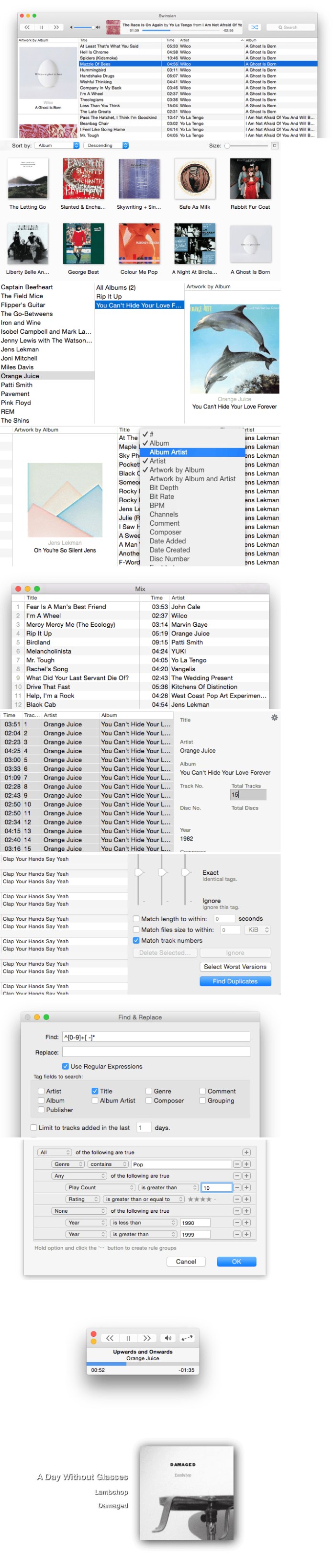
Swinsian is a sophisticated music player for Mac OS X with wide format support, folder watching and advanced tag editing and designed to be responsive even with the largest libraries.

Features
  • Supports FLAC/Ogg Vorbis as well as MP3, AAC, WAV, APE, AC3, WavPack, WMA, and cue files
  • Copies tracks from iPods and iPhones
  • Watches folders for new files
  • Fetches album art
  • Quick control window
  • Imports iTunes libraries
  • Playback over AirTunes
  • Duplicate finding
  • Bulk tag editing with regex support

Compatibility: OS X 10.7 or later 64-bit

Web Site: http://swinsian.com/

What’s New in Swinsian 2.1.10

  • Release notes not available at the time of this post.
Screenshots

%RATINGS_IMAGES% (%RATINGS_USERS% votes, average: %RATINGS_AVERAGE% out of %RATINGS_MAX%)
You need to be a registered member to rate this.

live desktop 7.0

Name LiveDesktop 7 0 MAS TNT.zip
Size 195.2 MB
Created on 2018-11-28 21:34:44
Hash f0dada1e624b0a54be7bcf4323f2eacfd1ded7d2
Files LiveDesktop 7 0 MAS TNT.zip (195.2 MB)

Download

Live Desktop 7.0

Live desktop – Animated Live Wallpapers and Themes. Live Desktop is an awesome app which makes the Mac desktop come alive with stunningly live HD quality and animated themes instead of the boring wallpapers and background images.

Bring your Desktop to Life

Live Desktop makes the Mac desktop alive with amazing live themes and wallpapers. Say good bye to boring wallpapers and background images experience the way desktops for Mac should be.

Awesome Live Themes

Experience a waving flag, pristine water wall, ripling river, sandy beach, roaring lion and even rain water drops on your Mac screen. All themes, images and wallpapers are live, animated and are HD quality.

Experience Live Audio

Most of the live themes and wallpapers have audio integrated in them. Just click on a button to enable or disable audio in the Live Themes and wallpapers.

Great Companion for Creators

Live Desktop is a great companion for creative professionals who wish for a totally different environment to encourage the flow of thoughts, ideas, art or words. Live Desktop takes you to a different environment in a click.

Beautiful App to Control Themes

Live Desktop provides a beautiful interface to view all the live themes and also the option to download other new themes that are not available locally.

Seamless New Themes Addition

In addition, additional themes are added continuously as they are created. New themes will reflect automatically in the app and there is no need for an app update.

Launch on Start

You can configure the Live Desktop app to launch on start and is ready to use on menubar it can also be activated in a single click or configured hot key stroke.

Compatibility: OS X 10.9 or later 64-bit

Web Site: https://www.macappstudio.com/apps/live_desktop
Mac App Store: https://itunes.apple.com/app/live-desktop-live-wallpapers/id846060286?mt=12

What’s New in Live Desktop 7.0

  • Release notes not available at the time of this post.

%RATINGS_IMAGES% (%RATINGS_USERS% votes, average: %RATINGS_AVERAGE% out of %RATINGS_MAX%)
You need to be a registered member to rate this.

airradar 4 1.9

Name AirRadar 4 1 9 TNT.zip
Size 28.27 MB
Created on 2018-11-28 21:33:41
Hash 0587caefd98e16c3a454f566fa6a805cc9659988
Files AirRadar 4 1 9 TNT.zip (28.27 MB)

Download

AirRadar 4.1.9

A user-friendly and practical application that helps you scan for open networks and obtain detailed information about the selected network

AirRadar is a straightforward wireless network scanner designed to help you find open networks, organize them into different groups and save the list with all discovered networks.

WiFi scanner

From AirRadar’s main window you easily scan for nearby open and password protected wireless networks with just a couple of mouse clicks.

All discovered networks are displayed in an easy-to-read list that you can sort according to the SSID name, Signal strength, Signal average and maximum power, Noise level, Channel number, Encryption type, last seen data, BSSID and specifications.

Thanks to the context menu you can open the Details window, join the network, add it to Favorites or delete it from the list.

Network information grabber

By accessing AirRadar’s Details window, you can view detailed information about the selected network. Hence, you can view the channel frequency, encryption method, discovery date, Vendor name and more.

The Graph tab helps you visualize the signal strength and noise level over a certain period of time. You can even use the Comment section to write down observations, notes or warnings.

Intuitive interface

The top toolbar helps you load or save a network list, join the selected network, disconnect from the WiFi, add the network to your Favorite list or Filter and stop the scanning process.

Handy assistant

You can use the Network Setup Assistant to determine which WiFi channel you should use after scanning the local area for nearby networks within range. A list with suggested low-traffic channels will be provided at the end of the scanning process.

What is more, AirRadar automatically groups the discovered networks according to different criteria. Consequently, you can use them as filters to find open networks, secure networks, Wireless N and Generic Networks.

Compatibility: OS X 10.10 or later, 64bit

Web Site: http://www.koingosw.com/
Mac App Store: https://itunes.apple.com/us/app/airradar/id414758651?mt=12

What’s New in AirRadar 4.1.9

  • Compatibility with MacOS Mojave.
  • Fixes bug which prevents the app from launching.
  • Sandboxed
  • Uses Apple’s latest APIs for WiFi scanning.

Screenshots

%RATINGS_IMAGES% (%RATINGS_USERS% votes, average: %RATINGS_AVERAGE% out of %RATINGS_MAX%)
You need to be a registered member to rate this.

fsnotes 2.5

Name FSNotes 2 5 MAS TNT.zip
Size 10.22 MB
Created on 2018-11-28 21:34:33
Hash 4197e26fda5d52626e8a890427d5dc6c7f8352fb
Files FSNotes 2 5 MAS TNT.zip (10.22 MB)

Download

FSNotes 2.5

FSNotes is a plain-text note manager for macOS, and is modern reinvention of notational velocity (nvALT) on steroids. Our application respects the following open formats: plain/text, Markdown, and RTF, and stores data in the file system. You can view, edit, and copy data in your favourite external editor, and see live results in FSNotes.

FSNotes features:
  • iCloud synchronization over iCloud Documents
  • keyboard centric
  • global shortcuts (clipboard save / search field)
  • markdown and RTF markup (files stored on disk as plain/text and rich text)
  • markdown preview mode
  • elastic three pane view (vertical and horizontal layout)
  • blazing fast and lightweight
  • open files in finder / works with external editors (changes seamless live sync with UI)
  • pin/unpin important notes in top
  • multi folder storage
  • markdown code highlighting with over 170 languages
  • markdown images live preview
  • tags

Compatibility: macOS 10.12 or later, 64bit

Web Site: https://fsnot.es
Mac App Store: https://itunes.apple.com/app/fsnotes/id1277179284?mt=12

What’s New in FSNotes 2.5

– Adds images preview in notes list
– Adds view settings for projects

%RATINGS_IMAGES% (%RATINGS_USERS% votes, average: %RATINGS_AVERAGE% out of %RATINGS_MAX%)
You need to be a registered member to rate this.

cloud outliner pro 2.5 4

Name Cloud Outliner Pro 2 5 4 MAS TNT.zip
Size 7.78 MB
Created on 2018-11-28 21:34:09
Hash baa19d97346bcc5f914fdefb654ef613dc0e8552
Files Cloud Outliner Pro 2 5 4 MAS TNT.zip (7.78 MB)

Download

Cloud Outliner Pro 2.5.4

Outlines are interactive and highly customizable notes that organize your plans, projects, and ideas in a clear way. Cloud Outliner enables you to create and share outlines between your Mac, iOS devices, and Evernote account. Got a sudden flash of insight? Don’t risk forgetting it – just enter it right away on whatever device is closest, and see your changes synchronized with all your devices at once.

This tool is not yet another notebook app or sticky notes organizer for mobile devices. Not even a little! Thanks to tight integration with Evernote and iCloud, extensive import and export functionality, rich-text editor, and a truly intuitive user interface, the solution will become your reliable assistant both at work and at home.

You can seamlessly synchronize your records with Evernote and iCloud, share your data in different ways (PDF, OPML, HTML, plain text, emails, and even paper copies), and format your notes in the built-in powerful editor.

All your thoughts, ideas, ongoing tasks, and even arbitrary memos will be kept safe and available close at hand. You can simply focus on the things that really matter – and the Cloud Outliner will cover everything else. Install Cloud Outliner to reduce complexity and easily align your daily routines!

FEATURES:

Data management and protection:
  • Flexible multitier document manager
  • Highly visible color stickers to mark important records
  • Password protection
  • Customizable document templates
  • Duplicate document operation
  • Back and Forward navigation buttons
Rich-text outline editor:
  • Drag and Drop functionality for sorting and reordering rows
  • Multiselection feature to reorder rows, change indentation, or delete them all at once
  • Optional checkboxes that facilitate selection
  • Optional automatic numbering (3 styles)
  • Adding notes to data and list items
  • Customizable text size, color, and style
  • Highlighting important rows using different text colors and styles
  • View completed tasks
  • Collapse/expand functionality for all items
  • Filters for displaying only checked or only unchecked items
  • Undo/redo operations
  • Cut/copy/paste data to outlines or even external apps (Notes, Mail, Safari, etc.)
  • Automatic highlighting of links and phone numbers
Sharing of outlines:
  • Export of outlines to PDF and HTML
  • Import and export of OPML files
  • Print outlines
  • Share outlines to Twitter, Facebook, LinkedIn, Reminders, Notes, Email, Messages
Synchronization:
  • Also available for iPhone, iPad, and Apple Watch
  • Sync outlines across all your devices with iCloud
  • Sync outlines with Evernote
Extra features:
  • Light and Dark themes
  • Customizable shortcuts
  • Search by outline name or an arbitrary text
  • Thanks to the autosaving, you don’t need to save documents anymore

* Sync with iOS-devices requires Cloud Outliner 2 Pro for iOS, sold separately.

Compatibility: OS X 10.10 or later 64-bit

Web Site: http://xwavesoft.com/cloud-outliner-for-iphone-ipad-mac-os-x.html
Mac App Store: https://itunes.apple.com/app/cloud-outliner-pro/id1024917449?mt=12

What’s New in Cloud Outliner Pro 2.5.4

Fixed issues with outline editing

%RATINGS_IMAGES% (%RATINGS_USERS% votes, average: %RATINGS_AVERAGE% out of %RATINGS_MAX%)
You need to be a registered member to rate this.

maccleanse 7.0.3

Name MacCleanse 7 0 3 TNT.zip
Size 63.92 MB
Created on 2018-11-28 21:35:09
Hash a1d3dfcaeaae1ed2f420ab4a4211eba11dd5d4cb
Files MacCleanse 7 0 3 TNT.zip (63.92 MB)

Download

MacCleanse 7.0.3

A powerful system maintenance application built to easily remove recent file histories, chat logs, caches, cookies and web site histories

Since disk space is a finite resource, making sure that you do not store files unnecessarily is very important. Right off the bat, you must ensure that all the items related to a certain installation are removed when you delete the source app, but there are also other possibilities: you can trim down binaries, delete unused language packs, and more.

Scan your Mac to find potential junk files

MacCleanse is a fairly easy to use Mac application that comes with a stylish design and quickly scans your computer for files that can be safely removed in order to gain extra disk space.

The initial panel gives you an estimate of how much space can be regained, but to actually  perform the cleaning you must carry out multiple scans in the “Cleanse” area.

Remove cache, logs, histories and more

The MacCleanse Quick Scan is able to find cache files, chat histories, crash logs, user logs, file histories, trash content, web cache, web cookies, download histories, web form values, web histories, web search histories, and web session settings.

You can view all the detected files organized by category, deselect the ones you want to keep, and then press the “Delete” button to get rid of the junk.

Correctly uninstall apps and find orphan files

MacCleanse includes an uninstaller function that is able to detect all the files associated with a specific application: this way you can make sure that when you remove a certain utility, all the related settings files are also deleted.

In addition, MacCleanse is able to find orphan files that have been left behind by apps that have not been uninstalled properly. Moreover, you get to slim down binaries by removing the parts that are not designed for your machine type, and delete the language files that you are not using.

Delete plug-ins, space hogs, and purge specific locations

You can use MacCleanse to find all the plug-ins associated to a certain application and remove the ones you no longer need. At the same time, you can identify the duplicate or unused large archives, perform secure delete actions, or purge specific folders each time a quick scan is performed.

Considering you can easily schedule Quick Scans, this is a great way to keep your Mac clean without having to perform manual actions.

Complete Mac cleaning solution

MacCleanse proposes simple yet efficient tools for identifying the files that take up space unnecessarily. The best part is that you have full control over the files that will be deleted, so you can check if you actually want to remove them.

Web Site: http://www.koingosw.com/

What’s new in MacCleanse 7.0.3

  • Release notes not available at the time of this post.
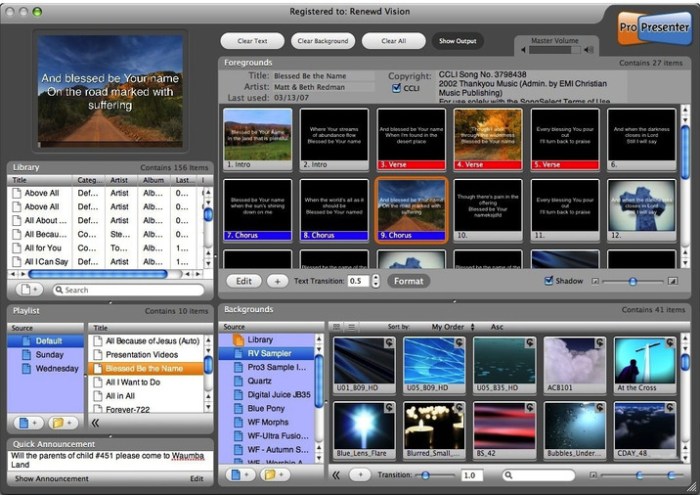
%RATINGS_IMAGES% (%RATINGS_USERS% votes, average: %RATINGS_AVERAGE% out of %RATINGS_MAX%)
You need to be a registered member to rate this.

autocrypt 2.4

Name AutoCrypt 2 3 1 TNT.zip
Size 6.35 MB
Created on 2018-11-28 21:34:01
Hash a75e6ee993aba4c22eec2f41976bc211386cbabb
Files AutoCrypt 2 3 1 TNT.zip (6.35 MB)

Download

AutoCrypt 2.4

AutoCrypt, is an encryption/decryption app with a document-based approach.

AutoCrypt uses the latest Apple technology:
  • Sandbox: The app works at the maximum security level
  • Resume: the app will reopen at the point and state the user left it
  • Auto save: the app saves using the Mac OS X autosave functionality
  • Versions: the user can look at previous versions of documents and restore to any earlier version
  • Full Screen: the user can switch at any time to full screen using the native macOS full screen mode and commands
  • Asynchronous tasks
Features
  • Can work as a desktop tool or as a batch utility
  • Save inside documents all the setting used to encrypt and decrypt group of files
  • Encrypt and save in a custom place with one click or even unattended
  • Can encrypt and decrypt list of files using the same document
  • Accept input via drag and drops for an immediate and easy input
  • Powerful features to manipulate list of files
  • Uses latest technology with asynchronous tasks to perform fast and fluid encryption and decryption
  • Can use also Blowfish encryption/decryption for previous compatibility
  • Provides an embedded PDF manual

Compatibility: OS X 10.10 or later 64-bit

Web Site: http://www.tensionsoftware.com/osx/autocrypt/

What’s New in AutoCrypt 2.4

  • Bug fixes
  • Optimized for macOS 10.14 Mojave
  • Optimized to be used also in Dark Mode

%RATINGS_IMAGES% (%RATINGS_USERS% votes, average: %RATINGS_AVERAGE% out of %RATINGS_MAX%)
You need to be a registered member to rate this.

vuescan pro 9 6 22

Name Vue9622Mac.zip
Size 9.05 MB
Created on 2018-11-28 21:36:10
Hash 6548dd865566dcddeb6c06af707ecdf53407e65d
Files Vue9622Mac.zip (9.05 MB)

Download

VueScan Pro 9.6.22 macOS

VueScan, the world’s most popular scanner software, is used extensively by photographers, home users, scanning services and corporations. VueScan is a scanning program that works with most high-quality flatbed and film scanners to produce scans that have excellent color fidelity and color balance. It is very easy to use, and also has advanced features for restoring faded colors, batch scanning and other features used by professional photographers.

VueScan changes nothing on your system, installs nothing in your operating system and all other scanner software will continue to function. VueScan increases your productivity and saves you money. VueScan has advanced scanning options, powerful features, and greatly improves your scans with superior color accuracy and better color balance. VueScan supports more than 700 scanners and 209 digital camera raw files and takes about 5 minutes to download and install.

Features:
  • Works with 1200 flatbed and film scanners
  • Runs on Mac OS X, Windows and Linux
  • Improves your productivity and quality of scans
  • Has been downloaded more than 5 million times
  • Create raw scan files
  • ICC profiles and color spaces
  • IT8 color calibration

Compatibility: OS X 10.5 or later

Web Site: http://www.hamrick.com/

What’s New in VueScan Pro 9.6.22

  • Release notes not available at the time of this post.

Screenshots

%RATINGS_IMAGES% (%RATINGS_USERS% votes, average: %RATINGS_AVERAGE% out of %RATINGS_MAX%)
You need to be a registered member to rate this.

ik multimedia amplitube 4 complete 4 8.0

Name IK.Multimedia.AmpliTube.4.Complete.v4.8.0.MacOSX.Incl.Keygen-R2R.zip
Size 452.8 MB
Created on 2018-11-27 20:49:53
Hash 0d7f2a36b14cd5fe20c420cfe1decc83d97fa06f
Files IK.Multimedia.AmpliTube.4.Complete.v4.8.0.MacOSX.Incl.Keygen-R2R.zip (452.8 MB)

Download

IK Multimedia AmpliTube 4 Complete 4.8.0 macOS

Get ready to have your mind (and ears) blown. AmpliTube 4, a major upgrade to the world’s most powerful guitar and bass tone studio for Mac/PC, is here and will take you to a level of hyper-realism and customization of tone you never knew possible.

AmpliTube 4 is a guitar and bass tone studio for Mac/PC that works as a standalone application and as a plug-in for your favorite DAW. AmpliTube recreates the entire guitar/bass signal chain from instrument to recording device, and does so in a very realistic and intuitive way. But it also does it in ways you never dreamed possible.

If you’re new to using computers to get fabulous guitar tone, then you’re in for a treat. If you’re a veteran computer tone-master, well, you’re still in for a treat. AmpliTube pioneered — and leads the way in — guitar amp and effects modeling, and AmpliTube 4 takes it to the outer edges of extreme hyper realism with intuitive familiar tools.

Fasten your seat belt… let’s take a quick tour!

What’s new
  • HyperRealistic tone
  • 3D Cab Room w/ selectable room simulations
  • Dual Mic placement on any speaker
  • Individual speaker selection
  • Speaker interaction modeling
  • Cabinet mixer for mics, room, DI and master level
  • New British Series Amps
  • Power Amp/Speaker dynamic response
  • Acoustic Simulator
  • Effects loop slot between pre and power amp
  • Universal effects placement
  • Rack effects can be used as stomp effects
  • Stomp effects can be used in rack section
  • 8track DAW/Recorder
  • 4track Looper
  • UltraTuner
  • Builtin Custom Shop

Compatibility: OS X 10.7 or later

Web Site: http://ikmultimedia.com/products/amplitube4/

What’s New in IK Multimedia AmpliTube 4 Complete 4.8.0

  • Release notes not available at the time of this post.

Screenshots

%RATINGS_IMAGES% (%RATINGS_USERS% votes, average: %RATINGS_AVERAGE% out of %RATINGS_MAX%)
You need to be a registered member to rate this.

pixelmator pro 1.2

Name Pixelmator Pro 1 2 MAS TNT.zip
Size 172.9 MB
Created on 2018-11-27 17:58:04
Hash b6738097b0e7c30cf1e343c38ba9d1f9eb317b1c
Files Pixelmator Pro 1 2 MAS TNT.zip (172.9 MB)

Download

Pixelmator Pro 1.2 MAS + iCloud

Pixelmator Pro is an incredibly powerful, beautiful, and easy to use image editor designed exclusively for Mac.

With a wide range of professional-grade, nondestructive image editing tools, Pixelmator Pro lets you bring out the best in your photos, create gorgeous compositions and designs, draw, paint, apply stunning effects, design beautiful text, and edit images in just about any way you can imagine. And thanks to its intuitive and accessible design, Pixelmator Pro is delightfully easy to use — whether you’re just starting out with image editing or you’re a seasoned pro.

New Interface
  • The modern, singlewindow interface is designed exclusively for working with images on a Mac
  • An intuitive and accessible design makes it easy for anyone to edit images — from complete beginners to design professionals
Professional Tools
  • Enhance your existing images and create new ones using every image editing tool you could ever need
  • Edit nondestructively, adjusting individual changes whenever you like
  • Easily move, resize, and arrange objects to create stunning compositions
  • Adjust the colors in images with a collection of nondestructive color adjustments
  • Enjoy superior support for RAW files, editing RAW images right inside Pixelmator Pro without having to preprocess them
  • Create digital or traditional paintings using a collection of handcrafted, fullycustomizable, dualtexture brushes with full support for digital graphics tablets
  • Combine the builtin effects in Pixelmator Pro to create any artistic or special effects you can imagine
  • Nondestructively customize the look of layers in your image using layer styles
  • Save the adjustment, effect, and layer style combinations your create, use them in any of your images, and share them with others
  • Magically remove small imperfections or entire objects, seamlessly clone parts of your photos, lighten or darken precise areas, and more using a full set of retouching tools
  • Use the reshaping tools to easily change the shape of any object or area in your images, create striking artistic effects or make subtle changes to portrait photos
  • Pick out and edit precise parts of your images or copy objects from one image to another using a range of pixelaccurate selection tools
  • Add highquality, customizable vector graphics designed by the Pixelmator Team
  • Create your own vector graphics using the Pen and Freeform Pen tools
  • Easily design greatlooking text with a full set of typography tools
Image Editing Enhanced by Machine Learning
  • Automatically give descriptive names to the layers you add
  • Intelligently straighten images using horizon detection
  • Magically remove objects, recreating image areas with stunning realism
  • Quickly make accurate selections with ease
Compatibility
  • Open and edit images in all the most popular image formats, including JPEG, TIFF, PNG, PSD, PDF, GIF, BMP, TGA, JPG2000
  • Open and edit Photoshop images with layers
  • Import HEIF images
  • Launch Pixelmator Pro directly from the Photos app and save edits back to the original image in your library
  • Share your images to the Photos app, Twitter, Facebook, Flickr, and other locations right from Pixelmator Pro
Built Exclusively for Mac

Designed exclusively for macOS, Pixelmator Pro supports almost every major macOS feature and integrates seamlessly with macOS High Sierra. Simply put, it’s the ultimate Mac app. With a design that is totally and completely Mac, Pixelmator Pro feels instantly familiar from the moment you first launch the app.

Minimum System Requirements

Pixelmator Pro requires a Mac compatible with Metal 2 running macOS 10.13 High Sierra.

Compatibility: macOS 10.13 or later 64 bit

Web Site: http://www.pixelmator.com/pro/
Mac App Store: https://itunes.apple.com/app/pixelmator-pro/id1289583905?mt=12

What’s New in Pixelmator Pro 1.2

Pixelmator Pro 1.2 Quicksilver adds full support for macOS Mojave, includes a gorgeous new light appearance, Core ML-powered automatic photo enhancement, batch processing via Automator, and more.

New Features
  • Pixelmator Pro is now fully compatible with macOS Mojave.
  • A gorgeous new light appearance lets you experience Pixelmator Pro in a whole new way — change appearance any time in Pixelmator Pro preferences.
  • Use ML Enhance to automatically improve the look of any photo using a machine learning algorithm trained on millions of professional photos.
  • Batch process images using five powerful Pixelmator Pro actions in the Automator app — Apply Color Adjustments to Images, Apply Effects to Images, Auto Enhance Images, Auto White Balance Images, and Change Type of Images.
  • Create even richer, more vibrant graphics and designs with colorful SVG fonts — the Gilbert Color font is included with this update.
  • Thanks to support for the Continuity Camera, you can now take pictures using your iPhone and have them instantly appear in the Pixelmator Pro document you’re editing.
Improvements
  • The Pixelmator Pro interface has been refined to more closely match the look of macOS in both light and dark mode.
  • Accent color support means the buttons and sliders in Pixelmator Pro will now match your preferences.
  • You can now change the color of the Pixelmator Pro window background in Pixelmator Pro preferences.
  • The Pixel Paint tool now has an Eraser Mode.
Fixes
  • After hiding and showing the Pixelmator Pro Tool Options pane, certain buttons would not be updated when using the Arrange tool. Fixed,
  • When scrolling inside the brush size text field to resize the retouching and distort tools, the ratio between the brush size and scroll speed was incorrect. Fixed.
  • When opening images with no PPI information, the PPI will now be set at 72 by default, rather than 150.
  • Closing a document while using the Quick Selection tool would occasionally cause Pixelmator Pro to quit unexpectedly. Fixed.
  • The Color Selection tool was not working correctly in all images. Fixed.

%RATINGS_IMAGES% (%RATINGS_USERS% votes, average: %RATINGS_AVERAGE% out of %RATINGS_MAX%)
You need to be a registered member to rate this.

affinity photo beta 1.7.0 103

Name Affinity Photo Beta 1 7 0 103 TNT.zip
Size 398.6 MB
Created on 2018-11-28 02:55:35
Hash e3e2f91e6330747635c4e5a6178fa52d23d8dbb5
Files Affinity Photo Beta 1 7 0 103 TNT.zip (398.6 MB)

Download

Affinity Photo Beta 1.7.0.103

Affinity Photo redefines the boundaries for professional photo editing software on the Mac. With a meticulous focus on workflow it offers sophisticated tools for enhancing, editing and retouching your images in an incredibly intuitive interface with all the power and performance you need.

Engineered for Professionals

  • Open, edit and save Photoshop® PSD files
  • RGB, CMYK, Greyscale and LAB color spaces
  • Endtoend CMYK workflow with ICC color management
  • Full 16 and 32bit per channel editing
  • Work with all standard formats like PNG, TIFF, JPG, GIF, SVG, EPS, EXR, HDR and PDF
  • Panning and zooming is always live at 60fps with live previews, live tools and realtime editing
  • Open and edit massive images without compromising performance or running out of memory
  • and other

Compatibility: OS X 10.7 or later 64-bit

Web Site: https://affinity.serif.com/photo
Mac App Store: https://itunes.apple.com/app/affinity-photo/id824183456?mt=12

What’s New in Affinity Photo Beta 1.7.0.103

  • Release notes not available at the time of this post.

%RATINGS_IMAGES% (%RATINGS_USERS% votes, average: %RATINGS_AVERAGE% out of %RATINGS_MAX%)
You need to be a registered member to rate this.

affinity designer beta 1.7.0.3

Name Affinity Designer Beta 1 7 0 3 TNT.zip
Size 381.4 MB
Created on 2018-11-28 02:55:46
Hash 6c67106737e4f88b7800fafc8299b2cee069fbb4
Files Affinity Designer Beta 1 7 0 3 TNT.zip (381.4 MB)

Download

Affinity Designer Beta 1.7.0.3

Professional Graphic Design Software for the Mac. Affinity Designer is the fastest, smoothest, most precise vector graphic design software available. Whether you’re working on graphics for marketing materials, websites, icons, UI design or just like creating cool concept art, Affinity Designer will revolutionize how you work.

Compatibility: OS X 10.7 or later 64bit

Web Site: https://affinity.serif.com/designer
Mac App Store: https://itunes.apple.com/app/affinity-designer/id824171161?mt=12

What’s New in Affinity Designer Beta 1.7.0.3

  • Release notes not available at the time of this post.
%RATINGS_IMAGES% (%RATINGS_USERS% votes, average: %RATINGS_AVERAGE% out of %RATINGS_MAX%)
You need to be a registered member to rate this.

steinberg cubase artist 9 5 41

Name Steinberg.Cubase.Artist.v9.5.41.x64.MacOSX.zip
Size 1.07 GB
Created on 2018-11-28 07:04:26
Hash 42f5af8c12516a888165650dd9fe77d77b98e1ae
Files Steinberg.Cubase.Artist.v9.5.41.x64.MacOSX.zip (1.07 GB)

Download

Steinberg Cubase Artist 9.5.41 x64 macOS

Discover the artist within you. With a rich feature set tailored to instrumentalists and songwriters who put music first, Cubase Artist offers all you need to develop your songs and productions from scratch. Streamlined recording and vocal editing tools, inspirational composing features, superb virtual instruments, FX, amps, and much more — Cubase Artist offers a wealth of opportunities for aspiring artists seeking its equal in price and quality.

Web Site: https://www.steinberg.net/en/products/cubase/cubase_artist.html

What’s New in Steinberg Cubase Artist 9.5.41

  • Working crack for 64bit Cubase Artist v9.5.41 MacOSX. Follow Installation.pdf and .rtf for installation steps.
  • Extra features are unlimited track count, means there is no limit for example how many audio tracks there can be. It is based on old Cubase Elements 7.0.7 unlimited track patch someone made, so to get more tracks just duplicate tracks when at track limit instead of adding tracks to pass limit. At extreme track counts some times need to use project loading workaround to get project loaded.
  • Fixed from previous 9.5.40 version: “Mono audio only” problem in some computers, “white noise” problems, “sends not working” bug and some other bugs mentioned in earlier version are fixed. On the other hand there is one new bug, which is that sometimes Cubase can crash in some heavy operations like when duplicating 256 tracks to get 512 tracks.
  • If there are Cubase Elements 8 trial license problems running Steinberg elchelper eLC Installation Helper for Mac OS X 10.8 or later solves them. It always removes all licenses from softelicenser and creates new softlicenser with new serial number, so after this Elements 8 trial can be installed again.
  • In OSX 10.11 there is no window when launching Cubase, so needs to wait initialization, which is long at first launch.

%RATINGS_IMAGES% (%RATINGS_USERS% votes, average: %RATINGS_AVERAGE% out of %RATINGS_MAX%)
You need to be a registered member to rate this.

toneboosters plugin bundle 1.2 2 win osx

Music

Name ToneBoosters Plugin Bundle v1.2.2 WiN OSX Incl Keygen-R2R.zip
Size 99.84 MB
Created on 2018-11-28 07:39:02
Hash 9b66db06d9d1dded60b70ce62bcc909551f06ecf
Files ToneBoosters Plugin Bundle v1.2.2 WiN OSX Incl Keygen-R2R.zip (99.84 MB)

Download

ToneBoosters Plugin Bundle 1.2.2 WiN OSX Incl Keygen-R2R

Our audio plugins are based on more than a decade of scientific research and product development in the areas of digital signal processing and auditory perception.

Web Site: http://www.toneboosters.com/

What’s New in ToneBoosters Plugin Bundle 1.2.2

ToneBoosters has updated their plugin installer to version 1.2.2, providing a range of improvements and updates:

  • Native AAX (Pro Tools) versions of the flagship peak limiter (Barricade 4), dynamic equaliser (Equaliser 4), headphone correction and calibration (Morphit), tape simulator (ReelBus 4) and room simulation (Reverb 4).
  • Various performance and stability improvements.
  • All plugins are provided in native 64bit format.
  • 31 new headphone profiles added to Morphit the most extensive headphone correlation and calibration tool available today.
  • Support for the latest and greatest Harman headphone target curves in Morphit.

Music
,

By

%RATINGS_IMAGES% (%RATINGS_USERS% votes, average: %RATINGS_AVERAGE% out of %RATINGS_MAX%)
You need to be a registered member to rate this.

jetbrains clion 2018 3.0

Name JetBrains.CLion.v2018.3.macOS.zip
Size 429.8 MB
Created on 2018-11-28 02:54:50
Hash 1e7eacda74baac3ab9d23a14b2bbd76797169b9e
Files JetBrains.CLion.v2018.3.macOS.zip (429.8 MB)

Download

JetBrains CLion 2018.3.0 macOS

A power tool for A power language. Smart C and C++ editor. Thanks to native C and C++ support, including C++11 standard, libc++ and Boost, CLion knows your code through and through and takes care of the routine while you focus on the important things.

Navigation

Instantly navigate to a symbol’s declaration or context usages, find your way through the code base with structure and hierarchical views.

Code generation

Add class members, override/implement functions, wrap a block of code with a statement, or generate a declaration from actual usage – all via simple keyboard shortcuts.

Refactoring

Rename symbols, move members up/down the hierarchy, change function signature, and be sure CLion’s automated refactorings will accurately propagate the appropriate changes throughout your code.

On-the-fly code analysis

With CLion, you can create code that’s beautiful and correct at the same time. Potential code issues are identified instantly…
…and fixed as you type! Be sure all the proper changes are handled automatically by CLion.
CLion also performs Data Flow analysis to find out all the cases of the unreachable code, infinite recursion and more.

Integrated debugger

Investigate and solve problems with ease through CLion’s friendly debugger user interface with GDB or LLDB (on OS X) available as a backend.

Inline variable view

Get the complete view of your project with variable values shown right in the editor as you debug.

Watches and variables view

Inspect the state of all the variable for a chosen function in the stack frame, or monitor variable/expression changes during the debug session.

CMake

Using CMake as a project model, CLion handles your changes in CMake files automatically, using all the information from there during code editing and refactorings.

The complete experience

Popular VCS supported out of the box include Subversion, Git, GitHub, Mercurial, CVS, Perforce (via plugin), and TFS.
CLion also seamlessly integrates with Google Test framework.

Embedded terminal

Run any command without leaving the IDE: locally or remotely using the SSH protocol. Depending on your platform, you can work with a command line prompt, Far, powershell, bash, or other tools.

Keyboard-centric approach

To help you focus on code and raise your productivity, CLion has keyboard shortcuts for nearly all its features, actions and commands.

System requirements
  • macOS 10.9.4 or higher
  • 2 GB free RAM
  • 1024×768 minimum screen resolution

Web Site: http://www.jetbrains.com/

What’s New in JetBrains CLion 2018.3.0

  • Release notes not available at the time of this post.

Screenshots

%RATINGS_IMAGES% (%RATINGS_USERS% votes, average: %RATINGS_AVERAGE% out of %RATINGS_MAX%)
You need to be a registered member to rate this.

vmware fusion pro 11.0.2 extended edition

Name VMware Fusion Pro 11.0.2 Extended Edition.zip
Size 523.9 MB
Created on 2018-11-28 02:53:50
Hash 2aa4bb7d98226bf9ac3d93a8ecf2f2b25ba9dfeb
Files VMware Fusion Pro 11.0.2 Extended Edition.zip (523.9 MB)

Download

VMware Fusion Pro 11.0.2 Extended Edition macOS

VMware Fusion gives Mac users the power to run Windows on Mac along with hundreds of other operating systems side by side with Mac applications, without rebooting. Fusion is simple enough for home users and powerful enough for IT professionals, developers and businesses.

Run Nearly Any Operating System on a Mac

Running Windows on Mac is only the beginning. VMware Fusion lets you choose from hundreds of supported operating systems, from lesser-known Linux distributions to the latest Windows 10 release.

Connect to VMware vSphere

Securely connect with vSphere, ESXi and Workstation servers to launch, control and manage both virtual machines (VMs) and physical hosts. Thanks to the common VMware platform, VMs can be easily transferred from the vSphere data center to the Mac desktop and then run in Fusion.

Develop and Test for Any Platform

Fusion makes it simple to test nearly any OS and app on a Mac. Build and test apps in a sandbox while securely sharing local source files and folders. Fusion Pro now includes a RESTful API to integrate with modern development tools like Docker, Vagrant, Ansible, Chef, and others to fit the power of VMware into today’s Agile and DevOps-oriented production pipelines.

Design and Demo Complex Solutions

With the ability to run an entire virtual cloud stack on a single Mac, solution architects can demonstrate their entire software solution in real time, with safe rollback points to return to known configurations. Fully express the story of your software journey by running all of its components on a single notebook to show the world.

WHAT’S NEW :

Professionals Run Windows on Mac with Fusion Pro

Fusion 8 Pro lets Mac users take advantage of Windows 10 features like the all new Edge browser, or strike up a conversation with Cortana, the all-new personal digital assistant, even while Fusion is running in the background. With support for over 200 operating systems including Windows 10, Fusion 8 Pro delivers unsurpassed platform compatibility and integration with the VMware ecosystem.

Expiring Virtual Machines

For workers assigned to short-term projects, temporary employees, or for a software evaluation, create restricted virtual machines that expire at a predefined date and time. When powered on, the virtual machine will query the server at specified time intervals, storing the current system time in the restricted virtual machine’s policy file as the last trusted timestamp. An expired virtual machine will automatically suspend and will not restart without administrator intervention.

Minimum System Requirements
  • Any 64bit capable Intel® Mac® (Compatible with Core 2 Duo, Xeon, i3, i5, i7 processors or better)
  • Minimum 4GB of RAM
  • 750MB free disk space for VMware Fusion and at least 5GB for each virtual machine
  • Mac OS X 10.9.0 or later
  • Operating system installation media (disk or disk image) for virtual machines
  • Microsoft Windows is not included with VMware Fusion
  • Recommended graphics hardware for Windows DirectX 10 or OpenGL 3.3 includes NVIDIA 8600M or better and ATI 2600 or better

Web Site: http://www.vmware.com/

What’s New in VMware Fusion Pro 11.0.2 Extended Edition

  • Release notes not available at the time of this post.
Screenshots

%RATINGS_IMAGES% (%RATINGS_USERS% votes, average: %RATINGS_AVERAGE% out of %RATINGS_MAX%)
You need to be a registered member to rate this.

enfocus pitstop pro 2018 v18.0.0 build 898326

Business Productivity

Name Enfocus PitStop Pro 2018 v18.0.0 Build 898326 macOS.zip
Size 1.29 GB
Created on 2018-11-28 02:55:22
Hash b9bf9588849af0ca75cb8060b72582d3b17e30c0
Files Enfocus PitStop Pro 2018 v18.0.0 Build 898326 macOS.zip (1.29 GB)

Download

Enfocus PitStop Pro 2018 v18.0.0 Build 898326 macOS

Have you ever printed thousands of copies of a faulty PDF? Ever crossed your fingers, hoping the file you’re about to print is okay? Do you spend hours checking customers’ PDF files for errors? PitStop Pro is your solution for these problems!

PDF Quality Control (Preflight)

Tired of manually checking every page of a PDF for errors? PitStop Pro automatically detects pretty much every possible error in PDF files.

Automatic corrections

Not only does PitStop Pro detect errors, it also gives you the possibility to fix them yourself or have it done automatically.

PDF editing

PitStop Pro also lets you manually edit almost everything in a PDF file without leaving Adobe Acrobat.

New in PitStop Pro 2018:

The latest version of PitStop Pro are all about making life easier, saving time and providing additional advanced editing functionality – PitStop 2018 ensures a print-ready PDF file every time!

Action List visualizer

  • See what an Action List is doing as it’s being created
  • Quickly identify and fix problems within an Action List
  • Edit as you work and resolve problems on the spot

Add barcodes to PDF files

  • Generate barcodes directly in PitStop
  • Over 100 types of barcodes
  • Options for bar width reduction, quiet zones and control digit

Pantone color Actions

  • Check spot colors against the correct Pantone library
  • Ensure Pantone colors are consistent across documents
  • Remap Pantone colors based on a name match

Web Site: http://www.enfocus.com/

What’s New in Enfocus PitStop Pro 2018 v18.0.0 Build 898326

  • Release notes not available at the time of this post.

Business, Productivity

By

%RATINGS_IMAGES% (%RATINGS_USERS% votes, average: %RATINGS_AVERAGE% out of %RATINGS_MAX%)
You need to be a registered member to rate this.

tinkertool system 5 98

Name TinkerTool System 5.98.zip
Size 35.42 MB
Created on 2018-11-28 02:54:01
Hash 27ac67ab047a2a64b8cddb4b20fcc5ca65e75c98
Files TinkerTool System 5.98.zip (35.42 MB)

Download

TinkerTool System 5.98 macOS

TinkerTool System 5 is a collection of system utility features helping you in performing advanced administration tasks on Apple Macintosh computers. The application makes use of a self-adapting user interface which automatically adjusts to the computer model and to the version of OS X you are running. All options available in the current situation are accessible via “panes”, very similar to the techniques you already know from the System Preferences application. The features are controlled via a single window which allows you to use the application as a general toolbox and First Aid assistant.

This includes:
  • builtin maintenance features of OS X, usually not visible on the graphical user interface,
  • extended file operations, not available in the OS X Finder,
  • the possibility to access advanced system settings which are not visible in System Preferences,
  • genuine and unique features of TinkerTool System, designed to resolve typical realworld problems of administrators and to fix the effects of certain defects (“bugs”) in the operating system,
  • an emergency tool to troubleshoot and repair OS X in cases where the graphical user interface is no longer starting correctly or the user account of the system administrator has been damaged,
  • features to protect your privacy, e.g. by reviewing and editing the list of Internet cookies stored for your user account,
  • functions to collect advanced information about the hardware, operating system, and applications.

Together with its sister program TinkerTool which is available at no charge, TinkerTool System is a perfect substitute for the following types of system utilities:

  • Finder enhancers,
  • Cache and font cache cleaners,
  • Tools to access hidden preference settings,
  • Applications to make objects invisible in the Finder,
  • Internet browser privacy protection tools,
  • Cookie managers for Safari,
  • Tools to remove international language support files,
  • Log file browsers,
  • Application uninstallers,
  • Single User Mode troubleshooting tools,
  • Spellchecker dictionary editors,
  • and many others.

Requirements: macOS 10.12 or later
Language: Multilangual

Web Site: http://www.bresink.com/osx/TinkerToolSys5.html

What’s New in TinkerTool System 5.98

  • Release notes not available at the time of this post.

Screenshots

%RATINGS_IMAGES% (%RATINGS_USERS% votes, average: %RATINGS_AVERAGE% out of %RATINGS_MAX%)
You need to be a registered member to rate this.

murus pro suite 1.4 19 include vallum 3.0.4

Name Murus Pro Suite 1.4.19-3.0.4.zip
Size 89.07 MB
Created on 2018-11-28 02:54:28
Hash 598a30d900cf98cb207b7668e03a3a4451eef41a
Files Murus Pro Suite 1.4.19-3.0.4.zip (89.07 MB)

Download

Murus Pro Suite 1.4.19 (include Vallum 3.0.4) macOS

It’s main purpose is to speed up network firewall configuration and testing, using a simple interface. Filtering and networking options can be set dragging and dropping icons, changing their order, and selecting check boxes. There is no need to learn code syntax or to type strange commands. Everything is managed by visual elements like buttons, collections, graphics, leads.

Murus Pro:

Designed with ease of use in mind, yet full of advanced options and monitoring tools, Murus is perfect for everybody; from the average user to the experienced UNIX guru/system administrator and even for educational purposes.
Configure and start the PF firewall in one click using built-in presets, use Murus graphical ruleset editor design tool or write fully customized rulesets using the advanced rule editor.

  • Protect your Mac using tools already built into OS X
  • Unleash the hidden power of PF, the OS X packer filter
  • Easy firewall configuration using the Wizard
  • Create firewall rules managing graphic objects
  • Visualize PF configuration using simplified layers of abstraction
  • Powerful custom rules system lets you create fully customized PF rulesets
  • Access a very large set of advanced networking features and options including bandwidth management
  • Deploy PF configuration to a large number of Macs with one mouse click
Vallum

Vallum is a little tool that helps you monitor and block application connections. It is able to intercept connections at the application layer, and hold them while you decide whether to pass or block them. Vallum’s interface is very simple and is icon-based. Its default configuration is not intrusive, and it does not require any interaction or specific networking knowledge or skills. Just drag an app’s icon from the Finder into the main Vallum window to block it. To change Vallum’s attitude and interaction level, you just have to play with the very few options available. Intercept apps that leak data on the network, drag apps’ icons to create firewall rules, run the firewall with one mouse click: Vallum is friendly, it stays in a corner of your Mac’s menu bar on top of the screen, it does not pollute your Dock and your desktop, it features a simple interface that everybody can use, and it’s powerful because it lets you create complex setups with jails, mixed rules, notification pop-up alerts, and temporary rules, at both application- and network-level interacting with Murus and the OS X built-in PF packet filter.

Features:
  • Increase your privacy, intercept apps that leak data on the network
  • Drag and drop apps icons to create firewall rules, run the firewall with one mouse click
  • Be notified of hidden network activities, discover what happens behind the scene
  • Simple interface, no need for special networking knowledge, everybody can use it
  • Choose between different levels of interactions or run a completely silent firewall
  • Work at both application and networklevel to gain full control of your Mac
  • It’s friendly: it stays in a corner of your Mac’s menu bar on top of the screen, it does not pollute your dock and your desktop. One click to install, one click to uninstall
  • It’s powerful: create complex setups with jails, mixed rules, temporary rules, at both application and networklevel
  • It respects your privacy, it does not phone home or leak any kind of data on the network
  • Buy once for life, all updates and upgrades will be free

Requirements: OS X 10.9.4 or later

Web Site: http://www.murusfirewall.com/

What’s New in Murus Pro Suite 1.4.19 (include Vallum 3.0.4)

  • Runs on macOS 10.14 Mojave
  • Minor bug fixes

Screenshots

%RATINGS_IMAGES% (%RATINGS_USERS% votes, average: %RATINGS_AVERAGE% out of %RATINGS_MAX%)
You need to be a registered member to rate this.

swinsian 2.1.9

Name Swinsian 2 1 9 TNT.zip
Size 16.50 MB
Created on 2018-11-28 02:54:08
Hash 00b2510cd15bf10a15186caf73c6af1eb8d4e990
Files Swinsian 2 1 9 TNT.zip (16.50 MB)

Download

Swinsian 2.1.9

Swinsian – The Advanced Music Player for Mac
Swinsian is a sophisticated music player for Mac OS X with wide format support, folder watching and advanced tag editing and designed to be responsive even with the largest libraries.

Features
  • Supports FLAC/Ogg Vorbis as well as MP3, AAC, WAV, APE, AC3, WavPack, WMA, and cue files
  • Copies tracks from iPods and iPhones
  • Watches folders for new files
  • Fetches album art
  • Quick control window
  • Imports iTunes libraries
  • Playback over AirTunes
  • Duplicate finding
  • Bulk tag editing with regex support

Compatibility: OS X 10.7 or later 64-bit

Web Site: http://swinsian.com/

What’s New in Swinsian 2.1.9

  • Release notes not available at the time of this post.
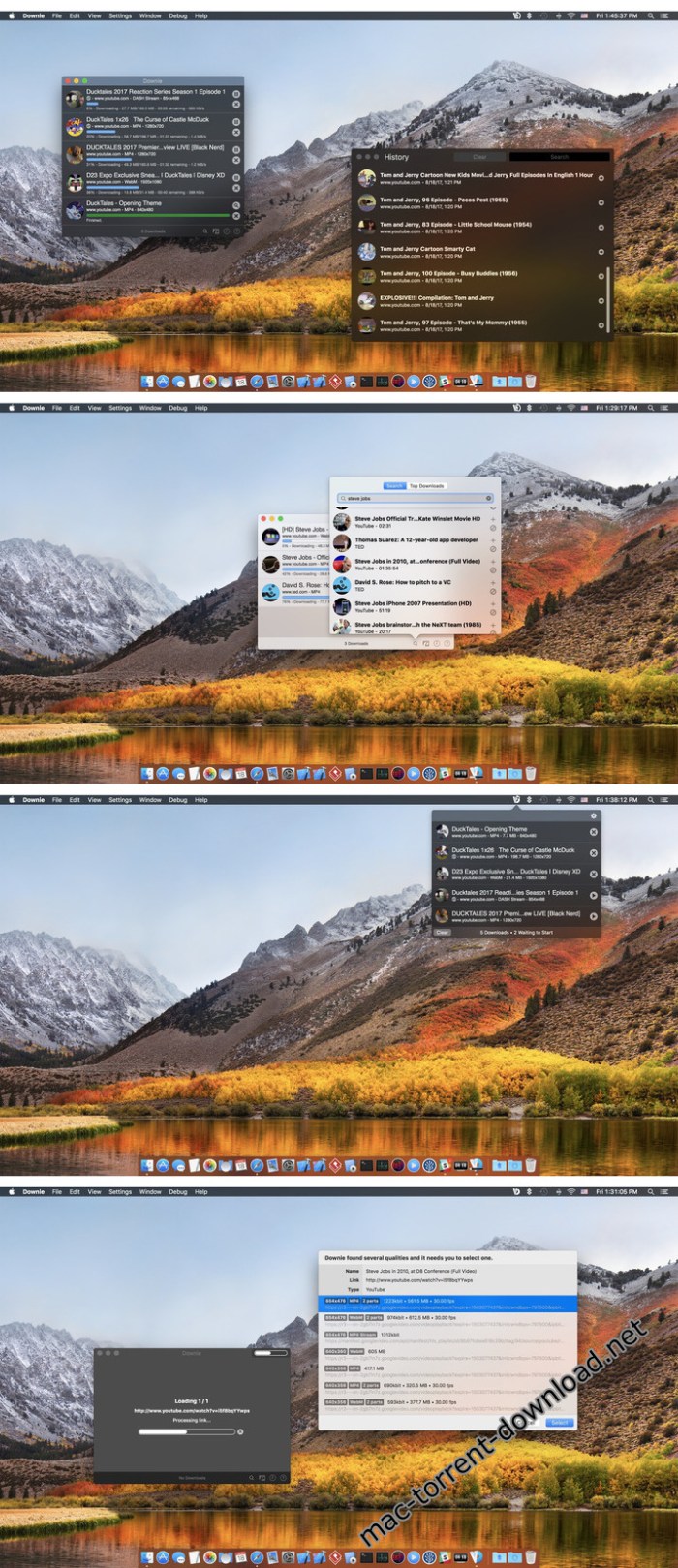
Screenshots

%RATINGS_IMAGES% (%RATINGS_USERS% votes, average: %RATINGS_AVERAGE% out of %RATINGS_MAX%)
You need to be a registered member to rate this.