Category Archives: Mac os

graphisoft archicad 22 build 4023

Archicad 22 box icon
Name GRAPHISOFT ARCHICAD 22 Build 4023 macOS.zip
Size 2.21 GB
Created on 2018-12-01 09:31:33
Hash acb891ba9af66e51a6bd11f530f131aad40fd191
Files GRAPHISOFT ARCHICAD 22 Build 4023 macOS.zip (2.21 GB)

Download

GRAPHISOFT ARCHICAD 22 Build 4023 macOS

ARCHICAD 22 delivers design tool improvements and introduces enhanced design workflow processes. These represent significant performance improvements and productivity enhancements to its core design processes as well as to multidisciplinary collaborative workflows.

Facade Design

ARCHICAD’s remastered Façade Design workflow enables architects to design, develop and detail hierarchical curtain wall systems with great freedom using modular patterns. The design happens with a natural graphical input in the most natural design environment in 3D or 2D elevations, while ARCHICAD ensures the curtain wall system is structurally correct and adheres to local requirements for documenting and listing.

Faster & smoother 2D navigation

ARCHICAD 22 introduces significant performance improvements, focusing on a smooth and truly responsive 2D panning and zooming navigation experience for projects of any size.

Parametric Custom Profiles

ARCHICAD 22’s Parametric Custom Profiles combines the power of parametric design with the freedom of graphical profile creation.

Expression Based Properties

ARCHICAD 22 allows you to use logical expressions to derive new properties and property values that depend on the element’s own parameters. This new function greatly enriches the information — or “I” component — of BIM. Its automatic workflow lets you define any calculation rule as an element property value and update it automatically, without time-consuming and error-prone manual data entry.

Productivity and Workflow Enhancements

ARCHICAD 22 brings several productivity improvements, providing easier and more intuitive building design, faster and more precise construction documentation, more accurate schedules and cost estimation.

Recommended Operating Systems:
  • macOS 10.13 High Sierra
  • macOS 10.12 Sierra
Compatible, but not tested Operating Systems:
  • Mac OS X 10.11 El Capitan

What’s New in GRAPHISOFT ARCHICAD 22 Build 4023

  • Release notes not available at the time of this post.

%RATINGS_IMAGES% (%RATINGS_USERS% votes, average: %RATINGS_AVERAGE% out of %RATINGS_MAX%)
You need to be a registered member to rate this.


keepvid music 8 2.7 1

Name KeepVid Music 8 2 7 1 TNT.zip
Size 42.11 MB
Created on 2018-12-01 22:19:09
Hash b5a76c195b4c5f9223836ceeaafd96108228a181
Files KeepVid Music 8 2 7 1 TNT.zip (42.11 MB)

Download

KeepVid Music 8.2.7.1

KeepVid Music frees your music

The KeepVid Music can easily download videos from YouTube, apart from downloading it can record, transfer, manage, play and share your music with one click of your mouse. Discovering new music is exciting. Figuring out how to download new music is a headache. That is where KeepVid Music comes in. With KeepVid Music you can easily download, record, transfer, manage, play and share music no matter where you find it. Your music, liberated.

Features:

USE ONLINE MUSIC AS YOUR PERSONAL MUSIC SOURCE
  • Download MP3s directly from YouTube.
  • Download music from 10,000+ music and video sites! Facebook, Spotify, SoundCloud, MTV, Vevo, Dailymotion, Vimeo, and the list goes on!
RECORD SONGS AND PLAYLISTS
  • Capture any song or playlist that you find on the Internet.
  • KeepVid Music intelligently filters out any ads and even splits the tracks automatically.
  • Play it, hit “RECORD” and it’s yours.
DISCOVER MUSIC & PLAYLISTS

KeepVid Music provides extensive music collections for you to download from

  • 300,000+ Songs
  • 35,000+ Albums
  • Top 100+ Charts
  • 1,000+ Refined Playlists

Discover, save, and share the music you love.

TRANSFER MUSIC WITHOUT DEVICE LIMITATION

Transfer your iTunes media files (Music, Playlists, Movie, Podcasts, TV Shows, iTunes U and more) without limits.
a. iPhone/iPod/iPad ← → iTunes.
b. iPhone/iPod/iPad/Android ← → PC/Mac.
c. Android ← → iTunes.
KeepVid Music automatically converts almost any music file to a format supported by your device and iTunes. Compatibility is never an issue.

ORGANIZE YOUR ENTIRE MUSIC LIBRARY

  • KeepVid Music analyzes your music library and…
  • Tags your music
  • Updates the cover art
  • Removes duplicates
  • Removes missing or broken tracks.

Compatibility: OS X 10.7 or later

Web Site: Compatibility: OS X 10.7 or later

What’s New in KeepVid Music 8.2.7.1

  • Release notes not available at the time of this post.

%RATINGS_IMAGES% (%RATINGS_USERS% votes, average: %RATINGS_AVERAGE% out of %RATINGS_MAX%)
You need to be a registered member to rate this.
macx dvd ripper pro 6.1.1.20181114

Name MacX DVD Ripper Pro 6 1 1 20181114 TNT.zip
Size 55.90 MB
Created on 2018-12-01 22:19:32
Hash de384d86dc2a28c0326d1cbf029c67aa7e2ceb84
Files MacX DVD Ripper Pro 6 1 1 20181114 TNT.zip (55.90 MB)

Download

MacX DVD Ripper Pro 6.1.1 (20181114)

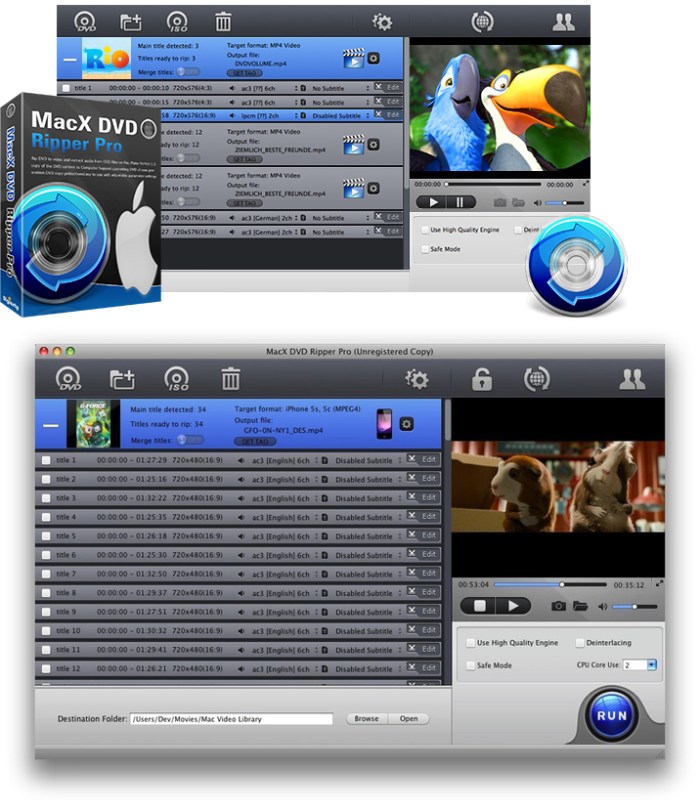
Best DVD ripper for Mac users to rip both homemade and commercial DVDs to any format at NO.1 fast speed (5 min only to rip a full DVD) and original quality. The first and only tool to support all knotty DVDs (new DVD, 99-title DVD, damaged & unplayable DVD) and rip DVDs/ISO images in all sorts of formats, including DVD to MP4, H.264, MOV, FLV, MPEG4, AVI, QT, MP3, etc.

With 350+ preset profiles, the DVD ripper makes it hassle-free to convert DVDs for playback on iTunes, QuickTime, Apple iPhone iPad, Android, PS4, TV, etc. You can also clone DVD to ISO image at 1:1 ratio and copy DVD title to MPEG2 and MKV with all videos, audios and subtitles. Digitize your DVDs to protect them from scratch or damage and enjoy them anywhere anytime.

Compatibility: OS X 10.8 or later 64bit

Web Site: http://www.winxdvd.com/

What’s New in MacX DVD Ripper Pro 6.1.1 (20181114)

  • Release notes not available at the time of this post.

Screenshots

%RATINGS_IMAGES% (%RATINGS_USERS% votes, average: %RATINGS_AVERAGE% out of %RATINGS_MAX%)
You need to be a registered member to rate this.

pdf checkpoint 1.8 8

Name PDF Checkpoint 1 8 8 TNT.zip
Size 7.47 MB
Created on 2018-12-01 22:19:52
Hash c6f73b932fc241865ba49e59e55bef566904a576
Files PDF Checkpoint 1 8 8 TNT.zip (7.47 MB)

Download

PDF Checkpoint 1.8.8

PDF Checkpoint automates PDF preflighting and conversion with powerful batch processing.

Preflight:

Quickly preflight PDF files and get detailed info on document fonts, color spaces, images and other attributes.

Export as images:

Batch export PDF files into TIFF, JPEG and other formats. Specify desired color (RGB, CMYK, or grayscale), resolution and scale.

Convert colors and optimize images:

Convert PDF to desired color profile (e.g. convert RGB file to CMYK). Downsample and compress images to reduce file size.

Route files by preflight results:

PDF Checkpoint can automatically move or copy PDF files to success and error folders after preflighting, and generate preflight report

Split:

Automatically split multiple PDF files into single page PDF documents.

Compatibility: OS X 10.8 or later 64 bit

Mac App Store: https://itunes.apple.com/app/pdf-checkpoint/id793149951?mt=12

What’s New in PDF Checkpoint 1.8.8

  • Release notes not available at the time of this post.

%RATINGS_IMAGES% (%RATINGS_USERS% votes, average: %RATINGS_AVERAGE% out of %RATINGS_MAX%)
You need to be a registered member to rate this.

itube studio 7 3.0 1

Utilities Video

Name iTube Studio 7 3 0 1 TNT.zip
Size 75.98 MB
Created on 2018-12-01 08:31:48
Hash 3547645ec160321632fcf8bed7c7e1586f7e1c29
Files iTube Studio 7 3 0 1 TNT.zip (75.98 MB)

Download

iTube Studio 7.3.0.1

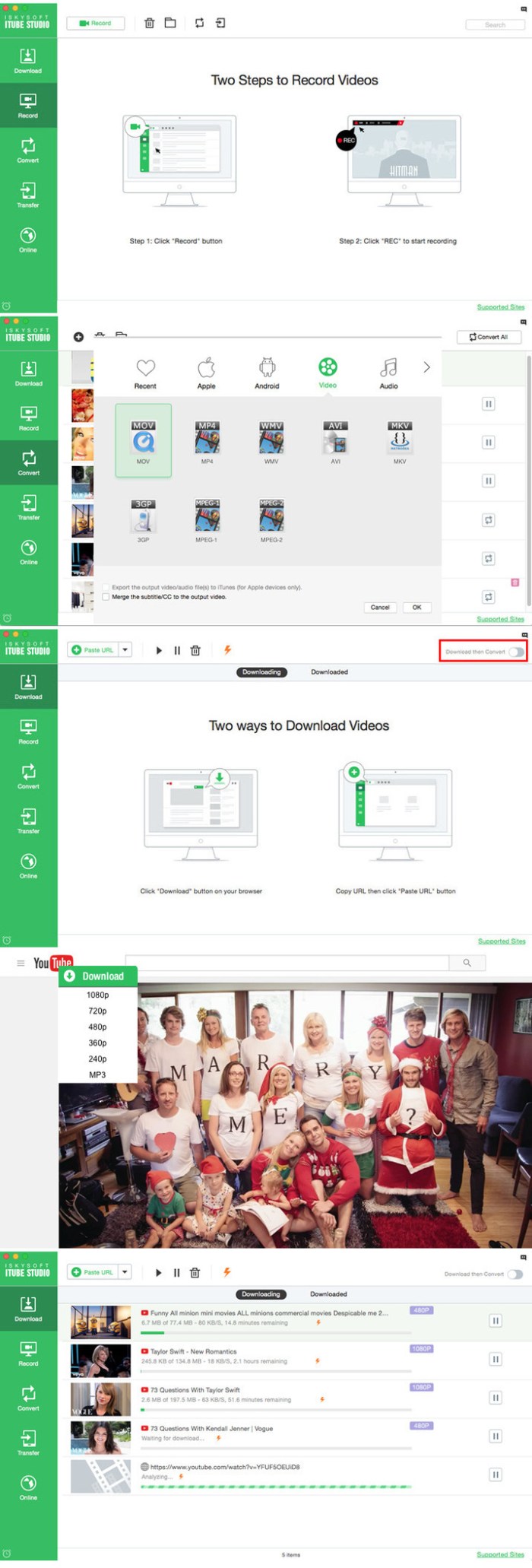
Download Video in Full HD, 4K, 1440p, 1080p, etc. 3X faster speed to download videos from YouTube, Facebook, Vimeo, Amazon and other video-sharing sites on your Mac (macOS High Sierra, Sierra, El Capitan, Yosemite and Mavericks included). iTube Studio Video Downloader even provides you with a Private Mode to protect your downloaded video info with a designated folder, which could only be opened by yourself once the password is set.

  • Download Video from 10,000 Video Sites
  • Private Mode to Download Video in Secret
  • Record Any Online Video from Any Site
  • Ultimate Playlist Download in Batch
  • Smart Download Then Convert Mode
  • Turbo Mode at 3X Faster Download Speed
  • Compatibility: OS X 10.8 or later 64bit

Compatibility: OS X 10.8 or later 64bit

Web Site: https://itube.aimersoft.com

What’s New in iTube Studio 7.3.0.1

  • Release notes not available at the time of this post.

Screenshots

Utilities, Video

By

%RATINGS_IMAGES% (%RATINGS_USERS% votes, average: %RATINGS_AVERAGE% out of %RATINGS_MAX%)
You need to be a registered member to rate this.

snipper app 1.3.1

Name Snipper App 1 3 1 TNT.zip
Size 14.38 MB
Created on 2018-12-01 08:31:57
Hash fd44844a1bcdfe980dd13f955afe2c42fe9115ac
Files Snipper App 1 3 1 TNT.zip (14.38 MB)

Download

Snipper App 1.3.1

Meet Snipper App- a native snippets manager, built with Swift4 for MacOS exclusively, aiming to be a single tool for saving your day to day working notes, snippets of code, and just a good helper in the developer’s life.

*** Main Features ***

  • editor with the syntax highlighting
  • multiple programming languages are supported
  • markdown support
  • different storage types
  • light and dark themes are included
  • import your snippets from files

*** Storages ***

Snipper designed in a way to support multiple storages, and the supported storage types will be extended in the next versions.

The v1 provides two storage types:
  • Local storage
  • iCloud storage

Local storage is designed to store your snippets only locally.

With the iCloud storage, your snippets will be stored in the cloud by your Apple ID, and it allows to sync the user’s data between multiple apps on the different computers. It’s really handy when you want to share your snippets between the working machine, and your own at the same time.

iCloud storage uses a private database. Only the user can access this data through a device authenticated with their iCloud account.

Snipper is designed and implemented as the offline first application, so the iCloud storage doesn’t require a constant internet connection when your work with it.

*** Editor ***

The editor is built in a way to fit developer needs.

Besides syntax highlighting and full markdown support with the preview mode, it provides the next features:

  • Showing of invisible characters
  • Showing of line numbers
  • Tab size customization
  • Insertion of spaces instead of tabs
  • Font customization

Compatibility: macOS 10.13 or later 64-bit

Web Site: https://snipper.app
Mac App Store: https://itunes.apple.com/app/snipper-app/id1432148596?mt=12

What’s New in Snipper App 1.3.1

  • improved performance of iCloud syncing

%RATINGS_IMAGES% (%RATINGS_USERS% votes, average: %RATINGS_AVERAGE% out of %RATINGS_MAX%)
You need to be a registered member to rate this.
blocs 2.6 5

Name Blocs 2.6.5.zip
Size 33.98 MB
Created on 2018-12-01 00:23:07
Hash f0ebe713231d2696057d991097e132ee970ba15a
Files Blocs 2.6.5.zip (33.98 MB)

Download

Blocs 2.6.5 macOS

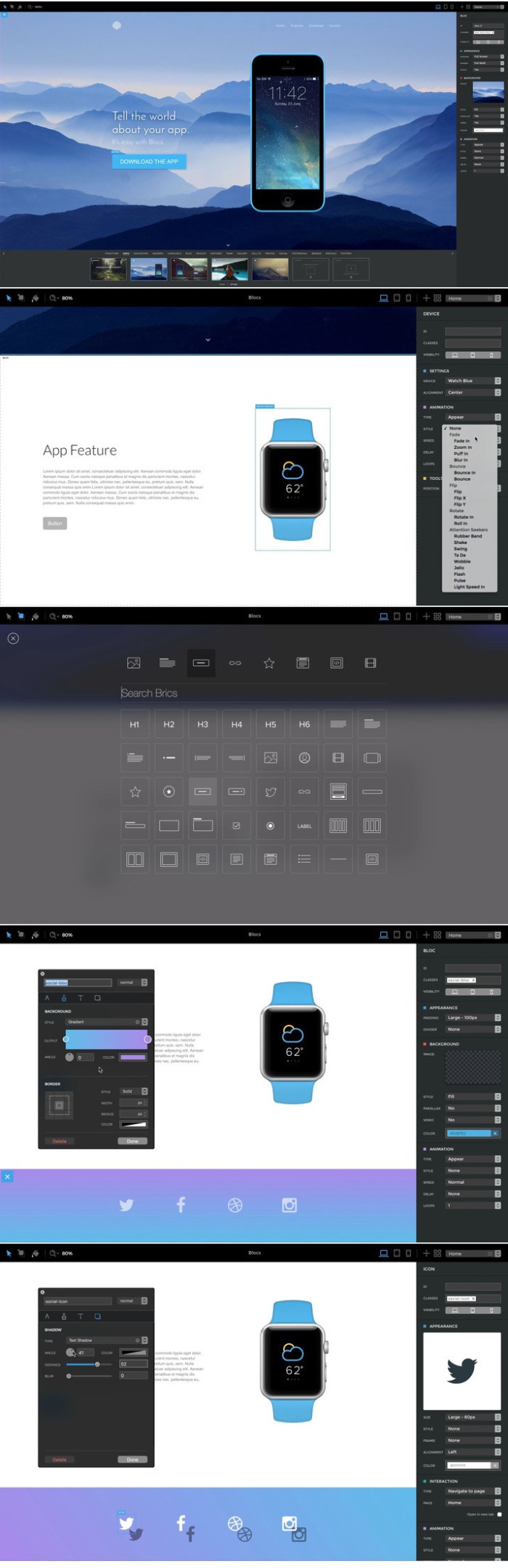
Blocs for Mac is a fast, easy to use and powerful visual web design tool that lets you create beautiful and modern websites without the need to write code. Cleverly designed to accommodate complete beginners or those familiar with web design. You will love building with Blocs.

DESIGNED FOR SIMPLICITY

Building with Blocs is simple and fun. A clean, intuitive interface makes creating sites unbelievably quick. Simply click, select, edit and enjoy stacking blocks to build your website. Its ease of use will make you feel right at home.

LET YOUR CREATIVITY GROW

Behind the simplified interface of Blocs lie some of its more advanced editing features. When you are ready to get more creative with your designs, Blocs will grow with you. You set the pace.

NAVIGATE PAGES THE EASY WAY

Working with websites that contain many pages can be time consuming. With Blocs it’s really straightforward. The new Navigator feature gives you a stunning, searchable overview of your entire project, meaning you can access any page in seconds.

DO MORE IN LESS TIME

Paint mode, global swatches, auto text colouring and one click animations are just a few of the playful, time saving features in Blocs. You’ll be amazed how quickly you can create a website.

ALWAYS LOOKING GOOD

Blocs gives you all the features you need to effortlessly optimise your websites for desktop, tablet and mobile. This ensures your visitors get the best viewing experience no matter what device they use.

  • Simplicity Blocs subtracts the need to write code meaning everyone can build websites.
  • Quality Blocs generates good quality organized code with no clutter or inline styles.
  • Clarity Blocs delivers a new level of clarity and focus helping you build websites faster.
  • Intuitive Blocs has many time saving features such as smart swatches and auto type colouring.
  • Fast Blocs really is insanely fast, you can build full webpage layouts in minutes.
  • No Coding You don’t need to understand or use any coding to build a website with Blocs.
  • Bootstrap 3 Blocs builds using Bootstrap 3 one of the most reliable and proven frameworks.
  • Responsive Because Blocs builds following page flow, sites are responsive with no extra work.
  • Web Fonts Blocs has a curated list of Google Web Fonts that you can easy use in your sites.
  • Unlimited Websites Since Blocs is an actual desktop app you can build as many websites as you like.
  • PreMade Blocs Blocs comes with many premade layouts, so building and prototyping is super fast.
  • Retina Support Blocs has retina support, so you can enjoy every pixel on your Macs retina screen.
  • Easy to Use Blocs is one of the easiest website building tools, anyone can build with Blocs.
  • Beautiful Not only is Blocs a great tool to use, it’s also one you can enjoy to look at.
  • Works Offline Unlike so many other website building tools Blocs actually works offline.
  • Beginner Blocs is easy to understand and use. Its simplicity will encourage you to take your first steps.
  • Designer Blocs lets you easily build and style great looking websites without the need to write a single line of code.
  • Developer Blocs generates good quality, clean code. This makes it the perfect springboard to get the basics in place, fast.

Requirements: Intel, 64-bit processor OS X 10.10 or later
Web Site: http://blocsapp.com/

What’s New in Blocs 2.6.5

Improved:
  • Added in app upgrade button for Blocs 3 (App prefs).
  • Updated in app documentation links to point to archive Blocs 2 versions.

Screenshots

%RATINGS_IMAGES% (%RATINGS_USERS% votes, average: %RATINGS_AVERAGE% out of %RATINGS_MAX%)
You need to be a registered member to rate this.

fabfilter pro q 2 v2.12 win osx

Name FabFilter.Pro-Q.2.v2.12.MacOSX.Incl.Patched.and.Keygen-R2R.zip
Size 14.32 MB
Created on 2018-12-01 02:39:21
Hash 6eb0c958ecc889863826e31ad29a9e7d07d1a31c
Files FabFilter.Pro-Q.2.v2.12.MacOSX.Incl.Patched.and.Keygen-R2R.zip (14.32 MB)

Download

FabFilter Pro-Q 2 v2.12 WiN OSX Incl Patched and Keygen-R2R

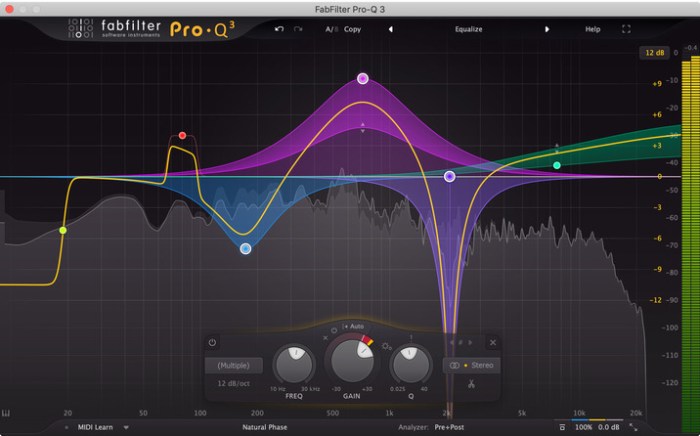
Pro-Q 2 offers everything that a demanding engineer could wish for: top quality linear phase operation in addition to the zero latency and unique Natural Phase modes, Mid/Side processing, variable stereo placement of EQ bands, an intelligent solo feature, optional Auto Gain and a built-in, fully customizable spectrum analyzer.

Effortlessly sculpt your sound

FabFilter Pro-Q 2 is designed to help you achieve your sound in the quickest way possible. Via the large interactive EQ display, you can create bands where you need them and select and edit multiple bands at once. Unique features like Spectrum Grab, Full Screen mode and EQ Match will speed up your workflow even more. Try it yourself!

FabFilter goodies

Of course, you also get all the usual FabFilter goodies: perfectly tuned knobs, interactive MIDI Learn, undo/redo and A/B switch, Smart Parameter Interpolation for smooth parameter transitions, an extensive help file with interactive help hints, sample-accurate automation, advanced optimization and much more.

Key Features

  • Highest possible sound quality
  • Gorgeous Retina interface with large interactive EQ display, multiband selection and editing for maximum ease and efficiency
  • Up to 24 EQ bands
  • Operates in zero latency mode, linear phase mode with adjustable latency or the unique Natural Phase mode
  • Universal filter slope support for all filter types, up to 96 dB/oct
  • Spectrum Grab: just grab and adjust a peak in the realtime spectrum analyzer right away!
  • Optional GainQ interaction
  • Different interface sizes and additional Full Screen mode
  • EQ Match feature to automatically match the spectrum of another track via the sidechain input
  • Builtin spectrum analyzer with PreEQ, PostEQ and SC modes, adjustable range, speed, resolution, tilt and freeze

For your collection and old project compatibility ?

Requirements

Windows
  • 64bit: Windows 10, 8, 7 or Vista
  • 32bit: Windows 10, 8, 7, Vista or XP
  • VST 2/3 host or Pro Tools
Mac OS X
  • OS X 10.8 or higher
  • AU or VST 2/3 host or Pro Tools
  • Intel processor
Plug-in formats:

All FabFilter plug-ins are available in VST, VST3, Audio Units, AAX Native and AudioSuite formats (all both 64-bit and 32-bit).

Web Site: https://www.fabfilter.com/

What’s New in FabFilter Pro-Q 2 v2.12

  • Release notes not available at the time of this post.

Screenshots

%RATINGS_IMAGES% (%RATINGS_USERS% votes, average: %RATINGS_AVERAGE% out of %RATINGS_MAX%)
You need to be a registered member to rate this.
w a production instascale v1.0.2

Name W A Production InstaScale v1 0 2 WiN OSX RETAiL-SYNTHiC4TE.zip
Size 47.26 MB
Created on 2018-12-01 02:39:13
Hash 6f4e90339cbd47325608c7a3732114b4fbc6f7c3
Files W A Production InstaScale v1 0 2 WiN OSX RETAiL-SYNTHiC4TE.zip (47.26 MB)

Download

W.A.Production InstaScale v1.0.2 OSX RETAiL-SYNTHiC4TE

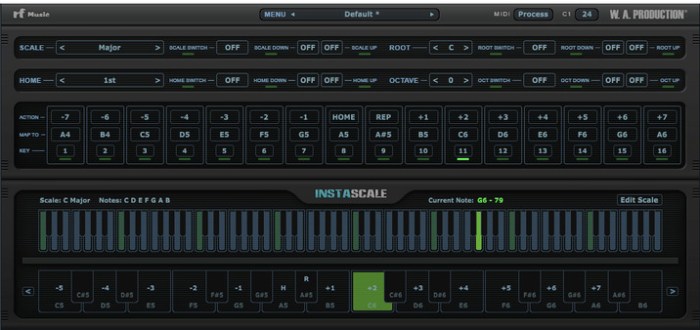
Instascale is a newly invented, scale oriented instrument with only 16 keys to play with. But wait, is that enough? Turns out it’s more than enough. Unlike the standard keyboard instruments where each key can only play a single note, Instascale has a set of smart keys, each one capable of playing different notes. The new note will be based on the given scale, last note’s position and the action of the key assigned to it.

Instascale is available as a MIDI processor plugin that can be used in any DAW that supports VST instrument plugins (with MIDI routing) or AU MIDI effect plugins, given you the freedom to play any instrument you choose without any limitations regarding the sound and hardware.

Requirements

OSX 10.7. and later (32/64 bit)
The plugin might work on older versions too, but it’s not guaranteed.

Compatibility

InstaScale can be used on any software that supports VST plugins with MIDI routing or AU MIDI effect type. But to make sure it’s compatible with yours please try the demo version before you buy (only C Major scale is available in demo version).

Web Site: https://waproduction.com/plugins/view/instascale

What’s New in W.A.Production InstaScale v1.0.2

  • Fix: If the current preset were inside a subfolder ‘Save’ wrongly saved it to the root preset folder.
  • Fix: buttons didn’t circle back when they got to first and last preset.
  • Fix: When loading the project and trying buttons, it started from the beginning instead of the right place in the list.
  • Fix: ‘Save As..’ now pops up in the right subfolder by default.
  • Added: You can now press enter (return) on the rename text editor to save the preset without having to click save. And press Esc to cancel it.
  • Fix: Keyboard focus now only works on rename text editor. So you wont change anything by accidentally hitting a key.

Screenshots

%RATINGS_IMAGES% (%RATINGS_USERS% votes, average: %RATINGS_AVERAGE% out of %RATINGS_MAX%)
You need to be a registered member to rate this.

smultron 11.1 1

Name Smultron 11 1 1 TNT.zip
Size 15.17 MB
Created on 2018-12-01 00:19:15
Hash d145faec33283e05a7342e4a3ed194bfc3264b4a
Files Smultron 11 1 1 TNT.zip (15.17 MB)

Download

Smultron 11.1.1

Smultron 10 is an elegant and powerful text editor that is easy to use. You can use Smultron 10 to create or edit any text document. Everything from a web page, a note or a script to any single piece of text or code. Smultron 10 is very easy to use, it is fast and uses powerful technologies like auto save. It helps you to do what you want to do without getting in your way. So you can save time and get things done. Use Smultron 10 for all your text needs..

  • Smultron 10 is designed to be intuitive and easy to use
  • Edit your text with many helpful and powerful tools
  • All your documents are easily accessible
  • Use Smultron 10 in your own language as it is translated into many languages
  • Store your documents in iCloud and access them on all your Macs
  • It has all the features you want when you need them, such as syntax colors for over 130 code languages, regular expressions, commands, text snippets, text folding, line numbers, document comparison and many, many more

The new Smultron 10 has many new features and improvements:

  • Folders – easy access to all documents within a folder
  • Dark mode
  • Faster
  • New syntax support for Ansible, Gravity, Idris, and TypeScript
  • Improved accessibility, preview, tabs, and syntax coloring
  • Optimized for macOS 10.13 High Sierra

Compatibility: macOS 10.12 or later 64-bit

Web Site: https://www.peterborgapps.com/smultron/
Mac App Store: https://itunes.apple.com/app/smultron-10-text-editor/id1263938639?mt=12

What’s New in Smultron 11.1.1

  • Release notes not available at the time of this post.

%RATINGS_IMAGES% (%RATINGS_USERS% votes, average: %RATINGS_AVERAGE% out of %RATINGS_MAX%)
You need to be a registered member to rate this.
lingon x 6 5 1

Name Lingon X 6 5 1 TNT.zip
Size 13.24 MB
Created on 2018-12-01 00:22:30
Hash 0c4cbcd87e98a71cb946492816f8c5b227d5f60d
Files Lingon X 6 5 1 TNT.zip (13.24 MB)

Download

Lingon X 6.5.1

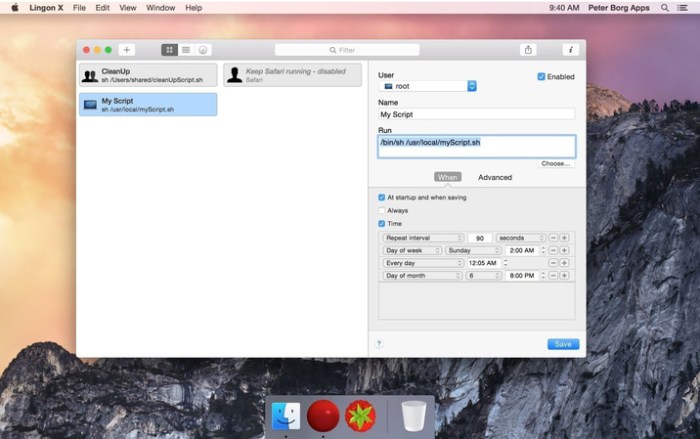
Lingon X 5 is based on the great Lingon 3 and extends it with new features like running jobs as root and at multiple dates. It is now even easier to use yet much more powerful. Version X 5 is a paid upgrade.

Features
  • Start an app, a script or run a command automatically whenever you want it to. You can schedule it to run at a specific times, regularly or when something special happens.
  • It can also make sure that an app or a script automatically restarts if it crashes. Lingon X can do all this for you and much more.
  • Lets you run things automatically by modifying configuration files for the built-in system function called launchd so the system handles running the jobs so you don’t need to have Lingon open after you have saved your job.
  • Released outside Mac App Store to be able to include requested features.
  • Still available in Mac App Store for those who still use OS X 10.7 Lion or prefer the comfort and convenience of the Mac App Store.
  • Earlier versions of Lingon X are still available to work with macOS from 10.8. And a license bought today can be used with both Lingon X 5 and Lingon X 4.

Compatibility: macOS 10.13 or later 64-bit

Web Site: https://www.peterborgapps.com/lingon/

What’s New in Lingon X 6.5.1

  • Release notes not available at the time of this post.

Screenshots

%RATINGS_IMAGES% (%RATINGS_USERS% votes, average: %RATINGS_AVERAGE% out of %RATINGS_MAX%)
You need to be a registered member to rate this.

maccleaner pro 1.4

Name MacCleaner PRO 1 4 TNT.zip
Size 77.88 MB
Created on 2018-12-01 00:22:23
Hash 87c7a66578d29708b97579f52883cb7f13482fdd
Files MacCleaner PRO 1 4 TNT.zip (77.88 MB)

Download

MacCleaner PRO 1.4

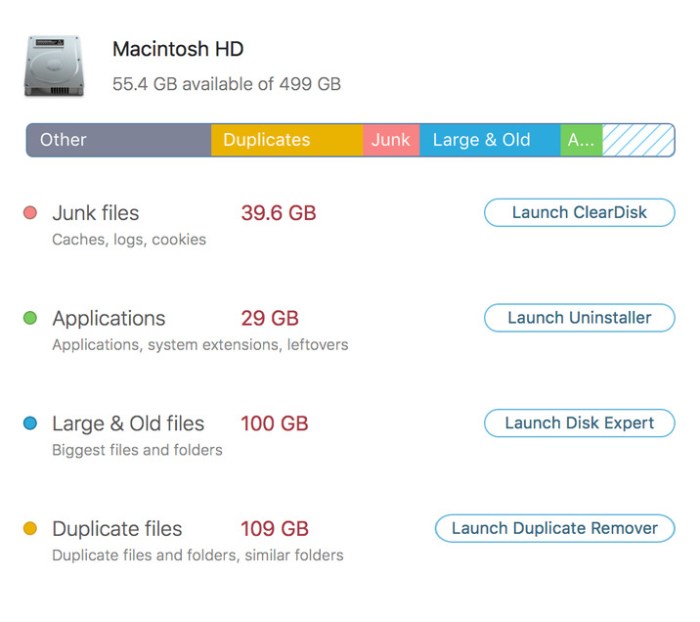
Clean up your Mac and optimize its performance. Speed up a slow Mac, free up disk space, remove junk files, prevent the “Startup Disk Full” error.

App Uninstaller

Uninstall apps completely. Manage system extensions.

Memory Cleaner

Optimize memory usage. Make your Mac run faster.

Funter

Find and show hidden files. Hide / unhide files.

Duplicate File Remover

Organize duplicates.
Remove duplicates in bulk.

Disk Expert

Analyze disk space usage. Find the biggest folders.

ClearDisk

Remove junk files.
Clean up your Mac.

Why do I need MacCleaner Pro?

Your Mac needs to be cleared of junk files periodically if you wish to keep it working as fast as a new one. MacCleaner Pro provides a set of cleanup apps for that, which we call “must haves” for every self-respecting Mac owner.

How to use MacCleaner Pro?

Using MacCleaner Pro is as easy as ABC. Just launch the application and you will see a list of all the tools with a details description of what each app can do for you. Open each app and follow simple steps to start the cleaning process. Whenever you have any questions, just visit the Support page or directly contact the Support team. We are always happy to help you.

What are benefits of MacCleaner Pro?

The best thing about MacCleaner Pro is that the bundle contains all the necessary tools for a safe and deep hard drive cleanup. You should use them to always keep your Mac running properly, and thus prolong its’ life.

My Mac is slow. Can MacCleaner Pro help me?

Despite freeing the disk space, MacCleaner Pro thinks about your RAM memory as well. It can work in the background and monitor the memory usage by apps. When your Mac’s memory is filled up, it will clear inactive RAM and make your Mac run faste

Compatibility: OS X 10.10 or later 64-bit

Web Site: https://nektony.com/mac-cleaner-pro

What’s New in MacCleaner PRO 1.4

  • Release notes not available at the time of this post.

Screenshots

%RATINGS_IMAGES% (%RATINGS_USERS% votes, average: %RATINGS_AVERAGE% out of %RATINGS_MAX%)
You need to be a registered member to rate this.
1blocker 1.4 4

Name 1Blocker 1 4 4 MAS TNT.zip
Size 13.36 MB
Created on 2018-12-01 00:23:55
Hash 448a405ca949986441dd32a72b0aa30ba0b6cc13
Files 1Blocker 1 4 4 MAS TNT.zip (13.36 MB)

Download

1Blocker 1.4.4

The most powerful and the fastest content blocker, used by over a million people on iOS and Mac. Essential app for anyone who uses Safari.

Unlike other adblock apps, we can’t see what sites you visit and track you. That’s because 1Blocker is a native Safari content blocker, not a shady VPN server. We are supported entirely by our users, there’s no “acceptable ads” program.

LOVED BY CUSTOMERS

1Blocker has been featured in The New York Times, TechCrunch, and many more.

  • “I like 1Blocker enough that I’ve stopped thinking about blockers.” John Gruber, Daring Fireball.
  • “Switched from Ghostery to 1Blocker for macOS Safari, which uses the fast new contentblocking API, and it seems noticeably faster.” Marco Arment.
  • “Does exactly what you want it to do, and the customer support is fantastic. Highly recommended ad blocker.”

WHY DO YOU NEED 1BLOCKER

– Block annoying ads (adblock)-

Ads have become a total disaster on websites by ruining the browsing experience. No one likes to see ads that pop over the entire screen.

– Save battery, data and time-

Independent tests by Wirecutter, NY Times, and BrooksReview confirm that 1Blocker cuts data loaded by sites on average by over 50%.

– Protect yourself online-

Many corporations track your behavior and what sites you visit. Online ads are not safe and may serve you malware even on major sites like Forbes and Yahoo.

– Improve your productivity-

Besides ads, webpages often contain distracting elements (like “You Might Also Like” and subscription boxes) that disturb your work flow and productivity.

FEATURES

1Blocker comes with almost 50 000 built-in blocker rules. It is very configurable.

  • Block ads, trackers and other annoyances. Make browsing over 2x faster.
  • Tap to hide any annoying content with our visual editor.
  • Support sites you love by whitelisting them.
  • Create your own custom blocker rules (hide elements, block sites and cookies).
  • All your settings are synced over iCloud.

1Blocker is also available for iOS in the App Store.

HOW IS 1BLOCKER BETTER THAN OTHERS

We believe 1Blocker is better than anything else available. Here is why:

  • We don’t make deals with advertisers.
  • We don’t and technically can’t track our users.
  • We have no customer data to sell.
  • We are bootstrapped and selffunded. No investors. Made by a tiny twoperson team.
EFFICIENT BLOCKING

While most other adblock apps block content by filtering elements of an already downloaded page, 1Blocker uses native Safari content blocker technology (API) to tell Safari in advance what should be blocked. This vastly improves efficiency, doesn’t slow down Safari, and saves battery life.

Compatibility: OS X 10.11 or later 64-bit

Mac App Store: https://itunes.apple.com/app/1blocker/id1107421413?mt=12

What’s New in 1Blocker 1.4.4

This version contains an updated blocker list with fixes and improvements for issues on some websites you’ve reported. Make sure to manually launch the app after updating to the latest version to have new rules applied in Safari.

%RATINGS_IMAGES% (%RATINGS_USERS% votes, average: %RATINGS_AVERAGE% out of %RATINGS_MAX%)
You need to be a registered member to rate this.

borisfx mocha pro 2019 v6.0.0 1882 plugin for adobe

Graphics & Design Video

Name MochaPro2019AdobeMac.zip
Size 113.4 MB
Created on 2018-12-01 00:21:49
Hash 334f4821abcf8992fb33c82a081a8a9a0f939e3a
Files MochaPro2019AdobeMac.zip (113.4 MB)

Download

BorisFx Mocha Pro 2019 v6.0.0.1882 Plugin for Adobe macOS

Say hello to MOCHA PRO 2019! Mocha Pro is the Academy Award-winning planar tracking tool for visual effects and post-production. With a proven record on the world’s most notable film and television projects, Mocha is valued by effects artists and editors for its unique ability to reduce the time-consuming keyframing associated with high-end VFX and finishing.

Mocha Pro 2019 features GPU-accelerated planar tracking and object removal, advanced rotoscoping tools, stabilization, 3D camera solver, stereo 360/VR support, and more

NEW IN MOCHA PRO 2019

  • New workspaces with Mocha Essentials interface
  • GPUaccelerated object removal delivers faster rendering
  • New spline tools for faster masking: Magnetic Spline with edge snapping, Freehand Spline, and Geometric Shape Tools
  • Retina/High DPI monitor resolution support
  • Awardwinning 360/VR tools now included with Mocha Pro 2019

Web Site: https://borisfx.com/products/mocha/

What’s New in BorisFx Mocha Pro 2019 v6.0.0.1882

  • Release notes not available at the time of this post.

Graphics & Design, Video

By

%RATINGS_IMAGES% (%RATINGS_USERS% votes, average: %RATINGS_AVERAGE% out of %RATINGS_MAX%)
You need to be a registered member to rate this.

planetside software terragen professional 4 3.16

Graphics & Design Video

Name Planetside.Software.Terragen.Professional.v4.3.16.MACOSX-AMPED.zip
Size 40.09 MB
Created on 2018-12-01 00:21:41
Hash e5096be22cc956584380310ad4c48cf5aed1eadf
Files Planetside.Software.Terragen.Professional.v4.3.16.MACOSX-AMPED.zip (40.09 MB)

Download

Planetside Software Terragen Professional 4.3.16 macOS

Terragen is a powerful solution for rendering and animating realistic natural environments. Create entire worlds from your imagination, or import real world terrain datasets and use Terragen 4 to create the most realistic visualisations possible.

You control the weather, landscape, rivers, lakes and oceans, suns, moons and stars. With Terragen 3 you have complete control over the shader networks used for terrains, textures, micropolygon displacements, clouds and object distributions. You can reorganise the planetary shading pipeline to suit your goals. Place grass and trees wherever you want, as well as other objects in native TGO or OBJ format that you have modeled in third party software.

Here are some key features of “Terragen”:
  • Cuttingedge adaptive subdivision renderer.
  • Modular, pluginbased architecture.
  • Render entire planets, sweeping vistas, tiny rock gardens, or anything in between.
  • Import 3D objects for rendering. Export high resolution objects.
  • Render millions of boulders or trees using “instancing”.
  • Add multiple heightfields to your scene. Use procedural terrains that can span an entire planet.
  • Apply almost “infinite” fractal detail to terrain and other objects.
  • Overhanging terrain using procedural displacements, imagebased displacements, or imported geometry.
  • Volumetric clouds or fast “2.5D” clouds.
  • Production quality antialiasing and motion blur.
  • Node graph editor for ultimate control over shaders and textures.
Compatibility:
  • OS X 10.8 or newer
  • Intel only (PPC not supported)
  • Minimum 4GB of RAM 8GB or greater recommended
  • Minimum 2Ghz CPU Intel Dual Core or better recommended

Language : English

Web Site: http://planetside.co.uk/whats-new-in-terragen-4/

What’s New in Terragen Professional 4.3.16

  • Release notes not available at the time of this post.

Graphics & Design, Video

By

%RATINGS_IMAGES% (%RATINGS_USERS% votes, average: %RATINGS_AVERAGE% out of %RATINGS_MAX%)
You need to be a registered member to rate this.

alfred 3 powerpack 3.7 1.943b

Name Alfred 3 Powerpack 3 7 1 943 b TNT.zip
Size 5.53 MB
Created on 2018-12-01 00:23:26
Hash b4f7f45737b6aafe26384ef4e4dbb374deb16f48
Files Alfred 3 Powerpack 3 7 1 943 b TNT.zip (5.53 MB)

Download

Alfred 3 Powerpack 3.7.1 (943)b

Alfred is an award-winning app for Mac OS X which boosts your efficiency with hotkeys, keywords, text expansion and more. Search your Mac and the web, and be more productive with custom actions to control your Mac.

Search and Browse

Launch applications and find files on your Mac or on the web. Alfred learns how you use your Mac and prioritises results.

Save countless hours by using hotkeys, keywords and customising how you want to search your Mac and activity history.

Jump in and browse, preview files and take action on them without lifting your fingers off the keyboard.

Type Less, Say More

With Alfred’s Clipboard History and Snippets features, there’s no need to type the same URLs or responses over and over.

Use the Clipboard History to locate any text, image or file you copied earlier and paste it again.

Create your own snippets and type a short abbreviation to auto-expand them into a full text snippet, saving yourself hours of typing in the long run!

Extend and Automate

With Alfred’s Powerpack, use immensely powerful workflows to perform tasks more efficiently and cut down on repetitive manual tasks.

Link hotkeys, keywords and actions together to create your own workflows; There’s no need to write a single line of code to create a workflow. Import workflows from the thousands our community of creators have shared.

Control Your Music

You’re the boss. Boost your productivity by controlling your Mac using Alfred’s deep integration with OS X. Swiftly take action on files and contacts, control your music player and dispatch System commands.

Add some fun to your day; Turn your iPhone or iPad into a command centre for your Mac with Alfred Remote for iOS.

Alternatively, take a look at the many workflows for other music services like Spotify.

Alfred Powerpack

Control your Mac with the Powerpack’s incredible features, and enjoy workflows and themes.

Compatibility: macOS 10.9 or later 64-bit
Web Site: http://alfredapp.com/

What’s New in Alfred 3 Powerpack 3.7.1 (943)b

  • Release notes not available at the time of this post.

Screenshots

%RATINGS_IMAGES% (%RATINGS_USERS% votes, average: %RATINGS_AVERAGE% out of %RATINGS_MAX%)
You need to be a registered member to rate this.
cleardisk 2.10.20

Name ClearDisk 2 10 20 TNT.zip
Size 5.75 MB
Created on 2018-12-01 00:22:59
Hash 6c3447411b582f089bc8a9af5a65ef264c171594
Files ClearDisk 2 10 20 TNT.zip (5.75 MB)

Download

ClearDisk 2.10 (20)

ClearDisk lets you get rid of unnecessary files quickly and efficiently because it searches for them in those places where they congregate.

  • Language Resources: ClearDisk will remove unnecessary language resources from OS X and enable you to reclaim several hundred megabytes of disk space.
  • Downloads: ClearDisk helps to clean up the huge space which is being used in this folder by files you have even forgotten about.
  • Caches: ClearDisk cleans items stored in Cache files which eat up disk space.
  • Trash: ClearDisk also clears the Trash. “Empty Trash” – a simple operation, but people tend to toss things into the Trash and rarely remember to empty it periodically.

Perform three simple steps to get the excellent result:

  1. Scan the disk to identify the unnecessary files and display them with short explanation text..
  2. Select files to be deleted.
  3. Remove unnecessary files.

Compatibility: OS X 10.8 or later, 64bit

Web Site: https://nektony.com/clear-disk

What’s New in ClearDisk 2.10 (20)

  • Release notes not available at the time of this post.

%RATINGS_IMAGES% (%RATINGS_USERS% votes, average: %RATINGS_AVERAGE% out of %RATINGS_MAX%)
You need to be a registered member to rate this.

fonepaw iphone data recovery 4 1.0

Name FonePaw iPhone Data Recovery 4 1 0 TNT.zip
Size 43.45 MB
Created on 2018-12-01 00:22:39
Hash 8ea3475315855af2444ae980f628a895c4ea4dfc
Files FonePaw iPhone Data Recovery 4 1 0 TNT.zip (43.45 MB)

Download

FonePaw iPhone Data Recovery 4.1.0

FonePaw iPhone Data Recovery is made for those unexpected incidents which can result in data loss on an iPhone, such as iPhone damaged/lost/stolen, reset, accident deletion, virus attack, jailbreak or even error operation. The lost data can be recovered using several free or paid, but how to choose the best iPhone Data Recovery software for your Mac? Here is a review of FonePaw iPhone Data Recovery. Read and know the features and how to recover deleted files from iPhone using FonePaw program. FonePaw iPhone Data Recovery

Features
  • Directly recover deleted files from iPhone without backup No backup is needed. Just connect your iPhone to the Mac and run this program, you can get back all your deleted, lost data.
  • Recover data from iTunes backup & iCloud backup This practical program can also extract data from unreadable iTunes backup files, which is very helpful when iPhone is stolen/lost.
  • Selectively recovery This tool enables you to preview before recovery and selectively retrieve data, rather than the whole from iTunes backup.
  • Outstanding user experience After launching the program, you can see a well-designed and easy-to-navigate interface. And you can recover what you want with super fast data scan and recovery speed.
  • FonePaw iPhone Data Recovery Usage Connect iPhone to the Mac and Launch FonePaw iPhone Data Recovery Hit “Start Scan” Preview the scan result Click “Recover” and you can recover the files in different formats depending on your selection

Compatibility: OS X 10.9 or later

Web Site: http://www.fonepaw.com/iphone-data-recovery/

What’s New in FonePaw iPhone Data Recovery 4.1.0

  • Release notes not available at the time of this post.

%RATINGS_IMAGES% (%RATINGS_USERS% votes, average: %RATINGS_AVERAGE% out of %RATINGS_MAX%)
You need to be a registered member to rate this.
fonepaw android data recovery 2.3.0

Name FonePaw Android Data Recovery 2 3 0 TNT.zip
Size 35.63 MB
Created on 2018-12-01 00:22:51
Hash 92d21b44591936b1a93067254a36545bf76d66be
Files FonePaw Android Data Recovery 2 3 0 TNT.zip (35.63 MB)

Download

FonePaw Android Data Recovery 2.3.0

Recover deleted & lost photos, videos, audios, WhatsApp, text messages, contacts, call logs and documents from your Android devices and SD card easily. For Android users, FonePaw Android Data Recovery with a user-friendly interface is trouble-free and pleasing to navigate in recovering the existing and deleted data from smartphones running Android OS between 2.1 and 8.0.

Compatibility: OS X 10.7 or later

Web Site: https://www.fonepaw.com/android-data-recovery/

What’s New in FonePaw Android Data Recovery 2.3.0

  • Release notes not available at the time of this post.

%RATINGS_IMAGES% (%RATINGS_USERS% votes, average: %RATINGS_AVERAGE% out of %RATINGS_MAX%)
You need to be a registered member to rate this.
magoshare data recovery 3.2

Name Magoshare Data Recovery 3 2 TNT.zip
Size 8.72 MB
Created on 2018-12-01 00:22:05
Hash 28806b47d2853def8303c35b30edfe56bb1e5df2
Files Magoshare Data Recovery 3 2 TNT.zip (8.72 MB)

Download

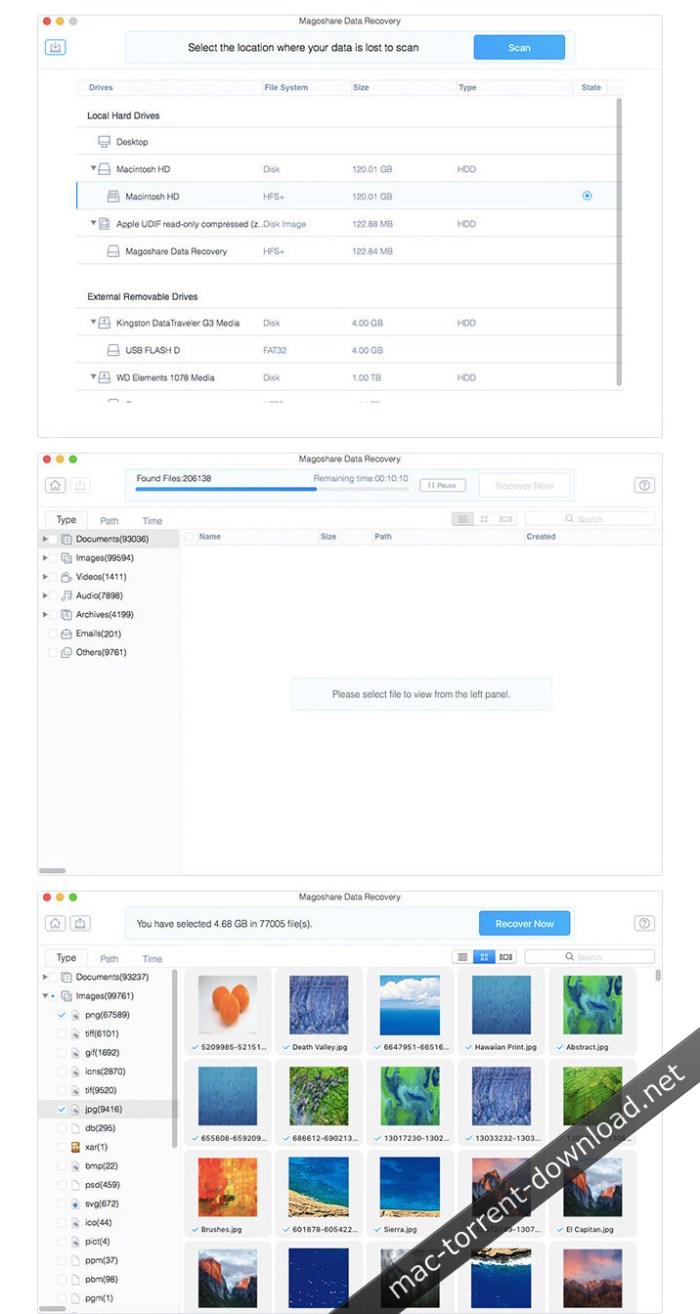
Magoshare Data Recovery 3.2

Magoshare Data Recovery is one of the most powerful apps for Mac data recovery. It makes data recovery easier and deeper, easily and completely recovering deleted, formatted, or inaccessible data from hard drives, USB flash drives, portable hard drives, memory cards, digital cameras, and other storage media devices.

It not only can recover deleted files from emptied Trash, but it also can recover lost data due to secure deletion, formatting, hard-drive crash, power failure, logical error, system upgrade, virus infection, etc. Magoshare Data Recovery for Mac offers advanced deep scan mode to ensure finding every recoverable file on your hard drive or storage media device. The wizard-style interface makes data recovery very simple.

Magoshare Data Recovery for Mac takes only two steps to recover all your lost data:

  • select hard drive to scan;
  • preview and recover lost files

Compatibility: OS X 10.9 or later 64-bit

Web Site: https://www.magoshare.com/mac-data-recovery/mac-data-recovery-software.html

What’s New in Magoshare Data Recovery 3.2

  • Release notes not available at the time of this post.

Screenshots

%RATINGS_IMAGES% (%RATINGS_USERS% votes, average: %RATINGS_AVERAGE% out of %RATINGS_MAX%)
You need to be a registered member to rate this.

acon digital acoustica premium edition 7 1.8

Name Acoustica_Premium_Edition_7.1.8_macOS.zip
Size 293.3 MB
Created on 2018-12-01 00:23:35
Hash 33117f07e9e3f6b0fcbe37d00443ef7c17a87d33
Files Acoustica_Premium_Edition_7.1.8_macOS.zip (293.3 MB)

Download

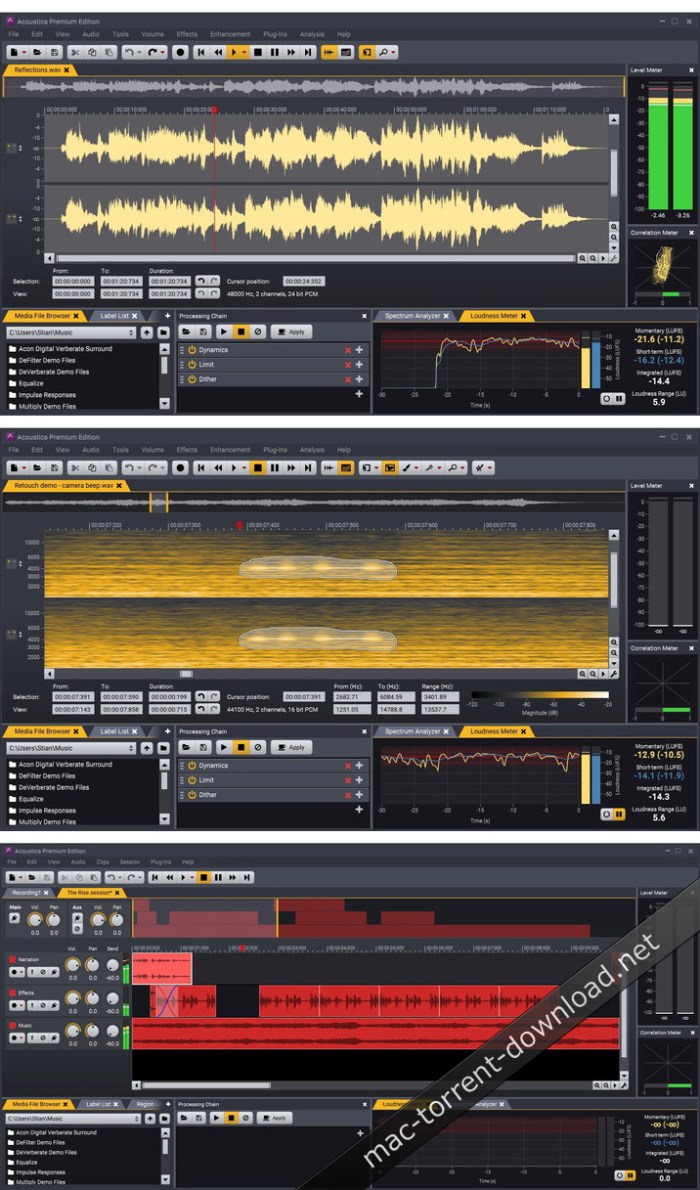
Acon Digital Acoustica Premium Edition 7.1.8 macOS

Re-implemented from scratch for the highest quality demands and cross-platform support, Acoustica 7 is now the perfect tool for editing, mastering and restoration work on both Mac The brand new user interface comes with a modern dark theme and appears crystal sharp on retina style displays.

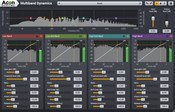
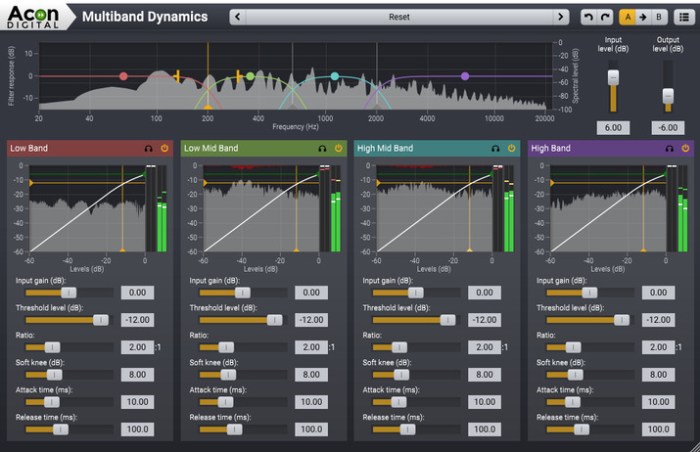
A new set of tools for dynamic processing along with EBU R 128 and ITU-R BS.1770 compliant metering and normalization should sweeten the deal further. Limit is a brick-wall limiter and Dynamics is a combined compressor, expander and gate. Both tools have sophisticated algorithms with adjustable look-ahead for maximum transparency and up to four times oversampling. Multiband Dynamics available in the Premium Edition is a multiband version of Dynamics with separate processing in four bands and adjustable cross-over frequencies and filter slopes. The new Dither tool offers dithering with novel and flexible noise shaping options.

Compatibility: OS X 10.8 or later 64-bit

Web Site: https://acondigital.com/products/acoustica-audio-editor/

What’s New in Acon Digital Acoustica Premium Edition 7.1.8

  • Release notes not available at the time of this post.

Screenshots

%RATINGS_IMAGES% (%RATINGS_USERS% votes, average: %RATINGS_AVERAGE% out of %RATINGS_MAX%)
You need to be a registered member to rate this.

similar image detector 2.0.0

Name Similar Image Detector 2 0 0 MAS TNT.zip
Size 11.28 MB
Created on 2018-12-01 00:19:23
Hash 61a553444f3610a80c88803281e5f25dfddb3a04
Files Similar Image Detector 2 0 0 MAS TNT.zip (11.28 MB)

Download

Similar Image Detector 2.0.0

Do you have many duplicate or similar photos on your Mac and you don’t know how to eliminate them in batches? With Similar Image Detector, you can find all the duplicate or similar photos on your mac with great ease. Similar Image Detector is a simple and efficient utility for finding duplicate or similar photos on your external hard drives and local disks, in Apple Photos, iPhoto. And you could organize them with Trash, Move and Copy functions.

Similar Image Detector is a duplicate and similar photos finder and remover for:

  • Photographers: Who take a series of photos of the same scene for getting the perfect shot.
  • Art Designer: Who edit photos with software like Photoshop, Pixelmator etc., and make backups just in case.
  • Photo collector: Who have photos scattered all over the system: external storage deice, SD card, hard drives and local disks, or in Apple Photos, iPhoto and so on.
  • Just clean your mac: You have a mess in your photo collection or just want to free disk space by removing junk photos.

==== KEY FEATURES ====

2 Modes to Detect Duplicate & Similar Photos
  • Import one or more folders whose contents to be grouped by similarity
  • Add a photo to compare against the photos in chosen folders and find duplicate and similar ones from the folders
4 Comparing Settings to Exact Search Duplicate & Similar Photos
  • Select the comparing algorithm from 5 modes: Fingerprint, Histogram and more
  • Support to choose the group order ways: Random, Similarity, Title or Date
  • Customize the photos order by similarity or number
  • Reset the minimum photo pixels as need
  • Enable to scan by the matching levels
25 Image Format Supported
  • .png, .jpg, .gif, .tiff, .jpeg, .icns, .bmp, .ico, .psd
  • .raw, .tga, .jp2, .xbm, .rw2, .pef, .arw, .sr2,
  • .orf, .crw .cr2, .dng, .nef, .sgi, .hdr, .mrw
Compare the Duplicate or Similar Photos in Details
  • Choose any group of similar photos to compare carefully
  • Support to compare any two similar photos in one group
  • It will automatically show you the similarity of two similar pictures with the sophisticated comparing algorithm
Quickly Manage the Duplicate or Similar Photos
  • Remove the duplicates and helpless photos forever
  • Move some featured photos to the appointed folder
  • Copy some important photos for other use if you need
Good User Experience
  • Easy to use with intuitive interface
  • Support to add simgle photo or photo folders by dragging and dropping
  • Detect and delete the duplicate or similar photos from any folders
  • Provide two view modes: common mode and comparing mode
  • Support to view the photos with zoom in and zoom out
  • No duplicate and similar photos missed out with accurate scanning algorithms
  • Now Mac OS X Yosemite 10.10 supported!

*** Find and mange duplicate or similar photos on your mac now, with the best Similar Image Detector! ***

Compatibility: OS X 10.7 or later 64-bit

Web Site: http://www.enolsoft.com/similar-image-detector-for-mac.html
Mac App Store: https://itunes.apple.com/app/similar-image-detector/id892627565?mt=12

What’s New in Similar Image Detector 2.0.0

  • Release notes not available at the time of this post.

%RATINGS_IMAGES% (%RATINGS_USERS% votes, average: %RATINGS_AVERAGE% out of %RATINGS_MAX%)
You need to be a registered member to rate this.
privacyscan 1.9 5

Name PrivacyScan 1 9 5 TNT.zip
Size 7.44 MB
Created on 2018-12-01 01:07:45
Hash 84fbb74a73e0f9ff8931cff2ea7628f53b7560d1
Files PrivacyScan 1 9 5 TNT.zip (7.44 MB)

Download

PrivacyScan 1.9.5

◆◆◆ Awarded Macworld | iWorld Best of Show by Macworld UK Magazine ◆◆◆

Securely erase those pesky files that violate your privacy by allowing people to see where you were surfing and what you were doing on your computer. Safely and securely destroy Internet files used for tracking your whereabouts such as cache files, browsing history, cookies, flash cookies and temporary files to clean your Mac and save space while stopping snoopers from spying on your system.

Macworld 2013 Award Nominee

Mac Gem– Macworld GemFest 2012

Editor’s Choice Award– Macworld UK

5/5– Macworld UK

5/5– Macworld AU

With PrivacyScan, you can rest assured that your tracks remain covered, your private information remains private, and deleted items stay that way. The secure shredding offered within PrivacyScan goes above and beyond United States Department of Defense (DoD) deletion standards by overwriting files with up to 35 passes to ensure complete deletion of sensitive data.

PrivacyScan works with many media, Internet, and popular apps such as web browsers, to scan for potential privacy threats and offer removal options to help protect your privacy and cleanse your system to save disk space.

Compatibility: macOS 10.8.5 or later 64-bit

Web Site: https://www.securemac.com/privacyscan
Mac App Store: https://itunes.apple.com/app/privacyscan/id494950833?mt=12

What’s New in PrivacyScan 1.9.5

  • PrivacyScan is now compatible with macOS 10.14 (Mojave)
  • Fixed a bug where Chrome Download Metadata wasn’t being identified for cleaning in some situations
  • Fixed a bug where Firefox Browsing History wasn’t being identified for cleaning in some situations
  • Fixed a bug where Firefox Download History wasn’t being identified for cleaning in some situations
  • Fixed a bug where Safari Caches were not being identified for cleaning in some situations
  • User interface updates and improvements

%RATINGS_IMAGES% (%RATINGS_USERS% votes, average: %RATINGS_AVERAGE% out of %RATINGS_MAX%)
You need to be a registered member to rate this.

vectoraster 7 3.4

Graphics & Design

Name Vectoraster 7 3 4 TNT.zip
Size 12.98 MB
Created on 2018-12-01 00:18:58
Hash b5ce5a9d2fa6972514ffca7a0bd21677af2146e0
Files Vectoraster 7 3 4 TNT.zip (12.98 MB)

Download

Vectoraster 7.3.4

Vectoraster is a graphics utility for creating vector-based raster patterns and halftones based on images or gradients. The raster patterns and point shapes can be changed and varied across the pattern to produce many different styles. The resulting raster is always shown, updating in real time as you change parameters. The result can then easily be exported as vectors to EPS or PDF files, as images to JPEG, PNG or TIFF, or simply copied and pasted into most graphics software.

You can download and try Vectoraster for free, but with some limitations. To remove these limitations and get the full version you have to pay for the application.

Features
  • General
    • Many different point shape types, including circles, polygons, font characters and imported custom vector shapes or images
    • Detailed control of how you want point shape, transformation and color to vary over the raster
    • Base how the raster points vary on source images, gradients you define live in Vectoraster, or a combination
    • Advanced line-raster mode with lines of varying width instead of points
  • Patterns
    • Many different raster patterns with detailed control of how the points are placed.
    • Easily rotate and offset the raster pattern, and add multiple distrotions like waves and twists.
  • Output
    • Copy raster output and paste it straight into most vector graphics software.
    • File export to EPS and PDF for vector output, and JPEG, PNG and TIFF for bitmap.
    • Export point data (location and size) to a CSV file for further CAD or other processing.

Compatibility: OS X 10.11 or later 64-bit

Web Site: https://www.lostminds.com/vectoraster7/

What’s New in Vectoraster 7.3.4

  • Release notes not available at the time of this post.

Screenshots

Graphics & Design

By

%RATINGS_IMAGES% (%RATINGS_USERS% votes, average: %RATINGS_AVERAGE% out of %RATINGS_MAX%)
You need to be a registered member to rate this.
acon digital mastering suite 1.0.2

Name Acon.Digital.Mastering.Suite.v1.0.2.MacOSX.Incl.Keygen-R2R.zip
Size 67.72 MB
Created on 2018-12-01 00:23:49
Hash 179ea36c37821a0f3f9e1d0c7c8a9a0bf09fd653
Files Acon.Digital.Mastering.Suite.v1.0.2.MacOSX.Incl.Keygen-R2R.zip (67.72 MB)

Download

Acon Digital tering Suite 1.0.2 macOS

Acon Digital Mastering Suite consists of five plug-ins for audio mastering that were designed for ultimate signal transparency.

Dynamics is a combined compressor, expander or gate. The look-ahead can be set anywhere from 0 to 30 milliseconds and the intelligent algorithm ensures a band-limited gain signal which reduces potential distortion to a minimum even with minimal attack and release times. You can use up to 4 times oversampling to further reduce distortion. The side chain signal can be either internal or external and there’s a full blown side chain equalizer integrated with low cut, low shelf, peak, high shelf and high cut filters. The complexity of algorithms is not reflected in the intuitive user interface which provides graphical visualizations of all aspects of the processing.

Multiband Dynamics is the multiband extension of Dynamics which allows dynamic processing in up to four separate bands. You can freely set the cross-over frequencies and even the filter slopes can be set freely in the range 6 and 48 dB per octave. Multiband Dynamics operates in linear phase mode to avoid phase issues between the processed bands.

Limit is a transparent limiter with intelligent look-ahead in the range 0 to 30 milliseconds that reduces distortion to a minimum. The limiting is performed in a two step process with a pre-compressor follower by the actual peak limiting algorithm. You can use up to 4 times oversampling for true peak limiting and to further reduce distortion.

Equalize is a parametric equalizer. Unlike other equalizers, you can freely adjust not only center frequency, gain and bandwidths, but also the filter slope for each band. The filter slope can be set anywhere from 3 dB to ultra-sharp 120 dB per octave. You can operate Equalize as a zero latency plug-in when using the minimum phase mode, choose to preserve the phase relationships in the linear phase mode or use the unique mixed phase mode. The mixed phase mode allows you to set the latency freely in the range 5 to 120 milliseconds while preserving the phase relationships as far as possible. That gives a unique control over potential pre-ringing artifacts which is a common problem with linear phase filtering.

Dither is a dithering plug-in with flexible perceptual noise shaping. You can adjust the maximum gain and the filter length of the frequency response of the noise shaping filter is visualized graphically.

System requirements:
  • Intel Core i3 or AMD multicore processor (Intel Core i5 or faster recommended)
  • 1366 x 768 display resolution (1920 x 1080 or higher recommended)
  • 1 GB RAM (4 GB or more recommended)
  • 1 GB free HD space
  • A host application that is compatible with VST, VST3 or AAX (Pro Tools 10.3.5 or higher)

Web Site: https://acondigital.com/

What’s New in Acon Digital Mastering Suite 1.0.2

  • Release notes not available at the time of this post.

Screenshots

%RATINGS_IMAGES% (%RATINGS_USERS% votes, average: %RATINGS_AVERAGE% out of %RATINGS_MAX%)
You need to be a registered member to rate this.

mail pilot 3.0.8040b

Name Mail Pilot 3 3 0 8040 b TNT.zip
Size 14.71 MB
Created on 2018-12-01 00:21:57
Hash 0f996bcc16dda9c4a8a4971b0b8acc2ad0c07969
Files Mail Pilot 3 3 0 8040 b TNT.zip (14.71 MB)

Download

Mail Pilot 3.0 (8040)b

Mail Pilot is an email client for MacOS polished offering a simple but powerful feature along with a modern user interface. The client adopts a simplified software email client, unlike traditional using indicators and complicated configurations approach.

Mail Pilot lets you send emails from all accounts to different places. In other words, you can sort messages in all your accounts in several special folders. Various email services, including Gmail, iCloud, AOL, Yahoo! or Outlook, as well as all standard types IMAP email accounts are supported.

Compatibility: macOS 10.12 or later 64-bit

Web Site: http://mailpilot.co/3/

What’s New in Mail Pilot 3.0 (8040)b

  • Release notes not available at the time of this post.

%RATINGS_IMAGES% (%RATINGS_USERS% votes, average: %RATINGS_AVERAGE% out of %RATINGS_MAX%)
You need to be a registered member to rate this.
ams any video to mp4 2.0.0

Name AnyVideo2MP4 2 0 0 TNT.zip
Size 13.94 MB
Created on 2018-12-01 00:23:17
Hash 1937aa5a4f978158d4d81ad4bd74896cbdb3fdb4
Files AnyVideo2MP4 2 0 0 TNT.zip (13.94 MB)

Download

AMS Any Video To MP4 2.0.0

AMS AnyVideo2MP4 is the fastest, easiest and most powerful utility for Mac to convert video & music to mp4 you want. Enjoy them on iPhone, iPad, Apple TV and Android devices.

Compatibility: macOS 10.10 or later 64-bit

Web Site: https://applemediasoft.com

What’s New in AMS Any Video To MP4 2.0.0

  • Release notes not available at the time of this post.

%RATINGS_IMAGES% (%RATINGS_USERS% votes, average: %RATINGS_AVERAGE% out of %RATINGS_MAX%)
You need to be a registered member to rate this.

ubar 4 1.2

Name uBar 4 1 2 TNT.zip
Size 9.64 MB
Created on 2018-12-01 00:19:07
Hash ef08a6ff4a1e16154e4513e0792ce02d80236d5f
Files uBar 4 1 2 TNT.zip (9.64 MB)

Download

uBar 4.1.2

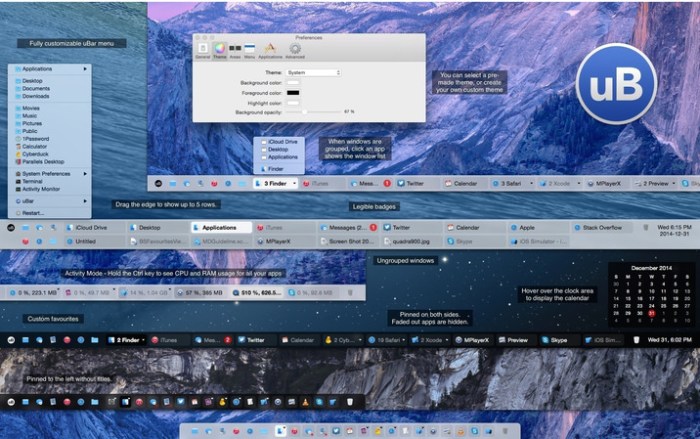
uBar is the Dock replacement. If you’ve never really liked the Dock, or have a soft-spot for the Windows Taskbar, uBar is here to save the day. uBar can be configured as a dock or task bar for OS X.

Features
  • Favourites area (including Show Desktop and Trash)
  • Expands up to 5 rows (by dragging the edge)
  • Application Badges are readable unlike the Dock’s
  • Customizable uBar menu
  • Activity Mode: hold Ctrl key to show Application CPU and Memory usage
  • Group Windows by Application (Always, Never, Automatic)
  • Light or Dark theme
  • Works on OS X 10.11

Compatibility: OS X 10.10 or later 64-bit

Web Site: Web Site: https://brawersoftware.com/products/ubar

What’s New in uBar 4.1.2

  • Release notes not available at the time of this post.

Screenshots

%RATINGS_IMAGES% (%RATINGS_USERS% votes, average: %RATINGS_AVERAGE% out of %RATINGS_MAX%)
You need to be a registered member to rate this.
autodesk maya 2018/2019

Name Autodesk Maya 2018.5 Multilingual.zip
Size 1.58 GB
Created on 2018-11-30 01:55:21
Hash b15accdfe0e5917957f3c56a8bbaa85a7e6e1266
Files Autodesk Maya 2018.5 Multilingual.zip (1.58 GB)

Download

Autodesk Maya 2018.5 macOS

A cross-platform and comprehensive suite of tools for 3D modeling, animation and rendering specially designed for game developers and film makers.

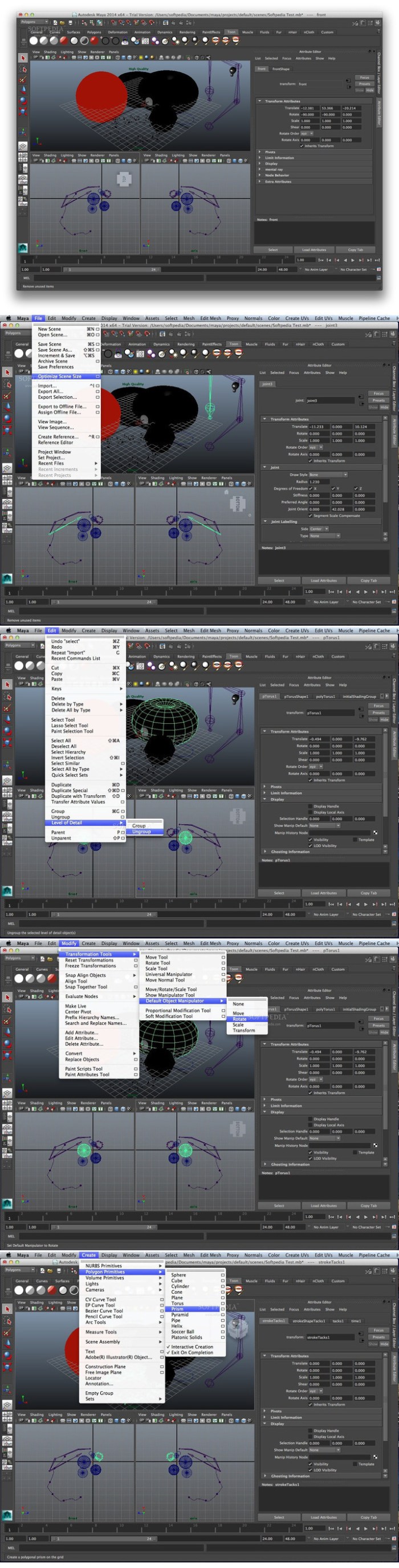
Autodesk Maya is a fully-featured professional 3D modeling, animation, rendering and composing solution that provides a wide variety of features and dynamic tools to simulate fluids, cloth, particles and hair.

This release includes major workflow upgrades with new tools like the Time Editor, which is a comprehensive tool for creating and editing clip-based non-linear animation. Similarly, our new Render Setup system simplifies the management of complex scenes with shot-based overrides and templates. In addition, grooming all types of hair and fur in XGen is easier and faster using new Interactive Groom Splines, which includes a set of intuitive brush-based tools (used in the image above). Finally, the new Content Browser, and new Workspaces capabilities let you personalize Maya.

And, don’t miss our new Motion Graphics features, including the 3D Type Tool, the SVG Tool, and the MASH Procedural Effects Toolkit to create versatile motion design animations.

Requires macOS 10.11 or later

Web Site: https://www.autodesk.com/products/maya

What’s New in Autodesk Maya 2018.5

  • Release notes not available at the time of this post.

Screenshots

%RATINGS_IMAGES% (%RATINGS_USERS% votes, average: %RATINGS_AVERAGE% out of %RATINGS_MAX%)
You need to be a registered member to rate this.

waltr 2.6.15

Name Waltr 2 2 6 15 TNT.zip
Size 39.92 MB
Created on 2018-11-30 05:41:31
Hash 058542b1c1ee8071c71d8d51a2726ad0f0660c5e
Files Waltr 2 2 6 15 TNT.zip (39.92 MB)

Download

Waltr 2.6.15

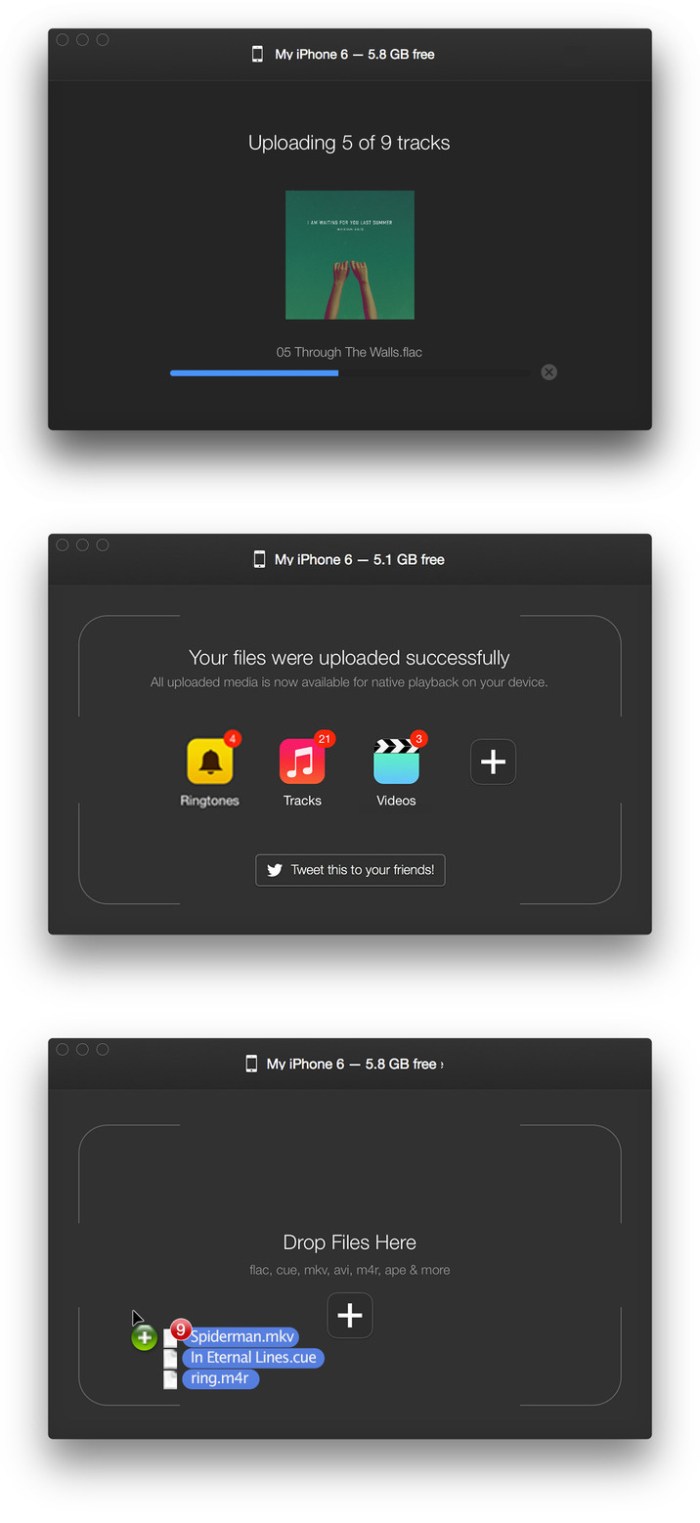
WALTR 2 helps you wirelessly drag-and-drop any music, ringtones, videos, PDF, and ePub files onto your iPhone, iPad, or iPod without iTunes. It is the second major version of Softorino’s critically-acclaimed original WALTR, which solved 2 huge problems for every iOS user: unsupported media-format transfer without installing any additional 3rd-party iOS apps, as well as iTunes sync elimination — allowing users to drag-and-drop files from any computer. WALTR 2 is here to add a few cherries on top.

  • Video formats: MKV, AVI, MP4, MOV, MPEG, m2ts, 3GP, WMV, H264, H265
  • Audio formats: MP3, FLAC, APE, ALAC, AAC, AIFF, WAV, WMA, OGG, OGA, WV, TTA, DFF
  • CUE sheet support (automatic breakdown of a single file into multiple tracks)
  • M4R Ringtones (includes support for ringtones over 30 seconds long)
New in 2
  • Automatic metadata recognition
  • Wi-Fi transfer support
  • PDF, ePUB support
  • Non-iOS device support (20+ legacy iPods)

Compatibility: OS X 10.9 or later 64-bit

Web Site: https://softorino.com/w2

What’s New in Waltr 2.6.15

  • Release notes not available at the time of this post.

Screenshots

%RATINGS_IMAGES% (%RATINGS_USERS% votes, average: %RATINGS_AVERAGE% out of %RATINGS_MAX%)
You need to be a registered member to rate this.

imazing 2.8 2.9842

Name iMazing 2 8 2 9842 TNT.zip
Size 113.0 MB
Created on 2018-11-30 00:48:35
Hash e16f0f09a06e7335770f908505bad8f0922206d2
Files iMazing 2 8 2 9842 TNT.zip (113.0 MB)

Download

iMazing 2.8.2 (9842)

iMazing (was DiskAid) is the ultimate iOS device manager with capabilities far beyond what iTunes offers. With iMazing and your iOS device (iPhone, iPad, or iPod), you can:

  • Copy music to and from any iOS device (even from one iOS device to another!), regardless of what Mac or PC the device is already synced to. Music transfer done right, without limitations or restrictions.
  • Backup & restore individual iOS apps along with your custom saved data, perfect for freeing up space on your iOS device without losing your files, great for installing apps including your data on another iOS device you own.
  • Transfer files to and from an iOS device, and browse the iOS file system.
  • Use your iOS device like a USB key.
  • Browse and save messages (SMS, MMS, iMessage), voicemails, and call logs, none of which iTunes can do.
  • Browse, save, and add contacts to your iPhone, without automatically adding them to your iCloud account.
  • Browse and manage multiple backups of the same iOS device. Chose which data sets you want to restore.
  • And other amazing things you never thought possible!

Compatibility: OS X 10.9 or later 64-bit

Web Site: http://www.digidna.net

What’s New in iMazing 2.8.2 (9842)

  • Release notes not available at the time of this post.

%RATINGS_IMAGES% (%RATINGS_USERS% votes, average: %RATINGS_AVERAGE% out of %RATINGS_MAX%)
You need to be a registered member to rate this.

capture one pro 12.0.0.270

Name Capture One Pro 12 0 0 270 TNT.zip
Size 353.6 MB
Created on 2018-11-30 00:47:29
Hash 0bc7a4c33aab9ca22856ae32df46bd07f1d9c45b
Files Capture One Pro 12 0 0 270 TNT.zip (353.6 MB)

Download

Capture One Pro 12.0.0.270

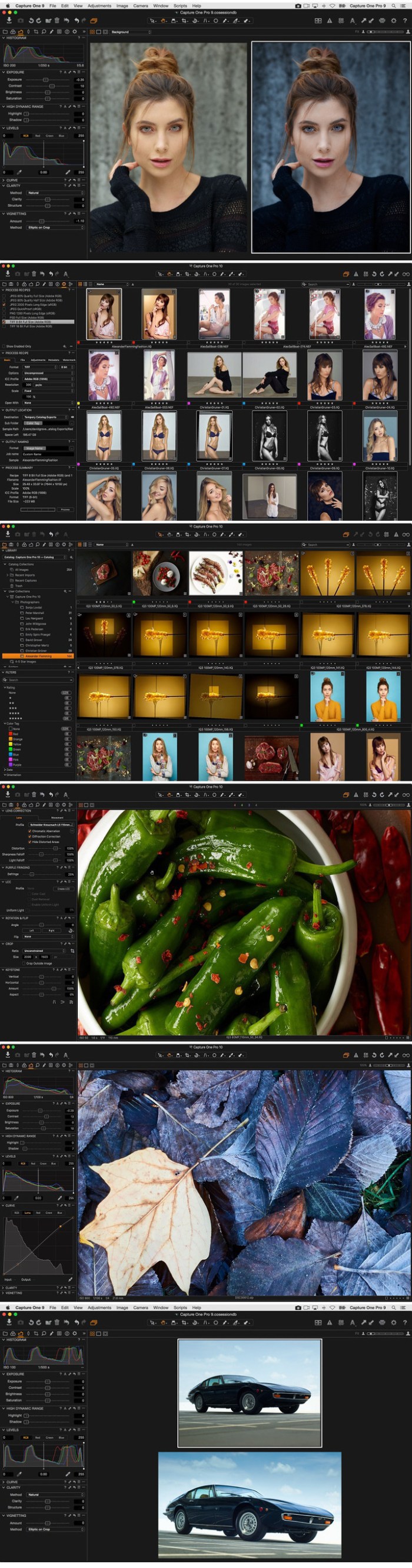
Capture One is a professional RAW converter offering you ultimate image quality with beautiful colors and incredible detail for more than 500 high-end cameras. It offers state- of-the-art tethered capture, powerful digital asset management, extensive adjustment tools and a flexible workflow through customizable workspaces.

With an updated processing engine, market-leading performance and powerful new features, Capture One is the professional choice in imaging software. You get the highly responsive precision tools you need to create stunning images from your camera’s RAW files in a time-saving workflow that can be customized to fit your needs.

New features

  • New interface
  • New Menu system
  • New Keyboard Shortcut Manager
  • Luma Range Masking
  • Linear Gradient Mask tool
  • Radial Gradient Mask tool
  • Plugins Export and publish
  • Revised noise reduction algorithm See notes
  • User experience changes
  • Extended AppleScript support
  • Fujifilm Film Simulations

Compatibility: macOS 10.12 or later 64-bit

Web Site: https://www.phaseone.com/en/Products/Software/Capture-One-Pro/Highlights.aspx

What’s New in Capture One Pro 12.0.0.270

  • Release notes not available at the time of this post.

Screenshots

%RATINGS_IMAGES% (%RATINGS_USERS% votes, average: %RATINGS_AVERAGE% out of %RATINGS_MAX%)
You need to be a registered member to rate this.
reallusion crazytalk animator 3.31.3514 1 pipeline

Name CrazyTalk Animator 3.31.3514.1 Pipeline macOS.zip
Size 537.3 MB
Created on 2018-11-30 00:47:56
Hash d2b4ce0fbef9b41e8e805cc533126b4fa5c6c651
Files CrazyTalk Animator 3.31.3514.1 Pipeline macOS.zip (537.3 MB)

Download

Reallusion CrazyTalk Animator 3.31.3514.1 Pipeline macOS

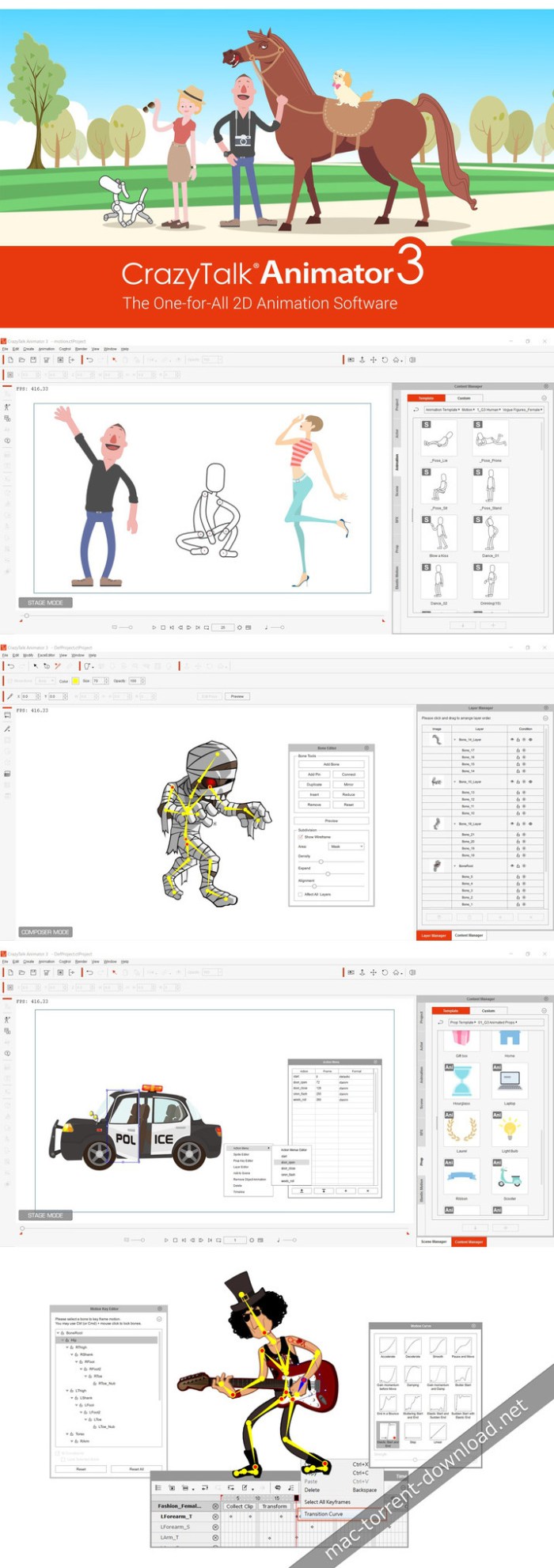
CrazyTalk Animator (CTA) is the world’s easiest 2D animation software that enables all levels of users to create professional animations with the least amount of effort. With CTA3, anyone can instantly bring an image, logo, or prop to life by applying bouncy Elastic Motion effects.

For the character part, CTA3 is built with 2D character templates, valuable motion libraries, a powerful 2D bone rig editor, facial puppets, and audio lip-syncing tools to give users unparalleled control when animating 2D talking characters for videos, web, games, apps, and presentations.

Movie & Video Creators

A video creator’s dream tool for creating cartoon animations with professional real-time features.

Artists & Illustrators

Whether you are a doodler, illustrator, or a storyboard artist, now you can bring your characters to life!

Marketers & Presenters

Create animated videos and presentations to promote your business by visualizing your ideas in seconds.

Web & Game Designers

Enliven video games and web pages with animated characters and eye-catching elements.

Educators & Students

Engage with hands-on technology that sparks classroom creativity with visual computing.

Operating System:
Suggest Mac computers: (or higher recommended)
  • Mac mini 2011 or later
  • iMac 2011 or later
  • MacBook Pro 2011 or later
  • MacBook Air: 2011 or later
  • MacPro: 2011 or later

Web Site: https://www.reallusion.com/

What’s New in Reallusion CrazyTalk Animator 3.31.3514.1 Pipeline

  • Release notes not available at the time of this post.

Screenshots

%RATINGS_IMAGES% (%RATINGS_USERS% votes, average: %RATINGS_AVERAGE% out of %RATINGS_MAX%)
You need to be a registered member to rate this.

cinemagraph pro 2.6.1.212

Name Cinemagraph Pro 2 6 1 212 TNT.zip
Size 74.92 MB
Created on 2018-11-30 00:47:39
Hash a0c86ddfab9e3b53fa388a82c972fcd18723644f
Files Cinemagraph Pro 2 6 1 212 TNT.zip (74.92 MB)

Download

Cinemagraph Pro 2.6.1 (212)

Mesmerize your audience by creating flixels with Cinemagraph Pro.

● Apple Design Award Winner & App Store Best of 2014

Cinemagraph Pro is the pro-level tool that the world’s top photographers, marketers, and agencies use to create stunning cinemagraphs — the exciting new visual medium that lives between the world of photography and video. Cinemagraphs are composed like a photo, but contain a perfectly looped video motion that captures attention, tells a deeper story, and mesmerizes audiences.

Cinemagraphs are used for:
  • Digital Marketing: Cinemagraphs increase engagement, lower costs, and lead to higher conversions more than still photos in Facebook, Twitter, and Instagram ad campaigns.
  • Social Media: Cinemagraphs are easily shared as a short video file on social media. They autoplay and autoloop on Facebook, Twitter, Instagram, and Snapchat.
  • Websites: Cinemagraphs are proven to have a higher CTR on website banners compared to still photos..
  • Email Marketing
  • Digital Displays
  • Broadcast Television
CINEMAGRAPH PRO MAKES CREATING CINEMAGRAPHS FAST, FUN, AND EASY!

Cinemagraph Pro lets you to spend less time on complicated editing, and more time on creating. With our advanced features and simple process, it’s now easier than ever to create living photos!

  • Use Video for Your Cinemagraphs: Shoot perfectly still video inapp or import video from a DSLR for your cinemagraphs
  • Magical Live Masking: Create your cinemagraph in realtime using our patented “livemasking” tool that reveals motion as you paint over the still image
  • Trim Your Video Clip: Pick the perfect section of video for looping and select your still image
  • Transform Your Still Images: Import a still or export from the video and edit with another photo editing app
  • Create a Perfect Loop: Choose a bounce or repeat loop and easily adjust speed, delay, and crossfade for a seamless, perfect loop
  • Style Your Cinemagraph: Apply custom presets for a more stylized look
  • Make Adjustments for the Perfect Fit: Flip, rotate, and easily adjust temperature, tint, exposure, saturation and vignette using advanced tone curve colour editing tools for your cinemagraphs. Crop your cinemagraph to the ideal dimensions for sharing on social media
  • Easily Export, Upload, and Share Cinemagraphs: Upload to your account on Flixel and receive a special embed code to post cinemagraphs on websites and blogs. Or, export cinemagraphs for sharing in any of the following formats:
  • > 1080 HD and 4K Resolution MP4 files for Social Media
  • > Live Photos
  • > GIFs for Email Marketing
ENJOY EXCLUSIVE CINEMAGRAPH HOSTING FROM FLIXEL!

Flixel offers premium web services that makes it easy to host cinemagraphs, embed them in HD on websites and blogs, and customize them. Our Hosting services allow you to:

  • Unlimited cinemagraph uploads
  • Use a simple embed code to share cinemagraphs on web. They will autoplay and autoloop on any device and in any browser, including mobile.
  • Add custom watermarks and custom links to your cinemagraphs.
  • Control access to your cinemagraphs for clientrelated projects.
FLIXEL PLANS

Payment will be charged to your iTunes Account at confirmation of purchase. Subscription automatically renews at the purchase price unless auto-renew is turned off at least 24-hours before the end of the current period. Subscriptions may be managed and auto-renewal may be turned off by going to the Account Settings after purchase. Subscriptions are 1 year in length. Terms https://flixel.com/terms/

System Requirements:

macOS 10.13 or later, 4GB of RAM (8GB recommended for 4K), OpenCL-capable graphics card or Intel HD Graphics 3000 or later, 256MB of VRAM (1GB recommended for 4K), 500MB of disk space.

Compatibility: macOS 10.13 or later 64-bit

Web Site: https://flixel.com/products/mac/cinemagraph-pro/
Mac App Store: https://itunes.apple.com/app/cinemagraph-pro/id777874532?mt=12

What’s New in Cinemagraph Pro 2.6.1 (212)

Bug fixes and performance improvements

Fixed issues with 4K videos on macOS Sierra
Fixed issues with larger than 4K videos on macOS High Sierra

%RATINGS_IMAGES% (%RATINGS_USERS% votes, average: %RATINGS_AVERAGE% out of %RATINGS_MAX%)
You need to be a registered member to rate this.
alien skin exposure x4 bundle 4.0.3.129

Graphics & Design Photography

2018-11-29   

Name Alien Skin Exposure X4 Bundle 4 0 3 129 TNT.zip
Size 414.6 MB
Created on 2018-11-30 07:02:04
Hash 4d5884bc581a2589c41665d3cf258a9094e9149a
Files Alien Skin Exposure X4 Bundle 4 0 3 129 TNT.zip (414.6 MB)

Download

Alien Skin Exposure X4 Bundle 4.0.3.129

The Exposure X Bundle is a photo editor and organizer that integrates all of Alien Skin’s award-winning photo editing apps into a single product.. The centerpiece of the bundle is Exposure X, the editing app that streamlines your workflow and provides a rich set of creative tools.

Two additional apps expand the creative possibilities: Blow Up 3 enlarges your photos into large prints with the sharpest resizing technology available, and Snap Art 4 transforms your photos into gorgeous, handcrafted paintings.

  • Exposure X3 nondestructive RAW photo editor
  • Integrated Snap Art natural media
  • Integrated Blow Up highquality photo enlargement
  • Exposure X3, Snap Art, and Blow Up plugins for Lightroom and Photoshop

Exposure X3 is a complete photo editing and organizing solution. It can also be used as a creative editing plug-in.

The plug-in requirements are as follows:
  • Adobe Photoshop CS6 or Adobe Photoshop CC 2015 or newer
  • Adobe Lightroom 6 or Adobe Lightroom CC 2015 or newer

Compatibility: OS X 10.11 or later, 64 bit

Web Site: https://www.alienskin.com/

What’s New in Alien Skin Exposure X4 Bundle 4.0.3.129

  • Release notes not available at the time of this post.

Graphics & Design, Photography

By

%RATINGS_IMAGES% (%RATINGS_USERS% votes, average: %RATINGS_AVERAGE% out of %RATINGS_MAX%)
You need to be a registered member to rate this.

alien skin exposure x4 4.0.3.113

Graphics & Design Photography

2018-11-29   

Name Alien Skin Exposure X4 4 0 3 113 TNT.zip
Size 363.5 MB
Created on 2018-11-30 07:01:50
Hash a71ca7a023976842cc19dde7d68684a3a4d5ce0f
Files Alien Skin Exposure X4 4 0 3 113 TNT.zip (363.5 MB)

Download

Alien Skin Exposure X4 4.0.3.113

The legendary effects plug-in is now an award-winning photo editor and organizer. Introducing Exposure X4, the advanced non-destructive RAW editor that enables you to easily create beautiful images and master your entire workflow. Fast performance, powerful organizing tools, and unmatched creative editing make Exposure the only app you need to quickly transform your photos into works of art.

Here’s what you can look forward to when Exposure X4 is available:

  • Improvements to Exposure’s RAW processing system
  • Perspective and keystone correction to minimize or eliminate optical distortion
  • Enhanced light effects that you can move and rotate freely anywhere in your image
  • Smart collections
 that automatically populate based on photo criteria that you choose
  • Faster file exporting and launch times
  • Lightroom migration tool that brings your Lightroom organizational metadata over into Exposure
  • Monitored folders that support tethered shooting workflows
  • New printing presets
  • Support for new cameras and lenses
  • Expanded workflow options for image copying and exporting

Exposure X4 is a complete photo editing and organizing solution. It can also be used as a creative editing plug-in. The plug-in requirements are as follows:

  • Adobe Photoshop CS6 or Adobe Photoshop CC 2015 or newer
  • Adobe Lightroom 6 or Adobe Lightroom CC 2015 or newer

Compatibility: OS X 10.11 or later, 64 bit

Web Site: https://www.alienskin.com/exposure/

What’s New in Alien Skin Exposure X4 4.0.3.113

  • Release notes not available at the time of this post.

Graphics & Design, Photography
,

By

%RATINGS_IMAGES% (%RATINGS_USERS% votes, average: %RATINGS_AVERAGE% out of %RATINGS_MAX%)
You need to be a registered member to rate this.
display maestro 2.1.6

Name Display Maestro 2 1 6 TNT.zip
Size 19.79 MB
Created on 2018-11-30 07:09:41
Hash bbcd922889a1890994da8f4b78690310877c1468
Files Display Maestro 2 1 6 TNT.zip (19.79 MB)

Download

Display Maestro 2.1.6

Display Maestro gives you full control over attached displays, allowing the usage of all available resolutions and bit depths. This is done by ignoring the operating system setting of hiding potentially unsafe resolutions.

It is ideal for running legacy games which require 256-color mode and do not automatically switch the screen depth for you. Mac OS X 10.5 Leopard removed the ability to set 256 color mode manually using the built-in preferences pane, but the feature is now available here in Display Maestro!

Display Maestro is a small application which can be configured to launch during login, and sits quietly in the menu bar. Upon exit, it will also automatically revert your display back to the resolution chosen before it was launched.

Compatibility: OS X 10.10 or later 64-bit

Web Site: http://www.koingosw.com/products/displaymaestro/
Mac App Store: https://itunes.apple.com/app/display-maestro/id414546485?mt=12

What’s New in Display Maestro 2.1.6

  • Dark mode support for Mojave
  • Minor bug fixes

Screenshots

%RATINGS_IMAGES% (%RATINGS_USERS% votes, average: %RATINGS_AVERAGE% out of %RATINGS_MAX%)
You need to be a registered member to rate this.

librarian pro 4.0.8

Name Librarian Pro 4 0 8 TNT.zip
Size 38.86 MB
Created on 2018-11-30 07:02:17
Hash 6dfd8311ffa14a4b21525983908999b343b377fd
Files Librarian Pro 4 0 8 TNT.zip (38.86 MB)

Download

Librarian Pro 4.0.8

Comprehensive cataloging system that offers you the possibility to keep an inventory containing all your books, CDs, magazines, movies, and so on

Keeping track of both physical and digital media content that you have acquired over the years is certainly a good idea: this way you can avoid purchasing the same title more than once. Librarian Pro is an user friendly Mac app that can handle cataloguing different types of media.

For your convenience, Librarian Pro scans your Mac to find other available media libraries, and offers to import them automatically.

Effortlessly create a library that contains all sorts of media content

Moreover, the Librarian Pro app can handle both the iTunes library, and catalogues created using third party apps, such as Bookpedia, Gamepedia, CDpedia, Delicious, and so on.

At the same time, you can also manually input new entries in any of the default categories: books, electronics, miscellaneous, movies, music, software, or video games. Of course, you can also create your own collections.

To streamline the process, Librarian Pro allows you to perform searches on different Amazon websites, on BestBuy, or in the Koingo or UPC databases: this way, you can add entries with complete metadata with a simple mouse click.

Keep track of your items with minimal effort

Librarian Pro can integrate with your Contacts and Calendar applications in order to help you monitor the items that have been borrowed, to whom, and when should each item be returned. As a result, you will never lose sight of your favorite items.

To help you find things faster, Librarian Pro comes with a couple of predefined smart lists, but you have the option to create your own, by manually defining sorting rules. Thanks to the well organized user interface, finding your way around is quite easy, even if certain useful features are not easily accessible.

Streamlined cataloguing solution that can deal with different types of media

In a nutshell, Librarian Pro proposes a simple solution for keeping track of all your books, games, software, and other media content, via the same clean and organized environment.

Furthermore, the Librarian Pro utility can also keep track of both physical objects and digital content, and integrates with system apps to help you monitor borrowed items.

OS Version: OS X 10.10 or later

Web Site: http://www.koingosw.com/

What’s New in Librarian Pro 4.0.8

  • Release notes not available at the time of this post.

Screenshots

%RATINGS_IMAGES% (%RATINGS_USERS% votes, average: %RATINGS_AVERAGE% out of %RATINGS_MAX%)
You need to be a registered member to rate this.

itubedownloader 6 4 4

Name iTubeDownloader 6 4 4 TNT.zip
Size 29.73 MB
Created on 2018-11-30 00:09:21
Hash 23f3127746a4ae52c9d5887f064e50c2c10a7328
Files iTubeDownloader 6 4 4 TNT.zip (29.73 MB)

Download

iTubeDownloader 6.4.4

TubeDownloader 6 makes downloading YouTube videos even more enjoyable with easy-to-use features, such as a download queue, channel & playlist downloading, improved browsing performance and much more.

Search. Watch. Download

From the beginning we wanted iTubeDownloader to be simple, yet incredibly powerful. So, our goal was to add even more features to iTubeDownloader but, make it simple to use and that’s what we did with iTubeDownloader 6.

Download Queue

iTubeDownloader 6 now has a download queue. The download queue will enable you to add multiple videos, and have the program take care of executing them in order. Also, you can have the program execute downloads simultaneously giving you even more power!

New Browser Features

With iTubeDownloader 6 we added new features to make browsing YouTube easier. iTubeDownloader features multi-touch gestures so you can swipe to navigate the webpage, and with improved energy efficiency and performance, your notebook battery lasts longer between charges.

Downloading is as easy as 1, 2, 3

iTubeDownloader makes it simple to quickly download a YouTube video, channel, or an entire playlist to your Mac.

Navigate:

Use the built in web browser for navigation. You can also simply paste a YouTube URL in the address bar and tap the enter key to navigate to the webpage.
Download: To download a video, channel, or playlist click the Download button in the toolbar.
Manage: The downloads list will then automatically open when a download item has been added. From here you can manage your downloads.

Compatibility: OS X 10.10 or later 64-bit
Web Site: http://www.alphasoftware.co

What’s New in iTubeDownloader 6.4.4

  • Release notes not available at the time of this post.

Screenshots

%RATINGS_IMAGES% (%RATINGS_USERS% votes, average: %RATINGS_AVERAGE% out of %RATINGS_MAX%)
You need to be a registered member to rate this.

wondershare pdfelement express 1.1.0

Name Wondershare PDFelement Express 1 1 0 TNT.zip
Size 21.48 MB
Created on 2018-11-30 05:41:38
Hash bc670dde44bafb704e1af42475a4f38479a4e6b6
Files Wondershare PDFelement Express 1 1 0 TNT.zip (21.48 MB)

Download

Wondershare PDFelement Express 1.1.0

Whether you want to read, edit, or annotate PDFs, PDFelement Express has it all, without the unnecessary filler. Create stunning documents and express your ideas clearly. Try it out today!

Read PDFs Perfectly

PDFelement Express for Mac offers a seamless scrolling experience. No matter what type of document you’re working with, there’s a viewing option available that perfectly fits the task at hand.

Wider Page View

View one page at a time, all pages continuously, or two pages side-by-side to achieve the best readability for your needs.

Faster Page Operation

Scroll through pages effortlessly and enjoy a better user experience with enhanced navigation tools that let you seamlessly work with PDFs.

Easier to Annotate

Add annotations and comments to PDF documents in just a few simple clicks. All the tools you need are available on the go, without having to sort through clutter!

Compatibility: macOS 10.12 or later 64 bit

Web Site: https://pdf.wondershare.com/pdfelement-express-mac.html

What’s New in Wondershare PDFelement Express 1.1.0

  • Release notes not available at the time of this post.

%RATINGS_IMAGES% (%RATINGS_USERS% votes, average: %RATINGS_AVERAGE% out of %RATINGS_MAX%)
You need to be a registered member to rate this.

videoduke 1.0

Name VideoDuke 1 0 TNT.zip
Size 26.01 MB
Created on 2018-11-30 02:06:12
Hash 891f565af296a1b4e8dfe38d0029610a60f0b972
Files VideoDuke 1 0 TNT.zip (26.01 MB)

Download

VideoDuke 1.0

Download movies on Mac with VideoDuke! It supports all popular video websites and will save your videos in various file formats. You can also download streaming videos on Mac at a pleasantly fast speed and with great quality.

You can download any video you like in a click! Simply paste the link to the video and VideoDuke will do the rest.
In Simple mode you are getting quick access to music videos, movies, TV shows, cartoons available from Vimeo, YouTube, and Dailymotion. Files can be saved as 3GP, MP4, M4V, FLV and in a preferred resolution: 360p, HD 720p, HD 1080p or other.

Download Full YouTube Playlists and Channels

With VideoDuke you’ll be able to save complete channels and playlists off YouTube. Just as with separate videos, you can select quality for each video: 1440p, 1080p, 720p, 480p, 360p, 240p, or 180p.

MP3 Downloader

VideoDuke will also download YouTube videos as audio files. No conversion needed – you will simply get a soundtrack instead of the original YouTube clip. The app keeps the audio track title and album art and can save files as WebM, MP3 or other available formats.

Friendly Mac video downloader

Using VideoDuke is easy and intuitive – just type your search words in the app to find the videos you’ll download from the web. You can also search for videos in the web browser – VideoDuke supports all popular video websites, such as YouTube, Dailymotion, Vimeo with quick access buttons.

Download all files related to a video

In an advanced mode of VideoDuke you get more profound options when downloading content. For example, you can see all resources fetched from the web page, including video, audio, Flash animation, images, etc. Switch to a needed tab to see exactly the types of files you need to download.

Compatibility: OS X 10.10 or later 64-bit

Web Site: https://mac.eltima.com/video-downloader.html

What’s New in VideoDuke 1.0

%RATINGS_IMAGES% (%RATINGS_USERS% votes, average: %RATINGS_AVERAGE% out of %RATINGS_MAX%)
You need to be a registered member to rate this.

quiver 3.2.1

Name Quiver 3 2 1 MAS TNT.zip
Size 13.91 MB
Created on 2018-11-30 02:06:05
Hash a4e01583630b07c8ab321cfa1271657c08bb1dee
Files Quiver 3 2 1 MAS TNT.zip (13.91 MB)

Download

Quiver 3.2.1

Quiver is a note-taking app built for programmers. Its unique cell-based design lets you easily mix text and code within one note, edit code with an awesome code editor, and find any note instantly via the full-text search.

Features
  • Mix Text With Code – A note in Quiver is comprised of cells — snippets of text or code. You can freely mix text cells with code cells, even setting different language modes for different code cells, all inside one note.
  • Edit In Place – Whether you are writing code or changing text styles, edits are always made in-place. There is no mode switching in Quiver. You just click where you want to edit and start typing.
  • An Awesome Code Editor – The programmer’s notebook should make code editing effortless. Quiver packs the awesome ACE code editor in code cells, which supports syntax highlighting for most languages, over 20 themes, automatic indent and outdent, and much more.
  • Lightning-Fast Full-Text Search – Notes are only useful if you can find them quickly. Quiver’s full-text search is based on Search Kit, the same technology used to power Spotlight on your mac. That’s how Quiver can search through thousands of notes in a blink of an eye.
  • Tags – If organizing notes into notebooks isn’t enough for you, Quiver also lets you assign tags to each note, so you can manage your notes any way you like.
  • Autosave – Quiver automatically saves all your changes as you work, so you never need to worry about losing changes.
  • Plain JSON – Quiver saves your notes in the plain JSON format, so you have full control over your content. You can export a note in the JSON or HTML format, or print it to PDF.

Compatibility: macOS 10.7 or later 64 bit

Web Site: http://happenapps.com/

What’s New in Quiver 3.2.1

  • Fixed an issue that some users couldn’t open notebooks with custom sorting orders
  • Fixed an issue with text colours in the “About Quiver” window and “Release Notes” window under the system Dark Mode

%RATINGS_IMAGES% (%RATINGS_USERS% votes, average: %RATINGS_AVERAGE% out of %RATINGS_MAX%)
You need to be a registered member to rate this.

elmedia player pro 7.0 1618

Name Elmedia Player Pro 7 0 1618 TNT.zip
Size 57.67 MB
Created on 2018-11-30 00:48:14
Hash 9cc9c8141955bf1ba45cd0ded97780b883e8d7b1
Files Elmedia Player Pro 7 0 1618 TNT.zip (57.67 MB)

Download

Elmedia Player Pro 7.0 (1618)

Elmedia Player GO will play various file formats, be it AVI, MP4, WMV, MKV, MP3, M4V, or else. The good news is Elmedia Player GO is a versatile app that doesn’t require any additional codecs and plugins.

**Elmedia Player is available for Apple TV now!**

Elmedia offers fantastic HD experience thanks to its native hardware accelerated decoding feature. It doesn’t just bring you the best quality picture but also doesn’t load your computer’s processor.

*Highlights:

Video and audio

  • Bring the player on top of all other open apps and never miss a moment of the movie.
  • Play any sound track including external ones.
  • Has its own volume control.
  • Offers exceptional support for subtitles, including Arabic, Eastern Asian languages, Hebrew.
  • Sound and subtitles languages are easy to select;
  • Creation & management of playlists.
  • Easy to fit the video image to screen.
  • Playback speed is adjustable.

Flexible settings

  • When a movie has subtitles Elmedia Player GO can sync them with the video in case there is any mismatch.
  • Play a DVD or a video that was copied from DVD without any additional hassle.
  • Choose which monitor will show fullscreen;
  • Snap a screenshot of any moment in the video or create a series of pictures with adjustable interval.
  • Virtual surround and speakers emulation provides the exquisite hearing experience.
  • Select the output device for sound.
  • Transmit AC3/DTS through S/PDIF.

**Supported formats**

  • Audio: mp3, m4a, wma, aac, ac3, aiff, ape, flac, mka, ogg, pcm, ra, vaw, waw, wav, aif, oga, caf, midi, mid, acm, dts, mpa, webm
  • Video: 3gp, avi, mp4, mpeg, vob, flv, mov, mkv, 3iv, asf, fli, m1v, m2t, m2ts, m2v, m4v, mp2, mpg, mpg2, mpg4, mpv, mqv, nut, nuv, nsv, qt, ram, rec, rm, rmvb, ts, vcd, vfw, wmv, webm, rv, f4v, ogv, ogm, divx, asx, dat, tp, mjp, yuv, xvid, vc1, mtv, mxf, qtz, dv, hdv, 3g2, mts
  • Subtitles: utf, srt, ass, smi, txt, ssa, smil, jss, rt, idx, sub, xml

Refine the Playback

  • Adjust brightness, contrast, saturation even during playback.
  • Rotate, flip, mirror the video image;
  • Set any part of movie or music video on a continuous loop;
  • Play with deinterlacing and image enhancement;
  • The 10band equalizer lets you make the audio just perfect for you. Existing presets include Large Hall, Party, and more. You can also create your unique sound setting.

*AirPlay support:

  • Stream content from and to Elmedia Player to or from other AirPlay devices or other Mac computers with Elmedia installed. Things to note:
  • Videos in AVI, FLV, MKV, 3GP formats don’t need conversion to be played on Apple TV.
  • Elmedia supports both embedded and external subtitle files for streaming.
  • VIDEO_TS, .swf, and .exe are not supported for streaming.
  • YouTube videos can be streamed to Apple TV. YouTube videos in MP4 format are supported by AirPlay, FLV, MKV, 3GP videos are not.

* Myo Connect

Elmedia Player GO works with your Myo armband- check details at http://goo.gl/SLqbQL.

NOTE: If you updated Elmedia Player GO to Version 6.9 and did not find download option there, please contact our support team.

Compatibility: OS X 10.9 or later

Web Site: https://mac.eltima.com/media-player.htm

What’s New in Elmedia Player Pro 7.0 (1618)

  • Release notes not available at the time of this post.

%RATINGS_IMAGES% (%RATINGS_USERS% votes, average: %RATINGS_AVERAGE% out of %RATINGS_MAX%)
You need to be a registered member to rate this.
file juicer 4 71

Name FileJuicer.471.zip
Size 2.86 MB
Created on 2018-11-30 00:09:28
Hash 54d38f4e774b19edaab3cd9c91c21b627d53b3fa
Files FileJuicer.471.zip (2.86 MB)

Download

File Juicer 4.71 macOS

File Juicer is a drag-and-drop can opener and data archaeologist. Its specialty is to find and extract images, video, audio, or text from files which are hard to open in other ways. In computer forensics this is called carving.

It finds and extracts: JPEG, JP2, PNG, GIF, PDF, BMP, WMF, EMF, PICT, TIFF, Flash, ZIP, HTML, WAV, AVI, MOV, MP4, MPG, MP3, AIFF, AU, WMV, or text from files which contain data in those formats.

Lossless extraction… File Juicer does’t convert the images/sounds/videos it finds, but saves them unchanged in their original format if possible. (See the manual for details.) This is useful:

  • if you want to extract the images/sounds/videos from a PDF or Word document;
  • if you have old files you can no longer open with current applications;
  • if you receive emails with attachments you can not open;
  • if you have corrupt files or databases;
  • if you have damaged or accidentally erased flash cards for your digital camera;
  • if you receive “self extracting” EXE files designed for Windows;
  • or if this is just faster than copying and pasting from the file.

Compatibility: OS X 10.10 or later 64-bit

Web Site: https://echoone.com/filejuicer/

What’s New in File Juicer 4.71

  • Release notes not available at the time of this post.

Screenshots

%RATINGS_IMAGES% (%RATINGS_USERS% votes, average: %RATINGS_AVERAGE% out of %RATINGS_MAX%)
You need to be a registered member to rate this.

ams audio converter 2.0.0

Name AMS Audio Converter 2 0 0 TNT.zip
Size 15.79 MB
Created on 2018-11-30 00:10:07
Hash eed1b07361e34fccedd04d5038ffd3fbba6fe1f4
Files AMS Audio Converter 2 0 0 TNT.zip (15.79 MB)

Download

AMS Audio Converter 2.0.0

AMS Audio Converter is the fastest, easiest and most powerful utility for Mac to edit music’s ID3 info and convert audio to any format you want. Not just a converter, but also an editor to edit music ID3 info, clip, and fade in , fade out , adjust the volume , just works like a ringtone maker!

Compatibility: macOS 10.10 or later 64-bit

Web Site: https://applemediasoft.com

What’s New in AMS Audio Converter 2.0.0

  • Release notes not available at the time of this post.

%RATINGS_IMAGES% (%RATINGS_USERS% votes, average: %RATINGS_AVERAGE% out of %RATINGS_MAX%)
You need to be a registered member to rate this.

pano2vr pro 6.0 1

Name P2VR.Pro.6.0.1.zip
Size 280.4 MB
Created on 2018-11-30 00:48:48
Hash 768c4fca1d8b0992f1ead6eec3bee9585812d866
Files P2VR.Pro.6.0.1.zip (280.4 MB)

Download

Pano2VR Pro 6.0.1 macOS

Pano2VR is an application to convert spherical or cylindrical panoramic images into Adobe Flash 10, HTML5 (WebGL/iPhone/iPad), or QuickTime VR (QTVR) with features such as customizable skins, multiresolution (gigapixel panoramas), hotspots and directional sound.

Input Formats

Pano2VR supports flat, cylindrical, spherical (equirectangular), cube faces, cross, T, strip and QuickTime VR as input formats with the added ability to convert between these formats for retouching the cube faces. Supported file formats are JPEG, PNG, TIFF, BigTIFF, Photoshop PSD/PSB (8, 16 or 32 bits per channel), OpenEXR, Radiance HDR, and QuickTime VR files encoded with JPEG.

Skin Editor

The Skin Editor allows you to design your own look and feel for your panorama player. You can add your own buttons and graphics, design hotspots and build maps for a virtual tour.

You can also add animations and sound effects to the skin to help the user interact with your panoramic images.

Sound Editor

With the Sound Editor you can add various sounds to your panorama. You can add a simple background sound or define directional sound sources within the 3D space.

You can choose between different sound field shapes, change the size of the direct and indirect sound field and select a maximum and ambient level to design your own soundscape.

Flash Export

Pano2VR exports the panorama including all graphical elements as a single SWF file in the Flash 10 format. This allows greater control over the download behavior and makes it easier to distribute the panorama to clients, add it to content management systems or post it on a blog.

Cylindrical as well as cubical panoramas can rotate automatically with selectable direction, speed and delay. Panoramas can contain hotspots as well as a pre-defined or fully customizable skins. The integrated skin editor also allows you to add maps, links, logos and other information to the panorama in a user-friendly way.

HTML5 Export

The HTML5 output uses WebGL or CSS3 3D transformations to allow playback of panoramas on devices and browsers that do not support Flash, like Apple’s mobile devices. Scalable vector graphics, point hotspots and skins are also supported in the HTML5 output.

QuickTime VR Export

Pano2VR can export cylindrical and cubical QuickTime VR panoramas with subtiling for progressive download, autorotation with selectable direction, speed and delay, userdata, protection flag, and a preview track.

Transformation Export

With the transformation output you can remap the panorama to different projections for printing, video panoramas or alternative panorama players like SPi-V.

OS version:OS X 10.7.1 or later

Web Site: https://ggnome.com/pano2vr

What’s New in Pano2VR Pro 6.0.1

  • Release notes not available at the time of this post.

Screenshots

%RATINGS_IMAGES% (%RATINGS_USERS% votes, average: %RATINGS_AVERAGE% out of %RATINGS_MAX%)
You need to be a registered member to rate this.

persecond 1.3.1

Name Persecond 1 3 1 109 TNT.zip
Size 31.29 MB
Created on 2018-11-30 00:48:57
Hash 7e323cc7f808fffe4f7a8c491b25ab06bca67eb3
Files Persecond 1 3 1 109 TNT.zip (31.29 MB)

Download

Persecond 1.3.1

Persecond from Flixel Photos is the new super-easy way to create a beautiful timelapse video.

WHAT IS A TIMELAPSE?
Timelapse is a photography and video technique that creates an accelerated view of slow moving events. Anything from clouds moving in the sky, a sunset over the ocean or a busy street scene can make for a great timelapse video.
  • Beautiful, simple interface that makes it easy to create a timelapse video.
  • Simply import a sequence of images
  • Trim the sequence to your desired length
  • Adjust the speed for dramatic effect or specific duration
  • Reverse the playback direction for a different look
  • Export your timelapse video in H.264, or broadcast quality with Apple ProRes 422 and 4444
  • Import your timelapse video into Cinemagraph Pro and create a gorgeous cinemagraph in seconds

The free version is full featured and exports with a Flixel overlay. You have two options to buy and remove the overlay:
(1) a one-time payment for a license for v1.x, or (2) a Business plan.

A Business plan gives you access to Cinemagraph Pro for macOS and iOS, Persecond for macOS, plus the world’s leading service for hosting and sharing your HD quality cinemagraphs on the web, and social networks. It’s your best value.

Flixel Cloud subscriptions will be charged to your credit card through your iTunes account. Your subscription will automatically renew unless cancelled at least 24 hours before the end of the current period. You will not be able to cancel a subscription during the active period. Manage your subscriptions in Account Settings. Subscriptions are 1 year in length.

Compatibility: macOS 10.13 or later 64-bit

Web Site: https://flixel.com/products/mac/persecond/
Mac App Store: https://itunes.apple.com/app/persecond/id998361138?mt=12

What’s New in Persecond 1.3.1

  • Bug fixes and performance improvements.

Screenshots

%RATINGS_IMAGES% (%RATINGS_USERS% votes, average: %RATINGS_AVERAGE% out of %RATINGS_MAX%)
You need to be a registered member to rate this.
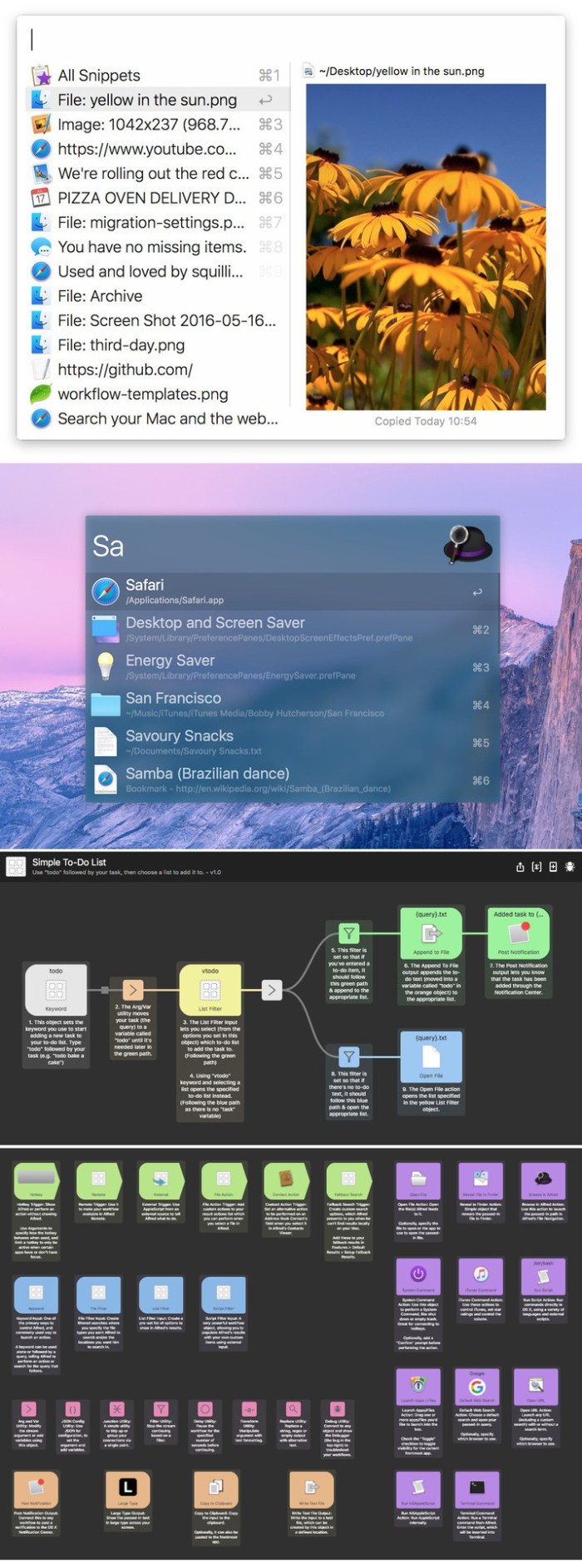
calendar 366 ii 2.4.0

Name Calendar 366 II 2 4 0 TNT.zip
Size 18.30 MB
Created on 2018-11-30 00:09:54
Hash b12a6af011898018107549904e70bae66b37f97c
Files Calendar 366 II 2 4 0 TNT.zip (18.30 MB)

Download

Calendar 366 II 2.4.0

The most complete menu bar calendar for events & reminders!

Appointments and reminders, meetings and deadlines, birthdays and dates- make the most of your time with Calendar 366 II!
Anything a calendar can do, Calendar 366 II can do better- and all functions can be adjusted easily and intuitively.

A dentist appointment is not a friend’s wedding- make your date calendar get the difference.
How often and how exactly do you want to be reminded of what’s important?
Create a calendar that matches your preferences and priorities.

INDIVIDUAL DISPLAY

Pick your preferences – year or month, week or day, list or not, from light red to dark blue.
EASY USE

Create your dates by natural text input, for example:
“Meeting tomorrow 10:30-12:00, Alexanderplatz /work”, or “Sauna! next Sunday 3pm-360”, or simply “time to read” – any way you like it.
Easily find and change events & reminders, repeat them, add attachments*, and create notes without any hassle.

CUSTOMIZE YOU MENU BAR

Prefer an icon, time only, date, date & time or even icon, date and time.
No problem. Calendar 366 II is the perfect clock replacement. Design you menu bar as you like!

ENDLESS APPLICATIONS

Sync documents and attachments easily with all devices via iCloud*.
Easily send, accept or decline invitations.
Find a location on the go: simply search, save, and open in Apple or Google maps.

SPEAKS YOUR LANGUAGE

Calendar 366 II is fully localized in English, German, Spanish, French, Japanese and Chinese (Simplified).

MAIN FEATURES AT A GLANCE
  • All events and reminders at a glance
  • 7 views, 7 themes
  • Easy, intuitive creation, copying and moving of appointments and reminders by drag & drop
  • Easily invite attendees and manage invitations
  • No prerequisites setup (All macOS supported calendar services available: iCloud, Google, Exchange, Outlook, CalDAV)
  • Resizable (Portrait & Landscape)
  • All views optimized for portrait or landscape
  • Autostart / AutoOpen
  • Hotkey
  • Shortcuts
  • Time zone support
  • English, German, French, Japanese, Chinese (Simplified)
  • Complex repeating rules
  • Weekly numbers
  • Complete reminders with one click

*Calendar 366 or Calendar 366 II for macOS & iCloud account required

Compatibility: macOS 10.12 or later 64 bit

Web Site: https://nspektor.com/calendar366/mac
Mac App Store: https://itunes.apple.com/app/calendar-366-ii/id1265895169?mt=12

What’s New in Calendar 366 II 2.4.0

*New* Open locations in HERE WeGo
*New* Mark events as private (Exchange)
• Links, phone numbers and addresses now active in Notes

Ongoing improvements to stability and performance…

%RATINGS_IMAGES% (%RATINGS_USERS% votes, average: %RATINGS_AVERAGE% out of %RATINGS_MAX%)
You need to be a registered member to rate this.