Tag Archives: Introductions

Pixel Film Studios – ProIntro Blend – Professional Introductions for Final Cut Pro X

Descriptions for Pixel Film Studios – ProIntro Blend

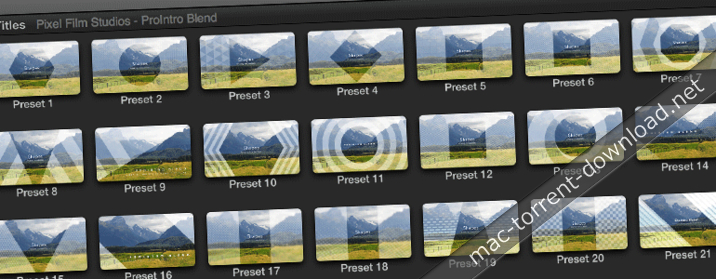
ProIntro: Blend is a set of 30 self-animating introductions created exclusively for use in Final Cut Pro X. ProIntro: Blend combines basic shapes, minimalistic animations, and blend modes to create a wonderfully modern effect. With ProIntro: Blend, editors can easily add a clean and simplistic opener to any FCPX production. Utilize the default settings or customize ProIntro with intuitive parameter controls that can be found in the inspector window.

Web Site: http://store.pixelfilmstudios.com/product/prointro-blend/

Find more Pixel Film Studio Plugins

Introductions with ProIntro: Blend in FCPX

30 Self-Animating Designs

30 Self-Animating Designs

ProIntro Blend is a set of 30 self-animating designs created exclusively for Final Cut Pro X. ProIntro Blend combine unique blend modes with classic overlay designs to create subtle stylization over pictures & video within Final Cut Pro X. Use intuitive drop-down menus to choose text and overlay animations, alter the text mask shape, and change blend modes.

Intuitive Controls in FCPX

ProIntro Blend features amazing on-screen controls that help Final Cut Pro X users edit more efficiency. Select the title layer to reveal on-screen controls in FCPX. With these tools, rotate and position ProIntro presets with absolute ease. Control the position of title elements without having to set a single keyframe.

Blending Variety

ProIntro Blend allows users to blend overlay designs atop pictures and videos to create a unique effects surrounding text. Utilize soft light or add to introduce more luminance to the scene. With blend modes like overlay or multiply, editors can darken overlay patterns above pictures and video files.

Customizable in Final Cut Pro X

ProIntro Blend is completely customizable in Final Cut Pro X. Utilize a variety of blend modes in the overlay and background layers to create unique stylization for any ProIntro preset. Achieve hundreds of different animation combinations wtih drop-down menus, animation spread sliders, and positioning controls. Pixel Film Studios makes amazing easy in Final Cut Pro X.


Pixel Film Studios – ProIntro Blend – Professional Introductions for Final Cut Pro X

Name Pixel Film Studios – ProIntro Blend.dmg
Size 60.02 MB
Created on 2018-03-16 01:29:27
Hash 19de9e2619c02fcc3799fdb5b09b9e4cd143861a
Files Pixel Film Studios – ProIntro Blend.dmg (60.02 MB)

Pixel Film Studios – ProIntro Volume 2 – Introductions for Final Cut Pro X

Pixel Film Studios – ProIntro: Volume 2 – Introductions for Final Cut Pro X

ProIntro Volume 2 is a title pack with 30 uniquely designed titles made exclusively for Final Cut Pro X users. Achieve elegant looks featuring smooth animations. Each preset ProIntro Volume 2 has customizable sliders, checkboxes, and color dabs that allow for easy altercations. Additionally, on-screen controls give Final Cut users complete control over the design, scale, position, and orientation.

Web Site: http://store.pixelfilmstudios.com/plugin/prointro-volume-2

Find more Pixel Film Studio Plugins

Introductions with ProIntro: Volume 2 in FCPX

Beautiful Styles

ProIntro: Volume 2 is a package of 30 introductions with classy designs. Simply drop a ProIntro: Volume 2 preset above pictures or footage in the timeline to present project titles or informational text. Each ProIntro: Volume 2 preset comes with different customization options that allows Final Cut Pro X users to personalize ProIntro: Volume 2 designs.

Overlay & Frame

With ProIntro: Volume 2, Final Cut Pro X users can now add a customization frame to outline the scene. Additionally, change the tint options to achieve greater contrast between the text animations and media background. ProIntro: Volume 2’s overlays range from sparkly grain effects to line screened designs. Create new looks with absolute ease.

On-Screen Controls

ProIntro: Volume 2 features useful on-screen controls that allows users scale, position, and rotate PROINTRO designs with absolute ease. Simply place the text in any position and allow PROINTRO to do the rest. Add a slow dolly using the zoom function found in the top right inspector window.

30 ProIntro Vol. 2 Presets

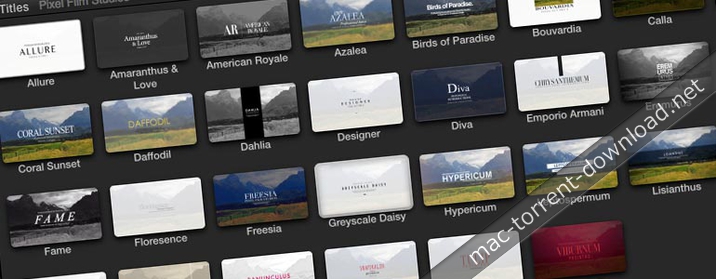
ProIntro: Volume 2 has 30 presets that are exclusive to Final Cut Pro X. Pick from professional designs with a simplistic looks or more stylized designs with film grain and blur. Find unique texture options under “Overlay Controls” and utilize “Edit Mode” to personalize the look even more.


Pixel Film Studios – ProIntro Volume 2 – PROFESSIONAL INTROS FOR FINAL CUT PRO X

Name Pixel Film Studios – ProIntro Volume 2.dmg
Size 13.32 MB
Created on 2017-07-28 07:42:22
Hash f9f0aaca989426017c7720313dd9507982273db5
Files Pixel Film Studios – ProIntro Volume 2.dmg (13.32 MB)

Pixel Film Studios – ProIntro Glamour – Introductions for Final Cut Pro X

Name Pixel Film Studios ProIntro Glamour.zip Size 194.9 MB Created on 2017-11-14 06:36:09 Hash 7cbc5d6d4b7fa47f9911348114b74ada0a31b9d4 Files Pixel Film Studios ProIntro Glamour.zip (194.9 MB) Download Download Descriptions for Pixel Film Studios – ProIntro Glamour ProIntro: Glamor is a set of 30 self-animating elegant-styled introductions created exclusively for use in Final Cut Pro X. Pixel Film Studios’ elegantly styled titles allow FCPX editors to add a unique opener to any video production. Choose from styles with beautiful animations and basic title elements including shapes, lines, and patterns. Blur the background and adjust gradients for greater contrast. Pixel Film Studios’ ProIntro: Glamor makes …

Copyright © 2019 Mac Torrent Download All Rights Reserved.