Tag Archives: cDock

cDock 3.0.9

cDock 3.0.9

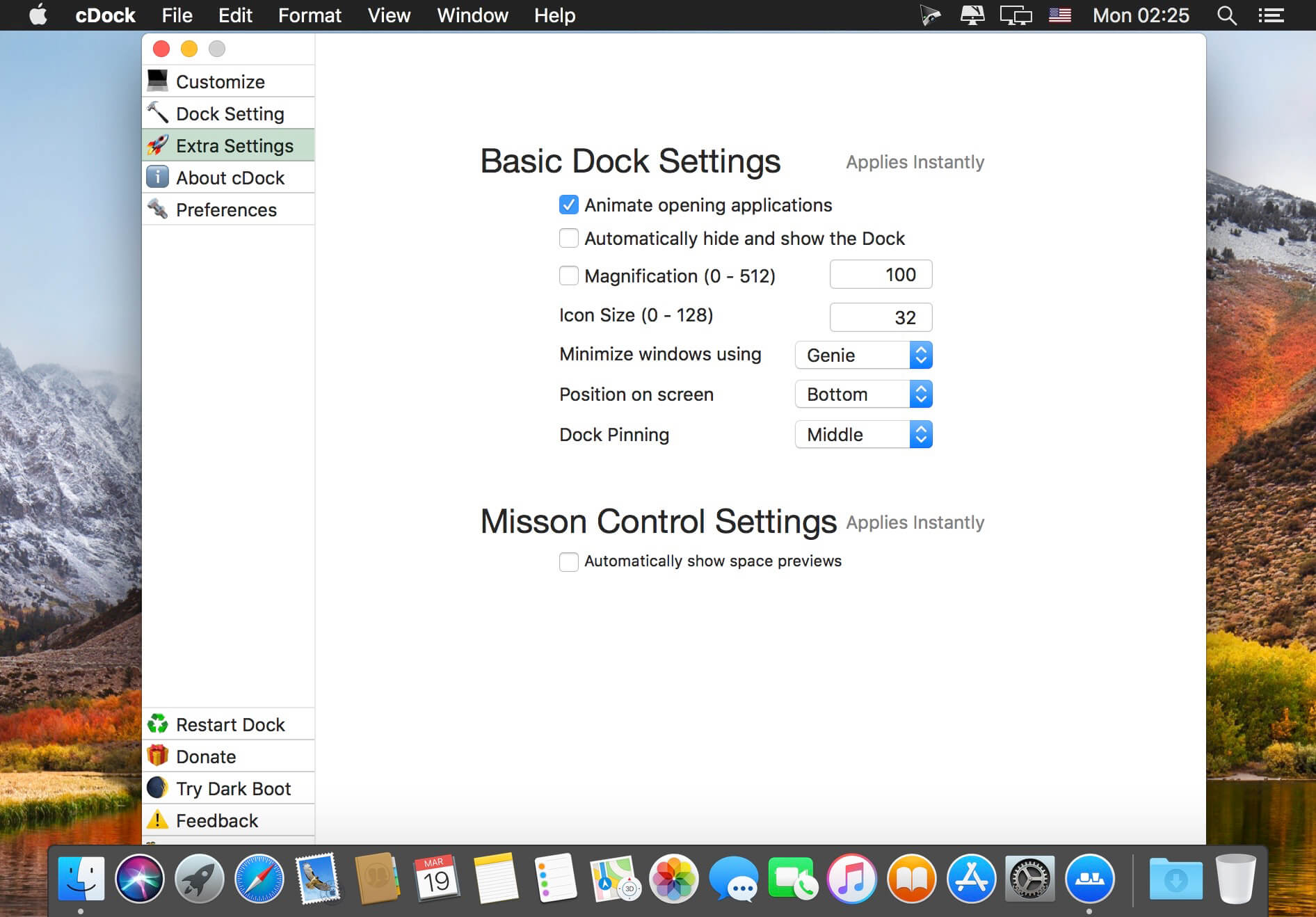
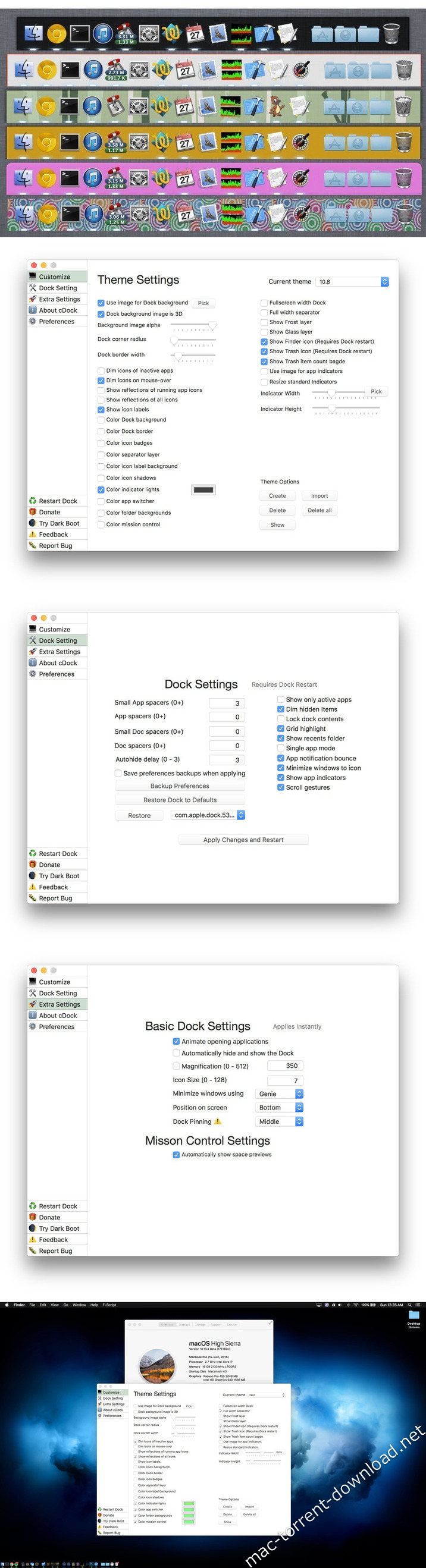
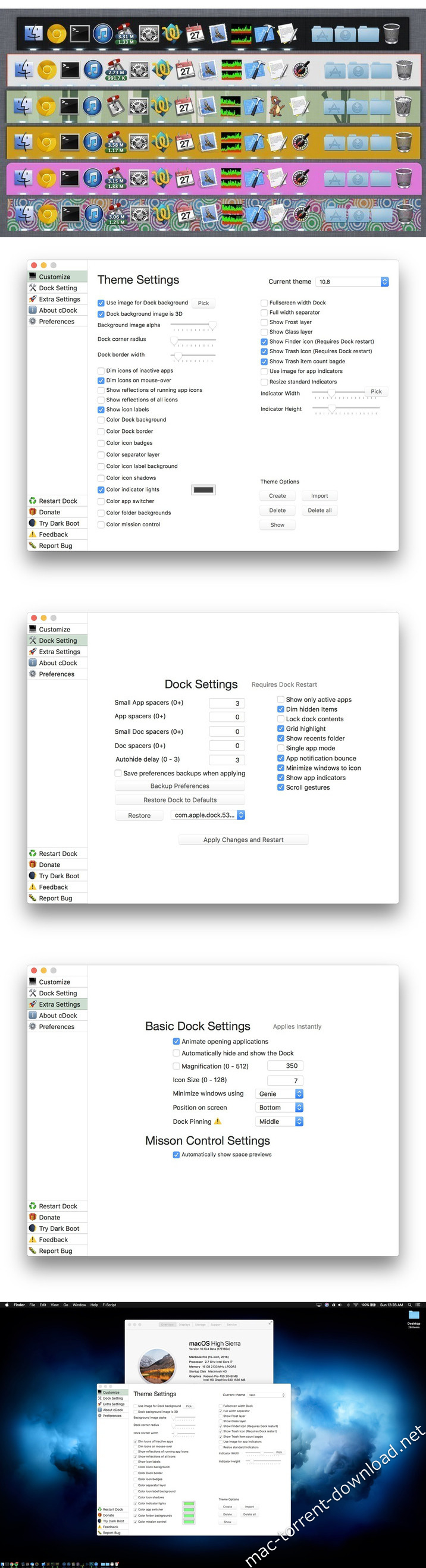
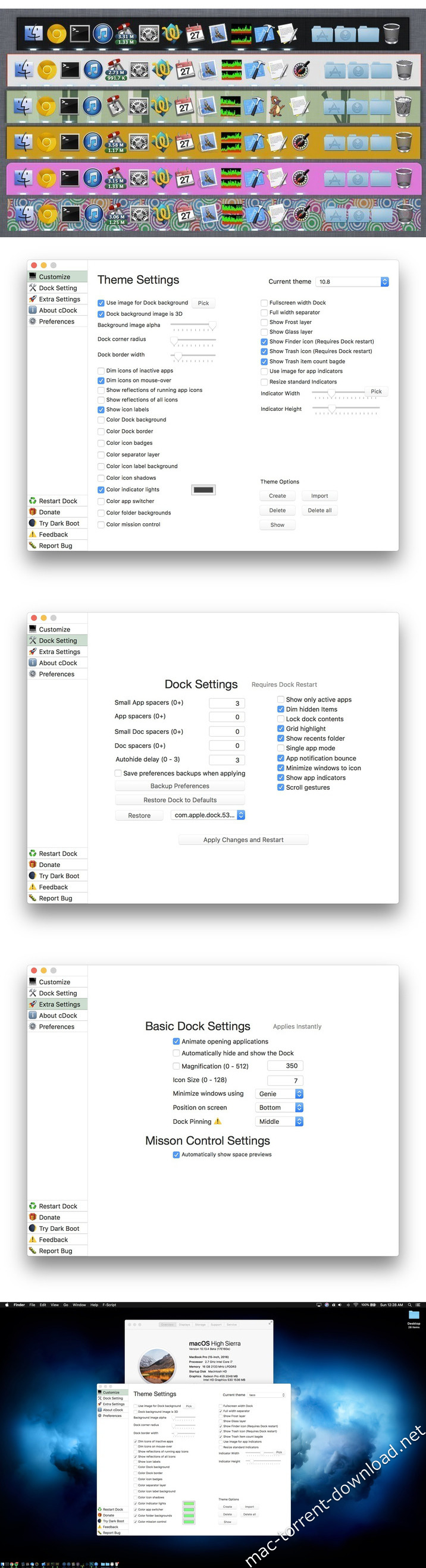
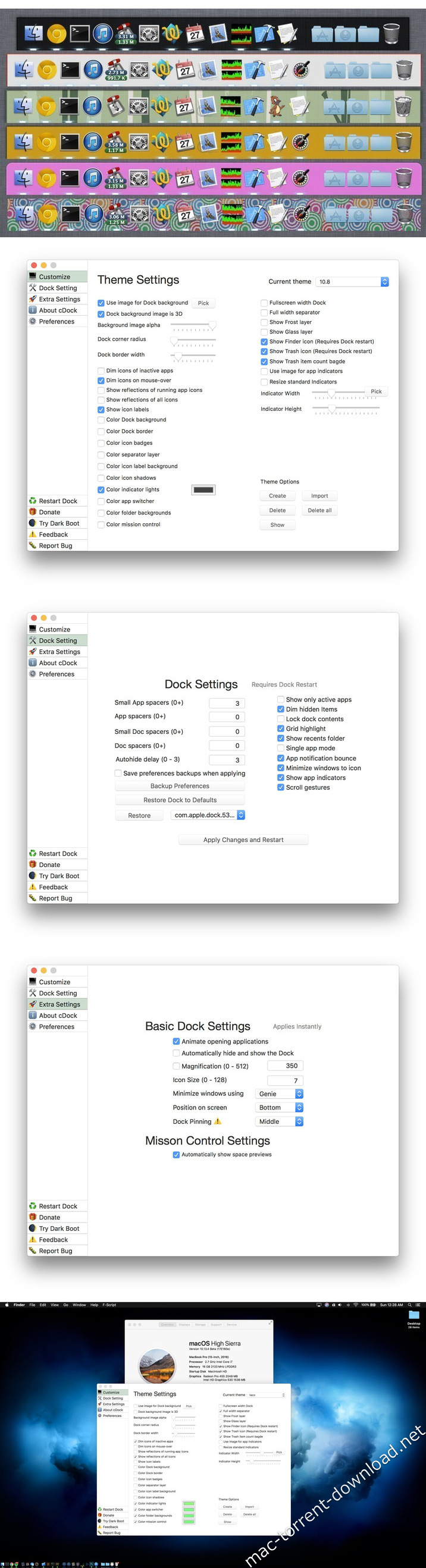
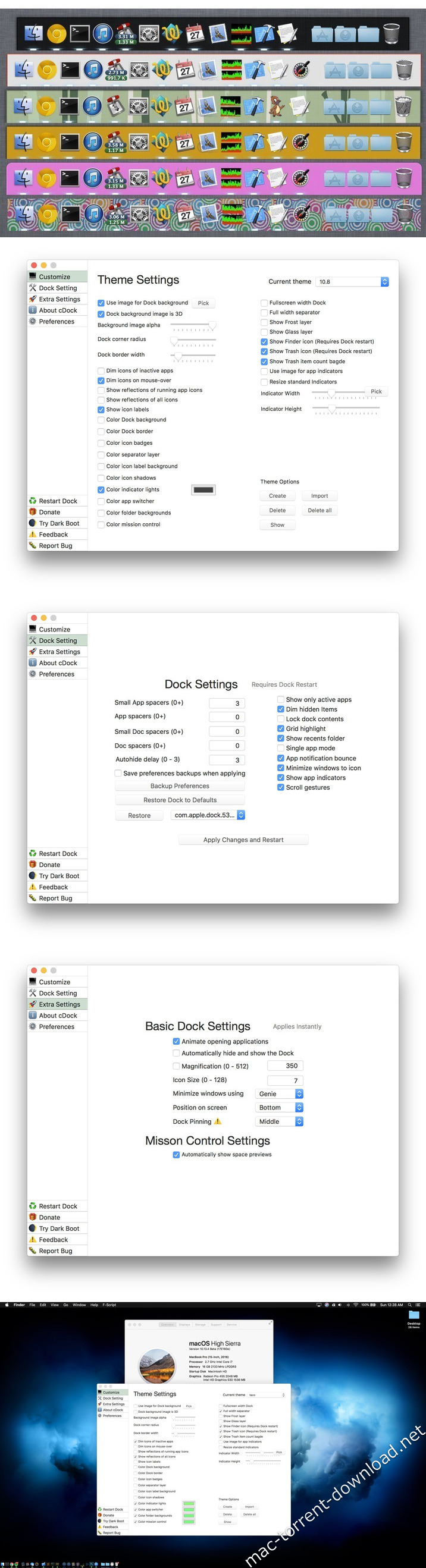
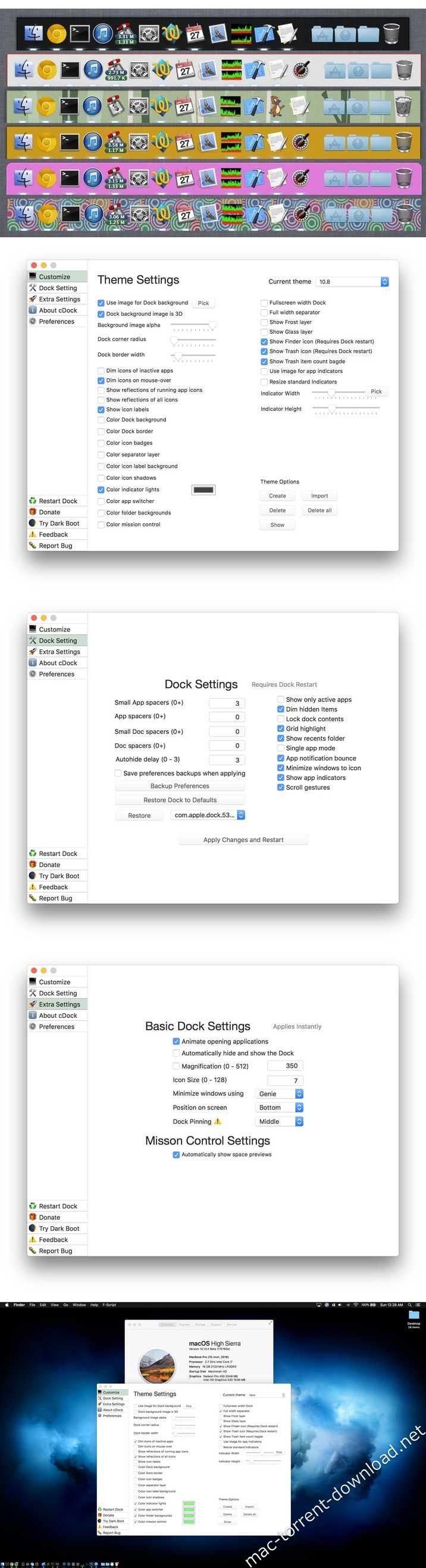
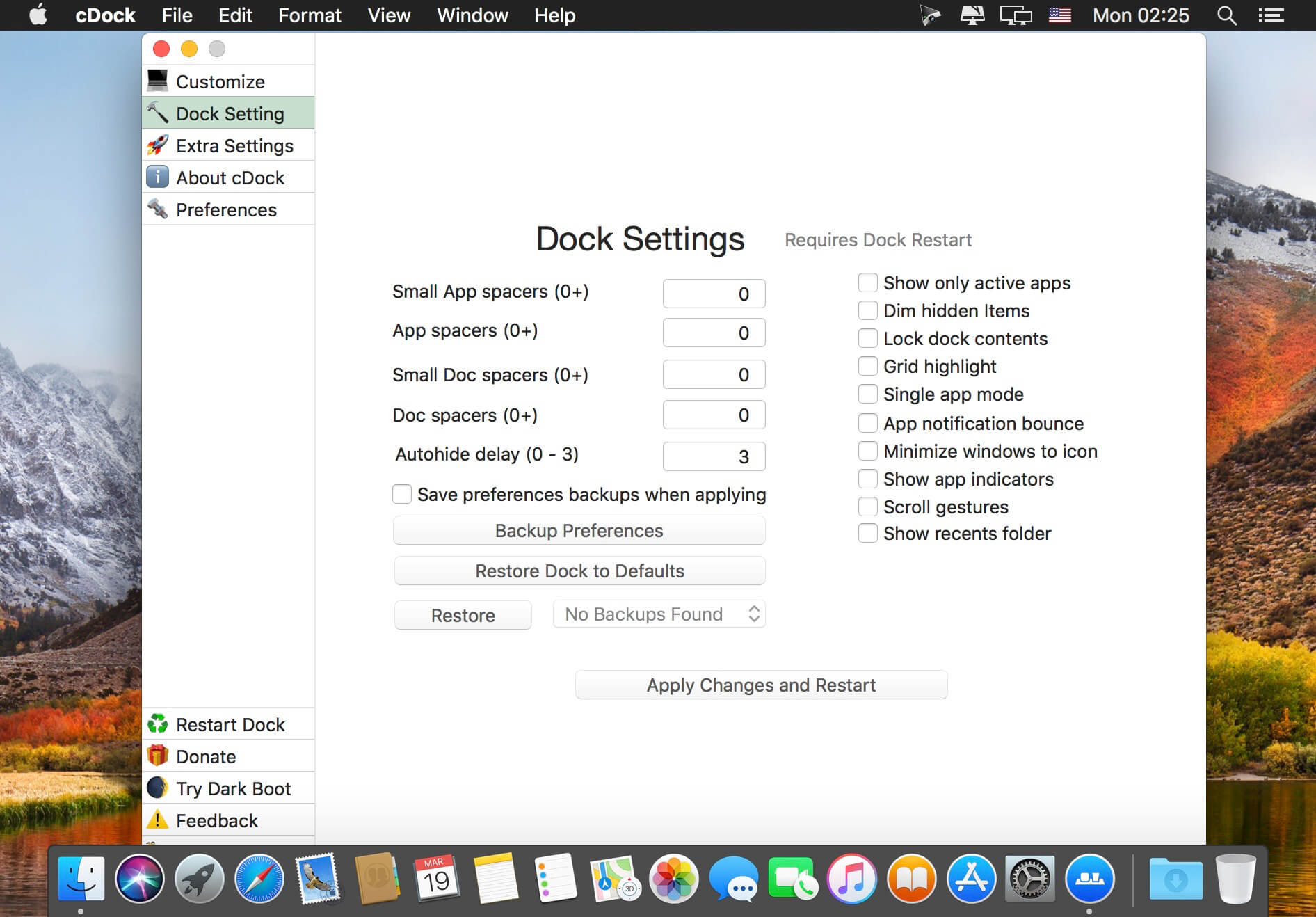
cDock 3 gives you full control over the Dock. There are tons of ways to customize the look and feel of the Dock. You can even enable some awesome hidden features. cDock is designed to make theming your Dock easy and robust on macOS 10.10 and up.

Features

  • Hide applications from showing
  • Dock pinning
  • Color EVERYTHING
  • 3D dock
  • Trash badge
  • Add / Remove spacer tiles
  • Add / Remove recents folder
  • Add / Remove iCloud Drive icon
  • Add / Remove Airdrop icon
  • Force dark menus
  • Remove the Trash and / or the Finder icon
  • Instantly show Desktop previews in Mission Control
  • Hide installed / updated dot from Launchpad
  • Adjust Launchpad rows / columns
  • Edit basic Dock settings
  • And much more…

What’s New:

Version 3.0.7:
Important
This version of cDock requires SIP remain off in order to function
If you wish you can still run partial SIP protection using the following command

csrutil enable --without debug –without fs
  • New Catalina support
  • New SIP warning sheet
  • New Delta updates
  • New Application design
  • New Activations now work for all users of the same computer
  • Fixed Crash if blacklisted item no longer exists
  • Fixed Mission control automatically showing desktop previews
  • Fixed Payment window not attached to main window
  • Fixed Start at login issues
  • Fixed Mission control automatically showing desktop previews
  • Fixed Bugs and added performance improvements
  • Improved Mojave support
  • Improved Switched from SIMBL to Mach Inject for loading into Dock process
  • Improved Switched back to Sparkle framework for updates
  • Improved Updated version number to 3.x.x to match current branding
  • Removed DevMate framework (product was discontinued)

Compatibility: OS X 10.10 or later 64-bit
Homepage https://cdock.macenhance.com/

Screenshots

Name: cDock_3.0.9__TNT_Mactorrents.io.dmg
Size: 16.07 MB
Files cDock_3.0.9__TNT_Mactorrents.io.dmg[16.07 MB]

   Download

cDock 3.0.8

Download cDock 3.0.8

cDock 3 gives you full control over the Dock. There are tons of ways to customize the look and feel of the Dock. You can even enable some awesome hidden features. cDock is designed to make theming your Dock easy and robust on macOS 10.10 and up.

There are many ways to configure cDock as you wish. Give it a go and find out!

cDock Features

  • Hide applications from showing
  • Dock pinning
  • Color EVERYTHING
  • 3D dock
  • Trash badge
  • Add / Remove spacer tiles
  • Add / Remove recents folder
  • Add / Remove iCloud Drive icon
  • Add / Remove Airdrop icon
  • Force dark menus
  • Remove the Trash and / or the Finder icon
  • Instantly show Desktop previews in Mission Control
  • Hide installed / updated dot from Launchpad
  • Adjust Launchpad rows / columns
  • Edit basic Dock settings
  • And much more…

Personalize the looks of the macOS Dock

cDock is a simple, clean and straightforward macOS application that enables you to install a 2D Dock on your Mac running 10.9 or later. On top of that, cDock helps you personalize the appearance of your Dock with several dock styles included in the app.

With the help of cDock you can make the Dock transparent or install one of the pre-defined dock styles with just a couple of mouse clicks. Within the built-in collection of themes, you’ll find a dark and grey dock, as well as pink or full-screen ones.

Create your own Dock themes and apply them with ease

The best thing about cDock is that it allows you to rapidly and effortlessly create your own custom themes by manually changing the dock settings file according to your needs.

The settings info text file provides the necessary information about the values that you can modify in order to change the look of the Dock and automatically opens when you select the “Install Customizable Dock” option and hit the “Okay” button.

From cDock’s main window, you also have the option to restart the Dock or the Finder and, as mentioned above, to install the colored Finder sidebar. On top of that, you can easily restore the Finder and the Dock to their original looks if necessary.

Go back to the original appearance and quickly restart the Dock

cDock performed well throughout our tests and allowed us to try several different looks until we where happy with the appearance of both our Mac’s Dock and Finder sidebar.

On the whole, cDock is one of those tools that should be provided by Apple but, fortunately, its developer has made it available to fill in the shoes of such a much needed default macOS utility.

Information

Compatibility
OS X 10.10 or later 64-bit
Languages
English

What’s New in cDock 3.0.8

  • Release notes not available at the time of this post.

Screenshots

Name cDock 3.0.8 [TNT] mac-torrents.net.zip
Size 25.48 MB
Created on 2019-11-15 14:13:57
Hash 2e648315437aee9d1cc27274c1ea3720ad013a90
Files cDock 3.0.8 [TNT] mac-torrents.net.zip (25.48 MB)

cDock 3.0.4

Name cDock 3.0.4 [TNT] mac-torrents.net.zip
Size 25.35 MB
Created on 2019-10-02 22:49:01
Hash f0c1c0f95587aaaf53a518d783589734a94cc0c8
Files cDock 3.0.4 [TNT] mac-torrents.net.zip (25.35 MB)

Download


Download cDock 3.0.4

cDock 3 gives you full control over the Dock. There are tons of ways to customize the look and feel of the Dock. You can even enable some awesome hidden features. cDock is designed to make theming your Dock easy and robust on macOS 10.10 and up.

There are many ways to configure cDock as you wish. Give it a go and find out!

cDock Features

  • Hide applications from showing
  • Dock pinning
  • Color EVERYTHING
  • 3D dock
  • Trash badge
  • Add / Remove spacer tiles
  • Add / Remove recents folder
  • Add / Remove iCloud Drive icon
  • Add / Remove Airdrop icon
  • Force dark menus
  • Remove the Trash and / or the Finder icon
  • Instantly show Desktop previews in Mission Control
  • Hide installed / updated dot from Launchpad
  • Adjust Launchpad rows / columns
  • Edit basic Dock settings
  • And much more…

Personalize the looks of the macOS Dock

cDock is a simple, clean and straightforward macOS application that enables you to install a 2D Dock on your Mac running 10.9 or later. On top of that, cDock helps you personalize the appearance of your Dock with several dock styles included in the app.

With the help of cDock you can make the Dock transparent or install one of the pre-defined dock styles with just a couple of mouse clicks. Within the built-in collection of themes, you’ll find a dark and grey dock, as well as pink or full-screen ones.

Create your own Dock themes and apply them with ease

The best thing about cDock is that it allows you to rapidly and effortlessly create your own custom themes by manually changing the dock settings file according to your needs.

The settings info text file provides the necessary information about the values that you can modify in order to change the look of the Dock and automatically opens when you select the “Install Customizable Dock” option and hit the “Okay” button.

From cDock’s main window, you also have the option to restart the Dock or the Finder and, as mentioned above, to install the colored Finder sidebar. On top of that, you can easily restore the Finder and the Dock to their original looks if necessary.

Go back to the original appearance and quickly restart the Dock

cDock performed well throughout our tests and allowed us to try several different looks until we where happy with the appearance of both our Mac’s Dock and Finder sidebar.

On the whole, cDock is one of those tools that should be provided by Apple but, fortunately, its developer has made it available to fill in the shoes of such a much needed default macOS utility.

Information

CompatibilityOS X 10.10 or later 64-bit
LanguagesEnglish

What’s New in cDock 3.0.4

  • Release notes not available at the time of this post.

Screenshots

cDock 3.0.3

Name cDock 3.0.3 TNT mac-torrents.net.dmg
Size 21.99 MB
Created on 2019-09-03 15:14:55
Hash d64693e4471f5334d84c606b4646198848a55cb3
Files cDock 3.0.3 TNT mac-torrents.net.dmg (21.99 MB)

Download

Descriptions for cDock 3.0.3

If you get bored with your Mac’s default Dock background and you miss the colored sidebar from OS X 10.6, than cDock is an application created with these exact specifications in mind..

Personalize the looks of the macOS Dock

cDock is a simple, clean and straightforward macOS application that enables you to install a 2D Dock on your Mac running 10.9 or later. On top of that, cDock helps you personalize the appearance of your Dock with several dock styles included in the app.

With the help of cDock you can make the Dock transparent or install one of the pre-defined dock styles with just a couple of mouse clicks. Within the built-in collection of themes, you’ll find a dark and grey dock, as well as pink or full-screen ones.

Create your own Dock themes and apply them with ease

The best thing about cDock is that it allows you to rapidly and effortlessly create your own custom themes by manually changing the dock settings file according to your needs.

The settings info text file provides the necessary information about the values that you can modify in order to change the look of the Dock and automatically opens when you select the “Install Customizable Dock” option and hit the “Okay” button.

From cDock’s main window, you also have the option to restart the Dock or the Finder and, as mentioned above, to install the colored Finder sidebar. On top of that, you can easily restore the Finder and the Dock to their original looks if necessary.

Go back to the original appearance and quickly restart the Dock

cDock performed well throughout our tests and allowed us to try several different looks until we where happy with the appearance of both our Mac’s Dock and Finder sidebar.

On the whole, cDock is one of those tools that should be provided by Apple but, fortunately, its developer has made it available to fill in the shoes of such a much needed default macOS utility.

Information

Compatibility
OS X 10.10 or later 64-bit
Languages
English

What’s New in cDock 3.0.3

  • Release notes not available at the time of this post.

cDock 1.2

Name cDock 1 2 0 TNT.zip
Size 13.84 MB
Created on 2018-09-30 22:37:52
Hash 08995c881fd81ca99c5cbaa6eb0c0dd853b48a58
Files cDock 1 2 0 TNT.zip (13.84 MB)

Descriptions for cDock 1.2

If you get bored with your Mac’s default Dock background and you miss the colored sidebar from OS X 10.6, than cDock is an application created with these exact specifications in mind..

Personalize the looks of the macOS Dock

cDock is a simple, clean and straightforward macOS application that enables you to install a 2D Dock on your Mac running 10.9 or later. On top of that, cDock helps you personalize the appearance of your Dock with several dock styles included in the app.

With the help of cDock you can make the Dock transparent or install one of the pre-defined dock styles with just a couple of mouse clicks. Within the built-in collection of themes, you’ll find a dark and grey dock, as well as pink or full-screen ones.

Create your own Dock themes and apply them with ease

The best thing about cDock is that it allows you to rapidly and effortlessly create your own custom themes by manually changing the dock settings file according to your needs.

The settings info text file provides the necessary information about the values that you can modify in order to change the look of the Dock and automatically opens when you select the “Install Customizable Dock” option and hit the “Okay” button.

From cDock’s main window, you also have the option to restart the Dock or the Finder and, as mentioned above, to install the colored Finder sidebar. On top of that, you can easily restore the Finder and the Dock to their original looks if necessary.

Go back to the original appearance and quickly restart the Dock

cDock performed well throughout our tests and allowed us to try several different looks until we where happy with the appearance of both our Mac’s Dock and Finder sidebar.

On the whole, cDock is one of those tools that should be provided by Apple but, fortunately, its developer has made it available to fill in the shoes of such a much needed default macOS utility.

Compatibility: OS X 10.10 or later 64-bit

Web Site: http://w0lfschild.github.io/

What’s New in cDock 1.2

  • Release notes not available at the time of this post.

Screenshots

cDock 1.1.3

Name cDock_1.1.3__TNT.rar
Size 11.62 MB
Created on 2018-08-11 17:03:39
Hash d9d654f7d7e968724abdafd97dc012b4af5f67d4
Files cDock_1.1.3__TNT.rar (11.62 MB)

Descriptions for cDock 1.1.3

If you get bored with your Mac’s default Dock background and you miss the colored sidebar from OS X 10.6, than cDock is an application created with these exact specifications in mind..

Personalize the looks of the macOS Dock

cDock is a simple, clean and straightforward macOS application that enables you to install a 2D Dock on your Mac running 10.9 or later. On top of that, cDock helps you personalize the appearance of your Dock with several dock styles included in the app.

With the help of cDock you can make the Dock transparent or install one of the pre-defined dock styles with just a couple of mouse clicks. Within the built-in collection of themes, you’ll find a dark and grey dock, as well as pink or full-screen ones.

Create your own Dock themes and apply them with ease

The best thing about cDock is that it allows you to rapidly and effortlessly create your own custom themes by manually changing the dock settings file according to your needs.

The settings info text file provides the necessary information about the values that you can modify in order to change the look of the Dock and automatically opens when you select the “Install Customizable Dock” option and hit the “Okay” button.

From cDock’s main window, you also have the option to restart the Dock or the Finder and, as mentioned above, to install the colored Finder sidebar. On top of that, you can easily restore the Finder and the Dock to their original looks if necessary.

Go back to the original appearance and quickly restart the Dock

cDock performed well throughout our tests and allowed us to try several different looks until we where happy with the appearance of both our Mac’s Dock and Finder sidebar.

On the whole, cDock is one of those tools that should be provided by Apple but, fortunately, its developer has made it available to fill in the shoes of such a much needed default macOS utility.

Compatibility: OS X 10.10 or later 64-bit

Web Site: http://w0lfschild.github.io/

What’s New in cDock 1.1.3

  • Release notes not available at the time of this post.

Screenshots

cDock 1.1.1

Name cDock 1 1 1 TNT.zip
Size 12.77 MB
Created on 2018-06-18 20:38:20
Hash a00d8f606a9e62fa2efe225bcdb9050ea4d6d3c7
Files cDock 1 1 1 TNT.zip (12.77 MB)

Descriptions for cDock 1.1.1

If you get bored with your Mac’s default Dock background and you miss the colored sidebar from OS X 10.6, than cDock is an application created with these exact specifications in mind..

Personalize the looks of the macOS Dock

cDock is a simple, clean and straightforward macOS application that enables you to install a 2D Dock on your Mac running 10.9 or later. On top of that, cDock helps you personalize the appearance of your Dock with several dock styles included in the app.

With the help of cDock you can make the Dock transparent or install one of the pre-defined dock styles with just a couple of mouse clicks. Within the built-in collection of themes, you’ll find a dark and grey dock, as well as pink or full-screen ones.

Create your own Dock themes and apply them with ease

The best thing about cDock is that it allows you to rapidly and effortlessly create your own custom themes by manually changing the dock settings file according to your needs.

The settings info text file provides the necessary information about the values that you can modify in order to change the look of the Dock and automatically opens when you select the “Install Customizable Dock” option and hit the “Okay” button.

From cDock’s main window, you also have the option to restart the Dock or the Finder and, as mentioned above, to install the colored Finder sidebar. On top of that, you can easily restore the Finder and the Dock to their original looks if necessary.

Go back to the original appearance and quickly restart the Dock

cDock performed well throughout our tests and allowed us to try several different looks until we where happy with the appearance of both our Mac’s Dock and Finder sidebar.

On the whole, cDock is one of those tools that should be provided by Apple but, fortunately, its developer has made it available to fill in the shoes of such a much needed default macOS utility.

Compatibility: OS X 10.10 or later 64-bit

Web Site: http://w0lfschild.github.io/

What’s New in cDock 1.1.1

  • Release notes not available at the time of this post.

Screenshots

cDock 1.1.0

Name cDock_1.1.0__TNT.rar
Size 11.62 MB
Created on 2018-06-16 15:56:41
Hash 2e6d46d1f7f6d347ec311747510b0ada8e697210
Files cDock_1.1.0__TNT.rar (11.62 MB)

Descriptions for cDock 1.1.0

If you get bored with your Mac’s default Dock background and you miss the colored sidebar from OS X 10.6, than cDock is an application created with these exact specifications in mind..

Personalize the looks of the macOS Dock

cDock is a simple, clean and straightforward macOS application that enables you to install a 2D Dock on your Mac running 10.9 or later. On top of that, cDock helps you personalize the appearance of your Dock with several dock styles included in the app.

With the help of cDock you can make the Dock transparent or install one of the pre-defined dock styles with just a couple of mouse clicks. Within the built-in collection of themes, you’ll find a dark and grey dock, as well as pink or full-screen ones.

Create your own Dock themes and apply them with ease

The best thing about cDock is that it allows you to rapidly and effortlessly create your own custom themes by manually changing the dock settings file according to your needs.

The settings info text file provides the necessary information about the values that you can modify in order to change the look of the Dock and automatically opens when you select the “Install Customizable Dock” option and hit the “Okay” button.

From cDock’s main window, you also have the option to restart the Dock or the Finder and, as mentioned above, to install the colored Finder sidebar. On top of that, you can easily restore the Finder and the Dock to their original looks if necessary.

Go back to the original appearance and quickly restart the Dock

cDock performed well throughout our tests and allowed us to try several different looks until we where happy with the appearance of both our Mac’s Dock and Finder sidebar.

On the whole, cDock is one of those tools that should be provided by Apple but, fortunately, its developer has made it available to fill in the shoes of such a much needed default macOS utility.

Compatibility: OS X 10.10 or later 64-bit

Web Site: http://w0lfschild.github.io/

What’s New in cDock 1.1.0

  • Release notes not available at the time of this post.

Screenshots

cDock 1.0.4

Name cDock 1.0.4
Size 11.76 MB
Created on 2018-03-24 23:22:20
Hash 67df79a69daf1509faf5dc24e6761c3d1cd20df3
Files cDock_1.0.4[TNT].rar (11.76 MB)

Descriptions for Descriptions for cDock 1.0.4

Name: cDock
Version: 1.0.4
Developer: Wolfgang Baird
Mac Platform: Intel
OS Version: OS X 10.10 or later
Processor type(s) & speed: 64-bit processor

Includes: Pre-K’ed (TNT)

Web Site: http://w0lfschild.github.io/

Overview

If you get bored with your Mac’s default Dock background and you miss the colored sidebar from OS X 10.6, than cDock is an application created with these exact specifications in mind..

Personalize the looks of the macOS Dock

cDock is a simple, clean and straightforward macOS application that enables you to install a 2D Dock on your Mac running 10.9 or later. On top of that, cDock helps you personalize the appearance of your Dock with several dock styles included in the app.

With the help of cDock you can make the Dock transparent or install one of the pre-defined dock styles with just a couple of mouse clicks. Within the built-in collection of themes, you’ll find a dark and grey dock, as well as pink or full-screen ones.

Create your own Dock themes and apply them with ease

The best thing about cDock is that it allows you to rapidly and effortlessly create your own custom themes by manually changing the dock settings file according to your needs.

The settings info text file provides the necessary information about the values that you can modify in order to change the look of the Dock and automatically opens when you select the “Install Customizable Dock” option and hit the “Okay” button.

From cDock’s main window, you also have the option to restart the Dock or the Finder and, as mentioned above, to install the colored Finder sidebar. On top of that, you can easily restore the Finder and the Dock to their original looks if necessary.

Go back to the original appearance and quickly restart the Dock

cDock performed well throughout our tests and allowed us to try several different looks until we where happy with the appearance of both our Mac’s Dock and Finder sidebar.

On the whole, cDock is one of those tools that should be provided by Apple but, fortunately, its developer has made it available to fill in the shoes of such a much needed default macOS utility.

What’s New in cDock 1.0.4

  • Release notes not available at the time of this post.

Screenshots

cDock 1.0.3 (5200)

Descriptions for cDock 1.0.3 (5200)

Name: cDock
Version: 1.0.3 (5200)
Developer: Wolfgang Baird
Mac Platform: Intel
OS Version: OS X 10.10 or later
Processor type(s) & speed: 64-bit processor

Includes: k

Web Site: http://w0lfschild.github.io/

Overview

If you get bored with your Mac’s default Dock background and you miss the colored sidebar from OS X 10.6, than cDock is an application created with these exact specifications in mind..

Personalize the looks of the macOS Dock

cDock is a simple, clean and straightforward macOS application that enables you to install a 2D Dock on your Mac running 10.9 or later. On top of that, cDock helps you personalize the appearance of your Dock with several dock styles included in the app.

With the help of cDock you can make the Dock transparent or install one of the pre-defined dock styles with just a couple of mouse clicks. Within the built-in collection of themes, you’ll find a dark and grey dock, as well as pink or full-screen ones.

Create your own Dock themes and apply them with ease

The best thing about cDock is that it allows you to rapidly and effortlessly create your own custom themes by manually changing the dock settings file according to your needs.

The settings info text file provides the necessary information about the values that you can modify in order to change the look of the Dock and automatically opens when you select the “Install Customizable Dock” option and hit the “Okay” button.

From cDock’s main window, you also have the option to restart the Dock or the Finder and, as mentioned above, to install the colored Finder sidebar. On top of that, you can easily restore the Finder and the Dock to their original looks if necessary.

Go back to the original appearance and quickly restart the Dock

cDock performed well throughout our tests and allowed us to try several different looks until we where happy with the appearance of both our Mac’s Dock and Finder sidebar.

On the whole, cDock is one of those tools that should be provided by Apple but, fortunately, its developer has made it available to fill in the shoes of such a much needed default macOS utility.

What’s new in cDock 1.0.3 (5200)

March 21st, 2018

New:
  • Show/Hide iCloud Drive icon in Dock
  • Show/Hide AirDrop icon in Dock
  • Show/Hide Launchpad new item dot
  • Launchpad adjust row and column count
  • Ability to delete saved Dock backups
  • Button to show license
Fixes:
  • Dock preference backups not showing in some cases
  • Indicator miss-alignment on Left / Right positioning
  • Conflict with TotalSpaces
  • Case where app could hang when communicating with the Dock
  • Case where Dock would freeze when restarting and loading the cDock bundle
  • Case where helper could crash when trying to load the cDock bundle
  • cDock Helper not using app icon
  • cDock Helper not checking for updates
  • Updated PaddleFramework to latest version
  • Unhandled exception when trying to use non RGBA color picker
  • Issue where switching themes back and forth would decrease slider values
  • Issue where Left / Right position dock would draw custom indicator images incorrectly
  • Show Finder and Show trash default to on if the key does not exist in the theme

Screenshots

Name cDock 1.0.3 [k].dmg
Size 12.26 MB
Created on 2018-03-21 13:31:15
Hash 702e7a817363e1db6eed6f66248bd223f36bf42e
Files cDock 1.0.3 [k].dmg (12.26 MB)