Tag Archives: 4.5.6

BeLight Art Text 4.5.6

Graphic Design Software for Everyone. Art Text is graphic design software specifically tuned for lettering, typography, text mockups and various artistic text effects. Supplied with a great variety of ready to use styles and materials, selection of textures, icons, fonts and backgrounds, special designed effects and shape transformations, Art Text guarantees striking appearance of your badges, logos, cards, flyers and presentations.

Graphics that you create in Art Text will be a perfect fit for various document types, such as presentations, flyers, brochures, business cards, and can even spice up photos or create picture captions before uploading to Facebook.

Styles and Materials
Art Text comes equipped with a wide selection of text styles, surface materials and effects. Unrestricted by any presets, your creativity will take flight with easily adjustable textures, surface bump maps, environment textures, light spots and shadows, and other settings to come up with new materials.

Spray Fill
Beautifully lay out words with coffee beans, color balls, leaves, Lego pieces and even clouds using the supplied collection or import your own fill images. Experiment with lettering design from highly random to a very structured layout and fill sizes.

Mask Effects
Tweak text finishing with a variety of masks to render an aged text or a scratched look. You may also want to add a stamped effect with just one click. Easily experiment with settings, and combine masks with other effects, to get a somewhat unexpected but impressive result.

Distortion Effects
Heavily alter the font shape beyond standard typeface options. Effortlessly wear out text sides with Side Distortion, create random holes in the body with Erosion, partially dim text with Blur distortion, and more.

Shading Materials
Special 2D materials open the door to an array of visual effects, such as bumping or embossing. You may also apply a glass, plastic or gold finish, make the surface glossy, matte, bright or faded, or give your graphic a fascinating watercolor, oil paint or pencil drawing look. The most demanding users will find the material editor handy for creating custom Shading Materials.

Real 3D Text
Art Text implements a 3D modeling engine that helps to convert any text, symbol or pictogram to 3D. Our graphic design software embeds 3D renderer together with tons of customizable 3D materials to ensure super realistic results every time.

Paint Lettering
Art Text comes with a great variety of fills, distortion effects and object content to design highly realistic, hand painted, ink written and watercolor lettering art.

What’s New:

What’s New in Version 4
Spray Fill
New fill effect that populates the text shape with coffee beans, nuts, stones, glitter and other preset image fills.

Text Designs Store
Regularly updated gallery of free and paid text design templates.

Realistic 3D Materials
Materials have dramatically improved with Reflection Masks.

Facebook 3D Photo
Create catchy phrase graphics and share on Facebook as a 3D photo.

Multi-Purpose Distortion
Achieve diverse 2D visual effects with Erosion, Roundness, Side Distortion, Blur and other shape distortion effects.

Shading Materials
2D shading materials become more sophisticated with 150 fully adjustable Bump Map masks.

fix – Includes corrections for ARM

Compatibility: OS X 10.14 or later
Homepage https://text.design/art-text/

Screenshots


Name: Art_Text_4_4.5.6_Mac-torrents.Net.dmg
Size: 755 MB
Files Art_Text_4_4.5.6_Mac-torrents.Net.dmg[755 MB]


   Download Torrent

MWeb Pro 4.5.6

Name: MWeb_Pro_4.5.6_Mactorrents.biz.dmg
Size: 36 MB
Files MWeb_Pro_4.5.6_Mactorrents.biz.dmg[36 MB]

   Download Torrent
   Link Download

Perfectly Clear Workbench is an application that uses Athentech’s Perfectly Clear image correction libraries and is made available to demonstrate the capabilities of the Perfectly Clear processing libraries, face detection library and to allow a quick export of the processing settings for use.

One of the key features in Workbench is the ability to “export to API” when saving a Preset. This allows you to make image corrections in Workbench and tune the settings to match your style and correction needs. Then, you can quickly export these settings to a text file – ready to be copy / pasted into your source code with our image correction SDK.

What’s New in Perfectly Clear WorkBench 4
1. Beautiful new interface
2. New image correction tools
a. Preprocessing section for Input Looks and “Image Ambulance” for manual exposure corrections
b. “Face Aware” exposure for more accurate auto-exposure corrections in portraits and group photos
c. Black Point tool to deepen blacks
d. New Color Vibrancy tool to complement our previous “Vibrancy” control (now renamed to Color Restoration)
e. Sky and Foliage enhancements
3. Existing tools have been improved
a. Added strength sliders to Light Diffusion and Vibrancy for better control
b. Better ‘color pickers’ for Skin Tone and Blush adjustments
4. Manually identify faces that are not detected automatically
5. One-click to zoom to individual faces
6. Modify facial regions to provide the best corrections
7. Histogram
8. Much improved preset management

Supported Image Formats

Perfectly Clear requires RGB-formatted images in either 8 or 16-bit color depth. Any image file that Photoshop or Lightroom can open and convert to this format may be used in Perfectly Clear. Monochrome and CMYK images must be converted to RGB before using Perfectly Clear. RAW files must be opened through Adobe Camera RAW and loaded into Photoshop to be accessible to Perfectly Clear.

What’s New:

Version 4.5.6

  • Release notes were unavailable when this listing was updated.

Compatibility: macOS 10.15 or late
Homepage https://eyeq.photos/

Dropzone 4 Pro 4.5.6

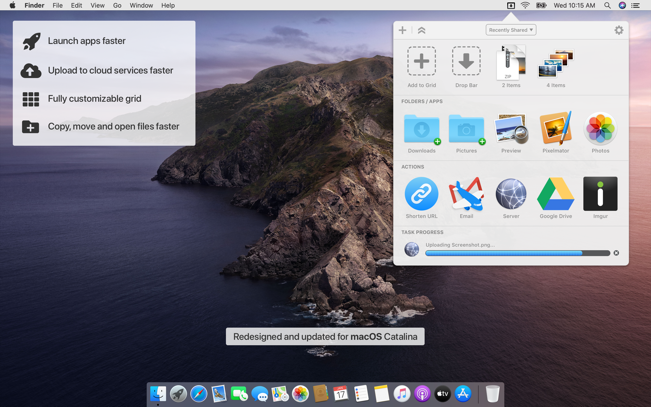
Dropzone makes it faster and easier to copy and move files, open applications and share files with many different services. Dropzone is a unique and amazing app that’s like nothing you’ve ever used before. We’ve paid fanatical attention to every detail and built an app that looks and feels like an integral part of macOS.

Dropzone ships with a powerful scripting API and with a little programming knowledge you can modify any of your actions or even create entirely new ones. This gives Dropzone unlimited extendability and utility. We’re always thinking up new actions so Dropzone will become even more useful over time.

Dropzone also includes Drop Bar – Drop Bar makes it easy to stash files you know you’ll need later. Just drop files on the Drop Bar icon in the grid and they will stick there until you’re ready to use them.

Features

  • Open applications, move and copy files faster than ever before.
  • Shorten URLs quickly using Tinyurl shortener. Just select a URL to shorten and press Ctrl+Option+Cmd+S and the shortened URL is automatically copied to the clipboard.
  • AirDrop integration lets you drop files or folders from any app and share them with your other Macs over the network.
  • Imgur integration lets you share images fast and get a link for pasting.
  • Upload files to Amazon S3 (Dropzone Pro feature).
  • Upload files to your FTP server (Dropzone Pro feature).
  • Upload files to your Google Drive (Dropzone Pro feature).
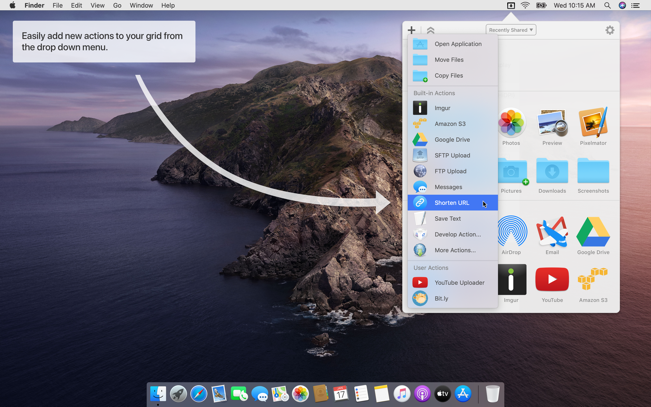
  • Download and install add-on actions that let you upload to services like Google Drive, YouTube and many others (Dropzone Pro feature).
  • Powerful multi-tasking engine allows you to run multiple tasks at once and track the progress of each one through the in-grid task status area.
  • See how tasks are progressing at a glance in the animated menu item.
  • Launch Dropzone actions with the newly added keyboard shortcuts feature (Dropzone Pro feature).
  • Add applications, folders or actions to your grid easily by dragging and dropping them on the Add to Grid area.
  • Develop your own actions using the updated and massively improved Ruby or Python API (Dropzone Pro feature).

In-App Purchases: Dropzone 4 Pro
Compatibility: macOS 10.15 or later
Mac App Store: https://geo.itunes.apple.com/app/id1485052491

Screenshots


Name: Dropzone_4_4.5.6__TNT_Mactorrents.is.dmg
Size: 62 MB
Files Dropzone_4_4.5.6__TNT_ Mactorrents.is.dmg[62 MB]

   Download Torrent
   Download Links