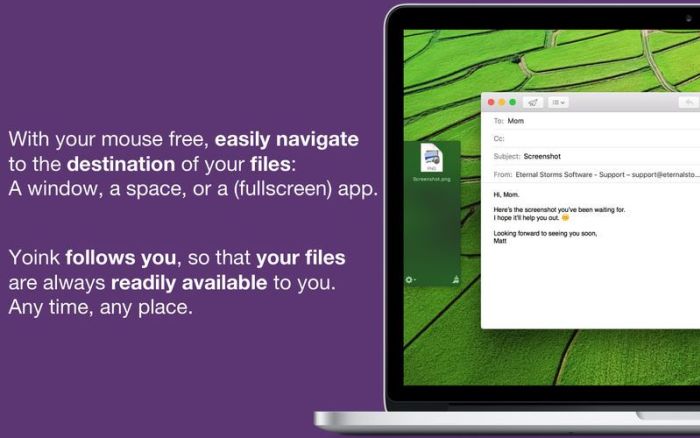
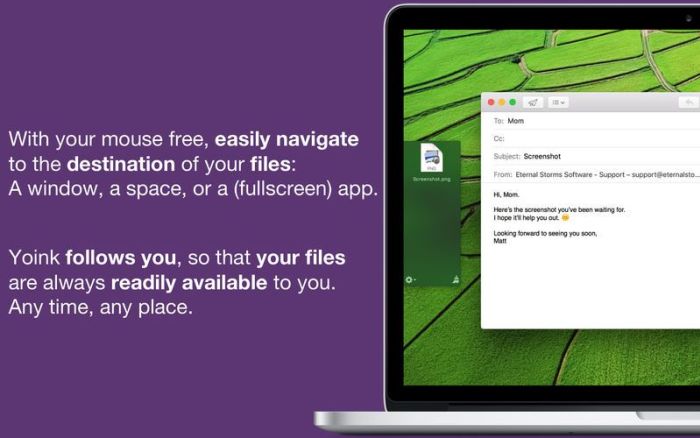
Yoink helps by making drag-and-drop between Spaces or full-screen apps easier.
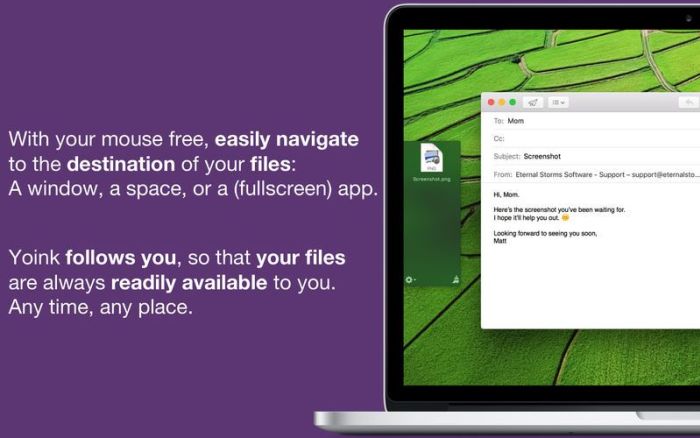
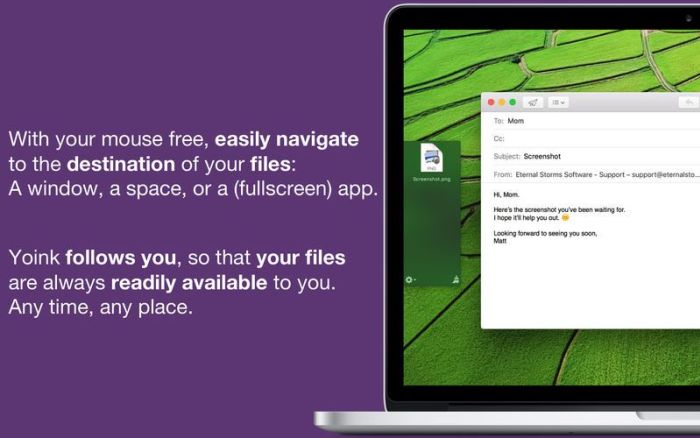
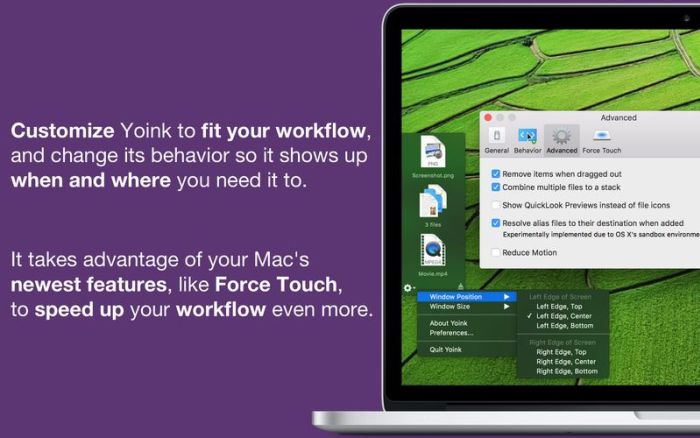
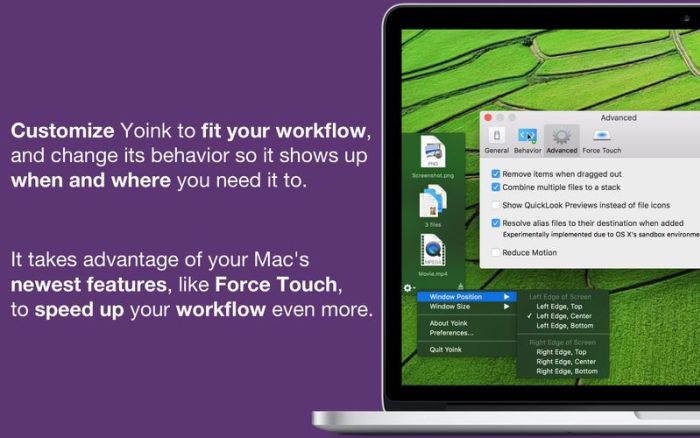
Every time you start dragging a file, Yoink fades in a tiny window on the left edge of your screen so you can drag files to it. This frees up your mouse so you can comfortably navigate to the destination of the drop and resume the drag from Yoink’s window.
What’s New:
Versions 3.5.11 and 3.5.10 fix minor issues when dragging from Music.app, the Dock, and Safari’s downloads popover, as well as a bug where Yoink’s list could randomly appear cut off.
Improvements in Yoink v3.5.9:
Improves compatibility with macOS
Improves renaming of files (right-click a file and select Rename / Move…)
In a file’s contextual menu, the full filename is now shown at the top
File-status checking has been improved
Improves compatibility with Apple Remote Desktop, Screen Sharing, Chrome
Slightly improves the “Moved-to-trash” popover’s UI
Improves the Splash screen for smaller screens / resolutions
Improves keyboard navigation in Yoink: lock/unlock selected files (l), split up selected stacks (s)
Improves support for not-yet-loaded files dragged from iCloud Drive
Improves support for screenshots dragged from macOS’ screenshot floating window
Improves compatibility with some URLs that could not be processed correctly
Improves Yoink’s center position if the menu bar is set to automatically hide
The “File in Trash” popover now closes automatically when the file is deleted
Handoff’s progress text is now monospaced
Bug fixes in Yoink v3.5.9:
Fixes a bug where Yoink would steal keyboard focus unpredictably and unnecessarily, and – mostly – annoyingly!
Fixes a bug where right-clicking a bundle / package file would not allow for “Open with…”
Fixes a bug where sometimes Yoink’s keyboard shortcut would stop working
The (optional) fetching of favicons is running in its own XPC service again on macOS Catalina and newer
Fixes a bug where Quick Look icon previews were smaller / lower resolution than expected
Fixes a regression where Quick Look previews would be cut off on smaller screens
Fixes the popover’s behavior when more than one file in Yoink is moved to the trash
Fixes an issue where Yoink would sometimes not work correctly when handling large amounts of files
Fixes a bug where Yoink would mistakenly appear when customizing toolbars
Fixes a bug that caused Yoink to beep when cancelling the installation of its PDF Service
Fixes a rare crash when adding files to Yoink
Updates the Acknowledgements file
Language: English, French, German, Italian, Japanese, Korean, Portuguese, Simplified Chinese Compatibility: OS X 10.10 or later, 64-bit processor Homepagehttps://geo.itunes.apple.com/app/id457622435
Yoink helps by making drag-and-drop between Spaces or full-screen apps easier.
Every time you start dragging a file, Yoink fades in a tiny window on the left edge of your screen so you can drag files to it. This frees up your mouse so you can comfortably navigate to the destination of the drop and resume the drag from Yoink’s window.
What’s New:
Version 3.5.10
Fixes minor issues when dragging from Music.app, the Dock, and Safari’s downloads popover.
Improvements in Yoink v3.5.9:
Improves compatibility with macOS
Improves renaming of files (right-click a file and select Rename / Move…)
In a file’s contextual menu, the full filename is now shown at the top
File-status checking has been improved
Improves compatibility with Apple Remote Desktop, Screen Sharing, Chrome
Slightly improves the “Moved-to-trash” popover’s UI
Improves the Splash screen for smaller screens / resolutions
Improves keyboard navigation in Yoink: lock/unlock selected files (l), split up selected stacks (s)
Improves support for not-yet-loaded files dragged from iCloud Drive
Improves support for screenshots dragged from macOS’ screenshot floating window
Improves compatibility with some URLs that could not be processed correctly
Improves Yoink’s center position if the menu bar is set to automatically hide
The “File in Trash” popover now closes automatically when the file is deleted
Handoff’s progress text is now monospaced
Bug fixes in Yoink v3.5.9:
Fixes a bug where Yoink would steal keyboard focus unpredictably and unnecessarily, and – mostly – annoyingly!
Fixes a bug where right-clicking a bundle / package file would not allow for “Open with…”
Fixes a bug where sometimes Yoink’s keyboard shortcut would stop working
The (optional) fetching of favicons is running in its own XPC service again on macOS Catalina and newer
Fixes a bug where Quick Look icon previews were smaller / lower resolution than expected
Fixes a regression where Quick Look previews would be cut off on smaller screens
Fixes the popover’s behavior when more than one file in Yoink is moved to the trash
Fixes an issue where Yoink would sometimes not work correctly when handling large amounts of files
Fixes a bug where Yoink would mistakenly appear when customizing toolbars
Fixes a bug that caused Yoink to beep when cancelling the installation of its PDF Service
Fixes a rare crash when adding files to Yoink
Updates the Acknowledgements file
Language: English, French, German, Italian, Japanese, Korean, Portuguese, Simplified Chinese Compatibility: OS X 10.10 or later, 64-bit processor Homepagehttps://geo.itunes.apple.com/app/id457622435
Yoink helps by making drag-and-drop between Spaces or full-screen apps easier.
Every time you start dragging a file, Yoink fades in a tiny window on the left edge of your screen so you can drag files to it. This frees up your mouse so you can comfortably navigate to the destination of the drop and resume the drag from Yoink’s window.
Yoink simplifies and improves drag and drop between windows, apps, spaces and fullscreen apps. The app has been repeatedly featured by on the Mac App Store in numerous categories and was recommended by John Gruber of DaringFireball and Federico Viticci of MacStories.
When you start dragging files in Finder or content from an application, Yoink fades in a tiny window at the edge of your screen so you can drag to it. This frees up your mouse so you can comfortably navigate to the destination of the files and resume the drag from Yoink’s window more comfortably.
For a quick video introduction, further information and tips and tricks for getting the most out of Yoink, please visit its website.
Yoink simplifies and improves drag and drop between windows, apps, spaces and fullscreen apps. The app has been repeatedly featured by on the Mac App Store in numerous categories and was recommended by John Gruber of DaringFireball and Federico Viticci of MacStories.
When you start dragging files in Finder or content from an application, Yoink fades in a tiny window at the edge of your screen so you can drag to it. This frees up your mouse so you can comfortably navigate to the destination of the files and resume the drag from Yoink’s window more comfortably.
For a quick video introduction, further information and tips and tricks for getting the most out of Yoink, please visit its website.
Yoink simplifies and improves drag and drop between windows, apps, spaces and fullscreen apps. The app has been repeatedly featured by on the Mac App Store in numerous categories and was recommended by John Gruber of DaringFireball and Federico Viticci of MacStories.
When you start dragging files in Finder or content from an application, Yoink fades in a tiny window at the edge of your screen so you can drag to it.
This frees up your mouse so you can comfortably navigate to the destination of the files and resume the drag from Yoink’s window more comfortably.
For a quick video introduction, further information and tips and tricks for getting the most out of Yoink, please visit its website.
Information
CompatibilityOS X 10.10 or later, 64-bit processor
LanguagesEnglish, French, German, Italian, Japanese, Korean, Portuguese, Simplified Chinese
Text items can now be copied in plain text by holding down the shift key in the Clipboard History Today Widget and Yoink’s contextual menu
Improves handling of volumes being mounted and unmounted
Improves reliability of the Share extension
Yoink now respects the order in which you selected files in Yoink when dragging out
The “Move to…” dialog always originates in the selected file’s folder, making it easier and more straight-forward to rename a right-clicked file
Yoink no longer tries to mount network volumes
Improves handling of URLs / links
Improves compatibility with CleanMyMac 3
Improves compatibility with macOS Mojave’s Photos.app
Improves compatibility with Curio
Reduces the app’s file size
Bug fixes in Yoink v3.5.5:
Fixes a bug where the contextual menu’s “Move to…” or “Copy to…” wouldn’t work
Fixes a bug that occurred when sharing files to Yoink (when sharing files to Yoink one after another, if they had the same file name, the previously shared file would be overwritten)
Fixes a bug that caused Yoink’s menu bar icon on macOS High Sierra and earlier not to be drawn correctly when clicked on
Fixes a rare crash when setting up Yoink’s table
Fixes a crash when displaying the “File moved to trash” popover
Fixes a crash in the share extension
Fixes a potential crash when using Handoff
Fixes an issue that caused Yoink to consume a lot of CPU
Fixes an issue where tooltips were displayed when they shouldn’t appear
Screenshots
Name
Yoink 3.5.5 MAS [TNT] mac-torrents.net.zip
Size
35.11 MB
Created on
2019-10-07 09:25:33
Hash
8bc6dc05d6ed9f6d32b8639c4f4af51fb551d52c
Files
Yoink 3.5.5 MAS [TNT] mac-torrents.net.zip (35.11 MB)
Yoink simplifies and improves drag and drop between windows, apps, spaces and fullscreen apps. The app has been repeatedly featured by on the Mac App Store in numerous categories and was recommended by John Gruber of DaringFireball and Federico Viticci of MacStories.
When you start dragging files in Finder or content from an application, Yoink fades in a tiny window at the edge of your screen so you can drag to it.
This frees up your mouse so you can comfortably navigate to the destination of the files and resume the drag from Yoink’s window more comfortably.
For a quick video introduction, further information and tips and tricks for getting the most out of Yoink, please visit its website.
Yoink simplifies and improves drag and drop between windows, apps, spaces and fullscreen apps. The app has been repeatedly featured by on the Mac App Store in numerous categories and was recommended by John Gruber of DaringFireball and Federico Viticci of MacStories.
When you start dragging files in Finder or content from an application, Yoink fades in a tiny window at the edge of your screen so you can drag to it.
This frees up your mouse so you can comfortably navigate to the destination of the files and resume the drag from Yoink’s window more comfortably.
For a quick video introduction, further information and tips and tricks for getting the most out of Yoink, please visit its website. Compatibility: macOS 10.9 or later 64-bit Web Site: https://www.eternalstorms.at/press Mac App Store: https://itunes.apple.com/app/yoink-improved-drag-and-drop/id457622435?mt=12
What’s New in Yoink 3.5.3
Improvements:
Text items can now be copied in plain text by holding down the shift key in the Clipboard History Today Widget and Yoink’s contextual menu
Improves handling of volumes being mounted and unmounted
Improves reliability of the Share extension
Yoink now respects the order in which you selected files in Yoink when dragging out
The “Move to…” dialog always originates in the selected file’s folder, making it easier and more straightforward to rename a rightclicked file
Yoink no longer tries to mount network volumes
Improves handling of URLs / links
Improves compatibility with CleanMyMac 3
Improves compatibility with macOS Mojave’s Photos.app
Improves compatibility with Curio
Reduces the app’s file size
Bug fixes:
Fixes a bug where the contextual menu’s “Move to…” or “Copy to…” wouldn’t work
Fixes a bug that occurred when sharing files to Yoink (when sharing files to Yoink one after another, if they had the same file name, the previously shared file would be overwritten)
Fixes a bug that caused Yoink’s menu bar icon on macOS High Sierra and earlier not to be drawn correctly when clicked on
Fixes a rare crash when setting up Yoink’s table
Fixes a crash when displaying the “File moved to trash” popover
Fixes a crash in the share extension
Fixes a potential crash when using Handoff
Fixes an issue that caused Yoink to consume a lot of CPU
Fixes an issue where tooltips were displayed when they shouldn’t appear
Yoink 3.5.2 free download for mac torrent and mac Os
Yoink 3.5.2
Yoink simplifies and improves drag and drop between windows, apps, spaces and fullscreen apps. The app has been repeatedly featured by on the Mac App Store in numerous categories and was recommended by John Gruber of DaringFireball and Federico Viticci of MacStories.
When you start dragging files in Finder or content from an application, Yoink fades in a tiny window at the edge of your screen so you can drag to it. This frees up your mouse so you can comfortably navigate to the destination of the files and resume the drag from Yoink’s window more comfortably.
For a quick video introduction, further information and tips and tricks for getting the most out of Yoink, please visit its website.
Added support for Services (rightclick any file or stack and it will show the available services for it)
Yoink’s optional menu bar icon now can be dragged to
A rightclick onto Yoink’s menu bar icon toggles its window
Improvements in Yoink v3.5.2:
Added a Clear History menu item to the contextual menu if Yoink’s clipboard history is enabled
Yoink does no longer block the Finder’s Dock
Yoink does not become active anymore when dragging to it
Improved support with apps Discord and VSCode
Improved Yoink’s Share extension to better handle text and other content
For text snippets, a new line is appended so that consecutively dragging out snippets from Yoink to a text document is nicer
Made favicon loading a bit more efficient
Optionclick onto the X button of a file in Yoink now removes that file and any selected files
Yoink’s window now matches the Notification Center’s appearance
Improved support with dragging videos from Photos.app to Yoink
Bug fixes in Yoink v3.5.2:
Fixed a rare crash when handling URLs
Fixed a crash in Yoink’s Today Widget
Fixed a few, minor memory leaks
Fixed the icon for Yoink’s Quick Action, especially on the MacBook Pro’s Touch Bar
Fixed a bug on macOS Yosemite and earlier where after dragging one item to Yoink, subsequently it wouldn’t work anymore
Fixed issues with Yoink moving around unnecessarily if it’s set up to show at the mouse cursor’s location and it is being shared to, or previous files are recalled
Fixed an issue when pasting content into Yoink from the clipboard
Fixed a crash on systems earlier than macOS Yosemite
Fixed a bug where sharing an image added from macOS Mojave’s screenshot tool would fail because of a wrong file format
Fixed a bug where controlclicking onto an item wouldn’t work anymore after QuickLooking a file
Fixed a bug where, on smaller screens, the QuickLook panel would sometimes be cut off
Fixed an issue where when using the keyboard shortcut (by default, F5) to manually hide Yoink, the QuickLook panel, if visible, would not close
Made Yoink’s preference’s Behavior tab nicer to look at, meaning no black flashes in the video when changing preferences
Updated some URLs used in the app from http to https
Fixed a bug in Yoink’s preferences window for some localizations, where selecting the General tab would resize the window unnecessarily