Category Archives: Window

Divvy – Window Manager 1.5.2

Divvy – Window Manager 1.5.2

Managing windows can be frustrating, requiring precision control of your mouse or trackpad for clicking, dragging, pushing and pulling your windows to the size and position you desire. Even with all this work, it’s very difficult to get windows exactly where you want them, so most of the time windows are left scattered all over the screen.

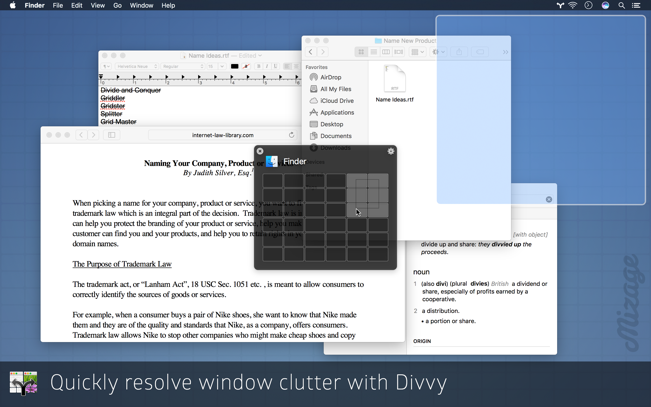
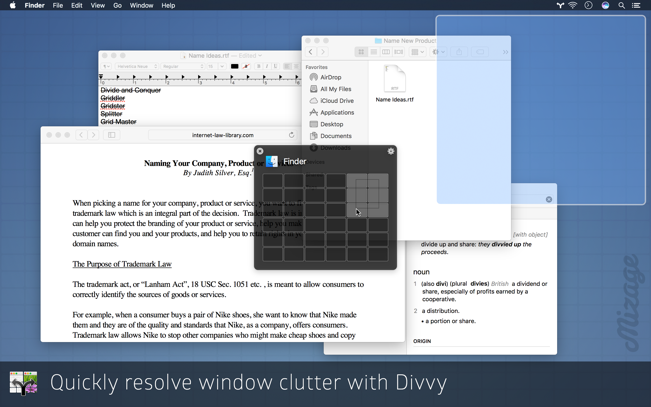
Divvy, a solution for both Mac OS X and Microsoft Windows, is an entirely new way of managing your windows. It allows you to quickly and efficiently “divvy up” your screen into exact portions. This lets you take maximum advantage of your screen real estate without any hassle at all. Window management has never been this easy.

With Divvy, it’s as simple as a single click and drag in the Divvy interface and your window will be resized and moved to a relative portion of the screen. If that seems like too much work, you can go ahead and create as many different shortcuts as you’d like that resize and move your windows.

Divvy is designed to be quick, simple and elegant, staying out of your way as much as possible while providing the most powerful window management available today.

Features:
• Resize your windows with the innovative Divvy grid
• Customizable grid size (from 1×1 up to 20×20)
• Works with multiple monitors
• Unlimited user-customizable keyboard shortcuts
• Access Divvy at any time using a configurable global hotkey or menu bar icon

Compatibility: OS X 10.10 or later 64-bit
Mac App Store: https://geo.itunes.apple.com/app/id413857545

Screenshots
Name: Divvy_1.5.2_MAS__TNT_Mactorrents.io.dmg
Size: 4 MB
Files Divvy_1.5.2_MAS__TNT_Mactorrents.io.dmg[4 MB]

   Download

Cisdem Window Manager 3.2.0

Download Cisdem Window Manager 3.2.0

Cisdem WindowManager can split your screen into various sizes and positions. All you have to do is drag windows to the edges or corners of your screen, or use our grid system to select the area that the windows should cover, or set keyboard shortcuts. Once you start splitting screens with WindowManager, you’ll wonder how you ever managed without it.

A Whole Bunch of Useful Features

Easy To Use

Intuitive interface seamlessly integrates with OS X. 3 ways

3 Way Screen Split

Split screen by mouse, grid and keyboard shortcuts. window edges

Managing Window Edges

Easily set the edges and borders, can also choose to ignore edges and borders. menu bar

Menu Bar Access

Choose to show or hide the app’s icon on the menu bar.

Global Shortcuts

Access Window Manager from anywhere using a configurable global hotkey size

Restore Size

Restore old window size if the window is dragged away. preset

Edges Support

Support 7 preset size/location options for easy window snap. grid system

Grid system

Support to resize your windows with the grid system.

Grid Size

You can easily set to customizable grid size (from 1×1 up to 10×10). keyboard shortcuts

Keyboard Shortcuts

Support to set unlimited user-customizable keyboard shortcuts. os x

10.14 (Mojave) Support

OS X 10.14 (Mojave) optimized. safe

Safe To Use

Managing Windows without slowing down your computer.

Information

CompatibilityOS X 10.8 or later
LanguagesEnglish

What’s New in Cisdem Window Manager 3.2.0

  • Release notes not available at the time of this post.

Screenshots

Name Cisdem Window Manager 3.2.0 [TNT] mac-torrents.net.zip
Size 16.00 MB
Created on 2019-10-26 21:11:57
Hash 05b592482310d59590ea72b43d15b64ed84cb548
Files Cisdem Window Manager 3.2.0 [TNT] mac-torrents.net.zip (16.00 MB)

Download