Category Archives: Mac os

wonderpen 1.6.1

Wonderpen 161 icon
Name WonderPen 1 6 1 MAS TNT.zip
Size 77.83 MB
Created on 2018-11-20 03:48:37
Hash 18dc8c47bf4ece3acf0a0af39d03bd0818a81ece
Files WonderPen 1 6 1 MAS TNT.zip (77.83 MB)

Download

WonderPen 1.6.1

WonderPen is a writing app for both professional and amateur writers.

Features:
  • Tree view, draganddrop to reorder.
  • An easytouse text editor that supports Markdown.
  • Supports fullscreen mode, lets you focus on writing.
  • Docs can be exported as Image, PDF, Word, HTML, etc.
  • Auto save while editing. You can backup all docs as a single file and restore from it later.
  • Add memo for each doc.
  • Focus on one node of the doc tree.
  • Search in all docs.
  • Darkmode support.
  • History snapshot for each docs.
  • Automatic backup.

Compatibility: OS X 10.9 or later 64-bit

Mac App Store: https://itunes.apple.com/app/wonderpen/id1173437104?mt=12

What’s New in WonderPen 1.6.1

  • [Fixed] Fix a problem when dragging multiple docs
  • [Improved] Some performance and experience optimization

%RATINGS_IMAGES% (%RATINGS_USERS% votes, average: %RATINGS_AVERAGE% out of %RATINGS_MAX%)
You need to be a registered member to rate this.

tribe archipelago summit lightroom acr presets luts

Design Assets

Name Tribe Archipelago Summit Lightroom ACR Presets LUTs.zip
Size 3.02 MB
Created on 2018-11-19 18:36:56
Hash f4cd71e3aeb4456bc05fd6016d2456ae97886fa2
Files Tribe Archipelago Summit Lightroom ACR Presets LUTs.zip (3.02 MB)

Download

Tribe Archipelago Summit Lightroom & ACR Presets + LUTs

For Adobe Lightroom Classic CC 7, 6, 5 & 4. and ACR Presets for Photoshop CC & CS6. Based on the Adobe Standard Calibration profile and designed to work with RAW files. Set contains Six Color Presets in total. Prices in US Currency.

Summit is all about giving you colorful consistent results over a variety of imagery. Rather than bleeding your imagery of the tones you love, these presets embrace natural greens for a simple but dramatic effect. Each preset has been tailored to match your specific style and aesthetic, from warm hues to cool blues. A flexible set for the modern photographer.”

Web Site: https://www.tribearchipelago.com/presets/archipelago-summit-2

Design Assets
, ,

By

%RATINGS_IMAGES% (%RATINGS_USERS% votes, average: %RATINGS_AVERAGE% out of %RATINGS_MAX%)
You need to be a registered member to rate this.

eset cyber security pro 6 7 300.0

Name ESET Cyber Security Pro 6.6.300.1 macOS.zip
Size 124.9 MB
Created on 2018-11-19 20:21:44
Hash 116b39aa8a7939903bf3ddf5944c58234e617300
Files ESET Cyber Security Pro 6.6.300.1 macOS.zip (124.9 MB)

Download

ESET Cyber Security Pro 6.7.300.0 macOS

Effective all-in-one internet security for your Mac, including personal firewall and parental control. Comprehensive security and privacy online. Award-winning ESET detection technology, plus added layers of protection − including Firewall and Parental Control – give you a fast, safe online experience.

Defending your online world

Antivirus and Antispyware built on our record-breaking ESET NOD32® technology will help to protect your Mac against malware. Anti-Phishing steers you clear of websites stealing usernames and banking details.

Keep your kids safe online

Only show your kids the good side of the internet with Parental Control. Prevent exposure to offensive web content by blocking more than 20 website categories or by adding your own sites.

Install and forget or tweak away

Enjoy full protection right from the start with default settings or use Settings for Advanced Users to define maximum scanning depth, time and size of the scanned files.

All the features you need to keep you secure
  • Antivirus
  • Antispyware
  • Cloudpowered Scanning
  • AntiPhishing
  • Personal Firewall
  • Parental Control
  • Removable Media Control
  • Small System Footprint
  • Presentation Mode
System Requirements:
  • Processor Architecture: 32bit x86 or 64bit x64, Intel.
  • macOS 10.13 (High Sierra), 10.12.x (Sierra), OS X 10.11.x (El Capitan), OS X 10.10.x (Yosemite), OS X 10.9.x (Mavericks), OS X 10.8.x (Mountain Lion), OS X 10.7.x (Lion), OS X 10.6.x (Snow Leopard) .
  • Memory Consumption: 300 MB.
  • DiskSpace (Installation): 150 MB.

Web Site: https://www.eset.com/us/home/cyber-security-pro/

What’s New in ESET Cyber Security Pro 6.7.300.0

  • Release notes not available at the time of this post.

Screenshots

%RATINGS_IMAGES% (%RATINGS_USERS% votes, average: %RATINGS_AVERAGE% out of %RATINGS_MAX%)
You need to be a registered member to rate this.

macbooster 7 2.0.28588

Name MacBooster 7 7 2 0 28588 TNT.zip
Size 33.58 MB
Created on 2018-11-19 20:20:48
Hash 39be88c25fb2c63234755fddb35c50afa431e512
Files MacBooster 7 7 2 0 28588 TNT.zip (33.58 MB)

Download

MacBooster 7.2.0 (28588)

MacBooster provides a full arsenal of system-maintenance tools to make your Mac run faster. Your one-stop Mac maintenance tool to clean up 20 types of junk files and remove Mac malware and virus to protect your Mac, Besides, MacBooster 7 also can optimize Mac hard disk, fix disk permission issues and clean Mac memory which will help boost your Mac to the peak performance.

  • System Status: Explore the status of your Mac by running a full scan.
  • Virus & Malware Scan: Quickly and deeply analyze the security status of your Mac. Safely remove the threats to make your Mac stay safe.
  • Privacy Clean: Explore the status of your Mac by running a full scan.
  • System Junk: Scan every corner of your system, find out junk files to keep your hard disk from being wasted.
  • Uninstaller: Help get rid of unwanted apps or leftover files.
  • Large Files Cleaner: Find and remove the large files you no longer need to free up more space.
  • Memory Clean: Clean to regain more available RAM and make application start faster.
  • Startup Optimization: Manage your startup items to optimize the OS X boot speed.
  • Defragment: new feature to optimize and fix your disks with 1-click.
  • Duplicates Finder: Locate and remove the duplicated files on your Mac quickly.
  • Photo Sweeper: Effectively and quickly find similar or duplicated photos. Keep the most beautiful ones.
  • Crafted New Mini: added realtime monitor for network speed and notification for scan and fix result.

Compatibility: OS X 10.7 or later 64-bit

Web Site: http://www.macbooster.net/

What’s New in MacBooster 7.2.0 (28588)

  • UI Added a new simpler UI that allows users to switch to a more concise one.
  • Large & Old Files Supported sorting files by category.
  • Virus & Malware Scan Expanded the database to remove more malicious plugins and apps.
  • Perfectly supported the latest Mac OS 10.14.
  • Virus & Malware Scan Enhanced virus & malware scan and removal.
  • Uninstaller Faster scan and more thorough app removal.
  • Smoother user interaction.
  • Fixed the compatibility issue with Mac OS 10.14.
  • Fixed some minor bugs.

Screenshots

%RATINGS_IMAGES% (%RATINGS_USERS% votes, average: %RATINGS_AVERAGE% out of %RATINGS_MAX%)
You need to be a registered member to rate this.

lens distortions fog 4k prores for final cut x premiere or after effects win mac

Graphics & Design Video

Name Lens Distortions – Fog 4K.zip
Size 6.57 GB
Created on 2018-11-19 18:39:12
Hash 113fbf1400c1c93574f34261d2567bc305be6977
Files Lens Distortions – Fog 4K.zip (6.57 GB)

Download

Lens Distortions – Fog 4k (ProRes) for Final Cut X, Premiere, or After Effects (Win/Mac)

Cinematic haze, smoke, and atmospheric effects

  • Contains 20 clips.
  • Each clip is between 10 20 seconds in length
  • Resolution of 3840×2160
  • Compatible with Final Cut X, Premiere, or After Effects

Web Site: https://lensdistortions.com/product/fog-4k/

Graphics & Design, Video

By

%RATINGS_IMAGES% (%RATINGS_USERS% votes, average: %RATINGS_AVERAGE% out of %RATINGS_MAX%)
You need to be a registered member to rate this.

business print lab templates 3.3.1

Name Business Print Lab – Templates 3 3 1 MAS TNT.zip
Size 31.71 MB
Created on 2018-11-19 18:40:38
Hash 55748ec84916e2a4d0febc78d6cc3a2a4fc0d6e5
Files Business Print Lab – Templates 3 3 1 MAS TNT.zip (31.71 MB)

Download

Business Print Lab – Templates 3.3.1

Convince your clients, impress your peers- Business Print Lab for Pages by Jumsoft makes creating gripping Pages documents easier and quicker than ever before! Hundreds of professional templates and near-infinite customization opportunities make it the most powerful tool available to unleash your creativity in business documents.

Business Print Lab for Pages offers a broad range of customizable and interchangeable template categories: Ads & Flyers, Brochures, Business Cards, Calendars, Planners, Cards, Invitations, Invoices, Forms, Document Templates, Labels, Organizational Charts- just to name a few. All your business document needs will be fulfilled! As if it weren’t enough, our design team issues regular content updates to make sure that you never run out of the best, most professional templates and document designs available on the market!

* Pages 6.0 or later recommended.

Compatibility: OS X 10.10 or later 64-bit

Web Site: http://www.jumsoft.com/business-mix-set/
Mac App Store: https://itunes.apple.com/app/business-print-lab-templates/id513312353?mt=12

What’s New in Business Print Lab – Templates 3.3.1

  • Release notes not available at the time of this post.

%RATINGS_IMAGES% (%RATINGS_USERS% votes, average: %RATINGS_AVERAGE% out of %RATINGS_MAX%)
You need to be a registered member to rate this.

submerge 3.5

Name Submerge 3 5 TNT.zip
Size 22.69 MB
Created on 2018-11-19 18:37:04
Hash f759cb20bf7d56219094ec3c203d4d851a930f8f
Files Submerge 3 5 TNT.zip (22.69 MB)

Download

Submerge 3.5

The easiest and fastest way to add hardcoded subtitles to your movies and tv-shows.

With Submerge you can easily add hardcoded subtitles to your movies and tv-shows. The subtitled movie will play on almost anything, like your computer, smartphone, portable device or game console. Submerge supports many text-based subtitle formats as input and you can export the subtitled movie for the most common devices in just one click. Now with a batch exporting feature as well. Submerge also has a built-in subtitle search tool that makes finding and downloading the right subtitles a breeze. It also has a fullscreen player built-in, so you can watch the subtitled movie directly within Submerge.

Main features

  • Add hardcoded subtitles to almost any video file without the need for extra system extensions or plugins.
  • Doesn’t depend on QuickTime.
  • Automatically loads and displays embedded subtitles or subtitles from external files.
  • Support for many subtitle formats like srt, sub, itt, stl ass/ssa and vtt.
  • Supports styling tags in subtitle files like italic, bold underlined and font color.
  • Supports cue settings in WebVTT files to handle the position and alignment of the subtitles.
  • Fully customizable subtitle display (font, size, color, shadows, etc).
  • Automatically finds metadata online to tag your movie.
  • Detailed movie inspector for all those nitty gritty details.
  • Many export presets builtin for poplar devices from Apple, Sony, Microsoft and so on.
  • Batch export queue built right in.
  • FFmpeg encoding for fastest possible exports.
  • Force aspect ratio to 16:9, 4:3 or 3:2 to use your monitor space more efficiently.
  • Fullscreen player builtin (of course).
  • Retina graphics user interface.
  • 64bit native.

NOTE! Submerge cannot add hardcoded subtitles to movies or tv-shows purchased or rented in the iTunes store due to DRM protection.

What’s new in Submerge 3

  • Rewritten from the ground up using modern OS X technologies.
  • Doesn’t depend on QuickTime.
  • No need for extra system extensions or plugins to open and add subtitles to your movies.
  • 64bit native.
  • Batch export queue.
  • Exports into more formats like AVI and WebM.
  • Improved the builtin subtitle search engine. Really easy to use.
  • Metadata tagging for iTunes and iDevices. Artwork as well.
  • Support for more than two subtitles lines and smarter wrapping.
  • Optional “Title Safe Area” for old TV sets and professionals.

Compatibility:macOS 10.12 or later 64-bit

Web Site: http://www.bitfield.se/submerge
Mac App Store: https://itunes.apple.com/app/submerge-3/id929974242?mt=12

What’s New in Submerge 3.5

  • Support for macOS Mojave and Dark Mode.
  • FFmpeg updated to the 4.0 “Wu” release.
  • New 4K export presets for H.264 and H.265 (HEVC).
  • Replaced some deprecated FFmpeg API’s for better performance and stability.
  • Metadata is now fetched from The Movie Database (TMDb).
  • Now better handles subtitle files with extra empty lines and spaces.
  • iTunes Timed Text parser now reads the time codes correctly.
  • Various bug fixes and “under the hood” improvements.

%RATINGS_IMAGES% (%RATINGS_USERS% votes, average: %RATINGS_AVERAGE% out of %RATINGS_MAX%)
You need to be a registered member to rate this.

downie 3.5 1

Name Downie 3 3 5 1 TNT.zip
Size 37.76 MB
Created on 2018-11-19 18:40:20
Hash ae129dab43c2702cb4d7026fc024ac07d854d371
Files Downie 3 3 5 1 TNT.zip (37.76 MB)

Download

Downie 3.5.1

A simple download manager that offers you the possibility to quickly save videos from different websites to your own disk drive.

If you are using a poor internet connection, trying to visualize videos streamlined online might not work properly since the content is loaded too slowly. Downie is a simple Mac app that can help you download those videos to your computer, and then watch them by using your default media player.

User friendly video downloader featuring support for drag and drop actions

Working with Downie is extremely straightforward: simply drop the video URL on top of the app’s main window or on the Dock icon. Downie adds the video to your downloads list, so all you have to do next is start the process by pressing the appropriate button. Of course, you can also remove items from the list.

By default, Downie downloads MP4 files and places them in your default Downloads folder, but you can easily change this via the Preferences window. The same area allows you to setup notifications, or post processing actions (convert to MP4 if necessary, or extract audio only).

Effortlessly download videos from a wide collection of hosting websites

Downie provides support for more than 400 different websites that host video content, among which there are the most popular choices, such as YouTube, Apple, LiveLeak, Vimeo, BBC, and so on. If a certain website is not included, within the app you can send a request email to the Downie developers.

Moreover, Downie also provides matching extensions for various popular web browsers, such as Firefox, Safari, Google Chrome or Chromium. The add-ons are not installed by default: open the Preferences window and install only the ones you plan to use.

Straightforward solution for downloading video content hosted online

Downie is a great tool for saving videos posted on various websites to your Mac for offline playback. The application is extremely useful especially if you have a slow internet connection.

Compatibility: OS X 10.11 or later 64-bit

Web Site: https://software.charliemonroe.net/downie.php

What’s New in Downie 3.5.1

  • New: gizmodo.com, hotmart.com, puhutv.com, news.tbs.co.jp.
  • Improved: atresplayer.com, bbc.co.uk, bilibili.com, box.com, iqiyi.com, iwara.tv, linkedin.com, qq.com, rte.ie, rtp.pt, soundcloud.com, vlive.tv, wistia.com, ximalaya.com.
  • Improved: DASH reader.
  • Improved: F4M parsing and support for F4M manifests.
  • Improved: WEBVTT subtitle parsing.
  • Improved: Handling of selfsigned certificates.

Screenshots

%RATINGS_IMAGES% (%RATINGS_USERS% votes, average: %RATINGS_AVERAGE% out of %RATINGS_MAX%)
You need to be a registered member to rate this.

elements lab templates 3.3.1

Name Elements Lab – Templates 3 3 1 MAS TNT.zip
Size 72.00 MB
Created on 2018-11-19 18:40:12
Hash 59fe974f6f97dfad678b107b99a561ae20628867
Files Elements Lab – Templates 3 3 1 MAS TNT.zip (72.00 MB)

Download

Elements Lab – Templates 3.3.1

Personal artist at your disposal! Elements- iWork Templates is a comprehensive collection of thousands of high-quality icons, logos, badges, doodles, ribbons, clipart, and other items to liven-up your Pages documents and Keynote presentations on all occasions!

Adding items from Elements to your work is as easy as dragging and dropping or copying and pasting! All images are provided with transparent backgrounds to allow easy placement over colorful objects and patterns. The PNG format allows easy adjustment of image parameters, such as tint, brightness, and others.

Elements- iWork Templates is designed for Apple Keynote and Pages, but all images can easily be adapted to use in Numbers, iBooks Author, and other applications.

*** Requires Pages 5.0 / Keynote 6.0 or later.

Compatibility: OS X 10.11 or later 64 bit

Web Site: http://www.jumsoft.com/elements-for-iwork/
Mac App Store: https://itunes.apple.com/app/elements-lab-templates/id548645701?mt=12

What’s New in Elements Lab – Templates 3.3.1

  • Release notes not available at the time of this post.

%RATINGS_IMAGES% (%RATINGS_USERS% votes, average: %RATINGS_AVERAGE% out of %RATINGS_MAX%)
You need to be a registered member to rate this.

mountain duck 2.6 5

Name Mountain Duck 2 6 5 MAS TNT.zip
Size 107.2 MB
Created on 2018-11-19 18:37:30
Hash 196163516623d60a2be3073e2cdac2052d8472a3
Files Mountain Duck 2 6 5 MAS TNT.zip (107.2 MB)

Download

Mountain Duck 2.6.5

Mountain Duck, based on the solid open-source foundation of Cyberduck, allows you to mount remote volumes in Finder on OS X and File Explorer on Windows. Access remote files as if they were on a local disk, and edit them with your preferred applications. A minimalist user interface in the menu bar allows you to quickly mount remote volumes. Bookmarks are shared with Cyberduck if installed.

All major protocols are supported to connect to just about any server or cloud storage, including WebDAV, Amazon S3, Microsoft Azure, OpenStack Swift, FTP, and SFTP.

Unlike other solutions, installation on OS X requires no administrator privileges and zero system extensions.

Compatibility: OS X 10.8.3 or later 64 bit

Mac App Store: https://itunes.apple.com/app/mountain-duck/id1024974133?mt=12

What’s New in Mountain Duck 2.6.5

  • Failure opening Terminal.app
  • Bugfix Failures transferring files (FTP)

Screenshots

%RATINGS_IMAGES% (%RATINGS_USERS% votes, average: %RATINGS_AVERAGE% out of %RATINGS_MAX%)
You need to be a registered member to rate this.

imac cleaner 1.2

Name iMac Cleaner 1 2 TNT.zip
Size 7.38 MB
Created on 2018-11-19 18:39:54
Hash 36e0a037c8546b34bd96d1f333b8761a349ce789
Files iMac Cleaner 1 2 TNT.zip (7.38 MB)

Download

iMac Cleaner 1.2

iMac Cleaner offers Disk Cleaning, App Removal, Memory Optimization, Duplicate Finder, File Shredder, Manage Login Items, Extension, Extract RAR and Winmail.Dat to keep your mac best performance. Fully compatible with macOS High Sierra on your Mac.

Features:

  • Smart Clean: clean application junk files, app caches, logs, system caches, system logs, mail attachments, iTunes junk files, localized languages, browser cookies and history, etc.
  • Duplicate Finder: Scan duplicates anywhere, whether they are one or more folders of internal and external hard drives, also supporting scanning duplicates in Photos or iTunes.
  • Unarchiver: Extract most common formats of your mac, include RAR, Zip, 7Z, Bzip, Cab, Swf, Lzma, etc. Besides, extract image files within PDF files.
  • App Uninstaller: Quickly and full scan all Apps on your Mac and its related junk files, incl. leftover, logs, caches, preference, crash reports, etc.
  • Large File Cleaner: Scan & Delete large files from single or multiple folders on internal and external hard drives, but also large files in Photos or iTunes. Extension Manager: Manage & Delete extensions, preferences, Plugins and addons in a efficient way to keep your Mac security.
  • Memory Manager: show the usage of disk space and memory of your Mac, and release memory with one click.
  • PDF Compressor: Efficiently shrink PDF file size, and support compress encrypted PDF files. You can easily send PDF as attachment directly after compression.
  • Winmail.dat Opener: Quickly open & save Winmail.dat files sent from Microsoft Outlook. You can easily send each item within Winmail.dat files as attachment directly.
  • Startup Optimization: Efficiently manage your startup items to optimize your Mac Boot speed.
  • File shredder: Erase files and make them unrecoverable, ensure your files could be securely erased.

Compatibility: OS X 10.9 or later 64 bit

Web Site: https://www.ccleanmac.com

What’s New in iMac Cleaner 1.2

  • Release notes not available at the time of this post.

%RATINGS_IMAGES% (%RATINGS_USERS% votes, average: %RATINGS_AVERAGE% out of %RATINGS_MAX%)
You need to be a registered member to rate this.

athentech perfectly clear complete 3.6 3.1345

Name Athentech Perfectly Clear Complete 3 6 3 1345 REPACK TNT.zip
Size 132.6 MB
Created on 2018-11-19 20:26:25
Hash 5f4104122d43f410f7872ee55adbb5de07c2704f
Files Athentech Perfectly Clear Complete 3 6 3 1345 REPACK TNT.zip (132.6 MB)

Download

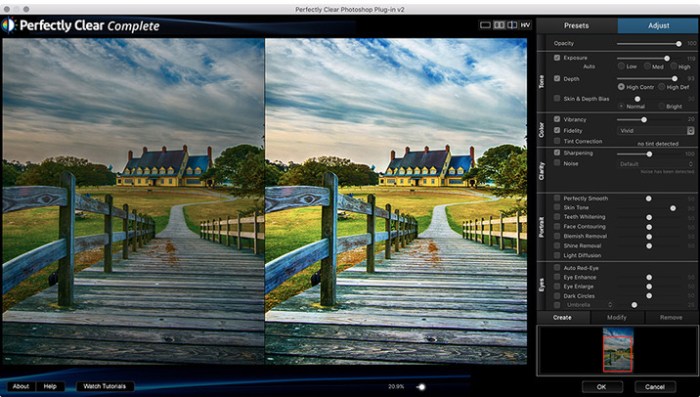
Athentech Perfectly Clear Complete 3.6.3.1345

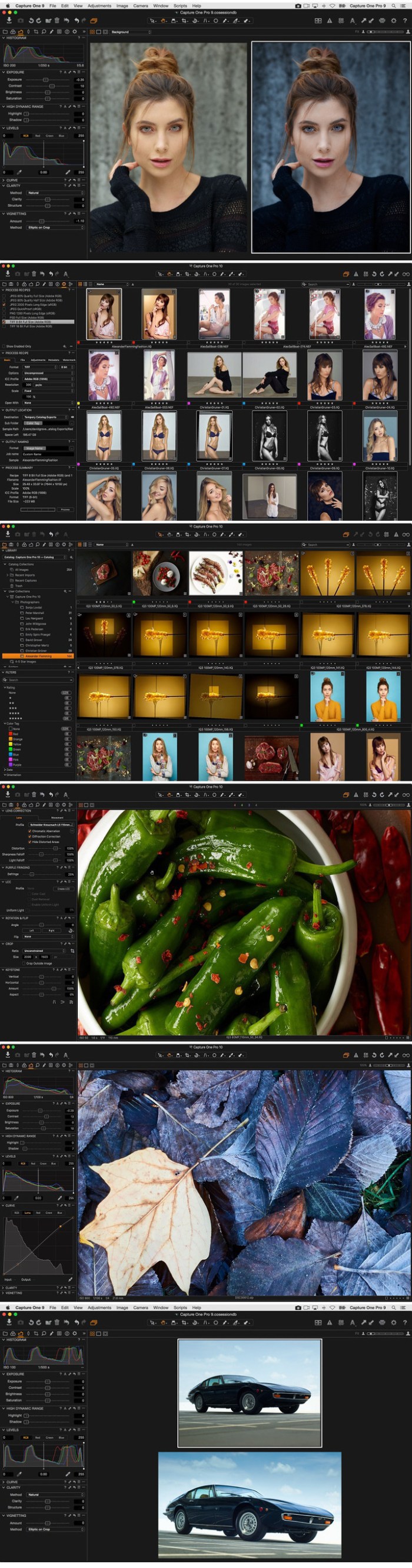
Built for precision. Made for beauty. Above all, you want better photos. But what if you could have better photos faster? Perfectly Clear has mastered the science of intelligent image correction – creating superior quality photos in record time, so you can get back to doing what you really love…in no time.

Spend less time in front of your computer.

With Perfectly Clear, you’ll get results faster so you can spend more time behind the camera and less time in front of the computer. Take advantage of intelligent image analysis to find and fix numerous camera flaws automatically. Plus, you can quickly add your favorite finishing touch with our stylized LOOKs.

Take complete control.

Our presets are just the starting point. Easily apply only the adjustments you need for the perfect image. Use our powerful sharpening and noise reduction, which goes beyond what other tools can do, to unlock a whole new image. Keep an eye on your color and exposure with a dynamic histogram that tracks exposure and color clipping.

A custom experience.

Every photographer is different, and so is Perfectly Clear. Our adaptive interface lets you hide tools you don’t need while you work, allowing you to focus on your image. Plus, you can make and manage your own presets, which intelligently adapt to each photo.

Why change your workflow?

Rather than move your entire image library or change your workflow, we’ll make your existing workflow better. We support several platforms and have more coming soon. With powerful batch processing and up to 30 corrections in one click, we’ll make everything better.

We’ve got image correction down to a science.
Creating our award-winning technology took more than a decade of R&D, multiple patented processes, and over a dozen unique algorithms. We cracked the code on correcting every pixel independently. The proof is in your pictures.

Web Site: http://www.athentech.com/products/plugins

What’s New in Athentech Perfectly Clear Complete 3.6.3.1345

  • Release notes not available at the time of this post.
Screenshots

%RATINGS_IMAGES% (%RATINGS_USERS% votes, average: %RATINGS_AVERAGE% out of %RATINGS_MAX%)
You need to be a registered member to rate this.

file cabinet pro 6 7

Name File Cabinet Pro 6 7 MAS TNT.zip
Size 17.60 MB
Created on 2018-11-19 18:40:02
Hash 284a224ba5c2e4469743a1731e89d3f867d6107f
Files File Cabinet Pro 6 7 MAS TNT.zip (17.60 MB)

Download

File Cabinet Pro 6.7

File Cabinet Pro is the file manager for the macOS menu bar. Quickly navigate to files without cluttering your desktop. Open, move, rename, compress, tag, trash, copy and paste files, all from the menu bar. You can open many file types natively in File Cabinet Pro or open files by launching other applications. It’s easy to click into directories in icon view, drill through directories in list view, or navigate the file tree in column view.

File Cabinet Pro is also a document-based application that ships with a built-in text editor, image viewer, pdf viewer, and media player. Some of the file types File Cabinet Pro can open for editing/viewing include:

  • Text documents: Plain text files (.txt), Rich Text Format (.rtf), Rich Text Format Directory (.rtfd), Portable Document Format (.pdf), Markdown (.md)
  • Image documents: Portable Network Graphics (.png), Joint Photographic Experts Group (.jpeg), Tagged Image File Format (.tiff, .tif), Bitmap image file (.bmp), Photoshop File Format (.psd) Import only., Scalable Vector Graphics (.svg) Import only
  • Video and audio documents: MOV, MP4, M4A, M4V, AVI, MP3, WAV, CAF, AIF
Features
  • Create subdirectories
  • Click into subdirectories and open documents
  • Open directories in new tabs.
  • Tag files easily. Select files in File Cabinet Pro, right-click, and then simply add or remove file tags from the control in the context menu
  • Show selected files in Finder
  • Rename files
  • Copy and paste files
  • Compress files
  • Trash files
  • View items as icons, in a list, in columns, or in cover flow view
  • Launch the application at login. You can have File Cabinet Pro automatically launch when you login to your Mac (optional feature, disabled by default)
  • Create a list of all your favorite directories in the sidebar
  • Create and edit TXT, RTF, and RTFD files using the built in lightweight text editor
  • Create txt, rtf, rtfd, and .md files from text data currently on the clipboard.
  • Create text documents from Finder using File Cabinet Pro’s Document Creator Finder extension (Note: To use this feature, you have to enable the Finder extension in System Preferences under the “Extensions” tab).
  • Rotate images, crop images, and apply filters to images using the built in lightweight image editor
  • Watch video and play audio files using the built in media player
  • View PDF files using the built in PDF viewer
  • Revert document versions for supported editable document types
  • Set a global hotkey for showing and closing the File Cabinet Pro window (optional feature, disabled by default)
  • Preview selected files in QuickLook by pressing the spacebar
  • Share files in apps that support Sharing extensions like Mail and Messages
  • Create text documents from Finder using File Cabinet Pro’s Document Creator Finder extension (Note: To use this feature, you have to enable the Finder extension in System Preferences under the “Extensions” tab)
  • Verify the SHA256, SHA1, or MD5 checksum of files using the “View Checksum in File Cabinet Pro” Service.

**This app supports the Touch Bar on the new MacBook Pro.**

So what are you waiting for? Get File Cabinet Pro now!

OS Version: OS X 10.11 or later

Web Site: https://apptyrant.com/file-cabinet-pro-help/
Mac App Store: https://itunes.apple.com/app/file-cabinet-pro/id1150565778?mt=12

What’s New in File Cabinet Pro 6.7

  • Release notes not available at the time of this post.

%RATINGS_IMAGES% (%RATINGS_USERS% votes, average: %RATINGS_AVERAGE% out of %RATINGS_MAX%)
You need to be a registered member to rate this.

copyclip 2.9 8

Name CopyClip 2 2 9 8 TNT.zip
Size 8.58 MB
Created on 2018-11-19 20:20:28
Hash f91ff118bba776f77731c0f5ea36017bc6b190a2
Files CopyClip 2 2 9 8 TNT.zip (8.58 MB)

Download

CopyClip 2.9.8

CopyClip 2 is the slickest and most efficient premium clipboard manager for your Mac. Running discreetly from your menu bar, the app stores all text that you have copied or cut in the past, allowing you to quickly find that snippet of text you’ve been looking for.

KEY FEATURES:

  • Ability to store up to 9999 clippings
  • Option to paste clippings with the original formatting if desired
  • Ability to search through clippings using the embedded search bar
  • Keyboard shortcuts to paste clippings
  • Rightclick option to ‘pin’ chosen clippings to the top of the list
  • You can exclude apps you wish not to copy clippings from
  • Option to edit and delete individual clippings, as well as delete all clippings at once
  • Toggle between Dark/Light user interface themes
  • Works on both the menubar and the Dock

BENEFITS OF COPYCLIP 2:

  • Improves your overall productivity, speed and efficiency
  • Saves you time on the mundane task of cutting/copying/pasting
  • All your recent copied items are stored on the app’s clipboard = less worries!
  • Pinning items to the top of the list keeps those important clippings within easy reach
  • The search bar helps to ensure anything you may have previously copied, is easy to find again

We’ve worked hard to make CopyClip 2 as simple and efficient as possible for you to use. We would love to hear your thoughts via email and make any improvements to future versions of this app. We intend to have an active development cycle powered by your feedback, love and support!

Compatibility: OS X 10.8 or later 64-bit

Web Site: https://fiplab.com
Mac App Store: https://itunes.apple.com/us/app/copyclip-2-clipboard-manager/id1020812363?mt=12

What’s New in CopyClip 2.9.8

  • Release notes not available at the time of this post.
%RATINGS_IMAGES% (%RATINGS_USERS% votes, average: %RATINGS_AVERAGE% out of %RATINGS_MAX%)
You need to be a registered member to rate this.

nxpowerlite desktop 8.0.7

Name NXPowerLite Desktop 8.0.7.zip
Size 52.83 MB
Created on 2018-11-19 18:37:19
Hash 7519a6095020545bdd7312faea5e97427812df5c
Files NXPowerLite Desktop 8.0.7.zip (52.83 MB)

Download

NXPowerLite Desktop 8.0.7 macOS

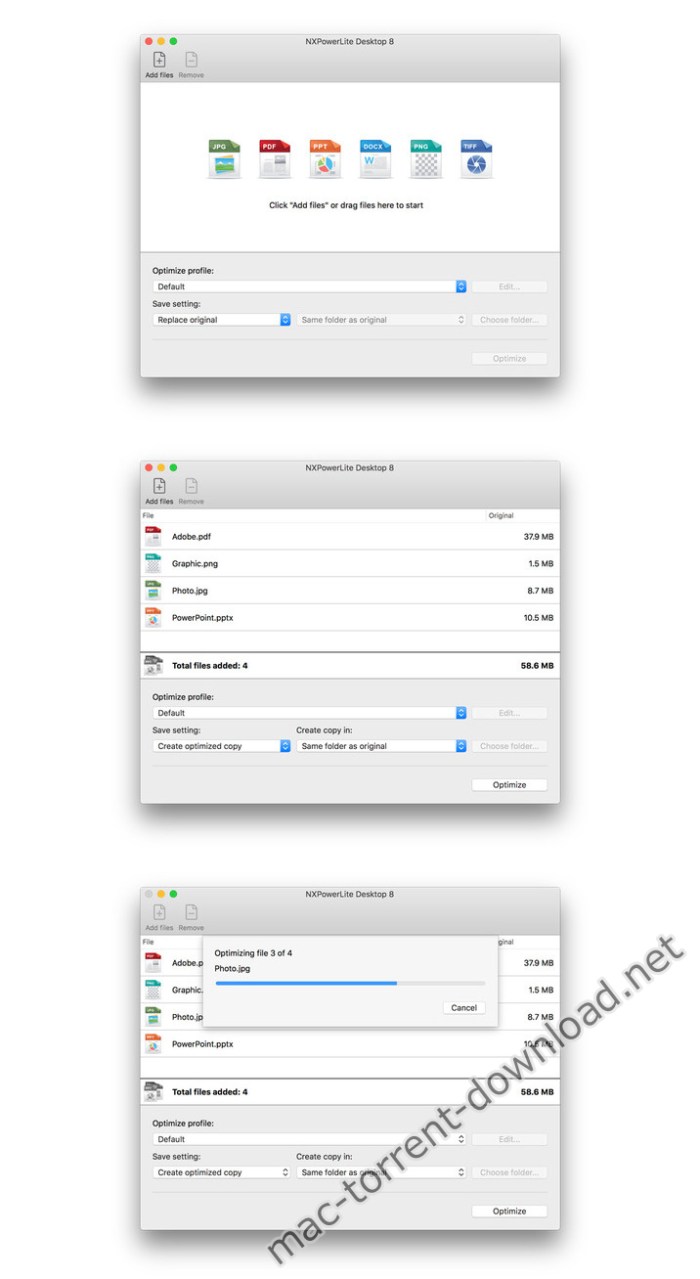
NXPowerLite will compress PDF, JPEG, Microsoft PowerPoint and Word files simply and effectively, making them easy to email as attachments. It is especially effective on files that don’t zip well.

Finder shortcuts

If you’re planning to email your files then we’ve made it even easier. You can optimize and automatically attach them to a new email by selecting the files and clicking “Optimize and email” in the finder menu.

Smaller files in the same format

Optimized files stay in the same format, e.g. a JPG remains a JPG. It will look and feel identical to the original, just much smaller.

How it works

Large PDF, Microsoft PowerPoint and Word files often contain lots of high-resolution images, and background data not required for normal use of the file. By removing this data and unneeded excess bytes from internal graphics and standalone JPEGs, NXPowerLite radically reduces files to their smallest size – without compromising quality.

One key for Mac or windows

We’re big fans of keeping things simple, so we designed the keys for NXPowerLite to work in either the Mac version or the Windows version. So if you change platform you don’t have to buy your software again.

It also means if you are buying multi-user licences you don’t need to say how many of each platform you want up front.

System requirements
  • Mac OS X 10.10 (Yosemite)
  • Mac OS X 10.11 (El Capitan)
  • Mac OS X 10.12 (Sierra)

Web Site: https://www.neuxpower.com/nxpowerlite-desktop-mac

What’s New in NXPowerLite Desktop 8.0.7

  • Release notes not available at the time of this post.

Screenshots

%RATINGS_IMAGES% (%RATINGS_USERS% votes, average: %RATINGS_AVERAGE% out of %RATINGS_MAX%)
You need to be a registered member to rate this.

maru films colorgrading presets for wedding film yama luts win mac

Name Maru Films Colorgrading Presets for Wedding Film Yama LUTs Win Mac.zip
Size 2.22 MB
Created on 2018-11-16 17:03:46
Hash 87ab5b36a7cf0772dcab4b907a0999f944b29641
Files Maru Films Colorgrading Presets for Wedding Film Yama LUTs Win Mac.zip (2.22 MB)

Download

Maru Films – Colorgrading Presets for Wedding Film – Yama LUTs (Win/Mac)

Cool cinematic preset, which we have been creating painstakingly for many years. We worked hard to get the best LUT package with a major focus on wedding films. Balanced in the best way, ideally fits all videos. This package contains a total of 8 LUTs, with 4 styles in 2 contrasting variations, allowing it to be used with almost any camera.

Web Site: https://marufilms.com/luts

%RATINGS_IMAGES% (%RATINGS_USERS% votes, average: %RATINGS_AVERAGE% out of %RATINGS_MAX%)
You need to be a registered member to rate this.

octane render 4.0 rc7 r4 for cinema 4d

Name Octane Render for-C4D V4.0-RC7-R4 Mac.zip
Size 62.52 MB
Created on 2018-11-18 21:20:37
Hash cc8777810606a7799a4c1062ce846aa2851005cb
Files Octane Render for-C4D V4.0-RC7-R4 Mac.zip (62.52 MB)

Download

Octane Render 4.0-RC7-R4 for Cinema 4D macOS

Otoy has released OctaneRender 4.0, the long-awaited update to its GPU production renderer. The release integrates Brigade, Otoy’s real-time path tracing engine, into OctaneRender, speeds up scene updates by up to 100x, and introduces intriguing new AI-based lighting and denoising systems.

Otoy has also announced that the software will be free to use on two GPUs, including access to 12 of the company’s integration plugins for DCC applications

New Features of V4:

AI Light

With the introduction of AI Light in Octane, you will see a great improvement in light sampling, especially in scenes that have many lights with localised distributions. As a learning system, AI Light improves as you render more samples. When used with Adaptive Sampling, AI Light gets even better, since it will learn that other lights become more important, as some pixels are no longer sampled.

AI Scene

AI Scene in Octane brings you much faster scene loading times, and a dramatic improvement in viewport interactivity. You are able to position and modify geometry in real time, even in scenes with several millions of triangles. Vertex animation with constant topology is updated in real time in complex scenes, as you move the time slider. Using the gizmos in the viewport on massive scenes is also in real time.

AI Denoiser

The much anticipated Spectral AI Denoiser allows you to render noise-free in a fraction of the time. You will find the settings to enable it in the Camera Imager settings.

Out of core geometry

Octane now supports out of core geometry, allowing you to use a significant portion of your system memory for geometry data. Multiple GPUs are also supported with out of core geometry. In your preferences, you will see four sliders under Out-of-core. System RAM usage limit allows you to limit how much system memory Octane will use for out of core geometry and textures. Geometry data GPU RAM usage limit allows you to specify a limit on how much GPU VRAM you want to use for geometry, and underneath, you can set the same for textures. This allows you to balance the level to which textures relative to geometry are evicted from VRAM.

Compatibility: OS X 10.5 or later

Web Site: https://home.otoy.com/render/octane-render/features/

What’s New in Octane Render 4.0-RC7-R4 for Cinema 4D

  • Release notes not available at the time of this post.

%RATINGS_IMAGES% (%RATINGS_USERS% votes, average: %RATINGS_AVERAGE% out of %RATINGS_MAX%)
You need to be a registered member to rate this.

bettertouchtool 2.660

Name BetterTouchTool_2.660.zip
Size 22.17 MB
Created on 2018-11-18 21:28:49
Hash 6f3bdb458d9041e0b5a4738e24b9eb23f020c1df
Files BetterTouchTool_2.660.zip (22.17 MB)

Download

BetterTouchTool 2.660 macOS

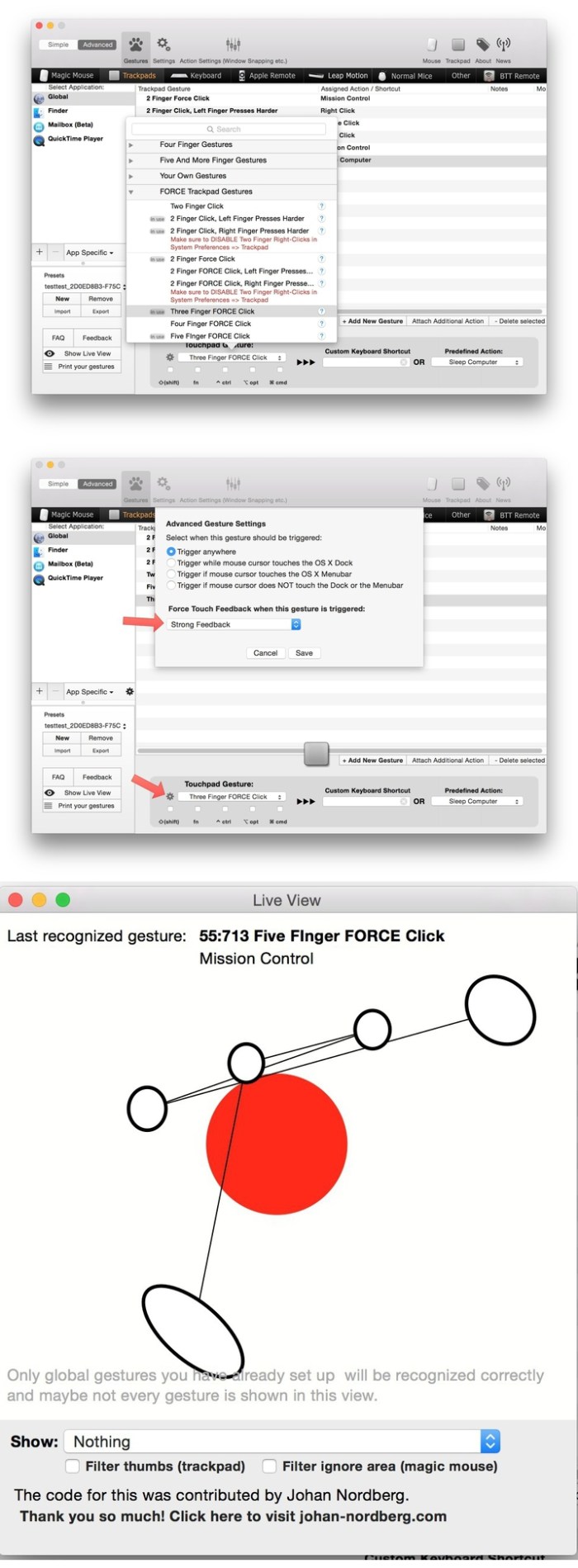
BetterTouchTool adds many new, fully customizable gestures to the Magic Mouse, Multi-Touch MacBook trackpad, and Magic Trackpad.

These gestures are customizable:
  • Magic Mouse:
    • Pinch in / out (zoom)
    • single-finger tap left
    • single-finger tap right
    • single-finger tap middle
    • single-finger tap
    • single-finger click middle
    • two-finger tap
    • two-finger click
    • two-finger swipe (up/down/left/right)
    • two-finger tip tap left/right
    • three-finger tap
    • three-finger click
    • three-finger swipe (up/down/left/right)
    • four-finger swipe up/down
    • four-finger click
    • TipTap left/right
  • Touchpad:
    • single-finger tap top-left
    • single-finger tap top-right
    • single-finger tap top-middle
    • single-finger tap bottom-left
    • single-finger tap bottom-right
    • single-finger tap bottom-middle
    • single-finger tap left-middle
    • single-finger tap right-middle
    • two-finger tip tap left/right
    • three-finger swipes (up/down/left/right)
    • three-finger tap
    • three-finger click
    • four-finger swipes (up/down/left/right)
    • four-finger tap
    • five-finger tap
    • five-finger swipe up/down/left/right (see FAQ)
    • TipTap
    • two-finger TipTap
    • three-finger TipTap

OS version:OS X 10.10 or later

Web Site: https://folivora.ai/

What’s New in BetterTouchTool 2.660

  • Release notes not available at the time of this post.

Screenshots

%RATINGS_IMAGES% (%RATINGS_USERS% votes, average: %RATINGS_AVERAGE% out of %RATINGS_MAX%)
You need to be a registered member to rate this.

app cleaner uninstaller pro 6 3.238

Utilities

2018-11-18   

Name App Cleaner Pro 6 3 TNT.zip
Size 27.09 MB
Created on 2018-11-18 09:38:14
Hash 63ba2f391376b9cbda0e066e7f2ea291714c566f
Files App Cleaner Pro 6 3 TNT.zip (27.09 MB)

Download

App Cleaner & Uninstaller Pro 6.3 (238)

App Cleaner & Uninstaller (was App Cleaner) can remove applications and their service files on OS X*. Make sure they aren’t eating up precious space on your drive with this helpful app that does the legwork for you.

Features
  • Scan the system and preview installed applications
  • Remove all types of service files
  • Remove remains of previously uninstalled apps
  • Reset application to a first-launch state
  • Easy-to-use shortcuts
  • Any file or app quick preview
  • Specific app-associated file formats preview
  • In-app help assistance
  • Show unused applications
  • Skip list option

* Some applications can not be removed because they require administrator privileges. In this case, switch to the Finder and delete the application file in usual way.

Compatibility: OS X 10.10 or later

Web Site: https://nektony.com/mac-app-cleaner
Mac App Store: https://geo.itunes.apple.com/app/id1013897218

What’s New in App Cleaner & Uninstaller Pro 6.3 (238)

  • Release notes not available at the time of this post.

Utilities

By

%RATINGS_IMAGES% (%RATINGS_USERS% votes, average: %RATINGS_AVERAGE% out of %RATINGS_MAX%)
You need to be a registered member to rate this.

cleanmymac x 4.1.0

Name CleanMyMac X 4 1 0 TNT.zip
Size 76.71 MB
Created on 2018-11-16 16:32:23
Hash 7bb4123a884cd0321512ea4c0a5ba114c332ce04
Files CleanMyMac X 4 1 0 TNT.zip (76.71 MB)

Download

CleanMyMac X 4.1.0

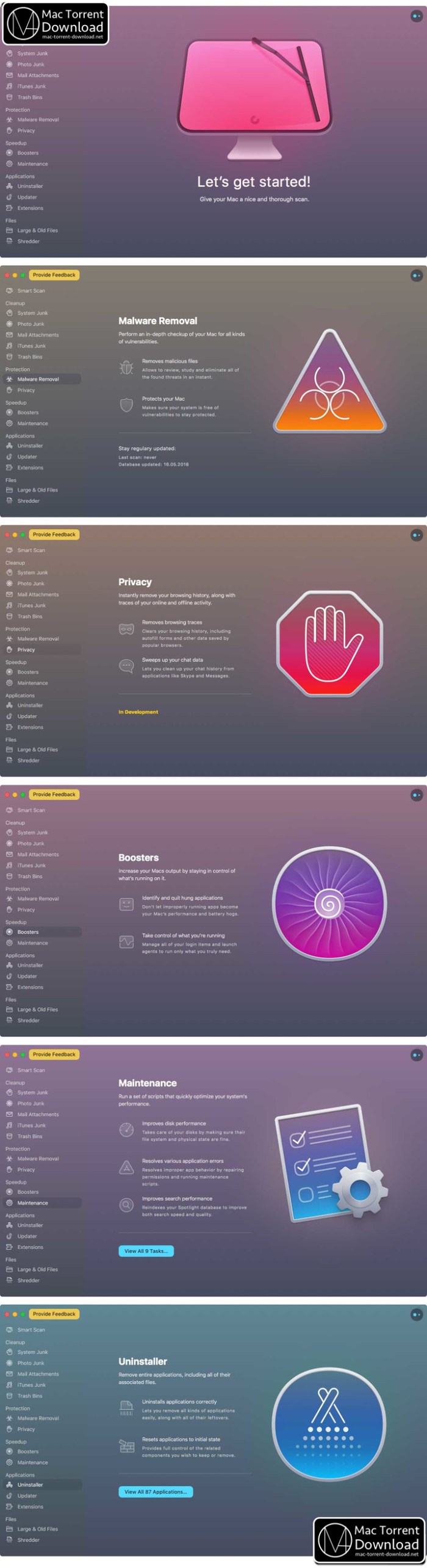
CleanMyMac X is all-in-one package to awesomize your Mac. It cleans megatons of junk and makes your computer run faster. Just like it did on day one. CleanMyMac X chases junk in all corners of your macOS. It cleans unneeded files, like outdated caches, broken downloads, logs, and useless localizations. You can remove tons of clutter that lurks in iTunes, Mail, Photos, and even locate gigabytes of large hidden files. Mac cleaning tools in CleanMyMac X will cut the extra weight in seconds.

Each time your Mac stalls, you got a full deck of speedup tools: Free up RAM, Maintenance scripts, controls for Login Items, Launch Agents, and Hung Applications. This will lessen your system load and tune the Mac for maximum performance. When your machine is productive, you too are productive.

Are there viruses on Mac? Not on yours, if you try Mac cleaning with CleanMyMac X. It fights off malware, adware, ransomware, and all them -wares that are specific to the macOS. When the issue is found, the app deletes it right away. We update our malware database regularly and CleanMyMac X’s Protection module always has your back.

To make your Mac life more orderly, you got a cool duet of Uninstaller and Updater. The first fully removes apps you don’t want, and the second, instantly updates all your software. Bad apps are removed completely and new ones always arrive in time. This helps fix software conflicts and keeps your Mac forever young.

FEATURES

  • Easy to use, userfriendly interface
  • Drag and drop nature
  • Slims universal binaries
  • Removes useless language translations
  • Most accurate application uninstallation
  • Quick and Secure file eraser
  • Manages widgets, plugins and preference panes
  • Erases garbage left from previously removed applications and widgets
  • Monitors your Trash helping you to uninstall trashed applications correctly
  • Keeps an eye on your removable devices to clean them up from junk service files

Compatibility: OS X 10.10 or later 64-bit

Web Site: https://macpaw.com/cleanmymac

What’s New in CleanMyMac X 4.1.0

Improved:
  • Now the Updater lets you update several apps or even all of them at once
  • Selecting apps for resetting or uninstallation has become easier in the Uninstaller
Added:
  • Manage your Steam games easily with CleanMyMac’s Uninstaller
Fixed:
  • CleanMyMac X Menu being blank under certain conditions

Screenshots

%RATINGS_IMAGES% (%RATINGS_USERS% votes, average: %RATINGS_AVERAGE% out of %RATINGS_MAX%)
You need to be a registered member to rate this.

50 winter photoshop actions bundle

Name 50 Winter Photoshop Actions Bundle.zip
Size 9.01 MB
Created on 2018-11-16 17:03:55
Hash a60fdf6872fa03ac5e1498b8a744199c5290e097
Files 50 Winter Photoshop Actions Bundle.zip (9.01 MB)

Download

50 Winter Photoshop Actions Bundle

50 Winter Photoshop Actions is a gorgeous set specially designed to enhance your photos looks better and beautiful. These filters will give you everything you need to professionally process your photos. These filters has been carefully design to create the look and feel you want to achieve for each of your photographs in a few clicks. This collection is well-balanced and perfect for an array of settings, from wedding to travel photography, engagement, fashion, portraits, architecture, food photography, lifestyle, and everything in between.

Enhance your photos looks better and more beautiful with these 50 Free Winter Photoshop Actions just in few clicks

File Format: ATN
Software Requirement: Adobe Photoshop CS3+

Screenshots

%RATINGS_IMAGES% (%RATINGS_USERS% votes, average: %RATINGS_AVERAGE% out of %RATINGS_MAX%)
You need to be a registered member to rate this.

fine art actions photoshop actions collection nov 2018

Name Fine Art Actions Photoshop Actions Collection 11 2018.zip
Size 511.9 kB
Created on 2018-11-18 23:22:11
Hash 9dab77a0d5babf5b257142dbec8f22eab2d0c7fb
Files Fine Art Actions Photoshop Actions Collection 11 2018.zip (511.9 kB)

Download

Fineartactions – Photoshop Actions Collection (Nov. 2018)

Included items:

  1. THE ARTISAN COLLECTION
  2. THE ENCHANTED COLLECTION
  3. THE CINEMATIC COLLECTION

Web Site: https://fineartactions.com/

THE ARTISAN COLLECTION

Inspired by the world of storytelling, The Artisan Collection with Joel Robison explores a versatile palette of colors driven to evoke mood and emotion to your work.

Each of these 6 actions spans are incredibly flexible, and can be used for any genre and any location! From studio portraits to fashion imagery, to fantasy shots, these work well! Depending on the mood you’re looking for, these actions will cater to a wide range of images and moods to bring a special dimension to your work.

We’re very excited to have Joel as our guest collection and we think it will bring a new level to your work!

Includes six beautiful premium actions.

Actions included in this set:
  1. Wonderland
  2. Golden Door
  3. Neverland
  4. Castle Stones
  5. Whimsical Evening
  6. Sepia Summer

THE ENCHANTED COLLECTION

The winter months bring soft tones of morning mist and frosted glass but they also bring the warm hues of crackling fires and glowing lights. It’s this beautiful contrast dance between warm and cool that inspired the colours you see in this set.

Carefully crafted, each action contains layers of color tones that we encourage you to play with, as well as, directions you can follow. To create unique looks, try overlaying the different actions on top of each other at varying opacities.

We hope you enjoy the multitude of color possibilities waiting for you in our Enchanted Collection!

Includes six beautiful premium actions.

Actions included in this set:
  1. Winter Orange
  2. Evergreen
  3. Arctic Light
  4. Ginger Glow
  5. Glacial Frost
  6. Mulberry

THE CINEMATIC COLLECTION

Inspired by the world of storytelling, The Cinematic Collection with Kate Woodman explores a sophisticated palette of colors driven to evoke mood and emotion to your work.

Each of these 6 actions spans across a range of locations, from studio, indoor setups, and outdoor locations. Depending on the mood you’re looking for, these actions will cater to a wide range of images and moods to fit different cinematic styles.

We’re very excited to have Kate as our premier guest collection and we think it will bring a new level to your work.

Includes six beautiful premium actions.

Actions included in this set:
  1. Orange Dahlia
  2. La Vie En Rose
  3. Nostalgia
  4. Golden Harvest
  5. Femme Fatale
  6. Cruella

%RATINGS_IMAGES% (%RATINGS_USERS% votes, average: %RATINGS_AVERAGE% out of %RATINGS_MAX%)
You need to be a registered member to rate this.

xilisoft iphone magic platinum 5 7 27 build 20181118

Name Xilisoft_iPhone_Magic_Platinum_5.7.27.zip
Size 58.00 MB
Created on 2018-11-18 21:21:15
Hash b1bf4dc5a22e4ed569170dc720922f7146c17a60
Files Xilisoft_iPhone_Magic_Platinum_5.7.27.zip (58.00 MB)

Download

Xilisoft iPhone Magic Platinum 5.7.27 Build 20181118 macOS

Complete solutions to transfer, backup and manage iPhone/iPad/iPod contents, convert videos and download online videos to iPhone/iPad/iPod. Simply manage your iPhone/iPad. Optimize experiences on your devices.

  • Do more and better than iTunes.
  • Supports all iPad/iPhone/iPod models, latest iPhone 6, iPhone 6 Plus, iOS 8 and iTunes 12.
  • Transfer all multimedia files between device and PC/ Mac/iTunes.
  • Convert incompatible Video/Audio/DVD/CD to iPad/ iPhone supported formats.
  • Download & convert online videos (eg. YouTube video) to play on iPhone/iPad.

Convert Video/Audios to Devices

Convert almost all popular audios & videos like MPEG, H.264, AVI, MKV, WMA, AAC, etc to iPad/iPhone compatible formats.

Manage Photos and Album

Create album and add photos easily. Transfer pictures from different directory to iPhone. Manage photos easily.

Backup Contacts and Messages

Backup, transfer, restore and manage iPhone contacts. Transfer contacts from Gmail & outlook. Export the messages to Text or HTML, etc.

Make Customized Ringtones

Make personalized and special iPhone ringtone longer than 40 seconds and transfer the ringtone to your iPhone directly.

Manage Multimedia Files

Easy and fast transfer music, movies and ringtones between iPad/iPhone and PC/Mac. Build playlists for multimedia files freely.

Manage Photos

Easily create photo albums. Previewing and exporting photos shot by iPhone are also available by this Win & Mac iPhone Manager.

Backup Contacts/Notes

You can export the contacts to .csv file or .vCard file, export the messages to text or html and read the messages as dialogue form. Backup notes and voice note from iPhone to PC/Mac.

Transfer iBooks

Transfer PDF and EPUB formats books to iPad/iPhone easily with Xilisoft iPhone Manager.

Transfer App

Transfer application between computer and your device, and even manage document for some applications which support this operation.

Rip CD/DVD to iPad/iPhone

Rip CD/DVD, including ISO image files and IFO folders to iPhone/iPad compatible music/movies.

Download Online Videos

One-step download and convert online videos from top online video websites including YouTube, Metacafe, Break, Blip.

Create Personalized Ringtones

Use this iPhone Manager to make personalized iPhone ringtones from audio and video files and directly transfer to iPhone.

Transfer between Devices

Xilisoft iPhone Magic supports connecting multiple devices simultaneously. Transfer files from one device to another.

Compatibility: OS X 10.6 or later

Web Site: http://www.xilisoft.com/iphone-magic.html

What’s New in Xilisoft iPhone Magic Platinum 5.7.27 Build 20181118

  • Release notes not available at the time of this post.

Screenshots

%RATINGS_IMAGES% (%RATINGS_USERS% votes, average: %RATINGS_AVERAGE% out of %RATINGS_MAX%)
You need to be a registered member to rate this.

omnioutliner pro 5 4 1

Name Omnoutliner541.zip
Size 42.34 MB
Created on 2018-11-18 22:03:34
Hash cc9514bc3ec6cf64b1024ee5d68cdd950c6ed899
Files Omnoutliner541.zip (42.34 MB)

Download

OmniOutliner Pro 5.4.1 macOS

OmniOutliner 5 Pro – Outline: think, write, do. Create perfect outlines with a powerful, productive app. This is your all-purpose tool for Mac with smart columns, scriptability, custom styles, templates, and more.

What’s New in 5:

  • Saved Filters PRO
  • Document Stats
  • DistractionFree Mode
  • Resource Search
  • Touch Bar Support
  • Typewriter Mode
  • Dark Mode
  • Customizable Keyboard Shortcuts Pro
  • SlideIn Sidebars Pro
  • MultipleRow Focus Pro
  • OPML Mode
  • Excel Export Pro
  • Column Width Improvements Pro
  • Style Preview Pro

Touch Bar

Context-aware support for Apple’s latest MacBook Pro. Get quick access to the most relevant controls.

Password Protection

Encrypt the documents you’d prefer to keep private. OmniOutliner can now encrypt documents with a password.

Smart Columns

Add columns to any document that deserves them. Columns can be used to summarize data—like summing up your monthly budget numbers—or a different type completely, like a multiple choice selection.

Audio Recording

Record audio for posterity while you take notes in outline form. The recording is stored inside the document and can be played back to make sure you got everything right.

Customizable Keyboard Shortcuts

Customize the shortcuts OmniOutliner uses across the board. Used to shortcuts from another app? Set them up in OmniOutliner 5 Pro.

Saved Filters

Not only can you instantly search your document for keywords or checked boxes, but OmniOutliner 5 Pro allows you to save those filters in the sidebar.

Slide-in Inspectors

We’ve drastically improved full-screen mode by adding a preference for automatic hiding of what you don’t need to see. Simply slide your mouse over to the left or right sides of your screen to access the Sidebar or Inspectors.

AppleScript Support

Combine the AppleScript language with OmniOutliner’s wonderfully documented library for serious automation.

Custom Toolbars

Each document is different than the last, so don’t get stuck with using the same toolbar with every document. In Pro, create a document-specific toolbar that gets saved in the file itself.

Compatibility: macOS 10.11 or later.

Web Site: http://www.omnigroup.com/products/omnioutliner/

What’s New in OmniOutliner Pro 5.4.1

  • Row Handles: Handles use appropriate colors in both light and dark themes.
  • Checkboxes: Checkboxes in light themed documents are visible under macOS Mojave’s Dark Mode.
  • Columns: The autocompletion list for Popup List column cells use a dark background for dark themed documents.
  • Column Titles: When editing column titles, an appropriate background color based on the theme and appearance mode will be used.

%RATINGS_IMAGES% (%RATINGS_USERS% votes, average: %RATINGS_AVERAGE% out of %RATINGS_MAX%)
You need to be a registered member to rate this.

enolsoft pdf to word with ocr 6.1.0

Name Enolsoft PDF to Word with OCR 6 1 0 TNT.zip
Size 360.7 MB
Created on 2018-11-18 21:21:55
Hash 5c3a93ec4a8abe2ddd960f0ab75bb608d45d33c3
Files Enolsoft PDF to Word with OCR 6 1 0 TNT.zip (360.7 MB)

Download

Enolsoft PDF to Word with OCR 6.1.0

Easily Convert PDF to Editable DOC/DOCX Files. Besides native PDFs, PDF to Word with OCR applies Optical Character Recognition to accurately identify text in scanned PDF or images then convert them to Word quickly.

Enolsoft PDF Converter with OCR (Optical Character Recognition) for Mac can accurately recognize the text, images, and table in the PDFs to assure to keep the original layout. Quickly deal with all files from your boss, partners or colleagues.

  • Native/Searchable PDF
  • Scanned/Nonsearchable PDF
  • PDFs with restrictions password
  • Images (JPG, PNG, GIF, BMP, TIFF)

Compatibility: OS X 10.10 or later 64-bit

Web Site: https://www.enolsoft.com

What’s New in Enolsoft PDF to Word with OCR 6.1.0

  • Release notes not available at the time of this post.

%RATINGS_IMAGES% (%RATINGS_USERS% votes, average: %RATINGS_AVERAGE% out of %RATINGS_MAX%)
You need to be a registered member to rate this.

espionage 3.7 1

Name Espionage_3.7.1.zip
Size 8.84 MB
Created on 2018-11-18 21:22:06
Hash cc8287b7328c497ac32a7e7f12bf527d98bf2e97
Files Espionage_3.7.1.zip (8.84 MB)

Download

Espionage 3.7.1 macOS

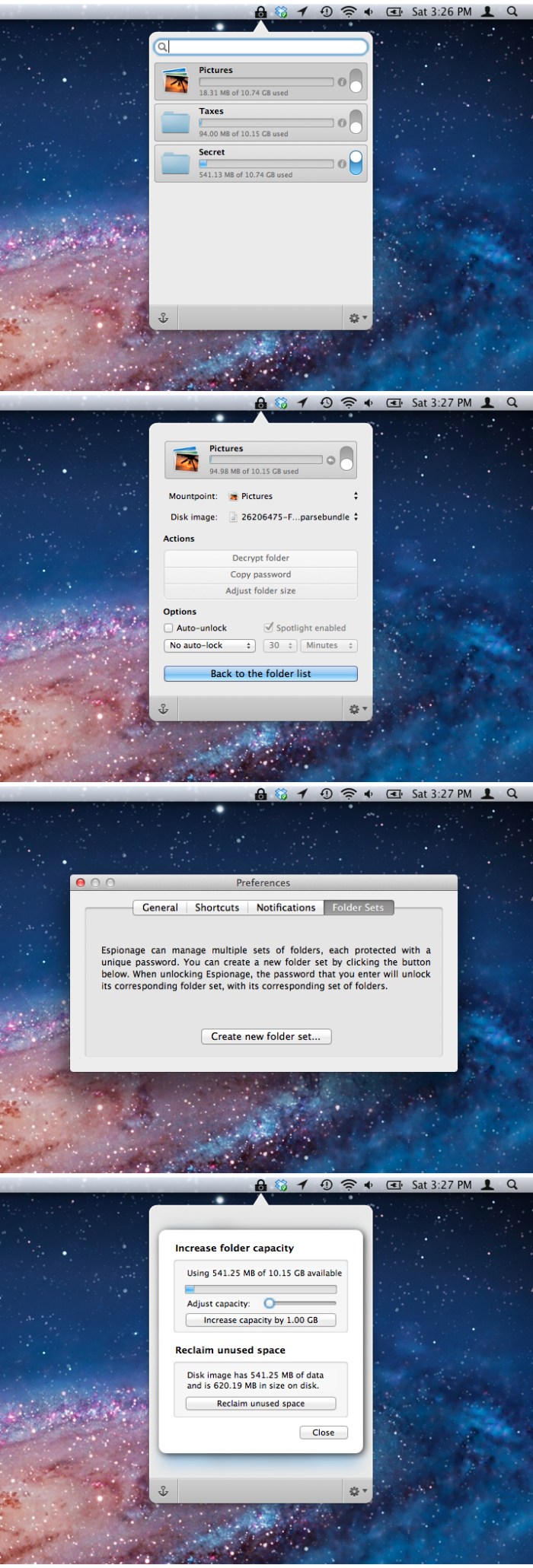
Espionage offers state-of-the-art encryption and plausible deniability for your confidential data.

Sometimes, encrypting your data isn’t enough to protect it. That’s why Espionage 3 goes beyond data encryption. You can create multiple master passwords, each protecting an isolated set of folders. Every protected folder can also advertise completely different data, depending on whether it’s locked or unlocked. Espionage 3 is also the most secure Espionage yet, featuring AES-256 encryption by default, and scrypt to protect your passwords from even the most powerful of adversaries.

Features
  • Source code available for security professionals.
  • Designed for plausible deniability. Multiple master passwords through Folder Sets. Want two versions of your email? Espionage can handle that.
  • Enhances deniable encryption by creating fake Folder Sets and fake disk images.
  • Laptop-theft tracking apps (like Undercover) work when using Espionage without FileVault.
  • Super-computer defying encryption: AES-256 + scrypt.
  • Silent. Espionage 3 doesn’t make it easy for people to know what’s encrypted.
  • Folder Actions make it easy to encrypt your email.
  • Quickly access folders via the menu bar and keyboard shortcuts.
  • Works with your favorite backup software like Time Machine and Dropbox.
  • Optionally prevent folder contents from showing up in Spotlight even when the folder is unlocked.
  • High-quality customer support. Yes, given how terrible customer support can be, we consider this a feature.

Requirements – OS X 10.10 +
Languages: Arabic, Brazilian Portuguese, Chinese (Simplified), Czech, English, French, German, Italian, Japanese, Korean, Spanish, Russian, Tagalog

Web Site: https://www.espionageapp.com

What’s New in Espionage 3.7.1

  • Crash during setup on macOS Mojave

Screenshots

%RATINGS_IMAGES% (%RATINGS_USERS% votes, average: %RATINGS_AVERAGE% out of %RATINGS_MAX%)
You need to be a registered member to rate this.

tenorshare ultdata iphone data recovery 8 5.0.21

Name Tenorshare UltData 8 5 0 21 TNT.zip
Size 32.40 MB
Created on 2018-11-18 21:22:15
Hash deb3c96a2d38e5296c6a59ec7f2678508692c012
Files Tenorshare UltData 8 5 0 21 TNT.zip (32.40 MB)

Download

Tenorshare UltData 8.5.0.21

An ultimate solution to repair iPhone iOS system issues and get back your iPhone lost data including messages, contacts, photos, videos, notes, and more no matter how the situation turns out. Recover 20 + Types of Files – Undelete SMS, iMessage, Contacts, Call History, Photos, Videos, Notes, Voice Memos, WhatsApp, Tango, and other files that you count on your iPhone.

Recover iPhone Operating System from Any Breakdown – iPhone reboots randomly after upgrade/jailbreak? iPhone runs into system crash and gets stuck at apple logo, connect to iTunes screen, etc.? These symptoms show something got wrong with iPhone operating system. No need to factory reset to fix iOS to normal, you can now repair iPhone iOS system crashes/stuck at home in simple clicks. Perfectly preserve the original data during the system recovery process.

Compatibility: macOS 10.9 or later 64-bit

Web Site: https://www.tenorshare.com/products/iphone-data-recovery.html

What’s New in Tenorshare UltData (iPhone Data Recovery) 8.5.0.21

  • Release notes not available at the time of this post.

%RATINGS_IMAGES% (%RATINGS_USERS% votes, average: %RATINGS_AVERAGE% out of %RATINGS_MAX%)
You need to be a registered member to rate this.

taskpaper 3.8 2

Name TaskPaper 3 8 2 TNT.zip
Size 12.45 MB
Created on 2018-11-18 21:20:49
Hash 94a706e21544cab41403b974a01e12fc5aad0c59
Files TaskPaper 3 8 2 TNT.zip (12.45 MB)

Download

TaskPaper 3.8.2

Make lists and get organized. TaskPaper is a plain text to-do list that’s surprisingly adept. Thoroughly modernized. TaskPaper 3.5 is all new, while still retaining the same plain text design that’s been getting things done since 2006.

Buy now to make lists and get organized!

—–

Key Features
  • Plain text files; edit anywhere
  • Type and your lists are auto formatted
  • Organize projects:, tasks, notes, and @tags
  • Filter your lists by @tag, type, or content
  • Fold, focus, and filter to make big lists small
  • Fast keyboard navigation & commands
Supporting Features
  • Drag and drop to organize your lists
  • Manage dates and times in plain text
  • Import/Export with Reminders app (Siri)
  • Active support community ready to help
  • LESS/CSS powered stylesheets for theming
  • Extensive Javascript API for scripting

Compatibility: OS X 10.11 or later 64-bit

Web Site: https://www.taskpaper.com
Mac App Store: https://itunes.apple.com/app/taskpaper-plain-text-to-dos/id1090940630?mt=12

What’s New in TaskPaper 3.8.2

  • Fixed crash that could happen when archiving items
  • Fixed bad performance when using accessibly API in long documents
  • Fixed bug where some stylesheet attributes were not applied to editor
  • Fixed case where leading tab indentation of blank lines was sometimes lost when opening document

%RATINGS_IMAGES% (%RATINGS_USERS% votes, average: %RATINGS_AVERAGE% out of %RATINGS_MAX%)
You need to be a registered member to rate this.

wolf responsive form maker 2.34

Name Wolf Responsive Form Maker 2 34 TNT.zip
Size 46.95 MB
Created on 2018-11-18 21:23:38
Hash 36499b4946f2e0e92fb10a75b819864fca8fe5c0
Files Wolf Responsive Form Maker 2 34 TNT.zip (46.95 MB)

Download

Wolf Responsive Form Maker 2.34

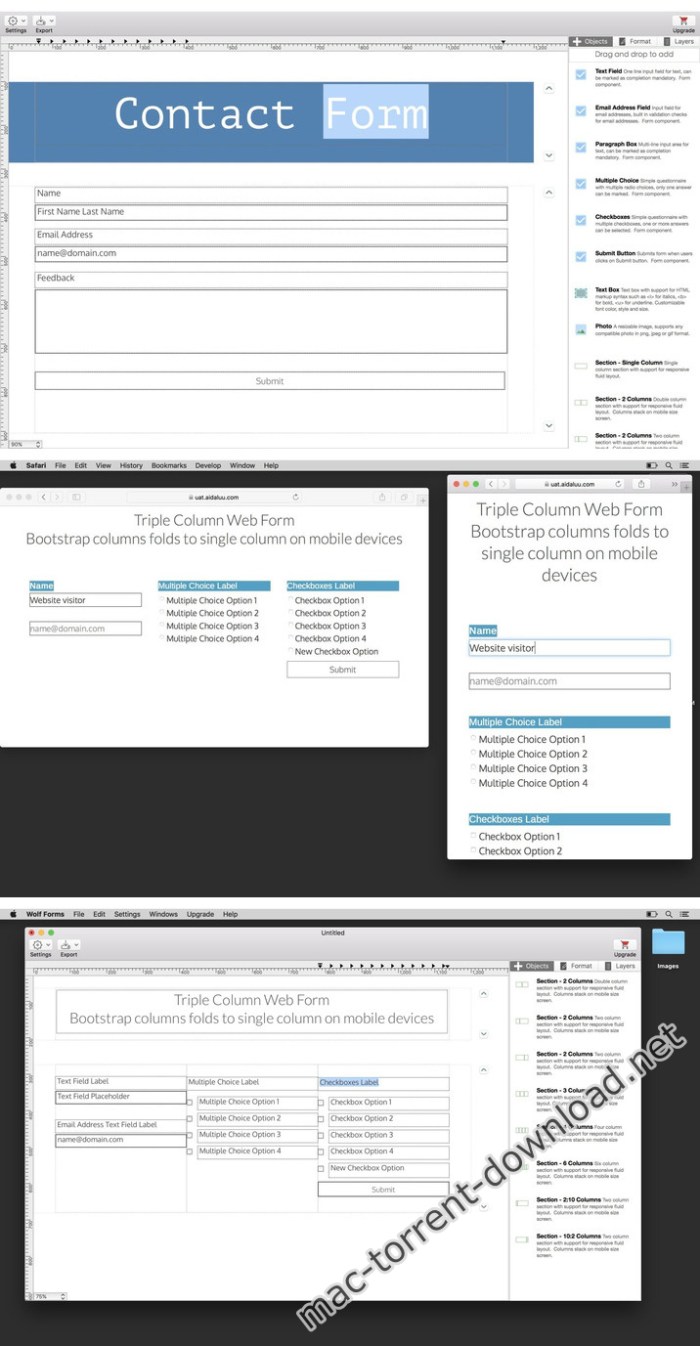
Create PHP web forms

Wolf Responsive Form Maker helps you build mobile-friendly web forms in PHP format

Compatibility: OS X 10.10 or later 64-bit

Web Site: https://wolf.aidaluu.com

What’s New in Wolf Responsive Form Maker 2.34

  • Release notes not available at the time of this post.
Screenshots

%RATINGS_IMAGES% (%RATINGS_USERS% votes, average: %RATINGS_AVERAGE% out of %RATINGS_MAX%)
You need to be a registered member to rate this.

elimisoft duplicate finder 1.1

Name Elimisoft Duplicate Finder 1 1 TNT.zip
Size 6.48 MB
Created on 2018-11-18 21:21:37
Hash f3b859cc1c732751c1e725c48517444bea76444c
Files Elimisoft Duplicate Finder 1 1 TNT.zip (6.48 MB)

Download

Elimisoft Duplicate Finder 1.1

Elimisoft Duplicate Finder can help you quickly and efficiently find all duplicates on your Mac, allow you deleting them to free more disk space in one-click, make your Mac run faster!

Features:

  • Accurate and quick detection of duplicate files using MD5 value checksum algorithm.
  • Scan duplicates anywhere, whether they are one or more folders of internal and external hard drives, also supporting scanning duplicates in Photos or iTunes.
  • Display duplicate files in list or detail preview view.
  • Intelligently select duplicate files automatically, and you can choose to remove the newest or oldest files.
  • Check the duplicate files with different categories, sort the duplicates by size, name, count, and type and search file by keywords.

Compatibility: OS X 10.9 or later 64 bit

Web Site: https://www.ccleanmac.com

What’s New in Elimisoft Duplicate Finder 1.1

  • Release notes not available at the time of this post.

%RATINGS_IMAGES% (%RATINGS_USERS% votes, average: %RATINGS_AVERAGE% out of %RATINGS_MAX%)
You need to be a registered member to rate this.

temp monitor 1.2.1

Name Temp Monitor 1 2 1 TNT.zip
Size 11.29 MB
Created on 2018-11-18 21:28:38
Hash baf47abf64542bd4a3b382c9c0c868b5d0969fec
Files Temp Monitor 1 2 1 TNT.zip (11.29 MB)

Download

Temp Monitor 1.2.1

Temp Monitor app is an unobtrusive tool which will alert you when your Mac overheats, and the perfect utility to help you log all instances when the processor goes beyond a temperature which might be dangerous for both your Mac and yourself, if you’re using a MacBook or MacBook Pro.

Features
  • Support for customizable overheat temperature – Temp Monitor is a macOS application specifically designed to watch a Mac processor’s temperature very closely and display it in the menu bar in the form of a text- and icon-based status item. More precisely, Temp Monitor runs in the background and will let you know when the CPU’s temperature reaches dangerous levels, thus enabling you to pause highly intensive processing tasks and resume them at a later time to protect your Mac’s integrity. The CPU temperature which triggers Temp Monitor to display an overheat notification can be customized via the app’s settings window. From there you can also set Temp Monitor to launch on login and choose the default temperature unit it uses.
  • Notification Center integration and automatic logging of all overheat alerts – Furthermore, the Temp Monitor utility displays audio and visual notifications via macOS’ Notification Center feature, and it they are by default set to be alerts which will not go away until manually dismissed, an excellent idea for when you are away from your Mac and the CPU temperature goes above the safe threshold. The temperature warnings are also added automatically to Notification Center’s notifications tab, for later reviewing of all past alerts when and if needed.

Compatibility: OS X 10.11 or later 64-bit

Web Site: https://vimistudios.com/

What’s New in Temp Monitor 1.2.1

  • Release notes not available at the time of this post.

%RATINGS_IMAGES% (%RATINGS_USERS% votes, average: %RATINGS_AVERAGE% out of %RATINGS_MAX%)
You need to be a registered member to rate this.

xilisoft iphone transfer 5 7 27 build 20181118

Name Xilisoft_iPhone_Transfer_5.7.27_.zip
Size 57.02 MB
Created on 2018-11-18 21:21:27
Hash 59648a104e9ba3664bbb5b0da2ba8d5b09dd5886
Files Xilisoft_iPhone_Transfer_5.7.27_.zip (57.02 MB)

Download

Xilisoft iPhone Transfer 5.7.27 Build 20181118 macOS

Xilisoft iPhone Transfer is a smart tool to synchronize your iPhone to your computer. It’s the ideal iPhone manager to backup music, video and other contents to your computer, match your iPhone contents to iTunes and seamlessly copy files from computer to your iPhone.

Besides the music, video and file synchronization, you can even treat your iPhone as a portable hard disk when Xilisoft iPhone Transfer software is installed.

  • Fully support all iPad/iPhone/iPod, latest iPhone 7, iPhone 7 Plus, iOS 10 and iTunes 12
  • Backup iPhone contents to computer
  • Backup messages and contacts to computer
  • Export computer files to iPhone/iPad/iPod
  • Synchronize iPhone music with iTunes library
  • Manage iPhone music, movies, photos, books
  • Support several iOS devices simultaneously

System Requirements: Mac OS X 10.6 – 10.14

Web Site: http://www.xilisoft.com/iphone-transfer-mac.html

What’s New in Xilisoft iPhone Transfer 5.7.27 Build 20181118

  • Release notes not available at the time of this post.

%RATINGS_IMAGES% (%RATINGS_USERS% votes, average: %RATINGS_AVERAGE% out of %RATINGS_MAX%)
You need to be a registered member to rate this.

boris continuum complete 2019 v12.0.0 for after effects premiere

Name BCC2019AdobeMacOS.zip
Size 304.3 MB
Created on 2018-11-18 08:41:05
Hash 0bce542833ca173e7f3379fa581e2bf4edc45425
Files BCC2019AdobeMacOS.zip (304.3 MB)

Download

Boris Continuum Complete 2019 v12.0.0 for After Effects & Premiere macOS

Continuum 2019 is the latest major upgrade for the most comprehensive plug-in collection on the market. Key features include the rebirth of Particle Illusion, the famed motion graphics generator, new Title Studio image-processing shaders such as glows, rays, and blurs for visually-stunning titles and lower thirds, new Mocha Essentials workspace with 4 new spline tools like magnetic edge snapping and geometric shapes for faster tracking and masking, new point-driven parameter tracking powered by Mocha, and overall GPU-acceleration.

PARTICLE ILLUSION

It’s back! Renowned Particle Illusion (formerly particleIllusion) gets a total overhaul in Continuum 2019. Redesigned from the ground up as a 64-bit application, Particle Illusion gives editors and artists access to an easy-to-use, powerful, high-end particle and motion graphics generator. Instantly create preset-driven photorealistic motion-tracked particle effects for titles, lower thirds, and background graphics.

MOCHA ESSENTIALS WITH NEW TRACKING TOOLS

Users already know and love the Academy Award-winning Mocha planar tracking tools integrated directly inside Continuum. The Continuum 2019 release provides some major updates. Say yes to faster effects masking and rotoscoping.

TITLE STUDIO UPDATES

Title Studio is a next-gen 2D/3D titling plug-in that can be used as a custom interface plug-in or standalone application. Easily create high-quality professional 2D or 3D titles with custom bevels, fills and styles; import 3D models from Maxon C4D or Adobe Illustrator EPS files; and add OpenGL-accelerated features like 3D extrusions, materials, cameras, lights, and deformers.

OVERALL IMPROVEMENTS

  • Avid Effects Simplified: The introduction of Mochabased parameter tracking renders most nonreal time blue dot filters unnecessary. Nonreal time filters have been moved into an obsolete folder to support the older legacy Continuum tracker.
  • External Broadcast Monitor Support: Applications like Title Studio and Particle Illusion now support external broadcast monitors. Currently only available for Blackmagic Design, AJA coming soon.
  • Deep Color 32bit Support in Premiere Pro: The 32bit float color processing option in Continuum, which has always been available in hosts such as After Effects, has been extended to include the Premiere Pro host with deep color support enabling users to generate HDR content without clipping.

Web Site: http://borisfx.com/products/continuum/

What’s New in Boris Continuum Complete 2019 v12.0.0 for After Effects & Premiere

  • Release notes not available at the time of this post.

%RATINGS_IMAGES% (%RATINGS_USERS% votes, average: %RATINGS_AVERAGE% out of %RATINGS_MAX%)
You need to be a registered member to rate this.

vmware fusion pro 11.0 1 extended edition

Name VMF1101EXT.zip
Size 527.7 MB
Created on 2018-11-18 04:46:57
Hash bf8563ff1463a02926e8549ce20fb77e07cedab3
Files VMF1101EXT.zip (527.7 MB)

Download

VMware Fusion Pro 11.0.1 Extended Edition macOS

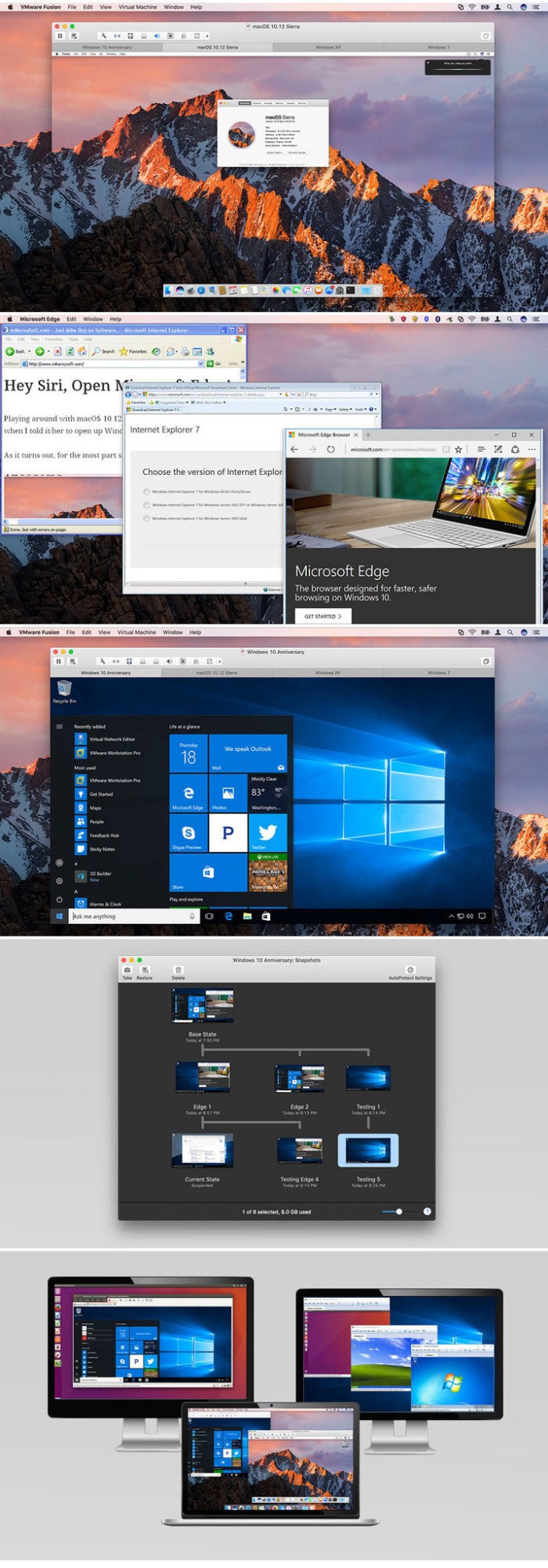
VMware Fusion gives Mac users the power to run Windows on Mac along with hundreds of other operating systems side by side with Mac applications, without rebooting. Fusion is simple enough for home users and powerful enough for IT professionals, developers and businesses.

Run Nearly Any Operating System on a Mac

Running Windows on Mac is only the beginning. VMware Fusion lets you choose from hundreds of supported operating systems, from lesser-known Linux distributions to the latest Windows 10 release.

Connect to VMware vSphere

Securely connect with vSphere, ESXi and Workstation servers to launch, control and manage both virtual machines (VMs) and physical hosts. Thanks to the common VMware platform, VMs can be easily transferred from the vSphere data center to the Mac desktop and then run in Fusion.

Develop and Test for Any Platform

Fusion makes it simple to test nearly any OS and app on a Mac. Build and test apps in a sandbox while securely sharing local source files and folders. Fusion Pro now includes a RESTful API to integrate with modern development tools like Docker, Vagrant, Ansible, Chef, and others to fit the power of VMware into today’s Agile and DevOps-oriented production pipelines.

Design and Demo Complex Solutions

With the ability to run an entire virtual cloud stack on a single Mac, solution architects can demonstrate their entire software solution in real time, with safe rollback points to return to known configurations. Fully express the story of your software journey by running all of its components on a single notebook to show the world.

WHAT’S NEW :

Professionals Run Windows on Mac with Fusion Pro

Fusion 8 Pro lets Mac users take advantage of Windows 10 features like the all new Edge browser, or strike up a conversation with Cortana, the all-new personal digital assistant, even while Fusion is running in the background. With support for over 200 operating systems including Windows 10, Fusion 8 Pro delivers unsurpassed platform compatibility and integration with the VMware ecosystem.

Expiring Virtual Machines

For workers assigned to short-term projects, temporary employees, or for a software evaluation, create restricted virtual machines that expire at a predefined date and time. When powered on, the virtual machine will query the server at specified time intervals, storing the current system time in the restricted virtual machine’s policy file as the last trusted timestamp. An expired virtual machine will automatically suspend and will not restart without administrator intervention.

Minimum System Requirements
  • Any 64bit capable Intel® Mac® (Compatible with Core 2 Duo, Xeon, i3, i5, i7 processors or better)
  • Minimum 4GB of RAM
  • 750MB free disk space for VMware Fusion and at least 5GB for each virtual machine
  • Mac OS X 10.9.0 or later
  • Operating system installation media (disk or disk image) for virtual machines
  • Microsoft Windows is not included with VMware Fusion
  • Recommended graphics hardware for Windows DirectX 10 or OpenGL 3.3 includes NVIDIA 8600M or better and ATI 2600 or better

Web Site: http://www.vmware.com/

What’s New in VMware Fusion Pro 11.0.1 Extended Edition

  • Release notes not available at the time of this post.
Screenshots

%RATINGS_IMAGES% (%RATINGS_USERS% votes, average: %RATINGS_AVERAGE% out of %RATINGS_MAX%)
You need to be a registered member to rate this.

infographics templates for ppt 1.2 2

Name Infographics Templates for PPT 1 2 2 MAS TNT.zip
Size 74.06 MB
Created on 2018-11-18 08:39:50
Hash ddf82784ae9231c302bc3a05dcc322a1004fa2a6
Files Infographics Templates for PPT 1 2 2 MAS TNT.zip (74.06 MB)

Download

Infographics Templates for PPT 1.2.2

Infographics for PowerPoint contains a massive collection of thousands of data visualization tools to illustrate and enhance your Microsoft PowerPoint presentations! Every single item is crafted to perfection to be visually captivating and easily customizable.

Infographics for PowerPoint has items for virtually any occasion, from charts and diagrams to editable city, state, country, and region maps, accompanied by a broad selection of national flags and symbols, it has never been easier to explain business results, intricacies of an industry, or focus on a national specifics of any country! To make things even easier- we have included a number of professionally designed slideshow presentation templates to kickstart your work!

All images include transparent backgrounds that allow placing them over colored and/or patterned backgrounds. Many elements are designed in shapes, so you can easily customize them to your exact needs.

Infographics for PowerPoint is designed to be used with Microsoft PowerPoint, but you can also adapt the images for Microsoft Word, Excel, and other applications.

* Requires Microsoft Office for Mac 2011 or later.

Compatibility: OS X 10.11 or later 64 bit

Web Site: http://www.jumsoft.com/toolbox-for-ms-office/
Mac App Store: https://itunes.apple.com/app/infographics-templates-for-ppt/id1101223069?mt=12

What’s New in Infographics Templates for PPT 1.2.2

  • Release notes not available at the time of this post.

%RATINGS_IMAGES% (%RATINGS_USERS% votes, average: %RATINGS_AVERAGE% out of %RATINGS_MAX%)
You need to be a registered member to rate this.

infographics maker templates 3.3.1

Name Infographics Maker – Templates 3 3 1 MAS TNT.zip
Size 75.53 MB
Created on 2018-11-18 08:40:08
Hash 5392f425abe4af8e4e2d41f76e57126355d6594e
Files Infographics Maker – Templates 3 3 1 MAS TNT.zip (75.53 MB)

Download

Infographics Maker – Templates 3.3.1

Infographics Maker for Pages contains a massive collection of thousands of data visualization tools to illustrate and enhance your Apple Pages documents! Every single item is crafted to perfection to be visually captivating and easily customizable.

Infographics Maker for Pages has items for virtually any occasion, from charts and diagrams to editable city, state, country, and region maps, accompanied by a broad selection of national flags and symbols, it has never been easier to explain business results, intricacies of an industry, or focus on a national specifics of any country!

All images include transparent backgrounds that allow placing them over colored and/or patterned backgrounds. Many elements are designed in shapes, so you can easily customize them to your exact needs.

Infographics Maker is designed to be used with Apple Pages, but you can also adapt the images for Apple Keynote, Numbers, iBooks Author, and other applications.

*** Apple Pages 6.0 or later is recommended.

OS Version: OS X 10.11 or later

Web Site: http://www.jumsoft.com/toolbox-for-pages/
Mac App Store: https://itunes.apple.com/app/infographics-maker-templates/id1099408858?mt=12

What’s New in Infographics Maker – Templates 3.3.1

  • macOS Mojave support;
  • macOS Mojave Dark Mode integration;
  • New, beautiful banners for all content categories;
  • Content management improvements to speed up new content downloads.

%RATINGS_IMAGES% (%RATINGS_USERS% votes, average: %RATINGS_AVERAGE% out of %RATINGS_MAX%)
You need to be a registered member to rate this.

anytrans for android 6 4.0.20181115

Utilities

Name AnyTrans for Android 6 4 0 20181115 TNT.zip
Size 62.90 MB
Created on 2018-11-18 08:41:23
Hash ce5f9646881470db85e10bcfc00494e7aeb06889
Files AnyTrans for Android 6 4 0 20181115 TNT.zip (62.90 MB)

Download

AnyTrans for Android 6.4.0 (20181115)

AnyTrans for Androidis a mighty Android manager that converges your entire Android phone/tablet and consolidates every access to all your content in one handy place, such as messages, photos, contacts, videos, apps, and more. In just one tap, it helps transfer everything from Android-to-Android, or even from iOS-to-Android seamlessly. It also enables you to take control over all your Android data and files.

Features
  • Transfer the most types of data from Android to Android – including messages, photos, contacts, videos, apps, and more.
  • Transfer data from Android to PC/Mac, or vice versa – covering messages, photos, contacts, etc.
  • 1-click clone everything from Android-to-Android, even from iOS-to-Android.
  • Manage your personal info with 100% safe guaranteed – edit, add, delete or rename contacts, messages, call logs as you need.
  • Hide your personal portraits, family photos, and travel memories, etc., to protect your privacy. And unhide any of them in seconds if needed.
  • Full control of all your apps on your Android phone/tablet — install, uninstall, transfer games, music apps, and other apps by simple drag-and-drop.

Compatibility: OS X 10.8 or later 64 bit

Web Site: https://www.imobie.com/anytrans/android-manager.htm

What’s New in AnyTrans for Android 6.4.0 (20181115)

  • Release notes not available at the time of this post.

Utilities

By

%RATINGS_IMAGES% (%RATINGS_USERS% votes, average: %RATINGS_AVERAGE% out of %RATINGS_MAX%)
You need to be a registered member to rate this.

infographics lab templates 3.4 2

Name Infographics Lab – Templates 3 4 2 MAS TNT.zip
Size 77.03 MB
Created on 2018-11-18 08:40:20
Hash 1d8a51e93390af2ca65571ec2e44b371c2aadcc2
Files Infographics Lab – Templates 3 4 2 MAS TNT.zip (77.03 MB)

Download

Infographics Lab – Templates 3.4.2

Infographics Lab for Keynote contains a massive collection of thousands of data visualization tools to illustrate and enhance your Apple Keynote presentations! Every single item is crafted to perfection to be visually captivating and easily customizable.

Infographics Lab for Keynote has items for virtually any occasion, from charts and diagrams to editable city, state, country, and region maps, accompanied by a broad selection of national flags and symbols, it has never been easier to explain business results, intricacies of an industry, or focus on a national specifics of any country! To make things even easier- we have included a number of professionally designed slideshow presentation templates to kickstart your work!

All images include transparent backgrounds that allow placing them over colored and/or patterned backgrounds. Many elements are designed in shapes, so you can easily customize them to your exact needs.

Infographics Lab for Keynote is designed to be used with Apple Keynote, but you can also adapt the images for Apple Pages, Numbers, iBooks Author, and other applications.

* Requires Keynote 6.6 or later.

OS Version: OS X 10.11 or later

Web Site: http://www.jumsoft.com/toolbox-for-keynote/
Mac App Store: https://itunes.apple.com/app/infographics-lab-templates/id577411683?mt=12

What’s New in Infographics Lab – Templates 3.4.2

  • macOS Mojave support;
  • macOS Mojave Dark Mode integration;
  • New, beautiful banners for all content categories;
  • Content management improvements to speed up new content downloads.

%RATINGS_IMAGES% (%RATINGS_USERS% votes, average: %RATINGS_AVERAGE% out of %RATINGS_MAX%)
You need to be a registered member to rate this.

capture one pro 12.0.0b4

Name Capture One Pro 12 12 0 0 256b4 TNT.zip
Size 348.1 MB
Created on 2018-11-17 02:37:07
Hash a7f9acfde611142505167455173e17f9c6b73b99
Files Capture One Pro 12 12 0 0 256b4 TNT.zip (348.1 MB)

Download

Capture One Pro 12.0.0b4

Capture One is a professional RAW converter offering you ultimate image quality with beautiful colors and incredible detail for more than 500 high-end cameras. It offers state- of-the-art tethered capture, powerful digital asset management, extensive adjustment tools and a flexible workflow through customizable workspaces.

With an updated processing engine, market-leading performance and powerful new features, Capture One is the professional choice in imaging software. You get the highly responsive precision tools you need to create stunning images from your camera’s RAW files in a time-saving workflow that can be customized to fit your needs.

New features

  • New interface
  • New Menu system
  • New Keyboard Shortcut Manager
  • Luma Range Masking
  • Linear Gradient Mask tool
  • Radial Gradient Mask tool
  • Plugins Export and publish
  • Revised noise reduction algorithm See notes
  • User experience changes
  • Extended AppleScript support
  • Fujifilm Film Simulations

Compatibility: macOS 10.12 or later 64-bit

Web Site: https://www.phaseone.com/en/Products/Software/Capture-One-Pro/Highlights.aspx

What’s New in Capture One Pro 12.0.0b4

  • Release notes not available at the time of this post.
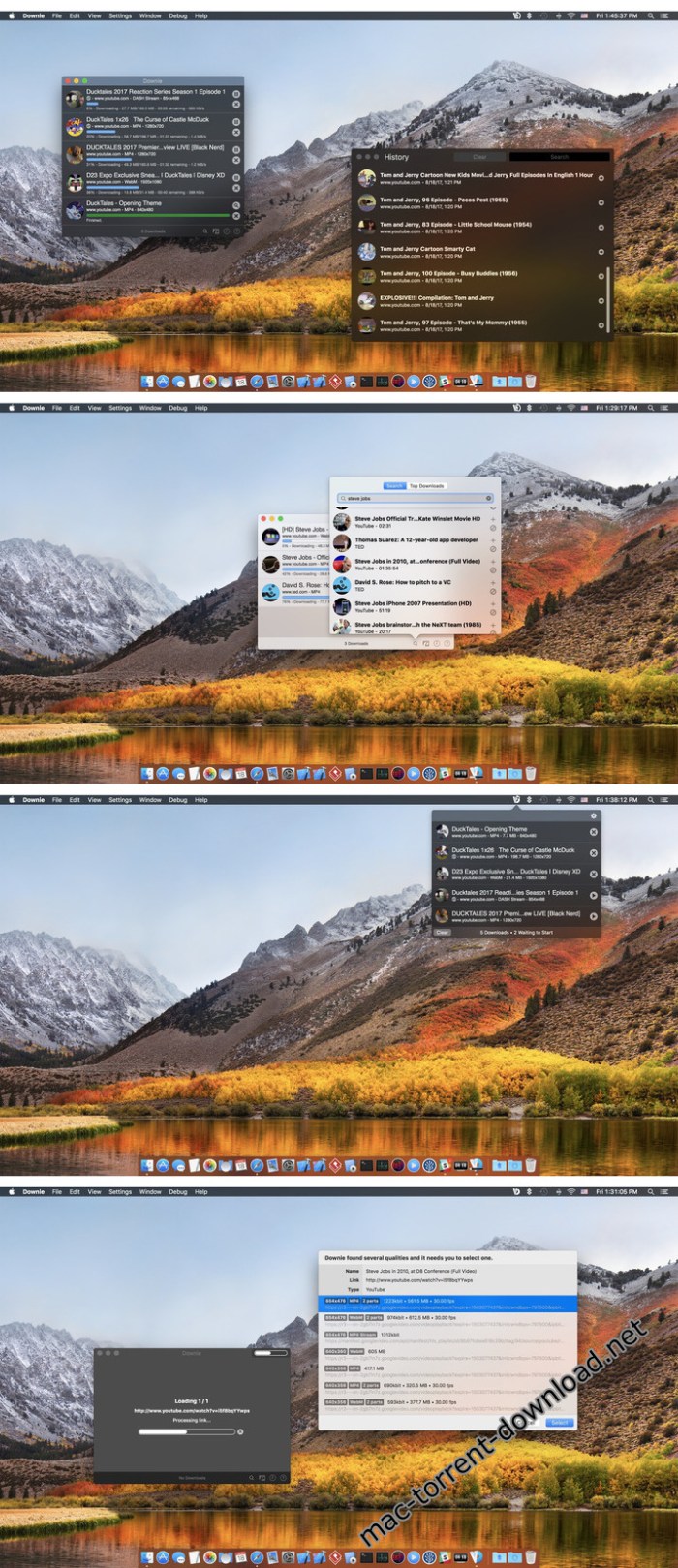
Screenshots

%RATINGS_IMAGES% (%RATINGS_USERS% votes, average: %RATINGS_AVERAGE% out of %RATINGS_MAX%)
You need to be a registered member to rate this.

cisdem data recovery 5 5.0

Name Cisdem Data Recovery 5 5 0 TNT.zip
Size 8.75 MB
Created on 2018-11-18 08:40:29
Hash 3685ae5575a161a7d419cfa03801328adc5211dd
Files Cisdem Data Recovery 5 5 0 TNT.zip (8.75 MB)

Download

Cisdem Data Recovery 5.5.0

Cisdem Data Recovery, Using advanced scanning technology and directory restructuring algorithm, Cisdem Data Recovery for Mac can help you to recover lost valuable data.

Cisdem Data Recovery, Using advanced scanning technology and directory restructuring algorithm, Cisdem Data Recovery for Mac can help you to recover lost valuable data documents, emails, videos, music, photos, and lost partitions from any Mac supported data storage media, including internal/external hard drives, USB drives, SD card, optical media, memory cards, digital cameras, mobile phone (iPhone not included), iPods etc.

It’s amazingly fast, accurate and a breeze to use. Download now and get back your data from lost, deleted, formatted, logical corrupted situation within the next five minutes.

Compatibility: macOS 10.12 or later 64-bit

Web Site: http://www.cisdem.com

What’s New in Cisdem Data Recovery 5.5.0

  • Release notes not available at the time of this post.

Screenshots

%RATINGS_IMAGES% (%RATINGS_USERS% votes, average: %RATINGS_AVERAGE% out of %RATINGS_MAX%)
You need to be a registered member to rate this.

live desktop 6.0

Name LiveDesktop 6 0 MAS TNT.zip
Size 195.4 MB
Created on 2018-11-18 08:39:34
Hash 55ec5db0f5b9d4ed0fd2304c8aaca9935ab8aef0
Files LiveDesktop 6 0 MAS TNT.zip (195.4 MB)

Download

Live Desktop 6.0 – Live Wallpapers

Name: Live Desktop – Live Wallpapers
Version: 6.0
Release Date: November 15, 2018
Developer: George Sargunaraj C
MAS Rating: 4+
Mac Platform: Intel
OS Version: OS X 10.9 or later
Processor type(s) & speed: 64-bit processor

Web Site: https://www.macappstudio.com/apps/live_desktop
Mac App Store: https://itunes.apple.com/app/live-desktop-live-wallpapers/id846060286?mt=12

Overview

Live desktop- Animated Live Wallpapers and Themes.

■ Featured by Apple in “Our Top Picks for MacBook Pro”
■ Featured by Apple in ” Apps that we love”
■ Beautiful New TouchBar Support for New MacBook Pro
■ Featured on Product Hunt, Life Hacker, Macrumors, Redmondpie

“If you’re bored of that useless, still image for your desktop wallpaper, Live Desktop is a Mac app that gives you a selection of animated themes to choose from- Life Hacker.”

*** Thanks for the thousands of downloads.Live Desktop is an unique experience to your desktop. Try it for a price of coffee, and we are sure, you wont regret it. We are happy to hear from you. Let the world know what is good and let us know what is bad in the app. :slightly_smiling_face: ***

*** Beautiful TouchBar Support for MacBook Pro
Live Desktop is an awesome app which makes the Mac desktop come alive with stunningly live HD quality and animated themes instead of the boring wallpapers and background images.

Demo Video : https://www.youtube.com/watch?v=XPGf0kKBr7E

Bring your Desktop to Life

Live Desktop makes the Mac desktop alive with amazing live themes and wallpapers. Say good bye to boring wallpapers and background images experience the way desktops for Mac should be.

Awesome Live Themes

Experience a waving flag, pristine water wall, ripling river, sandy beach, roaring lion and even rain water drops on your Mac screen. All themes, images and wallpapers are live, animated and are HD quality.

Experience Live Audio

Most of the live themes and wallpapers have audio integrated in them. Just click on a button to enable or disable audio in the Live Themes and wallpapers.

Great Companion for Creators

Live Desktop is a great companion for creative professionals who wish for a totally different environment to encourage the flow of thoughts, ideas, art or words. Live Desktop takes you to a different environment in a click.

Beautiful App to Control Themes

Live Desktop provides a beautiful interface to view all the live themes and also the option to download other new themes that are not available locally.

Seamless New Themes Addition

In addition, additional themes are added continuously as they are created. New themes will reflect automatically in the app and there is no need for an app update.

Launch on Start

You can configure the Live Desktop app to launch on start and is ready to use on menubar it can also be activated in a single click or configured hot key stroke.

We are coming up with more Live themes in next version.

WE ARE JUST A CLICK AWAY

If you have questions about the app or face an issue while installing, configuring, updating or using the app please send us an email at support@macappstudio.com.We usually respond within minutes of receiving the issue report. Almost all of the issues that are reported are resolved in the same day. We have no way of contacting you or resolving the issue you are facing if you post an issue as a review.

What’s New in Live Desktop 6.0

  • Upload your own Live Themes.
  • Optimized live themes for better looping.
  • Fixed minor bugs.

%RATINGS_IMAGES% (%RATINGS_USERS% votes, average: %RATINGS_AVERAGE% out of %RATINGS_MAX%)
You need to be a registered member to rate this.

widsmob montage 1.11

Name WidsMob_Montage_1.11_MAS.TNT
Size 4.57 MB
Created on 2018-11-18 04:46:07
Hash f76c15d35d587aacc4a06b9de98c4cce998266ed
Files ※ See Files

Download

WidsMob Montage 1.11

Are you making some poster for activities, designing shape montage for birthday party? WidsMob Montage should be an excellent montage maker to turn everything into stunning mosaic photographs. It is a versatile photomontage maker, which can make stunning photo mosaic with thousands of images in high resolution.

WidsMob Montage turns everything into mosaic photographs. You can set both JPEG and PNG into mosaic, the program supports photo mosaic, tile mosaic, shape mosaic and other photo mosaic types. What is more, you can also design photo montage in shape according to any template.

Whether you need to add special frames to mosaic, or use different mosaic modes, you can choose different frames to make the mosaic photograph special. Both tile mode and interlace mode are supported by the program, you can get the desired effect with ease.

How about the output of the photo mosaics? The program can combine more than 2,00 mosaic tiles in a breathtaking result, up to 16,000 pixels wide with unlimited pixels height for montage photos, the mosaic photo or photo collage can be used for mural, banner, desktop or even wallpaper.

The program applies minimal colorization to closely match the original image and proper placement of tile images to present the optimal result. And you can also remove the color match to get a shape montage with any color.

Compatibility: OS X 10.10 or later 64bit

Web Site: https://www.widsmob.com/montage
Mac App Store: https://itunes.apple.com/app/widsmob-montage-photo-mosaic/id1078095317?mt=12

What’s New in WidsMob Montage 1.11

  • Fix some issues.
  • Support the latest macOS Mojave.

%RATINGS_IMAGES% (%RATINGS_USERS% votes, average: %RATINGS_AVERAGE% out of %RATINGS_MAX%)
You need to be a registered member to rate this.

widsmob image viewer 2.8

Name WidsMob_Image_Viewer_2.8_MAS.TNT
Size 7.92 MB
Created on 2018-11-18 04:46:12
Hash ff54efce769c3d9772159cd781abeea10934dbed
Files ※ See Files

Download

WidsMob Image Viewer 2.8

Is there any method to view all images in one folder on Mac? How to preview multiple photos in detail in a super fast speed? How to select and export the desired photos? In order to have a nice experience of photo viewing experience, WidsMob Viewer should be a solution you need to take into consideration.

Excellent Preview Experience

When you have hundreds of photos, you can only add one image or the whole folder to WidsMob Viewer to preview all images. Even if you need to view photos in different folders, you can use the library mode. It has advanced algorithm to view photos in a super fast speed.

Support RAW Formats

Besides the JPG, JPEG, TIFF, PNG, BMP and other photos format, WidsMob Viewer also supports most of the popular RAW formats. It is able to load RAW files from SD card or external drive. It also enables you to turn RAW files into JPG, PNG and other photo formats.

Different previewing mode

View all photos in one folder in Viewing mode; check photos from different folders in Library mode; enjoy photos in full screen with Slideshow mode; get desired photos in the Favorite mode. You can always find a method to view photos in different purpose.

Multiple editing features

Whether you need to adjust the parameters for photos, or apply photos effects, you can find multiple editing features available from the user interface. What is more, you can also crop, flip, rotate, delete, and even use batching process to edit photos with ease.

Manage pictures with ease

Press Control and drag the photo to desktop or any folder you want. If you are not satisfied with the pictures, you only need to delete the pictures to Trash. Besides you can also add to Favorite folder, which you can batch resize, convert or export to a destination folder.

Compatibility: OS X 10.10 or later 64bit

Web Site: https://www.widsmob.com/product/widsmob-viewer

What’s New in WidsMob Viewer 2.8

  • Release notes not available at the time of this post.

%RATINGS_IMAGES% (%RATINGS_USERS% votes, average: %RATINGS_AVERAGE% out of %RATINGS_MAX%)
You need to be a registered member to rate this.

rapidweaver 8 v8 1b10

Name RapidWeaver 8 8 1 20462b b10 TNT.zip
Size 82.06 MB
Created on 2018-11-18 09:37:55
Hash 38233f85837eebd0f159f76a39e20943b51f0e8c
Files RapidWeaver 8 8 1 20462b b10 TNT.zip (82.06 MB)

Download

RapidWeaver 8 v8.1b10

RapidWeaver is a next-generation Web design application to help you easily create professional-looking Web sites in minutes. No knowledge of complex code is required, RapidWeaver will take care of all that for you. RapidWeaver produces valid XHTML- and CSS-based websites.

One of the perks about using RapidWeaver is that it has a strong custom theme community. You can download themes and edit them from within RapidWeaver and the result is a pretty slick-looking website that takes very little effort.

RapidWeaver also has a lot of custom plug-ins. Some of them make it easier to edit images directly in RapidWeaver. Others make creating a site map a matter of a few clicks. The supportive community that surrounds RapidWeaver is really what makes this great app superior to other WYSIWYG website creation tools. Be sure to check out YourHead.com for some little tools to help spice up your website in RapidWeaver.

Compatibility: OS X 10.11 or later 64-bit

Web Site: https://www.realmacsoftware.com/rapidweaver/

What’s New in RapidWeaver 8 v8.1b10

  • Release notes not available at the time of this post.

%RATINGS_IMAGES% (%RATINGS_USERS% votes, average: %RATINGS_AVERAGE% out of %RATINGS_MAX%)
You need to be a registered member to rate this.

quixel bridge 2.5 72

Name Quixel_Bridge_2.5.72_Mac.rar
Size 85.36 MB
Created on 2018-11-18 04:46:46
Hash 22fac1cfe72a3fca2af89172a0f0680eba578700
Files Quixel_Bridge_2.5.72_Mac.rar (85.36 MB)

Download

Quixel Bridge 2.5.72 macOS

Create photorealistic materials with powerful texture mixing and painting controls. Experience the most intuitive material authoring workflow to date.

Powerful mixing workflow.

Mix any number of textures to create new and completely customized materials, and leverage the fast and powerful physical layering system to quickly build unique surfaces. Get creative with ease, and blend your custom-made textures with Megascans materials.

32-bit multi-channel painting.

Let your creativity flow with tileable multi-channel painting, with up to 32-bit 8K fidelity. Sculpt, paint and control your material blends using custom brushes or any brush straight from the Megascans library.

Channel packing + Bridge export.

Easily export your mixes with custom naming conventions and channel-packed textures in any file format. Or save your materials straight to Megascans Bridge, to leverage all the powerful app integrations and live links. Exporting has never been easier.

Zero learning curve.

Quixel Mixer is designed from the ground up to be extremely fast to pick up. Create photo-realistic surface mixes in minutes, and export your results with ease. With Quixel Mixer, you never have to compromise speed or quality.

Web Site: https://megascans.se/apps/mixer

What’s New in Quixel Bridge 2.5.72

  • Release notes not available at the time of this post.

%RATINGS_IMAGES% (%RATINGS_USERS% votes, average: %RATINGS_AVERAGE% out of %RATINGS_MAX%)
You need to be a registered member to rate this.

sip 1.1.3

Name Sip_1.1.3.TNT
Size 8.67 MB
Created on 2018-11-18 04:46:17
Hash b33683302b0f31d02406709c7602ae257e313247
Files ※ See Files

Download

Sip 1.1.3

Sip is the refreshingly simple color picker for developers that instantly samples and encodes any color on your screen. Just one quick click to savor the flavor and you’re set! See what’s on special with Sip below.

Order Sip just the way you like it – customize app and color options with a fine selection of user preferences.

  • Select the color format you want to use. Choose from: CSS Hex, CSS3 HSL, CSS3 RGB, Calibrated NSColor for HSB, Calibrated NSColor for RGB, Device NSColor for CMYK, Device NSColor for HSB, Device NSColor for RGB, UIColor HSB, UIColorRGB, CGColor Generic RGB, and CGColor Generic CMYK.
  • Set the number of colors to keep in your history.
  • Toggle “All Caps” CSS color formatting.
  • Toggle prefix and suffixes on floating formats.
  • Constantly guzzling colors? Set Sip to launch at login.

Compatibility: OS X 10.11 or later 64-bit

Web Site: http://theolabrothers.com

What’s New in Sip 1.1.3

  • Release notes not available at the time of this post.

%RATINGS_IMAGES% (%RATINGS_USERS% votes, average: %RATINGS_AVERAGE% out of %RATINGS_MAX%)
You need to be a registered member to rate this.

boinx fotomagico pro 5 6 4

Name Boinx FotoMagico Pro 5.6.4 Multilingual macOS.zip
Size 378.3 MB
Created on 2018-11-18 08:40:45
Hash d2da5a21e53e0fe813534c545ffa328f56c57a9c
Files Boinx FotoMagico Pro 5.6.4 Multilingual macOS.zip (378.3 MB)

Download

Boinx FotoMagico Pro 5.6.4 macOS

Name: FotoMagico 5
Version: 5.6.4
Release Date: November 15, 2018
Developer: Boinx Software
MAS Rating: 4+
Mac Platform: Intel
OS Version: OS X 10.10 or later
Processor type(s) & speed: 64-bit processor

Web Site: https://boinx.com/fotomagico
Mac App Store: https://itunes.apple.com/app/fotomagico-5/id1023352572?mt=12

Overview

FotoMagico, used by thousands of professional and amateur photographers around the world, is the easiest way to create a gorgeous slideshow on your Mac, mixing photos with movies and audio, for a storytelling effect like none other. FotoMagico brings photos to life and keeps any audience at the edge of their seats.

UPGRADE INFO: If you previously purchased FotoMagico 3 or 4 from the App Store, please read https://boinx.com/how2upgrade

  • Knock the socks of your audience with your live presentations
  • Step up your wedding photography game and make the newlyweds happy
  • Relive and retell your travel adventures
  • Save a lot of time animating stills for your Final Cut Pro X projects
  • Spice up your storefront window or Point of Sales signage
  • Be endlessly creative and get impressive results quickly
  • Make your photos and videos stand out with brilliant quality

FOTOMAGICO 5 HIGHLIGHTS

  • Snippets give you a whole new way to compose complex slideshows quickly by simply choosing from a collection of prebuilt story parts and adding in your own photos and videos
  • Music Snippets keep you out of copyright troubles by providing free to use CC licensed music and the proper attribution
  • Animation Assistant lets you choose from a variety of styles to automatically make your slideshow move
  • Improved Text Editing and Text Placeholders make it a snap to express yourself. Automatically insert slideshow title, author, music title and artist or filename, EXIF metadata and more to quickly create a portfolio show.
  • Audio Marker Assistant helps you to keep music and slides in perfect harmony (Pro Feature via InApp Purchase)
  • Audio Volume Envelopes & Fades the most requested new feature! Use envelopes to make parts of the music softer when you intend to speak, or if video volume should take center stage, or increase volume when you want to enhance the mood. (Pro Feature via InApp Purchase)
  • Completely new dark user interface

MORE PRO FEATURES AVAILABLE VIA IN-APP PURCHASE

(The upgrade to Pro is available as an In-App purchase for US$49.99. Owners of previous versions of FotoMagico will receive this In-App Purchase at a reduced price or for free. More info at: https://boinx.com/how2upgrade)

  • Timeline View displays the timing of the slideshow in a more intuitive way
  • Extra audio track and recording mode for narration
  • Direct access to Aperture and Lightroom photo libraries
  • Teleprompter view supports you when giving a live presentation
  • Chapters let you group your slides for a better overview
  • Masks and Borders give you more creative possibilities
  • Additional export options: Standalone Player, ProRes video file, custom video format

For more information, please visit our website boinx.com/fotomagico

What’s New in Boinx FotoMagico Pro 5.6.4

  • Several media browser fixes for macOS 10.14 Mojave.
  • Added missing German and French translation of a menu item.
  • Fixed incorrect bright line in the middle of the window in the German and French versions of FotoMagico.
  • Various stability improvements and small fixes.

%RATINGS_IMAGES% (%RATINGS_USERS% votes, average: %RATINGS_AVERAGE% out of %RATINGS_MAX%)
You need to be a registered member to rate this.

aimersoft imusic 2.0.7 1

Name Aimersoft iMusic 2 0 7 1 TNT.zip
Size 42.10 MB
Created on 2018-11-18 08:41:46
Hash 4e361c53d92095756187f56f5dbde96c6bc4af35
Files Aimersoft iMusic 2 0 7 1 TNT.zip (42.10 MB)

Download

Aimersoft iMusic 2.0.7.1

An all-in-one music downloader to download music, transfer music between iPhone/iPad/iPod/Android phones and iTunes/Mac/PC, and clean up music collection. Fully compatible with iOS 10, iPhone 7 and iPhone 7 Plus now!!!

Discover and Download Music Freely

iMusic has a built-in music library, covering the most popular artists, genres and hottest playlists. You can search for the artists, songs and playlists and listen to them. More than listening to music, this all-in-one music downloading tool enables you to download any song or any playlist you like for personal usage.

Download Music from 3,000+ Sites

iMusic is able to download any loved songs from more than 3,000 music sites, including YouTube, Spotify, Pandora, last.fm, Vimeo, Dailymotion, Facebook, VEVO, and more on your Mac/PC. It means you can directly download MP3 from YouTube and other sites, saving them to your iTunes Library for enjoyment or management.

Record Songs and Playlists

With the best music downloader – iMusic, you should never worry about you can’t get the killer songs you love. If you can play it online, then you can get it. Besides DOWNLOAD, there is also a RECORD feature available. Whenever you play a song and you feel like to keep it, just click the RECORD button to get it. And the ID3 tags: artist name, song title, year and genre, will be added to the song automatically. This feature is especially helpful when listening to radios.

Transfer Music Between Apple Devices and iTunes

iMusic lets you transfer music, playlists, Podcasts, iTunes U, TV Shows, etc. between iPhone, iPad, iPod, and iTunes Library freely. There will be no device or computer authority limitations at all.

Transfer Music Between Android Phones and iTunes

Can’t sync music from iTunes Library to Android phones? Or can’t backup songs from Android devices to iTunes library for management? The best music downloader – iMusic will help you take control of your entertainment life. It is the software that has finally perfectly connected iTunes Library with Android phones: sync music from iTunes Library to Samsung, LG, Motorola, Sony, ZTE, HUAWEI, Lenovo, etc. Android phones and add music/playlists from Android devices to iTunes Library for further management.

Backup/Rebuild iTunes Library

Whenever you buy a new computer or you have lost your original iTunes Library, you always need to transfer iTunes Library to the new computer or restore iTunes Library with songs from iPhone, iPod, iPad, Android devices, or even external hard drives, right? iMusic makes it easier for you. Just connect your device with your computer and transfer the needed songs to iTunes Library. That’s it!

Powerful Toolbox

iMusic Toolbox contains almost all the tools you need to manage music on your iTunes Library, iPhone, iPad, iPod and Android phones. Tools in this toolbox allow you to recover iTunes Library, backup iTunes, fix iTunes Library music tags and covers, remove music DRM protection, transfer music to USB drive to enjoy in car, and even burn selected songs and playlists to CDs.

Requires macOS 10.6 or later

Web Site: https://imusic.iskysoft.com

What’s New in Aimersoft iMusic 2.0.7.1

  • Release notes not available at the time of this post.
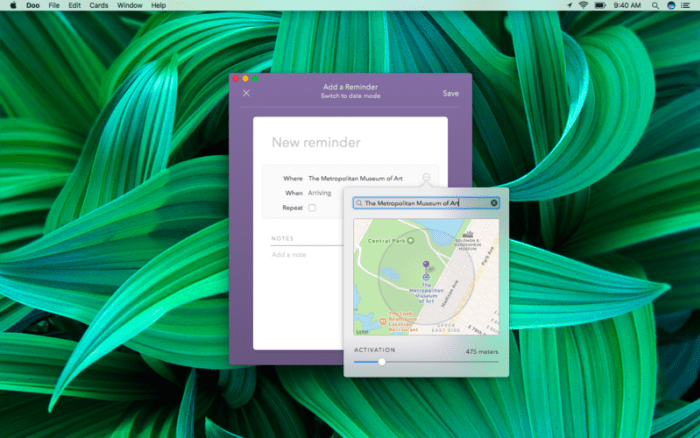
Screenshots

%RATINGS_IMAGES% (%RATINGS_USERS% votes, average: %RATINGS_AVERAGE% out of %RATINGS_MAX%)
You need to be a registered member to rate this.