Category Archives: Mac os

alien skin exposure x4 4.0.4 125

Graphics & Design Photography

Alien skin exposure x4 icon
Name Alien Skin Exposure X4 4 0 4 125 TNT.zip
Size 363.6 MB
Created on 2018-12-11 10:09:00
Hash 2babee8fffb5947481fa07091dd339f963589352
Files Alien Skin Exposure X4 4 0 4 125 TNT.zip (363.6 MB)

Download

Alien Skin Exposure X4 4.0.4.125

The legendary effects plug-in is now an award-winning photo editor and organizer. Introducing Exposure X4, the advanced non-destructive RAW editor that enables you to easily create beautiful images and master your entire workflow. Fast performance, powerful organizing tools, and unmatched creative editing make Exposure the only app you need to quickly transform your photos into works of art.

Here’s what you can look forward to when Exposure X4 is available:

  • Improvements to Exposure’s RAW processing system
  • Perspective and keystone correction to minimize or eliminate optical distortion
  • Enhanced light effects that you can move and rotate freely anywhere in your image
  • Smart collections
 that automatically populate based on photo criteria that you choose
  • Faster file exporting and launch times
  • Lightroom migration tool that brings your Lightroom organizational metadata over into Exposure
  • Monitored folders that support tethered shooting workflows
  • New printing presets
  • Support for new cameras and lenses
  • Expanded workflow options for image copying and exporting

Exposure X4 is a complete photo editing and organizing solution. It can also be used as a creative editing plug-in. The plug-in requirements are as follows:

  • Adobe Photoshop CS6 or Adobe Photoshop CC 2015 or newer
  • Adobe Lightroom 6 or Adobe Lightroom CC 2015 or newer

Compatibility: OS X 10.11 or later, 64 bit

Web Site: https://www.alienskin.com/exposure/

What’s New in Alien Skin Exposure X4 4.0.4.125

  • Release notes not available at the time of this post.

Graphics & Design, Photography
,

By

blocs 3.0.6

Name Blocs 3 0 6 TNT.zip
Size 31.71 MB
Created on 2018-12-11 05:06:58
Hash 9410e3a5ffad58af1d6c7bef39ff276e6231b4c7
Files Blocs 3 0 6 TNT.zip (31.71 MB)

Download

Blocs 3.0.6

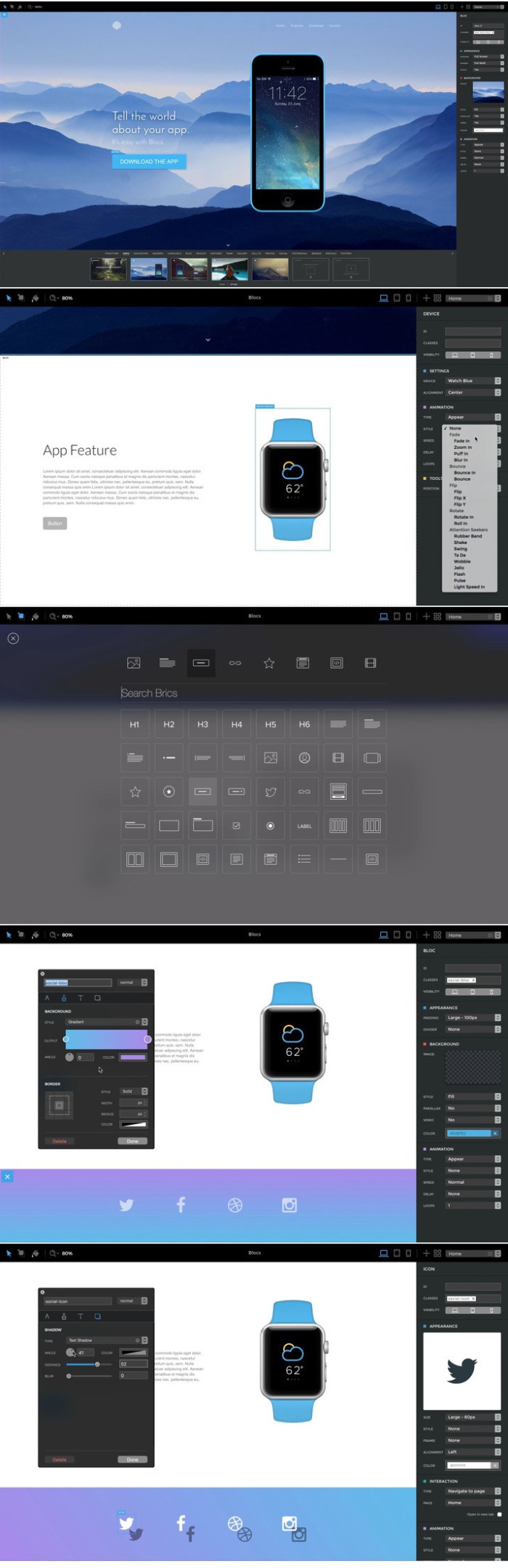
Blocs for Mac is a fast, easy-to-use, powerful visual web-design tool that lets you create beautiful, modern websites without the need to write code. Cleverly designed to accommodate complete beginners or those familiar with web design. You will love building with Blocs.

Features
  • Designed For Simplicity – Building with Blocs is simple and fun. A clean, intuitive interface makes creating sites unbelievably quick. Simply click, select, edit and enjoy stacking blocks to build your website. Its ease of use will make you feel right at home.
  • Powerful Styling features – Behind the simplified interface of Blocs lie some of its more advanced editing features. When you are ready to get more creative with your designs, Blocs will grow with you. You set the pace.
  • Create CMS-Driven Websites – Blocs has integrated support for a range of premium (paid) and open source (free) third-party content management systems. It’s now possible to easily create powerful, dynamic websites, that can be updated and contributed to, right from your web browser.
  • Time-Saving features – Paint mode, global swatches, auto text colouring and one click animations are just a few of the playful, time saving features in Blocs. You’ll be amazed how quickly you can create a website.
  • No subscription, unlimited web sites

Compatibility: OS X 10.10 or later 64-bit

Web Site: https://blocsapp.com

What’s New in Blocs 3.0.6

  • Release notes not available at the time of this post.

Screenshots

lens distortions dust 4k

Graphics & Design Video

2018-12-09   

Name Lens Distortions – Dust 4K.zip
Size 7.83 GB
Created on 2018-12-09 23:21:09
Hash a8933c31af80cf4304e153e5468844d7710eee33
Files Lens Distortions – Dust 4K.zip (7.83 GB)

Download

Lens Distortions – Dust 4K

Includes 25 curated clips
Compatible with all video editing apps

Some of the best effects are ones the viewer doesn’t notice, but something would be missing if they’re not there. The effects in this pack are subtle and slow-moving. You can use them to give texture to your footage, or an organic feel to your title sequences.

What’s New in https://lensdistortions.com/video/dust/

none;

Graphics & Design, Video

By

lightwave film lut master pack 3.0 win mac

Name LightWave Film LUT Master Pack 3.0.zip
Size 121.2 MB
Created on 2018-12-09 17:48:48
Hash f8baf18e0cf8b2a95a2cca4fe5579364721acbc4
Files LightWave Film LUT Master Pack 3.0.zip (121.2 MB)

Download

LightWave Film LUT ter Pack 3.0 (Win/Mac)

The Most Powerful Emulations of the Greatest Film Stocks of all Time.

More Than just another LUT Pack.

From a complete overhaul of color science, to dynamic range enhancement; this is a complete color science standard developed from the most Legendary Film stocks that inspired Generations of Film Makers. With new forms of features and processes new to the format of 3D LUTs, this an advancement in how we see LUTs all together.

Revolutionary

With features like dynamic color response, dynamic contrast handling, built in OLPF emulation, and dynamic range enhancement, this is a revolution in film emulation. Take your footage to a whole new level of quality with a color science overhaul. We built in over 30 processes new to the 3D LUT format in order to create something far more than a preset or color look. We even developed them to work with rec709 footage for the easiest and fastest workflows

The Greats of every ERA

We’ve hand selected the 15 greatest film stocks of all time, and from all era’s. From 2011’s modern Kodak Vision3 family, to the Legendary Eastman Kodak Color II 100T 5247, we’re putting the power of the world’s most loved film stocks in your hands.

Web Site: http://www.lightwavecinema.us/products

alien skin exposure x4 bundle 4.0.4 132

Graphics & Design Photography

Name Alien Skin Exposure X4 Bundle 4 0 4 132 TNT.zip
Size 414.9 MB
Created on 2018-12-11 10:09:17
Hash 37b4ec0ac9d9e9d0fa8dfc102b8d4314fad76bed
Files Alien Skin Exposure X4 Bundle 4 0 4 132 TNT.zip (414.9 MB)

Download

Alien Skin Exposure X4 Bundle 4.0.4.132

The Exposure X Bundle is a photo editor and organizer that integrates all of Alien Skin’s award-winning photo editing apps into a single product.. The centerpiece of the bundle is Exposure X, the editing app that streamlines your workflow and provides a rich set of creative tools.

Two additional apps expand the creative possibilities: Blow Up 3 enlarges your photos into large prints with the sharpest resizing technology available, and Snap Art 4 transforms your photos into gorgeous, handcrafted paintings.

  • Exposure X3 nondestructive RAW photo editor
  • Integrated Snap Art natural media
  • Integrated Blow Up highquality photo enlargement
  • Exposure X3, Snap Art, and Blow Up plugins for Lightroom and Photoshop

Exposure X3 is a complete photo editing and organizing solution. It can also be used as a creative editing plug-in.

The plug-in requirements are as follows:
  • Adobe Photoshop CS6 or Adobe Photoshop CC 2015 or newer
  • Adobe Lightroom 6 or Adobe Lightroom CC 2015 or newer

Compatibility: OS X 10.11 or later, 64 bit

Web Site: https://www.alienskin.com/

What’s New in Alien Skin Exposure X4 Bundle 4.0.4.132

  • Release notes not available at the time of this post.

Graphics & Design, Photography

By

wondershare video converter ultimate for mac 10.3.0 11

Name Wondershare_Video_Converter_Ultimate_for_Mac_v10.3.0.11.zip
Size 94.19 MB
Created on 2018-12-11 20:19:15
Hash bdf97020632df81b7b2158096f8d4b7c8cf80158
Files Wondershare_Video_Converter_Ultimate_for_Mac_v10.3.0.11.zip (94.19 MB)

Download

Wondershare Video Converter Ultimate for Mac 10.3.0.11

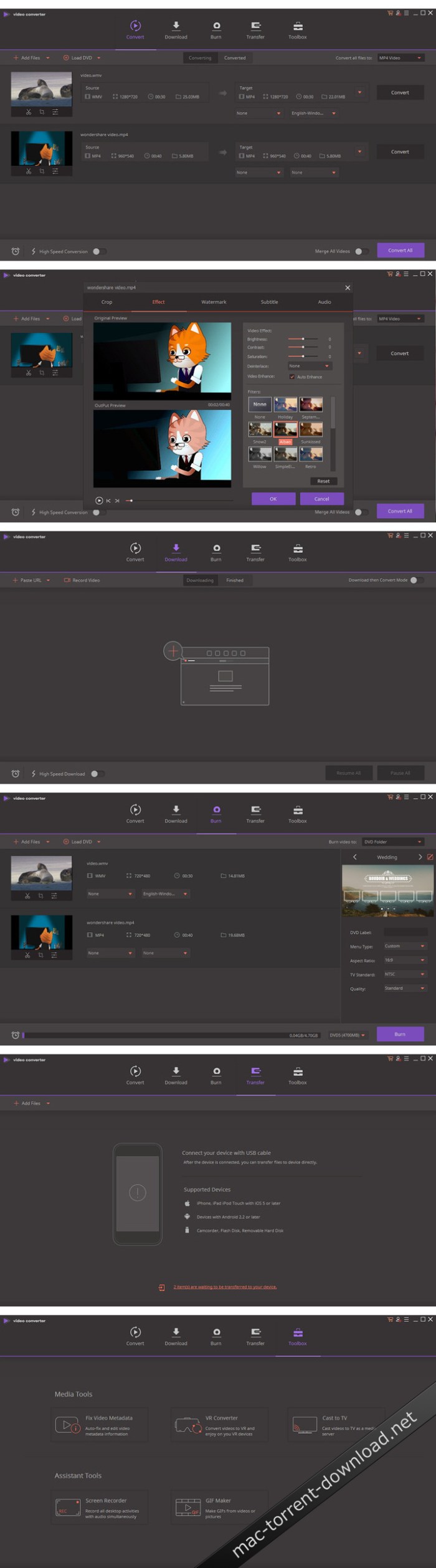
Wondershare Video Converter Ultimate for Mac The Most Powerful Video Converter Ever. Use this complete all-in-one video toolbox to convert, edit, enhance, download, burn, organize, capture, and play any videos on your Mac.

Full Quality, High Speed Video Conversion to Any Format

Wondershare Video Converter Ultimate accomplishes your conversion tasks with handy features.

  • Convert Any Video to Over 1,000 Formats
  • Convert Videos for All Kinds of Devices
  • 30X Faster Video Conversion Speed
  • Add Videos from Different Sources

Easy-to-Use Video Editor, Makes Your Video Stand Out

You can customize home movies through advanced editing features and get professional-looking works in minutes.

A Flawless DVD Experience Anywhere

Powerful DVD toolkit of Video Converter Ultimate helps you to create and edit DVD files in an easy way.

  • Burn Videos to DVD
  • Convert Any Format to DVD
  • Provide Free DVD Templates
  • Edit DVD Files with Builtin Editor

Save Videos From Over 10,000 Sites With One Click

Download or record your favorite 4K/HD videos from video sharing sites like YouTube, Dailymotion, and more for enjoyment without Internet connection; Or convert them to compatible formats for playback on TV, smartphone or other devices.

  • Download Videos from YouTube and Other UGC Sites.
  • Download YouTube to MP3 in One Click.
  • Download Entire YouTube Playlist at One Go.
  • Record Videos from Streaming Sites.

Transfer Videos to Devices & External Hard Drives

With just one click, you can download or record your favourite 4K/HD videos from many popular online sites like YouTube, Dailymotion and enjoy them anytime – without an Internet connection.

All-Purpose Video Toolbox

Wondershare Video Converter Ultimate also offers a full set of optimized video tools which will come in handy sometime.

Fix Video Metadata

Fix metadata info for videos.

VR Converter

Convert any video to VR format.

DVD Copy (Only for Mac)

Copy DVD to ISO or DVD folder directly.

GIF Maker

Convert a video or photos to a GIF picture.

Cast Video to TV

Cast videos to TV as a media server.

Screen Recorder

Record all desktop activities with voice.

System Requirements: Mac OS X 10.12, 10.11, 10.10, 10.9, 10.8, 10.7

Language: Multilangual

Web Site: https://videoconverter.wondershare.com/

What’s New in Wondershare Video Converter Ultimate for Mac 10.3.0.11

  • Release notes not available at the time of this post.

Screenshots

wondershare dvd creator 5 1.2 2

Name Wondershare_DVD_Creator_v5.1.2.2.macOS.zip
Size 66.71 MB
Created on 2018-12-11 20:18:49
Hash dc5d7f4a29d0634d05dc90a4c71b11c224a2557e
Files Wondershare_DVD_Creator_v5.1.2.2.macOS.zip (66.71 MB)

Download

Wondershare DVD Creator 5.1.2.2 macOS

Whatever’s on Your Computer, Watch It Now on DVD! Want to make your own movies? Or maybe you just want to finally burn that film collection on your computer to DVD. Whatever you want to watch, Wondershare DVD Creator does it all.

Create DVDs With Any Video
  • Burn videos in 150 formats to DVD/DVD folder/Bluray DVD folder/ISO/Bluray disc, like MP4 to DVD, MKV to DVD, AVI to DVD, and more.
  • Support all popular disc types: DVD9 and DVD5; DVDR/RW, DVD+R/RW, DVD+R DL, DVDR DL, DVDRAM; BDR, BDRE, BD25, BD50, BD100.
One Click to Burn DVD Easily
  • Burn DVDs with one click, completely easy for everyone.
  • Directly burn multiple videos of different formats to a DVD at one time.
  • Create a DVD project file allowing you to quickly resume editing anytime.
Edit DVD Video With Built-in Video Editor
  • Trim: Trim unwanted part of your home movies.
  • Crop: Crop video to the proper size to fit your screen or remove the blank edge.
  • Enhance: Adjust video brightness/contrast/saturation, and apply special effects for a better visual experience.
  • Watermark: Add image/text watermark to video for copyright protection.
  • Subtitle: Add subtitles to your DVD movies, including .srt, .ass and .ssa extensions.
Customize Your DVD Menu Flexibly
  • The DVD burner offers over 100 free static and dynamic DVD templates in different themes and customizes background image/music,title thumbnail, etc. Besides, this DVD burning software supports creating chapters both manually and automatically.

Compatibility: OS X 10.8 or later 64bit

Web Site: https://dvdcreator.wondershare.com/

What’s New in Wondershare DVD Creator 5.1.2.2

  • Release notes not available at the time of this post.

eon timer 2.7 4

Name Eon 2 7 4 TNT.zip
Size 12.34 MB
Created on 2018-12-11 20:16:46
Hash 246da3e3359feceae7fcfc74dcd27677357c57f4
Files Eon 2 7 4 TNT.zip (12.34 MB)

Download

Eon Timer 2.7.4

Eon helps you easily track time on your Mac. Eon allows you to easily post time to several services to make invoicing as painless as possible.

Supported services:
  • ActiveCollab
  • Assembla
  • AtTask
  • Basecamp
  • Blinksale
  • Cashboard
  • Celoxis
  • Codebase
  • fixx
  • FogBugz
  • Freckle
  • FreeAgent
  • FreshBooks
  • Harvest
  • Intervals
  • Invoice Machine
  • Invoicera
  • KashFlow
  • LessAccounting
  • mite
  • Paymo
  • Project Bubble
  • Redmine
  • Ronin
  • SUBERNOVA
  • Teambox
  • TeamworkPM
  • Tick
  • Toggl
  • Unfuddle
  • WorkflowMax
  • Zoho Invoice

Compatibility: OS X 10.11 or later 64-bit

Web Site: http://eon.charliemonroe.net
Mac App Store: https://itunes.apple.com/app/eon-timer/id413744108?mt=12

What’s New in Eon Timer 2.7.4

Bug fixes in OAuth 2 authentication.

Screenshots

inet network scanner 2.6.1

Name iNet Network Scanner 2 6 MAS TNT.zip
Size 102.3 MB
Created on 2018-12-11 20:18:02
Hash 5d6e74d222df8062ffc0c4991da29cca37f78d71
Files iNet Network Scanner 2 6 MAS TNT.zip (102.3 MB)

Download

iNet Network Scanner 2.6.1

Find out about security risks and keep your network under control. This easy to use App outlines a computer network even to the unexperienced user. Is somebody using your network without your knowledge? Which devices are currently online? Which access ports are open? Which services are offered? What is the IP of your router? Wake sleeping devices remotely. Add own icons to found devices …

iNet provides you with information about networks and devices your Mac is connected to. Its very easy and user friendly design even allows the unexperienced user to get a profound and understandable overview of a network, the running services and the Wi-Fi quality.

In the current version the following functions are available:
  • Network Scanner
  • Bonjour Browser
  • Portscan for standard ports
  • Airport Monitor*
  • Wake on Lan
  • Help section

We did our best to develop a solution that makes network observing as simple as possible. Wether you are a network expert or a common user- iNet provides the information you need to find out what’s going on in your network.

Network Scanner:
  • See all devices that are online and connected to a network, along with vendor, IP and MAC addresses
  • Assign your own names and icons or choose from the provided icons for easier identifying a device in the scan list. Most Mac devices are displayed with their original icon.
  • Set scan range and interface to scan
  • Export scan results in csv format
  • Connect to devices via different protocols
Bonjour Monitor:
  • Detect all running Bonjour services realtime
  • Detect running services on a discrete device
  • Detailed information about a service
  • Choose the active Bonjour domain for observing
*Airport Monitor:

* • Attention for users of the latest 2013 Airport edition with 802.11ac: Because SNMP support has been disabled iNet cannot retrieve the usage statistics and wifi strength any more with these models. All other features of iNet are working properly. The following Airport monitoring features can only be used with models prior to the 802.11ac:

  • See the current condition of Apple Airport base stations like Airport express or Time Capsule
  • Monitor network traffic on Airport devices
  • Find detailed information about your Airport base stations like MAC address, IP’s, used channels and so on
  • See the connection quality of the connected wifi clients in realtime
Wake on Lan:
  • Wake devices remotely in your local network or via internet
  • Put devices remotely to sleep, shutdown or restart (Macintosh only)
  • Add devices to favorites
  • Send commands via ssh to devices
  • Minimal system required for WOL: OS X 10.7
Help
  • Extensive help section
  • Dictionary of used terms

We will add modules in the future like traceroute and more. iNet is also available for iPhone and for iPad.

OS Version: OS X 10.9 or later

Web Site: http://www.inetapp.de
Mac App Store: https://itunes.apple.com/app/inet-network-scanner/id403304796?mt=12

What’s New in iNet Network Scanner 2.6.1

  • [Added] Scanning via vpn (Just enter the address range of the remote network)
  • [Added] Better vendor detection
  • [Added] Set default ip range in scan settings
  • [Update] All databases
  • [fixed] Some code optimizations …
  • Please support further development and maintaining rate this release of iNet in the App Store
  • (You can find a direct App Store link in “About iNet”)

imac cleaner 1.4

Name iMac Cleaner 1 4 TNT.zip
Size 7.35 MB
Created on 2018-12-11 20:19:02
Hash 07f1cfa2b13ecae15ffd6bb5e8a362dd6793d6ed
Files iMac Cleaner 1 4 TNT.zip (7.35 MB)

Download

iMac Cleaner 1.4

iMac Cleaner offers Disk Cleaning, App Removal, Memory Optimization, Duplicate Finder, File Shredder, Manage Login Items, Extension, Extract RAR and Winmail.Dat to keep your mac best performance. Fully compatible with macOS High Sierra on your Mac.

Features:

  • Smart Clean: clean application junk files, app caches, logs, system caches, system logs, mail attachments, iTunes junk files, localized languages, browser cookies and history, etc.
  • Duplicate Finder: Scan duplicates anywhere, whether they are one or more folders of internal and external hard drives, also supporting scanning duplicates in Photos or iTunes.
  • Unarchiver: Extract most common formats of your mac, include RAR, Zip, 7Z, Bzip, Cab, Swf, Lzma, etc. Besides, extract image files within PDF files.
  • App Uninstaller: Quickly and full scan all Apps on your Mac and its related junk files, incl. leftover, logs, caches, preference, crash reports, etc.
  • Large File Cleaner: Scan & Delete large files from single or multiple folders on internal and external hard drives, but also large files in Photos or iTunes. Extension Manager: Manage & Delete extensions, preferences, Plugins and addons in a efficient way to keep your Mac security.
  • Memory Manager: show the usage of disk space and memory of your Mac, and release memory with one click.
  • PDF Compressor: Efficiently shrink PDF file size, and support compress encrypted PDF files. You can easily send PDF as attachment directly after compression.
  • Winmail.dat Opener: Quickly open & save Winmail.dat files sent from Microsoft Outlook. You can easily send each item within Winmail.dat files as attachment directly.
  • Startup Optimization: Efficiently manage your startup items to optimize your Mac Boot speed.
  • File shredder: Erase files and make them unrecoverable, ensure your files could be securely erased.

Compatibility: OS X 10.9 or later 64 bit

Web Site: https://www.ccleanmac.com

What’s New in iMac Cleaner 1.4

  • Release notes not available at the time of this post.

unclutter 2.1.16d

Name Unclutter 2 1 16d TNT.zip
Size 8.91 MB
Created on 2018-12-11 20:17:21
Hash 2bcd22f483bae2c1cd27353c99740fad9d8ba720
Files Unclutter 2 1 16d TNT.zip (8.91 MB)

Download

Unclutter 2.1.16d

Unclutter is a new handy place on your desktop for storing notes, files and pasteboard clips. To open the pocket, simply move your mouse to the very top of screen and scroll down. Drag items from other applications to the top of screen to store them in Unclutter.

Being just one easy gesture away, Unclutter becomes a surprisingly helpful and convenient tool–in fact, 3 tools in 1–which will make you feel more comfortable and powerful on your Mac.

Features:

  • Instant, configurable access even in full screen mode.
  • File Storage, to keep your Desktop clean from temporary files.
  • Notes, to write down something quickly.
  • Clipboard manager, to track what you copy and paste, browse clipboard history.
  • Draggable cards that can stick on top of other windows.
  • Files and notes autosync across all your Macs via Dropbox.
  • Full multidisplay support.
  • Retina display support.
  • Universal Clipboard support.
  • Light/Dark theme to match system appearance.

Compatibility: OS X 10.10 or later 64 bit

Web Site: https://unclutterapp.com

What’s New in Unclutter 2.1.16d

  • Release notes not available at the time of this post.

noise machine 1.15

Name Noise Machine 1 15 TNT.zip
Size 59.84 MB
Created on 2018-12-11 20:17:06
Hash 2125c35298caab961647dcce29aaee5ccaa88faf
Files Noise Machine 1 15 TNT.zip (59.84 MB)

Download

Noise Machine 1.15

Noise Machine is a white noise and soundscape generator designed to help you block out workplace noise and create a more productive work environment to suit your mood.

It can be very hard and tiring to try to concentrate in a noisy work environment. The chatter of co-workers can be especially hard to block out. Conversely excessively quiet environments can lack energy and can feel very isolating.

Noise Machine generates white, brown and pink noise, whose special properties are often used to mask out other environmental sounds and favor concentration and task focus.

Noise Machine also features a range of natural and artificial soundscapes to suit your mood, ranging from the relaxing sounds of water to the energizing atmosphere of a sidewalk café.

Designed to be as unobtrusive and simple to use as possible, Noise Machine’s icon “lives” in the menu bar and is accessible at any time via a simple click.

The menu bar item allows you to choose between a range of sounds, adjust the volume and change the sound output device.

Requires OS X 10.9 or later

Web Site: http://www.publicspace.net/NoiseMachine/

What’s New in Noise Machine 1.15

  • Release notes not available at the time of this post.

Screenshots

mirror for fire tv 2.4

Name Mirror for Fire TV 2 4 TNT.zip
Size 15.28 MB
Created on 2018-12-11 20:16:55
Hash 332a6a8a338e1da6a31047c8eca085db4e764797
Files Mirror for Fire TV 2 4 TNT.zip (15.28 MB)

Download

Mirror for Fire TV 2.4

Application to mirror the screen and audio of your Mac to an Amazon Fire TV. You can also stream individual video files from your Mac to your Fire TV. Also, we included the option to watch one window on your Mac, and another window on your TV!

Before using this application, please go to the Amazon website and install the (free) Mirror Receiver for Fire TV: http://bit.ly/am-firetv

In using the app, there will be a about 2 to 3 seconds of latency (lag). So this mirroring is not suitable for gaming.

However, it is very suitable for watching movies, giving presentations, watching photos, and much more!

The quality of your experience will be dependent on the quality of your local network. Some tips to enhance the experience:

1. Restart your router. Just take out the power plug, wait 10 seconds and put it back in. This resets your router and will make your home network faster and more stable. Why this works? Routers are in essence little computers, with software. Software will have small memory leaks and some processes will stop working correctly over time. That’s why it is a good idea to reset your router once in a while. Our recommendation: once a week.

2. Don’t do network intense work while screen mirroring. As explained, screen mirroring is network intense. For the best performance, don’t do other network intense work at the same time. This includes making timemachine backups over the network and uploading/downloading large files from the internet while screen mirroring.

3. Put your Mac and your Fire TV on the same router channel. Some routers (dual band) have create both a 2.4Ghz and a 5Ghz wireless network. For the best performance, put your Mac and your Fire TV on the same network. Preferably the 5Ghz network. But definitely not the Mac on 5Ghz and the Fire TV on 2.4Ghz, because that will negatively impact the performance of screen mirroring.

4. Use an AC or N router. Newer routers support Wifi AC and N. Older routers might only have Wifi B and/or G. B and G are not really up to scratch anymore for modern networking tasks, so go for an AC or N router. If your router supports AC and N, also make sure that your router is set to use either the Wifi N or Wifi AC networking.

How the app works:

First, make sure that your Fire TV is on the same local network and same subnet as your Mac. After launching the app, you will see the app icon appearing in the top bar of your Mac and the app will look for your Fire TV on the network. It will show your Fire TV when it has found it. Now, you have two options:

Mirror your Mac Screen:

Use this option to put the screen of your Mac on TV. In source, you can select which screen (or attached monitor) you want to display on TV. If you are running multiple applications on your Mac, you can also select which application window you want to see on TV.

Enable Sound: check this to hear the sound of your Mac coming from the TV. You will need the additional (free) audio driver, which you can download here: http://bit.ly/MirrorAudio

Play Video File:

Use this option if you have a video file on your Mac and you want to play just the file on TV. Drop it in the box and it will play on TV.

Settings (the icon in the bottom right of the app): click here to request support from our 24/7 support staff. They usually respond within 2 hours on any query that you might have. If your question is technical, please also include the diagnostics information.

Limitations: Apple has HDCP DRM protection for playing iTunes movies. This means that screen mirroring is not possible when watching movies from iTunes.

When you like the app, please don’t forget to give it a positive rating! Thanks in advance from the AirBeamTV development team!

Compatibility: OS X 10.10 or later 64-bit

Web Site: https://www.airbeam.tv
Mac App Store: https://itunes.apple.com/app/mirror-for-fire-tv/id1233157745?mt=12

What’s New in Mirror for Fire TV 2.4

– Updated Audio Driver
– Bugfixes and Stability Improvements

tetraface inc metasequoia 4 6 9

Name Tetraface Inc Metasequoia v4 6 9 MACOSX.zip
Size 83.34 MB
Created on 2018-12-11 20:18:10
Hash ced4e155691180baa7591fa324c8f0947a70c5ca
Files Tetraface Inc Metasequoia v4 6 9 MACOSX.zip (83.34 MB)

Download

Tetraface Inc Metasequoia 4.6.9 macOS

Three-dimensional model design, especially the creation of human or animal-like characters, requires some knowledge in this area and, most importantly, a set of suitable tools for the job. For those who made some 3D creations using various specialized software solutions and need to work on them without having to install each program again, a utility like Metasequoia can be the right choice. This application manages to provide a strong set of features and make them available from a really friendly interface. There are several modes to operate Metasequoia, namely Beginner, Modeling (string), Modeling (icon) and Mapping.

Each of these styles comes with its commands for editing the loaded model, setting the appropriate lighting and more. There is a wide variety of objects that you can select and insert in the design, as well as some tools that are meant for modifying the model you are working on.

The editing function that Metasequoia is equipped with are rather basic, but, nonetheless, cover all the necessary actions for handling objects, material faces and vertices. Each selected portion of the design can be fixed, stored or restored when needed, as well as fit to view or set as center of rotation.

There are many customizations that can be made to the application from the ‘Configuration’ area, so you can assign, for instance, various actions to mouse buttons and key combinations. Texture rendering imperfections and some glitches that may occur can be avoided by adjusting the Direct3D and OpenGL preview options.

All things considered, Metasequoia seems to be a worthy alternative to more complex utilities of its kind, especially thanks to the ease of use coupled with a good support for a variety of formats this software is able to work with.

Compatibility: OS X 10.9 or later

Web Site: http://www.metaseq.net

What’s New in Tetraface Inc Metasequoia 4.6.9

  • Release notes not available at the time of this post.

Screenshots

quiver 3.2.3

Name Quiver 3 2 3 MAS TNT.zip
Size 13.93 MB
Created on 2018-12-11 20:17:13
Hash 5f1b21f2dffce4df54c94d9d65d2ab18748a4874
Files Quiver 3 2 3 MAS TNT.zip (13.93 MB)

Download

Quiver – take better notes 3.2.3

Quiver is a note-taking app built for programmers. Its unique cell-based design lets you easily mix text and code within one note, edit code with an awesome code editor, and find any note instantly via the full-text search.

Features
  • Mix Text With Code – A note in Quiver is comprised of cells — snippets of text or code. You can freely mix text cells with code cells, even setting different language modes for different code cells, all inside one note.
  • Edit In Place – Whether you are writing code or changing text styles, edits are always made in-place. There is no mode switching in Quiver. You just click where you want to edit and start typing.
  • An Awesome Code Editor – The programmer’s notebook should make code editing effortless. Quiver packs the awesome ACE code editor in code cells, which supports syntax highlighting for most languages, over 20 themes, automatic indent and outdent, and much more.
  • Lightning-Fast Full-Text Search – Notes are only useful if you can find them quickly. Quiver’s full-text search is based on Search Kit, the same technology used to power Spotlight on your mac. That’s how Quiver can search through thousands of notes in a blink of an eye.
  • Tags – If organizing notes into notebooks isn’t enough for you, Quiver also lets you assign tags to each note, so you can manage your notes any way you like.
  • Autosave – Quiver automatically saves all your changes as you work, so you never need to worry about losing changes.
  • Plain JSON – Quiver saves your notes in the plain JSON format, so you have full control over your content. You can export a note in the JSON or HTML format, or print it to PDF.

Compatibility: macOS 10.7 or later 64 bit

Web Site: http://happenapps.com/

What’s New in Quiver 3.2.3

  • Added back “Sync” and “Backup” tabs in preferences
  • Fixed a regression that broke manual sorting of notes

video to gif pro 2.1.0

Name Video to Gif Pro 2 1 0 TNT.zip
Size 22.58 MB
Created on 2018-12-11 20:19:07
Hash 83744f2acf09caea95a83095a8f49355ecfc825e
Files Video to Gif Pro 2 1 0 TNT.zip (22.58 MB)

Download

Video to GIF Pro 2.1.0

Video to GIF Pro is the best video to GIF creator, It can extract clips even frame from your video files for convert to GIFs. It supports all popular video formats, such as avi, mp4, wmv, rmvb.

Key features:

  • Convert clips into small GIF files
  • Rotate, flip, crop, resize the video
  • Support multiple captions
  • Create GIFs with customise FPS, resolution
  • Support some common photo effect, such as old film effect, mono, fade, chrome
  • Support color palette encoder

Support Video Formats:

  • Advanced Streaming Format(.asf)
  • Audio video interleaved(.avi)
  • Windows Media Video(.wmv, .xwmv)
  • MP4 video base on DivX encoder(.mp4)
  • MPEG4 Video file(.mp4, .mov, .m4v)
  • Matroska multimedia file(.mkv)
  • MPEG1, MPEG2 video file(.mpg, .mpeg)
  • Flash video(.flv, .f4v, .swf)
  • Third Generation Partnership Project video format(.3gp, .3g2)
  • HTML5 video file(.WebM)
  • Professional digital video media file(.dv, .mod, .tod)
  • Real media file(.rm, .rmvb)
  • High define resolution video file(.ts, .m2ts, .mts, .avc, .tp)

Compatibility: OS X 10.10 or later 64-bit

Mac App Store: https://itunes.apple.com/us/app/video-to-gif-pro/id947857660?mt=12

What’s New in Video to GIF Pro 2.1.0

1.Improve the generated GIF quality
2.Fixed some bugs

flac to mp3.2.7.0

Name FLAC to MP3 2 7 0 TNT.zip
Size 16.96 MB
Created on 2018-12-11 02:51:16
Hash 9b1bd38830b84ab11e356e38df75ddb95afa349c
Files FLAC to MP3 2 7 0 TNT.zip (16.96 MB)

Download

FLAC to MP3 2.7.0

MP3 is the most popular CD music format?has always been known for its high-quality compression ratio. MP3-Converter Pro is a professional music converter software, it can convert all popular music formats to mp3 format. It also supports separate audio from video and convert to MP3

Key features:

1.Support audio formats:wma, aac, mp3,mp2, wav, ogg, ac3, flac, aiff, m4a, mka, ape.

2.Supported video formats: wmv, asf, xwmv, xwma, avi, mpeg, mpg,rm,rmvb,mp4,3gp,3g2,mov,qt,mts,mkv,ts, flv,f4v.

3.Support for constant bitrate encoding

4.Support for variable bitrate encoding

5.High conversion efficiency, conversion 8 minutes of music can be done in just 10 seconds

6.Easy to use, simply drag and drop will be able to complete the operation

7.Automatically convert metadata into id3tag

8.Support batch conversion

NOTE: Does NOT support DRM encrypted files.

Compatibility: OS X 10.10 or later 64-bit

Web Site: https://www.imacbits.com

What’s New in MP3-Converter Pro 2.7.0

1.Improve performance and compatibility
2.Fixed some bugs

screenotate 2.1.0

Name Screenotate 2 1 0 TNT.zip
Size 18.18 MB
Created on 2018-12-11 02:51:08
Hash 19034c20daf6c1d35e39032053100d0e87cc70ef
Files Screenotate 2 1 0 TNT.zip (18.18 MB)

Download

Screenotate 2.1.0

Screenotate is a screenshot-taking tool which works just like macOS’s screenshot tool – one keyboard shortcut and drag – and it uses OCR (Optical Character Recognition) to recognize text in your screenshots.

Compatibility: OS X 10.9 or later 64-bit

Web Site: https://screenotate.com

What’s New in Screenotate 2.1.0

New feature:
  • Add option to save raw PNG files alongside HTML files.
Bug fixes:
  • Normalize coordinates so window detection is more reliable.
  • Fix DMG for 10.9 support.

cisdem dvdburner 3.7.0

Name Cisdem DVD Burner 3 7 0 TNT.zip
Size 40.85 MB
Created on 2018-12-11 02:51:29
Hash 4a2014b0e9c4924329a6823af13c8ee519553271
Files Cisdem DVD Burner 3 7 0 TNT.zip (40.85 MB)

Download

Cisdem DVDBurner 3.7.0

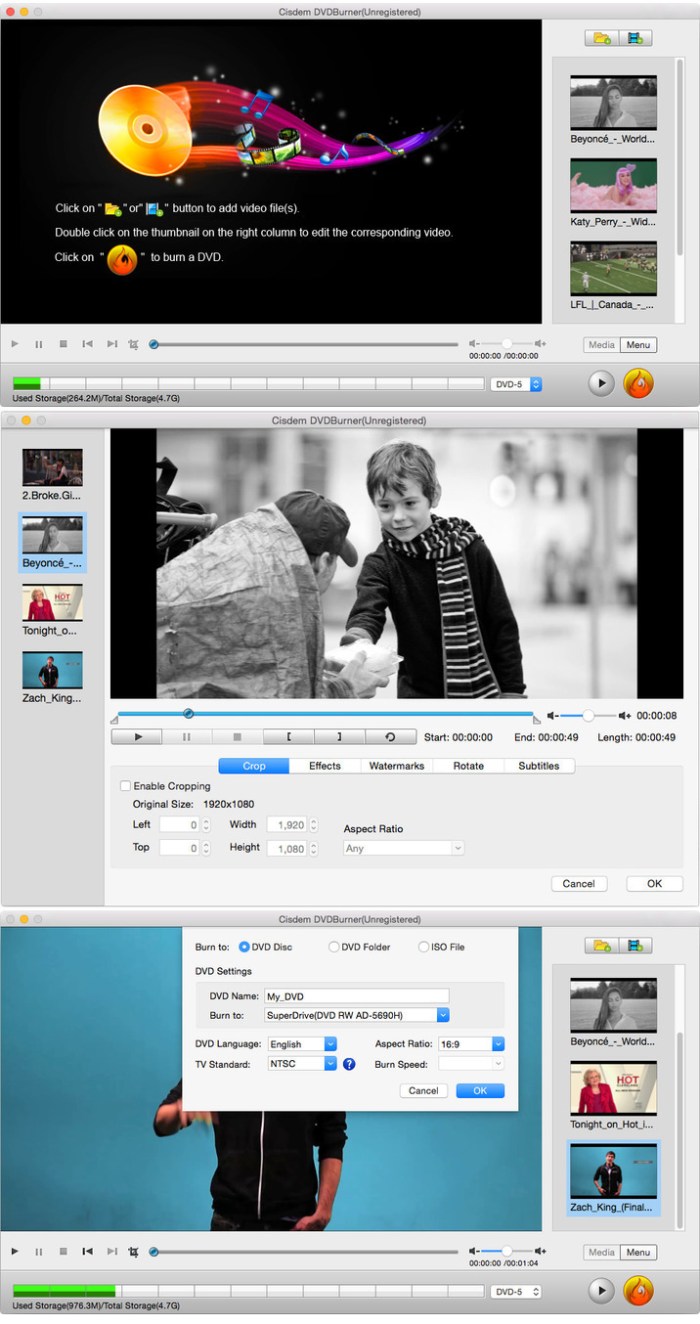
Cisdem DVD Burner is great DVD-burning software with more functionality but fewer steps to master than iDVD. It can burn any videos to DVD with subtitles/menu and background music and also provides an array of DVD menu templates to suite all your occasions. With its editing functions, you can crop, rotate, trim, remove letterboxing, and add special effects or watermarks, and then easily burn your high-quality personal DVD.

Features
  • Much Better than iDVD – Burn Virtually any Video to DVD
    • It burns all sorts of videos to DVD , be it internet downloaded, camcorder recorded or iPhone, iPad and many other devices created and also supports an array of formats, like MTS, AVI, HD MKV, MOV, MP4 and so on.
  • Powerful video Editor – Customize DVD
    • Provide different menu patterns for different occasions. Select one from to fit the subject of your DVD and customize it with your favorite thumbnails, buttons, frames, and text.
    • To drag and drop to add audio tracks or subtitles into it, You are easily to add background music and subtitles to better tell your story.
    • With the ability to crop, trim, deinterlace and add watermarks, and special effects to videos, you are easily to customize your DVD.
  • Real – time Preview and Burn DVD 16X Faster
    • With menu navigation and chapter switching over, you can play created DVD video in the Preview window just like on a DVD player.
    • With multi-threading, multi-core processing and multi-tasking DVD burning technology applied it is 10-20x faster than any competitor!
  • A High Quality DVD Experience Any Where
    • You can easily burn video into DVDs, ISO File, and DVD Folder and set to burn DVD based on disc volume (DVD5 or DVD9), TV system (NTSC or PAL), display ratio (16:9 or 4:3), etc. The output DVDs are playable on any DVD/BD player like Sony DVP serials and Panasonic DMP serials, etc.

Compatibility: OS X 10.10 or later 64-bit

Web Site: https://www.cisdem.com/dvd-burner-mac.html

What’s New in Cisdem DVDBurner 3.7.0

  • Release notes not available at the time of this post.

Screenshots

wonderpen 1.6 2

Name WonderPen 1 6 2 MAS TNT.zip
Size 78.43 MB
Created on 2018-12-11 02:51:01
Hash b80f1bab9ccd76d75545c6141d6e0c5aedf245a3
Files WonderPen 1 6 2 MAS TNT.zip (78.43 MB)

Download

WonderPen 1.6.2

WonderPen is a writing app for both professional and amateur writers.

Features:
  • Tree view, draganddrop to reorder.
  • An easytouse text editor that supports Markdown.
  • Supports fullscreen mode, lets you focus on writing.
  • Docs can be exported as Image, PDF, Word, HTML, etc.
  • Auto save while editing. You can backup all docs as a single file and restore from it later.
  • Add memo for each doc.
  • Focus on one node of the doc tree.
  • Search in all docs.
  • Darkmode support.
  • History snapshot for each docs.
  • Automatic backup.

Compatibility: OS X 10.9 or later 64-bit

Mac App Store: https://itunes.apple.com/app/wonderpen/id1173437104?mt=12

What’s New in WonderPen 1.6.2

Bug fixes and stability improvements.

phonerescue for ios 3.7 2 20181206

Name PhoneRescue for iOS 3 7 2 20181206 TNT.zip
Size 40.10 MB
Created on 2018-12-10 20:24:48
Hash d31e5a3a39b39d42e6d9eba3e0b72a39bdbf4511
Files PhoneRescue for iOS 3 7 2 20181206 TNT.zip (40.10 MB)

Download

PhoneRescue for iOS 3.7.2 (20181206)

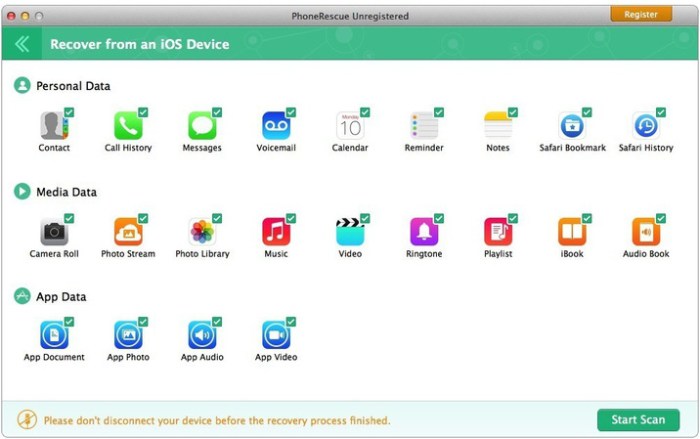
PhoneRescue is an iOS data recovery program designed for retrieving your lost photos, messages, contacts, notes and more on your iPhone, iPad and iPod touch. Also it can repair an iDevice from any iOS crash errors.

Features
  • Focuses on analyzing and recovering the most important 29 types of iOS content, such as photos, messages, contacts, music, and more
  • Recovers data and files directly back to iPhone for instant use, or to computer for future use
  • Retrieves your valued information via 3 safe and reliable ways: from device, iTunes and iCloud backup, even an encrypted one
  • Extracts the valuable information from any kind of iTunes backup – no matter it’s a damaged one, or the backup failed to be restored via iTunes or other 3rd-party recovery tools
  • Selectively or fully scans the file types based on your choice, and choose what you want for recovery, making the whole process more accurate and faster
  • Export data & files with a wide variety of formats, like TXT, CSV, HTML, and more
  • Fixes any iOS errors via Standard mode and Advanced mode, without losing any data

PhoneRescue is an all-inclusive iOS data recovery program designed for retrieving your lost photos, messages, contacts, music and more data from your iPhone, iPad and iPod touch. Whether you mistakenly deleted or accidentally lost anything important to you, it helps find them back.

It also brings you an intuitive and simple user interface, even your grandparents can easily use it to get back all their lost data, all by themselves. More than a recovering tool, it also revives your iPhone from any iOS system problems or crashes like stuck on Apple logo, recovery more loop, black screen, and more.

Compatibility: OS X 10.8 or later

Web Site: https://www.imobie.com/phonerescue/ios-data-recovery.htm

What’s New in PhoneRescue for iOS 3.7.2 (20181206)

  • Release notes not available at the time of this post.

Screenshots

anytrans for ios 7.0.4 20181206

Name AnyTrans for iOS 7 0 4 20181206 TNT.zip
Size 101.7 MB
Created on 2018-12-10 20:47:24
Hash dda356ffbebb623997ca531ca51094a0f12f4c09
Files AnyTrans for iOS 7 0 4 20181206 TNT.zip (101.7 MB)

Download

AnyTrans for iOS 7.0.4 (20181206)

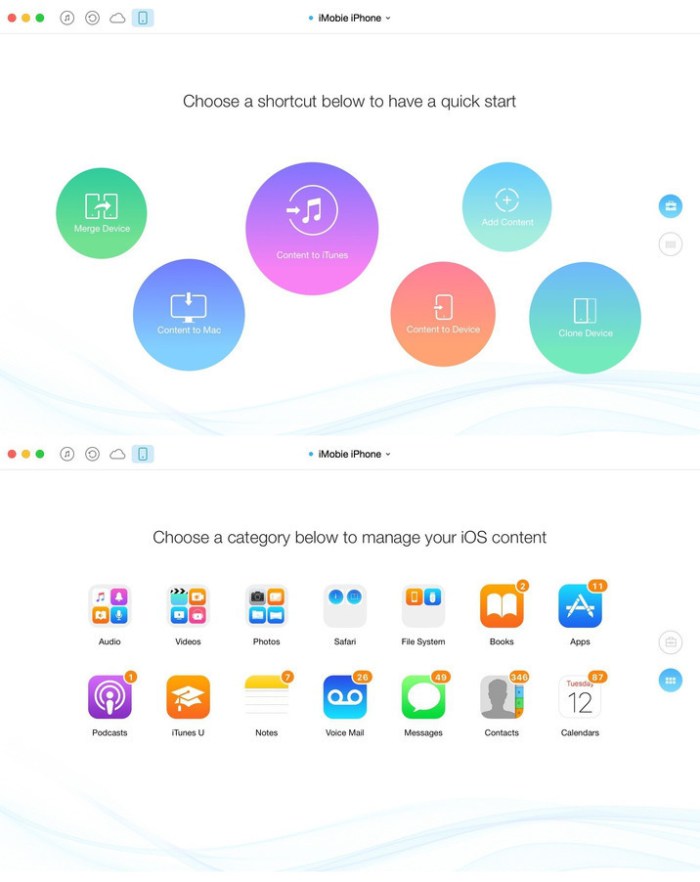
AnyTrans lets you converge your entire Apple products and consolidate every access to all your content in one place, including music, videos, photos, messages, books, Safari history, voice memo, and more. No matter the content is from your iPhone, iTunes, even from iCloud. It gives efficient and minimalist control and absolute freedom over all your iOS data and files.

Features

  • Move everything from Android device to your new iPhone Transfer the most of your Android content to your new iPhone, including messages, photos, contact, even music and call log, etc.
  • Migrate everything from old iPhone to your new one within one click clone Upon just one simple click, everything from your old iPhone, even from iPad will be cloned to your new iPhone.
  • Download millions of online videos and audios Download your favorite online videos from Dailymotion, Vine and another 900+ sites directly to your iPhone iPad for offline watching, or to your computer for collection.
  • Manage your iCloud content in a better way Download photos in bulk from your iCloud account and extract data from your iCloud backup. Also integrate data from multiple iCloud accounts to your daily used one for quicker access.
  • Easily manage all your contents on iPhone, iPad, and iPod touch Browse, edit and export important music, messages, notes, and more personal data from iPhone, iPad, and iPod touch.
  • Fullway transfer across your iOS devices, iTunes, iCloud and computer gets anything transferred freely between your iPhone, iPad, iPod touch, iTunes, iCloud and computer from iPhone to computer, iPhone to iPhone, iPhone to iTunes, computer to iPhone, etc.
  • Back up and extract your precious data with ease AnyTrans can 1click back up your whole iPhone data or selectively back up what you need.

Compatibility: OS X 10.8 or later 64 bit

Web Site: Web Site: http://www.imobie.com

What’s New in AnyTrans for iOS 7.0.4 (20181206)

  • Release notes not available at the time of this post.

Screenshots

piclight 1.0.2

Name PicLight 1 0 2 TNT.zip
Size 67.71 MB
Created on 2018-12-10 20:25:07
Hash fb5e27dc26ae81cac574ad94d6a74e5ab45916dc
Files PicLight 1 0 2 TNT.zip (67.71 MB)

Download

PicLight 1.0.2

PicLight is a handy and powerful photo enhancement app for creating artistic lighting effects on photos.

PicLight provides four categories of lighting of Montage, Light, Glow and Texture altogether 170+ effect resources for creating gorgeous lighting on your photos. Together with other 25+ image filters and 18+ editing tools, PicLight is the perfect app for both hobbyists and photographers to bring out the best of their photos.

HIGHLIGHTED FEATURES

* 170+ Lighting Effects

170+ lighting effects including 40 Montage, 55 Light and 45 Glow for adding artistic lighting on your photos. 30 Texture effects will make your photos more unique with personalized touches. You can customize the lighting effect by four blending modes of Screen, Overlay, Color Dodge and Lighter; flipping the effect horizontally and vertically and setting its Alpha.
PicLight also makes it easy to superimpose four categories of effects on a photo.

* Cropping and 10+ Fine-Tuning Tools

Customize your perfect photo by rotating it, horizontally and vertically flipping it.
We offer powerful cropping tool with 7 preset ratios and you can customize your desired image sizes.
Fine-tune the photo’s Saturation, Hue, Exposure, Contrast, Brightness, Highlights and Shadows with ease.

* 25+ Image Filters

25+ image filters are available for straightforward photo enhancement such as Black & White, Sepia, Vintage, etc.

* Convenient Export & Share Options

PicLight allows you to save photo as image, send to iPhoto directly, set as wallpaper, send via E-Mail, share to Flickr and Facebook, etc.

Download it right now to bring perfection to your photos! If there’s any question, feel free to contact us at support@pearlmountainsoft.com.

Compatibility: OS X 10.9 or later 64-bit

Web Site: http://www.pearlmountainsoft.com/
Mac App Store: https://itunes.apple.com/app/piclight/id734946882?mt=12

What’s New in PicLight 1.0.2

* Fixed the failure to export photos to iPhoto 9.5.

network radar 2.5 2

Utilities

Name Network Radar 2 5 2 MAS TNT.zip
Size 20.49 MB
Created on 2018-12-10 20:24:40
Hash d9ea665e8212c564fb85a3c558047c4fda5aca86
Files Network Radar 2 5 2 MAS TNT.zip (20.49 MB)

Download

Network Radar 2.5.2

Network Radar is an advanced network scanning and managing tool. Featuring an easy-to-use and streamlined design, the all-new Network Radar 2 has been engineered from the ground up as a modern Mac application.

Features
  • Scan your network and retrieve detailed information on network devices
  • Run useful network tools and commands with the click of a button
  • Use the monitoring feature and get notified about changes in your network
  • Access devices from previous scans, even in different networks
  • Use the simple rules / actions system for automatic processing of devices
  • Simply connect to a device by double-clicking it in the list
  • Assign your own names and choose from provided icons or import own icons
  • Organize your hosts in folders and smart folders
  • Create scans with custom IP ranges
  • Export a scan to XML, CSV, TXT, PDF or NETRADR
Supported Network Interfaces
  • Built-in WiFi
  • Built-in Ethernet
  • Apple’s USB to Ethernet Adapter
  • Apple’s Thunderbolt to Ethernet Adapter
  • Apple’s Thunderbolt Display Ethernet *Please note that the amount of information Network Radar can find depends on the network it scans.

Compatibility: OS X 10.11.5 or later 64-bit

Web Site: https://witt-software.com/networkradar/

What’s New in Network Radar 2.5.2

  • NEW: Icons from Network Radar for iOS have been added to the image collection.
  • NEW: The readability in Dark Mode has been improved.
  • NEW: You can now send a test mail using the SMTP settings in the Rules preferences and get more detailed error messages.
  • FIX: Some users were unable to change the attached Network of a Custom Scan.
  • FIX: The app could crash in when selecting certain types of Hosts.

Utilities

By

anytrans for android 6 4.0.20181203

Utilities

Name AnyTrans for Android 6 4 0 20181203 TNT.zip
Size 64.12 MB
Created on 2018-12-10 20:24:10
Hash 73bd3b82e2c86c8b8193263aa97fc8142316ed1c
Files AnyTrans for Android 6 4 0 20181203 TNT.zip (64.12 MB)

Download

AnyTrans for Android 6.4.0 (20181203)

AnyTrans for Androidis a mighty Android manager that converges your entire Android phone/tablet and consolidates every access to all your content in one handy place, such as messages, photos, contacts, videos, apps, and more. In just one tap, it helps transfer everything from Android-to-Android, or even from iOS-to-Android seamlessly. It also enables you to take control over all your Android data and files.

Features
  • Transfer the most types of data from Android to Android – including messages, photos, contacts, videos, apps, and more.
  • Transfer data from Android to PC/Mac, or vice versa – covering messages, photos, contacts, etc.
  • 1-click clone everything from Android-to-Android, even from iOS-to-Android.
  • Manage your personal info with 100% safe guaranteed – edit, add, delete or rename contacts, messages, call logs as you need.
  • Hide your personal portraits, family photos, and travel memories, etc., to protect your privacy. And unhide any of them in seconds if needed.
  • Full control of all your apps on your Android phone/tablet — install, uninstall, transfer games, music apps, and other apps by simple drag-and-drop.

Compatibility: OS X 10.8 or later 64 bit

Web Site: https://www.imobie.com/anytrans/android-manager.htm

What’s New in AnyTrans for Android 6.4.0 (20181203)

  • Release notes not available at the time of this post.

Utilities

By

jump desktop rdp vnc fluid 8 1.6

Name Jump Desktop 8 1 6 MAS TNT.zip
Size 37.18 MB
Created on 2018-12-10 20:24:33
Hash faffd210cb3a86e1f29f0bd7be11ad9880411c1a
Files Jump Desktop 8 1 6 MAS TNT.zip (37.18 MB)

Download

Jump Desktop (RDP, VNC, Fluid) 8.1.6

Enjoy the freedom to work from anywhere. Jump Desktop is a remote desktop application that lets you securely connect to any computer in the world. Compatible with both RDP and VNC, Jump Desktop is secure, reliable and very easy to set up.

Easy setup and reliable:

Jump Desktop is very easy to configure; anyone can do it! Just visit: https://www.jumpdesktop.com on your PC or Mac, click the ‘Automatic Setup’ link and follow step-by-step instructions. You’ll be up and running in no time.

Secure:

Jump encrypts the connection between computers to ensure privacy and security. Automatic connections are always encrypted by default. Supports NLA, TLS/SSL encryption for RDP. SSH Tunnelling and SSL/TLS encryption for VNC.

Supercharged Productivity:

Use Mac keyboard shortcuts in Windows. Seamlessly switch between computers without changing the way you use the keyboard. Vastly improves productivity. Fully customizable: Configure your own shortcuts or use the built-in defaults. No other app comes close.

Integrated into macOS

Quickly search and launch computers directly from Spotlight. Tightly integrated into macOS’s power saving technology to give you the best battery life on the go. Tabbing support.

Super fast and beautiful:

Powered by one of the fastest VNC and RDP engines on the planet. Multi-core, hardware accelerated rendering for zippy performance. Optimized for MacBook Pros and iMacs with Retina display

Features:
  • Multiprotocol: supports RDP, VNC and Fluid Remote Desktop
  • Full international keyboard support for RDP, VNC and ARD
  • Dictation support (Mountain Lion and later)
  • Tabs (macOS Sierra and later)
  • 3 different ways to zoom and pan the remote screen (really useful when controlling multimonitor remote systems from laptops)
  • Easy and secure setup: Automatically configure your PC or Mac for remote access without worrying about your router settings. Set up as many computers as you like and manage them all using your Google account (optional)
  • Builtin SSH tunneling for RDP and VNC connections
RDP features:
  • Tested on: Windows 2000, XP, Vista, Windows 7, Windows 8, Server 2003, Server 2008, Server 2008 R2, Server 2012/R2/2016, SBS Server, Windows 10
  • RD Broker and Load balancer support
  • RD Gateway support
  • Dynamic resolution updates (Win 8.1/2012 R2+)
  • Desktop Scaling (Win 8.1/2012 R2+)
  • Multi monitor support
  • Secure: 128bit RDP, TLS/SSL, FIPS and NLA authentication supported
  • Printing redirection support (including a optional , superfast server sidedriver)
  • Audio streaming
  • Console sessions
  • Folder sharing
  • International keyboard layouts
VNC features:
  • Tested with macOS 10.5+, TightVNC, RealVNC, UltraVNC, Linux (Ubuntu Remote Desktop)
  • Secure: Supports SSH tunneling as well as SSL encryption (SSL only available when using automatic setup)
  • Black and white, Grayscale, 8bit and 16bit color modes to help manage bandwidth
  • Clipboard syncing
  • Multiple monitor support

OS Version: OS X 10.8 or later
Processor type(s) & speed: 64-bit processor

Web Site: https://jumpdesktop.com
Mac App Store: https://itunes.apple.com/app/jump-desktop-rdp-vnc-fluid/id524141863?mt=12

What’s New in Jump Desktop (RDP, VNC, Fluid) 8.1.6

  • Fixed: RDP: 125% desktop scale has been replaced with 130% (which works now).
  • Fixed: App startup might be slow if a network drive is selected in RDP’s Shared Folder list.
  • Fixed: Some users could not log into their Jump Desktop account.
  • Fixed: Passwords with unicode characters were not saved properly.
  • Stability improvements.

cisdem video converter 3.10.0

Name Cisdem Video Converter 3 10 0 TNT.zip
Size 63.92 MB
Created on 2018-12-10 20:24:56
Hash be08f8b3f8a568ef16850357dfcd2bb6494e95e7
Files Cisdem Video Converter 3 10 0 TNT.zip (63.92 MB)

Download

Cisdem Video Converter 3.10.0

Mac Video Converter is the All in one solution for converting video & audio files in any format, ripping DVD movies, and converting online videos. Conversion tool that provides support for more than 150 audio and video file formats and also helps you download or share content with others. Cisdem VideoConverter offers you the possibility to make audio or video content compatible with virtually any device.

The Cisdem VideoConverter app provides support for an extensive collection of audio and video formats, and can also download videos hosted online, or upload content to your YouTube account.

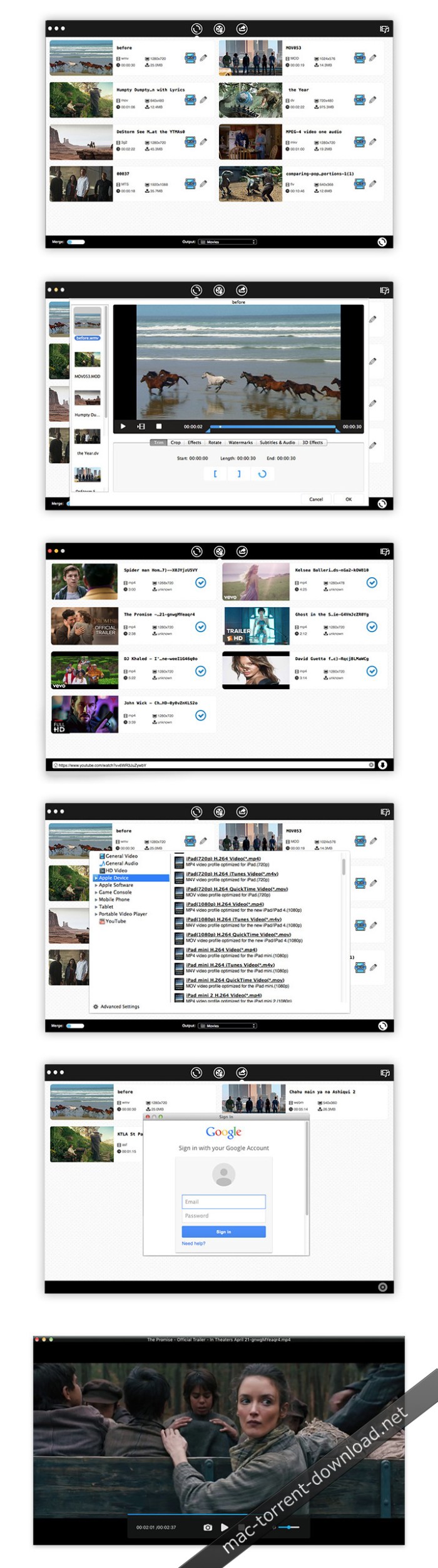
The Mac Video Converter also includes a range of basic editing tools including merge, trim, crop, rotate, watermark, subtitle, Deinterlacing, effects, etc.

Cisdem VideoConverter also features 3D effects, allows you to load subtitles or custom audio tracks, and enables you to add text or image watermarks to protect your recordings. The effects can be previewed in real time, before going ahead with the conversion.

Compatibility: OS X 10.10 or later 64-bit
Web Site: https://www.cisdem.com/video-converter-mac.html

What’s New in Cisdem Video Converter 3.10.0

  • Release notes not available at the time of this post.

Screenshots

isnapshot 3.2.0

Name iSnapshot 3 2 0 TNT.zip
Size 4.84 MB
Created on 2018-12-10 20:24:25
Hash 0b0a7131a4fd7f651efba7eaa91968a3351ea263
Files iSnapshot 3 2 0 TNT.zip (4.84 MB)

Download

iSnapshot 3.2.0

iSnapshot is an efficient and easy screenshot tool, synthesizing the functions of snapshot management, annotation feature and exporting etc. It allows us to make various kinds of software instruction and tutorial quickly.

It has four kinds of screenshot, including

  • Full screen mode: simply only with custom shortcut , all the content on full screen will be kept.
  • Window mode: user can do the screenshot simply by moving the cursor to the target window and then one leftclick.
  • Custom selection mode: user can move the cursor to select the target area, and zoomin to capture more precisely during the dragging.
  • Delay mode: user can customize the delay setting and the software will do the screenshot automatically. Under this mode, users can capture the popup menu based on the user operation.

It provide abundant custom choices for user-friendly concern, e.g. custom screenshot shortcut, delay setting, capture window shade, capture the current cursor. Worthy to mention, it allows for smooth copy and paste amongst different applications.

Making tutorial is one complicated issue, which requires large amounts of snapshot resources in advance. In order to better manage the resources, there comes software management. It allows for all the past snapshots with easy access to find, browse, delete and batch export etc. The function of quick preview allows users to check the actual export effect, not only saving the trouble of exporting but also increase the browsing efficiency tremendously.

It supports various picture formats for exporting/batch exporting, including but not limited to JPEG2000, PNG, GIF, BMP, TIFF etc.

Snapshot notes feature, allowing users to add notes to the snapshots so as for better understanding, including main functions as below (need to purchase this grant)

  • Support text tool, add/edit/delete etc.
  • Support cutout tool, custom all sorts of cutout formats.
  • Support shape tool, adding various shapes including square and oval etc., and supports selfdrawing/custom shape.
  • Support mask tool, different colors for different purposes.
  • Support line tool, set all line types, including dashed line, solid line, dotted line, dotted dashed lines etc.
  • Support arrow tool, set various arrow types.
  • Support snapshot filter function, combining brightness and contrast adjustment, dozens effect including Templerature and Tint.
  • Support undo and redo.
  • Support multiglyph alignment,move,copy etc.

iSnapshot is an efficient and easy screenshot tool. If you have any question or suggestion, please kindly email to seasoft.service@hotmail.com. We are dedicated to provide best services.

Compatibility: OS X 10.10 or later 64-bit

Web Site: http://www.imacbits.com/isnapshot
Mac App Store: https://itunes.apple.com/app/isnapshot/id461362385?mt=12

What’s New in iSnapshot 3.2.0

1.Optimize annotation editor make even better to use
2.Add save to pasteboard feature for editor make easy to share between apps
2.Add capture with no sound option
3.Fixed some bugs

unite 2.0

Name Unite 2 0 TNT.zip
Size 10.10 MB
Created on 2018-12-10 20:25:17
Hash 0b4d7a1ebcb6420499b92bbcaa3d8cc1db55a330
Files Unite 2 0 TNT.zip (10.10 MB)

Download

Unite 2.0

Unite allows you to quickly and easily turn websites into full-featured, native apps on macOS. Using the revolutionary Unite browser as a backend, each Unite app features its own browser, while remaining incredibly small and full-featured. And, because Unite apps are each a unique browser, they feature separate cookies and settings, as well as support for user scripts and user styles.

In addition to modern web browsing features, Unite apps include macOS-specific features, including notifications, TouchBar support, the ability to pin apps to the status bar, and much more.

Compatibility: OS X 10.10 or later 64-bit

Web Site: https://www.bzgwebs.com/unite

What’s New in Unite 2.0

  • Rewritten backend browser built on WebKit 2
  • Improved downloading abilities
  • Support for fullscreen video
  • Support for printing
  • Improved uploading and downloading support
  • Redesigned tab bar
  • Added progress indicator
  • Added ability to show icon in title bar
  • Added ability to toggle window name and icon
  • Added ability to change title and tab bar color
  • Windows will now remember size and position between launches
  • CommandW and close window command will now only close current tab as opposed to all open tabs
  • Unite will now remember hide toolbar if selected
  • Menu options now say chosen name instead of ‘DefaultApp’
  • Added zoom support
  • Improved creation backend
  • Unite creation utility can now overwrite previously created apps
  • Unite 1 apps will automatically update their backend to Unite 2. Future updates should support as well
  • Notifications and User scripts improvements
  • Many bug fixes and smaller tweaks

cisdem appcrypt 4.0.0

Name Cisdem AppCrypt 4 0 0 TNT.zip
Size 12.86 MB
Created on 2018-12-10 20:24:19
Hash 12df451a5d1aec54e952c2b2d19cd97133c87762
Files Cisdem AppCrypt 4 0 0 TNT.zip (12.86 MB)

Download

Cisdem AppCrypt 4.0.0

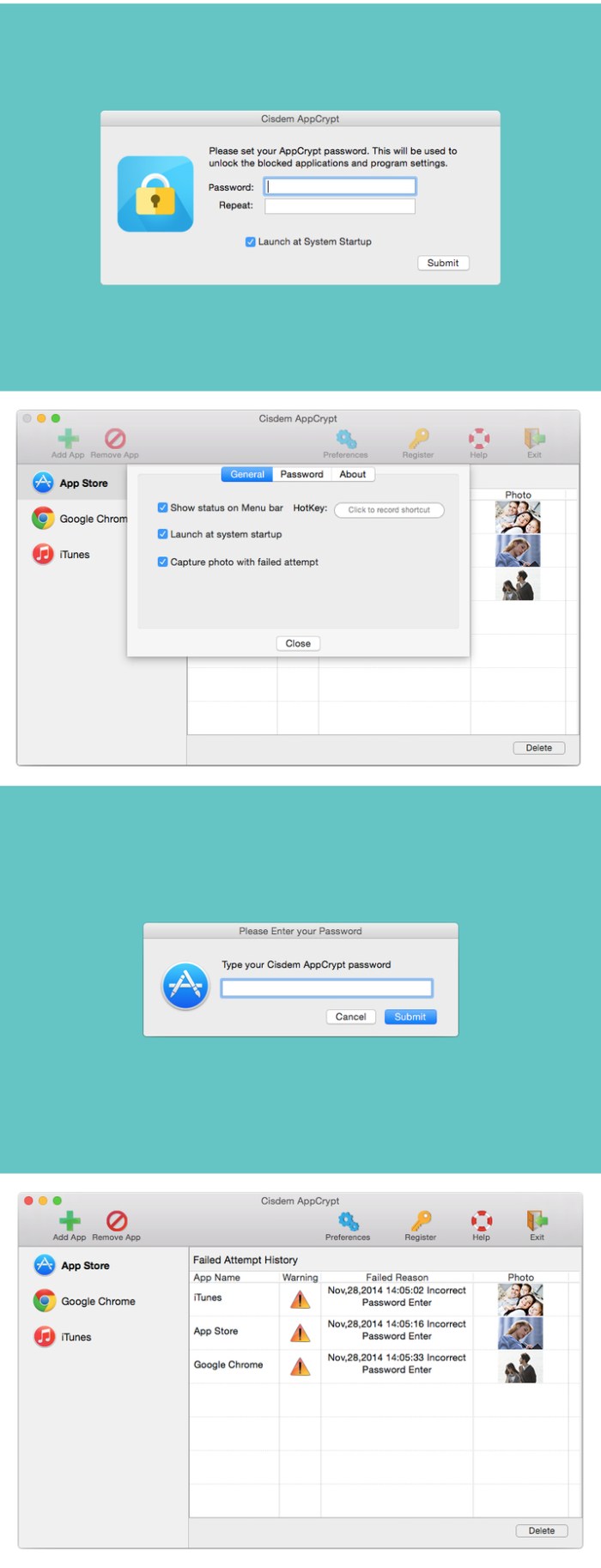
Cisdem AppCrypt is designed for protecting your apps and block websites to make sure you are the only master. It is quite easy to use. Just simply setting a password and adding the apps and websites to the lock list and no one is able to access your protected apps and websites without the correct password. You will never worry about prying eyes when you share your Mac with others.

You can also prevent your children from apps at improper time by setting specific time periods of encryption. What’s more, it keeps track of failed attempts and provides reporting on app name, date, time, operation and snapshot took by front camera.

Compatibility: OS X 10.10 or later 64-bit

What’s New in Cisdem AppCrypt 4.0.0

  • Prevent the program from being forced to close.
  • Backup the data to prevent data deletion.
  • macOS Mojave supported.
  • Support auto update.
  • Fixed some minor bugs.

Screenshots

permute 3.0 1

Name Permute 3 3 0 1 TNT.zip
Size 51.05 MB
Created on 2018-12-10 06:37:01
Hash 20049c454d57813bec696da4c0744832519d5e70
Files Permute 3 3 0 1 TNT.zip (51.05 MB)

Download

Permute 3.0.1

Permute is the easiest to use media converter with it’s easy to use, no configuration, drag and drop interface, it will meet the needs to convert all your media.

Easy to Use

Built from the ground up, Permute is a perfect example of what a Mac app should be. With a gorgeous interface and drag & drop simplicity no need for complicated options.

Insanely Fast

Permute was engineered to be incredibly fast. Let us take care of the hard stuff. Just select the video format you want and it’ll be done faster than you can say “Antidisestablishmentarianism”.

Everything Included

It doesn’t matter if you’re converting home movies or processing images. Permute can do it all. We support nearly every format and have plenty of device presets to choose from.

Compatibility: OS X 10.11 or later

Web Site: http://permute.charliemonroe.net
Mac App Store: https://itunes.apple.com/app/permute-2/id731738567?mt=12

What’s New in Permute 3.0.1

  • Completely Rewritten Permute 3 was started from scratch completely new project, everything written from the ground up again.
  • UI Redesign the UI has been redesigned from the ground up. It’s faster, more fluent and visually pleasing.
  • Dark Mode Permute now works 100% with the dark mode, even adjusting its Dock icon based on your macOS theme.
  • Image Stitching Stitch images together into a PDF.
  • HEVC (H.265) Hardware Acceleration HEVC (H.265) video encoding now supports hardware acceleration, resulting in conversions more than twice as fast.
  • Scheduled Conversions Schedule delayed conversion start.
  • Groups Put files into groups and set different settings for different groups.
  • Customizations Customize settings on a pergroup basis without modifying the preset.
  • Multiple Subtitles Add or copy multiple subtitle tracks from the source file.

vanilla pro 1.1 1

Name Vanilla 1 1 1 TNT.zip
Size 9.52 MB
Created on 2018-12-10 06:36:48
Hash 9608f27e12660cbd08a6a0ae897b9e2d69615f77
Files Vanilla 1 1 1 TNT.zip (9.52 MB)

Download

Vanilla Pro 1.1.1

Minimalist and simple to use status bar-based macOS tool designed to make it easier to keep your menu bar clean by hiding or removing menu items

macOS apps that also come with menulets are quite frequent on Macs, and this means that most of the time your status bar is filled to the brink with icons, right up to the current app’s menu.

To fight this, you can either close some of the apps that come with a menulet or hide them out using an application such as Vanilla.

Hide status bar items via drag and drop

In short, the Vanilla macOS app is designed to help you conceal some of your menu extras behind a digital wall, represented in your menu bar by a ” < ” sign.

This allows you to have all the apps you need running at all times, while also stashing away the status items that don’t look too good or are animated and distract you from the task at hand.

Using Vanilla is quite straightforward since all that you have to do to hide a menulet is to drag it behind the app’s dot in the status bar while holding down the ⌘ key on your keyboard.

Automatically start on login and remove menulets from the status bar

Once you tuck away all the status item you no longer want to see in your menu bar, Vanilla will allow you to hide them by clicking on its ” < ” status item. Afterward, all the menu extras you wanted to hide will be concealed, and the only icon still visible in their place will be Vanilla’s ” > ” symbol.

Although while running it using only its free features accomplishes most of the things you would want from such an app, upon registration you can use its Pro features that will also make it possible to have it launch automatically upon login and to completely remove status bar items from your Mac’s menu bar.

Simple to use solution for keeping your Mac’s menu bar clean

Given that Vanilla has just been released, it does come with enough features to justify the price tag on its Pro features, but it would be nice if in the future Vanilla will also have global hot-key support, as well as support for automatically displaying the menulets that update after being hidden.

In a nutshell, Vanilla is a minimalist and quite useful little utility created to fill a particular niche in the macOS software world: apps capable of hiding and removing other applications’ status bar items to keep one’s Mac status bar a lot cleaner.

And, from the looks of it, Vanilla does it perfectly, albeit it might still benefit from a larger pack of features.

Top In-App Purchases: Pro Version – included
Compatibility: macOS 10.12 or later 64-bit

Web Site: http://matthewpalmer.net/vanilla/

What’s New in Vanilla Pro 1.1.1

  • Fix the “start at login” preference for Mojave compatibility
  • Vanilla now handles dynamic switching of light and dark mode, and also handles when you change the accessibility settings for reduced transparency
  • Improve handling for a sporadic crash that occurs when changing the desktop background

jpg compress 2 2.0

Name JPG Compress 2 2 2 0 TNT.zip
Size 4.05 MB
Created on 2018-12-10 06:37:13
Hash 2f621d828f8bb6e6d0232625a0786e235b75ac3e
Files JPG Compress 2 2 2 0 TNT.zip (4.05 MB)

Download

JPG Compress 2.2.0

JPG Compress is a tool that used to compress jpeg and png files. It recompresses png files to a smaller size without lost any information. For JPG compression it uses two optimization methods, lossy and lossless.

The quality setting will reduce quality of those source files that were saved using higher quality setting. This option does not effect PNG compression.

Compatibility: OS X 10.10 or later 64-bit

Web Site: http://www.imacbits.com/jpg-compress
Mac App Store: https://itunes.apple.com/app/jpg-compress-2/id724510913?mt=12

What’s New in JPG Compress 2.2.0

1.Keep JPG File Exif info
2.Fixed resize bugs

downie 3.5 4

Name Downie 3 3 5 4 TNT.zip
Size 37.81 MB
Created on 2018-12-10 06:37:20
Hash c121489bf3967f4266be4bd36bbc222a3f302815
Files Downie 3 3 5 4 TNT.zip (37.81 MB)

Download

Downie 3.5.4

A simple download manager that offers you the possibility to quickly save videos from different websites to your own disk drive.

If you are using a poor internet connection, trying to visualize videos streamlined online might not work properly since the content is loaded too slowly. Downie is a simple Mac app that can help you download those videos to your computer, and then watch them by using your default media player.

User friendly video downloader featuring support for drag and drop actions

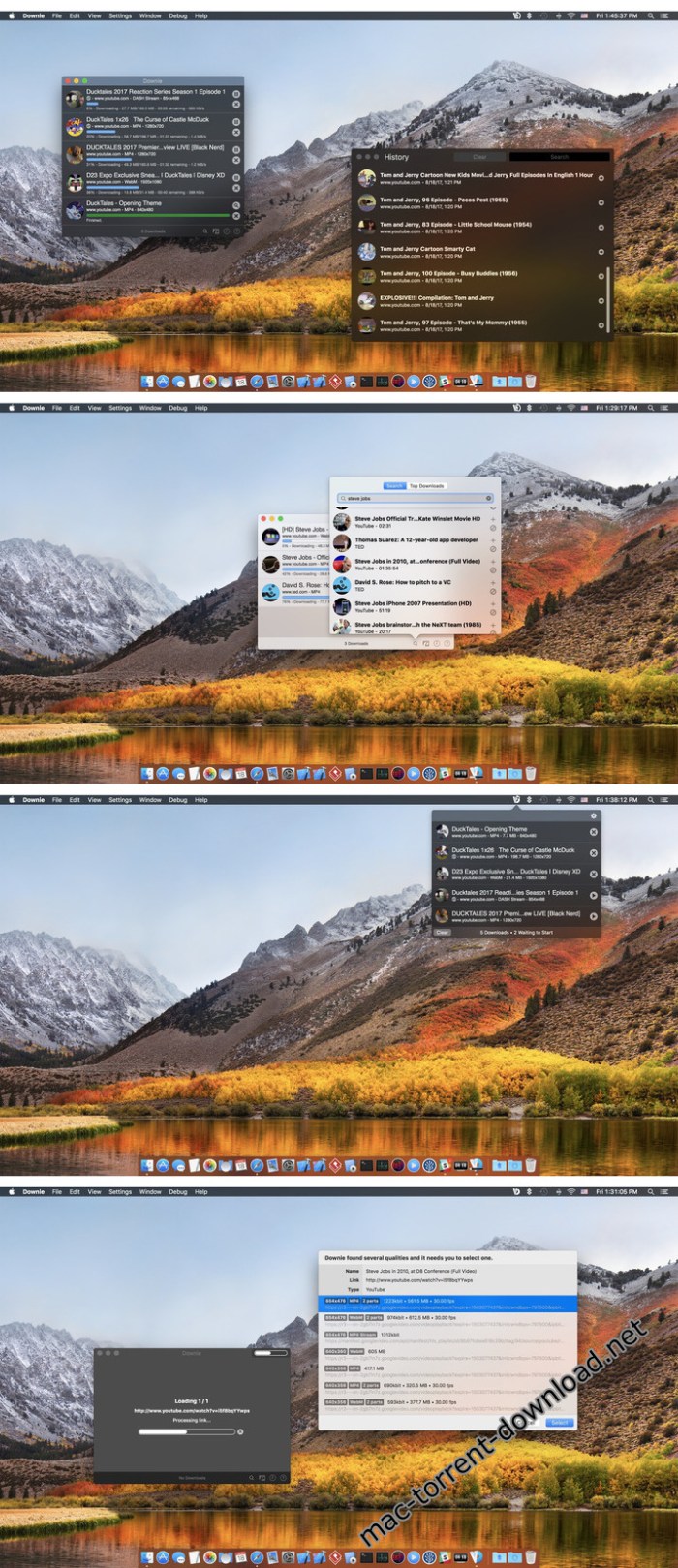
Working with Downie is extremely straightforward: simply drop the video URL on top of the app’s main window or on the Dock icon. Downie adds the video to your downloads list, so all you have to do next is start the process by pressing the appropriate button. Of course, you can also remove items from the list.

By default, Downie downloads MP4 files and places them in your default Downloads folder, but you can easily change this via the Preferences window. The same area allows you to setup notifications, or post processing actions (convert to MP4 if necessary, or extract audio only).

Effortlessly download videos from a wide collection of hosting websites

Downie provides support for more than 400 different websites that host video content, among which there are the most popular choices, such as YouTube, Apple, LiveLeak, Vimeo, BBC, and so on. If a certain website is not included, within the app you can send a request email to the Downie developers.

Moreover, Downie also provides matching extensions for various popular web browsers, such as Firefox, Safari, Google Chrome or Chromium. The add-ons are not installed by default: open the Preferences window and install only the ones you plan to use.

Straightforward solution for downloading video content hosted online

Downie is a great tool for saving videos posted on various websites to your Mac for offline playback. The application is extremely useful especially if you have a slow internet connection.

Compatibility: OS X 10.11 or later 64-bit

Web Site: https://software.charliemonroe.net/downie.php

What’s New in Downie 3.5.4

  • New: Support for the newly released Permute 3.
  • New: Support for 9news.com.au
  • Improved: ard.de, bilibili.com, dplay.com, npr.org, twitter.com.

Screenshots

mirror for philips tv 2.4

Name Mirror for Philips TV 2 4 TNT.zip
Size 15.25 MB
Created on 2018-12-10 06:37:07
Hash 77492d8f066d51483891578f43f6ca10cbf41510
Files Mirror for Philips TV 2 4 TNT.zip (15.25 MB)

Download

Mirror for Philips TV 2.4

Application to mirror the screen of your Mac to any Philips Smart TV. No wires and no additional hardware needed! You can also stream individual video files from your Mac to your TV. Also, we included the option to watch one window on your Mac, and another window on your TV!

This works on any Philips Smart TV from the 2012 models onward.

In using the app, there will be about a second of latency. So this mirroring is not suitable for gaming.

However, it is very suitable for watching movies, giving presentations, watching photos, and much more!

The quality of your experience will be dependent on the quality of your local network.

Some tips to enhance the experience:
  • Preferably, connect your TV by LAN cable to your router.
  • Use an “ac” router. If you don’t have one, then an “n” router.
  • Try not to overload your wifi network by moving big files around while you are mirroring.
How the app works:

First, make sure that your Samsung TV is on the same local network and same subnet as your Mac. The TV should not be in screen mirroring mode, but just on “TV” Mode or any HDMI IN port.

After launching the app, you will see the app icon appearing in the top bar of your Mac and the app will look for your TV on the network. It will show your TV when it has found it. Now, you have two options:

Mirror your Mac Screen:

Use this option to put the screen of your Mac on TV. In source, you can select which screen (or attached monitor) you want to display on TV. If you are running multiple applications on your Mac, you can also select which application window you want to see on TV.

Enable Sound: check this to hear the sound of your Mac coming from the TV. You will need the additional (free) audio driver, which you can download here: http://bit.ly/MirrorAudio

Play Video File:

Use this option if you have a video file on your Mac and you want to play just the file on TV. Drop it in the box and it will play on TV.

Settings (the icon in the bottom right of the app): click here to request support from our 24/7 support staff. They usually respond within 2 hours on any query that you might have. If your question is technical, please also include the diagnostics information.

Limitations: Apple has HDCP DRM protection for playing iTunes movies. This means that screen mirroring is not possible when watching movies from iTunes.

When you like the app, please don’t forget to give it a positive rating! Thanks in advance from the AirBeamTV development team!

Please give us feedback by mailing to info@airbeam.tv

Compatibility: OS X 10.10 or later 64-bit

Web Site: https://www.airbeam.tv/mirror-your-mac-screen/philips/
Mac App Store: https://itunes.apple.com/app/mirror-for-philips-tv/id1178030238?mt=12

What’s New in Mirror for Philips TV 2.4

– Updated Audio Driver
– Bugfixes and Stability Improvements

translate tab 2.0.3

Name Translate Tab 2 0 3 MAS TNT.zip
Size 9.67 MB
Created on 2018-12-09 18:14:57
Hash 4ab420e2efa246dd8191720ceb26f946f1be1466
Files Translate Tab 2 0 3 MAS TNT.zip (9.67 MB)

Download

Translate Tab 2.0.3

Translate Tab is an easy-to-use tool for quick translation. The idea behind Translate Tab is to have a tool handy when you need to do some basic translation. With Translate Tab, you will be able to translate words and phrases among more than 100 languages.

Key Features:

  • Translates into 104 languages
  • Detects source language automatically
  • Translates text instantly
  • Inputs text phonetically
  • Enables to read and listen to your translation
  • Translates entire web pages
  • Checks spelling
  • Sends to instant translation through shortcut
  • And more features are coming soon…

Supported Languages:

  • Afrikaans Albanian Armenian Azerbaijani
  • Arabic Basque Belarusian Bulgarian Catalan
  • Chinese (Simplified) Chinese (Traditional) Croatian Czech
  • Danish Dutch English Estonian Filipino Finnish French
  • Galician Georgian German Greek Haitian Creole
  • Hebrew Hindi Hungarian Icelandic Indonesian Italian Irish Japanese
  • Korean Latvian Lithuanian Macedonian Malay Maltese
  • Norwegian Persian Polish Portuguese Romanian Russian
  • Serbian Slovak Slovenian Spanish Swahili Swedish Thai
  • Turkish Ukrainian Urdu Vietnamese Welsh Yiddish
Notes:

You need an Internet connection to access the Translation Tab

Compatibility: OS X 10.10 or later 64-bit

More information: http://translate-tab.com/
Mac App Store: https://itunes.apple.com/app/translate-tab/id458887729?mt=12

What’s New in Translate Tab 2.0.3

  • Fixed an issue caused the application to crash
  • Application window no longer opens when on system startup
  • New layout
  • macOS Mojave ready
  • Dark mode

snipper app 1.3.2

Name Snipper App 1 3 2 TNT.zip
Size 14.04 MB
Created on 2018-12-09 17:49:26
Hash 04d45dcc36f8b7391addf63af9361656a4b4ba9f
Files Snipper App 1 3 2 TNT.zip (14.04 MB)

Download

Snipper App 1.3.2

Meet Snipper App- a native snippets manager, built with Swift4 for MacOS exclusively, aiming to be a single tool for saving your day to day working notes, snippets of code, and just a good helper in the developer’s life.

*** Main Features ***

  • editor with the syntax highlighting
  • multiple programming languages are supported
  • markdown support
  • different storage types
  • light and dark themes are included
  • import your snippets from files

*** Storages ***

Snipper designed in a way to support multiple storages, and the supported storage types will be extended in the next versions.

The v1 provides two storage types:
  • Local storage
  • iCloud storage

Local storage is designed to store your snippets only locally.

With the iCloud storage, your snippets will be stored in the cloud by your Apple ID, and it allows to sync the user’s data between multiple apps on the different computers. It’s really handy when you want to share your snippets between the working machine, and your own at the same time.

iCloud storage uses a private database. Only the user can access this data through a device authenticated with their iCloud account.

Snipper is designed and implemented as the offline first application, so the iCloud storage doesn’t require a constant internet connection when your work with it.

*** Editor ***

The editor is built in a way to fit developer needs.

Besides syntax highlighting and full markdown support with the preview mode, it provides the next features:

  • Showing of invisible characters
  • Showing of line numbers
  • Tab size customization
  • Insertion of spaces instead of tabs
  • Font customization

Compatibility: macOS 10.13 or later 64-bit

Web Site: https://snipper.app
Mac App Store: https://itunes.apple.com/app/snipper-app/id1432148596?mt=12

What’s New in Snipper App 1.3.2

* fix preferences window height
* reset filter when adding a new snippet

iskysoft pdf editor 6 pro edit ocr 6 7 11

Name PDF Editor 6 Pro 6 7 11 TNT.zip
Size 596.3 MB
Created on 2018-12-09 17:49:12
Hash a74ae9846e8da2543ae545a4648442e851ba0d4c
Files PDF Editor 6 Pro 6 7 11 TNT.zip (596.3 MB)

Download

iSkysoft PDF Editor 6 Pro (Edit & OCR) 6.7.11

iSkysoft PDF Editor 6 Pro is a self-explanatory macOS application that makes it easier for your to preview, edit, join, split and convert PDF documents using a Mac.

The iSkysoft PDF Editor 6 Pro also features a simple, clean and intuitive interface that provide instantaneous access to all the tools and features you might need to complete your daily tasks.

Powerful and user-friendly PDF editor for everyday use Moreover, with PDF Editor’s help, you can effortlessly edit PDF documents created using text files, web pages or scanned documents.

Consequently, you can add, remove or edit text, move and rearrange pages, insert or remove images and more.

iSkysoft PDF Editor’s top toolbar helps you hide, show and customize the sidebar in order to display the items and information you are interested in. In addition, you can browse through the loaded document, zoom in or out, print it or email it with just a couple of mouse clicks.

Advanced OCR capabilities make text editing a breeze

Furthermore, you can choose between the “Hand”, “Select” and “Edit” tool, use the advanced OCR feature and convert your source file into plain text or RTF document, ePUB, HTML, as well as file formats compatible with Microsoft Word, Excel, and PowerPoint.

The context menu also helps you switch between the “Move”, “Select” and “Touchup” tool, change the display mode and open the Inspector window to view detailed information about the loaded document.

As an added bonus, by accessing the Document menu, you have the option to add, update or remove an watermark, extract, insert and delete pages, split, merge or convert your document and crop or rotate a page with ease.

Full-featured tool designed to help you stamp, watermark, encrypt and decrypt PDF documents on a Mac
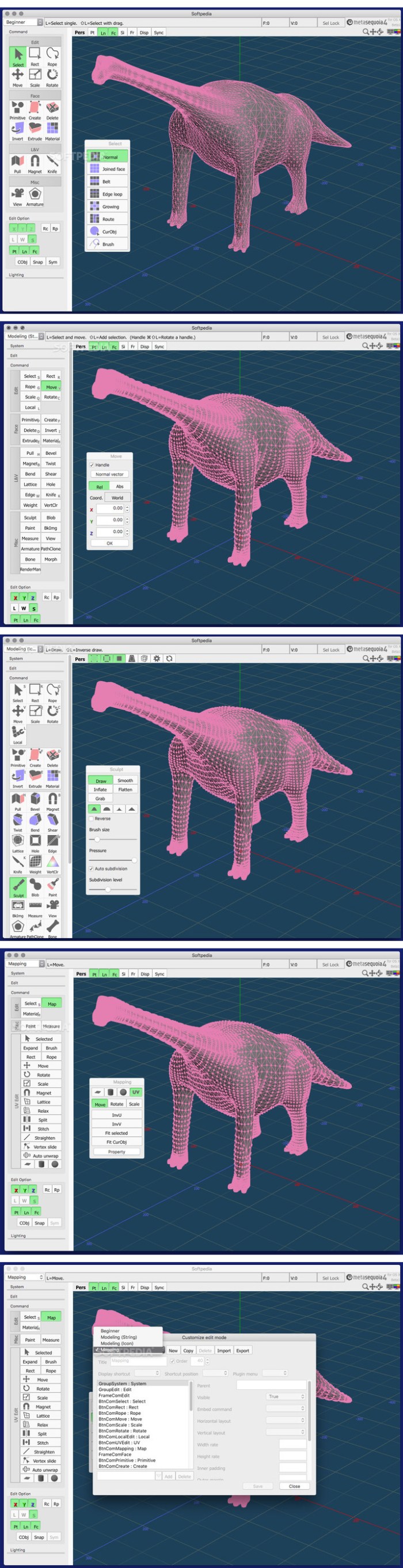
The complete list of all available editing tools, bookmark features, annotation tools and stamp options can be found under the Tools menu.

From here you can easily insert text boxes, add sticky notes, highlight, strike-through and underline text, insert various shapes and use the handy pencil or erase.

On the whole, iSkysoft PDF Editor comes with the right set of features to help you edit and annotate PDF documents using a Mac, as well as effortlessly add password protect and convert them other formats for easier sharing with your friends and colleagues.

Compatibility: OS X 10.10 or later 64-bit

Web Site: https://pdf.iskysoft.com/pdf-editor-6-pro-mac.html

What’s New in iSkysoft PDF Editor 6 Pro (Edit & OCR) 6.7.11

  • Release notes not available at the time of this post.

Screenshots

easy similar image finder 1.1.0

Name Easy Similar Image Finder Pro 1 1 TNT.zip
Size 9.79 MB
Created on 2018-12-09 17:48:23
Hash 8219b191cf7933fcfde9be530acc6383513b1651
Files Easy Similar Image Finder Pro 1 1 TNT.zip (9.79 MB)

Download

Easy Similar Image Finder 1.1.0

Easy Similar Images Finder searches duplicate and similar image in your Mac and external drives. With it, you can free up tons of disk space.

Easy to use.

1.No professional skills, no algorithmic knowledge, just set the similarity to complete the smart match.
2.Use the simple three steps to complete the matching search, drag the folder, set the similarity, and then start scan.
3.Using the results browser window, you can easily select, compare, and delete similar images.

Excellent performance

1.Within half an hour, you can analyze and match tens of thousands of pictures.
2.Use multi-core technology while scanning multiple folders to improve performance
3.Use recursive scanning without adding subfolders
4.By optimizing the image display method, you can quickly browse tens of thousands of photos

Compatibility: OS X 10.10 or later 64-bit

Web Site: http://www.imacbits.com/similar-images-finder
Mac App Store: https://itunes.apple.com/app/easy-similar-image-finder/id1295683946?mt=12

What’s New in Easy Similar Image Finder 1.1.0

1.Improve performance and compatibility
2.Fixed some bugs

pdf squeezer 3.9 2

Name PDF Squeezer 3 9 2 TNT.zip
Size 10.97 MB
Created on 2018-12-09 17:49:19
Hash 453fbd28475971489b75bd5e47ec5f3efe5dfe0b
Files PDF Squeezer 3 9 2 TNT.zip (10.97 MB)

Download

PDF Squeezer 3.9.2

PDF Squeezer is an easy-to-use PDF compression tool.

It reduces the size of large PDF documents by compressing images and removing irrelevant information. This will help you obtain important savings in bandwidth costs, digital storage costs and network transmission times.
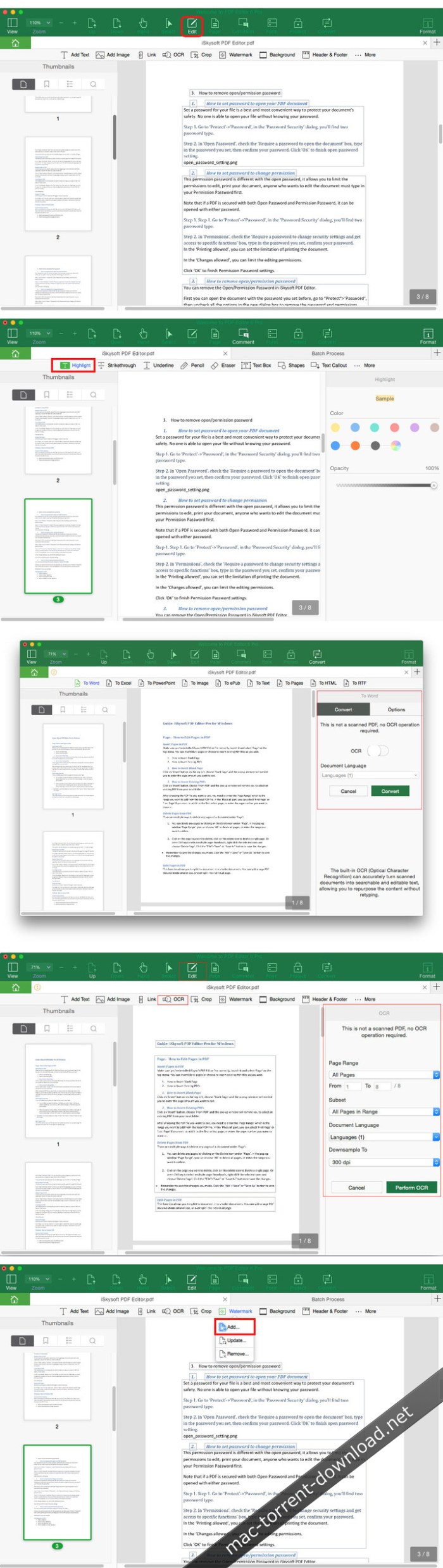

Features

  • Simply drag and drop your file into the application window
  • Choose from predefined compression filters or create your own
  • Compress all files in a folder and its subfolders
  • Batch compress multiple files
  • Finder, Safari and Preview ad-on available via the share menu
  • Support for password protected PDFs
  • Automatic compression and save with ‘One-Click-Compression’

Compatibility: OS X 10.10 or later 64-bit

Web Site: https://witt-software.com/pdfsqueezer/

What’s New in PDF Squeezer 3.9.2

  • Release notes not available at the time of this post.

iclip 5 2.6 beta 7

Name iClip 5 2 6b7 TNT.zip
Size 31.46 MB
Created on 2018-12-09 17:48:30
Hash 938ef5143a9e2f5ffe8048faff543e8d5e5051d4
Files iClip 5 2 6b7 TNT.zip (31.46 MB)

Download

iClip 5.2.6 beta 7

An easy to use macOS application that is able to store various types of clippings and provides quick access to them whenever you need them

The built-in macOS pasteboard proves to be extremely useful whenever you need to transfer content or files from a document or location to another.

iClip is a powerful app that pushes things further by creating a database with all your clippings, and even allows you to organize them by category: this way, you will have instant access to frequently used content with a minimal effort.

Unobtrusive pasteboard manager that automatically records all your clippings

By default, the iClip panel automatically toggles on mouse over, or it can be activated by clicking on the app’s status bar menu. However, via the iClip’ Preferences, you get to disable the autohide effect, to change the default panel position on your screen, or to define your own activation hotkey.

The same area includes further customization options, such as the possibility to change the interface theme, or the panel transparency level.

For your convenience, iClip also enables you to setup global hotkeys for frequently used functions: the app provides a wide list of possibilities, but since you get to define the keyboard combinations on your own, you can create rules for easy memorization.

Organize clippings into categories and streamline repetitive tasks

In the iClip Recorder area, you will be able to see the last 99 items that you have placed in your clipboard, but you can effortlessly send any entry to a specific clip set and make it available at all times.

Of course, iClip allows you to create as many new clip sets as you need (each group can store up to 99 entries) and you get to sort them by different criteria: this way, you can put together all the repetitive content used when performing certain tasks and stop wasting time finding the data.

User friendly clipboard management solution developed to improve your working experience

In a nutshell, iClip automatically records up to 99 pasteboard clippings and offers you the possibility to store frequently used content into different categories: once you add all the information to its database, you should be able to reduce the time spend dealing with repetitive tasks.

OS Version: OS X 10.7 or later

Web Site: http://www.irradiatedsoftware.com/

What’s New in iClip 5.2.6 beta 7

  • Release notes not available at the time of this post.

aimersoft music recorder 2.4 1

Name Music Recorder 2 4 1 TNT.zip
Size 11.92 MB
Created on 2018-12-09 17:48:56
Hash 0c73a2a17399f40b8e1e2e2889f87620a8f3c6a2
Files Music Recorder 2 4 1 TNT.zip (11.92 MB)

Download

Aimersoft Music Recorder 2.4.1

Just ONE click and you can enjoy online music anytime anywhere!

Why Choose Aimersoft Music Recorder?

Aimersoft Music Recorder can help you save any audio with absolutely 100% original quality form online radio stations, streaming media player as well as music video sharing sites. Besides, it can intelligently split tracks and filters out ads when recording. What’s more, it will auto-identify music metadata information for the recorded music. Your music enjoyment on Mac can become true with ease by this music recorder for Mac.

Key Features:

1. Record both online music and system audio stream
  • Supported online radio stations: Pandora, Spotify, Tunein, Yahoo music and much more.
  • Supported video sharing sites: Hulu, Vimeo, Myspace and much more.
2. Record 100% original music without any ads
  • Zero quality loss. It uses a virtual sound card to record any audio played through your computer’s sound card preserving 100% of the original audio quality.
  • Autosplit: Record music one after one .It will precisely split songs when silence exceeds the userdefined time
  • Autofilter: Remove ads and insignificant noise.
3. Automatically Identify Music ID3 Tags
  • It will intelligently tag artists, song titles, album covers, album names and genre information to each music files after recording.
  • All the recorded audio tracks can be renamed and added to personal playlists or iTunes Library.
4. Burn your favorite music to CD.
  • A buildin toolkit allows you to burn any recorded audio or local music to CD for audio playback.
5. Clean up the short tracks and duplicates.

Compatibility: OS X 10.6.6 or later

Web Site: http://www.aimersoft.com/
Mac App Store: https://itunes.apple.com/app/music-recorder-aimersoft/id636431306?mt=12

What’s New in Aimersoft Music Recorder 2.4.1

  • Release notes not available at the time of this post.

pic to gif 1.1.0

Name Pic to GIF 1 1 0 TNT.zip
Size 23.87 MB
Created on 2018-12-09 04:33:52
Hash 45dbe8db5688fedd2a4517a31ebd2d68254690bf
Files Pic to GIF 1 1 0 TNT.zip (23.87 MB)

Download

Pic to GIF 1.1.0

Pic to GIF is a simple tool for create incredible animated GIFs from images. It’s easy to customize
GIF size, sequence, frame rate, and add text. You can also edit existing GIFs.

INPUT FEATURES

Support almost all common images formats: JPEG, JPEG2000, BMP, PNG, TIFF, GIF, TGA etc.

EDIT FEATURES

  • Support text editor, easy to add text and customize its font, size, style, color, underline and so on
  • Support popular image effects like mono, instant, Noir, old film, etc.
  • Support image crop, resize, rotate, flip
  • Support customize image frame delay
  • Support reedit existing GIFs
  • Easily change the frame order by dragging

GIF OPTIONS

  • Support customize FPS
  • Support customize size
  • Support frame stretch type
  • Support palette encoder/RGB332 encoder

Compatibility: OS X 10.10 or later 64-bit

Web Site: http://www.imacbits.com/pic-to-gif
Mac App Store: https://itunes.apple.com/app/pic-to-gif/id947857208?mt=12

What’s New in Pic to GIF 1.1.0

1.Improve the generated GIF quality
2.Optimized interface for easier use
3.Fixed some bugs

iscreen recorder 3.6.0

Name iScreen Recorder 3 6 0 TNT.zip
Size 20.68 MB
Created on 2018-12-09 04:34:32
Hash 8ba85b0bc457ab00d96a91b98e605825429e6859
Files iScreen Recorder 3 6 0 TNT.zip (20.68 MB)

Download

iScreen Recorder 3.6.0

iScreen Recorder is an easy-to-use, efficient screen recording tool.Using it you can record the full screen, can record custom region. If you require high-quality video, then you only need a simple select recording quality.Enabled the recording equipment if you want to record narration. To increase the personalization of the video if you want by setting the text or picture watermark.

Key Feature:

  • Record the full screen, or any size video
  • Record highquality video if you request
  • Easy to record narration
  • Add a unique sign to the record video
  • Easy to start record with one click.
  • Using the most popular, the most efficient H264 video encoder and AAC audio encoder, as well as the most commonly used mp4 format
  • Create demonstration videos for any software
  • Create video tutorials for schools
  • Create videobased information products
  • Create videos for PPT
  • Create videos for image’s slideshow

Compatibility: OS X 10.10 or later 64-bit

Web Site: http://www.imacbits.com/iscreen-recorder
Mac App Store: https://itunes.apple.com/app/iscreen-recorder/id470812792?mt=12

What’s New in iScreen Recorder 3.6.0

1.Improve performance and compatibility
2.Fixed some bugs

easy audio mixer 1.2.0

Name Easy Audio Mixer 1 2 0 TNT.zip
Size 15.87 MB
Created on 2018-12-09 04:34:47
Hash 13d779a05fcb8c18fa8ef63d7d25ecc8a533d7f0
Files Easy Audio Mixer 1 2 0 TNT.zip (15.87 MB)

Download

Easy Audio Mixer 1.2.0

Easy audio mixer is a simple audio editor tool and is easy to use. You can use it to cut audio, mix audio, split audio from video file, and also merge multi audios into one.

Key feature:

1. Support almost all popular audio format, including but not limited to mp3, m4a, wav, wma etc.
2. Support almost all popular video format from which you can split audio, such as mp4, wmv, rmvb etc.
3. Easy to use. You can quickly and easily finish the task by only a few drag and drop operations. And you can preview the result in the real time.
4. Support audio cutting, merging, splitting and mixing.
5. Support audio volume adjusting, and fade in/fade out effect.
6. Support to output in mp3/m4a/wav format.
7. Powerful, efficient and easy to use.

Support Audio Format:

  • MPEG audio layer II and III(.mp2, mp3)
  • iTunes audio format with AAC encoding(.m4a)
  • Ogg vorbis audio format(.ogg)
  • Matroska audio format(.mka)
  • Windows media audio format(.wma)
  • Monkey’s audio format(.ape)
  • Free lossless audio codec format(.flac)
  • Waveform audio format(wav)
  • Apple core audio format(.caf)
  • Audio interchange file format(.aiff, .aif, .aifc)
  • Adaptive multirate audio format(.amr, .3ga)
  • Advanced audio coding format(.aac)
  • Advanced codec 3(.ac3)

Support Video Formats:
  • Advanced Streaming Format(.asf)
  • Audio video interleaved(.avi)
  • Windows Media Video(.wmv, .xmv)
  • MP4 video base on DivX encoder(.mp4)
  • MPEG4 Video file(.mp4, .mov, .m4v)
  • Matroska multimedia file(.mkv)
  • MPEG1, MPEG2 video file(.mpg, .mpeg)
  • Flash video(.flv, .f4v, .swf)
  • Third Generation Partnership Project video format(.3gp, .3g2)
  • HTML5 video file(.WebM)
  • Professional digital video media file(.dv, .mod, .tod)
  • Real media file(.rm, .rmvb)
  • High define resolution video file(.ts, .m2ts, .mts, .avc, .tp)

Note: NOT Support DRM protected audio file.

Compatibility: OS X 10.10 or later 64-bit

Web Site: http://www.imacbits.com/easy-audio-mixer
Mac App Store: https://itunes.apple.com/app/easy-audio-mixer/id1001108133?mt=12

What’s New in Easy Audio Mixer 1.2.0

1. Improve performance and compatibility
2.Fixed some bugs

filmwizard 2.5.0

Name Filmwizard 2 5 0 TNT.zip
Size 20.69 MB
Created on 2018-12-09 04:34:40
Hash a4da145f004485fc696f833bdd5ea651547667f6
Files Filmwizard 2 5 0 TNT.zip (20.69 MB)

Download

Filmwizard 2.5.0

Filmwizard is easy-to-use tools for make movies. It’s can record, edit and create high-quality movies and encode them as MPEG-4 files, or publish them directly to video sites such as Youtube, for your audience to enjoy.

Import, edit, share

With Filmwizard, you can easily import photos from Photos, music/video from iTunes, and record voice from microphone.
The easy-to-use editing interface lets you creatively edit your video, music and add additional photos, texts and annotations, with motions and transitions for a truly professional-looking movie. With built-in sharing feature, you can easily publish the movie to your web site, blog or directly to Youtube or Vimeo.

Making movies in Filmwizard

Import your own movie clips or record your story into built-in media library, which make the clips easily reuse, and then drop them right into the timeline. With Filmwizard’s essential editor features, you can easily join, split, detach audio and sync clips without overlaps, then add transition effects, annotations and texts and voices. Filmwizard helps you do what you want to, it doesn’t force you to become a professional editor just to get the job done. Everything you need is at you fingertips: split clip, cut blank, detach audio, fade sound, adds motion and transitions and record voice with microphone.

Making slide shows in Filmwizard

With built-in media library, drop the photos right into the timeline, and adjust each photo to display just the right length of time. Make great transition, create text overlays and annotations, and drop the music as background sound. Just like movies, you can export as MP4 video and share to friends.

Sharing to video website(In-App)

After export to MP4 video, you can share to friends with built-in sharing feature. You can share video to Youtube, Facebook, Vimeo, Flickr, Twitter, e-mail, message, airdrop and so on.

Support Import Format

  • Photo format: JPG, JPEG2000, PNG, BMP, TIFF, GIF
  • Audio format: AAC, AC3, AIFF, AMR, 3GA, APE, AU, DTS, EA, EAC3, FLAC, MP3, WMA, MKA, OGG, MP2, M4A, WAVE
  • Video format(InApp): ASF, AVI, AVS, AVR, DV, FILMSTRIP, FLV, MV, NUT, M4V, RM, MOV, MP4, RMVB, TS, MTS, MKV, WEBM, XMV, WMV, MPG, MPEG, M2TS, AVC, TP, 3GP, 3G2, F4V

Support Output Format

  • MP4 file with highquality AVC encoded
  • M4A file with highquality AAC encoded
  • MP3
  • WAVE

Compatibility: OS X 10.10 or later 64-bit

Web Site: http://www.imacbits.com/filmwizard
Mac App Store: https://itunes.apple.com/app/filmwizard/id1148380410?mt=12

What’s New in Filmwizard 2.5.0

  • Screen recorder is supported
  • 4K movie maker is supported
  • 4K movie with HEVC encoder
  • Optimize performance
  • Fixed some bugs

mp3 converter pro 2.7 1

Name MP3-Converter Pro 2 7 1 TNT.zip
Size 17.40 MB
Created on 2018-12-09 04:34:17
Hash e163634feac4a19585a2e653e438370d665ffa76
Files MP3-Converter Pro 2 7 1 TNT.zip (17.40 MB)

Download

MP3-Converter Pro 2.7.1

MP3 is the most popular CD music format?has always been known for its high-quality compression ratio. MP3-Converter Pro is a professional music converter software, it can convert all popular music formats to mp3 format. It also supports separate audio from video and convert to MP3

Key features:

1.Support audio formats:wma, aac, mp3,mp2, wav, ogg, ac3, flac, aiff, m4a, mka, ape.

2.Supported video formats: wmv, asf, xwmv, xwma, avi, mpeg, mpg,rm,rmvb,mp4,3gp,3g2,mov,qt,mts,mkv,ts, flv,f4v.

3.Support for constant bitrate encoding

4.Support for variable bitrate encoding

5.High conversion efficiency, conversion 8 minutes of music can be done in just 10 seconds

6.Easy to use, simply drag and drop will be able to complete the operation

7.Automatically convert metadata into id3tag

8.Support batch conversion

NOTE: Does NOT support DRM encrypted files.

Compatibility: OS X 10.10 or later 64-bit

Web Site: https://www.imacbits.com

What’s New in MP3-Converter Pro 2.7.1

  • Release notes not available at the time of this post.

mp3 audio recorder 2.7.0

Name MP3 Audio Recorder 2 7 0 TNT.zip
Size 16.13 MB
Created on 2018-12-09 04:34:25
Hash 9b01dc508078d5a869610afcc288452cf819cd91
Files MP3 Audio Recorder 2 7 0 TNT.zip (16.13 MB)

Download

MP3 Audio Recorder 2.7.0

Mp3 Audio Recorder is a simple audio recording software? it can record audio files into high-quality MP3 format by system built-in or external microphone.

Key feature

  • Recording audio
  • Pause/resume recording
  • The most popular MP3 encoding format
  • Support for constant bitrate encoding
  • Support for variable bitrate encoding

Compatibility: OS X 10.10 or later 64-bit

Web Site: https://www.imacbits.com

What’s New in MP3 Audio Recorder 2.7.0

  • Release notes not available at the time of this post.